The Overview of Web Search
Engines
Presented by Sunny Lam
Outline
Introduction
Information Retrieval
Searching Problems
Types of Search Engines
The Largest Search Engines
Architectures
User Interfaces
Web Directories
Ranking
Web Crawlers
Indices
Metasearchers
Add-on Tools
Future Work
Conclusion
Questions about the Web
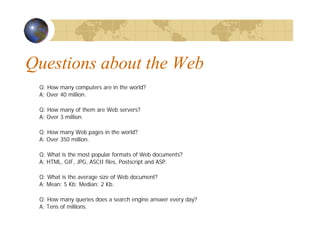
Q: How many computers are in the world?
A: Over 40 million.
Q: How many of them are Web servers?
A: Over 3 million.
Q: How many Web pages in the world?
A: Over 350 million.
Q: What is the most popular formats of Web documents?
A: HTML, GIF, JPG, ASCII files, Postscript and ASP.
Q: What is the average size of Web document?
A: Mean: 5 Kb; Median: 2 Kb.
Q: How many queries does a search engine answer every day?
A: Tens of millions.
Characteristics of the Web
Huge (1.75 terabytes of text)
Allow people to share information globally and freely
Hides the detail of communication protocols, machine
locations, and operating systems
Data are unstructured
Exponential growth
Increasingly commercial over time (1.5 % .com in
1993 to 60% .com in 1997)
Difficulties of Building a Search
Engine
Build by Companies and hide the technical detail
Distributed data
High percentage of volatile data
Large volume
Unstructured and redundant data
Quality of data
Heterogeneous data
Dynamic data
How to specify a query from the user
How to interpret the answer provided by the system
Information Retrieval
Search Engine is in the field of IR
Searching authors, titles and subjects in library card catalogs or
computers
Document classification and categorization, user interfaces, data
visualization, filtering
Should easily retrieve interested information
IR can be inaccurate as long as the error is insignificant
Data is usually natural language text, which is not always well
structured and could be semantically ambiguous
Goal: To retrieve all the documents which are relevant to a
query while retrieving as few non-relevant documents as
possible
User Problems
Do not exactly understand how to provide a
sequence of words for the search
Not aware of the input requirement of the search
engine.
Problems understanding Boolean logic, so the users
cannot use advanced search
Novice users do not know how to start using a search
engine
Do not care about advertisements ? No funding
Around 85% of users only look at the first page of
the result, so relevant answers might be skipped
Searching Guidelines
Specify the words clearly (+, -)
Use Advanced Search when necessary
Provide as many particular terms as possible
If looking for a company, institution, or organization, try:
www.name [.com | .edu | .org | .gov | country code]
Some searching engine specialize in some areas
If the user use broad queries, try to use Web directories as
starting points
The user should notice that anyone can publish data on the
Web, so information that they get from search engines might
not be accurate.
Types of Search Engines
Search by Keywords (e.g. AltaVista,
Excite, Google, and Northern Light)
Search by categories (e.g. Yahoo!)
Specialize in other languages (e.g.
Chinese Yahoo! and Yahoo! Japan)
Interview simulation (e.g. Ask Jeeves!)
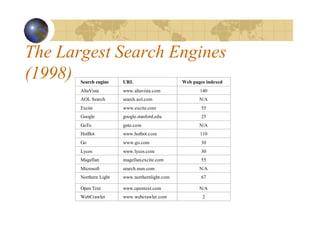
The Largest Search Engines
(1998) Search engine URL Web pages indexed
AltaVista www.altavista.com 140
AOL Search search.aol.com N/A
Excite www.excite.com 55
Google google.stanford.edu 25
GoTo goto.com N/A
HotBot www.hotbot.com 110
Go www.go.com 30
Lycos www.lycos.com 30
Magellan magellan.excite.com 55
Microsoft search.msn.com N/A
Northern Light www.northernlight.com 67
Open Text www.opentext.com N/A
WebCrawler www.webcrawler.com 2
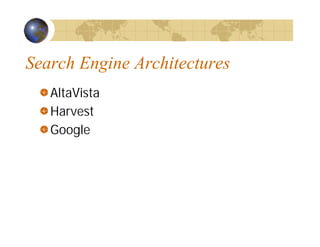
Search Engine Architectures
AltaVista
Harvest
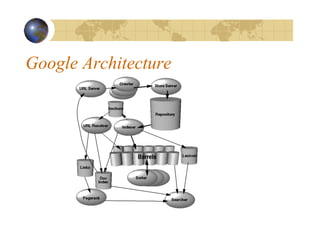
Google
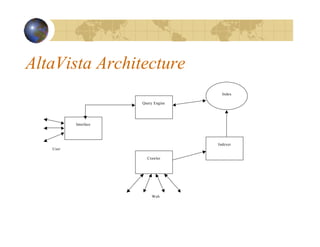
AltaVista Architecture
User
Interface
Query Engine
Crawler
Indexer
Index
Web
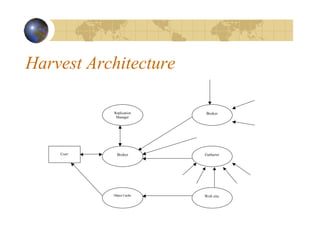
Harvest Architecture
User
Replication
Manager
Broker
Object Cache Web site
Gatherer
Broker
Google Architecture
User Interfaces
Query Interface
A box is entered a sequence of words (AltaVista uses union,
HotBot uses intersection)
Complex query interfaces (e.g. Boolean logic, phrase search,
title search, URL search, date range search, data type search)
Answer Interface
Relevant pages appear on the top of the list
Each entry in the list includes a title of the page, an URL, a brief
summary, a size , a date and a written language
Web Directories
Also called: catalogs, yellow pages, subject
directories
Hierarchical taxonomies that classify human
knowledge
First level of taxonomies range from 12 to 26
Popularities: Yahoo!, eBLAST, LookSmart, Magellan,
and Nacho.
Most allow keyword searches
Category services: AltaVista Categories, AOL Netfind,
Excite Channels, HotBot, Infoseek, Lycos Subjects,
and WebCrawler Select.
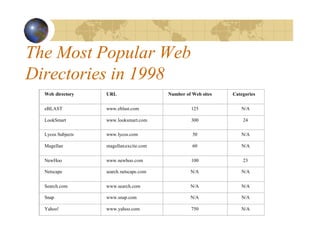
The Most Popular Web
Directories in 1998
Web directory URL Number of Web sites Categories
eBLAST www.eblast.com 125 N/A
LookSmart www.looksmart.com 300 24
Lycos Subjects www.lycos.com 50 N/A
Magellan magellan.excite.com 60 N/A
NewHoo www.newhoo.com 100 23
Netscape search.netscape.com N/A N/A
Search.com www.search.com N/A N/A
Snap www.snap.com N/A N/A
Yahoo! www.yahoo.com 750 N/A
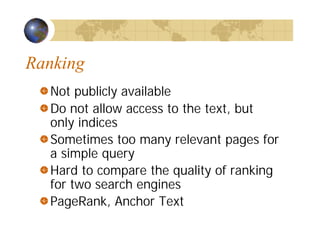
Ranking
Not publicly available
Do not allow access to the text, but
only indices
Sometimes too many relevant pages for
a simple query
Hard to compare the quality of ranking
for two search engines
PageRank, Anchor Text
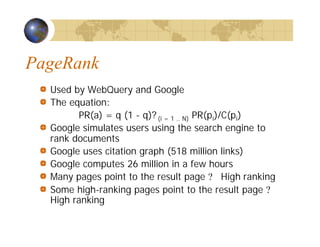
PageRank
Used by WebQuery and Google
The equation:
PR(a) = q (1 - q)? (i = 1 .. N) PR(pi)/C(pi)
Google simulates users using the search engine to
rank documents
Google uses citation graph (518 million links)
Google computes 26 million in a few hours
Many pages point to the result page ? High ranking
Some high-ranking pages point to the result page ?
High ranking
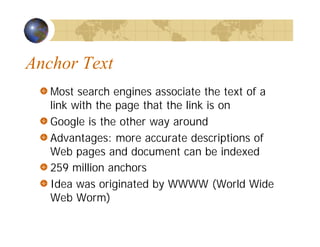
Anchor Text
Most search engines associate the text of a
link with the page that the link is on
Google is the other way around
Advantages: more accurate descriptions of
Web pages and document can be indexed
259 million anchors
Idea was originated by WWWW (World Wide
Web Worm)
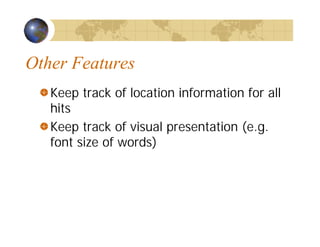
Other Features
Keep track of location information for all
hits
Keep track of visual presentation (e.g.
font size of words)
Web Crawlers
Software agents that traverse the Web sending new or updated
pages to a main server where they are indexed
Also called robots, spiders, worms, wanders, walkers, and
knowbots
The 1st crawler, Wanderer was developed in 1993
Not been publicly described
Runs on local machine and send requests to remote Web
servers
Most fragile application
Breath-first and depth-first manner
Avoid crawling same pages
Web pages change dynamically
Invalid links: 2% to 9%
Fastest crawlers are able to traverse up to 10 million pages per day
Google Crawler
Fast distributed crawling system
How does it work?
Peak speed: > 100 pages/sec or 600k per sec for 4
crawlers
Use DNS cache to avoid DNS look up
Each connection possible states:
Looking up DNS
Connecting to host
Sending request
Receiving response
Crawling problems
Internet Archive
Uses multiple machines
A crawler is a single thread
Each crawler assigns to 64 sites
No site is assigned to more than one crawler
Each crawler reads a list of URLs into per-site queues
Each crawler uses asynchronous I/O to fetch pages
from these queues in parallel
Each crawler extracts the links inside the downloaded
page
The crawler assigns links to appropriate site queues
Mercator
Named after the Flemish cartographer
Mercator
Developed by Compaq
Written in Java
Scalable: can scale up to the entire Web (has
fetched tens of millions of Web documents)
Extensible: designed in a modular way, can
add new function by 3rd parties
Indices
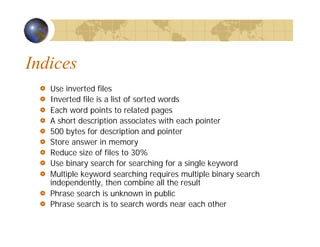
Use inverted files
Inverted file is a list of sorted words
Each word points to related pages
A short description associates with each pointer
500 bytes for description and pointer
Store answer in memory
Reduce size of files to 30%
Use binary search for searching for a single keyword
Multiple keyword searching requires multiple binary search
independently, then combine all the result
Phrase search is unknown in public
Phrase search is to search words near each other
Metasearchers
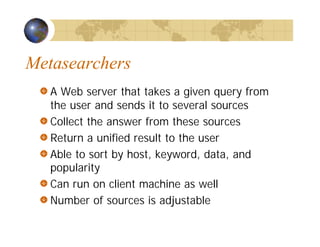
A Web server that takes a given query from
the user and sends it to several sources
Collect the answer from these sources
Return a unified result to the user
Able to sort by host, keyword, data, and
popularity
Can run on client machine as well
Number of sources is adjustable
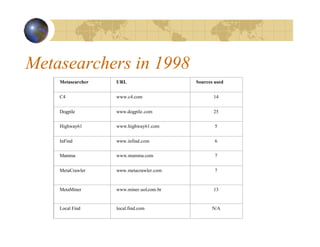
Metasearchers in 1998
Metasearcher URL Sources used
C4 www.c4.com 14
Dogpile www.dogpile.com 25
Highway61 www.highway61.com 5
InFind www.infind.com 6
Mamma www.mamma.com 7
MetaCrawler www.metacrawler.com 7
MetaMiner www.miner.uol.com.br 13
Local Find local.find.com N/A
Inquirus
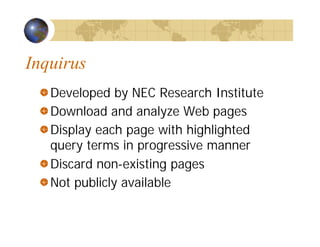
Developed by NEC Research Institute
Download and analyze Web pages
Display each page with highlighted
query terms in progressive manner
Discard non-existing pages
Not publicly available
Savvy Search
Available in 1997, but not now
Goal #1: maximize the likelihood of returning
good links
Goal #2: minimize computational and Web
resource consumption
Determines which search engines to contact
and in what order
Ranks search engines based on query terms
and search engines performance
STARTS
Stanford Protocol Proposal for Internet
Retrieval and Search
Supported by 11 companies
Facilitates the task of querying multiple
document sources
1. Choose the best sources to evaluate a query
2. Submit the query at these sources
3. Merge the query results from these sources
STARTS Protocol
The Query-Language Problems
The Rank-Merging Problem
The Source-Metadata Problem
Add-on Tools: Alexa
Free: www.alexa.com
Appear as a toolbar in IE 5x
Provide useful information about the sites
Allow users to browse related sites
Perform searches within the Web site, related site or the whole
Web
Shop online
Provide popularity
Provide speed of access
Provide freshness
Provide overall quality from Alexa users
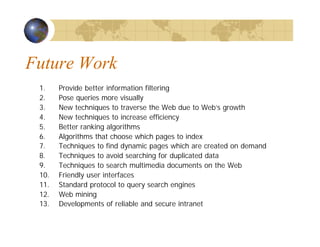
Future Work
1. Provide better information filtering
2. Pose queries more visually
3. New techniques to traverse the Web due to Web’s growth
4. New techniques to increase efficiency
5. Better ranking algorithms
6. Algorithms that choose which pages to index
7. Techniques to find dynamic pages which are created on demand
8. Techniques to avoid searching for duplicated data
9. Techniques to search multimedia documents on the Web
10. Friendly user interfaces
11. Standard protocol to query search engines
12. Web mining
13. Developments of reliable and secure intranet
Conclusion

sunny-slides

  • 1.
    The Overview ofWeb Search Engines Presented by Sunny Lam
  • 2.
    Outline Introduction Information Retrieval Searching Problems Typesof Search Engines The Largest Search Engines Architectures User Interfaces Web Directories Ranking Web Crawlers Indices Metasearchers Add-on Tools Future Work Conclusion
  • 3.
    Questions about theWeb Q: How many computers are in the world? A: Over 40 million. Q: How many of them are Web servers? A: Over 3 million. Q: How many Web pages in the world? A: Over 350 million. Q: What is the most popular formats of Web documents? A: HTML, GIF, JPG, ASCII files, Postscript and ASP. Q: What is the average size of Web document? A: Mean: 5 Kb; Median: 2 Kb. Q: How many queries does a search engine answer every day? A: Tens of millions.
  • 4.
    Characteristics of theWeb Huge (1.75 terabytes of text) Allow people to share information globally and freely Hides the detail of communication protocols, machine locations, and operating systems Data are unstructured Exponential growth Increasingly commercial over time (1.5 % .com in 1993 to 60% .com in 1997)
  • 5.
    Difficulties of Buildinga Search Engine Build by Companies and hide the technical detail Distributed data High percentage of volatile data Large volume Unstructured and redundant data Quality of data Heterogeneous data Dynamic data How to specify a query from the user How to interpret the answer provided by the system
  • 6.
    Information Retrieval Search Engineis in the field of IR Searching authors, titles and subjects in library card catalogs or computers Document classification and categorization, user interfaces, data visualization, filtering Should easily retrieve interested information IR can be inaccurate as long as the error is insignificant Data is usually natural language text, which is not always well structured and could be semantically ambiguous Goal: To retrieve all the documents which are relevant to a query while retrieving as few non-relevant documents as possible
  • 7.
    User Problems Do notexactly understand how to provide a sequence of words for the search Not aware of the input requirement of the search engine. Problems understanding Boolean logic, so the users cannot use advanced search Novice users do not know how to start using a search engine Do not care about advertisements ? No funding Around 85% of users only look at the first page of the result, so relevant answers might be skipped
  • 8.
    Searching Guidelines Specify thewords clearly (+, -) Use Advanced Search when necessary Provide as many particular terms as possible If looking for a company, institution, or organization, try: www.name [.com | .edu | .org | .gov | country code] Some searching engine specialize in some areas If the user use broad queries, try to use Web directories as starting points The user should notice that anyone can publish data on the Web, so information that they get from search engines might not be accurate.
  • 9.
    Types of SearchEngines Search by Keywords (e.g. AltaVista, Excite, Google, and Northern Light) Search by categories (e.g. Yahoo!) Specialize in other languages (e.g. Chinese Yahoo! and Yahoo! Japan) Interview simulation (e.g. Ask Jeeves!)
  • 10.
    The Largest SearchEngines (1998) Search engine URL Web pages indexed AltaVista www.altavista.com 140 AOL Search search.aol.com N/A Excite www.excite.com 55 Google google.stanford.edu 25 GoTo goto.com N/A HotBot www.hotbot.com 110 Go www.go.com 30 Lycos www.lycos.com 30 Magellan magellan.excite.com 55 Microsoft search.msn.com N/A Northern Light www.northernlight.com 67 Open Text www.opentext.com N/A WebCrawler www.webcrawler.com 2
  • 11.
  • 12.
  • 13.
  • 14.
  • 15.
    User Interfaces Query Interface Abox is entered a sequence of words (AltaVista uses union, HotBot uses intersection) Complex query interfaces (e.g. Boolean logic, phrase search, title search, URL search, date range search, data type search) Answer Interface Relevant pages appear on the top of the list Each entry in the list includes a title of the page, an URL, a brief summary, a size , a date and a written language
  • 16.
    Web Directories Also called:catalogs, yellow pages, subject directories Hierarchical taxonomies that classify human knowledge First level of taxonomies range from 12 to 26 Popularities: Yahoo!, eBLAST, LookSmart, Magellan, and Nacho. Most allow keyword searches Category services: AltaVista Categories, AOL Netfind, Excite Channels, HotBot, Infoseek, Lycos Subjects, and WebCrawler Select.
  • 17.
    The Most PopularWeb Directories in 1998 Web directory URL Number of Web sites Categories eBLAST www.eblast.com 125 N/A LookSmart www.looksmart.com 300 24 Lycos Subjects www.lycos.com 50 N/A Magellan magellan.excite.com 60 N/A NewHoo www.newhoo.com 100 23 Netscape search.netscape.com N/A N/A Search.com www.search.com N/A N/A Snap www.snap.com N/A N/A Yahoo! www.yahoo.com 750 N/A
  • 18.
    Ranking Not publicly available Donot allow access to the text, but only indices Sometimes too many relevant pages for a simple query Hard to compare the quality of ranking for two search engines PageRank, Anchor Text
  • 19.
    PageRank Used by WebQueryand Google The equation: PR(a) = q (1 - q)? (i = 1 .. N) PR(pi)/C(pi) Google simulates users using the search engine to rank documents Google uses citation graph (518 million links) Google computes 26 million in a few hours Many pages point to the result page ? High ranking Some high-ranking pages point to the result page ? High ranking
  • 20.
    Anchor Text Most searchengines associate the text of a link with the page that the link is on Google is the other way around Advantages: more accurate descriptions of Web pages and document can be indexed 259 million anchors Idea was originated by WWWW (World Wide Web Worm)
  • 21.
    Other Features Keep trackof location information for all hits Keep track of visual presentation (e.g. font size of words)
  • 22.
    Web Crawlers Software agentsthat traverse the Web sending new or updated pages to a main server where they are indexed Also called robots, spiders, worms, wanders, walkers, and knowbots The 1st crawler, Wanderer was developed in 1993 Not been publicly described Runs on local machine and send requests to remote Web servers Most fragile application Breath-first and depth-first manner Avoid crawling same pages Web pages change dynamically Invalid links: 2% to 9% Fastest crawlers are able to traverse up to 10 million pages per day
  • 23.
    Google Crawler Fast distributedcrawling system How does it work? Peak speed: > 100 pages/sec or 600k per sec for 4 crawlers Use DNS cache to avoid DNS look up Each connection possible states: Looking up DNS Connecting to host Sending request Receiving response Crawling problems
  • 24.
    Internet Archive Uses multiplemachines A crawler is a single thread Each crawler assigns to 64 sites No site is assigned to more than one crawler Each crawler reads a list of URLs into per-site queues Each crawler uses asynchronous I/O to fetch pages from these queues in parallel Each crawler extracts the links inside the downloaded page The crawler assigns links to appropriate site queues
  • 25.
    Mercator Named after theFlemish cartographer Mercator Developed by Compaq Written in Java Scalable: can scale up to the entire Web (has fetched tens of millions of Web documents) Extensible: designed in a modular way, can add new function by 3rd parties
  • 26.
    Indices Use inverted files Invertedfile is a list of sorted words Each word points to related pages A short description associates with each pointer 500 bytes for description and pointer Store answer in memory Reduce size of files to 30% Use binary search for searching for a single keyword Multiple keyword searching requires multiple binary search independently, then combine all the result Phrase search is unknown in public Phrase search is to search words near each other
  • 27.
    Metasearchers A Web serverthat takes a given query from the user and sends it to several sources Collect the answer from these sources Return a unified result to the user Able to sort by host, keyword, data, and popularity Can run on client machine as well Number of sources is adjustable
  • 28.
    Metasearchers in 1998 MetasearcherURL Sources used C4 www.c4.com 14 Dogpile www.dogpile.com 25 Highway61 www.highway61.com 5 InFind www.infind.com 6 Mamma www.mamma.com 7 MetaCrawler www.metacrawler.com 7 MetaMiner www.miner.uol.com.br 13 Local Find local.find.com N/A
  • 29.
    Inquirus Developed by NECResearch Institute Download and analyze Web pages Display each page with highlighted query terms in progressive manner Discard non-existing pages Not publicly available
  • 30.
    Savvy Search Available in1997, but not now Goal #1: maximize the likelihood of returning good links Goal #2: minimize computational and Web resource consumption Determines which search engines to contact and in what order Ranks search engines based on query terms and search engines performance
  • 31.
    STARTS Stanford Protocol Proposalfor Internet Retrieval and Search Supported by 11 companies Facilitates the task of querying multiple document sources 1. Choose the best sources to evaluate a query 2. Submit the query at these sources 3. Merge the query results from these sources
  • 32.
    STARTS Protocol The Query-LanguageProblems The Rank-Merging Problem The Source-Metadata Problem
  • 33.
    Add-on Tools: Alexa Free:www.alexa.com Appear as a toolbar in IE 5x Provide useful information about the sites Allow users to browse related sites Perform searches within the Web site, related site or the whole Web Shop online Provide popularity Provide speed of access Provide freshness Provide overall quality from Alexa users
  • 34.
    Future Work 1. Providebetter information filtering 2. Pose queries more visually 3. New techniques to traverse the Web due to Web’s growth 4. New techniques to increase efficiency 5. Better ranking algorithms 6. Algorithms that choose which pages to index 7. Techniques to find dynamic pages which are created on demand 8. Techniques to avoid searching for duplicated data 9. Techniques to search multimedia documents on the Web 10. Friendly user interfaces 11. Standard protocol to query search engines 12. Web mining 13. Developments of reliable and secure intranet
  • 35.