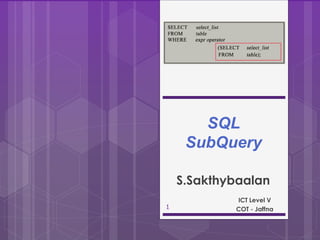
SQL
SubQuery
1
ICT Level V
COT - Jaffna
S.Sakthybaalan
2
What Is a Subquery?
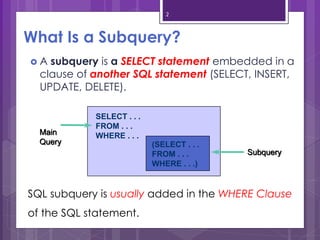
 A subquery is a SELECT statement embedded in a
clause of another SQL statement (SELECT, INSERT,
UPDATE, DELETE).
SELECT . . .
FROM . . .
WHERE . . .
(SELECT . . .
FROM . . .
WHERE . . .)
Main
Query
Subquery
SQL subquery is usually added in the WHERE Clause
of the SQL statement.
3
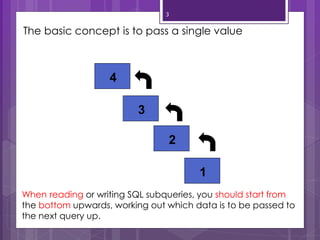
The basic concept is to pass a single value
4
3
2
1
When reading or writing SQL subqueries, you should start from
the bottom upwards, working out which data is to be passed to
the next query up.
4
SQL Subquery
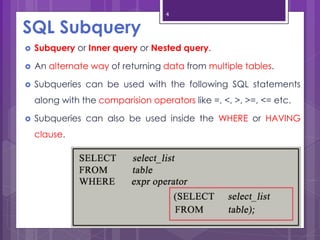
 Subquery or Inner query or Nested query.
 An alternate way of returning data from multiple tables.
 Subqueries can be used with the following SQL statements
along with the comparision operators like =, <, >, >=, <= etc.
 Subqueries can also be used inside the WHERE or HAVING
clause.
5
Sub-query Syntax
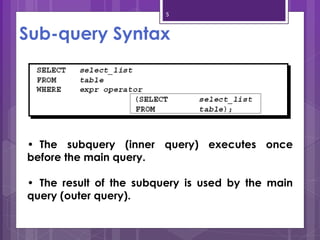
• The subquery (inner query) executes once
before the main query.
• The result of the subquery is used by the main
query (outer query).
6
Using a Subquery to Solve a
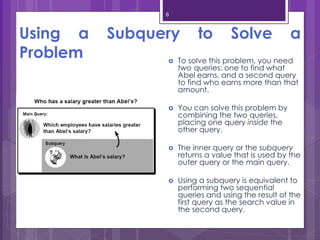
Problem  To solve this problem, you need
two queries: one to find what
Abel earns, and a second query
to find who earns more than that
amount.
 You can solve this problem by
combining the two queries,
placing one query inside the
other query.
 The inner query or the subquery
returns a value that is used by the
outer query or the main query.
 Using a subquery is equivalent to
performing two sequential
queries and using the result of the
first query as the search value in
the second query.
7
Example :
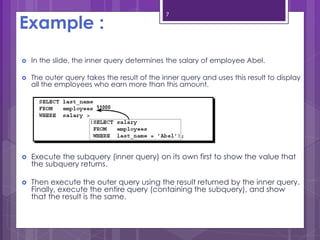
 In the slide, the inner query determines the salary of employee Abel.
 The outer query takes the result of the inner query and uses this result to display
all the employees who earn more than this amount.
 Execute the subquery (inner query) on its own first to show the value that
the subquery returns.
 Then execute the outer query using the result returned by the inner query.
Finally, execute the entire query (containing the subquery), and show
that the result is the same.
8
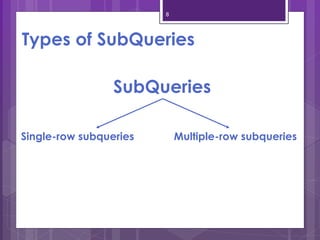
Types of SubQueries
SubQueries
Single-row subqueries Multiple-row subqueries
9
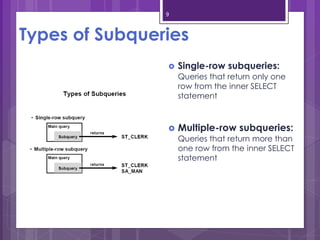
Types of Subqueries
 Single-row subqueries:
Queries that return only one
row from the inner SELECT
statement
 Multiple-row subqueries:
Queries that return more than
one row from the inner SELECT
statement
10
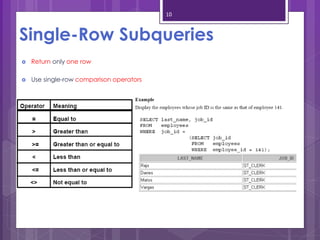
Single-Row Subqueries
 Return only one row
 Use single-row comparison operators
11
Executing Single-Row Subqueries
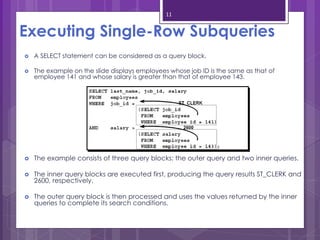
 A SELECT statement can be considered as a query block.
 The example on the slide displays employees whose job ID is the same as that of
employee 141 and whose salary is greater than that of employee 143.
 The example consists of three query blocks: the outer query and two inner queries.
 The inner query blocks are executed first, producing the query results ST_CLERK and
2600, respectively.
 The outer query block is then processed and uses the values returned by the inner
queries to complete its search conditions.
12
Problems with Subqueries
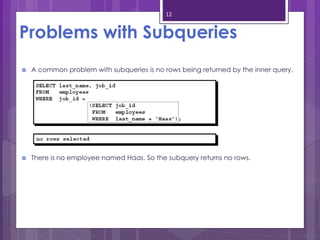
 A common problem with subqueries is no rows being returned by the inner query.
 There is no employee named Haas. So the subquery returns no rows.
13
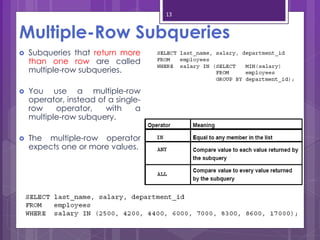
Multiple-Row Subqueries
 Subqueries that return more
than one row are called
multiple-row subqueries.
 You use a multiple-row
operator, instead of a single-
row operator, with a
multiple-row subquery.
 The multiple-row operator
expects one or more values.
14
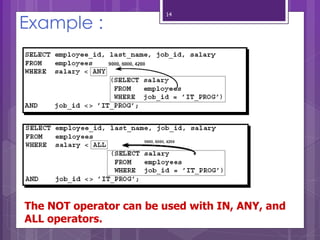
Example :
The NOT operator can be used with IN, ANY, and
ALL operators.
15
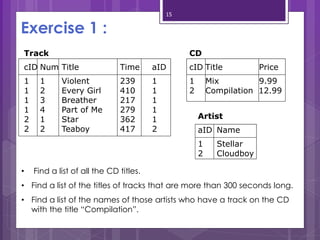
Exercise 1 :
Track
cID Num Title Time aID
1 1 Violent 239 1
1 2 Every Girl 410 1
1 3 Breather 217 1
1 4 Part of Me 279 1
2 1 Star 362 1
2 2 Teaboy 417 2
CD
cID Title Price
1 Mix 9.99
2 Compilation 12.99
Artist
aID Name
1 Stellar
2 Cloudboy
• Find a list of all the CD titles.
• Find a list of the titles of tracks that are more than 300 seconds long.
• Find a list of the names of those artists who have a track on the CD
with the title “Compilation”.
16
LOCATION
Location_ID Regional_Group
122 NEW YORK
123 DALLAS
124 CHICAGO
167 BOSTON
DEPARTMENT
Department_ID Name Location_ID
10 ACCOUNTING 122
20 RESEARCH 124
30 SALES 123
40 OPERATIONS 167
JOB
Job_ID Function
667 CLERK
668 STAFF
669 ANALYST
670 SALESPERSON
671 MANAGER
672 PRESIDENT
EMPLOYEE
EMPLOYEE
_ID
LAST_NAME FIRST_NAME
MIDDLE_
NAME
JOB_ID
MANAGER
_ID
HIREDATE SALARY COMM
DEPARTME
NT_ID
7369 SMITH JOHN Q 667 7902 17-DEC-84 800 NULL 20
7499 ALLEN KEVIN J 670 7698 20-FEB-85 1600 300 30
7505 DOYLE JEAN K 671 7839 04-APR-85 2850 NULL 30
7506 DENNIS LYNN S 671 7839 15-MAY-85 2750 NULL 30
7507 BAKER LESLIE D 671 7839 10-JUN-85 2200 NULL 40
7521 WARK CYNTHIA D 670 7698 22-FEB-85 1250 500 30
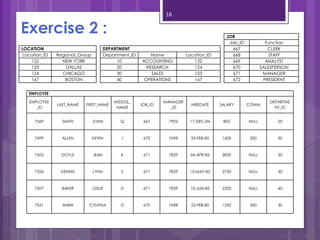
Exercise 2 :
17
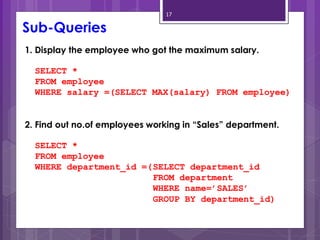
1. Display the employee who got the maximum salary.
SELECT *
FROM employee
WHERE salary =(SELECT MAX(salary) FROM employee)
2. Find out no.of employees working in “Sales” department.
SELECT *
FROM employee
WHERE department_id =(SELECT department_id
FROM department
WHERE name=’SALES’
GROUP BY department_id)
Sub-Queries
18
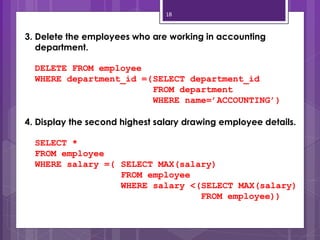
3. Delete the employees who are working in accounting
department.
DELETE FROM employee
WHERE department_id =(SELECT department_id
FROM department
WHERE name=’ACCOUNTING’)
4. Display the second highest salary drawing employee details.
SELECT *
FROM employee
WHERE salary =( SELECT MAX(salary)
FROM employee
WHERE salary <(SELECT MAX(salary)
FROM employee))
19
Any Questions ?
20

Sub query_SQL

  • 1.
    SQL SubQuery 1 ICT Level V COT- Jaffna S.Sakthybaalan
  • 2.
    2 What Is aSubquery?  A subquery is a SELECT statement embedded in a clause of another SQL statement (SELECT, INSERT, UPDATE, DELETE). SELECT . . . FROM . . . WHERE . . . (SELECT . . . FROM . . . WHERE . . .) Main Query Subquery SQL subquery is usually added in the WHERE Clause of the SQL statement.
  • 3.
    3 The basic conceptis to pass a single value 4 3 2 1 When reading or writing SQL subqueries, you should start from the bottom upwards, working out which data is to be passed to the next query up.
  • 4.
    4 SQL Subquery  Subqueryor Inner query or Nested query.  An alternate way of returning data from multiple tables.  Subqueries can be used with the following SQL statements along with the comparision operators like =, <, >, >=, <= etc.  Subqueries can also be used inside the WHERE or HAVING clause.
  • 5.
    5 Sub-query Syntax • Thesubquery (inner query) executes once before the main query. • The result of the subquery is used by the main query (outer query).
  • 6.
    6 Using a Subqueryto Solve a Problem  To solve this problem, you need two queries: one to find what Abel earns, and a second query to find who earns more than that amount.  You can solve this problem by combining the two queries, placing one query inside the other query.  The inner query or the subquery returns a value that is used by the outer query or the main query.  Using a subquery is equivalent to performing two sequential queries and using the result of the first query as the search value in the second query.
  • 7.
    7 Example :  Inthe slide, the inner query determines the salary of employee Abel.  The outer query takes the result of the inner query and uses this result to display all the employees who earn more than this amount.  Execute the subquery (inner query) on its own first to show the value that the subquery returns.  Then execute the outer query using the result returned by the inner query. Finally, execute the entire query (containing the subquery), and show that the result is the same.
  • 8.
    8 Types of SubQueries SubQueries Single-rowsubqueries Multiple-row subqueries
  • 9.
    9 Types of Subqueries Single-row subqueries: Queries that return only one row from the inner SELECT statement  Multiple-row subqueries: Queries that return more than one row from the inner SELECT statement
  • 10.
    10 Single-Row Subqueries  Returnonly one row  Use single-row comparison operators
  • 11.
    11 Executing Single-Row Subqueries A SELECT statement can be considered as a query block.  The example on the slide displays employees whose job ID is the same as that of employee 141 and whose salary is greater than that of employee 143.  The example consists of three query blocks: the outer query and two inner queries.  The inner query blocks are executed first, producing the query results ST_CLERK and 2600, respectively.  The outer query block is then processed and uses the values returned by the inner queries to complete its search conditions.
  • 12.
    12 Problems with Subqueries A common problem with subqueries is no rows being returned by the inner query.  There is no employee named Haas. So the subquery returns no rows.
  • 13.
    13 Multiple-Row Subqueries  Subqueriesthat return more than one row are called multiple-row subqueries.  You use a multiple-row operator, instead of a single- row operator, with a multiple-row subquery.  The multiple-row operator expects one or more values.
  • 14.
    14 Example : The NOToperator can be used with IN, ANY, and ALL operators.
  • 15.
    15 Exercise 1 : Track cIDNum Title Time aID 1 1 Violent 239 1 1 2 Every Girl 410 1 1 3 Breather 217 1 1 4 Part of Me 279 1 2 1 Star 362 1 2 2 Teaboy 417 2 CD cID Title Price 1 Mix 9.99 2 Compilation 12.99 Artist aID Name 1 Stellar 2 Cloudboy • Find a list of all the CD titles. • Find a list of the titles of tracks that are more than 300 seconds long. • Find a list of the names of those artists who have a track on the CD with the title “Compilation”.
  • 16.
    16 LOCATION Location_ID Regional_Group 122 NEWYORK 123 DALLAS 124 CHICAGO 167 BOSTON DEPARTMENT Department_ID Name Location_ID 10 ACCOUNTING 122 20 RESEARCH 124 30 SALES 123 40 OPERATIONS 167 JOB Job_ID Function 667 CLERK 668 STAFF 669 ANALYST 670 SALESPERSON 671 MANAGER 672 PRESIDENT EMPLOYEE EMPLOYEE _ID LAST_NAME FIRST_NAME MIDDLE_ NAME JOB_ID MANAGER _ID HIREDATE SALARY COMM DEPARTME NT_ID 7369 SMITH JOHN Q 667 7902 17-DEC-84 800 NULL 20 7499 ALLEN KEVIN J 670 7698 20-FEB-85 1600 300 30 7505 DOYLE JEAN K 671 7839 04-APR-85 2850 NULL 30 7506 DENNIS LYNN S 671 7839 15-MAY-85 2750 NULL 30 7507 BAKER LESLIE D 671 7839 10-JUN-85 2200 NULL 40 7521 WARK CYNTHIA D 670 7698 22-FEB-85 1250 500 30 Exercise 2 :
  • 17.
    17 1. Display theemployee who got the maximum salary. SELECT * FROM employee WHERE salary =(SELECT MAX(salary) FROM employee) 2. Find out no.of employees working in “Sales” department. SELECT * FROM employee WHERE department_id =(SELECT department_id FROM department WHERE name=’SALES’ GROUP BY department_id) Sub-Queries
  • 18.
    18 3. Delete theemployees who are working in accounting department. DELETE FROM employee WHERE department_id =(SELECT department_id FROM department WHERE name=’ACCOUNTING’) 4. Display the second highest salary drawing employee details. SELECT * FROM employee WHERE salary =( SELECT MAX(salary) FROM employee WHERE salary <(SELECT MAX(salary) FROM employee))
  • 19.
  • 20.