Streaming Data Pipelines with
Apache Beam
Danny McCormick
Agenda
● Who am I
● What is Apache Beam
● Beam Basics
● Processing streaming data
● Demo
Who am I
Me!
What is Apache Beam
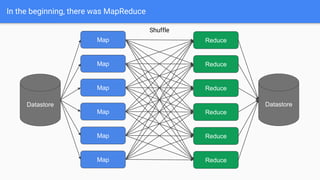
In the beginning, there was MapReduce
Datastore
Map
Map
Map
Map
Map
Map
Reduce
Reduce
Reduce
Reduce
Reduce
Reduce
Shuffle
Datastore
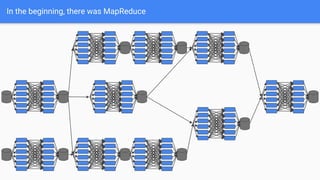
In the beginning, there was MapReduce
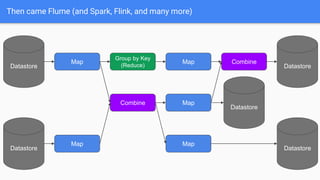
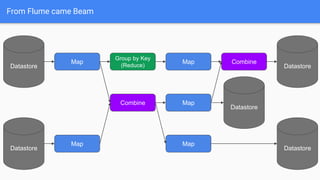
Then came Flume (and Spark, Flink, and many more)
Datastore
Map
Map
Datastore
Map
Group by Key
(Reduce)
Combine
Map
Map
Combine
Datastore
Datastore
Datastore
From Flume came Beam
Datastore
Map
Map
Datastore
Map
Group by Key
(Reduce)
Combine
Map
Map
Combine
Datastore
Datastore
Datastore
Unified Model for Batch and Streaming
● Batch processing is a special case of
stream processing
● Batch + Stream = Beam
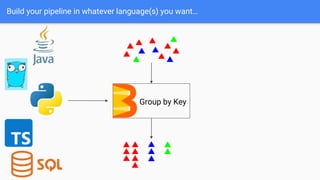
Build your pipeline in whatever language(s) you want…
Group by Key
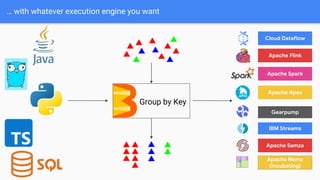
… with whatever execution engine you want
Cloud Dataflow
Apache Spark
Apache Flink
Apache Apex
Gearpump
Apache Samza
Apache Nemo
(incubating)
IBM Streams
Group by Key
Beam Basics
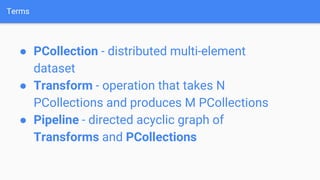
Terms
● PCollection - distributed multi-element
dataset
● Transform - operation that takes N
PCollections and produces M PCollections
● Pipeline - directed acyclic graph of
Transforms and PCollections
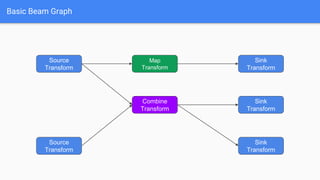
Basic Beam Graph
Source
Transform
Sink
Transform
Source
Transform
Map
Transform
Combine
Transform
Sink
Transform
Sink
Transform
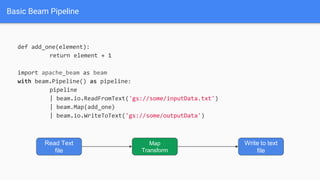
Basic Beam Pipeline
def add_one(element):
return element + 1
import apache_beam as beam
with beam.Pipeline() as pipeline:
pipeline
| beam.io.ReadFromText('gs://some/inputData.txt')
| beam.Map(add_one)
| beam.io.WriteToText('gs://some/outputData')
Read Text
file
Map
Transform
Write to text
file
How to use Beam to process huge
amounts of streaming data
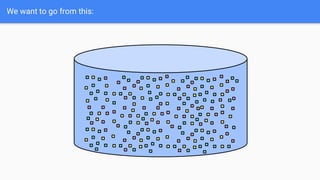
We want to go from this:
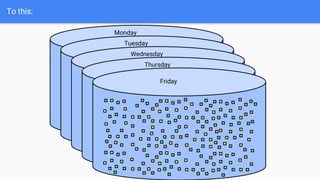
To this:
Monday
Tuesday
Wednesday
Thursday
Friday
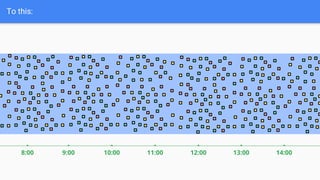
To this:
9:00
8:00 14:00
13:00
12:00
11:00
10:00
Streaming data might be:
● Late
● Incomplete
● Rate limited
● Infinite
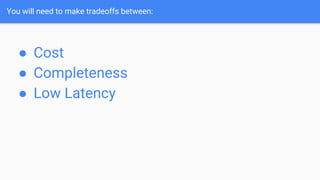
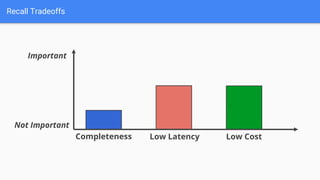
You will need to make tradeoffs between:
● Cost
● Completeness
● Low Latency
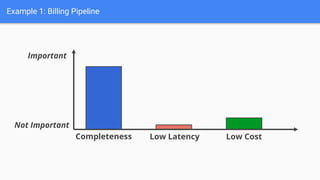
Example 1: Billing Pipeline
Completeness Low Latency Low Cost
Important
Not Important
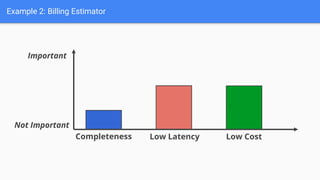
Example 2: Billing Estimator
Completeness Low Latency Low Cost
`
Important
Not Important
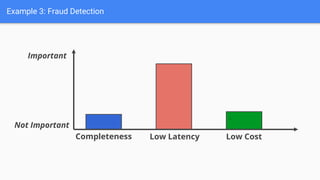
Example 3: Fraud Detection
Completeness Low Latency Low Cost
`
Important
Not Important
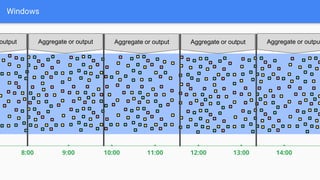
Windows
9:00
8:00 14:00
13:00
12:00
11:00
10:00
Aggregate or output Aggregate or output Aggregate or output Aggregate or outpu
output
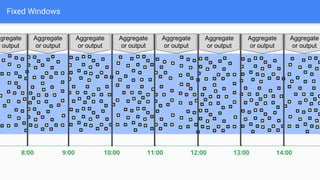
Fixed Windows
9:00
8:00 14:00
13:00
12:00
11:00
10:00
Aggregate
or output
Aggregate
or output
Aggregate
or output
Aggregate
or output
Aggregate
or output
Aggregate
or output
Aggregate
or output
ggregate
r output
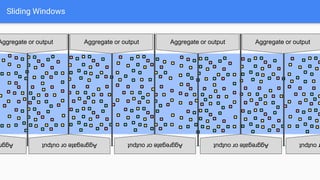
Sliding Windows
Aggregate or output Aggregate or output Aggregate or output
Aggregate
or
output Aggregate
or
output Aggregate
or
output output
Agg
Aggregate or output
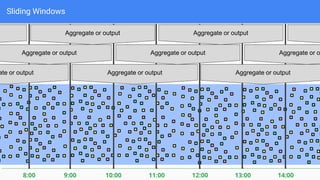
Sliding Windows
9:00
8:00 14:00
13:00
12:00
11:00
10:00
Aggregate or output
Aggregate or output
ate or output
Aggregate or o
Aggregate or output
Aggregate or output
Aggregate or output
Aggregate or output
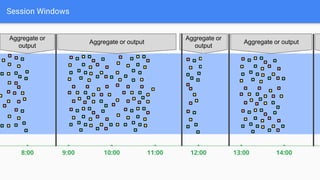
Session Windows
9:00
8:00 14:00
13:00
12:00
11:00
10:00
Aggregate or
output
Aggregate or output
Aggregate or
output
Aggregate or output
A
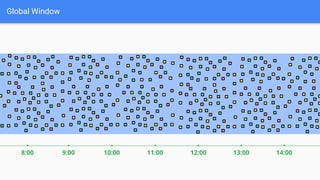
Global Window
9:00
8:00 14:00
13:00
12:00
11:00
10:00
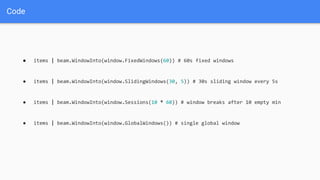
Code
● items | beam.WindowInto(window.FixedWindows(60)) # 60s fixed windows
● items | beam.WindowInto(window.SlidingWindows(30, 5)) # 30s sliding window every 5s
● items | beam.WindowInto(window.Sessions(10 * 60)) # window breaks after 10 empty min
● items | beam.WindowInto(window.GlobalWindows()) # single global window
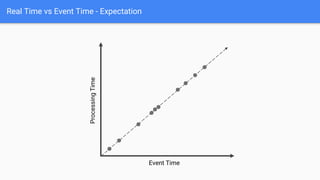
Real Time vs Event Time - Expectation
Event Time
Processing
Time
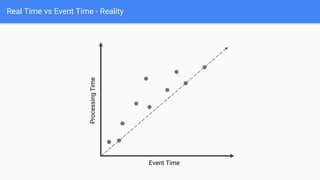
Real Time vs Event Time - Reality
Event Time
Processing
Time
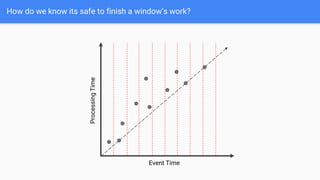
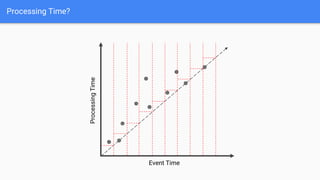
How do we know its safe to finish a window’s work?
Event Time
Processing
Time
Processing Time?
Event Time
Processing
Time
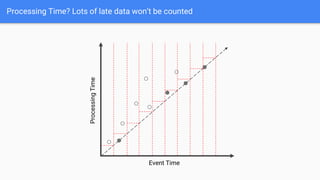
Processing Time? Lots of late data won’t be counted
Event Time
Processing
Time
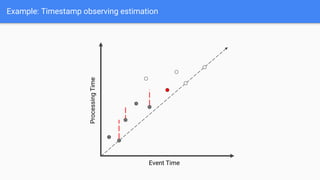
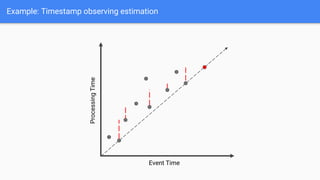
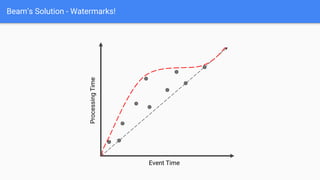
Beam’s Solution - Watermarks!
Event Time
Processing
Time
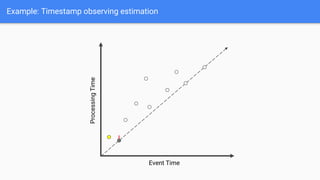
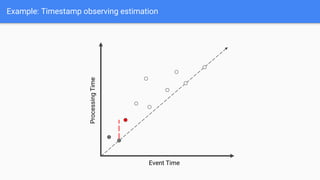
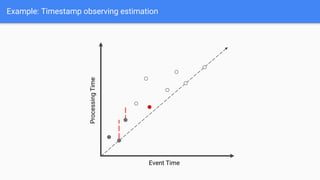
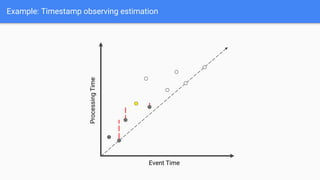
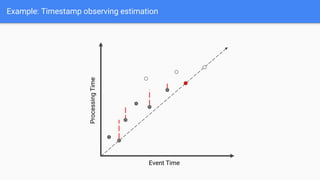
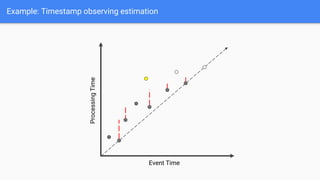
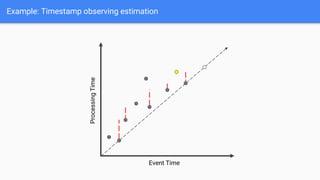
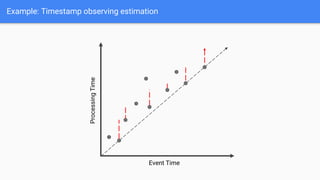
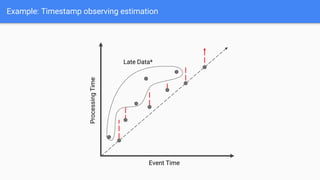
Watermarks
● Beam’s notion of when data is
complete
● When a watermark passes the end of
a window, additional data is late
● Beam has several built in watermark
estimators
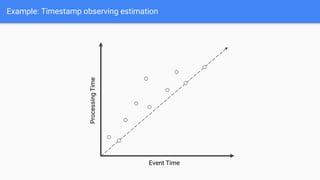
Example: Timestamp observing estimation
Event Time
Processing
Time
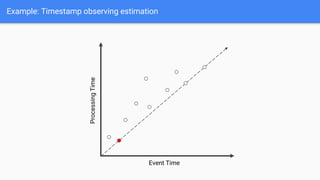
Example: Timestamp observing estimation
Event Time
Processing
Time
Example: Timestamp observing estimation
Event Time
Processing
Time
Example: Timestamp observing estimation
Event Time
Processing
Time
Example: Timestamp observing estimation
Event Time
Processing
Time
Example: Timestamp observing estimation
Event Time
Processing
Time
Example: Timestamp observing estimation
Event Time
Processing
Time
Example: Timestamp observing estimation
Event Time
Processing
Time
Example: Timestamp observing estimation
Event Time
Processing
Time
Example: Timestamp observing estimation
Event Time
Processing
Time
Example: Timestamp observing estimation
Event Time
Processing
Time
Example: Timestamp observing estimation
Event Time
Processing
Time
Example: Timestamp observing estimation
Event Time
Processing
Time
Late Data*
Watermarks
● Handled at the source I/O level
● Most pipelines don’t need to
implement estimation, but do need to
be aware of it
Recall Tradeoffs
Completeness Low Latency Low Cost
`
Important
Not Important
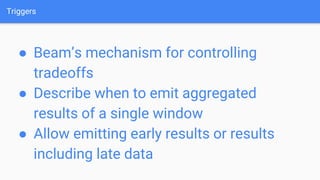
Triggers
● Beam’s mechanism for controlling
tradeoffs
● Describe when to emit aggregated
results of a single window
● Allow emitting early results or results
including late data
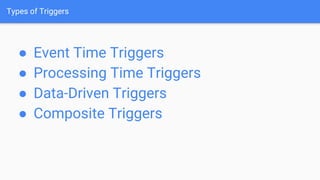
Types of Triggers
● Event Time Triggers
● Processing Time Triggers
● Data-Driven Triggers
● Composite Triggers
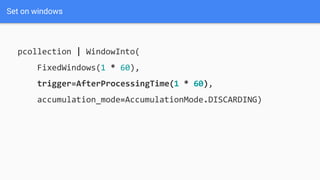
Set on windows
pcollection | WindowInto(
FixedWindows(1 * 60),
trigger=AfterProcessingTime(1 * 60),
accumulation_mode=AccumulationMode.DISCARDING)
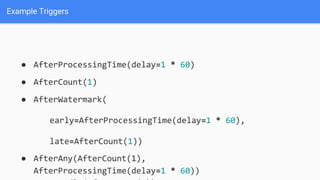
Example Triggers
● AfterProcessingTime(delay=1 * 60)
● AfterCount(1)
● AfterWatermark(
early=AfterProcessingTime(delay=1 * 60),
late=AfterCount(1))
● AfterAny(AfterCount(1),
AfterProcessingTime(delay=1 * 60))
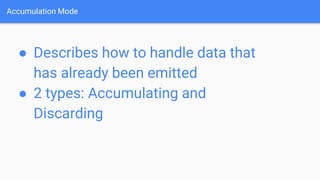
Accumulation Mode
● Describes how to handle data that
has already been emitted
● 2 types: Accumulating and
Discarding
Discarding Accumulation Mode
pcollection | WindowInto(
FixedWindows(1 * 60),
trigger=Repeating(AfterCount(3)),
accumulation_mode=AccumulationMode.DISCARDING)
[5, 8, 3, 1, 2, 6, 9, 7]
Discarding Accumulation Mode
pcollection | WindowInto(
FixedWindows(1 * 60),
trigger=Repeating(AfterCount(3)),
accumulation_mode=AccumulationMode.DISCARDING)
[5, 8, 3, 1, 2, 6, 9, 7] -> [5, 8, 3]
Discarding Accumulation Mode
pcollection | WindowInto(
FixedWindows(1 * 60),
trigger=Repeating(AfterCount(3)),
accumulation_mode=AccumulationMode.DISCARDING)
[5, 8, 3, 1, 2, 6, 9, 7] -> [5, 8, 3]
[1, 2, 6]
Discarding Accumulation Mode
pcollection | WindowInto(
FixedWindows(1 * 60),
trigger=Repeating(AfterCount(3)),
accumulation_mode=AccumulationMode.DISCARDING)
[5, 8, 3, 1, 2, 6, 9, 7] -> [5, 8, 3]
[1, 2, 6]
[9, 7]
Discarding Accumulation Mode
pcollection | WindowInto(
FixedWindows(1 * 60),
trigger=Repeating(AfterCount(3)),
accumulation_mode=AccumulationMode.Accumulating)
[5, 8, 3, 1, 2, 6, 9, 7]
Discarding Accumulation Mode
pcollection | WindowInto(
FixedWindows(1 * 60),
trigger=Repeating(AfterCount(3)),
accumulation_mode=AccumulationMode.Accumulating)
[5, 8, 3, 1, 2, 6, 9, 7] -> [5, 8, 3]
Discarding Accumulation Mode
pcollection | WindowInto(
FixedWindows(1 * 60),
trigger=Repeating(AfterCount(3)),
accumulation_mode=AccumulationMode.Accumulating)
[5, 8, 3, 1, 2, 6, 9, 7] -> [5, 8, 3]
[5, 8, 3, 1, 2, 6]
Discarding Accumulation Mode
pcollection | WindowInto(
FixedWindows(1 * 60),
trigger=Repeating(AfterCount(3)),
accumulation_mode=AccumulationMode.Accumulating)
[5, 8, 3, 1, 2, 6, 9, 7] -> [5, 8, 3]
[5, 8, 3, 1, 2, 6]
[5, 8, 3, 1, 2, 6, 9, 7]
More!
● Pipeline State
● Timers
● Runner initiated splits
● Self checkpointing
● Bundle finalization
Demo
https://github.com/damccorm/ato-demo-2022
Come join our community!
Questions?
Slides - shorturl.at/GNU07

Streaming Data Pipelines With Apache Beam

Editor's Notes

  • #5 My path: Studied at Vanderbilt, got Bachelors + Masters Joined Microsoft + worked on Azure DevOps - first started to fall in love with OSS here. Particularly shaped by experiences w/ big OSS repos (GulpJs, Prettier) - maintainers matter! Got to work on GitHub Actions, helped v2 GA, authored most first party actions (setup-node, toolkit) Joined Google to work on Apache Beam and Google’s execution engine, Dataflow. Currently Apache committer and the technical lead of Google’s Beam and Dataflow Machine Learning team. Neat to be part of a bigger community driven project, where decisions are made on the distribution list, not in company meetings. Full circle; I hope to be like those initial OSS maintainers who welcomed me into open source.
  • #24 Slide adapted from https://docs.google.com/presentation/d/1SHie3nwe-pqmjGum_QDznPr-B_zXCjJ2VBDGdafZme8/edit#slide=id.g12846a6162_0_2098
  • #25 Slide adapted from https://docs.google.com/presentation/d/1SHie3nwe-pqmjGum_QDznPr-B_zXCjJ2VBDGdafZme8/edit#slide=id.g12846a6162_0_2098
  • #26 Slide adapted from https://docs.google.com/presentation/d/1SHie3nwe-pqmjGum_QDznPr-B_zXCjJ2VBDGdafZme8/edit#slide=id.g12846a6162_0_2098
  • #32 Usually not used in streaming scenarios, unless you’re using specific triggering setups
  • #33 Call out its easy to change your aggregation strategy
  • #38 Lots of data will be considered late
  • #55 Slide adapted from https://docs.google.com/presentation/d/1SHie3nwe-pqmjGum_QDznPr-B_zXCjJ2VBDGdafZme8/edit#slide=id.g12846a6162_0_2098
  • #56 Set when you window
  • #57 Examples: Event time - afterwatermark Processing time - AfterProcessingTime (early firing) AfterCount
  • #71 Highlight areas of growth (ML, x-lang, performance, new SDKs)