1
STM 32 Networking
●Course Title: Embedded Systems & IoT
●Course Code: CSE233
PREPARED BY:
Muha. Humayet Islam
Lecturer, Dept. of CSE, DIU
CSE233@DIU, SPRING 2025
2
 Overview of STM32
 STM32 Development Environment
 Setting up the First STM32 Project
 STM32 Microcontroller Architecture
 Interrupts in STM32
 STM32 Peripherals and Communication Protocols
 Power Management and Low-Power Modes
 Debugging and Troubleshooting
Agenda
3
Overview of STM32
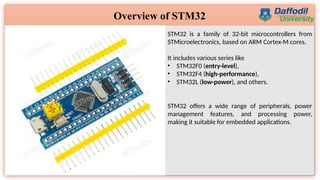
STM32 is a family of 32-bit microcontrollers from
STMicroelectronics, based on ARM Cortex-M cores.
It includes various series like
• STM32F0 (entry-level),
• STM32F4 (high-performance),
• STM32L (low-power), and others.
STM32 offers a wide range of peripherals, power
management features, and processing power,
making it suitable for embedded applications.
4
Overview of STM32
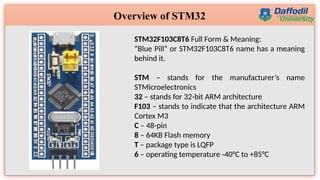
STM32F103C8T6 Full Form & Meaning:
“Blue Pill” or STM32F103C8T6 name has a meaning
behind it.
STM – stands for the manufacturer’s name
STMicroelectronics
32 – stands for 32-bit ARM architecture
F103 – stands to indicate that the architecture ARM
Cortex M3
C – 48-pin
8 – 64KB Flash memory
T – package type is LQFP
6 – operating temperature -40°C to +85°C
5
STM32 Nucleo-64
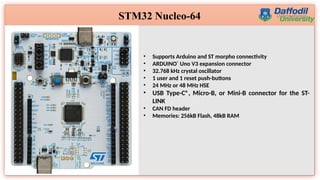
• Supports Arduino and ST morpho connectivity
• ARDUINO®
Uno V3 expansion connector
• 32.768 kHz crystal oscillator
• 1 user and 1 reset push-buttons
• 24 MHz or 48 MHz HSE
• USB Type-C®, Micro-B, or Mini-B connector for the ST-
LINK
• CAN FD header
• Memories: 256kB Flash, 48kB RAM
6
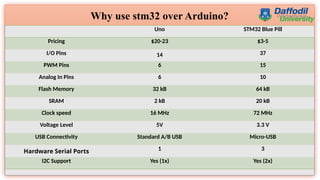
Why use stm32 over Arduino?
Uno STM32 Blue Pill
Pricing $20-23 $3-5
I/O Pins 14 37
PWM Pins 6 15
Analog In Pins 6 10
Flash Memory 32 kB 64 kB
SRAM 2 kB 20 kB
Clock speed 16 MHz 72 MHz
Voltage Level 5V 3.3 V
USB Connectivity Standard A/B USB Micro-USB
Hardware Serial Ports 1 3
I2C Support Yes (1x) Yes (2x)
7
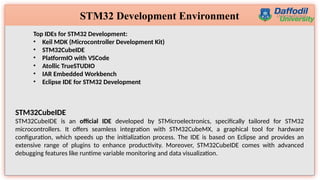
STM32 Development Environment
Top IDEs for STM32 Development:
• Keil MDK (Microcontroller Development Kit)
• STM32CubeIDE
• PlatformIO with VSCode
• Atollic TrueSTUDIO
• IAR Embedded Workbench
• Eclipse IDE for STM32 Development
STM32CubeIDE
STM32CubeIDE is an official IDE developed by STMicroelectronics, specifically tailored for STM32
microcontrollers. It offers seamless integration with STM32CubeMX, a graphical tool for hardware
configuration, which speeds up the initialization process. The IDE is based on Eclipse and provides an
extensive range of plugins to enhance productivity. Moreover, STM32CubeIDE comes with advanced
debugging features like runtime variable monitoring and data visualization.
8
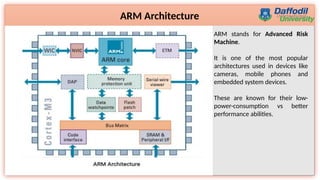
ARM Architecture
ARM stands for Advanced Risk
Machine.
It is one of the most popular
architectures used in devices like
cameras, mobile phones and
embedded system devices.
These are known for their low-
power-consumption vs better
performance abilities.
9
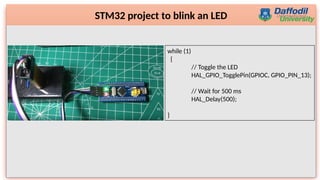
STM32 project to blink an LED
while (1)
{
// Toggle the LED
HAL_GPIO_TogglePin(GPIOC, GPIO_PIN_13);
// Wait for 500 ms
HAL_Delay(500);
}
10
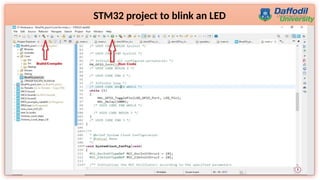
STM32 project to blink an LED
11
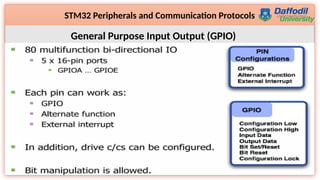
STM32 Peripherals and Communication Protocols
General Purpose Input Output (GPIO)
12
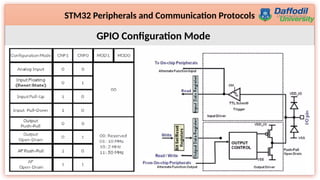
STM32 Peripherals and Communication Protocols
GPIO Configuration Mode
13
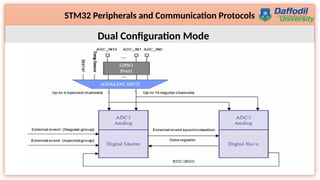
STM32 Peripherals and Communication Protocols
Dual Configuration Mode
14
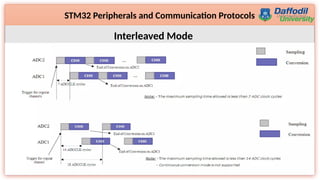
STM32 Peripherals and Communication Protocols
Interleaved Mode
15
STM32 Peripherals and Communication Protocols
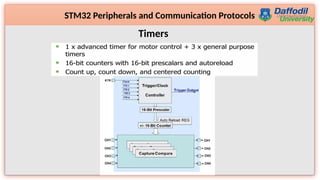
Timers
16
STM32 Peripherals and Communication Protocols
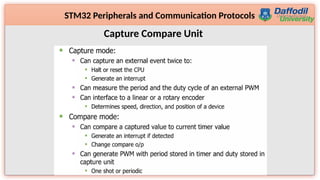
Capture Compare Unit
17
STM32 Peripherals and Communication Protocols
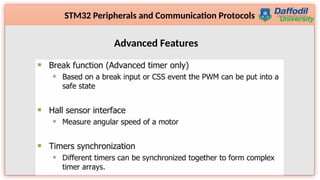
Advanced Features
18
STM32 Peripherals and Communication Protocols
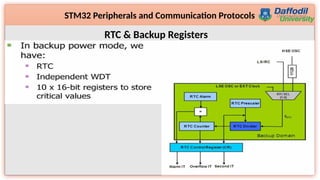
RTC & Backup Registers
19
STM32 Peripherals and Communication Protocols
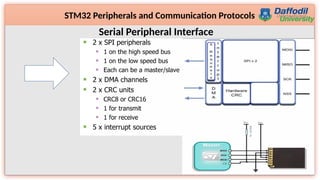
Serial Peripheral Interface
20
STM32 Peripherals and Communication Protocols
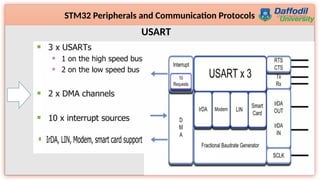
USART
21
STM32 Peripherals and Communication Protocols
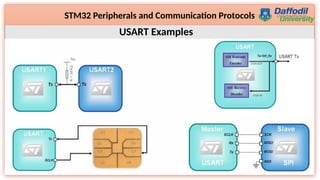
USART Examples
22
STM32 Peripherals and Communication Protocols
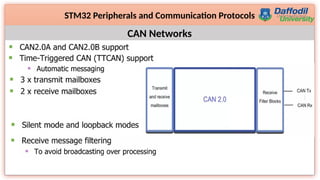
CAN Networks
23
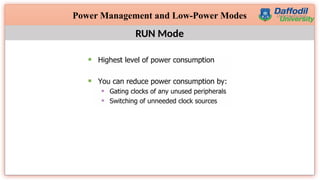
Power Management and Low-Power Modes
RUN Mode
24
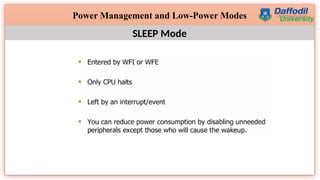
Power Management and Low-Power Modes
SLEEP Mode
25
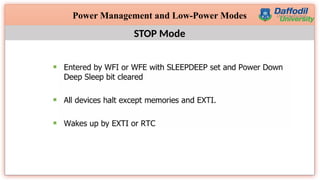
Power Management and Low-Power Modes
STOP Mode
26
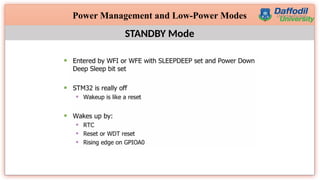
Power Management and Low-Power Modes
STANDBY Mode

STM32 Networking for Embedded Technology.pptx

  • 1.
    1 STM 32 Networking ●CourseTitle: Embedded Systems & IoT ●Course Code: CSE233 PREPARED BY: Muha. Humayet Islam Lecturer, Dept. of CSE, DIU CSE233@DIU, SPRING 2025
  • 2.
    2  Overview ofSTM32  STM32 Development Environment  Setting up the First STM32 Project  STM32 Microcontroller Architecture  Interrupts in STM32  STM32 Peripherals and Communication Protocols  Power Management and Low-Power Modes  Debugging and Troubleshooting Agenda
  • 3.
    3 Overview of STM32 STM32is a family of 32-bit microcontrollers from STMicroelectronics, based on ARM Cortex-M cores. It includes various series like • STM32F0 (entry-level), • STM32F4 (high-performance), • STM32L (low-power), and others. STM32 offers a wide range of peripherals, power management features, and processing power, making it suitable for embedded applications.
  • 4.
    4 Overview of STM32 STM32F103C8T6Full Form & Meaning: “Blue Pill” or STM32F103C8T6 name has a meaning behind it. STM – stands for the manufacturer’s name STMicroelectronics 32 – stands for 32-bit ARM architecture F103 – stands to indicate that the architecture ARM Cortex M3 C – 48-pin 8 – 64KB Flash memory T – package type is LQFP 6 – operating temperature -40°C to +85°C
  • 5.
    5 STM32 Nucleo-64 • SupportsArduino and ST morpho connectivity • ARDUINO® Uno V3 expansion connector • 32.768 kHz crystal oscillator • 1 user and 1 reset push-buttons • 24 MHz or 48 MHz HSE • USB Type-C®, Micro-B, or Mini-B connector for the ST- LINK • CAN FD header • Memories: 256kB Flash, 48kB RAM
  • 6.
    6 Why use stm32over Arduino? Uno STM32 Blue Pill Pricing $20-23 $3-5 I/O Pins 14 37 PWM Pins 6 15 Analog In Pins 6 10 Flash Memory 32 kB 64 kB SRAM 2 kB 20 kB Clock speed 16 MHz 72 MHz Voltage Level 5V 3.3 V USB Connectivity Standard A/B USB Micro-USB Hardware Serial Ports 1 3 I2C Support Yes (1x) Yes (2x)
  • 7.
    7 STM32 Development Environment TopIDEs for STM32 Development: • Keil MDK (Microcontroller Development Kit) • STM32CubeIDE • PlatformIO with VSCode • Atollic TrueSTUDIO • IAR Embedded Workbench • Eclipse IDE for STM32 Development STM32CubeIDE STM32CubeIDE is an official IDE developed by STMicroelectronics, specifically tailored for STM32 microcontrollers. It offers seamless integration with STM32CubeMX, a graphical tool for hardware configuration, which speeds up the initialization process. The IDE is based on Eclipse and provides an extensive range of plugins to enhance productivity. Moreover, STM32CubeIDE comes with advanced debugging features like runtime variable monitoring and data visualization.
  • 8.
    8 ARM Architecture ARM standsfor Advanced Risk Machine. It is one of the most popular architectures used in devices like cameras, mobile phones and embedded system devices. These are known for their low- power-consumption vs better performance abilities.
  • 9.
    9 STM32 project toblink an LED while (1) { // Toggle the LED HAL_GPIO_TogglePin(GPIOC, GPIO_PIN_13); // Wait for 500 ms HAL_Delay(500); }
  • 10.
    10 STM32 project toblink an LED
  • 11.
    11 STM32 Peripherals andCommunication Protocols General Purpose Input Output (GPIO)
  • 12.
    12 STM32 Peripherals andCommunication Protocols GPIO Configuration Mode
  • 13.
    13 STM32 Peripherals andCommunication Protocols Dual Configuration Mode
  • 14.
    14 STM32 Peripherals andCommunication Protocols Interleaved Mode
  • 15.
    15 STM32 Peripherals andCommunication Protocols Timers
  • 16.
    16 STM32 Peripherals andCommunication Protocols Capture Compare Unit
  • 17.
    17 STM32 Peripherals andCommunication Protocols Advanced Features
  • 18.
    18 STM32 Peripherals andCommunication Protocols RTC & Backup Registers
  • 19.
    19 STM32 Peripherals andCommunication Protocols Serial Peripheral Interface
  • 20.
    20 STM32 Peripherals andCommunication Protocols USART
  • 21.
    21 STM32 Peripherals andCommunication Protocols USART Examples
  • 22.
    22 STM32 Peripherals andCommunication Protocols CAN Networks
  • 23.
    23 Power Management andLow-Power Modes RUN Mode
  • 24.
    24 Power Management andLow-Power Modes SLEEP Mode
  • 25.
    25 Power Management andLow-Power Modes STOP Mode
  • 26.
    26 Power Management andLow-Power Modes STANDBY Mode