Twitter Chat Sessions


Your Personal Learning Center
Presented by @SteveCassady
Twitter Chat Basics
•   What is a Twitter Chat
•   Why Participate
•   How do I find one
•   How does it work
•   Participant, Moderator, & Guest Tips
•   Tools and Resources


                    Presented by @SteveCassady   2
What Is A Twitter Chat?
• Tweet chats are simply a way to get people
  together at a determined time to talk about a
  pre-determined subject via Twitter.
• They are organized around a Hash tag #
• There are also a few 24 x 7 chat streams like
  #USGUYS and #SMGirlfriends
• Tweet Chats do become trending topics on
  Twitter
Why Participate in a Twitter Chat?
•   Building community,
•   Making new friends,
•   Learning from others
•   Discussing interesting topics
•   Personal Branding
•   Get more engaged followers and visits to your
    blog
How Do I Find a Twitter Chat?
•   Watch your Stream
•   Google Spreadsheet Document on Internet.
•   Twitterchat411.com
•   Twebevent.com
•   There are several other sites under
    development to provide Host and Participant
    Tools for chats
How Does a Twitter Chat Work
•   Pre-Determined Time and Length
•   Moderator Sets Agenda and Guides Discussion
•   Community Leaders
•   Content
    – Topical, Technology, Platform, Segment, etc.
• Format: May be fixed or varies
    – Q&A, Free Flow, Guest Q&A
• Guests: Industry Leaders, Community Members,
  Emerging Companies, etc.
• Conversation: Lots of tweets
Participant Tips
•   Don’t be afraid to luck, but join as soon as comfortable
•   Ask questions if confused, community well help
•   Connect with moderator before or after chat
•   Respect the community.
    – Don’t spam your links.
    – Stay on topic
    – Follow Structure
• Follow-up with others after the chat
• Learn some of the tools
• Use the Hash tag
Moderator Tips
• Select Theme/Topic of chat
• Select Time and be aware of conflicts.
• Coordinate with similar community of chats; i.e.
  Tuesday Trilogy
• What is your format? Some stick to same format while
  others vary and test. Formal Q1/A1
• Communicate Structure
• Promote Chat and use other platforms besides twitter
• Have an Agenda
• Have a Plan that spans multiple weeks
More Moderator Tips
•   Know your community
•   Enlist Helpers
•   Be Flexible
•   Have a Plan for Side Trackers
•   Have a back-up moderator
•   Welcome Newbies
•   Build Community Outside of the chat
•   Invite Guests
•   Measure and Track
Being a Great Guest Tips
• Lurk First in prior chat
• Set Goals with Moderator, understand
  community, and confirm format
• Prepare and Coordinate question and answer list
  in advance. Use it to Shine
• Plan Answers so they are easily retweetable
• Provide your Links to the moderator in advance
• Leverage Pre and Post community and encourage
  other platform connections
What Tools Are Available?
• Twitter.com hash tag Search
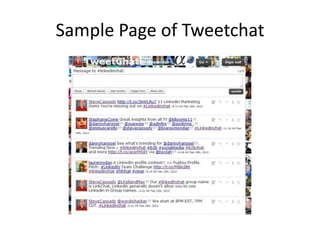
• Tweetchat.com
• TwebEvent.com
• Tweetgrid.com
• Use a Twitter applications like Tweetdeck, HootSuite,
  MarketMeSuite, SocialBro, etc. and Set up Hash tag column
• Many tools have nice chat features:
    – Pause
    – Reply, Reply All, ReTweet, Favorite, Autohashtag, Block
• Hashtracking.com for after chat analytics and transcript
• Twylah.com for Branding and adding life to your Tweets
  http://www.twylah.com/SteveCassady
Sample Page of Tweetchat
Other Resources to Note
• Hashtracking.com for after chat analytics and
  transcript
• Twylah.com for Branding your Tweets
• @MQtodd and @PamMktgNut have blog
  posts on Twitter Chats
• @PamMktgNut has a demo video on how to
  do a chat session using Tweetchat

Steve Cassady twitter chats presentation

  • 1.
    Twitter Chat Sessions YourPersonal Learning Center Presented by @SteveCassady
  • 2.
    Twitter Chat Basics • What is a Twitter Chat • Why Participate • How do I find one • How does it work • Participant, Moderator, & Guest Tips • Tools and Resources Presented by @SteveCassady 2
  • 3.
    What Is ATwitter Chat? • Tweet chats are simply a way to get people together at a determined time to talk about a pre-determined subject via Twitter. • They are organized around a Hash tag # • There are also a few 24 x 7 chat streams like #USGUYS and #SMGirlfriends • Tweet Chats do become trending topics on Twitter
  • 4.
    Why Participate ina Twitter Chat? • Building community, • Making new friends, • Learning from others • Discussing interesting topics • Personal Branding • Get more engaged followers and visits to your blog
  • 5.
    How Do IFind a Twitter Chat? • Watch your Stream • Google Spreadsheet Document on Internet. • Twitterchat411.com • Twebevent.com • There are several other sites under development to provide Host and Participant Tools for chats
  • 6.
    How Does aTwitter Chat Work • Pre-Determined Time and Length • Moderator Sets Agenda and Guides Discussion • Community Leaders • Content – Topical, Technology, Platform, Segment, etc. • Format: May be fixed or varies – Q&A, Free Flow, Guest Q&A • Guests: Industry Leaders, Community Members, Emerging Companies, etc. • Conversation: Lots of tweets
  • 7.
    Participant Tips • Don’t be afraid to luck, but join as soon as comfortable • Ask questions if confused, community well help • Connect with moderator before or after chat • Respect the community. – Don’t spam your links. – Stay on topic – Follow Structure • Follow-up with others after the chat • Learn some of the tools • Use the Hash tag
  • 8.
    Moderator Tips • SelectTheme/Topic of chat • Select Time and be aware of conflicts. • Coordinate with similar community of chats; i.e. Tuesday Trilogy • What is your format? Some stick to same format while others vary and test. Formal Q1/A1 • Communicate Structure • Promote Chat and use other platforms besides twitter • Have an Agenda • Have a Plan that spans multiple weeks
  • 9.
    More Moderator Tips • Know your community • Enlist Helpers • Be Flexible • Have a Plan for Side Trackers • Have a back-up moderator • Welcome Newbies • Build Community Outside of the chat • Invite Guests • Measure and Track
  • 10.
    Being a GreatGuest Tips • Lurk First in prior chat • Set Goals with Moderator, understand community, and confirm format • Prepare and Coordinate question and answer list in advance. Use it to Shine • Plan Answers so they are easily retweetable • Provide your Links to the moderator in advance • Leverage Pre and Post community and encourage other platform connections
  • 11.
    What Tools AreAvailable? • Twitter.com hash tag Search • Tweetchat.com • TwebEvent.com • Tweetgrid.com • Use a Twitter applications like Tweetdeck, HootSuite, MarketMeSuite, SocialBro, etc. and Set up Hash tag column • Many tools have nice chat features: – Pause – Reply, Reply All, ReTweet, Favorite, Autohashtag, Block • Hashtracking.com for after chat analytics and transcript • Twylah.com for Branding and adding life to your Tweets http://www.twylah.com/SteveCassady
  • 12.
    Sample Page ofTweetchat
  • 13.
    Other Resources toNote • Hashtracking.com for after chat analytics and transcript • Twylah.com for Branding your Tweets • @MQtodd and @PamMktgNut have blog posts on Twitter Chats • @PamMktgNut has a demo video on how to do a chat session using Tweetchat