Stage Level Scheduling
Improving Big Data and
AI integration
Thomas Graves
Software Engineer at NVIDIA
Spark PMC
Agenda
§ Resource Scheduling
§ Stage Level Scheduling
§ Use Case Example
§ Demo
Resource Scheduling On Spark
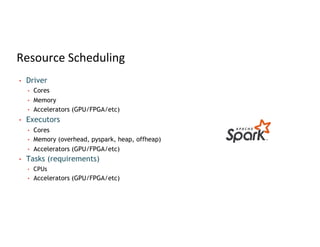
Resource Scheduling
• Driver
• Cores
• Memory
• Accelerators (GPU/FPGA/etc)
• Executors
• Cores
• Memory (overhead, pyspark, heap, offheap)
• Accelerators (GPU/FPGA/etc)
• Tasks (requirements)
• CPUs
• Accelerators (GPU/FPGA/etc)
Resource Scheduling
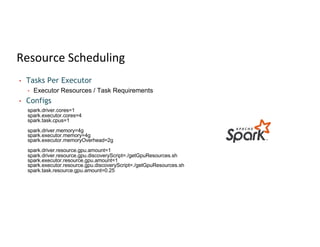
• Tasks Per Executor
• Executor Resources / Task Requirements
• Configs
spark.driver.cores=1
spark.executor.cores=4
spark.task.cpus=1
spark.driver.memory=4g
spark.executor.memory=4g
spark.executor.memoryOverhead=2g
spark.driver.resource.gpu.amount=1
spark.driver.resource.gpu.discoveryScript=./getGpuResources.sh
spark.executor.resource.gpu.amount=1
spark.executor.resource.gpu.discoveryScript=./getGpuResources.sh
spark.task.resource.gpu.amount=0.25
Stage Level Scheduling
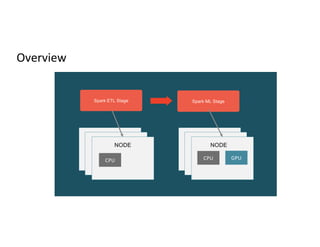
Overview
Spark ETL Stage Spark ML Stage
NODE NODE
GPU
CPU
CPU
Stage Level Scheduling
• Stage level resource scheduling (SPARK-27495)
• Specify resource requirements per RDD operation
• Spark dynamically allocates containers to meet resource requirements
• Spark schedules tasks on appropriate containers
• Benefits
• Hardware utilization and cost
• Ease of programming
• Application no longer required split ETL and Deep Learning into separate
applications
• Pipeline simplification
Use Cases
• Beneficial any time the user wants to change container resources between
stages in a single Spark application
• ETL to Deep Learning
• Skewed data
• Data size large in certain stages
• Jobs that use caching, switch to higher memory containers during those
stages
Resources Supported
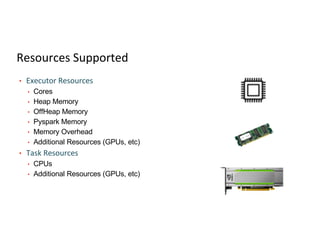
• Executor Resources
• Cores
• Heap Memory
• OffHeap Memory
• Pyspark Memory
• Memory Overhead
• Additional Resources (GPUs, etc)
• Task Resources
• CPUs
• Additional Resources (GPUs, etc)
Requirements
• Spark 3.1.1
• Dynamic Allocation with External Shuffle Service or Shuffle tracking
enabled
• YARN and Kubernetes
• RDD API only
• Scala, Java, Python
Implementation Details
• New container acquired with new ResourceProfile
• Does NOT try to fit into existing container with different ResourceProfile
(Future Enhancement)
• Unused containers idle timeout
• Default to one ResourceProfile per stage
• Config to allow multiple ResourceProfiles per stage
• Multiple profiles will be merged with simple max of each resource
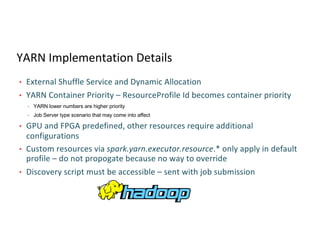
YARN Implementation Details
• External Shuffle Service and Dynamic Allocation
• YARN Container Priority – ResourceProfile Id becomes container priority
• YARN lower numbers are higher priority
• Job Server type scenario that may come into affect
• GPU and FPGA predefined, other resources require additional
configurations
• Custom resources via spark.yarn.executor.resource.* only apply in default
profile – do not propogate because no way to override
• Discovery script must be accessible – sent with job submission
Kubernetes Implementation Details
• Requires shuffle tracking enabled
(spark.dynamicAllocaiton.shuffleTracking.enabled)
• May not idel timeout if have shuffle data on the node
• Result in more cluster resource used
• spark.dynamicAllocaiton.shuffleTracking.timeout
• Pod Template Behavior
• Resource in Pod Template only used in default profile
• Specify all resources needed in the ResourceProfile
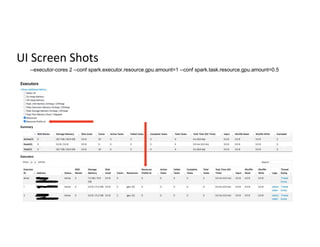
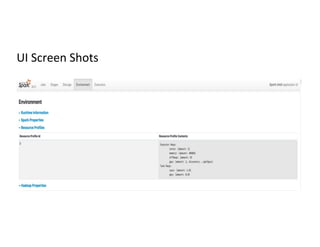
UI Screen Shots
--executor-cores 2 --conf spark.executor.resource.gpu.amount=1 --conf spark.task.resource.gpu.amount=0.5
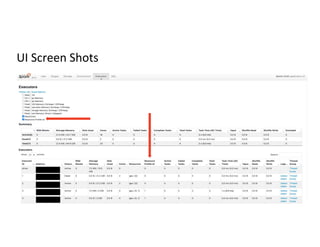
UI Screen Shots
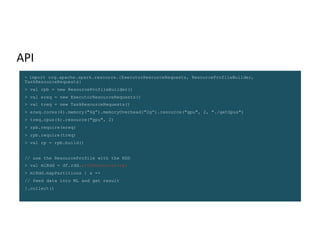
API
> import org.apache.spark.resource.{ExecutorResourceRequests, ResourceProfileBuilder,
TaskResourceRequests}
> val rpb = new ResourceProfileBuilder()
> val ereq = new ExecutorResourceRequests()
> val treq = new TaskResourceRequests()
> ereq.cores(4).memory("6g”).memoryOverhead("2g”).resource("gpu", 2, "./getGpus")
> treq.cpus(4).resource("gpu", 2)
> rpb.require(ereq)
> rpb.require(treq)
> val rp = rpb.build()
// use the ResourceProfile with the RDD
> val mlRdd = df.rdd.withResources(rp)
> mlRdd.mapPartitions { x =>
// feed data into ML and get result
}.collect()
UI Screen Shots
UI Screen Shots
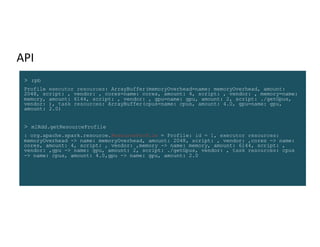
API
> rpb
Profile executor resources: ArrayBuffer(memoryOverhead=name: memoryOverhead, amount:
2048, script: , vendor: , cores=name: cores, amount: 4, script: , vendor: , memory=name:
memory, amount: 6144, script: , vendor: , gpu=name: gpu, amount: 2, script: ./getGpus,
vendor: ), task resources: ArrayBuffer(cpus=name: cpus, amount: 4.0, gpu=name: gpu,
amount: 2.0)
> mlRdd.getResourceProfile
: org.apache.spark.resource.ResourceProfile = Profile: id = 1, executor resources:
memoryOverhead -> name: memoryOverhead, amount: 2048, script: , vendor: ,cores -> name:
cores, amount: 4, script: , vendor: ,memory -> name: memory, amount: 6144, script: ,
vendor: ,gpu -> name: gpu, amount: 2, script: ./getGpus, vendor: , task resources: cpus
-> name: cpus, amount: 4.0,gpu -> name: gpu, amount: 2.0
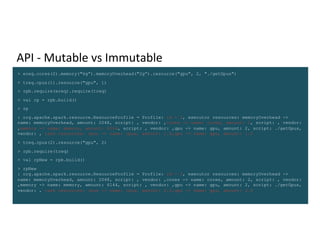
API - Mutable vs Immutable
> ereq.cores(2).memory("6g”).memoryOverhead("2g”).resource("gpu", 2, "./getGpus")
> treq.cpus(1).resource("gpu", 1)
> rpb.require(ereq).require(treq)
> val rp = rpb.build()
> rp
: org.apache.spark.resource.ResourceProfile = Profile: id = 2, executor resources: memoryOverhead ->
name: memoryOverhead, amount: 2048, script: , vendor: ,cores -> name: cores, amount: 2, script: , vendor:
,memory -> name: memory, amount: 6144, script: , vendor: ,gpu -> name: gpu, amount: 2, script: ./getGpus,
vendor: , task resources: cpus -> name: cpus, amount: 1.0,gpu -> name: gpu, amount: 1.0
> treq.cpus(2).resource("gpu", 2)
> rpb.require(treq)
> val rpNew = rpb.build()
> rpNew
: org.apache.spark.resource.ResourceProfile = Profile: id = 3, executor resources: memoryOverhead ->
name: memoryOverhead, amount: 2048, script: , vendor: ,cores -> name: cores, amount: 2, script: , vendor:
,memory -> name: memory, amount: 6144, script: , vendor: ,gpu -> name: gpu, amount: 2, script: ./getGpus,
vendor: , task resources: cpus -> name: cpus, amount: 2.0,gpu -> name: gpu, amount: 2.0
Use Case Example
End to End Pipeline
ETL Using Rapids Accelerator For Spark
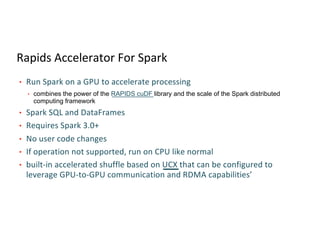
Rapids Accelerator For Spark
• Run Spark on a GPU to accelerate processing
• combines the power of the RAPIDS cuDF library and the scale of the Spark distributed
computing framework
• Spark SQL and DataFrames
• Requires Spark 3.0+
• No user code changes
• If operation not supported, run on CPU like normal
• built-in accelerated shuffle based on UCX that can be configured to
leverage GPU-to-GPU communication and RDMA capabilities’
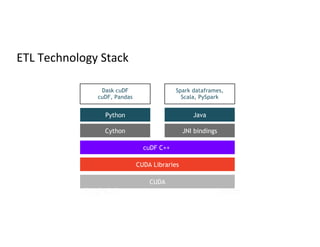
ETL Technology Stack
Dask cuDF
cuDF, Pandas
Python
Cython
cuDF C++
CUDA Libraries
CUDA
Java
JNI bindings
Spark dataframes,
Scala, PySpark
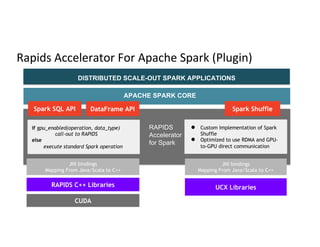
Rapids Accelerator For Apache Spark (Plugin)
DISTRIBUTED SCALE-OUT SPARK APPLICATIONS
APACHE SPARK CORE
RAPIDS
Accelerator
for Spark
Spark SQL API DataFrame API Spark Shuffle
if gpu_enabled(operation, data_type)
call-out to RAPIDS
else
execute standard Spark operation
● Custom Implementation of Spark
Shuffle
● Optimized to use RDMA and GPU-
to-GPU direct communication
JNI bindings
Mapping From Java/Scala to C++
RAPIDS C++ Libraries UCX Libraries
CUDA
JNI bindings
Mapping From Java/Scala to C++
Spark SQL & Dataframe Compilation Flow
DataFrame
Logical Plan
Physical Plan
bar.groupBy(
col(”product_id”),
col(“ds”))
.agg(
maxcol(“price”)) -
min(col(“p(rice”)).alias(“range”))
SELECT product_id, ds,
max(price) – min(price) AS
range FROM bar GROUP BY
product_id, ds
QUERY
GPU
PHYSICAL
PLAN
GPU Physical Plan
RAPIDS SQL
Plugin
RDD[InternalRow]
RDD[ColumnarBatch]
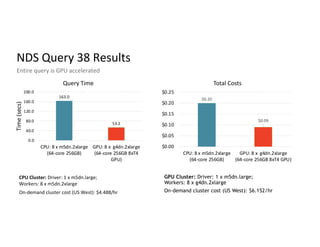
NDS Query 38 Results
Entire query is GPU accelerated
CPU Cluster: Driver: 1 x m5dn.large;
Workers: 8 x m5dn.2xlarge
On-demand cluster cost (US West): $4.488/hr
GPU Cluster: Driver: 1 x m5dn.large;
Workers: 8 x g4dn.2xlarge
On-demand cluster cost (US West): $6.152/hr
163.0
53.2
0.0
40.0
80.0
120.0
160.0
200.0
CPU: 8 x m5dn.2xlarge
(64-core 256GB)
GPU: 8 x g4dn.2xlarge
(64-core 256GB 8xT4
GPU)
Time
(secs)
Query Time
$0.20
$0.09
$0.00
$0.05
$0.10
$0.15
$0.20
$0.25
CPU: 8 x m5dn.2xlarge
(64-core 256GB)
GPU: 8 x g4dn.2xlarge
(64-core 256GB 8xT4 GPU)
Total Costs
3X Speed-up 55% Cost Saving
Deep Learning
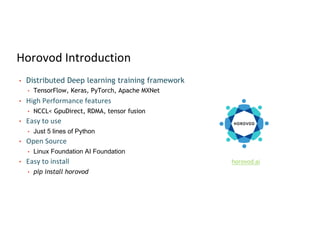
Horovod Introduction
• Distributed Deep learning training framework
• TensorFlow, Keras, PyTorch, Apache MXNet
• High Performance features
• NCCL< GpuDirect, RDMA, tensor fusion
• Easy to use
• Just 5 lines of Python
• Open Source
• Linux Foundation AI Foundation
• Easy to install
• pip install horovod
horovod.ai
Demo
End to End Horovod Demo
Future Enhancements
Future Enhancements
• Collect feedback from users
• Allow setting certain configs – like dynamic allocation
• Fitting new ResourceProfiles into existing containers
• Better cleanup of ResourceProfiles
• Catalyst internally
Other Performance Enhancements
Other Enhancements
• Pluggable Caching
• Allows developers to try different caching solutions
• Custom GPU implementation
Questions
Feedback
Your feedback is important to us.
Don’t forget to rate and review the sessions.

Stage Level Scheduling Improving Big Data and AI Integration

  • 1.
    Stage Level Scheduling ImprovingBig Data and AI integration Thomas Graves Software Engineer at NVIDIA Spark PMC
  • 2.
    Agenda § Resource Scheduling §Stage Level Scheduling § Use Case Example § Demo
  • 3.
  • 4.
    Resource Scheduling • Driver •Cores • Memory • Accelerators (GPU/FPGA/etc) • Executors • Cores • Memory (overhead, pyspark, heap, offheap) • Accelerators (GPU/FPGA/etc) • Tasks (requirements) • CPUs • Accelerators (GPU/FPGA/etc)
  • 5.
    Resource Scheduling • TasksPer Executor • Executor Resources / Task Requirements • Configs spark.driver.cores=1 spark.executor.cores=4 spark.task.cpus=1 spark.driver.memory=4g spark.executor.memory=4g spark.executor.memoryOverhead=2g spark.driver.resource.gpu.amount=1 spark.driver.resource.gpu.discoveryScript=./getGpuResources.sh spark.executor.resource.gpu.amount=1 spark.executor.resource.gpu.discoveryScript=./getGpuResources.sh spark.task.resource.gpu.amount=0.25
  • 6.
  • 7.
    Overview Spark ETL StageSpark ML Stage NODE NODE GPU CPU CPU
  • 8.
    Stage Level Scheduling •Stage level resource scheduling (SPARK-27495) • Specify resource requirements per RDD operation • Spark dynamically allocates containers to meet resource requirements • Spark schedules tasks on appropriate containers • Benefits • Hardware utilization and cost • Ease of programming • Application no longer required split ETL and Deep Learning into separate applications • Pipeline simplification
  • 9.
    Use Cases • Beneficialany time the user wants to change container resources between stages in a single Spark application • ETL to Deep Learning • Skewed data • Data size large in certain stages • Jobs that use caching, switch to higher memory containers during those stages
  • 10.
    Resources Supported • ExecutorResources • Cores • Heap Memory • OffHeap Memory • Pyspark Memory • Memory Overhead • Additional Resources (GPUs, etc) • Task Resources • CPUs • Additional Resources (GPUs, etc)
  • 11.
    Requirements • Spark 3.1.1 •Dynamic Allocation with External Shuffle Service or Shuffle tracking enabled • YARN and Kubernetes • RDD API only • Scala, Java, Python
  • 12.
    Implementation Details • Newcontainer acquired with new ResourceProfile • Does NOT try to fit into existing container with different ResourceProfile (Future Enhancement) • Unused containers idle timeout • Default to one ResourceProfile per stage • Config to allow multiple ResourceProfiles per stage • Multiple profiles will be merged with simple max of each resource
  • 13.
    YARN Implementation Details •External Shuffle Service and Dynamic Allocation • YARN Container Priority – ResourceProfile Id becomes container priority • YARN lower numbers are higher priority • Job Server type scenario that may come into affect • GPU and FPGA predefined, other resources require additional configurations • Custom resources via spark.yarn.executor.resource.* only apply in default profile – do not propogate because no way to override • Discovery script must be accessible – sent with job submission
  • 14.
    Kubernetes Implementation Details •Requires shuffle tracking enabled (spark.dynamicAllocaiton.shuffleTracking.enabled) • May not idel timeout if have shuffle data on the node • Result in more cluster resource used • spark.dynamicAllocaiton.shuffleTracking.timeout • Pod Template Behavior • Resource in Pod Template only used in default profile • Specify all resources needed in the ResourceProfile
  • 15.
    UI Screen Shots --executor-cores2 --conf spark.executor.resource.gpu.amount=1 --conf spark.task.resource.gpu.amount=0.5
  • 16.
  • 17.
    API > import org.apache.spark.resource.{ExecutorResourceRequests,ResourceProfileBuilder, TaskResourceRequests} > val rpb = new ResourceProfileBuilder() > val ereq = new ExecutorResourceRequests() > val treq = new TaskResourceRequests() > ereq.cores(4).memory("6g”).memoryOverhead("2g”).resource("gpu", 2, "./getGpus") > treq.cpus(4).resource("gpu", 2) > rpb.require(ereq) > rpb.require(treq) > val rp = rpb.build() // use the ResourceProfile with the RDD > val mlRdd = df.rdd.withResources(rp) > mlRdd.mapPartitions { x => // feed data into ML and get result }.collect()
  • 18.
  • 19.
  • 20.
    API > rpb Profile executorresources: ArrayBuffer(memoryOverhead=name: memoryOverhead, amount: 2048, script: , vendor: , cores=name: cores, amount: 4, script: , vendor: , memory=name: memory, amount: 6144, script: , vendor: , gpu=name: gpu, amount: 2, script: ./getGpus, vendor: ), task resources: ArrayBuffer(cpus=name: cpus, amount: 4.0, gpu=name: gpu, amount: 2.0) > mlRdd.getResourceProfile : org.apache.spark.resource.ResourceProfile = Profile: id = 1, executor resources: memoryOverhead -> name: memoryOverhead, amount: 2048, script: , vendor: ,cores -> name: cores, amount: 4, script: , vendor: ,memory -> name: memory, amount: 6144, script: , vendor: ,gpu -> name: gpu, amount: 2, script: ./getGpus, vendor: , task resources: cpus -> name: cpus, amount: 4.0,gpu -> name: gpu, amount: 2.0
  • 21.
    API - Mutablevs Immutable > ereq.cores(2).memory("6g”).memoryOverhead("2g”).resource("gpu", 2, "./getGpus") > treq.cpus(1).resource("gpu", 1) > rpb.require(ereq).require(treq) > val rp = rpb.build() > rp : org.apache.spark.resource.ResourceProfile = Profile: id = 2, executor resources: memoryOverhead -> name: memoryOverhead, amount: 2048, script: , vendor: ,cores -> name: cores, amount: 2, script: , vendor: ,memory -> name: memory, amount: 6144, script: , vendor: ,gpu -> name: gpu, amount: 2, script: ./getGpus, vendor: , task resources: cpus -> name: cpus, amount: 1.0,gpu -> name: gpu, amount: 1.0 > treq.cpus(2).resource("gpu", 2) > rpb.require(treq) > val rpNew = rpb.build() > rpNew : org.apache.spark.resource.ResourceProfile = Profile: id = 3, executor resources: memoryOverhead -> name: memoryOverhead, amount: 2048, script: , vendor: ,cores -> name: cores, amount: 2, script: , vendor: ,memory -> name: memory, amount: 6144, script: , vendor: ,gpu -> name: gpu, amount: 2, script: ./getGpus, vendor: , task resources: cpus -> name: cpus, amount: 2.0,gpu -> name: gpu, amount: 2.0
  • 22.
    Use Case Example Endto End Pipeline
  • 23.
    ETL Using RapidsAccelerator For Spark
  • 24.
    Rapids Accelerator ForSpark • Run Spark on a GPU to accelerate processing • combines the power of the RAPIDS cuDF library and the scale of the Spark distributed computing framework • Spark SQL and DataFrames • Requires Spark 3.0+ • No user code changes • If operation not supported, run on CPU like normal • built-in accelerated shuffle based on UCX that can be configured to leverage GPU-to-GPU communication and RDMA capabilities’
  • 25.
    ETL Technology Stack DaskcuDF cuDF, Pandas Python Cython cuDF C++ CUDA Libraries CUDA Java JNI bindings Spark dataframes, Scala, PySpark
  • 26.
    Rapids Accelerator ForApache Spark (Plugin) DISTRIBUTED SCALE-OUT SPARK APPLICATIONS APACHE SPARK CORE RAPIDS Accelerator for Spark Spark SQL API DataFrame API Spark Shuffle if gpu_enabled(operation, data_type) call-out to RAPIDS else execute standard Spark operation ● Custom Implementation of Spark Shuffle ● Optimized to use RDMA and GPU- to-GPU direct communication JNI bindings Mapping From Java/Scala to C++ RAPIDS C++ Libraries UCX Libraries CUDA JNI bindings Mapping From Java/Scala to C++
  • 27.
    Spark SQL &Dataframe Compilation Flow DataFrame Logical Plan Physical Plan bar.groupBy( col(”product_id”), col(“ds”)) .agg( maxcol(“price”)) - min(col(“p(rice”)).alias(“range”)) SELECT product_id, ds, max(price) – min(price) AS range FROM bar GROUP BY product_id, ds QUERY GPU PHYSICAL PLAN GPU Physical Plan RAPIDS SQL Plugin RDD[InternalRow] RDD[ColumnarBatch]
  • 28.
    NDS Query 38Results Entire query is GPU accelerated CPU Cluster: Driver: 1 x m5dn.large; Workers: 8 x m5dn.2xlarge On-demand cluster cost (US West): $4.488/hr GPU Cluster: Driver: 1 x m5dn.large; Workers: 8 x g4dn.2xlarge On-demand cluster cost (US West): $6.152/hr 163.0 53.2 0.0 40.0 80.0 120.0 160.0 200.0 CPU: 8 x m5dn.2xlarge (64-core 256GB) GPU: 8 x g4dn.2xlarge (64-core 256GB 8xT4 GPU) Time (secs) Query Time $0.20 $0.09 $0.00 $0.05 $0.10 $0.15 $0.20 $0.25 CPU: 8 x m5dn.2xlarge (64-core 256GB) GPU: 8 x g4dn.2xlarge (64-core 256GB 8xT4 GPU) Total Costs 3X Speed-up 55% Cost Saving
  • 29.
  • 30.
    Horovod Introduction • DistributedDeep learning training framework • TensorFlow, Keras, PyTorch, Apache MXNet • High Performance features • NCCL< GpuDirect, RDMA, tensor fusion • Easy to use • Just 5 lines of Python • Open Source • Linux Foundation AI Foundation • Easy to install • pip install horovod horovod.ai
  • 31.
  • 32.
    End to EndHorovod Demo
  • 33.
  • 34.
    Future Enhancements • Collectfeedback from users • Allow setting certain configs – like dynamic allocation • Fitting new ResourceProfiles into existing containers • Better cleanup of ResourceProfiles • Catalyst internally
  • 35.
  • 36.
    Other Enhancements • PluggableCaching • Allows developers to try different caching solutions • Custom GPU implementation
  • 37.
  • 38.
    Feedback Your feedback isimportant to us. Don’t forget to rate and review the sessions.