تعلم لغة البايثون بطريقة سهلة وبسيطة الطلاب والباحثين
1.
Computer Science Department
PythonProgramming Lecture 1
Introduction
1.1 Python language:
Python is one of the most popular and widely used programming languages, and
is an excellent language for new programmers to start with. They can be used in
everything from video games and language processing, to data analysis and
machine learning. It was created by Guido van Rossum, and released in 1991.
Python is a high-level, compiled, interactive, and object-oriented programming
language. It is highly readable, as it uses simple English words, unlike other
languages that use symbols, and its spelling and syntax are simple, which makes
learning Python easy compared to other programming languages.
*
بايثىى
-
يوكي .الجذد الوبرهجىى بها ليبذأ هوتازة لغت وهي ،اًهاستخذا وأكثرها البرهجت لغاث أشهر هي واحذة هي
ك في استخذاهها
.اآللي والتعلن البياًاث تحليل ًوحت ،اللغاث وهعالجت الفيذيى ألعاب هي اًءبذ ،الوجاالث ل
( ترجوتُهو ،الوستىي عاليت برهجت لغت هي بايثىى
interpreted
تستخذم إر ،عاليت بوقروئيت وتتوتع .وكائٌيت وتفاعليت )
تستخذم التي األخري اللغاث خالف ًعل ،بسيطت إًجليسيت كلواث
ها ،بسيطت والصياغيت اإلهالئيت قىاعذها ّأى كوا ،الرهىز
.أخري برهجت بلغاث ًهىازًت ً
سهال بايثىى لغت تعلن يجعل
1.2 Features of Python language:
Python has several advantages over other programming languages, including:
1. Ease of learning: The Python language is easy to learn, as it consists of a few
keywords, and is characterized by a simple and clear syntax.
2. Readability: Python code is clear, organized, and easy to read.
3. Easy to Maintain: Python code is very easy to maintain.
4. Extensive Standard Library: The Python Standard Library contains a large
number of portable packages that are compatible with UNIX, Windows, and
macOS systems.
2.
Computer Science Department
PythonProgramming Lecture 1
5. Interactive mode: Python supports interactive mode, making it possible to
execute code directly on the command line and debug the code.
6. Python portability: Python can run on a wide range of platforms and devices,
while maintaining the same interface on all of them.
7. Extensibility: One of the most important features of Python is that it has a
huge number of modules that can expand the capabilities of the language in
all areas of development, such as data analysis, 2D and 3D graphics, game
development, embedded systems, scientific research, website development
and other fields.
8. Databases: Python provides interfaces to all major databases.
9. Graphics: Python supports graphical applications.
10.Support for large programs: Python is suitable for large and complex
programs.
1.3 What can Python do?
1. Python can be used on a server to create web applications.
2. Python can be used alongside software to create workflows.
3. Python can connect to database systems. It can also read and modify files.
4. Python can be used to handle big data and perform complex mathematics.
5. Python can be used for rapid prototyping, or for production-ready software
development.
Requirements: You must have Python installed, as well as a local
programming environment set up on your computer. To write a program , we will
create a new file with the extension(.py)
3.
Computer Science Department
PythonProgramming Lecture 1
1.4 Python Getting Started
1.4.1 Python Install:
*
: اللغة لتنصيب
Use this web link:
https://www.python.org/downloads/
1.4.2 Python Output print() function
Print( ) الطباعة *دالة
We use the print() function to output data to the standard output device (screen).
We can also output data to a file, but this will be discussed later. It displays or
outputs what we put in parentheses.
An example of its use is given below..
Print ('Hallow')
Print (10+20)
Print ('ahmed','ali')
Another example is given below:
d = 20
print('The value of a is', d)
Output The value of a is 20
4.
Computer Science Department
PythonProgramming Lecture 1
1.4.3 String Concatenation:
To concatenate, or combine, two strings you can use the + operator.
Example: Merge variable a with variable b into variable c:
a = "Hello"
b = "World"
c = a + b
print(c)
Output HelloWorld
we can combine strings and numbers by using the format() method.
The format() method takes the passed arguments, formats them, and places them
in the string where the placeholders { } are:
Example: Use the format() method to insert numbers into strings:
age = 36
txt = "My name is John, and I am {}"
print(txt.format(age))
Output My name is John, and I am 36
The format() method takes unlimited number of arguments, and are placed into the
respective placeholders:
Example:
quantity = 3
itemno = 567
price = 49.95
myorder = "I want {} pieces of item {} for {} dollars."
print(myorder.format(quantity, itemno, price))
Output I want 3 pieces of item 567 for 49.95 dollars.
5.
Computer Science Department
PythonProgramming Lecture 1
1.4.4 Boolean Values:
In programming you often need to know if an expression is True or False.
You can evaluate any expression in Python, and get one of two
answers, True or False.
When you compare two values, the expression is evaluated and Python returns the
Boolean answer:
Example
print(10 > 9)
print(10 == 9)
print(10 < 9)
outputTrue
False
False
1.4.5 Python User Input
Python allows for user input.That means we are able to ask the user for input.
The method is a bit different in Python 3.6 than Python 2.7.
Python 3.6 uses the input() method.
Python 2.7 uses the raw_input() method.
The following example asks for the username, and when you entered the username,
it gets printed on the screen:
Python 3.6
username = input("Enter username:")
print("Username is: " + username)
output Enter username: 12345
Username is: 12345
6.
Computer Science Department
PythonProgramming Lecture 1
1.4.6 Python Comments
Comments can be used to explain Python code.
Comments can be used to make the code more readable.
Comments can be used to prevent execution when testing code.
1- Creating a Comment
Comments starts with a #, and Python will ignore them:
Example
#This is a comment
print("Hello, World!")
Comments can be placed at the end of a line, and Python will ignore the rest of the
line:
Example
print("Hello, World!") #This is a comment
A comment does not have to be text that explains the code, it can also be used to
prevent Python from executing code:
Example
#print("Hello, World!")
print("Cheers, Mate!")
7.
Computer Science Department
PythonProgramming Lecture 1
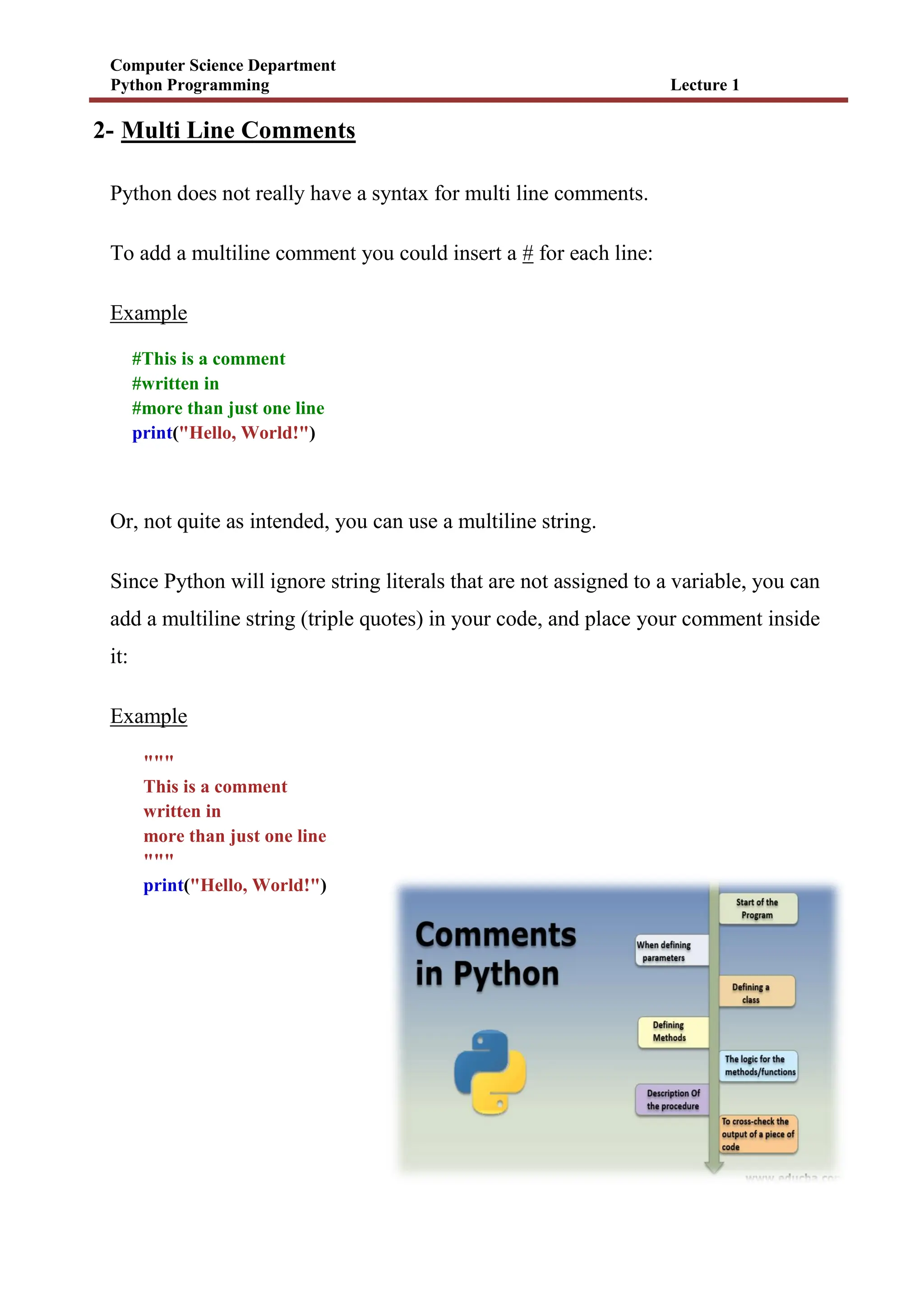
2- Multi Line Comments
Python does not really have a syntax for multi line comments.
To add a multiline comment you could insert a # for each line:
Example
#This is a comment
#written in
#more than just one line
print("Hello, World!")
Or, not quite as intended, you can use a multiline string.
Since Python will ignore string literals that are not assigned to a variable, you can
add a multiline string (triple quotes) in your code, and place your comment inside
it:
Example
"""
This is a comment
written in
more than just one line
"""
print("Hello, World!")
8.
Computer Science Department
PythonProgramming Lecture 1
1.4.7 Variables
Variables are containers for storing data values.
Creating Variables
Python has no command for declaring a variable.
A variable is created the moment you first assign a value to it.
Example
x = 5
y = "John"
print(x)
print(y)
Example
x = 4 # x is of type int
x = "Sally" # x is now of type str
print(x)
output
1.4.8 Python Casting
Specify a Variable Type.
There may be times when you want to specify a type on to a variable. This can be
done with casting. Python is an object-orientated language, and as such it uses
classes to define data types, including its primitive types.
Casting in python is therefore done using constructor functions:
int() - constructs an integer number from an integer literal, a float literal (by
removing all decimals), or a string literal (providing the string represents a
whole number)
9.
Computer Science Department
PythonProgramming Lecture 1
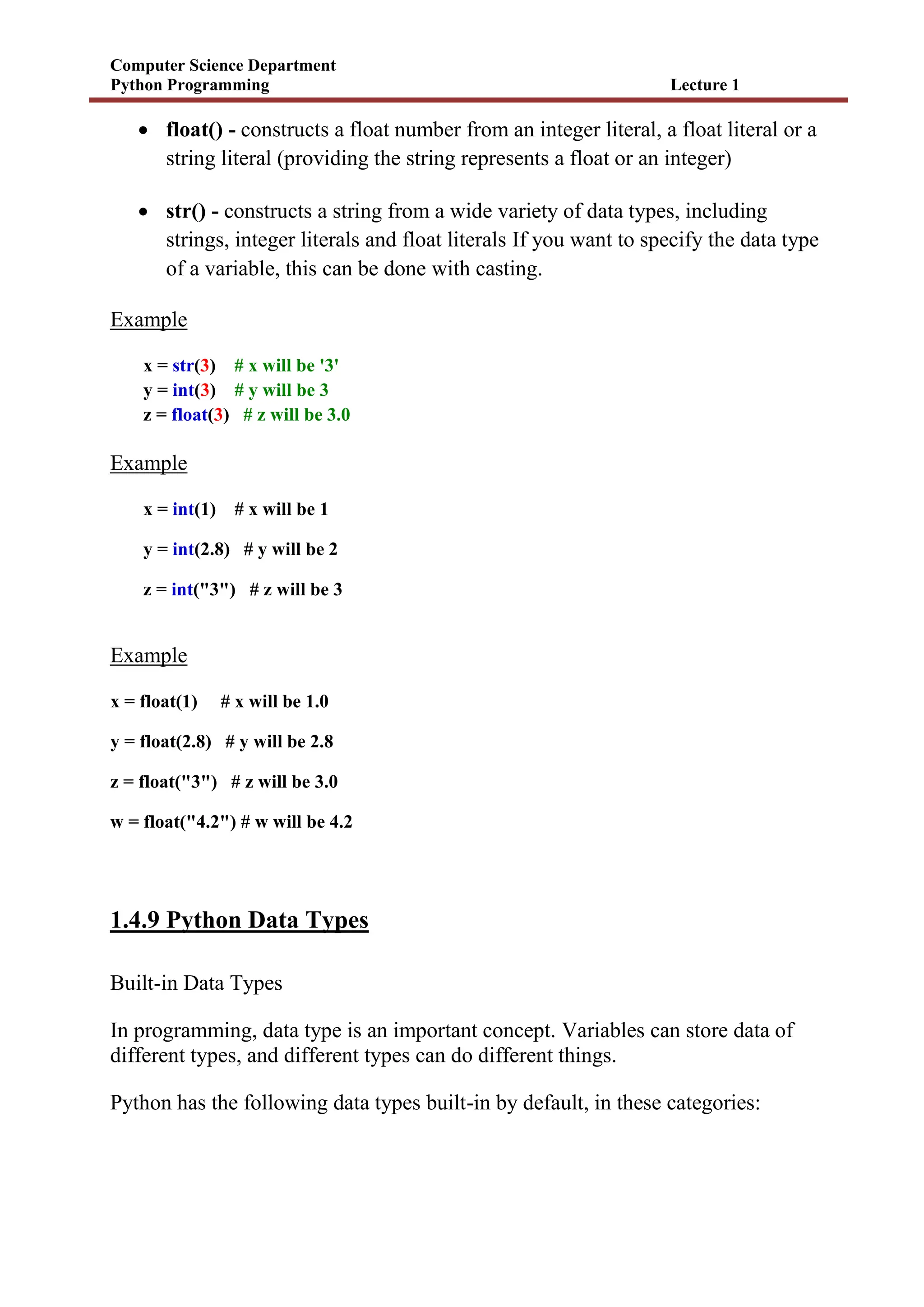
float() - constructs a float number from an integer literal, a float literal or a
string literal (providing the string represents a float or an integer)
str() - constructs a string from a wide variety of data types, including
strings, integer literals and float literals If you want to specify the data type
of a variable, this can be done with casting.
Example
x = str(3) # x will be '3'
y = int(3) # y will be 3
z = float(3) # z will be 3.0
Example
x = int(1) # x will be 1
y = int(2.8) # y will be 2
z = int("3") # z will be 3
Example
x = float(1) # x will be 1.0
y = float(2.8) # y will be 2.8
z = float("3") # z will be 3.0
w = float("4.2") # w will be 4.2
1.4.9 Python Data Types
Built-in Data Types
In programming, data type is an important concept. Variables can store data of
different types, and different types can do different things.
Python has the following data types built-in by default, in these categories:
10.
Computer Science Department
PythonProgramming Lecture 1
Getting the Data Type
You can get the data type of any object by using the type() function:
Example
Print the data type of the variable x:
x = 5
print(type(x))
output <class 'int'>
Setting the Data Type
In Python, the data type is set when you assign a value to a variable:
Example Data Type
x = "Hello World" str
x = 20 int
x = 20.5 float
x = 1j complex
x = ["apple", "banana", "cherry"] list
x = ("apple", "banana", "cherry") tuple
x = range(6) range
11.
Computer Science Department
PythonProgramming Lecture 1
x = {"name" : "John", "age" : 36} dict
x = {"apple", "banana", "cherry"} set
x = True bool
1.4.10 Python Numbers:
There are three numeric types in Python:
int
float
complex
Variables of numeric types are created when you assign a value to them:
Example
x = 1 # int
y = 2.8 # float
z = 1j # complex
((End of lecture 1))
12.
Computer Science Department
PythonProgramming Lecture 2
1
2.1 Python Operators:
Operators are used to perform operations on variables and values.
In the example below, we use the + operator to add together two values:
Example
print(10 + 5)
Python divides the operators in the following groups:
Arithmetic operators
Assignment operators
Comparison operators
Logical operators
Identity operators
Membership operators
Bitwise operators
2.1.1 Python Arithmetic Operators
Arithmetic operators are used with numeric values to perform common
mathematical operations:
Operator Name Example
+ Addition x + y
13.
Computer Science Department
PythonProgramming Lecture 2
2
- Subtraction x - y
* Multiplication x * y
/ Division x / y
% Modulus x % y
** Exponentiation x ** y
// Floor division x // y
2.1.2 Python Assignment Operators:
Assignment operators are used to assign values to variables:
Operator Example Same As
= x = 5 x = 5
+= x += 3 x = x + 3
-= x -= 3 x = x - 3
*= x *= 3 x = x * 3
/= x /= 3 x = x / 3
14.
Computer Science Department
PythonProgramming Lecture 2
3
%= x %= 3 x = x % 3
//= x //= 3 x = x // 3
**= x **= 3 x = x ** 3
&= x &= 3 x = x & 3
|= x |= 3 x = x | 3
^= x ^= 3 x = x ^ 3
>>= x >>= 3 x = x >> 3
<<= x <<= 3 x = x << 3
2.1.3 Python Logical Operators
Logical operators are used to combine conditional statements:
Operator Description Example
and Returns True if both statements are true x < 5 and x < 10
Or Returns True if one of the statements is true x < 5 or x < 4
Not
Reverse the result, returns False if the result is
true
not(x < 5 and x < 10)
15.
Computer Science Department
PythonProgramming Lecture 2
4
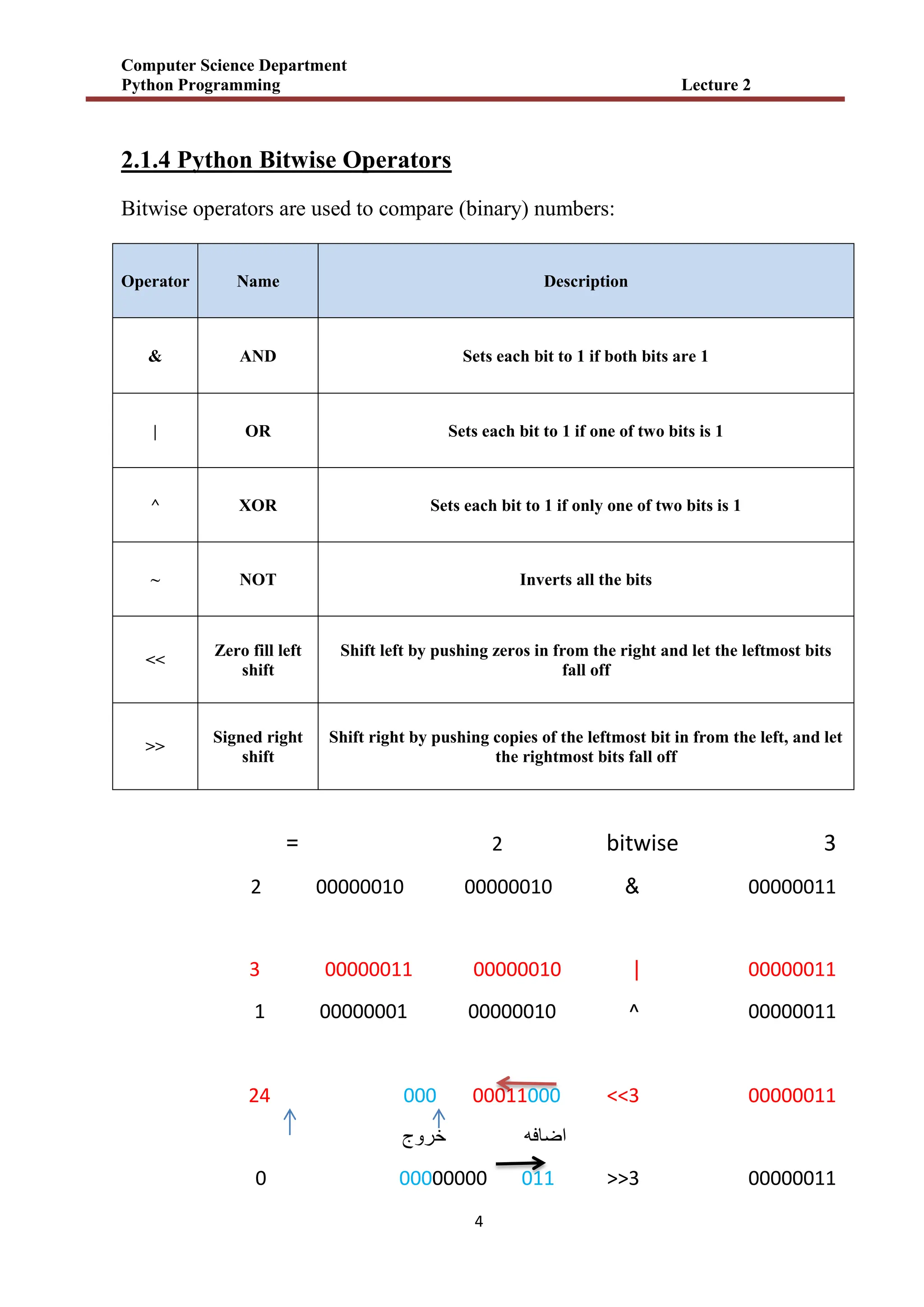
2.1.4 Python Bitwise Operators
Bitwise operators are used to compare (binary) numbers:
Operator Name Description
& AND Sets each bit to 1 if both bits are 1
| OR Sets each bit to 1 if one of two bits is 1
^ XOR Sets each bit to 1 if only one of two bits is 1
~ NOT Inverts all the bits
<<
Zero fill left
shift
Shift left by pushing zeros in from the right and let the leftmost bits
fall off
>>
Signed right
shift
Shift right by pushing copies of the leftmost bit in from the left, and let
the rightmost bits fall off
3
bitwise
2
=
00000011
&
00000010
00000010
2
00000011
|
00000010
00000011
3
00000011
^
00000010
00000001
1
00000011
<<3
00011000
000
24
خروج اضافه
00000011
>>3
00000000 011
0
16.
Computer Science Department
PythonProgramming Lecture 2
5
2.1.5 Python Comparison Operators:
Comparison operators are used to compare two values:
2.1.6 Python Identity Operators:
Identity operators are used to compare the objects, not if they are equal, but if
they are actually the same object, with the same memory location:
Operator Name Example
== Equal x == y
!= Not equal x != y
> Greater than x > y
< Less than x < y
>= Greater than or equal to x >= y
<= Less than or equal to x <= y
Operator Description Example
is Returns True if both variables are the same object x is y
is not Returns True if both variables are not the same object x is not y
17.
Computer Science Department
PythonProgramming Lecture 2
6
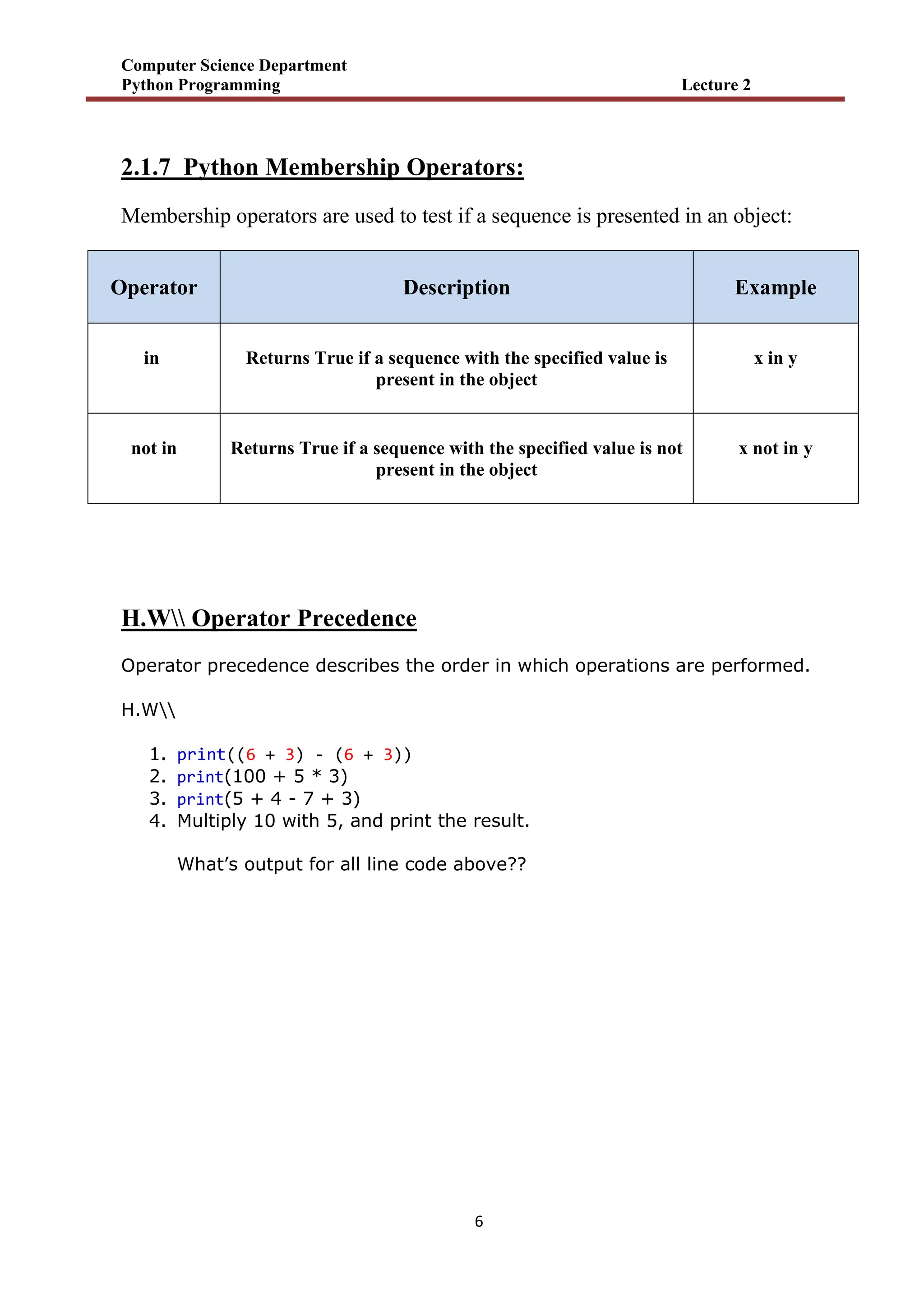
2.1.7 Python Membership Operators:
Membership operators are used to test if a sequence is presented in an object:
Operator Description Example
in Returns True if a sequence with the specified value is
present in the object
x in y
not in Returns True if a sequence with the specified value is not
present in the object
x not in y
H.W Operator Precedence
Operator precedence describes the order in which operations are performed.
H.W
1. print((6 + 3) - (6 + 3))
2. print(100 + 5 * 3)
3. print(5 + 4 - 7 + 3)
4. Multiply 10 with 5, and print the result.
What’s output for all line code above??
18.
Computer Science Department
PythonProgramming Lecture 2
7
2.2 Python Strings
Strings in python are surrounded by either single quotation marks, or double
quotation marks.
'hello' is the same as "hello".
You can display a string literal with the print() function:
Example
print("Hello")
print('Hello')
1- Assign String to a Variable
Assigning a string to a variable is done with the variable name followed by an
equal sign and the string:
Example
a = "Hello"
print(a)
output Hello
2- Multiline Strings
You can assign a multiline string to a variable by using three double quotes Or
three single quotes :
19.
Computer Science Department
PythonProgramming Lecture 2
8
Example
a = """ Shift left by pushing zeros in from the right
and let the leftmost bits fall off."""
print(a)
output Shift left by pushing zeros in from the right
and let the leftmost bits fall off.
3- Strings are Arrays
Like many other popular programming languages, strings in Python are arrays of
bytes representing unicode characters.
However, Python does not have a character data type, a single character is simply
a string with a length of 1.
Square brackets can be used to access elements of the string.
Example
Get the character at position 1 (remember that the first character has the position 0):
a = "Hello, World!"
print(a[1])
output e
4- String Length
To get the length of a string, use the len() function.
Example
The len() function returns the length of a string:
a = "Hello, World!"
print(len(a))
output 13
20.
Computer Science Department
PythonProgramming Lecture 2
9
5- Python - Slicing Strings
You can return a range of characters by using the slice syntax. Specify the start
index and the end index, separated by a colon, to return a part of the string.
Example
Get the characters from position 2 to position 5 (not included):
b = "Hello, World!"
print(b[2:5])
output llo
Note: The first character has index 0.
1) Slice From the Start
By leaving out the start index, the range will start at the first character:
Example
Get the characters from the start to position 5 (not included):
b = "Hello, World!"
print(b[:5])
outputHello
2) Slice To the End
By leaving out the end index, the range will go to the end:
Example
Get the characters from position 2, and all the way to the end:
b = "Hello, World!"
print(b[2:])
output llo, World!
21.
Computer Science Department
PythonProgramming Lecture 2
11
3) Negative Indexing
Use negative indexes to start the slice from the end of the string:
Example
Get the characters:
From: "o" in "World!" (position -5)
To, but not included: "d" in "World!" (position -2):
b = "Hello, World!"
print(b[-5:-2])
output orl
6- Looping Through a String:
Since strings are arrays, we can loop through the characters in a string, with
a for loop.
Example
for x in "banana":
print(x)
output b
a
n
a
n
a
22.
Computer Science Department
PythonProgramming Lecture 2
11
7- Check String:
To check if a certain phrase or character is present in a string, we can use the
keyword in.
Example
txt = "The best things in life are free!"
print("free" in txt)
output True
Example
txt = "The best things in life are free!"
print("expensive" not in txt)
output True
8- Python - Modify Strings:
Python has a set of built-in methods that you can use on strings.
1) Upper Case:
Example
The upper() method returns the string in upper case:
a = "Hello, World!"
print(a.upper())
output HELLO, WORLD!
23.
Computer Science Department
PythonProgramming Lecture 2
12
2) Lower Case:
Example
The lower() method returns the string in lower case:
a = "Hello, World!"
print(a.lower())
output hello, world!
3) Replace String:
Example
The replace() method replaces a string with another string:
a = "Hello, World!"
print(a.replace("H", "J"))
output Jello, World!
((End of lecture 2))
24.
Computer Science Department
PythonProgramming Lecture 3
1
3.1 Python If ... Else
Python Conditions and If statements
Python supports the usual logical conditions from mathematics:
Equals: a == b
Not Equals: a != b
Less than: a < b
Less than or equal to: a <= b
Greater than: a > b
Greater than or equal to: a >= b
These conditions can be used in several ways, most commonly in "if statements"
and loops.
An " if statement " is written by using the if keyword.
Example
a = 33
b = 200
if b > a:
print("b is greater than a")
output b is greater than a
In this example we use two variables, a and b, which are used as part of the if
statement to test whether b is greater than a. As a is 33, and b is 200, we know
that 200 is greater than 33, and so we print to screen that "b is greater than a".
25.
Computer Science Department
PythonProgramming Lecture 3
2
1- Indentation
Python relies on indentation (whitespace at the beginning of a line) to define
scope in the code. Other programming languages often use curly-brackets for
this purpose.
Example
If statement, without indentation (will raise an error):
a = 33
b = 200
if b > a:
print("b is greater than a") # you will get an error
2- Elif
The elif keyword is pythons way of saying "if the previous conditions were not
true, then try this condition".
Example
a = 33
b = 33
if b > a:
print("b is greater than a")
elif a == b:
print("a and b are equal")
output a and b are equal
In this example a is equal to b, so the first condition is not true, but
the elif condition is true, so we print to screen that "a and b are equal".
26.
Computer Science Department
PythonProgramming Lecture 3
3
3- Else
The else keyword catches anything which isn't caught by the preceding
conditions.
Example
a = 200
b = 33
if b > a:
print("b is greater than a")
elif a == b:
print("a and b are equal")
else:
print("a is greater than b")
output a is greater than b
In this example a is greater than b, so the first condition is not true, also
the elif condition is not true, so we go to the else condition and print to screen
that "a is greater than b".
You can also have an else without the elif:
Example
a = 200
b = 33
if b > a:
print("b is greater than a")
else:
print("b is not greater than a")
output b is not greater than a
27.
Computer Science Department
PythonProgramming Lecture 3
4
H.w
a = 330
b = 330
print("A") if a > b else print("=") if a == b else print("B")
output
4- And
The and keyword is a logical operator, and is used to combine conditional
statements:
Example
Test if a is greater than b, AND if c is greater than a:
a = 200
b = 33
c = 500
if a > b and c > a:
print("Both conditions are True")
output Both conditions are True
5- Or
The or keyword is a logical operator, and is used to combine conditional
statements:
Example
Test if a is greater than b, OR if a is greater than c:
a = 200
b = 33
28.
Computer Science Department
PythonProgramming Lecture 3
5
c = 500
if a > b or a > c:
print("At least one of the conditions is True")
output At least one of the conditions is True
6- Use in an if statement:
Example
Print only if "free" is present:
txt = "The best things in life are free!"
if "free" in txt:
print("Yes, 'free' is present.")
output Yes, 'free' is present
7- Check if NOT
To check if a certain phrase or character is NOT present in a string, we can use
the keyword not in.
Example
Check if "expensive" is NOT present in the following text:
txt = "The best things in life are free!"
print("expensive" not in txt)
output True
Use it in an if statement:
29.
Computer Science Department
PythonProgramming Lecture 3
6
Example
print only if "expensive" is NOT present:
txt = "The best things in life are free!"
if "expensive" not in txt:
print("No, 'expensive' is NOT present.")
output No, 'expensive' is NOT present.
8- Nested If
You can have if statements inside if statements, this is
called nested if statements.
Example
x = 41
if x > 10:
print("Above ten,")
if x > 20:
print("and also above 20!")
else:
print("but not above 20.")
output Above ten,
and also above 20!
30.
Computer Science Department
PythonProgramming Lecture 3
7
3.2 Python For Loops
A for loop is used for iterating over a sequence (that is either a list, a tuple, a
dictionary, a set, or a string).
This is less like the for keyword in other programming languages, and works
more like an iterator method as found in other object-orientated programming
languages.
With the for loop we can execute a set of statements, once for each item in a list,
tuple, set etc.
Example
Print each fruit in a fruit list:
fruits = ["apple", "banana", "cherry"]
for x in fruits:
print(x)
output apple
banana
cherry
1- Looping Through a String
Since strings are arrays, we can loop through the characters in a string, with
a for loop.
Example
Loop through the letters in the word "banana":
31.
Computer Science Department
PythonProgramming Lecture 3
8
for x in "banana":
print(x)
outputb
a
n
a
n
a
2- The break Statement
With the break statement we can stop the loop before it has looped through all
the items:
Example
Exit the loop when x is "banana":
fruits = ["apple", "banana", "cherry"]
for x in fruits:
print(x)
if x == "banana":
break
output apple
banana
Example
Exit the loop when x is "banana", but this time the break comes before the print:
fruits = ["apple", "banana", "cherry"]
for x in fruits:
if x == "banana":
break
print(x)
output apple
32.
Computer Science Department
PythonProgramming Lecture 3
9
3- The continue Statement
With the continue statement we can stop the current iteration of the loop, and
continue with the next:
Example
Do not print banana:
fruits = ["apple", "banana", "cherry"]
for x in fruits:
if x == "banana":
continue
print(x)
output apple
cherry
4- The range() Function
To loop through a set of code a specified number of times, we can use
the range() function,
The range() function returns a sequence of numbers, starting from 0 by default,
and increments by 1 (by default), and ends at a specified number.
Example
Using the range() function:
for x in range(6):
print(x)
33.
Computer Science Department
PythonProgramming Lecture 3
11
output 0
1
2
3
4
5
Example
Using the start parameter:
for x in range(2, 6):
print(x)
output 2
3
4
5
5- Nested Loops
A nested loop is a loop inside a loop.
The "inner loop" will be executed one time for each iteration of the "outer loop":
Example
Print each adjective for every fruit:
34.
Computer Science Department
PythonProgramming Lecture 3
11
adj = ["red", "big", "tasty"]
fruits = ["apple", "banana", "cherry"]
for x in adj:
for y in fruits:
print(x, y)
output red apple
red banana
red cherry
big apple
big banana
big cherry
tasty apple
tasty banana
tasty cherry
H.w use for loop to print this figure in screen:
P
Py
Pyt
Pyth
Pytho
Python
Pytho
Pyth
Pyt
Py
p
35.
Computer Science Department
PythonProgramming Lecture 3
12
3.3 Python While Loops
With the while loop we can execute
a set of statements as long as a condition is true.
Example
Print i as long as i is less than 6:
i = 1
while i < 6:
print(i)
i += 1
output1
2
3
4
5
The while loop requires relevant variables to be ready, in this example we need
to define an indexing variable, i, which we set to 1.
1- The break Statement
With the break statement we can stop the loop even if the while condition is
true:
Example
Exit the loop when i is 3:
36.
Computer Science Department
PythonProgramming Lecture 3
13
i = 1
while i < 6:
print(i)
if i == 3:
break
i += 1
output1
2
3
2-The continue Statement
With the continue statement we can stop the current iteration, and continue with
the next:
Example
Continue to the next iteration if i is 3:
i = 0
while i < 6:
i += 1
if i == 3:
continue
print(i)
output 1
2
4
5
6
37.
Computer Science Department
PythonProgramming Lecture 3
14
3-The else Statement
With the else statement we can run a block of code once when the condition no
longer is true:
Example
Print a message once the condition is false:
i = 1
while i < 6:
print(i)
i += 1
else:
print("i is no longer less than 6")
output 1
2
3
4
5
i is no longer less than 6
H.w how print the following output:
6 * 1 = 6
6 * 2 = 12
6 * 3 = 18
6 * 4 = 24
6 * 5 = 30
((End of lecture 3))
38.
Computer Science Department
PythonProgramming Lecture 4
1
4.1 Python Lists
mylist = ["apple", "banana", "cherry"]
1) List
Lists are used to store multiple items in a single variable.
Lists are one of 4 built-in data types in Python used to store collections of data, the
other 3 are Tuple, Set, and Dictionary, all with different qualities and usage.
Lists are created using square brackets:
Example
Create a List:
thislist = ["apple", "banana", "cherry"]
print(thislist)
output ['apple', 'banana', 'cherry']
2) List Items
List items are ordered, changeable, and allow duplicate values.
List items are indexed, the first item has index [0], the second item has
index [1] etc.
3) Ordered
When we say that lists are ordered, it means that the items have a defined order,
and that order will not change.
If you add new items to a list, the new items will be placed at the end of the list.
39.
Computer Science Department
PythonProgramming Lecture 4
2
Note: There are some list methods that will change the order, but in general: the order of
the items will not change.
4) Changeable
The list is changeable, meaning that we can change, add, and remove items in a list
after it has been created.
5) Allow Duplicates
Since lists are indexed, lists can have items with the same value:
Example
thislist = ["apple", "banana", "cherry", "apple", "cherry"]
print(thislist)
output ['apple', 'banana', 'cherry', 'apple', 'cherry']
6) List Length
To determine how many items a list has, use the len() function:
Example
thislist = ["apple", "banana", "cherry"]
print(len(thislist))
output 3
40.
Computer Science Department
PythonProgramming Lecture 4
3
7) List Items - Data Types
List items can be of any data type( String, int and boolean data types):
Example
list1 = ["apple", "banana", "cherry"]
list2 = [1, 5, 7, 9, 3]
list3 = [True, False, False]
A list can contain different data types:
Example
list1 = ["abc", 34, True, 40, "male"]
8) Python - Access List Items
Access Items
List items are indexed and you can access them by referring to the index number:
Example
Print the second item of the list:
thislist = ["apple", "banana", "cherry"]
print(thislist[1])
output banana
Note: The first item has index 0.
9) Negative Indexing
Negative indexing means start from the end
-1 refers to the last item, -2 refers to the second last item etc.
41.
Computer Science Department
PythonProgramming Lecture 4
4
Example
Print the last item of the list:
thislist = ["apple", "banana", "cherry"]
print(thislist[-1])
output cherry
10) Range of Indexes
You can specify a range of indexes by specifying where to start and where to end
the range. When specifying a range, the return value will be a new list with the
specified items.
Example
Return the third, fourth, and fifth item:
thislist = ["apple", "banana", "cherry", "orange", "kiwi", "melon", "mango"]
print(thislist[2:5])
output ['cherry', 'orange', 'kiwi']
Note: The search will start at index 2 (included) and end at index 5 (not included).
Remember that the first item has index 0.
By leaving out the start value, the range will start at the first item:
Example
thislist = ["apple", "banana", "cherry", "orange", "kiwi", "melon", "mango"]
print(thislist[:4])
output ['apple', 'banana', 'cherry', 'orange']
42.
Computer Science Department
PythonProgramming Lecture 4
5
11) Python - Add List Items
Append Items
To add an item to the end of the list, use the append() method:
Example
thislist = ["apple", "banana", "cherry"]
thislist.append("orange")
print(thislist)
output ['apple', 'banana', 'cherry', 'orange']
12) Python - Remove List Items
Remove Specified Item
The remove() method removes the specified item.
Example
Remove "banana":
thislist = ["apple", "banana", "cherry"]
thislist.remove("banana")
print(thislist)
output ['apple', 'cherry']
Remove Specified Index
The pop() method removes the specified index.
Example
Remove the second item:
thislist = ["apple", "banana", "cherry"]
thislist.pop(1)
print(thislist)
output ['apple', 'cherry']
43.
Computer Science Department
PythonProgramming Lecture 4
6
13) Python - Loop Lists
Loop Through a List
You can loop through the list items by using a for loop:
Example
Print all items in the list, one by one:
thislist = ["apple", "banana", "cherry"]
for x in thislist:
print(x)
output apple
banana
cherry
14) Loop Through the Index Numbers
You can also loop through the list items by referring to their index number.
Use the range() and len() functions to create a suitable iterable.
Example
Print all items by referring to their index number:
thislist = ["apple", "banana", "cherry"]
for i in range(len(thislist)):
print(thislist[i])
output apple
banana
cherry
44.
Computer Science Department
PythonProgramming Lecture 4
7
15) Python - Sort Lists
Sort List Alphanumerically
List objects have a sort() method that will sort the list alphanumerically,
ascending, by default:
Example
Sort the list alphabetically:
thislist = ["orange", "mango", "kiwi", "pineapple", "banana"]
thislist.sort()
print(thislist)
output ['banana', 'kiwi', 'mango', 'orange', 'pineapple']
Example
Sort the list numerically:
thislist = [100, 50, 65, 82, 23]
thislist.sort()
print(thislist)
output [23, 50, 65, 82, 100]
Sort Descending
To sort descending, use the keyword argument reverse = True:
Example
Sort the list descending:
thislist = ["orange", "mango", "kiwi", "pineapple", "banana"]
thislist.sort(reverse = True)
print(thislist)
output ['pineapple', 'orange', 'mango', 'kiwi', 'banana']
45.
Computer Science Department
PythonProgramming Lecture 4
8
Example
Sort the list descending:
thislist = [100, 50, 65, 82, 23]
thislist.sort(reverse = True)
print(thislist)
output [100, 82, 65, 50, 23]
16) Python - Join Lists
Join Two Lists
There are several ways to join, or concatenate, two or more lists in Python.
One of the easiest ways are by using the + operator.
Example
Join two list:
list1 = ["a", "b", "c"]
list2 = [1, 2, 3]
list3 = list1 + list2
print(list3)
output ['a', 'b', 'c', 1, 2, 3]
Another way to join two lists is by appending all the items from list2 into list1, one
by one:
Example
Append list2 into list1:
list1 = ["a", "b" , "c"]
list2 = [1, 2, 3]
for x in list2:
list1.append(x)
print(list1)
output ['a', 'b', 'c', 1, 2, 3]
46.
Computer Science Department
PythonProgramming Lecture 4
9
17) List Methods
Python has a set of built-in methods that you can use on lists.
Method Description
append() Adds an element at the end of the list
clear() Removes all the elements from the list
copy() Returns a copy of the list
count() Returns the number of elements with the specified value
extend() Add the elements of a list (or any iterable), to the end of the current list
index() Returns the index of the first element with the specified value
insert() Adds an element at the specified position
pop() Removes the element at the specified position
remove() Removes the item with the specified value
reverse() Reverses the order of the list
sort() Sorts the list
H.w المختبر في أعاله الطرق عن امثلة مجموعة نفذ
47.
Computer Science Department
PythonProgramming Lecture 4
11
4.2 Python Tuples
mytuple = ("apple", "banana", "cherry")
Tuples are used to store multiple items in a single variable.
Tuple is one of 4 built-in data types in Python used to store collections of data, the
other 3 are List, Set, and Dictionary, all with different qualities and usage.
A tuple is a collection which is ordered and unchangeable.
Tuples are written with round brackets.
Example
1) Create a Tuple:
thistuple = ("apple", "banana", "cherry")
print(thistuple)
output ('apple', 'banana', 'cherry')
2) Tuple Items - Data Types
Tuple items can be of any data type (String, int and boolean data types) :
Example
tuple1 = ("apple", "banana", "cherry")
tuple2 = (1, 5, 7, 9, 3)
tuple3 = (True, False, False)
A tuple can contain different data types:
Example
Different types of tuples
# Empty tuple
my_tuple = ()
print(my_tuple)
48.
Computer Science Department
PythonProgramming Lecture 4
11
# Tuple having integers
my_tuple = (1, 2, 3)
print(my_tuple)
# tuple with mixed datatypes
my_tuple = (1, "Hello", 3.4)
print(my_tuple)
# nested tuple
my_tuple = ("mouse", [8, 4, 6], (1, 2, 3))
print(my_tuple)
output ( )
(1, 2, 3)
(1, 'Hello', 3.4)
('mouse', [8, 4, 6], (1, 2, 3))
3) Python - Access Tuple Items
Like ( list) ال حالة نفس
ـ
4) Add Items
Since tuples are immutable, they do not have a build-in append() method, but there
are other ways to add items to a tuple.
1. Convert into a list: Just like the workaround for changing a tuple, you can
convert it into a list, add your item(s), and convert it back into a tuple.
Example
Convert the tuple into a list, add "orange", and convert it back into a tuple:
thistuple = ("apple", "banana", "cherry")
y = list(thistuple)
y.append("orange")
thistuple = tuple(y)
output H.W
49.
Computer Science Department
PythonProgramming Lecture 4
12
2. Add tuple to a tuple. You are allowed to add tuples to tuples, so if you want to
add one item, (or many), create a new tuple with the item(s), and add it to the
existing tuple:
Example
Create a new tuple with the value "orange", and add that tuple:
thistuple = ("apple", "banana", "cherry")
y = ("orange",)
thistuple += y
print(thistuple)
output ('apple', 'banana', 'cherry', 'orange')
5) Python - Loop Tuples
Like list.
6) Tuple Methods
Python has two built-in methods that you can use on tuples.
Method Description
count() Returns the number of times a specified value occurs in
a tuple
index() Searches the tuple for a specified value and returns the
position of where it was found
H.w المختبر في أعاله الطرق عن امثلة مجموعة نفذ
Computer Science Department
PythonProgramming Lecture 4
14
4.3 Advantages of Tuple over List in Python
Since tuples are quite similar to lists, both of them are used in similar situations.
However, there are certain advantages of implementing a tuple over a list:
1. We generally use tuples for heterogeneous (different) data types and lists for
homogeneous (similar) data types.
2. Since tuples are immutable, iterating through a tuple is faster than with a list.
So there is a slight performance boost.
3. Tuples that contain immutable elements can be used as a key for a
dictionary. With lists, this is not possible.
4. If you have data that doesn't change, implementing it as tuple will guarantee
that it remains write-protected.
((End of lecture 4))
52.
Computer Science Department
PythonProgramming Lecture 5
1
5.1 Python Sets
myset = {"apple", "banana", "cherry"}
Sets are used to store multiple items in a single variable.
Set is one of 4 built-in data types in Python used to store collections of
data, the other 3 are List, Tuple, and Dictionary, all with different
qualities and usage.
A set is a collection which is unordered, unchangeable*, and unindexed.
* Note: Set items are unchangeable, but you can remove items and add new
items.
Sets are written with curly brackets.
Example
Create a Set:
thisset = {"apple", "banana", "cherry"}
print(thisset)
output{'banana', 'cherry', 'apple'}
Example
# create a set of integer type
student_id = {112, 114, 116, 118, 115}
print('Student ID:', student_id)
# create a set of string type
vowel_letters = {'a', 'e', 'i', 'o', 'u'}
53.
Computer Science Department
PythonProgramming Lecture 5
2
print('Vowel Letters:', vowel_letters)
# create a set of mixed data types
mixed_set = {'Hello', 101, -2, 'Bye'}
print('Set of mixed data types:', mixed_set)
outputs Student ID: {112, 114, 115, 116, 118}
Vowel Letters: {'i', 'u', 'o', 'a', 'e'}
Set of mixed data types: {'Bye', 101, -2, 'Hello'}
1- Python - Access Set Items
You cannot access items in a set by referring to an index or a key.
But you can loop through the set items using a for loop, or ask if a
specified value is present in a set, by using the in keyword.
Example
Loop through the set, and print the values:
thisset = {"apple", "banana", "cherry"}
for x in thisset:
print(x)
output apple
banana
cherry
Example
Check if "banana" is present in the set:
thisset = {"apple", "banana", "cherry"}
print("banana" in thisset)
output True
54.
Computer Science Department
PythonProgramming Lecture 5
3
2- Python - Add Set Items
Once a set is created, you cannot change its items, but you can add new
items. To add one item to a set use the add() method.
Example
Add an item to a set, using the add() method:
thisset = {"apple", "banana", "cherry"}
thisset.add("orange")
print(thisset)
output {'orange', 'banana', 'apple', 'cherry'}
Example
numbers = {21, 34, 54, 12}
print('Initial Set:',numbers)
# using add() method
numbers.add(32)
print('Updated Set:', numbers)
output Initial Set: {34, 12, 21, 54}
Updated Set: {32, 34, 12, 21, 54}
55.
Computer Science Department
PythonProgramming Lecture 5
4
3- Python - Remove Set Items
To remove an item in a set, use the remove(), or the discard() method.
Example
Remove "banana" by using the remove() method:
thisset = {"apple", "banana", "cherry"}
thisset.remove("banana")
print(thisset)
output {'cherry', 'apple'}
Example
Remove "banana" by using the discard() method:
thisset = {"apple", "banana", "cherry"}
thisset.discard("banana")
print(thisset)
output {'apple', 'cherry'}
Note: If the item to remove does not exist, discard() will NOT raise an error.
4- Python - Loop Sets
You can loop through the set items by using a for loop:
Example
Loop through the set, and print the values:
thisset = {"apple", "banana", "cherry"}
for x in thisset:
print(x)
56.
Computer Science Department
PythonProgramming Lecture 5
5
output apple
cherry
banana
5- Python - Join Sets
Join Two Sets
There are several ways to join two or more sets in Python.
You can use the union() method that returns a new set containing all
items from both sets, or the update() method that inserts all the items
from one set into another:
Example
The union() method returns a new set with all items from both sets:
set1 = {"a", "b" , "c"}
set2 = {1, 2, 3}
set3 = set1.union(set2)
print(set3)
output {1, 2, 3, 'a', 'c', 'b'}
57.
Computer Science Department
PythonProgramming Lecture 5
6
6- Set Methods
Python has a set of built-in methods that you can use on sets.
Method Description
add() Adds an element to the set
clear() Removes all the elements from the set
copy() Returns a copy of the set
difference() Returns a set containing the difference between two
or more sets
difference_update() Removes the items in this set that are also included in
another, specified set
discard() Remove the specified item
intersection() Returns a set, that is the intersection of two other
sets
intersection_update() Removes the items in this set that are not present in
other, specified set(s)
isdisjoint() Returns whether two sets have a intersection or not
issubset() Returns whether another set contains this set or not
issuperset() Returns whether this set contains another set or not
58.
Computer Science Department
PythonProgramming Lecture 5
7
pop() Removes an element from the set
remove() Removes the specified element
union() Return a set containing the union of sets
update() Update the set with the union of this set and others
H.w الطرق عن المختبر في األمثلة من مجموعة نفذ
أعاله
H.w
1- companies = {'Lacoste', 'Ralph Lauren'}
tech_companies = ['apple', 'google', 'apple']
companies.update(tech_companies)
print(companies)
Output
2- even_numbers = {2,4,6,8}
print('Set:',even_numbers)
# find number of elements
print('Total Elements:', len(even_numbers))
output
3- use the == operator to check whether two sets are equal or not.
A = {1, 3, 5} , B = {3, 5, 1}
59.
Computer Science Department
PythonProgramming Lecture 5
8
5.2 Python Dictionaries
thisdict = {
"brand": "Ford",
"model": "Mustang",
"year": 1964
}
Dictionaries are used to store data values in key:value pairs.
A dictionary is a collection which is ordered*, changeable and do not
allow duplicates.
As of Python version 3.7, dictionaries are ordered. In Python 3.6 and
earlier, dictionaries are unordered.
Dictionaries are written with curly brackets, and have keys and values:
Example
Create and print a dictionary:
thisdict = {
"brand": "Ford",
"model": "Mustang",
"year": 1964
}
print(thisdict)
output {'brand': 'Ford', 'model': 'Mustang', 'year': 1964}
1- Dictionary Items
Dictionary items are ordered, changeable, and does not allow duplicates.
Dictionary items are presented in key:value pairs, and can be referred to
by using the key name.
60.
Computer Science Department
PythonProgramming Lecture 5
9
Example
Print the "brand" value of the dictionary:
thisdict = {
"brand": "Ford",
"model": "Mustang",
"year": 1964
}
print(thisdict["brand"])
output Ford
2- python - Access Dictionary Items
You can access the items of a dictionary by referring to its key name,
inside square brackets:
Example
Get the value of the "model" key:
thisdict = {
"brand": "Ford",
"model": "Mustang",
"year": 1964
}
x = thisdict["model"]
output Mustang
Example
Add a new item to the original dictionary, and see that the keys list gets updated
as well:
car = {
"brand": "Ford",
"model": "Mustang",
"year": 1964
}
61.
Computer Science Department
PythonProgramming Lecture 5
11
x = car.keys()
print(x) #before the change
car["color"] = "white"
print(x) #after the change
output dict_keys(['brand', 'model', 'year'])
dict_keys(['brand', 'model', 'year', 'color'])
3- Removing Items
There are several methods to remove items from a dictionary:
Example
The pop() method removes the item with the specified key name:
thisdict = {
"brand": "Ford",
"model": "Mustang",
"year": 1964
}
thisdict.pop("model")
print(thisdict)
output {'brand': 'Ford', 'year': 1964}
4- Python - Loop Dictionaries
Loop Through a Dictionary
You can loop through a dictionary by using a for loop.
When looping through a dictionary, the return value are the keys of the
dictionary, but there are methods to return the values as well.
Example
Print all key names in the dictionary, one by one:
62.
Computer Science Department
PythonProgramming Lecture 5
11
thisdict ={
"brand": "Ford",
"model": "Mustang",
"year": 1964
}
for x in thisdict:
print(x)
outputbrand
model
year
Example
Print all values in the dictionary, one by one:
thisdict ={
"brand": "Ford",
"model": "Mustang",
"year": 1964
}
for x in thisdict:
print(thisdict[x])
output Ford
Mustang
1964
63.
Computer Science Department
PythonProgramming Lecture 5
12
5- Dictionary Methods
Python has a set of built-in methods that you can use on dictionaries.
Method Description
clear() Removes all the elements from the dictionary
copy() Returns a copy of the dictionary
fromkeys() Returns a dictionary with the specified keys and value
get() Returns the value of the specified key
items() Returns a list containing a tuple for each key value pair
keys() Returns a list containing the dictionary's keys
pop() Removes the element with the specified key
popitem() Removes the last inserted key-value pair
setdefault() Returns the value of the specified key. If the key does not
exist: insert the key, with the specified value
update() Updates the dictionary with the specified key-value pairs
values() Returns a list of all the values in the dictionary
H.w أعاله الطرق عن المختبر في األمثلة من مجموعة نفذ
64.
Computer Science Department
PythonProgramming Lecture 5
13
H.W
1- # Membership Test for Dictionary Keys
squares = {1: 1, 3: 9, 5: 25, 7: 49, 9: 81}
print(1 in squares)
print(2 not in squares)
# membership tests for key only not value
print(49 in squares)
output
2- student_id = {111: "Eric", 112: "Kyle", 113: "Butters"}
print("Initial Dictionary: ", student_id)
student_id[112] = "Stan"
print("Updated Dictionary: ", student_id)
output
((End of lecture 5))
65.
Computer Science Department
PythonProgramming Lecture 6
1
6.1 Python Functions
A function is a block of code which only runs when it is called.
You can pass data, known as parameters, into a function.
A function can return data as a result.
Types of function
There are two types of function in Python programming:
Standard library functions - These are built-in functions in Python
that are available to use.
User-defined functions - We can create our own functions based on
our requirements.
1- Creating a Function
In Python a function is defined using the def keyword:
The syntax to declare a function is:
def function_name(arguments):
# function body
return
Here,
def - keyword used to declare a function
function_name - any name given to the function
66.
Computer Science Department
PythonProgramming Lecture 6
2
arguments - any value passed to function
return (optional) - returns value from a function
Example
def my_function():
print("Hello from a function")
2- Calling a Function
To call a function, use the function name followed by parenthesis:
Example
def my_function():
print("Hello from a function")
my_function()
output Hello from a function
3- Arguments
Information can be passed into functions as arguments.
Arguments are specified after the function name, inside the parentheses. You
can add as many arguments as you want, just separate them with a comma.
The following example has a function with one argument (fname). When the function
is called, we pass along a first name, which is used inside the function to print the full
name:
Example
def my_function(fname):
print(fname + " Refsnes")
my_function("Emil")
my_function("Tobias")
my_function("Linus")
67.
Computer Science Department
PythonProgramming Lecture 6
3
Arguments are often shortened to args in Python documentations.
4- Parameters or Arguments?
The terms parameter and argument can be used for the same thing:
information that are passed into a function.
From a function's perspective:
A parameter is the variable listed inside the parentheses in the function definition.
An argument is the value that is sent to the function when it is called.
5- Number of Arguments
By default, a function must be called with the correct number of arguments.
Meaning that if your function expects 2 arguments, you have to call the
function with 2 arguments, not more, and not less.
Example
This function expects 2 arguments, and gets 2 arguments:
def my_function(fname, lname):
print(fname + " " + lname)
my_function("Emil", "Refsnes")
output Emil Refsnes
As mentioned earlier, a function can also have arguments. An argument is a
value that is accepted by a function. For example,
Example
# function with two arguments
def add_numbers(num1, num2):
68.
Computer Science Department
PythonProgramming Lecture 6
4
sum = num1 + num2
print('Sum: ',sum)
# function with no argument
def add_numbers():
If we create a function with arguments, we need to pass the corresponding
values while calling them. For example,
Example
# function call with two values
add_numbers(5, 4)
# function call with no value
add_numbers()
Here, add_numbers(5, 4) specifies that arguments num1 and num2 will get
values 5 and 4 respectively.
Example
def add_numbers(num1, num2):
sum = num1 + num2
print("Sum: ",sum)
add_numbers(5, 4)
Output Sum: 9
69.
Computer Science Department
PythonProgramming Lecture 6
5
6- Passing a List as an Argument
You can send any data types of argument to a function (string, number, list,
dictionary etc.), and it will be treated as the same data type inside the
function.
E.g. if you send a List as an argument, it will still be a List when it reaches the
function:
Example
def my_function(food):
for x in food:
print(x)
fruits = ["apple", "banana", "cherry"]
my_function(fruits)
output apple
banana
cherry
7- Return Values
A Python function may or may not return a value. If we want our function to
return some value to a function call, we use the return statement. For example,
Example
def my_function(x):
return 5 * x
print(my_function(3))
print(my_function(5))
print(my_function(9))
70.
Computer Science Department
PythonProgramming Lecture 6
6
output 15
25
45
Note: The return statement also denotes that the function has ended. Any
code after return is not executed.
Example
def find_square(num):
result = num * num
return result
# function call
square = find_square(3)
print('Square:',square)
Output Square: 9
Example
# function that adds two numbers
def add_numbers(num1, num2):
sum = num1 + num2
return sum
# calling function with two values
result = add_numbers(5, 4)
print('Sum: ', result)
Output Sum: 9
71.
Computer Science Department
PythonProgramming Lecture 6
7
8- Python Variable Scope
In Python, we can declare variables in three different scopes: local scope,
global, and nonlocal scope. A variable scope specifies the region where we
can access a variable. For example,
def add_numbers():
sum = 5 + 4
Here, the sum variable is created inside the function, so it can only be
accessed within it (local scope). This type of variable is called a local
variable.
Based on the scope, we can classify Python variables into three types:
1. Local Variables
2. Global Variables
3. Nonlocal Variables
1- Local Scope
A variable created inside a function belongs to the local scope of that
function, and can only be used inside that function.
Example
A variable created inside a function is available inside that function:
def myfunc():
x = 300
print(x)
myfunc()
output 300
72.
Computer Science Department
PythonProgramming Lecture 6
8
Example
def greet():
message = 'Hello'
print('Local', message)
greet()
# try to access message variable
# outside greet() function
print(message)
Output Local Hello
NameError: name 'message' is not defined
2- Global Scope
A variable created in the main body of the Python code is a global variable
and belongs to the global scope.
Global variables are available from within any scope, global and local.
Example
# declare global variable
message = 'Hello'
def greet():
print('Local', message)
greet()
print('Global', message)
OutputLocal Hello
Global Hello
73.
Computer Science Department
PythonProgramming Lecture 6
9
This time we can access the message variable from outside of
the greet() function.
This is because we have created the message variable as the global variable.
Example
A variable created outside of a function is global and can be used by anyone:
x = 300
def myfunc():
print(x)
myfunc()
print(x)
output 300
300
Example
The function will print the local x, and then the code will print the global x:
x = 300
def myfunc():
x = 200
print(x)
myfunc()
print(x)
output 200
300
74.
Computer Science Department
PythonProgramming Lecture 6
11
Example
To change the value of a global variable inside a function, refer to the variable by
using the global keyword:
x = 300
def myfunc():
global x
x = 200
myfunc()
print(x)
output 200
3- Python Nonlocal Variables
In Python, nonlocal variables are used in nested functions whose local scope
is not defined. This means that the variable can be neither in the local nor the
global scope.
We use the nonlocal keyword to create nonlocal variables.For example,
Example
# outside function
def outer():
message = 'local'
# nested function
def inner():
# declare nonlocal variable
nonlocal message
message = 'nonlocal'
75.
Computer Science Department
PythonProgramming Lecture 6
11
print("inner:", message)
inner()
print("outer:", message)
outer()
Outputinner: nonlocal
outer: nonlocal
In the above example, there is a nested inner() function. We have used
the nonlocal keywords to create a nonlocal variable.
6.2 Python Library Functions
In Python, standard library functions are the built-in functions that can be used
directly in our program. For example,
print() - prints the string inside the quotation marks
sqrt() - returns the square root of a number
pow() - returns the power of a number
These library functions are defined inside the module. And, to use them we must
include the module inside our program.
For example, sqrt() is defined inside the math module.
Example
import math
# sqrt computes the square root
square_root = math.sqrt(4)
76.
Computer Science Department
PythonProgramming Lecture 6
12
print("Square Root of 4 is",square_root)
# pow() comptes the power
power = pow(2, 3)
print("2 to the power 3 is",power)
Output Square Root of 4 is 2.0
2 to the power 3 is 8
In the above example, we have used
math.sqrt(4) - to compute the square root of 4
pow(2, 3) - computes the power of a number i.e. 23
Here, notice the statement,
import math
Since sqrt() is defined inside the math module, we need to include it in our
program.
77.
Computer Science Department
PythonProgramming Lecture 6
13
6.3 Benefits of Using Functions
1. Code Reusable - We can use the same function multiple times in our program
which makes our code reusable. For example,
Example
# function definition
def get_square(num):
return num * num
for i in [1,2,3]:
# function call
result = get_square(i)
print('Square of',i, '=',result)
OutputSquare of 1 = 1
Square of 2 = 4
Square of 3 = 9
In the above example, we have created the function named get_square() to
calculate the square of a number. Here, the function is used to calculate the
square of numbers from 1 to 3.
Hence, the same method is used again and again.
2. Code Readability - Functions help us break our code into chunks to make our
program readable and easy to understand.
78.
Computer Science Department
PythonProgramming Lecture 6
14
H.W
1- Define a function that accepts 2 values and return its sum, subtraction and
multiplication.
2- Define a function that accepts roll number and returns whether the student is present
or absent.
3-Define a function in python that accepts 3 values and returns the maximum of three
numbers.
4-Define a function that accepts a number and returns whether the number is even or
odd.
5-Define a function that returns Factorial of a number.
6-Define a function that accepts lowercase words and returns uppercase words.
7-Define a function that accepts radius and returns the area of a circle.
8-Write a Python function to find the maximum of three numbers
9-Write a Python function to sum all the numbers in a list.
10-Write a Python program to reverse a string.
11-Write a Python program to print the even numbers from a given list.
12- Write a Python function that accepts different values as parameters and returns a
list.
13- Write a Python function that returns a dictionary.
14- Write a Python function that returns a tuple.
15- Write a Python function that returns the following:
5
4
3
2
1
stop
((End of lecture 6))
79.
Computer Science Department
PythonProgramming Lecture 7
1
7.1 Python Classes and Object
Python is an object oriented programming language.
Almost everything in Python is an object, with its properties and
methods. A Class is like an object constructor, or a "blueprint" for
creating objects.
1- Create a Class
To create a class, use the keyword class:
Example
Create a class named MyClass, with a property named x and function named
increment :
class MyClass:
name='ali'
age = 30 #variable
def myfunc (self): # function
print( self.name, self.age)
80.
Computer Science Department
PythonProgramming Lecture 7
2
2- Create Object
Now we can use the class named MyClass to create objects:
Example
Create an object named p1, and print the value of x:
p1 = MyClass()
print (p1.name,p1.age)
p1.myfunc ()
استدعاء
الدالة
وهنا
self
اسم به يقصد
object
class MyClass:
def increment (self, name,age):
self. name =name
self.age=age
print (self name,self.age)
p1 = MyClass()
p1.increment ('ALI', 20)
-----------------------------------------
81.
Computer Science Department
PythonProgramming Lecture 7
3
class MyClass:
def myfunc (self):
self.name = 'ALI'
self.age =30
print (self.name, self.age)
p1 = MyClass()
p1. myfunc t()
3- The __init__() Function
The examples above are classes and objects in their simplest form, and
are not really useful in real life applications.
To understand the meaning of classes we have to understand the built-in
__init__() function.
All classes have a function called __init__(), which is always executed
when the class is being initiated.
Use the __init__() function to assign values to object properties, or other
operations that are necessary to do when the object is being created:
Example
Create a class named Person, use the __init__() function to assign values for
name and age:
class Person:
def __init__(self, name, age):
self.name = name
self.age = age
p1 = Person("John", 36)
print(p1.name)
print(p1.age)
82.
Computer Science Department
PythonProgramming Lecture 7
4
Note: The __init__() function is called automatically every time the
class is being used to create a new object.
Example
Insert a function that prints a greeting, and execute it on the p1 object:
class Person:
def __init__(self, name, age):
self.name = name
self.age = age
def myfunc(self):
print("Hello my name is " + self.name)
p1 = Person("John", 36)
p1.myfunc()
7.2 Python Inheritance:
Inheritance allows us to define a class that inherits all the methods and
properties from another class.
Parent class is the class being inherited from, also called base class.
Child class is the class that inherits from another class, also called
derived class.
83.
Computer Science Department
PythonProgramming Lecture 7
5
1- Create a Parent Class
Any class can be a parent class, so the syntax is the same as creating any
other class:
Example
Create a class named Person, with firstname and lastname properties, and
a printname method:
class Person:
def __init__(self, fname, lname):
self.firstname = fname
self.lastname = lname
def printname(self):
print(self.firstname, self.lastname)
#Use the Person class to create an object, and then execute the printname
method:
x = Person("John", "Doe")
x.printname()
2- Create a Child Class
To create a class that inherits the functionality from another class, send
the parent class as a parameter when creating the child class:
Example
Create a class named Student, which will inherit the properties and methods
from the Person class:
84.
Computer Science Department
PythonProgramming Lecture 7
6
class Student(Person):
pass
Note: Use the pass keyword when you do not want to add any other properties
or methods to the class.
Now the Student class has the same properties and methods as the Person
class.
Example
Use the Student class to create an object, and then execute
the printname method:
x = Student("Mike", "Olsen")
x.printname()
Uses of Inheritance
1. Since a child class can inherit all the functionalities of the parent's class, this
allows code reusability.
2. Once a functionality is developed, you can simply inherit it. No need to
reinvent the wheel. This allows for cleaner code and easier to maintain.
3. Since you can also add your own functionalities in the child class, you can
inherit only the useful functionalities and define other required features.
85.
Computer Science Department
PythonProgramming Lecture 7
7
3- Add the __init__() Function
So far we have created a child class that inherits the properties and
methods from its parent.
We want to add the __init__() function to the child class (instead of
the pass keyword).
Note: The __init__() function is called automatically every time the class is being
used to create a new object.
Example
Add the __init__() function to the Student class:
class Student(Person):
def __init__(self, fname, lname):
#add properties etc.
When you add the __init__() function, the child class will no longer inherit
the parent's __init__() function.
Note: The child's __init__() function overrides the inheritance of the
parent's __init__() function.
To keep the inheritance of the parent's __init__() function, add a call to the
parent's __init__() function:
Example
class Student(Person):
def __init__(self, fname, lname):
Person.__init__(self, fname, lname)
Now we have successfully added the __init__() function, and kept the inheritance
of the parent class, and we are ready to add functionality in
the __init__() function.
86.
Computer Science Department
PythonProgramming Lecture 7
8
4- Use the super() Function
Python also has a super() function that will make the child class inherit all
the methods and properties from its parent:
Example
class Student(Person):
def __init__(self, fname, lname):
super().__init__(fname, lname)
By using the super() function, you do not have to use the name of the
parent element, it will automatically inherit the methods and properties
from its parent.
Add Properties
Example
Add a property called graduationyear to the Student class:
class Student(Person):
def __init__(self, fname, lname):
super().__init__(fname, lname)
self.graduationyear = 2019
In the example below, the year 2019 should be a variable, and passed into
the Student class when creating student objects. To do so, add another
parameter in the __init__() function:
87.
Computer Science Department
PythonProgramming Lecture 7
9
Example
Add a year parameter, and pass the correct year when creating objects:
class Student(Person):
def __init__(self, fname, lname, year):
super().__init__(fname, lname)
self.graduationyear = year
x = Student("Mike", "Olsen", 2019)
Add Methods
Example
Add a method called welcome to the Student class:
class Student(Person):
def __init__(self, fname, lname, year):
super().__init__(fname, lname)
self.graduationyear = year
def welcome(self):
print("Welcome", self.firstname, self.lastname, "to the class of",
self.graduationyear)
If you add a method in the child class with the same name as a function
in the parent class, the inheritance of the parent method will be
overridden.
88.
Computer Science Department
PythonProgramming Lecture 7
11
H.W
1) Can create multiple objects from a single class? Answer with example.
2) Write a Python program to create a class representing a Circle. Include
methods to calculate its area and perimeter.
3) Write a Python program to create a person class. Include attributes like
name, country and date of birth. Implement a method to determine the
person's age.
4) Write a Python program to create a calculator class. Include methods for
basic arithmetic operations.
5) Write a Python program to create a class that represents a shape. Include
methods to calculate its area and perimeter. Implement subclasses for
different shapes like circle, triangle, and square.
6) Write a Python program to create a class representing a shopping cart.
Include methods for adding and removing items, and calculating the total
price.
((End of lecture 7))



![Computer Science Department
Python Programming Lecture 1
Getting the Data Type
You can get the data type of any object by using the type() function:
Example
Print the data type of the variable x:
x = 5
print(type(x))
output <class 'int'>
Setting the Data Type
In Python, the data type is set when you assign a value to a variable:
Example Data Type
x = "Hello World" str
x = 20 int
x = 20.5 float
x = 1j complex
x = ["apple", "banana", "cherry"] list
x = ("apple", "banana", "cherry") tuple
x = range(6) range](https://image.slidesharecdn.com/random-250917074643-926bcd51/75/slide-10-2048.jpg)




![Computer Science Department
Python Programming Lecture 2
8
Example
a = """ Shift left by pushing zeros in from the right
and let the leftmost bits fall off."""
print(a)
output Shift left by pushing zeros in from the right
and let the leftmost bits fall off.
3- Strings are Arrays
Like many other popular programming languages, strings in Python are arrays of
bytes representing unicode characters.
However, Python does not have a character data type, a single character is simply
a string with a length of 1.
Square brackets can be used to access elements of the string.
Example
Get the character at position 1 (remember that the first character has the position 0):
a = "Hello, World!"
print(a[1])
output e
4- String Length
To get the length of a string, use the len() function.
Example
The len() function returns the length of a string:
a = "Hello, World!"
print(len(a))
output 13](https://image.slidesharecdn.com/random-250917074643-926bcd51/75/slide-19-2048.jpg)
![Computer Science Department
Python Programming Lecture 2
9
5- Python - Slicing Strings
You can return a range of characters by using the slice syntax. Specify the start
index and the end index, separated by a colon, to return a part of the string.
Example
Get the characters from position 2 to position 5 (not included):
b = "Hello, World!"
print(b[2:5])
output llo
Note: The first character has index 0.
1) Slice From the Start
By leaving out the start index, the range will start at the first character:
Example
Get the characters from the start to position 5 (not included):
b = "Hello, World!"
print(b[:5])
outputHello
2) Slice To the End
By leaving out the end index, the range will go to the end:
Example
Get the characters from position 2, and all the way to the end:
b = "Hello, World!"
print(b[2:])
output llo, World!](https://image.slidesharecdn.com/random-250917074643-926bcd51/75/slide-20-2048.jpg)
![Computer Science Department
Python Programming Lecture 2
11
3) Negative Indexing
Use negative indexes to start the slice from the end of the string:
Example
Get the characters:
From: "o" in "World!" (position -5)
To, but not included: "d" in "World!" (position -2):
b = "Hello, World!"
print(b[-5:-2])
output orl
6- Looping Through a String:
Since strings are arrays, we can loop through the characters in a string, with
a for loop.
Example
for x in "banana":
print(x)
output b
a
n
a
n
a](https://image.slidesharecdn.com/random-250917074643-926bcd51/75/slide-21-2048.jpg)


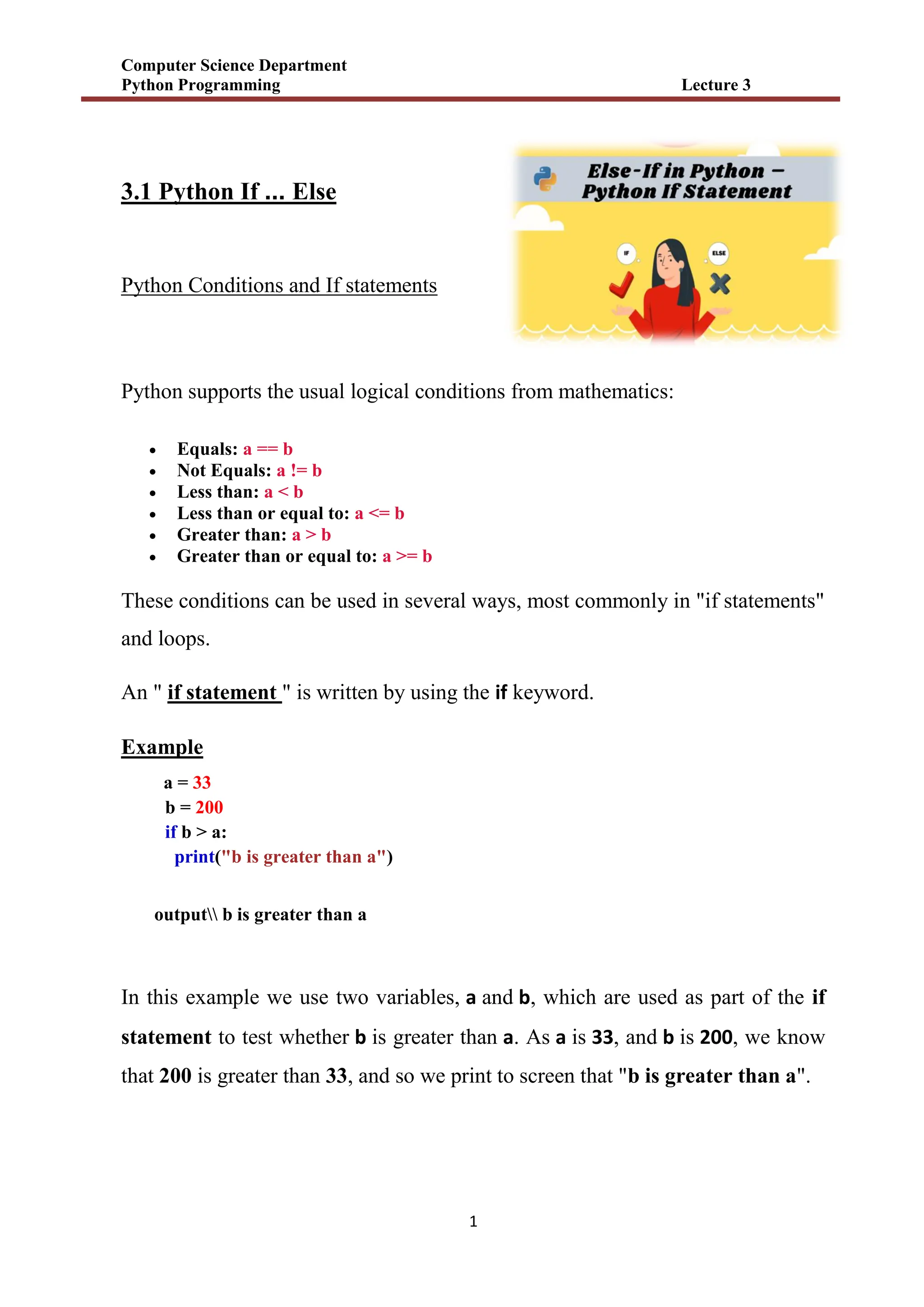


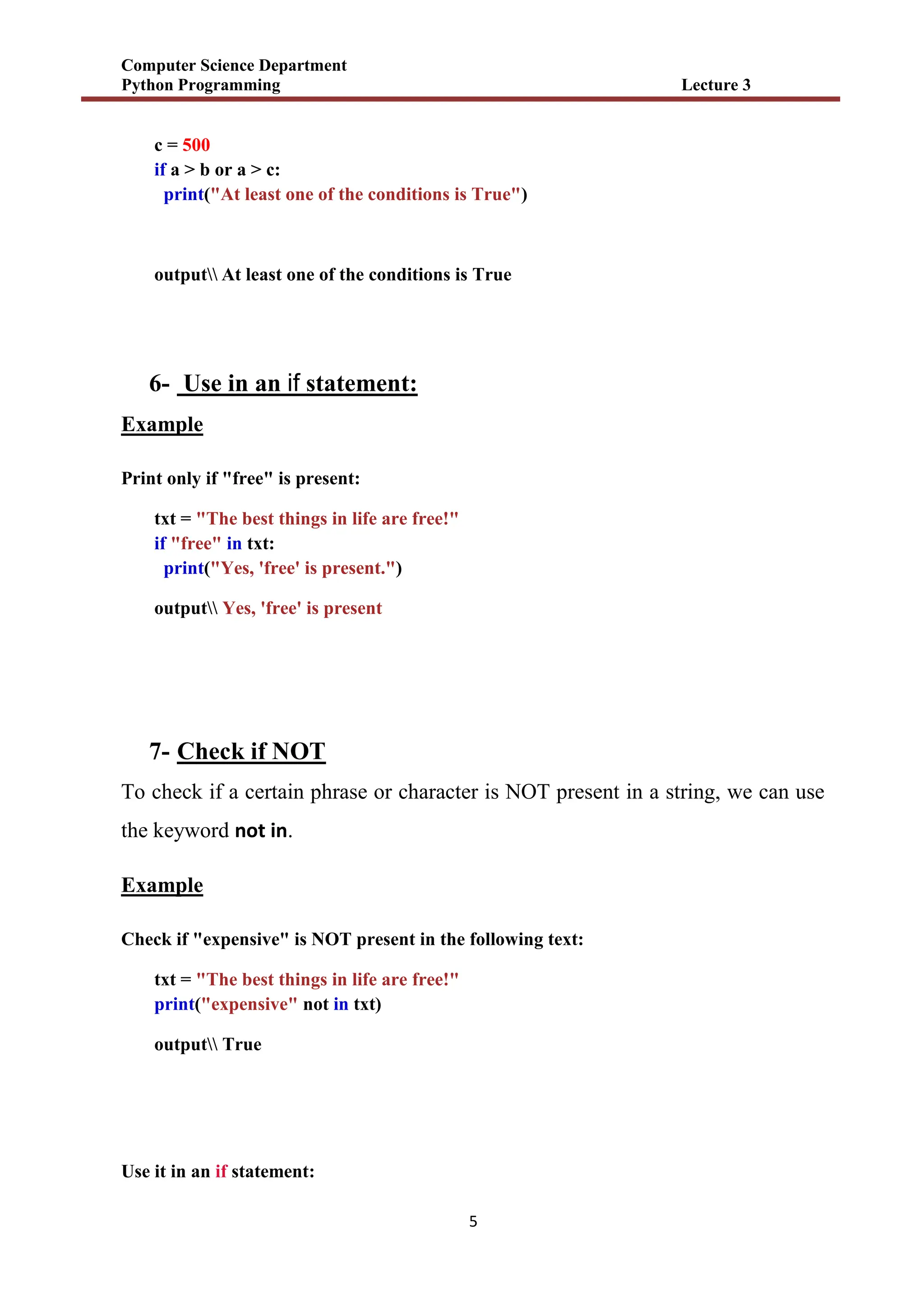
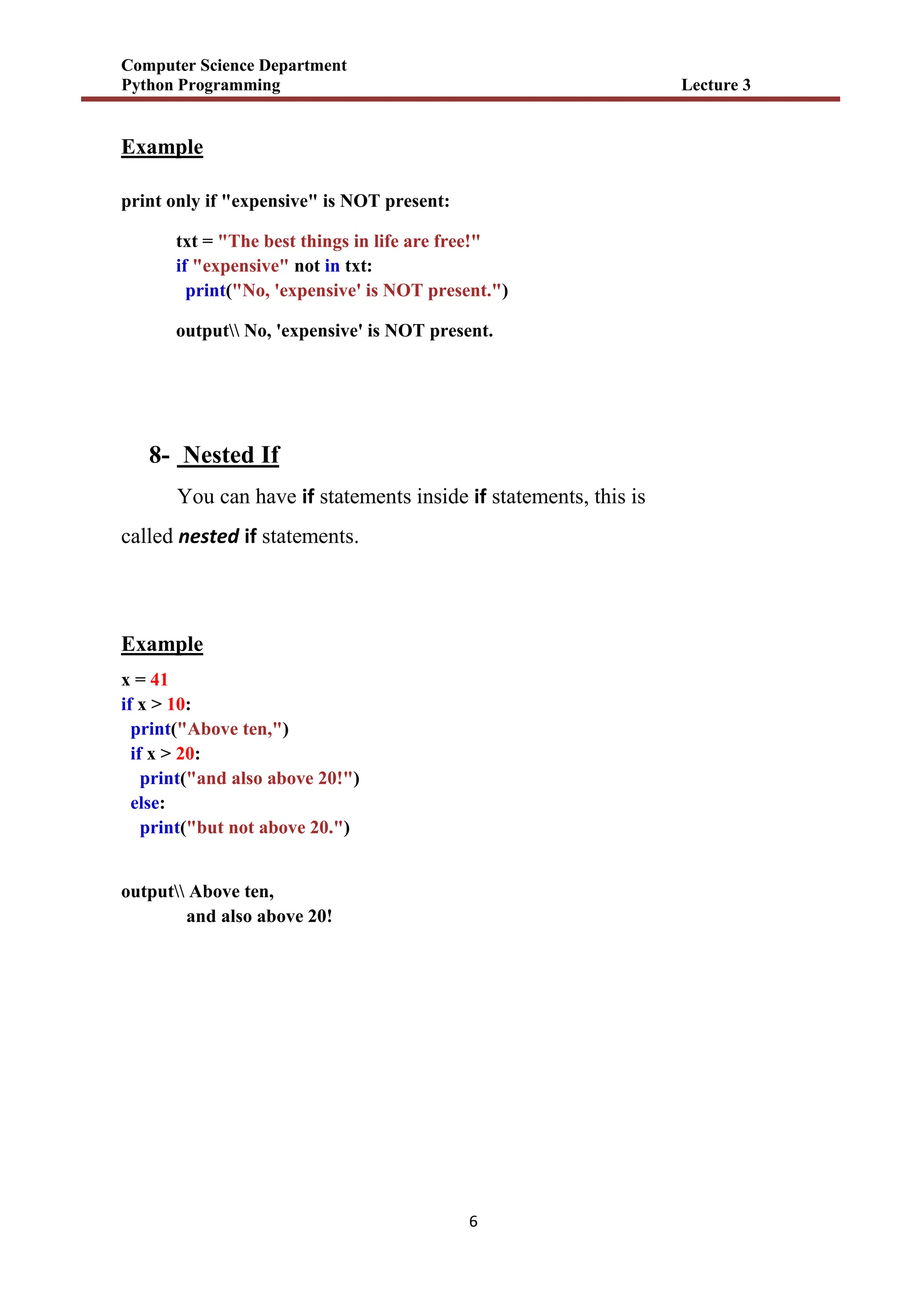
![Computer Science Department
Python Programming Lecture 3
7
3.2 Python For Loops
A for loop is used for iterating over a sequence (that is either a list, a tuple, a
dictionary, a set, or a string).
This is less like the for keyword in other programming languages, and works
more like an iterator method as found in other object-orientated programming
languages.
With the for loop we can execute a set of statements, once for each item in a list,
tuple, set etc.
Example
Print each fruit in a fruit list:
fruits = ["apple", "banana", "cherry"]
for x in fruits:
print(x)
output apple
banana
cherry
1- Looping Through a String
Since strings are arrays, we can loop through the characters in a string, with
a for loop.
Example
Loop through the letters in the word "banana":](https://image.slidesharecdn.com/random-250917074643-926bcd51/75/slide-30-2048.jpg)
![Computer Science Department
Python Programming Lecture 3
8
for x in "banana":
print(x)
outputb
a
n
a
n
a
2- The break Statement
With the break statement we can stop the loop before it has looped through all
the items:
Example
Exit the loop when x is "banana":
fruits = ["apple", "banana", "cherry"]
for x in fruits:
print(x)
if x == "banana":
break
output apple
banana
Example
Exit the loop when x is "banana", but this time the break comes before the print:
fruits = ["apple", "banana", "cherry"]
for x in fruits:
if x == "banana":
break
print(x)
output apple](https://image.slidesharecdn.com/random-250917074643-926bcd51/75/slide-31-2048.jpg)
![Computer Science Department
Python Programming Lecture 3
9
3- The continue Statement
With the continue statement we can stop the current iteration of the loop, and
continue with the next:
Example
Do not print banana:
fruits = ["apple", "banana", "cherry"]
for x in fruits:
if x == "banana":
continue
print(x)
output apple
cherry
4- The range() Function
To loop through a set of code a specified number of times, we can use
the range() function,
The range() function returns a sequence of numbers, starting from 0 by default,
and increments by 1 (by default), and ends at a specified number.
Example
Using the range() function:
for x in range(6):
print(x)](https://image.slidesharecdn.com/random-250917074643-926bcd51/75/slide-32-2048.jpg)

![Computer Science Department
Python Programming Lecture 3
11
adj = ["red", "big", "tasty"]
fruits = ["apple", "banana", "cherry"]
for x in adj:
for y in fruits:
print(x, y)
output red apple
red banana
red cherry
big apple
big banana
big cherry
tasty apple
tasty banana
tasty cherry
H.w use for loop to print this figure in screen:
P
Py
Pyt
Pyth
Pytho
Python
Pytho
Pyth
Pyt
Py
p](https://image.slidesharecdn.com/random-250917074643-926bcd51/75/slide-34-2048.jpg)

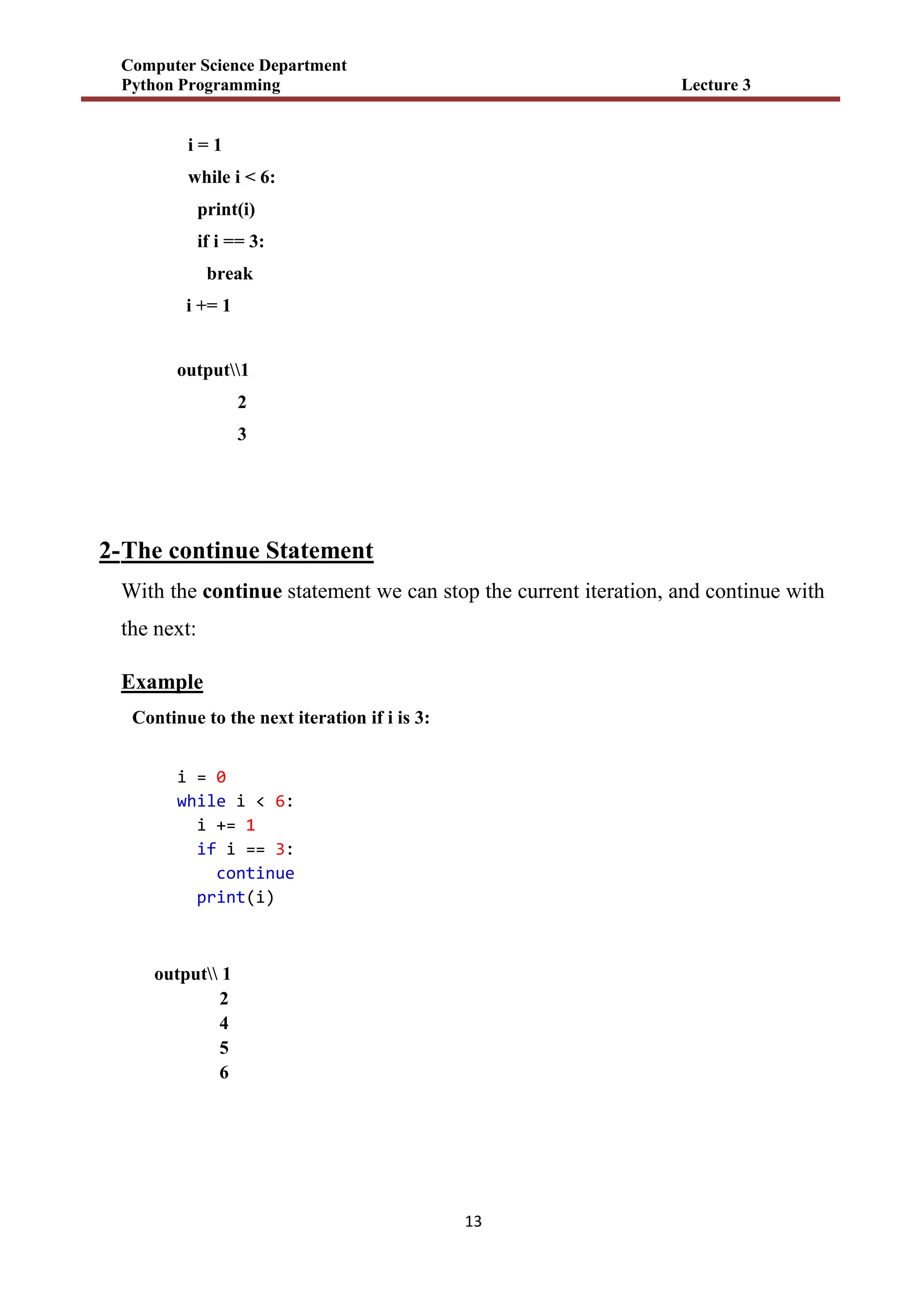

![Computer Science Department
Python Programming Lecture 4
1
4.1 Python Lists
mylist = ["apple", "banana", "cherry"]
1) List
Lists are used to store multiple items in a single variable.
Lists are one of 4 built-in data types in Python used to store collections of data, the
other 3 are Tuple, Set, and Dictionary, all with different qualities and usage.
Lists are created using square brackets:
Example
Create a List:
thislist = ["apple", "banana", "cherry"]
print(thislist)
output ['apple', 'banana', 'cherry']
2) List Items
List items are ordered, changeable, and allow duplicate values.
List items are indexed, the first item has index [0], the second item has
index [1] etc.
3) Ordered
When we say that lists are ordered, it means that the items have a defined order,
and that order will not change.
If you add new items to a list, the new items will be placed at the end of the list.](https://image.slidesharecdn.com/random-250917074643-926bcd51/75/slide-38-2048.jpg)
![Computer Science Department
Python Programming Lecture 4
2
Note: There are some list methods that will change the order, but in general: the order of
the items will not change.
4) Changeable
The list is changeable, meaning that we can change, add, and remove items in a list
after it has been created.
5) Allow Duplicates
Since lists are indexed, lists can have items with the same value:
Example
thislist = ["apple", "banana", "cherry", "apple", "cherry"]
print(thislist)
output ['apple', 'banana', 'cherry', 'apple', 'cherry']
6) List Length
To determine how many items a list has, use the len() function:
Example
thislist = ["apple", "banana", "cherry"]
print(len(thislist))
output 3](https://image.slidesharecdn.com/random-250917074643-926bcd51/75/slide-39-2048.jpg)
![Computer Science Department
Python Programming Lecture 4
3
7) List Items - Data Types
List items can be of any data type( String, int and boolean data types):
Example
list1 = ["apple", "banana", "cherry"]
list2 = [1, 5, 7, 9, 3]
list3 = [True, False, False]
A list can contain different data types:
Example
list1 = ["abc", 34, True, 40, "male"]
8) Python - Access List Items
Access Items
List items are indexed and you can access them by referring to the index number:
Example
Print the second item of the list:
thislist = ["apple", "banana", "cherry"]
print(thislist[1])
output banana
Note: The first item has index 0.
9) Negative Indexing
Negative indexing means start from the end
-1 refers to the last item, -2 refers to the second last item etc.](https://image.slidesharecdn.com/random-250917074643-926bcd51/75/slide-40-2048.jpg)
![Computer Science Department
Python Programming Lecture 4
4
Example
Print the last item of the list:
thislist = ["apple", "banana", "cherry"]
print(thislist[-1])
output cherry
10) Range of Indexes
You can specify a range of indexes by specifying where to start and where to end
the range. When specifying a range, the return value will be a new list with the
specified items.
Example
Return the third, fourth, and fifth item:
thislist = ["apple", "banana", "cherry", "orange", "kiwi", "melon", "mango"]
print(thislist[2:5])
output ['cherry', 'orange', 'kiwi']
Note: The search will start at index 2 (included) and end at index 5 (not included).
Remember that the first item has index 0.
By leaving out the start value, the range will start at the first item:
Example
thislist = ["apple", "banana", "cherry", "orange", "kiwi", "melon", "mango"]
print(thislist[:4])
output ['apple', 'banana', 'cherry', 'orange']](https://image.slidesharecdn.com/random-250917074643-926bcd51/75/slide-41-2048.jpg)
![Computer Science Department
Python Programming Lecture 4
5
11) Python - Add List Items
Append Items
To add an item to the end of the list, use the append() method:
Example
thislist = ["apple", "banana", "cherry"]
thislist.append("orange")
print(thislist)
output ['apple', 'banana', 'cherry', 'orange']
12) Python - Remove List Items
Remove Specified Item
The remove() method removes the specified item.
Example
Remove "banana":
thislist = ["apple", "banana", "cherry"]
thislist.remove("banana")
print(thislist)
output ['apple', 'cherry']
Remove Specified Index
The pop() method removes the specified index.
Example
Remove the second item:
thislist = ["apple", "banana", "cherry"]
thislist.pop(1)
print(thislist)
output ['apple', 'cherry']](https://image.slidesharecdn.com/random-250917074643-926bcd51/75/slide-42-2048.jpg)
![Computer Science Department
Python Programming Lecture 4
6
13) Python - Loop Lists
Loop Through a List
You can loop through the list items by using a for loop:
Example
Print all items in the list, one by one:
thislist = ["apple", "banana", "cherry"]
for x in thislist:
print(x)
output apple
banana
cherry
14) Loop Through the Index Numbers
You can also loop through the list items by referring to their index number.
Use the range() and len() functions to create a suitable iterable.
Example
Print all items by referring to their index number:
thislist = ["apple", "banana", "cherry"]
for i in range(len(thislist)):
print(thislist[i])
output apple
banana
cherry](https://image.slidesharecdn.com/random-250917074643-926bcd51/75/slide-43-2048.jpg)
![Computer Science Department
Python Programming Lecture 4
7
15) Python - Sort Lists
Sort List Alphanumerically
List objects have a sort() method that will sort the list alphanumerically,
ascending, by default:
Example
Sort the list alphabetically:
thislist = ["orange", "mango", "kiwi", "pineapple", "banana"]
thislist.sort()
print(thislist)
output ['banana', 'kiwi', 'mango', 'orange', 'pineapple']
Example
Sort the list numerically:
thislist = [100, 50, 65, 82, 23]
thislist.sort()
print(thislist)
output [23, 50, 65, 82, 100]
Sort Descending
To sort descending, use the keyword argument reverse = True:
Example
Sort the list descending:
thislist = ["orange", "mango", "kiwi", "pineapple", "banana"]
thislist.sort(reverse = True)
print(thislist)
output ['pineapple', 'orange', 'mango', 'kiwi', 'banana']](https://image.slidesharecdn.com/random-250917074643-926bcd51/75/slide-44-2048.jpg)
![Computer Science Department
Python Programming Lecture 4
8
Example
Sort the list descending:
thislist = [100, 50, 65, 82, 23]
thislist.sort(reverse = True)
print(thislist)
output [100, 82, 65, 50, 23]
16) Python - Join Lists
Join Two Lists
There are several ways to join, or concatenate, two or more lists in Python.
One of the easiest ways are by using the + operator.
Example
Join two list:
list1 = ["a", "b", "c"]
list2 = [1, 2, 3]
list3 = list1 + list2
print(list3)
output ['a', 'b', 'c', 1, 2, 3]
Another way to join two lists is by appending all the items from list2 into list1, one
by one:
Example
Append list2 into list1:
list1 = ["a", "b" , "c"]
list2 = [1, 2, 3]
for x in list2:
list1.append(x)
print(list1)
output ['a', 'b', 'c', 1, 2, 3]](https://image.slidesharecdn.com/random-250917074643-926bcd51/75/slide-45-2048.jpg)


![Computer Science Department
Python Programming Lecture 4
11
# Tuple having integers
my_tuple = (1, 2, 3)
print(my_tuple)
# tuple with mixed datatypes
my_tuple = (1, "Hello", 3.4)
print(my_tuple)
# nested tuple
my_tuple = ("mouse", [8, 4, 6], (1, 2, 3))
print(my_tuple)
output ( )
(1, 2, 3)
(1, 'Hello', 3.4)
('mouse', [8, 4, 6], (1, 2, 3))
3) Python - Access Tuple Items
Like ( list) ال حالة نفس
ـ
4) Add Items
Since tuples are immutable, they do not have a build-in append() method, but there
are other ways to add items to a tuple.
1. Convert into a list: Just like the workaround for changing a tuple, you can
convert it into a list, add your item(s), and convert it back into a tuple.
Example
Convert the tuple into a list, add "orange", and convert it back into a tuple:
thistuple = ("apple", "banana", "cherry")
y = list(thistuple)
y.append("orange")
thistuple = tuple(y)
output H.W](https://image.slidesharecdn.com/random-250917074643-926bcd51/75/slide-48-2048.jpg)

![Computer Science Department
Python Programming Lecture 4
13
H.W what’s the outputs of the following:
1- letters = ('p', 'r', 'o', 'g', 'r', 'a', 'm', 'i', 'z')
print(letters[-1])
print(letters[-3])
2- my_tuple = ('p', 'r', 'o', 'g', 'r', 'a', 'm', 'i', 'z')
print(my_tuple[1:4])
print(my_tuple[:-7])
print(my_tuple[7:])
print(my_tuple[:])
3- my_tuple = ('a', 'p', 'p', 'l', 'e',)
print(my_tuple.count('p'))
print(my_tuple.index('l'))
4- languages = ('Python', 'Swift', 'C++')
print('C' in languages)
print('Python' in languages)
5- var1 = ("hello")
print(type(var1))
var2 = ("hello",)
print(type(var2))
var3 = "hello",
print(type(var3))](https://image.slidesharecdn.com/random-250917074643-926bcd51/75/slide-50-2048.jpg)


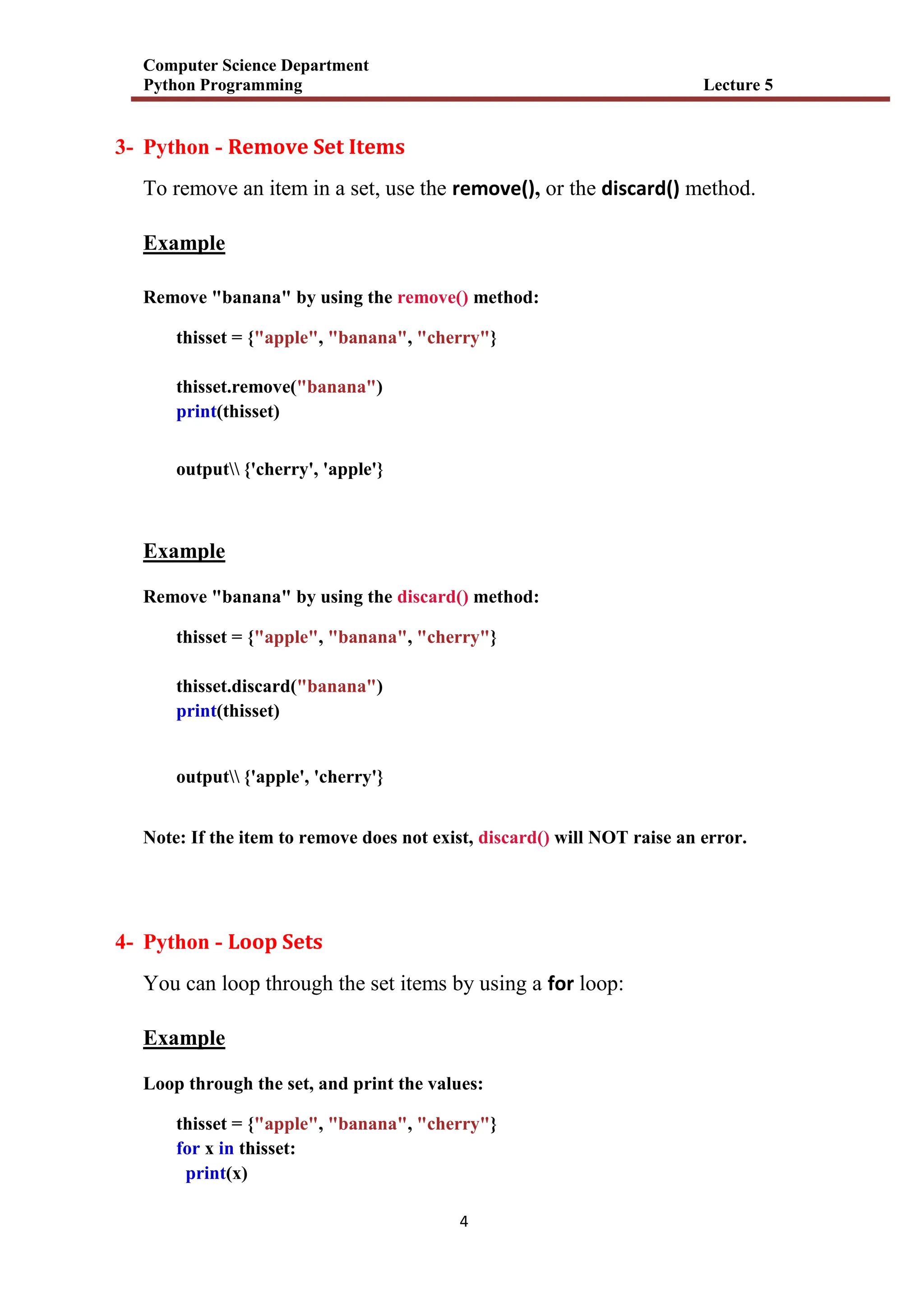
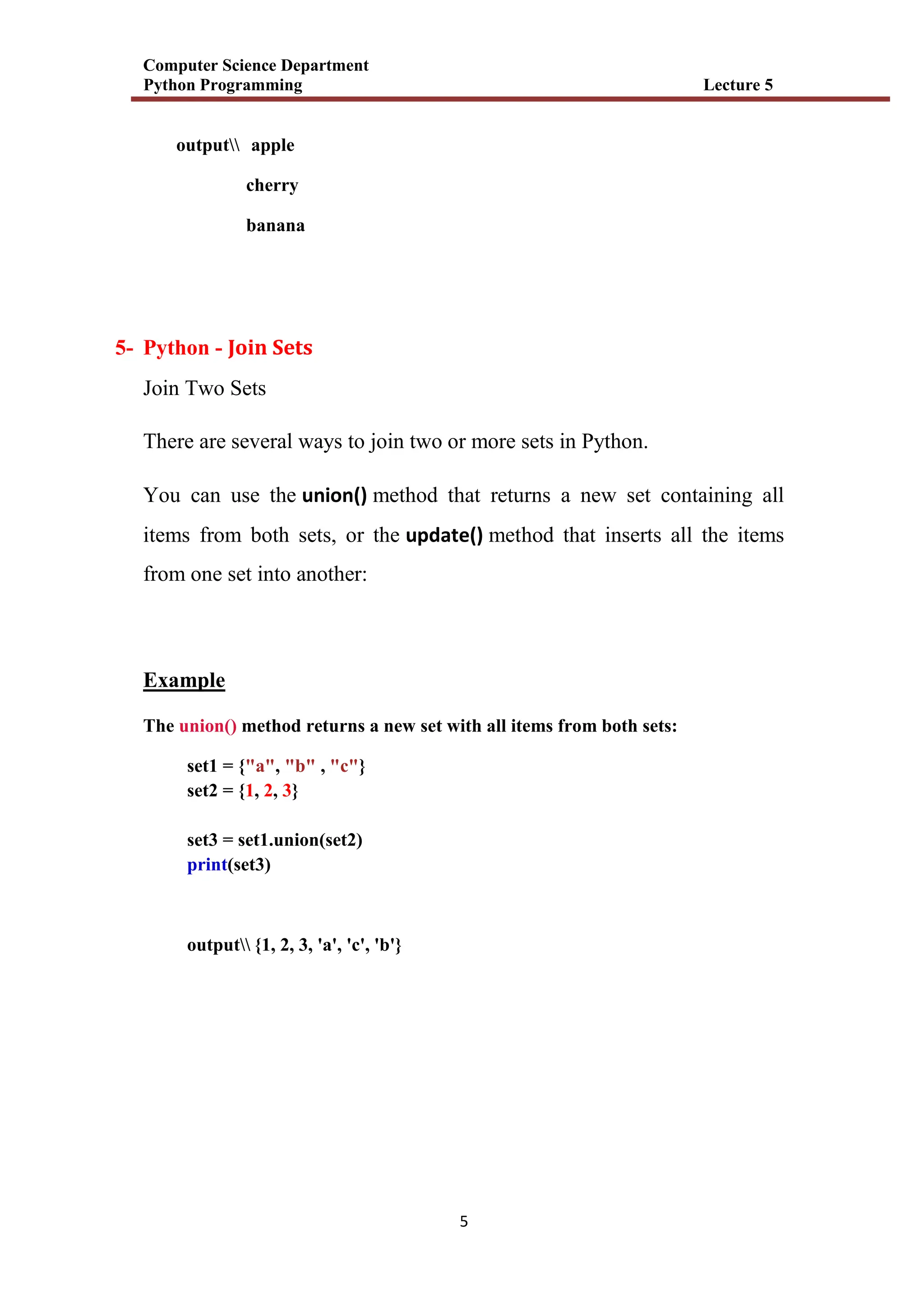
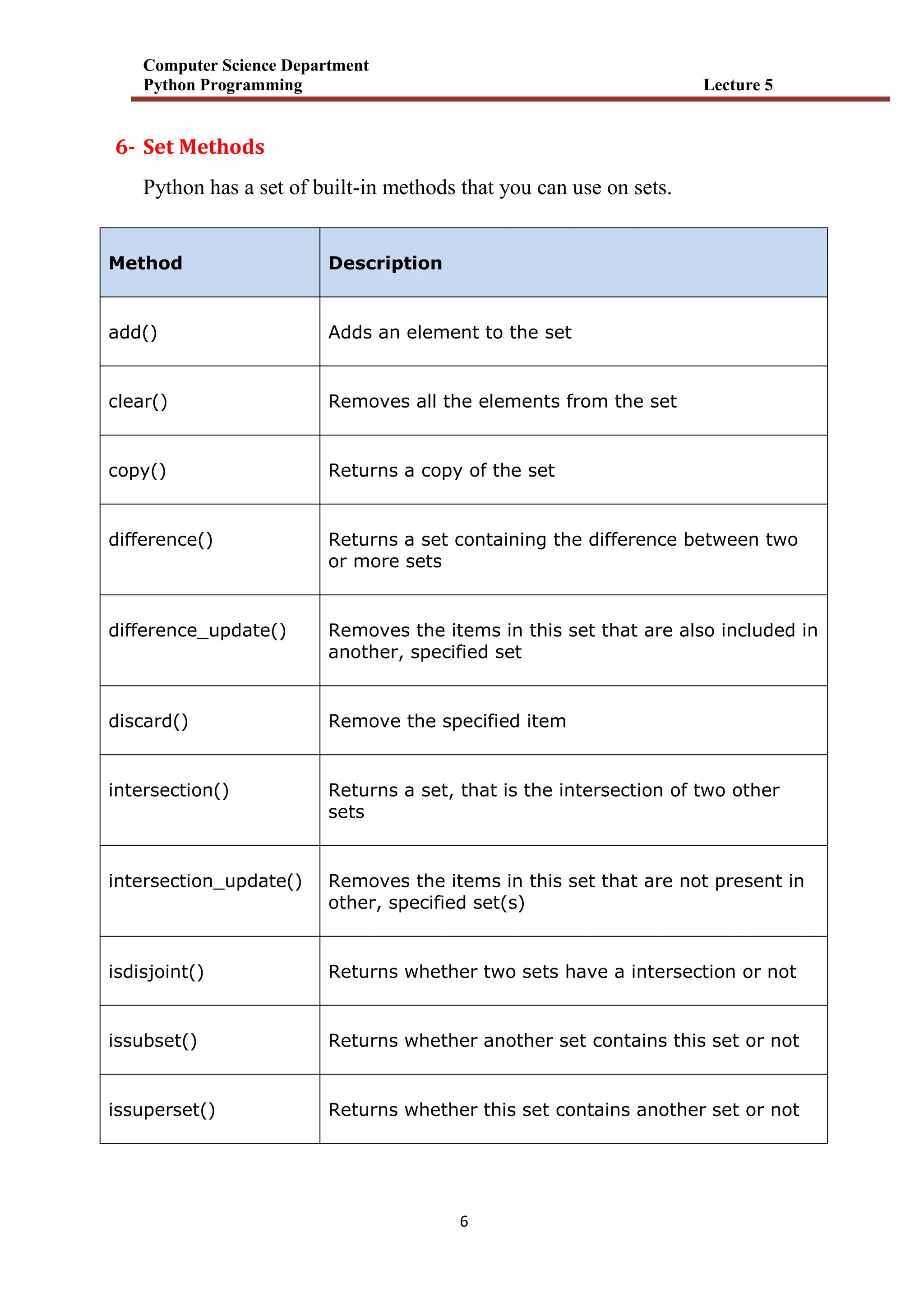
![Computer Science Department
Python Programming Lecture 5
7
pop() Removes an element from the set
remove() Removes the specified element
union() Return a set containing the union of sets
update() Update the set with the union of this set and others
H.w الطرق عن المختبر في األمثلة من مجموعة نفذ
أعاله
H.w
1- companies = {'Lacoste', 'Ralph Lauren'}
tech_companies = ['apple', 'google', 'apple']
companies.update(tech_companies)
print(companies)
Output
2- even_numbers = {2,4,6,8}
print('Set:',even_numbers)
# find number of elements
print('Total Elements:', len(even_numbers))
output
3- use the == operator to check whether two sets are equal or not.
A = {1, 3, 5} , B = {3, 5, 1}](https://image.slidesharecdn.com/random-250917074643-926bcd51/75/slide-58-2048.jpg)

![Computer Science Department
Python Programming Lecture 5
9
Example
Print the "brand" value of the dictionary:
thisdict = {
"brand": "Ford",
"model": "Mustang",
"year": 1964
}
print(thisdict["brand"])
output Ford
2- python - Access Dictionary Items
You can access the items of a dictionary by referring to its key name,
inside square brackets:
Example
Get the value of the "model" key:
thisdict = {
"brand": "Ford",
"model": "Mustang",
"year": 1964
}
x = thisdict["model"]
output Mustang
Example
Add a new item to the original dictionary, and see that the keys list gets updated
as well:
car = {
"brand": "Ford",
"model": "Mustang",
"year": 1964
}](https://image.slidesharecdn.com/random-250917074643-926bcd51/75/slide-60-2048.jpg)
![Computer Science Department
Python Programming Lecture 5
11
x = car.keys()
print(x) #before the change
car["color"] = "white"
print(x) #after the change
output dict_keys(['brand', 'model', 'year'])
dict_keys(['brand', 'model', 'year', 'color'])
3- Removing Items
There are several methods to remove items from a dictionary:
Example
The pop() method removes the item with the specified key name:
thisdict = {
"brand": "Ford",
"model": "Mustang",
"year": 1964
}
thisdict.pop("model")
print(thisdict)
output {'brand': 'Ford', 'year': 1964}
4- Python - Loop Dictionaries
Loop Through a Dictionary
You can loop through a dictionary by using a for loop.
When looping through a dictionary, the return value are the keys of the
dictionary, but there are methods to return the values as well.
Example
Print all key names in the dictionary, one by one:](https://image.slidesharecdn.com/random-250917074643-926bcd51/75/slide-61-2048.jpg)
![Computer Science Department
Python Programming Lecture 5
11
thisdict ={
"brand": "Ford",
"model": "Mustang",
"year": 1964
}
for x in thisdict:
print(x)
outputbrand
model
year
Example
Print all values in the dictionary, one by one:
thisdict ={
"brand": "Ford",
"model": "Mustang",
"year": 1964
}
for x in thisdict:
print(thisdict[x])
output Ford
Mustang
1964](https://image.slidesharecdn.com/random-250917074643-926bcd51/75/slide-62-2048.jpg)

![Computer Science Department
Python Programming Lecture 5
13
H.W
1- # Membership Test for Dictionary Keys
squares = {1: 1, 3: 9, 5: 25, 7: 49, 9: 81}
print(1 in squares)
print(2 not in squares)
# membership tests for key only not value
print(49 in squares)
output
2- student_id = {111: "Eric", 112: "Kyle", 113: "Butters"}
print("Initial Dictionary: ", student_id)
student_id[112] = "Stan"
print("Updated Dictionary: ", student_id)
output
((End of lecture 5))](https://image.slidesharecdn.com/random-250917074643-926bcd51/75/slide-64-2048.jpg)

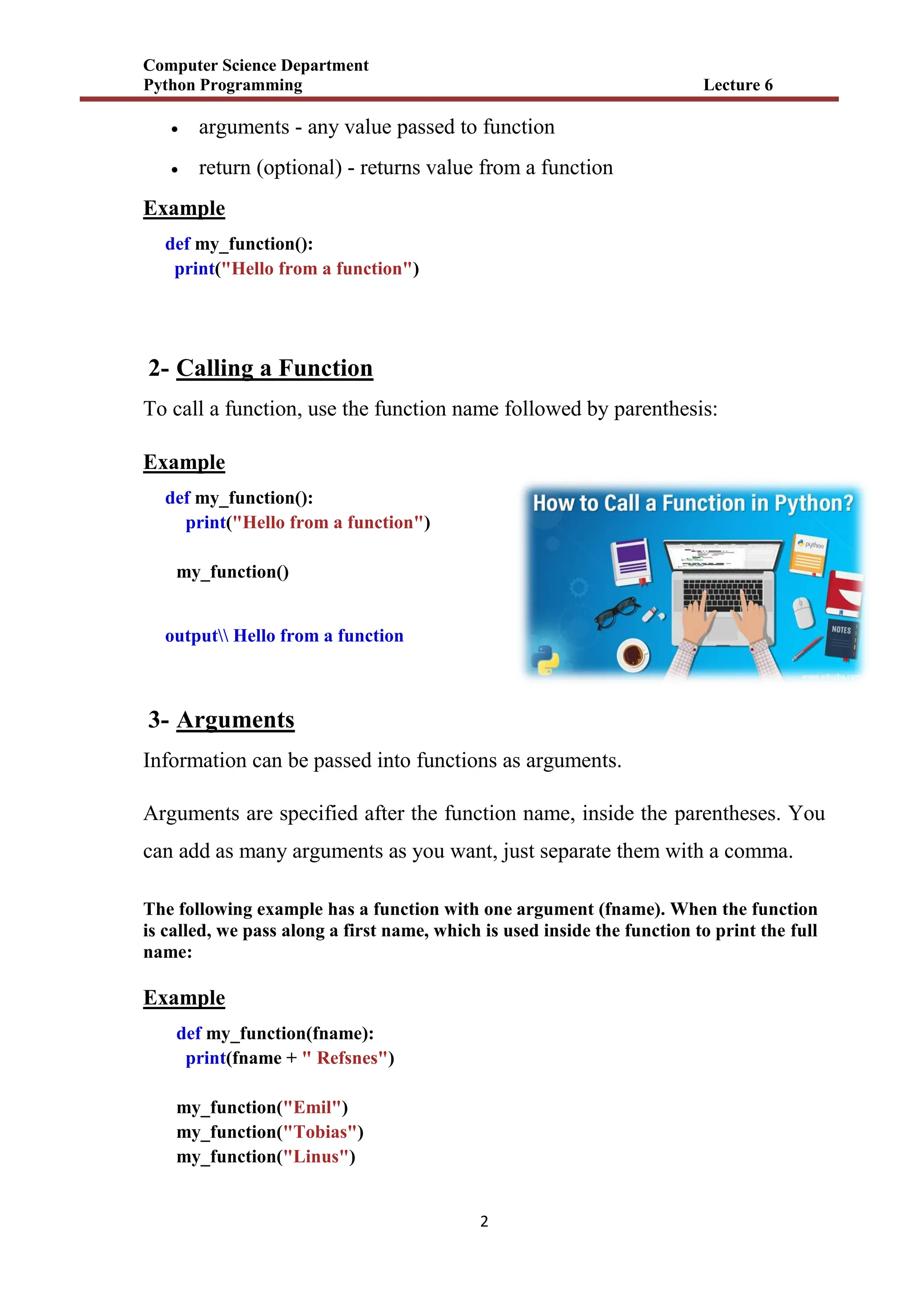
![Computer Science Department
Python Programming Lecture 6
5
6- Passing a List as an Argument
You can send any data types of argument to a function (string, number, list,
dictionary etc.), and it will be treated as the same data type inside the
function.
E.g. if you send a List as an argument, it will still be a List when it reaches the
function:
Example
def my_function(food):
for x in food:
print(x)
fruits = ["apple", "banana", "cherry"]
my_function(fruits)
output apple
banana
cherry
7- Return Values
A Python function may or may not return a value. If we want our function to
return some value to a function call, we use the return statement. For example,
Example
def my_function(x):
return 5 * x
print(my_function(3))
print(my_function(5))
print(my_function(9))](https://image.slidesharecdn.com/random-250917074643-926bcd51/75/slide-69-2048.jpg)
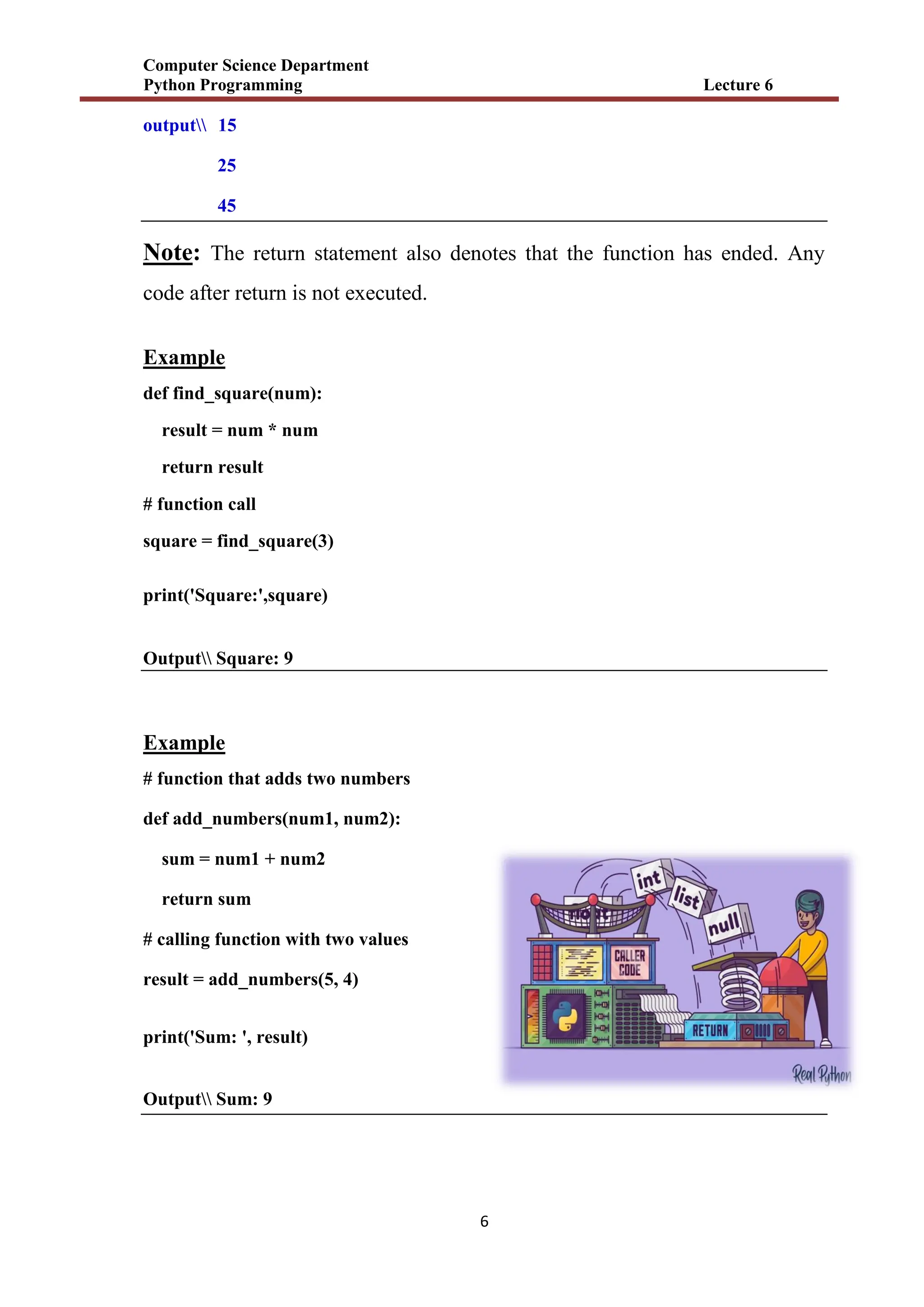
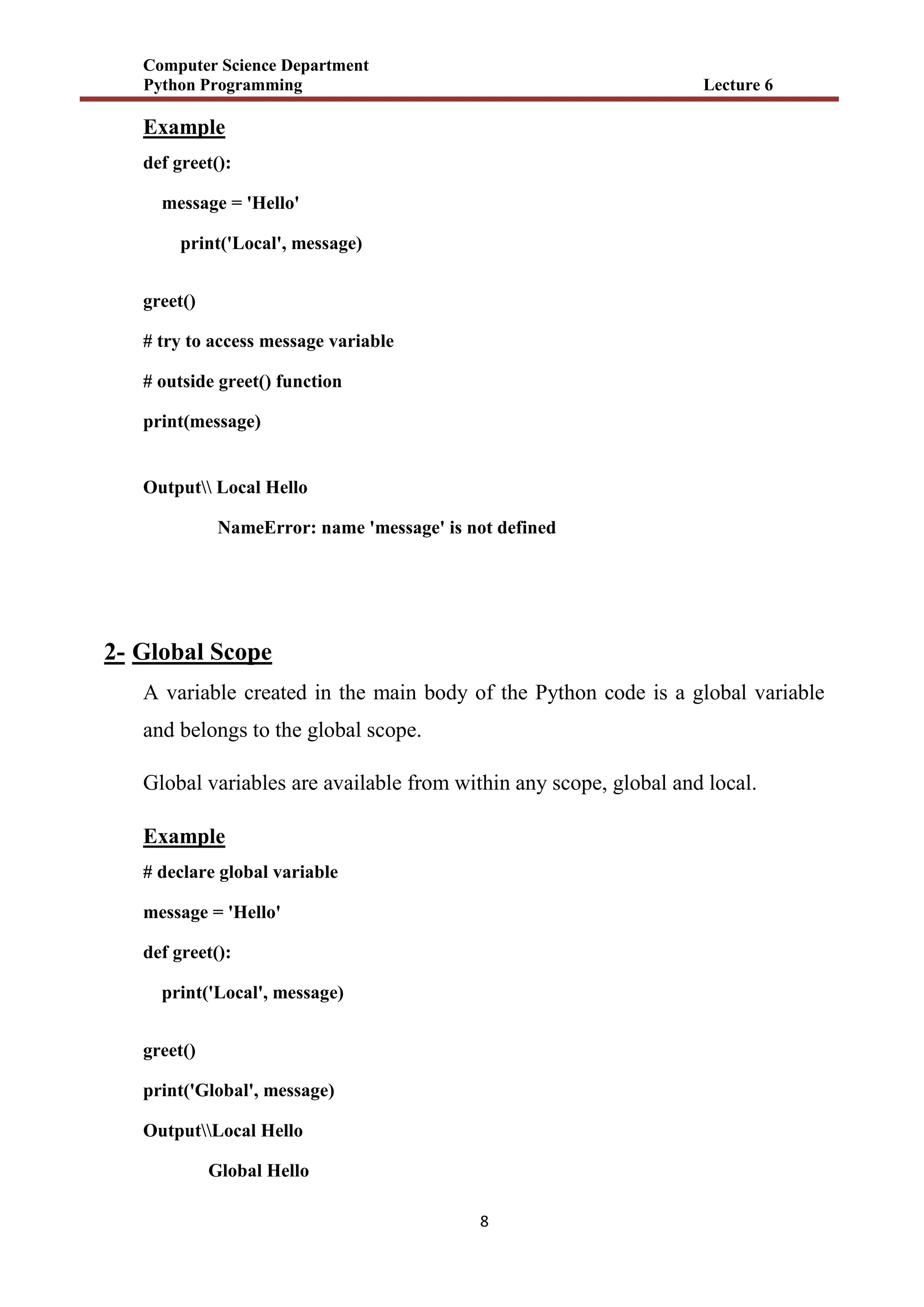
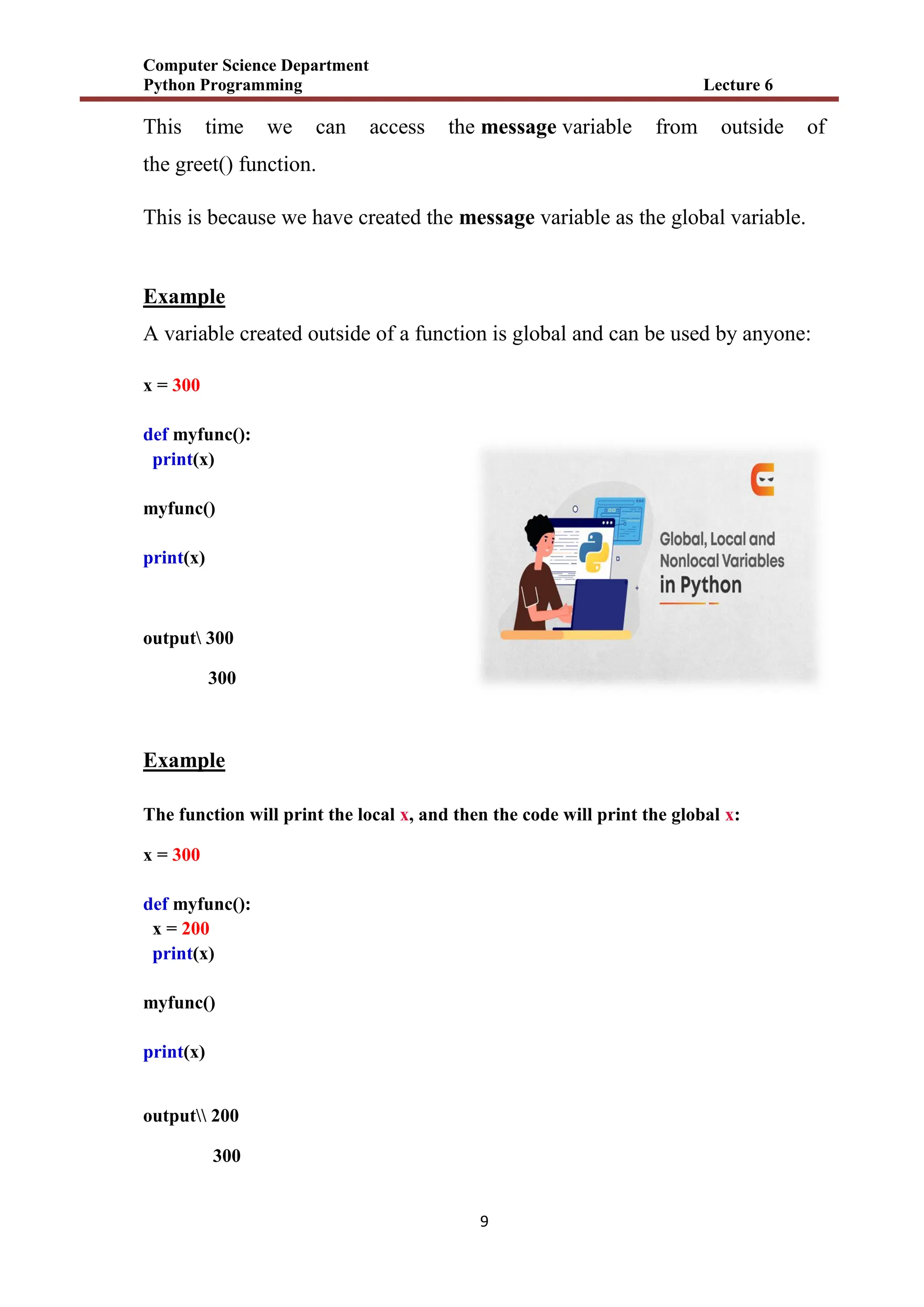
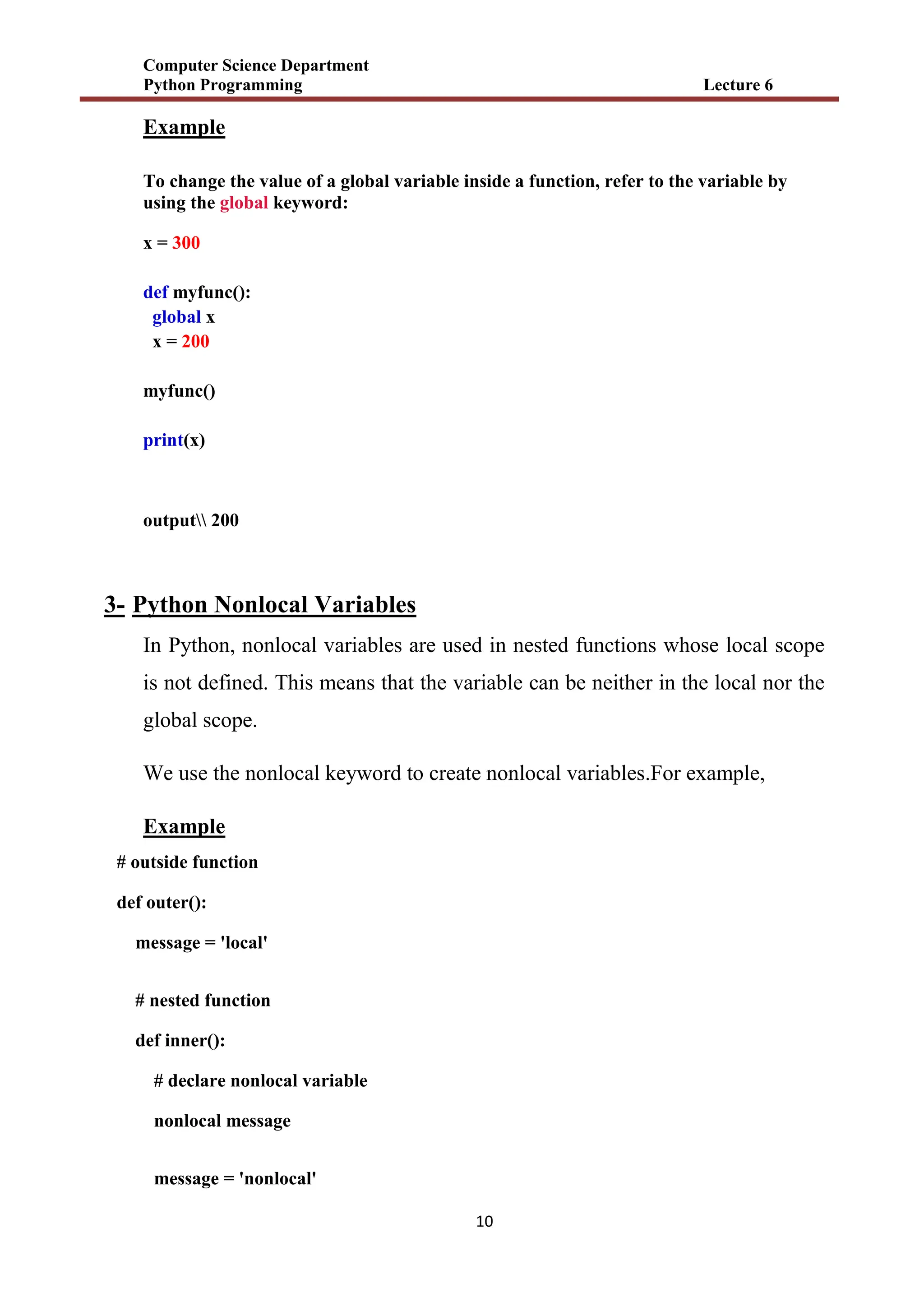


![Computer Science Department
Python Programming Lecture 6
13
6.3 Benefits of Using Functions
1. Code Reusable - We can use the same function multiple times in our program
which makes our code reusable. For example,
Example
# function definition
def get_square(num):
return num * num
for i in [1,2,3]:
# function call
result = get_square(i)
print('Square of',i, '=',result)
OutputSquare of 1 = 1
Square of 2 = 4
Square of 3 = 9
In the above example, we have created the function named get_square() to
calculate the square of a number. Here, the function is used to calculate the
square of numbers from 1 to 3.
Hence, the same method is used again and again.
2. Code Readability - Functions help us break our code into chunks to make our
program readable and easy to understand.](https://image.slidesharecdn.com/random-250917074643-926bcd51/75/slide-77-2048.jpg)
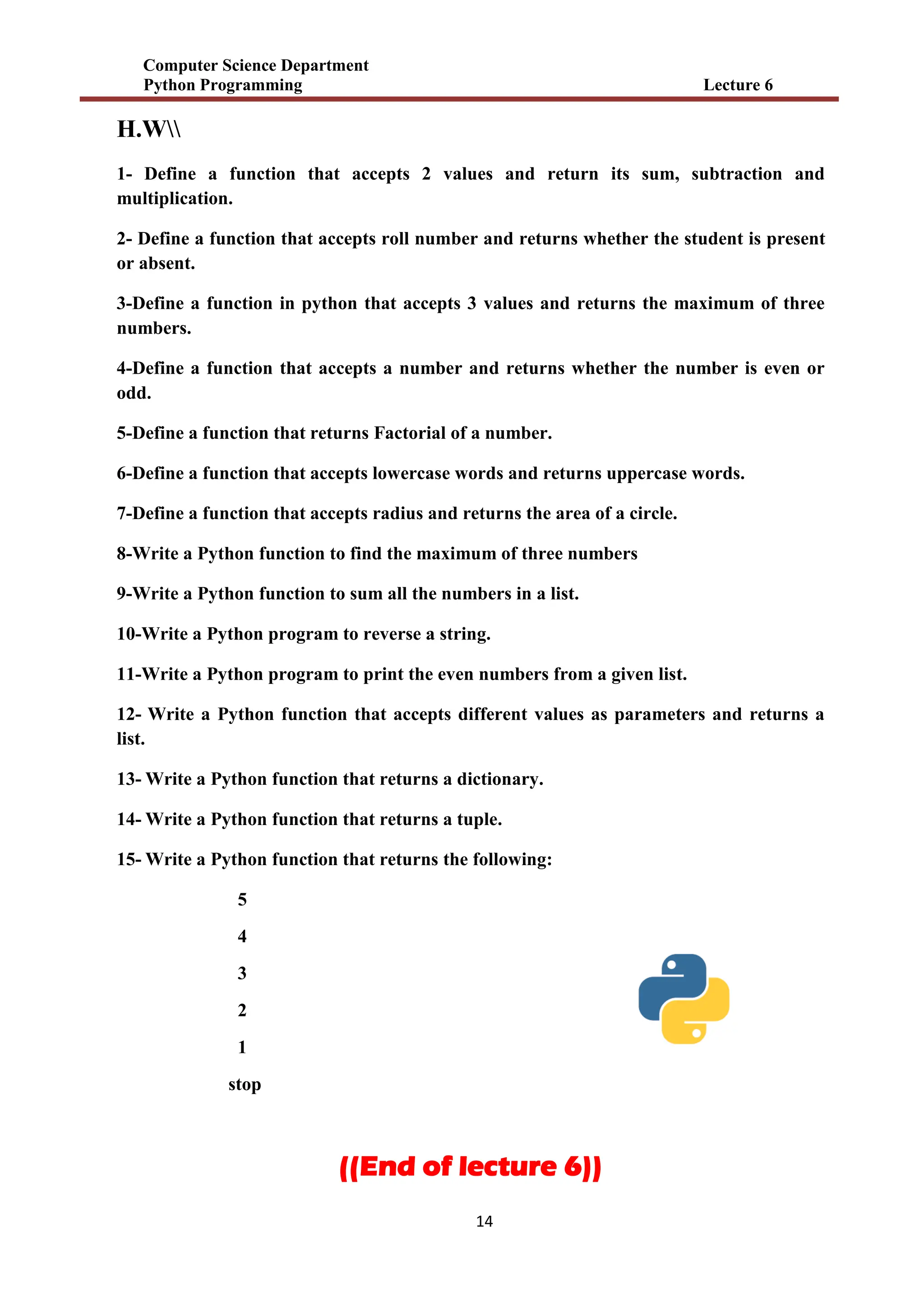
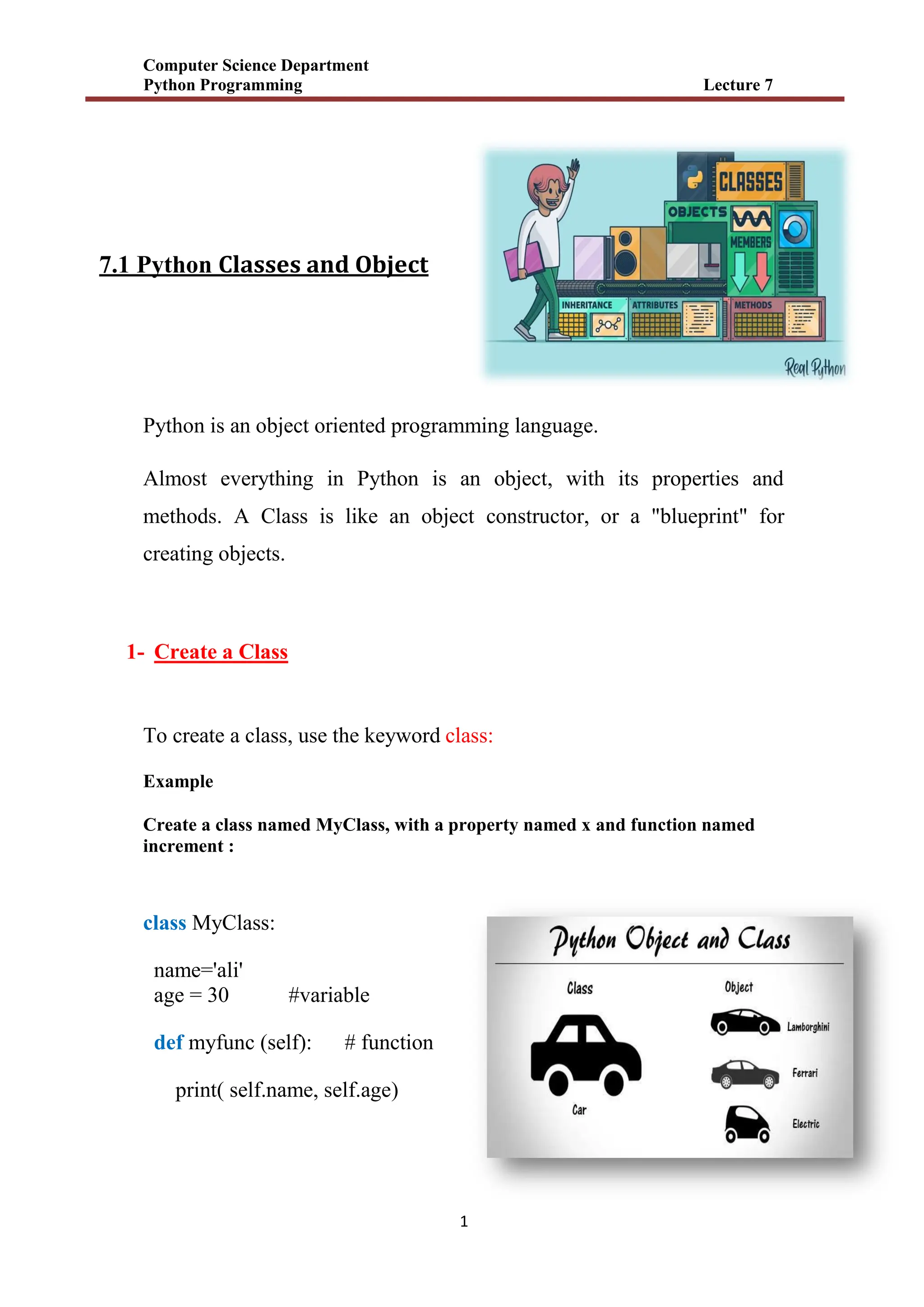
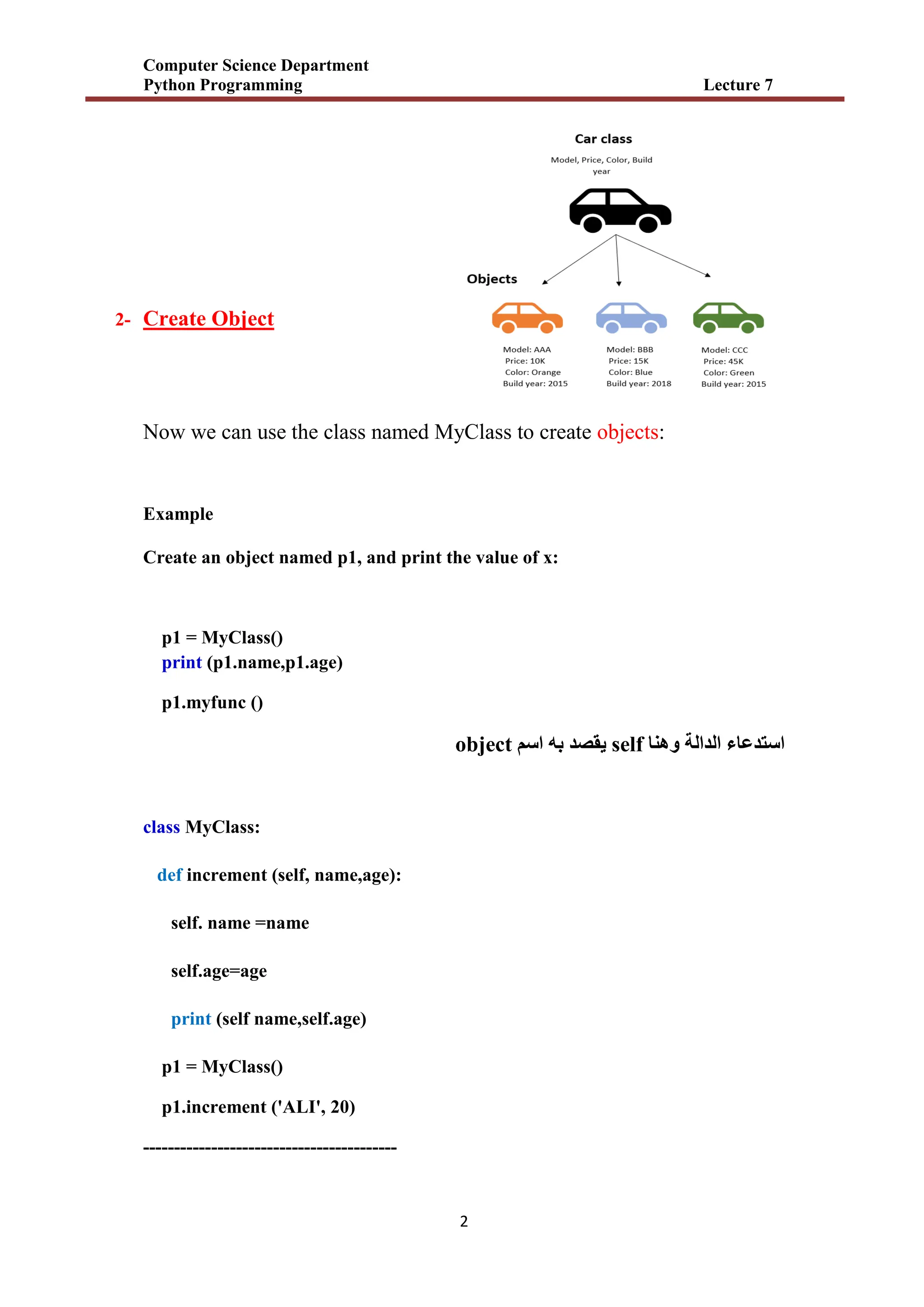


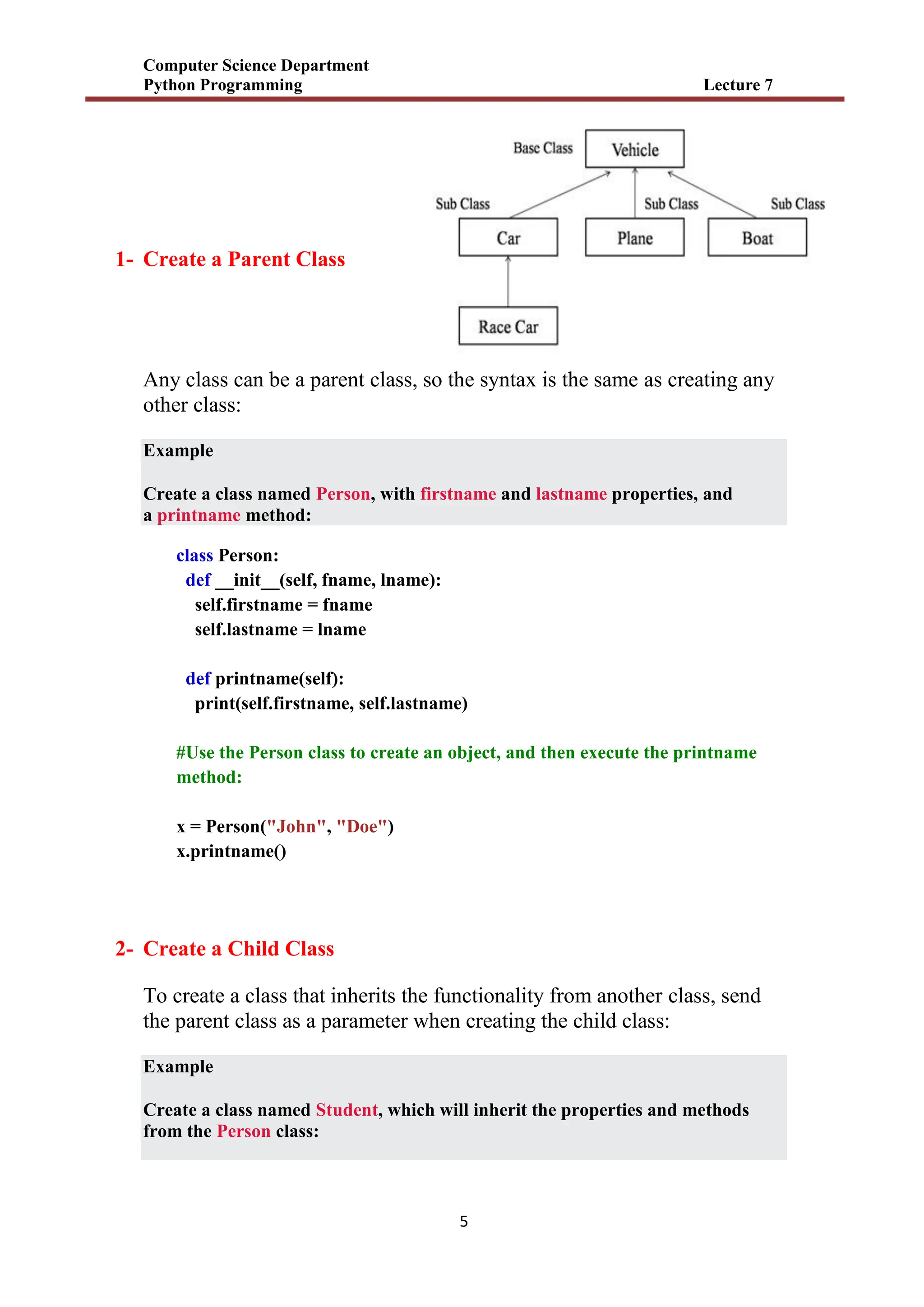


![Number_Guessing_Game_Dsbsbssbzboc[1].pptx](https://cdn.slidesharecdn.com/ss_thumbnails/numberguessinggamedoc1-251206215042-a076fc05-thumbnail.jpg?width=640&height=640&fit=bounds)


