© 2013 IBM Corporation
1
SQL Tips and Techniques
SQL is Powerful – Use it!
April 10, 2014
Presented by:
Nick Ivanov
© 2013 IBM Corporation
2 Need webcast troubleshooting help? Click attachments
1. The presentation for this Tech Talk:
http://bit.ly/ttfileapr14
2. Next steps and troubleshooting guide:
click “Attachments“ in this webcast window
The image cannot be displayed.
Your computer may not have
enough memory to open the
image, or the image may have
been corrupted. Restart your
computer, and then open the
file again. If the red x still
appears, you may have to delete
the image and then insert it
again.
A few details ….
Nick Ivanov Senior Consultant, IBM Information Management Data Ecosystem
Today’s technical presenters . . .
DB2 Tech Talk series host and today’s presenter:
Rick Swagerman, Host and Today’s Presenter
DB2 Language Architect
The image cannot be
displayed. Your computer
may not have enough
memory to open the
image, or the image may
have been corrupted.
Restart your computer,
and then open the file
again. If the red x still
appears, you may have to
delete the image and then
insert it again.
© 2013 IBM Corporation
3 Need webcast troubleshooting help? Click attachments
Disclaimer
The information contained in this presentation is provided for informational purposes only.
While efforts were made to verify the completeness and accuracy of the information contained in this presentation, it is provided “as is”, without
warranty of any kind, express or implied.
In addition, this information is based on IBM’s current product plans and strategy, which are subject to change by IBM without notice.
IBM shall not be responsible for any damages arising out of the use of, or otherwise related to, this presentation or any other documentation.
Nothing contained in this presentation is intended to, or shall have the effect of:
•  Creating any warranty or representation from IBM (or its affiliates or its or their suppliers and/or licensors); or
•  Altering the terms and conditions of the applicable license agreement governing the use of IBM software.
Performance is based on measurements and projections using standard IBM benchmarks in a controlled environment. The actual throughput
or performance that any user will experience will vary depending upon many factors, including considerations such as the amount of
multiprogramming in the user's job stream, the I/O configuration, the storage configuration, and the workload processed. Therefore, no
assurance can be given that an individual user will achieve results similar to those stated here.
© 2013 IBM Corporation
Agenda
§  What this talk is about
§  What is and what is not SQL
§  Common Table Expression (CTE)
§  Recursive SQL and its uses
§  Data change tables
4 Need webcast troubleshooting help? Click attachments
© 2013 IBM Corporation
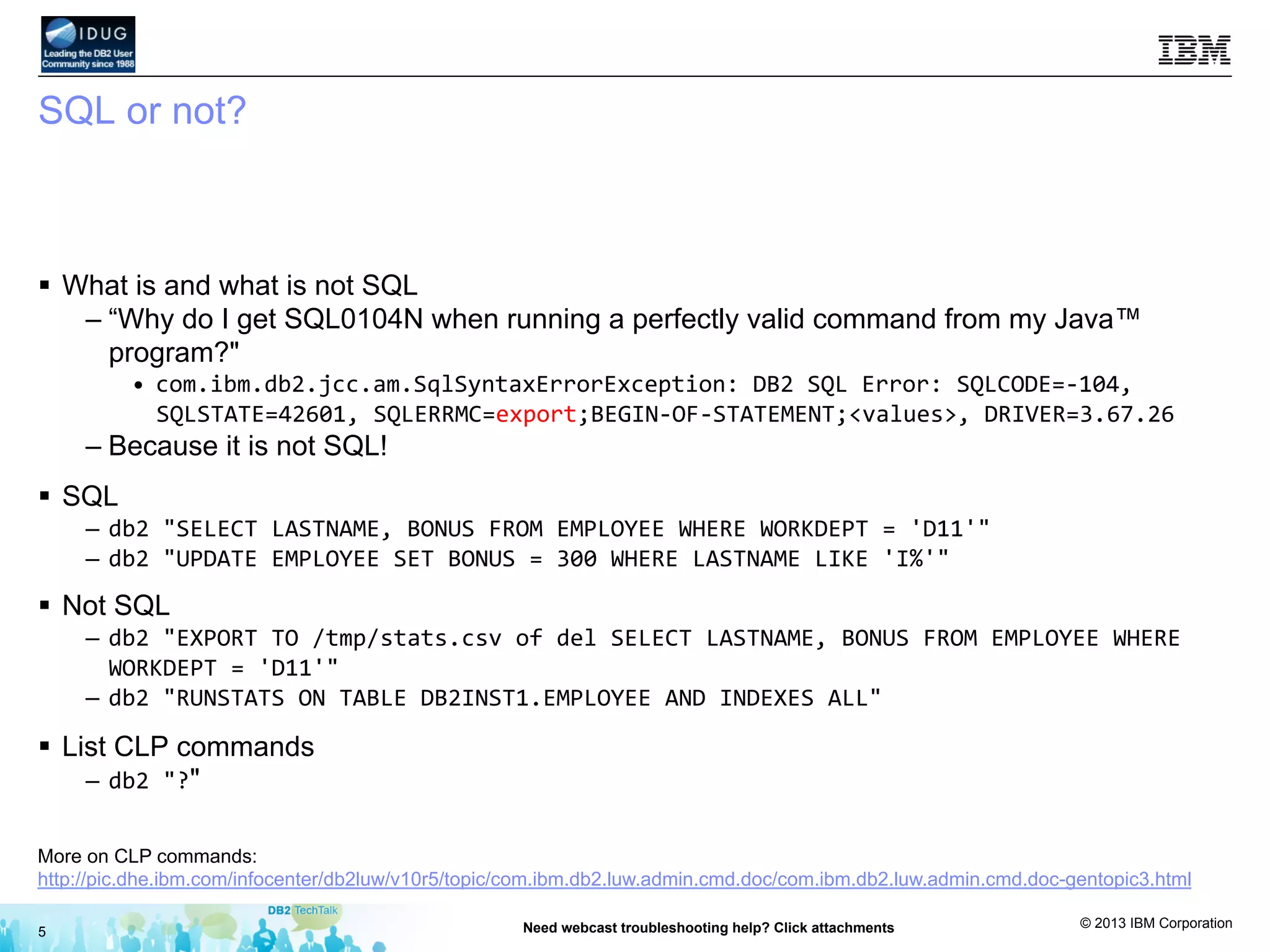
SQL or not?
§  What is and what is not SQL
– “Why do I get SQL0104N when running a perfectly valid command from my Java™
program?"
•  com.ibm.db2.jcc.am.SqlSyntaxErrorException:	
  DB2	
  SQL	
  Error:	
  SQLCODE=-­‐104,	
  
SQLSTATE=42601,	
  SQLERRMC=export;BEGIN-­‐OF-­‐STATEMENT;<values>,	
  DRIVER=3.67.26	
  
– Because it is not SQL!
§  SQL
–  db2	
  "SELECT	
  LASTNAME,	
  BONUS	
  FROM	
  EMPLOYEE	
  WHERE	
  WORKDEPT	
  =	
  'D11'"	
  
–  db2	
  "UPDATE	
  EMPLOYEE	
  SET	
  BONUS	
  =	
  300	
  WHERE	
  LASTNAME	
  LIKE	
  'I%'"	
  
§  Not SQL
–  db2	
  "EXPORT	
  TO	
  /tmp/stats.csv	
  of	
  del	
  SELECT	
  LASTNAME,	
  BONUS	
  FROM	
  EMPLOYEE	
  WHERE	
  
WORKDEPT	
  =	
  'D11'"	
  
–  db2	
  "RUNSTATS	
  ON	
  TABLE	
  DB2INST1.EMPLOYEE	
  AND	
  INDEXES	
  ALL"	
  
§  List CLP commands
–  db2	
  "?"
5 Need webcast troubleshooting help? Click attachments
More on CLP commands:
http://pic.dhe.ibm.com/infocenter/db2luw/v10r5/topic/com.ibm.db2.luw.admin.cmd.doc/com.ibm.db2.luw.admin.cmd.doc-gentopic3.html
© 2013 IBM Corporation
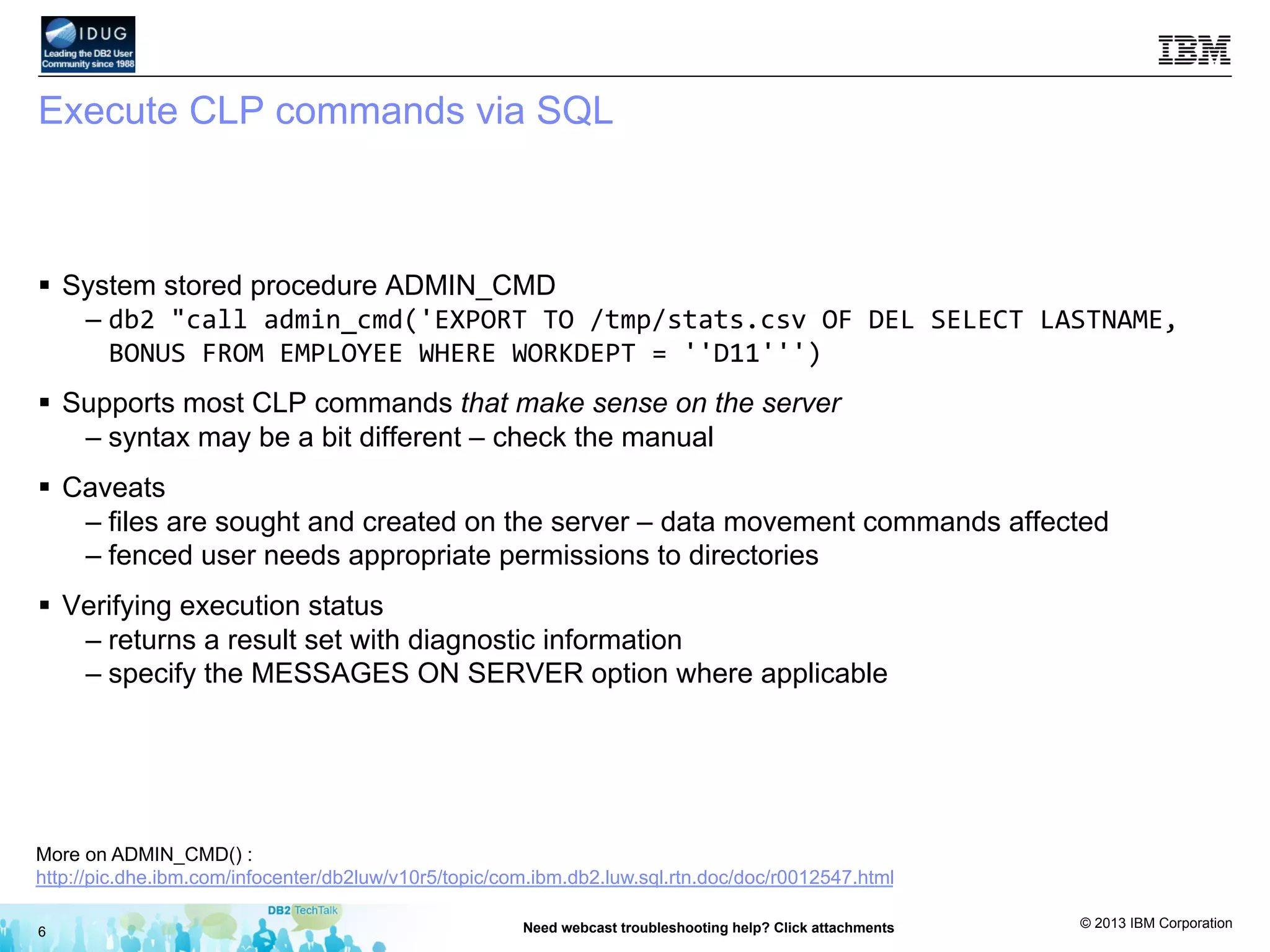
Execute CLP commands via SQL
§  System stored procedure ADMIN_CMD
– db2	
  "call	
  admin_cmd('EXPORT	
  TO	
  /tmp/stats.csv	
  OF	
  DEL	
  SELECT	
  LASTNAME,	
  
BONUS	
  FROM	
  EMPLOYEE	
  WHERE	
  WORKDEPT	
  =	
  ''D11''')	
  
§  Supports most CLP commands that make sense on the server
– syntax may be a bit different – check the manual
§  Caveats
– files are sought and created on the server – data movement commands affected
– fenced user needs appropriate permissions to directories
§  Verifying execution status
– returns a result set with diagnostic information
– specify the MESSAGES ON SERVER option where applicable
6 Need webcast troubleshooting help? Click attachments
More on ADMIN_CMD() :
http://pic.dhe.ibm.com/infocenter/db2luw/v10r5/topic/com.ibm.db2.luw.sql.rtn.doc/doc/r0012547.html
© 2013 IBM Corporation
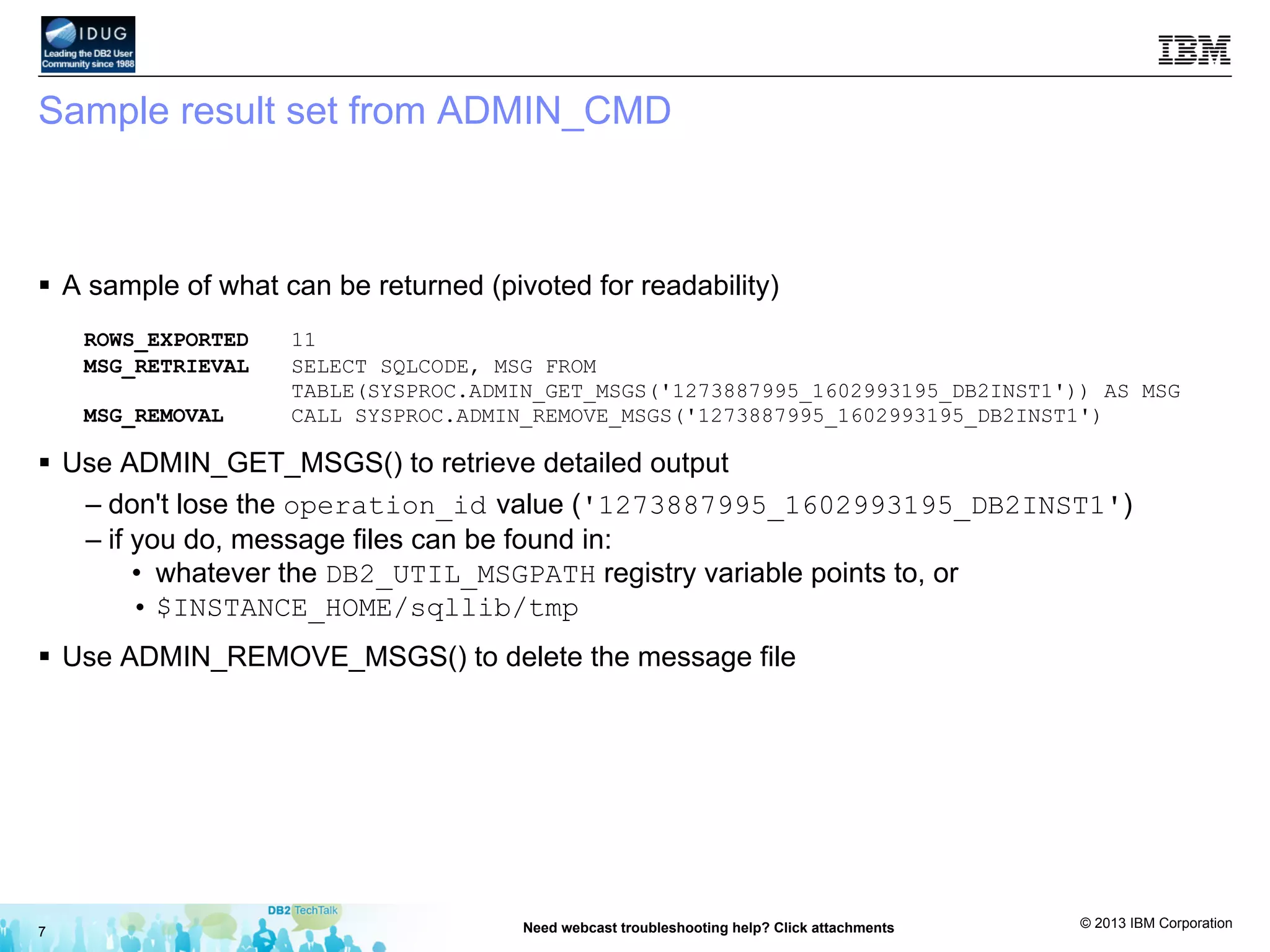
Sample result set from ADMIN_CMD
§  A sample of what can be returned (pivoted for readability)
ROWS_EXPORTED 11
MSG_RETRIEVAL SELECT SQLCODE, MSG FROM
TABLE(SYSPROC.ADMIN_GET_MSGS('1273887995_1602993195_DB2INST1')) AS MSG
MSG_REMOVAL CALL SYSPROC.ADMIN_REMOVE_MSGS('1273887995_1602993195_DB2INST1')
§  Use ADMIN_GET_MSGS() to retrieve detailed output
– don't lose the operation_id value ('1273887995_1602993195_DB2INST1')
– if you do, message files can be found in:
•  whatever the DB2_UTIL_MSGPATH registry variable points to, or
• $INSTANCE_HOME/sqllib/tmp
§  Use ADMIN_REMOVE_MSGS() to delete the message file
7 Need webcast troubleshooting help? Click attachments
© 2013 IBM Corporation
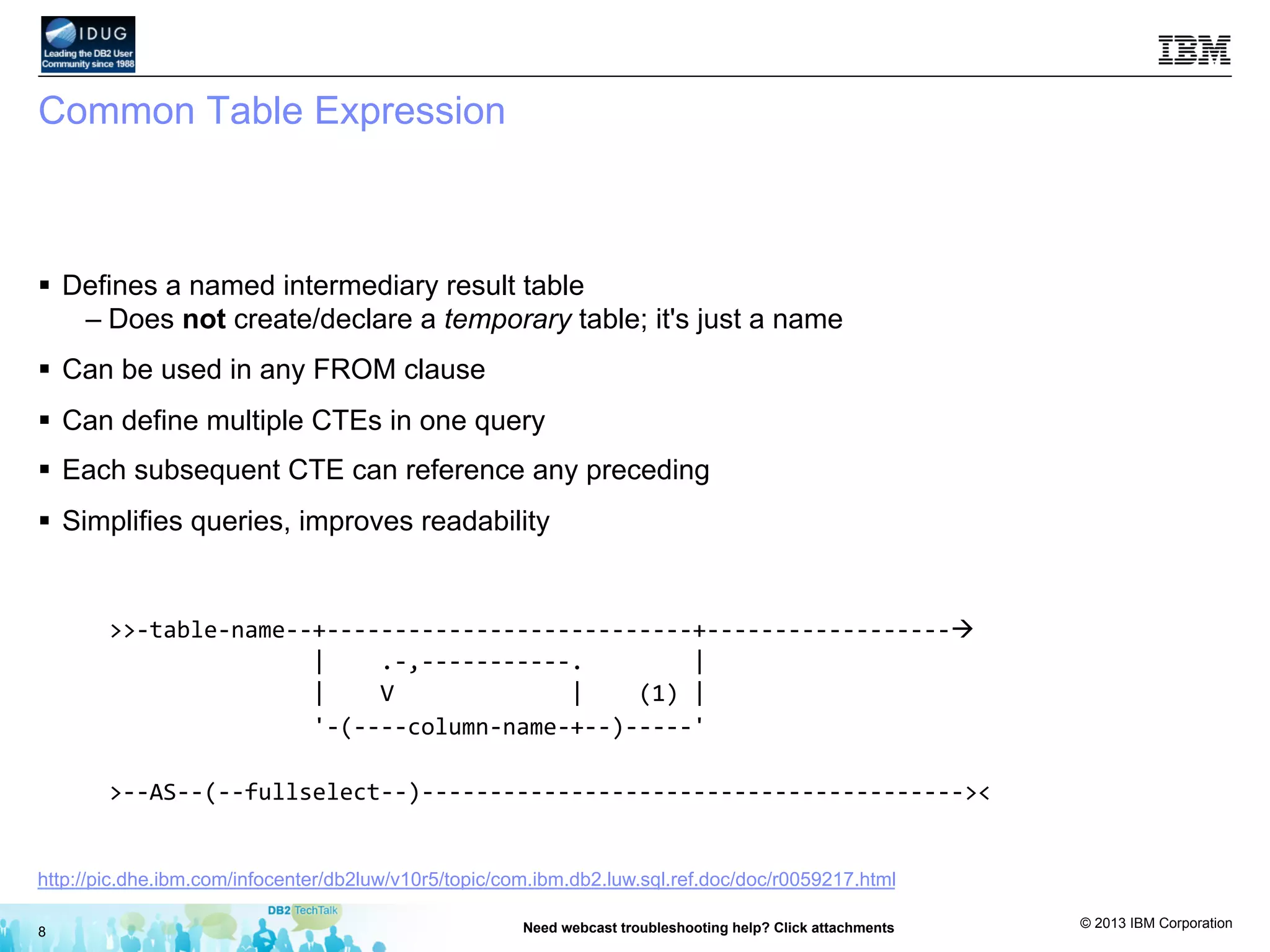
Common Table Expression
§  Defines a named intermediary result table
– Does not create/declare a temporary table; it's just a name
§  Can be used in any FROM clause
§  Can define multiple CTEs in one query
§  Each subsequent CTE can reference any preceding
§  Simplifies queries, improves readability
8 Need webcast troubleshooting help? Click attachments
>>-­‐table-­‐name-­‐-­‐+-­‐-­‐-­‐-­‐-­‐-­‐-­‐-­‐-­‐-­‐-­‐-­‐-­‐-­‐-­‐-­‐-­‐-­‐-­‐-­‐-­‐-­‐-­‐-­‐-­‐-­‐-­‐+-­‐-­‐-­‐-­‐-­‐-­‐-­‐-­‐-­‐-­‐-­‐-­‐-­‐-­‐-­‐-­‐-­‐-­‐à	


  |	


  .-­‐,-­‐-­‐-­‐-­‐-­‐-­‐-­‐-­‐-­‐-­‐-­‐.	


  |	


  |	


  V	


  |	


  (1)	
  |	


  '-­‐(-­‐-­‐-­‐-­‐column-­‐name-­‐+-­‐-­‐)-­‐-­‐-­‐-­‐-­‐'	


>-­‐-­‐AS-­‐-­‐(-­‐-­‐fullselect-­‐-­‐)-­‐-­‐-­‐-­‐-­‐-­‐-­‐-­‐-­‐-­‐-­‐-­‐-­‐-­‐-­‐-­‐-­‐-­‐-­‐-­‐-­‐-­‐-­‐-­‐-­‐-­‐-­‐-­‐-­‐-­‐-­‐-­‐-­‐-­‐-­‐-­‐-­‐-­‐-­‐-­‐><	
  
http://pic.dhe.ibm.com/infocenter/db2luw/v10r5/topic/com.ibm.db2.luw.sql.ref.doc/doc/r0059217.html
© 2013 IBM Corporation
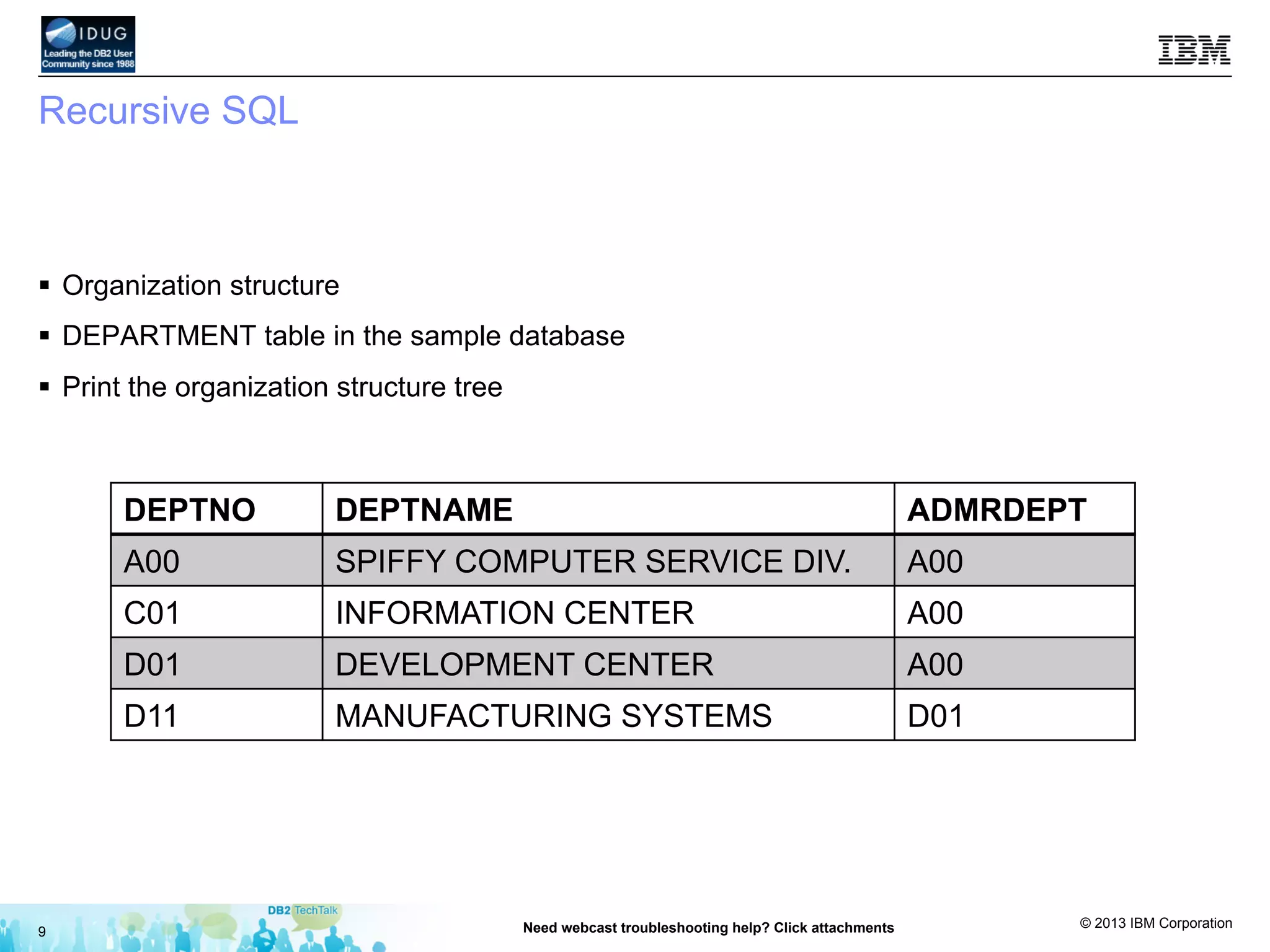
Recursive SQL
DEPTNO DEPTNAME ADMRDEPT
A00 SPIFFY COMPUTER SERVICE DIV. A00
C01 INFORMATION CENTER A00
D01 DEVELOPMENT CENTER A00
D11 MANUFACTURING SYSTEMS D01
9 Need webcast troubleshooting help? Click attachments
§  Organization structure
§  DEPARTMENT table in the sample database
§  Print the organization structure tree
© 2013 IBM Corporation
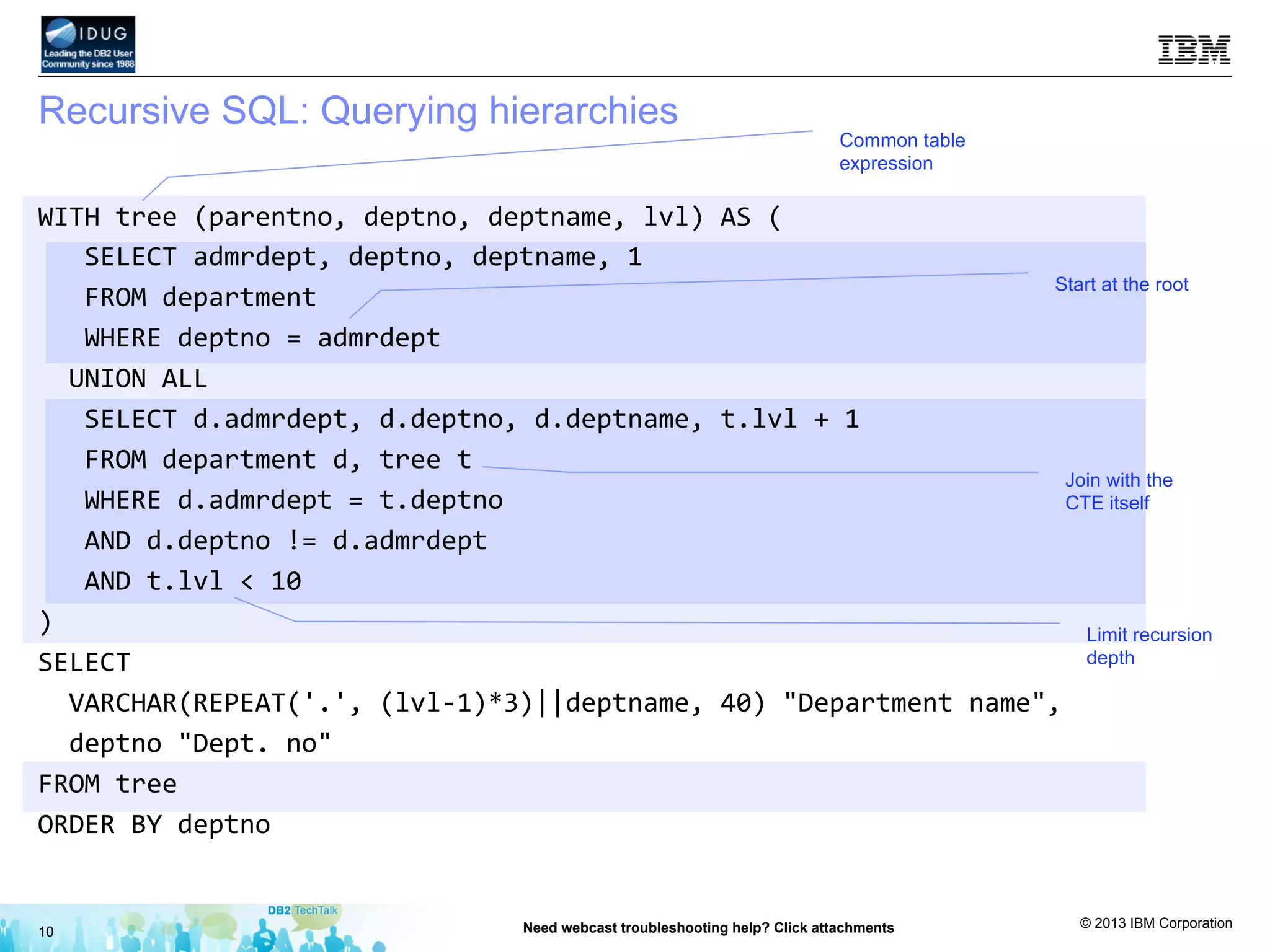
Recursive SQL: Querying hierarchies
10 Need webcast troubleshooting help? Click attachments
Common table
expression
Start at the root
Join with the
CTE itself
Limit recursion
depth
WITH	
  tree	
  (parentno,	
  deptno,	
  deptname,	
  lvl)	
  AS	
  (	


  SELECT	
  admrdept,	
  deptno,	
  deptname,	
  1	


  FROM	
  department	


  WHERE	
  deptno	
  =	
  admrdept	


  UNION	
  ALL	


  SELECT	
  d.admrdept,	
  d.deptno,	
  d.deptname,	
  t.lvl	
  +	
  1	


  FROM	
  department	
  d,	
  tree	
  t	


  WHERE	
  d.admrdept	
  =	
  t.deptno	


  AND	
  d.deptno	
  !=	
  d.admrdept	


  AND	
  t.lvl	
  <	
  10	
  
)	
  
SELECT	


  VARCHAR(REPEAT('.',	
  (lvl-­‐1)*3)||deptname,	
  40)	
  "Department	
  name",	


  deptno	
  "Dept.	
  no"	
  
FROM	
  tree	
  
ORDER	
  BY	
  deptno	
  
© 2013 IBM Corporation
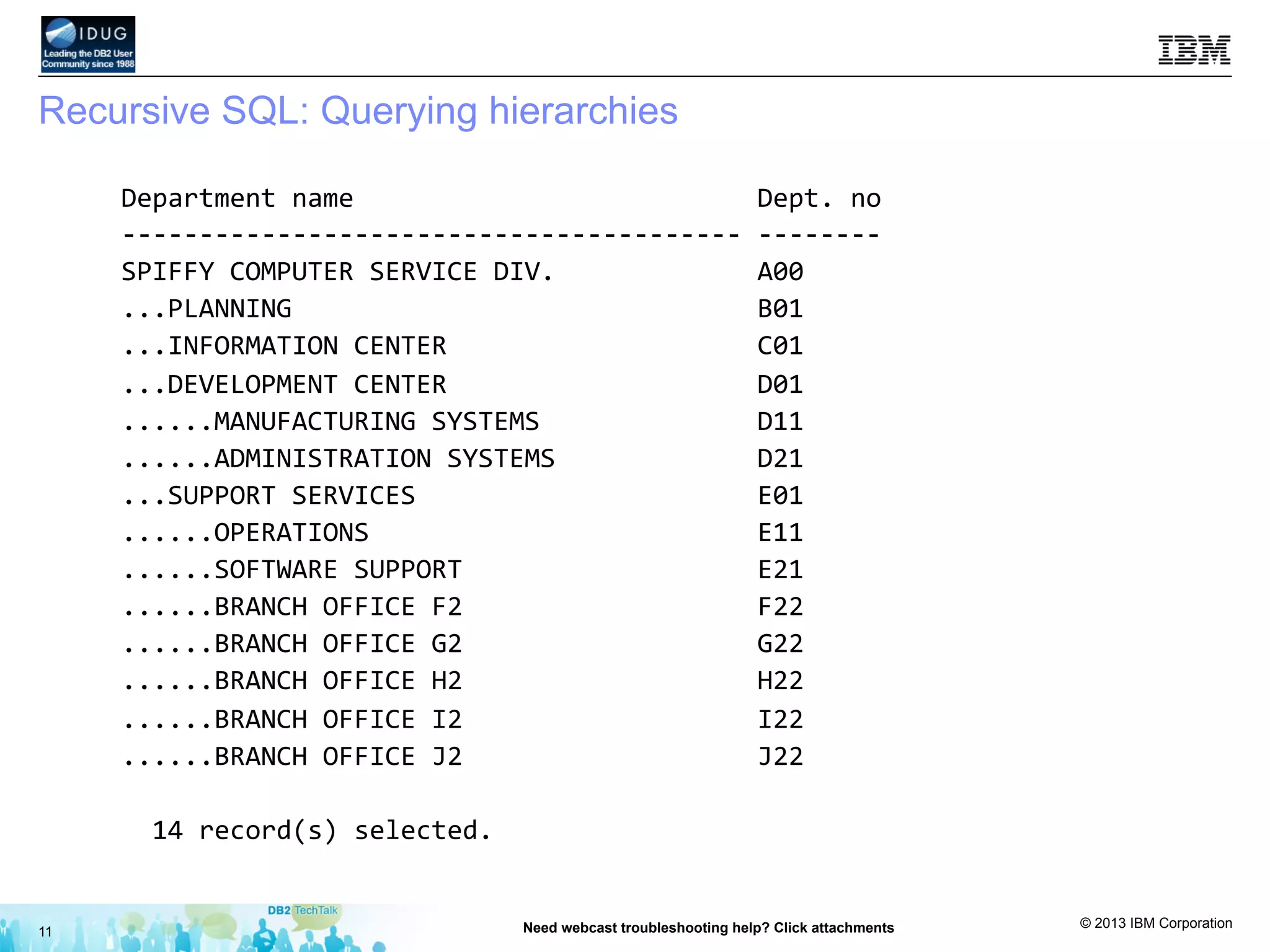
Recursive SQL: Querying hierarchies
11 Need webcast troubleshooting help? Click attachments
Department	
  name	


  Dept.	
  no	
  
-­‐-­‐-­‐-­‐-­‐-­‐-­‐-­‐-­‐-­‐-­‐-­‐-­‐-­‐-­‐-­‐-­‐-­‐-­‐-­‐-­‐-­‐-­‐-­‐-­‐-­‐-­‐-­‐-­‐-­‐-­‐-­‐-­‐-­‐-­‐-­‐-­‐-­‐-­‐-­‐	
  -­‐-­‐-­‐-­‐-­‐-­‐-­‐-­‐	
  
SPIFFY	
  COMPUTER	
  SERVICE	
  DIV.	


  A00	


...PLANNING	


  B01	


...INFORMATION	
  CENTER	


  C01	


...DEVELOPMENT	
  CENTER	


  D01	


......MANUFACTURING	
  SYSTEMS	


  D11	


......ADMINISTRATION	
  SYSTEMS	


  D21	


...SUPPORT	
  SERVICES	


  E01	


......OPERATIONS	


  E11	


......SOFTWARE	
  SUPPORT	


  E21	


......BRANCH	
  OFFICE	
  F2	


  F22	


......BRANCH	
  OFFICE	
  G2	


  G22	


......BRANCH	
  OFFICE	
  H2	


  H22	


......BRANCH	
  OFFICE	
  I2	


  I22	


......BRANCH	
  OFFICE	
  J2	


  J22	


  14	
  record(s)	
  selected.	
  
© 2013 IBM Corporation
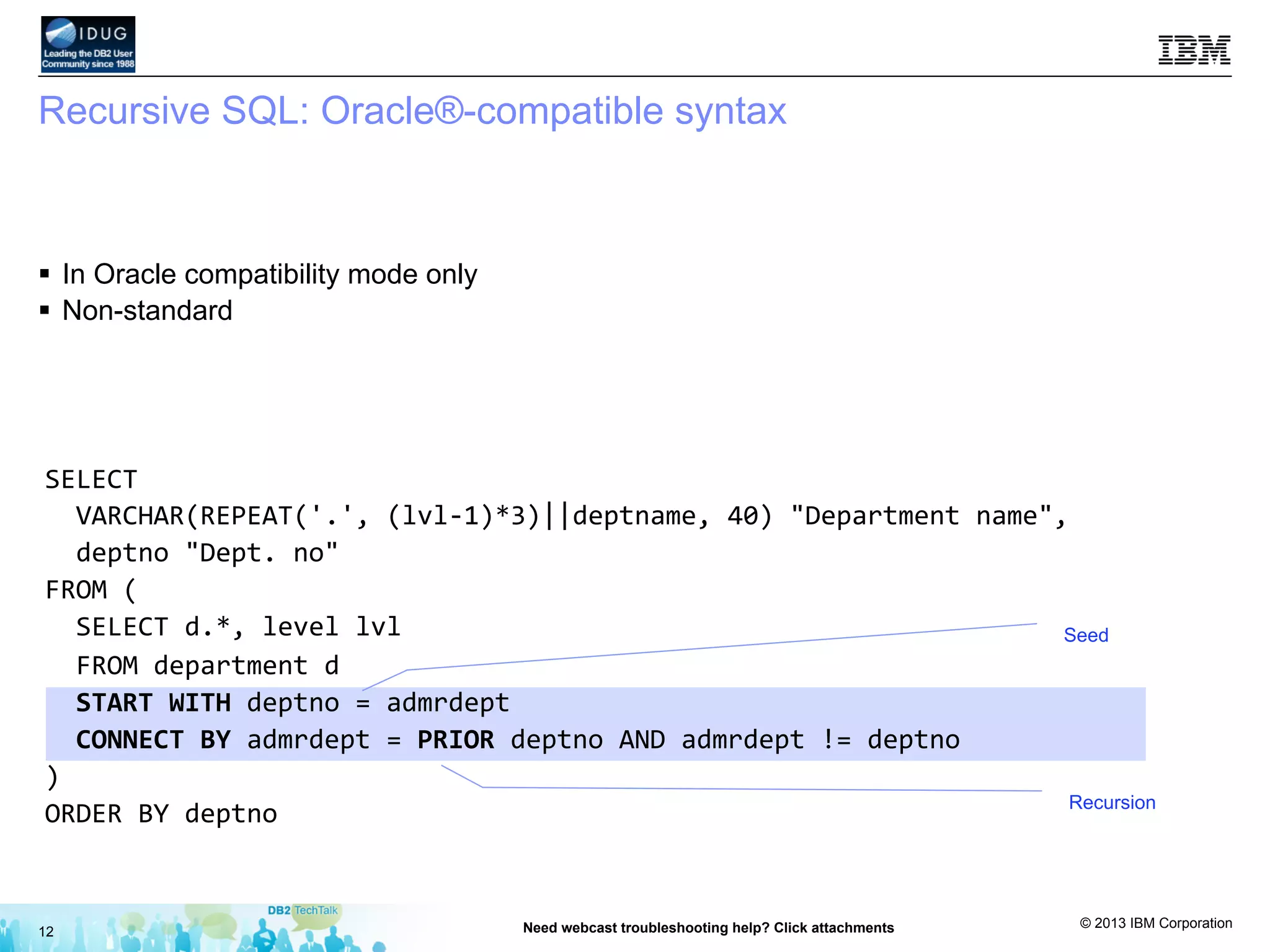
Recursive SQL: Oracle®-compatible syntax
12 Need webcast troubleshooting help? Click attachments
§  In Oracle compatibility mode only
§  Non-standard
Seed
Recursion
SELECT	


  VARCHAR(REPEAT('.',	
  (lvl-­‐1)*3)||deptname,	
  40)	
  "Department	
  name",	


  deptno	
  "Dept.	
  no"	
  
FROM	
  (	


  SELECT	
  d.*,	
  level	
  lvl	


  FROM	
  department	
  d	


  START	
  WITH	
  deptno	
  =	
  admrdept	


  CONNECT	
  BY	
  admrdept	
  =	
  PRIOR	
  deptno	
  AND	
  admrdept	
  !=	
  deptno	
  
)	
  
ORDER	
  BY	
  deptno	
  
© 2013 IBM Corporation
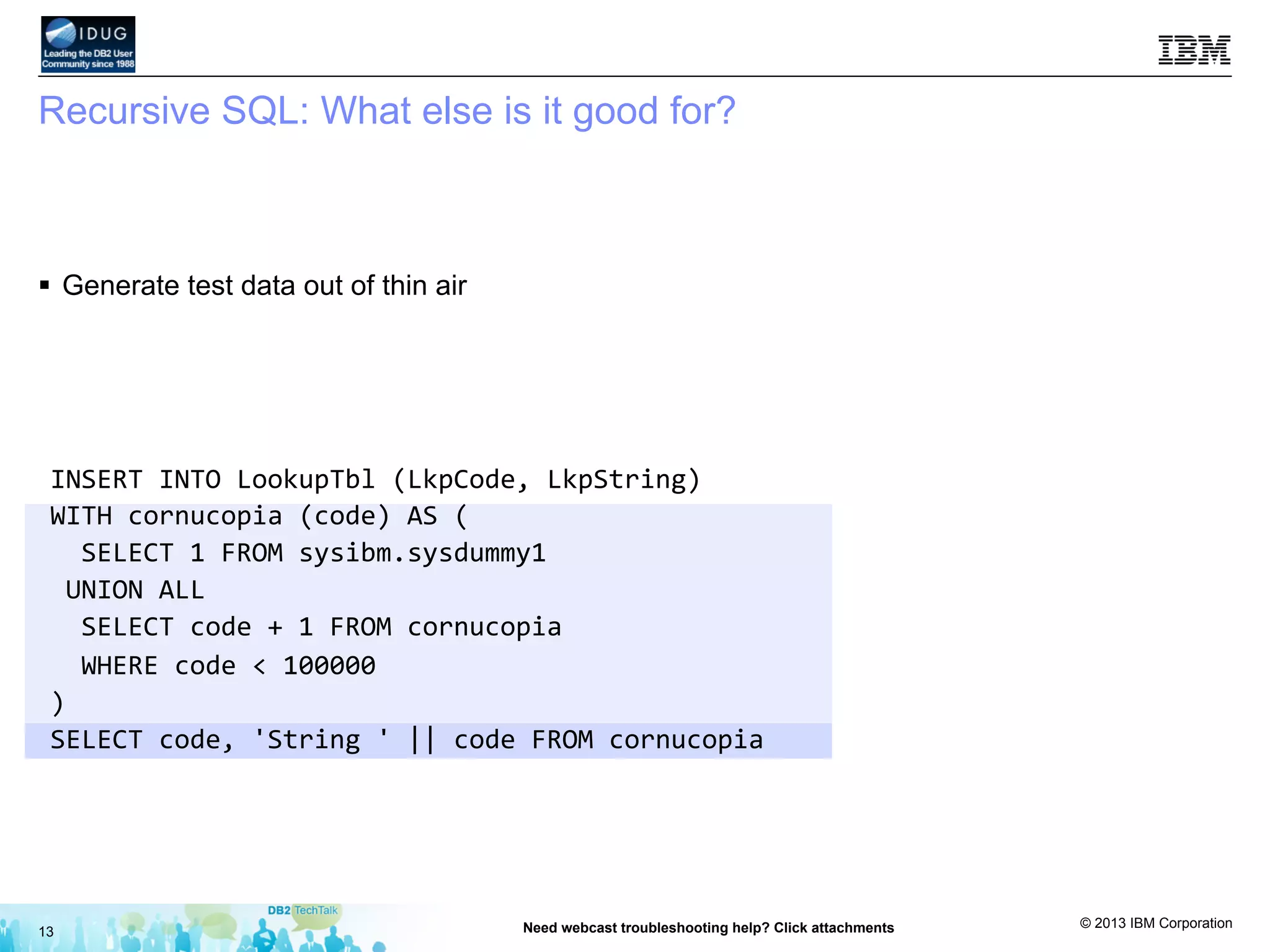
Recursive SQL: What else is it good for?
§  Generate test data out of thin air
13 Need webcast troubleshooting help? Click attachments
INSERT	
  INTO	
  LookupTbl	
  (LkpCode,	
  LkpString)	
  
WITH	
  cornucopia	
  (code)	
  AS	
  (	


  SELECT	
  1	
  FROM	
  sysibm.sysdummy1	
  
	
  UNION	
  ALL	


  SELECT	
  code	
  +	
  1	
  FROM	
  cornucopia	


  WHERE	
  code	
  <	
  100000	
  
)	
  
SELECT	
  code,	
  'String	
  '	
  ||	
  code	
  FROM	
  cornucopia	
  
© 2013 IBM Corporation
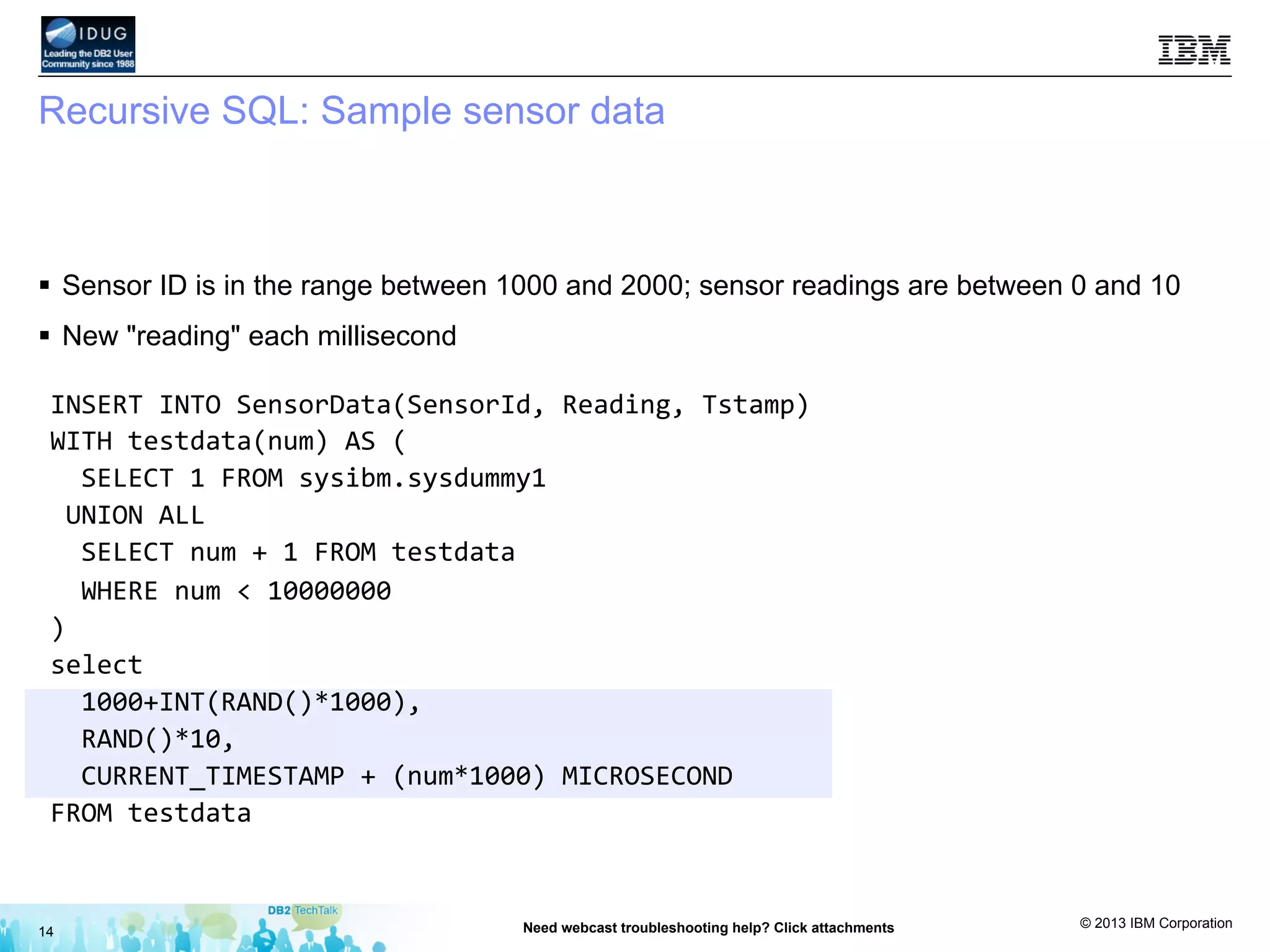
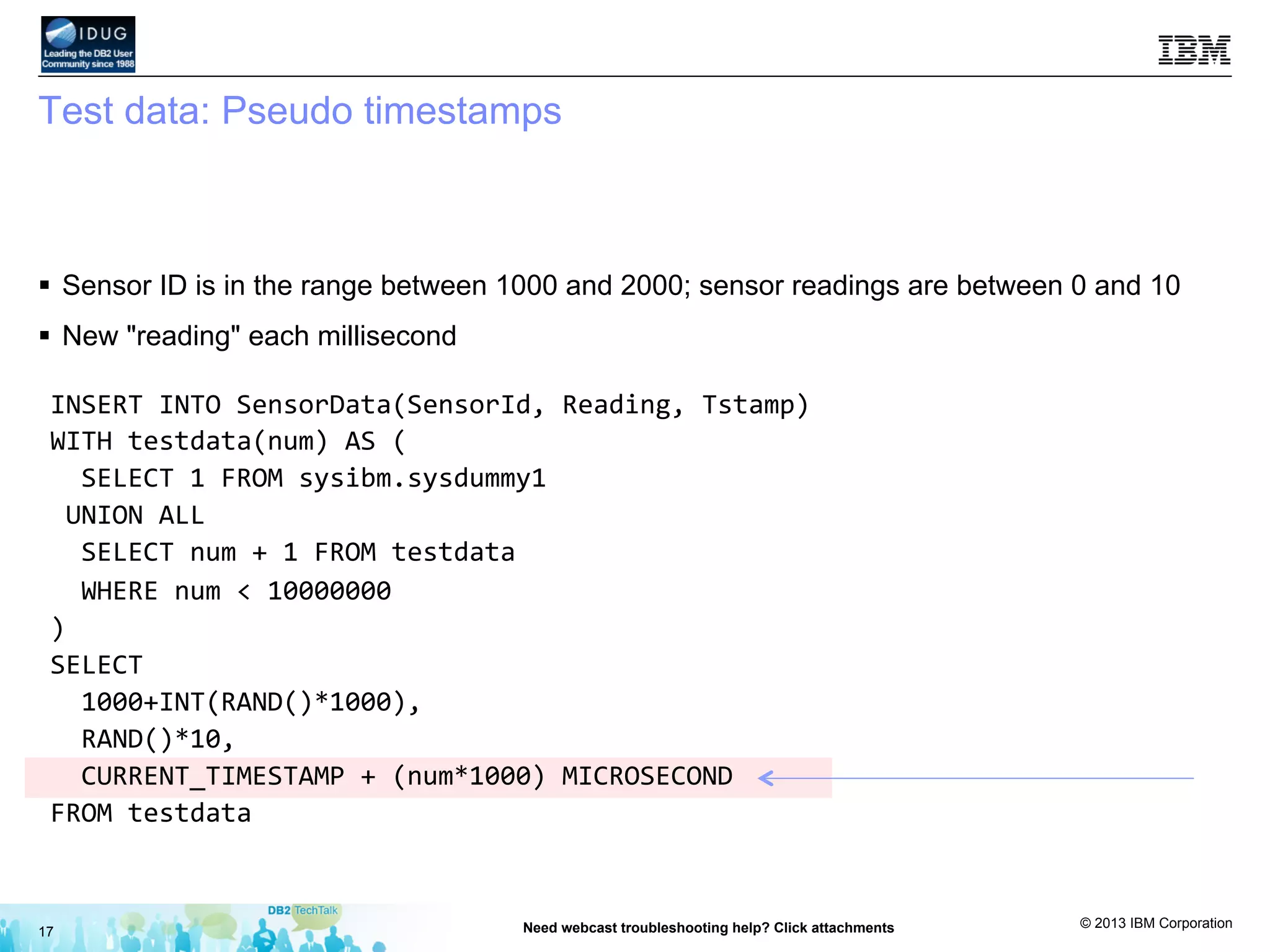
Recursive SQL: Sample sensor data
§  Sensor ID is in the range between 1000 and 2000; sensor readings are between 0 and 10
§  New "reading" each millisecond
14 Need webcast troubleshooting help? Click attachments
INSERT	
  INTO	
  SensorData(SensorId,	
  Reading,	
  Tstamp)	
  
WITH	
  testdata(num)	
  AS	
  (	


  SELECT	
  1	
  FROM	
  sysibm.sysdummy1	
  
	
  UNION	
  ALL	


  SELECT	
  num	
  +	
  1	
  FROM	
  testdata	


  WHERE	
  num	
  <	
  10000000	
  
)	
  
select	


  1000+INT(RAND()*1000),	


  RAND()*10,	


  CURRENT_TIMESTAMP	
  +	
  (num*1000)	
  MICROSECOND	
  
FROM	
  testdata	
  
© 2013 IBM Corporation
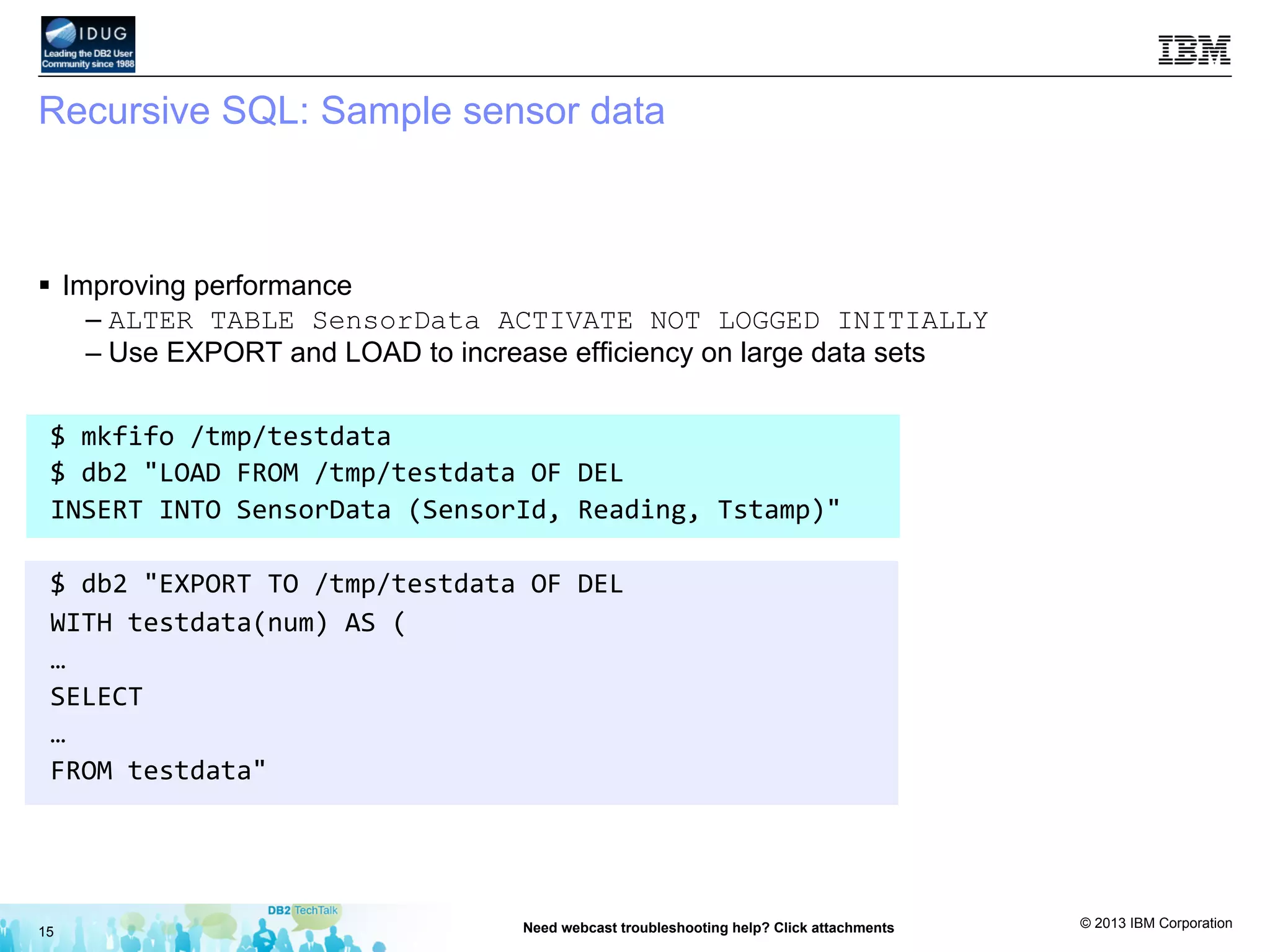
Recursive SQL: Sample sensor data
§  Improving performance
– ALTER TABLE SensorData ACTIVATE NOT LOGGED INITIALLY
– Use EXPORT and LOAD to increase efficiency on large data sets
15 Need webcast troubleshooting help? Click attachments
$	
  mkfifo	
  /tmp/testdata	
  
$	
  db2	
  "LOAD	
  FROM	
  /tmp/testdata	
  OF	
  DEL	
  	
  
INSERT	
  INTO	
  SensorData	
  (SensorId,	
  Reading,	
  Tstamp)"	


$	
  db2	
  "EXPORT	
  TO	
  /tmp/testdata	
  OF	
  DEL	
  	
  
WITH	
  testdata(num)	
  AS	
  (	
  
…	
  
SELECT	
  	
  
…	
  
FROM	
  testdata"	
  
© 2013 IBM Corporation
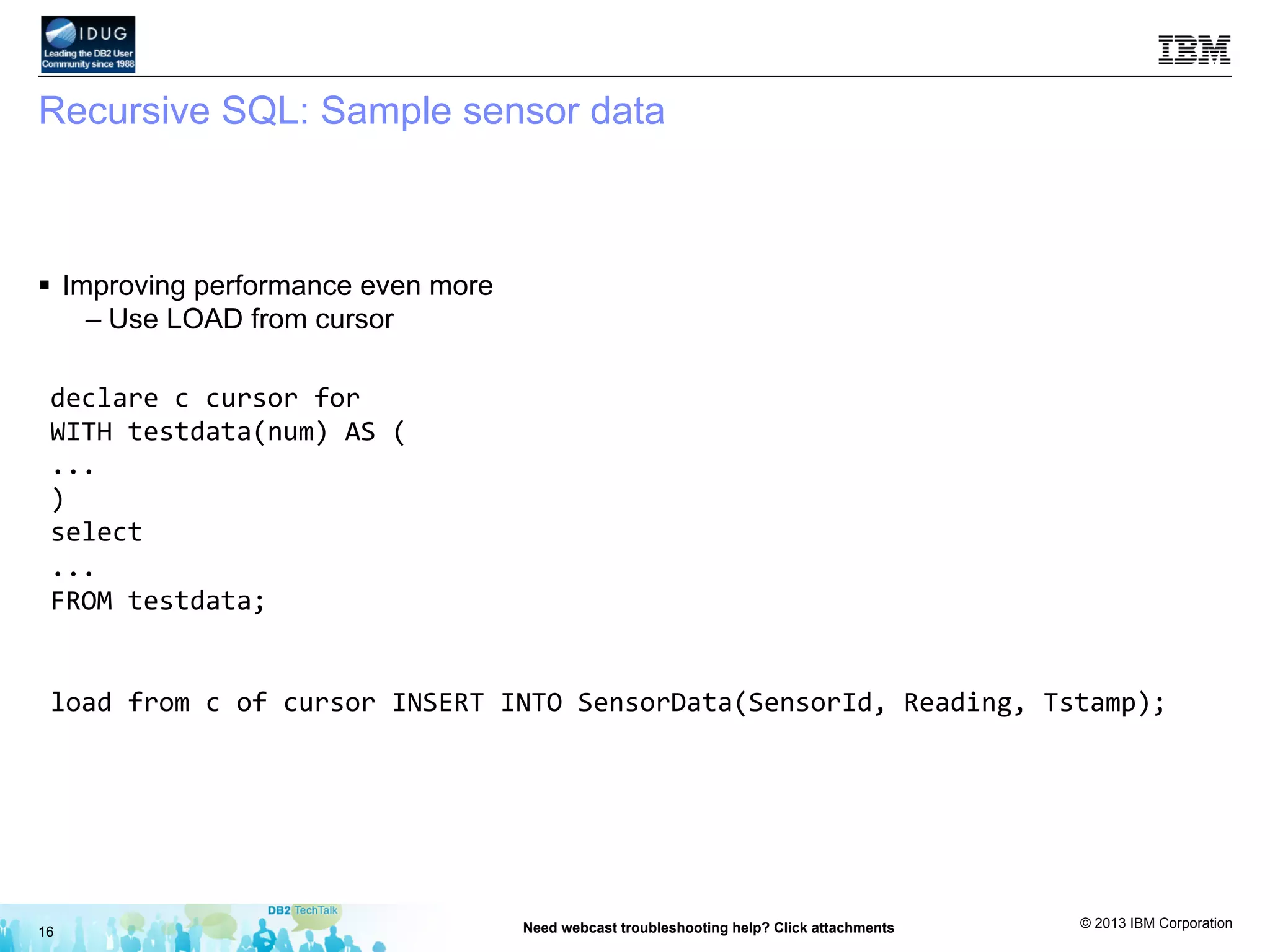
Recursive SQL: Sample sensor data
§  Improving performance even more
– Use LOAD from cursor
16 Need webcast troubleshooting help? Click attachments
declare	
  c	
  cursor	
  for	
  
WITH	
  testdata(num)	
  AS	
  (	
  
...	
  
)	
  
select	
  	
  
...	
  
FROM	
  testdata;	


load	
  from	
  c	
  of	
  cursor	
  INSERT	
  INTO	
  SensorData(SensorId,	
  Reading,	
  Tstamp);	
  
© 2013 IBM Corporation
Test data: Pseudo timestamps
§  Sensor ID is in the range between 1000 and 2000; sensor readings are between 0 and 10
§  New "reading" each millisecond
17 Need webcast troubleshooting help? Click attachments
INSERT	
  INTO	
  SensorData(SensorId,	
  Reading,	
  Tstamp)	
  
WITH	
  testdata(num)	
  AS	
  (	


  SELECT	
  1	
  FROM	
  sysibm.sysdummy1	
  
	
  UNION	
  ALL	


  SELECT	
  num	
  +	
  1	
  FROM	
  testdata	


  WHERE	
  num	
  <	
  10000000	
  
)	
  
SELECT	


  1000+INT(RAND()*1000),	


  RAND()*10,	


  CURRENT_TIMESTAMP	
  +	
  (num*1000)	
  MICROSECOND	
  
FROM	
  testdata	
  
© 2013 IBM Corporation
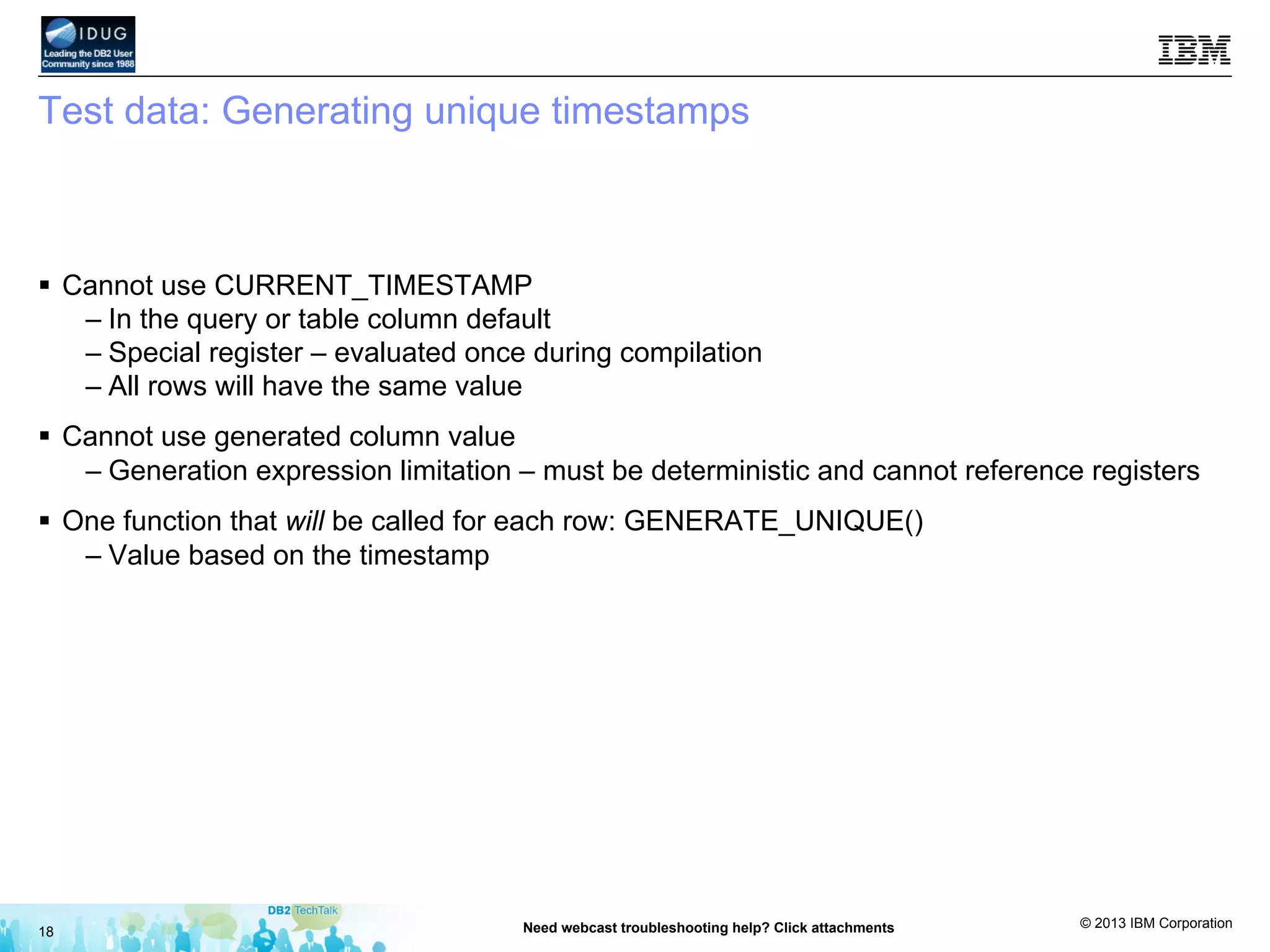
Test data: Generating unique timestamps
§  Cannot use CURRENT_TIMESTAMP
– In the query or table column default
– Special register – evaluated once during compilation
– All rows will have the same value
§  Cannot use generated column value
– Generation expression limitation – must be deterministic and cannot reference registers
§  One function that will be called for each row: GENERATE_UNIQUE()
– Value based on the timestamp
18 Need webcast troubleshooting help? Click attachments
© 2013 IBM Corporation
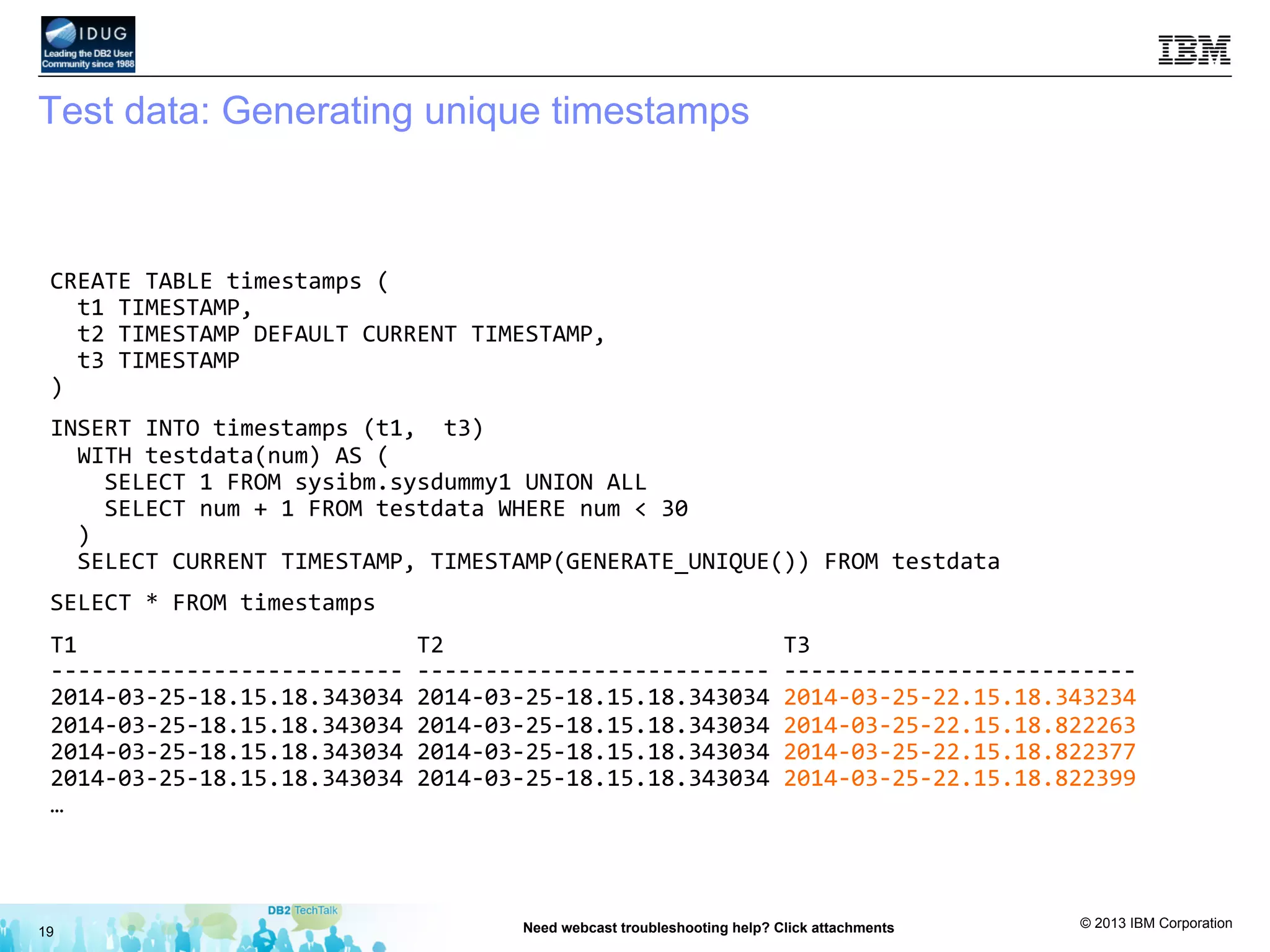
Test data: Generating unique timestamps
19 Need webcast troubleshooting help? Click attachments
CREATE	
  TABLE	
  timestamps	
  (	


  t1	
  TIMESTAMP,	


  t2	
  TIMESTAMP	
  DEFAULT	
  CURRENT	
  TIMESTAMP,	


  t3	
  TIMESTAMP	
  
)	
  
INSERT	
  INTO	
  timestamps	
  (t1,	
  	
  t3)	


  WITH	
  testdata(num)	
  AS	
  (	


  SELECT	
  1	
  FROM	
  sysibm.sysdummy1	
  UNION	
  ALL	


  SELECT	
  num	
  +	
  1	
  FROM	
  testdata	
  WHERE	
  num	
  <	
  30	


  )	


  SELECT	
  CURRENT	
  TIMESTAMP,	
  TIMESTAMP(GENERATE_UNIQUE())	
  FROM	
  testdata	
  
SELECT	
  *	
  FROM	
  timestamps	
  
T1	


  T2	


  T3	


-­‐-­‐-­‐-­‐-­‐-­‐-­‐-­‐-­‐-­‐-­‐-­‐-­‐-­‐-­‐-­‐-­‐-­‐-­‐-­‐-­‐-­‐-­‐-­‐-­‐-­‐	
  -­‐-­‐-­‐-­‐-­‐-­‐-­‐-­‐-­‐-­‐-­‐-­‐-­‐-­‐-­‐-­‐-­‐-­‐-­‐-­‐-­‐-­‐-­‐-­‐-­‐-­‐	
  -­‐-­‐-­‐-­‐-­‐-­‐-­‐-­‐-­‐-­‐-­‐-­‐-­‐-­‐-­‐-­‐-­‐-­‐-­‐-­‐-­‐-­‐-­‐-­‐-­‐-­‐	
  
2014-­‐03-­‐25-­‐18.15.18.343034	
  2014-­‐03-­‐25-­‐18.15.18.343034	
  2014-­‐03-­‐25-­‐22.15.18.343234	
  
2014-­‐03-­‐25-­‐18.15.18.343034	
  2014-­‐03-­‐25-­‐18.15.18.343034	
  2014-­‐03-­‐25-­‐22.15.18.822263	
  
2014-­‐03-­‐25-­‐18.15.18.343034	
  2014-­‐03-­‐25-­‐18.15.18.343034	
  2014-­‐03-­‐25-­‐22.15.18.822377	
  
2014-­‐03-­‐25-­‐18.15.18.343034	
  2014-­‐03-­‐25-­‐18.15.18.343034	
  2014-­‐03-­‐25-­‐22.15.18.822399	
  
…	


© 2013 IBM Corporation
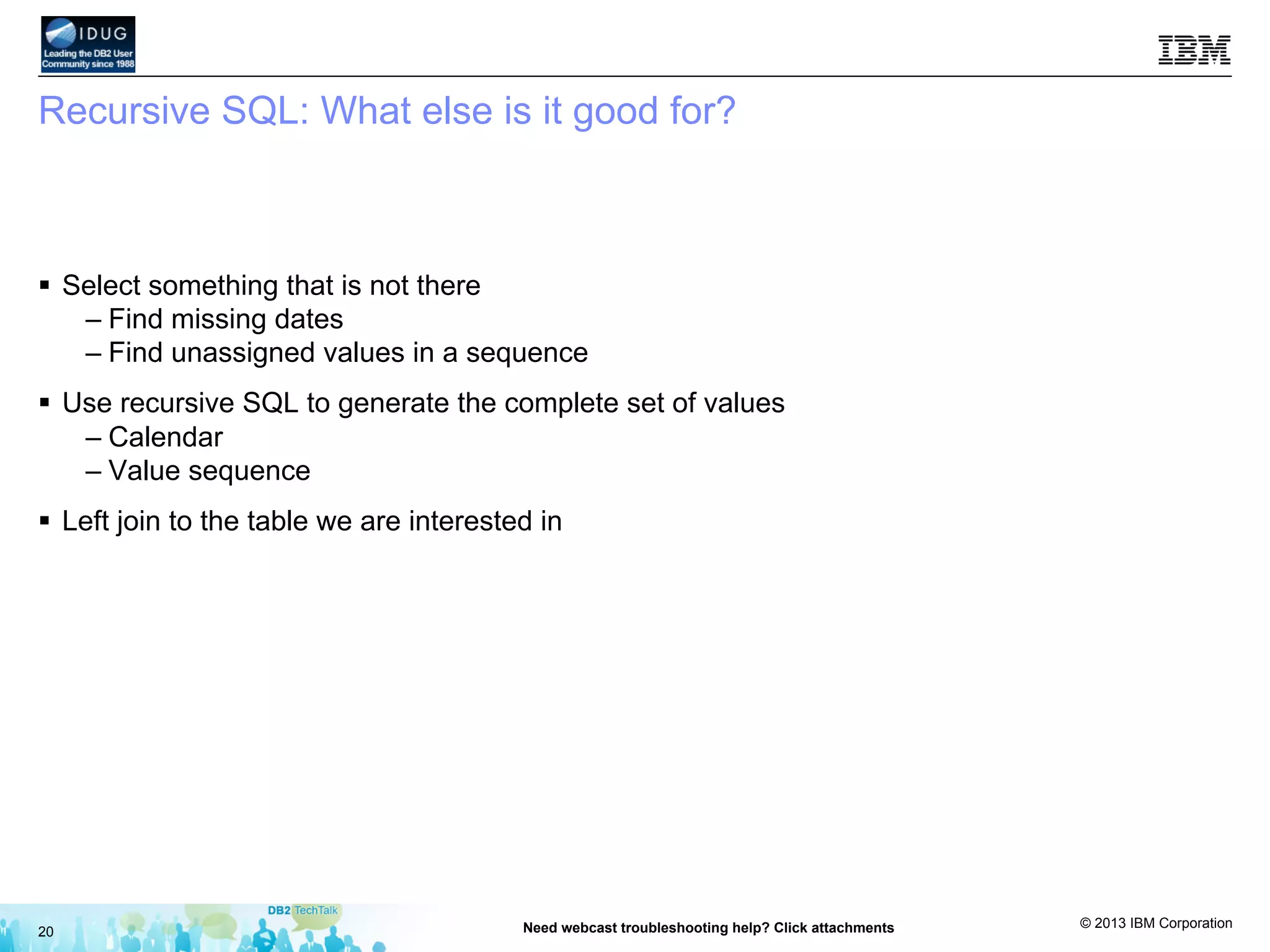
Recursive SQL: What else is it good for?
§  Select something that is not there
– Find missing dates
– Find unassigned values in a sequence
§  Use recursive SQL to generate the complete set of values
– Calendar
– Value sequence
§  Left join to the table we are interested in
20 Need webcast troubleshooting help? Click attachments
© 2013 IBM Corporation
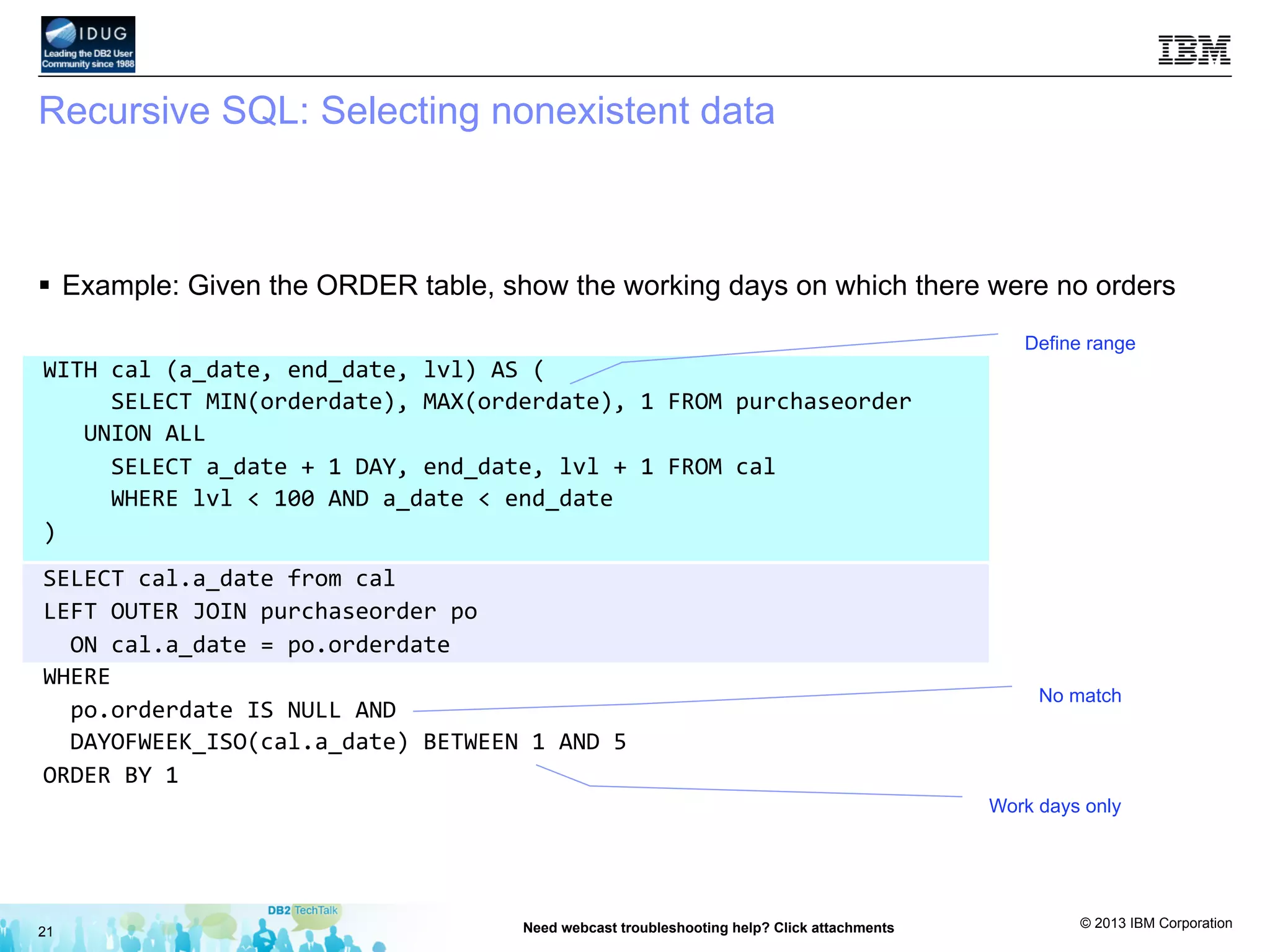
Recursive SQL: Selecting nonexistent data
§  Example: Given the ORDER table, show the working days on which there were no orders
21 Need webcast troubleshooting help? Click attachments
WITH	
  cal	
  (a_date,	
  end_date,	
  lvl)	
  AS	
  (	


  SELECT	
  MIN(orderdate),	
  MAX(orderdate),	
  1	
  FROM	
  purchaseorder	


  UNION	
  ALL	


  SELECT	
  a_date	
  +	
  1	
  DAY,	
  end_date,	
  lvl	
  +	
  1	
  FROM	
  cal	


  WHERE	
  lvl	
  <	
  100	
  AND	
  a_date	
  <	
  end_date	
  	
  
)	
  
SELECT	
  cal.a_date	
  from	
  cal	
  
LEFT	
  OUTER	
  JOIN	
  purchaseorder	
  po	


  ON	
  cal.a_date	
  =	
  po.orderdate	
  
WHERE	


  po.orderdate	
  IS	
  NULL	
  AND	


  DAYOFWEEK_ISO(cal.a_date)	
  BETWEEN	
  1	
  AND	
  5	
  
ORDER	
  BY	
  1	
  
Define range
No match
Work days only
© 2013 IBM Corporation
Recursive SQL: What else is it good for?
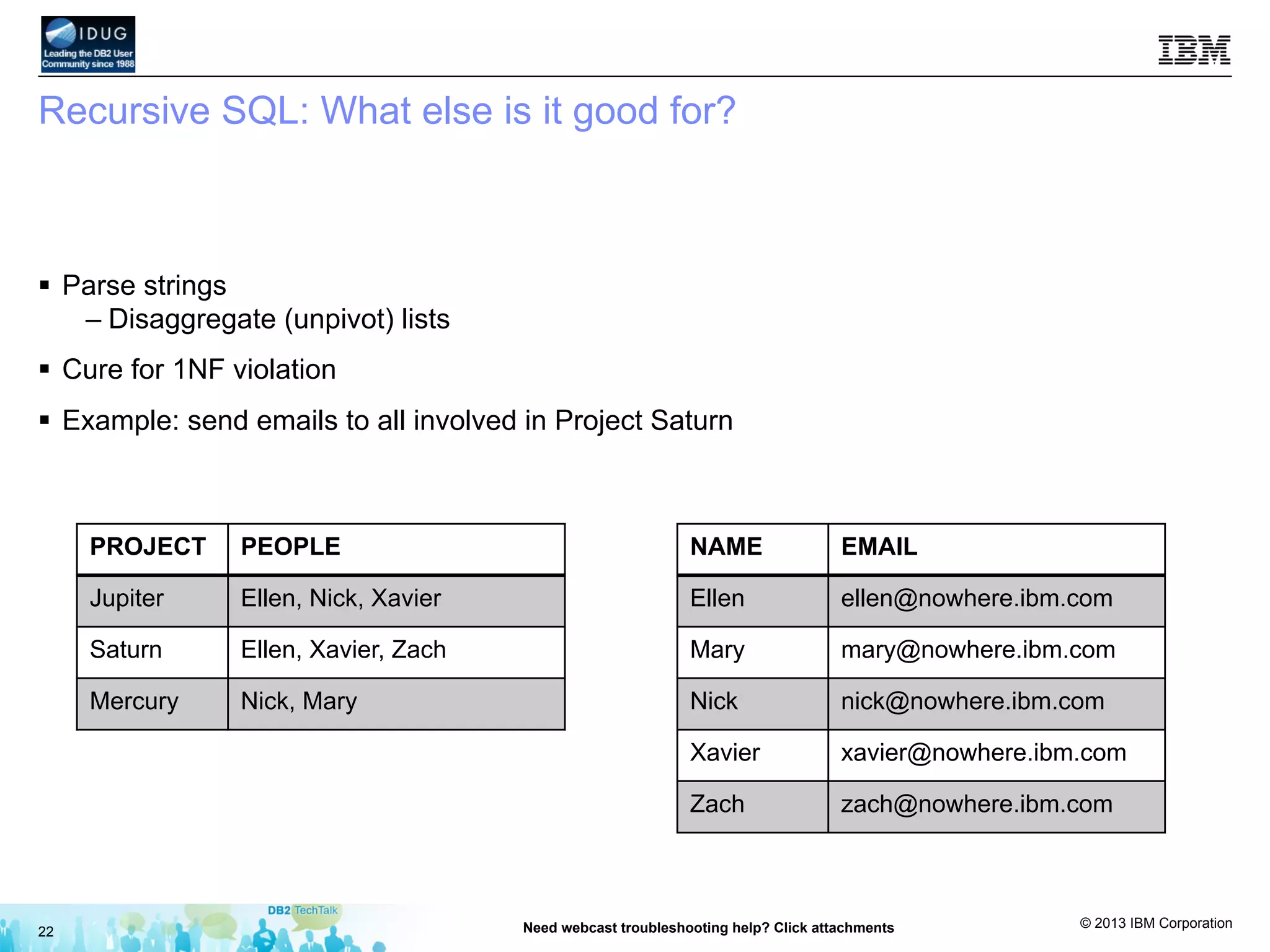
§  Parse strings
– Disaggregate (unpivot) lists
§  Cure for 1NF violation
§  Example: send emails to all involved in Project Saturn
22 Need webcast troubleshooting help? Click attachments
PROJECT PEOPLE
Jupiter Ellen, Nick, Xavier
Saturn Ellen, Xavier, Zach
Mercury Nick, Mary
NAME EMAIL
Ellen ellen@nowhere.ibm.com
Mary mary@nowhere.ibm.com
Nick nick@nowhere.ibm.com
Xavier xavier@nowhere.ibm.com
Zach zach@nowhere.ibm.com
© 2013 IBM Corporation
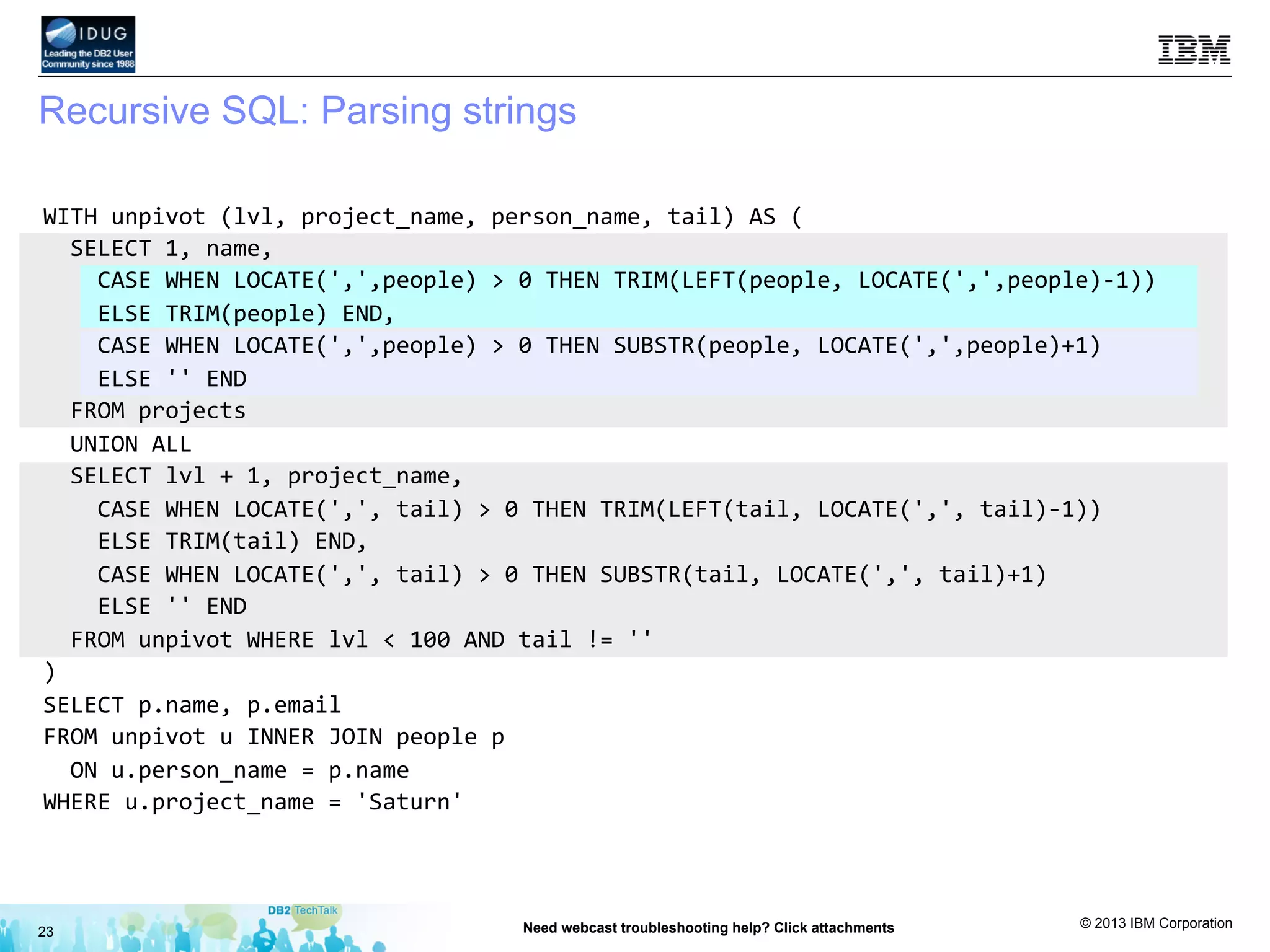
Recursive SQL: Parsing strings
23 Need webcast troubleshooting help? Click attachments
WITH	
  unpivot	
  (lvl,	
  project_name,	
  person_name,	
  tail)	
  AS	
  (	


  SELECT	
  1,	
  name,	


  CASE	
  WHEN	
  LOCATE(',',people)	
  >	
  0	
  THEN	
  TRIM(LEFT(people,	
  LOCATE(',',people)-­‐1))	


  ELSE	
  TRIM(people)	
  END,	


  CASE	
  WHEN	
  LOCATE(',',people)	
  >	
  0	
  THEN	
  SUBSTR(people,	
  LOCATE(',',people)+1)	


  ELSE	
  ''	
  END	


  FROM	
  projects	


  UNION	
  ALL	


  SELECT	
  lvl	
  +	
  1,	
  project_name,	


  CASE	
  WHEN	
  LOCATE(',',	
  tail)	
  >	
  0	
  THEN	
  TRIM(LEFT(tail,	
  LOCATE(',',	
  tail)-­‐1))	


  ELSE	
  TRIM(tail)	
  END,	


  CASE	
  WHEN	
  LOCATE(',',	
  tail)	
  >	
  0	
  THEN	
  SUBSTR(tail,	
  LOCATE(',',	
  tail)+1)	


  ELSE	
  ''	
  END	


  FROM	
  unpivot	
  WHERE	
  lvl	
  <	
  100	
  AND	
  tail	
  !=	
  ''	
  
)	
  
SELECT	
  p.name,	
  p.email	
  	
  
FROM	
  unpivot	
  u	
  INNER	
  JOIN	
  people	
  p	


  ON	
  u.person_name	
  =	
  p.name	
  
WHERE	
  u.project_name	
  =	
  'Saturn'	
  
© 2013 IBM Corporation
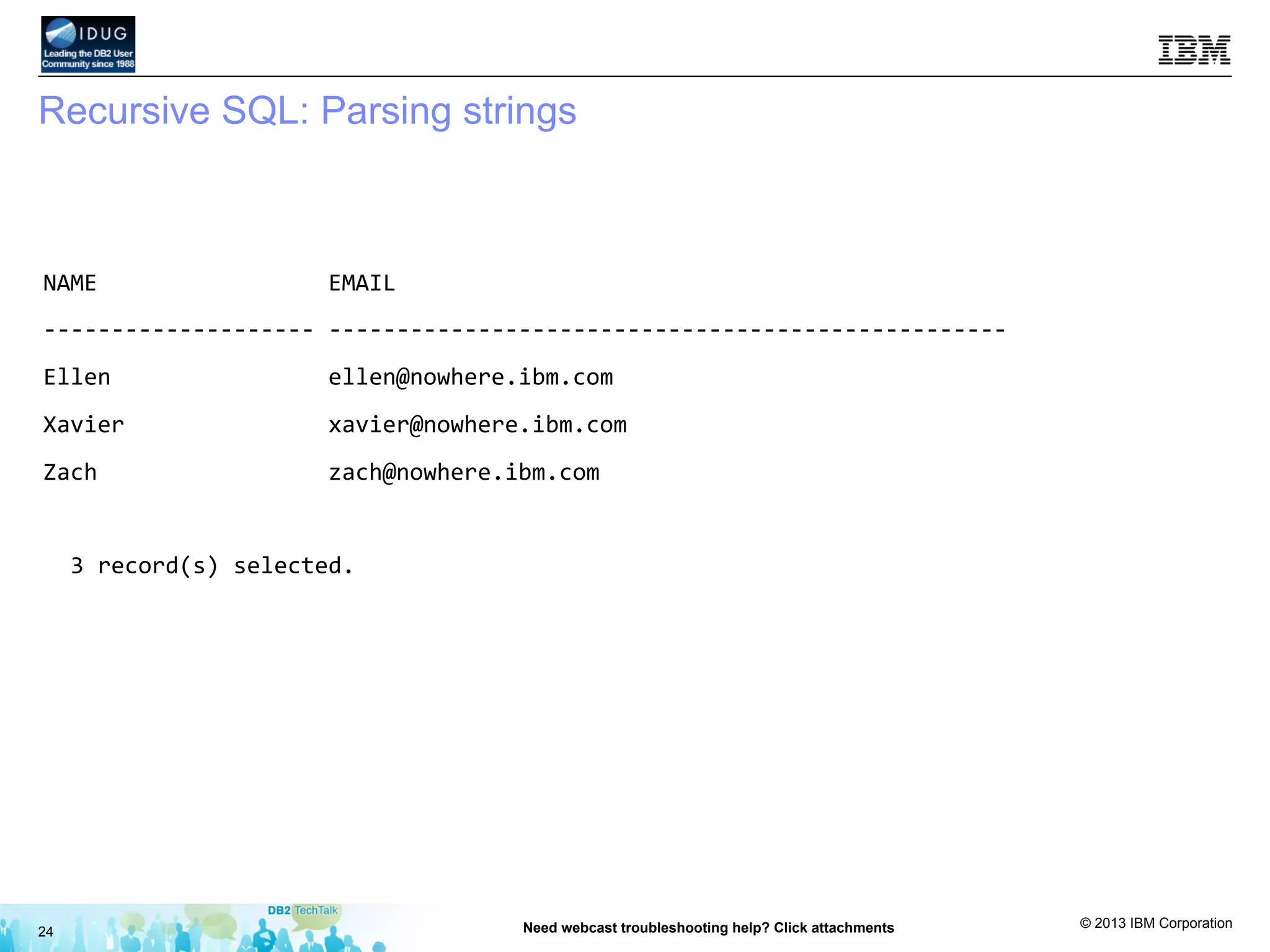
Recursive SQL: Parsing strings
24 Need webcast troubleshooting help? Click attachments
NAME	


  EMAIL	
  
-­‐-­‐-­‐-­‐-­‐-­‐-­‐-­‐-­‐-­‐-­‐-­‐-­‐-­‐-­‐-­‐-­‐-­‐-­‐-­‐	
  -­‐-­‐-­‐-­‐-­‐-­‐-­‐-­‐-­‐-­‐-­‐-­‐-­‐-­‐-­‐-­‐-­‐-­‐-­‐-­‐-­‐-­‐-­‐-­‐-­‐-­‐-­‐-­‐-­‐-­‐-­‐-­‐-­‐-­‐-­‐-­‐-­‐-­‐-­‐-­‐-­‐-­‐-­‐-­‐-­‐-­‐-­‐-­‐-­‐-­‐	
  
Ellen	


  ellen@nowhere.ibm.com	


Xavier	


  xavier@nowhere.ibm.com	


Zach	


  zach@nowhere.ibm.com	


  3	
  record(s)	
  selected.	
  
© 2013 IBM Corporation
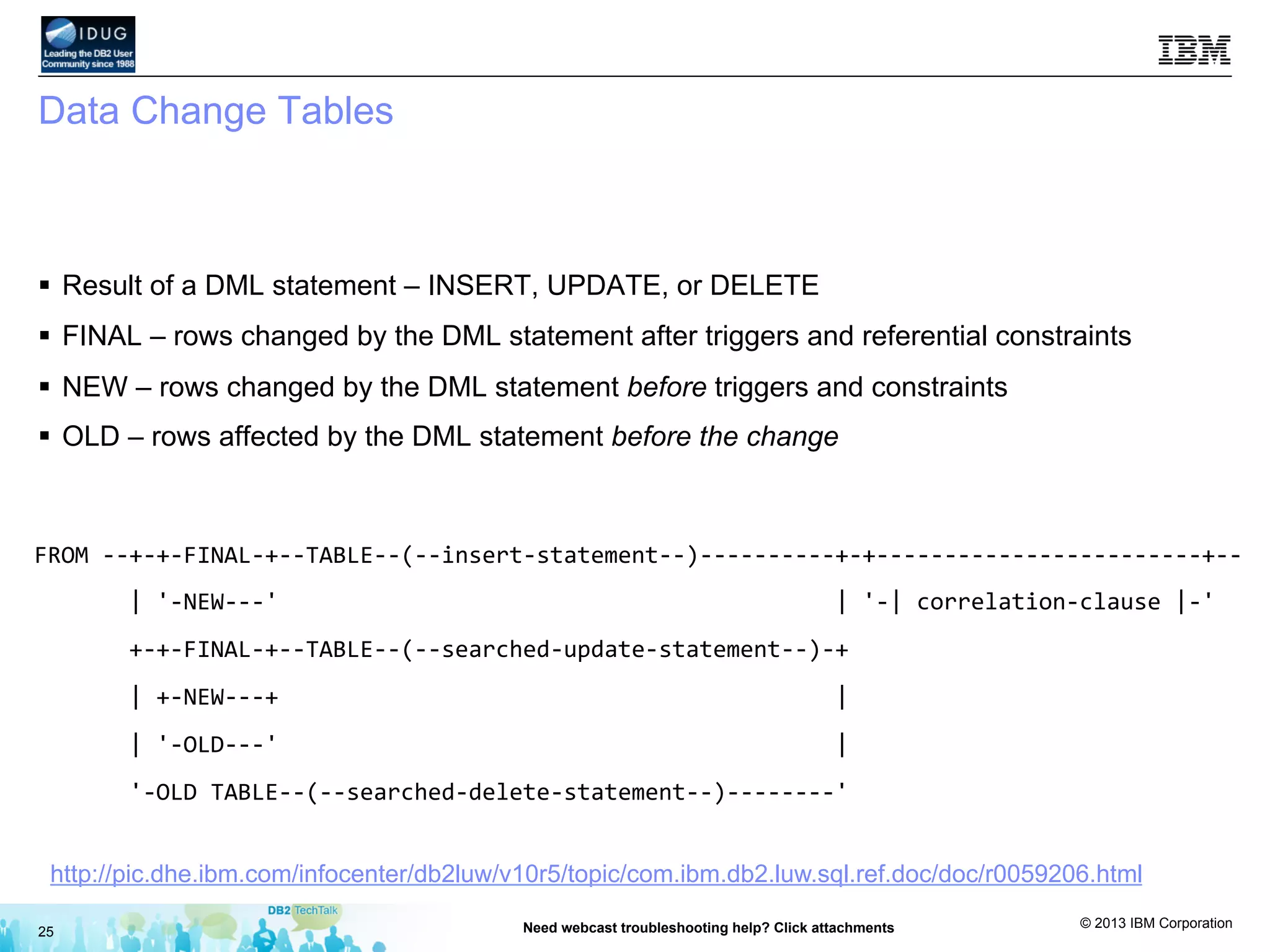
Data Change Tables
§  Result of a DML statement – INSERT, UPDATE, or DELETE
§  FINAL – rows changed by the DML statement after triggers and referential constraints
§  NEW – rows changed by the DML statement before triggers and constraints
§  OLD – rows affected by the DML statement before the change
25 Need webcast troubleshooting help? Click attachments
FROM	
  -­‐-­‐+-­‐+-­‐FINAL-­‐+-­‐-­‐TABLE-­‐-­‐(-­‐-­‐insert-­‐statement-­‐-­‐)-­‐-­‐-­‐-­‐-­‐-­‐-­‐-­‐-­‐-­‐+-­‐+-­‐-­‐-­‐-­‐-­‐-­‐-­‐-­‐-­‐-­‐-­‐-­‐-­‐-­‐-­‐-­‐-­‐-­‐-­‐-­‐-­‐-­‐-­‐-­‐+-­‐-­‐	


  |	
  '-­‐NEW-­‐-­‐-­‐'	


  |	
  '-­‐|	
  correlation-­‐clause	
  |-­‐'	


  +-­‐+-­‐FINAL-­‐+-­‐-­‐TABLE-­‐-­‐(-­‐-­‐searched-­‐update-­‐statement-­‐-­‐)-­‐+	


  |	
  +-­‐NEW-­‐-­‐-­‐+	


  |	


  |	
  '-­‐OLD-­‐-­‐-­‐'	


  |	


  '-­‐OLD	
  TABLE-­‐-­‐(-­‐-­‐searched-­‐delete-­‐statement-­‐-­‐)-­‐-­‐-­‐-­‐-­‐-­‐-­‐-­‐'	
  	
  
http://pic.dhe.ibm.com/infocenter/db2luw/v10r5/topic/com.ibm.db2.luw.sql.ref.doc/doc/r0059206.html
© 2013 IBM Corporation
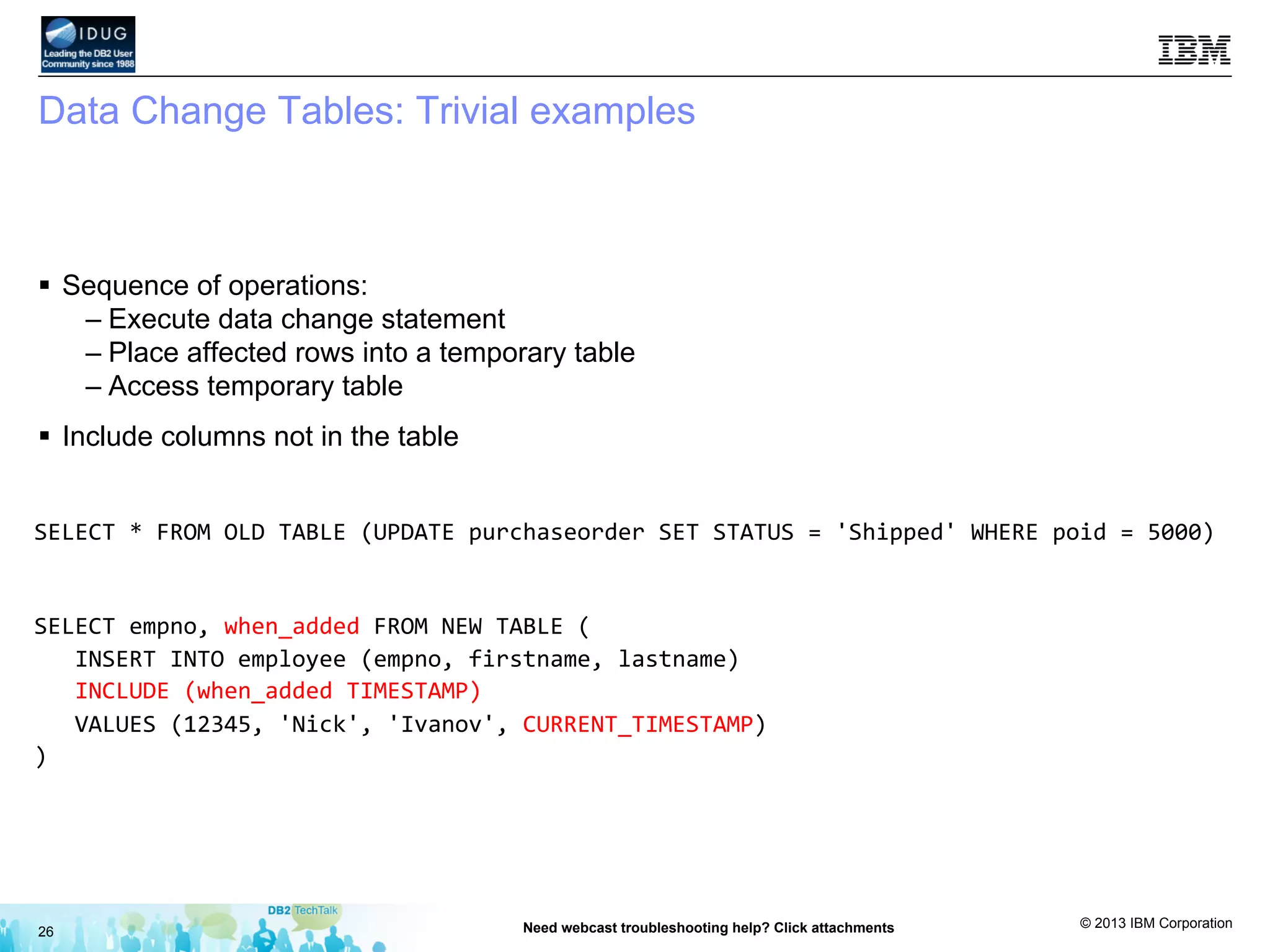
Data Change Tables: Trivial examples
§  Sequence of operations:
– Execute data change statement
– Place affected rows into a temporary table
– Access temporary table
§  Include columns not in the table
26 Need webcast troubleshooting help? Click attachments
SELECT	
  *	
  FROM	
  OLD	
  TABLE	
  (UPDATE	
  purchaseorder	
  SET	
  STATUS	
  =	
  'Shipped'	
  WHERE	
  poid	
  =	
  5000)	


SELECT	
  empno,	
  when_added	
  FROM	
  NEW	
  TABLE	
  (	


  INSERT	
  INTO	
  employee	
  (empno,	
  firstname,	
  lastname)	


  INCLUDE	
  (when_added	
  TIMESTAMP)	


  VALUES	
  (12345,	
  'Nick',	
  'Ivanov',	
  CURRENT_TIMESTAMP)	
  
)	


© 2013 IBM Corporation
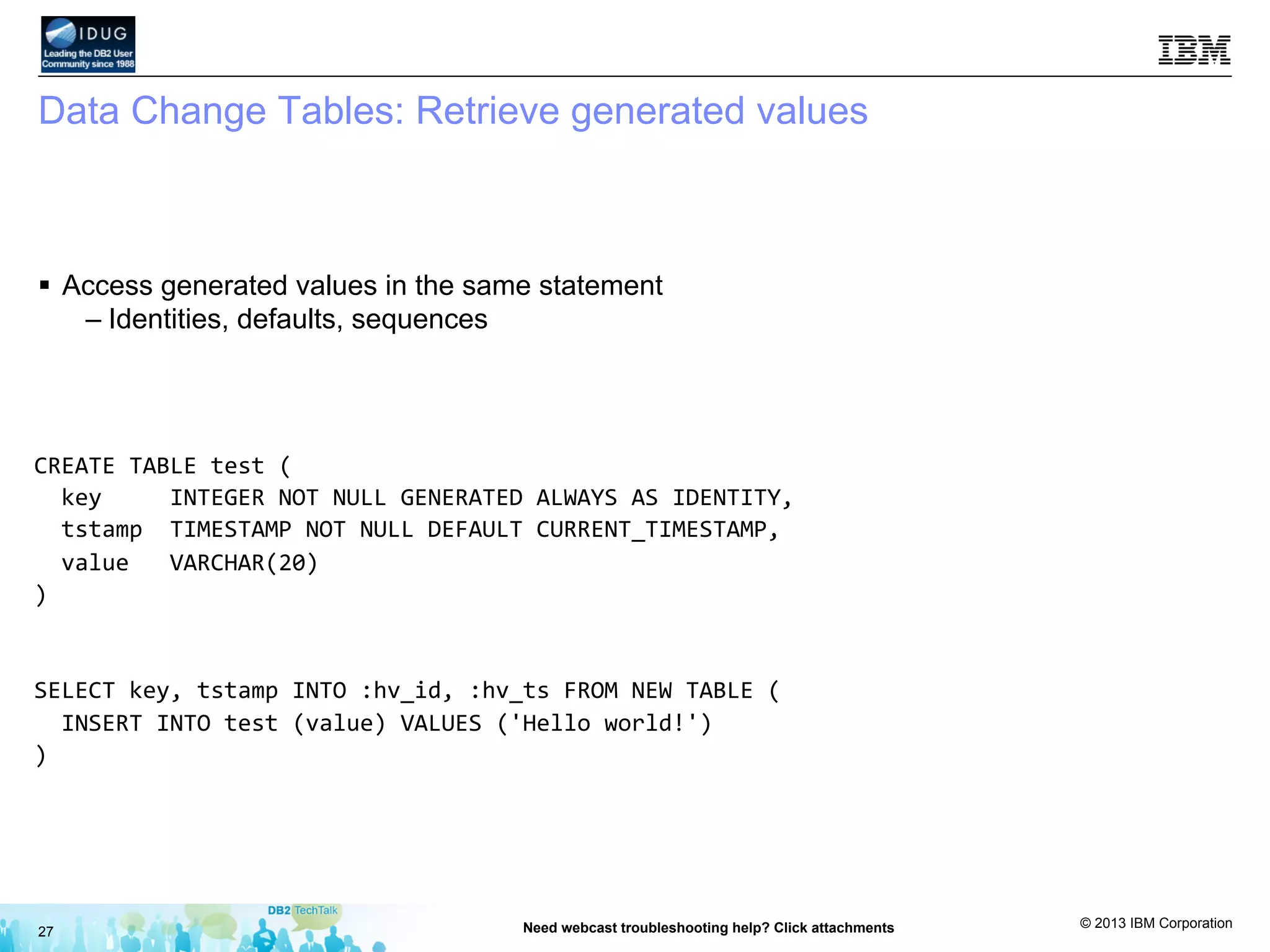
Data Change Tables: Retrieve generated values
§  Access generated values in the same statement
– Identities, defaults, sequences
27 Need webcast troubleshooting help? Click attachments
CREATE	
  TABLE	
  test	
  (	


  key	


  INTEGER	
  NOT	
  NULL	
  GENERATED	
  ALWAYS	
  AS	
  IDENTITY,	


  tstamp	
  	
  TIMESTAMP	
  NOT	
  NULL	
  DEFAULT	
  CURRENT_TIMESTAMP,	


  value	
  	
  	
  VARCHAR(20)	
  
)	


SELECT	
  key,	
  tstamp	
  INTO	
  :hv_id,	
  :hv_ts	
  FROM	
  NEW	
  TABLE	
  (	


  INSERT	
  INTO	
  test	
  (value)	
  VALUES	
  ('Hello	
  world!')	
  
)	


© 2013 IBM Corporation
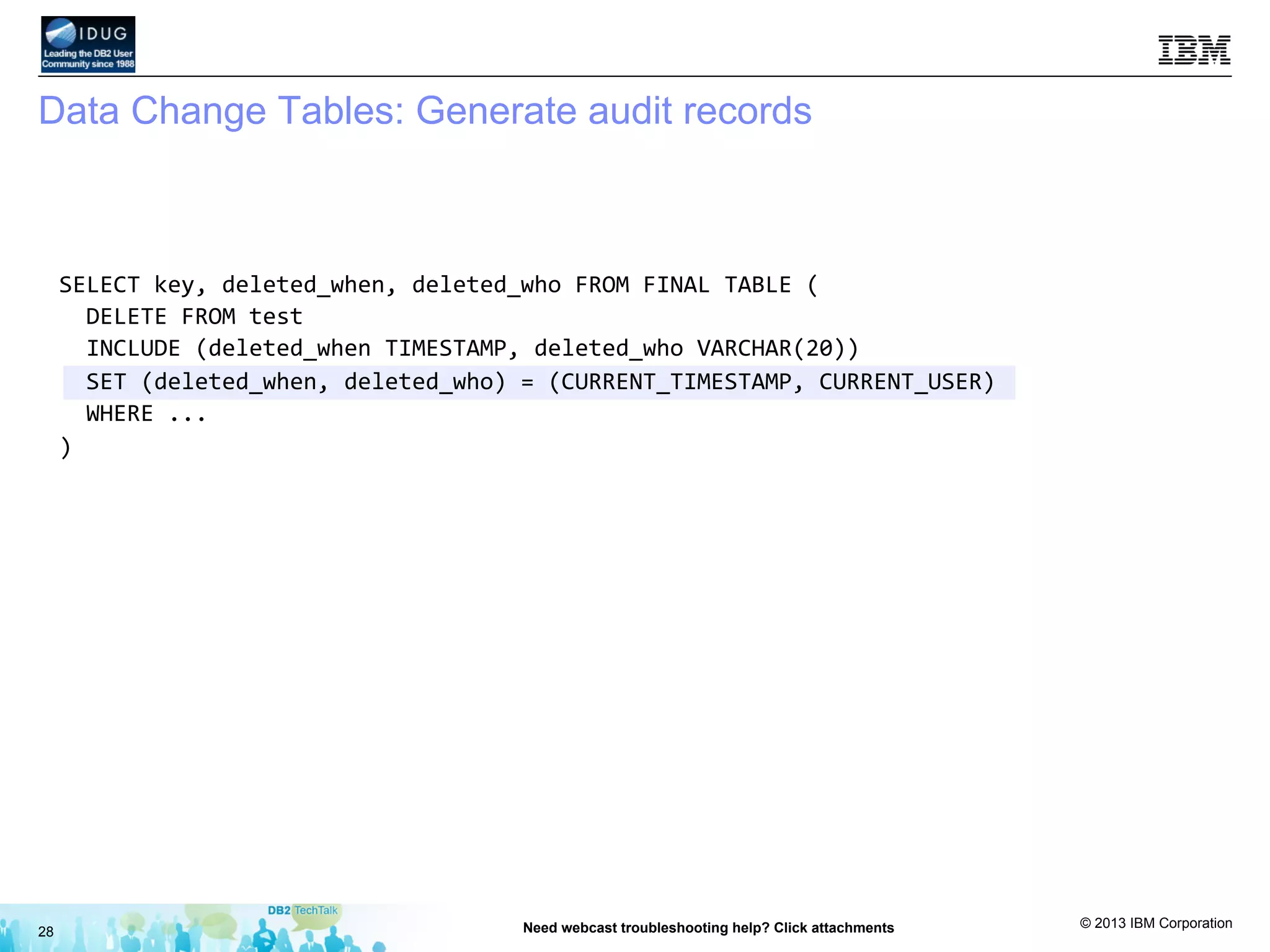
Data Change Tables: Generate audit records
28 Need webcast troubleshooting help? Click attachments
SELECT	
  key,	
  deleted_when,	
  deleted_who	
  FROM	
  FINAL	
  TABLE	
  (	


  DELETE	
  FROM	
  test	


  INCLUDE	
  (deleted_when	
  TIMESTAMP,	
  deleted_who	
  VARCHAR(20))	


  SET	
  (deleted_when,	
  deleted_who)	
  =	
  (CURRENT_TIMESTAMP,	
  CURRENT_USER)	


  WHERE	
  ...	
  
)	


© 2013 IBM Corporation
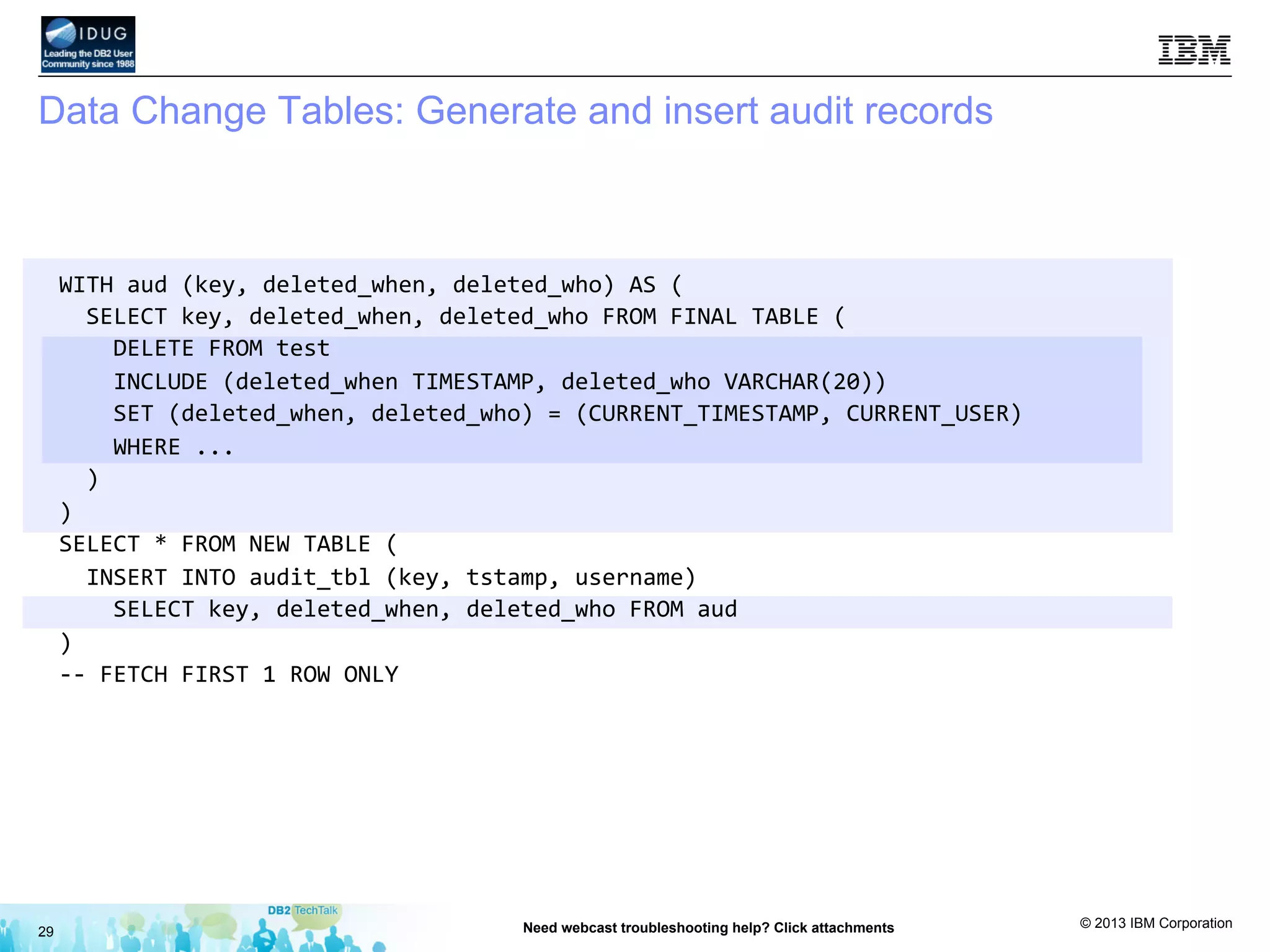
Data Change Tables: Generate and insert audit records
29 Need webcast troubleshooting help? Click attachments
WITH	
  aud	
  (key,	
  deleted_when,	
  deleted_who)	
  AS	
  (	


  SELECT	
  key,	
  deleted_when,	
  deleted_who	
  FROM	
  FINAL	
  TABLE	
  (	


  DELETE	
  FROM	
  test	


  INCLUDE	
  (deleted_when	
  TIMESTAMP,	
  deleted_who	
  VARCHAR(20))	


  SET	
  (deleted_when,	
  deleted_who)	
  =	
  (CURRENT_TIMESTAMP,	
  CURRENT_USER)	


  WHERE	
  ...	


  )	
  
)	
  
SELECT	
  *	
  FROM	
  NEW	
  TABLE	
  (	


  INSERT	
  INTO	
  audit_tbl	
  (key,	
  tstamp,	
  username)	


  SELECT	
  key,	
  deleted_when,	
  deleted_who	
  FROM	
  aud	
  
)	
  
-­‐-­‐	
  FETCH	
  FIRST	
  1	
  ROW	
  ONLY	


© 2013 IBM Corporation
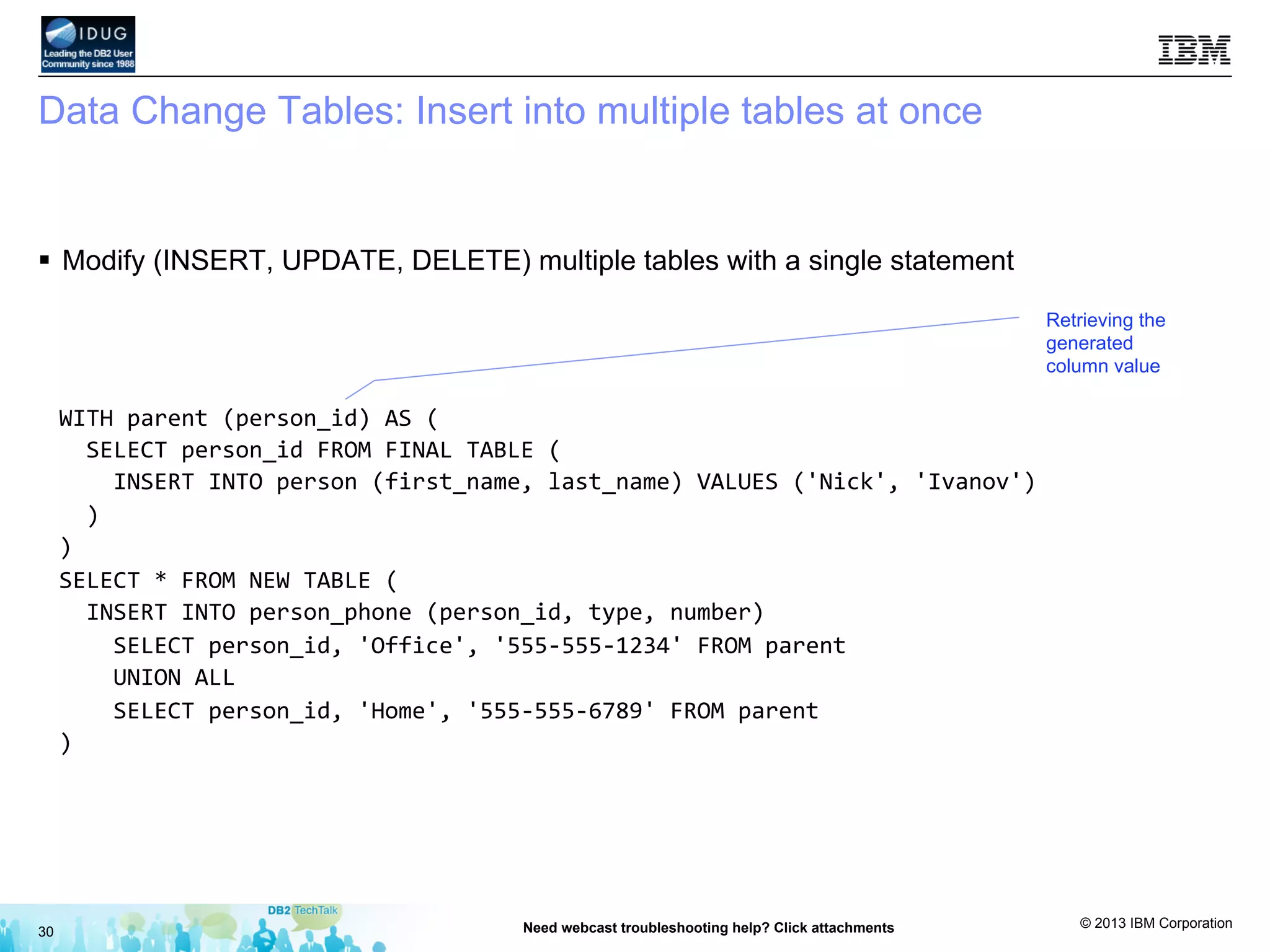
Data Change Tables: Insert into multiple tables at once
§  Modify (INSERT, UPDATE, DELETE) multiple tables with a single statement
30 Need webcast troubleshooting help? Click attachments
WITH	
  parent	
  (person_id)	
  AS	
  (	


  SELECT	
  person_id	
  FROM	
  FINAL	
  TABLE	
  (	


  INSERT	
  INTO	
  person	
  (first_name,	
  last_name)	
  VALUES	
  ('Nick',	
  'Ivanov')	


  )	
  
)	
  
SELECT	
  *	
  FROM	
  NEW	
  TABLE	
  (	


  INSERT	
  INTO	
  person_phone	
  (person_id,	
  type,	
  number)	


  SELECT	
  person_id,	
  'Office',	
  '555-­‐555-­‐1234'	
  FROM	
  parent	


  UNION	
  ALL	


  SELECT	
  person_id,	
  'Home',	
  '555-­‐555-­‐6789'	
  FROM	
  parent	
  
)	


Retrieving the
generated
column value
© 2013 IBM Corporation
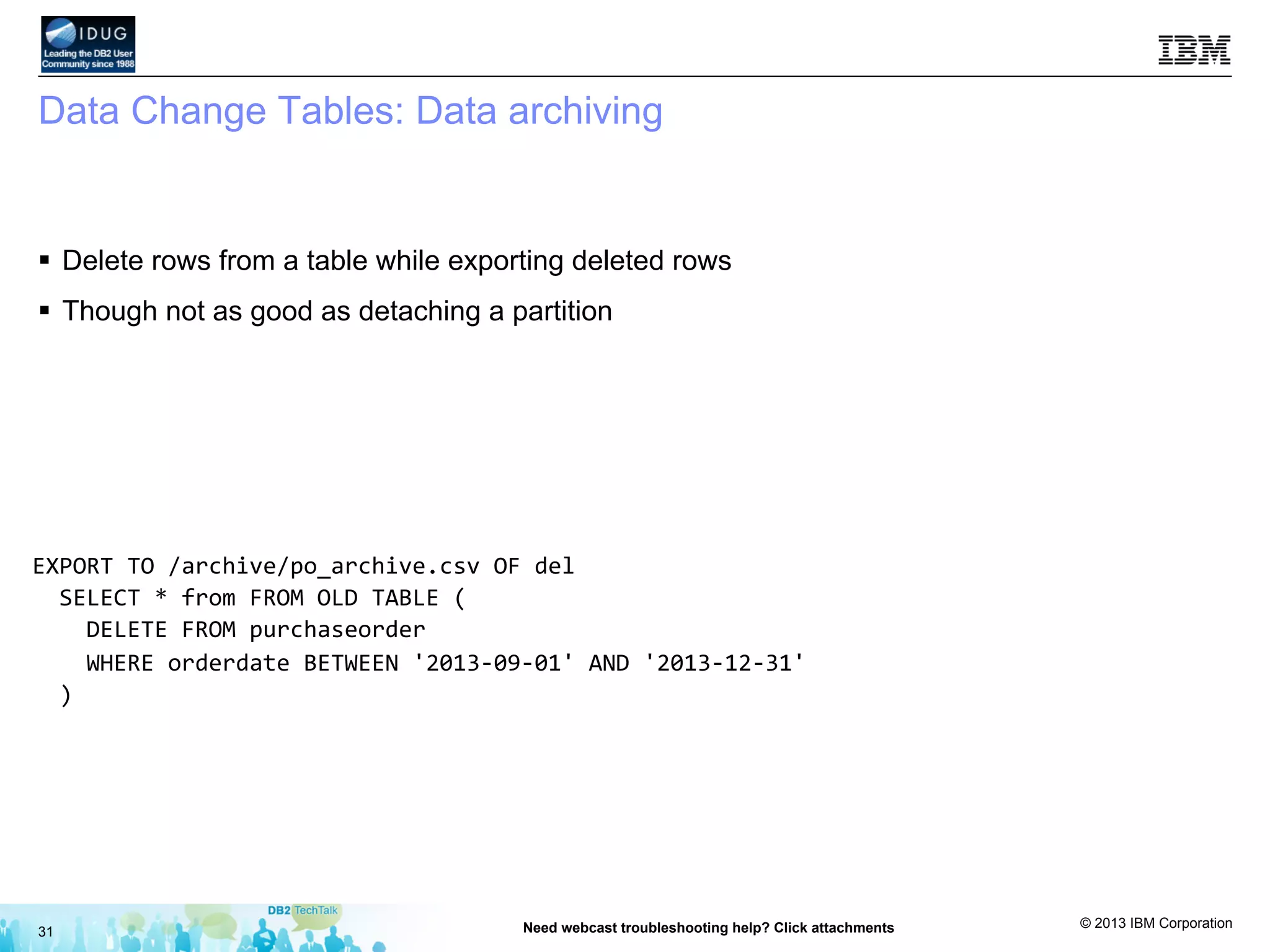
Data Change Tables: Data archiving
§  Delete rows from a table while exporting deleted rows
§  Though not as good as detaching a partition
31 Need webcast troubleshooting help? Click attachments
EXPORT	
  TO	
  /archive/po_archive.csv	
  OF	
  del	


  SELECT	
  *	
  from	
  FROM	
  OLD	
  TABLE	
  (	


  DELETE	
  FROM	
  purchaseorder	


  WHERE	
  orderdate	
  BETWEEN	
  '2013-­‐09-­‐01'	
  AND	
  '2013-­‐12-­‐31'	


  )	


© 2013 IBM Corporation
32 Need webcast troubleshooting help? Click attachments
DB2 Tech Talk: SQL Tips and Techniques
Next Steps Roadmap
Explore what is new in SQL on the DB2 10.5
Information Center
bit.ly/tt2014may
Check out the best practices for DB2 10.5 for
Linux, UNIX and Windows
bit.ly/1mXSLpc
Test drive the new SQL capabilities in DB2 10.5
•  DB2 10.5 trial software: Ibm.co/db2download
Share and engage with the community
http://bit.ly/db2forumluw or http://bit.ly/1ekDSLs or
www.sqltips4db2.com
Reference
Call IBM to schedule a demo or learn
more
•  1 800 966-9875 (U.S)
•  1-888-746-7426 (Canada)
•  1800-425-3333 (India)
•  Or visit http://www.ibm.com/planetwide/
for contact information worldwide
IBM DB2 10.5 product page
Ibm.com/db2
DB2 with BLU Acceleration Microsite
www/ibmBLUhub.com
IBM Data Studio product page
Ibm.co/ibmdsinfo
Tech forum on developerWorks
bit.ly/db2forumluw
SQL Tips Blog:
www.sqltips4db2.com
Step Three
Step Two
Step One
Step Four
© 2013 IBM Corporation
33 Need webcast troubleshooting help? Click attachments
Upcoming Tech Talks
Don’t miss these in-depth DB2 feature talks!
Dates and topics subject to change and modification.
How to register :
DB2 Tech Talks web site
Next DB2 Tech Talk:
Use DB2 with BLU Acceleration with
Cognos BI for faster, simpler insights
• May 1, 2014at 1 2:30 PM
• Les King, Kelly Schlamb, Vladimir Stojanovski
• Registration: bit.ly/tt2014may
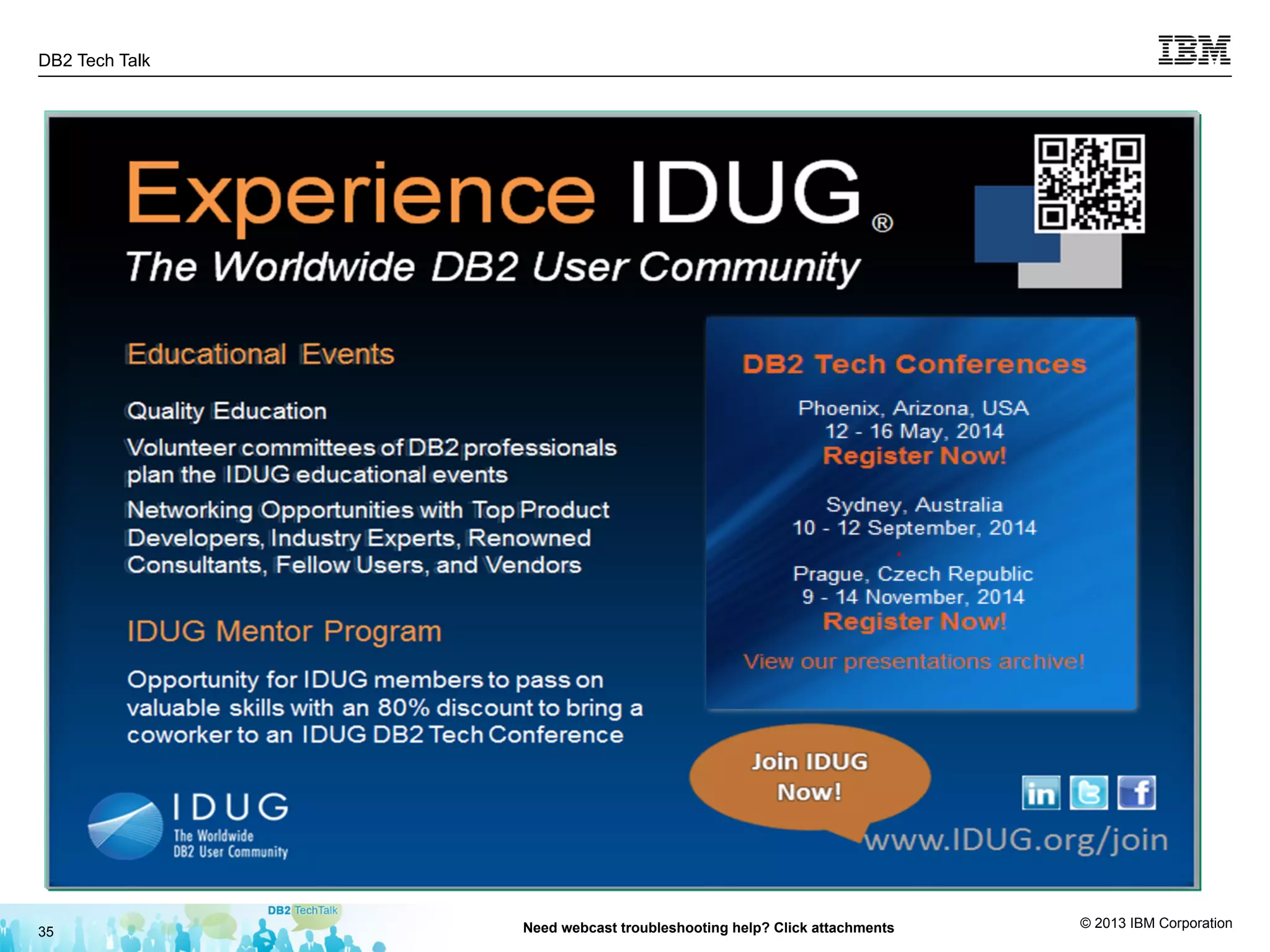
IDUG DB2 Tech Conference North America
• In-person conference sponsored by IDUG
• 12 – 16 May, 2014
• Agenda and registration:
www.idug.org, select events
Second half 2014 events
• IDUG Conference Austrailasia – September
• IBM Insight 2014 – former Information on Demand
Conference – October
• IDUG Conference EMEA – November
© 2013 IBM Corporation
Learn, engage and get social: new DB2 with BLU Acceleration
microsite
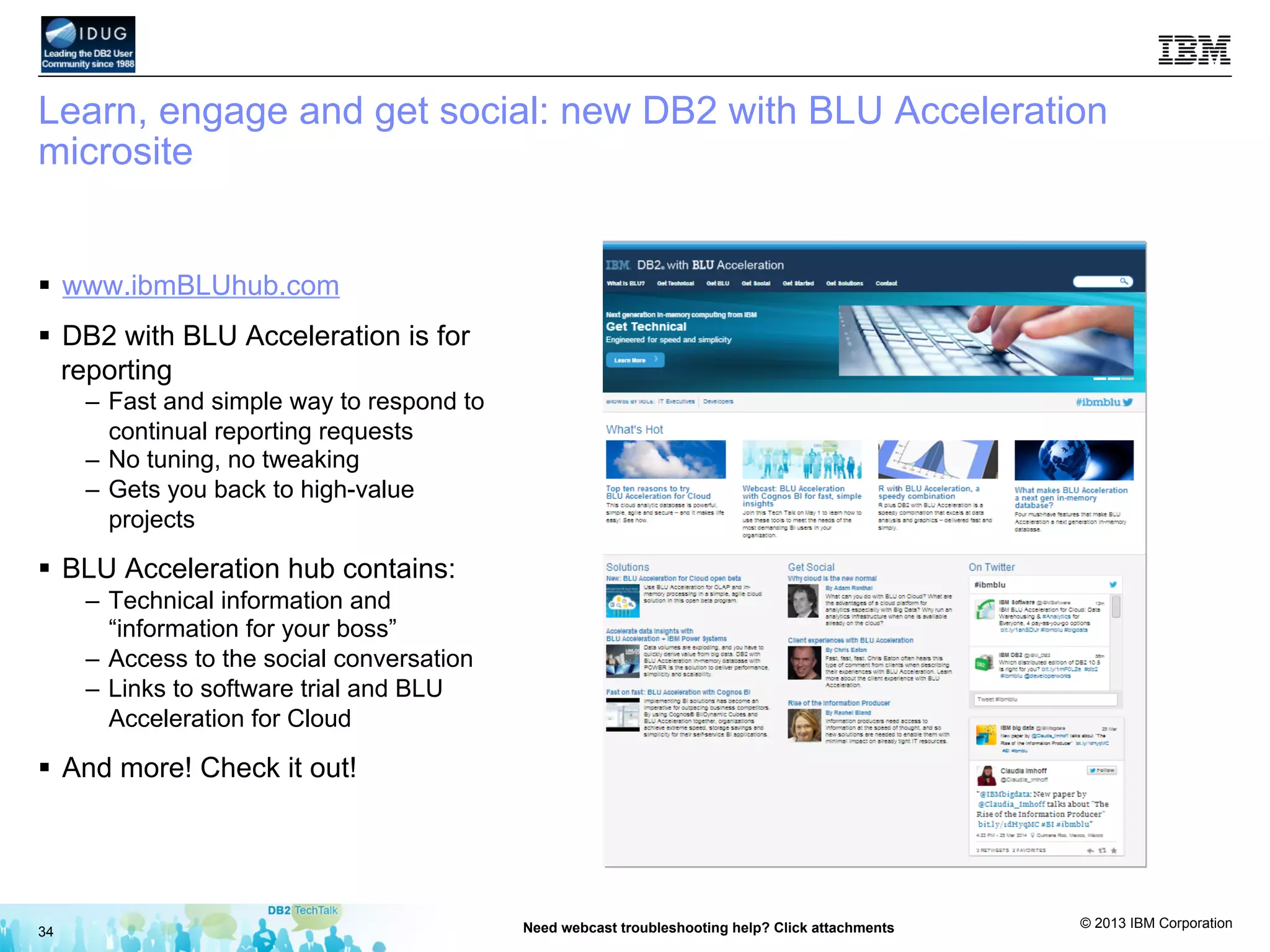
§  www.ibmBLUhub.com
§  DB2 with BLU Acceleration is for
reporting
–  Fast and simple way to respond to
continual reporting requests
–  No tuning, no tweaking
–  Gets you back to high-value
projects
§  BLU Acceleration hub contains:
–  Technical information and
“information for your boss”
–  Access to the social conversation
–  Links to software trial and BLU
Acceleration for Cloud
§  And more! Check it out!
34 Need webcast troubleshooting help? Click attachments
© 2013 IBM Corporation
DB2 Tech Talk
35 Need webcast troubleshooting help? Click attachments
© 2013 IBM Corporation
36 Need webcast troubleshooting help? Click attachments
Questions
Listening in replay?
Questions: www.sqltips4db2.com
Click submit a question.
© 2013 IBM Corporation
37 Need webcast troubleshooting help? Click attachments
Thanks for attending!
Please rate the session
Presentation download:
bit.ly/ttfileapr14
click Attachments in this webcast environment

SQL tips and techniques April 2014

  • 1.
    © 2013 IBMCorporation 1 SQL Tips and Techniques SQL is Powerful – Use it! April 10, 2014 Presented by: Nick Ivanov
  • 2.
    © 2013 IBMCorporation 2 Need webcast troubleshooting help? Click attachments 1. The presentation for this Tech Talk: http://bit.ly/ttfileapr14 2. Next steps and troubleshooting guide: click “Attachments“ in this webcast window The image cannot be displayed. Your computer may not have enough memory to open the image, or the image may have been corrupted. Restart your computer, and then open the file again. If the red x still appears, you may have to delete the image and then insert it again. A few details …. Nick Ivanov Senior Consultant, IBM Information Management Data Ecosystem Today’s technical presenters . . . DB2 Tech Talk series host and today’s presenter: Rick Swagerman, Host and Today’s Presenter DB2 Language Architect The image cannot be displayed. Your computer may not have enough memory to open the image, or the image may have been corrupted. Restart your computer, and then open the file again. If the red x still appears, you may have to delete the image and then insert it again.
  • 3.
    © 2013 IBMCorporation 3 Need webcast troubleshooting help? Click attachments Disclaimer The information contained in this presentation is provided for informational purposes only. While efforts were made to verify the completeness and accuracy of the information contained in this presentation, it is provided “as is”, without warranty of any kind, express or implied. In addition, this information is based on IBM’s current product plans and strategy, which are subject to change by IBM without notice. IBM shall not be responsible for any damages arising out of the use of, or otherwise related to, this presentation or any other documentation. Nothing contained in this presentation is intended to, or shall have the effect of: •  Creating any warranty or representation from IBM (or its affiliates or its or their suppliers and/or licensors); or •  Altering the terms and conditions of the applicable license agreement governing the use of IBM software. Performance is based on measurements and projections using standard IBM benchmarks in a controlled environment. The actual throughput or performance that any user will experience will vary depending upon many factors, including considerations such as the amount of multiprogramming in the user's job stream, the I/O configuration, the storage configuration, and the workload processed. Therefore, no assurance can be given that an individual user will achieve results similar to those stated here.
  • 4.
    © 2013 IBMCorporation Agenda §  What this talk is about §  What is and what is not SQL §  Common Table Expression (CTE) §  Recursive SQL and its uses §  Data change tables 4 Need webcast troubleshooting help? Click attachments
  • 5.
    © 2013 IBMCorporation SQL or not? §  What is and what is not SQL – “Why do I get SQL0104N when running a perfectly valid command from my Java™ program?" •  com.ibm.db2.jcc.am.SqlSyntaxErrorException:  DB2  SQL  Error:  SQLCODE=-­‐104,   SQLSTATE=42601,  SQLERRMC=export;BEGIN-­‐OF-­‐STATEMENT;<values>,  DRIVER=3.67.26   – Because it is not SQL! §  SQL –  db2  "SELECT  LASTNAME,  BONUS  FROM  EMPLOYEE  WHERE  WORKDEPT  =  'D11'"   –  db2  "UPDATE  EMPLOYEE  SET  BONUS  =  300  WHERE  LASTNAME  LIKE  'I%'"   §  Not SQL –  db2  "EXPORT  TO  /tmp/stats.csv  of  del  SELECT  LASTNAME,  BONUS  FROM  EMPLOYEE  WHERE   WORKDEPT  =  'D11'"   –  db2  "RUNSTATS  ON  TABLE  DB2INST1.EMPLOYEE  AND  INDEXES  ALL"   §  List CLP commands –  db2  "?" 5 Need webcast troubleshooting help? Click attachments More on CLP commands: http://pic.dhe.ibm.com/infocenter/db2luw/v10r5/topic/com.ibm.db2.luw.admin.cmd.doc/com.ibm.db2.luw.admin.cmd.doc-gentopic3.html
  • 6.
    © 2013 IBMCorporation Execute CLP commands via SQL §  System stored procedure ADMIN_CMD – db2  "call  admin_cmd('EXPORT  TO  /tmp/stats.csv  OF  DEL  SELECT  LASTNAME,   BONUS  FROM  EMPLOYEE  WHERE  WORKDEPT  =  ''D11''')   §  Supports most CLP commands that make sense on the server – syntax may be a bit different – check the manual §  Caveats – files are sought and created on the server – data movement commands affected – fenced user needs appropriate permissions to directories §  Verifying execution status – returns a result set with diagnostic information – specify the MESSAGES ON SERVER option where applicable 6 Need webcast troubleshooting help? Click attachments More on ADMIN_CMD() : http://pic.dhe.ibm.com/infocenter/db2luw/v10r5/topic/com.ibm.db2.luw.sql.rtn.doc/doc/r0012547.html
  • 7.
    © 2013 IBMCorporation Sample result set from ADMIN_CMD §  A sample of what can be returned (pivoted for readability) ROWS_EXPORTED 11 MSG_RETRIEVAL SELECT SQLCODE, MSG FROM TABLE(SYSPROC.ADMIN_GET_MSGS('1273887995_1602993195_DB2INST1')) AS MSG MSG_REMOVAL CALL SYSPROC.ADMIN_REMOVE_MSGS('1273887995_1602993195_DB2INST1') §  Use ADMIN_GET_MSGS() to retrieve detailed output – don't lose the operation_id value ('1273887995_1602993195_DB2INST1') – if you do, message files can be found in: •  whatever the DB2_UTIL_MSGPATH registry variable points to, or • $INSTANCE_HOME/sqllib/tmp §  Use ADMIN_REMOVE_MSGS() to delete the message file 7 Need webcast troubleshooting help? Click attachments
  • 8.
    © 2013 IBMCorporation Common Table Expression §  Defines a named intermediary result table – Does not create/declare a temporary table; it's just a name §  Can be used in any FROM clause §  Can define multiple CTEs in one query §  Each subsequent CTE can reference any preceding §  Simplifies queries, improves readability 8 Need webcast troubleshooting help? Click attachments >>-­‐table-­‐name-­‐-­‐+-­‐-­‐-­‐-­‐-­‐-­‐-­‐-­‐-­‐-­‐-­‐-­‐-­‐-­‐-­‐-­‐-­‐-­‐-­‐-­‐-­‐-­‐-­‐-­‐-­‐-­‐-­‐+-­‐-­‐-­‐-­‐-­‐-­‐-­‐-­‐-­‐-­‐-­‐-­‐-­‐-­‐-­‐-­‐-­‐-­‐à                                |        .-­‐,-­‐-­‐-­‐-­‐-­‐-­‐-­‐-­‐-­‐-­‐-­‐.                |                                      |        V                          |        (1)  |                                      '-­‐(-­‐-­‐-­‐-­‐column-­‐name-­‐+-­‐-­‐)-­‐-­‐-­‐-­‐-­‐'           >-­‐-­‐AS-­‐-­‐(-­‐-­‐fullselect-­‐-­‐)-­‐-­‐-­‐-­‐-­‐-­‐-­‐-­‐-­‐-­‐-­‐-­‐-­‐-­‐-­‐-­‐-­‐-­‐-­‐-­‐-­‐-­‐-­‐-­‐-­‐-­‐-­‐-­‐-­‐-­‐-­‐-­‐-­‐-­‐-­‐-­‐-­‐-­‐-­‐-­‐><   http://pic.dhe.ibm.com/infocenter/db2luw/v10r5/topic/com.ibm.db2.luw.sql.ref.doc/doc/r0059217.html
  • 9.
    © 2013 IBMCorporation Recursive SQL DEPTNO DEPTNAME ADMRDEPT A00 SPIFFY COMPUTER SERVICE DIV. A00 C01 INFORMATION CENTER A00 D01 DEVELOPMENT CENTER A00 D11 MANUFACTURING SYSTEMS D01 9 Need webcast troubleshooting help? Click attachments §  Organization structure §  DEPARTMENT table in the sample database §  Print the organization structure tree
  • 10.
    © 2013 IBMCorporation Recursive SQL: Querying hierarchies 10 Need webcast troubleshooting help? Click attachments Common table expression Start at the root Join with the CTE itself Limit recursion depth WITH  tree  (parentno,  deptno,  deptname,  lvl)  AS  (        SELECT  admrdept,  deptno,  deptname,  1          FROM  department        WHERE  deptno  =  admrdept      UNION  ALL        SELECT  d.admrdept,  d.deptno,  d.deptname,  t.lvl  +  1        FROM  department  d,  tree  t          WHERE  d.admrdept  =  t.deptno        AND  d.deptno  !=  d.admrdept        AND  t.lvl  <  10   )   SELECT        VARCHAR(REPEAT('.',  (lvl-­‐1)*3)||deptname,  40)  "Department  name",        deptno  "Dept.  no"   FROM  tree   ORDER  BY  deptno  
  • 11.
    © 2013 IBMCorporation Recursive SQL: Querying hierarchies 11 Need webcast troubleshooting help? Click attachments Department  name                                                    Dept.  no   -­‐-­‐-­‐-­‐-­‐-­‐-­‐-­‐-­‐-­‐-­‐-­‐-­‐-­‐-­‐-­‐-­‐-­‐-­‐-­‐-­‐-­‐-­‐-­‐-­‐-­‐-­‐-­‐-­‐-­‐-­‐-­‐-­‐-­‐-­‐-­‐-­‐-­‐-­‐-­‐  -­‐-­‐-­‐-­‐-­‐-­‐-­‐-­‐   SPIFFY  COMPUTER  SERVICE  DIV.                          A00             ...PLANNING                                                            B01             ...INFORMATION  CENTER                                        C01             ...DEVELOPMENT  CENTER                                        D01             ......MANUFACTURING  SYSTEMS                            D11             ......ADMINISTRATION  SYSTEMS                          D21             ...SUPPORT  SERVICES                                            E01             ......OPERATIONS                                                  E11             ......SOFTWARE  SUPPORT                                      E21             ......BRANCH  OFFICE  F2                                      F22             ......BRANCH  OFFICE  G2                                      G22             ......BRANCH  OFFICE  H2                                      H22             ......BRANCH  OFFICE  I2                                      I22             ......BRANCH  OFFICE  J2                                      J22                  14  record(s)  selected.  
  • 12.
    © 2013 IBMCorporation Recursive SQL: Oracle®-compatible syntax 12 Need webcast troubleshooting help? Click attachments §  In Oracle compatibility mode only §  Non-standard Seed Recursion SELECT        VARCHAR(REPEAT('.',  (lvl-­‐1)*3)||deptname,  40)  "Department  name",        deptno  "Dept.  no"   FROM  (      SELECT  d.*,  level  lvl        FROM  department  d      START  WITH  deptno  =  admrdept      CONNECT  BY  admrdept  =  PRIOR  deptno  AND  admrdept  !=  deptno   )   ORDER  BY  deptno  
  • 13.
    © 2013 IBMCorporation Recursive SQL: What else is it good for? §  Generate test data out of thin air 13 Need webcast troubleshooting help? Click attachments INSERT  INTO  LookupTbl  (LkpCode,  LkpString)   WITH  cornucopia  (code)  AS  (      SELECT  1  FROM  sysibm.sysdummy1    UNION  ALL      SELECT  code  +  1  FROM  cornucopia      WHERE  code  <  100000   )   SELECT  code,  'String  '  ||  code  FROM  cornucopia  
  • 14.
    © 2013 IBMCorporation Recursive SQL: Sample sensor data §  Sensor ID is in the range between 1000 and 2000; sensor readings are between 0 and 10 §  New "reading" each millisecond 14 Need webcast troubleshooting help? Click attachments INSERT  INTO  SensorData(SensorId,  Reading,  Tstamp)   WITH  testdata(num)  AS  (      SELECT  1  FROM  sysibm.sysdummy1    UNION  ALL      SELECT  num  +  1  FROM  testdata      WHERE  num  <  10000000   )   select        1000+INT(RAND()*1000),        RAND()*10,      CURRENT_TIMESTAMP  +  (num*1000)  MICROSECOND   FROM  testdata  
  • 15.
    © 2013 IBMCorporation Recursive SQL: Sample sensor data §  Improving performance – ALTER TABLE SensorData ACTIVATE NOT LOGGED INITIALLY – Use EXPORT and LOAD to increase efficiency on large data sets 15 Need webcast troubleshooting help? Click attachments $  mkfifo  /tmp/testdata   $  db2  "LOAD  FROM  /tmp/testdata  OF  DEL     INSERT  INTO  SensorData  (SensorId,  Reading,  Tstamp)"     $  db2  "EXPORT  TO  /tmp/testdata  OF  DEL     WITH  testdata(num)  AS  (   …   SELECT     …   FROM  testdata"  
  • 16.
    © 2013 IBMCorporation Recursive SQL: Sample sensor data §  Improving performance even more – Use LOAD from cursor 16 Need webcast troubleshooting help? Click attachments declare  c  cursor  for   WITH  testdata(num)  AS  (   ...   )   select     ...   FROM  testdata;     load  from  c  of  cursor  INSERT  INTO  SensorData(SensorId,  Reading,  Tstamp);  
  • 17.
    © 2013 IBMCorporation Test data: Pseudo timestamps §  Sensor ID is in the range between 1000 and 2000; sensor readings are between 0 and 10 §  New "reading" each millisecond 17 Need webcast troubleshooting help? Click attachments INSERT  INTO  SensorData(SensorId,  Reading,  Tstamp)   WITH  testdata(num)  AS  (      SELECT  1  FROM  sysibm.sysdummy1    UNION  ALL      SELECT  num  +  1  FROM  testdata      WHERE  num  <  10000000   )   SELECT        1000+INT(RAND()*1000),        RAND()*10,      CURRENT_TIMESTAMP  +  (num*1000)  MICROSECOND   FROM  testdata  
  • 18.
    © 2013 IBMCorporation Test data: Generating unique timestamps §  Cannot use CURRENT_TIMESTAMP – In the query or table column default – Special register – evaluated once during compilation – All rows will have the same value §  Cannot use generated column value – Generation expression limitation – must be deterministic and cannot reference registers §  One function that will be called for each row: GENERATE_UNIQUE() – Value based on the timestamp 18 Need webcast troubleshooting help? Click attachments
  • 19.
    © 2013 IBMCorporation Test data: Generating unique timestamps 19 Need webcast troubleshooting help? Click attachments CREATE  TABLE  timestamps  (      t1  TIMESTAMP,        t2  TIMESTAMP  DEFAULT  CURRENT  TIMESTAMP,        t3  TIMESTAMP   )   INSERT  INTO  timestamps  (t1,    t3)        WITH  testdata(num)  AS  (          SELECT  1  FROM  sysibm.sysdummy1  UNION  ALL          SELECT  num  +  1  FROM  testdata  WHERE  num  <  30      )      SELECT  CURRENT  TIMESTAMP,  TIMESTAMP(GENERATE_UNIQUE())  FROM  testdata   SELECT  *  FROM  timestamps   T1                                                  T2                                                  T3                                                   -­‐-­‐-­‐-­‐-­‐-­‐-­‐-­‐-­‐-­‐-­‐-­‐-­‐-­‐-­‐-­‐-­‐-­‐-­‐-­‐-­‐-­‐-­‐-­‐-­‐-­‐  -­‐-­‐-­‐-­‐-­‐-­‐-­‐-­‐-­‐-­‐-­‐-­‐-­‐-­‐-­‐-­‐-­‐-­‐-­‐-­‐-­‐-­‐-­‐-­‐-­‐-­‐  -­‐-­‐-­‐-­‐-­‐-­‐-­‐-­‐-­‐-­‐-­‐-­‐-­‐-­‐-­‐-­‐-­‐-­‐-­‐-­‐-­‐-­‐-­‐-­‐-­‐-­‐   2014-­‐03-­‐25-­‐18.15.18.343034  2014-­‐03-­‐25-­‐18.15.18.343034  2014-­‐03-­‐25-­‐22.15.18.343234   2014-­‐03-­‐25-­‐18.15.18.343034  2014-­‐03-­‐25-­‐18.15.18.343034  2014-­‐03-­‐25-­‐22.15.18.822263   2014-­‐03-­‐25-­‐18.15.18.343034  2014-­‐03-­‐25-­‐18.15.18.343034  2014-­‐03-­‐25-­‐22.15.18.822377   2014-­‐03-­‐25-­‐18.15.18.343034  2014-­‐03-­‐25-­‐18.15.18.343034  2014-­‐03-­‐25-­‐22.15.18.822399   …    
  • 20.
    © 2013 IBMCorporation Recursive SQL: What else is it good for? §  Select something that is not there – Find missing dates – Find unassigned values in a sequence §  Use recursive SQL to generate the complete set of values – Calendar – Value sequence §  Left join to the table we are interested in 20 Need webcast troubleshooting help? Click attachments
  • 21.
    © 2013 IBMCorporation Recursive SQL: Selecting nonexistent data §  Example: Given the ORDER table, show the working days on which there were no orders 21 Need webcast troubleshooting help? Click attachments WITH  cal  (a_date,  end_date,  lvl)  AS  (            SELECT  MIN(orderdate),  MAX(orderdate),  1  FROM  purchaseorder        UNION  ALL            SELECT  a_date  +  1  DAY,  end_date,  lvl  +  1  FROM  cal            WHERE  lvl  <  100  AND  a_date  <  end_date     )   SELECT  cal.a_date  from  cal   LEFT  OUTER  JOIN  purchaseorder  po      ON  cal.a_date  =  po.orderdate   WHERE        po.orderdate  IS  NULL  AND        DAYOFWEEK_ISO(cal.a_date)  BETWEEN  1  AND  5   ORDER  BY  1   Define range No match Work days only
  • 22.
    © 2013 IBMCorporation Recursive SQL: What else is it good for? §  Parse strings – Disaggregate (unpivot) lists §  Cure for 1NF violation §  Example: send emails to all involved in Project Saturn 22 Need webcast troubleshooting help? Click attachments PROJECT PEOPLE Jupiter Ellen, Nick, Xavier Saturn Ellen, Xavier, Zach Mercury Nick, Mary NAME EMAIL Ellen ellen@nowhere.ibm.com Mary mary@nowhere.ibm.com Nick nick@nowhere.ibm.com Xavier xavier@nowhere.ibm.com Zach zach@nowhere.ibm.com
  • 23.
    © 2013 IBMCorporation Recursive SQL: Parsing strings 23 Need webcast troubleshooting help? Click attachments WITH  unpivot  (lvl,  project_name,  person_name,  tail)  AS  (      SELECT  1,  name,            CASE  WHEN  LOCATE(',',people)  >  0  THEN  TRIM(LEFT(people,  LOCATE(',',people)-­‐1))          ELSE  TRIM(people)  END,          CASE  WHEN  LOCATE(',',people)  >  0  THEN  SUBSTR(people,  LOCATE(',',people)+1)          ELSE  ''  END      FROM  projects      UNION  ALL      SELECT  lvl  +  1,  project_name,            CASE  WHEN  LOCATE(',',  tail)  >  0  THEN  TRIM(LEFT(tail,  LOCATE(',',  tail)-­‐1))          ELSE  TRIM(tail)  END,          CASE  WHEN  LOCATE(',',  tail)  >  0  THEN  SUBSTR(tail,  LOCATE(',',  tail)+1)          ELSE  ''  END      FROM  unpivot  WHERE  lvl  <  100  AND  tail  !=  ''   )   SELECT  p.name,  p.email     FROM  unpivot  u  INNER  JOIN  people  p        ON  u.person_name  =  p.name   WHERE  u.project_name  =  'Saturn'  
  • 24.
    © 2013 IBMCorporation Recursive SQL: Parsing strings 24 Need webcast troubleshooting help? Click attachments NAME                                  EMAIL   -­‐-­‐-­‐-­‐-­‐-­‐-­‐-­‐-­‐-­‐-­‐-­‐-­‐-­‐-­‐-­‐-­‐-­‐-­‐-­‐  -­‐-­‐-­‐-­‐-­‐-­‐-­‐-­‐-­‐-­‐-­‐-­‐-­‐-­‐-­‐-­‐-­‐-­‐-­‐-­‐-­‐-­‐-­‐-­‐-­‐-­‐-­‐-­‐-­‐-­‐-­‐-­‐-­‐-­‐-­‐-­‐-­‐-­‐-­‐-­‐-­‐-­‐-­‐-­‐-­‐-­‐-­‐-­‐-­‐-­‐   Ellen                                ellen@nowhere.ibm.com                                                             Xavier                              xavier@nowhere.ibm.com                                                           Zach                                  zach@nowhere.ibm.com                                                                    3  record(s)  selected.  
  • 25.
    © 2013 IBMCorporation Data Change Tables §  Result of a DML statement – INSERT, UPDATE, or DELETE §  FINAL – rows changed by the DML statement after triggers and referential constraints §  NEW – rows changed by the DML statement before triggers and constraints §  OLD – rows affected by the DML statement before the change 25 Need webcast troubleshooting help? Click attachments FROM  -­‐-­‐+-­‐+-­‐FINAL-­‐+-­‐-­‐TABLE-­‐-­‐(-­‐-­‐insert-­‐statement-­‐-­‐)-­‐-­‐-­‐-­‐-­‐-­‐-­‐-­‐-­‐-­‐+-­‐+-­‐-­‐-­‐-­‐-­‐-­‐-­‐-­‐-­‐-­‐-­‐-­‐-­‐-­‐-­‐-­‐-­‐-­‐-­‐-­‐-­‐-­‐-­‐-­‐+-­‐-­‐                |  '-­‐NEW-­‐-­‐-­‐'                                                                                  |  '-­‐|  correlation-­‐clause  |-­‐'                      +-­‐+-­‐FINAL-­‐+-­‐-­‐TABLE-­‐-­‐(-­‐-­‐searched-­‐update-­‐statement-­‐-­‐)-­‐+                                                                              |  +-­‐NEW-­‐-­‐-­‐+                                                                                  |                                                                              |  '-­‐OLD-­‐-­‐-­‐'                                                                                  |                                                                              '-­‐OLD  TABLE-­‐-­‐(-­‐-­‐searched-­‐delete-­‐statement-­‐-­‐)-­‐-­‐-­‐-­‐-­‐-­‐-­‐-­‐'     http://pic.dhe.ibm.com/infocenter/db2luw/v10r5/topic/com.ibm.db2.luw.sql.ref.doc/doc/r0059206.html
  • 26.
    © 2013 IBMCorporation Data Change Tables: Trivial examples §  Sequence of operations: – Execute data change statement – Place affected rows into a temporary table – Access temporary table §  Include columns not in the table 26 Need webcast troubleshooting help? Click attachments SELECT  *  FROM  OLD  TABLE  (UPDATE  purchaseorder  SET  STATUS  =  'Shipped'  WHERE  poid  =  5000)     SELECT  empno,  when_added  FROM  NEW  TABLE  (        INSERT  INTO  employee  (empno,  firstname,  lastname)        INCLUDE  (when_added  TIMESTAMP)        VALUES  (12345,  'Nick',  'Ivanov',  CURRENT_TIMESTAMP)   )    
  • 27.
    © 2013 IBMCorporation Data Change Tables: Retrieve generated values §  Access generated values in the same statement – Identities, defaults, sequences 27 Need webcast troubleshooting help? Click attachments CREATE  TABLE  test  (      key          INTEGER  NOT  NULL  GENERATED  ALWAYS  AS  IDENTITY,      tstamp    TIMESTAMP  NOT  NULL  DEFAULT  CURRENT_TIMESTAMP,      value      VARCHAR(20)   )     SELECT  key,  tstamp  INTO  :hv_id,  :hv_ts  FROM  NEW  TABLE  (      INSERT  INTO  test  (value)  VALUES  ('Hello  world!')   )    
  • 28.
    © 2013 IBMCorporation Data Change Tables: Generate audit records 28 Need webcast troubleshooting help? Click attachments SELECT  key,  deleted_when,  deleted_who  FROM  FINAL  TABLE  (      DELETE  FROM  test        INCLUDE  (deleted_when  TIMESTAMP,  deleted_who  VARCHAR(20))      SET  (deleted_when,  deleted_who)  =  (CURRENT_TIMESTAMP,  CURRENT_USER)      WHERE  ...   )              
  • 29.
    © 2013 IBMCorporation Data Change Tables: Generate and insert audit records 29 Need webcast troubleshooting help? Click attachments WITH  aud  (key,  deleted_when,  deleted_who)  AS  (      SELECT  key,  deleted_when,  deleted_who  FROM  FINAL  TABLE  (          DELETE  FROM  test            INCLUDE  (deleted_when  TIMESTAMP,  deleted_who  VARCHAR(20))          SET  (deleted_when,  deleted_who)  =  (CURRENT_TIMESTAMP,  CURRENT_USER)          WHERE  ...      )   )   SELECT  *  FROM  NEW  TABLE  (      INSERT  INTO  audit_tbl  (key,  tstamp,  username)            SELECT  key,  deleted_when,  deleted_who  FROM  aud   )   -­‐-­‐  FETCH  FIRST  1  ROW  ONLY            
  • 30.
    © 2013 IBMCorporation Data Change Tables: Insert into multiple tables at once §  Modify (INSERT, UPDATE, DELETE) multiple tables with a single statement 30 Need webcast troubleshooting help? Click attachments WITH  parent  (person_id)  AS  (      SELECT  person_id  FROM  FINAL  TABLE  (          INSERT  INTO  person  (first_name,  last_name)  VALUES  ('Nick',  'Ivanov')        )   )   SELECT  *  FROM  NEW  TABLE  (      INSERT  INTO  person_phone  (person_id,  type,  number)            SELECT  person_id,  'Office',  '555-­‐555-­‐1234'  FROM  parent          UNION  ALL          SELECT  person_id,  'Home',  '555-­‐555-­‐6789'  FROM  parent   )           Retrieving the generated column value
  • 31.
    © 2013 IBMCorporation Data Change Tables: Data archiving §  Delete rows from a table while exporting deleted rows §  Though not as good as detaching a partition 31 Need webcast troubleshooting help? Click attachments EXPORT  TO  /archive/po_archive.csv  OF  del        SELECT  *  from  FROM  OLD  TABLE  (          DELETE  FROM  purchaseorder            WHERE  orderdate  BETWEEN  '2013-­‐09-­‐01'  AND  '2013-­‐12-­‐31'        )            
  • 32.
    © 2013 IBMCorporation 32 Need webcast troubleshooting help? Click attachments DB2 Tech Talk: SQL Tips and Techniques Next Steps Roadmap Explore what is new in SQL on the DB2 10.5 Information Center bit.ly/tt2014may Check out the best practices for DB2 10.5 for Linux, UNIX and Windows bit.ly/1mXSLpc Test drive the new SQL capabilities in DB2 10.5 •  DB2 10.5 trial software: Ibm.co/db2download Share and engage with the community http://bit.ly/db2forumluw or http://bit.ly/1ekDSLs or www.sqltips4db2.com Reference Call IBM to schedule a demo or learn more •  1 800 966-9875 (U.S) •  1-888-746-7426 (Canada) •  1800-425-3333 (India) •  Or visit http://www.ibm.com/planetwide/ for contact information worldwide IBM DB2 10.5 product page Ibm.com/db2 DB2 with BLU Acceleration Microsite www/ibmBLUhub.com IBM Data Studio product page Ibm.co/ibmdsinfo Tech forum on developerWorks bit.ly/db2forumluw SQL Tips Blog: www.sqltips4db2.com Step Three Step Two Step One Step Four
  • 33.
    © 2013 IBMCorporation 33 Need webcast troubleshooting help? Click attachments Upcoming Tech Talks Don’t miss these in-depth DB2 feature talks! Dates and topics subject to change and modification. How to register : DB2 Tech Talks web site Next DB2 Tech Talk: Use DB2 with BLU Acceleration with Cognos BI for faster, simpler insights • May 1, 2014at 1 2:30 PM • Les King, Kelly Schlamb, Vladimir Stojanovski • Registration: bit.ly/tt2014may IDUG DB2 Tech Conference North America • In-person conference sponsored by IDUG • 12 – 16 May, 2014 • Agenda and registration: www.idug.org, select events Second half 2014 events • IDUG Conference Austrailasia – September • IBM Insight 2014 – former Information on Demand Conference – October • IDUG Conference EMEA – November
  • 34.
    © 2013 IBMCorporation Learn, engage and get social: new DB2 with BLU Acceleration microsite §  www.ibmBLUhub.com §  DB2 with BLU Acceleration is for reporting –  Fast and simple way to respond to continual reporting requests –  No tuning, no tweaking –  Gets you back to high-value projects §  BLU Acceleration hub contains: –  Technical information and “information for your boss” –  Access to the social conversation –  Links to software trial and BLU Acceleration for Cloud §  And more! Check it out! 34 Need webcast troubleshooting help? Click attachments
  • 35.
    © 2013 IBMCorporation DB2 Tech Talk 35 Need webcast troubleshooting help? Click attachments
  • 36.
    © 2013 IBMCorporation 36 Need webcast troubleshooting help? Click attachments Questions Listening in replay? Questions: www.sqltips4db2.com Click submit a question.
  • 37.
    © 2013 IBMCorporation 37 Need webcast troubleshooting help? Click attachments Thanks for attending! Please rate the session Presentation download: bit.ly/ttfileapr14 click Attachments in this webcast environment