





SQL Constraints
NOT NULL, UNIQUE, PRIMARY KEY, FOREIGN KEY,
CHECK, DEFAULT
CONSTRAINTS
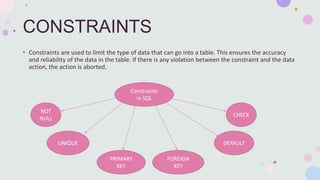
• Constraints are used to limit the type of data that can go into a table. This ensures the accuracy
and reliability of the data in the table. If there is any violation between the constraint and the data
action, the action is aborted.
Constraints
in SQL
NOT
NULL
UNIQUE
FOREIGN
KEY
PRIMARY
KEY
CHECK
DEFAULT
CONSTRAINTS CREATION
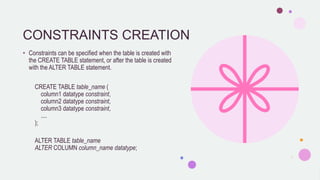
• Constraints can be specified when the table is created with
the CREATE TABLE statement, or after the table is created
with the ALTER TABLE statement.
CREATE TABLE table_name (
column1 datatype constraint,
column2 datatype constraint,
column3 datatype constraint,
....
);
ALTER TABLE table_name
ALTER COLUMN column_name datatype;
NOT NULL
• By default, a column can hold NULL values.
• The NOT NULL constraint enforces a column to NOT accept NULL values.
CREATE TABLE Persons (
ID int NOT NULL,
LastName varchar(255) NOT NULL,
FirstName varchar(255) NOT NULL,
Age int
);
ALTER TABLE Persons
MODIFY Age int NOT NULL;
UNIQUE
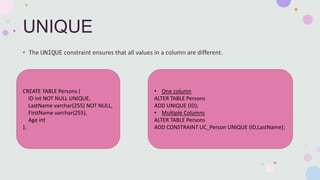
• The UNIQUE constraint ensures that all values in a column are different.
CREATE TABLE Persons (
ID int NOT NULL UNIQUE,
LastName varchar(255) NOT NULL,
FirstName varchar(255),
Age int
);
• One column
ALTER TABLE Persons
ADD UNIQUE (ID);
• Multiple Columns
ALTER TABLE Persons
ADD CONSTRAINT UC_Person UNIQUE (ID,LastName);
PRIMARY KEY
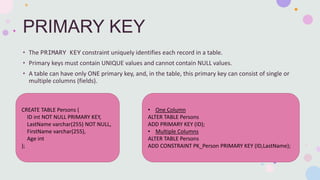
• The PRIMARY KEY constraint uniquely identifies each record in a table.
• Primary keys must contain UNIQUE values and cannot contain NULL values.
• A table can have only ONE primary key, and, in the table, this primary key can consist of single or
multiple columns (fields).
CREATE TABLE Persons (
ID int NOT NULL PRIMARY KEY,
LastName varchar(255) NOT NULL,
FirstName varchar(255),
Age int
);
• One Column
ALTER TABLE Persons
ADD PRIMARY KEY (ID);
• Multiple Columns
ALTER TABLE Persons
ADD CONSTRAINT PK_Person PRIMARY KEY (ID,LastName);
FOREIGN KEY
• The FOREIGN KEY constraint is used to prevent actions that would destroy links between tables.
• A FOREIGN KEY is a field (or collection of fields) in one table, that refers to the PRIMARY KEY in
another table.
• The table with the foreign key is called the child table, and the table with the primary key is called
the referenced or parent table.
CREATE TABLE Orders (
OrderID int NOT NULL PRIMARY KEY,
OrderNumber int NOT NULL,
PersonID int FOREIGN KEY REFERENCES Persons(PersonID)
);
• One Column
ALTER TABLE Orders
ADD FOREIGN KEY (PersonID) REFERENCES Persons(PersonID);
• Multiple Columns
ALTER TABLE Orders
ADD CONSTRAINT FK_PersonOrder
FOREIGN KEY (PersonID) REFERENCES Persons(PersonID);
CHECK
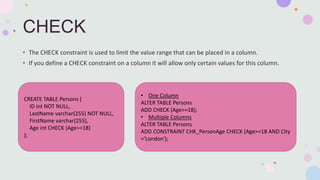
• The CHECK constraint is used to limit the value range that can be placed in a column.
• If you define a CHECK constraint on a column it will allow only certain values for this column.
CREATE TABLE Persons (
ID int NOT NULL,
LastName varchar(255) NOT NULL,
FirstName varchar(255),
Age int CHECK (Age>=18)
);
• One Column
ALTER TABLE Persons
ADD CHECK (Age>=18);
• Multiple Columns
ALTER TABLE Persons
ADD CONSTRAINT CHK_PersonAge CHECK (Age>=18 AND City
='London');
DEFAULT
• The DEFAULT constraint is used to set a default value for a column.
• The default value will be added to all new records, if no other value is specified.
CREATE TABLE Persons (
ID int NOT NULL,
LastName varchar(255) NOT NULL,
FirstName varchar(255),
Age int,
City varchar(255) DEFAULT 'London'
);
ALTER TABLE Persons
ADD CONSTRAINT df_City
DEFAULT 'London' FOR City;

Sql Constraints

  • 1.
    SQL Constraints NOT NULL,UNIQUE, PRIMARY KEY, FOREIGN KEY, CHECK, DEFAULT
  • 2.
    CONSTRAINTS • Constraints areused to limit the type of data that can go into a table. This ensures the accuracy and reliability of the data in the table. If there is any violation between the constraint and the data action, the action is aborted. Constraints in SQL NOT NULL UNIQUE FOREIGN KEY PRIMARY KEY CHECK DEFAULT
  • 3.
    CONSTRAINTS CREATION • Constraintscan be specified when the table is created with the CREATE TABLE statement, or after the table is created with the ALTER TABLE statement. CREATE TABLE table_name ( column1 datatype constraint, column2 datatype constraint, column3 datatype constraint, .... ); ALTER TABLE table_name ALTER COLUMN column_name datatype;
  • 4.
    NOT NULL • Bydefault, a column can hold NULL values. • The NOT NULL constraint enforces a column to NOT accept NULL values. CREATE TABLE Persons ( ID int NOT NULL, LastName varchar(255) NOT NULL, FirstName varchar(255) NOT NULL, Age int ); ALTER TABLE Persons MODIFY Age int NOT NULL;
  • 5.
    UNIQUE • The UNIQUEconstraint ensures that all values in a column are different. CREATE TABLE Persons ( ID int NOT NULL UNIQUE, LastName varchar(255) NOT NULL, FirstName varchar(255), Age int ); • One column ALTER TABLE Persons ADD UNIQUE (ID); • Multiple Columns ALTER TABLE Persons ADD CONSTRAINT UC_Person UNIQUE (ID,LastName);
  • 6.
    PRIMARY KEY • ThePRIMARY KEY constraint uniquely identifies each record in a table. • Primary keys must contain UNIQUE values and cannot contain NULL values. • A table can have only ONE primary key, and, in the table, this primary key can consist of single or multiple columns (fields). CREATE TABLE Persons ( ID int NOT NULL PRIMARY KEY, LastName varchar(255) NOT NULL, FirstName varchar(255), Age int ); • One Column ALTER TABLE Persons ADD PRIMARY KEY (ID); • Multiple Columns ALTER TABLE Persons ADD CONSTRAINT PK_Person PRIMARY KEY (ID,LastName);
  • 7.
    FOREIGN KEY • TheFOREIGN KEY constraint is used to prevent actions that would destroy links between tables. • A FOREIGN KEY is a field (or collection of fields) in one table, that refers to the PRIMARY KEY in another table. • The table with the foreign key is called the child table, and the table with the primary key is called the referenced or parent table.
  • 8.
    CREATE TABLE Orders( OrderID int NOT NULL PRIMARY KEY, OrderNumber int NOT NULL, PersonID int FOREIGN KEY REFERENCES Persons(PersonID) ); • One Column ALTER TABLE Orders ADD FOREIGN KEY (PersonID) REFERENCES Persons(PersonID); • Multiple Columns ALTER TABLE Orders ADD CONSTRAINT FK_PersonOrder FOREIGN KEY (PersonID) REFERENCES Persons(PersonID);
  • 9.
    CHECK • The CHECKconstraint is used to limit the value range that can be placed in a column. • If you define a CHECK constraint on a column it will allow only certain values for this column. CREATE TABLE Persons ( ID int NOT NULL, LastName varchar(255) NOT NULL, FirstName varchar(255), Age int CHECK (Age>=18) ); • One Column ALTER TABLE Persons ADD CHECK (Age>=18); • Multiple Columns ALTER TABLE Persons ADD CONSTRAINT CHK_PersonAge CHECK (Age>=18 AND City ='London');
  • 10.
    DEFAULT • The DEFAULTconstraint is used to set a default value for a column. • The default value will be added to all new records, if no other value is specified. CREATE TABLE Persons ( ID int NOT NULL, LastName varchar(255) NOT NULL, FirstName varchar(255), Age int, City varchar(255) DEFAULT 'London' ); ALTER TABLE Persons ADD CONSTRAINT df_City DEFAULT 'London' FOR City;