© 2014 IBM Corporation
Software-Defined Storage Provisioning
using IBM SmartCloud Virtual Storage
Center
Christian Bolik – TPC Development
12 May 2014
© 2014 IBM Corporation
Edge 2014 Session sSV19: Storage Provisioning using IBM VSC
Agenda
 Typical storage provisioning challenges
 How VSC 5.2.1 addresses those challenges
 The three phases in VSC storage provisioning: Setup, planning, execution
2
„Storage provisioning using VSC is
significantly faster, smarter, and safer
than manual storage provisioning.“
© 2014 IBM Corporation
Edge 2014 Session sSV19: Storage Provisioning using IBM VSC
3
Servers
• ESX servers
• Apps, DB’s, file systems
• Volume managers
• Host bus adaptors
• Virtual HBAs
• Multi-path drivers
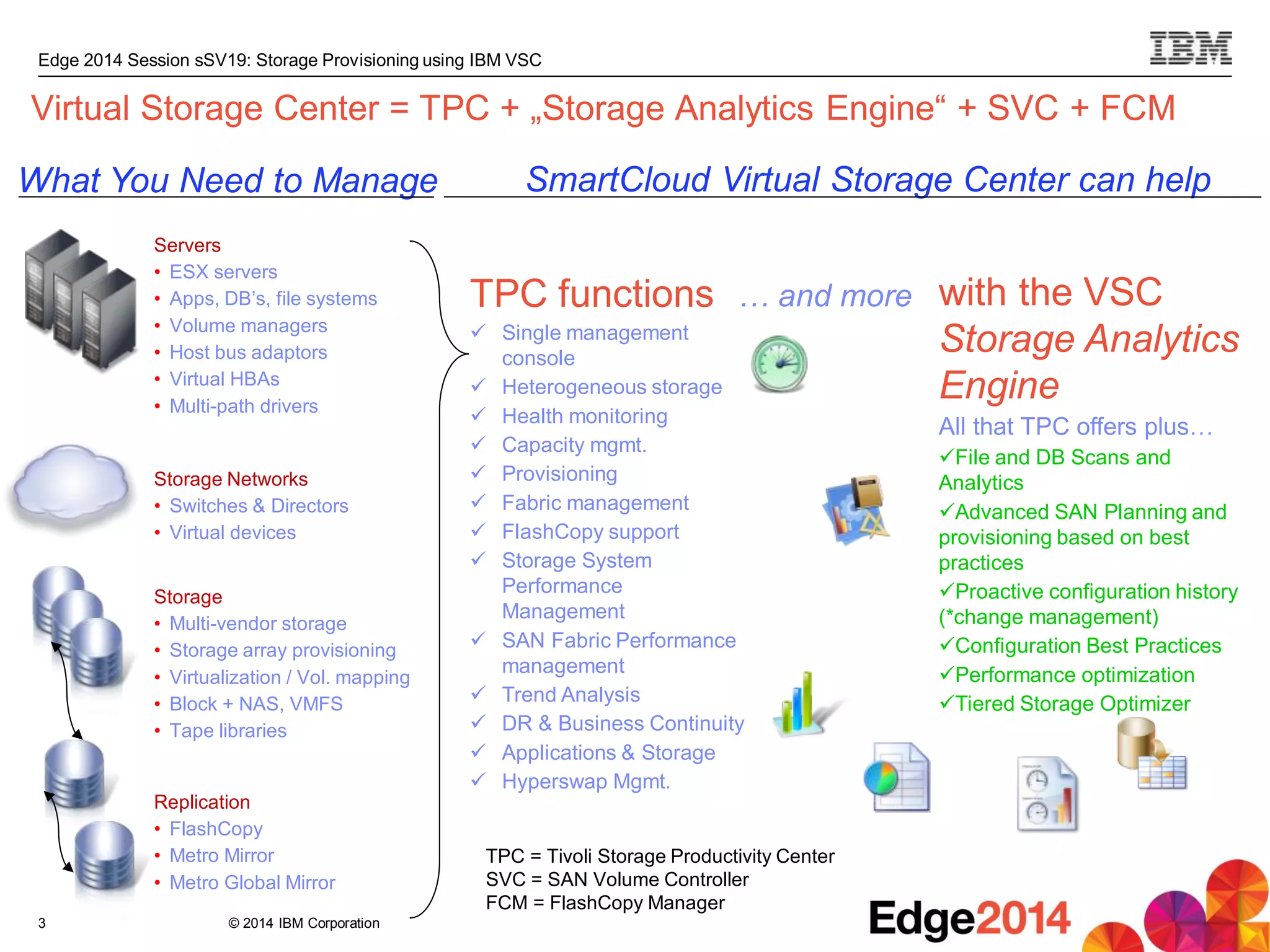
What You Need to Manage SmartCloud Virtual Storage Center can help
with the VSC
Storage Analytics
Engine
All that TPC offers plus…
File and DB Scans and
Analytics
Advanced SAN Planning and
provisioning based on best
practices
Proactive configuration history
(*change management)
Configuration Best Practices
Performance optimization
Tiered Storage Optimizer
TPC functions
 Single management
console
 Heterogeneous storage
 Health monitoring
 Capacity mgmt.
 Provisioning
 Fabric management
 FlashCopy support
 Storage System
Performance
Management
 SAN Fabric Performance
management
 Trend Analysis
 DR & Business Continuity
 Applications & Storage
 Hyperswap Mgmt.
Storage Networks
• Switches & Directors
• Virtual devices
Storage
• Multi-vendor storage
• Storage array provisioning
• Virtualization / Vol. mapping
• Block + NAS, VMFS
• Tape libraries
Replication
• FlashCopy
• Metro Mirror
• Metro Global Mirror
… and more
Virtual Storage Center = TPC + „Storage Analytics Engine“ + SVC + FCM
TPC = Tivoli Storage Productivity Center
SVC = SAN Volume Controller
FCM = FlashCopy Manager
© 2014 IBM Corporation
Edge 2014 Session sSV19: Storage Provisioning using IBM VSC
Storage provisioning defined
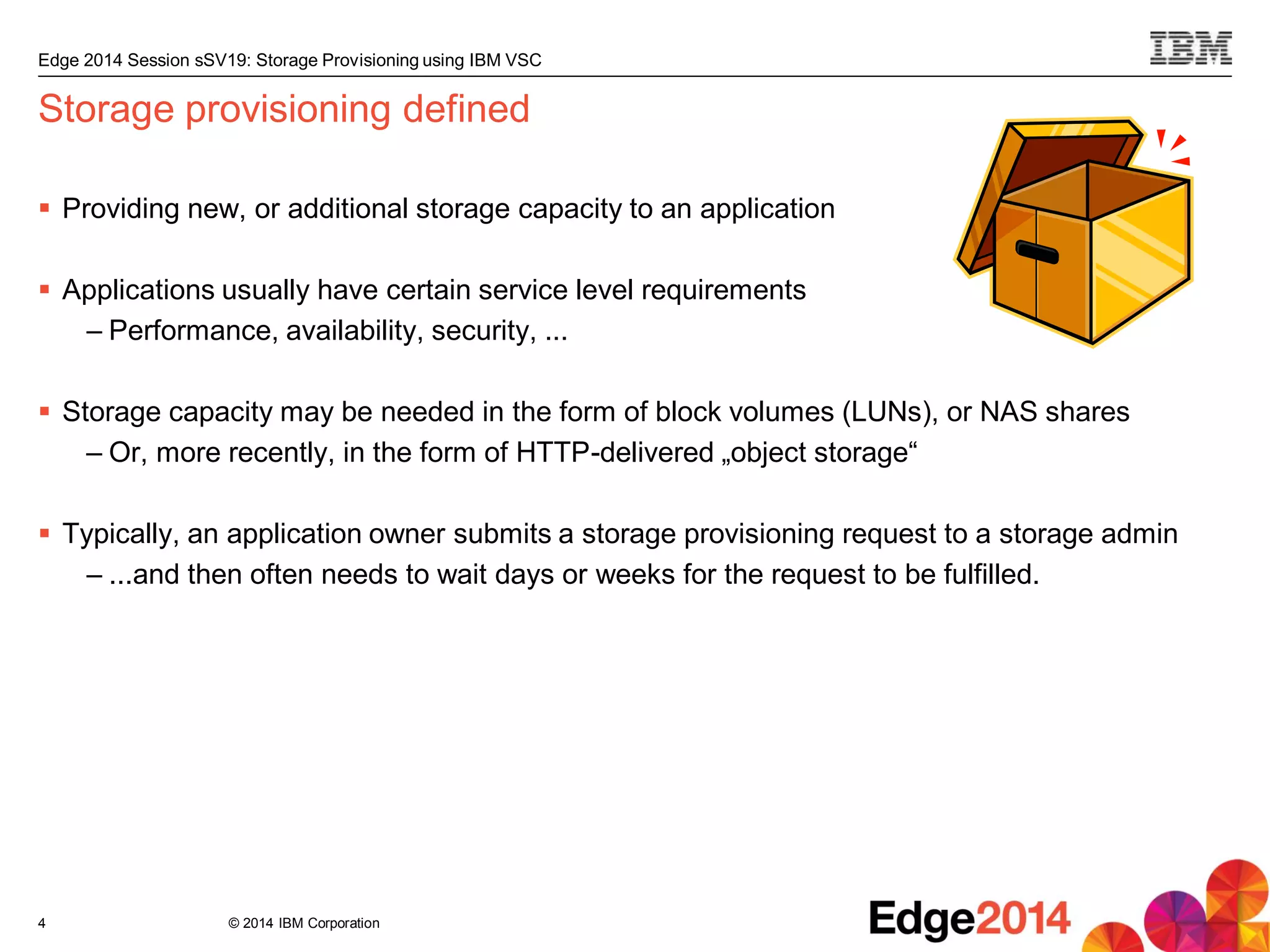
 Providing new, or additional storage capacity to an application
 Applications usually have certain service level requirements
– Performance, availability, security, ...
 Storage capacity may be needed in the form of block volumes (LUNs), or NAS shares
– Or, more recently, in the form of HTTP-delivered „object storage“
 Typically, an application owner submits a storage provisioning request to a storage admin
– ...and then often needs to wait days or weeks for the request to be fulfilled.
4
© 2014 IBM Corporation
Edge 2014 Session sSV19: Storage Provisioning using IBM VSC
5
Storage provisioning
challenges
Storage provisioning using VSC
© 2014 IBM Corporation
Edge 2014 Session sSV19: Storage Provisioning using IBM VSC
Typical admin challenges related to storage provisioning
 Where to place the new volume / the new share?
– So that application requirements are met
– Taking into account host connectivity
– Considering affinity requirements
– Honoring authorizations (who may provision from what)
– All while keeping load balanced and utilization optimized across the storage
infrastructure
 Time-consuming, multi-step configuration process:
– Volume (or share) creation and configuration
– Add host connection (or export)
– Update zoning
– Configure multi-pathing on the server
– Rescan SCSI bus on server to have new volume show up
6
© 2014 IBM Corporation
Edge 2014 Session sSV19: Storage Provisioning using IBM VSC
How VSC addresses these storage provisioning challenges
 Where to place the new volume / the new share?
– So that application requirements are met Service Classes
– Taking into account host connectivity Exploiting TPC‘s knowledge of SAN fabrics
– Considering affinity requirements A server‘s volumes are colocated
– Honoring authorizations (who may provision from what) Capacity Pools and Service
Class authorizations
– All while keeping load balanced and utilization optimized across the storage
infrastructure Exploiting TPC‘s capacity and performance monitoring and analytics
– Combined into automated and optimal volume and share placement
 Time-consuming, multi-step configuration process:
– Volume (or share) creation and configuration
– Add host connection (or export)
– Update zoning
– Configure multi-pathing on the server
– Rescan SCSI bus on server to have new volume show up
– All steps are automated end-to-end
7
© 2014 IBM Corporation
Edge 2014 Session sSV19: Storage Provisioning using IBM VSC
8
Phase 1: Setup
Storage provisioning using VSC:
Setup – Planning – Execution
© 2014 IBM Corporation
Edge 2014 Session sSV19: Storage Provisioning using IBM VSC
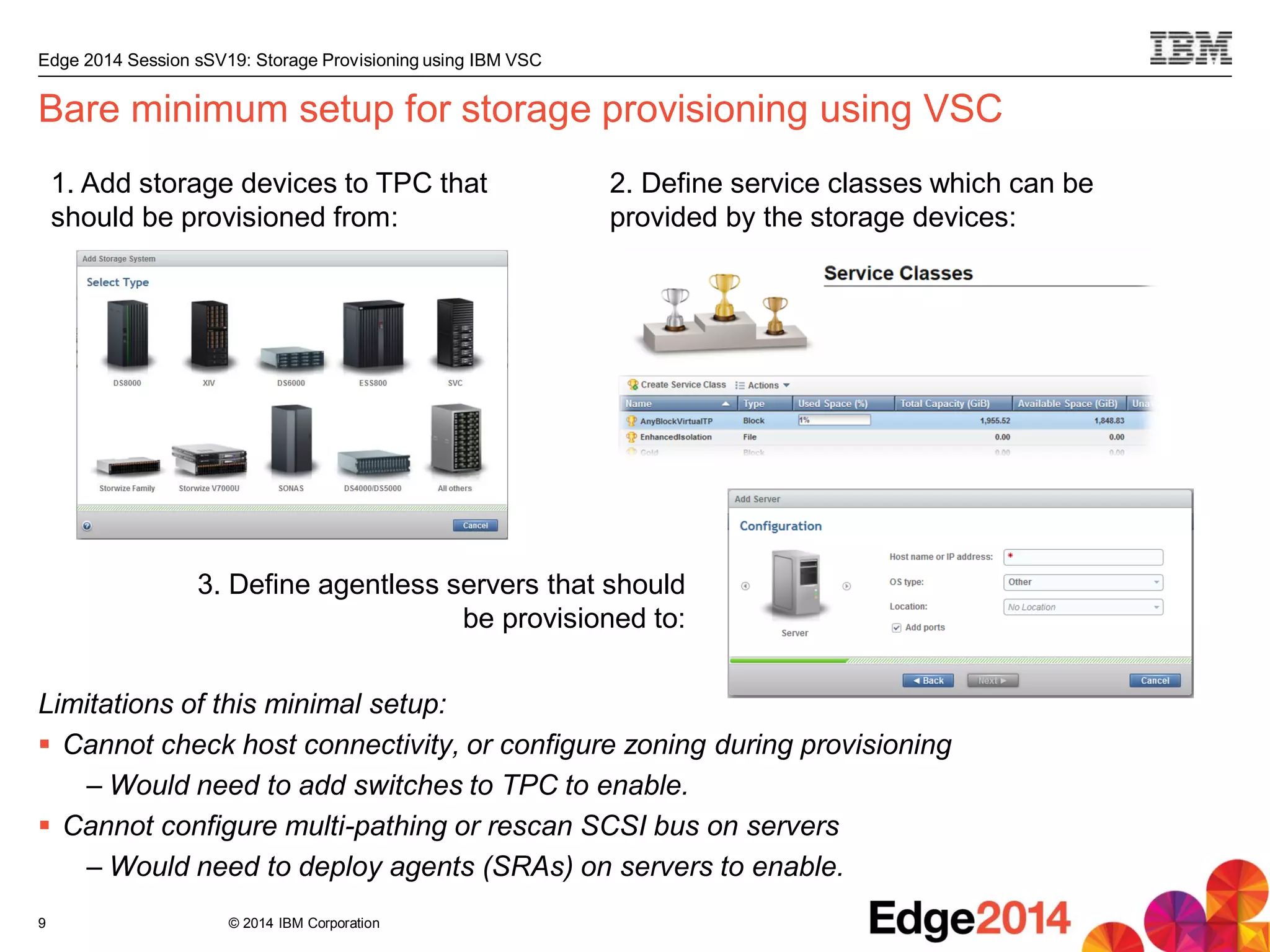
Bare minimum setup for storage provisioning using VSC
Limitations of this minimal setup:
 Cannot check host connectivity, or configure zoning during provisioning
– Would need to add switches to TPC to enable.
 Cannot configure multi-pathing or rescan SCSI bus on servers
– Would need to deploy agents (SRAs) on servers to enable.
9
1. Add storage devices to TPC that
should be provisioned from:
3. Define agentless servers that should
be provisioned to:
2. Define service classes which can be
provided by the storage devices:
© 2014 IBM Corporation
Edge 2014 Session sSV19: Storage Provisioning using IBM VSC
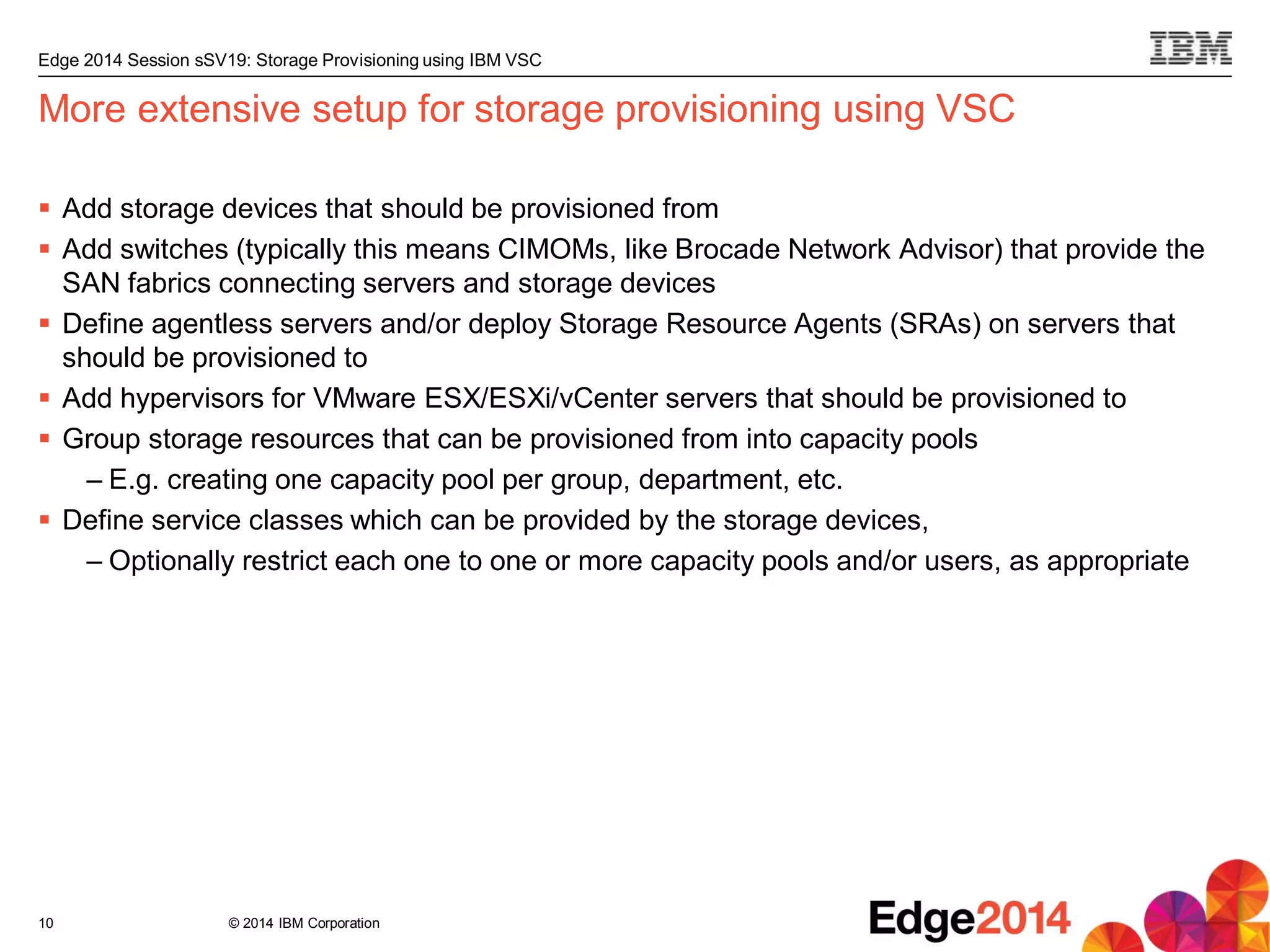
More extensive setup for storage provisioning using VSC
 Add storage devices that should be provisioned from
 Add switches (typically this means CIMOMs, like Brocade Network Advisor) that provide the
SAN fabrics connecting servers and storage devices
 Define agentless servers and/or deploy Storage Resource Agents (SRAs) on servers that
should be provisioned to
 Add hypervisors for VMware ESX/ESXi/vCenter servers that should be provisioned to
 Group storage resources that can be provisioned from into capacity pools
– E.g. creating one capacity pool per group, department, etc.
 Define service classes which can be provided by the storage devices,
– Optionally restrict each one to one or more capacity pools and/or users, as appropriate
10
© 2014 IBM Corporation
Edge 2014 Session sSV19: Storage Provisioning using IBM VSC
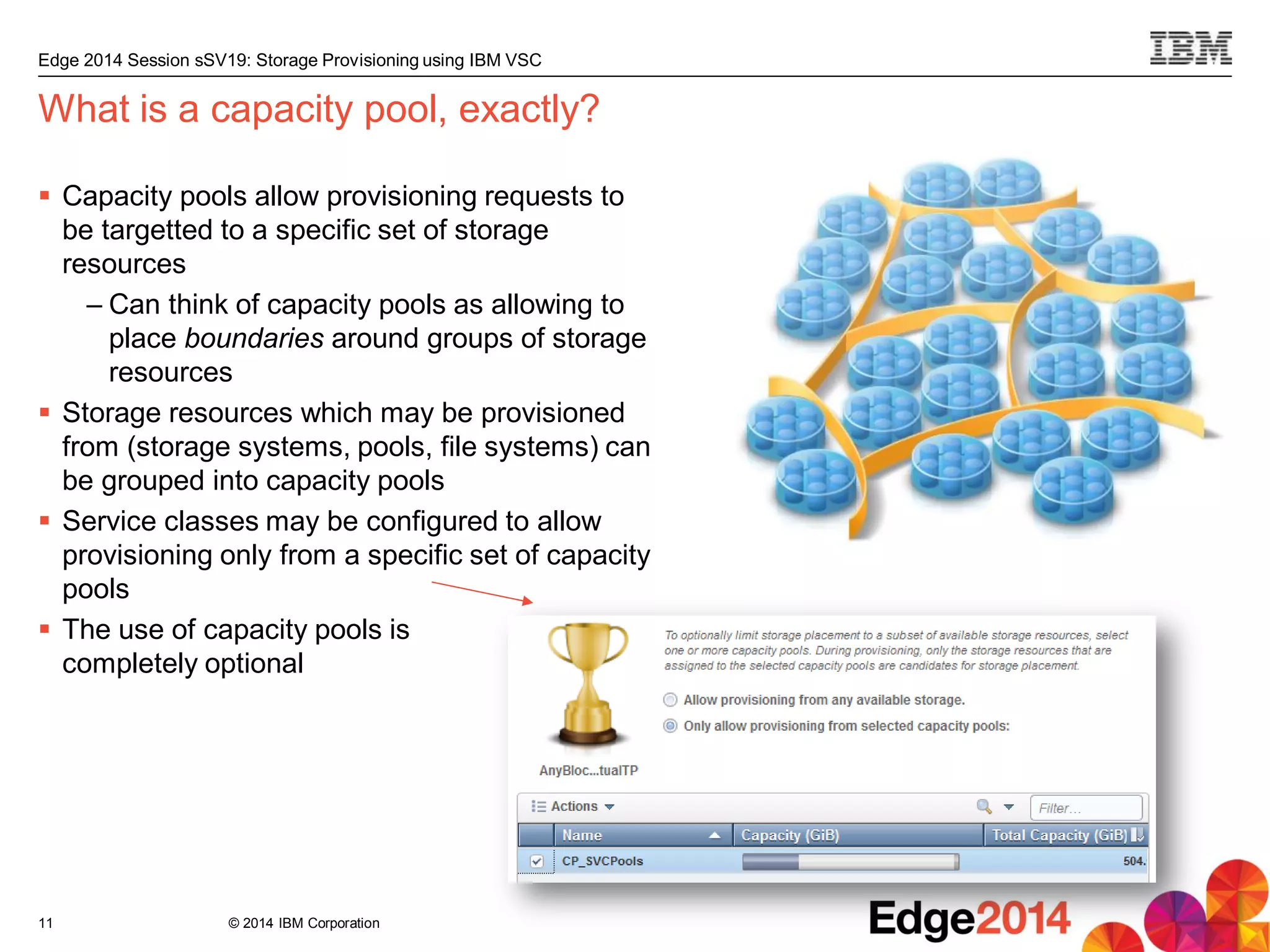
 Capacity pools allow provisioning requests to
be targetted to a specific set of storage
resources
– Can think of capacity pools as allowing to
place boundaries around groups of storage
resources
 Storage resources which may be provisioned
from (storage systems, pools, file systems) can
be grouped into capacity pools
 Service classes may be configured to allow
provisioning only from a specific set of capacity
pools
 The use of capacity pools is
completely optional
What is a capacity pool, exactly?
11
© 2014 IBM Corporation
Edge 2014 Session sSV19: Storage Provisioning using IBM VSC
Service classes
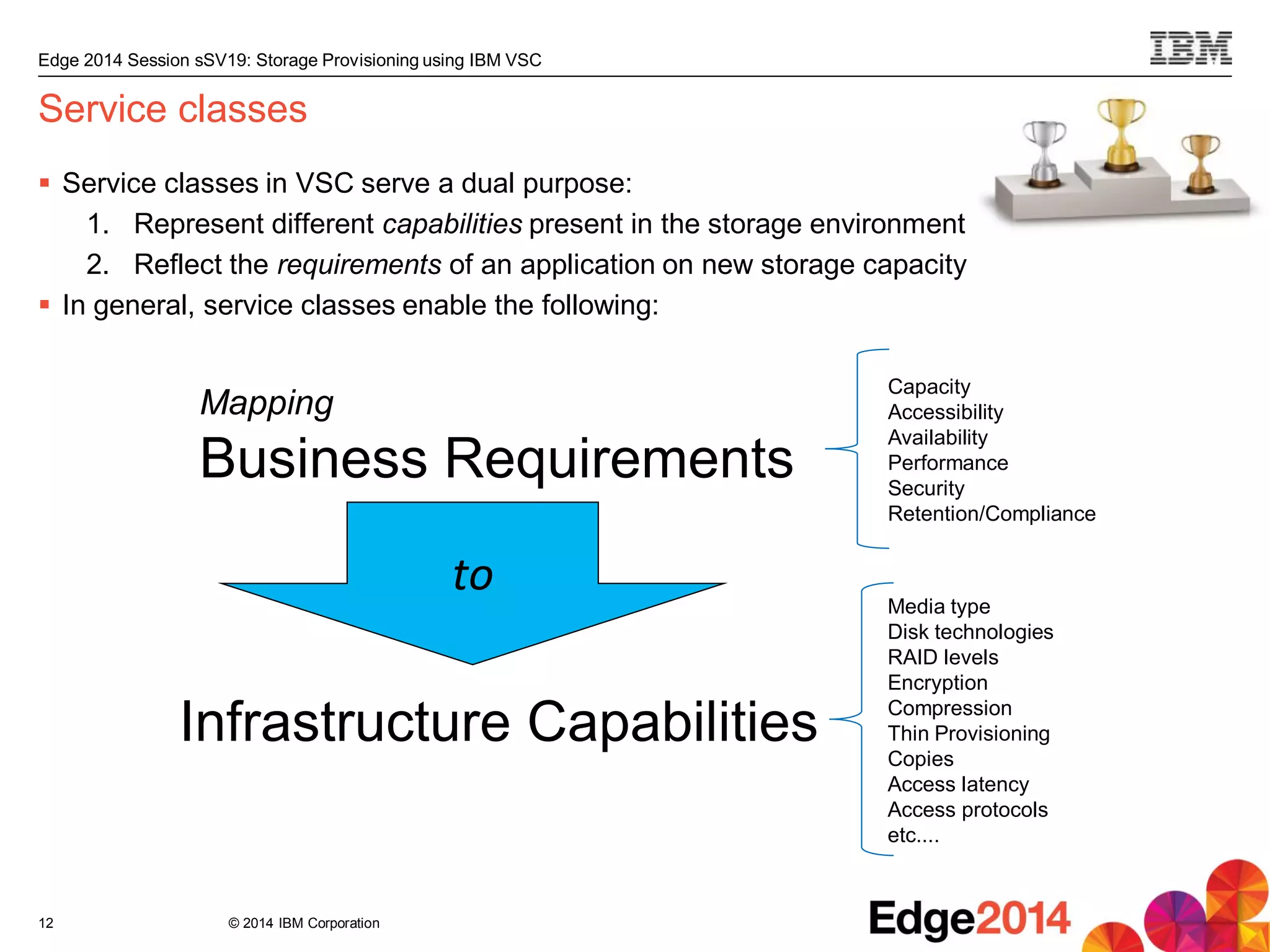
 Service classes in VSC serve a dual purpose:
1. Represent different capabilities present in the storage environment
2. Reflect the requirements of an application on new storage capacity
 In general, service classes enable the following:
12
Mapping
Business Requirements
Infrastructure Capabilities
to
Capacity
Accessibility
Availability
Performance
Security
Retention/Compliance
Media type
Disk technologies
RAID levels
Encryption
Compression
Thin Provisioning
Copies
Access latency
Access protocols
etc....
© 2014 IBM Corporation
Edge 2014 Session sSV19: Storage Provisioning using IBM VSC
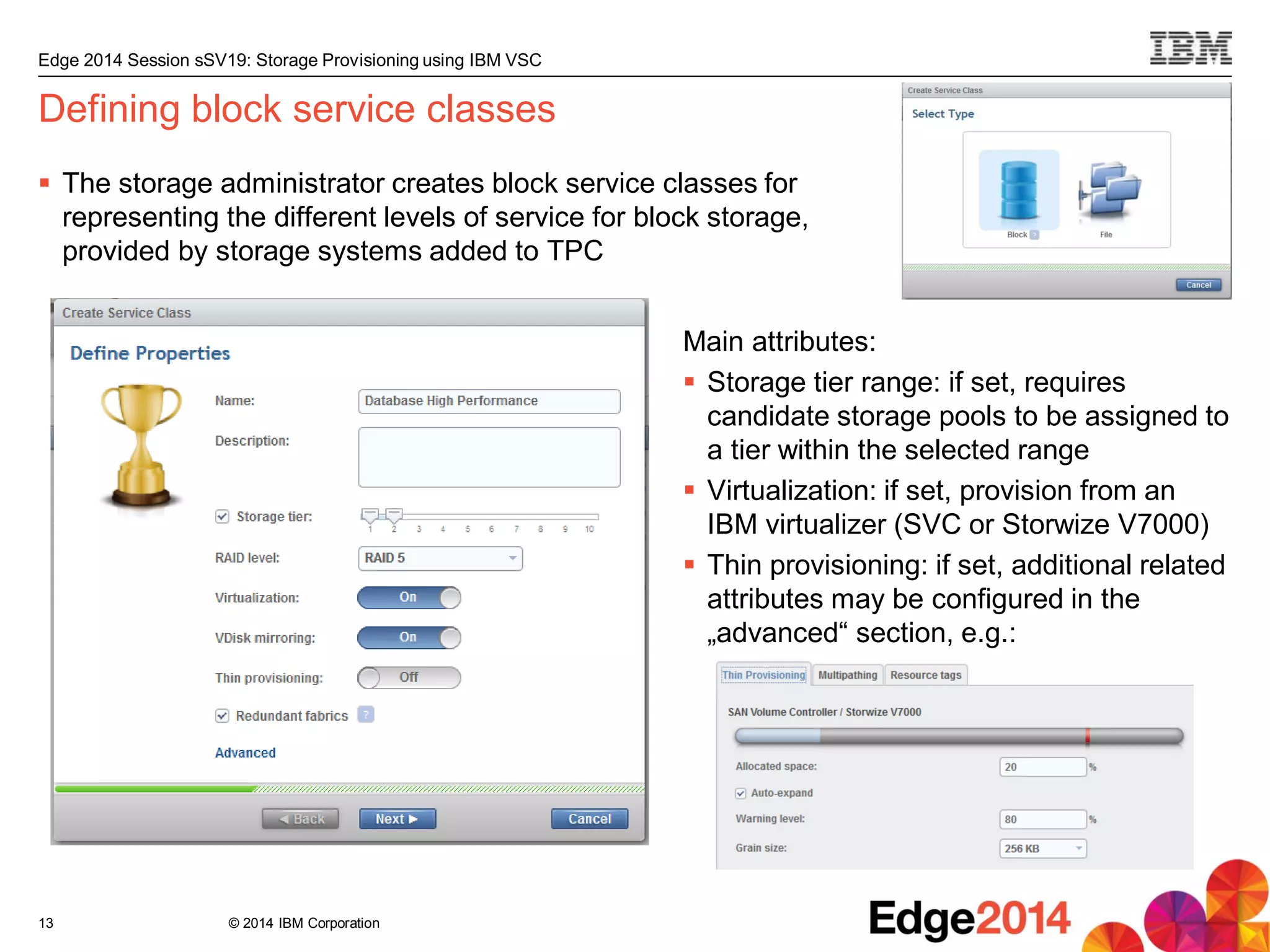
Defining block service classes
 The storage administrator creates block service classes for
representing the different levels of service for block storage,
provided by storage systems added to TPC
13
Main attributes:
 Storage tier range: if set, requires
candidate storage pools to be assigned to
a tier within the selected range
 Virtualization: if set, provision from an
IBM virtualizer (SVC or Storwize V7000)
 Thin provisioning: if set, additional related
attributes may be configured in the
„advanced“ section, e.g.:
© 2014 IBM Corporation
Edge 2014 Session sSV19: Storage Provisioning using IBM VSC
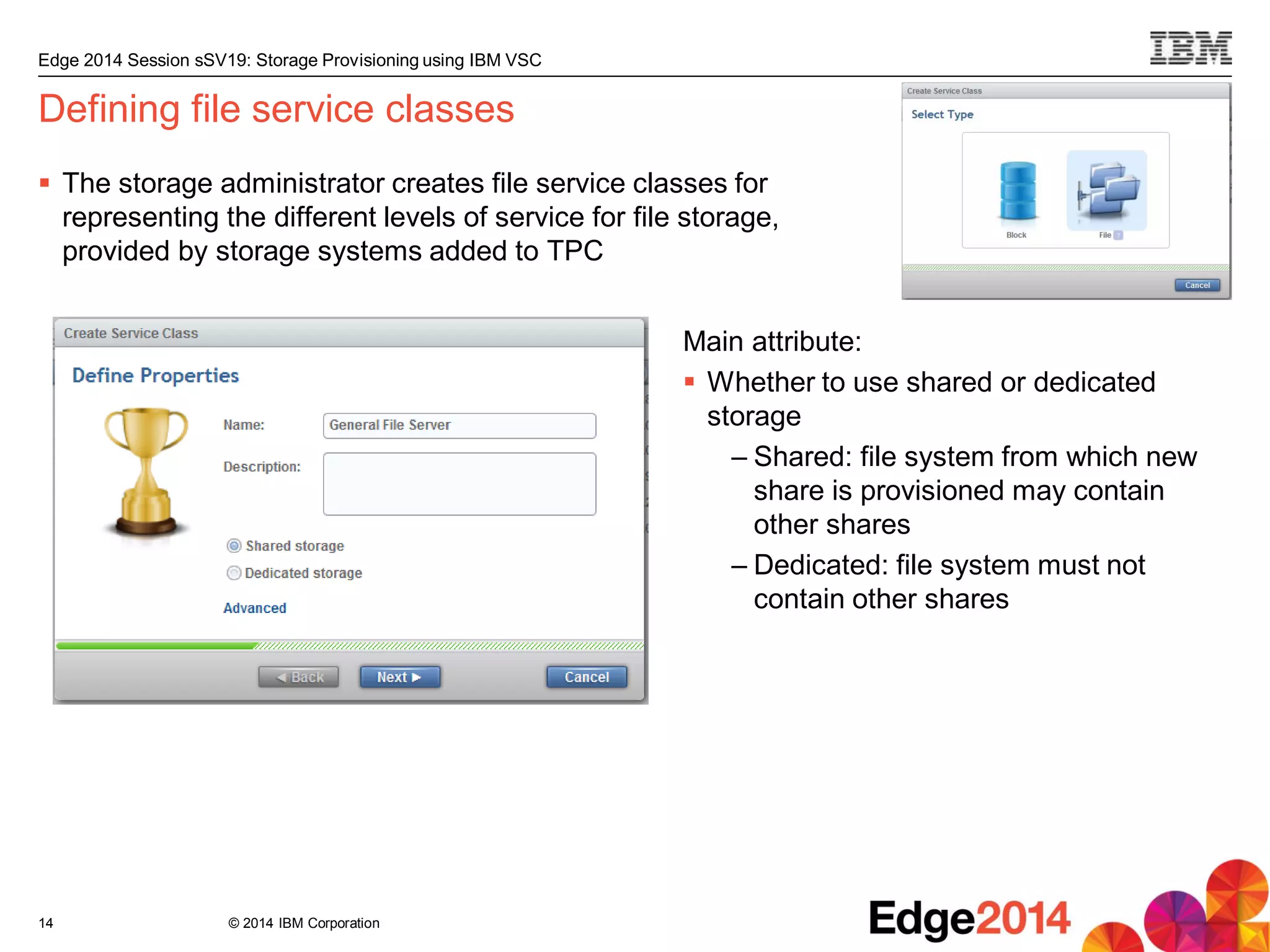
Defining file service classes
 The storage administrator creates file service classes for
representing the different levels of service for file storage,
provided by storage systems added to TPC
14
Main attribute:
 Whether to use shared or dedicated
storage
– Shared: file system from which new
share is provisioned may contain
other shares
– Dedicated: file system must not
contain other shares
© 2014 IBM Corporation
Edge 2014 Session sSV19: Storage Provisioning using IBM VSC
Phase 2: Planning
Storage provisioning using VSC:
Setup – Planning – Execution
15
© 2014 IBM Corporation
Edge 2014 Session sSV19: Storage Provisioning using IBM VSC
Planning the configuration steps for provisioning
 When a provisioning request is submitted, VSC creates a provisioning plan, based on the
service class specified in the provisioning request
 Planning for provisioning involves the following:
– Determining on which storage resource to place the new volume or share
– Identifying which host connections to add or modify (block only)
– Determining required zoning updates and multipathing configuration changes to comply
with the service class definition (block only)
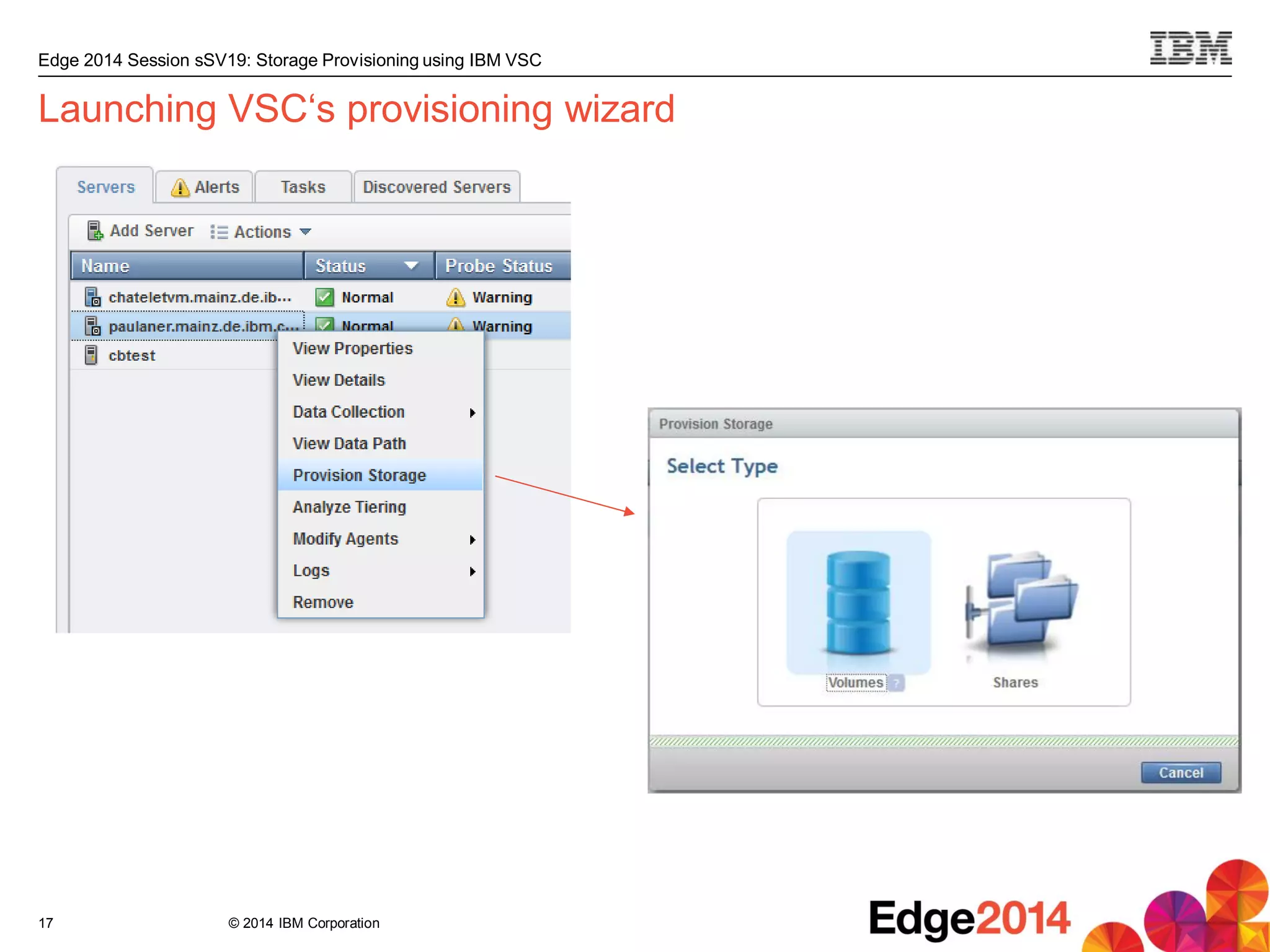
 A provisioning request may be submitted in various ways:
– Interactively by the user, using VSC‘s provisioning wizard
– Through VSC‘s SMAC API, by the VSC vSphere plugin, or by other IBM products such
as SmartCloud Storage Access (SCSA) or SmartCloud Orchestrator (SCO)
16
© 2014 IBM Corporation
Edge 2014 Session sSV19: Storage Provisioning using IBM VSC
Launching VSC‘s provisioning wizard
17
© 2014 IBM Corporation
Edge 2014 Session sSV19: Storage Provisioning using IBM VSC
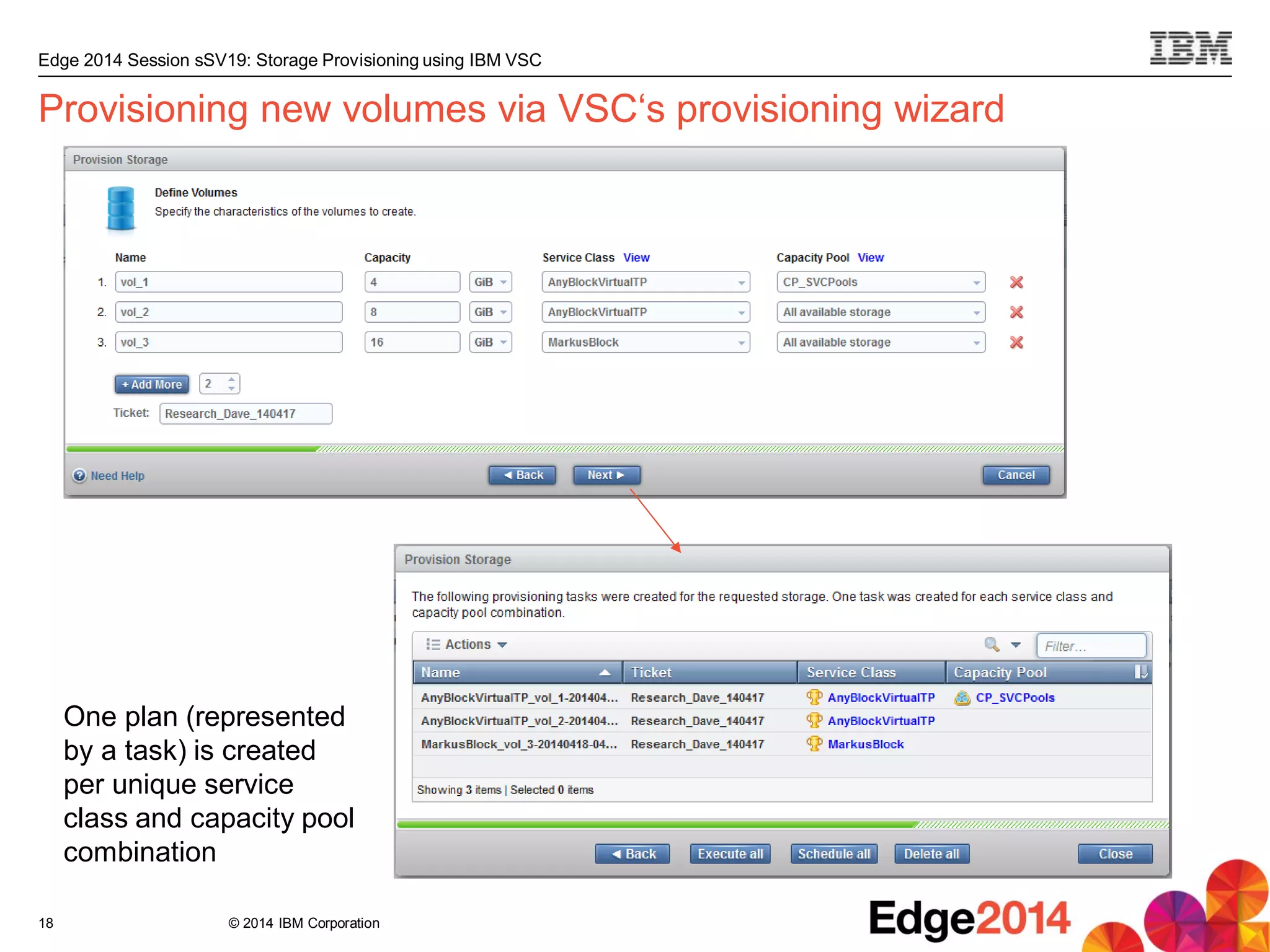
Provisioning new volumes via VSC‘s provisioning wizard
18
One plan (represented
by a task) is created
per unique service
class and capacity pool
combination
© 2014 IBM Corporation
Edge 2014 Session sSV19: Storage Provisioning using IBM VSC
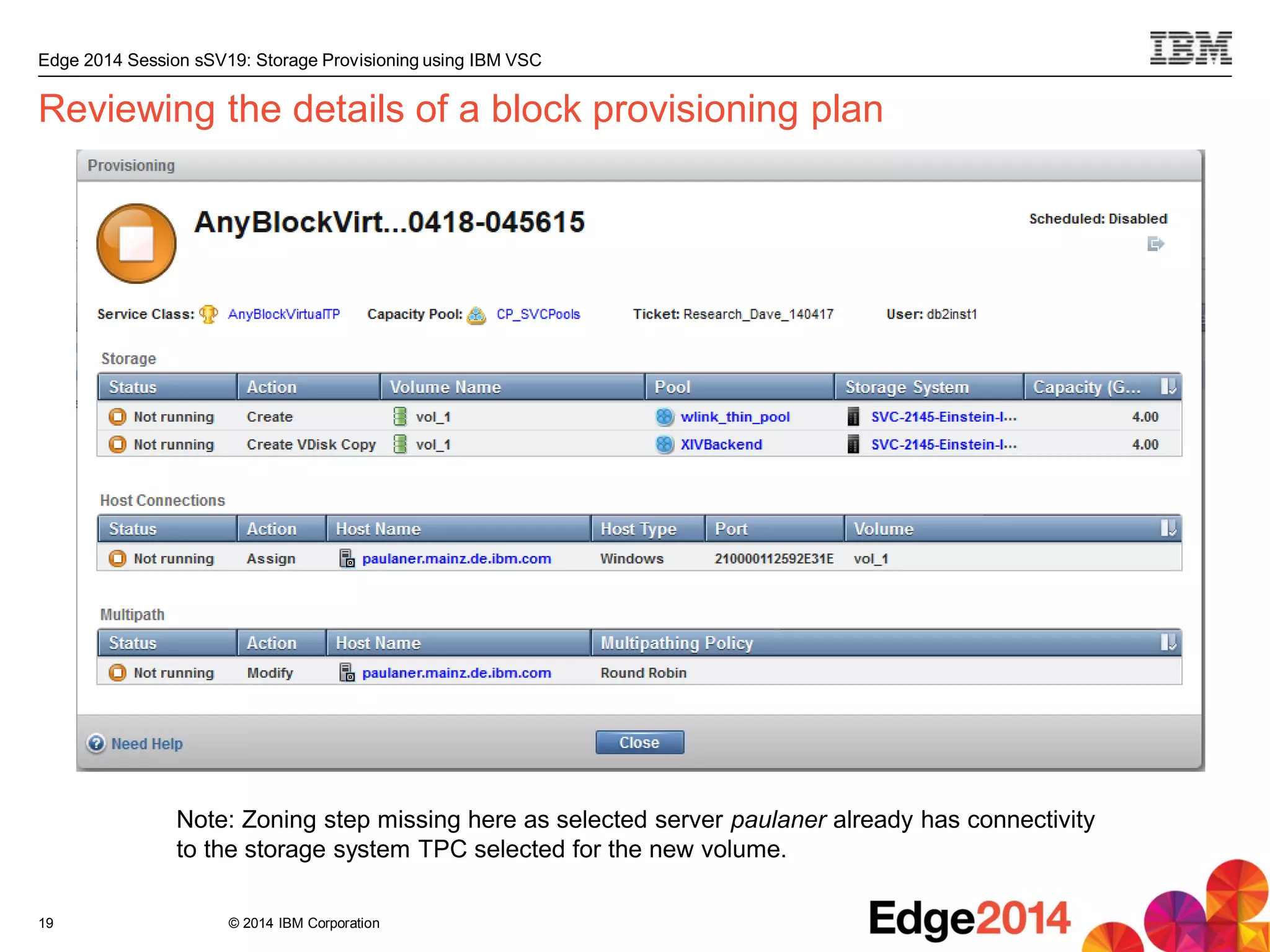
Reviewing the details of a block provisioning plan
19
Note: Zoning step missing here as selected server paulaner already has connectivity
to the storage system TPC selected for the new volume.
© 2014 IBM Corporation
Edge 2014 Session sSV19: Storage Provisioning using IBM VSC
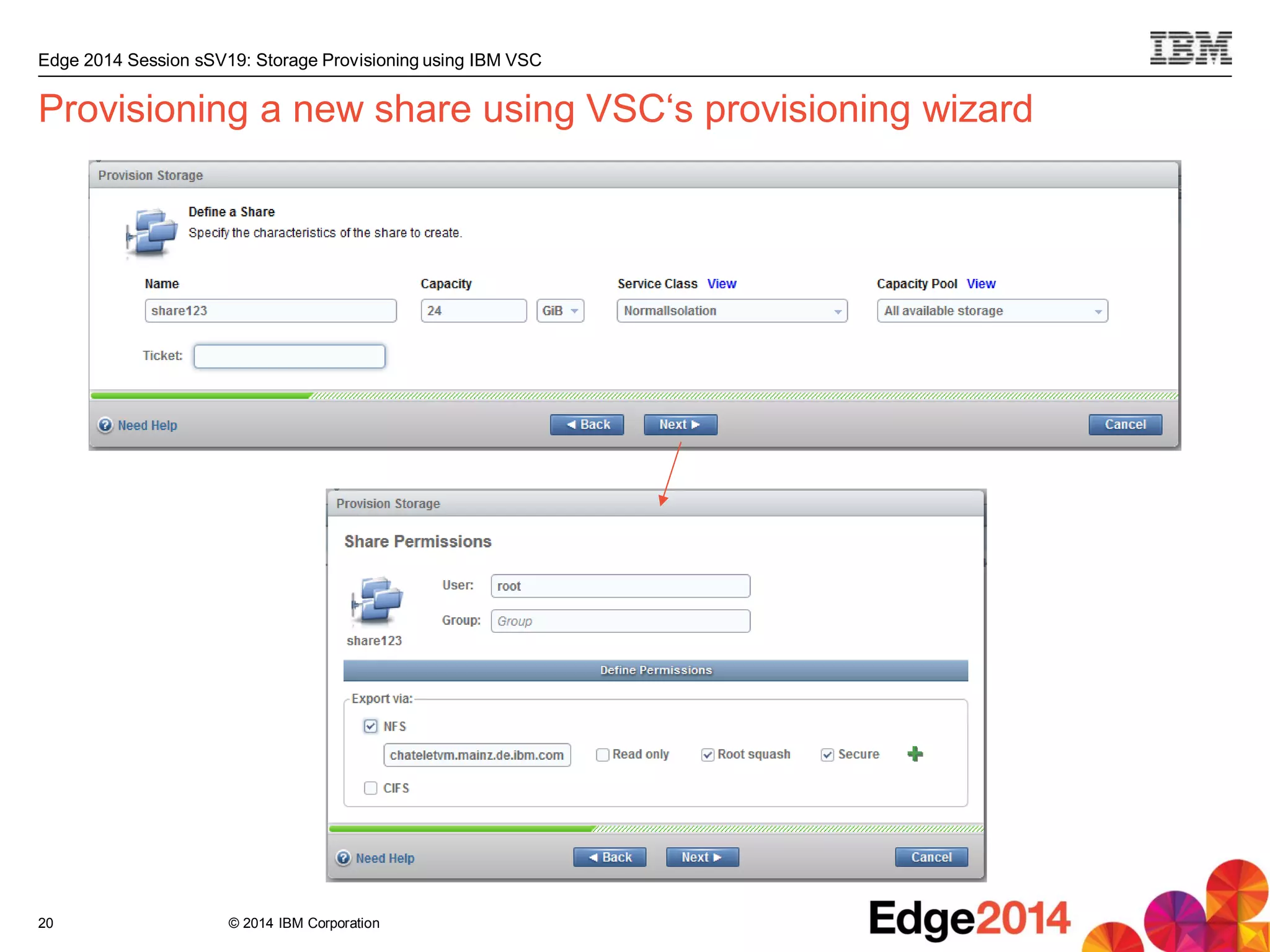
Provisioning a new share using VSC‘s provisioning wizard
20
© 2014 IBM Corporation
Edge 2014 Session sSV19: Storage Provisioning using IBM VSC
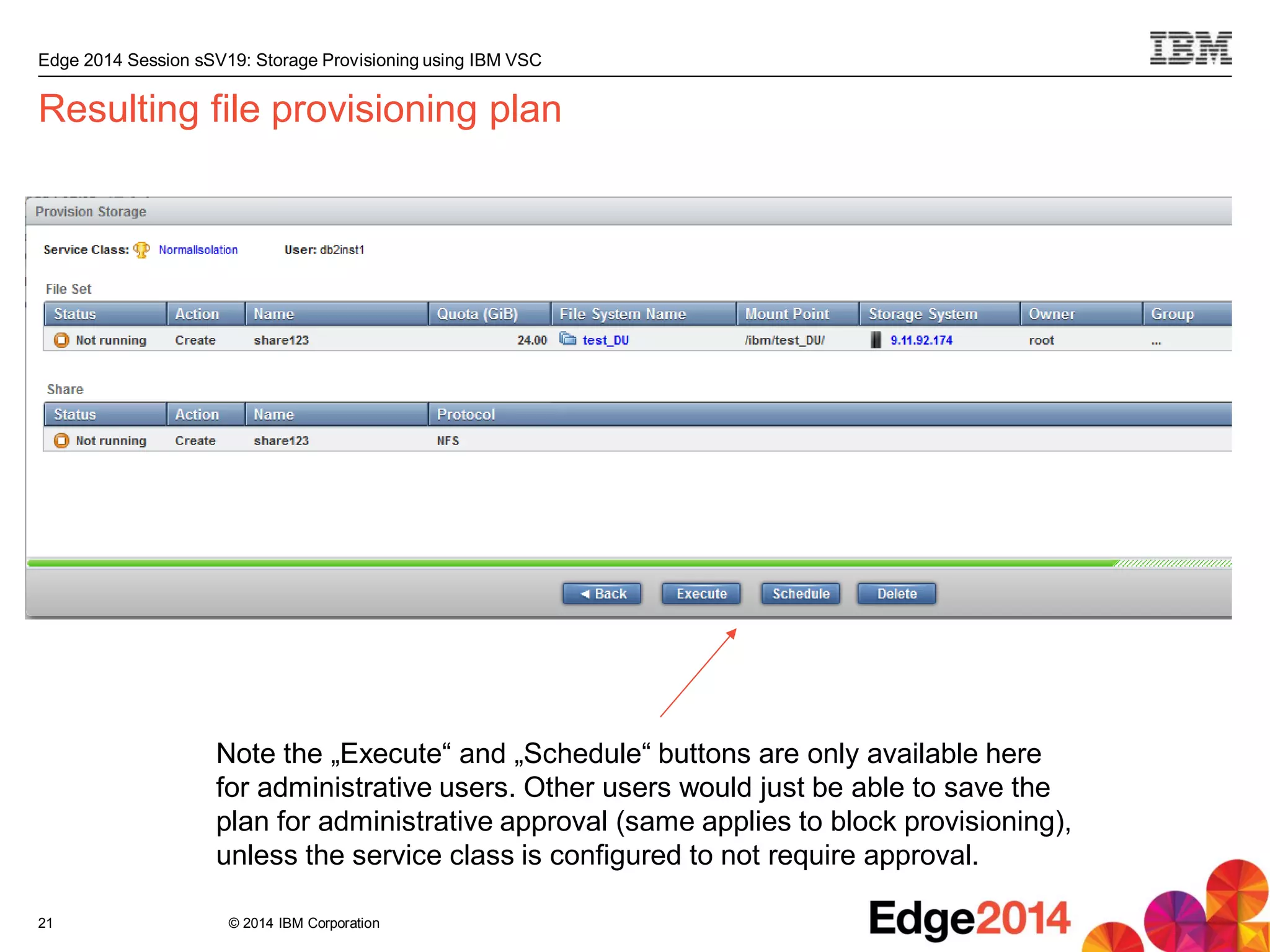
Resulting file provisioning plan
21
Note the „Execute“ and „Schedule“ buttons are only available here
for administrative users. Other users would just be able to save the
plan for administrative approval (same applies to block provisioning),
unless the service class is configured to not require approval.
© 2014 IBM Corporation
Edge 2014 Session sSV19: Storage Provisioning using IBM VSC
How VSC decides where to place the new volumes or share
 Is the specified service class restricted to one or more capacity pools?
– If yes, consider only resources which are members of any of these
 Does storage resource fulfill all service class attributes?
 Is storage resource not in error state or unreachable?
 Does storage resource still have sufficient free unreserved space?
 For volumes, does the server to be provisioned to already have volumes assigned?
– If yes, co-locate the new volumes
 For volumes, in case fabrics known to TPC, do the server and storage resource have
common fabrics?
 Out of the remaining candidates, pick the one least utilized in terms of performance (I/O)
and space
22
© 2014 IBM Corporation
Edge 2014 Session sSV19: Storage Provisioning using IBM VSC
Phase 3: Execution
Storage provisioning using VSC:
Setup – Planning – Execution
23
© 2014 IBM Corporation
Edge 2014 Session sSV19: Storage Provisioning using IBM VSC
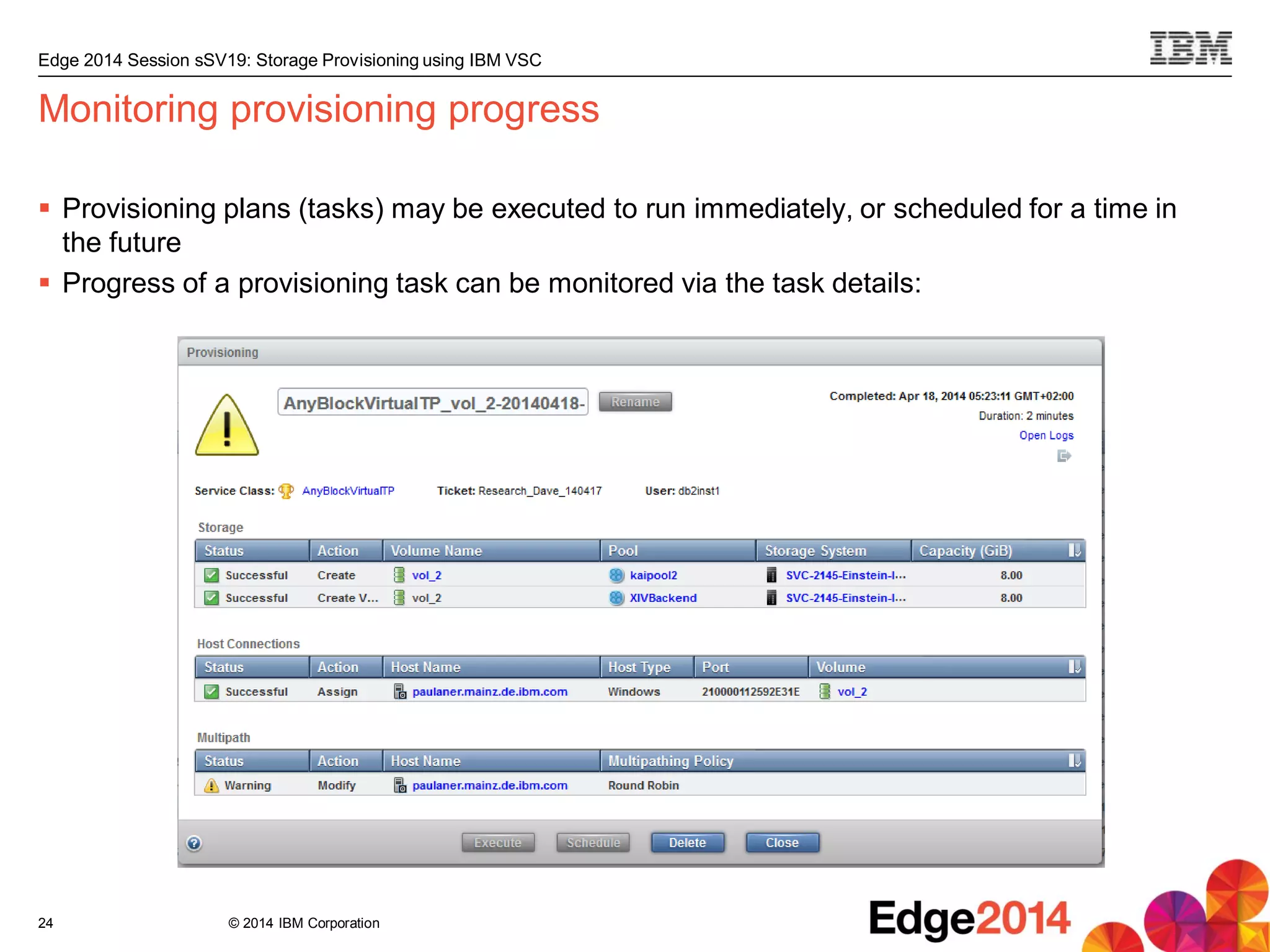
Monitoring provisioning progress
 Provisioning plans (tasks) may be executed to run immediately, or scheduled for a time in
the future
 Progress of a provisioning task can be monitored via the task details:
24
© 2014 IBM Corporation
Edge 2014 Session sSV19: Storage Provisioning using IBM VSC
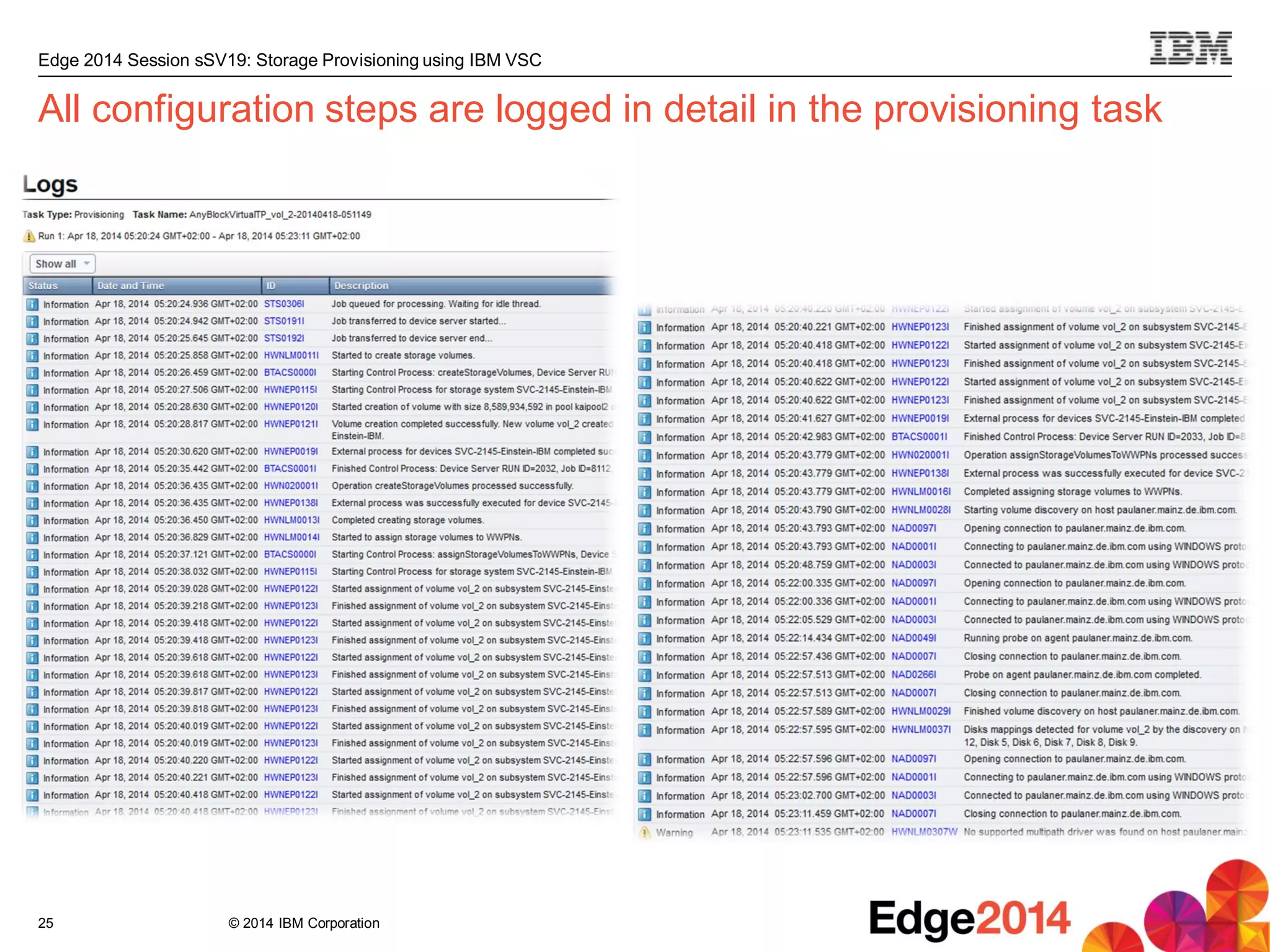
All configuration steps are logged in detail in the provisioning task
25
© 2014 IBM Corporation
Edge 2014 Session sSV19: Storage Provisioning using IBM VSC
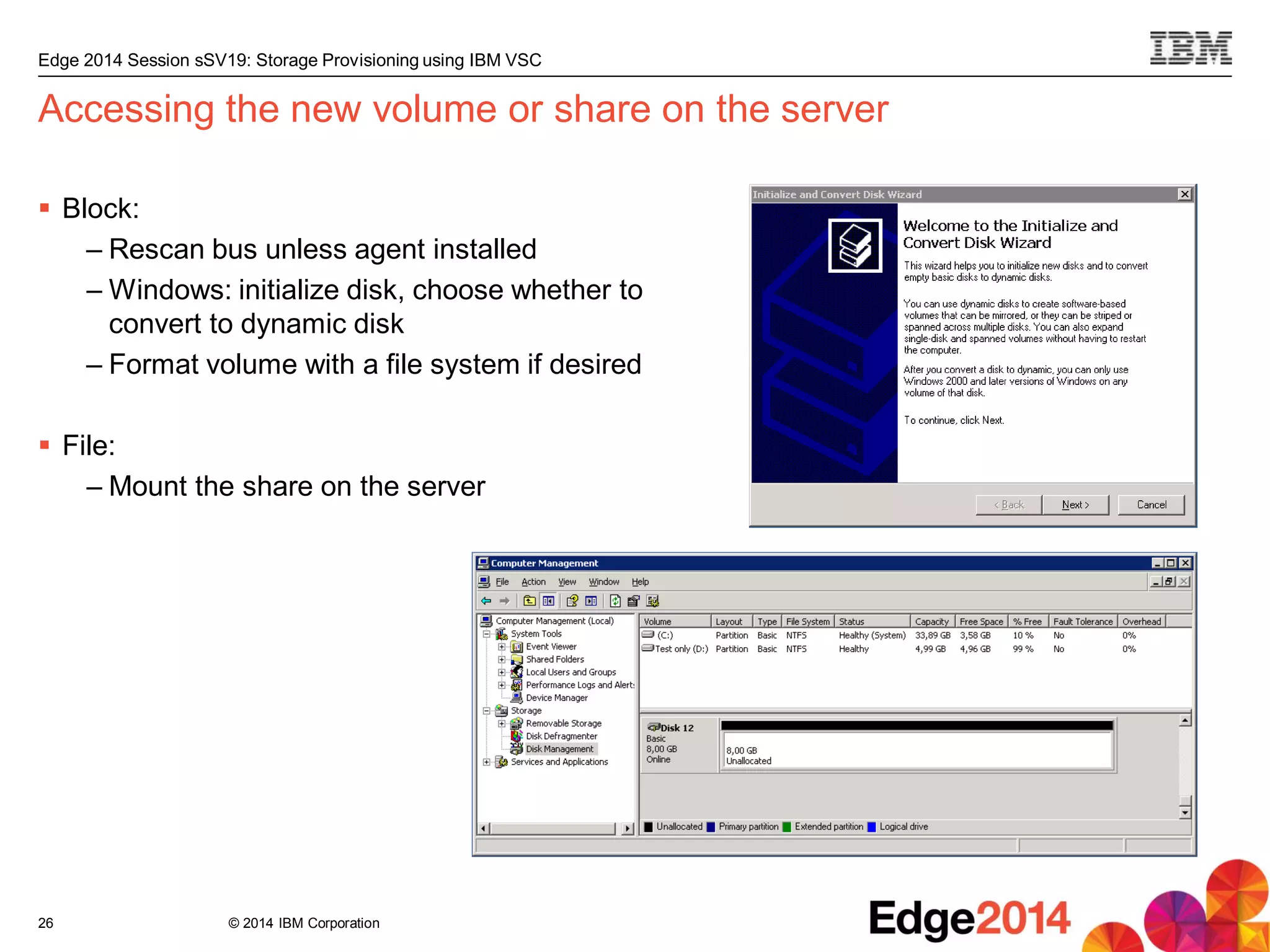
Accessing the new volume or share on the server
 Block:
– Rescan bus unless agent installed
– Windows: initialize disk, choose whether to
convert to dynamic disk
– Format volume with a file system if desired
 File:
– Mount the share on the server
26
© 2014 IBM Corporation
Edge 2014 Session sSV19: Storage Provisioning using IBM VSC
Summary and
Outlook
Storage provisioning using VSC
27
© 2014 IBM Corporation
Edge 2014 Session sSV19: Storage Provisioning using IBM VSC
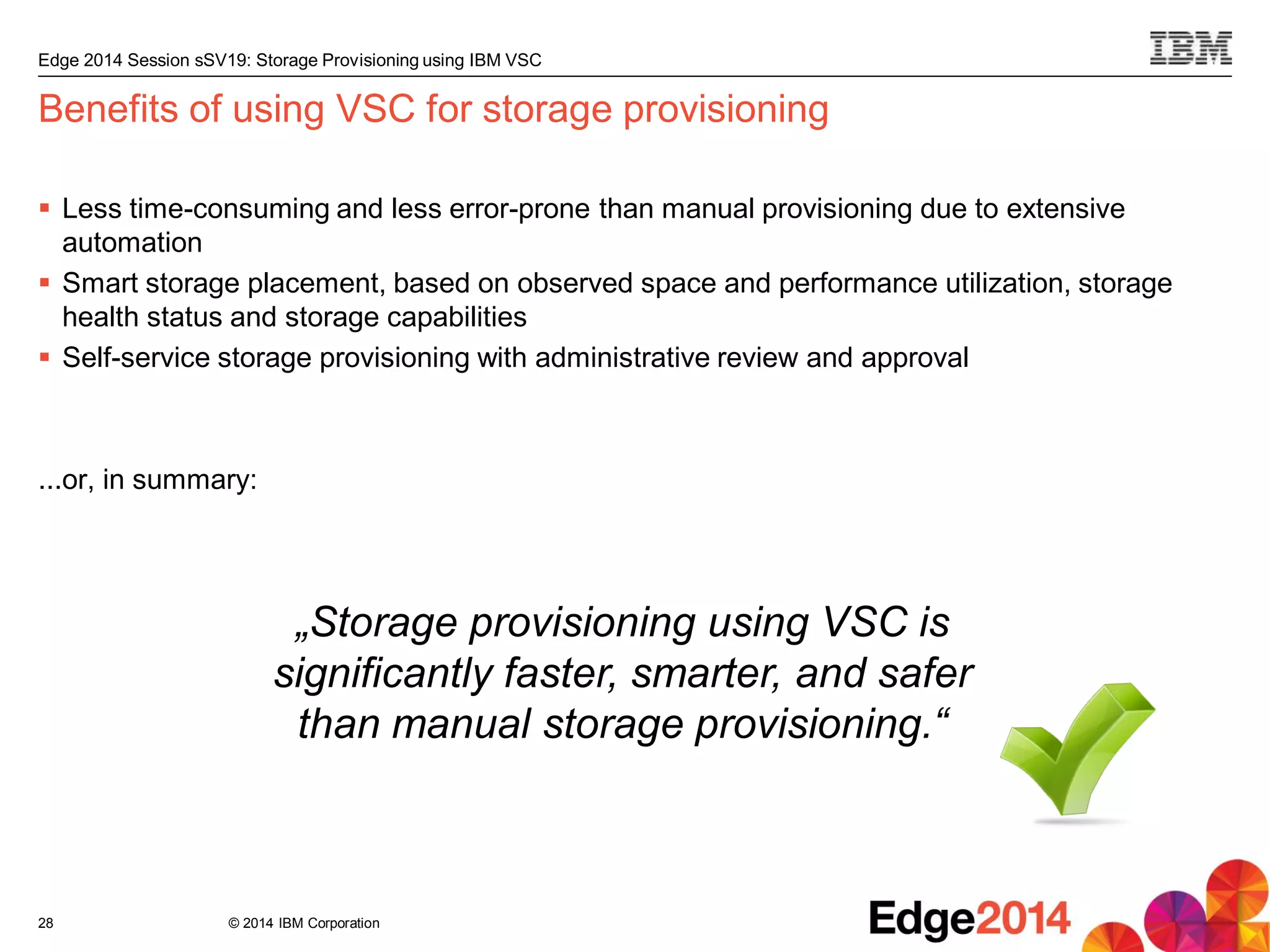
Benefits of using VSC for storage provisioning
 Less time-consuming and less error-prone than manual provisioning due to extensive
automation
 Smart storage placement, based on observed space and performance utilization, storage
health status and storage capabilities
 Self-service storage provisioning with administrative review and approval
...or, in summary:
28
„Storage provisioning using VSC is
significantly faster, smarter, and safer
than manual storage provisioning.“
© 2014 IBM Corporation
Edge 2014 Session sSV19: Storage Provisioning using IBM VSC
What‘s next for storage provisioning using VSC
 SVC stretched-cluster-aware provisioning
 Integration of replication configuration
 Quota definition and enforcement for service classes and capacity pools
 Service class compliance verification for existing volumes and shares
 Alerts for provisioning events (request submitted, request completed, etc.)
29
© 2014 IBM Corporation
Edge 2014 Session sSV19: Storage Provisioning using IBM VSC
30
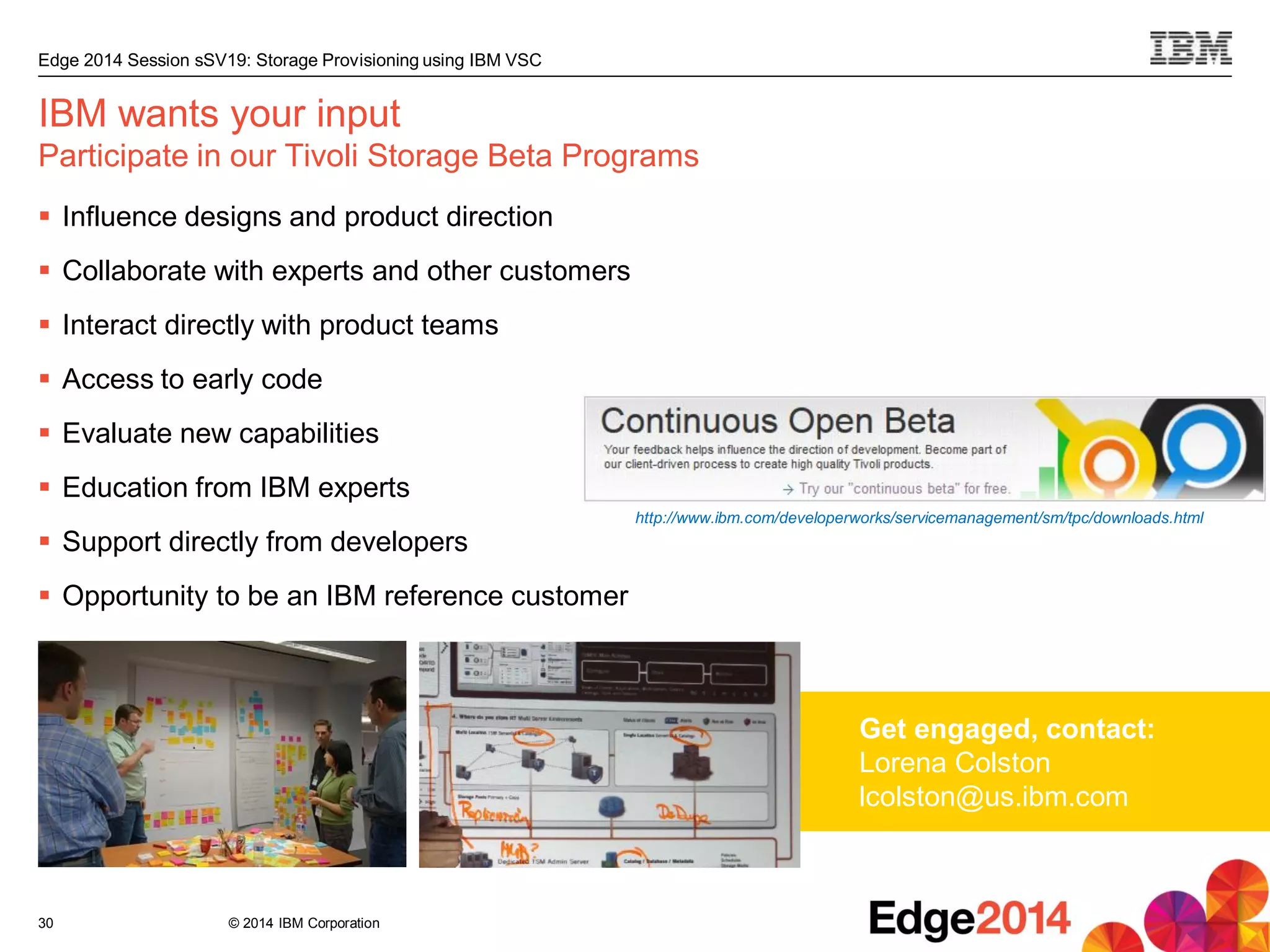
IBM wants your input
Participate in our Tivoli Storage Beta Programs
 Influence designs and product direction
 Collaborate with experts and other customers
 Interact directly with product teams
 Access to early code
 Evaluate new capabilities
 Education from IBM experts
 Support directly from developers
 Opportunity to be an IBM reference customer
Get engaged, contact:
Lorena Colston
lcolston@us.ibm.com
http://www.ibm.com/developerworks/servicemanagement/sm/tpc/downloads.html
© 2014 IBM Corporation
Edge 2014 Session sSV19: Storage Provisioning using IBM VSC
Thank You
Storage provisioning using VSC
31
In case of questions or
feedback, please feel free
to contact me:
Christian Bolik
bolik@de.ibm.com
© 2014 IBM Corporation
Edge 2014 Session sSV19: Storage Provisioning using IBM VSC
32
IBM advanced solutions for small and mid-sized organizations
 Reduce storage cost and complexity
 VMware and cloud integration
 Priced and packaged for SMB
Restrictions apply. See website for details
http://www.ibm.com/midmarket/us/en/data-backup-recovery.html
Data and Storage Management Data Protection and Resiliency
IBM Tivoli Storage Manager Entry
• Unlimited capacity
• Priced per node
IBM Tivoli Storage Manager Suite
for Unified Recovery Entry
• Priced by capacity
• Unlimited nodes
Tivoli Storage Manager and advanced
agents for VMware, email, databases
and SAP, including SAP HANA
IBM Virtual Storage Center for
Storwize Family
• Unlimited capacity
• Priced per Storwize enclosure
IBM Virtual Storage Center Entry
• Up to 250 TB capacity
• For use with SAN Volume Controller
Analytics driven tier optimization,
automated provisioning, and integrated
performance management for storage
© 2014 IBM Corporation
Edge 2014 Session sSV19: Storage Provisioning using IBM VSC
33
Trademarks and Disclaimers
Adobe, the Adobe logo, PostScript, and the PostScript logo are either registered trademarks or trademarks of Adobe Systems Incorporated in the United States, and/or other countries. IT
Infrastructure Library is a registered trademark of the Central Computer and Telecommunications Agency which is now part of the Office of Government Commerce. Intel, Intel logo, Intel
Inside, Intel Inside logo, Intel Centrino, Intel Centrino logo, Celeron, Intel Xeon, Intel SpeedStep, Itanium, and Pentium are trademarks or registered trademarks of Intel Corporation or its
subsidiaries in the United States and other countries. Linux is a registered trademark of Linus Torvalds in the United States, other countries, or both. Microsoft, Windows, Windows NT, and
the Windows logo are trademarks of Microsoft Corporation in the United States, other countries, or both. ITIL is a registered trademark, and a registered community trademark of the Office
of Government Commerce, and is registered in the U.S. Patent and Trademark Office. UNIX is a registered trademark of The Open Group in the United States and other countries. Java
and all Java-based trademarks and logos are trademarks or registered trademarks of Oracle and/or its affiliates. Cell Broadband Engine is a trademark of Sony Computer Entertainment,
Inc. in the United States, other countries, or both and is used under license therefrom. Linear Tape-Open, LTO, the LTO Logo, Ultrium, and the Ultrium logo are trademarks of HP, IBM
Corp. and Quantum in the U.S. and other countries.
Other product and service names might be trademarks of IBM or other companies. Information is provided "AS IS" without warranty of any kind.
The customer examples described are presented as illustrations of how those customers have used IBM products and the results they may have achieved. Actual environmental costs and
performance characteristics may vary by customer.
Information concerning non-IBM products was obtained from a supplier of these products, published announcement material, or other publicly available sources and does not constitute an
endorsement of such products by IBM. Sources for non-IBM list prices and performance numbers are taken from publicly available information, including vendor announcements and
vendor worldwide homepages. IBM has not tested these products and cannot confirm the accuracy of performance, capability, or any other claims related to non-IBM products. Questions
on the capability of non-IBM products should be addressed to the supplier of those products.
All statements regarding IBM future direction and intent are subject to change or withdrawal without notice, and represent goals and objectives only.
Some information addresses anticipated future capabilities. Such information is not intended as a definitive statement of a commitment to specific levels of performance, function or delivery
schedules with respect to any future products. Such commitments are only made in IBM product announcements. The information is presented here to communicate IBM's current
investment and development activities as a good faith effort to help with our customers' future planning.
Performance is based on measurements and projections using standard IBM benchmarks in a controlled environment. The actual throughput or performance that any user will experience
will vary depending upon considerations such as the amount of multiprogramming in the user's job stream, the I/O configuration, the storage configuration, and the workload processed.
Therefore, no assurance can be given that an individual user will achieve throughput or performance improvements equivalent to the ratios stated here.
Prices are suggested U.S. list prices and are subject to change without notice. Starting price may not include a hard drive, operating system or other features. Contact your IBM
representative or Business Partner for the most current pricing in your geography.
Photographs shown may be engineering prototypes. Changes may be incorporated in production models.
© IBM Corporation 2014. All rights reserved.
References in this document to IBM products or services do not imply that IBM intends to make them available in every country.
Trademarks of International Business Machines Corporation in the United States, other countries, or both can be found on the
World Wide Web at http://www.ibm.com/legal/copytrade.shtml.
ZSP03490-USEN-00
34
IBM Systems Lab Services and Training
Deep skills driving client satisfaction and technical
effectiveness for smarter computing
IBM Systems Lab Services and Training infuses intelligence into how
global information technology works. is composed of experts who
develop and deploy solutions across IBM’s systems family offerings.
From in-depth product expertise, to training, to platform-specific
hardware and software solutions, we’re here for you!
IBM Systems Training
IT infrastructure training that enables a Smarter Planet
IBM’s award-winning classes and industry-renowned technical events
helps you fully exploit the power of your IBM technology investment.
Our comprehensive portfolio of skills and career accelerators are
designed to meet all your training needs – individual, departmental
and organizational.
Visit us
www.ibm.com/training
Partnered with
IBM selected
global training
providers
click to explore our offerings
© 2014 IBM Corporation
Edge 2014 Session sSV19: Storage Provisioning using IBM VSC
Backup
35
© 2014 IBM Corporation
Edge 2014 Session sSV19: Storage Provisioning using IBM VSC
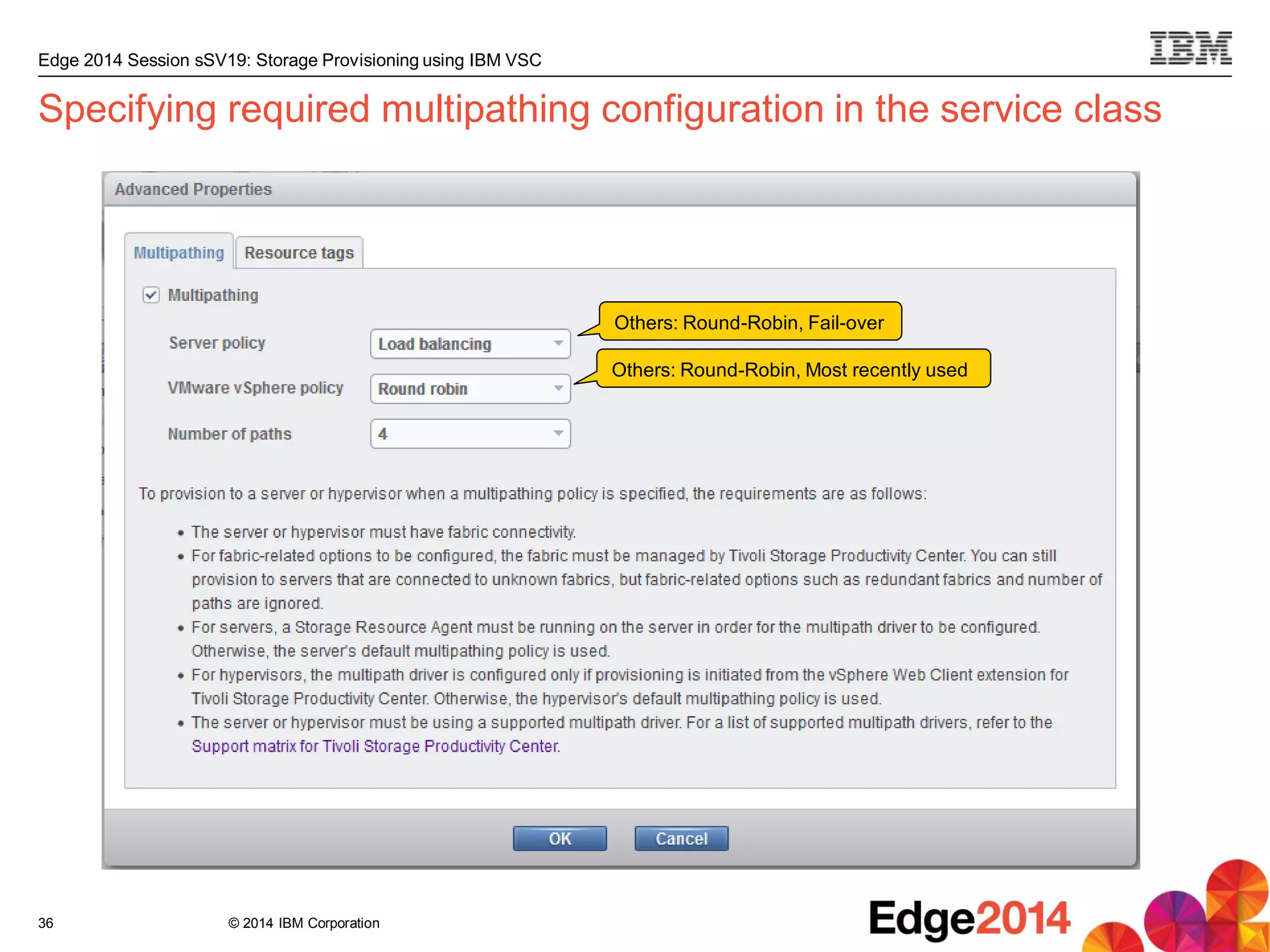
Specifying required multipathing configuration in the service class
36
Others: Round-Robin, Fail-over
Others: Round-Robin, Most recently used
© 2014 IBM Corporation
Edge 2014 Session sSV19: Storage Provisioning using IBM VSC
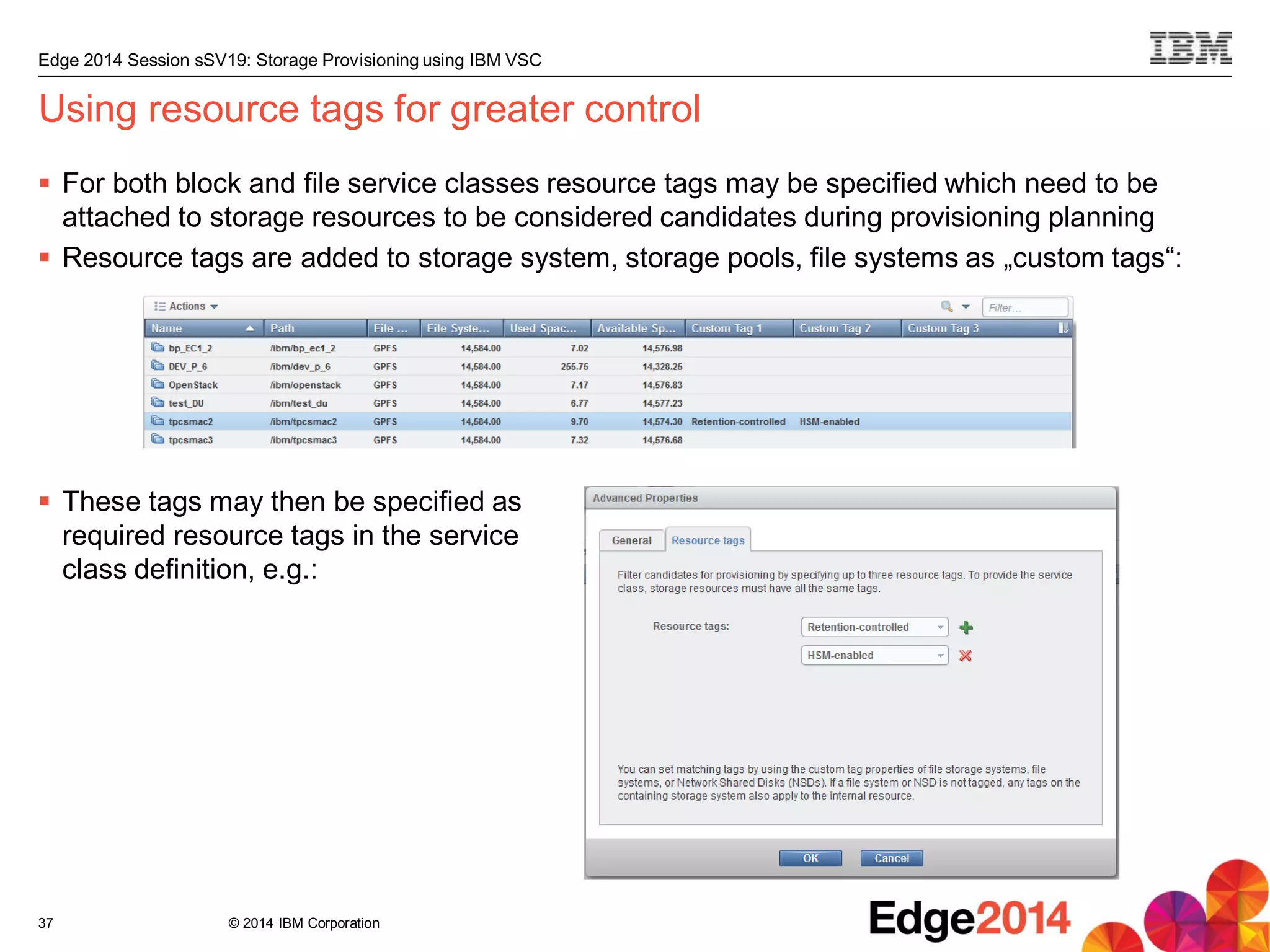
Using resource tags for greater control
 For both block and file service classes resource tags may be specified which need to be
attached to storage resources to be considered candidates during provisioning planning
 Resource tags are added to storage system, storage pools, file systems as „custom tags“:
 These tags may then be specified as
required resource tags in the service
class definition, e.g.:
37
© 2014 IBM Corporation
Edge 2014 Session sSV19: Storage Provisioning using IBM VSC
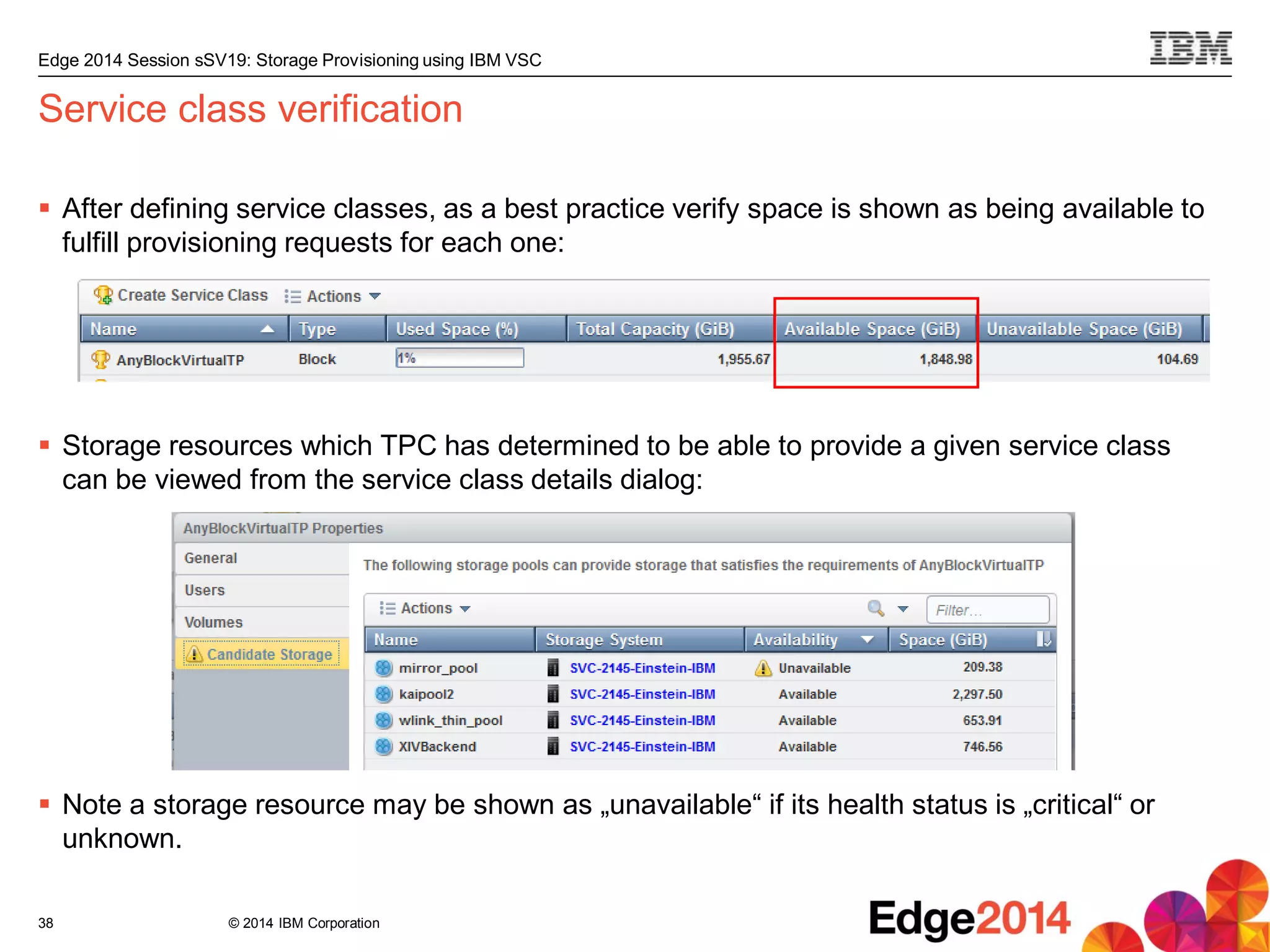
Service class verification
 After defining service classes, as a best practice verify space is shown as being available to
fulfill provisioning requests for each one:
 Storage resources which TPC has determined to be able to provide a given service class
can be viewed from the service class details dialog:
 Note a storage resource may be shown as „unavailable“ if its health status is „critical“ or
unknown.
38
© 2014 IBM Corporation
Edge 2014 Session sSV19: Storage Provisioning using IBM VSC
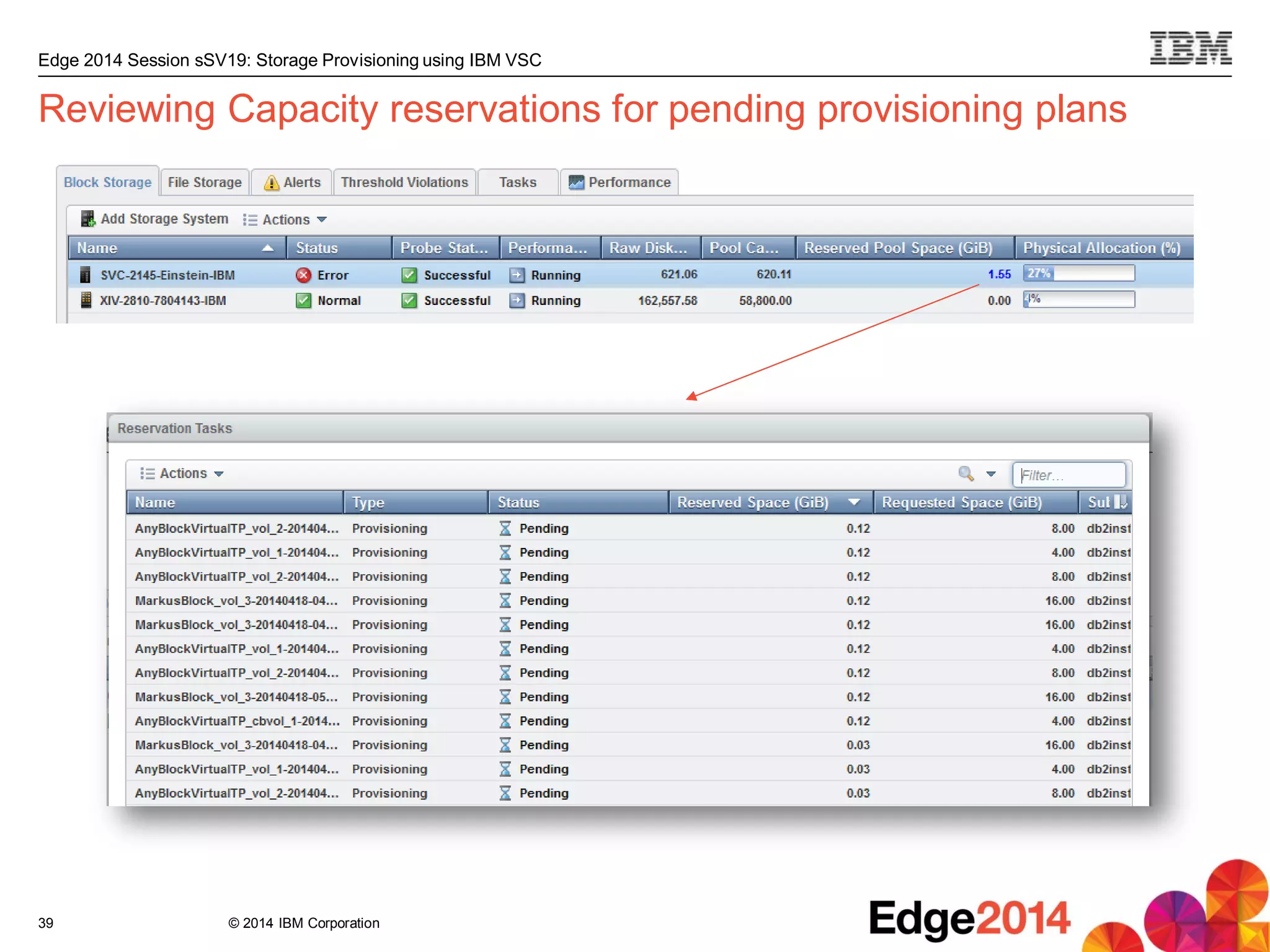
Reviewing Capacity reservations for pending provisioning plans
39

Software defined storage provisioning using ibm smart cloud

  • 1.
    © 2014 IBMCorporation Software-Defined Storage Provisioning using IBM SmartCloud Virtual Storage Center Christian Bolik – TPC Development 12 May 2014
  • 2.
    © 2014 IBMCorporation Edge 2014 Session sSV19: Storage Provisioning using IBM VSC Agenda  Typical storage provisioning challenges  How VSC 5.2.1 addresses those challenges  The three phases in VSC storage provisioning: Setup, planning, execution 2 „Storage provisioning using VSC is significantly faster, smarter, and safer than manual storage provisioning.“
  • 3.
    © 2014 IBMCorporation Edge 2014 Session sSV19: Storage Provisioning using IBM VSC 3 Servers • ESX servers • Apps, DB’s, file systems • Volume managers • Host bus adaptors • Virtual HBAs • Multi-path drivers What You Need to Manage SmartCloud Virtual Storage Center can help with the VSC Storage Analytics Engine All that TPC offers plus… File and DB Scans and Analytics Advanced SAN Planning and provisioning based on best practices Proactive configuration history (*change management) Configuration Best Practices Performance optimization Tiered Storage Optimizer TPC functions  Single management console  Heterogeneous storage  Health monitoring  Capacity mgmt.  Provisioning  Fabric management  FlashCopy support  Storage System Performance Management  SAN Fabric Performance management  Trend Analysis  DR & Business Continuity  Applications & Storage  Hyperswap Mgmt. Storage Networks • Switches & Directors • Virtual devices Storage • Multi-vendor storage • Storage array provisioning • Virtualization / Vol. mapping • Block + NAS, VMFS • Tape libraries Replication • FlashCopy • Metro Mirror • Metro Global Mirror … and more Virtual Storage Center = TPC + „Storage Analytics Engine“ + SVC + FCM TPC = Tivoli Storage Productivity Center SVC = SAN Volume Controller FCM = FlashCopy Manager
  • 4.
    © 2014 IBMCorporation Edge 2014 Session sSV19: Storage Provisioning using IBM VSC Storage provisioning defined  Providing new, or additional storage capacity to an application  Applications usually have certain service level requirements – Performance, availability, security, ...  Storage capacity may be needed in the form of block volumes (LUNs), or NAS shares – Or, more recently, in the form of HTTP-delivered „object storage“  Typically, an application owner submits a storage provisioning request to a storage admin – ...and then often needs to wait days or weeks for the request to be fulfilled. 4
  • 5.
    © 2014 IBMCorporation Edge 2014 Session sSV19: Storage Provisioning using IBM VSC 5 Storage provisioning challenges Storage provisioning using VSC
  • 6.
    © 2014 IBMCorporation Edge 2014 Session sSV19: Storage Provisioning using IBM VSC Typical admin challenges related to storage provisioning  Where to place the new volume / the new share? – So that application requirements are met – Taking into account host connectivity – Considering affinity requirements – Honoring authorizations (who may provision from what) – All while keeping load balanced and utilization optimized across the storage infrastructure  Time-consuming, multi-step configuration process: – Volume (or share) creation and configuration – Add host connection (or export) – Update zoning – Configure multi-pathing on the server – Rescan SCSI bus on server to have new volume show up 6
  • 7.
    © 2014 IBMCorporation Edge 2014 Session sSV19: Storage Provisioning using IBM VSC How VSC addresses these storage provisioning challenges  Where to place the new volume / the new share? – So that application requirements are met Service Classes – Taking into account host connectivity Exploiting TPC‘s knowledge of SAN fabrics – Considering affinity requirements A server‘s volumes are colocated – Honoring authorizations (who may provision from what) Capacity Pools and Service Class authorizations – All while keeping load balanced and utilization optimized across the storage infrastructure Exploiting TPC‘s capacity and performance monitoring and analytics – Combined into automated and optimal volume and share placement  Time-consuming, multi-step configuration process: – Volume (or share) creation and configuration – Add host connection (or export) – Update zoning – Configure multi-pathing on the server – Rescan SCSI bus on server to have new volume show up – All steps are automated end-to-end 7
  • 8.
    © 2014 IBMCorporation Edge 2014 Session sSV19: Storage Provisioning using IBM VSC 8 Phase 1: Setup Storage provisioning using VSC: Setup – Planning – Execution
  • 9.
    © 2014 IBMCorporation Edge 2014 Session sSV19: Storage Provisioning using IBM VSC Bare minimum setup for storage provisioning using VSC Limitations of this minimal setup:  Cannot check host connectivity, or configure zoning during provisioning – Would need to add switches to TPC to enable.  Cannot configure multi-pathing or rescan SCSI bus on servers – Would need to deploy agents (SRAs) on servers to enable. 9 1. Add storage devices to TPC that should be provisioned from: 3. Define agentless servers that should be provisioned to: 2. Define service classes which can be provided by the storage devices:
  • 10.
    © 2014 IBMCorporation Edge 2014 Session sSV19: Storage Provisioning using IBM VSC More extensive setup for storage provisioning using VSC  Add storage devices that should be provisioned from  Add switches (typically this means CIMOMs, like Brocade Network Advisor) that provide the SAN fabrics connecting servers and storage devices  Define agentless servers and/or deploy Storage Resource Agents (SRAs) on servers that should be provisioned to  Add hypervisors for VMware ESX/ESXi/vCenter servers that should be provisioned to  Group storage resources that can be provisioned from into capacity pools – E.g. creating one capacity pool per group, department, etc.  Define service classes which can be provided by the storage devices, – Optionally restrict each one to one or more capacity pools and/or users, as appropriate 10
  • 11.
    © 2014 IBMCorporation Edge 2014 Session sSV19: Storage Provisioning using IBM VSC  Capacity pools allow provisioning requests to be targetted to a specific set of storage resources – Can think of capacity pools as allowing to place boundaries around groups of storage resources  Storage resources which may be provisioned from (storage systems, pools, file systems) can be grouped into capacity pools  Service classes may be configured to allow provisioning only from a specific set of capacity pools  The use of capacity pools is completely optional What is a capacity pool, exactly? 11
  • 12.
    © 2014 IBMCorporation Edge 2014 Session sSV19: Storage Provisioning using IBM VSC Service classes  Service classes in VSC serve a dual purpose: 1. Represent different capabilities present in the storage environment 2. Reflect the requirements of an application on new storage capacity  In general, service classes enable the following: 12 Mapping Business Requirements Infrastructure Capabilities to Capacity Accessibility Availability Performance Security Retention/Compliance Media type Disk technologies RAID levels Encryption Compression Thin Provisioning Copies Access latency Access protocols etc....
  • 13.
    © 2014 IBMCorporation Edge 2014 Session sSV19: Storage Provisioning using IBM VSC Defining block service classes  The storage administrator creates block service classes for representing the different levels of service for block storage, provided by storage systems added to TPC 13 Main attributes:  Storage tier range: if set, requires candidate storage pools to be assigned to a tier within the selected range  Virtualization: if set, provision from an IBM virtualizer (SVC or Storwize V7000)  Thin provisioning: if set, additional related attributes may be configured in the „advanced“ section, e.g.:
  • 14.
    © 2014 IBMCorporation Edge 2014 Session sSV19: Storage Provisioning using IBM VSC Defining file service classes  The storage administrator creates file service classes for representing the different levels of service for file storage, provided by storage systems added to TPC 14 Main attribute:  Whether to use shared or dedicated storage – Shared: file system from which new share is provisioned may contain other shares – Dedicated: file system must not contain other shares
  • 15.
    © 2014 IBMCorporation Edge 2014 Session sSV19: Storage Provisioning using IBM VSC Phase 2: Planning Storage provisioning using VSC: Setup – Planning – Execution 15
  • 16.
    © 2014 IBMCorporation Edge 2014 Session sSV19: Storage Provisioning using IBM VSC Planning the configuration steps for provisioning  When a provisioning request is submitted, VSC creates a provisioning plan, based on the service class specified in the provisioning request  Planning for provisioning involves the following: – Determining on which storage resource to place the new volume or share – Identifying which host connections to add or modify (block only) – Determining required zoning updates and multipathing configuration changes to comply with the service class definition (block only)  A provisioning request may be submitted in various ways: – Interactively by the user, using VSC‘s provisioning wizard – Through VSC‘s SMAC API, by the VSC vSphere plugin, or by other IBM products such as SmartCloud Storage Access (SCSA) or SmartCloud Orchestrator (SCO) 16
  • 17.
    © 2014 IBMCorporation Edge 2014 Session sSV19: Storage Provisioning using IBM VSC Launching VSC‘s provisioning wizard 17
  • 18.
    © 2014 IBMCorporation Edge 2014 Session sSV19: Storage Provisioning using IBM VSC Provisioning new volumes via VSC‘s provisioning wizard 18 One plan (represented by a task) is created per unique service class and capacity pool combination
  • 19.
    © 2014 IBMCorporation Edge 2014 Session sSV19: Storage Provisioning using IBM VSC Reviewing the details of a block provisioning plan 19 Note: Zoning step missing here as selected server paulaner already has connectivity to the storage system TPC selected for the new volume.
  • 20.
    © 2014 IBMCorporation Edge 2014 Session sSV19: Storage Provisioning using IBM VSC Provisioning a new share using VSC‘s provisioning wizard 20
  • 21.
    © 2014 IBMCorporation Edge 2014 Session sSV19: Storage Provisioning using IBM VSC Resulting file provisioning plan 21 Note the „Execute“ and „Schedule“ buttons are only available here for administrative users. Other users would just be able to save the plan for administrative approval (same applies to block provisioning), unless the service class is configured to not require approval.
  • 22.
    © 2014 IBMCorporation Edge 2014 Session sSV19: Storage Provisioning using IBM VSC How VSC decides where to place the new volumes or share  Is the specified service class restricted to one or more capacity pools? – If yes, consider only resources which are members of any of these  Does storage resource fulfill all service class attributes?  Is storage resource not in error state or unreachable?  Does storage resource still have sufficient free unreserved space?  For volumes, does the server to be provisioned to already have volumes assigned? – If yes, co-locate the new volumes  For volumes, in case fabrics known to TPC, do the server and storage resource have common fabrics?  Out of the remaining candidates, pick the one least utilized in terms of performance (I/O) and space 22
  • 23.
    © 2014 IBMCorporation Edge 2014 Session sSV19: Storage Provisioning using IBM VSC Phase 3: Execution Storage provisioning using VSC: Setup – Planning – Execution 23
  • 24.
    © 2014 IBMCorporation Edge 2014 Session sSV19: Storage Provisioning using IBM VSC Monitoring provisioning progress  Provisioning plans (tasks) may be executed to run immediately, or scheduled for a time in the future  Progress of a provisioning task can be monitored via the task details: 24
  • 25.
    © 2014 IBMCorporation Edge 2014 Session sSV19: Storage Provisioning using IBM VSC All configuration steps are logged in detail in the provisioning task 25
  • 26.
    © 2014 IBMCorporation Edge 2014 Session sSV19: Storage Provisioning using IBM VSC Accessing the new volume or share on the server  Block: – Rescan bus unless agent installed – Windows: initialize disk, choose whether to convert to dynamic disk – Format volume with a file system if desired  File: – Mount the share on the server 26
  • 27.
    © 2014 IBMCorporation Edge 2014 Session sSV19: Storage Provisioning using IBM VSC Summary and Outlook Storage provisioning using VSC 27
  • 28.
    © 2014 IBMCorporation Edge 2014 Session sSV19: Storage Provisioning using IBM VSC Benefits of using VSC for storage provisioning  Less time-consuming and less error-prone than manual provisioning due to extensive automation  Smart storage placement, based on observed space and performance utilization, storage health status and storage capabilities  Self-service storage provisioning with administrative review and approval ...or, in summary: 28 „Storage provisioning using VSC is significantly faster, smarter, and safer than manual storage provisioning.“
  • 29.
    © 2014 IBMCorporation Edge 2014 Session sSV19: Storage Provisioning using IBM VSC What‘s next for storage provisioning using VSC  SVC stretched-cluster-aware provisioning  Integration of replication configuration  Quota definition and enforcement for service classes and capacity pools  Service class compliance verification for existing volumes and shares  Alerts for provisioning events (request submitted, request completed, etc.) 29
  • 30.
    © 2014 IBMCorporation Edge 2014 Session sSV19: Storage Provisioning using IBM VSC 30 IBM wants your input Participate in our Tivoli Storage Beta Programs  Influence designs and product direction  Collaborate with experts and other customers  Interact directly with product teams  Access to early code  Evaluate new capabilities  Education from IBM experts  Support directly from developers  Opportunity to be an IBM reference customer Get engaged, contact: Lorena Colston lcolston@us.ibm.com http://www.ibm.com/developerworks/servicemanagement/sm/tpc/downloads.html
  • 31.
    © 2014 IBMCorporation Edge 2014 Session sSV19: Storage Provisioning using IBM VSC Thank You Storage provisioning using VSC 31 In case of questions or feedback, please feel free to contact me: Christian Bolik bolik@de.ibm.com
  • 32.
    © 2014 IBMCorporation Edge 2014 Session sSV19: Storage Provisioning using IBM VSC 32 IBM advanced solutions for small and mid-sized organizations  Reduce storage cost and complexity  VMware and cloud integration  Priced and packaged for SMB Restrictions apply. See website for details http://www.ibm.com/midmarket/us/en/data-backup-recovery.html Data and Storage Management Data Protection and Resiliency IBM Tivoli Storage Manager Entry • Unlimited capacity • Priced per node IBM Tivoli Storage Manager Suite for Unified Recovery Entry • Priced by capacity • Unlimited nodes Tivoli Storage Manager and advanced agents for VMware, email, databases and SAP, including SAP HANA IBM Virtual Storage Center for Storwize Family • Unlimited capacity • Priced per Storwize enclosure IBM Virtual Storage Center Entry • Up to 250 TB capacity • For use with SAN Volume Controller Analytics driven tier optimization, automated provisioning, and integrated performance management for storage
  • 33.
    © 2014 IBMCorporation Edge 2014 Session sSV19: Storage Provisioning using IBM VSC 33 Trademarks and Disclaimers Adobe, the Adobe logo, PostScript, and the PostScript logo are either registered trademarks or trademarks of Adobe Systems Incorporated in the United States, and/or other countries. IT Infrastructure Library is a registered trademark of the Central Computer and Telecommunications Agency which is now part of the Office of Government Commerce. Intel, Intel logo, Intel Inside, Intel Inside logo, Intel Centrino, Intel Centrino logo, Celeron, Intel Xeon, Intel SpeedStep, Itanium, and Pentium are trademarks or registered trademarks of Intel Corporation or its subsidiaries in the United States and other countries. Linux is a registered trademark of Linus Torvalds in the United States, other countries, or both. Microsoft, Windows, Windows NT, and the Windows logo are trademarks of Microsoft Corporation in the United States, other countries, or both. ITIL is a registered trademark, and a registered community trademark of the Office of Government Commerce, and is registered in the U.S. Patent and Trademark Office. UNIX is a registered trademark of The Open Group in the United States and other countries. Java and all Java-based trademarks and logos are trademarks or registered trademarks of Oracle and/or its affiliates. Cell Broadband Engine is a trademark of Sony Computer Entertainment, Inc. in the United States, other countries, or both and is used under license therefrom. Linear Tape-Open, LTO, the LTO Logo, Ultrium, and the Ultrium logo are trademarks of HP, IBM Corp. and Quantum in the U.S. and other countries. Other product and service names might be trademarks of IBM or other companies. Information is provided "AS IS" without warranty of any kind. The customer examples described are presented as illustrations of how those customers have used IBM products and the results they may have achieved. Actual environmental costs and performance characteristics may vary by customer. Information concerning non-IBM products was obtained from a supplier of these products, published announcement material, or other publicly available sources and does not constitute an endorsement of such products by IBM. Sources for non-IBM list prices and performance numbers are taken from publicly available information, including vendor announcements and vendor worldwide homepages. IBM has not tested these products and cannot confirm the accuracy of performance, capability, or any other claims related to non-IBM products. Questions on the capability of non-IBM products should be addressed to the supplier of those products. All statements regarding IBM future direction and intent are subject to change or withdrawal without notice, and represent goals and objectives only. Some information addresses anticipated future capabilities. Such information is not intended as a definitive statement of a commitment to specific levels of performance, function or delivery schedules with respect to any future products. Such commitments are only made in IBM product announcements. The information is presented here to communicate IBM's current investment and development activities as a good faith effort to help with our customers' future planning. Performance is based on measurements and projections using standard IBM benchmarks in a controlled environment. The actual throughput or performance that any user will experience will vary depending upon considerations such as the amount of multiprogramming in the user's job stream, the I/O configuration, the storage configuration, and the workload processed. Therefore, no assurance can be given that an individual user will achieve throughput or performance improvements equivalent to the ratios stated here. Prices are suggested U.S. list prices and are subject to change without notice. Starting price may not include a hard drive, operating system or other features. Contact your IBM representative or Business Partner for the most current pricing in your geography. Photographs shown may be engineering prototypes. Changes may be incorporated in production models. © IBM Corporation 2014. All rights reserved. References in this document to IBM products or services do not imply that IBM intends to make them available in every country. Trademarks of International Business Machines Corporation in the United States, other countries, or both can be found on the World Wide Web at http://www.ibm.com/legal/copytrade.shtml. ZSP03490-USEN-00
  • 34.
    34 IBM Systems LabServices and Training Deep skills driving client satisfaction and technical effectiveness for smarter computing IBM Systems Lab Services and Training infuses intelligence into how global information technology works. is composed of experts who develop and deploy solutions across IBM’s systems family offerings. From in-depth product expertise, to training, to platform-specific hardware and software solutions, we’re here for you! IBM Systems Training IT infrastructure training that enables a Smarter Planet IBM’s award-winning classes and industry-renowned technical events helps you fully exploit the power of your IBM technology investment. Our comprehensive portfolio of skills and career accelerators are designed to meet all your training needs – individual, departmental and organizational. Visit us www.ibm.com/training Partnered with IBM selected global training providers click to explore our offerings
  • 35.
    © 2014 IBMCorporation Edge 2014 Session sSV19: Storage Provisioning using IBM VSC Backup 35
  • 36.
    © 2014 IBMCorporation Edge 2014 Session sSV19: Storage Provisioning using IBM VSC Specifying required multipathing configuration in the service class 36 Others: Round-Robin, Fail-over Others: Round-Robin, Most recently used
  • 37.
    © 2014 IBMCorporation Edge 2014 Session sSV19: Storage Provisioning using IBM VSC Using resource tags for greater control  For both block and file service classes resource tags may be specified which need to be attached to storage resources to be considered candidates during provisioning planning  Resource tags are added to storage system, storage pools, file systems as „custom tags“:  These tags may then be specified as required resource tags in the service class definition, e.g.: 37
  • 38.
    © 2014 IBMCorporation Edge 2014 Session sSV19: Storage Provisioning using IBM VSC Service class verification  After defining service classes, as a best practice verify space is shown as being available to fulfill provisioning requests for each one:  Storage resources which TPC has determined to be able to provide a given service class can be viewed from the service class details dialog:  Note a storage resource may be shown as „unavailable“ if its health status is „critical“ or unknown. 38
  • 39.
    © 2014 IBMCorporation Edge 2014 Session sSV19: Storage Provisioning using IBM VSC Reviewing Capacity reservations for pending provisioning plans 39