SMART EXCHANGE Software
1- Main Menu: Everything is here! You don’t need to get lost in listbox and non-sense labels to
manage your business.
Searching by Name, Phone Number or Customer ID:
Adding New Client : Everything is here add a new client , five tabs are designed for making registering
the clients as fast as possible.
First Enter client’s personal information and save it. Now you have all the tabs unlocked for entering
more details like Banks, ID cards and client’s receivers.
ID card Tab: you can add two ID cards to each client.
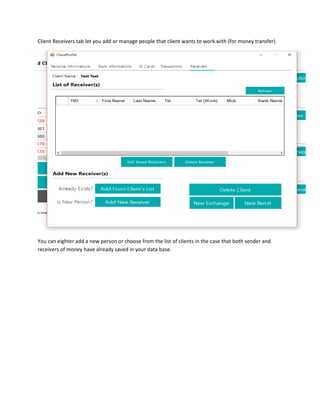
Client Receivers tab let you add or manage people that client wants to work with (for money transfer)
You can eighter add a new person or choose from the list of clients in the case that both sender and
receivers of money have already saved in your data base.
Add receiver from Client’s List:
Adding new person as a receiver to client:
Quick Exchange:
For transactions under 1000 CAD you can use quick exchange for buying and selling foreign cash.
By clicking the Icon beside Cost above you can check the cash you receive and pay to client to make sure
you are not losing money because of counting error:
Transaction Histroty:
Search by date, name refrecne Number and option to see Updated, deleted and must report
transactions as well as editing the transactions.
You can update or delete transactions in this page everything is under detection and automated to
reduce the user errors.
Adding or Updating Rates:
New Exchange:
New Remit:
Ability to add unlimited Attachments to transaction:
Account Manager:
Very nice account manager gives you a full control to your accounts and transaction details and
histories.
Transaction History:
Total Balance:
User Manager :
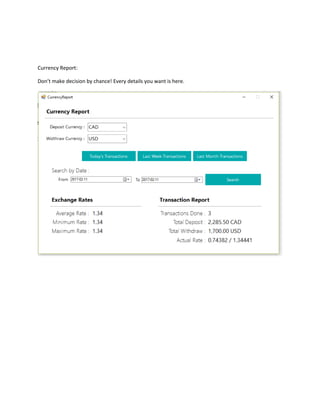
Currency Report:
Don’t make decision by chance! Every details you want is here.

Smart exchange software

  • 1.
    SMART EXCHANGE Software 1-Main Menu: Everything is here! You don’t need to get lost in listbox and non-sense labels to manage your business. Searching by Name, Phone Number or Customer ID:
  • 2.
    Adding New Client: Everything is here add a new client , five tabs are designed for making registering the clients as fast as possible. First Enter client’s personal information and save it. Now you have all the tabs unlocked for entering more details like Banks, ID cards and client’s receivers.
  • 3.
    ID card Tab:you can add two ID cards to each client.
  • 4.
    Client Receivers tablet you add or manage people that client wants to work with (for money transfer) You can eighter add a new person or choose from the list of clients in the case that both sender and receivers of money have already saved in your data base.
  • 5.
    Add receiver fromClient’s List:
  • 6.
    Adding new personas a receiver to client:
  • 7.
    Quick Exchange: For transactionsunder 1000 CAD you can use quick exchange for buying and selling foreign cash. By clicking the Icon beside Cost above you can check the cash you receive and pay to client to make sure you are not losing money because of counting error:
  • 9.
    Transaction Histroty: Search bydate, name refrecne Number and option to see Updated, deleted and must report transactions as well as editing the transactions. You can update or delete transactions in this page everything is under detection and automated to reduce the user errors.
  • 10.
  • 11.
  • 12.
    Ability to addunlimited Attachments to transaction:
  • 14.
    Account Manager: Very niceaccount manager gives you a full control to your accounts and transaction details and histories.
  • 15.
  • 16.
  • 17.
  • 18.
    Currency Report: Don’t makedecision by chance! Every details you want is here.