SIMPLIFYI.T.THEBUSINESSOWNERSGUIDETO
ELIMINATINGTECHNOLOGYSTRESS
TheUltimateBusinessOwner’sGuideforFinding
aProfessional,Competent,Honest,Considerate,On-Time,
Fairly-PricedandDependableComputerConsultant
MICHAELEINBINDER SCHATZ
MICHAELEINBINDERSCHATZSIMPLIFYI.T.–THEBUSINESSOWNERSGUIDETOELIMINATINGTECHNOLOGYSTRESS
READTHISBOOKTODISCOVER:
• Thefivetypesoftechnicalsupportavailable,andtheprosand
consofeach.
•5criticalfactsyoumustknowbeforemovingtothecloud
•How toavoidgettingrippedoff,disappointedand/orpayingfor
substandardwork.
••11warningsignsthatyouhiredthewrong
computerconsultant.
•Viruses,worms,spywareand
hackers:whatyouneedtoknow toprotectyourcompanyfrom
invasion.
•Everythingyouneedtoknowaboutcontracts,paymentschedules
andratenegotiations.
••17revealingquestionsyoushouldaskanycomputerconsultant
beforegivingthemaccesstoyourcompany’snetwork.
• Whyyouneedtoavoid“cheap”or“bargain”computerrepair
shops.
•Howtoturntechnologyintoacompetitiveadvantageinsteadofa
drainonyourtime,moneyandresources.
••What“managedservices”areandwhythousandsofbusiness
ownersarenowdemandingthistypeofsupportfromtheircomputer
consultant.
MichaelEinbinder-Schatzbringsover
25yearsofITexperience,apassion
forpeopleandhisloveofstorytelling
together in leading his team at
Jobecca Technology Group toward
thegoalsofcontinuallyimprovingthe
client experience, and providing
targetedtargeted consultative guidance that
resultsintangiblelong-term benefits
forJobecca’sclients.
DON’TTRUSTYOURCOMPANY’SCRITICALDATAAND
BUSINESSSYSTEMSTOJUSTANYONE!
Thisbookwillrevealwhateverysmallbusiness-ownermustknow
aboutfindingtherightcomputerconsultant.
1
SIMPLIFY I.T.
THEBUSINESSOWNER’SGUIDETO
ELIMINATINGTECHNOLOGYSTRESS
You have in your hands the ultimate business owner’s guide
for finding a professional, competent, honest, considerate,
on-time, fairly-priced and dependable computer consultant.
Read this book and you’ll discover:
 The five types of technical support
available, and the pros and cons of each.
 5 critical facts you must know before
moving to the cloud.
 How to avoid getting ripped off,
disappointed and/or paying for
substandard work.
 11 warning signs that you hired the wrong
computer consultant.
 Viruses, worms, spyware and hackers: what
you need to know to protect your company
from invasion.
 Everything you need to know about
contracts, payment schedules and rate
negotiations.
 17 revealing questions you should ask any
computer consultant before giving them
access to your company’s network.
 Why you need to avoid “cheap” or
“bargain” computer repair shops.
2
 How to turn technology into a competitive
advantage instead of a drain on your time,
money and resources.
 Why your business needs managed services.
3
Master Technology
Strategist
for Small Business:
Michael Einbinder-Schatz
co-author of
SIMPLIFY I.T. – The Business
Owner’s Guide to Eliminating
Technology Stress
Michael Einbinder-Schatz
Jobecca Technology Group, LLC
The Canal Works
10 Canal Street, Suite 236
Bristol, PA 19007
(215) 891-9501
www.jobecca.com
Helping Small-Business Owners Eliminate
Technology Headaches Finally and Forever
All rights reserved. No part of this publication may be reproduced or
transmitted in any form by any means, electronic or mechanical, including
photography, recording or information retrieval system, without written
permission from the author.
ISBN: 978-0-9960447-3-8
Printed in the USA.
Copyright © 2015 Technology Marketing Toolkit, Inc. & Jobecca Technology Group LLC
4
CONTENTS
Introduction...........................................................................7
Business Is Becoming (Technically) More Complicated......7
Downside of Technology...................................................................7
Computer Consultant Horror Stories...........................................9
What This Book Will Teach You..................................................10
Chapter ONE.........................................................................13
The True Cost of Bad Advice, Faulty Repairs and an
Incompetent Computer Consultant...........................................13
The Cost of Bad Advice....................................................................15
Chapter TWO........................................................................19
What Are Your Options for Technical Support?...................19
Chapter THREE....................................................................30
Secrets to Choosing a Great Computer Consultant: What to
Look For, What to Avoid, What to Demand!...........................30
The 4 Most Costly Misconceptions About Computer
Maintenance and Repair.................................................................31
17 Questions You Should Ask Your Computer Consultant
Before Hiring Them to Support Your Network.....................37
11 Warning Signs that You Hired the Wrong Consultant 45
5 More Mistakes to Avoid When Choosing a Computer
Consultant ............................................................................................46
Chapter FOUR ......................................................................50
Avoiding Project Nightmares, Disasters and Expensive
Miscommunications.........................................................................50
Determine Your Priorities.............................................................51
A Quick Word on Price....................................................................52
Start Small............................................................................................53
Demand a Fixed Price......................................................................53
Get Everything in Writing..............................................................54
Do Your Research..............................................................................54
Communicate Your Concerns.......................................................55
Chapter FIVE ........................................................................56
How to Get the Most Out of Your Computer Consultant...56
5
Take Responsibility for Your Own Protection.......................57
Keep Spyware, Malware and Viruses Off Your Network ..58
Be Aware of Sneaky Ways Hackers Invade Your Network
...................................................................................................................59
Create and Enforce an Acceptable-Use Policy (AUP) .........61
Allow Your Consultant to Maintain Your Network .............61
Be a Great Client ................................................................................63
Six Ways a Good Relationship With a Competent Computer
Consultant Benefits Your Company...........................................64
Chapter Six............................................................................65
Preventing Network Disasters with Proactive
Maintenance........................................................................................66
How Managed Services Can Prevent These Disasters from
Happening to Your Business.........................................................67
What Are the Benefits of Managed Services? ........................67
What to Look For In a Managed-Service Plan .......................70
Chapter Seven......................................................................77
Moving to the Cloud .........................................................................77
5 Critical Facts You Must Know Before Moving to the Cloud
...................................................................................................................77
What is Cloud Computing? ............................................................78
What about Office 365 and Google Apps?...............................80
Pros and Cons of Moving to the Cloud......................................81
Different Types of Cloud Solutions Explained: .....................86
FAQs About Security, Where Your Data is Held and
Internet Connectivity.......................................................................88
What to Look For When Hiring a Cloud Integrator.............90
8 Critical Questions to Ask Your IT Company or Computer
Consultant BEFORE Letting Them Move Your Network to
the Cloud...............................................................................................91
Chapter Eight .......................................................................95
Contracts, Payment Schedules and Rate Negotiations ......95
Warranties, Guarantees and Making Things Right..............96
Payment Terms..................................................................................96
Project Timeline and Completion Date ....................................97
Changes, Modifications and “Scope Creep”.............................97
Hardware, Software and Materials...........................................99
Hours and Conditions of Work....................................................99
Arbitration and Cancellation Clauses..................................... 100
6
Chapter Nine .....................................................................103
Technical Terms Explained in Plain English....................... 103
An Invitation to the Reader .........................................107
7
Introduction
Business Is Becoming (Technically) More
Complicated
There is a powerful force driving all businesses to
deliver superior products and services faster and on
tighter margins—technology.
Every business, from small mom-and-pop stores to
large enterprises, is developing a dependence on
technology. Whether it’s e-mail, e-commerce, Websites,
cloud computing, database management or accounting
software, there are very few businesses that don’t have
some level of dependence on their computer network
and the various applications and data it stores.
The upside of technological advances is tremendous.
When applied correctly, technology can provide your
business significant competitive advantages in faster
production, increased productivity, improved customer
service, and up-to-the-minute reporting for strategic
planning and decision-making.
Downside of Technology
The downside of this vast dependence on technology
is that, when it doesn’t work, it can become a
tremendous source of frustration, putting a major strain
on production, sales and fulfillment. No business is
immune from computer problems and failures. Without
proactive network monitoring and maintenance, the
average business can end up with spyware, viruses and
system crashes that can easily turn into major network
outages. And that’s not including the daily computer
“glitches” and problems that frustrate you and your
employees.
8
Then there’s the complexity of it all. Installing and
supporting even a small network requires specialized
knowledge and skills that most small-business owners
don’t have in-house, and the margin for error is greatly
reduced in a small business. If a large corporation makes
a $50,000 technology mistake, it’s certainly not a good
thing, but it only represents a minor blip in their overall
IT budget. If a small business makes a $20,000, or even a
$10,000, technology mistake, it significantly impacts their
profitability and cash flow!
If you’re like most business owners, you probably shy
away from things technical in nature because you don’t
understand how they work, why they work, or how to
operate them. After all, what you want are business
solutions to drive sales and profitability, not whiz-bang
gadgets and budget-busting non-solutions that break and
make your life more complicated. Yet the technology
that runs your business is too important and too
expensive to ignore.
 So how do you make sure that the
hardware, software and solutions you are
investing in actually support your business
goals and work the way they are supposed
to?
 How do you stay on top of technological
advances that will give you significant
competitive advantages while steering clear
of the “latest and greatest” fads?
 How do you make sure your data is
protected from an ever-growing list of
threats, including viruses, hackers, spyware,
faulty hardware and software, and even
employee sabotage?
9
 And ultimately, how do you go about
finding a reliable consultant who not only
has the expertise to make all of this
technology work for you, but also the
business acumen to recommend and
implement real solutions that enhance
productivity and profitability?
That’s what this book is about: arming you with the
basic information you need to find a trusted advisor who
can help your small business tame technology and turn it
into a powerful, competitive weapon instead of a huge
financial strain and source of problems.
Computer Consultant Horror Stories
Unfortunately, there is no shortage of horror stories
about unbelievably bad customer service from
technology companies and computer consultants. They
range from annoying computer support consultants who
take forever to return a phone call to horror stories
about fly-by-night computer repair shops or consultants
who delete all the data stored on a network as a result of
their unethical or incompetent behavior. If you talk with
your own friends and colleagues, I’m sure you’ll get an
earful of the unfortunate experiences they have
encountered in this area.
The biggest reason for this is that the computer
services industry is not regulated like many other
industries. Almost anyone who can turn on a computer
can set up a computer repair shop, regardless of his
actual knowledge and expertise. Compare this to
automotive repair shops, electricians, plumbers, lawyers,
realtors, dentists, doctors and accountants (to name a
few) who are heavily regulated to protect the consumer
10
from receiving substandard work or getting ripped off.
However, because the computer industry is still very
new, there aren’t many laws in existence to protect the
consumer.
The upside is that most computer consultants are
ethical and will not try to cheat you or take advantage of
you. But unethical computer consultants aren’t the
biggest problem—incompetent consultants are. Even if
they are honestly trying to do a good job, their
inexperience can cost you dearly in inflated support bills,
network performance, security and data loss.
That is where this book will come in handy. It gives
you basic, need-to-know facts to help you find an
honest, competent consultant who can contribute to
your business’ success. By arming more business owners
with this information, I am hoping to raise the standards
within the technology consulting industry, and to give
you, the consumer, information to help you guard
against the unethical conduct or incompetence of some
companies and consultants.
Note: There are plenty of women in the computer
consulting industry. However, for simplicity, I will refer
to computer consultants in the masculine gender
throughout this book. You will also notice that I
sometimes use the term “computer consultant,” and
sometimes the word “technician.” Both refer to the
person providing advice, products, services and support
for your computer network. However, “consultant” is
used to define someone with a higher level of expertise
and knowledge, whereas “technician” connotes someone
who simply knows how to fix computers.
What This Book Will Teach You
 How to become an educated buyer of IT
support and services.
11
 How to avoid getting ripped off by an
incompetent, unethical computer consultant.
 How to reduce your IT costs.
 How to secure your network and data from
viruses, spyware, hackers, loss, natural
disasters and disgruntled employees.
 How to eliminate computer problems and
headaches that frustrate you and waste your
time.
 How to turn technology into a competitive
advantage instead of a drain on your time,
money and resources.
12
13
Chapter ONE
The True Cost of Bad Advice, Faulty
Repairs and an Incompetent Computer
Consultant
Every business, large or small, depends on
technology at some level to operate. If you’ve owned a
computer for more than five minutes, you know that no
one is exempt from computer problems, system crashes
and downtime.
While all business owners can relate to the sheer
frustration these issues create, few can put a dollar figure
to the actual hard cost to their business. That is because
so much of it is soft costs related to productivity, hours
worked and time lost.
What makes the cost of computer downtime even
more difficult to determine is the fact that no business is
“average,” and therefore statistics that quantify the cost
of downtime for the average company are worthless.
However, no business owner can deny that an
interruption in their business costs them money, whether
that interruption is caused by a server crash, hardware
failure or some other outside force. If you’ve ever had
your business grind to a screeching halt because you and
your employees could not access the data or systems
necessary for operations, you must have some idea of
the frustration and financial loss to your business, even if
you didn’t put a pencil to figuring out the exact cost.
Take a look at these statistics:
14
 Companies experience an average of 501
hours of network downtime every year, and
the overall downtime costs an average of
3.6% of annual revenue. (Source: The Costs of
Enterprise Downtime, Infonetics Research)
 93% of companies that lost their data center
for 10 days or more due to a disaster filed for
bankruptcy within one year of the disaster,
and 50% filed for bankruptcy immediately.
(Source: National Archives & Records
Administration in Washington)
 20% of small to medium businesses will
suffer a major disaster causing loss of critical
data every 5 years. (Source: Richmond House
Group)
 Last year, 40% of small to medium businesses
that manage their own network and use the
Internet for more than e-mail had their
network accessed by a hacker, and more than
50% didn’t even know they were attacked.
(Source: Gartner Group)
 Of those companies participating in the
Contingency Planning & Management Cost
of Downtime Survey, 46% said each hour of
downtime would cost their companies up to
$50,000; 28% said each hour would cost
between $51,000 and $250,000; 18% said
each hour would cost between $251,000 and
$1 million; and 8% said it would cost their
companies more than $1 million per hour.
(Source: Cost of Downtime Survey Results, 2001)
 Cybercriminals stole an average of $900 from
each of 3 million Americans in the past year,
and that doesn’t include the hundreds of
15
thousands of PCs rendered useless by
spyware. (Source: Gartner Group)
But even if you don’t factor in the soft costs of lost
productivity, there is a hard cost of repairing and
restoring your network. Most major network repairs will
require an average of 4-8 hours to get the network back
up and running. Plus, most consultants can’t get on-site
to resolve the problem for 24 to 48 hours. That means
your network could be down for one to two days.
Since the computer consultants may charge over
$150 per hour, plus a trip fee and a surcharge if it’s an
emergency, the average cost of these repairs is $750-
$1,500. Over a year, this results in $1,800-$3,000 in costs,
not including hardware and software or lost sales and
work hours. Of course, those numbers quickly multiply
with larger, more complex networks.
The Cost of Bad Advice
In addition to downtime, there is another expense
that most business owners don’t consider: the cost of
bad advice when an inexperienced consultant
recommends a product, service or project that is
unnecessary or incorrect for your specific situation.
Another form of bad advice is when a computer
consultant doesn’t take into consideration all the pitfalls
and situations that may arise when implementing your
project, and grossly underestimates the time and money
it will take to successfully complete it. When a consultant
makes this mistake, your project ends up way over
schedule, and costs you 2-3 times as much in unexpected
fees, hardware and software.
It’s gotten so bad that Network World recently noted,
“Increasingly, IT customers are crying malpractice and
16
railing against slipped implementation schedules,
compounded consulting fees, and disappointing product
performance.”
Although the price of bad advice is hard to measure,
if you’ve ever been disappointed or burned by a so-called
IT expert, you know the costs to your business are
painfully high.
Here are just a few of the ways bad IT advice
can cost you:
 Paying for unnecessary projects, software or
hardware.
 Paying too much for repairs, software and
hardware.
 Accumulating downtime, unstable networks,
data loss and security breaches.
 Getting stuck with a “solution” that doesn’t
really solve your problems.
 Increasing the time and work you and your
employees invest in rolling out a project.
 Paying double by having a competent
consultant fix what the first person messed
up or complete the project you originally
wanted implemented.
 Incurring litigation costs to get your money
back from a technician who ripped you off.
 Dealing with the sheer frustration of the
problems resulting from poor advice.
Trouble is, it’s hard to know that you’re paying for
bad advice until you are already neck-deep into the
problems. By the time you get the first inkling that you
hired the wrong person, you’ve already invested a
17
considerable amount of time and money, making it
difficult, if not impossible, to end the project and look
for someone else. That’s why the information in this
book is so critical. Your best defense against all this
heartache is to become an educated consumer who does
your homework.
18
19
Chapter TWO
What Are Your Options for Technical
Support?
With the constant changes to technology and the
daily development of new threats, even a small network
requires ongoing maintenance from a highly-trained
consultant to ward off viruses, spam, spyware, slowness,
user errors and data loss. However, hiring a full-time IT
person is not always feasible for small to medium
businesses. If your business can’t justify hiring an IT
manager, you only have three options for computer
support:
Option #1: Don’t do anything.
This is really foolish, but we see it every day:
businesses that don’t pay attention to the care and
maintenance of their network until it stops working.
Then they are forced to call in an expert to repair or
replace whatever caused the problem.
This reactive model of network support is similar to
ignoring oil and filter changes in your car until smoke
starts pouring out from under the hood. Taking a
reactive approach to network maintenance is a surefire
path to extensive downtime, lost data and excessive
spending on IT support, not to mention major
disruptions in staff productivity, sales, production and
customer service. Even if your computer network
appears to be working fine, there are a number of daily,
weekly and monthly maintenance tasks that must be
20
performed to keep your data secure and your system
running smoothly. A short list of these tasks includes:
 Virus scans and updates
 Security patches and updates
 System backups, test restores and disaster-
recovery planning
 Malware prevention, detection and removal
 Server and desktop optimization
 Employee policies and monitoring
 Firewall Intrusion Prevention
 Spam filtering
If you run specialized practice-management,
customer-relationship management, or production
software, or if you have multiple locations, a wireless
network, highly sensitive data (as in financial or medical
organizations), or other specialized needs, the list will get
longer. Remember, your computer network is just like
your car or your house. They all need regular
maintenance to avoid problems.
If you learn only one lesson from this book, I hope it
will be to proactively monitor, maintain and secure your
network instead of choosing to react to network and
computer problems as they arise. Aside from a
telephone, your computer network and the data on it are
undoubtedly the most important business tools in your
office. When they are unavailable, all productive work
comes to a grinding halt.
As the old saying goes, an ounce of prevention is
worth a pound of cure; this goes double for your
computer network. Unfortunately, most business owners
are under the incorrect assumption that regular
21
computer maintenance is not necessary, and therefore
only call in an experienced consultant when something
goes wrong. As we stated previously, this model of
“break-fix” computer support is not a good idea,
especially if the operation of your network and the data
on it are important to your business.
Option #2: Do it yourself.
Although this option is better than doing nothing, it
still puts you at risk for computer network disasters.
Instead of hiring a qualified consultant to support your
network, you designate the most technically-
knowledgeable person on staff to be your makeshift IT
manager, and bring in outside help only when you run
into a network crisis you can’t solve.
Problem is, you are pulling these people away from
the real job you hired them to do, and unless they have
the time to stay up-to-date on the latest developments in
IT support, security and management, they don’t have
the skills or time required to properly maintain and
secure your network and could actually worsen the
situation. This inevitably results in a network that is ill-
maintained and unstable, which may cause excessive
downtime, overspending on IT support, and expensive
recovery costs.
Another variation of this option is to get your
neighbor’s kid or a friend to provide computer support
on a part-time basis. This is a mistake for two reasons:
First, they may not be fully qualified to handle the job, so
they could make things worse. They may be able to fix
the problem in the short-term, but they might not have
the time or expertise to get to the root of the matter.
Second, they may not always be available when you need
them. If your server goes down at 9:00 AM, they might
not be able to come until later that day or evening, or
22
next week, causing you to lose a full day or more of
productivity.
Also, as mentioned previously, they are providing
reactive support. As with all things in life and business, it
is far less expensive to prevent problems than to clean
them up. If your part-time technician is not performing
regular maintenance and monitoring of your network,
you are susceptible to more problems.
Option #3: Outsource your support to a
competent consultant.
Obviously, this is going to be the fastest and surest
way to solve your computer problems. However, there
are an ever-growing number of companies springing up
across the country that offer computer repair services
and support, which makes it difficult for a business
owner to know which vendor is right for them.
As it stands today, there are five types of external
computer support you can use:
1. Vendor support:
Phone support provided by Dell, HP,
Microsoft, or any of the big software and
hardware vendors. If you’ve ever tried to get
technical support from a large manufacturer or
store, you know how frustrating it can be.
First, many vendors don’t provide free
support. If they do, it is usually very limited and
only available by e-mail or Web response forms.
If you are lucky enough to reach the support
department, you’ll end up going through a maze
of phone options before you get a live person,
and then the person is usually a nontechnical
customer service representative who can’t
23
provide any real assistance. In most cases, they’ll
be located in another country, and may even be
difficult to understand (many technology
companies outsource their customer service
because it’s cheaper than employing U.S.
workers). You’ll also get a different person every
time you call, and most will not have any
particular knowledge about your business or
what you are trying to achieve.
Here’s another problem with vendor support:
They aren’t going to help you solve problems
that aren’t related directly to their hardware or
software. For example, let’s suppose you’re
having trouble connecting to the Internet, so you
call your local provider. If their service is not
causing the problem, you’re stuck. Maybe your
firewall is not configured right. Maybe the cable
is not connected properly. If your problem is
even partially related to another software or
piece of hardware on your system, they won’t
help you.
2. Computer support hotline services:
These services work like prepaid calling
cards. For a set fee, you’ll get an 800 number to
call for 24-7 technical support. Sounds
reasonable, but it’s not all it’s cracked up to be.
If you are a home user with simple
application problems and questions, this service
may work well for you. However, if you are a
business with mission-critical data, the last thing
you want is a junior technician giving you advice.
Also, some problems simply need to be analyzed
on-site. Finally, these services are set up to
deliver basic computer support, not to
24
troubleshoot server problems, help with data
recovery, or provide proactive maintenance.
3. The part-time technician just getting
started:
This is usually someone who left a job in the
IT department of a company, got fired, or lost a
job due to downsizing. Either way, he decided to
start his own business with the dream of making
lots of money by providing computer support to
small businesses.
In many cases, he will try to do a good job
for you. He means well, will often work cheap,
and is usually eager to please. He might even
have been referred to you by a friend or business
colleague.
Although he has every intention of providing
you with a good service, there are some things
you need to consider before hiring him to work
on your network. Since most of these folks work
from home, they don’t have an assistant or office
staff to handle your requests. When you call,
you’ll either get:
• An answering machine.
• A spouse, friend or child who will take a
message (which might or might not
reach the technician).
• No answer and no voice mail; the
phone just keeps ringing.
• The technician on his cell phone.
Unfortunately, he’s usually at another
client’s site, in his car, or taking care of
25
some personal business (you catch him
at the doctor’s office or in a noisy
restaurant).
The problem with this choice is response
time; if you have a major network crisis, you
need to know that you can get in touch with
your consultant AND get a call back or response
immediately. But it doesn’t end there …
Another problem you’ll encounter is
availability; the technician might not always be
around when you need him. What happens if he
leaves town for a week or has to go to the
hospital? Or two or more of his clients
experience a major emergency at the same time?
Or the going gets tough and he decides to take
another job? These are all scenarios that happen
frequently with computer technicians who
haven’t established best practices and systems in
their businesses. And if he is only supporting
your network part-time, you can bet your
emergency is going to take a back seat to his full-
time employer.
Guaranteeing his work is another problem
for the part-timer. Most don’t have a
professional contract, proposal or invoice to give
you, which means you have no written
paperwork or contractual agreements to fall back
on if things go wrong. Plus, most don’t carry
insurance, and can’t compensate you if they
accidentally screw up your network or cause you
to lose data.
Even if he guarantees his work, how do you
know he’ll be around to fulfill his promises?
Addresses and phone numbers can be changed
26
instantly, and your one-man-wonder can
disappear, leaving you no recourse or recovery.
4. The “major player” tech-support company:
This vendor is the complete opposite of the
one-man-band. They may have multiple
technicians, multiple locations and a support
crew. They might even have locations across the
globe. There are many first-rate computer-
support companies in this category that can be
trusted to do a good job for you. As a matter of
fact, many have the staff and resources to do an
outstanding job.
So what’s the problem? Their schedule, price
and availability! In many cases, these companies
are so busy servicing a number of large,
profitable clients that they might not give a
small-business owner the service, response time
and support you want. They also may charge you
exorbitant fees to cover their massive overhead
of staff and offices. If you own a big business,
with a big IT budget, you’ll do just fine with this
type of company. However, if you own a small
or medium business with a conservative IT
budget, this may not be the best option for you.
Since you don’t represent a large windfall of
profits for them, big tech-support companies
may delegate their junior technicians, who are
just learning the ropes, to support your network,
saving the experienced consultants for their
more profitable clients. As a business owner
yourself, you can hardly blame them for taking
this approach but, as a customer, you don’t want
to be the small fish who is easily brushed aside.
27
Just like the big vendors, the larger the tech-
support companies get, the less personalized the
service becomes. You may not always get the
same consultant working on your network, and
you might not be able to talk directly with a
consultant when you call. Being part of a large
franchise doesn’t guarantee great service either; it
just means they were able to write a check to
cover the franchise costs. That doesn’t
automatically buy them good business sense,
technical skills and/or customer-focused service.
5. An independently-owned computer
consulting firm:
You might accuse me of being biased here,
but please give me a minute to explain my
position before you dismiss my advice.
First of all, I’ve been doing business in this
industry for over twenty years, so I have
considerable experience working with, and
talking to, hundreds of other small-business
computer consultants. I’ve seen the horror
stories and heard the complaints business owners
have with all technology service vendors. Based
on that experience, I think the best option for a
small business is an independent consulting firm
that is locally owned and operated.
The business you choose to support your
network should be large enough to provide back-
up support and fast response times, but small
enough to provide personal service. That is the
way we’ve modeled our company, and we’ve
been able to deliver consistent, professional
services.
28
We certainly don’t feel as though our model
is the sole option you can choose, and the size of
a company is certainly not the only way to know
in advance how professional and competent they
will be. There are firms in all the choices outlined
above that will do a great job for you.
The remainder of this book will further
outline what to look for when choosing a
computer consultant for your business.
29
30
Chapter THREE
Secrets to Choosing a Great Computer
Consultant: What to Look For, What to
Avoid, What to Demand!
Choosing a computer support company isn’t easy.
There are no shortages of horror stories about
incompetent computer repair “gurus” bungling jobs and
causing MORE problems as a result of their loose
morals or gross incompetence. I’m sure if you talk to
your own friends and colleagues you will get an ear-full
of the unfortunate experiences they have encountered in
this area.
Why is this? Because the computer repair and
consulting industry, along with a lot of other industries,
has its own share of incompetent or unethical businesses
that will try to take advantage of trusting business
owners who simply do not have the ability to determine
whether or not they know what they are doing.
Sometimes this is out of greed for your money; but more
often it’s simply because they don’t have the skills and
competency to do the job right, but won’t tell you that
up front. From misleading information, unqualified
technicians, poor management and terrible customer
service, we’ve seen it all…and we know they exist in
abundance because we have had a number of customers
come to us to clean up the disasters they have caused.
Buyer Beware: The Computer Repair and Consulting
Industry is NOT Regulated
Here’s an embarrassing (and little-known) fact
about my industry: it is not regulated like many other
professional service industries which means ANYONE
can claim they are a “computer repair expert.” In fact, a
31
lot of the businesses in this industry started because the
owner was FIRED or laid off from their job and
couldn’t find work anywhere else. That means many of
the so-called experts are useless and make the sleazy auto
repair shops look like the pinnacle of virtue and
competence.
Automotive repair shops, electricians, plumbers,
lawyers, realtors, dentists, doctors, accountants, etc. are
heavily regulated to protect the consumer from receiving
substandard work or getting ripped off. However, the
computer industry is still highly unregulated and there
aren’t any laws in existence to protect the consumer –
which is why it’s so important for you to arm yourself
with the information contained in this book.
Anyone who can hang out a shingle can promote
him or herself as a computer expert. Even if they are
honestly trying to do a good job for you, their
inexperience can cost you dearly in your network’s speed
and performance or in lost or corrupt data files.
The 4 Most Costly Misconceptions About
Computer Maintenance and Repair
Misconception #1: My computer network
doesn’t need regular monitoring and
maintenance.
This is probably one of the biggest and most costly
misconceptions that business owners have. Usually this
is because they’ve been fortunate enough to have never
encountered a major disaster; but that’s similar to
someone thinking they don’t need to wear a seat belt
32
when driving a car because they’ve never had an
accident.
Computer networks are complex and dynamic
systems that need regular updates and maintenance to
stay up, running fast and problem-free. In fact, it’s
surprising how fast a brand-new PC will slow down after
a few weeks of use without proper updates and
maintenance. Here are just a FEW of the critical updates
that need to be done on a weekly – if not daily – basis:
 Security patches applied – with NEW viruses and
hacker attacks cropping up DAILY, this is a
CRITICAL part of maintaining your network.
 Antivirus updates and monitoring
 Firewall updates and monitoring
 Backup monitoring and test restores
 Spam filter installation and updates
 Spyware detection and removal
 Monitoring disk space on workstations and
servers
 Monitoring hardware for signs of failure
 Cleaning out unneeded temporary files
 Monitoring system event logs
 Defragmenting of hard drives
 Monitoring and automatically rebooting machines
 Monitoring and alerting on internet connectivity
 Optimizing systems for maximum speed
Just like a car, if you don’t change the oil, replace the
filter, rotate the tires, flush the transmission, and
perform other regular maintenance on your car, it will
eventually break down and cost you FAR MORE to
repair than the cost of the basic maintenance – and cars
are far simpler than a computer network!
33
If your computer support tech does not insist on
some type of regular, automated monitoring or
maintenance of your network, then DO NOT HIRE
THEM. Lack of system maintenance is the NUMBER
ONE reason most people end up losing valuable files
and incurring heavy computer repair bills. If your
technician isn’t offering you these services, you need to
find someone else to support your computer or network
for two reasons:
1. Either they don’t know enough to make this
recommendation, which is a sure sign they are
horribly inexperienced, OR
2. They recognize that they are profiting from your
computer problems and don’t want to recommend
steps towards preventing you from needing their
help on an ongoing basis. After all, they’ll get paid
MORE to remove a virus than to make sure your
system is patched, updated and secured (which can
be done quickly and inexpensively with good
monitoring).
Either reason is a good one to get as far away from
that person as possible!
Misconception #2: My nephew/neighbor’s
kid/brother-in-law/office manager knows this
computer stuff and can take care of our
computers.
Most people look for a part time “guru” for one
reason: to save a few bucks; but this often comes back to
haunt them. We frequently get calls from business
owners who desperately need our help to get them back
34
up and running or to clean up a mess that was caused by
an inexperienced neighbor, friend, or relative who was
just trying to help.
If the person you have working on your machine
does not do computer repair and support for a living,
there is a good chance they won’t have the knowledge or
experience to truly help you – they are a hobbyist at best.
And do you really want a part-time, inexperienced
person responsible for handling something as important
as your data and computer network? As with everything
in life, you get what you pay for. That’s not to say you
need to go broke to find a great technician, but you
shouldn’t be choosing someone on price alone.
Misconception #3: All computer technicians are
created equal. Your best option will be the one
who offers the lowest price.
As we stated a moment ago, you get what you pay
for. A cheap price usually means a cheap job. Really
good technicians do NOT work cheap because they are
in high demand just like every other professional service
category. The only technicians that will work cheap are
those that are just starting and they are grossly
inexperienced.
And some shops will hire college kids or newbie
technicians because they will work for next to nothing to
gain experience, OR they allow interns to support your
network because they don’t have to pay them at all – but
what you don’t realize is that an inexperienced technician
like this can end up costing more because:
1. They improperly diagnose problems, which means
you’re paying them to fix the WRONG thing and
35
STILL won’t resolve your problem. Case in point: A
few years ago a TV reporter went undercover to
eight computer repair shops in LA with a perfectly
working PC, but simply disconnected a cable in the
back (a fix that the AVERAGE computer tech would
have caught in minutes with a visual inspection).
Several shops improperly diagnosed the problem and
wanted to charge them anywhere from $59 to over
$275 to fix it!
2. They could take 3 to 5 times as long to do the same
repair an experienced technician could fix quickly.
Again, you’re paying for those extra hours.
3. They could do MORE damage, costing you more
money and downtime.
With your client data, accounting records, e-mail and
other critical data at stake, do you REALLY want the
lowest-priced shop working on your machine?
We take the view that most people want value for
their money and simply want the job done right. In my
own business, I decided a long time ago that I would
rather explain our higher rates ONE TIME than to make
excuses for POOR SERVICE forever.
Misconception #4: An honest computer support
company should be able to give you a quote
over the phone.
I wish this were true, but it isn’t. Just like a good
doctor, an honest and professional technician will need
to diagnose your network before they can quote any
price over the phone; consider the example above where
all that was needed was a simple cable being plugged in.
36
If someone brought that to us, we would just plug it
back in and not charge them anything; but without
SEEING the machine, we could have never diagnosed
that over the phone.
Also, some consultants will quote you a cheap rate
over the phone to get in the door, but then jack up the
prices once they get in your office by taking 3 times as
long, selling you add-ons and up-sells. And finally, while
a reputable firm might charge by the hour for initial
work, they will generally give you a fixed flat rate for
ongoing services. Here’s why…
One of the easiest ways to take advantage of a
customer is to get them to agree to a time and materials
repair. Unless you know what’s wrong and how long it
should take, they can soak you on the fees. And what are
you going to do when they get 5-6 hours into a repair or
project and then spring on you the news that it will take
even longer than they anticipated to fix, costing you
MORE money?
While you should expect to pay by the hour for initial
work, always, always, always make sure you get a flat-
rate, fixed fee quote for ongoing services in advance so
you don’t end up getting burned – and NEVER take a
phone quote!
37
17 Questions You Should Ask Your
Computer Consultant Before Hiring Them
to Support Your Network
Customer Service:
Q1: Do they have a written, guaranteed response time to
your calls?
Our Answer: We guarantee to have a technician respond to a
problem within 60 minutes or less of your call. This is written
into every service agreement we give to our clients because
it’s standard procedure.
Q2: Do they take the time to explain what they are doing
and answer your questions in terms that you can
understand (not geek-speak), or do they come across as
arrogant and make you feel stupid for asking simple
questions?
Our Answer: Our technicians are trained to have the “heart
of a teacher” and will take time to answer your questions and
explain everything in simple terms. Just look at what this one
client had to say:
“One of the things I really value about working with Jobecca, is that when we
talk about technology needs or issues, their explanations are always clear and
easy to understand.”
-Susan Mock, Chief Financial Officer, Academy of Vocal Arts
Q3: Do they consistently (and proactively) offer new
ways to improve your network’s performance, or do they
wait until you have a problem to make
recommendations?
Our Answer: We conduct quarterly review meetings with our
clients to look for new ways to help improve their operations,
lower costs, increase efficiencies and resolve any problems
that may be arising. Our goal with these meetings is to help
38
our clients become more profitable, efficient and competitive.
Q4: Do they provide detailed invoices that clearly
explain what you are paying for?
Our Answer: We provide detailed invoices that show what
work was done, why and when, so you never have to guess
what you are paying for. We also double-check our invoices
for accuracy before they are sent to you.
Q5: Do they have adequate errors and omissions
insurance as well as workers’ compensation insurance to
protect YOU?
Our Answer: Here’s something to consider: if THEY cause a
problem with your network that causes YOU to be down for
hours or days or to lose data, who’s responsible? Here’s
another question to consider: if one of their technicians gets
hurt at your office, who’s paying? In this litigious society we
live in, you better make darn sure whomever you hire is
adequately insured with both errors and omissions insurance
AND workers’ compensation – and don’t be shy about
asking to see their latest insurance policies!
True story: A few years ago, Geek Squad was slapped with
multimillion-dollar lawsuits from customers for bad behavior
by their technicians. In some cases, their techs where
accessing, copying and distributing personal information they
gained access to on customers’ PCs and laptops brought in
for repairs. In other cases, they lost a client’s laptop (and
subsequently all the data on it) and tried to cover it up.
Bottom line: make sure the company you are hiring has
proper insurance to protect YOU.
Maintenance of Your Network:
Q6: Do they insist on remotely monitoring your network
24-7-365 to keep critical security settings, virus
definitions and security patches up-to-date and
PREVENT problems from turning into downtime, lost
data and other issues?
39
Our Answer: Yes, our remote network monitoring system
watches over your network to constantly look for developing
problems, security issues and other problems so we can
address them BEFORE they turn into bigger problems.
Q7: Do they provide you with a monthly report that
shows all the updates, security patches and the status of
every machine on your network so you know for SURE
your systems have been secured and updated?
Our Answer: Every month our clients get a detailed report
that shows an overall health score of their network and the
updates to their antivirus, security settings, patches and other
important network checks (like hard-drive space, backups,
speed and performance, etc.).
Q8: Is it standard procedure for them to provide you
with network documentation detailing what software
licenses you own, critical passwords, user information,
hardware inventory, etc., or are they the only person with
the “keys to the kingdom”?
Our Answer: All clients receive this in electronic form at no
additional cost. We also regularly update this material and
make sure certain key people from your organization have
access to this information when needed, giving you complete
control over your network.
Side note: You should NEVER allow an IT person to have
that much control over you and your company. If you get the
sneaking suspicion that your current IT person is keeping this
under their control as a means of job security, get rid of them
(and we can help to make sure you don’t suffer ANY ill
effects). This is downright unethical and dangerous to your
organization, so don’t tolerate it!
Q9: Do they have other technicians on staff who are
familiar with your network in case your regular
technician goes on vacation or gets sick?
Our Answer: Yes; and since we keep detailed network
documentation (basically a blueprint of your computer
network) and updates on every client’s account, any of our
technicians can pick up where another one has left off.
40
Q10: When they offer an “all-inclusive” support plan, is
it TRULY all-inclusive, or are there “gotchas” hidden in
the fine print?
Our Answer: Our “all-inclusive” support plan is just that –
all-inclusive. One of the more popular service plans offered
by consulting firms today is an “all-inclusive” or “all-you-can-
eat” managed services plan. These are actually a good thing
because they’ll save you a lot of money in the long run –
HOWEVER, make sure you REALLY understand what is
and isn’t included. Some things to consider are:
 Is phone/e-mail help desk included or extra?
 What about network upgrades, moves or
adding/removing users?
 Is hardware and/or software included?
 What about 3rd-party software support? (We
recommend that this IS included.)
 What are the costs/consequences of early cancellation?
 If the hardware and software is included, what happens
if you cancel the contract?
 Are off-site backups included? To what degree?
 If you have a major disaster, is restoring your network
included or extra?
 What about on-site support calls? Or support to remote
offices?
 Are home PCs used to access the company’s network
after hours included or extra?
Backups and Disaster Recovery:
Q11: Do they INSIST on monitoring an off-site as well
as an on-site backup, or are they letting you rely on
outdated tape backups?
Our Answer: We do not allow our clients to use tape
backups because they are incredibly unreliable. We make sure
41
all of our clients have local and cloud-based backup and,
when needed, Intelligent Business Continuity solutions to
ensure that, in the event of a disaster, their systems can be
back up in under an hour.
Q12: Do they INSIST on doing periodic test restores of
your backups to make sure the data is not corrupt and
could be restored in the event of a disaster?
Our Answer: We perform a monthly “fire drill” and perform
a test restore from backup for our clients to make sure their
data CAN be recovered in the event of an emergency. After
all, the WORST time to “test” a backup is when you
desperately need it.
Q13: Do they insist on backing up your network
BEFORE performing any type of project or upgrade?
Our Answer: We do; and that’s simply as a precaution in
case a hardware failure or software glitch causes a major
problem.
Technical Expertise and Support:
Q14: Is their help desk US-based or outsourced to an
overseas company or third party?
Our Answer: We provide our own in-house help desk and
make sure the folks helping you are friendly and helpful. We
consider this one of the most important aspects of customer
service, plus we feel it’s important for keeping your data
secure.
Q15: Do their technicians arrive on time and dress
professionally?
Our Answer: Our technicians are true professionals that you
would be proud to have in your office. They dress
professionally, show up on time, and if they cannot (for some
odd, unforeseen reason), we always notify the client
immediately. We believe these are minimum requirements for
delivering a professional service.
42
Q16: Are they familiar with (and can they support) your
unique line-of-business applications?
Our Answer: We own the problems with all line-of-business
applications for our clients. That doesn’t mean we can fix
faulty software – but we WILL be the liaison between you
and your vendor to resolve problems you are having and
make sure these applications work smoothly for you.
Q17: When something goes wrong with your Internet
service, phone systems, printers or other IT services, do
they own the problem or do they say, “That’s not our
problem to fix”?
Our Answer: We feel WE should own the problem for our
clients so they don’t have to try and resolve any of these
issues on their own – that’s just plain old good service and
something many computer guys won’t do.
43
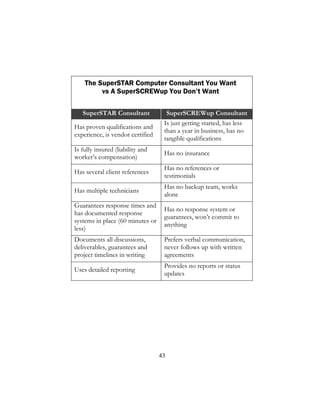
The SuperSTAR Computer Consultant You Want
vs A SuperSCREWup You Don’t Want
SuperSTAR Consultant SuperSCREWup Consultant
Has proven qualifications and
experience, is vendor certified
Is just getting started, has less
than a year in business, has no
tangible qualifications
Is fully insured (liability and
worker’s compensation)
Has no insurance
Has several client references
Has no references or
testimonials
Has multiple technicians
Has no backup team, works
alone
Guarantees response times and
has documented response
systems in place (60 minutes or
less)
Has no response system or
guarantees, won’t commit to
anything
Documents all discussions,
deliverables, guarantees and
project timelines in writing
Prefers verbal communication,
never follows up with written
agreements
Uses detailed reporting
Provides no reports or status
updates
44
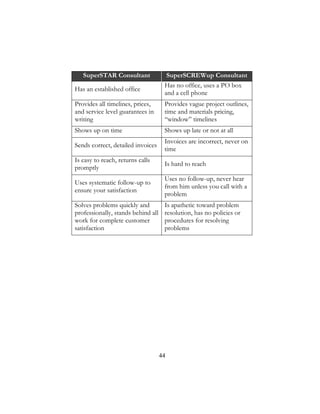
SuperSTAR Consultant SuperSCREWup Consultant
Has an established office
Has no office, uses a PO box
and a cell phone
Provides all timelines, prices,
and service level guarantees in
writing
Provides vague project outlines,
time and materials pricing,
“window” timelines
Shows up on time Shows up late or not at all
Sends correct, detailed invoices
Invoices are incorrect, never on
time
Is easy to reach, returns calls
promptly
Is hard to reach
Uses systematic follow-up to
ensure your satisfaction
Uses no follow-up, never hear
from him unless you call with a
problem
Solves problems quickly and
professionally, stands behind all
work for complete customer
satisfaction
Is apathetic toward problem
resolution, has no policies or
procedures for resolving
problems
45
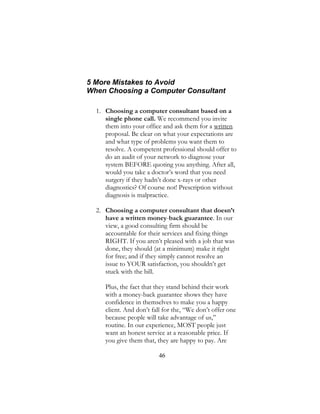
11 Warning Signs that You
Hired the Wrong Consultant
The consultant:
1. becomes defensive or argumentative when you
ask about project costs or completion dates, or
when you question his recommendations.
2. won’t guarantee the work or your satisfaction.
3. talks down to you, uses “geek speak,” and makes
you feel stupid when you question his
recommendations or work.
4. is consistently late or rushed, and misses deadlines
without an explanation or apology.
5. leaves your office a mess (wires and cables
exposed, furniture out of place).
6. looks sloppy or disheveled.
7. uses high-pressure or scare tactics to get you to
buy.
8. doesn’t explain your options for resolving a
problem or completing a project; it’s basically his
way or the highway.
9. doesn’t follow up after completing a project.
10. never takes a proactive approach to supporting
your network, and doesn’t offer
recommendations to help you secure your
network, save money or improve your company’s
productivity.
11. doesn’t offer a preventive-maintenance or
monitoring program to ensure that your network
is protected from viruses, hackers, data loss,
downtime or other problems.
46
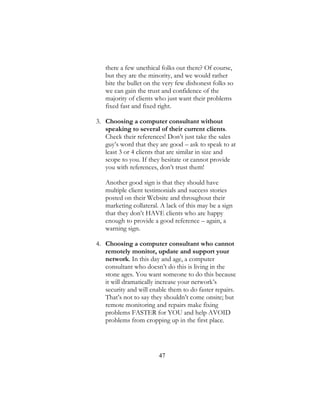
5 More Mistakes to Avoid
When Choosing a Computer Consultant
1. Choosing a computer consultant based on a
single phone call. We recommend you invite
them into your office and ask them for a written
proposal. Be clear on what your expectations are
and what type of problems you want them to
resolve. A competent professional should offer to
do an audit of your network to diagnose your
system BEFORE quoting you anything. After all,
would you take a doctor’s word that you need
surgery if they hadn’t done x-rays or other
diagnostics? Of course not! Prescription without
diagnosis is malpractice.
2. Choosing a computer consultant that doesn’t
have a written money-back guarantee. In our
view, a good consulting firm should be
accountable for their services and fixing things
RIGHT. If you aren’t pleased with a job that was
done, they should (at a minimum) make it right
for free; and if they simply cannot resolve an
issue to YOUR satisfaction, you shouldn’t get
stuck with the bill.
Plus, the fact that they stand behind their work
with a money-back guarantee shows they have
confidence in themselves to make you a happy
client. And don’t fall for the, “We don’t offer one
because people will take advantage of us,”
routine. In our experience, MOST people just
want an honest service at a reasonable price. If
you give them that, they are happy to pay. Are
47
there a few unethical folks out there? Of course,
but they are the minority, and we would rather
bite the bullet on the very few dishonest folks so
we can gain the trust and confidence of the
majority of clients who just want their problems
fixed fast and fixed right.
3. Choosing a computer consultant without
speaking to several of their current clients.
Check their references! Don’t just take the sales
guy’s word that they are good – ask to speak to at
least 3 or 4 clients that are similar in size and
scope to you. If they hesitate or cannot provide
you with references, don’t trust them!
Another good sign is that they should have
multiple client testimonials and success stories
posted on their Website and throughout their
marketing collateral. A lack of this may be a sign
that they don’t HAVE clients who are happy
enough to provide a good reference – again, a
warning sign.
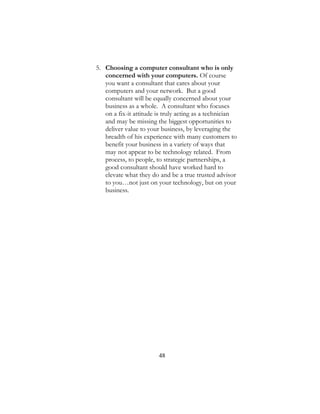
4. Choosing a computer consultant who cannot
remotely monitor, update and support your
network. In this day and age, a computer
consultant who doesn’t do this is living in the
stone ages. You want someone to do this because
it will dramatically increase your network’s
security and will enable them to do faster repairs.
That’s not to say they shouldn’t come onsite; but
remote monitoring and repairs make fixing
problems FASTER for YOU and help AVOID
problems from cropping up in the first place.
48
5. Choosing a computer consultant who is only
concerned with your computers. Of course
you want a consultant that cares about your
computers and your network. But a good
consultant will be equally concerned about your
business as a whole. A consultant who focuses
on a fix-it attitude is truly acting as a technician
and may be missing the biggest opportunities to
deliver value to your business, by leveraging the
breadth of his experience with many customers to
benefit your business in a variety of ways that
may not appear to be technology related. From
process, to people, to strategic partnerships, a
good consultant should have worked hard to
elevate what they do and be a true trusted advisor
to you…not just on your technology, but on your
business.
49
50
Chapter FOUR
Avoiding Project Nightmares, Disasters
and Expensive Miscommunications
If you’ve ever been disappointed with a computer
consultant’s service, this chapter will be of great interest
to you.
Small technical “glitches” or repairs can be incredibly
frustrating because they seem so insignificant, yet they
greatly interfere with your ability to get things done. In
most cases, business owners may be under the
assumption that these tiny problems can be solved
quickly, which is not always the case.
If you’ve hired an incompetent consultant before,
you know that simple projects can turn into a full-day
ordeal, and may even drag out for weeks or more.
Unbelievably, your small repair can end up requiring
multiple follow-up visits and calls because it occurs
repeatedly, even after it has been “fixed.” To make
matters worse, the consultant will probably charge you
for those extra visits, even if the issue should have been
resolved the first time you paid him to fix it!
This doesn’t even take into consideration the
inconvenience and downright chaos this causes to your
business! Unlike automobile and home repairs, computer
network problems can completely disrupt your business,
taking you offline for hours or even days.
Consider this scenario:
You hire a consultant to upgrade your network, but
he is way over deadline, and you are still experiencing
problems; only now, he isn’t returning your calls
promptly and is acting as if YOU are the problem. Then,
to add insult to injury, he asks you for more money!
51
While you’re sitting there waiting for your network to
come back online or your project to be completed, your
stress level is escalating through the roof because you
know your deadlines and clients aren’t going to wait!
Meanwhile, it further irritates you that the consultant has
not kept the promises he so enthusiastically assured you
of in the beginning.
Let’s face it: You have a business to run, and you
don’t have the time to deal with technical issues or the
incompetence of your consultant. Maybe you have a big
proposal that needs to be submitted by the end of the
day. Maybe you have sales leads or client orders that are
getting colder by the minute and possibly even ruining
client relationships. And, if you’re like most business
owners, you are already working behind schedule, so
computer problems magnify the stress and delays to a
whole new level.
If you’ve ever been through this type of nightmare,
you know I am not exaggerating. To prevent this from
happening to you, or to avoid it happening again, you
have to identify what causes these situations in the first
place. That’s what this chapter is all about.
Determine Your Priorities
The first step to avoiding problems with a computer
consultant is to determine your “satisfaction priorities.”
Do you place a greater importance on response times or
price? Is the quality of the work more important, or do
you need it done fast? Is it critical that you have regular
updates and status reports on your network, or is a quick
e-mail now and again sufficient?
This is not to say that you can’t have it all; but if fast
response is a priority, you need to clearly communicate
52
that to your computer consultant before you hire him.
You should also detail what you consider “fast” to mean.
Do you expect him to return your call within 15
minutes or 2 hours? Do you expect him to be on-site the
same day you call, or within the week? Make sure you are
both clear before entering into an agreement. Some
computer consulting firms may be more expensive, but
may offer a higher quality of workmanship and customer
service. Is that acceptable to you? Again, you need to
determine this before entering into any project or
agreement.
Once you’ve made a list of the qualities and
characteristics that are most important to you, share this
list with your prospective consultant to help him
customize his services to suit you.
A Quick Word on Price
As with everything in life, you get what you pay for.
The most expensive computer consultant will not
necessarily be the best, but you should be cautious if
your #1 priority is price. As a consumer, you know
firsthand that you are always being offered competitive
pricing on services and products. Businesses compete
hard for your dollars and it’s only natural for you to
think of price first when looking for computer repair and
consulting services.
However, services can’t usually be compared like
tangible goods such as cars or office equipment. With
products, you can equate features and benefits in an
apples-to-apples comparison. With services, there are
too many intangible aspects that can’t be compared
easily.
53
If what you really want is cheap computer support,
you can practically guarantee that you’re going to have
problems. The price won’t seem so attractive when
you’ve lost every file on your computer, or if the work
has to be redone when it’s discovered that it wasn’t
completed right in the first place.
If you rely heavily on your computer network and the
information it contains, it only makes sense to take time
and choose the most competent consultant possible, not
the cheapest. Quality consultants can give you the expert
advice and support you need. They can help lower your
company’s costs while increasing productivity, customer
service and sales. And they will be there when you need them.
Start Small
Before you hire your computer consultant to install a
new network, hire him to do a small repair or network
audit. This will give you the opportunity to see if he
shows up on time, follows through, and is enjoyable to
work with. Never jump into a major project until you’ve
been happy with the consultant’s work on a smaller
project.
Demand a Fixed Price
Many computer consultants charge by the hour for
projects instead of quoting a fixed rate. This works great
for them, but is dangerous for you. Unless you have an
established, high-trust relationship with your consultant
(or a bottomless pit of money), never agree to this type of
contract! This gives your consultant a wide-open field to
take as long as he wants working on your project—and it
actually benefits him if he does. Instead, ask him for a
54
fixed fee that details exactly what results he will deliver
for an agreed budget.
Get Everything in Writing
Getting everything in writing is one of the most
important things you can do to avoid getting taken
advantage of by an incompetent or less-than-ethical
consultant. This includes:
• A project timeline and completion date.
• A written service guarantee.
• An exact budget and payment schedule.
• Any and all expectations you have for
deliverables.
• When and how you will receive project
updates.
• Your responsibilities as the client.
• What happens if you are not satisfied.
• What happens if your project runs over the
designated completion date.
Do Your Research
We’ve discussed what to look for—actually
demand—from your computer consultant. Some of
those characteristics will need to be researched; don’t
skip those steps to save time. Ask your prospective
consultant to provide the information you are looking
for as part of his proposal. If he doesn’t, or won’t, cross
him off your list of potential partners.
55
Communicate Your Concerns
Some people are too shy to say what’s really on their
mind for fear of appearing rude or unreasonable. But if
you have any concerns, questions or reservations, you
need to voice them to your prospective consultant
before signing the contract, and ask him to address in the
contract how he will overcome those concerns if you hire
him for the project.
If you are concerned that he won’t return your calls
fast enough, let him know. If you are afraid he might not
be able to handle the job, be honest and tell him. You
don’t have to be harsh or disagreeable; simply let him
know that you have a few concerns and ask what he can
do to assure you that you won’t be disappointed.
56
Chapter FIVE
How to Get the Most Out of Your Computer
Consultant
Now that we’ve defined what to look for in qualified,
competent, honest consultants, it makes sense to tell you
how to get the most out of your relationship with them.
A great computer consultant will free you from
worrying about data loss, downtime or other problems,
allowing you to focus on the more important, strategic
aspects of running and growing your business. It will
also free your staff from trying to be jacks-of-all-trades
and wasting time on activities they are not particularly
good at, which also distracts them from doing their
regular job. And ultimately, the consultant will
recommend products and solutions to help your
business operate more competitively, increase sales and
lower your workload and stress levels.
But that is not to say you are completely off the
hook.
There are a number of ways you can undo everything
your consultant has done for you and severely jeopardize
the security and reliability of your network. Plus, you are
ultimately responsible for making sure your consultant
understands your business priorities, goals and
operational systems so he can offer advice and solutions
to support you.
Once you understand your role and responsibilities
for maximizing your technology investments, and what
your consultant is and is not responsible for, you will
57
have a much better working relationship with him and
prevent most unpleasant surprises and expensive
misunderstandings.
Take Responsibility for Your Own
Protection
Many business owners automatically blame their
computer or their consultant when they experience a
problem, get infected with a virus, or realize their
network has been taken over by spyware. And, in some
cases, these problems are due to negligence by
your consultant.
However, most spyware and virus attacks are the
result of an end-user downloading a questionable file or
program, disabling their antivirus software, or somehow
circumventing security settings or acceptable-use policies
set by your consultant (such as visiting unauthorized file-
sharing sites).
Many other problems are due to hardware or
software inadequacies that can’t be controlled or
prevented by your consultant. And finally, many business
owners don’t want to pay for their consultants to
perform simple preventive maintenance, update security
patches and virus definitions, or monitor their system’s
performance. This lack of maintenance is an invitation
for problems that can’t be blamed on your computer
consultant.
Unless your consultant has complete control over your
network and has been given the responsibility to monitor
and maintain your network 24-7-365, chances are that
your problems were not caused directly by some action
he took (or didn’t take). Again, that is not to say that you
are completely at fault for all network problems, but you
58
and your employees need to take an active role in
keeping your network and data safe from harm.
Keep Spyware, Malware and Viruses Off
Your Network
In almost every case, malware, spyware and viruses
are able to invade a network because of some action
taken by a user. Cybercriminals are incredibly clever and
have figured out ways to access your computer network
through some of the most innocent and common
activities you perform daily.
For example, many of the clients we see infected
with spyware simply downloaded a screen saver, an
“enhanced” Web browser, a music file, or some other
“cute” program. In doing so, they also unknowingly
downloaded a number of spyware and malware
programs. Within a short time, they could no longer use
their computer because of its slowness, instability and
pop-ups. Sometimes even legitimate software will install
additional unneeded applications, toolbars, etc. on your
machine which, in time, can also negatively impact
system performance. Your consultant can usually clean
up the mess caused by these programs, but it is your
responsibility to become educated about what you can
and can’t download. Below is a short list of programs
and Websites you should never download or visit. Your
consultant should be able to provide you with a more
comprehensive, up-to-date list:
• Screen savers
• “Enhanced” Web browsers like Cool
Search
• Emoticons
• Games
• Peer-to-peer file-sharing software
59
• Music files
• “For fun” surveys (what type of person are
you?)
• Banners that challenge you to “punch the
monkey,” shoot something or answer a
trivia question to win a prize
• Sweepstakes or drawings
• Any software that requires you to accept
certain conditions; by agreeing to their
conditions, usually outlined in small print,
you are agreeing to accept third-party
software
Note: This last one is tricky because even
legitimate software has conditions to
which you have to agree. Bottom line: If
you are unsure…don’t install the
software before asking your consultant.
Unfortunately, installing the above programs is not
the only way a hacker or malware program can access
your computer network. If you don’t have the most up-
to-date security patches and virus definitions installed,
wrongdoers can access your computer through a banner
ad or an e-mail attachment.
Be Aware of Sneaky Ways Hackers Invade
Your Network
Not too long ago, Microsoft released a security
bulletin about three newly discovered vulnerabilities that
could allow an attacker to gain control of your computer
by tricking you into downloading and opening a
maliciously crafted picture. At the same time, Microsoft
released a Windows update to correct the vulnerabilities.
But if you didn’t have a process to ensure that you were
60
applying critical updates as soon as they became
available, you were completely vulnerable to this attack.
Here’s another compelling reason to ensure your
network stays up-to-date on the latest security patches:
Most hackers do not discover these security loopholes
on their own. Instead, they learn about them when
Microsoft, or any other software vendor for that matter,
announces the vulnerability and issues an update. That is
the hackers’ cue to spring into action; they immediately
analyze the update and craft an exploit (like a virus) that
allows them access to any computer or network that has
not yet installed the security patch. The time between the
release of the update and the release of the exploit that
targets the underlying vulnerability is getting shorter
every day.
When the “nimda” worm was first discovered in the
fall of 2001, Microsoft had released the patch that
protected against that vulnerability 331 days before. So
network administrators had plenty of time to apply the
update. Of course, many still hadn’t done so, and the
nimda worm caused lots of damage. Now, as of March
2010, reports have shown that hackers can exploit
vulnerabilities in less than a day, providing further proof
that computer patches must be installed much more
regularly than ever before.
Clearly, someone needs to be paying close attention to
your systems to ensure that critical updates are applied as
soon as possible. That’s why we highly recommend that
small-business owners without a full-time IT staff allow
their consultant to monitor and maintain their network.
61
Create and Enforce an Acceptable-Use
Policy (AUP)
An AUP is a written document stating exactly what
your employees can and can’t do with company Internet
access, computers and e-mail. For example, employees
should not be allowed to download or access programs,
screen savers, pictures, music files or file-sharing
networks. This will save precious bandwidth and prevent
downloading viruses and spyware. An AUP should also
educate employees on the appropriate use of your
company’s resources.
If you don’t want your staff to download
pornographic material and send racist jokes through a
company e-mail account, you have to communicate this
information to them in an acceptable-use policy and
have them acknowledge in writing that they have read and
understood it. Your consultant can help you draft this
document and enforce the policies outlined.
Allow Your Consultant to Maintain Your
Network
As we mentioned previously, many business owners
do NOT perform regular maintenance on their
computer network; they basically use the network until it
stops working, and then bring in their consultant.
While this arrangement may seem to work just fine in
the short-term, it can dramatically increase problems and
the costs of keeping your network running. Then there is
the threat of experiencing a major network disaster.
Unfortunately, most businesses have to experience some
type of catastrophe before they get serious about
maintaining their network. Just ask any business owner
about the importance of a solid backup or keeping their
62
security up-to-date after they’ve gone through the
devastation of losing a week’s worth of work.
Look at these alarming statistics:
• Approximately 20% of all small and medium-
sized businesses endure a major network
disaster every five years.
• The U.S. National Fire Protection Agency
predicts that 43% of companies that
experience these disasters will never reopen,
and another 29% will close within three years.
• If the loss involves data, the diagnosis is even
worse. According to the U.S. Bureau of Labor,
93% of companies that suffer a significant
data loss are out of business within five years.
• In April 2008, Symantec reported that there
are over 1 million computer viruses in
existence (and growing).
• The Internet Storm Center, which tracks
security attacks, reports 7.6 million attacks in
the U.S. alone.
If you really want to protect yourself from data loss,
viruses, spyware, hackers, downtime and a host of other
problems, the best thing you can do is find a computer
consultant that offers 24-7-365 monitoring and
maintenance for your network and then let them do it
for you. By allowing your consultant to control, manage
and maintain your network, the chances of experiencing
significant problems is greatly reduced (more on this in
the following chapter).
63
Be a Great Client
There is a lot of truth in the cliché, “You’ll attract
more bees with honey than vinegar.” This is especially
true when working with professional consultants.
Quite often, business owners take an adversarial
approach to working with their vendors. Since they are
paying the bills, they believe that they have the right to
be demanding, difficult and even hostile. What they
don’t realize is that vendor relationships can make or
break a company, and maintaining a good working
partnership with your computer consultant is critical to
your business success.
The more respect and appreciation you give your
consultant, the more he will want to do a great job for
you. Keep in mind that you might need him to do you a
favor, or pull you out of a big mess, somewhere down
the road. If you’ve developed a good working
relationship based on mutual trust and appreciation, he
will be far more willing to go the extra mile and help you
out when you need it most.
Here are three ways to make sure you become a
“favorite” client who receives special favors and extra
attention:
1. Pay all bills on time or early.
2. Express your gratitude for the work he’s
done. Everyone likes to know that their
efforts are appreciated.
3. If you have a complaint, don’t jump to the

conclusion that your consultant was trying to

harm you on purpose. Let him know about
your complaint and give him a chance to
make it right before you get angry or take
64
action. It may have been a simple mistake, or
even an oversight, on your part.
Overall, clear communication is your best tool to
ensure a great working relationship with your computer
consultant. You want to find someone you can partner
with long-term who will take an active role in making
your business profitable and successful. That requires
mutual respect on both sides.
Six Ways a Good Relationship With a
Competent Computer Consultant Benefits
Your Company
1. The consultant proactively monitors and
maintains your network to prevent problems
from happening, which gives you peace of
mind by knowing that the “gremlins at the
gate” are being watched and kept at bay.
2. The consultant is familiar with and has fully
documented your network and therefore can
troubleshoot problems faster.
3. He understands your business and can
recommend ways to save money, increase
productivity, reduce mistakes and service
customers that you haven’t even considered.
4. He helps lay a foundation for growing your
business.
5. He knows about any software or hardware
that has been added to your network (which
are frequently the source of a problem).
6. He sorts through all the new technological
breakthroughs, threats and news, and only
informs you of the things you need to know.
65
66
Chapter Six
Preventing Network Disasters with
Proactive Maintenance
The computers in your office and the network they
serve are, without a doubt, the single most important
tools you use on a daily basis to run your business. Your
computer network is at the core of your
communications, operations, accounting, client care and
marketing. Just try to imagine one task or operation in
your business that doesn’t, directly or indirectly, depend
on the security and availability of your computer
network.
Yet, as important as your network is to your
business, very few small-business owners take the
necessary steps to ensure that it runs as smoothly and
efficiently as possible. This is a huge, costly mistake.
With the constant changes to technology and daily
development of new threats, even small peer-to-peer
computer networks need ongoing maintenance and
security updates from a highly trained consultant.
Unfortunately, what we see most business owners
doing is ignoring regular maintenance and only calling a
consultant when the network becomes inoperable. This
reactive model of upkeep is a surefire path to extensive
downtime, lost data and spending more on IT support,
not to mention major disruptions in worker productivity,
sales, cash flow, production and customer service that
can never be recovered.
67
How Managed Services Can Prevent These
Disasters from Happening to Your
Business
Thanks to advances in technology, your computer
consultant can now provide ongoing remote
maintenance and support to maximize the performance,
reliability and stability of your network. The industry
term for this is “managed services,” although your
consultant might have a different name for it.
The basic premise is this: For a fixed monthly fee,
your computer consultant will take over the
responsibility of performing regularly scheduled
maintenance on your network to ensure that your virus
protection and security patches are up-to-date, your
backups are working properly, your firewall and other
security settings are actively protecting you, the speed
and performance of your network are maximized, and all
the components of your network are functioning
properly.
In essence, they are taking over the tactical, day-to-
day maintenance and support of your network for a
fraction of the cost of hiring a full-time consultant.
What Are the Benefits of Managed
Services?
Service calls to computer networks not under a
managed-service plan (MSP) require two to three times
as long to diagnose and repair as systems that are under a
MSP, because of the time required for diagnostics and
testing. This naturally leads to higher repair bills and
more downtime.
In addition to the added expense and hours required
for these repairs, some of the damage to your network
68
can be irreversible, and could have been easily prevented
with a solid MSP.
If the data and operation of your network is
important to your business, you need to make sure you
are taking the necessary steps to ensure its safety and
security. A good managed-service plan will provide the
following benefits:
• You’ll practically eliminate expensive
repairs and data recovery costs. By detecting
and preventing network disasters before they
happen, a good MSP will save you thousands
of dollars in repairs and downtime.
• You’ll receive faster support. Thanks to
remote-monitoring software, your consultant
will be able to securely access and repair most
network problems right over the Internet. No
more waiting around for an engineer to show
up or paying for travel fees.
• You’ll experience faster performance, fewer
problems and practically zero downtime.
Some components of your network will
degrade in performance over time, causing it to
slow down, hang up and crash. The regular
preventive maintenance offered through an
MSP will make sure your computers stay in tip-
top shape for maximum speed, performance
and reliability.
• You’ll get top-level IT support without the
costs and overhead of hiring a full-time IT
manager. A junior technician can easily cost
your company $45,000-50,000 a year in salary,
taxes and insurance, and a senior consultant
could cost two to three times that amount.
Under an MSP, you get to share a senior
69
consultant with other businesses, which greatly
reduces your costs without sacrificing
experience or quality of work. It is important
to also realize that most small business IT
needs, might not prove challenging or
stimulating enough to ensure that you could
keep that technician happy. The resulting
turnover ultimately costs a lot of time and
money as you scramble to find, train and try to
retain appropriate technical talent.
• You’ll receive discounts on new projects
and better service. Most computer
consultants will offer priority service and a
discount to clients on their managed-service
plan. Plus, your consultant will become more
familiar with your hardware, software, settings
and history, and therefore provide faster
service than the consultant who has to spend
time “feeling around” your network.
• You can budget for IT support just like rent
or insurance. If your IT support bill varies
from month to month, a managed-service plan
will help even it out and make budgeting easier.
Just make sure the plan you sign up for is all-
inclusive, with no hidden charges, caveats or
fees.
• You will safeguard your data. The data on
the hard disk is always more important than the
hardware that houses it. If you rely on your
computer system for daily operations, it’s time
to get serious about protecting your critical,
irreplaceable electronic information. A good
MSP will greatly reduce your chances of losing
critical company data, files and information.
70
• You’ll gain peace of mind. As a business
owner, you already have enough to worry
about; the last thing you need is a computer
crisis. Having a managed-service plan in place
takes that worry off your plate.
What to Look For In a Managed-Service
Plan
There are a number of factors to look for in a MSP.
A good consultant will take time to sit down with you
and explain your options, based on your priorities,
budget, network complexity, support needed and
conditions of satisfaction. However, here are a few
things to make sure your consultant includes in your
agreement:
• Security Patches and Updates. Software
vendors frequently issue critical patches to
cover known security loopholes in their
software. However, not all patches are
trouble-free, and some will require specialized
knowledge to install. On many occasions,
Microsoft has distributed patches that come
with fine-print instructions warning the user
to install and test the patch on one machine
before rolling it out to all the computers on
the network. Since most people don’t read
the fine print on a software download, or are
simply not aware of the problems that can
arise from installing an untested patch, they
blindly install it on their entire network only
to discover that it caused a number of
software conflicts and system failures. That’s
why it makes sense to allow a trained
71
professional to manage and install patches on
a regular basis. Trying to do this on your own
is similar to playing Russian roulette with
your network.
• 24-7-365 Monitoring and Alerts. Your
consultant should be able to provide around-
the-clock monitoring for your network to
look for problems developing under the
radar. He should also notify you of problems
in advance so that preventive action can be
taken.
• Spam Filtering. Not only is spam annoying,
it is the number-one way viruses enter a
computer network.
• Virus Updates. Unless you’ve been living
under a rock, you know that viruses are a real,
and very dangerous, threat to your computer
network. Since new viruses launch daily, you
need to make sure your consultant is also
monitoring your virus protection, and
automatically updating your network with
new virus definitions as soon as they become
available. Note: Your consultant will often
include anti-virus software for you as part of
their plan. If it isn’t included in their MSP,
that means that the consultant has to manage
myriad packages for his clients, an
inefficiency that can impact their ability to
best serve your needs.
• Spyware Scanning and Removal. Like
viruses, spyware can cause a number of
problems for your network and may even
result in identity theft. Symptoms of spyware
include excessive pop-up ads, sluggish
72
performance, and strange Web browsers
opening on your computer that you did not
request.
• Real-Time DNS Security. Whereas Anti-
Virus software scans inbound files, e-mails
and attachments, a good consultant will also
provide a real-time scanning tool to ensure
that outbound communications aren’t being
attempted to rouge Web sites. For example,
no anti-virus or spyware scanning software
can keep up with the newly released threats in
real time, so sometimes your systems may
have been compromised by a file whose job it
was to “call home” and alert a rouge site that
it has found a willing host. A good network
consultant will anticipate this and be sure to
include a real-time DNS monitoring tool
which will allow the identification of these
calls home as potential signs of infection
before the payload is fully delivered and your
systems are completely compromised. This
type of solution is highly effective at
minimizing downtime and improving
productivity.
• Backup and Business Continuity Tools.
Your consultant should provide, manage and
monitor an appropriate backup or business
continuity solution for your business. This
would include: monitoring your daily system
backups to make sure they are working
properly, performing a monthly test restore
to make sure your data is available in a usable
format and a minimum of annual disaster
recovery testing. Tape backups are notorious
for failing. Even if they appear to be working,
73
the data could be corrupt and useless. We
have seen several situations where a company
thought their data was secure only to find out
that it wasn’t when they desperately needed it.
Look for a consultant who provides solutions
that combine both an on-site and cloud-based
solution.
• Vendor Liaison. Quite often, software or
hardware will just fail. It’s far more
convenient to have a consultant who is
familiar with your network to deal with the
warranty returns and replacements of those
parts with the manufacturer, rather than
having to deal with it yourself. If you’ve ever
had to call the “customer service” hotline of a
technology vendor, you know what a
headache it can be. Other vendors include
practice-management software, Internet
providers, Phone providers, Business
machine (copier) providers, Web-hosting
companies, and so on. For convenience, have
your consultant agree to be your vendor
liaison with these companies so you don’t
have the hassle.
• Creation of Acceptable-Use and Bring-
Your-Own-Device Policies and Training.
An Acceptable-Use Policy (AUP) is simply
the rulebook for what your employees can
and can’t do with their company-owned
computers. A Bring-Your-Own-Device policy
(BYOD) is simply the rulebook for what your
employees can and can’t do with regard to
accessing company resources from their own
devices, as well as what the company can and
can’t do to those devices (like remotely
74
erasing sensitive company data when
someone leaves the company or loses their
cell phone or tablet). Uneducated employees
can accidentally introduce spyware, viruses,
hackers and other major problems into your
network. They can also use their work
computer and e-mail to access and share
unacceptable material. All it takes is one
employee to send an off-color joke to a list of
friends from your company’s e-mail to start
problems for you. In some cases, employees’
actions can bring expensive and embarrassing
lawsuits against your company. Talk to your
consultant about ways to educate and enforce
an AUP and BYOD policy.
• Adding and Removing Hardware and
Software. You just purchased a new printer
and you’re eager to start using it. However,
you can’t figure out why you keep getting
error messages and why you can’t print from
Excel. If you had a managed-service contract
that covered hardware and software
installation, your consultant would be
responsible for making sure it was installed
and configured properly, and you wouldn’t
have to waste one minute dealing with these
problems.
• Adding and Removing Users. Although
this seems like a simple thing, user access to
your network is a critical security risk that
needs to be managed properly to avoid
disgruntled employees or unauthorized
persons accessing it. This is especially true if
you have remote workers. A good consultant
should have a standard protocol they follow
75
to ensure profiles are correctly configured
every time. That protocol can then be
modified for your specific business. This is a
strong indication that a consultant has solid
documented procedures in place, and you
should never hire a consultant who does not
have these procedures documented and can
share them with you if requested.
• Help Desk Support. This would include a
mix of phone, remote and on-site support for
you and your employees to answer any
number of technical questions and problems.
Remember, phone support is not free; calling
your consultant for a “quick” question is a
billable event and can cost you $25-100.
Therefore, you want to have some level of
remote and on-site support included in your
managed-service contract. Many consultants
provide all-you-can-eat Help Desk support so
that you never have to worry about extra
charges for contacting the Help Desk.
• A Managed Unified Threat Management
Device (Firewall). While you can have all
the software tools in place, such as anti-virus,
spyware management, DNS monitoring,
spam filtering, etc., another critical piece is a
robust firewall. Some consultants will
provide a cheap, off-the-shelf consumer level
product available from any electronics store.
However a good consultant will analyze your
current and anticipated needs and provide a
fully managed device that has additional
security built in, as well as regular updates and
full cloud management. Having the other
tools with no firewall is like having no front
76
door, but locking the screen door with a hook
and eyehole.
• Mobile Device Management. It’s great
that everyone wants to use their phones and
tablets to access their work data wherever
they may be. Even if you are providing
company-owned equipment, you want to
ensure that it is properly monitored and
managed as well. Mobile Device
Management refers to a set of tools that allow
for remote monitoring of mobile devices,
GPS-based tracking, the ability to simplify
certain tasks, like wireless connectivity across
a suite of satellite offices, and the ability to
selectively or completely wipe the data off of
a device that has been lost or stolen.
Keep in mind that this is just a starter list of services
to look for. The size and complexity of your network,
the security required, and the software and systems you
use will largely determine the type of ongoing support
you need. A good computer consultant will take time to
understand your needs and offer multiple plans to
choose from. He will also be flexible and allow you to
upgrade or downgrade the level of support provided if
you discover that your plan is not meeting your needs.
77
Chapter Seven
Moving to the Cloud
Undoubtedly you’ve heard all the commotion around
cloud computing and how it’s the “next big thing.” Yet,
despite all the hype, most don’t seem to understand what
cloud computing is or how it can help your business.
That’s why I want to set the record straight and
explain what cloud computing is, how it can “possibly”
help your business and if so, what you need to know in
order to make good decisions about choosing which
vendor you choose.
Why “possibly?” Because cloud computing is
NOT a good fit for every company—TODAY; and if
you don’t get all the facts or fully understand the pros
and cons, you can end up making some VERY poor and
expensive decisions that you’ll deeply regret later.
That said, for some clients, cloud can actually
lower their IT costs somewhat, while most importantly,
greatly improving the ability for remote workers to
connect and work, simplifying your entire IT
infrastructure and genuinely solving a number of
technology problems that you’ve been trying to work
around for years.
So which are YOU? By the end of this chapter
you’ll know, or at least have a much better
understanding.
5 Critical Facts You Must Know Before
Moving to the Cloud
In this chapter I’m going to talk about 5 very
important facts you need to know before you
78
consider cloud computing for your company. This
includes:
1. What cloud computing is.
2. The pros AND cons of this new technology.
3. The various types of cloud computing options
you have (there is more than just one).
4. Answers to important, frequently asked questions
you need to know the answer to.
5. What questions you need to ask your IT pro
before letting them “sell” you on moving all or
part of your network and applications to the
cloud.
What is Cloud Computing?
The National Institute of Standards and
Technology defines cloud computing as, “a model for
enabling ubiquitous, convenient, on-demand network
access to a shared pool of configurable computing
resources (e.g., networks, servers, storage, applications,
and services) that can be rapidly provisioned and
released with minimal management effort or service
provider interaction”.
But what the heck does that mean?
The easiest way to not only understand what
cloud computing is but also gain insight into why it’s
gaining in popularity, is to compare it to the evolution of
public utilities. For example, let’s look at the evolution of
electricity.
Back in the industrial age, factories had to
produce their own power in order to run machines that
produced the hard goods they manufactured. Be it
textiles or railroad spikes, using machines gave these
79
companies enormous competitive advantages by
producing more goods with fewer workers and in less
time. For many years, the production of power was every
bit as important to their company’s success as the skill of
their workers and quality of their products.
Unfortunately, this put factories into TWO
businesses: the business of producing their goods and
the business of producing power. Then the concept of
delivering power (electricity) as a utility was introduced
by Thomas Edison when he developed a commercial-
grade replacement for gas lighting and heating using
centrally generated and distributed electricity. From then
on, as they say, the rest was history.
The concept of electric current being generated in
central power plants and delivered to factories as a utility
caught on fast. This meant manufacturers no longer had
to be in the business of producing their own power. In
fact, in a very short period of time, it became a
competitive necessity for factories to take advantage
of the lower cost option being offered by public
utilities. Almost overnight, thousands of steam engines
and electric generators were rendered obsolete and left
to rust next to the factories they used to power.
What made this possible was a series of
inventions and scientific breakthroughs – but what drove
the demand was pure economics. Utility companies were
able to leverage economies of scale that single
manufacturing plants simply couldn’t match in output or
price. In fact, the price of power dropped so significantly
that it quickly became affordable for not only factories
but every single household in the country.
Today, we are in a similar transformation
following a similar course. The only difference is that
instead of cheap and plentiful electricity, advancements
80
in technology and Internet connectivity are driving down
the costs of computing power. With cloud computing,
businesses can pay for “computing power” like a utility
without having the exorbitant costs of installing, hosting
and supporting it.
In fact, you are probably already experiencing the
benefits of cloud computing in some way but haven’t
realized it. Below are a number of cloud computing
applications, also called SaaS or “software as a service,”
you might be using:
 Gmail, Hotmail or other free e-mail accounts
 Facebook
 NetSuite, Salesforce
 Constant Contact, Mail Chimp, Infusionsoft,
Exact Target, Aweber or other e-mail
broadcasting services
 Zoomerang, SurveyMonkey and other survey
tools
 LinkedIn
 Twitter
 All things Google (search, AdWords, maps, etc.)
If you think about it, almost every single
application you use today can be (or already is) being put
“in the cloud” where you can access it and pay for it via
your browser for a monthly fee or utility pricing. You no
longer purchase and install software but instead access it
via an Internet browser.
What about Office 365 and Google Apps?
Microsoft’s Office 365 and Google Apps are
perfect examples of the cloud computing trend; for a
monthly fee, you can get full access and use of Office
81
applications. And, since these apps are being powered by
the cloud provider, in some cases you don’t need an
expensive desktop with lots of power to use them – just
a simple Internet connection will do on a laptop, desktop
or tablet.
While Google Apps continues to evolve and a lot of
businesses are happy with its suite of tools, many other
businesses are hamstrung by lack of integration and
familiarity (meaning they are already comfortable with
Microsoft’s Office applications and not anxious to
change). That said, for those businesses with a younger
workforce familiar with the Google Apps platform, it
can be a terrific, money-saving option.
Microsoft has really come on strong with its Office
365 offering. As many small businesses have become
used to the rich feature set available from Microsoft
Exchange, moving to 365 allows them to still have an
Exchange server, but one that is managed by Microsoft
and the network consultant. A 365 subscription
provides always up-to-date copies of all of the Office
applications, plus new features being released on a
quarterly basis. In working with our clients, we’ve found
that the 365 offering has been extremely flexible and
helpful to their businesses. Office 365 is also a hybrid
suite, as it contains Cloud and local components.
Pros and Cons of Moving to the Cloud
As you read this section, keep in mind there is no
“perfect” solution. All options – be it an in-house
network or a cloud solution – have both upsides and
downsides. And which option to choose has to be
determined on a case-by-case basis before you can come
to a complete conclusion on which option will work for
you. (Warning: Do not let a cloud expert tell you there is
only “one way” of doing something.) Most companies
82
end up with a hybrid solution where some of their
applications are in the cloud and some are still hosted
and maintained from an in-house server. We’ll discuss
more of this in a later section; however, here are the
general pros and cons of cloud computing:
Pros of Cloud Computing:
 Potentially Lowered IT costs. This is probably
the single most compelling reason why
companies choose to move their network (all or
in part) to the cloud. Not only do you save
money on software licenses, but also on hardware
(servers and workstations) as well as IT support
and upgrades. So if you hate constantly writing
big, fat checks for IT upgrades, you’ll really want
to look into cloud computing. However, you
should be realistic that sometimes the cost
savings is realized when factoring in the reduced
capital costs, rather than on the operational side
of the budget.
 Ability to access your applications and/or
data from anywhere and on any device. If you
travel a lot, have remote workers or prefer to use
an iPad while traveling and a laptop at your
house, cloud computing will give you the ability
to work from any of these devices. Even if you
don’t travel, a simple power or internet outage at
the office doesn’t present a problem when you
can connect over a latte at Starbucks and work on
your tablet. Or, you can easily work from home
when the weather, illness or other factors prevent
you from going in to the office.
83
 Disaster recovery and backup are automated.
The server in your office is extremely vulnerable
to a number of threats including viruses, human
error, hardware failure, software corruption and,
of course, physical damage due to a fire, flood or
other natural disaster. If your server was in the
cloud and your office was reduced to a pile of
rubble, you could purchase a new laptop and be
back up and running within the same day. This
would NOT be the case if you had a traditional
network and were using tape drives, CDs, USB
drives or other physical storage devices to back
up your system.
Plus, like a public utility, cloud platforms are far
more robust and secure than your average
business network because they can utilize
economies of scale to invest heavily into security,
redundancy and failover systems making them far
less likely to go down. Some consultants even
provide cloud offerings that are replicated
between several different data centers across the
country.
 It’s faster, cheaper and easier to set up new
employees. If you have a seasonal workforce or
a lot of turnover, cloud computing will not only
lower your costs of setting up new accounts, but
it will make it infinitely faster.
 You use it without having to “own” it. More
specifically, you don’t own the responsibility of
having to install, update and maintain the
infrastructure. Think of it similar to living in a
condo where someone else takes care of the
building maintenance, repairing the roof and
84
mowing the lawn, but you still have the only key
to your section of the building and use of all the
facilities. This is particularly attractive for
companies who are new or expanding, but don’t
want the heavy outlay of cash for purchasing and
supporting an expensive computer network.
And, with cloud-based solutions, the hardware
and software upgrades are included in the fee,
meaning that you never have to worry about your
systems becoming obsolete.
 It’s a “greener” technology that will save on
power and your electric bill. For some smaller
companies, the power savings will be too small to
measure. However, for larger companies with
multiple servers who are cooling a hot server
room and keep their servers running 24/7/365,
the savings are considerable. One small company
with a complex computing environment realized
a 43% savings on their electricity bills when they
moved their operations to the cloud. We have
actually saved about 35% on our own
electricity bills since moving our operations
to the cloud.
Cons of Cloud Computing:
 The Internet going down. While you can
mitigate this risk by using a commercial grade
Internet connection and maintaining a second
backup connection, there is a chance that you’ll
lose Internet connectivity, making it impossible to
work. However, if you implement an appropriate
solution, you will still be able to work from
85
another location quite easily.
 Data security. Many people don’t feel
comfortable having their data in some offsite
location. This is a valid concern and before you
choose any cloud provider, you need to find out
more information about where they are storing
your data, how it’s encrypted, who has access and
how you can get it back. You’ll find more
information on this under the “What To Look
For When Hiring a Cloud Integrator” later on in
this document.
 Certain line-of-business applications won’t
work optimally (or at all) in the cloud. For
example, in the demanding world of Computer
Aided Design, certain applications really require
the extensive computing power of a dedicated
local workstation. In addition, some businesses
may be using older “legacy” applications that are
key to their business. Often these are supported
by an application consultant who is holding the
application together with spit and string. You
would generally be advised not to move an older
legacy application to the cloud unless it has been
fully tested and verified as cloud compatible by its
publisher.
 Compliance Issues. There are a number of laws
and regulations such as Gramm-Leach-Bliley,
Sarbanes-Oxley and HIPAA that require
companies to control and protect their data and
certify that they have knowledge and control over
who can access the data, who sees it and how and
where it is stored. In a public cloud environment,
this can be a problem. Many cloud providers
86
won’t tell you specifically where your data is
stored.
Most cloud providers have SAS 70 certifications
which require them to be able to describe exactly
what is happening in their environment, how and
where the data comes in, what the provider does
with it, and what controls are in place over the
access to and processing of the data; but as the
business owner, it’s YOUR neck on the line if the
data is compromised so it’s important that you
ask for some type of validation that they are
meeting the various compliance regulations on an
ongoing basis.
Different Types of Cloud Solutions
Explained:
Pure Cloud: This is where all your applications and data
are put on the other side of the firewall (in the cloud)
and accessed through various devices (laptops, desktops,
iPads, phones) via the Internet. This is the most rapidly
evolving implementation of cloud services, for it truly
provides the most flexibility and functionality. If the
solution meets your businesses compliance needs, it can
be a great fit and is definitely the direction in which this
industry is headed.
Hybrid Cloud: Although “pure” cloud computing has
valid applications, for many, it's downright scary. And in
some cases is NOT the smartest move due to
compliance issues, security restrictions or performance
issues. A hybrid cloud enables you to put certain pieces
of existing IT infrastructure (say, storage and e-mail) in
the cloud, and the remainder of the IT infrastructure on
87
the premises. This gives you the ability to enjoy the
benefits of cloud computing where it makes the most
sense without risking your entire environment. Of
course, the flip side is that a hybrid setup can make it
more difficult to make and maintain the multiple
connections required for seamless end-user interaction
with the various services. This can absolutely lead to
increased support costs and possible productivity losses.
Point Solutions: Another option would be simply to
put certain applications, like SharePoint or Microsoft
Exchange, in the cloud while keeping everything else
onsite. Since e-mail is usually a critical application that
everyone needs and wants access to on the road and on
various devices (iPad, smart phone, etc.) then often this
is a great way to get advanced features of Microsoft
Exchange without the cost of installing and supporting
your own in-house Exchange server. For many
businesses that still have an on-premise solution, this can
be a terrific “first step” toward a pure cloud migration.
It’s like putting your toe in the water…albeit it with a
critical application.
Public Cloud vs. Private Cloud: A public cloud is a
service that anyone can tap into with a network
connection and a credit card. They are shared
infrastructures that allow you to pay-as-you-go and are
managed through a self-service Web portal. Private
clouds are essentially self-built infrastructures that mimic
public cloud services, but are on premise. Private clouds
are often the choice of companies who want the benefits
of cloud computing, but don’t want their data held in a
public environment.
88
FAQs About Security, Where Your Data is
Held and Internet Connectivity
Question: What if my Internet connection goes down
for an extended period of time?
Our Answer: While this is a valid concern, we utilize a
two-pronged approach to this with our clients. First,
with the low cost of Internet services, we recommend,
(and most of our clients implement) redundant Internet
connections. That way, if one service fails, your business
still remains operational on the other connection.
Second, with our Ubiquidesk™ pure-cloud offering, our
clients have the ability to access any of their applications
and files anywhere there is Internet connectivity. So in
the event of an outage at the office, they can continue to
work at any place that has Internet access, such as at
home or at a coffee shop.
Question: What happens if the Internet slows to the
point where it’s difficult to work productively?
Our Answer: With Ubiquidesk™ you are only sending
keyboard and mouse information to your cloud-based
desktop and receiving screen information. As you aren’t
actually processing data between your workstation and
the cloud, we generally don’t find Internet slowdowns to
be an issue. We also provide you with the ability to
download files to your local computer in case you will be
off-line (say in an airplane). Once you are re-connected
to the Internet, any downloaded files are automatically
synchronized back to the cloud.
Question: What about security? Isn’t there a big risk of
someone accessing my data if it’s in the cloud?
Our Answer: In many cases, cloud computing is a
MORE secure way of accessing and storing data. Just
because your server is onsite doesn’t make it more
89
secure; in fact, most small to medium businesses can’t
justify the cost of securing their network the way a cloud
provider can. And most security breaches occur due to
human error; one of your employees downloads a file
that contains a virus, they don’t use secure passwords, or
they simply e-mail confidential information out to people
who shouldn’t see it. Other security breaches occur in
on-site networks because the company didn’t properly
maintain their own in-house network with security
updates, software patches, and up-to-date anti-virus
software. That’s a FAR more common way networks get
compromised verses a cloud provider getting hacked.
And this doesn’t even begin to touch on physical
security. Hardened data centers are far more secure than
most business locations.
Question: What if YOU go out of business? How do I
get my data back?
Our Answer: We give every client access to up-to-date,
online network documentation that clearly outlines
where their data is and how they could get it back in the
event of an emergency. This includes detailed
information of emergency contact numbers, information
on how to access your data and infrastructure without
needing our assistance (although our plan is always to be
there to support you) and information regarding your
backups and licensing.
Question: Do I have to purchase new hardware
(servers, workstations) to move to the cloud?
Our Answer: No! That’s one of the selling points of
cloud computing. It allows you to use older
workstations, laptops and servers because the computing
power is in the cloud. Not only does that allow you to
keep and use hardware longer, but it allows you to buy
cheaper workstations and laptops because you don’t
90
need the expensive computing power required in the
past. For most scenarios, we are seeing a 75% reduction
in capital expenditures for workstations (combining a
50% reduction in the cost with a 100% extension of
useful life of the equipment).
What to Look For When Hiring a Cloud
Integrator
A “cloud integrator” is a fancy name for an IT
consultant who helps you set up and integrate the
various software and solutions into a cloud service
specific for your business. But buyer beware! The cloud is
relatively new technology and you don’t want just
anyone setting you up on this.
Unfortunately, as I’ve mentioned before, the
computer repair and consulting industry (along with
many others) has its own share of incompetent or
unethical people who will try to take advantage of
trusting business owners who simply do not have the
ability to determine whether or not they know what they
are doing. Sometimes this is out of greed for your
money; more often it’s simply because they don’t have
the skills and competency to do the job right but won’t
tell you that up front because they want to make the sale.
From misleading information, unqualified technicians
and poor management, to terrible customer service,
we’ve seen it all…and we know they exist in abundance
because we have had a number of customers come to us
to clean up the disasters they have caused.
Automotive repair shops, electricians, plumbers,
lawyers, realtors, dentists, doctors, accountants, etc. are
heavily regulated to protect the consumer from receiving
substandard work or getting ripped off. However, the
computer industry is still highly unregulated and there
are few laws in existence to protect the consumer –
which is why it’s so important for you to really
91
research the company or person you are considering
to make sure they have the experience to set up,
migrate and support your network to the cloud.
Anyone who can hang out a shingle can promote
themselves as a cloud expert. Even if they are honestly
trying to do a good job for you, their inexperience can
cost you dearly in your network’s speed and performance
or in lost or corrupt data files. To that end, here are eight
questions you should ask your IT person before letting
them migrate your network to the cloud:
8 Critical Questions to Ask Your IT
Company or Computer Consultant
BEFORE Letting Them Move Your Network
to the Cloud
Q1: Are their systems running on-premise or in the
cloud?
My Answer: We always make sure that we have used or
are-using the products and services that we are providing
for our clients. Jobecca runs all of its core operations on
its Ubiquidesk™ pure cloud platform. You should
always be wary of a company trying to sell you a solution
when they don’t eat their own dog food.
Q2: How quickly do they guarantee to have a
technician working on an outage or other problem?
My Answer: Anyone you pay to support your network
should give you a written SLA (service level agreement)
that outlines exactly how IT issues get resolved and in
what time frame. I would also request that they reveal
what their average resolution time has been with current
clients over the last 3-6 months.
If you cannot access your network because the Internet
is down or due to some other problem, you can’t be
92
waiting around for hours for someone to call you back
OR (more importantly) start working on resolving the
issue. Make sure you get this in writing; often cheaper or
less experienced consultants won’t have this or will try to
convince you it’s not important or that they can’t do this.
Don’t buy that excuse! They are in the business of
providing IT support so they should have some
guarantees or standards around this that they share with
you.
Q3: What’s your plan for transitioning our network
to the cloud to minimize problems and downtime?
My Answer: Make sure that they run a simultaneous
cloud environment during the transition and don’t “turn
off” the old network until everyone is 100% confident
that everything has been transitioned and is working
effortlessly. You don’t want someone to switch
overnight without setting up a test environment first and
working with your internal transition team to ensure that
everything is tested.
Q4: Where will your data be stored?
My Answer: You should receive full documentation
about where your data is, how it’s being secured and
backed up and how you could get access to it if
necessary WITHOUT going through your provider.
Essentially, you don’t want your cloud provider to be
able to hold your data (and your company) hostage.
Q5: How will your data be secured and backed up?
My Answer: If they tell you that your data will be stored
in their own co-lo in the back of their office, what
happens if THEY get destroyed by a fire, flood or other
disaster? What are they doing to secure the office and
access? Are they backing it up somewhere else? Make
sure they are SAS 70 certified and have a failover plan in
93
place to ensure continuous service in the event that their
location goes down. If they are building on another
platform, you still want to find out where your data is
and how it’s being backed up.
Q6. What is THEIR disaster recovery plan? What
happens if they go out of business?
My Answer: Since our entire technology platform is
cloud-based, we have little to plan for with regard to a
local disaster. We ensure that our data and applications
are replicated to another data center in a different part of
the country…and do the same for any client that we
migrate to the cloud.
With regard to the second question: A good technology
partner will always have a plan in place that will protect
your data in the event that they close their doors. In the
event that something unexpected were to happen at
Jobecca, you would not lose access to your cloud
services and would be able to easily transition to another
provider.
Q7: Do they have adequate errors and omissions
insurance as well as workers’ compensation
insurance to protect YOU?
My Answer: Here’s something to consider: if THEY
cause a problem with your network that causes you to be
down for hours or days or to lose data, who’s
responsible? Here’s another question to consider: if one
of their technicians gets hurt at your office, who’s
paying? In this litigious society we live in, you better
make darn sure that whomever you hire is adequately
insured with both errors and omissions insurance AND
workers’ compensation – and don’t be shy about asking
to see their latest insurance policies!
True Story: A few years ago Geek Squad was slapped
with multi-million dollar lawsuits from customers for the
94
bad behavior of their technicians. In some cases, their
techs where accessing, copying and distributing personal
information they gained access to on customers’ PCs and
laptops brought in for repairs. In other cases, they lost
clients’ laptops (and subsequently all the data on them)
and tried to cover it up. Bottom line: make sure the
company you are hiring has proper insurance to protect
YOU.
Q8: When something goes wrong with your Internet
service, phone systems, printers or other IT
services, do they own the problem or do they say
“that’s not our problem to fix”?
My Answer: If they’ve moved you to the cloud, they
should own the problem for their clients so you don’t
have to try and resolve any of these issues on your own –
that’s just plain old good service and something many
computer guys won’t do.
95
Chapter Eight
Contracts, Payment Schedules and Rate
Negotiations
Now that you’ve gone through the work of finding
the perfect computer consultant, make sure you don’t
throw all your hard work down the drain by not securing
a clear, concise, win-win contract. It’s your best defense
against being ripped off and disappointed. It also helps
both sides completely understand what is expected, how
the work will be done, and your acceptable standards. In
some instances, it makes sense to have a qualified
attorney review your contracts; however, this chapter will
outline some of the basics to include in your contract to
make sure you get what you want.
In general, the more detailed the contract is, the
better it is for both sides. Don’t be afraid of lengthy
contracts that spell everything out in specific detail, but
DO be cautious of contracts you don’t understand.
Once you’ve decided on a consultant, ask to meet
with him to go over every detail verbally. It’s a good idea
to prepare for this meeting by outlining your
expectations and conditions of satisfaction for the work
to be done. The clearer you are on what you want and
how you want the work performed, the better your
chances are of getting it done right. You should also ask
your consultant to bring a copy of his original proposal
or quote, as well as a list of deliverables, deadlines,
guarantees and other policies and procedures.
This meeting is best done in a face-to-face setting.
You can negotiate your contract over the phone, but our
experience shows that greater clarification and detail
comes when we meet with our clients.
96
Warranties, Guarantees and Making Things
Right
One of the main things you want to clarify in your
contract is exactly what your consultant does and does
not guarantee. Make sure you are as specific as possible.
For example, if a computer you purchase through your
consultant has a hard-drive failure, will he be responsible
for getting it replaced with the manufacturer, or will you
be? If you experience a problem with the network your
consultant recently upgraded or installed, is support
included, or charged at an extra rate? Also, if you are
unhappy with the work, what happens? Will he redo the
job at no extra charge? Will he refund part or all of your
money?
Payment Terms
As we mentioned in Chapter 3, a consultant will
usually require some type of down payment on a project
before he gets started, and payment for any hardware or
software purchases up front. However, you should never
pay a consultant in full before a project is started, and
you should not be asked to pay the balance of a project
until it is completed to your satisfaction. As a rule of
thumb, try to reserve as much of the payment as possible
until full completion of the project. In some cases, that
may be as much as 30-50%. Basically, you want to keep
the final payment as large as possible to make sure your
consultant stays “on the ball” and eager to complete
your project.
Regardless of what you agree on, your payment
schedule should be detailed in a written contract. This
includes exact payment dates, amounts, and specifically
what work and conditions of satisfaction have to be met
before payment is made. Don’t be alarmed if your
97
consultant includes a condition that all work will cease
for nonpayment. This is standard procedure and is not
unreasonable.
Project Timeline and Completion Date
If your project is time-sensitive, you’ll want to
include not only a definite completion date, but also
breach-of-contract terms that give you some type of
compensation for every day or week over the deadline.
Include the phrase that your project is “extremely time-
sensitive” and stress the importance of the completion
date in writing.
If your project is lengthy, it makes sense to have a
project timeline that includes benchmarks, or the phases
that your project will be completed in, and payments tied
to the completion of these. This will keep your
consultant on track and prevent you from realizing in the
11th hour that your project is way overdue.
Important: Some projects will require your
involvement in testing and approving applications and
processes designed by your consultant. Make sure you
allot time in your busy schedule for testing so you don’t
delay the project.
Changes, Modifications and “Scope
Creep”
Scope creep is a term used by consultants to describe
the changes and modifications clients request to a
project after the contract has been signed. In some cases,
these “tiny” changes result in more work for the
consultant and delays in the project’s timeline.
98
For example, let’s suppose you decide it’s time to
upgrade your network. Your consultant provides you
with a game plan and a quote for what it will take to
upgrade your entire system. However, halfway through
the project, you decide that you want to give your
traveling sales team secure remote access to the
network—something that was not discussed in the
original project and proposal. Although it seems to be a

simple request, it may take additional hardware, software
and hours of work to set up.
Therefore, it’s normal and customary for a consultant
to outline an hourly rate for all projects, changes and
tasks requested by the client after the contract has been
signed. Just make sure that the hourly rate or amount for
any changes is not unreasonable, and that it is clearly
defined in the contract you sign. In most cases, the
consultant will agree to a discounted rate for additional
work resulting from changes you make to the original
agreement. Again, be sure you have that rate in writing
so he doesn’t double the rate halfway into your project.
Word of caution: Whenever you request a change to
your existing contract or scope of work, make sure you
get the change order in writing. If your consultant is a
professional, he will require you to sign a written
contract addendum; but if he doesn’t, make sure you
press for one. Don’t fall into the trap of verbal “he said,
she said” agreements; they will only come back to haunt
you. All change orders should include:
• The specific changes to be made

• The date of the request
• A detailed description of the work to be done
• Your conditions of satisfaction
• The additional charges
99
• Guarantees or warranties
• A new completion date for your project (if
necessary)
This document should be signed by both you and your
consultant.
Hardware, Software and Materials
Many computer consultants will gladly research and
quote the cost of various hardware and software for the
completion of a project. Some will even offer to custom-
build your server and workstations instead of purchasing
them from a hardware distributor. In most cases, these
non-branded computers are every bit as reliable as
branded machines offered by Dell, HP or Lenovo.
Either way, you want to keep in mind that your
consultant is probably not making a lot of money on
selling hardware and software and, in many cases, will
only resell it to you as a convenience (one-stop
shopping).
That’s why you want to detail in your contract who is
responsible for the warranty on the equipment. If
something goes wrong, do you want your consultant to
handle it, or will you? Most consultants will charge for
handling the warranty repairs on your equipment; don’t
make the mistake of assuming that, because he sold it to
you, he is responsible for manufacturer defects, or that
he will do the repairs free. If you expect him to handle
this, you must detail that in your contract.
Hours and Conditions of Work
Another point you want to consider before signing
on the dotted line is how and when the work will be
100
completed. One of the biggest inconveniences of having
a consultant work on your network is the downtime it
costs you.
In some situations, it may be necessary for you and
all of your employees to log off the network so your
consultant may complete certain tasks. If you only need
to log off for a short time, it’s probably a minor
inconvenience; however, if you are upgrading your entire
network, or installing a new system, you could be down
for several hours.
To prevent your business from being disrupted for
long periods, ask your consultant how much downtime
the repair or project will require. If you can’t afford to be
offline for that long, ask that any major upgrades,
installations or repairs be done after hours or on
weekends. It may cost a bit more, but most consultants
will gladly accommodate you if you ask in advance.
Arbitration and Cancellation Clauses
While this book is dedicated to helping you find a
great consultant whom you will never want to fire, there
still is a chance that you could end up hiring the wrong
one. If that happens, you want to make sure your
contract is written to protect your rights and keep you
from being taken advantage of. Again, this section
should not be considered legal advice, and should not
take the place of a qualified attorney reviewing your
contact. However, for the sake of completeness, we will
touch on what you need to protect yourself in the event
that your consultant doesn’t fulfill his promises.
First, make sure you include an arbitration clause in
your contract. Arbitration is often a faster, easier and
less-expensive way to resolve a dispute between you and
101
the consultant you hired. Some consultants will specify
an arbitration company in their contract.
If you don’t like their choice, make sure you voice
your concern and recommend an alternative independent
arbitration company.
Next, make sure your contract has a clear
cancellation policy. If you discover that you hired the
wrong consultant and want out of your contract, you’ll
want a written clause that details not only how to cancel
the contract, but also what you will owe. Determining
whether you are entitled to a refund, or are required to
pay for work completed, will often have to be negotiated
by the arbitration company you designate in your
contract.
Quick Tip: If you decide you need to cancel a
contract, make sure you send your cancellation
notice by certified mail, return receipt requested.
This will give you proof that your consultant has
received your cancellation notice.
The biggest “secret” to securing a win-win contract is
to make sure there are no loopholes. Include everything
you can think of in writing, no matter how small or
insignificant it may seem at the moment.
And finally, you should always have a qualified legal
consultant review your agreement, especially if it
involves a lengthy and expensive project. The little bit of
money you will invest in a good attorney will go a long
way to ensure a happy, hassle-free project!
102
103
Chapter Nine
Technical Terms Explained in Plain
English
ASP: Application Service Provider, a third-party
company that manages and distributes software-based
services and solutions to their customers over a wide-
area network, usually the Internet.
Blackberry Enterprise Server (BES): A software
and service that connects to messaging and collaboration
software (Microsoft Exchange, Lotus Domino, Novell
GroupWise) on enterprise networks and redirects emails
and synchronizes contacts and calendaring information
between servers, workstations and BlackBerry mobile
devices.
Cloud Computing: Internet based computing,
whereby shared resources, software, and information are
provided to computers and other devices on demand, as
with the electricity grid.
Content Filtering: Software that prevents users
from accessing or sending objectionable content via your
network. Although this usually refers to Web content,
many programs also screen inbound and outbound e-
mails for offensive and confidential information. This
software is not designed for virus, worm or hacker
prevention.
CPU: Central Processing Unit, the brains of a
computer.
DHCP: Dynamic Host Configuration Protocol, a method
for dynamically assigning IP addresses to devices on
request, rather than explicitly programming an IP
104
address into each device. If you have a server on your
network, configuring that server as a DHCP server will
make it much easier to add or reconfigure individual
workstations on the network.
Default Gateway: In a TCP/IP network, this is the
gateway that computers on that network use to send data
to, and receive it from, computers and networks outside
of the local network. Typically, this is the router or
firewall that connects the local network to the public
Internet, although it might also be a router that connects
to another remote server or computer within the same
company.
DMZ: Demilitarized Zone, a separate area of your
network that is isolated from both the Internet and your
protected internal network. A DMZ is usually created by
your firewall to provide a location for devices such as
Web servers that you want to be accessible from the
public Internet.
DNS: Domain Name System (or Server), an Internet
service that translates domain names into IP addresses.
Even though most domain names are alphabetic,
hardware devices (like your PC) can only send data to a
specific IP address. When you type www.microsoft.com
into your Web browser, or send an e-mail message to
someone@business.com, your Web browser and e-mail
server have to be able to look up the IP address that
corresponds to the microsoft.com Web server, or to the
mail server that receives e-mail for business.com. DNS is
the mechanism for doing this lookup.
Firewall: A device or software program designed to
protect your network from unauthorized access over the
Internet. It may also provide Network Address
Translation (NAT) and Virtual Private Network (VPN)
functionality.
105
Fractional T-1: One or more channels of a T-1
service. A complete T-1 carrier contains 24 channels,
each of which provides 64 Kbps. Most phone companies
also sell fractional T-1 lines, which provide less
bandwidth but are less expensive. See T-1.
Hosted Applications (i.e. Hosted Sharepoint or
Hosted Exchange): A service whereby a provider
makes a software (i.e. email) and space available on a
server so its clients can host their data on that server.
IP Address: An identifier for a computer or device
on a TCP/IP network. The format for an IP address is a
32-bit numeric address separated by periods (example:
207.46.20.60). Within an isolated network, you can assign
an IP address at random, as long as each IP address on
that network is unique. However, if you are connecting a
network or computer to the Internet, you must have a
registered IP address (also called an Internet address) to
avoid duplicates.
POP3: Post Office Protocol 3, a method of
communication between an e-mail server and an e-mail
client. In most cases, when the client software connects
to a POP3 server, the e-mail messages are downloaded
to the client and are no longer available on the server.
Protocol: An agreed format for transmitting data
between two devices.
T-1: A dedicated digital transmission line that sends
and receives data at a rate of 1.544 Mbps. T-1 lines can
be used to carry voice traffic, data traffic or a
combination of both.
TCP/IP: Transmission Control Protocol/Internet Protocol,
the basic language that governs traffic on the global
Internet, as well as on most private networks.
106
URL: Uniform Resource Locator, the global address of
documents, Websites and other resources on the Web.
VoIP: Voice-Over-IP, a category of hardware and
software that allows you to use the Internet to make
phone calls and send faxes. This technology is becoming
very popular with businesses and home users alike
because it greatly reduces telephone costs.
VPN: Virtual Private Network, a network constructed
by using public wires (the Internet) to connect nodes
(usually computers and servers). A VPN uses encryption
and other security mechanisms to ensure that only
authorized users can access the network and the data it
holds. This allows businesses to connect to other servers
and computers located in remote offices, from home, or
while traveling.
107
An Invitation to the Reader
The reason I published this book was to fortify
business owners with the basic knowledge they need to
make a great decision when choosing a computer
consultant. I believe a qualified computer consultant can
contribute to your business success just like a great
marketing consultant, attorney, accountant or financial
advisor.
The technology industry is so new, and growing at
such a rapid pace, that most business owners can’t keep
up with all the latest whiz-bang gadgets, alphabet soup
acronyms, and choices available to them. Plus, many of
the “latest and greatest” technological developments
have a shelf life of six months before they become
obsolete or completely out-of-date. Sorting through this
rapidly- moving mess of information to formulate an
intelligent plan for growing a business requires a
professional who not only understands technology and
how it works, but also understands how people and
businesses need to work with technology for progress.
Unfortunately, the complexity of technology makes it
easy for a business owner to fall victim to an
incompetent or dishonest computer consultant. When
this happens, it creates feelings of mistrust toward all
technology consultants and vendors, which makes it
difficult for those of us striving to deliver exceptional
value and service to our clients.
Therefore, my purpose is to not only give you the
information you need to find an honest, competent
computer consultant, but in doing so, to raise the
standards and quality of services for all consultants in my
108
industry. I believe that, the more this topic is discussed,
the better it will become for all involved.
I certainly want your feedback on the ideas in this
book. If you try the strategies I’ve outlined and they
work, please send me your story. If you’ve had a bad
experience with a computer consultant, I want to hear
those horror stories as well. If you have additional tips
and insights that we haven’t considered, please share
them with me. I might even use them in a future book!
Again, the more aware you are of what it takes to
find and hire great consultants in every aspect of your
business—not just technology—the stronger your
business will become. I am truly passionate about
building an organization that delivers uncommon service
to my customers. I want to help business owners see the
true competitive advantages technology can deliver to
your business, and not just view it as an expensive
necessity and source of problems.
Your contributions, thoughts and stories pertaining
to my goal will make it possible. Please write, call or e-
mail me with your ideas.
109
VALUABLE HASSLE-FREE COMPUTER
SUPPORT COUPON FOR FREE 27-
POINT PROBLEM PREVENTION
NETWORK AUDIT
($497 Value)
Don’t let computer problems take over your
business! If you are a business owner with ten
or more PCs, I’d like to offer you a FREE 27-
Point Problem Prevention Network Audit to:
• Diagnose any ongoing problems or concerns
you have with the computers on your
network.
• Scan for hidden viruses, spyware and
loopholes in your network security that could
allow hackers and other cybercriminals to
access your confidential information.
• Check your system backups to make sure they
are not corrupted and can be recovered in case
of an emergency.
• Review your network configuration and
peripheral devices to ensure that you are
getting the maximum performance and speed
from your machines.
• Review your server file logs to look for
looming problems or conflicts that can cause
unexpected downtime.
• Check that all security updates and patches are
in place.
110
HASSLE-FREE COMPUTER SUPPORT
COUPON ($497 Value)
Call Michael at (215) 891-9503 and just say
that you want the FREE 27-Point Problem
Prevention Network Audit.
No duplicate coupons or copies will be accepted.
This offer can’t be sold, traded or combined with any
other offers.
111
BOOK ORDER FORM
If you enjoyed this book, share it with others! Use this form to order
extra copies for friends, colleagues, clients or members of your
association. Please allow 2-4 weeks for delivery.
Quantity Discounts:
1-9 copies = $19.95, 10-49 copies = $16.95 each
50-99 copies = $13.95 each
100 or more copies = Call for discounts and wholesale prices
Information:
Name: _______________________________________________
Company: ____________________________________________
Address: _____________________________________________
City: _________________________________________________
State/Province: ________________________________________
ZIP/Postal Code: ______________________________________
# of copies __________ @ $__________ Total: $_____________
Add shipping and handling @ $3 per book: $_________________
Please make check or money order payable to:
Jobecca Technology Group, LLC
The Canal Works
10 Canal Street, Suite 236
Bristol, PA 19007
Thank you for your order!

Simplify IT.PDF

  • 1.
    SIMPLIFYI.T.THEBUSINESSOWNERSGUIDETO ELIMINATINGTECHNOLOGYSTRESS TheUltimateBusinessOwner’sGuideforFinding aProfessional,Competent,Honest,Considerate,On-Time, Fairly-PricedandDependableComputerConsultant MICHAELEINBINDER SCHATZ MICHAELEINBINDERSCHATZSIMPLIFYI.T.–THEBUSINESSOWNERSGUIDETOELIMINATINGTECHNOLOGYSTRESS READTHISBOOKTODISCOVER: • Thefivetypesoftechnicalsupportavailable,andtheprosand consofeach. •5criticalfactsyoumustknowbeforemovingtothecloud •Howtoavoidgettingrippedoff,disappointedand/orpayingfor substandardwork. ••11warningsignsthatyouhiredthewrong computerconsultant. •Viruses,worms,spywareand hackers:whatyouneedtoknow toprotectyourcompanyfrom invasion. •Everythingyouneedtoknowaboutcontracts,paymentschedules andratenegotiations. ••17revealingquestionsyoushouldaskanycomputerconsultant beforegivingthemaccesstoyourcompany’snetwork. • Whyyouneedtoavoid“cheap”or“bargain”computerrepair shops. •Howtoturntechnologyintoacompetitiveadvantageinsteadofa drainonyourtime,moneyandresources. ••What“managedservices”areandwhythousandsofbusiness ownersarenowdemandingthistypeofsupportfromtheircomputer consultant. MichaelEinbinder-Schatzbringsover 25yearsofITexperience,apassion forpeopleandhisloveofstorytelling together in leading his team at Jobecca Technology Group toward thegoalsofcontinuallyimprovingthe client experience, and providing targetedtargeted consultative guidance that resultsintangiblelong-term benefits forJobecca’sclients. DON’TTRUSTYOURCOMPANY’SCRITICALDATAAND BUSINESSSYSTEMSTOJUSTANYONE! Thisbookwillrevealwhateverysmallbusiness-ownermustknow aboutfindingtherightcomputerconsultant.
  • 2.
    1 SIMPLIFY I.T. THEBUSINESSOWNER’SGUIDETO ELIMINATINGTECHNOLOGYSTRESS You havein your hands the ultimate business owner’s guide for finding a professional, competent, honest, considerate, on-time, fairly-priced and dependable computer consultant. Read this book and you’ll discover:  The five types of technical support available, and the pros and cons of each.  5 critical facts you must know before moving to the cloud.  How to avoid getting ripped off, disappointed and/or paying for substandard work.  11 warning signs that you hired the wrong computer consultant.  Viruses, worms, spyware and hackers: what you need to know to protect your company from invasion.  Everything you need to know about contracts, payment schedules and rate negotiations.  17 revealing questions you should ask any computer consultant before giving them access to your company’s network.  Why you need to avoid “cheap” or “bargain” computer repair shops.
  • 3.
    2  How toturn technology into a competitive advantage instead of a drain on your time, money and resources.  Why your business needs managed services.
  • 4.
    3 Master Technology Strategist for SmallBusiness: Michael Einbinder-Schatz co-author of SIMPLIFY I.T. – The Business Owner’s Guide to Eliminating Technology Stress Michael Einbinder-Schatz Jobecca Technology Group, LLC The Canal Works 10 Canal Street, Suite 236 Bristol, PA 19007 (215) 891-9501 www.jobecca.com Helping Small-Business Owners Eliminate Technology Headaches Finally and Forever All rights reserved. No part of this publication may be reproduced or transmitted in any form by any means, electronic or mechanical, including photography, recording or information retrieval system, without written permission from the author. ISBN: 978-0-9960447-3-8 Printed in the USA. Copyright © 2015 Technology Marketing Toolkit, Inc. & Jobecca Technology Group LLC
  • 5.
    4 CONTENTS Introduction...........................................................................7 Business Is Becoming(Technically) More Complicated......7 Downside of Technology...................................................................7 Computer Consultant Horror Stories...........................................9 What This Book Will Teach You..................................................10 Chapter ONE.........................................................................13 The True Cost of Bad Advice, Faulty Repairs and an Incompetent Computer Consultant...........................................13 The Cost of Bad Advice....................................................................15 Chapter TWO........................................................................19 What Are Your Options for Technical Support?...................19 Chapter THREE....................................................................30 Secrets to Choosing a Great Computer Consultant: What to Look For, What to Avoid, What to Demand!...........................30 The 4 Most Costly Misconceptions About Computer Maintenance and Repair.................................................................31 17 Questions You Should Ask Your Computer Consultant Before Hiring Them to Support Your Network.....................37 11 Warning Signs that You Hired the Wrong Consultant 45 5 More Mistakes to Avoid When Choosing a Computer Consultant ............................................................................................46 Chapter FOUR ......................................................................50 Avoiding Project Nightmares, Disasters and Expensive Miscommunications.........................................................................50 Determine Your Priorities.............................................................51 A Quick Word on Price....................................................................52 Start Small............................................................................................53 Demand a Fixed Price......................................................................53 Get Everything in Writing..............................................................54 Do Your Research..............................................................................54 Communicate Your Concerns.......................................................55 Chapter FIVE ........................................................................56 How to Get the Most Out of Your Computer Consultant...56
  • 6.
    5 Take Responsibility forYour Own Protection.......................57 Keep Spyware, Malware and Viruses Off Your Network ..58 Be Aware of Sneaky Ways Hackers Invade Your Network ...................................................................................................................59 Create and Enforce an Acceptable-Use Policy (AUP) .........61 Allow Your Consultant to Maintain Your Network .............61 Be a Great Client ................................................................................63 Six Ways a Good Relationship With a Competent Computer Consultant Benefits Your Company...........................................64 Chapter Six............................................................................65 Preventing Network Disasters with Proactive Maintenance........................................................................................66 How Managed Services Can Prevent These Disasters from Happening to Your Business.........................................................67 What Are the Benefits of Managed Services? ........................67 What to Look For In a Managed-Service Plan .......................70 Chapter Seven......................................................................77 Moving to the Cloud .........................................................................77 5 Critical Facts You Must Know Before Moving to the Cloud ...................................................................................................................77 What is Cloud Computing? ............................................................78 What about Office 365 and Google Apps?...............................80 Pros and Cons of Moving to the Cloud......................................81 Different Types of Cloud Solutions Explained: .....................86 FAQs About Security, Where Your Data is Held and Internet Connectivity.......................................................................88 What to Look For When Hiring a Cloud Integrator.............90 8 Critical Questions to Ask Your IT Company or Computer Consultant BEFORE Letting Them Move Your Network to the Cloud...............................................................................................91 Chapter Eight .......................................................................95 Contracts, Payment Schedules and Rate Negotiations ......95 Warranties, Guarantees and Making Things Right..............96 Payment Terms..................................................................................96 Project Timeline and Completion Date ....................................97 Changes, Modifications and “Scope Creep”.............................97 Hardware, Software and Materials...........................................99 Hours and Conditions of Work....................................................99 Arbitration and Cancellation Clauses..................................... 100
  • 7.
    6 Chapter Nine .....................................................................103 TechnicalTerms Explained in Plain English....................... 103 An Invitation to the Reader .........................................107
  • 8.
    7 Introduction Business Is Becoming(Technically) More Complicated There is a powerful force driving all businesses to deliver superior products and services faster and on tighter margins—technology. Every business, from small mom-and-pop stores to large enterprises, is developing a dependence on technology. Whether it’s e-mail, e-commerce, Websites, cloud computing, database management or accounting software, there are very few businesses that don’t have some level of dependence on their computer network and the various applications and data it stores. The upside of technological advances is tremendous. When applied correctly, technology can provide your business significant competitive advantages in faster production, increased productivity, improved customer service, and up-to-the-minute reporting for strategic planning and decision-making. Downside of Technology The downside of this vast dependence on technology is that, when it doesn’t work, it can become a tremendous source of frustration, putting a major strain on production, sales and fulfillment. No business is immune from computer problems and failures. Without proactive network monitoring and maintenance, the average business can end up with spyware, viruses and system crashes that can easily turn into major network outages. And that’s not including the daily computer “glitches” and problems that frustrate you and your employees.
  • 9.
    8 Then there’s thecomplexity of it all. Installing and supporting even a small network requires specialized knowledge and skills that most small-business owners don’t have in-house, and the margin for error is greatly reduced in a small business. If a large corporation makes a $50,000 technology mistake, it’s certainly not a good thing, but it only represents a minor blip in their overall IT budget. If a small business makes a $20,000, or even a $10,000, technology mistake, it significantly impacts their profitability and cash flow! If you’re like most business owners, you probably shy away from things technical in nature because you don’t understand how they work, why they work, or how to operate them. After all, what you want are business solutions to drive sales and profitability, not whiz-bang gadgets and budget-busting non-solutions that break and make your life more complicated. Yet the technology that runs your business is too important and too expensive to ignore.  So how do you make sure that the hardware, software and solutions you are investing in actually support your business goals and work the way they are supposed to?  How do you stay on top of technological advances that will give you significant competitive advantages while steering clear of the “latest and greatest” fads?  How do you make sure your data is protected from an ever-growing list of threats, including viruses, hackers, spyware, faulty hardware and software, and even employee sabotage?
  • 10.
    9  And ultimately,how do you go about finding a reliable consultant who not only has the expertise to make all of this technology work for you, but also the business acumen to recommend and implement real solutions that enhance productivity and profitability? That’s what this book is about: arming you with the basic information you need to find a trusted advisor who can help your small business tame technology and turn it into a powerful, competitive weapon instead of a huge financial strain and source of problems. Computer Consultant Horror Stories Unfortunately, there is no shortage of horror stories about unbelievably bad customer service from technology companies and computer consultants. They range from annoying computer support consultants who take forever to return a phone call to horror stories about fly-by-night computer repair shops or consultants who delete all the data stored on a network as a result of their unethical or incompetent behavior. If you talk with your own friends and colleagues, I’m sure you’ll get an earful of the unfortunate experiences they have encountered in this area. The biggest reason for this is that the computer services industry is not regulated like many other industries. Almost anyone who can turn on a computer can set up a computer repair shop, regardless of his actual knowledge and expertise. Compare this to automotive repair shops, electricians, plumbers, lawyers, realtors, dentists, doctors and accountants (to name a few) who are heavily regulated to protect the consumer
  • 11.
    10 from receiving substandardwork or getting ripped off. However, because the computer industry is still very new, there aren’t many laws in existence to protect the consumer. The upside is that most computer consultants are ethical and will not try to cheat you or take advantage of you. But unethical computer consultants aren’t the biggest problem—incompetent consultants are. Even if they are honestly trying to do a good job, their inexperience can cost you dearly in inflated support bills, network performance, security and data loss. That is where this book will come in handy. It gives you basic, need-to-know facts to help you find an honest, competent consultant who can contribute to your business’ success. By arming more business owners with this information, I am hoping to raise the standards within the technology consulting industry, and to give you, the consumer, information to help you guard against the unethical conduct or incompetence of some companies and consultants. Note: There are plenty of women in the computer consulting industry. However, for simplicity, I will refer to computer consultants in the masculine gender throughout this book. You will also notice that I sometimes use the term “computer consultant,” and sometimes the word “technician.” Both refer to the person providing advice, products, services and support for your computer network. However, “consultant” is used to define someone with a higher level of expertise and knowledge, whereas “technician” connotes someone who simply knows how to fix computers. What This Book Will Teach You  How to become an educated buyer of IT support and services.
  • 12.
    11  How toavoid getting ripped off by an incompetent, unethical computer consultant.  How to reduce your IT costs.  How to secure your network and data from viruses, spyware, hackers, loss, natural disasters and disgruntled employees.  How to eliminate computer problems and headaches that frustrate you and waste your time.  How to turn technology into a competitive advantage instead of a drain on your time, money and resources.
  • 13.
  • 14.
    13 Chapter ONE The TrueCost of Bad Advice, Faulty Repairs and an Incompetent Computer Consultant Every business, large or small, depends on technology at some level to operate. If you’ve owned a computer for more than five minutes, you know that no one is exempt from computer problems, system crashes and downtime. While all business owners can relate to the sheer frustration these issues create, few can put a dollar figure to the actual hard cost to their business. That is because so much of it is soft costs related to productivity, hours worked and time lost. What makes the cost of computer downtime even more difficult to determine is the fact that no business is “average,” and therefore statistics that quantify the cost of downtime for the average company are worthless. However, no business owner can deny that an interruption in their business costs them money, whether that interruption is caused by a server crash, hardware failure or some other outside force. If you’ve ever had your business grind to a screeching halt because you and your employees could not access the data or systems necessary for operations, you must have some idea of the frustration and financial loss to your business, even if you didn’t put a pencil to figuring out the exact cost. Take a look at these statistics:
  • 15.
    14  Companies experiencean average of 501 hours of network downtime every year, and the overall downtime costs an average of 3.6% of annual revenue. (Source: The Costs of Enterprise Downtime, Infonetics Research)  93% of companies that lost their data center for 10 days or more due to a disaster filed for bankruptcy within one year of the disaster, and 50% filed for bankruptcy immediately. (Source: National Archives & Records Administration in Washington)  20% of small to medium businesses will suffer a major disaster causing loss of critical data every 5 years. (Source: Richmond House Group)  Last year, 40% of small to medium businesses that manage their own network and use the Internet for more than e-mail had their network accessed by a hacker, and more than 50% didn’t even know they were attacked. (Source: Gartner Group)  Of those companies participating in the Contingency Planning & Management Cost of Downtime Survey, 46% said each hour of downtime would cost their companies up to $50,000; 28% said each hour would cost between $51,000 and $250,000; 18% said each hour would cost between $251,000 and $1 million; and 8% said it would cost their companies more than $1 million per hour. (Source: Cost of Downtime Survey Results, 2001)  Cybercriminals stole an average of $900 from each of 3 million Americans in the past year, and that doesn’t include the hundreds of
  • 16.
    15 thousands of PCsrendered useless by spyware. (Source: Gartner Group) But even if you don’t factor in the soft costs of lost productivity, there is a hard cost of repairing and restoring your network. Most major network repairs will require an average of 4-8 hours to get the network back up and running. Plus, most consultants can’t get on-site to resolve the problem for 24 to 48 hours. That means your network could be down for one to two days. Since the computer consultants may charge over $150 per hour, plus a trip fee and a surcharge if it’s an emergency, the average cost of these repairs is $750- $1,500. Over a year, this results in $1,800-$3,000 in costs, not including hardware and software or lost sales and work hours. Of course, those numbers quickly multiply with larger, more complex networks. The Cost of Bad Advice In addition to downtime, there is another expense that most business owners don’t consider: the cost of bad advice when an inexperienced consultant recommends a product, service or project that is unnecessary or incorrect for your specific situation. Another form of bad advice is when a computer consultant doesn’t take into consideration all the pitfalls and situations that may arise when implementing your project, and grossly underestimates the time and money it will take to successfully complete it. When a consultant makes this mistake, your project ends up way over schedule, and costs you 2-3 times as much in unexpected fees, hardware and software. It’s gotten so bad that Network World recently noted, “Increasingly, IT customers are crying malpractice and
  • 17.
    16 railing against slippedimplementation schedules, compounded consulting fees, and disappointing product performance.” Although the price of bad advice is hard to measure, if you’ve ever been disappointed or burned by a so-called IT expert, you know the costs to your business are painfully high. Here are just a few of the ways bad IT advice can cost you:  Paying for unnecessary projects, software or hardware.  Paying too much for repairs, software and hardware.  Accumulating downtime, unstable networks, data loss and security breaches.  Getting stuck with a “solution” that doesn’t really solve your problems.  Increasing the time and work you and your employees invest in rolling out a project.  Paying double by having a competent consultant fix what the first person messed up or complete the project you originally wanted implemented.  Incurring litigation costs to get your money back from a technician who ripped you off.  Dealing with the sheer frustration of the problems resulting from poor advice. Trouble is, it’s hard to know that you’re paying for bad advice until you are already neck-deep into the problems. By the time you get the first inkling that you hired the wrong person, you’ve already invested a
  • 18.
    17 considerable amount oftime and money, making it difficult, if not impossible, to end the project and look for someone else. That’s why the information in this book is so critical. Your best defense against all this heartache is to become an educated consumer who does your homework.
  • 19.
  • 20.
    19 Chapter TWO What AreYour Options for Technical Support? With the constant changes to technology and the daily development of new threats, even a small network requires ongoing maintenance from a highly-trained consultant to ward off viruses, spam, spyware, slowness, user errors and data loss. However, hiring a full-time IT person is not always feasible for small to medium businesses. If your business can’t justify hiring an IT manager, you only have three options for computer support: Option #1: Don’t do anything. This is really foolish, but we see it every day: businesses that don’t pay attention to the care and maintenance of their network until it stops working. Then they are forced to call in an expert to repair or replace whatever caused the problem. This reactive model of network support is similar to ignoring oil and filter changes in your car until smoke starts pouring out from under the hood. Taking a reactive approach to network maintenance is a surefire path to extensive downtime, lost data and excessive spending on IT support, not to mention major disruptions in staff productivity, sales, production and customer service. Even if your computer network appears to be working fine, there are a number of daily, weekly and monthly maintenance tasks that must be
  • 21.
    20 performed to keepyour data secure and your system running smoothly. A short list of these tasks includes:  Virus scans and updates  Security patches and updates  System backups, test restores and disaster- recovery planning  Malware prevention, detection and removal  Server and desktop optimization  Employee policies and monitoring  Firewall Intrusion Prevention  Spam filtering If you run specialized practice-management, customer-relationship management, or production software, or if you have multiple locations, a wireless network, highly sensitive data (as in financial or medical organizations), or other specialized needs, the list will get longer. Remember, your computer network is just like your car or your house. They all need regular maintenance to avoid problems. If you learn only one lesson from this book, I hope it will be to proactively monitor, maintain and secure your network instead of choosing to react to network and computer problems as they arise. Aside from a telephone, your computer network and the data on it are undoubtedly the most important business tools in your office. When they are unavailable, all productive work comes to a grinding halt. As the old saying goes, an ounce of prevention is worth a pound of cure; this goes double for your computer network. Unfortunately, most business owners are under the incorrect assumption that regular
  • 22.
    21 computer maintenance isnot necessary, and therefore only call in an experienced consultant when something goes wrong. As we stated previously, this model of “break-fix” computer support is not a good idea, especially if the operation of your network and the data on it are important to your business. Option #2: Do it yourself. Although this option is better than doing nothing, it still puts you at risk for computer network disasters. Instead of hiring a qualified consultant to support your network, you designate the most technically- knowledgeable person on staff to be your makeshift IT manager, and bring in outside help only when you run into a network crisis you can’t solve. Problem is, you are pulling these people away from the real job you hired them to do, and unless they have the time to stay up-to-date on the latest developments in IT support, security and management, they don’t have the skills or time required to properly maintain and secure your network and could actually worsen the situation. This inevitably results in a network that is ill- maintained and unstable, which may cause excessive downtime, overspending on IT support, and expensive recovery costs. Another variation of this option is to get your neighbor’s kid or a friend to provide computer support on a part-time basis. This is a mistake for two reasons: First, they may not be fully qualified to handle the job, so they could make things worse. They may be able to fix the problem in the short-term, but they might not have the time or expertise to get to the root of the matter. Second, they may not always be available when you need them. If your server goes down at 9:00 AM, they might not be able to come until later that day or evening, or
  • 23.
    22 next week, causingyou to lose a full day or more of productivity. Also, as mentioned previously, they are providing reactive support. As with all things in life and business, it is far less expensive to prevent problems than to clean them up. If your part-time technician is not performing regular maintenance and monitoring of your network, you are susceptible to more problems. Option #3: Outsource your support to a competent consultant. Obviously, this is going to be the fastest and surest way to solve your computer problems. However, there are an ever-growing number of companies springing up across the country that offer computer repair services and support, which makes it difficult for a business owner to know which vendor is right for them. As it stands today, there are five types of external computer support you can use: 1. Vendor support: Phone support provided by Dell, HP, Microsoft, or any of the big software and hardware vendors. If you’ve ever tried to get technical support from a large manufacturer or store, you know how frustrating it can be. First, many vendors don’t provide free support. If they do, it is usually very limited and only available by e-mail or Web response forms. If you are lucky enough to reach the support department, you’ll end up going through a maze of phone options before you get a live person, and then the person is usually a nontechnical customer service representative who can’t
  • 24.
    23 provide any realassistance. In most cases, they’ll be located in another country, and may even be difficult to understand (many technology companies outsource their customer service because it’s cheaper than employing U.S. workers). You’ll also get a different person every time you call, and most will not have any particular knowledge about your business or what you are trying to achieve. Here’s another problem with vendor support: They aren’t going to help you solve problems that aren’t related directly to their hardware or software. For example, let’s suppose you’re having trouble connecting to the Internet, so you call your local provider. If their service is not causing the problem, you’re stuck. Maybe your firewall is not configured right. Maybe the cable is not connected properly. If your problem is even partially related to another software or piece of hardware on your system, they won’t help you. 2. Computer support hotline services: These services work like prepaid calling cards. For a set fee, you’ll get an 800 number to call for 24-7 technical support. Sounds reasonable, but it’s not all it’s cracked up to be. If you are a home user with simple application problems and questions, this service may work well for you. However, if you are a business with mission-critical data, the last thing you want is a junior technician giving you advice. Also, some problems simply need to be analyzed on-site. Finally, these services are set up to deliver basic computer support, not to
  • 25.
    24 troubleshoot server problems,help with data recovery, or provide proactive maintenance. 3. The part-time technician just getting started: This is usually someone who left a job in the IT department of a company, got fired, or lost a job due to downsizing. Either way, he decided to start his own business with the dream of making lots of money by providing computer support to small businesses. In many cases, he will try to do a good job for you. He means well, will often work cheap, and is usually eager to please. He might even have been referred to you by a friend or business colleague. Although he has every intention of providing you with a good service, there are some things you need to consider before hiring him to work on your network. Since most of these folks work from home, they don’t have an assistant or office staff to handle your requests. When you call, you’ll either get: • An answering machine. • A spouse, friend or child who will take a message (which might or might not reach the technician). • No answer and no voice mail; the phone just keeps ringing. • The technician on his cell phone. Unfortunately, he’s usually at another client’s site, in his car, or taking care of
  • 26.
    25 some personal business(you catch him at the doctor’s office or in a noisy restaurant). The problem with this choice is response time; if you have a major network crisis, you need to know that you can get in touch with your consultant AND get a call back or response immediately. But it doesn’t end there … Another problem you’ll encounter is availability; the technician might not always be around when you need him. What happens if he leaves town for a week or has to go to the hospital? Or two or more of his clients experience a major emergency at the same time? Or the going gets tough and he decides to take another job? These are all scenarios that happen frequently with computer technicians who haven’t established best practices and systems in their businesses. And if he is only supporting your network part-time, you can bet your emergency is going to take a back seat to his full- time employer. Guaranteeing his work is another problem for the part-timer. Most don’t have a professional contract, proposal or invoice to give you, which means you have no written paperwork or contractual agreements to fall back on if things go wrong. Plus, most don’t carry insurance, and can’t compensate you if they accidentally screw up your network or cause you to lose data. Even if he guarantees his work, how do you know he’ll be around to fulfill his promises? Addresses and phone numbers can be changed
  • 27.
    26 instantly, and yourone-man-wonder can disappear, leaving you no recourse or recovery. 4. The “major player” tech-support company: This vendor is the complete opposite of the one-man-band. They may have multiple technicians, multiple locations and a support crew. They might even have locations across the globe. There are many first-rate computer- support companies in this category that can be trusted to do a good job for you. As a matter of fact, many have the staff and resources to do an outstanding job. So what’s the problem? Their schedule, price and availability! In many cases, these companies are so busy servicing a number of large, profitable clients that they might not give a small-business owner the service, response time and support you want. They also may charge you exorbitant fees to cover their massive overhead of staff and offices. If you own a big business, with a big IT budget, you’ll do just fine with this type of company. However, if you own a small or medium business with a conservative IT budget, this may not be the best option for you. Since you don’t represent a large windfall of profits for them, big tech-support companies may delegate their junior technicians, who are just learning the ropes, to support your network, saving the experienced consultants for their more profitable clients. As a business owner yourself, you can hardly blame them for taking this approach but, as a customer, you don’t want to be the small fish who is easily brushed aside.
  • 28.
    27 Just like thebig vendors, the larger the tech- support companies get, the less personalized the service becomes. You may not always get the same consultant working on your network, and you might not be able to talk directly with a consultant when you call. Being part of a large franchise doesn’t guarantee great service either; it just means they were able to write a check to cover the franchise costs. That doesn’t automatically buy them good business sense, technical skills and/or customer-focused service. 5. An independently-owned computer consulting firm: You might accuse me of being biased here, but please give me a minute to explain my position before you dismiss my advice. First of all, I’ve been doing business in this industry for over twenty years, so I have considerable experience working with, and talking to, hundreds of other small-business computer consultants. I’ve seen the horror stories and heard the complaints business owners have with all technology service vendors. Based on that experience, I think the best option for a small business is an independent consulting firm that is locally owned and operated. The business you choose to support your network should be large enough to provide back- up support and fast response times, but small enough to provide personal service. That is the way we’ve modeled our company, and we’ve been able to deliver consistent, professional services.
  • 29.
    28 We certainly don’tfeel as though our model is the sole option you can choose, and the size of a company is certainly not the only way to know in advance how professional and competent they will be. There are firms in all the choices outlined above that will do a great job for you. The remainder of this book will further outline what to look for when choosing a computer consultant for your business.
  • 30.
  • 31.
    30 Chapter THREE Secrets toChoosing a Great Computer Consultant: What to Look For, What to Avoid, What to Demand! Choosing a computer support company isn’t easy. There are no shortages of horror stories about incompetent computer repair “gurus” bungling jobs and causing MORE problems as a result of their loose morals or gross incompetence. I’m sure if you talk to your own friends and colleagues you will get an ear-full of the unfortunate experiences they have encountered in this area. Why is this? Because the computer repair and consulting industry, along with a lot of other industries, has its own share of incompetent or unethical businesses that will try to take advantage of trusting business owners who simply do not have the ability to determine whether or not they know what they are doing. Sometimes this is out of greed for your money; but more often it’s simply because they don’t have the skills and competency to do the job right, but won’t tell you that up front. From misleading information, unqualified technicians, poor management and terrible customer service, we’ve seen it all…and we know they exist in abundance because we have had a number of customers come to us to clean up the disasters they have caused. Buyer Beware: The Computer Repair and Consulting Industry is NOT Regulated Here’s an embarrassing (and little-known) fact about my industry: it is not regulated like many other professional service industries which means ANYONE can claim they are a “computer repair expert.” In fact, a
  • 32.
    31 lot of thebusinesses in this industry started because the owner was FIRED or laid off from their job and couldn’t find work anywhere else. That means many of the so-called experts are useless and make the sleazy auto repair shops look like the pinnacle of virtue and competence. Automotive repair shops, electricians, plumbers, lawyers, realtors, dentists, doctors, accountants, etc. are heavily regulated to protect the consumer from receiving substandard work or getting ripped off. However, the computer industry is still highly unregulated and there aren’t any laws in existence to protect the consumer – which is why it’s so important for you to arm yourself with the information contained in this book. Anyone who can hang out a shingle can promote him or herself as a computer expert. Even if they are honestly trying to do a good job for you, their inexperience can cost you dearly in your network’s speed and performance or in lost or corrupt data files. The 4 Most Costly Misconceptions About Computer Maintenance and Repair Misconception #1: My computer network doesn’t need regular monitoring and maintenance. This is probably one of the biggest and most costly misconceptions that business owners have. Usually this is because they’ve been fortunate enough to have never encountered a major disaster; but that’s similar to someone thinking they don’t need to wear a seat belt
  • 33.
    32 when driving acar because they’ve never had an accident. Computer networks are complex and dynamic systems that need regular updates and maintenance to stay up, running fast and problem-free. In fact, it’s surprising how fast a brand-new PC will slow down after a few weeks of use without proper updates and maintenance. Here are just a FEW of the critical updates that need to be done on a weekly – if not daily – basis:  Security patches applied – with NEW viruses and hacker attacks cropping up DAILY, this is a CRITICAL part of maintaining your network.  Antivirus updates and monitoring  Firewall updates and monitoring  Backup monitoring and test restores  Spam filter installation and updates  Spyware detection and removal  Monitoring disk space on workstations and servers  Monitoring hardware for signs of failure  Cleaning out unneeded temporary files  Monitoring system event logs  Defragmenting of hard drives  Monitoring and automatically rebooting machines  Monitoring and alerting on internet connectivity  Optimizing systems for maximum speed Just like a car, if you don’t change the oil, replace the filter, rotate the tires, flush the transmission, and perform other regular maintenance on your car, it will eventually break down and cost you FAR MORE to repair than the cost of the basic maintenance – and cars are far simpler than a computer network!
  • 34.
    33 If your computersupport tech does not insist on some type of regular, automated monitoring or maintenance of your network, then DO NOT HIRE THEM. Lack of system maintenance is the NUMBER ONE reason most people end up losing valuable files and incurring heavy computer repair bills. If your technician isn’t offering you these services, you need to find someone else to support your computer or network for two reasons: 1. Either they don’t know enough to make this recommendation, which is a sure sign they are horribly inexperienced, OR 2. They recognize that they are profiting from your computer problems and don’t want to recommend steps towards preventing you from needing their help on an ongoing basis. After all, they’ll get paid MORE to remove a virus than to make sure your system is patched, updated and secured (which can be done quickly and inexpensively with good monitoring). Either reason is a good one to get as far away from that person as possible! Misconception #2: My nephew/neighbor’s kid/brother-in-law/office manager knows this computer stuff and can take care of our computers. Most people look for a part time “guru” for one reason: to save a few bucks; but this often comes back to haunt them. We frequently get calls from business owners who desperately need our help to get them back
  • 35.
    34 up and runningor to clean up a mess that was caused by an inexperienced neighbor, friend, or relative who was just trying to help. If the person you have working on your machine does not do computer repair and support for a living, there is a good chance they won’t have the knowledge or experience to truly help you – they are a hobbyist at best. And do you really want a part-time, inexperienced person responsible for handling something as important as your data and computer network? As with everything in life, you get what you pay for. That’s not to say you need to go broke to find a great technician, but you shouldn’t be choosing someone on price alone. Misconception #3: All computer technicians are created equal. Your best option will be the one who offers the lowest price. As we stated a moment ago, you get what you pay for. A cheap price usually means a cheap job. Really good technicians do NOT work cheap because they are in high demand just like every other professional service category. The only technicians that will work cheap are those that are just starting and they are grossly inexperienced. And some shops will hire college kids or newbie technicians because they will work for next to nothing to gain experience, OR they allow interns to support your network because they don’t have to pay them at all – but what you don’t realize is that an inexperienced technician like this can end up costing more because: 1. They improperly diagnose problems, which means you’re paying them to fix the WRONG thing and
  • 36.
    35 STILL won’t resolveyour problem. Case in point: A few years ago a TV reporter went undercover to eight computer repair shops in LA with a perfectly working PC, but simply disconnected a cable in the back (a fix that the AVERAGE computer tech would have caught in minutes with a visual inspection). Several shops improperly diagnosed the problem and wanted to charge them anywhere from $59 to over $275 to fix it! 2. They could take 3 to 5 times as long to do the same repair an experienced technician could fix quickly. Again, you’re paying for those extra hours. 3. They could do MORE damage, costing you more money and downtime. With your client data, accounting records, e-mail and other critical data at stake, do you REALLY want the lowest-priced shop working on your machine? We take the view that most people want value for their money and simply want the job done right. In my own business, I decided a long time ago that I would rather explain our higher rates ONE TIME than to make excuses for POOR SERVICE forever. Misconception #4: An honest computer support company should be able to give you a quote over the phone. I wish this were true, but it isn’t. Just like a good doctor, an honest and professional technician will need to diagnose your network before they can quote any price over the phone; consider the example above where all that was needed was a simple cable being plugged in.
  • 37.
    36 If someone broughtthat to us, we would just plug it back in and not charge them anything; but without SEEING the machine, we could have never diagnosed that over the phone. Also, some consultants will quote you a cheap rate over the phone to get in the door, but then jack up the prices once they get in your office by taking 3 times as long, selling you add-ons and up-sells. And finally, while a reputable firm might charge by the hour for initial work, they will generally give you a fixed flat rate for ongoing services. Here’s why… One of the easiest ways to take advantage of a customer is to get them to agree to a time and materials repair. Unless you know what’s wrong and how long it should take, they can soak you on the fees. And what are you going to do when they get 5-6 hours into a repair or project and then spring on you the news that it will take even longer than they anticipated to fix, costing you MORE money? While you should expect to pay by the hour for initial work, always, always, always make sure you get a flat- rate, fixed fee quote for ongoing services in advance so you don’t end up getting burned – and NEVER take a phone quote!
  • 38.
    37 17 Questions YouShould Ask Your Computer Consultant Before Hiring Them to Support Your Network Customer Service: Q1: Do they have a written, guaranteed response time to your calls? Our Answer: We guarantee to have a technician respond to a problem within 60 minutes or less of your call. This is written into every service agreement we give to our clients because it’s standard procedure. Q2: Do they take the time to explain what they are doing and answer your questions in terms that you can understand (not geek-speak), or do they come across as arrogant and make you feel stupid for asking simple questions? Our Answer: Our technicians are trained to have the “heart of a teacher” and will take time to answer your questions and explain everything in simple terms. Just look at what this one client had to say: “One of the things I really value about working with Jobecca, is that when we talk about technology needs or issues, their explanations are always clear and easy to understand.” -Susan Mock, Chief Financial Officer, Academy of Vocal Arts Q3: Do they consistently (and proactively) offer new ways to improve your network’s performance, or do they wait until you have a problem to make recommendations? Our Answer: We conduct quarterly review meetings with our clients to look for new ways to help improve their operations, lower costs, increase efficiencies and resolve any problems that may be arising. Our goal with these meetings is to help
  • 39.
    38 our clients becomemore profitable, efficient and competitive. Q4: Do they provide detailed invoices that clearly explain what you are paying for? Our Answer: We provide detailed invoices that show what work was done, why and when, so you never have to guess what you are paying for. We also double-check our invoices for accuracy before they are sent to you. Q5: Do they have adequate errors and omissions insurance as well as workers’ compensation insurance to protect YOU? Our Answer: Here’s something to consider: if THEY cause a problem with your network that causes YOU to be down for hours or days or to lose data, who’s responsible? Here’s another question to consider: if one of their technicians gets hurt at your office, who’s paying? In this litigious society we live in, you better make darn sure whomever you hire is adequately insured with both errors and omissions insurance AND workers’ compensation – and don’t be shy about asking to see their latest insurance policies! True story: A few years ago, Geek Squad was slapped with multimillion-dollar lawsuits from customers for bad behavior by their technicians. In some cases, their techs where accessing, copying and distributing personal information they gained access to on customers’ PCs and laptops brought in for repairs. In other cases, they lost a client’s laptop (and subsequently all the data on it) and tried to cover it up. Bottom line: make sure the company you are hiring has proper insurance to protect YOU. Maintenance of Your Network: Q6: Do they insist on remotely monitoring your network 24-7-365 to keep critical security settings, virus definitions and security patches up-to-date and PREVENT problems from turning into downtime, lost data and other issues?
  • 40.
    39 Our Answer: Yes,our remote network monitoring system watches over your network to constantly look for developing problems, security issues and other problems so we can address them BEFORE they turn into bigger problems. Q7: Do they provide you with a monthly report that shows all the updates, security patches and the status of every machine on your network so you know for SURE your systems have been secured and updated? Our Answer: Every month our clients get a detailed report that shows an overall health score of their network and the updates to their antivirus, security settings, patches and other important network checks (like hard-drive space, backups, speed and performance, etc.). Q8: Is it standard procedure for them to provide you with network documentation detailing what software licenses you own, critical passwords, user information, hardware inventory, etc., or are they the only person with the “keys to the kingdom”? Our Answer: All clients receive this in electronic form at no additional cost. We also regularly update this material and make sure certain key people from your organization have access to this information when needed, giving you complete control over your network. Side note: You should NEVER allow an IT person to have that much control over you and your company. If you get the sneaking suspicion that your current IT person is keeping this under their control as a means of job security, get rid of them (and we can help to make sure you don’t suffer ANY ill effects). This is downright unethical and dangerous to your organization, so don’t tolerate it! Q9: Do they have other technicians on staff who are familiar with your network in case your regular technician goes on vacation or gets sick? Our Answer: Yes; and since we keep detailed network documentation (basically a blueprint of your computer network) and updates on every client’s account, any of our technicians can pick up where another one has left off.
  • 41.
    40 Q10: When theyoffer an “all-inclusive” support plan, is it TRULY all-inclusive, or are there “gotchas” hidden in the fine print? Our Answer: Our “all-inclusive” support plan is just that – all-inclusive. One of the more popular service plans offered by consulting firms today is an “all-inclusive” or “all-you-can- eat” managed services plan. These are actually a good thing because they’ll save you a lot of money in the long run – HOWEVER, make sure you REALLY understand what is and isn’t included. Some things to consider are:  Is phone/e-mail help desk included or extra?  What about network upgrades, moves or adding/removing users?  Is hardware and/or software included?  What about 3rd-party software support? (We recommend that this IS included.)  What are the costs/consequences of early cancellation?  If the hardware and software is included, what happens if you cancel the contract?  Are off-site backups included? To what degree?  If you have a major disaster, is restoring your network included or extra?  What about on-site support calls? Or support to remote offices?  Are home PCs used to access the company’s network after hours included or extra? Backups and Disaster Recovery: Q11: Do they INSIST on monitoring an off-site as well as an on-site backup, or are they letting you rely on outdated tape backups? Our Answer: We do not allow our clients to use tape backups because they are incredibly unreliable. We make sure
  • 42.
    41 all of ourclients have local and cloud-based backup and, when needed, Intelligent Business Continuity solutions to ensure that, in the event of a disaster, their systems can be back up in under an hour. Q12: Do they INSIST on doing periodic test restores of your backups to make sure the data is not corrupt and could be restored in the event of a disaster? Our Answer: We perform a monthly “fire drill” and perform a test restore from backup for our clients to make sure their data CAN be recovered in the event of an emergency. After all, the WORST time to “test” a backup is when you desperately need it. Q13: Do they insist on backing up your network BEFORE performing any type of project or upgrade? Our Answer: We do; and that’s simply as a precaution in case a hardware failure or software glitch causes a major problem. Technical Expertise and Support: Q14: Is their help desk US-based or outsourced to an overseas company or third party? Our Answer: We provide our own in-house help desk and make sure the folks helping you are friendly and helpful. We consider this one of the most important aspects of customer service, plus we feel it’s important for keeping your data secure. Q15: Do their technicians arrive on time and dress professionally? Our Answer: Our technicians are true professionals that you would be proud to have in your office. They dress professionally, show up on time, and if they cannot (for some odd, unforeseen reason), we always notify the client immediately. We believe these are minimum requirements for delivering a professional service.
  • 43.
    42 Q16: Are theyfamiliar with (and can they support) your unique line-of-business applications? Our Answer: We own the problems with all line-of-business applications for our clients. That doesn’t mean we can fix faulty software – but we WILL be the liaison between you and your vendor to resolve problems you are having and make sure these applications work smoothly for you. Q17: When something goes wrong with your Internet service, phone systems, printers or other IT services, do they own the problem or do they say, “That’s not our problem to fix”? Our Answer: We feel WE should own the problem for our clients so they don’t have to try and resolve any of these issues on their own – that’s just plain old good service and something many computer guys won’t do.
  • 44.
    43 The SuperSTAR ComputerConsultant You Want vs A SuperSCREWup You Don’t Want SuperSTAR Consultant SuperSCREWup Consultant Has proven qualifications and experience, is vendor certified Is just getting started, has less than a year in business, has no tangible qualifications Is fully insured (liability and worker’s compensation) Has no insurance Has several client references Has no references or testimonials Has multiple technicians Has no backup team, works alone Guarantees response times and has documented response systems in place (60 minutes or less) Has no response system or guarantees, won’t commit to anything Documents all discussions, deliverables, guarantees and project timelines in writing Prefers verbal communication, never follows up with written agreements Uses detailed reporting Provides no reports or status updates
  • 45.
    44 SuperSTAR Consultant SuperSCREWupConsultant Has an established office Has no office, uses a PO box and a cell phone Provides all timelines, prices, and service level guarantees in writing Provides vague project outlines, time and materials pricing, “window” timelines Shows up on time Shows up late or not at all Sends correct, detailed invoices Invoices are incorrect, never on time Is easy to reach, returns calls promptly Is hard to reach Uses systematic follow-up to ensure your satisfaction Uses no follow-up, never hear from him unless you call with a problem Solves problems quickly and professionally, stands behind all work for complete customer satisfaction Is apathetic toward problem resolution, has no policies or procedures for resolving problems
  • 46.
    45 11 Warning Signsthat You Hired the Wrong Consultant The consultant: 1. becomes defensive or argumentative when you ask about project costs or completion dates, or when you question his recommendations. 2. won’t guarantee the work or your satisfaction. 3. talks down to you, uses “geek speak,” and makes you feel stupid when you question his recommendations or work. 4. is consistently late or rushed, and misses deadlines without an explanation or apology. 5. leaves your office a mess (wires and cables exposed, furniture out of place). 6. looks sloppy or disheveled. 7. uses high-pressure or scare tactics to get you to buy. 8. doesn’t explain your options for resolving a problem or completing a project; it’s basically his way or the highway. 9. doesn’t follow up after completing a project. 10. never takes a proactive approach to supporting your network, and doesn’t offer recommendations to help you secure your network, save money or improve your company’s productivity. 11. doesn’t offer a preventive-maintenance or monitoring program to ensure that your network is protected from viruses, hackers, data loss, downtime or other problems.
  • 47.
    46 5 More Mistakesto Avoid When Choosing a Computer Consultant 1. Choosing a computer consultant based on a single phone call. We recommend you invite them into your office and ask them for a written proposal. Be clear on what your expectations are and what type of problems you want them to resolve. A competent professional should offer to do an audit of your network to diagnose your system BEFORE quoting you anything. After all, would you take a doctor’s word that you need surgery if they hadn’t done x-rays or other diagnostics? Of course not! Prescription without diagnosis is malpractice. 2. Choosing a computer consultant that doesn’t have a written money-back guarantee. In our view, a good consulting firm should be accountable for their services and fixing things RIGHT. If you aren’t pleased with a job that was done, they should (at a minimum) make it right for free; and if they simply cannot resolve an issue to YOUR satisfaction, you shouldn’t get stuck with the bill. Plus, the fact that they stand behind their work with a money-back guarantee shows they have confidence in themselves to make you a happy client. And don’t fall for the, “We don’t offer one because people will take advantage of us,” routine. In our experience, MOST people just want an honest service at a reasonable price. If you give them that, they are happy to pay. Are
  • 48.
    47 there a fewunethical folks out there? Of course, but they are the minority, and we would rather bite the bullet on the very few dishonest folks so we can gain the trust and confidence of the majority of clients who just want their problems fixed fast and fixed right. 3. Choosing a computer consultant without speaking to several of their current clients. Check their references! Don’t just take the sales guy’s word that they are good – ask to speak to at least 3 or 4 clients that are similar in size and scope to you. If they hesitate or cannot provide you with references, don’t trust them! Another good sign is that they should have multiple client testimonials and success stories posted on their Website and throughout their marketing collateral. A lack of this may be a sign that they don’t HAVE clients who are happy enough to provide a good reference – again, a warning sign. 4. Choosing a computer consultant who cannot remotely monitor, update and support your network. In this day and age, a computer consultant who doesn’t do this is living in the stone ages. You want someone to do this because it will dramatically increase your network’s security and will enable them to do faster repairs. That’s not to say they shouldn’t come onsite; but remote monitoring and repairs make fixing problems FASTER for YOU and help AVOID problems from cropping up in the first place.
  • 49.
    48 5. Choosing acomputer consultant who is only concerned with your computers. Of course you want a consultant that cares about your computers and your network. But a good consultant will be equally concerned about your business as a whole. A consultant who focuses on a fix-it attitude is truly acting as a technician and may be missing the biggest opportunities to deliver value to your business, by leveraging the breadth of his experience with many customers to benefit your business in a variety of ways that may not appear to be technology related. From process, to people, to strategic partnerships, a good consultant should have worked hard to elevate what they do and be a true trusted advisor to you…not just on your technology, but on your business.
  • 50.
  • 51.
    50 Chapter FOUR Avoiding ProjectNightmares, Disasters and Expensive Miscommunications If you’ve ever been disappointed with a computer consultant’s service, this chapter will be of great interest to you. Small technical “glitches” or repairs can be incredibly frustrating because they seem so insignificant, yet they greatly interfere with your ability to get things done. In most cases, business owners may be under the assumption that these tiny problems can be solved quickly, which is not always the case. If you’ve hired an incompetent consultant before, you know that simple projects can turn into a full-day ordeal, and may even drag out for weeks or more. Unbelievably, your small repair can end up requiring multiple follow-up visits and calls because it occurs repeatedly, even after it has been “fixed.” To make matters worse, the consultant will probably charge you for those extra visits, even if the issue should have been resolved the first time you paid him to fix it! This doesn’t even take into consideration the inconvenience and downright chaos this causes to your business! Unlike automobile and home repairs, computer network problems can completely disrupt your business, taking you offline for hours or even days. Consider this scenario: You hire a consultant to upgrade your network, but he is way over deadline, and you are still experiencing problems; only now, he isn’t returning your calls promptly and is acting as if YOU are the problem. Then, to add insult to injury, he asks you for more money!
  • 52.
    51 While you’re sittingthere waiting for your network to come back online or your project to be completed, your stress level is escalating through the roof because you know your deadlines and clients aren’t going to wait! Meanwhile, it further irritates you that the consultant has not kept the promises he so enthusiastically assured you of in the beginning. Let’s face it: You have a business to run, and you don’t have the time to deal with technical issues or the incompetence of your consultant. Maybe you have a big proposal that needs to be submitted by the end of the day. Maybe you have sales leads or client orders that are getting colder by the minute and possibly even ruining client relationships. And, if you’re like most business owners, you are already working behind schedule, so computer problems magnify the stress and delays to a whole new level. If you’ve ever been through this type of nightmare, you know I am not exaggerating. To prevent this from happening to you, or to avoid it happening again, you have to identify what causes these situations in the first place. That’s what this chapter is all about. Determine Your Priorities The first step to avoiding problems with a computer consultant is to determine your “satisfaction priorities.” Do you place a greater importance on response times or price? Is the quality of the work more important, or do you need it done fast? Is it critical that you have regular updates and status reports on your network, or is a quick e-mail now and again sufficient? This is not to say that you can’t have it all; but if fast response is a priority, you need to clearly communicate
  • 53.
    52 that to yourcomputer consultant before you hire him. You should also detail what you consider “fast” to mean. Do you expect him to return your call within 15 minutes or 2 hours? Do you expect him to be on-site the same day you call, or within the week? Make sure you are both clear before entering into an agreement. Some computer consulting firms may be more expensive, but may offer a higher quality of workmanship and customer service. Is that acceptable to you? Again, you need to determine this before entering into any project or agreement. Once you’ve made a list of the qualities and characteristics that are most important to you, share this list with your prospective consultant to help him customize his services to suit you. A Quick Word on Price As with everything in life, you get what you pay for. The most expensive computer consultant will not necessarily be the best, but you should be cautious if your #1 priority is price. As a consumer, you know firsthand that you are always being offered competitive pricing on services and products. Businesses compete hard for your dollars and it’s only natural for you to think of price first when looking for computer repair and consulting services. However, services can’t usually be compared like tangible goods such as cars or office equipment. With products, you can equate features and benefits in an apples-to-apples comparison. With services, there are too many intangible aspects that can’t be compared easily.
  • 54.
    53 If what youreally want is cheap computer support, you can practically guarantee that you’re going to have problems. The price won’t seem so attractive when you’ve lost every file on your computer, or if the work has to be redone when it’s discovered that it wasn’t completed right in the first place. If you rely heavily on your computer network and the information it contains, it only makes sense to take time and choose the most competent consultant possible, not the cheapest. Quality consultants can give you the expert advice and support you need. They can help lower your company’s costs while increasing productivity, customer service and sales. And they will be there when you need them. Start Small Before you hire your computer consultant to install a new network, hire him to do a small repair or network audit. This will give you the opportunity to see if he shows up on time, follows through, and is enjoyable to work with. Never jump into a major project until you’ve been happy with the consultant’s work on a smaller project. Demand a Fixed Price Many computer consultants charge by the hour for projects instead of quoting a fixed rate. This works great for them, but is dangerous for you. Unless you have an established, high-trust relationship with your consultant (or a bottomless pit of money), never agree to this type of contract! This gives your consultant a wide-open field to take as long as he wants working on your project—and it actually benefits him if he does. Instead, ask him for a
  • 55.
    54 fixed fee thatdetails exactly what results he will deliver for an agreed budget. Get Everything in Writing Getting everything in writing is one of the most important things you can do to avoid getting taken advantage of by an incompetent or less-than-ethical consultant. This includes: • A project timeline and completion date. • A written service guarantee. • An exact budget and payment schedule. • Any and all expectations you have for deliverables. • When and how you will receive project updates. • Your responsibilities as the client. • What happens if you are not satisfied. • What happens if your project runs over the designated completion date. Do Your Research We’ve discussed what to look for—actually demand—from your computer consultant. Some of those characteristics will need to be researched; don’t skip those steps to save time. Ask your prospective consultant to provide the information you are looking for as part of his proposal. If he doesn’t, or won’t, cross him off your list of potential partners.
  • 56.
    55 Communicate Your Concerns Somepeople are too shy to say what’s really on their mind for fear of appearing rude or unreasonable. But if you have any concerns, questions or reservations, you need to voice them to your prospective consultant before signing the contract, and ask him to address in the contract how he will overcome those concerns if you hire him for the project. If you are concerned that he won’t return your calls fast enough, let him know. If you are afraid he might not be able to handle the job, be honest and tell him. You don’t have to be harsh or disagreeable; simply let him know that you have a few concerns and ask what he can do to assure you that you won’t be disappointed.
  • 57.
    56 Chapter FIVE How toGet the Most Out of Your Computer Consultant Now that we’ve defined what to look for in qualified, competent, honest consultants, it makes sense to tell you how to get the most out of your relationship with them. A great computer consultant will free you from worrying about data loss, downtime or other problems, allowing you to focus on the more important, strategic aspects of running and growing your business. It will also free your staff from trying to be jacks-of-all-trades and wasting time on activities they are not particularly good at, which also distracts them from doing their regular job. And ultimately, the consultant will recommend products and solutions to help your business operate more competitively, increase sales and lower your workload and stress levels. But that is not to say you are completely off the hook. There are a number of ways you can undo everything your consultant has done for you and severely jeopardize the security and reliability of your network. Plus, you are ultimately responsible for making sure your consultant understands your business priorities, goals and operational systems so he can offer advice and solutions to support you. Once you understand your role and responsibilities for maximizing your technology investments, and what your consultant is and is not responsible for, you will
  • 58.
    57 have a muchbetter working relationship with him and prevent most unpleasant surprises and expensive misunderstandings. Take Responsibility for Your Own Protection Many business owners automatically blame their computer or their consultant when they experience a problem, get infected with a virus, or realize their network has been taken over by spyware. And, in some cases, these problems are due to negligence by your consultant. However, most spyware and virus attacks are the result of an end-user downloading a questionable file or program, disabling their antivirus software, or somehow circumventing security settings or acceptable-use policies set by your consultant (such as visiting unauthorized file- sharing sites). Many other problems are due to hardware or software inadequacies that can’t be controlled or prevented by your consultant. And finally, many business owners don’t want to pay for their consultants to perform simple preventive maintenance, update security patches and virus definitions, or monitor their system’s performance. This lack of maintenance is an invitation for problems that can’t be blamed on your computer consultant. Unless your consultant has complete control over your network and has been given the responsibility to monitor and maintain your network 24-7-365, chances are that your problems were not caused directly by some action he took (or didn’t take). Again, that is not to say that you are completely at fault for all network problems, but you
  • 59.
    58 and your employeesneed to take an active role in keeping your network and data safe from harm. Keep Spyware, Malware and Viruses Off Your Network In almost every case, malware, spyware and viruses are able to invade a network because of some action taken by a user. Cybercriminals are incredibly clever and have figured out ways to access your computer network through some of the most innocent and common activities you perform daily. For example, many of the clients we see infected with spyware simply downloaded a screen saver, an “enhanced” Web browser, a music file, or some other “cute” program. In doing so, they also unknowingly downloaded a number of spyware and malware programs. Within a short time, they could no longer use their computer because of its slowness, instability and pop-ups. Sometimes even legitimate software will install additional unneeded applications, toolbars, etc. on your machine which, in time, can also negatively impact system performance. Your consultant can usually clean up the mess caused by these programs, but it is your responsibility to become educated about what you can and can’t download. Below is a short list of programs and Websites you should never download or visit. Your consultant should be able to provide you with a more comprehensive, up-to-date list: • Screen savers • “Enhanced” Web browsers like Cool Search • Emoticons • Games • Peer-to-peer file-sharing software
  • 60.
    59 • Music files •“For fun” surveys (what type of person are you?) • Banners that challenge you to “punch the monkey,” shoot something or answer a trivia question to win a prize • Sweepstakes or drawings • Any software that requires you to accept certain conditions; by agreeing to their conditions, usually outlined in small print, you are agreeing to accept third-party software Note: This last one is tricky because even legitimate software has conditions to which you have to agree. Bottom line: If you are unsure…don’t install the software before asking your consultant. Unfortunately, installing the above programs is not the only way a hacker or malware program can access your computer network. If you don’t have the most up- to-date security patches and virus definitions installed, wrongdoers can access your computer through a banner ad or an e-mail attachment. Be Aware of Sneaky Ways Hackers Invade Your Network Not too long ago, Microsoft released a security bulletin about three newly discovered vulnerabilities that could allow an attacker to gain control of your computer by tricking you into downloading and opening a maliciously crafted picture. At the same time, Microsoft released a Windows update to correct the vulnerabilities. But if you didn’t have a process to ensure that you were
  • 61.
    60 applying critical updatesas soon as they became available, you were completely vulnerable to this attack. Here’s another compelling reason to ensure your network stays up-to-date on the latest security patches: Most hackers do not discover these security loopholes on their own. Instead, they learn about them when Microsoft, or any other software vendor for that matter, announces the vulnerability and issues an update. That is the hackers’ cue to spring into action; they immediately analyze the update and craft an exploit (like a virus) that allows them access to any computer or network that has not yet installed the security patch. The time between the release of the update and the release of the exploit that targets the underlying vulnerability is getting shorter every day. When the “nimda” worm was first discovered in the fall of 2001, Microsoft had released the patch that protected against that vulnerability 331 days before. So network administrators had plenty of time to apply the update. Of course, many still hadn’t done so, and the nimda worm caused lots of damage. Now, as of March 2010, reports have shown that hackers can exploit vulnerabilities in less than a day, providing further proof that computer patches must be installed much more regularly than ever before. Clearly, someone needs to be paying close attention to your systems to ensure that critical updates are applied as soon as possible. That’s why we highly recommend that small-business owners without a full-time IT staff allow their consultant to monitor and maintain their network.
  • 62.
    61 Create and Enforcean Acceptable-Use Policy (AUP) An AUP is a written document stating exactly what your employees can and can’t do with company Internet access, computers and e-mail. For example, employees should not be allowed to download or access programs, screen savers, pictures, music files or file-sharing networks. This will save precious bandwidth and prevent downloading viruses and spyware. An AUP should also educate employees on the appropriate use of your company’s resources. If you don’t want your staff to download pornographic material and send racist jokes through a company e-mail account, you have to communicate this information to them in an acceptable-use policy and have them acknowledge in writing that they have read and understood it. Your consultant can help you draft this document and enforce the policies outlined. Allow Your Consultant to Maintain Your Network As we mentioned previously, many business owners do NOT perform regular maintenance on their computer network; they basically use the network until it stops working, and then bring in their consultant. While this arrangement may seem to work just fine in the short-term, it can dramatically increase problems and the costs of keeping your network running. Then there is the threat of experiencing a major network disaster. Unfortunately, most businesses have to experience some type of catastrophe before they get serious about maintaining their network. Just ask any business owner about the importance of a solid backup or keeping their
  • 63.
    62 security up-to-date afterthey’ve gone through the devastation of losing a week’s worth of work. Look at these alarming statistics: • Approximately 20% of all small and medium- sized businesses endure a major network disaster every five years. • The U.S. National Fire Protection Agency predicts that 43% of companies that experience these disasters will never reopen, and another 29% will close within three years. • If the loss involves data, the diagnosis is even worse. According to the U.S. Bureau of Labor, 93% of companies that suffer a significant data loss are out of business within five years. • In April 2008, Symantec reported that there are over 1 million computer viruses in existence (and growing). • The Internet Storm Center, which tracks security attacks, reports 7.6 million attacks in the U.S. alone. If you really want to protect yourself from data loss, viruses, spyware, hackers, downtime and a host of other problems, the best thing you can do is find a computer consultant that offers 24-7-365 monitoring and maintenance for your network and then let them do it for you. By allowing your consultant to control, manage and maintain your network, the chances of experiencing significant problems is greatly reduced (more on this in the following chapter).
  • 64.
    63 Be a GreatClient There is a lot of truth in the cliché, “You’ll attract more bees with honey than vinegar.” This is especially true when working with professional consultants. Quite often, business owners take an adversarial approach to working with their vendors. Since they are paying the bills, they believe that they have the right to be demanding, difficult and even hostile. What they don’t realize is that vendor relationships can make or break a company, and maintaining a good working partnership with your computer consultant is critical to your business success. The more respect and appreciation you give your consultant, the more he will want to do a great job for you. Keep in mind that you might need him to do you a favor, or pull you out of a big mess, somewhere down the road. If you’ve developed a good working relationship based on mutual trust and appreciation, he will be far more willing to go the extra mile and help you out when you need it most. Here are three ways to make sure you become a “favorite” client who receives special favors and extra attention: 1. Pay all bills on time or early. 2. Express your gratitude for the work he’s done. Everyone likes to know that their efforts are appreciated. 3. If you have a complaint, don’t jump to the conclusion that your consultant was trying to harm you on purpose. Let him know about your complaint and give him a chance to make it right before you get angry or take
  • 65.
    64 action. It mayhave been a simple mistake, or even an oversight, on your part. Overall, clear communication is your best tool to ensure a great working relationship with your computer consultant. You want to find someone you can partner with long-term who will take an active role in making your business profitable and successful. That requires mutual respect on both sides. Six Ways a Good Relationship With a Competent Computer Consultant Benefits Your Company 1. The consultant proactively monitors and maintains your network to prevent problems from happening, which gives you peace of mind by knowing that the “gremlins at the gate” are being watched and kept at bay. 2. The consultant is familiar with and has fully documented your network and therefore can troubleshoot problems faster. 3. He understands your business and can recommend ways to save money, increase productivity, reduce mistakes and service customers that you haven’t even considered. 4. He helps lay a foundation for growing your business. 5. He knows about any software or hardware that has been added to your network (which are frequently the source of a problem). 6. He sorts through all the new technological breakthroughs, threats and news, and only informs you of the things you need to know.
  • 66.
  • 67.
    66 Chapter Six Preventing NetworkDisasters with Proactive Maintenance The computers in your office and the network they serve are, without a doubt, the single most important tools you use on a daily basis to run your business. Your computer network is at the core of your communications, operations, accounting, client care and marketing. Just try to imagine one task or operation in your business that doesn’t, directly or indirectly, depend on the security and availability of your computer network. Yet, as important as your network is to your business, very few small-business owners take the necessary steps to ensure that it runs as smoothly and efficiently as possible. This is a huge, costly mistake. With the constant changes to technology and daily development of new threats, even small peer-to-peer computer networks need ongoing maintenance and security updates from a highly trained consultant. Unfortunately, what we see most business owners doing is ignoring regular maintenance and only calling a consultant when the network becomes inoperable. This reactive model of upkeep is a surefire path to extensive downtime, lost data and spending more on IT support, not to mention major disruptions in worker productivity, sales, cash flow, production and customer service that can never be recovered.
  • 68.
    67 How Managed ServicesCan Prevent These Disasters from Happening to Your Business Thanks to advances in technology, your computer consultant can now provide ongoing remote maintenance and support to maximize the performance, reliability and stability of your network. The industry term for this is “managed services,” although your consultant might have a different name for it. The basic premise is this: For a fixed monthly fee, your computer consultant will take over the responsibility of performing regularly scheduled maintenance on your network to ensure that your virus protection and security patches are up-to-date, your backups are working properly, your firewall and other security settings are actively protecting you, the speed and performance of your network are maximized, and all the components of your network are functioning properly. In essence, they are taking over the tactical, day-to- day maintenance and support of your network for a fraction of the cost of hiring a full-time consultant. What Are the Benefits of Managed Services? Service calls to computer networks not under a managed-service plan (MSP) require two to three times as long to diagnose and repair as systems that are under a MSP, because of the time required for diagnostics and testing. This naturally leads to higher repair bills and more downtime. In addition to the added expense and hours required for these repairs, some of the damage to your network
  • 69.
    68 can be irreversible,and could have been easily prevented with a solid MSP. If the data and operation of your network is important to your business, you need to make sure you are taking the necessary steps to ensure its safety and security. A good managed-service plan will provide the following benefits: • You’ll practically eliminate expensive repairs and data recovery costs. By detecting and preventing network disasters before they happen, a good MSP will save you thousands of dollars in repairs and downtime. • You’ll receive faster support. Thanks to remote-monitoring software, your consultant will be able to securely access and repair most network problems right over the Internet. No more waiting around for an engineer to show up or paying for travel fees. • You’ll experience faster performance, fewer problems and practically zero downtime. Some components of your network will degrade in performance over time, causing it to slow down, hang up and crash. The regular preventive maintenance offered through an MSP will make sure your computers stay in tip- top shape for maximum speed, performance and reliability. • You’ll get top-level IT support without the costs and overhead of hiring a full-time IT manager. A junior technician can easily cost your company $45,000-50,000 a year in salary, taxes and insurance, and a senior consultant could cost two to three times that amount. Under an MSP, you get to share a senior
  • 70.
    69 consultant with otherbusinesses, which greatly reduces your costs without sacrificing experience or quality of work. It is important to also realize that most small business IT needs, might not prove challenging or stimulating enough to ensure that you could keep that technician happy. The resulting turnover ultimately costs a lot of time and money as you scramble to find, train and try to retain appropriate technical talent. • You’ll receive discounts on new projects and better service. Most computer consultants will offer priority service and a discount to clients on their managed-service plan. Plus, your consultant will become more familiar with your hardware, software, settings and history, and therefore provide faster service than the consultant who has to spend time “feeling around” your network. • You can budget for IT support just like rent or insurance. If your IT support bill varies from month to month, a managed-service plan will help even it out and make budgeting easier. Just make sure the plan you sign up for is all- inclusive, with no hidden charges, caveats or fees. • You will safeguard your data. The data on the hard disk is always more important than the hardware that houses it. If you rely on your computer system for daily operations, it’s time to get serious about protecting your critical, irreplaceable electronic information. A good MSP will greatly reduce your chances of losing critical company data, files and information.
  • 71.
    70 • You’ll gainpeace of mind. As a business owner, you already have enough to worry about; the last thing you need is a computer crisis. Having a managed-service plan in place takes that worry off your plate. What to Look For In a Managed-Service Plan There are a number of factors to look for in a MSP. A good consultant will take time to sit down with you and explain your options, based on your priorities, budget, network complexity, support needed and conditions of satisfaction. However, here are a few things to make sure your consultant includes in your agreement: • Security Patches and Updates. Software vendors frequently issue critical patches to cover known security loopholes in their software. However, not all patches are trouble-free, and some will require specialized knowledge to install. On many occasions, Microsoft has distributed patches that come with fine-print instructions warning the user to install and test the patch on one machine before rolling it out to all the computers on the network. Since most people don’t read the fine print on a software download, or are simply not aware of the problems that can arise from installing an untested patch, they blindly install it on their entire network only to discover that it caused a number of software conflicts and system failures. That’s why it makes sense to allow a trained
  • 72.
    71 professional to manageand install patches on a regular basis. Trying to do this on your own is similar to playing Russian roulette with your network. • 24-7-365 Monitoring and Alerts. Your consultant should be able to provide around- the-clock monitoring for your network to look for problems developing under the radar. He should also notify you of problems in advance so that preventive action can be taken. • Spam Filtering. Not only is spam annoying, it is the number-one way viruses enter a computer network. • Virus Updates. Unless you’ve been living under a rock, you know that viruses are a real, and very dangerous, threat to your computer network. Since new viruses launch daily, you need to make sure your consultant is also monitoring your virus protection, and automatically updating your network with new virus definitions as soon as they become available. Note: Your consultant will often include anti-virus software for you as part of their plan. If it isn’t included in their MSP, that means that the consultant has to manage myriad packages for his clients, an inefficiency that can impact their ability to best serve your needs. • Spyware Scanning and Removal. Like viruses, spyware can cause a number of problems for your network and may even result in identity theft. Symptoms of spyware include excessive pop-up ads, sluggish
  • 73.
    72 performance, and strangeWeb browsers opening on your computer that you did not request. • Real-Time DNS Security. Whereas Anti- Virus software scans inbound files, e-mails and attachments, a good consultant will also provide a real-time scanning tool to ensure that outbound communications aren’t being attempted to rouge Web sites. For example, no anti-virus or spyware scanning software can keep up with the newly released threats in real time, so sometimes your systems may have been compromised by a file whose job it was to “call home” and alert a rouge site that it has found a willing host. A good network consultant will anticipate this and be sure to include a real-time DNS monitoring tool which will allow the identification of these calls home as potential signs of infection before the payload is fully delivered and your systems are completely compromised. This type of solution is highly effective at minimizing downtime and improving productivity. • Backup and Business Continuity Tools. Your consultant should provide, manage and monitor an appropriate backup or business continuity solution for your business. This would include: monitoring your daily system backups to make sure they are working properly, performing a monthly test restore to make sure your data is available in a usable format and a minimum of annual disaster recovery testing. Tape backups are notorious for failing. Even if they appear to be working,
  • 74.
    73 the data couldbe corrupt and useless. We have seen several situations where a company thought their data was secure only to find out that it wasn’t when they desperately needed it. Look for a consultant who provides solutions that combine both an on-site and cloud-based solution. • Vendor Liaison. Quite often, software or hardware will just fail. It’s far more convenient to have a consultant who is familiar with your network to deal with the warranty returns and replacements of those parts with the manufacturer, rather than having to deal with it yourself. If you’ve ever had to call the “customer service” hotline of a technology vendor, you know what a headache it can be. Other vendors include practice-management software, Internet providers, Phone providers, Business machine (copier) providers, Web-hosting companies, and so on. For convenience, have your consultant agree to be your vendor liaison with these companies so you don’t have the hassle. • Creation of Acceptable-Use and Bring- Your-Own-Device Policies and Training. An Acceptable-Use Policy (AUP) is simply the rulebook for what your employees can and can’t do with their company-owned computers. A Bring-Your-Own-Device policy (BYOD) is simply the rulebook for what your employees can and can’t do with regard to accessing company resources from their own devices, as well as what the company can and can’t do to those devices (like remotely
  • 75.
    74 erasing sensitive companydata when someone leaves the company or loses their cell phone or tablet). Uneducated employees can accidentally introduce spyware, viruses, hackers and other major problems into your network. They can also use their work computer and e-mail to access and share unacceptable material. All it takes is one employee to send an off-color joke to a list of friends from your company’s e-mail to start problems for you. In some cases, employees’ actions can bring expensive and embarrassing lawsuits against your company. Talk to your consultant about ways to educate and enforce an AUP and BYOD policy. • Adding and Removing Hardware and Software. You just purchased a new printer and you’re eager to start using it. However, you can’t figure out why you keep getting error messages and why you can’t print from Excel. If you had a managed-service contract that covered hardware and software installation, your consultant would be responsible for making sure it was installed and configured properly, and you wouldn’t have to waste one minute dealing with these problems. • Adding and Removing Users. Although this seems like a simple thing, user access to your network is a critical security risk that needs to be managed properly to avoid disgruntled employees or unauthorized persons accessing it. This is especially true if you have remote workers. A good consultant should have a standard protocol they follow
  • 76.
    75 to ensure profilesare correctly configured every time. That protocol can then be modified for your specific business. This is a strong indication that a consultant has solid documented procedures in place, and you should never hire a consultant who does not have these procedures documented and can share them with you if requested. • Help Desk Support. This would include a mix of phone, remote and on-site support for you and your employees to answer any number of technical questions and problems. Remember, phone support is not free; calling your consultant for a “quick” question is a billable event and can cost you $25-100. Therefore, you want to have some level of remote and on-site support included in your managed-service contract. Many consultants provide all-you-can-eat Help Desk support so that you never have to worry about extra charges for contacting the Help Desk. • A Managed Unified Threat Management Device (Firewall). While you can have all the software tools in place, such as anti-virus, spyware management, DNS monitoring, spam filtering, etc., another critical piece is a robust firewall. Some consultants will provide a cheap, off-the-shelf consumer level product available from any electronics store. However a good consultant will analyze your current and anticipated needs and provide a fully managed device that has additional security built in, as well as regular updates and full cloud management. Having the other tools with no firewall is like having no front
  • 77.
    76 door, but lockingthe screen door with a hook and eyehole. • Mobile Device Management. It’s great that everyone wants to use their phones and tablets to access their work data wherever they may be. Even if you are providing company-owned equipment, you want to ensure that it is properly monitored and managed as well. Mobile Device Management refers to a set of tools that allow for remote monitoring of mobile devices, GPS-based tracking, the ability to simplify certain tasks, like wireless connectivity across a suite of satellite offices, and the ability to selectively or completely wipe the data off of a device that has been lost or stolen. Keep in mind that this is just a starter list of services to look for. The size and complexity of your network, the security required, and the software and systems you use will largely determine the type of ongoing support you need. A good computer consultant will take time to understand your needs and offer multiple plans to choose from. He will also be flexible and allow you to upgrade or downgrade the level of support provided if you discover that your plan is not meeting your needs.
  • 78.
    77 Chapter Seven Moving tothe Cloud Undoubtedly you’ve heard all the commotion around cloud computing and how it’s the “next big thing.” Yet, despite all the hype, most don’t seem to understand what cloud computing is or how it can help your business. That’s why I want to set the record straight and explain what cloud computing is, how it can “possibly” help your business and if so, what you need to know in order to make good decisions about choosing which vendor you choose. Why “possibly?” Because cloud computing is NOT a good fit for every company—TODAY; and if you don’t get all the facts or fully understand the pros and cons, you can end up making some VERY poor and expensive decisions that you’ll deeply regret later. That said, for some clients, cloud can actually lower their IT costs somewhat, while most importantly, greatly improving the ability for remote workers to connect and work, simplifying your entire IT infrastructure and genuinely solving a number of technology problems that you’ve been trying to work around for years. So which are YOU? By the end of this chapter you’ll know, or at least have a much better understanding. 5 Critical Facts You Must Know Before Moving to the Cloud In this chapter I’m going to talk about 5 very important facts you need to know before you
  • 79.
    78 consider cloud computingfor your company. This includes: 1. What cloud computing is. 2. The pros AND cons of this new technology. 3. The various types of cloud computing options you have (there is more than just one). 4. Answers to important, frequently asked questions you need to know the answer to. 5. What questions you need to ask your IT pro before letting them “sell” you on moving all or part of your network and applications to the cloud. What is Cloud Computing? The National Institute of Standards and Technology defines cloud computing as, “a model for enabling ubiquitous, convenient, on-demand network access to a shared pool of configurable computing resources (e.g., networks, servers, storage, applications, and services) that can be rapidly provisioned and released with minimal management effort or service provider interaction”. But what the heck does that mean? The easiest way to not only understand what cloud computing is but also gain insight into why it’s gaining in popularity, is to compare it to the evolution of public utilities. For example, let’s look at the evolution of electricity. Back in the industrial age, factories had to produce their own power in order to run machines that produced the hard goods they manufactured. Be it textiles or railroad spikes, using machines gave these
  • 80.
    79 companies enormous competitiveadvantages by producing more goods with fewer workers and in less time. For many years, the production of power was every bit as important to their company’s success as the skill of their workers and quality of their products. Unfortunately, this put factories into TWO businesses: the business of producing their goods and the business of producing power. Then the concept of delivering power (electricity) as a utility was introduced by Thomas Edison when he developed a commercial- grade replacement for gas lighting and heating using centrally generated and distributed electricity. From then on, as they say, the rest was history. The concept of electric current being generated in central power plants and delivered to factories as a utility caught on fast. This meant manufacturers no longer had to be in the business of producing their own power. In fact, in a very short period of time, it became a competitive necessity for factories to take advantage of the lower cost option being offered by public utilities. Almost overnight, thousands of steam engines and electric generators were rendered obsolete and left to rust next to the factories they used to power. What made this possible was a series of inventions and scientific breakthroughs – but what drove the demand was pure economics. Utility companies were able to leverage economies of scale that single manufacturing plants simply couldn’t match in output or price. In fact, the price of power dropped so significantly that it quickly became affordable for not only factories but every single household in the country. Today, we are in a similar transformation following a similar course. The only difference is that instead of cheap and plentiful electricity, advancements
  • 81.
    80 in technology andInternet connectivity are driving down the costs of computing power. With cloud computing, businesses can pay for “computing power” like a utility without having the exorbitant costs of installing, hosting and supporting it. In fact, you are probably already experiencing the benefits of cloud computing in some way but haven’t realized it. Below are a number of cloud computing applications, also called SaaS or “software as a service,” you might be using:  Gmail, Hotmail or other free e-mail accounts  Facebook  NetSuite, Salesforce  Constant Contact, Mail Chimp, Infusionsoft, Exact Target, Aweber or other e-mail broadcasting services  Zoomerang, SurveyMonkey and other survey tools  LinkedIn  Twitter  All things Google (search, AdWords, maps, etc.) If you think about it, almost every single application you use today can be (or already is) being put “in the cloud” where you can access it and pay for it via your browser for a monthly fee or utility pricing. You no longer purchase and install software but instead access it via an Internet browser. What about Office 365 and Google Apps? Microsoft’s Office 365 and Google Apps are perfect examples of the cloud computing trend; for a monthly fee, you can get full access and use of Office
  • 82.
    81 applications. And, sincethese apps are being powered by the cloud provider, in some cases you don’t need an expensive desktop with lots of power to use them – just a simple Internet connection will do on a laptop, desktop or tablet. While Google Apps continues to evolve and a lot of businesses are happy with its suite of tools, many other businesses are hamstrung by lack of integration and familiarity (meaning they are already comfortable with Microsoft’s Office applications and not anxious to change). That said, for those businesses with a younger workforce familiar with the Google Apps platform, it can be a terrific, money-saving option. Microsoft has really come on strong with its Office 365 offering. As many small businesses have become used to the rich feature set available from Microsoft Exchange, moving to 365 allows them to still have an Exchange server, but one that is managed by Microsoft and the network consultant. A 365 subscription provides always up-to-date copies of all of the Office applications, plus new features being released on a quarterly basis. In working with our clients, we’ve found that the 365 offering has been extremely flexible and helpful to their businesses. Office 365 is also a hybrid suite, as it contains Cloud and local components. Pros and Cons of Moving to the Cloud As you read this section, keep in mind there is no “perfect” solution. All options – be it an in-house network or a cloud solution – have both upsides and downsides. And which option to choose has to be determined on a case-by-case basis before you can come to a complete conclusion on which option will work for you. (Warning: Do not let a cloud expert tell you there is only “one way” of doing something.) Most companies
  • 83.
    82 end up witha hybrid solution where some of their applications are in the cloud and some are still hosted and maintained from an in-house server. We’ll discuss more of this in a later section; however, here are the general pros and cons of cloud computing: Pros of Cloud Computing:  Potentially Lowered IT costs. This is probably the single most compelling reason why companies choose to move their network (all or in part) to the cloud. Not only do you save money on software licenses, but also on hardware (servers and workstations) as well as IT support and upgrades. So if you hate constantly writing big, fat checks for IT upgrades, you’ll really want to look into cloud computing. However, you should be realistic that sometimes the cost savings is realized when factoring in the reduced capital costs, rather than on the operational side of the budget.  Ability to access your applications and/or data from anywhere and on any device. If you travel a lot, have remote workers or prefer to use an iPad while traveling and a laptop at your house, cloud computing will give you the ability to work from any of these devices. Even if you don’t travel, a simple power or internet outage at the office doesn’t present a problem when you can connect over a latte at Starbucks and work on your tablet. Or, you can easily work from home when the weather, illness or other factors prevent you from going in to the office.
  • 84.
    83  Disaster recoveryand backup are automated. The server in your office is extremely vulnerable to a number of threats including viruses, human error, hardware failure, software corruption and, of course, physical damage due to a fire, flood or other natural disaster. If your server was in the cloud and your office was reduced to a pile of rubble, you could purchase a new laptop and be back up and running within the same day. This would NOT be the case if you had a traditional network and were using tape drives, CDs, USB drives or other physical storage devices to back up your system. Plus, like a public utility, cloud platforms are far more robust and secure than your average business network because they can utilize economies of scale to invest heavily into security, redundancy and failover systems making them far less likely to go down. Some consultants even provide cloud offerings that are replicated between several different data centers across the country.  It’s faster, cheaper and easier to set up new employees. If you have a seasonal workforce or a lot of turnover, cloud computing will not only lower your costs of setting up new accounts, but it will make it infinitely faster.  You use it without having to “own” it. More specifically, you don’t own the responsibility of having to install, update and maintain the infrastructure. Think of it similar to living in a condo where someone else takes care of the building maintenance, repairing the roof and
  • 85.
    84 mowing the lawn,but you still have the only key to your section of the building and use of all the facilities. This is particularly attractive for companies who are new or expanding, but don’t want the heavy outlay of cash for purchasing and supporting an expensive computer network. And, with cloud-based solutions, the hardware and software upgrades are included in the fee, meaning that you never have to worry about your systems becoming obsolete.  It’s a “greener” technology that will save on power and your electric bill. For some smaller companies, the power savings will be too small to measure. However, for larger companies with multiple servers who are cooling a hot server room and keep their servers running 24/7/365, the savings are considerable. One small company with a complex computing environment realized a 43% savings on their electricity bills when they moved their operations to the cloud. We have actually saved about 35% on our own electricity bills since moving our operations to the cloud. Cons of Cloud Computing:  The Internet going down. While you can mitigate this risk by using a commercial grade Internet connection and maintaining a second backup connection, there is a chance that you’ll lose Internet connectivity, making it impossible to work. However, if you implement an appropriate solution, you will still be able to work from
  • 86.
    85 another location quiteeasily.  Data security. Many people don’t feel comfortable having their data in some offsite location. This is a valid concern and before you choose any cloud provider, you need to find out more information about where they are storing your data, how it’s encrypted, who has access and how you can get it back. You’ll find more information on this under the “What To Look For When Hiring a Cloud Integrator” later on in this document.  Certain line-of-business applications won’t work optimally (or at all) in the cloud. For example, in the demanding world of Computer Aided Design, certain applications really require the extensive computing power of a dedicated local workstation. In addition, some businesses may be using older “legacy” applications that are key to their business. Often these are supported by an application consultant who is holding the application together with spit and string. You would generally be advised not to move an older legacy application to the cloud unless it has been fully tested and verified as cloud compatible by its publisher.  Compliance Issues. There are a number of laws and regulations such as Gramm-Leach-Bliley, Sarbanes-Oxley and HIPAA that require companies to control and protect their data and certify that they have knowledge and control over who can access the data, who sees it and how and where it is stored. In a public cloud environment, this can be a problem. Many cloud providers
  • 87.
    86 won’t tell youspecifically where your data is stored. Most cloud providers have SAS 70 certifications which require them to be able to describe exactly what is happening in their environment, how and where the data comes in, what the provider does with it, and what controls are in place over the access to and processing of the data; but as the business owner, it’s YOUR neck on the line if the data is compromised so it’s important that you ask for some type of validation that they are meeting the various compliance regulations on an ongoing basis. Different Types of Cloud Solutions Explained: Pure Cloud: This is where all your applications and data are put on the other side of the firewall (in the cloud) and accessed through various devices (laptops, desktops, iPads, phones) via the Internet. This is the most rapidly evolving implementation of cloud services, for it truly provides the most flexibility and functionality. If the solution meets your businesses compliance needs, it can be a great fit and is definitely the direction in which this industry is headed. Hybrid Cloud: Although “pure” cloud computing has valid applications, for many, it's downright scary. And in some cases is NOT the smartest move due to compliance issues, security restrictions or performance issues. A hybrid cloud enables you to put certain pieces of existing IT infrastructure (say, storage and e-mail) in the cloud, and the remainder of the IT infrastructure on
  • 88.
    87 the premises. Thisgives you the ability to enjoy the benefits of cloud computing where it makes the most sense without risking your entire environment. Of course, the flip side is that a hybrid setup can make it more difficult to make and maintain the multiple connections required for seamless end-user interaction with the various services. This can absolutely lead to increased support costs and possible productivity losses. Point Solutions: Another option would be simply to put certain applications, like SharePoint or Microsoft Exchange, in the cloud while keeping everything else onsite. Since e-mail is usually a critical application that everyone needs and wants access to on the road and on various devices (iPad, smart phone, etc.) then often this is a great way to get advanced features of Microsoft Exchange without the cost of installing and supporting your own in-house Exchange server. For many businesses that still have an on-premise solution, this can be a terrific “first step” toward a pure cloud migration. It’s like putting your toe in the water…albeit it with a critical application. Public Cloud vs. Private Cloud: A public cloud is a service that anyone can tap into with a network connection and a credit card. They are shared infrastructures that allow you to pay-as-you-go and are managed through a self-service Web portal. Private clouds are essentially self-built infrastructures that mimic public cloud services, but are on premise. Private clouds are often the choice of companies who want the benefits of cloud computing, but don’t want their data held in a public environment.
  • 89.
    88 FAQs About Security,Where Your Data is Held and Internet Connectivity Question: What if my Internet connection goes down for an extended period of time? Our Answer: While this is a valid concern, we utilize a two-pronged approach to this with our clients. First, with the low cost of Internet services, we recommend, (and most of our clients implement) redundant Internet connections. That way, if one service fails, your business still remains operational on the other connection. Second, with our Ubiquidesk™ pure-cloud offering, our clients have the ability to access any of their applications and files anywhere there is Internet connectivity. So in the event of an outage at the office, they can continue to work at any place that has Internet access, such as at home or at a coffee shop. Question: What happens if the Internet slows to the point where it’s difficult to work productively? Our Answer: With Ubiquidesk™ you are only sending keyboard and mouse information to your cloud-based desktop and receiving screen information. As you aren’t actually processing data between your workstation and the cloud, we generally don’t find Internet slowdowns to be an issue. We also provide you with the ability to download files to your local computer in case you will be off-line (say in an airplane). Once you are re-connected to the Internet, any downloaded files are automatically synchronized back to the cloud. Question: What about security? Isn’t there a big risk of someone accessing my data if it’s in the cloud? Our Answer: In many cases, cloud computing is a MORE secure way of accessing and storing data. Just because your server is onsite doesn’t make it more
  • 90.
    89 secure; in fact,most small to medium businesses can’t justify the cost of securing their network the way a cloud provider can. And most security breaches occur due to human error; one of your employees downloads a file that contains a virus, they don’t use secure passwords, or they simply e-mail confidential information out to people who shouldn’t see it. Other security breaches occur in on-site networks because the company didn’t properly maintain their own in-house network with security updates, software patches, and up-to-date anti-virus software. That’s a FAR more common way networks get compromised verses a cloud provider getting hacked. And this doesn’t even begin to touch on physical security. Hardened data centers are far more secure than most business locations. Question: What if YOU go out of business? How do I get my data back? Our Answer: We give every client access to up-to-date, online network documentation that clearly outlines where their data is and how they could get it back in the event of an emergency. This includes detailed information of emergency contact numbers, information on how to access your data and infrastructure without needing our assistance (although our plan is always to be there to support you) and information regarding your backups and licensing. Question: Do I have to purchase new hardware (servers, workstations) to move to the cloud? Our Answer: No! That’s one of the selling points of cloud computing. It allows you to use older workstations, laptops and servers because the computing power is in the cloud. Not only does that allow you to keep and use hardware longer, but it allows you to buy cheaper workstations and laptops because you don’t
  • 91.
    90 need the expensivecomputing power required in the past. For most scenarios, we are seeing a 75% reduction in capital expenditures for workstations (combining a 50% reduction in the cost with a 100% extension of useful life of the equipment). What to Look For When Hiring a Cloud Integrator A “cloud integrator” is a fancy name for an IT consultant who helps you set up and integrate the various software and solutions into a cloud service specific for your business. But buyer beware! The cloud is relatively new technology and you don’t want just anyone setting you up on this. Unfortunately, as I’ve mentioned before, the computer repair and consulting industry (along with many others) has its own share of incompetent or unethical people who will try to take advantage of trusting business owners who simply do not have the ability to determine whether or not they know what they are doing. Sometimes this is out of greed for your money; more often it’s simply because they don’t have the skills and competency to do the job right but won’t tell you that up front because they want to make the sale. From misleading information, unqualified technicians and poor management, to terrible customer service, we’ve seen it all…and we know they exist in abundance because we have had a number of customers come to us to clean up the disasters they have caused. Automotive repair shops, electricians, plumbers, lawyers, realtors, dentists, doctors, accountants, etc. are heavily regulated to protect the consumer from receiving substandard work or getting ripped off. However, the computer industry is still highly unregulated and there are few laws in existence to protect the consumer – which is why it’s so important for you to really
  • 92.
    91 research the companyor person you are considering to make sure they have the experience to set up, migrate and support your network to the cloud. Anyone who can hang out a shingle can promote themselves as a cloud expert. Even if they are honestly trying to do a good job for you, their inexperience can cost you dearly in your network’s speed and performance or in lost or corrupt data files. To that end, here are eight questions you should ask your IT person before letting them migrate your network to the cloud: 8 Critical Questions to Ask Your IT Company or Computer Consultant BEFORE Letting Them Move Your Network to the Cloud Q1: Are their systems running on-premise or in the cloud? My Answer: We always make sure that we have used or are-using the products and services that we are providing for our clients. Jobecca runs all of its core operations on its Ubiquidesk™ pure cloud platform. You should always be wary of a company trying to sell you a solution when they don’t eat their own dog food. Q2: How quickly do they guarantee to have a technician working on an outage or other problem? My Answer: Anyone you pay to support your network should give you a written SLA (service level agreement) that outlines exactly how IT issues get resolved and in what time frame. I would also request that they reveal what their average resolution time has been with current clients over the last 3-6 months. If you cannot access your network because the Internet is down or due to some other problem, you can’t be
  • 93.
    92 waiting around forhours for someone to call you back OR (more importantly) start working on resolving the issue. Make sure you get this in writing; often cheaper or less experienced consultants won’t have this or will try to convince you it’s not important or that they can’t do this. Don’t buy that excuse! They are in the business of providing IT support so they should have some guarantees or standards around this that they share with you. Q3: What’s your plan for transitioning our network to the cloud to minimize problems and downtime? My Answer: Make sure that they run a simultaneous cloud environment during the transition and don’t “turn off” the old network until everyone is 100% confident that everything has been transitioned and is working effortlessly. You don’t want someone to switch overnight without setting up a test environment first and working with your internal transition team to ensure that everything is tested. Q4: Where will your data be stored? My Answer: You should receive full documentation about where your data is, how it’s being secured and backed up and how you could get access to it if necessary WITHOUT going through your provider. Essentially, you don’t want your cloud provider to be able to hold your data (and your company) hostage. Q5: How will your data be secured and backed up? My Answer: If they tell you that your data will be stored in their own co-lo in the back of their office, what happens if THEY get destroyed by a fire, flood or other disaster? What are they doing to secure the office and access? Are they backing it up somewhere else? Make sure they are SAS 70 certified and have a failover plan in
  • 94.
    93 place to ensurecontinuous service in the event that their location goes down. If they are building on another platform, you still want to find out where your data is and how it’s being backed up. Q6. What is THEIR disaster recovery plan? What happens if they go out of business? My Answer: Since our entire technology platform is cloud-based, we have little to plan for with regard to a local disaster. We ensure that our data and applications are replicated to another data center in a different part of the country…and do the same for any client that we migrate to the cloud. With regard to the second question: A good technology partner will always have a plan in place that will protect your data in the event that they close their doors. In the event that something unexpected were to happen at Jobecca, you would not lose access to your cloud services and would be able to easily transition to another provider. Q7: Do they have adequate errors and omissions insurance as well as workers’ compensation insurance to protect YOU? My Answer: Here’s something to consider: if THEY cause a problem with your network that causes you to be down for hours or days or to lose data, who’s responsible? Here’s another question to consider: if one of their technicians gets hurt at your office, who’s paying? In this litigious society we live in, you better make darn sure that whomever you hire is adequately insured with both errors and omissions insurance AND workers’ compensation – and don’t be shy about asking to see their latest insurance policies! True Story: A few years ago Geek Squad was slapped with multi-million dollar lawsuits from customers for the
  • 95.
    94 bad behavior oftheir technicians. In some cases, their techs where accessing, copying and distributing personal information they gained access to on customers’ PCs and laptops brought in for repairs. In other cases, they lost clients’ laptops (and subsequently all the data on them) and tried to cover it up. Bottom line: make sure the company you are hiring has proper insurance to protect YOU. Q8: When something goes wrong with your Internet service, phone systems, printers or other IT services, do they own the problem or do they say “that’s not our problem to fix”? My Answer: If they’ve moved you to the cloud, they should own the problem for their clients so you don’t have to try and resolve any of these issues on your own – that’s just plain old good service and something many computer guys won’t do.
  • 96.
    95 Chapter Eight Contracts, PaymentSchedules and Rate Negotiations Now that you’ve gone through the work of finding the perfect computer consultant, make sure you don’t throw all your hard work down the drain by not securing a clear, concise, win-win contract. It’s your best defense against being ripped off and disappointed. It also helps both sides completely understand what is expected, how the work will be done, and your acceptable standards. In some instances, it makes sense to have a qualified attorney review your contracts; however, this chapter will outline some of the basics to include in your contract to make sure you get what you want. In general, the more detailed the contract is, the better it is for both sides. Don’t be afraid of lengthy contracts that spell everything out in specific detail, but DO be cautious of contracts you don’t understand. Once you’ve decided on a consultant, ask to meet with him to go over every detail verbally. It’s a good idea to prepare for this meeting by outlining your expectations and conditions of satisfaction for the work to be done. The clearer you are on what you want and how you want the work performed, the better your chances are of getting it done right. You should also ask your consultant to bring a copy of his original proposal or quote, as well as a list of deliverables, deadlines, guarantees and other policies and procedures. This meeting is best done in a face-to-face setting. You can negotiate your contract over the phone, but our experience shows that greater clarification and detail comes when we meet with our clients.
  • 97.
    96 Warranties, Guarantees andMaking Things Right One of the main things you want to clarify in your contract is exactly what your consultant does and does not guarantee. Make sure you are as specific as possible. For example, if a computer you purchase through your consultant has a hard-drive failure, will he be responsible for getting it replaced with the manufacturer, or will you be? If you experience a problem with the network your consultant recently upgraded or installed, is support included, or charged at an extra rate? Also, if you are unhappy with the work, what happens? Will he redo the job at no extra charge? Will he refund part or all of your money? Payment Terms As we mentioned in Chapter 3, a consultant will usually require some type of down payment on a project before he gets started, and payment for any hardware or software purchases up front. However, you should never pay a consultant in full before a project is started, and you should not be asked to pay the balance of a project until it is completed to your satisfaction. As a rule of thumb, try to reserve as much of the payment as possible until full completion of the project. In some cases, that may be as much as 30-50%. Basically, you want to keep the final payment as large as possible to make sure your consultant stays “on the ball” and eager to complete your project. Regardless of what you agree on, your payment schedule should be detailed in a written contract. This includes exact payment dates, amounts, and specifically what work and conditions of satisfaction have to be met before payment is made. Don’t be alarmed if your
  • 98.
    97 consultant includes acondition that all work will cease for nonpayment. This is standard procedure and is not unreasonable. Project Timeline and Completion Date If your project is time-sensitive, you’ll want to include not only a definite completion date, but also breach-of-contract terms that give you some type of compensation for every day or week over the deadline. Include the phrase that your project is “extremely time- sensitive” and stress the importance of the completion date in writing. If your project is lengthy, it makes sense to have a project timeline that includes benchmarks, or the phases that your project will be completed in, and payments tied to the completion of these. This will keep your consultant on track and prevent you from realizing in the 11th hour that your project is way overdue. Important: Some projects will require your involvement in testing and approving applications and processes designed by your consultant. Make sure you allot time in your busy schedule for testing so you don’t delay the project. Changes, Modifications and “Scope Creep” Scope creep is a term used by consultants to describe the changes and modifications clients request to a project after the contract has been signed. In some cases, these “tiny” changes result in more work for the consultant and delays in the project’s timeline.
  • 99.
    98 For example, let’ssuppose you decide it’s time to upgrade your network. Your consultant provides you with a game plan and a quote for what it will take to upgrade your entire system. However, halfway through the project, you decide that you want to give your traveling sales team secure remote access to the network—something that was not discussed in the original project and proposal. Although it seems to be a simple request, it may take additional hardware, software and hours of work to set up. Therefore, it’s normal and customary for a consultant to outline an hourly rate for all projects, changes and tasks requested by the client after the contract has been signed. Just make sure that the hourly rate or amount for any changes is not unreasonable, and that it is clearly defined in the contract you sign. In most cases, the consultant will agree to a discounted rate for additional work resulting from changes you make to the original agreement. Again, be sure you have that rate in writing so he doesn’t double the rate halfway into your project. Word of caution: Whenever you request a change to your existing contract or scope of work, make sure you get the change order in writing. If your consultant is a professional, he will require you to sign a written contract addendum; but if he doesn’t, make sure you press for one. Don’t fall into the trap of verbal “he said, she said” agreements; they will only come back to haunt you. All change orders should include: • The specific changes to be made • The date of the request • A detailed description of the work to be done • Your conditions of satisfaction • The additional charges
  • 100.
    99 • Guarantees orwarranties • A new completion date for your project (if necessary) This document should be signed by both you and your consultant. Hardware, Software and Materials Many computer consultants will gladly research and quote the cost of various hardware and software for the completion of a project. Some will even offer to custom- build your server and workstations instead of purchasing them from a hardware distributor. In most cases, these non-branded computers are every bit as reliable as branded machines offered by Dell, HP or Lenovo. Either way, you want to keep in mind that your consultant is probably not making a lot of money on selling hardware and software and, in many cases, will only resell it to you as a convenience (one-stop shopping). That’s why you want to detail in your contract who is responsible for the warranty on the equipment. If something goes wrong, do you want your consultant to handle it, or will you? Most consultants will charge for handling the warranty repairs on your equipment; don’t make the mistake of assuming that, because he sold it to you, he is responsible for manufacturer defects, or that he will do the repairs free. If you expect him to handle this, you must detail that in your contract. Hours and Conditions of Work Another point you want to consider before signing on the dotted line is how and when the work will be
  • 101.
    100 completed. One ofthe biggest inconveniences of having a consultant work on your network is the downtime it costs you. In some situations, it may be necessary for you and all of your employees to log off the network so your consultant may complete certain tasks. If you only need to log off for a short time, it’s probably a minor inconvenience; however, if you are upgrading your entire network, or installing a new system, you could be down for several hours. To prevent your business from being disrupted for long periods, ask your consultant how much downtime the repair or project will require. If you can’t afford to be offline for that long, ask that any major upgrades, installations or repairs be done after hours or on weekends. It may cost a bit more, but most consultants will gladly accommodate you if you ask in advance. Arbitration and Cancellation Clauses While this book is dedicated to helping you find a great consultant whom you will never want to fire, there still is a chance that you could end up hiring the wrong one. If that happens, you want to make sure your contract is written to protect your rights and keep you from being taken advantage of. Again, this section should not be considered legal advice, and should not take the place of a qualified attorney reviewing your contact. However, for the sake of completeness, we will touch on what you need to protect yourself in the event that your consultant doesn’t fulfill his promises. First, make sure you include an arbitration clause in your contract. Arbitration is often a faster, easier and less-expensive way to resolve a dispute between you and
  • 102.
    101 the consultant youhired. Some consultants will specify an arbitration company in their contract. If you don’t like their choice, make sure you voice your concern and recommend an alternative independent arbitration company. Next, make sure your contract has a clear cancellation policy. If you discover that you hired the wrong consultant and want out of your contract, you’ll want a written clause that details not only how to cancel the contract, but also what you will owe. Determining whether you are entitled to a refund, or are required to pay for work completed, will often have to be negotiated by the arbitration company you designate in your contract. Quick Tip: If you decide you need to cancel a contract, make sure you send your cancellation notice by certified mail, return receipt requested. This will give you proof that your consultant has received your cancellation notice. The biggest “secret” to securing a win-win contract is to make sure there are no loopholes. Include everything you can think of in writing, no matter how small or insignificant it may seem at the moment. And finally, you should always have a qualified legal consultant review your agreement, especially if it involves a lengthy and expensive project. The little bit of money you will invest in a good attorney will go a long way to ensure a happy, hassle-free project!
  • 103.
  • 104.
    103 Chapter Nine Technical TermsExplained in Plain English ASP: Application Service Provider, a third-party company that manages and distributes software-based services and solutions to their customers over a wide- area network, usually the Internet. Blackberry Enterprise Server (BES): A software and service that connects to messaging and collaboration software (Microsoft Exchange, Lotus Domino, Novell GroupWise) on enterprise networks and redirects emails and synchronizes contacts and calendaring information between servers, workstations and BlackBerry mobile devices. Cloud Computing: Internet based computing, whereby shared resources, software, and information are provided to computers and other devices on demand, as with the electricity grid. Content Filtering: Software that prevents users from accessing or sending objectionable content via your network. Although this usually refers to Web content, many programs also screen inbound and outbound e- mails for offensive and confidential information. This software is not designed for virus, worm or hacker prevention. CPU: Central Processing Unit, the brains of a computer. DHCP: Dynamic Host Configuration Protocol, a method for dynamically assigning IP addresses to devices on request, rather than explicitly programming an IP
  • 105.
    104 address into eachdevice. If you have a server on your network, configuring that server as a DHCP server will make it much easier to add or reconfigure individual workstations on the network. Default Gateway: In a TCP/IP network, this is the gateway that computers on that network use to send data to, and receive it from, computers and networks outside of the local network. Typically, this is the router or firewall that connects the local network to the public Internet, although it might also be a router that connects to another remote server or computer within the same company. DMZ: Demilitarized Zone, a separate area of your network that is isolated from both the Internet and your protected internal network. A DMZ is usually created by your firewall to provide a location for devices such as Web servers that you want to be accessible from the public Internet. DNS: Domain Name System (or Server), an Internet service that translates domain names into IP addresses. Even though most domain names are alphabetic, hardware devices (like your PC) can only send data to a specific IP address. When you type www.microsoft.com into your Web browser, or send an e-mail message to someone@business.com, your Web browser and e-mail server have to be able to look up the IP address that corresponds to the microsoft.com Web server, or to the mail server that receives e-mail for business.com. DNS is the mechanism for doing this lookup. Firewall: A device or software program designed to protect your network from unauthorized access over the Internet. It may also provide Network Address Translation (NAT) and Virtual Private Network (VPN) functionality.
  • 106.
    105 Fractional T-1: Oneor more channels of a T-1 service. A complete T-1 carrier contains 24 channels, each of which provides 64 Kbps. Most phone companies also sell fractional T-1 lines, which provide less bandwidth but are less expensive. See T-1. Hosted Applications (i.e. Hosted Sharepoint or Hosted Exchange): A service whereby a provider makes a software (i.e. email) and space available on a server so its clients can host their data on that server. IP Address: An identifier for a computer or device on a TCP/IP network. The format for an IP address is a 32-bit numeric address separated by periods (example: 207.46.20.60). Within an isolated network, you can assign an IP address at random, as long as each IP address on that network is unique. However, if you are connecting a network or computer to the Internet, you must have a registered IP address (also called an Internet address) to avoid duplicates. POP3: Post Office Protocol 3, a method of communication between an e-mail server and an e-mail client. In most cases, when the client software connects to a POP3 server, the e-mail messages are downloaded to the client and are no longer available on the server. Protocol: An agreed format for transmitting data between two devices. T-1: A dedicated digital transmission line that sends and receives data at a rate of 1.544 Mbps. T-1 lines can be used to carry voice traffic, data traffic or a combination of both. TCP/IP: Transmission Control Protocol/Internet Protocol, the basic language that governs traffic on the global Internet, as well as on most private networks.
  • 107.
    106 URL: Uniform ResourceLocator, the global address of documents, Websites and other resources on the Web. VoIP: Voice-Over-IP, a category of hardware and software that allows you to use the Internet to make phone calls and send faxes. This technology is becoming very popular with businesses and home users alike because it greatly reduces telephone costs. VPN: Virtual Private Network, a network constructed by using public wires (the Internet) to connect nodes (usually computers and servers). A VPN uses encryption and other security mechanisms to ensure that only authorized users can access the network and the data it holds. This allows businesses to connect to other servers and computers located in remote offices, from home, or while traveling.
  • 108.
    107 An Invitation tothe Reader The reason I published this book was to fortify business owners with the basic knowledge they need to make a great decision when choosing a computer consultant. I believe a qualified computer consultant can contribute to your business success just like a great marketing consultant, attorney, accountant or financial advisor. The technology industry is so new, and growing at such a rapid pace, that most business owners can’t keep up with all the latest whiz-bang gadgets, alphabet soup acronyms, and choices available to them. Plus, many of the “latest and greatest” technological developments have a shelf life of six months before they become obsolete or completely out-of-date. Sorting through this rapidly- moving mess of information to formulate an intelligent plan for growing a business requires a professional who not only understands technology and how it works, but also understands how people and businesses need to work with technology for progress. Unfortunately, the complexity of technology makes it easy for a business owner to fall victim to an incompetent or dishonest computer consultant. When this happens, it creates feelings of mistrust toward all technology consultants and vendors, which makes it difficult for those of us striving to deliver exceptional value and service to our clients. Therefore, my purpose is to not only give you the information you need to find an honest, competent computer consultant, but in doing so, to raise the standards and quality of services for all consultants in my
  • 109.
    108 industry. I believethat, the more this topic is discussed, the better it will become for all involved. I certainly want your feedback on the ideas in this book. If you try the strategies I’ve outlined and they work, please send me your story. If you’ve had a bad experience with a computer consultant, I want to hear those horror stories as well. If you have additional tips and insights that we haven’t considered, please share them with me. I might even use them in a future book! Again, the more aware you are of what it takes to find and hire great consultants in every aspect of your business—not just technology—the stronger your business will become. I am truly passionate about building an organization that delivers uncommon service to my customers. I want to help business owners see the true competitive advantages technology can deliver to your business, and not just view it as an expensive necessity and source of problems. Your contributions, thoughts and stories pertaining to my goal will make it possible. Please write, call or e- mail me with your ideas.
  • 110.
    109 VALUABLE HASSLE-FREE COMPUTER SUPPORTCOUPON FOR FREE 27- POINT PROBLEM PREVENTION NETWORK AUDIT ($497 Value) Don’t let computer problems take over your business! If you are a business owner with ten or more PCs, I’d like to offer you a FREE 27- Point Problem Prevention Network Audit to: • Diagnose any ongoing problems or concerns you have with the computers on your network. • Scan for hidden viruses, spyware and loopholes in your network security that could allow hackers and other cybercriminals to access your confidential information. • Check your system backups to make sure they are not corrupted and can be recovered in case of an emergency. • Review your network configuration and peripheral devices to ensure that you are getting the maximum performance and speed from your machines. • Review your server file logs to look for looming problems or conflicts that can cause unexpected downtime. • Check that all security updates and patches are in place.
  • 111.
    110 HASSLE-FREE COMPUTER SUPPORT COUPON($497 Value) Call Michael at (215) 891-9503 and just say that you want the FREE 27-Point Problem Prevention Network Audit. No duplicate coupons or copies will be accepted. This offer can’t be sold, traded or combined with any other offers.
  • 112.
    111 BOOK ORDER FORM Ifyou enjoyed this book, share it with others! Use this form to order extra copies for friends, colleagues, clients or members of your association. Please allow 2-4 weeks for delivery. Quantity Discounts: 1-9 copies = $19.95, 10-49 copies = $16.95 each 50-99 copies = $13.95 each 100 or more copies = Call for discounts and wholesale prices Information: Name: _______________________________________________ Company: ____________________________________________ Address: _____________________________________________ City: _________________________________________________ State/Province: ________________________________________ ZIP/Postal Code: ______________________________________ # of copies __________ @ $__________ Total: $_____________ Add shipping and handling @ $3 per book: $_________________ Please make check or money order payable to: Jobecca Technology Group, LLC The Canal Works 10 Canal Street, Suite 236 Bristol, PA 19007 Thank you for your order!