Copyright @ 2011. All rights reserved
Introduction to Project Cost and Schedule
Risk Analysis
Keith Gray, Risk Performance Ltd
Project Controls Expo – 13th Oct 2015
Emirates Stadium, London
Copyright @ 2011. All rights reserved
About the Speaker: Keith Gray
 Consultant and trainer on risk processes (Management _of_Risk) and
tools (Predict! Risk Controller, Predict! Risk Analyser, Primavera Risk
Analysis, Primavera P6 Risk Register)
 Implementer of ISO 31000 process
 Many sectors covered, including defence, energy, oil and gas,
telecomms, ICT, construction
 Established quantitative risk analysis capability in an energy utility
 Early experience in defence during Defence Procurement game
changing period
 Committee Member of the APM Risk Specific Interest Group
 keith@riskperformance.biz
 +447879423242
Copyright @ 2011. All rights reserved
Agenda
 A few questions
 Processes
 Definitions
 Uncertainty
 Risk discussion
 ISO 31000 process steps
 Recording risks
 Configuring a risk matrix
 Monte Carlo sampling
 Integration
 Typical outputs
 Further discussion points
Copyright @ 2011. All rights reserved
Project Cost and Schedule Risk Analysis
 A few familiar questions …
 What?
 Why?
 When?
 How?
 Where?
 Who?
Copyright @ 2011. All rights reserved
Project Cost and Schedule Risk Analysis–
What, Why and When
 What – realistic, timely, accurate information on project duration and
costs taking account of uncertainties and risks
 Why – projects are probabilistic in nature and risk analysis information
can help set realistic cost and timescales
 When – as required through the project lifecycle, for setting budgets
and timescales and contingency before execution phase and to aid
project controls during execution
Copyright @ 2011. All rights reserved
Project Cost and Schedule Risk Analysis–
How, Where and Who
 How – Monte Carlo sampling on estimates of project cost and task
duration with uncertainty; risks with estimates of probability and
impact linked to costs and tasks; qualitative level of risks from a
configured risk matrix, aggregated cost and duration from Monte Carlo
simulation
 Where – cost and planning tools; risk database; Monte Carlo
simulation tool; import / export interfaces
 Who – estimators, schedulers, risk analysts, project team, project
managers, decision-makers
Copyright @ 2011. All rights reserved
Risk Management Processes
 Processes
 ISO 31000 Risk management – Principles and Guidelines
 plus ISO Guide 73:2009, Risk Management – Vocabulary and
ISO/IEC 31010, Risk Management – Risk Assessment
Techniques
 Management_of_Risk: Guidance for Practitioners
 PMBoK, Section 11, Project Risk Management
 APM BoK, Section 2 .5 Project Risk Management
 plus Project Risk Analysis & Management, (2004) 2nd edition
Copyright @ 2011. All rights reserved
Definitions - Risk
 ISO 31000: “Effect of uncertainty on objectives”
 M_o_R: “An uncertain event or set of events that, should it occur, will
have an effect on the achievement of objectives. A risk is measured by
a combination of the probability of a perceived threat or opportunity
occurring and the magnitude of its impact on objectives.”
 PMBoK: ”An uncertain event or condition that , if it occurs, has a
positive effect on a project’s objectives.”
 APM: (Risk event) “An uncertain event or set of circumstances that
should it or they occur would have an effect on the achievement of
one or more of the project objectives.”
 APM: (Project risk) “The exposure of stakeholders to the consequences
of variation in outcome.”
Copyright @ 2011. All rights reserved
Discussion of terms in the definitions
 Uncertainty
 Objectives
 Uncertain event
 Probability (also known as likelihood or chance)
 Perceived threat or opportunity
 Magnitude of impact
 Exposure
 Variation in outcome
 Stakeholders
Copyright @ 2011. All rights reserved
Illustration of uncertainty - journey to
work
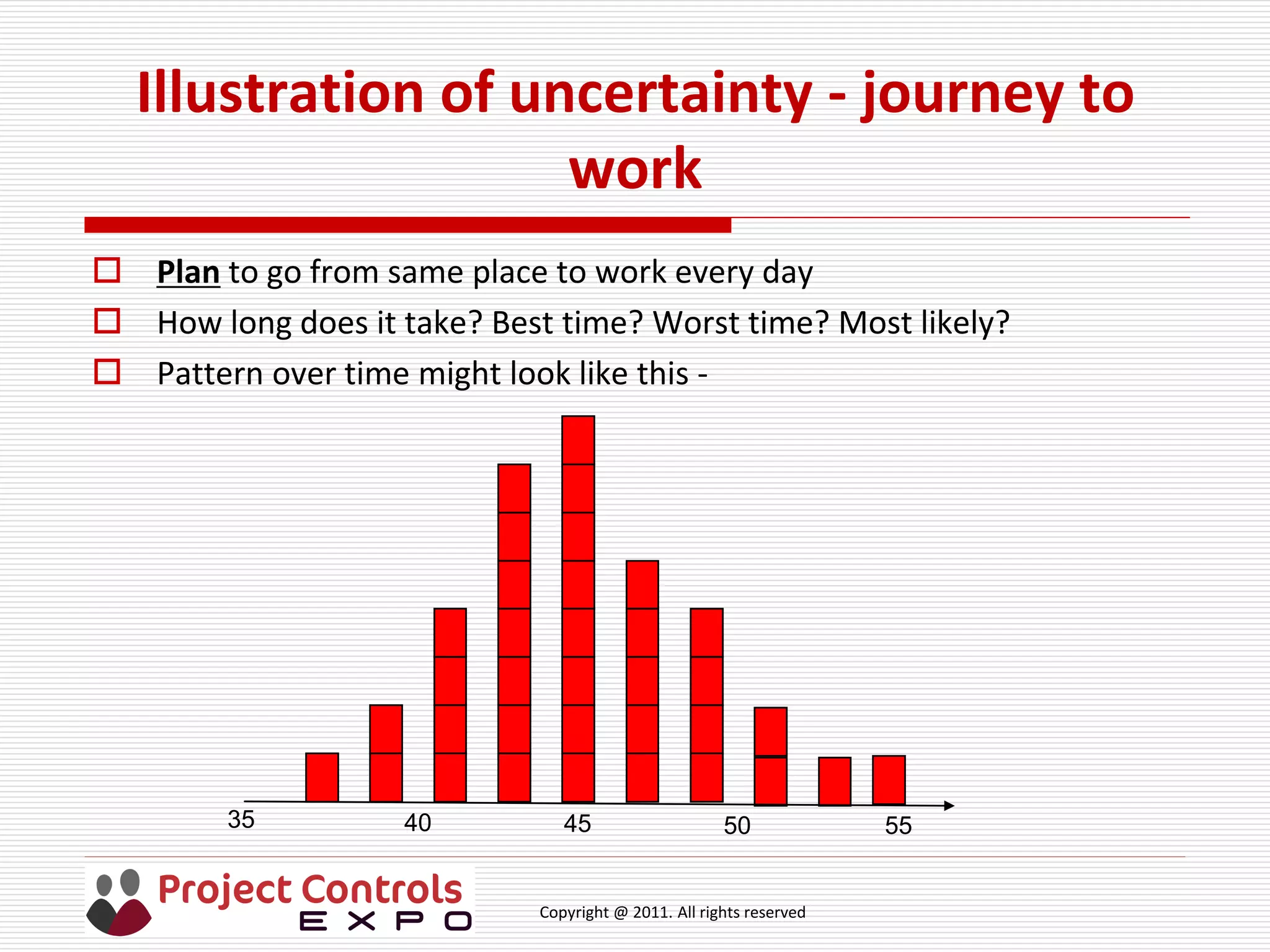
 Plan to go from same place to work every day
 How long does it take? Best time? Worst time? Most likely?
 Pattern over time might look like this -
35 40 45 50 55
Copyright @ 2011. All rights reserved
Uncertainty discussion points
 Why the variation? Ask the audience!
 Pattern is also known as: “frequency distribution shape” or
“probability distribution function”
 Uncertainty in a project schedule relates to the variation in an
estimate of a task’s duration and / or cost so need skilled estimators
for quality
 What drives the variation in a project? What assumptions are made?
 How do we make use of this variation? Ask the audience!
 Use three-point estimating for each task to define best, worst and
most likely durations with a defined distribution shape
 Monte Carlo sampling to provide
 Likelihood of achieving project finish date / duration &cost
 Drivers of project duration and project cost
Copyright @ 2011. All rights reserved
Example of Monte Carlo sampling
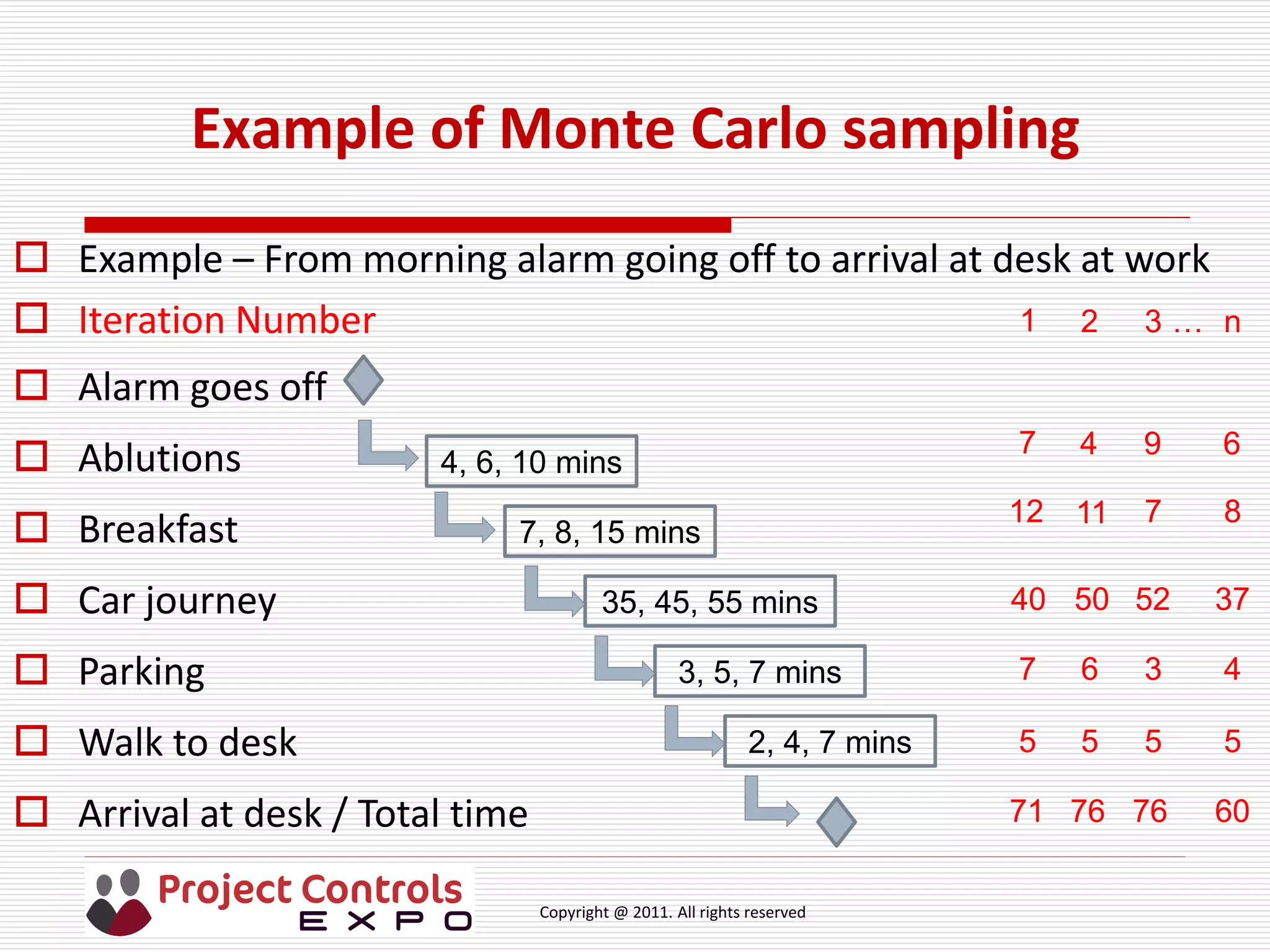
 Example – From morning alarm going off to arrival at desk at work
 Iteration Number
 Alarm goes off
 Ablutions
 Breakfast
 Car journey
 Parking
 Walk to desk
 Arrival at desk / Total time
4, 6, 10 mins
7, 8, 15 mins
35, 45, 55 mins
3, 5, 7 mins
2, 4, 7 mins
7
40
12
5
7
94
50
11
5
6
52
7
5
3
1 32
6
37
8
5
4
n
71 76 76 60
…
Copyright @ 2011. All rights reserved
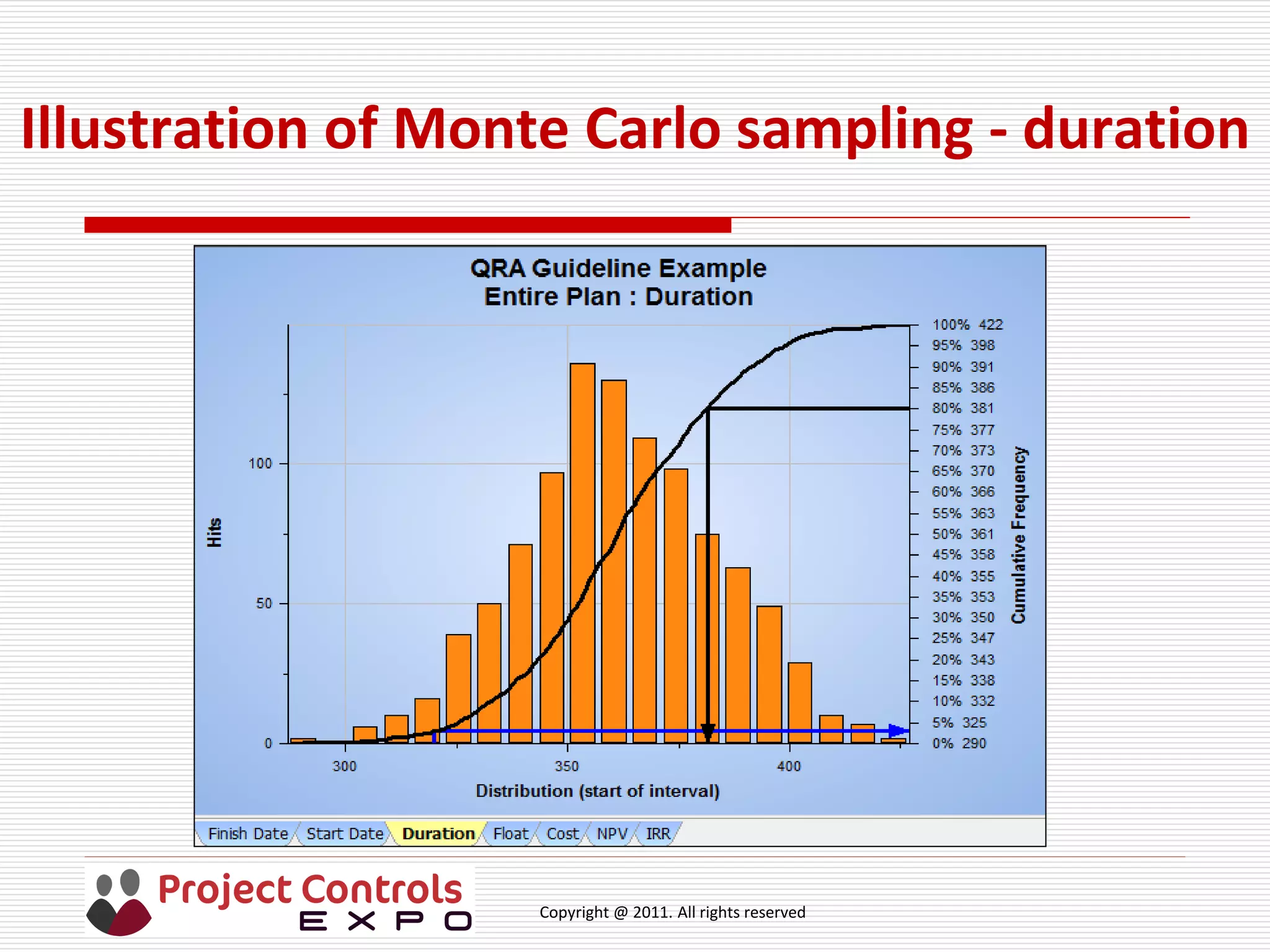
Illustration of Monte Carlo sampling - duration
Copyright @ 2011. All rights reserved
Risk discussion points 1
 Uncertain event – may or may not occur
 Likelihood of occurrence is also known as probability, measured as a
decimal 0 to 1 or percentage 0% to 100%
 If 0 or 0%, then there is no risk
 If 1 or 100% there is no risk as has occurred & should be treated as an
issue
 Threat – if risk occurs,
 schedule could be extended, and / or
 cost will be increased
 Opportunity – if it occurs,
 schedule could be reduced, and / or
 cost will be reduced (if cost of managing less than benefit)
Copyright @ 2011. All rights reserved
Risk discussion points 2
 Magnitude of impact: days added to (or subtracted from) task duration
and / or costs added to (or reduced from) task cost
 There can be
 one risk impacting several tasks
 one task impacted by several risks
 several risks impacting several tasks
 To measure the full impact of a risk it must be linked to an appropriate
Work Breakdown Structure element(s) (Project, Task package, Task)
 Impact may be uncertain (best, worst, most likely so need three-point
estimate) or certain (single value, such as a fee)
Copyright @ 2011. All rights reserved
Risk discussion points 3
 Exposure is the full range of the variation of project outcomes over the
cumulative probability range from 0% to 100%, shown as ‘S’ curve in
earlier slide
 Use can be made of ‘S’ curves for setting budgets and timescales,
including contingency
 Stakeholders – “Any individual, group or organisation that can affect,
be affected by, or perceive itself to be affected by an initiative (project
or task).” Source Management_of_Risk
 Task managers, project managers, decision-makers, investment
committee, residents, landowners, schools, emergency services,
etc etc
Copyright @ 2011. All rights reserved
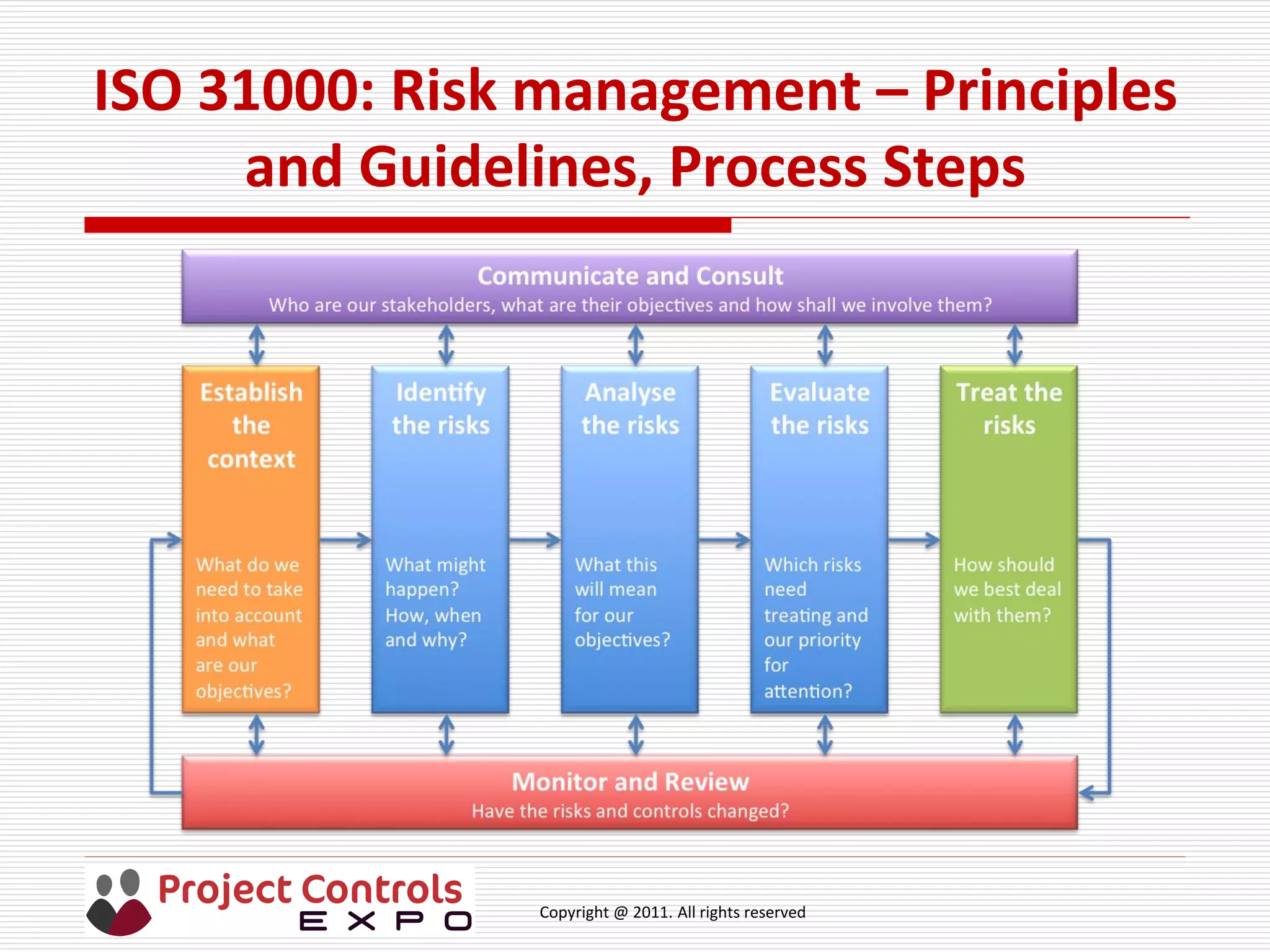
ISO 31000: Risk management – Principles
and Guidelines, Process Steps
Copyright @ 2011. All rights reserved
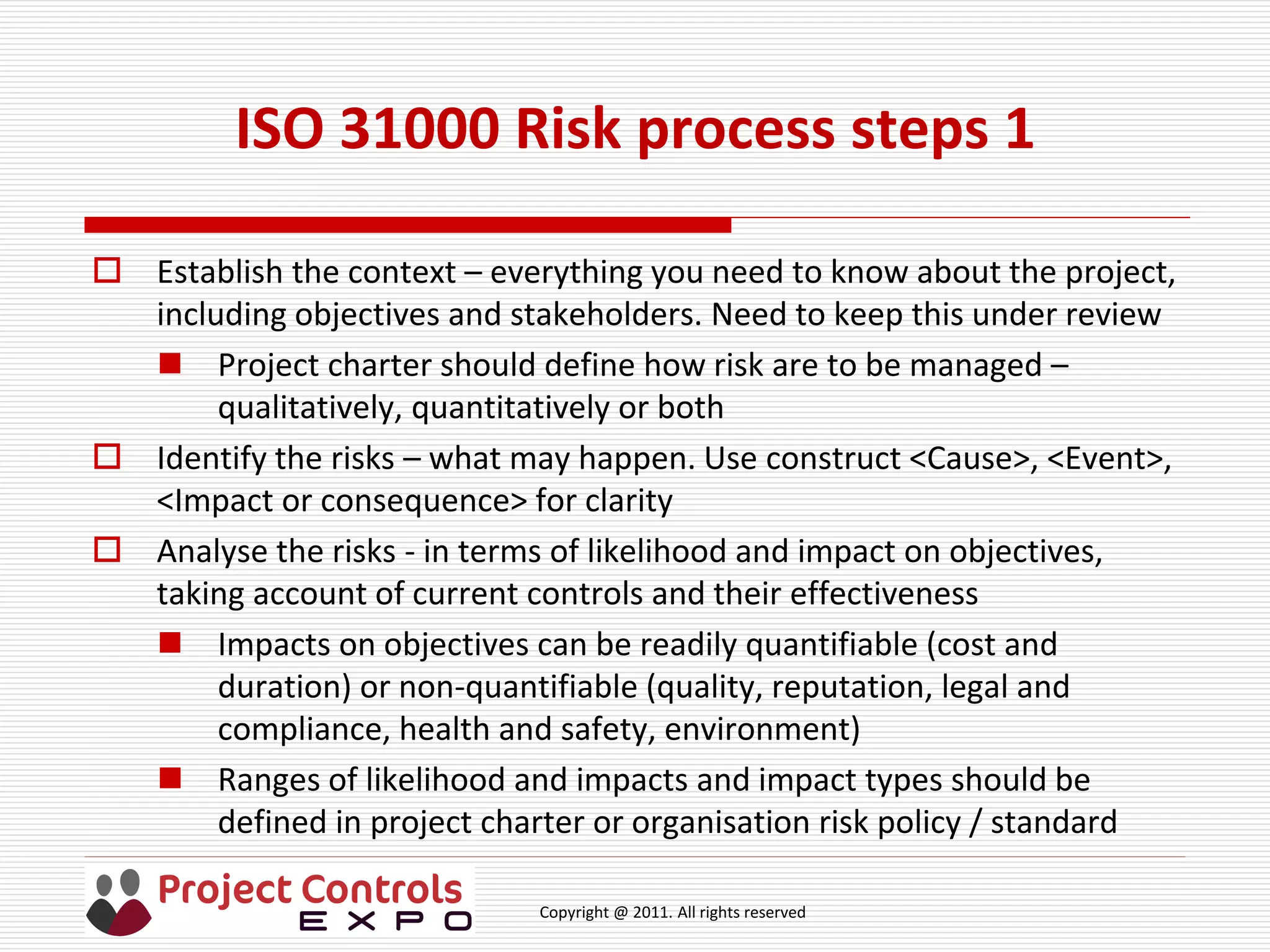
ISO 31000 Risk process steps 1
 Establish the context – everything you need to know about the project,
including objectives and stakeholders. Need to keep this under review
 Project charter should define how risk are to be managed –
qualitatively, quantitatively or both
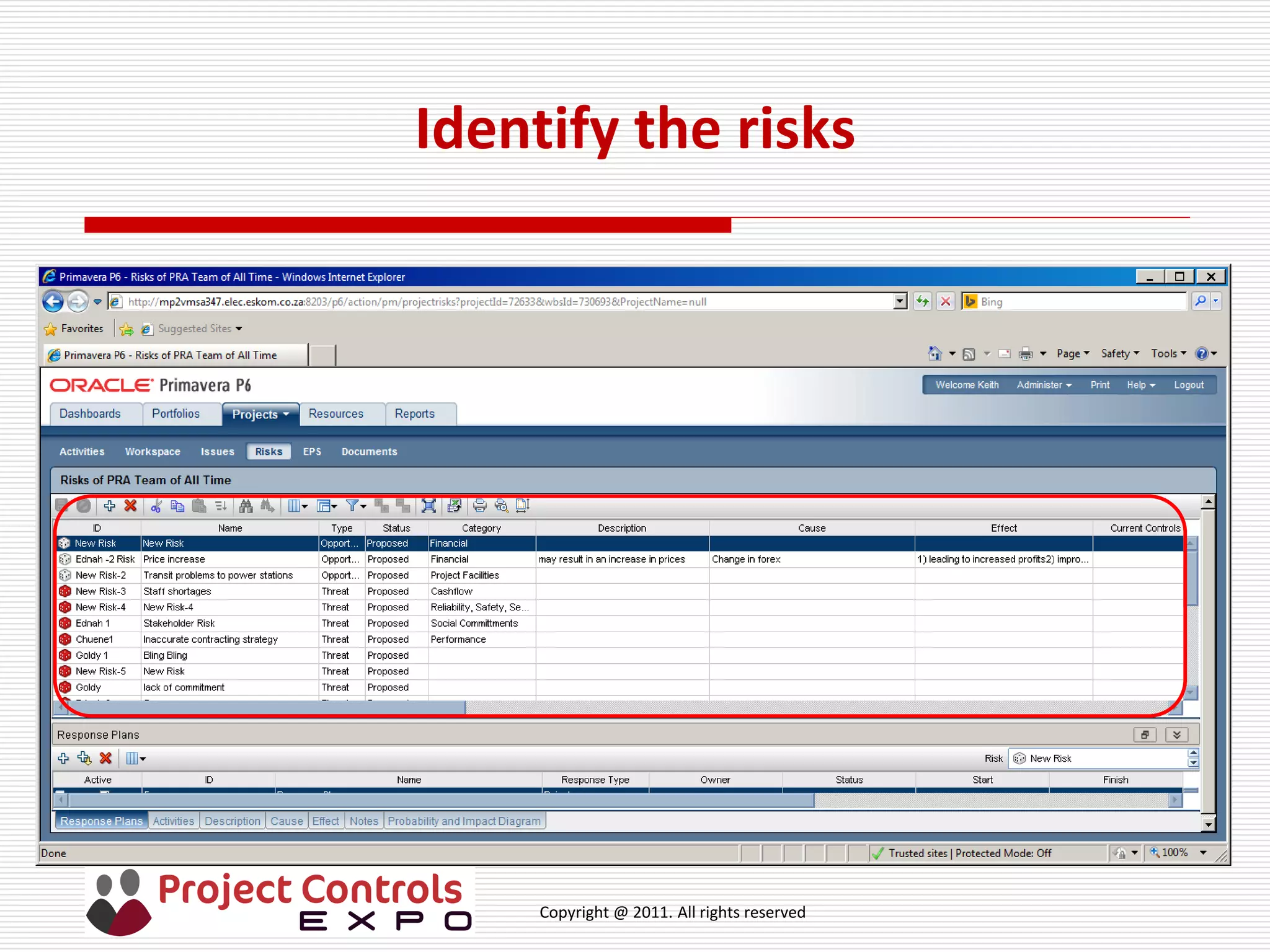
 Identify the risks – what may happen. Use construct <Cause>, <Event>,
<Impact or consequence> for clarity
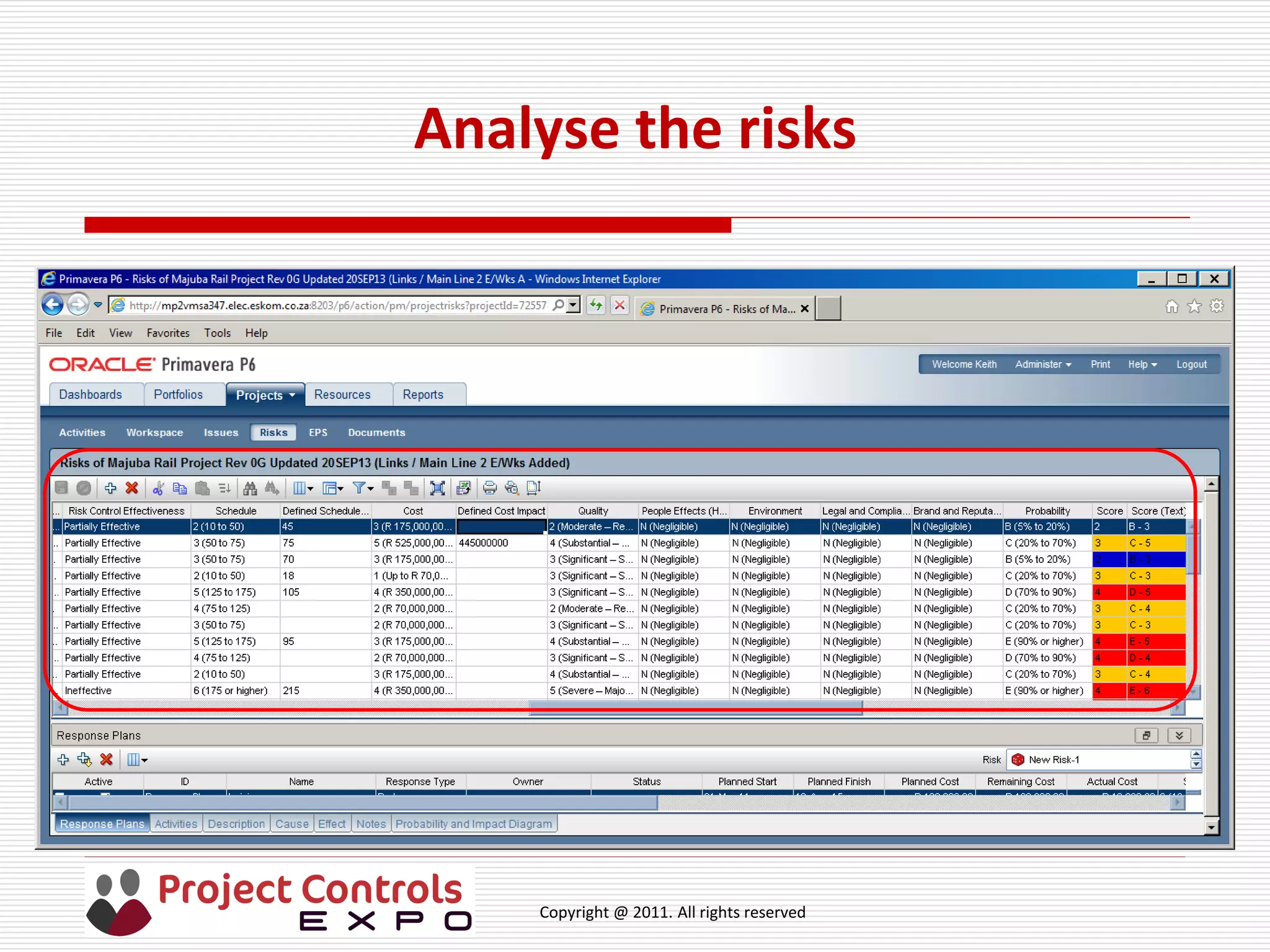
 Analyse the risks - in terms of likelihood and impact on objectives,
taking account of current controls and their effectiveness
 Impacts on objectives can be readily quantifiable (cost and
duration) or non-quantifiable (quality, reputation, legal and
compliance, health and safety, environment)
 Ranges of likelihood and impacts and impact types should be
defined in project charter or organisation risk policy / standard
Copyright @ 2011. All rights reserved
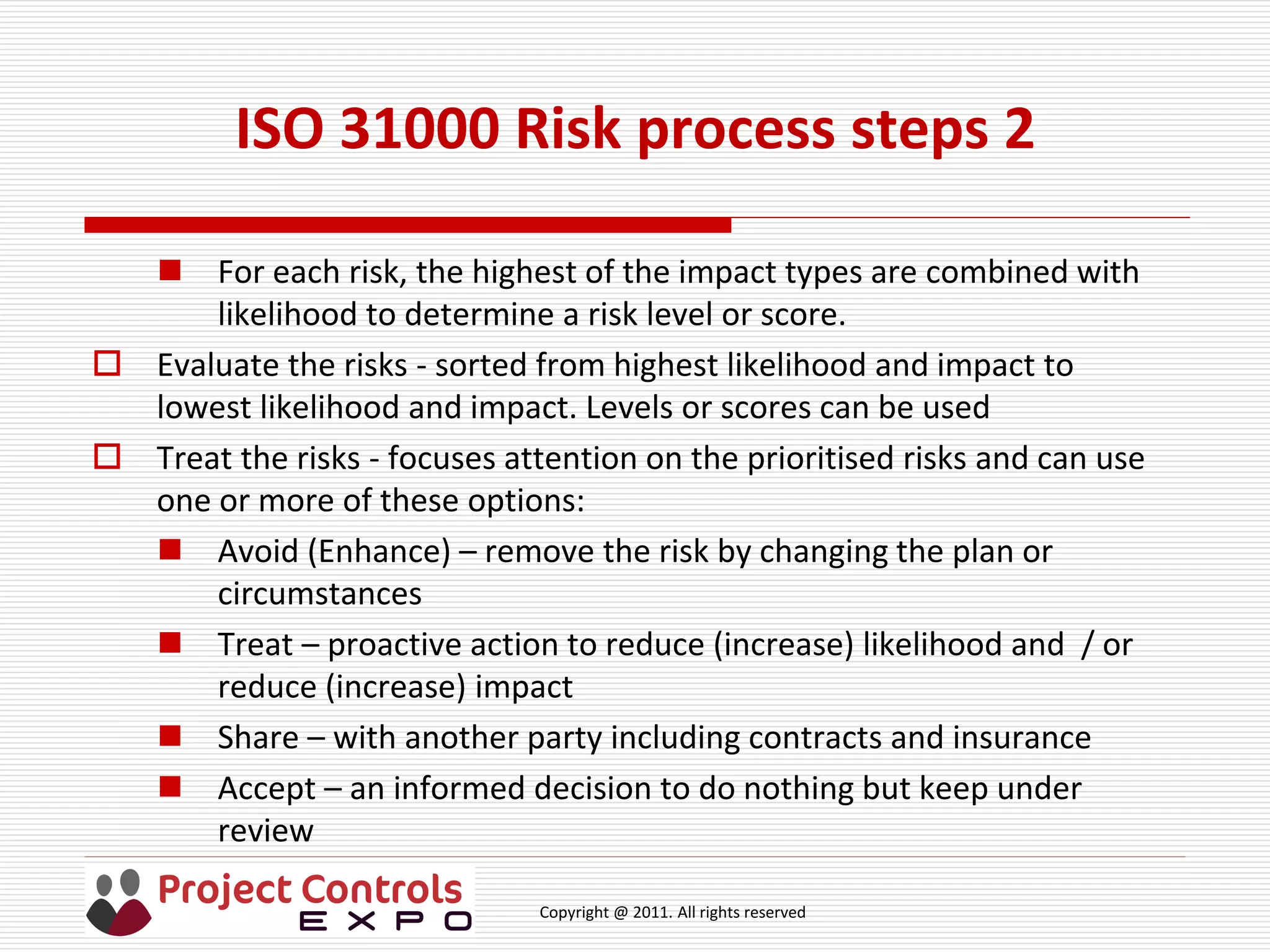
ISO 31000 Risk process steps 2
 For each risk, the highest of the impact types are combined with
likelihood to determine a risk level or score.
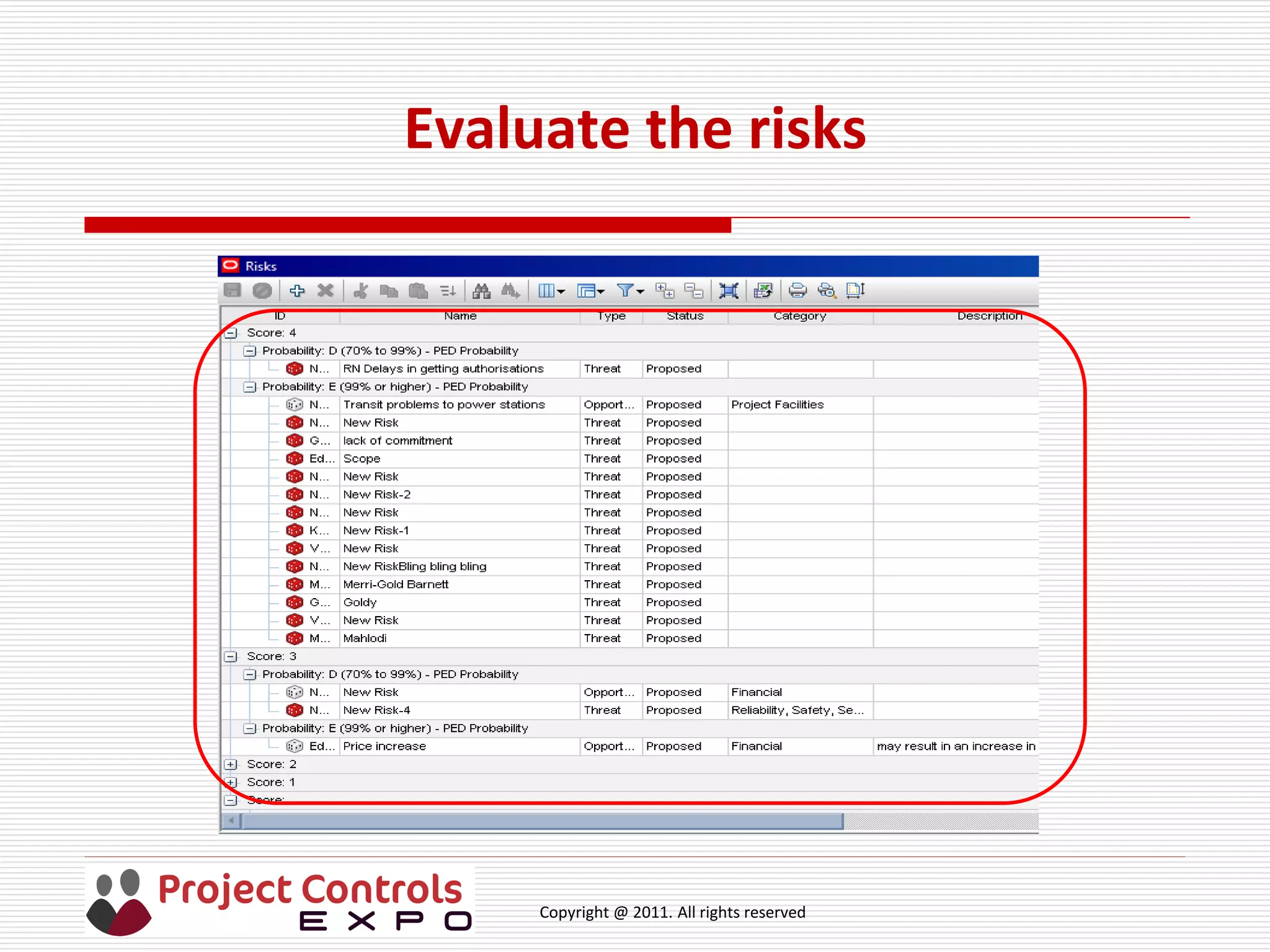
 Evaluate the risks - sorted from highest likelihood and impact to
lowest likelihood and impact. Levels or scores can be used
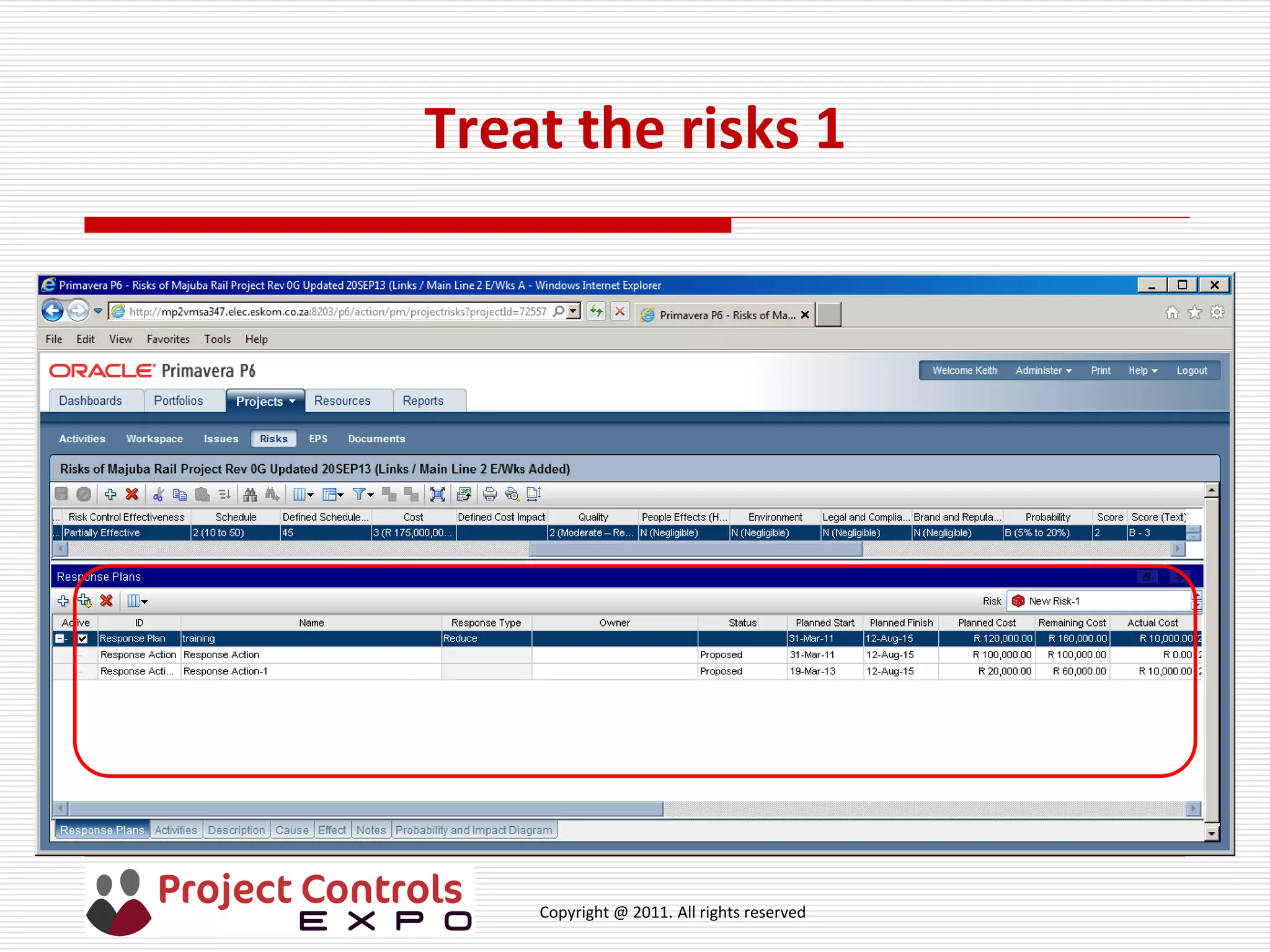
 Treat the risks - focuses attention on the prioritised risks and can use
one or more of these options:
 Avoid (Enhance) – remove the risk by changing the plan or
circumstances
 Treat – proactive action to reduce (increase) likelihood and / or
reduce (increase) impact
 Share – with another party including contracts and insurance
 Accept – an informed decision to do nothing but keep under
review
Copyright @ 2011. All rights reserved
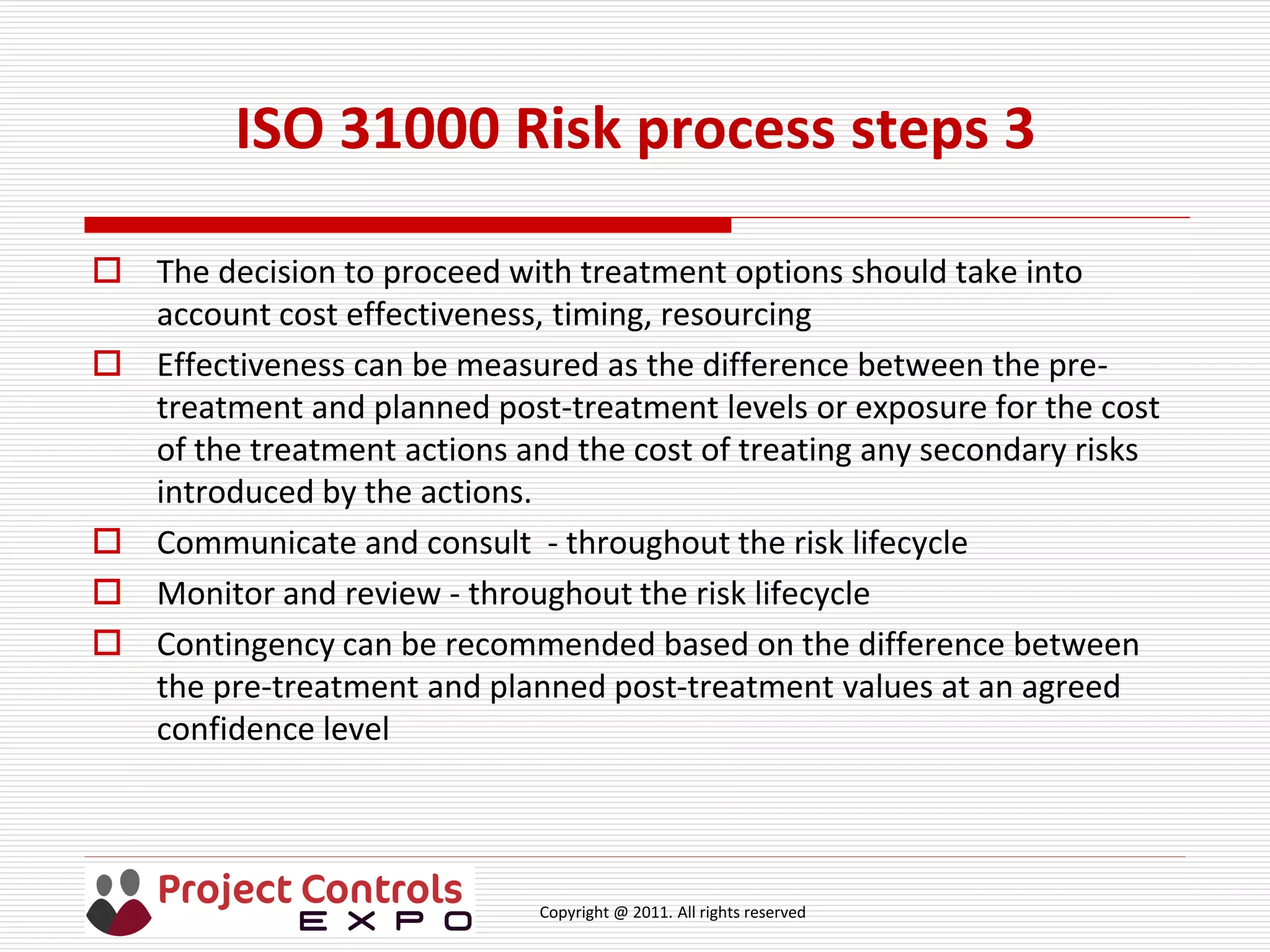
 The decision to proceed with treatment options should take into
account cost effectiveness, timing, resourcing
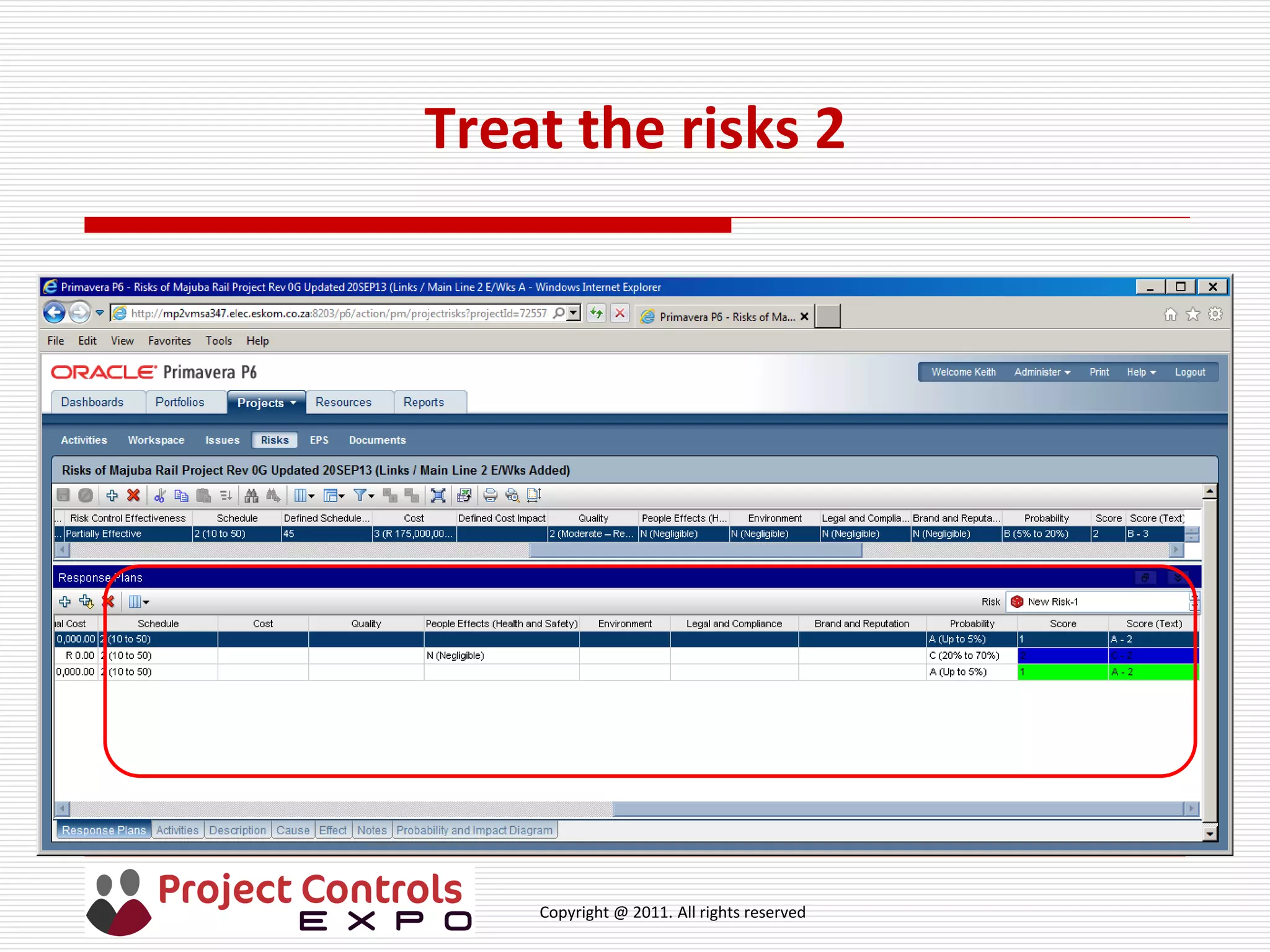
 Effectiveness can be measured as the difference between the pre-
treatment and planned post-treatment levels or exposure for the cost
of the treatment actions and the cost of treating any secondary risks
introduced by the actions.
 Communicate and consult - throughout the risk lifecycle
 Monitor and review - throughout the risk lifecycle
 Contingency can be recommended based on the difference between
the pre-treatment and planned post-treatment values at an agreed
confidence level
ISO 31000 Risk process steps 3
Copyright @ 2011. All rights reserved
Risk identification exercise
 Exercise. Look at the journey to work example. Look at one of the tasks
and identify at least 2 risks.
 Use the construct <cause>, <event>, <impact> to describe the risk
 How likely is the risk to occur? How much will it impact on my journey?
 What can you do about the risk?
 What assumptions have you made?
Copyright @ 2011. All rights reserved
Practical aspects: Recording risks -
database or spreadsheet?
 What do we need a risk database to be capable of?
 Does a spreadsheet achieve these features?
 What do you use?
Copyright @ 2011. All rights reserved
Practical aspects: Risk databases
 What do we need a risk database to be capable of?
 Accessible
 User profiles
 Controlled configuration to a process / standard / project /
organisation
 Ease of use and secure
 Handle pre-treatment and planned post-treatment assessments
 Audit trail
 Reporting
 Roll back / backed up
 Integrate with other tools and link risks to tasks / cost elements
 Comply with IT policy
Copyright @ 2011. All rights reserved
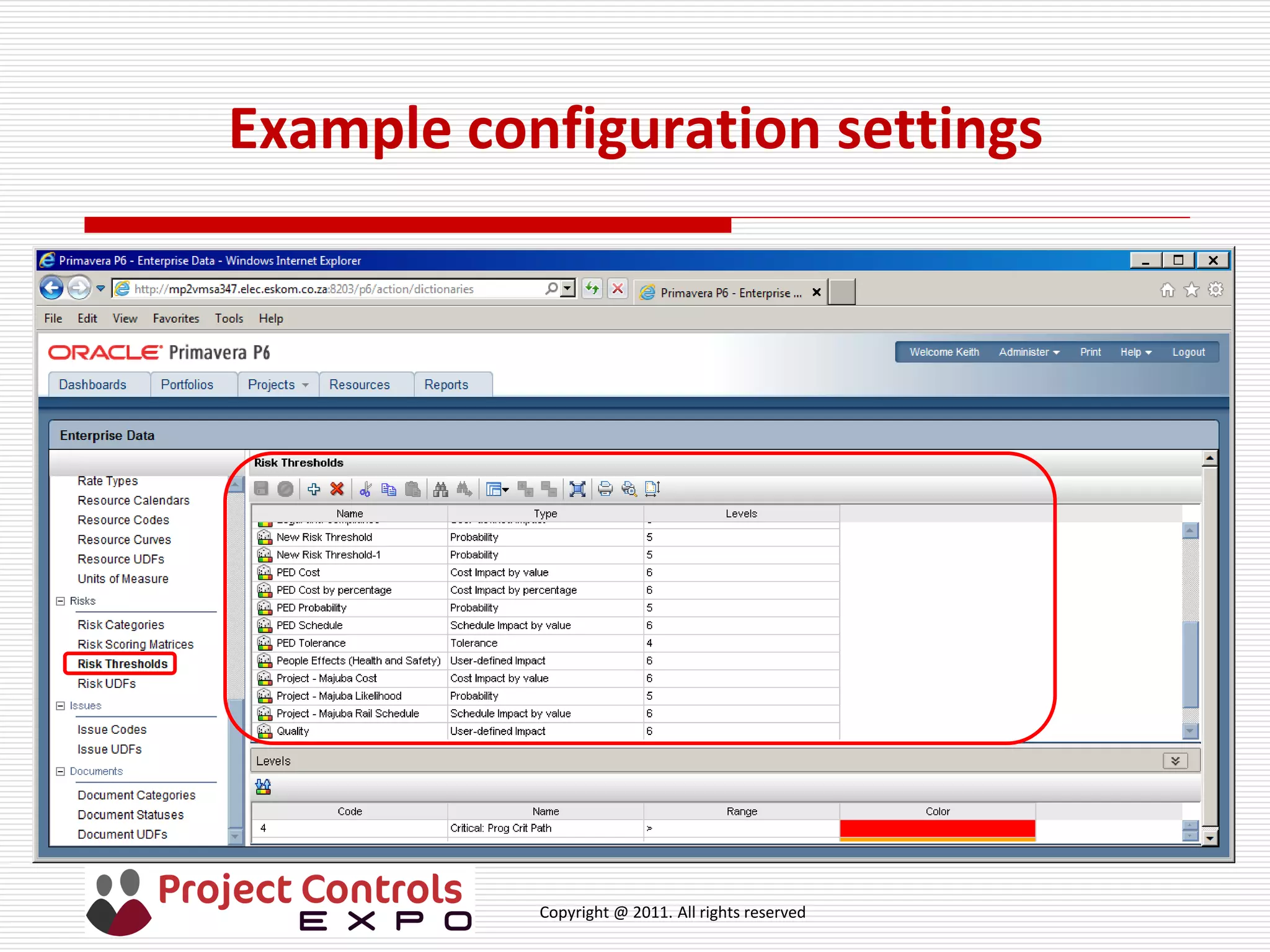
Example configuration requirement for
risk matrix in database
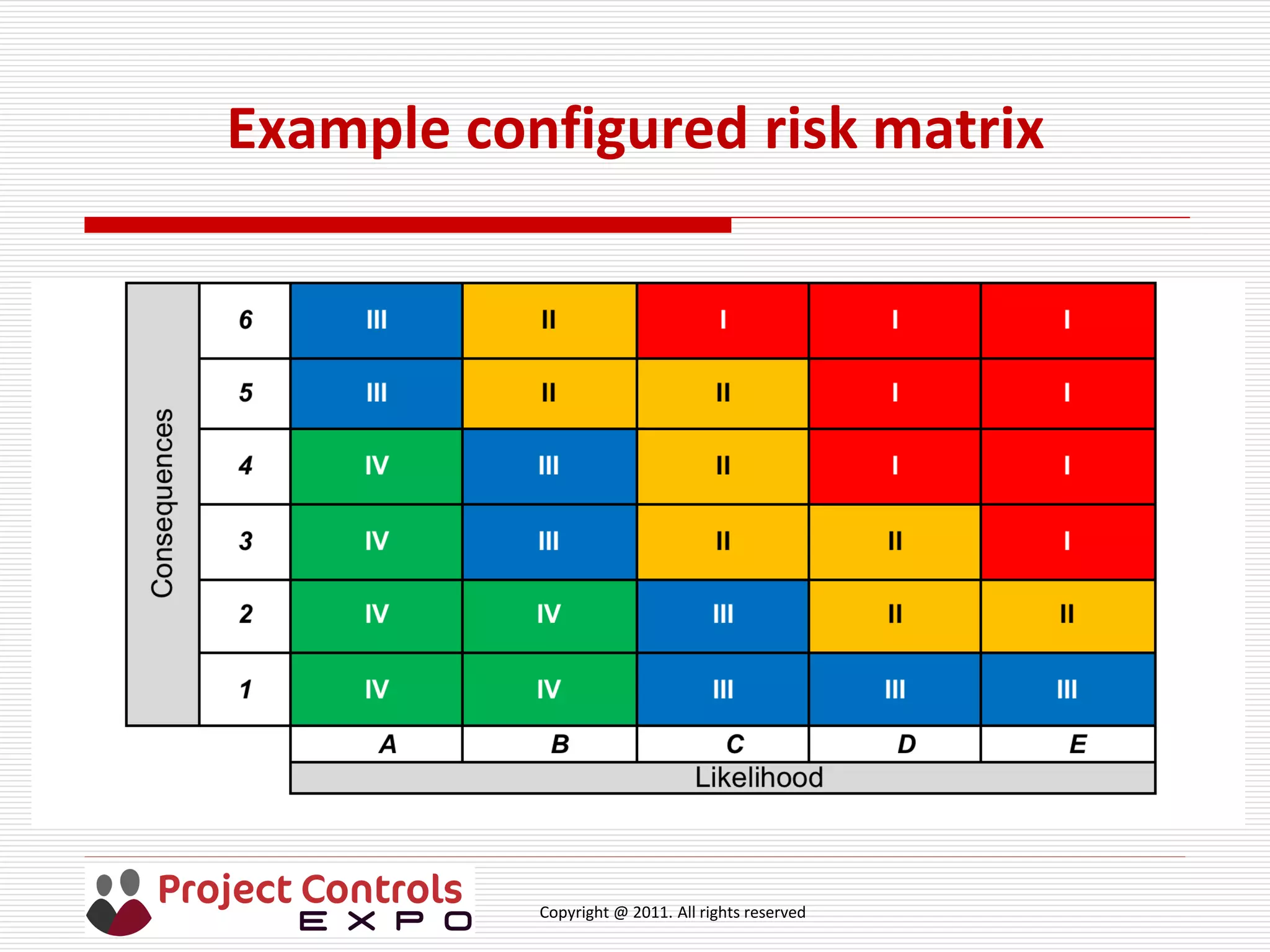
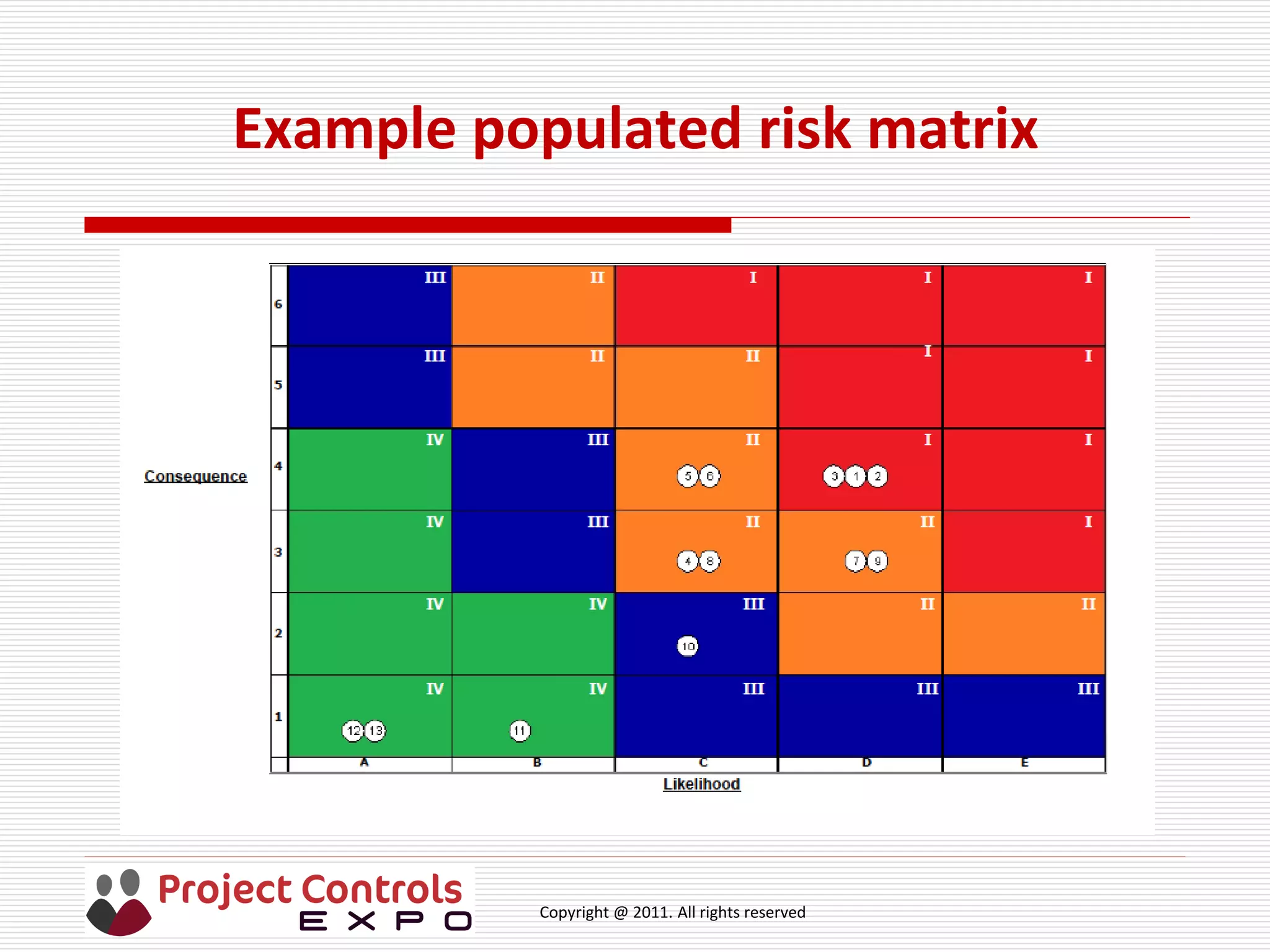
 Level of risk using a risk matrix by combining highest impact (or
consequence) with probability(or likelihood) (also known as heat map)
 Project impact types from organisation standard (e.g. commonly 4, 5
or 6; cost, schedule delay, reputation, environment, people, legal)
 Impact ranges - how many and how labeled
 Examples: 1, 2, 3, 4. 5, 6; Very Low, Low, Medium, High, Very High;
 Probability ranges from organisation standard
 Probability - how many and how labeled (commonly 4, 5 or 6)
 Examples: e.g. A, B, C, D; V Low, Low, Medium, High, V High;
 Risk bands (or tolerance threshold) from organisation standard
 Risk bands – how many, how labeled and field colours
 Examples: Low, Medium, High; Levels I, II, III, IV
Copyright @ 2011. All rights reserved
Example configuration settings
Copyright @ 2011. All rights reserved
Example configured risk matrix
Copyright @ 2011. All rights reserved
Identify the risks
Copyright @ 2011. All rights reserved
Analyse the risks
Copyright @ 2011. All rights reserved
Evaluate the risks
Copyright @ 2011. All rights reserved
Treat the risks 1
Copyright @ 2011. All rights reserved
Treat the risks 2
Copyright @ 2011. All rights reserved
Example populated risk matrix
Copyright @ 2011. All rights reserved
Risk database vs Monte Carlo sampling
 Risk matrix used for qualitative analysis so that risk levels can be
compared
 What are the benefits and limitations?
 Benefits: Intuitive; easy to understand and prioritise risks
 Limitations: Difficult to aggregate; can be misleading if risk linked to
task in schedule, cannot distinguish between risks impacting in a
schedule
 Monte Carlo sampling pinpoints drivers of uncertainty and risks, both
cost and schedule; aggregates all risks to provide total exposure
 Let’s have a look at what else the Monte Carlo sampling tool should be
capable of
Copyright @ 2011. All rights reserved
Monte Carlo sampling
 What do we need Monte Carlo sampling to be capable of?
 Import schedule and cost plan if separate
 Edit uncertainty values, distributions shapes and correlation
 Import risks from risk database
 Link risks to tasks and cost elements if not already linked in database
 Edit cost and schedule impact values
 Edit risk probability
 Edit risk distribution shape
 Select number of iterations
 Show histograms and pre & post treated cumulative probability graphs
 Show schedule and cost drivers with and without pre & post risks
 Reports
Copyright @ 2011. All rights reserved
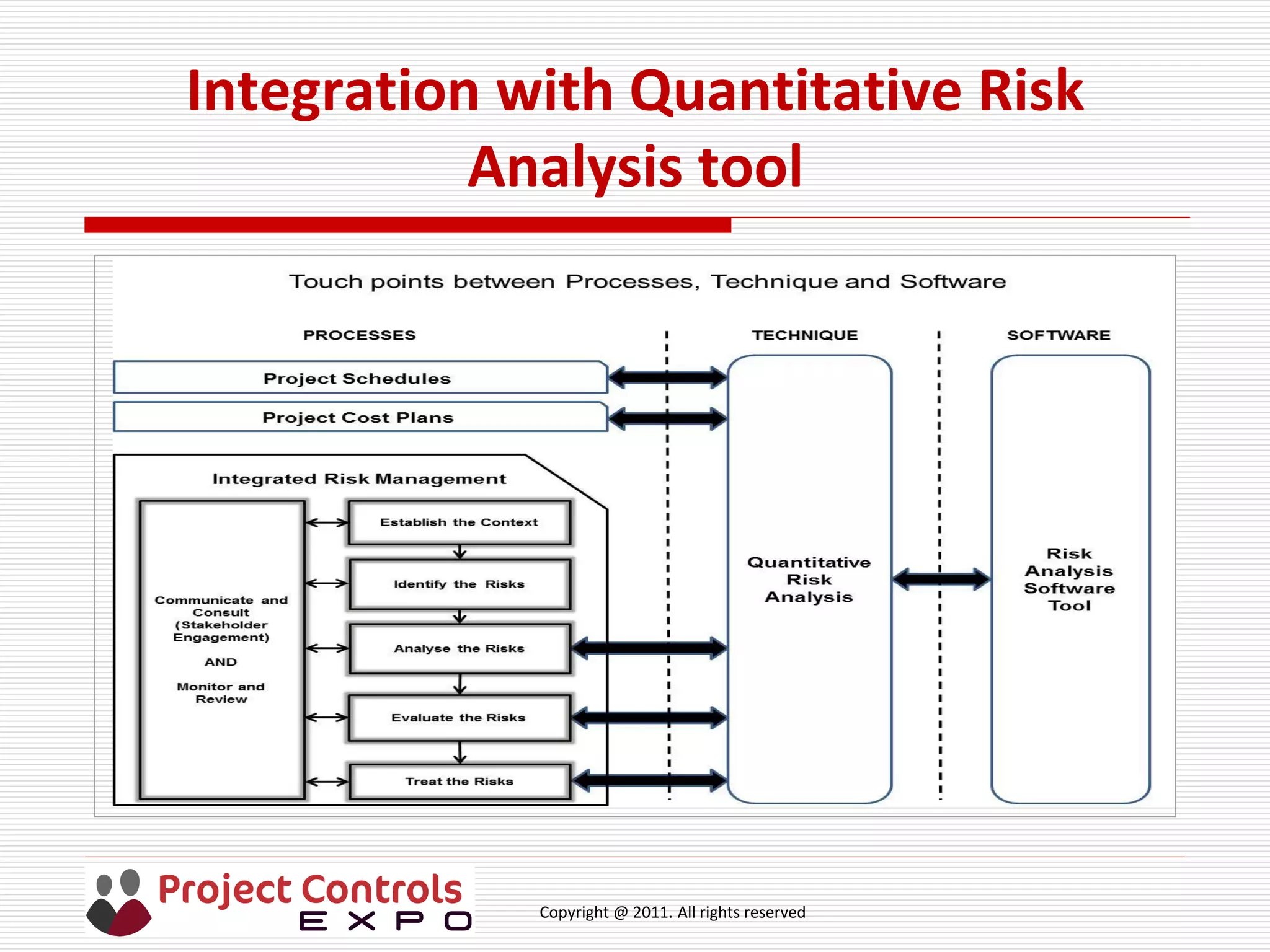
Integration with Quantitative Risk
Analysis tool
Copyright @ 2011. All rights reserved
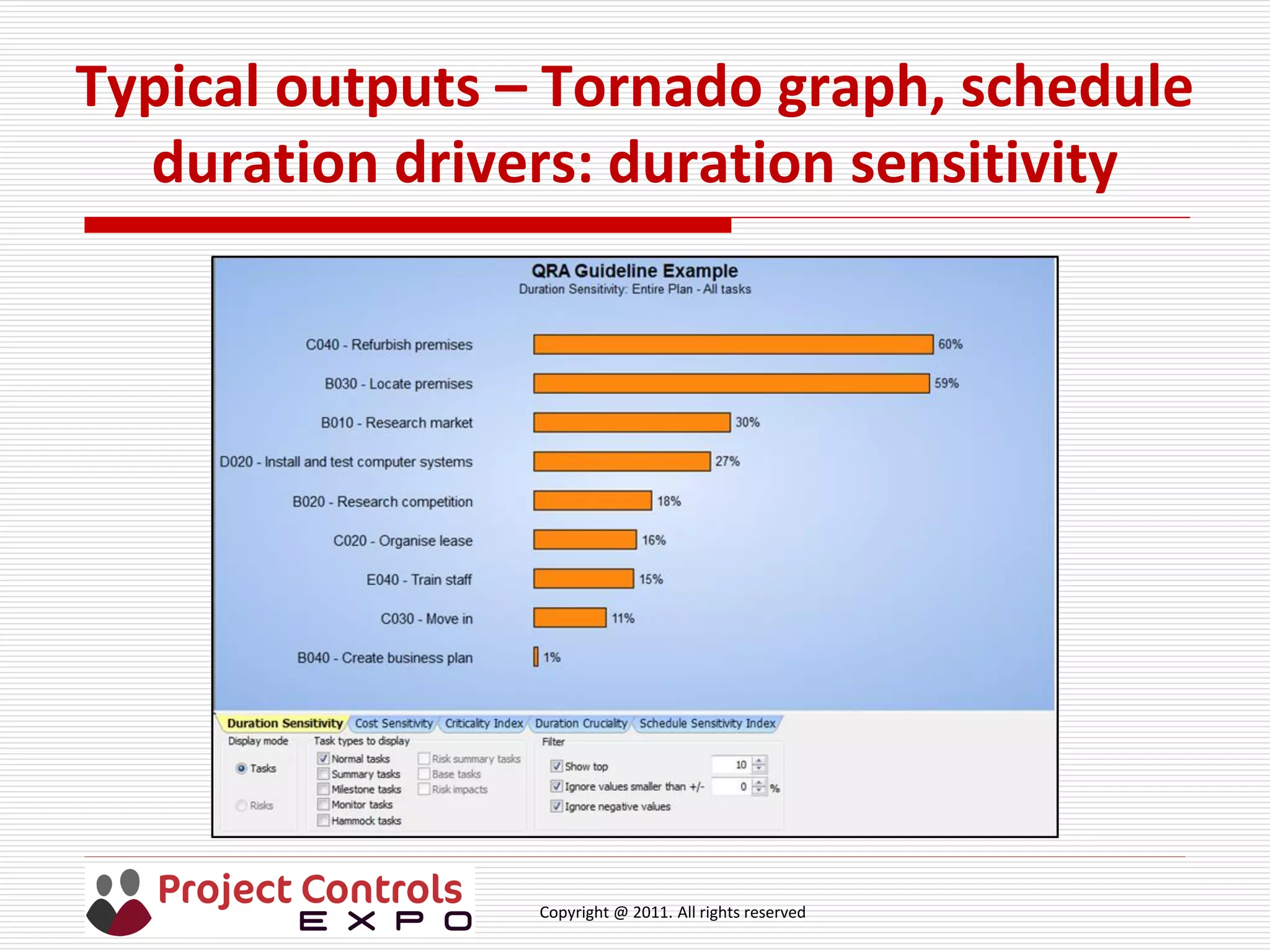
Typical outputs – Tornado graph, schedule
duration drivers: duration sensitivity
Copyright @ 2011. All rights reserved
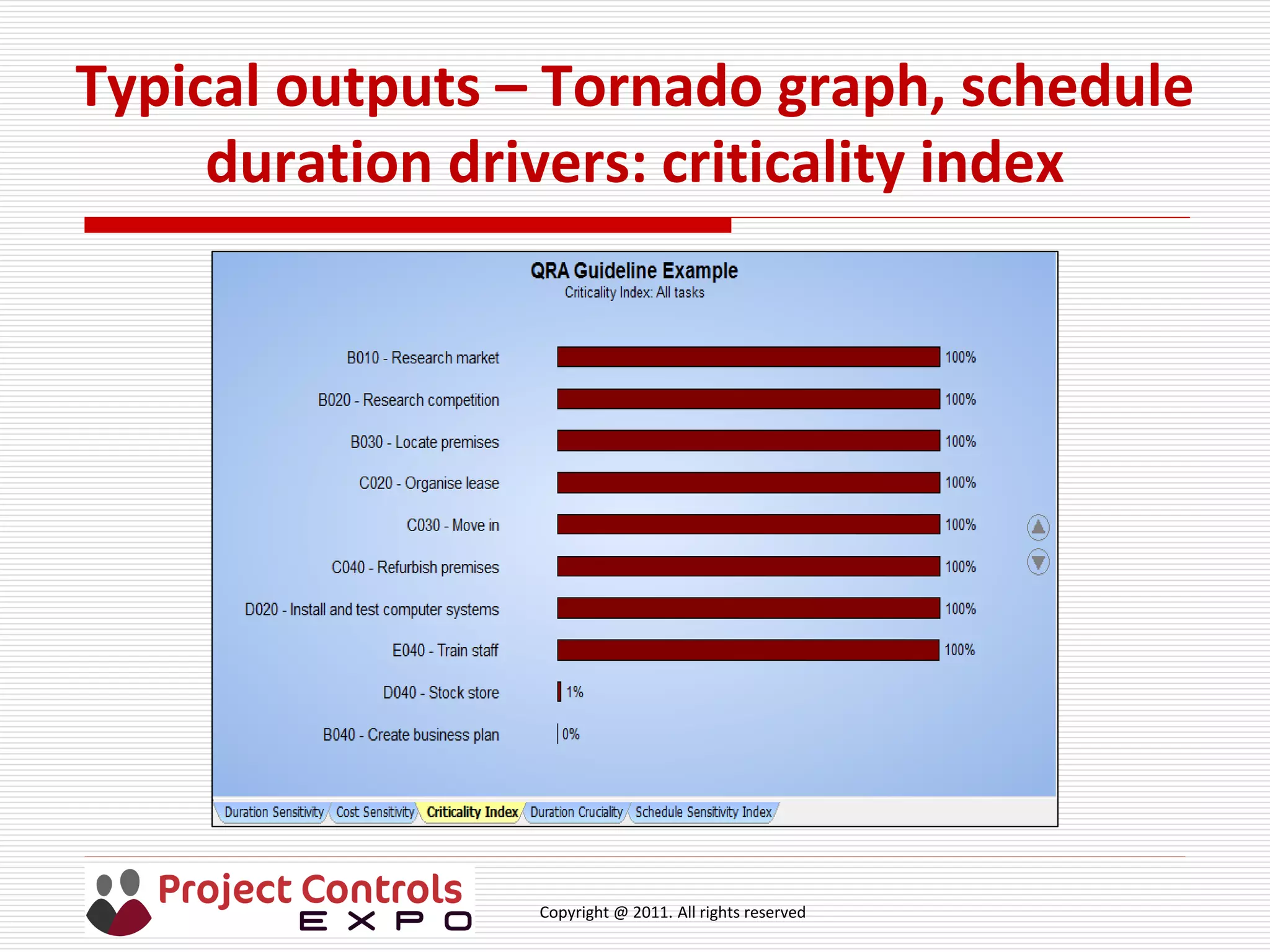
Typical outputs – Tornado graph, schedule
duration drivers: criticality index
Copyright @ 2011. All rights reserved
Typical outputs – Tornado graph, schedule
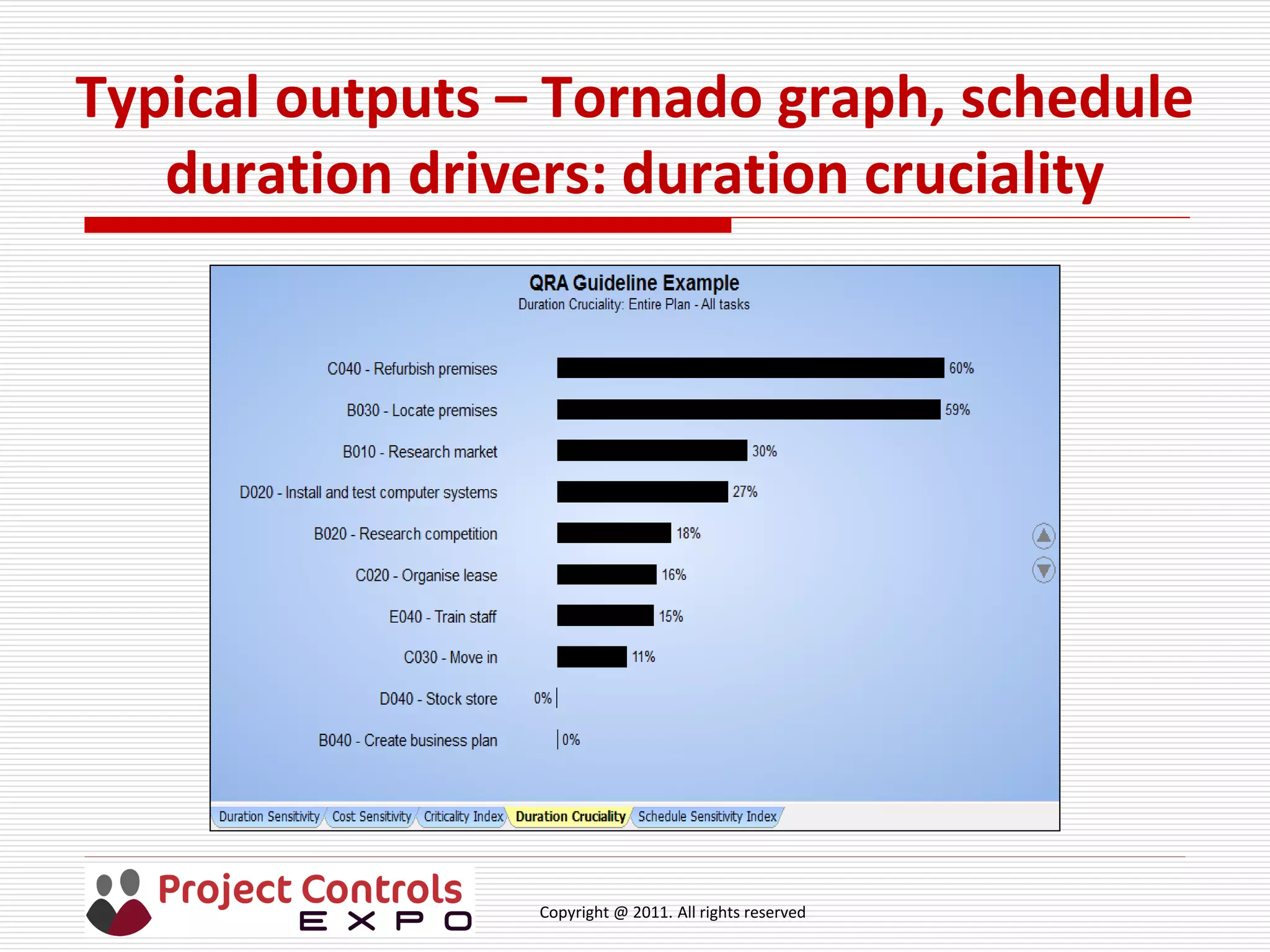
duration drivers: duration cruciality
Copyright @ 2011. All rights reserved
Typical outputs – schedule duration pre-
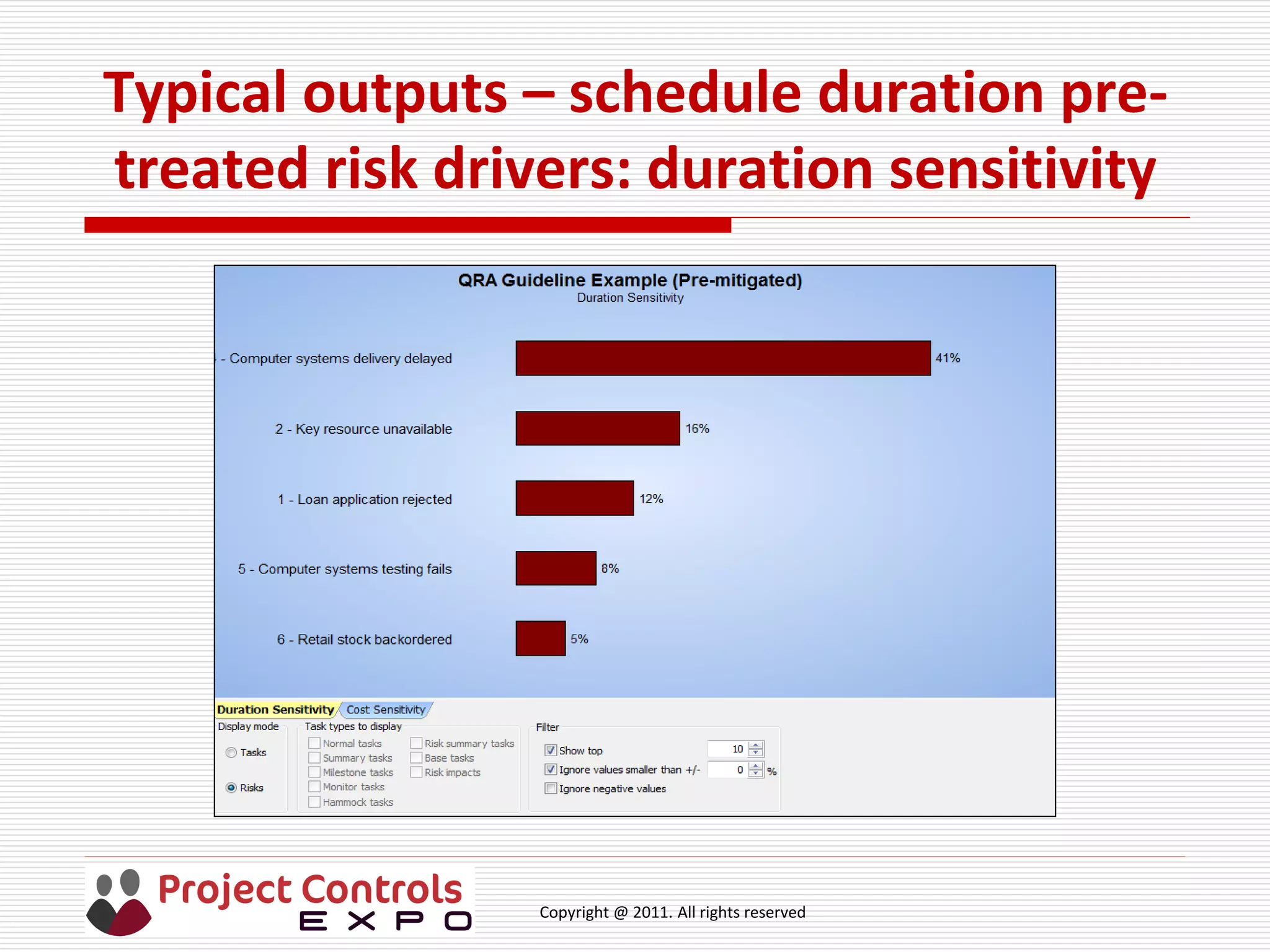
treated risk drivers: duration sensitivity
Copyright @ 2011. All rights reserved
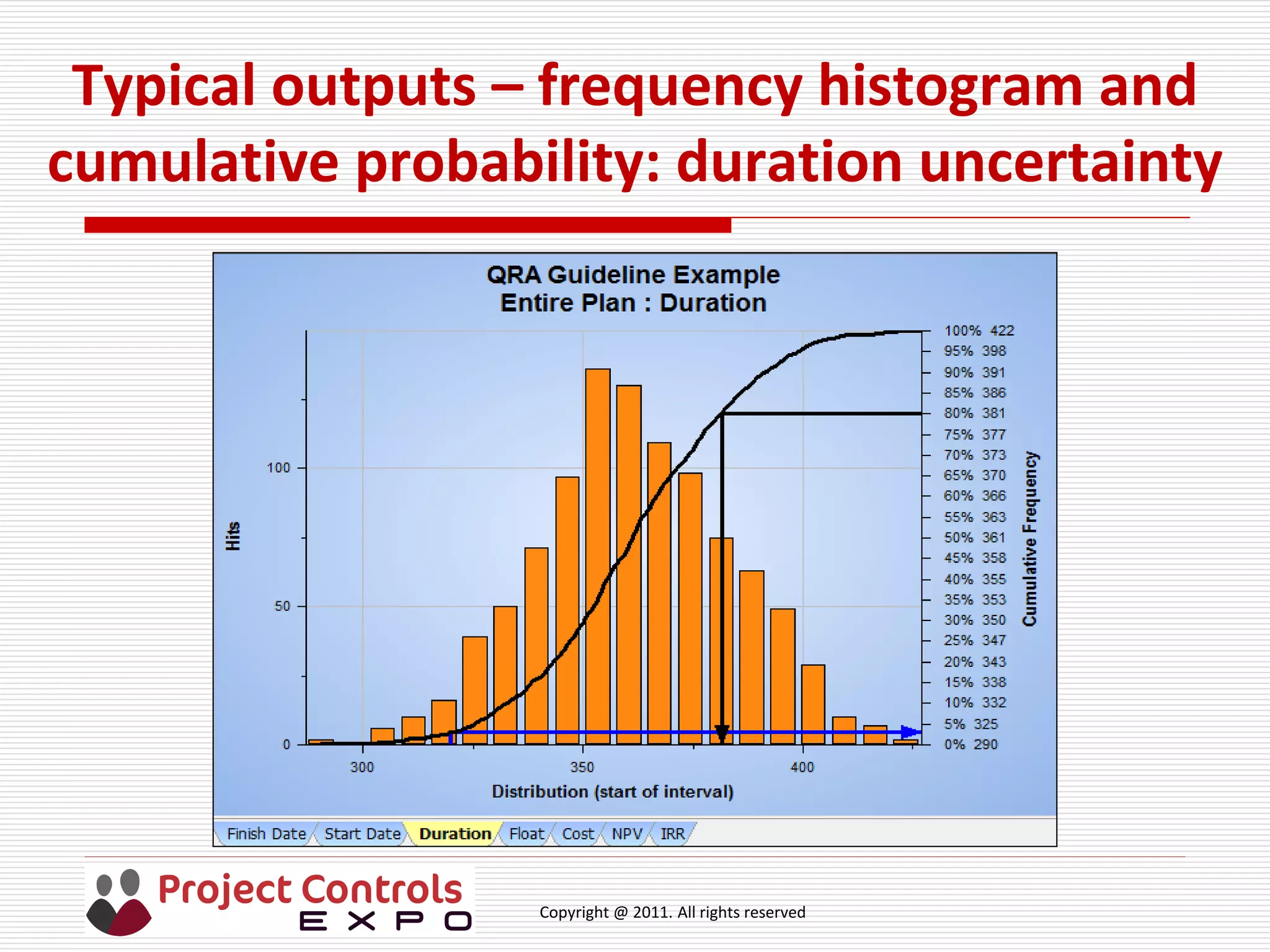
Typical outputs – frequency histogram and
cumulative probability: duration uncertainty
Copyright @ 2011. All rights reserved
Further discussion points
 Use of the analysis graph for contingency determination
 Benefits – Ranges of outcomes address probabilistic nature of
projects; many what if scenarios and options can be explored; can
support earned value and cost to completion forecasts
 Limitations – only modeling those risks identified; new risks will
emerge during execution so need to repeat frequently
 Skills of everyone involved – Ask the audience!
 Estimators and schedulers: do you use three-point estimating?
 Risk practitioners: how thorough is risk identification
 Do you or your projects use Monte Carlo sampling? Ask the audience!
 Do project managers use qualitative and / or quantitative risk analysis?
Copyright @ 2011. All rights reserved
Thank you
 keith@riskperformance.biz
 +447879423242

Session B3 - Introduction to Project Cost and Schedule Risk Analysis

  • 1.
    Copyright @ 2011.All rights reserved Introduction to Project Cost and Schedule Risk Analysis Keith Gray, Risk Performance Ltd Project Controls Expo – 13th Oct 2015 Emirates Stadium, London
  • 2.
    Copyright @ 2011.All rights reserved About the Speaker: Keith Gray  Consultant and trainer on risk processes (Management _of_Risk) and tools (Predict! Risk Controller, Predict! Risk Analyser, Primavera Risk Analysis, Primavera P6 Risk Register)  Implementer of ISO 31000 process  Many sectors covered, including defence, energy, oil and gas, telecomms, ICT, construction  Established quantitative risk analysis capability in an energy utility  Early experience in defence during Defence Procurement game changing period  Committee Member of the APM Risk Specific Interest Group  keith@riskperformance.biz  +447879423242
  • 3.
    Copyright @ 2011.All rights reserved Agenda  A few questions  Processes  Definitions  Uncertainty  Risk discussion  ISO 31000 process steps  Recording risks  Configuring a risk matrix  Monte Carlo sampling  Integration  Typical outputs  Further discussion points
  • 4.
    Copyright @ 2011.All rights reserved Project Cost and Schedule Risk Analysis  A few familiar questions …  What?  Why?  When?  How?  Where?  Who?
  • 5.
    Copyright @ 2011.All rights reserved Project Cost and Schedule Risk Analysis– What, Why and When  What – realistic, timely, accurate information on project duration and costs taking account of uncertainties and risks  Why – projects are probabilistic in nature and risk analysis information can help set realistic cost and timescales  When – as required through the project lifecycle, for setting budgets and timescales and contingency before execution phase and to aid project controls during execution
  • 6.
    Copyright @ 2011.All rights reserved Project Cost and Schedule Risk Analysis– How, Where and Who  How – Monte Carlo sampling on estimates of project cost and task duration with uncertainty; risks with estimates of probability and impact linked to costs and tasks; qualitative level of risks from a configured risk matrix, aggregated cost and duration from Monte Carlo simulation  Where – cost and planning tools; risk database; Monte Carlo simulation tool; import / export interfaces  Who – estimators, schedulers, risk analysts, project team, project managers, decision-makers
  • 7.
    Copyright @ 2011.All rights reserved Risk Management Processes  Processes  ISO 31000 Risk management – Principles and Guidelines  plus ISO Guide 73:2009, Risk Management – Vocabulary and ISO/IEC 31010, Risk Management – Risk Assessment Techniques  Management_of_Risk: Guidance for Practitioners  PMBoK, Section 11, Project Risk Management  APM BoK, Section 2 .5 Project Risk Management  plus Project Risk Analysis & Management, (2004) 2nd edition
  • 8.
    Copyright @ 2011.All rights reserved Definitions - Risk  ISO 31000: “Effect of uncertainty on objectives”  M_o_R: “An uncertain event or set of events that, should it occur, will have an effect on the achievement of objectives. A risk is measured by a combination of the probability of a perceived threat or opportunity occurring and the magnitude of its impact on objectives.”  PMBoK: ”An uncertain event or condition that , if it occurs, has a positive effect on a project’s objectives.”  APM: (Risk event) “An uncertain event or set of circumstances that should it or they occur would have an effect on the achievement of one or more of the project objectives.”  APM: (Project risk) “The exposure of stakeholders to the consequences of variation in outcome.”
  • 9.
    Copyright @ 2011.All rights reserved Discussion of terms in the definitions  Uncertainty  Objectives  Uncertain event  Probability (also known as likelihood or chance)  Perceived threat or opportunity  Magnitude of impact  Exposure  Variation in outcome  Stakeholders
  • 10.
    Copyright @ 2011.All rights reserved Illustration of uncertainty - journey to work  Plan to go from same place to work every day  How long does it take? Best time? Worst time? Most likely?  Pattern over time might look like this - 35 40 45 50 55
  • 11.
    Copyright @ 2011.All rights reserved Uncertainty discussion points  Why the variation? Ask the audience!  Pattern is also known as: “frequency distribution shape” or “probability distribution function”  Uncertainty in a project schedule relates to the variation in an estimate of a task’s duration and / or cost so need skilled estimators for quality  What drives the variation in a project? What assumptions are made?  How do we make use of this variation? Ask the audience!  Use three-point estimating for each task to define best, worst and most likely durations with a defined distribution shape  Monte Carlo sampling to provide  Likelihood of achieving project finish date / duration &cost  Drivers of project duration and project cost
  • 12.
    Copyright @ 2011.All rights reserved Example of Monte Carlo sampling  Example – From morning alarm going off to arrival at desk at work  Iteration Number  Alarm goes off  Ablutions  Breakfast  Car journey  Parking  Walk to desk  Arrival at desk / Total time 4, 6, 10 mins 7, 8, 15 mins 35, 45, 55 mins 3, 5, 7 mins 2, 4, 7 mins 7 40 12 5 7 94 50 11 5 6 52 7 5 3 1 32 6 37 8 5 4 n 71 76 76 60 …
  • 13.
    Copyright @ 2011.All rights reserved Illustration of Monte Carlo sampling - duration
  • 14.
    Copyright @ 2011.All rights reserved Risk discussion points 1  Uncertain event – may or may not occur  Likelihood of occurrence is also known as probability, measured as a decimal 0 to 1 or percentage 0% to 100%  If 0 or 0%, then there is no risk  If 1 or 100% there is no risk as has occurred & should be treated as an issue  Threat – if risk occurs,  schedule could be extended, and / or  cost will be increased  Opportunity – if it occurs,  schedule could be reduced, and / or  cost will be reduced (if cost of managing less than benefit)
  • 15.
    Copyright @ 2011.All rights reserved Risk discussion points 2  Magnitude of impact: days added to (or subtracted from) task duration and / or costs added to (or reduced from) task cost  There can be  one risk impacting several tasks  one task impacted by several risks  several risks impacting several tasks  To measure the full impact of a risk it must be linked to an appropriate Work Breakdown Structure element(s) (Project, Task package, Task)  Impact may be uncertain (best, worst, most likely so need three-point estimate) or certain (single value, such as a fee)
  • 16.
    Copyright @ 2011.All rights reserved Risk discussion points 3  Exposure is the full range of the variation of project outcomes over the cumulative probability range from 0% to 100%, shown as ‘S’ curve in earlier slide  Use can be made of ‘S’ curves for setting budgets and timescales, including contingency  Stakeholders – “Any individual, group or organisation that can affect, be affected by, or perceive itself to be affected by an initiative (project or task).” Source Management_of_Risk  Task managers, project managers, decision-makers, investment committee, residents, landowners, schools, emergency services, etc etc
  • 17.
    Copyright @ 2011.All rights reserved ISO 31000: Risk management – Principles and Guidelines, Process Steps
  • 18.
    Copyright @ 2011.All rights reserved ISO 31000 Risk process steps 1  Establish the context – everything you need to know about the project, including objectives and stakeholders. Need to keep this under review  Project charter should define how risk are to be managed – qualitatively, quantitatively or both  Identify the risks – what may happen. Use construct <Cause>, <Event>, <Impact or consequence> for clarity  Analyse the risks - in terms of likelihood and impact on objectives, taking account of current controls and their effectiveness  Impacts on objectives can be readily quantifiable (cost and duration) or non-quantifiable (quality, reputation, legal and compliance, health and safety, environment)  Ranges of likelihood and impacts and impact types should be defined in project charter or organisation risk policy / standard
  • 19.
    Copyright @ 2011.All rights reserved ISO 31000 Risk process steps 2  For each risk, the highest of the impact types are combined with likelihood to determine a risk level or score.  Evaluate the risks - sorted from highest likelihood and impact to lowest likelihood and impact. Levels or scores can be used  Treat the risks - focuses attention on the prioritised risks and can use one or more of these options:  Avoid (Enhance) – remove the risk by changing the plan or circumstances  Treat – proactive action to reduce (increase) likelihood and / or reduce (increase) impact  Share – with another party including contracts and insurance  Accept – an informed decision to do nothing but keep under review
  • 20.
    Copyright @ 2011.All rights reserved  The decision to proceed with treatment options should take into account cost effectiveness, timing, resourcing  Effectiveness can be measured as the difference between the pre- treatment and planned post-treatment levels or exposure for the cost of the treatment actions and the cost of treating any secondary risks introduced by the actions.  Communicate and consult - throughout the risk lifecycle  Monitor and review - throughout the risk lifecycle  Contingency can be recommended based on the difference between the pre-treatment and planned post-treatment values at an agreed confidence level ISO 31000 Risk process steps 3
  • 21.
    Copyright @ 2011.All rights reserved Risk identification exercise  Exercise. Look at the journey to work example. Look at one of the tasks and identify at least 2 risks.  Use the construct <cause>, <event>, <impact> to describe the risk  How likely is the risk to occur? How much will it impact on my journey?  What can you do about the risk?  What assumptions have you made?
  • 22.
    Copyright @ 2011.All rights reserved Practical aspects: Recording risks - database or spreadsheet?  What do we need a risk database to be capable of?  Does a spreadsheet achieve these features?  What do you use?
  • 23.
    Copyright @ 2011.All rights reserved Practical aspects: Risk databases  What do we need a risk database to be capable of?  Accessible  User profiles  Controlled configuration to a process / standard / project / organisation  Ease of use and secure  Handle pre-treatment and planned post-treatment assessments  Audit trail  Reporting  Roll back / backed up  Integrate with other tools and link risks to tasks / cost elements  Comply with IT policy
  • 24.
    Copyright @ 2011.All rights reserved Example configuration requirement for risk matrix in database  Level of risk using a risk matrix by combining highest impact (or consequence) with probability(or likelihood) (also known as heat map)  Project impact types from organisation standard (e.g. commonly 4, 5 or 6; cost, schedule delay, reputation, environment, people, legal)  Impact ranges - how many and how labeled  Examples: 1, 2, 3, 4. 5, 6; Very Low, Low, Medium, High, Very High;  Probability ranges from organisation standard  Probability - how many and how labeled (commonly 4, 5 or 6)  Examples: e.g. A, B, C, D; V Low, Low, Medium, High, V High;  Risk bands (or tolerance threshold) from organisation standard  Risk bands – how many, how labeled and field colours  Examples: Low, Medium, High; Levels I, II, III, IV
  • 25.
    Copyright @ 2011.All rights reserved Example configuration settings
  • 26.
    Copyright @ 2011.All rights reserved Example configured risk matrix
  • 27.
    Copyright @ 2011.All rights reserved Identify the risks
  • 28.
    Copyright @ 2011.All rights reserved Analyse the risks
  • 29.
    Copyright @ 2011.All rights reserved Evaluate the risks
  • 30.
    Copyright @ 2011.All rights reserved Treat the risks 1
  • 31.
    Copyright @ 2011.All rights reserved Treat the risks 2
  • 32.
    Copyright @ 2011.All rights reserved Example populated risk matrix
  • 33.
    Copyright @ 2011.All rights reserved Risk database vs Monte Carlo sampling  Risk matrix used for qualitative analysis so that risk levels can be compared  What are the benefits and limitations?  Benefits: Intuitive; easy to understand and prioritise risks  Limitations: Difficult to aggregate; can be misleading if risk linked to task in schedule, cannot distinguish between risks impacting in a schedule  Monte Carlo sampling pinpoints drivers of uncertainty and risks, both cost and schedule; aggregates all risks to provide total exposure  Let’s have a look at what else the Monte Carlo sampling tool should be capable of
  • 34.
    Copyright @ 2011.All rights reserved Monte Carlo sampling  What do we need Monte Carlo sampling to be capable of?  Import schedule and cost plan if separate  Edit uncertainty values, distributions shapes and correlation  Import risks from risk database  Link risks to tasks and cost elements if not already linked in database  Edit cost and schedule impact values  Edit risk probability  Edit risk distribution shape  Select number of iterations  Show histograms and pre & post treated cumulative probability graphs  Show schedule and cost drivers with and without pre & post risks  Reports
  • 35.
    Copyright @ 2011.All rights reserved Integration with Quantitative Risk Analysis tool
  • 36.
    Copyright @ 2011.All rights reserved Typical outputs – Tornado graph, schedule duration drivers: duration sensitivity
  • 37.
    Copyright @ 2011.All rights reserved Typical outputs – Tornado graph, schedule duration drivers: criticality index
  • 38.
    Copyright @ 2011.All rights reserved Typical outputs – Tornado graph, schedule duration drivers: duration cruciality
  • 39.
    Copyright @ 2011.All rights reserved Typical outputs – schedule duration pre- treated risk drivers: duration sensitivity
  • 40.
    Copyright @ 2011.All rights reserved Typical outputs – frequency histogram and cumulative probability: duration uncertainty
  • 41.
    Copyright @ 2011.All rights reserved Further discussion points  Use of the analysis graph for contingency determination  Benefits – Ranges of outcomes address probabilistic nature of projects; many what if scenarios and options can be explored; can support earned value and cost to completion forecasts  Limitations – only modeling those risks identified; new risks will emerge during execution so need to repeat frequently  Skills of everyone involved – Ask the audience!  Estimators and schedulers: do you use three-point estimating?  Risk practitioners: how thorough is risk identification  Do you or your projects use Monte Carlo sampling? Ask the audience!  Do project managers use qualitative and / or quantitative risk analysis?
  • 42.
    Copyright @ 2011.All rights reserved Thank you  keith@riskperformance.biz  +447879423242