server
A server is a computer program that provides services
to other computer programs in the same or other
computers.
The computer that runs a server program is referred
to as a server.
That machine may be a dedicated server or used for
other purposes as well.
Types of Servers
Servers are often categorized in terms of their purpose
1. Web server: Provide services to web clients
2. application server: provides the business logic for an
application program
3. proxy server: acts as an intermediary between an endpoint
device.
4. mail server.: that receives incoming e-mail from local users
and remote senders and forwards outgoing e-mail for
delivery.
Note : There are some more severs are ..
Web Server
A Web server is a program that uses HTTP to serve
the files that create Web pages to users, in response
to their requests, which are forwarded by their
computers' HTTP clients. Dedicated computers and
appliances may be referred to as Web servers as
well.
Simple definition
Web server is an Internet server that responds to
HTTP requests to deliver content and services.
How a Web Server Works
Types of web servers
Different types of web servers available in open market.
1. Apache Web Server
2. Apache Tomcat Web Server
3. IIS Web Server
4. Nginx Web Server
5. LightSpeed Web Server
Tomcat Web Server
• Tomcat is an Apache module that provides a
web server in addition to the Apache web
server. The Tomcat web server supports Java
Servlets and JavaServer pages.
CGI (Common Gateway Interface)
Before Servlets CGI programming was used to create
web applications.
Working of CGI.
User clicks a link that has URL to a dynamic page instead
of a static page.
The URL decides which CGI program to execute.
Web Servers run the CGI program in a separate OS shell.
The shell includes OS environment and the process to
execute code of the CGI program.
The CGI response is sent back to the Web Server, which
wraps the response in an HTTP response and send it
back to the web browser.
Drawbacks of CGI programs
• High response time because CGI programs execute
in their own OS shell.
• CGI is not scalable.
• CGI programs are not always secure or object-
oriented.
• It is Platform dependent.
Introduction to Servlet
• Servlet Technology is used to create web
applications.
• Servlet technology uses Java language to create
web applications.
• Servlet is a class that extend the capabilities of the
servers and respond to the incoming request. It can
respond to any type of requests.
• Servlet is a web component that is deployed on the
server to create dynamic web page
• web applications made using Servlet are Secured,
Scalable and Robust.
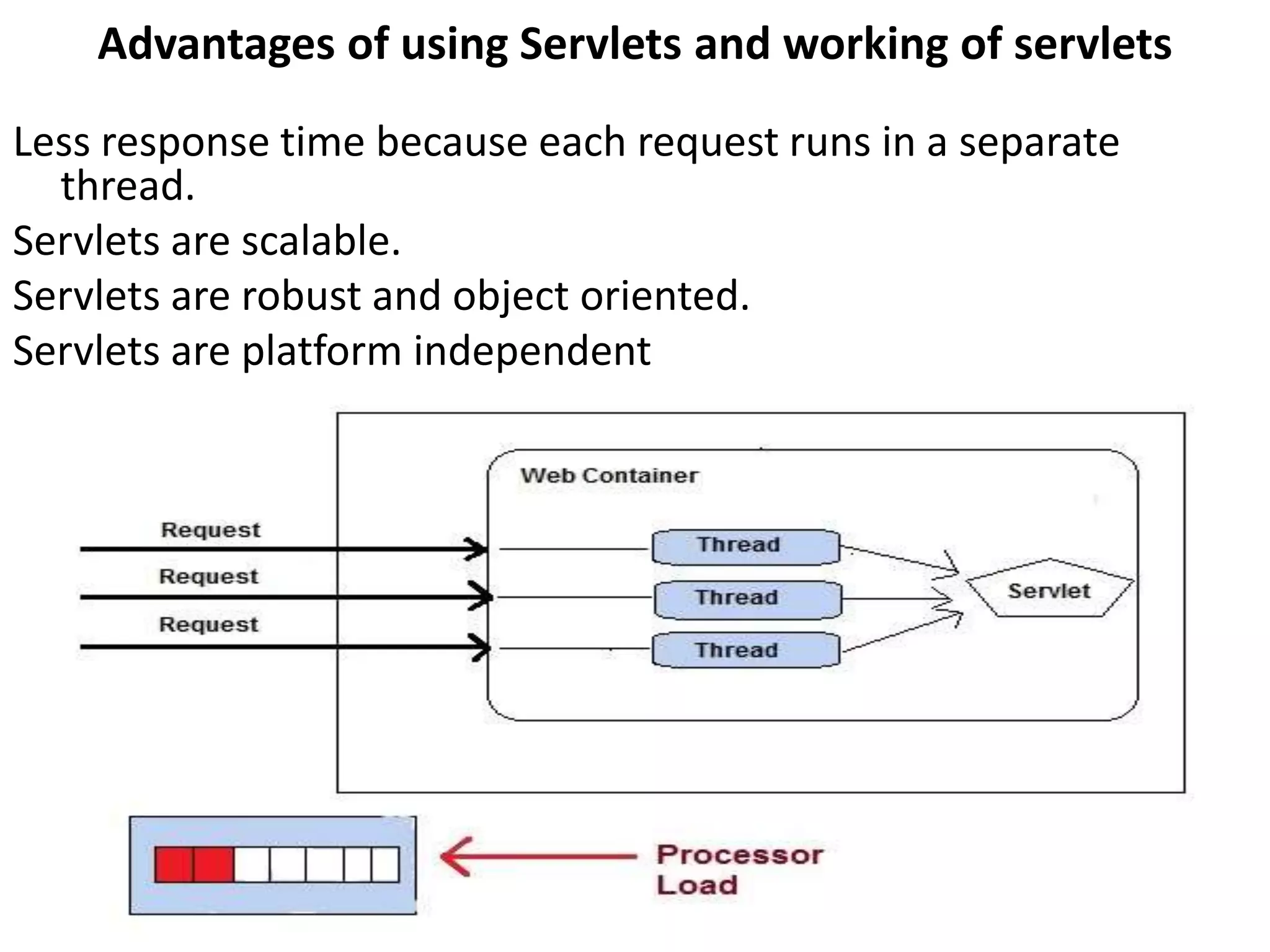
Advantages of using Servlets and working of servlets
Less response time because each request runs in a separate
thread.
Servlets are scalable.
Servlets are robust and object oriented.
Servlets are platform independent
Servlet lifecycle
life cycle methods of servlet.
1.init(): method is invoked only once in the servlet life
cycle.
2.service() : method to allow a servlet to process a
client request.
3.destroy(): method is also invoked only once in a
servlet life cycle.
Steps to execute servlets
1. Create a directory structure
2. Create a Servlet
3. Compile the Servlet
4. Create a deployment descriptor
5. Start the server and deploy the project
6. Access the servlet
Create a directory structure
Create a Servlet
FirstServlet.java
import javax.servlet.*;
import java.io.*;
public class FirstServlet extends GenericServlet
{
public void service(ServletRequest rq,ServletResponse rsp) throws
ServletException,IOException
{
PrintWriter pw = rsp.getWriter();
rsp.setContentType("text/html");
pw.write("<html><body><h2 align=center ");
pw.write("style=background:orange>THIS IS MY");
pw.write(" FIRST SERVLET PROGRAM</h2>");
pw.write("</body></html>");
}
}
Compile the servlet
For compiling the Servlet, jar file is required to
be loaded. Different Servers provide different
jar files:
servlet-api.jar is required.
Two ways to load the jar file
• set classpath
• paste the jar file in JRE/lib/ext folder
Create the deployment descriptor
web.xml
<web-app>
<servlet>
<servlet-name>FirstServlet</servlet-name>
<servlet-class>FirstServlet</servlet-class>
</servlet>
<servlet-mapping>
<servlet-name>FirstServlet</servlet-name>
<url-pattern>/FirstServlet</url-pattern>
</servlet-mapping>
</web-app>
Start the Server and deploy the project
need to perform 2 tasks:
1. set JAVA_HOME or JRE_HOME in environment
variable (It is required to start server).
2. Change the port number of tomcat (optional). It is
required if another server is running on same port
(8080).
access the servlet.
http://localhost:8080/demo/firstservlet
JSDK(Java Servlet Developers Kit)
• This is an add on to the regular JDK (Java Developers
Kit). The JSDK has the additional files needed in order
to compile Java servlets.
• The latest version of the JSDK is version 2.0. Included in
the JSDK is a Java Servlet Runner program.
• The Servlet Runner is a program that runs on your
workstation, and allows you to test servlets you have
written without running a web server.
• the .java and .class files for testing purposes and to
help you understand how the Java code is
implemented. Another important file that is included is
the jsdk.jar file.
• This file includes the class information necessary to
compile the servlets.
Servlet API
Servlet Interface
Methods
Void init(ServletConfig config)
Void service(ServletRequest req,ServletResponse rep)
Void destroy();
SevletConfig getServletConfig()
getServletInfo()
GenericServlet Abstract class
methods
Void init(ServletConfig config)
Void service(ServletRequest req,ServletResponse
rep) (Abstract method)
Void destroy();
SevletConfig getServletConfig()
getServletInfo()
HttpServlet Abstract Class
methods
Protected void doDelete(HttpServletRequest req,
HttpServletResponse res)
Protected void doGet(HttpServletRequest req,
HttpServletResponse res)
Protected void doPost(HttpServletRequest req,
HttpServletResponse res)
Protected void doPut(HttpServletRequest req,
HttpServletResponse res)
javax.servlet package
There are many interfaces in javax.servlet package. They are as
follows:
1. Servlet
2. ServletRequest
3. ServletResponse
4. RequestDispatcher
5. ServletConfig
6. ServletContext
7. SingleThreadModel
8. Filter
9. FilterConfig
10. FilterChain
11. ServletRequestListener
12. ServletRequestAttributeListener
13. ServletContextListener
14. ServletContextAttributeListener
There are many classes in javax.servlet package. They are
as follows:
1. GenericServlet
2. ServletInputStream
3. ServletOutputStream
4. ServletRequestWrapper
5. ServletResponseWrapper
6. ServletRequestEvent
7. ServletContextEvent
8. ServletRequestAttributeEvent
9. ServletContextAttributeEvent
10.ServletException
11.UnavailableException
Reading Servlet parameters
• We are able read a servlet parameters by using
these methods.
• getParameter(): You call request.getParameter()
method to get the value of a form parameter.
• getParameterValues(): Call this method if the
parameter appears more than once and returns
multiple values, for example checkbox.
• getParameterNames(): Call this method if you want
a complete list of all parameters in the current
request.
•
Reading Initialization parameters
Syntax to provide the initialization parameter for a
servlet.
<web-app>
<servlet>
......
<init-param>
<param-name>parameter name</param-name>
<param-value>parameter value</param-value>
</init-param>
......
</servlet>
</web-app>
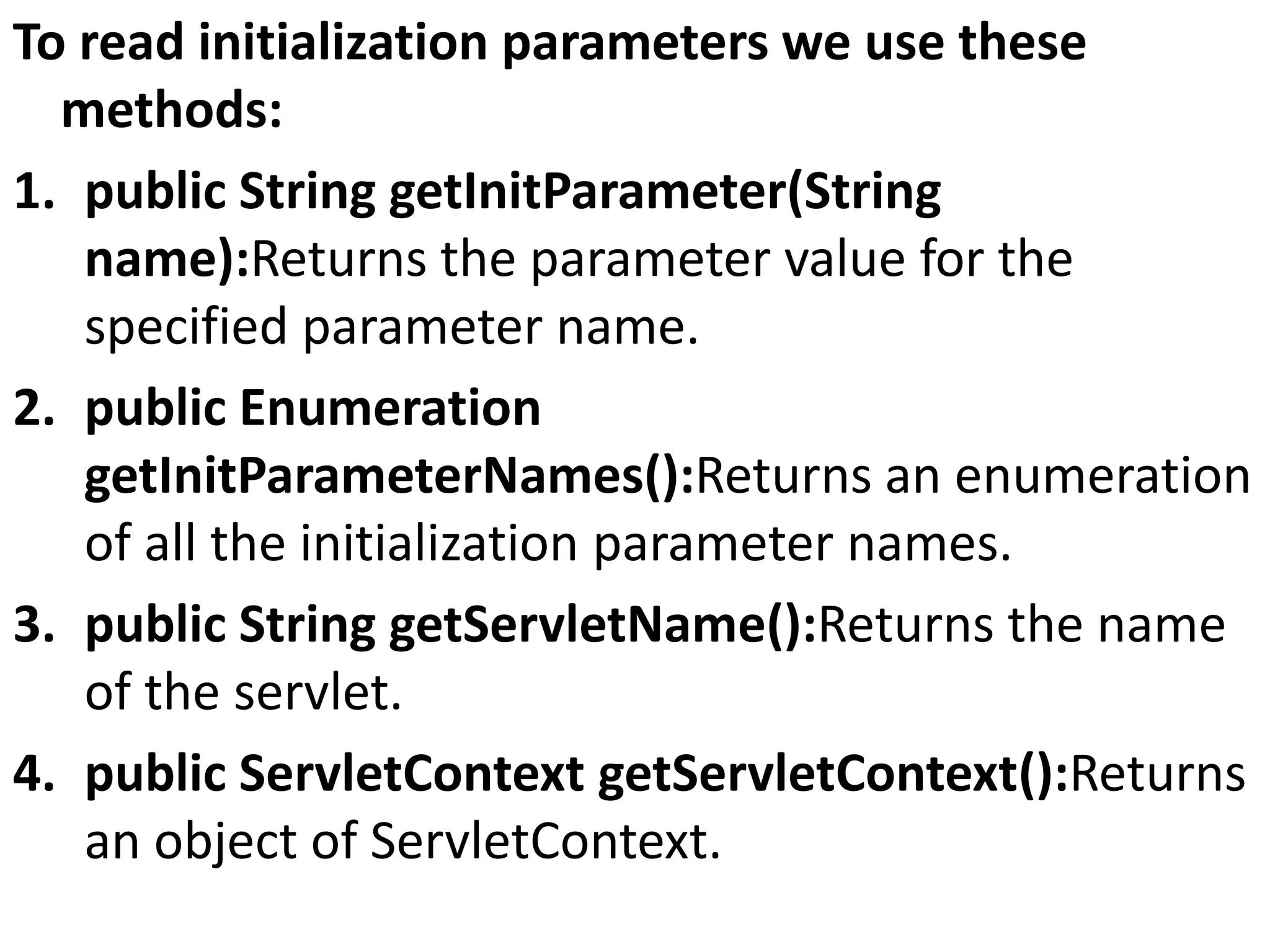
To read initialization parameters we use these
methods:
1. public String getInitParameter(String
name):Returns the parameter value for the
specified parameter name.
2. public Enumeration
getInitParameterNames():Returns an enumeration
of all the initialization parameter names.
3. public String getServletName():Returns the name
of the servlet.
4. public ServletContext getServletContext():Returns
an object of ServletContext.
example
AdminServlet.java
import java.io.IOException;
import java.io.PrintWriter;
import javax.servlet.ServletException;
import javax.servlet.http.HttpServlet;
import javax.servlet.http.HttpServletRequest;
import javax.servlet.http.HttpServletResponse;
public class AdminServlet extends HttpServlet {
private static final long serialVersionUID = 1L;
protected void doGet(HttpServletRequest request,
HttpServletResponse response) throws ServletException, IOException {
PrintWriter out = response.getWriter();
out.println(this.getInitParameter("admin"));
out.println(this.getServletContext().getInitParameter("admin"));
}
}
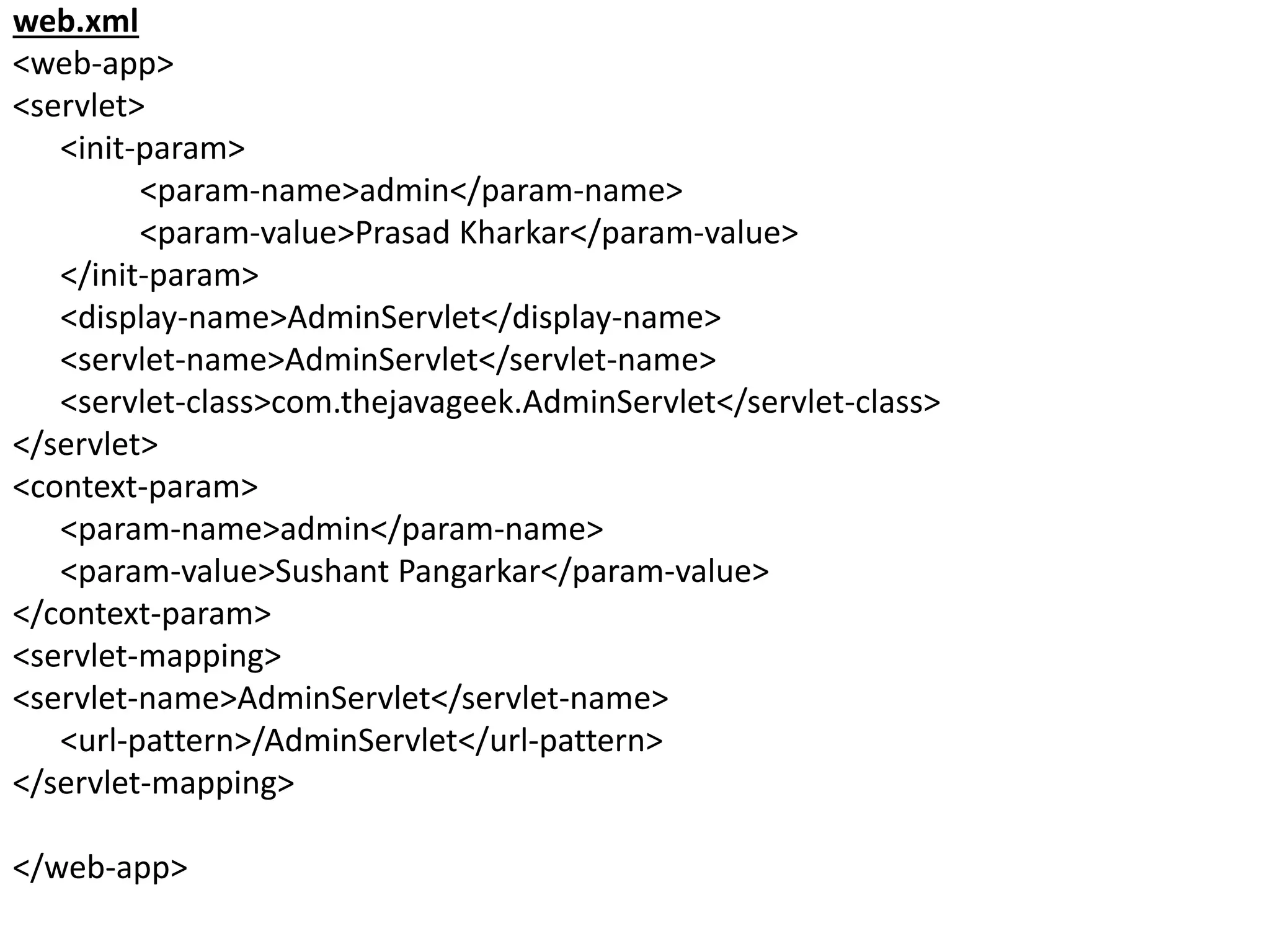
web.xml
<web-app>
<servlet>
<init-param>
<param-name>admin</param-name>
<param-value>Prasad Kharkar</param-value>
</init-param>
<display-name>AdminServlet</display-name>
<servlet-name>AdminServlet</servlet-name>
<servlet-class>com.thejavageek.AdminServlet</servlet-class>
</servlet>
<context-param>
<param-name>admin</param-name>
<param-value>Sushant Pangarkar</param-value>
</context-param>
<servlet-mapping>
<servlet-name>AdminServlet</servlet-name>
<url-pattern>/AdminServlet</url-pattern>
</servlet-mapping>
</web-app>
javax.servlet.http package
There are many interfaces in javax.servlet package.
They are as follows:
1. HttpServletRequest
2. HttpServletResponse
3. HttpSession
4. HttpSessionListener
5. HttpSessionAttributeListener
6. HttpSessionBindingListener
7. HttpSessionActivationListener
8. HttpSessionContext (deprecated now)
There are many classes in javax.servlet package. They
are as follows:
1. HttpServlet
2. Cookie
3. HttpServletRequestWrapper
4. HttpServletResponseWrapper
5. HttpSessionEvent
6. HttpSessionBindingEvent
7. HttpUtils (deprecated now)
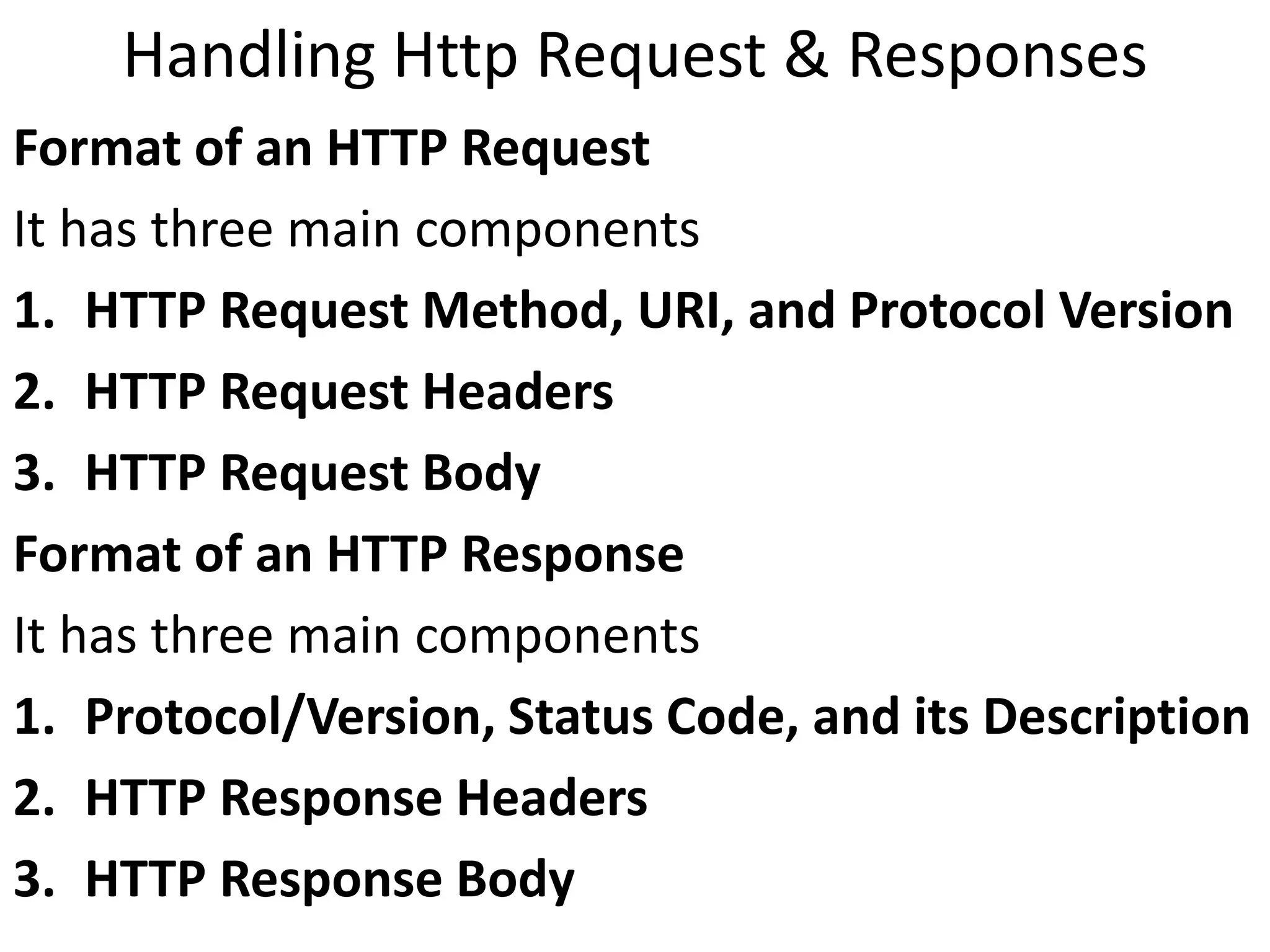
Handling Http Request & Responses
Format of an HTTP Request
It has three main components
1. HTTP Request Method, URI, and Protocol Version
2. HTTP Request Headers
3. HTTP Request Body
Format of an HTTP Response
It has three main components
1. Protocol/Version, Status Code, and its Description
2. HTTP Response Headers
3. HTTP Response Body
example
Hello.html
<html>
<body>
<form action="HelloForm" method="GET">
First Name: <input type="text" name="first_name">
<br />
Last Name: <input type="text" name="last_name" />
<br/>
<input type="submit" value="Submit" />
</form>
</body>
</html>
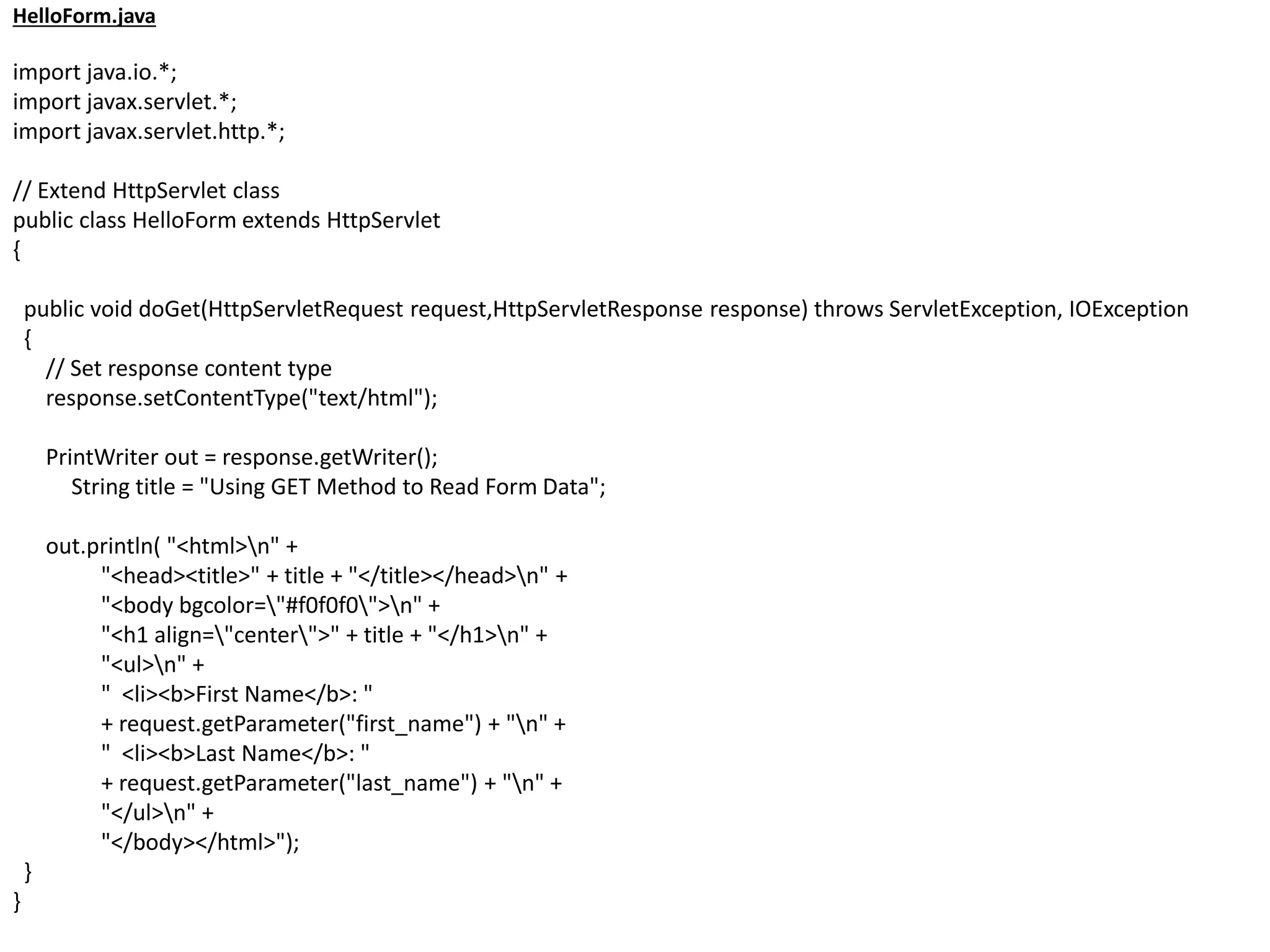
HelloForm.java
import java.io.*;
import javax.servlet.*;
import javax.servlet.http.*;
// Extend HttpServlet class
public class HelloForm extends HttpServlet
{
public void doGet(HttpServletRequest request,HttpServletResponse response) throws ServletException, IOException
{
// Set response content type
response.setContentType("text/html");
PrintWriter out = response.getWriter();
String title = "Using GET Method to Read Form Data";
out.println( "<html>n" +
"<head><title>" + title + "</title></head>n" +
"<body bgcolor="#f0f0f0">n" +
"<h1 align="center">" + title + "</h1>n" +
"<ul>n" +
" <li><b>First Name</b>: "
+ request.getParameter("first_name") + "n" +
" <li><b>Last Name</b>: "
+ request.getParameter("last_name") + "n" +
"</ul>n" +
"</body></html>");
}
}
web.xml
<web-app>
<servlet>
<servlet-name>HelloForm</servlet-name>
<servlet-class>HelloForm</servlet-class>
</servlet>
<servlet-mapping>
<servlet-name>HelloForm</servlet-name>
<url-pattern>/HelloForm</url-pattern>
</servlet-mapping>
</web-app>
Session Tracking
Session simply means a particular interval of time.
Session Tracking is a way to maintain state (data) of
an user. It is also known as session management in
servlet.
Session Tracking Techniques
There are four techniques used in Session tracking:
1. Cookies
2. Hidden Form Field
3. URL Rewriting
4. HttpSession
Cookies
A cookie is a small piece of information that is
persisted between the multiple client requests.
Cookies are text files stored on the client computer
and they are kept for various information tracking
purpose.
to create Cookie
Cookie ck=new Cookie("user","sonoo jaiswal");//creat
ing cookie object
response.addCookie(ck);//adding cookie in the respon
se
to delete Cookie
Cookie ck=new Cookie("user","");//deleting value of c
ookie
ck.setMaxAge(0);//changing the maximum age to 0 se
conds
response.addCookie(ck);//adding cookie in the respon
se
to get Cookies
Cookie ck[]=request.getCookies();
for(int i=0;i<ck.length;i++){
out.print("<br>"+ck[i].getName()+" "+ck[i].getValue()
);//printing name and value of cookie
}
Security Issues
Server-side Security Issues
Interception of Session State Information
Forgery of Session State Information
Session Timeout
Buffer Overflow
Data Validation
Page Sequencing
Information Reporting
Browser Residue
User Authentication
Logging of Sensitive Information
Accessing a Database from Servlet
There are 5 steps to access the database
1. Register the driver class
2. Creating connection
3. Creating statement
4. Executing queries
5. Closing connection
1. Register the driver class
The forName() method of Class class is used to
register the driver class.
Example
Class.forName("oracle.jdbc.driver.OracleDriver");
2. Create the connection object
The getConnection() method of DriverManager class
is used to establish connection with the database.
Example
Connection con=DriverManager.getConnection(
"jdbc:oracle:thin:@localhost:1521:xe","system","pass
word");
3. Create the Statement object
The createStatement() method of Connection interface is
used to create statement.
example
Statement stmt=con.createStatement();
4. Execute the query
The executeQuery() method of Statement interface is
used to execute queries to the database.
Example
ResultSet rs=stmt.executeQuery("select * from emp");
while(rs.next())
{
System.out.println(rs.getInt(1)+" "+rs.getString(2));
}
5. Close the connection object
The close() method of Connection interface is
used to close the connection.
Example
con.close();

Servlets

  • 1.
    server A server isa computer program that provides services to other computer programs in the same or other computers. The computer that runs a server program is referred to as a server. That machine may be a dedicated server or used for other purposes as well.
  • 2.
    Types of Servers Serversare often categorized in terms of their purpose 1. Web server: Provide services to web clients 2. application server: provides the business logic for an application program 3. proxy server: acts as an intermediary between an endpoint device. 4. mail server.: that receives incoming e-mail from local users and remote senders and forwards outgoing e-mail for delivery. Note : There are some more severs are ..
  • 3.
    Web Server A Webserver is a program that uses HTTP to serve the files that create Web pages to users, in response to their requests, which are forwarded by their computers' HTTP clients. Dedicated computers and appliances may be referred to as Web servers as well. Simple definition Web server is an Internet server that responds to HTTP requests to deliver content and services.
  • 4.
    How a WebServer Works
  • 5.
    Types of webservers Different types of web servers available in open market. 1. Apache Web Server 2. Apache Tomcat Web Server 3. IIS Web Server 4. Nginx Web Server 5. LightSpeed Web Server
  • 6.
    Tomcat Web Server •Tomcat is an Apache module that provides a web server in addition to the Apache web server. The Tomcat web server supports Java Servlets and JavaServer pages.
  • 7.
    CGI (Common GatewayInterface) Before Servlets CGI programming was used to create web applications. Working of CGI. User clicks a link that has URL to a dynamic page instead of a static page. The URL decides which CGI program to execute. Web Servers run the CGI program in a separate OS shell. The shell includes OS environment and the process to execute code of the CGI program. The CGI response is sent back to the Web Server, which wraps the response in an HTTP response and send it back to the web browser.
  • 9.
    Drawbacks of CGIprograms • High response time because CGI programs execute in their own OS shell. • CGI is not scalable. • CGI programs are not always secure or object- oriented. • It is Platform dependent.
  • 10.
    Introduction to Servlet •Servlet Technology is used to create web applications. • Servlet technology uses Java language to create web applications. • Servlet is a class that extend the capabilities of the servers and respond to the incoming request. It can respond to any type of requests. • Servlet is a web component that is deployed on the server to create dynamic web page • web applications made using Servlet are Secured, Scalable and Robust.
  • 12.
    Advantages of usingServlets and working of servlets Less response time because each request runs in a separate thread. Servlets are scalable. Servlets are robust and object oriented. Servlets are platform independent
  • 13.
    Servlet lifecycle life cyclemethods of servlet. 1.init(): method is invoked only once in the servlet life cycle. 2.service() : method to allow a servlet to process a client request. 3.destroy(): method is also invoked only once in a servlet life cycle.
  • 15.
    Steps to executeservlets 1. Create a directory structure 2. Create a Servlet 3. Compile the Servlet 4. Create a deployment descriptor 5. Start the server and deploy the project 6. Access the servlet
  • 16.
  • 17.
    Create a Servlet FirstServlet.java importjavax.servlet.*; import java.io.*; public class FirstServlet extends GenericServlet { public void service(ServletRequest rq,ServletResponse rsp) throws ServletException,IOException { PrintWriter pw = rsp.getWriter(); rsp.setContentType("text/html"); pw.write("<html><body><h2 align=center "); pw.write("style=background:orange>THIS IS MY"); pw.write(" FIRST SERVLET PROGRAM</h2>"); pw.write("</body></html>"); } }
  • 18.
    Compile the servlet Forcompiling the Servlet, jar file is required to be loaded. Different Servers provide different jar files: servlet-api.jar is required. Two ways to load the jar file • set classpath • paste the jar file in JRE/lib/ext folder
  • 19.
    Create the deploymentdescriptor web.xml <web-app> <servlet> <servlet-name>FirstServlet</servlet-name> <servlet-class>FirstServlet</servlet-class> </servlet> <servlet-mapping> <servlet-name>FirstServlet</servlet-name> <url-pattern>/FirstServlet</url-pattern> </servlet-mapping> </web-app>
  • 20.
    Start the Serverand deploy the project need to perform 2 tasks: 1. set JAVA_HOME or JRE_HOME in environment variable (It is required to start server). 2. Change the port number of tomcat (optional). It is required if another server is running on same port (8080). access the servlet. http://localhost:8080/demo/firstservlet
  • 21.
    JSDK(Java Servlet DevelopersKit) • This is an add on to the regular JDK (Java Developers Kit). The JSDK has the additional files needed in order to compile Java servlets. • The latest version of the JSDK is version 2.0. Included in the JSDK is a Java Servlet Runner program. • The Servlet Runner is a program that runs on your workstation, and allows you to test servlets you have written without running a web server. • the .java and .class files for testing purposes and to help you understand how the Java code is implemented. Another important file that is included is the jsdk.jar file. • This file includes the class information necessary to compile the servlets.
  • 22.
  • 23.
    Servlet Interface Methods Void init(ServletConfigconfig) Void service(ServletRequest req,ServletResponse rep) Void destroy(); SevletConfig getServletConfig() getServletInfo()
  • 24.
    GenericServlet Abstract class methods Voidinit(ServletConfig config) Void service(ServletRequest req,ServletResponse rep) (Abstract method) Void destroy(); SevletConfig getServletConfig() getServletInfo()
  • 25.
    HttpServlet Abstract Class methods Protectedvoid doDelete(HttpServletRequest req, HttpServletResponse res) Protected void doGet(HttpServletRequest req, HttpServletResponse res) Protected void doPost(HttpServletRequest req, HttpServletResponse res) Protected void doPut(HttpServletRequest req, HttpServletResponse res)
  • 26.
    javax.servlet package There aremany interfaces in javax.servlet package. They are as follows: 1. Servlet 2. ServletRequest 3. ServletResponse 4. RequestDispatcher 5. ServletConfig 6. ServletContext 7. SingleThreadModel 8. Filter 9. FilterConfig 10. FilterChain 11. ServletRequestListener 12. ServletRequestAttributeListener 13. ServletContextListener 14. ServletContextAttributeListener
  • 27.
    There are manyclasses in javax.servlet package. They are as follows: 1. GenericServlet 2. ServletInputStream 3. ServletOutputStream 4. ServletRequestWrapper 5. ServletResponseWrapper 6. ServletRequestEvent 7. ServletContextEvent 8. ServletRequestAttributeEvent 9. ServletContextAttributeEvent 10.ServletException 11.UnavailableException
  • 28.
    Reading Servlet parameters •We are able read a servlet parameters by using these methods. • getParameter(): You call request.getParameter() method to get the value of a form parameter. • getParameterValues(): Call this method if the parameter appears more than once and returns multiple values, for example checkbox. • getParameterNames(): Call this method if you want a complete list of all parameters in the current request. •
  • 29.
    Reading Initialization parameters Syntaxto provide the initialization parameter for a servlet. <web-app> <servlet> ...... <init-param> <param-name>parameter name</param-name> <param-value>parameter value</param-value> </init-param> ...... </servlet> </web-app>
  • 30.
    To read initializationparameters we use these methods: 1. public String getInitParameter(String name):Returns the parameter value for the specified parameter name. 2. public Enumeration getInitParameterNames():Returns an enumeration of all the initialization parameter names. 3. public String getServletName():Returns the name of the servlet. 4. public ServletContext getServletContext():Returns an object of ServletContext.
  • 31.
    example AdminServlet.java import java.io.IOException; import java.io.PrintWriter; importjavax.servlet.ServletException; import javax.servlet.http.HttpServlet; import javax.servlet.http.HttpServletRequest; import javax.servlet.http.HttpServletResponse; public class AdminServlet extends HttpServlet { private static final long serialVersionUID = 1L; protected void doGet(HttpServletRequest request, HttpServletResponse response) throws ServletException, IOException { PrintWriter out = response.getWriter(); out.println(this.getInitParameter("admin")); out.println(this.getServletContext().getInitParameter("admin")); } }
  • 32.
  • 33.
    javax.servlet.http package There aremany interfaces in javax.servlet package. They are as follows: 1. HttpServletRequest 2. HttpServletResponse 3. HttpSession 4. HttpSessionListener 5. HttpSessionAttributeListener 6. HttpSessionBindingListener 7. HttpSessionActivationListener 8. HttpSessionContext (deprecated now)
  • 34.
    There are manyclasses in javax.servlet package. They are as follows: 1. HttpServlet 2. Cookie 3. HttpServletRequestWrapper 4. HttpServletResponseWrapper 5. HttpSessionEvent 6. HttpSessionBindingEvent 7. HttpUtils (deprecated now)
  • 35.
    Handling Http Request& Responses Format of an HTTP Request It has three main components 1. HTTP Request Method, URI, and Protocol Version 2. HTTP Request Headers 3. HTTP Request Body Format of an HTTP Response It has three main components 1. Protocol/Version, Status Code, and its Description 2. HTTP Response Headers 3. HTTP Response Body
  • 36.
    example Hello.html <html> <body> <form action="HelloForm" method="GET"> FirstName: <input type="text" name="first_name"> <br /> Last Name: <input type="text" name="last_name" /> <br/> <input type="submit" value="Submit" /> </form> </body> </html>
  • 37.
    HelloForm.java import java.io.*; import javax.servlet.*; importjavax.servlet.http.*; // Extend HttpServlet class public class HelloForm extends HttpServlet { public void doGet(HttpServletRequest request,HttpServletResponse response) throws ServletException, IOException { // Set response content type response.setContentType("text/html"); PrintWriter out = response.getWriter(); String title = "Using GET Method to Read Form Data"; out.println( "<html>n" + "<head><title>" + title + "</title></head>n" + "<body bgcolor="#f0f0f0">n" + "<h1 align="center">" + title + "</h1>n" + "<ul>n" + " <li><b>First Name</b>: " + request.getParameter("first_name") + "n" + " <li><b>Last Name</b>: " + request.getParameter("last_name") + "n" + "</ul>n" + "</body></html>"); } }
  • 38.
  • 39.
    Session Tracking Session simplymeans a particular interval of time. Session Tracking is a way to maintain state (data) of an user. It is also known as session management in servlet. Session Tracking Techniques There are four techniques used in Session tracking: 1. Cookies 2. Hidden Form Field 3. URL Rewriting 4. HttpSession
  • 40.
    Cookies A cookie isa small piece of information that is persisted between the multiple client requests. Cookies are text files stored on the client computer and they are kept for various information tracking purpose. to create Cookie Cookie ck=new Cookie("user","sonoo jaiswal");//creat ing cookie object response.addCookie(ck);//adding cookie in the respon se
  • 41.
    to delete Cookie Cookieck=new Cookie("user","");//deleting value of c ookie ck.setMaxAge(0);//changing the maximum age to 0 se conds response.addCookie(ck);//adding cookie in the respon se to get Cookies Cookie ck[]=request.getCookies(); for(int i=0;i<ck.length;i++){ out.print("<br>"+ck[i].getName()+" "+ck[i].getValue() );//printing name and value of cookie }
  • 42.
    Security Issues Server-side SecurityIssues Interception of Session State Information Forgery of Session State Information Session Timeout Buffer Overflow Data Validation Page Sequencing Information Reporting Browser Residue User Authentication Logging of Sensitive Information
  • 43.
    Accessing a Databasefrom Servlet There are 5 steps to access the database 1. Register the driver class 2. Creating connection 3. Creating statement 4. Executing queries 5. Closing connection
  • 44.
    1. Register thedriver class The forName() method of Class class is used to register the driver class. Example Class.forName("oracle.jdbc.driver.OracleDriver"); 2. Create the connection object The getConnection() method of DriverManager class is used to establish connection with the database. Example Connection con=DriverManager.getConnection( "jdbc:oracle:thin:@localhost:1521:xe","system","pass word");
  • 45.
    3. Create theStatement object The createStatement() method of Connection interface is used to create statement. example Statement stmt=con.createStatement(); 4. Execute the query The executeQuery() method of Statement interface is used to execute queries to the database. Example ResultSet rs=stmt.executeQuery("select * from emp"); while(rs.next()) { System.out.println(rs.getInt(1)+" "+rs.getString(2)); }
  • 46.
    5. Close theconnection object The close() method of Connection interface is used to close the connection. Example con.close();