Tahir Farooq
FAST-NU-CFD
Service
Software
For
Mobile Devices
Service
Service
 A service is a component without user interface which runs in the
background or foreground without direct interaction with the user.
 As the service has no user interface,
it is not bound to the lifecycle of an
activity.
Service
A foreground service is a service that the user is actively aware and produces a
notification while the service is running
A background service is a service that the user is not aware of and does not
generate a notification to be shown
The two ways to utilize a service are
Another application component can start a service (background or foreground) and
have it perform a task
App must be in the foreground, the system doesn't allow a background app to create a background
service
A component can bind to a service to interact with it and even perform inter-process
communication (IPC)
Used for
Repetitive and potentially long running operations, i.e.,
Internet downloads,
checking for new data,
data processing,
updating content providers
Service
NOTE: Configurations of device does 'not affect Services. Because Services have no UI
Services can also be configured to be restarted
If they get
terminated by the Android system once sufficient system
resources are available again.
Service
It is possible to assign services the same priority as foreground
activities.
In this case it is required to have a visible notification active
for the related service.
It is frequently used for services which play videos or music.
Service
Services and Background Processing
By default
service runs in the same process as the main thread of the
application.
So,
You need to use asynchronous processing in the service to perform
resource intensive tasks in the background
Service
A service runs in the main thread of its hosting process
A service does not create its own thread and does not run in a separate process unless
you specify otherwise
many programmers assume that a Service runs on a separate thread
Service
You may need to use another thread for your service class apart from the one it is on (using
already)
If it is going to do any extremely CPU intensive work then you should additionally create a
new thread within your service to do that type of processing
You can determine this by first trying to use the Service class for your background
processing, and then, if it affects your user experience, consider implementing a Thread
class and object if needed
A commonly used pattern for a service implementation is to create and
run a new Thread in the service to perform the processing in the
background and then to terminate the service once it has finished the
processing.
Services which run in the process of the application are sometimes
called local Services
Services and Background Processing
When to use a Service
Not all applications require or use services
 Can often utilize a thread instead
If you need to perform work outside of your main UI thread, but only while the user is
interacting with your applications user interface
A Service subclass will always be prioritized (ranked) higher than a
process which utilizes a regular thread
So, the reason that you would want to use a Service class over a Thread object is
because the system will guarantee that your processing operation will have at
least a Service process priority level
When to use a Service
You might want to consider a service if your application meets certain criteria,
such as the following:
The application performs lengthy or resource-intensive processing that does not require input
from the user
The application needs to expose and provide data or information services (think web services)
to other Android applications without the need of a user interface
e.g. A video-editing app might offload heavy processing to a queue on its service in order to
avoid affecting overall system performance for non-essential tasks
Types of Services
Started Service - explicitly started by an application (runs on main Thread)
A background service is "started" when an application component (such as an
activity) starts it by calling startService()
A foreground service - To request that your service run in the foreground, call
the
Context. startForegroundService() or the
NotificationManagerstartServiceInForeground()
It can block the UI if its execution is longer
It does not return anything, therefore it is used for single task
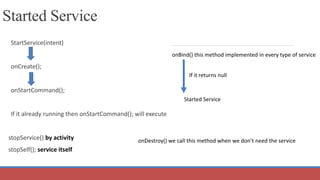
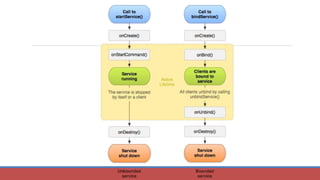
Started Service
StartService(intent)
onCreate();
onStartCommand();
If it already running then onStartCommand(); will execute
stopService() by activity
stopSelf(); service itself
onBind() this method implemented in every type of service
If it returns null
Started Service
onDestroy() we call this method when we don’t need the service
Bound Service - an application component binds to it by calling bindService()
 offers a client-server interface that allows components to interact with the service
 send requests, get results, and even do so across processes with inter-process
communication (Pc)
 A bound service runs only as long as another application component is bound to it
Multiple components can bind to the service at once, but when all of them unbind, the
service is destroyed
Types of Services
Types of Services
Your service can work both ways—it can be started and also allow binding
It's simply a matter of whether you implement a couple of callback methods:
onStartCommand() to allow components to start it
onBind() to allow binding
Regardless of whether your application is started, bound, or both, any
application component can use the service (even from a separate application)
same way that any component can use an activity—by starting it with an Intent
 you can declare the service as private in the manifest file and block access from other
applications
Creating a Service
To create a service that you can start by another application (not a bound
service), you must create a subclass of Service or use one of its existing
subclasses
There are two classes you can extend to create a started service
 Service - base class for all services
May need to create a new thread in which the service can complete all of its work (by
default runs on main thread)
can slow the performance of any activity that your application is running
IntentService - a subclass of Service
 uses a worker thread to handle all of the start requests, one at a time
Used if you don't require that your service handle multiple requests simultaneously
 most of the started services don't need to handle multiple requests simultaneously
 best practice is to use this class to implement your service
Callbacks
You must override some callback methods that handle key aspects of the
service lifecycle

onStartCommand() (not required for bound services)
The system invokes this method when an application calls startService()
the service is started and runs in the background
You should also stop the service when its work is complete
stopSelf() or stopService()
Callbaas (cont'd)
onCreate()
Invoked to perform one-time setup procedures when the service is initially
created (before it calls either onStartCommand() )
 If the service is already running, this method is not called.
onDestroy()
 Invoked when the service is no longer used and is being destroyed
 Your service should implement this to clean up any resources such as threads, registered
listeners, or receivers
IntentService
Creates a default worker thread that executes all of the intents that are delivered to
onStartCommand(), separate from your application's main thread
creates a work queue that passes one intent at a time to your onHandlelntent() implementation
To complete the work that is provided by the client, implement onHandlelntent()
Provides a default implementation of onStartCommand() that sends the intent to the work
queue and then to your onHandlelntent() implementation
So, all you need to create is a constructor and an implementation of onHandlelntent()
If you override other callback methods, such as onCreate(), onStartCommand(), or onDestroy(),
call the super implementation
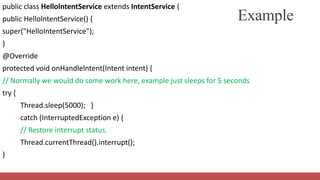
public class HellolntentService extends IntentService {
public HellolntentService() {
super("HelloIntentService");
}
@Override
protected void onHandlelntent(Intent intent) {
// Normally we would do some work here, example just sleeps for 5 seconds
try {
Thread.sleep(5000); }
catch (InterruptedException e) {
// Restore interrupt status.
Thread.currentThread().interrupt();
}
Example
Extending the Service Class
If you require your service to handle multiple requests simultaneously you can
extend the Service class to handle each intent
Requires implementation of multi-threading
Create a new thread for each request and run them right away instead of waiting for the
previous request to finish
Implementing the service class is a lot more work
for each started request, you would create a worker thread to perform the job and processes
only one request at a time
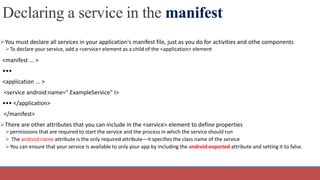
Declaring a service in the manifest
You must declare all services in your application's manifest file, just as you do for activities and othe components
To declare your service, add a <service> element as a child of the <application> element
<manifest ... >
•••
<application ... >
<service android:name=".ExampleService" I>
••• </application>
</manifest>
There are other attributes that you can include in the <service> element to define properties
permissions that are required to start the service and the process in which the service should run
 The android:name attribute is the only required attribute—it specifies the class name of the service
You can ensure that your service is available to only your app by including the android:exported attribute and setting it to false.
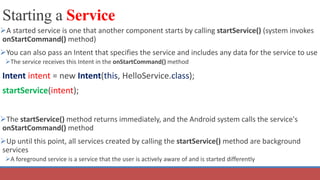
Starting a Service
A started service is one that another component starts by calling startService() (system invokes
onStartCommand() method)
You can also pass an Intent that specifies the service and includes any data for the service to use
The service receives this Intent in the onStartCommand() method
Intent intent = new Intent(this, HelloService.class);
startService(intent);
The startService() method returns immediately, and the Android system calls the service's
onStartCommand() method
Up until this point, all services created by calling the startService() method are background
services
A foreground service is a service that the user is actively aware of and is started differently
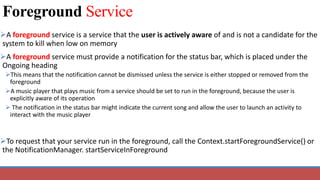
Foreground Service
A foreground service is a service that the user is actively aware of and is not a candidate for the
system to kill when low on memory
A foreground service must provide a notification for the status bar, which is placed under the
Ongoing heading
This means that the notification cannot be dismissed unless the service is either stopped or removed from the
foreground
A music player that plays music from a service should be set to run in the foreground, because the user is
explicitly aware of its operation
 The notification in the status bar might indicate the current song and allow the user to launch an activity to
interact with the music player
To request that your service run in the foreground, call the Context.startForegroundService() or
the NotificationManager. startServiceInForeground
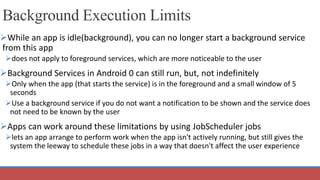
Background Execution Limits
While an app is idle(background), you can no longer start a background service
from this app
does not apply to foreground services, which are more noticeable to the user
Background Services in Android 0 can still run, but, not indefinitely
Only when the app (that starts the service) is in the foreground and a small window of 5
seconds
Use a background service if you do not want a notification to be shown and the service does
not need to be known by the user
Apps can work around these limitations by using JobScheduler jobs
lets an app arrange to perform work when the app isn't actively running, but still gives the
system the leeway to schedule these jobs in a way that doesn't affect the user experience
Foreground vs. Background apps
The system distinguishes between foreground and background apps
An app is considered to be in the foreground if any of the following is true
It has a visible activity, whether the activity is started or paused
It has a foreground service
Another foreground app is connected to the app, either by binding to one of its services or by making use of
one of its content providers.
the app is in the foreground if another app binds to its
 IME
 Wallpaper service
 Notification listener
Voice or text service
If none of those conditions is true, the app is considered to be in the background
Service Rules
 While an app is in the foreground, it can create and run both foreground and
background services freely
When an app goes into the background, it has a window of several minutes in
which it is still allowed to create and use services
The app has five seconds to call the service's startForeground() method to show the new
service's user-visible notification after it has been started
At the end of that window, the app is considered to be idle
At this time, the system stops the app's background services, just as if the app had called the services' Service.stopSelf()
methods
The startService() method throws an illegalStateException if an app targeting
Android 0 tries to use that method when it is in the background
Background Service limits
Under certain circumstances, a background app is placed on a
temporary whitelist for several minutes
It can launch services without limitation, and its background services are
permitted to run
An app is placed on the whitelist when it handles a task that's visible to
the user
Handling a high-priority Firebase Cloud Messaging (FCM) message
Receiving a broadcast, such as an SMS/MMS message
Executing a PendingIntent from a notification
Best Practices
If your app needs to create a foreground service while the app is in the
background, use the new NotificationManagerstartServiceInForeground()
can also use Context.startForegroundService() to start a foreground service
No longer allowed to create a background service and then promote that service to the
foreground
If the service is noticeable by the user, make it a foreground service
A service that plays audio should always be a foreground service
Create the service with NotificationManager.startServicelnForeground() or Context.
startForegroundService instead of startService()
Best Practices
Find a way to duplicate the service's functionality with a scheduled job
If the service is not doing something immediately noticeable to the user, you should generally
be able to use a scheduled job instead
Use FCM (firebase) to selectively wake your application up when
network events occur, rather than polling in the background
Defer background work until the application is naturally in the
foreground

Services I.pptx

  • 1.
  • 2.
  • 3.
    Service  A serviceis a component without user interface which runs in the background or foreground without direct interaction with the user.  As the service has no user interface, it is not bound to the lifecycle of an activity.
  • 4.
    Service A foreground serviceis a service that the user is actively aware and produces a notification while the service is running A background service is a service that the user is not aware of and does not generate a notification to be shown The two ways to utilize a service are Another application component can start a service (background or foreground) and have it perform a task App must be in the foreground, the system doesn't allow a background app to create a background service A component can bind to a service to interact with it and even perform inter-process communication (IPC)
  • 5.
    Used for Repetitive andpotentially long running operations, i.e., Internet downloads, checking for new data, data processing, updating content providers Service NOTE: Configurations of device does 'not affect Services. Because Services have no UI
  • 6.
    Services can alsobe configured to be restarted If they get terminated by the Android system once sufficient system resources are available again. Service
  • 7.
    It is possibleto assign services the same priority as foreground activities. In this case it is required to have a visible notification active for the related service. It is frequently used for services which play videos or music. Service
  • 8.
    Services and BackgroundProcessing By default service runs in the same process as the main thread of the application. So, You need to use asynchronous processing in the service to perform resource intensive tasks in the background
  • 9.
    Service A service runsin the main thread of its hosting process A service does not create its own thread and does not run in a separate process unless you specify otherwise many programmers assume that a Service runs on a separate thread
  • 10.
    Service You may needto use another thread for your service class apart from the one it is on (using already) If it is going to do any extremely CPU intensive work then you should additionally create a new thread within your service to do that type of processing You can determine this by first trying to use the Service class for your background processing, and then, if it affects your user experience, consider implementing a Thread class and object if needed
  • 11.
    A commonly usedpattern for a service implementation is to create and run a new Thread in the service to perform the processing in the background and then to terminate the service once it has finished the processing. Services which run in the process of the application are sometimes called local Services Services and Background Processing
  • 12.
    When to usea Service Not all applications require or use services  Can often utilize a thread instead If you need to perform work outside of your main UI thread, but only while the user is interacting with your applications user interface A Service subclass will always be prioritized (ranked) higher than a process which utilizes a regular thread So, the reason that you would want to use a Service class over a Thread object is because the system will guarantee that your processing operation will have at least a Service process priority level
  • 13.
    When to usea Service You might want to consider a service if your application meets certain criteria, such as the following: The application performs lengthy or resource-intensive processing that does not require input from the user The application needs to expose and provide data or information services (think web services) to other Android applications without the need of a user interface e.g. A video-editing app might offload heavy processing to a queue on its service in order to avoid affecting overall system performance for non-essential tasks
  • 14.
    Types of Services StartedService - explicitly started by an application (runs on main Thread) A background service is "started" when an application component (such as an activity) starts it by calling startService() A foreground service - To request that your service run in the foreground, call the Context. startForegroundService() or the NotificationManagerstartServiceInForeground() It can block the UI if its execution is longer It does not return anything, therefore it is used for single task
  • 15.
    Started Service StartService(intent) onCreate(); onStartCommand(); If italready running then onStartCommand(); will execute stopService() by activity stopSelf(); service itself onBind() this method implemented in every type of service If it returns null Started Service onDestroy() we call this method when we don’t need the service
  • 16.
    Bound Service -an application component binds to it by calling bindService()  offers a client-server interface that allows components to interact with the service  send requests, get results, and even do so across processes with inter-process communication (Pc)  A bound service runs only as long as another application component is bound to it Multiple components can bind to the service at once, but when all of them unbind, the service is destroyed Types of Services
  • 17.
    Types of Services Yourservice can work both ways—it can be started and also allow binding It's simply a matter of whether you implement a couple of callback methods: onStartCommand() to allow components to start it onBind() to allow binding Regardless of whether your application is started, bound, or both, any application component can use the service (even from a separate application) same way that any component can use an activity—by starting it with an Intent  you can declare the service as private in the manifest file and block access from other applications
  • 18.
    Creating a Service Tocreate a service that you can start by another application (not a bound service), you must create a subclass of Service or use one of its existing subclasses There are two classes you can extend to create a started service  Service - base class for all services May need to create a new thread in which the service can complete all of its work (by default runs on main thread) can slow the performance of any activity that your application is running IntentService - a subclass of Service  uses a worker thread to handle all of the start requests, one at a time Used if you don't require that your service handle multiple requests simultaneously  most of the started services don't need to handle multiple requests simultaneously  best practice is to use this class to implement your service
  • 19.
    Callbacks You must overridesome callback methods that handle key aspects of the service lifecycle  onStartCommand() (not required for bound services) The system invokes this method when an application calls startService() the service is started and runs in the background You should also stop the service when its work is complete stopSelf() or stopService()
  • 20.
    Callbaas (cont'd) onCreate() Invoked toperform one-time setup procedures when the service is initially created (before it calls either onStartCommand() )  If the service is already running, this method is not called. onDestroy()  Invoked when the service is no longer used and is being destroyed  Your service should implement this to clean up any resources such as threads, registered listeners, or receivers
  • 21.
    IntentService Creates a defaultworker thread that executes all of the intents that are delivered to onStartCommand(), separate from your application's main thread creates a work queue that passes one intent at a time to your onHandlelntent() implementation To complete the work that is provided by the client, implement onHandlelntent() Provides a default implementation of onStartCommand() that sends the intent to the work queue and then to your onHandlelntent() implementation So, all you need to create is a constructor and an implementation of onHandlelntent() If you override other callback methods, such as onCreate(), onStartCommand(), or onDestroy(), call the super implementation
  • 22.
    public class HellolntentServiceextends IntentService { public HellolntentService() { super("HelloIntentService"); } @Override protected void onHandlelntent(Intent intent) { // Normally we would do some work here, example just sleeps for 5 seconds try { Thread.sleep(5000); } catch (InterruptedException e) { // Restore interrupt status. Thread.currentThread().interrupt(); } Example
  • 23.
    Extending the ServiceClass If you require your service to handle multiple requests simultaneously you can extend the Service class to handle each intent Requires implementation of multi-threading Create a new thread for each request and run them right away instead of waiting for the previous request to finish Implementing the service class is a lot more work for each started request, you would create a worker thread to perform the job and processes only one request at a time
  • 24.
    Declaring a servicein the manifest You must declare all services in your application's manifest file, just as you do for activities and othe components To declare your service, add a <service> element as a child of the <application> element <manifest ... > ••• <application ... > <service android:name=".ExampleService" I> ••• </application> </manifest> There are other attributes that you can include in the <service> element to define properties permissions that are required to start the service and the process in which the service should run  The android:name attribute is the only required attribute—it specifies the class name of the service You can ensure that your service is available to only your app by including the android:exported attribute and setting it to false.
  • 25.
    Starting a Service Astarted service is one that another component starts by calling startService() (system invokes onStartCommand() method) You can also pass an Intent that specifies the service and includes any data for the service to use The service receives this Intent in the onStartCommand() method Intent intent = new Intent(this, HelloService.class); startService(intent); The startService() method returns immediately, and the Android system calls the service's onStartCommand() method Up until this point, all services created by calling the startService() method are background services A foreground service is a service that the user is actively aware of and is started differently
  • 27.
    Foreground Service A foregroundservice is a service that the user is actively aware of and is not a candidate for the system to kill when low on memory A foreground service must provide a notification for the status bar, which is placed under the Ongoing heading This means that the notification cannot be dismissed unless the service is either stopped or removed from the foreground A music player that plays music from a service should be set to run in the foreground, because the user is explicitly aware of its operation  The notification in the status bar might indicate the current song and allow the user to launch an activity to interact with the music player To request that your service run in the foreground, call the Context.startForegroundService() or the NotificationManager. startServiceInForeground
  • 28.
    Background Execution Limits Whilean app is idle(background), you can no longer start a background service from this app does not apply to foreground services, which are more noticeable to the user Background Services in Android 0 can still run, but, not indefinitely Only when the app (that starts the service) is in the foreground and a small window of 5 seconds Use a background service if you do not want a notification to be shown and the service does not need to be known by the user Apps can work around these limitations by using JobScheduler jobs lets an app arrange to perform work when the app isn't actively running, but still gives the system the leeway to schedule these jobs in a way that doesn't affect the user experience
  • 29.
    Foreground vs. Backgroundapps The system distinguishes between foreground and background apps An app is considered to be in the foreground if any of the following is true It has a visible activity, whether the activity is started or paused It has a foreground service Another foreground app is connected to the app, either by binding to one of its services or by making use of one of its content providers. the app is in the foreground if another app binds to its  IME  Wallpaper service  Notification listener Voice or text service If none of those conditions is true, the app is considered to be in the background
  • 30.
    Service Rules  Whilean app is in the foreground, it can create and run both foreground and background services freely When an app goes into the background, it has a window of several minutes in which it is still allowed to create and use services The app has five seconds to call the service's startForeground() method to show the new service's user-visible notification after it has been started At the end of that window, the app is considered to be idle At this time, the system stops the app's background services, just as if the app had called the services' Service.stopSelf() methods The startService() method throws an illegalStateException if an app targeting Android 0 tries to use that method when it is in the background
  • 31.
    Background Service limits Undercertain circumstances, a background app is placed on a temporary whitelist for several minutes It can launch services without limitation, and its background services are permitted to run An app is placed on the whitelist when it handles a task that's visible to the user Handling a high-priority Firebase Cloud Messaging (FCM) message Receiving a broadcast, such as an SMS/MMS message Executing a PendingIntent from a notification
  • 32.
    Best Practices If yourapp needs to create a foreground service while the app is in the background, use the new NotificationManagerstartServiceInForeground() can also use Context.startForegroundService() to start a foreground service No longer allowed to create a background service and then promote that service to the foreground If the service is noticeable by the user, make it a foreground service A service that plays audio should always be a foreground service Create the service with NotificationManager.startServicelnForeground() or Context. startForegroundService instead of startService()
  • 33.
    Best Practices Find away to duplicate the service's functionality with a scheduled job If the service is not doing something immediately noticeable to the user, you should generally be able to use a scheduled job instead Use FCM (firebase) to selectively wake your application up when network events occur, rather than polling in the background Defer background work until the application is naturally in the foreground