Background operation
How to handle all your jobs
+RobertoOrgiu
@_tiwiz
+MatteoBonifazi
@mbonifazi
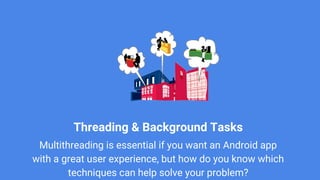
Threading & Background Tasks
Multithreading is essential if you want an Android app
with a great user experience, but how do you know which
techniques can help solve your problem?
Android threads
Android application has at least one main thread
The runtime env manages the UI thread.
Long-running foreground operations can cause problems
and interfere with the responsiveness of your user interface,
which can even cause system errors.
Android offers several classes that help you off-load
operations onto a separate thread that runs in the
background.
AsyncTask
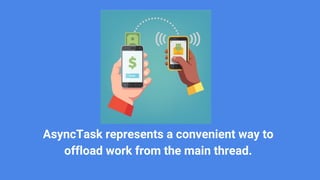
AsyncTask represents a convenient way to
offload work from the main thread.
AsyncTask
Is meant for simple operations
Allows to run instructions in the background and to
synchronize again with the main thread. It also reporting
progress of the running tasks. AsyncTasks should be used
for short background operations which need to update the
user interface.
AsyncTask example
private class DownloadWebPageTask extends AsyncTask<String, Void, String> {
@Override
protected String doInBackground(String... urls) {
OkHttpClient client = new OkHttpClient();
Request request =new Request.Builder().url(urls[0]).build();
Response response = client.newCall(request).execute();
…..
}
@Override
protected void onPostExecute(String result) {
textView.setText(result);
}
}
Run your code as a callback on UI ThreadRun your code on a new Thread
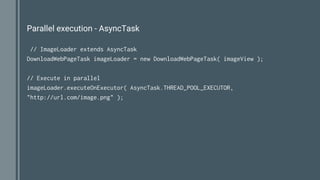
Parallel execution - AsyncTask
// ImageLoader extends AsyncTask
DownloadWebPageTask imageLoader = new DownloadWebPageTask( imageView );
// Execute in parallel
imageLoader.executeOnExecutor( AsyncTask.THREAD_POOL_EXECUTOR,
"http://url.com/image.png" );
Intent Service
IntentService provides straightforward
structure for running an operation on a single
background thread.
IntentService
Preferred way to perform simple background
operations
Allows it to handle long-running operations without
affecting your user interface's responsiveness.
It isn't affected by most user interface lifecycle events, so it
continues to run in circumstances that would shut down an
AsyncTask
IntentService
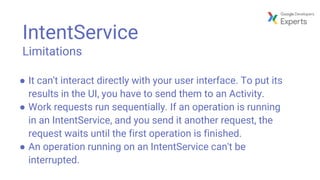
Limitations
● It can't interact directly with your user interface. To put its
results in the UI, you have to send them to an Activity.
● Work requests run sequentially. If an operation is running
in an IntentService, and you send it another request, the
request waits until the first operation is finished.
● An operation running on an IntentService can't be
interrupted.
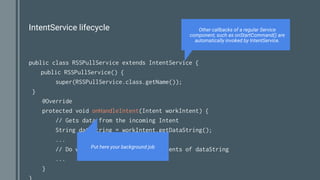
IntentService lifecycle
public class RSSPullService extends IntentService {
public RSSPullService() {
super(RSSPullService.class.getName());
}
@Override
protected void onHandleIntent(Intent workIntent) {
// Gets data from the incoming Intent
String dataString = workIntent.getDataString();
...
// Do work here, based on the contents of dataString
...
}
Other callbacks of a regular Service
component, such as onStartCommand() are
automatically invoked by IntentService.
Put here your background job
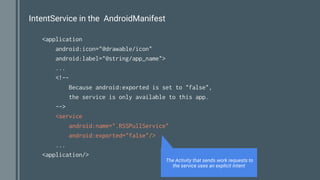
IntentService in the AndroidManifest
<application
android:icon="@drawable/icon"
android:label="@string/app_name">
...
<!--
Because android:exported is set to "false",
the service is only available to this app.
-->
<service
android:name=".RSSPullService"
android:exported="false"/>
...
<application/>
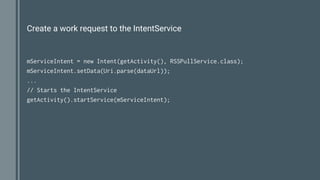
The Activity that sends work requests to
the service uses an explicit Intent
Create a work request to the IntentService
mServiceIntent = new Intent(getActivity(), RSSPullService.class);
mServiceIntent.setData(Uri.parse(dataUrl));
...
// Starts the IntentService
getActivity().startService(mServiceIntent);
Going forward
Youtube Video
https://www.youtube.com/watch?v=jtlRNNhane
https://www.youtube.com/watch?v=9FweabuBi1U
https://www.youtube.com/watch?v=tBHPmQQNiS8
Reference Link
https://developer.android.com/guide/components/processes-and-threads.html
https://developer.android.com/training/run-background-service/index.html
https://developer.android.com/training/multiple-threads/index.html
JobScheduler
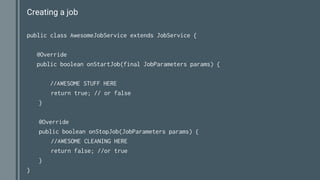
Creating a job
public class AwesomeJobService extends JobService {
@Override
public boolean onStartJob(final JobParameters params) {
//AWESOME STUFF HERE
return true; // or false
}
@Override
public boolean onStopJob(JobParameters params) {
//AWESOME CLEANING HERE
return false; //or true
}
}
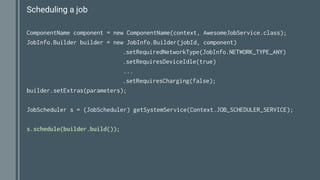
Scheduling a job
ComponentName component = new ComponentName(context, AwesomeJobService.class);
JobInfo.Builder builder = new JobInfo.Builder(jobId, component)
.setRequiredNetworkType(JobInfo.NETWORK_TYPE_ANY)
.setRequiresDeviceIdle(true)
...
.setRequiresCharging(false);
builder.setExtras(parameters);
JobScheduler s = (JobScheduler) getSystemService(Context.JOB_SCHEDULER_SERVICE);
s.schedule(builder.build());
Going forward - 2
Reference Link
https://developer.android.com/topic/performance/scheduling.html
https://developer.android.com/reference/android/app/job/JobScheduler.html
https://github.com/googlesamples/android-JobScheduler/
+MatteoBonifazi
@mbonifazi
Thank You!
+RobertoOrgiu
@_tiwiz

Android - Background operation

  • 1.
    Background operation How tohandle all your jobs +RobertoOrgiu @_tiwiz +MatteoBonifazi @mbonifazi
  • 2.
    Threading & BackgroundTasks Multithreading is essential if you want an Android app with a great user experience, but how do you know which techniques can help solve your problem?
  • 3.
    Android threads Android applicationhas at least one main thread The runtime env manages the UI thread. Long-running foreground operations can cause problems and interfere with the responsiveness of your user interface, which can even cause system errors. Android offers several classes that help you off-load operations onto a separate thread that runs in the background.
  • 4.
  • 5.
    AsyncTask represents aconvenient way to offload work from the main thread.
  • 6.
    AsyncTask Is meant forsimple operations Allows to run instructions in the background and to synchronize again with the main thread. It also reporting progress of the running tasks. AsyncTasks should be used for short background operations which need to update the user interface.
  • 7.
    AsyncTask example private classDownloadWebPageTask extends AsyncTask<String, Void, String> { @Override protected String doInBackground(String... urls) { OkHttpClient client = new OkHttpClient(); Request request =new Request.Builder().url(urls[0]).build(); Response response = client.newCall(request).execute(); ….. } @Override protected void onPostExecute(String result) { textView.setText(result); } } Run your code as a callback on UI ThreadRun your code on a new Thread
  • 8.
    Parallel execution -AsyncTask // ImageLoader extends AsyncTask DownloadWebPageTask imageLoader = new DownloadWebPageTask( imageView ); // Execute in parallel imageLoader.executeOnExecutor( AsyncTask.THREAD_POOL_EXECUTOR, "http://url.com/image.png" );
  • 9.
  • 10.
    IntentService provides straightforward structurefor running an operation on a single background thread.
  • 11.
    IntentService Preferred way toperform simple background operations Allows it to handle long-running operations without affecting your user interface's responsiveness. It isn't affected by most user interface lifecycle events, so it continues to run in circumstances that would shut down an AsyncTask
  • 12.
    IntentService Limitations ● It can'tinteract directly with your user interface. To put its results in the UI, you have to send them to an Activity. ● Work requests run sequentially. If an operation is running in an IntentService, and you send it another request, the request waits until the first operation is finished. ● An operation running on an IntentService can't be interrupted.
  • 13.
    IntentService lifecycle public classRSSPullService extends IntentService { public RSSPullService() { super(RSSPullService.class.getName()); } @Override protected void onHandleIntent(Intent workIntent) { // Gets data from the incoming Intent String dataString = workIntent.getDataString(); ... // Do work here, based on the contents of dataString ... } Other callbacks of a regular Service component, such as onStartCommand() are automatically invoked by IntentService. Put here your background job
  • 14.
    IntentService in theAndroidManifest <application android:icon="@drawable/icon" android:label="@string/app_name"> ... <!-- Because android:exported is set to "false", the service is only available to this app. --> <service android:name=".RSSPullService" android:exported="false"/> ... <application/> The Activity that sends work requests to the service uses an explicit Intent
  • 15.
    Create a workrequest to the IntentService mServiceIntent = new Intent(getActivity(), RSSPullService.class); mServiceIntent.setData(Uri.parse(dataUrl)); ... // Starts the IntentService getActivity().startService(mServiceIntent);
  • 16.
    Going forward Youtube Video https://www.youtube.com/watch?v=jtlRNNhane https://www.youtube.com/watch?v=9FweabuBi1U https://www.youtube.com/watch?v=tBHPmQQNiS8 ReferenceLink https://developer.android.com/guide/components/processes-and-threads.html https://developer.android.com/training/run-background-service/index.html https://developer.android.com/training/multiple-threads/index.html
  • 17.
  • 18.
    Creating a job publicclass AwesomeJobService extends JobService { @Override public boolean onStartJob(final JobParameters params) { //AWESOME STUFF HERE return true; // or false } @Override public boolean onStopJob(JobParameters params) { //AWESOME CLEANING HERE return false; //or true } }
  • 19.
    Scheduling a job ComponentNamecomponent = new ComponentName(context, AwesomeJobService.class); JobInfo.Builder builder = new JobInfo.Builder(jobId, component) .setRequiredNetworkType(JobInfo.NETWORK_TYPE_ANY) .setRequiresDeviceIdle(true) ... .setRequiresCharging(false); builder.setExtras(parameters); JobScheduler s = (JobScheduler) getSystemService(Context.JOB_SCHEDULER_SERVICE); s.schedule(builder.build());
  • 20.
    Going forward -2 Reference Link https://developer.android.com/topic/performance/scheduling.html https://developer.android.com/reference/android/app/job/JobScheduler.html https://github.com/googlesamples/android-JobScheduler/
  • 21.