Serialization in Java
2
Copyright @ 2018 Learntek. All Rights Reserved. 3
Serialization in Java
Java Serialization is the mechanism in which the state of an object is converted to a
byte stream so that the byte stream can be reverted back into the copy of the
object written into a file or stored into a database. It includes information about
object’s type and types of data stored in the object.
Once the object is serialized into written into a file, it can be read from the file and
deserialized which means that the type of information and bytes that represent the
object can be utilized to create object in the memory.
Let’s understand streams in computer systems before proceeding further. A stream
is simply a sequence of data elements. Data in the form of streams is generated
from a source and consumed at a destination.
Copyright @ 2018 Learntek. All Rights Reserved. 4
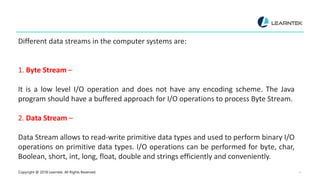
Different data streams in the computer systems are:
1. Byte Stream –
It is a low level I/O operation and does not have any encoding scheme. The Java
program should have a buffered approach for I/O operations to process Byte Stream.
2. Data Stream –
Data Stream allows to read-write primitive data types and used to perform binary I/O
operations on primitive data types. I/O operations can be performed for byte, char,
Boolean, short, int, long, float, double and strings efficiently and conveniently.
Copyright @ 2018 Learntek. All Rights Reserved. 5
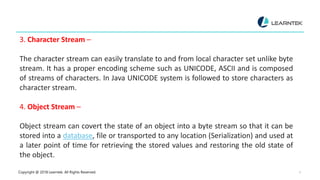
3. Character Stream –
The character stream can easily translate to and from local character set unlike byte
stream. It has a proper encoding scheme such as UNICODE, ASCII and is composed
of streams of characters. In Java UNICODE system is followed to store characters as
character stream.
4. Object Stream –
Object stream can covert the state of an object into a byte stream so that it can be
stored into a database, file or transported to any location (Serialization) and used at
a later point of time for retrieving the stored values and restoring the old state of
the object.
Copyright @ 2018 Learntek. All Rights Reserved. 6
The process of serialization is instance independent which means an object can be
serialized on one platform and deserialized on an entirely different platform. To make
an object serializable we use java.io.Serializable interface.
Both the classes ObjectInputStream and ObjectOutputStream are high-level streams
and extend java.io.InputStream and java.io.OutputStream.
The ObjectOutputStream has many write methods for writing different data types.
One of the popular write method in ObjectOutputStream is:
public final void writeObject(Object x) throws IOException
Copyright @ 2018 Learntek. All Rights Reserved. 7
This method serializes an object and converts it into stream of bytes and sends it to
output stream. The popular method to read an object in ObjectInputStream is:
public final Object readObject() throws IOException, ClassNotFoundException
This method reads the stream of bytes and converts it back to an object which
is called deserialization.
Java Serialization API contains methods for serialization and deserialization. A
class must implement java.io.Serializable interface to serialize an object.
Let’s understand the concept of Serialization with the help of an example.
Copyright @ 2018 Learntek. All Rights Reserved.
8
Serialization in Java Example 1 : SerializationDemo.java
package com.serialization;import java.io.BufferedInputStream;
import java.io.BufferedOutputStream;
import java.io.FileInputStream;
import java.io.FileOutputStream;
import java.io.IOException;
import java.io.ObjectInputStream;
import java.io.ObjectOutputStream;public class SerializationDemoExample {
/**
* The method will read data from file for deSerialization.
* @param file
* @return
* @throws IOException
* @throws ClassNotFoundException
Copyright @ 2018 Learntek. All Rights Reserved. 9
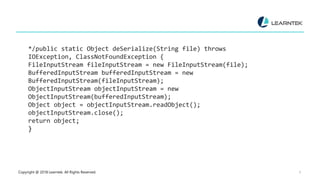
*/public static Object deSerialize(String file) throws
IOException, ClassNotFoundException {
FileInputStream fileInputStream = new FileInputStream(file);
BufferedInputStream bufferedInputStream = new
BufferedInputStream(fileInputStream);
ObjectInputStream objectInputStream = new
ObjectInputStream(bufferedInputStream);
Object object = objectInputStream.readObject();
objectInputStream.close();
return object;
}
Copyright @ 2018 Learntek. All Rights Reserved. 10
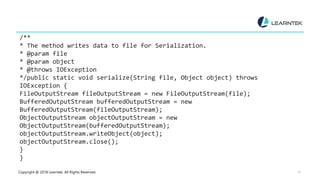
/**
* The method writes data to file for Serialization.
* @param file
* @param object
* @throws IOException
*/public static void serialize(String file, Object object) throws
IOException {
FileOutputStream fileOutputStream = new FileOutputStream(file);
BufferedOutputStream bufferedOutputStream = new
BufferedOutputStream(fileOutputStream);
ObjectOutputStream objectOutputStream = new
ObjectOutputStream(bufferedOutputStream);
objectOutputStream.writeObject(object);
objectOutputStream.close();
}
}
Copyright @ 2018 Learntek. All Rights Reserved. 11
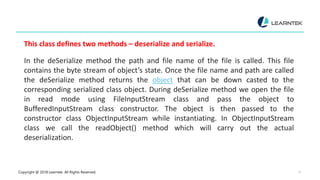
This class defines two methods – deserialize and serialize.
In the deSerialize method the path and file name of the file is called. This file
contains the byte stream of object’s state. Once the file name and path are called
the deSerialize method returns the object that can be down casted to the
corresponding serialized class object. During deSerialize method we open the file
in read mode using FileInputStream class and pass the object to
BufferedInputStream class constructor. The object is then passed to the
constructor class ObjectInputStream while instantiating. In ObjectInputStream
class we call the readObject() method which will carry out the actual
deserialization.
Copyright @ 2018 Learntek. All Rights Reserved. 12
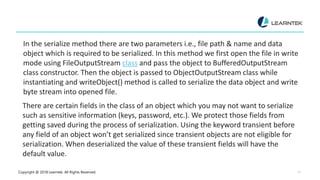
In the serialize method there are two parameters i.e., file path & name and data
object which is required to be serialized. In this method we first open the file in write
mode using FileOutputStream class and pass the object to BufferedOutputStream
class constructor. Then the object is passed to ObjectOutputStream class while
instantiating and writeObject() method is called to serialize the data object and write
byte stream into opened file.
There are certain fields in the class of an object which you may not want to serialize
such as sensitive information (keys, password, etc.). We protect those fields from
getting saved during the process of serialization. Using the keyword transient before
any field of an object won’t get serialized since transient objects are not eligible for
serialization. When deserialized the value of these transient fields will have the
default value.
Copyright @ 2015 Learntek. All Rights Reserved. 13
Serialization in Java Example 2 : SerializationImplDemo.java
package com.serialization;
import java.io.IOException;
public class SerializationImplDemo {
public static void main(String args[]) {
DataObject dataObject = new DataObject();
dataObject.setClient(“Yolanda”);
dataObject.setStore(“Programming store”);
dataObject.setId(“hhhhh”);
dataObject.setPasswordKeys(“$MyG0tt!!”);
Copyright @ 2015 Learntek. All Rights Reserved. 14
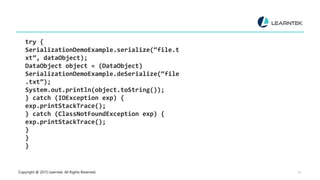
try {
SerializationDemoExample.serialize(“file.t
xt”, dataObject);
DataObject object = (DataObject)
SerializationDemoExample.deSerialize(“file
.txt”);
System.out.println(object.toString());
} catch (IOException exp) {
exp.printStackTrace();
} catch (ClassNotFoundException exp) {
exp.printStackTrace();
}
}
}
Copyright @ 2018 Learntek. All Rights Reserved. 15
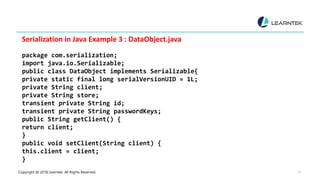
Serialization in Java Example 3 : DataObject.java
package com.serialization;
import java.io.Serializable;
public class DataObject implements Serializable{
private static final long serialVersionUID = 1L;
private String client;
private String store;
transient private String id;
transient private String passwordKeys;
public String getClient() {
return client;
}
public void setClient(String client) {
this.client = client;
}
Copyright @ 2018 Learntek. All Rights Reserved. 16
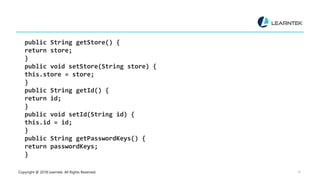
public String getStore() {
return store;
}
public void setStore(String store) {
this.store = store;
}
public String getId() {
return id;
}
public void setId(String id) {
this.id = id;
}
public String getPasswordKeys() {
return passwordKeys;
}
Copyright @ 2015 Learntek. All Rights Reserved. 17
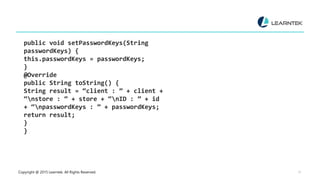
public void setPasswordKeys(String
passwordKeys) {
this.passwordKeys = passwordKeys;
}
@Override
public String toString() {
String result = “client : ” + client +
“nstore : ” + store + “nID : ” + id
+ “npasswordKeys : ” + passwordKeys;
return result;
}
}
Copyright @ 2018 Learntek. All Rights Reserved. 18
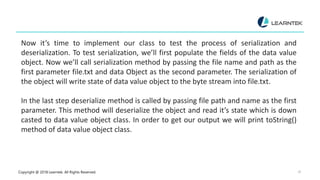
Now it’s time to implement our class to test the process of serialization and
deserialization. To test serialization, we’ll first populate the fields of the data value
object. Now we’ll call serialization method by passing the file name and path as the
first parameter file.txt and data Object as the second parameter. The serialization of
the object will write state of data value object to the byte stream into file.txt.
In the last step deserialize method is called by passing file path and name as the first
parameter. This method will deserialize the object and read it’s state which is down
casted to data value object class. In order to get our output we will print toString()
method of data value object class.
Copyright @ 2018 Learntek. All Rights Reserved. 19
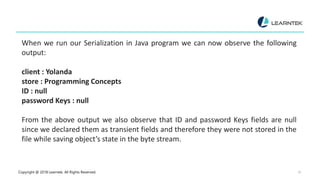
When we run our Serialization in Java program we can now observe the following
output:
client : Yolanda
store : Programming Concepts
ID : null
password Keys : null
From the above output we also observe that ID and password Keys fields are null
since we declared them as transient fields and therefore they were not stored in the
file while saving object’s state in the byte stream.
Copyright @ 2018 Learntek. All Rights Reserved. 20
In this article you learned about how to serialize and deserialize an object. However,
there are different serialization methods to serialize an object such as Serialization
with Inheritance, Serialization with Aggregation, Serialization with static data
number, Serialization with array or collection etc. which we’ll be covering in our next
article.
Copyright @ 2018 Learntek. All Rights Reserved. 21
For more Training Information , Contact Us
Email : info@learntek.org
USA : +1734 418 2465
INDIA : +40 4018 1306
+7799713624

Serialization in java

  • 1.
  • 2.
  • 3.
    Copyright @ 2018Learntek. All Rights Reserved. 3 Serialization in Java Java Serialization is the mechanism in which the state of an object is converted to a byte stream so that the byte stream can be reverted back into the copy of the object written into a file or stored into a database. It includes information about object’s type and types of data stored in the object. Once the object is serialized into written into a file, it can be read from the file and deserialized which means that the type of information and bytes that represent the object can be utilized to create object in the memory. Let’s understand streams in computer systems before proceeding further. A stream is simply a sequence of data elements. Data in the form of streams is generated from a source and consumed at a destination.
  • 4.
    Copyright @ 2018Learntek. All Rights Reserved. 4 Different data streams in the computer systems are: 1. Byte Stream – It is a low level I/O operation and does not have any encoding scheme. The Java program should have a buffered approach for I/O operations to process Byte Stream. 2. Data Stream – Data Stream allows to read-write primitive data types and used to perform binary I/O operations on primitive data types. I/O operations can be performed for byte, char, Boolean, short, int, long, float, double and strings efficiently and conveniently.
  • 5.
    Copyright @ 2018Learntek. All Rights Reserved. 5 3. Character Stream – The character stream can easily translate to and from local character set unlike byte stream. It has a proper encoding scheme such as UNICODE, ASCII and is composed of streams of characters. In Java UNICODE system is followed to store characters as character stream. 4. Object Stream – Object stream can covert the state of an object into a byte stream so that it can be stored into a database, file or transported to any location (Serialization) and used at a later point of time for retrieving the stored values and restoring the old state of the object.
  • 6.
    Copyright @ 2018Learntek. All Rights Reserved. 6 The process of serialization is instance independent which means an object can be serialized on one platform and deserialized on an entirely different platform. To make an object serializable we use java.io.Serializable interface. Both the classes ObjectInputStream and ObjectOutputStream are high-level streams and extend java.io.InputStream and java.io.OutputStream. The ObjectOutputStream has many write methods for writing different data types. One of the popular write method in ObjectOutputStream is: public final void writeObject(Object x) throws IOException
  • 7.
    Copyright @ 2018Learntek. All Rights Reserved. 7 This method serializes an object and converts it into stream of bytes and sends it to output stream. The popular method to read an object in ObjectInputStream is: public final Object readObject() throws IOException, ClassNotFoundException This method reads the stream of bytes and converts it back to an object which is called deserialization. Java Serialization API contains methods for serialization and deserialization. A class must implement java.io.Serializable interface to serialize an object. Let’s understand the concept of Serialization with the help of an example.
  • 8.
    Copyright @ 2018Learntek. All Rights Reserved. 8 Serialization in Java Example 1 : SerializationDemo.java package com.serialization;import java.io.BufferedInputStream; import java.io.BufferedOutputStream; import java.io.FileInputStream; import java.io.FileOutputStream; import java.io.IOException; import java.io.ObjectInputStream; import java.io.ObjectOutputStream;public class SerializationDemoExample { /** * The method will read data from file for deSerialization. * @param file * @return * @throws IOException * @throws ClassNotFoundException
  • 9.
    Copyright @ 2018Learntek. All Rights Reserved. 9 */public static Object deSerialize(String file) throws IOException, ClassNotFoundException { FileInputStream fileInputStream = new FileInputStream(file); BufferedInputStream bufferedInputStream = new BufferedInputStream(fileInputStream); ObjectInputStream objectInputStream = new ObjectInputStream(bufferedInputStream); Object object = objectInputStream.readObject(); objectInputStream.close(); return object; }
  • 10.
    Copyright @ 2018Learntek. All Rights Reserved. 10 /** * The method writes data to file for Serialization. * @param file * @param object * @throws IOException */public static void serialize(String file, Object object) throws IOException { FileOutputStream fileOutputStream = new FileOutputStream(file); BufferedOutputStream bufferedOutputStream = new BufferedOutputStream(fileOutputStream); ObjectOutputStream objectOutputStream = new ObjectOutputStream(bufferedOutputStream); objectOutputStream.writeObject(object); objectOutputStream.close(); } }
  • 11.
    Copyright @ 2018Learntek. All Rights Reserved. 11 This class defines two methods – deserialize and serialize. In the deSerialize method the path and file name of the file is called. This file contains the byte stream of object’s state. Once the file name and path are called the deSerialize method returns the object that can be down casted to the corresponding serialized class object. During deSerialize method we open the file in read mode using FileInputStream class and pass the object to BufferedInputStream class constructor. The object is then passed to the constructor class ObjectInputStream while instantiating. In ObjectInputStream class we call the readObject() method which will carry out the actual deserialization.
  • 12.
    Copyright @ 2018Learntek. All Rights Reserved. 12 In the serialize method there are two parameters i.e., file path & name and data object which is required to be serialized. In this method we first open the file in write mode using FileOutputStream class and pass the object to BufferedOutputStream class constructor. Then the object is passed to ObjectOutputStream class while instantiating and writeObject() method is called to serialize the data object and write byte stream into opened file. There are certain fields in the class of an object which you may not want to serialize such as sensitive information (keys, password, etc.). We protect those fields from getting saved during the process of serialization. Using the keyword transient before any field of an object won’t get serialized since transient objects are not eligible for serialization. When deserialized the value of these transient fields will have the default value.
  • 13.
    Copyright @ 2015Learntek. All Rights Reserved. 13 Serialization in Java Example 2 : SerializationImplDemo.java package com.serialization; import java.io.IOException; public class SerializationImplDemo { public static void main(String args[]) { DataObject dataObject = new DataObject(); dataObject.setClient(“Yolanda”); dataObject.setStore(“Programming store”); dataObject.setId(“hhhhh”); dataObject.setPasswordKeys(“$MyG0tt!!”);
  • 14.
    Copyright @ 2015Learntek. All Rights Reserved. 14 try { SerializationDemoExample.serialize(“file.t xt”, dataObject); DataObject object = (DataObject) SerializationDemoExample.deSerialize(“file .txt”); System.out.println(object.toString()); } catch (IOException exp) { exp.printStackTrace(); } catch (ClassNotFoundException exp) { exp.printStackTrace(); } } }
  • 15.
    Copyright @ 2018Learntek. All Rights Reserved. 15 Serialization in Java Example 3 : DataObject.java package com.serialization; import java.io.Serializable; public class DataObject implements Serializable{ private static final long serialVersionUID = 1L; private String client; private String store; transient private String id; transient private String passwordKeys; public String getClient() { return client; } public void setClient(String client) { this.client = client; }
  • 16.
    Copyright @ 2018Learntek. All Rights Reserved. 16 public String getStore() { return store; } public void setStore(String store) { this.store = store; } public String getId() { return id; } public void setId(String id) { this.id = id; } public String getPasswordKeys() { return passwordKeys; }
  • 17.
    Copyright @ 2015Learntek. All Rights Reserved. 17 public void setPasswordKeys(String passwordKeys) { this.passwordKeys = passwordKeys; } @Override public String toString() { String result = “client : ” + client + “nstore : ” + store + “nID : ” + id + “npasswordKeys : ” + passwordKeys; return result; } }
  • 18.
    Copyright @ 2018Learntek. All Rights Reserved. 18 Now it’s time to implement our class to test the process of serialization and deserialization. To test serialization, we’ll first populate the fields of the data value object. Now we’ll call serialization method by passing the file name and path as the first parameter file.txt and data Object as the second parameter. The serialization of the object will write state of data value object to the byte stream into file.txt. In the last step deserialize method is called by passing file path and name as the first parameter. This method will deserialize the object and read it’s state which is down casted to data value object class. In order to get our output we will print toString() method of data value object class.
  • 19.
    Copyright @ 2018Learntek. All Rights Reserved. 19 When we run our Serialization in Java program we can now observe the following output: client : Yolanda store : Programming Concepts ID : null password Keys : null From the above output we also observe that ID and password Keys fields are null since we declared them as transient fields and therefore they were not stored in the file while saving object’s state in the byte stream.
  • 20.
    Copyright @ 2018Learntek. All Rights Reserved. 20 In this article you learned about how to serialize and deserialize an object. However, there are different serialization methods to serialize an object such as Serialization with Inheritance, Serialization with Aggregation, Serialization with static data number, Serialization with array or collection etc. which we’ll be covering in our next article.
  • 21.
    Copyright @ 2018Learntek. All Rights Reserved. 21 For more Training Information , Contact Us Email : info@learntek.org USA : +1734 418 2465 INDIA : +40 4018 1306 +7799713624