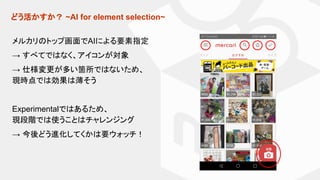
AI for elementselection
● test.ai Jason Arbonによる発表
● AppiumでAIによる要素指定
● Appiumの3rd Party Plugin
driver.findElement('-custom', 'ai:cart');
詳しくはさきほどの AI Applications in Automation Testing 参照してください。
実際の使い方はMercari Engineering Blogも参考にしてください。
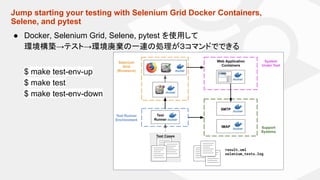
Jump starting yourtesting with Selenium Grid Docker Containers,
Selene, and pytest
● Docker, Selenium Grid, Selene, pytest を使用して
環境構築→テスト→環境廃棄の一連の処理が3コマンドでできる
$ make test-env-up
$ make test
$ make test-env-down
14.
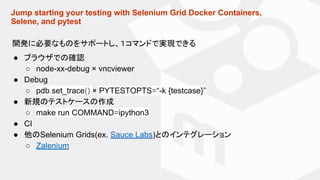
Jump starting yourtesting with Selenium Grid Docker Containers,
Selene, and pytest
開発に必要なものをサポートし、1コマンドで実現できる
● ブラウザでの確認
○ node-xx-debug × vncviewer
● Debug
○ pdb.set_trace() × PYTESTOPTS=“-k {testcase}”
● 新規のテストケースの作成
○ make run COMMAND=ipython3
● CI
● 他のSelenium Grids(ex. Sauce Labs)とのインテグレーション
○ Zalenium
Sub-second acceptance tests
●Aslak Hellesøy による発表
○ Cucumber作者
システムの応答時間 × 人の感じ方の境界 (Source:Usability Engineering)
受入テストに対して、いかにテストを早くするするかが重要になる。
100ms the limit for having the user feel that the system is reacting instantaneously
1sec the limit for the user's flow of thought to stay uninterrupted
10sec the limit for keeping the user's attention focused on the dialogue
Run the loaddown your mobile app
Android by Appium (Link)
List<List<Object>> performanceData
= driver.getPerformanceData("my.app.package", "cpuinfo", 5);
iOS by Appium (Link)
$ appium --relaxed-security
Map<String, Object> args = new HashMap<>();
args.put("timeout", 60 * 1000);
args.put("profileName", "Time Profiler");
driver.executeScript("mobile: startPerfRecord", args);
22.
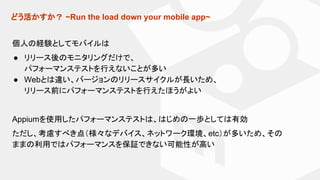
どう活かすか? ~Run theload down your mobile app~
個人の経験としてモバイルは
● リリース後のモニタリングだけで、
パフォーマンステストを行えないことが多い
● Webとは違い、バージョンのリリースサイクルが長いため、
リリース前にパフォーマンステストを行えたほうがよい
Appiumを使用したパフォーマンステストは、はじめの一歩としては有効
ただし、考慮すべき点(様々なデバイス、ネットワーク環境、etc)が多いため、その
ままの利用ではパフォーマンスを保証できない可能性が高い
23.
Automated Accessibility Testing
WebContents Accessibility Guidelines (WCAG) 2.1 から
「Following these guidelines will make content more accessible to a wider
range of people with disabilities」
Ex.
<input type="image" id="image" alt="Login" src="/login-button.png">












![テスト自動化ツール[Selenium]を検討してみて](https://cdn.slidesharecdn.com/ss_thumbnails/20160723selenium-160724074540-thumbnail.jpg?width=640&height=640&fit=bounds)


