IT Security Auditing
Martin Goldberg
Today’s Topics
Defining IT Audit and the Auditor
Steps of an IT Audit
Preparing to be Audited
How IT Audit Applications
Defining IT Security Audit
Financial Audit
 IRS
Physical Audit
 Inventory
Defining IT Security Audit (cont.)
 IT Audit
 Independent review and examination of records
and activities to assess the adequacy of system
controls, to ensure compliance with established
policies and operational procedures, and to
recommend changes in controls, policies, or
procedures - DL 1.1.9
 Good Amount of Vagueness
 Ultimately defined by where you work
Who is an IT Auditor
 Accountant Raised to a CS Major
 CPA, CISA, CISM, Networking, Hardware,
Software, Information Assurance, Cryptography
 Some one who knows everything an accountant
does plus everything a BS/MS does about CS and
Computer Security - Not likely to exist
 IT Audits Are Done in Teams
 Accountant + Computer Geek = IT Audit Team
 Scope to large
 Needed expertise varies
CISA? CISM?
 CISA - Certified Information Systems Auditor
 CISM - Certified Information Systems
Mangager - new
 www.isaca.org (Information Systems Audit and
Control Organization)
 Teaching financial auditors to talk to CS people
CISA
 Min. of 5 years of IS auditing, control or
security work experience
 Code of professional ethics
 Adhering to IS auditing standards
 Exam topics:
 1. Management, Planning, and Organization of IS
 2. Technical Infrastructure and Operational
Practices
 3. Protection of Information Assets
CISA (cont.)
 Exam topics: (cont.)
 4. Disaster Recovery and Business Continuity
 5. Business Application System Development,
Acquisition, Implementation, and Maintenance
 6. Business Process Evaluation and Risk
Management
 7. The IS Audit Process
CISM
 Next step above CISA
 Exam topics:
 1. Information Security Governance
 2. Risk Management
 3. Information Security Program Management
 4. Information Security Management
 5. Response Management
Steps of An IT Audit
 1. Planning Phase
 2. Testing Phase
 3. Reporting Phase
 Ideally it’s a continuous cycle
 Again not always the case
Planning Phase
 Entry Meeting
 Define Scope
 Learn Controls
 Historical Incidents
 Past Audits
 Site Survey
 Review Current
Policies
 Questionnaires
 Define Objectives
 Develop Audit Plan /
Checklist
Defining Objectives & Data
Collection
 Some Points to Keep in Mind
 OTS (Department of Treasury - Office of Thrift
Savings) - Banking Regulations
 SEC (Securities and Exchange Commission) -
Mutual Funds
 HIPPA - Health Care
 Sarbanes Oxley - Financial Reports, Document
Retention
 Gramm-Leach Bliley - Consumer Financial
Information
 FERPA (Family Education Rights and Privacy Act)
- Student Records

Example Checklist
“An Auditor’s Checklist for Performing a
Perimeter Audit of on IBM ISERIES
(AS/400) System” - Craig Reise
 Scope of the audit does not include the
Operating System
 Physical security
 Services running
Testing Phase
Meet With Site Managers
 What data will be collected
 How/when will it be collected
 Site employee involvement
 Answer questions
Testing Phase (cont.)
Data Collection
 Based on scope/objectives
Types of Data
 Physical security
 Interview staff
 Vulnerability assessments
 Access Control assessments
Reporting Phase
Exit Meeting - Short Report
 Immediate problems
 Questions & answer for site managers
 Preliminary findings
 NOT able to give in depth information
Reporting Phase (cont.)
 Long Report After Going Through Data
 Intro defining objectives/scope
 How data was collected
 Summary of problems
 Table format
 Historical data (if available)
 Ratings
 Fixes
 Page # where in depth description is
Reporting Phase (cont.)
 In depth description of problem
 How problem was discovered
 Fix (In detail)
 Industry standards (if available)
 Glossary of terms
 References
Note: The Above Varies Depending on
Where You Work
Preparing To Be Audited
This Is NOT a Confrontation
Make Your Self Available
Know What The Scope/Objectives Are
Know What Type of Data Will be
Collected
Know What Data Shouldn’t be Collected
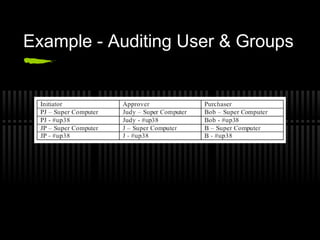
Example - Auditing User & Groups
Application Audit
 An assessment Whose Scope Focuses on a
Narrow but Business Critical Processes or
Application
 Excel spreadsheet with embedded macros used to
analyze data
 Payroll process that may span across several
different servers, databases, operating systems,
applications, etc.
 The level of controls is dependent on the degree of
risk involved in the incorrect or unauthorized
processing of data
Application Audit (cont.)
 1. Administration
 2. Inputs, Processing, Outputs
 3. Logical Security
 4. Disaster Recovery Plan
 5. Change Management
 6. User Support
 7. Third Party Services
 8 . General Controls
Application Audit - Administration
Probably the most important area of the
audit, because this area focuses on the
overall ownership and accountability of
the application
 Roles & Responsibilities - development,
change approval, access authorization
 Legal or regulatory compliance issues
Application Audit - Inputs,
Processing, Outputs
Looking for evidence of data preparation
procedures, reconciliation processes,
handling requirements, etc.
 Run test transactions against the
application
 Includes who can enter input and see
output
 Retention of output and its destruction
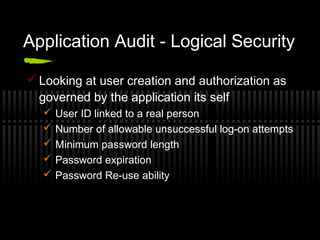
Application Audit - Logical Security
 Looking at user creation and authorization as
governed by the application its self
 User ID linked to a real person
 Number of allowable unsuccessful log-on attempts
 Minimum password length
 Password expiration
 Password Re-use ability
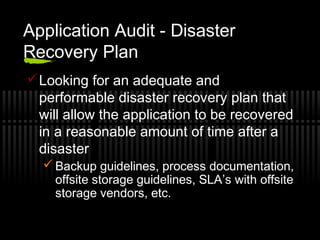
Application Audit - Disaster
Recovery Plan
Looking for an adequate and
performable disaster recovery plan that
will allow the application to be recovered
in a reasonable amount of time after a
disaster
 Backup guidelines, process documentation,
offsite storage guidelines, SLA’s with offsite
storage vendors, etc.
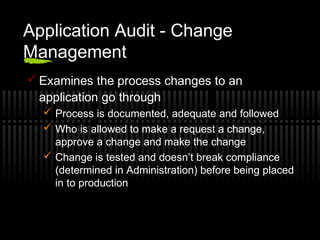
Application Audit - Change
Management
 Examines the process changes to an
application go through
 Process is documented, adequate and followed
 Who is allowed to make a request a change,
approve a change and make the change
 Change is tested and doesn’t break compliance
(determined in Administration) before being placed
in to production
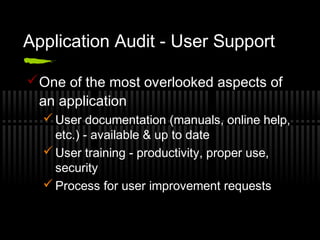
Application Audit - User Support
One of the most overlooked aspects of
an application
 User documentation (manuals, online help,
etc.) - available & up to date
 User training - productivity, proper use,
security
 Process for user improvement requests
Application Audit - Third Party
Services
 Look at the controls around any 3rd party
services that are required to meet business
objectives for the application or system
 Liaison to 3rd party vendor
 Review contract agreement
 SAS (Statement on Auditing Standards) N0. 70 -
Service organizations disclose their control
activities and processes to their customers and
their customers’ auditors in a uniform reporting
format
Application Audit - General
Controls
 Examining the environment the application
exists within that affect the application
 System administration / operations
 Organizational logical security
 Physical security
 Organizational disaster recovery plans
 Organizational change control process
 License control processes
 Virus control procedures
References
 www.isaca.org
 “An Auditor’s Checklist for Performing a
Perimeter Audit of on IBM ISERIES (AS/400)
System” - Craig Reise
 “Conducting a Security Audit: An Introductory
Overview” - Bill Hayes
 “The Application Audit Process - A Guide for
Information Security Professionals” - Robert
Hein

Security audit

  • 1.
  • 2.
    Today’s Topics Defining ITAudit and the Auditor Steps of an IT Audit Preparing to be Audited How IT Audit Applications
  • 3.
    Defining IT SecurityAudit Financial Audit  IRS Physical Audit  Inventory
  • 4.
    Defining IT SecurityAudit (cont.)  IT Audit  Independent review and examination of records and activities to assess the adequacy of system controls, to ensure compliance with established policies and operational procedures, and to recommend changes in controls, policies, or procedures - DL 1.1.9  Good Amount of Vagueness  Ultimately defined by where you work
  • 5.
    Who is anIT Auditor  Accountant Raised to a CS Major  CPA, CISA, CISM, Networking, Hardware, Software, Information Assurance, Cryptography  Some one who knows everything an accountant does plus everything a BS/MS does about CS and Computer Security - Not likely to exist  IT Audits Are Done in Teams  Accountant + Computer Geek = IT Audit Team  Scope to large  Needed expertise varies
  • 6.
    CISA? CISM?  CISA- Certified Information Systems Auditor  CISM - Certified Information Systems Mangager - new  www.isaca.org (Information Systems Audit and Control Organization)  Teaching financial auditors to talk to CS people
  • 7.
    CISA  Min. of5 years of IS auditing, control or security work experience  Code of professional ethics  Adhering to IS auditing standards  Exam topics:  1. Management, Planning, and Organization of IS  2. Technical Infrastructure and Operational Practices  3. Protection of Information Assets
  • 8.
    CISA (cont.)  Examtopics: (cont.)  4. Disaster Recovery and Business Continuity  5. Business Application System Development, Acquisition, Implementation, and Maintenance  6. Business Process Evaluation and Risk Management  7. The IS Audit Process
  • 9.
    CISM  Next stepabove CISA  Exam topics:  1. Information Security Governance  2. Risk Management  3. Information Security Program Management  4. Information Security Management  5. Response Management
  • 10.
    Steps of AnIT Audit  1. Planning Phase  2. Testing Phase  3. Reporting Phase  Ideally it’s a continuous cycle  Again not always the case
  • 11.
    Planning Phase  EntryMeeting  Define Scope  Learn Controls  Historical Incidents  Past Audits  Site Survey  Review Current Policies  Questionnaires  Define Objectives  Develop Audit Plan / Checklist
  • 12.
    Defining Objectives &Data Collection  Some Points to Keep in Mind  OTS (Department of Treasury - Office of Thrift Savings) - Banking Regulations  SEC (Securities and Exchange Commission) - Mutual Funds  HIPPA - Health Care  Sarbanes Oxley - Financial Reports, Document Retention  Gramm-Leach Bliley - Consumer Financial Information  FERPA (Family Education Rights and Privacy Act) - Student Records 
  • 13.
    Example Checklist “An Auditor’sChecklist for Performing a Perimeter Audit of on IBM ISERIES (AS/400) System” - Craig Reise  Scope of the audit does not include the Operating System  Physical security  Services running
  • 14.
    Testing Phase Meet WithSite Managers  What data will be collected  How/when will it be collected  Site employee involvement  Answer questions
  • 15.
    Testing Phase (cont.) DataCollection  Based on scope/objectives Types of Data  Physical security  Interview staff  Vulnerability assessments  Access Control assessments
  • 16.
    Reporting Phase Exit Meeting- Short Report  Immediate problems  Questions & answer for site managers  Preliminary findings  NOT able to give in depth information
  • 17.
    Reporting Phase (cont.) Long Report After Going Through Data  Intro defining objectives/scope  How data was collected  Summary of problems  Table format  Historical data (if available)  Ratings  Fixes  Page # where in depth description is
  • 18.
    Reporting Phase (cont.) In depth description of problem  How problem was discovered  Fix (In detail)  Industry standards (if available)  Glossary of terms  References Note: The Above Varies Depending on Where You Work
  • 19.
    Preparing To BeAudited This Is NOT a Confrontation Make Your Self Available Know What The Scope/Objectives Are Know What Type of Data Will be Collected Know What Data Shouldn’t be Collected
  • 20.
    Example - AuditingUser & Groups
  • 21.
    Application Audit  Anassessment Whose Scope Focuses on a Narrow but Business Critical Processes or Application  Excel spreadsheet with embedded macros used to analyze data  Payroll process that may span across several different servers, databases, operating systems, applications, etc.  The level of controls is dependent on the degree of risk involved in the incorrect or unauthorized processing of data
  • 22.
    Application Audit (cont.) 1. Administration  2. Inputs, Processing, Outputs  3. Logical Security  4. Disaster Recovery Plan  5. Change Management  6. User Support  7. Third Party Services  8 . General Controls
  • 23.
    Application Audit -Administration Probably the most important area of the audit, because this area focuses on the overall ownership and accountability of the application  Roles & Responsibilities - development, change approval, access authorization  Legal or regulatory compliance issues
  • 24.
    Application Audit -Inputs, Processing, Outputs Looking for evidence of data preparation procedures, reconciliation processes, handling requirements, etc.  Run test transactions against the application  Includes who can enter input and see output  Retention of output and its destruction
  • 25.
    Application Audit -Logical Security  Looking at user creation and authorization as governed by the application its self  User ID linked to a real person  Number of allowable unsuccessful log-on attempts  Minimum password length  Password expiration  Password Re-use ability
  • 26.
    Application Audit -Disaster Recovery Plan Looking for an adequate and performable disaster recovery plan that will allow the application to be recovered in a reasonable amount of time after a disaster  Backup guidelines, process documentation, offsite storage guidelines, SLA’s with offsite storage vendors, etc.
  • 27.
    Application Audit -Change Management  Examines the process changes to an application go through  Process is documented, adequate and followed  Who is allowed to make a request a change, approve a change and make the change  Change is tested and doesn’t break compliance (determined in Administration) before being placed in to production
  • 28.
    Application Audit -User Support One of the most overlooked aspects of an application  User documentation (manuals, online help, etc.) - available & up to date  User training - productivity, proper use, security  Process for user improvement requests
  • 29.
    Application Audit -Third Party Services  Look at the controls around any 3rd party services that are required to meet business objectives for the application or system  Liaison to 3rd party vendor  Review contract agreement  SAS (Statement on Auditing Standards) N0. 70 - Service organizations disclose their control activities and processes to their customers and their customers’ auditors in a uniform reporting format
  • 30.
    Application Audit -General Controls  Examining the environment the application exists within that affect the application  System administration / operations  Organizational logical security  Physical security  Organizational disaster recovery plans  Organizational change control process  License control processes  Virus control procedures
  • 31.
    References  www.isaca.org  “AnAuditor’s Checklist for Performing a Perimeter Audit of on IBM ISERIES (AS/400) System” - Craig Reise  “Conducting a Security Audit: An Introductory Overview” - Bill Hayes  “The Application Audit Process - A Guide for Information Security Professionals” - Robert Hein

Editor's Notes

  • #5 This is an audit of how the confidentiatlity, integrity and availablility of an organizations information assets is assured. The point of doing it is to catch problems before an incident occurs and exposes the problem to the world at large. Base on where you work the phrase pen test and IT Security Audit may be used interchangalby. However a pen test is a very narrowly foucused attempt to look for security holes in a critical resource, such as a firewall or webserver. With little or no information on your intended target. On the other hand and IT Audit is broader range assesment. For example when pen testing a web server you are looking for vulnerabilities in the service and/or underlying system. An IT Security audit you want to know, how has access to this machine, who is allowed to make changes, are there any change logs being kept, how accurate, etc. There is also a full disclosure of the information.
  • #7 What are these and why should you take them seriously? ISACA is an international organization
  • #8 Evaluate the strategy, policies, standards, procedures and related practices for the management, planning, and organization of IS. Policies governing you IS department compared to best practices Evaluate the effectiveness and efficiency of the organization's implementation and ongoing management of technical and operational infrastructure to ensure that they adequately support the organization's business objectives. Right equipment of the job 3. Evaluate the logical, environmental, and IT infrastructure security to ensure that it satisfies the organization's business requirements for safeguarding information assets against unauthorized use, disclosure, modification, damage, or loss. Really in depth IT Security Area. Checking for things like password usage, encryption, etc.
  • #9 4. Evaluate the process for developing and maintaining documented, communicated, and tested plans for continuity of business operations and IS processing in the event of a disruption. Audting of Disaster Recovery Plans 5. Evaluate the methodology and processes by which the business application system development, acquisition, implementation, and maintenance are undertaken to ensure that they meet the organization's business objectives. This area covers Application auditing which I will discuss more 6. Evaluate business systems and processes to ensure that risks are managed in accordance with the organization's business objectives. Auditing risk management procedures and policies 7. Conduct IS audits in accordance with generally accepted IS audit standards and guidelines to ensure that the organization's information technology and business systems are adequately controlled, monitored, and assessed. Following best practices
  • #10 Establish and maintain a framework to provide assurance that information security strategies are aligned with business objectives and consistent with applicable laws and regulations Higher level view of an organizations IT policies and procedures to make sure they are both useful to the organization on are in complience with laws and regulations that may apply 2.Identify and manage information security risks to achieve business objectives CISA you were looking at risk management from the point of view of one entity within the corporation, here you are examining how a failure in that entity affect the entire organization 3.Design, develop and manage an information security program to implement the information security governance framework For the most part when you are auditng you are a casual observer and make your suggestions at the end. When it comes to the management level your input is expected when developing organizational wide policies and procedures. 4. Oversee and direct information security activities to execute the information security program Again you are expected to take a more proactive role 5. Develop and manage a capability to respond to and recover from disruptive and destructive information security events Same as the last 3
  • #11 General approach to IT Auditing, remember IT Security Auditing is a large subset of IT Auditing
  • #12 Controls are management controls, authentication/access controls, physical security, outsider access to systems, system administration controls and procedures, connections to external networks, remote access, incident response, contingency plan.
  • #14 Example of defining objectives and scope
  • #20 Generally specific records shouldn’t be needed instead an agregaion
  • #21 Very simple, this is an example of a real life example taken form the MTA just really dumbed down. Original one included close to 1,000 users 125 groups. Being in 2 groups is ok, all 3 is a violation. Ideally, 1 person in group. When clearence or guarded information is involved it puts a heavier burden on the site employees
  • #23 An Application Audit, should, at a minimum determine the existence of controls in these areas 1 to 7 are more important While 8 is a bit outside of the scope
  • #24 Roles & Responsibilities should be segregated. What compliance do you need to follow
  • #27 Service level agreement
  • #31 Application doesn’t exist within a bubble. Not doing in depth audit on these points