Information Security
Management
Threats to Information
Security and what we
can do about it
Before we start our Conversation…
Ordering a Pizza?
What are the threats to information security?
• In order to adequately
protect information
resources, managers must
be aware of the sources of
threats to those resources,
the types of security
problems the threats
present, and how to
safeguard against both. The
three most common
sources of threats are:
– Human error and
mistakes
– Malicious human
activity
– Natural events and
disasters.
• Human error and mistakes stem from
employees and nonemployees.
– They may misunderstand operating procedures and
inadvertently cause data to be deleted.
– Poorly written application programs and poorly
designed procedures may allow employees to enter
data incorrectly or misuse the system.
– Employees may make physical mistakes like
unplugging a piece of hardware that causes the
system to crash.
Human Threats
• Malicious human
activity results from
employees, former
employees, and hackers
who intentionally
destroy data or system
components. These
actions include:
• Breaking into systems
with the intent of
stealing, altering or
destroying data.
• Introducing viruses
and worms into a
system.
• Acts of terrorism.
Natural Events and Disasters
• The last source of threats to information security are
those caused by natural events and disasters. These
threats pose problems stemming not just from the
initial loss of capability and service but also problems a
company may experience as it recovers from the initial
problem. They include:
• Fires
• Floods
• Hurricanes
• Earthquakes
and
• Other acts of nature
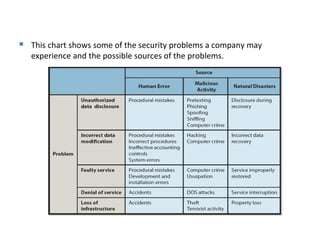
 This chart shows some of the security problems a company may
experience and the possible sources of the problems.
What are unauthorized data disclosure
threats?
• For example, a new university dept.
administrator posts student names, numbers,
and grades in a public place.
• Or, an employee unknowingly posts restricted
data on a company website that can be
reached by search engines over the Web.
Malicious unauthorized data disclosure threats
• Pre-texting: when
someone deceives by
pretending to be someone
else
• Phishing: the phisher
pretends to be a legitimate
company and sends an
email requesting
confidential data such as
account numbers, social
security numbers,
passwords, and so forth.
• Spoofing: is pretending to be
someone else. Email spoofing
is a synonym for phishing
• Sniffing: is a technique for intercepting computer
communications.
• With wireless networks, drive-by sniffers simply
take computers with wireless connections through
an area and search for unprotected wireless
networks.
• They can monitor and intercept wireless traffic at
will.
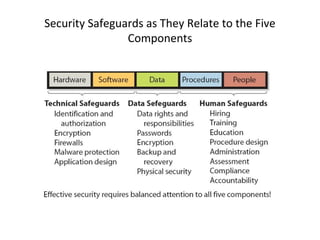
• There are three components of a sound
organizational security program:
1. Senior management must establish a security policy
and manage risks.
2. Safeguards of various kinds must be established for
all five components of an IS as the figure on the next
slide demonstrates.
3. The organization must plan its incident response
before any problems occur.
Security Safeguards as They Relate to the Five
Components
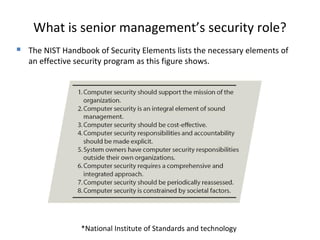
What is senior management’s security role?
 The NIST Handbook of Security Elements lists the necessary elements of
an effective security program as this figure shows.
*National Institute of Standards and technology
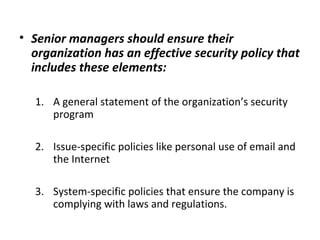
• Senior managers should ensure their
organization has an effective security policy that
includes these elements:
1. A general statement of the organization’s security
program
2. Issue-specific policies like personal use of email and
the Internet
3. System-specific policies that ensure the company is
complying with laws and regulations.
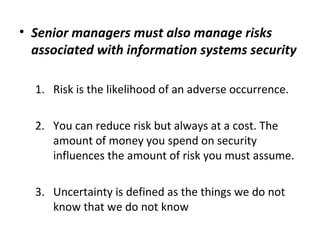
• Senior managers must also manage risks
associated with information systems security
1. Risk is the likelihood of an adverse occurrence.
2. You can reduce risk but always at a cost. The
amount of money you spend on security
influences the amount of risk you must assume.
3. Uncertainty is defined as the things we do not
know that we do not know
Senior Managements Security Role
 When you’re
assessing risks to
an information
system you must
first determine:
 What the threats are
 How likely they are to
occur
 The consequences if
they occur
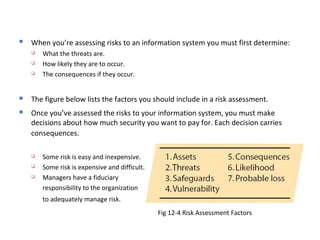
Fig 12-4 Risk Assessment Factors
 When you’re assessing risks to an information system you must first determine:
 What the threats are.
 How likely they are to occur.
 The consequences if they occur.
 The figure below lists the factors you should include in a risk assessment.
 Once you’ve assessed the risks to your information system, you must make
decisions about how much security you want to pay for. Each decision carries
consequences.
 Some risk is easy and inexpensive.
 Some risk is expensive and difficult.
 Managers have a fiduciary
responsibility to the organization
to adequately manage risk.
What technical safeguards are
available?
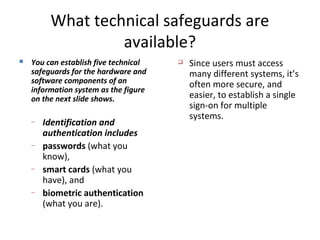
 You can establish five technical
safeguards for the hardware and
software components of an
information system as the figure
on the next slide shows.
– Identification and
authentication includes
– passwords (what you
know),
– smart cards (what you
have), and
– biometric authentication
(what you are).
 Since users must access
many different systems, it’s
often more secure, and
easier, to establish a single
sign-on for multiple
systems.
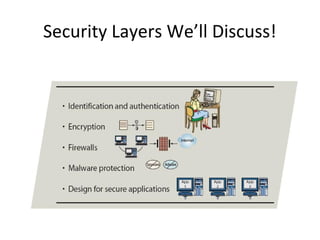
Security Layers We’ll Discuss!
What’s Encryption?
• The process of changing original text to a
secret message using cryptography
• Cryptography is the science of transforming
information so that it is secure while it is being
transmitted or stored
Firewalls
• Firewalls, the third technical safeguard, should
be installed and used with every computer
that’s connected to any network, especially
the Internet.
• Firewalls can be hardware or software, used
independently of each other or used together
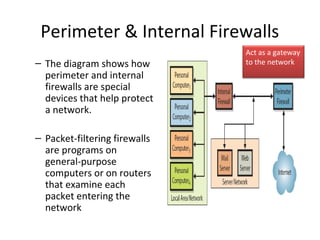
Perimeter & Internal Firewalls
– The diagram shows how
perimeter and internal
firewalls are special
devices that help protect
a network.
– Packet-filtering firewalls
are programs on
general-purpose
computers or on routers
that examine each
packet entering the
network
Act as a gateway
to the network
Malware Protection
• Malware Protection is
the fourth technical
safeguard. We’ll
concentrate on spyware
and adware here.
– Spyware are programs that
may be installed on your
computer without your
knowledge or permission.
– Adware is a benign
program that’s also
installed without your
permission. It resides in
your computer’s
background and
observes your behavior.
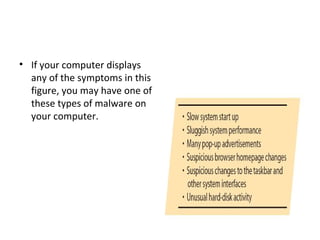
• If your computer displays
any of the symptoms in this
figure, you may have one of
these types of malware on
your computer.
safeguard your computer against
malware:
– Install antivirus and antispyware programs.
– Scan your computer frequently for malware.
– Update malware definitions often or use an automatic update
process.
– Open email attachments only from known sources and even then be
wary.
– Promptly install software updates from legitimate sources like
Microsoft for your operating system or McAfee for your spyware
programs.
– Browse only in reputable Internet neighborhoods. Malware is often
associated with rogue Web sites.
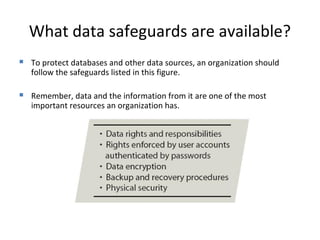
What data safeguards are available?
 To protect databases and other data sources, an organization should
follow the safeguards listed in this figure.
 Remember, data and the information from it are one of the most
important resources an organization has.
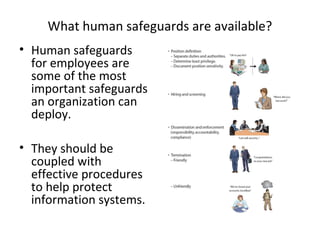
What human safeguards are available?
• Human safeguards
for employees are
some of the most
important safeguards
an organization can
deploy.
• They should be
coupled with
effective procedures
to help protect
information systems.
• An organization needs human safeguards for
nonemployees whether they are temporary employees,
vendors, business partners, or the public. Here are a few
suggestions:
– Ensure any contracts between the organization and other
workers include security policies. Third-party employees should
be screened and trained the same as direct employees.
– Web sites used by third-party employees and the public should
be hardened against misuse or abuse.
– Protect outside users from internal security problems. If your
system gets infected with a virus, you should not pass it on to
others.
Account Administration
• Account administration is the third type of
human safeguard and has three components
—account management, password
management, and help-desk policies.
– Account management focuses on
• Establishing new accounts
• Modifying existing accounts
• Terminating unnecessary accounts.
More Human Safeguards
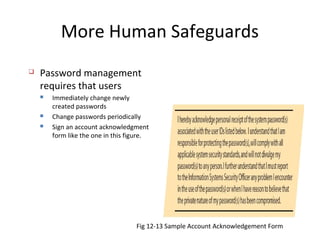
 Password management
requires that users
 Immediately change newly
created passwords
 Change passwords periodically
 Sign an account acknowledgment
form like the one in this figure.
Fig 12-13 Sample Account Acknowledgement Form
– Help-desks have been a source of problems for
account administration because of the inherent
nature of their work.
• It is difficult for the help-desk to determine exactly with
whom they’re speaking. Users call up for a new password
without the help-desk having a method of definitively
identifying who is on the other end of the line.
• There must be policies in place to provide ways of
authenticating users like asking questions only the user
would know the answers to.
• Users have a responsibility to help the help-desk by
responsibly controlling their passwords.
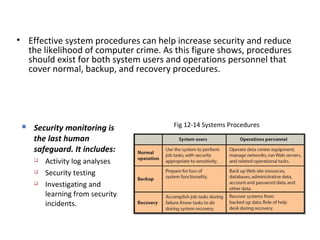
• Effective system procedures can help increase security and reduce
the likelihood of computer crime. As this figure shows, procedures
should exist for both system users and operations personnel that
cover normal, backup, and recovery procedures.
Fig 12-14 Systems Procedures Security monitoring is
the last human
safeguard. It includes:
 Activity log analyses
 Security testing
 Investigating and
learning from security
incidents.
How should organizations respond to security
incidents?
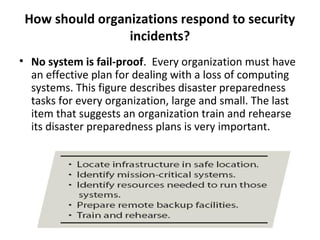
• No system is fail-proof. Every organization must have
an effective plan for dealing with a loss of computing
systems. This figure describes disaster preparedness
tasks for every organization, large and small. The last
item that suggests an organization train and rehearse
its disaster preparedness plans is very important.
What is the extent of computer crime?
• The full extent of computer crime is unknown.
There is no national census because many
organizations are reluctant to report losses for
fear of alienating customers, suppliers, and
business partners. dollar loss.

Information security management

  • 1.
    Information Security Management Threats toInformation Security and what we can do about it
  • 2.
    Before we startour Conversation… Ordering a Pizza?
  • 3.
    What are thethreats to information security? • In order to adequately protect information resources, managers must be aware of the sources of threats to those resources, the types of security problems the threats present, and how to safeguard against both. The three most common sources of threats are: – Human error and mistakes – Malicious human activity – Natural events and disasters.
  • 4.
    • Human errorand mistakes stem from employees and nonemployees. – They may misunderstand operating procedures and inadvertently cause data to be deleted. – Poorly written application programs and poorly designed procedures may allow employees to enter data incorrectly or misuse the system. – Employees may make physical mistakes like unplugging a piece of hardware that causes the system to crash.
  • 5.
    Human Threats • Malicioushuman activity results from employees, former employees, and hackers who intentionally destroy data or system components. These actions include: • Breaking into systems with the intent of stealing, altering or destroying data. • Introducing viruses and worms into a system. • Acts of terrorism.
  • 6.
    Natural Events andDisasters • The last source of threats to information security are those caused by natural events and disasters. These threats pose problems stemming not just from the initial loss of capability and service but also problems a company may experience as it recovers from the initial problem. They include: • Fires • Floods • Hurricanes • Earthquakes and • Other acts of nature
  • 7.
     This chartshows some of the security problems a company may experience and the possible sources of the problems.
  • 8.
    What are unauthorizeddata disclosure threats? • For example, a new university dept. administrator posts student names, numbers, and grades in a public place. • Or, an employee unknowingly posts restricted data on a company website that can be reached by search engines over the Web.
  • 9.
    Malicious unauthorized datadisclosure threats • Pre-texting: when someone deceives by pretending to be someone else • Phishing: the phisher pretends to be a legitimate company and sends an email requesting confidential data such as account numbers, social security numbers, passwords, and so forth. • Spoofing: is pretending to be someone else. Email spoofing is a synonym for phishing
  • 10.
    • Sniffing: isa technique for intercepting computer communications. • With wireless networks, drive-by sniffers simply take computers with wireless connections through an area and search for unprotected wireless networks. • They can monitor and intercept wireless traffic at will.
  • 11.
    • There arethree components of a sound organizational security program: 1. Senior management must establish a security policy and manage risks. 2. Safeguards of various kinds must be established for all five components of an IS as the figure on the next slide demonstrates. 3. The organization must plan its incident response before any problems occur.
  • 12.
    Security Safeguards asThey Relate to the Five Components
  • 13.
    What is seniormanagement’s security role?  The NIST Handbook of Security Elements lists the necessary elements of an effective security program as this figure shows. *National Institute of Standards and technology
  • 14.
    • Senior managersshould ensure their organization has an effective security policy that includes these elements: 1. A general statement of the organization’s security program 2. Issue-specific policies like personal use of email and the Internet 3. System-specific policies that ensure the company is complying with laws and regulations.
  • 15.
    • Senior managersmust also manage risks associated with information systems security 1. Risk is the likelihood of an adverse occurrence. 2. You can reduce risk but always at a cost. The amount of money you spend on security influences the amount of risk you must assume. 3. Uncertainty is defined as the things we do not know that we do not know
  • 16.
    Senior Managements SecurityRole  When you’re assessing risks to an information system you must first determine:  What the threats are  How likely they are to occur  The consequences if they occur
  • 17.
    Fig 12-4 RiskAssessment Factors  When you’re assessing risks to an information system you must first determine:  What the threats are.  How likely they are to occur.  The consequences if they occur.  The figure below lists the factors you should include in a risk assessment.  Once you’ve assessed the risks to your information system, you must make decisions about how much security you want to pay for. Each decision carries consequences.  Some risk is easy and inexpensive.  Some risk is expensive and difficult.  Managers have a fiduciary responsibility to the organization to adequately manage risk.
  • 18.
    What technical safeguardsare available?  You can establish five technical safeguards for the hardware and software components of an information system as the figure on the next slide shows. – Identification and authentication includes – passwords (what you know), – smart cards (what you have), and – biometric authentication (what you are).  Since users must access many different systems, it’s often more secure, and easier, to establish a single sign-on for multiple systems.
  • 19.
  • 20.
    What’s Encryption? • Theprocess of changing original text to a secret message using cryptography • Cryptography is the science of transforming information so that it is secure while it is being transmitted or stored
  • 21.
    Firewalls • Firewalls, thethird technical safeguard, should be installed and used with every computer that’s connected to any network, especially the Internet. • Firewalls can be hardware or software, used independently of each other or used together
  • 22.
    Perimeter & InternalFirewalls – The diagram shows how perimeter and internal firewalls are special devices that help protect a network. – Packet-filtering firewalls are programs on general-purpose computers or on routers that examine each packet entering the network Act as a gateway to the network
  • 23.
    Malware Protection • MalwareProtection is the fourth technical safeguard. We’ll concentrate on spyware and adware here. – Spyware are programs that may be installed on your computer without your knowledge or permission. – Adware is a benign program that’s also installed without your permission. It resides in your computer’s background and observes your behavior.
  • 24.
    • If yourcomputer displays any of the symptoms in this figure, you may have one of these types of malware on your computer.
  • 25.
    safeguard your computeragainst malware: – Install antivirus and antispyware programs. – Scan your computer frequently for malware. – Update malware definitions often or use an automatic update process. – Open email attachments only from known sources and even then be wary. – Promptly install software updates from legitimate sources like Microsoft for your operating system or McAfee for your spyware programs. – Browse only in reputable Internet neighborhoods. Malware is often associated with rogue Web sites.
  • 26.
    What data safeguardsare available?  To protect databases and other data sources, an organization should follow the safeguards listed in this figure.  Remember, data and the information from it are one of the most important resources an organization has.
  • 27.
    What human safeguardsare available? • Human safeguards for employees are some of the most important safeguards an organization can deploy. • They should be coupled with effective procedures to help protect information systems.
  • 28.
    • An organizationneeds human safeguards for nonemployees whether they are temporary employees, vendors, business partners, or the public. Here are a few suggestions: – Ensure any contracts between the organization and other workers include security policies. Third-party employees should be screened and trained the same as direct employees. – Web sites used by third-party employees and the public should be hardened against misuse or abuse. – Protect outside users from internal security problems. If your system gets infected with a virus, you should not pass it on to others.
  • 29.
    Account Administration • Accountadministration is the third type of human safeguard and has three components —account management, password management, and help-desk policies. – Account management focuses on • Establishing new accounts • Modifying existing accounts • Terminating unnecessary accounts.
  • 30.
    More Human Safeguards Password management requires that users  Immediately change newly created passwords  Change passwords periodically  Sign an account acknowledgment form like the one in this figure. Fig 12-13 Sample Account Acknowledgement Form
  • 31.
    – Help-desks havebeen a source of problems for account administration because of the inherent nature of their work. • It is difficult for the help-desk to determine exactly with whom they’re speaking. Users call up for a new password without the help-desk having a method of definitively identifying who is on the other end of the line. • There must be policies in place to provide ways of authenticating users like asking questions only the user would know the answers to. • Users have a responsibility to help the help-desk by responsibly controlling their passwords.
  • 32.
    • Effective systemprocedures can help increase security and reduce the likelihood of computer crime. As this figure shows, procedures should exist for both system users and operations personnel that cover normal, backup, and recovery procedures. Fig 12-14 Systems Procedures Security monitoring is the last human safeguard. It includes:  Activity log analyses  Security testing  Investigating and learning from security incidents.
  • 33.
    How should organizationsrespond to security incidents? • No system is fail-proof. Every organization must have an effective plan for dealing with a loss of computing systems. This figure describes disaster preparedness tasks for every organization, large and small. The last item that suggests an organization train and rehearse its disaster preparedness plans is very important.
  • 34.
    What is theextent of computer crime? • The full extent of computer crime is unknown. There is no national census because many organizations are reluctant to report losses for fear of alienating customers, suppliers, and business partners. dollar loss.