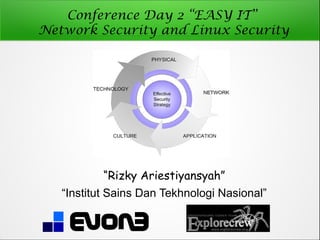
Conference Day 2 “EASY IT”
Network Security and Linux Security


           “Rizky Ariestiyansyah”
   “Institut Sains Dan Tekhnologi Nasional”
Who am I ?

•   Rizky Ariestiyansyah ( ONTO )
•   CEO / Founder EVONE
•   github.com/ariestiyansyah
•   twitter.com/ariestiyansyah
•   ariestiyansyah.rizky@gmail.com
Conference Focus

    Introduction to Security, Computer Security,
    Network Security and Linux Security

    Why do we need Security

    Who is Vulnerable

    Security Model

    Common Security Attack

    Linux Security

    Cyber crime report (ID-CERT)

    Summary
Introduction to Security,
Computer Security, Network
Security and Linux Security
Security

    The state of being free from danger or threat.

    Security is the degree of protection to safeguard a
    nation, union of nations, persons or person
    against danger, damage, loss, and crime.
    (Wikipedia).

    freedom from care, anxiety, or doubt; well-
    founded confidence.

    Freedom from danger, risk.
Computer Security
• Computer security is the process of preventing
  and detecting unauthorized use of your
  computer. (armor2net)
• The protection of computer systems and
  information from harm, theft, and unauthorized
  use.
Network Security

• Network security consists of the provisions and policies
  adopted by a network administrator to prevent and
  monitor unauthorized access, misuse, modification, or
  denial of a computer network and network-accessible
  resources.
• Network security is typically handled by a network
  administrator or system administrator who implements
  the security policy, network software and hardware
  needed to protect a network and the resources accessed
  through the network from unauthorized access and also
  ensure that employees have adequate access to the
  network and resources to work.
Linux Security

    Protect your linux distribution

    By default linux is not secure

    Linux is optimized for convenience and doesn’t
    make security easy or nature
Why do we need Security ?
Known the Security Threats
1. Malware
2. Backdoor, Exploiting software bugs, Buffer overflow (BOF)
3. Denial of services and DDOS
4. Sniffing attack, TCP Hijacking
5. Unprotected Linux/Windows Shares
6. LFI, SQLI, RFI, Social Problems
7. Cross-site scripting (XSS)
8. TCP Attack
9. Email Attack
Reason why need security

    Your computer isn't secure as you think.

    Protect data and all vital information from
    intruders, because everybody has a right to
    privacy.

    Security is now a basic requirement because
    global computing is inherently insecure.

    Provide authentication and access control for
    resources.
Who is Vulnerable
Vulnerable !!!


Security is low or down
Who is vulnerable ?
•   Bank
•   Goverment
•   Defensive agencies
•   Companies
•   University and Institutions
•   Multinational Corporation
•   Anyone on the Internet Network
Security Model
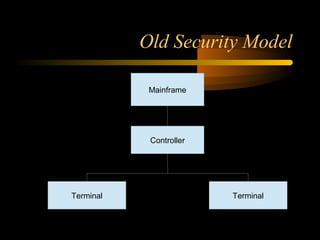
Old Security Model

            Mainframe


            Controller


Terminal                 Terminal
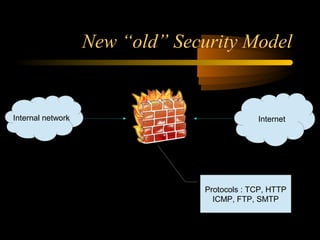
New “old” Security Model


Internal network         F ir e w a ll                Internet


                                         Protocols : TCP, HTTP
                                           ICMP, FTP, SMTP
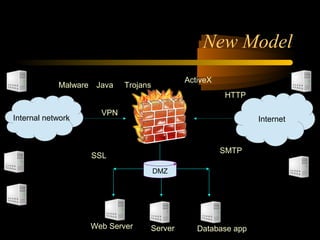
New Model
                                                ActiveX
            Malware Java   Trojans
                                                          HTTP

                     VPN
Internal network                F ir e w a ll                     Internet


                                                          SMTP
                   SSL
                                     DMZ


                   Web Server       Server         Database app
Common Security Attack
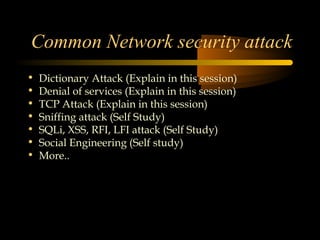
Common Network security attack
•   Dictionary Attack (Explain in this session)
•   Denial of services (Explain in this session)
•   TCP Attack (Explain in this session)
•   Sniffing attack (Self Study)
•   SQLi, XSS, RFI, LFI attack (Self Study)
•   Social Engineering (Self study)
•   More..
Dictionary attack

    Dictionary attack is a technique for defeating a cipher or
    authentication mechanism by trying to determine its
    decryption key or passphrase by trying likely possibilities,
    such as words in a dictionary.


    Dictionary attack accuracy is 90% (dictionary word good),


    The Linux password store at /etc/passwd are encrypted
    with crypt(3) function, it mean one way hash


    To secure from this attack use randomly password like
    “jU5bu4h@p@y4n94kuSuk@” ( 4l4y password ).
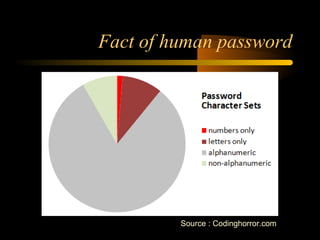
Fact of human password


         Source : Codinghorror.com
Denial of services

Denial of service or DOS is overloading the server or
  network to make the service in the network
  unusable and overflow


DOS have diferent kinds like ;
1. SYN Flooding
2. Distribute DOS
3. SMURF
SYN Flooding
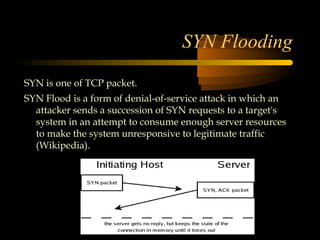
SYN is one of TCP packet.
SYN Flood is a form of denial-of-service attack in which an
  attacker sends a succession of SYN requests to a target's
  system in an attempt to consume enough server resources
  to make the system unresponsive to legitimate traffic
  (Wikipedia).
DDoS
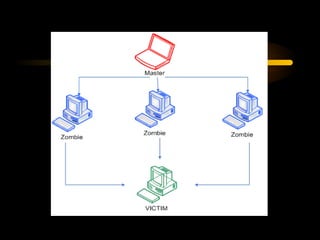
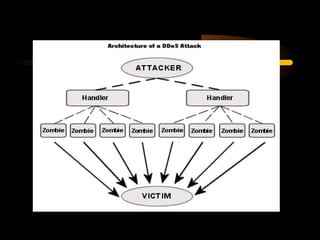
# DDOS is a type of DOS attack where multiple
  compromised systems, which are usually infected with a
  Trojan, are used to target a single system causing a Denial
  of Service (DOS) attack.
# DDOS is same with DOS but in large scale.
# Make machine or network resource unavailable.
# Anonymous in their OP use DDOS attack and
  Defacement.
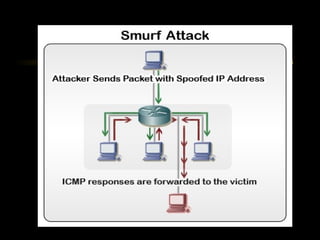
SMURF
The Smurf Attack is a denial-of-service attack in
  which large amounts of ICMP packets with
  the intended victim's spoofed source IP are
  broadcast to a computer network using an IP
  Broadcast address (Wikipedia).

Source ip addrees of broadcast ping is forget.
TCP Attack

• TCP = Transmission Control Protocol
• Part of the IP netw. Protocol
• Connection-based protocol
• Point-to-point protocol
• Data transfer
• More define at RFC 793
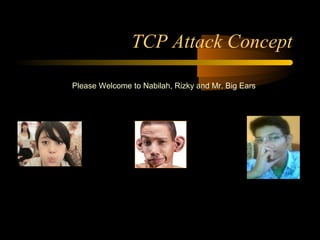
TCP Attack Concept

Please Welcome to Nabilah, Rizky and Mr. Big Ears
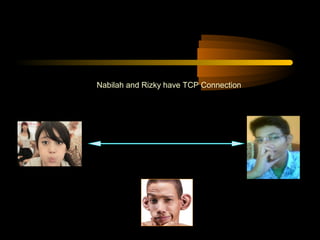
Nabilah and Rizky have TCP Connection
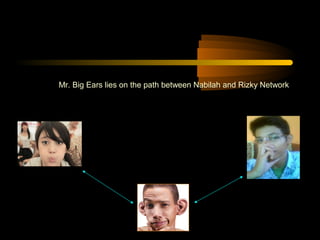
Mr. Big Ears lies on the path between Nabilah and Rizky Network
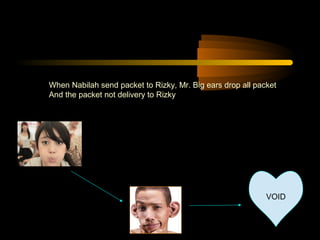
When Nabilah send packet to Rizky, Mr. Big ears drop all packet
And the packet not delivery to Rizky


                                                            VOID
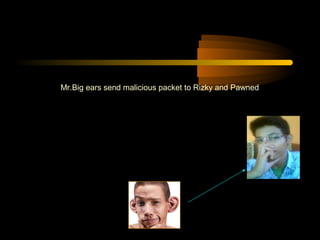
Mr.Big ears send malicious packet to Rizky and Pawned
Nabilah and Rizky fall out cause the malicous packet from big ears
TCP Attack (Hijacking)
"TCP hijacking" is a technique that involves
  intercepting a TCP session initiated between
  two machines in order to hijack it.

If an attacker learns the associated TCP state for
   the connection, then the connection can be
   hijacked !

More TCP Attack example ; spoofing, MITM,
 sniffing and more.
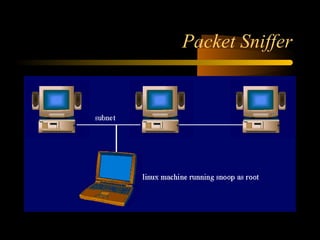
Packet Sniffing
• Packet sniffer programs capture the contents
  of packets that may include passwords and
  other sensitive information that could later be
  used for compromising the client computer
• For example, a sniffer installed on a cable
  modem in one cable trunk may be able to
  sniff the password from other users on the
  same trunk
• Encryption of network traffic provides one of
  the defenses against sniffing
Break for 5 Minutes..
Linux Security
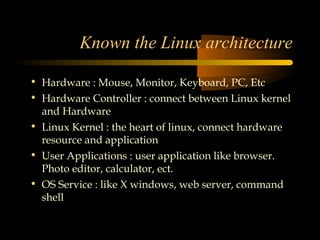
Known the Linux architecture

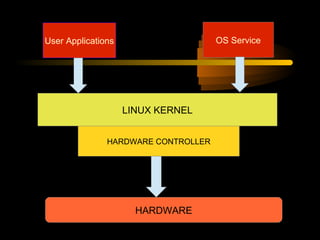
• Hardware : Mouse, Monitor, Keyboard, PC, Etc
• Hardware Controller : connect between Linux kernel
  and Hardware
• Linux Kernel : the heart of linux, connect hardware
  resource and application
• User Applications : user application like browser.
  Photo editor, calculator, ect.
• OS Service : like X windows, web server, command
  shell
User Applications                    OS Service


                    LINUX KERNEL


               HARDWARE CONTROLLER


                      HARDWARE
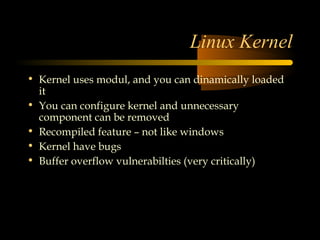
Linux Kernel
• Kernel uses modul, and you can dinamically loaded
  it
• You can configure kernel and unnecessary
  component can be removed
• Recompiled feature – not like windows
• Kernel have bugs
• Buffer overflow vulnerabilties (very critically)
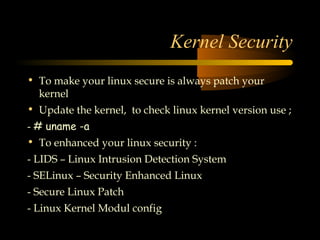
Kernel Security
• To make your linux secure is always patch your
  kernel
• Update the kernel, to check linux kernel version use ;
- # uname -a
• To enhanced your linux security :
- LIDS – Linux Intrusion Detection System
- SELinux – Security Enhanced Linux
- Secure Linux Patch
- Linux Kernel Modul config
Linux Instrusion Detection System (LIDS)

# LIDS web http://www.lids.org/
# LIDS is a tool to make kernel security
  powerfull
# LIDS is a patch to the Linux kernel; it
  implements access control and a reference
  monitor. LIDS is configured with its two
  admin tools, lidsconf and lidsadm
# LIDS is a complete security model
  implementation for the Linux kernel.
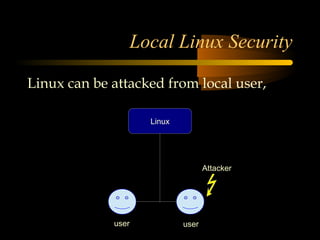
Local Linux Security

Linux can be attacked from local user,

                    Linux


                                   Attacker


             user           user
Protect from local attack
• Give them the minimal amount of privileges they
  need.
• Be aware when/where they login from, or should be
  logging in from.
• The creation of group user-id's should be absolutely
  prohibited. User accounts also provide
  accountability, and this is not possible with group
  accounts
File and Filesystem Security

# Known Linux User group and permission
# File permission and ownership
# Configure your users file-creation umask to be
  as restrictive as possible


                 START LIVE DEMO !!!
Password Security and Encryption

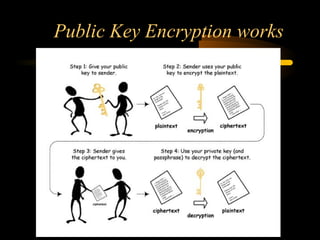
PGP and Public Key Cryptography
Linux IPSEC Implementation
PAM
Shadow passwords
Secure shell and Stelnet
SSL, S-HTTP
Public Key Encryption works
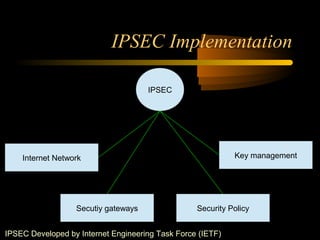
IPSEC Implementation

                                     IPSEC


    Internet Network                                        Key management


                  Secutiy gateways                Security Policy


IPSEC Developed by Internet Engineering Task Force (IETF)
IPSEC give solution to create cryptographically-secure
  communications at the IP network level (Network
  layer), and to provide authentication, integrity, access
  control, and confidentiality.


Some exploitation in network layer to secure using IPSEC
  is ;
- Eavesdropping
- MITM ( Man in the middle attack)
- Masquerading
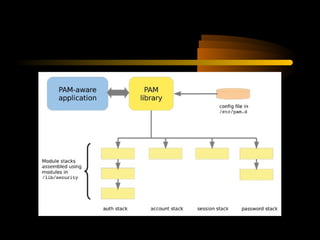
Linux-PAM
# The concept of Linux-PAM: programs that
  require authentication only need to know that
  there is a module available that will perform
  the authentication for them.

# PAM is set up so that modules can be
  added,deleted, and reconfigured at any time-
  it is not necessary for modules to be linked in
  at the time a utility is compiled
Linux Network Security
# System services
# Packet sniffer
# DOS Attack
# NFS (Network File System) Security
# Firewall
# Network information Services
# NIDS
# IP Chains
# VPNs
# Netfilter
System services
# if you are join the internet network be
  carefull of your linux services, dont try
  to offer services you dont need to use or
  run in internet network,
# some services most usefull like ; FTP,
  Mail, SSH, identd, telnet
# Possibly not required services like ; nscd,
  smb, dhcp, cups, ldap, rhnsd
Packet Sniffer
NFS
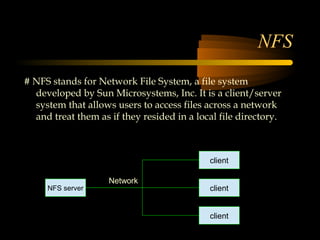
# NFS stands for Network File System, a file system
  developed by Sun Microsystems, Inc. It is a client/server
  system that allows users to access files across a network
  and treat them as if they resided in a local file directory.


                                            client

                    Network
     NFS server                             client


                                            client
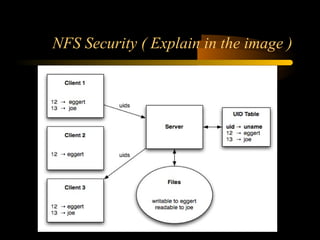
NFS Security ( Explain in the image )
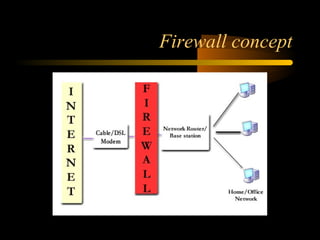
Firewall
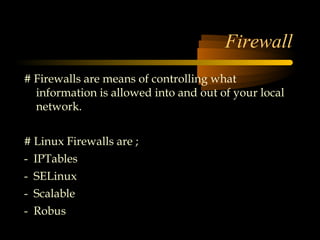
# Firewalls are means of controlling what
  information is allowed into and out of your local
  network.


# Linux Firewalls are ;
- IPTables
- SELinux
- Scalable
- Robus
Firewall concept
NIS

# NIS is a client–server directory service
  protocol for distributing system
  configuration data such as user and host
  names between computers on a
  computer network.
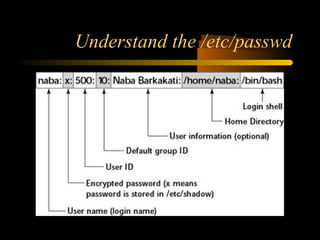
# all the information in a standard
  /etc/passwd file
Understand the /etc/passwd
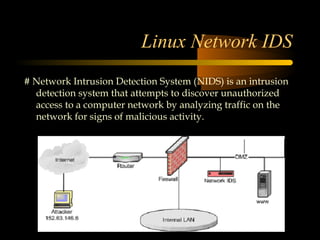
Linux Network IDS
# Network Intrusion Detection System (NIDS) is an intrusion
  detection system that attempts to discover unauthorized
  access to a computer network by analyzing traffic on the
  network for signs of malicious activity.
Linux Application Security
Remember to protect your Linux application security like :


- File Server
- Web Server
- Print Servers –lpd, cups, etc.
- Mail Server – Sendmail (historically insecure), Qmail, Postfix
- VPN Server – FreeS/WAN
- Databases – PostgreSQL, MySQL (free), Oracle, Sybase, DB2)

- DNS Servers – BIND
- LDAP Servers
- Time Servers
Cyber Crime Report (ID-CERT)
Summary
Summary


- Linux is not secure by default
- Always updated for linux patch
- Use only required services in linux
- Network service keep on minimum uses
- Balanced security level and funcionality
- Take care on internet network actually public network (wifi)
- There is no system secure ^_^
Reference

- http://forum.explorecrew.org/
- http://www.tldp.org/HOWTO/Security-HOWTO/
- http://www.cyberciti.biz/faq/understanding-etcpasswd-file-format
- http://www.lids.org/
- http://proceedings.esri.com/library/userconf/proc00/professional/papers/pap197/p197.htm
- http://www.kecoak.or.id/sarang/TOKET_4/0x01-fun-ipsec.txt
- http://www.linuxsecurity.com/docs/SecurityAdminGuide/SecurityAdminGuide-8.html
- http://http://en.wikipedia.org/wiki
- http://kodokimut.wordpress.com/
- http://google.com (use at your own risk)
See You Next EVENT !!!!


               The End

Security and Linux Security

  • 2.
    Conference Day 2“EASY IT” Network Security and Linux Security “Rizky Ariestiyansyah” “Institut Sains Dan Tekhnologi Nasional”
  • 3.
    Who am I? • Rizky Ariestiyansyah ( ONTO ) • CEO / Founder EVONE • github.com/ariestiyansyah • twitter.com/ariestiyansyah • ariestiyansyah.rizky@gmail.com
  • 4.
    Conference Focus  Introduction to Security, Computer Security, Network Security and Linux Security  Why do we need Security  Who is Vulnerable  Security Model  Common Security Attack  Linux Security  Cyber crime report (ID-CERT)  Summary
  • 5.
    Introduction to Security, ComputerSecurity, Network Security and Linux Security
  • 6.
    Security  The state of being free from danger or threat.  Security is the degree of protection to safeguard a nation, union of nations, persons or person against danger, damage, loss, and crime. (Wikipedia).  freedom from care, anxiety, or doubt; well- founded confidence.  Freedom from danger, risk.
  • 7.
    Computer Security • Computersecurity is the process of preventing and detecting unauthorized use of your computer. (armor2net) • The protection of computer systems and information from harm, theft, and unauthorized use.
  • 8.
    Network Security • Networksecurity consists of the provisions and policies adopted by a network administrator to prevent and monitor unauthorized access, misuse, modification, or denial of a computer network and network-accessible resources. • Network security is typically handled by a network administrator or system administrator who implements the security policy, network software and hardware needed to protect a network and the resources accessed through the network from unauthorized access and also ensure that employees have adequate access to the network and resources to work.
  • 9.
    Linux Security  Protect your linux distribution  By default linux is not secure  Linux is optimized for convenience and doesn’t make security easy or nature
  • 10.
    Why do weneed Security ?
  • 11.
    Known the SecurityThreats 1. Malware 2. Backdoor, Exploiting software bugs, Buffer overflow (BOF) 3. Denial of services and DDOS 4. Sniffing attack, TCP Hijacking 5. Unprotected Linux/Windows Shares 6. LFI, SQLI, RFI, Social Problems 7. Cross-site scripting (XSS) 8. TCP Attack 9. Email Attack
  • 12.
    Reason why needsecurity  Your computer isn't secure as you think.  Protect data and all vital information from intruders, because everybody has a right to privacy.  Security is now a basic requirement because global computing is inherently insecure.  Provide authentication and access control for resources.
  • 13.
  • 14.
  • 15.
    Who is vulnerable? • Bank • Goverment • Defensive agencies • Companies • University and Institutions • Multinational Corporation • Anyone on the Internet Network
  • 16.
  • 17.
    Old Security Model Mainframe Controller Terminal Terminal
  • 18.
    New “old” SecurityModel Internal network F ir e w a ll Internet Protocols : TCP, HTTP ICMP, FTP, SMTP
  • 19.
    New Model ActiveX Malware Java Trojans HTTP VPN Internal network F ir e w a ll Internet SMTP SSL DMZ Web Server Server Database app
  • 20.
  • 21.
    Common Network securityattack • Dictionary Attack (Explain in this session) • Denial of services (Explain in this session) • TCP Attack (Explain in this session) • Sniffing attack (Self Study) • SQLi, XSS, RFI, LFI attack (Self Study) • Social Engineering (Self study) • More..
  • 22.
    Dictionary attack  Dictionary attack is a technique for defeating a cipher or authentication mechanism by trying to determine its decryption key or passphrase by trying likely possibilities, such as words in a dictionary.  Dictionary attack accuracy is 90% (dictionary word good),  The Linux password store at /etc/passwd are encrypted with crypt(3) function, it mean one way hash  To secure from this attack use randomly password like “jU5bu4h@p@y4n94kuSuk@” ( 4l4y password ).
  • 23.
    Fact of humanpassword Source : Codinghorror.com
  • 24.
    Denial of services Denialof service or DOS is overloading the server or network to make the service in the network unusable and overflow DOS have diferent kinds like ; 1. SYN Flooding 2. Distribute DOS 3. SMURF
  • 26.
    SYN Flooding SYN isone of TCP packet. SYN Flood is a form of denial-of-service attack in which an attacker sends a succession of SYN requests to a target's system in an attempt to consume enough server resources to make the system unresponsive to legitimate traffic (Wikipedia).
  • 27.
    DDoS # DDOS isa type of DOS attack where multiple compromised systems, which are usually infected with a Trojan, are used to target a single system causing a Denial of Service (DOS) attack. # DDOS is same with DOS but in large scale. # Make machine or network resource unavailable. # Anonymous in their OP use DDOS attack and Defacement.
  • 29.
    SMURF The Smurf Attackis a denial-of-service attack in which large amounts of ICMP packets with the intended victim's spoofed source IP are broadcast to a computer network using an IP Broadcast address (Wikipedia). Source ip addrees of broadcast ping is forget.
  • 31.
    TCP Attack • TCP= Transmission Control Protocol • Part of the IP netw. Protocol • Connection-based protocol • Point-to-point protocol • Data transfer • More define at RFC 793
  • 32.
    TCP Attack Concept PleaseWelcome to Nabilah, Rizky and Mr. Big Ears
  • 33.
    Nabilah and Rizkyhave TCP Connection
  • 34.
    Mr. Big Earslies on the path between Nabilah and Rizky Network
  • 35.
    When Nabilah sendpacket to Rizky, Mr. Big ears drop all packet And the packet not delivery to Rizky VOID
  • 36.
    Mr.Big ears sendmalicious packet to Rizky and Pawned
  • 37.
    Nabilah and Rizkyfall out cause the malicous packet from big ears
  • 38.
    TCP Attack (Hijacking) "TCPhijacking" is a technique that involves intercepting a TCP session initiated between two machines in order to hijack it. If an attacker learns the associated TCP state for the connection, then the connection can be hijacked ! More TCP Attack example ; spoofing, MITM, sniffing and more.
  • 39.
    Packet Sniffing • Packetsniffer programs capture the contents of packets that may include passwords and other sensitive information that could later be used for compromising the client computer • For example, a sniffer installed on a cable modem in one cable trunk may be able to sniff the password from other users on the same trunk • Encryption of network traffic provides one of the defenses against sniffing
  • 40.
    Break for 5Minutes..
  • 41.
  • 42.
    Known the Linuxarchitecture • Hardware : Mouse, Monitor, Keyboard, PC, Etc • Hardware Controller : connect between Linux kernel and Hardware • Linux Kernel : the heart of linux, connect hardware resource and application • User Applications : user application like browser. Photo editor, calculator, ect. • OS Service : like X windows, web server, command shell
  • 43.
    User Applications OS Service LINUX KERNEL HARDWARE CONTROLLER HARDWARE
  • 44.
    Linux Kernel • Kerneluses modul, and you can dinamically loaded it • You can configure kernel and unnecessary component can be removed • Recompiled feature – not like windows • Kernel have bugs • Buffer overflow vulnerabilties (very critically)
  • 45.
    Kernel Security • Tomake your linux secure is always patch your kernel • Update the kernel, to check linux kernel version use ; - # uname -a • To enhanced your linux security : - LIDS – Linux Intrusion Detection System - SELinux – Security Enhanced Linux - Secure Linux Patch - Linux Kernel Modul config
  • 46.
    Linux Instrusion DetectionSystem (LIDS) # LIDS web http://www.lids.org/ # LIDS is a tool to make kernel security powerfull # LIDS is a patch to the Linux kernel; it implements access control and a reference monitor. LIDS is configured with its two admin tools, lidsconf and lidsadm # LIDS is a complete security model implementation for the Linux kernel.
  • 47.
    Local Linux Security Linuxcan be attacked from local user, Linux Attacker user user
  • 48.
    Protect from localattack • Give them the minimal amount of privileges they need. • Be aware when/where they login from, or should be logging in from. • The creation of group user-id's should be absolutely prohibited. User accounts also provide accountability, and this is not possible with group accounts
  • 49.
    File and FilesystemSecurity # Known Linux User group and permission # File permission and ownership # Configure your users file-creation umask to be as restrictive as possible START LIVE DEMO !!!
  • 50.
    Password Security andEncryption PGP and Public Key Cryptography Linux IPSEC Implementation PAM Shadow passwords Secure shell and Stelnet SSL, S-HTTP
  • 51.
  • 52.
    IPSEC Implementation IPSEC Internet Network Key management Secutiy gateways Security Policy IPSEC Developed by Internet Engineering Task Force (IETF)
  • 53.
    IPSEC give solutionto create cryptographically-secure communications at the IP network level (Network layer), and to provide authentication, integrity, access control, and confidentiality. Some exploitation in network layer to secure using IPSEC is ; - Eavesdropping - MITM ( Man in the middle attack) - Masquerading
  • 54.
    Linux-PAM # The conceptof Linux-PAM: programs that require authentication only need to know that there is a module available that will perform the authentication for them. # PAM is set up so that modules can be added,deleted, and reconfigured at any time- it is not necessary for modules to be linked in at the time a utility is compiled
  • 56.
    Linux Network Security #System services # Packet sniffer # DOS Attack # NFS (Network File System) Security # Firewall # Network information Services # NIDS # IP Chains # VPNs # Netfilter
  • 57.
    System services # ifyou are join the internet network be carefull of your linux services, dont try to offer services you dont need to use or run in internet network, # some services most usefull like ; FTP, Mail, SSH, identd, telnet # Possibly not required services like ; nscd, smb, dhcp, cups, ldap, rhnsd
  • 58.
  • 59.
    NFS # NFS standsfor Network File System, a file system developed by Sun Microsystems, Inc. It is a client/server system that allows users to access files across a network and treat them as if they resided in a local file directory. client Network NFS server client client
  • 60.
    NFS Security (Explain in the image )
  • 61.
    Firewall # Firewalls aremeans of controlling what information is allowed into and out of your local network. # Linux Firewalls are ; - IPTables - SELinux - Scalable - Robus
  • 62.
  • 63.
    NIS # NIS isa client–server directory service protocol for distributing system configuration data such as user and host names between computers on a computer network. # all the information in a standard /etc/passwd file
  • 64.
  • 65.
    Linux Network IDS #Network Intrusion Detection System (NIDS) is an intrusion detection system that attempts to discover unauthorized access to a computer network by analyzing traffic on the network for signs of malicious activity.
  • 66.
    Linux Application Security Rememberto protect your Linux application security like : - File Server - Web Server - Print Servers –lpd, cups, etc. - Mail Server – Sendmail (historically insecure), Qmail, Postfix - VPN Server – FreeS/WAN - Databases – PostgreSQL, MySQL (free), Oracle, Sybase, DB2) - DNS Servers – BIND - LDAP Servers - Time Servers
  • 67.
  • 68.
  • 69.
    Summary - Linux isnot secure by default - Always updated for linux patch - Use only required services in linux - Network service keep on minimum uses - Balanced security level and funcionality - Take care on internet network actually public network (wifi) - There is no system secure ^_^
  • 70.
    Reference - http://forum.explorecrew.org/ - http://www.tldp.org/HOWTO/Security-HOWTO/ -http://www.cyberciti.biz/faq/understanding-etcpasswd-file-format - http://www.lids.org/ - http://proceedings.esri.com/library/userconf/proc00/professional/papers/pap197/p197.htm - http://www.kecoak.or.id/sarang/TOKET_4/0x01-fun-ipsec.txt - http://www.linuxsecurity.com/docs/SecurityAdminGuide/SecurityAdminGuide-8.html - http://http://en.wikipedia.org/wiki - http://kodokimut.wordpress.com/ - http://google.com (use at your own risk)
  • 71.
    See You NextEVENT !!!! The End