LINUX WINDOWSLINUX WINDOWS
Vs.Vs.
CONTENTSCONTENTS
What is an Operating System..???What is an Operating System..???
Introducing Linux..Introducing Linux..
Introducing Windows..Introducing Windows..
Comparison between Linux and WindowsComparison between Linux and Windows
ConclusionConclusion
What is an operating system?What is an operating system?
A program that controls the execution ofA program that controls the execution of
application programsapplication programs
An interface between applications andAn interface between applications and
hardware.hardware.
Makes the computer more convenient to useMakes the computer more convenient to use
Manages the resources of the computerManages the resources of the computer
Allows resources to be used in an efficientAllows resources to be used in an efficient
mannermanner
Examples of OS??Examples of OS??
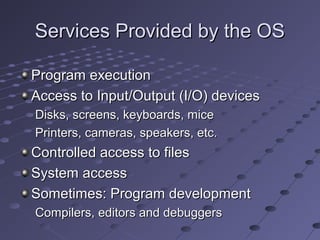
Services Provided by the OSServices Provided by the OS
Program executionProgram execution
Access to Input/Output (I/O) devicesAccess to Input/Output (I/O) devices
Disks, screens, keyboards, miceDisks, screens, keyboards, mice
Printers, cameras, speakers, etc.Printers, cameras, speakers, etc.
Controlled access to filesControlled access to files
System accessSystem access
Sometimes: Program developmentSometimes: Program development
Compilers, editors and debuggersCompilers, editors and debuggers
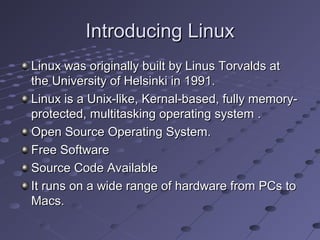
Introducing LinuxIntroducing Linux
Linux was originally built by Linus Torvalds atLinux was originally built by Linus Torvalds at
the University of Helsinki in 1991.the University of Helsinki in 1991.
Linux is a Unix-like, Kernal-based, fully memory-Linux is a Unix-like, Kernal-based, fully memory-
protected, multitasking operating system .protected, multitasking operating system .
Open Source Operating System.Open Source Operating System.
Free SoftwareFree Software
Source Code AvailableSource Code Available
It runs on a wide range of hardware from PCs toIt runs on a wide range of hardware from PCs to
Macs.Macs.
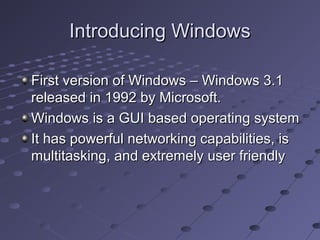
Introducing WindowsIntroducing Windows
First version of Windows – Windows 3.1First version of Windows – Windows 3.1
released in 1992 by Microsoft.released in 1992 by Microsoft.
Windows is a GUI based operating systemWindows is a GUI based operating system
It has powerful networking capabilities, isIt has powerful networking capabilities, is
multitasking, and extremely user friendlymultitasking, and extremely user friendly
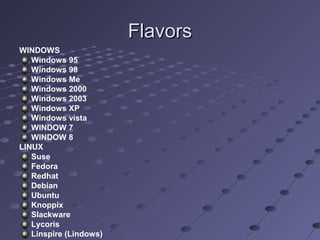
FlavorsFlavors
WINDOWS
Windows 95
Windows 98
Windows Me
Windows 2000
Windows 2003
Windows XP
Windows vista
WINDOW 7
WINDOW 8
LINUX
Suse
Fedora
Redhat
Debian
Ubuntu
Knoppix
Slackware
Lycoris
Linspire (Lindows)
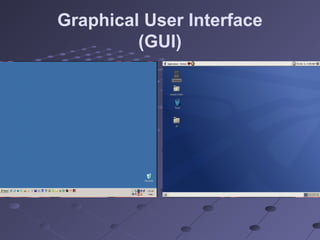
Graphical User Interface
(GUI)
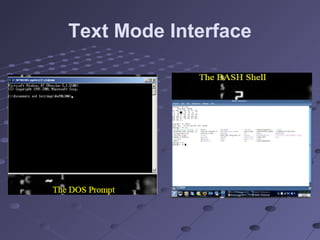
Text Mode Interface
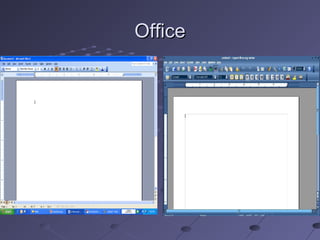
OfficeOffice
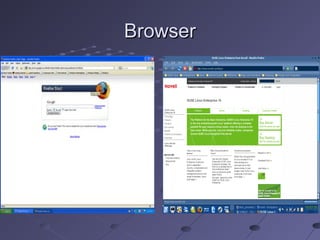
BrowserBrowser
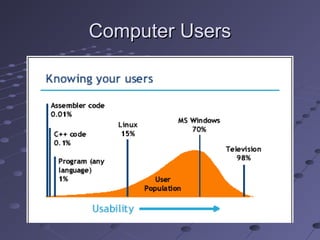
Computer UsersComputer Users
Fundamental Difference betweenFundamental Difference between
Linux & WindowsLinux & Windows
One fundamental difference between theOne fundamental difference between the
two systems is the fact that Linux is "opentwo systems is the fact that Linux is "open
source".source".
Comparing ApplicationsComparing Applications
Linux falls short in the number of differentLinux falls short in the number of different
applications available for it.applications available for it.
There are much more various applicationsThere are much more various applications
available for Microsoft since the populationavailable for Microsoft since the population
of Window’s users is greater than Linux’sof Window’s users is greater than Linux’s
Since Microsoft is more popular, theSince Microsoft is more popular, the
Hardware products are aimed at theHardware products are aimed at the
biggest market – Windows, such that thebiggest market – Windows, such that the
product would be sold and used widelyproduct would be sold and used widely
Comparing Applications Cont.Comparing Applications Cont.
Linux programs distributes freely sinceLinux programs distributes freely since
they are not developed by commercialthey are not developed by commercial
software companies, but instead aresoftware companies, but instead are
created under the GNU Public License,created under the GNU Public License,
which makes the software freewhich makes the software free
Linux software lacks the GUI and isLinux software lacks the GUI and is
therefore not “liked” by many userstherefore not “liked” by many users
Comparing Applications Cont.Comparing Applications Cont.
Windows has its own share of problems –Windows has its own share of problems –
the fact that some software is notthe fact that some software is not
compliant for different versions of windowscompliant for different versions of windows
(i.e. Windows 95/98) and many times the(i.e. Windows 95/98) and many times the
GUI concept is overused such thatGUI concept is overused such that
command arguments cannot be passed tocommand arguments cannot be passed to
the programthe program
Linux advantages in Kernel and theLinux advantages in Kernel and the
OS environmentOS environment
Linux requires 386 architecture to run.Linux requires 386 architecture to run.
Thus, it is compatible with any improvedThus, it is compatible with any improved
architecture such as 486, Pentium,architecture such as 486, Pentium,
Pentium Pro, etcPentium Pro, etc
There are drivers available for much manyThere are drivers available for much many
types of hardware devicestypes of hardware devices
Contd…Contd…
Linux program installation seems to beLinux program installation seems to be
easier since it only requires a restart wheneasier since it only requires a restart when
hardware device has been changedhardware device has been changed
Linux supports multiple copies of theLinux supports multiple copies of the
Kernel on the system such that if an errorKernel on the system such that if an error
is encountered and the Kernel becomesis encountered and the Kernel becomes
corrupted, a different copy of the Kernelcorrupted, a different copy of the Kernel
can be used to boot up the systemcan be used to boot up the system
ReliabilityReliability
OS it must not crash, even under extremeOS it must not crash, even under extreme
loads. OS should process requests even ifloads. OS should process requests even if
the operating system or hardware failsthe operating system or hardware fails
Windows seems to be less stable evenWindows seems to be less stable even
though the latest versions of Windows –though the latest versions of Windows –
2000 and XP are far more improved than2000 and XP are far more improved than
the incredibly buggy Windows 95the incredibly buggy Windows 95
SecuritySecurity
Linux seems to be more prepared forLinux seems to be more prepared for
protecting itself because of the beginningprotecting itself because of the beginning
developments of Linux, UNIX, anddevelopments of Linux, UNIX, and
FreeBSD which were aimed at top notchFreeBSD which were aimed at top notch
securitysecurity
Linux allows does not create registry keysLinux allows does not create registry keys
in a way Windows does allowing a user toin a way Windows does allowing a user to
browse installed components registrybrowse installed components registry
keys, which contain important informationkeys, which contain important information
Security contd…Security contd…
Linux is more virus proof since viruses –Linux is more virus proof since viruses –
malicious programs either cannot be runmalicious programs either cannot be run
automatically on the Linux machine, orautomatically on the Linux machine, or
simply are not capable of being executedsimply are not capable of being executed
on a 386 architectureon a 386 architecture
Windows is often known for a largeWindows is often known for a large
amount of loop holesamount of loop holes
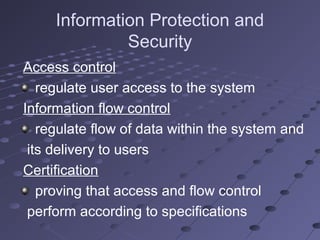
Information Protection and
Security
Access control
regulate user access to the system
Information flow control
regulate flow of data within the system and
its delivery to users
Certification
proving that access and flow control
perform according to specifications
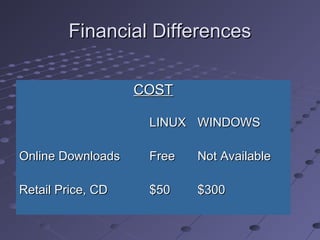
Financial DifferencesFinancial Differences
COSTCOST
LINUXLINUX WINDOWSWINDOWS
Online DownloadsOnline Downloads FreeFree Not AvailableNot Available
Retail Price, CDRetail Price, CD $50$50 $300$300
Financial DifferencesFinancial Differences
Companies have to spend millions forCompanies have to spend millions for
licenses for ever individual windowslicenses for ever individual windows
computercomputer
For Linux companies don’t have to spendFor Linux companies don’t have to spend
anythinganything
Technical DifferencesTechnical Differences
Keeping up to date: Linux upgrades fasterKeeping up to date: Linux upgrades faster
than Windowsthan Windows
Compatibility: Linux is BackwardCompatibility: Linux is Backward
Compatible unlike Windows.Compatible unlike Windows.
Technical DifferencesTechnical Differences
Features Provided:Features Provided:
Both support Dynamic CachingBoth support Dynamic Caching
Both have Multi-user SupportBoth have Multi-user Support
Application differencesApplication differences
No commercial word processor for Linux,No commercial word processor for Linux,
which matches the quality for Windowswhich matches the quality for Windows
End-User DifferencesEnd-User Differences
Proprietary vs. Open sourceProprietary vs. Open source

Windows is a Proprietary TechnologyWindows is a Proprietary Technology
Applications will only work on WindowsApplications will only work on Windows

Linux – Open SourceLinux – Open Source
FILE SYSTEMFILE SYSTEM
Implements long-term store
Information stored in named objects
called files
OS typically offers the following file
operations:
creating, deleting, renaming
reading, writing
locking, unlocking
FILE SYSTEM Contd…FILE SYSTEM Contd…
NTFS v EXT3
We have used EXT2 and EXT3 as the
Linux FS due to their popularity
NTFS is the primary XP FS
– Not backwards compatible with Win2k

comparing windows and linux ppt

  • 1.
  • 2.
    CONTENTSCONTENTS What is anOperating System..???What is an Operating System..??? Introducing Linux..Introducing Linux.. Introducing Windows..Introducing Windows.. Comparison between Linux and WindowsComparison between Linux and Windows ConclusionConclusion
  • 3.
    What is anoperating system?What is an operating system? A program that controls the execution ofA program that controls the execution of application programsapplication programs An interface between applications andAn interface between applications and hardware.hardware. Makes the computer more convenient to useMakes the computer more convenient to use Manages the resources of the computerManages the resources of the computer Allows resources to be used in an efficientAllows resources to be used in an efficient mannermanner Examples of OS??Examples of OS??
  • 4.
    Services Provided bythe OSServices Provided by the OS Program executionProgram execution Access to Input/Output (I/O) devicesAccess to Input/Output (I/O) devices Disks, screens, keyboards, miceDisks, screens, keyboards, mice Printers, cameras, speakers, etc.Printers, cameras, speakers, etc. Controlled access to filesControlled access to files System accessSystem access Sometimes: Program developmentSometimes: Program development Compilers, editors and debuggersCompilers, editors and debuggers
  • 5.
    Introducing LinuxIntroducing Linux Linuxwas originally built by Linus Torvalds atLinux was originally built by Linus Torvalds at the University of Helsinki in 1991.the University of Helsinki in 1991. Linux is a Unix-like, Kernal-based, fully memory-Linux is a Unix-like, Kernal-based, fully memory- protected, multitasking operating system .protected, multitasking operating system . Open Source Operating System.Open Source Operating System. Free SoftwareFree Software Source Code AvailableSource Code Available It runs on a wide range of hardware from PCs toIt runs on a wide range of hardware from PCs to Macs.Macs.
  • 6.
    Introducing WindowsIntroducing Windows Firstversion of Windows – Windows 3.1First version of Windows – Windows 3.1 released in 1992 by Microsoft.released in 1992 by Microsoft. Windows is a GUI based operating systemWindows is a GUI based operating system It has powerful networking capabilities, isIt has powerful networking capabilities, is multitasking, and extremely user friendlymultitasking, and extremely user friendly
  • 7.
    FlavorsFlavors WINDOWS Windows 95 Windows 98 WindowsMe Windows 2000 Windows 2003 Windows XP Windows vista WINDOW 7 WINDOW 8 LINUX Suse Fedora Redhat Debian Ubuntu Knoppix Slackware Lycoris Linspire (Lindows)
  • 8.
  • 9.
  • 10.
  • 11.
  • 12.
  • 13.
    Fundamental Difference betweenFundamentalDifference between Linux & WindowsLinux & Windows One fundamental difference between theOne fundamental difference between the two systems is the fact that Linux is "opentwo systems is the fact that Linux is "open source".source".
  • 14.
    Comparing ApplicationsComparing Applications Linuxfalls short in the number of differentLinux falls short in the number of different applications available for it.applications available for it. There are much more various applicationsThere are much more various applications available for Microsoft since the populationavailable for Microsoft since the population of Window’s users is greater than Linux’sof Window’s users is greater than Linux’s Since Microsoft is more popular, theSince Microsoft is more popular, the Hardware products are aimed at theHardware products are aimed at the biggest market – Windows, such that thebiggest market – Windows, such that the product would be sold and used widelyproduct would be sold and used widely
  • 15.
    Comparing Applications Cont.ComparingApplications Cont. Linux programs distributes freely sinceLinux programs distributes freely since they are not developed by commercialthey are not developed by commercial software companies, but instead aresoftware companies, but instead are created under the GNU Public License,created under the GNU Public License, which makes the software freewhich makes the software free Linux software lacks the GUI and isLinux software lacks the GUI and is therefore not “liked” by many userstherefore not “liked” by many users
  • 16.
    Comparing Applications Cont.ComparingApplications Cont. Windows has its own share of problems –Windows has its own share of problems – the fact that some software is notthe fact that some software is not compliant for different versions of windowscompliant for different versions of windows (i.e. Windows 95/98) and many times the(i.e. Windows 95/98) and many times the GUI concept is overused such thatGUI concept is overused such that command arguments cannot be passed tocommand arguments cannot be passed to the programthe program
  • 17.
    Linux advantages inKernel and theLinux advantages in Kernel and the OS environmentOS environment Linux requires 386 architecture to run.Linux requires 386 architecture to run. Thus, it is compatible with any improvedThus, it is compatible with any improved architecture such as 486, Pentium,architecture such as 486, Pentium, Pentium Pro, etcPentium Pro, etc There are drivers available for much manyThere are drivers available for much many types of hardware devicestypes of hardware devices
  • 18.
    Contd…Contd… Linux program installationseems to beLinux program installation seems to be easier since it only requires a restart wheneasier since it only requires a restart when hardware device has been changedhardware device has been changed Linux supports multiple copies of theLinux supports multiple copies of the Kernel on the system such that if an errorKernel on the system such that if an error is encountered and the Kernel becomesis encountered and the Kernel becomes corrupted, a different copy of the Kernelcorrupted, a different copy of the Kernel can be used to boot up the systemcan be used to boot up the system
  • 19.
    ReliabilityReliability OS it mustnot crash, even under extremeOS it must not crash, even under extreme loads. OS should process requests even ifloads. OS should process requests even if the operating system or hardware failsthe operating system or hardware fails Windows seems to be less stable evenWindows seems to be less stable even though the latest versions of Windows –though the latest versions of Windows – 2000 and XP are far more improved than2000 and XP are far more improved than the incredibly buggy Windows 95the incredibly buggy Windows 95
  • 20.
    SecuritySecurity Linux seems tobe more prepared forLinux seems to be more prepared for protecting itself because of the beginningprotecting itself because of the beginning developments of Linux, UNIX, anddevelopments of Linux, UNIX, and FreeBSD which were aimed at top notchFreeBSD which were aimed at top notch securitysecurity Linux allows does not create registry keysLinux allows does not create registry keys in a way Windows does allowing a user toin a way Windows does allowing a user to browse installed components registrybrowse installed components registry keys, which contain important informationkeys, which contain important information
  • 21.
    Security contd…Security contd… Linuxis more virus proof since viruses –Linux is more virus proof since viruses – malicious programs either cannot be runmalicious programs either cannot be run automatically on the Linux machine, orautomatically on the Linux machine, or simply are not capable of being executedsimply are not capable of being executed on a 386 architectureon a 386 architecture Windows is often known for a largeWindows is often known for a large amount of loop holesamount of loop holes
  • 22.
    Information Protection and Security Accesscontrol regulate user access to the system Information flow control regulate flow of data within the system and its delivery to users Certification proving that access and flow control perform according to specifications
  • 23.
    Financial DifferencesFinancial Differences COSTCOST LINUXLINUXWINDOWSWINDOWS Online DownloadsOnline Downloads FreeFree Not AvailableNot Available Retail Price, CDRetail Price, CD $50$50 $300$300
  • 24.
    Financial DifferencesFinancial Differences Companieshave to spend millions forCompanies have to spend millions for licenses for ever individual windowslicenses for ever individual windows computercomputer For Linux companies don’t have to spendFor Linux companies don’t have to spend anythinganything
  • 25.
    Technical DifferencesTechnical Differences Keepingup to date: Linux upgrades fasterKeeping up to date: Linux upgrades faster than Windowsthan Windows Compatibility: Linux is BackwardCompatibility: Linux is Backward Compatible unlike Windows.Compatible unlike Windows.
  • 26.
    Technical DifferencesTechnical Differences FeaturesProvided:Features Provided: Both support Dynamic CachingBoth support Dynamic Caching Both have Multi-user SupportBoth have Multi-user Support Application differencesApplication differences No commercial word processor for Linux,No commercial word processor for Linux, which matches the quality for Windowswhich matches the quality for Windows
  • 27.
    End-User DifferencesEnd-User Differences Proprietaryvs. Open sourceProprietary vs. Open source  Windows is a Proprietary TechnologyWindows is a Proprietary Technology Applications will only work on WindowsApplications will only work on Windows  Linux – Open SourceLinux – Open Source
  • 28.
    FILE SYSTEMFILE SYSTEM Implementslong-term store Information stored in named objects called files OS typically offers the following file operations: creating, deleting, renaming reading, writing locking, unlocking
  • 29.
    FILE SYSTEM Contd…FILESYSTEM Contd… NTFS v EXT3 We have used EXT2 and EXT3 as the Linux FS due to their popularity NTFS is the primary XP FS – Not backwards compatible with Win2k