Ankit Lawaniya
9/3/2017 Ankit Lawaniya 1
The Schema Validation filter takes XML inputs and validates these against a
referenced XSD schema. Typically, we’ll place it at the start of the Mule flow
to determine whether the incoming message or event should be handled or
not, allowing the message to only continue on along the flow when the filter
validations are met and the included XML is considered valid. Schema
Validator is provided out of the box with Mule.
9/3/2017 Ankit Lawaniya 2
A common use case in Mule ESB flows is validating if an XML document is
valid against a corresponding XSD, so we can make sure we are receiving the
correct XML, and will forward it for the further processing.
Syntax:
<mulexml:schema-validation-filter
schemaLocations="src/main/resources/File/Process/Schema.xsd"
returnResult="true" name="OrderData_Schema_Validation"
doc:name="Schema Validation" />
9/3/2017 Ankit Lawaniya 3
The "standard" way of Validating XML schema in Mule is by using the
schema-validation-filter and especially in combination with the message-
filter.
In a case when you want to get an exception and/or call another flow when
the validation fails, you could wrap the schema validation filter inside a
message filter and then use "onUnaccepted" and "throwOnUnaccepted"
configuration attributes to determine the behavior.
Here we have wrapped the schema-validation-filter in a message-filter and
set throwOnUnaccepted to "true.“
<message-filter throwOnUnaccepted="true" >
<mulexml:schema-validation-filter
schemaLocations="/File/Process/Schema.xsd" returnResult="true"
name="OrderData_Schema_Validation"
doc:name="Schema Validation" />
</message-filter>
9/3/2017 Ankit Lawaniya 4
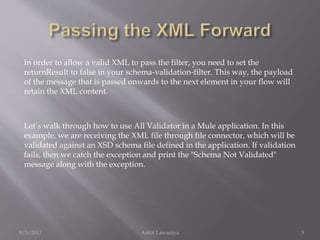
In order to allow a valid XML to pass the filter, you need to set the
returnResult to false in your schema-validation-filter. This way, the payload
of the message that is passed onwards to the next element in your flow will
retain the XML content.
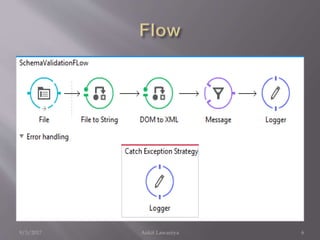
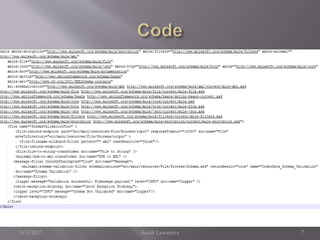
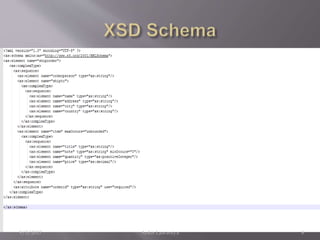
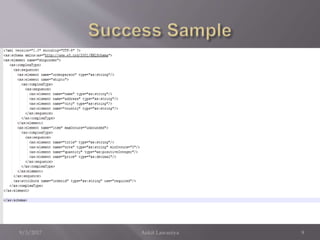
Let’s walk through how to use All Validator in a Mule application. In this
example, we are receiving the XML file through file connector, which will be
validated against an XSD schema file defined in the application. If validation
fails, then we catch the exception and print the "Schema Not Validated"
message along with the exception.
9/3/2017 Ankit Lawaniya 5
9/3/2017 Ankit Lawaniya 6
9/3/2017 Ankit Lawaniya 7
9/3/2017 Ankit Lawaniya 8
9/3/2017 Ankit Lawaniya 9
Now in the XSD XML if we change the any of the element against the schema defined ,we
will be getting the below exception.
ERROR 2017-08-08 21:01:19,585 [[schemavalidation1].SchemaValidationFLow.stage1.02]
org.mule.exception.CatchMessagingExceptionStrategy:
********************************************************************************
Message : Message has been rejected by filter.
Filter : org.mule.module.xml.filters.SchemaValidationFilter@39c5e4bb (null)
Payload : <?xml version="1.0" encoding="UTF-8"?>
Element XML : <message-filter throwOnUnaccepted="true" doc:name="Message">
<mulexml:schema-validation-filter
schemaLocations="src/main/resources/File/Process/Schema.xsd" returnResult="true"
name="OrderData_Schema_Validation" doc:name="Schema Validation"></mulexml:schema-
validation-filter>
</message-filter>
Payload Type : org.apache.xerces.dom.DocumentImpl
Element : /SchemaValidationFLow/processors/2 @
schemavalidation1:schemavalidation1.xml:23 (Message)
--------------------------------------------------------------------------------
Root Exception stack trace:
org.mule.api.routing.filter.FilterUnacceptedException: Message has been rejected by filter.
9/3/2017 Ankit Lawaniya 10
9/3/2017 Ankit Lawaniya 11

Schema validation filter (xml schema validation)

  • 1.
  • 2.
    The Schema Validationfilter takes XML inputs and validates these against a referenced XSD schema. Typically, we’ll place it at the start of the Mule flow to determine whether the incoming message or event should be handled or not, allowing the message to only continue on along the flow when the filter validations are met and the included XML is considered valid. Schema Validator is provided out of the box with Mule. 9/3/2017 Ankit Lawaniya 2
  • 3.
    A common usecase in Mule ESB flows is validating if an XML document is valid against a corresponding XSD, so we can make sure we are receiving the correct XML, and will forward it for the further processing. Syntax: <mulexml:schema-validation-filter schemaLocations="src/main/resources/File/Process/Schema.xsd" returnResult="true" name="OrderData_Schema_Validation" doc:name="Schema Validation" /> 9/3/2017 Ankit Lawaniya 3
  • 4.
    The "standard" wayof Validating XML schema in Mule is by using the schema-validation-filter and especially in combination with the message- filter. In a case when you want to get an exception and/or call another flow when the validation fails, you could wrap the schema validation filter inside a message filter and then use "onUnaccepted" and "throwOnUnaccepted" configuration attributes to determine the behavior. Here we have wrapped the schema-validation-filter in a message-filter and set throwOnUnaccepted to "true.“ <message-filter throwOnUnaccepted="true" > <mulexml:schema-validation-filter schemaLocations="/File/Process/Schema.xsd" returnResult="true" name="OrderData_Schema_Validation" doc:name="Schema Validation" /> </message-filter> 9/3/2017 Ankit Lawaniya 4
  • 5.
    In order toallow a valid XML to pass the filter, you need to set the returnResult to false in your schema-validation-filter. This way, the payload of the message that is passed onwards to the next element in your flow will retain the XML content. Let’s walk through how to use All Validator in a Mule application. In this example, we are receiving the XML file through file connector, which will be validated against an XSD schema file defined in the application. If validation fails, then we catch the exception and print the "Schema Not Validated" message along with the exception. 9/3/2017 Ankit Lawaniya 5
  • 6.
  • 7.
  • 8.
  • 9.
  • 10.
    Now in theXSD XML if we change the any of the element against the schema defined ,we will be getting the below exception. ERROR 2017-08-08 21:01:19,585 [[schemavalidation1].SchemaValidationFLow.stage1.02] org.mule.exception.CatchMessagingExceptionStrategy: ******************************************************************************** Message : Message has been rejected by filter. Filter : org.mule.module.xml.filters.SchemaValidationFilter@39c5e4bb (null) Payload : <?xml version="1.0" encoding="UTF-8"?> Element XML : <message-filter throwOnUnaccepted="true" doc:name="Message"> <mulexml:schema-validation-filter schemaLocations="src/main/resources/File/Process/Schema.xsd" returnResult="true" name="OrderData_Schema_Validation" doc:name="Schema Validation"></mulexml:schema- validation-filter> </message-filter> Payload Type : org.apache.xerces.dom.DocumentImpl Element : /SchemaValidationFLow/processors/2 @ schemavalidation1:schemavalidation1.xml:23 (Message) -------------------------------------------------------------------------------- Root Exception stack trace: org.mule.api.routing.filter.FilterUnacceptedException: Message has been rejected by filter. 9/3/2017 Ankit Lawaniya 10
  • 11.