SAS tutorial 0308:
   Correlation
PROC CORR
BY, VAR, WEIGHT
           FREQ    – 指定各觀察值的出現次數。
                   – 指定變項用以描述資料。
              ID
                   – 指定要以那個變項為基準計算淨
         PARTIAL     相關。

          WITH     – 指定變項,和用VAR指定的變項作
                     相關。
data Fitness;
      input Age Weight Oxygen RunTime @@;
      datalines;
   44 89.47 44.609 11.37    40 75.07 45.313 10.07
   44 85.84 54.297 8.65     42 68.15 59.571 8.17
   38 89.02 49.874   .      47 77.45 44.811 11.63
   40 75.98 45.681 11.95    43 81.19 49.091 10.85
   44 81.42 39.442 13.08    38 81.87 60.055 8.63
                       ......
;

ods graphics on;
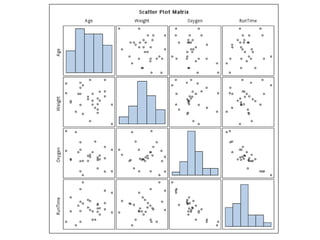
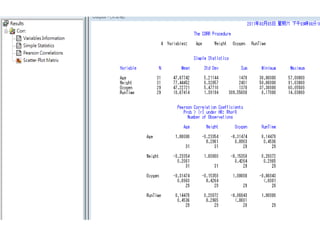
proc corr data=Fitness plots=matrix(histogram);
run;
ods graphics off;
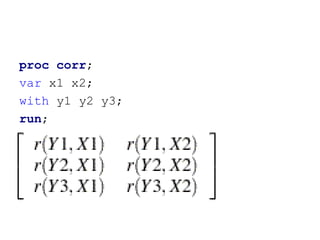
proc corr;
var x1 x2;
with y1 y2 y3;
run;
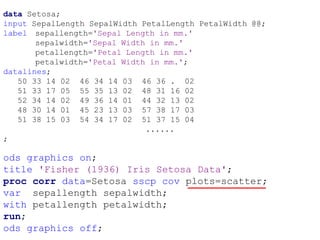
data Setosa;
input SepalLength SepalWidth PetalLength PetalWidth @@;
label sepallength='Sepal Length in mm.'
       sepalwidth='Sepal Width in mm.'
       petallength='Petal Length in mm.'
       petalwidth='Petal Width in mm.';
datalines;
   50 33 14 02 46 34 14 03 46 36 . 02
   51 33 17 05 55 35 13 02 48 31 16 02
   52 34 14 02 49 36 14 01 44 32 13 02
   48 30 14 01 45 23 13 03 57 38 17 03
   51 38 15 03 54 34 17 02 51 37 15 04
                              ......
;

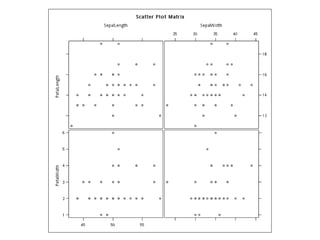
ods graphics on;
title 'Fisher (1936) Iris Setosa Data';
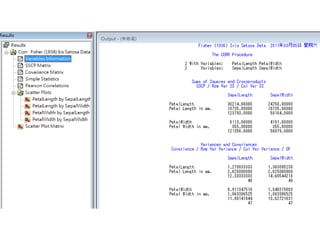
proc corr data=Setosa sscp cov plots=scatter;
var sepallength sepalwidth;
with petallength petalwidth;
run;
ods graphics off;
PROC CORR statements-1
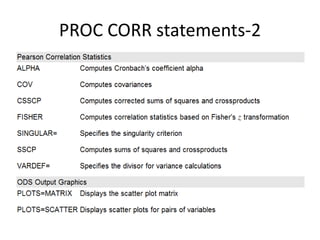
PROC CORR statements-2
Check
Display scatter plots.
Compute
  Pearson’s correlation coefficient.
  Fisher’s z transformation.
  Kendall’s tau.
  Spearman rank-order correlation.
  Partial correlation.
  Cronbach’s alpha.
Handle missing values.
Variance/covariance matrix.
Review
• PROC FREQ
• PROC STANDARD
Chi-square distribution
Example


• Q: 男性跟女性同意婚前性行為的傾向有差
  別嗎?
Agree No opinion Disagree Total
Male      279         73      225 577
Female    175         47      201 423
Total     454        120      426 1000          Why?


Expected Agree No opinion Disagree
Male     261.96      69.24   245.80
Female 192.04        50.76   180.20

   Why?
                                         Why?
SAS Code
DATA ex1;
DO i=1 to 2;           PROC PRINT DATA=ex1;
  DO j=1 to 3;
     INPUT x @@;       PROC FREQ DATA=ex1;
     OUTPUT;           TABLES i*j/CHISQ;
  END;                 WEIGHT x;
END;                   RUN;
DATALINES;
279 73 225
175 47 201
;
Results


這些指標各代表什麼意義?
想一下
• Q1: 為什麼 Fisher’s exact test 是 “Exact”?
• Q2: Binomial counts 可以跑Chi-square test嗎?
• Q3: 找一組2*2的資料,比較以下兩者
  output的差別。
 PROC FREQ          PROC FREQ
 DATA=AAA;          DATA=AAA;
 EXACT FISHER;      EXACT CHISQ;
 ...;               ...;

             怎麼算出來的?
PROC STANDARD
      • 把分數調成平均80,
        標準差10的常態分配。
SAS code
PROC IMPORT OUT=EX2
DATAFILE="C:UsersuserDesktopQUIZ.txt"
DBMS=dlm REPLACE;
GETNAMES=YES;          從文字檔讀資料
DELIMITER='09'x;

PROC STANDARD DATA=ex2 MEAN=80 STD=10 OUT=ex3
     PRINT;               標準化
VAR Score;

PROC PRINT DATA= ex2;
PROC PRINT DATA= ex3;
RUN;
Results

Sas tutorial 0308

  • 1.
  • 2.
    PROC CORR BY, VAR,WEIGHT FREQ – 指定各觀察值的出現次數。 – 指定變項用以描述資料。 ID – 指定要以那個變項為基準計算淨 PARTIAL 相關。 WITH – 指定變項,和用VAR指定的變項作 相關。
  • 3.
    data Fitness; input Age Weight Oxygen RunTime @@; datalines; 44 89.47 44.609 11.37 40 75.07 45.313 10.07 44 85.84 54.297 8.65 42 68.15 59.571 8.17 38 89.02 49.874 . 47 77.45 44.811 11.63 40 75.98 45.681 11.95 43 81.19 49.091 10.85 44 81.42 39.442 13.08 38 81.87 60.055 8.63 ...... ; ods graphics on; proc corr data=Fitness plots=matrix(histogram); run; ods graphics off;
  • 6.
    proc corr; var x1x2; with y1 y2 y3; run;
  • 7.
    data Setosa; input SepalLengthSepalWidth PetalLength PetalWidth @@; label sepallength='Sepal Length in mm.' sepalwidth='Sepal Width in mm.' petallength='Petal Length in mm.' petalwidth='Petal Width in mm.'; datalines; 50 33 14 02 46 34 14 03 46 36 . 02 51 33 17 05 55 35 13 02 48 31 16 02 52 34 14 02 49 36 14 01 44 32 13 02 48 30 14 01 45 23 13 03 57 38 17 03 51 38 15 03 54 34 17 02 51 37 15 04 ...... ; ods graphics on; title 'Fisher (1936) Iris Setosa Data'; proc corr data=Setosa sscp cov plots=scatter; var sepallength sepalwidth; with petallength petalwidth; run; ods graphics off;
  • 12.
  • 13.
  • 14.
    Check Display scatter plots. Compute Pearson’s correlation coefficient. Fisher’s z transformation. Kendall’s tau. Spearman rank-order correlation. Partial correlation. Cronbach’s alpha. Handle missing values. Variance/covariance matrix.
  • 15.
  • 16.
  • 17.
  • 18.
    Agree No opinionDisagree Total Male 279 73 225 577 Female 175 47 201 423 Total 454 120 426 1000 Why? Expected Agree No opinion Disagree Male 261.96 69.24 245.80 Female 192.04 50.76 180.20 Why? Why?
  • 19.
    SAS Code DATA ex1; DOi=1 to 2; PROC PRINT DATA=ex1; DO j=1 to 3; INPUT x @@; PROC FREQ DATA=ex1; OUTPUT; TABLES i*j/CHISQ; END; WEIGHT x; END; RUN; DATALINES; 279 73 225 175 47 201 ;
  • 20.
  • 21.
    想一下 • Q1: 為什麼Fisher’s exact test 是 “Exact”? • Q2: Binomial counts 可以跑Chi-square test嗎? • Q3: 找一組2*2的資料,比較以下兩者 output的差別。 PROC FREQ PROC FREQ DATA=AAA; DATA=AAA; EXACT FISHER; EXACT CHISQ; ...; ...; 怎麼算出來的?
  • 22.
    PROC STANDARD • 把分數調成平均80, 標準差10的常態分配。
  • 23.
    SAS code PROC IMPORTOUT=EX2 DATAFILE="C:UsersuserDesktopQUIZ.txt" DBMS=dlm REPLACE; GETNAMES=YES; 從文字檔讀資料 DELIMITER='09'x; PROC STANDARD DATA=ex2 MEAN=80 STD=10 OUT=ex3 PRINT; 標準化 VAR Score; PROC PRINT DATA= ex2; PROC PRINT DATA= ex3; RUN;
  • 24.