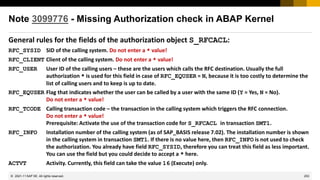
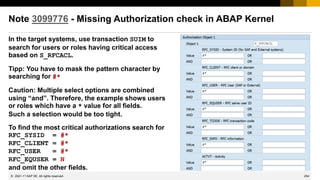
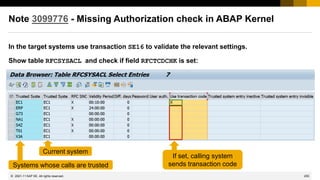
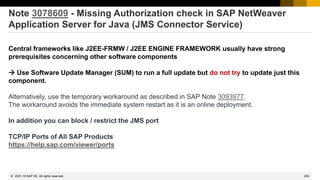
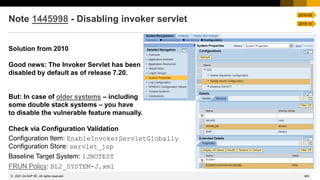
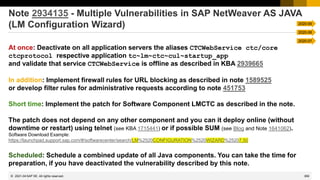
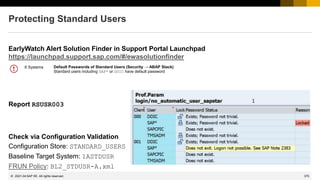
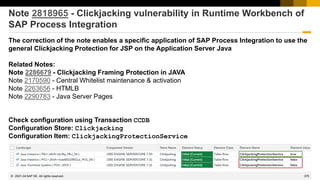
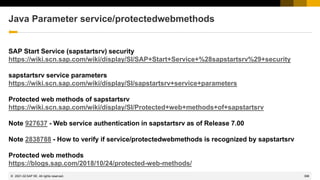
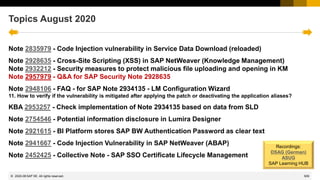
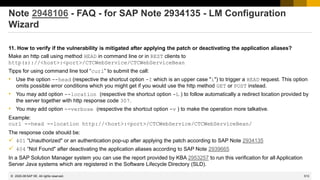
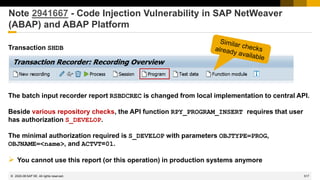
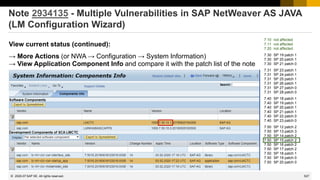
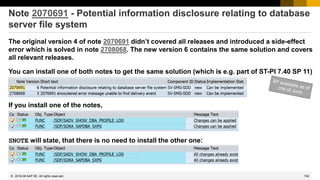
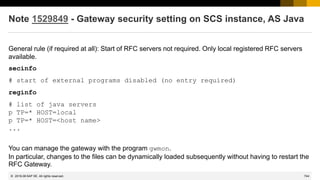
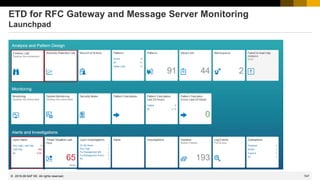
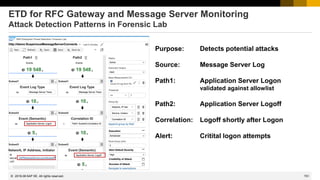
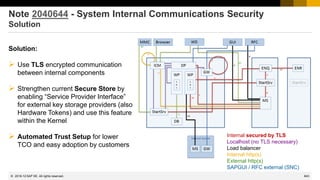
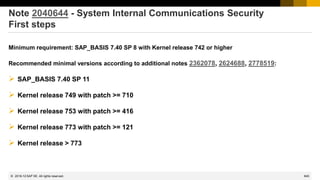
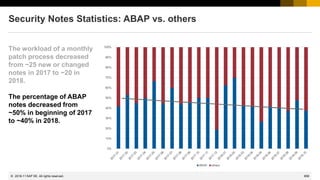
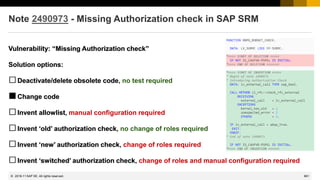
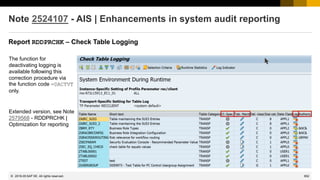
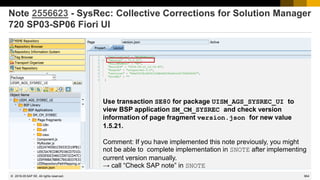
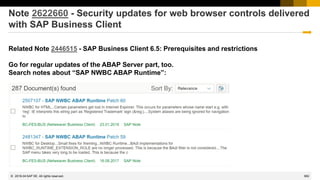
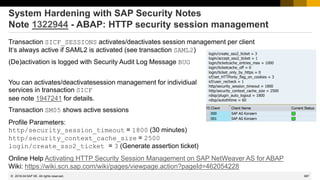
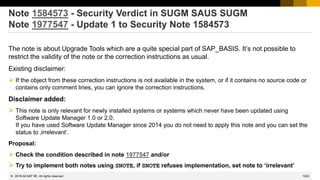
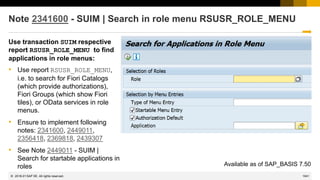
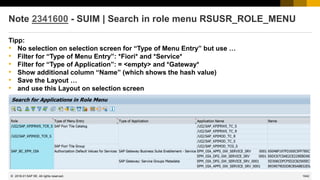
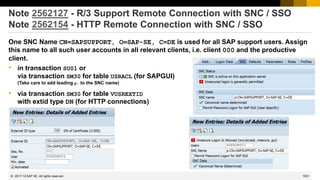
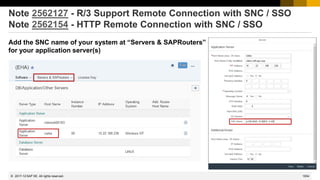
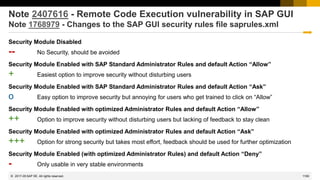
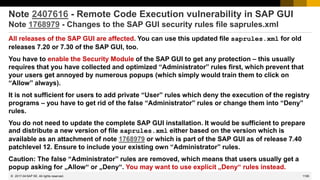
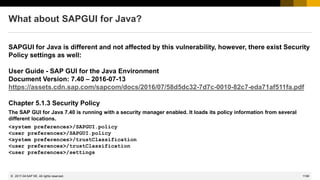
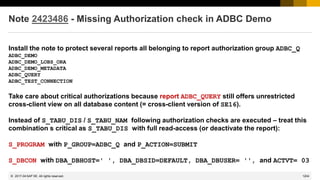
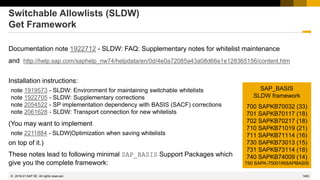
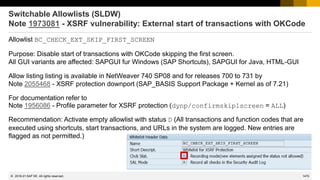
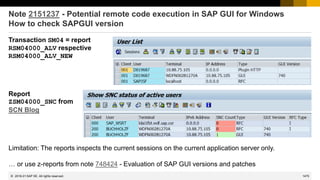
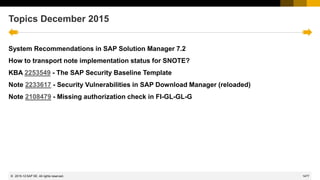
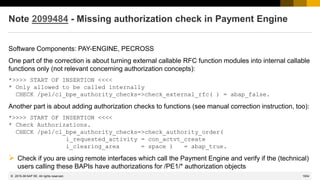
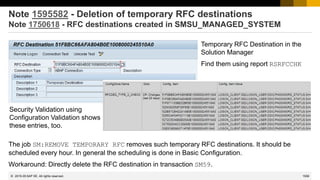
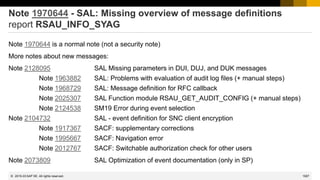
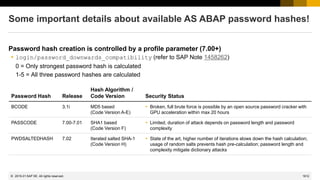
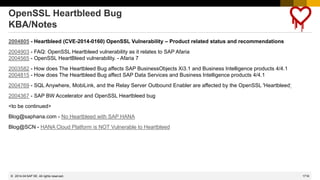
DSAG & ASUG & ES: Security Patching
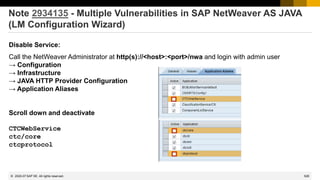
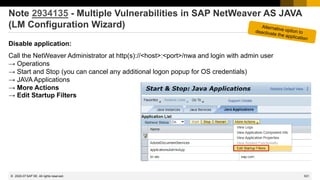
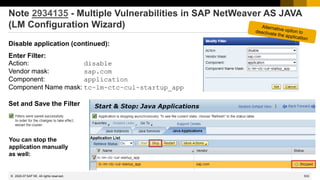
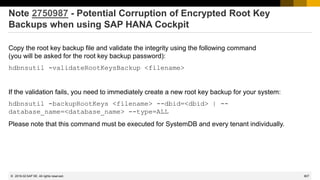
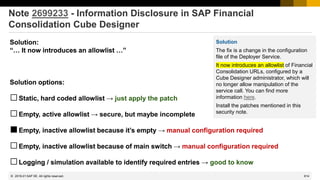
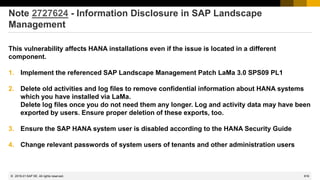
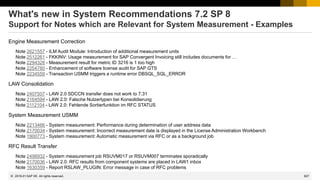
Frank Buchholz, SAP CoE Security Services
July 2022
2
4
1
5
3
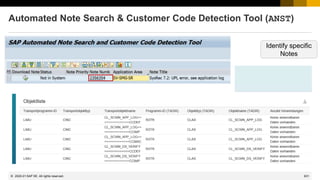
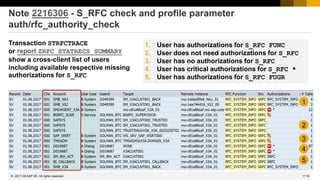
List of Security Notes
support.sap.com/securitynotes
Monthly execution of
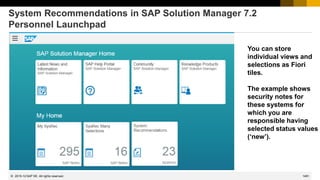
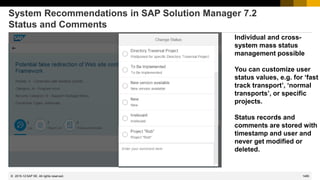
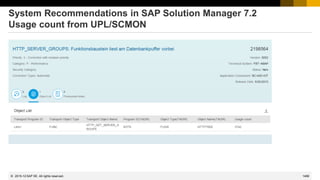
„System Recommendations“
Continuous
Security Monitoring using
„Configuration Validation“
Reduction of test
effort using UPL/SCMON or BPCA
Check Security Notes
within
„Maintenance Planner“
Germany America EMEA/Asia
5
© 2022 SAP SE. All rights reserved.
News from ASUG
➢ ASUG Insights → Security
https://www.asug.com/insights/business-function/information-security
https://www.asug.com/insights/topic/cybersecurity
➢ ASUG Insights → Solution Manager
https://www.asug.com/insights/sap-product/sap-solution-manager-solman
➢ SAP Customer Influence program - SAP Identity Management 8.0 (2021)
https://influence.sap.com/sap/ino/#/campaign/2566
6
© 2022 SAP SE. All rights reserved.
News from DSAG
Änderung der AK/AG-Sprecher nach dem letzten AK-Treffen
7
© 2022 SAP SE. All rights reserved.
News from DSAG
DSAG Jahreskongress in Leipzig, 11. - 13. Oktober 2022
https://dsag-jahreskongress.plazz.net/
Virtueller Ransomware-Tag am 25. Oktober 2022
https://dsagnet.de/dsag-event?id=304720
❑ Was Ransomware eigentlich ist und wie Angreifer die Ransomware nutzen vorgehen.
❑ Wie Sie sich gegen Ransomeware schützen können und welche Schutzkonzepte wirsam sind.
❑ Wie Sie sich als Unternehmen und als Mitarbeiter rechtlich absichern.
❑ Wie Sie sich im Falle einer erfolgreichen Attacke rechtlich sinnvoll verhalten.
AK/AG-Treffen in Hockenheim am 9. November, Planungen laufen
https://dsagnet.de/dsag-event?id=304747
Nächstes SAP Security Notes Webinar: 18. August 2022
https://dsagnet.de/dsag-event?id=304884
12
© 2022 SAP SE. All rights reserved.
Overview
Support Portal – Security Notes
https://support.sap.com/securitynotes
This is a filtered list
→ All SAP Security Notes
Here you can find all Security Notes
Security Patch Process FAQ
https://scn.sap.com/community/security/blog/2012/03/27/security-patch-process-faq
SAP Solution Manager application „System Recommendations“
This is the selection of security notes (from the full list on Support Portal), which is relevant or
might be relevant for a specific technical system (ABAP, Java, HANA, etc).
Notes which are not shown here are not relevant for this system.
RSECNOTE and the corresponding chapter in the EWA show a small – and old – selection of security notes only.
Do not use RSECNOTE anymore - its content is outdated and incomplete - use System Recommendations!
Support Portal – Expert Search
https://support.sap.com/notes
→ Expert Search
for Document Type = SAP Security Notes
Here you can find all Security Notes
14
© 2022 SAP SE. All rights reserved.
Hosts of the Security Notes Webinar
ASUG
ASUG Information Security
Regular schedule:
Wednesday in the week after the Patch Day
18:00-19:00 CEST = 12:00 EST = 9:00 PST
Calendar:
https://www.asug.com/events?events%5B%5D=13
56781
15
© 2022 SAP SE. All rights reserved.
Hosts of the Security Notes Webinar
DSAG
DSAG AK Security & Vulnerability Management
Regular schedule:
Thursday in the week after the patch day
15:00 - 16:00 CET
Calendar:
https://dsagnet.de/dsag-resource?id=91659&app=veranstaltungskalender
16
© 2022 SAP SE. All rights reserved.
Hosts of the Security Notes Webinar
SAP Enterprise Support Academy
Regular schedule:
Wednesday in the week after the patch day
09:00 - 10:00 CET
Calendar:
Updates from the last SAP Security Patch Day
17
© 2022 SAP SE. All rights reserved.
SAP Learning Hub Edition for SAP Enterprise Support
External sign up
Preparation if the user has no access to the SAP Enterprise Support catalogue yet.
Even if the user has access to another catalogue in the SAP Learning Hub, a one-time sign up per S-User
is mandatory.
How to sign up for the Support Edition:
1. Navigate to the sign up page
2. Click the Sign up button. Authenticate yourself with
your S-User. Upon first access, the system will check
your eligibility, create a new SAP Learning Hub user,
and populate your learning catalog respectively.
3. Within two hours, you will then receive a registration confirmation via e-mail and access to the
catalogue is granted.
How to guide: How to sign up for the SAP Learning Hub Edition for SAP Enterprise Support
18
© 2022 SAP SE. All rights reserved.
SAP Learning Hub Edition for SAP Enterprise Support
Registration | withdraw | watch a recording | find the survey
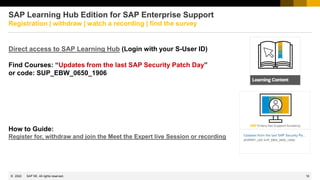
Direct access to SAP Learning Hub (Login with your S-User ID)
Find Courses: “Updates from the last SAP Security Patch Day”
or code: SUP_EBW_0650_1906
How to Guide:
Register for, withdraw and join the Meet the Expert live Session or recording
19
© 2022 SAP SE. All rights reserved.
SAP Learning Hub Edition for SAP Enterprise Support
Registration | withdraw | watch a recording | find the survey
Register to course
“Updates from last SAP
Security Patch Day”
SUP_EBW_0650_1906
20
© 2022 SAP SE. All rights reserved.
SAP Learning Hub Edition for SAP Enterprise Support
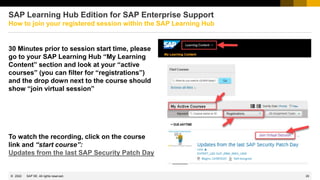
How to join your registered session within the SAP Learning Hub
30 Minutes prior to session start time, please
go to your SAP Learning Hub “My Learning
Content” section and look at your “active
courses” (you can filter for “registrations”)
and the drop down next to the course should
show “join virtual session”
To watch the recording, click on the course
link and “start course”:
Updates from the last SAP Security Patch Day
21
© 2022 SAP SE. All rights reserved.
SAP Learning Hub Edition for SAP Enterprise Support
How to reset the password or change the email address after sign up
In case the customer forgot the S-User password, the password reset, cannot be done within
the SAP Learning Hub/ SAP SuccessFactors logon page.
The password can be reset here:
https://accounts.sap.com/ui/createForgottenPasswordMail?spId=55365985e4b07dc3abdfc16c&targetUrl=&sourceUrl
In case the access to SAP Learning Hub is still not successful and you get redirected to the
logon page again, this can be a sign for a missing sign up. → External Sign up
How to check and change your email address
1. Go to https://support.sap.com
2. Login and click on your profile to edit
3. You will be redirected to the SAP Launchpad
where you can check and change your email adress
23
© 2022 SAP SE. All rights reserved.
TechEd Recording
SEC104 - Security Notes, System Recommendations and Business Process Change Analyzer
http://events.sap.com/teched/en/session/13574
This sessions shows how to set up a monthly patch process based on the application System
Recommendations in SAP Solution Manager 7.1. See the integration with the usage procedure logging
(UPL) and the business process change analyzer (BPCA) to identify business processes which might
get affected by the implementation of security notes.
The presentation is based on the standard slide deck at https://support.sap.com/sos
→ CoE Security Services - Security Patch Process
In the Media Library you find the monthly updated SAP Security Notes Advisory, too.
INTERNAL – SAP and Customers Only
What's New for the User Administration and
Logging Check in S/4HANA On Premise
Frank Buchholz, Dieter Goedel, SAP
June 14, 2022
74
© 2022 SAP SE. All rights reserved.
What's New for the User Administration and Logging Check in
S/4HANA On Premise
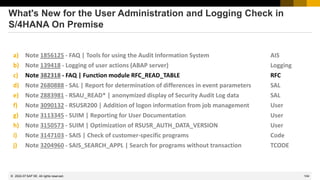
a) Note 1856125 - FAQ | Tools for using the Audit Information System AIS
b) Note 139418 - Logging of user actions (ABAP server) Logging
c) Note 382318 - FAQ | Function module RFC_READ_TABLE RFC
d) Note 2680888 - SAL | Report for determination of differences in event parameters SAL
e) Note 2883981 - RSAU_READ* | anonymized display of Security Audit Log data SAL
f) Note 3090132 - RSUSR200 | Addition of logon information from job management User
g) Note 3113345 - SUIM | Reporting for User Documentation User
h) Note 3150573 - SUIM | Optimization of RSUSR_AUTH_DATA_VERSION User
i) Note 3147103 - SAIS | Check of customer-specific programs Code
j) Note 3204960 - SAIS_SEARCH_APPL | Search for programs without transaction TCODE
75
© 2022 SAP SE. All rights reserved.
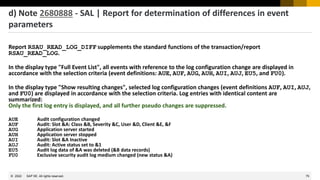
d) Note 2680888 - SAL | Report for determination of differences in event
parameters
Report RSAU_READ_LOG_DIFF supplements the standard functions of the transaction/report
RSAU_READ_LOG.
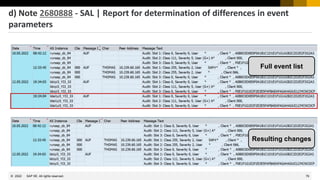
In the display type "Full Event List", all events with reference to the log configuration change are displayed in
accordance with the selection criteria (event definitions: AUE, AUF, AUG, AUH, AUI, AUJ, EU5, and FU0).
In the display type "Show resulting changes", selected log configuration changes (event definitions AUF, AUI, AUJ,
and FU0) are displayed in accordance with the selection criteria. Log entries with identical content are
summarized:
Only the first log entry is displayed, and all further pseudo changes are suppressed.
AUE Audit configuration changed
AUF Audit: Slot &A: Class &B, Severity &C, User &D, Client &E, &F
AUG Application server started
AUH Application server stopped
AUI Audit: Slot &A Inactive
AUJ Audit: Active status set to &1
EU5 Audit log data of &A was deleted (&B data records)
FU0 Exclusive security audit log medium changed (new status &A)
76
© 2022 SAP SE. All rights reserved.
Full event list
Resulting changes
d) Note 2680888 - SAL | Report for determination of differences in event
parameters
77
© 2022 SAP SE. All rights reserved.
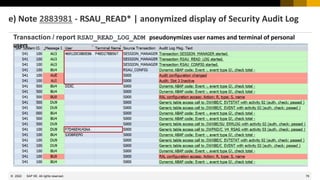
e) Note 2883981 - RSAU_READ* | anonymized display of Security Audit Log
Note 2883981 provides transaction RSAU_READ_LOG_ADM which shows pseudonymized user names and terminal
names based on a generated hash code. Within a report, a user name or terminal ID is always displayed with the
same pseudonym. (The hash code changes once per week.)
Use this transaction for general administration tasks and risk analysis without having access to personal data.
You can use the report RSAU_READ_LOG_ADM for pseudonymized evaluation in a background job.
Users that are not to be pseudonymized can be defined in the productive exception list SAL_SHOW_IDENTITY.
You cave to activate and maintain this exception list in transaction SLDW or SLWD_COMPARE.
Transaction RSAU_READ_LOG is unchanged. Use it if you need access to personal data, too.
In the authorization concept, the two tools are distinguished by the required start authorization for authorization
object S_TCODE.
Available via Support Package as of 7.50 or implementation via note.
78
© 2022 SAP SE. All rights reserved.
Transaction / report RSAU_READ_LOG_ADM pseudonymizes user names and terminal of personal
users
e) Note 2883981 - RSAU_READ* | anonymized display of Security Audit Log
79
© 2022 SAP SE. All rights reserved.
Transaction SLDW_COMPARE for access control list SAL_SHOW_IDENTITY
Check is active
but no
additional SAL
logging is
required.
Some more user
names are
added to the
exception list
(DDIC and SAP*
are the default
values)
e) Note 2883981 - RSAU_READ* | anonymized display of Security Audit Log
80
© 2022 SAP SE. All rights reserved.
f) Note 3090132 - RSUSR200 | Addition of logon information from job
management
The SUIM report RSUSR200 might not show the expected last logon date for users which are running job
steps.
Such events do not update the last logon timestamps.
The correction of this note provides a checkbox for displaying the last logon of job users on the selection
screen. If the option is selected, the result list contains additional columns with the time a user was last used
in a job step.
In addition, you get the new transaction / report SAIS_JOB_USER which provides an overview of job steps
restricted to the logon client. The report supports navigation for user details, job details, and ABAP programs
or classes started in the job step. (This reports replaces an analysis based on the very simple usage of
transaction SE16 for view V_OP.)
Available via Support Package as of 7.40 or implementation via note (which require some more prerequisite
notes and a manual implementation step)
81
© 2022 SAP SE. All rights reserved.
You can use this list to
identify dialog users who
are running jobs as well.
Report RSUSR200
f) Note 3090132 - RSUSR200 | Addition of logon information from job
management
82
© 2022 SAP SE. All rights reserved.
Transaction / report SAIS_JOB_USER shows job steps in current client
f) Note 3090132 - RSUSR200 | Addition of logon information from job
management
83
© 2022 SAP SE. All rights reserved.
g) Note 3113345 - SUIM | Reporting for User Documentation
You can add a description to users and log documentation about changes in transaction SU01.
Using note 3113345 you get transaction/report SUIM_SHOW_USDOCU which shows this information in list
and print format.
Available via Support Package as of 7.50
or implementation via note
84
© 2022 SAP SE. All rights reserved.
h) Note 3150573 - SUIM | Optimization of RSUSR_AUTH_DATA_VERSION
When you want to analyze the history of authorization data in roles you might start identifying
changed roles using the SUIM transaction / report RSSCD100_PFCG.
Then you can use transaction ROLE_VERS (=report RSUSR_AUTH_DATA_VERSION) to obtain an
overview of the versions of a specific role.
However, the result seems to be incomplete if the role was imported via a transport – which is
standard for production systems.
In addition to the history resulting from the change documents, the report now also displays
the times of imports and their transport requests. You can navigate to a transport request.
85
© 2022 SAP SE. All rights reserved.
SUIM transaction / report RSSCD100_PFCG
h) Note 3150573 - SUIM | Optimization of RSUSR_AUTH_DATA_VERSION
86
© 2022 SAP SE. All rights reserved.
Transaction ROLE_VERS
(=report RSUSR_AUTH_DATA_VERSION)
These columns would show the
artificial version number 9999, the
icon and the transport request id.
h) Note 3150573 - SUIM | Optimization of RSUSR_AUTH_DATA_VERSION
87
© 2022 SAP SE. All rights reserved.
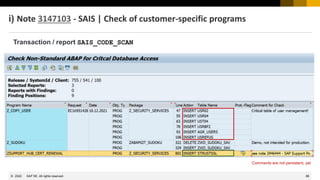
i) Note 3147103 - SAIS | Check of customer-specific programs
One aim during an audit is to ensure that customer or partner programs do not impede seamless change
tracking in SAP standard tables.
Note 3147103 provides the transaction / report SAIS_CODE_SCAN as part of the Audit Information System.
The report supports the check of customer-specific programs and ABAP classes with regard to direct changing
accesses to database tables.
The provided results list contains forward navigation to the found source code point in question, the last
transport request, and the option of double-clicking on the text field to store your own comments for each
object.
Available via Support Package as of 7.40 (implementation via note requires manual creation of database
table)
88
© 2022 SAP SE. All rights reserved.
Transaction / report SAIS_CODE_SCAN
Comments are not persistent, yet
i) Note 3147103 - SAIS | Check of customer-specific programs
89
© 2022 SAP SE. All rights reserved.
j) Note 3204960 - SAIS_SEARCH_APPL | Search for programs without
transaction
You want to identify reports to which no transaction has yet been assigned.
Use the additional option in the application SAIS_SEARCH_APPL to start the search for directly startable
programs without an assigned transaction.
Available via Support Package as of 7.50 (no implementation via note)
90
© 2022 SAP SE. All rights reserved.
j) Note 3204960 - SAIS_SEARCH_APPL | Search for programs without
transaction
July 2022
94
© 2022 SAP SE. All rights reserved.
Topics July 2022
How to download the SAP Security Patch Day Blog
Note 3219457 - Call to action: Urgent update of the SSO certificate for SAP Support users
Note 2726124 - Missing Authorization Check in multiple components under SAP Automotive
Solutions
Notes 3221288 3213279 3203079 3194361 - Vulnerabilities in SAP BusinessObjects
Notes 3150454 3150463 - Information Disclosure vulnerability in SAP NetWeaver Application
Server ABAP and ABAP Platform
Note 3153525 - Improvement of SecureStoreFS encryption algorithms
What's New for the User Administration and Logging Check in S/4HANA On Premise (part 2)
Recordings:
DSAG (German)
ASUG
SAP Learning HUB
2022-07
95
© 2022 SAP SE. All rights reserved.
How to download the SAP Security Patch Day Blog
You find the SAP Security Patch Day Blog at https://support.sap.com/securitynotes
2022-07
https://dam.sap.com/mac/app/e/pdf/preview/embed/ucQrx6G?ltr=a&rc=10
You can download the corresponding PDF file as well: https://d.dam.sap.com/a/ucQrx6G
96
© 2022 SAP SE. All rights reserved.
Note 3219457 - Call to action: Urgent update of the SSO certificate
for SAP Support users
Environment:
You are using certificates to authenticate a SAP support user for following support
connections:
➢ R/3 Support with SNC/SSO according to note 2562127
➢ HTTP Connect w. SNC/SSO according to note 2562154
SAP has established and operates a new dedicated PKI to allow Secure Network Connections (SNC)
and Single Sign On (SSO) to access customer systems remotely. This CA only issues temporary
generated certificates for the user SAPSUPPORT with a validity of 8 hours.
This new secure remote access scenario is part of the SAP standard support package and eliminates
maintaining the target user credentials in the Customer Remote Logon Depot.
2022-07
97
© 2022 SAP SE. All rights reserved.
Note 3219457 - Call to action: Urgent update of the SSO certificate
for SAP Support users
The current used "SAPSUPPORT User Sub CA" certificate will expire August 1st, 2022!
The current used "SAPSUPPORT Root CA" certificate will expire August 1st, 2027
SAPSUPPORT User SubCA SAPSUPPORT Root CA
➢ Import the sub CA certificate SAPSUPPORT User Sub CA into both PSE stores SNC
SAPCryptolib (for SAPGUI) and SSL-Server Standard (for HTTP connections)
2022-07
98
© 2022 SAP SE. All rights reserved.
Note 2726124 - Missing Authorization Check in multiple
components under SAP Automotive Solutions
New authorization check for V_VBAK_VKO, V_VBAK_AAT (and some restrictions concerning
external remote calls for internal functions) in various remote enabled function modules of
ECC-DIMP / S4CORE
The solution was published with Support Packages in 2019
→ No action required now (assuming you already got the Support Package)
2022-07
99
© 2022 SAP SE. All rights reserved.
Notes 3221288 3213279 3203079 3194361 3169239 3167430
Vulnerabilities in SAP BusinessObjects
Note 3221288 just shows the corrected versions in the text:
4.2 SP09 Patch 9, 4.3 SP01 and above
Note 3213279 just show an Support Package Patch for release 4.2 (yes, that is correct for this note)
Notes 3203079, 3194361, 3169239 and 3167430 show all corrected Support Packages Patches
section:
➢ On release 4.2 you get the correction in the same version SP09 patch 900
On release 4.3 you require patches, too
2022-07
100
© 2022 SAP SE. All rights reserved.
Notes 3150454 3150463 - Information Disclosure vulnerability in
SAP NetWeaver Application Server ABAP and ABAP Platform
Both notes change transaction SM59:
You have to enter the password of a technical user after changing target system related data:
Note 3150454 deals with type 3 and 3150463 with type W destinations.
Cancel saving if you do not have
the password available!
2022-07
101
© 2022 SAP SE. All rights reserved.
Note 3153525 - Improvement of SecureStoreFS encryption
algorithms
The Secure Store in the File System of SAP NetWeaver AS Java is using a legacy algorithm for
encrypting data. This algorithm is deprecated and must be replaced with a stronger one.
Encrypted data of older systems, performing an SP update or upgrade to 7.50 SP 24 or higher, will not
be migrated automatically during the SUM process.
Follow these steps:
❑ Stop the Java cluster
❑ Create a database backup
❑ Open the Config Tool <AS_Java_install_dir>configtoolconfigtool.bat
❑ Go to "secure store" section and choose "Change Key Phrase"
❑ Enter a keyphrase and choose the encryption algorithm. AES256 is the default algorithm.
If JCE unlimited cryptography is not installed, only AES128 algorithm will be available
❑ Click OK, then 'Apply changes' button and wait for the encryption process to finish
❑ Make sure the message "The migration of the key phrase of the Secure Store is performed
successfully." appeared, before you close the window.
❑ Start the Java cluster
2022-07
102
© 2022 SAP SE. All rights reserved.
Note 3153525 - Improvement of SecureStoreFS encryption
algorithms
How to confirm that the reencryption has been applied successfully:
a) You got files secstore.bak and Reencrypt.key - these files are your backup of the old
keyphrase
b) check the update time of file SecStore.key in folder
usrsap<SID>SYSglobalsecuritydata
c) Check the version shown in this file:
7.50.000.005 - AES256
7.50.000.004 - AES128
7.00.000.001 - 3DES
See also:
KBA 1683616 - Configtool Key phrase change: AS Java doesn't start
KBA 1895736 - Check if secure store keyphrase is correct
KBA 2126229 - Recreating the SecStore.properties and SecStore.key for 7.3/7.4/7.5 J2EE NetWeaver
System
2022-07
INTERNAL – SAP and Customers Only
What's New for the User Administration and
Logging Check in S/4HANA On Premise
Frank Buchholz, Dieter Goedel, SAP
June 14, 2022
104
© 2022 SAP SE. All rights reserved.
What's New for the User Administration and Logging Check in
S/4HANA On Premise
a) Note 1856125 - FAQ | Tools for using the Audit Information System AIS
b) Note 139418 - Logging of user actions (ABAP server) Logging
c) Note 382318 - FAQ | Function module RFC_READ_TABLE RFC
d) Note 2680888 - SAL | Report for determination of differences in event parameters SAL
e) Note 2883981 - RSAU_READ* | anonymized display of Security Audit Log data SAL
f) Note 3090132 - RSUSR200 | Addition of logon information from job management User
g) Note 3113345 - SUIM | Reporting for User Documentation User
h) Note 3150573 - SUIM | Optimization of RSUSR_AUTH_DATA_VERSION User
i) Note 3147103 - SAIS | Check of customer-specific programs Code
j) Note 3204960 - SAIS_SEARCH_APPL | Search for programs without transaction TCODE
2022-07
105
© 2022 SAP SE. All rights reserved.
c) Note 382318 - FAQ | Function module RFC_READ_TABLE
Note 382318 - FAQ | Function module RFC_READ_TABLE
Note 2246160 - Enhancement RFC_READ_TABLE (7.40+)
* extended logic with note 2246160 (27.04.2021)
* - check against system access rule RFC_READ_TABLE_TABL for table name (transaction SLDW)
* - check against system access rule RFC_READ_TABLE_CALL for table name (transaction SLDW)
* - SQL-Query check including SAL event EUU + raise TABLE_NOT_AVAILABLE
* - new output format string line (no fixed column length)
* - sort option for stable access to HANA
* - ignore STRING and XSTRING in DATA output
* - STRING/XTSTRING/Type P are supported in ET_DATA
Note 3139000 - RFC_READ_TABLE | Column order in results table
2022-07
106
© 2022 SAP SE. All rights reserved.
c) Note 382318 - FAQ | Function module RFC_READ_TABLE
Authorization Concept
• Function RFC_READ_TABLE is the only member of function group SDTX. To avoid the unwished (local) start via the workbench toolset, no user
should be granted for S_DEVELOP with OBJTYPE = FUGR, OBJNAME = SDTX, ACTVT = 16.
• When the function is called via RFC, the authority check against object S_RFC with RFCTYPE = FUGR, RFC_NAME = SDTI, ACTVT = 16 or
RFCTYPE = FUNC, RFC_NAME = RFC_READ_TABLE, ACTVT = 16) will be processed.
• Inside the business logic of that function module, the authority check for generic table access will be checked against authorization
objects S_TABU_DIS or S_TABU_NAM (See note 1434284 for more details).
Blocking System Access
• To block or allow access to function RFC_READ_TABLE you should implement note 2246160. As of that version you can control the list of
external "visible" tables via transaction SLDW (FAQ Note 1922712) and the application access rules RFC_READ_TABLE_TABL and
RFC_READ_TABLE_CALL. Please remark, only the settings of the active access rule take effect for access.
• To monitor the effect of the access rule you should activate the SAL recording in SLDW and SAL. Take care about the events DUL, DUM and DUN.
Access Monitoring
• As of the program version of Note 1539105 you should use the Security Audit Log (SAL) to get check your system regarding generic table
access. Take care that at least for all authorized user, the Security Audit Log Event CUZ is activated for recording.
• Use transaction ST03N to check the current usage of this function module and check if that are the supposed usage scenarios.
• Use the where-used-search in transaction SE80 to get an overview about the static usage of RFC_READ_TABLE in current ABAP sources.
2022-07
107
© 2022 SAP SE. All rights reserved.
Transaction SLDW_COMPARE
For access control lists
RFC_READ_TABLE_TABL
RFC_READ_TABLE_CALL
c) Note 382318 - FAQ | Function module RFC_READ_TABLE
2022-07
June 2022
109
© 2022 SAP SE. All rights reserved.
Topics June 2022
Security Optimization Service for SAP Business Technology Platform (BTP)
System Recommendations - Recommended notes and KBAs
Note 3158375 - Improper Access Control of SAProuter for SAP NetWeaver and ABAP Platform
Note 3104349 - Missing authorization check in S/4HANA finance for advanced payment
management
Note 3043532 - Web Dynpro application opens always in Internet Explorer (IE11) when called
from SAPGUI
What's New for the User Administration and Logging Check in S/4HANA On Premise (part 1)
Recordings:
DSAG (German)
ASUG
SAP Learning HUB
2022-06
110
© 2022 SAP SE. All rights reserved.
Security Optimization Service for SAP Business Technology
Platform (BTP)
Blog: New Security Optimization Service Continuous Quality Check for SAP Business
Technology Platform (CQC SOS for BTP)
https://blogs.sap.com/2022/05/05/new-security-optimization-service-continuous-quality-check-for-business-technology-platform-cqc-sos-for-btp/
The SOS for the SAP Business Technology Platform provides a security assessment of those security-relevant
configurations and authorization assignments which are in the responsibility of the customer.
It covers all layers of the SAP Business Technology Platform (global account, directory, subaccount/organization
and space) and focuses on reviewing the platform aspects including but not limited to: application and service
authorizations, user and role management for platform and business users, trust configuration, API access and
audit log setup.
Security Optimization Service - Sample Report for SAP BTP
How to request the service?
• Create an incident under component SV-BO-REQ (note 1296527) or
• Contact the SAP Enterprise Support Advisory team via our Customer Interaction Center (CIC)
2022-06
Note 696478 - SAP Security
Optimization: Preparation
111
© 2022 SAP SE. All rights reserved.
System Recommendations
Recommended notes and KBAs
Note 3116601 - Long runtime of system recommendations job when there is invalid RFC connection
Workaround correction to limit the timeout to 3 seconds per failing connection
However, you should repair the configuration instead, see application log (Transaction SLG1 for AGS_SR):
Note 3199477 - Fallback for kernel information in system recommendations
New fallback mechanism for kernel information in system recommendations in case kernel information is not
available in LMDB or kernel data in LMDB is obsolete: System Recommendations will try to read kernel
information directly from ABAP managed system via RFC.
If the fallback is used you find shows messages like these in the application log (Transaction SLG1 for AGS_SR):
System &1: LMDB kernel information not available, read via RFC &2
System &1: LMDB kernel patch level &2, read via RFC &3 patch level &4
2022-06
112
© 2022 SAP SE. All rights reserved.
System Recommendations
Recommended notes and KBAs
Note 3058231 - SysRec: Job downloads notes only once a day
Useful if you want to refresh the result list within a day.
KBA 3105490 - Recommendation of job frequency of Job SM:SYSTEM RECOMMENDATIONS
Re-schedule the job SM:SYSTEM RECOMMENDATIONS daily after midnight Walldorf time (=time zone CET)
because most security notes get published on 2nd Tuesday per month at midnight automatically
Note 3134903 - SysRec 7.2: Enhance system authorization check in Note Overview Page
Required if you have defined restrictions on user access to system via authorization object AI_LMDB_OB
Note 3191942 - SysRec: Updated flag of note is back after clicking the Refresh button
Improve processing of updated (republished) notes
Note 3196680 - The release of kernel component is missing in configuration validation report
Correction for missing release information of some kernel notes
2022-06
113
© 2022 SAP SE. All rights reserved.
System Recommendations
Troubleshooting
KBA 2449853 - SolMan 7.2: How to clear the SysRec buffer to refresh the calculation
Clear buffer manually if out of sync
KBA 3000603 - Note count in System Overview page is inconsistent to the Note count in Note Overview
Explanation that the statistics get updated by the System Recommendations job
KBA 3191401 - Old SIDs displayed in SysRec CSV export
Decommission old systems manually
KBA 3195616 - Invalid kernel notes recommended in System Recommendations
Explanation that only full Kernel updates are recognizes by System Recommendations
2022-06
114
© 2022 SAP SE. All rights reserved.
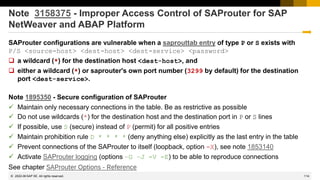
Note 3158375 - Improper Access Control of SAProuter for SAP
NetWeaver and ABAP Platform
SAProuter configurations are vulnerable when a saprouttab entry of type P or S exists with
P/S <source-host> <dest-host> <dest-service> <password>
❑ a wildcard (*) for the destination host <dest-host>, and
❑ either a wildcard (*) or saprouter's own port number (3299 by default) for the destination
port <dest-service>.
Note 1895350 - Secure configuration of SAProuter
✓ Maintain only necessary connections in the table. Be as restrictive as possible
✓ Do not use wildcards (*) for the destination host and the destination port in P or S lines
✓ If possible, use S (secure) instead of P (permit) for all positive entries
✓ Maintain prohibition rule D * * * * (deny anything else) explicitly as the last entry in the table
✓ Prevent connections of the SAProuter to itself (loopback, option -X), see note 1853140
✓ Activate SAProuter logging (options –G –J -V -E) to be able to reproduce connections
See chapter SAProuter Options - Reference
2022-06
115
© 2022 SAP SE. All rights reserved.
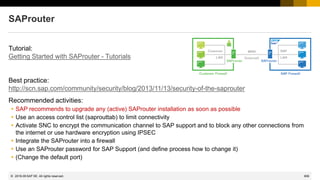
SAProuter
You find SAProuter Security Notes like all other Security Notes on
https://support.sap.com/notes with Document type = SAP Security Notes
Let’s assume we can find the name SAPROUTER in the short text of basis notes – but as there
might be written as SAP ROUTER let’s search for “router” giving following result:
Note 3158375 - Improper Access Control of SAProuter 14.06.2022
Note 2622434 - Information disclosure relating to password in SAProuter 10.07.2018
Note 2037492 - Potential denial of service in SAP Router 14.10.2014
Note 1986895 - Potential disclosure of information in SAProuter 08.04.2014
Note 1853140 - Managing SAProuter from external host 12.11.2013
Note 1820666 - Potential remote code execution in SAProuter 08.05.2013
Note 1663732 - Potential information disclosure relating to SAProuter 03.08.2012
You get the same list if you search for application component BC-CST-NI
2022-06
116
© 2022 SAP SE. All rights reserved.
Note 3158375 - Improper Access Control of SAProuter for SAP
NetWeaver and ABAP Platform
How to check the version of SAProuter?
Command saprouter –v shows the
kernel release and patch
For the local SAProuter of an ABAP system
you can use report RSBDCOS0 :
$(DIR_BINARY)/saprouter –v
Required versions from SAP Software Downloads:
https://launchpad.support.sap.com/#/softwarecenter/search/SAPROUTER
722 patch 1119 from 20.05.2022
753 patch 1011 from 08.04.2022 (recommended)
The command saprouter –l shows the
corresponding build number 40.4:
2022-06
117
© 2022 SAP SE. All rights reserved.
Note 3104349 - Missing authorization check in S/4HANA finance for
advanced payment management
Component: FIN-FSCM-PF
Priority: low
Reason and Prerequisites
Ensure the Product 'SAP Advanced Payment Management' is licensed and in use in your systems.
Do not install the note, if you are not using the product.
There is a high number of dependent notes to be installed, if you are running on a low patch level.
The addition FOR TESTING is used to defined a class as a test
class for the ABAP Unit tool.
The source code in a test class is not part of the production code of
the program and is not generated in production systems
(controlled using the profile parameter abap/test_generation).
118
© 2022 SAP SE. All rights reserved.
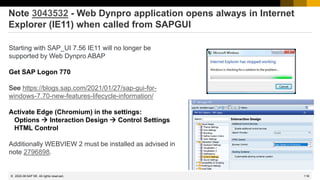
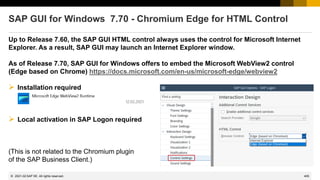
Note 3043532 - Web Dynpro application opens always in Internet
Explorer (IE11) when called from SAPGUI
Starting with SAP_UI 7.56 IE11 will no longer be
supported by Web Dynpro ABAP
Get SAP Logon 770
See https://blogs.sap.com/2021/01/27/sap-gui-for-
windows-7.70-new-features-lifecycle-information/
Activate Edge (Chromium) in the settings:
Options → Interaction Design → Control Settings
HTML Control
Additionally WEBVIEW 2 must be installed as advised in
note 2796898.
2022-06
INTERNAL – SAP and Customers Only
What's New for the User Administration and
Logging Check in S/4HANA On Premise
Frank Buchholz, Dieter Goedel, SAP
June 14, 2022
120
© 2022 SAP SE. All rights reserved.
What's New for the User Administration and Logging Check in
S/4HANA On Premise
a) Note 1856125 - FAQ | Tools for using the Audit Information System AIS
b) Note 139418 - Logging of user actions (ABAP server) Logging
c) Note 382318 - FAQ | Function module RFC_READ_TABLE RFC
d) Note 2680888 - SAL | Report for determination of differences in event parameters SAL
e) Note 2883981 - RSAU_READ* | anonymized display of Security Audit Log data SAL
f) Note 3090132 - RSUSR200 | Addition of logon information from job management User
g) Note 3113345 - SUIM | Reporting for User Documentation User
h) Note 3150573 - SUIM | Optimization of RSUSR_AUTH_DATA_VERSION User
i) Note 3147103 - SAIS | Check of customer-specific programs Code
j) Note 3204960 - SAIS_SEARCH_APPL | Search for programs without transaction TCODE
2022-06
121
© 2022 SAP SE. All rights reserved.
a) Note 1856125 - FAQ | Tools for using the Audit Information System
Complete rework with Version 4 from 26.05.2021 listing various analysis reports.
(not all of these reports are already part of the audit structures SAP_AIS_BC_SA …)
2022-06
122
© 2022 SAP SE. All rights reserved.
a) Note 1881429 - FAQ | Usage of menu-based audit (SAIS)
Transaction SAIS_ADM AIS - Administration
Transaction SAIS AIS - Workplace
Transaction SAIS_LOG AIS- Log Analysis
Audit structures:
SAP_AIS_BC_SA AIS - System Audit
SAP_AIS_BC_SA_CCM_USR AIS - Users and Authorizations
SAP_AIS_BC_SA_CUS_TOL AIS - Repository/Tables
S4H_AUDIT_TAX S/4HANA Tax Audit
2022-06
123
© 2022 SAP SE. All rights reserved.
b) Note 139418 - Logging of user actions (ABAP server)
Complete rework with Version 7 from 20.10.2020
In the standard SAP System, extensive functions exist for logging user activities and changes to the system.
When you log user activities you must generally note that existing data protection laws are not violated (for
example, German Data Protection Act).
In certain cases, recording is permitted only when approved by the data protection officer and an employee
representative and is additionally subject to the regulations of a company agreement.
In general, the following recordings are available in the standard SAP system for tracking user actions:
System log Security Audit Log Read access log
General change documents Generic logging of table content changes Performance statistics on user behavior
Version management in ABAP Workbench Transport logs Background processing logs
Application-specific change documents Technical traces
SAP Note 2423576 provides transaction SAIS_MONI, which supports a summarized, time-stream related
evaluation for selected recording types.
2022-06
124
© 2022 SAP SE. All rights reserved.
b) Note 2423576 - SAIS | Generic audit report about system changes
Note 2423576 provides transaction / report SAIS_MONI, which
supports a summarized, time-stream related evaluation for
selected recording types.
KBA 2915635 adds some background information.
Changes to Client and System Settings (All Users) Transaction SE06
Display Entries from Security Audit Log Transaction / Report RSAU_READ_LOG
Display Entries from System Log Transaction SM21 / Report RSYSLOG
Display Entries for Generic Table Logging Report RSTBHIST or RSYSLOG
Display Entries from Business Application Log Transaction SLG1
Display Entries of General Change Documents Reports RSSCD100
or CHANGEDOCU_READ
Display Import Entries (Change and Transport System) Transaction SE03 / Report RSWBOSSR
Display Export Entries (Change and Transport System) Transaction SE03 / Report RSWBOSSR
Display Modified Objects in ABAP Workbench Transaction SE95
Display Changed/Created Objects in ABAP Workbench Transaction SE84
2022-06
May 2022
126
© 2022 SAP SE. All rights reserved.
Topics May 2022
Note 3165801 - Missing Authorization check in SAP NetWeaver Application Server ABAP
Note 3158188 - Information Disclosure vulnerability in SAP Host Agent logfile
Note 3145702 - Memory Corruption vulnerability in SAP Host Agent, SAP NetWeaver ABAP
Notes 2756188 and 2754555 - Cross-Site Request Forgery (CSRF) vulnerability in F0673
Approve Bank Payments
Note 2925755 - DBACOCKPIT missing authorizations / Critical authorizations S_DBCON and
S_TABU_SQL
Note 2370836 - File access management with transaction SFILE
Recordings:
DSAG (German)
ASUG
SAP Learning HUB
2022-05
127
© 2022 SAP SE. All rights reserved.
Note 3165801 - Missing Authorization check in SAP NetWeaver
Application Server for ABAP and ABAP Platform
This is a simple ABAP note to be implemented using SNOTE.
Function “System → List → Send” now checks authorization object
S_OC_SEND early. This authorization will be checked later anyway,
therefore no update of roles is necessary.
The similar ALV list functions do not execute such an early check:
2022-05
The manual instruction asks for kernel note 2198580 from 2015
which you can ignore as it is most likely already implemented
(e.g. Kernel 7.22 patch 10 or higher).
This note is required because the code was protected by a special
comment:
128
© 2022 SAP SE. All rights reserved.
Note 3158188 - Information Disclosure vulnerability in SAP Host Agent logfile
Note 3145702 - Memory Corruption vulnerability in SAP Host Agent, SAP NetWeaver ABAP
Note 3145702 is a Kernel note and solves a denial-of-service issue. You need to get
msg_server from scs.sar and sapstartsrv either from scs.sar, sapwebdisp.sar or
sapexe.sar.
Also an update to newest SAP Host Agent 722 Patch 56, from 06.05.2022, is necessary.
This solves the vulnerability described in note 3158188, too. This vulnerability is critical if the
SAP Host Agent debug trace level is set to 3.
Information on how to update SAP Host Agent can be found in note 1031096.
SAP HANA will get the updated version of the SAP Host Agent later, however, as it is an
independent component you can install it manually.
2022-05
129
© 2022 SAP SE. All rights reserved.
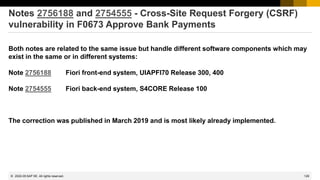
Notes 2756188 and 2754555 - Cross-Site Request Forgery (CSRF)
vulnerability in F0673 Approve Bank Payments
Both notes are related to the same issue but handle different software components which may
exist in the same or in different systems:
Note 2756188 Fiori front-end system, UIAPFI70 Release 300, 400
Note 2754555 Fiori back-end system, S4CORE Release 100
The correction was published in March 2019 and is most likely already implemented.
2022-05
130
© 2022 SAP SE. All rights reserved.
Note 2925755 - DBACOCKPIT missing authorizations / Critical
authorizations S_DBCON and S_TABU_SQL
The note explains ho to extend a role like SAP_BC_S_DBCON_USER to
execute SQL statements in the DBACOCKPIT for analysis purposes.
The DBACOCKPIT provides the SQL Editor which can be used to
execute any kind of SQL statements on connected databases.
https://help.sap.com/docs/SAP_NETWEAVER_DBOS/6b8fe8492ce14d24
af5855c3d10701e3/d4716e2d3f304b238463499cb3117b33.html
Authorization object S_DBCON activity 36 (extended maintenance):
2022-05
131
© 2022 SAP SE. All rights reserved.
Note 2925755 - DBACOCKPIT missing authorizations / Critical
authorizations S_DBCON and S_TABU_SQL
Blog: The danger of the SQL Editor of DBACOCKPIT from Joe Goerlich
https://blogs.sap.com/2022/05/10/the-danger-of-the-sql-editor-of-dbacockpit/
“Since the SQL statements are executed on DB level as the connecting user, the privileges of this particular user
are applied. For the ABAP system’s primary database, it is the schema user SAPDAT, SAP<SID>, or SAPABAP<n>.
With this, the SQL Editor can be used, for example, to access all tables of the ABAP schema.
Please also note that on database level, there is no special handling of the client field (field ‘MANDT’). This
leads to data of any client can be accessed or modified, even if the SQL Editor is started, for example, in client
000.
2022-05
The authorization object S_DBCON with activity 36 is very powerful and should not be granted
on a routine basis. It allows to harm the data’s integrity and availability.
Hint: SAP agreed to add a check for S_DBCON with activity 36 to the Security Check in SAP
EarlyWatch Alert.
The authorization object S_DBCON with activity 03 in combination with S_TABU_SQL is also
very powerful and should not be granted on a routine basis. It allows to harm the data’s
confidentiality.”
132
© 2022 SAP SE. All rights reserved.
Directory Traversal
The often forgotten path
There are more than 1000 notes dealing with the topic of
Directory Traversal for NetWeaver ABAP-based solutions.
There is a variety of business applications which store
business critical business data on the application server.
Protecting the system against undesired file operations by
traversing other files and folders is an essential part to
save your critical business data.
Reasons to consider Directory Traversal as part of your secure system configuration:
2022-05
133
© 2022 SAP SE. All rights reserved.
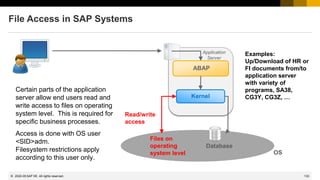
File Access in SAP Systems
Certain parts of the application
server allow end users read and
write access to files on operating
system level. This is required for
specific business processes.
Access is done with OS user
<SID>adm.
Filesystem restrictions apply
according to this user only.
Application
Server
Kernel
ABAP
Database
Read/write
access
Files on
operating
system level
Examples:
Up/Download of HR or
FI documents from/to
application server
with variety of
programs, SA38,
CG3Y, CG3Z, …
OS
2022-05
134
© 2022 SAP SE. All rights reserved.
3
Attacker
Vulnerable
Application
Sends
request for
file resource
1
File =
../../FIN/Q1Report_prel.docx
Applications exposing access to files on
backend server not properly validating user
input can be used to access arbitrary files.
Directory Traversal Attacks allow an
adversary to disclose, modify and delete
sensitive data stored on filesystem.
➔ Critical data leaked
➔ Data integrity breached
Note 2370836 - File access management with transaction SFILE
Vulnerability synopsis
REACH report
FINANCE report
2
2022-05
135
© 2022 SAP SE. All rights reserved.
* optional, depends on configuration
More information about runtime procedure see note 2459510
Note 2370836 - File access management with transaction SFILE
Solution concept
Frontend
(Browser, SAPGUI, RFC)
SAP NetWeaver Application Server ABAP
ABAP runtime environment
Application
Kernel
Operating system resources
Local Filesystem UNC Resource
Application File Access check:
Check against Logical File Name
configuration
Check Alias configuration
Underlying File Access check
routines:
Check against SPTH entries
Check SPTH authorization group*
Check S_DATASET authorization
1
2
1
SAP NetWeaver ABAP allows to restrict the
File Access of the system at following levels:
• Application – Logical File Name concept
• General – SPTH access control list
• User – authorization object S_DATASET
2022-05
2
136
© 2022 SAP SE. All rights reserved.
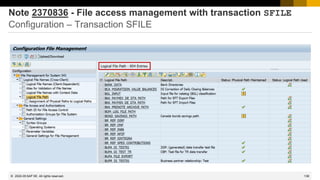
Note 2370836 - File access management with transaction SFILE
Configuration – Transaction SFILE
Available with
SAP_BASIS 751 SP01
respective
S/4HANA OP 1610 SP01
2022-05
137
© 2022 SAP SE. All rights reserved.
Note 2370836 - File access management with transaction SFILE
Configuration – Transaction SFILE
2022-05
~ 1300 logical file names
138
© 2022 SAP SE. All rights reserved.
Note 2370836 - File access management with transaction SFILE
Configuration – Transaction SFILE
2022-05
139
© 2022 SAP SE. All rights reserved.
Note 2370836 - File access management with transaction SFILE
Configuration – Transaction SFILE
2022-05
140
© 2022 SAP SE. All rights reserved.
Note 2370836 - File access management with transaction SFILE
Required actions in a nutshell
• Check system requirements for transaction SFILE
→ see note 2370836
• Activate Security Audit Log (SAL)
• Activate the events CUQ, CUR, CUS, CUT, DU5, and EU4
• Run the system with activated SAL for several months
(including month-end, quarter-end and possibly year-end
processes).
• Set profile parameter abap/path_normalization = ext
• Use transaction SFILE_MAINT_LOG to transfer SAL data
for configuration
• Use transaction SFILE for configuration of Logical File
Names, and check configuration of SPTH and
S_DATASET:
→ see Cheat Sheet for more information
Configuration settings
• After finalizing configuration activate strong security by
enforcing restriction to defined LFNs:
→ see note 2251231
Additional information
• Custom code with OPEN DATASET needs to introduce
path validation in case of user input:
→ Secure Programming Guide - Directory Traversal
and ABAP keyword Documentation
• JAVA: Custom code needs to perform canonicalization
and validation in case of user input:
→ Canonicalization utility class JavaDoc
Custom code
Pre-consideration
2022-05
141
© 2022 SAP SE. All rights reserved.
Note 2370836 - File access management with transaction SFILE
Cheat Sheet
Logging-based solution to identify vulnerable logical file names (LFN) based
on usage
➢ Activate Security Audit Log (SAL) via transaction RSAU_CONFIG
➢ Activate the events CUQ, CUR, CUS, CUT, DU5, and EU4
Recommendation: To get the best results, run the system with activated SAL for
several months (including month-end, quarter-end and possibly year-end
processes).
➢ Transfer logged SAL data to directory traversal specific data buffer
1. Call transaction SFILE_MAINT_LOG
2. press the button ‘SAL-Buffer’, proceed with the given selection screen
Transaction SFILE is comparable to a cockpit allowing to manage all file
management operations.
1. Call transaction SFILE. Check note 2370836 for latest recommendations.
2. In section ‘Display Options’, choose ‘Administrator’ and execute.
3. Select node ‘Logical File Names (Cross client)’ and look for ‘Weighting’
column with following indicators:
RED – LFN is used, but logical and physical file paths are not configured
YELLOW – LFN is not yet used and logical and physical file paths are not
configured
GREEN – LFN is used with both logical and physical file paths configured
BLUE - LFN not yet used and configurations are securely maintained
4. Configure red and yellow LFNs with relevant logical and physical file paths to
improve the security.
Authorization for programs and file access
➢ Table SPTH and authorization object S_PATH, more details here.
➢ To control general access rights to files from ABAP or user dependent
authorization checks.
1. Call transaction SFILE and choose node ‘File Access & Authorization’.
2. Choose option ‘Path ID for File Access Control’.
Maintain blocklist – Provide dedicated file paths with enabling option ‘No Read’
Maintain allowlist – Provide dedicated file paths with available options
➢ Authorization object S_DATASET, more details here.
➢ To control access for particular files of particular programs
➢ Additional information in note 2459510
Enforcement switch is provided to ensure that LFNs with missing configuration
(physical path) cannot be accessed by any user in the system.
More details see note 2251231
1. Call transaction SFILE and select node ‘General Setting’.
2. Select subnode ‘General Setting for File Management’.
3. Select parameter REJECT_EMPTY_PATH and option ‘ON’.
ON - enforcement switch is on
OFF - enforcement switch is off
2022-05
142
© 2022 SAP SE. All rights reserved.
Note 2370836 - File access management with transaction SFILE
Notes
Note 2370836 - FAQ | File access management with transaction SFILE
Note 2562089 - Directory Traversal vulnerability in ABAP File Interface
Note 2471775 - How to get the file path with virtual global host name by FILE_GET_NAME in a cluster
environment
Note 2459510 - FAQ: Authorization check with S_PATH when accessing files
Note 2251231 - File validation enforcement switch for empty physical path
and…
Note 27 - Recommendations for ABAP file interface
2022-05
April 2022
144
© 2022 SAP SE. All rights reserved.
Topics April 2022
Note 1753378 - Directory traversal in Web Container
Note 2190119 - Background information about SAP S/4HANA technical job repository
Spring Framework RCE in Java applications
My Trust Center / Security Whitepapers
Note 3143705 - Silent migration of iterated random-salted password hashes when configuration
is hardened
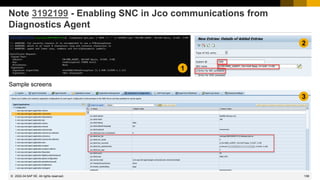
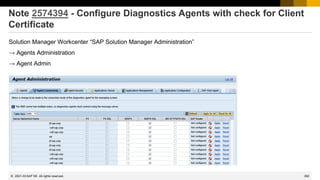
Note 3192199 - Enabling SNC in Jco communications from Diagnostics Agent
Note 3170439 - SM19 | Detail selection for EU* and FU* events
Recordings:
DSAG (German)
ASUG
SAP Learning HUB
2022-04
145
© 2022 SAP SE. All rights reserved.
Note 1753378 - Directory traversal in Web Container
I. Update your AS Java to a fixed version and SP. For more details see "SP Patch Level" section of this
note
→The solution was published in 2013. All Java systems should have the required software level.
II. Change value of the property DirectoryStructureProtection of the HTTP Provider service (http) to
"true" by following the steps:
For SAP Netweaver 7.10 and up
1. Open Configtool.
2. Choose "View" -> "Expert mode" should be checked.
3. Navigate to "Template" -> instance -> services -> http.
4. Choose "DirectoryStructureProtection" property.
5. In the Value field type true
6. Click Set Custom Value button
7. Press the Save button (diskette icon) in the top-left corner
8. Restart the server nodes for changes to take effect
→ This part is still relevant!
Tipps:
a) It is recommended to change on global/template level so that you can execute the change at once for all instances.
b) The recommended way to change offline properties is via Config tool as listed in the note and not directly in the offline configuration.
2022-04
146
© 2022 SAP SE. All rights reserved.
Note 1753378 - Directory traversal in Web Container
c) Cross system analysis
using CCDB / change
reporting / configuration
validation in the SAP
Solution Manager (as well
as in similar function of
FRUN) is possible using
configuration store http
of the landscape about
“Java Technical System”
You will find the
configuration item several
times but this is the
important entry
2022-04
Check configuration item
DirectoryStructureProtection
147
© 2022 SAP SE. All rights reserved.
Note 2190119 - Background information about SAP S/4HANA
technical job repository
Required authorization for the background job user in all clients: Authorization profile SAP_ALL in S/4HANA 1610, role
or profile SAP_APP (= quite identical as SAP_ALL) as of S/4HANA 1709
Note 2731999 - Assign custom step user for Technical Job Repository (SJOBREPO)
Create role or profile SAP_APP (= quite identical as SAP_ALL) using report REGENERATE_SAP_APP and assign it
manually to the job user in all clients.
As you have to make sure that Basis and HR objects are included - otherwise no job can be executed and HR related job
definitions might fail – there is almost no difference between SAP_ALL and SAP_APP.
Transaction SJOBREPO_STEPUSER still generates a user of type B=System, no password and authorization profile
SAP_ALL.
Note 2437635 - Optimization of SAP_APP generation
“The composite profile SAP_APP is generally not intended for use in production systems.”
→ It does not matter if you use SAP_ALL or SAP_APP (at least not for this scenario), both are critical
2022-04
148
© 2022 SAP SE. All rights reserved.
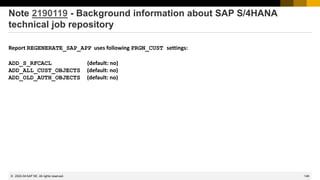
Note 2190119 - Background information about SAP S/4HANA
technical job repository
Report REGENERATE_SAP_APP uses following PRGN_CUST settings:
ADD_S_RFCACL (default: no)
ADD_ALL_CUST_OBJECTS (default: no)
ADD_OLD_AUTH_OBJECTS (default: no)
2022-04
149
© 2022 SAP SE. All rights reserved.
Spring Framework RCE in Java applications
Is Spring4Shell related to Log4Shell?
While the name itself was inspired by Log4Shell (CVE-2021-44228), the two are not related.
Is Proof of Concept exploit code available?
Yes, there are multiple working proof-of-concept (PoC) exploits available for Spring4Shell.
Blogs:
https://www.cyberkendra.com/2022/03/springshell-rce-0-day-vulnerability.html
https://www.lunasec.io/docs/blog/spring-rce-vulnerabilities/
https://www.rapid7.com/blog/post/2022/03/30/spring4shell-zero-day-vulnerability-in-spring-framework/
https://www.microsoft.com/security/blog/2022/04/04/springshell-rce-vulnerability-guidance-for-
protecting-against-and-detecting-cve-2022-22965/
[…]
2022-04
150
© 2022 SAP SE. All rights reserved.
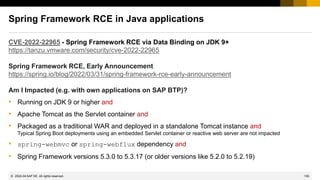
Spring Framework RCE in Java applications
CVE-2022-22965 - Spring Framework RCE via Data Binding on JDK 9+
https://tanzu.vmware.com/security/cve-2022-22965
Spring Framework RCE, Early Announcement
https://spring.io/blog/2022/03/31/spring-framework-rce-early-announcement
Am I Impacted (e.g. with own applications on SAP BTP)?
• Running on JDK 9 or higher and
• Apache Tomcat as the Servlet container and
• Packaged as a traditional WAR and deployed in a standalone Tomcat instance and
Typical Spring Boot deployments using an embedded Servlet container or reactive web server are not impacted
• spring-webmvc or spring-webflux dependency and
• Spring Framework versions 5.3.0 to 5.3.17 (or older versions like 5.2.0 to 5.2.19)
2022-04
151
© 2022 SAP SE. All rights reserved.
Spring Framework RCE in Java applications
CVE-2022-22965 - Spring Framework RCE via Data Binding on JDK 9+
https://tanzu.vmware.com/security/cve-2022-22965
Spring Framework RCE, Early Announcement
https://spring.io/blog/2022/03/31/spring-framework-rce-early-announcement
How to fix?
• Update to Spring Framework versions 5.3.18 or 5.2.20 or higher
• Update to Spring Boot versions 2.6.6 or higher,
https://spring.io/blog/2022/03/31/spring-boot-2-6-6-available-now
• Workaround (not recommended): See section Suggested Workarounds of Early Announcement
2022-04
152
© 2022 SAP SE. All rights reserved.
Spring Framework RCE in Java applications
Notes:
Note 3170990 - Central Security Note for Remote Code Execution vulnerability associated with
Spring Framework
https://support.sap.com/content/dam/support/en_us/library/ssp/my-support/trust-center/sap-tc-01-5031.pdf
Note 3189428 - Remote Code Execution vulnerability associated with Spring Framework used
in SAP HANA Extended Application Services
• Description how to identify if there are vulnerable applications in addition to the XSA service itself
• Link to SAP EXTENDED APP SERVICES 1 patch 145
and
Note 3171255 - SAP BTP Cloud Foundry Environment - Detecting and remediating Spring 4 Shell
CVE-2022-22965 and CVE-2022-22963
2022-04
153
© 2022 SAP SE. All rights reserved.
Spring Framework RCE in Java applications
Notes:
Note 3187290 - Remote Code Execution vulnerability associated with Spring Framework used
in SAP Customer Checkout
Note 3189429 - Remote Code Execution vulnerability associated with Spring Framework used
in PowerDesigner Web (upto including 16.7 SP05 PL01)
[required if you have updated the default installation which is based on JRE 1.8]
Note 3189635 - Remote Code Execution vulnerability associated with Spring Framework used
in SAP Customer Profitability Analytics
[published on 14.04.2022]
Note 3171258 - Remote Code Execution vulnerability associated with Spring Framework used
in SAP Commerce
[published on 18.04.2022]
2022-04
154
© 2022 SAP SE. All rights reserved.
Spring Framework RCE in Java applications
Github repo: https://github.com/spring-projects/spring-framework
Compiled versions: https://repo.spring.io/ui/native/release/org/springframework/spring/
Related topic:
CVE-2022-22963 - Remote code execution in Spring Cloud Function by malicious Spring Expression
https://tanzu.vmware.com/security/cve-2022-22963
2022-04
155
© 2022 SAP SE. All rights reserved.
My Trust Center / Security Whitepapers
My Security
https://support.sap.com/en/my-support/trust-center/tools-documentation.html
➢ SAP: Security Configuration Guide
➢ SAP S/4HANA: Encryption
➢ …
Security Whitepapers
https://support.sap.com/securitywp
https://support.sap.com/en/security-whitepapers.html
➢ SAP HANA Security Whitepaper
➢ SAP Security Recommendations: Securing Remote Function Calls (RFC)
➢ …
2022-04
156
© 2022 SAP SE. All rights reserved.
Note 3143705 - Silent migration of iterated random-salted password
hashes when configuration is hardened
With profile parameter login/password_hash_algorithm you configure a more secure
setting for iterated random-salted password hashes.
Default: encoding=RFC2307, algorithm=iSSHA-1, iterations=15000, saltsize=128
Changed: encoding=RFC2307, algorithm=iSSHA-512, iterations=15000, saltsize=256
Only passwords which are afterwards created or changed make use of the new setting.
With the kernel patches of this SAP Note (available as of kernel release 753), the kernel will
update a password hash also when just verifying a password, for example during password-
based user logon.
The metric for the security of a password hash uses the following hierarchy:
1. Hash algorithm (iSSHA-512 > iSSHA-384 > iSSHA-256 > iSSHA-1). When the algorithm is equal:
2. Number of iterations (e.g. 15000 > 10000). When the number of iterations is equal:
3. Saltsize (e.g. 128 > 96).
2022-04
157
© 2022 SAP SE. All rights reserved.
Note 3192199 - Enabling SNC in Jco communications from
Diagnostics Agent
The SAP NetWeaver ABAP system is already SNC enabled.
You want to enforce that all connections of an SAP NetWeaver ABAP system are encrypted. Therefore, you want
to set profile parameter snc/only_encrypted_rfc to 1.
The connection between the SAP Solution Manager Diagnostics Agent and the locally monitored SAP NetWeaver
ABAP system use JCo/RFC, too. It requires special configuration to encrypt this communication channel.
Implementing SNC for the Diagnostics Agents consists of three steps:
1. Provide an SNC identity to the Diagnostics Agent (basically, provide a PSE file with a certificate and
give access to this file).
2. Allow connections from the Diagnostics Agent to SAP NetWeaver ABAP.
3. Activate SNC in the connection settings.
This setup requires a good understanding of the SNC mechanism and its implementation for JCo/RFC
connections as well as a general understanding of certificates and their management in SAP systems. Since this
is an advanced configuration, an initial implementation with some consulting support is usually recommended.
2022-04
158
© 2022 SAP SE. All rights reserved.
Note 3192199 - Enabling SNC in Jco communications from
Diagnostics Agent
2022-04
1
2
3
Sample screens
159
© 2022 SAP SE. All rights reserved.
Note 3170439 - SM19 | Detail selection for EU* and FU* events
Extension for SAP_BASIS 7.40 to be able to select messages FU* in SM19:
FU1 RFC function &B with dynamic destination &C was called in program &A
Dynamic destinations are generated by an ABAP program at runtime and do not have to be defined in transaction
SM59. Depending on the configuration of the dynamic connection, it is also possible to switch users or log on
without a password using trusted RFC.
For more information, see note 2156564.
FU2 Parsing of an XML data stream canceled for security reasons (reason = &A
The ABAP XML parser canceled the parsing of an XML data stream for security reasons. It is possible that the
data stream in question contains harmful DTD.
2022-04
March 2022
161
© 2022 SAP SE. All rights reserved.
Topics March 2022
SAP Support Portal connection - Renew client certificate of technical S-user
Generic recommendations to secure support access
Note 3145987 - Missing Authentication check in SAP Focused Run (Simple Diagnostics Agent 1.0)
Note 3147102 - Information Disclosure vulnerability in SAP Focused Run (Simple Diagnostics Agent 1.0)
Note 3149805 - Cross-Site Scripting (XSS) vulnerability in SAP Fiori launchpad
Note 3111110 - Denial of service (DOS) in SAPCAR
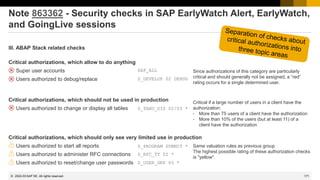
Note 863362 - Security checks in SAP EarlyWatch Alert, EarlyWatch, and GoingLive sessions
Recordings:
DSAG (German)
ASUG
SAP Learning HUB
2022-03
162
© 2022 SAP SE. All rights reserved.
SAP Support Portal connection
Renew client certificate of technical S-user
Client certificates have a limited lifetime of 1 year. Therefore you have to renew the certificates at least
once per year – either manually or automatically.
KBA 2805811 - How to enable client certificate authentication for technical communication users
Method 1: Get SAP Passport from SAP Support Portal.
This PSE is protected by a password, automatic renewal is not possible due to limitations.
Method 2: Generate PSE in transaction STRUST and process a Certificate Signing Request (CSR)
You can use automatic creation as well as automatic renewal.
KBA 2911301 - SAP Support Portal connection - Renew client certificate of technical S-user
Note 2946444 - SAP Support Portal connection - Renew client certificate of technical S-user according to
KBA 2911301
The new version of report RSUPPORT_HUB_CERT_RENEWAL verifies if the PSE is accessible for automatic
renewal.
Note 3158150 - SDCC task Certificate Renewal: Dump TABLE_INVALID_INDEX in program
/BDL/SAPLBDL11
The new version of the SDCC task "Certificate Renewal" verifies if the PSE is accessible for automatic renewal.
2022-03
163
© 2022 SAP SE. All rights reserved.
Note 2452425 - Collective Note - SAP SSO Certificate Lifecycle
Management for ABAP
Report SSF_ALERT_CERTEXPIRE alerts on expiring certificates (MTE class R3SyslogSecurity)
or AutoABAP report SSFALRTEXP, see note 572035 Alerts only, no renewal
2020-08
164
© 2022 SAP SE. All rights reserved.
Generic recommendations to secure support access
➢ Check Remote Connections and the Remote Logbook regularly
https://support.sap.com/en/tools/connectivity-tools/remote-support.html
Maintain Connections
https://launchpad.support.sap.com/#/remoteconnectivity
View Logbook
https://launchpad.support.sap.com/#/remoteconnectivitylogbook
Get an overview about open connections and recently used remote connections for selected systems
in a chosen time period, including details like service type, actions taken, reasons, etc.
➢Check Customer Logon Data regularly
https://support.sap.com/en/tools/connectivity-tools/remote-support.html
System Data
https://launchpad.support.sap.com/#/systemdata
Review lifetime of stored credentials
2022-03
165
© 2022 SAP SE. All rights reserved.
Generic recommendations to secure support access
➢ Activate Remote Access Restrictions [for EU Access] / [for CN Access]
https://support.sap.com/en/my-support/help-support-applications/tile-overview.html
https://support.sap.com/en/my-support/help-support-applications/tile-overview/tile2card.html
Edit “System Data” to flag systems as EU data protection-relevant to restrict remote access and data storage to SAP
support employees from countries that have implemented the EU Data Protection Directive.
➢ Deactivate semi-automatic Service Line Opener (LOP)
https://support.sap.com/en/tools/connectivity-tools/line-opener.html
Note 797124 - LOP - Semi Automatic Line Opener Program
Deactivate the Semi-Automatic Line Opener which is directly integrated into
the Solution Manager as well as any standalone Java application.
2022-03
166
© 2022 SAP SE. All rights reserved.
Note 3145987 - Missing Authentication check in SAP Focused Run
(Simple Diagnostics Agent 1.0)
Solution
1. Upgrade the Simple Diagnostics Agent to version 1.58.0 or later.
See SP58 release note (3138374) and general release note (2369401).
2. Upgrade the SAP Host Agent to 7.22 PL55 or later. See note 3113553
Both parts are required!
The note not only solves CVE-2021-42550 as described in referred notes. (This vulnerability is
considered to pose a lesser threat than log4shell because it requires access to logback's configuration
file by the attacker, which requires to sign on to an already compromised system. See
https://logback.qos.ch/news.html )
The note solves CVE-2022-24396, which has CVSS score 9.3, priority HotNews.
The solution covers Note 3147102, too.
2022-03
167
© 2022 SAP SE. All rights reserved.
Note 3149805 - Cross-Site Scripting (XSS) vulnerability in SAP Fiori
launchpad
In the meantime the FAQ 3157089 was updated:
> Will the issue be fixed once SAP Security Note 3149805 is implemented or do we need to
upgrade to the latest SP?
Yes, once the note is implemented the issue will be fixed. No full SP upgrade is required for the
releases mentioned in the note.
This is the important part of the correction:
2022-03
168
© 2022 SAP SE. All rights reserved.
Note 3111110 - Denial of service (DOS) in SAPCAR
Solution: Use version 1115 or higher of program sapcar
There might exist many of copies of program sapcar somewhere on client machines and on
servers.
→ Inform administrator to select the correct OS system and get the current version of sapcar
from SAP Software Downloads:
Mitigation: Old version of sapcar produce correct archive files. A potential attacker need to
construct a sar file without using sapcar.
2022-03
169
© 2022 SAP SE. All rights reserved.
Note 863362 - Security checks in SAP EarlyWatch Alert, EarlyWatch,
and GoingLive sessions
III. ABAP Stack related checks
Default Passwords of Standard Users
❑ Critical standard users have default passwords in client 000 [red]
❑ Critical standard users have default passwords in other client(s) than 000 [red]
❑ Standard users have default passwords in client 000 [yellow]
❑ Standard users have default passwords in other client(s) than 000 [yellow]
❑ TMSADM exists in another client than 000 [yellow]
Usage of User SAP*
❑ User SAP* does not exist in client 000, allowing critical logon to the system [red]
❑ User SAP* does not exist in other client(s) than 000, allowing critical logon to the system [red]
❑ User SAP* does not exist in client 000, potentially allowing critical logon in the future [yellow]
❑ User SAP* does not exist in other client(s) than 000, potentially allowing critical logon in the future [yellow]
SAP*, DDIC
SAPCPIC, EARLYWATCH, TMSADM
login/no_automatic_user_sapstar
2022-03
170
© 2022 SAP SE. All rights reserved.
Note 863362 - Security checks in SAP EarlyWatch Alert, EarlyWatch,
and GoingLive sessions
III. ABAP Stack related checks
Critical authorizations, which allow to do anything
❑ Users with critical authorizations, which allow to do anything in client 000 [red]
❑ Users with critical authorizations, which allow to do anything in other client(s) than 000 [red]
Critical authorizations, which should not be used in production
❑ Users with critical authorizations, which should not be used in production in client 000 [red]
❑ Users with critical authorizations, which should not be used in production in other client(s) than 000 [red]
Critical authorizations, which should only see very limited use in production
(Only shown if there is no ‘red’ alert)
❑ Users with critical authorizations, which should only see very limited use in production in client 000 [yellow]
❑ Users with critical authorizations, which should only see very limited use in production in other client(s) than 000 [yellow]
2022-03
171
© 2022 SAP SE. All rights reserved.
Note 863362 - Security checks in SAP EarlyWatch Alert, EarlyWatch,
and GoingLive sessions
III. ABAP Stack related checks
Critical authorizations, which allow to do anything
❑ Super user accounts
❑ Users authorized to debug/replace
Critical authorizations, which should not be used in production
❑ Users authorized to change or display all tables
Critical authorizations, which should only see very limited use in production
❑ Users authorized to start all reports
❑ Users authorized to administer RFC connections
❑ Users authorized to reset/change user passwords
Since authorizations of this category are particularly
critical and should generally not be assigned, a “red”
rating occurs for a single determined user.
Critical if a large number of users in a client have the
authorization:
• More than 75 users of a client have the authorization
• More than 10% of the users (but at least 11) of a
client have the authorization
Same valuation rules as previous group
The highest possible rating of these authorization checks
is "yellow".
SAP_ALL
S_DEVELOP 02 DEBUG
S_TABU_DIS 02/03 *
S_USER_GRP 05 *
S_PROGRAM SUBMIT *
S_RFC_TT 02 *
2022-03
February 2022
173
© 2022 SAP SE. All rights reserved.
Topics February 2022
Note 3140940 - Missing segregation of duties in SAP Solution Manager Diagnostics Root Cause
Analysis Tools
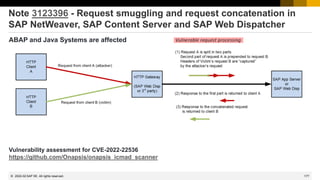
Note 3123396 - Request smuggling and request concatenation in SAP NetWeaver, SAP Content
Server and SAP Web Dispatcher
Note 3123427 - HTTP Request Smuggling in SAP NetWeaver Application Server Java
Recordings:
DSAG (German)
ASUG
SAP Learning HUB
2022-02
174
© 2022 SAP SE. All rights reserved.
Note 3140940 - Missing segregation of duties in SAP Solution
Manager Diagnostics Root Cause Analysis Tools
The security note
removes the
following Root
Cause Analysis
tools from the SAP
Solution Manager
2022-02
175
© 2022 SAP SE. All rights reserved.
Note 3140940 - Missing segregation of duties in SAP Solution
Manager Diagnostics Root Cause Analysis Tools
Insides: Complete Removal from ABAP
and Java for SolMan 7.20 SP 3 or higher
ABAP:
Implement Note 3137764 - RCA Tools Removal
Then run new report NOTE_3137764
once in DEV and use the same transport.
Java:
Implement this Note 3145008 - Removal of RCA Tools
Deploy the latest patch of your LM-SERVICE Support Package SP version
via the Software Update Manager, see Note 1715441.
Only this deployment option will remove the applications completely.
(If you use the faster deployment via telnet, then you have to undeploy 3
development components manually.)
The deployment requires the activation of Maintenance Mode which will
temporarily disconnect all the diagnostics agents.
2022-02
176
© 2022 SAP SE. All rights reserved.
Note 3140940 - Missing segregation of duties in SAP Solution
Manager Diagnostics Root Cause Analysis Tools
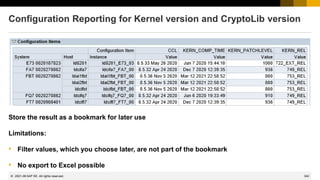
Removed function Replacement
OS Command Console
tc~webadministrator~oscommand
Execute commands via the operating system's remote access.
File System Browser
tc~webadministrator~fsbrowser
Use the local operating system specific features to get access to the
file system of the managed system.
Log Viewer
tc~webadministrator~standlogviewer
Use the operating system's remote access features to retrieve the log
files from the managed system and analyze them on your local
machine.
Thread Dump Analysis
tc~webadministrator~tda
Use the operating system's remote access features to execute the
thread dump creation command.
Retrieve the thread dump file from the managed system and analyze
them on your local machine.
See also
Note 2671374 - How to generate Thread dumps using SAP JVM Eclipse plug-in
Note 1020246 - Thread Dump Viewer for SAP Java Engine
2022-02
177
© 2022 SAP SE. All rights reserved.
Note 3123396 - Request smuggling and request concatenation in
SAP NetWeaver, SAP Content Server and SAP Web Dispatcher
ABAP and Java Systems are affected
Vulnerability assessment for CVE-2022-22536
https://github.com/Onapsis/onapsis_icmad_scanner
2022-02
178
© 2022 SAP SE. All rights reserved.
Note 3123396 - Request smuggling and request concatenation in
SAP NetWeaver, SAP Content Server and SAP Web Dispatcher
Suggestion for efficient patching:
a) Consider the Workaround (if you cannot update ABAP and Java systems in short time)
1. Update Web Dispatcher installations according to note 3138881 and set the parameter
wdisp/additional_conn_close=TRUE
respective
2. Define rewrite rules for the ICM according to note 3137885
b) Update ABAP (dw.sar) and Java Systems which use a Web Dispatcher, Load Balancer or
3rd party proxy according note 3123396
c) Update all other ABAP and Java Systems
2022-02
179
© 2022 SAP SE. All rights reserved.
Note 3123396 - Request smuggling and request concatenation in
SAP NetWeaver, SAP Content Server and SAP Web Dispatcher
The solution also covers the vulnerability described in related note 3123427 - HTTP Request
Smuggling in SAP NetWeaver Application Server Java
Caution:
see https://wiki.scn.sap.com/wiki/display/SI/SAP+Kernel%3A+Important+News):
After implementing the SAP Web Dispatcher patch of
Note 3138881 ”wdisp/additional_conn_close workaround for security note 3123396”
a severe issue may occur with AS Java backend systems.
The following SAP Web Dispatcher releases are affected starting with the patch levels:
753#920, 777#433, 781#231, 785#073.
For details and correction see Note 3147927 ”wdisp/additional_conn_close causes errors for
SAP NetWeaver AS Java servers”.
2022-02
180
© 2022 SAP SE. All rights reserved.
Note 3123396 - Request smuggling and request concatenation in
SAP NetWeaver, SAP Content Server and SAP Web Dispatcher
Application System Recommendation might fail to show Kernel related notes if the LMDB is not
up to date.
Use application Change Reporting respective transaction CCDB in the SAP Solution Manager to
inspect the Configuration Stores SAP_KERNEL und CRYPTOLIB.
Caution: All these tools know about the version defined in the main manifest file which gets
updated as part of a stack Kernel update. If you just update dw.sar like in this case, then these
tools do not get new information and continue showing the note.
2022-02
181
© 2022 SAP SE. All rights reserved.
Note 3123396 - Request smuggling and request concatenation in
SAP NetWeaver, SAP Content Server and SAP Web Dispatcher
Check Java Kernel release using
SAP Solution Manager CCDB
Configuration Store:
SAP_J2EEClusterNode
Configuration Item:
SAPJStartVersion
2022-02
182
© 2022 SAP SE. All rights reserved.
Note 3123396 - Request smuggling and request concatenation in
SAP NetWeaver, SAP Content Server and SAP Web Dispatcher
Check ABAP Kernel release using FRUN Configuration & Security Analysis
Configuration Store: SAP_KERNEL
Configuration Items: KERN_REL and KERN_PATCHLEVEL
2022-02
183
© 2022 SAP SE. All rights reserved.
Note 3123396 - Request smuggling and request concatenation in
SAP NetWeaver, SAP Content Server and SAP Web Dispatcher
Check Java Kernel release using FRUN Configuration & Security Analysis
Configuration Store: SAP_J2EEClusterNode
Configuration Item: SAPJStartVersion
2022-02
January 2022
185
© 2022 SAP SE. All rights reserved.
Topics January 2022
Note 3131047 Central Security Note for Apache Log4j 2 component
Critical vulnerabilities CVE-2021-44228, CVE-2021-45046, CVE-2021-44832, CVE-2021-45105
How to remove Log4j notes from System Recommendations
Note 3112928 - Multiple vulnerabilities in F0743 Create Single Payment application of SAP
S/4HANA
Note 3117350 - SCM Optimizer run terminates with "CALLBACK_REJECTED_BY_WHITELIST“
Note 3112710 - Information Disclosure vulnerability in SAP NetWeaver Application Server for
ABAP and ABAP Platform
Recordings:
DSAG (German)
ASUG
SAP Learning HUB
2022-01
186
© 2022 SAP SE. All rights reserved.
Note 3131047 Critical vulnerabilities in log4j v2
CVE-2021-44228, CVE-2021-45046, CVE-2021-44832, CVE-2021-45105
Critical vulnerabilities in log4j v2 155 Notes as of 13.12.2021
https://logging.apache.org/log4j/2.x/security.html (166 notes combined)
CVE-2021-44228 Remote Code Execution 133 Notes
Base CVSS Score 10.0 AV:N/AC:L/PR:N/UI:N/S:C/C:H/I:H/A:H Priority: very high
Fixed in Log4j 2.15.0 (Java 8)
CVE-2021-45046 Remote Code Execution 49 Notes
Base CVSS Score 9.0 AV:N/AC:H/PR:N/UI:N/S:C/C:H/I:H/A:H Priority: very high
Fixed in Log4j 2.16.0 (Java 8) and Log4j 2.12.2 (Java 7)
CVE-2021-45105 Denial of Service 36 Notes
Base CVSS Score 5.9 AV:N/AC:H/PR:N/UI:N/S:U/C:N/I:N/A:H Priority: medium
Fixed in Log4j 2.17.0 (Java 8), 2.12.3 (Java 7) and 2.3.1 (Java 6)
CVE-2021-44832 Remote Code Execution 13 Notes
Base CVSS Score 6.6 AV:N/AC:H/PR:H/UI:N/S:U/C:H/I:H/A:H Priority: medium
Fixed in Log4j 2.17.1 (Java 8), 2.12.4 (Java 7) and 2.3.2 (Java 6)
2022-01
187
© 2022 SAP SE. All rights reserved.
Note 3131047 Critical vulnerabilities in log4j v2
CVE-2021-44228, CVE-2021-45046, CVE-2021-44832, CVE-2021-45105
2022-01
CVE Vulnerability Correction
CVSS
Score CVSS Vector
SAP
Priority
Count
of SAP
notes
Critical vulnerabilities in log4j v2 155
CVE-2021-44228
Remote Code
Execution
Log4j 2.15.0 (Java 8) 10.0 AV:N/AC:L/PR:N/UI:N/S:C/C:H/I:H/A:H very high 133
CVE-2021-45046
Remote Code
Execution
Log4j 2.16.0 (Java 8)
Log4j 2.12.2 (Java 7)
9.0 AV:N/AC:H/PR:N/UI:N/S:C/C:H/I:H/A:H very high 49
CVE-2021-45105 Denial of Service
Log4j 2.17.0 (Java 8)
Log4j 2.12.3 (Java 7)
Log4j 2.3.1 (Java 6)
5.9 AV:N/AC:H/PR:N/UI:N/S:U/C:N/I:N/A:H medium 36
CVE-2021-44832
Remote Code
Execution
Log4j 2.17.1 (Java 8)
Log4j 2.12.4 (Java 7)
Log4j 2.3.2 (Java 6)
6.6 AV:N/AC:H/PR:H/UI:N/S:U/C:H/I:H/A:H medium 13
Combined you find 166 distinct notes
188
© 2022 SAP SE. All rights reserved.
How to remove Log4j notes from System Recommendations
How to get rid of irrelevant
notes
1. Extend filters to show
the notes filter
2. Remove any other filter
value
3. Enter note numbers,
e.g.
3131047
3130578
3132744
3132162
3131691
4. Select all entries
5. Call Actions → Change
Status
6. Choose Status
„Irrelevant“
1
2
3
5
4
6
2022-01
189
© 2022 SAP SE. All rights reserved.
Note 3112928 - Multiple vulnerabilities in F0743 Create Single
Payment application of SAP S/4HANA
The solution enables to use a virus scanner on the server (not the client) to validate uploaded
attachments. The application uses the default profile (according to transaction VSCANPROFILE).
2022-01
190
© 2022 SAP SE. All rights reserved.
Note 3117350 - SCM Optimizer run terminates with
"CALLBACK_REJECTED_BY_WHITELIST"
Recommended setting: profile parameter rfc/callback_security_method = 3
Components: CA-EPT-RCC, TM-BF-OPT, …
The SCM Optimizer is an external RFC server program.
The ABAP systems connects to it via a TCP/IP Destination
(a typical name of the destination is OPTSERVER_xyz01).
For more information, see notes 1686826 and 2644038
and the installation guide
Recommended entries for these destinations (at least):
Called function module Callback function module
RCC_ENGINE_START /SCMTMS/PLN_OPT_*
RCC_ENGINE_START RCCF_COMM_*
RCC_ENGINE_START RCCF_GET_*
More entries might be required!
2022-01
191
© 2022 SAP SE. All rights reserved.
Note 3112710 - Information Disclosure vulnerability in SAP
NetWeaver Application Server for ABAP and ABAP Platform
After the corrections, an administrator requires authorizations for S_RZL_ADM to execute the
WebDynpro applications of Generic Request and Message Generation:
You can skip the manual activity if the text (in German) is already part of the automatic
correction instruction:
2022-01
December 2021
193
© 2022 SAP SE. All rights reserved.
Topics December 2021
Critical vulnerability in log4j v2 CVE-2021-44228 (plus CVE-2021-45046)
Note 3131047 - Central Security Note for Remote Code Execution vulnerability associated with
Apache Log4j 2 component
Note 3119365 - Code Injection vulnerability in SAP ABAP Server & ABAP Platform
(SAP internal translation tools)
Note 3102769 - Cross-Site Scripting (XSS) vulnerability in SAP Knowledge Warehouse
SAP Secure By Default for S/4HANA on Premise 2021
Note 2926224 New security settings for SAP S/4HANA & SAP BW/4HANA using SL Toolset/SUM
Recordings:
DSAG (German)
ASUG
SAP Learning HUB
2021-12
194
© 2022 SAP SE. All rights reserved.
Critical vulnerability in log4j CVE-2021-44228 (plus CVE-2021-45046)
CVE-2021-44228: Apache Log4j2 <= 2.14.1 JNDI (Java Naming and Directory Interface) features
used in configuration, log messages, and parameters do not protect against attacker controlled
LDAP and other JNDI related endpoints. An attacker who can control log messages or log
message parameters can execute arbitrary code loaded from LDAP servers when message
lookup substitution is enabled.
From log4j 2.15.0, this behavior has been disabled by default. A less important issue is solved in 2.16.0
In previous releases (>= 2.10 checked on GitHub) this behavior can be mitigated by setting system property
"log4j2.formatMsgNoLookups" to “true”
or it can be mitigated in prior releases (< 2.10) by removing the JndiLookup class from the
classpath (example: zip -q -d log4j-core-*.jar
org/apache/logging/log4j/core/lookup/JndiLookup.class).
Older releases 1.x are not affected by this specific vulnerability checked on GitHub
(but could be on risk depending on the configuration of the application which uses it and may suffer from another vulnerability)
2021-12
196
© 2022 SAP SE. All rights reserved.
Critical vulnerability in log4j CVE-2021-44228
In releases (>= 2.10) this behavior can be mitigated
by setting system property
"log4j2.formatMsgNoLookups" to “true”
Example from note 3129883 - AS Java
Take care if the library is installed for custom code as
well. Check the version and the option to set this
property.
You should find this parameter (if set) in the CCDB
Configuration Store SAP_J2EEClusterNode
2021-12
197
© 2022 SAP SE. All rights reserved.
Critical vulnerability in log4j CVE-2021-44228
In releases (>= 2.10) this behavior can be mitigated
by setting system property
"log4j2.formatMsgNoLookups" to “true”
Example from note 3129883 - AS Java
Take care if the library is installed for custom code as
well. Check the version and the option to set this
property.
You should find this parameter (if set) in the CCDB
Configuration Store SAP_J2EEClusterNode
2021-12
198
© 2022 SAP SE. All rights reserved.
Critical vulnerability in log4j CVE-2021-44228
In releases (>= 2.10) this behavior can be mitigated by
setting system property
"log4j2.formatMsgNoLookups" to “true”
Example similar to note 3130476 - Detecting and
remediating log4j CVE-2021-44228 vulnerabilities in BTP
Cloud Foundry applications
“You have to check the dependencies in the code of your
application.”
2021-12
199
© 2022 SAP SE. All rights reserved.
Critical vulnerability in log4j CVE-2021-44228
Official statement, list of affected and not affected products and links to configuration notes:
https://support.sap.com/content/dam/support/en_us/library/ssp/my-support/trust-center/sap-tc-01-5025.pdf
No Known Impact At the time of publication (time stamped above), the following non-exhaustive list of SAP products
do not contain components affected by this CVE.
Current Patch Application At the time of publication, the following products have been identified as using Log4J.
Appropriate patching, or recommended temporary fixes, were applied.
Patch Pending At the time of publication, the following products are pending patch development.
The available workarounds are found in the links provided below.
Please know that the products listed across these three categories is not an exhaustive list of all SAP
products.
Customers are encouraged to contact SAP’s support portal for more information if they have a question
about a non-listed product.
2021-12
200
© 2022 SAP SE. All rights reserved.
Critical vulnerability in log4j CVE-2021-44228
You find the component specific notes describing the workaround or the solution (as soon as it’s available) here:
Note 3131047 - Central Security Note for Remote Code Execution vulnerability associated with Apache Log4j 2
component
Search terms to find all notes or blogs:
CVE-2021-44228
https://launchpad.support.sap.com/#/solutions/notes/?sortBy=date&sortOrder=desc&q=CVE-2021-44228
(Caution: not all notes and KBAs show the CVE entry)
Therefore, search for „Log4J” and add an restriction by date >= 10.12.2021
https://launchpad.support.sap.com/#/solutions/notes/?sortBy=date&sortOrder=desc&q=Log4J
Limitation:
EWA, SOS, System Recommendations, CCDB or Configuration Validation do not show affected systems.
2021-12
208
© 2022 SAP SE. All rights reserved.
Note 3119365 - Code Injection vulnerability in SAP ABAP Server &
ABAP Platform (SAP internal translation tools)
The note deactivates/deletes several SAP internal translation tool reports:
RS_LXE_EXTRACT_LXELOG2CSV
RS_LXE_EXTRACT_OL2CSV
RS_LXE_EXTRACT_WORK_LIST2CSV
A correction instruction for SAP_BASIS 7.01 might be missing, do it manually.
Delete the reports or add an EXIT. or RETURN. as first statement after START-OF-SELECTION.
It seems that no correction is required on SAP_BASIS 7.02 – 7.31
In any case, you can verify if these reports either do not exist or have commented coding.
2021-12
209
© 2022 SAP SE. All rights reserved.
Note 3102769 - Cross-Site Scripting (XSS) vulnerability in SAP
Knowledge Warehouse
This component displays only these documents, which were created and/or modified using
SAP Knowledge Warehouse.
No other applications use the component.
Workaround to switch off the application (if you are not using it):
Option 1: Disable the vulnerable application following the documentation in Config Tool Adding Filters.
Parameters 'Component Name Mask’ = tc~km_tc*, 'Vendor Mask’ = sap.com
Option 2: In case the requests are routed via SAP Web Dispatcher you may add a rewrite rule to SAP
Web Dispatcher to prevent from redirects.
2021-12
210
© 2022 SAP SE. All rights reserved.
SAP Secure By Default for S/4HANA on-premise
2021-12
Introduction
211
© 2022 SAP SE. All rights reserved.
Products in scope
• SAP S/4HANA on Premise 2021 (settings were partially shipped since SAP S/4HANA 1909)
• SAP BW/4HANA 2021
• Products based on S/4HANA Foundation 2021, e.g.
− SAP Focused Run 3.0
− SAP Access Control
− SAP Customer Activity Repository
Customer documentation
• SAP Notes 2926224 is a collection note including attachment
• SAP Blog https://blogs.sap.com/2021/10/20/the-story-resumes-secure-by-default-for-sap-s-4hana-2021/
Status
• First shipment done with SAP S/4HANA on premise 1909
• Additional security topics shipped with SAP S/4HANA on premise 2020 and 2021
• Further improvements planned with SAP S/4HANA on premise 2022
SAP Secure By Default for S/4HANA on-premise
Status
2021-12
212
© 2022 SAP SE. All rights reserved.
SAP Secure By Default for S/4HANA on-premise
How can customers get the improvements?
Secure by default in SAP S/4HANA
(Note 2926224) is shipped and enabled for:
New installations and system copies
INSTALLATION
SYSTEM COPY
SAP S/4HANA
1909 / 202x
SAP S/4HANA
1909 / 202x
2021-12
213
© 2022 SAP SE. All rights reserved.
SAP Secure By Default for S/4HANA on-premise
How can customers get the improvements?
Secure by default in SAP S/4HANA
(Note 2926224) is shipped and enabled for:
New installations and system copies
Conversions from ERP to SAP S/4HANA INSTALLATION
SYSTEM COPY
SAP S/4HANA
1909 / 202x
SAP S/4HANA
1909 / 202x
ENHANCEMENT PACKAGE
SYSTEM
CONVERSION
SAP ERP 6.0
EhP 8
SAP ERP 6.0
EhP 0-7
SYSTEM
CONVERSION
2021-12
214
© 2022 SAP SE. All rights reserved.
SAP Secure By Default for S/4HANA on-premise
How can customers get the improvements?
Secure by default in SAP S/4HANA
(Note 2926224) is shipped and enabled for:
New installations and system copies
Conversions from ERP to SAP S/4HANA
Upgrades within the SAP S/4HANA product
 No automated changes
 Report can be used to compare
recommended SAP kernel parameters
with configured parameters
 In addition, refer to SAP-provided tools
and services for security checks (e.g.
EWA, SOS, Config Validation)
INSTALLATION
SYSTEM COPY
SAP S/4HANA
1909 / 202x
SAP S/4HANA
1909 / 202x
UPGRADE
SAP S/4HANA
202x
Comparison report
(available with SAP
S/4HANA 2020)
ENHANCEMENT PACKAGE
SYSTEM
CONVERSION
SYSTEM
CONVERSION
SAP ERP 6.0
EhP 8
SAP ERP 6.0
EhP 0-7
SYSTEM
CONVERSION
2021-12
215
© 2022 SAP SE. All rights reserved.
SAP Secure By Default for S/4HANA on-premise 1909 / 2020
Technical view
Profile parameters are set to secure values for SAP S/4HANA 1909 / 2020
• 17 recommended values
• 27 parameters default values were changed in the SAP S/4HANA 2020 (SAP Kernel 7.81)
Security Audit Log (SAL) (shipped with 1909)
Automatic configuration of the security audit log
(if not already set up by the customer)
Switchable Authorization Framework (SACF) (shipped with 2020)
Automatic activation of all SACF scenarios to enable additional business authorization
checks (if not already set up by the customer)
2021-12
216
© 2022 SAP SE. All rights reserved.
SAP Secure By Default for S/4HANA on-premise 2021
Technical view
HANA Audit Policies for S/4HANA
• Activation of SAP HANA auditing in the SAP HANA database
• Activation of basic SAP HANA audit policies (tradeoff between log volume and traceability)
Table logging
Activation of ABAP table logging for business-critical tables
Security improvements for transport management
Set three transport profile parameters to secure values
Security configurations
• Activation of “start authorization checks” for Web Dynpro
• Enablement of the UCON HTTP Allowlist framework for increased protection of HTTP traffic
• Activation of all defined SLDW scenarios
2021-12
217
© 2022 SAP SE. All rights reserved.
Secure by default in SAP S/4HANA (Note 2926224)
SAP Secure By Default for S/4HANA on-premise 2021
Central Documentation
2021-12
218
© 2022 SAP SE. All rights reserved.
SAP Secure By Default for S/4HANA on-premise
2021-12
Detailed review of Secure By Default
219
© 2022 SAP SE. All rights reserved.
Difference between recommended values and kernel
defaults
• SAP kernel defaults are values stored in the kernel and
will be activated with a kernel upgrade.
• Recommended values are additionally stored in kernel
binaries and are used by SAP lifecycle tools (e.g.,
SWPM, SUM) to set values in new installations, system
copies, and conversions.
SAP Secure By Default for S/4HANA on-premise
Technical view – recommended values for profile parameters
2021-12
220
© 2022 SAP SE. All rights reserved.
Same important examples
login/password_downwards_compatibility = 0
 Enables the usage of secure password hash algorithm
 Prevents storage of password hash in an outdated, obsolete format that can be cracked easily
rfc/callback_security_method = 3
 Denies callbacks via RFC which are executed with the authorization of the calling user
system/secure_communication = ON
 Enables the TLS encryption and mTLS authentication for the internal communication of the ABAP
application server
But also all the others have been set to a secure value for good reasons
Compare the current values with the recommended values using report RSPFRECOMMENDED
SAP Secure By Default for S/4HANA on-premise
Recommended Profile Parameters
2021-12
221
© 2022 SAP SE. All rights reserved.
icm/HTTP/logging and icm/HTTP/logging_client
 Enable WebDispatcher and ICM logging and define an improved default format
 1909: As Recommended Profile Parameter
PREFIX=/,LOGFILE=http_%y_%m.log,MAXFILES=2,MAXSIZEKB=50000,SWITCHTF=month,
LOGFORMAT=%t %a %u1 "%r" %s %b %Lms %{Host}i %w1 %w2
 2020 and later: Change in the Kernel Default
PREFIX=/,LOGFILE=$(DIR_LOGGING)$(DIR_SEP)http-%y-%m-%d.log%z,
MAXFILES=7,MAXSIZEKB=100000, SWITCHTF=day,LOGFORMAT=DEFAULT
with
DEFAULT = %t2 %s %u1 %b1 %b %L %P %w1 %w2 %{X-Forwarded-For}i1 %a %y1 %R2 %R1
%{Host}i %p0
More details on the log format can be found in SAP Help
 https://help.sap.com/viewer/bd78479f4da741a59f5e2a418bd37908/latest/en-US/d1ab8a5b7d3140fe803d004e9a5518db.html
 https://help.sap.com/viewer/bd78479f4da741a59f5e2a418bd37908/latest/en-US/58601269a62d4493aea63a9584f6ae26.html
Customers need to decide and configure log retention !
SAP Secure By Default for S/4HANA on-premise
Recommended Profile Parameters - ICM Logging
2021-12
222
© 2022 SAP SE. All rights reserved.
Full log of SAP*
SAP Secure By Default for S/4HANA on-premise
SAP Security Audit Log – SecureByDefault Filter Configuration
Almost full log of all users in all clients
(except 6 high volume events)
Full log of client 066
Following events are not
logged
▪ AU5
RFC/CPIC logon successful (type=&A,
method=&C)
▪ AUK
Successful RFC call &C (function group = &A)
▪ AUW
Report &A started
▪ CUV
Successful WS Call (service = &A, operation &B)
▪ DUR
JSON RPC call of function module &A succeeded
▪ EUE
RFC function module &A called successfully
2021-12
Customers need to decide and configure log retention !
223
© 2022 SAP SE. All rights reserved.
Automatic activation of all SACF scenarios
to enable additional business authorization
checks (if not already set up by the
customer)
Some SACF scenarios you should be aware:
FI_DOC_POST
FI_DOC_*
SWO_PROXY_ACCESS
SWO_REMOTE_ACCESS
SAP Secure By Default for S/4HANA on-premise
Switchable Authorization Framework (SACF)
2021-12
224
© 2022 SAP SE. All rights reserved.
SAP Secure By Default for S/4HANA on-premise
2021-12
Detailed review of SecureByDefault
News with SAP S/4HANA 2021
225
© 2022 SAP SE. All rights reserved.
• Activation of SAP HANA auditing in the SAP
HANA database
• Activation of basic SAP HANA audit policies
(tradeoff between log volume and traceability)
• SAP HANA audit policies are aligned to the
audit policies recommended by SAP HANA
• HANA audit logs are configured with log
retention
Customers need to decide and configure log
retention !
SAP Secure By Default for S/4HANA on-premise 2021
HANA Audit Policies for S/4HANA
2021-12
226
© 2022 SAP SE. All rights reserved.
Activation of ABAP table logging for business-
critical tables for direct table changes and table
changes caused by Customer transports
Required by Year End Auditors on production
systems
ABAP table logging is only enabled for a defined
set of business-critical tables which contain
configurations relevant for the business
processes (table DD09L)
Changes to tables can be reviewed using
transaction SCU3
Customers need to decide and configure log
retention !
SAP Secure By Default for S/4HANA on-premise 2021
Table Logging (rec/client = ALL)
2021-12
227
© 2022 SAP SE. All rights reserved.
UCON HTTP Allowlist framework can be enabled for increased protection of HTTP traffic
 Context Type 01 - Trusted Network Zone
– Active Check
– 1 entry is automatically added to the allowlist to allow all relative path names
 Context Type 02 - Clickjacking Framing Protection
– Active Check
– No entries are added to the allowlist
 Context Type 03 - CSS Style Sheet
– Active Check
– 1 entry is automatically added to the allowlist
to allow all relative path names.
 Context Type 04 - Cross-origin Resource
Sharing
– Not enabled
– CORS should only be enabled and configured
in case necessary as CORS relaxes the same
origin policy of browsers
SAP Secure By Default for S/4HANA on-premise 2021
Enablement of the UCON HTTP Allowlist framework
2021-12
228
© 2022 SAP SE. All rights reserved.
Additional authorization checks require adjustment of customer authorization concept
Profile Parameter auth/check/calltransaction = 3
 Controls how CALL TRANSACTION statements in all programs react regarding missing entries in SE97 /
table TCDCOUPLES. If not set to 3, authorization checks are not properly enforced.
 This only affects CALL TRANSACTION statements. They should be replaced with CALL TRANSACTION
WITH / WITHOUT AUTHORITY-CHECK
Profile Parameter auth/object_disabling_active = N
 Enables to globally switch off authorization checks for selected authorization objects. If not set to "N", a
global deactivation of specific authorization objects would be possible (using transaction
AUTH_SWITCH_OBJECTS)
WebDynpro start authorization checks are enabled
 Controls whether the authorization object S_START is checked while starting a WebDynpro application. If
not configured, S_START is not validated for WebDynpro applications.
… and do not forget about SACF
SAP Secure By Default for S/4HANA on-premise 2021
Some changes to authorizations
2021-12
229
© 2022 SAP SE. All rights reserved.
Security relevant Transport Management Parameters have been changed to secure defaults
(controlled via table TPSYSTEMDEFAULTS)
VERS_AT_IMP = ALWAYS
 This parameter enables creation of new versions during transport imports. If VERS_AT_IMP is not set,
versioning in the version database is deactivated upon import (repository object, e.g. report lacks version
history in the production system).
TLOGOCHECK = TRUE
 Controls whether certain consistency checks for transport object definitions are done. This check prevents
the import of table entries that do not belong to the object definition in the target system.
RECCLIENT = ALL
 Controls whether write operations on certain tables (flagged appropriately in their technical settings in ABAP
Dictionary) are logged if changes are imported using transports. If not set to ALL, table auditing is disabled
for all clients for transports.
SAP Secure By Default for S/4HANA on-premise 2021
Transport Management Parameters
2021-12
230
© 2022 SAP SE. All rights reserved.
SAP Secure By Default for S/4HANA on-premise
2021-12
What about Upgrades?
231
© 2022 SAP SE. All rights reserved.
No automated changes during upgrade
Support of S/4HANA 2020 / 2021 upgrade scenario
• Comparison report RSPFRECOMMENDED
shows actual system values vs recommended
security profile parameters
What about the Secure By Default configuration items?
• Customers can use the SAP-provided tools and services to identify gaps in the
security configurations (e.g. EWA, SOS, Configuration Validation, FRUN)
SAP Secure By Default for S/4HANA on-premise
Upgrade Scenarios
2021-12
232
© 2022 SAP SE. All rights reserved.
SAP Secure By Default for S/4HANA on-premise
2021-12
Is Secure By Default enough Security?
233
© 2022 SAP SE. All rights reserved.
Is secure by default enough security?
• Secure by default settings cannot and will not cover all aspects of security settings
in systems running SAP S/4HANA.
• SAP highly recommends that customers perform additional reviews and improvements
of their security settings.
Where can customers find more information on SAP security?
Use the SAP-provided tools and services (https://support.sap.com/sos). These inform
you about gaps in a cost-efficient way.
• SAP EarlyWatch Alert (alert on most critical topics)
• Configuration validation (check security configurations) or FRUN
• System recommendations (display missing security patches)
Review SAP security white papers (https://support.sap.com/securitywp)
SAP Secure By Default for S/4HANA on-premise
Is this enough security?
2021-12
November 2021
235
© 2022 SAP SE. All rights reserved.
Topics November 2021
Security Guide for SAP S/4HANA (new version)
SAP Secure By Default for S/4HANA on Premise 2021 Status - October 2021
Note 2926224 New security settings for SAP S/4HANA & SAP BW/4HANA using SL Toolset/SUM
Security Baseline Template 2.3
Note 3099776 - Missing Authorization check in ABAP Platform Kernel
Note 3105728 - Leverage of Permission in SAP NetWeaver Application Server for ABAP
Recordings:
DSAG (German)
ASUG
SAP Learning HUB
2021-11
236
© 2022 SAP SE. All rights reserved.
Security Guide for SAP S/4HANA (new version)
Security Guide for SAP S/4HANA 2020
Document Version: 4.0 – 2021-11-03
https://help.sap.com/doc/d7c2c95f2ed2402c9efa2f58f7c233ec/2020/en-US/SEC_OP2020.pdf
Security Guide for SAP S/4HANA 2021
Document Version: 1.0 – 2021-10-13
https://help.sap.com/doc/d7c2c95f2ed2402c9efa2f58f7c233ec/2021/en-US/SEC_OP2021.pdf
2021-11
Bjoern Brencher, S/4HANA Security
SAP Secure By Default for S/4HANA on Premise 2021
Status - October 2021
238
© 2022 SAP SE. All rights reserved.
Note 2926224 New security settings for SAP S/4HANA and SAP
BW/4HANA using SL Toolset and SUM
New installations (with SWPM), system copies (with SWPM) and system conversions from SAP
ERP to SAP S/4HANA (with SUM) will automatically receive the recommended security settings.
Upgrades (with SUM) to not adjust security settings automatically.
Though it’s recommended to also apply the updated security settings in system which have
been upgraded from older SAP S/4HANA and BW/4HANA releases.
2021-11
239
© 2022 SAP SE. All rights reserved.
Note 2926224 New security settings for SAP S/4HANA and SAP
BW/4HANA using SL Toolset and SUM
New settings in S/4HANA 2021:
✓ Profile parameter rec/client = ALL and transport parameter RECCLIENT = ALL Note 3093760
✓ Transport parameter TLOGOCHECK = TRUE Note 2671160
✓ Transport parameter VERS_AT_IMP = ALWAYS Note 1784800
✓ UCON HTTP allowlist for all relative path for 01 Trusted Network Zone and 03 CSS Style Sheet
Active Check 02 Clickjacking Framing Protection Note 3083852
✓ Enable authorization object S_START checks for Web Dynpro Application Configuration (WDCA)
and Web Dynpro Applications (WDYA) Note 1413011 Note 3064888
✓ All SLDW scenarios are set to productive scenario as shipped by SAP. In certain cases, additional
activation of allowlist checks might be necessary (status of check is not active) Note 1922712
✓ HANA auditing is enabled in TenantDB and a recommended set of HANA audit policies
is configured in TenantDB Note 3016478
2021-11
240
© 2022 SAP SE. All rights reserved.
Note 2926224 New security settings for SAP S/4HANA and SAP
BW/4HANA using SL Toolset and SUM
Secure by default settings about logging require well defined data retention processes.
ABAP Security Audit Log Note 2676384 as of S/4HANA 1909
Message Server logging Note 2794817 as of S/4HANA 1909
Repository versioning Note 1784800 as of S/4HANA 2021
Customizing change logging Notes 3093760 and 84052 as of S/4HANA 2021
ICM logging Note 2788140 as of S/4HANA 1909
HANA auditing Note 3016478 as of S/4HANA 2021
2021-11
241
© 2022 SAP SE. All rights reserved.
Note 3064888 - Start authorization check for Web Dynpro applications and
Web Dynpro application configurations in SAP S/4HANA
The authorization check for S_START for
WebDynpro Apps is deactive by default.
If you want to use is (similar like using
S_TCODE for transactions), you have to
activate it.
In higher releases, call transaction SU25.
Under "Adjust the Authorization Checks
(Optional)", start "Activate Web Dynpro Start
Authorization Check (S_START)"
2021-11
Secure by
Default
242
© 2022 SAP SE. All rights reserved.
Note 1413011 - New start authorization check for Web Dynpro ABAP
The authorization check for S_START for WebDynpro Apps is deactive by default.
If you want to use is (similar like using S_TCODE for transactions), you have to activate it.
In lower releases use SM30 for client independent customizing table USOBAUTHINACTIVE
PGMID OBJID Default Status Description / Topic
R3TR G4BA active (unknown)
R3TR HTTP active (unknown)
R3TR IDOC inactive
Inbound Processing of Idocs
Used in report RBDAPP01 (and related)
(only for tracing)
R3TR OSOD inactive (unknown)
R3TR PDWS inactive Workflow, (only for tracing)
R3TR SAJC inactive
Application Job Starter
Used in report RSBTCPT6 (and related)
R3TR SAPC inactive ABAP Channels - APC Security Features
R3TR
WDCA
WDYA
inactive Starting Web Dynpro ABAP Applications
R3TR SADT (no entry = active) Used in ADT REST Framework
2021-11
Not Secure
by Default
243
© 2022 SAP SE. All rights reserved.
Note 1413011 - New start authorization check for Web Dynpro ABAP
Good news:
Transaction PFCG adds authorizations for S_START automatically if you add WebDynpro Apps
to the role menu
➢ Independent from setting of the main switch
➢ Independent from settings in SU24
(if fact you should not add proposals for S_START in SU24)
2021-11
244
© 2022 SAP SE. All rights reserved.
Show active roles containing WebDynpro ABAP applications
Report RSUSR_START_APPL
Search for WebDynpro applications in assigned roles
2021-11
245
© 2022 SAP SE. All rights reserved.
Show active roles containing WebDynpro ABAP applications
Report RSUSR_START_APPL
The list shows roles and the status of the selected applications
1) If the app is part of the role menu
2) If the app is contained in role authorizations
3) If the authorization profile is active
4) If the app is contained in current authorization profile
1 2 3 4
2021-11
246
© 2022 SAP SE. All rights reserved.
How to trace usage of WebDynpro applications
Database
File
Application Server
Transaction
WebDynpro
RFC Function
Service
Transaction
STUSOBTRACE
Transaction
STAUTHTRACE
Systemtrace
▪Storage in file
▪Current
application server
or all servers
▪Client specific
▪User specific
▪Every
authorization
check gets logged
with time stamp
Transaction
STUSERTRACE
Authorization trace
▪ Storage in table
SUAUTHVALTRC
▪ All servers
▪ Client specific
▪ User specific
▪ Every authorization
check in program
gets logged with
time stamp once
per client and user
Authorization trace
▪Storage in table
USOB_AUTHVALTRC
▪All servers
▪All clients
▪All users
▪Every authorization
check in program
gets logged once
Transaction
STRFCTRACE
Analysis of
statistic records
for RFC
▪ All servers
▪ Client specific
▪ User specific
▪ Logging of
external RFC
calls
2017-01
247
© 2022 SAP SE. All rights reserved.
Authorization trace for WebDynpro ABAP start authorization
Profile parameter auth/auth_user_trace
Prerequisite:
Activate the dynamic
profile parameter
auth/auth_user_trace
2021-11
248
© 2022 SAP SE. All rights reserved.
Authorization trace for WebDynpro ABAP start authorization
Transaction STUSERTRACE
Activate the trace using transaction STUSERTRACE with filter for application type
“TADIR Service” and for authorization object S_START
2021-11
249
© 2022 SAP SE. All rights reserved.
Authorization trace for WebDynpro ABAP start authorization
Transaction STUSERTRACE
For reporting you can filter for “Web Dynpro Application” and authorization object S_START
2021-11
250
© 2022 SAP SE. All rights reserved.
Security Baseline Template 2.3
New version available on https://support.sap.com/sos
➢ Requirements extended and aligned with Secure-by-Default 2021
➢ New requirements for BTP (Cloud)
The corresponding package 2.3_CV-1 for application Configuration Validation will be published
soon (for ABAP, Java, Hana but no content for BTP).
2021-11
251
© 2022 SAP SE. All rights reserved.
Note 3099776 - Missing Authorization check in ABAP Kernel
„Under certain conditions, Trusted Trusting allows an attacker to elevate their privileges within RFC or HTTP
communication and execute application specific logic in another system.”
“If an application in trusted-trusting connections uses TCODE for authorization, this check is implemented by
the correction.”
→ This note is about Trusted-RFC and the authorization
object S_RFCACL, which is checked in the target system.
Especially it‘s about authorization field RFC_TCODE.
Prerequisite to make use of this field:
Activate the use of the transaction code for Trusted-RFC in
transaction SMT1.
Lower Kernel versions below 7.77 are not affected
Patches for 7.77 and 7.81 will be published soon.
2021-11
253
© 2022 SAP SE. All rights reserved.
Note 3099776 - Missing Authorization check in ABAP Kernel
General rules for the fields of the authorization object S_RFCACL:
RFC_SYSID SID of the calling system. Do not enter a * value!
RFC_CLIENT Client of the calling system. Do not enter a * value!
RFC_USER User ID of the calling users – these are the users which calls the RFC destination. Usually the full
authorization * is used for this field in case of RFC_EQUSER = N, because it is too costly to determine the
list of calling users and to keep is up to date.
RFC_EQUSER Flag that indicates whether the user can be called by a user with the same ID (Y = Yes, N = No).
Do not enter a * value!
RFC_TCODE Calling transaction code – the transaction in the calling system which triggers the RFC connection.
Do not enter a * value!
Prerequisite: Activate the use of the transaction code for S_RFCACL in transaction SMT1.
RFC_INFO Installation number of the calling system (as of SAP_BASIS release 7.02). The installation number is shown
in the calling system in transaction SMT1. If there is no value here, then RFC_INFO is not used to check
the authorization. You already have field RFC_SYSID, therefore you can treat this field as less important.
You can use the field but you could decide to accept a * here.
ACTVT Activity. Currently, this field can take the value 16 (Execute) only.
2021-11
254
© 2022 SAP SE. All rights reserved.
Note 3099776 - Missing Authorization check in ABAP Kernel
In the target systems, use transaction SUIM to
search for users or roles having critical access
based on S_RFCACL.
Tipp: You have to mask the pattern character by
searching for #*
Caution: Multiple select options are combined
using “and”. Therefore, the example shows users
or roles which have a * value for all fields.
Such a selection would be too tight.
To find the most critical authorizations search for
RFC_SYSID = #*
RFC_CLIENT = #*
RFC_USER = #*
RFC_EQUSER = N
and omit the other fields.
2021-11
255
© 2022 SAP SE. All rights reserved.
Note 3099776 - Missing Authorization check in ABAP Kernel
In the target systems use transaction SE16 to validate the relevant settings.
Show table RFCSYSACL and check if field RFCTCDCHK is set:
2021-11
Systems whose calls are trusted
Current system
If set, calling system
sends transaction code
256
© 2022 SAP SE. All rights reserved.
Note 3099776 - Missing Authorization check in ABAP Kernel
In the CCDB and application Configuration Validation you can use same field RFCTCDCHK of
Configuration Store RFCSYSACL to validate if the transaction flag is active for Trusted RFC
definitions.
2021-11
257
© 2022 SAP SE. All rights reserved.
Note 3105728 - Leverage of Permission in SAP NetWeaver
Application Server for ABAP
Issue: The display role
SAP_BC_DWB_WBDISPLAY
contains change authorizations,
too.
Adjust this role as well as any
copy in the customer name range:
1. Copy the authorization
(automatically done in higher releases)
2. Deactivate one of the
‘standard’ authorizations
(automatically done in higher releases)
3. Remove the critical values
from the other authorization
producing ‘changed’ status
2021-11
258
© 2022 SAP SE. All rights reserved.
Note 3105728 - Leverage of Permission in SAP NetWeaver
Application Server for ABAP
In SUIM, you do not find this role unless
you have generated the authorization
profile.
(SUIM searches in generated authorizations
but not in authorization data of roles.)
In PFCG You can call Goto→Find.. and inspect
standard activity field ACTVT for activity values.
Because of S_DEVELOP the role allows for
Debug-Display.
2021-11
October 2021
260
© 2022 SAP SE. All rights reserved.
Topics October 2021
Security @ Devtoberfest
Security @ Teched 2021
Note 3078609 - Missing Authorization check in SAP NetWeaver Application Server for Java
(JMS Connector Service)
Note 3097887 - Improper Authorization in SAP NetWeaver AS ABAP and ABAP Platform
Notes 2988956 and 2988962 - Cross-Site Request Forgery (CSRF) vulnerability in S/4HANA
OP2020, OP1909 in Import Financial Plan Data
Note 3077635 - Denial of service (DOS) in the SAP SuccessFactors Mobile Application for
Android devices
Recordings:
DSAG (German)
ASUG
SAP Learning HUB
2021-10
261
© 2022 SAP SE. All rights reserved.
Security @ Devtoberfest
Devtoberfest
https://developers.sap.com/devtoberfest.html
Week 4: What about Security?
Hackers Want Passwords
Monday, October 25 17:00 CEST / 23:00 SGT / 11:00 EDT Join us live on YouTube
Security Round Table
Michele Chubirka, Torsten Dangel, Helen Oakley, Sachar Paulus, Ralf Wigand
Tuesday, October 26 16:00 CEST / 22:00 SGT / 10:00 EDT Join us live on YouTube
Security Aspects of SAP Cloud Application Programming Model
Wednesday, October 27 17:00 CEST / 23:00 SGT / 11:00 EDT Join us live on YouTube
Container Security: It's All About the Supply Chain
Thursday, October 28 17:00 CEST / 23:00 SGT / 11:00 EDT Join us live on YouTube
2021-10
262
© 2022 SAP SE. All rights reserved.
Security @ TechEd 2021
SAP TechEd 2021
https://www.sap.com/about/events/teched.html
Sessions related to Security
Make Trust Matter: Security for Intelligent Enterprises [CH020]
Examine Perspectives on Security in SAP HANA Cloud [DAT202]
Discover Enterprise Security Services: It's All About Identity [DEV107]
Strengthen Cybersecurity and Data Protection with SAP Solutions [IIS100]
Achieve Security by Design and by Default [IIS102]
Establish Identity Lifecycle Management for SAP S/4HANA Cloud [IIS109]
Protect the Intelligent Enterprise with SAP Enterprise Threat Detection [IIS161]
Learn What’s New in Customer Identity and Access Management Around Security [ISP205]
2021-10
263
© 2022 SAP SE. All rights reserved.
Note 3078609 - Missing Authorization check in SAP NetWeaver
Application Server for Java (JMS Connector Service)
Central frameworks like J2EE-FRMW / J2EE ENGINE FRAMEWORK usually have strong
prerequisites concerning other software components
→ Use Software Update Manager (SUM) to run a full update but do not try to update just this
component.
Alternatively, use the temporary workaround as described in SAP Note 3093977.
The workaround avoids the immediate system restart as it is an online deployment.
In addition you can block / restrict the JMS port
TCP/IP Ports of All SAP Products
https://help.sap.com/viewer/ports
2021-10
264
© 2022 SAP SE. All rights reserved.
Note 3078609 - Missing Authorization check in SAP NetWeaver
Application Server for Java (JMS Connector Service)
JMS Connector Service (SAP NetWeaver 7.03)
https://help.sap.com/viewer/bf50bce7870d4d66b1a6515825d4585e/7.03.29/en-US/22cf4e71c46cdb4da31153be96c5389f.html
Developer Guide
➢ JMS Overview
https://help.sap.com/viewer/c591e2679e104fcdb8dc8e77771ff524/7.5.22/en-US/4b1d0fe7218d74fee10000000a421937.html
The Java Message Service (JMS) is an enterprise messaging system that provides a way for
business applications to exchange data without needing to be directly connected to each other.
➢ Defining Security in JMS
https://help.sap.com/viewer/c591e2679e104fcdb8dc8e77771ff524/7.5.22/en-US/0554e14a42634e76a602584cc892a0c7.html
2021-10
265
© 2022 SAP SE. All rights reserved.
Note 3078609 - Missing Authorization check in SAP NetWeaver
Application Server for Java (JMS Connector Service)
TCP/IP Ports of All SAP Products https://help.sap.com/viewer/ports
2021-10
Product Name Port Name
Service in
etc/services
Default Range Rule External Fixed
Application Server Java P4 None 50004 50004-59904 5<NN>04 Yes No
Application Server Java P4 over HTTP tunneling None 50005 50005-59905 5<NN>05 Yes No
Application Server Java P4 over SSL None 50006 50006-59906 5<NN>06 Yes No
Application Server Java IIOP None 50007 50007-59907 5<NN>07 Yes No
Application Server Java Telnet None 50008 50008-59908 5<NN>08 Yes No
Application Server Java JMS None 50010 50010-59910 5<NN>10 Yes No
Application Server Java HTTP sapctrl<NN> 50013 50013-59913 5<NN>13 Yes Yes
Application Server Java HTTPS sapctrls<NN> 50014 50014-59914 5<NN>14 Yes Yes
In addition you can
block / restrict the
JMS port on the
firewall.
Take care about other
critical ports like P4
or Telnet, too!
266
© 2022 SAP SE. All rights reserved.
Note 3097887 - Improper Authorization in SAP NetWeaver AS ABAP
and ABAP Platform
Deactivation of critical report RDDIT076
This quite old report allows to modify transport attributes even after releasing it:
Mitigation: an authorization for S_CTS_ADMI with value CTS_ADMFCT = TABL is required to execute
this report.
The deactivation has no impact to production systems → no test required
2021-10
267
© 2022 SAP SE. All rights reserved.
Note 3097887 - Improper Authorization in SAP NetWeaver AS ABAP
and ABAP Platform
What about other RDD* reports respective
reports of packages SCTS* ?
2021-10
You can secure these reports by assigning them to a specific
report authorization group (like RDD or SCTS) using report
RSCSAUTH.
This way you get an additional authorization check for S_PROGRAM
with these group values whenever such a report is submitted.
268
© 2022 SAP SE. All rights reserved.
Notes 2988956 and 2988962 - Cross-Site Request Forgery (CSRF)
vulnerability in Import Financial Plan Data
You see 2 notes referring to the same issue because 2 different software components are
affected:
Note 2988956
➢ Software Component UIAPFI70
➢ Support Packages SAPK-70004INUIAPFI70 or SAPK-80001INUIAPFI70
respective automatic correction instruction for transaction SNOTE
Note 2988962
➢ Software Component S4CORE
➢ Support Packages SAPK-10404INS4CORE or SAPK-10501INS4CORE
respective manual correction instruction as described in the note
If you only apply one of them you get an error in the application!
2021-10
269
© 2022 SAP SE. All rights reserved.
Note 2988962 - Cross-Site Request Forgery (CSRF) vulnerability for
S/4HANA OP2020, OP1909 in Import Financial Plan Data
Manual correction:
Transaction SEGW
Find project
FINS_ACDOC_PLAN_IMPORT
Open "Function Imports"
For function imports "Import" and
"TestImport" change "HTTP
Method Type" from "GET" to
"POST"
Click on Button "Generate Run
Time Objects"
2021-10
270
© 2022 SAP SE. All rights reserved.
Note 2988962 - Cross-Site Request Forgery (CSRF) vulnerability for
S/4HANA OP2020, OP1909 in Import Financial Plan Data
Manual correction to solve the issue 'Editing of
standard SEGW projects for customers is blocked’ is
the same way as described in note 3022546:
Transaction SE03 → Change Object Directory Entries
Select checkbox in empty line, and enter object type
IWPR and name FINS_ACDOC_PLAN_IMPORT
Choose the entry and change the original system to
be the current system
2021-10
271
© 2022 SAP SE. All rights reserved.
Note 3077635 - Denial of service (DOS) in the SAP SuccessFactors
Mobile Application for Android devices
The issue is solved in version 6.32.1 (= version 2108 as described in the note)
Take care to update your corporate app store for corporate devices.
SAP SuccessFactors Mobile
https://play.google.com/store/apps/details?id=com.successfactors.successfactors
Version history (taken from PlayStore and from apkpure.com ):
…
(~ 29.09.2021) 6.32.1 BUG FIXES
• Fixed unexpected crashes that occurred after app was last updated
06.10.2021 6.32.2 BUG FIXES
• Improved stability
15.10.2021 6.33 NEW FEATURES
• The app no longer shows a redirection error after SSO authentication.
• The app now properly loads the Employee Profile landing screen.
2021-10
272
© 2022 SAP SE. All rights reserved.
Note 3101406 - Potential XML External Entity Injection Vulnerability in SAP
Environmental Compliance 3.0
Application Component XAP-EM
Product SAP Environmental Compliance 3.0
→
Note 1139005 - SAP Environmental Compliance 3.0 Central Note
Note 2565066 - SAP Environmental Compliance 3.0 SP24 Installation Note
SAP Environmental Compliance
https://help.sap.com/ec
https://help.sap.com/viewer/product/SAP_ENVIRONMENTAL_COMPLIANCE/3.0/
SAP Environmental Compliance 3.0 is part of SAP Environment, Health, and Safety Management (SAP EHS Management)
You install it on a SAP NetWeaver CE installation using JSPM (Java Support Pack Manager).
→
Conclusion: This is a very specific component. It’s not surprising if you do not find it in your system landscape.
By the way: this solves the functional note 3079992, too.
2021-10
September 2021
274
© 2022 SAP SE. All rights reserved.
Topics September 2021
Note 3087258 - Service Content Update is not Used for EarlyWatch Alert (or SOS)
Note 3080567 - HTTP Request Smuggling in SAP Web Dispatcher
Note 3089831 - SQL Injection vulnerability in SAP NZDT Mapping Table Framework
Note 3078312 - SQL Injection vulnerability in SAP NZDT Row Count Reconciliation
Note 2308378 - Missing Authorization check in Financial Accounting
Note 3068582 - Missing Authorization check in Financial Accounting / RFOPENPOSTING_FR
Note 3051787 - Null Pointer Dereference vulnerability in SAP CommonCryptoLib
Recordings:
DSAG (German)
ASUG
SAP Learning HUB
2021-09
275
© 2022 SAP SE. All rights reserved.
Note 3087258 - Service Content Update is not Used for EarlyWatch Alert
The note is only relevant for SAP Solution Manager on ST 7.20 SP 13
All services which are activated for Service Content Update (SCU) are affected (see transaction
AGS_UPDATE). This usually includes the Security Optimization Service, too.
The Service Preparation Check in report RTCCTOOL verifies if the note is installed:
Do not implement note 3008883 on SAP Solution Manager 7.2 SP 9 – 12
2021-09
276
© 2022 SAP SE. All rights reserved.
Note 3080567 - HTTP Request Smuggling in SAP Web Dispatcher
Mitigation: SAP Web Dispatcher is only vulnerable
❑ if the patch referenced in SAP Note 3000663 has been applied to SAP Web Dispatcher
❑ but has not been applied to the SAP back-end systems (ABAP, Java, HANA).
Solution:
SAP WEB DISPATCHER 7.22 - use package from Kernel 7.22 patch 1111 instead
SAP WEB DISPATCHER 7.49 - use package from Kernel 7.49 patch 1019 instead
SAP WEB DISPATCHER 7.53 patch 827
SAP WEB DISPATCHER 7.77 patch 410
SAP WEB DISPATCHER 7.81 patch 200
SAP WEB DISPATCHER 7.84 or higher
(respective the Kernel patch if the embedded WebDispatcher is used on an application server)
2021-09
277
© 2022 SAP SE. All rights reserved.
Note 3080567 - HTTP Request Smuggling in SAP Web Dispatcher
The rule described in the workaround simply blocks requests (giving http status code 403) if it contains invalid header values:
if %{HEADER:transfer-encoding} !strcmp "" [AND]
if %{HEADER:content-length} !strcmp ""
begin
# block
RegIForbiddenUrl ^(.*) –
end
Instead of blocking using RegIForbiddenUrl you can remove the invalid header variable and continue processing the request:
# remove critical header (case insensitive)
RemoveHeader content-length
In this case you could add another header to allow logging for this detected critical event:
# add custom header to document the critical event
SetHeader X-critical-header-content-length-removed "true“
Manipulating URLs
https://help.sap.com/doc/saphelp_nw73ehp1/7.31.19/en-US/48/92688baa6b17cee10000000a421937/frameset.htm
Filtering Requests
https://help.sap.com/doc/saphelp_nw73ehp1/7.31.19/en-US/48/92670eaa6b17cee10000000a421937/frameset.htm
2021-09
278
© 2022 SAP SE. All rights reserved.
Note 3089831 - SQL Injection vulnerability in SAP NZDT Mapping Table Framework
Note 3078312 - SQL Injection vulnerability in SAP NZDT Row Count Reconciliation
Affected basis applications:
➢ Near Zero Downtime Technology (restricted)
Note 693168 - Minimized Downtime Service (MDS)
Blog: NZDT Downtime Approach for SAP S/4HANA Conversion - Customer Case
➢ SAP Test Data Migration Server (deactivated)
Online help: SAP TDMS
Workaround using UCON:
➢ Deactivate the remote capability for all IUUC_REMOTE, and the listed IUUC* and DMC*
functions
2021-09
279
© 2022 SAP SE. All rights reserved.
Note 3089831 - SQL Injection vulnerability in SAP NZDT Mapping Table Framework
Note 3078312 - SQL Injection vulnerability in SAP NZDT Row Count Reconciliation
Deactivation of the critical function:
DMC_GENERIC_CLUSTERFILL ASSERT 1 = 0.
DMC_GENERIC_CLUSTERFILL_ROWID ASSERT 1 = 0.
DMC_GENERIC_READER ASSERT 1 = 0.
DMC_GENERIC_WRITER ASSERT 1 = 0.
DMC_GENERIC_WRITER_FLAT ASSERT 1 = 0.
DMC_GENERIC_WRITER_MODULE ASSERT 1 = 0.
IUUC_GENERATE_ACPLAN_DELIMITER ASSERT 1 = 0.
IUUC_GENERATE_LOGTAB_CLEANUP ASSERT 1 = 0.
IUUC_GENERIC_READ ASSERT 1 = 0.
Deactivation of the critical input parameter:
IUUC_CRE_ACT_ADBC_TRIGGER ASSERT it_trigger_cond IS INITIAL.
IUUC_S4_DELETE_INVAL_REC_AUSP ASSERT iv_where IS INITIAL.
IUUC_S4_FILL_MAPTAB_OF_AEOI ASSERT iv_where IS INITIAL.
IUUC_S4_FILL_MAPTAB_OF_IBINOBS ASSERT iv_where IS INITIAL.
IUUC_S4_FILL_MAPTAB_OF_IBINOWN ASSERT iv_where IS INITIAL.
IUUC_S4_FILL_MAPTAB_OF_KALA ASSERT iv_where IS INITIAL.
IUUC_S4_FILL_MAPTAB_OF_VBFA ASSERT iv_where IS INITIAL.
IUUC_S4_FILL_MAPTAB_OF_WBASSOC ASSERT iv_where IS INITIAL.
IUUC_S4_FILL_MAPTAB_OF_WBRFN ASSERT iv_where IS INITIAL.
IUUC_S4_FILL_MAPTAB_RMCRP ASSERT iv_where IS INITIAL.
IUUC_S4_GUID_UPD_MAPTA_WBASSOC ASSERT iv_where IS INITIAL.
IUUC_S4_GUID_UPD_MAPTAB_VBFA ASSERT iv_where IS INITIAL.
IUUC_S4_GUID_UPD_MAPTAB_WBRFN ASSERT iv_where IS INITIAL.
IUUC_S4_REFC_FILL_TABS_INITIAL ASSERT iv_where IS INITIAL.
IUUC_S4_UPD_MAPTAB_OF_KALA ASSERT iv_where IS INITIAL.
IUUC_S4_UPD_MAPTAB_RMCRP ASSERT iv_where IS INITIAL.
2021-09
In older systems where neither the ABAP
correction instruction nor UCON is
available you can implement the
correction manually:
As indicated in the security note simply
insert the required ASSERT statement at
the beginning of the function.
280
© 2022 SAP SE. All rights reserved.
Note 2308378 - Missing Authorization check in Financial Accounting
Correction from 2016 - Most likely nothing to do now
Standard authorization checks for S_TCODE added in case
of CALL TRANSACTION
→ ok, we do not expect that roles have to be changed.
In case users need new authorizations they get an error message.
Check custom code, too: Either call function
AUTHORITY_CHECK_TCODE as shown, maintain table TCDCOUPLES
or use the extended variant of the CALL TRANSACTION statement.
2021-09
281
© 2022 SAP SE. All rights reserved.
Note 2308378 - Missing Authorization check in Financial Accounting
If this addition is specified, the authorization of the current user to execute the called transaction is checked using the
following authorization objects before the transaction is called:
✓ The authorization object S_TCODE
✓ Any authorization object entered in the definition of the transaction code (transaction SE93). Fields of the
authorization object for which no value is specified here are not checked.
The use of the statement CALL TRANSACTION without one of the additions WITH AUTHORITY-CHECK or WITHOUT
AUTHORITY-CHECK is now obsolete.
The addition WITH AUTHORITY-CHECK
is the recommended method of
checking the authorizations of the
current user as of basis 7.40.
It replaces checks using the statement
AUTHORITY-CHECK, the function
module AUTHORITY_CHECK_TCODE, and
checks associated with the content of
the database table TCDCOUPLES.
2021-09
282
© 2022 SAP SE. All rights reserved.
Note 3068582 - Missing Authorization check in Financial Accounting
/ RFOPENPOSTING_FR (France)
Transaction FAGL_FR_03 = report RFOPENPOSTING_FR now checks for the authority objects
F_BKPF_BLA, F_BKPF_BUK, F_FAGL_LDR
In case users are not allowed anymore to execute the report, you need to adjust the user’s roles.
Use transaction SUIM to search for roles having transaction FAGL_FR_03 (none found) or
authorization object F_SKA1_BUK (multiple found) to get candidates for updates.
In transaction SU22 (SAP) for transaction FAGL_FR_03, the authority Default Values (SAP) are
maintained but only in the Support Package. Reuse this data for transaction SU24 (customer).
Caution: Most likely this is not a pure
“France” report, therefore it can be
misused against any country in
Financial Accounting.
→ Implement the note in any case
2021-09
283
© 2022 SAP SE. All rights reserved.
Note 3068582 - Missing Authorization check in Financial Accounting
/ RFOPENPOSTING_FR (France)
You only need to maintain transaction SU24 (customer) if you use or plan to use this data as
authorization default values in roles, i.e. if you have or plan to have transaction FAGL_FR_03
in a role menu. (An additional customizing transport is required.)
Authorization Object Field Added values
F_BKPF_BLA ACTVT 03 (display), 10 (post)
F_BKPF_BUK ACTVT 03 (display), 10 (post)
F_FAGL_LDR ACTVT 03 (display)
F_SKA1_BUK ACTVT 03 (display)
2021-09
,03
284
© 2022 SAP SE. All rights reserved.
Note 3051787 - Null Pointer Dereference vulnerability in SAP
CommonCryptoLib
The CommonCryptoLib gets updates regularly, most cases it is about features and fixes and
sometimes about security vulnerabilities:
Version Patch note Patch level Date
…
8.5.10 2427966 8510 23.02.2017 Missing certificate verification, security note 2444321
…
8.5.30 2854158 8530 25.10.2019 Support for cipher suite SNC_KERBEROS_AES256_SHA256, etc.
8.5.31 2906430 8531 24.03.2020 All provided credentials are checked for accessing a PSE, etc.
8.5.32 2918317 8532 23.04.2020 Outbound HTTPS connections use SNI by default
8.5.33 2929890 8533 26.05.2020 Segmentation fault fixed, improved tracing
8.5.34 2934971 8534 12.08.2020 Memory leak fixed
8.5.35 2960999 8535 08.09.2020 Extended Master Secret is supported, avoid lock contentions
8.5.36 2980293 8536 03.11.2020 Memory leak fixed, improved error messages
…
8.5.37 3032936 8539 10.06.2021 TLS client authentication with CSP is fixed
8.5.38 3038590 8539 10.06.2021 RSA-OAEP mode in SAPJCE is supported
8.5.39 3051811 8539 10.06.2021 Segmentation fault fixed
8.5.40 3089882 8540 24.08.2021 Denial of Service, null pointer dereferences, security note 3051787
2021-09
285
© 2022 SAP SE. All rights reserved.
Note 3051787 - Null Pointer Dereference vulnerability in SAP
CommonCryptoLib
You can think about updating just the CommonCryptoLib, however, we recommend to use the bundles
instead.
For SAP NetWeaver AS ABAP, AS Java and ABAP Platform implement the SP Stack Kernel or the
patch via file dw_utils.sar
For SAP SSO, the correction is included in SAPSSOEXT. There is no separate “Support Package
Patches” entry.
The SAP Web Dispatcher, SAP Host Agent, and SAP Content Server require an update.
For SAP HANA and SAP XSA you need an revision update as it is not possible to update just the
(multiple) cryptolibs.
2021-09
August 2021
287
© 2022 SAP SE. All rights reserved.
Topics August 2021
Note 3058553 - Multiple Vulnerabilities in SAP Cloud Connector
Note 3078312 - SQL Injection vulnerability in SAP NZDT Row Count Reconciliation
Link List UCON
Note 3072920 - Cross-Site Scripting (XSS) vulnerability in SAP NetWeaver Enterprise Portal
Note 3057378 - Missing Authentication check in SAP Web Dispatcher
Note 3016478 - HANA Audit Policies for S/4HANA (Management via HANA Cockpit)
Recordings:
DSAG (German)
ASUG
SAP Learning HUB
2021-08
288
© 2022 SAP SE. All rights reserved.
Note 3058553 - Multiple Vulnerabilities in SAP Cloud Connector
This security note covers multiple vulnerabilities in SAP Cloud Connector,
▪ Improper Certificate Validation
▪ Cross Site Scripting
▪ Code Injection via Backup Restore
▪ Code Injection via Zip Slip in Backup Import
Solution: Fixes are available as of SAP Cloud Connector 2.13.2. Upgrade your existing Cloud
Connector installation to fixed version.
Description provided in
https://help.sap.com/viewer/cca91383641e40ffbe03bdc78f00f681/Cloud/en-US/7a7cc373019b4b6eaab39b5ab7082b09.html
2021-08
289
© 2022 SAP SE. All rights reserved.
Note 3058553 - Multiple Vulnerabilities in SAP Cloud Connector
How to get the installation files of SAP Cloud Connector
➢ Cloud Connector upgrade is specific to
the operating system
➢ Use the installer version for productive
use (mainly because of automatic start
after reboot), and the portable version
only for testing (manual start required)
➢ Recommendation is to use an up-to-date
Java 8 installation for Cloud Connector
Download the latest Cloud Connector version 2.13.2 from
https://tools.hana.ondemand.com/#cloud
2021-08
290
© 2022 SAP SE. All rights reserved.
Previous settings and configurations are automatically preserved, however, make sure to have the
configuration as backup.
2021-08
Note 3058553 - Multiple Vulnerabilities in SAP Cloud Connector
How to update SAP Cloud Connector
291
© 2022 SAP SE. All rights reserved.
Note 3058553 - Multiple Vulnerabilities in SAP Cloud Connector
How to update SAP Cloud Connector
Follow the SAP Help documentation for upgrade procedure:
https://help.sap.com/viewer/cca91383641e40ffbe03bdc78f00f681/Cloud/en-US/7a7cc373019b4b6eaab39b5ab7082b09.html
➢ Plan the downtime for single-machine Cloud Connector installation. Single-machine
installations should get a shadow-instance first to avoid downtime in the future
➢ For portable version, remove the current version and recreate it with the fixed version
(make sure you choose the previous installation directory again).
Consider to replace the portable version with an installed version for productive use.
➢ Update SAP Java Virtual Machine (JVM) to the latest version
2021-08
292
© 2022 SAP SE. All rights reserved.
Note 3058553 - Multiple Vulnerabilities in SAP Cloud Connector
How to find the current Cloud Connector version in your environment
a) Locally per installation:
Identify the current version of Cloud Connector using cloud connector administration WebGui
➢ Access cloud connector via web browser, https://hostname:8443 (respective custom port)
2021-08
293
© 2022 SAP SE. All rights reserved.
Note 3058553 - Multiple Vulnerabilities in SAP Cloud Connector
How to find the current Cloud Connector version in your environment
b) Centrally:
Identify the Cloud Connector
version using SAP BTP Cockpit
➢ Launch SAP BTP Cockpit
➢ View all listed subaccounts
2021-08
294
© 2022 SAP SE. All rights reserved.
Note 3058553 - Multiple Vulnerabilities in SAP Cloud Connector
How to find the current Cloud Connector version in your environment
b) Centrally:
Identify the Cloud Connector
version using SAP BTP Cockpit
➢ Launch SAP BTP Cockpit
➢ View all listed subaccounts
➢ Select the each subaccount
to view the Cloud Connector
connection details:
2021-08
295
© 2022 SAP SE. All rights reserved.
Note 3058553 - Multiple Vulnerabilities in SAP Cloud Connector
How to find the current Cloud Connector version in your environment
c) Centrally in LMDB:
Searching for “cloud connector” or system type CLOUD_CONN you find registered installations
easily, but you do not get information about the installed version:
2021-08
296
© 2022 SAP SE. All rights reserved.
Note 3058553 - Multiple Vulnerabilities in SAP Cloud Connector
How to find the current Cloud Connector version in your environment
d) Centrally in Configuration and Change Database (CCDB):
You could find information about the installed version with filter for
Group Source = SapOSCol
Store Name = HOST_SOFTWARE_PACKAGES
Configuration Item = “Cloud Connector”
2021-08
297
© 2022 SAP SE. All rights reserved.
Note 3058553 - Multiple Vulnerabilities in SAP Cloud Connector
How to find the current Cloud Connector version in your environment
d) Centrally in Configuration and Change Database (CCDB):
2021-08
298
© 2022 SAP SE. All rights reserved.
Note 3078312 - SQL Injection vulnerability in SAP NZDT Row Count
Reconciliation
The note corrects the RFC-enables function
IUUC_RECON_RC_COUNT_TABLE_BIG
Mitigation options (for this and other RFC-enabled
functions of this function group IUUC_REMOTE):
➢ Strict control for authorization object S_RFC for
this function or the function group
➢ Strict control for authorization object S_DIMS
for area=SLOP, level=PACKAGE and activity
03=display (old code) respective 02=change
(new code). Check other activities, too!
➢ Deactivate RFC-capability for this/these function/s
using UCON (as described in the note)
2021-08
299
© 2022 SAP SE. All rights reserved.
Note 3078312 - SQL Injection vulnerability in SAP NZDT Row Count
Reconciliation
UCON Statistics for
IUUC* functions:
Not used at all but still
vulnerable
2021-08
300
© 2022 SAP SE. All rights reserved.
Link list UCON
Presentation
Unified Connectivity Overview (updated in June 2021)
https://archive.sap.com/documents/docs/DOC-57032
https://www.sap.com/documents/2015/07/ccf7ed8e-5b7c-0010-82c7-eda71af511fa.html
Blogs
UCON RFC Basic Scenario - Guide to Setup and Operations (updated in 2021)
https://archive.sap.com/documents/docs/DOC-57565
https://www.sap.com/documents/2015/07/a494b08e-5b7c-0010-82c7-eda71af511fa.html
Articles
SAP Insider: Secure Your System Communications with Unified Connectivity (2014)
https://archive.sap.com/documents/docs/DOC-51003
https://www.sap.com/documents/2015/07/94c4cb8f-5b7c-0010-82c7-eda71af511fa.html
2021-08
301
© 2022 SAP SE. All rights reserved.
Link list UCON
Online Help - Unified Connectivity: Tools
https://help.sap.com/viewer/1ca554ffe75a4d44a7bb882b5454236f/7.40.26/en-US/ec3b480f69de447c899bcc12da6b33dd.html
https://help.sap.com/viewer/1ca554ffe75a4d44a7bb882b5454236f/7.5.21/en-US/ec3b480f69de447c899bcc12da6b33dd.html
https://help.sap.com/viewer/1ca554ffe75a4d44a7bb882b5454236f/7.52.8/en-US/ec3b480f69de447c899bcc12da6b33dd.html
Consulting Notes (Application component BC-MID-RFC)
Note 2044302 - Scheduling standard job SAP_UCON_MANAGEMENT on 7.40 (March 2019)
Note 2190119 - Background information about SAP S/4HANA technical job repository as of 7.50
Note 2687602 - AUTHORITY_CHECK_RFC checks differently than RFC
(Relevant only for own development of remote scenarios)
Note 2521222 - Protokollierungspflichtige Tabellen im RFC / UCON
2021-08
302
© 2022 SAP SE. All rights reserved.
Link list UCON
Correction Notes (Application component BC-MID-RFC or BC-MID-UCO)
Note 2802262 - RFC Server Side UCON Blocklist check is not executed (March 2021)
Kernel patch for 7.77
Note 2755791 - Client-side UCON blocklist check active by default (March 2021)
Kernel patch for 7.74 or higher
Apply the kernel patch or change the profile parameter ucon/rfc/check_blacklist from 3 to 1.
Note 2532437 - External calls are slow when UCON/Blocklist is active (March 2021)
Kernel patch for 7.49 or higher
Apply Kernel patch to get better performance or deactivate the client side blocklist check by setting
ucon/rfc/check_blacklist to 1.
Note 3010862 - UCON - RFC Callback SNC not detected (January 2021)
Kernel patch for 7.49 or higher
Note 2370910 - Blocklist/UCON-Checking don't allow local remote function calls (January 2021)
Kernel patch for 7.49 or higher
Note 2993452 - t/qRFC UCON Check is performed without SNC even if called with SNC (November 2020)
Kernel patch for 7.49 or higher
2021-08
303
© 2022 SAP SE. All rights reserved.
UCON setup
Profile parameters:
ucon/rfc/active = 1 Activate RFC Service Runtime Checks
ucon/rfc/check_blacklist = 1 (inbound) Activate blacklist check for RFC-call
ucon/websocketrfc/active = 1 Activate RFC over WebSocket Runtime Checks
(in new releases only)
Run the setup and customizing in transaction UCONCOCKPIT (= transaction UCONPHTL)
Choose a suitable duration of the logging and evaluation phase.
Schedule the batch job SAP_UCON_MANAGEMENT that selects and persists the RFC statistic
records required by the UCON phase tool on the database (see note 2044302 in 7.40 respective
note 2190119 as of 7.50).
2021-08
304
© 2022 SAP SE. All rights reserved.
Note 3072920 - Cross-Site Scripting (XSS) vulnerability in SAP
NetWeaver Enterprise Portal
Support Package Patches
EP APPLICATION EXTENSIONS 7.30 SP021 000001 RTC SP 21: 30.11.2020 age: 10 month
No patches for older versions because of “end of mainstream maintenance” on 31.12.2020
EP APPLICATION EXTENSIONS 7.31 SP028 000001 RTC SP 28: 16.12.2020 age: 9 month
No patches for older versions because of “end of mainstream maintenance” on 31.12.2020
EP APPLICATION EXTENSIONS 7.40 SP023 000001 RTC SP 23: 16.12.2020 age: 9 month
No patches for older versions because of “end of mainstream maintenance” on 31.12.2020
EP APPLICATION EXTENSIONS 7.50 SP016 000001 RTC SP 16: 18.09.2019 age: 23 month
EP APPLICATION EXTENSIONS 7.50 SP017 000001 RTC SP 17: 28.02.2020 age: 18 month
EP APPLICATION EXTENSIONS 7.50 SP018 000001 RTC SP 18: 18.05.2020 age: 15 month
EP APPLICATION EXTENSIONS 7.50 SP019 000009 RTC SP 19: 04.09.2020 age: 11 month
EP APPLICATION EXTENSIONS 7.50 SP020 000004 RTC SP 20: 02.03.2021 age: 5 month
EP APPLICATION EXTENSIONS 7.50 SP021 000003 RTC SP 21: 02.06.2021 age: 2 month
EP APPLICATION EXTENSIONS 7.50 SP022 000000
EP APPLICATION EXTENSIONS 7.50 SP023 000000
End of maintenance 31.12.2027
2021-08
305
© 2022 SAP SE. All rights reserved.
Note 3072920 - Cross-Site Scripting (XSS) vulnerability in SAP
NetWeaver Enterprise Portal
You find the dates for “end of mainstream maintenance” in the Product Availability Matrix (PAM)
https://support.sap.com/pam
This component EP APPLICATION EXTENSIONS is part of SAP NetWeaver:
Product Version Restricted available
(productive use not
allowed)
Restricted available
(productive use
allowed)
Unrestricted
available
End of mainstream
maintenance
SAP NETWEAVER 7.3 20.04.2010 29.11.2010 30.05.2011 31.12.2020
SAP EHP1 FOR SAP NETWEAVER 7.3 19.09.2011 21.11.2011 16.05.2012 31.12.2020
SAP NETWEAVER 7.4 14.12.2012 10.05.2013 10.05.2013 31.12.2020
SAP NETWEAVER 7.5 12.10.2015 20.10.2015 31.12.2027
2021-08
306
© 2022 SAP SE. All rights reserved.
Note 3072920 - Cross-Site Scripting (XSS) vulnerability in SAP
NetWeaver Enterprise Portal
Other references:
https://support.sap.com/securitynotes
“for all new SAP Security Notes with high or very high severity we deliver fix for Support Packages shipped
within the last 24 months* for the versions under Mainstream Maintenance and Extended Maintenance.”
Note 1811708 - What is Product & Production Management System (PPMS)?
The PPMS is SAP internal, therefore you use the Product Availability Matrix (PAM) instead:
https://support.sap.com/pam
Note 52505 - Support after end of mainstream maintenance or extended maintenance
→
SAP Release and Maintenance Strategy (latest version from 27.01.2021)
https://support.sap.com/content/dam/support/en_us/library/ssp/release-upgrade-
maintenance/maintenance-strategy/sap-release-and-maintenance-strategy-new.pdf
(No special treatment for security related maintenance)
2021-08
307
© 2022 SAP SE. All rights reserved.
Note 3057378 - Missing Authentication check in SAP Web
Dispatcher
Update WebDispatcher, i.e. if you are using Client Certificates for authentication:
Forward SSL Certificates for X.509 Authentication
https://help.sap.com/viewer/683d6a1797a34730a6e005d1e8de6f22/202009.002/en-US/2a6cec67c50842aab1444f7dfd0257e1.html
Web Dispatcher
https://wiki.scn.sap.com/wiki/pages/viewpage.action?pageId=414089394
→
How to Configure SAP Web Dispatcher to Forward SSL Certificates for X.509 Authentication
https://wiki.scn.sap.com/wiki/x/IiaKGw
➢ Update separate installations of the Web Dispatcher
➢ Update Kernel of ABAP and Java – a Web Dispatcher is part of DW.SAR (disp+work)
➢ Update SAP HANA with XS, classic model or SAP HANA XS advanced model on the whole
It is not possible to update just the SAP Web Dispatcher inside such systems
2021-08
308
© 2022 SAP SE. All rights reserved.
Note 3016478 - HANA Audit Policies for S/4HANA
Management via HANA Cockpit
Get familiar with the
HANA Cockpit:
2021-08
309
© 2022 SAP SE. All rights reserved.
Note 3016478 - HANA Audit Policies for S/4HANA
Management via HANA Cockpit
You may need to
activate the Auditing
card
2021-08
310
© 2022 SAP SE. All rights reserved.
Note 3016478 - HANA Audit Policies for S/4HANA
Management via HANA Cockpit
You can view or update the audit policies
in the Auditing app as well:
2021-08
311
© 2022 SAP SE. All rights reserved.
Note 3016478 - HANA Audit Policies for S/4HANA
Setup Wizard
The Setup Wizard activated
the audit log together with
the mandatory policies
2021-08
July 2021
313
© 2022 SAP SE. All rights reserved.
Topics July 2021
SAP Insider: The Power of Prevention
Note 3066437 - SAP Support Package Stack Kernel 7.53 Patch Level 801
Note 3000663 - HTTP Request Smuggling in SAP Web Dispatcher and Internet Communication
Manager
Note 3066316 - Missing authorization check in SAP CRM ABAP
Note 3016478 - HANA Audit Policies for S/4HANA
Note 3053829 - SOS: No or wrong check results about profile parameters for combined
ABAP/HANADB systems
Recordings:
DSAG (German)
ASUG
SAP Learning HUB
2021-07
314
© 2022 SAP SE. All rights reserved.
SAP Insider: The Power of Prevention
The Power of Prevention
How Patching and Awareness Can Fortify SAP Systems Against Hacks
By Aditi Kulkarni, Product Security Senior Specialist, SAP Labs India
https://www.sap.com/documents/2021/05/845d9eaa-de7d-0010-bca6-c68f7e60039b.html
In our new normal of remote and cloud environments and rising cyber risk from more sophisticated
threat actors, it is more critical than ever for organizations to prioritize their patching strategy. This
article explains how patching and awareness can fortify SAP systems against hacks.
Download the Document
2021-07
315
© 2022 SAP SE. All rights reserved.
Note 3066437 - SAP Support Package Stack Kernel 7.53 Patch 801
SP Stack Kernel 753 PL 801 (release note 3066437) replaces the SP Stack Kernel 753 PL 800
(release note 3017467) in order to enable the customers to apply the priority very high Security
Note 3007182 with an SP Stack Kernel.
Limitation: You cannot use the Rolling Kernel Switch procedure (see Note 3046390)
Further corrections within this patch:
• Note 3032624 - Memory Corruption in SAP NetWeaver AS ABAP and ABAP Platform
• Note 3000663 - HTTP Request Smuggling in SAP Web Dispatcher and Internet Communication Manager
• CommonCryptoLib was updated to version 8.5.39. For details see Note 3051811
• Several corrections for kernel regressions. For details see Note 3066437
You can use SP Stack Kernel 753 PL 801 plus dw824+ to implement additional corrections.
2021-07
316
© 2022 SAP SE. All rights reserved.
Note 3000663 - HTTP Request Smuggling in SAP Web Dispatcher
and Internet Communication Manager
HANA
2021-07
Fixed versions of SAP Web Dispatcher are included in:
SAP HANA XSA 1.0.133
SAP HANA 2.0 SPS 04 Revision 48.06
SAP HANA 2.0 SPS 05 Revision 56
317
© 2022 SAP SE. All rights reserved.
Note 3000663 - HTTP Request Smuggling in SAP Web Dispatcher
and Internet Communication Manager
WebDispatcher
The solution was published in Dec 2020 - March 2021 depending on the release
SAP WEB DISPATCHER 7.49 no security patch → patch 946
SAP WEB DISPATCHER 7.53 patch (724), 810
SAP WEB DISPATCHER 7.73 patch 328 → 334
SAP WEB DISPATCHER 7.77 patch (318), 323 → 328
SAP WEB DISPATCHER 7.81 patch (29), 110
(insufficient patch level), patch level of solution → including side effect solving note 3027971
2021-07
318
© 2022 SAP SE. All rights reserved.
Note 3000663 - HTTP Request Smuggling in SAP Web Dispatcher
and Internet Communication Manager
Kernel (ICM)
SAP KERNEL 7.22 patch (1021), 1022 or stack kernel 1100 09.07.2021
SAP KERNEL 7.49 patch (938), 941 → 946 or stack kernel 1000 25.05.2021
SAP KERNEL 7.53 patch (724), 810 or stack kernel 801 plus dw824+
SAP KERNEL 7.73 patch 331 → 334 or stack kernel 400 06.04.2021
SAP KERNEL 7.77 patch (318), 323 → 328 or stack kernel 400 in July/August
SAP KERNEL 7.81 patch (29), 110 or stack kernel 200 in August/September
SAP KERNEL 7.82 patch (17), 21 → 23
SAP KERNEL 7.83 patch (6), 11 → 14
SAP KERNEL 7.84 no security patch → 13
(insufficient patch level), patch level of solution → including side effect solving note 3027971
Medium probity Kernel security note 3032624 for disp+work requires slightly higher patch levels.
2021-07
319
© 2022 SAP SE. All rights reserved.
Note 3000663 - HTTP Request Smuggling in SAP Web Dispatcher
and Internet Communication Manager
ICM is part of disp+work
You find the side effect solving note 3027971 in “Content Info” file (but not the security note.)
Example for Kernel 7.77:
2021-07
320
© 2022 SAP SE. All rights reserved.
Note 3066316 - Missing authorization check in SAP CRM ABAP
Deactivation of obsolete function CRM_MKTTGGRP_FE_WRITE_FILE implies deactivation of
obsolete calling function CRM_MKTTGGRP_FILE_EXPORT
The feature for data export was introduced with note 672599 and secured using the logical file
name (directory) MARKETING_FILES with note 1504416
Note 3066316 Note 1504416
Keep in mind: This logical file name (directory) MARKETING_FILES is still in use by background
report CRM_MKTTGGRP_EXPORT_BATCH which you can use to export campaign data.
This class attribute shows the same name
2021-07
321
© 2022 SAP SE. All rights reserved.
Note 3016478 - HANA Audit Policies for S/4HANA
Blog: Security by Default – HANA Audit Policies for S/4HANA
https://blogs.sap.com/2021/06/08/security-by-default-hana-audit-policies-for-s-4hana/
➢ Catch events related to security configuration and log actions related to security
➢ Log changes for users and authorizations
➢ Log unusual events
➢ No unnecessary redundancies
➢ Avoid non-meaningful entries in the audit log
Source: GitHub https://github.com/SAP-samples/s4hana-hana-audit-policies
(The documentation and another external Blog shows similar principles.)
2021-07
322
© 2022 SAP SE. All rights reserved.
Note 3016478 - HANA Audit Policies for S/4HANA
2021-07
All policy templates use audit
trail type TABLE and have
specific retention times for this
target.
Adjust these settings according
to your requirements.
Some policy templates contain
placeholders which you have
to adjust, too.
Result on the Security tab:
323
© 2022 SAP SE. All rights reserved.
Note 3016478 - HANA Audit Policies for S/4HANA
Mandatory HANA Audit Policies (File: 1_hana_audit_policy_mandatory.sql)
A first set of policies defined as mandatory ensure traceability of security relevant changes. These
have the prefix “_SAP_".
They are identical to the audit policies provided by "SAP HANA Cockpit Audit Policy Wizard"
(starting with SAP HANA Cockpit 2.0 SP13).
No system specific content. No system specific adjustment necessary.
These policies are useful and recommended in any case. For new installations or for conversion (but
not for updates) you get these Security-by-Default settings if no audit policy is defined yet.
2021-07
324
© 2022 SAP SE. All rights reserved.
Note 3016478 - HANA Audit Policies for S/4HANA
S/4HANA Schema Access Log HANA Audit Policies
(File: 2_s4hana_hana_audit_policy_recommended.sql)
The second set of policies define "recommended" policies for S/4 systems. These have the prefix
“_SAPS4_".
These policies vary with the usage of the SAP HANA DB and cannot be defined identical for all
systems (i.e. replace placeholder <SAPABAP1> with list of real names).
Example: "_SAPS4_01 Schema Access Log" (This is an important policy!):
CREATE AUDIT POLICY "_SAPS4_01 Schema Access Log"
...
ON <SAPABAP1>.*
EXCEPT FOR <SAPABAP1>
2021-07
325
© 2022 SAP SE. All rights reserved.
Note 3016478 - HANA Audit Policies for S/4HANA
S/4HANA Optional HANA Audit Policies (File: 3_s4hana_hana_audit_policy_optional.sql)
The third set called “optional” suggests policy definition for extended system changelog and
monitoring. These have the prefix “_SAPS4_Opt_".
Example: "_SAPS4_Opt_01 Repository"
In a development system you get many results so this policy might not be useful (and you find versions
of repository objects elsewhere)
Example: "_SAPS4_Opt_02 Data Definition"
An audit for DDL statements is only workload relevant.
In case HANA is not exclusively used for S/4HANA (respective for ABAP-on-HANA in general) the
policy will cause a huge amount of not relevant entries and a negative impact on performance is
expected.
2021-07
326
© 2022 SAP SE. All rights reserved.
Note 3053829 - SOS: No or wrong check results about profile
parameters for combined ABAP/HANADB systems
The guided self-service SOS did not used
current values for profile parameters in case
of a combined ABAP-on-HANA installation.
As a result, several checks showed
➢ wrong (false-negative) results in the
individual chapters,
➢ wrong (false-positive) ratings in the rating
overview table, and
➢ the checks about the password policy
even vanish from the report.
Solution: Implement note 3053829
or use the automated content update
2021-07
327
© 2022 SAP SE. All rights reserved.
Note 3053829 - SOS: No or wrong check results about profile
parameters for combined ABAP/HANADB systems
Samples about affected checks:
▪ Password Logon is at Least Partly Allowed (0139)
▪ Password Policy (+ sub checks 0009, 0127, ...)
(These chapters are suppressed as well if no password logon is allowed according to check 0139)
▪ Multiple Logons Using the Same User ID Is Not Prevented (0138)
▪ SSO Ticket Can Be Sent via an Unsecured Connection (0608)
▪ Secure System Internal Communication (BA091)
▪ RFC Gateway Security Properties (BA079)
▪ Enabling an Initial Security Environment (BA080)
▪ RFC Gateway Access Control Lists (BA081)
▪ Separation of Internal and External Message Server Communication (BA084)
▪ Message Server Access Control List (BA086)
▪ Sending Trace Data to Remote Client (0169)
▪ Security Audit Log is not active (0170)
(This check still shows another issue if you are using the new ‘Kernel Parameters’ as of SAP_BASIS 7.50
instead of the profile parameters to configure the Security Audit Log)
2021-07
June 2021
329
© 2022 SAP SE. All rights reserved.
Topics June 2021
Notes 3020104 3020209 3021197 - Memory Corruption vulnerability in SAP NetWeaver ABAP
Note 3007182 - Improper Authentication in SAP NetWeaver ABAP Server and ABAP Platform
Note 3026990 - RFC Logon - New Internal Logon Ticket - Increased Compatibility Level
How to patch the Kernel
Kernel version vs. CommonCryptoLib version
CCDB-Read-API
Configuration Reporting for Kernel version and CryptoLib version
Recordings:
DSAG (German)
ASUG
SAP Learning HUB
2021-06
330
© 2022 SAP SE. All rights reserved.
Notes 3020104 3020209 3021197 - Memory Corruption vulnerability
in SAP NetWeaver ABAP
All these notes solve similar vulnerabilities in different components of the Kernel:
2021-06
Note 3020104 Note 3020209 + Note 3031464 Note 3021197
Component Enqueue Server RFC Gateway RFC Gateway disp+work
SAP KERNEL 7.21
SAP KERNEL 7.22 SP1022 SP1022 SP1022
SAP KERNEL 7.49 SP945 SP946 SP944
SAP KERNEL 7.53 SP810 SP810 SP810
SAP KERNEL 7.73 SP333 SP334 SP333
SAP KERNEL 7.77 SP328 SP328 SP326
SAP KERNEL 7.81 SP111 SP110
SAP KERNEL 7.82 SP024 SP023
SAP KERNEL 7.83 SP015 SP013
SAP KERNEL 7.84 SP000
SAP KERNEL 8.04 SP196 SP196 SP196
(but check next slide, too)
↓
Minimal patch level
Update
→ complete kernel
331
© 2022 SAP SE. All rights reserved.
Note 3007182 - Improper Authentication in SAP NetWeaver ABAP
Server and ABAP Platform
Another HotNews targets SAP_BASIS and Kernel:
2021-06
Note 3020104 Note 3020209 + Note 3031464 Note 3021197 Note 3007182
Component Enqueue Server RFC Gateway RFC Gateway disp+work ABAP & disp+work
SAP KERNEL 7.21 SP1410
SAP KERNEL 7.22 SP1022 SP1022 SP1022 SP1022
SAP KERNEL 7.49 SP945 SP946 SP944 SP948
SAP KERNEL 7.53 SP810 SP810 SP810 SP810
SAP KERNEL 7.73 SP333 SP334 SP333 SP335
SAP KERNEL 7.77 SP328 SP328 SP326 SP330
SAP KERNEL 7.81 SP111 SP110 SP113
SAP KERNEL 7.82 SP024 SP023
SAP KERNEL 7.83 SP015 SP013
SAP KERNEL 7.84 SP000 SP001
SAP KERNEL 8.04 SP196 SP196 SP196 SP197
(but check next slide, too)
↓
Minimal patch level
332
© 2022 SAP SE. All rights reserved.
Note 3007182 - Improper Authentication in SAP NetWeaver ABAP
Server and ABAP Platform
Another HotNews targets SAP_BASIS and Kernel:
2021-06
Note 3020104 Note 3020209 + Note 3031464 Note 3021197 Note 3007182 + Side effect notes
+ Note 3030604
Component Enqueue Server RFC Gateway RFC Gateway disp+work ABAP & disp+work
SAP KERNEL 7.21 SP1410 SP1411 (*)
SAP KERNEL 7.22 SP1022 SP1022 SP1022 SP1022 SP1024
SAP KERNEL 7.49 SP945 SP946 SP944 SP948 SP1000 (stack)
SAP KERNEL 7.53 SP810 SP810 SP810 SP810 SP816 (SP801**)
SAP KERNEL 7.73 SP333 SP334 SP333 SP335 SP410 (*)
SAP KERNEL 7.77 SP328 SP328 SP326 SP330 SP336
SAP KERNEL 7.81 SP111 SP110 SP113 SP119
SAP KERNEL 7.82 SP024 SP023 SP025
SAP KERNEL 7.83 SP015 SP013 SP016
SAP KERNEL 7.84 SP000 SP001 SP009
SAP KERNEL 8.04 SP196 SP196 SP196 SP197 SP202
(*) Instead of patching Kernel 7.21 or 7.73 consider upgrading to newer Kernel release.
(**) SAP Kernel News 14.06.2021: SP Stack Kernel 753 PL#801 to be delivered in a few weeks (01.07.2021).
It will contain the priority very high SAP Security Note 3007182
↓
Minimal patch level
to solve all issues
333
© 2022 SAP SE. All rights reserved.
Note 3007182 - Improper Authentication in SAP NetWeaver ABAP
Server and ABAP Platform
New dynamic profile parameters as described in related note 3026990:
rfc/intticket/mode
http/intticket/mode
rfc/intticket/validity
http/intticket/validity
Mode of the internal ticket for RFC respective http
0 Old ticket (fallback, in case of troubleshooting)
1 New ticket without IP address comparison (used if not
all application servers are in the same address space)
2 New ticket (default)
Validity of the internal ticket in seconds
0 No restrictions (as a temporary fallback until the clocks
are synchronized)
300 (default)
The value must be greater than the time difference between the application
servers and with the time difference with the database server and the
maximum time for the first RFC call.
2021-06
334
© 2022 SAP SE. All rights reserved.
Note 3026990 - RFC Logon - New Internal Logon Ticket - Increased
Compatibility Level
Side-effect solving notes:
Note 3039802 - WebSocket RFC with Alias User in Same System
Relevant as of kernel 7.77
Note 3045515 - RFC_WITHIN_SAME_SYSTEM - Wrong Result
Relevant for kernel 8.04 on ByD
Note 3046390 - Incorrect SAP compatibility level for SAP executables on Windows prevents
rolling kernel switch (RKS)
Relevant for kernel 7.49 and higher
Note 3050126 - Internal RFC fails due to time difference between database and application
server
Relevant for all kernel releases, no support for kernel 7.73 anymore, therefore go for a release
update to kernel 7.77
2021-06
335
© 2022 SAP SE. All rights reserved.
How to patch the Kernel
➢ Apply the latest SP Stack Kernel if it already contains the correction. For the list of current SP Stack Kernels, see
Note 2083594 (Kernel Versions and Kernel Patch Levels).
➢ Apply the hotfix only if you are experiencing a serious error that is not yet corrected by the latest SP Stack Kernel.
Yes, this is the case in case of serious security vulnerabilities!
➢ Review the regression note for the required patch level before installing the kernel patch. For details, see
Note 1802333 (Finding information about regressions in the Kernel using search term KRNL<release>PL).
➢ For instructions on how to download and install kernel patches, see Note 19466 (Downloading SAP kernel patches).
➢ The paper Update Strategy for the Kernel of the Application Server ABAP in On Premise Landscapes provides
detailed information on the SAP recommendations.
➢ Rolling Kernel Switch (RKS)
https://help.sap.com/viewer/1ba3197c1aa7489882770103e3a610dc/7.40.18/en-US
“The rolling kernel switch (RKS) is an automated procedure that enables the kernel in an ABAP system to be
exchanged without any system downtime. RKS can also be used to make parameter changes while the system is
running. Usually, RKS only causes minimal restrictions for users of the system.”
The RKS is available as of Kernel release 7.41 and SAP_BASIS 7.40 SP 5
Limitation see notes 953653 and 2576697 → Restart is required
2021-06
336
© 2022 SAP SE. All rights reserved.
System Recommendations shows Kernel notes for Java systems
Parts of the Kernel are part of an Java Application Server too, e.g. the message server or the RFC gateway but not
disp+work. Therefore you find the Kernel in the LMDB (and PPMS) for Java systems, too:
2021-06
In such a case you will see these notes in application System Recommendations for Java systems, too.
337
© 2022 SAP SE. All rights reserved.
Kernel version vs. CommonCryptoLib version
The CommonCryptoLib is installed everywhere. It is part of the Kernel bundle as well, however, it is somehow loosely
coupled with the Kernel and it might have happened that you have missed updating the CommonCryptoLib.
Whenever you plan Kernel updates for you complete system landscape you inspect the installed version of the Kernel
beforehand.
You should have a look to the installed version of the CommonCryptoLib, too.
Use application Change Reporting respective transaction CCDB in the SAP Solution Manager to inspect the
Configuration Stores SAP_KERNEL und CRYPTOLIB.
2021-06
This is the view from report
ZSHOW_KERNEL_STORES
You can find this report on the wiki
SAP CoE Security Services – Tools
See next page for a view based on standard BW
reporting using application Configuration Validation
respective Change Reporting
You need an authorization for AI_CCDB_SC
with CONT_AUTH=SECURITY and ACTVT=03
to access configuration store CRYPTOLIB.
338
© 2022 SAP SE. All rights reserved.
CCDB-Read-API
Report ZSHOW_KERNEL_STORES uses the API functions of function group DIAGST_CCDB_READ to access configuration data from the
SAP Solution Manager
You can call the API locally in the SolMan or remotely from an external system.
You can test the functions in transaction SE37 by activating DISPLAY=X.
The RFC functions return either ABAP table structures or XML documents.
Get technical systems having stores
DIAGST_GET_TECH_SYSTEMS DIAGST_GET_TECH_SYSTEMS_RFC
Get store directory
DIAGST_GET_STORES DIAGST_GET_STORES_RFC stores for systems
DIAGST_GET_STORES_HOSTS DIAGST_GET_STORES_HOSTS_RFC stores for hosts
Get store content for table stores, ini stores and property stores (STORE_TYPE = TABLE, INI , PROPERTY)
DIAGST_TABLE_SNAPSHOT DIAGST_TABLE_SNAPSHOT_RFC get snapshot
DIAGST_TABLE_TIMERANGE DIAGST_TABLE_TIMERANGE_RFC get history generic search
DIAGST_TABLE_PARAMETERS DIAGST_TABLE_PARAMETERS_RFC get history specific search
Get store content for text stores (STORE_TYPE = TEXT)
DIAGST_TEXT_SNAPSHOT DIAGST_TEXT_SNAPSHOT_RFC get snapshot
DIAGST_TEXT_TIMERANGE DIAGST_TEXT_TIMERANGE_RFC get history
Get store content for xml stores (STORE_TYPE = XML)
DIAGST_XML_SNAPSHOT DIAGST_XML_SNAPSHOT_RFC get snapshot
DIAGST_XML_TIMERANGE DIAGST_XML_TIMERANGE_RFC get history
Get store content for event stores (STORE_TYPE = EVENT)
DIAGST_EVENT_PARAMETERS DIAGST_EVENT_PARAMETERS_RFC get snapshot
DIAGST_EVENT_TIMERANGE DIAGST_EVENT_TIMERANGE_RFC get history
2021-06
The API documentation
is available on request.
339
© 2022 SAP SE. All rights reserved.
Configuration Reporting for Kernel version and CryptoLib version
Use Configuration Reporting 0TPL_0SMD_VCA2_VAR_REP_CELL to show configuration items in
cells and configuration item names on the x-axis.
340
© 2022 SAP SE. All rights reserved.
Configuration Reporting for Kernel version and CryptoLib version
Choose a comparison list containing
the systems and start reporting.
Enter the required configuration
stores on the variables screen:
SAP_KERNEL
CRYPTOLIB requires authorization for AI_CCDB_SC
Enter the required configuration
items on the variables screen:
CCL
KERN_COMP_TIME
KERN_PATCHLEVEL
KERN_REL
(You could try to add ABAP_COMP_RELEASE as well but this produces a poor result.)
2021-06
341
© 2022 SAP SE. All rights reserved.
Configuration Reporting for Kernel version and CryptoLib version
Remove rows:
Checked [UTC]
ConfigStore
Host or Instance
Path
2021-06
Adjust the view to get a better result
342
© 2022 SAP SE. All rights reserved.
Configuration Reporting for Kernel version and CryptoLib version
Store the result as a bookmark for later use
Limitations:
• Filter values, which you choose later, are not part of the bookmark
• No export to Excel possible
2021-06
May 2021
344
© 2022 SAP SE. All rights reserved.
Topics May 2021
Use of Configuration Validation for stand-alone Web Dispatcher?
Note 2114798 - Unauthorized use of application functions in SAP GUI for HTML
Note 2745860 - Information Disclosure in Enterprise Services Repository of SAP Process
Integration
Notes 3049661, 3049755 - Vulnerabilities in SAP Business One, version for SAP HANA
(Business-One-Hana-Chef-Cookbook)
Note 2785547 - Introduction of the ICM LDAP Plug-In as Successor of the LDAP Connector
Recordings:
DSAG (German)
ASUG
SAP Learning HUB
2021-05
345
© 2022 SAP SE. All rights reserved.
Use of Configuration Validation for stand-alone Web Dispatcher?
Question/request from ASUG:
 We run a Web Dispatcher on the ASCS instance and want to validate the corresponding profile parameters
in the ASCS profile files.
 Problem: It is not possible to validate the instance profile parameter values (i.e. using target systems 2ADISCL
and 2AAUDIT).
2021-05
Yes, that’s true, stand-alone Web Dispatchers do not feed data into store ABAP_INSTANCE_PAHI
An incomplete workaround could be, to get and inspect the profile parameter text files in stores
DEFAULT.PFL and <SID>_<Instance>_<hostname> of store group WEBDISP-PROFILE
Blog: How to monitor standalone (non-ABAP) Web Dispatcher Security in Solution Manager
https://blogs.sap.com/2021/02/10/how-to-monitor-standalone-non-abap-web-dispatcher-security-in-solution-manager/
346
© 2022 SAP SE. All rights reserved.
Use of Configuration Validation for stand-alone Web Dispatcher?
Caveats
➢The configuration stores of the instance profiles have individual names. You cannot
automatically address all of them within one target system
➢The configuration stores have type “text”. Use special line content operators as described in
the blog.
How-to get the configuration stores of store group WEBDISP-PROFILE ?
➢ Configuring Web Dispatcher for Root Cause Analysis in Solution Manager
http://wiki.sdn.sap.com/wiki/x/4I-uDQ#MaintenanceofProductintheSystemLandscape-WebDispatcher
and
https://wiki.scn.sap.com/wiki/display/SMSETUP/Configuring+Web+Dispatcher+for+Root+Cause+Analysis+in+Solution+Manager
More information about profile parameters
➢Blog: Checking profile parameter values in SAP NetWeaver and SAP HANA
https://blogs.sap.com/2021/05/20/checking-profile-parameter-values-in-sap-netweaver-and-sap-hana/
2021-05
347
© 2022 SAP SE. All rights reserved.
Note 2114798 - Unauthorized use of application functions in SAP
GUI for HTML
Old “Support Package SAP Security note” from 2015
Correction Instruction:
*$ Valid for : $*
*$ Software Component SAP_BASIS SAP Basis component $*
*$ Release 700 SAPKB70026 - SAPKB70032 $*
*$ Release 710 SAPKB71013 - SAPKB71019 $*
*$ Release 711 SAPKB71109 - SAPKB71114 $*
*$ Release 701 SAPKB70113 - SAPKB70117 $*
*$ Release 702 SAPKB70210 - SAPKB70217 $*
*$ Release 730 SAPKB73005 - SAPKB73013 $*
*$ Release 720 SAPKB72006 - SAPKB72007 $*
*$ Release 731 SAPKB73104 - SAPKB73116 $*
*$ Release 740 SAPKB74003 - SAPKB74011 $*
→ Should already be solved via Support Package
2021-05
348
© 2022 SAP SE. All rights reserved.
Note 2745860 - Information Disclosure in Enterprise Services
Repository of SAP Process Integration
This note enables you to secure RFC connections from SAP PI to a backend system via SNC.
Implement this note i.e. if you want to encrypt all internal server-to-server connections, too.
The new option is available via Support Package (patch 0) only:
➢ 7.31 SP 28 16.12.2020
➢ 7.40 SP 23 16.12.2020
➢ 7.50 SP 20 02.03.2021
Documentation:
Importing IDocs and RFCs
https://help.sap.com/viewer/0b9668e854374d8fa3fc8ec327ff3693/7.5.20/en-US/2ba48f3c685bc358e10000000a11405a.html
2021-05
349
© 2022 SAP SE. All rights reserved.
Notes 3049661, 3049755 - Vulnerabilities in SAP Business One,
version for SAP HANA (Business-One-Hana-Chef-Cookbook)
SAP Business One Product Support
https://partneredge.sap.com/en/products/business-one/support.html
https://community.sap.com/topics/business-one
Note Search
https://apps.support.sap.com/sap/bc/ui5_ui5/svt/sbos_notesearch/index.html
2021-05
350
© 2022 SAP SE. All rights reserved.
Notes 3049661, 3049755 - Vulnerabilities in SAP Business One,
version for SAP HANA (Business-One-Hana-Chef-Cookbook)
Solution: Update the cookbook to latest version 0.1.20 from 06.05.2021 and then reinstall the
system using this updated cookbook to get tightened file permissions
Install SAP Business One version of HANA automatically using Chef
https://github.com/SAP-archive/business-one-hana-chef-cookbook
2021-05
352
© 2022 SAP SE. All rights reserved.
Application Server
Secure LDAP connection via ICM
Note 2785547 - Introduction of the ICM LDAP Plug-In
Applications using
Directory Services
LDAP Test
Application
(transaction LDAP)
Customizing
LDAP API
(ABAP)
LDAP Connector
LDAP Client
Library
Directory
Services
old
RFC
LDAP
2021-05
353
© 2022 SAP SE. All rights reserved.
Application Server
Secure LDAP connection via ICM
Note 2785547 - Introduction of the ICM LDAP Plug-In
Applications using
Directory Services
LDAP Test
Application
(transaction LDAP)
Customizing
LDAP API
(ABAP)
LDAP Connector
LDAP Client
Library
Directory
Services
RFC
with
SNC
LDAP
2021-05
354
© 2022 SAP SE. All rights reserved.
Open LDAP
Application Server ICM
Secure LDAP connection via ICM
Note 2785547 - Introduction of the ICM LDAP Plug-In
new
Applications using
Directory Services
LDAP Test
Application
(transaction LDAP)
Customizing
LDAP API
(ABAP)
Referral Targets
ICM LDAP Plug-In
Open LDAP
Directory
Services
LDAP
LDAPS
STARTTLS
nested requests
Referrals and search
result references
2021-05
355
© 2022 SAP SE. All rights reserved.
Secure LDAP connection via ICM
Note 2785547 - Introduction of the ICM LDAP Plug-In
You can replace old LDAP connector with “LDAP connection via ICM” as of
SAP_BASIS 7.50 SP 16, 7.51 SP 9, 7.52 SP 5, 7.53 SP 3 with Kernel 7.53 patch 510 or higher
No other changes in configuration needed, however, just using the new connection via ICM
does not give you an encrypted communication channel: you have to secure the connection
using STARTTLS or LDAPS, too
Note 2844331 - Product Assistance on ICM LDAP Plug-In for ABAP Platform 7.53 SP03
Online Help – Directory Services
https://help.sap.com/viewer/c6e6d078ab99452db94ed7b3b7bbcccf/201909.000/en-US/4874337175bb501ae10000000a42189b.html
Note 2820255 - ICM LDAP RZ11 parameter documentation
Note 2801455 - ICM LDAP: Fix STARTTLS memory leak (only relevant for Kernel 7.77)
2021-05
356
© 2022 SAP SE. All rights reserved.
Secure LDAP connection via ICM
Transaction LDAP → Server
+
Use LDAP via ICM instead
of old LDAP connector Without any other changes
you still get an unencrypted
connection
2021-05
357
© 2022 SAP SE. All rights reserved.
Secure LDAP connection via ICM
Transaction LDAP → Server
+
+
Available security protocols:
port 389 STARTTLS
port 636 LDAPS
Available authentication options:
user + password
anonymous PSE
PSE with client certificate
2021-05
358
© 2022 SAP SE. All rights reserved.
LDAP Connection though ICM
Use
When this indicator is set, connections to this directory server are established through the ICM LDAP plug-in.
When this indicator is not set, the connection will be established through the middleware component "LDAP Connector", which needs to be configured and managed
separately.
SAP recommends using the ICM LDAP plug-in for all LDAP server connections.
When activating this setting for an already existing directory server entry, test that the connection to the directory server still works afterwards for the following reasons:
• Although LDAP Connectors are regularly started on application server instances, you might have configured a detached LDAP Connector to mitigate network routing
limitations from the network in which the application server resides and the network where the directory server resides. Switching from LDAP Connector to ICM LDAP
plug-in then might then cause the connection to fail.
• You might use an LDAP Connector on Microsoft Windows using the implicit creation of a secure connection based on port 636 and having the server certificate in the
trust store of the operating system. The ICM LDAP plug-in uses SAP standard technology to maintain trust (SSL client identities in transaction STRUST) and therefore
you might need to add the directory server certificate to the SSL client identity you choose for usage by the ICM LDAP plug-in for this connection.
• The LDAP Connector, as using the LDAP client libraries of the operating system platform where it resides, might have implicit behavior which is not documented, and
which is not present in the ICM LDAP plug-in.
Dependencies
• When all LDAP servers are configured to use the ICM LDAP plug-in, you can remove all LDAP Connectors.
• The LDAP Connector is considered deprecated with the existence of the ICM LDAP plug-in. It will not receive further feature updates and might be removed completely
in future.
• Documentation of any type or source which asks you to create LDAP Connectors (and does not explicitly provide reasons why the ICM LDAP plug-in shall not be used)
has been created before the ICM LDAP plug-in was developed and shall be ignored regarding this activity.
• The ICM LDAP plug-in only supports LDAP protocol version "LDAPv3".
• The ICM LDAP plug-in is not available on all platforms. When you have a system with heterogenous application servers (different operating systems or character byte
widths), verify that the ICM LDAP plug-in is available on all of them before activating this setting. You can use this LDAP Servers maintenance view to review the state. It
is shown next to the "Use ICM LDAP Plug-In" checkbox.
2021-05
359
© 2022 SAP SE. All rights reserved.
LDAP Connection though ICM
The LDAP Plug-in of the ICM requires the HTTP plug-in up to Kernel 7.81.
As of Kernel 7.82 you can enable (default) or disable specific outbound protocols for the ICM
using new dynamic boolean profile parameters:
icm/LDAP/enable_client Enable LDAP as client (used for STARTTLS as well)
icm/LDAPS/enable_client Enable LDAPS as client
and
icm/TCP/enable_client Enable TCP as client
icm/TCPS/enable_client Enable TCPS as client
2021-05
April 2021
361
© 2022 SAP SE. All rights reserved.
Topics April 2021
Active Cyberattacks on Mission-Critical SAP Applications – Report from Onapsis
Note 3017823 - Information Disclosure in SAP Solution Manager
Note 3040210 - Remote Code Execution vulnerability in Source Rules of SAP Commerce
Note 3036436 - Potential XXE Vulnerability in SAP Process Integration (ESR Java Mappings)
Note 3039649 - Unquoted Search Path in SAPSetup
Note 3036679 - Update 1 to Security Note 1576763: Potential information disclosure relating to
usernames
Recordings:
DSAG (German)
ASUG
SAP Learning HUB
2021-04
362
© 2022 SAP SE. All rights reserved.
Active Cyberattacks on Mission-Critical SAP Applications
https://onapsis.com/active-cyberattacks-mission-critical-sap-applications
Note 1445998 - Disabling invoker servlet CVE-2010-5326 Critical Jul 20, 2011
Note 2234971 - Directory traversal in AS Java Monitoring CVE-2016-3976 High Mar 8, 2016
Note 2258786 - Potential information disclosure relating to SAP Web Administration Interface
CWE-200 Medium Mar 07, 2016
Note 2296909 - Denial of service (DOS) vulnerability in BPM CVE-2016-9563 Medium Aug 08, 2016
Note 2547431 - Directory Traversal vulnerability in Internet Sales CVE-2018-2380 Medium Feb 13, 2018
Note 2890213 - Missing Authentication Check in SAP Solution Manager CVE-2020-6207 Critical Mar 10, 2020
Note 2934135 - Multiple Vulnerabilities in SAP NetWeaver AS JAVA (LM Configuration Wizard)
CVE-2020-6287 Critical Jul 14, 2020
Note 2939665 - Disable/Enable LM Configuration Wizard | Critical API's in LM Configuration Wizard
Protecting Standard Users CWE-307 Critical
https://help.sap.com/viewer/12a2bc096c53101493cef874af478673/7.0.37/en-US/3ecdaccbedc411d3a6510000e835363f.html
about CTB_ADMIN see also:
Troopers 2016: An easy way into your multi-million dollar SAP systems: An unknown default SAP account
https://troopers.de/events/troopers16/603_an_easy_way_into_your_multi-million_dollar_sap_systems_an_unknown_default_sap_account/
2021-04
363
© 2022 SAP SE. All rights reserved.
Note 1445998 - Disabling invoker servlet
Solution from 2010
Good news: The Invoker Servlet has been
disabled by default as of release 7.20.
But: In case of older systems – including
some double stack systems – you have
to disable the vulnerable feature manually.
Check via Configuration Validation
Configuration Item: EnableInvokerServletGlobally
Configuration Store: servlet_jsp
Baseline Target System: 1JNOTEST
FRUN Policy: BL2_SYSTEM-J.xml
2021-04
2016-05
2015-10
364
© 2022 SAP SE. All rights reserved.
Note 2234971 - Directory traversal in AS Java Monitoring
Solution via Support Package
2021-04
365
© 2022 SAP SE. All rights reserved.
Note 2258786 - Potential information disclosure relating to SAP Web
Administration Interface
Configuration:
Deactivate support of public monitoring information in the web administration interface.
Set the subparameter ALLOWPUB of the profile parameter icm/HTTP/admin_<xx> to FALSE.
Then, access to administration pages without a logon is deactivated completely.
Check via Configuration Validation
Configuration Store: ABAP_INSTANCE_PAHI respective ABAP_INSTANCE_PAHI_ENH
Configuration Item: icm/HTTP/admin*
Check value to contain sub-parameter ALLOWPUB=FALSE
Baseline Target System (but not for this sub-parameter): 2ADISCL
FRUN Policy (but not for this sub-parameter): BL2_DISCL-A.xml
Related Notes:
Note 870127 - Security note for SAP Web Dispatcher
Note 2260323 - Internet Communication Manager (ICM) 7.20 security settings
2021-04
2016-03
366
© 2022 SAP SE. All rights reserved.
Note 2296909 - Denial of service (DOS) vulnerability in BPM
Solution via Support Package
2021-04
367
© 2022 SAP SE. All rights reserved.
Note 2547431 - Directory Traversal vulnerability in Internet Sales
Solution via Support Package
2021-04
368
© 2022 SAP SE. All rights reserved.
Note 2890213 - Missing Authentication Check in SAP Solution
Manager
2021-04
2020-11
2020-03
Solution via Support Package
Workaround: Manual activation of
EemAdmin authentication as a partial fix.
369
© 2022 SAP SE. All rights reserved.
Note 2934135 - Multiple Vulnerabilities in SAP NetWeaver AS JAVA
(LM Configuration Wizard)
At once: Deactivate on all application servers the aliases CTCWebService ctc/core
ctcprotocol respective application tc~lm~ctc~cul~startup_app
and validate that service CTCWebService is offline as described in KBA 2939665
In addition: Implement firewall rules for URL blocking as described in note 1589525
or develop filter rules for administrative requests according to note 451753
Short time: Implement the patch for Software Component LMCTC as described in the note.
The patch does not depend on any other component and you can it deploy online (without
downtime or restart) using telnet (see KBA 1715441) or if possible SUM (see Blog and Note 1641062).
Software Download Example:
https://launchpad.support.sap.com/#/softwarecenter/search/LM%2520CONFIGURATION%2520WIZARD%25207.50
Scheduled: Schedule a combined update of all Java components. You can take the time for
preparation, if you have deactivated the vulnerability described by this note.
2021-04
2020-09
2020-08
2020-07
370
© 2022 SAP SE. All rights reserved.
Protecting Standard Users
EarlyWatch Alert Solution Finder in Support Portal Launchpad
https://launchpad.support.sap.com/#/ewasolutionfinder
Report RSUSR003
Check via Configuration Validation
Configuration Store: STANDARD_USERS
Baseline Target System: 1ASTDUSR
FRUN Policy: BL2_STDUSR-A.xml
2021-04
Default Passwords of Standard Users (Security → ABAP Stack)
Standard users including SAP* or DDIC have default password
6 Systems
371
© 2022 SAP SE. All rights reserved.
Note 3017823 - Information Disclosure in SAP Solution Manager
The ABAP correction instruction already solves the
vulnerability of the RFC enabled function modules by
clearing the critical data.
In addition you find references to normal, functional
corrections for software component LM-SERVICE.
These corrections are not directly linked to the security issue.
2021-04
Referenced notes
LM-SERVICE
7.20 SP 8
Patch 27
LM-SERVICE
7.20 SP 9
Patch 21
LM-SERVICE
7.20 SP 10
Patch 13
LM-SERVICE
7.20 SP 11
Patch 7
LM-SERVICE
7.20 SP 12
Patch 1
3028401 - Improve Logging for SMDA Connection Issues X X X X X
3023350 - Solution Manager Introscope Integration Change X X X X X
3010560 - Entries at HostAgentMonitoring Webservice are Missing patch 26 X X X X
3009666 - Solution Manager Corrections X X X X
2997708 - Support Solution Manager Java Servers Without a P4S Port - - patch 11 X
2979821 - Protect Webservices Defined by .wsdef Files - X X X
372
© 2022 SAP SE. All rights reserved.
Note 3040210 - Remote Code Execution vulnerability in Source
Rules of SAP Commerce
Version 17 from 13.04.2021 is the first published version.
SAP Commerce installations that do not include any extensions
from the Rule Engine module are not affected.
An installation is directly affected if you grant write privileges on
such Source Rules to employees, who shall not be able to
execute script code in SAP Commerce. But of course you
always should keep installed software up to date.
The patch itself was publish on 15.04.2021:
2021-04
373
© 2022 SAP SE. All rights reserved.
Note 3036436 - Potential XXE Vulnerability in SAP Process
Integration (ESR Java Mappings)
This is a knowlege-sharing note about securing custom-made Java mappings for XML
documents by disabling DTD:
setFeature("http://apache.org/xml/features/disallow-doctype-decl", true)
The topic is relevant for any kind of Java programs using XML, e.g. in products like SAP PO,
MII Workbench, etc.
Java mapping
https://help.sap.com/viewer/0b9668e854374d8fa3fc8ec327ff3693/7.5.20/en-US/4bf40fddc0c33de4e10000000a42189e.html
Securing parsers, schema validation and transformer
https://help.sap.com/viewer/c591e2679e104fcdb8dc8e77771ff524/7.5.20/en-US/4c839c4dc19c4872990439d2945ee238.html
Related note about securing against XXE in SAP standard content:
Note 2932473 - Information Disclosure in SAP NetWeaver (XMLToolkit for Java)
2021-04
374
© 2022 SAP SE. All rights reserved.
Note 3036436 - Potential XXE Vulnerability in SAP Process
Integration (ESR Java Mappings)
Applications might require relaxed rules:
• KBA 2879503 - AS Java is not getting started with exit code 2150 - DOCTYPE is disallowed
(Issue during upgrade)
Other applications work fine but show unnecessary log entries:
• KBA 2629349 - How to stop the message generated from
org.apache.tomcat.util.digester.Digester in SMP server log
• KBA 2440311 - Error message DOCTYPE is disallowed
2021-04
375
© 2022 SAP SE. All rights reserved.
Note 2818965 - Clickjacking vulnerability in Runtime Workbench of
SAP Process Integration
The correction of the note enables a specific application of SAP Process Integration to use the
general Clickjacking Protection for JSP on the Application Server Java
Related Notes:
Note 2286679 - Clickjacking Framing Protection in JAVA
Note 2170590 - Central Whitelist maintenance & activation
Note 2263656 - HTMLB
Note 2290783 - Java Server Pages
Check configuration using Transaction CCDB
Configuration Store: Clickjacking
Configuration Item: ClickjackingProtectionService
2021-04
376
© 2022 SAP SE. All rights reserved.
Note 3039649 - Unquoted Search Path in SAPSetup
Application Component BC-FES-INS
→
Setup and Administration of the central Installation Server
SAP GUI Packaging and Installation
https://wiki.scn.sap.com/wiki/display/Basis/SAP+GUI+Packaging+and+Installation
SAP Frontend Installation Guide
https://help.sap.com/doc/2e5792a2569b403da415080f35f8bbf6/760.05/en-US/sap_frontend_inst_guide.pdf
SAPSetup Guide
https://help.sap.com/doc/1b770fc9e71e4062851ffe7de158007d/9.0.105.0/en-US/SAPSetup_Guide.pdf
2021-04
377
© 2022 SAP SE. All rights reserved.
Note 3036679 - Update 1 to Security Note 1576763: Potential
information disclosure relating to usernames
This is a secure-by-default story:
Note 1576763 introduced a switched authorization check for TH_USER_LIST in Oct. 2011
➢ Release 4.6C – 7.20: Off by default but you can activate the new check
➢ Release 7.31: On by default but you can de-activate the new check
➢ Higher releases: Always on (the switch was removed)
➢ Release 7.30: Off by default but you couldn’t activate the new check
This is now solved with Note 3036679
More interesting question: Who is still running systems on 7.30?
End of Mainstream Maintenance: 31.12.2020
2021-04
March 2021
379
© 2022 SAP SE. All rights reserved.
Topics March 2021
Blogs: Java Parameter service/protectedwebmethods
Blogs: RFC Gateway security
Note 3017378 - Possible authentication bypass in SAP HANA LDAP scenarios
Note 3022622 - Code injection vulnerability in SAP Manufacturing Integration and Intelligence
Note 3022422 - Missing Authorization Check in SAP NetWeaver AS JAVA (MigrationService)
How to secure P4 on AS Java
Note 2574394 - Configure Diagnostics Agents with check for Client Certificate
Recordings:
DSAG (German)
ASUG
SAP Learning HUB
2021-03
380
© 2022 SAP SE. All rights reserved.
Blogs: Java Parameter service/protectedwebmethods
Blogs by Johannes Goerlich:
Go for service/protectedwebmethods = ALL first
Protecting web methods offered by SAP Instance Agent
https://blogs.sap.com/2021/02/22/protecting-web-methods-offered-by-sap-instance-agent
Protecting web methods offered by SAP Host Agent
https://blogs.sap.com/2021/02/22/protecting-web-methods-offered-by-sap-host-agent
Profile Parameters:
service/protectedwebmethods
service/hostname service/http/hostname service/https/hostname
service/http/acl_file service/https/acl_file
service/admin_users service/admin_group service/sso_admin_user_<xx>
2021-03
381
© 2022 SAP SE. All rights reserved.
Blogs: RFC Gateway security
Blogs by Johannes Goerlich:
RFC Gateway security
Part 1: General questions about the RFC Gateway security
Part 2: reginfo ACL in detail
Part 3: secinfo ACL in detail
Part 4: prxyinfo ACL in detail
Part 5: ACLs and the RFC Gateway security
Part 6: RFC Gateway Logging
2021-03
382
© 2022 SAP SE. All rights reserved.
Note 3017378 - Possible authentication bypass in SAP HANA LDAP
scenarios
LDAP Servers used for authentication should not allow unauthenticated authentication
Overview (Dec 2018)
Apache is not affected
https://directory.apache.org/apacheds/advanced-ug/4.1.1.3-unauthenticated-authn.html
LDAP: Disable Unauthenticated Auth, but keep Anonymous Auth (May 2015)
https://community.microfocus.com/t5/eDirectory-User-Discussions/LDAP-Disable-Unauthenticated-Auth-
but-keep-Anonymous-Auth/td-p/2200547
AD, LDS and LDAP unauthenticated binds: A series of unfortunate security events (Jan 2017)
https://blog.lithnet.io/2017/01/ad-lds-and-ldap-unauthenticated-binds.html
Disabling Unauthenticated Binds in Active Directory (Dec 2018)
https://blog.lithnet.io/2018/12/disabling-unauthenticated-binds-in.html
Product Can be disabled Disabled by default
Red Hat Directory Server Yes Yes
OpenLDAP Yes Yes
Novell eDirectory Yes No
Oracle/Sun Directory Server Yes Yes
Microsoft AD LDS/ADAM Yes* (Server 2019+) No
Microsoft Active Directory Yes* (Server 2019+) No
2021-03
383
© 2022 SAP SE. All rights reserved.
Note 3022622 - Code injection vulnerability in SAP Manufacturing
Integration and Intelligence
SAP MII allows developer users having at least role SAP_XMII_Developer to create dashboards
(which is a kind of limited development activity).
Such a developer could attack the system by injecting malicious JSP leading e.g. to remote OS code
execution on the server.
➢ Use strict separation between development and production systems
➢ Reduce assignments to role SAP_XMII_Developer, SAP_XMII_Administrator, and
SAP_XMII_Super_Administrator in production systems
2021-03
384
© 2022 SAP SE. All rights reserved.
Note 3022622 - Code injection vulnerability in SAP Manufacturing
Integration and Intelligence
SAP MII - Security Guide
Authorizations
https://help.sap.com/viewer/9e5b0e960a9f49828522215c3fa14e71/15.4/en-US/c1eb0758e9219244e10000000a4450e5.html
Roles SAP_XMII_Developer, SAP_XMII_Administrator, and SAP_XMII_Super_Administrator
Actions for Permissions
https://help.sap.com/viewer/d70c3ac3566b41dd896cd7cecc94e14a/15.4/en-US/4c9768bdc14d60c3e10000000a15822d.html
Actions XMII_SSCE_ALL, XMII_SSCE_CHANGE, …
SAP MII Self Service Composition Environment
„Create dashboards using any SAP MII content (Query Templates, Display Templates, MDO/KPI
Objects, and Resource Files), UI elements, and tags from Plant Information Catalog.”
“The Source Code tab (html, css, and client-side Javascript) is hidden by default. Only users assigned
with action XMII_SSCE_DEVELOPER can edit the source code.”
2021-03
385
© 2022 SAP SE. All rights reserved.
Note 3022622 - Code injection vulnerability in SAP Manufacturing
Integration and Intelligence
What else? Here is a sample from the guideline:
Connections (remote calls)
https://help.sap.com/viewer/d70c3ac3566b41dd896cd7cecc94e14a/15.4/en-US/4c72e07ce631469ee10000000a15822d.html
and
MDO Lifecycle (jobs)
https://help.sap.com/viewer/d70c3ac3566b41dd896cd7cecc94e14a/15.4/en-US/4cc8daa98e9b60c5e10000000a15822d.html
use the
Credential Store
https://help.sap.com/viewer/d70c3ac3566b41dd896cd7cecc94e14a/15.4/en-US/4c983ef0311160c4e10000000a15822d.html
➢ You can verify role assignments and usage of these technical users with stored credentials.
(There exist a special “Usage” tab.)
2021-03
386
© 2022 SAP SE. All rights reserved.
Note 3022422 - Missing Authorization Check in SAP NetWeaver AS
JAVA (MigrationService)
Do you need to run a full Support Package update via SUM or is it sufficient just to apply
patches?
„Аs a final solution, you have to patch your systems with a new version of the J2EE-APPS.SCA,. ...
NOTE: This solution is an offline deployment that requires a restart of your systems.”
Note 2886099 - FAQ for SAP Note 3022422
“3. Is it possible to upgrade J2EE-APPS only or should the whole stack be upgraded?
J2EE-APPS should be applied together with all its dependencies according to "SCA Dependency
Analysis" tool.”
You find the "SCA Dependency Analysis" in the SAP Support Portal when you navigate to the
download page for Java packages.
See Note 1974464 - Information on SCA Dependency Analysis for Java download objects
2021-03
387
© 2022 SAP SE. All rights reserved.
Note 3022422 - Missing Authorization Check in SAP NetWeaver AS
JAVA (MigrationService)
https://apps.support.sap.com/sap(bD1lbiZjPTAwMQ==)/support/swdc/notes/index.do?cvnr=73554900100200001504&support_package=SP015&patch_level=000014
Example for J2EE ENGINE
APPLICATIONS 7.50 SP 15
Several other packages are
required (if installed)
…
2021-03
388
© 2022 SAP SE. All rights reserved.
Note 3022422 - Missing Authorization Check in SAP NetWeaver AS
JAVA (MigrationService)
What about the workaround?
The workaround within SAP note 3030298 is sufficiently protecting the system till the next
system restart, but during the next startup of the system the system becomes vulnerable again
for the time until the deployed service is running.
That is why you should apply the permanent solution as per SAP note 3022422 the latest during
the next system restart.
You can use Maintenance Planner to download only the required patches for your system without
generating a stack xml file.
You can also use 'SAP NW Java Support Tool' to calculate dependencies as per KBA 2352717.
see KBA1715441 - Deploy/Undeploy/Force Redeploy EAR/SDA/SCA files on SAP AS JAVA
2021-03
389
© 2022 SAP SE. All rights reserved.
How to secure P4 on AS Java
TCP/IP Ports of All SAP Products: https://help.sap.com/viewer/ports
P4 / P4S is only required locally on the Java
server respective in Visual Administrator
and Deploy Tools
2021-03
Transport Layer Security
https://help.sap.com/viewer/2f8b1599655d4544a3d9c6d1a9b6546b/7.03.28/en-US/46875b4243fadc54e10000000a155106.html
➢ Block or restrict P4 and P4S on network
level between user zone and server zone
➢ Do not expose P4 and P4S on internet
390
© 2022 SAP SE. All rights reserved.
How to secure P4 on AS Java
TCP/IP Ports of All SAP Products: https://help.sap.com/viewer/ports
P4 / P4S is only required locally on the Java
server respective in Visual Administrator
and Deploy Tools
2021-03
Transport Layer Security
https://help.sap.com/viewer/2f8b1599655d4544a3d9c6d1a9b6546b/7.5.19/en-US/46875b4243fadc54e10000000a155106.html
➢ Block or restrict P4 and P4S on network
level between user zone and server zone
➢ Do not expose P4 and P4S on internet
391
© 2022 SAP SE. All rights reserved.
How to secure P4 on AS Java
KBA 1770585 - How to configure SSL on the AS Java
KBA 2268643 - How to configure the P4S port with Solution Manager 7.2
KBA 2267534 - How to remove the P4 P4S properties in the Java stack of Solution Manager 7.2
Note 2322555 - Connect the Diagnostics Agent to Solution Manager 7.2 using SSL
KBA 2419031 - How to configure the P4S port for the J2ee NetWeaver Application Server
Note 2458281 - Diagnostics Agent P4S via SAProuter
KBA 2511578 - How to configure the P4S in the AS Java 7.0X
Security Note 2574394 - Configure Diagnostics Agents to Check the Solution Manager Server Certificate
Diagnostics Agent Connectivity in Solution Manager 7.2
https://wiki.scn.sap.com/wiki/x/r4htGw
Diagnostics Agent 7.2 Troubleshooting
https://wiki.scn.sap.com/wiki/x/5sviGg
2021-03
392
© 2022 SAP SE. All rights reserved.
Note 2574394 - Configure Diagnostics Agents with check for Client
Certificate
Solution Manager Workcenter “SAP Solution Manager Administration”
→ Agents Administration
→ Agent Admin
2021-03
393
© 2022 SAP SE. All rights reserved.
Note 2622660 - Security updates for the browser control Google
Chromium delivered with SAP Business Client
Note Version SAP Business Client Release Chromium Stable Release
highest CVSS rating of contained
security corrections
Version 54 from 09.03.2021
SAP Business Client 7.0 PL17
SAP Business Client 7.70 PL1
Chromium 88.0.4324.150
Base Score: 9.6 (Priority Hot News)
AV:N/AC:L/PR:N/UI:R/S:C/C:H/I:H/A:H
Version 49 from 26.01.2021
SAP Business Client 7.0 PL16
SAP Business Client 7.70 PL0
Chromium 87.0.4280.141
Base Score: 9.6 (Priority Hot News)
AV:N/AC:L/PR:N/UI:R/S:C/C:H/I:H/A:H
Version 47 from 22.12.2020 SAP Business Client 7.0 PL15 Chromium 87.0.4280.66
Base Score: 7.5 (Priority High)
AV:N/AC:L/PR:N/UI:N/S:U/C:H/I:N/A:N
Version 46 from 10.11.2020 SAP Business Client 7.0 PL14 Chromium 86.0.4240.183
Base Score: 10.0 (Priority Hot News)
AV:N/AC:L/PR:N/UI:N/S:C/C:H/I:H/A:H
Version 44 from 13.10.2020 SAP Business Client 7.0 PL13 Chromium 85.0.4183.102
Base Score: 9.6 (Priority Hot News)
AV:N/AC:L/PR:N/UI:R/S:C/C:H/I:H/A:H
Version 42 from 25.08.2020 SAP Business Client 7.0 PL12 Chromium 84.0.4147.105
Base Score: 9.6 (Priority Hot News)
AV:N/AC:L/PR:N/UI:R/S:C/C:H/I:H/A:H
Version 41 from 14.07.2020 SAP Business Client 7.0 PL11 Chromium 83.0.4103.97
Base Score: 9.6 (Priority Hot News)
AV:N/AC:L/PR:N/UI:R/S:C/C:H/I:H/A:H
Version 40 from 28.04.2020 SAP Business Client 7.0 PL10 Chromium 81.0.4044.92
Base Score: 8.8 (Priority High)
AV:N/AC:L/PR:N/UI:R/S:U/C:H/I:H/A:H
Version 39 from 10.03.2020
SAP Business Client 6.5 PL22
SAP Business Client 7.0 PL9
Chromium 80.0.3987.122
Base Score: 8.8 (Priority High)
AV:N/AC:L/PR:N/UI:R/S:U/C:H/I:H/A:H
2021-03
Security Note
Priority
CVSS v3 Base
score
Low 0.1 - 3.9
Medium 4.0 - 6.9
High 7.0 - 8.9
Hot News 9.0 - 10.0
February 2021
395
© 2022 SAP SE. All rights reserved.
Topics February 2021
Note 2897141 - CVE-2020-1938 'Ghostcat' Tomcat AJP Vulnerability
Note 2992154 - SAML Assertion Signature MD5 Digest Algorithm Vulnerability in SAP HANA
Database
Java Parameter service/protectedwebmethods
Note 3014875 - Reverse Tabnabbing attack in SAP Netweaver AS ABAP, AS Java and SAP UI5
applications on multiple platforms
Note 3014121 - Remote Code Execution vulnerability in SAP Commerce (cloud & on-prem)
SAP GUI for Windows 7.70
Recordings:
DSAG (German)
ASUG
SAP Learning HUB
2021-02
396
© 2022 SAP SE. All rights reserved.
Note 2897141 - CVE-2020-1938 'Ghostcat' Tomcat AJP Vulnerability
This note is not classified as a Security Note, even if it describes a possible security
vulnerability in Component BI-BIP-DEP
SAP BusinessObjects Business Intelligence Platform product does NOT require the use of AJP
connector, so the product itself is not affected by this vulnerability.
However, you could configure AJP on your own depending on their usage like split deployment,
reverse proxy or load balancing.
To fix this vulnerability, upgrade Apache Tomcat to a non-vulnerable version as per Apache Tomcat
documentation. If you don't use AJP and you can't upgrade Tomcat, you can disable AJP connector.
Other applications using Tomcat might be affected / not affected:
Note 2498770 - Tomcat vulnerabilities (CVE-*) NOT impacting SAP BusinessObjects Business
Intelligence Platform XI 3.1 /4.0 /4.1 /4.2 /4.3
Note 2909840 - Apache Tomcat vulnerability aka GHOSTCAT
Note 2928570 - 'Ghostcat' Apache Tomcat AJP Vulnerability in SAP Liquidity Management for Banking
Note 2941645 - Apache JServ Protocol Vulnerability in SAP Commerce
2021-02
397
© 2022 SAP SE. All rights reserved.
Note 2992154 - SAML Assertion Signature MD5 Digest Algorithm
Vulnerability in SAP HANA Database
MD5 digest support in SAML assertions has been removed from SAP HANA 2 with the following
revisions:
➢ HANA 2.0 SPS04 revision 48.03
➢ HANA 2.0 SPS05 revision 53
With SAP HANA 1.0 revision 122.34, you can disable MD5 using a new parameter
saml_signature_hash_types = 'sha1,sha256' in global.ini
You can verify whether your SAML Identity Provider (IdP) still uses the MD5 algorithm by
activating the “authentication trace” on “debug” level as described in note 3024481.
SAP HANA: Troubleshooting Problems with User Authentication and SSO
https://help.sap.com/viewer/bed8c14f9f024763b0777aa72b5436f6/2.0.05/en-US/c6ddbbb6d97610148b5ba05d69f58528.html
➢ Remember: After completing troubleshooting, reduce the authentication trace level back to default.
2021-02
398
© 2022 SAP SE. All rights reserved.
Java Parameter service/protectedwebmethods
SAP Start Service (sapstartsrv) security
https://wiki.scn.sap.com/wiki/display/SI/SAP+Start+Service+%28sapstartsrv%29+security
sapstartsrv service parameters
https://wiki.scn.sap.com/wiki/display/SI/sapstartsrv+service+parameters
Protected web methods of sapstartsrv
https://wiki.scn.sap.com/wiki/display/SI/Protected+web+methods+of+sapstartsrv
Note 927637 - Web service authentication in sapstartsrv as of Release 7.00
Note 2838788 - How to verify if service/protectedwebmethods is recognized by sapstartsrv
Protected web methods
https://blogs.sap.com/2018/10/24/protected-web-methods/
2021-02
399
© 2022 SAP SE. All rights reserved.
Java Parameter service/protectedwebmethods
Default
SDEFAULT
Solman Monitoring
SDEFAULT -ReadLogFile -ABAPReadSyslog -ListLogFilesError -J2EEGetProcessList2 -J2EEGetProcessList
JAVA NWA System Overview
SDEFAULT -J2EEGetProcessList -PerfRead -MtGetTidByName
SUM
DEFAULT
Other Examples which I’ve seen:
SDEFAULT -ListLogFiles -ReadLogFile -ListLogFilesError -J2EEGetProcessList -J2EEGetThreadList2
-GetVersionInfo –ParameterValue -PerfRead -MtGetTidByName -getTidsByName
-GetAccessPointList -GetAccessPointList2 -UtilSnglmsgReadRawdata -GWGetConnectionList
-GWGetClientList
SDEFAULT -GetProcessList -J2EEGetProcessList -J2EEGetThreadList -GetEnvironment -GetStartProfile
-GetInstanceProperties –GetVersionInfo -ABAPGetWPTable -GetAlertTree
SDEFAULT -ReadLogFile -ListLogFiles -J2EEGetProcessList -GetVersionInfo -ParameterValue
SDEFAULT -ReadLogFile -ListLogFiles -GetAlertTree -GetCIMObject
2021-02
400
© 2022 SAP SE. All rights reserved.
Note 3014875 - Reverse Tabnabbing attack in SAP Netweaver AS
ABAP, AS Java and SAP UI5 applications on multiple platforms
Reverse Tabnabbing vulnerabilities are attacks, where an page linked from the target page uses
the opener browsing context to redirect the target page to a phishing site.
SAP UI5 and Fiori Launchpad Note 3014303
Web Dynpro ABAP Note 2974582
SAP GUI for HTML Note 2973428
Business Server Pages Note 2972275
WebCUIF Note 2994289
Unified Rendering (March 2021) Note 2978151
Web Dynpro Java (March 2021) Note 2976947
HTMLB for Java (March 2021) Note 2977001
AS Java Start Page Note 2965315
Legit Page
<a href="example.com" target="_blank">
Malicios Page
window.opener.location =
"https://phish.example.com";
Browser opens
new tab
Browser
replaces content
of original tab
2021-02
401
© 2022 SAP SE. All rights reserved.
Note 3014875 - Reverse Tabnabbing attack in SAP Netweaver AS
ABAP, AS Java and SAP UI5 applications on multiple platforms
Reverse Tabnabbing vulnerabilities are attacks, where an page linked from the target page uses
the opener browsing context to redirect the target page to a phishing site.
SAP UI5 and Fiori Launchpad Note 3014303
Web Dynpro ABAP Note 2974582
SAP GUI for HTML Note 2973428
Business Server Pages Note 2972275
WebCUIF Note 2994289
Unified Rendering Note 2978151
Web Dynpro Java Note 2976947
HTMLB for Java Note 2977001
AS Java Start Page Note 2965315
Phishing Page
Malicios Page
window.opener.location =
"https://phish.example.com";
Browser opens
new tab
Browser
replaces content
of original tab
2021-02
402
© 2022 SAP SE. All rights reserved.
Note 3014121 - Remote Code Execution vulnerability in SAP
Commerce (cloud & on-prem)
Note 3020726 - Remote Code Execution vulnerability in
SAP Commerce: FAQ
➢Q1: Which customers are affected?
All customers who have the SAP Commerce ruleengine
extension installed are very likely affected. Another
precondition is that customers are making use of default
user accounts and user groups of SAP Commerce, or
have custom user accounts or user groups that have
permissions to change or create DroolsRule items.
➢Q2: Are customers who host SAP Commerce on premise
affected?
Yes.
➢Q3: Are customers of SAP Commerce Cloud affected?
Yes, customers of SAP Commerce Cloud (both CCv1 and
CCv2) are affected. They need to take the same measures
as on premise customers, as described in the SAP
Security Note.
2021-02
403
© 2022 SAP SE. All rights reserved.
Note 3014121 - Remote Code Execution vulnerability in SAP
Commerce (cloud & on-prem)
SAP Commerce - Installing and Upgrading – System Requirements
https://help.sap.com/viewer/a74589c3a81a4a95bf51d87258c0ab15/2011/en-US/8c6b9a8186691014bd8dd9635cabfaff.html
SAP Commerce Cloud Architecture
https://help.sap.com/viewer/20125f0eca6340dba918bda360e3cdfa/v2011/en-US/8b5588d8866910149d4eb5f99c75b6b4.html
“You manage your SAP Commerce Cloud deployments in the Cloud Portal, which enables you to control and monitor
all aspects of your SAP Commerce Cloud instances. Builds are fully automated. They are packaged as Docker nodes,
orchestrated by Kubernetes, and deployed on Microsoft Azure public cloud infrastructure. You have full control over
build configuration using build manifest files, and can connect your own GitHub repository to pull in any custom code
for your project at build time.”
Infrastructure Considerations for On-Prem SAP Commerce
https://www.sap.com/cxworks/article/432591793/infrastructure_considerations_for_on_prem_sap_commerce
Migrate to SAP Commerce Cloud
https://www.sap.com/cxworks/article/435949091/migrate_to_sap_commerce_cloud
Older security notes:
Note 2786035 - Code Injection vulnerabilities in SAP Commerce Cloud
Note 2697573 - Cross-Site Scripting (XSS) vulnerability in SAP Commerce / SAP Hybris
2021-02
404
© 2022 SAP SE. All rights reserved.
SAP GUI for Windows 7.70
https://help.sap.com/viewer/product/sap_gui_for_windows/770.00/en-US
What’s New in SAP GUI for Windows
https://help.sap.com/viewer/e8f03b91f99d45f4ae9d90ddf6e44b70/770.00/en-US
Note 2796898 - New and changed features in SAP GUI for Windows 7.70
https://launchpad.support.sap.com/#/notes/2796898
SAP GUI Security Module
https://help.sap.com/viewer/ca5169c2f72448eeb608cd09564ccf90/770.00/en-US
No major updates concerning security features – but a strong opportunity to review existing
security settings:
➢ Check installed version (→ slides from 2016-01)
➢ Security Configuration (→ slides from 2017-04)
➢ Enable SNC Client Encryption (→ slides from 2017-05)
➢ Log unencrypted GUI /RFC (→ slides from 2015-07)
2021-02
405
© 2022 SAP SE. All rights reserved.
SAP GUI for Windows 7.70 - Chromium Edge for HTML Control
Up to Release 7.60, the SAP GUI HTML control always uses the control for Microsoft Internet
Explorer. As a result, SAP GUI may launch an Internet Explorer window.
As of Release 7.70, SAP GUI for Windows offers to embed the Microsoft WebView2 control
(Edge based on Chrome) https://docs.microsoft.com/en-us/microsoft-edge/webview2
➢ Installation required
➢ Local activation in SAP Logon required
(This is not related to the Chromium plugin
of the SAP Business Client.)
2021-02
January 2021
407
© 2022 SAP SE. All rights reserved.
Topics January 2021
Q&A Notes for Security HotNews
Note 2622660 - Security updates for the browser control Google Chromium delivered with SAP
Business Client
Note 2983367 - Code Injection vulnerability in SAP Business Warehouse (Master Data
Management) and SAP BW4HANA (reloaded)
Note 2986980 - Multiple vulnerabilities in SAP Business Warehouse (Database Interface)
Note 2999854 - Code Injection in SAP Business Warehouse and SAP BW/4HANA
Note 2945581 - Cross-Site Scripting (XSS) vulnerability in SAP CRM WebClient UI
Note 3001373 - Information Disclosure in Central Order on Cloud Foundry
Note 2911103 - SE16N: Alternative edit mode
Recordings:
DSAG (German)
ASUG
SAP Learning HUB
2021-01
408
© 2022 SAP SE. All rights reserved.
Q&A Notes for Security HotNews
December 2020
Note 2989075 - Missing XML Validation in SAP BusinessObjects Business Intelligence Platform (Crystal Report)
➢ -
Note 2974774 - Missing Authentication Check In SAP NetWeaver AS JAVA (P2P Cluster Communication)
➢ Note 2997167 - Missing Authentication Check In NW AS Java P2P Cluster Communication - Frequently asked questions and answers
Note 2973735 - Code Injection in SAP AS ABAP and S/4 HANA (DMIS)
➢ Note 2985806 - FAQ for SAP Note 2973735 - Code Injection vulnerability in S/4 HANA
January 2021
Note 2999854 - Code Injection in SAP Business Warehouse and SAP BW/4HANA
➢ Note 3006112 - Q&A for SAP Security Note 2999854
Note 2986980 - Multiple vulnerabilities in SAP Business Warehouse (Database Interface)
➢ Note 3005196 - Q&A for SAP Security Note 2986980
Note 2983367 - Code Injection vulnerability in SAP Business Warehouse (Master Data Management) and SAP BW4HANA
➢ Note 2999167 - Q&A for SAP Security Note 2983367
Note 2979062 - Privilege escalation in SAP NetWeaver Application Server for Java (UDDI Server)
➢ Note 2989299 - Frequently asked questions and answers
Note 2622660 - Security updates for the browser control Google Chromium delivered with SAP Business Client
➢ (Exception, old note which gets updated regularly.)
2021-01
409
© 2022 SAP SE. All rights reserved.
Note 2622660 - Security updates for the browser control Google
Chromium delivered with SAP Business Client
Note Version SAP Business Client Release Chromium Stable Release
highest CVSS rating of contained
security corrections
Version 47 from 22.12.2020 SAP Business Client 7.0 PL15 Chromium 87.0.4280.66
Base Score: 7.5 (Priority High)
AV:N/AC:L/PR:N/UI:N/S:U/C:H/I:N/A:N
Version 46 from 10.11.2020 SAP Business Client 7.0 PL14 Chromium 86.0.4240.183
Base Score: 10.0 (Priority Hot News)
AV:N/AC:L/PR:N/UI:N/S:C/C:H/I:H/A:H
Version 44 from 13.10.2020 SAP Business Client 7.0 PL13 Chromium 85.0.4183.102
Base Score: 9.6 (Priority Hot News)
AV:N/AC:L/PR:N/UI:R/S:C/C:H/I:H/A:H
Version 42 from 25.08.2020 SAP Business Client 7.0 PL12 Chromium 84.0.4147.105
Base Score: 9.6 (Priority Hot News)
AV:N/AC:L/PR:N/UI:R/S:C/C:H/I:H/A:H
Version 41 from 14.07.2020 SAP Business Client 7.0 PL11 Chromium 83.0.4103.97
Base Score: 9.6 (Priority Hot News)
AV:N/AC:L/PR:N/UI:R/S:C/C:H/I:H/A:H
Version 40 from 28.04.2020 SAP Business Client 7.0 PL10 Chromium 81.0.4044.92
Base Score: 8.8 (Priority High)
AV:N/AC:L/PR:N/UI:R/S:U/C:H/I:H/A:H
Version 39 from 10.03.2020
SAP Business Client 6.5 PL22
SAP Business Client 7.0 PL9
Chromium 80.0.3987.122
Base Score: 8.8 (Priority High)
AV:N/AC:L/PR:N/UI:R/S:U/C:H/I:H/A:H
-
SAP Business Client 6.5 PL21
SAP Business Client 7.0 PL8
Chromium 79.0.3945
Base Score: 8.8 (Priority High)
AV:N/AC:L/PR:N/UI:R/S:U/C:H/I:H/A:H
Version 37 from 28.01.2020
SAP Business Client 6.5 PL20
SAP Business Client 7.0 PL7
Chromium 79.0.3945
Base Score: 8.8 (Priority High)
AV:N/AC:L/PR:N/UI:R/S:U/C:H/I:H/A:H
2021-01
Security Note
Priority
CVSS v3 Base
score
Low 0.1 - 3.9
Medium 4.0 - 6.9
High 7.0 - 8.9
Hot News 9.0 - 10.0
410
© 2022 SAP SE. All rights reserved.
Note 2983367 - Code Injection vulnerability in SAP Business
Warehouse (Master Data Management) and SAP BW4HANA
2021-01
Q&A Note 2999167
The validity of the correction instructions now covers all relevant SP levels
Software Component Release from SP to SP
SAP_BW 700 SAPKW70018 SAPKW70040
SAP_BW 701 SAPKW70107 SAPKW70123
SAP_BW 702 SAPKW70207 SAPKW70223
SAP_BW 730 SAPKW73006 ALL SUPP. PACKAGES
SAP_BW 731 SAPKW73107 SAPKW73128
SAP_BW 740 SAPKW74002 SAPKW74024
SAP_BW 750 750 SAPK-75019INSAPBW
SAP_BW 751 751 SAPK-75111INSAPBW
SAP_BW 752 752 SAPK-75207INSAPBW
SAP_BW 753 753 SAPK-75305INSAPBW
SAP_BW 754 754 SAPK-75403INSAPBW
SAP_BW 755 755 755
DW4CORE 100 100 SAPK-10018INDW4CORE
DW4CORE 200 200 SAPK-20006INDW4CORE
411
© 2022 SAP SE. All rights reserved.
Note 2986980 - Multiple vulnerabilities in SAP Business Warehouse
(Database Interface)
Q&A Note 3005196
Deactivation of critical, obsolete RFC-function RSDL_DB_GET_DATA_BWS in software component
SAP_BW which exists on all ABAP systems.
➢ No test required, just do it
➢ Detection:
Inspect Workload Statistics or Security Audit Log or use ETD
to verify that the RFC function is not called
➢ Manual workaround with modification:
Deactivate the function by yourself
➢ Manual workaround without modification:
Check authorizations for authorization object S_RFC for
function RSDL_DB_GET_DATA_BWS as well as for
function group RSDL
2021-01
412
© 2022 SAP SE. All rights reserved.
Note 2999854 - Code Injection in SAP Business Warehouse and SAP
BW/4HANA
Q&A Note 3006112
Normal function RSDRC_ITAB_LOGGING gets secured in software component SAP_BW which
exists on all ABAP systems. This function is called by RFC function RSDRI_DF_TEXT_READ
➢ No test required, just do it
➢ Generated report Z_RSDRI_DF_TXT_* is
only useful for debugging purpose.
➢ Detection:
Inspect Workload Statistics or Security
Audit Log or use ETD to verify that the
RFC function respective the report is
not called.
2021-01
413
© 2022 SAP SE. All rights reserved.
Note 2945581 - Cross-Site Scripting (XSS) vulnerability in SAP CRM
WebClient UI
Software component WEBCUIF exists in
various ABAP system types.
Manual instruction to delete a MIME
object before implementation via
SNOTE in the development system
Navigate to path SAP → BC → BSP →
SAP and use the search function,
download the file to have a backup until
implementation via SNOTE is finished
2021-01
414
© 2022 SAP SE. All rights reserved.
Note 3001373 - Information Disclosure in Central Order on Cloud
Foundry
Central Order service for SAP Customer Experience solutions
Purpose: Consolidate and manage your order-related data in a central cloud-based service.
This service runs in the Cloud Foundry environment.
Manual instruction to recreate binding credentials if you have created them before 04.12.2020.
Online Documentation - Central Order Service Guide – Initial Setup
https://help.sap.com/viewer/d91676a7fa624c31b7b1c526d7787e2f/Beta/en-US/227cf2f493d74fd6a996a88f29c82bee.html
Online Documentation - Central Order Service Guide – Creating Service Keys
https://help.sap.com/viewer/65de2977205c403bbc107264b8eccf4b/Cloud/en-US/4514a14ab6424d9f84f1b8650df609ce.html
You can use service keys to generate credentials to communicate directly with a service instance.
The service key contains the URL that you use to call the APIs of the service, the client ID, and the
client secret. Note this information, as you need it in follow-on procedures.
Service keys contain authentication- and authorization-related content and have to be handled
securely.
2021-01
415
© 2022 SAP SE. All rights reserved.
Note 2911103 - SE16N: Alternative edit mode
Transaction SE16N does not offer change mode via command &SAP_EDIT anymore.
New transaction SE16N_EMERGENCY can be used instead.
➢ Several required notes with additional manual implemementation steps
➢ The transaction gets locked by default
➢ You can unlock it via transaction SM01_CUS
➢ Authorizations for S_TABU_DIS / S_TABU_NAM
with activity 02=change is required
➢ Usage get logged, view logs via
report RKSE16N_CD_DISPLAY
2021-01
417
© 2022 SAP SE. All rights reserved.
Note 2911103 - SE16N: Alternative edit mode
Several required notes, e.g. 2787892, 2848972, 2863410, 2867757, 2879630, 2880334, 2886898,
2905486, 2911103 with additional manual implemementation steps
2021-01
+ manual steps
+ manual steps
+ manual steps
+ manual steps
+ manual steps
+ manual steps
However, on higher releases give SNOTE a try first – depending on the version of SNOTE it can
perform most or all of the manual steps automatically!
418
© 2022 SAP SE. All rights reserved.
Note 2911103 - SE16N: Alternative edit mode
2021-01
Report RKSE16N_CD_DISPLAY
Transaction SE16N_EMERGENCY
419
© 2022 SAP SE. All rights reserved.
Note 2911103 - SE16N: Alternative edit mode
Related notes / correction notes of component CO-OM
Note 2002588 - CO-OM Tools: Documentation for SE16S, SE16SL, and SE16S_CUST
...
Note 2906317 - SE16N: Access to CDS views
Note 2968176 - SE16H: Improvements for outer joins and having
Note 2978713 - SE16N Selection Screen does not show separators
Note 2985178 - SE16N_EMERGENCY: Explanation popup occurs even with no change of data
Note 3007467 - SE16H: Authorization check for execution of Join-Selections
2021-01
December 2020
421
© 2022 SAP SE. All rights reserved.
Topics December 2020
Configuration & Security Analytics (CSA) in FocusedRun
Note 2890213 - Missing Authentication Check in SAP Solution Manager (reloaded)
Note 2985866 - Missing Authentication Check in SAP Solution Manager (JAVA stack)
Note 2983204 - Multiple Vulnerabilities in SAP Solution Manager 7.2 (User Experience
Monitoring)
Note 2974330 - Unrestricted File Upload vulnerability in Java (Process Integration Monitoring)
Note 2974774 - Missing Authentication Check In SAP NetWeaver AS JAVA (P2P Cluster
Communication)
Note 2983367 - Code Injection vulnerability in SAP Business Warehouse (Master Data
Management) and SAP BW4HANA
Note 2670851 - Authority check in RSSG_BROWSER
Note 2978768 - Inproper authentication in SAP HANA database
System Recommendations – Recalculation for some notes
Recordings:
DSAG (German)
ASUG
SAP Learning HUB
2020-12
422
© 2022 SAP SE. All rights reserved.
SAP Focused Run – Use Cases & High Level Architecture
Advanced
Integration
Monitoring
(AIM)
SAP HANA + SAP NetWeaver ABAP + SAPUI5 as Technology Foundation
Landscape Management Database Simple Diagnostic Agent & SAP Host Agent
Monitoring & Alerting Infrastructure Expert Scheduling Framework
Simple System Integration Guided Procedure Framework
SAP Focused Run - Application Foundation
Advanced
System
Management
(ASM)
Advanced
Event & Alert
Management
(AEM)
Advanced
Configuration
Monitoring
(ACM)
Advanced
User
Monitoring
(AUM)
Advanced
Analytics &
Intelligence
(AAI)
Advanced
Root Cause
Analysis
(ARA)
Advanced
Application
Management
(AAM)
2020-12
Policies for the SAP Security Baseline
Template
You can select several policies and run
them together against all connected
systems to get a complete cross-system
view.
Aggregated view per Policy
System Overview
Policies for Security Notes
Aggregated view per Policy (PatchDay)
Publication via GitHub
Policies for Security Notes
Example for a Policy
Manage Catalog of Policies
and active Policies
Upload Policy from GitHub
Copy&Paste raw-link
435
© 2022 SAP SE. All rights reserved.
Configuration & Security Analytics (CSA) in FocusedRun
FRUN
https://support.sap.com/en/alm/focused-solutions/focused-run-expert-portal.html
Advanced Configuration Monitoring (ACM)
Configuration & Security Analytics (CSA)
https://support.sap.com/en/alm/focused-solutions/focused-run-expert-portal/configuration-and-security-analytics.html
CSA Best Practices
https://support.sap.com/en/alm/sap-focused-run/expert-portal/configuration-and-security-analytics/csa-best-practices.html
Github SAP samples
https://github.com/SAP-samples/frun-csa-policies-best-practices
Security Baseline Template Policies
https://github.com/SAP-samples/frun-csa-policies-best-practices/tree/master/BaselinePolicies/SOS/v2.2
Security Notes Policies
https://github.com/SAP-samples/frun-csa-policies-best-practices/tree/master/NotesPolicies
2020-12
436
© 2022 SAP SE. All rights reserved.
Configuration & Security Analytics (CSA) in FocusedRun
FRUN Internet Demo System
Landing Page
https://support.sap.com/en/alm/sap-focused-run/internet-demo-system.html
Demo System
https://frun.almdemo.com/sap/bc/ui2/flp?sap-client=100&sap-language=EN#Shell-home
2020-12
437
© 2022 SAP SE. All rights reserved.
Note 2890213 - Missing Authentication Check in SAP Solution Manager
Note 2985866 - Missing Authentication Check in SAP Solution Manager
HotNews note (re)-published on 10.11.2020
These issues are relevant for all customers using SAP Solution Manager 7.2 on Support Package SP11 and
lower. No additional activities are required after applying the patch.
In NetWeaver Administrator go to System Information: Components Info
Find LM-SERVICE and check the version; the format looks like: 1000.7.20.[SP].[Patch].[Creation Date]
Patches containing this particular correction: What you get on 18.11.2020:
SOLMANDIAG 720 SP004 000012 SP04 patch 17 12.11.2020
SOLMANDIAG 720 SP005 000013 SP05 patch 18 06.10.2020
SOLMANDIAG 720 SP006 000014 SP06 patch 19 12.11.2020
SOLMANDIAG 720 SP007 000020 March SP07 patch 26 04.11.2020
SOLMANDIAG 720 SP008 000016 SP08 patch 24 04.11.2020
SOLMANDIAG 720 SP009 000008 SP09 patch 18 04.11.2020
SOLMANDIAG 720 SP010 000002 SP10 patch 9 04.11.2020
SOLMANDIAG 720 SP011 000004 November SP11 patch 4 / 5 22.10.2020 / 04.11.2020
For this component you always install the latest patch of a specific Support Package.
2020-12
438
© 2022 SAP SE. All rights reserved.
Note 2983204 - Multiple Vulnerabilities in SAP Solution Manager 7.2
(User Experience Monitoring)
Related note:
➢ Note 2890213 - Missing Authentication Check in SAP Solution Manager (User-Experience Monitoring)
Make sure Single Sign-On Automatic Activity in SAP Solution Manager Configuration has been executed:
Transaction SOLMAN_SETUP → Cross Scenario Configuration → Mandatory Configuration
→ Infrastructure Preparation → (2) Setup Connectivity → (2.2) Enable Connectivity → Set Up Single Sign-On
Patches containing this particular correction: Published on
SOLMANDIAG 720 SP003 000008 12.11.2020
SOLMANDIAG 720 SP004 000017 12.11.2020
SOLMANDIAG 720 SP005 000019 19.11.2020
SOLMANDIAG 720 SP006 000019 12.11.2020
SOLMANDIAG 720 SP007 000026 04.11.2020
SOLMANDIAG 720 SP008 000024 04.11.2020
SOLMANDIAG 720 SP009 000018 28.10.2020
SOLMANDIAG 720 SP010 000009 28.10.2020
SOLMANDIAG 720 SP011 000005 04.11.2020
2020-12
439
© 2022 SAP SE. All rights reserved.
Note 2974330 - Unrestricted File Upload vulnerability in Java
(Process Integration Monitoring)
Vulnerability:
Deny of Service (DoS) for Java system in application „Send test message“ of Process Integration Monitoring
Mitigation:
Action NWA_SUPERADMIN_NWA_SENDTESTMSG is required to call the function. The action is part of most PI
administrator roles.
Configuration:
NWA → Configuration → Infrastructure → Java System Properties
Select the Applications tab and filter for application tc~lm~itsam~co~ui~nwacompmon~wd
sndTestMessage.monitor.payload.filesize.limit 5 default [MB]
sndTestMessage.monitor.payload.file.extensions txt,xml default
Logs:
If the uploaded file size is larger than the configured filesize limit property or the file extension is not listed in the
allowed extensions property an error occurs in UI and Developer Traces log:
NWA → Log Viewer (select Developer Traces view)
2020-12
440
© 2022 SAP SE. All rights reserved.
Note 2974774 - Missing Authentication Check In SAP NetWeaver AS
JAVA (P2P Cluster Communication)
KBA 2997167 - Missing Authentication Check In NW AS Java P2P Cluster Communication -
Frequently asked questions and answers
Question: “Assuming that the network is not isolated: If the MS Access Control List is configured, than
any connect attempt from another server via the join port is blocked. Correct?“
➢ Yes, if the IP or FQDN of the remote client (who wants to make a p2p connection to the join port of
some server node) is not allowed from the MS ACL, then the connection will be refused from the
accepting server node.
Workaround / extended settings:
a) Configure Message Server ACL to allow P2P connections only from trusted IP addresses
according to this topic: Security Settings for the SAP Message Server.
b) Make sure that the Join Port, opened by the P2P Server Socket, is protected on network level via
network segmentation, with firewall, or both. Furthermore, the communication between the cluster
elements must be secured via the IPsec protocol suite. For more information about cluster
communication, see: Configuring Cluster Communication Ports.
2020-12
442
© 2022 SAP SE. All rights reserved.
Note 2974774 - Missing Authentication Check In SAP NetWeaver AS
JAVA (P2P Cluster Communication)
Online Help
Technical System Landscape
Use an Application Gateway,
e.g. the SAP Web Dispatcher
2020-12
443
© 2022 SAP SE. All rights reserved.
Note 2974774 - Missing Authentication Check In SAP NetWeaver AS
JAVA (P2P Cluster Communication)
Online Help
Transport Layer Security
Use an Application Gateway,
e.g. the SAP Web Dispatcher
2020-12
444
© 2022 SAP SE. All rights reserved.
Note 2974774 - Missing Authentication Check In SAP NetWeaver AS
JAVA (P2P Cluster Communication)
Online Help - AS Java Ports → AS Java Server Ports
Internal Port Value s0, s1, s2,…, s15 is the number of the server process
NN is the instance number
Server Join Port For s0 = 5NN20; for s1 = 5NN25; for s2 = 5NN30; etc. for s15 = 5NN95
Server Debug Port For s0 = 5NN21; for s1 = 5NN26; for s2 = 5NN31; etc. for s15 = 5NN96
DSR Infrastructure For s0 = 5NN22; for s1 = 5NN27; for s2 = 5NN32; etc. for s15 = 5NN97
TCP/IP Ports of All SAP Products: https://help.sap.com/viewer/ports
2020-12
445
© 2022 SAP SE. All rights reserved.
Note 2974774 - Missing Authentication Check In SAP NetWeaver AS
JAVA (P2P Cluster Communication)
Online Help - Security Settings for the SAP Message Server
Parameter Port
ms/acl_file_admin Administration port on the message server.
This port is set with parameter ms/admin_port.
ms/acl_file_ext External port on the message server, which all clients can use.
This port is set with parameter rdisp/msserv.
ms/acl_file_extbnd Port number under which an external binding program (icmbnd) has to log
on to in order to bind a port.
This port is set with parameter rdisp/extbnd_port.
ms/acl_file_int External port on the message server
This port is set with parameter rdisp/msserv_internal.
ms/server_port_<xx> This parameter identifies the message server port at which HTTP(S)
requests can arrive.
2020-12
446
© 2022 SAP SE. All rights reserved.
Note 2983367 - Code Injection vulnerability in SAP Business
Warehouse (Master Data Management) and SAP BW4HANA
Unvalidated input parameter allows
ABAP code injection via
GENERATE SUBROUTINE POOL
Replaced by fixed value in old
systems
Deactivation of obsolete function in
higher support package levels
Caution: The validity ranges of the
correction instructions are quite small:
Open a ticket if you need the note for a
(quite) old system.
2020-12
447
© 2022 SAP SE. All rights reserved.
Note 2670851 - Authority check in RSSG_BROWSER
Transaction / report RSSG_BROWSER is a simple table viewer (similar like SE16).
It generates a program based on template RSSG_BROWSER_TEMPLATE
Authorizations for S_DEVELOP DEBUG 02 and S_TABU_DIS / S_TABU_NAM are required.
Do not use it in production systems!
In addition you should implement
Note 2999035 - Authority check S_TABU_DIS in RSSG_BROWSER
2020-12
448
© 2022 SAP SE. All rights reserved.
Note 2978768 - Inproper authentication in SAP HANA database
1st Security Note for the HANA
database since more than a year
2020-12
449
© 2022 SAP SE. All rights reserved.
System Recommendations – Recalculation for some notes
Unfortunately due to a bug several non ABAP security notes released on 08.12.2020 have
incorrect patch level. We have fixed the bug and corrected the data on backbone.
To re-pushing them to customer, we modified the released date of affected notes in backbone
to 10.12.2020. The corrected notes have been recalculated automatically, i.e. if the background
job is scheduled daily basis (no extra action is required).
Number System type Title
2971163 JAVA Missing Encryption in SAP NetWeaver AS Java (Key Storage Service)
2971180 DISCMGMS Formula Injection in SAP Disclosure Management
2974330 JAVA Unrestricted File Upload vulnerability in SAP NetWeaver Application Server for Java (Process
Integration Monitoring)
2974774 JAVA Missing Authentication Check In SAP NetWeaver AS JAVA (P2P Cluster Communication)
2978768 HANABD Improper authentication in SAP HANA database
2983204 JAVA Multiple Vulnerabilities in SAP Solution Manager 7.2 (User Experience Monitoring)
2989075 BOBJ Missing XML Validation in SAP BusinessObjects Business Intelligence Platform (Crystal Report)
2020-12
450
© 2022 SAP SE. All rights reserved.
System Recommendations – Recalculation for some notes
Number System type
2971163 JAVA
2971180 DISCMGMS
2974330 JAVA
2974774 JAVA
2978768 HANABD
2983204 JAVA
2989075 BOBJ
2020-12
451
© 2022 SAP SE. All rights reserved.
System Recommendations – Recalculation for some notes
How to trigger recalculation:
Use transaction SE16 for table AGSSR_KV to delete following entries for field SRKEY:
BACKEND_SHNOTES_2020_12
CALC_*$*$2020_12
Maybe better:
CALC_*$JAVA$2020_12
CALC_*$HANADB$2020_12
CALC_*$BOBJ$2020_12
Then copy and re-release job
SM:SYSTEM RECOMMENDATIONS
2020-12
November 2020
453
© 2022 SAP SE. All rights reserved.
Topics November 2020
Note 2952084 - Information Disclosure in SAP Process Integration (PGP Module – Business-to-
Business Add On)
Note 2963592 - Cross-Site Scripting (XSS) vulnerability in SAP NetWeaver (Knowledge
Management)
Note 2971112 - Incorrect Default Permissions in SAP ERP Client for E-Bilanz 1.
Note 2890213 - Missing Authentication Check in SAP Solution Manager
Note 2985866 - Missing Authentication Check in SAP Solution Manager (JAVA stack)
Scenarios for Using the Security Audit Log
Recordings:
DSAG (German)
ASUG
SAP Learning HUB
2020-11
454
© 2022 SAP SE. All rights reserved.
Note 2952084 - Information Disclosure in SAP Process Integration
(PGP Module – Business-to-Business Add On)
PGP Secure Store (New)
https://help.sap.com/saphelp_nw-secure-connect103/helpdata/en/da/33e33a47d14419bd51829f3ab53a94/frameset.htm
Maintaining PGP Keys
https://help.sap.com/saphelp_nw-secure-connect103/helpdata/en/8b/11483856d04f6b9c7bf378ecd1670c/frameset.htm
SFTP Adapter – Configuring PGP Secure Store
https://blogs.sap.com/2017/10/31/sftp-adapter-configuring-pgp-secure-store/
Use Configuration Store J2EE_COMP_SPLEVEL and search for element PIB2BPGP to show
systemes and installed versions of that component:
2020-11
455
© 2022 SAP SE. All rights reserved.
Note 2952084 - Information Disclosure in SAP Process Integration
(PGP Module – Business-to-Business Add On)
App /SecureStore Module parameter useSecureStore of
related Communication Components
(PGPEncryption and PGPDecryption )
2020-11
Update Keys
456
© 2022 SAP SE. All rights reserved.
Note 2952084 - Information Disclosure in SAP Process Integration
(PGP Module – Business-to-Business Add On)
By default the modules PGPEncryption and PGPDecryption access the keys form this location:
usr/sap/<System ID>/<Instance ID>/sec
If you want to store the PGP keys in some other location, use module parameter keyRootPath
and specify the path.
If you do not want to store the PGP keys on a file system, use PGP Secure Store functionality
using module parameter useSecureStore=true
If you import a new PGP key to PGP Secure Store, it will be stored with encryption.
Manual activity is required only for existing PGP keys.
If some unencrypted keys exist, the new button Update Keys is enabled.
2020-11
457
© 2022 SAP SE. All rights reserved.
Note 2963592 - Cross-Site Scripting (XSS) vulnerability in SAP
NetWeaver (Knowledge Management)
✓ Always Use Secure HTML Editor
✓ Allow Only Basic Formatting
❖ Allow Links
❖ Activate Clipboard Buttons
❖ Allow Preview
❖ Allow Indenting
❖ Allow Tables
❖ Allow Bullets and Numbering
❖ Allow Images
❖ Allow Text Size and Font Setting
❖ Allow Color Settings
Caution: The deactivation of editing
functions can affect existing documents.
Informational note:
Malicious resource execution in Knowledge
Management cannot be achieved when using HTML
Editor with “Always Use Secure HTML Editor” and
“Allow Only Basic Formatting” enabled.
These settings are enabled by default as of NetWeaver
version 7.11.
Review the configuration in the Portal:
System Administration → System Configuration
→ Knowledge Management → Content Management
→ Utilities → Editing → HTML Editing
https://help.sap.com/viewer/96e4ea277c104112bc0237851eecb13e/7.5.19/en-
US/444cd511c6233f8ee10000000a1553f7.html
(The documentation still claims, that the settings are deactivated by default.)
This is another topic compared with notes 2928635, 2957979 and
KBA 2932212 about "Force Text Download"
2020-11
458
© 2022 SAP SE. All rights reserved.
Note 2971112 - Incorrect Default Permissions in SAP ERP Client for
E-Bilanz 1.0
Relevant for German Tax only: http://www.esteuer.de/
The note describes an add-on for Excel
Administration and User Guide (German)
https://help.sap.com/boebilanz10/
Note 2906774 – Installation Guide
2020-11
460
© 2022 SAP SE. All rights reserved.
Note 2890213 - Missing Authentication Check in SAP Solution Manager
Note 2985866 - Missing Authentication Check in SAP Solution Manager
HotNews note (re)-published on 10.11.2020
These issues are relevant for all customers using SAP Solution Manager 7.2 on Support Package SP11 and
lower. No additional activities are required after applying the patch.
In NetWeaver Administrator go to System Information: Components Info
Find LM-SERVICE and check the version; the format looks like: 1000.7.20.[SP].[Patch].[Creation Date]
Patches containing this particular correction: What you get on 18.11.2020:
SOLMANDIAG 720 SP004 000012 SP04 patch 17 12.11.2020
SOLMANDIAG 720 SP005 000013 SP05 patch 18 06.10.2020
SOLMANDIAG 720 SP006 000014 SP06 patch 19 12.11.2020
SOLMANDIAG 720 SP007 000020 March SP07 patch 26 04.11.2020
SOLMANDIAG 720 SP008 000016 SP08 patch 24 04.11.2020
SOLMANDIAG 720 SP009 000008 SP09 patch 18 04.11.2020
SOLMANDIAG 720 SP010 000002 SP10 patch 9 04.11.2020
SOLMANDIAG 720 SP011 000004 November SP11 patch 4 / 5 22.10.2020 / 04.11.2020
For this component you always install the latest patch of a specific Support Package.
2020-11
461
© 2022 SAP SE. All rights reserved.
Note 2890213 - Missing Authentication Check in SAP Solution Manager
Note 2985866 - Missing Authentication Check in SAP Solution Manager
Related notes:
[...]
Note 2898858 - LM-SERVICE 7.20 SP 10 Patch 2 → Solution for Webservice Security
Note 2908684 - LM-SERVICE 7.20 SP 10 Patch 4 → Solution for Missing authentication check
[...]
Note 2898818 - WebService Security
(created in March 2020, not published but listed in patch info)
2020-11
462
© 2022 SAP SE. All rights reserved.
Scenarios for Using the Security Audit Log
Transaction RSAU_CONFIG offers
several scenarios how to store events
in files and/or in the database.
➢ See documentation for NW 7.50
What is the purpose of these
variants?
➢ See documentation for
S/4HANA 1909 or S/4HANA 2020
which explain these scenarios
2020-11
463
© 2022 SAP SE. All rights reserved.
Scenarios for Using the Security Audit Log
Different teams have quite different access patterns and requirements
➢ IT operations team and intrusion detection teams want to get alerts in realtime.
They require to log unsuccessful as well as successful events to strengthen the sharpness of alerts.
➢ Emergency access monitoring teams inspect logs after a couple of days.
They rely on extensive logs for emergency users.
➢ IT administration teams who run infrastructure projects access logs within a couple of
weeks
They need to activate/deactivate specific events to support their projects.
➢ Audit teams validate logs month after the events
They rely on the integrity of the logging system and the log data.
➢ Data protection teams have to ensure that personal data is only stored and processed with
dedicated purpose
They define archiving requirements and data retention times
2020-11
464
© 2022 SAP SE. All rights reserved.
Scenarios for Using the Security Audit Log
Recording Type
➢ Only Logging in the File System (Classic Approach) -
Local system audit approaches with a few events and few requirements for the
protection of personal data during the evaluation of logs
➢ Logging in the File System and Database with Alert Monitoring Alert Mode (Read and Delete)
Local system audit approaches, but adds the ability to display selected events in a
timely fashion as alerts in a central system
➢ Logging in the File System and Database as Temporary Buffer Temporary Buffer
Local system audit approaches, but adds the ability to for administrators to regularly
evaluate large datasets of log data. No archiving possible.
➢ Only Logging in the Database Audit Log with Archive Interface
Recommended for an average number of events and high requirements regarding the
protection of personal data during the evaluation of log data. Archiving object BC_SAL
➢ Logging in the Database with External Evaluation and Storage Persistence in ext. System (API)
Global audit approach, where events are moved to a central system for evaluation
and long-term storage.
2020-11
465
© 2022 SAP SE. All rights reserved.
ABAP System
Scenarios for Using the Security Audit Log
Example: Logging in the File System and Database with Temporary Buffer
Local system audit approaches, but adds the ability to for administrators to regularly evaluate large datasets of log data
Files
on other
servers
File
on local
server
Database
Events
User IT staff
Auditor
triggers
events
Ad hoc
analysis
Long term
analysis
+
IT staff and auditors use transaction
RSAU_READ_LOG to analyze events.
Searching in the database offers
significant performance advantages.
Administrators schedule jobs to regularly
purge obsolete data from the buffer table
using report RSAU_FILE_ADMIN
(= transaction RSAU_ADMIN)
2020-11
October 2020
467
© 2022 SAP SE. All rights reserved.
Topics October 2020
SAP Secure By Default for S/4HANA on Premise 2020 Status - October 2020
Note 2971638 - Hard-coded Credentials in CA Introscope Enterprise Manager
Note 2969828 - OS Command Injection Vulnerability in CA Introscope Enterprise Manager
Note 2941667 - Code Injection Vulnerability in SAP NetWeaver (ABAP) (reloaded)
Note 887164 - BSP Test Applications in Production Systems
Note 2973497 - Multiple Vulnerabilities in SAP 3D Visual Enterprise Viewer
Note 2883638 - Information Disclosure in Supplier Relationship Management
Note 2973100 - Missing Authorization check in Manage Substitutions - Products and Manage
Exclusions - Product
Security Baseline Template 2.1 incl. Configuration Validation Package 2.1-CV-1
Important Notes for System Recommendations and Configuration Validation
Recordings:
DSAG (German)
ASUG
SAP Learning HUB
2020-10
Bjoern Brencher, S/4HANA Security
SAP Secure By Default for S/4HANA on Premise 2020
Status - October 2020
469
© 2022 SAP SE. All rights reserved.
• After installation of an S/4HANA on-premise system, customers need to invest significant time
and resources to apply various security settings and configurations.
• With this project, we aim to switch security settings directly after installation, system copies or
conversions to secure defaults.
• This will decrease the effort required by customers to apply security settings and further will
ensure that customer systems have a reasonable security status directly after installation.
SAP Secure By Default for S/4HANA on Premise 2020
Motivation
2020-10
470
© 2022 SAP SE. All rights reserved.
Products in Scope
 S/4HANA on Premise 2020
 Products based on S/4HANA Foundation, e.g.
– SAP Focused Run 3.0
– SAP Access Control
Customer Documentation
 SAP Note 2926224 is a collection note including attachment
 SAP Blog https://blogs.sap.com/2020/10/07/secure-by-default-for-s-4hana-2020/
Status
 First shipment done with S/4HANA on Premise 1909
 Additional security topics shipped with S/4HANA on Premise 2020
 Further improvements planned with S/4HANA on Premise 2021
SAP Secure By Default for S/4HANA on Premise 2020
Status
2020-10
471
© 2022 SAP SE. All rights reserved.
SAP Secure By Default for S/4HANA on Premise 2020
Technical View
Profile Parameters are set to secure values for S/4 HANA 2020
• 17 recommended values
• 27 parameters default values were changed in the SAP Kernel 7.81
Switchable Authorization Framework (SACF)
• Automatic activation of all SACF scenarios to enable additional business authorization checks
(if not already set up by the customer)
Security Audit Log (SAL) (shipped with 1909)
• Automatic configuration of the Security Audit Log
(if not already set up by the customer)
2020-10
472
© 2022 SAP SE. All rights reserved.
Secure by Default in S/4HANA 2020 (SAP Note 2926224) is shipped for
New installations and system copies
SWPM 2.0 SP07
Target: S/4HANA 2020
Conversions
SUM 2.0 SP09
Target: S/4HANA 2020
Upgrades
No automated changes
Comparison report can be used
SAP Secure By Default for S/4HANA on Premise 2020
How can I get the Improvements?
2020-10
473
© 2022 SAP SE. All rights reserved.
Difference between recommended values and
kernel defaults
• SAP kernel defaults are values stored in the
kernel and will be activated with a kernel upgrade
• Recommended values are additionally stored in
kernel binaries and are used by SAP lifecycle
tools (e.g. SWPM, SUM) to set values in new
installations, system copies and conversions
Why are some recommended values not enabled?
• Some recommended values are added to the
DEFAULT.PFL as comments (disabled)
• Disabled recommended values need to be
enabled after SAP lifecycle tools are finished
SAP Secure By Default for S/4HANA on Premise 2020
Technical View – Recommended Value for Profile Parameter
2020-10
474
© 2022 SAP SE. All rights reserved.
Support of S/4HANA 2020 upgrade scenario
• No automated changes during upgrade
• Enhanced comparison report RSPFRECOMMENDED shows actual system values vs recommended
security profile parameters
SAP Secure By Default for S/4HANA on Premise 2020
Upgrade Scenarios
2020-10
475
© 2022 SAP SE. All rights reserved.
Is Secure By Default enough Security?
 Secure by default settings cannot and will not cover all aspects of security settings in S/4HANA systems
 SAP highly recommends customers to perform additional reviews and improvements of their security
settings
Where can I find more information on SAP Security?
 Use the SAP-provided tools and services (https://support.sap.com/sos). These inform you about gaps in a
cost efficient way.
– EarlyWatch Alert (alert on most critical topics)
– Configuration Validation (check security configurations)
– System Recommendations (display missing security patches)
 Review SAP Security Whitepapers (https://support.sap.com/securitywp)
SAP Secure By Default for S/4HANA on Premise 2020
Is this enough Security?
2020-10
476
© 2022 SAP SE. All rights reserved.
Technical View
 Secure By Default with S/4HANA on Premise covers Profile Parameters (extended with 2020), Switchable
Authorization Framework (SACF) (new with 2020), Security Audit Log (shipped with 1909)
Supported Scenarios
 Settings are automatically applied as part of new installations, system copies and conversions
 Tooling is provided to support customers in S/4HANA upgrade scenarios (as settings are not applied
directly)
Products in Scope
 S/4HANA
 Products running on S/4HANA Foundation (e.g. Focused Run)
Implement more Security
 Use the SAP provided tools, like EWA, Configuration Validation, System Recommendation
SAP Secure By Default for S/4HANA on Premise 2020
Management Summary
2020-10
Contact information
Thank you
Bjoern Brencher
S/4HANA Security
E-mail: bjoern.brencher@sap.com
478
© 2022 SAP SE. All rights reserved.
Note 2971638 - Hard-coded Credentials in CA Introscope Enterprise
Manager
Affected Products:
Third Party add-on delivered as OEM for SAP Solution Manager and SAP Focused Run
https://support.sap.com/en/alm/solution-manager/expert-portal/introscope-enterprise-manager.html
The important part of the note is to change the default passwords of the users Admin and
Guest. Use SAP Solution Manager, configuration step 4 "Define CA Introscope" in “Infrastructure
Preparation” to set Introscope credentials. This updates the credentials on Introscope side as well as
in the SAP Solution Manager.
See Note 2310713 / KBA 2512694
2020-10
After that and in addition you can implement the
patch provided by the note:
“The solution is to deploy an additional Enterprise
Manager plugin that blocks the passwords for the pre-
defined users Admin and Guest if they still have
default values.”
479
© 2022 SAP SE. All rights reserved.
Note 2971638 - Hard-coded Credentials in CA Introscope Enterprise
Manager
Default installation location is /usr/sap/ccms/apmintroscope, but you may have chosen a
different location during installation. This folder is called <EM_HOME> in some of the notes.
Transaction AL11 (view only) → DIR_CCMS → apmintroscope → config → users.xml
2020-10
480
© 2022 SAP SE. All rights reserved.
Note 2969828 - OS Command Injection Vulnerability in CA
Introscope Enterprise Manager
Affected Products:
Third Party add-on delivered as OEM for SAP Solution Manager and SAP Focused Run
https://support.sap.com/en/alm/solution-manager/expert-portal/introscope-enterprise-manager.html
It might be the case that you run a quite old version even if you have updated the SAP Solution
Manager recently as it‘s not part of the SUM package. All old versions are assumed to be vulnerable.
On SAP Solution Manager 7.2, instead of installing a patch (if available for the installed version),
you could consider to install to latest version in any case:
2020-10
481
© 2022 SAP SE. All rights reserved.
Note 2969828 - OS Command Injection Vulnerability in CA
Introscope Enterprise Manager
How-to verify the installed version:
a) via the Introscope log file as described in the note
This gives you the exact patch number, e.g. 10.1.0.15 or 10.5.2.113 (vulnerable) or 10.7.0.304 (new)
Transaction AL11 (view only) → DIR_CCMS → apmintroscope → logs → IntroscopeEnterpriseManager.log
2020-10
482
© 2022 SAP SE. All rights reserved.
Note 2969828 - OS Command Injection Vulnerability in CA
Introscope Enterprise Manager
How-to verify the installed version:
b) via the software component list of the Java part of the SAP Solution Manager
Caveat: This shows the version of the "agent", which might differ from the version of the "enterprise manager".
https:// [hostname]:5xx00 → System Information
or
https:// [hostname]:5xx00/nwa → Configuration Management → Infrastructure → System Information
or
https://[hostname]:5xx00/monitoring/SystemInfo
Notes:
Note 1757810 – How to get the complete list of software components on your NetWeaver Application Server Java
Note 1771843 – How to identify and search the latest patch level for a Netweaver Java Component [VIDEO]
Note 1752501 – Retrieving the Java version information offline
Note 2181113 – Getting the Versions of Deployed Units on AS Java from a Command Prompt
2020-10
483
© 2022 SAP SE. All rights reserved.
Note 2969828 - OS Command Injection Vulnerability in CA
Introscope Enterprise Manager
How-to verify the installed version :
c) via application Configuration and Change Database (CCDB).
Caveat: This shows the version of the "agent", which might differ from the version of the "enterprise manager".
Transaction CCDB → Status → Cross Selection
Filter for Store Name = J2EE_COMP_SPLEVEL
Filter for Element Pattern = WILY*
Result:
Cross-system list of installed Software Component Versions
2020-10
484
© 2022 SAP SE. All rights reserved.
Note 2969828 - OS Command Injection Vulnerability in CA
Introscope Enterprise Manager
Tipps:
➢ SAP Solution Manager 7.2 SP 11 requires CA Introscope Enterprise Manager 10.7
This version is required to be able to configure the application in
SolMan Setup → Infrastructure Preparation → Step 4 “Define CA Introscope”
➢ Do not forget to update the SAP Management Modules
https://support.sap.com/en/alm/solution-manager/expert-portal/introscope-enterprise-manager.html
→ SAP Setup Guide for Introscope 10.7
and Note 1579474 - Management Modules for Introscope delivered by SAP
2020-10
485
© 2022 SAP SE. All rights reserved.
Note 2941667 - Code Injection Vulnerability in SAP NetWeaver
(ABAP) (reloaded)
Prerequisite note on 7.40 up to Support Package 8:
Note 1979454 - Missing authorization check in Batch Input Recorder
This note introduces function BDC_RECORD_AUTH_CHECK
Support Package SAPKB74009
Correction instruction for 740 - SAPKB74008
Caveat: Depending on the release / installed notes
• you have to set Profile Parameter
bdc/shdb/auth_check = TRUE
to activate the authority check for S_BDC_MONI,
• you can set bdc/shdb/auth_check = FALSE to switch off the authority check, or
• the authority check is mandatory (Note 2966249 as of SAP_BASIS 7.55).
2020-10
486
© 2022 SAP SE. All rights reserved.
Note 887164 - BSP Test Applications in Production Systems
Deactivate test services according to note 887164:
/sap/bc/bsp/sap/bsp_model
/sap/bc/bsp/sap/htmlb_samples
/sap/bc/bsp/sap/it00
/sap/bc/bsp/sap/it01
/sap/bc/bsp/sap/it02
/sap/bc/bsp/sap/it03
/sap/bc/bsp/sap/it04
/sap/bc/bsp/sap/it05
/sap/bc/bsp/sap/itmvc2
/sap/bc/bsp/sap/itsm
/sap/bc/bsp/sap/sbspext_htmlb
/sap/bc/bsp/sap/sbspext_phtmlb
/sap/bc/bsp/sap/sbspext_table Note 2948239
/sap/bc/bsp/sap/sbspext_xhtmlb
/sap/bc/bsp/sap/system_private
/sap/bc/bsp/sap/system_public
Deactivate test services of ABAP Channels (APC):
/sap/bc/apc_test/*
/sap/bc/webdynpro/sap/ABAP_ONLINE_COMMUNITY
/sap/bc/apc/sap/abap_online_community
Deactivate more test services:
/sap/bc/echo/redirect
/sap/bc/gui/sap/its/test/*
/sap/bc/kw/skwr
2020-10
487
© 2022 SAP SE. All rights reserved.
Note 2973497 - Multiple Vulnerabilities in SAP 3D Visual Enterprise
Viewer
SAP 3D Visual Enterprise Viewer is a part of the SAP Front-End installation.
More issues solved about some file types (.cgm, .jt, .pdf, .rh)
Solution with VE_VIEWER_COMPLETE 9.0 SP 9 patch 3
Previous Note 2960815 - Improper Input Validation in SAP 3D Visual Enterprise Viewer
File types: .bmp , .cgm, .dib, .eps, .fbx, .gif, .hdr, .hpg, .hpgl, .plt, .pdf, .pcx, .rh, .rle, .tga
Solution with VE_VIEWER_COMPLETE 9.0 SP 9 patch 2
2020-10
488
© 2022 SAP SE. All rights reserved.
Note 2883638 - Information Disclosure in Supplier Relationship
Management
“Pre-requisite for this vulnerability is BYPASS_OUTB_HANDLER is not set to true in Standard Call
Structure configuration for the particular Catalog in SPRO.”
See:
Define External Web-Services - Parameters and values in the Call Structure
https://wiki.scn.sap.com/wiki/display/SRM/Define+External+Web-Services+-
+Parameters+and+values+in+the+Call+Structure
BYPASS_OUTB_HANDLER: The Outbound Handler service creates a link called "Back To SRM
Application" on the top of the catalog view. This parameter disables the service, usually for
performance reasons. Adding the Parameter value 'X' turns off the handler.
The SRM-MDM Catalog already has a "back" link rendered by the Search UI, so set this to avoid
duplicate links.
See SAP Notes 1249846, 1489343, 1405908, 1474056 and 1887020.
See more information and debugging hints about inbound and outbound handler here.
2020-10
489
© 2022 SAP SE. All rights reserved.
Note 2973100 - Missing Authorization check in Manage
Substitutions - Products and Manage Exclusions - Product
The existing authorization checks for authorization
objects M_MATE_WGR, M_MATE_MAT, and
M_MATE_MAR are rearranged in the code.
→
No adjustments of roles required
2020-10
490
© 2022 SAP SE. All rights reserved.
Security Baseline Template 2.1 incl. ConfVal Package 2.1-CV-1
New version on https://support.sap.com/sos
→ SAP CoE Security Services - Security Baseline Template Version 2.1 (with ConfigVal Package)
2020-10
491
© 2022 SAP SE. All rights reserved.
Security Baseline Template 2.1 incl. ConfVal Package 2.1-CV-1
[Critical] Target System
1ACHANGE Protect Production System against changes
1ACRITA No use of critical auth. profile SAP_ALL
1ACRITB No use of critical auth. profile/role SAP_NEW
1ACRITC Critical Authorizations
1AMSGSRV Message Server Security
1APWDPOL Password Policy
1ARFCGW RFC Gateway Security
1ASECUPD Regular Security Updates
1ASTDUSR Standard Users
1HAUDIT Audit Settings
1HNETCF Secure Network Configuration
1HPWDPOL Password Policy
1HSECUPD Regular Security Updates
1HTRACES Critical Data in trace files
1JMSGSRV Message Server Security
1JNOTEST No Testing Functionality in Production
1JPWDPOL Password Policy
1JSECUPD Regular Security Updates
1JRFCGW RFC Gateway Security
[Standard] Target System
2AAUDIT Audit Settings
2ACHANGE Protect Production System against changes
2ACRITD Protection of Password Hashes
2ADISCL Information Disclosure
2AFILE Directory Traversal Protection
2AMSGSRV Message Server Security
2ANETCF Secure Network Configuration
2ANETENC Encryption of Network Connections
2AOBSCNT Obsolete Clients
2APWDPOL Password Policy
2ASSO Single Sign-On
2AUSRCTR User Control of Action
2HAUDIT Audit Settings
2HPWDPOL Password Policy
2HSTDUSR Standard Users
2JDISCL Information Disclosure
2JMSGSRV Message Server Security
2JSELFRG No Self-Registration of Users
2JSESS Session Protection
2020-10
492
© 2022 SAP SE. All rights reserved.
Security Baseline Template 2.1 incl. ConfVal Package 2.1-CV-1
[Extended] Target System
3ACHANGE Protect Production System against changes
3AFILE Directory Traversal Protection
3ANETENC Encryption of Network Connections
3APWDPOL Password Policy
3ARFCGW RFC Gateway Security
3ASCRIPT Scripting Protection
3JAUDIT Audit Settings
3JPWDPOL Password Policy
3JSSO Single Sign-On
3JRFCGW RFC Gateway Security
[Notes] Target System
N0510007 Note 510007 - Setting up SSL on AS ABAP
N1322944 Note 1322944 - ABAP: HTTP security session
N2065596 Note 2065596 - Restricting logons to server
N2288631 Note 2288631 - CommonCryptoLib
N2449757 Note 2449757 - Add.auth.check in Trusted RFC
N2562089 Note 2562089 - Directory Traversal vulnerability
N2562127 Note 2562127 - Support Connection SNC / SSO
N2671160 Note 2671160 - Missing input validation in CTS
N2934135 Note 2934135 - LM Configuration Wizard
2020-10
493
© 2022 SAP SE. All rights reserved.
Important Notes for System Recommendations and Configuration
Validation
Note 2729269 - CCDB: Config store GLOBAL_CHANGE_LOG, COMPONENTS_CHANGE_LOG,
NAMESPACES_CHANGE_LOG 06.02.2019
Note 2764556 - ST 7.20 CV Dashboard Builder using function DIAGCPL_CV_DSH with database related configuration
stores 05.03.2019
Note 2772002 - Warning in the store CLIENTS_CHANGE_LOG - Extractor not available [EXTR_NOT_FOUND]
24.04.2019
Note 2843018 - ST 7.20 SP07-09 CV exceptions accept _ in extSID 25.09.2019
Note 2870159 - ST 7.20 CV for SysMon - add client information 05.12.2019
Note 2891758 - ST 7.20 SP08/09/10 CV table store * item not found 12.02.2020
Note 2943967 - ST 7.20 SP10/11 Target ABAP_NOTES fill from System Recommendations 03.07.2020
Note 2747922 - SysRec: Corrections for Solution Manager 720 SP08 Fiori UI 15.09.2020
Note 2854704 - SysRec: Collective Corrections for Solution Manager 720 SP09 Fiori UI 15.09.2020
Note 2857899 - SysRec: Collective Corrections for Solution Manager 720 SP10 Fiori UI 15.09.2020
Note 2458890 - SysRec: Support SAP GUI Notes 17.09.2020
2020-10
September 2020
495
© 2022 SAP SE. All rights reserved.
Topics September 2020
Note 2961991 - Improper Access Control in SAP Marketing (Mobile Channel Servlet)
Note 2960815 - Improper Input Validation in SAP 3D Visual Enterprise Viewer
Note 2958563 - Code Injection vulnerability in SAP NetWeaver ABAP
Note 2951325 - Improper Authorization Checks in Banking services from SAP Bank Analyzer
and SAP S/4HANA Financial Products
Note 2934135 - Multiple Vulnerabilities in SAP NetWeaver AS JAVA (LM Configuration Wizard) –
reloaded (Configuration Validation)
Recordings:
DSAG (German)
ASUG
SAP Learning HUB
2020-09
496
© 2022 SAP SE. All rights reserved.
Note 2961991 - Improper Access Control in SAP Marketing (Mobile
Channel Servlet)
The Mobile Channel Servlet is an integral part of SAP Hybris Marketing Cloud which you install
on SAP Cloud Platform.
Additional information:
Note 2963056 - FAQ - for SAP Note 2961991 - Improper Access Control in SAP Marketing
(Mobile Channel Servlet)
Workaround:
Note 2962970 - Disable the SAP Cloud Platform Servlet Used by the SAP Marketing Mobile SDK
2020-09
497
© 2022 SAP SE. All rights reserved.
Note 2961991 - Improper Access Control in SAP Marketing (Mobile
Channel Servlet)
The note solves a vulnerability in the servlet
used to integrate between Mobile Applications
and the SAP Hybris Marketing Cloud.
You install this servlet on SAP Cloud Platform.
See Blog “Mobile Engagement using SAP
Hybris Marketing” (2017)
https://blogs.sap.com/2017/08/23/mobile-
engagement-using-sap-hybris-marketing/
Tipp: The mobile SDK and servlet will be
deprecated in future release 2011.
2020-09
498
© 2022 SAP SE. All rights reserved.
Note 2961991 - Improper Access Control in SAP Marketing (Mobile
Channel Servlet)
You can use the new Integration Flows instead to
connect your mobile app with SAP Marketing
Cloud.
This version is not affected by the vulnerability.
Mobile App Integration with Google Firebase
https://help.sap.com/viewer/fd4e354968fd432db7
4bff1992c3a1fb/2005.500/en-
US/712c1edf8ae945df84012a6c84213556.html
2020-09
499
© 2022 SAP SE. All rights reserved.
Note 2961991 - Improper Access Control in SAP Marketing (Mobile
Channel Servlet)
The servlet is available on OneDrive. You find the installation and configuration guideline for a
specific release within the zip archive:
You re-deploy it centrally on SAP Cloud Platform.
You just need to re-deploy the servlet as described
in chapter 2.2 “Deploying the .war File”
You do not need to touch any configuration.
You can inspect the application URL to learn about the account ID and the app name:
https://mobilechannelab1234567.hana.ondemand.com/mobilechannel/sap/opu/odata/sap/API_MKT_LOCATION_SRV/
Caveat: There is no way to inspect or validate the version of the current installation.
2020-09
500
© 2022 SAP SE. All rights reserved.
Note 2960815 - Improper Input Validation in SAP 3D Visual
Enterprise Viewer
SAP 3D Visual Enterprise Viewer is a part of the SAP Front-End installation.
The solution is part of SAP 3D Visual Enterprise Author 9.0 FP09 MP2
References:
https://help.sap.com/ve
https://help.sap.com/viewer/68649624a1bd101496efce73094bb411/9.0.0.9/en-US/bedf68d83eae430f892ed29522bf6744.html
2020-09
501
© 2022 SAP SE. All rights reserved.
Note 2958563 - Code Injection vulnerability in SAP NetWeaver ABAP
The correction deactivates an obsolete critical function.
The software component SAP-BW is part of every ABAP system but the vulnerability only exist
for specific databases: „Note that the vulnerability is platform specific, that is only ABAP
Servers on DB4 or Sybase are vulnerable.”
Function RSDU_LIST_DB_TABLE_DB4
IF con_ref->get_dbms( ) <> 'DB4'.
RAISE dbms_not_supported.
ENDIF.
Function RSDU_LIST_DB_TABLE_SYB
IF sy-dbsys <> 'SYBASE'.
RAISE dbms_not_supported.
ENDIF.
→ You may skip this note on systems running other databases.
2020-09
502
© 2022 SAP SE. All rights reserved.
Note 2951325 - Improper Authorization Checks in Banking services
from SAP Bank Analyzer and SAP S/4HANA Financial Products
Only relevant for software components FSAPPL 500 and S4FPSL 100
Updated authorization object F_BABR_BAS
Manual instruction: It might be required to add allowed activity 01=create in both cases to be
able to maintain authorizations in PFCG.
In any case you should validate roles which you
have created similar to these ones:
SAP_FPS_CUSTOMIZER
SAP_FPS_EXP_FINANCIAL_ACCTNT
SAP_FPS_EXP_FINANCIAL_PLANNER
SAP_FPS_EXP_PLANNER
SAP_FPS_EXP_VDM_REPORTING
2020-09
503
© 2022 SAP SE. All rights reserved.
Note 2948239 - Cross-Site Scripting (XSS) vulnerability in SAP
NetWeaver AS ABAP (BSP Test Application)
In addition to implement the note to secure
the SICF service sbspext_table you should
deactivate this and other test applications in
production systems.
504
© 2022 SAP SE. All rights reserved.
Note 2934135 - Multiple Vulnerabilities in SAP NetWeaver AS JAVA
(LM Configuration Wizard) - reloaded (Configuration Validation)
Cross system verification of installed patches
Application ChangeReporting or CCDB in the
SAP Solution Manager
(Configuration Validation requires a trick)
Configuration Store: J2EE_COMP_SPLEVEL
Component: LMCTC
Validation is possible in application
Configuration & Security Analytics (CSA) in FRUN
2020-09
505
© 2022 SAP SE. All rights reserved.
Note 2934135 - Multiple Vulnerabilities in SAP NetWeaver AS JAVA
(LM Configuration Wizard) - reloaded (Configuration Validation)
The Configuration Store J2EE_COMP_SPLEVEL has key fields COMPONENT and RELEASE (few filter
operators, no duplicates allowed) and data fields EXTRELEASE, PATCH_LEVEL, DESCRIPTION (many filter
operators available).
You want to define conditions like these:
2020-09
However, this leads to the error “Duplicate entry”.
➢ You have to enter distinct values for key fields.
506
© 2022 SAP SE. All rights reserved.
Note 2934135 - Multiple Vulnerabilities in SAP NetWeaver AS JAVA
(LM Configuration Wizard) - reloaded (Configuration Validation)
We need a trick: The condition has to look different
but still addresses the same configuration items.
Solution: Use a regular expression which includes a
different but irrelevant part.
The regular expression
(something)?
catches zero or one occurrences of something.
2020-09
COMPONENT RELEASE EXTRELEASE PATCH_LEVEL DESCRIPTION
( Regex ) LMCTC(7.10)? ( = ) 7.10 ( Ignore ) ( Ignore ) ( Ignore )
( Regex ) LMCTC(7.11)? ( = ) 7.11 ( Ignore ) ( Ignore ) ( Ignore )
( Regex ) LMCTC(7.20)? ( = ) 7.20 ( Ignore ) ( Ignore ) ( Ignore )
( Regex ) LMCTC(7.30 19)? ( = ) 7.30 ( = ) 19 ( >= ) 1 ( Ignore )
( Regex ) LMCTC(7.30 20)? ( = ) 7.30 ( = ) 20 ( >= ) 1 ( Ignore )
( Regex ) LMCTC(7.30 21)? ( = ) 7.30 ( >= ) 21 ( Ignore ) ( Ignore )
( Regex ) LMCTC(7.31 23)? ( = ) 7.31 ( = ) 23 ( >= ) 1 ( Ignore )
( Regex ) LMCTC(7.31 24)? ( = ) 7.31 ( = ) 24 ( >= ) 1 ( Ignore )
( Regex ) LMCTC(7.31 25)? ( = ) 7.31 ( = ) 25 ( >= ) 1 ( Ignore )
( Regex ) LMCTC(7.31 26)? ( = ) 7.31 ( = ) 26 ( >= ) 1 ( Ignore )
( Regex ) LMCTC(7.31 27)? ( = ) 7.31 ( = ) 27 ( >= ) 0 ( Ignore )
( Regex ) LMCTC(7.31 28)? ( = ) 7.31 ( >= ) 28 ( Ignore ) ( Ignore )
( Regex ) LMCTC(7.40 18)? ( = ) 7.40 ( = ) 18 ( >= ) 1 ( Ignore )
( Regex ) LMCTC(7.40 19)? ( = ) 7.40 ( = ) 19 ( >= ) 1 ( Ignore )
( Regex ) LMCTC(7.40 20)? ( = ) 7.40 ( = ) 20 ( >= ) 1 ( Ignore )
( Regex ) LMCTC(7.40 21)? ( = ) 7.40 ( = ) 21 ( >= ) 1 ( Ignore )
( Regex ) LMCTC(7.40 22)? ( = ) 7.40 ( = ) 22 ( >= ) 0 ( Ignore )
( Regex ) LMCTC(7.40 23)? ( = ) 7.40 ( >= ) 23 ( Ignore ) ( Ignore )
( Regex ) LMCTC(7.50 12)? ( = ) 7.50 ( = ) 12 ( >= ) 2 ( Ignore )
( Regex ) LMCTC(7.50 13)? ( = ) 7.50 ( = ) 13 ( >= ) 3 ( Ignore )
( Regex ) LMCTC(7.50 14)? ( = ) 7.50 ( = ) 14 ( >= ) 2 ( Ignore )
( Regex ) LMCTC(7.50 15)? ( = ) 7.50 ( = ) 15 ( >= ) 2 ( Ignore )
( Regex ) LMCTC(7.50 16)? ( = ) 7.50 ( = ) 16 ( >= ) 2 ( Ignore )
( Regex ) LMCTC(7.50 17)? ( = ) 7.50 ( = ) 17 ( >= ) 2 ( Ignore )
( Regex ) LMCTC(7.50 18)? ( = ) 7.50 ( = ) 18 ( >= ) 1 ( Ignore )
( Regex ) LMCTC(7.50 19)? ( = ) 7.50 ( = ) 19 ( >= ) 0 ( Ignore )
( Regex ) LMCTC(7.50 20)? ( = ) 7.50 ( >= ) 20 ( Ignore ) ( Ignore )
507
© 2022 SAP SE. All rights reserved.
Note 2934135 - Multiple Vulnerabilities in SAP NetWeaver AS JAVA
(LM Configuration Wizard) - reloaded (Configuration Validation)
Result:
2020-09
Support Package too old
Patch installed
Patch missing
Patch installed
Patch installed
Support Package too old
Release not affected
Support Package installed
Release not affected
Support Package too old
August 2020
509
© 2022 SAP SE. All rights reserved.
Topics August 2020
Note 2835979 - Code Injection vulnerability in Service Data Download (reloaded)
Note 2928635 - Cross-Site Scripting (XSS) in SAP NetWeaver (Knowledge Management)
Note 2932212 - Security measures to protect malicious file uploading and opening in KM
Note 2957979 - Q&A for SAP Security Note 2928635
Note 2948106 - FAQ - for SAP Note 2934135 - LM Configuration Wizard
11. How to verify if the vulnerability is mitigated after applying the patch or deactivating the application aliases?
KBA 2953257 - Check implementation of Note 2934135 based on data from SLD
Note 2754546 - Potential information disclosure in Lumira Designer
Note 2921615 - BI Platform stores SAP BW Authentication Password as clear text
Note 2941667 - Code Injection Vulnerability in SAP NetWeaver (ABAP)
Note 2452425 - Collective Note - SAP SSO Certificate Lifecycle Management
Recordings:
DSAG (German)
ASUG
SAP Learning HUB
2020-08
510
© 2022 SAP SE. All rights reserved.
Note 2835979 - Code Injection vulnerability in Service Data
Download (reloaded)
Solution available since December 2019
HotNews published in May 2020
Proof-of-Concept Exploit published in August 2020
https://www.theregister.com/2020/08/12/sap_netweaver_abap_bug/
https://sec-consult.com/en/blog/2020/08/code-injection-in-sap-application-server-abap-solution-tools-plugin-st-pi/
Did you have updated the corresponding Support Package of Software Component ST-PI?
(You can update software component ST-PI independently from any other maintenance activities.)
2020-08
511
© 2022 SAP SE. All rights reserved.
Note 2928635 - Cross-Site Scripting (XSS) in SAP NetWeaver (KM)
Note 2932212 - Security measures to protect KM
➢ Activate the Virus Scanner Service on AS Java
https://help.sap.com/doc/saphelp_nw74/7.4.16/en-us/b8/f5af401efd8f2ae10000000a155106/frameset.htm
Example: https://archive.sap.com/documents/docs/DOC-30967
➢ Activate Force Text Download in any case
(This setting is part of “SAP Secure by Default” guidance for latest releases in case of new installations)
Parameters of the WebDAV Protocol incl. Force Text Download
https://help.sap.com/doc/saphelp_nw74/7.4.16/en-us/95/c3744f7143426e8f99c362244e0b55/frameset.htm
In addition you might want to maintain additional filter options:
➢ Malicious Script Filter
https://help.sap.com/doc/saphelp_nw74/7.4.16/en-us/84/4da32a99254685aa62aedf6f132429/frameset.htm
Note: If a malicious script filter is activated for the repository containing the file with executable script, the Force Text
Download parameter is ignored.
➢ File Extension and Size Filter
https://help.sap.com/doc/saphelp_nw74/7.4.16/en-us/84/4da32a99254685aa62aedf6f132429/frameset.htm
➢ Note 599425 - Permissions for KM repositories
Older releases are not affected.
2020-08
512
© 2022 SAP SE. All rights reserved.
What about deactivating WebDAV instead of securing it?
If you do not use Knowledge Management in the Portal, e.g. if you use the Portal only to
integrate user interfaces into a central server, you can deactivate WebDAV as well:
Parameter “Enable WebDAV Server” determines if support of the WebDAV protocol as specified in
RFC 2518 is enabled. If it is disabled, only http standard methods GET, HEAD, PUT, DELETE, and
OPTIONS calls are processed whereas the WebDAV specific methods to lock, release, create, copy,
move, or delete resources are blocked.
By default, this parameter is activated.
However, KBA 2957979 states the following:
Q9. Is this vulnerability exploitable if WebDAV has been disabled?
A. Yes, it is. This setting affects the standard UI. You need to apply the SAP Security Note 2928635.
2020-08
513
© 2022 SAP SE. All rights reserved.
Note 2948106 - FAQ - for SAP Note 2934135 - LM Configuration
Wizard
11. How to verify if the vulnerability is mitigated after applying the patch or deactivating the application aliases?
Make an http call using method HEAD in command line or in REST clients to
http(s)://<host>:<port>/CTCWebService/CTCWebServiceBean
Tipps for using command line tool “curl” to submit the call:
• Use the option --head (respective the shortcut option -I which is an upper case "i") to trigger a HEAD request. This option
omits possible error conditions which you might get if you would use the http method GET or POST instead.
• You may add option --location (respective the shortcut option -L ) to follow automatically a redirect location provided by
the server together with http response code 307.
• You may add option --verbose (respective the shortcut option -v ) to make the operation more talkative.
Example:
curl --head --location http://<host>:<port>/CTCWebService/CTCWebServiceBean/
The response code should be:
✓ 401 “Unauthorized" or an authentication pop-up after applying the patch according to SAP Note 2934135
✓ 404 “Not Found" after deactivating the application aliases according to SAP Note 2939665
In a SAP Solution Manager system you can use the report provided by KBA 2953257 to run this verification for all Application
Server Java systems which are registered in the Software Lifecycle Directory (SLD).
2020-08
514
© 2022 SAP SE. All rights reserved.
KBA 2953257 - Check implementation of Note 2934135 based on
data from SLD
The report checks if the software
component LMCTC has as least on of the
patch levels which are listed in
Note 2934135.
In addition you get a list of URLs pointing
to the critical servlet described in that note
and you can test if these URLs are
working (which is critical) or are blocked
(which is secure).
2020-08
515
© 2022 SAP SE. All rights reserved.
Note 2754546 - Potential information disclosure in Lumira Designer
New feature in Lumira 2.3 from march 2019 with manual settings
Administrator Guide - General Security Recommendations
https://help.sap.com/viewer/b2ab3c5d05314085985c4b78aa17db2d/2.4.0.0/en-US/3ba5253372bc1014ae0faa81b0e91070.html
Disabling Java VM Arguments in SAP Lumira Designer (available as of release 2.3)
https://help.sap.com/viewer/3dbb00422a214e39970963651f8a3094/2.3.0.0/en-US/509293b300c44e7f9cb45af7427ebdcd.html
„You can now prevent the use of unsupported security-relevant Java VM arguments in SAP Lumira
Designer centrally on every user's machine by adding a setting to a branch in the Windows registry to
which the users don't have write access.”
[HKEY_LOCAL_MACHINESOFTWAREJavaSoftPrefscomsaplumiradesigner]
"disable_insecure_vm_args"="true“
Related note about same setting:
Note 2762504 - Disable predefined user/password authentication for OLAP connections by default
2020-08
516
© 2022 SAP SE. All rights reserved.
Note 2921615 - BI Platform stores SAP BW Authentication Password
as clear text
Before you can import roles or publish BW content to the BI platform, you must provide information
about the SAP Entitlement Systems to which you want to integrate. The BI platform uses this
information to connect to the target SAP system when it determines role memberships and
authenticates SAP users.
Connection data for an authentication plugin was stored including user with password in clear
text.
Business Intelligence Platform Administrator Guide – How to add an SAP entitlement system
https://help.sap.com/viewer/DRAFT/2e167338c1b24da9b2a94e68efd79c42/4.3.1/en-US/468134a16e041014910aba7db0e91070.html
To solve this issue:
1. Update the software
2. Change the password of this user in the SAP BW and update the connection data in the
CMC of the BI platform
2020-08
517
© 2022 SAP SE. All rights reserved.
Note 2941667 - Code Injection Vulnerability in SAP NetWeaver
(ABAP) and ABAP Platform
Transaction SHDB
The batch input recorder report RSBDCREC is changed from local implementation to central API.
Beside various repository checks, the API function RPY_PROGRAM_INSERT requires that user
has authorization S_DEVELOP.
The minimal authorization required is S_DEVELOP with parameters OBJTYPE=PROG,
OBJNAME=<name>, and ACTVT=01.
➢ You cannot use this report (or this operation) in production systems anymore
2020-08
518
© 2022 SAP SE. All rights reserved.
Note 2452425 - Collective Note - SAP SSO Certificate Lifecycle
Management for ABAP
Report SSF_ALERT_CERTEXPIRE alerts on expiring certificates (MTE class R3SyslogSecurity)
or AutoABAP report SSFALRTEXP, see note 572035
Alerts only,
no renewal
2020-08
519
© 2022 SAP SE. All rights reserved.
Note 2452425 - Collective Note - SAP SSO Certificate Lifecycle
Management for ABAP
The configuration of the SLS, ABAP systems and Java Systems is described here:
Configuring Certificate Lifecycle Management based on Secure Login Server (SLS)
https://blogs.sap.com/2020/07/09/configuring-certificate-lifecycle-management/
2020-08
July 2020
521
© 2022 SAP SE. All rights reserved.
Topics July 2020
Note 2934135 - Multiple Vulnerabilities in SAP NetWeaver AS JAVA (LM Configuration Wizard)
Note 2774489 - Code Injection vulnerability in ABAP Tests Modules of SAP NetWeaver Process
Integration
Note 2932473 - Information Disclosure in SAP NetWeaver (XMLToolkit for Java)
Note 2923117 - How to address problems with old TLS protocol versions in clients accessing
SAP Cloud Platform NEO (reloaded)
Note 2923799 - Final Shutdown of RFC Connections From Customer Systems to SAP
Note 2928592 - Download digitally signed Notes using HTTP in SAP_BASIS 700 to 731
Note 2934203 - ST-A/PI 01T* SP01 - 01U SP00: SAP backbone connectivity for RTCCTOOL
KBA 2911301 / Note 2946444 - SAP Support Portal - Renew client certificate
Recommended Notes for System Recommendations
Recordings:
DSAG (German)
ASUG
SAP Learning HUB
2020-07
522
© 2022 SAP SE. All rights reserved.
Note 2934135 - Multiple Vulnerabilities in SAP NetWeaver AS JAVA
(LM Configuration Wizard)
All Java systems on all releases as of 7.30 are affected - standalone Java as well as the Java
part of dual stack systems.
Be aware that such Java systems often serve as internet facing User Interface systems.
ABAP systems are not affected.
This Java application is used by few SAP Lifecycle procedures only, such as the initial
technical setup, and it is not needed in day-to-day operations.
Related notes:
KBA 2948106 - FAQ - for SAP Note 2934135
Note 2939665 - Disable LM Configuration Wizard
Note 1589525 (describing firewall URL filter rules)
Note 1451753 (describing filtering of administration requests)
2020-07
523
© 2022 SAP SE. All rights reserved.
Note 2934135 - Multiple Vulnerabilities in SAP NetWeaver AS JAVA
(LM Configuration Wizard)
At once: Deactivate on all application servers the aliases CTCWebService ctc/core
ctcprotocol respective application tc~lm~ctc~cul~startup_app
and validate that service CTCWebService is offline as described in KBA 2939665
In addition: Implement firewall rules for URL blocking as described in note 1589525
or develop filter rules for administrative requests according to note 451753
Short time: Implement the patch for Software Component LMCTC as described in the note.
The patch does not depend on any other component and you can it deploy online (without
downtime or restart) using telnet (see KBA 1715441) or if possible SUM (see Blog and Note 1641062).
Software Download Example:
https://launchpad.support.sap.com/#/softwarecenter/search/LM%2520CONFIGURATION%2520WIZARD%25207.50
Scheduled: This month you find multiple notes about Java, therefore, schedule a combined
update of all Java components. You can take the time for preparation, if you have deactivated
the vulnerability described by this note.
2020-07
524
© 2022 SAP SE. All rights reserved.
Note 2934135 - Multiple Vulnerabilities in SAP NetWeaver AS JAVA
(LM Configuration Wizard)
View current status:
Call the NetWeaver Administrator at http(s)://<host>:<port>/nwa and login with admin user
→ Operations
→ Start and Stop (you can cancel any additional logon popup for OS credentials)
→ JAVA Applications
→ Filter for tc~lm~ctc~cul~startup_app
2020-07
525
© 2022 SAP SE. All rights reserved.
Note 2934135 - Multiple Vulnerabilities in SAP NetWeaver AS JAVA
(LM Configuration Wizard)
View current status (continued):
In the lower part you can view the application aliases which are associated with this application.
These are the aliases which you should deactivate according to Note 2939665
2020-07
527
© 2022 SAP SE. All rights reserved.
Note 2934135 - Multiple Vulnerabilities in SAP NetWeaver AS JAVA
(LM Configuration Wizard)
View current status (continued):
→ More Actions (or NWA → Configuration → System Information)
→ View Application Component Info and compare it with the patch list of the note
2020-07
7.10 not affected
7.11 not affected
7.20 not affected
7.30 SP 19 patch 1
7.30 SP 20 patch 1
7.30 SP 21 patch 0
7.31 SP 23 patch 1
7.31 SP 24 patch 1
7.31 SP 25 patch 1
7.31 SP 26 patch 1
7.31 SP 27 patch 0
7.31 SP 28 patch 0
7.40 SP 18 patch 1
7.40 SP 19 patch 1
7.40 SP 20 patch 1
7.40 SP 21 patch 1
7.40 SP 22 patch 0
7.40 SP 23 patch 0
7.50 SP 12 patch 2
7.50 SP 13 patch 3
7.50 SP 14 patch 2
7.50 SP 15 patch 2
7.50 SP 16 patch 2
7.50 SP 17 patch 2
7.50 SP 18 patch 1
7.50 SP 19 patch 0
7.50 SP 20 patch 0
528
© 2022 SAP SE. All rights reserved.
Note 2934135 - Multiple Vulnerabilities in SAP NetWeaver AS JAVA
(LM Configuration Wizard)
Disable Service:
Call the NetWeaver Administrator at http(s)://<host>:<port>/nwa and login with admin user
→ Configuration
→ Infrastructure
→ JAVA HTTP Provider Configuration
→ Application Aliases
Scroll down and deactivate
CTCWebService
ctc/core
ctcprotocol
2020-07
529
© 2022 SAP SE. All rights reserved.
Note 2934135 - Multiple Vulnerabilities in SAP NetWeaver AS JAVA
(LM Configuration Wizard)
Verify deactivation:
Call the Web Service Navigator at
http(s)://<host>:<port>/wsnavigator
and login with admin user
Choose Search Type „Provider System“
and search for CTCWebService
2020-07
You should get an error message which indicates
that the service is offline.
Invalid Response Code: (404) Not Found
530
© 2022 SAP SE. All rights reserved.
Note 2934135 - Multiple Vulnerabilities in SAP NetWeaver AS JAVA
(LM Configuration Wizard)
Verify deactivation:
Call the services using a HEAD request and check the http return code: vulnerable ok
http(s)://<host>:<port>/CTCWebService/CTCWebServiceBean 200 / 405 404 / 401
http(s)://<host>:<port>/CTCWebService/CTCWebServiceBean?wsdl 200+xml 404 / 401
()
2020-07
531
© 2022 SAP SE. All rights reserved.
Note 2934135 - Multiple Vulnerabilities in SAP NetWeaver AS JAVA
(LM Configuration Wizard)
Disable application:
Call the NetWeaver Administrator at http(s)://<host>:<port>/nwa and login with admin user
→ Operations
→ Start and Stop (you can cancel any additional logon popup for OS credentials)
→ JAVA Applications
→ More Actions
→ Edit Startup Filters
2020-07
532
© 2022 SAP SE. All rights reserved.
Note 2934135 - Multiple Vulnerabilities in SAP NetWeaver AS JAVA
(LM Configuration Wizard)
Disable application (continued):
→ Filters
→ Add
2020-07
533
© 2022 SAP SE. All rights reserved.
Note 2934135 - Multiple Vulnerabilities in SAP NetWeaver AS JAVA
(LM Configuration Wizard)
Disable application (continued):
Enter Filter:
Action: disable
Vendor mask: sap.com
Component: application
Component Name mask: tc~lm~ctc~cul~startup_app
Set and Save the Filter
2020-07
You can stop the
application manually
as well:
534
© 2022 SAP SE. All rights reserved.
Note 2934135 - Multiple Vulnerabilities in SAP NetWeaver AS JAVA
(LM Configuration Wizard)
Verify deactivation:
Call the Web Service Navigator at
http(s)://<host>:<port>/wsnavigator
and login with admin user
Choose Search Type „Provider System“
and search for CTCWebService
2020-07
You should get an error message which indicates
that the service is offline:
If you find the service, then the system might still
be vulnerable (if not patched):
535
© 2022 SAP SE. All rights reserved.
Note 2934135 - Multiple Vulnerabilities in SAP NetWeaver AS JAVA
(LM Configuration Wizard)
2020-07
https://<host>:<port>/sap/bc/ui2/flp?sap-client=<client>&sap-language=EN#Action-UISMMySAPNotes&/NoteOverview/sapnote=2934135
536
© 2022 SAP SE. All rights reserved.
Note 2934135 - Multiple Vulnerabilities in SAP NetWeaver AS JAVA
(LM Configuration Wizard)
Cross system verification of installed patches
Application ChangeReporting or CCDB in the
SAP Solution Manager
(Configuration Validation requires a trick)
Configuration Store: J2EE_COMP_SPLEVEL
Component: LMCTC
Validation is possible in application
Configuration & Security Analytics (CSA) in FRUN
2020-07
537
© 2022 SAP SE. All rights reserved.
Note 2774489 - Code Injection vulnerability in ABAP Tests Modules
of SAP NetWeaver Process Integration
Easy to implement ABAP correction from July 2019
Did you have solved it in the meantime?
Now you can find an exploit on the internet: Search for CVE-2019-0328
2020-07
538
© 2022 SAP SE. All rights reserved.
Note 2932473 - Information Disclosure in SAP NetWeaver
(XMLToolkit for Java)
Reported by a customer via secure channel:
https://support.sap.com/securitynotes
→
Report a Vulnerability
→
a) Normal incident
b) Web form
c) Email to secure@sap.com
Get the public PGP key
SAP creates and process a special “Security incident” (restricted access and supervision)
2020-07
539
© 2022 SAP SE. All rights reserved.
Note 2923117 - How to address problems with old TLS protocol
versions in clients accessing SAP Cloud Platform NEO
TLS 1.0 / 1.1 Traffic Analysis
As an admin of an SAP Cloud Platform Neo (sub-)account, you can directly access the logs of the traffic reaching
your account using the following applications. It will show you the TLS 1.0 / 1.1 traffic reaching your account for a
selected time range.
https://tlsusagea621a4188.hana.ondemand.com/
The authentication for the self-service application is using the SAP ID Service, the usual user ID and credentials
as used for the SAP Cloud Platform Cockpit and other admin tools.
2020-07
540
© 2022 SAP SE. All rights reserved.
Note 2923117 - How to address problems with old TLS protocol
versions in clients accessing SAP Cloud Platform NEO
TLS 1.0 / 1.1 Traffic Analysis
LOG_SOURCE = ‘CPI’ → Cloud Platform Integration in general
USER_AGENT = ‘SAP NetWeaver Application Server%’ → NetWeaver Application Server
USER_AGENT = ‘SAP Web Application Server%’ → ABAP Application Server
Sum(“REQUESTS”) < DAYS → Suspected false-positive
Sum(“REQUESTS”) without USER_AGENT > DAYS → Non-Browser Client
USER_AGENT that is no Web Browser → Non-Browser Client
Old Browser/Device → Update Browser or Device
Recent Browser/Device → Check Network Devices
Many different Browser/Devices → External User-Facing Website
2020-07
541
© 2022 SAP SE. All rights reserved.
Note 2923117 - How to address problems with old TLS protocol
versions in clients accessing SAP Cloud Platform NEO
ABAP systems up to and including ABAP 752 (=S4/HANA 1709) require explicit opt-in configuration to
enable TLSv1.2-Support for outgoing TLS-protected communication, see the list of recommended profile
parameters in section 7 of Note 510007:
DIR_EXECUTABLE $(DIR_INSTANCE)$(DIR_SEP)exe
DIR_LIBRARY $(DIR_EXECUTABLE)
SAPCRYPTOLIB $(DIR_LIBRARY)$(DIR_SEP)libsapcrypto.so
sec/libsapsecu $(SAPCRYPTOLIB)
ssf/ssfapi_lib $(SAPCRYPTOLIB)
ssl/ssl_lib $(SAPCRYPTOLIB)
ssl/ciphersuites 135:PFS:HIGH::EC_P256:EC_HIGH
ssl/client_ciphersuites 150:PFS:HIGH::EC_P256:EC_HIGH
icm/HTTPS/client_sni_enabled TRUE
ssl/client_sni_enabled TRUE
Please ensure that you are not loading an old Cryptolib from a location other than $(DIR_EXECUTABLE)
with custom values for profile parameters ssl/ssl_lib, ssf/ssfapi_lib, sec/libsapsecu. see also
section 2 of SAP Note 510007.
2020-07
542
© 2022 SAP SE. All rights reserved.
Note 2923117 - How to address problems with old TLS protocol
versions in clients accessing SAP Cloud Platform NEO
ABAP systems require a minimum version of CommonCryptoLib 8 which implements TLSv1.2. If your
version of CommonCryptoLib is older than version 8.4.48, then you should upgrade your library.
See also SAP Note 1848999.
You can use transaction STRUST → "Environment" → "Display SSF Version" to display the version of your
CryptoLib. If you are still on ABAP 7.0x or 7.1x, then you need at minimum Kernel 720 patch 88.
Kernel patches produced after mid-2014 include
the most recent version CommonCryptoLib 8 at
the time when this Kernel patch was produced.
See SAP Note 2083594 on Downward Compatible
Kernels (DCK) for all Netweaver 7.xx Releases.
In case of problems, please open an incident on
BC-NEO-SEC-CPG with “TLS Migration” in header.
2020-07
543
© 2022 SAP SE. All rights reserved.
Note 2923799 - Final Shutdown of RFC Connections From Customer Systems to SAP
On Monday November 30, 2020 all RFC communications from customer systems to SAP will
cease permanently and irreversibly. Applications which still might use RFC:
o Notes Download
o EWA
o RTCCTOOL
o SAP Solution Manager functions
Transaction ST03N shows the usage of RFC Destinations
Ensure that none of these destinations are still in use:
SAPCMP
SAPOSS
SAP-OSS
SAPNET_RTCC
SAP-OSS-LIST-O01
2020-07
544
© 2022 SAP SE. All rights reserved.
Note 2928592 - Download digitally signed Notes using HTTP in SAP_BASIS 700 to 731
The note downports for SAP_BASIS 700 to 731 the option to download digitally signed Notes
using HTTP procedure (in addition to existing method to use a central Download Service
system).
You find a new version of the pdf document about “Enabling and Using SNOTE for Digitally
Signed SAP Notes”, too.
Related notes:
Note 2934203 - ST-A/PI 01T* SP01 - 01U SP00: SAP backbone connectivity for RTCCTOOL
Note 2837310 - Connecting Legacy Systems with https to SAP Support Backbone
2020-07
545
© 2022 SAP SE. All rights reserved.
KBA 2911301 / Note 2946444 - SAP Support Portal connection -
Renew client certificate
You have enabled client certificate
authentication for technical
communication users according to
KBA 2805811.
You realize that the validity of
these client certificates is limited to
1 year and you want to renew
these client certificates efficiently.
Schedule new report
RSUPPORT_HUB_CERT_RENEWAL
as a monthly background job to
renew the client certificate used
in destinations for the
SAP Support Portal
2020-07
546
© 2022 SAP SE. All rights reserved.
Recommended Notes for System Recommendations
Note 2950184 - SyRec: JAVA Note is missing due to too low support package level
(if this note is required, request access to pilot release)
Note 2938632 - SysRec: Not all prerequisite notes are displayed
Note 2933596 - SysRec:7.2: Note for SAP HANA Database is not presented
Note 2930024 - SysRec: validity of note does not match system status
Note 2913837 - SYSREC: System recommendation reports the already implemented notes
Note 2747922 - SysRec: Collective Corrections for Solution Manager 720 SP08 Fiori UI
Note 2854704 - SysRec: Collective Corrections for Solution Manager 720 SP09 Fiori UI
Note 2857899 - SysRec: Collective Corrections for Solution Manager 720 SP10 Fiori UI
2020-07
June 2020
548
© 2022 SAP SE. All rights reserved.
Topics June 2020
Note 2761608 - RFC Callback rejected: Analysis
Note 2912939 - Server Side Request Forgery vulnerability in SAP NetWeaver AS ABAP
Note 2918924 - Use of Hard-coded Credentials in SAP Commerce and SAP Commerce Datahub
Note 2933282 - Missing Authorization Check in SAP SuccessFactors Recruiting
Note 2541823 - Switchable authorization checks for RFC in SAP CRM (external billing)
Note 2878935 - Cross-Site Scripting (XSS) vulnerability in SAP NetWeaver AS ABAP (BSP Test
Application SBSPEXT_TABLE)
Note 2423576 - SAIS | Generic audit report about system changes
Recordings:
DSAG (German)
ASUG
SAP Learning HUB
2020-06
549
© 2022 SAP SE. All rights reserved.
Note 2761608 - RFC Callback rejected: Analysis
In addition to the Security Audit Log messages DUI, DUJ, DUK you can inspect the workprocess
trace in transaction SM50 to analyze missing RFC callback entries:
L RFC-CALLBACK:: <param> <dest> <func> <cbfunc> result = <r>
<param> Current value of profile parameter rfc/callback_security_method (0,1,2,3)
<dest> RFC destination used for original call
<func> Original function called
<cbfunc> Function called back
<r> Result of evaluation (X=allowed, A=allowed but will be rejected with param=3, SPACE=rejected)
Limitation: Currently this option is only valid for SAP_BASIS 7.40 SP 6-21 (via this note)
2020-06
550
© 2022 SAP SE. All rights reserved.
Note 2912939 - Server Side Request Forgery vulnerability in SAP
NetWeaver AS ABAP
Report RSBDCDAT offers an input field for a
physical file name on local or remote
server to be imported or written.
This is already critical on any operation
system.
The note removes these input fields.
➢ Implement the note in any case
Mitigation: The report checks
authorizations for S_BDC_MONI
2020-06
551
© 2022 SAP SE. All rights reserved.
Note 2918924 - Use of Hard-coded Credentials in SAP Commerce
and SAP Commerce Datahub
Manual instruction for existing installations:
The patch releases ensure that new installations of SAP Commerce will not accept default credentials
anymore. However, they do not remove default credentials from existing installations of SAP
Commerce.
Follow the instructions in the Disabling All Default Passwords for Users guide by making use of the
scripts provided in Note 2922193.
These scripts contain lists about standard users and standard passwords. You must treat them as
publicly known.
Result:
Users included in essential, project, and sample data that previously had default passwords have now
random passwords. Non-administrative users with default passwords are disabled.
The administrator user is not touched, therefore, set the administrator password manually
2020-06
552
© 2022 SAP SE. All rights reserved.
Note 2933282 - Missing Authorization Check in SAP SuccessFactors
Recruiting
SAP SuccessFactors is a cloud application → no software update required by customer
The note describes mandatory configuration instructions, i.e. an authorization change,
as soon as version SAP SuccessFactors Recruitment Management 2005 release is used:
“Customers have to provide Read/Write permissions for the JobApplicationInterview entity
to the user who is going to access the fields like Resume… This has to be only done while
doing API operations…”
2020-06
553
© 2022 SAP SE. All rights reserved.
Note 2541823 - Switchable authorization checks for RFC in SAP
CRM (external billing)
SACF Note:
➢ Implementation via SNOTE or via SP update does not improve security because it produces
inactive software
➢ Analyze if (technical) users would require new authorizations and adjust roles if neccessary
➢ Use transaction SACF to create the productive SACF scenario and to activate the
corresponding authorization check
Caveat: If you plan to implement the note via SNOTE you have to follow the manual instruction,
to upload the scenario definition via the attachment of the note.
➢ Note version 2 from 09.06.2020: The attachment is missing
2020-06
554
© 2022 SAP SE. All rights reserved.
Note 2878935 - Cross-Site Scripting (XSS) vulnerability in SAP
NetWeaver AS ABAP (BSP Test Application SBSPEXT_TABLE)
Do not only implement the note via
SNOTE but verify in transaction SICF
that the BSP test service
SBSPEXT_TABLE is not active either:
Is that the only service which should
get deactivated?
What about the environment?
2020-06
555
© 2022 SAP SE. All rights reserved.
Note 2878935 - Cross-Site Scripting (XSS) vulnerability in SAP
NetWeaver AS ABAP (BSP Test Application SBSPEXT_TABLE)
Use transaction SE84 to view the
properties of service SBSPEXT_TABLE
Identify the package SBSPEXT_HTMLB
and search again using this package
Ensure that all BSP test applications
are deactivated in SICF:
HTMLB_samples
SBSPEXT_HTMLB
sbspext_table
2020-06
556
© 2022 SAP SE. All rights reserved.
Note 2423576 - SAIS | Generic audit report about system changes
Availability
Transaction / Report
SAIS_MONI is available
via Support Package:
SAP_BASIS
7.50 SP 18 (or 19)
7.51 SP 11
7.52 SP 07
7.53 SP 05
7.54 SP 03
Now you can use SNOTE
as well.
2020-06
558
© 2022 SAP SE. All rights reserved.
Note 2423576 - SAIS | Generic audit report about system changes
Selection Screen
Transaction / Report SAIS_MONI collects
events from various sources:
2020-06
559
© 2022 SAP SE. All rights reserved.
Note 2423576 - SAIS | Generic audit report about system changes
Data Sources
Transaction / Report SAIS_MONI collects events:
➢ Changes to Client and System Settings (All Users)
➢ Display Entries from Security Audit Log
➢ Display Entries from System Log
➢ Display Entries for Generic Table Logging
➢ Display Entries from Business Application Log
➢ Display Entries of General Change Documents
➢ Display Import Entries (Change and Transport System)
➢ Display Export Entries (Change and Transport System)
➢ Display Modified Objects in ABAP Workbench
➢ Display Changed/Created Objects in ABAP Workbench
Corresponding standard function:
SE06
RSAU_READ_LOG
SM21 / RSYSLOG
RSTBHIST / RSVTPROT
SLG1
RSSCD100 / CHANGEDOCU_READ
SE03 / RSWBOSSR
SE03 / RSWBOSSR
SE95
SE84
2020-06
560
© 2022 SAP SE. All rights reserved.
Note 2423576 - SAIS | Generic audit report about system changes
Example
2020-06
561
© 2022 SAP SE. All rights reserved.
Note 2423576 - SAIS | Generic audit report about system changes
Implementation via SNOTE
SNOTE creates several new objects and fails if
you try it in one step:
According to the manual correction instruction
you should implement, activate and execute
report NOTE_2423576 first.
https://launchpad.support.sap.com/#/notes/0002423576/D
2020-06
562
© 2022 SAP SE. All rights reserved.
Note 2423576 - SAIS | Generic audit report about system changes
Implementation via SNOTE
If you missed that, activate and execute this report NOTE_2423576 in SE38:
Than restart SNOTE and activate all
remaining objects:
2020-06
563
© 2022 SAP SE. All rights reserved.
Note 2423576 - SAIS | Generic audit report about system changes
Implementation via SNOTE
Run report NOTE_2423576 again!
This step extends some database tables
and adds necessary table content entries
to the transport order.
If you miss that step it might happen that
you do not get any results in transaction
SAIS_MONI
2020-06
May 2020
565
© 2022 SAP SE. All rights reserved.
Topics May 2020
Note 2923117 - How to address problems with old TLS protocol versions in clients accessing
SAP Cloud Platform NEO
Note 2917090 - Information Disclosure in SAP Adaptive Server Enterprise (Cockpit)
Note 2917275 - Code injection in SAP Adaptive Server Enterprise (Backup Server)
Note 2835979 - Code Injection vulnerability in Service Data Download
Note 2885244 - Missing Authentication check in SAP Business Objects Business Intelligence
Platform (Live Data Connect)
Note 2734580 - Information Disclosure in SAP ABAP Server
Note 2911801 - Binary planting vulnerability in SAP Business Client
Recordings:
DSAG (German)
ASUG
SAP Learning HUB
2020-05
566
© 2022 SAP SE. All rights reserved.
Note 2923117 - How to address problems with old TLS protocol
versions in clients accessing SAP Cloud Platform NEO
As of now (May 2020), SAP Cloud Platform NEO is still supporting TLS version 1.0 and 1.1 in
addition to 1.2 in many regions. The support of TLS 1.0 and 1.1 will be completely stopped by
end of June 2020. After that time, HTTPS clients not capable of using TLS 1.2 or higher will fail
to connect to SAP Cloud Platform NEO.
➢ Browser as a Client
• If a user is using a browser to connect to an application, this browser needs to be in a version supporting
TLS 1.2 or higher – all recent versions of the major browsers support this.
➢ SAP NetWeaver AS Java
• For an SAP NetWeaver AS Java, make sure TLS 1.2 is configured in the HTTP destination for the outbound
connections to the SAP Cloud Platform NEO endpoint.
• Main Note 2417205
• Versions up to 7.02: Note 2503155
• Versions higher than 7.10: Note 2540433
2020-05
567
© 2022 SAP SE. All rights reserved.
Note 2923117 - How to address problems with old TLS protocol
versions in clients accessing SAP Cloud Platform NEO
➢ SAP NetWeaver Process Integration as Client contacting SAP Cloud Platform
• TLSv1.2 support in REST adapter: Note 2295870
• TLSv1.2 support in Axis adapter: Note 2292139
➢ ABAP Application Server contacting SAP Cloud Platform
• All SAP products based on NW ABAP Application Server need at least Kernel 7.20 patch 88
• Configuration: Note 510007
• SAP ABAP Application Servers in version 6.40 or older cannot support TLS 1.2.
➢ Other Clients including Network Devices
• There is a plenty of other technology clients to access the SAP CP, including native clients of customer
applications or clients of Cloud Platform Integration (CPI). These could be customer own or third-party
products. All those need to enable TLS 1.2.
➢ Technical contact
• In case of technical problems or question, raise a Service Ticket with “TLS Migration” in header.
2020-05
568
© 2022 SAP SE. All rights reserved.
Note 2917090 - Information Disclosure in SAP Adaptive Server Enterprise (Cockpit)
Note 2917275 - Code injection in SAP Adaptive Server Enterprise (Backup Server)
Various notes about SAP ASE with different priorities, affected releases and solutions
→ Go for the highest version SAP ASE 16.0 SP 3 PL 8 HF1
SAP ASE
15.7
SP 141
HF1
SAP ASE
15.7
SP 141 CE
HF1
SAP ASE
16.0
SP 2 PL 9
HF1
SAP ASE
16.0
SP 3 PL 8
HF1
Note 2915585 - Missing validation in SAP Adaptive Server Enterprise (XP Server on Windows) ☑ ☑ ☑ ☑
Note 2916927 - SQL Injection vulnerability in SAP Adaptive Server Enterprise n.a. n.a. ☑ ☑
Note 2917022 - Information Disclosure in SAP Adaptive Server Enterprise n.a. n.a. n.a. ☑
Note 2917090 - Information Disclosure in SAP Adaptive Server Enterprise (Cockpit) n.a. n.a. ☑ ☑
Note 2917273 - SQL Injection vulnerability in SAP Adaptive Server Enterprise (Web Services) ☑ ☑ ☑ ☑
Note 2917275 - Code injection in SAP Adaptive Server Enterprise (Backup Server) n.a. n.a. n.a. ☑
Note 2920548 - Missing authorization check in SAP Adaptive Server Enterprise ☑ ☑ ☑ ☑
2020-05
569
© 2022 SAP SE. All rights reserved.
Note 2917090 - Information Disclosure in SAP Adaptive Server Enterprise (Cockpit)
Note 2917275 - Code injection in SAP Adaptive Server Enterprise (Backup Server)
Note 2917090
➢ Increased criticality:
It’s not about the access to the ASE Cockpit and no ASE database user is related. It’s a
general issue.
➢ Mitigation:
Impacts only Windows platform
Note 2917275
➢ Mitigation:
A potential attacker requires to be the Database Owner (dbo) or a user with dump/load
database privilege.
2020-05
570
© 2022 SAP SE. All rights reserved.
Note 2835979 - Code Injection vulnerability in Service Data
Download
HotNews
Solution:
“Implement the note. The implementation of the note has no impact to any productive business
process.”
→ Simply do it (if not done already)
… but you have to do it in all ABAP systems because the ST-PI plugin is installed in all ABAP
systems which are connected to a SAP Solution Manager
Version Maintenance Solution Publication of SP
2008_1_46C Maintenance ended on 17.03.2014 Use Correction Instruction of note 2930680 instead.
2008_1_620 Maintenance ended on 17.03.2014 Correction Instruction
2008_1_640 Maintenance ended on 17.03.2014 Correction Instruction
2008_1_700 In maintenance until 31.12.2025 Correction Instruction or Support Package 22 SAPKITLRDV 02.12.2019
2008_1_710 In maintenance until 31.12.2020 Correction Instruction or Support Package 22 SAPKITLREV 02.12.2019
740 In maintenance until 31.12.2025 Correction Instruction or Support Package 12 SAPK-74012INSTPI 02.12.2019
2020-05
571
© 2022 SAP SE. All rights reserved.
Note 2885244 - Missing Authentication check in SAP Business
Objects Business Intelligence Platform (Live Data Connect)
If you are using SAP BOE Live Data Connect 1.0., 2.0., 2.X., 2.1., 2.2., or 2.3., you need to
upgrade to the latest available version 2.4, which you can get from SAP Software Downloads
Additional manual configuration:
1. Ensure that the authentication mode is set to saml
Activating trusted authentication in SAP BusinessObjects Live Data Connect
https://help.sap.com/viewer/6be6d1fc887046f7a5e5c1aa52505e86/latest/en-US/52b4494adda340ebb26407a260f5ba72.html
2. Retrieve the “shared secret” from the Central Management Console of your BIP system.
Activating trusted authentication in SAP BusinessObjects BI Platform
https://help.sap.com/viewer/6be6d1fc887046f7a5e5c1aa52505e86/latest/en-US/c2fba9beb34f4aabaef6b34f222969bc.html
3. Use the “shared secret” to set lde.boe.sharedKey in the Live Data Connect property file
Configuring SAP BusinessObjects Live Data Connect
https://help.sap.com/viewer/6be6d1fc887046f7a5e5c1aa52505e86/latest/en-US/14b7943431bb4fb08b73b6ef4f43ab88.html
2020-05
572
© 2022 SAP SE. All rights reserved.
Note 2734580 - Information Disclosure in SAP ABAP Server
Manual configuration of allowlist is still needed!
Option a) If available (as of 7.40 SP 20, 7.50 SP 12, 7.51 SP 6, 7.52 SP 1)
use Transaction UCON_CHW in client 000 or configure it as “cross-client” (see Note 2189853)
UCON HTTP allowlist Scenario
https://help.sap.com/viewer/1ca554ffe75a4d44a7bb882b5454236f/7.51.10/en-US/91f9f84fe8a64ce59dc29b76e47078eb.html
2020-05
573
© 2022 SAP SE. All rights reserved.
Note 2734580 - Information Disclosure in SAP ABAP Server
Available Modes:
1. Logging
Activate this now to get data!
2. Simulated Check
As soon as you have entered
some entries, still insecure!
3. Active Check
Secure mode
4. Monitoring: Check log
2020-05
Context types:
1 Trusted Network Zone (former entry types 02, 03, 10, 11, 20, 21, 40 and 99)
2 ClickJacking Framing Protection (former entry type 30)
3 CSS Style Sheet (former entry type 01)
4 Cross-origin Resource Sharing (entry type 50 only available with UCON HTTP allowlist, see Note 2547381)
574
© 2022 SAP SE. All rights reserved.
Note 2734580 - Information Disclosure in SAP ABAP Server
If the UCON HTTP allowlist is not available in the system (see Note 2573569) or it is not activated yet,
the content of table HTTP_WHITELIST is used. If at least one record exists for an entry type, the
check is active for that entry type. Entry type 30 (Clickjacking Framing Protection) is always active.
01 Portal CSS Theme-URL / HTTP Framework to filter for valid URLs (Note 853878)
02 Exit URL for parameter sap-exiturl
03 NWBC runtime
10 WebDynpro Resume URL (Note 2081029)
11 Web Dynpro Redirect URL (Note 2081029)
20 Redirect URL for SSO, parameter sap-mysapred of ICF (Note 612670)
21 Redirect URL for ICF Logoff, parameter redirectURL of ICF (Note 1509851)
30 Clickjacking Framing Protection (Note 2142551)
40 Suite Redirect
99 Redirect (generic)
2020-05
575
© 2022 SAP SE. All rights reserved.
Note 2734580 - Information Disclosure in SAP ABAP Server
Option b) In client 000 maintain table HTTP_WHITELIST with entry type 21 to enable HTTP
allowlist Protection
Report RS_HTTP_WHITELIST shows the value help
for the entry type field, too:
(Caution: Ensure to go back to initial screen to copy the entries
into table HTTP_WHITELIST)
Transaction SE16 for table HTTP_WHITELIST
2020-05
577
© 2022 SAP SE. All rights reserved.
Note 2911801 - Binary planting vulnerability in SAP Business Client
Client-side configuration and installation of SAP Business Client for Desktop 7.0 together with
SAP GUI for Windows 7.60
1. Download SAP Business Client from SAP Software Download Center
NWBC700_10-70003080.EXE
2. Create and distribute system connections (Fiori Launchpad connection, NWBC connection,
SAP logon connection, and SAP shortcut) and client configuration
3. Create and distribute Security Settings for Browser Controls
See:
Note 2714160 - SAP Business Client 7.0: Prerequisites and restrictions
Note 2622660 - Security updates for the browser control Google
Chromium delivered with SAP Business Client
https://community.sap.com/topics/business-client → Install and Configure
2020-05
578
© 2022 SAP SE. All rights reserved.
Note 2911801 - Binary planting vulnerability in SAP Business Client
Implement note 2920217 to enhance System Recommendations to show SAP Business Client
Notes
It simply would show Business Client notes (BC-WD-CLT-BUS) for all ABAP systems.
That‘s similar like with SAPGUI notes (BC-FES-GUI).
Prerequisite: Ensure to have implemented the latest version of note 2458890
Limitation: System Recommendations cannot check the installed version on clients.
2020-05
April 2020
580
© 2022 SAP SE. All rights reserved.
Topics April 2020
Security Notes Statistics
SOS Checks ABAP / HANA / Java
Note 2896682 - Directory Traversal vulnerability in SAP NetWeaver (Knowledge Management)
Note 2863731 - Deserialization of Untrusted Data in SAP Business Objects Business
Intelligence Platform (CrystalReports WebForm Viewer)
Note 2900118 - Code Injection vulnerability in SAP OrientDB 3.0
Recordings:
DSAG (German)
ASUG
SAP Learning HUB
2020-04
581
© 2022 SAP SE. All rights reserved.
Security Notes Statistics
Q: Do you know if there is any general security finding, that is causing this multiple security
patch fixing?
A: SAP got reports about multiple critical security vulnerabilities in the SAP Host Agent and the
SAP Diagnostics Agents and other parts of the SAP Solution Manager which had been fixed
step by step during the past month. Therefore we see notes for these components again and
again.
You could download the list of Security Notes from https://support.sap.com/notes with filter for
“Document Type = SAP Security Notes” to produce a statistics about publication month, however, it
might be a little bit misleading as updated notes only show up when they are published the last time
but not when they have been published initially. Therefore you would see less notes for previous
month than expected.
The Security Notes Advisory on https://support.sap.com/sos shows snapshots from each month. Using
this data we can construct a chart showing updated notes in every month when such a note was
published.
2020-04
582
© 2022 SAP SE. All rights reserved.
Security Notes Statistics
2020-04
Source: Security Notes Advisory
583
© 2022 SAP SE. All rights reserved.
SOS Checks ABAP / HANA / Java
Updated versions published on https://support.sap.com/sos
Security Optimization Service - ABAP Checks PDF 2020-04
Security Optimization Service - HANA Checks PDF 2020-04
Security Optimization Service - JAVA Checks PDF 2020-04
2020-04
See
Note 1969700 - SQL Statement Collection for SAP HANA
Note 1999993 - How-To: Interpreting SAP HANA Mini Check Results
584
© 2022 SAP SE. All rights reserved.
Note 2896682 - Directory Traversal vulnerability in SAP NetWeaver
(Knowledge Management)
„allowing an attacker to …, delete, … arbitrary files on the remote server.“
→The whole server is at risk, therefore CVSS shows “Scope = Changed” which is the main
driver for a high score and high priority.
Mitigation: The issue is about uploading files into the Portal which require authorizations for
Portal Content administration. Therefore you should verify which users are assigned to role
pcd:portal_content/administrator/content_admin/content_admin_role
CVSS Score: 9.1
Attack Vector (AV): Network (N)
Attack Complexity (AC): Low (L)
Privileges Required (PR): Low (L)
User Interaction (UI): None (N)
Scope (S): Changed (C)
Confidentiality Impact (C): High (H)
Integrity Impact (I): Low (L)
Availability Impact (A): Low (L)
2020-04
585
© 2022 SAP SE. All rights reserved.
Note 2863731 - Deserialization of Untrusted Data in SAP Business
Objects Business Intelligence Platform (CrystalReports Viewer)
“Do you need to update all clients (with CRYSTAL REPORTS FOR VS 2010) as well as the
server (with SBOP BI PLATFORM SERVERS)?
What happens if you only update either the clients or the server?”
➢ No, only the server side needs to be updated.
“How can a customer checks if the solution is implemented completely?”
➢ If customer applied the patches linked in the SAP note, it will be implemented completely.
How is encryption established?
Is it necessary to configure something?
➢ Both the encryption and decryption occurs at the server side,
The AES algorithm with random key and IV is applied to encrypt and decrypt the data, no
configuration required.
2020-04
586
© 2022 SAP SE. All rights reserved.
Note 2900118 - Code Injection vulnerability in SAP OrientDB 3.0
Open Source Package - used in SAP Hybris (part of Callidus Cloud):
https://orientdb.org/
https://github.com/orientechnologies/orientdb
Server-side test case:
https://github.com/orientechnologies/orientdb/blob/develop/server/src/test/java/com/orientechnologies/orient/server/script/JSScriptServerTest.java
Client-side test case:
https://github.com/orientechnologies/orientdb/blob/develop/core/src/test/java/com/orientechnologies/orient/core/command/script/JSScriptTest.java
See
Note 2895241 - OrientDB: Information needed by Product/Development Support
2020-04
March 2020
588
© 2022 SAP SE. All rights reserved.
Topics March 2020
Note 2890213 - Missing Authentication Check in SAP Solution Manager (User-Experience
Monitoring)
Note 2892570 - Missing XML Validation vulnerability in ABAP Development Tools
Note 2826782 - Denial of service (DOS) in SAP BusinessObjects Mobile (MobileBIService)
Note 2859004 - Cross-Site Request Forgery in SAP Cloud Platform Integration for data services
Note 2871167 - Missing Authorization check in SAP ERP and S/4 HANA (MENA Certificate
Management)
Note 2808169 - SAL | Archiving with BC_SAL / API for alert cockpits
Note 2730525 - ANST: Consuming the Note Search Webservice
Note 2818143 - ANST: SEARCH_NOTES- Implementing SOAP Based Note Search Recordings:
DSAG (German)
ASUG
SAP Learning HUB
2020-03
589
© 2022 SAP SE. All rights reserved.
Note 2890213 - Missing Authentication Check in SAP Solution
Manager (User-Experience Monitoring)
User-Experience Monitoring
https://support.sap.com/en/alm/solution-manager/expert-portal/user-experience-monitoring.html
https://wiki.scn.sap.com/wiki/display/EEM/Home
2020-03
590
© 2022 SAP SE. All rights reserved.
Note 2890213 - Missing Authentication Check in SAP Solution
Manager (User-Experience Monitoring)
Critical, because EemAdmin is powerful:
2020-03
591
© 2022 SAP SE. All rights reserved.
Note 2890213 - Missing Authentication Check in SAP Solution
Manager (User-Experience Monitoring)
Workaround: Manual activation of
EemAdmin authentication as a partial fix.
2020-03
592
© 2022 SAP SE. All rights reserved.
Note 2892570 - Missing XML Validation vulnerability in ABAP
Development Tools
The SAP ABAP in Eclipse client is affected by this vulnerability.
The code execution occurs on the computer where the ABAP Development Tools are installed
and is done with the privileges of the logged on (frontend) user.
The easiest way to get the ABAP Development Tools is to use SAPs update sites described/linked
on https://tools.hana.ondemand.com/#abap.
They host the latest available version of the tools.
Alternatively you can download from the SAP Software Download Center as described in the note.
2020-03
593
© 2022 SAP SE. All rights reserved.
Note 2892570 - Missing XML Validation vulnerability in ABAP
Development Tools
2020-03
Ensure to distribute the package via Eclipse within your organization and that developers configure
their installation to get it automatically:
What do you get using “Help → About”?
594
© 2022 SAP SE. All rights reserved.
Note 2826782 - Denial of service (DOS) in SAP BusinessObjects
Mobile (MobileBIService)
Solution: Implement the patch for SBOP BI PLATFORM SERVERS 4.2 as described in the note
The reference to the deployment guide and to KBA 2824635 show how to configure
MobileBIService in general. This is not related to the vulnerability.
2020-03
595
© 2022 SAP SE. All rights reserved.
Note 2871167 - Missing Authorization check in SAP ERP and S/4
HANA (MENA Certificate Management)
The note is about assigning table authorization group FC01 to view FIMENAV_COMPCERT as
described in the manual instruction. The automatic instruction for SNOTE does not change
anything.
What about other tables or views of that component?
You can use transaction STDDAT (or report RDDPRCHK or old report RDDTDDAT_BCE) to validate
the settings for all tables and views of package GLO_FIN_FI_GEN. You will see that more tables
and views are not assigned to table authorization group.
Anyway, if you run a sound authorization concept about S_TABU_NAM but to not use
S_TABU_DIS at all, then this note is not important.
→ Go for utilizing S_TABU_NAM instead S_TABU_DIS
2020-03
596
© 2022 SAP SE. All rights reserved.
Note 2859004 - Cross-Site Request Forgery in SAP Cloud Platform
Integration for data services
Solved by SAP Cloud Platform, no action required
2020-03
597
© 2022 SAP SE. All rights reserved.
Note 2808169 - SAL | Archiving with BC_SAL / API for alert cockpits
RFC function module RSAU_API_GET_ALERTS
Available as of SAP_BASIS 7.50
Favorable call intervals lie between one and 10 minutes (depending on alert requirements).
The general idea is to read and delete log entries within one step.
Prerequisite: recording target "Record in Database“ in Alert Mode and archive connection
Required authorizations:
S_SAL with SAL_ACTVT = SHOW_ALERT
See report RSAU_ALERT_DEMO
See FAQ note 2191612 for further information
2020-03
598
© 2022 SAP SE. All rights reserved.
Note 2730525 - ANST: Consuming the Note Search Webservice
Note 2818143 - ANST: Implementing SOAP Based Note Search
Enable ANST to use the new SAP Backbone connectivity.
2020-03
February 2020
600
© 2022 SAP SE. All rights reserved.
Topics February 2020
Focus Insights: Go for it!
SAP Release and Maintenance Strategy (SAP HANA)
Secure Operations Map
Security Baseline Template 2.0
Note 2887651 - Issues with SameSite cookie handling
Note 2822074 - Missing Authorization check to access BOR object attributes remotely
Note 2880869 - Cross-Site Scripting (XSS) vulnerability in ABAP Online Community Application
Note 2836445 - Unprivileged Access to technical data using SAPOSCOL of SAP Host Agent
Note 2841053 - Denial of Service (DOS) Vulnerability in SAP Host Agent
SAP Support Portal - How to request access to “Display Security Alerts
in SAP EarlyWatch Alert Workspace”
Recordings:
DSAG (German)
ASUG
SAP Learning HUB
2020-02
601
© 2022 SAP SE. All rights reserved.
Focus Insights: Go for it!
Focused Solutions for SAP Solution Manager
https://support.sap.com/en/alm/focused-solutions.html
„As of 2020, the usage rights of SAP Solution Manager include Focused Build and Insights
– at no additional costs! No restriction of users or usage.”
References:
➢ Focused Insight
https://support.sap.com/en/alm/focused-solutions/focused-insights.html
➢ Installation Guide
https://help.sap.com/doc/2a5eebe6285b465eb7fb4a6e66b8ea2b/230/en-US/FINSIGHTS_InstallationGuide.pdf
➢ User Guide – Tactical Dashboard
https://help.sap.com/doc/8a37845658d5409ca853d8999ecaebba/230/en-US/FINSIGHTS_TAC_Dashboard.pdf
2020-02
602
© 2022 SAP SE. All rights reserved.
Focus Insights: Go for it!
Focused Insights: Public Online Demo
https://blogs.sap.com/2017/09/18/focused-insights-online-demo/
Examples:
➢ Operations Control Center
➢ Tactical Dashboard (incl. Security Scenario)
2020-02
603
© 2022 SAP SE. All rights reserved.
SAP Release and Maintenance Strategy (SAP HANA)
SAP Release and Maintenance Strategy, February 4, 2020
https://support.sap.com/content/dam/support/en_us/library/ssp/release-upgrade-
maintenance/maintenance-strategy/sap-release-and-maintenance-strategy-new.pdf
2.3.10.2 Revision strategy
„SAP plans to provide bug fixes and security patches for every support package stack either
until the next but one support package stack is released or for about one year. Afterwards,
customers must adopt regular more recent support package stack to receive further fixes.”
Q: Is this related to the “24-month-rule” for Security Patches?
➢ No, SAP HANA follows an exceptional rule anyway:
https://support.sap.com/en/my-support/knowledge-base/security-notes-news.html
2020-02
604
© 2022 SAP SE. All rights reserved.
Secure Operations Map
New version on https://support.sap.com/sos
→ Secure Operations Map, v3 from January 2020
2020-02
605
© 2022 SAP SE. All rights reserved.
Security Baseline Template 2.0
New version on https://support.sap.com/sos
→ SAP CoE Security Services - Security Baseline Template Version 2.0 (without ConfigVal Package)
2020-02
Currently you find the requirements document but
not yet the corresponding template package for
Configuration Validation
606
© 2022 SAP SE. All rights reserved.
Note 2887651 - Issues with SameSite cookie handling
Chrome default settings
As of February, 2020, Google Chrome version 80 and higher implements the SameSite=Lax default.
https://www.chromestatus.com/feature/5088147346030592
chrome://version/
chrome://flags/#same-site-by-default-cookies
https://www.chromium.org/updates/same-site/test-debug
2020-02
607
© 2022 SAP SE. All rights reserved.
Note 2887651 - Issues with SameSite cookie handling
Affected scenarios
Affected scenarios:
Currently, the following products based on the SAP Kernel do not set the SameSite=None attribute:
• SAP Application Server ABAP
• SAP Application Server Java, incl. SAP Enterprise Portal and SAML Identity Provider based on AS Java
• SAP HANA XS Classic
• SAP HANA XS Advanced
All scenarios that integrate these products with web services from different registrable domains
within a single browser window are potentially affected.
Examples are scenarios that integrate with SAP Analytics Cloud, Enterprise Portals, SAP CoPilot,
SAP Enable Now Web Assistant or that use Logon using a SAML IdP.
Pure intranet scenarios within a corporate DNS domain (e.g. *.acme.corp) are not affected.
Solution: Ensure to use HTTPS protocol and implement modification rule set on Web Dispatcher.
2020-02
608
© 2022 SAP SE. All rights reserved.
Note 2887651 - Issues with SameSite cookie handling
How to verify potential issues: F12 Show Developer Console
2020-02
609
© 2022 SAP SE. All rights reserved.
Note 2822074 - Missing Authorization check for remote access BOR
Summary (as far as I see it):
• Wait for the Support Package, then activate the SACF scenarios (see note 2845081 for details).
• Workflow BOR object attributes should not be accessed remotely. The functions are remote enabled to allow
asynchronous execution. However, it might be the case that there exist exceptions: Remote access to BOR object
instances is primarily used for UI integration. Partner products may also use this type of integration and use SAP
connectors for this.
• Mitigation: Ensure that no user has authorizations for S_RFC for function group SWOR respective function modules
SWO_INVOKE and SWO_INVOKE_INTERNAL of that group. (However, I do not know if some technical users require
this authorizations.)
• An application which needs this kind of information should use the published APIs of the corresponding BOR
object instead.
• After the implementation of the note and the activation via SACF framework the objects can't be instantiated
anymore remotely (unless the user has authorizations for authorization object S_BOR_RFC respective S_BOR_PRX).
• Do not include Workflow BOR objects for authorization object S_BOR_RFC and S_BOR_PRX in any role (unless you
know about a specific exception which forces you to add these authorizations).
• In upcoming releases it might be the case that this become standard (showing application exception OL-926
“Object does not exist”).
2020-02
610
© 2022 SAP SE. All rights reserved.
Note 2822074 - Missing Authorization check to access BOR
Correction Instructions + Manual Modifications
Before implementation via SNOTE:
• Implement prerequisite note 2844646 (which loads notes 2775698 and 2447731, too). Restart SNOTE
• Mandatory: New field REMOTE_AUTH_CHECK_REQUIRED in structure SWOTRTIME
• This requires a registration key and you have to ignore the warning that modification of central basis DDIC objects
is forbidden.
Before or after implementation via SNOTE:
• Mandatory: Create authorization objects S_BOR_RFC and S_BOR_PRX
• Mandatory: Create SACF scenario definitions SWO_REMOTE_ACCESS and SWO_PROXY_ACCESS
• Recommended: New messages 861, 868, 869, and 870 in message class OL
• Optional: Adapt the translations of the messages
Mandatory activation for the production system:
• Recommended: Do not add authorizations for authorization objects S_BOR_RFC and S_BOR_PRX into any roles
• Mandatory: Activate SACF scenarios SWO_REMOTE_ACCESS and SWO_PROXY_ACCESS
• Recommended: Verify successful activation via report SWO_RFC_AUTH_CHECK_STATE
2020-02
611
© 2022 SAP SE. All rights reserved.
Note 2822074 - Missing Authorization check to access BOR
Validity of Correction Instructions + Manual Modifications:
SAP_BASIS
700 SAPKB70029 - SAPKB70037
701 SAPKB70114 - SAPKB70122
702 SAPKB70214 - SAPKB70222
710 SAPKB71017 - SAPKB71024
711 SAPKB71112 - SAPKB71119
730 SAPKB73010 - SAPKB73019
(SP 20 might be incomplete → go for SP 21)
731 SAPKB73108 - SAPKB73125
(SP 26 might be incomplete → go for SP 27)
740 SAPKB74012 - SAPKB74022
(SP 23 might be incomplete → go for SP 24)
750 SAPK-75003INSAPBASIS - SAPK-75016INSAPBASIS
(SP 17 might be incomplete → go for SP 18)
751 To SAPK-75109INSAPBASIS
752 To SAPK-75205INSAPBASIS
753 To SAPK-75303INSAPBASIS
754 w/o Support Packages
2020-02
Solution via Support Packages:
Caution: you still have to activate the SACF scenarios manually!
SAP_BASIS 700 SAPKB70038
SAP_BASIS 701 SAPKB70123
SAP_BASIS 702 SAPKB70223
SAP_BASIS 710 SAPKB71025
SAP_BASIS 711 SAPKB71120
SAP_BASIS 730 SAPKB73021
SAP_BASIS 731 SAPKB73127
SAP_BASIS 740 SAPKB74024
SAP_BASIS 750 SAPK-75018INSAPBASIS
SAP_BASIS 751 SAPK-75110INSAPBASIS
SAP_BASIS 752 SAPK-75206INSAPBASIS
SAP_BASIS 753 SAPK-75304INSAPBASIS
SAP_BASIS 754 SAPK-75402INSAPBASIS
612
© 2022 SAP SE. All rights reserved.
Note 2880869 - Cross-Site Scripting (XSS) vulnerability in ABAP
Online Community Application
Multiple corrections partly requiring configuration
➢ Escaping was corrected
➢ Input is validated to prevent from external entity (XXE) issue
➢ The mime content is checked using malware scanner
but only if you are using the Virus Scan Adapter, transactions VSCAN / VSCANPROFILE
and an external Virus Scan Engine
Application ABAP Online Community Application uses virus scan profile /SIHTTP/HTTP_UPLOAD
2020-02
613
© 2022 SAP SE. All rights reserved.
Note 2836445 - Unprivileged Access to technical data using SAPOSCOL
HostAgent profile /usr/sap/hostctrl/exe/host_profile
Profile parameter ipc/shm_permission_1002 = 0777
For Linux: The solution is turned on by default.
For Unix: The solution is turned off by default as there might be negative impact to other consumers.
2020-02
614
© 2022 SAP SE. All rights reserved.
Note 2841053 - Denial of Service (DOS) Vulnerability in SAP Host Agent
Restrict access to the ports 1128 and 1129 to the datacenter network – but SUM requires it …
see next slide for potential issues
If you need to expose the SAP Host Agent to untrusted networks, you can disable default
username/password-based authentication and only allow certificate-based authentication.
HostAgent profile /usr/sap/hostctrl/exe/host_profile
respective %ProgramFiles%SAPhostctrlexehost_profile
Profile parameter saphostagent/authentication_method = disabled
SSL Configuration for the SAP Host Agent
https://help.sap.com/viewer/6e1636d91ccc458c987094ee1fb864ae/HAG_CURRENT_VERSION/en-US/6aac42c2e742413da050eaecd57f785d.html
Blog: How to configure X.509 client certificate authentication for SAP host agents in LVM
2020-02
615
© 2022 SAP SE. All rights reserved.
Note 2841053 - Denial of Service (DOS) Vulnerability in SAP Host Agent
The Software Update Manager (SUM) uses ports 1128 (http) respective 1129 (https), too:
Note 2284028 - SUM SL Common UI : Troubleshooting problems with the new SUM UI
Note 1826767 - 'Could not check credentials...Connection refused' when upgrading HANA using SUM
Therefore it might me necessary to open these ports during maintenance.
Other notes:
Note 2669791 / 2689366 - SAP host agent connectivity with certificate based authentication
2020-02
616
© 2022 SAP SE. All rights reserved.
SAP Support Portal - How to request access
to “Display Security Alerts in SAP EarlyWatch Alert Workspace”
See
SAP Support Portal Release Notes - February 2020
S-users who lack a particular authorization can now request it through a
comfortable self-service. Requests can be made from within the tile catalog
as well as from the list of all your authorizations (e.g. click on you user and
choose menu item 'Authorizations and Functions').
Then call “Request Authorization”, scroll down and request
“Display Security Alerts in SAP EarlyWatch Alert Workspace”.
Once submitted, a workflow is started:
1. The requestor can find this request – and previous ones – under “My
Authorizations and Functions” in the user profile area.
2. For all user administrators, a new action item will be created in the new
“Action Required” section of the User Management application.
3. They will be notified about this task through launchpad alerts and
notification e-mails. These alerts can be customized in the launchpad’s
Notification Center.
4. The requestor is informed about the change through launchpad and e-
mail notifications.
2020-02
January 2020
618
© 2022 SAP SE. All rights reserved.
Topics January 2020
Obsolete Workarounds for System Recommendations
Note 2845401 - Missing Authorization check in Realtech RTCISM 100
Note 2871877 - Multiple security vulnerabilities in SAP EAM, add-on for MRO 4.0 by HCL
Note 2822074 - Missing Authorization check in SAP NetWeaver (ABAP Server)
Note 2863397 - Missing Authorization Check in Automated Note Search Tool (ANST)
Short introduction for ANST
Recordings:
DSAG (German)
ASUG
SAP Learning HUB
2020-01
619
© 2022 SAP SE. All rights reserved.
Obsolete Workarounds for System Recommendations
Note 2686105 - [OBSOLETE] HTTP error 0 when sending data to SAP via destination SAP-SUPPORT_PORTAL
Note 2833610 - [OBSOLETE] Download large volume of note data from SAP support backbone via web service
If you have used these notes, you should now remove workaround settings
via transaction SM30_DNOC_USERCFG_SR
(or in transaction DNO_CUST04 / table DNOC_USERCFG)
Remove following entries/values:
SYSREC_CALC_MODE = VERS_2019
SYSREC_DELTA_DAYS = 1 (ok: 7)
SYSREC_RFC_CALL = X
2020-01
620
© 2022 SAP SE. All rights reserved.
Note 2845401 - Missing Authorization check in Realtech RTCISM
The note refers to an Add-On of an SAP partner
https://www.realtech.com/
The note points to normal software packages for ABAP (but does not contain automatic
correction instructions for SNOTE):
https://launchpad.support.sap.com/#/softwarecenter/search/RTCISM
https://launchpad.support.sap.com/#/softwarecenter/search/SAPK-10001INRTCISM
Software Component: RTCISM
2020-01
621
© 2022 SAP SE. All rights reserved.
Note 2871877 - Multiple security vulnerabilities in SAP EAM, add-on
for MRO 4.0 by HCL for SAP S/4HANA 1809
The note refers to an Add-On of an SAP partner
https://www.hcltech.com/sap/sap-hcl-partnership/imro
The note contains transport files.
Import this transport only if you have installed this Add-On in version 4.0:
Software Component: AXONLABS
Transactions: /AXONX/MBX; /AXONX/EBX; /AXONX/IBX; /AXONX/EWI
This security note replaces KBA 2869792 “High priority security issue in the Add-On Product”
which had contained the same transport files.
2020-01
622
© 2022 SAP SE. All rights reserved.
Note 2822074 - Missing Authorization check in SAP NetWeaver
(ABAP Server)
➢ Manual DDIC and repository object changes required!
➢ You can ignore the side-effect solving notes, which are not available anyway:
➢ A related note describes the SACF Scenarios:
Note 2845081 - Switchable authorization checks SWO_REMOTE_ACCESS and SUCD
SWO_PROXY_ACCESS
2020-01
623
© 2022 SAP SE. All rights reserved.
Note 2863397 - Missing Authorization Check in Automated Note
Search Tool (ANST)
An application that makes it easier to find SAP Correction Notes
SAP Automated Note Search Tool: I'm loving it!
The power of tools - How ANST can help you to solve billing problems yourself!
KBA 1818192 - FAQ: Automated Note Search Tool
ANST is available as of
SAP Basis 700 SAPKB70028
701 SAPKB70113
702 SAPKB70213
731 SAPKB73106
740 all SP
2020-01
624
© 2022 SAP SE. All rights reserved.
Automated Note Search & Customer Code Detection Tool (ANST)
Transaction ANST
= Report ANST_SEARCH_TOOL
Example: search notes for
transaction SNOTE
Trace first then choose
relevant application
components
You always get some basic entries
from tracing within ANST itself.
Ignore these parts.
2020-01
625
© 2022 SAP SE. All rights reserved.
Automated Note Search & Customer Code Detection Tool (ANST)
Result
2020-01
626
© 2022 SAP SE. All rights reserved.
Automated Note Search & Customer Code Detection Tool (ANST)
Preparation for Dynamic Tracing which you need to go for RFC scenarios or Fiori applications:
Note 2286869 - ANST: Trace On/Off error "Dynamic Start and Stop cancelled by user“
You have to implement this note if required and you need the execute the manual activity in any case.
Transaction FILE:
Ensure to have the correct
values for logical path
ANST_TRACES_GLOBAL
and logical file
ANST_TRACES
2020-01
627
© 2022 SAP SE. All rights reserved.
Automated Note Search & Customer Code Detection Tool (ANST)
Example: Dynamic tracing for System Recommendations Object List – UPL/SCMON integration
1. Ensure to use the same application server for Fiori and ANST!
2. Navigate in the Fiori App just before the screen which you want to trace
3. Activate tracing in ANST
4. Continue the Fiori App
5. Stop tracing in ANST
6. Choose Application Areas to collect objects in scope which might match
(The selected Application Areas are used to collect object name but not as a filter for notes)
7. Request notes list, sort or filter by Application Area and identify relevant notes
2020-01
628
© 2022 SAP SE. All rights reserved.
Automated Note Search & Customer Code Detection Tool (ANST)
2020-01
Activate Trace
629
© 2022 SAP SE. All rights reserved.
Automated Note Search & Customer Code Detection Tool (ANST)
2020-01
Continue
Application
630
© 2022 SAP SE. All rights reserved.
Automated Note Search & Customer Code Detection Tool (ANST)
2020-01
Filter Results
631
© 2022 SAP SE. All rights reserved.
Automated Note Search & Customer Code Detection Tool (ANST)
2020-01
Identify specific
Notes
December 2019
633
© 2022 SAP SE. All rights reserved.
Topics December 2019
Customer Connection Program - SAP Identity Management 8.0
Continuous Influence Session - SAP Cloud Identity Access Governance
F4 Authorization check in Value Help
WINTER IS C𝕆MING - How to keep Connectivity to Support Backbone
Note 2865869 - Technical Communication User Required to Connect to SAP
Recordings:
DSAG (German)
ASUG
SAP Learning HUB
2019-12
634
© 2022 SAP SE. All rights reserved.
Customer Connection Program
SAP Identity Management 8.0
https://blogs.sap.com/2019/12/09/customer-connection-program-for-sap-identity-management-8.0
Customers can submit improvement requests for SAP products in mainstream maintenance. The SAP
team will consider requests with a minimum of 10 supporting customers (by votes).
https://influence.sap.com/sap/ino/#/campaign/2085
2019-12
635
© 2022 SAP SE. All rights reserved.
Continuous Influence Session
SAP Cloud Identity Access Governance
https://influence.sap.com/sap/ino/#/campaign/1739
Provide a single view (tile and report) of a user's access
assignments, including risks associated with the access.
Modify the IPS job scheduler so that it gives more options than
just "Run every XX Minutes“ and add an option to schedule
IPS ReSync jobs
The approval workflow consists of three stages: manager,
profile owner and security, and we are expecting that the
security stage would only happen if there exist a risk.
Allow employees to open an access request for another user.
The main idea is to have a option to centralize access
requests and decrease approval steps.
2019-12
636
© 2022 SAP SE. All rights reserved.
F4 Authorization check in Value Help
Example: Transaction MIRO
How to grant authorizations for new F4 check?
Authorization Trace: Transaction STAUTHTRACE
2019-12
637
© 2022 SAP SE. All rights reserved.
F4 Authorization check in Value Help
Note 2682142 - Introduction of activity value 'Value Help' in authorization objects
The attachments show a long list of applications with updated authorization proposals
Note 2792518 - Introduction of activity value 'Value Help' in further authorization objects
➢ You need to adjust authorization proposals (SU25 and SU24) and roles (SU25 and PFCG) to
grant authorization for F4
You can omit this activity temporarily by applying the procedure described in note 2606478.
Important correction note:
Note 2805887 - Enhancement of base class CL_SU2X_F4
Valid as of release 7.31
Useful other note:
Note 2567368 - SU2X | Enhancement of report SU2X_UPDATE_S_TABU_NAM
2019-12
638
© 2022 SAP SE. All rights reserved.
F4 Authorization check in Value Help
Remove F4 from SU24 / Create and use role SAP_NEW_F4
Note 2606478 - REGENERATE_SAP_NEW | bridging authorizations for input helps
Valid as of release 7.52
Implement note 2805887 before
Step 1: Implement note 2606478 again to get the latest version of F4 authorization data
Currently you see version 5 from 26.06.2019
Step 2: Use report SU24_REVERT_F4 to remove F4 values from authorization proposals in SU24
temporality
Step 3: Execute step 2c in transaction SU25 and transport the generated roles to production
You will observe, that you do not get new F4 values in authorization proposals for roles
Step 4: Use report REGENERATE_SAP_NEW to generate role SAP_NEW_F4 and transport it to the production
system
Step 5: Use transaction SU10 to assign this role SAP_NEW_F4 to all dialog users (directly or via a
reference user)
Yes, in opposite to outdated authorization profile SAP_NEW or critical role SAP_NEW you can (almost) safely
assign this role SAP_NEW_F4 to users if you just want to ignore the F4 check.
2019-12
640
© 2022 SAP SE. All rights reserved.
Sending System: System directly connected to SAP
SAP Solution
Manager 7.1
SAP Solution Manager 7.2
Software Component SAP_BASIS < 700 SAP_BASIS ≥ 700
ST 710
SP01-SP16
ST 720
SP01-SP04
ST 720
SP05-SP07
ST 720
≥ SP08
Channel
RFC with
technical user
RFC with
technical user
https https https https https
Enable https communication
with SAP Note 2837310
or ST-PI 2008_1_* SP22
n.a. n.a. Yes Yes n.a. n.a. n.a.
Implement ST-PI 740 SP09 n.a. n.a. n.a. n.a. Yes Yes
Already
included
Enable https communication
with checklists
n.a. n.a. Yes Yes Yes Yes Yes
Functionality
Enables sending of SAP EarlyWatch Alert data to
SAP, other applications are not covered
All
Legend: less preferred option workaround for EWA best option
WINTER IS C𝕆MING - How to keep Connectivity to Support Backbone
2019-12
641
© 2022 SAP SE. All rights reserved.
Sending System: System directly connected to SAP
SAP Solution
Manager 7.1
SAP Solution Manager 7.2
Software Component SAP_BASIS < 700 SAP_BASIS ≥ 700
ST 710
SP01-SP16
ST 720
SP01-SP04
ST 720
SP05-SP07
ST 720
≥ SP08
Channel
RFC with
technical user
RFC with
technical user
https https https https https
Enable https communication
with SAP Note 2837310
or ST-PI 2008_1_* SP22
n.a. n.a. Yes Yes n.a. n.a. n.a.
Implement ST-PI 740 SP09 n.a. n.a. n.a. n.a. Yes Yes
Already
included
Enable https communication
with checklists
n.a. n.a. Yes Yes Yes Yes Yes
Functionality
Enables sending of SAP EarlyWatch Alert data to SAP,
other applications are not covered
All
Legend: less preferred option workaround for EWA best option
WINTER IS C𝕆MING - How to keep Connectivity to Support Backbone
2019-12
642
© 2022 SAP SE. All rights reserved.
Sending System: System directly connected to SAP
SAP Solution
Manager 7.1
SAP Solution Manager 7.2
Software Component SAP_BASIS < 700 SAP_BASIS ≥ 700
ST 710
SP01-SP16
ST 720
SP01-SP04
ST 720
SP05-SP07
ST 720
≥ SP08
Channel
RFC with
technical user
RFC with
technical user
https https https https https
Enable https communication
with SAP Note 2837310
or ST-PI 2008_1_* SP22
n.a. n.a. Yes Yes n.a. n.a. n.a.
Implement ST-PI 740 SP09 n.a. n.a. n.a. n.a. Yes Yes
Already
included
Enable https communication
with checklists
n.a. n.a. Yes Yes Yes Yes Yes
Functionality
Enables sending of SAP EarlyWatch Alert data to SAP,
other applications are not covered
All
Legend: less preferred option workaround for EWA best option
WINTER IS C𝕆MING - How to keep Connectivity to Support Backbone
2019-12
643
© 2022 SAP SE. All rights reserved.
Sending System: System directly connected to SAP
SAP Solution
Manager 7.1
SAP Solution Manager 7.2
Software Component SAP_BASIS < 700 SAP_BASIS ≥ 700
ST 710
SP01-SP16
ST 720
SP01-SP04
ST 720
SP05-SP07
ST 720
≥ SP08
Channel
RFC with
technical user
RFC with
technical user
https https https https https
Enable https communication
with SAP Note 2837310
or ST-PI 2008_1_* SP22
n.a. n.a. Yes Yes n.a. n.a. n.a.
Implement ST-PI 740 SP09 n.a. n.a. n.a. n.a. Yes Yes
Already
included
Enable https communication
with checklists
n.a. n.a. Yes Yes Yes Yes Yes
Functionality
Enables sending of SAP EarlyWatch Alert data to SAP,
other applications are not covered
All
Legend: less preferred option workaround for EWA best option
WINTER IS C𝕆MING - How to keep Connectivity to Support Backbone
Temporary workaround: RFC with technical communication user
2019-12
644
© 2022 SAP SE. All rights reserved.
Are you ready? Check EWA Alert about SAP Backbone Connectivity
EWA Workspace (Dashboard)
https://launchpad.support.sap.com/#/ewaworkspace
→
EWA Solution Finder (EWA Alerts)
https://launchpad.support.sap.com/#/ewasolutionfinder
The filter settings are compiled into the URL, therefore you can use the URL from the address
bar to show this alert „Service Readiness → SAP Backbone Connectivity“ for all system for
which the current S-user is authorized:
https://launchpad.support.sap.com/#/ewasolutionfinder/generic/filters/categoryHash=W3siY2F0
ZWdvcnkiOiJTZXJ2aWNlUmVhZGluZXNzIiwic3ViY2F0ZWdvcnkiOiJCYWNrYm9uZUNvbm5lY3R
pdml0eSJ9XQ%253D%253D
2019-10
645
© 2022 SAP SE. All rights reserved.
Are you ready? Check EWA Alert about SAP Backbone Connectivity
Instead of filtering for an alert category
you can use one of the search strings
(including quotation marks and spaces)
"HTTPS -> SAP"
respective
"RFC -> SAP"
To get the list of systems which send
EWA data via the new webservice
destination respective via RFC.
2019-12
646
© 2022 SAP SE. All rights reserved.
Are you ready? Check EWA Alert about SAP Backbone Connectivity
Yes !
HTTPS is in use
System which sends
EWA data via SAP
Solution Manager
WebService in use
2019-12
647
© 2022 SAP SE. All rights reserved.
Note 2865869 - Technical Communication User Required to Connect
to SAP - Anonymous User Login Denied
For a limited period of time your systems can continue to access the SAP Support Backbone with RFC.
To ensure functionality of the RFC destination, replacing the anonymous user with a technical communication user is
the only mandatory action in the system.
RFC to SAP Support Backbone can only be used for the following functionality from January 2020 onwards:
SAP Note Assistant (transaction SNOTE) and EarlyWatch Alert (EWA / transaction SDCCN). This is a restriction especially for
Solution Manager systems: all Solution Manager specific applications are not supported.
➢ Service Data Control Center (SDCC, transaction SDCCN) supports the following functionality with connection to SAP Support
Backbone:
• Send session data:
Is used to send service data, especially that of the Earlywatch Alert, to SAP. It is also used for the license measurement data.
• Refresh service definitions:
Keeps the service definitions up to date. The service definitions are the list of function modules collected as service data for the EWA (or any
other service) in SDCC.
• Service Preparation - Service Recommendation Refresh:
RTCCTOOL connects to SAP Support Backbone for the Service Preparation - Service Recommendation Refresh. It updates the content of
the Service Recommendation (the checklist in RTCCTOOL).
➢ SAP Note Assistant (transaction SNOTE) supports the download and implementation of digitally signed SAP Notes.
2019-12
November 2019
649
© 2022 SAP SE. All rights reserved.
Topics November 2019
Blog: Secure By Default - Ways To Harden Your Systems
System Recommendations – Important Notes
Note 2393937 - VMC Authority Check
Note 2777910 - Unrestricted File Upload vulnerability in AS Java (Web Container)
Note 2839864 - Update 2: OS Command Injection vulnerability in SAP Diagnostics Agent
SAP Support Backbone – SDCCN
Note 2836302 - Automated guided steps for enabling Note Assistant for TCI and Digitally
Signed SAP Notes
Are you ready? Check EWA Alert about SAP Backbone Connectivity
Recordings:
DSAG (German)
ASUG
SAP Learning HUB
2019-11
650
© 2022 SAP SE. All rights reserved.
Secure By Default: Ways To Harden Your Systems
Blog from Birger Toedtmann, SAP Consulting
https://blogs.sap.com/2019/10/02/secure-by-default-ways-to-harden-your-systems-at-almost-no-cost/
➢ Use the SAP-provided tools and services, such as EarlyWatch Alert, Security Optimization
Service, Configuration Validation and System Recommendations
➢ Always introduce disruptive security settings with good timing.
The upgrade situation and new installations are very good points in time for this
➢ S/4HANA 1909 provides an up-to-date “secure by default” design. So in case you are running a
new installation or a conversion (but not in case of an upgrade), nothing has to be done for a variety
of security settings
In case of an upgrade SAP recommends to implement (at least) the same settings as described in
note 2714839 respective note 2713544 “New security settings during conversion to S/4HANA 1909”
Both notes show currently the same checklist:
New_Security_Settings-SUM20P6_Conversion-to-S4H1909.xlsx
2019-11
651
© 2022 SAP SE. All rights reserved.
Secure By Default: Ways To Harden Your Systems
2019-11
Supported Life Cycle Scenarios
with Secure by Default settings
INSTALLATION
SYSTEM COPY
KERNEL UPDATE
ENHANCEMENT PACKAGE
UPGRADE
SYSTEM
CONVERSION
SYSTEM
CONVERSION
SYSTEM
CONVERSION
ERP 6.0
EhP 8
S/4HANA
19xx
S/4HANA
19xx
S/4HANA
20xx
ERP 6.0
EhP 0-7
ERP 6.0
EhP 0-7
652
© 2022 SAP SE. All rights reserved.
Secure By Default: Ways To Harden Your Systems
Note Name Recommended Note Name Recommended
515130 auth/check/calltransaction 3 2794817 ms/http_logging 1
- auth/object_disabling_active N - rdisp/gui_auto_logout 1H
2216306 auth/rfc_authority_check 6 2441606 rdisp/vbdelete 0
2776748 gw/reg_no_conn_info 255 2678501 rfc/callback_security_method 3
2776748 gw/rem_start DISABLED 668256 rfc/ext_debugging 0
1277022 icf/set_HTTPonly_flag_on_cookies 0 1591259 rfc/reject_expired_passwd 1
- login/disable_cpic 1 2788140 wdisp/add_xforwardedfor_header TRUE
1023437 login/password_downwards_compatibility 0 2838480 Security Audit Log configuration See note 2676384
2788140 icm/HTTP/logging_0 […] LOGFORMAT=%t %a %u1 "%r" %s %b %Lms %{Host}i %w1 %w2
2788140 icm/HTTP/logging_client_0 […] LOGFORMAT=%t %a %u1 "%r" %s %b1 %b %Lms %{Host}i %P
2788140 icm/security_log […] LEVEL=3
2794817 ms/HTTP/logging_0 […] LOGFORMAT=%t %a %u1 "%r" %s %b %{Host}i
2140269 login/password_hash_algorithm encoding=RFC2307,algorithm=iSSHA-512,iterations=15000,saltsize=256
2019-11
653
© 2022 SAP SE. All rights reserved.
System Recommendations – Important Notes
Note 2795529 - SysRec: Irrelevant kernel notes are displayed
Note 2825239 - SysRec 7.2: Performance Improvement in SysRec Job in SP08 and SP09
Note 2833610 - SysRec 7.2: Download large volume of note data from SAP support backbone
via web service
Transaction DNO_CUST04:
Note 2780862 - SYSREC7.2: Required notes missing which have been published on the very
last day of a month
2019-11
654
© 2022 SAP SE. All rights reserved.
System Recommendations – Important Notes
Note 2747922 - SysRec: Corrections for Solution Manager 720 SP08 Fiori UI
To upload data you might need a security rule
like this in the SAPGUI:
You might have to run SPAU beforehand if you
already loaded previous versions
The note contains version 1.8.5 which is
newer than a previous version like 1.9.69
(versions renumbered to match SP 8)
Use transaction SE80 for package
UISM_AGS_SYSREC_UI
to view file version.json
2019-11
Old version
655
© 2022 SAP SE. All rights reserved.
System Recommendations – Important Notes
Note 2747922 - SysRec: Corrections for Solution Manager 720 SP08 Fiori UI (version 1.8.5)
Note 2854704 - SysRec: Corrections for Solution Manager 720 SP09 Fiori UI (version 1.9.77)
A new feature allows you to show the note version on the Notes List (change setting required):
2019-11
656
© 2022 SAP SE. All rights reserved.
Note 2393937 - VMC Authority Check
The Virtual Machine Container (VMC), i.e. used
in CRM systems, provides remote-enabled
Java modules (jRFC) which can be called like
any other RFC enabled functions of external
RFC servers.
2019-11
Within ABAP you just see empty function stubs
to allow ABAP developers to see the interface:
657
© 2022 SAP SE. All rights reserved.
Note 2393937 - VMC Authority Check
The Virtual Machine Container (VMC) of an ABAP system is not active by default
Prerequisite to activate the VMC (default: off):
Profile parameter vmcj/enable = on (or any other of the other ‘active’ values: ENABLE, ACTIVATE)
Check the status in transaction SM52 :
2019-11
… or even simpler:
Check the status via report
RSVMCRT_HEALTH_CHECK :
658
© 2022 SAP SE. All rights reserved.
Note 2393937 - VMC Authority Check
Access to remote enabled functions in external RFC servers is not restricted by authorization
object S_RFC (which is a check performed by an ABAP RFC server only).
Exception: the VMC of an ABAP system can run authorization check for S_RFC (citation needed)
even if the function is implementd outside of ABAP.
However, you need to activate this setting first. (citation needed)
Related notes:
Note 863354 - Using the "VM container" component
Note 658464 - Security check of IPC (with references to some other notes)
Note 412309 - Authorization profile RFC user for IPC
Related topics:
Note 720523 - IPC security: Maintaining params for SSL secured connections
Note 698181 - IPC security: Maintaining parameters for SNC-RFC connections
2019-11
659
© 2022 SAP SE. All rights reserved.
Note 2393937 - VMC Authority Check
Transaction SM53
The authorization checks
are not active by default
2019-11
You can activate them in a
customer configuration as
described in the note
The SACF setting activates
an authorization check for
additional authorization
object IPC but only if you
activate it in SACF, too
(citation needed)
660
© 2022 SAP SE. All rights reserved.
Note 2393937 - VMC Authority Check
Which users require the role containing authorizations for S_RFC and IPC?
This is described in the manual activity of the note:
The IPC - SACF scenario for AP Engines cannot be analyzed in transaction SACF, it can be analyzed
with the VMC logs in transaction SM53. In order to see the needed VMC warnings logs, the default
severity needs to be changed from ERROR to WARNING for the
category /Applications/AP/BASE/Core
In order to build a user list, which are using the AP Engines, the VMC logs need to be analyzed.
Check the logs for category /Applications/AP/BASE/Core and extract the users to build the user
lists. This analysis needs to be done on each application server.
Use the user list to update all corresponding roles which are using the AP Engines.
2019-11
661
© 2022 SAP SE. All rights reserved.
Note 2777910 - Unrestricted File Upload vulnerability in AS Java
(Web Container)
Why do you not see patches for old Support Packages?
a) It could be the case that the vulnerability was introduced with a specific SP.
However, the reference to the workaround described in related note 1975430 indicates that
this particular security vulnerability exist in all releases.
b) Support Packages which are older
than 24 month do not necessarily
get (security) patches anymore
However, it seems that there exist
more exceptions
Example for release 7.10 and 7.40:
Software
Component
Support
Package
Published
(Last changed)
~Age Patch Published
ENGINEAPI 7.10 SP021 08.08.2016 38 month
ENGINEAPI 7.10 SP022 27.07.2017 27 month
ENGINEAPI 7.10 SP023 10.05.2018 17 month
ENGINEAPI 7.10 SP024 10.05.2019 5 month 000002 20.06.2019
ENGINEAPI 7.10 SP025 Not available yet 000000 Not available yet
ENGINEAPI 7.40 SP016 30.10.2017 24 month
ENGINEAPI 7.40 SP017 30.01.2018 21 month
ENGINEAPI 7.40 SP018 14.08.2018 14 month
ENGINEAPI 7.40 SP019 04.01.2019 9 month 000002 pl 6 26.08.2019
ENGINEAPI 7.40 SP020 23.07.2019 000001 pl 3 26.08.2019
ENGINEAPI 7.40 SP021 Not available yet 000000 Not available yet
2019-11
662
© 2022 SAP SE. All rights reserved.
Note 2839864 - Update 2: OS Command Injection vulnerability in
SAP Diagnostics Agent
Note 2808158 - OS Command Injection vulnerability in SAP Diagnostics Agent
Note 2823733 - Update 1: OS Command Injection vulnerability in SAP Diagnostics Agent
Note 2839864 - Update 2: OS Command Injection vulnerability in SAP Diagnostics Agent
By applying the patch the file commands.xml will be cleared of all commands except echo:
<OsCmd exec="echo Hello" param="false" >
As a result, commands for the OS Command Collector have to be added manually to the
commands.xml. For reference the old_commands.xml is attached to the note.
In case commands need to be added for this purpose, it is strongly recommended to use setting
param="false".
Open question: which commands are required?
2019-11
663
© 2022 SAP SE. All rights reserved.
Note 2839864 - Update 2: OS Command Injection vulnerability in
SAP Diagnostics Agent
Which commands are required?
The old commands.xml shows various topics
which might require commands if you are
using these scenarios:
1. OS
2. TREX (TREX commands have been removed
use transaction TREXADMIN in Solution Manager)
3. SAP MDM
4. SAP PPM BY IDS
5. FOCUS ALM
6. SAP BCM SOFTWARE
7. SAP BPC FOR MICROSOFT/NETWEAVER
8. SAP PRICE & MARGIN MANAGEMENT
9. SAP POS
10. SAP ARC&DOC ACCESS BY OT
11. BOBJ ENTERPRISE XI
12. VERTEX
13. WEBSPHERE APPSERVER
14. SAP MFG EXECUTION
15. SBOP DATA SERVICES 4.0
H. Help
2019-11
664
© 2022 SAP SE. All rights reserved.
Note 2839864 - Update 2: OS Command Injection vulnerability in
SAP Diagnostics Agent
Which commands are required?
Example for topic “1. OS”
Note 2849096 - MSC: Cannot find command DateTime and CpuStat in command list
Using this note you can replace both commands by still existing echo command.
Instead of implementing and running the report you can use
transaction SE16 for table DMDATTRIBUTE as well:
report p_update_os_command_check.
update DMDATTRIBUTE
set value = 'Echo'
where model_key = 'Setup'
and model_class = 'ST SELBSTDIAGNOSE'
and attrib_class = 'param_value'
and ( value = 'CpuStat' or value = 'DateTime' ).
2019-11
665
© 2022 SAP SE. All rights reserved.
Support Backbone Connectivity – SDCCN
Note 2837310 - Supporting HTTPS Connections for SDCCN
On ST-PI 2008_1_7xx, Service Data Control Center (SDCC, transaction SDCCN) only supports
RFC connections to SAP Support Backbone. HTTPS connections are not supported. In
particular, Solution Manager 7.1 is not capable to connect to SAP Support Backbone after
January 1st 2020 due to this missing functionality. An SAP Solution Manager system is no more
allowed to communicate with SAP Support Backbone with RFC protocol.
This SAP Note provides the functionality allowing to connect a Solution Manager 7.1 to SAP
Support Backbone using secure https connections for the functionality provided by SDCC.
2019-11
666
© 2022 SAP SE. All rights reserved.
Support Backbone Connectivity – SDCCN
Note 2837310 - Supporting HTTPS Connections for SDCCN
SDCC Refresh service definitions:
• uses destination SAP-SUPPORT_PORTAL
• requires ST-PI 2008_1_700 18 SP14 (or notes 2220413 and 2220414)
• requires destination SAP-SUPPORT_PORTAL to be active in SDCC destination table
/BDL/RFCDEST. (Without this note 2837310, it must be entered in transaction SE16.)
• If there is a main system defined in SDCC destination table, the Refresh service definitions is not
performed against SAP Support Backbone.
• keeps the service definitions up to date. The service definitions are the list of function modules
collected as service data for the EWA (or any other service) in SDCC
SDCC Send session data:
• uses destination SAP-SUPPORT_PARCELBOX
• requires this note 2837310 being implemented
• is used to send service data, especially that of the Earlywatch Alert, to SAP (aka direct EWA, which
is not processed on a Solution Manager). It is also used for the license measurement data.
2019-11
667
© 2022 SAP SE. All rights reserved.
Support Backbone Connectivity – SDCCN
Note 2837310 - Supporting HTTPS Connections for SDCCN
Related information:
Note 2740667 - RFC connection SAPOSS to SAP Service & Support backbone will change
(latest) in January 2020
Note 2823658 - EWA Checks for SAP Backbone Connectivity
SAP Support Backbone Connectivity Troubleshooting in Solution Manager 7.2
https://gad5158842f.us2.hana.ondemand.com/dtp/viewer/#/tree/1423/actions/17822
Checklist for Support Backbone Update For SAP Solution Manager 7.2 SPS 5
https://help.sap.com/doc/20f8ecd5028346a38fac89c2f3052bf6/SP5/en-
US/loiob0605883e376454abce03682db18e39d_sps5.pdf
2019-11
668
© 2022 SAP SE. All rights reserved.
Note 2836302 - Automated guided steps for enabling Note Assistant
for TCI and Digitally Signed SAP Notes
Use new report RCWB_TCI_DIGITSIGN_AUTOMATION to enable respective validate SNOTE
2019-11
Report RCWB_SNOTE_AUTOMATE_DWNLD_PROC
Troubleshooting:
Note 2857602 - Report from SAP Note 2836302 is hanging in Step4
→ Finish the SPAM queue and make sure that the status is green
669
© 2022 SAP SE. All rights reserved.
Are you ready? Check EWA Alert about SAP Backbone Connectivity
EWA Workspace
https://launchpad.support.sap.com/#/ewaworkspace
2019-11
670
© 2022 SAP SE. All rights reserved.
Are you ready? Check EWA Alert about SAP Backbone Connectivity
EWA Workspace
https://launchpad.support.sap.com/#/ewaworkspace
1. Open Alerts (= EWA Solution Finder)
2. Remove „Alert Rating“ filter
3. Remove „Age“ filter
4. Choose „Alert Category“
„Service Readiness → SAP Backbone Connectivity“
2019-11
671
© 2022 SAP SE. All rights reserved.
Are you ready? Check EWA Alert about SAP Backbone Connectivity
Overview about
systems
2019-11
672
© 2022 SAP SE. All rights reserved.
Are you ready? Check EWA Alert about SAP Backbone Connectivity
System which sends
EWA data via SAP
Solution Manager
2019-11
673
© 2022 SAP SE. All rights reserved.
Are you ready? Check EWA Alert about SAP Backbone Connectivity
System which sends
EWA data directly
2019-11
674
© 2022 SAP SE. All rights reserved.
Are you ready? Check EWA Alert about SAP Backbone Connectivity
EWA Workspace (Dashboard)
https://launchpad.support.sap.com/#/ewaworkspace
→
EWA Solution Finder (EWA Alerts)
https://launchpad.support.sap.com/#/ewasolutionfinder
The filter settings are compiled into the URL, therefore you can use the URL from the address
bar to show this alert „Service Readiness → SAP Backbone Connectivity“ for all system for
which the current S-user is authorized:
https://launchpad.support.sap.com/#/ewasolutionfinder/generic/filters/categoryHash=W3siY2F0
ZWdvcnkiOiJTZXJ2aWNlUmVhZGluZXNzIiwic3ViY2F0ZWdvcnkiOiJCYWNrYm9uZUNvbm5lY3R
pdml0eSJ9XQ%253D%253D
2019-11
675
© 2022 SAP SE. All rights reserved.
SAP Backbone Connectivity
a) Get Software
➢ SAP Solution Manager 7.2 SP 8
➢ Kernel (Release 742 patch ≥ 401, Release 745 patch ≥ 400, Release > 745)
➢ ST-PI AddOn (ST-PI 740 SP10, ST-PI 2008_1_700 SP20, ST-PI 2008_1_710 SP20, ST-A/PI 01T* SP01)
➢ Note Assistant, Transaction SNOTE (Notes 2576306 2603877, 2632679, 2721941, 2813264, …)
➢ Task List for (partly) automated configuration (Note 2827658)
b) Configure Backbone Connectivity
➢ Create technical S-user on SAP Support Backbone
➢ Update PSE with certificates (CA certificate plus optional client certificate)
➢ Create web service destination
➢ Activate new connection for Note Assistant, transaction SNOTE
c) Go-live
➢ Check application log if SNOTE loads digitally signed notes via web service connection
➢ Check Workload Statistics if web service connections are used and RFC destinations are not used
2019-11
676
© 2022 SAP SE. All rights reserved.
SAP Backbone Connectivity
Decisions to Configure Backbone Connectivity
a) Which systems are in scope?
At least for all development systems (for SNOTE) and all production systems (for EWA) are in scope
b) Individual webservice connections or central Download Service?
The Download Service allows SNOTE to load notes including TCI packages
c) How many technical S-users?
1 per system
1 per ‘system group’
1 per customer number
d) Logon to technical S-users with passwords or with client certificates?
e) If you go for passwords: Configure systems manually or using (partly) automated task list?
f) If you go for client certificates: Create them via SAP Passport on SAP Support Portal or generate
them locally?
2019-11
October 2019
678
© 2022 SAP SE. All rights reserved.
Topics October 2019
SAP EarlyWatch Alert Workspace – Security Status
SAP Support Backbone Connectivity – Trusted Certificates
Java: Guest user is not an Administrator
Note 2786151 - Denial of service (DOS) in Kernel (RFC), SAP GUI for Windows and for Java
Note 2828682 - Information Disclosure vulnerability in SAP Landscape Management Enterprise
Recordings:
DSAG (German)
ASUG
SAP Learning HUB
2019-10
679
© 2022 SAP SE. All rights reserved.
SAP EarlyWatch Alert Workspace - Security Status
https://launchpad.support.sap.com/#/ewaworkspace
New card Security Status added to the SAP EarlyWatch Alert Workspace:
New Authorization Display Security Alerts in SAP EarlyWatch Alert
Workspace
https://launchpad.support.sap.com/#/user/management
The new authorization is initially assigned to super
administrators only.
Users can receive the authorization from super
administrators or from user administrators (if they
themselves got the authorization).
See Release Notes
Blog: Displaying Security Alerts in the SAP EarlyWatch Alert Workspace
2019-10
Authorizations
…
Reports
Support Desk Evaluation
Service Reports and Feedback
Display Security Alerts in SAP
EarlyWatch Alert Workspace
My Support Program Report
680
© 2022 SAP SE. All rights reserved.
SAP Support Backbone Connectivity – Required Certificates
Which certificates are required for PSE SAPSUP?
➢ Any of the certificates in a certificate chain can be used.
➢ You can call the URLs in the browser to inspect the certificate chain to
decide which ones you want to add to the PSE
➢ Caution: other applications may use additional URLs (see ST03N)
➢ Recommendation:
DigiCert SHA2 Secure Server CA
DigiCert Global CA G2
URL Destination
https://notesdownloads.sap.com SAP-SUPPORT_NOTE_DOWNLOAD
https://documents.support.sap.com SAP-SUPPORT_PARCELBOX
https://apps.support.sap.com/dummy SAP-SUPPORT_PORTAL
https://softwaredownloads.sap.com
https://servicepoint.sap.com
…
2019-10
681
© 2022 SAP SE. All rights reserved.
Java: Guest user is not an Administrator
No-brainer
User J2EE_GUEST is not an Administrator. Never.
Use proposed roles and users – Example for XI:
UME Roles and Actions (AS Java)
https://help.sap.com/viewer/bd0c15451669484cbc84a54440340179/7.5.16/en-US/61908817bfae4c36a051d95b5a245364.html
2019-10
No other groups
than expected
No other users
than expected
682
© 2022 SAP SE. All rights reserved.
Java: Guest user is not an Administrator
What about other users having role Administrator?
Technical User SM_COLL_<sid>
https://help.sap.com/viewer/283e4c6df1d44887a6449094bbfc3775/7.2.09/en-US/85455eb9b44e485eadf22cd9332bd283.html
2019-10
User SM_COLL_<sid> is created for
data collection in the managed system.
683
© 2022 SAP SE. All rights reserved.
Note 2786151 - Denial of service (DOS) in Kernel (RFC), SAP GUI for
Windows and for Java
1st version from 10.09.2019 (v12), updated on 24.09.2019 (v13): no change of patches between
these publications
Section “Reason and Prerequisites” gives hints for your risk decision: The potential DOS
attack is only possible if un-encrypted RFC connection is possible (no SNC) and if RFC trace is
raised to trace levels 2 or 3 (default is 1). A successful attack would crash the work process
with core dump instead of triggering a normal short dump.
Corrections:
➢ On servers: RFC library within Kernel
➢ On clients: Embedded RFC library of SAP GUI for Windows and SAP GUI for Java
Both corrections solve the same issue but are not dependent on each other
2019-10
684
© 2022 SAP SE. All rights reserved.
Note 2828682 - Information Disclosure vulnerability in SAP
Landscape Management Enterprise
Implement SAP Landscape Management 3.0 SP12 Patch 2
Perform the manual correction instruction that are described in this SAP Note. Execute at least
goal 1 to update configuration parameters
Product Page:
www.sap.com/lama
Community Page:
www.sap.com/lama-community
Documentation:
https://help.sap.com/viewer/product/SAP_LANDSCAPE_MANAGEMENT_ENTERPRISE/3.0.12.0/en-US
What’s New:
https://help.sap.com/viewer/98cc0d7a1caa44bf9618f35fae6eb6cb/3.0.12.0/en-US
2019-10
September 2019
686
© 2022 SAP SE. All rights reserved.
Topics September 2019
DSAG - Customer Influence Voting
SAP Support Backbone Connectivity – Download Service
SAP Support Backbone Connectivity – Update of Task List
How to reload Message Server ACL
Notes 2362078, 2624688, 2778519 – Secure System Internal Communication
Note 2813809 - SOS: Release dependent changes of the data collector
Note 2838480 - SAL | Secure By Default (as of SAP_BASIS 7.54)
Note 2676384 - Best practice configuration of the Security Audit Log
Recordings:
DSAG (German)
ASUG
SAP Learning HUB
2019-09
687
© 2022 SAP SE. All rights reserved.
DSAG - Customer Influence Voting
https://influence.sap.com/sap/ino/#/campaign/1107/ideas
Automated password management of technical user accounts
https://influence.sap.com/sap/ino/#/idea/231149
The requested new solution implements a central software component, that is capable to change
passwords of technical users in SAP systems (ABAP, JAVA, Business Objects) either manually
triggered or automatically in a defined schedule (e.g. every n days, every last Saturday of a
month) using a given password policy. It includes the password change in the password store
(ABAP - SU01, Java - UME , etc.) and in all calling systems (at first SAP systems, but third party
systems are in scope in general).
Authentication of RFC interface users via X.509
https://influence.sap.com/sap/ino/#/idea/233140
RFC communications can be secured using SNC. However, the established security context is a
machine-to-machine one. The individual RFC interface user is not authenticated that way but still
by either password or TrustedRFC methods only. While TrustedRFC is not a viable option for all
cases, using passwords is error-prone and requires a high maintenance effort when policies
demand a frequent password cycling. As a solution, it should be possible to authenticate the
individual, called RFC user on the receiving side via X.509 authentication methods.
2019-09
688
© 2022 SAP SE. All rights reserved.
DSAG - Customer Influence Voting
https://influence.sap.com/sap/ino/#/campaign/1107/ideas
Current status of discussion (of course this may change):
Automated password management of technical user accounts
https://influence.sap.com/sap/ino/#/idea/231149
➢ not planned
Authentication of RFC interface users via X.509
https://influence.sap.com/sap/ino/#/idea/233140
➢ still in scope, as related to ongoing investigation about "RFC over WebSockets“ which
would allow authentication and encryption based on TLS with client certificates
2019-09
689
© 2022 SAP SE. All rights reserved.
SAP Support Backbone Connectivity – Download Service
The most important use case for the ABAP Download Service is downloading from SAP file
shares connected to the SAP Support Portal and the download of SAP Notes with all their
dependencies and relevant SAP Notes transport-based correction instructions (TCIs).
The Download Service is part of SAP Solution Manager 7.2, however, as it’s a basis component
any ABAP system can be used as download service system. You can connect other systems to
the download service system via RFC.
Documentation - SAP NetWeaver Download Service
https://help.sap.com/viewer/9d6aa238582042678952ab3b4aa5cc71/7.5.15/en-
US/7cd5bc1666824b3eba96e8a79dd2055e.html
2019-09
690
© 2022 SAP SE. All rights reserved.
SAP Support Backbone Connectivity – Download Service
2019-09
Note
CI TCI
SAP Support Portal Download Service System Other ABAP systems
Get it via
SNOTE
Get it via
manual
Download
or
Download
Service
SNOTE / SPAM
SNOTE / SPAM
CI only
Webservice RFC
Download Service
Application
CI + TCI CI + TCI
691
© 2022 SAP SE. All rights reserved.
SAP Support Backbone Connectivity – Download Service
Required correction notes
Note 2456654 - Adjustment of SAP NetWeaver Download Service for new download locations
Note 2503500 - Proxy configuration for SAP NetWeaver Download Service
with manual implementation activities
➢ Valid for (=minimal possible version) SAP_BASIS 700 SP 32-34, 701 SP 17-19, 702 SP 17-19,
710 SP 19-22, 711 SP 14-17, 730 SP 13-17, 731 SP 14-20, 740 SP 9-17, 750 up to SP 9,
751 up to SP 3, 752 w/o SP
Note 2554853 - SAP NetWeaver download service for SAP Notes
Note 2618713 - SNOTE: Timeout during download of SAP Notes via SAP Download Service
Note 2681011 - Download Service: Missing method implementation in unit test class
➢ Solved with (= recommended version) SAP_BASIS 700 SP 36, 701 SP 21, 702 SP 21,
710 SP 23, 711 SP 18, 730 SP 19, 731 SP 23, 740 SP 20, 750 SP 11, 751 SP 6, 752 SP 1
2019-09
692
© 2022 SAP SE. All rights reserved.
SAP Support Backbone Connectivity – Download Service
Activation
On a Download Service System:
1. Maintain S-User and execution parameters using transaction SDS_CONFIGURATION
Required roles SAP_BC_SDS_CONF_ADMIN respective SAP_BC_SDS_TASK_USER
2. Install client certificates according note 2620478 using transaction STRUST
3. Adapt proxy settings (if required)
4. Configure HTTPS service (if required)
5. Set up download directory (if required)
6. Set up SL protocol service (if required)
On other managed systems:
➢ Create RFC Destination pointing to the Download Service System
Required authorizations for remote user see next slide
On all systems:
➢ Configure applications like SNOTE or LMDB to use the Download Service locally or remotely
2019-09
693
© 2022 SAP SE. All rights reserved.
SAP Support Backbone Connectivity – Download Service
Activation
Required authorizations for remote user in Download Service System
inspired by role SAP_BC_SDS_TASK_USER / authorization trace using transaction STAUTHTRACE
2019-09
Authorization
object
Field 1 Value 1 Field 2 Value 2 Field 3 Value 3
S_RFC RFC_TYPE FUGR RFC_NAME
SDS_APPLICATION
STC_TM_API
STC_TM_FUNCTIONS
ACTVT 16
S_RFC RFC_TYPE FUNC RFC_NAME FUNCTION_EXISTS ACTVT 16
S_BTCH_ADM BTCADMIN Y
S_BTCH_JOB JOBACTION RELE JOBGROUP ' '
S_CTS_ADMI CTS_ADMFCT EPS1
S_DATASET PROGRAM CL_SDS_* ACTVT 06, 33, 34 FILENAME /usr/sap/trans/EPS/in/*
S_PROGNAM P_ACTION BTCSUBMIT P_PROGNAM STC_TM_PROCESSOR
S_SDS_MGR ACTVT 03, 16, 23 SDS_FUNCT DOWNLOAD
S_TC ACTVT 03, 16 STC_SCN SAP_BASIS_DOWNLOAD_SERVICE
694
© 2022 SAP SE. All rights reserved.
SAP Support Backbone Connectivity – Download Service
Configuration for SNOTE
Use report RCWB_SNOTE_DWNLD_PROC_CONFIG to configure the RFC Destination:
➢ In the download service system, use NONE
➢ In the managed systems, use the RFC connection pointing to the download service system
If not available yet, you get this report via note 2576306 (complete via TCI) respective
note 2508268 (with manual implementation steps)
2019-09
695
© 2022 SAP SE. All rights reserved.
SAP Support Backbone Connectivity – Download Service
Configuration for LMDB
Note 2756210 - Configuration of SAP Netweaver Download Service for LMDB Content import
automation
2019-09
696
© 2022 SAP SE. All rights reserved.
SAP Support Backbone Connectivity – Update of Task List
Note 2827658 - Automated Configuration of new Support
Backbone Communication - Update 02 (old note 2793641)
➢ Corrected validity for 7.40
➢ Added check for DigiCert High Assurance EV Root CA certificate
➢ Updated task: 'New OSS: Create HTTPS Connections for SAP Services (SM59): in case a
router string is used and the https proxy is active the host will be added to the http proxy
filter list
➢ Updated task: 'Test HTTPS Connections for SAP Services (SM59)': added check for https
proxy filter setting
➢ Added new task 'New OSS: Add hosts to filter in all clients with http proxy enabled (SM59)':
loops over all clients and adjusts the https proxy filter in case the destination uses a router
string and https proxy is active
➢ Update task 'Old OSS: Configuration of SAPOSS Connection (OSS1): Create connection
SAPOSS': task set to optional
2019-09
697
© 2022 SAP SE. All rights reserved.
How to reload Message Server ACL
a) Transaction SMMS → Goto → Security Settings → Access Control → Reload
(Line length is limited in SMMS, enter multiple lines instead of long lines, see note 2383292)
b) Own programs which calls ABAP function MS_LOAD_ACL_INFO
c) OS Command using msmon (use command 'HELP' to find more commands)
echo 'RELOAD_ACL_INFO' | msmon -mshost <mshost> -msserv <internal-MS-
port> -expert -cmdfile –
d) Same command using report RSBDCOS0
Example using profile parameter variables:
echo 'RELOAD_ACL_INFO' | $(DIR_EXECUTABLE)$(DIR_SEP)msmon -mshost
$(SAPMSHOST) -msserv $(rdisp/msserv_internal) -expert -cmdfile –
2019-09
698
© 2022 SAP SE. All rights reserved.
How to reload Message Server ACL
If secure communication is active (profile parameter system/secure_communication = ON)
then
• Either call the reload command via the external port
or
• call msmon as <sidadm> to get access to the secure store
• add the option -ssl secure_store to request secure communication and
• use option pf=<profile> instead of -mshost <mshost> -msserv <internal-MS-port>
to provide the reference to the crypto library
• ensure that environment variable SECUDIR is set
SECUDIR=/usr/sap/<sysid>/<instance>/sec
echo 'RELOAD_ACL_INFO' | msmon pf=<profile> -ssl secure_store -expert -cmdfile -
2019-09
699
© 2022 SAP SE. All rights reserved.
Notes 2362078, 2624688, 2778519 – Secure System Internal
Communication
SAP recommends to activate Secure System Internal Communication by setting profile
parameter system/secure_communication = ON in default profile DEFAULT.PFL for pure ABAP
based systems according to note 2040644.
Minimum requirement: SAP_BASIS 7.40 SP 8 with Kernel release 742 or higher
Recommended minimal versions according to additional notes 2362078, 2624688, 2778519:
➢ SAP_BASIS 7.40 SP 11
➢ Kernel release 749 with patch >= 710
➢ Kernel release 753 with patch >= 416
➢ Kernel release 773 with patch >= 121
➢ Kernel release > 773
2019-09
700
© 2022 SAP SE. All rights reserved.
Note 2813809 - SOS: Release dependent changes of the data
collector
The data collectors within the managed systems of the following checks had to be revised due to
release dependent changes:
• Users who are authorized to Call Function Modules for User Admin (0019)
• Users who are authorized to Disable Authorization Checks Within Transactions (0102)
• Users who are authorized to Maintain Trusted Systems (0240)
• Users who are authorized to Maintain Trusting Systems (0268)
• Users who are authorized to Activate ICF Services (0655)
• Users who are authorized to Delete Payroll Results (0951)
This issue is corrected with release 01U* (Support Package 0) of the ST-A/PI application service tools.
2019-09
701
© 2022 SAP SE. All rights reserved.
Note 2838480 - SAL | Secure By Default (as of SAP_BASIS 7.54)
Note 2676384 - Best practice configuration of the Security Audit Log
Profile Parameters respective Kernel Parameters:
• rsau/enable = 1
• rsau/user_selection = 1
• rsau/selection_slots = 10 (or higher)
• rsau/integrity = 1 (if available according to note 2033317)
• Target: Database (if available)
Filters:
• All clients *, user SAP#*: Record all events for user SAP*
The character # serves to mask * as non-wildcard.
• All clients *, user <your emergency user IDs>*: Record all events
• Client 066, all users *: Record all events
• All clients *, all users *: Record all events except events which might produce high volume
AUW, AU5, AUK, CUV, DUR, and EUE. Deactivate these events via "Detailed Display"
2019-09
August 2019
703
© 2022 SAP SE. All rights reserved.
Topics August 2019
Note 2786035 - Code Injection vulnerabilities in SAP Commerce Cloud
Note 2798743 - Missing Authorization check in ABAP Debugger
Note 668256 - Using HTTP/external debugging
Note 668252 - Authorization check for HTTP/external debugging
Note 2286679 - Clickjacking Framing Protection in JAVA
SAP Support Backbone Connectivity – Check usage of destinations
Recordings:
DSAG (German)
ASUG
SAP Learning HUB
2019-08
704
© 2022 SAP SE. All rights reserved.
Note 2786035 - Code Injection vulnerabilities in SAP Commerce Cloud
Note 2697573 - Cross-Site Scripting (XSS) vulnerability in SAP Commerce / SAP Hybris
Solution:
SAP Hybris Commerce 6.7 or later
Note 2786035 - Code Injection vulnerabilities in SAP Commerce Cloud
Solution (software downloads for SAP Hybris Commerce):
SAP Hybris Commerce 6.3.0.31 Patch Release
SAP Hybris Commerce 6.4.0.25 Patch Release
SAP Hybris Commerce 6.5.0.22 Patch Release
SAP Hybris Commerce 6.6.0.20 Patch Release
SAP Hybris Commerce 6.7.0.18 Patch Release
SAP Commerce Cloud Patch Release 1808.13
SAP Commerce Cloud Patch Release 1811.9
SAP Commerce Cloud Patch Release 1905.1
Workaround: Deinstall Virtualjdbc and Mediaconversion extensions if not needed
Do not use these versions anymore
because of note 2697573
These links show
the patch info
2019-08
705
© 2022 SAP SE. All rights reserved.
Note 2798743 - Missing Authorization check in ABAP Debugger
Why is the priority only “high”?
• You need authorizations for debug-display in any case (S_DEVELOP with OBJTYPE=DEBUG
and ACTVT=03) which should be considered as critical anyway
• The correction is a about a special case while debugging an update task
2019-08
706
© 2022 SAP SE. All rights reserved.
Note 668256 - Using HTTP/external debugging
Note 668252 - Authorization check for HTTP/external debugging
Debugging of RFC sessions is controlled using the dynamic profile parameter
rfc/ext_debugging
0: RFC external debugging is not permitted
1: RFC external debugging is only active for calls from external programs
2: RFC external debugging is only active for calls from ABAP systems
3: RFC external debugging is permitted [default]
Mitigation:
• Both users require authorizations for debug-display
• Authorization as choosen by parameter abap/authority_to_catch_for_debugging
required, e.g. for S_DEVELOP with OBJTYPE=DEBUG and ACTVT=90 is required
➢ Decice if you want to allow external debugging in productive systems
2019-08
707
© 2022 SAP SE. All rights reserved.
Note 2286679 - Clickjacking Framing Protection in JAVA
How to activate Clickjacking Protection
Enabling the Clickjacking Protection Service on Java systems
1. Log on to SAP NetWeaver Administrator at http://<host>:<port>/nwa.
2. Navigate to “Configuration → Infrastructure → Java System Properties”
3. Choose the Applications tab.
4. Search for an application named tc~lm~itsam~service~clickjacking and select the
row.
5. Under the Properties tab, select the
ClickjackingProtectionService property
and change its value from false to true.
6. Save the configuration and restart AS Java.
2019-08
708
© 2022 SAP SE. All rights reserved.
Note 2286679 - Clickjacking Framing Protection in JAVA
How to check if Clickjacking Protection is active
The new version of the note describes how to check if Clickjacking Protection is active on a
Java server:
URL: http[s]://<host>:<port>/sap.com~tc~lm~itsam~servlet~clickjacking/check
Result: {"version" : "1.0","active" : false, "status" : "OFF"}
{"version" : "1.0","active" : true, "origin" : "null","framing" : false}
Several UI Framework use this feature (see Online Help):
• Note 2169860 - Web Dynpro JAVA (WDJ)
• Note 2169722 - Enterprise Portal (iViews)
• Note 2290783 - Java Server Pages (JSP)
2019-08
709
© 2022 SAP SE. All rights reserved.
Note 2286679 - Clickjacking Framing Protection in JAVA
How to check if Clickjacking Protection is active
Application Configuration Validation does not know about this setting:
Transaction CCDB → Cross Selection → Search for values/patterns:
However,
Name = tc~lm~itsam~service~clickjacking
or
Element Pattern = ClickjackingProtectionService
does not show results.
2019-08
710
© 2022 SAP SE. All rights reserved.
SAP Support Backbone Connectivity
Check usage of RFC Destinations
Transaction ST03N
shows the usage of
RFC Destinations
→
Ensure that none of
these destinations
are still in use
Filter for
destinations:
SAPCMP
SAPOSS
SAP-OSS
SAPNET_RTCC
SAP-OSS-LIST-O01
2019-08
711
© 2022 SAP SE. All rights reserved.
SAP Support Backbone Connectivity
Check usage of RFC Destinations
The details might give
you hints why such
RFC destinations are
still in use:
2019-08
The first entries refer to note download → Use transaction CWB_SNOTE_DWNLD_PROC
= report RCWB_SNOTE_DWNLD_PROC_CONFIG to adjust the settings of SNOTE
712
© 2022 SAP SE. All rights reserved.
SAP Support Backbone Connectivity
Check usage of Webservice
Transaction ST03N
shows the usage of
Webservices
→
Check that the new
webservices are
used
Filter for host:
*support.sap.com
2019-08
July 2019
714
© 2022 SAP SE. All rights reserved.
Topics July 2019
Note 2808158 - OS Command Injection vulnerability in SAP Diagnostics Agent
Note 2812152 - Update 1 to Security Note 2643447
Note 2774742 - Cross-Site Scripting (XSS) vulnerability in ABAP Server and ABAP Platform
Note 2738791 - Information disclosure in SAP NetWeaver AS Java (Startup Framework)
Security Audit Log as of 7.50
The intermediate Support Backbone Update Guide
Recordings:
DSAG (German)
ASUG
SAP Learning HUB
2019-07
715
© 2022 SAP SE. All rights reserved.
Note 2808158 - OS Command Injection vulnerability in SAP
Diagnostics Agent
The SAP Diagnostics Agents get patched by a special procedure on the SolMan describe here:
Note 2686969 - Upgrading the LM-SERVICE Patch Level
Do you have additional manual work to do?
“Since the number of allowed control characters has been reduced, it should be checked if all used
commands still work, especially those manually added to the commands.xml.”
→ If you do not know what this is about, you most likely do not need to do anything, however, this may
be an opportunity to validate existing set of allowed OS commands which can be executed via the
Diagnostics Agent.
2019-07
716
© 2022 SAP SE. All rights reserved.
Note 2808158 - OS Command Injection vulnerability in SAP
Diagnostics Agent
How-to execute OS commands?
Root Cause Analysis Workcenter
→ OS Command Console
Which allowed commands are available?
SAP Solution Manager Administration Workcenter
→ Agents Administration
→ Agent Admin
→ Choose tab „Applications Configuration“
→ com.sap.smd.agent.application.remoteos
→ Application Resources
→ commands.xml
2019-07
717
© 2022 SAP SE. All rights reserved.
Note 2808158 - OS Command Injection vulnerability in SAP
Diagnostics Agent
2019-07
718
© 2022 SAP SE. All rights reserved.
Note 2812152 - Update 1 to Security Note 2643447
Side effect solving note, which is required if you install respective have installed note 2643447
via SNOTE
Note Case 1 Case 2 Case 3 Case 4 Case 5
2643447 Cannot be
implemented
Can be implemented Can be implemented Completely
implemented
Completely
implemented
2812152 Cannot be
implemented
Can be implemented Cannot be
implemented
Can be
implemented
Cannot be
implemented
Conclusion Nothing to do Implement note
2812152 which loads
note 2643447 to solve
security vulnerability
Implement note
2643447
to solve security
vulnerability
Implement
note 2812152
to avoid syntax
error
Nothing to do
2019-07
719
© 2022 SAP SE. All rights reserved.
Note 2774742 - Cross-Site Scripting (XSS) vulnerability in ABAP
Server and ABAP Platform
The note implements secure default configuration in SAP_BASIS 7.51, 7.52, 7.53
but keeps insecure default in SAP_BASIS 7.00, 7.01, 7.10, 7.11, 7.20, 7.30, 7.31, 7.40, 7.50.
If you are using SAP Content Management (see SICF path /sap/bc/contentserver)
and want to activate secure configuration in old releases you need to execute both manual
activities:
1. The manual pre-implementation about modifying value range of DDIC domain SDOK_PFNAM
enables you to maintain the setting (transportable). You can install a Support Package instead.
2. The manual post-implementation about maintaining table SDOKPROF using SE16 describes
how to enter either insecure value inline (a file is displayed directly in the browser) or secure
value attachment (the browser shows a download popup).
As there is no automatic transport, use SE16 to add the entry on a workbench transport
manually. This step is required even if you install a Support Package.
2019-07
720
© 2022 SAP SE. All rights reserved.
Note 2738791 - Information disclosure in SAP NetWeaver AS Java
(Startup Framework)
Java systems run with parts of the Kernel.
The note refers to „SAP java startup / jstart“ which is
part of the disp+work package.
The correction described by the note is part of e.g.
Kernel 7.53 patch 410.
You cannot get a whole Kernel with at least this patch
level (currently you find patch 401 for package
SAPEXE.SAR), however, you can use the disp+work
package (dw.sar currently show patch 425).
Depending on current setting of parameter
jstart/TRACE you might consider to delete old trace
files /usr/sap/DAA/SMD*/work/dev_jstart*, too.
2019-07
721
© 2022 SAP SE. All rights reserved.
Security Audit Log as of 7.50
Transaction SM19 vs. RSAU_CONFIG
Note 2191612 - FAQ | Use of Security Audit Log as of SAP NetWeaver 7.50
1. Can transactions SM18, SM19, and SM20 still be used in parallel with RSAU_CONFIG,
RSAU_READ_LOG, and RSAU_ADMIN?
…we recommend against mixed usage, since the settings for the new functions are not
detectable in the old environment and - particularly in SM18 and SM19 - are ignored or
accidentally overwritten.
Tip: Use transaction SM01_CUS in 000 clients to lock the "old" applications once you have
switched to the current concept.
2019-07
722
© 2022 SAP SE. All rights reserved.
Security Audit Log as of 7.50
Important corrections
Configuration:
Note 2663455 - RSAU_CONFIG | Corrections and functional enhancements
(correction for SNOTE respective SP for SAP_BASIS 7.50 SP 14, 7.51 SP 8, 7.52 SP 4, 7.53 SP 1)
Note 2743809 - RSAU_CONFIG | Optimization of screen sequence
(correction for SNOTE respective SP for SAP_BASIS 7.50 SP 15, 7.51 SP 8, 7.52 SP 4, 7.53 SP 2)
Reporting:
Note 2682603 - RSAU_INFO_SYAG | Incomplete display of active events
(correction for SNOTE respective SP for SAP_BASIS 7.50 SP 14, 7.51 SP 8, 7.52 SP 3, 7.53 SP 1)
Note 2682072 - RSAU_READ_LOG - error in selection with filter
(correction for SNOTE respective SP for SAP_BASIS 7.50 SP 14, 7.51 SP 7, 7.52 SP 3, 7.53 SP 1)
2019-07
723
© 2022 SAP SE. All rights reserved.
The intermediate Support Backbone Update Guide
Overview
Connectivity to SAP's Support Backbone
https://support.sap.com/backbone-update
Support Backbone Update Guide (html / pdf)
Digitally Signed SAP Notes
https://support.sap.com/en/my-support/knowledge-base/note-assistant.html
Note 2537133 for FAQs on Digitally Signed SAP Notes
Webinar replay
Click here to view the presentation
Cheat Sheet for enabling SNOTE for Digitally Signed SAP Notes and for TCI
and (among others)
Note 2174416 - Creation and activation of users in the Technical Communication User app
Note 2740667 - RFC connection SAPOSS to SAP Service & Support backbone
Note 2738426 - Automated Configuration of new Support Backbone Communication
2019-07
724
© 2022 SAP SE. All rights reserved.
The intermediate Support Backbone Update Guide
Enable SNOTE for Digitally Signed Notes and for https communication
Concerning the Note Assistant, transaction SNOTE, several steps are required:
1. Get updated software (main part from September 2017) plus some smaller updates
(notes 2603877, 2632679, 2721941, 2813264, …)
2. Request technical S-users via User for Support Hub Communication application
and wait for 1 day
(preferred: 1 user per system; acceptable: 1 user per system line DEV-TST-PRD;
not recommended: 1 user per installation or per customer number)
3. Adjust destinations
a) Up to release 7.31, replace generic user OSS_RFC with specific technical S-user in RFC
Destinations SAPOSS, etc. as described in note 2740667
b) As of release 7.40, adjust RFC Destinations SAPOSS, etc. and create http destinations
SAP-SUPPORT_PORTAL, SAP-SUPPORT_PARCELBOX, SAP-SUPPORT_NOTE_DOWNLOAD as
described in note 2827658 (which replace old notes 2793641 and 2738426)
2019-07
725
© 2022 SAP SE. All rights reserved.
The intermediate Support Backbone Update Guide
Request Technical Communication User
Request Technical Communication User on SAP Support Portal
Proposed naming: <installation number>_<system id>
https://launchpad.support.sap.com/#/user/management
→ https://launchpad.support.sap.com/#/techuser
2019-07
726
© 2022 SAP SE. All rights reserved.
The intermediate Support Backbone Update Guide
Bonus: Note 2805811 - Enable client certificate authentication for tech. users
SAP Support Portal User Management - Technical Communication User Application
The Technical Communication User application allows you to administer user IDs used in
system-to system connections between your company’s landscape (most commonly in your
SAP Solution Manager) and the SAP Support backbone. This application has now been
enhanced and integrated into the User Management application.
From the User Management application, you can jump into the Technical Communication User
application through a dedicated tab.
Like before, you can request new users and activate them, delete existing ones, or change their
passwords. In addition, if you want to exchange data with the SAP Support infrastructure using
client certificate authentication, you can now generate SAP Passports for technical
communication users (optional). This way you avoid the need to manage passwords.
2019-07
727
© 2022 SAP SE. All rights reserved.
The intermediate Support Backbone Update Guide
(Partly) Automated Configuration of new Support Backbone Communication
Note 2738426 - Automated Configuration of new Support Backbone Communication
Version 13 from 08.07.2019
For new implementation and update of existing task list:
Please jump directly to “SAP NOTE 2793641 - Automated Configuration of new Support Backbone Communication - Update 01”
and follow instructions to implement SAP Note/TCI.
Note 2793641 - Automated Configuration of new Support Backbone Communication - Update 01
Version 3 from 08.07.2019
1. Implement the TCI of note 2793641 with transaction SNOTE
2. Install certificates into transaction STRUST
3. Execute task list 'New OSS Communication’ via transaction STC01 with adjusted settings
4. Check destinations using report RSRFCCHK
5. Switch SNOTE to using https instead of RFC
6. Verify that you can download digitally singed notes via https
2019-07
728
© 2022 SAP SE. All rights reserved.
The intermediate Support Backbone Update Guide
Note 2793641 – (Partly) Automated Configuration
Transaction STC01 for task list SAP_BASIS_CONFIG_OSS_COMM
Preparation: Manual
activity to find and
download the required
certificates which you
then upload into
transaction STRUST
Enter user credentials of Technical Communication
User, scroll down and activate all three checkboxes
„Overwrite existing destination“
This step is useless, as you do not
want to use old RFC destinations
anyway (and you would have to
change the user afterwards as well).
Restart ICM, too
2019-07
729
© 2022 SAP SE. All rights reserved.
The intermediate Support Backbone Update Guide
Note 2793641 – (Partly) Automated Configuration
Transaction STRUST for PSE „SSL-Client (Standard)“
You can get these certificates via
note 2620478 - Download Service: Trust anchor certificates required for software downloads
2019-07
730
© 2022 SAP SE. All rights reserved.
The intermediate Support Backbone Update Guide
Note 2793641 – (Partly) Automated Configuration
Check adjusted SAP destinations using report
RSRFCCHK (clear field ‚Connection Type‘)
The new destinations got the new settings:
SAP-SUPPORT_NOTE_DOWNLOAD
SAP-SUPPORT_PARCELBOX
SAP-SUPPORT_PORTAL
Destination SAPOSS still got generic user OSS_RFC and you have to adjust the other
destinations SAP-OSS, SAP-OSS-LIST-O01, and SAPNET_RTCC by yourself also:
2019-07
731
© 2022 SAP SE. All rights reserved.
The intermediate Support Backbone Update Guide
Note 2793641 – (Partly) Automated Configuration
The connection test of the destination
SAP-SUPPORT_NOTE_DOWNLOAD returns
http code 404 - not found.
Nevertheless, the connection is ok, to download notes
Check adjusted SAP destinations using report
RSRFCCHK (clear field ‚Connection Type‘)
2019-07
ok
732
© 2022 SAP SE. All rights reserved.
The intermediate Support Backbone Update Guide
Note 2721941 - Download of digitally signed note via https
You can observe that the automated task list creates
destinations pointing to PSE „SSL Client (Standard)“
– this is the reason why it‘s necessary to import the
CA certificates into this PSE.
You can define the destinations pointing to PSE
„SSL Client (Anonymous)“, as well (which might be
a more logical definition because the client
certificate is not used anyway). In this case you have
to import the CA certificates into this PSE.
2019-07
733
© 2022 SAP SE. All rights reserved.
The intermediate Support Backbone Update Guide
Note 2721941 - Download of digitally signed note via https
Finally you switch SNOTE from using RFC to connecting via https:
Transaction CWB_SNOTE_DWNLD_PROC = Report RCWB_SNOTE_DWNLD_PROC_CONFIG
Enter the new destinations SAP-SUPPORT_PORTAL and SAP-SUPPORT_NOTE_DOWNLOAD
2019-07
Bonus: Transport based Correction Instruction (TCI) packages and prerequisite notes are
downloaded automatically via remote access to Download Service of SAP Solution Manager 7.2
734
© 2022 SAP SE. All rights reserved.
The intermediate Support Backbone Update Guide
Verification
Use SNOTE to download and install a note, then check the log:
ok ok
2019-07
735
© 2022 SAP SE. All rights reserved.
The intermediate Support Backbone Update Guide
Verification
ok
old
2019-07
You can use report SCWB_NOTE_MONITOR, too:
Msg. 158 Note … downloaded in version … (using RFC SAPOSS) very old
Msg. 823 Digitally signed SAP Note … downloaded ... using RFC old
Msg. 824 Digitally signed SAP Note … downloaded ... using HTTP ok
Msg. 825 Digitally signed SAP Note … downloaded ... using download service ok
June 2019
737
© 2022 SAP SE. All rights reserved.
Topics June 2019
How to get rid of Act Now! (if already done…)
Note 2070691 - Potential information disclosure relating to database server file system
Note 2748699 - Information Disclosure in Solution Manager 7.2 / CA Introscope Enterprise
Note 1997734 - Missing authorization check in RFC runtime
Note 2730227 - Missing Authorization Check in SAP Central Payment
RFC Gateway on Java
RFC Gateway and Message Server – Logging and Monitoring
ETD for RFC Gateway and Message Server Monitoring
Recordings:
DSAG (German)
ASUG
SAP Learning HUB
2019-06
738
© 2022 SAP SE. All rights reserved.
How to get rid of Act Now! (if already done…)
The Support Portal shows a message box for all notes having ABAP correction instructions:
Act Now! SAP Notes Download and Upload Process Impacted. From January 1, 2020, the download and upload
process will stop working unless Note Assistant (SNOTE transaction) is enabled in ABAP systems to work with digitally
signed SAP Notes. Learn more about actions required from your side on the SAP Support Portal page for Digitally
Signed SAP Notes. To understand the overall impact of the SAP Support Backbone update, refer to SAP Support Portal.
How to get rid of Act Now! If already done?
➢ Use AdBlock rules which remove elements from a page (you might need more entries):
DIV[id="__xmlview2--idOSSRetiredMsg"]
DIV[id="__jsview3--idforRetireOSS"]
➢ Use a TamperMonkey Script, which e.g. inserts a global CSS style to hides the elements
$('head').append('<style type="text/css">#__xmlview2--idOSSRetiredMsg,
#__jsview3--idforRetireOSS { display: none; }</style>');
2019-06
739
© 2022 SAP SE. All rights reserved.
How to get rid of Act Now! (if already done…)
TamperMonkey Script
// ==UserScript==
// @name Hide_OSSRetiredMsg
// @namespace http://tampermonkey.net/
// @version 1.0
// @description Remove "Act Now! SAP Notes Download and Upload Process Impacted."
// @author Frank Buchholz, SAP SE
// @match https://launchpad.support.sap.com/
// @grant none
// ==/UserScript==
function addGlobalStyle(css) {
var head, style;
head = document.getElementsByTagName('head')[0];
if (!head) { return; }
style = document.createElement('style');
style.type = 'text/css';
style.innerHTML = css;
head.appendChild(style);
}
addGlobalStyle('#__xmlview2--idOSSRetiredMsg, #__jsview3--idforRetireOSS { display: none; }');
2019-06
740
© 2022 SAP SE. All rights reserved.
Note 2070691 - Potential information disclosure relating to database
server file system
The original version 4 of note 2070691 didn’t covered all releases and introduced a side-effect
error which is solved in note 2708068. The new version 6 contains the same solution and covers
all relevant releases.
You can install one of both notes to get the same solution (which is e.g. part of ST-PI 7.40 SP 11)
2019-06
If you install one of the notes,
SNOTE will state, that there is no need to install the other one:
741
© 2022 SAP SE. All rights reserved.
Note 2748699 - Information Disclosure in Solution Manager 7.2
CA Introscope Enterprise Manager
Procedure:
1. Apply patch of note 2748699 on SAP Solution Manager (and check note 1579474)
2. Apply patch of related notes 2534316 (for Introscope 10.5) respective 2285189 (for
Introscope 10.1) depending on the installed version
3. Change password of user SM_EXTERN_WS (respective the user which you have designated
for this purpose) in the SAP Solution Manager via transaction SOLMAN_SETUP → "Cross
Scenario Configuration" → "Mandatory Configuration" → "System Preparation" →
"Maintain Technical Users"; Use Case ID is SM_EXTERN_WS (Do not use transaction SU01)
4. Push configuration in SAP Solution Manager to managed systems via transaction
SOLMAN_SETUP → "Cross Scenario Configuration" → "Mandatory Configuration" → "Basic
Configuration” → “Configure Basic Functions” → execute task “Push DPC Configuration to
CA Introscope”
2019-06
742
© 2022 SAP SE. All rights reserved.
Note 1997734 - Missing authorization check in RFC runtime
With this correction from 2015 you could be a little bit more lazy in case of scenario “Single
Sign-On via Trusted RFC” concerning authorizations for S_RFCACL field RFC_USER … but it’s
still recommended to work with strict authorizations:
2019-06
“Single Sign-On
via Trusted RFC”
Very bad (but no harm
done anymore if
RFC_EQUSER = Y), instead
enter a dummy value like ‘ ‘
Bad, instead enter list
of systems / clients
The SOS still reports authorizations with RFC_USER = * as “not compliant” (independent from
the value of RFC_EQUSER).
743
© 2022 SAP SE. All rights reserved.
Note 2730227 - Missing Authorization Check in SAP Central
Payment
Note 2730227 - Missing Authorization Check in SAP Central Payment
 (required / is relevant only if)
Note 2651431 - Central Payment: Historical Open Items – Ensuring Payment and Clearing Takes
Place in the Source System (Source Side)
 (required / is relevant only if)
Pilot Note 2346233 - Central Payment for SAP Central Finance: Pilot Note for Activating Central
Payment
 (required / is relevant only if)
… several other notes …
Central Payment is released in S/4HANA 1709 with the status “Released with Restrictions”
2019-06
744
© 2022 SAP SE. All rights reserved.
Note 1529849 - Gateway security setting on SCS instance, AS Java
General rule (if required at all): Start of RFC servers not required. Only local registered RFC servers
available.
secinfo
# start of external programs disabled (no entry required)
reginfo
# list of java servers
p TP=* HOST=local
p TP=* HOST=<host name>
...
You can manage the gateway with the program gwmon.
In particular, changes to the files can be dynamically loaded subsequently without having to restart the
RFC Gateway.
2019-06
745
© 2022 SAP SE. All rights reserved.
RFC Gateway and Message Server – Logging and Monitoring
How to check if there's a Standalone Gateway running on an application server?
sapcontrol -nr $$ -function GetProcessList
2019-06
$$ corresponds to instance number
Example for standalone RFC Gateway on ASCS/SCS instance:
https://wiki.scn.sap.com/wiki/pages/viewpage.action?pageId=491913782
746
© 2022 SAP SE. All rights reserved.
RFC Gateway and Message Server – Logging and Monitoring
How to use ‘gwmon’ tool to monitor a standalone RFC Gateway?
echo GET_RELEASE | gwmon -cmdfile - -gwhost mo-c81a86caf -gwserv sapgw01
Prerequisite: Remote monitoring needs to be active with gw/monitor=2
Useful commands:
GET_RELEASE
GET_PARAM
GET_SECINFO
GET_REGINFO
GET_TRUSTED_IPADR
GET_SEC
2019-06
https://wiki.scn.sap.com/wiki/pages/viewpage.action?pageId=491913782
747
© 2022 SAP SE. All rights reserved.
ETD for RFC Gateway and Message Server Monitoring
Launchpad
2019-06
748
© 2022 SAP SE. All rights reserved.
ETD for RFC Gateway and Message Server Monitoring
Preparation: Log Learning of Log Type “SAP Message Server“
2019-06
749
© 2022 SAP SE. All rights reserved.
ETD for RFC Gateway and Message Server Monitoring
Event database
2019-06
Event Log Types
…
Message Server Trace
Source Systems
Semantic Events
…
Server Logon
Server Logoff
Timestamp of
selected events
750
© 2022 SAP SE. All rights reserved.
ETD for RFC Gateway and Message Server Monitoring
Anomaly Detection Lab
Purpose: Find unusual
events
Assumption: We’ll get
only the same events
like in the past 4 weeks
Alert: New events
2019-06
751
© 2022 SAP SE. All rights reserved.
ETD for RFC Gateway and Message Server Monitoring
Attack Detection Patterns in Forensic Lab
Purpose: Detects potential attacks
Source: Message Server Log
Path1: Application Server Logon
validated against allowlist
Path2: Application Server Logoff
Correlation: Logoff shortly after Logon
Alert: Critital logon attempts
2019-06
May 2019
753
© 2022 SAP SE. All rights reserved.
Topics May 2019
Extended availability for Security Corrections
RFC Gateway & Message Server Security
Pilot Phase for Security Dashboard in the SAP EarlyWatch Alert Workspace
Recordings:
DSAG (German)
ASUG
SAP Learning HUB
2019-05
754
© 2022 SAP SE. All rights reserved.
Extended availability for Security Corrections
News @ Support Portal: https://support.sap.com/securitynotes
Security fixes for SAP NetWeaver based products are also delivered with the support packages
of these products. For all SAP Security Notes with high or very high priority we provide this
service for support packages shipped within the last 24 months* (extended from 18 month).
*Exceptions are e.g. SAP Gui, Kernel, HANA which come with their own release strategy.
ABAP: no big difference as most ABAP Corrections Instructions cover all Support Packages of
releases which are in maintenance anyway (if technically possible)
Java: no big deal either, typically you can expect one more older Support Package which offers
a solution via patch (however, you most likely will go for an Support Package upgrade anyway)
➢ Go for regular, i.e. yearly Support Package upgrades (see note 2797813 , too)
2019-05
755
© 2022 SAP SE. All rights reserved.
RFC Gateway & Message Server vulnerabilities
You can find reports on SAP vulnerabilities that have hit the media by end of April (you can find
one example here or another in German here). The background of these reports were messages
from US-CERT and Reuters which refer to a presentation at OPCDE DBX 2019 that got picked up
quickly.
In order to demonstrate the urgency of the matter the security researchers published a modular
exploit kit that makes it even easier to attack these misconfigurations.
Please note that the reported vulnerabilities are basically misconfigurations in on-premise
installations SAP has addressed in multiple publications years ago. This is acknowledged by
other security companies that incited the coverage.
You can find official statements from SAP here or here.
Two weeks later, the security researchers published some notes regarding the news release after
SAP OPCDE talk.
2019-05
756
© 2022 SAP SE. All rights reserved.
Architecture & Main Risks
RFC Gateway (GW)
 Remote access via RFC always possible
 Access Control List secures access i.e.
using keywords “local” and “internal”
 Attacker can execute OS commands on
application server
Message Server (MS)
 Remote access possible if internal port is
not blocked on network level
 Access Control List secures access to
internal port
 Attacker server plays the role of an
application server which allows Man-in-the-
Middle attacks
 Attacker becomes “internal” in relation to
other components of the application server
Internal
Localhost
Load balancer
Internal http(s)
External http(s)
SAPGUI / RFC external (SNC)
GW
MS
2019-05
757
© 2022 SAP SE. All rights reserved.
RFC Gateway & Message Server vulnerabilities
Only on-premise ABAP (including S/4HANA) and Java (see note 1529849) based systems are affected.
When installing a new single system with SAP Basis >=740 using a most recent SWPM release, these
freshly created systems are properly secured concerning profile parameters.
However, systems that have been upgraded throughout the last years may still be vulnerable, including
those of SAP Basis >= 740.
If you did not misconfigure networks in a way that would allow RFC communications or Message Server
access to SAP systems from the Internet (which SAP strongly recommends not to do), the vulnerability can
be exploited from the customers intranet only, if at all.
You should review important SAP security recommendations, in particular the whitepaper “SAP Security
Recommendations: Securing Remote Function Calls (RFC)” concerning the RFC Gateway and the
Documentation of Message Server security.
The first publication of this whitepaper was over 8 years ago.
2019-05
758
© 2022 SAP SE. All rights reserved.
RFC Gateway and Message Server
Configuration Settings
Topic Profile Parameter
changeable in
RZ11
Recommended value
RFC Whitepaper EarlyWatch Alert
Note 863362
Security Optimization
Service
Security Baseline
Template 1.9
GW gw/acl_mode yes 1 yes yes yes (SY088) yes
GW gw/reg_no_conn_info yes 255 - yes yes (SY087) yes
GW gw/proxy_check - - - -
GW gw/sim_mode yes 0 yes - yes (0273) yes
GW gw/monitor yes 1 yes - Yes (0269) yes
GW gw/logging yes ACTION=SsZ (plus some more switches) yes - - -
GW gw/sec_info <file name> yes yes yes (SY089, 0282) -
GW gw/reg_info <file name> yes yes yes (SY089) -
GW gw/prxy_info <file name> - - - -
GW Non-trivial entries in the ACL files no * values for host yes yes yes yes
Topic Profile Parameter
changeable in
RZ11 / SMMS
Recommended value
Documentation
(party only description but no
recommendation) + Notes
EarlyWatch Alert
Note 863362
Security Optimization
Service
Security Baseline
Template 1.9
MS ms/acl_info <file name> Note 821875, 1421005 yes yes (SY094) yes
MS ms/audit yes 1 or 3 - - -
MS rdisp/msserv
Default sapms<SID> (=36NN)
respective 0 on central Java SCS instance
Note 821875, 1421005 yes yes (SY092) -
MS rdisp/msserv_internal 39NN Note 821875, 1421005 yes yes (SY092) yes
MS ms/acl_file_int <file name> - - -
MS ms/monitor yes 0 Note 821875 yes yes (SY093) yes
MS ms/admin_port yes 0 Note 821875 yes yes (SY093) yes
MS ms/server_port_<xx> yes not set - - -
MS system/secure_communication ON Note 2040644 - - -
MS Non-trivial entries in the ACL files no * values - - yes
MS Firewall settings Note 821875 - (out of scope) - (out of scope) - (out of scope)
2019-05
759
© 2022 SAP SE. All rights reserved.
RFC Gateway and Message Server
Configuration Validation
Use following Configuration Stores to validate the setting in application Configuration
Validation of the SAP Solution Manager:
ABAP
▪ Profile Parameters: ABAP_INSTANCE_PAHI
▪ RFC Gateway secinfo: GW_SECINFO
▪ RFC Gateway reginfo: GW_REGINFO
▪ Message Server ACL: MS_SECINFO
Java
▪ Profile Parameters: Parameters
▪ ACL files: -
See Security Baseline Template with Target Systems BL_S-7 and BL_S-8
2019-05
760
© 2022 SAP SE. All rights reserved.
P TP=* USER=* USER-HOST=local,internal HOST=local,internal
Secure default settings:
gw/reg_no_con_info = 255 (at least bit 1 is set)
gw/acl_mode = 1
gw/sim_mode = 0
Secure default rule for secinfo:
P TP=* USER=* USER-HOST=local,internal HOST=local,internal
Using “internal” is secure if, and only if the SAP Message Server is secured properly!
RFC Gateway Security
2019-05
RFC Gateway @ SAP Wiki
https://wiki.scn.sap.com/wiki/display/SI/RFC+Gateway
Note 2605523 - [WEBINAR] Gateway Security Features Follow the rule
Deny
Permit all
Permit internal
connection
Rule in the
file?
Permit all
gw/sim_mode
gw/acl_mode
sec/reginfo
maintained?
yes
no
yes
no
=0
=1
=0
=1
761
© 2022 SAP SE. All rights reserved.
Message Server Security
Notes 821875, 1421005, 1495075 plus 2040644
1. Split ports via Profile Parameters rdisp/msserv and rdisp/msserv_internal
(which allows to use a firewall with port filter between server network and user network)
2. Activate ACL list to block foreign servers
(which requires new operational instructions i.e. in case of a changing server landscape)
a. Recommended: on application level via Profile Parameter ms/acl_info using host names, domains or IP
patterns
b. Optional: on network level via Profile Parameters ms/acl_file_admin, ms/acl_file_ext,
ms/acl_file_extbnd, and ms/acl_file_int using IP patterns (like permit 10.18.0.0/16 )
3. Protect and encrypt internal connections of the Message Server via Profile Parameter
system/secure_communication
See same topic from 2018-12
The installation tool (but not the upgrade tool) activates this automatically for new systems
4. Close down remote monitoring and administration via Profile Parameters ms/monitor,
ms/admin_port and ms/server_port_<xx>
(which requires to establish other monitoring and administration procedures)
2019-05
763
© 2022 SAP SE. All rights reserved.
Open items
Message Server ACL ms/acl_info or ms/acl_file_int
• To accept local addresses you need to define a permit rule for address 127.0.0.1 respective the
key word local
• To be checked: Patterns like 10.15.*.* do not seem to work, however, 10.15.45.* or
10.15.0.0/16 should work fine
Other components like Dispatcher, Enqueue Server, RFC Gateway, and ICman offer ACL files,
too
Indirect attack via SAP Router
• Do not install a SAP Router on any application server; use a different server
• What about ACL file saprouttab with src * to connect to port 33NN ?
2019-05
764
© 2022 SAP SE. All rights reserved.
What else?
Activate System Internal Communications Security
Use the EWA Solution Finder in the SAP Support Portal to view security alerts concerning
the configuration of the RFC Gateway, see topic from 2018-02
Ensure to control critical authorization for maintaining Profile Parameters
S_ADMI_FCD with S_ADMI_FCD = PADM
respective
S_RZL_ADM with ACTVT = 01
for transactions RZ10, RZ11, SMMS and RFC enabled functions
TH_CHANGE_PARAMETER function group THFB
SPFL_PARAMETER_CHANGE_VALUE function group SPFL_PROFILE_PARAMETER
ANST_CHANGE_PARAMETER function group ANST_SEARCH_TRACES
2019-05
765
© 2022 SAP SE. All rights reserved.
Pilot Phase for Security Dashboard in the SAP EarlyWatch Alert
Workspace
The SAP EarlyWatch Alert Workspace offers a new Security
Dashbord which summarizes the security related alerts as
shown by the EWA Solution Finder
When interested in the Pilot Phase apply with a brief
email (with keyword EWA_PILOT) to:
Dr. Hendrik Mueller
hendrik.mueller@sap.com
*** Active pilot use and feedback/quote on how it supports
you in your security tasks or processes is mandatory.
Seats for participation are limited.
2019-05
766
© 2022 SAP SE. All rights reserved.
Pilot Phase for Security Dashboard in the SAP EarlyWatch Alert
Workspace
2019-05
requested
April 2019
768
© 2022 SAP SE. All rights reserved.
Topics April 2019
SAP Solution Manager Internet Demo System
(EWA, SOS, SysRec, ConfigVal)
Note 2729710 - XML External Entity vulnerability in sldreg on ABAP and Java Platform
Note 2772376 - XML External Entity vulnerability in sldreg on SAP HANA
Note 2643371 - Missing Authorization check in ABAP Server File Interface
Note 2643447 - Directory Traversal vulnerability in ABAP Server File Interface
Do not disable authority objects
Clickjacking Protection (Reloaded)
Why now? It’s much easier now! (at least for user interfaces based on SAP_UI)
Recordings:
DSAG (German)
ASUG
SAP Learning HUB
2019-04
769
© 2022 SAP SE. All rights reserved.
SAP Solution Manager Internet Demo System
(EWA, SOS, SysRec, ConfigVal)
SolMan Internet Demo System
https://support.sap.com/en/alm/solution-manager/demo-systems/internet-demo-system.html
Fiori Launchpad
https://www.sapsolutionmanagerdemo.com/sap/bc/ui5_ui5/ui2/ushell/shells/abap/FioriLaunchpad.html
User BAUERA (or use some other users)
Password Solman72
➢ Change Management → System Recommendations
➢ SAP Solution Manager Administration → Configuration Change Database (CCDB)
➢ Root Cause Analysis → Configuration Validation and Configuration Validation Reporting
➢ SAP Engagement and Service Delivery → EWA and SOS
2019-04
770
© 2022 SAP SE. All rights reserved.
Note 2729710 - XML External Entity vulnerability in sldreg on ABAP and Java
Note 2772376 - XML External Entity vulnerability in sldreg on SAP HANA
These notes solve an XML External Entity (XXE) vulnerability in SLD Registration program
sldreg.exe
Note 2729710 Version 5 February 2019: Kernel patch for ABAP
Note 2729710 Version 7 April 2019: Use sldreg.exe from same Kernel patch for Java, too
Note 2772376 April 2019: Full HANA update
Attacker requires authenticated user with local access
2019-04
771
© 2022 SAP SE. All rights reserved.
Note 2643371 - Missing Authorization check in ABAP Server File Interface
Note 2643447 - Directory Traversal vulnerability in ABAP Server File Interface
Both notes are independent, solve different aspects and target all operating systems, i.e.
Windows and Unix/Linux.
ABAP note 2643447 targets developer of custom code, too (case 2d).
Check settings in transaction SM30 for table SPTH
We do not expect issues if you do not have used ‘weird’ path or file names like a tilde ~
followed by digits.
Only as of Kernel 7.53, the parameter abap/path_norm_Windows has secure default 0.
Related note with documentation, relevant only if the ABAP application server runs on
Microsoft Windows:
Note 2634476 - Profile parameter abap/path_norm_Windows
2019-04
772
© 2022 SAP SE. All rights reserved.
Do not disable authority objects
auth/object_disabling_active
Documentation: Globally Deactivating Authorization Checks
https://help.sap.com/saphelp_nwpi71/helpdata/en/52/671463439b11d1896f0000e8322d00/frameset.htm
Profile parameter auth/object_disabling_active
You can deactivate authorization objects globally in transaction AUTH_SWITCH_OBJECTS if this
parameter has the value Y (default). If the parameter has the value N, deactivation is not
allowed.
Mitigation: You cannot suppress authorization checks for authorization objects that belong to Basis
components (starts with S_ ) or to Human Resources (HR) (PLOG or starts with P_ ).
SOS Check “Global Disabling of Authority Checks Is Not Prevented” (0104) recommends
auth/object_disabling_active = N and that table TOBJ_OFF (which you maintain via
transaction AUTH_SWITCH_OBJECTS) is empty.
2019-04
773
© 2022 SAP SE. All rights reserved.
Clickjacking Protection (Reloaded)
Vulnerability synopsis
Attacker‘s
Web-Site
<iframe
src="http:
//www.wepapp.com
/acceptWorkflow"
>
1
Victim‘s
Web Browser
www.webapp.com
3
JSESSIONID=abc123
http://www.weppapp.
com/acceptWorkflow?
action=approve&
item=WF0001
XS
HANA
Vulnerable
Application
Clickjacking allows an attacker to manipulate
transaction data like workflow process,
system state or user maintenance steps
by luring user to perform an interaction with
the UI.
This is particularly dangerous when
administrators or privileged business
user are successfully attacked.
➔ Unauthorized transaction execution
2
User
interaction
2019-04
776
© 2022 SAP SE. All rights reserved.
Clickjacking Protection (Reloaded)
Result for ABAP
Depending on the UI Framework you
get either an empty frame or an error
message if Clickjacking Protection
blocks rendering a page.
Here is the error message show by
WebDynpro ABAP:
2019-04
777
© 2022 SAP SE. All rights reserved.
Clickjacking Protection (Reloaded)
Why now? It’s much easier now! (at least for user interfaces based on SAP_UI)
Note 2573569 - UCON HTTP Whitelist Downport (7.40 SP 20, 7.50 SP 12, 7.51 SP 6, 7.52 SP 1)
(February 2018)
Note 2507225 - Integration of Clickjacking Framing Protection with UCON HTTP Whitelist
(April 2018)
Note 2667053 - CX_HTTP_WHITELIST was raised
(July 2018)
Note 2667160 - Activation of client dependent UCON HTTP Whitelist - clickjacking settings are
not saved correctly
(July 2018)
Note 2547381 - CORS integration in UCON HTTP Whitelist and Internet Communication
Framework and and Clickjacking integration in HTTP Whitelist
(October 2018)
Transaction UCON_CHW or UCONCOCKPIT
https://help.sap.com/viewer/1ca554ffe75a4d44a7bb882b5454236f/7.51.3/en-US/91f9f84fe8a64ce59dc29b76e47078eb.html
2019-04
778
© 2022 SAP SE. All rights reserved.
Clickjacking Protection (Reloaded)
Transaction UCON_CHW or UCONCOCKPIT
Use UCON Logging to learn if any entries in allowlist are required.
Secured with authority object S_UCON_WHI respective S_UCON_ADM for UCON_TYPE = UCHW
Activation:
2019-04
_
779
© 2022 SAP SE. All rights reserved.
Clickjacking Protection (Reloaded)
Transaction UCON_CHW or UCONCOCKPIT
Use UCON Logging to learn if any entries in allowlist are required.
Example:
2019-04
780
© 2022 SAP SE. All rights reserved.
Clickjacking Protection (Reloaded)
Transaction UCON_CHW or UCONCOCKPIT
2019-04
781
© 2022 SAP SE. All rights reserved.
Clickjacking Protection (Reloaded)
Transaction UCON_CHW or UCONCOCKPIT
Result:
HTTP is blocked
Servers uyt928-er+++
are accepted
2019-04
782
© 2022 SAP SE. All rights reserved.
Clickjacking Protection (Reloaded)
Required actions in a nutshell (in addition to UCON notes)
• Central Clickjacking protection information:
→ see note 2319727
• Check system requirements:
→ see below (July 2016)
• Check your landscape setup and define a list of trusted
domains / hosts
• Perform configuration for activation of Clickjacking
protection ABAP
• Central allowlist maintenance: → see note 2142551
• UCON HTTP allowlist: → see note 2507225
• BSP activation: → see note 2319192
• What about note 2028904 describing a mandatory
configuration activity with transaction SICF?
Configuration ABAP Configuration JAVA
• ABAP: no adaption required
Information: For BSP application solution relies on
existance of HTML Tags <head></head>.
→ see note 2319192
• JAVA: (Custom) JSP applications require adaption
→ see note 2290783
Custom code
Pre-consideration
• Perform configuration for activation of Clickjacking
protection JAVA
• Central allowlist maintenance & activation:
→ see note 2170590
• Framework activation: → see notes 2169860 (WDJ),
2169722 (EP), 2263656 (HTMLB), 2244161 (WCEM)
2019-04
783
© 2022 SAP SE. All rights reserved.
Clickjacking Protection (Reloaded)
References
Online Help
Using an allowlist for Clickjacking Framing Protection
https://help.sap.com/saphelp_nw73ehp1/helpdata/en/96/6b6233e5404ebe80513ae082131132/frames
et.htm
https://help.sap.com/viewer/864321b9b3dd487d94c70f6a007b0397/7.4.19/en-
US/966b6233e5404ebe80513ae082131132.html
2019-04
784
© 2022 SAP SE. All rights reserved.
Note
1637287
Note
1637287
Clickjacking Protection (Reloaded)
ABAP Framework
Application Server ABAP
Note 2142551
Business Server
Page (BSP)
Note 2319192
SAP GUI for HTML
Note 2319172
NetWeaver Business
Client (NWBC) for
HTML Note 2319174
WebDynpro ABAP
Note 1872800
Note
2215694
Note
2119535
Note
2207791
Note
2148130
Note
2299529
Note
1893306
Note
1637287
UI Framework
2019-04
UCON allowlist
(SAP_UI)
Note 2507225
Note
2573569
785
© 2022 SAP SE. All rights reserved.
Clickjacking Protection (Reloaded)
JAVA Framework
2019-04
Enterprise Portal (iViews)
Note 2169722
Application Server JAVA
Note 2170590
Web Dynpro JAVA (WDJ)
Note 2169860
Web Channel Experience
Management (WCEM)
Note 2244161
Java Server Pages (JSP)
Note 2290783
Note
2286679
Note
1781171
Note
2286679
Note
2276701
Note
2042829
UI Framework
March 2019
787
© 2022 SAP SE. All rights reserved.
Topics March 2019
WINTER IS C𝕆MING - How to keep Connectivity to SAP's Support Backbone
Note 2475591 - Transport Check Report
Note 2030144 - Switchable authorization checks for RFC in SLCM (Student Life cycle Mngmt.)
Note 2524203 - Switchable authorization checks for RFC in FI-CA
Notes 2764283 2742027 2724713 about XSA
Overview about recent Notes concerning System Recommendations
Recordings:
DSAG (German)
ASUG
SAP Learning HUB
2019-03
788
© 2022 SAP SE. All rights reserved.
WINTER IS C𝕆MING - How to keep Connectivity to Support Backbone
SAP's support backbone has been updated. The legacy infrastructure remains in place to allow
a safe transition for customers.
Customers need to switch to the new infrastructure before January 2020 to ensure continuous
connectivity.
This impacts every ABAP-based SAP system which is connected to the support backbone:
➢ Upgrade SAP Solution Manager at least to 7.2 SP 7 (+ manual activities)
(System Recommendations requires at least SolMan 7.2 SP 5)
https://support.sap.com/en/alm/solution-manager/sap-support-backbone-update.html
➢ Update SNOTE to handle digitally signed SAP Notes
https://support.sap.com/en/my-support/knowledge-base/note-assistant.html
➢ All ABAP-based SAP systems which have direct connectivity to SAP (i.e. sending EWA
reports directly to SAP) need to be updated with the latest ST-PI AddOn
Minimum versions: ST-PI 740 SP10, ST-PI 2008_1_700 SP20, ST-PI 2008_1_710 SP20, ST-A/PI 01T* SP01
2019-03
789
© 2022 SAP SE. All rights reserved.
WINTER IS C𝕆MING - How to keep Connectivity to Support Backbone
Connectivity to SAP's Support Backbone
https://support.sap.com/en/release-upgrade-maintenance/maintenance-information/connectivity-to-sap.html
Update of SAP's Support Backbone: Frequently Asked Questions (FAQ)
https://support.sap.com/en/release-upgrade-maintenance/maintenance-information/connectivity-to-sap/sap-support-
backbone-update-faq.html
Note 2716729 - SAP backbone connectivity - SAP Parcel Box configuration
Note 2714210 - New communication channel to SAP Backbone for Service Content Update
Note 2740667 - RFC connection SAPOSS to SAP Service & Support backbone will change
(latest) in January 2020
[…]
2019-03
790
© 2022 SAP SE. All rights reserved.
Note 2475591 - Transport Check Report
The following checks are available:
a) Cross Reference: For all objects in the selected transport requests the referenced objects are
identified by a where-used-analysis. This check works for ABAP repository, data dictionary,
customizing, SAP notes and BW objects (=prediction of return code 8).
b)Sequence Check: The sequence check identifies other transport requests with identical objects
which have been released in the last 90 days, but have not yet been imported into the target system.
c) Cross Release: If the current system and the target system are on different support package levels,
this check identifies critical objects in the selected transport request, which belong to inconsistent
software components.
d)Import Time in Source System: The import time of the selected transport requests in the source
system is summed up.
e) Online Import Check: This check estimates the criticality of an import when the end users are
working in the production system. Prerequisite: activate UPL/SCMON (maybe in addition to already
activated SCMON)
2019-03
791
© 2022 SAP SE. All rights reserved.
Note 2475591 - Transport Check Report
Recommended Checks in the Transport Landscape
2019-03
Upon Saving:
Cross-System Object Lock
(CSOL) with Change
Request Management or
Quality Gate Management
Developer
a) Cross Reference
e) Online Import Check
Automatic “Import All”
(e.g. every 30 min.)
No check needed
At Import:
a) Cross Reference Check
b) Sequence Check
c) Cross Release (if relevant)
e) Online Import Check
At Import:
a) Cross Reference Check
b) Sequence Check
c) Cross Release (if relevant)
At Release:
c) Cross Release
e) Online Import Check
file
792
© 2022 SAP SE. All rights reserved.
Note 2475591 - Transport Check Report
Transaction /SDF/TRCHECK
= Report /SDF/CMO_TR_CHECK
RFC-Destinations are mandatory, but you
can use NONE (for local checks) or SM*READ
or SM*TMW (if you use the report in the SAP
Solution Manager) to address the source and
target system.
2019-03
793
© 2022 SAP SE. All rights reserved.
Note 2475591 - Transport Check Report
Online Import Check Results
Table access or report execution per hour of
a week (requires collection of usage
statistics)
Prerequisite
• In order to see the hourly data you must
collect usage statistics for one week.
• Run the report /SDF/OI_ADMIN in the
production system.
Example
• In this example the best import window for
objects affecting the report SAPFV45P
(sales order) is on the weekend or in the
evening from 22:00 to 23:00.
2019-03
794
© 2022 SAP SE. All rights reserved.
Note 2030144 - Switchable authorization checks for RFC in SLCM
(Student Life cycle Management)
Old note from 2014, but …
... did you have activated the switch?
... did you have activated all other switches?
1. Activate Security Audit Log
DUO (Authorization check on object &A in scenario &B successful)
DUP (Authorization check on object &A in scenario &B failed)
DUQ (Active scenario &A was changed - &B)
2. Check transaction SACF (or SACF_INFO) as part
of every Support Package upgrade and activate
all scenarios
2019-03
795
© 2022 SAP SE. All rights reserved.
Note 2524203 - Switchable authorization checks for RFC in FI-CA
Old note from 2017 which is published now…
… and you already have the software part of the solution as part of a SP upgrade
… but with inactive settings
… therefore … see previous slide
2019-03
796
© 2022 SAP SE. All rights reserved.
Notes 2764283 2742027 2724713 about XSA
Solution: get new software
How to check the version of existing installations?
➢ Locally using the XS command line interface (ok)
➢ Centrally via …
➢ SAP HANA 2.0 Cockpit ?
➢ SAP Solution Manager
➢ LMDB ?
➢ System Recommendations ?
➢ CCDB and Configuration Validation (Store VERSION of Store Group XSA_STOREGROUP) ?
2019-03
797
© 2022 SAP SE. All rights reserved.
Wiki: Maintenance of Product in the System Landscape
https://wiki.scn.sap.com/wiki/display/SMSETUP/Maintenance+of+Product+in+the+System+Landscape
The Wiki describes how to connect various system types to the SAP Solution Manager
 Automatic creation of Technical System?
 Automatic entry of installed software?
Application Server ABAP
Application Server Java
SAP HANA: Managed System Setup of SAP HANA in Solution Manager
SAP HANA XSA: SAP HANA XSA System Monitoring setup
SAP BusinessObjects Enterprise: Managed System Setup of BOE 4.X system in Solman 7.1 and 7.2
Web Dispatcher: Configuring Web Dispatcher for Root Cause Analysis in Solution Manager
SAP Router: Managed System Setup of SAP Router in SAP Solution Manager 7.1
2019-03
798
© 2022 SAP SE. All rights reserved.
Overview about recent Notes concerning System Recommendations
Release Notes
Note 2725557 - SysRec: Note type 'License Audit Notes' in System Recommendation as of Solution Manager 7.2 SP 8
Note 2689083 - SysRec: Field "Status" is replaced with "Processing Status" and "Implementation Status" as of SolMan 7.2 SP 7
Correction Notes
Note 2640996 - SysRec: Enhancement of UPL error message Handling
Note 2745082 - SysRec: NonABAP notes relevance check fix
Note 2443137 - SysRec: Note count is 0 in SysRec system overview
Note 2683868 - SysRec: Download Basket doesn't contain the files
Note 2536918 - SysRec: Display all systems and notes at one time
Fiori App Correction Notes
Note 2747922 - SysRec: Corrections for Solution Manager 720 SP 08 Fiori UI
Note 2741223 - SysRec: Corrections for Solution Manager 720 SP 07 Fiori UI
Note 2656937 - SysRec: Collective corrections for SAP Solution Manager 7.2 SP 07 Fiori UI
Note 2556623 - SysRec: Collective Corrections for Solution Manager 720 SP03-SP06 Fiori UI
2019-03
February 2019
800
© 2022 SAP SE. All rights reserved.
Topics February 2019
SAP Customer Engagement Initiative 2019 – Security
Note 2742027 - Missing Authentication check in SAP HANA Extended Application Services, XSA
Note 2709897 - Directory Traversal in SAP Enterprise Architecture Designer on XSA
Note 2750987 - Potential Corruption of Encrypted Root Key Backups by SAP HANA Cockpit
Note 2712210 - SysRec 7.2 SP 5 customize the calculation of security notes for unused subHR
component
Recap: Security Patch Process
Recordings:
DSAG (German)
ASUG
SAP Learning HUB
2019-02
801
© 2022 SAP SE. All rights reserved.
SAP Customer Engagement Initiative / Customer Influence
https://influence.sap.com
SAP Customer Engagement Initiative 2019 – Security Registration ends on 16.03.2019
➢ Simplified SAP Notes Implementation
https://influence.sap.com/sap/ino/#/campaign/1754
➢ Improve security declaration consumption via CVE
https://influence.sap.com/sap/ino/#/campaign/1792
➢ Intelligent Authorization Handling using Responsibility Management in SAP S/4HANA
https://influence.sap.com/sap/ino/#/campaign/1797
➢ SAP Cloud Platform Data Lifecycle Services - Blocking Store
https://influence.sap.com/sap/ino/#/campaign/1798
➢ Government Risk and Compliance: SAP Cloud Identity Access Governance
https://influence.sap.com/sap/ino/#/campaign/1801
➢ Identity Access Management for B2B Scenarios
https://influence.sap.com/sap/ino/#/campaign/1834
2019-02
802
© 2022 SAP SE. All rights reserved.
Note 2742027 - Missing Authentication check in SAP HANA Extended Application Services, XSA
The note solves a vulnerability of the XSA
An update of the underlying SAP HANA system is not required.
(But there is another note this month which requires a joint update.)
Affected are only SAP HANA systems running on SAP HANA 1 SPS11 or SPS12 or HANA2 SPS0 in
combination with XSA runtime version 1.0.97-1.0.99.
The note recommends to update the XS advanced runtime to version 1.0.100 or later.
An update of the XS advanced runtime can be performed independently from SAP HANA database.
SAP HANA systems without XS advanced installed are not affected.
SAP HANA systems with HANA2 SPS1 or later (with or without XS advanced) are also not affected.
A configuration workaround, which blocks potential misuse of the issue, is described in the security
note. There is no need to update the SAP HANA database server.
How to check the version of installed XSA?
Use the xs command line client (xs CLI) and execute command "xs version" to show the version of
XSA.
2019-02
804
© 2022 SAP SE. All rights reserved.
Note 2709897 - Directory Traversal in SAP Enterprise Architecture Designer on XSA
The note solves a vulnerability in an application running on XSA
EAD can be updated independently from the HANA database and the XSA engine.
An update of XSA and the underlying SAP HANA system is not required.
(But there is another note this month which requires a joint update.)
Affected is any version below 1.4.3 of component SAP Enterprise Architecture Designer on XSA.
How to check the version of the installed application?
Use the xs command line client (xs CLI) and execute command "xs lc" to show the component info
overview. Check the entry for XSAC_HANA_EA_D (sap.com) 1.X.Y
2019-02
805
© 2022 SAP SE. All rights reserved.
Note 2709897 - Directory Traversal in SAP Enterprise Architecture Designer on XSA
> xs login
USERNAME: XSA_ADMIN
PASSWORD>
Authenticating...
> xs lc
Getting software components in org "orgname" / space "SAP" as XSA_ADMIN...
Found software components:
software component version
------------------------------------
XSAC_ALM_PI_UI (sap.com) 1.12.6
XSAC_FILE_PROC (sap.com) 1.0.22
XSAC_HANA_EA_D (sap.com) 1.5.1
XSAC_HRTT (sap.com) 2.8.33
XSAC_MESS_SRV (sap.com) 1.3.6
XSAC_MONITORING (sap.com) 1.7.1
XSAC_PORTAL_SERV (sap.com) 1.3.2
XSAC_SAP_WEB_IDE (sap.com) 4.4.0
XSAC_SERVICES (sap.com) 1.6.12
XSAC_UI5_FESV4 (sap.com) 1.52.24
XSAC_UI5_SB (sap.com) 1.0.3
XSAC_XSA_COCKPIT (sap.com) 1.1.8
2019-02
806
© 2022 SAP SE. All rights reserved.
Note 2750987 - Potential Corruption of Encrypted Root Key
Backups when using SAP HANA Cockpit
Do not use SAP HANA Cockpit 2 to create the root key backup as it could lead to corruption.
It is not possible to repair a corrupted root key backup.
Verify existing root key backup files, i.e. if you cannot tell how the backup was created.
Perform root key backups only using the command line as described in the SAP HANA
Administration Guide:
https://help.sap.com/viewer/6b94445c94ae495c83a19646e7c3fd56/2.0.03/en-US/b1e7562e2c704c19bd86f2f9f4feedc4.html
2019-02
807
© 2022 SAP SE. All rights reserved.
Note 2750987 - Potential Corruption of Encrypted Root Key
Backups when using SAP HANA Cockpit
Copy the root key backup file and validate the integrity using the following command
(you will be asked for the root key backup password):
hdbnsutil -validateRootKeysBackup <filename>
If the validation fails, you need to immediately create a new root key backup for your system:
hdbnsutil -backupRootKeys <filename> --dbid=<dbid> | --
database_name=<database_name> --type=ALL
Please note that this command must be executed for SystemDB and every tenant individually.
2019-02
808
© 2022 SAP SE. All rights reserved.
Note 2712210 - SysRec 7.2 SP 5 customize the calculation of
security notes for unused subHR component
By default SysRec omits notes for unused HR components
After implementing this note you can activate a switch to show
Security Notes for such unused components, too. Keep in mind
to reset the SysRec buffer according to note 2449853 to trigger
full calculation once.
Transaction SM30_DNOC_USERCFG_SR
2019-02
Use function OCS_GET_INSTALLED_COMPS exporting parameter ET_CVERS_SUB
with field UNUSED = X to see which components are „unused“:
809
© 2022 SAP SE. All rights reserved.
Note 2712210 - SysRec 7.2 SP 5 customize the calculation of
security notes for unused subHR component
HR Security Notes are rather rare: Just 5 notes have been (re)-published since 2017
It‘s not simple to identify such notes on Support Portal because you cannot select for generic
Software Components SAP_HR* or EA-HR* and you have to enter names one by one.
It might be easier to construct the URL externally:
https://launchpad.support.sap.com/#/mynotes?tab=Search&sortBy=ReleasedOn&f
ilters=releaseStatus%25253Aeq~'NotRestricted'%25252BsecurityPatchDay%25253
Aeq~'NotRestricted'%25252Btype%25253Aeq~'SECU'%25252BfuzzyThreshold%25253A
eq~'0.9'%25252BsoftwareComponent%25253Aeq~'SAP_HR'~'SAP_HRGXX'~'SAP_HRRXX'
~'EA-HR'~'EA-HRGXX'~'EA-HRRXX'~'SAP_HRCDE'~'EA-HRCDE'
2019-02
810
© 2022 SAP SE. All rights reserved.
Note 2712210 - SysRec 7.2 SP 5customize the calculation of
security notes for unused subHR component
Link for SAP_HR, EA-HR plus all 118 components:
https://launchpad.support.sap.com/#/mynotes?tab=Search&sortBy=ReleasedOn&filters=releaseStatus%2
5253Aeq~'NotRestricted'%25252BsecurityPatchDay%25253Aeq~'NotRestricted'%25252Btype%25253Aeq~'SEC
U'%25252BfuzzyThreshold%25253Aeq~'0.9'%25252BsoftwareComponent%25253Aeq~‘SAP_HR'~'SAP_HRCAE'~'SA
P_HRCAR'~'SAP_HRCAT'~'SAP_HRCAU'~'SAP_HRCBE'~'SAP_HRCBG'~'SAP_HRCBR'~'SAP_HRCCA'~'SAP_HRCCH'~'SA
P_HRCCL'~'SAP_HRCCN'~'SAP_HRCCO'~'SAP_HRCCZ'~'SAP_HRCDE'~'SAP_HRCDK'~'SAP_HRCEG'~'SAP_HRCES'~'SA
P_HRCFI'~'SAP_HRCFR'~'SAP_HRCGB'~'SAP_HRCGR'~'SAP_HRCHK'~'SAP_HRCHR'~'SAP_HRCHU'~'SAP_HRCID'~'SA
P_HRCIE'~'SAP_HRCIN'~'SAP_HRCIT'~'SAP_HRCJP'~'SAP_HRCKR'~'SAP_HRCKW'~'SAP_HRCKZ'~'SAP_HRCMX'~'SA
P_HRCMY'~'SAP_HRCNL'~'SAP_HRCNO'~'SAP_HRCNZ'~'SAP_HRCOM'~'SAP_HRCPH'~'SAP_HRCPL'~'SAP_HRCPT'~'SA
P_HRCQA'~'SAP_HRCRO'~'SAP_HRCRU'~'SAP_HRCSA'~'SAP_HRCSE'~'SAP_HRCSG'~'SAP_HRCSI'~'SAP_HRCSK'~'SA
P_HRCTH'~'SAP_HRCTR'~'SAP_HRCTW'~'SAP_HRCUA'~'SAP_HRCUN'~'SAP_HRCUS'~'SAP_HRCVE'~'SAP_HRCZA'~'SA
P_HRGXX'~'SAP_HRRXX'~'EA-HR'~'EA-HRCAE'~'EA-HRCAR'~'EA-HRCAT'~'EA-HRCAU'~'EA-HRCBE'~'EA-
HRCBG'~'EA-HRCBR'~'EA-HRCCA'~'EA-HRCCH'~'EA-HRCCL'~'EA-HRCCN'~'EA-HRCCO'~'EA-HRCCZ'~'EA-
HRCDE'~'EA-HRCDK'~'EA-HRCEG'~'EA-HRCES'~'EA-HRCFI'~'EA-HRCFR'~'EA-HRCGB'~'EA-HRCGR'~'EA-
HRCHK'~'EA-HRCHR'~'EA-HRCHU'~'EA-HRCID'~'EA-HRCIE'~'EA-HRCIN'~'EA-HRCIT'~'EA-HRCJP'~'EA-
HRCKR'~'EA-HRCKW'~'EA-HRCKZ'~'EA-HRCMX'~'EA-HRCMY'~'EA-HRCNL'~'EA-HRCNO'~'EA-HRCNZ'~'EA-
HRCOM'~'EA-HRCPH'~'EA-HRCPL'~'EA-HRCPT'~'EA-HRCQA'~'EA-HRCRO'~'EA-HRCRU'~'EA-HRCSA'~'EA-
HRCSE'~'EA-HRCSG'~'EA-HRCSI'~'EA-HRCSK'~'EA-HRCTH'~'EA-HRCTR'~'EA-HRCTW'~'EA-HRCUA'~'EA-
HRCUN'~'EA-HRCUS'~'EA-HRCVE'~'EA-HRCZA'~'EA-HRGXX'~'EA-HRRXX'
2019-02
811
© 2022 SAP SE. All rights reserved.
Recap: Security Patch Process
➢ SAP Security Notes and SAP Security Patch Day
What they are, when they’re published
➢ System Recommendations
Tool to find the applicability of notes to systems
➢ SAP Security Patch Process
How to put all into a working mechanism
2019-02
January 2019
813
© 2022 SAP SE. All rights reserved.
Topics January 2019
Note 2699233 - Information Disclosure in SAP Financial Consolidation Cube Designer
Note 2727624 - Information Disclosure in SAP Landscape Management
Note 2696233 - Multiple Vulnerabilities in SAP Cloud Connector
Note 2724788 - Various Vulnerabilities in ADOBE PDFPRINT LIBRARY
Note 2688393 - SI: Deactivation of the protocols TLS 1.0 and TLS 1.1 on 12/31/2018
What's new in System Recommendations 7.2 SP 8
Support for Notes which are Relevant for System Measurement / License Audit Notes
Separation between Display and Change authorizations
What's new in Configuration Validation 7.2 SP 8
Send Configuration Validation reports via email
Send System Recommendations reports via email
Recordings:
DSAG (German)
ASUG
SAP Learning HUB
2019-01
814
© 2022 SAP SE. All rights reserved.
Note 2699233 - Information Disclosure in SAP Financial
Consolidation Cube Designer
Solution:
“… It now introduces an allowlist …”
Solution options:
□Static, hard coded allowlist → just apply the patch
□Empty, active allowlist → secure, but maybe incomplete
■Empty, inactive allowlist because it’s empty → manual configuration required
□Empty, inactive allowlist because of main switch → manual configuration required
□Logging / simulation available to identify required entries → good to know
Solution:
“… It now introduces an allowlist …”
Solution options:
□Static, hard coded allowlist
□Empty, active allowlist
□Empty, inactive allowlist because it’s empty
□Empty, inactive allowlist because of main switch
□Logging / simulation available to identify required entries
2019-01
Solution
The fix is a change in the configuration
file of the Deployer Service.
It now introduces an allowlist of Financial
Consolidation URLs, configured by a
Cube Designer administrator, which will
no longer allow manipulation of the
service call. You can find more
information here.
Install the patches mentioned in this
security note.
815
© 2022 SAP SE. All rights reserved.
Note 2699233 - Information Disclosure in SAP Financial
Consolidation Cube Designer
The example shows an empty, inactive allowlist:
Solution
The fix is a change in the configuration
file of the Deployer Service.
It now introduces an allowlist of Financial
Consolidation URLs, configured by a
Cube Designer administrator, which will
no longer allow manipulation of the
service call. You can find more
information here.
Install the patches mentioned in this
security note.
<AuthenticatedURL>
<!-- webserver url="http://10.100.100.123/FC101WS" / -->
<!-- webserver url="http://10.100.100.123/FC101WS_2" / -->
</AuthenticatedURL>
</AuthenticatedFinanceWebServers>
You need to add at least an active dummy entry:
<webserver url="dummy" />
If you add real entries do not forget to add entries for http and https.
2019-01
816
© 2022 SAP SE. All rights reserved.
Note 2727624 - Information Disclosure in SAP Landscape
Management
This vulnerability affects HANA installations even if the issue is located in a different
component.
1. Implement the referenced SAP Landscape Management Patch LaMa 3.0 SPS09 PL1
2. Delete old activities and log files to remove confidential information about HANA systems
which you have installed via LaMa.
Delete log files once you do not need them any longer. Log and activity data may have been
exported by users. Ensure proper deletion of these exports, too.
3. Ensure the SAP HANA system user is disabled according to the HANA Security Guide
4. Change relevant passwords of system users of tenants and other administration users
2019-01
817
© 2022 SAP SE. All rights reserved.
Note 2696233 - Multiple Vulnerabilities in SAP Cloud Connector
The SAP Cloud Connector opens TLS encrypted communication channels to SAP Cloud
Platform which then can be used by on-premise applications.
The Cloud Connector connects to the SAP Cloud Platform (SCP) via HTTPS and checks if the server
certificate is signed by a valid and trusted CA, however the Common Name is not verified yet.
Install new version (≥ 2.11.3) of the SAP Cloud Connector
See linked slides to check the version of the SAP Cloud Connector and to verify more security
settings.
So far, I do not see a possibility to check the version of the SAP Cloud Connector and the version of the jvm via
application Configuration Validation in the SAP Solution Manager
2019-01
818
© 2022 SAP SE. All rights reserved.
Note 2724788 - Various Vulnerabilities in ADOBE PDFPRINT LIB
In System Recommendations, the note
is visible for all ABAP systems because
of it’s special assignment to software
component BC-FES-GUI
BC-FES-GUI was added to all ABAP
systems as a virtual software
component of type ‘Support Package
Independent‘ as of May 2017
819
© 2022 SAP SE. All rights reserved.
Note 2688393 - SI: Deactivation of the protocols TLS 1.0 and TLS 1.1
on 12/31/2018
You must make sure that TLSv 1.2 is available in your system.
For TLSv 1.2, we recommend that you use at least version 8.4.49 of the CommonCryptoLib
(CCL).
You must also make sure that TLSv 1.2 is included using the values maintained in the profile
parameter ssl/client_ciphersuites.
Example: ssl/client_ciphersuites = 150:PFS:HIGH::EC_P256:HIGH
150 = 2(BEST) + 4(NO_GAP) + 16("blind") + 128(TLSv1.0)
Example: ssl/client_ciphersuites = 918:PFS:HIGH::EC_P256:EC_HIGH
918 = 2(BEST) + 4(NO_GAP) + 16("blind") + 128(TLSv1.0) + 256(TLSv1.1) + 512(TLSv1.2)
BEST + NO_GAP includes all higher versions, too. Therefore it’s not necessary to list them
explicitly.
The technical details are provided in section 7 of SAP Note 510007 (Setting up SSL on Application Server ABAP).
2019-01
820
© 2022 SAP SE. All rights reserved.
Note 2688393 - SI: Deactivation of the protocols TLS 1.0 and TLS 1.1
on 12/31/2018
Cipher suites number in profile parameters ssl/ciphersuites and ssl/client_ciphersuites
Value Description
1 "BC"- Option (accept SSL Version 2.0 CLIENT-HELLO / SSLv2Hello for TLSv1.x Handshake)
2 "BEST"- Option (activate highest available TLS protocol version, i.e. TLSv1.2 for CCL 8.4.31+)
4 "NO_GAP"- Option (no gaps between TLS protocol versions; is forced to date)
16 Allow blind sending of a client certificate
32 "Strict protocol version configuration" option--do not automatically enable TLSv1.0
64 SSLv3 (do not use)
128 TLSv1.0 (if the CommonCryptoLib is too old, you cannot disable TLSv1.0, as e.g. with note 2065806)
256 TLSv1.1
512 TLSv1.2
2019-01
821
© 2022 SAP SE. All rights reserved.
Note 2688393 - SI: Deactivation of the protocols TLS 1.0 and TLS 1.1
on 12/31/2018
How-to deactivate TLS 1.0?
Note 2384243 - NetWeaver Application Server: How to configure strict TLS 1.2
Note 2384290 - SapSSL update to facilitate TLSv1.2-only configurations, TLSext SNI for 721+722 clients
ssl/ciphersuites = 801:PFS:HIGH::EC_P256:EC_HIGH
ssl/client_ciphersuites = 816:PFS:HIGH::EC_P256:EC_HIGH
How-to test for weak ciphersuites?
Testing for Weak SSL/TLS Ciphers, Insufficient Transport Layer Protection (OTG-CRYPST-001)
https://www.owasp.org/index.php/Testing_for_Weak_SSL/TLS_Ciphers,_Insufficient_Transport_Layer_Protection_(OTG-CRYPST-001)
List of tools:
https://www.owasp.org/index.php/Testing_for_Weak_SSL/TLS_Ciphers,_Insufficient_Transport_Layer_Protection_(OTG-CRYPST-001)#Tools
[31] SSL service recognition via nmap
https://nmap.org/nsedoc/scripts/ssl-enum-ciphers.html
[32] Testing supported Cipher Suites, BEAST and CRIME attacks viaTestSSLServer
http://www.bolet.org/TestSSLServer/
2019-01
822
© 2022 SAP SE. All rights reserved.
Note 2688393 - SI: Deactivation of the protocols TLS 1.0 and TLS 1.1
on 12/31/2018
> sapgenpse tlsinfo -c DEFAULT
Running in client mode
Configured protocol versions:
TLSv1.0
Enabled cipher suites:
TLS_RSA_WITH_AES128_CBC_SHA
TLS_RSA_WITH_AES256_CBC_SHA
TLS_ECDHE_RSA_WITH_AES128_CBC_SHA
TLS_ECDHE_RSA_WITH_AES256_CBC_SHA
TLS_ECDHE_ECDSA_WITH_AES128_CBC_SHA
TLS_ECDHE_ECDSA_WITH_AES256_CBC_SHA
Enabled elliptic curves:
EC_P384 [optimized: FALSE]
EC_P521 [optimized: FALSE]
EC_P256 [optimized: FALSE]
EC_X25519 [optimized: FALSE]
> sapgenpse tlsinfo -c 150:PFS:HIGH::EC_P256:HIGH
Running in client mode
Configured protocol versions:
TLSv1.0, TLSv1.1, TLSv1.2 (Blind Client Certificate)
Enabled cipher suites:
TLS_ECDHE_RSA_WITH_AES128_GCM_SHA256
TLS_ECDHE_RSA_WITH_AES256_GCM_SHA384
TLS_ECDHE_RSA_WITH_AES128_CBC_SHA
TLS_ECDHE_RSA_WITH_AES256_CBC_SHA384
TLS_ECDHE_RSA_WITH_AES256_CBC_SHA
TLS_ECDHE_ECDSA_WITH_AES128_GCM_SHA256
TLS_ECDHE_ECDSA_WITH_AES256_GCM_SHA384
TLS_ECDHE_ECDSA_WITH_AES128_CBC_SHA
TLS_ECDHE_ECDSA_WITH_AES256_CBC_SHA384
TLS_ECDHE_ECDSA_WITH_AES256_CBC_SHA
TLS_RSA_WITH_AES128_GCM_SHA256
TLS_RSA_WITH_AES256_GCM_SHA384
TLS_RSA_WITH_AES128_CBC_SHA
TLS_RSA_WITH_AES256_CBC_SHA
Enabled elliptic curves:
EC_P256 [optimized: FALSE]
2019-01
823
© 2022 SAP SE. All rights reserved.
Note 2688393 - SI: Deactivation of the protocols TLS 1.0 and TLS 1.1
on 12/31/2018
> sapgenpse tlsinfo -c 950:PFS:HIGH::EC_P256:EC_HIGH
Running in client mode
Configured protocol versions:
TLSv1.0, TLSv1.1, TLSv1.2 (Blind Client Certificate, Strict Protocol Version Mode)
Enabled cipher suites:
TLS_ECDHE_RSA_WITH_AES128_GCM_SHA256
TLS_ECDHE_RSA_WITH_AES256_GCM_SHA384
TLS_ECDHE_RSA_WITH_AES128_CBC_SHA
TLS_ECDHE_RSA_WITH_AES256_CBC_SHA384
TLS_ECDHE_RSA_WITH_AES256_CBC_SHA
TLS_ECDHE_ECDSA_WITH_AES128_GCM_SHA256
TLS_ECDHE_ECDSA_WITH_AES256_GCM_SHA384
TLS_ECDHE_ECDSA_WITH_AES128_CBC_SHA
TLS_ECDHE_ECDSA_WITH_AES256_CBC_SHA384
TLS_ECDHE_ECDSA_WITH_AES256_CBC_SHA
TLS_RSA_WITH_AES128_GCM_SHA256
TLS_RSA_WITH_AES256_GCM_SHA384
TLS_RSA_WITH_AES128_CBC_SHA
TLS_RSA_WITH_AES256_CBC_SHA
Enabled elliptic curves:
EC_P256 [optimized: FALSE]
EC_P384 [optimized: FALSE]
EC_P521 [optimized: FALSE]
EC_X25519 [optimized: FALSE]
2019-01
> sapgenpse tlsinfo -c 816:PFS:HIGH::EC_P256:EC_HIGH
Running in client mode
Configured protocol versions:
TLSv1.1, TLSv1.2 (Blind Client Certificate, Strict Protocol Version Mode)
Enabled cipher suites:
TLS_ECDHE_RSA_WITH_AES128_GCM_SHA256
TLS_ECDHE_RSA_WITH_AES256_GCM_SHA384
TLS_ECDHE_RSA_WITH_AES128_CBC_SHA
TLS_ECDHE_RSA_WITH_AES256_CBC_SHA384
TLS_ECDHE_RSA_WITH_AES256_CBC_SHA
TLS_ECDHE_ECDSA_WITH_AES128_GCM_SHA256
TLS_ECDHE_ECDSA_WITH_AES256_GCM_SHA384
TLS_ECDHE_ECDSA_WITH_AES128_CBC_SHA
TLS_ECDHE_ECDSA_WITH_AES256_CBC_SHA384
TLS_ECDHE_ECDSA_WITH_AES256_CBC_SHA
TLS_RSA_WITH_AES128_GCM_SHA256
TLS_RSA_WITH_AES256_GCM_SHA384
TLS_RSA_WITH_AES128_CBC_SHA
TLS_RSA_WITH_AES256_CBC_SHA
Enabled elliptic curves:
EC_P256 [optimized: FALSE]
EC_P384 [optimized: FALSE]
EC_P521 [optimized: FALSE]
EC_X25519 [optimized: FALSE]
824
© 2022 SAP SE. All rights reserved.
What's new in System Recommendations 7.2 SP 8
Support for Notes which are Relevant for System Measurement
Similar like for HotNews, Performance Notes, or Legal Change Notes you can now identify
relevant notes having the attribute „Relevancy for System Measurement“
aka „License Audit Notes“
Limitation: The Notes Search on SAP Support Portal https://support.sap.com/notes does not show a filter option for such notes
Note: System recommendations:
2019-01
825
© 2022 SAP SE. All rights reserved.
What's new in System Recommendations 7.2 SP 8
Support for Notes which are Relevant for System Measurement
You can activate a new filter field
on the SAP Note Overview screen:
2019-01
See Online Help: https://help.sap.com/viewer/34eaf25a11d54485aecf05e041f78555/107/en-US/aab02c8d37b54536bc3319521ea08eff.html
You can display the System Measurement and System Measurement ID columns on the SAP
Note Overview screen via the settings button:
826
© 2022 SAP SE. All rights reserved.
What's new in System Recommendations 7.2 SP 8
Support for Notes which are Relevant for System Measurement
Preparation, which only required if you have previously changed the customizing, i.e. to view
correction notes, too.
In this case you have to extend the settings via transaction SM30_DNOC_USERCFG_SR
for table DNOC_USERCFG
SYSREC_NOTE_TYPES HSLPCA
2019-01
See Online Help: https://help.sap.com/viewer/34eaf25a11d54485aecf05e041f78555/107/en-US/aab02c8d37b54536bc3319521ea08eff.html
827
© 2022 SAP SE. All rights reserved.
What's new in System Recommendations 7.2 SP 8
Support for Notes which are Relevant for System Measurement - Examples
Engine Measurement Correction
Note 2621557 - ILM Audit Module: Introduction of additional measurement units
Note 2512261 - FKKINV: Usage measurement for SAP Convergent Invoicing still includes documents for …
Note 2294328 - Measurement result for metric ID 3216 is 1 too high
Note 2254780 - Enhancement of software license audit for SAP GTS
Note 2234559 - Transaction USMM triggers a runtime error DBSQL_SQL_ERROR
LAW Consolidation
Note 2407507 - LAW 2.0 SDCCN transfer does not work to 7.31
Note 2164594 - LAW 2.0: Falsche Nutzertypen bei Konsolidierung
Note 2112104 - LAW 2.0: Fehlende Sortierfunktion im RFC STATUS
System Measurement USMM
Note 2213466 - System measurement: Performance during determination of user address data
Note 2170034 - System measurement: Incorrect measurement date is displayed in the License Administration Workbench
Note 1900773 - System measurement: Automatic measurement via RFC or as a background job
RFC Result Transfer
Note 2498932 - System measurement job RSUVM017 or RSUVM007 terminates sporadically
Note 2170036 - LAW 2.0: RFC results from component systems are placed in LAW1 inbox
Note 1630359 - Report RSLAW_PLUGIN: Error message in case of RFC problems
2019-01
828
© 2022 SAP SE. All rights reserved.
What's new in System Recommendations 7.2 SP 8
Separation between Display and Change authorizations
Using authorization object SM_FUNCS for SM_APPL = SYSTEM_REC you now can distinguish
between activity 03 “Display” and 02 “Change” for accessing status and comments.
Activity 06 “Delete” is checked if you are decommissioning a system.
The check for accessing status and comments does not distinguish between note types.
The template roles SAP_SYSREC_ALL and SAP_SYSREC_DIS are already adjusted accordingly
in SP 7
2019-01
829
© 2022 SAP SE. All rights reserved.
What's new in Configuration Validation 7.2 SP 8
Send Configuration Validation reports via email
Report DIAGCV_SEND_CONFIG_VALIDATION
Target system Target system (mandatory)
Comparison list Comparison list (mandatory)
Config store(s) Configuration stores (multi values)
Email recipients Email recipients (multi values)
Email greeting, body, ending Text (html)
Email subject Text
Show only non-compliant items X (default) show non-compliant only,
‘ ‘ show compliant and non-compliant,
+ show all including ‘item not found’
and ‘additional in target system’
Compliance table header Text (html)
Attachment name File name
Send to SAP inbox - (default) no, X send to sender, too
Attach results to email X (default) results as attachment, ‘ ‘ results inline
Time range (today - days) Number of days (if the query is time dependent)
Send empty validation result X (default) send also email when validation result is empty, ‘ ‘ no mail if empty results
Use Item Description - (default) no, X show weight and item description (instead of store group name column)
2019-01
831
© 2022 SAP SE. All rights reserved.
What's new in Configuration Validation 7.2 SP 8
Send System Recommendations reports via email
Report DIAGCV_SEND_SYSREC
Comparison list Comparison list (mandatory)
Email recipients Email recipients (multi values)
Email greeting, body, ending Text (html)
Email subject Text
Compliance table header Text (html)
Attachment name File name
Send to SAP inbox - (default) no, X send to sender, too
Attach results to email X (default) results as attachment,
‘ ‘ results inline
Release date in (today - days) Number of days
Include HotNews, Security Notes, Performance notes, Legal Change notes, Correction notes
X select note type, ‘ ‘ do not select note type
Report uses on individual columns
- (default) show configuration validation standard report,
X show system recommendation report
2019-01
December 2018
834
© 2022 SAP SE. All rights reserved.
Topics December 2018
Note 2718993 - Cross-Site Scripting using host header in NetWeaver AS Java
Note 2721962 - Version Management: REMOTE comparison option is missing the "Target sys"
option
Note 2530147 - Missing Authorization check in DFPS stock transfer process
Note 2061129 - Missing whitelist check in SAP Dispute Management
RFC Security Optimization Projects
Note 2040644 - System Internal Communications Security
2018-12
Recordings:
DSAG (German)
ASUG
SAP Learning HUB
835
© 2022 SAP SE. All rights reserved.
Note 2718993 - Cross-Site Scripting using host header in NetWeaver
AS Java
The note does not describe a software patch but a manual configuration instruction:
Configure appropriate ProxyMappings to disregard the information provided in the request host
header and to avoid HTTP host header manipulation, even if there is no Proxy or Load balancer in
front of the system. For more details see documentation about Mapping Ports and KBA 1927272.
Example:
You have NetWeaver AS Java including ICM installed on host www.local.com and ports 50000 for
http respective 50001 for https.
Configure ProxyMappings property as follows:
50000=(Host:www.local.com,Port:50000,Scheme:http,Override:true),
50001=(Host:www.local.com,Port:443,Scheme:https,Override:true)
The Override attribute (with default value false) is activated to force the host and port information from
the request to be overridden by the relevant information from this property.
If you are already using a Proxy, ensure that this attribute is set.
2018-12
836
© 2022 SAP SE. All rights reserved.
Note 2718993 - Cross-Site Scripting using host header in NetWeaver
AS Java
In application Change Reporting
and Configuration Validation,
respective (as shown here) in
transaction CCDB you find the
Configuration Item
ProxyMappings in the
Configuration Store http for
Java systems:
2018-12
837
© 2022 SAP SE. All rights reserved.
Note 2721962 - Version Management: REMOTE comparison option
is missing the "Target sys" option
Test system
Development
system
Production
system
Test system
Development
system
Production
system
! !
! !
!
!
SAP
landscape
A
SAP
landscape
B
!
OK: RFC destinations between systems of same security classification
CHECK: RFC destinations from low security level to high security level (trust relationship, stored credentials)
RFC destinations from high security level to low security level (callback)
Remote version comparison requires an RFC destination from DEV to PROD:
2018-12
838
© 2022 SAP SE. All rights reserved.
Note 2721962 - Version Management: REMOTE comparison option
is missing the "Target sys" option
Do not use Trusted RFC (which would require that PROD trusts
DEV).
Use either a login-destination (which requires that the developer
needs a user with password on PROD) or use a technical user with
limited authorizations:
An authorization trace of the remote comparison feature using tran
STAUTHTRACE shows that the user requires a role having
authorizations for S_RFC with ACTVT=16 and RFC_TYPE=FUNC for
the listed function modules.
It might be more stable to add some more remote enabled
functions to the authorizations. You can use wildcards for function
names (but do not add the complete function groups).
Some other authorizations for RFC functions (plus S_DEVELOP
with ACTVT=03) are required for the ‘Split-Screen-Editor’ in SE38:
RFC_SYSTEM_INFO
RPY_EXISTENCE_CHECK_PROG
RFC_SYSTEM_INFO
RPY_EXISTENCE_CHECK_FUNC
READ_SOURCE_WITH_ENHANCEMENTS
Remote-enabled function (field
RFC_NAME)
Description
TR_SYS_PARAMS Read system name, type, change
option
SVRS_GET_VERSION_DIRECTORY
SVRS_GET_VERSION_DIRECTORY_40
SVRS_GET_VERSION_DIRECTORY_46
or
SVRS_GET_VERSION_DIRECTORY*
Read version directory
SVRS_GET_VERSION_FUNC
SVRS_GET_VERSION_FUNC_40
SVRS_GET_VERSION_METH
SVRS_GET_VERSION_METH_40
SVRS_GET_VERSION_REPS
SVRS_GET_VERSION_REPS_40
[…]
or
SVRS_GET_VERSION_*
Reads version of ABAP function,
method, or program
GET_E07T_DATA
GET_E07T_DATA_40
GET_E07T_DATA_46
or
GET_E07T_DATA*
Extracts the E07T for the appropriate
Read short texts for workbench
requests and tasks
FUNCTION_EXISTS Check existence of function
SVRS_GET_NOTE_CI_TCI_INFO Get Note CI and TCI information
2018-12
839
© 2022 SAP SE. All rights reserved.
Note 2530147 - Missing Authorization check in DFPS stock transfer
process
The corrections for software component EA-DFPS adds an unconditional authority check for
authority object DF_BAS_ALE in a remote-enabled BAPI function.
This authority check is too strict - it only should be checked in case of an external RFC call.
It is not required for local calls of the function module in the context of IDoc processing.
This is solved with another side-effect-solving normal note:
Note 2709594 - Authorization check in /ISDFPS/BAPI_GR_RECEIVE
➢ Implement both notes.
2018-12
840
© 2022 SAP SE. All rights reserved.
Note 2061129 - Missing whitelist check in SAP Dispute Management
This note is not valid for
SAP_FIN 618
SAP_FIN 720
because the correction is already part
of the initial version of these releases.
The superfluous validity assignment
was removed.
System Recommendations does not
show the note for these releases
anymore.
2018-12
841
© 2022 SAP SE. All rights reserved.
RFC Security Optimization Projects
Access
Control
SECINFO
Access
Control
REGINFO
Access
Control
PRXYINFO
RFC Gateway
User type
B=System
Generate
passwords
Authorization
S_RFCACL
Remove old
password hash
Authorization
S_RFC
1:1 RFC Users
RFC Security
Switched
Authorization
SACF
Patching
Notes
Authorization
Proposals
SU24
Disable RFC
UCON
ABAP RFC
Functions
Renew
Trusted RFC
Reduce logon
data
RSRFCCHK
Check
workload
used - unused
Authorization
S_ICF
System type
PRD-PRD
Encryption
SNC
Administration
S_RFC_ADM
S_RFC_TT
Disable
Callback Disable implicit
selftrust
Trusted
Relationship
RFC Destination
2018-12
Security Whitepaper https://support.sap.com/securitywp
→ SAP Security Recommendations: Securing Remote Function Calls (RFC)
842
© 2022 SAP SE. All rights reserved.
Note 2040644 - System Internal Communications Security
Requirement
The SAP internal server
communication is not secure:
Work Process, Dispatcher, Gateway,
Enqueue, SAPStartSrv, etc. have no
encrypted communication and no
authentication between each other.
This allows sniffing, man-in-the-middle
attacks, rogue server attacks, …
Requirements:
➢ All Server components must be
authenticated
➢ Communication between the
components must be encrypted
Internal
Localhost
Load balancer
Internal http(s)
External http(s)
SAPGUI / RFC external (SNC)
2018-12
843
© 2022 SAP SE. All rights reserved.
Note 2040644 - System Internal Communications Security
Solution
Solution:
➢ Use TLS encrypted communication
between internal components
➢ Strengthen current Secure Store by
enabling “Service Provider Interface”
for external key storage providers (also
Hardware Tokens) and use this feature
within the Kernel
➢ Automated Trust Setup for lower
TCO and easy adoption by customers
Internal secured by TLS
Localhost (no TLS necessary)
Load balancer
Internal http(s)
External http(s)
SAPGUI / RFC external (SNC)
2018-12
844
© 2022 SAP SE. All rights reserved.
Note 2040644 - System Internal Communications Security
First steps
“The usage of this feature is currently limited to pilot customers that have previously contacted SAP. To
patriciate in the pilot phase, open a ticket on the OSS component BC-SEC referring to this OS note.”
→Go for it – the feature is available for quite a while, SAP just wants to track which customers are
making use of it
Minimum requirement: SAP_BASIS 7.40 SP 8 (11) with Kernel release 742 or higher
Set profile parameter system/secure_communication = ON in default profile DEFAULT.PFL
→At system startup the sapstart service of each component requests a certificate for the component
→Automatic setup of the PKI at first usage (no need to configure anything in trust manager)
→Automatic certificate renewal (again: no need to configure anything in trust manager)
→All communication is encrypted
2018-12
845
© 2022 SAP SE. All rights reserved.
Note 2040644 - System Internal Communications Security
First steps
Minimum requirement: SAP_BASIS 7.40 SP 8 with Kernel release 742 or higher
Recommended minimal versions according to additional notes 2362078, 2624688, 2778519:
➢ SAP_BASIS 7.40 SP 11
➢ Kernel release 749 with patch >= 710
➢ Kernel release 753 with patch >= 416
➢ Kernel release 773 with patch >= 121
➢ Kernel release > 773
2018-12
846
© 2022 SAP SE. All rights reserved.
Note 2040644 - System Internal Communications Security
Check activation
Transaction SM51 Report SSFPKITEST3
Report SSFPKITEST1 Report SSFPKITEST2
2018-12
847
© 2022 SAP SE. All rights reserved.
Note 2040644 - System Internal Communications Security
Caveats
The setting system/secure_communication = BEST would allow the server to self-determine if
TLS is possible for all components or not. However, it will then allow insecure communication.
Make sure that
• You don’t use outdated Common Crypto Libraries
• The corresponding environment variables are set correctly and consistent for all components.
We’ve observed issues with libraries loaded twice or more though a messy environment, preventing
proper operation of TLS for all server components.
2018-12
848
© 2022 SAP SE. All rights reserved.
Note 2040644 - System Internal Communications Security
Caveats
Note that after activation, no non-internal tool will be able to access internal components (e.g. enqueue
server) anymore if not secured by TLS and if not taking part in the internal PKI.
3rd party monitoring tools may fail. This is intended.
All external communication needs to use the external ports.
Other affected components:
• SAPEVT e.g. for external job scheduler (see note 2000417) and MSMON
• LM Tools
• SUM / SAPinst: Installations and upgrades seem to be working fine. To go the safe way, you may
want to disable the feature before starting the upgrade and re-enable it afterwards
• Dual-stack systems are not supported
2018-12
849
© 2022 SAP SE. All rights reserved.
Note 2040644 - System Internal Communications Security
Caveats
If port filters are used directly on instances (system internal firewall), you may want to fixate the
GWs SSL port using instance profile parameter gw/internal_port and allow access to the
specified port in your firewall setup. When gw/internal_port is not set, the gateway will
assign dynamic ports that can change after each system restart (or the restart of the gwrd
process).
2018-12
850
© 2022 SAP SE. All rights reserved.
Note 2040644 - System Internal Communications Security
Conclusion
➢ Once it is running: no side effects
➢ In no case has a performance impact been observed so far
➢ Best point in time for implementation: After release upgrade, conversions, new installations
Online Documentation: Encrypting Internal Server Communication of SAP NetWeaver AS for ABAP
https://help.sap.com/viewer/e73bba71770e4c0ca5fb2a3c17e8e229/7.4.19/en-
US/41ffb9eb52244e979bf7164f93fe7472.html
Blog: Secure Server Communication in SAP Netweaver AS ABAP
https://blogs.sap.com/2015/04/04/secure-server-communication-in-sap-netweaver-as-abap
2018-12
November 2018
856
© 2022 SAP SE. All rights reserved.
Topics November 2018
Security Notes Statistics: ABAP vs. others
Spring Framework Vulnerabilities in SAP
Note 2490973 - Missing Authorization check in SAP SRM
Note 1517831 - Potential Directory Traversal in SAP HCM Payroll NPO
Notes 2392860 2693083 - Leveraging privileges by customer transaction code (reloaded)
KBA 2709955 - Processor-based vulnerabilities: patch progress by solution in SAP‘s cloud
environments
New Security Audit Log Messages (reloaded)
Notes 2299636 & 2332693 & 2360408 for SE06 and SCC4
News from SNOTE
Note 2258238 - SAP Note Assistant: Troubleshooting Reports
News about Configuration Validation
Fiori based Reporting as of SolMan 7.2 SP 6
2018-11
Recordings:
DSAG (German)
ASUG
SAP Learning HUB
857
© 2022 SAP SE. All rights reserved.
Security Notes Statistics: ABAP vs. others
The workload of a monthly
patch process decreased
from ~25 new or changed
notes in 2017 to ~20 in
2018.
The percentage of ABAP
notes decreased from
~50% in beginning of 2017
to ~40% in 2018.
2018-11
858
© 2022 SAP SE. All rights reserved.
Security Notes Statistics: ABAP vs. others
The workload of a monthly
patch process decreased
from ~25 new or changed
notes in 2017 to ~20 in
2018.
The percentage of ABAP
notes decreased from
~50% in beginning of 2017
to ~40% in 2018.
2018-11
859
© 2022 SAP SE. All rights reserved.
Spring Framework Vulnerabilities in SAP
Implement the following notes for following products affected by these vulnerabilities:
Note 2681280 - HAN-SDS - Security vulnerability in Spring Framework library used by SAP HANA Streaming
Analytics
Note 2633025 - BC-XS-SEC - Update SAP Client Library 1.25.0
(use latest version 1.28.0 according to note 2710106)
Note 2656951 - CRM-CCI - SAP Contact Center Hotfix 7.0.11.13 Universal Queue: Open Source Vulnerability Fix
Note 2656955 - CRM-CCI - SAP Contact Center Hotfix 7.0.12.16 Universal Queue: Open Source Vulnerability Fix
Check this note, too:
Note 2411730 - HTTP Session can be lost when Spring framework is used
Multiple CVE reports published for the Spring Framework
https://spring.io/blog/2018/04/05/multiple-cve-reports-published-for-the-spring-framework
2018-11
860
© 2022 SAP SE. All rights reserved.
Spring Framework Vulnerabilities in SAP
No action required for the these products:
Note 2630687 - BC-SYB-ASE - Does SAP ASE use Spring Framework and MVC in any product modules - SAP
ASE
Note 2630766 - BC-SYB-IQ - Does SAP IQ use Spring Framework and MVC in any product modules
Note 2631128 - BC-SYB-SQA - Does SAP SQL Anywhere use Spring Framework and MVC in any product
modules?
Note 2634988 - MOB-ONP-SEC - Vulnerability of Spring Framework , MVC and Spring Data - SAP Mobile
Platform
Note 2631282 - BI-BIP-ADM - Spring Vulnerability Data REST CVE-2017-8046 on SAP BusinessObjects XI 3.1
and Business Intelligence 4.x
2018-11
861
© 2022 SAP SE. All rights reserved.
Vulnerability: “Missing Authorization check”
Solution options:
□Deactivate/delete obsolete code
□Change code
□Invent allowlist
□Invent ‘old’ authorization check
□Invent ‘new’ authorization check
□Invent ‘switched’ authorization check
Note 2490973 - Missing Authorization check in SAP SRM
Vulnerability: “Missing Authorization check”
Solution options:
□Deactivate/delete obsolete code, no test required
■Change code
□Invent allowlist, manual configuration required
□Invent ‘old’ authorization check, no change of roles required
□Invent ‘new’ authorization check, change of roles required
□Invent ‘switched’ authorization check, change of roles and manual configuration required
2018-11
862
© 2022 SAP SE. All rights reserved.
Note 1517831 - Potential Directory Traversal in SAP HCM Payroll NPO
No action needed.
The correction was published end of 2010 for SAP_HRCUN release 604 (and 600).
We adjusted the note ..
➢ to avoid that the Note Assistant, transaction SNOTE, shows it as ‘can be implemented’
(and when you try to implement the note you would get the message ‘all changes are already
implemented’
➢ to allow application System Recommendations to omit the note
2018-11
863
© 2022 SAP SE. All rights reserved.
Notes 2392860 2693083 - Leveraging privileges by customer
transaction code (reloaded)
SAP standard roles
• SAP_PS_RM_PRO_ADMIN
• SAP_PS_RM_PRO_REVIEWER
• SAP_PS_RM_PRO_RECMANAGER
not only contain a custom transaction in the
menu and the authorizations but contain very
powerful critical authorizations for S_DEVELOP,
S_PROGRAM, (S_RFC), S_TABU_DIS, S_USER_GRP,
etc. and a lot of other * values
→ Do not use these roles, check authorizations
first
2018-11
864
© 2022 SAP SE. All rights reserved.
KBA 2709955 - Processor-based vulnerabilities: patch progress by
solution in SAP‘s cloud environments
Meltdown and Spectre are security vulnerabilities that affect most of Intel x86 processors.
The vulnerabilities concern flaws in the CPU architecture, especially caching and speculative
execution, as well as CPU features intended to boost performance.
These processors are widely used, including in SAP data centers.
SAP will apply available fixes to its cloud infrastructure without undue delay.
The KBA shows the status of the patch progress by solution in SAP‘s cloud environments.
2018-11
865
© 2022 SAP SE. All rights reserved.
New Security Audit Log Messages (reloaded)
Notes 2299636 & 2332693 & 2360408 for SE06 and SCC4
All three notes (2299636 to get the messages & 2332693 for SE06 & 2360408 for SCC4) are
required to introduce the following messages for 7.31, 7.40, 7.50:
EU1 Very Critical System changeability changed (&A to &B) in transaction SE06
EU2 Very Critical Client setting for &A changed (&B) in transaction SCC4
2018-11
866
© 2022 SAP SE. All rights reserved.
Note 2258238 - SAP Note Assistant: Troubleshooting Reports
Report SCWN_PREREQUISITE_CALC_SWI
shows which prerequisites notes have been
implemented along with a particular note.
Example in case of incomplete
implementations:
You can use “Print preview of
entire hierarchy” followed by Copy
Block into Clipboard (Strg-Y) to
transfer the note numbers into the
Note Browser of SNOTE:
2018-11
867
© 2022 SAP SE. All rights reserved.
Note 2258238 - SAP Note Assistant: Troubleshooting Reports
Report SCWN_NOTES_SUCCESSORS_CALC
shows which dependent notes will be
affected if a note needs to be de-
implemented.
2018-11
868
© 2022 SAP SE. All rights reserved.
Note 2258238 - SAP Note Assistant: Troubleshooting Reports
Report SCWN_OBJECT_LIST_CALC_SWI
shows which objects were touched by a
note and what the status are for those
objects.
2018-11
869
© 2022 SAP SE. All rights reserved.
News about Configuration Validation
Fiori based Reporting as of SolMan 7.2 SP 6
The Fiori Launchpad
tile “Configuration
Validation Reporting”
points to the new
reporting app:
2018-11
870
© 2022 SAP SE. All rights reserved.
News about Configuration Validation
Fiori based Reporting as of SolMan 7.2 SP 6
You select a Target
System, a Comparison
List and optionally a
selection for a
Configuration store
You get a System
Overview page
2018-11
871
© 2022 SAP SE. All rights reserved.
News about Configuration Validation
Fiori based Reporting as of SolMan 7.2 SP 6
Drilldown into system specific details:
2018-11
872
© 2022 SAP SE. All rights reserved.
How-to create a specific Fiori tile
Create tile in Fiori Launchpad Designer
Choose the catalog and
add a new tile based on
template
„App Launcher – Static“
2018-11
Start the Launchpad Designer via report /UI2/START_URL
respective transactions /UI2/FLPD_CUST (client-spc.) or /UI2/FLPD_CONF (cross-client)
873
© 2022 SAP SE. All rights reserved.
How-to create a specific Fiori tile
Define „App Launcher – Static“ tile in catalog
Enter texts
Choose icon, e.g.
sap-icon://business-
objects-experience
Deselect check box
„Use semantic object
navigation”
2018-11
Enter target URL after replacing variables:
/sap/bc/ui5_ui5/sap/confana720/index.html?TARGET_ID=<target_system>&
COMPLIST=<comparison_list>&CONFSTORE=<configuration_store>&ADDRESTRI
CTIONS&DATERANGE&sap-client=<client>&sap-language=<language>
874
© 2022 SAP SE. All rights reserved.
How-to create a specific Fiori tile
Add tile to group
2018-11
Choose the Group to add the new tile
875
© 2022 SAP SE. All rights reserved.
How-to create a specific Fiori tile
Add tile to group
2018-11
Choose the Catalog containing the
new tile and add it to the group:
Restart the Launchpad to view
the new tile:
October 2018
877
© 2022 SAP SE. All rights reserved.
Topics October 2018
2018-10
News from Support Portal Launchpad
SAP Notes Dependency Browser
Note 2699726 - Missing network isolation in Gardener
Note 2392860 - Leveraging privileges by customer transaction code
Support Connection using Local respective Central FireFighter
Note 2442227 - Simulation of authorization checks
System Recommendations 7.2 SP 7 – How to find updated notes
Recordings:
DSAG (German)
ASUG
878
© 2022 SAP SE. All rights reserved.
News from Support Portal Launchpad
SAP Notes Dependency Browser
The SAP Notes Dependency Browser
helps you analyze the prerequisites
for an SAP Note that you are going to
implement on a particular system:
Only those SAP Notes are shown that
apply for the system.
You can open the SAP Notes
Dependency Browser as well from the
Prerequisites section and from
Correction Instructions of notes:
Example: Note 2668681 requires note
2396867 and others
2018-10
879
© 2022 SAP SE. All rights reserved.
News from Support Portal Launchpad
SAP Notes Dependency Browser
Example: Note 2668681 requires note
2396867 and others
2018-10
880
© 2022 SAP SE. All rights reserved.
Note 2699726 - Missing network isolation in Gardener
SAP's outbound Open Source project "Gardener" is a tool for providing Kubernetes clusters on
various cloud providers. You can find more information about project "Gardener" in the
Kubernetes Blog https://kubernetes.io/blog/2018/05/17/gardener/ .
At SAP we consume project "Gardener" as well inbound already for providing Kubernetes
clusters for several SAP products which are in a beta shipment phase like SAP Cloud Platform
Continuous Integration and Delivery (indirect shipment).
The Gardener Core Team at SAP is responsible for all (security) updates of all Gardener
instances and all Gardener managed Kubernetes clusters in the above-mentioned context. But
because Gardener is an Open Source project and the SAP ecosystem is large, the Gardener
Core Team at SAP decided to not only inform the Gardener Open Source Community directly
but as well in general via this SAP security note.
No software component
can be assigned:
2018-10
881
© 2022 SAP SE. All rights reserved.
Note 2392860 - Leveraging privileges by customer transaction code
SAP standard roles
• SAP_PS_RM_PRO_ADMIN
• SAP_PS_RM_PRO_REVIEWER
• (and SAP_PS_RM_PRO_RECMANAGER and maybe
others)
not only contain a custom transaction in the
menu and the authorizations but contain very
powerful critical authorizations for S_DEVELOP,
S_PROGRAM, (S_RFC), S_TABU_DIS, S_USER_GRP,
etc. and a lot of other * values
→ Do not use these roles, check authorizations
first
2018-10
883
© 2022 SAP SE. All rights reserved.
Support Connection using Local FireFighter
Use a custom role based on role SAP_GRIA_SUPER_USER_MGMT_USER to grant minimal
authorizations for the support users which is used for initial logon.
Draft proposal for ticket notification (Prio: Very High, Source: Accounts):
This ticket refers to the production system, however, you cannot logon directly but you have to use
the FireFighter process:
1. Logon to the system using the support user and call transaction /n/GRCPI/GRIA_EAM, choose
a free entry and logon via the FireFighter to the system.
2. Enter the reason code <code> and add the incident number / service order into the text field.
3. Describe briefly the indented actions and confirm the popup to logon to the production system.
4. Do not forget to logoff from the production system as well as from the FireFighter transaction
after you have finished your work.
2018-10
884
© 2022 SAP SE. All rights reserved.
Support Connection using Central FireFighter
Use a custom role based on role SAP_GRAC_SUPER_USER_MGMT_USER to grant minimal
authorizations for the support users which are used for initial logon in the central system.
Critical: Ensure to reduce authorizations for authorization object S_RFC !
You may use transaction STAUTHTRACE to trace required authorizations.
Check following note concerning the authorizations in the production systems:
Note 2413716 - Setup of Trusted RFC in GRC Access Control EAM
Ensure that the system names shown in the central system match to the names of the
referenced production systems.
Example: P00CLNT400 for system P00 with client 400
2018-10
885
© 2022 SAP SE. All rights reserved.
Support Connection using Central FireFighter
Draft proposal for ticket notification (Prio: Very High, Source: Accounts):
This ticket refers to the production system, however, you cannot logon directly but you have to use
the Central FireFighter system <FFF>:
1. Use the Secure Area to retrieve logon data for system <FFF> with installation number
<nnnnnnnnnn>.
2. Search for open connections [via STFK] for system <FFF> with installation number
<nnnnnnnnnn> of customer number <cccccc> and logon to that system.
3. Within system <FFF> call transaction GRAC_EAM, choose a free entry targeting the production
client and connect to the system.
4. Enter the reason code <code> and add the incident number / service order into the text field.
5. Describe briefly the indented actions and confirm the popup to logon to the production system.
6. Check using the SAPGUI status bar that you have reached the correct system and client.
7. Do not forget to logoff from the production system as well as from the FireFighter transaction
after you have finished your work.
2018-10
886
© 2022 SAP SE. All rights reserved.
Note 2442227 - Simulation of authorization checks
Production system
User Role 1..n
User trace: Results of
authorization checks
Log authorization checks
using transaction
STUSERTRACE
Existing authoriztion concept:
Test system or
Customizing development system
User New roles 1..n
Simulation of authority checks
Import
via
RFC
Validate new roles against
authorization checks from
production system using
transaction STSIMAUTHCHECK
New authorization concept:
2018-10
887
© 2022 SAP SE. All rights reserved.
Note 2442227 - Simulation of authorization checks
Prerequisites:
You have activated profile parameter auth/auth_user_trace and transaction STUSERTRACE
You have recorded authorization checks using the user trace
Analysis:
Using transaction STSIMAUTHCHECK (= report RSUSR_SUAUTHVALTRC_SIMU), you can check for a
selection of users whether the recorded authorization checks would run successfully with their current
authorizations or not. In this simulation, either all authorizations of the users or just individual roles
assigned to the users can be taken into account. The trace data can be read from the local system or
from a remote system.
Usage:
For example, you can check the effects of a new role concept by comparing the result of the simulation
in a role development system with the result of the authorization check from the user trace in the test
or production system.
2018-10
888
© 2022 SAP SE. All rights reserved.
Note 2442227 - Simulation of authorization checks
Transaction STSIMAUTHCHECK - Simulation of authorization checks
Use
You have used the user trace to record a list of authorization checks. You can use this program to check whether the recorded authorization checks would run successfully or not for
selected users with their current authorizations. You can run this simulation for all authorizations of the users or just for individual roles assigned to the users. The trace data can be read
from a local or remote system.
For example, you can check the effects of a new role concept by comparing the result of the simulation in a role development system with the result of the authorization check from the
user trace in a test system.
Requirements
The user trace for authorization checks must be active for an extended period of time so that the authorization checks for the scenarios you want to examine are logged as fully as
possible.
If you want to use different user names for the simulation, choose User Mapping and assign a User for Authorization Check to the User for Simulation.
Selection
Select the users for the simulation. You have to enter users or user groups.
The following options are available for the authorizations used for the simulation:
• All authorizations of the user are used, but without the authorizations of the reference user.
• Only the authorizations of the selected roles are used, as long as they are assigned to the user.
Authorization checks are read from the trace data for each selected user of the simulation. Use the Mapping Table if you want to read the authorization checks of another user.
The authorization check from the user trace can be read from a remote system. To do this, enter the respective RFC destination. In the target system, the RFC function module
SUAUTH_READ_TRACE_VALUES is used and the authorization for the object S_ADMI_FCD is checked with S_ADMI_FCD = STUR.
Additional Options:
• Only Display Differences Between Trace and Simulation Result: The result of a simulation is displayed only if it is different from the result of the authorization check.
• Also Include Check for Other User: If the ABAP language command authority-check for user is used in an authorization check, the authorization check does not run for the logged-on
user, but for the user specified in user. If this option is set, the trace entries where the user was specified in the addition for user are also selected for the user.
Output
The output shows the result of the simulation for each logged authorization check from the user trace.
2018-10
889
© 2022 SAP SE. All rights reserved.
Note 2442227 - Simulation of authorization checks
Transaction STUSERTRACE - User Trace for Authorization Checks
Use
This long-term trace collects client-specific and user-specific authorization data, and stores it in the database.
During the execution of a program, every authorization check is recorded exactly once with the first time stamp, together with the name and type of the running application, the point in the
program, the authorization object, the checked authorization values, and the result.
The trace data is used to support the maintenance of authorization default values and authorizations, in particular for users with special tasks or special authorization objects - for example,
for communications users in RFC scenarios.
Activating the Authorization Trace
The authorization trace is activated using the profile parameter auth/auth_user_trace. The profile parameter is dynamically switchable.
You can switch on the trace either fully or only for selected authorization checks by using a filter. You can use the application type, users, and authorization objects as filters. This enables
you to investigate specific scenarios such as RFC programs or background jobs over a long period.
Note the following: If you are using a trace with filters, you have to define at least one filter, otherwise recording will not take place.
Performance
Each authorization check logged by the authorization trace needs at least an additional database selection of approx. 1 millisecond. How this extends the runtime of each affected
application depends on the number of recorded authorization checks. To limit the number of recorded checks, we recommend using a filter.
Activation of the authorization trace without filters has a significant effect on performance.
Authorization Concept
The functions of the STUSERTRACE transaction are protected by the authorization object S_ADMI_FCD. Checks are performed on the authorization field S_ADMI_FCD with the following
values:
STUF: Change filter of user traces for authorization checks
STUR: Evaluation of user traces for authorization checks
Delete and Reorganize
In the results list, you can delete individual data records by selecting the relevant lines and using the Delete function in the toolbar.
To delete large volumes of data, use the report RSUSR_SUAUTHVALTRC_REORG. To do this, call the menu function Goto → Reorganize.
2018-10
890
© 2022 SAP SE. All rights reserved.
Note 2442227 - Simulation of authorization checks
Analysis using transaction STUSERTRACE in production system:
2018-10
891
© 2022 SAP SE. All rights reserved.
Note 2442227 - Simulation of authorization checks
Simulation using transaction STSIMAUTHCHECK in test or customizing development system:
2018-10
892
© 2022 SAP SE. All rights reserved.
System Recommendations 7.2 SP 7 - How to find updated notes
With System Recommendations 7.2 SP 7
you get two status fields:
Implementation status set by the SysRec
background job
• New
• New version available
You have implemented an older version of
the notes
• Updated
You have set an processing status for an
older version of the note
Processing status set by an
administrator using status codes defined
in customizing table AGSSR_STATUS
On the System Overview list you
see the total count of notes which
aren’t processed yet
2018-10
893
© 2022 SAP SE. All rights reserved.
System Recommendations 7.2 SP 7 - How to find updated notes
The Note Overview list shows notes with
processing status “undefined” by default.
Notes with other status values are not
shown.
Therefore you do not see notes for which
you already have set a processing status.
New versions of notes which already got a
specific processing status for older
versions get the implementation status
“Updated”.
Because of the filter on processing status
you do not see these notes.
At least you get a hint showing the count of
invisible updated notes.
2018-10
894
© 2022 SAP SE. All rights reserved.
System Recommendations 7.2 SP 7 - How to find updated notes
Filter for “Updated” on
implementation status
Remove the filter for
processing status
2018-10
895
© 2022 SAP SE. All rights reserved.
System Recommendations 7.2 SP 7 - How to find updated notes
Create a specific filter for updated (security) notes and save it as a tile into a suitable Fiori
Launchpad Group:
2018-10
September 2018
897
© 2022 SAP SE. All rights reserved.
Topics September 2018
Note 2585923 - CUA: Text comparison (callback whitelist)
Note 1640584 - Missing authorization check for maintenance of trust
Note 2644279 - Missing XML Validation vulnerability in BEx Web Java Runtime Export Web
Service
Note 2522156 - SAL | New events for UCON_HTTP whitelists
Note 2234192 - Enhancement to application start lock as of 7.50
Note 2622434 - Information disclosure relating to password in SAProuter
2018-09
Recordings:
DSAG (German)
ASUG
898
© 2022 SAP SE. All rights reserved.
Note 2585923 - CUA: Text comparison (callback whitelist)
The CUA uses RFC callback as part of function “text comparison” which loads authorization
profile names, role names and license options into the CUA main system.
New report RSUSR_CUA_CALLBACK_WHITELISTS generates required RFC callback allowlist
entries for all RFC destinations which connect the main system to the client systems of the
Central User Administration (CUA):
Called function module in manages system:
SUSR_ZBV_GET_REMOTE_PROFILES
Callback function module in CUA main:
SUSR_ZBV_SEND_PROFILES
2018-09
899
© 2022 SAP SE. All rights reserved.
Note 1640584 - Missing authorization check for maintenance of trust
Validity of note: SAP_BASIS 731 (only this release)
Validity of correction instrucions: - (none)
Solution via Support Package: SAP_BASIS 731 SP 17 (highest number)
https://launchpad.support.sap.com/#/softwarecenter/search/SAPKB73117
→ Published end of 2015, not relevant for current systems anymore
Related note from 2013:
Note 1416085 - PFCG: Authorization maintenance for object S_RFCACL
2018-09
900
© 2022 SAP SE. All rights reserved.
Note 2644279 - Missing XML Validation vulnerability in BEx Web
Java Runtime Export Web Service
Application System Recommendations shows this
note for ABAP based systems because software
component SAP_BW is listed in the validity part of
the note, however, the note is irrelevant for the
ABAP systems because it describes Java
corrections for the Java stack of an BI system only.
You will see this note for such Java systems even
after patching because the note does not contain
references to SP or patches containing the
solution. (Tell SAP if you do not get the note at all.)
Related note 2470973 shows the correct list of
software components and offers links to software
packages.
2018-09
901
© 2022 SAP SE. All rights reserved.
Notes 2522156 and 2508918 - SAL | New events for UCON_HTTP
whitelists (7.40) and CDS views (7.50)
Implement notes 2522156, 2508918, 2573779, 2573792 (to activate usage of the messages) and
Implement notes 2463645, 2682603 (to get the definition and view of the messages).
Message ID Message Category Weighing
EUI Setup of UCON HTTP White List was changed RFC Start Severe
EUJ Status of UCON HTTP White List for context type &A was changed RFC Start Severe
EUK Access to UCON HTTP White List for context type &A was rejected RFC Start Critical
EUL HTTP Security Header Register for Header &A was changed RFC Start Severe
EUM Trusted Site List &A of HTTP Security Header was changed RFC Start Severe
EUN Content Security Policy for Service &A was violated RFC Start Critical
EUO UCON HTTP Whitelist of for context type &A was changed RFC Start Severe
EUV CDS-View &A (Field &B ) was published Other Non-Critical
EUW Blacklisting is enabled (Connection / Table / Field : &A &B &C ) Other Non-Critical
EUX Blacklisting is disabled (Connection / Table / Field : &A &B &C ) Other Non-Critical
EUY Data Blocking enabled for &A Other Non-Critical
EUZ Data Blocking disabled for &A Other Non-Critical
2018-09
902
© 2022 SAP SE. All rights reserved.
Note 2234192 - Enhancement to application start lock as of 7.50
New transactions SM01_DEV and SM01_CUS replace good old transaction SM01
Transaction SM01_DEV: maintain global application start lock in development system
Transaction SM01_CUS: maintain local application start lock
In client 000 you can maintain cross-client settings,
in other clients you maintain settings for this client
Use Audit Information System transaction/report RSAUDITC_BCE to view the settings
Install recent notes (which include prerequisite notes), too: 2367061, 2420609, 2422243, 2578158
2018-09
903
© 2022 SAP SE. All rights reserved.
SAProuter
You find SAProuter Security Notes like all other Security Notes on
https://support.sap.com/notes with Document type = SAP Security Notes
Let’s assume we can find the name SAPROUTER in the short text of basis notes – but as there
might be written as SAP ROUTER let’s search for “router” giving following result:
Note 2622434 - Information disclosure relating to password in SAProuter 10.07.2018
Note 2037492 - Potential denial of service in SAP Router 14.10.2014
Note 1986895 - Potential disclosure of information in SAProuter 08.04.2014
Note 1853140 - Managing SAProuter from external host 12.11.2013
Note 1820666 - Potential remote code execution in SAProuter 08.05.2013
Note 1663732 - Potential information disclosure relating to SAProuter 03.08.2012
You get the same list if you search for application component BC-CST-NI
2018-09
904
© 2022 SAP SE. All rights reserved.
SAProuter
Let’s double-check this list using https://support.sap.com/notes and search for recent notes of
application component BC-CST-NI
Among several functional corrections you find some more normal notes about the SAProuter
which touch security as well:
Note 2126550 - Saprouter crashes with active SNC trace when the saprouter trace file is renamed
04.02.2015
Note 2046942 - Support encrypted passwords in saprouttab
25.07.2014
Note 2106963 - Saprouter over SNC doesn't work with CommonCryptoLib due to oversized initial SNC
token 23.01.2015
2018-09
905
© 2022 SAP SE. All rights reserved.
SAProuter
The application System Recommendations in the Solution Manager is great to find relevant
notes for
• ABAP,
• Kernel disp+work,
• Java,
• HANA
• and some other products
but cannot give you exact results for
• other parts of the Kernel (like CommonCryptoLib)
• or independent installations of executables (like RFC Libraries or the SAProuter).
Therefore you have to find these installations by yourself.
2018-09
906
© 2022 SAP SE. All rights reserved.
SAProuter
Tutorial:
Getting Started with SAProuter - Tutorials
Best practice:
http://scn.sap.com/community/security/blog/2013/11/13/security-of-the-saprouter
Recommended activities:
 SAP recommends to upgrade any (active) SAProuter installation as soon as possible
 Use an access control list (saprouttab) to limit connectivity
 Activate SNC to encrypt the communication channel to SAP support and to block any other connections from
the internet or use hardware encryption using IPSEC
 Integrate the SAProuter into a firewall
 Use an SAProuter password for SAP Support (and define process how to change it)
 (Change the default port)
2018-09
907
© 2022 SAP SE. All rights reserved.
Note 2622434 - Information disclosure relating to password in
SAProuter
Note 2622434 - Information disclosure relating to password in SAProuter
Client
localhost
1st SAProuter
host1
2nd SAProuter
host2
Server
host3
port 8000 port 3299 port 3298
P * host2 3299 mypass P host1 host3 3298
saprouttab:
Connect string from client: /H/host1/S/8000/H/host2/S/3299/W/mypass/H/host3/S/3298
Relevant only if several SAProuter are chained and one of the first SAProuters require a password
Issue example: The 1st SAProuter transmits password mypass to the 2nd SAProuter, even if it‘s already
used while accepting the connection.
2018-09
August 2018
909
© 2022 SAP SE. All rights reserved.
Topics August 2018
Change Diagnostics @ Support Portal
Validate version of CommonCryptoLib
Note 2546807 - List of Diagnostic Agents can’t be retrieved due to enforced security at API level
Secure Diagnostics Agent
Note 2614229 - Memory Corruption vulnerability in SAP BusinessObjects Business Intelligence
platform
Note 2671160 - Missing input validation in ABAP Change and Transport System (CTS)
Security Baseline Template Version 1.9 (including ConfigVal Package version 1.9_CV-5)
2018-08
Recordings:
DSAG (German)
ASUG
910
© 2022 SAP SE. All rights reserved.
Change Diagnostics @ Support Portal
Change Diagnostics @ Support Portal (Overview & Capabilities)
https://support.sap.com/en/solution-manager/sap-solution-manager-7-2/expert-
portal/applications/root-cause-analysis/change-diagnostics.html
➢ Change Reporting
➢ Change Analysis / Product Instance
➢ Change Analysis / Systems
➢ Configuration Validation
➢ Configuration Validation / Reporting
Configuration Validation @ WIKI (Technical Details)
https://wiki.scn.sap.com/wiki/display/TechOps/ConfVal_Home
2018-08
911
© 2022 SAP SE. All rights reserved.
Validate version of CommonCryptoLib
The CommonCryptoLib shows a specific version number which is a text which contains the version
information and a date.
Examples:
8.5.9 Feb 8 2017
8.5.13 May 2017
8.5.22 Jul 25 2018
You cannot use the > or >= operator to validate the version using application Configuration Validation
for Configuration Store CRYPTOLIB with Configuration Item CCL.
Solution: Use a Regular expression to analyze the digits
Example according to note 2444321 which asks for 8.5.10 or higher:
^(8.5.d{2,}|8.[6789].d+|8.d{2,}.d+|9.d+.d+|d{2,}.d+.d+)[ ].*
2018-08
912
© 2022 SAP SE. All rights reserved.
Validate version of CommonCryptoLib
See
https://wiki.scn.sap.com/wiki/display/TechOps/ConfVal_CommonCryptoLib
Result:
2018-08
913
© 2022 SAP SE. All rights reserved.
Note 2546807 - List of Diagnostic Agents can’t be retrieved due to
enforced security at API level
Security Note 2546807 (valid for ST 720) refers to Normal Note 2544779 (valid for ST 720 SP 6)
→ System Recommendations shows Security Note 2546807 always for all SolMan 7.2
installations.
What happens/is necessary after an upgrade from ST 720 SP 3 or SP 5 to SP 7:
Q: Is it necessary to execute the manual configuration steps described in Normal Note 2544779?
A: (No answer yet)
--------------------------------------------------------------------------------------------------------------------------------------------------------
Manual Activity valid for Software Component ST Release 720 SAPK-72006INSTMAIN - SAPK-72006INSTMAIN
--------------------------------------------------------------------------------------------------------------------------------------------------------
After implementing the automatic correction attached to this SAP Note, follow these steps :
1. Start SOLMAN_SETUP transaction
2. Navigate to the Infrastructure Preparation scenario under Mandatory Configuration
3. Navigate to the Define CA Introscope step
4. Remove the already discovered CA Introscopes and perform the discovery again
5. Provide the user data and save the step
2018-08
914
© 2022 SAP SE. All rights reserved.
Secure Diagnostics Agent
Connect the Diagnostics Agents via P4S (Transport Layer Encryption with or without
Authentication) instead of P4.
➢ Upgrade SAP JVM as described in Wiki how to upgrade a SAP JVM 6.1 or 8.1 for the
Diagnostics Agent
➢ Configure SSL on the AS Java as described in Note 1770585
➢ Configure the P4S port for the J2EE NetWeaver Application Server according to Note
2419031
2018-08
915
© 2022 SAP SE. All rights reserved.
Note 2614229 - Memory Corruption vulnerability in SAP
BusinessObjects Business Intelligence platform
Credits:
ERP Applications Under Fire: How cyberattackers target the crown jewels
https://www.onapsis.com/research/reports/erp-security-threat-report
2018-08
916
© 2022 SAP SE. All rights reserved.
Note 2614229 - Memory Corruption vulnerability in SAP
BusinessObjects Business Intelligence platform
Several Notes for Software Component ENTERPRISE respective SBOP BI PLATFORM
SERVERS
➢ Go for an update according to note 2614229 which shows the highest SP/patch levels
Note 2407193 Note 2412999 Note 2630018 Note 2633846 Note 2644154 Note 2614229
SBOP BI PLATFORM SERVERS 4.0 SP012 5
SBOP BI PLATFORM SERVERS 4.1 SP007 11 SP007 12
SP008 7 SP008 9
SP009 1 SP009 3 SP009 12 SP009 12 SP009 13
SP010 0 SP010 0 SP010 7 SP010 7 SP010 7
SP011 0 SP011 200 SP011 200 SP011 200
SP012 0 SP012 0 SP012 0
SBOP BI PLATFORM SERVERS 4.2 SP002 9 SP002 11
SP003 5 SP003 7
SP004 0 SP004 1 SP004 9 SP004 9 SP004 9
SP005 0 SP005 400 SP005 400 SP005 400 SP005 400
SP006 0 SP006 0 SP006 0 SP006 0
SBOP BI PLATFORM SERVERS 4.3 SP000 0
2018-08
917
© 2022 SAP SE. All rights reserved.
Note 2671160 - Missing input validation in ABAP Change and
Transport System (CTS)
The extension is part of a Kernel (R3trans) update:
721 patch 1112/1119, 722 patch 625/715, 745 patch 810/824, 749 patch 521/615,
753 patch 220/312, 773 patch 11/25, 774 patch -/12
(use the higher patch level to get an additional functional correction)
Additional manual configuration required
STMS → Overview → Systems → Change:
Set transport parameter TLOGOCHECK = TRUE as global
parameter to make it effective for all systems in the
transport domain
or
Keep this parameter switched off (default) in QA systems and monitor the transport return
codes in the QA systems (monitoring imports with RC=0006) and switch on this parameter
individually for every productive systems.
Credits:
https://blog.virtualforge.com/en/how-to-double-your-salary-in-1-minute
2018-08
918
© 2022 SAP SE. All rights reserved.
Note 2671160 - Missing input validation in ABAP Change and
Transport System (CTS)
Monitor parameter TLOGOCHECK in application CCDB respective Configuration Validation using
configuration store TRANSPORT_TOOL (use this store to validate parameter RECCLIENT as well).
2018-08
You do not see entries in
transaction CCDB if the
parameter is not set (in
opposite to Profile
Parameters there is no
default definition).
919
© 2022 SAP SE. All rights reserved.
Note 2671160 - Missing input validation in ABAP Change and
Transport System (CTS)
Configuration
Validation shows
“Item not found”
if parameter is not
set.
2018-08
Target System for
Configuration
Validation
920
© 2022 SAP SE. All rights reserved.
Note 2671160 - Mitigation (without solving the issue)
Option a) Checking Critical Objects in Transport Requests
Use transaction STMS → Import Overview → Extras → Critical transport objects
(SM30 for table TMSTCRI) to maintain a list of forbidden transport objects
Set transport parameter CHK_CRIOBJ_AT_EXPORT = E within STMS to block exporting of
transports containing forbidden objects.
Limitation: The check works on exports only but not on imports
see
Checking Critical Objects in Requests
http://help.sap.com/saphelp_nw70/helpdata/en/54/39d73add219573e10000000a11402f/frameset.htm
Defining Transport Objects as Critical
https://help.sap.com/saphelp_nw70/helpdata/en/60/e3fd03e36811d184810000e8a57770/frameset.htm
2018-08
921
© 2022 SAP SE. All rights reserved.
Note 2671160 - Mitigation (without solving the issue)
Option b) Critical Objects Check and Approval in ChaRM
Transaction SPRO → SAP Solution Manager → Capabilities (Optional) → Change Control
Management → Transport Management System → Specify Critical Transport Objects
(WebDynpro Application CM_COCKPIT → Tab Critical Objects)
Limitation: The check works on exports only but not on imports
See
Critical Transport Object Checks
https://help.sap.com/viewer/8b923a2175be4939816f0981b73856c7/7.2.07/en-US/4d6fc4bdc469569be10000000a42189b.html
Approving and Exporting Critical Objects
https://help.sap.com/viewer/8b923a2175be4939816f0981b73856c7/7.2.07/en-US/4d6fc4c0c469569be10000000a42189b.html
(Tipp: search for some best-practice documents on the internet)
2018-08
922
© 2022 SAP SE. All rights reserved.
Note 2671160 - Mitigation (without solving the issue)
Option c) Approving or Rejecting Requests (Quality Assurance)
Check requests in the QA system before they are delivered to subsequent systems
See
TMS Quality Assurance
https://help.sap.com/saphelp_nw70ehp2/helpdata/en/9c/a544c6c57111d2b438006094b9ea64/frameset.htm
Approving or Rejecting Requests (Quality Assurance)
https://help.sap.com/saphelp_nw70ehp2/helpdata/en/9c/a544d2c57111d2b438006094b9ea64/frameset.htm
2018-08
923
© 2022 SAP SE. All rights reserved.
Note 2671160 - Mitigation (without solving the issue)
Option d) Quality Gate Management in SAP Solution Manager
Quality gate management (QGM) provides an integrated and consistent quality process for managing
changes and their deployment.
See
Quality Gate Management
https://help.sap.com/viewer/8b923a2175be4939816f0981b73856c7/7.2.07/en-US/a90473a0d3f74adcaa6c6b4be7635867.html
2018-08
924
© 2022 SAP SE. All rights reserved.
Security Baseline Template ConfigVal Package version 1.9_CV-5
Changed target systems:
 BL_I-5 Web Dispatcher Security
 BL_S-1 ABAP Profile Parameters
 BL_S-6 RFC Connectivity
 BL_O-8 Security Audit Log (ABAP)
New chapter 6. “Target Systems for
individual Security Notes” describes
new target systems:
 N0510007
 N1322944
 N2065596
 N2449757
 N2562089
 N2562127
 N2671160
2018-08
July 2018
No Webinar in June
926
© 2022 SAP SE. All rights reserved.
Topics July 2018
Recommended Notes for System Recommendations
System Recommendations 7.2 SP 7
Trusted RFC – Whom should a SAP Solution Manager trust?
Note 2644227 - Command execution with SAP Internet Graphics Server (IGS) request through
the multiplexer RFC listener
Note 2621121 - Information Disclosure in UI5 Handler
Note 2538856 - Cross-Site Scripting (XSS) vulnerability in SAPUI5
Note 2597913 - Denial of Service (DOS) in SAP Gateway
Note 2110950 - Potential disclosure of persisted data in ST
Note 2180849 - Logout Button missing in Config UI of Adobe Document Services on HCP
New Security Audit Log Messages
Notes 2299636 & 2332693 & 2360408 for SE06 and SCC4
Note 2535552 - SCU3: New authorization design for table logging
Security Audit Log as of SAP_BASIS 7.50
2018-07
Recordings:
DSAG (German)
ASUG
927
© 2022 SAP SE. All rights reserved.
Recommended Notes for System Recommendations
Note 2556623 - SysRec: Collective Corrections for Solution Manager 720 SP03-SP06 Fiori UI
Corrections for System Recommendations 720 Fiori UI version 1.5.22 (no change concerning calculation results):
9. …
10. In Object List you export as CSV file but the field 'Usage count' is not getting exported.
In Filter Definition date change issue in date picker.
2018-07
928
© 2022 SAP SE. All rights reserved.
System Recommendations 7.2 SP 7
Separation between “Implementation Status” and “Processing Status”
The “Implementation Status” is set by the background job automatically
• New New note
• New version available Implemented ABAP note for which a new version is available
• Updated Updated note which has a processing status for an older version
• [Implemented] Implemented notes are omitted in System Recommendations
The “Processing Status” is set by the user manually
• Maintain available status values in customizing table AGSNOTE_STATUS
• Ensure to enter texts in all required languages
• The background job migrates existing status data into the new field once
If the old status was “New” or “New version available” then the new status becomes “Undefined”
2018-07
929
© 2022 SAP SE. All rights reserved.
System Recommendations 7.2 SP 7
Separation between “Implementation Status” and “Processing Status”
SAP Status
(fixed values)
User-defined Status
Customizing table
AGSNOTE_STATUS
2018-07
930
© 2022 SAP SE. All rights reserved.
System Recommendations 7.2 SP 7
New column “Support Package containing the solution” for ABAP notes
New column showing SP
containing the solution
You have to activate
this column manually
2018-07
931
© 2022 SAP SE. All rights reserved.
System Recommendations 7.2 SP 7
New columns
You have to activate column “Support Package” manually at the
settings on the Notes Overview page
The columns “Implementation Status” and “Processing Status”
are activated automatically
2018-07
932
© 2022 SAP SE. All rights reserved.
System Recommendations 7.2 SP 7
Online Help
SAP Solution Manager 7.2 SP 7
https://help.sap.com/viewer/product/SAP_Solution_Manager/7.2.07/en-US
• The new features of System Recommendations are not listed in Release Notes
• As before, the Online Help refers to corresponding Fiori pages:
System Recommendations @ SAP Fiori for SAP Solution Manager 1.0 SPS 6
https://help.sap.com/viewer/34eaf25a11d54485aecf05e041f78555/106/en-US/a5e801557f614c55e10000000a4450e5.html
• (no change)
2018-07
933
© 2022 SAP SE. All rights reserved.
Trusted RFC – Whom should a SAP Solution Manager trust?
Only following scenarios requires that the SAP Solution Manager trust a very specific managed
system:
➢ Fiori Frontend Server
The Fiori Frontend Server needs to be trusted by the SAP Solution Manager if you do not use the
embedded Fiori Frontend of the SAP Solution Manager itself only
➢ GRC Access Control FireFighter
The central GRC systems needs to be trusted by the SAP Solution Manager if you use FF in the
SAP Solution Manager, too
➢ Retrofit-Configuration
A very specific system needs to be trusted by the SAP Solution Manager
Do not allow any other trusted systems!
(… except for very good reasons … “required for testing with eCatt” is not a good reason)
2018-07
934
© 2022 SAP SE. All rights reserved.
Trusted RFC – Whom should a SAP Solution Manager trust?
Never activate the checkbox on the right side at “Trusted RFC Destination to SAP Solution
Manager” during SolMan Setup - Managed System Configuration:
If you activate the checkbox, at least you a warning:
Take it serious!
(If you need this trusted relationship simply create it
explicitly using transaction SMT1.)
2018-07
935
© 2022 SAP SE. All rights reserved.
Note 2644227 - Command execution with SAP Internet Graphics
Server (IGS) request through the multiplexer RFC listener
Consulting note describing manual configuration:
Transaction SMGW → Goto → Expert Functions → External Security → Maintain ACL Files
Create an reginfo entry for the SAP Internet Graphics Server (IGS) with the following arguments:
P TP=IGS.<SID> HOST=local CANCEL=local ACCESS=local
or
P TP=IGS.<SID> HOST=local CANCEL=local ACCESS=internal
Typical content of existing ACL file:
2018-07
936
© 2022 SAP SE. All rights reserved.
Note 2644227 - Command execution with SAP Internet Graphics
Server (IGS) request through the multiplexer RFC listener
CCDB / Configuration Validation:
Transaction CCDB for Configuration
Store GW_REGINFO
2018-07
937
© 2022 SAP SE. All rights reserved.
Note 2621121 - Information Disclosure in UI5 Handler
Application Component CA-UI5-DLV
Simple ABAP note
2018-07
938
© 2022 SAP SE. All rights reserved.
Note 2538856 - Cross-Site Scripting (XSS) vulnerability in SAPUI5
Application Component CA-UI5-CTR-ROD
The note describes independent solutions for different technologies:
HANA see “Solution Text”, i.e.
 SAP HANA DATABASE 1.0 Maintenance Revision 122.16
 SAP HANA DATABASE 2.0 Maintenance Revision 012.04
 SAP HANA DATABASE 2.0 SPS 02 Maintenance Revision 024.00
 SAP HANA DATABASE 2.0 SPS 03 Initial Revision 030.00
ABAP see “Manual Activities” which refer to other notes
 SAP_UI 7.40 SP 20 according to Note 2547009 (and for UISAPUI5 100)
 SAP_UI 7.50 SP 10 according to Note 2482210 (and for UI_700 200)
 SAP_UI 7.51 SP 05 according to Note 2493450
 SAP_UI 7.52 SP 01 according to Note 2468634
Java see “Support Package Patches“
 See Java patches
2018-07
939
© 2022 SAP SE. All rights reserved.
Note 2597913 - Denial of Service (DOS) in SAP Gateway
Note 2597913 Note 2647109
SAP KERNEL 7.21 patch 1016 patch 1020
SAP KERNEL 7.22 patch 610 patch 617
SAP KERNEL 7.45 patch 715 patch 723
SAP KERNEL 7.49 patch 510 patch 514
SAP KERNEL 7.53 patch 110 patch 201
Note 2597913 (Version 4 from 10.07.2018)
solves some issues but introduces a
new error which gets solved with note
2647109 (Version 5 from 04.06.2018):
2018-07
940
© 2022 SAP SE. All rights reserved.
Note 2110950 - Potential disclosure of persisted data in ST
Old note from 2014 for SolMan 7.1
SAPKITL710 - SAPKITL711
→ not relevant anymore
(Same for notes 1900259 and 1553387)
Deactivation of obsolete coding → no testing
required
Coloring of ABAP correction instruction:
see SAP Note Enhancer
2018-07
941
© 2022 SAP SE. All rights reserved.
Note 2180849 - Logout Button missing in Config UI of Adobe
Document Services on HCP
This (old) note is about
“HANA Cloud Platform”,
which is maintained by
SAP
→ Nothing to do for
customers
Note is “Independent”
→ SysRec shows the
note for all systems
→ set “irrelevant” status
manually
Add “Note” to
filter options
Remove all other filter values
and add note number
Mark all entries
Set Status
2018-07
942
© 2022 SAP SE. All rights reserved.
New Security Audit Log Messages
Notes 2299636 & 2332693 & 2360408 for SE06 and SCC4
All three notes (2299636 to get the messages & 2332693 for SE06 & 2360408 for SCC4) are
required to introduce the following messages for 7.31, 7.40, 7.50:
EU1 Very Critical System changeability changed (&A to &B) in transaction SE06
EU2 Very Critical Client setting for &A changed (&B) in transaction SCC4
2018-07
943
© 2022 SAP SE. All rights reserved.
New Security Audit Log Messages
Note 2535552 - SCU3: New authorization design for table logging
Report RSTBPDEL writes message EU3 to SAL and Syslog
EU3 Critical &A change documents deleted without archiving (&B)
Note 2535552
▪ has manual post-installation steps
▪ has required notes 2525372, 1919440, 1750915, 1735308
▪ and has side effect solving notes 2621537, 2634844, 2639096
➢ Implement all these notes if required
2018-07
944
© 2022 SAP SE. All rights reserved.
Security Audit Log as of SAP_BASIS 7.50
Data flow / data storage
Program
Program
SAL
Interface
Transaction
ODATA
RFC Function
Files
RFC Alert Monitoring
for CCMS
SAP Enterprise
Thread Detection
DB
Database table
RSAU_BUF_DATA
DB
Transaction
RSAU_COLLECT_STAT_DATA
Statistical data in tables
RSAU_TEMP_DATA
RSAU_TEMP_CDATA
SAL files per
application server
2018-07
946
© 2022 SAP SE. All rights reserved.
Security Audit Log as of SAP_BASIS 7.50
Maintenance
➢ Transaction RSAU_ADMIN - Log Data Administration
▪ = report RSAU_FILE_ADMIN
▪ Configure integrity protection
▪ Check integrity protection
▪ Reorganization of log files
▪ Reorganization of log events in database using archiving object BC_SAL
➢ Transaction RSAU_CONFIG - Configuration
▪ = report RSAU_CONFIG_MAINT
▪ Maintain Kernel parameters
▪ Maintain dynamic configuration / filters
▪ Maintain static configuration / filters
➢ Transaction RSAU_TRANSFER - Download/Upload Configuration Data
▪ = report RSAU_TRANSFER
▪ Download/Upload Configuration Data
SM19
SM18
2018-07
947
© 2022 SAP SE. All rights reserved.
Security Audit Log as of SAP_BASIS 7.50
Show
➢ Transaction RSAU_CONFIG_SHOW - Show Configuration
▪ = report RSAU_CONFIG_SHOW
▪ Show parameters
▪ Show dynamic configuration / filters
▪ Show static configuration / filters
➢ Transaction RSAU_READ_LOG - Reporting
▪ = report RSAU_READ_LOG
▪ Show log events from files
▪ Show log events from database
➢ Transaction RSAU_READ_ARC – Reporting
▪ = report RSAU_ARCHIVE_READ
▪ Show log events from archiving object BC_SAL
➢ Report RSAU_INFO_SYAG – Show Message Definitions
▪ Show documentation about messages
SM20
RSAU_SELECT_EVENTS
2018-07
948
© 2022 SAP SE. All rights reserved.
Security Audit Log as of SAP_BASIS 7.50
Recommendation after Upgrade
Use of new transactions / parameters / features is optional (and recommended)
Avoid mixture in multiple systems especially for “Profile Parameters” vs. “Kernel Parameters”
to avoid confusion
Once you maintain Kernel Parameters you get a warning after next restart of the server:
Filters
 Up to 90 filers are available, you can transport or download/upload filter definitions
 Filters for Audit Classes cover new events automatically
 Filters for individual event messages should be analyzed if some new messages should be activated, too
Decide how to store log for audit purpose in the future
 Complete files
 Extracts
 Data retention periods
2018-07
949
© 2022 SAP SE. All rights reserved.
Security Audit Log as of SAP_BASIS 7.50
Links
Analysis and Recommended Settings of the Security Audit Log (SM19 / SM20)
https://blogs.sap.com/2014/12/11/analysis-and-recommended-settings-of-the-security-audit-log-sm19-sm20/
Note 2191612 - FAQ | Use of Security Audit Log as of SAP NetWeaver 7.50
2018-07
May 2018
951
© 2022 SAP SE. All rights reserved.
Topics May 2018
Note 2524107 - AIS | Enhancements in system audit reporting
SAP Solution Manager User Management Transaction USR_MNGT
Note 2081029 - Potentially false redirection of Web site content in Web Dynpro ABAP
Note 2449757 - Additional Authentication check in Trusted RFC on own system (reloaded)
Note 2610231 - Code Injection Vulnerability in SAP MaxDB ODBC Driver
Recommended Notes for System Recommendations
2018-05
Recordings:
DSAG (German)
ASUG
952
© 2022 SAP SE. All rights reserved.
Note 2524107 - AIS | Enhancements in system audit reporting
Report RDDPRCHK – Check Table Logging
2018-05
The function for
deactivating logging is
available following this
correction procedure via
the function code =DACTVT
only.
Extended version, see Note
2579568 - RDDPRCHK |
Optimization for reporting
953
© 2022 SAP SE. All rights reserved.
Note 2524107 - AIS | Enhancements in system audit reporting
Report RDD00DOC - Output Field
Documentation with Allowed Values
2018-05
954
© 2022 SAP SE. All rights reserved.
Note 2524107 - AIS | Enhancements in system audit reporting
Report RSCRDOMA is now replaced by report RSAUDIT_WUSL_DDIC
2018-05
955
© 2022 SAP SE. All rights reserved.
SAP Solution Manager User Management Transaction USR_MNGT
Transaction USR_MNGT shows an overview about users managed by SOLMAN_SETUP.
Existing users ● Status “Success”
To-be-updated users ▲ Status “Warning”
Missing password ● Status “Error”
Non-existing users ◊ Status “Do not exist”
Checks / Actions:
➢ Do you need all these existing users, i.e. do you need “template users”?
➢ Does the user type match to the purpose of the user and your security policy?
➢ Update role assignments if needed
2018-05
956
© 2022 SAP SE. All rights reserved.
Note 2081029 - Potentially false redirection of Web site content in
Web Dynpro ABAP application
ABAP corrections (automatic and manual) are old → no action needed to update software
Manual configuration of allowlist is still needed!
Use transaction SE16 to create (empty) entries in table HTTP_WHITELIST for entry types 10, 11
(and maybe some more) to block cross-domain redirection.
You can use report RS_HTTP_WHITELIST instead, too, which shows the value help for the
entry type field.
01 HTTP Framework to filter for valid URLs (Note 853878)
02 Exit URL for parameter sap-exiturl
03 NWBC runtime
10 WebDynpro Resume URL (Note 2081029)
11 Web Dynpro Redirect URL (Note 2081029)
20 Redirect URL for parameter sap-mysapred of ICF (Note 612670)
21 Redirect URL for parameter redirectURL of ICF (Note 1509851)
30 Clickjacking Framing Protection (Note 2142551)
40 Suite Redirect
99 Redirect (generic)
2018-05
957
© 2022 SAP SE. All rights reserved.
Note 2449757 - Additional Authentication check in Trusted RFC on
own system (reloaded)
Caution: Use Kernel update as described in note 2614667 before activating parameter
rfc/selftrust in systems where you want to define Trusted RFC destinations within the
same system.
➢ No Trusted RFC within a system required:
No trust relationship in transaction SMT1
Activate the profile parameter
➢ Trusted RFC within a system required:
Define the trust releationship in transaction SMT1
but do not activate the profile parameter unless you
get the Kernel update
explicit self-trust
2018-05
958
© 2022 SAP SE. All rights reserved.
Note 2610231 - Code Injection Vulnerability in SAP MaxDB ODBC
Driver
This note is about client software, not about
the server part of the database.
FAQ Note 822239:
18. How can I determine which version an SAP MaxDB client library has?
Switch to the directory that contains the library whose version you want to determine,
i.e. for version >= 7.8: /sapdb/clients/<SID>/lib
Use the following command: sqlwhat <library_name> -i Build
Output, e.g.: Rel. 7.6.6 Build: 022-123-241-261
24. How can I determine which ODBC version is installed on the host?
You can check installed software using the sbdregview tool (e.g. using report RBDCOS0):
/sapdb/programs/bin/sdbregview -l | grep -i ODBC
For comparison:
You see the server version at System → Status:
2018-05
959
© 2022 SAP SE. All rights reserved.
Note 2610231 - Code Injection Vulnerability in SAP MaxDB ODBC
Driver
The client library is part of the Application Runtime Package (MAXDBART)
2018-05
960
© 2022 SAP SE. All rights reserved.
Recommended Notes for System Recommendations
Optimization of UPL/SCMON integration:
Note 2610652 - SysRec: Query Execution Error when checking UPL data
plus
Note 2619312 - Custom Code Management (ST 7.2 SP03 or higher):
The API "CL_AGS_CC_UPL_DATA" enhancement
Note 2590592 - SysRec7.2 NonABAP system notes calculation (new version available)
2018-05
961
© 2022 SAP SE. All rights reserved.
Recommended Notes for System Recommendations
Note 2556623 - SysRec: Collective Corrections for Solution Manager 720 SP03-SP06 Fiori UI
Corrections for System Recommendations 720 Fiori UI version 1.5.21 (no change concerning calculation results):
1. In Note Overview you have saved search criteria as variant, after you re-enter System Recommendations the saved variant
is not available.
2. In System Overview and Note Overview by default 20 items are loaded at one time, you need to keep on scrolling down the
mouse to see more items. You want to load all items at one time.
3. When selecting technical system in Note Overview the dropdown list for technical systems does not show all values if there
are more than 100 systems available. This list contains only 100 entries which are sorted alphabetically and after the 100th it
is truncated.
4. In Note Overview you mark several notes and click button Actions-Change Status to set notes status, only the Status ID of
the first note is updated.
5. The title of table in Note Overview is "System with SAP Notes (number)", it should read "SAP Notes for selected technical
system: number".
6. In Note Overview you set the note status for a note, the comment entered for the last note appears in the comment textbox.
7. In Note Overview you execute a self-defined variant, "No data" is displayed in Note List.
8. In Note Overview you select the date range, after clicking on Go button, the dates automatically change to different values.
9. When you display a large number (>1000) of notes in Note Overview, you observe that the performance is low.
2018-05
962
© 2022 SAP SE. All rights reserved.
Note 2556623 - SysRec: Collective Corrections for Solution Manager
720 SP03-SP06 Fiori UI
Preparation to avoid error "No license to edit object R3TR WAPA SM_CM_SYSREC“:
Call transaction SE80 for package
UISM_AGS_SYSREC_UI.
Navigate to BSP application
SM_CM_SYSREC and enter
change mode. This triggers the
popup to enter the registration
key.
2018-05
963
© 2022 SAP SE. All rights reserved.
Note 2556623 - SysRec: Collective Corrections for Solution Manager
720 SP03-SP06 Fiori UI
Create a workbench transport.
Now you can use report
/UI5/UI5_REPOSITORY_LOAD
to implement the note.
Name of SAPUI5 Application: SM_CM_SYSREC
Upload: Checked
Adjust Line Endings on Upload: Checked
Execute and start upload
Enter transport request: <…>
External Codepage: CP1252
Check log, you should only get info messages
2018-05
964
© 2022 SAP SE. All rights reserved.
Note 2556623 - SysRec: Collective Corrections for Solution Manager
720 SP03-SP06 Fiori UI
Use transaction SE80 for package UISM_AGS_SYSREC_UI to
view BSP application SM_CM_SYSREC and check version
information of page fragment version.json for new value
1.5.21.
Comment: If you have implemented this note previously, you might
not be able to complete implementation in SNOTE after implementing
current version manually.
→ call “Check SAP note” in SNOTE
2018-05
April 2018
966
© 2022 SAP SE. All rights reserved.
Topics April 2018
Switchable authorization checks (SACF)
Note 2272827 - Check of S_PROGNAM for scheduling of job step
Note 184277 - Length Limitation of SNC-Names
Note 2562127 - R/3 Support Remote Connection with SNC / SSO
Note 2614141 - Improper session management when using SAP Cloud Connector
Note 2622660 - Security updates for web browser controls delivered with SAP Business Client
Note 2190621 - SAP Netweaver SAL incorrect logging of addresses
Note 2497000 - Missing Authorization check in XX-CSC-BR-NFEIN
Note 2497027 - Missing Authorization check in XX-CSC-BR-NFE
System Hardening with SAP Security Notes
2018-04
Recordings:
DSAG (German)
ASUG
967
© 2022 SAP SE. All rights reserved.
Switchable authorization checks (SACF)
Status from 2018-04:
80 Security Notes about SACF
+108 More notes about SACF
+34 Notes of application component BC-SEC-AUT* about SACF tool
______
222 Notes in total (most have a part for SNOTE as well as a manual installation instruction)
+12 Notes describing Release Information
SAP Update Manager (SUM) informs you after system updates to run transaction SACF_COMPARE to
activate switchable authorization checks required by your business processes.
2018-04
968
© 2022 SAP SE. All rights reserved.
SACF Maintain productive scenarios of Switchable Authorizations
Maintaining Scenarios for Switchable Authorization Checks
If SAP delivers new authorization checks for established business processes as part of corrections by SAP Note
or by Support Package, these checks should be available in the customer landscape but should not disrupt
productive processes. New authorization checks are identified in delivered code with scenario names. A scenario
groups the new or changed authorization checks of a business process. The construct of switchable authorization
checks allows you to implement tighter security requirements, in accordance with customer requirements, in a
simple way. The cross-application solution of switchable authorization checks provides the necessary
transparency about the degree to which tighter authorization concepts are implemented.
For scenario definitions to take effect during an authorization check, they need to be transferred to the
productive scenarios area using transaction SACF_COMPARE.
Then, use transaction SACF to maintain productive scenarios to your particular requirements.
Decide about
➢ Scenario status L (logging only) vs. A (active authorization check)
➢ SAL Status A (all events) vs. E (only error events)
2018-04
969
© 2022 SAP SE. All rights reserved.
SACF_COMPARE Compare Active Scenarios for Switchable
Authorizations
Compare Active Scenarios for Switchable Authorizations
Switchable authorization scenarios are provided by software vendors and need to be stored in the local system landscape as active scenarios. Only the active scenarios
affect the process of an authorization check.
To support the initial configuration and the later (modification) comparison of scenarios, the following comparison scenarios are available with transaction SACF_COMPARE:
(The comparison is started in simulation mode. Changes must be started from the results list.)
➢ Set Initial Values of Active Scenarios
This step allows you to perform the initial configuration of the active scenarios. The comparison starts with an analysis of the objects to be adjusted. Starting from this
list, initial values are set for the comparable scenarios selected in the list.
➢ Automatic Comparison of Active Scenarios
The automatic comparison starts with an analysis of the objects to be adjusted. The automatic comparison is performed, starting from this list. All differences between
the scenario definition and the active scenario where the difference in the active data record of the active scenario is not based on a manual change can be compared
automatically.
➢ Manual Comparison of Active Scenarios
If there are differences between manually-adjusted data for active scenarios and the associated scenario definitions, you can use this processing option to identify and
edit them.
➢ Consistency Check
This option allows you to check scenarios in active use with regard to the completeness of secure usage. This option does not have a change mode.
Notes
Additional Comparison Option: Individual Maintenance Using Transaction SACF (In the Maintenance Dialog of a Scenario Definition)
Since active scenarios can also run in local system landscapes in "learning mode", it is not possible to assign a status with a characteristic such as "Comparison finalized",
"Checked", and so on. However, you can use the time stamp of the last change to check the comparison.
2018-04
970
© 2022 SAP SE. All rights reserved.
Switchable authorization checks (SACF)
Search SACF notes on SAP Support Portal and
export the list to cvs file
Use Copy&Paste to download notes into SNOTE
Use Copy&Paste to create a variant in note
browser of SNOTE
Check status of these notes and decide which
to implement … could be many
Individual testing required
➢ Go for Support Package update first
2018-04
971
© 2022 SAP SE. All rights reserved.
Proposal for Security Optimization during normal operations
1. Activate Security Audit Log (if not done already) i.e. for messages DUO DUP DUQ DUU DUV
2. Optional: Implement missing Security Notes listed in application System Recommendations
and other normal notes about SACF (use the Expert Search in the SAP Support Portal)
➢ But you may decide to skip SACF notes to avoid to implement manual instructions.
3. Activate all SACF scenarios in transaction SACF_COMPARE and transport them to PRD
Scenario status L (logging), SAL Status A (all)
This has no effect on existing business processes.
4. Repeat weekly:
a. Analyze logs and adjust roles if necessary (Messages DUP DUV)
b. Change Scenario status to A (active) for
➢ Scenarios which are not in use (no log entries)
➢ Scenarios which are in use and users have required authorizations (Messages DUO DUU)
5. Later you can reduce the SAL Status to E (error)
2018-04
972
© 2022 SAP SE. All rights reserved.
Proposal for Security Optimization during Support Package update
1. Activate Security Audit Log (if not done already) i.e. for messages DUO DUP DUQ DUU DUV
2. Run technical Support Package update
3. Implement newer Security Notes listed in application System Recommendations and other
normal notes about SACF (use the Expert Search in the SAP Support Portal)
➢ But you may decide to skip SACF notes to avoid to implement manual instructions.
4. Activate all SACF scenarios in transaction SACF_COMPARE and transport them to TST
Scenario status A (active), SAL Status A (all)
Missing authorizations lead to errors in existing business processes.
5. Perform regular complete application and acceptance testing
6. Analyze logs and adjust roles if necessary (Messages DUP DUV)
7. Go live with strong security settings
8. Later you can reduce the SAL Status to E (error)
2018-04
973
© 2022 SAP SE. All rights reserved.
Note 2272827 - Check of S_PROGNAM for scheduling of job step
Transaction SACF and SACF_COMPARE do not know the scenario even in a higher Support
Package level.
Transaction SACF_COMPARE → “Consistency Check for Productive Scenarios” may show an
error: “Missing scenario called by SOLMAN_BTC with the application (ACE_CALCULATION_CONTROLLER)”
To solve this issue it is necessary to upload the attachment from note 2272827 via transaction
SACF_TRANSFER into the development system. The scenario gets registered on a transport
which you can use to transport it to the production system.
Note 1922808 describes that such notes could exist:
[1] SAP has provided or corrected data for a switchable authorization scenario via an SAP Note. The
authorization scenario is attached in the form of a file to this SAP Note as an advance correction. […]
[2] SAP has provided or corrected data for a switchable authorization scenario via an SAP Note and
delivered it via a Support Package. […]
2018-04
974
© 2022 SAP SE. All rights reserved.
Note 184277 - Length Limitation of SNC-Names
Note 2562127 - R/3 Support Remote Connection with SNC / SSO
Note 184277 describes limitations concerning the maximal length of printable SNC names.
For all relevant (= actively used) SAP_BASIS and Kernel releases it tells:
➢ Hard Limit: Release >= 6xx R/3 Kernel 254 8-bit chars for the printable name
➢ Warning: Do NOT use SNC-Names that are longer than 220 printable characters with
SAP Netweaver >= 6xx.
Note 2562127 describes an additional temporary limitation concerning the SNC names of
APAP application servers if you want to use the SNC / SSO secured Support Remote
Connection
➢ Please take into account, that at this point in time we DO NOT support SNC names with a length
bigger than 80 characters. This feature will be delivered by June 2018.
2018-04
975
© 2022 SAP SE. All rights reserved.
Note 2614141 - Improper session management when using
SAP Cloud Connector
Connectivity landscape using
SAP Cloud Connector in
cloud extension scenarios
The SAP Cloud Connector
opens encrypted
communication channels to
SAP Cloud Platform which
then can be used by on-
premise applications.
2018-04
976
© 2022 SAP SE. All rights reserved.
Note 2614141 - Improper session management when using
SAP Cloud Connector
Check the version centrally on
https://account.hana.ondemand.com
➢ SAP Cloud Connector
check version ≥ 2.11
➢ Java JRE
check version ≥ 1.8.0_162
(which match to Oracle JDK
Update 8u162)
see note 2219315 - Mapping of
SAP JVM patches to Oracle JDK
updates
2018-04
977
© 2022 SAP SE. All rights reserved.
Note 2614141 - Improper session management when using
SAP Cloud Connector
Check the version locally:
➢ SAP Cloud Connector
check version ≥ 2.11
➢ Java JVM
check version ≥ 8.1.036
or date ≥ 09.02.2018
see note 2219315 - Mapping of
SAP JVM patches to Oracle JDK
updates
SAP Java Server VM 8.1.035
SAP Cloud Connector 2.11.0.3
Nov 29 2017
2018-04
978
© 2022 SAP SE. All rights reserved.
Note 2614141 - Improper session management when using
SAP Cloud Connector
Check the security status:
▪ Both the general and the subaccount-
specific security status are aggregated
on the top
▪ The ”General Security Status” addresses
security topics of the current installation
that are subaccount-independent
▪ The ”Subaccount-Specific Security
Status” lists security-related information
for each subaccount.
▪ The service user is specific to the Windows
Operating System and is only visible when
running the Cloud Connector on Windows.
It cannot be addressed through the UI.
Note: The security status is for informational purposes only and merely
serves as a reminder to address security issues or as confirmation that your
installation complies with all recommended security settings.
2018-04
979
© 2022 SAP SE. All rights reserved.
Note 2614141 - Improper session management when using
SAP Cloud Connector
1. Update the Java VM
https://help.sap.com/viewer/cca91383641e40ffbe03bdc78f00f681/Cloud/en-US/0eb9851c41914d379feb138bf808a18f.html
2. Install a Failover Instance for High Availability (if not done already)
https://help.sap.com/viewer/cca91383641e40ffbe03bdc78f00f681/Cloud/en-US/c697705179a24d2b8b6be038fae59c33.html
3. Follow the Security Guideline
https://help.sap.com/viewer/cca91383641e40ffbe03bdc78f00f681/Cloud/en-US/8db6945e70b44c5d8e0873c3e9fb3bf2.html
4. Upgrade SAP Cloud Connector
https://help.sap.com/viewer/cca91383641e40ffbe03bdc78f00f681/Cloud/en-US/7a7cc373019b4b6eaab39b5ab7082b09.html
2018-04
980
© 2022 SAP SE. All rights reserved.
Note 2622660 - Security updates for web browser controls delivered
with SAP Business Client
Internet Explorer: Security corrections for .NET framework are delivered via Microsoft Update.
Chromium: The full browser control is delivered with SAP Business Client, security corrections for this
browser control are shipped with SAP Business Client patches.
SAP recommends to patch the
SAP Business Client regularly
via automated workstation installation
from a server.
The installation procedure should consist
of an uninstallation of the old release
plus an installation of the new release via
an adjusted
Frontend Installation with SAPSetup
2018-04
981
© 2022 SAP SE. All rights reserved.
Note 2622660 - Security updates for web browser controls delivered
with SAP Business Client
The user decides which browser engine, Internet Explorer respective Chromium, is used:
You can publish an administrator default via file NwbcOptions.xml.template as described in
SAP Business Client Settings or you can use remote settings which are stored centrally as described
in Provision of Administrator Configuration File (see note 2075150, too)
Inspect more settings in these files in sections <WebbrowserFeatures> (for Internet Explorer)
respective <ChromiumSettings>
2018-04
982
© 2022 SAP SE. All rights reserved.
Note 2622660 - Security updates for web browser controls delivered
with SAP Business Client
Related Note 2446515 - SAP Business Client 6.5: Prerequisites and restrictions
Go for regular updates of the ABAP Server part, too.
Search notes about “SAP NWBC ABAP Runtime”:
2018-04
983
© 2022 SAP SE. All rights reserved.
Note 2190621 - SAP Netweaver SAL incorrect logging of addresses
In some network landscape - for example
containing proxy or NAT router, the IP address
of the client (that is, terminal IP address) is
logged in Security Audit Logging (SAL) instead
of the router IP address (that is, the last routed
IP address, sometimes also called peer IP
address). Since the router IP address cannot be
manipulated by the client (user), the router
address is preferable for the purpose of audit.
Activate profile parameter
rsau/log_peer_address = 1
2018-04
984
© 2022 SAP SE. All rights reserved.
Note 2497000 - Missing Authorization check in XX-CSC-BR-NFEIN
Note 2497027 - Missing Authorization check in XX-CSC-BR-NFE
These notes are relevant only for Brazil.
However, as usual we recommend to update all installed software, independently if you are
using it or not.
Implementing note 2497000 might lead to implementation error:
Type "CL_J_1BNFE_AUTHORITY_CHECK" is unknown.
Solution: Implement note 2497027 first.
If you are using this component, another legal change note 2477513 (which automatically implements
notes 2497027, 2368483, too) should be implemented as well.
2018-04
985
© 2022 SAP SE. All rights reserved.
System Hardening with SAP Security Notes
SAP S/4HANA comes with stronger security by default, however, you should implement some
additional basic security configuration settings.
See “Security Guide for SAP S/4HANA 1709 FPS01”
https://help.sap.com/doc/d7c2c95f2ed2402c9efa2f58f7c233ec/1709%20001/en-
US/SEC_OP1709_FPS01.pdf#page=14
These Security Notes are relevant for other ECC installations as well.
2018-04
986
© 2022 SAP SE. All rights reserved.
System Hardening with SAP Security Notes
Note 1322944 ABAP: HTTP security session management
Note 1531399 Enabling SSL for Session Protection
Notes 1585767, 1693981
Enabling Virus Scanning
Note 1616535 Secure configuration of ICM for the ABAP application server
Note 1853140 Managing SAProuter from external host
Note 1973081 XSRF vulnerability: External start of transactions with OKCode
Notes 2086818, 2107562
Fixing POODLE SSLv3.0 (CVE-2014-3566) Vulnerability
Notes 2142551, 2245332, 2319172, 2319192, 2333957, 2349128
allowlist based Clickjacking Framing Protection
Note 2185122 Switchable authorization checks for RFC in data extraction within CA-MDG
Note 2260344 OS command injection vulnerability in SCTC_* Function modules
Note 2421287 Front-end printing with SAP GUI 750
2018-04
987
© 2022 SAP SE. All rights reserved.
System Hardening with SAP Security Notes
Note 1322944 - ABAP: HTTP security session management
Transaction SICF_SESSIONS activates/deactivates session management per client
It‘s always active if SAML2 is activated (see transaction SAML2)
(De)activation is logged with Security Audit Log Message BUG
You can activates/deactivatesession management for individiual
services in transaction SICF
see note 1947241 for details.
Transaction SM05 shows active sessions
Profile Parameters:
http/security_session_timeout = 1800 (30 minutes)
http/security_context_cache_size = 2500
login/create_sso2_ticket = 3 (Generate assertion ticket)
Online Help Activating HTTP Security Session Management on SAP NetWeaver AS for ABAP
Wiki: https://wiki.scn.sap.com/wiki/pages/viewpage.action?pageId=462054228
2018-04
988
© 2022 SAP SE. All rights reserved.
System Hardening with SAP Security Notes
Note 1322944 - ABAP: HTTP security session management
Check Session Management using Configuration Validation
Configuration Store ABAP_INSTANCE_PAHI
Configuration Store SESSION_MANAGEMENT (client specific configuration store)
2018-04
March 2018
990
© 2022 SAP SE. All rights reserved.
Topics March 2018
New old notes
Note 2597543 - Directory Traversal vulnerability in SAPCAR
Note 2449757 - Additional Authentication check in Trusted RFC on own system (reloaded)
Dashboard Builder for Configuration Validation
2018-03
Recordings:
DSAG (German)
ASUG
991
© 2022 SAP SE. All rights reserved.
New old notes
Sometimes quite old notes are released for various reasons
➢ Use function ‘Show Version’ to analyze the change history (not found = never published)
➢ Check age of Support Package
➢ If such notes describe software updates only then you will not see them in application
System Recommendations, assuming that you regularly run a Support Package update.
SAP Component Number Version Title Category Priority
Released
On
SV-SMG-DVM 2051336 4
Potential disclosure of persisted data in SV-SMG-
DVM
Program error
Correction with
medium priority
13.03.2018
BW-SYS-DB-DB4 1974016 2
Missing authorization check in function modules
of BW-SYS-DB-DB4
Program error
Correction with
medium priority
15.02.2018
XX-CSC-RU-FI 1906841 1
Potential disclosure of persisted data in XX-CSC-
RU
Program error
Correction with
medium priority
13.03.2018
CRM-ANA-PS 1696317 2
Unauthorized modification of displayed content in
CRM-ANA-PS
Program error
Correction with
medium priority
27.02.2018
2018-03
992
© 2022 SAP SE. All rights reserved.
Note 2597543 - Directory Traversal vulnerability in SAPCAR
With this version SAPCAR_1014-80000938 performs validation on file paths in an archive
during extraction, for example, by removing the drive letter, stripping leading slashes, and
normalizing directory traversal commands like “../”, in order to prevent files in question from
being extracted to a directory outside the intended target directory.
Get version from latest release 7.21 (!):
https://launchpad.support.sap.com/#/softwarecenter/search/SAPCAR%25207.21
No implication expected as SAP always uses relative paths for
files in archives that are released to customers.
Ensure to update sapcar everywhere, it’s not only installed as part
of the kernel.
Check the version using command sapcar -version e.g. with
report RSBDCOS0
2018-03
993
© 2022 SAP SE. All rights reserved.
Note 2449757 - Additional Authentication check in Trusted RFC on
own system (reloaded)
Caution: Use Kernel update as described in note 2614667 before activating parameter
rfc/selftrust in systems where you want to define Trusted RFC destinations within the
same system.
➢ No Trusted RFC within a system required:
No trust relationship in transaction SMT1
Activate the profile parameter
➢ Trusted RFC within a system required:
Define the trust releationship in transaction SMT1
but do not activate the profile parameter unless you
get the Kernel update
explicit self-trust
2018-03
994
© 2022 SAP SE. All rights reserved.
Dashboard Builder for Configuration Validation
Online Help: Dashboard Builder
https://help.sap.com/viewer/82f6dd44db4e4518aad4dfce00116fcf/7.2.05/en-US/d0c91556d22c0033e10000000a44538d.html
Blog: SAP Solution Manager 7.2 – Dashboard Builder
https://blogs.sap.com/2017/02/28/sap-solution-manager-7.2-dashboard-builder/
Blog: SAP Solution Manager 7.2 – Dashboard Builder configuration
https://blogs.sap.com/2017/05/16/sap-solution-manager-7.2-dashboard-builder-configuration/
KPI Catalog
https://go.support.sap.com/kpicatalog
SAP Security Baseline Template Version 1.9 (including ConfigVal Package version 1.9_CV-4)
https://support.sap.com/content/dam/support/en_us/library/ssp/offerings-and-programs/support-services/sap-security-
optimization-services-portfolio/Security_Baseline_Template.zip
2018-03
995
© 2022 SAP SE. All rights reserved.
Dashboard Builder for Configuration Validation
Dashboard
So far, two examples are part of the
SAP Security Baseline Template
These examples are based on
following Target Systems:
BL_S-1 Password Policy
BL_O-1 Standard Users
The numbers on the tiles show the
count of non-compliant systems
2018-03
996
© 2022 SAP SE. All rights reserved.
Dashboard Builder for Configuration Validation
Example: Overview
The overview page shows partly
consolidated results per system
You observe that some systems
show compliant and not-
compliant results. This is
because we check for multiple
configuration items and some of
them produce a compliant result,
others a non-compliant result
2018-03
997
© 2022 SAP SE. All rights reserved.
Dashboard Builder for Configuration Validation
Example: Details
The details page shows the
result per configuration item
2018-03
998
© 2022 SAP SE. All rights reserved.
Dashboard Builder for Configuration Validation
Example: Definition of Dashboard
The Dashboard uses a Global Filter to
select the system list
The Global Filter is used by all KPIs of
the Dashboard
2018-03
999
© 2022 SAP SE. All rights reserved.
Password
Policy (ABAP)
[…]
Dashboard Builder for Configuration Validation
Example: Definition of Dashboard KPIs
A dashboard tile shows the consolidated result of a KPI
You can drill-down into an overview view and to one or
more detail views
You define all views independently with similar settings
as described on next page
Various visualization types are available:
Password
Policy(ABAP)
Overview
Password
Policy (ABAP)
Details
2018-03
1000
© 2022 SAP SE. All rights reserved.
Dashboard Builder for Configuration Validation
Example: Definition of KPI
The definition of a view shows:
• The data source DIAGCPL_CV_DSH
(= Configuration Validation)
• The selected visible fields in the rows
• The filter for the Target System
• The filters for the Configuration Stores and the
Configuration Items (necessary if the Target
System contains more rules than the ones which
should be used here)
2018-03
1001
© 2022 SAP SE. All rights reserved.
Dashboard Builder for Configuration Validation
Example Note 2562089 : Create Target System
Note 2562089 - Directory Traversal vulnerability in ABAP
ABAP correction: Configuration Store ABAP_NOTES for note 2562089
Configuration: Configuration Store ABAP_INSTANCE_PAHI with check rule for
profile parameter abap/path_normalization = ext
2018-03
1002
© 2022 SAP SE. All rights reserved.
Dashboard Builder for Configuration Validation
Example Note 2562089 : Edit Target System
To define the rule set for
ABAP notes you just
enter the note number
into configuration store
ABAP_NOTES, select the
line, and use the function
“Get validity information
for the selected notes” to
populate the rule set.
Get validity information for the selected notes
2018-03
1003
© 2022 SAP SE. All rights reserved.
Dashboard Builder for Configuration Validation
Example Note 2562089 : Edit Target System
Result for configuration store
ABAP_NOTES
Enter a rule for the profile parameter for
configuration store
ABAP_INSTANCE_PAHI
2018-03
1004
© 2022 SAP SE. All rights reserved.
Dashboard Builder for Configuration Validation
Example Note 2562089 : Reporting
Standard reporting using Configuration Validation with adjusted layout
You can store the view as a “bookmark” for repeated reporting
2018-03
1005
© 2022 SAP SE. All rights reserved.
Dashboard Builder for Configuration Validation
Example Note 2562089 : Definition of corresponding Dashbord Tile
Target System
For the tile we want to
consolidate results on
system level
Required for technical
reasons
Function module which
implements the
integration with
Configuration Validation
2018-03
1006
© 2022 SAP SE. All rights reserved.
Dashboard Builder for Configuration Validation
Example Note 2562089 : Dashbord Tile and Drilldown View
2018-03
February 2018
1008
© 2022 SAP SE. All rights reserved.
Topics February 2018
Recommended Notes for System Recommendations
Note 2408073 - Handling of Digitally Signed notes in SAP Note Assistant (reloaded)
EarlyWatch Alert Workspace and
EarlyWatch Alert Solution Finder in Support Portal Launchpad
Note 2562089 - Directory Traversal vulnerability in ABAP File Interface
Note 2525222 - [multiple CVE] Security vulnerabilities in SAP Internet Graphics Server (IGS)
Note 1584573 - Security Verdict in SUGM SAUS SUGM_UPG_TYPE_PLUS_DEL_XML
Note 1977547 - Update 1 to Security Note 1584573
2018-02
Recordings:
DSAG (German)
ASUG
1009
© 2022 SAP SE. All rights reserved.
Recommended Notes for System Recommendations
Note 2585487 - SysRec7.2 notes for obsolete kernel versions are displayed for the target
system
Note 2590592 - SysRec7.2 Support Package for kernel notes are missing
Note 2591182 - SysRec7.2 Display notes consistent with the SYSREC_LAST_MONTHYEAR
customizing settings
 Customizing setting SYSREC_LAST_MONTHYEAR (format: YYYY_MM) defines the oldest age of notes which are
visible (default 2009_01)
2018-02
1010
© 2022 SAP SE. All rights reserved.
General Customizing and Personalization
Transaction SM30_DNOC_USERCFG_SR
SYSREC_STATUS_FILTER (*) Defines which SAP Notes are counted on the overview page: By default it only shows notes with status
'new' or 'new version available' (in use up to 7.2 SP 6).
SYSREC_UPL_ACTIVE (*) Activate/deactivate the integration with UPL/SCMON while showing the object list of ABAP notes.
SYSREC_UPL_MONTH (*) Count of month for which UPL/SCMON data get loaded. The default is 2 which represents the current and
the previous month.
SYSREC_NOTE_TYPES Defines for which types of notes the application calculates results. Enter the list of characters representing
the note types HotNews, Security, Performance, Legal Change, Correction, and License Audit.
SYSREC_LAST_MONTHYEAR Defines the earliest calculated notes. By default the application calculates all SAP Notes which were
released between January 2009 and the current month.
SYSREC_BPCA_USER Defines if the current user should be added as selection for BPCA.
SYSREC_BPCA_DATE Defines the earliest filter for BPCA results. You can change the start date for this period.
SYSREC_CHARM_LOG_TYPE Defines the text id according to table TTXID for the text object CRM_ORDERH.
SYSREC_CHARM_USER Defines if the current user should be added as selection for ChaRM.
SYSREC_CHARM_DATE Defines the earliest filter for ChaRM results. You can change the start date for this period.
SYSREC_OBJECT_EXP Lifetime of the cache which contains the object list of notes. The default is 14 days.
SYSREC_REQ_EXP Lifetime of the cache which contains the required notes of notes. The default is 14 days.
SYSREC_SIDE_EFFECT Lifetime of the cache which contains the side-effect notes of notes. The default is 14 days.
SYSREC_UNSUPPORTED_SYSTEM (*) System types which you want to block from SysRec (one entry per system type)
SYSREC_UNUSED_SUBHR Calculate results for unused HR components (see note 2712210)
(*) User specific personalization
2018-02
1011
© 2022 SAP SE. All rights reserved.
Note 2408073 - Handling of Digitally Signed notes in SAP Note
Assistant (reloaded)
“Upload notes file”, “upload TCI file” and “download note from Support Portal” now work quite
similar. All methods deal with files and verify the digital signature using external program
sapcar.
Required Authorizations:
Required Profile Parameter:
rdisp/call_system = 1 (default)
Auth.-Object Field 1 Field 2 Field 3
S_CTS_ADMI CTS_ADMFCT=TABL
S_C_FUNCT PROGRAM=CL_SCWN_DS_VERIFY=============CP ACTVT=16 CFUNCNAME=SYSTEM
S_DATASET PROGRAM=CL_SCWN_NOTE_SAR_FILE_N=======CP ACTVT=33 FILENAME=/usr/sap/trans/tmp/*
S_DATASET PROGRAM=SAPLOCS_FILEMGMT ACTVT=06,34 FILENAME=/usr/sap/trans/tmp/*
S_RFC_ADM RFCDEST=SAPOSS,SAPSNOTE ACTVT=36
2018-02
1015
© 2022 SAP SE. All rights reserved.
EarlyWatch Alert Workspace in Support Portal Launchpad
https://launchpad.support.sap.com/#/ewaworkspace
SAP EarlyWatch Alert Workspace – gain an overview on your system landscape health
https://blogs.sap.com/2017/08/15/sap-earlywatch-alert-workspace-gain-an-overview-on-your-system-landscape-health/
Note 2517661 - How to include EWA Fiori Cloud apps into customer launchpads
Link to Alert
Solution Finder
ewasolutionfinder
2018-02
1016
© 2022 SAP SE. All rights reserved.
EarlyWatch Alert Solution Finder in Support Portal Launchpad
https://launchpad.support.sap.com/#/ewasolutionfinder
Gateway Security (Security → ABAP Stack → Gateway and Message Server Security )
Gateway access control list (reg_info / sec_info) contains trivial entries (P TP=* USER=* USER-HOST=* HOST=*)
Default Passwords of Standard Users (Security → ABAP Stack)
Standard users including SAP* or DDIC have default password
SAP HANA Network Settings for Internal Services (Security → SAP HANA Database HPJ)
SAP HANA internal network configuration is insecure
SAP HANA Network Settings for System Replication Communication (listeninterface) (Security → SAP HANA Database P22)
SAP HANA network settings for system replication is insecure
ABAP Password Policy (Security → ABAP Stack)
Secure password policy is not sufficiently enforced (login/min_password_lng and login/password_max_idle_initial)
Gateway Security (Gateway and Message Server Security )
Gateway Access Control List (reg_info / sec_info) contains trivial entries (P TP=*)
Users with Critical Authorizations (Security → ABAP Stack)
A high number of users has critical authorizations
Default Passwords of Standard Users (Security → ABAP Stack)
Standard users other than SAP* or DDIC have default password
Protection of Passwords in Database Connections (Security ➡ ABAP Stack)
Protection of passwords in database connections (note 1823566)
SAP HANA SSFS Master Encryption Key (Security → SAP HANA Database)
SAP HANA SSFS master encryption key is not changed (note 2183624)
You can view the EWA Alerts in Support Portal Launchpad, i.e. you can search for “Security”
4 Systems
6 Systems
14 Systems
2 Systems
22 Systems
6 Systems
22 Systems
15 Systems
3 Systems
3 Systems
2018-02
1017
© 2022 SAP SE. All rights reserved.
EarlyWatch Alert for RFC Gateway
Example
1018
© 2022 SAP SE. All rights reserved.
EarlyWatch Alert Workspace and Solution Finder
Prerequisites
➢ SAP Solution Manager
sends EWA data
or
➢ Monitored System sends EWA data directly
Note 207223 - SAP EarlyWatch Alert processed at SAP
➢ SAP ONE Support Launchpad:
Authorization: “Service Reports & Feedback”(English),
“Zugriff auf Servicemeldungen” (German)
If you don't want to have HANA Checks in your
EarlyWatch Alert of a HANA Database which is
connected via DBCON, then create an entry in
DBACOCKPIT with this connection and add in
the description field NON_EWA_...
Note 1985402.
2018-02
1019
© 2022 SAP SE. All rights reserved.
Note 2562089 - Directory Traversal vulnerability in ABAP File
Interface
Relevant for Security Optimization Project “Secure against Directory Traversal using SPTH”
Adjust the settings in table SPTH and set profile parameter abap/path_normalization
(described in note 2551541) to the value ext
Values:
off no check for SPTH, not recommended
res restricted check for SPTH (compatibility setting of note 2433777 ), not recommended
on (default), ok
ext extended check for SPTH replacing relative paths (introduced with note 2562089), ok
Some files are protected always: .pse files, cred_v2 file, SSFS-dat-files, SSFS-key-files
Related note: Note 2433777 - Missing Authorization check in ABAP File Interface
Related topic: Security Optimization Project “Secure against Directory Traversal using transaction
(S)FILE”, see note 1497003
2018-02
1020
© 2022 SAP SE. All rights reserved.
Security Optimization Project “Secure against Directory Traversal
using SPTH”
Online Help SPTH
https://help.sap.com/doc/abapdocu_750_index_htm/7.50/en-US/abenfile_interface_authority.htm
PATH Generic filenames
SAVEFLAG (S) If the flag is set, the files specified in
PATH are included in security procedures.
FS_NOREAD (NR) If the flag is set, this means that no
access is allowed. This flag overrides all user authorizations. If you set FS_NOREAD,
FS_NOWRITE is also automatically set.
FS_NOWRITE (RO) If the flag is set, this means that no write access is allowed. This flag overrides all
user authorizations.
FSBRGRU The authorization group corresponds to the first field (RS_BRGRU) of authorization
object S_PATH. You define authorization groups in customizing table SPTHB
You can use the second field of the authorization object S_PATH (ACTVT) to check
whether the user has authorization to read (value 3) or change (value 2) files.
2018-02
1021
© 2022 SAP SE. All rights reserved.
Note 2525222 - [multiple CVE] Security vulnerabilities in SAP
Internet Graphics Server (IGS)
The note solves multiple security vulnerabilities (multiple CVE entries)
In addition a new configuration setting is introduced.
The IGS is downwards compatible in in its main release. You can always use the latest IGS version.
See notes 454042, 514841 (Troubleshooting when a problem occurs with the IGS), and 959358.
Remember to remove the old version of the IGS before installing the new one. Your configuration files
will not be removed and can be reused by the new IGS.
SAP IGS is not listed in System→Status but it may be part of an ABAP system in LMDB, therefore it
could be covered by System Recommendations (but maybe miss the patch level). Some other notes
about IGS might be visible in System Recommendations because of additional assignments to the
Kernel.
See slides about note 2380277 to learn how to check the version of the IGS
Solution: SAP IGS 7.20 SP 15,
7.45 SP 4, 7.49 SP 2, 7.53 SP 2
2018-02
1022
© 2022 SAP SE. All rights reserved.
Note 2525222 - [multiple CVE] Security vulnerabilities in SAP
Internet Graphics Server (IGS)
LMDB (if SAP IGS is registered – only in this case you get a result in System Recommendations):
2018-02
1023
© 2022 SAP SE. All rights reserved.
Note 1584573 - Security Verdict in SUGM SAUS SUGM
Note 1977547 - Update 1 to Security Note 1584573
The note is about Upgrade Tools which are a quite special part of SAP_BASIS. It’s not possible to
restrict the validity of the note or the correction instructions as usual.
Existing disclaimer:
➢ If the object from these correction instructions is not available in the system, or if it contains no source code or
contains only comment lines, you can ignore the correction instructions.
Disclaimer added:
➢ This note is only relevant for newly installed systems or systems which never have been updated using
Software Update Manager 1.0 or 2.0.
If you have used Software Update Manager since 2014 you do not need to apply this note and you can set the
status to ‚irrelevant‘.
Proposal:
➢ Check the condition described in note 1977547 and/or
➢ Try to implement both notes using SNOTE, if SNOTE refuses implementation, set note to ‘irrelevant’
2018-02
January 2018
1025
© 2022 SAP SE. All rights reserved.
Topics January 2018
Note 2562127 - R/3 Support Remote Connection with SNC / SSO
Note 2562154 - HTTP Remote Connection with SNC / SSO
Transparent Software Vulnerability Disclosure - SAP is a CVE Naming Authority
Meltdown and Spectre
Note 2576306 - Transport-Based Correction Instruction (TCI) for Download of Digitally Signed
SAP Notes (reloaded)
Note 2554853 - SAP NetWeaver download service for SAP Notes
Notes 1891583 / 2065596 - Restricting logon to the application server
Note 2525392 - Update 2 to 2278931 and 1906212: Code injection vulnerability in Knowledge
Provider
Note 2533541 - SQL Injection vulnerability in Olingo JPA
Note 2453871 - Cross-Site Scripting (XSS) vulnerability in SAP BusinessObjects
Design Studio
Note 2341600 - SUIM | Search in role menu RSUSR_ROLE_MENU
2018-01
Recordings:
DSAG (German)
ASUG
1026
© 2022 SAP SE. All rights reserved.
Note 2562127 - R/3 Support Remote Connection with SNC / SSO
Note 2562154 - HTTP Remote Connection with SNC / SSO
2018-01
Instead of the Root CA certificate you can import the sub CA certificate
SAPSUPPORT User Sub CA into both PSE stores SNC
SAPCryptolib (for SAPGUI) and SSL-Server Standard (for HTTP
connections)
1027
© 2022 SAP SE. All rights reserved.
Note 2562127 - R/3 Support Remote Connection with SNC / SSO
Note 2562154 - HTTP Remote Connection with SNC / SSO
You can use application Configuration Validation with Configuration Store PSE_CERT to check
for the existence of one of the certificates:
APPLICATION CONTEXT TYPE SUBJECT ISSUER SERIALNO VALID_FROM VALID_TO
<SNCS> PROG CERTIFICATE CN=SAPSUPPORT Root CA,
O=SAP-SE, C=DE
CN=SAPSUPPORT Root CA,
O=SAP-SE, C=DE
D9F939E522DF0B05 20170801131155 20270801131155
DFAULT SSLS CERTIFICATE CN=SAPSUPPORT Root CA,
O=SAP-SE, C=DE
CN=SAPSUPPORT Root CA,
O=SAP-SE, C=DE
D9F939E522DF0B05 20170801131155 20270801131155
<SNCS> PROG CERTIFICATE CN=SAPSUPPORT User Sub CA,
O=SAP-SE, C=DE
CN=SAPSUPPORT Root CA,
O=SAP-SE, C=DE
02D31A38275D30D9C8 20170801131155 20220801131155
DFAULT SSLS CERTIFICATE CN=SAPSUPPORT User Sub CA,
O=SAP-SE, C=DE
CN=SAPSUPPORT Root CA,
O=SAP-SE, C=DE
02D31A38275D30D9C8 20170801131155 20220801131155
<SYST> PROG System PSE SAPSYS.pse
<SNCS> PROG SNC SAPCryptolib SAPSNCS.pse
DFAULT SSLS SSL server Standard SAPSSLS.pse
ANONYM SSLC SSL client SSL Client (Anonymous) SAPSSLA.pse
DFAULT SSLC SSL client SSL Client (Standard) SAPSSLC.pse
2018-01
1028
© 2022 SAP SE. All rights reserved.
Transparent Software Vulnerability Disclosure
SAP is a CVE Naming Authority
SAP is now a CVE Numbering Authority. Using Common Vulnerabilities and Exposures, an industry
standard, as a mechanism to disclose patches to vulnerabilities reported by external sources, SAP will
facilitate faster security patch consumption. This initiative will also support tools that report on
vulnerabilities using CVE disclosures, thereby enabling automation of security processes and
transparency for SAP customers. The release of CVE disclosures is aligned with SAP's Security Patch
Day that takes place on the second Tuesday of every month.
Contact: cna@sap.com
Search for keyword „SAP“:
➢ https://cve.mitre.org/cgi-bin/cvekey.cgi?keyword=SAP
Search for entries about vendor SAP (via NIST Advanced Search with Vendor = SAP):
➢ List
➢ Statistics
Search for entries having CONFIRM entries by SAP:
➢ https://www.google.de/search?q=CONFIRM%3Ahttps%3A%2F%2Flaunchpad.support.sap.com+site%3Amitre.org
2018-01
1029
© 2022 SAP SE. All rights reserved.
Meltdown and Spectre
Who is affected?
All systems that use Intel, ARM and AMD CPU although with different impact and risks.
January 3 information on how to exploit functionalities related with the CPU architecture that can lead
to information disclosure were made public.
The white papers on both issues can be found here:
https://spectreattack.com
https://meltdownattack.com/meltdown.pdf
https://spectreattack.com/spectre.pdf
This exploitation has 3 known variants:
Variant 1: bounds check bypass (CVE-2017-5753)
Variant 2: branch target injection (CVE-2017-5715)
Variant 3: rogue data cache load (CVE-2017-5754)
2018-01
1030
© 2022 SAP SE. All rights reserved.
Meltdown and Spectre
https://www.sap.com/corporate/en/company/security.html
What are Meltdown and Spectre?
Technically, Spectre and Meltdown are different variations of the same architectural vulnerability that affects nearly every
computer chip manufactured in the last 20 years. It could, if exploited, allow attackers to get access to data previously
considered protected. Security researchers have published information about these vulnerabilities in early 2018.
Are SAP systems affected?
SAP has thoroughly investigated the impact of these vulnerabilities and is closely aligning with corresponding vendors,
providers, and the Open Source community. SAP Security and SAP Operations are working on investigating if where and how
our platforms, databases, application and cloud operations are affected.
Taking a proactive approach
We are fixing potential flaws derived from Spectre and Meltdown without undue delay. As a consumer of affected software and
hardware, we largely depend on the availability of patches provided by respective vendors, providers or the open source
community. The schedule of applying appropriate patches is to a large extent determined by their availability.
Recommendation to customers
SAP recommends that all customers implement security patches provided by hardware and operating system providers as soon
as they become available. We will ensure that fixes are applied to our cloud infrastructure without undue delay. SAP Global
Security is constantly monitoring the situation.
2018-01
1032
© 2022 SAP SE. All rights reserved.
Meltdown and Spectre
Search notes and other material on https://support.sap.com/notes for
 CVE-2017-5753 CVE-2017-5715 CVE-2017-5754
 speculative execution vulnerabilities
 Meltdown Spectre
Linux
Note 2586312 - Linux: How to protect against speculative execution vulnerabilities?
Note 2591472 - IBM Z: How to protect against speculative execution vulnerabilities?
Windows
https://wiki.scn.sap.com/wiki/display/ATopics/SAP+on+Windows
→ Important SAP Notes
Note 2585591 - How to protect against speculative execution vulnerabilities on Windows?
2018-01
1033
© 2022 SAP SE. All rights reserved.
Meltdown and Spectre
Cloud
Note 2588225 - How to protect against speculative execution vulnerabilities on IBM Cloud?
Note 2588298 - Fixes for Speculative Execution Vulnerabilities on Alibaba Cloud
Note 2588044 - How to protect against speculative execution vulnerabilities on Google Cloud Platform
(GCP)?
Note 2588867 - How to protect against speculative execution vulnerabilities on Microsoft Azure?
Note 2589580 - How to protect against speculative execution vulnerabilities on Amazon Web Services
(AWS)?
Note 2588124 - How to protect against speculative execution vulnerabilities on Oracle Cloud
Infrastructure?
2018-01
1034
© 2022 SAP SE. All rights reserved.
Note 2576306 - Transport-Based Correction Instruction (TCI) for
Download of Digitally Signed SAP Notes (reloaded)
Good news: Instead of implementing notes 2408073, 2546220, and 2508268 manually (which
would lead to multiple manual activities) you can implement the new TCI for SNOTE as
described in note 2576306. You do not need to perform any manual activities in this case.
Prerequisite: Note 2187425 describes how to prepare the Note Assistant (Transaction SNOTE)
to consume TCIs:
 SPAM Version 66 or higher
(update SPAM via client 000)
 plus Note Assistant Bootstrapping note:
for SAP BASIS 700 Note 2446868
for SAP BASIS 701,702 Note 2444141
as of SAP BASIS 731 Note 1995550
 plus note 2520826
Note 2408073 still describes how to extract notes text files from digitally signed archive files in
case SNOTE is not prepared in time.
2018-01
1035
© 2022 SAP SE. All rights reserved.
Note 2554853 - SAP NetWeaver download service for SAP Notes
Note 2554853 „SAP NetWeaver download service for SAP Notes” recommends to set
ssl/client_ciphersuites = 918:PFS:HIGH::EC_P256:EC_HIGH
This is secure and the most reasonable & equivalent recommendation as in note 510007.
Beginning with CommonCryptoLib 8.5.4 (see note 2288631), the cipher suite 3DES_EDE_CBC
was demoted from class HIGH to class MEDIUM, and will also become disabled by above
parameter values. (You can disable cipher suite 3DES_EDE_CBC via token !e3DES as well.)
Quite strict example (which might to lead to issues depending on the individual IT landscape):
ssl/ciphersuites = 550:PFS:HIGH:!e3DES:!mSHA1:TLS_FALLBACK_SCSV::EC_HIGH:+EC_OPT
ssl/client_ciphersuites = $(ssl/ciphersuites)
Prerequisite: Ensure that all clients and servers including legacy 3rd party software are able to work with
remaining protocols and cipher suites. Enable logging about TLS properties of established TLS sessions
according to note 2379540, check note 510007 first and be aware of note 2384290.
Execute sapgenpse tlsinfo –c to see the effective list of available protocols and cipher suites.
2018-01
1037
© 2022 SAP SE. All rights reserved.
Notes 1891583 / 2065596 - Restricting logon to the application server
You can restrict new logons to application servers using dynamically switchable profile
parameter login/server_logon_restriction
0: No restriction (default)
All users can log on to the application server
1/3: A logon to the application server is allowed only if the user is assigned to a security policy
containing attribute SERVER_LOGON_PRIVILEGE with value 1 (see transaction SECPOL)
2/4: No logon is allowed to the application server
The recommended values 3 respective 4 allow internal logons like the execution of ‘background job
steps’ or ‘internal RFC calls’
Only new logons get blocked, existing sessions stay alive
Built-in user SAP* is able to logon always
2018-01
1038
© 2022 SAP SE. All rights reserved.
Note 2525392 - Update 2 to 2278931 and 1906212: Code injection
vulnerability in Knowledge Provider
The simple solution of the previous notes (check if URL starts with www. or http ) gets improved
(check if URL match to regular expression ^(((http|https|file)(://)).*)+$ ).
Implement this part using the Note Assistant, transaction SNOTE.
Notes 2278931 and 1906212 are touched with text update.
Why do we see an additional manual instruction?
The system sends the URL to the SAPGUI, which can
execute additional checks before executing it (via the
Browser).
The manual instruction just reminds you to run a
security optimization project to develop and publish
custom SAPGUI Security Settings.
2018-01
1039
© 2022 SAP SE. All rights reserved.
Note 2533541 - SQL Injection vulnerability in Olingo JPA
The Apache Oliglo Library is not part of any SAP standard product. This note is only relevant to
you if you make use of the open source library in OData development processes.
Get the new version of the library from https://olingo.apache.org/doc/odata2/download.html in this
case.
Conclusion:
➢ Not needed for systems based on ABAP, Java, HANA, etc.
2018-01
1040
© 2022 SAP SE. All rights reserved.
Note 2453871 - Cross-Site Scripting (XSS) vulnerability in SAP
BusinessObjects Design Studio
Note 2453871 had no validity information and was not assigned to any SP (solved now).
Because of this it is visible as a required note for all systems (ABAP, Java, HANA, …) in
application System Recommendations of the SAP Solution Manager.
The note 2453871 refers to notes 2376849 (1.6 SP 5) and 2555577 (1.6 SP 6)
Therefore, the same validity and SPs are relevant:
Validity
ANALYSISDESIGN-BIPCLNT 1.6 1.6
ANALYSISDESIGN-BIPSERV 1.6 1.6
ANALYSISDESIGN-RT-APPL 1.6 1.6
ANALYSISDESIGN-ECLIPSE 1.6 1.6
ANALYSISDESIGN-RT-CLNT 1.6 1.6
DESIGNSTUDIO-BIP-ADD-ON 1.6 1.6
DESIGNSTUDIO-CLIENT 1.6 1.6
DESIGNSTUDIO-NW 16.0 16.0
HCO_BI_AAS 16 16
Support Packages & Patches
DESIGN STUDIO NW 1.6 SP005 respective SP006
2018-01
1041
© 2022 SAP SE. All rights reserved.
Note 2341600 - SUIM | Search in role menu RSUSR_ROLE_MENU
Use transaction SUIM respective
report RSUSR_ROLE_MENU to find
applications in role menus:
• Use report RSUSR_ROLE_MENU,
i.e. to search for Fiori Catalogs
(which provide authorizations),
Fiori Groups (which show Fiori
tiles), or OData services in role
menus.
• Ensure to implement following
notes: 2341600, 2449011,
2356418, 2369818, 2439307
• See Note 2449011 - SUIM |
Search for startable applications in
roles Available as of SAP_BASIS 7.50
2018-01
1042
© 2022 SAP SE. All rights reserved.
Note 2341600 - SUIM | Search in role menu RSUSR_ROLE_MENU
Tipp:
• No selection on selection screen for “Type of Menu Entry” but use …
• Filter for “Type of Menu Entry”: *Fiori* and *Service*
• Filter for “Type of Application”: = <empty> and *Gateway*
• Show additional column “Name” (which shows the hash value)
• Save the Layout …
• and use this Layout on selection screen
2018-01
December 2017
1044
© 2022 SAP SE. All rights reserved.
Topics December 2017
Note 2449757 - Additional Authentication check in Trusted RFC on own system
Note 2357141 - OS Command Injection vulnerability in Report for Terminology Export
SAP HANA Security Notes
Note 2427292 - Information disclosure in SAP MMC Console
Note 2500044 - Full access to SAP Management Console
Note 2562127 - R/3 Support Remote Connection with SNC / SSO
Note 2562154 - HTTP Remote Connection with SNC / SSO
Note 2531131 - Switchable Authorization checks for RFC BCA_DIM_WRITE_OFF in Loans
Recommended Notes for System Recommendations
2017-12
1045
© 2022 SAP SE. All rights reserved.
Note 2449757 - Additional Authentication check in Trusted RFC on
own system
SAP Solution Manager
Admin
Client 000
SolMan
Client 200
ERP
Admin
Client 000
ERP
Client 100
Trusted systems
Implicit
Trust
Implicit
Trust
Do you trust yourself? (the same system)
Do you trust your neighbor? (another
client of the same system)
ERP
Client 150
2017-12
1046
© 2022 SAP SE. All rights reserved.
Note 2449757 - Additional Authentication check in Trusted RFC on
own system
A Trusted RFC connection can be established to a different client or a different user on the same
system, although no explicit Trusted/Trusting Relation to the own system has been defined via
transaction SMT1.
Mitigation: Authorizations for S_RFCACL are always required
As of Kernel 7.21 patch 920, 7.22 patch 417, 7.45 patch 519, 7.49 patch 310 you can activate
profile parameter rfc/selftrust to force that Trusted RFC requires an explicit trust
relationship even within the same system.
Caution: Wait for Kernel update as described in note 2614667 before activating the parameter in
systems where you want to define Trusted RFC destinations within the same system.
Related note 2413716 - Setup of Trusted RFC in GRC Access Control EAM
2017-12
1047
© 2022 SAP SE. All rights reserved.
Note 2357141 - OS Command Injection vulnerability in Report for
Terminology Export
Published in November 2016, updated in November 2017
No update of automatic correction instruction (which solves the OS Command Injection
vulnerability).
New manual instruction to copy & modify a GUI status and to block functions ‘Execute and
Print’ and ‘Execute in Background’ for submitting report TERM_TBX_EXPORT.
You need to implement this modification to be able to execute the report again only if you are
using report TERM_TBX_EXPORT (which is not the case) and if you do not have one of the listed
Support Packages.
2017-12
1048
© 2022 SAP SE. All rights reserved.
SAP HANA Security Notes
Note 2520995 - [CVE-2017-16679] URL Redirection vulnerability in Startup Service
 Affected is the SAP Start Service/Host Agent, which is part of the SAP HANA system, too.
 The Startup Service allows an attacker to redirect users to a malicious site due to insufficient URL validation.
 The issue is fixed with SAP Host Agent/SAP Start Service in SAP HANA with the following revisions:
HANA 1.0 SPS 12 revision 122.14, HANA 2.0 SPS 01 revision 12.03, HANA 2.0 SPS 02 revision 22
Note 2549983 - [CVE-2017-16687] Information Disclosure in SAP HANA XS classic user self-service
 Affected are the user self-services, which are part of SAP HANA XS classic content. The user self-services are deactivated
by default. Deactivated user self-services they are not affected by this issue. (See note how to check status of self-services.)
 An unauthenticated user could use the error messages to determine if a given username is valid.
 The issue is fixed with the following HANA revisions:
HANA 1.0 SPS 12 revision 122.10, HANA 2.0 SPS 00 revision 2.02, HANA 2.0 SPS 01 revision 12, HANA 2.0 SPS 02
Note 2522510 - [CVE-2017-16680] Potential audit log injection vulnerability in SAP HANA XS Advanced
 Affected is the XS advanced runtime.
 Attackers can inject control characters in XSA’s logs. The interpretation of audit log files could be hindered or misdirected.
 Fixed with XSA 1.0.63
2017-12
1049
© 2022 SAP SE. All rights reserved.
Note 2427292 - Information disclosure in SAP MMC Console
Note 2500044 - Full access to SAP Management Console
Both notes addresses potential security vulnerabilities about Java Reflection.
Older J2EE versions, which do not yet use a key to trigger web services, are not affected.
This leads to a loose correlation between kernel and J2EE version.
Recommended settings (no business impact):
• jstartup/service_acl = service:*; library:*; interface:*; com.sap.*; sap.com.*
Solution available with Kernel 7.22 patch 310, 7.45 patch 411, 7.49 patch 210
(Add two more entries to block custom coding only)
• jstartup/secure_key = 1
Solution available with Kernel 7.45 patch 516 (600),7.49 patch 312, 7.53 patch 14
Mitigation:
• Strictly restrict development and deployment rights on your J2EE instance – which you
should do anyway.
2017-12
1050
© 2022 SAP SE. All rights reserved.
Note 2562127 - R/3 Support Remote Connection with SNC / SSO
Note 2562154 - HTTP Remote Connection with SNC / SSO
You want to encrypt all communications channels, i.e. between user network and server
network. You have activated SNC either as
▪ SNC for Single Sign-On (using client certificates)
▪ SNC Client encryption (still using user/password)
and you want to enforce that SNC is used for all connections by deactivating profile parameter
snc/accept_insecure_gui (old) respective activating snc/only_encrypted_gui
(recommended).
Implement the notes to allow SAP support remote connections using the Secure Network
Communication (SNC) protocol, too.
(Workaround used so far: Set snc/accept_insecure_gui=U to allow exceptions for such users)
2017-12
1051
© 2022 SAP SE. All rights reserved.
Note 2562127 - R/3 Support Remote Connection with SNC / SSO
Note 2562154 - HTTP Remote Connection with SNC / SSO
One SNC Name CN=SAPSUPPORT, O=SAP-SE, C=DE is used for all SAP support users. Assign
this name to all such user accounts in all relevant clients, i.e. client 000 and the productive
client.
• in transaction SU01 or
via transaction SM30 for table USRACL (for SAPGUI)
(Take care to add leading p: to the SNC name)
• via transaction SM30 for table VUSREXTID
with extid type DN (for HTTP connections)
2017-12
1052
© 2022 SAP SE. All rights reserved.
Note 2562127 - R/3 Support Remote Connection with SNC / SSO
Note 2562154 - HTTP Remote Connection with SNC / SSO
2017-12
Use transaction STRUST to import the root
certificate SAPSUPPORT Root CA
into both PSE stores SNC SAPCryptolib
(for SAPGUI) and SSL-Server Standard (for
HTTP connections)
1053
© 2022 SAP SE. All rights reserved.
Note 2562127 - R/3 Support Remote Connection with SNC / SSO
Note 2562154 - HTTP Remote Connection with SNC / SSO
2017-12
Instead of the Root CA certificate you can
import the sub CA certificate
SAPSUPPORT User Sub CA which issues
the user certificates into both PSE stores SNC
SAPCryptolib (for SAPGUI) and SSL-Server
Standard (for HTTP connections)
1054
© 2022 SAP SE. All rights reserved.
Note 2562127 - R/3 Support Remote Connection with SNC / SSO
Note 2562154 - HTTP Remote Connection with SNC / SSO
Add the SNC name of your system at “Servers & SAPRouters”
for your application server(s)
2017-12
1055
© 2022 SAP SE. All rights reserved.
Note 2562127 - R/3 Support Remote Connection with SNC / SSO
Note 2562154 - HTTP Remote Connection with SNC / SSO
Add the new protocols…
… and after successful testing, remove the non-SNC protocols
2017-12
1056
© 2022 SAP SE. All rights reserved.
Note 2562127 - R/3 Support Remote Connection with SNC / SSO
Note 2562154 - HTTP Remote Connection with SNC / SSO
SAP support users do not need a password anymore
Enter some explaining text instead of a password
You still should assign the user entry to the incident to tell about the user name!
2017-12
1057
© 2022 SAP SE. All rights reserved.
Note 2562127 - R/3 Support Remote Connection with SNC / SSO
Note 2562154 - HTTP Remote Connection with SNC / SSO
Now, SAP support users can
use the new connection types
SAP issues temporary
certificates to support users
which are be used by the new
connection types
2017-12
1058
© 2022 SAP SE. All rights reserved.
Note 2562127 - R/3 Support Remote Connection with SNC / SSO
Note 2562154 - HTTP Remote Connection with SNC / SSO
Remote Support
https://support.sap.com/remoteconnection
Related notes (maybe not updated yet):
Note 812732 - R/3 support service connection
Note 1773689 - How to add logon credentials securely to an incident - SAP ONE Support Launchpad
Blogs:
…
2017-12
1059
© 2022 SAP SE. All rights reserved.
Note 2531131 - Switchable Authorization checks for RFC
BCA_DIM_WRITE_OFF in Loans (FI-CAX-FS)
The note is not visible anymore since 2.11.2017.
Following Support Packages for Software Component FI-CAX contain the coding part of the
solution:
6.02 SP 20, 6.04 SP 20, 6.05 SP 17, 6.06 SP 20,
6.17 SP 15, 6.18 SP 9, 8.00 SP 6, 8.01 SP 4, 8.02 SP 1
Do not forget the general manual configuration for this type of correction “SACF”:
Collective maintenance of switchable authorization scenarios is done after system updates
using transaction SACF_COMPARE.
2017-12
1060
© 2022 SAP SE. All rights reserved.
Recommended Notes for System Recommendations 7.2
Note 2563064 - SysRec: Kernel note is missing
Note 2461414 - SysRec: notes for obsolete kernel versions are displayed
Note 2556623 - SysRec: Corrections for Solution Manager 720 Fiori UI
Note 2536918 - SysRec: Display all systems and notes at one time
Note 2549846 - SysRec: Date in filter bar gets changed
(omit this note if implementation fails)
Note 2545616 - SysRec 7.2: Note is missing in Note Overview
Note 2542562 - SysRec: Notes are not calculated for software component with empty support
package level in LMDB
In case of an upgrade from 7.1 to 7.2:
Note 2547598 - SysRec: check configuration data
Execute report AGSNO_CHECK_MIG after installing this note in all systems to show old settings
Note 2547915 - SysRec: copy configured systems from 7.1 to 7.2
Execute report AGSNO_ADJUST_SYSTEM after installing this note in all systems to migrate old settings
2017-12
October 2017
2017-10
1062
© 2022 SAP SE. All rights reserved.
Topics October 2017
Note 2408073 - Handling of Digitally Signed notes in SAP Note Assistant (reloaded)
Note 2371726 - Code Injection vulnerability in Text Conversion
Note 2269032 - Authorization check for S_PROGRAM
Note 2457014 - Missing Authorization check in PA-PA-US
Note 2531241 - Disclosure of Information/Elevation of Privileges LVM 2.1 and LaMa 3.0
Note 2520772 - Disclosure of Information/Elevation of Privileges LaMa 3.0
Check RFC Callback protection using Configuration Validation
2017-10
1063
© 2022 SAP SE. All rights reserved.
Note 2408073 - Handling of Digitally Signed notes in SAP Note
Assistant (reloaded)
It’s not possible to prepare SNOTE automatically by implementing notes 2518518 and 2408073
anymore. Note 2518518 is archived, instead you have to follow some new manual
implementation steps in note 2408073:
• Create a table
• Create an application log object
• Create messages
• Change a GUI status and GUI title
• Create text elements
Note 2408073 still describes how to extract notes text files from digitally signed archive files in
case SNOTE is not prepared in time.
2017-10
1064
© 2022 SAP SE. All rights reserved.
Note 2371726 - Code Injection vulnerability in Text Conversion
Critical note:
(correction of old
Security Note 1673713)
First published in November 2016 with version 5 – What was changed now with version 6?
According to the Advisory we already had seen the correct solution:
Note 2371726 Version 5 - Code Injection vulnerability in Text Conversion
Function BRAN_DIR_CREATE now restricts the name of the directory to be created to a real name,
allowing only "_" as special character.
➢ Implement the new version of the note using SNOTE but do not expect to get a change.
2017-10
1065
© 2022 SAP SE. All rights reserved.
Note 2269032 - Authorization check for S_PROGRAM
The authorization check for execution of reports S_PROGRAM associated with an report
authorization group has been made stricter in SAP_BASIS 7.40 and 7.50.
Activities of authorization object S_PROGRAM:
SUBMIT Execute report
BTCSUBMIT Schedule report for background processing
VARIANT Edit variants (but not execute reports anymore)
Use SE16 for table AGR_1251 with OBJECT=S_PROGRAM, FIELD=P_ACTION,
and LOW=SUBMIT or VARIANT to
find roles which contain VARIANT
but not SUBMIT:
Use report RSCSAUTH to validate and
maintain report authorization group
assignments.
2017-10
1066
© 2022 SAP SE. All rights reserved.
Note 2457014 - Missing Authorization check in PA-PA-US
Application specific security correction for distributed reporting.
With this note the RFC enabled function module HR_EXPORT_TO_OTHER_SYS_US_CE calls
Business Add-In HRPAD00AUTH_DIST with a default implementation restricting the executable reports
to reports using HR logical databases – which will be successful in this case if the BAdI is active. This
Business Add-In was delivered with note 1531288.
2017-10
1067
© 2022 SAP SE. All rights reserved.
Notes 2531241 and 2520772 - Disclosure of Information/Elevation of
Privileges LVM 2.1 and LaMa 3.0
Both notes target SAP Landscape Management (LaMa) which was formerly known as Landscape Virtualization
Management (LVM).
This application automates system operations and requires to store passwords of managed systems in
the Secure Store of Java.
Both notes propose following manual actions:
➢ Install the patch
VCM LVM 2.1 SP 10 patch 1
VCM LVM 3.0 SP 4 patch 1
VCM LVM ENTERPRISE 3.0 SP 4 patch 1
➢ Identify all stored passwords and consider to
➢ Change these passwords in the managed systems
➢ Delete these passwords from the store (but you cannot get rid of them from log files etc)
Collective note 2350252 - SAP Landscape Management 3.0 - Standard edition
DSAG documents and events about LaMa: https://www.dsag.de/search/site/lama (German)
2017-10
1068
© 2022 SAP SE. All rights reserved.
Check RFC Callback protection using Configuration Validation
Security Whitepaper https://support.sap.com/securitywp
→ SAP Security Recommendations: Securing Remote Function Calls (RFC)
Online Help
Notes about RFC callback – Information:
Note 2058946 - Maintenance of callback positive lists before Release 7.31
Note 1971118 - No RFC callback check
Note 1686632 - Positive lists for RFC callback
Notes about RFC callback – Required allowlist entries:
Comment in Blog “Remote Code Analysis in ATC for Developers” (May 2019)
Note 2585923 - CUA: Text comparison (callback whitelist) (February 2018)
Note 2251931 - Runtime error CALLBACK_REJECTED_BY_WHITELIST in graphical Screen Painter
Note 2133349 - Error RFC_CALLBACK_REJECTED when starting tp
Note 1992755 - RFC callback deactivated → transport tools no longer work
Notes about RFC callback – Custom code:
Note 1515925 - Preventing RFC callbacks during synchronous RFC
2017-10
1069
© 2022 SAP SE. All rights reserved.
Check RFC Callback protection using Configuration Validation
Notes about RFC callback – Kernel updates:
Note 2523719 - Internal RFC Callback rejected by UCON
Note 2483870 - RFC Callback whitelist check for destination BACK [7.45 patch 515, 7.49 patch 221]
Note 2463707 - RFC Callback whitelist check for internal calls [7.45 patch 515, 7.49 patch 215]
Note 2173003 - Short dump CALLBACK_REJECTED_BY_WHITELIST, function module name and destination missing [7.21
patch 419, 7.22 patch 2, 7.41 patch 115, 7.42 patch 29, 7.43 patch 6]
[…]
Notes about RFC callback – ABAP updates:
Note 2382935 - Generation of RFC Callback Whitelist fails [SAP_BASIS 7.40 SP 17, 7.50 SP 7, 7.51 SP 2]
Note 2235513 - External RFC callback to customer systems in SNOTE [SAP_BASIS 7.02 SP 18, 7.10 SP 21, 7.11 SP 16,
7.30 SP 15, 7.31 SP 18, 7.40 SP 14, 7.50 SP 2]
Note 1686632 - Positive lists for RFC callback [SAP_BASIS 7.02 SP 17, 7.10 SP 19, 7.11 SP 14, 7.20 SP 8, 7.30 SP 12,
7.31 SP 13, 7.40 SP 7]
Notes about RFC callback – Security Audit Log:
Note 2463645 - SE92 | Correction for SAL event definitions
Note 2128095 - SAL | Missing parameters in DUI, DUJ, and DUK messages
Note 1968729 - SAL: Message definition for RFC callback
Note 539404 - FAQ: Answers to questions about the Security Audit Log
2017-10
1071
© 2022 SAP SE. All rights reserved.
Check RFC Callback protection using Configuration Validation
The Idea behind Configuration Validation
...
Reference System Compared Systems
ABAP Notes
Software Packages
Transports
Parameters
...
Configuration Items
Configuration
Validation
Configuration Items
ABAP Notes
Software Packages
Transports
Parameters
...
Kernel level
Compliance with
Reference System
Software Packages
ABAP Notes
Transports
System 1 System N
...
System 2
...
ABAP Notes
Software Packages
Transports
Parameters
...
Configuration Items
A reporting to understand how homogeneous the configuration of systems is
System 1 System N
 All systems on a certain OS level or DB level?
 Template configuration (SAP or DB parameter) applied on
all systems?
 No kernel older than 6 month on all systems?
 Security policy settings applied? Security defaults in place?
 Have certain transports arrived in the systems?
Typical questions are:
2017-10
1072
© 2022 SAP SE. All rights reserved.
Check RFC Callback protection using Configuration Validation
You use Configuration Reporting to show cross-system reports about configuration settings
The following Configuration Stores are used to check RFC Callback protection:
ABAP_INSTANCE_PAHI Profile Parameters
Compliance rule: rfc/callback_security_method = 3
RFCDES_TYPE_3 RFC Destinations
Comliance rule: CALLBACK_WHITELIST_ACTIVE = X
2017-10
1073
© 2022 SAP SE. All rights reserved.
Check RFC Callback protection using Configuration Validation
Transaction CCDB
2017-10
1074
© 2022 SAP SE. All rights reserved.
Check RFC Callback protection using Configuration Validation
Transaction CCDB
2017-10
1075
© 2022 SAP SE. All rights reserved.
Check RFC Callback protection using Configuration Validation
2017-10
1076
© 2022 SAP SE. All rights reserved.
Check RFC Callback protection using Configuration Validation
2017-10
1077
© 2022 SAP SE. All rights reserved.
Check RFC Callback protection using Configuration Validation
2017-10
September 2017
1079
© 2022 SAP SE. All rights reserved.
Topics September 2017
Note 2408073 - Handling of Digitally Signed notes in SAP Note Assistant
Note 2520064 - Missing Authentication check in SAP Point of Sale (POS) Retail Xpress Server
Note 2528596 - Hard-coded Credentials in SAP Point of Sale Store Manager
Note 2483870 - RFC Callback whitelist check for destination BACK
Note 2507798 - Bypass of email verification in e-recruiting
Note 2449011 - SUIM | Search for startable applications in roles - RSUSR_START_APPL
Note 2520885 - Logout function missing in SAP Best Practices Package Manager for Partner
Note 2051717 - SQL-Injection-Schwachstelle in SAP Netweaver
2017-09
1080
© 2022 SAP SE. All rights reserved.
Note 2408073 - Handling of Digitally Signed notes in SAP Note
Assistant
Security Spotlight News
Digitally Signed SAP Notes – September 12, 2017
SAP is making Notes more secure by ensuring all SAP Notes files are digitally signed.
We strongly recommend customers to upload only digitally signed SAP Notes files once they are made available.
To prepare your system to consume digitally signed SAP Notes files, please implement SAP Security Note
2408073. Without implementing this SAP Security Note, it will not be possible to upload a digitally signed SAP
Note file.
Please also note, with SAP Security Note 2408073, the digital signature verification feature is enabled only for
uploading signed SAP Notes files. The feature to download a digitally signed SAP Note via SAPOSS connection
will be released to Customers in the coming months. It is recommended to implement SAP Note 2408073 before
download functionality is released.
For details, please visit this blog. Watch the Note Assistant page on SAP Support Portal, for the latest updates
2017-09
1081
© 2022 SAP SE. All rights reserved.
Note 2408073 - Handling of Digitally Signed notes in SAP Note
Assistant
SAP plans to deliver digitally signed note files on SAP Support Portal.
Download for SNOTE
Currently you get a .ZIP file containing a .TXT file. In the future you’ll get a .SAR file instead.
You should prepare transaction SNOTE to be able to upload such files.
• Implement notes 2518518 and 2408073, or
• update to the corresponding SAP_BASIS support package
• If you do not implement the notes or update the support package, you have to follow the process for
every .SAR file as described for old releases below 7.00 (which do not verify digital signatures).
2017-09
1082
© 2022 SAP SE. All rights reserved.
Note 2408073 - Handling of Digitally Signed notes in SAP Note
Assistant
You should prepare transaction SNOTE
to consume .SAR using function
“Upload SAP Note” or “Upload TCI”.
(You use function “Download SAP Note”
to load notes directly from SAP Support
Portal via the SAPOSS connection. This is
a different function which is not affected
by the current patch.)
The new function “Application Log” points to new report SCWN_FAILED_DS_VERIFICATION
The report shows failed digital signature validations logs
2017-09
1083
© 2022 SAP SE. All rights reserved.
Note 2408073 - Handling of Digitally Signed notes in SAP Note
Assistant
Implement note 2518518 first. Run the report SCWN_NOTE_2408073 delivered with this note and
then proceed with implementation of note 2408073.
Use the attached file 0002424539_00.SAR to test the verification of a digitally signed .SAR
file. After uploading the file, check the log of note 2424539 in your worklist:
If you are using another language than German
you just see the message code SCWN 098 instad
of a text.
2017-09
1084
© 2022 SAP SE. All rights reserved.
Note 2408073 - Handling of Digitally Signed notes in SAP Note
Assistant
Report SCWN_FAILED_DS_VERIFICATION might not work after installing the note.
Re-run report SCWN_NOTE_2408073 to solve the issue. Instead of using this report, you can use
transaction SLG1 for log object CWBDS instead, to show failed digital signature validations logs
(if there are any).
Report SCWN_DS_CLEAR_NOTE_FILE can be used to delete temporary files if this is not done
automatically. The temporary .ZIP files and .SAR for the notes and the temporary file
SIGNATURE.SMF are located in folder $(DIR_TRANS)/tmp
Related topic:
Note 2178665 - Signature validation of archives with SAPCAR
Note 1634894 - SAPCAR: Signed Archive
2017-09
1085
© 2022 SAP SE. All rights reserved.
Note 2520064 - Missing Authentication check in SAP Point of Sale
Note 2528596 - Hard-coded Credentials in POS Store Manager
Security Spotlight News
Important Security Fix for SAP Point of Sales (POS) Retail Xpress Server - August 18, 2017
In IT-Security Conference (HITB GSEC conference, 24th August, 2017), there was a presentation on
vulnerabilities affecting SAP Point of Sales (POS) Retail Xpress Server.
http://gsec.hitb.org/sg2017/sessions/get-to-the-money-hacking-pos-and-pop-systems/
SAP Point of Sales, Software Component XPRESSBU
Note 2476601 with correction SAPPOS23_SP11_Build1171 had been replaced with
Note 2520064 containing SAPPOS22_Build1153 respective SAPPOS23SP11_Build1177
This note shows how to check the installed version, too.
Note 2528596 covers notes 2520232 and 2529966 and contains additional corrections.
2017-09
1086
© 2022 SAP SE. All rights reserved.
Note 2483870 - RFC Callback whitelist check for destination BACK
RFC client system RFC server system
Program calls
function module in
RFC server
Function module in
RFC server
RFC
client
user
RFC
server
user
RFC destination
to RFC server
Function module
called back
RFC destination
BACK
Function module in
RFC server performs
callback to function
module in RFC client
Callback
whitelist
2017-09
1087
© 2022 SAP SE. All rights reserved.
Note 2483870 - RFC Callback whitelist check for destination BACK
Question: “Do I really need Kernel 7.45 patch 515 to secure RFC callback?”
Validity of note:
• Kernel releases 7.21, 7.22, 7.45, 7.49, 7.50, 7.51
Solution:
• Kernel 7.45 patch 515, 7.49 patch 221
The note solves a side effect (=bug) which was introduced with note 2463707.
Solution (and introduction of new bug) of this note 2463707:
• Kernel 7.45 patch 515, 7.49 patch 215
➢ On Release 7.45 the solution is part of the same patch as the previously introduced bug → no issue
➢ However, all Kernel versions before 7.45 patch 515 might be affected by the issue about internal RFC calls,
which require RFC allowlist entries
➢ You log RFC callback using the Security Audit Log anyway → no issue (except that you might end up with
some additional RFC allowlist entries which are not required in the future)
2017-09
1088
© 2022 SAP SE. All rights reserved.
Note 2483870 - RFC Callback whitelist check for destination BACK
Generate callback whitelist
Transaction SM59
You can generate
required allowlist
entries using logged
calls from the Security
Audit Log messages
DUI, DUJ, and DUK
2017-09
1089
© 2022 SAP SE. All rights reserved.
Note 2483870 - RFC Callback whitelist check for destination BACK
Required whitelist entries
Note 2251931 - Runtime error CALLBACK_REJECTED_BY_WHITELIST
in graphical Screen Painter (Transaction SE51 / SE80)
Destination EU_SCRP_WN32
Functions (generate them or add them manually):
RS_SCRP_GF_PROCESS* RFC_GET_FUNCTION_INTERFACE
RS_SCRP_GF_PROCESS* RS_SCRP_GF_*
Note 2133349 - Error RFC_CALLBACK_REJECTED when starting tp
Note 1686632 - Positive lists for RFC callback
Destinations CALLTP*, CCTP* and C_TP*
Functions (automatically generated as needed):
RFC_TP TRINT_PROGRESS_INDICATOR
RFC_TP TRINT_TP_UPDATE_TPSTAT
CAD Desktop might require RFC Callback, too:
https://help.sap.com/saphelp_erp60_sp/helpdata/en/f9/99c6535e601e4be10000000a174cb4/frameset.htm
2017-09
1090
© 2022 SAP SE. All rights reserved.
Note 2507798 - Bypass of email verification in e-recruiting
Important because
• E-Recruiting is (of course) connected to the internet
• the exploit is described in the public, e.g. here:
SEC Consult SA-20170912-0 :: Email verification bypass in SAP E-Recruiting
http://seclists.org/fulldisclosure/2017/Sep/26
SAP E-Recruiting bug could let you stop rivals poaching your people
http://www.theregister.co.uk/2017/09/13/sap_erecruiting_email_bug/
Relevant if
• Switch RECFA VERIF is active which defines that applicants have to confirm their email
addresses in order to be able to submit the application. This is the default setting.
2017-09
1091
© 2022 SAP SE. All rights reserved.
Note 2507798 - Bypass of email verification in e-recruiting
The switch RECFA VERIF is stored in customizing table T77S0
Use transaction OO_HRRCF_WD_BL_CUST “System Parameter
Backend System” (or SM30 for table T77S0) to view the settings
You find this transaction in the Implementation Guide at “Specify
System Parameters for Web Dynpro”
You can use the verification process only if you use Web Dynpro
ABAP as the interface technology for the candidate. Therefore it is
necessary that the switch RECFA WEBUI is also set (default setting).
2017-09
1092
© 2022 SAP SE. All rights reserved.
Note 2449011 - SUIM | Search for startable applications in roles
Use transaction SUIM respective
report RSUSR_START_APPL to
identify startable applications in
roles:
• The roles and the generated
profiles contain all of the start
authorizations required for the
application (S_TCODE,
S_SERVICE, S_RFC, S_START,
and authorizations as defined in
transaction SE93)
• No application start lock in
transactions SM01_DEV (global)
and SM01_CUS (client). Available as of SAP_BASIS 7.50
2017-09
1093
© 2022 SAP SE. All rights reserved.
Note 2520885 - Logout function missing in SAP Best Practices
Package Manager for Partner
This note is not relevant for any on-premise
system → ignore it
References:
SV-RDS – Rapid Deployment Solutions
SV-RDS-PAK – Package Manager
Note 2041140 - Order SAP pre-assembled Best Practices solution software appliance as an SAP Partner
https://blogs.sap.com/2017/05/15/partner-packaged-solutions-on-sap-best-practices-explorer-s4hana-and-beyond
2017-09
1094
© 2022 SAP SE. All rights reserved.
Note 2051717 - SQL-Injection-Schwachstelle in SAP Netweaver
Critical note which solves SQL injection via DBCON
Old correction form beginning of 2015 according to the assigned Support Packages
Published now, therefore transaction SNOTE shows it as “cannot be implemented”
2017-09
August 2017
1096
© 2022 SAP SE. All rights reserved.
Topics August 2017
What's new in Configuration Validation on SolMan 7.2
What‘s new in System Recommendation
Note 2394536 - URL Redirection vulnerability in Knowledge Management and Collaboration and
Web Page Composer
Note 2216306 - S_RFC check and profile parameter auth/rfc_authority_check
Note 2417020 - Cross-Site Scripting (XSS) vulnerability in SAP NetWeaver Business Client for
HTML
Note 2024431 - TDDAT adjustment in customer landscape (reloaded)
Comparison of Table Authorization Group Assignment
Note 2356982 - SE54 | Maintenance of table authorization groups
Note 1645260 - Extended maintenance of table authorization groups
2017-08
1097
© 2022 SAP SE. All rights reserved.
What's new in Configuration Validation
How to start it on SolMan 7.2
or add SAP Fiori App to the Easy Access Menu:
Semantic Object Action
Action conval_appstarter
Parameters:
APP_ID RCA_CONF_VALIDATION
sap-client 001
sap-language EN
https://<host>:<port>/sap/bc/ui5_ui5/ui2/ushell/shells/abap/FioriLaunchpad.html#Action-conval_appstarter?sap-client=001&sap-language=EN&APP_ID=RCA_CONF_VALIDATION
SAP Fiori Launchpad
Tile Group “Root Cause Analysis”
sap-ui2-group:SMRootCauseAnalysis
which is part of role SAP_SMWORK_DIAG
2017-08
1098
© 2022 SAP SE. All rights reserved.
What's new in Configuration Validation
SolMan 7.2 SP 3: More ABAP Configuration Stores
Transactions
LOCKED_TRANSACTIONS
Virus Scan Providers
VSCAN_GROUP
VSCAN_SERVER
ABAP Change Logs (*)
GLOBAL_CHANGE_LOG
COMPONENTS_CHANGE_LOG
NAMESPACES_CHANGE_LOG
AUTH_PROFILE_USER_CHANGE_DOC
(customizing possible, timestamps are extracted from the managed system log)
SAPUI5
SAPUI5_LIBS
SAPUI5_VERSION
System Timezone
SYSTEM_TIMEZONE
*including integration into system monitoring and alerting
XXX
XXX
XXX
XXX
XXX
XXX
XXX
XXX
XXX
XXX
XXX
XXX
2017-08
1099
© 2022 SAP SE. All rights reserved.
What's new in Configuration Validation
SolMan 7.1 SP 14 / 7.2 SP 3: CCDB SPML Java Extractor
The Diagnostic Agent can now
read user and role date from the
J2EE engine using SPML
Configuration stores:
sapGroupAllAssignedUsers:<group>
sapRoleAllAssignedUsers:<role>
sapRoleAssignedActions:<action>
sapUserProperties:<user>
Documentation how to setup SPML
based extractors for CCDB:
Configuration Validation Wiki
Caution: You man need to repeat the
configuration after a Support Package
upgrade of the SAP Solution Manager
2017-08
1100
© 2022 SAP SE. All rights reserved.
What's new in Configuration Validation
SolMan 7.2 SP 3: UI related features
Reporting directory
includes Bookmark now
Comparison Lists
Badi Implementation to build dynamic
comparison list base on the BAdI
enhancement DIAGCV_ES1_SYSTEM_LIST
For more information see note 2365039
BI Reporting
Larger Strings in columns (up to 250 chars instead of 60 chars)
2017-08
1101
© 2022 SAP SE. All rights reserved.
What's new in Configuration Validation
SolMan 7.2 SP 3: Send Configuration Validation reports via email
BW Information Broadcasting is not
longer supported in SAP BW 7.40 (Note
2020590)
Conclusion: You cannot schedule
broadcast notifications for the System
Recommendations BW report in SAP
Solution Manager 7.2 anymore
New reports to send Configuration
Validation results via email:
Configuration Validation
DIAGCV_SEND_CONFIG_VALIDATION
System Recommendation Report
DIAGCV_SEND_SYSREC
2017-08
1102
© 2022 SAP SE. All rights reserved.
What's new in Configuration Validation
SolMan 7.2 SP 3: Send Configuration Validation reports via email
On SolMan 7.2 SP 3-4 you have to install following notes to get these reports:
Note 2427770 - Configuration Validation: Sending compliance results via email
Note 2401878 - ST7.20 SP03/04 Configuration Validation - Send mail with system
recommendation results
On SolMan 7.2 SP 6-7 install following note, too:
Note 2639106 - Configuration Validation: Sending compliance results via email to several
recipients fails
2017-08
1103
© 2022 SAP SE. All rights reserved.
What's new in Configuration Validation
SolMan 7.2 SP 5: Merge Target Systems
Report to merge several target
systems into a new one:
DIAGCV_MERGE_TARGET_SYSTEMS
Usage:
Create several small target systems
representing individual KPIs.
Use these target systems e.g. to create
a Dashboard.
Merge these target systems into one for
reporting.
Example: Merge the SAP Security
Baseline target systems into one
combined target system
MERGSYS1
MERGSYS1 – Combined from baseline template
2017-08
1104
© 2022 SAP SE. All rights reserved.
What's new in Configuration Validation
SolMan 7.2 SP 5: New key operator for table stores: regex
New key operator (regex) for table stores
Example: Configuration Store STANDARD_USERS:
The simplified check rules for user TMSADM which identify entries in
other clients than client 000 uses the simple regular expression
[1-9][0-9][0-9]|0[1-9][0-9]|0[0-9][1-9]
The result is ‘compliant’ if…
a) PASSWORT_STATUS=CHANGED and LOCKED=X or
b) the user does not exists
2017-08
1105
© 2022 SAP SE. All rights reserved.
What's new in Configuration Validation
SolMan 7.2 SP 5: New Configuration Stores and Fields
New Field TRAIL_TYPE in Configuration Store AUDIT_POLICIES (HANA)
with values TABLE | SYSLOG | CSV
New Configuration Store
ABAP_INSTANCE_PAHI_ENH
allows to check if parameter
icm/server_port_0 to 9 contains at least
one entry about HTTPS
SYSLOG
TABLE
TABLE
TABLE
2017-08
1106
© 2022 SAP SE. All rights reserved.
What's new in Configuration Validation
SolMan 7.2 SP 5: New Configuration Stores and Fields
New Field RFCTCDCHK for Configuration Store RFCSYSACL
Use this field to check if the transaction flag is active for Trusted RFC definitions.
See note 2413716 - Setup of Trusted RFC in GRC Access Control EAM
New Configuration Store (ABAP):
Count of users per security policy
SECURITY_POLICY_USAGE
EMERGENCY
DDIC
2017-08
1107
© 2022 SAP SE. All rights reserved.
What's new in Configuration Validation
SolMan 7.2 SP 5: New Configuration Stores for HANA XSA
The new Store Group XSA_STOREGROUP
contains several Configuration Stores
about the HANA XSA application
configuration
2017-08
1108
© 2022 SAP SE. All rights reserved.
What's new in Configuration Validation
SolMan 7.2 SP 5: Miscellaneous
Navigation within Validation to Trend Analysis (Items, Roles, and Query showing latest data)
Interactive search help
in CCDB Administration
and Configuration
Validation: Additional search indexes to improve performance
for Configuration Stores with more than 4 key fields
2017-08
1109
© 2022 SAP SE. All rights reserved.
What's new in Configuration Validation
SolMan 7.2 SP 5: Dashboard Builder Integration
New interfaces to Dashboard Builder
Trend Analysis based on various queries:
Overview:
0SMD_CVA2_TR_SYSTEMS_DSH
Details:
0SMD_CVA2_TR_ITEMS_DSH
Last results:
0SMD_CVA2_TR_NC_ITEMS_LAST_DSH
Configuration Validation based on function
DIAGCPL_CV_DSH
2017-08
1110
© 2022 SAP SE. All rights reserved.
What's new in Configuration Validation
SolMan 7.2 SP 5: Dashboard Builder Integration
Dashboard Tile
Via Launchpad Designer
and “App Launcher static”
a tile could be added to
the launchpad to start
directly the configuration
validation dashboard from
there
2017-08
1111
© 2022 SAP SE. All rights reserved.
What's new in Configuration Validation
SolMan 7.2 SP 5: Dashboard Builder Integration
Online Help: Dashboard Builder
https://help.sap.com/viewer/82f6dd44db4e4518aad4dfce00116fcf/7.2.05/en-
US/d0c91556d22c0033e10000000a44538d.html
Blog: SAP Solution Manager 7.2 – Dashboard Builder
https://blogs.sap.com/2017/02/28/sap-solution-manager-7.2-dashboard-builder/
Blog: SAP Solution Manager 7.2 – Dashboard Builder configuration
https://blogs.sap.com/2017/05/16/sap-solution-manager-7.2-dashboard-builder-configuration/
KPI Catalog
https://go.support.sap.com/kpicatalog
SAP Security Baseline Template Version 1.9 (including ConfigVal Package version 1.9_CV-4)
https://support.sap.com/content/dam/support/en_us/library/ssp/offerings-and-programs/support-
services/sap-security-optimization-services-portfolio/Security_Baseline_Template.zip
2017-08
1112
© 2022 SAP SE. All rights reserved.
What‘s new in System Recommendation
If a Software Components are not part of ABAP/JAVA/HANA systems in SLD/LMDB you do not
find corresponding notes in System Recommendation.
Special Software Components:
BC-FES-GUI added to all ABAP systems as a virtual software component of type
‘Support Package Independent‘ as of May 2017
CRYPTOLIB 8 SP000 added to ABAP and JAVA systems as a virtual software component
as of July 2017
SAPHOSTAGENT not covered yet
2017-08
1113
© 2022 SAP SE. All rights reserved.
Note 2394536 - URL Redirection vulnerability in Knowledge
Management and Collaboration and Web Page Composer
“Solution: The fix is provided in patches for KMC-CM and KMC-WPC components.
The portal has to be restarted after deploying the patches, and all XMLForms projects have to
be regenerated.”
➢ Note 2342421 - How to Regenerate XML Form Projects
1. Access the xfbuilder by Navigating to Content Management → Forms Builder
2. Once the XML Forms builder application has loaded go to 'File → Open Project‘
Note - Here, you should see a list of the projects available in this portal environment
3. Select the project you wish to regenerate and click 'open'
4. Once the project is loaded you will see a folder icon in the top toolbar - hovering the
mouse over this icon will display the tooltip 'Generate Project'
5. Click this button to regenerate the project
6. Once the regeneration is complete you should see the message 'Project has been
successfully generated' displayed along the base of the window
2017-08
1114
© 2022 SAP SE. All rights reserved.
Note 2216306 - S_RFC check and profile parameter
auth/rfc_authority_check
By default you do not need authentication and no authorization to call one of the RFC enabled
function of function group SRFC:
RFC_PING
RFC_SYSTEM_INFO shows release info
RFC_GET_LOCAL_DESTINATIONS
RFC_GET_LOCAL_SERVERS
RFC_PUT_CODEPAGE
SYSTEM_FINISH_ATTACH_GUI
SYSTEM_INVISIBLE_GUI
SYSTEM_PREPARE_ATTACH_GUI
SYSTEM_RFC_VERSION_3_INIT
The note recommends to close down some of these functions:
“We recommend the use of the value 6 [for profile parameter auth/rfc_authority_check]
after the definition of the required authorizations for all users that use RFC across system
borders.”
2017-08
1115
© 2022 SAP SE. All rights reserved.
Note 2216306 - S_RFC check and profile parameter
auth/rfc_authority_check
If you change profile parameter auth/rfc_authority_check, you have to analyze which roles
require additional authorizations for S_RFC. In case of values 2, 4, 6, or 9 you may have to add
authorizations for S_RFC FUGR SRFC respective for S_RFC FUNC <list of required
functions of function group SRFC>
0 = No authorization check
1 = (default) Authorization check active (no check for same user; no check for same user context and
SRFC-FUGR)
2 = Authorization check active (no check for SRFC-FUGR)
3 = Logon required for all function modules except RFC_PING and RFC_SYSTEM_INFO (no authorization
check)
4 = Authorization check required for all function modules except RFC_PING and RFC_SYSTEM_INFO
5 = Logon required for all function modules except RFC_PING (no authorization check)
6 = Authorization check required for all function modules except RFC_PING
8 = Logon required for all function modules (no authorization check)
9 = Authorization check active (SRFC-FUGR also checked)
2017-08
1116
© 2022 SAP SE. All rights reserved.
Note 2216306 - S_RFC check and profile parameter
auth/rfc_authority_check
Several SAP standard roles need to be updated adding authorizations for S_RFC, too:
Role Required functions
SAP_BC_BGRFC_SUPERVISOR …
SAP_BI_CALLBACK …
SAP_SOLMAN_BI_READ …
SAP_SOLMAN_READ …
SAP_SOLMAN_READ_702 …
SAP_SOLMAN_TMW …
SAP_SECURITY_OPTIMIZATION RFC_PING RFC_SYSTEM_INFO (see note 696478)
To define roles you should list function names using S_RFC with FUNC instead of groups using
S_RFC with FUGR
You can use the Workload Statistics (Transaction ST03N) → RFC Server Profile
or transaction STRFCTRACE to verify if these functions are used in RFC scenarios (or you use
report ZRFC_STATRECS_SUMMARY).
2017-08
1117
© 2022 SAP SE. All rights reserved.
Note 2216306 - S_RFC check and profile parameter
auth/rfc_authority_check
Workload Statistics (Transaction ST03N) → RFC Server Profile
shows a cross-client list of users (but not the client) who might need additional authorizations
1
2
3
4
5
2017-08
1118
© 2022 SAP SE. All rights reserved.
Note 2216306 - S_RFC check and profile parameter
auth/rfc_authority_check
Transaction STRFCTRACE
or report ZRFC_STATRECS_SUMMARY
show a cross-client list of users
including available respective missing
authorizations for S_RFC
1. User has authorizations for S_RFC FUNC
2. User does not need authorizations for S_RFC
3. User has no authorizations for S_RFC
4. User has critical authorizations for S_RFC *
5. User has authorizations for S_RFC FUGR
1
4
3
2
5
2017-08
1119
© 2022 SAP SE. All rights reserved.
Note 2417020 - Cross-Site Scripting (XSS) vulnerability in SAP
NetWeaver Business Client for HTML
No change?
No change by this note, however, several prerequisite notes
are listed → important is that the (re)-implementation of
note 2453955 - SAP NWBC ABAP Runtime Patch 58
gets triggered.
→ If you are using the SAP NetWeaver Business Client than
go for periodic maintenance activities concerning
SAP NWBC ABAP Runtime:
2017-08
1120
© 2022 SAP SE. All rights reserved.
Note 2024431 - TDDAT adjustment in customer landscape (reloaded)
Comparison of Table Authorization Group Assignment
As part of standard corrections using SAP Notes or Support Packages, adjustments to table
authorization group assignments were delivered.
However, it is not possible for SAP to change existing table entries by means of a Support Package.
The report TDDAT_COMPARE compares the table authorization group assignments delivered by SAP by
means of Support Packages with the data in your system.
In addition to the comparison state, the result list displays the relevant SAP Note number and the
corresponding application component. We recommend that you use this report after importing a
Support Package to check the table authorization group assignment.
2017-08
1121
© 2022 SAP SE. All rights reserved.
Note 2024431 - TDDAT adjustment in customer landscape (reloaded)
Comparison of Table Authorization Group Assignment
Get updates regularly and then execute report TDDAT_COMPARE again:
Note 2383438 - TDDAT_COMPARE | Enhancement of comparison list (Oct. 2016)
Update of Table Authorization Group Assignments
Note 2290977 - TDDAT_COMPARE | Enhancement of comparison list (March 2016)
Update of Table Authorization Group Assignments
Note 2273583 - TDDAT_COMPARE | Error in database update
Correction
Note 2079497 - Table authorization group assignment in user and authorization management
Update of Table Authorization Group Assignments (Nov. 2015)
Note 2024431 - TDDAT adjustment in customer landscape (July 2015)
Framework and Update of Table Authorization Group Assignments
(Older notes are prerequisites of newer notes → it’s sufficient to implement the newest note.)
2017-08
1122
© 2022 SAP SE. All rights reserved.
Note 2356982 - SE54 | Maintenance of table authorization groups
Note 1645260 - Extended maintenance of table authorization groups
When checking for authorizations in transactions like SE16, SM30, SM31, SM34 on the authorization
object S_TABU_DIS, a table authorization group is checked for authorization to access tables or views.
Maintain client independent table
authorization group definitions
➢ Transaction STBRG
Assign client independent table
authorization group definitions
➢ Transaction STDDAT
Anyway: Go for S_TABU_NAM instead of
S_TABU_DIS (see FAQ note 1434284)
2017-08
July 2017
1124
© 2022 SAP SE. All rights reserved.
Topics July 2017
Notes about SAP ONE Support Launchpad
Transport-Based Correction Instructions (TCI)
Note 1920522 - Unauthorized modification of stored content in SCM-BAS-UIF
Note 2416119 - Improved security for outgoing HTTPS connections in SAP NetWeaver
Note 2442993 - Malicious SAP Host Agent Shutdown without Authentication
Note 2459319 - Weak encryption used in SAP Netweaver Data Orchestration Engine
Note 1854252 - Missing authorization-check in BC-SRV-ALV
Note 2252890 - User TMSADM_WF with standard password
Note 2285744 - TMS_UPDATE_PWD_OF_TMSADM_WF - password not allowed
2017-07
1125
© 2022 SAP SE. All rights reserved.
Notes about SAP ONE Support Launchpad
Note 2371996 - SAP Security Notes app - SAP ONE Support Launchpad
https://support.sap.com/securitynotes
Note 2361791 - How to filter SAP Legal Change Notes, Security Notes and HotNews on SAP
ONE Support Launchpad
Description how to filter the notes by systems in the tile 'SAP Security Notes', 'SAP HotNews‘, and
'SAP Legal Change Notes'. The system filter contents are maintained in the System Data application.
You need to mark systems in the System Data application as 'Favorite'.
Note 2388433 - Expert Search for SAP Notes & KBAs - SAP ONE Support Launchpad
https://support.sap.com/notes → Expert Search
Note 2348668 - How to activate a tile from the tile catalogue - ONE Support Launchpad
List of all Launchpad tiles currently available
https://support.sap.com/support-programs-services/about/help-index/tile-overview.html
2017-07
1127
© 2022 SAP SE. All rights reserved.
Note 2416119 - Improved security for outgoing HTTPS connections
in SAP NetWeaver
The property UrlCheckServerCertificate of the outgoing HTTP Provider service exists on
Java systems only. It controls if the SSL certificate of the server gets validated by the client.
The property is maintained in the configtool, which can be found under
usrsap<SID><Instance>j2eeconfigtool, running the correct script in regards to the
underlying OS.
Upon execution, in the GUI of the tool, from the left menu, navigate to
cluster-data → template-Usage_Type_All_in_One → services → http
The property itself should be visible in the list on the right.
Click on it at “set a custom Value” to set the value true.
It is strongly recommended to switch the value of the property to “true” even if you are not
making any outgoing http(s) calls at present. Note that after enabling this property certain
scenarios involving outgoing https calls to other resources will fail unless you have maintained
proper and valid certificates for the requested resources in the client system’s keystore.
2017-07
1128
© 2022 SAP SE. All rights reserved.
Note 2416119 - Improved security for outgoing HTTPS connections
in SAP NetWeaver
How to find the property UrlCheckServerCertificate in Configuration Validation
– just try it: Transaction CCDB
2017-07
1129
© 2022 SAP SE. All rights reserved.
Transport-Based Correction Instructions (TCI)
This new method “Transport-Based Correction Instructions” (TCI) for shipping corrections is
used in case of components which had published large updates regularly, e.g. the component
for Unified Rendering. This way we can avoid long lists of prerequisite notes which had
produced trouble regularly.
Wiki Page:
https://wiki.scn.sap.com/wiki/x/eoWgGg
SAP Note Transport-Based Correction Instructions
https://help.sap.com/saphelp_nw74/helpdata/en/d2/05d69422864604a487c67472cdd4ff/frameset.htm
SAP Note Transport-Based Correction Instructions
https://help.sap.com/viewer/9d6aa238582042678952ab3b4aa5cc71/7.31.19/en-
US/81a0376ed9b64194b8ecff6f02f32652.html
SAP Notes: Introducing Transport-Based Correction Instructions (Recording)
https://service.sap.com/sap/bc/bsp/spn/esa_redirect/index.htm?gotocourse=X&courseid=70295008
2017-07
1130
© 2022 SAP SE. All rights reserved.
Transport-Based Correction Instructions (TCI)
SAP Note transport-based correction instructions (TCI) have the following benefits compared
to SAP Notes with correction instructions (CI):
• Fast consumption of consolidated CIs
• Support of all transport-enabled SAP ABAP objects such as DDIC, Table Content, and MIME
• No adjustment activities during SP import and upgrade for SAP standard objects.
• Clear functional focus and less side-effects.
Caution: When you have implemented a TCI, you can currently not deimplement it. To delete
the TCI from the system, you must revert your system to the status it had before you
implemented the TCI. This procedure necessarily requires a system backup.
Note 2187425 - Information about SAP Note Transport based Correction Instructions (TCI)
Note 1995550 - Enabling SNOTE for transport based correction instruction
Note 2345669 - Limitations/Known issues in TCI
Note 2347322 - Note Status of the TCI note is not shown correctly in the subsequent systems
2017-07
1131
© 2022 SAP SE. All rights reserved.
Transport-Based Correction Instructions (TCI)
Unified Rendering
Note 2090746 - Unified Rendering Notes - Which One To Apply - Instructions And Related Notes.
Example: Note 2493427 - Correction for Unified Rendering SAP_UI NW740 TCI 009
This note contains a TCI (=sar-file) which you can download at section “Correction Instruction”
instead of a normal ABAP automatic correction instruction.
SAP Note 2187425 describes how to prepare your system and how this SAP Note can be used in
the SAP Notes Assistant (transaction SNOTE) .
If your SP level is under SAPKB740SP12 SAP_UI , please upgrade your SP version first.
Prerequisiste:
SPAM needs to be updated to SPAM version 63.
Additional SPAM authorization required, see new roles SAP_OCS_STD and SAP_OCS_TCI_IMPORT
2017-07
1132
© 2022 SAP SE. All rights reserved.
Note 1920522 - Unauthorized modification of stored content in SCM
Small number = very
old note
Original version
published now
Solution via Support
Package (most likely
not shown by SysRec)
Do we need to care about
manual activities now?
Possible answers:
✓ “No”, because note is old and we already have the Support Package and the manual
activity is only required if you install the note via SNOTE
✓ “Yes”, because the manual activity is required in any case even in new systems
✓ “It depends”, because the manual activity is required even in new systems but only if you use the
application
2017-07
1133
© 2022 SAP SE. All rights reserved.
Note 1920522 - Unauthorized modification of stored content in SCM
Pre-Imp. / Post-Imp.
=
Weak indication that
it‘s only relevant for
implementation via
SNOTE
Result: If you are using the application you should consider to
execute additional steps: install a Virus Scanner and activate the
application specific Virus Scan Profile
To-SP limited
=
Strong indication that
it‘s only relevant for
implementation via
SNOTE
Customizing
transaction
=
Very strong
indication that you
need it in any case
or if you are using
the application
2017-07
1134
© 2022 SAP SE. All rights reserved.
Note 2442993 - Malicious SAP Host Agent Shutdown without
Authentication
SAP Host Agent runs on all SAP supported platforms, i.e. ABAP, JAVA, HANA.
The issue is fixed with SAP Host Agent 721 PL25.
see
Note 1031096 - Installing Package SAPHOSTAGENT
The SAP Host Agent is part of a SAP HANA installation, too.
You can update the SAP Host Agent on HANA according to Note 1031096, too
The SAP Host Agent in SAP HANA has been updated with
• revision 122.10 (for SAP HANA1.00 SPS12, 2017-07-01),
• revision 2.02 (for SAP HANA2.0 SPS00, 2017-07-06), and
• revision 12 (for SAP HANA2.0 SPS01, 2017-06-27).
Which SAP Notes are important for SAP Host Agent?
Note 1031096 - SAP Host Agent Installation
Note 1473974 - SAP Host Agent Auto upgrade
Note 927637 - Web service authentication in sapstartsrv
Note 1907566 - SAP Host Agent Documentation
Note 2130510 - SAP Host agent 7.21
2017-07
1135
© 2022 SAP SE. All rights reserved.
SAP Host Agent - Frequently Asked Questions
https://wiki.scn.sap.com/wiki/display/ATopics/SAP+Host+Agent+-+Frequently+Asked+Questions
How to determine the version of SAP Host Agent installed?
The SAP Host Agent is usually located in folder /usr/sap/hostctrl/exe/
see profile parameter DIR_SAPHOSTAGENT
/usr/sap/hostctrl/exe/hostexecstart –version
Using this command, you can use report RSBDCOS0
to check the version of SAPHOSTAGENT
The user root (but not <sid>adm) can use these
commands, too:
saphostexec –version
or
saphostctrl -host <hostname> -function
ExecuteOperation -name versioninfo
2017-07
1136
© 2022 SAP SE. All rights reserved.
SAP Host Agent
Validate the version using Configuration Validation
Transaction CCDB showing Configuration Store SAPHostAgent with Configuration Item
SAPHOSTAGENT_VERSION
Target System to check
for a specific version:
2017-07
1137
© 2022 SAP SE. All rights reserved.
SAP Host Agent
Validate the version using Configuration Validation
Result of Configuration Validation for Configuration Store SAPHostAgent
No data
Content out of
date
Multiple
hosts per
system
2017-07
1138
© 2022 SAP SE. All rights reserved.
SAP Host Agent
What else to do?
Do you have enabled SSL for the Host Agent?
Do you have enabled Audit Logging for the Host Agent?
Check for parameters ssl/server_pse and service/auditlevel and service/logfile_*
in file /usr/sap/hostctrl/exe/host_profile
Use Configuration Store host_profile to check these parameters in application Configuration
Validation.
Transaction RZ21
→ Agent Working Directory
2017-07
1139
© 2022 SAP SE. All rights reserved.
Note 2459319 - Weak encryption used in SAP Netweaver Data
Orchestration Engine
Deactivation of obsolete code, no test required.
2017-07
1140
© 2022 SAP SE. All rights reserved.
Note 1854252 - Missing authorization-check in BC-SRV-ALV
Very old note, not relevant anymore for (most) systems
Deactivation of obsolete (?) code about usage of the “MiniALV”
However, some MiniALV
applications had still been
in use some years ago:
See side-effect solving
note 2065697 -
SAPRCKAPP01_WAO:
Display Materials To Be
Costed without result
2017-07
1141
© 2022 SAP SE. All rights reserved.
Note 2252890 - User TMSADM_WF with standard password
Note 2285744 - TMS_UPDATE_PWD_OF_TMSADM_WF
The standard user TMSADM_WF only exists if you are using the TMS Workflow.
It will be created with proper profile assignments but with an standard password.
see SAP Library at
Basis Components → Change and Transport System → Transport Management System →
Configuring TMS → Configuring the Transport Workflow → Resetting User TMSADM_WF
Use report TMS_UPDATE_PWD_OF_TMSADM_WF to check the profile assignments and to change
the password of user TMSADM_WF in the whole domain.
Ensure that this user has only profile assignments for S_A.TMSADM and S_A.TMSWF.
Take care to execute this inside the TMS Workflow Engine and that TMS Workflow is active.
You can change the password of user TMSADM_WF manually as well if you maintain the stored
password in RFC destination TMSWF@WORKFLOW_ENGINE, too.
2017-07
1142
© 2022 SAP SE. All rights reserved.
Note 2252890 - User TMSADM_WF with standard password
Note 2285744 - TMS_UPDATE_PWD_OF_TMSADM_WF
Tipp:
Despite the validity information in the note you do not need to apply the manual correction
instructions of note 2252890 about modifying a message class and about creating a function
group if you update the support package.
However, after creating the function group manually you get a warning during implementation
with SNOTE – in this case, ensure to set the checkbox for overwriting object REPS
SAPLCTW_CONFIG.
Implement note 2285744, too, to solve an error in this report.
In case of errors while activating TMS workflow:
Note 2191190 - Could not create user TMSADM_WF error configuring workflow
2017-07
June 2017
1144
© 2022 SAP SE. All rights reserved.
Topics June 2017
What’s new in System Recommendations SolMan 7.2
Note 2461414 - SysRec: notes for obsolete kernel versions are displayed on SolMan 7.2
Note 2380277 - Memory Corruption vulnerability in IGS
Priority changes because of CVSS, e.g. Notes 2235513, 2235514, 2235515
Reloaded: How to define cipher suites for SSL/TLS
Security notes for the Web Dispatcher
Note 2423429 - Code Injection vulnerability in SAP Web Dispatcher
2017-06
1145
© 2022 SAP SE. All rights reserved.
What’s new in System Recommendations SolMan 7.2 SP 3
Send Configuration Validation reports via email
BW Information Broadcasting is not
longer supported in SAP BW 7.40
(Note 2020590)
Conclusion: You cannot schedule
broadcast notifications for the System
Recommendations BW report in SAP
Solution Manager 7.2 anymore
New reports to send Configuration
Validation results via email:
Configuration Validation
DIAGCV_SEND_CONFIG_VALIDATION
System Recommendation Report
DIAGCV_SEND_SYSREC
2017-06
1146
© 2022 SAP SE. All rights reserved.
What’s new in System Recommendations SolMan 7.2 SP 5
New in SolMan 7.2 SP 5
(SP Schedule see https://service.sap.com/~sapidb/011000358700000588032013E )
✓ New filter option for notes:
Navigate to a notes list and adjust the filter
entering individual note numbers.
✓ Tip for using the date filter
Starting from: enter a date 01.01.2017 - 31.12.9999
Range: enter a range 10.05.2017 - 13.06.2017
One day: use a range 13.06.2017 - 13.06.2017
10.05.2017 - 13.06.2017
2017-06
1147
© 2022 SAP SE. All rights reserved.
What’s new in System Recommendations SolMan 7.2 SP 5
Show side effect solving notes for selected list of notes:
Show side effect solving
notes on detail screen of
notes:
Recommendation:
Implement side effect
solving notes right after
implementation of the
original notes
2017-06
1149
© 2022 SAP SE. All rights reserved.
Note 2461414 - SysRec: notes for obsolete kernel versions are
displayed on SolMan 7.2
System Recommendations might shows too many Kernel notes for ABAP and JAVA systems
Example for an ABAP system with Kernel 7.45 patch 412 and SAP_BASIS 7.50 SP 4:
Note 2074736 (only kernel up to 7.42 are affected)
Note 1553180 (only kernel up to 7.20 or SAP_BASIS up to 7.31 are affected)
Note 1453325 (only kernel up to 7.20 or SAP_BASIS up to 7.20 are affected)
[…]
Note 2461414 version 4 is required to solve the issue
After implementing the note you have to clear the buffers and re-run the System Recommendations
background job according to note 2449853
2017-06
1150
© 2022 SAP SE. All rights reserved.
Note 2380277 - Memory Corruption vulnerability in BC-FES-IGS
Which version of IGS is currently installed?
➢ See note 931900 - Finding the IGS patch level
➢ Run transaction SIGS (= report
GRAPHICS_IGS_ADMIN)
➢ Use transaction AL11 to view file
igsmanifest.mf in folder DIR_CT_RUN
respective DIR_EXECUTABLE
➢ Use report RSDBCOS0 to execute one of the
commands:
igswd_mt -version
igsmux_mt -version
igspw_mt -version
2017-06
1151
© 2022 SAP SE. All rights reserved.
Note 2380277 - Memory Corruption vulnerability in BC-FES-IGS
Can you update IGS independently from the whole Kernel?
➢ The standalone IGS needs to be updated separately in any case.
The integrated Internet Graphics Service (IGS) exists on every SAP Web AS machine and is started and
stopped with SAP WebAS. However, IGS is not part of the Kernel which means it has to be patched
separately.
see note 896400 - Upgrade your integrated IGS 7.x installation
https://help.sap.com/doc/saphelp_nw74/7.4.16/en-US/4e/193dbeb5c617e2e10000000a42189b/frameset.htm
Do you need downtime?
➢ Yes, the new version of the integrated IGS is up and running after restarting the server.
Do you need to update the SAPGUI to solve this vulnerability?
➢ As for the SAPGUI, it depends on the use case. Most business scenario uses the IGS server to render
graphics.
In some business use cases, the SAPGUI uses an IGS-based activeX control to render charts directly
in SAPGUI. For those use case, you should upgrade the SAPGUI version.
2017-06
1152
© 2022 SAP SE. All rights reserved.
Priority changes because of CVSS, e.g. Notes 2235513, 2235514,
2235515
Notes 2235513, 2235514, 2235515 had been published in 2015 with a priority which was
calculated based on CVSS 2.0.
Note 2235515 was changed in April 2017 to adjust prerequisites of the correction instruction.
This triggered re-calculation of priority based on CVSS 3.0.
Now, the priority is set to medium with CVSS v3 Base Score 4.3 NLLN|U|LNN
2017-06
1153
© 2022 SAP SE. All rights reserved.
Reloaded: How to define cipher suites for SSL/TLS
more samples
SAP ASE
Note 2478377 - Exposure to Sweet32 vulnerability in multiple SAP Sybase products
https://help.sap.com/doc/a6115f7abc2b1014bf21a063974f889e/16.0.2.5/en-US/Security_Administration_Guide_en.pdf
→ Cipher Suites
SAP Mobile Platform Server
Configuring TLS Protocol Versions and Cipher Suites for HTTPS Connections
https://help.sap.com/doc/saphelp_smp3010svr/3.0.10/en-US/f3/755604d74941938fec25691e90e9cd/frameset.htm
SuccessFactors
Note 2383957 - Supported Cipher Suites
SAP Replication Agent for Oracle
Note 2458049 - Support for the TLS v1.2 Protocol
SAP JVM
Note 2193460 - SSLv3 is disabled in SAP JVM version 4.1, 5.1, 6.1, 8.1
SAP WEB AS JAVA 6.40 / 7.0x
Note 1648045 - Remove particular Ciphers from the Cipher Suite
2017-06
1154
© 2022 SAP SE. All rights reserved.
Security notes for the Web Dispatcher
Note 2423429 - Code Injection vulnerability in SAP Web Dispatcher
You can register a Web Dispatcher at the SLD, connect it to the SAP Solution Manager as a
technical system with system type WEBDISP, and enable it in System Recommendations. This
way you get some recommendations about the Web Dispatcher.
However, I guess to get a complete picture about security of the Web Dispatcher you need
more than that.
Keep in mind, that the Web Dispatcher
• rarely gets connected to the SolMan as described above,
• could be used in front of ABAP, Java, and HANA systems,
• is a component which is independent from the Kernel,
• is a component which is an internal part of HANA,
• it is very similar to the Internet Communication Manager (ICM) which is part of the Kernel,
and
• usually requires not only software updates but requires configuration as well to solve
security issues.
2017-06
1155
© 2022 SAP SE. All rights reserved.
Security notes for the Web Dispatcher
Note 2423429 - Code Injection vulnerability in SAP Web Dispatcher
Let’s check the Support Portal to find security Notes about the Web Dispatcher (19.06.2017):
https://support.sap.com/notes → Expert search
a) Search by Application Component of the Web Dispatcher
Component (exact): BC-CST-WDP
→ 12 Security Notes
b) Search by Application Component of the Internet Communication Manager (ICM)
Component (exact): BC-CST-IC
→ 32 Security Notes
c) Search by Software Component of the Web Dispatcher
Software Component: WEBDISP
→ 6 Security Notes
Combining all results you find 39 Security Notes
2017-06
1156
© 2022 SAP SE. All rights reserved.
Security notes for the Web Dispatcher
Note 2423429 - Code Injection vulnerability in SAP Web Dispatcher
Only few of these 39 Security Notes have assignments to
• Software Component WEBDISP, or
• Support Package Patches of type “SAP WEB DISPATCHER <release> <patch>.
I would expect that only these notes could be found by System Recommendations.
And not all of these notes have assignments to both, the Software Component and the Patch,
which would be required for System Recommendations to produce an exact result at least for
the software level (System Recommendations cannot check the configuration anyway).
Therefore, my recommendation is the following:
Whenever you see a Security Note for any of your systems of type ABAP, Java or HANA which
deals with the Web Dispatcher or the Internet Communication Manager (ICM), you should check
if this note could be relevant for all your installations of the Web Dispatcher, too.
2017-06
May 2017
1158
© 2022 SAP SE. All rights reserved.
Topics May 2017
WannaCrypt ransomeware
Remote Code Execution vulnerability in SAP GUI
SNC Client Encryption – Do it!
Note 2443673 - Filter Incoming Serialization Data (JVM)
Disable start of transactions with OKCode skipping the first screen
Note 2062885 - SU01/SU10: New user documentation function
Note 2203672 - SU01/SU10: New user documentation function II
Several notes about SAL | Filter selection by user group
2017-05
1159
© 2022 SAP SE. All rights reserved.
WannaCrypt ransomeware
Note 2473454 - Customer Guidance for WannaCrypt attacks
Note 2476242 - Disable windows SMBv1
Note 2473904 - Does RemoteWare have any patches required for the WannaCrypt ransomware attack?
Note 2473914 - Does SAP Mobile Platform impacted by WannaCrypt?
Note 2474540 - Afaria and WannaCrypt
Summary:
➢ This cyber attack uses a SMB protocol bug (SMB version 1.0) in most unpatched Microsoft
Windows versions to spread out in an internal network
➢ SAP Systems on Windows and of course Windows based clients could be affected
➢ Implement the patches from Microsoft which blocks spreading of the ransomeware
➢ We do not have any reports that these patches have any negative influence to SAP Systems
➢ As a workaround, you can disable the support for SMB v1 to directly block this ports in the firewall,
however, this might affect interfaces to other partner systems. Careful testing required!
2017-05
1160
© 2022 SAP SE. All rights reserved.
Note 2407616 - Remote Code Execution vulnerability in SAP GUI
Note 1768979 - Changes to the SAP GUI security rules file saprules.xml
Security Module Disabled
-- No Security, should be avoided
Security Module Enabled with SAP Standard Administrator Rules and default Action “Allow”
+ Easiest option to improve security without disturbing users
Security Module Enabled with SAP Standard Administrator Rules and default Action “Ask”
o Easy option to improve security but annoying for users who get trained to click on “Allow”
Security Module Enabled with optimized Administrator Rules and default Action “Allow”
++ Option to improve security without disturbing users but lacking of feedback to stay clean
Security Module Enabled with optimized Administrator Rules and default Action “Ask”
+++ Option for strong security but takes most effort, feedback should be used for further optimization
Security Module Enabled (with optimized Administrator Rules) and default Action “Deny”
- Only usable in very stable environments
2017-05
1162
© 2022 SAP SE. All rights reserved.
SNC Client Encryption – Do it!
SNC Client Encryption 2.0: Licensing
Previous status
• When installing SNC Client Encryption 1.0, the setup displays the following license disclaimer:
“SNC Client Encryption allows you to encrypt the communication between application server and
client, and is part of your SAP NetWeaver Application Server license. Adding Single Sign-On
capabilities requires an additional license, for SAP NetWeaver Single Sign-On. […]”
• Similar disclaimers are published on the service market place and in a number of notes
Update
✓ The license disclaimer will be updated and the restriction to non-SSO scenarios will be removed:
“SNC Client Encryption allows you to encrypt the communication between application server and
client, and is part of your SAP NetWeaver Application Server license.”
✓ The Support Portal and the notes will be updated accordingly
2017-05
1163
© 2022 SAP SE. All rights reserved.
SNC Client Encryption – Do it!
Free encryption: A word of caution
In the past, some customers pointed out that it didn’t seem right to demand a license for a
scenario that combines two free technologies, namely SNC Client Encryption and SAP Logon
Tickets. With SNC Client Encryption, the combination with Logon Tickets does no longer
require a license.
However!
• Combining SNC Client Encryption with Logon Tickets is not a valid alternative for single
sign-on solutions based on Kerberos or X.509 certificates
• As Logon Tickets are cookies, there are multiple ways to attack them, e.g. using vulnerable
servers or browsers
• Logon Tickets have a very broad validity, so attacks on Logon Tickets may have severe
consequences
SAP recommends that customers rely on more secure technologies whenever implementing
single sign-on!
2017-05
1164
© 2022 SAP SE. All rights reserved.
SNC Client Encryption – Do it!
SNC Client Encryption 2.0: Supported Clients
Previous status
• SNC Client Encryption 1.0 only supports 32bit client
applications such as SAP GUI
• 64bit clients were only supported by the Secure Login
Client, requiring an SAP Single Sign-On license
Update
✓ SNC Client Encryption 2.0 will add support for 64bit
applications, such as Eclipse
2017-05
1165
© 2022 SAP SE. All rights reserved.
SNC Client Encryption – Do it!
SNC Client Encryption 2.0: Support a TLS-like enablement of encryption
Previous status
• SNC Client Encryption 1.0 required a Kerberos token to enable encryption
• In landscapes that could not rely on Kerberos, encryption was only possible based on the encryption-
only mode of the Secure Login Client 3.0
Update
✓ SNC Client Encryption 2.0 will establish an encrypted connection to a backend system based on a
trusted server certificate
✓ As for TLS, the required steps to configure encryption are:
– For each server enable protocol on the server side and install PKI signed server certificate(s) → Can be
simplified by using Secure Login Server as PKI and Certificate Lifecycle Management
– For each desktop roll-out PKI root certificate(s) and activate SNC settings
2017-05
1166
© 2022 SAP SE. All rights reserved.
SNC Client Encryption – Do it!
SNC Client Encryption 2.0: Shipment
SNC Client Encryption 2.0 stand-alone installer
• Windows version available as of April 2017 from the SAP Software Download Center
Section „SNC CLIENT ENCRYPTION 2.0“ in „Installations & Upgrades“
• macOS version planned to become available by end of 2017
• Requires CommonCryptoLib 8.4.x or 8.5.x (preferred: 8.5.11 or newer)
SAP GUI option
• SNC Client Encryption 2.0 is integrated in SAP GUI 7.50
• Shipment as of May 2017
2017-05
1167
© 2022 SAP SE. All rights reserved.
SNC Client Encryption – Do it!
Architecture using Kerberos
This is the architecture of SNC Client Encryption 1.0
Still supported with version 2.0
While Kerberos is given in standard Microsoft Domain landscapes, it requires that clients and users
are members of the respective domain. However, at least the servers do not need to be domain
members.
2017-05
1168
© 2022 SAP SE. All rights reserved.
GUI Client
with CA certificate
SNC Client Encryption – Do it!
Architecture using signed server certificates in version 2.0
Recommended by SAP:
X.509 is independent of the domain landscapes,
but requires a running Public Key Infrastructure
with trusted Certificate Authorities issuing the
server´s X.509 certificates.
SAP recommends to choose X.509, as it allows a
simplified client roll-out comparable to Web
browsers and HTTPS server authentication.
ABAP System with
private key and signed
server certificate in
transaction STRUST
PKI for Server
Certificates
GUI Client
with CA certificate
and SNC names for
ABAP systems
Signed server
certificate
Request to sign
server certificate
CA certificate
Installation using stand-alone-installer or as part of SAPGUI 7.50
2
3
1
Encrypted connection with
authentication based on
Userid/Password or SAP Logon Ticket
2017-05
1169
© 2022 SAP SE. All rights reserved.
SNC Client Encryption – Do it!
Questions
One historical problem with enforcing SNC is that if you activated it to be required, SAP could
no longer sign on to your system to provide support. Has this issue been resolved?
✓ The local SAPGUI installation on clients owned by SAP is not trusted by your environment,
therefore SAP support cannot connect with SNC. This means you can enable SNC but you
cannot enforce it for all connections. This requires to set snc/only_encrypted_gui = 0
✓ Using snc/accept_insecure_gui = U you can define a (short) list of users who are allowed
to connect without SNC.
2017-05
1170
© 2022 SAP SE. All rights reserved.
SNC Client Encryption – Do it!
Questions
For SNC, is there an easy way to force users to use it and is there documentation somewhere?
➢ Use Logon Pad or central XML Configuration File on Server and disable editing of
connection entries.
SAP GUI for Windows 7.40 Administration Guide
https://www.sap.com/documents/2014/10/5c33d352-5a7c-0010-82c7-eda71af511fa.html
Chapter 7 Registry Values and Read-Only Feature of SAP GUI Options Dialog
7.2.34 SAP Logon Options - General Page
Disable editing of connection entries
[HKEY_CURRENT_USERSoftwareSAPSAPLogonOptions]
“NoEditFunctionality” (REG_DWORD) [Default: ”0”] {0 = inactive; 1 = active}
7.2.36 Server Configuration Files Page
XML Configuration File on Server
Notes:
Note 2107181 - SAP Logon (Pad) 7.40: Collective SAP Note regarding SAP UI Landscape format
Note 2075150 - SAP Logon (Pad) 740: New format of configuration files as of SAP GUI for Windows 7.40
Note 2075073 - SAP Logon (Pad) 740: create/distribute server configuration file in the SAP UI landscape format
Note 2175351 - SAP Logon (Pad) 740: create/distribute the administrative core configuration file in the SAP UI landscape format
2017-05
1171
© 2022 SAP SE. All rights reserved.
SNC Client Encryption – Do it!
Questions
How can we check if connections are encrypted?
➢ The transactions SM04 and AL08 show currently active connections, however, you do not
find information about SNC status easily.
You can use a custom variant of SM04 which shows the SNC status, too: Get report
ZSM04000_SNC
➢ You can uns the SMOD / CMOD user exit after logon SUSR0001 to check the status using
function SNC_GET_MY_INFO and store the result in a custom table.
➢ You can use the Security Audit Log (SM19 / SM20) message BUJ to log unencrypted
communication for SAPGUI and RFC (prerequisite note 2122578 etc).
Client <> 000
User missing
Terminal
2017-05
1172
© 2022 SAP SE. All rights reserved.
SNC Client Encryption – Do it!
References about version 2.0
SAP Single Sign-On
https://help.sap.com/sso20
SAP Single Sign-On Community
https://www.sap.com/community/topic/sso.html
Note 2440692 - Central Note for SNC Client Encryption 2.0
Note 2425150 - Release Note SNC Client Encryption 2.0
In case you encounter problems when installing, upgrading or running SNC CLIENT ENCRYPTION 2.0, report an
incident using component BC-IAM-SSO-CCL
2017-05
1173
© 2022 SAP SE. All rights reserved.
SNC Client Encryption – Do it!
References about version 1.0
Using SNC Client Encryption 1.0 for Password Logon
https://help.sap.com/saphelp_nw70ehp2/helpdata/en/38/ac67ee22ef49b5818b574956532f27/frameset.htm
SNC Client Encryption 1.0
https://wiki.scn.sap.com/wiki/display/Security/SNC+Client+Encryption
Note 1643878 - Release Notes for SNC Client Encryption 1.0
https://launchpad.support.sap.com/#/notes/1643878
Note 1682957 - Downloading Patches for SNC Client Encryption 1.0
https://launchpad.support.sap.com/#/notes/1682957
Note 1684886 - License conditions of SNC Client Encryption 1.0
https://launchpad.support.sap.com/#/notes/1684886
Note 2057374 - Securing SAP GUI connections with SNC Client Encryption 1.0
https://launchpad.support.sap.com/#/notes/2057374
Note 2185235 - Using SNC Client Encryption 1.0 for Encrypting SAP GUI Connection with CommonCryptoLib
https://launchpad.support.sap.com/#/notes/2185235
Note 1690662 - Option: Blocking unencrypted SAPGUI/RFC connections
https://launchpad.support.sap.com/#/notes/1690662
2017-05
1174
© 2022 SAP SE. All rights reserved.
Note 2443673 - Filter Incoming Serialization Data (JVM)
Recommendations:
➢ Patch the JVM regularly from SAP Service Marketplace. Unless you haven’t custom code in
your system, you don’t need to configure anything.
➢ For custom code, check whether you require additional filter patterns to be configured
according to JDK Enhancement-Proposal (JEP) 290 and Oracle's blog post.
A process-wide filter is configured via a system property or a configuration file. The system property,
if supplied, supersedes the security property value.
• System property jdk.serialFilter
• Security property jdk.serialFilter in conf/security/java.properties
A filter is configured as a sequence of patterns, each pattern is either matched against the name of a class in
the stream or a limit.
See Secure Coding Guidelines for Java SE, too.
2017-05
1175
© 2022 SAP SE. All rights reserved.
Note 2443673 - Filter Incoming Serialization Data (JVM)
You can verify the version of the JVM of a managed system in transaction LMDB in the SAP
Solution Manager:
2017-05
1176
© 2022 SAP SE. All rights reserved.
Note 2443673 - Filter Incoming Serialization Data (JVM)
You can verify the version of the JVM using Configuration Validation by checking configuration
item vmVersion within configuration store jstart.jvm
Limitation: For the operator >= you can only enter one target value, like 8.1.029 in this example:
(It seems that you need an additional leading space character “ 8.1.029” for the value low field.)
2017-05
1177
© 2022 SAP SE. All rights reserved.
Disable start of transactions with OKCode skipping the first screen
1st test: Profile Parameter dynp/checkskip1screen
 Customizing view V_TSTCS
 Cancel message 131(00)
 General Settings for Calling Transactions
https://help.sap.com/saphelp_nwes72/helpdata/en/48/10a676486b3d1be10000000a42189d/frameset.htm
 Note 1399324 - Profile parameter dynp/checkskip1screen
 Note 1157137 - SAPShortcut: Security issue in SAPShortcut login
2nd test: Profile Parameter dynp/confirmskip1screen
 Logging option
 SLDW allowlist BC_CHECK_EXT_SKIP_FIRST_SCREEN
 Popup respective cancel message 840(00)
 (no documentation on help.sap.com )
 Note 1973081 - XSRF vulnerability: External start of transactions with OKCode
 Note 1956086 - Profile parameter for XSRF protection
2017-05
1178
© 2022 SAP SE. All rights reserved.
Note 2062885 - SU01/SU10: New user documentation function
Note 2203672 - SU01/SU10: New user documentation function II
You can manage the fields “Description”
and “Responsible” using the Central
User Administration (CUA), too.
The field “Documentation” is available
locally only.
You can add comments but not change
or delete parts of it.
Use report RSUSR_DELETE_USERDOCU to
delete field “Documentation” from
selected users.
New tab about Documentation in transaction SU01
available as of SAP_BASIS 7.31 SP 15 (optimized in SP 17) and 7.40 SP 10 (optimized in SP 13)
2017-05
1179
© 2022 SAP SE. All rights reserved.
Several notes about SAL | Filter selection by user group
The feature requires multiple notes for the Security Audit Log on SAP_BASIS 7.40 and 7.50:
Note 2285879 / 2090487- SAL | Filter selection by user group
• You can select by user group instead of by user in your filters
• The number of maintainable filters per profile increases from 10 to 15
• Requires SAP_BASIS SP 15 or 7.50 SP 4 plus Kernel 7.41 patch 210, 7.42 patch 29, or 7.43 patch 4
Note 2300741 - SAL | Filter selection by user group (2)
• Extension and correction of the new feature
• The change introduces a side-effect error in SM19 on SAP_BASIS 7.40 SP 15-17 and 7.50 up to SP 7:
You cannot save multiple filters with mixed filter type (class based filter plus detail filter)
Note 2463168 - SM19 | Error when you save the configuration
• Correction (even required if you do not have the new Kernel and do not use the new feature)
2017-05
April 2017
1181
© 2022 SAP SE. All rights reserved.
Topics April 2017
SAP Support Portal – What’s New?
Notifications and SAP EarlyWatch Alert in the cloud
Note 2456553 - Frequently Asked Questions on note 2407616 - SAPGUI
Note 2407616 - Remote Code Execution vulnerability in SAP GUI for Windows
Note 1768979 - Changes to the SAP GUI security rules file saprules.xml
Note 2458890 - SYSREC: support of SAP GUI security notes
Note 2378090 - Missing Authorization check in Solution Manager
Notes 1329326 1616535 1823687 1914778 2012562 2045861
Server Information Disclosure
Note 2423486 - Missing Authorization check in ADBC Demo
Note 2417355 - Missing Authorization check in RFC Destination Maintenance
2017-04
1182
© 2022 SAP SE. All rights reserved.
SAP Support Portal – What’s New?
Notifications and SAP EarlyWatch Alert in the cloud
Highlights of the April 2017 Launchpad Release
On April 6th, 2017, many new features went live, some of them after successful tests with pilot customers, all of
them based on your feedback:
The Notification Area gives you an overview of notifications from various sources, such as your incidents or
important SAP Notes.
Documents stored in the redesigned SAP Help Portal can now be found through the central launchpad search.
The new application My SAP EarlyWatch Alert Reports provides the complete SAP EarlyWatch Alert report for
ABAP on SAP HANA systems.
For pilot customers: SAP Notes and KBAs that are opened in new browser windows or tabs got a new stand-alone
layout.
For pilot customers: Reports allow you to check the authorizations of users.
Learn more by clicking through the following pages. All changes are listed in our April 2017 release notes.
2017-04
1183
© 2022 SAP SE. All rights reserved.
SAP Support Portal – What’s New?
Notifications
Notifications
Notifications offer you access to system-driven information that helps you become aware of critical real-time
information. After a successful pilot phase, the SAP ONE Support Launchpad notification area has now become
available to all visitors. It is the place where you can get an overview of notifications from various sources, such as
your incidents or important SAP Notes, and take immediate action. Notifications can be sorted and grouped by
date, priority, or application. If activated, notifications can call your attention to
• Incident status changes
• Changed SAP Notes or Knowledge Base Articles that you had marked as favorites
• New matches for one of your saved Expert Search queries
You can manage your notifications and select the applications you are interested in. Furthermore, for favorite
notes and Expert Search results, you can opt in to receive e-mail notifications. Please make sure to maintain your
user profile and specify an e-mail address.
Blog: SAP HotNews, Security or Legal Change Notes – Get notified about basically anything
https://blogs.sap.com/2017/04/27/sap-hotnews-security-or-legal-change-notes-get-notified-about-basically-everything/
2017-04
1184
© 2022 SAP SE. All rights reserved.
SAP Support Portal – What’s New?
Notifications at Notes Expert Search
Frank Buchholz
2017-04
1185
© 2022 SAP SE. All rights reserved.
SAP Support Portal – What’s New?
SAP EarlyWatch Alert in the cloud (for SAP HANA systems)
My SAP EarlyWatch Alert Reports: You can read the EWA report in a complete new format that can
be personalized with favorite systems and favorite topics. All details on alerts and recommendations
are provided. The EWA Chapter about Security is included!
SAP EarlyWatch Alert – Analytical Dashboard: You can gain an overview on the system status with
the most important KPIs from your SAP ABAP system and the SAP HANA database. KPI history of up
to 12 months is available in drill-downs. (No security specific KPIs)
You require the SAP ONE Support Launchpad authorization “Service Reports & Feedback” to see data
in these applications for the systems of the customer numbers to which your S-user is assigned.
To request it, contact one of your company's user administrators.
Either add the two new tiles to your SAP One Support Launchpad or use these direct links to the
applications:
 https://launchpad.support.sap.com/#/ewaviewer
 https://launchpad.support.sap.com/#/ewadashboard
2017-04
1186
© 2022 SAP SE. All rights reserved.
SAP Support Portal – What’s New?
My SAP EarlyWatch Alert Reports (for SAP HANA systems)
The application My SAP EarlyWatch Alert Reports provides the complete SAP EarlyWatch Alert
report for ABAP on SAP HANA systems (and systems having an additional database connection to a
separate SAP HANA database). You can easily monitor the alerts and find out how to improve the
system stability, performance or security.
• Check the ratings for those systems for which an SAP EarlyWatch Alert service is active.
• Check the SAP EarlyWatch Alert report for a system and the ratings of its topic or subtopic.
• In a topic or subtopic, view detailed information.
• Use favorites to keep track of the systems you want to monitor frequently, or of the topics and subtopics you
visit often.
• Customize your views through a variety of sorting, grouping and filter criteria, e.g. the rating or the reports'
generation date.
2017-04
1187
© 2022 SAP SE. All rights reserved.
SAP Support Portal – What’s New?
My SAP EarlyWatch Alert Reports (for SAP HANA systems)
PR9
1234567890
2017-04
1188
© 2022 SAP SE. All rights reserved.
SAP Support Portal – What’s New?
My SAP EarlyWatch Alert Reports (for SAP HANA systems)
PR9
2017-04
1189
© 2022 SAP SE. All rights reserved.
SAP Support Portal – What’s New?
My SAP EarlyWatch Alert Reports (for SAP HANA systems)
PR9
2017-04
1191
© 2022 SAP SE. All rights reserved.
Note 2407616 - Remote Code Execution vulnerability in SAP GUI
Note 1768979 - Changes to the SAP GUI security rules file saprules.xml
This issue is related to
execution of a
file/executable on the
client PC via ABAP
programs triggering
SAP GUI commands.
The impact is on the
client PC and not on the
SAP System.
The client machines
trust the ABAP servers
unless the Security
Module of the SAP GUI
enforces strict security
rules.
Attacker
ABAP System
Modification of an ABAP
program which later is
executed by others
1
Victim
Client Machine
with
SAP GUI
Execution of ABAP
program
Modified ABAP triggers
execution of malicious
code on client machine
2
3
2017-04
1192
© 2022 SAP SE. All rights reserved.
Note 2407616 - Remote Code Execution vulnerability in SAP GUI
Note 1768979 - Changes to the SAP GUI security rules file saprules.xml
Example if there exist an explicit Deny rule:
Example if there does not exist any rule
(respective if the rule enforces “Ask”):
Do not train your employees to click on
“Allow” always → prepare reasonable
Admin rules for your organization.
2017-04
1193
© 2022 SAP SE. All rights reserved.
Note 2407616 - Remote Code Execution vulnerability in SAP GUI
Note 1768979 - Changes to the SAP GUI security rules file saprules.xml
2017-04
1195
© 2022 SAP SE. All rights reserved.
Note 2407616 - Remote Code Execution vulnerability in SAP GUI
Note 1768979 - Changes to the SAP GUI security rules file saprules.xml
All releases of the SAP GUI are affected. You can use this updated file saprules.xml for old
releases 7.20 or 7.30 of the SAP GUI, too.
You have to enable the Security Module of the SAP GUI to get any protection – this usually
requires that you have collected and optimized “Administrator” rules first, which prevent that
your users get annoyed by numerous popups (which simply would train them to click on
“Allow” always).
It is not sufficient for users to add private “User” rules which deny the execution of the registry
programs – you have to get rid of the false “Administrator” rules or change them into “Deny”
rules.
You do not need to update the complete SAP GUI installation. It would be sufficient to prepare
and distribute a new version of file saprules.xml either based on the version which is
available as an attachment of note 1768979 or which is part of the SAP GUI as of release 7.40
patchlevel 12. Ensure to include your existing own “Administrator” rules.
Caution: The false “Administrator” rules are removed, which means that users usually get a
popup asking for „Allow“ or „Deny“. You may want to use explicit „Deny“ rules instead.
2017-04
1196
© 2022 SAP SE. All rights reserved.
Note 2407616 - Remote Code Execution vulnerability in SAP GUI
Note 1768979 - Changes to the SAP GUI security rules file saprules.xml
You find files saprules.xml at two locations:
▪ Administrator Rules
%ProgramFiles(x86)%SAPFrontEndSAPgui = C:Program Files (x86)SAPFrontEndSAPgui
▪ User Rules
%APPDATA%SAPCommon = C:Users<..>AppDataRoamingSAPCommon
You might want to collect the User Rules from an educated group of your users to produce
Administrator Rules which match to the requirements of all users in your organization.
System Recommendations does not show this note for any system because the software
component BC-FES-GUI is not part of the technical ABAP system.
2017-04
1197
© 2022 SAP SE. All rights reserved.
Note 2407616 - Remote Code Execution vulnerability in SAP GUI
Note 1768979 - Changes to the SAP GUI security rules file saprules.xml
Conclusion:
➢ If you (= all users in your organization) are already using the Security Module of the
SAP GUI, you should update the SAP GUI client installation respective replace file
saprules.xml
➢ If you (= no or not all users in your organization) do not use the Security Module of the
SAP GUI yet, you should consider to run a security optimization project to prepare
“Administrator” rules for your organization and to enforce that the Security Module gets
activated
SAP GUI 7.40 Security Guide
https://www.sap.com/documents/2016/06/047de85d-7a7c-0010-82c7-eda71af511fa.html
2017-04
1198
© 2022 SAP SE. All rights reserved.
Note 2456553 - Frequently Asked Questions on note 2407616
Frequently asked questions regarding SAP Note 2407616:
1. We do not have a saprules.xml file, and we are not using SAPGUI 7.4 patch 12. Does this issue
affect us?
2. The SAPGUI 7.4 patch 12 is not currently installed. However, if SAPGUI 7.4 patch 12 is installed in
one test box and it creates a saprules.xml files that is pushed to all users, will the security
vulnerability described in note 2407616 be solved?
3. Can SAP support check our saprules.xml file to determine if the security vulnerability described in
note 2407616 is solved?
4. Which is a better solution: 1) Pushing saprules.xml or 2) Installing SAPGUI 7.4 patch 12?
5. What is the implication of this security issue?
1. Will this issue affect the backend server as well?
2. Or, is this totally frontend related?
3. Can someone get access to the backend through this frontend security issue?
2017-04
1199
© 2022 SAP SE. All rights reserved.
What about SAPGUI for Java?
SAPGUI for Java is different and not affected by this vulnerability, however, there exist Security
Policy settings as well:
User Guide - SAP GUI for the Java Environment
Document Version: 7.40 – 2016-07-13
https://assets.cdn.sap.com/sapcom/docs/2016/07/58d5dc32-7d7c-0010-82c7-eda71af511fa.pdf
Chapter 5.1.3 Security Policy
The SAP GUI for Java 7.40 is running with a security manager enabled. It loads its policy information from several
different locations.
<system preferences>/SAPGUI.policy
<user preferences>/SAPGUI.policy
<system preferences>/trustClassification
<user preferences>/trustClassification
<user preferences>/settings
2017-04
1200
© 2022 SAP SE. All rights reserved.
Note 2458890 - SYSREC: support of SAP GUI security notes
System Recommendations does not show pure notes about the SAP GUI for any system because the
software component BC-FES-GUI respective the SP software component “SAP GUI FOR WINDOWS n.nn
CORE” is not part of the technical ABAP system.
https://support.sap.com/notes
→ Expert Search
Components (Exact): BC-FES-GUI
Document Type: SAP Security Note
Result: 37 Notes in total (some of them might be visible for ABAP systems
because they are assigned to other software components, too). You find 2 notes as of 2016:
2017-04
1201
© 2022 SAP SE. All rights reserved.
Note 2458890 - SYSREC: support of SAP GUI security notes
SolMan 7.1 no action required except
optional backup of user status and refresh
of cache, see note 2219377
SolMan 7.2 requires note 2458890 and
optional refresh of cache see note 2449853
Notes with application component BC-FES-GUI are now shown for all ABAP systems as
“Support Package Independent” notes.
2017-04
1202
© 2022 SAP SE. All rights reserved.
Note 2378090 - Missing Authorization check in Solution Manager
An unconditional authorization check is added to the collection of Service Data (download) in
Service Data Control Center (SDCCN). If the background user is provided with the obsolete
authorization object S_SDCC only, the collection fails. If SDCCN was setup with the standard
role SAP_SDCCN_ALL, the required authorization was already granted to the right user. This is
e.g. the case, if SDCCN was activated with the managed system setup in Solution Manager.
The authorization is required for the user running program /BDL/TASK_SCHEDULER in job
/BDL/TASK_PROCESSOR. You can see the user also in logs of transaction SDCCN.
Solution: Note 2330065 - ST-PI 740 SP05, ST-PI 2008_1_7xx SP15: Enhancements
Add an authorization for S_SDCC_ADD with SDCC_RUN_N = WRITE and SDCC_DEV_N = READ to the
existing role or assign the role SAP_SDCCN_ALL to the user.
2017-04
1203
© 2022 SAP SE. All rights reserved.
Notes 1329326 1616535 1823687 1914778 2012562 2045861
Server Information Disclosure
Note 1329326 - Configuration of server header in HTTP response
is/HTTP/show_server_header = false (default)
As a work-around, set parameters is/server_name (default: “SAP NetWeaver Application Server ”) and
is/server_version (default: Kernel release) to an arbitrary value.
Note 1616535 - Secure configuration of ICM for the ABAP application server
Note 1914778 - Potential information disclosure relating to HANA host names
is/HTTP/show_detailed_errors = false (default)
Note 1823687 - Potential information disclosure relating to user existence
login/show_detailed_errors = 0 (Only display general error message)
Note 2012562 - Tracing HTTP information for problem analysis
rdisp/TRACE_HIDE_SEC_DATA = on (default)
Note 2045861 - Hiding release information from the SMTP server banner
icm/SMTP/show_server_header = false
2017-04
1204
© 2022 SAP SE. All rights reserved.
Note 2423486 - Missing Authorization check in ADBC Demo
Install the note to protect several reports all belonging to report authorization group ADBC_Q
ADBC_DEMO
ADBC_DEMO_LOBS_ORA
ADBC_DEMO_METADATA
ADBC_QUERY
ADBC_TEST_CONNECTION
Take care about critical authorizations because report ADBC_QUERY still offers unrestricted
cross-client view on all database content (= cross-client version of SE16).
Instead of S_TABU_DIS / S_TABU_NAM following authorization checks are executed – treat this
combination s critical as S_TABU_DIS with full read-access (or deactivate the report):
S_PROGRAM with P_GROUP=ADBC_Q and P_ACTION=SUBMIT
S_DBCON with DBA_DBHOST=' ', DBA_DBSID=DEFAULT, DBA_DBUSER= '', and ACTVT= 03
2017-04
1205
© 2022 SAP SE. All rights reserved.
Note 2423486 - Missing Authorization check in ADBC Demo
Example: Cross-client access to basis salary (table PA0008)
2017-04
1206
© 2022 SAP SE. All rights reserved.
Note 2417355 - Missing Authorization check in RFC Maintenance
So far the authorization field was
mainly checked while using the
RFC destination. In this case an
authorization check for S_ICF
with ICF_FIELD = DEST and
ICF_VALUE = <value> is executed.
Now it’s checked within
transaction SM59 while working
(change, delete) with an RFC
destination, too. In this case an
authorization check for
S_RFC_ADM with ICF_VALUE =
<value> is executed.
2017-04
March 2017
1208
© 2022 SAP SE. All rights reserved.
Topics March 2017
Support Portal relaunch
Support Tools for System Recommendations
Note 2427140 / 2423962 - SYSREC: Support tool for Solution Manager
Note 2418578 - Report to batch download solution manager trace files
Notes 2424120 2424173 2426260 2428811 2429069 about HANA
Note 1570399 - Solution Manager BI reporting (7.1)
Notes 1594475 1712860 XML External Entities (XXE)
Note 2433458 - Missing Authorization check in ABAP Debugger
Note 2088593 - Potential disclosure of persisted data in LO-MD-BP-CM & LO-MD-BP-VM
2017-03
1209
© 2022 SAP SE. All rights reserved.
Support Portal relaunch
The new Support Portal will be launched on March 31th, 2017
You can already test it at http://support.sap.com/beta
It will replace the current Support Portal as of April 26th, 2017
The DSAG offers a Webinar about the new Support Portal on April 4th 2017 (English)
https://www.dsag.de/veranstaltungen/2017-04/webinar-neues-sap-support-portal
You find our page /sos at
→ Offerings & Programs → Support Services → SAP Security Optimization Services
The SAP ONE Support Launchpad is not influenced by the new Support Portal.
https://launchpad.support.sap.com
2017-03
1210
© 2022 SAP SE. All rights reserved.
Support Tools for System Recommendations
Note 2427140 / 2423962 - SYSREC: Support tool for Solution Manager
The new report AGSNO_RPT_EASY_SUPPORT records the
same data sent from your solution manager system to SAP
backend during note calculation but in a readable format
which is more appropriate for analysis on SAP backend.
Execution of Report:
1. Run report AGSNO_RPT_EASY_SUPPORT and choose the
system ID and the system type (e.g. ABAP or JAVA)
2. Save the generated xml file in your local directory.
You can inspect the xml file with any xml viewer.
3. Compress the xml file into a .zip file using the common
zip program
4. Create a support ticket on component SV-SMG-SR and
add the zip file as an attachment.
2017-03
1211
© 2022 SAP SE. All rights reserved.
Support Tools for System Recommendations
Note 2418578 - Report to batch download solution manager trace files
You use program SMBI_TRACE (see
note 1394862) to trace the communication
between your SAP Solution Manager system
and the SAP Backbone system.
Some applications like System
Recommendations (which has the application
code SOLMANNOTE) may generate many
trace files within a single transaction and it's
difficult to manually download all trace files
and analyze their content.
You use the new report AGSNO_RPT_TRACE_DOWN to batch download these trace files and to extract
information from them into additional log files. An authorization to read trace file is required to run this
report.
2017-03
1212
© 2022 SAP SE. All rights reserved.
Notes 2424120 2424173 2426260 2428811 2429069 about HANA
Blog on https://hana.sap.com/security
Helping Customers Keep Their SAP HANA Systems Secure – Latest Security Updates
Posted by Holger Mack in March 2017
https://blogs.saphana.com/2017/03/13/helping-customers-keep-their-sap-hana-systems-secure-latest-security-updates/
[…]
with the latest SAP Security Patch Day, on March 14th, 2017 SAP released five security notes for SAP
HANA.
Of the five security notes, only two are rated with a Very High and High criticality. These criticality
ratings indicate that affected customer systems could be at serious risk if an attacker exploits one of
these vulnerabilities. Both issues affect only customers who:
➢ Are running on a specific version of the SAP HANA software, or
➢ Have enabled and exposed an optional component that is disabled by default
We expect few SAP HANA customers to be affected by these issues.
2017-03
1213
© 2022 SAP SE. All rights reserved.
Notes 2424120 2424173 2426260 2428811 2429069 about HANA
Note 2424120 - Information disclosure in SAP HANA cockpit for offline administration
The improvements are included in SAP HANA revision 122.07 for SAP HANA 1.00 SPS 12 and revision 001 for SAP HANA 2.0 SPS 00.
The <sid>adm of an SAP HANA system is a very powerful user. Ensure that this user and the SAP HANA cockpit for offline administration are
secured and only usable in emergency situations.
Note 2424173 - Vulnerabilities in the user self-service tools of SAP HANA
The vulnerabilities have been fixed with revision 122.07 for SAP HANA 1.00 SPS 12 and revision 001 for SAP HANA 2.0 SPS 00.
Alternatively, the user self-services can be deactivated if the service is not needed or as temporary workaround.
Note 2426260 - SQL Injection vulnerability in SAP HANA extended application services, classic model
The vulnerability has been fixed with Revision 122.07 for SAP HANA 1.00 SPS 12 and Revision 001 for SAP HANA 2.0 SPS 00.
Workaround: Revoke the role "sap.hana.xs.formLogin::ProfileOwner" from users.
Note 2428811 - SQL Injection vulnerability in SAP HANA Web Workbench
The issue has been fixed with Revision 122.06 for SAP HANA 1.00 SPS 12 and Revision 001 for SAP HANA 2.0 SPS 00.
Note 2429069 - Session fixation vulnerability in SAP HANA extended application services, classic model
HANA 1.00 is not affected. The vulnerability has been fixed with revision 001 for SAP HANA 2.0 SPS 00
All solutions are part of
• HANA 1.0 SPS12 Revision 122.07
• HANA 2.0 SPS00 Revision 001
2017-03
1214
© 2022 SAP SE. All rights reserved.
Notes 2424173 - Vulnerabilities in User Self-Services of SAP HANA
External Blog of Onapsis:
https://www.onapsis.com/threat-report-understanding-sap-hana-user-self-service-vulnerability
The User Self-Services have been introduced with SPS 09 (out of maintenance):
SAP HANA SPS 09: New Developer Features; XS Admin Tools
https://blogs.sap.com/2014/12/09/sap-hana-sps-09-new-developer-features-xs-admin-tools/
SAP HANA SPS 09 - What’s New about Security?
https://cloudplatform.sap.com/content/dam/website/saphana/en_us/Technology%20Documents/SPS09/SAP%20HANA%20SPS%2009%20-%20Security.pdf
Example how to activate and use User Self Service:
SAP Hana User Self-Service Configuration
https://blogs.sap.com/2016/11/09/sap-hana-user-self-service-configuration/
Vulnerability
The vulnerability allows an attacker to take control of the system. However, this affects only customers if the optional User Self
Service component (disabled by default) has been enabled and exposed to an untrusted network.
The solution is part of HANA 1.0 SPS12 (in maintenance) Revision 122.07
2017-03
1215
© 2022 SAP SE. All rights reserved.
Notes 2424173 - Vulnerabilities in user self-services of SAP HANA
Check if a system is affected
As described in the note check if the component is active using following SQL statement:
SELECT NAME, STATUS FROM "_SYS_XS"."SQL_CONNECTIONS"
WHERE NAME = 'sap.hana.xs.selfService.user::selfService'
Use the HANA Studio or transaction DBACOCKPIT:
1
2
3 4
2017-03
1216
© 2022 SAP SE. All rights reserved.
Notes 2424173 - Vulnerabilities in user self-services of SAP HANA
Check if a system is affected (continued)
Administrators are assigned to role
sap.hana.xs.selfService.user.roles::USSAdministrator
and a technical user exists which is assigned to role
sap.hana.xs.selfService.user.roles::USSExecutor
according to the Documentation about User Self-Service Roles
https://help.sap.com/doc/1c837b3899834ddcbae140cc3e7c7bdd/1.0.11/en-US/ab4837b5fe3e41b0ad2a5319e1593b2b.html
Workaround
➢ Disable user self-services as described in the note via
https://<hostname>:43<xx>/sap/hana/xs/admin/#/package/sap.hana.xs.selfService.user/sqlcc/selfService
➢ Block user self-service using an URL filter behind the TLS endpoint:
https://<hostname>:<port>/sap/hana/xs/selfService/user/requestAccount.html?...
https://<hostname>:<port>/sap/hana/xs/selfService/user/verifyAccount.html?...
2017-03
1217
© 2022 SAP SE. All rights reserved.
Note 1570399 - Solution Manager BI reporting (7.1)
This note contains SAP Standard Roles which get updated regularly.
Version 51 takes away full S_RFC * authorizations from role SAP_SM_TWB_EXTRACTOR.
This role (copied to a Z role) is assigned to user SM_EFWK automatically in SAP Solution
Manager Basic Configuration.
Steps to perform in SAP Solution Manager:
• Delete roles SAP_SM_TWB_EXTRACTOR and ZSAP_SM_TWB_EXTRACTOR
• Upload the role SAP_SM_TWB_EXTRACTOR from the file attachment of the note.
• Rerun the step „Maintain Users“ in SAP Solution Manager Basic Configuration
(or copy the role and assign it manually)
2017-03
1218
© 2022 SAP SE. All rights reserved.
Note 1570399 - Solution Manager BI reporting (7.1)
Click “Refresh” to
check the users
2017-03
1219
© 2022 SAP SE. All rights reserved.
Note 1570399 - Solution Manager BI reporting (7.1)
Click “Refresh” to
check the users
Now user SM_EFWK misses roles. Choose
the action to update the roles of the user.
Execute the action
2017-03
1220
© 2022 SAP SE. All rights reserved.
2
Attacker
Vulnerable
Application
Sends doc
requesting
parsing of
XML external
entity
1
XS
HANA
<?xml version="1.0" encoding="utf-8"?>
<!DOCTYPE test [
<!ENTITY xxeattack SYSTEM "file:///etc/passwd">
]>
<xxx>&xxeattack;</xxx>
razvan:x:1000:1000:razvan,,,:/home/razvan:/bin/bash
...
The XML standard includes the idea of an
external general parsed entity (an external
entity). During parsing of the XML document,
the parser will expand these links and
include the content of the URI in the
returned XML document.
External Entity Attacks allow an adversary to
disclose sensitive data stored on
filesystem and network level.
Furthermore, excessive resource
consumption is possible when accessing
special files and running XML bombs.
➔ Critical data leaked
➔ Denial of service
Notes 1594475 1712860 XML External Entities (XXE)
Vulnerability synopsis
2017-03
1221
© 2022 SAP SE. All rights reserved.
Frontend
(Browser, SAPGUI, RFC)
SAP NetWeaver Application Server ABAP
ABAP runtime environment
Application
Kernel
Memory occupied by XML Max. accessible memory Non-accessible memory
* Default value for Kernel >=7.45
** External DTD can be programmatically
granted by adapted application coding:
DATA l_dtd type string value 'myservmydtd.dtd'.
DATA lo_istream_2 TYPE REF TO if_ixml_istream.
lo_istream->set_dtd_restriction( level =
if_ixml_istream=>DTD_RESTRICTED ).
lo_istream_2 = lo_stream_factory->create_istream_uri(
system_id = l_dtd ).
lo_parser->register_entity( istream = lo_istream_2
public_id = '' system_id = l_dtd ).
Notes 1594475 1712860 XML External Entities (XXE)
Solution concept (ABAP)
SAP NetWeaver ABAP provides the option of prohibiting
the use of a DTD in XML or activating a heuristic to
automatically identify a potential attack via an XML bomb:
Profile parameter:
ixml/dtd_restriction
Values: none – no DTD restriction
expansion – expansion of XML is limited*
prohibited – DTDs are prohibited**
Operating system resources
Main memory Local Filesystem
External DTD access
restriction
Access restriction for:
ixml/dtd_restriction = expansion |
ixml/dtd_restriction = prohibited
ixml/dtd_restriction = expansion &
ixml/xml_expansion_factor = 10
Memory expansion
restriction
2017-03
1222
© 2022 SAP SE. All rights reserved.
Notes 1594475 1712860 XML External Entities (XXE)
Required actions in a nutshell (ABAP)
Check system requirements according to note 1594475
Solution is active by default for kernel versions >= 7.45
(value expansion)
Run your XML processing scenarios in test environment
before activating in productive landscape
Set profile parameter:
ixml/dtd_restriction: none
expansion
prohibited
ixml/xml_expansion_factor: <numeric value>
(default 10)
Configuration settings
Enable error logging (available for kernel versions >=7.45):
Syslog A35: DTD parsing attempt forbidden by configuration
Syslog A36: DTD expansion exceeds valid limit
SAL FU2: Parsing of a XML document stopped because of
security reasons
Additional information
Custom code using full capabilities of XML DTD processing
or external DTDs requires adaption according to note
1712860
Custom code
Pre-consideration
2017-03
1223
© 2022 SAP SE. All rights reserved.
Note 2433458 - Missing Authorization check in ABAP Debugger
New authorization check for executing scripts within ABAP
Debugger:
AUTHORITY-CHECK OBJECT 'S_DEVELOP'
ID 'DEVCLASS' DUMMY
ID 'OBJTYPE' FIELD 'DEBUG'
ID 'OBJNAME' FIELD i_name
ID 'P_GROUP' DUMMY
ID 'ACTVT' FIELD '16'.
Check roles, i.e. for developers in development systems and
emergency users in production systems, containing
authorizations debug-display (S_DEVELOP DEBUG 03), or
debug-change (S_DEVELOP DEBUG 02) if authorizations for
debug-execute should be added or removed – and treat this
authorization as critical as debug-change.
2017-03
1224
© 2022 SAP SE. All rights reserved.
Note 2433458 - Missing Authorization check in ABAP Debugger
Transactions SAS can be used to manage debugger scripts
Blogs:
ABAP Debugger Scripting: Basics
https://blogs.sap.com/2010/12/14/abap-debugger-scripting-basics/
ABAP Debugger Scripting: Advanced
https://blogs.sap.com/2010/12/14/abap-debugger-scripting-advanced/
2017-03
1225
© 2022 SAP SE. All rights reserved.
Note 2088593 - Potential disclosure of persisted data in LO-MD-BP
The solution combines two security configuration methods:
▪ Switchable Authorization Checks for RFC Functions (SACF)
FI_AP_VENDOR_BAPI authorization for F_LFA1_GEN in function BAPI_VENDOR_FIND
FI_AR_CUSTOMER_BAPI authorization for F_KNA1_GEN in function BAPI_CUSTOMER_FIND
▪ Switchable allowlist (SLDW)
LO_MD_BP_VENDOR_BAPI for table search in function BAPI_VENDOR_FIND
LO_MD_BP_CUSTOMER_BAPI for table search in function BAPI_CUSTOMER_FIND
Recommendation: Implement the note and activate the SACF and SLDW scenarios but adjust
authorization roles and maintain the allowlist only if you are using these functions via RFC.
You can use the Workload Statistics (Transaction ST03N) → RFC Profiles
or transaction STRFCTRACE to verify if these functions are used in RFC scenarios (or you use
report ZRFC_STATRECS_SUMMARY).
2017-03
1226
© 2022 SAP SE. All rights reserved.
Note 2088593 - Potential disclosure of persisted data in LO-MD-BP
Transaction ST03N
(no specific prerequisites)
Transaction STRFCTRACE
(Verify prerequisites as described in the information)
2017-03
February 2017
1228
© 2022 SAP SE. All rights reserved.
Topics February 2017
System Recommendations failure – solved as of 21.02.2017
Note 2418823 - Update 1 to Note 2319506
Note 2413716 - Setup of Trusted RFC in GRC Access Control EAM
Note 2374165 - Missing Authorization check in BW-BPS
Note 2405256 - PFCGMASSVAL: Adding a manual authorization
The SAP Security Baseline Template & Configuration Validation
2017-02
1229
© 2022 SAP SE. All rights reserved.
System Recommendations failure – solved as of 21.02.2017
Currently almost all Security Notes and HotNews are added to the list and
labeled falsely as “Release Independent Notes.
This happens because of an error in the SAP Backbone which calculates the
results for System Recommendations.
→ Ignore System Recommendations until SAP has fixed the SAP Backbone
The issue is solved!
Please restart the background job
SM:SYSTEM RECOMMENDATIONS, e.g. by copying an older
job and schedule the new job „immediately“. The wrongly
shown Security Notes and HotNews are removed.
The application log, transaction SLG1 for log object AGS_SR,
shows the removal of the superfluous notes.
Status values which you might have entered into
System Recommendations are not touched.
2017-02
1230
© 2022 SAP SE. All rights reserved.
Note 2418823 - Update 1 to Note 2319506
Security Note 2418823
Contains corrections
Visible in SysRec, will vanish
after implementation
Security Note 2319506
No corrections
Visible in SysRec
Stays in SysRec
Normal Note 2311011
Contains corrections
Not shown in SysRec
Refers to…
Refers to…
Prerequisite note with automatic installation
2017-02
1231
© 2022 SAP SE. All rights reserved.
Note 2418823 - Update 1 to Note 2319506
Is the vulnerability limited to ORA? (Can I omit implementation in case of other databases?)
Yes, because of tests like this:
IF SY-DBSYS(3) <> 'ORA'.
RAISE WRONG_DATABASE.
ENDIF.
… but this test is commented in one of the functions.
Yes, because the following fails if ORA specific table V$INSTANCE does not exists:
EXEC sql .
select instance_name
into :localdbname
from V$INSTANCE
ENDEXEC .
… but I do not like to rely on this in case of very critical INSERT REPORT … PERFORM IN PROGRAM …
Implement such corrections in any case.
2017-02
1232
© 2022 SAP SE. All rights reserved.
Note 2413716 - Setup of Trusted RFC in GRC Access Control EAM
This how-to note (which is based on updated material from this webinar from October 2016)
replaces and corrects old note 1694657.
To secure Trusted RFC for GRC Access Control EAM you should execute following
configuration changes:
1. Enhance the trust relationship to transmit the transaction code of the calling transaction
2. Maintain authorizations for authorization object S_RFCACL in managed systems
3. Adjust RFC destinations to utilize the authorization object S_ICF to secure the usage of RFC
destinations
4. Deactivate the password of FFIDs
5. Strictly control critical basis authorizations for managing trust relationships and RFC destinations
6. Restrict authorizations for S_RFC included in SAP roles from GRC
See Blog: Secure Trusted RFC in GRC Access Control EAM and other Applications
https://blogs.sap.com/2017/02/14/secure-trusted-rfc-in-grc-access-control-eam-and-other-applications
2017-02
1233
© 2022 SAP SE. All rights reserved.
Note 2374165 - Missing Authorization check in BW-BPS
This is just another example about potential critical functions and methods which could be
misused if you do not control development authorizations.
You easily can apply the note, just do it,…
… but it is more important to
➢ strictly control access to SE37 and to authorizations for S_DEVELOP for object type FUGR and
activity 16 = execute (and all change activities)
➢ strictly control access to SE24 and to authorizations for S_DEVELOP for object type CLAS and
activity 16 = execute (and all change activities)
2017-02
1234
© 2022 SAP SE. All rights reserved.
Note 2405256 - PFCGMASSVAL: Adding a manual authorization
New option to add an
authorization manually
2017-02
1235
© 2022 SAP SE. All rights reserved.
KBA 2253549 - The SAP Security Baseline Template & ConfigVal
An SAP Security Baseline is a regulation on minimum security requirements to be fulfilled for all SAP
systems in your organization.
"Baseline" means: These requirements must be fulfilled by all SAP systems regardless of any risk
assessments. They are general best practices and apply to all systems, regardless of their security
level.
The SAP Security Baseline Template is a template document provided by SAP on how an
organization-specific SAP Security Baseline could be structured. It is pre-filled with selected baseline-
relevant requirements and corresponding concrete values as recommended by SAP.
https://support.sap.com/sos
→ Media Library
CoE Security Services - Security Baseline Template Version
https://support.sap.com/dam/library/SAP%20Support%20Portal/support-programs-services/support-
services/security-optimization-service/media/Security_Baseline_Template.zip.
2017-02
1236
© 2022 SAP SE. All rights reserved.
KBA 2253549 - The SAP Security Baseline Template & ConfigVal
The package contains files to configure the
application Configuration Validation according to the
SAP Security Baseline Template.
The basics of Configuration Validation are described
here:
https://support.sap.com/sos
→
SAP CoE Security Services – Checking Security
Configuration and Authorization
Wiki:
https://wiki.scn.sap.com/wiki/display/TechOps/ConfVal_Home
2017-02
January 2017
1238
© 2022 SAP SE. All rights reserved.
Topics January 2017
News from SAP Support Portal – Filter for Security Notes
System Recommendations – Silent migration to new SAP backbone
How to analyze unimportant updates
Note 2379540 - User defined HTTP logging with TLS information
Note 2265385 - Switchable authorization checks for RFC in Product Catalog
Overview about Authorization Trace Options
Note 1854561 - Authorization trace with filter
Note 2220030 - STUSERTRACE: User trace for authorization checks
2017-01
1239
© 2022 SAP SE. All rights reserved.
News from SAP Support Portal – Filter for Security Notes
My SAP Notes & KBAs Application https://support.sap.com/notes → Expert Search
• New Filters: The Expert Search in the My SAP Notes & KBAs application now features even more filter
options:
• Document Type with the options SAP Notes, SAP Knowledge Base Articles, SAP Security Notes, and SAP Partner Notes;
• SAP Security Patch Day with the options Patch Day SAP Security Notes and Support Package SAP Security Notes.
• Using these filters (in combination with others like Priority), you can easily identify SAP HotNews, SAP Security Notes,
SAP Legal Change Notes and more and save these queries (as so-called “variants”) for future reuse.
SAP Security Notes Application https://support.sap.com/securitynotes
• The status handling for work lists has been improved: It is possible to move for example an Security
Note from status ‘Confirmed’ back to status ‘To Be Reviewed’
• The comma-separated value (CSV) file that you can download to your local computer now includes
the URLs to the notes in the list.
2017-01
1240
© 2022 SAP SE. All rights reserved.
News from SAP Support Portal – Filter for Security Notes
https://support.sap.com/notes → Expert Search
2017-01
1241
© 2022 SAP SE. All rights reserved.
System Recommendations – Silent migration to new SAP backbone
Due to technical reasons SAP starts a silent, staged migration to a new SAP backbone which
calculates results for System Recommendations.
The old backbone does not get information about latest Support Packages anymore which lead
to incorrect results (too many notes = false-positive). Example: After upgrading a system to
SAP_BASIS 7.20 SP 16, which was recently released to customers in November 2016, you see
several superfluous notes in System Recommendations.
Please raise a ticket on component SV-SMG-SR if you face any issues about
2017-01
1242
© 2022 SAP SE. All rights reserved.
How to analyze unimportant updates
Use the ‘Compare version’ function to analyze changes on Support Portal:
Note 2319172 - Whitelist based Clickjacking Framing Protection in SAP GUI for HTML
➢ No change
Note 1541716 - Potential Denial of Service in translation tools funct.
➢ Unimportant change (removal on superfluous release assignment)
2017-01
1243
© 2022 SAP SE. All rights reserved.
Note 2379540 - User defined HTTP logging with TLS information
Security Optimization Projects often show two stages:
(1) Enable improved security
Install software, configure logging / simulation mode, prepare configuration, still accept insecure processing
(2) Enforce improved security
Log errors only, disable simulation mode, finalize configuration, refuse insecure processing
How to decide when you can enter stage (2)?
Example project “Encrypt all communication channels” for work stream “web based
communication”.
First you enable TLS on all servers and clients and start encrypting http sessions.
You enter stage (2) as soon as you can prove, that all (important business relevant)
communication channels are in fact using https.
How can you log if and which encryption schema is in use?
2017-01
1244
© 2022 SAP SE. All rights reserved.
Note 2379540 - User defined HTTP logging with TLS information
Use profile parameters icm/HTTP/logging_<xx> (incoming) and
icm/HTTP/logging_Client_<xx> (outgoing) to log information about TLS properties of
established TLS sessions.
Available as of Kernel 7.22 patch 223, 7.45 patch 410, or 7.49 patch 111
Example:
icm/HTTP/logging_2 = PREFIX=/,LOGFILE=ssl_info.log,LOGFORMAT=%a %y1 %y2
This could lead to following log entries (the 1st line shows a non-encrypted connection):
10.97.12.81 - -
10.97.12.81 TLSv1.0 TLS_RSA_WITH_AES128_CBC_SHA
10.97.10.26 TLSv1.2 TLS_ECDHE_RSA_WITH_AES128_CBC_SHA
10.97.10.26 TLSv1.2 TLS_ECDHE_RSA_WITH_AES128_GCM_SHA256
Documentation of placeholders for profile parameter icm/HTTP/logging_<xx>
https://help.sap.com/saphelp_nw75/helpdata/en/48/442541e0804bb8e10000000a42189b/frameset.htm
2017-01
1245
© 2022 SAP SE. All rights reserved.
Note 2379540 - User defined HTTP logging with TLS information
Proposal (If the string is too long for entering it in RZ10, then maintain the profile file directly):
icm/HTTP/logging_0 =
PREFIX=/,
LOGFILE=access-$(SAPSYSTEMNAME)-$(SAPLOCALHOST)-%y-%m-%d.log,
MAXSIZEKB=1500000,SWITCHTF=day,
LOGFORMAT=%t %a %y1 %y2 %u "%r" %s %b %L %{Host}i %w1 %w2
Explanation:
%t Time specification in CLF format: [15/Dec/2007:16:18:35 +0100]
%a IP address of the remote host (this might the a load balancer, therefore we add placeholder %{Host}i )
%y1 TLS protocol version (only useful if SSL termination happens here)
%y2 TLS cipher suite as string (only useful if SSL termination happens here)
%u User name of a basic authentication or the "common name“ of an X.509 certificate
%r First line of an HTTP request with the original path and form fields
%s OK code of the response
%b Length of the response in bytes
%Lms The duration of a request in milliseconds (followed by “ms”
%{Host}i Name of a request header field
%w1 SID of the back-end system (from wdisp/system) to which an HTTP request was sent.
%w2 Instance of the back-end system to which an HTTP request was sent.
2017-01
1246
© 2022 SAP SE. All rights reserved.
Note 2265385 - Switchable authorization checks for RFC in Product
Catalog
Step 5: Maintain RFC Function Modules
default values using transaction SU22/SU24
… instructions for many functions …
This step is only required if you plan to
maintain roles using authorization defaults
for RFC enabled functions.
Adding RFC functions to a role menu allows
to pull authorization defaults into the role.
2017-01
1247
© 2022 SAP SE. All rights reserved.
Note 2265385 - Switchable authorization checks for RFC in Product
Catalog
Another option is to find and analyze existing roles containing these
authorization objects.
2017-01
1248
© 2022 SAP SE. All rights reserved.
Overview about Authorization Trace Options
Database
File
Application Server
Transaction
WebDynpro
RFC Function
Service
Transaction
STUSOBTRACE
Transaction
STAUTHTRACE
Systemtrace
▪Storage in file
▪Current
application server
or all servers
▪Client specific
▪User specific
▪Every
authorization
check gets logged
with time stamp
Transaction
STUSERTRACE
Authorization trace
▪ Storage in table
SUAUTHVALTRC
▪ All servers
▪ Client specific
▪ User specific
▪ Every authorization
check in program
gets logged with
time stamp once
per client and user
Authorization trace
▪Storage in table
USOB_AUTHVALTRC
▪All servers
▪All clients
▪All users
▪Every authorization
check in program
gets logged once
Transaction
STRFCTRACE
Analysis of
statistic records
for RFC
▪ All servers
▪ Client specific
▪ User specific
▪ Logging of
external RFC
calls
2017-01
1249
© 2022 SAP SE. All rights reserved.
Note 1854561 - Authorization trace with filter
Transaction STUSOBTRACE requires
activation using profile parameter
auth/authorization_trace
▪Storage in table USOB_AUTHVALTRC
▪All servers
▪All clients
▪All users
▪Every authorization check in
program gets logged once
2017-01
1250
© 2022 SAP SE. All rights reserved.
Note 2220030 - STUSERTRACE: User trace for authorization checks
The long-term trace collects data for all clients and all users and stores it in the database.
It is available as of SAP_BASIS 7.40 SP 14 or 7.50 SP 02 and requires Kernel 7.45 patch 112.
Note 2220030 is required to activate the transaction on the lowest of these SP.
During the execution of a program, each authorization check is recorded with the name and type of the
running application, the location in the program, the authorization object, the checked authorization
values, and the result exactly once for each user. This is done with the first time stamp.
The authorization trace is activated using the profile parameter auth/auth_user_trace.
You can switch the profile parameter dynamically.
You can activate the trace either completely or only for selected authorization checks using a filter
indicator. Application type, user, and authorization objects can be used as filters. In this way, you can
examine special scenarios, such as RFC programs or batch jobs, over a longer period of time.
2017-01
1251
© 2022 SAP SE. All rights reserved.
Note 2220030 - STUSERTRACE: User trace for authorization checks
Note 2220030 is required to activate the transaction on the lowest of these SP:
:
2017-01
1252
© 2022 SAP SE. All rights reserved.
Note 2220030 - STUSERTRACE: User trace for authorization checks
Fiori App
OData Service
2017-01
1253
© 2022 SAP SE. All rights reserved.
Note 2220030 - STUSERTRACE: User trace for authorization checks
Result for calling the Fiori Launchpad and the Fiori App System Recommendations
2017-01
December 2016
1255
© 2022 SAP SE. All rights reserved.
Topics December 2016
Transparent Software Vulnerability Disclosure - SAP as a CVE Naming Authority
Patch Day Notes vs. Support Package Implementation Notes (reloaded)
Note 2351486 - SAP HANA cockpit: Information disclosure in offline administration
Authorizations for SAP Solution Manager RFC users
Notes 2257213 for SolMan 7.2, note 1830640 for SolMan 7.1, (and old note 1572183)
How to manage RFC Gateway Access Control lists as of SAP_BASIS 7.40
2016-12
1256
© 2022 SAP SE. All rights reserved.
SAP to become a CVE Naming Authority for SAP issues
Tentative Proposal
Soenke Eggers
Product Security Response Team
December, 2016
Proposal – For
Customer Feedback
2016-12
1257
© 2022 SAP SE. All rights reserved.
Common Vulnerabilities and Exposures (CVE)
CVE is a dictionary of publicly known information security vulnerabilities and exposures.
CVE’s common identifiers enable data exchange between security products and provide a baseline
index point for evaluating coverage of tools and services.
The MITRE Corporation maintains CVE, manages the compatibility program, oversees the CVE
Numbering Authorities (CNA), and provides impartial technical guidance to the CVE Editorial Board
throughout the process to ensure CVE serves the public interest.
MITRE is a not-for-profit organization that operates research and development centers sponsored by
the United States federal government.
2016-12
1258
© 2022 SAP SE. All rights reserved.
A CVE entry example
2016-12
1259
© 2022 SAP SE. All rights reserved.
Define CNA
CVE Numbering Authorities (CNAs) are major OS vendors, security researchers, and research
organizations that assign CVE Identifiers to newly discovered issues without directly involving
MITRE in the details of the specific vulnerabilities, and include the CVE Identifiers in the first public
disclosure of the vulnerabilities.
Some Software Vendors who are CNAs for their own issues
2016-12
1260
© 2022 SAP SE. All rights reserved.
Not every software vendor is a CNA…but
Rank Organisation Revenue** FY
Market
cap**
Publish to
CVE?
Security Notice
available to
Public?
1 Microsoft $93.58 2015 $439 Y Y
2 Oracle $38.27 2015 $194.7 Y Y
3 SAP $23.3 2015 $94.5
N – researcher
publishes
N? Login Required?
4 Salesforce.com $6.61 2015 $52.9 N N/A
5 Symantec $6.58 2015 $17.7 Y Y
6 VMware $6.57 2015 $20.82 Y* Y
7 Fiserv $5.25 2015 $21.53 N N/A
8 CA Technologies $4.26 2015 $112.59 Y Y
9 Intuit $4.19 2015 $26.0
N – researcher
publishes
N – no note or
advisory
10
Amadeus IT
Group
$4.1 2013 $17.7 N N
*Not a recognized CNA
** in USD Billion
Top 10 public software
vendors by revenue
(Forbes 2000)
2016-12
1261
© 2022 SAP SE. All rights reserved.
SAP mention in CVE
SAP products are mentioned in CVE Data Sources and Coverage:
https://cve.mitre.org/cve/data_sources_product_coverage.html
2016-12
1262
© 2022 SAP SE. All rights reserved.
When we do not submit, our researchers do…
Researchers control
how to describe a
SAP vulnerability.
Always point to their
blogs for marketing
purposes
2016-12
1263
© 2022 SAP SE. All rights reserved.
Always point to the researcher’s blog in CVE…
2016-12
1264
© 2022 SAP SE. All rights reserved.
Stacking up the numbers…in 2015
62 (29%)
CVE
Entries
217
Patch
Day
Notes
Researchers don’t submit all SAP
vulnerabilities to CVE, especially those with
little marketing values to them.
2016-12
1265
© 2022 SAP SE. All rights reserved.
Our customers and researchers demand change
- Just some examples
Citi has a requirement for all vendors to follow Responsible
Vulnerability disclosure as described within the Citi Information
Security Standards (CISS). All vendors must follow these
disclosure processes to notify the global public of vulnerability
releases as outlined in the links below. Once these procedures are
followed, our content provider can then collect this data and
provide to us. Privately disclosing vulnerabilities creates
exponential amounts of unnecessary work for everyone in Citi
because this information is not freely available.
- Citi escalation to SAP in regards to our ‘lack of’ CVE submission
We are interested in knowing when would SAP releases CVE.
- Northrop Grumman question in an ASUG webcast on CVSS
We are constantly working on preventing and responding to
(possible) cyber security incidents for the Dutch government and
vital infrastructure…1) Is there any additional information available
with more information about products and vulnerabilities? 2) Could
you share that information with us?
- Dutch National Cyber Security Centre on sec. note transparency
2016-12
1266
© 2022 SAP SE. All rights reserved.
Our customers and researchers demand change
- Just some examples
I'm not seeing corresponding CVE numbers on SAP for reported
vulnerabilities. Where do I find this. For example, for ASE file
creation vulnerability I found this CVE in google :
https://www.trustwave.com/Resources/SpiderLabs-Blog/SAP-ASE-
file-creation-vulnerability-(CVE-2016-6196)/
However, we don't see it in Imperva. We also do not see a CVE
mentioned in the notes:
https://launchpad.support.sap.com/#/notes/2329738
- E*TRADE FINANCIAL comment on CVE compatibility
After the issue will be resolved it is possible to ask MITRE for a CVE-ID?
It is very important for me to have it for my resume.
- A researcher’s response after SAP confirmation of his reported
vulnerability.
2016-12
1267
© 2022 SAP SE. All rights reserved.
Anticipated benefit of adopting CVE
Benefits to: Customer SAP
Transparent communication on security patches
Standardize vulnerability notification and formatting
Better integration in to customer’s existing risk management tools and
processes
Align with industry peers as CVE is the industry standard to publish
vulnerabilities
Increase awareness and adoption of SAP published security notes
Reduce or eliminate communication overhead by adopting standard
channels
Ensure SAP’s position on vulnerabilities is represented (and not
interpreted by Onapsis, ERPScan etc.)
Allow SAP to scale out vulnerability management (e.g. cloud data centers)
2016-12
1268
© 2022 SAP SE. All rights reserved.
To summarize…
1. We adopt CVE to be in line with industry standard
2. CVE-ID is an addition to our landscape/tools of vulnerability notification
3. There is a 1:1 relationship between CVE and SAP vulnerabilities disclosed
4. We expect the adoption of CVE will benefit customers, and SAP
5. We expect the adoption of CVE will increase awareness of SAP security patches and customer
satisfaction
By moving to CVE:
1. We want to be transparent.
2. We want to take control of our vulnerability disclosure.
3. We want our customers to apply patches.
2016-12
This is a tentative proposal.
We welcome your feedback.
Contact information:
Vic Chung
vic.chung@sap.com
SAP Product Security Response
2016-12
1270
© 2022 SAP SE. All rights reserved.
Transparent Software Vulnerability Disclosure
SAP as a CVE Naming Authority
Search Results for “SAP”
Common Vulnerabilities and Exposures
2016-12
1271
© 2022 SAP SE. All rights reserved.
Transparent Software Vulnerability Disclosure
SAP as a CVE Naming Authority
Adopting Public Disclosure via CVE
• Transparent communication on security patches
• Standardize vulnerability notification and formatting
• Better integration in to customer’s existing risk management tools and processes
• Reduce or eliminate communication overhead by adopting standard channels
• Allow SAP to scale out vulnerability management (e.g. cloud data centers)
By adopting CVE:
➢ SAP will comply with an industry standard and customer expectation on software vulnerability disclosure
➢ SAP will not replace any existing mechanism, rather encourage the adoption of critical security notes
➢ We increase awareness on SAP security patches, especially to vulnerabilities known to external sources
Common Vulnerabilities and Exposures (CVE) is an industry standard in sharing information on software vulnerabilities
2016-12
1273
© 2022 SAP SE. All rights reserved.
Patch Day Notes vs. Support Package Implementation Notes
(reloaded)
Patch Day Notes
 SAP Security Notes mostly published on
Security Patch Day
 Contain very important security corrections
or
address security issues reported from external sources
 Have CVSS scoring in most cases
SPIN
 Typically address security issues of minor impact which are
found SAP internally
 Should not be published in the first place but just be contained in Support Packages
 Have to be published as notes and often outside the Patch Day schedule if some
customer production issue depended on it to be implemented first
 SPIN might be published on Patch Day dates as well!
Re-classification in March 2016
covering “minor, medium or high”
https://blogs.sap.com/2016/10/12/sap-security-patch-day-october-2016/
* Patch Day Security Notes are all notes that fix vulnerabilities reported by
external sources and internal findings with priority “Very High”.
* Support Package Security Notes fix vulnerabilities found internally with
priority “Low”, “Medium” and “High”.
2016-12
1274
© 2022 SAP SE. All rights reserved.
Patch Day Notes vs. Support Package Implementation Notes
(reloaded)
Are Support Package Implementation Notes really
different … as soon as they are published?
➔
Use Priority, CVSS, and risk assessment to judge
about notes but don’t use the type as a major
differentiator.
SPIN Priority low
SPIN Priority medium
SPIN Priority high
PatchDay priority low
PatchDay priority medium
PatchDay priority high
PatchDay priority very high
New strategy as of End of 2012:
Publish "Patch Day Notes" but
restrict publication of "Support
Package Notes"
Jan - Nov
2016-12
1275
© 2022 SAP SE. All rights reserved.
Note 2351486 - SAP HANA cockpit: Information disclosure in offline
administration
The “SAP HANA cockpit for offline administration” is a tool to solve emergency issues only
which only should be used if HANA is offline. In such a case it’s acceptable to login using the
very powerful <sid>adm user.
This user has access to all server-local resources of the SAP HANA system. Only the
emergency administrators of the database should know the credentials of this user. A user who
knows the password of the <sid>adm user can directly log into the server at operating system
level.
During normal operation administrators can use the HANA Studio using their personal users
instead to view trace files of the database.
2016-12
1276
© 2022 SAP SE. All rights reserved.
Authorizations for SAP Solution Manager RFC users
The template roles SAP_SOLMAN_READ and SAP_SOLMAN_TMW for the managed systems and the
role SAP_SOLMAN_BACK for the SAP Solution Manager are updated regularly. In addition to
extensions which are required to run new scenarios, we reduce the authorizations, too, omiting
critical authorizations which are not needed (anymore).
Review the notes regularly and use transaction SOLMAN_SETUP to update your Z-roles:
➢ Note 2257213 - Authorizations for RFC users as of SAP Solution Manager 7.2 SP02
➢ Note 1830640 - Authorizations for SAP Solution Manager RFC users 7.1 SP09
➢ Ignore old note 1572183
Example: you might want to update role Z_SOLMAN_BACK in the SAP Solution Manager ensuring
that there are no active authorizations for S_BTCH_ADM, S_RZL_ADM, S_TABU_CLI, S_TABU_DIS,
or S_USER_GRP for activity 05.
2016-12
1277
© 2022 SAP SE. All rights reserved.
How to manage RFC Gateway Access Control lists
as of SAP_BASIS 7.40
Note 1989587 - GW: Interface for maintenance of gateway security files
Note 2325191 - GW: Maintenance of gateway ACL files
Use transaction SMGW → Goto → External Security → Maintenance of ACL Files
or (if this navigation path is not available)
use transaction SA38 to submit report RSMONGWY_ACL_FILES_ALV directly.
The new report is available as of new Support Packages
SAP_BASIS 7.40 SP 16 and SAP_BASIS 7.50 SP 05
Comments:
• The SP assignment in note 1989587 seems to be wrong as the new report is available as of SP 16.
• The profile parameter gw/display_acl_new (with values 0 / 1) and the Kernel patch mentioned in note 1989587 do not seem to be important.
2016-12
1278
© 2022 SAP SE. All rights reserved.
How to manage RFC Gateway Access Control lists
as of SAP_BASIS 7.40
Project plan:
1. Preparation in transaction SMGW → Goto → Expert functions → Logging (=report RGWMON_LOGGING)
 Activate logging gw/logging = ACTION=SZ (example)
 Activate simulation mode gw/sim_mode = 1
 Then remove any * entries from the ACL files
 Restart the system once during logging phase to trigger re-registration of external server programs
2. Maintain ACL entries regularly
 Use relaxed rules for IP-ranges instead of host names and generic rules for users
 You will observe that the count of new log entries showing active simulation mode decrease down to zero
3. Switch to production mode
 Optional: Reduce logging gw/logging = ACTION=SsZ (example)
 Deactivate simulation mode gw/sim_mode = 0
 Validate simulation mode parameter using Configuration Validation
2016-12
1279
© 2022 SAP SE. All rights reserved.
How to manage RFC Gateway Access Control lists
as of SAP_BASIS 7.40
Use transaction SMGW or submit report
RSMONGWY_ACL_FILES_ALV to maintain ACL files.
2016-12
1280
© 2022 SAP SE. All rights reserved.
How to manage RFC Gateway Access Control lists
as of SAP_BASIS 7.40
The editor offers functions to change,
delete, copy, insert or move entries for
the secinfo, reginfo or proxyinfo files.
The syntax of entries is checked.
You can start the log analysis.
Finally you can save and activate the
changes.
2016-12
1281
© 2022 SAP SE. All rights reserved.
How to manage RFC Gateway Access Control lists
as of SAP_BASIS 7.40
After selecting the time interval and the
option to read log files from all active
application servers, you select these files
and start the log analysis.
2016-12
Hints:
• Selection of files should work if you use the standard proposal
LOGFILE=gw_log-%y-%m-%d as well if you use the proposal from the
RFC Whitepaper
LOGFILE=gw_log_$(SAPSYSTEMNAME)_$(SAPLOCALHOST)_%y-%m-%d
It might be the case that you need a correction via note
• On a sandbox you could use RZ11 to change the value of gw/logging
temporarily to access different files which you have copied from other servers
into the folder of DIR_HOME of this sandbox
1282
© 2022 SAP SE. All rights reserved.
How to manage RFC Gateway Access Control lists
as of SAP_BASIS 7.40
You see the count for consolidated connects and
failed connect attempts and if the connect was
successful because of simulation mode.
The log entries are marked if the
current ACL contains a matching rule.
2016-12
1283
© 2022 SAP SE. All rights reserved.
How to manage RFC Gateway Access Control lists
as of SAP_BASIS 7.40
You can switch between hostname and IP address.
Now you can copy an entry from the
log to the ACL file and adjust the rule.
2016-12
1284
© 2022 SAP SE. All rights reserved.
How to manage RFC Gateway Access Control lists
as of SAP_BASIS 7.40
All other log entries which now match to the new
ACL rule get marked.
2016-12
1285
© 2022 SAP SE. All rights reserved.
How to manage RFC Gateway Access Control lists
as of SAP_BASIS 7.40
You can select a log entry and call the ‘where-used’
function to see which ACL rule match to this connect.
2016-12
1286
© 2022 SAP SE. All rights reserved.
How to manage RFC Gateway Access Control lists
in older ABAP releases or in Java
The same profile parameters, ACL files, and log files are used in ABAP releases below SAP Basis 7.40
or in Java, however, you have to analyze the logs manually to find necessary ACL entries.
Keep in mind that you only need ACL entries in secinfo or reginfo if the caller is external relative to
the current system. All servers which belong to the current system are covered by the internal rule.
Hints:
• Selection of files should work if you use the standard proposal LOGFILE=gw_log-%y-%m-%d as
well if you use the proposal from the RFC Whitepaper
LOGFILE=gw_log_$(SAPSYSTEMNAME)_$(SAPLOCALHOST)_%y-%m-%d
It might be the case that you need a correction via note
• On a sandbox you could use RZ11 to change the value of gw/logging temporarily to access
different files which you have copied from other servers into the folder of DIR_HOME of this sandbox
2016-12
1287
© 2022 SAP SE. All rights reserved.
How to manage RFC Gateway Access Control lists
Dynamic Log Settings: SMGW → Goto → Expert functions → Logging
ACTION=…
T
X
S
Ss
Z
M
P
O
C
V
E
R
SWITCHTF=[hour|day|week|year]
MAXSIZEKB=<value>
MAXSIZEKB=on
Profile parameter
gw/sim_mode
Profile parameter gw/logging_name = file name pattern with
special characters for generating file name:
%y=year, %m=month, %d=day, %h=hour, %t=minute, %s=second
Profile parameter gw/logging
2016-12
Note 910919
1288
© 2022 SAP SE. All rights reserved.
How to manage RFC Gateway Access Control lists
Related tools:
 Report RSGWREGP lists currently gateway-registered external server programs
 Report RSGWRLST lists all RFC Gateways addressed by this system
 Report RSMONGWY_REGINFO creates ACL File for registered servers
 Report RSMONGWY_SECINFO creates ACL File for started servers
Configuration Validation
 Configuration Store ABAP_INSTANCE_PAHI to validate profile parameters
 Configuration Store GW_REGINFO
 Configuration Store GW_SECINFO
2016-12
November 2016
1290
© 2022 SAP SE. All rights reserved.
Topics November 2016
News about the Support Launchpad: How to define the filter for Security Notes
SAP Solution Manager 7.2 - What's new in Configuration Validation
Note 2288631 - Fixes in CommonCryptoLib 8.5.4
Note 2356480 - GW: Several Fixes in RFC Gateway
Note 2367193 - Missing Authorization check in Cash Flow Statement report
Note 2197830 - Missing authorization check in Account Management
Note 2368873 - Missing Authorization check in Banking Services / Standing Order
2016-11
1291
© 2022 SAP SE. All rights reserved.
News about the Support Launchpad: How to define the filter for
Security Notes
Choose your Favorites at “System Data”
Prerequisites:
• Connect Systems to the SAP Support Portal
• Ensure to have enabled “Automated Update” of data
(for example through an SAP EarlyWatch Alert
service).
• Ensure to see up-to-date information about
• Product Versions & Usage Types
• Kernel
• Software Component Version and Support Packages
2016-11
1292
© 2022 SAP SE. All rights reserved.
News about the Support Launchpad: How to define the filter for
Security Notes
Now you can choose Systems from the Favorites at
“SAP Security Notes”:
2016-11
1293
© 2022 SAP SE. All rights reserved.
SAP Solution Manager 7.2 SP 3
What's new in Configuration Validation
In a nutshell: We basically kept Configuration Validation as in SAP Solution Manager 7.1.
➢ New Configuration Stores in CCDB Content / Monitoring and Alerting
• LOCKED_TRANSACTIONS
• VSCAN_GROUP, VSCAN_SERVER
• GLOBAL_CHANGE_LOG, COMPONENTS_CHANGE_LOG, NAMESPACE_CHANGE_LOG,
AUTH_PROFILE_USER_CHANGE_DOC
• SYSTEM_TIMEZONE
• SAPUI5_LIBS, SAPUI5_VERSION
• Java: critical group and role assignments, critical user names, critical actions in roles
➢ Configuration Validation UI
➢ BW Reporting Templates allow strings up to 250 chars
➢ Reporting Directory including Bookmarks
➢ Comparison Lists
➢ Implemented a Badi to build dynamic comparison lists based on customer attributes. See note 2365039
➢ Fiori Launchpad
➢ Using SAP Solution Manager 7.2 Launchpad navigate to group Root Cause Analysis
or to group SAP Solution Manager Administration
2016-11
1294
© 2022 SAP SE. All rights reserved.
Note 2288631 - Fixes in CommonCryptoLib 8.5.4
CommonCryptoLib default configuration does no longer support 3DES because 3DES was
downgraded to configuration string "MEDIUM".
When using a customized cipher suite configuration using profile parameters
ssl/ciphersuites and ssl/client_ciphersuites you should prevent using configuration
strings less than HIGH and you should not include e3DES.
For any version of CommonCryptoLib you can block 3DES if you append !e3DES to your
current cipher suite string, e.g. HIGH:!e3DES
Check your customized string with
sapgenpse tlsinfo <cipher_suite_configuration_string>
So far there does not exist a log option to show which cipher suites are actually used. This is
going to become changed.
2016-11
1295
© 2022 SAP SE. All rights reserved.
Note 2356480 - GW: Several Fixes in RFC Gateway
The Kernel default is still gw/reg_no_conn_info = 1
→ You should set your own value in all instance profiles.
Depending on the release and patch level of the Kernel, some of the flags are not used
(anymore). It does not matter if you set or not set these flags.
You can activate even higher flags to activate every future option. You would get a trace
message telling about it.
→ You can always use the value 255 to activate all flags, i.e. for newly installed systems.
Other notes:
Note 1444282 - gw/reg_no_conn_info settings
Note 2123405 - GW: gw/reg_no_conn_info in 74X kernel releases
Note 2269642 - GW: Validity of parameter gw/reg_no_conn_info as of kernel release 74X
2016-11
1296
© 2022 SAP SE. All rights reserved.
Note 2356480 - GW: Several Fixes in RFC Gateway
Value Note Description 721 740 741
+1 1298433 Bypassing security in reginfo & secinfo
+2 1434117
Bypassing sec_info without reg_info
USER-HOST mandatory if flag +1 is set
+4 1465129 CANCEL of reg. by any program not used not used not used
+8 1473017 Uppercase/lowercase in the files reg_info and sec_info not used not used
+16
1480644
2123409
"gw/acl_mode" and "gw/reg_no_conn_info"
GW: reg_no_conn_info 16 for dynamic change
not used
+32 1633982 ACCESS Option in reginfo file not used not used
+64 1697971 GW: Enhancement when starting external programs
+128 1848930 GW: Strong gw/proxy_check
Overview (based on my own research – which is maybe not exact):
2016-11
1297
© 2022 SAP SE. All rights reserved.
Note 2367193 - Missing Authorization check in Cash Flow Statement
report
Good news:
➢ “Solution: […] No new authorization checks added, no need to update roles.”
The authorization check for F_BKPF_BUK is moved from FORM BUILD_DOCUMENT_LIST to the
beginning of START_OF_SELECTION.
But:
➢ 29 other notes are prerequisites. 6 of them are newer than 1 year.
→ Business might be affected. Testing is recommended.
2016-11
1298
© 2022 SAP SE. All rights reserved.
Note 2197830 - Missing authorization check in Account
Management
Bad news:
➢ Several prerequisites
➢ Manual modification of DDIC structure
➢ Manual creation of authorization object F_RFC in old BANK-TRBK release 40
In this case you have to update roles if you are using this scenario. It does not matter if you
install the note or if you upgrade the support package.
(That’s not a “Manual Pre-Implement.“ action.)
2016-11
1299
© 2022 SAP SE. All rights reserved.
Note 2368873 - Missing Authorization check in Banking Services /
Standing Order
This is an application specific correction for application component FS-AM-OM-SO.
Transaction BCA_SO_CHANGE (Standing Order Change), and similar functions now run an
unconditional authorization check for authorization object F_SOR_TRT which checks for the
org. unit of the employee i.e. for users with active flag "employee authority check on account
level".
2016-11
October 2016
1301
© 2022 SAP SE. All rights reserved.
Topics October 2016
News about the Support Launchpad and System Recommendations:
Released On = Latest change date
Note 2141744 - SysRec: manual status is lost and replaced with status 'new'
News about the Security Community
Note 2078596 - Further improvements for RFC security (reloaded)
Switchable authorization checks (SACF)
plus 24 + 7 more notes
Note 2029397 - Missing authorization checks for RFC in E-commerce ERP applications
Note 1694657 - GRC SPM RFC Destination Call and FFID Passwords
Note 1498973 - Renewing trust relationships to a system
2016-10
1302
© 2022 SAP SE. All rights reserved.
News about the Support Launchpad and System Recommendations:
Released On = Latest change date
„SAP has changed its way to show release dates for Security Notes in the SAP Support
Launchpad Security Notes Search, compared to the old Support Portal Security Notes Search.
The Notes are now shown with the date of the last update SAP has released.”
The tool System Recommendations still show the first released as a security note dates known
from the Service Marketplace, but will change its result as soon as caches are resetted and
SysRec refreshes the calculation.
If a customer wants to base any information or reporting on the very date on which SAP has
first published a vulnerability, he may do so with own custom tools. He may also look into each
Note individually for the first released version, but this information is not reliable either.
Customers should not work with any “first released” date of Security Notes at all. They should
adapt their processes to consume the “last updated” date only.
2016-10
1303
© 2022 SAP SE. All rights reserved.
News about the Support Launchpad
Released On = Latest change date
The column “Released On”
shows the “Latest change date”.
The date about “First published
as security note date” is not
available. (You can try to get it
from the compare versions
view.)
2016-10
1304
© 2022 SAP SE. All rights reserved.
News about the Support Launchpad
Released On = Latest change date
2016-10
1305
© 2022 SAP SE. All rights reserved.
News about the Support Launchpad
Compare versions
It is now possible to compare the current
version of an SAP Note/KBA with any
previous version.
By default, the newest version is compared
with the latest version that you read before
or the previous version of the note if you
haven't read it before.
2016-10
1307
© 2022 SAP SE. All rights reserved.
News about System Recommendations in SolMan 7.1
About “status management” with System Recommendations in SolMan 7.1
Note 2141744 - SysRec: manual status is lost and replaced with status 'new'
New version 4 from 28.07.2016
Limitation: This correction cannot give you status values back which you already have lost.
2016-10
1308
© 2022 SAP SE. All rights reserved.
News about the Security Community
http://go.sap.com/community/topic/security.html
ANNOUNCEMENT:The SCN space retired on October 10.
On October 10, a new community platform has replaced SCN. Spaces will not be part of this new
community experience. Instead, the community platform will categorize and consolidate content using
tags. In some cases, these tags will be associated with community topic pages dedicated to a specific
subject. Due to its popularity, the Security space has a dedicated community topic page, Security
Community, that will include highlights, related resources, and the latest blogs and questions about
security.
In addition, you'll be able to follow the associated tag “Security”. This will allow you to get notifications
whenever someone publishes content with this tag. You can also search for other tags and related
content on the Browse Community page:
SAP Identity Management SAP Single Sign-On Security
SAP Solution Manager SAP TechEd
2016-10
1309
© 2022 SAP SE. All rights reserved.
News about the Security Community
My Blogs about Security
Security Patch Process FAQ
https://blogs.sap.com/2012/03/27/security-patch-process-faq/
How to remove unused clients including client 001 and 066
https://blogs.sap.com/2013/06/06/how-to-remove-unused-clients-including-client-001-and-066/
Life (profile SAP_NEW), the Universe (role SAP_NEW) and Everything (SAP_ALL)
https://blogs.sap.com/2014/02/17/life-profile-sapnew-the-universe-role-sapnew-and-everything-sapall/
Analysis and Recommended Settings of the Security Audit Log (SM19 / SM20)
https://blogs.sap.com/2014/12/11/analysis-and-recommended-settings-of-the-security-audit-log-sm19-sm20/
SAP CoE Security Services – Tools
https://wiki.scn.sap.com/wiki/display/Snippets/SAP+AGS+Security+Services+-+Tools
How to get RFC call traces to build authorizations for S_RFC for free!
https://blogs.sap.com/2010/12/05/how-to-get-rfc-call-traces-to-build-authorizations-for-srfc-for-free/
Export/Import Critical Authorizations for RSUSR008_009_NEW
https://blogs.sap.com/2012/08/14/exportimport-critical-authorizations-for-rsusr008009new/
Authorizations for user DDIC?
http://archive.sap.com/discussions/thread/3171373
SAP HANA Audit Trail - Best Practice
http://archive.sap.com/documents/docs/DOC-51098
2016-10
1310
© 2022 SAP SE. All rights reserved.
News about the Security Community
Other Blogs about Security
Secure Your System Communications with Unified Connectivity
http://scn.sap.com/docs/DOC-53844
Securing Remote Function Calls (RFC) at https://support.sap.com/securitywp
https://support.sap.com/dam/library/SAP%20Support%20Portal/kb-incidents/notes-knowledge-base-notification/security-notes/white-
papers/securing_remote-function-calls.pdf
This is still a hot topic but not new, see
RFC Security v1.1 from 2004
http://go.sap.com/docs/download/2016/08/7e5ba4c9-817c-0010-82c7-eda71af511fa.pdf
Why you should really get rid of old password hashes *NOW*
https://blogs.sap.com/2014/05/08/why-you-should-really-get-rid-of-old-password-hashes-now/
Configuration Validation
http://wiki.sdn.sap.com/wiki/display/TechOps/ConfVal_Home
2016-10
1311
© 2022 SAP SE. All rights reserved.
Note 2078596 - Further improvements for RFC security (reloaded)
Switchable authorization checks (SACF)
2016-10
1312
© 2022 SAP SE. All rights reserved.
Note 2078596 - Further improvements for RFC security (reloaded)
Switchable authorization checks (SACF)
The following SAP Notes contain new switchable authorization checks in RFC functions
October 2016:
2266687 CRM-BF Switchable authorization checks for RFC in CRM Counters
2255642 CRM-BF-BRF Switchable authorization checks for RFC in Rule Builder BRFplus
2276601 CRM-IM Switchable authorization checks for RFC in CRM-Sales of Subscription based Series
2248790 CRM-IM-IPM Switchable authorization checks for RFC in Intellectual Property Management
2265976 CRM-ISA Switchable authorization checks for RFC in Internet Sales
2265385 CRM-ISA-CAT Switchable authorization checks for RFC in Product Catalog
2252568 CRM-ISE Switchable authorization checks for RFC in Internet Service
2273147 CRM-IT-BTX Switchable authorization checks for RFC in CRM-IT-BTX
2258027 CRM-ITT-ETC-BTX Switchable authorization checks for RFC in CRM-Travel&Transportation-Electronic Toll Collection-Business Transaction
2271839 CRM-IU Switchable authorization checks for RFC in CRM-IU
2233831 CRM-LAM Switchable authorization checks for RFC in Leasing / Account Origination
2303421 CRM-LOY Switchable authorization checks for RFC in Loyalty Management (CRM-LOY)
2272055 CRM-MD-CON-XIF Switchable authorization checks for RFC in Conditions Master Data
2271802 CRM-MKT-EAL Switchable authorization checks for RFC in External List Management (CRM-MKT-EAL)
2262131 CRM-MSA Switchable authorization checks for RFC in CRM-MSA-ADP and CRM-MT-MAS-ARS
2261768 CRM-MW-ADM Switchable authorization checks for RFC in CRM-MW-ADM
2275009 CRM-MW-ADP Switchable authorization checks for RFC in CRM-MW-ADP
2264976 CRM-MW-BDM CRM_Switchable authorization checks for RFC in CRM-MW-BDM
2266040 CRM-MW-CCO Switchable authorization checks for RFC in CRM-MW-CCO
2264949 CRM-MW-GEN Switchable authorization checks for RFC in CRM-MW-GEN
2268252 CRM-MW-GWI-GWA Switchable authorization checks for RFC in CRM-MW-GWI-GWA
2270084 CRM-MW-MFW Switchable authorization checks for RFC in CRM-MW-MFW
2266967 CRM-MW-MON Switchable authorization checks for RFC in CRM-MW-MON
2264948 CRM-MW-SRV Switchable authorization checks for RFC in CRM-MW-SRV
2016-10
1313
© 2022 SAP SE. All rights reserved.
Note 2078596 - Further improvements for RFC security (reloaded)
Switchable authorization checks (SACF)
Install Application
Support Package
Install Note(s)
Upload SACF
Scenario
SACF: Copy Scenario Definition to
Productive Scenario with status “logging”
Wait …
Activate Logging in the
Security Audit Log
DUO DUP DUQ DUU DUV
or and
SACF: Activate Productive Scenario with
status “active”
PFCG: Maintain roles if necessary
and if scenario is used
2016-10
1314
© 2022 SAP SE. All rights reserved.
Similar Transactions / Similar Projects
Switchable Allowlists (SLDW) and Authorization Checks (SACF)
Similar transactions for SACF and SLDW:
2016-10
1315
© 2022 SAP SE. All rights reserved.
Activate logging via Security Audit Log
for Switchable Allowlists (SLDW) and Authorization Checks (SACF)
DUL Check for &A in whitelist &B was successful
DUO Authorization check for object &A in scenario &B successful
DUP Authorization check for object &A in scenario &B failed
DUU Authorization check for user &C on object &A in scenario &B successful
DUV Authorization check for user &C on object &A in scenario &B failed
DUM Check for &A in whitelist &B failed
DUN Active whitelist &A changed ( &B )
DUQ Active scenario &A for switchable authorization checks changed - &B
Messages are only written if
the Security Audit Log is
active and the current filter
settings contain the required
messages. You can activate
and check this with
transaction SM19.
Choose ‘Detail Configuration’,
sort the entries, and select
messages DUL, DUM and DUN
for Switchable Allowlists
(SLDW) and DUO, DUU, DUP,
DUV, and DUQ for Authorization
Checks (SACF). You find all
messages in section “Other
Events”
2016-10
1316
© 2022 SAP SE. All rights reserved.
Activate logging via Security Audit Log
for Switchable Allowlists (SLDW) and Authorization Checks (SACF)
Use report RSAU_SELECT_EVENT
to show the log.
SLDW: Use the results about
missing but accepted entries to
update allowlists.
SACF: Use the results about failed
but accepted authorization checks
to update existing roles respective
new roles which you create for
groups of scenarios.
Keep on working this way until you
do not get these log messages
anymore. Then turn the allowlist /
the scenario into active state.
2016-10
1317
© 2022 SAP SE. All rights reserved.
Note 2078596 - Further improvements for RFC security (reloaded)
The following SAP Notes provides solution which do not require a switch:
October 2016:
2257328 CRM-BF Missing authorization checks in CRM Portal Content function modules
2271018 CRM-BF-CFG Missing authorization checks in function modules related to CRM knowledgebases for configurable products
2246269 CRM-BTX Missing authorization check in CRM-BTX
2271740 CRM-BTX-LEA Missing authorization check in CRM-BTX-LEA
2263132 CRM-CHM Missing authorization check in CRM-CHM
2276488 CRM-IC-HCM-BF Missing authorization check in CRM-IC-HCM
2241871 WEC-APP-SRV Missing authorization check in WEC-APP
2016-10
1318
© 2022 SAP SE. All rights reserved.
Note 2078596 - Further improvements for RFC security (reloaded)
Comments about unconditional authorization checks
Note 2257328 – CRM-BF Missing authorization checks in CRM Portal Content function modules
MESSAGE TYPE 'E' without RAISING in a function, therefore I expect trouble (runtime error) if a user does not
have required authorizations.
Note 2263132 – CRM-CHM Missing authorization check in CRM-CHM
Missing authorization checks were implemented using Access Control Engine (ACE). The RFC user might need
such authorizations.
Note 2276488 CRM-IC-HCM-BF Missing authorization check in CRM-IC-HCM
Authorization for CRM_ORD_OP with PARTN_FCT = '*' and PARTN_FCTT = '*' for activity 03=display required.
See also:
Note 2251513 – Missing Authorization Check in XX-PROJ-FI-CA
Exceptions of CALL FUNCTION 'AUTHORITY_CHECK_TCODE' are not catched, therefore I expect trouble
(runtime error) if a user does not have required authorizations.
2016-10
1319
© 2022 SAP SE. All rights reserved.
Note 2029397 - Missing authorization checks for RFC in E-
commerce ERP applications (reloaded)
Which changes had happened between current version 7 (October 2016) and previous
published version 5 (October 2015)?
• Text changes: yes, but not important
• ABAP correction instructions: No
All support packages are from May 2015 or older.
→ No need to install the note.
But: You need the described authorizations if you are using the application.
2016-10
1320
© 2022 SAP SE. All rights reserved.
Note 2029397 - Missing authorization checks for RFC in E-
commerce ERP applications (reloaded)
2016-10
1321
© 2022 SAP SE. All rights reserved.
Note 1694657 - GRC SPM RFC Destination Call and FFID Passwords
The note describes additional settings to secure the usage of FireFighters of GRC AC (5.3).
• However, most parts are valid for GRC 10.x as well.
• Implement the Code fixes from SNOTE 1690942
• The software updates described in this note are old
and most likely are not required anymore.
• Main idea (see note 128447):
Implement a strict authorization concept about
authorization objects S_ICF and S_RFCACL
• Side comment:
Take special care about authorizations for
S_ADMI_FCD with value NADM,
S_RFC_ADM (maintain RFC Destinations),
and S_RFC_TT (maintain trust relationship)
Source: Presentation RFC Security v1.1 from 2004
respective Teched 2012 session SIS264 Securing RFC
Kernel
R/3 System A
RFC
Table RFCDES
Connection
Parameters +
authentication
information
(RFC user but
no password)
Connection
setup
+ authentication
with RFC user
R/3 System B
Transaction
Application program
CALL FUNCTION …
DESTINATION …
RFC function
Kernel
Dialog User having authorizations
for specific transactions and RFC
connections
RFC User having authorizations for
RFC function groups, calling RFC
clients and the called application .
Application program
Trust
relationship
S_RFC
S_RFCACL
S_ICF
2016-10
1322
© 2022 SAP SE. All rights reserved.
Note 1694657 - GRC SPM RFC Destination Call and FFID Passwords
On the GRC Box (local / central):
• Modifications to Trust Relationship in
transaction SMT1
• Activate the setting which enables sending the
transaction code
• You can check this with transaction SE16 for
table RFCSYSACL with field RFCTCDCHK = X
• Optionally, you can enable SNC
2016-10
1323
© 2022 SAP SE. All rights reserved.
Note 1694657 - GRC SPM RFC Destination Call and FFID Passwords
On the GRC Box (local / central):
• Modifications to RFC Destinations in transaction SM59
• You do not need to switch off SNC
• Use the field ‘Authorization for
Destination‘ to utilize authorization
object S_ICF.
Enter a specific value, e.g. GRC_FF
• Add authorizations for S_ICF to the
role of the Firefighters
Do not enter * values for this
authorization!
Enter ‘DEST’ for field ICF_FIELD
and enter the name, which you
have chosen for ‘Authorization for
Destination’, for field ICF_VALUE,
e.g. ‘GRC_FF’.
2016-10
1324
© 2022 SAP SE. All rights reserved.
Note 1694657 - GRC SPM RFC Destination Call and FFID Passwords
On the managed systems:
• De-activate the password for FFIDs
• These users get called via Trusted-RFC and therefore do not need a password
• Add authorizations for S_RFCACL to the role of FFIDs
• Role Z_SAP_GRC_SPM_FFID (respective the role which you define in parameter 4010 in the GRC box)
Do not enter full * authorizations - this would kill security.
Fields of the authorization object:
RFC_SYSID : SID of the calling system. Do not enter a * value!
RFC_CLIENT: Client of the calling system. Do not enter a * value!
RFC_USER: User ID of the calling users – these are the users which calls the RFC destination. Usually the full authorization ‘*’ is used for this
field in case of RFC_EQUSER = ‘N’, because it is too costly to determine the list of calling users and to keep is up to date.
RFC_EQUSER: Flag that indicates whether the user can be called by a user with the same ID (Y = Yes, N = No) Do not enter a * value!
GRC FF uses dedicated FireFighter-IDs, therefore enter ‘N’.
RFC_TCODE: Calling transaction code – the transaction in the GRC application. Do not enter a * value!
Prerequisite: Activate the use of the transaction code in transaction SMT1.
Depending on the operation mode different transactions are used:
5.3: /VIRSA/VFAT , 10.x decentral: /GRCPI/GRIA_EAM , 10.x central: GRAC_EAM
RFC_INFO : Installation number of the calling system (as of SAP_BASIS release 7.02). The installation number is shown in the calling system in
transaction SMT1. If there is no value here, then RFC_INFO is not used to check the authorization. We already have field RFC_SYSID,
therefore we can treat this field less important. Use the field but I would accept it if you enter a * here.
ACTVT: Activity. Currently, this field can take the value 16 (Execute).
2016-10
1325
© 2022 SAP SE. All rights reserved.
Note 1694657 - GRC SPM RFC Destination Call and FFID Passwords
Authorizations for S_RFCACL on the managed systems:
Do not enter * values for RFC_SYSID, RFC_CLIENT, RFC_EQUSER, and RFC_TCODE !
AC 5.3 AC 10.x, decentral AC 10.x, central
Role /VIRSA/Z_VFAT_FIREFIGHTER Z_SAP_GRC_SPM_FFID
RFC_SYSID <local SID> <local SID> <SID of GRC box>
RFC_CLIENT <local client> <local client> <client of GRC box>
RFC_USER * * *
RFC_EQUSER N N N
RFC_TCODE /VIRSA/VFAT /GRCPI/GRIA_EAM GRAC_EAM
RFC_INFO * (or local installation number) * (or local installation
number)
* (or installation number
of GRC box)
ACTVT 16 16 16
2016-10
1326
© 2022 SAP SE. All rights reserved.
Note 1694657 - GRC SPM RFC Destination Call and FFID Passwords
Authorizations for S_RFCACL on the managed systems:
Do not enter * values for RFC_SYSID, RFC_CLIENT, RFC_EQUSER, and RFC_TCODE !
AC 5.3 AC 10.x, decentral AC 10.x, central
Role /VIRSA/Z_VFAT_FIREFIGHTER Z_SAP_GRAC_SUPER_USER_MGMT_USER
RFC_SYSID SAME_SYSTEM SAME_SYSTEM <SID of GRC box>
RFC_CLIENT SAME_CLIENT SAME_CLIENT <client of GRC box>
RFC_USER * * *
RFC_EQUSER N N N
RFC_TCODE /VIRSA/VFAT /GRCPI/GRIA_EAM GRAC_EAM
RFC_INFO SAME_LICENCE_NR SAME_LICENCE_NR * (or installation number
of GRC box)
ACTVT 16 16 16
2016-10
1327
© 2022 SAP SE. All rights reserved.
System Landscape – SolMan and Central FireFighter
SAP Solution Manager
Admin
Client 000
SolMan
Client 200
ERP
Admin
Client 000
ERP
Client 100
GRC Box
GRC
Client 010
Trusted
systems
Trust
SolMan
Trust
GRC
FireFighter:
Identical authorizations for S_RFCACL
in all clients in all systems:
RFC_SYSTEM = GRC (GRC system)
RFC_CLIENT = 010 (GRC client)
RFC_EQUSER = N
RFC_USER = *
RFC_TCODE = GRAC_EAM
SolMan Admin Users:
Identical authorizations for S_RFCACL
in all clients in all systems:
RFC_SYSTEM = SOL (SolMan system)
RFC_CLIENT = 200 (SolMan client)
RFC_EQUSER = Y
RFC_USER = ' '
RFC_TCODE = *
2016-10
1328
© 2022 SAP SE. All rights reserved.
SAP Solution Manager
and GRC Box
System Landscape – SolMan and Central FireFighter
Admin
Client 000
SolMan
Client 200
ERP
Admin
Client 000
ERP
Client 100
GRC
Client 010
Trusted
systems
Trust SolMan
Trust GRC
FireFighter:
Identical authorizations for S_RFCACL
in all clients in all systems:
RFC_SYSTEM = SOL (SolMan system)
RFC_CLIENT = 010 (GRC client)
RFC_EQUSER = N
RFC_USER = *
RFC_TCODE = GRAC_EAM
SolMan Admin Users:
Identical authorizations for S_RFCACL
in all clients in all systems:
RFC_SYSTEM = SOL (SolMan system)
RFC_CLIENT = 200 (SolMan client)
RFC_EQUSER = Y
RFC_USER = ' '
RFC_TCODE = *
Trust
GRC
2016-10
1329
© 2022 SAP SE. All rights reserved.
System Landscape – SolMan and decentral FireFighter
SAP Solution Manager
Admin
Client 000
SolMan
Client 200
ERP
Admin
Client 000
ERP
Client 100
GRC Box
GRC
Client 010
Trusted systems
Trust
GRC
Trust
GRC
Trust
SolMan
Trust
GRC
FireFighter:
Different authorizations for S_RFCACL
in all clients in all systems:
RFC_SYSTEM = <current system>
RFC_CLIENT = <current client>
RFC_EQUSER = N
RFC_USER = *
RFC_TCODE = /GRCPI/GRIA_EAM
SolMan Admin Users:
Identical authorizations for S_RFCACL
in all clients in all systems:
RFC_SYSTEM = SOL (SolMan system)
RFC_CLIENT = 200 (SolMan client)
RFC_EQUSER = Y
RFC_USER = ' '
RFC_TCODE = *
2016-10
1330
© 2022 SAP SE. All rights reserved.
Note 1498973 - Renewing trust relationships to a system
Report RS_SECURITY_TRUST_RELATIONS
The report lists all trust relationships
a) to system trusted by the current system (first list, left of screen)
b) from systems that trust the current system (second list, right of screen).
For each trust relationship, the report specifies the security procedure used, either security procedure 1
(not recommended) with a red light or security procedure 2 (recommended) with a green light. The
procedure-1 relationships to trusted systems (left list) can be deleted by double-clicking the delete icon in
the "Delete" column. Procedure-1 relationships to systems that trust the current system, on the other
hand, can be updated by running the report RS_UPDATE_TRUST_RELATIONS.
2016-10
August 2016
no Webinar
September 2016
live from TechEd Las Vegas (Frank Buchholz):
Wednesday, September 21, 2016 02:00 PM-04:00 PM
respective on DSAG Jahreskongress Donnerstag, 22.9.2016
(Birger Toedtmann)
1332
© 2022 SAP SE. All rights reserved.
Topics September 2016
Onapsis Issues 15 Advisories Affecting SAP HANA and SAP Trex
Note 1477597 - Unauthorized modification of stored content in NW KMC
Old Update Notes
Note 2227969 - SAP_NEW profile exists despite SAP Note 1711620
Note 1711620 - Role SAP_NEW replaces profile SAP_NEW
Reloaded: How to define cipher suites for SSL/TLS in ABAP, Java, and HANA
2016-09
1333
© 2022 SAP SE. All rights reserved.
Onapsis Issues 15 Advisories Affecting SAP HANA and SAP Trex
http://www.onapsis.com/onapsis-issues-15-advisories-affecting-sap-hana-and-sap-trex
In SAP HANA SPS 11 and above all coding correction corresponding to these advisories are already
included.
Additionally the parameters password_lock_for_system_user (*) and detailed_error_on_connect
in section [password_policy] according to SAP Note 2216869 and parameter file_security in
section [import_export] according to note 2252941 are available in the configuration file
indexserver.ini and need to be configured for corresponding protection.
You can check these parameters using application Configuration Validation in the SAP Solution Manager,
too. The parameters are stored in the configuration store HDB_PARAMETERS.
(*) Keep in mind that user SYSTEM should be deactivated in production systems anyway
2016-09
1334
© 2022 SAP SE. All rights reserved.
Onapsis Issues 15 Advisories Affecting SAP HANA and SAP Trex
http://www.onapsis.com/onapsis-issues-15-advisories-affecting-sap-hana-and-sap-trex
Use the following sql statement in the HANA studio to check all three parameters:
SELECT 'indexserver.ini' AS FILE_NAME, LAYER_NAME, 'password_policy' AS SECTION,
'password_lock_for_system_user' AS KEY, VALUE
FROM DUMMY D LEFT OUTER JOIN M_INIFILE_CONTENTS P ON
P.file_name = 'indexserver.ini' AND p.section = 'password_policy' AND p.key =
'password_lock_for_system_user'
UNION
SELECT 'indexserver.ini' AS FILE_NAME, LAYER_NAME, 'password_policy' AS SECTION,
'detailed_error_on_connect' AS KEY, VALUE
FROM DUMMY D LEFT OUTER JOIN M_INIFILE_CONTENTS P ON
P.file_name = 'indexserver.ini' AND p.section = 'password_policy' AND p.key =
'detailed_error_on_connect'
UNION
SELECT 'indexserver.ini' AS FILE_NAME, LAYER_NAME, 'import_export' AS SECTION, 'file_security'
AS KEY, VALUE
FROM DUMMY D LEFT OUTER JOIN M_INIFILE_CONTENTS P ON
p.file_name = 'indexserver.ini' AND p.section = 'import_export' AND p.key = 'file_security'
2016-09
1335
© 2022 SAP SE. All rights reserved.
Onapsis Issues 15 Advisories Affecting SAP HANA and SAP Trex
http://www.onapsis.com/onapsis-issues-15-advisories-affecting-sap-hana-and-sap-trex
More details as well as coverage for lower SPS can be found in following notes:
2176128 - Potential information disclosure relating to server information (solution with revision 95)
2148905 - Potential information disclosure relating to passwords in SAP Web Dispatcher trace files (solution with
rev. 97)
2197459 - Potential log injection vulnerability in SAP HANA audit log (solution with rev. 85.05, rev. 97.02, rev. 102)
2216869 - Security improvement of HANA authentication (solution with rev. 97.03, rev. 102)
2233136 - Potential termination of running processes triggered by IMPORT statement (solution with rev. 102.02,
rev. 110)
2252941 - Potential information disclosure relating to files exported from SAP HANA with EXPORT statement
(solution with rev. 102.03, rev. 110)
2233550 - Communication encryption for HANA multi tenant database containers does not work as expected
(solution with rev. 102.02, rev. 110)
2016-09
1336
© 2022 SAP SE. All rights reserved.
Note 1477597 - Unauthorized modification of stored content in NW
KMC
Update note 2351001 points out that there is a new manual activity in this old note for all Java
Systems having NW KMC for all releases and SP:
Navigate to "System Administration → System Configuration → Knowledge Management → Content
Management → Protocols → (Show Advanced Options) → WebDAV" in the portal, open "WebDAV
Protocol" configuration for edit and activate parameter "Force Text Download".
When parameter "Force Text Download" is activated, the system does not allow you to open files
containing executable scripts with your Web browser, thus preventing the execution of potentially
malicious scripts. Instead, when trying to open the file with a Web browser, you are prompted to
choose between “Open”, “Download” or “Cancel”.
This setting is described in the documentation:
WebDAV Protocol
https://help.sap.com/saphelp_nw74/helpdata/en/95/c3744f7143426e8f99c362244e0b55/content.htm
→ Force Text Download
2016-09
1337
© 2022 SAP SE. All rights reserved.
Note 1477597 - Unauthorized modification of stored content in NW
KMC
Alternate solution:
If a malicious script filter is activated for the repository containing the file with executable script, this
parameter “Force Text Download” is ignored. For more information, see
Malicious Script Filter
https://help.sap.com/saphelp_nw74/helpdata/en/84/4da32a99254685aa62aedf6f132429/content.htm
2016-09
1338
© 2022 SAP SE. All rights reserved.
Old Update Notes
Old Update Notes my miss validity information about the relevant software component
versions. System Recommendations shows such notes for all systems.
Some of these notes are corrected now using the text similar to this: “This note has been re-released
after adding the required validity. The update contains no new corrections.”
Examples:
Note 1540408 - Update #1 for security Note 1505368
Note 1542033 - Update #1 for security note 1497003
Note 1678072 - Update #1 to Security Note 1579673
Note 1724922 - Update 1 to Security Note 1653474
Note 1727640 - Update 1 to security note 1520101
Limitation: The validity information for SP ranges is not added (only for software component
and release).
2016-09
1339
© 2022 SAP SE. All rights reserved.
Note 2227969 - SAP_NEW profile exists despite SAP Note 1711620
Note 1711620 - Role SAP_NEW replaces profile SAP_NEW
The composite profile SAP_NEW is obsolete (no longer required with the use of transactions PFCG and
SU25) and should no longer be used.
However, if you still require the SAP_NEW algorithm, use the program REGENERATE_SAP_NEW and
create a corresponding role SAP_NEW.
The rules of the game:
• Forget profile SAP_NEW as it is critical and outdated
• Inspect role SAP_NEW to optimize your active roles during upgrade preparation
• Do not assign the profile or the role to users
See blog
Life (profile SAP_NEW), the Universe (role SAP_NEW) and Everything (SAP_ALL)
http://scn.sap.com/community/security/blog/2014/02/17/life-profile-sapnew-the-universe-role-sapnew-and-everything-sapall
2016-09
1340
© 2022 SAP SE. All rights reserved.
Reloaded: How to define cipher suites for SSL/TLS in ABAP, Java,
and HANA
Note 2110020 is a how-to guide about the configuration of desired cipher suites.
ABAP (ICM, Web Dispatcher, MSG Server, SAP_HTTP) and Java incoming connections (ICM)
• You can configure the desired cipher suites through the two profile parameters ssl/ciphersuites
and ssl/client_ciphersuites according to the description and recommended settings in
Section 7 of note 510007 respective in note 2253695.
• Example to use TLS 1.2 only: ssl/ciphersuite = 544:HIGH
Java outgoing connections
• You can configure the desired cipher suites through the two configuration properties
client.minProtocolVersion and client.maxProtocolVersion according to the description
and recommended settings in note 2284059.
HANA
• Note 2312071 describes how to define the profile parameter ssl/ciphersuites for the web
dispatcher of HANA
2016-09
July 2016
1342
© 2022 SAP SE. All rights reserved.
Topics July 2016
News about the SAP ONE Support Launchpad
News about System Recommendations in SolMan 7.1
Security Whitepaper: SAP’s Standards, Processes, and Guidelines for Protecting Data and
Information
Note 2220030 - STUSERTRACE: User trace for authorization checks
Tips for the Upgrade of a system with a CUA central system
i.e. if CUA main system is still running on SolMan 7.1
Note 2288530 - System internal logons are not properly logged in Security Audit Log
Note 2223635 - Fixes in CommonCryptoLib 8.4.43
Note 991968 - List of values for "login/password_hash_algorithm“
Clickjacking (25 38 notes)
2016-07
1343
© 2022 SAP SE. All rights reserved.
News about the SAP ONE Support Launchpad
Since April 2016, the new SAP ONE Support Launchpad is the default for users accessing SAP
support applications online. The links to legacy applications will remain in place until August
15th, 2016 to accommodate any major feature gaps or access issues that may arise in the
meantime.
The SAP Support Portal (support.sap.com) will continue to be the main entry point for all
customers but will now seamlessly direct the customer into their new Launchpad and
redesigned applications. Traditional support applications that do not yet have a replacement,
will continue to be accessible in the SAP Support Portal.
More information can be found on SAP ONE Support Launchpad Application Overviews.
Report issues with Launchpad and new applications using the Feedback button
or create an incident:
https://support.sap.com/contactus
→ Report an incident for component XX-SER-SAPSMP-LAUNCH
2016-07
1344
© 2022 SAP SE. All rights reserved.
News about System Recommendations in SolMan 7.1
Use application System Recommendations
to identify and analyze relevant security
notes, however, do not use the function
“status management” with System
Recommendations in SolMan 7.1
(SysRec in SolMan 7.2 is fine)
Reason: SysRec on SolMan 7.1 does not handle the user
status for updated ABAP notes correctly – you might
loose any user status which you have entered earlier.
Unfortunately many notes get touched these days
because of some technical updates.
If you have used it, try to safe your work
with report ZSYSREC_NOTELIST
downloading the complete list.
2016-07
1345
© 2022 SAP SE. All rights reserved.
Security Whitepaper: SAP’s Standards, Processes, and Guidelines
for Protecting Data and Information
Security Whitepapers: https://support.sap.com/securitywp
SAP’s Standards, Processes, and Guidelines for Protecting Data and Information
https://support.sap.com/dam/library/SAP%20Support%20Portal/kb-incidents/notes-knowledge-base-
notification/security-notes/white-papers/ags-sec-mgmt_en.pdf
Table of Contents
• Security as a Top Priority at SAP
• General Security at SAP
• Security Management at SAP
• Security in the SAP Digital Business Services Organization
• Appendix - Relevant Security Certifications / Important Links / FAQ
2016-07
1346
© 2022 SAP SE. All rights reserved.
Note 2220030 - STUSERTRACE: User trace for authorization checks
New transaction STUSERTRACE as of SAP_BASIS 7.40 SP 14 or 7.50 SP 03 with Kernel as of 7.45
patch 112 allows a long-time trace for authorization checks of an user.
Each authorization check is recorded only once with the first time stamp for each user!
You can (de)-activate the authorization trace using
the profile parameter auth/auth_user_trace.
The profile parameter can be switched dynamically.
You can activate the trace either completely or for a
filter about application type, user, or authorization
objects. This way, you can examine special scenarios,
such as RFC programs or batch jobs, over a longer
period of time.
The trace is stored in table SUAUTHVALTRC
2016-07
1347
© 2022 SAP SE. All rights reserved.
Tips for the Upgrade of a system with a CUA central system
If CUA main system is still running on SolMan 7.1 you should consider an upgrade to SolMan 7.2 to get the latest
updates for the CUA. (The same is true for any other system with SAP_BASIS 7.02 or older.)
https://wiki.scn.sap.com/wiki/display/Security/Upgrade+of+a+system+where+a+CUA+central+system+resides
Summary:
An upgrade of the CUA main system to SAP_BASIS 7.40 or higher is valuable to get
➢ better performance (delta data distribution instead of full data distribution)
➢ better user interface in SU01
➢ new option to add documentation to users
Do not forget to open the CUA landscape in transaction SCUA and simply save it to activate some of
these new features.
2016-07
1348
© 2022 SAP SE. All rights reserved.
Note 2288530 - System internal logons are not properly logged in
Security Audit Log
Internal logon Profile parameter Comment
AutoABAP rdisp/autoabapuser Empty user in client 000!
Server Startup Procedure rdisp/server_startup/user
SAP Startservice rdisp/start_service_user
Java Virtual Machine rdisp/autojavauser
BGRFC Watchdog rdisp/bgrfc_watchdog_user
2016-07
1349
© 2022 SAP SE. All rights reserved.
Note 2223635 - Fixes in CommonCryptoLib 8.4.43
To strengthen encryption, i.e. with SNC or SSL, you
may want to choose a stronger encryption algorithm.
Note 2223635 claims that the default algorithm is
changed:
“4. A PSE is created with transaction STRUST, but the
outdated SHA-1 hash algorithm was used as default.
Default is SHA-256 now.”
However, the note updates the CommonCryptoLib but
not the ABAP coding of transaction STRUST: You still
need to choose the algorithm “RSA with SHA-256”
manually while creating new PSEs.
2016-07
1350
© 2022 SAP SE. All rights reserved.
Note 2223635 - Fixes in CommonCryptoLib 8.4.43
Use transaction SHD0 to create the „Standard Transaction Variant“
(respective use GUIXT) which forces STRUST to use a different default.
Caution: the important fields are prefilled by ABAP, therefore it is not
sufficent to set the values but you have to turn the fields into output-only
fields as well.
Tipp from an ASUG Member:
2016-07
1351
© 2022 SAP SE. All rights reserved.
Note 991968 - List of values for "login/password_hash_algorithm"
For password hashing you can keep on using SHA-1 but you may want to make it harder for an
attacker to perform brute-force or dictionary attacks by increasing the count of iterations.
Profile parameter login/password_hash_algorithm denotes which password hash algorithm is
used for new / changed passwords.
Note 991968 - List of values for "login/password_hash_algorithm"
Note 2076925 - Additional SHA password hash algorithms supported
Note 2140269 - ABAP password hash: supporting salt sizes up to 256 bits
Online Help
Value ranges:
Encoding: RFC2307
Algorithm: iSSHA-1 | iSSHA-256 | iSSHA-384 | iSSHA-512 default = iSSHA-1 is ok
Iterations: 1 – 4294967294 (232) default = 1024 → 10000
Saltsize: 32 – 256 (divisible by 8) default = 96 is ok
2016-07
1352
© 2022 SAP SE. All rights reserved.
Clickjacking
Overview
https://www.owasp.org/index.php/Clickjacking
Test page file:///C:/temp/clickjack_test.htm
<html>
<head>
<title>Clickjack test page</title>
</head>
<body>
<h1>Clickjack test page</h1>
<p style="color:#FF0000;">The website in the frame below is vulnerable to clickjacking!</p>
<iframe src="http://www.target.site" width="1200" height="800"></iframe>
</body>
</html>
Use such a test page to validate your configuration
or use the Transaction Launcher URL IFAME Testing
Central note with overall description of the protection framework
 Note 2319727 - Clickjacking protection framework in SAP Netweaver AS ABAP and AS Java
2016-07
1354
© 2022 SAP SE. All rights reserved.
Clickjacking
Example (variant with victim on top)
The user assumes to interact with the
visible webpage in the background, but his
user input is sent to the invisible target web
page instead.
2016-07
1355
© 2022 SAP SE. All rights reserved.
Clickjacking
Example (variant with attacker on top)
Attacked website is
visible but inactive
concerning input.
Victim provides data,
e.g. username and
password, which is
hijacked by the frame
of the attacker.
Fake input controls on
attacker frame are
positioned above the
hijacked controls of the
webpage.
2016-07
1356
© 2022 SAP SE. All rights reserved.
Clickjacking
new notes (compared with first publication in July 2016; marked red on next slide)
Note 1888001 - Error “This content cannot be displayed in a frame” is shown on CRM WebUI page
Note 2299560 - Issue with the SHL report creation
Note 2350711 - Targetgroup List of Hybris Marketing can't be displayed inside CRM
Note 2080913 - Error "This content cannot be displayed in a frame" on SRM-MDM in Internet Explorer
Note 2242128 - Clickjacking protection works only with limitations
Note 2354565 - ClickJacking notes for Fiori and downloading UI NW Add-On
Note 2327506 - Shared Service Framework: Enabling SAP Fiori Transaction Launch
More notes (not checked yet)
Note 2321867 - Extending or replacing functionalities in Web Channel / E-Commerce
Note 2327541 - Configuring ClickJacking protection in Web Channel / E-Commerce applications (HTMLB)
Note 2325497 - Clickjacking Framing Protection in MII (JSP)
Note 2338446 - Clickjacking Framing Protection in MII (JSP)
Note 2337225 - Clickjacking vulnerability in LSO Content Player
Note 2339506 - Whitelist based Clickjacking Framing Protection in Utility Customer E-Services
[…]
2016-07
1357
© 2022 SAP SE. All rights reserved.
Clickjacking
Relationship between notes
WDJ
2169860
Overview
2319727
1781171
Java
2170590
WDA
1872800
2090746
2097342
…
2299529
ABAP
2142551
table
HTTP_WHIT
ELIST
+ ext alias
+ tech user
1893306
Portal
2169722
2276701
GUI / ITS
2319172
JSP
2290783
WDJ
2286679
WCEM
2244161
BW
2209907
2042819
SAPUI5
2245332
2249111
HTMLB
2263656
2207791
SAPUI5
2319184
+ config for
frameOptions
2233155
2316247
2317190
2318319
2324896
NWBC
2319174
1637287
BSP
2319192
+ table
BSPGLOBAL
SETTING
2119535
2215694
Fiori
2333957
2057847
ABAP
Java
special
required
Framework
2148130
SBOP
2198329
2075016
2248688
FSCM
2339167
CRM
1888001
UI NW
Add-On
2354565
2327506
Limitation
2242128
2299560
SRM
2080913
2350711
2016-07
1358
© 2022 SAP SE. All rights reserved.
Clickjacking
ABAP
Note 2142551 - Whitelist service for Clickjacking Framing Protection in AS ABAP
 Note 1872800 - Whitelist based Clickjacking Framing Protection in Web Dynpro ABAP
 Note 2245332 - Automatic usage of Whitelist Service for Clickjacking Framing Protection in SAPUI5 Apps
 Note 2319172 - Whitelist based Clickjacking Framing Protection in SAP GUI for HTML
 Note 2319174 → 2148130 - Whitelist based Clickjacking Framing Protection in NWBC for HTML
 Note 2319192 - Whitelist based Clickjacking Framing Protection in BSP
 and Note 2090746 - Unified Rendering Notes - Which One To Apply - Instructions And Related Notes
 Note 2242128 - Clickjacking protection works only with limitations
 Note 2354565 - ClickJacking notes for Fiori and downloading UI NW Add-On
 Note 2350711 - Targetgroup List of Hybris Marketing can't be displayed inside CRM
mandatory settings
2016-07
1359
© 2022 SAP SE. All rights reserved.
Clickjacking
General switch / allowlist
Table HTTP_WHITELIST field ENTRY_TYPE (maintenance using SE16 only)
01 HTTP Framework to filter for valid URLs (Note 853878)
02 Exit URL for parameter sap-exiturl
03 NWBC runtime
10 WebDynpro Resume URL (Note 2081029)
11 Web Dynpro Redirect URL (Note 2081029)
20 Redirect URL for parameter sap-mysapred of ICF (Note 612670)
21 Redirect URL for parameter redirectURL of ICF (Note 1509851)
30 Clickjacking protection (Note 2142551)
40 Suite Redirect
99 Generic
You can use report RS_HTTP_WHITELIST instead, too, which shows the value help for the entry type
field.
2016-07
1360
© 2022 SAP SE. All rights reserved.
Clickjacking
Recommended SP for ABAP
Required SP for ABAP (mainly according to notes 2142551 and 2319184)
„Implementing UR SAP Notes via SNOTE may be a time consuming process.”
SAP_BASIS 700 SAPKB70033
SAP_BASIS 701 SAPKB70118
SAP_BASIS 702 SAPKB70218
SAP_BASIS 710 SAPKB71021
SAP_BASIS 711 SAPKB71116
SAP_BASIS 730 SAPKB73015
SAP_BASIS 731 SAPKB73118
SAP_BASIS 740 SAPKB74014
SAP_BASIS 750 SAPK-75002INSAPBASIS
SAP_UI 740 SAPK-74016INSAPUI with SAPUI5 version 1.28.35
SAP_UI 750 SAPK-75003INSAPUI with SAPUI5 version 1.36.11
UISAPUI5 100 SAPK-10016INUISAPUI5 with SAPUI5 version 1.28.35
UI_700 200 SAPK-20003INUI700 with SAPUI5 version 1.36.11
Now you can activate
Clickjacking protection via
SE16 for client specific table
HTTP_WHITELIST with
ENTRY_TYPE = 30
Some UI frameworks
require additional activation
Tipp: This should
not be the domain
of the PC network
2016-07
1361
© 2022 SAP SE. All rights reserved.
Clickjacking
Additional Information for ABAP
About note 2142551 - Whitelist service for Clickjacking Framing Protection in AS ABAP
a) The manual prerequisite “create package SUICS” leads to the error “Transport layer SDWB does not
exist”. Solution: Use transport layer SAP instead.
b) The manual post installation step requires to create services in transaction SICF.
Use package SUICS to create these services.
c) Activate the created services /sap/bc/uics and /sap/bc/uics/whitelist in transaction SICF
d) Choose user type “System” to create the technical user for the external alias.
Keep in mind that you have to create the same user with same password in all clients which you want
to protect.
e) Step a) – d) are only relevant if you apply the note but not if you get the SP. Later, after the next
upgrade you can remove both services, the external alias and the technical user because you get
different public services with the SP.
f) You have to create an entry in HTTP_WHITELIST with ENTRY_TYPE = 30 in all clients which you want
to protect - including client 000. You have to run this step in any case, i.e. even if you upgrade the
Support Package or the Release instead of applying the note
g) Consider to set the undocumented profile parameter abap/http/whitelist_strict_check = X
2016-07
1362
© 2022 SAP SE. All rights reserved.
Clickjacking
Additional Information for ABAP
Note 1872800 requires Unified Rendering note 2090746 which might require many other notes.
Note 2319172 might require to create empty methods BUILD_HTML_FRAMESETPAGE and
START_TRANSACTION in class CL_HTTP_EXT_ITS using transaction SE80 as a preparation.
Notes 2319192 and 2327506 requires additional activation in table BSPGLOBALSETTING with an
entry showing CLICKJACKING = ON
Note 2327506 asks for a generic * entry in table HTTP_WHITELIST with ENTRY_TYPE = 30 which
(as I assume) would mage Clickjacking Protection worthless. Do not create such entry.
2016-07
1363
© 2022 SAP SE. All rights reserved.
Clickjacking
Result for WebDynpro ABAP
Depending on the UI Framework you get
either an empty frame or an error
message if Clickjacking Protection
blocks rendering a page.
Here is the error message show by
WebDynpro ABAP:
Limitation: It seems that the logon page
is not protected.
2016-07
1364
© 2022 SAP SE. All rights reserved.
Clickjacking
Result for CRM Widget, Web Links or URL based transaction launcher
When launching an external website(For example: www.google.com) in CRM Widget, Web Links or
URL based transaction launcher, you may not be able to display the content due to following error:
Before adding a URL to a
Widget or the Transaction
Launcher, you need to make sure
it can be run by the Iframe.
Try the Transaction Launcher URL
IFAME Testing
2016-07
1365
© 2022 SAP SE. All rights reserved.
ClickJacking Notes
Additional information for Java
Note 2170590 - Whitelist service for Clickjacking Framing Protection in AS JAVA
• Note 2169860 - Whitelist based Clickjacking Framing Protection in Web Dynpro Java
• Note 2169722 - Whitelist based Clickjacking Framing Protection in Enterprise Portal
• Note 2276701 - BCM Not showing messages after upgrade
• Note 2290783 - Whitelist based Clickjacking Framing Protection for Java Server Pages
• Note 2244161 - Clickjacking Protection in Web Channel Experience Management (WCEM)
• Note 2286679 - Whitelist Service API required for the Clickjacking Framing Protection in JAVA
• Note 2263656 - Whitelist based Clickjacking Framing Protection in HTMLB Java
• Note 1781171 - ClickJacking vulnerability in WebDynpro Java
• Note 2042819 - ICM - HTTP Response Header Rewriting
• Note 2198329 - Clickjacking issue in CMC- Security Issue
• Note 2339167 - Whitelist based Clickjacking Framing Protection in FSCM Biller Direct
• Note 2080913 - Error "This content cannot be displayed in a frame" on SRM-MDM
mandatory settings
Not
checked
yet
2016-07
1366
© 2022 SAP SE. All rights reserved.
ClickJacking Notes
Additional information for Java
Note 2170590 - Whitelist service for Clickjacking Framing Protection in AS JAVA
• Set the Java System Property ClickjackingProtectionService = true of application
tc~lm~itsam~service~clickjacking
• Maintain the ClickJacking Whitelist Configuration at NWA application → Configuration → Security
Note 2169722 - Whitelist based Clickjacking Framing Protection in Enterprise Portal
• Set the property EPClicjackingProtectionEnabled = true of the service
EPClicjackingProtectionService in application
com.sap.portal.runtime.clickjackingprotection
Note 2169860 - Whitelist based Clickjacking Framing Protection in Web Dynpro Java
• Set the property ClickjackingProtection = true of the Application Module tc~wd~dispwda
• Maintain the ClickJacking Whitelist Configuration at NWA application → Configuration → Security
2016-07
1367
© 2022 SAP SE. All rights reserved.
ClickJacking Notes
Additional information for Java
Note 2290783 - Whitelist based Clickjacking Framing Protection for Java Server Pages
• Adopt the impacted custom application based on JSP
2016-07
1368
© 2022 SAP SE. All rights reserved.
ClickJacking Notes
Additional information for Java
Question: What about notes which do not match to my release or SP – are they relevant?
Example: Do I need note 2263656 for a system which runs with LIFECYCLE MGMT TOOLS 7.01
SP 17 (to take one of the components as an example)?
Answer: Yes, older SP are usually also affected by security vulnerabilities (and older Releases
often, too)!
Release SP Patch
LIFECYCLE MGMT TOOLS 7.00 SP033 000002
LIFECYCLE MGMT TOOLS 7.00 SP034 000000
LIFECYCLE MGMT TOOLS 7.01 SP018 000002
LIFECYCLE MGMT TOOLS 7.01 SP019 000000
LIFECYCLE MGMT TOOLS 7.02 SP018 000003
LIFECYCLE MGMT TOOLS 7.02 SP019 000000
The note offers patches for following releases and SP:
On 7.01 there is a patch for SP 18 available and SP 19
contains the solution. SP 17 is affected as well –
especially in case of a general issue like Clickjacking,
however, you have to run an SP upgrade to get the
solution.
On the other hand, newer releases could be safe automatically – but only if only software updates give
you the complete solution. A manual configuration step most likely is relevant for newer releases as well!
2016-07
June 2016
1370
© 2022 SAP SE. All rights reserved.
Topics June 2016
Security Notes on the Support Portal and the Launchpad – Reloaded
Note 2021789 - SAP HANA revision und maintenance strategy
How to use SAP HANA Mini Checks for Security Validation
Note 2252312 - Insufficient logging of RFC in SAL
Note 2306709 - Code Injection vulnerability in Documentation and Translation Tools
Note 2160790 - Missing authorization check in FS-CML
Note 2195409 - Potential modif./disclosure of persisted data in SAP CPQ Solution Configuration
Note 1882254 - Authorization check for logon data not based on passwords
2016-06
1371
© 2022 SAP SE. All rights reserved.
Security Notes on the Support Portal
https://support.sap.com/securitynotes
New app showing
• A filtered list similar to the
old app “My Security Notes”
• Navigation to “All SAP
Security Notes”
Traditional support
application
Search all SAP Security Notes
How to define the filter
2016-06
1372
© 2022 SAP SE. All rights reserved.
Security Notes in the Launchpad “General Search”
(not related to current app)
Download list
Feedback
You can confirm notes which
you do not need anymore or
mark them as ‘not relevant’.
Filter
Views
All SAP Security Notes
2016-06
1373
© 2022 SAP SE. All rights reserved.
SAP HANA Security
Maintenance Strategy, Revision Management and Patching
Holger Mack, SAP SE
June 2016
secure information access secure system setup secure software
2016-06
1374
© 2022 SAP SE. All rights reserved.
HANA Patching – Customer Questions & Pain-Points
What is the HANA maintenance strategy?
HANA SPS maintenance window is too short?
What is the HANA security patching approach?
Could we have individual security patches?
It is difficult to assess impact of security issue?
How to find HANA security patches?
What are the HANA maintenance timelines?
Could you provide workarounds?
How can we reduce efforts/risks or applying patches?
We struggle to apply patches due required downtime and
mandated testing?
How can we patch without downtime!
2016-06
1375
© 2022 SAP SE. All rights reserved.
Maintain security of your SAP HANA systems and stay up-to-date
Prevent – Detect – React
➔SAP secure software development lifecycle (secure SDL)
➔Security patches and updates
➔Security services by SAP
2016-06
1376
© 2022 SAP SE. All rights reserved.
Security patches
Keep up to date by installing the latest security patches
and monitoring SAP security notes
Security improvements/corrections ship with SAP HANA revisions
 Installed using SAP HANA’s lifecycle management tools
 See also SAP Note 2021789 – SAP HANA revision und maintenance strategy
SAP security notes contain further information
 Affected SAP HANA application areas and specific measures that protect against the exploitation of potential
weaknesses
 Released as part of the monthly SAP Security Patch Day
 See also https://support.sap.com/securitynotes and SAP Security Notes – Frequently asked questions
Operating system patches
 Provided by the respective vendors SuSE/Redhat
2016-06
1377
© 2022 SAP SE. All rights reserved.
SAP HANA Maintenance Strategy
Overview Timeline
• New capabilities are introduced twice a year, every time a new SAP HANA Support Package Stack (SPS) is
released. This happens normally in December and June
• Datacenter Service Point is declared about 3 month after RTC, normally in March and September
• SAP is not providing maintenance revisions for previous SPS anymore once the DSP of the next SPS is
declared
• Critical bug fixes and security patches are provided as SAP HANA revisions for all HANA SPS that are still in
maintenance
• We recommend that maintenance timelines and project go live dates are adjusted to this release schedule
SPS nn -1
RTC
SPS nn
RTC
SPS nn +1
RTC
SPS nn -1
DSP
SPS nn
DSP
SPS nn +
DSP
Dec Dec
March March
June Sept
See SAP Note 2021789 for further details
2016-06
1378
© 2022 SAP SE. All rights reserved.
SAP HANA Maintenance Strategy
Overview SAP Note 2021789
2016-06
1379
© 2022 SAP SE. All rights reserved.
SAP HANA Maintenance Strategy
Revision Strategy for SPS12
Customers running mission critical systems demand a longer provisioning of Maintenance Revisions
For SAP HANA SPS12:
• SAP will provide Maintenance Revisions for a period of 3 years after SPS12 RTC
• There will be regular upgrade paths from SPS12 to any newer SPS
SPS 11
RTC
SPS 12
RTC
SPS 11
DSP
SPS 12
DSP
SPS 11
EoM
SPS 12
EoM
May
2019
Dec March
2016
June Sept
2016
See SAP Note 2021789 for further details
2015 2016
SPS 12 Maintenance Revisions
…
2016-06
1380
© 2022 SAP SE. All rights reserved.
HANA Security Note Example (1/2)
2016-06
1381
© 2022 SAP SE. All rights reserved.
HANA Security Note Example (2/2)
2016-06
1382
© 2022 SAP SE. All rights reserved.
Applications built on SAP HANA XS advanced model (SPS11)
De-coupling will also support separate patching of database, application server and
development-environment and tools
SAP HANA
Client
HTTP(S)
Container
Calculation
Logic
Presentation
Logic
XS Advanced Model
App. Coding
JDBC
UAA
Identity
Provider (IDP)
XSJS
Development
Tools
Java
node.js
2016-06
1383
© 2022 SAP SE. All rights reserved.
What is preventing you from upgrading your systems?
SAP HANA offers features that support you in making revision upgrades as painless as
possible
Reduced testing effort
No/reduced downtime
◼ Capture and replay
◼ SAP HANA zero downtime maintenance
(based on system-replication)
◼ Upgrade by moving tenants
(based on multi-tenant database
container scenarios)
2016-06
1384
© 2022 SAP SE. All rights reserved.
Stay Informed!
http://hana.sap.com/security
2016-06
1385
© 2022 SAP SE. All rights reserved.
How to use SAP HANA Mini Check for Security Validation
SAP HANA Security Checklists and Recommendations For SAP HANA Database
http://help.sap.com/hana/SAP_HANA_Security_Checklists_and_Recommendations_en.pdf
Note 1969700 - SQL statement collection for SAP HANA
see files HANA_Security_*.txt
Note 1999993 - How-To: Interpreting SAP HANA Mini Check Results
see Area SECURITY
2016-06
1386
© 2022 SAP SE. All rights reserved.
Note 2252312 - Insufficient logging of RFC in SAL
This note has several other notes as prerequisites (2176138, 2128095, 2124538, 2025307,
1970644, 1968729, …)
Most likely you will run into trouble if note 2025307 is required. This note is related to note
1970644 and vice versa and it‘s quite difficult to implement both together.
Recommendation: Get at least the Support Packages of note 2025307:
700 SAPKB70032
701 SAPKB70117
702 SAPKB70217
710 SAPKB71019
711 SAPKB71114
730 SAPKB73013
731 SAPKB73115
740 SAPKB74010
2016-06
1387
© 2022 SAP SE. All rights reserved.
Note 2306709 - Code Injection vulnerability in Documentation and
Translation Tools
Deactivation of critical but obsolete coding.
Logical filename BC_T9N_EXT is used in this report TERM_TBX_IMPORT which creates a log file.
Not relevant for Windows Servers:
Unix command chmod 666 set file permission to „all users can read and write the file (but cannot
execute it)”
2016-06
1388
© 2022 SAP SE. All rights reserved.
Note 2160790 - Missing authorization check in FS-CML
Standard authorization checks for S_TCODE added in case of CALL TRANSACTION
→ ok, we do not expect that roles have to be changed. In case users need new authorizations they
usually get a nice error message.
However, take care with this note as the correction is untypical: some calls do not show error
messages in case of missing authorizations.
2016-06
1389
© 2022 SAP SE. All rights reserved.
Note 2195409 - Potential modif./disclosure of persisted data in SAP
CPQ Solution Configuration (SME)
Authorization check for S_TABU_NAM added (instead of calling function VIEW_AUTHORITY_CHECK
which checks for S_TABU_DIS and S_TABU_NAM).
Manual activity to update specific roles – is it correct that the validity is restricted? Maybe…
Keep in mind that you have to deal with your roles in the customer name space as well.
Strange: one of the forms is called UPDATE_TABLE but the authorization check is for activity 03 =
display.
2016-06
1390
© 2022 SAP SE. All rights reserved.
Note 1882254 - Authorization check for logon data not based on
passwords
Normal note – not a security note!
The note introduces a customizing switch CHECK_NONPW_LGNDATA in customizing table USR_CUST
to separate authorization checks within SU01 / SU10:
Change of passwords S_USER_GRP activity 05 = change password
New: Change of other authentication related data
like SNC name or certificate mapping S_USER_GRP activity 36 = extended maintenance
Change of other user account data S_USER_GRP activity 02 = change
The customizing tables PRGN_CUST, SSM_CUST, and USR_CUST contain several security related
customizing switches. Use table SSM_CID to show the complete value help for all customizing
switches. Have a close look to switches which show a note number in the short text.
2016-06
1391
© 2022 SAP SE. All rights reserved.
Note 1882254 - Authorization check for logon data not based on
passwords
Samples for PRGN_CUST
ASSIGN_ROLE_AUTH ASSIGN (Default), CHANGE: Checks When Assigning Users to Functions (Note 312682)
CHECK_S_USER_SAS YES (Default), NO - Activation of Authorization Object S_USER_SAS (Note 536101)
GEN_PSW_MAX_DIGITS Values between login/min_password_digits and 40 (default) - max. number of digits in
generic password (Note 662466)
GEN_PSW_MAX_LENGTH Values between login/min_password_lng - 40 (default)- max. password length of
generated password (Note 915488)
GEN_PSW_MAX_LETTERS Values between login/min_password_letters and 40 (default) - max. number of letters in
generated password (Note 662466)
GEN_PSW_MAX_SPECIALS Values between login/min_password_specials and 40 (default) - max.number of special
characters in generated password (Note 662466)
REF_USER_CHECK W (Default), E, S, I (Ignore) - Message Type When Assigning Reference Users with Other User
Type (Note 513694 )
Samples for USR_CUST
CHECK_NONPW_LGNDATA <SPACE> (default), 'X' - Check for activity 36 during change of non-password-based logon data
(Note 1882254)
USER_GRP_REQUIRED Default user group; due to this, the user group becomes a required entry field (Note 1663177)
2016-06
May 2016
1393
© 2022 SAP SE. All rights reserved.
Topics May 2016
News about invoker servlet (TA16-132A)
Introduction to CVSS v3
Security Notes on the Support Portal and the Launchpad
Note 2264239 - Failed Trusted System logon is reported as successful logon in the audit log
How to analyze old Support Package Notes which become visible now
RFC Gateway Settings
Note 1444282 - gw/reg_no_conn_info settings
Note 1933375 - RU ERP for Banking. Missing authorization check. Potential modification of persisted data
Note 2051717 - [MUNICH] Review of Testcase 100 / Report RSORAVCR of component BC-CCM-MON-ORA
Note 2195409 - Potential modif./disclosure of persisted data in SAP CPQ Solution Configuration (SME)
2016-05
1394
© 2022 SAP SE. All rights reserved.
News about invoker servlet
Alert (TA16-132A)
Alert (TA16-132A)
Exploitation of SAP Business Applications
https://www.us-cert.gov/ncas/alerts/TA16-132A
Solution from 2010:
Note 1445998 - Disabling invoker servlet
Good news: The Invoker Servlet has been
disabled by default as of release 7.20.
But: In case of older systems – including some double
stack systems – you have to disable the vulnerable
feature manually by changing the value of
EnableInvokerServletGlobally property of
servlet_jsp service on the global server node (and the
instance server nodes) to false.
2016-05
1395
© 2022 SAP SE. All rights reserved.
News about invoker servlet
Related notes
Old applications - either from SAP or created as a custom application - may rely on using the invoker
servlet. The attachment of note 1445998 describes how to identify such use of the invoker servlet.
After disabling the invoker servlet you may get the following 403 response code:
Error: Servlet with class <class name> cannot be loaded.
SAP had updated several applications to use individual servlets instead and does not use it anymore
for productive applications:
Note 1460635 - RWB link "Index Administration" shows error 403 - forbidden
Note 1463661 - Open SQL monitors: Servlets cannot be loaded
Note 1467771 - Disabling invoker servlet in the portal
Note 1488846 - CRM ECO. Security - Invoker Servlet
Note 1535301 - Invoker Servlet Fix for IS-M/AMC
Note 1537663 - Biller Direct, Security - Invoker Servlet
Note 1589525 - Verb Tampering issues in CTC
Note 1598246 - Servlet declaration missing for LWC SOAP Dispatcher servlet
Note 1802092 - PDF display error due to invoker servlet disabled in NW 7.3
Note 1900752 - VSCANTEST Application returns 403 response code
2016-05
1396
© 2022 SAP SE. All rights reserved.
News about invoker servlet
Remote Java SOS
The parameter is checked by the Remote SOS Java (no Self-Service; not in EWA):
Invoker Servlet (JE165)
Procedure:
1. NWA: → Configuration → Infrastructure → Java System properties.
2. Select the "Services" tab.
3. Search for the Web Container (servlet_jsp).
4. Find the parameter EnableInvokerServletGlobally.
Evaluated Risk - High
Description: The invoker servlet is intended only to be used for rapid prototyping and allows
HTTP clients to invoke servlets that have not been declared in the application’s /WEB-INF/web.xml file.
A specially crafted URL using the invoker servlet feature can allow unauthenticated access to arbitrary
servlets. In addition, there is no authentication needed in order to invoke these servlets.
Recommendation: The invoker servlet feature should be disabled to close the security gap described
above.
You may want to
validate this file, too.
2016-05
1397
© 2022 SAP SE. All rights reserved.
News about invoker servlet
SAP Solution Manager - Configuration Store
How to find elements in a Configuration
Store:
• Transaction CCDB → Cross Selection
• Enter search term(s)
• Choose configuration store
• Show Store Details
• Search for element
Now, knowing the Configuration Store
servlet_jsp we can construct a
Target System for Item
EnableInvokerServletGlobally in
Configuration Validation
2016-05
1398
© 2022 SAP SE. All rights reserved.
News about invoker servlet
SAP Solution Manager - Configuration Validation
Create Target System
from selected store
Maintain Target System:
• Remove all other
parameters
• Set target value
Reporting, e.g. using a
‘dynamic comparision
list’ for systems having
the store servlet_jsp
2016-05
1399
© 2022 SAP SE. All rights reserved.
Introduction to CVSS v3
As of March 01, 2016, SAP Security Note prioritization is based on CVSS v3 Base score. The revised
prioritization scheme is aligned with the industry’s best practice, and to provide better transparency to
our customers.
From March 2016 security patch day, all patch day security notes will carry CVSS v3 Base score and
vector information to assist our customers in their risk assessment.
For further details, please refer to our blog on CVSS v3.
Security Note
Priority
CVSS v3 Base score
Low 0.1 - 3.9
Medium 4.0 - 6.9
High 7.0 - 8.9
Hot News 9.0 - 10.0
2016-05
1400
© 2022 SAP SE. All rights reserved.
Introduction to CVSS v3 & how it is used in SAP
Renchie Joan Abraham, SAP Product Security Response
Member of CVSS Special Interest Group
May 2016
2016-05
1401
© 2022 SAP SE. All rights reserved.
Base metric scoring changes in CVSS v3 (compared to CVSS v2)
Metric Group Metric Values
Access Vector (AV): Local, Adjacent Network, Network
Access Complexity (AC): High, Medium, Low
Authentication (Au): Multiple, Single, None
Confidentiality Impact (C): None, Partial, Complete
Integrity Impact (I): None, Partial, Complete
Availability Impact (A): None, Partial, Complete
Metric Group Metric Values
Attack Vector (AV): Physical, Local, Adjacent Network, Network
Attack Complexity (AC): High, Low
Privileges required (PR): High, Low, None
User Interaction (UI): None, Required
Scope (S): Unchanged, Changed
Confidentiality (C): None, Low, High
Integrity (I): None, Low, High
Availability (A): None, Low, High
CVSS v2 Base Scoring CVSS v3 Base Scoring
NEW
NEW
NEW
NEW
NEW
NEW
NEW
NEW
▪ Revision in base metric group
▪ Significant changes in the meaning of CIA impact metric vectors
➢ CVSS v3 considers data privacy in impact calculation, which affects the resulting CVSS score (For example,
Heartbleed)
2016-05
1402
© 2022 SAP SE. All rights reserved.
Key conceptual changes in CVSS v3: Introduction of Scope metric
▪ Vulnerability scores are more specific now, not scored
against the entire host OS
➢ The score factors in, the impact on the
component having the vulnerability & the impact
on component(s) affected by the vulnerability.
2016-05
1403
© 2022 SAP SE. All rights reserved.
How CVSS v3 is used in SAP ?
The security note priority is now calculated entirely based on CVSS v3 Base metric score.
Note Priority CVSS v3 Base score
Low 0.1 - 3.9
Medium 4.0 - 6.9
High 7.0 - 8.9
Hot News 9.0 - 10.0
CVSS has 2 additional sets of metric groups, which can be derived by SAP
customers using tools by FIRST or NVD:
Temporal: represents the characteristics of a vulnerability that change
over time but not among user environments.
Environmental: represents the characteristics of a vulnerability that are
relevant and unique to a particular user's environment.
Simple and transparent prioritization scheme based on an open standard.
2016-05
1404
© 2022 SAP SE. All rights reserved.
Publications by PSRT:
1. The Official SAP Product Security Response Space
https://scn.sap.com/docs/DOC-65837
Example:
2. CVSS blog posts
https://scn.sap.com/community/security/blog/2016/04/12/introduction-to-cvss-how-sap-uses-it
https://scn.sap.com/community/security/blog/2016/04/15/changes-to-cvss-in-version-30
https://scn.sap.com/community/security/blog/2016/04/20/how-to-interpret-saps-cvss-score
2016-05
1407
© 2022 SAP SE. All rights reserved.
“General Search” on the Launchpad “General Search”
(within text of notes)
Choose the type Choose the time
Choose the
language
Feedback
“Notes Search”
2016-05
1408
© 2022 SAP SE. All rights reserved.
“Notes Search” in the Support Portal
https://support.sap.com/notes
This traditional support app searches in
ABAP correction instructions, too.
Example to identify notes related to a Directory Traversal
project by searching for:
FILE_VALIDATE_NAME FILE_GET_NAME 1497003
2016-05
1409
© 2022 SAP SE. All rights reserved.
Note 2264239 - Failed Trusted System logon is reported as
successful logon in the audit log
Issue: Last logon date (table USR02 / report RSUSR200) is updated in case of an unsuccessful
Trusted-RFC connection because of missing authorizations for S_RFCACL
The Kernel patch solves the issue
The ABAP corrections updates the Security Audit Log
Related note:
Note 320991 - Error codes during logon (list)
2016-05
1410
© 2022 SAP SE. All rights reserved.
How to analyze old Support Package Notes which become visible now
Compare “Released on” date with “Valid from” date
to distinguish between
a) old notes which become visible now and
b) updated notes which are re-released
2016-05
1411
© 2022 SAP SE. All rights reserved.
RFC Gateway Settings
Note 1444282 - gw/reg_no_conn_info settings
Re-released note to describe new setting with value 128
according to note 1848930 - Strong gw/prxy_info check
(June 2013)
➢ Maintain file /usr/sap/<SID>/<instance>/data/prxyinfo to use RFC Gateway
proxy rules (respective the file defined by gw/proxy_info)
➢ Set gw/reg_no_conn_info settings = 255 to activate all RFC Gateway security
settings
Configuration Parameters (incl. gw/proxy_info)
https://help.sap.com/saphelp_nw70ehp2/helpdata/en/48/b0e64ba49c2883e10000000a42189c/content.htm
2016-05
1412
© 2022 SAP SE. All rights reserved.
Note 1933375 - RU ERP for Banking. Missing authorization check.
Potential modification of persisted data
This is an old note which is completely part of a Support Package.
The note solves a vulnerability issue about CALL TRANSACTION (plus some more) but
introduces a new error which was solved with normal note 1946751. Do not forget to to
implement this 2nd note if you apply the 1st note.
Later we see normal note 2033155 changing the correction.
All theses notes are old notes, which are completely part of a Support Package.
→ not important anymore
2016-05
1413
© 2022 SAP SE. All rights reserved.
Note 2201916 - Missing authorization check in XX-CSC-IN-FI
The note solves a vulnerability issue about CALL TRANSACTION but introduces a new error
which was solved now with normal note 2304353. Do not forget to to implement this 2nd note if
you apply the 1st note.
2016-05
1414
© 2022 SAP SE. All rights reserved.
Note 2051717 - [MUNICH] Review of Testcase 100 / Report
RSORAVCR of component BC-CCM-MON-ORA
This seems to be an Oracle specific note. Do you need it if you use another database?
Using this report you execute following fixed database statements for the local or a remote
database via ADBC calls:
analyze index <owner>."<segname>" validate structure
alter index <owner>."<segname>" coalesce
alter index <owner>."<segname>" rebuild online
The security vulnerability allows to modify these statements. Can you prove that your other
database is not affected if such statements are executed?
→ Implement the note independently from your database
Tipp: Secure SA38, SE38 etc. as this report does not contain any authorization check.
2016-05
1415
© 2022 SAP SE. All rights reserved.
Note 2195409 - Potential modif./disclosure of persisted data in SAP
CPQ Solution Configuration (SME)
Strange correction:
• Authorization check for a generic authorization object instead of an application specific
authorization object
• Authorization check for S_TABU_NAM instead of calling function
VIEW_AUTHORITY_CHECK
• Forms are called UPDATE_TABLE and similar but the authorization check is about activity
03=display
→ If you implement this note then adjust roles for modelers that export configuration
knowledge bases from the solution modeling environment into ECC
Or wait – maybe there will be an update … or create a ticket to ask for advice
2016-05
April 2016
1417
© 2022 SAP SE. All rights reserved.
Topics April 2016
Note 2293011 - Upgrade Information: Default Users within SAP Solution Manager
Note 2285879 - SAL | Filter selection by user group as of NetWeaver 7.40
Note 2090487 - SAL | Enable recording of user groups (kernel part)
Note 2191612 - FAQ | Use of Security Audit Log as of NetWeaver 7.50
Note 2201295 - Unauthorized modification of displayed content in UR Control
Note 2284952 - Update 2 to Security Note 1971238
Note 2221657 - Code injection vulnerability in SAP Internet Communication Manager
How to identify HANA Security Notes
Note 2277492 - Configuration Validation: How-to transport Target Systems
Note 2177996 - Transaction PFCGMASSVAL Mass maintenance of authorization values in roles
Release 7.31 & 7.40: Improvement for ABAP Role Management
2016-04
1418
© 2022 SAP SE. All rights reserved.
Note 2293011 - Upgrade Information: Default Users within SAP
Solution Manager
About SAP Solution Manager 7.1 and 7.2 (if system was upgraded from older release)
The default passwords of the users being created by the former Diagnostics Configuration wizard (7.0)
or transaction SOLMAN_SETUP (with 7.0 EHP1) are commonly known and might not have been
changed in your system.
On the Solution Manager system
 SOLMAN_BTC (type system user)
 CONTENTSERV (type system user)
 SMD_RFC (type system user)
 SMD_ADMIN (type system user)
Delete this user if you run SolMan 7.1 SP10 or higher. For lower version see note 2119627.
On the Managed systems (including the Solution Manager system itself)
 SMDAGENT_<SAPSolutionManagerSID> (type system user)
 SAPSUPPORT (type dialog)
2016-04
1419
© 2022 SAP SE. All rights reserved.
Note 2293011 - Upgrade Information: Default Users within SAP
Solution Manager
ERP-SEC released a
free tooling to check
your SAP platform for
default Solution
Manager user
passwords
March 9, 2016
https://protect4s.com/erp-
sec-releases-free-tooling-
check-sap-platform-
default-solution-manager-
users/
(The program works only if default of profile parameter login/password_hash_algorithm was used while creating the users.)
2016-04
1420
© 2022 SAP SE. All rights reserved.
Note 2285879 - SAL | Filter selection by user group, NetWeaver 7.40
Note 2090487 - SAL | Enable recording of usergroups (kernel part)
Prerequisites:
 Note 2285879 - SAL | Filter selection by user group
SAP_BASIS 7.40 SP 15 (no implementation via SNOTE)
SAP_BASIS 7.50 SP 04
 Note 2090487 - SAL | Enable recording of user groups (kernel)
Kernel 7.41 patch 210
Kernel 7.42 patch 29
Kernel 7.43 patch 4
Comments:
– Patterns for users are possible ( FF* , SAP#* )
– Patterns for user groups are not possible
– You can include or exclude a user group
– You can define up to 15 filters
– Kernel parameters replace the profile parameters
2016-04
1421
© 2022 SAP SE. All rights reserved.
Note 2191612 - FAQ | Use of Security Audit Log as of NetWeaver 7.50
Configuration (Transaction RSAU_CONFIG)
The configuration of the Security Audit Log (SAL) takes place via the maintenance of general
parameters and the maintenance of the events to be logged in profiles.
Administration of log data (Transaction RSAU_ADMIN)
Use this transaction to configure integrity protection for file-based log data and to reorganize obsolete
files. In accordance with the parameterization of the recording type in the database, you can use this
tool to reorganize the table RSAU_BUF_DATA by means of deletion or archiving.
Evaluation of log data (Transaction RSAU_READ_LOG)
Use this application to evaluate the logs both online and in the background.
Archived log data is read with transaction RSAU_READ_ARC.
2016-04
1422
© 2022 SAP SE. All rights reserved.
SAL: Configuration (Transaction RSAU_CONFIG)
2016-04
1423
© 2022 SAP SE. All rights reserved.
Note 2201295 - Unauthorized modification of displayed content in
UR Control
This corrections contain parts for Web Dynpro ABAP, Web Dynpro JAVA and the Kernel and settings.
a) Web Dynpro ABAP
7.50: note 2207387, 7.40: note 2154957, 7.31: note 2156710, 7.30: note 2454726
7.11: note 2159126, 7.02: note 2097342, 7.01: note 2154821,
Each note points to several other notes containing ABAP parts and recommends a manual task.
b) Web Dynpro JAVA
This note 2201295 shows required Java patches
c) SAP GUI for HTML / Kernel
SAP kernel 745/742/722: note 2203088
SAP kernel 721: note 2214695
Conclusion:
➢ get latest ABAP SP of SAP_UI, Java patches, and Kernel and consider to adjust memory settings
as described by note 2180736.
2016-04
1424
© 2022 SAP SE. All rights reserved.
Note 2284952 - Update 2 to Security Note 1971238
It’s a side-effect note: This note does not solve an additional security vulnerability but
corrects an error introduced with previous note.
Note 1971238 March 2014 → Note 2017050 March 2016 → Note 2284952 April 2016
2016-04
1425
© 2022 SAP SE. All rights reserved.
Note 2221657 - Code injection vulnerability in SAP Internet
Communication Manager (and WebDispatcher)
ICM of the Kernel and Webdispatcher are very similar
Set profile parameter icm/HTTP/allow_invalid_host_header to activate the settings
Combining both notes 2221657 and 2256185 you get following required patch level for disp+work
respective the WebDispatcher:
SAP KERNEL 7.21 patch 623
SAP KERNEL 7.22 patch 110 see also Note 2292019 - SAP Support Package Stack Kernel 7.22 (EXT) Patch Level 101
SAP KERNEL 7.42 patch 325
SAP KERNEL 7.44 patch 39
SAP KERNEL 7.45 patch 100 see also Note 276394 - SAP Support Package Stack Kernel 7.45 Patch Level 100
SAP KERNEL 7.46 patch 25
SAP KERNEL 7.47 patch 12
SAP KERNEL 8.04 patch 110
respective
SAP WEB DISPATCHER 7.42 patch 319
SAP WEB DISPATCHER 7.45 patch 31
2016-04
1426
© 2022 SAP SE. All rights reserved.
Note 2221657 - Code injection vulnerability in SAP Internet
Communication Manager (and WebDispatcher)
Now let’s check another release of the WebDispatcher:
https://support.sap.com/patches → Search for Software → SAP WEB DISPATCHER
→ e.g. SAP WEB DISPATCHER 7.21 → choose any OS → show Info file
Result:
both notes 2221657 and 2256185
are part of the patch for 7.21, too
2016-04
1427
© 2022 SAP SE. All rights reserved.
How to identify HANA Security Notes
Which of these notes are
relevant for the HANA
database installation?
XS
HAN
HAN
HAN
?
Security Notes per Application
Component:
BC-XS 1
HAN-AS 15
HAN-DB 18
HAN-LM 1
HAN-WDE 6
(HAN-DP 3)
BC-XS is in, HAN-DP is out.
2016-04
1428
© 2022 SAP SE. All rights reserved.
Note 2277492 - Configuration Validation: How-to transport Target Systems
You want to transport custom defined Target Systems of the application Configuration Validation in the
SAP Solution Manager.
The required transport keys are described in the wiki: ConfigVal: Transport Target Systems
Use this new report DIAGCV_TRANSPORT_TARGET_SYSTEM to add custom defined Target Systems to
a transport order.
Do you know the Security Baseline Template Version 1.8 at the media library of
https://support.sap.com/sos ?
The new version 2 of the corresponding ConfigVal Package offers transport files to import the template
target systems easily.
2016-04
1429
© 2022 SAP SE. All rights reserved.
Note 2177996 – Transaction PFCGMASSVAL
Mass maintenance of authorization values in roles
Example:
Let’s ensure, that
display-roles have
display-activities
(ACTVT = 03) only.
2016-04
1430
© 2022 SAP SE. All rights reserved.
Note 2177996 – Transaction PFCGMASSVAL
Mass maintenance of authorization values in roles
2016-04
1431
© 2022 SAP SE. All rights reserved.
Note 2177996 – Transaction PFCGMASSVAL
Mass maintenance of authorization values in roles
Available with Support Packages for SAP_BASIS:
 7.02 SP 18
 7.31 SP 18
 7.40 SP 14
 7.50 SP 02
 Implement note 2263899, too.
Or use SNOTE plus manual modifications as of:
 7.02 SP 14
 7.31 SP 09
 7.40 SP 04
 7.50 SP –
 see note 1842231
Caution:
• Run Simulation first always
• Use the selection options carefully – most
likely you do not want to turn status
‚Standard‘ and ‚Maintained‘ into ‚Changed‘.
• You can adjust derived roles using PFCG →
Authorizations → Adjust derived roles
2016-04
1432
© 2022 SAP SE. All rights reserved.
Release 7.31 & 7.40: Improvement for ABAP Role Management
New ALV Tree User Interface in
transaction PFCG
→ Utilities → Settings
→ Set the option to use ALV Tree
2016-04
1433
© 2022 SAP SE. All rights reserved.
Release 7.31 & 7.40: Improvement for ABAP Role Management
Note 2086293 - PFCG: Display of deleted authorizations and values for merging of authorizations
Display deleted authorizations
and values for merging of
authorizations
 Authorization maintenance indicates if
a value range has been added or
changed at field level
 Second window at the right shows
deleted authorizations
2016-04
1434
© 2022 SAP SE. All rights reserved.
Release 7.31 & 7.40: Improvement for ABAP Role Management
In addition to the standard subtree options Collapse/Expand, Print, and Layout, the toolbar of the ALV tree
contains the following pushbuttons:
• Edit: A submenu with various functions appears, depending on the selected row. The most significant
of these are:
• Mass Changes for Authorizations: You can use mass maintenance to change the field values of
multiple authorizations for an authorization field, with the exception of authorization objects and
authorization fields whose authorizations can only be maintained using special dialogs.
• Search & Expand: You use this function to search for authorization objects or fields. The
authorizations that are found are automatically expanded. You also have the option of expanding all
'Open', 'New', 'Changed', or 'Maintained' authorizations.
• Table View of Authorization Values: All authorization values of a field are displayed in a row. However,
each from-to value is displayed in its own row in the table view.
• Full Screen On/Off: When authorization data is merged, an additional window is displayed with deleted
authorizations and values. You can hide or show the window and define whether to arrange it vertically
or horizontally.
2016-04
1435
© 2022 SAP SE. All rights reserved.
Release 7.31 & 7.40: Improvement for ABAP Role Management
Drag and Drop
In change mode it is possible to copy field values of an authorization to another authorization using drag
and drop. For example, you can copy values that were deleted by the merge into an existing authorization.
However, copying the data in this way is only possible under the following conditions:
• The authorization field of the data source is identical to the target.
• The 'Activity' field of the object must also be identical.
• The authorization field must be able to be changed using a standard dialog.
2016-04
March 2016
1437
© 2022 SAP SE. All rights reserved.
Topics March 2016
Switchable Allowlists (SLDW)
Note 1973081 - XSRF vulnerability: External start of transactions with OKCode
Note 870127 - Security note for SAP Web Dispatcher
Note 2260323 - Internet Communication Manager (ICM) 7.20 security settings
Note 2258786 - Potential information disclosure relating to SAP Web Administration Interface
Note 2260344 - Code injection vulnerability in SCTC_* Function modules
Note 2251231 - File validation enforcement switch for empty physical path
Note 2282338 = 2235412 = 2074276 - SAP Download Manager Password Weak Encryption
Note 1553180 - Missing authorization check in TH_POPUP
Note 1488609 - Missing Authorization Check in remote ABAP Config Access
Optimizing SACF
2016-03
1438
© 2022 SAP SE. All rights reserved.
Switchable Allowlists (SLDW)
Note 1973081 - XSRF vulnerability: External start of transactions with OKCode
Allowlist BC_CHECK_EXT_SKIP_FIRST_SCREEN
Purpose: Disable start of transactions with OKCode skipping the first screen.
All GUI variants are affected: SAPGUI fur Windows (SAP Shortcuts), SAPGUI for Java, HTML-GUI
Allow listing is available in NetWeaver 740 SP08 and for releases 700 to 731 by
Note 2055468 - XSRF protection downport (SAP_BASIS Support Package + Kernel as of 7.21)
For documentation refer to
Note 1956086 - Profile parameter for XSRF protection (dynp/confirmskip1screen = ALL)
Recommendation: Activate empty allowlist with status D (All transactions and function codes that are
executed using shortcuts, start transactions, and URLs in the system are logged. New entries are
flagged as not permitted.)
2016-03
1439
© 2022 SAP SE. All rights reserved.
Spotlight News
Important security fixes for Startup Service, Startup Framework and Internet Communication Manager
(March 2016)
In an upcoming IT- Security Conference this week (Troopers, 14th – 18th March 2016), there is a presentation
planned on vulnerabilities affecting SAP NetWeaver.
SAP Security Note 2259547 – Potential Denial of Service in jstart
An attacker can remotely exploit jstart, rendering it, and potentially the resources that are used to serve jstart,
unavailable.
SAP Security Note 2256185 – Potential Denial of Service in SAP Internet Communication Manager
An attacker can remotely exploit SAP Internet Communication Manager, rendering it, and potentially the resources
that are used to serve SAP Internet Communication Manager, unavailable.
Important security fix for SAP Visual Enterprise Author, Generator, and Viewer 8.0 (February 2016)
2281195 - Potential remote termination of running processes in SAP Visual Enterprise Author, Generator and
Viewer
An attacker can remotely exploit SAP Visual Enterprise Author, Generator and Viewer version 8.0, which may lead
to application termination.
2016-03
1440
© 2022 SAP SE. All rights reserved.
Notes 870127 2260323 2258786 - Internet Communication Manager (ICM)
2016-03
1441
© 2022 SAP SE. All rights reserved.
Note 2260344 - Code injection vulnerability in SCTC_* Function
modules
The prerequisite notes 1454575 and 1454576 are quite old .
Therefore, you easily can apply the note, just do it,…
… but it is more important to
➢ strictly control access to SE37 and to authorizations for S_DEVELOP for object type FUGR and
activity 16 = execute (and all change activities)
➢ strictly control access to SE24 and to authorizations for S_DEVELOP for object type CLAS and
activity 16 = execute (and all change activities)
Similar case from November 2015: Note 2197100 - OS injection through call of function by SE37
2016-03
1442
© 2022 SAP SE. All rights reserved.
Note 2251231 - File validation enforcement switch for empty
physical path
Project “Secure File Access”
By default all pathes and filenames are accepted within a scenario if you do not have maintained the
corresponding logical path and logical filename. It is not possible to block all unmaintained entries.
Using this note – which is only available via support package - you can change the default:
Maintain new table FILECMCUST (customizable table for FILE
configuration) using transaction SM30 and add there a new entry with
SFIL Customizing Parameter = REJECT_EMPTY_PATH
and
SFIL Customizing Value = ON.
Use the Security Audit Log with messages CUQ CUR CUS CUT DU5 to
trace sucessful and unsucessful file access.
Available with SAP_BASIS
700 SAPKB70033
701 SAPKB70118
702 SAPKB70218
710 SAPKB71021
711 SAPKB71116
730 SAPKB73015
731 SAPKB73118
740 SAPKB74015
750 SAPK-75003INSAPBASIS
2016-03
1443
© 2022 SAP SE. All rights reserved.
Note 2251231 - File validation enforcement switch for empty
physical path
1. Project “Secure File Access” according to note 1497003
2. Activate logging using Security Audit Log :
3. Decide about new file access strategy:
 Which applications use / should use which folders?
 Change processes, interfaces, customizing, scripts etc. based on new file access strategy
4. Maintain logical pathes and files in transaction FILE for active scenarios
5. Change the default to block unmaintained entries
Other events CUQ Severe Logical file name &A not configured. Physical file name &B not checked.
Other events CUR Severe Physical file name &B does not fulfill requirements from logical file name &A
Other events CUS Severe Logical file name &B is not a valid alias for logical file name &A
Other events CUT Severe Validation for logical file name &A is not active
RFC Function Call DU5 Critical There is no logical file name for path &A
2016-03
1444
© 2022 SAP SE. All rights reserved.
Note 2282338 = 2235412 = 2074276 - SAP Download Manager
Password Weak Encryption
Both notes basically ask for the same like note 2233617 - Security Vulnerabilities in SAP Download
Manager:
Tell your IT team
➢ to delete / deinstall any existing version DLManager.jar of the SAP Download Manager from their
PCs
and
➢ get and use only the new version from https://support.sap.com/software/download-manager.html
2016-03
1445
© 2022 SAP SE. All rights reserved.
Note 1553180 - Missing authorization check in TH_POPUP
ABAP note with
a) automatic correction instruction
b) manual pre-implementation correction instruction to maintain dictionary
(In this special case no harm would be done if this is done after implementing the note with SNOTE.)
c) manual description in text to maintain profile parameter
What to do now?
➢ Automatic correction instruction and manual pre-implementation correction are covered by
Support Package or Release upgrade.
(Hints to judge on this: Same SP validity as the automatic correction instruction. Change will be recorded on a transport.)
➢ Profile parameter rdisp/th_popup/strict_check needs to be set to 1 to activate the
authorization check for S_ADMI_FCD while sending taskhandler popup messages to other users.
➢ The profile parameter is still not documented within the system!
2016-03
1446
© 2022 SAP SE. All rights reserved.
Note 1488609 - Missing Authorization Check in remote ABAP Config
Access
ABAP note with
a) automatic correction instruction
b) manual pre-implementation correction instruction
(In this special case no harm would be done if this is done after implementing the note with SNOTE.)
c) manual description in text to maintain profile parameter
What to do now?
➢ Automatic correction instruction and manual pre-implementation correction are covered by
Support Package or Release upgrade.
(Hints to judge on this: Same SP validity as the automatic correction instruction. Change will be recorded on a transport.)
➢ Use transaction SXMB_ADM → Integration Engine Configuration → Specific Configuration to set
RUNTIME parameter EX_PROFILE_READ_AUTH = 1
➢ Documentation in the system may be misleading if it claims to have active default settings!
2016-03
1447
© 2022 SAP SE. All rights reserved.
Optimizing SACF
Implement recent functional notes of component BC-SEC-AUT to improve transaction SACF:
Note 2253930 - SACF | Error in scenario status check
Note 2248439 - SACF | Database problems for update of table SACF_ALERT
Note 2241352 - SACF | Optimization of input help and documentation
Note 2225225 - SACF | New attribute for default scenario status
Note 2124003 - SACF | Optimization of log function
2016-03
February 2016
1449
© 2022 SAP SE. All rights reserved.
Topics February 2016
Note 2141744 - SysRec: manual status is lost and replaced with status 'new‘
Note 2281111 - SysRec: recover the status
Note 2236289 BC-DB-MSS Missing authorization check in SMSS_GET_DBCON
Notes 1491645 1498973 2187502 - Renewing RFC trust relationships
Note 2266565 - SAPSSOEXT process crash during ticket verification
Note 2024431 - TDDAT adjustment in customer landscape
2016-02
1450
© 2022 SAP SE. All rights reserved.
Note 2141744 - SysRec: manual status is lost and replaced with status 'new'
Note 2281111 - SysRec: recover the status (if possible)
Within application System Recommendations of the SAP Solution Manager 7.1 you have set manually
the status of a note to status 'to be implemented', 'irrelevant', or 'postponed'. After some time the status
is resetted to status 'new'.
You manual status is lost if following events had happened:
1. You set the status manually in SysRec.
2. SAP changes the note (with or without creating a new version of the note).
3. SAP triggers full re-calculation for SysRec on the SAP backbone.
4. The background job of SysRec is executed in the SAP Solution Manager.
Solution:
• Implement the note correction or update the support package.
• No manual status is touched anymore with following exception for notes having automatic
correction instructions for ABAP: If you have implement a specific version of a note using the Note
Assistant, transaction SNOTE, you will get the status 'implemented (new version available)'.
2016-02
1451
© 2022 SAP SE. All rights reserved.
Note 2236289 BC-DB-MSS Missing authorization check
New check for S_TCODE for transaction
DBACOCKPIT?
No, there is another correction instruction:
Missing authorizations stop the calling
program, e.g. in case of report MSSINJECT.
2016-02
1452
© 2022 SAP SE. All rights reserved.
Notes 1491645 1498973 2187502 - Renewing RFC trust relationships
Report RS_SECURITY_TRUST_RELATIONS shows the existing RFC trust relationships of and for the
system with the specification of the security level and the option to delete individual trust relationships
to systems that your own system trusts.
Report RS_UPDATE_TRUST_RELATIONS renews (converts) the trust relationships of systems that trust
your own system. Prerequisites get checked automatically.
2016-02
1453
© 2022 SAP SE. All rights reserved.
Note 2266565 - SAPSSOEXT process crash during ticket verification
Single Sign-On to Non-SAP Systems and Applications
http://help.sap.com/saphelp_nw70ehp2/helpdata/en/12/9f244183bb8639e10000000a1550b0/content.htm
The problem occurs in SAPSSOEXT version prior to patch 15. If you use SAPSSOEXT as library in a
non-SAP environment you can check for the version with API method "MySapGetVersion".
Maybe it’s faster to check the file version, e.g. for Win 64 Release 721:
• sapssoext version 14 = file version 7210.617.24.58424changelist 1631288
• sapssoext version 15 = file version 7210.621.25.4608 changelist 1643008
The library API is compatible to older versions, therefore you can simply replace the shared library
"sapssoext.dll" (windows) / "libsapssoext.so" (linux/unix) in your system. See also SAP Note 304450.
https://support.sap.com/swdc
→ Support Packages and Patches
→ Browse our Download Catalog
→ SAP Technology Components
→ SAPSSOEXT
2016-02
1454
© 2022 SAP SE. All rights reserved.
Note 2024431 - TDDAT adjustment in customer landscape
Comparison of Table Authorization Group Assignment
As part of standard corrections using SAP Notes or Support Packages, adjustments to table
authorization group assignments were delivered.
However, it is not possible for SAP to change existing table entries by means of a Support Package.
The report TDDAT_COMPARE compares the table authorization group assignments delivered by SAP by
means of Support Packages with the data in your system.
In addition to the comparison state, the result list displays the relevant SAP Note number and the
corresponding application component. We recommend that you use this report after importing a
Support Package to check the table authorization group assignment.
2016-02
1455
© 2022 SAP SE. All rights reserved.
Note 2024431 - TDDAT adjustment in customer landscape
Comparison of Table Authorization Group Assignment
Correction notes:
Note 2273583 - TDDAT_COMPARE | Error in database update
Note 2079497 - Table authorization group assignment in user management and authorization
management
Note 1645260 - Extended maintenance of table authorization groups
2016-02
1456
© 2022 SAP SE. All rights reserved.
Note 2024431 - TDDAT adjustment in customer landscape
Comparison of Table Authorization Group Assignment
For more fine granular access control we recommend to remove authorization on S_TABU_DIS for
business users at all and use the authorization object S_TABU_NAM instead.
Related notes:
1481950 - New authorization check for generic table access
1434284 - FAQ| Authorization concept for generic table access
1500054 - Additional tools for S_TABU_NAM authorization concept
Report SUSR_TABLES_WITH_AUTH shows which tables can be accessed by a user (if SE16 can be
called).
Transaction SU24_S_TABU_NAM reduces the effort required for maintaining authorization default
values during the introduction of an authorization concept with S_TABU_NAM.
2016-02
1457
© 2022 SAP SE. All rights reserved.
Note 2024431 - TDDAT adjustment in customer landscape
Comparison of Table Authorization Group Assignment
Report RDDPRCHK (or old report RDDTDDAT_BCE) or checks technical properties of tables and views.
If you maintain assignments to table authorization groups, we recommend to have a look to the
environment of the tables as well:
• Check not only specific tables but all tables of a package or application component
• The authorization groups of views usually should match to the authorization groups of the
corresponding base tables
• Validate assignment of table authorization group (Which authorization gets checked for
S_TABU_DIS? – But go for S_TABU_NAM anyway.)
• Validate table maintenance options (Can you use SE16/SM30 to maintain table content?)
• Validate table logging settings (see profile parameter rec/client)
Important packages:
SUSR* User account data including password hash
SCRX RFC Destinations including secret key for Trusted RFC
SECF Content of PSEs
2016-02
January 2016
1459
© 2022 SAP SE. All rights reserved.
Topics January 2016
KBA 2253549 - The SAP Security Baseline Template & ConfigVal
Switchable Allowlists (SLDW)
Note 1976303 - Missing authorization check in BW-BEX-OT
Notes 1972646, 1971397 - Potential modif./disclosure of persisted data in BW-BEX-OT
Note 1973081 - XSRF vulnerability: External start of transactions with OKCode
Note 2248735 - Code injection vulnerability in System Administration Assistant
Note 2221986 - Too many privileges assigned to HANA hdbrole
Note 2151237 - Potential remote code execution in SAP GUI for Windows
2016-01
1460
© 2022 SAP SE. All rights reserved.
KBA 2253549 - The SAP Security Baseline Template & ConfigVal
An SAP Security Baseline is a regulation on minimum security requirements to be fulfilled for all SAP
systems in your organization.
"Baseline" means: These requirements must be fulfilled by all SAP systems regardless of any risk
assessments. They are general best practices and apply to all systems, regardless of their security
level.
The SAP Security Baseline Template is a template document provided by SAP on how an
organization-specific SAP Security Baseline could be structured. It is pre-filled with selected baseline-
relevant requirements and corresponding concrete values as recommended by SAP.
https://support.sap.com/sos
→ Media Library
CoE Security Services - Security Baseline Template Version
https://support.sap.com/dam/library/SAP%20Support%20Portal/support-programs-services/support-
services/security-optimization-service/media/Security_Baseline_Template.zip.
2016-01
1461
© 2022 SAP SE. All rights reserved.
KBA 2253549 - The SAP Security Baseline Template & ConfigVal
The package contains files to configure the
application Configuration Validation according to the
SAP Security Baseline Template.
2016-01
1462
© 2022 SAP SE. All rights reserved.
Switchable Allowlists (SLDW)
Project plan
1. Get Framework (via SP)
2. Activate logging via Security Audit Log
3. Copy SAP definition to active allowlist and adjust log settings (log all / accept)
4. …
5. Check recorded allowlist entries, and adjust log settings (log error / do not accept)
Some scenarios come with a complete allowlist → go to step 5. at once
2016-01
1463
© 2022 SAP SE. All rights reserved.
Switchable Allowlists (SLDW)
Get Framework
Documentation note 1922712 - SLDW: FAQ: Supplementary notes for whitelist maintenance
and http://help.sap.com/saphelp_nw74/helpdata/en/0d/4e0a72085a43a08d66e1e128365156/content.htm
Installation instructions:
note 1919573 - SLDW: Environment for maintaining switchable whitelists
note 1922705 - SLDW: Supplementary corrections
note 2054522 - SP implementation dependency with BASIS (SACF) corrections
note 2061628 - SLDW: Transport connection for new whitelists
(You may want to implement
note 2211884 - SLDW|Optimization when saving whitelists
on top of it.)
These notes lead to following minimal SAP_BASIS Support Packages which
give you the complete framework:
SAP_BASIS
SLDW framework
700 SAPKB70032 (33)
701 SAPKB70117 (18)
702 SAPKB70217 (18)
710 SAPKB71019 (21)
711 SAPKB71114 (16)
730 SAPKB73013 (15)
731 SAPKB73114 (18)
740 SAPKB74009 (14)
750 SAPK-75001INSAPBASIS
2016-01
1464
© 2022 SAP SE. All rights reserved.
Switchable Allowlists (SLDW)
Activate logging via Security Audit Log
Messages are only written if the
Security Audit Log is active and the
current filter settings contain the
required messages. You can activate
and check this with transaction SM19.
2016-01
1465
© 2022 SAP SE. All rights reserved.
Switchable Allowlists (SLDW)
Activate logging via Security Audit Log
Other Events Non-Critical DUL Check for &A in whitelist &B was successful
Other Events Severe DUM Check for &A in whitelist &B failed
Other Events Critical DUN Active whitelist &A changed ( &B )
Messages are only written if the Security Audit Log is active and the current filter settings
contain the required messages. You can activate and check this with transaction SM19.
Choose ‘Detail Configuration’, sort the entries, and select messages DUL, DUM and DUN.
2016-01
1466
© 2022 SAP SE. All rights reserved.
Switchable Allowlists (SLDW)
Copy SAP definition to active allowlist and adjust log settings
Transaction SLDW View / maintain allowlist
(definition from SAP / active allowlist of customer )
Transaction SLDW_COMPARE Modification adjustment
You can use transaction SLDW_COMPARE to create active versions of
an allowlist from an existing SAP definition and to adjust them to the
local application scenario.
Transaction SLDW_TRANSFER Upload / Download
You log data in test systems and production systems but you construct
allowlists in development systems. Use transaction SLDW_TRANSFER
to transfer data from test or production to development.
Transaction SLDW_INFO Infosystem
2016-01
1467
© 2022 SAP SE. All rights reserved.
Switchable Allowlists (SLDW)
How to identify notes for installed scenarios
Transaction SLDW shows notes respective documentation:
2016-01
1468
© 2022 SAP SE. All rights reserved.
Switchable Allowlists (SLDW)
How to identify notes for not installed scenarios
If you do not have the Support Package yet, you can search notes for sldw or cl_sldw or
check_white_list
Typical ABAP call:
IF cl_sldw=>check_white_list( id_wl_name = '<name>'
id_wl_ename = lv_string
id_silent = 'X' ) NE 0.
2016-01
1469
© 2022 SAP SE. All rights reserved.
Switchable Allowlists (SLDW)
Applications using SLDW
Note Scenario
allowlist
Recommendation
Chck Stat. / SAL Mode
1976303 Missing authorization check in BW-BEX-OT
RSDPL_CUBE_DATA_READ_FUNC
RSDRI_DF_READ
analyze first
X / A
1972646
1971397
Potential modif./disclosure of persisted data in BW-BEX-OT
RSDRV_TABLE_COPY_RFC_WL
RSDRV_TC_COPY_RFC_WL
activate entries
A / E
1956086 Profile parameter for XSRF
BC_CHECK_EXT_SKIP_FIRST_SCREEN
activate empty list
D / A
2016-01
1470
© 2022 SAP SE. All rights reserved.
Switchable Allowlists (SLDW)
Note 1973081 - XSRF vulnerability: External start of transactions with OKCode
Allowlist BC_CHECK_EXT_SKIP_FIRST_SCREEN
Purpose: Disable start of transactions with OKCode skipping the first screen.
All GUI variants are affected: SAPGUI fur Windows (SAP Shortcuts), SAPGUI for Java, HTML-GUI
Allow listing listing is available in NetWeaver 740 SP08 and for releases 700 to 731 by
Note 2055468 - XSRF protection downport (SAP_BASIS Support Package + Kernel as of 7.21)
For documentation refer to
Note 1956086 - Profile parameter for XSRF protection (dynp/confirmskip1screen = ALL)
Recommendation: Activate empty allowlist with status D (All transactions and function codes that are
executed using shortcuts, start transactions, and URLs in the system are logged. New entries are
flagged as not permitted.)
2016-01
1471
© 2022 SAP SE. All rights reserved.
Note 2248735 - Code injection vulnerability in System
Administration Assistant
Deactivation of obsolete code.
Transaction SSAA_TOP
Transaction SSPC = Report RSSPECCA
Report RSRRRSAA
Report RSSAA_CALLEXTERN
Report SAPSAA_HELP
...
2016-01
1472
© 2022 SAP SE. All rights reserved.
Tipp: Performing Configuration Tasks with Task Manager
Transaction STC01
Perform configuration tasks in an automated way by using the task manager for technical
configuration (task manager). The task manager guides you through extensive configuration
processes by means of predefined task lists and offers the possibility to customize them
according to your needs.
Automated Initial Setup of ABAP-Based Systems
http://scn.sap.com/docs/DOC-41405
Note 1923064 - Initial Setup: System Configuration using ABAP Task Manager
Transaction STC01, STC02
2016-01
1473
© 2022 SAP SE. All rights reserved.
Note 2221986 - Too many privileges assigned to HANA hdbrole
Different software component HCO_RULE_FW (instead of HDB)
Different software component version HANA RULES FRAMEWORK 1.0 (instead of SAP HANA
DATABASE 1.00).
➢ You install the SAP HANA Rules Framework add-on on top of SAP HANA platform.
➢ You can install or upgrade it independently from a HANA revision upgrade.
➢ References:
Note 2219894 - SAP HANA Rules Framework 1.0 SPS06 Release Note
Documentation about SAP HANA Rules Framework incl. Installation & Upgrade Guide and Security Guide
➢ System Recommendations may or may not know about the software component and therefore may
not show the note.
2016-01
1474
© 2022 SAP SE. All rights reserved.
Note 2151237 - Potential remote code execution in SAP GUI for Windows
SAP uses libraries from Microsoft (Windows common controls) which are bundled with the
SAPGUI installation.
Related Microsoft Security Bulletin: MS12-060
More security notes about SAPGUI:
 Note 1564042 - Security Module: Registry WRITE enabled by default
 Note 1678732 - SAP GUI for Windows 7.20: Client Side Remote Execution
 Note 1770722 - Potential logon information disclosure in SAP GUI
 Note 1771201 - Potential logon information disclosure in SAP Portal & WinGUI
 Note 2124806 - Potential remote termination of running processes in SAP GUI
➢ Schedule regular SAPGUI updates
2016-01
1475
© 2022 SAP SE. All rights reserved.
Note 2151237 - Potential remote code execution in SAP GUI for Windows
How to check SAPGUI version
Transaction SM04 = report
RSM04000_ALV respective
RSM04000_ALV_NEW
Report
ZSM04000_SNC from
SCN Blog
Limitation: The reports inspects the current sessions on the current application server only.
… or use z-reports from note 748424 - Evaluation of SAP GUI versions and patches
2016-01
December 2015
1477
© 2022 SAP SE. All rights reserved.
Topics December 2015
System Recommendations in SAP Solution Manager 7.2
How to transport note implementation status for SNOTE?
KBA 2253549 - The SAP Security Baseline Template
Note 2233617 - Security Vulnerabilities in SAP Download Manager (reloaded)
Note 2108479 - Missing authorization check in FI-GL-GL-G
2015-12
1478
© 2022 SAP SE. All rights reserved.
Latest questions
Note 2234226 - TREX / BWA: Potential technical information disclosure / host OS compromise
No patch available; use separated network segments to protect internal communication between parts
of the server
Note 2204160 - Unauthorized modification of displayed content in SAPUI5
The note does not contain any ABAP correction – you cannot implement it with SNOTE.
The note shows links to Java patches for SAPUI5 CLIENT RT AS JAVA and references related notes
having patches for SAPUI5 CLIENT RUNTIME.
Note 850306 - Oracle Critical Patch Update Program
Yes, this collective note get’s updated whenever SAP creates a new (normal) note about security of
the Oracle DB.
General rule: There might exist more security advisories for the DB which you can get directly from the
DB vendor.
2015-12
1479
© 2022 SAP SE. All rights reserved.
Ramp-Up for SAP Solution Manager 7.2
SAP Solution Manager 7.2 Product Roadmap
https://service.sap.com/roadmaps
→ Product and solution roadmaps → Database and Technology → Platform → SAP Solution
Manager.
Direct link (Road Map Revision 15.10.2015):
https://service.sap.com/~sapidb/011000358700001435482012E.pdf
SAP EARLY ADOPTER CARE PROGRAM
SAP Solution Manager 7.2
Contact the Early Adoption Program Lead: Tim Steuer
Regional contacts:
Ursula Glas (EMEA/MEE), Lee Gutherman (US/LA), Helen Ding (APA), Imari Okamoto (Japan),
2015-12
1480
© 2022 SAP SE. All rights reserved.
System Recommendations in SAP Solution Manager 7.2
➢ User Interface based on Fiori
➢ Individual views and selections as Fiori tiles
➢ Cross-system view
➢ Customizing for status values
➢ Status with history and cumulative comments
➢ Hide Application Components which do not match to used DB or OS installations
➢ General Customizing and Personalization
➢ Online Documentation
2015-12
1481
© 2022 SAP SE. All rights reserved.
System Recommendations in SAP Solution Manager 7.2
Personnel Launchpad
You can store
individual views and
selections as Fiori
tiles.
The example shows
security notes for
these systems for
which you are
responsible having
selected status values
(‘new’).
2015-12
1482
© 2022 SAP SE. All rights reserved.
System Recommendations in SAP Solution Manager 7.2
System Overview
2015-12
1483
© 2022 SAP SE. All rights reserved.
System Recommendations in SAP Solution Manager 7.2
Note Overview
2015-12
1484
© 2022 SAP SE. All rights reserved.
System Recommendations in SAP Solution Manager 7.2
Advanced Search
2015-12
1485
© 2022 SAP SE. All rights reserved.
System Recommendations in SAP Solution Manager 7.2
Status and Comments
Individual and cross-
system mass status
management possible
You can customize user
status values, e.g. for ‘fast
track transport’, ‘normal
transports’, or specific
projects.
Status records and
comments are stored with
timestamp and user and
never get modified or
deleted.
2015-12
1486
© 2022 SAP SE. All rights reserved.
System Recommendations in SAP Solution Manager 7.2
Status and Comments
Customizing table
AGSSR_STATUS
2015-12
1487
© 2022 SAP SE. All rights reserved.
System Recommendations in SAP Solution Manager 7.2
Status and Comments
2015-12
1488
© 2022 SAP SE. All rights reserved.
System Recommendations in SAP Solution Manager 7.2
Usage count from UPL/SCMON
2015-12
1489
© 2022 SAP SE. All rights reserved.
Hide Application Components which do not match to used DB or
OS installations
Customizing table
AGSSR_OSDB
2015-12
1490
© 2022 SAP SE. All rights reserved.
Overview about Application Components for DB/OS:
Databases
ADA BC-DB-SDB
ADA BW-SYS-DB-SDB
DB2 BC-DB-DB2
DB2 BC-DB-DB2-CCM
DB2 BW-SYS-DB-DB2
DB4 BC-DB-DB4
DB4 BW-SYS-DB-DB4
DB6 BC-DB-DB6
DB6 BW-SYS-DB-DB6
HDB BC-DB-HDB
HDB BW-SYS-DB-HDB
HDB HAN-DB
INF BC-DB-INF
INF BW-SYS-DB-INF
Operating Systems
AIX BC-OP-AIX
AIX BC-OP-BUL
HP-UX BC-OP-HPX
LINUX BC-OP-LNX
LINUX BC-OP-LNX-SUSE
LINUX BC-OP-PLNX
LINUX BC-OP-ZLNX
LINUX OS/3 BC-OP-LNX
LINUX OS/3 BC-OP-LNX-SUSE
LINUX OS/3 BC-OP-PLNX
LINUX OS/3 BC-OP-ZLNX
OS/400 BC-OP-AS4
LVC BC-DB-LVC
MSS BC-DB-MSS
MSS BW-SYS-DB-MSS
ORA BC-DB-ORA
ORA BW-SYS-DB-ORA
SAP BC-DB-SDB
SAP BW-SYS-DB-SDB
SYB BC-DB-SYB
SYB BW-SYS-DB-SYB
TD BC-DB-TD
TD BW-SYS-DB-TD
SINIX BC-OP-FSC-REL
SOLARIS BC-OP-FSC-SOL
SOLARIS BC-OP-SUN
SUNOS BC-OP-SUN
TRU64-UNIX BC-OP-CPQ
TRU64-UNIX BC-OP-TRU64
UNIX BC-OP-CPQ
UNIX BC-OP-TRU64
WIN-NT BC-OP-NT
Z/OS BC-OP-S390
2015-12
1491
© 2022 SAP SE. All rights reserved.
General Customizing and Personalization
Transaction SM30_DNOC_USERCFG_SR
SYSREC_STATUS_FILTER (*) Defines which SAP Notes are counted on the overview page: By default it only shows notes with status
'new' or 'new version available' (in use up to 7.2 SP 6).
SYSREC_UPL_ACTIVE (*) Activate/deactivate the integration with UPL/SCMON while showing the object list of ABAP notes.
SYSREC_UPL_MONTH (*) Count of month for which UPL/SCMON data get loaded. The default is 2 which represents the current and
the previous month.
SYSREC_NOTE_TYPES Defines for which types of notes the application calculates results. Enter the list of characters representing
the note types HotNews, Security, Performance, Legal Change, Correction, and License Audit.
SYSREC_LAST_MONTHYEAR Defines the earliest calculated notes. By default the application calculates all SAP Notes which were
released between January 2009 and the current month.
SYSREC_BPCA_USER Defines if the current user should be added as selection for BPCA.
SYSREC_BPCA_DATE Defines the earliest filter for BPCA results. You can change the start date for this period.
SYSREC_CHARM_LOG_TYPE Defines the text id according to table TTXID for the text object CRM_ORDERH.
SYSREC_CHARM_USER Defines if the current user should be added as selection for ChaRM.
SYSREC_CHARM_DATE Defines the earliest filter for ChaRM results. You can change the start date for this period.
SYSREC_OBJECT_EXP Lifetime of the cache which contains the object list of notes. The default is 14 days.
SYSREC_REQ_EXP Lifetime of the cache which contains the required notes of notes. The default is 14 days.
SYSREC_SIDE_EFFECT Lifetime of the cache which contains the side-effect notes of notes. The default is 14 days.
SYSREC_UNSUPPORTED_SYSTEM (*) System types which you want to block from SysRec (one entry per system type)
SYSREC_UNUSED_SUBHR Calculate results for unused HR components (see note 2712210)
(*) User specific personalization
2015-12
1492
© 2022 SAP SE. All rights reserved.
System Recommendations in SAP Solution Manager 7.2
Online Documentation
You find the Online Documentation about System Recommendations in the App section for Fiori
Navigation path, e.g. starting at SolMan documentation:
System Recommendations in SolMan 7.2
http://help.sap.com/saphelp_sm72_sp03/helpdata/en/61/d626565b13e121e10000000a4450e5/frameset.htm
→ Fiori
http://help.sap.com/solman_fiori
→ Application Help → SAP Solution Manager Fiori Apps →
System Recommendations
https://help.sap.com/saphelp_smfiori_102/helpdata/en/cb/e401557f614c55e10000000a4450e5/frameset.htm
SAP Support Portal https://support.sap.com/sysrec
2015-12
1493
© 2022 SAP SE. All rights reserved.
How to transport note implementation status for SNOTE for notes
which cannot be implemented via SNOTE?
Preparation: Ensure that note 1788379 is installed in the system.
1.Load note into SNOTE. You observe that you cannot implement the note.
2.Set status manually to ‚completed‘
3.Run report SCWN_TRANSPORT_NOTES to add notes to an existing or new transport.
4.Export the transport and import it into the target system.
You will see the following in the transport log (table CWBNTCUST
contains the implementation status in field NTSTATUS):
Start export R3TRNOTE0001584548 ...
1 entry from TADIR exported (R3TRNOTE0001584548 ).
3 entries from CWBNTCI exported (0001584548*).
0 entries from CWBNTCONT exported (0001584548*).
1 entry from CWBNTCUST exported (0001584548*).
3 entries from CWBNTDATA exported (NT0001584548*).
[…]
End of export R3TRNOTE0001584548
5.Run the note browser of SNOTE, report SCWN_NOTE_BROWSER, and validate the implementation status.
6.With the next run of SysRec‘s background job the note will vanish from the result list.
Manual transport (but without
correction instructions):
Create workbench-transport or
transport-of-copies and add the
transport keys manually
(including leading zeroes).
Example:
R3TR NOTE 0001584548
R3TR NOTE 0001628606
R3TR NOTE 0001631072
etc.
2015-12
1494
© 2022 SAP SE. All rights reserved.
KBA 2253549 - The SAP Security Baseline Template
An SAP Security Baseline is a regulation on minimum security requirements to be fulfilled for all SAP
systems in your organization.
"Baseline" means: These requirements must be fulfilled by all SAP systems regardless of any risk
assessments. They are general best practices and apply to all systems, regardless of their security
level.
The SAP Security Baseline Template is a template document provided by SAP on how an
organization-specific SAP Security Baseline could be structured. It is pre-filled with selected baseline-
relevant requirements and corresponding concrete values as recommended by SAP.
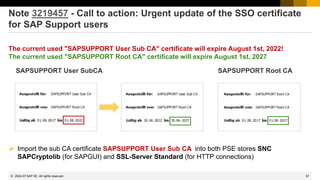
https://support.sap.com/sos
→ Media Library
CoE Security Services - Security Baseline Template Version
https://support.sap.com/dam/library/SAP%20Support%20Portal/support-programs-services/support-
services/security-optimization-service/media/Security_Baseline_Template.zip.
2015-12
1495
© 2022 SAP SE. All rights reserved.
Note 2233617 - Security Vulnerabilities in SAP Download Manager
(reloaded)
These vulnerabilities can potentially be abused by an attacker to launch man-in-the-middle attacks. Attackers thus
could tamper with the content of software downloads and submit malware of their own while the administrator
assumes to get software from SAP.
Employees who are using the SAP Download Managers should deinstall the existing version and get the new
version from https://support.sap.com/software/download-manager.html
This is a executable jar-file which does not require a
special installation procedure – you simply put it into
any folder:
The most visible change (among others) is that you
connect to the Service Marketplace via an SSL
encrypted channel
In addition users can validate the
digital signatures of downloads as
described in note 2178665.
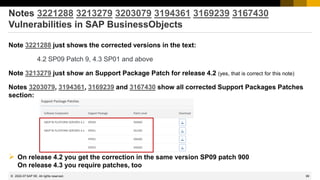
This is a executable jar-file which does not require a
special installation procedure – you simply put it into
any folder:
The most visible change (among others) is that you
connect to the Service Marketplace via an SSL
encrypted channel and that you cannot store
the password anymore (no SSO available):
In addition users can validate the
digital signatures of downloads as
described in note 2178665.
2015-12
1496
© 2022 SAP SE. All rights reserved.
Note 2108479 - Missing authorization check in FI-GL-GL-G
Relevant for application New General Ledger Accounting
Report FAGL_YEC_POSTINGS_EHP4 = transaction FAGL_<country>_02
gets new authorization checks
for F_BKPF_BUK activities 03 and 10
and
for F_BKPF_BLA activity 10
and
via BAdI FAGL_AUTHORITY_CHECK (optional)
respective for authorization object F_FAGL_LDR activities 03 and 01.
An error message stops the report for the first missing authorization check.
(In classic General Ledger Accounting report RFSUMB00 is used which is not touched by this note.)
2015-12
November 2015
1498
© 2022 SAP SE. All rights reserved.
Topics November 2015
ONAPSIS Advisories 2015 up to 044 about SAP HANA (TrexNet)
Security Fixes to Vulnerabilities Reported in SNOTE Application
Note 2233617 - Security Vulnerabilities in SAP Download Manager
Note 2197428 - Potential remote code execution in HANA
Note 2197100 - OS injection through call of function module by SM37
Note 1611408 - Missing authorization check in SD-SLS
Delta-mode vs. full calculation in System Recommendations
2015-11
1499
© 2022 SAP SE. All rights reserved.
ONAPSIS Advisories 2015 about SAP HANA (TrexNet)
The solutions are available with several notes:
Older notes 2140700 2153765 2153892 2153898
Note 2148854 - Potential information disclosure relating to server information, July 2015
Solution: (SPS 8 is not affected), revision 97 for SPS 9, or SPS 10
Note 2165583 - SAP HANA secure configuration of internal communication, August 2015
Release independent solution according to manual instruction, see note 2183363, too
Note 2175928 - Potential remote termination in SAP HANA text engine, August 2015
Solution: revision 85.05 for SPS 8, revision 95 for SPS 9, or SPS 10
Note 2197397 - Potential remote code execution in SAP HANA XS, September 2015
Solution: revision 85.05 for SPS 8, or revision 92 for SPS 9, (SPS 10 is not affected)
Note 2197428 - Potential remote code execution in HANA, October 2015
Solution: no fix for SPS 8, revision 97.03 for SPS 9, or revision 102.01 for SPS 10
2015-11
1500
© 2022 SAP SE. All rights reserved.
Note 2165583 / 2183363 – Secure Configuration of SAP HANA
internal network
The EarlyWatch Alert checks for the SAP HANA Network Settings for Internal Services since mid of
2015 (see EWA note 863362):
2015-11
1501
© 2022 SAP SE. All rights reserved.
Note 2165583 / 2183363 – Secure Configuration of SAP HANA
internal network
The EarlyWatch Alert checks for the SAP HANA Network Settings for Internal Services since mid of
2015 (see EWA note 863362):
The settings for the internal network must be configured in accordance with SAP Note 2183363 for
systems on one or several hosts. The check checks for obvious violations against these
recommendations.
The parameter listeninterface in the section [communication] must have neither the
value .global nor the value .all. If listeninterface has the value .internal, in the section
[internal_host_resolution], no IP addresses must be maintained that can be reached
externally.
The check is carried out by comparing against the values of net_publicname in the
view M_HOST_INFORMATION.
The check triggers EWA alert 21 “SAP HANA Internal Network Configuration is insecure” (red rating),
respective 22 “SAP HANA Internal Network Configuration may lead to future security risks” (yellow
rating).
2015-11
1502
© 2022 SAP SE. All rights reserved.
Note 2197428 - Potential remote code execution in HANA
Fixing the issue requires to upgrade at least to revision 97.03 or 102.1 or higher.
However, in the interim time, the risk can be mitigated by the following measures:
➢ If possible, block direct user access to the HANA system on the network layer, e.g. by appropriate
firewall configuration.
➢ This especially is normally possible for scenarios in which only indirect access to the HANA system is
required e.g. via Business Suite or NetWeaver Gateway.
➢ To our knowledge, attackers who want to exploit the corresponding vulnerabilities, require direct access to
the SAP HANA system, which can be blocked if users need only indirect access via NetWeaver Work
Processes (e.g. Business Suite or BW) or via NetWeaver Gateway.
➢ Actively monitor and respond to HANA dumps.
➢ Attackers are likely to try several attempts which may lead to dumps and thus allow to get alerted on such
activities.
➢ Configure, actively monitor and respond to suspicious activities recorded in the HANA Audit Trail.
➢ Unexpected or malicious activities can be discovered and suitable countermeasures can be taken, if the
HANA Audit Trail (best practice) is set-up and monitored properly.
2015-11
1503
© 2022 SAP SE. All rights reserved.
Security Fixes to Vulnerabilities Reported in SNOTE Application
Customers are advised to implement these notes immediately.
Note 2235513 - External RFC callback to customer systems in SNOTE
Note 2235514 - Standard RFC destination for note download can be overridden
Table CWBRFCUSR is not used in customer systems anymore
Note 2235515 - Insufficient logging in SNOTE
These corrections are in the same SP per release:
700 SP 33 701 SP 18 702 SP 18 710 SP 21
711 SP 16 730 SP 15 731 SP 18 740 SP 14 750 SP 2
Re-run of SysRec background job necessary because validity of correction instructions was updated.
For obvious reasons: No testing in test systems or production systems necessary.
2015-11
1504
© 2022 SAP SE. All rights reserved.
Note 2233617 - Security Vulnerabilities in SAP Download Manager
These vulnerabilities can potentially be abused by an attacker to launch man-in-the-middle attacks. Attackers thus
could tamper with the content of software downloads and submit malware of their own while the administrator
assumes to get software from SAP.
Employees who are using the SAP Download Managers should deinstall the existing version and get the new
version from https://support.sap.com/software/download-manager.html
This is a executable jar-file which does not require a
special installation procedure – you simply put it into
any folder:
The most visible change (among others) is that you
connect to the Service Marketplace via an SSL
encrypted channel and that you cannot store
the password anymore (no SSO available):
In addition users can validate the
digital signatures of downloads as
described in note 2178665.
2015-11
1505
© 2022 SAP SE. All rights reserved.
Note 2197100 - OS injection through call of function by SE37
Should you implement this note (see note 2039075) as described?
Is this function the only one which executes OS commands?
Is this function much more dangerous than the other multiple 100.000 function modules and class
methods?
Think big: “No development activities or low level test tools in production systems”
➢ Strictly control access to SE37 and to authorizations for S_DEVELOP for object type FUGR and
activity 16 = execute (and all change activities)
➢ Strictly control access to SE24 and to authorizations for S_DEVELOP for object type CLAS and
activity 16 = execute (and all change activities)
➢ Control access to authorization object S_C_FUNCT and function name SYSTEM
➢ Try to control access to authorization object S_DATASET (but that’s a quite different story)
2015-11
1506
© 2022 SAP SE. All rights reserved.
Note 1611408 - Missing authorization check in SD-SLS
SysRec showed the note as false-positive in release ECC SAP_APPL 606.
Old version 1 was relevant for this release.
Current version 2 is not relevant for this release anymore but SysRec still showed the note if it was on
the list with version 1.
SAP triggered re-calculation in the SAP backbone on 15.10.2015.
This note and other similar notes should have vanished after the next run of the background job.
2015-11
1507
© 2022 SAP SE. All rights reserved.
Delta-mode vs. full calculation in System Recommendations
If necessary SAP triggers a full calculation
on the SAP backbone which replaces all
data:
Usually System Recommendations runs
in delta-mode and checks new notes
since previous run of the job only:
Example for the log of a daily job:
See application log, transaction SLG1 for
log object AGS_SR
2015-11
October 2015
1509
© 2022 SAP SE. All rights reserved.
Topics October 2015
Note 1677810 - Unauthorized modification in ITS-Service in IS-U-WA
Note 2189853 - SAP Internet Communication Framework fails to validate HTTP_WHITELIST
Note 2103389 - Missing authorization check in BC-VMC
Example for very old note having manual instructions:
Note 1445998 - Disabling invoker servlet
Note 2192982 - Potential information disclosure relating to TLS 1.1/1.2
Note 2080378 - Transaction STRFCTRACE: Evaluation of RFC statistic records
2015-10
1510
© 2022 SAP SE. All rights reserved.
Note 1677810 - Unauthorized modification in ITS-Service in IS-U-WA
• Note about security vulnerability in a web interface of an Industry Solution
• Solution published via Support Package in March 2012
• The related note refer to Kernel Patches from 2010 and 2011
• Update in September 2015 to tell that the repair report which you get via the note has to be
executed (if you do not use the Support Package)
• Only necessary in development system because the correction will be added to a transport
• Do not use the XPRA tip at all (I guess it will not work for this note anyway)
• If you never have installed a Support Package since 3 years, you have many more security
risks than this one
• Conclusion: Nothing to do now – except to check if you regularly run Support Package
upgrades
2015-10
1511
© 2022 SAP SE. All rights reserved.
Note 2189853 - SAP Internet Communication Framework fails to
validate HTTP_WHITELIST
“Attention: Before applying the correction make sure that the configuration of table HTTP_WHITELIST
in the target clients other than client "000" meets your requirements!”
➢ Check entries in client 000 using SE16(*) and decide which you have to move to the productive
client(s).
➢ Keep in mind that public services from node default_host/sap/public stay in client 000 !
Note 853878 - HTTP WhiteList Check (Introduction to the topic)
WebDynpro ABAP - Security Risk List
https://help.sap.com/saphelp_nw70ehp2/helpdata/en/48/69f794e8a607d6e10000000a42189c/content.htm
NWBC - 7.9.2 Defining Whitelist in HTTP_WHITELIST in ABAP Back-End
http://help.sap.com/saphelp_nw70ehp3/helpdata/EN/ee/984daaa3834eeaa77d5edb822570f6/content.htm
(*) SM30 does not work for tables containing string fields. Instead of SE16 you can use report RS_HTTP_WHITELIST as of release 7.31.
2015-10
1512
© 2022 SAP SE. All rights reserved.
Note 2189853 - SAP Internet Communication Framework fails to
validate HTTP_WHITELIST
Related notes:
 Note 2032237 - Using CHECK_HTTP_WHITELIST for server-relative URLs
 Note 2193214 - Potential false redirection of Web site content in SAP Internet Communication
Framework
 Note 2223891 - How to configure HTTP_WHITELIST table for public services
Available entry types:
 01 Portal CSS Theme URL
 02 sap-exiturl
 03 NWBC (open a ticket if you need this for release <= 7.02)
 10 Web Dynpro Resume URL
 20 Redirect URL for /sap/public/myssocntl (Note 612670)
 21 Redirect URL for /sap/public/bc/icf/logoff (Note 1509851)
2015-10
1513
© 2022 SAP SE. All rights reserved.
Note 2103389 - Missing authorization check in BC-VMC
Solution:
➢ Kernel patch as of release 7.21
➢ Set profile parameter vmcj/property/Admin_Security_Active = on
The profile parameter is not documented in transaction RZ11
Transaction SM53 would show it:
The authorization check gets
added on the Java part of that
transaction.
2015-10
1514
© 2022 SAP SE. All rights reserved.
Example for very old note having manual instructions:
Note 1445998 - Disabling invoker servlet
HotNews from 2010 – Is it still valid?
Good news: The Invoker Servlet has been disabled by default as of release 7.20.
But: In case of older systems you have to disable the vulnerable feature manually by changing
the value of EnableInvokerServletGlobally property of servlet_jsp service on the server
nodes to false.
Open questions:
➢ How to ensure security in old systems?
➢ How to identify old security notes which are still relevant?
➢ How to identity manual configuration steps in general?
2015-10
1515
© 2022 SAP SE. All rights reserved.
Note 2192982 - Potential information disclosure relating to TLS 1.1/1.2
Solution:
“To fix the vulnerability of CommonCryptoLib version 8.4.38, install CommonCryptoLib version 8.4.39
or later. CommonCryptoLib versions 8.4.37 or previous are not affected.”
Comments:
Only a single version of the CommonCryptoLib is affected.
The application System Recommendations cannot show this note because the CommonCryptoLib is
not known in LMDB/SLD.
2015-10
1516
© 2022 SAP SE. All rights reserved.
Note 2080378 - Transaction STRFCTRACE
Evaluation of RFC statistic records
Do you know the Blog How to get RFC call traces to build authorizations for S_RFC for free!
with the report ZRFC_STATRECS_SUMMARY ?
Now you can use the standard transaction
STRFCTRACE
if you have SAP_BASIS 700 SP 32, 701 SP 17,
702 SP 17, 730 SP 13, 731 SP 15, or 740 SP 10
and Kernel 721 patch 411
The system checks whether the start authorization check
for the RFC function module was recorded using the
authorization trace (transaction STUSOBTRACE).
See SAP Note 1847663.
2015-10
1517
© 2022 SAP SE. All rights reserved.
Note 2080378 - Transaction STRFCTRACE
Evaluation of RFC statistic records
2015-10
August 2015
1519
© 2022 SAP SE. All rights reserved.
Topics August 2015
Some words about System Recommendations
SAP Note Enhancer
Note 1611408 - Missing authorization check in SD-SLS
Note 1922205 - Authorization default value in component BC-XI-IS-WKB
Note 1952092 - Code injection vulnerability in IDES systems
Note 2179384 - Traffic control: Wrong request transfer rate calculation
Note 2182842 - Potential information disclosure relating to SAP Customizing
SAP Security Notes Advisory by SAP Consulting
Note 1830797 - Missing authorization check in BC-MID-ICF
Note 2174357 - Reflected File Download Vulnerability in KM Documents Servlet
2015-08
1520
© 2022 SAP SE. All rights reserved.
Some words about System Recommendations
Q: Can I use SysRec to find all missing notes?
Frank: Yes, if you just use ABAP, Java and HANA but for other types of systems you still have to check
the Support Portal at https://support.sap.com/securitynotes
Q: Can I use SysRec to create worklists for IT basis to implement notes?
Frank: Well, you can use the status field and the integration with ChaRM, but that does not replace
some more sophisticated worklist management. Therefore I would use the Excel export as a starting
point. (But stay tuned for next version of SolMan.)
Q: Can I use SysRec to verify if notes have been implemented in production?
Frank: Partially, it works fine for notes having exact patch information like ABAP notes having
automatic correction instructions, or Kernel or Java or HANA patches but not for other notes.
Q: Can I use SysRec to verify service level agreements about the speed on notes implementation?
Frank: Not without some manual activities
2015-08
1521
© 2022 SAP SE. All rights reserved.
Some words about System Recommendations
Q: Which worklists should I feed with notes?
Frank: Use a bunch of them, e.g. the following:
1. ABAP Notes having automatic correction instructions which should reach productions as fast as possible
using a separate security patch transport
2. ABAP Notes having correction instructions which should reach productions as part of your normal transport
cycle
3. ABAP Notes which require extensive testing because of potential influence to business
4. ABAP Notes which require update of roles first, i.e. notes about SACF
5. Notes which describe postponed security optimization activities which you can do during next maintenance
activity
6. Kernel notes just for information as there is a scheduled update of the Kernel anyway (same for Java or
HANA)
7. Special project ‘Directory Traversal’ to collect notes which you may implement and configure later
8. Notes which you can ignore and for which you want to document this decision
9. Selected critical notes for which audit should get reports after some time, that production is safe
2015-08
1522
© 2022 SAP SE. All rights reserved.
SAP Note Enhancer
This Google Chrome extension enhances
the visualization of correction instructions
of notes when viewed in the SAP
Marketplace.
The ABAP portions of the correction
instructions are highlighted and the
background of insertions and deletions
are shown in different colors.
This makes it easier to understand the
involved code changes.
https://scn.sap.com/community/abap/blog/2015/06/28/chrome-extension-to-highlight-abap-correction-instructions-in-sap-notes
https://chrome.google.com/webstore/detail/sap-note-enhancer/keibkcomemkcceddcddjdlncidohgedk
2015-08
1523
© 2022 SAP SE. All rights reserved.
Note 1611408 - Missing authorization check in SD-SLS
Deletion of obsolete but critical parameter transactions OVRC, OVRE
Valid for Software Component SAP_APPL
Release 31I Until SAPKH31IB8
Release 40B Until SAPKH40B88
Release 45B Until SAPKH45B66
Release 46B Until SAPKH46B61
Release 46C Until SAPKH46C62
Release 470 Until SAPKH47036
Release 500 SAPKH50001 - SAPKH50025
Release 600 SAPKH60001 - SAPKH60020
Release 602 Until SAPKH60209
Release 603 Until SAPKH60308
Release 604 SAPKH60401 - SAPKH60409
Release 605 Until SAPKH60505
Release 606 From SAPKH60601
The note was re-released because the false assignment for release 606 was deleted
→ Very old note, no need to care about it anymore
2015-08
1524
© 2022 SAP SE. All rights reserved.
Note 1922205 - Authorization default value in BC-XI-IS-WKB
Correction of authorization proposals for transaction SXMB_MONI_BPE .
If you don’t apply the note but upgrade the Support Package you get the new authorization proposals
only into the SAP tables (transaction SU22 only but not SU24).
Changing authorization proposals has only an effect if you re-generate standard authorization values
in roles via PFCG. You can search for such roles having transaction SXMB_MONI_BPE in the role menu
using transaction SUIM:
The only change is that you get S_TCODE
authorizations for transaction SU01D instead of
SU01 but both still require additional
authorizations for S_USER_GRP which are not
part of the authorization proposals.
2015-08
1525
© 2022 SAP SE. All rights reserved.
Note 1952092 - Code injection vulnerability in IDES systems
Only relevant for IDES Demo Systems.
The correction deletes report ZVUJLOG0, however, there are many hundreds of other Z-reports in an
IDES Demo Systems.
Did you ever have applied security patches or other security controls to such systems?
Depending on the answer, you know what to do with this note.
General rule for Demo Systems: No connections in SM59 from/to productive systems
2015-08
1526
© 2022 SAP SE. All rights reserved.
Note 2179384 - Traffic control: Wrong request transfer rate
calculation
J. G.: Hallo Herr Buchholz, beim letzten Webinar im April hatten wir über den Hinweis 1981955 - "Minimale Datenübertragungsraten für Anfragen in
SAP Web Dispatcher und ICM erzwingen" gesprochen. Anfang Juni habe ich vom AGS die Aussage, dass die Implementierung seit ihrer
Auslieferung fehlerhaft ist. Die Übertragungsrate wird nicht korrekt ermittelt und somit werden die meisten Verbindungen mit "Traffic control
condition" (im dev_icm) abgeblockt. Der Hinweis ist immer noch verfügbar und noch nicht aktualisiert.
Updated correction for
Note 1981955 - Enforcing minimal request transfer rates in SAP Web Dispatcher
and ICM
SAP KERNEL
7.21 patch 523
7.22 patch 10
7.42 patch 210
7.43 patch 26
7.44 patch 14
7.45 patch 3
2015-08
1527
© 2022 SAP SE. All rights reserved.
Note 2182842 - Potential information disclosure relating to SAP
Customizing
Security Note 2182842 refers to normal note 1859065 which undo's the critical change made by note
1814956.
If you haven't implements note 1814956 you need note 1859065 only in SAP_BASIS release 731 SP 8
and 740 SP 3 because both notes are part of the same SP in other releases:
Support Package assignments:
Note 1814956 Note 1859065
700 SAPKB70029 700 SAPKB70029
701 SAPKB70114 701 SAPKB70114
702 SAPKB70214 702 SAPKB70214
710 SAPKB71017 710 SAPKB71017
711 SAPKB71112 711 SAPKB71112
720 SAPKB72008 720 SAPKB72008
730 SAPKB73010 730 SAPKB73010
731 SAPKB73108 731 SAPKB73109 → SP 8 is affected
740 SAPKB74003 740 SAPKB74004 → SP 3 is affected
2015-08
1528
© 2022 SAP SE. All rights reserved.
SAP Security Notes Advisory by SAP Consulting
When publishing Security Notes on https://support.sap.com/securitynotes, SAP also publishes a prioritization.
This prioritization is based on certain criteria from a development / product point of view, also incorporating
CVSS scores where applicable.
With the SAP Security Notes Advisory, SAP Global Service & Support offers an additional prioritization.
This prioritization is no contradiction to the original priorities given by the SAP product development. It
supplements these priorities with a field view, adding experiences from both practical security and
implementation of SAP applications and operation of systems by SAP Global Service & Support. The Advisory
also gives hints on side-effects to expect and recommends an implementation approach for the Security Notes
published each month.
Important note: This service is delivered by the SAP Consulting (part of SAP Global Service & Support).
Please address any questions about this Advisory to security.consulting@sap.com
If you have issues with individual SAP Note implementation
steps, please open a message on the component of the
SAP Note.
You can find the latest version of the Advisory on
SAP Support Portal /sos
https://support.sap.com/sos
→ Media Library → SAP Security Notes Advisory
2015-08
1529
© 2022 SAP SE. All rights reserved.
Note 1830797 Missing authorization check in BC-MID-ICF
Authorization check for authorization object S_ICF_ADM changed in transaction SICF.
It’s a functional note as just non-existing activity 04 get replaced with activity 06=delete.
You do not have to update roles as your administrators most likely have authorizations for all activities
for that authorization object S_ICF_ADM anyway.
2015-08
1530
© 2022 SAP SE. All rights reserved.
Note 2174357 - Reflected File Download Vulnerability in KM
Documents Servlet
Note shows “Causes – Side Effects”:
Go for the Support Packages as listed in note 2199306:
KMC CONTENT MANAGEMENT 7.00 SP033 patch 0
KMC CONTENT MANAGEMENT 7.01 SP018 patch 0
KMC CONTENT MANAGEMENT 7.02 SP018 patch 0
KMC CONTENT MANAGEMENT 7.30 SP015 patch 0
KMC CONTENT MANAGEMENT 7.31 SP018 patch 0
KMC CONTENT MANAGEMENT 7.40 SP013 patch 0
2015-08
July 2015
1532
© 2022 SAP SE. All rights reserved.
Topics July 2015
Note 2122578 - New: Security Audit Log event for unencrypted GUI / RFC connections
Note 2029397 - Missing authorization checks for RFC in E-commerce ERP applications
Note 2057982 - Hardcoded credentials in BC-SRV-DX-DXW
Note 2059659 - Hardcoded credentials in BC-CUS-TOL-CST
Note 2122247 - Data missing from table TCDOB following import of EHPs
2015-07
1533
© 2022 SAP SE. All rights reserved.
Note 2122578 - Security Audit Log event for unencrypted GUI / RFC
Let's assume you run a staged project to encrypt all communication channels (Example: GUI):
1. Enable servers to accept encrypted communication requests
… but unencrypted communication is still allowed
(snc/enable = 1 and snc/accept_insecure_gui = 1)
2. Enable clients to initiate encrypted communication requests
… but unencrypted communication is still allowed
3. After checking that all communication channels are encrypted:
Enforce servers to only accept encrypted communication requests
(snc/enable = 1 and snc/accept_insecure_gui = 0)
How can you verify if all SAPGUI sessions use SNC?
2015-07
1534
© 2022 SAP SE. All rights reserved.
Note 2122578 - Security Audit Log event for unencrypted GUI / RFC
The custom reports ZSM04000_SNC (based on SM04)
and ZRSUSR000_620 (based on AL08) which you can
find on SCN show an overview about the SNC status but
have the same restrictions as the original transactions.
Transaction SM04 → User → Technical Information
shows the SNC status of active connections on one
application server.
2015-07
1535
© 2022 SAP SE. All rights reserved.
Note 2122578 - Security Audit Log event for unencrypted GUI / RFC
Now you can use the Security Audit Log (SM19 / SM20) to log unencrypted communication for SAPGUI
and RFC.
Transaction SM19
→ …
→ Detailed Configuration
→ Log Message BUJ
Prerequisite: Note 2104732 - SAL - event definition for SNC client encryption
Analysis and Recommended Settings of the Security Audit Log (SM19 / SM20)
http://scn.sap.com/docs/DOC-60743
2015-07
1536
© 2022 SAP SE. All rights reserved.
Note 2029397 - Missing authorization checks for RFC in E-
commerce ERP applications
New authorization concept for remote
access to E-commerce.
• Various RFC enabled functions
• Multiple authorization objects
including a new one
Use Workload Statistics, transaction
ST03N, or transaction STRFCTRACE to
verify if some of the listed RFC functions
have been executed.
You can use UCON as well.
2015-07
1537
© 2022 SAP SE. All rights reserved.
Note 2057982 - Hardcoded credentials in BC-SRV-DX-DXW
Note 2059659 - Hardcoded credentials in BC-CUS-TOL-CST
Deactivation of obsolete, unused code.
2015-07
1538
© 2022 SAP SE. All rights reserved.
Note 2122247 - Data missing from table TCDOB and TDDAT
following import of EHPs
Table TCDOB Change document object definition
Table TDDAT Assignments of tables and views to table authorization groups
Fallback: Unassigned tables and views are checked with S_TABU_DIS for group &NC&
You should use authorizations for S_TABU_NAM instead of S_TABU_DIS anyway.
Solution
Use at least SUM 1.0 SP12 Patch Level 4 or a higher SUM version.
If you are affected, change documents may be incomplete, as well as the authorization checks for
generic table access. In this case, contact SAP Support directly.
Logging of table access using standard tools like SE16, SM30, SM31, SM34, SQVI:
Activate the message DU9 (of group transaction start, not critical) in the Security Audit Log.
Message: „Generic table access call to &A with activity &B (auth. check: &C )”
2015-07
June 2015
1540
© 2022 SAP SE. All rights reserved.
Topics June 2015
Note 2183624 - Potential information leakage using default SSFS master key in HANA
Note 1997734 - Missing authorization check in Trusted-RFC runtime
Note 2144333 - Missing authorization check in CRM-LAM
Note 2163306 - Fixing FREAK vulnerability in CommonCryptoLib and SAPCRYPTOLIB
Note 2099484 - Missing authorization check in Payment Engine
Note 1749142 - How to remove unused clients including client 001 and 066
2015-06
1541
© 2022 SAP SE. All rights reserved.
Note 2183624 - Potential information leakage using default SSFS
master key in HANA
Spotlight-News
Last week we saw a conference talk and a few press articles related to an alleged default security
configuration in SAP HANA installations.
Our recommendation is to change the default main keys that are issued with SAP HANA installations
as described in SAP security note 2183624. This is valid as of HANA SPS 06.
The SSFS main key is used to encrypt the root encryption keys of your SAP HANA database. It is a
default key that is the same for all installations unless explicitly changed. SAP therefore highly
recommends that you change this key immediately after installation or after you have received SAP
HANA pre-installed from a database vendor.
If the key was not changed after installation, we recommend that you perform the key change in the
next available maintenance window.
For more detailed information we recommend you create a customer incident on component HAN-DB-SEC.
Customers requiring consulting support in regards to their installations are welcome to contact SAP Security
Consulting following SAP Note 114045.
2015-06
1542
© 2022 SAP SE. All rights reserved.
Note 2183624 - Potential information leakage using default SSFS
master key in HANA
The EarlyWatch Alert (EWA) checks if the
parameter ssfs_key_file_path is not set in the
section [cryptography] of the global.ini file. If
this is the case most likely your SSFS Main
Encryption Key has not been changed from
its default value.
See:
Note 863362 - Security checks in SAP
EarlyWatch Alert, EarlyWatch and GoingLive
sessions
2015-06
1543
© 2022 SAP SE. All rights reserved.
Note 1997734 - Missing authorization check in Trusted-RFC runtime
2015-06
1544
© 2022 SAP SE. All rights reserved.
Note 1997734 - Missing authorization check in Trusted-RFC runtime
There exist two working modes with Trusted-RFC:
1. Trusted-RFC with same-user
AUTHORITY-CHECK OBJECT 'S_RFCACL'
ID 'RFC_SYSID' FIELD <sysid>
ID 'RFC_CLIENT' FIELD <cclient>
ID 'RFC_USER' DUMMY
ID 'RFC_EQUSER' FIELD 'Y'
ID 'RFC_TCODE' DUMMY "respective FIELD <tcode>
ID 'RFC_INFO' DUMMY "respective FIELD <license_nr>
ID 'ACTVT' FIELD '16'.
2. Trusted-RFC with dedicated user as defined in the RFC destination
AUTHORITY-CHECK OBJECT 'S_RFCACL'
ID 'RFC_SYSID' FIELD <sysid>
ID 'RFC_CLIENT' FIELD <cclient>
ID 'RFC_USER' FIELD <whoami>
ID 'RFC_EQUSER' FIELD 'N' "this was not checked (dummy)
ID 'RFC_TCODE' DUMMY "respective FIELD <tcode>
ID 'RFC_INFO' DUMMY "respective FIELD <license_nr>
ID 'ACTVT' FIELD '16'.
2015-06
1545
© 2022 SAP SE. All rights reserved.
Note 1997734 - Missing authorization check in Trusted-RFC runtime
Authorization Field Meaning
ACTVT Activity 16=Execute
RFC_SYSID Caller system id (SID) Avoid * entry!
RFC_INFO Optional caller license number (provided both communication partners
are at least 7.02 SAP_BASIS Release)
RFC_CLIENT Caller client. Avoid * entry!
RFC_USER Caller user. Avoid * entry for RFC_EQUSER = N
RFC_EQUSER 'Y' Same user (RFC_USER not considered)
'N‘ Dedicated user (RFC_USER is checked)
Avoid * entry!
RFC_TCODE Optional caller transaction code, checked if „Use transaction code“ is
activated in SMT1 (Trust Configuration).
Note that due to its highly critical nature, S_RFCACL is not part of SAP_ALL.
2015-06
1546
© 2022 SAP SE. All rights reserved.
Note 1997734 - Missing authorization check in Trusted-RFC runtime
Example: Trusted-RFC-same-User
Authorization
Field
Authorization
Value
ACTVT Activity: 16=Execute
RFC_SYSID S1P, S2P, …
RFC_INFO *
RFC_CLIENT 200
RFC_USER ' '
RFC_EQUSER Y
RFC_TCODE *
Authorization
Field
Authorization
Value
ACTVT Activity: 16=Execute
RFC_SYSID S1P, S2P, …
RFC_INFO *
RFC_CLIENT 200
RFC_USER USER1, USER2, …
RFC_EQUSER N
RFC_TCODE *
Example: RFC-user for specific application
2015-06
1547
© 2022 SAP SE. All rights reserved.
Note 1997734 - Missing authorization check in Trusted-RFC runtime
How to find critical authorizations, profiles, roles, uses:
Use transaction SUIM and search for authorization values #*
This authorization fulfilled the check
for RFC destinations having
dedicated users, too.
2015-06
1548
© 2022 SAP SE. All rights reserved.
Note 1997734 - Missing authorization check in Trusted-RFC runtime
Note 2008727 - Whitepaper: Securing Remote Function Calls
http://scn.sap.com/docs/DOC-60424
Check reports about RFC:
RSRFCCHK
RS_SECURITY_TRUST_RELATIONS
RS_UPDATE_TRUST_RELATIONS (see note 1491645)
2015-06
1549
© 2022 SAP SE. All rights reserved.
Note 2144333 - Missing authorization check in CRM-LAM
The note introduces the transaction start authority check for S_TCODE for some reports which have
corresponding report transactions.
Report New authorization check for Transaction
CRM_FS_ASSET_CREATE CRM_FS_ASSET Asset Handling and Depreciation
CRM_FS_CALC_CASH_FLOW CRM_FS_CALC Calculation of Cash Flow
CRM_FS_FRA_EXECUTE CRM_FS_FRA Floating Rate Adjustment
CRM_FS_INTEREST_ADJUSTMENT CRM_FS_INTADJ Interest Rate Adj. of Leasing Docs
CRM_FS_INTADJ_ANALYSIS_DISPLAY CRM_FS_INTADJ_DISP Disp. Eval. for Interest Rate Adj.
CRM_FS_TQ_MASS_RUN CRM_FS_TQ_MASS_RUN Mass Run for Termination Quotation
CRM_FS_MASS_CHANGE CRMC_FS_MASS_CHANGE Start Mass-Changes
Other security note about same topic “Report Transactions”: Note 2157877, 2157877
2015-06
1550
© 2022 SAP SE. All rights reserved.
Note 2144333 - Missing authorization check in CRM-LAM
Example
Mitigation:
Do not allow access to transactions like SA38
which allow to submit any report.
2015-06
1551
© 2022 SAP SE. All rights reserved.
Note 2163306 - Fixing FREAK vulnerability in Crypto-Library
Assigned Software Component: CRYPROLIB
(but not KERNEL or HANA in opposite to similar note 2067859 )
→ not visible in System Recommendations
Affected products:
• NetWeaver AS ABAP, any version
• NetWeaver AS Java, version 7.1x and higher
• SAP HANA XS, any version
Solution:
• CommonCryptoLib 8.4.36
• SAPCRYPTOLIB 5.5.5 PL39
(use it only if system currently uses
SAPCRYPTOLIB 5.5.5 )
• It is sufficient to replace these libraries.
You do not need to update the complete Kernel.
Determine the type and release of the SAP
Cryptographic Library on your system using
transaction STRUST → Environment → Display
SSF Version
Other Products:
Note 2152703 - Fixing FREAK vulnerability in Sybase Products
2015-06
1552
© 2022 SAP SE. All rights reserved.
Note 2067859 - Potential Exposure to Digital Signature Spoofing
There is a critical vulnerability in versions of SAPCRYPTOLIB, SAPSECULIB and CommonCryptoLib
components of SAP NetWeaver AS for ABAP and SAP HANA applications. The vulnerability may
enable an attacker to spoof system digital signatures based on the DSA algorithm.
Determine the type and release of the SAP Cryptographic Library on your system using transaction
STRUST → Environment → Display SSF Version. If your version is lower than those versions listed
below, then replace your SAP Cryptographic Library.
Replace the affected libraries.
• SAPCRYPTOLIB, upgrade to version 5.5.5.38 or later.
• SAPSECULIB, upgrade to SAPCRYPTOLIB
• CommonCryptoLib, upgrade to version 8.4.30 or later.
It is sufficient to replace these libraries – you do not need to update the complete Kernel.
The main preventive measure is to replace the libraries. Do this first.
You may consider to renew DSA keys, too. See note 2068693.
2015-06
1553
© 2022 SAP SE. All rights reserved.
Note 2068693 - Replacing Key Pairs in ABAP and HANA
Result:
Report execution in Application Configuration Validation for Config Stores PSE_CERT and J2EE_PSE_CERT:
2015-06
1554
© 2022 SAP SE. All rights reserved.
Note 2099484 - Missing authorization check in Payment Engine
Software Components: PAY-ENGINE, PECROSS
One part of the correction is about turning external callable RFC function modules into internal callable
functions only (not relevant concerning authorization concepts):
*>>>> START OF INSERTION <<<<
* Only allowed to be called internally
CHECK /pe1/cl_bpe_authority_checks=>check_external_rfc( ) = abap_false.
Another part is about adding authorization checks to functions (see manual correction instruction, too):
*>>>> START OF INSERTION <<<<
* Check Authorizations.
CHECK /pe1/cl_bpe_authority_checks=>check_authority_order(
i_requested_activity = con_actvt_create
i_clearing_area = space ) = abap_true.
➢ Check if you are using remote interfaces which call the Payment Engine and verify if the (technical)
users calling these BAPIs have authorizations for /PE1/* authorization objects
2015-06
1555
© 2022 SAP SE. All rights reserved.
Note 1749142 - How to remove unused clients including client 001
and 066
You have to secure any client even if it is not used. This includes the security settings of standard
users like SAP* or DDIC or EARLYWATCH which might still have well-known standard passwords as
well as the security of any other (powerful) users.
Because of this you can reduce maintenance effort and increase the security of a system if you
remove unused clients.
See blog: How to remove unused clients including client 001 and 066
http://scn.sap.com/community/security/blog/2013/06/06/how-to-remove-unused-clients-including-client-001-and-066
Client 066 is not used by SAP for a while and will not be used anymore.
Meanwhile the final obstacle which had hindered us to publish the official note 1749142 is solved:
Software Update Manager 1.0 SP13 does not request client 066 anymore during upgrade.
2015-06
May 2015
1557
© 2022 SAP SE. All rights reserved.
Topics May 2015
Note 1595582 - Deletion of temporary RFC destinations
Note 1750618 - RFC destinations created in SMSU_MANAGED_SYSTEM not delete
Note 2113995 - Missing authentication check in SAP ASE
Note 2078596 - SACF: Switchable Authorization (RFC) Scenarios (reloaded)
Current notes about System Recommendations
LZC/LZH Compression Multiple Vulnerabilities
Memory corruption vulnerabilities CVE-2015-2282, CVE-2015-2278
2015-05
1558
© 2022 SAP SE. All rights reserved.
Note 1595582 - Deletion of temporary RFC destinations
Note 1750618 - RFC destinations created in SMSU_MANAGED_SYSTEM
The job SM:REMOVE TEMPORARY RFC removes such temporary RFC destinations. It should be
scheduled every hour. In general the scheduling is done in Basic Configuration.
Workaround: Directly delete the RFC destination in transaction SM59.
Temporary RFC Destination in the
Solution Manager
Find them using report RSRFCCHK
Security Validation using
Configuration Validation shows
these entries, too.
2015-05
1559
© 2022 SAP SE. All rights reserved.
Note 2113995 - Missing authentication check in SAP ASE
HotNews for Sybase ASE Database Platform
Getting Started with SAP Sybase Adaptive Server Enterprise (ASE)
http://scn.sap.com/docs/DOC-36181
This issue has been fixed in the following SAP ASE versions:
 SAP ASE 16.0 SP01
 SAP ASE 15.7 SP132
Install the fixed SAP ASE versions most appropriate for your production environments.
2015-05
1560
© 2022 SAP SE. All rights reserved.
Note 2078596 - SACF: Switchable Authorization (RFC) Scenarios
(reloaded)
The following SAP Notes contain new switchable authorization checks in RFC:
May 2015:
Note 2152230 - Switchable authorization checks for RFC in Reconciliation Report Scheduler
Scenario HRPAYUS_RECON
Note 2072357 - Switchable authorization checks for RFC in SRM application
Scenarios BBP_UPDATE_DOC, BBP_DOC_CREATE, BBP_VEND_UPADTE,
BBP_CONF_GETDETAIL, BBP_CTR_GETDETAIL, BBP_INV_GETDETAIL, BBP_VL_GETDETAIL
Note 2053788 - Missing authorization check in RFC enabled function module - BC-MOB-MI-SER
Scenario BC_MI_RFC_CHECK
2015-05
1561
© 2022 SAP SE. All rights reserved.
Note 2078596 - SACF: Switchable Authorization (RFC) Scenarios
(reloaded)
The following SAP Notes provides solution which do not require a switch:
May 2015:
Note 2043447 - Missing authorization check in SV-SMG-BPCA
Note 2052677 - Possible code injection and missing RFC authentication
Note 2053043 - Missing RFC authorization in eCATT Extended Computer Aided Test Tool
Note 2053197 - ChaRM: Missing authorization check in SV-SMG-CM
Note 2058351 - Missing authorization check in BC-VMC
Note 2066851 - Missing authority-check vulnerability in the OCS functionality
Note 2066943 - New authorization check for RFC in component WEC-APP-UM
Note 2067630 - DBA Cockpit: Missing authorizations during administration of jobs and scripts
Note 2105620 - Missing authorization check in Calendar Interface
Note 2105633 - Missing authorization check in Alert Management Interface
Note 2105634 - Missing authorization check in ALE Interface
Note 2118500 - Missing authorization check in SAP Records Management
Note 2122022 - Missing authorization check in function RSPO_R_SAPGPARAM
Note 2131334 - Missing authorization check in Process Monitoring Infrastructure
Note 2138031 - Missing authorization check in BC-BMT-WFM
Note 2138219 - Missing authorization check in BC-BMT-WFM
Note 2140238 - Missing authorization check in BC-XI-IS-BPE
Note 2143329 - Missing authorization check in RDDPUTJZ_COPY_TRANSPORT
Note 2149278 - Missing authorization check in SAP Records Management
2015-05
1562
© 2022 SAP SE. All rights reserved.
Current notes about System Recommendations
Note 2099728 - SysRec: Object list for ABAP notes does not show Usage Procedure Logging
Note 2137673 - SysRec: filter completed implemented SAP Notes
Note 2141744 - SysRec: changed status lost
reloads 2025144 - SysRec: enhancement for RFC to managed system and switch framework
Note 2146340 - SysRec: dump in automatic check
Note 2150787 - SysRec: missing system in reporting
KBA 2126621 - SysRec: Requirement before opening incident for System Recommendation
KBA 2117439 - SysRec: Notes related to HR sub component are not presented
KBA 2041071 - SysRec: How to download latest Java patches using System Recommendation
SysRec → Choose Java Patches, then use MopZ
Tipp: Call System Recommendations for the Solution Manager System, filter by Application
Component SV-SMG-SR and search for Correction Notes
2015-05
1563
© 2022 SAP SE. All rights reserved.
KBA 2126621 - SysRec: Requirement before opening incident for
System Recommendation
Ensure that the following points have been checked.
➢ The RFC destination SAP-OSS is working fine. If not, refer to note 982045 for rectification.
➢ The managed systems are correctly registered in LMDB and have been assigned to a product
system and solution.
➢ Working READ RFC to the managed system has been created and actual installed software
component version info (SP level etc) has been synchronized into LMDB software component list.
➢ Managed systems have been included in SysRec automatic check following note 1942291. This is
essential due to reason explained in note 2046605.
(Tip: copy job SM:SYSTEM RECOMMENDATIONS and execute it once instead if using ‘Refresh’)
➢ Follow the recommendation in note 2043295 and 2137673 if SysRec presents non relevant notes.
➢ In the event that no data ( 0 count ) is listed for UPL/SCMON in "Show Object List", refer to the
note 2099728.
2015-05
1564
© 2022 SAP SE. All rights reserved.
LZC/LZH Compression Multiple Vulnerabilities
Memory corruption vulnerabilities CVE-2015-2282, CVE-2015-2278
Note 2121661 - Potential remote termination of running processes in ABAP & Java Server
Note 2124806 - Potential remote termination of running processes in SAP GUI
Note 2125316 - Potential termination of running processes in SAPCAR
Note 2127995 - Potential remote termination of running processes in Content Server
2015-05
1565
© 2022 SAP SE. All rights reserved.
LZC/LZH Compression Multiple Vulnerabilities
Memory corruption vulnerabilities CVE-2015-2282, CVE-2015-2278
Component Solution Notes
Kernel
jstart
SAP KERNEL 7.20 patch 719
SAP KERNEL 7.21 patch 416
SAP KERNEL 7.22 patch 2
SAP KERNEL 7.41 patch 210
2121661
R3trans 11.02.15 19466
R3load
SAP KERNEL 7.21 patch 419
SAP KERNEL 7.22 patch 2
SAP KERNEL 7.41 patch 215
SAP KERNEL 7.42 patch 110
SAP KERNEL 7.43 patch 18
2136942, 1724496
SAP NetWeaver RFC SDK 7.21 patch 34 1025361
SAP RFC SDK SAP KERNEL 7.20 patch 720
SAP KERNEL 7.21 patch 420
413708
2015-05
1566
© 2022 SAP SE. All rights reserved.
LZC/LZH Compression Multiple Vulnerabilities
Memory corruption vulnerabilities CVE-2015-2282, CVE-2015-2278
Component Solution Notes
SAP Java Connector JCo 3.0.13
SAP Business Connector Service Release 11
2155739
SAP .NET Connector 3.0.15
Advanced Analysis Office (AO 1.4 SP 12, AO 2.0 SP 2)
Plant Connectivity (PCo 15.0 SP04)
2095394
ABAP development tools for
SAP NetWeaver
2.41 2126477
Hana Studio HANA Studio 2.0.12
HDB 1.0 revision 94
SAP GUI SAP GUI 730 Patch Level 13
SAP GUI 740 Patch Level 2
2124806
SAPCAR version after March 16, 2015 2125316
SAP Content Server SAP Content Server 6.50 SP03 2127995, 514500
2015-05
1567
© 2022 SAP SE. All rights reserved.
LZC/LZH Compression Multiple Vulnerabilities
Memory corruption vulnerabilities CVE-2015-2282, CVE-2015-2278
SAP software download center at
https://support.sap.com/swdc
→ Support Packages and Patches
→ Browse Download Catalog
→ Additional Components
2015-05
1568
© 2022 SAP SE. All rights reserved.
LZC/LZH Compression Multiple Vulnerabilities
Memory corruption vulnerabilities CVE-2015-2282, CVE-2015-2278
http://www.coresecurity.com/advisories/sap-lzc-lzh-compression-multiple-vulnerabilities
The published example refers to the Open Source versions of MaxDB but not the SAP MaxDB.
2015-05
April 2015
1570
© 2022 SAP SE. All rights reserved.
Topics April 2015
Notes 1769064 und 931252
Profile Parameter auth/rfc_authority_check
[Troopers 2015] RFC callback - A Backdoor in Wonderland
Note 2084037 - Potential information disclosure relating to RFC SDK
Note 2140700 - Potential termination of HANA client (hdbsql)
Note 2121869 - Potential information disclosure relating to NW Application Server and BW
Note 1966655 - Potential denial of service in ICM
Note 1981955 - Enforcing minimal request transfer rates in SAP Web Dispatcher and ICM
Note 2179384 - Traffic control: Wrong request transfer rate calculation
2015-04
1572
© 2022 SAP SE. All rights reserved.
Notes 1769064 und 931252
Profile Parameter auth/rfc_authority_check
0 = No authorization check
1 = Authorization check active (no check for same user)
(no check for same user context and function group SRFC)
2 = Authorization check active (no check for function check SRFC)
3 = Logon required for all function modules except RFC_PING and RFC_SYSTEM_INFO
(no authorization check)
4 = Authorization check required for all function modules except RFC_PING and
RFC_SYSTEM_INFO
5 = Logon required for all function modules except RFC_PING (no authorization check)
6 = Authorization check required for all function modules except RFC_PING
8 = Logon required for all function modules (no authorization check)
9 = Authorization check active (SRFC-FUGR also checked)
2015-04
1573
© 2022 SAP SE. All rights reserved.
Notes 1769064 und 931252
Profile Parameter auth/rfc_authority_check
RFC enabled function modules of function
group SRFC :
RFC_GET_LOCAL_DESTINATIONS
RFC_GET_LOCAL_SERVERS
RFC_PING
RFC_PUT_CODEPAGE
RFC_SYSTEM_INFO
SYSTEM_FINISH_ATTACH_GUI
SYSTEM_INVISIBLE_GUI
SYSTEM_PREPARE_ATTACH_GUI
SYSTEM_RFC_VERSION_3_INIT
2015-04
1574
© 2022 SAP SE. All rights reserved.
[Troopers 2015] RFC callback - A Backdoor in Wonderland
Presentation by Hans-Christian Esperer & Frederik Weidemann from Virtual Forge
March 18, 2015 (at 5 p.m.) in Special Track: SAP Security
This talk demonstrates how a single, fundamental backdoor in SAP's RFC protocol allows
external attackers to penetrate even the strongest SAP security fortress. This severe security
vulnerability was reported to SAP in January 2012 and has recently been fixed.
https://www.troopers.de/events/troopers15/494_a_backdoor_in_wonderland/
Recording (31 minutes)
https://www.youtube.com/watch?v=IG1VKaKD2wE
References:
Note 1686632 - Positive lists for RFC callback (at 24:43)
Note 2008727 - Whitepaper: Securing Remote Function Calls (at 25:35)
http://scn.sap.com/docs/DOC-60424
Note 2058946 - Maintenance of callback positive lists before Release 7.31 (at 26:30)
2015-04
1575
© 2022 SAP SE. All rights reserved.
Note 2084037 - Potential information disclosure relating to RFC SDK
Replace the existing “Classical RFC Library” (librfc32) with the corresponding patch listed in this note.
You do not need to upgrade the whole Kernel. However, you not only should replace the library which
is installed together with the Kernel in folder DIR_EXECUTABLE but any “Classical RFC Library” which
is used by any external RFC server or RFC client anywhere in the file system.
Actually it’s more important to update these other installations!
References:
Note 27517 explains the installation of the “Classical RFC Library”
Note 413708 explains how to verify the version of the RFC library.
Note 1005832 shows an Overview on all RFC Libraries and SDKs.
The “SAP NetWeaver RFC Library” is different and not affected by the security vulnerability.
Note 1025361 describes the Installation, Support and Availability of the “NetWeaver RFC library”.
SAP KERNEL 7.20 patch 715
SAP KERNEL 7.21 patch 332
SAP KERNEL 7.43 patch 11
2015-04
1576
© 2022 SAP SE. All rights reserved.
Note 2084037 - Potential information disclosure relating to RFC SDK
Example (Linux) how to check the version of the RFC library using report RSBDCOS0 :
Show list of files: ls $(DIR_EXECUTABLE)/librfc*
Show version: strings $(DIR_EXECUTABLE)/librfcum.so grep "LIBRFC"
Command on
Unix: what
Linux: strings
2015-04
1577
© 2022 SAP SE. All rights reserved.
Note 2084037 - Potential information disclosure relating to RFC SDK
Example (Windows) how to check the version of the RFC library using report RSBDCOS0 :
Show list of files: dir $(DIR_EXECUTABLE)librfc*.dll
Show version: find "LIBRFC" $(DIR_EXECUTABLE)librfc32u.dll
2015-04
1578
© 2022 SAP SE. All rights reserved.
Note 2084037 - Potential information disclosure relating to RFC SDK
Example (Windows) how to check the version of the RFC library using report RSBDCOS0 :
for %f in ($(DIR_EXECUTABLE)librfc*.dll) do find "LIBRFC" %f
2015-04
1579
© 2022 SAP SE. All rights reserved.
Note 2140700 - Potential termination of HANA client (hdbsql)
▪ hdbsql is a client which connects to a HANA server.
HANA Developer Edition-SAP HANA Client
http://sdn.sap.com/irj/scn/go/portal/prtroot/docs/webcontent/uuid/402aa158-6a7a-2f10-0195-f43595f6fe5f
▪ It is sufficient to update HANA clients (hdbsql) – you do not need to update the HANA server.
▪ How to identity HANA clients (hdbsql)?
▪ How to validate the version of HANA clients (hdbsql)?
▪ “An attacker who can start hdbsql can crash it through specifying invalid command line
parameters.”
The system is already on risk if an attacker already can execute operating system commands
including arbitrary command line parameters.
2015-04
1580
© 2022 SAP SE. All rights reserved.
Note 2121869 - Potential information disclosure relating to NW
Application Server and BW
What happens if only one or two of these parts (BEx backend, BEx frontend, SAP GUI) are installed?
Does the order of implementation matters?
• If only the SAP GUI part is available, there’s no improvement at all.
• If only the BEx part is available without the SAP GUI part, in worst case the connection will not be
established automatically via t-code RRMX. We assume this is still better than establishing an
unencrypted connection.
• Both BEx parts are needed: Implement note with transaction SNOTE and execute an frontend
upgrade. If only a part of the BEx Correction is available, let’s say only the backend part,
• in case of SNC + SSO, the connection will be established using the the assertion ticket only and therefore
will be unencrypted
• in case of SNC w/o SSO, the connection via RRMX will fail and the logon screen will be displayed.
Note 2096517 describes the SAP GUI part.
Related Note 2122840 - Logon Control: Issue with login when SNC configuration is done.
2015-04
1582
© 2022 SAP SE. All rights reserved.
Note 1966655 - Potential denial of service in ICM
Note 1981955 - Enforcing minimal request transfer rates in ICM
Updated by Note 2179384 - Traffic control: Wrong request transfer rate calculation
Mitigating Slowloris Attacks
http://help.sap.com/saphelp_nw74/helpdata/en/f9/591344bde245d5afa323b48d5c0dc5/content.htm
Apply the kernel patch level specified in this SAP Note and configure the ICM in accordance with SAP Note 1981955.
Alternatively, you can also use an upstream SAP Web Dispatcher with a corresponding configuration to protect the system.
SAP Web Dispatcher and ICM offer the same mechanism to enforce a minimum request data rate to prevent flooding the
server with tons of low data rate requests (DoS). All connections that do not satisfy the required rate are closed.
Define parameter MIN_RECEIVE_RATE of profile parameter icm/server_port_<xx>
How to find reasonable values for MIN_RECEIVE_RATE?
„Chosing useful values depends on your scenario. As a general rule, chose the highest min_rate possible that does not lead to
abortion of legitimate connections. A value of 10 KB/sec can be a good starting point. If you want to improve the protection,
experiment with higher values and observe whether connections get aborted by searching for "Traffic control condition" in the
security log or dev trace. Use this feature with care.”
→ If you use it, check the ICM security log and the dev trace
“This mechanism replaces the previous one configured by parameter icm/traffic_control “ which offers a timeout only.
2015-04
March 2015
1584
© 2022 SAP SE. All rights reserved.
Topics March 2015
Note 2110020 - Enabling TLS or disabling SSLv3 protocol versions on SAP WebDispatcher, or SAP
WebAS (AS ABAP 6xx, 7xx or AS Java >= 710)
Note 1944155 - Missing authority check in Report RKEDELE1
Note 1970644 - SAL: Missing overview of message definitions
Security Configuration Validation using SAP Solution Manager
for: Why you should really get rid of old password hashes *NOW*
2015-03
1585
© 2022 SAP SE. All rights reserved.
Note 2110020 - Enabling TLS or disabling SSLv3 protocol versions
on SAP WebDispatcher, or SAP WebAS
The motivation to disable SSLv3 might be to mitigate POODLE attacks (CVE-2014-3566) against Web
Browsers.
The motivation to get TLSv1.0 support may be newly occurring interop problems with communication
peers that have recently disabled/removed support for SSLv3 (e.g. the Web Browsers Mozilla Firefox
35 and Google Chrome 40), or Servers where SSLv3 was disabled to mitigate POODLE attacks.
This note 2110020 is a how-to guide about…
• how to determine the Netweaver component version of your sapwebdisp or icman
• how to determine the version of your SAPCRYPTOLIB
• where to get software updates for SAPCRYPTOLIB 5.5.5 / CommonCryptoLib 8 and SAP
WebDispatcher (or the entire Kernel including icman)
You can configure the desired SSL&TLS protocol versions through the two SAP profile parameters
ssl/ciphersuites and ssl/client_ciphersuites according to the description and
recommended settings in Section 7 of SAP Note 510007.
2015-03
1586
© 2022 SAP SE. All rights reserved.
Note 1944155 - Missing authority check in Report RKEDELE1
Report deletes content from tables CE1<erkrs> (erks = operating concern).
→ Application specific security vulnerability within application component CO-PA (Profitability Analysis)
If you do not use this component (which is the case if no CE1<erkrs> tables exist), then blindly apply
the note and skip testing.
If you are using this component, raise priority to maximum and apply the note at once.
2015-03
1587
© 2022 SAP SE. All rights reserved.
Note 1970644 - SAL: Missing overview of message definitions
report RSAU_INFO_SYAG
Note 1970644 is a normal note (not a security note)
More notes about new messages:
Note 2128095 SAL Missing parameters in DUI, DUJ, and DUK messages
Note 1963882 SAL: Problems with evaluation of audit log files (+ manual steps)
Note 1968729 SAL: Message definition for RFC callback
Note 2025307 SAL Function module RSAU_GET_AUDIT_CONFIG (+ manual steps)
Note 2124538 SM19 Error during event selection
Note 2104732 SAL - event definition for SNC client encryption
Note 1917367 SACF: supplementary corrections
Note 1995667 SACF: Navigation error
Note 2012767 SACF: Switchable authorization check for other users
Note 2073809 SAL Optimization of event documentation (only in SP)
2015-03
1588
© 2022 SAP SE. All rights reserved.
Tips about the Security Audit Log
http://scn.sap.com/docs/DOC-60743
Using note 1970644 you can get report RSAU_INFO_SYAG which shows all events of the Security
Audit Log including the current status of activation. The detail view allows you to create an HTML-
based event definition print list including the full documentation.
Activate all critical events. Activate other events to support various security improvement projects:
Topic Description and references Messages Project
BACK RFC callback (note 2128095) DUI DUJ CUK Secure RFC Callback
FILE Directory Traversal (note 1497003) CUQ CUR CUS CUT DU5 Secure File access
REPORT Report start AUW AUX Avoid SA38 by using custom report transactions
RFC-TABLE
Generic table access via RFC using functions
like RFC_READ_TABLE (note 1539105)
CUZ
Secure standard table access (authorization
object S_TABU_RFC)
SACF
Switchable authorization scenarios, transaction
SACF (note 2078596)
DUO DUP DUQ DUU DUV Secure RFC functions
SAP FTP
FTP server allowlist using table SAPFTP_SERVERS
(note 1605054)
DU1 DU2 DU3 DU4 DU5
DU6 DU7 DU8
Secure SAP FTP
SE16
Generic table access using transactions like SE16,
SE16N, SM30, SM31, SM34, or SQV (note 2041892)
DU9
Secure standard table access (authorization
object S_TABU_DIS, S_TABU_NAM)
2015-03
1589
© 2022 SAP SE. All rights reserved.
Security Configuration Validation using SAP Solution Manager
for: Why you should really get rid of old password hashes *NOW*
2015-03
1590
© 2022 SAP SE. All rights reserved.
Security Configuration Validation using SAP Solution Manager
for: Why you should really get rid of old password hashes *NOW*
Result in Configuration Validation reporting:
Configuration Store ABAP_INSTANCE_PAHI configuration item login/password_downwards_compatibility
Configuration Store USER_PASSWD_HASH_USAGE
:
2015-03
1591
© 2022 SAP SE. All rights reserved.
How to find Configuration Stores and Documentation?
➢ Configuration Validation Wiki
http://wiki.scn.sap.com/wiki/display/TechOps/ConfVal_Home
➢ Internet search for e.g.
USER_PASSWD_HASH_USAGE site:wiki.scn.sap.com
➢ Transaction CCDB
2015-03
1592
© 2022 SAP SE. All rights reserved.
How to find Configuration Stores and Documentation?
Transaction CCDB shows Configuration Stores of a specific system:
2015-03
February 2015
1594
© 2022 SAP SE. All rights reserved.
Topics February 2015
Note 2128095 - SAL Missing parameters in DUI, DUJ, and DUK messages
Note 2015232 - Missing authorization check in XX-PART-OPT-INV (from September 2014)
Note 1902611 - Potential information disclosure relating to BC-SEC (from November 2013)
Note 2074736 - Directory traversal in GW (from November 2014)
2015-02
1595
© 2022 SAP SE. All rights reserved.
Note 1686632 - Positive lists for RFC callback (extended)
Questions from users
➢ Is it possible to use wildcards in allowlists?
• By using '*' in the allowlist table RFCCBWHITELIST for field CALLED_FM or CALLED_BACK_FM, you can
allow all called/callback function modules for the specified system. (see documentation of release 7.40)
➢ Does SAP plans to deliver a standard allowlist for SAP standard functions / remote scenarios?
 Not really as we do not know your destination names and your active scenarios
 Transaction SM59 gets an options to generate the allowlist using the Security Audit Log
➢ Would it be possible to define a blocklist instead of an allowlist?
 No, you only have allow entries and profile parameter rfc/callback_security_method :
0: All entries are ignored, even the active ones.
1: Only active entries are valid
2: Only active entries are valid. However, also (invalid) inactive entries generate an entry in the security audit log if a
callback is received from this destination that would have been rejected by the entry is active.
3: All entries are valid, even the inactive ones.
2015-02
1596
© 2022 SAP SE. All rights reserved.
Note 2015232 - Missing authorization check in XX-PART-OPT-INV
System Recommendations shows the note for all systems because it‘s classified as a release
independent (= product independent) note, which has no “Support Package assignment”, no
“Automatic Correction Instruction”, no “Manual Activity”
The Application Component XX-PART-OPT-INV „SAP Invoice Management by Open Text“ belongs to
software component OTEXTVIM which is an Add-On to SAP ERP 6.0.
See:
Note 1721041 - SAP Invoice Management by OpenText support for EhP6
Note 1598141 - SAP Enhancement Package 6 for SAP ERP 6.0:Compatible Add-ons
2015-02
1597
© 2022 SAP SE. All rights reserved.
Note 2015232 - Missing authorization check in XX-PART-OPT-INV
How to check if the note is relevant:
 Use transaction SE37 to verify if one of the functions /OPT/VIM_RPT_GET_NPO_WI_DATA
or /OPT/VIM_RPT_GET_PO_WI_DATA exist. If yes, apply the note.
or
 Check System → Status if you find an entry for software component OTEXVIM release 700 with a
support package below SP 4:
2015-02
1598
© 2022 SAP SE. All rights reserved.
Note 1902611 - Potential information disclosure relating to BC-SEC
The Secure Storage (ABAP) is based on a static main key by default. You can set an individual
main key by yourself.
Report by ERPScan:
http://erpscan.com/press-center/blog/sap-passwords-part-1/
Online Help:
Secure Storage in the File System (AS ABAP)
Using an Individual Encryption Key
Activities:
• Check recommended setting of Profile parameter rsec/securestorage/keyfile
• Set individual main key using transaction SECSTORE (see notes 1902258 and 1922423)
➢ Set „Display/maintenance using standard tools like SE16 not allowed“ and
➢ assign special table authorization group SPSE for tables RSECTAB and RSECACTB
➢ No user should have authorizations for S_TABU_DIS for table authorization group SPSE
2015-02
1599
© 2022 SAP SE. All rights reserved.
Note 1902611 - Potential information disclosure relating to BC-SEC
Use transaction SECSTORE
to check the status of the
Secure Store and to
generate an individual
random key.
…
2015-02
1600
© 2022 SAP SE. All rights reserved.
Note 1902611 - Potential information disclosure relating to BC-SEC
Result: You are using an individual
key which is stored in a file.
However, thy ABAP system can
show the content of the file e.g. via
transactions like AL11 or reports
like RSBDCOS0.
2015-02
1601
© 2022 SAP SE. All rights reserved.
Note 2074736 - Directory traversal in GW
Transaction SMGW and profile parameter gw/logging now restrict allowed pathnames to specific
directories.
Solution:
1. Check value of profile parameter gw/logging
If logging is off, you will observe, that the default is secure (no action; no path defined in
LOGFILE):
ACTION= LOGFILE=gw_log-%y-%m-%d SWITCHTF=day MAXSIZEKB=100
→ You can shift any activity to the next planned maintenance window.
2. Upgrade Kernel as described in note 2074736 and 2035100 (this note lists higher patch levels)
SAP KERNEL 7.20 patch 712
SAP KERNEL 7.21 patch 332
SAP KERNEL 7.40 patch 76
SAP KERNEL 7.41 patch 113
SAP KERNEL 7.42 patch 34
3. Set profile parameter gw/logging_secure = 1 as described in the note 2035100
2015-02
January 2015
1603
© 2022 SAP SE. All rights reserved.
Topics January 2015
Repetition: Why you should really get rid of old password hashes *NOW*
Posted by joris van de Vis in SCN Security on May 8, 2014 9:01:30 AM
How many notes are in scope of the monthly patch process?
How to find security related notes about databases (Example: Oracle)?
Note 2094598 - Fixing POODLE SSLv3.0 Vulnerability in AS Java 7.00, 7.01, 7.02
Note 1985387 - Potential information disclosure relating to SAP Solution Manager
2015-01
1604
© 2022 SAP SE. All rights reserved.
Why you should really get rid of old password hashes *NOW*
Posted by joris van de Vis in SCN Security on May 8, 2014 9:01:30 AM
Whitepaper: Secure Configuration of SAP NetWeaver Application Server ABAP
Notes 991968 / 2076925 - List of values for "login/password_hash_algorithm“ (SHA-1, SHA-256, SHA-384, SHA-512)
Note 1023437 - ABAP syst: Downwardly incompatible passwords (since NW2004s)
Note 1237762 - ABAP systems: Protection against password hash attacks
Note 1300104 - CUA|new password hash procedures: Background information
Note 1458262 - ABAP: recommended settings for password hash algorithms
Note 1484692 - Protect read access to password hash value tables
Steps:
• Monitor current configuration e.g. using application Configuration Validation
• Protect tables containing password hashes: restrict S_TABU_DIS / S_TABU_NAM
(if you want to give access to a part of a table you can create a new database view)
• Check compatibility i.e. concerning a CUA supporting very old systems with old releases, too
• Set profile parameters to enforce new policy
• Delete old password hashes
2015-01
1605
© 2022 SAP SE. All rights reserved.
Password hashes in SAP NetWeaver ABAP
 Introduction to the vulnerability
2015-01
1607
© 2022 SAP SE. All rights reserved.
What is a password hash?
Some information about password hashes
 Passwords are hashed with password hash functions into password hashes to store passwords in a secure
way
 Password hash algorithms are one way, passwords cannot be calculated from password hashes
 Password hash attacks are always possible, just the speed is different
 But password hashes can be generated from potential passwords until password hashes match
Password: Hash:
Thisisastrongpassword 9d6fffda73e361025b92fb702aabf5e0
Password: Hash:
Welcome 83218ac34c1834c26781fe4bde918ee4
Thisisastrongpassword 9d6fffda73e361025b92fb702aabf5e0
2015-01
1608
© 2022 SAP SE. All rights reserved.
Which password hash is compared during user login?
User login in AS ABAP 7.02 with login/password_downwards_compatibility* = 0/1
 Code Version per user (field CODVN) controls which password hash is used for a user authentication
 login/password_downwards_compatibility >= 2 can activate check of old BCODE in addition
SAP GUI
Username and Password SAP NetWeaver
Application Server ABAP
1
Password Password Hash
2
Calculate password hash
Compare calculated
password hash with
stored password hash
Successful user login
if password hash is
matching
Table USR02
Very Old Pwd Hash BCODE
Old Pwd Hash PASSCODE
Current Pwd Hash PWDSALTEDHASH
User1,
…
3
2015-01
1609
© 2022 SAP SE. All rights reserved.
Let’s hack an SAP system by weak password hashes!
Attack scenario
Logon to an SAP system with a user having table display access to USR02
Username
Password
SAP NetWeaver
Application Server ABAP
Display and export password
hash table
Password
Cracker
User1
Password
User2
Password
SAP GUI
Table USR02
Very Old Pwd Hash BCODE
Old Pwd Hash PASSCODE
Current Pwd Hash PWDSALTEDHASH
User1,
…
2015-01
1610
© 2022 SAP SE. All rights reserved.
SAP GUI
Let’s hack an SAP system by weak password hashes!
Attack scenario
Logon to an SAP system with a user having table display access to USR02
Username
Password
SAP NetWeaver
Application Server ABAP
Display and export password
hash table
Table USR02
Password
Cracker
User1
Password
User2
Password
User with
cracked password
Very Old Pwd Hash BCODE
Old Pwd Hash PASSCODE
Current Pwd Hash PWDSALTEDHASH
User1,
…
2015-01
1611
© 2022 SAP SE. All rights reserved.
What happens during user creation?
User creation in AS ABAP with SU01
 User administrator creates a user and enters a clear text password
 SAP system generates up to three* password hashes with different strength for downward compatibility
reasons
* Depends on profile parameter login/password_downwards_compatibility
Table USR02
Very Old Pwd Hash BCODE (≤ 6.40)
Old Pwd Hash PASSCODE (7.00-7.01)
Current Pwd Hash PWDSALTEDHASH (≥ 7.02)
2015-01
1612
© 2022 SAP SE. All rights reserved.
Some important details about available AS ABAP password hashes!
Password hash creation is controlled by a profile parameter (7.00+)
 login/password_downwards_compatibility (refer to SAP Note 1458262)
0 = Only strongest password hash is calculated
1-5 = All three password hashes are calculated
Password Hash Release
Hash Algorithm /
Code Version Security Status
BCODE 3.1i MD5 based
(Code Version A-E)
 Broken, full brute force is possible by an open source password cracker with
GPU acceleration within max 20 hours
PASSCODE 7.00-7.01 SHA1 based
(Code Version F)
 Limited, duration of attack depends on password length and password
complexity
PWDSALTEDHASH 7.02 Iterated salted SHA-1
(Code Version H)
 State of the art, higher number of iterations slows down the hash calculation;
usage of random salts prevents hash pre-calculation; password length and
complexity mitigate dictionary attacks
2015-01
1613
© 2022 SAP SE. All rights reserved.
What are the issues around password hashes in SAP systems?
SAP systems store passwords also with a broken password hash algorithm
 Refer to SAP notes 1237762 and 1458262
Password hashes are stored in several tables and tables are not assigned to special table
authorization groups
 Depending on the SAP release, password hashes are stored in up to 6 tables / views
 By default, password hash tables are assigned to table authorization group SC (which contains many tables)
 Refer to SAP note 1484692
 Refer to SAP note 2024431 that provides a report to adjust TDDAT in customer landscapes
2015-01
1614
© 2022 SAP SE. All rights reserved.
What are the issues around password hashes in SAP systems?
Large number of users have display access to the password hash tables
 Depending on the authorization concept, usually several hundred to several thousand users have access to
password hash tables
 Analysis can be done with SUIM
Authorization Object S_TABU_DIS
Activity 03 (Display)
- Table Auth Group SC, SPWD
- Table Auth Group #*
2015-01
1615
© 2022 SAP SE. All rights reserved.
SAP Runs SAP:
Approach for password hash protection
Restrict display access to password hash tables
 All password hash tables have been assigned to the dedicated table authorization group SPWD
 Authorization concept was adjusted to minimize number of users having display access to password hash
tables
Activate that only new password hashes for users are created
 Check that the CUA system generates all three password hashes
 Change profile parameter on all systems - login/password_downwards_compatibility = 0
 Exclude the CUA system if this system is connected to systems not supporting PWDSALTEDHASH
Enforcement of single sign on for personal users
 Users defined which have an exception for single sign on in SU01 – Tab SNC
 Enforce single-sign on for SAP GUI communication with (snc/accept_insecure_gui = U)
2015-01
1616
© 2022 SAP SE. All rights reserved.
SAP Runs SAP:
Approach for password hash protection
Re-enforce / adjust password policies
 Passwords for all single-sign on users have been removed
 Change all technical users to user type SYSTEM to exclude from password policy
 Password policy was adjusted by updating profile parameters (e.g. login/min_password_lng)
 Password policy was enforced by setting profile parameters
(login/password_compliance_to_current_policy)
Clean-up of old password hashes
 Execution of report CLEANUP_PASSWORD_HASH_VALUES which deletes redundant password hashes (cross-
client)
Table USR02
Very Old Pwd Hash BCODE (≤ 6.40)
Old Pwd Hash PASSCODE (7.00-7.01)
Current Pwd Hash PWDSALTEDHASH (≥ 7.02)
Cleanup Report
CLEANUP_PASSWORD_HASH_VALUES
Table USR02
Current Pwd Hash PWDSALTEDHASH (≥ 7.02)
2015-01
1618
© 2022 SAP SE. All rights reserved.
SAP Runs SAP:
Internal implementation of password hash protection
Issues faced during implementation – lessons learned
 Even with single sign on, password hashes might be stored for users
 Password policy settings (based on profile parameters) affect all clients
 Clean-up of redundant password hashes did not cause any problems
 Hardly possible to remove all BCODE password hashes in systems existing for some years (e.g. technical user
accounts with only BCODE password hashes)
 Setting login/password_downwards_compatibility = 0 after system installation saves lots of efforts
and discussions with operations
 Get reasons if login/password_downwards_compatibility has values >= 2 before changing to 0
2015-01
1619
© 2022 SAP SE. All rights reserved.
SAP Runs SAP:
Monitoring of ABAP password hash generation
Part 1: ABAP password hash generation depends on several independent settings
 Profile parameters (e.g. login/password_downwards_compatibility, login/min_password_lng,
login/password_compliance_to_current_policy)
 Table authorization groups for password hash tables
Usage of SAP Solution Manager – Configuration Validation at SAP
2015-01
1620
© 2022 SAP SE. All rights reserved.
SAP Runs SAP:
Monitoring of ABAP password hash access
Part 2: ABAP password hash access depends on several independent settings
 Percentage of users with weak password hashes (under evaluation how to monitor)
– Idea: Percentage of users with weak BCODE password hashes shall be 5% or less per user type
 Authorization roles allowing display access to password hash tables (under evaluation how to monitor)
Usage of SAP Solution Manager – Configuration Validation under evaluation
2015-01
1621
© 2022 SAP SE. All rights reserved.
How many notes are in scope of the monthly patch process?
January 2015 Note
Application
Component
Short text Priority
Release
date
Type
1985387 SV-SMG-INS-AGT Potential information disclosure relating to SAP Solution Manager high 13.01.2015 SecNote
2000401 IS-A-DP Missing authorization check in IS-A-DP high 13.01.2015 SecNote
2016638 BC-TWB-TST-ECA Untrusted XML input parsing possible in BC-TWB-TST-ECA high 13.01.2015 SecNote
2065073 BC-CST-LL Missing authorization check in System Trace high 13.01.2015 SecNote
2090692 BC-SEC Security vulnerability in ICM content filter [sapcsa] medium 13.01.2015 SecNote
2094598 BC-JAS-SEC-CPG Fixing POODLE SSLv3.0 Vulnerability in AS Java HotNews 13.01.2015 SecNote
2098906 HAN-AS-XS Code injection vulnerability in SAP HANA XS high 13.01.2015 SecNote
2109565 HAN-DB Potential information disclosure relating to IMPORT FROM statement high 13.01.2015 SecNote
2111169 XX-PART-CLK Security Vulnerabilities in ClickSoftware Applications high 13.01.2015 SecNote
2113333 BC-SYB-ASE Multiple SQL injection vulnerabilities in SAP ASE high 13.01.2015 SecNote
1951171 LO-SPM Potentiell kontrollierbarer RFC-Funktionsbaustein bei EWM medium 13.01.2015 SPIN
1937544 OPU-GW-CORE Unauthorized modification of displayed content in User Self Service medium 10.01.2015 SPIN
1605531 MDM-GDS Credentials are stored in memory by SAP MDM GDS 2.1 medium 07.01.2015 SPIN
2069588 FIN-FSCM-BD-AR Switchable authorization checks for RFC in Biller Direct medium 23.12.2014 SPIN
1783807 CA-CL-SEL Missing authorization checks in CA-CL medium 18.12.2014 SPIN
2092489 BC-SEC update to note 2067859 HotNews 12.12.2014 SecNote
2107562 MOB-MCO-MM Fixing POODLE SSLv3.0 Vulnerability in Money Mobiliser Platform HotNews 12.12.2014 SecNote
10 Security Notes
on Patch Day
1 Support Package
Note on Patch Day
4 Support Package
Notes on other days
2 Security HotNews
out-of-bands
Conclusion: All notes published after the previous Patch Day are in scope!
2015-01
1622
© 2022 SAP SE. All rights reserved.
How to find security related notes about databases?
Most security related notes about databases (except for HANA and SYBASE) are not “Security Notes”
➢ The notes are not listed on https:/support.sap.com/securitynotes
➢ The notes are not listed by application System Recommendations
Example for Oracle:
➢ Note 1868094 - Overview: Oracle Security SAP Notes (updated on 03.12.2013)
This note lists ~60 security related notes
➢ Note 850306 - Oracle Critical Patch Update Program (updated on 25.11.2014)
This note lists ~30 critical patch notes
Other sources about secure configuration of Oracle databases:
➢ White Paper: Database Security for Oracle (PDF) from 2012
➢ SAP NetWeaver Security Guide - Oracle on Windows
➢ SAP NetWeaver Security Guide - Oracle on UNIX
2015-01
1623
© 2022 SAP SE. All rights reserved.
Note 2094598 - Fixing POODLE SSLv3.0 Vulnerability in AS Java
7.00, 7.01, 7.02
The solution is available as a patch even for quite old support packages.
The manual activity of the note is not required (as the old protocol SSL 3.0 is switched off automatically
by applying the fix.
Note 2092630 describes how to disable SSLv3 on AS ABAP, on AS JAVA as of 7.1, and on HANA.
There does not exist a solution for AS JAVA release 6.40.
2015-01
1624
© 2022 SAP SE. All rights reserved.
Note 1985387 - Potential information disclosure relating to SAP
Solution Manager
Open questions:
o How to check if a Solution Manager system is affected?
o Don’t care about deep analysis, just do it.
o How to change the password of the users?
o Not using transaction SU01 but in SolMan “System Preparation” / “Maintain Users”
o Is it necessary to tell Diagnostics Agents about the new password?
o Only in case of “Basic Authentication” but in this case you should go for “Certificate Based Authentication” anyway
o If yes, how to tell the Diagnostics Agents about the new password?
o That’s somewhere in the Agent Admin user interface
o Which folder contains the temporary files?
o C:Program Filessapinst_instdir on windows respective /tmp/sapinst_instdir on Unix/Linux but log files can
also be written to other directories, if non-standard installation procedures had been executed.
➢ These questions triggered the creation of new note 2119627 Change the Password for the
Diagnostics Agent Connection User in SAP Solution Manager
2015-01
December 2014
1627
© 2022 SAP SE. All rights reserved.
Topics December 2014
Recent notes for application System Recommendations
Note 1987344 - Code injection vulnerability in the OCS functionality (SPAM)
Note 2039348 - Missing whitelist check in GRC-ACP
Note 2046493 - Privilege escalation vulnerability in saposcol
Note 2091973 - Missing authorization check in FS-CD
Note 1686632 - Positive lists for RFC callback (extended)
Note 1800603 / 2074889 - Potential remote code execution in Message Server
2014-12
1628
© 2022 SAP SE. All rights reserved.
Recent notes for application System Recommendations
2099728 SysRec: Object list for ABAP notes does not show Usage Procedure Logging data (UPL)
from 02.12.2014 for SolMan 7.1 SP 9 - 12
2025144 SysRec: enhancement for RFC to managed system and switch framework component
from 14.10.2014 for SolMan 7.1 SP 6 – 12
Use application System
Recommendations to find
such notes:
➢ Select notes by
Application Component
SV-SMG-SR
➢ Show Correction Notes
2014-12
1629
© 2022 SAP SE. All rights reserved.
Note 1987344 - Code injection vulnerability in the OCS functionality
No Support Package assignment is possible for this type of correction.
➢ System Recommendations will show the note for all ABAP systems
➢ Call transaction SPAM to verify if the correction is required
➢ Solution:
➢ R/3 Release 4.0B and 4.5B: SPAM/SAINT Update - Version 0052
➢ R/3 Release 4.6: SPAM/SAINT Update - Version 0056
➢ Basis Release 6.20 - 7.40: SPAM/SAINT Update - Version 0050
2014-12
1630
© 2022 SAP SE. All rights reserved.
Note 2039348 - Missing whitelist check in GRC-ACP
Questions from users
➢ Which applications use this allowlist framework?
▪ This allowlist framework was published using note 1560878. Therefore we can expect that all applications which use this
framework have notes showing a relationship to this note respective to some key words of the framework.
Using the search for notes with term SRT_WHITE_LIST you find 10 notes which (except the framework notes itself) all
belong to GRC.
➢ Do I need to maintain an allowlist for GRC-ACP?
▪ You only need to maintain an allowlist if you are using special functions (non-GRC Plugins, NON-GRCPI) for GRC in the
customer name range which are registered somewhere in GRC customizing. Otherwise it‘s sufficient just to apply the note
using transaction SNOTE. In any case we can state that the attack vector is rather narrow as an attacker only is able to
call very specific functions using the vulnerability.
➢ Can I use authorizations for S_RFC or security control using UCON instead?
▪ GRC applications come with several RFC enables functions. This is true for a central GRC box as well as for the GRC
plugins for managed systems. Therefore you should have a strong authorization concept for authorization object S_RFC
and/or remote security based on UCON.
▪ S_RFC respective UCON secure who is able to execute which RFC enabled functions. This includes RFC functions from
GRC. The allowlist as described in note 2039348 secures which other functions can be indirectly called via the RFC
interface of GRC.
2014-12
1631
© 2022 SAP SE. All rights reserved.
Note 2046493 - Privilege escalation vulnerability in saposcol
System Recommendations cannot exactly check if the system in vulnerable, therefore it shows the
note for all systems. However, only Unix systems are affected (even if saposcol exists for other
platform as well).
Verify that the s-bit is not set. You can use report RSBDCOS0 for to execute following command:
ls -l /usr/sap/hostctrl/exe/saposcol
The program is vulnerable if output shows -rws-r-x---- instead of -rwx-r-x----
Start saposcol either as a root (not recommended according to note 726094), or use
SAPHOSTAGENT package which contains the new saposcol and handles it's starting/stopping
automatically in a safe way (see Note 1031096 - Installing Package SAPHOSTAGENT)
Other references:
 Note 19227 - Open newest saposcol
 Installation and Configuration of saposcol
http://help.sap.com/saphelp_nw70ehp2/helpdata/en/aa/b8c93a8aaa2b28e10000000a114084/content.htm
2014-12
1632
© 2022 SAP SE. All rights reserved.
Note 2091973 - Missing authorization check in FS-CD
Deactivation of obsolete report in software component INSURANCE.
➢ As usual with this type of corrections: Just do it!
2014-12
1633
© 2022 SAP SE. All rights reserved.
Note 1686632 - Positive lists for RFC callback (extended)
Questions from users
➢ Is it possible to use wildcards in allowlists?
• By using '*' in the allowlist table RFCCBWHITELIST for field CALLED_FM or CALLED_BACK_FM, you can
allow all called/callback function modules for the specified system. (see documentation of release 7.40)
➢ Does SAP plans to deliver a standard allowlist for SAP standard functions / remote scenarios?
 Not really as we do not know your destination names and your active scenarios
 Transaction SM59 gets an options to generate the allowlist using the Security Audit Log
➢ Would it be possible to define a blocklist instead of an allowlist?
 No, you only have allow entries and profile parameter rfc/callback_security_method :
0: All entries are ignored, even the active ones.
1: Only active entries are valid
2: Only active entries are valid. However, also (invalid) inactive entries generate an entry in the security audit log if a
callback is received from this destination that would have been rejected by the entry is active.
3: All entries are valid, even the inactive ones.
2014-12
1634
© 2022 SAP SE. All rights reserved.
Note 1686632 - Positive lists for RFC callback (extended)
Example
“Standard” scenario
tp is allowed to send status
information back to ABAP.
No restriction, which of the
functions within tp is allowed
to callback to ABAP.
2014-12
1635
© 2022 SAP SE. All rights reserved.
Note 1686632 - Positive lists for RFC callback (extended)
System landscape
Test system
Development
system
Production
system
Test system
Development
system
Production
system
!
! !
! !
!
!
SAP
landscape
A
SAP
landscape
B
!
OK: RFC destinations between systems of same security classification
CHECK: RFC destinations from low security level to high security level (trust relationship, stored credentials)
RFC destinations from high security level to low security level (callback)
2014-12
1636
© 2022 SAP SE. All rights reserved.
Note 1800603 / 2074889 - Potential remote code execution in Message Server
The Rolling Kernel Switch Procedure
http://scn.sap.com/docs/DOC-46485
Solution:
SAP KERNEL 7.20 patch 402 620
SAP KERNEL 7.21 patch 42 318
Validate the version using
transaction SMMS → Goto → Release Notes
Keep in mind that both system types, ABAP and Java, contain a message server and are therefore
affected.
It is sufficient to update the message server. You can use the message server from 7.20 for a system
with a kernel running on 7.00, 7.01, 7.10, or 7.11, however, although this will work from a technical
point of view it is not officially supported by SAP. SAP strongly recommend to upgrade the kernel to
release 7.20 at least. Note 1636252 describes how to install the downward-compatible kernel.
see blog:
Best-practice about Security Advisory concerning Kernel related notes 1785761 and 1800603
2014-12
November 2014
1638
© 2022 SAP SE. All rights reserved.
Topics November 2014
Note 1738988 - Code-Injection-Vulnerability in ABAP Dictionary Utility
Note 2078596 - SACF: Workbench for switchable authorization (RFC) scenarios
Further improvements for RFC security
Note 2008727 - Whitepaper: Securing Remote Function Calls (RFC)
Note 2086818 - Fixing POODLE SSLv3.0 (CVE-2014-3566) Vulnerability
Note 1686632 - Positive lists for RFC callback (updated)
2014-11
1639
© 2022 SAP SE. All rights reserved.
Note 1738988 - Code-Injection-Vulnerability in ABAP DDIC Utility
Classical ABAP Code Injection:
1. Report which can be submitted via SA38 or using many other report starters
2. No AUTHORORITY-CHECK
3. Import parameter containing ABAP coding
4. GENERATE SUBROUTINE
5. PERFORM form IN PROGRAM
6. Gotcha!
See also:
Note 1872638 - Code injection vulnerability in CRM-MKT-MPL-TPM-PPG (October 2014)
Note 1835691 - Code injection vulnerability in CRM-MKT-MPL-TPM-PPG (September 2014)
2014-11
1640
© 2022 SAP SE. All rights reserved.
Note 2078596 - SACF: Switchable Authorization (RFC) Scenarios
Issue: RFC enabled function modules which do not perform any or sufficient
business related authorization checks.
Note Component Description
2078596 BC-MID-RFC Further improvements for RFC security
2008727 BC-MID-RFC Whitepaper: Securing Remote Function Calls
<many> <many> Switchable authorization checks for RFC in <…>
Prerequisite notes are referenced in SAP Note 2054522.
Additional information on switchable authorization checks (SACF) is available in
note 1922808
Online Help - Switchable Authorization Check Framework
http://help.sap.com/saphelp_nw74/helpdata/en/ff/599a937a9a43f8927040b63ce08cc4/content.htm
SAP_BASIS
700 SP 32
701 SP 17
702 SP 17
710 SP 19
711 SP 14
720 SP 8
730 SP 13
731 SP 14
740 SP 9
Kernel
7.20 patch 618
7.21 patch 227
7.38 patch 51
7.40 patch 44
7.41 patch 10
2014-11
1641
© 2022 SAP SE. All rights reserved.
Note 2078596 - SACF: Switchable Authorization (RFC) Scenarios
Goal: Switch on all RFC scenarios …
… for used scenarios including verification and adjustment of the authorization concept
… for not used scenarios (no need to update authorizations)
Process:
1. Fulfil prerequisites for SAP_BASIS and Kernel
2. Enable RFC scenarios for logging using transaction SACF
3. After some time: Adjust authorizations and then activate RFC scenarios
Mitigation: Implement a strong authorization concept about S_RFC or use UCON mainly to block all
unused RFC scenarios.
How to get RFC call traces to build authorizations for S_RFC for free!
http://scn.sap.com/community/security/blog/2010/12/05/how-to-get-rfc-call-traces-to-build-authorizations-for-srfc-for-free
Unified Connectivity (UCON)
http://scn.sap.com/docs/DOC-53844
2014-11
1642
© 2022 SAP SE. All rights reserved.
Note 2078596 - Further improvements for RFC security
Caution: Other notes about “Missing authorization check in …“ might not be related to Switchable
Authorization Scenarios!
Note 2078596 currently lists 32 notes which are related to an SACF project and 28 notes describing
other solutions like
• Introduction of an authorizations check which does not require to update authorizations
• Deactivation of obsolete but critical functions
• Disable the feature that the function can be called remotely
2014-11
1643
© 2022 SAP SE. All rights reserved.
Note 2008727 - Whitepaper: Securing Remote Function Calls (RFC)
https://support.sap.com/securitywp
Contents:
Securing RFC Destination Configuration
 Trusted System Security
 Secure Network Communication
Securing RFC Communication on the Server
 Limiting Access to RFC Function Modules
 Authorization Maintenance for RFC Communication
 Activating Switchable Authorization Checks
Securing RFC Communication on the Client
Securing RFC Callback
Securing the RFC Gateway
 Access Control for External RFC Servers
 Access Control for RFC Proxy Requests
 Blocking RFC Communication
RFC Security Monitoring
The White Paper shows best-practice to solve typical
questions:
• How to secure RFC/http destinations between different
system types (DEV, TEST, PRD)?
• How to secure RFC/http destinations having stored
credentials (userid / password)?
• How to secure RFC/http destinations using trust
relationships (Trusted RFC, SAP Authentication
Token)?
• How to encrypt RFC/http communication channels?
• How to secure RFC server programs?
• How to secure the RFC client system?
• How to setup an authorization concept for RFC?
• How to analyze RFC usage?
2014-11
1644
© 2022 SAP SE. All rights reserved.
Note 2086818 - Fixing POODLE SSLv3.0 (CVE-2014-3566)
A fundamental flaw has been determined in the older cryptography protocol Secure Sockets Layer 3.0
(SSL 3.0), used to encrypt HTTPS communication. An exploit, called Padding Oracle On Downgraded
Legacy Encryption (POODLE), has been published September 2014, that takes advantage of this
vulnerability (CVE-2014-3566).
Although the SSL 3.0 protocol has been superseded with the newer Transport Layer Security (TLS)
cryptography protocol, most web browsers also implement support for a "downgrade" protocol that
allow SSL to be used if a connection using TLS cannot be established with a web application server.
This issue is not specific to SAP products, but affects all web applications that use HTTPS/SSL
encrypted communication channels.
Solution:
Ensure that all web browsers and all web application servers disable use of the SSL 3.0.
Clients: Refer to vendor specific documentation for your web browser
Servers: Refer to vendor specific documentation for your Web Application Server
2014-11
1645
© 2022 SAP SE. All rights reserved.
Note 2086818 - Fixing POODLE SSLv3.0 (CVE-2014-3566)
Note Component Description
2086818 BC-SEC-SSL Fixing POODLE SSLv3.0 (CVE-2014-3566) Vulnerability (Central note)
2092630 BC-SEC-SSL Turning off SSLv3 on AS ABAP, on AS JAVA as of 7.1, and on HANA
2094598 BC-JAS-SEC-CPG Fixing POODLE SSLv3.0 Vulnerability in AS Java 7.00, 7.01, 7.02 (January 2015)
2088755 BC-JAS-SEC-CPG Disabling SSLv3.0 in Netweaver AS Java 6.40 not possible
510007 BC-SEC-SSL Setting up SSL on Web Application Server ABAP
2089135 SBO-BC Upgrade OpenSSL to resolve the POODLE issue with the SSL 3.0
2083444 BI-BIP-DEP Impact of the POODLE vulnerability on SAP BusinessObjects software
2096275 BC-SYB-SQA Fixing Poodle SSLv3.0 Vulnerability in multiple SAP Sybase products
2094995 MOB-AFA Afaria Server Poodle Mitigation
2105793 MOB-SYC-SAP Fixing Poodle SSLv3 vulnerability for Agentry
2107562 MOB-MCO-MM Fixing Poodle SSLv3 vulnerability in Money Mobiliser Platform
2085867 XX-SER-SAPSMP-ACC No more support for old SSL Protocols in Service Marketplace
2014-11
1646
© 2022 SAP SE. All rights reserved.
Note 1686632 - Positive lists for RFC callback (updated)
The solution provided by note 1686632 is incomplete and got updated:
2002096 - Wrong originally called function in RFC callback check
This note offers a Kernel patch for 721 only!
• Upgrade Kernel to 721 patch 321or higher as part of your next maintenance activity.
• Then, schedule the project to secure RFC callback.
The implementation differs depending on the release of SAP_BASIS:
• Note 2058946 - Maintenance of callback positive lists before Release 7.31
• Online Help – RFC Logon and Security as of release 7.31
http://help.sap.com/saphelp_nw74/helpdata/en/48/8c727789603987e10000000a421937/frameset.htm
See note 2102941 - Update 1 to Security Note 1686632
2014-11
October 2014
1648
© 2022 SAP SE. All rights reserved.
Topics October 2014
Note 2067859 - Potential Exposure to Digital Signature Spoofing
Note 1686632 - Positive lists for RFC callback
Note 1872638 - Code injection vulnerability in CRM-MKT-MPL-TPM-PPG
Integration of System Recommendations and Usage Procedure Logging as of SolMan 7.1 SP 11
2014-10
1649
© 2022 SAP SE. All rights reserved.
Note 2067859 - Potential Exposure to Digital Signature Spoofing
There is a critical vulnerability in versions of SAPCRYPTOLIB, SAPSECULIB and CommonCryptoLib
components of SAP NetWeaver AS for ABAP and SAP HANA applications. The vulnerability may
enable an attacker to spoof system digital signatures based on the DSA algorithm.
Determine the type and release of the SAP Cryptographic Library on your system using transaction
STRUST → Environment → Display SSF Version. If your version is lower than those versions listed
below, then replace your SAP Cryptographic Library.
Replace the affected libraries.
• SAPCRYPTOLIB, upgrade to version 5.5.5.38 or later.
• SAPSECULIB, upgrade to SAPCRYPTOLIB
• CommonCryptoLib, upgrade to version 8.4.30 or later.
It is sufficient to replace these libraries – you do not need to update the complete Kernel.
The main preventive measure is to replace the libraries. Do this first.
You may consider to renew DSA keys, too. See note 2068693.
2014-10
1650
© 2022 SAP SE. All rights reserved.
Note 1686632 - Positive lists for RFC callback
RFC callback can pose risks to business critical systems when initiating RFC communication to other
systems using highly privileged users. In many cases batch jobs are executed by highly privileged
system users. These batch jobs could perform RFC communication to remote systems.
Malicious remote systems could misuse the high privileges of the batch user using RFC callback. The
following access control should therefore be implemented for all business critical systems.
RFC callback always performs S_RFC
authorization checks and potentially additional
functional authorization checks on the user that
initiated the RFC communication.
The authorization management for users
initiating RFC communication should therefore
follow the same guidelines as for users receiving
RFC calls.
System A
…
CALL FUNCTION ‘B’
DESTINATION ‘B’
…
System B
FUNCTION B.
…
…
ENDFUNCTION.
S_RFC
Result B
FUNCTION A
…
ENDFUNCTION
Result A
S_RFC CALL FUNCTION ‘A’
DESTINATION ‘BACK’
2014-10
1651
© 2022 SAP SE. All rights reserved.
Note 1872638 - Code injection vulnerability in CRM-MKT-MPL-TPM-PPG
Classical ABAP Code Injection via RFC:
1. RFC enabled function module
2. No AUTHORORITY-CHECK except implicit check for S_RFC
3. Import parameter containing ABAP coding
4. GENERATE SUBROUTINE
5. PERFORM form IN PROGRAM
6. Gotcha!
2014-10
1652
© 2022 SAP SE. All rights reserved.
SAP Usage and Procedure Logging (UPL)
Introduction
UPL is a new functionality available in any ABAP based system based on the core functionality of SAP
Coverage Analyzer.
It will be used to log all called and executed ABAP units like programs, function modules down to
classes, methods and subroutines.
Benefits:
✓ No performance impact
✓ 100% coverage of usage
✓ Detection of dynamically called ABAP elements
✓ Secured access to UPL data to protect information
✓ The full reporting capabilities with enriched information in BW of the Solution Manager will give you the
flexibility to analyze ABAP usage on your demands.
UPL, a prerequisite for several new SAP Solution Manager applications like BPCA and EHP Scope & Effort
Analyzer
2014-10
1653
© 2022 SAP SE. All rights reserved.
Usage and Procedure Logging (UPL)
The new way getting the real system usage
▪ UPL is a kernel based logging technology providing runtime usage
information of ABAP procedure units like methods, function modules,
subroutines and much more…
▪ UPL complements the standard ST03N workload statistics of ABAP
executables
1
2
Evaluate usage
End User
Execute
business
transaction
SAP Kernel
Load ABAP
procedure
units
Log usage
UPL
3
Development
Manager
4
▪ UPL provides 100 % reliable usage
analysis without measurable
performance impact
▪ UPL is available as of SAP Netweaver
7.01 SP10 with Kernel 720 Patch 94
▪ EHP Scope and Effort Analyzer uses
UPL to identify used ABAP procedure
units and to create an inventory of
these usage information.
2014-10
1654
© 2022 SAP SE. All rights reserved.
SAP Usage and Procedure Logging (UPL)
FAQ about UPL
How to find out if UPL collection is collecting data?
Start transaction SCOV in the managed system. If UPL is activated, you will see a status information "SCOV lite is activated!"
Furthermore the traffic light under "Data collection" should be green. In this case everything is fine.
Will UPL have any impact on the system performance?
No, there is no measurable impact, because we count the usage as soon as the ABAP compiler is loading the code. This is
confirmed by the SAP benchmark team.
Are there any risks to activate UPL?
No, there is no known risk to activate UPL.
How much data will be consumed in the managed system?
We collect usage data on a daily basis. As soon as one ABAP program was executed, we increase only the execution
counter. From our experience the needed DB space is between 2-10 MB for 14 days of data. But this depends on the real
usage of different programs.
There is an error message "Data collection was not performed" in monitor of SCOV.
Ensure settings and server are correct. If not please use report /SDF/UPL_CONTROL to stop UPL mode. Start transaction
SCOV and correct the server settings. Then reactivate the UPL again.
In case of technical issues open a customer message on component SV-SMG-CCM-CDM
2014-10
1655
© 2022 SAP SE. All rights reserved.
SAP Usage and Procedure Logging (UPL)
Usage Analysis (local in managed system)
How to read the UPL data in the managed system?
Use the report /SDF/SHOW_UPL to show the UPL data on the managed system. This includes viewing of
existing time slices and also the current UPL collection in progress. In most cases the usage information is
instantly available.
Output format (selection of most important ones)
Date All entries with the same UPL date were executed at this date (no time available).
Object Type Describes the transport type of objects. PROG for programs, FUGR for function groups,
etc.
Object Name in Object Directory Name of the ABAP repository object (TADIR).
Tcode/Program Name of the ABAP include containing the ABAP procedure.
Type Type of ABAP processing block. You are able to distinct between executions of function
modules (FUNC), class methods (METH), selection screens, report events, user exits,
etc.
Processing Block Name of the ABAP processing block
Accumulated Executions Number of executions
2014-10
1656
© 2022 SAP SE. All rights reserved.
SAP Usage and Procedure Logging (UPL)
Usage Analysis (local in managed system)
2014-10
1657
© 2022 SAP SE. All rights reserved.
Extended Functions in System Recommendations
Show object list for selected ABAP notes
Show object list for
selected ABAP notes
2014-10
1658
© 2022 SAP SE. All rights reserved.
Analysis of Object Usage in System Recommendations
Data Collection of Usage Procedure Logging (UPL)
SAP ERP
DEV
TST
PRD
TST
DEV
PRD
SAP CRM
UPL Data
Load to SAP
Solution
Manager
Consolidated UPL analysis
for main programs (transport
object), and detailed counts for
functions and methods
System Recommendations
1200
80
0
0
0
30
0
UPL
BW
2014-10
1659
© 2022 SAP SE. All rights reserved.
Analysis of Object Usage in System Recommendations
Show object list for selected ABAP notes with usage data
2014-10
1660
© 2022 SAP SE. All rights reserved.
Cross-System check for System Recommendations
Report ZSYSREC_NOTELIST with object list and usage data
2014-10
1661
© 2022 SAP SE. All rights reserved.
SAP Usage and Procedure Logging (UPL)
Prerequisites for the monitored system
▪ SAP NetWeaver SAP_BASIS 7.01 SP10 or 7.02 SP9 (= SAP ERP 6.0 EHP4 or SAP ERP 6.0 EHP5)
▪ ST-PI 2008_1_700 SP4 or SP5 & Note 1683134 or ST-PI 2008_1_700 SP6 or higher
▪ Kernel 720 Patch 94 or higher according to …
▪ SAP Note 1785251 - SCOV/UPL: Error messages in monitor (Kernel 720 Patch 410 / 721 Patch 112)
▪ SAP Note 1822227 (to allow changing the data retention time using report /SDF/UPL_CONTROL )
▪ SAP Note 1906451 - Technical Preparation for Custom Code Management
▪ Based on our experience the space requirements are 2-10 MB for 14 days of data. So even data collection of
one year won´t massively affect space requirements. Nevertheless verify your individual storage settings /
database free space for a higher retention time value.
▪ Report /SDF/UPL_CONTROL shows the status:
▪ Tipp: use System Recommendations to search for latest
correction notes of application component SV-SMG-CCM-CDM
for the managed system and for the SAP Solution Manager
2014-10
1662
© 2022 SAP SE. All rights reserved.
SAP Usage and Procedure Logging (UPL)
Activation via SAP Solution Manager
The UPL activation procedure was subject of continuous enhancements in the SAP Solution Manager
infrastructure. Starting with many manual steps in SAP Solution Manager 7.1 SP5 it has finally
reached a fully guided and system supported version in SAP Solution Manager 7.1 SP 11.
The SOLMAN_SETUP scenario for Custom Code Management contains all necessary steps and UIs
to handle UPL configuration end to end including job scheduling of related UPL jobs.
See
Note 1955847 - UPL: Activation Procedure and Authorization Handling in SAP Solution Manager
Additional authorizations:
• S_COV_ADM with change activity
• S_RFC for function group /SDF/SCOV_LITE
2014-10
1663
© 2022 SAP SE. All rights reserved.
SAP Usage and Procedure Logging (UPL)
Guided Procedure as of SAP Solution Manager 7.1 SP 11
System specific part
2014-10
1664
© 2022 SAP SE. All rights reserved.
SAP Usage and Procedure Logging (UPL)
Central Analysis using BW in SAP Solution Manager
BW Query 0SM_CCL_UPL_MONTH
2014-10
1665
© 2022 SAP SE. All rights reserved.
Analysis of Object Usage in System Recommendations
Troubleshooting
If you do not see the additional column in System Recommendations or if you get zero results only:
• Check if UPL is active in managed system
• Report /SDF/UPL_CONTROL should show
• Report /SDF/SHOW_UPL should show some data (run it for a previous day to get results faster)
• Check if SolMan gets usage data
• BW-Query 0SM_UPL_DATE_RANGE_BPCA respective 0SM_CCL_UPL_MONTH should show some data
Keep in mind that it takes some time (up to 2 days) to replicate usage data into this query
• Note 2077995 describes new report AGS_CC_INFRASTRUC_CHECK for SolMan 7.1 SP 12 which checks the UPL setup
• Check notes of application component SV-SMG-SR
• Note 2099728 - SysRec: Object list for ABAP notes does not show Usage Procedure Logging data (UPL)
from 02.12.2014 for SolMan 7.1 SP 9 - 12
➢ If UPL is not working ask for advice via application component SV-SMG-CCM
➢ If SysRec does not show existing usage data, create a ticket on application component SV-SMG-SR
➢ If report ZSYSREC_NOTELIST does not show existing usage data, send me a mail or comment on
http://scn.sap.com/community/security/blog/2011/07/18/report-zsysrecnotelist--show-results-of-system-recommendation
2014-10
September 2014
1667
© 2022 SAP SE. All rights reserved.
Topics September 2014
Note 1909442 - Incorrect authorization check in IAC post processing
Note 1971397 - Missing authorization check in BW-BEX-OT
2014-09
1668
© 2022 SAP SE. All rights reserved.
Note 1909442 - Incorrect authorization check in IAC post processing
Issue: You cannot download note 1909442
into SNOTE
SNOTE cannot download ‚incomplete'
notes directely.
I'm not sure if the note owner can solve
the issue.
Workaround: Use the "download basket" of the SMP do download notes to your PC. Then unzip the
dowloaded archive and upload the files to SNOTE.
Works fine!
2014-09
1669
© 2022 SAP SE. All rights reserved.
Note 1971397 - Missing authorization check in BW-BEX-OT
Use of new 'Repository allowlists' (transaction SLDW) for a specific application.
Make sure note 1919573 and 2061628 are implemented in your system and execute the manual
activities.
→ Huge correction if you have to get these notes first, go for it only if you want to run the complete
project about 'Repository allowlists'
Note 1919573 - SLDW: Environment for maintaining switchable whitelists
Note 1922712 - SLDW: FAQ: Supplementary notes for whitelist maintenance
Note 2061628 - SLDW: Transport connection for new whitelists
2014-09
August 2014
1671
© 2022 SAP SE. All rights reserved.
Topics August 2014
Note 2020395 - Sapinst used static salt for password encryption on UNIX / Linux
Note 1917381 - Missing authorization check in Profile Maintenance
Note 1769064 - Additional values for auth/rfc_authority_check
Tips & Tricks: Notes showing several SP for same release
Tips & Tricks: Notes referring to other notes at Causes - Side Effects
Tips & Tricks: Old notes
2014-08
1672
© 2022 SAP SE. All rights reserved.
Note 2020395 - Sapinst used static salt for password encryption on
UNIX / Linux
Only relevant for UNIX / Linux servers (but not for Windows…) on which you have installed ABAP,
Java, etc. in the past using SAPinst patch before 2013.12.
Check file /etc/shadow for users showing the substring R3 surrounded by ‚$‘ which is the field
seperator within this file. These users have the weak salt as described in the note.
The note proposes to re-set the existining value of the password to get a new random salt for the hash.
Caution: Be very careful to re-set the existining value – you should be sure that you know the existing
password. If you change the password to a different value than you have to update it wherever it is
used, too.
2014-08
1673
© 2022 SAP SE. All rights reserved.
Note 1917381 - Missing authorization check in Profile Maintenance
Several customers had been waiting for the publication of this note. Now the note is available again.
Remark for customers that have installed Support Package 5 of SAP_BASIS 740 (SAPKB74005):
Version 2 of this note cannot be implemented if version 1 is already implemented. Do not try to de-
implement version 1 in this case.
2014-08
1674
© 2022 SAP SE. All rights reserved.
Note 1769064 - Additional values for auth/rfc_authority_check
Calling RFC function modules requires a valid authentication of the user and authorizations for
authorization object S_RFC for all function except the RFC enabled function of function group SRFC.
Some of the RFC functions of this function group unveil system information which might help potential
attackers. Using the new Kernel as described in note 1769064 you can force authentication and
authorization checks for these RFC functions as well.
Be careful to use these options, as this might have a strong impact to existing interfaces!
New options:
3 = Logon required for all function modules except RFC_PING and RFC_SYSTEM_INFO (no authorization check)
4 = Authorization check required for all function modules except RFC_PING and RFC_SYSTEM_INFO
5 = Logon required for all function modules except RFC_PING (no authorization check)
6 = Authorization check required for all function modules except RFC_PING
8 = Logon required for all function modules no authorization check)
It’s much more important to get rid of any ‘*’ in authorizations for S_RFC!
Run a project to improve authorizations for S_RFC, e.g. using this blog on SCN:
How to get RFC call traces to build authorizations for S_RFC for free!
http://scn.sap.com/community/security/blog/2010/12/05/how-to-get-rfc-call-traces-to-build-authorizations-for-srfc-for-free
2014-08
1675
© 2022 SAP SE. All rights reserved.
Tips & Tricks:
Notes showing several SP for same release
Example: Note 1674132 - Code injection vulnerability in BC-SRV-COM-FTP
There are multiple entries for different support package per release. In addition there
are multiple correction instructions per release.
Which SP per release is required to get the complete solution?
➢ You need the latest SP.
Is the system safe if you are in beetween?
➢ If you just have the lower SP, the system is not safe. Individual analysis would be
required to judge if you don‘t get anything ar or partly solution.
Do I need to take care while implementing a note using the note assistant, transaction
SNOTE?
➢ Usually you see several correction instructions. One is valid up to lower SP – 1, the
other is (should be) valid up to higher SP – 1. SNOTE takes care automatically
implementing all relevant correction instructions in the correct order.
Example: Note 1674132 - Code injection vulnerability in BC-SRV-COM-FTP
There are multiple entries for different support package per release. In addition there
are multiple correction instructions per release.
Which SP per release is required to get the complete solution?
Is the system safe if you are in beetween?
Do I need to take care while implementing a note using the note assistant, transaction
SNOTE?
2014-08
1676
© 2022 SAP SE. All rights reserved.
Tips & Tricks:
Notes referring to other notes at Causes - Side Effects
Example: Note 1674132 contains a reference to an update note
1826162 in the section ‚The following SAP Notes correct this Note /
Patch‘
This is a similar case as described on previous slide which shows that
the correction provided by the first note either is incomplete or even is
the source of errors.
If the update note contains correction instructions that it‘s usually
sufficent just to implement the update note. The note assistant,
transaction SNOTE, will read the first note and will implement these
correction instructions first. However, there is no harm if you start
implementing the first note. Take care to get the update note, too.
System Recommendations shows both notes if the notes are relevant.
2014-08
1677
© 2022 SAP SE. All rights reserved.
Tips & Tricks: old notes
Examples for notes showing up in SysRec for many systems
Note
Number
Short Text Auto Manual Date Application
Component
Software
Component
Comment
0001497599 Missing authorization check in
method
GET_CONVERTED_TABLE
X 14.12.2010 AP-MD-PRO SAP_ABA An automatic correction instruction is valid for All
Support Package Levels
0001517478 Missing Authorization Check
in Menu Painter
X 14.12.2010 BC-DWB-UTL-BRR SAP_BASIS An automatic correction instruction is valid for All
Support Package Levels
0001541716 Potential Denial of Service in
translation tools funct.
X 08.03.2011 BC-DOC-TTL SAP_BASIS An automatic correction instruction is not restricted
by to-SP
0001571325 Potential disclosure of
persisted data in test code
X 10.05.2011 CO-PC SAP_APPL An automatic correction instruction is valid for All
Support Package Levels
0001599094 HCM: Directory traversal in
PT-TL
X 01.07.2011 PT-TL SAP_HRRXX An automatic correction instruction is valid for All
Support Package Levels
0001608317 Potential disclosure of
persisted data in SAF
X 08.11.2011 CA-GTF-IC-SAF WEBCUIF The note and the correction instructions are valid for
several software components (SAP_ABA, CRMUIF,
WEBCUIF). An automatic correction instruction for
WEBCUIF is not restricted by to-SP
0001648395 Unauthorized modification of
displayed content in CA-AUD
X 10.04.2012 CA-AUD SAP_ABA An automatic correction instruction for SAP_ABA is
not restricted by to-SP
0001760776 Directory traversal in PY-NL-
RP, PA-PA-NL and PA-PF-NL
X 12.03.2013 PY-NL SAP_HRCNL A manual post-implementation instruction for
SAP_HRCNL is not restricted by to-SP. This is
correct as it describes mandatory customizing
activities which you can do after implementing the
note or installing the SP.
2014-08
1678
© 2022 SAP SE. All rights reserved.
Tips & Tricks: old notes
Overall rule
➢ SysRec shows relevant notes if the meta data of the note (validity of correction instructions, assignments of
support packages / patches) show exact ranges.
After implementing these notes via SNOTE / support package / patch, theses notes will vanish from SysRec.
➢ SysRec shows candidates for relevant notes if the meta data of the note is unspecific (release independent,
support package independent, valid for all support packages, no valid-to limitation)
You have to decide if such notes are relevant for a given system. It might be the case that SNOTE accepts
such notes and can implement them without errors. But it might happen that SNOTE runs into trouble as well.
In this case it’s most likely that the note is not relevant for this system. These notes will stay on SysRec (except
if you implement them via SNOTE).
2014-08
1679
© 2022 SAP SE. All rights reserved.
Tips & Tricks: old notes
Some specific rules
➢ If you just implement the coding part of a note but miss to execute any additional manual activities (from manual instructions
or simply from the text of the note) than the note will vanish from SysRec even if the implementation is not complete. This
could happen for ABAP, Kernel, and all others.
➢ If a note has manual instructions describing customizing, profile parameter changes, etc. then it would be correct if the
validity of the instruction is not limited / valid FOR ALL SP but such notes will not vanish from SysRec (if you do not
implement a coding part via SNOTE).
➢ SysRec takes the status from SNOTE (which will be transported from DEV systems to PROD systems, too)
→ in case of ABAP notes only having manual instructions SysRec does ot know if the note is implemented or not and the
note remains visible in SysRec.
➢ Automatic correction instructions which are valid FOR ALL SP or have no valid-to date are (most likely) wrong as SAP always
delivers software corrections with support packages respective patches. You will observe that this had happened with older
notes more often than with newer notes. SNOTE will claim that the note can be applied but will not find that the corrections
are already there if you run a newer support package. If the code was changed in the meantime by another note or another
change in a support package than it could even happen that SNOTE will show errors.
➢ Manual correction instructions which are valid FOR ALL SP or have no valid-to date are (most likely) correct as such notes
usually describe configuration changes which can be applied after you got the new software. You should add such notes to a
special worklist if you plan to postpone the action to the next maintenance activity about upgrading the SP.
2014-08
July 2014
1681
© 2022 SAP SE. All rights reserved.
Topics July 2014
Small patch days in June (19+3) and July (8+3) mostly for non-ABAP / non-Java
Note 1988956 - Unauthorized modification of displayed content in BSP
Note 1881073 - Unauthorized modification of displayed content in BSP
Note 1971238 - Missing authorization check in BC-CUS-TOL-HMT
Note 2017050 - Update 1 to Security Note 1971238
Note 1808003 is not visible anymore
Note 1967780 - Missing authorization check in BW-WHM-DST
Note 2006974 - Code injection vulnerability in PP-PI-CFB
Note 2026132 - Update 1 to security note 1483548
2014-07
1682
© 2022 SAP SE. All rights reserved.
Small patch days in June (19+3) and July (8+3) mostly for non-
ABAP / non-Java
System Recommendations shows only notes about
Software Components which belong to “Technical
Systems” which are registered in the SLD/SMDL/SolMan.
Use the Service Marketplace
https://support.sap.com/securitynotes
to find Security Notes about other products like Sybase,
BI, Mobile/Afaria.
BC-BMT Business Management
BC-BSP Business Server Pages
BC-CUS Customizing
BC-JAS Java Application Server - Please use sub-components
BC-MID Middleware
BC-SEC Security
BC-SRV Basis Services/Communication Interfaces
BC-SYB Sybase Products
BC-WD Web Dynpro
BI-BIP Business intelligence platform
BI-RA Reporting, analysis, and dashboards
BW-WHM Data Warehouse Management
EP-KM Knowledge Management and Collaboration
EPM-BPC Business Planning and Consolidation
FIN-FSCM Financial Supply Chain Management
HAN-LM SAP HANA Lifecycle Management
HAN-WDE SAP HANA Web IDE
MFG-ME SAP Manufacturing Execution
MOB-AFA Afaria
MOB-SUP Sybase Unwired Platform
PP-PI Production Planning for Process Industries
PY-PH Philippines
2014-07
1683
© 2022 SAP SE. All rights reserved.
System
Recommendations
Small patch days in June (19+3) and July (8+3) mostly for non-
ABAP / non-Java
Transaction LMDB
this data is automatically
delivered by SLD data
suppliers
2014-07
1684
© 2022 SAP SE. All rights reserved.
Note 1988956 - Unauthorized modification of displayed content in BSP
Note 1881073 - Unauthorized modification of displayed content in BSP
“Be sure the note 1881073 is already applied in the system.”
This security note from June 2014 is defined as prerequisite note, that means the Note Assistant,
transaction SNOTE will get it automatically.
However, without updating the kernel you wouldn't get the solution as this prerequisite note states:
”Please apply correction for both SAP Kernel and ABAP.”
2014-07
1685
© 2022 SAP SE. All rights reserved.
Note 1971238 - Missing authorization check in BC-CUS-TOL-HMT
Note 2017050 - Update 1 to Security Note 1971238
Note 1971238 from March requires extended authorizations for authorization object S_RFC for
function groups SHI1 and SHI5 in transactions SPRO and SUIM and others.
→do not implement this note without update note 2017050
Note 2017050 from July calls the authorization check only in case of an RFC call.
By the way: do you have a strong authorization concept about authorization object S_RFC?
• No role should contain full authorizations for authorization object S_RFC
• List used functions (FUNC) or at least function groups (FUGR) avoiding *
• Run a project to improve authorizations for S_RFC, e.g. using this blog on SCN:
How to get RFC call traces to build authorizations for S_RFC for free!
http://scn.sap.com/community/security/blog/2010/12/05/how-to-get-rfc-call-traces-to-build-authorizations-for-srfc-for-free
2014-07
1686
© 2022 SAP SE. All rights reserved.
Note 1808003 is not visible anymore
Note 1808003 version 1 was published in May.
In June the note has been updated leading to version 2. Unfortunately it was neccessary to deactivate
the note afterwards because implementing version 2 (which deimplements version 1 first) would harm
a system on releases below SAP_BASIS 7.40
→Ignore this note if you don‘t have implemented it
→Do not de-implement the note if you have implemented version 1
Update note 2032840 - Potential information disclosure relating to BC-CST
explains that the solution is only available via SP and it emphasizes that you should not try to de-
implement note 1808003 if you have implement it.
2014-07
1687
© 2022 SAP SE. All rights reserved.
Note 1967780 - Missing authorization check in BW-WHM-DST
Inspecting the ABAP correction instruction we see that’s a development support program which only
will be used in emergency cases:
==== Check authorization to execute this program
AUTHORITY-CHECK OBJECT 'S_DEVELOP' " for user sy-uname
ID 'DEVCLASS' DUMMY
ID 'OBJTYPE' FIELD 'DEBUG'
ID 'OBJNAME' DUMMY
ID 'P_GROUP' DUMMY
ID 'ACTVT' FIELD '03'.
→Implement the note similar to other notes which deactivate obsolete code: no test required for
production systems.
2014-07
1688
© 2022 SAP SE. All rights reserved.
Note 2006974 - Code injection vulnerability in PP-PI-CFB
What happens if you ignore the manual instruction to create a message via modification?
… not much, the user still get’s the error message code E454(CFB) but without (misleading) text.
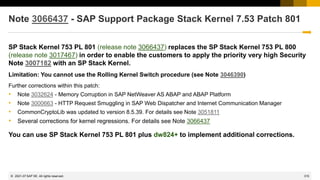
What happens if you ignore the manual instruction to implement a BAdI?
… nothing if you do not use Consumer Products Food and Beverage component (PP-PI-CFB)
What happens if you ignore the manual instruction to create a message via modification?
What happens if you ignore the manual instruction to implement a BAdI?
2014-07
1689
© 2022 SAP SE. All rights reserved.
Note 2026132 - Update 1 to security note 1483548
The note is shown by System Recommendations if your system runs with SAP_BASIS 701 but
independently from any Support Package.
You do not implement this note via Note Assistant, transaction SNOTE, therefore you do not get rid of
it.
→Happily ignore this note as you will implement referenced note 1483548 anyway if shown by
System Recommendations
2014-07
June 2014
1691
© 2022 SAP SE. All rights reserved.
Topics June 2014
1808003 - Potential information disclosure relating to BC-CST
Minimal authorizations to run System Recommendations
How to run BW reporting on System Recommendations
How to send emails with results of System Recommendations
1889999 - Missing authorization check in LCAPPS DP
1966995 - Potential information disclosure relating to WebDynpro Application
1946911 - SAP NWBC ABAP Runtime Patch 35
1896642 - Potential information disclosure relating to Integration Technology ALE
1997455 - Potential information disclosure in BC-SEC-USR-ADM
2014-06
1692
© 2022 SAP SE. All rights reserved.
1808003 - Potential information disclosure relating to BC-CST
Currently we have some issues with note 1808003 version 2
CVSS Base Score: 4.0
CVSS Base Vector: AV:N/AC:L/AU:S/C:P/I:N/A:N
Priority medium
→ Do not touch the note (do not implement version 2, do not de-implement version 1)
2014-06
1693
© 2022 SAP SE. All rights reserved.
Minimal authorizations to run System Recommendations
see Security Patch Process FAQ #30
First of all you need access to Work Center "Change Management" (if you don't use the
corresponding WebDynpro application WDC_NOTE_CENTER directly).
To control access to System Recommendations, the authorization object SM_FUNCS in SAP Solution
Manager 7.1 (or SM_TABS in SAP Solution Manager 7.0) can be used to grant or deny access to the
different tabs of System Recommendations.
Use the fields ACTVT=03, SM_APPL=SYSTEM_REC, SM_FUNC=tab (i.e. SECURITY).
You can restrict access to the systems of specific solutions using the authorization object
D_SOL_VSBL with SOLUTION=solution id and ACTVT=03.
Depending on the version of the Solution Manager, authorization object AI_LMDB_PS with ACTVT=03
and LMDB_NAMES=ACTIVE and PS_NAME=system id controls access to individual systems as well.
These authorization objects are the minimal set which you need to execute the WebDynpro application
directly.
See chapter 16.6 "System Recommendations" and 13.14.2 "User Roles for Solutions, Projects, Solution Directory"
in the documentation → Operations → Security Guide SAP Solution Manager 7.1 SP10.
2014-06
1694
© 2022 SAP SE. All rights reserved.
How to run BW reporting on System Recommendations
1. via System Recommendations
Execute BW reporting via System Recommendations
 Shows System Recommendations for a system and navigate to the
“System Recommendations Report”
 All systems of the solution will be selected
 Data from all areas (Security, HotNews, Legal Change, Performance)
will be selected
 You can change the selection afterwards within
the BW report via
“Right click → Enhanced menu → Variables Entry”
2014-06
1695
© 2022 SAP SE. All rights reserved.
How to run BW reporting on System Recommendations
2. via Configuration Validation
Execute BW reporting via Configuration Validation
 Start Configuration Validation via same Work Center “Change Management”
 Choose tab 'Report Execution → Reporting Templates'
 Choose tab 'Configuration reporting'
 Optional: Select a system list for comparison (if you have defined one).
 Select configuration report 0TPL_0SMD_VCA2_SYS_RECOM_NOTES 'System
recommendation reporting (missing SAP Notes calculated from system recommendations)'
 Finally enter selections about systems, area (Security, HotNews, Legal Change,
Performance), notes (as of SolMan 7.1 SP 9) or date ranges
2014-06
1696
© 2022 SAP SE. All rights reserved.
How to send e-mails with results of System Recommendations
via BW Broadcasting (1)
Prerequisites
To send reports by e-mail, you use the standard functions for BW Web Templates, which require only
that your BW system (= Solution Manager) is connected to your e-mail communication. More
information:
 SAPconnect (BC-SRV-COM)
http://help.sap.com/saphelp_nw70ehp2/helpdata/en/2b/d925bf4b8a11d1894c0000e8323c4f/frameset.htm
 External Sending in the SAP System
http://help.sap.com/saphelp_nw70ehp2/helpdata/en/55/a8b538891b11d2a25a00a0c943858e/frameset.htm
General information about sending BW object as e-mails:
 Broadcast by E-Mail
http://help.sap.com/saphelp_nw70ehp2/helpdata/en/cf/700b405bacdd5fe10000000a155106/frameset.htm
You need note 1880710 “3.X Broadcaster sends empty document” (pilot release) of component
BW-BEX-ET-BC if your SolMan runs with SAP_BW 702 SP 10-14 to be able to enter lower case
selections e.g. for area = „Security“
2014-06
1697
© 2022 SAP SE. All rights reserved.
How to send e-mails with results of System Recommendations
via BW Broadcasting (2)
Configuration
Call the BW report that you want to send by e-mail, and choose the desired settings for the time interval and the systems to be displayed. Create a
Bookmark URL which you later can add to the e-mail text.
Ensure that you call the reports with the user under whose name the e-mails are to be sent. Ensure that this user has a working e-mail address in
his or her user data (transaction SU01).
Right-click any active area of the BW report to display the context menu, switch to the Extended Menu and choose Distribute → By E-Mail.
A new screen now appears, on which you can make settings for the sending of the e-mail. If you have not yet created appropriate settings, choose
Create New Setting. Either create the settings manually or using the wizard.
You can define the title and text of the e-mail here, and to whom it is to be sent:
 In the Description input field, enter a meaningful description of the settings.
 If you want to send the report directly as part of the e-mail, and it is to be displayed directly in the e-mail, choose the Output Format 'MHTML'.
 You can select recipients using their user names in the system or their e-mail addresses. You can also define the recipient list using roles. Separate multiple recipients
with semicolons.
 On the Texts tab page, you define the title and text of the e-mail. Note that the e-mails only contain the BW Report itself, that is, they do not contain the selection
elements (report name, time interval, and system ID). Create an e-mail text so that the report can be understood without this information.
 If, in addition to viewing the sent BW report, the recipient should be able to directly access the BW report interactively, insert the relevant Bookmark-URL in the contents
of the e-mail.
 Leave the data on the General Precalculation and Filter Navigation tab pages unchanged.
Choose Save, and specify a technical name for the settings.
2014-06
1698
© 2022 SAP SE. All rights reserved.
How to send e-mails with results of System Recommendations
via BW Broadcasting (3)
Options for Sending
If you only want to send this report once immediately, choose Execute; however, it is more likely that
you will want to send the report automatically at regular intervals. In this case, choose the Schedule
button.
You define the scheduling on a new screen. To create a new periodic schedule, activate the two
indicators Create New Scheduling and Periodic…. Now select the desired period and the next start
time.
Choose the Transfer button, and save your changes. You have now completed the scheduling. The
desired recipients will now regularly receive the desired reports.
2014-06
1699
© 2022 SAP SE. All rights reserved.
How to send e-mails with results of System Recommendations
via BW Broadcasting
2014-06
1700
© 2022 SAP SE. All rights reserved.
How to send e-mails with results of System Recommendations
via BW Broadcasting
Settings
Define description, output format
(MHTML), recipients, and text of
the e-mail (which should contain
the Bookmark URL, too, to allow
interactive access).
Choose either Schedule or
Execute to send the e-mail
2014-06
1701
© 2022 SAP SE. All rights reserved.
How to send e-mails with results of System Recommendations
via BW Broadcasting
Result
E-mail with Result of
the BW report
including a Bookmark
URL to the interactive
BW report
2014-06
1702
© 2022 SAP SE. All rights reserved.
1889999 - Missing authorization check in LCAPPS DP
No impact to existing authorization concept, as
• critical code gets deactivated
• a predefined allowlist gets introduced
2014-06
1703
© 2022 SAP SE. All rights reserved.
1966995 - Potential information disclosure relating to WebDynpro Application
1946911 - SAP NWBC ABAP Runtime Patch 35
Security note 1966995 simply refers to functional note 1946911.
You cannot implement note 1966995 using SNOTE but you can implement note
1946911.
This note contains cumulative corrections for the complete NW BC Framework:
Transaction SNOTE would verify and implement 37+12 additional notes.
In the meantime you could find note 2015939 - SAP NWBC ABAP Runtime Patch 39
→ If you are using the SAP NetWeaver Business Client than go for periodic
maintenance activities concerning SAP NWBC ABAP Runtime
2014-06
1704
© 2022 SAP SE. All rights reserved.
1896642 - Potential information disclosure relating to Integration
Technology ALE
This note requires manual modifications. Table EDIPOWHITELIST needs to be created using
transaction SE11. Then new messages need to be created using SE91.
After that you can implement the correction using transaction SNOTE.
Let’s assume, you are planning a Support Pack Stack update, which will include this note.
• Do you need to implement the note before the SPS update, following instructions for pre-
implementation work?
• Do you need to perform the pre-implementation steps before applying the SPS?
• If you simply apply the SPS, will table “EDIPOWHITELIST” be delivered empty?
• Should we expect a service disruption if you simply apply the SPS and do not maintain table
“EDIPOWHITELIST”?
2014-06
1705
© 2022 SAP SE. All rights reserved.
1997455 - Potential information disclosure in BC-SEC-USR-ADM
Only customers running a CUA are affected by this vulnerability. Only the CUA main system is
affected.
The solution describes how to improve the authorization concept concerning authorization object
S_RFC for a particular application (Central User Administration, CUA), however, in addition to patch
this application using the note I recommend to have a broader view an RFC authorizations in general:
• No role should contain full authorizations for authorization object S_RFC
• Run a project to improve authorizations for S_RFC, e.g. using this blog on SCN:
How to get RFC call traces to build authorizations for S_RFC for free!
http://scn.sap.com/community/security/blog/2010/12/05/how-to-get-rfc-call-traces-to-build-authorizations-for-srfc-for-free
2014-06
1706
© 2022 SAP SE. All rights reserved.
1881073 - Unauthorized modification of displayed content in BSP
application
Correction for both SAP Kernel and ABAP
ABAP correction instruction for SAP_BASIS
740 To SAPKB74004
730 SAPKB73001 - SAPKB73010
720 SAPKB72002 - SAPKB72007
711 SAPKB71101 - SAPKB71112
710 To SAPKB71018
702 SAPKB70201 - SAPKB70214
701 To SAPKB70114
700 SAPKB70009 - SAPKB70030
Kernel
SAP KERNEL 7.20 patch 612
SAP KERNEL 7.21 patch 227
SAP KERNEL 7.38 patch 36
SAP KERNEL 7.40 patch 29
→ You get the solution if you apply both.
2014-06
1707
© 2022 SAP SE. All rights reserved.
2006974 - Code injection vulnerability in PP-PI-CFB
Implement the attached correction instruction, check the BAdI documentation and implement the BAdI
to allow the usage of your own reports for the overview form printing.
→ only relevant if you use PP-PI-CFB. In this case testing is strongly recommended.
2014-06
1708
© 2022 SAP SE. All rights reserved.
2028012 - Vulnerability in Afaria mobile device app
Update SAP Afaria on mobile clients to versions 6.60.6417.1 on iOS and 6.60.6417 on Android before
enrollment of new devices.
2014-06
1709
© 2022 SAP SE. All rights reserved.
SAP HANA
2014881 - Potential disclosure of persisted data in SAP HANA Web-based Development Workbench
CVSS Base Score: 3.5 CVSS Base Vector: AV:N/AC:M/AU:S/C:P/I:N/A:N
SAP HANA DATABASE 1.00 SP069 05
2015446 - Unauthorized use of application functions in SAP HANA Web-based Development
Workbench via code injection
CVSS Base Score: 6.0 CVSS Base Vector: AV:N/AC:M/AU:S/C:P/I:P/A:P
SPS06 is not affected by this issue.
SAP HANA DATABASE 1.00 SP074 00
2014-06
1710
© 2022 SAP SE. All rights reserved.
BO
1998990 - Potential information disclosure relating to BI-BIP-ADM
→ BI 4.0 Patch 9.1, BI 4.0 SP 10, BI 4.1 SP 4
2001106 - Potential denial of service in BI-BIPCVSS
→ BI 4.0 Patch 9.1, BI 4.0 SP 10, BI 4.1 SP 4
1941562 - Unauthorized modification of stored content in BI-BIP-INV
→ BI EDGE 4.1
1971270 - Unauthorized modification of displayed content in BI-BIP-INV, BI-BIP-QB, BI-BIP-BIW
→ BI 4.0 SP 6 patch 12, BI 4.0 SP 7 patch 10, BI 4.0 SP 8 patch 6, BI 4.0 Patch 9.1, BI 4.0 SP 10, BI
4.1 SP 4
1908531 - Untrusted XML input parsing possible in SBOP Explorer
→ BI 4.0 SP9 Patch 2, BI 4.0 SP 10, BI 4.1 SP 3 patch 2, BI 4.1 SP 4
1981048 - HTTP Cookies Without HttpOnly Flag Set may lead to Cross Site Scripting Issues
→ BI 4.1 oder Edge 4.1
2014-06
April 2014
1712
© 2022 SAP SE. All rights reserved.
Topics April 2014
Info: OpenSSL Heartbleed Bug
Note 1974046 - Potential information disclosure relating to Business Data
Note 1971516 - Code injection vulnerability in SV-SMG-SDD
Q: How much staff do companies have to allocate to this process?
2014-04
1713
© 2022 SAP SE. All rights reserved.
OpenSSL Heartbleed Bug
General
The Heartbleed Bug
http://heartbleed.com/
CVE-2014-0160
http://web.nvd.nist.gov/view/vuln/detail?vulnId=CVE-2014-0160
https://www.cert.fi/en/reports/2014/vulnerability788210.html
How to test servers:
http://www.heise.de/newsticker/meldung/SSL-Gau-So-testen-Sie-Programme-und-Online-Dienste-2165995.html
[3] http://filippo.io/Heartbleed/
[4] http://possible.lv/tools/hb/
[5] https://github.com/FiloSottile/Heartbleed
[6] https://github.com/noxxi/p5-scripts/blob/master/check-ssl-heartbleed.pl
https://www.openssl.org/news/secadv_20140407.txt
"Users unable to immediately upgrade can alternatively recompile OpenSSL with -DOPENSSL_NO_HEARTBEATS.“
Bruce Schneier: “Heartbleed is a catastrophic bug in OpenSSL”
https://www.schneier.com/blog/archives/2014/04/heartbleed.html
2014-04
1714
© 2022 SAP SE. All rights reserved.
OpenSSL Heartbleed Bug
How the heartbleed bug works: http://xkcd.com/1354/
2014-04
1715
© 2022 SAP SE. All rights reserved.
OpenSSL Heartbleed Bug
SAP NetWeaver ABAP / Java
Application areas: BC-SEC-SSL, BC-JAS-SEC
Products: NetWeaver Application Server ABAP, NetWeaver Application Server Java
The crypto libraries used for applications in the
NetWeaver Application Server ABAP ("SAPCRYPTOLIB"/"CommonCryptoLib" aka Secure Login Library)
and in the
NetWeaver Application Server Java ("SAP Java Cryptographic Toolkit" aka "IAIK")
do not use OpenSSL.
We have no indications that these crypto libraries are vulnerable to the Heartbleed bug as in
the OpenSSL 1.0.1 versions.
Customers with questions may be asked to contact SAP support via a customer message.
In the event they are unsure about the component to use, they can assign their request to the Security Backoffice
component XX-SER-BO-SEC
2014-04
1716
© 2022 SAP SE. All rights reserved.
OpenSSL Heartbleed Bug
KBA/Notes
2004805 - Heartbleed (CVE-2014-0160) OpenSSL Vulnerability – Product related status and recommendations
2004903 - FAQ: OpenSSL Heartbleed vulnerability as it relates to SAP Afaria
2004565 - OpenSSL HeartBleed vulnerability. - Afaria 7
2003582 - How does The Heartbleed Bug affects SAP BusinessObjects Xi3.1 and Business Intelligence products 4/4.1
2004815 - How does The Heartbleed Bug affect SAP Data Services and Business Intelligence products 4/4.1
2004769 - SQL Anywhere, MobiLink, and the Relay Server Outbound Enabler are affected by the OpenSSL 'Heartbleed‘
2004367 - SAP BW Accelerator and OpenSSL Heartbleed bug
<to be continued>
Blog@saphana.com - No Heartbleed with SAP HANA
Blog@SCN - HANA Cloud Platform is NOT Vulnerable to Heartbleed
2014-04
1717
© 2022 SAP SE. All rights reserved.
Note 1974046 - Potential information disclosure relating to Business Data
This note seems to be an usual ABAP note as it’s related to software component SAP_BASIS.
However, you do not see any Support Package assignment or any (automatic) Correction Instructions.
Is this note incomplete?
➔The note is correct as it deals with release SAP_BASIS release 804 only. This release has a special
patch collection delivery method called ‘hotfix’.
Do you need to implement the note?
➔SAP_BASIS release 804 is used in systems of hosting scenarios only but not in on-premise
installations.
2014-04
1718
© 2022 SAP SE. All rights reserved.
Note 1971516 - Code injection vulnerability in SV-SMG-SDD
Specific rule: This note deactivates obsolete coding → No special test procedures required.
General rule about notes of
 Software Component: ST-PI
 Application Component: SV-SMG-SDD
There exist several valid releases:
2008_1_46C
2008_1_620
2008_1_700
etc.
If not all releases are assigned in the note, than System Recommendations might miss to show the
note, therefore, identify such notes on https://support.sap.com/securitynotes and use them as a trigger
to update software components ST-PI and ST-A/PI.
2014-04
1719
© 2022 SAP SE. All rights reserved.
Q&A
How much staff do companies have to allocate to this process? It takes so much work just to
determine if the notes are relevant or not. Can the notes be better segregated (e.g. if it requires a
Kernel upgrade or not, if SAP suggests testing or not, etc.)?
2014-04
March 2014
1721
© 2022 SAP SE. All rights reserved.
Topics March 2014
Patch Day Notes vs. Support Package Implementation Notes (reloaded)
Note 1900200 - Directory traversal in BC-SRV-ARL
Note 1966056 - Code injection vulnerability in BW
2014-03
1722
© 2022 SAP SE. All rights reserved.
Patch Day Notes vs. Support Package Implementation Notes
(reloaded)
Announcement Jul 8, 2013:
Implementing SAP security fixes
Important information and call for action
SAP is continuously investing in increasing the quality and security of its products. To improve the consumability of its
security fixes and to further adjust its deployment processes to industry standards, SAP has changed the way how
security patches are provided.
SAP delivers important security fixes on its monthly Security Patch Day. SAP strongly recommends its customers to implement
security fixes, flagged with priority 1 and priority 2, primarily fixing externally reported issues. The fixes are released on the
second Tuesday of every month, and can be used to fix a particular vulnerability without needing to update a system to service
packs.
In order to further reduce the implementation efforts for our customers, other security fixes like priority 3 and 4 will generally
be delivered with support packages. SAP strongly recommends its customers to apply Support Packages on their systems
as soon as a support pack is available. The Support Packages can be found on SAP Service Marketplace in the corresponding
product area. Information about these improvements will also be published in security notes with priority 3 and 4 some
months after Support Packages have been released.
Find security notes that were previously released on SAP Service Marketplace at /securitynotes.
2014-03
1723
© 2022 SAP SE. All rights reserved.
Patch Day Notes vs. Support Package Implementation Notes
(reloaded)
PD Notes
 SAP Security Notes published on and for Security Patch Day
 Contain important security corrections
 Very often address security issues reported from
external sources
 Have CVSS scoring in most cases
SPIN
 Typically address security issues of minor impact
found SAP internally
 Should not be published in the first place but just be contained in future SPs
 Had to be published outside SP and outside the PD schedule because some
customer production issue depended on it to be implemented first
SPIN might be published on PD dates as well!
Re-classification in March 2016
covering “minor, medium or high”
2014-03
1724
© 2022 SAP SE. All rights reserved.
Patch Day Notes vs. Support Package Implementation Notes
(reloaded)
2014-03
1725
© 2022 SAP SE. All rights reserved.
Patch Day Notes vs. Support Package Implementation Notes
(reloaded)
Are Support Package Implementation Notes really
different … as soon as they are published?
➔
Use CVSS, priority and risk assessment to judge about
notes but don’t use the type as a major differentiator.
2014-03
1726
© 2022 SAP SE. All rights reserved.
Note 1900200 - Directory traversal in BC-SRV-ARL
This note belongs to the large group of “Directory Traversal” notes (>550 notes).
- You only need to implement this note and all other “Directory Traversal” notes if you are going to
maintain logical paths and logical file names using transaction FILE and report RSFILENA
- You recognize such notes because of a reference to note 1497003 / FILE_VALIDATE_NAME
- Defining logical path and file names enables you to use authorization object S_PATH
Even if you apply recent Support Packages you have to maintain the logical path and file names !
It might be the case that SNOTE refuses to download note 1900200.
In this case use the download basket of the Service Marketplace to get the note:
- Add note to download basket in SMP
- Download the download basket to your PC
- Upload the file into SNOTE using “Goto → Upload note”
2014-03
1727
© 2022 SAP SE. All rights reserved.
Note 1966056 - Code injection vulnerability in BW
Important note as it is possible to inject arbitrary ABAP code without proper authorization check.
The solution turn the following critical code into display-only mode:
IF i_show_report EQ rs_c_true.
EDITOR-CALL FOR l_t_code.
ENDIF.
* Programm generieren
INSERT REPORT i_sx_meta-repid FROM l_t_code.
2014-03
Previous Webinars
1729
© 2022 SAP SE. All rights reserved.
Topics
Q&A from February
Links
The Future of the EWA Security Notes Subchapter (RSECNOTE)
How to find HANA Security Notes, e.g. 1964428 - XS bypasses authentication for former public
applications
Note 1903756 - DB6: Authorization to execute operating system commands
Note 1963100 - Disabling execution of operating system commands using a CTC URL
Various notes about hard coded user names
2014
1730
© 2022 SAP SE. All rights reserved.
Q&A from February
In SysRec, is the "Automatic" column what used to be the identification of RSECNOTE notes ?
Well, most notes which we had selected for RSECNOTE contained automatic correction
instructions, but on the other hand, RSECNOTE only checks for a small subset of critical notes.
Therefore we cannot compare the "Automatic" column with the selection used by RSECNOTE.
Is it possible to keep track of the notes installation status in SysRec ?
In the System Recommendations tool, when you implement a security note in a managed system, will
Solution Manager detect this and update the note appropriately in System Recommendations, or do
the admins need to go into each note and mark it as implemented ?
Yes, SysRec retrieves the implementation status of notes from the managed system. Therefore,
with the next run of the background job of SysRec all implemented notes will vanish. The
implementation status of a note will be transported to the production system as well.
Because of this you can configure SysRec to calculate the worklist for development systems as well
as to calculate the implementation status in production systems.
2014
1731
© 2022 SAP SE. All rights reserved.
Q&A from February
For the notes for which SysRec cannot determine the applicability, I guess they will always appear in
the list, even if they are actually implemented ?
Yes, that’s true. You either can set a status in SysRec (however, there does not exists a status
value ‘done’) or in case of ABAP you can still use transaction SNOTE: Even if you cannot
implement a note with SNOTE you can download the note and set the status to “completed”
manually which is than used by SysRec to hide the note (but as far as I know you cannot transport
this status to the production system).
Is there documentation on the security authorizations required in Solution Manger for the Security
Service or a template role from SAP with the required authority?
In addition to standard authorizations for authorization objects D_SOL_VSBL (to get access to the
systems of a solution) and AI_LMDB_PS and AI_LMDB_OB (to read data from the LMDB) you
need specific authorizations for SM_FUNCS (respective SM_TABS in SolMan 7.0) to see the
different tabs of the SysRec.
http://wiki.scn.sap.com/wiki/display/SMAUTH/SM_FUNCS
http://scn.sap.com/blogs/ben.schneider/2011/04
2014
1732
© 2022 SAP SE. All rights reserved.
Links
Security Optimization Service
https://support.sap.com/sos
Security Patch Process FAQ
https://scn.sap.com/community/security/blog/2012/03/27/security-patch-process-faq
Security Notes
https://support.sap.com/securitynotes
System Recommendations for Security Notes
https://support.sap.com/sysrec
Configuration Validation
http://wiki.sdn.sap.com/wiki/display/TechOps/ConfVal_Home
2014
1733
© 2022 SAP SE. All rights reserved.
The Future of the EWA Security Notes Subchapter
Current situation
▪ The EWA subchapter “SAP Security Notes: ABAP and Kernel Software Corrections” is currently based
on RSECNOTE.
▪ RSECNOTE is technically working. However, in the meantime the content, which Security Notes are
recommended by RSECNOTE, is only maintained sporadically for SAP-internal reasons.
▪ The tool “System Recommendations” and the quality of SAP Security Notes have improved.
Recommendation
▪ Use the Solution Manager based Tool “System Recommendations” for your monthly security maintenance
process (which is recommended anyhow since even in the past RSECNOTE and thus the EWA only checked
for a selected subset of Security Notes)
Intended direction
▪ We are currently evaluating to base the above mentioned EWA subchapter directly onto System
Recommendations. So if you are using System Recommendations you are in our strategic direction.
However, no timeline is available yet for this change nor any technical details.
▪ As soon as the EWA subchapter no longer requires RSECNOTE technically, the tool RSECNOTE is planned to
be discontinued.
2014
1734
© 2022 SAP SE. All rights reserved.
How to find HANA Security Notes, e.g. 1964428 - XS bypasses
authentication for former public applications
System Recommendations is not yet able to show HANA Security Notes.
(Reason: the ‘technical system’ which is defined based on data in the SLD / LMDB does not contained required information.)
Tipp: Use search on https://support.sap.com/securitynotes to find notes of application component
BC-DB-HDB* (including the *).
Number Application Area Short text Priority Solution Released On
1964428 BC-DB-HDB-XS XS bypasses authentication for former public applications high SP 70 / SP 69 patch 2 11.02.2014
1914778 BC-DB-HDB-XS Potential information disclosure relating to HANA host names medium SP 60 08.10.2013
1870605 BC-DB-HDB Privilege escalation in SAP HANA high SP 57 09.07.2013
1756978 BC-DB-HDB SAML 2.0: possible XML signature wrapping attack high SP 36 11.09.2012
1726160 BC-DB-HDB Security issues fixed in SAP HANA Revision 28 and later high SP 28 10.07.2012
1645982 BC-DB-HDB Security issues fixed in SAP HANA Revision 18 high SP 18 13.12.2011
1628110 BC-DB-HDB Security issues fixed in SAP HANA Revision 15 high SP 15 13.09.2011
2014
1735
© 2022 SAP SE. All rights reserved.
Note 1903756 - DB6: Authorization to execute operating system
commands
Important note, Published in November 2013
Issue: Note cannot be implemented in most systems as function DB6_DIAG_GET_PROGRAM_VERSION
exists only in DB2/DB6-Systems
➔ Create Support Ticket if you run into trouble while implementing security notes!
➔ Solved since end of January.
2014
1736
© 2022 SAP SE. All rights reserved.
Note 1963100 - Disabling execution of operating system commands
using a CTC URL
HotNews
CVSS Base Score 9.0
CVSS Base Vector AV:N/AC:L/AU:S/C:C/I:C/A:C
Java, LIFECYCLE MGMT TOOLS as of 6.40
The CTC application contains vulnerability where any operating system command can be executed on
an AS Java host using NWA credentials through a URL invocation. Typically, this requires
authentication using NWA credentials. If you have not already implemented SAP security note
1445998, then this can be done without authentication using NWA credentials.
Note 1445998 - Disabling invoker servlet (Released in December 2010)
The Invoker Servlet has been disabled by default as of 7.20
2014
1737
© 2022 SAP SE. All rights reserved.
Various notes about hard coded user names
Note 1738965 BW-WHM-DBA-OHS Hard-coded credentials in Open Hub (BRANDTTH)
Note 1768049 XX-CSC-BR Hard-coded credentials in XX-CSC-BR (TESTER)
Note 1789569 PP-CRP-LVL Hard-coded credentials in capacity leveling (C1155522)
Note 1791081 PS-ST Hard-coded credentials in PS-ST and PS-MAT-PRO (RSHANBHAG)
Note 1795463 IS-B-DP Hard-coded credentials in IS-B-DP (XXXX)
Note 1911174 BC-CCM-MON Hard-coded credentials in CCMS (CSMREG)
Note 1914777 CA-WUI-WST Hard-coded credentials in CA-WUI-WST (OHLIGER)
Note 1920323 IS-OIL-DS-TSW Hard-coded credentials in IS-OIL-DS-TSW (various)
Few of these notes is really important from a security point of view – but of course it’s better to get rid
of these hard coded user names from a functional point of view.
Caution: Notes of this type could show a critical security vulnerability
2014
1738
© 2022 SAP SE. All rights reserved.
Various notes about hard coded user names
Note 1915873 - Usage of sy-uname in Method
Note contains attachment with an ABAP transport which deletes some objects.
As it’s about the upgrade tools, there is no other option to publish the correction.
Import into all systems or import into DEV and re-export for other systems.
No test required.
2014
1739
© 2022 SAP SE. All rights reserved.
Topics
Note 1773912 - Missing authorization check in message server
Note 1906927 - Missing authorization check in Accounting BAPIs
Note 1931016 - Missing authorization check in ABAP Runtime Analysis
Note 1942424 - Missing authorization check in SV_SMG-ASU
Patch Day Notes vs. Support Package Implementation Notes
Note 1853616 - Missing authorization check in XX-IDES
Note 1864518 - Security Improvements for MOB-APP-EMR-AND
Security Notes of software component ST-PI
Note 1854408 - Potential information disclosure relating to user password in GRC AC 10
Note 1823566 - Potential information disclosure relating to SAP Solution Manager
Note 1820666 - Potential remote code execution in SAProuter
2014
1740
© 2022 SAP SE. All rights reserved.
Note 1773912 - Missing authorization check in message server
It would be sufficent to update the msg_server. You do not need to update the whole kernel
disp+work.
2014
1741
© 2022 SAP SE. All rights reserved.
Note 1906927 - Missing authorization check in Accounting BAPIs
Requires note 1882417 and 1908870 and 1923728 including extensive manual activities.
2014
1742
© 2022 SAP SE. All rights reserved.
Note 1931016 - Missing authorization check in ABAP Runtime
Analysis
No influence to productive business processes
2014
1743
© 2022 SAP SE. All rights reserved.
Note 1942424 - Missing authorization check in SV-SMG-ASU
The notes solves a vulnerability to execute reports (like in SA38).
Deactivation of obsolete but critical program. No test required.
2014
1744
© 2022 SAP SE. All rights reserved.
Patch Day Notes vs. Support Package Implementation Notes
Announcement Jul 8, 2013:
Implementing SAP security fixes
Important information and call for action
SAP is continuously investing in increasing the quality and security of its products. To improve the consumability of its
security fixes and to further adjust its deployment processes to industry standards, SAP has changed the way how
security patches are provided.
SAP delivers important security fixes on its monthly Security Patch Day. SAP strongly recommends its customers to implement
security fixes, flagged with priority 1 and priority 2, primarily fixing externally reported issues. The fixes are released on the
second Tuesday of every month, and can be used to fix a particular vulnerability without needing to update a system to service
packs.
In order to further reduce the implementation efforts for our customers, other security fixes like priority 3 and 4 will generally
be delivered with support packages. SAP strongly recommends its customers to apply Support Packages on their systems
as soon as a support pack is available. The Support Packages can be found on SAP Service Marketplace in the corresponding
product area. Information about these improvements will also be published in security notes with priority 3 and 4 some
months after Support Packages have been released.
Find security notes that were previously released on SAP Service Marketplace at /securitynotes.
2014
1745
© 2022 SAP SE. All rights reserved.
Patch Day Notes vs. Support Package Implementation Notes
Patch Day Notes
All Notes (irrespective of priority) fixing externally found vulnerabilities
+ notes fixing internally found vulnerabilities having High and Very High priority
Released on Security Patch day with very few exceptions
Support Package Implementation Notes (SPIN)
Notes fixing internally found vulnerabilities having Low and Medium priority.
Typically not released as individual notes, however, SAP can release them any time
(even on a patch day date) if there is any functional dependency which require the
correction.
Currently the above categorization is not available in Service Market place.
Anyway: From a customer point of view all of these notes are simply “Security Notes”
2014
1746
© 2022 SAP SE. All rights reserved.
Patch Day Notes vs. Support Package Implementation Notes
Support Package Implementation Notes from November / December 2013
1677912 SD-BIL-IV-PC Credit cards in order
1735308 BC-CUS-TOL-ALO Security issues for report TAB_INTO_AUTH_GRP
Refers to note 1909124
1786150 CRM-MD-BP Potential disclosure of persisted data in [crm-md-bp]
1787032 FI-AP-AP-B1 FI: Potential Directory Traversal
1788562 LO-LIS-REP Potential modif./disclosure of persisted data in LO-LIS-REP
1794273 LO-MAP Persisted data in MAP may be changed/disclosed
1813155 EHS-BD Possible change/disclosure of persisted data in EH&S
1922205 BC-XI-IS-WKB Authorization default value in component BC-XI-IS-WKB
1775843 IS-H-PM Directory traversal in IS-H in utilities (reports)
1785662 SD-BIL-IV-IF Directory-Traversal in externer Fakturaschnittstelle
1794951 XX-CSC-BR Directory traversal in XX-CSC-BR
1916257 PA-PA-US Directory traversal in PA-PA-US
➔ Treat these notes like all other security notes
2014
1747
© 2022 SAP SE. All rights reserved.
Note 1853616 - Missing authorization check in XX-IDES
First note ever which deals with vulnerabilities in IDES demo system
Release independent note = no assignment to any product, software component, release, support
package
→ potential relevant for all customer systems as far as System Recommendations can analyze it
→ all customers ‘see’ the note
Solution via ABAP transport. Normally we forbid transports in notes, however, in this special case there
is no other efficient way and I assume that it works fine.
The transport contains delete/deactivation actions for RFC enabled functions in the customer name
range.
➔ If you go for this note you should consider to apply all other security notes to IDES as well.
2014
1748
© 2022 SAP SE. All rights reserved.
Note 1864518 - Security Improvements for MOB-APP-EMR-AND
The note is relevant for the Mobile Platform for Android
Application System Recommendations of the SAP Solution Manager cannot check for this note
2014
1749
© 2022 SAP SE. All rights reserved.
Security Notes of software component ST-PI
Some notes about software component ST-PI describe the complete validity range in the text only -
which cannot be interpreted by System Recommendations.
Example: "Apply Support Package ST-PI 2008_1_* SP08."
Tipp: Use search on https://support.sap.com/securitynotes to find notes of application component
SV-SMG-SDD (which is related to software component ST-PI).
The good news: Security Notes of software component ST-PI and ST-A/PI are only relevant for the
connectivity to the SAP Solution Manager. Therefore you can apply them without any influence to
productive business processes within the backend system.
Number Application Area Short text Priority Released On Validity/Corr/SP
1896785 SV-SMG-SDD Missing authorization check in ST-PI High 10.09.2013 4/4/2
1861791 SV-SMG-SDD OS CMD injection vulnerability in ST-PI High 13.08.2013 3/3/1
1688229 SV-SMG-SDD Information disclosure due to missing auth. in EWA functions High 13.08.2013 5/5/2
1774432 SV-SMG-SDD Missing authorization check in ST-PI Medium 11.06.2013 4/0/0
1788614 SV-SMG-SDD Missing authorization check in ST-PI High 12.02.2013 4/4/1
1727914 SV-SMG-SDD Missing authorization checks in ST-PI Very high 14.08.2012 4/4/1
1720994 SV-SMG-SDD Missing authorization check in ST-PI High 10.07.2012 4/4/1
1727119 SV-SMG-SDD Update 1 to security note 1642810 Medium 08.06.2012 (update note)
1642810 SV-SMG-SDD Code injection vulnerability in SV-SMG-SDD Medium 08.05.2012 SAP_BASIS
2014
1750
© 2022 SAP SE. All rights reserved.
Note 1854408 - Potential information disclosure relating to user
password in GRC AC 10
An attacker can discover information relating to passwords stored in table GRACREQUSRPASS
(‘Request user password’).
This note contains design changes related to user password provisioning, so it is suggested to
implement it very cautiously and conduct intensive regression testing before moving this to production.
2014
1751
© 2022 SAP SE. All rights reserved.
Note 1823566 - Potential information disclosure relating to
SAP Solution Manager
Note published in May 2013 but still relevant!
An attacker can discover information relating to passwords stored in table DBCON.
All ABAP systems might be affected - not only the Solution Manager which in fact has the highest
probability for the issue as it is used to manages databases including SAP HANA.
Prerequisite:
KERNEL 7.20 patch 417
KERNEL 7.21 patch 110
KERNEL 7.38 patch 14
The ABAP correction plus the Kernel just enables to move the passwords to the secure area.
After the implementation of the code corrections, execute the report RS_DBC_CLEANUP in all systems
to perform the migration (client independent).
You can manually check using SE16 for table DBCON with field PASSWORD not equal space (if SE16 still allows viewing the table
in your release).
2014
1752
© 2022 SAP SE. All rights reserved.
Note 1820666 - Potential remote code execution in SAProuter
Note published in May 2013
SAP Spotlight News:
Important security fixes for SAProuter; new malware variant
Best practice:
http://scn.sap.com/community/security/blog/2013/11/13/security-of-the-saprouter
Recommended activities:
 SAP recommends to upgrade any (active) SAProuter installation as soon as possible
 Use an access control list (saprouttab) to limit connectivity
 Activate SNC to encrypt the communication channel to SAP support and to block any other connections from
the internet
 Integrate the SAProuter into a firewall
 Use an SAProuter password for SAP Support (and define process how to change it)
 Change the default port
2014
Thank you!
Contact information:
Frank Buchholz
SAP CoE Security Services
frank.buchholz@sap.com
Security Patch Process FAQ
https://scn.sap.com/community/security/blog/2012/03/27/security-patch-process-faq
1754
© 2022 SAP SE. All rights reserved.
No part of this publication may be reproduced or transmitted in any form or for any purpose without the express permission of SAP SE.
The information contained herein may be changed without prior notice.
Some software products marketed by SAP SE and its distributors contain proprietary software components of other software vendors.
National product specifications may vary.
These materials are provided by SAP SE and its affiliated companies ("SAP Group") for informational purposes only, without representation or warranty of any kind, and
SAP Group shall not be liable for errors or omissions with respect to the materials. The only warranties for SAP Group products and services are those that are set forth in
the express warranty statements accompanying such products and services, if any. Nothing herein should be construed as constituting an additional warranty.
SAP and other SAP products and services mentioned herein as well as their respective logos are trademarks or registered trademarks of SAP SE in Germany and other
countries.
Please see http://www.sap.com/corporate-en/legal/copyright/index.epx#trademark for additional trademark information and notices.
1755
© 2022 SAP SE. All rights reserved.
© 2022 SAP SE. Alle Rechte vorbehalten.
Weitergabe und Vervielfältigung dieser Publikation oder von Teilen daraus sind, zu welchem Zweck und in welcher Form auch immer, ohne die ausdrückliche schriftliche
Genehmigung durch SAP SE nicht gestattet. In dieser Publikation enthaltene Informationen können ohne vorherige Ankündigung geändert werden.
Einige der von der SAP SE und ihren Distributoren vermarkteten Softwareprodukte enthalten proprietäre Softwarekomponenten anderer Softwareanbieter.
Produkte können länderspezifische Unterschiede aufweisen.
Die vorliegenden Unterlagen werden von der SAP SE und ihren Konzernunternehmen („SAP-Konzern“) bereitgestellt und dienen ausschließlich zu Informationszwecken.
Der SAP-Konzern übernimmt keinerlei Haftung oder Gewährleistung für Fehler oder Unvollständigkeiten in dieser Publikation. Der SAP-Konzern steht lediglich für Produkte
und Dienstleistungen nach der Maßgabe ein, die in der Vereinbarung über die jeweiligen Produkte und Dienstleistungen ausdrücklich geregelt ist. Keine der hierin
enthaltenen Informationen ist als zusätzliche Garantie zu interpretieren.
SAP und andere in diesem Dokument erwähnte Produkte und Dienstleistungen von SAP sowie die dazugehörigen Logos sind Marken oder eingetragene Marken der SAP
SE in Deutschland und verschiedenen anderen Ländern weltweit.
Weitere Hinweise und Informationen zum Markenrecht finden Sie unter http://www.sap.com/corporate-en/legal/copyright/index.epx#trademark.

SAP_Security_Notes_Webinar-6.pdf

  • 1.
    DSAG & ASUG& ES: Security Patching Frank Buchholz, SAP CoE Security Services July 2022 2 4 1 5 3 List of Security Notes support.sap.com/securitynotes Monthly execution of „System Recommendations“ Continuous Security Monitoring using „Configuration Validation“ Reduction of test effort using UPL/SCMON or BPCA Check Security Notes within „Maintenance Planner“ Germany America EMEA/Asia
  • 2.
    5 © 2022 SAPSE. All rights reserved. News from ASUG ➢ ASUG Insights → Security https://www.asug.com/insights/business-function/information-security https://www.asug.com/insights/topic/cybersecurity ➢ ASUG Insights → Solution Manager https://www.asug.com/insights/sap-product/sap-solution-manager-solman ➢ SAP Customer Influence program - SAP Identity Management 8.0 (2021) https://influence.sap.com/sap/ino/#/campaign/2566
  • 3.
    6 © 2022 SAPSE. All rights reserved. News from DSAG Änderung der AK/AG-Sprecher nach dem letzten AK-Treffen
  • 4.
    7 © 2022 SAPSE. All rights reserved. News from DSAG DSAG Jahreskongress in Leipzig, 11. - 13. Oktober 2022 https://dsag-jahreskongress.plazz.net/ Virtueller Ransomware-Tag am 25. Oktober 2022 https://dsagnet.de/dsag-event?id=304720 ❑ Was Ransomware eigentlich ist und wie Angreifer die Ransomware nutzen vorgehen. ❑ Wie Sie sich gegen Ransomeware schützen können und welche Schutzkonzepte wirsam sind. ❑ Wie Sie sich als Unternehmen und als Mitarbeiter rechtlich absichern. ❑ Wie Sie sich im Falle einer erfolgreichen Attacke rechtlich sinnvoll verhalten. AK/AG-Treffen in Hockenheim am 9. November, Planungen laufen https://dsagnet.de/dsag-event?id=304747 Nächstes SAP Security Notes Webinar: 18. August 2022 https://dsagnet.de/dsag-event?id=304884
  • 5.
    12 © 2022 SAPSE. All rights reserved. Overview Support Portal – Security Notes https://support.sap.com/securitynotes This is a filtered list → All SAP Security Notes Here you can find all Security Notes Security Patch Process FAQ https://scn.sap.com/community/security/blog/2012/03/27/security-patch-process-faq SAP Solution Manager application „System Recommendations“ This is the selection of security notes (from the full list on Support Portal), which is relevant or might be relevant for a specific technical system (ABAP, Java, HANA, etc). Notes which are not shown here are not relevant for this system. RSECNOTE and the corresponding chapter in the EWA show a small – and old – selection of security notes only. Do not use RSECNOTE anymore - its content is outdated and incomplete - use System Recommendations! Support Portal – Expert Search https://support.sap.com/notes → Expert Search for Document Type = SAP Security Notes Here you can find all Security Notes
  • 6.
    14 © 2022 SAPSE. All rights reserved. Hosts of the Security Notes Webinar ASUG ASUG Information Security Regular schedule: Wednesday in the week after the Patch Day 18:00-19:00 CEST = 12:00 EST = 9:00 PST Calendar: https://www.asug.com/events?events%5B%5D=13 56781
  • 7.
    15 © 2022 SAPSE. All rights reserved. Hosts of the Security Notes Webinar DSAG DSAG AK Security & Vulnerability Management Regular schedule: Thursday in the week after the patch day 15:00 - 16:00 CET Calendar: https://dsagnet.de/dsag-resource?id=91659&app=veranstaltungskalender
  • 8.
    16 © 2022 SAPSE. All rights reserved. Hosts of the Security Notes Webinar SAP Enterprise Support Academy SAP Enterprise Support Academy Regular schedule: Wednesday in the week after the patch day 09:00 - 10:00 CET Calendar: Updates from the last SAP Security Patch Day
  • 9.
    17 © 2022 SAPSE. All rights reserved. SAP Learning Hub Edition for SAP Enterprise Support External sign up Preparation if the user has no access to the SAP Enterprise Support catalogue yet. Even if the user has access to another catalogue in the SAP Learning Hub, a one-time sign up per S-User is mandatory. How to sign up for the Support Edition: 1. Navigate to the sign up page 2. Click the Sign up button. Authenticate yourself with your S-User. Upon first access, the system will check your eligibility, create a new SAP Learning Hub user, and populate your learning catalog respectively. 3. Within two hours, you will then receive a registration confirmation via e-mail and access to the catalogue is granted. How to guide: How to sign up for the SAP Learning Hub Edition for SAP Enterprise Support
  • 10.
    18 © 2022 SAPSE. All rights reserved. SAP Learning Hub Edition for SAP Enterprise Support Registration | withdraw | watch a recording | find the survey Direct access to SAP Learning Hub (Login with your S-User ID) Find Courses: “Updates from the last SAP Security Patch Day” or code: SUP_EBW_0650_1906 How to Guide: Register for, withdraw and join the Meet the Expert live Session or recording
  • 11.
    19 © 2022 SAPSE. All rights reserved. SAP Learning Hub Edition for SAP Enterprise Support Registration | withdraw | watch a recording | find the survey Register to course “Updates from last SAP Security Patch Day” SUP_EBW_0650_1906
  • 12.
    20 © 2022 SAPSE. All rights reserved. SAP Learning Hub Edition for SAP Enterprise Support How to join your registered session within the SAP Learning Hub 30 Minutes prior to session start time, please go to your SAP Learning Hub “My Learning Content” section and look at your “active courses” (you can filter for “registrations”) and the drop down next to the course should show “join virtual session” To watch the recording, click on the course link and “start course”: Updates from the last SAP Security Patch Day
  • 13.
    21 © 2022 SAPSE. All rights reserved. SAP Learning Hub Edition for SAP Enterprise Support How to reset the password or change the email address after sign up In case the customer forgot the S-User password, the password reset, cannot be done within the SAP Learning Hub/ SAP SuccessFactors logon page. The password can be reset here: https://accounts.sap.com/ui/createForgottenPasswordMail?spId=55365985e4b07dc3abdfc16c&targetUrl=&sourceUrl In case the access to SAP Learning Hub is still not successful and you get redirected to the logon page again, this can be a sign for a missing sign up. → External Sign up How to check and change your email address 1. Go to https://support.sap.com 2. Login and click on your profile to edit 3. You will be redirected to the SAP Launchpad where you can check and change your email adress
  • 14.
    23 © 2022 SAPSE. All rights reserved. TechEd Recording SEC104 - Security Notes, System Recommendations and Business Process Change Analyzer http://events.sap.com/teched/en/session/13574 This sessions shows how to set up a monthly patch process based on the application System Recommendations in SAP Solution Manager 7.1. See the integration with the usage procedure logging (UPL) and the business process change analyzer (BPCA) to identify business processes which might get affected by the implementation of security notes. The presentation is based on the standard slide deck at https://support.sap.com/sos → CoE Security Services - Security Patch Process In the Media Library you find the monthly updated SAP Security Notes Advisory, too.
  • 15.
    INTERNAL – SAPand Customers Only What's New for the User Administration and Logging Check in S/4HANA On Premise Frank Buchholz, Dieter Goedel, SAP June 14, 2022
  • 16.
    74 © 2022 SAPSE. All rights reserved. What's New for the User Administration and Logging Check in S/4HANA On Premise a) Note 1856125 - FAQ | Tools for using the Audit Information System AIS b) Note 139418 - Logging of user actions (ABAP server) Logging c) Note 382318 - FAQ | Function module RFC_READ_TABLE RFC d) Note 2680888 - SAL | Report for determination of differences in event parameters SAL e) Note 2883981 - RSAU_READ* | anonymized display of Security Audit Log data SAL f) Note 3090132 - RSUSR200 | Addition of logon information from job management User g) Note 3113345 - SUIM | Reporting for User Documentation User h) Note 3150573 - SUIM | Optimization of RSUSR_AUTH_DATA_VERSION User i) Note 3147103 - SAIS | Check of customer-specific programs Code j) Note 3204960 - SAIS_SEARCH_APPL | Search for programs without transaction TCODE
  • 17.
    75 © 2022 SAPSE. All rights reserved. d) Note 2680888 - SAL | Report for determination of differences in event parameters Report RSAU_READ_LOG_DIFF supplements the standard functions of the transaction/report RSAU_READ_LOG. In the display type "Full Event List", all events with reference to the log configuration change are displayed in accordance with the selection criteria (event definitions: AUE, AUF, AUG, AUH, AUI, AUJ, EU5, and FU0). In the display type "Show resulting changes", selected log configuration changes (event definitions AUF, AUI, AUJ, and FU0) are displayed in accordance with the selection criteria. Log entries with identical content are summarized: Only the first log entry is displayed, and all further pseudo changes are suppressed. AUE Audit configuration changed AUF Audit: Slot &A: Class &B, Severity &C, User &D, Client &E, &F AUG Application server started AUH Application server stopped AUI Audit: Slot &A Inactive AUJ Audit: Active status set to &1 EU5 Audit log data of &A was deleted (&B data records) FU0 Exclusive security audit log medium changed (new status &A)
  • 18.
    76 © 2022 SAPSE. All rights reserved. Full event list Resulting changes d) Note 2680888 - SAL | Report for determination of differences in event parameters
  • 19.
    77 © 2022 SAPSE. All rights reserved. e) Note 2883981 - RSAU_READ* | anonymized display of Security Audit Log Note 2883981 provides transaction RSAU_READ_LOG_ADM which shows pseudonymized user names and terminal names based on a generated hash code. Within a report, a user name or terminal ID is always displayed with the same pseudonym. (The hash code changes once per week.) Use this transaction for general administration tasks and risk analysis without having access to personal data. You can use the report RSAU_READ_LOG_ADM for pseudonymized evaluation in a background job. Users that are not to be pseudonymized can be defined in the productive exception list SAL_SHOW_IDENTITY. You cave to activate and maintain this exception list in transaction SLDW or SLWD_COMPARE. Transaction RSAU_READ_LOG is unchanged. Use it if you need access to personal data, too. In the authorization concept, the two tools are distinguished by the required start authorization for authorization object S_TCODE. Available via Support Package as of 7.50 or implementation via note.
  • 20.
    78 © 2022 SAPSE. All rights reserved. Transaction / report RSAU_READ_LOG_ADM pseudonymizes user names and terminal of personal users e) Note 2883981 - RSAU_READ* | anonymized display of Security Audit Log
  • 21.
    79 © 2022 SAPSE. All rights reserved. Transaction SLDW_COMPARE for access control list SAL_SHOW_IDENTITY Check is active but no additional SAL logging is required. Some more user names are added to the exception list (DDIC and SAP* are the default values) e) Note 2883981 - RSAU_READ* | anonymized display of Security Audit Log
  • 22.
    80 © 2022 SAPSE. All rights reserved. f) Note 3090132 - RSUSR200 | Addition of logon information from job management The SUIM report RSUSR200 might not show the expected last logon date for users which are running job steps. Such events do not update the last logon timestamps. The correction of this note provides a checkbox for displaying the last logon of job users on the selection screen. If the option is selected, the result list contains additional columns with the time a user was last used in a job step. In addition, you get the new transaction / report SAIS_JOB_USER which provides an overview of job steps restricted to the logon client. The report supports navigation for user details, job details, and ABAP programs or classes started in the job step. (This reports replaces an analysis based on the very simple usage of transaction SE16 for view V_OP.) Available via Support Package as of 7.40 or implementation via note (which require some more prerequisite notes and a manual implementation step)
  • 23.
    81 © 2022 SAPSE. All rights reserved. You can use this list to identify dialog users who are running jobs as well. Report RSUSR200 f) Note 3090132 - RSUSR200 | Addition of logon information from job management
  • 24.
    82 © 2022 SAPSE. All rights reserved. Transaction / report SAIS_JOB_USER shows job steps in current client f) Note 3090132 - RSUSR200 | Addition of logon information from job management
  • 25.
    83 © 2022 SAPSE. All rights reserved. g) Note 3113345 - SUIM | Reporting for User Documentation You can add a description to users and log documentation about changes in transaction SU01. Using note 3113345 you get transaction/report SUIM_SHOW_USDOCU which shows this information in list and print format. Available via Support Package as of 7.50 or implementation via note
  • 26.
    84 © 2022 SAPSE. All rights reserved. h) Note 3150573 - SUIM | Optimization of RSUSR_AUTH_DATA_VERSION When you want to analyze the history of authorization data in roles you might start identifying changed roles using the SUIM transaction / report RSSCD100_PFCG. Then you can use transaction ROLE_VERS (=report RSUSR_AUTH_DATA_VERSION) to obtain an overview of the versions of a specific role. However, the result seems to be incomplete if the role was imported via a transport – which is standard for production systems. In addition to the history resulting from the change documents, the report now also displays the times of imports and their transport requests. You can navigate to a transport request.
  • 27.
    85 © 2022 SAPSE. All rights reserved. SUIM transaction / report RSSCD100_PFCG h) Note 3150573 - SUIM | Optimization of RSUSR_AUTH_DATA_VERSION
  • 28.
    86 © 2022 SAPSE. All rights reserved. Transaction ROLE_VERS (=report RSUSR_AUTH_DATA_VERSION) These columns would show the artificial version number 9999, the icon and the transport request id. h) Note 3150573 - SUIM | Optimization of RSUSR_AUTH_DATA_VERSION
  • 29.
    87 © 2022 SAPSE. All rights reserved. i) Note 3147103 - SAIS | Check of customer-specific programs One aim during an audit is to ensure that customer or partner programs do not impede seamless change tracking in SAP standard tables. Note 3147103 provides the transaction / report SAIS_CODE_SCAN as part of the Audit Information System. The report supports the check of customer-specific programs and ABAP classes with regard to direct changing accesses to database tables. The provided results list contains forward navigation to the found source code point in question, the last transport request, and the option of double-clicking on the text field to store your own comments for each object. Available via Support Package as of 7.40 (implementation via note requires manual creation of database table)
  • 30.
    88 © 2022 SAPSE. All rights reserved. Transaction / report SAIS_CODE_SCAN Comments are not persistent, yet i) Note 3147103 - SAIS | Check of customer-specific programs
  • 31.
    89 © 2022 SAPSE. All rights reserved. j) Note 3204960 - SAIS_SEARCH_APPL | Search for programs without transaction You want to identify reports to which no transaction has yet been assigned. Use the additional option in the application SAIS_SEARCH_APPL to start the search for directly startable programs without an assigned transaction. Available via Support Package as of 7.50 (no implementation via note)
  • 32.
    90 © 2022 SAPSE. All rights reserved. j) Note 3204960 - SAIS_SEARCH_APPL | Search for programs without transaction
  • 33.
  • 34.
    94 © 2022 SAPSE. All rights reserved. Topics July 2022 How to download the SAP Security Patch Day Blog Note 3219457 - Call to action: Urgent update of the SSO certificate for SAP Support users Note 2726124 - Missing Authorization Check in multiple components under SAP Automotive Solutions Notes 3221288 3213279 3203079 3194361 - Vulnerabilities in SAP BusinessObjects Notes 3150454 3150463 - Information Disclosure vulnerability in SAP NetWeaver Application Server ABAP and ABAP Platform Note 3153525 - Improvement of SecureStoreFS encryption algorithms What's New for the User Administration and Logging Check in S/4HANA On Premise (part 2) Recordings: DSAG (German) ASUG SAP Learning HUB 2022-07
  • 35.
    95 © 2022 SAPSE. All rights reserved. How to download the SAP Security Patch Day Blog You find the SAP Security Patch Day Blog at https://support.sap.com/securitynotes 2022-07 https://dam.sap.com/mac/app/e/pdf/preview/embed/ucQrx6G?ltr=a&rc=10 You can download the corresponding PDF file as well: https://d.dam.sap.com/a/ucQrx6G
  • 36.
    96 © 2022 SAPSE. All rights reserved. Note 3219457 - Call to action: Urgent update of the SSO certificate for SAP Support users Environment: You are using certificates to authenticate a SAP support user for following support connections: ➢ R/3 Support with SNC/SSO according to note 2562127 ➢ HTTP Connect w. SNC/SSO according to note 2562154 SAP has established and operates a new dedicated PKI to allow Secure Network Connections (SNC) and Single Sign On (SSO) to access customer systems remotely. This CA only issues temporary generated certificates for the user SAPSUPPORT with a validity of 8 hours. This new secure remote access scenario is part of the SAP standard support package and eliminates maintaining the target user credentials in the Customer Remote Logon Depot. 2022-07
  • 37.
    97 © 2022 SAPSE. All rights reserved. Note 3219457 - Call to action: Urgent update of the SSO certificate for SAP Support users The current used "SAPSUPPORT User Sub CA" certificate will expire August 1st, 2022! The current used "SAPSUPPORT Root CA" certificate will expire August 1st, 2027 SAPSUPPORT User SubCA SAPSUPPORT Root CA ➢ Import the sub CA certificate SAPSUPPORT User Sub CA into both PSE stores SNC SAPCryptolib (for SAPGUI) and SSL-Server Standard (for HTTP connections) 2022-07
  • 38.
    98 © 2022 SAPSE. All rights reserved. Note 2726124 - Missing Authorization Check in multiple components under SAP Automotive Solutions New authorization check for V_VBAK_VKO, V_VBAK_AAT (and some restrictions concerning external remote calls for internal functions) in various remote enabled function modules of ECC-DIMP / S4CORE The solution was published with Support Packages in 2019 → No action required now (assuming you already got the Support Package) 2022-07
  • 39.
    99 © 2022 SAPSE. All rights reserved. Notes 3221288 3213279 3203079 3194361 3169239 3167430 Vulnerabilities in SAP BusinessObjects Note 3221288 just shows the corrected versions in the text: 4.2 SP09 Patch 9, 4.3 SP01 and above Note 3213279 just show an Support Package Patch for release 4.2 (yes, that is correct for this note) Notes 3203079, 3194361, 3169239 and 3167430 show all corrected Support Packages Patches section: ➢ On release 4.2 you get the correction in the same version SP09 patch 900 On release 4.3 you require patches, too 2022-07
  • 40.
    100 © 2022 SAPSE. All rights reserved. Notes 3150454 3150463 - Information Disclosure vulnerability in SAP NetWeaver Application Server ABAP and ABAP Platform Both notes change transaction SM59: You have to enter the password of a technical user after changing target system related data: Note 3150454 deals with type 3 and 3150463 with type W destinations. Cancel saving if you do not have the password available! 2022-07
  • 41.
    101 © 2022 SAPSE. All rights reserved. Note 3153525 - Improvement of SecureStoreFS encryption algorithms The Secure Store in the File System of SAP NetWeaver AS Java is using a legacy algorithm for encrypting data. This algorithm is deprecated and must be replaced with a stronger one. Encrypted data of older systems, performing an SP update or upgrade to 7.50 SP 24 or higher, will not be migrated automatically during the SUM process. Follow these steps: ❑ Stop the Java cluster ❑ Create a database backup ❑ Open the Config Tool <AS_Java_install_dir>configtoolconfigtool.bat ❑ Go to "secure store" section and choose "Change Key Phrase" ❑ Enter a keyphrase and choose the encryption algorithm. AES256 is the default algorithm. If JCE unlimited cryptography is not installed, only AES128 algorithm will be available ❑ Click OK, then 'Apply changes' button and wait for the encryption process to finish ❑ Make sure the message "The migration of the key phrase of the Secure Store is performed successfully." appeared, before you close the window. ❑ Start the Java cluster 2022-07
  • 42.
    102 © 2022 SAPSE. All rights reserved. Note 3153525 - Improvement of SecureStoreFS encryption algorithms How to confirm that the reencryption has been applied successfully: a) You got files secstore.bak and Reencrypt.key - these files are your backup of the old keyphrase b) check the update time of file SecStore.key in folder usrsap<SID>SYSglobalsecuritydata c) Check the version shown in this file: 7.50.000.005 - AES256 7.50.000.004 - AES128 7.00.000.001 - 3DES See also: KBA 1683616 - Configtool Key phrase change: AS Java doesn't start KBA 1895736 - Check if secure store keyphrase is correct KBA 2126229 - Recreating the SecStore.properties and SecStore.key for 7.3/7.4/7.5 J2EE NetWeaver System 2022-07
  • 43.
    INTERNAL – SAPand Customers Only What's New for the User Administration and Logging Check in S/4HANA On Premise Frank Buchholz, Dieter Goedel, SAP June 14, 2022
  • 44.
    104 © 2022 SAPSE. All rights reserved. What's New for the User Administration and Logging Check in S/4HANA On Premise a) Note 1856125 - FAQ | Tools for using the Audit Information System AIS b) Note 139418 - Logging of user actions (ABAP server) Logging c) Note 382318 - FAQ | Function module RFC_READ_TABLE RFC d) Note 2680888 - SAL | Report for determination of differences in event parameters SAL e) Note 2883981 - RSAU_READ* | anonymized display of Security Audit Log data SAL f) Note 3090132 - RSUSR200 | Addition of logon information from job management User g) Note 3113345 - SUIM | Reporting for User Documentation User h) Note 3150573 - SUIM | Optimization of RSUSR_AUTH_DATA_VERSION User i) Note 3147103 - SAIS | Check of customer-specific programs Code j) Note 3204960 - SAIS_SEARCH_APPL | Search for programs without transaction TCODE 2022-07
  • 45.
    105 © 2022 SAPSE. All rights reserved. c) Note 382318 - FAQ | Function module RFC_READ_TABLE Note 382318 - FAQ | Function module RFC_READ_TABLE Note 2246160 - Enhancement RFC_READ_TABLE (7.40+) * extended logic with note 2246160 (27.04.2021) * - check against system access rule RFC_READ_TABLE_TABL for table name (transaction SLDW) * - check against system access rule RFC_READ_TABLE_CALL for table name (transaction SLDW) * - SQL-Query check including SAL event EUU + raise TABLE_NOT_AVAILABLE * - new output format string line (no fixed column length) * - sort option for stable access to HANA * - ignore STRING and XSTRING in DATA output * - STRING/XTSTRING/Type P are supported in ET_DATA Note 3139000 - RFC_READ_TABLE | Column order in results table 2022-07
  • 46.
    106 © 2022 SAPSE. All rights reserved. c) Note 382318 - FAQ | Function module RFC_READ_TABLE Authorization Concept • Function RFC_READ_TABLE is the only member of function group SDTX. To avoid the unwished (local) start via the workbench toolset, no user should be granted for S_DEVELOP with OBJTYPE = FUGR, OBJNAME = SDTX, ACTVT = 16. • When the function is called via RFC, the authority check against object S_RFC with RFCTYPE = FUGR, RFC_NAME = SDTI, ACTVT = 16 or RFCTYPE = FUNC, RFC_NAME = RFC_READ_TABLE, ACTVT = 16) will be processed. • Inside the business logic of that function module, the authority check for generic table access will be checked against authorization objects S_TABU_DIS or S_TABU_NAM (See note 1434284 for more details). Blocking System Access • To block or allow access to function RFC_READ_TABLE you should implement note 2246160. As of that version you can control the list of external "visible" tables via transaction SLDW (FAQ Note 1922712) and the application access rules RFC_READ_TABLE_TABL and RFC_READ_TABLE_CALL. Please remark, only the settings of the active access rule take effect for access. • To monitor the effect of the access rule you should activate the SAL recording in SLDW and SAL. Take care about the events DUL, DUM and DUN. Access Monitoring • As of the program version of Note 1539105 you should use the Security Audit Log (SAL) to get check your system regarding generic table access. Take care that at least for all authorized user, the Security Audit Log Event CUZ is activated for recording. • Use transaction ST03N to check the current usage of this function module and check if that are the supposed usage scenarios. • Use the where-used-search in transaction SE80 to get an overview about the static usage of RFC_READ_TABLE in current ABAP sources. 2022-07
  • 47.
    107 © 2022 SAPSE. All rights reserved. Transaction SLDW_COMPARE For access control lists RFC_READ_TABLE_TABL RFC_READ_TABLE_CALL c) Note 382318 - FAQ | Function module RFC_READ_TABLE 2022-07
  • 48.
  • 49.
    109 © 2022 SAPSE. All rights reserved. Topics June 2022 Security Optimization Service for SAP Business Technology Platform (BTP) System Recommendations - Recommended notes and KBAs Note 3158375 - Improper Access Control of SAProuter for SAP NetWeaver and ABAP Platform Note 3104349 - Missing authorization check in S/4HANA finance for advanced payment management Note 3043532 - Web Dynpro application opens always in Internet Explorer (IE11) when called from SAPGUI What's New for the User Administration and Logging Check in S/4HANA On Premise (part 1) Recordings: DSAG (German) ASUG SAP Learning HUB 2022-06
  • 50.
    110 © 2022 SAPSE. All rights reserved. Security Optimization Service for SAP Business Technology Platform (BTP) Blog: New Security Optimization Service Continuous Quality Check for SAP Business Technology Platform (CQC SOS for BTP) https://blogs.sap.com/2022/05/05/new-security-optimization-service-continuous-quality-check-for-business-technology-platform-cqc-sos-for-btp/ The SOS for the SAP Business Technology Platform provides a security assessment of those security-relevant configurations and authorization assignments which are in the responsibility of the customer. It covers all layers of the SAP Business Technology Platform (global account, directory, subaccount/organization and space) and focuses on reviewing the platform aspects including but not limited to: application and service authorizations, user and role management for platform and business users, trust configuration, API access and audit log setup. Security Optimization Service - Sample Report for SAP BTP How to request the service? • Create an incident under component SV-BO-REQ (note 1296527) or • Contact the SAP Enterprise Support Advisory team via our Customer Interaction Center (CIC) 2022-06 Note 696478 - SAP Security Optimization: Preparation
  • 51.
    111 © 2022 SAPSE. All rights reserved. System Recommendations Recommended notes and KBAs Note 3116601 - Long runtime of system recommendations job when there is invalid RFC connection Workaround correction to limit the timeout to 3 seconds per failing connection However, you should repair the configuration instead, see application log (Transaction SLG1 for AGS_SR): Note 3199477 - Fallback for kernel information in system recommendations New fallback mechanism for kernel information in system recommendations in case kernel information is not available in LMDB or kernel data in LMDB is obsolete: System Recommendations will try to read kernel information directly from ABAP managed system via RFC. If the fallback is used you find shows messages like these in the application log (Transaction SLG1 for AGS_SR): System &1: LMDB kernel information not available, read via RFC &2 System &1: LMDB kernel patch level &2, read via RFC &3 patch level &4 2022-06
  • 52.
    112 © 2022 SAPSE. All rights reserved. System Recommendations Recommended notes and KBAs Note 3058231 - SysRec: Job downloads notes only once a day Useful if you want to refresh the result list within a day. KBA 3105490 - Recommendation of job frequency of Job SM:SYSTEM RECOMMENDATIONS Re-schedule the job SM:SYSTEM RECOMMENDATIONS daily after midnight Walldorf time (=time zone CET) because most security notes get published on 2nd Tuesday per month at midnight automatically Note 3134903 - SysRec 7.2: Enhance system authorization check in Note Overview Page Required if you have defined restrictions on user access to system via authorization object AI_LMDB_OB Note 3191942 - SysRec: Updated flag of note is back after clicking the Refresh button Improve processing of updated (republished) notes Note 3196680 - The release of kernel component is missing in configuration validation report Correction for missing release information of some kernel notes 2022-06
  • 53.
    113 © 2022 SAPSE. All rights reserved. System Recommendations Troubleshooting KBA 2449853 - SolMan 7.2: How to clear the SysRec buffer to refresh the calculation Clear buffer manually if out of sync KBA 3000603 - Note count in System Overview page is inconsistent to the Note count in Note Overview Explanation that the statistics get updated by the System Recommendations job KBA 3191401 - Old SIDs displayed in SysRec CSV export Decommission old systems manually KBA 3195616 - Invalid kernel notes recommended in System Recommendations Explanation that only full Kernel updates are recognizes by System Recommendations 2022-06
  • 54.
    114 © 2022 SAPSE. All rights reserved. Note 3158375 - Improper Access Control of SAProuter for SAP NetWeaver and ABAP Platform SAProuter configurations are vulnerable when a saprouttab entry of type P or S exists with P/S <source-host> <dest-host> <dest-service> <password> ❑ a wildcard (*) for the destination host <dest-host>, and ❑ either a wildcard (*) or saprouter's own port number (3299 by default) for the destination port <dest-service>. Note 1895350 - Secure configuration of SAProuter ✓ Maintain only necessary connections in the table. Be as restrictive as possible ✓ Do not use wildcards (*) for the destination host and the destination port in P or S lines ✓ If possible, use S (secure) instead of P (permit) for all positive entries ✓ Maintain prohibition rule D * * * * (deny anything else) explicitly as the last entry in the table ✓ Prevent connections of the SAProuter to itself (loopback, option -X), see note 1853140 ✓ Activate SAProuter logging (options –G –J -V -E) to be able to reproduce connections See chapter SAProuter Options - Reference 2022-06
  • 55.
    115 © 2022 SAPSE. All rights reserved. SAProuter You find SAProuter Security Notes like all other Security Notes on https://support.sap.com/notes with Document type = SAP Security Notes Let’s assume we can find the name SAPROUTER in the short text of basis notes – but as there might be written as SAP ROUTER let’s search for “router” giving following result: Note 3158375 - Improper Access Control of SAProuter 14.06.2022 Note 2622434 - Information disclosure relating to password in SAProuter 10.07.2018 Note 2037492 - Potential denial of service in SAP Router 14.10.2014 Note 1986895 - Potential disclosure of information in SAProuter 08.04.2014 Note 1853140 - Managing SAProuter from external host 12.11.2013 Note 1820666 - Potential remote code execution in SAProuter 08.05.2013 Note 1663732 - Potential information disclosure relating to SAProuter 03.08.2012 You get the same list if you search for application component BC-CST-NI 2022-06
  • 56.
    116 © 2022 SAPSE. All rights reserved. Note 3158375 - Improper Access Control of SAProuter for SAP NetWeaver and ABAP Platform How to check the version of SAProuter? Command saprouter –v shows the kernel release and patch For the local SAProuter of an ABAP system you can use report RSBDCOS0 : $(DIR_BINARY)/saprouter –v Required versions from SAP Software Downloads: https://launchpad.support.sap.com/#/softwarecenter/search/SAPROUTER 722 patch 1119 from 20.05.2022 753 patch 1011 from 08.04.2022 (recommended) The command saprouter –l shows the corresponding build number 40.4: 2022-06
  • 57.
    117 © 2022 SAPSE. All rights reserved. Note 3104349 - Missing authorization check in S/4HANA finance for advanced payment management Component: FIN-FSCM-PF Priority: low Reason and Prerequisites Ensure the Product 'SAP Advanced Payment Management' is licensed and in use in your systems. Do not install the note, if you are not using the product. There is a high number of dependent notes to be installed, if you are running on a low patch level. The addition FOR TESTING is used to defined a class as a test class for the ABAP Unit tool. The source code in a test class is not part of the production code of the program and is not generated in production systems (controlled using the profile parameter abap/test_generation).
  • 58.
    118 © 2022 SAPSE. All rights reserved. Note 3043532 - Web Dynpro application opens always in Internet Explorer (IE11) when called from SAPGUI Starting with SAP_UI 7.56 IE11 will no longer be supported by Web Dynpro ABAP Get SAP Logon 770 See https://blogs.sap.com/2021/01/27/sap-gui-for- windows-7.70-new-features-lifecycle-information/ Activate Edge (Chromium) in the settings: Options → Interaction Design → Control Settings HTML Control Additionally WEBVIEW 2 must be installed as advised in note 2796898. 2022-06
  • 59.
    INTERNAL – SAPand Customers Only What's New for the User Administration and Logging Check in S/4HANA On Premise Frank Buchholz, Dieter Goedel, SAP June 14, 2022
  • 60.
    120 © 2022 SAPSE. All rights reserved. What's New for the User Administration and Logging Check in S/4HANA On Premise a) Note 1856125 - FAQ | Tools for using the Audit Information System AIS b) Note 139418 - Logging of user actions (ABAP server) Logging c) Note 382318 - FAQ | Function module RFC_READ_TABLE RFC d) Note 2680888 - SAL | Report for determination of differences in event parameters SAL e) Note 2883981 - RSAU_READ* | anonymized display of Security Audit Log data SAL f) Note 3090132 - RSUSR200 | Addition of logon information from job management User g) Note 3113345 - SUIM | Reporting for User Documentation User h) Note 3150573 - SUIM | Optimization of RSUSR_AUTH_DATA_VERSION User i) Note 3147103 - SAIS | Check of customer-specific programs Code j) Note 3204960 - SAIS_SEARCH_APPL | Search for programs without transaction TCODE 2022-06
  • 61.
    121 © 2022 SAPSE. All rights reserved. a) Note 1856125 - FAQ | Tools for using the Audit Information System Complete rework with Version 4 from 26.05.2021 listing various analysis reports. (not all of these reports are already part of the audit structures SAP_AIS_BC_SA …) 2022-06
  • 62.
    122 © 2022 SAPSE. All rights reserved. a) Note 1881429 - FAQ | Usage of menu-based audit (SAIS) Transaction SAIS_ADM AIS - Administration Transaction SAIS AIS - Workplace Transaction SAIS_LOG AIS- Log Analysis Audit structures: SAP_AIS_BC_SA AIS - System Audit SAP_AIS_BC_SA_CCM_USR AIS - Users and Authorizations SAP_AIS_BC_SA_CUS_TOL AIS - Repository/Tables S4H_AUDIT_TAX S/4HANA Tax Audit 2022-06
  • 63.
    123 © 2022 SAPSE. All rights reserved. b) Note 139418 - Logging of user actions (ABAP server) Complete rework with Version 7 from 20.10.2020 In the standard SAP System, extensive functions exist for logging user activities and changes to the system. When you log user activities you must generally note that existing data protection laws are not violated (for example, German Data Protection Act). In certain cases, recording is permitted only when approved by the data protection officer and an employee representative and is additionally subject to the regulations of a company agreement. In general, the following recordings are available in the standard SAP system for tracking user actions: System log Security Audit Log Read access log General change documents Generic logging of table content changes Performance statistics on user behavior Version management in ABAP Workbench Transport logs Background processing logs Application-specific change documents Technical traces SAP Note 2423576 provides transaction SAIS_MONI, which supports a summarized, time-stream related evaluation for selected recording types. 2022-06
  • 64.
    124 © 2022 SAPSE. All rights reserved. b) Note 2423576 - SAIS | Generic audit report about system changes Note 2423576 provides transaction / report SAIS_MONI, which supports a summarized, time-stream related evaluation for selected recording types. KBA 2915635 adds some background information. Changes to Client and System Settings (All Users) Transaction SE06 Display Entries from Security Audit Log Transaction / Report RSAU_READ_LOG Display Entries from System Log Transaction SM21 / Report RSYSLOG Display Entries for Generic Table Logging Report RSTBHIST or RSYSLOG Display Entries from Business Application Log Transaction SLG1 Display Entries of General Change Documents Reports RSSCD100 or CHANGEDOCU_READ Display Import Entries (Change and Transport System) Transaction SE03 / Report RSWBOSSR Display Export Entries (Change and Transport System) Transaction SE03 / Report RSWBOSSR Display Modified Objects in ABAP Workbench Transaction SE95 Display Changed/Created Objects in ABAP Workbench Transaction SE84 2022-06
  • 65.
  • 66.
    126 © 2022 SAPSE. All rights reserved. Topics May 2022 Note 3165801 - Missing Authorization check in SAP NetWeaver Application Server ABAP Note 3158188 - Information Disclosure vulnerability in SAP Host Agent logfile Note 3145702 - Memory Corruption vulnerability in SAP Host Agent, SAP NetWeaver ABAP Notes 2756188 and 2754555 - Cross-Site Request Forgery (CSRF) vulnerability in F0673 Approve Bank Payments Note 2925755 - DBACOCKPIT missing authorizations / Critical authorizations S_DBCON and S_TABU_SQL Note 2370836 - File access management with transaction SFILE Recordings: DSAG (German) ASUG SAP Learning HUB 2022-05
  • 67.
    127 © 2022 SAPSE. All rights reserved. Note 3165801 - Missing Authorization check in SAP NetWeaver Application Server for ABAP and ABAP Platform This is a simple ABAP note to be implemented using SNOTE. Function “System → List → Send” now checks authorization object S_OC_SEND early. This authorization will be checked later anyway, therefore no update of roles is necessary. The similar ALV list functions do not execute such an early check: 2022-05 The manual instruction asks for kernel note 2198580 from 2015 which you can ignore as it is most likely already implemented (e.g. Kernel 7.22 patch 10 or higher). This note is required because the code was protected by a special comment:
  • 68.
    128 © 2022 SAPSE. All rights reserved. Note 3158188 - Information Disclosure vulnerability in SAP Host Agent logfile Note 3145702 - Memory Corruption vulnerability in SAP Host Agent, SAP NetWeaver ABAP Note 3145702 is a Kernel note and solves a denial-of-service issue. You need to get msg_server from scs.sar and sapstartsrv either from scs.sar, sapwebdisp.sar or sapexe.sar. Also an update to newest SAP Host Agent 722 Patch 56, from 06.05.2022, is necessary. This solves the vulnerability described in note 3158188, too. This vulnerability is critical if the SAP Host Agent debug trace level is set to 3. Information on how to update SAP Host Agent can be found in note 1031096. SAP HANA will get the updated version of the SAP Host Agent later, however, as it is an independent component you can install it manually. 2022-05
  • 69.
    129 © 2022 SAPSE. All rights reserved. Notes 2756188 and 2754555 - Cross-Site Request Forgery (CSRF) vulnerability in F0673 Approve Bank Payments Both notes are related to the same issue but handle different software components which may exist in the same or in different systems: Note 2756188 Fiori front-end system, UIAPFI70 Release 300, 400 Note 2754555 Fiori back-end system, S4CORE Release 100 The correction was published in March 2019 and is most likely already implemented. 2022-05
  • 70.
    130 © 2022 SAPSE. All rights reserved. Note 2925755 - DBACOCKPIT missing authorizations / Critical authorizations S_DBCON and S_TABU_SQL The note explains ho to extend a role like SAP_BC_S_DBCON_USER to execute SQL statements in the DBACOCKPIT for analysis purposes. The DBACOCKPIT provides the SQL Editor which can be used to execute any kind of SQL statements on connected databases. https://help.sap.com/docs/SAP_NETWEAVER_DBOS/6b8fe8492ce14d24 af5855c3d10701e3/d4716e2d3f304b238463499cb3117b33.html Authorization object S_DBCON activity 36 (extended maintenance): 2022-05
  • 71.
    131 © 2022 SAPSE. All rights reserved. Note 2925755 - DBACOCKPIT missing authorizations / Critical authorizations S_DBCON and S_TABU_SQL Blog: The danger of the SQL Editor of DBACOCKPIT from Joe Goerlich https://blogs.sap.com/2022/05/10/the-danger-of-the-sql-editor-of-dbacockpit/ “Since the SQL statements are executed on DB level as the connecting user, the privileges of this particular user are applied. For the ABAP system’s primary database, it is the schema user SAPDAT, SAP<SID>, or SAPABAP<n>. With this, the SQL Editor can be used, for example, to access all tables of the ABAP schema. Please also note that on database level, there is no special handling of the client field (field ‘MANDT’). This leads to data of any client can be accessed or modified, even if the SQL Editor is started, for example, in client 000. 2022-05 The authorization object S_DBCON with activity 36 is very powerful and should not be granted on a routine basis. It allows to harm the data’s integrity and availability. Hint: SAP agreed to add a check for S_DBCON with activity 36 to the Security Check in SAP EarlyWatch Alert. The authorization object S_DBCON with activity 03 in combination with S_TABU_SQL is also very powerful and should not be granted on a routine basis. It allows to harm the data’s confidentiality.”
  • 72.
    132 © 2022 SAPSE. All rights reserved. Directory Traversal The often forgotten path There are more than 1000 notes dealing with the topic of Directory Traversal for NetWeaver ABAP-based solutions. There is a variety of business applications which store business critical business data on the application server. Protecting the system against undesired file operations by traversing other files and folders is an essential part to save your critical business data. Reasons to consider Directory Traversal as part of your secure system configuration: 2022-05
  • 73.
    133 © 2022 SAPSE. All rights reserved. File Access in SAP Systems Certain parts of the application server allow end users read and write access to files on operating system level. This is required for specific business processes. Access is done with OS user <SID>adm. Filesystem restrictions apply according to this user only. Application Server Kernel ABAP Database Read/write access Files on operating system level Examples: Up/Download of HR or FI documents from/to application server with variety of programs, SA38, CG3Y, CG3Z, … OS 2022-05
  • 74.
    134 © 2022 SAPSE. All rights reserved. 3 Attacker Vulnerable Application Sends request for file resource 1 File = ../../FIN/Q1Report_prel.docx Applications exposing access to files on backend server not properly validating user input can be used to access arbitrary files. Directory Traversal Attacks allow an adversary to disclose, modify and delete sensitive data stored on filesystem. ➔ Critical data leaked ➔ Data integrity breached Note 2370836 - File access management with transaction SFILE Vulnerability synopsis REACH report FINANCE report 2 2022-05
  • 75.
    135 © 2022 SAPSE. All rights reserved. * optional, depends on configuration More information about runtime procedure see note 2459510 Note 2370836 - File access management with transaction SFILE Solution concept Frontend (Browser, SAPGUI, RFC) SAP NetWeaver Application Server ABAP ABAP runtime environment Application Kernel Operating system resources Local Filesystem UNC Resource Application File Access check: Check against Logical File Name configuration Check Alias configuration Underlying File Access check routines: Check against SPTH entries Check SPTH authorization group* Check S_DATASET authorization 1 2 1 SAP NetWeaver ABAP allows to restrict the File Access of the system at following levels: • Application – Logical File Name concept • General – SPTH access control list • User – authorization object S_DATASET 2022-05 2
  • 76.
    136 © 2022 SAPSE. All rights reserved. Note 2370836 - File access management with transaction SFILE Configuration – Transaction SFILE Available with SAP_BASIS 751 SP01 respective S/4HANA OP 1610 SP01 2022-05
  • 77.
    137 © 2022 SAPSE. All rights reserved. Note 2370836 - File access management with transaction SFILE Configuration – Transaction SFILE 2022-05 ~ 1300 logical file names
  • 78.
    138 © 2022 SAPSE. All rights reserved. Note 2370836 - File access management with transaction SFILE Configuration – Transaction SFILE 2022-05
  • 79.
    139 © 2022 SAPSE. All rights reserved. Note 2370836 - File access management with transaction SFILE Configuration – Transaction SFILE 2022-05
  • 80.
    140 © 2022 SAPSE. All rights reserved. Note 2370836 - File access management with transaction SFILE Required actions in a nutshell • Check system requirements for transaction SFILE → see note 2370836 • Activate Security Audit Log (SAL) • Activate the events CUQ, CUR, CUS, CUT, DU5, and EU4 • Run the system with activated SAL for several months (including month-end, quarter-end and possibly year-end processes). • Set profile parameter abap/path_normalization = ext • Use transaction SFILE_MAINT_LOG to transfer SAL data for configuration • Use transaction SFILE for configuration of Logical File Names, and check configuration of SPTH and S_DATASET: → see Cheat Sheet for more information Configuration settings • After finalizing configuration activate strong security by enforcing restriction to defined LFNs: → see note 2251231 Additional information • Custom code with OPEN DATASET needs to introduce path validation in case of user input: → Secure Programming Guide - Directory Traversal and ABAP keyword Documentation • JAVA: Custom code needs to perform canonicalization and validation in case of user input: → Canonicalization utility class JavaDoc Custom code Pre-consideration 2022-05
  • 81.
    141 © 2022 SAPSE. All rights reserved. Note 2370836 - File access management with transaction SFILE Cheat Sheet Logging-based solution to identify vulnerable logical file names (LFN) based on usage ➢ Activate Security Audit Log (SAL) via transaction RSAU_CONFIG ➢ Activate the events CUQ, CUR, CUS, CUT, DU5, and EU4 Recommendation: To get the best results, run the system with activated SAL for several months (including month-end, quarter-end and possibly year-end processes). ➢ Transfer logged SAL data to directory traversal specific data buffer 1. Call transaction SFILE_MAINT_LOG 2. press the button ‘SAL-Buffer’, proceed with the given selection screen Transaction SFILE is comparable to a cockpit allowing to manage all file management operations. 1. Call transaction SFILE. Check note 2370836 for latest recommendations. 2. In section ‘Display Options’, choose ‘Administrator’ and execute. 3. Select node ‘Logical File Names (Cross client)’ and look for ‘Weighting’ column with following indicators: RED – LFN is used, but logical and physical file paths are not configured YELLOW – LFN is not yet used and logical and physical file paths are not configured GREEN – LFN is used with both logical and physical file paths configured BLUE - LFN not yet used and configurations are securely maintained 4. Configure red and yellow LFNs with relevant logical and physical file paths to improve the security. Authorization for programs and file access ➢ Table SPTH and authorization object S_PATH, more details here. ➢ To control general access rights to files from ABAP or user dependent authorization checks. 1. Call transaction SFILE and choose node ‘File Access & Authorization’. 2. Choose option ‘Path ID for File Access Control’. Maintain blocklist – Provide dedicated file paths with enabling option ‘No Read’ Maintain allowlist – Provide dedicated file paths with available options ➢ Authorization object S_DATASET, more details here. ➢ To control access for particular files of particular programs ➢ Additional information in note 2459510 Enforcement switch is provided to ensure that LFNs with missing configuration (physical path) cannot be accessed by any user in the system. More details see note 2251231 1. Call transaction SFILE and select node ‘General Setting’. 2. Select subnode ‘General Setting for File Management’. 3. Select parameter REJECT_EMPTY_PATH and option ‘ON’. ON - enforcement switch is on OFF - enforcement switch is off 2022-05
  • 82.
    142 © 2022 SAPSE. All rights reserved. Note 2370836 - File access management with transaction SFILE Notes Note 2370836 - FAQ | File access management with transaction SFILE Note 2562089 - Directory Traversal vulnerability in ABAP File Interface Note 2471775 - How to get the file path with virtual global host name by FILE_GET_NAME in a cluster environment Note 2459510 - FAQ: Authorization check with S_PATH when accessing files Note 2251231 - File validation enforcement switch for empty physical path and… Note 27 - Recommendations for ABAP file interface 2022-05
  • 83.
  • 84.
    144 © 2022 SAPSE. All rights reserved. Topics April 2022 Note 1753378 - Directory traversal in Web Container Note 2190119 - Background information about SAP S/4HANA technical job repository Spring Framework RCE in Java applications My Trust Center / Security Whitepapers Note 3143705 - Silent migration of iterated random-salted password hashes when configuration is hardened Note 3192199 - Enabling SNC in Jco communications from Diagnostics Agent Note 3170439 - SM19 | Detail selection for EU* and FU* events Recordings: DSAG (German) ASUG SAP Learning HUB 2022-04
  • 85.
    145 © 2022 SAPSE. All rights reserved. Note 1753378 - Directory traversal in Web Container I. Update your AS Java to a fixed version and SP. For more details see "SP Patch Level" section of this note →The solution was published in 2013. All Java systems should have the required software level. II. Change value of the property DirectoryStructureProtection of the HTTP Provider service (http) to "true" by following the steps: For SAP Netweaver 7.10 and up 1. Open Configtool. 2. Choose "View" -> "Expert mode" should be checked. 3. Navigate to "Template" -> instance -> services -> http. 4. Choose "DirectoryStructureProtection" property. 5. In the Value field type true 6. Click Set Custom Value button 7. Press the Save button (diskette icon) in the top-left corner 8. Restart the server nodes for changes to take effect → This part is still relevant! Tipps: a) It is recommended to change on global/template level so that you can execute the change at once for all instances. b) The recommended way to change offline properties is via Config tool as listed in the note and not directly in the offline configuration. 2022-04
  • 86.
    146 © 2022 SAPSE. All rights reserved. Note 1753378 - Directory traversal in Web Container c) Cross system analysis using CCDB / change reporting / configuration validation in the SAP Solution Manager (as well as in similar function of FRUN) is possible using configuration store http of the landscape about “Java Technical System” You will find the configuration item several times but this is the important entry 2022-04 Check configuration item DirectoryStructureProtection
  • 87.
    147 © 2022 SAPSE. All rights reserved. Note 2190119 - Background information about SAP S/4HANA technical job repository Required authorization for the background job user in all clients: Authorization profile SAP_ALL in S/4HANA 1610, role or profile SAP_APP (= quite identical as SAP_ALL) as of S/4HANA 1709 Note 2731999 - Assign custom step user for Technical Job Repository (SJOBREPO) Create role or profile SAP_APP (= quite identical as SAP_ALL) using report REGENERATE_SAP_APP and assign it manually to the job user in all clients. As you have to make sure that Basis and HR objects are included - otherwise no job can be executed and HR related job definitions might fail – there is almost no difference between SAP_ALL and SAP_APP. Transaction SJOBREPO_STEPUSER still generates a user of type B=System, no password and authorization profile SAP_ALL. Note 2437635 - Optimization of SAP_APP generation “The composite profile SAP_APP is generally not intended for use in production systems.” → It does not matter if you use SAP_ALL or SAP_APP (at least not for this scenario), both are critical 2022-04
  • 88.
    148 © 2022 SAPSE. All rights reserved. Note 2190119 - Background information about SAP S/4HANA technical job repository Report REGENERATE_SAP_APP uses following PRGN_CUST settings: ADD_S_RFCACL (default: no) ADD_ALL_CUST_OBJECTS (default: no) ADD_OLD_AUTH_OBJECTS (default: no) 2022-04
  • 89.
    149 © 2022 SAPSE. All rights reserved. Spring Framework RCE in Java applications Is Spring4Shell related to Log4Shell? While the name itself was inspired by Log4Shell (CVE-2021-44228), the two are not related. Is Proof of Concept exploit code available? Yes, there are multiple working proof-of-concept (PoC) exploits available for Spring4Shell. Blogs: https://www.cyberkendra.com/2022/03/springshell-rce-0-day-vulnerability.html https://www.lunasec.io/docs/blog/spring-rce-vulnerabilities/ https://www.rapid7.com/blog/post/2022/03/30/spring4shell-zero-day-vulnerability-in-spring-framework/ https://www.microsoft.com/security/blog/2022/04/04/springshell-rce-vulnerability-guidance-for- protecting-against-and-detecting-cve-2022-22965/ […] 2022-04
  • 90.
    150 © 2022 SAPSE. All rights reserved. Spring Framework RCE in Java applications CVE-2022-22965 - Spring Framework RCE via Data Binding on JDK 9+ https://tanzu.vmware.com/security/cve-2022-22965 Spring Framework RCE, Early Announcement https://spring.io/blog/2022/03/31/spring-framework-rce-early-announcement Am I Impacted (e.g. with own applications on SAP BTP)? • Running on JDK 9 or higher and • Apache Tomcat as the Servlet container and • Packaged as a traditional WAR and deployed in a standalone Tomcat instance and Typical Spring Boot deployments using an embedded Servlet container or reactive web server are not impacted • spring-webmvc or spring-webflux dependency and • Spring Framework versions 5.3.0 to 5.3.17 (or older versions like 5.2.0 to 5.2.19) 2022-04
  • 91.
    151 © 2022 SAPSE. All rights reserved. Spring Framework RCE in Java applications CVE-2022-22965 - Spring Framework RCE via Data Binding on JDK 9+ https://tanzu.vmware.com/security/cve-2022-22965 Spring Framework RCE, Early Announcement https://spring.io/blog/2022/03/31/spring-framework-rce-early-announcement How to fix? • Update to Spring Framework versions 5.3.18 or 5.2.20 or higher • Update to Spring Boot versions 2.6.6 or higher, https://spring.io/blog/2022/03/31/spring-boot-2-6-6-available-now • Workaround (not recommended): See section Suggested Workarounds of Early Announcement 2022-04
  • 92.
    152 © 2022 SAPSE. All rights reserved. Spring Framework RCE in Java applications Notes: Note 3170990 - Central Security Note for Remote Code Execution vulnerability associated with Spring Framework https://support.sap.com/content/dam/support/en_us/library/ssp/my-support/trust-center/sap-tc-01-5031.pdf Note 3189428 - Remote Code Execution vulnerability associated with Spring Framework used in SAP HANA Extended Application Services • Description how to identify if there are vulnerable applications in addition to the XSA service itself • Link to SAP EXTENDED APP SERVICES 1 patch 145 and Note 3171255 - SAP BTP Cloud Foundry Environment - Detecting and remediating Spring 4 Shell CVE-2022-22965 and CVE-2022-22963 2022-04
  • 93.
    153 © 2022 SAPSE. All rights reserved. Spring Framework RCE in Java applications Notes: Note 3187290 - Remote Code Execution vulnerability associated with Spring Framework used in SAP Customer Checkout Note 3189429 - Remote Code Execution vulnerability associated with Spring Framework used in PowerDesigner Web (upto including 16.7 SP05 PL01) [required if you have updated the default installation which is based on JRE 1.8] Note 3189635 - Remote Code Execution vulnerability associated with Spring Framework used in SAP Customer Profitability Analytics [published on 14.04.2022] Note 3171258 - Remote Code Execution vulnerability associated with Spring Framework used in SAP Commerce [published on 18.04.2022] 2022-04
  • 94.
    154 © 2022 SAPSE. All rights reserved. Spring Framework RCE in Java applications Github repo: https://github.com/spring-projects/spring-framework Compiled versions: https://repo.spring.io/ui/native/release/org/springframework/spring/ Related topic: CVE-2022-22963 - Remote code execution in Spring Cloud Function by malicious Spring Expression https://tanzu.vmware.com/security/cve-2022-22963 2022-04
  • 95.
    155 © 2022 SAPSE. All rights reserved. My Trust Center / Security Whitepapers My Security https://support.sap.com/en/my-support/trust-center/tools-documentation.html ➢ SAP: Security Configuration Guide ➢ SAP S/4HANA: Encryption ➢ … Security Whitepapers https://support.sap.com/securitywp https://support.sap.com/en/security-whitepapers.html ➢ SAP HANA Security Whitepaper ➢ SAP Security Recommendations: Securing Remote Function Calls (RFC) ➢ … 2022-04
  • 96.
    156 © 2022 SAPSE. All rights reserved. Note 3143705 - Silent migration of iterated random-salted password hashes when configuration is hardened With profile parameter login/password_hash_algorithm you configure a more secure setting for iterated random-salted password hashes. Default: encoding=RFC2307, algorithm=iSSHA-1, iterations=15000, saltsize=128 Changed: encoding=RFC2307, algorithm=iSSHA-512, iterations=15000, saltsize=256 Only passwords which are afterwards created or changed make use of the new setting. With the kernel patches of this SAP Note (available as of kernel release 753), the kernel will update a password hash also when just verifying a password, for example during password- based user logon. The metric for the security of a password hash uses the following hierarchy: 1. Hash algorithm (iSSHA-512 > iSSHA-384 > iSSHA-256 > iSSHA-1). When the algorithm is equal: 2. Number of iterations (e.g. 15000 > 10000). When the number of iterations is equal: 3. Saltsize (e.g. 128 > 96). 2022-04
  • 97.
    157 © 2022 SAPSE. All rights reserved. Note 3192199 - Enabling SNC in Jco communications from Diagnostics Agent The SAP NetWeaver ABAP system is already SNC enabled. You want to enforce that all connections of an SAP NetWeaver ABAP system are encrypted. Therefore, you want to set profile parameter snc/only_encrypted_rfc to 1. The connection between the SAP Solution Manager Diagnostics Agent and the locally monitored SAP NetWeaver ABAP system use JCo/RFC, too. It requires special configuration to encrypt this communication channel. Implementing SNC for the Diagnostics Agents consists of three steps: 1. Provide an SNC identity to the Diagnostics Agent (basically, provide a PSE file with a certificate and give access to this file). 2. Allow connections from the Diagnostics Agent to SAP NetWeaver ABAP. 3. Activate SNC in the connection settings. This setup requires a good understanding of the SNC mechanism and its implementation for JCo/RFC connections as well as a general understanding of certificates and their management in SAP systems. Since this is an advanced configuration, an initial implementation with some consulting support is usually recommended. 2022-04
  • 98.
    158 © 2022 SAPSE. All rights reserved. Note 3192199 - Enabling SNC in Jco communications from Diagnostics Agent 2022-04 1 2 3 Sample screens
  • 99.
    159 © 2022 SAPSE. All rights reserved. Note 3170439 - SM19 | Detail selection for EU* and FU* events Extension for SAP_BASIS 7.40 to be able to select messages FU* in SM19: FU1 RFC function &B with dynamic destination &C was called in program &A Dynamic destinations are generated by an ABAP program at runtime and do not have to be defined in transaction SM59. Depending on the configuration of the dynamic connection, it is also possible to switch users or log on without a password using trusted RFC. For more information, see note 2156564. FU2 Parsing of an XML data stream canceled for security reasons (reason = &A The ABAP XML parser canceled the parsing of an XML data stream for security reasons. It is possible that the data stream in question contains harmful DTD. 2022-04
  • 100.
  • 101.
    161 © 2022 SAPSE. All rights reserved. Topics March 2022 SAP Support Portal connection - Renew client certificate of technical S-user Generic recommendations to secure support access Note 3145987 - Missing Authentication check in SAP Focused Run (Simple Diagnostics Agent 1.0) Note 3147102 - Information Disclosure vulnerability in SAP Focused Run (Simple Diagnostics Agent 1.0) Note 3149805 - Cross-Site Scripting (XSS) vulnerability in SAP Fiori launchpad Note 3111110 - Denial of service (DOS) in SAPCAR Note 863362 - Security checks in SAP EarlyWatch Alert, EarlyWatch, and GoingLive sessions Recordings: DSAG (German) ASUG SAP Learning HUB 2022-03
  • 102.
    162 © 2022 SAPSE. All rights reserved. SAP Support Portal connection Renew client certificate of technical S-user Client certificates have a limited lifetime of 1 year. Therefore you have to renew the certificates at least once per year – either manually or automatically. KBA 2805811 - How to enable client certificate authentication for technical communication users Method 1: Get SAP Passport from SAP Support Portal. This PSE is protected by a password, automatic renewal is not possible due to limitations. Method 2: Generate PSE in transaction STRUST and process a Certificate Signing Request (CSR) You can use automatic creation as well as automatic renewal. KBA 2911301 - SAP Support Portal connection - Renew client certificate of technical S-user Note 2946444 - SAP Support Portal connection - Renew client certificate of technical S-user according to KBA 2911301 The new version of report RSUPPORT_HUB_CERT_RENEWAL verifies if the PSE is accessible for automatic renewal. Note 3158150 - SDCC task Certificate Renewal: Dump TABLE_INVALID_INDEX in program /BDL/SAPLBDL11 The new version of the SDCC task "Certificate Renewal" verifies if the PSE is accessible for automatic renewal. 2022-03
  • 103.
    163 © 2022 SAPSE. All rights reserved. Note 2452425 - Collective Note - SAP SSO Certificate Lifecycle Management for ABAP Report SSF_ALERT_CERTEXPIRE alerts on expiring certificates (MTE class R3SyslogSecurity) or AutoABAP report SSFALRTEXP, see note 572035 Alerts only, no renewal 2020-08
  • 104.
    164 © 2022 SAPSE. All rights reserved. Generic recommendations to secure support access ➢ Check Remote Connections and the Remote Logbook regularly https://support.sap.com/en/tools/connectivity-tools/remote-support.html Maintain Connections https://launchpad.support.sap.com/#/remoteconnectivity View Logbook https://launchpad.support.sap.com/#/remoteconnectivitylogbook Get an overview about open connections and recently used remote connections for selected systems in a chosen time period, including details like service type, actions taken, reasons, etc. ➢Check Customer Logon Data regularly https://support.sap.com/en/tools/connectivity-tools/remote-support.html System Data https://launchpad.support.sap.com/#/systemdata Review lifetime of stored credentials 2022-03
  • 105.
    165 © 2022 SAPSE. All rights reserved. Generic recommendations to secure support access ➢ Activate Remote Access Restrictions [for EU Access] / [for CN Access] https://support.sap.com/en/my-support/help-support-applications/tile-overview.html https://support.sap.com/en/my-support/help-support-applications/tile-overview/tile2card.html Edit “System Data” to flag systems as EU data protection-relevant to restrict remote access and data storage to SAP support employees from countries that have implemented the EU Data Protection Directive. ➢ Deactivate semi-automatic Service Line Opener (LOP) https://support.sap.com/en/tools/connectivity-tools/line-opener.html Note 797124 - LOP - Semi Automatic Line Opener Program Deactivate the Semi-Automatic Line Opener which is directly integrated into the Solution Manager as well as any standalone Java application. 2022-03
  • 106.
    166 © 2022 SAPSE. All rights reserved. Note 3145987 - Missing Authentication check in SAP Focused Run (Simple Diagnostics Agent 1.0) Solution 1. Upgrade the Simple Diagnostics Agent to version 1.58.0 or later. See SP58 release note (3138374) and general release note (2369401). 2. Upgrade the SAP Host Agent to 7.22 PL55 or later. See note 3113553 Both parts are required! The note not only solves CVE-2021-42550 as described in referred notes. (This vulnerability is considered to pose a lesser threat than log4shell because it requires access to logback's configuration file by the attacker, which requires to sign on to an already compromised system. See https://logback.qos.ch/news.html ) The note solves CVE-2022-24396, which has CVSS score 9.3, priority HotNews. The solution covers Note 3147102, too. 2022-03
  • 107.
    167 © 2022 SAPSE. All rights reserved. Note 3149805 - Cross-Site Scripting (XSS) vulnerability in SAP Fiori launchpad In the meantime the FAQ 3157089 was updated: > Will the issue be fixed once SAP Security Note 3149805 is implemented or do we need to upgrade to the latest SP? Yes, once the note is implemented the issue will be fixed. No full SP upgrade is required for the releases mentioned in the note. This is the important part of the correction: 2022-03
  • 108.
    168 © 2022 SAPSE. All rights reserved. Note 3111110 - Denial of service (DOS) in SAPCAR Solution: Use version 1115 or higher of program sapcar There might exist many of copies of program sapcar somewhere on client machines and on servers. → Inform administrator to select the correct OS system and get the current version of sapcar from SAP Software Downloads: Mitigation: Old version of sapcar produce correct archive files. A potential attacker need to construct a sar file without using sapcar. 2022-03
  • 109.
    169 © 2022 SAPSE. All rights reserved. Note 863362 - Security checks in SAP EarlyWatch Alert, EarlyWatch, and GoingLive sessions III. ABAP Stack related checks Default Passwords of Standard Users ❑ Critical standard users have default passwords in client 000 [red] ❑ Critical standard users have default passwords in other client(s) than 000 [red] ❑ Standard users have default passwords in client 000 [yellow] ❑ Standard users have default passwords in other client(s) than 000 [yellow] ❑ TMSADM exists in another client than 000 [yellow] Usage of User SAP* ❑ User SAP* does not exist in client 000, allowing critical logon to the system [red] ❑ User SAP* does not exist in other client(s) than 000, allowing critical logon to the system [red] ❑ User SAP* does not exist in client 000, potentially allowing critical logon in the future [yellow] ❑ User SAP* does not exist in other client(s) than 000, potentially allowing critical logon in the future [yellow] SAP*, DDIC SAPCPIC, EARLYWATCH, TMSADM login/no_automatic_user_sapstar 2022-03
  • 110.
    170 © 2022 SAPSE. All rights reserved. Note 863362 - Security checks in SAP EarlyWatch Alert, EarlyWatch, and GoingLive sessions III. ABAP Stack related checks Critical authorizations, which allow to do anything ❑ Users with critical authorizations, which allow to do anything in client 000 [red] ❑ Users with critical authorizations, which allow to do anything in other client(s) than 000 [red] Critical authorizations, which should not be used in production ❑ Users with critical authorizations, which should not be used in production in client 000 [red] ❑ Users with critical authorizations, which should not be used in production in other client(s) than 000 [red] Critical authorizations, which should only see very limited use in production (Only shown if there is no ‘red’ alert) ❑ Users with critical authorizations, which should only see very limited use in production in client 000 [yellow] ❑ Users with critical authorizations, which should only see very limited use in production in other client(s) than 000 [yellow] 2022-03
  • 111.
    171 © 2022 SAPSE. All rights reserved. Note 863362 - Security checks in SAP EarlyWatch Alert, EarlyWatch, and GoingLive sessions III. ABAP Stack related checks Critical authorizations, which allow to do anything ❑ Super user accounts ❑ Users authorized to debug/replace Critical authorizations, which should not be used in production ❑ Users authorized to change or display all tables Critical authorizations, which should only see very limited use in production ❑ Users authorized to start all reports ❑ Users authorized to administer RFC connections ❑ Users authorized to reset/change user passwords Since authorizations of this category are particularly critical and should generally not be assigned, a “red” rating occurs for a single determined user. Critical if a large number of users in a client have the authorization: • More than 75 users of a client have the authorization • More than 10% of the users (but at least 11) of a client have the authorization Same valuation rules as previous group The highest possible rating of these authorization checks is "yellow". SAP_ALL S_DEVELOP 02 DEBUG S_TABU_DIS 02/03 * S_USER_GRP 05 * S_PROGRAM SUBMIT * S_RFC_TT 02 * 2022-03
  • 112.
  • 113.
    173 © 2022 SAPSE. All rights reserved. Topics February 2022 Note 3140940 - Missing segregation of duties in SAP Solution Manager Diagnostics Root Cause Analysis Tools Note 3123396 - Request smuggling and request concatenation in SAP NetWeaver, SAP Content Server and SAP Web Dispatcher Note 3123427 - HTTP Request Smuggling in SAP NetWeaver Application Server Java Recordings: DSAG (German) ASUG SAP Learning HUB 2022-02
  • 114.
    174 © 2022 SAPSE. All rights reserved. Note 3140940 - Missing segregation of duties in SAP Solution Manager Diagnostics Root Cause Analysis Tools The security note removes the following Root Cause Analysis tools from the SAP Solution Manager 2022-02
  • 115.
    175 © 2022 SAPSE. All rights reserved. Note 3140940 - Missing segregation of duties in SAP Solution Manager Diagnostics Root Cause Analysis Tools Insides: Complete Removal from ABAP and Java for SolMan 7.20 SP 3 or higher ABAP: Implement Note 3137764 - RCA Tools Removal Then run new report NOTE_3137764 once in DEV and use the same transport. Java: Implement this Note 3145008 - Removal of RCA Tools Deploy the latest patch of your LM-SERVICE Support Package SP version via the Software Update Manager, see Note 1715441. Only this deployment option will remove the applications completely. (If you use the faster deployment via telnet, then you have to undeploy 3 development components manually.) The deployment requires the activation of Maintenance Mode which will temporarily disconnect all the diagnostics agents. 2022-02
  • 116.
    176 © 2022 SAPSE. All rights reserved. Note 3140940 - Missing segregation of duties in SAP Solution Manager Diagnostics Root Cause Analysis Tools Removed function Replacement OS Command Console tc~webadministrator~oscommand Execute commands via the operating system's remote access. File System Browser tc~webadministrator~fsbrowser Use the local operating system specific features to get access to the file system of the managed system. Log Viewer tc~webadministrator~standlogviewer Use the operating system's remote access features to retrieve the log files from the managed system and analyze them on your local machine. Thread Dump Analysis tc~webadministrator~tda Use the operating system's remote access features to execute the thread dump creation command. Retrieve the thread dump file from the managed system and analyze them on your local machine. See also Note 2671374 - How to generate Thread dumps using SAP JVM Eclipse plug-in Note 1020246 - Thread Dump Viewer for SAP Java Engine 2022-02
  • 117.
    177 © 2022 SAPSE. All rights reserved. Note 3123396 - Request smuggling and request concatenation in SAP NetWeaver, SAP Content Server and SAP Web Dispatcher ABAP and Java Systems are affected Vulnerability assessment for CVE-2022-22536 https://github.com/Onapsis/onapsis_icmad_scanner 2022-02
  • 118.
    178 © 2022 SAPSE. All rights reserved. Note 3123396 - Request smuggling and request concatenation in SAP NetWeaver, SAP Content Server and SAP Web Dispatcher Suggestion for efficient patching: a) Consider the Workaround (if you cannot update ABAP and Java systems in short time) 1. Update Web Dispatcher installations according to note 3138881 and set the parameter wdisp/additional_conn_close=TRUE respective 2. Define rewrite rules for the ICM according to note 3137885 b) Update ABAP (dw.sar) and Java Systems which use a Web Dispatcher, Load Balancer or 3rd party proxy according note 3123396 c) Update all other ABAP and Java Systems 2022-02
  • 119.
    179 © 2022 SAPSE. All rights reserved. Note 3123396 - Request smuggling and request concatenation in SAP NetWeaver, SAP Content Server and SAP Web Dispatcher The solution also covers the vulnerability described in related note 3123427 - HTTP Request Smuggling in SAP NetWeaver Application Server Java Caution: see https://wiki.scn.sap.com/wiki/display/SI/SAP+Kernel%3A+Important+News): After implementing the SAP Web Dispatcher patch of Note 3138881 ”wdisp/additional_conn_close workaround for security note 3123396” a severe issue may occur with AS Java backend systems. The following SAP Web Dispatcher releases are affected starting with the patch levels: 753#920, 777#433, 781#231, 785#073. For details and correction see Note 3147927 ”wdisp/additional_conn_close causes errors for SAP NetWeaver AS Java servers”. 2022-02
  • 120.
    180 © 2022 SAPSE. All rights reserved. Note 3123396 - Request smuggling and request concatenation in SAP NetWeaver, SAP Content Server and SAP Web Dispatcher Application System Recommendation might fail to show Kernel related notes if the LMDB is not up to date. Use application Change Reporting respective transaction CCDB in the SAP Solution Manager to inspect the Configuration Stores SAP_KERNEL und CRYPTOLIB. Caution: All these tools know about the version defined in the main manifest file which gets updated as part of a stack Kernel update. If you just update dw.sar like in this case, then these tools do not get new information and continue showing the note. 2022-02
  • 121.
    181 © 2022 SAPSE. All rights reserved. Note 3123396 - Request smuggling and request concatenation in SAP NetWeaver, SAP Content Server and SAP Web Dispatcher Check Java Kernel release using SAP Solution Manager CCDB Configuration Store: SAP_J2EEClusterNode Configuration Item: SAPJStartVersion 2022-02
  • 122.
    182 © 2022 SAPSE. All rights reserved. Note 3123396 - Request smuggling and request concatenation in SAP NetWeaver, SAP Content Server and SAP Web Dispatcher Check ABAP Kernel release using FRUN Configuration & Security Analysis Configuration Store: SAP_KERNEL Configuration Items: KERN_REL and KERN_PATCHLEVEL 2022-02
  • 123.
    183 © 2022 SAPSE. All rights reserved. Note 3123396 - Request smuggling and request concatenation in SAP NetWeaver, SAP Content Server and SAP Web Dispatcher Check Java Kernel release using FRUN Configuration & Security Analysis Configuration Store: SAP_J2EEClusterNode Configuration Item: SAPJStartVersion 2022-02
  • 124.
  • 125.
    185 © 2022 SAPSE. All rights reserved. Topics January 2022 Note 3131047 Central Security Note for Apache Log4j 2 component Critical vulnerabilities CVE-2021-44228, CVE-2021-45046, CVE-2021-44832, CVE-2021-45105 How to remove Log4j notes from System Recommendations Note 3112928 - Multiple vulnerabilities in F0743 Create Single Payment application of SAP S/4HANA Note 3117350 - SCM Optimizer run terminates with "CALLBACK_REJECTED_BY_WHITELIST“ Note 3112710 - Information Disclosure vulnerability in SAP NetWeaver Application Server for ABAP and ABAP Platform Recordings: DSAG (German) ASUG SAP Learning HUB 2022-01
  • 126.
    186 © 2022 SAPSE. All rights reserved. Note 3131047 Critical vulnerabilities in log4j v2 CVE-2021-44228, CVE-2021-45046, CVE-2021-44832, CVE-2021-45105 Critical vulnerabilities in log4j v2 155 Notes as of 13.12.2021 https://logging.apache.org/log4j/2.x/security.html (166 notes combined) CVE-2021-44228 Remote Code Execution 133 Notes Base CVSS Score 10.0 AV:N/AC:L/PR:N/UI:N/S:C/C:H/I:H/A:H Priority: very high Fixed in Log4j 2.15.0 (Java 8) CVE-2021-45046 Remote Code Execution 49 Notes Base CVSS Score 9.0 AV:N/AC:H/PR:N/UI:N/S:C/C:H/I:H/A:H Priority: very high Fixed in Log4j 2.16.0 (Java 8) and Log4j 2.12.2 (Java 7) CVE-2021-45105 Denial of Service 36 Notes Base CVSS Score 5.9 AV:N/AC:H/PR:N/UI:N/S:U/C:N/I:N/A:H Priority: medium Fixed in Log4j 2.17.0 (Java 8), 2.12.3 (Java 7) and 2.3.1 (Java 6) CVE-2021-44832 Remote Code Execution 13 Notes Base CVSS Score 6.6 AV:N/AC:H/PR:H/UI:N/S:U/C:H/I:H/A:H Priority: medium Fixed in Log4j 2.17.1 (Java 8), 2.12.4 (Java 7) and 2.3.2 (Java 6) 2022-01
  • 127.
    187 © 2022 SAPSE. All rights reserved. Note 3131047 Critical vulnerabilities in log4j v2 CVE-2021-44228, CVE-2021-45046, CVE-2021-44832, CVE-2021-45105 2022-01 CVE Vulnerability Correction CVSS Score CVSS Vector SAP Priority Count of SAP notes Critical vulnerabilities in log4j v2 155 CVE-2021-44228 Remote Code Execution Log4j 2.15.0 (Java 8) 10.0 AV:N/AC:L/PR:N/UI:N/S:C/C:H/I:H/A:H very high 133 CVE-2021-45046 Remote Code Execution Log4j 2.16.0 (Java 8) Log4j 2.12.2 (Java 7) 9.0 AV:N/AC:H/PR:N/UI:N/S:C/C:H/I:H/A:H very high 49 CVE-2021-45105 Denial of Service Log4j 2.17.0 (Java 8) Log4j 2.12.3 (Java 7) Log4j 2.3.1 (Java 6) 5.9 AV:N/AC:H/PR:N/UI:N/S:U/C:N/I:N/A:H medium 36 CVE-2021-44832 Remote Code Execution Log4j 2.17.1 (Java 8) Log4j 2.12.4 (Java 7) Log4j 2.3.2 (Java 6) 6.6 AV:N/AC:H/PR:H/UI:N/S:U/C:H/I:H/A:H medium 13 Combined you find 166 distinct notes
  • 128.
    188 © 2022 SAPSE. All rights reserved. How to remove Log4j notes from System Recommendations How to get rid of irrelevant notes 1. Extend filters to show the notes filter 2. Remove any other filter value 3. Enter note numbers, e.g. 3131047 3130578 3132744 3132162 3131691 4. Select all entries 5. Call Actions → Change Status 6. Choose Status „Irrelevant“ 1 2 3 5 4 6 2022-01
  • 129.
    189 © 2022 SAPSE. All rights reserved. Note 3112928 - Multiple vulnerabilities in F0743 Create Single Payment application of SAP S/4HANA The solution enables to use a virus scanner on the server (not the client) to validate uploaded attachments. The application uses the default profile (according to transaction VSCANPROFILE). 2022-01
  • 130.
    190 © 2022 SAPSE. All rights reserved. Note 3117350 - SCM Optimizer run terminates with "CALLBACK_REJECTED_BY_WHITELIST" Recommended setting: profile parameter rfc/callback_security_method = 3 Components: CA-EPT-RCC, TM-BF-OPT, … The SCM Optimizer is an external RFC server program. The ABAP systems connects to it via a TCP/IP Destination (a typical name of the destination is OPTSERVER_xyz01). For more information, see notes 1686826 and 2644038 and the installation guide Recommended entries for these destinations (at least): Called function module Callback function module RCC_ENGINE_START /SCMTMS/PLN_OPT_* RCC_ENGINE_START RCCF_COMM_* RCC_ENGINE_START RCCF_GET_* More entries might be required! 2022-01
  • 131.
    191 © 2022 SAPSE. All rights reserved. Note 3112710 - Information Disclosure vulnerability in SAP NetWeaver Application Server for ABAP and ABAP Platform After the corrections, an administrator requires authorizations for S_RZL_ADM to execute the WebDynpro applications of Generic Request and Message Generation: You can skip the manual activity if the text (in German) is already part of the automatic correction instruction: 2022-01
  • 132.
  • 133.
    193 © 2022 SAPSE. All rights reserved. Topics December 2021 Critical vulnerability in log4j v2 CVE-2021-44228 (plus CVE-2021-45046) Note 3131047 - Central Security Note for Remote Code Execution vulnerability associated with Apache Log4j 2 component Note 3119365 - Code Injection vulnerability in SAP ABAP Server & ABAP Platform (SAP internal translation tools) Note 3102769 - Cross-Site Scripting (XSS) vulnerability in SAP Knowledge Warehouse SAP Secure By Default for S/4HANA on Premise 2021 Note 2926224 New security settings for SAP S/4HANA & SAP BW/4HANA using SL Toolset/SUM Recordings: DSAG (German) ASUG SAP Learning HUB 2021-12
  • 134.
    194 © 2022 SAPSE. All rights reserved. Critical vulnerability in log4j CVE-2021-44228 (plus CVE-2021-45046) CVE-2021-44228: Apache Log4j2 <= 2.14.1 JNDI (Java Naming and Directory Interface) features used in configuration, log messages, and parameters do not protect against attacker controlled LDAP and other JNDI related endpoints. An attacker who can control log messages or log message parameters can execute arbitrary code loaded from LDAP servers when message lookup substitution is enabled. From log4j 2.15.0, this behavior has been disabled by default. A less important issue is solved in 2.16.0 In previous releases (>= 2.10 checked on GitHub) this behavior can be mitigated by setting system property "log4j2.formatMsgNoLookups" to “true” or it can be mitigated in prior releases (< 2.10) by removing the JndiLookup class from the classpath (example: zip -q -d log4j-core-*.jar org/apache/logging/log4j/core/lookup/JndiLookup.class). Older releases 1.x are not affected by this specific vulnerability checked on GitHub (but could be on risk depending on the configuration of the application which uses it and may suffer from another vulnerability) 2021-12
  • 135.
    196 © 2022 SAPSE. All rights reserved. Critical vulnerability in log4j CVE-2021-44228 In releases (>= 2.10) this behavior can be mitigated by setting system property "log4j2.formatMsgNoLookups" to “true” Example from note 3129883 - AS Java Take care if the library is installed for custom code as well. Check the version and the option to set this property. You should find this parameter (if set) in the CCDB Configuration Store SAP_J2EEClusterNode 2021-12
  • 136.
    197 © 2022 SAPSE. All rights reserved. Critical vulnerability in log4j CVE-2021-44228 In releases (>= 2.10) this behavior can be mitigated by setting system property "log4j2.formatMsgNoLookups" to “true” Example from note 3129883 - AS Java Take care if the library is installed for custom code as well. Check the version and the option to set this property. You should find this parameter (if set) in the CCDB Configuration Store SAP_J2EEClusterNode 2021-12
  • 137.
    198 © 2022 SAPSE. All rights reserved. Critical vulnerability in log4j CVE-2021-44228 In releases (>= 2.10) this behavior can be mitigated by setting system property "log4j2.formatMsgNoLookups" to “true” Example similar to note 3130476 - Detecting and remediating log4j CVE-2021-44228 vulnerabilities in BTP Cloud Foundry applications “You have to check the dependencies in the code of your application.” 2021-12
  • 138.
    199 © 2022 SAPSE. All rights reserved. Critical vulnerability in log4j CVE-2021-44228 Official statement, list of affected and not affected products and links to configuration notes: https://support.sap.com/content/dam/support/en_us/library/ssp/my-support/trust-center/sap-tc-01-5025.pdf No Known Impact At the time of publication (time stamped above), the following non-exhaustive list of SAP products do not contain components affected by this CVE. Current Patch Application At the time of publication, the following products have been identified as using Log4J. Appropriate patching, or recommended temporary fixes, were applied. Patch Pending At the time of publication, the following products are pending patch development. The available workarounds are found in the links provided below. Please know that the products listed across these three categories is not an exhaustive list of all SAP products. Customers are encouraged to contact SAP’s support portal for more information if they have a question about a non-listed product. 2021-12
  • 139.
    200 © 2022 SAPSE. All rights reserved. Critical vulnerability in log4j CVE-2021-44228 You find the component specific notes describing the workaround or the solution (as soon as it’s available) here: Note 3131047 - Central Security Note for Remote Code Execution vulnerability associated with Apache Log4j 2 component Search terms to find all notes or blogs: CVE-2021-44228 https://launchpad.support.sap.com/#/solutions/notes/?sortBy=date&sortOrder=desc&q=CVE-2021-44228 (Caution: not all notes and KBAs show the CVE entry) Therefore, search for „Log4J” and add an restriction by date >= 10.12.2021 https://launchpad.support.sap.com/#/solutions/notes/?sortBy=date&sortOrder=desc&q=Log4J Limitation: EWA, SOS, System Recommendations, CCDB or Configuration Validation do not show affected systems. 2021-12
  • 140.
    208 © 2022 SAPSE. All rights reserved. Note 3119365 - Code Injection vulnerability in SAP ABAP Server & ABAP Platform (SAP internal translation tools) The note deactivates/deletes several SAP internal translation tool reports: RS_LXE_EXTRACT_LXELOG2CSV RS_LXE_EXTRACT_OL2CSV RS_LXE_EXTRACT_WORK_LIST2CSV A correction instruction for SAP_BASIS 7.01 might be missing, do it manually. Delete the reports or add an EXIT. or RETURN. as first statement after START-OF-SELECTION. It seems that no correction is required on SAP_BASIS 7.02 – 7.31 In any case, you can verify if these reports either do not exist or have commented coding. 2021-12
  • 141.
    209 © 2022 SAPSE. All rights reserved. Note 3102769 - Cross-Site Scripting (XSS) vulnerability in SAP Knowledge Warehouse This component displays only these documents, which were created and/or modified using SAP Knowledge Warehouse. No other applications use the component. Workaround to switch off the application (if you are not using it): Option 1: Disable the vulnerable application following the documentation in Config Tool Adding Filters. Parameters 'Component Name Mask’ = tc~km_tc*, 'Vendor Mask’ = sap.com Option 2: In case the requests are routed via SAP Web Dispatcher you may add a rewrite rule to SAP Web Dispatcher to prevent from redirects. 2021-12
  • 142.
    210 © 2022 SAPSE. All rights reserved. SAP Secure By Default for S/4HANA on-premise 2021-12 Introduction
  • 143.
    211 © 2022 SAPSE. All rights reserved. Products in scope • SAP S/4HANA on Premise 2021 (settings were partially shipped since SAP S/4HANA 1909) • SAP BW/4HANA 2021 • Products based on S/4HANA Foundation 2021, e.g. − SAP Focused Run 3.0 − SAP Access Control − SAP Customer Activity Repository Customer documentation • SAP Notes 2926224 is a collection note including attachment • SAP Blog https://blogs.sap.com/2021/10/20/the-story-resumes-secure-by-default-for-sap-s-4hana-2021/ Status • First shipment done with SAP S/4HANA on premise 1909 • Additional security topics shipped with SAP S/4HANA on premise 2020 and 2021 • Further improvements planned with SAP S/4HANA on premise 2022 SAP Secure By Default for S/4HANA on-premise Status 2021-12
  • 144.
    212 © 2022 SAPSE. All rights reserved. SAP Secure By Default for S/4HANA on-premise How can customers get the improvements? Secure by default in SAP S/4HANA (Note 2926224) is shipped and enabled for: New installations and system copies INSTALLATION SYSTEM COPY SAP S/4HANA 1909 / 202x SAP S/4HANA 1909 / 202x 2021-12
  • 145.
    213 © 2022 SAPSE. All rights reserved. SAP Secure By Default for S/4HANA on-premise How can customers get the improvements? Secure by default in SAP S/4HANA (Note 2926224) is shipped and enabled for: New installations and system copies Conversions from ERP to SAP S/4HANA INSTALLATION SYSTEM COPY SAP S/4HANA 1909 / 202x SAP S/4HANA 1909 / 202x ENHANCEMENT PACKAGE SYSTEM CONVERSION SAP ERP 6.0 EhP 8 SAP ERP 6.0 EhP 0-7 SYSTEM CONVERSION 2021-12
  • 146.
    214 © 2022 SAPSE. All rights reserved. SAP Secure By Default for S/4HANA on-premise How can customers get the improvements? Secure by default in SAP S/4HANA (Note 2926224) is shipped and enabled for: New installations and system copies Conversions from ERP to SAP S/4HANA Upgrades within the SAP S/4HANA product  No automated changes  Report can be used to compare recommended SAP kernel parameters with configured parameters  In addition, refer to SAP-provided tools and services for security checks (e.g. EWA, SOS, Config Validation) INSTALLATION SYSTEM COPY SAP S/4HANA 1909 / 202x SAP S/4HANA 1909 / 202x UPGRADE SAP S/4HANA 202x Comparison report (available with SAP S/4HANA 2020) ENHANCEMENT PACKAGE SYSTEM CONVERSION SYSTEM CONVERSION SAP ERP 6.0 EhP 8 SAP ERP 6.0 EhP 0-7 SYSTEM CONVERSION 2021-12
  • 147.
    215 © 2022 SAPSE. All rights reserved. SAP Secure By Default for S/4HANA on-premise 1909 / 2020 Technical view Profile parameters are set to secure values for SAP S/4HANA 1909 / 2020 • 17 recommended values • 27 parameters default values were changed in the SAP S/4HANA 2020 (SAP Kernel 7.81) Security Audit Log (SAL) (shipped with 1909) Automatic configuration of the security audit log (if not already set up by the customer) Switchable Authorization Framework (SACF) (shipped with 2020) Automatic activation of all SACF scenarios to enable additional business authorization checks (if not already set up by the customer) 2021-12
  • 148.
    216 © 2022 SAPSE. All rights reserved. SAP Secure By Default for S/4HANA on-premise 2021 Technical view HANA Audit Policies for S/4HANA • Activation of SAP HANA auditing in the SAP HANA database • Activation of basic SAP HANA audit policies (tradeoff between log volume and traceability) Table logging Activation of ABAP table logging for business-critical tables Security improvements for transport management Set three transport profile parameters to secure values Security configurations • Activation of “start authorization checks” for Web Dynpro • Enablement of the UCON HTTP Allowlist framework for increased protection of HTTP traffic • Activation of all defined SLDW scenarios 2021-12
  • 149.
    217 © 2022 SAPSE. All rights reserved. Secure by default in SAP S/4HANA (Note 2926224) SAP Secure By Default for S/4HANA on-premise 2021 Central Documentation 2021-12
  • 150.
    218 © 2022 SAPSE. All rights reserved. SAP Secure By Default for S/4HANA on-premise 2021-12 Detailed review of Secure By Default
  • 151.
    219 © 2022 SAPSE. All rights reserved. Difference between recommended values and kernel defaults • SAP kernel defaults are values stored in the kernel and will be activated with a kernel upgrade. • Recommended values are additionally stored in kernel binaries and are used by SAP lifecycle tools (e.g., SWPM, SUM) to set values in new installations, system copies, and conversions. SAP Secure By Default for S/4HANA on-premise Technical view – recommended values for profile parameters 2021-12
  • 152.
    220 © 2022 SAPSE. All rights reserved. Same important examples login/password_downwards_compatibility = 0  Enables the usage of secure password hash algorithm  Prevents storage of password hash in an outdated, obsolete format that can be cracked easily rfc/callback_security_method = 3  Denies callbacks via RFC which are executed with the authorization of the calling user system/secure_communication = ON  Enables the TLS encryption and mTLS authentication for the internal communication of the ABAP application server But also all the others have been set to a secure value for good reasons Compare the current values with the recommended values using report RSPFRECOMMENDED SAP Secure By Default for S/4HANA on-premise Recommended Profile Parameters 2021-12
  • 153.
    221 © 2022 SAPSE. All rights reserved. icm/HTTP/logging and icm/HTTP/logging_client  Enable WebDispatcher and ICM logging and define an improved default format  1909: As Recommended Profile Parameter PREFIX=/,LOGFILE=http_%y_%m.log,MAXFILES=2,MAXSIZEKB=50000,SWITCHTF=month, LOGFORMAT=%t %a %u1 "%r" %s %b %Lms %{Host}i %w1 %w2  2020 and later: Change in the Kernel Default PREFIX=/,LOGFILE=$(DIR_LOGGING)$(DIR_SEP)http-%y-%m-%d.log%z, MAXFILES=7,MAXSIZEKB=100000, SWITCHTF=day,LOGFORMAT=DEFAULT with DEFAULT = %t2 %s %u1 %b1 %b %L %P %w1 %w2 %{X-Forwarded-For}i1 %a %y1 %R2 %R1 %{Host}i %p0 More details on the log format can be found in SAP Help  https://help.sap.com/viewer/bd78479f4da741a59f5e2a418bd37908/latest/en-US/d1ab8a5b7d3140fe803d004e9a5518db.html  https://help.sap.com/viewer/bd78479f4da741a59f5e2a418bd37908/latest/en-US/58601269a62d4493aea63a9584f6ae26.html Customers need to decide and configure log retention ! SAP Secure By Default for S/4HANA on-premise Recommended Profile Parameters - ICM Logging 2021-12
  • 154.
    222 © 2022 SAPSE. All rights reserved. Full log of SAP* SAP Secure By Default for S/4HANA on-premise SAP Security Audit Log – SecureByDefault Filter Configuration Almost full log of all users in all clients (except 6 high volume events) Full log of client 066 Following events are not logged ▪ AU5 RFC/CPIC logon successful (type=&A, method=&C) ▪ AUK Successful RFC call &C (function group = &A) ▪ AUW Report &A started ▪ CUV Successful WS Call (service = &A, operation &B) ▪ DUR JSON RPC call of function module &A succeeded ▪ EUE RFC function module &A called successfully 2021-12 Customers need to decide and configure log retention !
  • 155.
    223 © 2022 SAPSE. All rights reserved. Automatic activation of all SACF scenarios to enable additional business authorization checks (if not already set up by the customer) Some SACF scenarios you should be aware: FI_DOC_POST FI_DOC_* SWO_PROXY_ACCESS SWO_REMOTE_ACCESS SAP Secure By Default for S/4HANA on-premise Switchable Authorization Framework (SACF) 2021-12
  • 156.
    224 © 2022 SAPSE. All rights reserved. SAP Secure By Default for S/4HANA on-premise 2021-12 Detailed review of SecureByDefault News with SAP S/4HANA 2021
  • 157.
    225 © 2022 SAPSE. All rights reserved. • Activation of SAP HANA auditing in the SAP HANA database • Activation of basic SAP HANA audit policies (tradeoff between log volume and traceability) • SAP HANA audit policies are aligned to the audit policies recommended by SAP HANA • HANA audit logs are configured with log retention Customers need to decide and configure log retention ! SAP Secure By Default for S/4HANA on-premise 2021 HANA Audit Policies for S/4HANA 2021-12
  • 158.
    226 © 2022 SAPSE. All rights reserved. Activation of ABAP table logging for business- critical tables for direct table changes and table changes caused by Customer transports Required by Year End Auditors on production systems ABAP table logging is only enabled for a defined set of business-critical tables which contain configurations relevant for the business processes (table DD09L) Changes to tables can be reviewed using transaction SCU3 Customers need to decide and configure log retention ! SAP Secure By Default for S/4HANA on-premise 2021 Table Logging (rec/client = ALL) 2021-12
  • 159.
    227 © 2022 SAPSE. All rights reserved. UCON HTTP Allowlist framework can be enabled for increased protection of HTTP traffic  Context Type 01 - Trusted Network Zone – Active Check – 1 entry is automatically added to the allowlist to allow all relative path names  Context Type 02 - Clickjacking Framing Protection – Active Check – No entries are added to the allowlist  Context Type 03 - CSS Style Sheet – Active Check – 1 entry is automatically added to the allowlist to allow all relative path names.  Context Type 04 - Cross-origin Resource Sharing – Not enabled – CORS should only be enabled and configured in case necessary as CORS relaxes the same origin policy of browsers SAP Secure By Default for S/4HANA on-premise 2021 Enablement of the UCON HTTP Allowlist framework 2021-12
  • 160.
    228 © 2022 SAPSE. All rights reserved. Additional authorization checks require adjustment of customer authorization concept Profile Parameter auth/check/calltransaction = 3  Controls how CALL TRANSACTION statements in all programs react regarding missing entries in SE97 / table TCDCOUPLES. If not set to 3, authorization checks are not properly enforced.  This only affects CALL TRANSACTION statements. They should be replaced with CALL TRANSACTION WITH / WITHOUT AUTHORITY-CHECK Profile Parameter auth/object_disabling_active = N  Enables to globally switch off authorization checks for selected authorization objects. If not set to "N", a global deactivation of specific authorization objects would be possible (using transaction AUTH_SWITCH_OBJECTS) WebDynpro start authorization checks are enabled  Controls whether the authorization object S_START is checked while starting a WebDynpro application. If not configured, S_START is not validated for WebDynpro applications. … and do not forget about SACF SAP Secure By Default for S/4HANA on-premise 2021 Some changes to authorizations 2021-12
  • 161.
    229 © 2022 SAPSE. All rights reserved. Security relevant Transport Management Parameters have been changed to secure defaults (controlled via table TPSYSTEMDEFAULTS) VERS_AT_IMP = ALWAYS  This parameter enables creation of new versions during transport imports. If VERS_AT_IMP is not set, versioning in the version database is deactivated upon import (repository object, e.g. report lacks version history in the production system). TLOGOCHECK = TRUE  Controls whether certain consistency checks for transport object definitions are done. This check prevents the import of table entries that do not belong to the object definition in the target system. RECCLIENT = ALL  Controls whether write operations on certain tables (flagged appropriately in their technical settings in ABAP Dictionary) are logged if changes are imported using transports. If not set to ALL, table auditing is disabled for all clients for transports. SAP Secure By Default for S/4HANA on-premise 2021 Transport Management Parameters 2021-12
  • 162.
    230 © 2022 SAPSE. All rights reserved. SAP Secure By Default for S/4HANA on-premise 2021-12 What about Upgrades?
  • 163.
    231 © 2022 SAPSE. All rights reserved. No automated changes during upgrade Support of S/4HANA 2020 / 2021 upgrade scenario • Comparison report RSPFRECOMMENDED shows actual system values vs recommended security profile parameters What about the Secure By Default configuration items? • Customers can use the SAP-provided tools and services to identify gaps in the security configurations (e.g. EWA, SOS, Configuration Validation, FRUN) SAP Secure By Default for S/4HANA on-premise Upgrade Scenarios 2021-12
  • 164.
    232 © 2022 SAPSE. All rights reserved. SAP Secure By Default for S/4HANA on-premise 2021-12 Is Secure By Default enough Security?
  • 165.
    233 © 2022 SAPSE. All rights reserved. Is secure by default enough security? • Secure by default settings cannot and will not cover all aspects of security settings in systems running SAP S/4HANA. • SAP highly recommends that customers perform additional reviews and improvements of their security settings. Where can customers find more information on SAP security? Use the SAP-provided tools and services (https://support.sap.com/sos). These inform you about gaps in a cost-efficient way. • SAP EarlyWatch Alert (alert on most critical topics) • Configuration validation (check security configurations) or FRUN • System recommendations (display missing security patches) Review SAP security white papers (https://support.sap.com/securitywp) SAP Secure By Default for S/4HANA on-premise Is this enough security? 2021-12
  • 166.
  • 167.
    235 © 2022 SAPSE. All rights reserved. Topics November 2021 Security Guide for SAP S/4HANA (new version) SAP Secure By Default for S/4HANA on Premise 2021 Status - October 2021 Note 2926224 New security settings for SAP S/4HANA & SAP BW/4HANA using SL Toolset/SUM Security Baseline Template 2.3 Note 3099776 - Missing Authorization check in ABAP Platform Kernel Note 3105728 - Leverage of Permission in SAP NetWeaver Application Server for ABAP Recordings: DSAG (German) ASUG SAP Learning HUB 2021-11
  • 168.
    236 © 2022 SAPSE. All rights reserved. Security Guide for SAP S/4HANA (new version) Security Guide for SAP S/4HANA 2020 Document Version: 4.0 – 2021-11-03 https://help.sap.com/doc/d7c2c95f2ed2402c9efa2f58f7c233ec/2020/en-US/SEC_OP2020.pdf Security Guide for SAP S/4HANA 2021 Document Version: 1.0 – 2021-10-13 https://help.sap.com/doc/d7c2c95f2ed2402c9efa2f58f7c233ec/2021/en-US/SEC_OP2021.pdf 2021-11
  • 169.
    Bjoern Brencher, S/4HANASecurity SAP Secure By Default for S/4HANA on Premise 2021 Status - October 2021
  • 170.
    238 © 2022 SAPSE. All rights reserved. Note 2926224 New security settings for SAP S/4HANA and SAP BW/4HANA using SL Toolset and SUM New installations (with SWPM), system copies (with SWPM) and system conversions from SAP ERP to SAP S/4HANA (with SUM) will automatically receive the recommended security settings. Upgrades (with SUM) to not adjust security settings automatically. Though it’s recommended to also apply the updated security settings in system which have been upgraded from older SAP S/4HANA and BW/4HANA releases. 2021-11
  • 171.
    239 © 2022 SAPSE. All rights reserved. Note 2926224 New security settings for SAP S/4HANA and SAP BW/4HANA using SL Toolset and SUM New settings in S/4HANA 2021: ✓ Profile parameter rec/client = ALL and transport parameter RECCLIENT = ALL Note 3093760 ✓ Transport parameter TLOGOCHECK = TRUE Note 2671160 ✓ Transport parameter VERS_AT_IMP = ALWAYS Note 1784800 ✓ UCON HTTP allowlist for all relative path for 01 Trusted Network Zone and 03 CSS Style Sheet Active Check 02 Clickjacking Framing Protection Note 3083852 ✓ Enable authorization object S_START checks for Web Dynpro Application Configuration (WDCA) and Web Dynpro Applications (WDYA) Note 1413011 Note 3064888 ✓ All SLDW scenarios are set to productive scenario as shipped by SAP. In certain cases, additional activation of allowlist checks might be necessary (status of check is not active) Note 1922712 ✓ HANA auditing is enabled in TenantDB and a recommended set of HANA audit policies is configured in TenantDB Note 3016478 2021-11
  • 172.
    240 © 2022 SAPSE. All rights reserved. Note 2926224 New security settings for SAP S/4HANA and SAP BW/4HANA using SL Toolset and SUM Secure by default settings about logging require well defined data retention processes. ABAP Security Audit Log Note 2676384 as of S/4HANA 1909 Message Server logging Note 2794817 as of S/4HANA 1909 Repository versioning Note 1784800 as of S/4HANA 2021 Customizing change logging Notes 3093760 and 84052 as of S/4HANA 2021 ICM logging Note 2788140 as of S/4HANA 1909 HANA auditing Note 3016478 as of S/4HANA 2021 2021-11
  • 173.
    241 © 2022 SAPSE. All rights reserved. Note 3064888 - Start authorization check for Web Dynpro applications and Web Dynpro application configurations in SAP S/4HANA The authorization check for S_START for WebDynpro Apps is deactive by default. If you want to use is (similar like using S_TCODE for transactions), you have to activate it. In higher releases, call transaction SU25. Under "Adjust the Authorization Checks (Optional)", start "Activate Web Dynpro Start Authorization Check (S_START)" 2021-11 Secure by Default
  • 174.
    242 © 2022 SAPSE. All rights reserved. Note 1413011 - New start authorization check for Web Dynpro ABAP The authorization check for S_START for WebDynpro Apps is deactive by default. If you want to use is (similar like using S_TCODE for transactions), you have to activate it. In lower releases use SM30 for client independent customizing table USOBAUTHINACTIVE PGMID OBJID Default Status Description / Topic R3TR G4BA active (unknown) R3TR HTTP active (unknown) R3TR IDOC inactive Inbound Processing of Idocs Used in report RBDAPP01 (and related) (only for tracing) R3TR OSOD inactive (unknown) R3TR PDWS inactive Workflow, (only for tracing) R3TR SAJC inactive Application Job Starter Used in report RSBTCPT6 (and related) R3TR SAPC inactive ABAP Channels - APC Security Features R3TR WDCA WDYA inactive Starting Web Dynpro ABAP Applications R3TR SADT (no entry = active) Used in ADT REST Framework 2021-11 Not Secure by Default
  • 175.
    243 © 2022 SAPSE. All rights reserved. Note 1413011 - New start authorization check for Web Dynpro ABAP Good news: Transaction PFCG adds authorizations for S_START automatically if you add WebDynpro Apps to the role menu ➢ Independent from setting of the main switch ➢ Independent from settings in SU24 (if fact you should not add proposals for S_START in SU24) 2021-11
  • 176.
    244 © 2022 SAPSE. All rights reserved. Show active roles containing WebDynpro ABAP applications Report RSUSR_START_APPL Search for WebDynpro applications in assigned roles 2021-11
  • 177.
    245 © 2022 SAPSE. All rights reserved. Show active roles containing WebDynpro ABAP applications Report RSUSR_START_APPL The list shows roles and the status of the selected applications 1) If the app is part of the role menu 2) If the app is contained in role authorizations 3) If the authorization profile is active 4) If the app is contained in current authorization profile 1 2 3 4 2021-11
  • 178.
    246 © 2022 SAPSE. All rights reserved. How to trace usage of WebDynpro applications Database File Application Server Transaction WebDynpro RFC Function Service Transaction STUSOBTRACE Transaction STAUTHTRACE Systemtrace ▪Storage in file ▪Current application server or all servers ▪Client specific ▪User specific ▪Every authorization check gets logged with time stamp Transaction STUSERTRACE Authorization trace ▪ Storage in table SUAUTHVALTRC ▪ All servers ▪ Client specific ▪ User specific ▪ Every authorization check in program gets logged with time stamp once per client and user Authorization trace ▪Storage in table USOB_AUTHVALTRC ▪All servers ▪All clients ▪All users ▪Every authorization check in program gets logged once Transaction STRFCTRACE Analysis of statistic records for RFC ▪ All servers ▪ Client specific ▪ User specific ▪ Logging of external RFC calls 2017-01
  • 179.
    247 © 2022 SAPSE. All rights reserved. Authorization trace for WebDynpro ABAP start authorization Profile parameter auth/auth_user_trace Prerequisite: Activate the dynamic profile parameter auth/auth_user_trace 2021-11
  • 180.
    248 © 2022 SAPSE. All rights reserved. Authorization trace for WebDynpro ABAP start authorization Transaction STUSERTRACE Activate the trace using transaction STUSERTRACE with filter for application type “TADIR Service” and for authorization object S_START 2021-11
  • 181.
    249 © 2022 SAPSE. All rights reserved. Authorization trace for WebDynpro ABAP start authorization Transaction STUSERTRACE For reporting you can filter for “Web Dynpro Application” and authorization object S_START 2021-11
  • 182.
    250 © 2022 SAPSE. All rights reserved. Security Baseline Template 2.3 New version available on https://support.sap.com/sos ➢ Requirements extended and aligned with Secure-by-Default 2021 ➢ New requirements for BTP (Cloud) The corresponding package 2.3_CV-1 for application Configuration Validation will be published soon (for ABAP, Java, Hana but no content for BTP). 2021-11
  • 183.
    251 © 2022 SAPSE. All rights reserved. Note 3099776 - Missing Authorization check in ABAP Kernel „Under certain conditions, Trusted Trusting allows an attacker to elevate their privileges within RFC or HTTP communication and execute application specific logic in another system.” “If an application in trusted-trusting connections uses TCODE for authorization, this check is implemented by the correction.” → This note is about Trusted-RFC and the authorization object S_RFCACL, which is checked in the target system. Especially it‘s about authorization field RFC_TCODE. Prerequisite to make use of this field: Activate the use of the transaction code for Trusted-RFC in transaction SMT1. Lower Kernel versions below 7.77 are not affected Patches for 7.77 and 7.81 will be published soon. 2021-11
  • 184.
    253 © 2022 SAPSE. All rights reserved. Note 3099776 - Missing Authorization check in ABAP Kernel General rules for the fields of the authorization object S_RFCACL: RFC_SYSID SID of the calling system. Do not enter a * value! RFC_CLIENT Client of the calling system. Do not enter a * value! RFC_USER User ID of the calling users – these are the users which calls the RFC destination. Usually the full authorization * is used for this field in case of RFC_EQUSER = N, because it is too costly to determine the list of calling users and to keep is up to date. RFC_EQUSER Flag that indicates whether the user can be called by a user with the same ID (Y = Yes, N = No). Do not enter a * value! RFC_TCODE Calling transaction code – the transaction in the calling system which triggers the RFC connection. Do not enter a * value! Prerequisite: Activate the use of the transaction code for S_RFCACL in transaction SMT1. RFC_INFO Installation number of the calling system (as of SAP_BASIS release 7.02). The installation number is shown in the calling system in transaction SMT1. If there is no value here, then RFC_INFO is not used to check the authorization. You already have field RFC_SYSID, therefore you can treat this field as less important. You can use the field but you could decide to accept a * here. ACTVT Activity. Currently, this field can take the value 16 (Execute) only. 2021-11
  • 185.
    254 © 2022 SAPSE. All rights reserved. Note 3099776 - Missing Authorization check in ABAP Kernel In the target systems, use transaction SUIM to search for users or roles having critical access based on S_RFCACL. Tipp: You have to mask the pattern character by searching for #* Caution: Multiple select options are combined using “and”. Therefore, the example shows users or roles which have a * value for all fields. Such a selection would be too tight. To find the most critical authorizations search for RFC_SYSID = #* RFC_CLIENT = #* RFC_USER = #* RFC_EQUSER = N and omit the other fields. 2021-11
  • 186.
    255 © 2022 SAPSE. All rights reserved. Note 3099776 - Missing Authorization check in ABAP Kernel In the target systems use transaction SE16 to validate the relevant settings. Show table RFCSYSACL and check if field RFCTCDCHK is set: 2021-11 Systems whose calls are trusted Current system If set, calling system sends transaction code
  • 187.
    256 © 2022 SAPSE. All rights reserved. Note 3099776 - Missing Authorization check in ABAP Kernel In the CCDB and application Configuration Validation you can use same field RFCTCDCHK of Configuration Store RFCSYSACL to validate if the transaction flag is active for Trusted RFC definitions. 2021-11
  • 188.
    257 © 2022 SAPSE. All rights reserved. Note 3105728 - Leverage of Permission in SAP NetWeaver Application Server for ABAP Issue: The display role SAP_BC_DWB_WBDISPLAY contains change authorizations, too. Adjust this role as well as any copy in the customer name range: 1. Copy the authorization (automatically done in higher releases) 2. Deactivate one of the ‘standard’ authorizations (automatically done in higher releases) 3. Remove the critical values from the other authorization producing ‘changed’ status 2021-11
  • 189.
    258 © 2022 SAPSE. All rights reserved. Note 3105728 - Leverage of Permission in SAP NetWeaver Application Server for ABAP In SUIM, you do not find this role unless you have generated the authorization profile. (SUIM searches in generated authorizations but not in authorization data of roles.) In PFCG You can call Goto→Find.. and inspect standard activity field ACTVT for activity values. Because of S_DEVELOP the role allows for Debug-Display. 2021-11
  • 190.
  • 191.
    260 © 2022 SAPSE. All rights reserved. Topics October 2021 Security @ Devtoberfest Security @ Teched 2021 Note 3078609 - Missing Authorization check in SAP NetWeaver Application Server for Java (JMS Connector Service) Note 3097887 - Improper Authorization in SAP NetWeaver AS ABAP and ABAP Platform Notes 2988956 and 2988962 - Cross-Site Request Forgery (CSRF) vulnerability in S/4HANA OP2020, OP1909 in Import Financial Plan Data Note 3077635 - Denial of service (DOS) in the SAP SuccessFactors Mobile Application for Android devices Recordings: DSAG (German) ASUG SAP Learning HUB 2021-10
  • 192.
    261 © 2022 SAPSE. All rights reserved. Security @ Devtoberfest Devtoberfest https://developers.sap.com/devtoberfest.html Week 4: What about Security? Hackers Want Passwords Monday, October 25 17:00 CEST / 23:00 SGT / 11:00 EDT Join us live on YouTube Security Round Table Michele Chubirka, Torsten Dangel, Helen Oakley, Sachar Paulus, Ralf Wigand Tuesday, October 26 16:00 CEST / 22:00 SGT / 10:00 EDT Join us live on YouTube Security Aspects of SAP Cloud Application Programming Model Wednesday, October 27 17:00 CEST / 23:00 SGT / 11:00 EDT Join us live on YouTube Container Security: It's All About the Supply Chain Thursday, October 28 17:00 CEST / 23:00 SGT / 11:00 EDT Join us live on YouTube 2021-10
  • 193.
    262 © 2022 SAPSE. All rights reserved. Security @ TechEd 2021 SAP TechEd 2021 https://www.sap.com/about/events/teched.html Sessions related to Security Make Trust Matter: Security for Intelligent Enterprises [CH020] Examine Perspectives on Security in SAP HANA Cloud [DAT202] Discover Enterprise Security Services: It's All About Identity [DEV107] Strengthen Cybersecurity and Data Protection with SAP Solutions [IIS100] Achieve Security by Design and by Default [IIS102] Establish Identity Lifecycle Management for SAP S/4HANA Cloud [IIS109] Protect the Intelligent Enterprise with SAP Enterprise Threat Detection [IIS161] Learn What’s New in Customer Identity and Access Management Around Security [ISP205] 2021-10
  • 194.
    263 © 2022 SAPSE. All rights reserved. Note 3078609 - Missing Authorization check in SAP NetWeaver Application Server for Java (JMS Connector Service) Central frameworks like J2EE-FRMW / J2EE ENGINE FRAMEWORK usually have strong prerequisites concerning other software components → Use Software Update Manager (SUM) to run a full update but do not try to update just this component. Alternatively, use the temporary workaround as described in SAP Note 3093977. The workaround avoids the immediate system restart as it is an online deployment. In addition you can block / restrict the JMS port TCP/IP Ports of All SAP Products https://help.sap.com/viewer/ports 2021-10
  • 195.
    264 © 2022 SAPSE. All rights reserved. Note 3078609 - Missing Authorization check in SAP NetWeaver Application Server for Java (JMS Connector Service) JMS Connector Service (SAP NetWeaver 7.03) https://help.sap.com/viewer/bf50bce7870d4d66b1a6515825d4585e/7.03.29/en-US/22cf4e71c46cdb4da31153be96c5389f.html Developer Guide ➢ JMS Overview https://help.sap.com/viewer/c591e2679e104fcdb8dc8e77771ff524/7.5.22/en-US/4b1d0fe7218d74fee10000000a421937.html The Java Message Service (JMS) is an enterprise messaging system that provides a way for business applications to exchange data without needing to be directly connected to each other. ➢ Defining Security in JMS https://help.sap.com/viewer/c591e2679e104fcdb8dc8e77771ff524/7.5.22/en-US/0554e14a42634e76a602584cc892a0c7.html 2021-10
  • 196.
    265 © 2022 SAPSE. All rights reserved. Note 3078609 - Missing Authorization check in SAP NetWeaver Application Server for Java (JMS Connector Service) TCP/IP Ports of All SAP Products https://help.sap.com/viewer/ports 2021-10 Product Name Port Name Service in etc/services Default Range Rule External Fixed Application Server Java P4 None 50004 50004-59904 5<NN>04 Yes No Application Server Java P4 over HTTP tunneling None 50005 50005-59905 5<NN>05 Yes No Application Server Java P4 over SSL None 50006 50006-59906 5<NN>06 Yes No Application Server Java IIOP None 50007 50007-59907 5<NN>07 Yes No Application Server Java Telnet None 50008 50008-59908 5<NN>08 Yes No Application Server Java JMS None 50010 50010-59910 5<NN>10 Yes No Application Server Java HTTP sapctrl<NN> 50013 50013-59913 5<NN>13 Yes Yes Application Server Java HTTPS sapctrls<NN> 50014 50014-59914 5<NN>14 Yes Yes In addition you can block / restrict the JMS port on the firewall. Take care about other critical ports like P4 or Telnet, too!
  • 197.
    266 © 2022 SAPSE. All rights reserved. Note 3097887 - Improper Authorization in SAP NetWeaver AS ABAP and ABAP Platform Deactivation of critical report RDDIT076 This quite old report allows to modify transport attributes even after releasing it: Mitigation: an authorization for S_CTS_ADMI with value CTS_ADMFCT = TABL is required to execute this report. The deactivation has no impact to production systems → no test required 2021-10
  • 198.
    267 © 2022 SAPSE. All rights reserved. Note 3097887 - Improper Authorization in SAP NetWeaver AS ABAP and ABAP Platform What about other RDD* reports respective reports of packages SCTS* ? 2021-10 You can secure these reports by assigning them to a specific report authorization group (like RDD or SCTS) using report RSCSAUTH. This way you get an additional authorization check for S_PROGRAM with these group values whenever such a report is submitted.
  • 199.
    268 © 2022 SAPSE. All rights reserved. Notes 2988956 and 2988962 - Cross-Site Request Forgery (CSRF) vulnerability in Import Financial Plan Data You see 2 notes referring to the same issue because 2 different software components are affected: Note 2988956 ➢ Software Component UIAPFI70 ➢ Support Packages SAPK-70004INUIAPFI70 or SAPK-80001INUIAPFI70 respective automatic correction instruction for transaction SNOTE Note 2988962 ➢ Software Component S4CORE ➢ Support Packages SAPK-10404INS4CORE or SAPK-10501INS4CORE respective manual correction instruction as described in the note If you only apply one of them you get an error in the application! 2021-10
  • 200.
    269 © 2022 SAPSE. All rights reserved. Note 2988962 - Cross-Site Request Forgery (CSRF) vulnerability for S/4HANA OP2020, OP1909 in Import Financial Plan Data Manual correction: Transaction SEGW Find project FINS_ACDOC_PLAN_IMPORT Open "Function Imports" For function imports "Import" and "TestImport" change "HTTP Method Type" from "GET" to "POST" Click on Button "Generate Run Time Objects" 2021-10
  • 201.
    270 © 2022 SAPSE. All rights reserved. Note 2988962 - Cross-Site Request Forgery (CSRF) vulnerability for S/4HANA OP2020, OP1909 in Import Financial Plan Data Manual correction to solve the issue 'Editing of standard SEGW projects for customers is blocked’ is the same way as described in note 3022546: Transaction SE03 → Change Object Directory Entries Select checkbox in empty line, and enter object type IWPR and name FINS_ACDOC_PLAN_IMPORT Choose the entry and change the original system to be the current system 2021-10
  • 202.
    271 © 2022 SAPSE. All rights reserved. Note 3077635 - Denial of service (DOS) in the SAP SuccessFactors Mobile Application for Android devices The issue is solved in version 6.32.1 (= version 2108 as described in the note) Take care to update your corporate app store for corporate devices. SAP SuccessFactors Mobile https://play.google.com/store/apps/details?id=com.successfactors.successfactors Version history (taken from PlayStore and from apkpure.com ): … (~ 29.09.2021) 6.32.1 BUG FIXES • Fixed unexpected crashes that occurred after app was last updated 06.10.2021 6.32.2 BUG FIXES • Improved stability 15.10.2021 6.33 NEW FEATURES • The app no longer shows a redirection error after SSO authentication. • The app now properly loads the Employee Profile landing screen. 2021-10
  • 203.
    272 © 2022 SAPSE. All rights reserved. Note 3101406 - Potential XML External Entity Injection Vulnerability in SAP Environmental Compliance 3.0 Application Component XAP-EM Product SAP Environmental Compliance 3.0 → Note 1139005 - SAP Environmental Compliance 3.0 Central Note Note 2565066 - SAP Environmental Compliance 3.0 SP24 Installation Note SAP Environmental Compliance https://help.sap.com/ec https://help.sap.com/viewer/product/SAP_ENVIRONMENTAL_COMPLIANCE/3.0/ SAP Environmental Compliance 3.0 is part of SAP Environment, Health, and Safety Management (SAP EHS Management) You install it on a SAP NetWeaver CE installation using JSPM (Java Support Pack Manager). → Conclusion: This is a very specific component. It’s not surprising if you do not find it in your system landscape. By the way: this solves the functional note 3079992, too. 2021-10
  • 204.
  • 205.
    274 © 2022 SAPSE. All rights reserved. Topics September 2021 Note 3087258 - Service Content Update is not Used for EarlyWatch Alert (or SOS) Note 3080567 - HTTP Request Smuggling in SAP Web Dispatcher Note 3089831 - SQL Injection vulnerability in SAP NZDT Mapping Table Framework Note 3078312 - SQL Injection vulnerability in SAP NZDT Row Count Reconciliation Note 2308378 - Missing Authorization check in Financial Accounting Note 3068582 - Missing Authorization check in Financial Accounting / RFOPENPOSTING_FR Note 3051787 - Null Pointer Dereference vulnerability in SAP CommonCryptoLib Recordings: DSAG (German) ASUG SAP Learning HUB 2021-09
  • 206.
    275 © 2022 SAPSE. All rights reserved. Note 3087258 - Service Content Update is not Used for EarlyWatch Alert The note is only relevant for SAP Solution Manager on ST 7.20 SP 13 All services which are activated for Service Content Update (SCU) are affected (see transaction AGS_UPDATE). This usually includes the Security Optimization Service, too. The Service Preparation Check in report RTCCTOOL verifies if the note is installed: Do not implement note 3008883 on SAP Solution Manager 7.2 SP 9 – 12 2021-09
  • 207.
    276 © 2022 SAPSE. All rights reserved. Note 3080567 - HTTP Request Smuggling in SAP Web Dispatcher Mitigation: SAP Web Dispatcher is only vulnerable ❑ if the patch referenced in SAP Note 3000663 has been applied to SAP Web Dispatcher ❑ but has not been applied to the SAP back-end systems (ABAP, Java, HANA). Solution: SAP WEB DISPATCHER 7.22 - use package from Kernel 7.22 patch 1111 instead SAP WEB DISPATCHER 7.49 - use package from Kernel 7.49 patch 1019 instead SAP WEB DISPATCHER 7.53 patch 827 SAP WEB DISPATCHER 7.77 patch 410 SAP WEB DISPATCHER 7.81 patch 200 SAP WEB DISPATCHER 7.84 or higher (respective the Kernel patch if the embedded WebDispatcher is used on an application server) 2021-09
  • 208.
    277 © 2022 SAPSE. All rights reserved. Note 3080567 - HTTP Request Smuggling in SAP Web Dispatcher The rule described in the workaround simply blocks requests (giving http status code 403) if it contains invalid header values: if %{HEADER:transfer-encoding} !strcmp "" [AND] if %{HEADER:content-length} !strcmp "" begin # block RegIForbiddenUrl ^(.*) – end Instead of blocking using RegIForbiddenUrl you can remove the invalid header variable and continue processing the request: # remove critical header (case insensitive) RemoveHeader content-length In this case you could add another header to allow logging for this detected critical event: # add custom header to document the critical event SetHeader X-critical-header-content-length-removed "true“ Manipulating URLs https://help.sap.com/doc/saphelp_nw73ehp1/7.31.19/en-US/48/92688baa6b17cee10000000a421937/frameset.htm Filtering Requests https://help.sap.com/doc/saphelp_nw73ehp1/7.31.19/en-US/48/92670eaa6b17cee10000000a421937/frameset.htm 2021-09
  • 209.
    278 © 2022 SAPSE. All rights reserved. Note 3089831 - SQL Injection vulnerability in SAP NZDT Mapping Table Framework Note 3078312 - SQL Injection vulnerability in SAP NZDT Row Count Reconciliation Affected basis applications: ➢ Near Zero Downtime Technology (restricted) Note 693168 - Minimized Downtime Service (MDS) Blog: NZDT Downtime Approach for SAP S/4HANA Conversion - Customer Case ➢ SAP Test Data Migration Server (deactivated) Online help: SAP TDMS Workaround using UCON: ➢ Deactivate the remote capability for all IUUC_REMOTE, and the listed IUUC* and DMC* functions 2021-09
  • 210.
    279 © 2022 SAPSE. All rights reserved. Note 3089831 - SQL Injection vulnerability in SAP NZDT Mapping Table Framework Note 3078312 - SQL Injection vulnerability in SAP NZDT Row Count Reconciliation Deactivation of the critical function: DMC_GENERIC_CLUSTERFILL ASSERT 1 = 0. DMC_GENERIC_CLUSTERFILL_ROWID ASSERT 1 = 0. DMC_GENERIC_READER ASSERT 1 = 0. DMC_GENERIC_WRITER ASSERT 1 = 0. DMC_GENERIC_WRITER_FLAT ASSERT 1 = 0. DMC_GENERIC_WRITER_MODULE ASSERT 1 = 0. IUUC_GENERATE_ACPLAN_DELIMITER ASSERT 1 = 0. IUUC_GENERATE_LOGTAB_CLEANUP ASSERT 1 = 0. IUUC_GENERIC_READ ASSERT 1 = 0. Deactivation of the critical input parameter: IUUC_CRE_ACT_ADBC_TRIGGER ASSERT it_trigger_cond IS INITIAL. IUUC_S4_DELETE_INVAL_REC_AUSP ASSERT iv_where IS INITIAL. IUUC_S4_FILL_MAPTAB_OF_AEOI ASSERT iv_where IS INITIAL. IUUC_S4_FILL_MAPTAB_OF_IBINOBS ASSERT iv_where IS INITIAL. IUUC_S4_FILL_MAPTAB_OF_IBINOWN ASSERT iv_where IS INITIAL. IUUC_S4_FILL_MAPTAB_OF_KALA ASSERT iv_where IS INITIAL. IUUC_S4_FILL_MAPTAB_OF_VBFA ASSERT iv_where IS INITIAL. IUUC_S4_FILL_MAPTAB_OF_WBASSOC ASSERT iv_where IS INITIAL. IUUC_S4_FILL_MAPTAB_OF_WBRFN ASSERT iv_where IS INITIAL. IUUC_S4_FILL_MAPTAB_RMCRP ASSERT iv_where IS INITIAL. IUUC_S4_GUID_UPD_MAPTA_WBASSOC ASSERT iv_where IS INITIAL. IUUC_S4_GUID_UPD_MAPTAB_VBFA ASSERT iv_where IS INITIAL. IUUC_S4_GUID_UPD_MAPTAB_WBRFN ASSERT iv_where IS INITIAL. IUUC_S4_REFC_FILL_TABS_INITIAL ASSERT iv_where IS INITIAL. IUUC_S4_UPD_MAPTAB_OF_KALA ASSERT iv_where IS INITIAL. IUUC_S4_UPD_MAPTAB_RMCRP ASSERT iv_where IS INITIAL. 2021-09 In older systems where neither the ABAP correction instruction nor UCON is available you can implement the correction manually: As indicated in the security note simply insert the required ASSERT statement at the beginning of the function.
  • 211.
    280 © 2022 SAPSE. All rights reserved. Note 2308378 - Missing Authorization check in Financial Accounting Correction from 2016 - Most likely nothing to do now Standard authorization checks for S_TCODE added in case of CALL TRANSACTION → ok, we do not expect that roles have to be changed. In case users need new authorizations they get an error message. Check custom code, too: Either call function AUTHORITY_CHECK_TCODE as shown, maintain table TCDCOUPLES or use the extended variant of the CALL TRANSACTION statement. 2021-09
  • 212.
    281 © 2022 SAPSE. All rights reserved. Note 2308378 - Missing Authorization check in Financial Accounting If this addition is specified, the authorization of the current user to execute the called transaction is checked using the following authorization objects before the transaction is called: ✓ The authorization object S_TCODE ✓ Any authorization object entered in the definition of the transaction code (transaction SE93). Fields of the authorization object for which no value is specified here are not checked. The use of the statement CALL TRANSACTION without one of the additions WITH AUTHORITY-CHECK or WITHOUT AUTHORITY-CHECK is now obsolete. The addition WITH AUTHORITY-CHECK is the recommended method of checking the authorizations of the current user as of basis 7.40. It replaces checks using the statement AUTHORITY-CHECK, the function module AUTHORITY_CHECK_TCODE, and checks associated with the content of the database table TCDCOUPLES. 2021-09
  • 213.
    282 © 2022 SAPSE. All rights reserved. Note 3068582 - Missing Authorization check in Financial Accounting / RFOPENPOSTING_FR (France) Transaction FAGL_FR_03 = report RFOPENPOSTING_FR now checks for the authority objects F_BKPF_BLA, F_BKPF_BUK, F_FAGL_LDR In case users are not allowed anymore to execute the report, you need to adjust the user’s roles. Use transaction SUIM to search for roles having transaction FAGL_FR_03 (none found) or authorization object F_SKA1_BUK (multiple found) to get candidates for updates. In transaction SU22 (SAP) for transaction FAGL_FR_03, the authority Default Values (SAP) are maintained but only in the Support Package. Reuse this data for transaction SU24 (customer). Caution: Most likely this is not a pure “France” report, therefore it can be misused against any country in Financial Accounting. → Implement the note in any case 2021-09
  • 214.
    283 © 2022 SAPSE. All rights reserved. Note 3068582 - Missing Authorization check in Financial Accounting / RFOPENPOSTING_FR (France) You only need to maintain transaction SU24 (customer) if you use or plan to use this data as authorization default values in roles, i.e. if you have or plan to have transaction FAGL_FR_03 in a role menu. (An additional customizing transport is required.) Authorization Object Field Added values F_BKPF_BLA ACTVT 03 (display), 10 (post) F_BKPF_BUK ACTVT 03 (display), 10 (post) F_FAGL_LDR ACTVT 03 (display) F_SKA1_BUK ACTVT 03 (display) 2021-09 ,03
  • 215.
    284 © 2022 SAPSE. All rights reserved. Note 3051787 - Null Pointer Dereference vulnerability in SAP CommonCryptoLib The CommonCryptoLib gets updates regularly, most cases it is about features and fixes and sometimes about security vulnerabilities: Version Patch note Patch level Date … 8.5.10 2427966 8510 23.02.2017 Missing certificate verification, security note 2444321 … 8.5.30 2854158 8530 25.10.2019 Support for cipher suite SNC_KERBEROS_AES256_SHA256, etc. 8.5.31 2906430 8531 24.03.2020 All provided credentials are checked for accessing a PSE, etc. 8.5.32 2918317 8532 23.04.2020 Outbound HTTPS connections use SNI by default 8.5.33 2929890 8533 26.05.2020 Segmentation fault fixed, improved tracing 8.5.34 2934971 8534 12.08.2020 Memory leak fixed 8.5.35 2960999 8535 08.09.2020 Extended Master Secret is supported, avoid lock contentions 8.5.36 2980293 8536 03.11.2020 Memory leak fixed, improved error messages … 8.5.37 3032936 8539 10.06.2021 TLS client authentication with CSP is fixed 8.5.38 3038590 8539 10.06.2021 RSA-OAEP mode in SAPJCE is supported 8.5.39 3051811 8539 10.06.2021 Segmentation fault fixed 8.5.40 3089882 8540 24.08.2021 Denial of Service, null pointer dereferences, security note 3051787 2021-09
  • 216.
    285 © 2022 SAPSE. All rights reserved. Note 3051787 - Null Pointer Dereference vulnerability in SAP CommonCryptoLib You can think about updating just the CommonCryptoLib, however, we recommend to use the bundles instead. For SAP NetWeaver AS ABAP, AS Java and ABAP Platform implement the SP Stack Kernel or the patch via file dw_utils.sar For SAP SSO, the correction is included in SAPSSOEXT. There is no separate “Support Package Patches” entry. The SAP Web Dispatcher, SAP Host Agent, and SAP Content Server require an update. For SAP HANA and SAP XSA you need an revision update as it is not possible to update just the (multiple) cryptolibs. 2021-09
  • 217.
  • 218.
    287 © 2022 SAPSE. All rights reserved. Topics August 2021 Note 3058553 - Multiple Vulnerabilities in SAP Cloud Connector Note 3078312 - SQL Injection vulnerability in SAP NZDT Row Count Reconciliation Link List UCON Note 3072920 - Cross-Site Scripting (XSS) vulnerability in SAP NetWeaver Enterprise Portal Note 3057378 - Missing Authentication check in SAP Web Dispatcher Note 3016478 - HANA Audit Policies for S/4HANA (Management via HANA Cockpit) Recordings: DSAG (German) ASUG SAP Learning HUB 2021-08
  • 219.
    288 © 2022 SAPSE. All rights reserved. Note 3058553 - Multiple Vulnerabilities in SAP Cloud Connector This security note covers multiple vulnerabilities in SAP Cloud Connector, ▪ Improper Certificate Validation ▪ Cross Site Scripting ▪ Code Injection via Backup Restore ▪ Code Injection via Zip Slip in Backup Import Solution: Fixes are available as of SAP Cloud Connector 2.13.2. Upgrade your existing Cloud Connector installation to fixed version. Description provided in https://help.sap.com/viewer/cca91383641e40ffbe03bdc78f00f681/Cloud/en-US/7a7cc373019b4b6eaab39b5ab7082b09.html 2021-08
  • 220.
    289 © 2022 SAPSE. All rights reserved. Note 3058553 - Multiple Vulnerabilities in SAP Cloud Connector How to get the installation files of SAP Cloud Connector ➢ Cloud Connector upgrade is specific to the operating system ➢ Use the installer version for productive use (mainly because of automatic start after reboot), and the portable version only for testing (manual start required) ➢ Recommendation is to use an up-to-date Java 8 installation for Cloud Connector Download the latest Cloud Connector version 2.13.2 from https://tools.hana.ondemand.com/#cloud 2021-08
  • 221.
    290 © 2022 SAPSE. All rights reserved. Previous settings and configurations are automatically preserved, however, make sure to have the configuration as backup. 2021-08 Note 3058553 - Multiple Vulnerabilities in SAP Cloud Connector How to update SAP Cloud Connector
  • 222.
    291 © 2022 SAPSE. All rights reserved. Note 3058553 - Multiple Vulnerabilities in SAP Cloud Connector How to update SAP Cloud Connector Follow the SAP Help documentation for upgrade procedure: https://help.sap.com/viewer/cca91383641e40ffbe03bdc78f00f681/Cloud/en-US/7a7cc373019b4b6eaab39b5ab7082b09.html ➢ Plan the downtime for single-machine Cloud Connector installation. Single-machine installations should get a shadow-instance first to avoid downtime in the future ➢ For portable version, remove the current version and recreate it with the fixed version (make sure you choose the previous installation directory again). Consider to replace the portable version with an installed version for productive use. ➢ Update SAP Java Virtual Machine (JVM) to the latest version 2021-08
  • 223.
    292 © 2022 SAPSE. All rights reserved. Note 3058553 - Multiple Vulnerabilities in SAP Cloud Connector How to find the current Cloud Connector version in your environment a) Locally per installation: Identify the current version of Cloud Connector using cloud connector administration WebGui ➢ Access cloud connector via web browser, https://hostname:8443 (respective custom port) 2021-08
  • 224.
    293 © 2022 SAPSE. All rights reserved. Note 3058553 - Multiple Vulnerabilities in SAP Cloud Connector How to find the current Cloud Connector version in your environment b) Centrally: Identify the Cloud Connector version using SAP BTP Cockpit ➢ Launch SAP BTP Cockpit ➢ View all listed subaccounts 2021-08
  • 225.
    294 © 2022 SAPSE. All rights reserved. Note 3058553 - Multiple Vulnerabilities in SAP Cloud Connector How to find the current Cloud Connector version in your environment b) Centrally: Identify the Cloud Connector version using SAP BTP Cockpit ➢ Launch SAP BTP Cockpit ➢ View all listed subaccounts ➢ Select the each subaccount to view the Cloud Connector connection details: 2021-08
  • 226.
    295 © 2022 SAPSE. All rights reserved. Note 3058553 - Multiple Vulnerabilities in SAP Cloud Connector How to find the current Cloud Connector version in your environment c) Centrally in LMDB: Searching for “cloud connector” or system type CLOUD_CONN you find registered installations easily, but you do not get information about the installed version: 2021-08
  • 227.
    296 © 2022 SAPSE. All rights reserved. Note 3058553 - Multiple Vulnerabilities in SAP Cloud Connector How to find the current Cloud Connector version in your environment d) Centrally in Configuration and Change Database (CCDB): You could find information about the installed version with filter for Group Source = SapOSCol Store Name = HOST_SOFTWARE_PACKAGES Configuration Item = “Cloud Connector” 2021-08
  • 228.
    297 © 2022 SAPSE. All rights reserved. Note 3058553 - Multiple Vulnerabilities in SAP Cloud Connector How to find the current Cloud Connector version in your environment d) Centrally in Configuration and Change Database (CCDB): 2021-08
  • 229.
    298 © 2022 SAPSE. All rights reserved. Note 3078312 - SQL Injection vulnerability in SAP NZDT Row Count Reconciliation The note corrects the RFC-enables function IUUC_RECON_RC_COUNT_TABLE_BIG Mitigation options (for this and other RFC-enabled functions of this function group IUUC_REMOTE): ➢ Strict control for authorization object S_RFC for this function or the function group ➢ Strict control for authorization object S_DIMS for area=SLOP, level=PACKAGE and activity 03=display (old code) respective 02=change (new code). Check other activities, too! ➢ Deactivate RFC-capability for this/these function/s using UCON (as described in the note) 2021-08
  • 230.
    299 © 2022 SAPSE. All rights reserved. Note 3078312 - SQL Injection vulnerability in SAP NZDT Row Count Reconciliation UCON Statistics for IUUC* functions: Not used at all but still vulnerable 2021-08
  • 231.
    300 © 2022 SAPSE. All rights reserved. Link list UCON Presentation Unified Connectivity Overview (updated in June 2021) https://archive.sap.com/documents/docs/DOC-57032 https://www.sap.com/documents/2015/07/ccf7ed8e-5b7c-0010-82c7-eda71af511fa.html Blogs UCON RFC Basic Scenario - Guide to Setup and Operations (updated in 2021) https://archive.sap.com/documents/docs/DOC-57565 https://www.sap.com/documents/2015/07/a494b08e-5b7c-0010-82c7-eda71af511fa.html Articles SAP Insider: Secure Your System Communications with Unified Connectivity (2014) https://archive.sap.com/documents/docs/DOC-51003 https://www.sap.com/documents/2015/07/94c4cb8f-5b7c-0010-82c7-eda71af511fa.html 2021-08
  • 232.
    301 © 2022 SAPSE. All rights reserved. Link list UCON Online Help - Unified Connectivity: Tools https://help.sap.com/viewer/1ca554ffe75a4d44a7bb882b5454236f/7.40.26/en-US/ec3b480f69de447c899bcc12da6b33dd.html https://help.sap.com/viewer/1ca554ffe75a4d44a7bb882b5454236f/7.5.21/en-US/ec3b480f69de447c899bcc12da6b33dd.html https://help.sap.com/viewer/1ca554ffe75a4d44a7bb882b5454236f/7.52.8/en-US/ec3b480f69de447c899bcc12da6b33dd.html Consulting Notes (Application component BC-MID-RFC) Note 2044302 - Scheduling standard job SAP_UCON_MANAGEMENT on 7.40 (March 2019) Note 2190119 - Background information about SAP S/4HANA technical job repository as of 7.50 Note 2687602 - AUTHORITY_CHECK_RFC checks differently than RFC (Relevant only for own development of remote scenarios) Note 2521222 - Protokollierungspflichtige Tabellen im RFC / UCON 2021-08
  • 233.
    302 © 2022 SAPSE. All rights reserved. Link list UCON Correction Notes (Application component BC-MID-RFC or BC-MID-UCO) Note 2802262 - RFC Server Side UCON Blocklist check is not executed (March 2021) Kernel patch for 7.77 Note 2755791 - Client-side UCON blocklist check active by default (March 2021) Kernel patch for 7.74 or higher Apply the kernel patch or change the profile parameter ucon/rfc/check_blacklist from 3 to 1. Note 2532437 - External calls are slow when UCON/Blocklist is active (March 2021) Kernel patch for 7.49 or higher Apply Kernel patch to get better performance or deactivate the client side blocklist check by setting ucon/rfc/check_blacklist to 1. Note 3010862 - UCON - RFC Callback SNC not detected (January 2021) Kernel patch for 7.49 or higher Note 2370910 - Blocklist/UCON-Checking don't allow local remote function calls (January 2021) Kernel patch for 7.49 or higher Note 2993452 - t/qRFC UCON Check is performed without SNC even if called with SNC (November 2020) Kernel patch for 7.49 or higher 2021-08
  • 234.
    303 © 2022 SAPSE. All rights reserved. UCON setup Profile parameters: ucon/rfc/active = 1 Activate RFC Service Runtime Checks ucon/rfc/check_blacklist = 1 (inbound) Activate blacklist check for RFC-call ucon/websocketrfc/active = 1 Activate RFC over WebSocket Runtime Checks (in new releases only) Run the setup and customizing in transaction UCONCOCKPIT (= transaction UCONPHTL) Choose a suitable duration of the logging and evaluation phase. Schedule the batch job SAP_UCON_MANAGEMENT that selects and persists the RFC statistic records required by the UCON phase tool on the database (see note 2044302 in 7.40 respective note 2190119 as of 7.50). 2021-08
  • 235.
    304 © 2022 SAPSE. All rights reserved. Note 3072920 - Cross-Site Scripting (XSS) vulnerability in SAP NetWeaver Enterprise Portal Support Package Patches EP APPLICATION EXTENSIONS 7.30 SP021 000001 RTC SP 21: 30.11.2020 age: 10 month No patches for older versions because of “end of mainstream maintenance” on 31.12.2020 EP APPLICATION EXTENSIONS 7.31 SP028 000001 RTC SP 28: 16.12.2020 age: 9 month No patches for older versions because of “end of mainstream maintenance” on 31.12.2020 EP APPLICATION EXTENSIONS 7.40 SP023 000001 RTC SP 23: 16.12.2020 age: 9 month No patches for older versions because of “end of mainstream maintenance” on 31.12.2020 EP APPLICATION EXTENSIONS 7.50 SP016 000001 RTC SP 16: 18.09.2019 age: 23 month EP APPLICATION EXTENSIONS 7.50 SP017 000001 RTC SP 17: 28.02.2020 age: 18 month EP APPLICATION EXTENSIONS 7.50 SP018 000001 RTC SP 18: 18.05.2020 age: 15 month EP APPLICATION EXTENSIONS 7.50 SP019 000009 RTC SP 19: 04.09.2020 age: 11 month EP APPLICATION EXTENSIONS 7.50 SP020 000004 RTC SP 20: 02.03.2021 age: 5 month EP APPLICATION EXTENSIONS 7.50 SP021 000003 RTC SP 21: 02.06.2021 age: 2 month EP APPLICATION EXTENSIONS 7.50 SP022 000000 EP APPLICATION EXTENSIONS 7.50 SP023 000000 End of maintenance 31.12.2027 2021-08
  • 236.
    305 © 2022 SAPSE. All rights reserved. Note 3072920 - Cross-Site Scripting (XSS) vulnerability in SAP NetWeaver Enterprise Portal You find the dates for “end of mainstream maintenance” in the Product Availability Matrix (PAM) https://support.sap.com/pam This component EP APPLICATION EXTENSIONS is part of SAP NetWeaver: Product Version Restricted available (productive use not allowed) Restricted available (productive use allowed) Unrestricted available End of mainstream maintenance SAP NETWEAVER 7.3 20.04.2010 29.11.2010 30.05.2011 31.12.2020 SAP EHP1 FOR SAP NETWEAVER 7.3 19.09.2011 21.11.2011 16.05.2012 31.12.2020 SAP NETWEAVER 7.4 14.12.2012 10.05.2013 10.05.2013 31.12.2020 SAP NETWEAVER 7.5 12.10.2015 20.10.2015 31.12.2027 2021-08
  • 237.
    306 © 2022 SAPSE. All rights reserved. Note 3072920 - Cross-Site Scripting (XSS) vulnerability in SAP NetWeaver Enterprise Portal Other references: https://support.sap.com/securitynotes “for all new SAP Security Notes with high or very high severity we deliver fix for Support Packages shipped within the last 24 months* for the versions under Mainstream Maintenance and Extended Maintenance.” Note 1811708 - What is Product & Production Management System (PPMS)? The PPMS is SAP internal, therefore you use the Product Availability Matrix (PAM) instead: https://support.sap.com/pam Note 52505 - Support after end of mainstream maintenance or extended maintenance → SAP Release and Maintenance Strategy (latest version from 27.01.2021) https://support.sap.com/content/dam/support/en_us/library/ssp/release-upgrade- maintenance/maintenance-strategy/sap-release-and-maintenance-strategy-new.pdf (No special treatment for security related maintenance) 2021-08
  • 238.
    307 © 2022 SAPSE. All rights reserved. Note 3057378 - Missing Authentication check in SAP Web Dispatcher Update WebDispatcher, i.e. if you are using Client Certificates for authentication: Forward SSL Certificates for X.509 Authentication https://help.sap.com/viewer/683d6a1797a34730a6e005d1e8de6f22/202009.002/en-US/2a6cec67c50842aab1444f7dfd0257e1.html Web Dispatcher https://wiki.scn.sap.com/wiki/pages/viewpage.action?pageId=414089394 → How to Configure SAP Web Dispatcher to Forward SSL Certificates for X.509 Authentication https://wiki.scn.sap.com/wiki/x/IiaKGw ➢ Update separate installations of the Web Dispatcher ➢ Update Kernel of ABAP and Java – a Web Dispatcher is part of DW.SAR (disp+work) ➢ Update SAP HANA with XS, classic model or SAP HANA XS advanced model on the whole It is not possible to update just the SAP Web Dispatcher inside such systems 2021-08
  • 239.
    308 © 2022 SAPSE. All rights reserved. Note 3016478 - HANA Audit Policies for S/4HANA Management via HANA Cockpit Get familiar with the HANA Cockpit: 2021-08
  • 240.
    309 © 2022 SAPSE. All rights reserved. Note 3016478 - HANA Audit Policies for S/4HANA Management via HANA Cockpit You may need to activate the Auditing card 2021-08
  • 241.
    310 © 2022 SAPSE. All rights reserved. Note 3016478 - HANA Audit Policies for S/4HANA Management via HANA Cockpit You can view or update the audit policies in the Auditing app as well: 2021-08
  • 242.
    311 © 2022 SAPSE. All rights reserved. Note 3016478 - HANA Audit Policies for S/4HANA Setup Wizard The Setup Wizard activated the audit log together with the mandatory policies 2021-08
  • 243.
  • 244.
    313 © 2022 SAPSE. All rights reserved. Topics July 2021 SAP Insider: The Power of Prevention Note 3066437 - SAP Support Package Stack Kernel 7.53 Patch Level 801 Note 3000663 - HTTP Request Smuggling in SAP Web Dispatcher and Internet Communication Manager Note 3066316 - Missing authorization check in SAP CRM ABAP Note 3016478 - HANA Audit Policies for S/4HANA Note 3053829 - SOS: No or wrong check results about profile parameters for combined ABAP/HANADB systems Recordings: DSAG (German) ASUG SAP Learning HUB 2021-07
  • 245.
    314 © 2022 SAPSE. All rights reserved. SAP Insider: The Power of Prevention The Power of Prevention How Patching and Awareness Can Fortify SAP Systems Against Hacks By Aditi Kulkarni, Product Security Senior Specialist, SAP Labs India https://www.sap.com/documents/2021/05/845d9eaa-de7d-0010-bca6-c68f7e60039b.html In our new normal of remote and cloud environments and rising cyber risk from more sophisticated threat actors, it is more critical than ever for organizations to prioritize their patching strategy. This article explains how patching and awareness can fortify SAP systems against hacks. Download the Document 2021-07
  • 246.
    315 © 2022 SAPSE. All rights reserved. Note 3066437 - SAP Support Package Stack Kernel 7.53 Patch 801 SP Stack Kernel 753 PL 801 (release note 3066437) replaces the SP Stack Kernel 753 PL 800 (release note 3017467) in order to enable the customers to apply the priority very high Security Note 3007182 with an SP Stack Kernel. Limitation: You cannot use the Rolling Kernel Switch procedure (see Note 3046390) Further corrections within this patch: • Note 3032624 - Memory Corruption in SAP NetWeaver AS ABAP and ABAP Platform • Note 3000663 - HTTP Request Smuggling in SAP Web Dispatcher and Internet Communication Manager • CommonCryptoLib was updated to version 8.5.39. For details see Note 3051811 • Several corrections for kernel regressions. For details see Note 3066437 You can use SP Stack Kernel 753 PL 801 plus dw824+ to implement additional corrections. 2021-07
  • 247.
    316 © 2022 SAPSE. All rights reserved. Note 3000663 - HTTP Request Smuggling in SAP Web Dispatcher and Internet Communication Manager HANA 2021-07 Fixed versions of SAP Web Dispatcher are included in: SAP HANA XSA 1.0.133 SAP HANA 2.0 SPS 04 Revision 48.06 SAP HANA 2.0 SPS 05 Revision 56
  • 248.
    317 © 2022 SAPSE. All rights reserved. Note 3000663 - HTTP Request Smuggling in SAP Web Dispatcher and Internet Communication Manager WebDispatcher The solution was published in Dec 2020 - March 2021 depending on the release SAP WEB DISPATCHER 7.49 no security patch → patch 946 SAP WEB DISPATCHER 7.53 patch (724), 810 SAP WEB DISPATCHER 7.73 patch 328 → 334 SAP WEB DISPATCHER 7.77 patch (318), 323 → 328 SAP WEB DISPATCHER 7.81 patch (29), 110 (insufficient patch level), patch level of solution → including side effect solving note 3027971 2021-07
  • 249.
    318 © 2022 SAPSE. All rights reserved. Note 3000663 - HTTP Request Smuggling in SAP Web Dispatcher and Internet Communication Manager Kernel (ICM) SAP KERNEL 7.22 patch (1021), 1022 or stack kernel 1100 09.07.2021 SAP KERNEL 7.49 patch (938), 941 → 946 or stack kernel 1000 25.05.2021 SAP KERNEL 7.53 patch (724), 810 or stack kernel 801 plus dw824+ SAP KERNEL 7.73 patch 331 → 334 or stack kernel 400 06.04.2021 SAP KERNEL 7.77 patch (318), 323 → 328 or stack kernel 400 in July/August SAP KERNEL 7.81 patch (29), 110 or stack kernel 200 in August/September SAP KERNEL 7.82 patch (17), 21 → 23 SAP KERNEL 7.83 patch (6), 11 → 14 SAP KERNEL 7.84 no security patch → 13 (insufficient patch level), patch level of solution → including side effect solving note 3027971 Medium probity Kernel security note 3032624 for disp+work requires slightly higher patch levels. 2021-07
  • 250.
    319 © 2022 SAPSE. All rights reserved. Note 3000663 - HTTP Request Smuggling in SAP Web Dispatcher and Internet Communication Manager ICM is part of disp+work You find the side effect solving note 3027971 in “Content Info” file (but not the security note.) Example for Kernel 7.77: 2021-07
  • 251.
    320 © 2022 SAPSE. All rights reserved. Note 3066316 - Missing authorization check in SAP CRM ABAP Deactivation of obsolete function CRM_MKTTGGRP_FE_WRITE_FILE implies deactivation of obsolete calling function CRM_MKTTGGRP_FILE_EXPORT The feature for data export was introduced with note 672599 and secured using the logical file name (directory) MARKETING_FILES with note 1504416 Note 3066316 Note 1504416 Keep in mind: This logical file name (directory) MARKETING_FILES is still in use by background report CRM_MKTTGGRP_EXPORT_BATCH which you can use to export campaign data. This class attribute shows the same name 2021-07
  • 252.
    321 © 2022 SAPSE. All rights reserved. Note 3016478 - HANA Audit Policies for S/4HANA Blog: Security by Default – HANA Audit Policies for S/4HANA https://blogs.sap.com/2021/06/08/security-by-default-hana-audit-policies-for-s-4hana/ ➢ Catch events related to security configuration and log actions related to security ➢ Log changes for users and authorizations ➢ Log unusual events ➢ No unnecessary redundancies ➢ Avoid non-meaningful entries in the audit log Source: GitHub https://github.com/SAP-samples/s4hana-hana-audit-policies (The documentation and another external Blog shows similar principles.) 2021-07
  • 253.
    322 © 2022 SAPSE. All rights reserved. Note 3016478 - HANA Audit Policies for S/4HANA 2021-07 All policy templates use audit trail type TABLE and have specific retention times for this target. Adjust these settings according to your requirements. Some policy templates contain placeholders which you have to adjust, too. Result on the Security tab:
  • 254.
    323 © 2022 SAPSE. All rights reserved. Note 3016478 - HANA Audit Policies for S/4HANA Mandatory HANA Audit Policies (File: 1_hana_audit_policy_mandatory.sql) A first set of policies defined as mandatory ensure traceability of security relevant changes. These have the prefix “_SAP_". They are identical to the audit policies provided by "SAP HANA Cockpit Audit Policy Wizard" (starting with SAP HANA Cockpit 2.0 SP13). No system specific content. No system specific adjustment necessary. These policies are useful and recommended in any case. For new installations or for conversion (but not for updates) you get these Security-by-Default settings if no audit policy is defined yet. 2021-07
  • 255.
    324 © 2022 SAPSE. All rights reserved. Note 3016478 - HANA Audit Policies for S/4HANA S/4HANA Schema Access Log HANA Audit Policies (File: 2_s4hana_hana_audit_policy_recommended.sql) The second set of policies define "recommended" policies for S/4 systems. These have the prefix “_SAPS4_". These policies vary with the usage of the SAP HANA DB and cannot be defined identical for all systems (i.e. replace placeholder <SAPABAP1> with list of real names). Example: "_SAPS4_01 Schema Access Log" (This is an important policy!): CREATE AUDIT POLICY "_SAPS4_01 Schema Access Log" ... ON <SAPABAP1>.* EXCEPT FOR <SAPABAP1> 2021-07
  • 256.
    325 © 2022 SAPSE. All rights reserved. Note 3016478 - HANA Audit Policies for S/4HANA S/4HANA Optional HANA Audit Policies (File: 3_s4hana_hana_audit_policy_optional.sql) The third set called “optional” suggests policy definition for extended system changelog and monitoring. These have the prefix “_SAPS4_Opt_". Example: "_SAPS4_Opt_01 Repository" In a development system you get many results so this policy might not be useful (and you find versions of repository objects elsewhere) Example: "_SAPS4_Opt_02 Data Definition" An audit for DDL statements is only workload relevant. In case HANA is not exclusively used for S/4HANA (respective for ABAP-on-HANA in general) the policy will cause a huge amount of not relevant entries and a negative impact on performance is expected. 2021-07
  • 257.
    326 © 2022 SAPSE. All rights reserved. Note 3053829 - SOS: No or wrong check results about profile parameters for combined ABAP/HANADB systems The guided self-service SOS did not used current values for profile parameters in case of a combined ABAP-on-HANA installation. As a result, several checks showed ➢ wrong (false-negative) results in the individual chapters, ➢ wrong (false-positive) ratings in the rating overview table, and ➢ the checks about the password policy even vanish from the report. Solution: Implement note 3053829 or use the automated content update 2021-07
  • 258.
    327 © 2022 SAPSE. All rights reserved. Note 3053829 - SOS: No or wrong check results about profile parameters for combined ABAP/HANADB systems Samples about affected checks: ▪ Password Logon is at Least Partly Allowed (0139) ▪ Password Policy (+ sub checks 0009, 0127, ...) (These chapters are suppressed as well if no password logon is allowed according to check 0139) ▪ Multiple Logons Using the Same User ID Is Not Prevented (0138) ▪ SSO Ticket Can Be Sent via an Unsecured Connection (0608) ▪ Secure System Internal Communication (BA091) ▪ RFC Gateway Security Properties (BA079) ▪ Enabling an Initial Security Environment (BA080) ▪ RFC Gateway Access Control Lists (BA081) ▪ Separation of Internal and External Message Server Communication (BA084) ▪ Message Server Access Control List (BA086) ▪ Sending Trace Data to Remote Client (0169) ▪ Security Audit Log is not active (0170) (This check still shows another issue if you are using the new ‘Kernel Parameters’ as of SAP_BASIS 7.50 instead of the profile parameters to configure the Security Audit Log) 2021-07
  • 259.
  • 260.
    329 © 2022 SAPSE. All rights reserved. Topics June 2021 Notes 3020104 3020209 3021197 - Memory Corruption vulnerability in SAP NetWeaver ABAP Note 3007182 - Improper Authentication in SAP NetWeaver ABAP Server and ABAP Platform Note 3026990 - RFC Logon - New Internal Logon Ticket - Increased Compatibility Level How to patch the Kernel Kernel version vs. CommonCryptoLib version CCDB-Read-API Configuration Reporting for Kernel version and CryptoLib version Recordings: DSAG (German) ASUG SAP Learning HUB 2021-06
  • 261.
    330 © 2022 SAPSE. All rights reserved. Notes 3020104 3020209 3021197 - Memory Corruption vulnerability in SAP NetWeaver ABAP All these notes solve similar vulnerabilities in different components of the Kernel: 2021-06 Note 3020104 Note 3020209 + Note 3031464 Note 3021197 Component Enqueue Server RFC Gateway RFC Gateway disp+work SAP KERNEL 7.21 SAP KERNEL 7.22 SP1022 SP1022 SP1022 SAP KERNEL 7.49 SP945 SP946 SP944 SAP KERNEL 7.53 SP810 SP810 SP810 SAP KERNEL 7.73 SP333 SP334 SP333 SAP KERNEL 7.77 SP328 SP328 SP326 SAP KERNEL 7.81 SP111 SP110 SAP KERNEL 7.82 SP024 SP023 SAP KERNEL 7.83 SP015 SP013 SAP KERNEL 7.84 SP000 SAP KERNEL 8.04 SP196 SP196 SP196 (but check next slide, too) ↓ Minimal patch level Update → complete kernel
  • 262.
    331 © 2022 SAPSE. All rights reserved. Note 3007182 - Improper Authentication in SAP NetWeaver ABAP Server and ABAP Platform Another HotNews targets SAP_BASIS and Kernel: 2021-06 Note 3020104 Note 3020209 + Note 3031464 Note 3021197 Note 3007182 Component Enqueue Server RFC Gateway RFC Gateway disp+work ABAP & disp+work SAP KERNEL 7.21 SP1410 SAP KERNEL 7.22 SP1022 SP1022 SP1022 SP1022 SAP KERNEL 7.49 SP945 SP946 SP944 SP948 SAP KERNEL 7.53 SP810 SP810 SP810 SP810 SAP KERNEL 7.73 SP333 SP334 SP333 SP335 SAP KERNEL 7.77 SP328 SP328 SP326 SP330 SAP KERNEL 7.81 SP111 SP110 SP113 SAP KERNEL 7.82 SP024 SP023 SAP KERNEL 7.83 SP015 SP013 SAP KERNEL 7.84 SP000 SP001 SAP KERNEL 8.04 SP196 SP196 SP196 SP197 (but check next slide, too) ↓ Minimal patch level
  • 263.
    332 © 2022 SAPSE. All rights reserved. Note 3007182 - Improper Authentication in SAP NetWeaver ABAP Server and ABAP Platform Another HotNews targets SAP_BASIS and Kernel: 2021-06 Note 3020104 Note 3020209 + Note 3031464 Note 3021197 Note 3007182 + Side effect notes + Note 3030604 Component Enqueue Server RFC Gateway RFC Gateway disp+work ABAP & disp+work SAP KERNEL 7.21 SP1410 SP1411 (*) SAP KERNEL 7.22 SP1022 SP1022 SP1022 SP1022 SP1024 SAP KERNEL 7.49 SP945 SP946 SP944 SP948 SP1000 (stack) SAP KERNEL 7.53 SP810 SP810 SP810 SP810 SP816 (SP801**) SAP KERNEL 7.73 SP333 SP334 SP333 SP335 SP410 (*) SAP KERNEL 7.77 SP328 SP328 SP326 SP330 SP336 SAP KERNEL 7.81 SP111 SP110 SP113 SP119 SAP KERNEL 7.82 SP024 SP023 SP025 SAP KERNEL 7.83 SP015 SP013 SP016 SAP KERNEL 7.84 SP000 SP001 SP009 SAP KERNEL 8.04 SP196 SP196 SP196 SP197 SP202 (*) Instead of patching Kernel 7.21 or 7.73 consider upgrading to newer Kernel release. (**) SAP Kernel News 14.06.2021: SP Stack Kernel 753 PL#801 to be delivered in a few weeks (01.07.2021). It will contain the priority very high SAP Security Note 3007182 ↓ Minimal patch level to solve all issues
  • 264.
    333 © 2022 SAPSE. All rights reserved. Note 3007182 - Improper Authentication in SAP NetWeaver ABAP Server and ABAP Platform New dynamic profile parameters as described in related note 3026990: rfc/intticket/mode http/intticket/mode rfc/intticket/validity http/intticket/validity Mode of the internal ticket for RFC respective http 0 Old ticket (fallback, in case of troubleshooting) 1 New ticket without IP address comparison (used if not all application servers are in the same address space) 2 New ticket (default) Validity of the internal ticket in seconds 0 No restrictions (as a temporary fallback until the clocks are synchronized) 300 (default) The value must be greater than the time difference between the application servers and with the time difference with the database server and the maximum time for the first RFC call. 2021-06
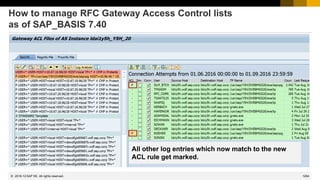
  • 265.
    334 © 2022 SAPSE. All rights reserved. Note 3026990 - RFC Logon - New Internal Logon Ticket - Increased Compatibility Level Side-effect solving notes: Note 3039802 - WebSocket RFC with Alias User in Same System Relevant as of kernel 7.77 Note 3045515 - RFC_WITHIN_SAME_SYSTEM - Wrong Result Relevant for kernel 8.04 on ByD Note 3046390 - Incorrect SAP compatibility level for SAP executables on Windows prevents rolling kernel switch (RKS) Relevant for kernel 7.49 and higher Note 3050126 - Internal RFC fails due to time difference between database and application server Relevant for all kernel releases, no support for kernel 7.73 anymore, therefore go for a release update to kernel 7.77 2021-06
  • 266.
    335 © 2022 SAPSE. All rights reserved. How to patch the Kernel ➢ Apply the latest SP Stack Kernel if it already contains the correction. For the list of current SP Stack Kernels, see Note 2083594 (Kernel Versions and Kernel Patch Levels). ➢ Apply the hotfix only if you are experiencing a serious error that is not yet corrected by the latest SP Stack Kernel. Yes, this is the case in case of serious security vulnerabilities! ➢ Review the regression note for the required patch level before installing the kernel patch. For details, see Note 1802333 (Finding information about regressions in the Kernel using search term KRNL<release>PL). ➢ For instructions on how to download and install kernel patches, see Note 19466 (Downloading SAP kernel patches). ➢ The paper Update Strategy for the Kernel of the Application Server ABAP in On Premise Landscapes provides detailed information on the SAP recommendations. ➢ Rolling Kernel Switch (RKS) https://help.sap.com/viewer/1ba3197c1aa7489882770103e3a610dc/7.40.18/en-US “The rolling kernel switch (RKS) is an automated procedure that enables the kernel in an ABAP system to be exchanged without any system downtime. RKS can also be used to make parameter changes while the system is running. Usually, RKS only causes minimal restrictions for users of the system.” The RKS is available as of Kernel release 7.41 and SAP_BASIS 7.40 SP 5 Limitation see notes 953653 and 2576697 → Restart is required 2021-06
  • 267.
    336 © 2022 SAPSE. All rights reserved. System Recommendations shows Kernel notes for Java systems Parts of the Kernel are part of an Java Application Server too, e.g. the message server or the RFC gateway but not disp+work. Therefore you find the Kernel in the LMDB (and PPMS) for Java systems, too: 2021-06 In such a case you will see these notes in application System Recommendations for Java systems, too.
  • 268.
    337 © 2022 SAPSE. All rights reserved. Kernel version vs. CommonCryptoLib version The CommonCryptoLib is installed everywhere. It is part of the Kernel bundle as well, however, it is somehow loosely coupled with the Kernel and it might have happened that you have missed updating the CommonCryptoLib. Whenever you plan Kernel updates for you complete system landscape you inspect the installed version of the Kernel beforehand. You should have a look to the installed version of the CommonCryptoLib, too. Use application Change Reporting respective transaction CCDB in the SAP Solution Manager to inspect the Configuration Stores SAP_KERNEL und CRYPTOLIB. 2021-06 This is the view from report ZSHOW_KERNEL_STORES You can find this report on the wiki SAP CoE Security Services – Tools See next page for a view based on standard BW reporting using application Configuration Validation respective Change Reporting You need an authorization for AI_CCDB_SC with CONT_AUTH=SECURITY and ACTVT=03 to access configuration store CRYPTOLIB.
  • 269.
    338 © 2022 SAPSE. All rights reserved. CCDB-Read-API Report ZSHOW_KERNEL_STORES uses the API functions of function group DIAGST_CCDB_READ to access configuration data from the SAP Solution Manager You can call the API locally in the SolMan or remotely from an external system. You can test the functions in transaction SE37 by activating DISPLAY=X. The RFC functions return either ABAP table structures or XML documents. Get technical systems having stores DIAGST_GET_TECH_SYSTEMS DIAGST_GET_TECH_SYSTEMS_RFC Get store directory DIAGST_GET_STORES DIAGST_GET_STORES_RFC stores for systems DIAGST_GET_STORES_HOSTS DIAGST_GET_STORES_HOSTS_RFC stores for hosts Get store content for table stores, ini stores and property stores (STORE_TYPE = TABLE, INI , PROPERTY) DIAGST_TABLE_SNAPSHOT DIAGST_TABLE_SNAPSHOT_RFC get snapshot DIAGST_TABLE_TIMERANGE DIAGST_TABLE_TIMERANGE_RFC get history generic search DIAGST_TABLE_PARAMETERS DIAGST_TABLE_PARAMETERS_RFC get history specific search Get store content for text stores (STORE_TYPE = TEXT) DIAGST_TEXT_SNAPSHOT DIAGST_TEXT_SNAPSHOT_RFC get snapshot DIAGST_TEXT_TIMERANGE DIAGST_TEXT_TIMERANGE_RFC get history Get store content for xml stores (STORE_TYPE = XML) DIAGST_XML_SNAPSHOT DIAGST_XML_SNAPSHOT_RFC get snapshot DIAGST_XML_TIMERANGE DIAGST_XML_TIMERANGE_RFC get history Get store content for event stores (STORE_TYPE = EVENT) DIAGST_EVENT_PARAMETERS DIAGST_EVENT_PARAMETERS_RFC get snapshot DIAGST_EVENT_TIMERANGE DIAGST_EVENT_TIMERANGE_RFC get history 2021-06 The API documentation is available on request.
  • 270.
    339 © 2022 SAPSE. All rights reserved. Configuration Reporting for Kernel version and CryptoLib version Use Configuration Reporting 0TPL_0SMD_VCA2_VAR_REP_CELL to show configuration items in cells and configuration item names on the x-axis.
  • 271.
    340 © 2022 SAPSE. All rights reserved. Configuration Reporting for Kernel version and CryptoLib version Choose a comparison list containing the systems and start reporting. Enter the required configuration stores on the variables screen: SAP_KERNEL CRYPTOLIB requires authorization for AI_CCDB_SC Enter the required configuration items on the variables screen: CCL KERN_COMP_TIME KERN_PATCHLEVEL KERN_REL (You could try to add ABAP_COMP_RELEASE as well but this produces a poor result.) 2021-06
  • 272.
    341 © 2022 SAPSE. All rights reserved. Configuration Reporting for Kernel version and CryptoLib version Remove rows: Checked [UTC] ConfigStore Host or Instance Path 2021-06 Adjust the view to get a better result
  • 273.
    342 © 2022 SAPSE. All rights reserved. Configuration Reporting for Kernel version and CryptoLib version Store the result as a bookmark for later use Limitations: • Filter values, which you choose later, are not part of the bookmark • No export to Excel possible 2021-06
  • 274.
  • 275.
    344 © 2022 SAPSE. All rights reserved. Topics May 2021 Use of Configuration Validation for stand-alone Web Dispatcher? Note 2114798 - Unauthorized use of application functions in SAP GUI for HTML Note 2745860 - Information Disclosure in Enterprise Services Repository of SAP Process Integration Notes 3049661, 3049755 - Vulnerabilities in SAP Business One, version for SAP HANA (Business-One-Hana-Chef-Cookbook) Note 2785547 - Introduction of the ICM LDAP Plug-In as Successor of the LDAP Connector Recordings: DSAG (German) ASUG SAP Learning HUB 2021-05
  • 276.
    345 © 2022 SAPSE. All rights reserved. Use of Configuration Validation for stand-alone Web Dispatcher? Question/request from ASUG:  We run a Web Dispatcher on the ASCS instance and want to validate the corresponding profile parameters in the ASCS profile files.  Problem: It is not possible to validate the instance profile parameter values (i.e. using target systems 2ADISCL and 2AAUDIT). 2021-05 Yes, that’s true, stand-alone Web Dispatchers do not feed data into store ABAP_INSTANCE_PAHI An incomplete workaround could be, to get and inspect the profile parameter text files in stores DEFAULT.PFL and <SID>_<Instance>_<hostname> of store group WEBDISP-PROFILE Blog: How to monitor standalone (non-ABAP) Web Dispatcher Security in Solution Manager https://blogs.sap.com/2021/02/10/how-to-monitor-standalone-non-abap-web-dispatcher-security-in-solution-manager/
  • 277.
    346 © 2022 SAPSE. All rights reserved. Use of Configuration Validation for stand-alone Web Dispatcher? Caveats ➢The configuration stores of the instance profiles have individual names. You cannot automatically address all of them within one target system ➢The configuration stores have type “text”. Use special line content operators as described in the blog. How-to get the configuration stores of store group WEBDISP-PROFILE ? ➢ Configuring Web Dispatcher for Root Cause Analysis in Solution Manager http://wiki.sdn.sap.com/wiki/x/4I-uDQ#MaintenanceofProductintheSystemLandscape-WebDispatcher and https://wiki.scn.sap.com/wiki/display/SMSETUP/Configuring+Web+Dispatcher+for+Root+Cause+Analysis+in+Solution+Manager More information about profile parameters ➢Blog: Checking profile parameter values in SAP NetWeaver and SAP HANA https://blogs.sap.com/2021/05/20/checking-profile-parameter-values-in-sap-netweaver-and-sap-hana/ 2021-05
  • 278.
    347 © 2022 SAPSE. All rights reserved. Note 2114798 - Unauthorized use of application functions in SAP GUI for HTML Old “Support Package SAP Security note” from 2015 Correction Instruction: *$ Valid for : $* *$ Software Component SAP_BASIS SAP Basis component $* *$ Release 700 SAPKB70026 - SAPKB70032 $* *$ Release 710 SAPKB71013 - SAPKB71019 $* *$ Release 711 SAPKB71109 - SAPKB71114 $* *$ Release 701 SAPKB70113 - SAPKB70117 $* *$ Release 702 SAPKB70210 - SAPKB70217 $* *$ Release 730 SAPKB73005 - SAPKB73013 $* *$ Release 720 SAPKB72006 - SAPKB72007 $* *$ Release 731 SAPKB73104 - SAPKB73116 $* *$ Release 740 SAPKB74003 - SAPKB74011 $* → Should already be solved via Support Package 2021-05
  • 279.
    348 © 2022 SAPSE. All rights reserved. Note 2745860 - Information Disclosure in Enterprise Services Repository of SAP Process Integration This note enables you to secure RFC connections from SAP PI to a backend system via SNC. Implement this note i.e. if you want to encrypt all internal server-to-server connections, too. The new option is available via Support Package (patch 0) only: ➢ 7.31 SP 28 16.12.2020 ➢ 7.40 SP 23 16.12.2020 ➢ 7.50 SP 20 02.03.2021 Documentation: Importing IDocs and RFCs https://help.sap.com/viewer/0b9668e854374d8fa3fc8ec327ff3693/7.5.20/en-US/2ba48f3c685bc358e10000000a11405a.html 2021-05
  • 280.
    349 © 2022 SAPSE. All rights reserved. Notes 3049661, 3049755 - Vulnerabilities in SAP Business One, version for SAP HANA (Business-One-Hana-Chef-Cookbook) SAP Business One Product Support https://partneredge.sap.com/en/products/business-one/support.html https://community.sap.com/topics/business-one Note Search https://apps.support.sap.com/sap/bc/ui5_ui5/svt/sbos_notesearch/index.html 2021-05
  • 281.
    350 © 2022 SAPSE. All rights reserved. Notes 3049661, 3049755 - Vulnerabilities in SAP Business One, version for SAP HANA (Business-One-Hana-Chef-Cookbook) Solution: Update the cookbook to latest version 0.1.20 from 06.05.2021 and then reinstall the system using this updated cookbook to get tightened file permissions Install SAP Business One version of HANA automatically using Chef https://github.com/SAP-archive/business-one-hana-chef-cookbook 2021-05
  • 282.
    352 © 2022 SAPSE. All rights reserved. Application Server Secure LDAP connection via ICM Note 2785547 - Introduction of the ICM LDAP Plug-In Applications using Directory Services LDAP Test Application (transaction LDAP) Customizing LDAP API (ABAP) LDAP Connector LDAP Client Library Directory Services old RFC LDAP 2021-05
  • 283.
    353 © 2022 SAPSE. All rights reserved. Application Server Secure LDAP connection via ICM Note 2785547 - Introduction of the ICM LDAP Plug-In Applications using Directory Services LDAP Test Application (transaction LDAP) Customizing LDAP API (ABAP) LDAP Connector LDAP Client Library Directory Services RFC with SNC LDAP 2021-05
  • 284.
    354 © 2022 SAPSE. All rights reserved. Open LDAP Application Server ICM Secure LDAP connection via ICM Note 2785547 - Introduction of the ICM LDAP Plug-In new Applications using Directory Services LDAP Test Application (transaction LDAP) Customizing LDAP API (ABAP) Referral Targets ICM LDAP Plug-In Open LDAP Directory Services LDAP LDAPS STARTTLS nested requests Referrals and search result references 2021-05
  • 285.
    355 © 2022 SAPSE. All rights reserved. Secure LDAP connection via ICM Note 2785547 - Introduction of the ICM LDAP Plug-In You can replace old LDAP connector with “LDAP connection via ICM” as of SAP_BASIS 7.50 SP 16, 7.51 SP 9, 7.52 SP 5, 7.53 SP 3 with Kernel 7.53 patch 510 or higher No other changes in configuration needed, however, just using the new connection via ICM does not give you an encrypted communication channel: you have to secure the connection using STARTTLS or LDAPS, too Note 2844331 - Product Assistance on ICM LDAP Plug-In for ABAP Platform 7.53 SP03 Online Help – Directory Services https://help.sap.com/viewer/c6e6d078ab99452db94ed7b3b7bbcccf/201909.000/en-US/4874337175bb501ae10000000a42189b.html Note 2820255 - ICM LDAP RZ11 parameter documentation Note 2801455 - ICM LDAP: Fix STARTTLS memory leak (only relevant for Kernel 7.77) 2021-05
  • 286.
    356 © 2022 SAPSE. All rights reserved. Secure LDAP connection via ICM Transaction LDAP → Server + Use LDAP via ICM instead of old LDAP connector Without any other changes you still get an unencrypted connection 2021-05
  • 287.
    357 © 2022 SAPSE. All rights reserved. Secure LDAP connection via ICM Transaction LDAP → Server + + Available security protocols: port 389 STARTTLS port 636 LDAPS Available authentication options: user + password anonymous PSE PSE with client certificate 2021-05
  • 288.
    358 © 2022 SAPSE. All rights reserved. LDAP Connection though ICM Use When this indicator is set, connections to this directory server are established through the ICM LDAP plug-in. When this indicator is not set, the connection will be established through the middleware component "LDAP Connector", which needs to be configured and managed separately. SAP recommends using the ICM LDAP plug-in for all LDAP server connections. When activating this setting for an already existing directory server entry, test that the connection to the directory server still works afterwards for the following reasons: • Although LDAP Connectors are regularly started on application server instances, you might have configured a detached LDAP Connector to mitigate network routing limitations from the network in which the application server resides and the network where the directory server resides. Switching from LDAP Connector to ICM LDAP plug-in then might then cause the connection to fail. • You might use an LDAP Connector on Microsoft Windows using the implicit creation of a secure connection based on port 636 and having the server certificate in the trust store of the operating system. The ICM LDAP plug-in uses SAP standard technology to maintain trust (SSL client identities in transaction STRUST) and therefore you might need to add the directory server certificate to the SSL client identity you choose for usage by the ICM LDAP plug-in for this connection. • The LDAP Connector, as using the LDAP client libraries of the operating system platform where it resides, might have implicit behavior which is not documented, and which is not present in the ICM LDAP plug-in. Dependencies • When all LDAP servers are configured to use the ICM LDAP plug-in, you can remove all LDAP Connectors. • The LDAP Connector is considered deprecated with the existence of the ICM LDAP plug-in. It will not receive further feature updates and might be removed completely in future. • Documentation of any type or source which asks you to create LDAP Connectors (and does not explicitly provide reasons why the ICM LDAP plug-in shall not be used) has been created before the ICM LDAP plug-in was developed and shall be ignored regarding this activity. • The ICM LDAP plug-in only supports LDAP protocol version "LDAPv3". • The ICM LDAP plug-in is not available on all platforms. When you have a system with heterogenous application servers (different operating systems or character byte widths), verify that the ICM LDAP plug-in is available on all of them before activating this setting. You can use this LDAP Servers maintenance view to review the state. It is shown next to the "Use ICM LDAP Plug-In" checkbox. 2021-05
  • 289.
    359 © 2022 SAPSE. All rights reserved. LDAP Connection though ICM The LDAP Plug-in of the ICM requires the HTTP plug-in up to Kernel 7.81. As of Kernel 7.82 you can enable (default) or disable specific outbound protocols for the ICM using new dynamic boolean profile parameters: icm/LDAP/enable_client Enable LDAP as client (used for STARTTLS as well) icm/LDAPS/enable_client Enable LDAPS as client and icm/TCP/enable_client Enable TCP as client icm/TCPS/enable_client Enable TCPS as client 2021-05
  • 290.
  • 291.
    361 © 2022 SAPSE. All rights reserved. Topics April 2021 Active Cyberattacks on Mission-Critical SAP Applications – Report from Onapsis Note 3017823 - Information Disclosure in SAP Solution Manager Note 3040210 - Remote Code Execution vulnerability in Source Rules of SAP Commerce Note 3036436 - Potential XXE Vulnerability in SAP Process Integration (ESR Java Mappings) Note 3039649 - Unquoted Search Path in SAPSetup Note 3036679 - Update 1 to Security Note 1576763: Potential information disclosure relating to usernames Recordings: DSAG (German) ASUG SAP Learning HUB 2021-04
  • 292.
    362 © 2022 SAPSE. All rights reserved. Active Cyberattacks on Mission-Critical SAP Applications https://onapsis.com/active-cyberattacks-mission-critical-sap-applications Note 1445998 - Disabling invoker servlet CVE-2010-5326 Critical Jul 20, 2011 Note 2234971 - Directory traversal in AS Java Monitoring CVE-2016-3976 High Mar 8, 2016 Note 2258786 - Potential information disclosure relating to SAP Web Administration Interface CWE-200 Medium Mar 07, 2016 Note 2296909 - Denial of service (DOS) vulnerability in BPM CVE-2016-9563 Medium Aug 08, 2016 Note 2547431 - Directory Traversal vulnerability in Internet Sales CVE-2018-2380 Medium Feb 13, 2018 Note 2890213 - Missing Authentication Check in SAP Solution Manager CVE-2020-6207 Critical Mar 10, 2020 Note 2934135 - Multiple Vulnerabilities in SAP NetWeaver AS JAVA (LM Configuration Wizard) CVE-2020-6287 Critical Jul 14, 2020 Note 2939665 - Disable/Enable LM Configuration Wizard | Critical API's in LM Configuration Wizard Protecting Standard Users CWE-307 Critical https://help.sap.com/viewer/12a2bc096c53101493cef874af478673/7.0.37/en-US/3ecdaccbedc411d3a6510000e835363f.html about CTB_ADMIN see also: Troopers 2016: An easy way into your multi-million dollar SAP systems: An unknown default SAP account https://troopers.de/events/troopers16/603_an_easy_way_into_your_multi-million_dollar_sap_systems_an_unknown_default_sap_account/ 2021-04
  • 293.
    363 © 2022 SAPSE. All rights reserved. Note 1445998 - Disabling invoker servlet Solution from 2010 Good news: The Invoker Servlet has been disabled by default as of release 7.20. But: In case of older systems – including some double stack systems – you have to disable the vulnerable feature manually. Check via Configuration Validation Configuration Item: EnableInvokerServletGlobally Configuration Store: servlet_jsp Baseline Target System: 1JNOTEST FRUN Policy: BL2_SYSTEM-J.xml 2021-04 2016-05 2015-10
  • 294.
    364 © 2022 SAPSE. All rights reserved. Note 2234971 - Directory traversal in AS Java Monitoring Solution via Support Package 2021-04
  • 295.
    365 © 2022 SAPSE. All rights reserved. Note 2258786 - Potential information disclosure relating to SAP Web Administration Interface Configuration: Deactivate support of public monitoring information in the web administration interface. Set the subparameter ALLOWPUB of the profile parameter icm/HTTP/admin_<xx> to FALSE. Then, access to administration pages without a logon is deactivated completely. Check via Configuration Validation Configuration Store: ABAP_INSTANCE_PAHI respective ABAP_INSTANCE_PAHI_ENH Configuration Item: icm/HTTP/admin* Check value to contain sub-parameter ALLOWPUB=FALSE Baseline Target System (but not for this sub-parameter): 2ADISCL FRUN Policy (but not for this sub-parameter): BL2_DISCL-A.xml Related Notes: Note 870127 - Security note for SAP Web Dispatcher Note 2260323 - Internet Communication Manager (ICM) 7.20 security settings 2021-04 2016-03
  • 296.
    366 © 2022 SAPSE. All rights reserved. Note 2296909 - Denial of service (DOS) vulnerability in BPM Solution via Support Package 2021-04
  • 297.
    367 © 2022 SAPSE. All rights reserved. Note 2547431 - Directory Traversal vulnerability in Internet Sales Solution via Support Package 2021-04
  • 298.
    368 © 2022 SAPSE. All rights reserved. Note 2890213 - Missing Authentication Check in SAP Solution Manager 2021-04 2020-11 2020-03 Solution via Support Package Workaround: Manual activation of EemAdmin authentication as a partial fix.
  • 299.
    369 © 2022 SAPSE. All rights reserved. Note 2934135 - Multiple Vulnerabilities in SAP NetWeaver AS JAVA (LM Configuration Wizard) At once: Deactivate on all application servers the aliases CTCWebService ctc/core ctcprotocol respective application tc~lm~ctc~cul~startup_app and validate that service CTCWebService is offline as described in KBA 2939665 In addition: Implement firewall rules for URL blocking as described in note 1589525 or develop filter rules for administrative requests according to note 451753 Short time: Implement the patch for Software Component LMCTC as described in the note. The patch does not depend on any other component and you can it deploy online (without downtime or restart) using telnet (see KBA 1715441) or if possible SUM (see Blog and Note 1641062). Software Download Example: https://launchpad.support.sap.com/#/softwarecenter/search/LM%2520CONFIGURATION%2520WIZARD%25207.50 Scheduled: Schedule a combined update of all Java components. You can take the time for preparation, if you have deactivated the vulnerability described by this note. 2021-04 2020-09 2020-08 2020-07
  • 300.
    370 © 2022 SAPSE. All rights reserved. Protecting Standard Users EarlyWatch Alert Solution Finder in Support Portal Launchpad https://launchpad.support.sap.com/#/ewasolutionfinder Report RSUSR003 Check via Configuration Validation Configuration Store: STANDARD_USERS Baseline Target System: 1ASTDUSR FRUN Policy: BL2_STDUSR-A.xml 2021-04 Default Passwords of Standard Users (Security → ABAP Stack) Standard users including SAP* or DDIC have default password 6 Systems
  • 301.
    371 © 2022 SAPSE. All rights reserved. Note 3017823 - Information Disclosure in SAP Solution Manager The ABAP correction instruction already solves the vulnerability of the RFC enabled function modules by clearing the critical data. In addition you find references to normal, functional corrections for software component LM-SERVICE. These corrections are not directly linked to the security issue. 2021-04 Referenced notes LM-SERVICE 7.20 SP 8 Patch 27 LM-SERVICE 7.20 SP 9 Patch 21 LM-SERVICE 7.20 SP 10 Patch 13 LM-SERVICE 7.20 SP 11 Patch 7 LM-SERVICE 7.20 SP 12 Patch 1 3028401 - Improve Logging for SMDA Connection Issues X X X X X 3023350 - Solution Manager Introscope Integration Change X X X X X 3010560 - Entries at HostAgentMonitoring Webservice are Missing patch 26 X X X X 3009666 - Solution Manager Corrections X X X X 2997708 - Support Solution Manager Java Servers Without a P4S Port - - patch 11 X 2979821 - Protect Webservices Defined by .wsdef Files - X X X
  • 302.
    372 © 2022 SAPSE. All rights reserved. Note 3040210 - Remote Code Execution vulnerability in Source Rules of SAP Commerce Version 17 from 13.04.2021 is the first published version. SAP Commerce installations that do not include any extensions from the Rule Engine module are not affected. An installation is directly affected if you grant write privileges on such Source Rules to employees, who shall not be able to execute script code in SAP Commerce. But of course you always should keep installed software up to date. The patch itself was publish on 15.04.2021: 2021-04
  • 303.
    373 © 2022 SAPSE. All rights reserved. Note 3036436 - Potential XXE Vulnerability in SAP Process Integration (ESR Java Mappings) This is a knowlege-sharing note about securing custom-made Java mappings for XML documents by disabling DTD: setFeature("http://apache.org/xml/features/disallow-doctype-decl", true) The topic is relevant for any kind of Java programs using XML, e.g. in products like SAP PO, MII Workbench, etc. Java mapping https://help.sap.com/viewer/0b9668e854374d8fa3fc8ec327ff3693/7.5.20/en-US/4bf40fddc0c33de4e10000000a42189e.html Securing parsers, schema validation and transformer https://help.sap.com/viewer/c591e2679e104fcdb8dc8e77771ff524/7.5.20/en-US/4c839c4dc19c4872990439d2945ee238.html Related note about securing against XXE in SAP standard content: Note 2932473 - Information Disclosure in SAP NetWeaver (XMLToolkit for Java) 2021-04
  • 304.
    374 © 2022 SAPSE. All rights reserved. Note 3036436 - Potential XXE Vulnerability in SAP Process Integration (ESR Java Mappings) Applications might require relaxed rules: • KBA 2879503 - AS Java is not getting started with exit code 2150 - DOCTYPE is disallowed (Issue during upgrade) Other applications work fine but show unnecessary log entries: • KBA 2629349 - How to stop the message generated from org.apache.tomcat.util.digester.Digester in SMP server log • KBA 2440311 - Error message DOCTYPE is disallowed 2021-04
  • 305.
    375 © 2022 SAPSE. All rights reserved. Note 2818965 - Clickjacking vulnerability in Runtime Workbench of SAP Process Integration The correction of the note enables a specific application of SAP Process Integration to use the general Clickjacking Protection for JSP on the Application Server Java Related Notes: Note 2286679 - Clickjacking Framing Protection in JAVA Note 2170590 - Central Whitelist maintenance & activation Note 2263656 - HTMLB Note 2290783 - Java Server Pages Check configuration using Transaction CCDB Configuration Store: Clickjacking Configuration Item: ClickjackingProtectionService 2021-04
  • 306.
    376 © 2022 SAPSE. All rights reserved. Note 3039649 - Unquoted Search Path in SAPSetup Application Component BC-FES-INS → Setup and Administration of the central Installation Server SAP GUI Packaging and Installation https://wiki.scn.sap.com/wiki/display/Basis/SAP+GUI+Packaging+and+Installation SAP Frontend Installation Guide https://help.sap.com/doc/2e5792a2569b403da415080f35f8bbf6/760.05/en-US/sap_frontend_inst_guide.pdf SAPSetup Guide https://help.sap.com/doc/1b770fc9e71e4062851ffe7de158007d/9.0.105.0/en-US/SAPSetup_Guide.pdf 2021-04
  • 307.
    377 © 2022 SAPSE. All rights reserved. Note 3036679 - Update 1 to Security Note 1576763: Potential information disclosure relating to usernames This is a secure-by-default story: Note 1576763 introduced a switched authorization check for TH_USER_LIST in Oct. 2011 ➢ Release 4.6C – 7.20: Off by default but you can activate the new check ➢ Release 7.31: On by default but you can de-activate the new check ➢ Higher releases: Always on (the switch was removed) ➢ Release 7.30: Off by default but you couldn’t activate the new check This is now solved with Note 3036679 More interesting question: Who is still running systems on 7.30? End of Mainstream Maintenance: 31.12.2020 2021-04
  • 308.
  • 309.
    379 © 2022 SAPSE. All rights reserved. Topics March 2021 Blogs: Java Parameter service/protectedwebmethods Blogs: RFC Gateway security Note 3017378 - Possible authentication bypass in SAP HANA LDAP scenarios Note 3022622 - Code injection vulnerability in SAP Manufacturing Integration and Intelligence Note 3022422 - Missing Authorization Check in SAP NetWeaver AS JAVA (MigrationService) How to secure P4 on AS Java Note 2574394 - Configure Diagnostics Agents with check for Client Certificate Recordings: DSAG (German) ASUG SAP Learning HUB 2021-03
  • 310.
    380 © 2022 SAPSE. All rights reserved. Blogs: Java Parameter service/protectedwebmethods Blogs by Johannes Goerlich: Go for service/protectedwebmethods = ALL first Protecting web methods offered by SAP Instance Agent https://blogs.sap.com/2021/02/22/protecting-web-methods-offered-by-sap-instance-agent Protecting web methods offered by SAP Host Agent https://blogs.sap.com/2021/02/22/protecting-web-methods-offered-by-sap-host-agent Profile Parameters: service/protectedwebmethods service/hostname service/http/hostname service/https/hostname service/http/acl_file service/https/acl_file service/admin_users service/admin_group service/sso_admin_user_<xx> 2021-03
  • 311.
    381 © 2022 SAPSE. All rights reserved. Blogs: RFC Gateway security Blogs by Johannes Goerlich: RFC Gateway security Part 1: General questions about the RFC Gateway security Part 2: reginfo ACL in detail Part 3: secinfo ACL in detail Part 4: prxyinfo ACL in detail Part 5: ACLs and the RFC Gateway security Part 6: RFC Gateway Logging 2021-03
  • 312.
    382 © 2022 SAPSE. All rights reserved. Note 3017378 - Possible authentication bypass in SAP HANA LDAP scenarios LDAP Servers used for authentication should not allow unauthenticated authentication Overview (Dec 2018) Apache is not affected https://directory.apache.org/apacheds/advanced-ug/4.1.1.3-unauthenticated-authn.html LDAP: Disable Unauthenticated Auth, but keep Anonymous Auth (May 2015) https://community.microfocus.com/t5/eDirectory-User-Discussions/LDAP-Disable-Unauthenticated-Auth- but-keep-Anonymous-Auth/td-p/2200547 AD, LDS and LDAP unauthenticated binds: A series of unfortunate security events (Jan 2017) https://blog.lithnet.io/2017/01/ad-lds-and-ldap-unauthenticated-binds.html Disabling Unauthenticated Binds in Active Directory (Dec 2018) https://blog.lithnet.io/2018/12/disabling-unauthenticated-binds-in.html Product Can be disabled Disabled by default Red Hat Directory Server Yes Yes OpenLDAP Yes Yes Novell eDirectory Yes No Oracle/Sun Directory Server Yes Yes Microsoft AD LDS/ADAM Yes* (Server 2019+) No Microsoft Active Directory Yes* (Server 2019+) No 2021-03
  • 313.
    383 © 2022 SAPSE. All rights reserved. Note 3022622 - Code injection vulnerability in SAP Manufacturing Integration and Intelligence SAP MII allows developer users having at least role SAP_XMII_Developer to create dashboards (which is a kind of limited development activity). Such a developer could attack the system by injecting malicious JSP leading e.g. to remote OS code execution on the server. ➢ Use strict separation between development and production systems ➢ Reduce assignments to role SAP_XMII_Developer, SAP_XMII_Administrator, and SAP_XMII_Super_Administrator in production systems 2021-03
  • 314.
    384 © 2022 SAPSE. All rights reserved. Note 3022622 - Code injection vulnerability in SAP Manufacturing Integration and Intelligence SAP MII - Security Guide Authorizations https://help.sap.com/viewer/9e5b0e960a9f49828522215c3fa14e71/15.4/en-US/c1eb0758e9219244e10000000a4450e5.html Roles SAP_XMII_Developer, SAP_XMII_Administrator, and SAP_XMII_Super_Administrator Actions for Permissions https://help.sap.com/viewer/d70c3ac3566b41dd896cd7cecc94e14a/15.4/en-US/4c9768bdc14d60c3e10000000a15822d.html Actions XMII_SSCE_ALL, XMII_SSCE_CHANGE, … SAP MII Self Service Composition Environment „Create dashboards using any SAP MII content (Query Templates, Display Templates, MDO/KPI Objects, and Resource Files), UI elements, and tags from Plant Information Catalog.” “The Source Code tab (html, css, and client-side Javascript) is hidden by default. Only users assigned with action XMII_SSCE_DEVELOPER can edit the source code.” 2021-03
  • 315.
    385 © 2022 SAPSE. All rights reserved. Note 3022622 - Code injection vulnerability in SAP Manufacturing Integration and Intelligence What else? Here is a sample from the guideline: Connections (remote calls) https://help.sap.com/viewer/d70c3ac3566b41dd896cd7cecc94e14a/15.4/en-US/4c72e07ce631469ee10000000a15822d.html and MDO Lifecycle (jobs) https://help.sap.com/viewer/d70c3ac3566b41dd896cd7cecc94e14a/15.4/en-US/4cc8daa98e9b60c5e10000000a15822d.html use the Credential Store https://help.sap.com/viewer/d70c3ac3566b41dd896cd7cecc94e14a/15.4/en-US/4c983ef0311160c4e10000000a15822d.html ➢ You can verify role assignments and usage of these technical users with stored credentials. (There exist a special “Usage” tab.) 2021-03
  • 316.
    386 © 2022 SAPSE. All rights reserved. Note 3022422 - Missing Authorization Check in SAP NetWeaver AS JAVA (MigrationService) Do you need to run a full Support Package update via SUM or is it sufficient just to apply patches? „Аs a final solution, you have to patch your systems with a new version of the J2EE-APPS.SCA,. ... NOTE: This solution is an offline deployment that requires a restart of your systems.” Note 2886099 - FAQ for SAP Note 3022422 “3. Is it possible to upgrade J2EE-APPS only or should the whole stack be upgraded? J2EE-APPS should be applied together with all its dependencies according to "SCA Dependency Analysis" tool.” You find the "SCA Dependency Analysis" in the SAP Support Portal when you navigate to the download page for Java packages. See Note 1974464 - Information on SCA Dependency Analysis for Java download objects 2021-03
  • 317.
    387 © 2022 SAPSE. All rights reserved. Note 3022422 - Missing Authorization Check in SAP NetWeaver AS JAVA (MigrationService) https://apps.support.sap.com/sap(bD1lbiZjPTAwMQ==)/support/swdc/notes/index.do?cvnr=73554900100200001504&support_package=SP015&patch_level=000014 Example for J2EE ENGINE APPLICATIONS 7.50 SP 15 Several other packages are required (if installed) … 2021-03
  • 318.
    388 © 2022 SAPSE. All rights reserved. Note 3022422 - Missing Authorization Check in SAP NetWeaver AS JAVA (MigrationService) What about the workaround? The workaround within SAP note 3030298 is sufficiently protecting the system till the next system restart, but during the next startup of the system the system becomes vulnerable again for the time until the deployed service is running. That is why you should apply the permanent solution as per SAP note 3022422 the latest during the next system restart. You can use Maintenance Planner to download only the required patches for your system without generating a stack xml file. You can also use 'SAP NW Java Support Tool' to calculate dependencies as per KBA 2352717. see KBA1715441 - Deploy/Undeploy/Force Redeploy EAR/SDA/SCA files on SAP AS JAVA 2021-03
  • 319.
    389 © 2022 SAPSE. All rights reserved. How to secure P4 on AS Java TCP/IP Ports of All SAP Products: https://help.sap.com/viewer/ports P4 / P4S is only required locally on the Java server respective in Visual Administrator and Deploy Tools 2021-03 Transport Layer Security https://help.sap.com/viewer/2f8b1599655d4544a3d9c6d1a9b6546b/7.03.28/en-US/46875b4243fadc54e10000000a155106.html ➢ Block or restrict P4 and P4S on network level between user zone and server zone ➢ Do not expose P4 and P4S on internet
  • 320.
    390 © 2022 SAPSE. All rights reserved. How to secure P4 on AS Java TCP/IP Ports of All SAP Products: https://help.sap.com/viewer/ports P4 / P4S is only required locally on the Java server respective in Visual Administrator and Deploy Tools 2021-03 Transport Layer Security https://help.sap.com/viewer/2f8b1599655d4544a3d9c6d1a9b6546b/7.5.19/en-US/46875b4243fadc54e10000000a155106.html ➢ Block or restrict P4 and P4S on network level between user zone and server zone ➢ Do not expose P4 and P4S on internet
  • 321.
    391 © 2022 SAPSE. All rights reserved. How to secure P4 on AS Java KBA 1770585 - How to configure SSL on the AS Java KBA 2268643 - How to configure the P4S port with Solution Manager 7.2 KBA 2267534 - How to remove the P4 P4S properties in the Java stack of Solution Manager 7.2 Note 2322555 - Connect the Diagnostics Agent to Solution Manager 7.2 using SSL KBA 2419031 - How to configure the P4S port for the J2ee NetWeaver Application Server Note 2458281 - Diagnostics Agent P4S via SAProuter KBA 2511578 - How to configure the P4S in the AS Java 7.0X Security Note 2574394 - Configure Diagnostics Agents to Check the Solution Manager Server Certificate Diagnostics Agent Connectivity in Solution Manager 7.2 https://wiki.scn.sap.com/wiki/x/r4htGw Diagnostics Agent 7.2 Troubleshooting https://wiki.scn.sap.com/wiki/x/5sviGg 2021-03
  • 322.
    392 © 2022 SAPSE. All rights reserved. Note 2574394 - Configure Diagnostics Agents with check for Client Certificate Solution Manager Workcenter “SAP Solution Manager Administration” → Agents Administration → Agent Admin 2021-03
  • 323.
    393 © 2022 SAPSE. All rights reserved. Note 2622660 - Security updates for the browser control Google Chromium delivered with SAP Business Client Note Version SAP Business Client Release Chromium Stable Release highest CVSS rating of contained security corrections Version 54 from 09.03.2021 SAP Business Client 7.0 PL17 SAP Business Client 7.70 PL1 Chromium 88.0.4324.150 Base Score: 9.6 (Priority Hot News) AV:N/AC:L/PR:N/UI:R/S:C/C:H/I:H/A:H Version 49 from 26.01.2021 SAP Business Client 7.0 PL16 SAP Business Client 7.70 PL0 Chromium 87.0.4280.141 Base Score: 9.6 (Priority Hot News) AV:N/AC:L/PR:N/UI:R/S:C/C:H/I:H/A:H Version 47 from 22.12.2020 SAP Business Client 7.0 PL15 Chromium 87.0.4280.66 Base Score: 7.5 (Priority High) AV:N/AC:L/PR:N/UI:N/S:U/C:H/I:N/A:N Version 46 from 10.11.2020 SAP Business Client 7.0 PL14 Chromium 86.0.4240.183 Base Score: 10.0 (Priority Hot News) AV:N/AC:L/PR:N/UI:N/S:C/C:H/I:H/A:H Version 44 from 13.10.2020 SAP Business Client 7.0 PL13 Chromium 85.0.4183.102 Base Score: 9.6 (Priority Hot News) AV:N/AC:L/PR:N/UI:R/S:C/C:H/I:H/A:H Version 42 from 25.08.2020 SAP Business Client 7.0 PL12 Chromium 84.0.4147.105 Base Score: 9.6 (Priority Hot News) AV:N/AC:L/PR:N/UI:R/S:C/C:H/I:H/A:H Version 41 from 14.07.2020 SAP Business Client 7.0 PL11 Chromium 83.0.4103.97 Base Score: 9.6 (Priority Hot News) AV:N/AC:L/PR:N/UI:R/S:C/C:H/I:H/A:H Version 40 from 28.04.2020 SAP Business Client 7.0 PL10 Chromium 81.0.4044.92 Base Score: 8.8 (Priority High) AV:N/AC:L/PR:N/UI:R/S:U/C:H/I:H/A:H Version 39 from 10.03.2020 SAP Business Client 6.5 PL22 SAP Business Client 7.0 PL9 Chromium 80.0.3987.122 Base Score: 8.8 (Priority High) AV:N/AC:L/PR:N/UI:R/S:U/C:H/I:H/A:H 2021-03 Security Note Priority CVSS v3 Base score Low 0.1 - 3.9 Medium 4.0 - 6.9 High 7.0 - 8.9 Hot News 9.0 - 10.0
  • 324.
  • 325.
    395 © 2022 SAPSE. All rights reserved. Topics February 2021 Note 2897141 - CVE-2020-1938 'Ghostcat' Tomcat AJP Vulnerability Note 2992154 - SAML Assertion Signature MD5 Digest Algorithm Vulnerability in SAP HANA Database Java Parameter service/protectedwebmethods Note 3014875 - Reverse Tabnabbing attack in SAP Netweaver AS ABAP, AS Java and SAP UI5 applications on multiple platforms Note 3014121 - Remote Code Execution vulnerability in SAP Commerce (cloud & on-prem) SAP GUI for Windows 7.70 Recordings: DSAG (German) ASUG SAP Learning HUB 2021-02
  • 326.
    396 © 2022 SAPSE. All rights reserved. Note 2897141 - CVE-2020-1938 'Ghostcat' Tomcat AJP Vulnerability This note is not classified as a Security Note, even if it describes a possible security vulnerability in Component BI-BIP-DEP SAP BusinessObjects Business Intelligence Platform product does NOT require the use of AJP connector, so the product itself is not affected by this vulnerability. However, you could configure AJP on your own depending on their usage like split deployment, reverse proxy or load balancing. To fix this vulnerability, upgrade Apache Tomcat to a non-vulnerable version as per Apache Tomcat documentation. If you don't use AJP and you can't upgrade Tomcat, you can disable AJP connector. Other applications using Tomcat might be affected / not affected: Note 2498770 - Tomcat vulnerabilities (CVE-*) NOT impacting SAP BusinessObjects Business Intelligence Platform XI 3.1 /4.0 /4.1 /4.2 /4.3 Note 2909840 - Apache Tomcat vulnerability aka GHOSTCAT Note 2928570 - 'Ghostcat' Apache Tomcat AJP Vulnerability in SAP Liquidity Management for Banking Note 2941645 - Apache JServ Protocol Vulnerability in SAP Commerce 2021-02
  • 327.
    397 © 2022 SAPSE. All rights reserved. Note 2992154 - SAML Assertion Signature MD5 Digest Algorithm Vulnerability in SAP HANA Database MD5 digest support in SAML assertions has been removed from SAP HANA 2 with the following revisions: ➢ HANA 2.0 SPS04 revision 48.03 ➢ HANA 2.0 SPS05 revision 53 With SAP HANA 1.0 revision 122.34, you can disable MD5 using a new parameter saml_signature_hash_types = 'sha1,sha256' in global.ini You can verify whether your SAML Identity Provider (IdP) still uses the MD5 algorithm by activating the “authentication trace” on “debug” level as described in note 3024481. SAP HANA: Troubleshooting Problems with User Authentication and SSO https://help.sap.com/viewer/bed8c14f9f024763b0777aa72b5436f6/2.0.05/en-US/c6ddbbb6d97610148b5ba05d69f58528.html ➢ Remember: After completing troubleshooting, reduce the authentication trace level back to default. 2021-02
  • 328.
    398 © 2022 SAPSE. All rights reserved. Java Parameter service/protectedwebmethods SAP Start Service (sapstartsrv) security https://wiki.scn.sap.com/wiki/display/SI/SAP+Start+Service+%28sapstartsrv%29+security sapstartsrv service parameters https://wiki.scn.sap.com/wiki/display/SI/sapstartsrv+service+parameters Protected web methods of sapstartsrv https://wiki.scn.sap.com/wiki/display/SI/Protected+web+methods+of+sapstartsrv Note 927637 - Web service authentication in sapstartsrv as of Release 7.00 Note 2838788 - How to verify if service/protectedwebmethods is recognized by sapstartsrv Protected web methods https://blogs.sap.com/2018/10/24/protected-web-methods/ 2021-02
  • 329.
    399 © 2022 SAPSE. All rights reserved. Java Parameter service/protectedwebmethods Default SDEFAULT Solman Monitoring SDEFAULT -ReadLogFile -ABAPReadSyslog -ListLogFilesError -J2EEGetProcessList2 -J2EEGetProcessList JAVA NWA System Overview SDEFAULT -J2EEGetProcessList -PerfRead -MtGetTidByName SUM DEFAULT Other Examples which I’ve seen: SDEFAULT -ListLogFiles -ReadLogFile -ListLogFilesError -J2EEGetProcessList -J2EEGetThreadList2 -GetVersionInfo –ParameterValue -PerfRead -MtGetTidByName -getTidsByName -GetAccessPointList -GetAccessPointList2 -UtilSnglmsgReadRawdata -GWGetConnectionList -GWGetClientList SDEFAULT -GetProcessList -J2EEGetProcessList -J2EEGetThreadList -GetEnvironment -GetStartProfile -GetInstanceProperties –GetVersionInfo -ABAPGetWPTable -GetAlertTree SDEFAULT -ReadLogFile -ListLogFiles -J2EEGetProcessList -GetVersionInfo -ParameterValue SDEFAULT -ReadLogFile -ListLogFiles -GetAlertTree -GetCIMObject 2021-02
  • 330.
    400 © 2022 SAPSE. All rights reserved. Note 3014875 - Reverse Tabnabbing attack in SAP Netweaver AS ABAP, AS Java and SAP UI5 applications on multiple platforms Reverse Tabnabbing vulnerabilities are attacks, where an page linked from the target page uses the opener browsing context to redirect the target page to a phishing site. SAP UI5 and Fiori Launchpad Note 3014303 Web Dynpro ABAP Note 2974582 SAP GUI for HTML Note 2973428 Business Server Pages Note 2972275 WebCUIF Note 2994289 Unified Rendering (March 2021) Note 2978151 Web Dynpro Java (March 2021) Note 2976947 HTMLB for Java (March 2021) Note 2977001 AS Java Start Page Note 2965315 Legit Page <a href="example.com" target="_blank"> Malicios Page window.opener.location = "https://phish.example.com"; Browser opens new tab Browser replaces content of original tab 2021-02
  • 331.
    401 © 2022 SAPSE. All rights reserved. Note 3014875 - Reverse Tabnabbing attack in SAP Netweaver AS ABAP, AS Java and SAP UI5 applications on multiple platforms Reverse Tabnabbing vulnerabilities are attacks, where an page linked from the target page uses the opener browsing context to redirect the target page to a phishing site. SAP UI5 and Fiori Launchpad Note 3014303 Web Dynpro ABAP Note 2974582 SAP GUI for HTML Note 2973428 Business Server Pages Note 2972275 WebCUIF Note 2994289 Unified Rendering Note 2978151 Web Dynpro Java Note 2976947 HTMLB for Java Note 2977001 AS Java Start Page Note 2965315 Phishing Page Malicios Page window.opener.location = "https://phish.example.com"; Browser opens new tab Browser replaces content of original tab 2021-02
  • 332.
    402 © 2022 SAPSE. All rights reserved. Note 3014121 - Remote Code Execution vulnerability in SAP Commerce (cloud & on-prem) Note 3020726 - Remote Code Execution vulnerability in SAP Commerce: FAQ ➢Q1: Which customers are affected? All customers who have the SAP Commerce ruleengine extension installed are very likely affected. Another precondition is that customers are making use of default user accounts and user groups of SAP Commerce, or have custom user accounts or user groups that have permissions to change or create DroolsRule items. ➢Q2: Are customers who host SAP Commerce on premise affected? Yes. ➢Q3: Are customers of SAP Commerce Cloud affected? Yes, customers of SAP Commerce Cloud (both CCv1 and CCv2) are affected. They need to take the same measures as on premise customers, as described in the SAP Security Note. 2021-02
  • 333.
    403 © 2022 SAPSE. All rights reserved. Note 3014121 - Remote Code Execution vulnerability in SAP Commerce (cloud & on-prem) SAP Commerce - Installing and Upgrading – System Requirements https://help.sap.com/viewer/a74589c3a81a4a95bf51d87258c0ab15/2011/en-US/8c6b9a8186691014bd8dd9635cabfaff.html SAP Commerce Cloud Architecture https://help.sap.com/viewer/20125f0eca6340dba918bda360e3cdfa/v2011/en-US/8b5588d8866910149d4eb5f99c75b6b4.html “You manage your SAP Commerce Cloud deployments in the Cloud Portal, which enables you to control and monitor all aspects of your SAP Commerce Cloud instances. Builds are fully automated. They are packaged as Docker nodes, orchestrated by Kubernetes, and deployed on Microsoft Azure public cloud infrastructure. You have full control over build configuration using build manifest files, and can connect your own GitHub repository to pull in any custom code for your project at build time.” Infrastructure Considerations for On-Prem SAP Commerce https://www.sap.com/cxworks/article/432591793/infrastructure_considerations_for_on_prem_sap_commerce Migrate to SAP Commerce Cloud https://www.sap.com/cxworks/article/435949091/migrate_to_sap_commerce_cloud Older security notes: Note 2786035 - Code Injection vulnerabilities in SAP Commerce Cloud Note 2697573 - Cross-Site Scripting (XSS) vulnerability in SAP Commerce / SAP Hybris 2021-02
  • 334.
    404 © 2022 SAPSE. All rights reserved. SAP GUI for Windows 7.70 SAP GUI for Windows 7.70 https://help.sap.com/viewer/product/sap_gui_for_windows/770.00/en-US What’s New in SAP GUI for Windows https://help.sap.com/viewer/e8f03b91f99d45f4ae9d90ddf6e44b70/770.00/en-US Note 2796898 - New and changed features in SAP GUI for Windows 7.70 https://launchpad.support.sap.com/#/notes/2796898 SAP GUI Security Module https://help.sap.com/viewer/ca5169c2f72448eeb608cd09564ccf90/770.00/en-US No major updates concerning security features – but a strong opportunity to review existing security settings: ➢ Check installed version (→ slides from 2016-01) ➢ Security Configuration (→ slides from 2017-04) ➢ Enable SNC Client Encryption (→ slides from 2017-05) ➢ Log unencrypted GUI /RFC (→ slides from 2015-07) 2021-02
  • 335.
    405 © 2022 SAPSE. All rights reserved. SAP GUI for Windows 7.70 - Chromium Edge for HTML Control Up to Release 7.60, the SAP GUI HTML control always uses the control for Microsoft Internet Explorer. As a result, SAP GUI may launch an Internet Explorer window. As of Release 7.70, SAP GUI for Windows offers to embed the Microsoft WebView2 control (Edge based on Chrome) https://docs.microsoft.com/en-us/microsoft-edge/webview2 ➢ Installation required ➢ Local activation in SAP Logon required (This is not related to the Chromium plugin of the SAP Business Client.) 2021-02
  • 336.
  • 337.
    407 © 2022 SAPSE. All rights reserved. Topics January 2021 Q&A Notes for Security HotNews Note 2622660 - Security updates for the browser control Google Chromium delivered with SAP Business Client Note 2983367 - Code Injection vulnerability in SAP Business Warehouse (Master Data Management) and SAP BW4HANA (reloaded) Note 2986980 - Multiple vulnerabilities in SAP Business Warehouse (Database Interface) Note 2999854 - Code Injection in SAP Business Warehouse and SAP BW/4HANA Note 2945581 - Cross-Site Scripting (XSS) vulnerability in SAP CRM WebClient UI Note 3001373 - Information Disclosure in Central Order on Cloud Foundry Note 2911103 - SE16N: Alternative edit mode Recordings: DSAG (German) ASUG SAP Learning HUB 2021-01
  • 338.
    408 © 2022 SAPSE. All rights reserved. Q&A Notes for Security HotNews December 2020 Note 2989075 - Missing XML Validation in SAP BusinessObjects Business Intelligence Platform (Crystal Report) ➢ - Note 2974774 - Missing Authentication Check In SAP NetWeaver AS JAVA (P2P Cluster Communication) ➢ Note 2997167 - Missing Authentication Check In NW AS Java P2P Cluster Communication - Frequently asked questions and answers Note 2973735 - Code Injection in SAP AS ABAP and S/4 HANA (DMIS) ➢ Note 2985806 - FAQ for SAP Note 2973735 - Code Injection vulnerability in S/4 HANA January 2021 Note 2999854 - Code Injection in SAP Business Warehouse and SAP BW/4HANA ➢ Note 3006112 - Q&A for SAP Security Note 2999854 Note 2986980 - Multiple vulnerabilities in SAP Business Warehouse (Database Interface) ➢ Note 3005196 - Q&A for SAP Security Note 2986980 Note 2983367 - Code Injection vulnerability in SAP Business Warehouse (Master Data Management) and SAP BW4HANA ➢ Note 2999167 - Q&A for SAP Security Note 2983367 Note 2979062 - Privilege escalation in SAP NetWeaver Application Server for Java (UDDI Server) ➢ Note 2989299 - Frequently asked questions and answers Note 2622660 - Security updates for the browser control Google Chromium delivered with SAP Business Client ➢ (Exception, old note which gets updated regularly.) 2021-01
  • 339.
    409 © 2022 SAPSE. All rights reserved. Note 2622660 - Security updates for the browser control Google Chromium delivered with SAP Business Client Note Version SAP Business Client Release Chromium Stable Release highest CVSS rating of contained security corrections Version 47 from 22.12.2020 SAP Business Client 7.0 PL15 Chromium 87.0.4280.66 Base Score: 7.5 (Priority High) AV:N/AC:L/PR:N/UI:N/S:U/C:H/I:N/A:N Version 46 from 10.11.2020 SAP Business Client 7.0 PL14 Chromium 86.0.4240.183 Base Score: 10.0 (Priority Hot News) AV:N/AC:L/PR:N/UI:N/S:C/C:H/I:H/A:H Version 44 from 13.10.2020 SAP Business Client 7.0 PL13 Chromium 85.0.4183.102 Base Score: 9.6 (Priority Hot News) AV:N/AC:L/PR:N/UI:R/S:C/C:H/I:H/A:H Version 42 from 25.08.2020 SAP Business Client 7.0 PL12 Chromium 84.0.4147.105 Base Score: 9.6 (Priority Hot News) AV:N/AC:L/PR:N/UI:R/S:C/C:H/I:H/A:H Version 41 from 14.07.2020 SAP Business Client 7.0 PL11 Chromium 83.0.4103.97 Base Score: 9.6 (Priority Hot News) AV:N/AC:L/PR:N/UI:R/S:C/C:H/I:H/A:H Version 40 from 28.04.2020 SAP Business Client 7.0 PL10 Chromium 81.0.4044.92 Base Score: 8.8 (Priority High) AV:N/AC:L/PR:N/UI:R/S:U/C:H/I:H/A:H Version 39 from 10.03.2020 SAP Business Client 6.5 PL22 SAP Business Client 7.0 PL9 Chromium 80.0.3987.122 Base Score: 8.8 (Priority High) AV:N/AC:L/PR:N/UI:R/S:U/C:H/I:H/A:H - SAP Business Client 6.5 PL21 SAP Business Client 7.0 PL8 Chromium 79.0.3945 Base Score: 8.8 (Priority High) AV:N/AC:L/PR:N/UI:R/S:U/C:H/I:H/A:H Version 37 from 28.01.2020 SAP Business Client 6.5 PL20 SAP Business Client 7.0 PL7 Chromium 79.0.3945 Base Score: 8.8 (Priority High) AV:N/AC:L/PR:N/UI:R/S:U/C:H/I:H/A:H 2021-01 Security Note Priority CVSS v3 Base score Low 0.1 - 3.9 Medium 4.0 - 6.9 High 7.0 - 8.9 Hot News 9.0 - 10.0
  • 340.
    410 © 2022 SAPSE. All rights reserved. Note 2983367 - Code Injection vulnerability in SAP Business Warehouse (Master Data Management) and SAP BW4HANA 2021-01 Q&A Note 2999167 The validity of the correction instructions now covers all relevant SP levels Software Component Release from SP to SP SAP_BW 700 SAPKW70018 SAPKW70040 SAP_BW 701 SAPKW70107 SAPKW70123 SAP_BW 702 SAPKW70207 SAPKW70223 SAP_BW 730 SAPKW73006 ALL SUPP. PACKAGES SAP_BW 731 SAPKW73107 SAPKW73128 SAP_BW 740 SAPKW74002 SAPKW74024 SAP_BW 750 750 SAPK-75019INSAPBW SAP_BW 751 751 SAPK-75111INSAPBW SAP_BW 752 752 SAPK-75207INSAPBW SAP_BW 753 753 SAPK-75305INSAPBW SAP_BW 754 754 SAPK-75403INSAPBW SAP_BW 755 755 755 DW4CORE 100 100 SAPK-10018INDW4CORE DW4CORE 200 200 SAPK-20006INDW4CORE
  • 341.
    411 © 2022 SAPSE. All rights reserved. Note 2986980 - Multiple vulnerabilities in SAP Business Warehouse (Database Interface) Q&A Note 3005196 Deactivation of critical, obsolete RFC-function RSDL_DB_GET_DATA_BWS in software component SAP_BW which exists on all ABAP systems. ➢ No test required, just do it ➢ Detection: Inspect Workload Statistics or Security Audit Log or use ETD to verify that the RFC function is not called ➢ Manual workaround with modification: Deactivate the function by yourself ➢ Manual workaround without modification: Check authorizations for authorization object S_RFC for function RSDL_DB_GET_DATA_BWS as well as for function group RSDL 2021-01
  • 342.
    412 © 2022 SAPSE. All rights reserved. Note 2999854 - Code Injection in SAP Business Warehouse and SAP BW/4HANA Q&A Note 3006112 Normal function RSDRC_ITAB_LOGGING gets secured in software component SAP_BW which exists on all ABAP systems. This function is called by RFC function RSDRI_DF_TEXT_READ ➢ No test required, just do it ➢ Generated report Z_RSDRI_DF_TXT_* is only useful for debugging purpose. ➢ Detection: Inspect Workload Statistics or Security Audit Log or use ETD to verify that the RFC function respective the report is not called. 2021-01
  • 343.
    413 © 2022 SAPSE. All rights reserved. Note 2945581 - Cross-Site Scripting (XSS) vulnerability in SAP CRM WebClient UI Software component WEBCUIF exists in various ABAP system types. Manual instruction to delete a MIME object before implementation via SNOTE in the development system Navigate to path SAP → BC → BSP → SAP and use the search function, download the file to have a backup until implementation via SNOTE is finished 2021-01
  • 344.
    414 © 2022 SAPSE. All rights reserved. Note 3001373 - Information Disclosure in Central Order on Cloud Foundry Central Order service for SAP Customer Experience solutions Purpose: Consolidate and manage your order-related data in a central cloud-based service. This service runs in the Cloud Foundry environment. Manual instruction to recreate binding credentials if you have created them before 04.12.2020. Online Documentation - Central Order Service Guide – Initial Setup https://help.sap.com/viewer/d91676a7fa624c31b7b1c526d7787e2f/Beta/en-US/227cf2f493d74fd6a996a88f29c82bee.html Online Documentation - Central Order Service Guide – Creating Service Keys https://help.sap.com/viewer/65de2977205c403bbc107264b8eccf4b/Cloud/en-US/4514a14ab6424d9f84f1b8650df609ce.html You can use service keys to generate credentials to communicate directly with a service instance. The service key contains the URL that you use to call the APIs of the service, the client ID, and the client secret. Note this information, as you need it in follow-on procedures. Service keys contain authentication- and authorization-related content and have to be handled securely. 2021-01
  • 345.
    415 © 2022 SAPSE. All rights reserved. Note 2911103 - SE16N: Alternative edit mode Transaction SE16N does not offer change mode via command &SAP_EDIT anymore. New transaction SE16N_EMERGENCY can be used instead. ➢ Several required notes with additional manual implemementation steps ➢ The transaction gets locked by default ➢ You can unlock it via transaction SM01_CUS ➢ Authorizations for S_TABU_DIS / S_TABU_NAM with activity 02=change is required ➢ Usage get logged, view logs via report RKSE16N_CD_DISPLAY 2021-01
  • 346.
    417 © 2022 SAPSE. All rights reserved. Note 2911103 - SE16N: Alternative edit mode Several required notes, e.g. 2787892, 2848972, 2863410, 2867757, 2879630, 2880334, 2886898, 2905486, 2911103 with additional manual implemementation steps 2021-01 + manual steps + manual steps + manual steps + manual steps + manual steps + manual steps However, on higher releases give SNOTE a try first – depending on the version of SNOTE it can perform most or all of the manual steps automatically!
  • 347.
    418 © 2022 SAPSE. All rights reserved. Note 2911103 - SE16N: Alternative edit mode 2021-01 Report RKSE16N_CD_DISPLAY Transaction SE16N_EMERGENCY
  • 348.
    419 © 2022 SAPSE. All rights reserved. Note 2911103 - SE16N: Alternative edit mode Related notes / correction notes of component CO-OM Note 2002588 - CO-OM Tools: Documentation for SE16S, SE16SL, and SE16S_CUST ... Note 2906317 - SE16N: Access to CDS views Note 2968176 - SE16H: Improvements for outer joins and having Note 2978713 - SE16N Selection Screen does not show separators Note 2985178 - SE16N_EMERGENCY: Explanation popup occurs even with no change of data Note 3007467 - SE16H: Authorization check for execution of Join-Selections 2021-01
  • 349.
  • 350.
    421 © 2022 SAPSE. All rights reserved. Topics December 2020 Configuration & Security Analytics (CSA) in FocusedRun Note 2890213 - Missing Authentication Check in SAP Solution Manager (reloaded) Note 2985866 - Missing Authentication Check in SAP Solution Manager (JAVA stack) Note 2983204 - Multiple Vulnerabilities in SAP Solution Manager 7.2 (User Experience Monitoring) Note 2974330 - Unrestricted File Upload vulnerability in Java (Process Integration Monitoring) Note 2974774 - Missing Authentication Check In SAP NetWeaver AS JAVA (P2P Cluster Communication) Note 2983367 - Code Injection vulnerability in SAP Business Warehouse (Master Data Management) and SAP BW4HANA Note 2670851 - Authority check in RSSG_BROWSER Note 2978768 - Inproper authentication in SAP HANA database System Recommendations – Recalculation for some notes Recordings: DSAG (German) ASUG SAP Learning HUB 2020-12
  • 351.
    422 © 2022 SAPSE. All rights reserved. SAP Focused Run – Use Cases & High Level Architecture Advanced Integration Monitoring (AIM) SAP HANA + SAP NetWeaver ABAP + SAPUI5 as Technology Foundation Landscape Management Database Simple Diagnostic Agent & SAP Host Agent Monitoring & Alerting Infrastructure Expert Scheduling Framework Simple System Integration Guided Procedure Framework SAP Focused Run - Application Foundation Advanced System Management (ASM) Advanced Event & Alert Management (AEM) Advanced Configuration Monitoring (ACM) Advanced User Monitoring (AUM) Advanced Analytics & Intelligence (AAI) Advanced Root Cause Analysis (ARA) Advanced Application Management (AAM) 2020-12
  • 352.
    Policies for theSAP Security Baseline Template
  • 353.
    You can selectseveral policies and run them together against all connected systems to get a complete cross-system view.
  • 354.
  • 355.
  • 356.
  • 357.
    Aggregated view perPolicy (PatchDay)
  • 358.
  • 359.
  • 360.
  • 361.
  • 362.
    Manage Catalog ofPolicies and active Policies
  • 363.
    Upload Policy fromGitHub Copy&Paste raw-link
  • 364.
    435 © 2022 SAPSE. All rights reserved. Configuration & Security Analytics (CSA) in FocusedRun FRUN https://support.sap.com/en/alm/focused-solutions/focused-run-expert-portal.html Advanced Configuration Monitoring (ACM) Configuration & Security Analytics (CSA) https://support.sap.com/en/alm/focused-solutions/focused-run-expert-portal/configuration-and-security-analytics.html CSA Best Practices https://support.sap.com/en/alm/sap-focused-run/expert-portal/configuration-and-security-analytics/csa-best-practices.html Github SAP samples https://github.com/SAP-samples/frun-csa-policies-best-practices Security Baseline Template Policies https://github.com/SAP-samples/frun-csa-policies-best-practices/tree/master/BaselinePolicies/SOS/v2.2 Security Notes Policies https://github.com/SAP-samples/frun-csa-policies-best-practices/tree/master/NotesPolicies 2020-12
  • 365.
    436 © 2022 SAPSE. All rights reserved. Configuration & Security Analytics (CSA) in FocusedRun FRUN Internet Demo System Landing Page https://support.sap.com/en/alm/sap-focused-run/internet-demo-system.html Demo System https://frun.almdemo.com/sap/bc/ui2/flp?sap-client=100&sap-language=EN#Shell-home 2020-12
  • 366.
    437 © 2022 SAPSE. All rights reserved. Note 2890213 - Missing Authentication Check in SAP Solution Manager Note 2985866 - Missing Authentication Check in SAP Solution Manager HotNews note (re)-published on 10.11.2020 These issues are relevant for all customers using SAP Solution Manager 7.2 on Support Package SP11 and lower. No additional activities are required after applying the patch. In NetWeaver Administrator go to System Information: Components Info Find LM-SERVICE and check the version; the format looks like: 1000.7.20.[SP].[Patch].[Creation Date] Patches containing this particular correction: What you get on 18.11.2020: SOLMANDIAG 720 SP004 000012 SP04 patch 17 12.11.2020 SOLMANDIAG 720 SP005 000013 SP05 patch 18 06.10.2020 SOLMANDIAG 720 SP006 000014 SP06 patch 19 12.11.2020 SOLMANDIAG 720 SP007 000020 March SP07 patch 26 04.11.2020 SOLMANDIAG 720 SP008 000016 SP08 patch 24 04.11.2020 SOLMANDIAG 720 SP009 000008 SP09 patch 18 04.11.2020 SOLMANDIAG 720 SP010 000002 SP10 patch 9 04.11.2020 SOLMANDIAG 720 SP011 000004 November SP11 patch 4 / 5 22.10.2020 / 04.11.2020 For this component you always install the latest patch of a specific Support Package. 2020-12
  • 367.
    438 © 2022 SAPSE. All rights reserved. Note 2983204 - Multiple Vulnerabilities in SAP Solution Manager 7.2 (User Experience Monitoring) Related note: ➢ Note 2890213 - Missing Authentication Check in SAP Solution Manager (User-Experience Monitoring) Make sure Single Sign-On Automatic Activity in SAP Solution Manager Configuration has been executed: Transaction SOLMAN_SETUP → Cross Scenario Configuration → Mandatory Configuration → Infrastructure Preparation → (2) Setup Connectivity → (2.2) Enable Connectivity → Set Up Single Sign-On Patches containing this particular correction: Published on SOLMANDIAG 720 SP003 000008 12.11.2020 SOLMANDIAG 720 SP004 000017 12.11.2020 SOLMANDIAG 720 SP005 000019 19.11.2020 SOLMANDIAG 720 SP006 000019 12.11.2020 SOLMANDIAG 720 SP007 000026 04.11.2020 SOLMANDIAG 720 SP008 000024 04.11.2020 SOLMANDIAG 720 SP009 000018 28.10.2020 SOLMANDIAG 720 SP010 000009 28.10.2020 SOLMANDIAG 720 SP011 000005 04.11.2020 2020-12
  • 368.
    439 © 2022 SAPSE. All rights reserved. Note 2974330 - Unrestricted File Upload vulnerability in Java (Process Integration Monitoring) Vulnerability: Deny of Service (DoS) for Java system in application „Send test message“ of Process Integration Monitoring Mitigation: Action NWA_SUPERADMIN_NWA_SENDTESTMSG is required to call the function. The action is part of most PI administrator roles. Configuration: NWA → Configuration → Infrastructure → Java System Properties Select the Applications tab and filter for application tc~lm~itsam~co~ui~nwacompmon~wd sndTestMessage.monitor.payload.filesize.limit 5 default [MB] sndTestMessage.monitor.payload.file.extensions txt,xml default Logs: If the uploaded file size is larger than the configured filesize limit property or the file extension is not listed in the allowed extensions property an error occurs in UI and Developer Traces log: NWA → Log Viewer (select Developer Traces view) 2020-12
  • 369.
    440 © 2022 SAPSE. All rights reserved. Note 2974774 - Missing Authentication Check In SAP NetWeaver AS JAVA (P2P Cluster Communication) KBA 2997167 - Missing Authentication Check In NW AS Java P2P Cluster Communication - Frequently asked questions and answers Question: “Assuming that the network is not isolated: If the MS Access Control List is configured, than any connect attempt from another server via the join port is blocked. Correct?“ ➢ Yes, if the IP or FQDN of the remote client (who wants to make a p2p connection to the join port of some server node) is not allowed from the MS ACL, then the connection will be refused from the accepting server node. Workaround / extended settings: a) Configure Message Server ACL to allow P2P connections only from trusted IP addresses according to this topic: Security Settings for the SAP Message Server. b) Make sure that the Join Port, opened by the P2P Server Socket, is protected on network level via network segmentation, with firewall, or both. Furthermore, the communication between the cluster elements must be secured via the IPsec protocol suite. For more information about cluster communication, see: Configuring Cluster Communication Ports. 2020-12
  • 370.
    442 © 2022 SAPSE. All rights reserved. Note 2974774 - Missing Authentication Check In SAP NetWeaver AS JAVA (P2P Cluster Communication) Online Help Technical System Landscape Use an Application Gateway, e.g. the SAP Web Dispatcher 2020-12
  • 371.
    443 © 2022 SAPSE. All rights reserved. Note 2974774 - Missing Authentication Check In SAP NetWeaver AS JAVA (P2P Cluster Communication) Online Help Transport Layer Security Use an Application Gateway, e.g. the SAP Web Dispatcher 2020-12
  • 372.
    444 © 2022 SAPSE. All rights reserved. Note 2974774 - Missing Authentication Check In SAP NetWeaver AS JAVA (P2P Cluster Communication) Online Help - AS Java Ports → AS Java Server Ports Internal Port Value s0, s1, s2,…, s15 is the number of the server process NN is the instance number Server Join Port For s0 = 5NN20; for s1 = 5NN25; for s2 = 5NN30; etc. for s15 = 5NN95 Server Debug Port For s0 = 5NN21; for s1 = 5NN26; for s2 = 5NN31; etc. for s15 = 5NN96 DSR Infrastructure For s0 = 5NN22; for s1 = 5NN27; for s2 = 5NN32; etc. for s15 = 5NN97 TCP/IP Ports of All SAP Products: https://help.sap.com/viewer/ports 2020-12
  • 373.
    445 © 2022 SAPSE. All rights reserved. Note 2974774 - Missing Authentication Check In SAP NetWeaver AS JAVA (P2P Cluster Communication) Online Help - Security Settings for the SAP Message Server Parameter Port ms/acl_file_admin Administration port on the message server. This port is set with parameter ms/admin_port. ms/acl_file_ext External port on the message server, which all clients can use. This port is set with parameter rdisp/msserv. ms/acl_file_extbnd Port number under which an external binding program (icmbnd) has to log on to in order to bind a port. This port is set with parameter rdisp/extbnd_port. ms/acl_file_int External port on the message server This port is set with parameter rdisp/msserv_internal. ms/server_port_<xx> This parameter identifies the message server port at which HTTP(S) requests can arrive. 2020-12
  • 374.
    446 © 2022 SAPSE. All rights reserved. Note 2983367 - Code Injection vulnerability in SAP Business Warehouse (Master Data Management) and SAP BW4HANA Unvalidated input parameter allows ABAP code injection via GENERATE SUBROUTINE POOL Replaced by fixed value in old systems Deactivation of obsolete function in higher support package levels Caution: The validity ranges of the correction instructions are quite small: Open a ticket if you need the note for a (quite) old system. 2020-12
  • 375.
    447 © 2022 SAPSE. All rights reserved. Note 2670851 - Authority check in RSSG_BROWSER Transaction / report RSSG_BROWSER is a simple table viewer (similar like SE16). It generates a program based on template RSSG_BROWSER_TEMPLATE Authorizations for S_DEVELOP DEBUG 02 and S_TABU_DIS / S_TABU_NAM are required. Do not use it in production systems! In addition you should implement Note 2999035 - Authority check S_TABU_DIS in RSSG_BROWSER 2020-12
  • 376.
    448 © 2022 SAPSE. All rights reserved. Note 2978768 - Inproper authentication in SAP HANA database 1st Security Note for the HANA database since more than a year 2020-12
  • 377.
    449 © 2022 SAPSE. All rights reserved. System Recommendations – Recalculation for some notes Unfortunately due to a bug several non ABAP security notes released on 08.12.2020 have incorrect patch level. We have fixed the bug and corrected the data on backbone. To re-pushing them to customer, we modified the released date of affected notes in backbone to 10.12.2020. The corrected notes have been recalculated automatically, i.e. if the background job is scheduled daily basis (no extra action is required). Number System type Title 2971163 JAVA Missing Encryption in SAP NetWeaver AS Java (Key Storage Service) 2971180 DISCMGMS Formula Injection in SAP Disclosure Management 2974330 JAVA Unrestricted File Upload vulnerability in SAP NetWeaver Application Server for Java (Process Integration Monitoring) 2974774 JAVA Missing Authentication Check In SAP NetWeaver AS JAVA (P2P Cluster Communication) 2978768 HANABD Improper authentication in SAP HANA database 2983204 JAVA Multiple Vulnerabilities in SAP Solution Manager 7.2 (User Experience Monitoring) 2989075 BOBJ Missing XML Validation in SAP BusinessObjects Business Intelligence Platform (Crystal Report) 2020-12
  • 378.
    450 © 2022 SAPSE. All rights reserved. System Recommendations – Recalculation for some notes Number System type 2971163 JAVA 2971180 DISCMGMS 2974330 JAVA 2974774 JAVA 2978768 HANABD 2983204 JAVA 2989075 BOBJ 2020-12
  • 379.
    451 © 2022 SAPSE. All rights reserved. System Recommendations – Recalculation for some notes How to trigger recalculation: Use transaction SE16 for table AGSSR_KV to delete following entries for field SRKEY: BACKEND_SHNOTES_2020_12 CALC_*$*$2020_12 Maybe better: CALC_*$JAVA$2020_12 CALC_*$HANADB$2020_12 CALC_*$BOBJ$2020_12 Then copy and re-release job SM:SYSTEM RECOMMENDATIONS 2020-12
  • 380.
  • 381.
    453 © 2022 SAPSE. All rights reserved. Topics November 2020 Note 2952084 - Information Disclosure in SAP Process Integration (PGP Module – Business-to- Business Add On) Note 2963592 - Cross-Site Scripting (XSS) vulnerability in SAP NetWeaver (Knowledge Management) Note 2971112 - Incorrect Default Permissions in SAP ERP Client for E-Bilanz 1. Note 2890213 - Missing Authentication Check in SAP Solution Manager Note 2985866 - Missing Authentication Check in SAP Solution Manager (JAVA stack) Scenarios for Using the Security Audit Log Recordings: DSAG (German) ASUG SAP Learning HUB 2020-11
  • 382.
    454 © 2022 SAPSE. All rights reserved. Note 2952084 - Information Disclosure in SAP Process Integration (PGP Module – Business-to-Business Add On) PGP Secure Store (New) https://help.sap.com/saphelp_nw-secure-connect103/helpdata/en/da/33e33a47d14419bd51829f3ab53a94/frameset.htm Maintaining PGP Keys https://help.sap.com/saphelp_nw-secure-connect103/helpdata/en/8b/11483856d04f6b9c7bf378ecd1670c/frameset.htm SFTP Adapter – Configuring PGP Secure Store https://blogs.sap.com/2017/10/31/sftp-adapter-configuring-pgp-secure-store/ Use Configuration Store J2EE_COMP_SPLEVEL and search for element PIB2BPGP to show systemes and installed versions of that component: 2020-11
  • 383.
    455 © 2022 SAPSE. All rights reserved. Note 2952084 - Information Disclosure in SAP Process Integration (PGP Module – Business-to-Business Add On) App /SecureStore Module parameter useSecureStore of related Communication Components (PGPEncryption and PGPDecryption ) 2020-11 Update Keys
  • 384.
    456 © 2022 SAPSE. All rights reserved. Note 2952084 - Information Disclosure in SAP Process Integration (PGP Module – Business-to-Business Add On) By default the modules PGPEncryption and PGPDecryption access the keys form this location: usr/sap/<System ID>/<Instance ID>/sec If you want to store the PGP keys in some other location, use module parameter keyRootPath and specify the path. If you do not want to store the PGP keys on a file system, use PGP Secure Store functionality using module parameter useSecureStore=true If you import a new PGP key to PGP Secure Store, it will be stored with encryption. Manual activity is required only for existing PGP keys. If some unencrypted keys exist, the new button Update Keys is enabled. 2020-11
  • 385.
    457 © 2022 SAPSE. All rights reserved. Note 2963592 - Cross-Site Scripting (XSS) vulnerability in SAP NetWeaver (Knowledge Management) ✓ Always Use Secure HTML Editor ✓ Allow Only Basic Formatting ❖ Allow Links ❖ Activate Clipboard Buttons ❖ Allow Preview ❖ Allow Indenting ❖ Allow Tables ❖ Allow Bullets and Numbering ❖ Allow Images ❖ Allow Text Size and Font Setting ❖ Allow Color Settings Caution: The deactivation of editing functions can affect existing documents. Informational note: Malicious resource execution in Knowledge Management cannot be achieved when using HTML Editor with “Always Use Secure HTML Editor” and “Allow Only Basic Formatting” enabled. These settings are enabled by default as of NetWeaver version 7.11. Review the configuration in the Portal: System Administration → System Configuration → Knowledge Management → Content Management → Utilities → Editing → HTML Editing https://help.sap.com/viewer/96e4ea277c104112bc0237851eecb13e/7.5.19/en- US/444cd511c6233f8ee10000000a1553f7.html (The documentation still claims, that the settings are deactivated by default.) This is another topic compared with notes 2928635, 2957979 and KBA 2932212 about "Force Text Download" 2020-11
  • 386.
    458 © 2022 SAPSE. All rights reserved. Note 2971112 - Incorrect Default Permissions in SAP ERP Client for E-Bilanz 1.0 Relevant for German Tax only: http://www.esteuer.de/ The note describes an add-on for Excel Administration and User Guide (German) https://help.sap.com/boebilanz10/ Note 2906774 – Installation Guide 2020-11
  • 387.
    460 © 2022 SAPSE. All rights reserved. Note 2890213 - Missing Authentication Check in SAP Solution Manager Note 2985866 - Missing Authentication Check in SAP Solution Manager HotNews note (re)-published on 10.11.2020 These issues are relevant for all customers using SAP Solution Manager 7.2 on Support Package SP11 and lower. No additional activities are required after applying the patch. In NetWeaver Administrator go to System Information: Components Info Find LM-SERVICE and check the version; the format looks like: 1000.7.20.[SP].[Patch].[Creation Date] Patches containing this particular correction: What you get on 18.11.2020: SOLMANDIAG 720 SP004 000012 SP04 patch 17 12.11.2020 SOLMANDIAG 720 SP005 000013 SP05 patch 18 06.10.2020 SOLMANDIAG 720 SP006 000014 SP06 patch 19 12.11.2020 SOLMANDIAG 720 SP007 000020 March SP07 patch 26 04.11.2020 SOLMANDIAG 720 SP008 000016 SP08 patch 24 04.11.2020 SOLMANDIAG 720 SP009 000008 SP09 patch 18 04.11.2020 SOLMANDIAG 720 SP010 000002 SP10 patch 9 04.11.2020 SOLMANDIAG 720 SP011 000004 November SP11 patch 4 / 5 22.10.2020 / 04.11.2020 For this component you always install the latest patch of a specific Support Package. 2020-11
  • 388.
    461 © 2022 SAPSE. All rights reserved. Note 2890213 - Missing Authentication Check in SAP Solution Manager Note 2985866 - Missing Authentication Check in SAP Solution Manager Related notes: [...] Note 2898858 - LM-SERVICE 7.20 SP 10 Patch 2 → Solution for Webservice Security Note 2908684 - LM-SERVICE 7.20 SP 10 Patch 4 → Solution for Missing authentication check [...] Note 2898818 - WebService Security (created in March 2020, not published but listed in patch info) 2020-11
  • 389.
    462 © 2022 SAPSE. All rights reserved. Scenarios for Using the Security Audit Log Transaction RSAU_CONFIG offers several scenarios how to store events in files and/or in the database. ➢ See documentation for NW 7.50 What is the purpose of these variants? ➢ See documentation for S/4HANA 1909 or S/4HANA 2020 which explain these scenarios 2020-11
  • 390.
    463 © 2022 SAPSE. All rights reserved. Scenarios for Using the Security Audit Log Different teams have quite different access patterns and requirements ➢ IT operations team and intrusion detection teams want to get alerts in realtime. They require to log unsuccessful as well as successful events to strengthen the sharpness of alerts. ➢ Emergency access monitoring teams inspect logs after a couple of days. They rely on extensive logs for emergency users. ➢ IT administration teams who run infrastructure projects access logs within a couple of weeks They need to activate/deactivate specific events to support their projects. ➢ Audit teams validate logs month after the events They rely on the integrity of the logging system and the log data. ➢ Data protection teams have to ensure that personal data is only stored and processed with dedicated purpose They define archiving requirements and data retention times 2020-11
  • 391.
    464 © 2022 SAPSE. All rights reserved. Scenarios for Using the Security Audit Log Recording Type ➢ Only Logging in the File System (Classic Approach) - Local system audit approaches with a few events and few requirements for the protection of personal data during the evaluation of logs ➢ Logging in the File System and Database with Alert Monitoring Alert Mode (Read and Delete) Local system audit approaches, but adds the ability to display selected events in a timely fashion as alerts in a central system ➢ Logging in the File System and Database as Temporary Buffer Temporary Buffer Local system audit approaches, but adds the ability to for administrators to regularly evaluate large datasets of log data. No archiving possible. ➢ Only Logging in the Database Audit Log with Archive Interface Recommended for an average number of events and high requirements regarding the protection of personal data during the evaluation of log data. Archiving object BC_SAL ➢ Logging in the Database with External Evaluation and Storage Persistence in ext. System (API) Global audit approach, where events are moved to a central system for evaluation and long-term storage. 2020-11
  • 392.
    465 © 2022 SAPSE. All rights reserved. ABAP System Scenarios for Using the Security Audit Log Example: Logging in the File System and Database with Temporary Buffer Local system audit approaches, but adds the ability to for administrators to regularly evaluate large datasets of log data Files on other servers File on local server Database Events User IT staff Auditor triggers events Ad hoc analysis Long term analysis + IT staff and auditors use transaction RSAU_READ_LOG to analyze events. Searching in the database offers significant performance advantages. Administrators schedule jobs to regularly purge obsolete data from the buffer table using report RSAU_FILE_ADMIN (= transaction RSAU_ADMIN) 2020-11
  • 393.
  • 394.
    467 © 2022 SAPSE. All rights reserved. Topics October 2020 SAP Secure By Default for S/4HANA on Premise 2020 Status - October 2020 Note 2971638 - Hard-coded Credentials in CA Introscope Enterprise Manager Note 2969828 - OS Command Injection Vulnerability in CA Introscope Enterprise Manager Note 2941667 - Code Injection Vulnerability in SAP NetWeaver (ABAP) (reloaded) Note 887164 - BSP Test Applications in Production Systems Note 2973497 - Multiple Vulnerabilities in SAP 3D Visual Enterprise Viewer Note 2883638 - Information Disclosure in Supplier Relationship Management Note 2973100 - Missing Authorization check in Manage Substitutions - Products and Manage Exclusions - Product Security Baseline Template 2.1 incl. Configuration Validation Package 2.1-CV-1 Important Notes for System Recommendations and Configuration Validation Recordings: DSAG (German) ASUG SAP Learning HUB 2020-10
  • 395.
    Bjoern Brencher, S/4HANASecurity SAP Secure By Default for S/4HANA on Premise 2020 Status - October 2020
  • 396.
    469 © 2022 SAPSE. All rights reserved. • After installation of an S/4HANA on-premise system, customers need to invest significant time and resources to apply various security settings and configurations. • With this project, we aim to switch security settings directly after installation, system copies or conversions to secure defaults. • This will decrease the effort required by customers to apply security settings and further will ensure that customer systems have a reasonable security status directly after installation. SAP Secure By Default for S/4HANA on Premise 2020 Motivation 2020-10
  • 397.
    470 © 2022 SAPSE. All rights reserved. Products in Scope  S/4HANA on Premise 2020  Products based on S/4HANA Foundation, e.g. – SAP Focused Run 3.0 – SAP Access Control Customer Documentation  SAP Note 2926224 is a collection note including attachment  SAP Blog https://blogs.sap.com/2020/10/07/secure-by-default-for-s-4hana-2020/ Status  First shipment done with S/4HANA on Premise 1909  Additional security topics shipped with S/4HANA on Premise 2020  Further improvements planned with S/4HANA on Premise 2021 SAP Secure By Default for S/4HANA on Premise 2020 Status 2020-10
  • 398.
    471 © 2022 SAPSE. All rights reserved. SAP Secure By Default for S/4HANA on Premise 2020 Technical View Profile Parameters are set to secure values for S/4 HANA 2020 • 17 recommended values • 27 parameters default values were changed in the SAP Kernel 7.81 Switchable Authorization Framework (SACF) • Automatic activation of all SACF scenarios to enable additional business authorization checks (if not already set up by the customer) Security Audit Log (SAL) (shipped with 1909) • Automatic configuration of the Security Audit Log (if not already set up by the customer) 2020-10
  • 399.
    472 © 2022 SAPSE. All rights reserved. Secure by Default in S/4HANA 2020 (SAP Note 2926224) is shipped for New installations and system copies SWPM 2.0 SP07 Target: S/4HANA 2020 Conversions SUM 2.0 SP09 Target: S/4HANA 2020 Upgrades No automated changes Comparison report can be used SAP Secure By Default for S/4HANA on Premise 2020 How can I get the Improvements? 2020-10
  • 400.
    473 © 2022 SAPSE. All rights reserved. Difference between recommended values and kernel defaults • SAP kernel defaults are values stored in the kernel and will be activated with a kernel upgrade • Recommended values are additionally stored in kernel binaries and are used by SAP lifecycle tools (e.g. SWPM, SUM) to set values in new installations, system copies and conversions Why are some recommended values not enabled? • Some recommended values are added to the DEFAULT.PFL as comments (disabled) • Disabled recommended values need to be enabled after SAP lifecycle tools are finished SAP Secure By Default for S/4HANA on Premise 2020 Technical View – Recommended Value for Profile Parameter 2020-10
  • 401.
    474 © 2022 SAPSE. All rights reserved. Support of S/4HANA 2020 upgrade scenario • No automated changes during upgrade • Enhanced comparison report RSPFRECOMMENDED shows actual system values vs recommended security profile parameters SAP Secure By Default for S/4HANA on Premise 2020 Upgrade Scenarios 2020-10
  • 402.
    475 © 2022 SAPSE. All rights reserved. Is Secure By Default enough Security?  Secure by default settings cannot and will not cover all aspects of security settings in S/4HANA systems  SAP highly recommends customers to perform additional reviews and improvements of their security settings Where can I find more information on SAP Security?  Use the SAP-provided tools and services (https://support.sap.com/sos). These inform you about gaps in a cost efficient way. – EarlyWatch Alert (alert on most critical topics) – Configuration Validation (check security configurations) – System Recommendations (display missing security patches)  Review SAP Security Whitepapers (https://support.sap.com/securitywp) SAP Secure By Default for S/4HANA on Premise 2020 Is this enough Security? 2020-10
  • 403.
    476 © 2022 SAPSE. All rights reserved. Technical View  Secure By Default with S/4HANA on Premise covers Profile Parameters (extended with 2020), Switchable Authorization Framework (SACF) (new with 2020), Security Audit Log (shipped with 1909) Supported Scenarios  Settings are automatically applied as part of new installations, system copies and conversions  Tooling is provided to support customers in S/4HANA upgrade scenarios (as settings are not applied directly) Products in Scope  S/4HANA  Products running on S/4HANA Foundation (e.g. Focused Run) Implement more Security  Use the SAP provided tools, like EWA, Configuration Validation, System Recommendation SAP Secure By Default for S/4HANA on Premise 2020 Management Summary 2020-10
  • 404.
    Contact information Thank you BjoernBrencher S/4HANA Security E-mail: bjoern.brencher@sap.com
  • 405.
    478 © 2022 SAPSE. All rights reserved. Note 2971638 - Hard-coded Credentials in CA Introscope Enterprise Manager Affected Products: Third Party add-on delivered as OEM for SAP Solution Manager and SAP Focused Run https://support.sap.com/en/alm/solution-manager/expert-portal/introscope-enterprise-manager.html The important part of the note is to change the default passwords of the users Admin and Guest. Use SAP Solution Manager, configuration step 4 "Define CA Introscope" in “Infrastructure Preparation” to set Introscope credentials. This updates the credentials on Introscope side as well as in the SAP Solution Manager. See Note 2310713 / KBA 2512694 2020-10 After that and in addition you can implement the patch provided by the note: “The solution is to deploy an additional Enterprise Manager plugin that blocks the passwords for the pre- defined users Admin and Guest if they still have default values.”
  • 406.
    479 © 2022 SAPSE. All rights reserved. Note 2971638 - Hard-coded Credentials in CA Introscope Enterprise Manager Default installation location is /usr/sap/ccms/apmintroscope, but you may have chosen a different location during installation. This folder is called <EM_HOME> in some of the notes. Transaction AL11 (view only) → DIR_CCMS → apmintroscope → config → users.xml 2020-10
  • 407.
    480 © 2022 SAPSE. All rights reserved. Note 2969828 - OS Command Injection Vulnerability in CA Introscope Enterprise Manager Affected Products: Third Party add-on delivered as OEM for SAP Solution Manager and SAP Focused Run https://support.sap.com/en/alm/solution-manager/expert-portal/introscope-enterprise-manager.html It might be the case that you run a quite old version even if you have updated the SAP Solution Manager recently as it‘s not part of the SUM package. All old versions are assumed to be vulnerable. On SAP Solution Manager 7.2, instead of installing a patch (if available for the installed version), you could consider to install to latest version in any case: 2020-10
  • 408.
    481 © 2022 SAPSE. All rights reserved. Note 2969828 - OS Command Injection Vulnerability in CA Introscope Enterprise Manager How-to verify the installed version: a) via the Introscope log file as described in the note This gives you the exact patch number, e.g. 10.1.0.15 or 10.5.2.113 (vulnerable) or 10.7.0.304 (new) Transaction AL11 (view only) → DIR_CCMS → apmintroscope → logs → IntroscopeEnterpriseManager.log 2020-10
  • 409.
    482 © 2022 SAPSE. All rights reserved. Note 2969828 - OS Command Injection Vulnerability in CA Introscope Enterprise Manager How-to verify the installed version: b) via the software component list of the Java part of the SAP Solution Manager Caveat: This shows the version of the "agent", which might differ from the version of the "enterprise manager". https:// [hostname]:5xx00 → System Information or https:// [hostname]:5xx00/nwa → Configuration Management → Infrastructure → System Information or https://[hostname]:5xx00/monitoring/SystemInfo Notes: Note 1757810 – How to get the complete list of software components on your NetWeaver Application Server Java Note 1771843 – How to identify and search the latest patch level for a Netweaver Java Component [VIDEO] Note 1752501 – Retrieving the Java version information offline Note 2181113 – Getting the Versions of Deployed Units on AS Java from a Command Prompt 2020-10
  • 410.
    483 © 2022 SAPSE. All rights reserved. Note 2969828 - OS Command Injection Vulnerability in CA Introscope Enterprise Manager How-to verify the installed version : c) via application Configuration and Change Database (CCDB). Caveat: This shows the version of the "agent", which might differ from the version of the "enterprise manager". Transaction CCDB → Status → Cross Selection Filter for Store Name = J2EE_COMP_SPLEVEL Filter for Element Pattern = WILY* Result: Cross-system list of installed Software Component Versions 2020-10
  • 411.
    484 © 2022 SAPSE. All rights reserved. Note 2969828 - OS Command Injection Vulnerability in CA Introscope Enterprise Manager Tipps: ➢ SAP Solution Manager 7.2 SP 11 requires CA Introscope Enterprise Manager 10.7 This version is required to be able to configure the application in SolMan Setup → Infrastructure Preparation → Step 4 “Define CA Introscope” ➢ Do not forget to update the SAP Management Modules https://support.sap.com/en/alm/solution-manager/expert-portal/introscope-enterprise-manager.html → SAP Setup Guide for Introscope 10.7 and Note 1579474 - Management Modules for Introscope delivered by SAP 2020-10
  • 412.
    485 © 2022 SAPSE. All rights reserved. Note 2941667 - Code Injection Vulnerability in SAP NetWeaver (ABAP) (reloaded) Prerequisite note on 7.40 up to Support Package 8: Note 1979454 - Missing authorization check in Batch Input Recorder This note introduces function BDC_RECORD_AUTH_CHECK Support Package SAPKB74009 Correction instruction for 740 - SAPKB74008 Caveat: Depending on the release / installed notes • you have to set Profile Parameter bdc/shdb/auth_check = TRUE to activate the authority check for S_BDC_MONI, • you can set bdc/shdb/auth_check = FALSE to switch off the authority check, or • the authority check is mandatory (Note 2966249 as of SAP_BASIS 7.55). 2020-10
  • 413.
    486 © 2022 SAPSE. All rights reserved. Note 887164 - BSP Test Applications in Production Systems Deactivate test services according to note 887164: /sap/bc/bsp/sap/bsp_model /sap/bc/bsp/sap/htmlb_samples /sap/bc/bsp/sap/it00 /sap/bc/bsp/sap/it01 /sap/bc/bsp/sap/it02 /sap/bc/bsp/sap/it03 /sap/bc/bsp/sap/it04 /sap/bc/bsp/sap/it05 /sap/bc/bsp/sap/itmvc2 /sap/bc/bsp/sap/itsm /sap/bc/bsp/sap/sbspext_htmlb /sap/bc/bsp/sap/sbspext_phtmlb /sap/bc/bsp/sap/sbspext_table Note 2948239 /sap/bc/bsp/sap/sbspext_xhtmlb /sap/bc/bsp/sap/system_private /sap/bc/bsp/sap/system_public Deactivate test services of ABAP Channels (APC): /sap/bc/apc_test/* /sap/bc/webdynpro/sap/ABAP_ONLINE_COMMUNITY /sap/bc/apc/sap/abap_online_community Deactivate more test services: /sap/bc/echo/redirect /sap/bc/gui/sap/its/test/* /sap/bc/kw/skwr 2020-10
  • 414.
    487 © 2022 SAPSE. All rights reserved. Note 2973497 - Multiple Vulnerabilities in SAP 3D Visual Enterprise Viewer SAP 3D Visual Enterprise Viewer is a part of the SAP Front-End installation. More issues solved about some file types (.cgm, .jt, .pdf, .rh) Solution with VE_VIEWER_COMPLETE 9.0 SP 9 patch 3 Previous Note 2960815 - Improper Input Validation in SAP 3D Visual Enterprise Viewer File types: .bmp , .cgm, .dib, .eps, .fbx, .gif, .hdr, .hpg, .hpgl, .plt, .pdf, .pcx, .rh, .rle, .tga Solution with VE_VIEWER_COMPLETE 9.0 SP 9 patch 2 2020-10
  • 415.
    488 © 2022 SAPSE. All rights reserved. Note 2883638 - Information Disclosure in Supplier Relationship Management “Pre-requisite for this vulnerability is BYPASS_OUTB_HANDLER is not set to true in Standard Call Structure configuration for the particular Catalog in SPRO.” See: Define External Web-Services - Parameters and values in the Call Structure https://wiki.scn.sap.com/wiki/display/SRM/Define+External+Web-Services+- +Parameters+and+values+in+the+Call+Structure BYPASS_OUTB_HANDLER: The Outbound Handler service creates a link called "Back To SRM Application" on the top of the catalog view. This parameter disables the service, usually for performance reasons. Adding the Parameter value 'X' turns off the handler. The SRM-MDM Catalog already has a "back" link rendered by the Search UI, so set this to avoid duplicate links. See SAP Notes 1249846, 1489343, 1405908, 1474056 and 1887020. See more information and debugging hints about inbound and outbound handler here. 2020-10
  • 416.
    489 © 2022 SAPSE. All rights reserved. Note 2973100 - Missing Authorization check in Manage Substitutions - Products and Manage Exclusions - Product The existing authorization checks for authorization objects M_MATE_WGR, M_MATE_MAT, and M_MATE_MAR are rearranged in the code. → No adjustments of roles required 2020-10
  • 417.
    490 © 2022 SAPSE. All rights reserved. Security Baseline Template 2.1 incl. ConfVal Package 2.1-CV-1 New version on https://support.sap.com/sos → SAP CoE Security Services - Security Baseline Template Version 2.1 (with ConfigVal Package) 2020-10
  • 418.
    491 © 2022 SAPSE. All rights reserved. Security Baseline Template 2.1 incl. ConfVal Package 2.1-CV-1 [Critical] Target System 1ACHANGE Protect Production System against changes 1ACRITA No use of critical auth. profile SAP_ALL 1ACRITB No use of critical auth. profile/role SAP_NEW 1ACRITC Critical Authorizations 1AMSGSRV Message Server Security 1APWDPOL Password Policy 1ARFCGW RFC Gateway Security 1ASECUPD Regular Security Updates 1ASTDUSR Standard Users 1HAUDIT Audit Settings 1HNETCF Secure Network Configuration 1HPWDPOL Password Policy 1HSECUPD Regular Security Updates 1HTRACES Critical Data in trace files 1JMSGSRV Message Server Security 1JNOTEST No Testing Functionality in Production 1JPWDPOL Password Policy 1JSECUPD Regular Security Updates 1JRFCGW RFC Gateway Security [Standard] Target System 2AAUDIT Audit Settings 2ACHANGE Protect Production System against changes 2ACRITD Protection of Password Hashes 2ADISCL Information Disclosure 2AFILE Directory Traversal Protection 2AMSGSRV Message Server Security 2ANETCF Secure Network Configuration 2ANETENC Encryption of Network Connections 2AOBSCNT Obsolete Clients 2APWDPOL Password Policy 2ASSO Single Sign-On 2AUSRCTR User Control of Action 2HAUDIT Audit Settings 2HPWDPOL Password Policy 2HSTDUSR Standard Users 2JDISCL Information Disclosure 2JMSGSRV Message Server Security 2JSELFRG No Self-Registration of Users 2JSESS Session Protection 2020-10
  • 419.
    492 © 2022 SAPSE. All rights reserved. Security Baseline Template 2.1 incl. ConfVal Package 2.1-CV-1 [Extended] Target System 3ACHANGE Protect Production System against changes 3AFILE Directory Traversal Protection 3ANETENC Encryption of Network Connections 3APWDPOL Password Policy 3ARFCGW RFC Gateway Security 3ASCRIPT Scripting Protection 3JAUDIT Audit Settings 3JPWDPOL Password Policy 3JSSO Single Sign-On 3JRFCGW RFC Gateway Security [Notes] Target System N0510007 Note 510007 - Setting up SSL on AS ABAP N1322944 Note 1322944 - ABAP: HTTP security session N2065596 Note 2065596 - Restricting logons to server N2288631 Note 2288631 - CommonCryptoLib N2449757 Note 2449757 - Add.auth.check in Trusted RFC N2562089 Note 2562089 - Directory Traversal vulnerability N2562127 Note 2562127 - Support Connection SNC / SSO N2671160 Note 2671160 - Missing input validation in CTS N2934135 Note 2934135 - LM Configuration Wizard 2020-10
  • 420.
    493 © 2022 SAPSE. All rights reserved. Important Notes for System Recommendations and Configuration Validation Note 2729269 - CCDB: Config store GLOBAL_CHANGE_LOG, COMPONENTS_CHANGE_LOG, NAMESPACES_CHANGE_LOG 06.02.2019 Note 2764556 - ST 7.20 CV Dashboard Builder using function DIAGCPL_CV_DSH with database related configuration stores 05.03.2019 Note 2772002 - Warning in the store CLIENTS_CHANGE_LOG - Extractor not available [EXTR_NOT_FOUND] 24.04.2019 Note 2843018 - ST 7.20 SP07-09 CV exceptions accept _ in extSID 25.09.2019 Note 2870159 - ST 7.20 CV for SysMon - add client information 05.12.2019 Note 2891758 - ST 7.20 SP08/09/10 CV table store * item not found 12.02.2020 Note 2943967 - ST 7.20 SP10/11 Target ABAP_NOTES fill from System Recommendations 03.07.2020 Note 2747922 - SysRec: Corrections for Solution Manager 720 SP08 Fiori UI 15.09.2020 Note 2854704 - SysRec: Collective Corrections for Solution Manager 720 SP09 Fiori UI 15.09.2020 Note 2857899 - SysRec: Collective Corrections for Solution Manager 720 SP10 Fiori UI 15.09.2020 Note 2458890 - SysRec: Support SAP GUI Notes 17.09.2020 2020-10
  • 421.
  • 422.
    495 © 2022 SAPSE. All rights reserved. Topics September 2020 Note 2961991 - Improper Access Control in SAP Marketing (Mobile Channel Servlet) Note 2960815 - Improper Input Validation in SAP 3D Visual Enterprise Viewer Note 2958563 - Code Injection vulnerability in SAP NetWeaver ABAP Note 2951325 - Improper Authorization Checks in Banking services from SAP Bank Analyzer and SAP S/4HANA Financial Products Note 2934135 - Multiple Vulnerabilities in SAP NetWeaver AS JAVA (LM Configuration Wizard) – reloaded (Configuration Validation) Recordings: DSAG (German) ASUG SAP Learning HUB 2020-09
  • 423.
    496 © 2022 SAPSE. All rights reserved. Note 2961991 - Improper Access Control in SAP Marketing (Mobile Channel Servlet) The Mobile Channel Servlet is an integral part of SAP Hybris Marketing Cloud which you install on SAP Cloud Platform. Additional information: Note 2963056 - FAQ - for SAP Note 2961991 - Improper Access Control in SAP Marketing (Mobile Channel Servlet) Workaround: Note 2962970 - Disable the SAP Cloud Platform Servlet Used by the SAP Marketing Mobile SDK 2020-09
  • 424.
    497 © 2022 SAPSE. All rights reserved. Note 2961991 - Improper Access Control in SAP Marketing (Mobile Channel Servlet) The note solves a vulnerability in the servlet used to integrate between Mobile Applications and the SAP Hybris Marketing Cloud. You install this servlet on SAP Cloud Platform. See Blog “Mobile Engagement using SAP Hybris Marketing” (2017) https://blogs.sap.com/2017/08/23/mobile- engagement-using-sap-hybris-marketing/ Tipp: The mobile SDK and servlet will be deprecated in future release 2011. 2020-09
  • 425.
    498 © 2022 SAPSE. All rights reserved. Note 2961991 - Improper Access Control in SAP Marketing (Mobile Channel Servlet) You can use the new Integration Flows instead to connect your mobile app with SAP Marketing Cloud. This version is not affected by the vulnerability. Mobile App Integration with Google Firebase https://help.sap.com/viewer/fd4e354968fd432db7 4bff1992c3a1fb/2005.500/en- US/712c1edf8ae945df84012a6c84213556.html 2020-09
  • 426.
    499 © 2022 SAPSE. All rights reserved. Note 2961991 - Improper Access Control in SAP Marketing (Mobile Channel Servlet) The servlet is available on OneDrive. You find the installation and configuration guideline for a specific release within the zip archive: You re-deploy it centrally on SAP Cloud Platform. You just need to re-deploy the servlet as described in chapter 2.2 “Deploying the .war File” You do not need to touch any configuration. You can inspect the application URL to learn about the account ID and the app name: https://mobilechannelab1234567.hana.ondemand.com/mobilechannel/sap/opu/odata/sap/API_MKT_LOCATION_SRV/ Caveat: There is no way to inspect or validate the version of the current installation. 2020-09
  • 427.
    500 © 2022 SAPSE. All rights reserved. Note 2960815 - Improper Input Validation in SAP 3D Visual Enterprise Viewer SAP 3D Visual Enterprise Viewer is a part of the SAP Front-End installation. The solution is part of SAP 3D Visual Enterprise Author 9.0 FP09 MP2 References: https://help.sap.com/ve https://help.sap.com/viewer/68649624a1bd101496efce73094bb411/9.0.0.9/en-US/bedf68d83eae430f892ed29522bf6744.html 2020-09
  • 428.
    501 © 2022 SAPSE. All rights reserved. Note 2958563 - Code Injection vulnerability in SAP NetWeaver ABAP The correction deactivates an obsolete critical function. The software component SAP-BW is part of every ABAP system but the vulnerability only exist for specific databases: „Note that the vulnerability is platform specific, that is only ABAP Servers on DB4 or Sybase are vulnerable.” Function RSDU_LIST_DB_TABLE_DB4 IF con_ref->get_dbms( ) <> 'DB4'. RAISE dbms_not_supported. ENDIF. Function RSDU_LIST_DB_TABLE_SYB IF sy-dbsys <> 'SYBASE'. RAISE dbms_not_supported. ENDIF. → You may skip this note on systems running other databases. 2020-09
  • 429.
    502 © 2022 SAPSE. All rights reserved. Note 2951325 - Improper Authorization Checks in Banking services from SAP Bank Analyzer and SAP S/4HANA Financial Products Only relevant for software components FSAPPL 500 and S4FPSL 100 Updated authorization object F_BABR_BAS Manual instruction: It might be required to add allowed activity 01=create in both cases to be able to maintain authorizations in PFCG. In any case you should validate roles which you have created similar to these ones: SAP_FPS_CUSTOMIZER SAP_FPS_EXP_FINANCIAL_ACCTNT SAP_FPS_EXP_FINANCIAL_PLANNER SAP_FPS_EXP_PLANNER SAP_FPS_EXP_VDM_REPORTING 2020-09
  • 430.
    503 © 2022 SAPSE. All rights reserved. Note 2948239 - Cross-Site Scripting (XSS) vulnerability in SAP NetWeaver AS ABAP (BSP Test Application) In addition to implement the note to secure the SICF service sbspext_table you should deactivate this and other test applications in production systems.
  • 431.
    504 © 2022 SAPSE. All rights reserved. Note 2934135 - Multiple Vulnerabilities in SAP NetWeaver AS JAVA (LM Configuration Wizard) - reloaded (Configuration Validation) Cross system verification of installed patches Application ChangeReporting or CCDB in the SAP Solution Manager (Configuration Validation requires a trick) Configuration Store: J2EE_COMP_SPLEVEL Component: LMCTC Validation is possible in application Configuration & Security Analytics (CSA) in FRUN 2020-09
  • 432.
    505 © 2022 SAPSE. All rights reserved. Note 2934135 - Multiple Vulnerabilities in SAP NetWeaver AS JAVA (LM Configuration Wizard) - reloaded (Configuration Validation) The Configuration Store J2EE_COMP_SPLEVEL has key fields COMPONENT and RELEASE (few filter operators, no duplicates allowed) and data fields EXTRELEASE, PATCH_LEVEL, DESCRIPTION (many filter operators available). You want to define conditions like these: 2020-09 However, this leads to the error “Duplicate entry”. ➢ You have to enter distinct values for key fields.
  • 433.
    506 © 2022 SAPSE. All rights reserved. Note 2934135 - Multiple Vulnerabilities in SAP NetWeaver AS JAVA (LM Configuration Wizard) - reloaded (Configuration Validation) We need a trick: The condition has to look different but still addresses the same configuration items. Solution: Use a regular expression which includes a different but irrelevant part. The regular expression (something)? catches zero or one occurrences of something. 2020-09 COMPONENT RELEASE EXTRELEASE PATCH_LEVEL DESCRIPTION ( Regex ) LMCTC(7.10)? ( = ) 7.10 ( Ignore ) ( Ignore ) ( Ignore ) ( Regex ) LMCTC(7.11)? ( = ) 7.11 ( Ignore ) ( Ignore ) ( Ignore ) ( Regex ) LMCTC(7.20)? ( = ) 7.20 ( Ignore ) ( Ignore ) ( Ignore ) ( Regex ) LMCTC(7.30 19)? ( = ) 7.30 ( = ) 19 ( >= ) 1 ( Ignore ) ( Regex ) LMCTC(7.30 20)? ( = ) 7.30 ( = ) 20 ( >= ) 1 ( Ignore ) ( Regex ) LMCTC(7.30 21)? ( = ) 7.30 ( >= ) 21 ( Ignore ) ( Ignore ) ( Regex ) LMCTC(7.31 23)? ( = ) 7.31 ( = ) 23 ( >= ) 1 ( Ignore ) ( Regex ) LMCTC(7.31 24)? ( = ) 7.31 ( = ) 24 ( >= ) 1 ( Ignore ) ( Regex ) LMCTC(7.31 25)? ( = ) 7.31 ( = ) 25 ( >= ) 1 ( Ignore ) ( Regex ) LMCTC(7.31 26)? ( = ) 7.31 ( = ) 26 ( >= ) 1 ( Ignore ) ( Regex ) LMCTC(7.31 27)? ( = ) 7.31 ( = ) 27 ( >= ) 0 ( Ignore ) ( Regex ) LMCTC(7.31 28)? ( = ) 7.31 ( >= ) 28 ( Ignore ) ( Ignore ) ( Regex ) LMCTC(7.40 18)? ( = ) 7.40 ( = ) 18 ( >= ) 1 ( Ignore ) ( Regex ) LMCTC(7.40 19)? ( = ) 7.40 ( = ) 19 ( >= ) 1 ( Ignore ) ( Regex ) LMCTC(7.40 20)? ( = ) 7.40 ( = ) 20 ( >= ) 1 ( Ignore ) ( Regex ) LMCTC(7.40 21)? ( = ) 7.40 ( = ) 21 ( >= ) 1 ( Ignore ) ( Regex ) LMCTC(7.40 22)? ( = ) 7.40 ( = ) 22 ( >= ) 0 ( Ignore ) ( Regex ) LMCTC(7.40 23)? ( = ) 7.40 ( >= ) 23 ( Ignore ) ( Ignore ) ( Regex ) LMCTC(7.50 12)? ( = ) 7.50 ( = ) 12 ( >= ) 2 ( Ignore ) ( Regex ) LMCTC(7.50 13)? ( = ) 7.50 ( = ) 13 ( >= ) 3 ( Ignore ) ( Regex ) LMCTC(7.50 14)? ( = ) 7.50 ( = ) 14 ( >= ) 2 ( Ignore ) ( Regex ) LMCTC(7.50 15)? ( = ) 7.50 ( = ) 15 ( >= ) 2 ( Ignore ) ( Regex ) LMCTC(7.50 16)? ( = ) 7.50 ( = ) 16 ( >= ) 2 ( Ignore ) ( Regex ) LMCTC(7.50 17)? ( = ) 7.50 ( = ) 17 ( >= ) 2 ( Ignore ) ( Regex ) LMCTC(7.50 18)? ( = ) 7.50 ( = ) 18 ( >= ) 1 ( Ignore ) ( Regex ) LMCTC(7.50 19)? ( = ) 7.50 ( = ) 19 ( >= ) 0 ( Ignore ) ( Regex ) LMCTC(7.50 20)? ( = ) 7.50 ( >= ) 20 ( Ignore ) ( Ignore )
  • 434.
    507 © 2022 SAPSE. All rights reserved. Note 2934135 - Multiple Vulnerabilities in SAP NetWeaver AS JAVA (LM Configuration Wizard) - reloaded (Configuration Validation) Result: 2020-09 Support Package too old Support Package too old Support Package too old Support Package too old Support Package too old Support Package too old Support Package too old Support Package too old Support Package too old Patch installed Patch missing Patch installed Patch installed Support Package too old Support Package too old Release not affected Support Package installed Release not affected Support Package too old Support Package too old Support Package too old Support Package too old Support Package too old Support Package too old
  • 435.
  • 436.
    509 © 2022 SAPSE. All rights reserved. Topics August 2020 Note 2835979 - Code Injection vulnerability in Service Data Download (reloaded) Note 2928635 - Cross-Site Scripting (XSS) in SAP NetWeaver (Knowledge Management) Note 2932212 - Security measures to protect malicious file uploading and opening in KM Note 2957979 - Q&A for SAP Security Note 2928635 Note 2948106 - FAQ - for SAP Note 2934135 - LM Configuration Wizard 11. How to verify if the vulnerability is mitigated after applying the patch or deactivating the application aliases? KBA 2953257 - Check implementation of Note 2934135 based on data from SLD Note 2754546 - Potential information disclosure in Lumira Designer Note 2921615 - BI Platform stores SAP BW Authentication Password as clear text Note 2941667 - Code Injection Vulnerability in SAP NetWeaver (ABAP) Note 2452425 - Collective Note - SAP SSO Certificate Lifecycle Management Recordings: DSAG (German) ASUG SAP Learning HUB 2020-08
  • 437.
    510 © 2022 SAPSE. All rights reserved. Note 2835979 - Code Injection vulnerability in Service Data Download (reloaded) Solution available since December 2019 HotNews published in May 2020 Proof-of-Concept Exploit published in August 2020 https://www.theregister.com/2020/08/12/sap_netweaver_abap_bug/ https://sec-consult.com/en/blog/2020/08/code-injection-in-sap-application-server-abap-solution-tools-plugin-st-pi/ Did you have updated the corresponding Support Package of Software Component ST-PI? (You can update software component ST-PI independently from any other maintenance activities.) 2020-08
  • 438.
    511 © 2022 SAPSE. All rights reserved. Note 2928635 - Cross-Site Scripting (XSS) in SAP NetWeaver (KM) Note 2932212 - Security measures to protect KM ➢ Activate the Virus Scanner Service on AS Java https://help.sap.com/doc/saphelp_nw74/7.4.16/en-us/b8/f5af401efd8f2ae10000000a155106/frameset.htm Example: https://archive.sap.com/documents/docs/DOC-30967 ➢ Activate Force Text Download in any case (This setting is part of “SAP Secure by Default” guidance for latest releases in case of new installations) Parameters of the WebDAV Protocol incl. Force Text Download https://help.sap.com/doc/saphelp_nw74/7.4.16/en-us/95/c3744f7143426e8f99c362244e0b55/frameset.htm In addition you might want to maintain additional filter options: ➢ Malicious Script Filter https://help.sap.com/doc/saphelp_nw74/7.4.16/en-us/84/4da32a99254685aa62aedf6f132429/frameset.htm Note: If a malicious script filter is activated for the repository containing the file with executable script, the Force Text Download parameter is ignored. ➢ File Extension and Size Filter https://help.sap.com/doc/saphelp_nw74/7.4.16/en-us/84/4da32a99254685aa62aedf6f132429/frameset.htm ➢ Note 599425 - Permissions for KM repositories Older releases are not affected. 2020-08
  • 439.
    512 © 2022 SAPSE. All rights reserved. What about deactivating WebDAV instead of securing it? If you do not use Knowledge Management in the Portal, e.g. if you use the Portal only to integrate user interfaces into a central server, you can deactivate WebDAV as well: Parameter “Enable WebDAV Server” determines if support of the WebDAV protocol as specified in RFC 2518 is enabled. If it is disabled, only http standard methods GET, HEAD, PUT, DELETE, and OPTIONS calls are processed whereas the WebDAV specific methods to lock, release, create, copy, move, or delete resources are blocked. By default, this parameter is activated. However, KBA 2957979 states the following: Q9. Is this vulnerability exploitable if WebDAV has been disabled? A. Yes, it is. This setting affects the standard UI. You need to apply the SAP Security Note 2928635. 2020-08
  • 440.
    513 © 2022 SAPSE. All rights reserved. Note 2948106 - FAQ - for SAP Note 2934135 - LM Configuration Wizard 11. How to verify if the vulnerability is mitigated after applying the patch or deactivating the application aliases? Make an http call using method HEAD in command line or in REST clients to http(s)://<host>:<port>/CTCWebService/CTCWebServiceBean Tipps for using command line tool “curl” to submit the call: • Use the option --head (respective the shortcut option -I which is an upper case "i") to trigger a HEAD request. This option omits possible error conditions which you might get if you would use the http method GET or POST instead. • You may add option --location (respective the shortcut option -L ) to follow automatically a redirect location provided by the server together with http response code 307. • You may add option --verbose (respective the shortcut option -v ) to make the operation more talkative. Example: curl --head --location http://<host>:<port>/CTCWebService/CTCWebServiceBean/ The response code should be: ✓ 401 “Unauthorized" or an authentication pop-up after applying the patch according to SAP Note 2934135 ✓ 404 “Not Found" after deactivating the application aliases according to SAP Note 2939665 In a SAP Solution Manager system you can use the report provided by KBA 2953257 to run this verification for all Application Server Java systems which are registered in the Software Lifecycle Directory (SLD). 2020-08
  • 441.
    514 © 2022 SAPSE. All rights reserved. KBA 2953257 - Check implementation of Note 2934135 based on data from SLD The report checks if the software component LMCTC has as least on of the patch levels which are listed in Note 2934135. In addition you get a list of URLs pointing to the critical servlet described in that note and you can test if these URLs are working (which is critical) or are blocked (which is secure). 2020-08
  • 442.
    515 © 2022 SAPSE. All rights reserved. Note 2754546 - Potential information disclosure in Lumira Designer New feature in Lumira 2.3 from march 2019 with manual settings Administrator Guide - General Security Recommendations https://help.sap.com/viewer/b2ab3c5d05314085985c4b78aa17db2d/2.4.0.0/en-US/3ba5253372bc1014ae0faa81b0e91070.html Disabling Java VM Arguments in SAP Lumira Designer (available as of release 2.3) https://help.sap.com/viewer/3dbb00422a214e39970963651f8a3094/2.3.0.0/en-US/509293b300c44e7f9cb45af7427ebdcd.html „You can now prevent the use of unsupported security-relevant Java VM arguments in SAP Lumira Designer centrally on every user's machine by adding a setting to a branch in the Windows registry to which the users don't have write access.” [HKEY_LOCAL_MACHINESOFTWAREJavaSoftPrefscomsaplumiradesigner] "disable_insecure_vm_args"="true“ Related note about same setting: Note 2762504 - Disable predefined user/password authentication for OLAP connections by default 2020-08
  • 443.
    516 © 2022 SAPSE. All rights reserved. Note 2921615 - BI Platform stores SAP BW Authentication Password as clear text Before you can import roles or publish BW content to the BI platform, you must provide information about the SAP Entitlement Systems to which you want to integrate. The BI platform uses this information to connect to the target SAP system when it determines role memberships and authenticates SAP users. Connection data for an authentication plugin was stored including user with password in clear text. Business Intelligence Platform Administrator Guide – How to add an SAP entitlement system https://help.sap.com/viewer/DRAFT/2e167338c1b24da9b2a94e68efd79c42/4.3.1/en-US/468134a16e041014910aba7db0e91070.html To solve this issue: 1. Update the software 2. Change the password of this user in the SAP BW and update the connection data in the CMC of the BI platform 2020-08
  • 444.
    517 © 2022 SAPSE. All rights reserved. Note 2941667 - Code Injection Vulnerability in SAP NetWeaver (ABAP) and ABAP Platform Transaction SHDB The batch input recorder report RSBDCREC is changed from local implementation to central API. Beside various repository checks, the API function RPY_PROGRAM_INSERT requires that user has authorization S_DEVELOP. The minimal authorization required is S_DEVELOP with parameters OBJTYPE=PROG, OBJNAME=<name>, and ACTVT=01. ➢ You cannot use this report (or this operation) in production systems anymore 2020-08
  • 445.
    518 © 2022 SAPSE. All rights reserved. Note 2452425 - Collective Note - SAP SSO Certificate Lifecycle Management for ABAP Report SSF_ALERT_CERTEXPIRE alerts on expiring certificates (MTE class R3SyslogSecurity) or AutoABAP report SSFALRTEXP, see note 572035 Alerts only, no renewal 2020-08
  • 446.
    519 © 2022 SAPSE. All rights reserved. Note 2452425 - Collective Note - SAP SSO Certificate Lifecycle Management for ABAP The configuration of the SLS, ABAP systems and Java Systems is described here: Configuring Certificate Lifecycle Management based on Secure Login Server (SLS) https://blogs.sap.com/2020/07/09/configuring-certificate-lifecycle-management/ 2020-08
  • 447.
  • 448.
    521 © 2022 SAPSE. All rights reserved. Topics July 2020 Note 2934135 - Multiple Vulnerabilities in SAP NetWeaver AS JAVA (LM Configuration Wizard) Note 2774489 - Code Injection vulnerability in ABAP Tests Modules of SAP NetWeaver Process Integration Note 2932473 - Information Disclosure in SAP NetWeaver (XMLToolkit for Java) Note 2923117 - How to address problems with old TLS protocol versions in clients accessing SAP Cloud Platform NEO (reloaded) Note 2923799 - Final Shutdown of RFC Connections From Customer Systems to SAP Note 2928592 - Download digitally signed Notes using HTTP in SAP_BASIS 700 to 731 Note 2934203 - ST-A/PI 01T* SP01 - 01U SP00: SAP backbone connectivity for RTCCTOOL KBA 2911301 / Note 2946444 - SAP Support Portal - Renew client certificate Recommended Notes for System Recommendations Recordings: DSAG (German) ASUG SAP Learning HUB 2020-07
  • 449.
    522 © 2022 SAPSE. All rights reserved. Note 2934135 - Multiple Vulnerabilities in SAP NetWeaver AS JAVA (LM Configuration Wizard) All Java systems on all releases as of 7.30 are affected - standalone Java as well as the Java part of dual stack systems. Be aware that such Java systems often serve as internet facing User Interface systems. ABAP systems are not affected. This Java application is used by few SAP Lifecycle procedures only, such as the initial technical setup, and it is not needed in day-to-day operations. Related notes: KBA 2948106 - FAQ - for SAP Note 2934135 Note 2939665 - Disable LM Configuration Wizard Note 1589525 (describing firewall URL filter rules) Note 1451753 (describing filtering of administration requests) 2020-07
  • 450.
    523 © 2022 SAPSE. All rights reserved. Note 2934135 - Multiple Vulnerabilities in SAP NetWeaver AS JAVA (LM Configuration Wizard) At once: Deactivate on all application servers the aliases CTCWebService ctc/core ctcprotocol respective application tc~lm~ctc~cul~startup_app and validate that service CTCWebService is offline as described in KBA 2939665 In addition: Implement firewall rules for URL blocking as described in note 1589525 or develop filter rules for administrative requests according to note 451753 Short time: Implement the patch for Software Component LMCTC as described in the note. The patch does not depend on any other component and you can it deploy online (without downtime or restart) using telnet (see KBA 1715441) or if possible SUM (see Blog and Note 1641062). Software Download Example: https://launchpad.support.sap.com/#/softwarecenter/search/LM%2520CONFIGURATION%2520WIZARD%25207.50 Scheduled: This month you find multiple notes about Java, therefore, schedule a combined update of all Java components. You can take the time for preparation, if you have deactivated the vulnerability described by this note. 2020-07
  • 451.
    524 © 2022 SAPSE. All rights reserved. Note 2934135 - Multiple Vulnerabilities in SAP NetWeaver AS JAVA (LM Configuration Wizard) View current status: Call the NetWeaver Administrator at http(s)://<host>:<port>/nwa and login with admin user → Operations → Start and Stop (you can cancel any additional logon popup for OS credentials) → JAVA Applications → Filter for tc~lm~ctc~cul~startup_app 2020-07
  • 452.
    525 © 2022 SAPSE. All rights reserved. Note 2934135 - Multiple Vulnerabilities in SAP NetWeaver AS JAVA (LM Configuration Wizard) View current status (continued): In the lower part you can view the application aliases which are associated with this application. These are the aliases which you should deactivate according to Note 2939665 2020-07
  • 453.
    527 © 2022 SAPSE. All rights reserved. Note 2934135 - Multiple Vulnerabilities in SAP NetWeaver AS JAVA (LM Configuration Wizard) View current status (continued): → More Actions (or NWA → Configuration → System Information) → View Application Component Info and compare it with the patch list of the note 2020-07 7.10 not affected 7.11 not affected 7.20 not affected 7.30 SP 19 patch 1 7.30 SP 20 patch 1 7.30 SP 21 patch 0 7.31 SP 23 patch 1 7.31 SP 24 patch 1 7.31 SP 25 patch 1 7.31 SP 26 patch 1 7.31 SP 27 patch 0 7.31 SP 28 patch 0 7.40 SP 18 patch 1 7.40 SP 19 patch 1 7.40 SP 20 patch 1 7.40 SP 21 patch 1 7.40 SP 22 patch 0 7.40 SP 23 patch 0 7.50 SP 12 patch 2 7.50 SP 13 patch 3 7.50 SP 14 patch 2 7.50 SP 15 patch 2 7.50 SP 16 patch 2 7.50 SP 17 patch 2 7.50 SP 18 patch 1 7.50 SP 19 patch 0 7.50 SP 20 patch 0
  • 454.
    528 © 2022 SAPSE. All rights reserved. Note 2934135 - Multiple Vulnerabilities in SAP NetWeaver AS JAVA (LM Configuration Wizard) Disable Service: Call the NetWeaver Administrator at http(s)://<host>:<port>/nwa and login with admin user → Configuration → Infrastructure → JAVA HTTP Provider Configuration → Application Aliases Scroll down and deactivate CTCWebService ctc/core ctcprotocol 2020-07
  • 455.
    529 © 2022 SAPSE. All rights reserved. Note 2934135 - Multiple Vulnerabilities in SAP NetWeaver AS JAVA (LM Configuration Wizard) Verify deactivation: Call the Web Service Navigator at http(s)://<host>:<port>/wsnavigator and login with admin user Choose Search Type „Provider System“ and search for CTCWebService 2020-07 You should get an error message which indicates that the service is offline. Invalid Response Code: (404) Not Found
  • 456.
    530 © 2022 SAPSE. All rights reserved. Note 2934135 - Multiple Vulnerabilities in SAP NetWeaver AS JAVA (LM Configuration Wizard) Verify deactivation: Call the services using a HEAD request and check the http return code: vulnerable ok http(s)://<host>:<port>/CTCWebService/CTCWebServiceBean 200 / 405 404 / 401 http(s)://<host>:<port>/CTCWebService/CTCWebServiceBean?wsdl 200+xml 404 / 401 () 2020-07
  • 457.
    531 © 2022 SAPSE. All rights reserved. Note 2934135 - Multiple Vulnerabilities in SAP NetWeaver AS JAVA (LM Configuration Wizard) Disable application: Call the NetWeaver Administrator at http(s)://<host>:<port>/nwa and login with admin user → Operations → Start and Stop (you can cancel any additional logon popup for OS credentials) → JAVA Applications → More Actions → Edit Startup Filters 2020-07
  • 458.
    532 © 2022 SAPSE. All rights reserved. Note 2934135 - Multiple Vulnerabilities in SAP NetWeaver AS JAVA (LM Configuration Wizard) Disable application (continued): → Filters → Add 2020-07
  • 459.
    533 © 2022 SAPSE. All rights reserved. Note 2934135 - Multiple Vulnerabilities in SAP NetWeaver AS JAVA (LM Configuration Wizard) Disable application (continued): Enter Filter: Action: disable Vendor mask: sap.com Component: application Component Name mask: tc~lm~ctc~cul~startup_app Set and Save the Filter 2020-07 You can stop the application manually as well:
  • 460.
    534 © 2022 SAPSE. All rights reserved. Note 2934135 - Multiple Vulnerabilities in SAP NetWeaver AS JAVA (LM Configuration Wizard) Verify deactivation: Call the Web Service Navigator at http(s)://<host>:<port>/wsnavigator and login with admin user Choose Search Type „Provider System“ and search for CTCWebService 2020-07 You should get an error message which indicates that the service is offline: If you find the service, then the system might still be vulnerable (if not patched):
  • 461.
    535 © 2022 SAPSE. All rights reserved. Note 2934135 - Multiple Vulnerabilities in SAP NetWeaver AS JAVA (LM Configuration Wizard) 2020-07 https://<host>:<port>/sap/bc/ui2/flp?sap-client=<client>&sap-language=EN#Action-UISMMySAPNotes&/NoteOverview/sapnote=2934135
  • 462.
    536 © 2022 SAPSE. All rights reserved. Note 2934135 - Multiple Vulnerabilities in SAP NetWeaver AS JAVA (LM Configuration Wizard) Cross system verification of installed patches Application ChangeReporting or CCDB in the SAP Solution Manager (Configuration Validation requires a trick) Configuration Store: J2EE_COMP_SPLEVEL Component: LMCTC Validation is possible in application Configuration & Security Analytics (CSA) in FRUN 2020-07
  • 463.
    537 © 2022 SAPSE. All rights reserved. Note 2774489 - Code Injection vulnerability in ABAP Tests Modules of SAP NetWeaver Process Integration Easy to implement ABAP correction from July 2019 Did you have solved it in the meantime? Now you can find an exploit on the internet: Search for CVE-2019-0328 2020-07
  • 464.
    538 © 2022 SAPSE. All rights reserved. Note 2932473 - Information Disclosure in SAP NetWeaver (XMLToolkit for Java) Reported by a customer via secure channel: https://support.sap.com/securitynotes → Report a Vulnerability → a) Normal incident b) Web form c) Email to secure@sap.com Get the public PGP key SAP creates and process a special “Security incident” (restricted access and supervision) 2020-07
  • 465.
    539 © 2022 SAPSE. All rights reserved. Note 2923117 - How to address problems with old TLS protocol versions in clients accessing SAP Cloud Platform NEO TLS 1.0 / 1.1 Traffic Analysis As an admin of an SAP Cloud Platform Neo (sub-)account, you can directly access the logs of the traffic reaching your account using the following applications. It will show you the TLS 1.0 / 1.1 traffic reaching your account for a selected time range. https://tlsusagea621a4188.hana.ondemand.com/ The authentication for the self-service application is using the SAP ID Service, the usual user ID and credentials as used for the SAP Cloud Platform Cockpit and other admin tools. 2020-07
  • 466.
    540 © 2022 SAPSE. All rights reserved. Note 2923117 - How to address problems with old TLS protocol versions in clients accessing SAP Cloud Platform NEO TLS 1.0 / 1.1 Traffic Analysis LOG_SOURCE = ‘CPI’ → Cloud Platform Integration in general USER_AGENT = ‘SAP NetWeaver Application Server%’ → NetWeaver Application Server USER_AGENT = ‘SAP Web Application Server%’ → ABAP Application Server Sum(“REQUESTS”) < DAYS → Suspected false-positive Sum(“REQUESTS”) without USER_AGENT > DAYS → Non-Browser Client USER_AGENT that is no Web Browser → Non-Browser Client Old Browser/Device → Update Browser or Device Recent Browser/Device → Check Network Devices Many different Browser/Devices → External User-Facing Website 2020-07
  • 467.
    541 © 2022 SAPSE. All rights reserved. Note 2923117 - How to address problems with old TLS protocol versions in clients accessing SAP Cloud Platform NEO ABAP systems up to and including ABAP 752 (=S4/HANA 1709) require explicit opt-in configuration to enable TLSv1.2-Support for outgoing TLS-protected communication, see the list of recommended profile parameters in section 7 of Note 510007: DIR_EXECUTABLE $(DIR_INSTANCE)$(DIR_SEP)exe DIR_LIBRARY $(DIR_EXECUTABLE) SAPCRYPTOLIB $(DIR_LIBRARY)$(DIR_SEP)libsapcrypto.so sec/libsapsecu $(SAPCRYPTOLIB) ssf/ssfapi_lib $(SAPCRYPTOLIB) ssl/ssl_lib $(SAPCRYPTOLIB) ssl/ciphersuites 135:PFS:HIGH::EC_P256:EC_HIGH ssl/client_ciphersuites 150:PFS:HIGH::EC_P256:EC_HIGH icm/HTTPS/client_sni_enabled TRUE ssl/client_sni_enabled TRUE Please ensure that you are not loading an old Cryptolib from a location other than $(DIR_EXECUTABLE) with custom values for profile parameters ssl/ssl_lib, ssf/ssfapi_lib, sec/libsapsecu. see also section 2 of SAP Note 510007. 2020-07
  • 468.
    542 © 2022 SAPSE. All rights reserved. Note 2923117 - How to address problems with old TLS protocol versions in clients accessing SAP Cloud Platform NEO ABAP systems require a minimum version of CommonCryptoLib 8 which implements TLSv1.2. If your version of CommonCryptoLib is older than version 8.4.48, then you should upgrade your library. See also SAP Note 1848999. You can use transaction STRUST → "Environment" → "Display SSF Version" to display the version of your CryptoLib. If you are still on ABAP 7.0x or 7.1x, then you need at minimum Kernel 720 patch 88. Kernel patches produced after mid-2014 include the most recent version CommonCryptoLib 8 at the time when this Kernel patch was produced. See SAP Note 2083594 on Downward Compatible Kernels (DCK) for all Netweaver 7.xx Releases. In case of problems, please open an incident on BC-NEO-SEC-CPG with “TLS Migration” in header. 2020-07
  • 469.
    543 © 2022 SAPSE. All rights reserved. Note 2923799 - Final Shutdown of RFC Connections From Customer Systems to SAP On Monday November 30, 2020 all RFC communications from customer systems to SAP will cease permanently and irreversibly. Applications which still might use RFC: o Notes Download o EWA o RTCCTOOL o SAP Solution Manager functions Transaction ST03N shows the usage of RFC Destinations Ensure that none of these destinations are still in use: SAPCMP SAPOSS SAP-OSS SAPNET_RTCC SAP-OSS-LIST-O01 2020-07
  • 470.
    544 © 2022 SAPSE. All rights reserved. Note 2928592 - Download digitally signed Notes using HTTP in SAP_BASIS 700 to 731 The note downports for SAP_BASIS 700 to 731 the option to download digitally signed Notes using HTTP procedure (in addition to existing method to use a central Download Service system). You find a new version of the pdf document about “Enabling and Using SNOTE for Digitally Signed SAP Notes”, too. Related notes: Note 2934203 - ST-A/PI 01T* SP01 - 01U SP00: SAP backbone connectivity for RTCCTOOL Note 2837310 - Connecting Legacy Systems with https to SAP Support Backbone 2020-07
  • 471.
    545 © 2022 SAPSE. All rights reserved. KBA 2911301 / Note 2946444 - SAP Support Portal connection - Renew client certificate You have enabled client certificate authentication for technical communication users according to KBA 2805811. You realize that the validity of these client certificates is limited to 1 year and you want to renew these client certificates efficiently. Schedule new report RSUPPORT_HUB_CERT_RENEWAL as a monthly background job to renew the client certificate used in destinations for the SAP Support Portal 2020-07
  • 472.
    546 © 2022 SAPSE. All rights reserved. Recommended Notes for System Recommendations Note 2950184 - SyRec: JAVA Note is missing due to too low support package level (if this note is required, request access to pilot release) Note 2938632 - SysRec: Not all prerequisite notes are displayed Note 2933596 - SysRec:7.2: Note for SAP HANA Database is not presented Note 2930024 - SysRec: validity of note does not match system status Note 2913837 - SYSREC: System recommendation reports the already implemented notes Note 2747922 - SysRec: Collective Corrections for Solution Manager 720 SP08 Fiori UI Note 2854704 - SysRec: Collective Corrections for Solution Manager 720 SP09 Fiori UI Note 2857899 - SysRec: Collective Corrections for Solution Manager 720 SP10 Fiori UI 2020-07
  • 473.
  • 474.
    548 © 2022 SAPSE. All rights reserved. Topics June 2020 Note 2761608 - RFC Callback rejected: Analysis Note 2912939 - Server Side Request Forgery vulnerability in SAP NetWeaver AS ABAP Note 2918924 - Use of Hard-coded Credentials in SAP Commerce and SAP Commerce Datahub Note 2933282 - Missing Authorization Check in SAP SuccessFactors Recruiting Note 2541823 - Switchable authorization checks for RFC in SAP CRM (external billing) Note 2878935 - Cross-Site Scripting (XSS) vulnerability in SAP NetWeaver AS ABAP (BSP Test Application SBSPEXT_TABLE) Note 2423576 - SAIS | Generic audit report about system changes Recordings: DSAG (German) ASUG SAP Learning HUB 2020-06
  • 475.
    549 © 2022 SAPSE. All rights reserved. Note 2761608 - RFC Callback rejected: Analysis In addition to the Security Audit Log messages DUI, DUJ, DUK you can inspect the workprocess trace in transaction SM50 to analyze missing RFC callback entries: L RFC-CALLBACK:: <param> <dest> <func> <cbfunc> result = <r> <param> Current value of profile parameter rfc/callback_security_method (0,1,2,3) <dest> RFC destination used for original call <func> Original function called <cbfunc> Function called back <r> Result of evaluation (X=allowed, A=allowed but will be rejected with param=3, SPACE=rejected) Limitation: Currently this option is only valid for SAP_BASIS 7.40 SP 6-21 (via this note) 2020-06
  • 476.
    550 © 2022 SAPSE. All rights reserved. Note 2912939 - Server Side Request Forgery vulnerability in SAP NetWeaver AS ABAP Report RSBDCDAT offers an input field for a physical file name on local or remote server to be imported or written. This is already critical on any operation system. The note removes these input fields. ➢ Implement the note in any case Mitigation: The report checks authorizations for S_BDC_MONI 2020-06
  • 477.
    551 © 2022 SAPSE. All rights reserved. Note 2918924 - Use of Hard-coded Credentials in SAP Commerce and SAP Commerce Datahub Manual instruction for existing installations: The patch releases ensure that new installations of SAP Commerce will not accept default credentials anymore. However, they do not remove default credentials from existing installations of SAP Commerce. Follow the instructions in the Disabling All Default Passwords for Users guide by making use of the scripts provided in Note 2922193. These scripts contain lists about standard users and standard passwords. You must treat them as publicly known. Result: Users included in essential, project, and sample data that previously had default passwords have now random passwords. Non-administrative users with default passwords are disabled. The administrator user is not touched, therefore, set the administrator password manually 2020-06
  • 478.
    552 © 2022 SAPSE. All rights reserved. Note 2933282 - Missing Authorization Check in SAP SuccessFactors Recruiting SAP SuccessFactors is a cloud application → no software update required by customer The note describes mandatory configuration instructions, i.e. an authorization change, as soon as version SAP SuccessFactors Recruitment Management 2005 release is used: “Customers have to provide Read/Write permissions for the JobApplicationInterview entity to the user who is going to access the fields like Resume… This has to be only done while doing API operations…” 2020-06
  • 479.
    553 © 2022 SAPSE. All rights reserved. Note 2541823 - Switchable authorization checks for RFC in SAP CRM (external billing) SACF Note: ➢ Implementation via SNOTE or via SP update does not improve security because it produces inactive software ➢ Analyze if (technical) users would require new authorizations and adjust roles if neccessary ➢ Use transaction SACF to create the productive SACF scenario and to activate the corresponding authorization check Caveat: If you plan to implement the note via SNOTE you have to follow the manual instruction, to upload the scenario definition via the attachment of the note. ➢ Note version 2 from 09.06.2020: The attachment is missing 2020-06
  • 480.
    554 © 2022 SAPSE. All rights reserved. Note 2878935 - Cross-Site Scripting (XSS) vulnerability in SAP NetWeaver AS ABAP (BSP Test Application SBSPEXT_TABLE) Do not only implement the note via SNOTE but verify in transaction SICF that the BSP test service SBSPEXT_TABLE is not active either: Is that the only service which should get deactivated? What about the environment? 2020-06
  • 481.
    555 © 2022 SAPSE. All rights reserved. Note 2878935 - Cross-Site Scripting (XSS) vulnerability in SAP NetWeaver AS ABAP (BSP Test Application SBSPEXT_TABLE) Use transaction SE84 to view the properties of service SBSPEXT_TABLE Identify the package SBSPEXT_HTMLB and search again using this package Ensure that all BSP test applications are deactivated in SICF: HTMLB_samples SBSPEXT_HTMLB sbspext_table 2020-06
  • 482.
    556 © 2022 SAPSE. All rights reserved. Note 2423576 - SAIS | Generic audit report about system changes Availability Transaction / Report SAIS_MONI is available via Support Package: SAP_BASIS 7.50 SP 18 (or 19) 7.51 SP 11 7.52 SP 07 7.53 SP 05 7.54 SP 03 Now you can use SNOTE as well. 2020-06
  • 483.
    558 © 2022 SAPSE. All rights reserved. Note 2423576 - SAIS | Generic audit report about system changes Selection Screen Transaction / Report SAIS_MONI collects events from various sources: 2020-06
  • 484.
    559 © 2022 SAPSE. All rights reserved. Note 2423576 - SAIS | Generic audit report about system changes Data Sources Transaction / Report SAIS_MONI collects events: ➢ Changes to Client and System Settings (All Users) ➢ Display Entries from Security Audit Log ➢ Display Entries from System Log ➢ Display Entries for Generic Table Logging ➢ Display Entries from Business Application Log ➢ Display Entries of General Change Documents ➢ Display Import Entries (Change and Transport System) ➢ Display Export Entries (Change and Transport System) ➢ Display Modified Objects in ABAP Workbench ➢ Display Changed/Created Objects in ABAP Workbench Corresponding standard function: SE06 RSAU_READ_LOG SM21 / RSYSLOG RSTBHIST / RSVTPROT SLG1 RSSCD100 / CHANGEDOCU_READ SE03 / RSWBOSSR SE03 / RSWBOSSR SE95 SE84 2020-06
  • 485.
    560 © 2022 SAPSE. All rights reserved. Note 2423576 - SAIS | Generic audit report about system changes Example 2020-06
  • 486.
    561 © 2022 SAPSE. All rights reserved. Note 2423576 - SAIS | Generic audit report about system changes Implementation via SNOTE SNOTE creates several new objects and fails if you try it in one step: According to the manual correction instruction you should implement, activate and execute report NOTE_2423576 first. https://launchpad.support.sap.com/#/notes/0002423576/D 2020-06
  • 487.
    562 © 2022 SAPSE. All rights reserved. Note 2423576 - SAIS | Generic audit report about system changes Implementation via SNOTE If you missed that, activate and execute this report NOTE_2423576 in SE38: Than restart SNOTE and activate all remaining objects: 2020-06
  • 488.
    563 © 2022 SAPSE. All rights reserved. Note 2423576 - SAIS | Generic audit report about system changes Implementation via SNOTE Run report NOTE_2423576 again! This step extends some database tables and adds necessary table content entries to the transport order. If you miss that step it might happen that you do not get any results in transaction SAIS_MONI 2020-06
  • 489.
  • 490.
    565 © 2022 SAPSE. All rights reserved. Topics May 2020 Note 2923117 - How to address problems with old TLS protocol versions in clients accessing SAP Cloud Platform NEO Note 2917090 - Information Disclosure in SAP Adaptive Server Enterprise (Cockpit) Note 2917275 - Code injection in SAP Adaptive Server Enterprise (Backup Server) Note 2835979 - Code Injection vulnerability in Service Data Download Note 2885244 - Missing Authentication check in SAP Business Objects Business Intelligence Platform (Live Data Connect) Note 2734580 - Information Disclosure in SAP ABAP Server Note 2911801 - Binary planting vulnerability in SAP Business Client Recordings: DSAG (German) ASUG SAP Learning HUB 2020-05
  • 491.
    566 © 2022 SAPSE. All rights reserved. Note 2923117 - How to address problems with old TLS protocol versions in clients accessing SAP Cloud Platform NEO As of now (May 2020), SAP Cloud Platform NEO is still supporting TLS version 1.0 and 1.1 in addition to 1.2 in many regions. The support of TLS 1.0 and 1.1 will be completely stopped by end of June 2020. After that time, HTTPS clients not capable of using TLS 1.2 or higher will fail to connect to SAP Cloud Platform NEO. ➢ Browser as a Client • If a user is using a browser to connect to an application, this browser needs to be in a version supporting TLS 1.2 or higher – all recent versions of the major browsers support this. ➢ SAP NetWeaver AS Java • For an SAP NetWeaver AS Java, make sure TLS 1.2 is configured in the HTTP destination for the outbound connections to the SAP Cloud Platform NEO endpoint. • Main Note 2417205 • Versions up to 7.02: Note 2503155 • Versions higher than 7.10: Note 2540433 2020-05
  • 492.
    567 © 2022 SAPSE. All rights reserved. Note 2923117 - How to address problems with old TLS protocol versions in clients accessing SAP Cloud Platform NEO ➢ SAP NetWeaver Process Integration as Client contacting SAP Cloud Platform • TLSv1.2 support in REST adapter: Note 2295870 • TLSv1.2 support in Axis adapter: Note 2292139 ➢ ABAP Application Server contacting SAP Cloud Platform • All SAP products based on NW ABAP Application Server need at least Kernel 7.20 patch 88 • Configuration: Note 510007 • SAP ABAP Application Servers in version 6.40 or older cannot support TLS 1.2. ➢ Other Clients including Network Devices • There is a plenty of other technology clients to access the SAP CP, including native clients of customer applications or clients of Cloud Platform Integration (CPI). These could be customer own or third-party products. All those need to enable TLS 1.2. ➢ Technical contact • In case of technical problems or question, raise a Service Ticket with “TLS Migration” in header. 2020-05
  • 493.
    568 © 2022 SAPSE. All rights reserved. Note 2917090 - Information Disclosure in SAP Adaptive Server Enterprise (Cockpit) Note 2917275 - Code injection in SAP Adaptive Server Enterprise (Backup Server) Various notes about SAP ASE with different priorities, affected releases and solutions → Go for the highest version SAP ASE 16.0 SP 3 PL 8 HF1 SAP ASE 15.7 SP 141 HF1 SAP ASE 15.7 SP 141 CE HF1 SAP ASE 16.0 SP 2 PL 9 HF1 SAP ASE 16.0 SP 3 PL 8 HF1 Note 2915585 - Missing validation in SAP Adaptive Server Enterprise (XP Server on Windows) ☑ ☑ ☑ ☑ Note 2916927 - SQL Injection vulnerability in SAP Adaptive Server Enterprise n.a. n.a. ☑ ☑ Note 2917022 - Information Disclosure in SAP Adaptive Server Enterprise n.a. n.a. n.a. ☑ Note 2917090 - Information Disclosure in SAP Adaptive Server Enterprise (Cockpit) n.a. n.a. ☑ ☑ Note 2917273 - SQL Injection vulnerability in SAP Adaptive Server Enterprise (Web Services) ☑ ☑ ☑ ☑ Note 2917275 - Code injection in SAP Adaptive Server Enterprise (Backup Server) n.a. n.a. n.a. ☑ Note 2920548 - Missing authorization check in SAP Adaptive Server Enterprise ☑ ☑ ☑ ☑ 2020-05
  • 494.
    569 © 2022 SAPSE. All rights reserved. Note 2917090 - Information Disclosure in SAP Adaptive Server Enterprise (Cockpit) Note 2917275 - Code injection in SAP Adaptive Server Enterprise (Backup Server) Note 2917090 ➢ Increased criticality: It’s not about the access to the ASE Cockpit and no ASE database user is related. It’s a general issue. ➢ Mitigation: Impacts only Windows platform Note 2917275 ➢ Mitigation: A potential attacker requires to be the Database Owner (dbo) or a user with dump/load database privilege. 2020-05
  • 495.
    570 © 2022 SAPSE. All rights reserved. Note 2835979 - Code Injection vulnerability in Service Data Download HotNews Solution: “Implement the note. The implementation of the note has no impact to any productive business process.” → Simply do it (if not done already) … but you have to do it in all ABAP systems because the ST-PI plugin is installed in all ABAP systems which are connected to a SAP Solution Manager Version Maintenance Solution Publication of SP 2008_1_46C Maintenance ended on 17.03.2014 Use Correction Instruction of note 2930680 instead. 2008_1_620 Maintenance ended on 17.03.2014 Correction Instruction 2008_1_640 Maintenance ended on 17.03.2014 Correction Instruction 2008_1_700 In maintenance until 31.12.2025 Correction Instruction or Support Package 22 SAPKITLRDV 02.12.2019 2008_1_710 In maintenance until 31.12.2020 Correction Instruction or Support Package 22 SAPKITLREV 02.12.2019 740 In maintenance until 31.12.2025 Correction Instruction or Support Package 12 SAPK-74012INSTPI 02.12.2019 2020-05
  • 496.
    571 © 2022 SAPSE. All rights reserved. Note 2885244 - Missing Authentication check in SAP Business Objects Business Intelligence Platform (Live Data Connect) If you are using SAP BOE Live Data Connect 1.0., 2.0., 2.X., 2.1., 2.2., or 2.3., you need to upgrade to the latest available version 2.4, which you can get from SAP Software Downloads Additional manual configuration: 1. Ensure that the authentication mode is set to saml Activating trusted authentication in SAP BusinessObjects Live Data Connect https://help.sap.com/viewer/6be6d1fc887046f7a5e5c1aa52505e86/latest/en-US/52b4494adda340ebb26407a260f5ba72.html 2. Retrieve the “shared secret” from the Central Management Console of your BIP system. Activating trusted authentication in SAP BusinessObjects BI Platform https://help.sap.com/viewer/6be6d1fc887046f7a5e5c1aa52505e86/latest/en-US/c2fba9beb34f4aabaef6b34f222969bc.html 3. Use the “shared secret” to set lde.boe.sharedKey in the Live Data Connect property file Configuring SAP BusinessObjects Live Data Connect https://help.sap.com/viewer/6be6d1fc887046f7a5e5c1aa52505e86/latest/en-US/14b7943431bb4fb08b73b6ef4f43ab88.html 2020-05
  • 497.
    572 © 2022 SAPSE. All rights reserved. Note 2734580 - Information Disclosure in SAP ABAP Server Manual configuration of allowlist is still needed! Option a) If available (as of 7.40 SP 20, 7.50 SP 12, 7.51 SP 6, 7.52 SP 1) use Transaction UCON_CHW in client 000 or configure it as “cross-client” (see Note 2189853) UCON HTTP allowlist Scenario https://help.sap.com/viewer/1ca554ffe75a4d44a7bb882b5454236f/7.51.10/en-US/91f9f84fe8a64ce59dc29b76e47078eb.html 2020-05
  • 498.
    573 © 2022 SAPSE. All rights reserved. Note 2734580 - Information Disclosure in SAP ABAP Server Available Modes: 1. Logging Activate this now to get data! 2. Simulated Check As soon as you have entered some entries, still insecure! 3. Active Check Secure mode 4. Monitoring: Check log 2020-05 Context types: 1 Trusted Network Zone (former entry types 02, 03, 10, 11, 20, 21, 40 and 99) 2 ClickJacking Framing Protection (former entry type 30) 3 CSS Style Sheet (former entry type 01) 4 Cross-origin Resource Sharing (entry type 50 only available with UCON HTTP allowlist, see Note 2547381)
  • 499.
    574 © 2022 SAPSE. All rights reserved. Note 2734580 - Information Disclosure in SAP ABAP Server If the UCON HTTP allowlist is not available in the system (see Note 2573569) or it is not activated yet, the content of table HTTP_WHITELIST is used. If at least one record exists for an entry type, the check is active for that entry type. Entry type 30 (Clickjacking Framing Protection) is always active. 01 Portal CSS Theme-URL / HTTP Framework to filter for valid URLs (Note 853878) 02 Exit URL for parameter sap-exiturl 03 NWBC runtime 10 WebDynpro Resume URL (Note 2081029) 11 Web Dynpro Redirect URL (Note 2081029) 20 Redirect URL for SSO, parameter sap-mysapred of ICF (Note 612670) 21 Redirect URL for ICF Logoff, parameter redirectURL of ICF (Note 1509851) 30 Clickjacking Framing Protection (Note 2142551) 40 Suite Redirect 99 Redirect (generic) 2020-05
  • 500.
    575 © 2022 SAPSE. All rights reserved. Note 2734580 - Information Disclosure in SAP ABAP Server Option b) In client 000 maintain table HTTP_WHITELIST with entry type 21 to enable HTTP allowlist Protection Report RS_HTTP_WHITELIST shows the value help for the entry type field, too: (Caution: Ensure to go back to initial screen to copy the entries into table HTTP_WHITELIST) Transaction SE16 for table HTTP_WHITELIST 2020-05
  • 501.
    577 © 2022 SAPSE. All rights reserved. Note 2911801 - Binary planting vulnerability in SAP Business Client Client-side configuration and installation of SAP Business Client for Desktop 7.0 together with SAP GUI for Windows 7.60 1. Download SAP Business Client from SAP Software Download Center NWBC700_10-70003080.EXE 2. Create and distribute system connections (Fiori Launchpad connection, NWBC connection, SAP logon connection, and SAP shortcut) and client configuration 3. Create and distribute Security Settings for Browser Controls See: Note 2714160 - SAP Business Client 7.0: Prerequisites and restrictions Note 2622660 - Security updates for the browser control Google Chromium delivered with SAP Business Client https://community.sap.com/topics/business-client → Install and Configure 2020-05
  • 502.
    578 © 2022 SAPSE. All rights reserved. Note 2911801 - Binary planting vulnerability in SAP Business Client Implement note 2920217 to enhance System Recommendations to show SAP Business Client Notes It simply would show Business Client notes (BC-WD-CLT-BUS) for all ABAP systems. That‘s similar like with SAPGUI notes (BC-FES-GUI). Prerequisite: Ensure to have implemented the latest version of note 2458890 Limitation: System Recommendations cannot check the installed version on clients. 2020-05
  • 503.
  • 504.
    580 © 2022 SAPSE. All rights reserved. Topics April 2020 Security Notes Statistics SOS Checks ABAP / HANA / Java Note 2896682 - Directory Traversal vulnerability in SAP NetWeaver (Knowledge Management) Note 2863731 - Deserialization of Untrusted Data in SAP Business Objects Business Intelligence Platform (CrystalReports WebForm Viewer) Note 2900118 - Code Injection vulnerability in SAP OrientDB 3.0 Recordings: DSAG (German) ASUG SAP Learning HUB 2020-04
  • 505.
    581 © 2022 SAPSE. All rights reserved. Security Notes Statistics Q: Do you know if there is any general security finding, that is causing this multiple security patch fixing? A: SAP got reports about multiple critical security vulnerabilities in the SAP Host Agent and the SAP Diagnostics Agents and other parts of the SAP Solution Manager which had been fixed step by step during the past month. Therefore we see notes for these components again and again. You could download the list of Security Notes from https://support.sap.com/notes with filter for “Document Type = SAP Security Notes” to produce a statistics about publication month, however, it might be a little bit misleading as updated notes only show up when they are published the last time but not when they have been published initially. Therefore you would see less notes for previous month than expected. The Security Notes Advisory on https://support.sap.com/sos shows snapshots from each month. Using this data we can construct a chart showing updated notes in every month when such a note was published. 2020-04
  • 506.
    582 © 2022 SAPSE. All rights reserved. Security Notes Statistics 2020-04 Source: Security Notes Advisory
  • 507.
    583 © 2022 SAPSE. All rights reserved. SOS Checks ABAP / HANA / Java Updated versions published on https://support.sap.com/sos Security Optimization Service - ABAP Checks PDF 2020-04 Security Optimization Service - HANA Checks PDF 2020-04 Security Optimization Service - JAVA Checks PDF 2020-04 2020-04 See Note 1969700 - SQL Statement Collection for SAP HANA Note 1999993 - How-To: Interpreting SAP HANA Mini Check Results
  • 508.
    584 © 2022 SAPSE. All rights reserved. Note 2896682 - Directory Traversal vulnerability in SAP NetWeaver (Knowledge Management) „allowing an attacker to …, delete, … arbitrary files on the remote server.“ →The whole server is at risk, therefore CVSS shows “Scope = Changed” which is the main driver for a high score and high priority. Mitigation: The issue is about uploading files into the Portal which require authorizations for Portal Content administration. Therefore you should verify which users are assigned to role pcd:portal_content/administrator/content_admin/content_admin_role CVSS Score: 9.1 Attack Vector (AV): Network (N) Attack Complexity (AC): Low (L) Privileges Required (PR): Low (L) User Interaction (UI): None (N) Scope (S): Changed (C) Confidentiality Impact (C): High (H) Integrity Impact (I): Low (L) Availability Impact (A): Low (L) 2020-04
  • 509.
    585 © 2022 SAPSE. All rights reserved. Note 2863731 - Deserialization of Untrusted Data in SAP Business Objects Business Intelligence Platform (CrystalReports Viewer) “Do you need to update all clients (with CRYSTAL REPORTS FOR VS 2010) as well as the server (with SBOP BI PLATFORM SERVERS)? What happens if you only update either the clients or the server?” ➢ No, only the server side needs to be updated. “How can a customer checks if the solution is implemented completely?” ➢ If customer applied the patches linked in the SAP note, it will be implemented completely. How is encryption established? Is it necessary to configure something? ➢ Both the encryption and decryption occurs at the server side, The AES algorithm with random key and IV is applied to encrypt and decrypt the data, no configuration required. 2020-04
  • 510.
    586 © 2022 SAPSE. All rights reserved. Note 2900118 - Code Injection vulnerability in SAP OrientDB 3.0 Open Source Package - used in SAP Hybris (part of Callidus Cloud): https://orientdb.org/ https://github.com/orientechnologies/orientdb Server-side test case: https://github.com/orientechnologies/orientdb/blob/develop/server/src/test/java/com/orientechnologies/orient/server/script/JSScriptServerTest.java Client-side test case: https://github.com/orientechnologies/orientdb/blob/develop/core/src/test/java/com/orientechnologies/orient/core/command/script/JSScriptTest.java See Note 2895241 - OrientDB: Information needed by Product/Development Support 2020-04
  • 511.
  • 512.
    588 © 2022 SAPSE. All rights reserved. Topics March 2020 Note 2890213 - Missing Authentication Check in SAP Solution Manager (User-Experience Monitoring) Note 2892570 - Missing XML Validation vulnerability in ABAP Development Tools Note 2826782 - Denial of service (DOS) in SAP BusinessObjects Mobile (MobileBIService) Note 2859004 - Cross-Site Request Forgery in SAP Cloud Platform Integration for data services Note 2871167 - Missing Authorization check in SAP ERP and S/4 HANA (MENA Certificate Management) Note 2808169 - SAL | Archiving with BC_SAL / API for alert cockpits Note 2730525 - ANST: Consuming the Note Search Webservice Note 2818143 - ANST: SEARCH_NOTES- Implementing SOAP Based Note Search Recordings: DSAG (German) ASUG SAP Learning HUB 2020-03
  • 513.
    589 © 2022 SAPSE. All rights reserved. Note 2890213 - Missing Authentication Check in SAP Solution Manager (User-Experience Monitoring) User-Experience Monitoring https://support.sap.com/en/alm/solution-manager/expert-portal/user-experience-monitoring.html https://wiki.scn.sap.com/wiki/display/EEM/Home 2020-03
  • 514.
    590 © 2022 SAPSE. All rights reserved. Note 2890213 - Missing Authentication Check in SAP Solution Manager (User-Experience Monitoring) Critical, because EemAdmin is powerful: 2020-03
  • 515.
    591 © 2022 SAPSE. All rights reserved. Note 2890213 - Missing Authentication Check in SAP Solution Manager (User-Experience Monitoring) Workaround: Manual activation of EemAdmin authentication as a partial fix. 2020-03
  • 516.
    592 © 2022 SAPSE. All rights reserved. Note 2892570 - Missing XML Validation vulnerability in ABAP Development Tools The SAP ABAP in Eclipse client is affected by this vulnerability. The code execution occurs on the computer where the ABAP Development Tools are installed and is done with the privileges of the logged on (frontend) user. The easiest way to get the ABAP Development Tools is to use SAPs update sites described/linked on https://tools.hana.ondemand.com/#abap. They host the latest available version of the tools. Alternatively you can download from the SAP Software Download Center as described in the note. 2020-03
  • 517.
    593 © 2022 SAPSE. All rights reserved. Note 2892570 - Missing XML Validation vulnerability in ABAP Development Tools 2020-03 Ensure to distribute the package via Eclipse within your organization and that developers configure their installation to get it automatically: What do you get using “Help → About”?
  • 518.
    594 © 2022 SAPSE. All rights reserved. Note 2826782 - Denial of service (DOS) in SAP BusinessObjects Mobile (MobileBIService) Solution: Implement the patch for SBOP BI PLATFORM SERVERS 4.2 as described in the note The reference to the deployment guide and to KBA 2824635 show how to configure MobileBIService in general. This is not related to the vulnerability. 2020-03
  • 519.
    595 © 2022 SAPSE. All rights reserved. Note 2871167 - Missing Authorization check in SAP ERP and S/4 HANA (MENA Certificate Management) The note is about assigning table authorization group FC01 to view FIMENAV_COMPCERT as described in the manual instruction. The automatic instruction for SNOTE does not change anything. What about other tables or views of that component? You can use transaction STDDAT (or report RDDPRCHK or old report RDDTDDAT_BCE) to validate the settings for all tables and views of package GLO_FIN_FI_GEN. You will see that more tables and views are not assigned to table authorization group. Anyway, if you run a sound authorization concept about S_TABU_NAM but to not use S_TABU_DIS at all, then this note is not important. → Go for utilizing S_TABU_NAM instead S_TABU_DIS 2020-03
  • 520.
    596 © 2022 SAPSE. All rights reserved. Note 2859004 - Cross-Site Request Forgery in SAP Cloud Platform Integration for data services Solved by SAP Cloud Platform, no action required 2020-03
  • 521.
    597 © 2022 SAPSE. All rights reserved. Note 2808169 - SAL | Archiving with BC_SAL / API for alert cockpits RFC function module RSAU_API_GET_ALERTS Available as of SAP_BASIS 7.50 Favorable call intervals lie between one and 10 minutes (depending on alert requirements). The general idea is to read and delete log entries within one step. Prerequisite: recording target "Record in Database“ in Alert Mode and archive connection Required authorizations: S_SAL with SAL_ACTVT = SHOW_ALERT See report RSAU_ALERT_DEMO See FAQ note 2191612 for further information 2020-03
  • 522.
    598 © 2022 SAPSE. All rights reserved. Note 2730525 - ANST: Consuming the Note Search Webservice Note 2818143 - ANST: Implementing SOAP Based Note Search Enable ANST to use the new SAP Backbone connectivity. 2020-03
  • 523.
  • 524.
    600 © 2022 SAPSE. All rights reserved. Topics February 2020 Focus Insights: Go for it! SAP Release and Maintenance Strategy (SAP HANA) Secure Operations Map Security Baseline Template 2.0 Note 2887651 - Issues with SameSite cookie handling Note 2822074 - Missing Authorization check to access BOR object attributes remotely Note 2880869 - Cross-Site Scripting (XSS) vulnerability in ABAP Online Community Application Note 2836445 - Unprivileged Access to technical data using SAPOSCOL of SAP Host Agent Note 2841053 - Denial of Service (DOS) Vulnerability in SAP Host Agent SAP Support Portal - How to request access to “Display Security Alerts in SAP EarlyWatch Alert Workspace” Recordings: DSAG (German) ASUG SAP Learning HUB 2020-02
  • 525.
    601 © 2022 SAPSE. All rights reserved. Focus Insights: Go for it! Focused Solutions for SAP Solution Manager https://support.sap.com/en/alm/focused-solutions.html „As of 2020, the usage rights of SAP Solution Manager include Focused Build and Insights – at no additional costs! No restriction of users or usage.” References: ➢ Focused Insight https://support.sap.com/en/alm/focused-solutions/focused-insights.html ➢ Installation Guide https://help.sap.com/doc/2a5eebe6285b465eb7fb4a6e66b8ea2b/230/en-US/FINSIGHTS_InstallationGuide.pdf ➢ User Guide – Tactical Dashboard https://help.sap.com/doc/8a37845658d5409ca853d8999ecaebba/230/en-US/FINSIGHTS_TAC_Dashboard.pdf 2020-02
  • 526.
    602 © 2022 SAPSE. All rights reserved. Focus Insights: Go for it! Focused Insights: Public Online Demo https://blogs.sap.com/2017/09/18/focused-insights-online-demo/ Examples: ➢ Operations Control Center ➢ Tactical Dashboard (incl. Security Scenario) 2020-02
  • 527.
    603 © 2022 SAPSE. All rights reserved. SAP Release and Maintenance Strategy (SAP HANA) SAP Release and Maintenance Strategy, February 4, 2020 https://support.sap.com/content/dam/support/en_us/library/ssp/release-upgrade- maintenance/maintenance-strategy/sap-release-and-maintenance-strategy-new.pdf 2.3.10.2 Revision strategy „SAP plans to provide bug fixes and security patches for every support package stack either until the next but one support package stack is released or for about one year. Afterwards, customers must adopt regular more recent support package stack to receive further fixes.” Q: Is this related to the “24-month-rule” for Security Patches? ➢ No, SAP HANA follows an exceptional rule anyway: https://support.sap.com/en/my-support/knowledge-base/security-notes-news.html 2020-02
  • 528.
    604 © 2022 SAPSE. All rights reserved. Secure Operations Map New version on https://support.sap.com/sos → Secure Operations Map, v3 from January 2020 2020-02
  • 529.
    605 © 2022 SAPSE. All rights reserved. Security Baseline Template 2.0 New version on https://support.sap.com/sos → SAP CoE Security Services - Security Baseline Template Version 2.0 (without ConfigVal Package) 2020-02 Currently you find the requirements document but not yet the corresponding template package for Configuration Validation
  • 530.
    606 © 2022 SAPSE. All rights reserved. Note 2887651 - Issues with SameSite cookie handling Chrome default settings As of February, 2020, Google Chrome version 80 and higher implements the SameSite=Lax default. https://www.chromestatus.com/feature/5088147346030592 chrome://version/ chrome://flags/#same-site-by-default-cookies https://www.chromium.org/updates/same-site/test-debug 2020-02
  • 531.
    607 © 2022 SAPSE. All rights reserved. Note 2887651 - Issues with SameSite cookie handling Affected scenarios Affected scenarios: Currently, the following products based on the SAP Kernel do not set the SameSite=None attribute: • SAP Application Server ABAP • SAP Application Server Java, incl. SAP Enterprise Portal and SAML Identity Provider based on AS Java • SAP HANA XS Classic • SAP HANA XS Advanced All scenarios that integrate these products with web services from different registrable domains within a single browser window are potentially affected. Examples are scenarios that integrate with SAP Analytics Cloud, Enterprise Portals, SAP CoPilot, SAP Enable Now Web Assistant or that use Logon using a SAML IdP. Pure intranet scenarios within a corporate DNS domain (e.g. *.acme.corp) are not affected. Solution: Ensure to use HTTPS protocol and implement modification rule set on Web Dispatcher. 2020-02
  • 532.
    608 © 2022 SAPSE. All rights reserved. Note 2887651 - Issues with SameSite cookie handling How to verify potential issues: F12 Show Developer Console 2020-02
  • 533.
    609 © 2022 SAPSE. All rights reserved. Note 2822074 - Missing Authorization check for remote access BOR Summary (as far as I see it): • Wait for the Support Package, then activate the SACF scenarios (see note 2845081 for details). • Workflow BOR object attributes should not be accessed remotely. The functions are remote enabled to allow asynchronous execution. However, it might be the case that there exist exceptions: Remote access to BOR object instances is primarily used for UI integration. Partner products may also use this type of integration and use SAP connectors for this. • Mitigation: Ensure that no user has authorizations for S_RFC for function group SWOR respective function modules SWO_INVOKE and SWO_INVOKE_INTERNAL of that group. (However, I do not know if some technical users require this authorizations.) • An application which needs this kind of information should use the published APIs of the corresponding BOR object instead. • After the implementation of the note and the activation via SACF framework the objects can't be instantiated anymore remotely (unless the user has authorizations for authorization object S_BOR_RFC respective S_BOR_PRX). • Do not include Workflow BOR objects for authorization object S_BOR_RFC and S_BOR_PRX in any role (unless you know about a specific exception which forces you to add these authorizations). • In upcoming releases it might be the case that this become standard (showing application exception OL-926 “Object does not exist”). 2020-02
  • 534.
    610 © 2022 SAPSE. All rights reserved. Note 2822074 - Missing Authorization check to access BOR Correction Instructions + Manual Modifications Before implementation via SNOTE: • Implement prerequisite note 2844646 (which loads notes 2775698 and 2447731, too). Restart SNOTE • Mandatory: New field REMOTE_AUTH_CHECK_REQUIRED in structure SWOTRTIME • This requires a registration key and you have to ignore the warning that modification of central basis DDIC objects is forbidden. Before or after implementation via SNOTE: • Mandatory: Create authorization objects S_BOR_RFC and S_BOR_PRX • Mandatory: Create SACF scenario definitions SWO_REMOTE_ACCESS and SWO_PROXY_ACCESS • Recommended: New messages 861, 868, 869, and 870 in message class OL • Optional: Adapt the translations of the messages Mandatory activation for the production system: • Recommended: Do not add authorizations for authorization objects S_BOR_RFC and S_BOR_PRX into any roles • Mandatory: Activate SACF scenarios SWO_REMOTE_ACCESS and SWO_PROXY_ACCESS • Recommended: Verify successful activation via report SWO_RFC_AUTH_CHECK_STATE 2020-02
  • 535.
    611 © 2022 SAPSE. All rights reserved. Note 2822074 - Missing Authorization check to access BOR Validity of Correction Instructions + Manual Modifications: SAP_BASIS 700 SAPKB70029 - SAPKB70037 701 SAPKB70114 - SAPKB70122 702 SAPKB70214 - SAPKB70222 710 SAPKB71017 - SAPKB71024 711 SAPKB71112 - SAPKB71119 730 SAPKB73010 - SAPKB73019 (SP 20 might be incomplete → go for SP 21) 731 SAPKB73108 - SAPKB73125 (SP 26 might be incomplete → go for SP 27) 740 SAPKB74012 - SAPKB74022 (SP 23 might be incomplete → go for SP 24) 750 SAPK-75003INSAPBASIS - SAPK-75016INSAPBASIS (SP 17 might be incomplete → go for SP 18) 751 To SAPK-75109INSAPBASIS 752 To SAPK-75205INSAPBASIS 753 To SAPK-75303INSAPBASIS 754 w/o Support Packages 2020-02 Solution via Support Packages: Caution: you still have to activate the SACF scenarios manually! SAP_BASIS 700 SAPKB70038 SAP_BASIS 701 SAPKB70123 SAP_BASIS 702 SAPKB70223 SAP_BASIS 710 SAPKB71025 SAP_BASIS 711 SAPKB71120 SAP_BASIS 730 SAPKB73021 SAP_BASIS 731 SAPKB73127 SAP_BASIS 740 SAPKB74024 SAP_BASIS 750 SAPK-75018INSAPBASIS SAP_BASIS 751 SAPK-75110INSAPBASIS SAP_BASIS 752 SAPK-75206INSAPBASIS SAP_BASIS 753 SAPK-75304INSAPBASIS SAP_BASIS 754 SAPK-75402INSAPBASIS
  • 536.
    612 © 2022 SAPSE. All rights reserved. Note 2880869 - Cross-Site Scripting (XSS) vulnerability in ABAP Online Community Application Multiple corrections partly requiring configuration ➢ Escaping was corrected ➢ Input is validated to prevent from external entity (XXE) issue ➢ The mime content is checked using malware scanner but only if you are using the Virus Scan Adapter, transactions VSCAN / VSCANPROFILE and an external Virus Scan Engine Application ABAP Online Community Application uses virus scan profile /SIHTTP/HTTP_UPLOAD 2020-02
  • 537.
    613 © 2022 SAPSE. All rights reserved. Note 2836445 - Unprivileged Access to technical data using SAPOSCOL Note 2836445 - Unprivileged Access to technical data using SAPOSCOL HostAgent profile /usr/sap/hostctrl/exe/host_profile Profile parameter ipc/shm_permission_1002 = 0777 For Linux: The solution is turned on by default. For Unix: The solution is turned off by default as there might be negative impact to other consumers. 2020-02
  • 538.
    614 © 2022 SAPSE. All rights reserved. Note 2841053 - Denial of Service (DOS) Vulnerability in SAP Host Agent Restrict access to the ports 1128 and 1129 to the datacenter network – but SUM requires it … see next slide for potential issues If you need to expose the SAP Host Agent to untrusted networks, you can disable default username/password-based authentication and only allow certificate-based authentication. HostAgent profile /usr/sap/hostctrl/exe/host_profile respective %ProgramFiles%SAPhostctrlexehost_profile Profile parameter saphostagent/authentication_method = disabled SSL Configuration for the SAP Host Agent https://help.sap.com/viewer/6e1636d91ccc458c987094ee1fb864ae/HAG_CURRENT_VERSION/en-US/6aac42c2e742413da050eaecd57f785d.html Blog: How to configure X.509 client certificate authentication for SAP host agents in LVM 2020-02
  • 539.
    615 © 2022 SAPSE. All rights reserved. Note 2841053 - Denial of Service (DOS) Vulnerability in SAP Host Agent The Software Update Manager (SUM) uses ports 1128 (http) respective 1129 (https), too: Note 2284028 - SUM SL Common UI : Troubleshooting problems with the new SUM UI Note 1826767 - 'Could not check credentials...Connection refused' when upgrading HANA using SUM Therefore it might me necessary to open these ports during maintenance. Other notes: Note 2669791 / 2689366 - SAP host agent connectivity with certificate based authentication 2020-02
  • 540.
    616 © 2022 SAPSE. All rights reserved. SAP Support Portal - How to request access to “Display Security Alerts in SAP EarlyWatch Alert Workspace” See SAP Support Portal Release Notes - February 2020 S-users who lack a particular authorization can now request it through a comfortable self-service. Requests can be made from within the tile catalog as well as from the list of all your authorizations (e.g. click on you user and choose menu item 'Authorizations and Functions'). Then call “Request Authorization”, scroll down and request “Display Security Alerts in SAP EarlyWatch Alert Workspace”. Once submitted, a workflow is started: 1. The requestor can find this request – and previous ones – under “My Authorizations and Functions” in the user profile area. 2. For all user administrators, a new action item will be created in the new “Action Required” section of the User Management application. 3. They will be notified about this task through launchpad alerts and notification e-mails. These alerts can be customized in the launchpad’s Notification Center. 4. The requestor is informed about the change through launchpad and e- mail notifications. 2020-02
  • 541.
  • 542.
    618 © 2022 SAPSE. All rights reserved. Topics January 2020 Obsolete Workarounds for System Recommendations Note 2845401 - Missing Authorization check in Realtech RTCISM 100 Note 2871877 - Multiple security vulnerabilities in SAP EAM, add-on for MRO 4.0 by HCL Note 2822074 - Missing Authorization check in SAP NetWeaver (ABAP Server) Note 2863397 - Missing Authorization Check in Automated Note Search Tool (ANST) Short introduction for ANST Recordings: DSAG (German) ASUG SAP Learning HUB 2020-01
  • 543.
    619 © 2022 SAPSE. All rights reserved. Obsolete Workarounds for System Recommendations Note 2686105 - [OBSOLETE] HTTP error 0 when sending data to SAP via destination SAP-SUPPORT_PORTAL Note 2833610 - [OBSOLETE] Download large volume of note data from SAP support backbone via web service If you have used these notes, you should now remove workaround settings via transaction SM30_DNOC_USERCFG_SR (or in transaction DNO_CUST04 / table DNOC_USERCFG) Remove following entries/values: SYSREC_CALC_MODE = VERS_2019 SYSREC_DELTA_DAYS = 1 (ok: 7) SYSREC_RFC_CALL = X 2020-01
  • 544.
    620 © 2022 SAPSE. All rights reserved. Note 2845401 - Missing Authorization check in Realtech RTCISM The note refers to an Add-On of an SAP partner https://www.realtech.com/ The note points to normal software packages for ABAP (but does not contain automatic correction instructions for SNOTE): https://launchpad.support.sap.com/#/softwarecenter/search/RTCISM https://launchpad.support.sap.com/#/softwarecenter/search/SAPK-10001INRTCISM Software Component: RTCISM 2020-01
  • 545.
    621 © 2022 SAPSE. All rights reserved. Note 2871877 - Multiple security vulnerabilities in SAP EAM, add-on for MRO 4.0 by HCL for SAP S/4HANA 1809 The note refers to an Add-On of an SAP partner https://www.hcltech.com/sap/sap-hcl-partnership/imro The note contains transport files. Import this transport only if you have installed this Add-On in version 4.0: Software Component: AXONLABS Transactions: /AXONX/MBX; /AXONX/EBX; /AXONX/IBX; /AXONX/EWI This security note replaces KBA 2869792 “High priority security issue in the Add-On Product” which had contained the same transport files. 2020-01
  • 546.
    622 © 2022 SAPSE. All rights reserved. Note 2822074 - Missing Authorization check in SAP NetWeaver (ABAP Server) ➢ Manual DDIC and repository object changes required! ➢ You can ignore the side-effect solving notes, which are not available anyway: ➢ A related note describes the SACF Scenarios: Note 2845081 - Switchable authorization checks SWO_REMOTE_ACCESS and SUCD SWO_PROXY_ACCESS 2020-01
  • 547.
    623 © 2022 SAPSE. All rights reserved. Note 2863397 - Missing Authorization Check in Automated Note Search Tool (ANST) An application that makes it easier to find SAP Correction Notes SAP Automated Note Search Tool: I'm loving it! The power of tools - How ANST can help you to solve billing problems yourself! KBA 1818192 - FAQ: Automated Note Search Tool ANST is available as of SAP Basis 700 SAPKB70028 701 SAPKB70113 702 SAPKB70213 731 SAPKB73106 740 all SP 2020-01
  • 548.
    624 © 2022 SAPSE. All rights reserved. Automated Note Search & Customer Code Detection Tool (ANST) Transaction ANST = Report ANST_SEARCH_TOOL Example: search notes for transaction SNOTE Trace first then choose relevant application components You always get some basic entries from tracing within ANST itself. Ignore these parts. 2020-01
  • 549.
    625 © 2022 SAPSE. All rights reserved. Automated Note Search & Customer Code Detection Tool (ANST) Result 2020-01
  • 550.
    626 © 2022 SAPSE. All rights reserved. Automated Note Search & Customer Code Detection Tool (ANST) Preparation for Dynamic Tracing which you need to go for RFC scenarios or Fiori applications: Note 2286869 - ANST: Trace On/Off error "Dynamic Start and Stop cancelled by user“ You have to implement this note if required and you need the execute the manual activity in any case. Transaction FILE: Ensure to have the correct values for logical path ANST_TRACES_GLOBAL and logical file ANST_TRACES 2020-01
  • 551.
    627 © 2022 SAPSE. All rights reserved. Automated Note Search & Customer Code Detection Tool (ANST) Example: Dynamic tracing for System Recommendations Object List – UPL/SCMON integration 1. Ensure to use the same application server for Fiori and ANST! 2. Navigate in the Fiori App just before the screen which you want to trace 3. Activate tracing in ANST 4. Continue the Fiori App 5. Stop tracing in ANST 6. Choose Application Areas to collect objects in scope which might match (The selected Application Areas are used to collect object name but not as a filter for notes) 7. Request notes list, sort or filter by Application Area and identify relevant notes 2020-01
  • 552.
    628 © 2022 SAPSE. All rights reserved. Automated Note Search & Customer Code Detection Tool (ANST) 2020-01 Activate Trace
  • 553.
    629 © 2022 SAPSE. All rights reserved. Automated Note Search & Customer Code Detection Tool (ANST) 2020-01 Continue Application
  • 554.
    630 © 2022 SAPSE. All rights reserved. Automated Note Search & Customer Code Detection Tool (ANST) 2020-01 Filter Results
  • 555.
    631 © 2022 SAPSE. All rights reserved. Automated Note Search & Customer Code Detection Tool (ANST) 2020-01 Identify specific Notes
  • 556.
  • 557.
    633 © 2022 SAPSE. All rights reserved. Topics December 2019 Customer Connection Program - SAP Identity Management 8.0 Continuous Influence Session - SAP Cloud Identity Access Governance F4 Authorization check in Value Help WINTER IS C𝕆MING - How to keep Connectivity to Support Backbone Note 2865869 - Technical Communication User Required to Connect to SAP Recordings: DSAG (German) ASUG SAP Learning HUB 2019-12
  • 558.
    634 © 2022 SAPSE. All rights reserved. Customer Connection Program SAP Identity Management 8.0 https://blogs.sap.com/2019/12/09/customer-connection-program-for-sap-identity-management-8.0 Customers can submit improvement requests for SAP products in mainstream maintenance. The SAP team will consider requests with a minimum of 10 supporting customers (by votes). https://influence.sap.com/sap/ino/#/campaign/2085 2019-12
  • 559.
    635 © 2022 SAPSE. All rights reserved. Continuous Influence Session SAP Cloud Identity Access Governance https://influence.sap.com/sap/ino/#/campaign/1739 Provide a single view (tile and report) of a user's access assignments, including risks associated with the access. Modify the IPS job scheduler so that it gives more options than just "Run every XX Minutes“ and add an option to schedule IPS ReSync jobs The approval workflow consists of three stages: manager, profile owner and security, and we are expecting that the security stage would only happen if there exist a risk. Allow employees to open an access request for another user. The main idea is to have a option to centralize access requests and decrease approval steps. 2019-12
  • 560.
    636 © 2022 SAPSE. All rights reserved. F4 Authorization check in Value Help Example: Transaction MIRO How to grant authorizations for new F4 check? Authorization Trace: Transaction STAUTHTRACE 2019-12
  • 561.
    637 © 2022 SAPSE. All rights reserved. F4 Authorization check in Value Help Note 2682142 - Introduction of activity value 'Value Help' in authorization objects The attachments show a long list of applications with updated authorization proposals Note 2792518 - Introduction of activity value 'Value Help' in further authorization objects ➢ You need to adjust authorization proposals (SU25 and SU24) and roles (SU25 and PFCG) to grant authorization for F4 You can omit this activity temporarily by applying the procedure described in note 2606478. Important correction note: Note 2805887 - Enhancement of base class CL_SU2X_F4 Valid as of release 7.31 Useful other note: Note 2567368 - SU2X | Enhancement of report SU2X_UPDATE_S_TABU_NAM 2019-12
  • 562.
    638 © 2022 SAPSE. All rights reserved. F4 Authorization check in Value Help Remove F4 from SU24 / Create and use role SAP_NEW_F4 Note 2606478 - REGENERATE_SAP_NEW | bridging authorizations for input helps Valid as of release 7.52 Implement note 2805887 before Step 1: Implement note 2606478 again to get the latest version of F4 authorization data Currently you see version 5 from 26.06.2019 Step 2: Use report SU24_REVERT_F4 to remove F4 values from authorization proposals in SU24 temporality Step 3: Execute step 2c in transaction SU25 and transport the generated roles to production You will observe, that you do not get new F4 values in authorization proposals for roles Step 4: Use report REGENERATE_SAP_NEW to generate role SAP_NEW_F4 and transport it to the production system Step 5: Use transaction SU10 to assign this role SAP_NEW_F4 to all dialog users (directly or via a reference user) Yes, in opposite to outdated authorization profile SAP_NEW or critical role SAP_NEW you can (almost) safely assign this role SAP_NEW_F4 to users if you just want to ignore the F4 check. 2019-12
  • 563.
    640 © 2022 SAPSE. All rights reserved. Sending System: System directly connected to SAP SAP Solution Manager 7.1 SAP Solution Manager 7.2 Software Component SAP_BASIS < 700 SAP_BASIS ≥ 700 ST 710 SP01-SP16 ST 720 SP01-SP04 ST 720 SP05-SP07 ST 720 ≥ SP08 Channel RFC with technical user RFC with technical user https https https https https Enable https communication with SAP Note 2837310 or ST-PI 2008_1_* SP22 n.a. n.a. Yes Yes n.a. n.a. n.a. Implement ST-PI 740 SP09 n.a. n.a. n.a. n.a. Yes Yes Already included Enable https communication with checklists n.a. n.a. Yes Yes Yes Yes Yes Functionality Enables sending of SAP EarlyWatch Alert data to SAP, other applications are not covered All Legend: less preferred option workaround for EWA best option WINTER IS C𝕆MING - How to keep Connectivity to Support Backbone 2019-12
  • 564.
    641 © 2022 SAPSE. All rights reserved. Sending System: System directly connected to SAP SAP Solution Manager 7.1 SAP Solution Manager 7.2 Software Component SAP_BASIS < 700 SAP_BASIS ≥ 700 ST 710 SP01-SP16 ST 720 SP01-SP04 ST 720 SP05-SP07 ST 720 ≥ SP08 Channel RFC with technical user RFC with technical user https https https https https Enable https communication with SAP Note 2837310 or ST-PI 2008_1_* SP22 n.a. n.a. Yes Yes n.a. n.a. n.a. Implement ST-PI 740 SP09 n.a. n.a. n.a. n.a. Yes Yes Already included Enable https communication with checklists n.a. n.a. Yes Yes Yes Yes Yes Functionality Enables sending of SAP EarlyWatch Alert data to SAP, other applications are not covered All Legend: less preferred option workaround for EWA best option WINTER IS C𝕆MING - How to keep Connectivity to Support Backbone 2019-12
  • 565.
    642 © 2022 SAPSE. All rights reserved. Sending System: System directly connected to SAP SAP Solution Manager 7.1 SAP Solution Manager 7.2 Software Component SAP_BASIS < 700 SAP_BASIS ≥ 700 ST 710 SP01-SP16 ST 720 SP01-SP04 ST 720 SP05-SP07 ST 720 ≥ SP08 Channel RFC with technical user RFC with technical user https https https https https Enable https communication with SAP Note 2837310 or ST-PI 2008_1_* SP22 n.a. n.a. Yes Yes n.a. n.a. n.a. Implement ST-PI 740 SP09 n.a. n.a. n.a. n.a. Yes Yes Already included Enable https communication with checklists n.a. n.a. Yes Yes Yes Yes Yes Functionality Enables sending of SAP EarlyWatch Alert data to SAP, other applications are not covered All Legend: less preferred option workaround for EWA best option WINTER IS C𝕆MING - How to keep Connectivity to Support Backbone 2019-12
  • 566.
    643 © 2022 SAPSE. All rights reserved. Sending System: System directly connected to SAP SAP Solution Manager 7.1 SAP Solution Manager 7.2 Software Component SAP_BASIS < 700 SAP_BASIS ≥ 700 ST 710 SP01-SP16 ST 720 SP01-SP04 ST 720 SP05-SP07 ST 720 ≥ SP08 Channel RFC with technical user RFC with technical user https https https https https Enable https communication with SAP Note 2837310 or ST-PI 2008_1_* SP22 n.a. n.a. Yes Yes n.a. n.a. n.a. Implement ST-PI 740 SP09 n.a. n.a. n.a. n.a. Yes Yes Already included Enable https communication with checklists n.a. n.a. Yes Yes Yes Yes Yes Functionality Enables sending of SAP EarlyWatch Alert data to SAP, other applications are not covered All Legend: less preferred option workaround for EWA best option WINTER IS C𝕆MING - How to keep Connectivity to Support Backbone Temporary workaround: RFC with technical communication user 2019-12
  • 567.
    644 © 2022 SAPSE. All rights reserved. Are you ready? Check EWA Alert about SAP Backbone Connectivity EWA Workspace (Dashboard) https://launchpad.support.sap.com/#/ewaworkspace → EWA Solution Finder (EWA Alerts) https://launchpad.support.sap.com/#/ewasolutionfinder The filter settings are compiled into the URL, therefore you can use the URL from the address bar to show this alert „Service Readiness → SAP Backbone Connectivity“ for all system for which the current S-user is authorized: https://launchpad.support.sap.com/#/ewasolutionfinder/generic/filters/categoryHash=W3siY2F0 ZWdvcnkiOiJTZXJ2aWNlUmVhZGluZXNzIiwic3ViY2F0ZWdvcnkiOiJCYWNrYm9uZUNvbm5lY3R pdml0eSJ9XQ%253D%253D 2019-10
  • 568.
    645 © 2022 SAPSE. All rights reserved. Are you ready? Check EWA Alert about SAP Backbone Connectivity Instead of filtering for an alert category you can use one of the search strings (including quotation marks and spaces) "HTTPS -> SAP" respective "RFC -> SAP" To get the list of systems which send EWA data via the new webservice destination respective via RFC. 2019-12
  • 569.
    646 © 2022 SAPSE. All rights reserved. Are you ready? Check EWA Alert about SAP Backbone Connectivity Yes ! HTTPS is in use System which sends EWA data via SAP Solution Manager WebService in use 2019-12
  • 570.
    647 © 2022 SAPSE. All rights reserved. Note 2865869 - Technical Communication User Required to Connect to SAP - Anonymous User Login Denied For a limited period of time your systems can continue to access the SAP Support Backbone with RFC. To ensure functionality of the RFC destination, replacing the anonymous user with a technical communication user is the only mandatory action in the system. RFC to SAP Support Backbone can only be used for the following functionality from January 2020 onwards: SAP Note Assistant (transaction SNOTE) and EarlyWatch Alert (EWA / transaction SDCCN). This is a restriction especially for Solution Manager systems: all Solution Manager specific applications are not supported. ➢ Service Data Control Center (SDCC, transaction SDCCN) supports the following functionality with connection to SAP Support Backbone: • Send session data: Is used to send service data, especially that of the Earlywatch Alert, to SAP. It is also used for the license measurement data. • Refresh service definitions: Keeps the service definitions up to date. The service definitions are the list of function modules collected as service data for the EWA (or any other service) in SDCC. • Service Preparation - Service Recommendation Refresh: RTCCTOOL connects to SAP Support Backbone for the Service Preparation - Service Recommendation Refresh. It updates the content of the Service Recommendation (the checklist in RTCCTOOL). ➢ SAP Note Assistant (transaction SNOTE) supports the download and implementation of digitally signed SAP Notes. 2019-12
  • 571.
  • 572.
    649 © 2022 SAPSE. All rights reserved. Topics November 2019 Blog: Secure By Default - Ways To Harden Your Systems System Recommendations – Important Notes Note 2393937 - VMC Authority Check Note 2777910 - Unrestricted File Upload vulnerability in AS Java (Web Container) Note 2839864 - Update 2: OS Command Injection vulnerability in SAP Diagnostics Agent SAP Support Backbone – SDCCN Note 2836302 - Automated guided steps for enabling Note Assistant for TCI and Digitally Signed SAP Notes Are you ready? Check EWA Alert about SAP Backbone Connectivity Recordings: DSAG (German) ASUG SAP Learning HUB 2019-11
  • 573.
    650 © 2022 SAPSE. All rights reserved. Secure By Default: Ways To Harden Your Systems Blog from Birger Toedtmann, SAP Consulting https://blogs.sap.com/2019/10/02/secure-by-default-ways-to-harden-your-systems-at-almost-no-cost/ ➢ Use the SAP-provided tools and services, such as EarlyWatch Alert, Security Optimization Service, Configuration Validation and System Recommendations ➢ Always introduce disruptive security settings with good timing. The upgrade situation and new installations are very good points in time for this ➢ S/4HANA 1909 provides an up-to-date “secure by default” design. So in case you are running a new installation or a conversion (but not in case of an upgrade), nothing has to be done for a variety of security settings In case of an upgrade SAP recommends to implement (at least) the same settings as described in note 2714839 respective note 2713544 “New security settings during conversion to S/4HANA 1909” Both notes show currently the same checklist: New_Security_Settings-SUM20P6_Conversion-to-S4H1909.xlsx 2019-11
  • 574.
    651 © 2022 SAPSE. All rights reserved. Secure By Default: Ways To Harden Your Systems 2019-11 Supported Life Cycle Scenarios with Secure by Default settings INSTALLATION SYSTEM COPY KERNEL UPDATE ENHANCEMENT PACKAGE UPGRADE SYSTEM CONVERSION SYSTEM CONVERSION SYSTEM CONVERSION ERP 6.0 EhP 8 S/4HANA 19xx S/4HANA 19xx S/4HANA 20xx ERP 6.0 EhP 0-7 ERP 6.0 EhP 0-7
  • 575.
    652 © 2022 SAPSE. All rights reserved. Secure By Default: Ways To Harden Your Systems Note Name Recommended Note Name Recommended 515130 auth/check/calltransaction 3 2794817 ms/http_logging 1 - auth/object_disabling_active N - rdisp/gui_auto_logout 1H 2216306 auth/rfc_authority_check 6 2441606 rdisp/vbdelete 0 2776748 gw/reg_no_conn_info 255 2678501 rfc/callback_security_method 3 2776748 gw/rem_start DISABLED 668256 rfc/ext_debugging 0 1277022 icf/set_HTTPonly_flag_on_cookies 0 1591259 rfc/reject_expired_passwd 1 - login/disable_cpic 1 2788140 wdisp/add_xforwardedfor_header TRUE 1023437 login/password_downwards_compatibility 0 2838480 Security Audit Log configuration See note 2676384 2788140 icm/HTTP/logging_0 […] LOGFORMAT=%t %a %u1 "%r" %s %b %Lms %{Host}i %w1 %w2 2788140 icm/HTTP/logging_client_0 […] LOGFORMAT=%t %a %u1 "%r" %s %b1 %b %Lms %{Host}i %P 2788140 icm/security_log […] LEVEL=3 2794817 ms/HTTP/logging_0 […] LOGFORMAT=%t %a %u1 "%r" %s %b %{Host}i 2140269 login/password_hash_algorithm encoding=RFC2307,algorithm=iSSHA-512,iterations=15000,saltsize=256 2019-11
  • 576.
    653 © 2022 SAPSE. All rights reserved. System Recommendations – Important Notes Note 2795529 - SysRec: Irrelevant kernel notes are displayed Note 2825239 - SysRec 7.2: Performance Improvement in SysRec Job in SP08 and SP09 Note 2833610 - SysRec 7.2: Download large volume of note data from SAP support backbone via web service Transaction DNO_CUST04: Note 2780862 - SYSREC7.2: Required notes missing which have been published on the very last day of a month 2019-11
  • 577.
    654 © 2022 SAPSE. All rights reserved. System Recommendations – Important Notes Note 2747922 - SysRec: Corrections for Solution Manager 720 SP08 Fiori UI To upload data you might need a security rule like this in the SAPGUI: You might have to run SPAU beforehand if you already loaded previous versions The note contains version 1.8.5 which is newer than a previous version like 1.9.69 (versions renumbered to match SP 8) Use transaction SE80 for package UISM_AGS_SYSREC_UI to view file version.json 2019-11 Old version
  • 578.
    655 © 2022 SAPSE. All rights reserved. System Recommendations – Important Notes Note 2747922 - SysRec: Corrections for Solution Manager 720 SP08 Fiori UI (version 1.8.5) Note 2854704 - SysRec: Corrections for Solution Manager 720 SP09 Fiori UI (version 1.9.77) A new feature allows you to show the note version on the Notes List (change setting required): 2019-11
  • 579.
    656 © 2022 SAPSE. All rights reserved. Note 2393937 - VMC Authority Check The Virtual Machine Container (VMC), i.e. used in CRM systems, provides remote-enabled Java modules (jRFC) which can be called like any other RFC enabled functions of external RFC servers. 2019-11 Within ABAP you just see empty function stubs to allow ABAP developers to see the interface:
  • 580.
    657 © 2022 SAPSE. All rights reserved. Note 2393937 - VMC Authority Check The Virtual Machine Container (VMC) of an ABAP system is not active by default Prerequisite to activate the VMC (default: off): Profile parameter vmcj/enable = on (or any other of the other ‘active’ values: ENABLE, ACTIVATE) Check the status in transaction SM52 : 2019-11 … or even simpler: Check the status via report RSVMCRT_HEALTH_CHECK :
  • 581.
    658 © 2022 SAPSE. All rights reserved. Note 2393937 - VMC Authority Check Access to remote enabled functions in external RFC servers is not restricted by authorization object S_RFC (which is a check performed by an ABAP RFC server only). Exception: the VMC of an ABAP system can run authorization check for S_RFC (citation needed) even if the function is implementd outside of ABAP. However, you need to activate this setting first. (citation needed) Related notes: Note 863354 - Using the "VM container" component Note 658464 - Security check of IPC (with references to some other notes) Note 412309 - Authorization profile RFC user for IPC Related topics: Note 720523 - IPC security: Maintaining params for SSL secured connections Note 698181 - IPC security: Maintaining parameters for SNC-RFC connections 2019-11
  • 582.
    659 © 2022 SAPSE. All rights reserved. Note 2393937 - VMC Authority Check Transaction SM53 The authorization checks are not active by default 2019-11 You can activate them in a customer configuration as described in the note The SACF setting activates an authorization check for additional authorization object IPC but only if you activate it in SACF, too (citation needed)
  • 583.
    660 © 2022 SAPSE. All rights reserved. Note 2393937 - VMC Authority Check Which users require the role containing authorizations for S_RFC and IPC? This is described in the manual activity of the note: The IPC - SACF scenario for AP Engines cannot be analyzed in transaction SACF, it can be analyzed with the VMC logs in transaction SM53. In order to see the needed VMC warnings logs, the default severity needs to be changed from ERROR to WARNING for the category /Applications/AP/BASE/Core In order to build a user list, which are using the AP Engines, the VMC logs need to be analyzed. Check the logs for category /Applications/AP/BASE/Core and extract the users to build the user lists. This analysis needs to be done on each application server. Use the user list to update all corresponding roles which are using the AP Engines. 2019-11
  • 584.
    661 © 2022 SAPSE. All rights reserved. Note 2777910 - Unrestricted File Upload vulnerability in AS Java (Web Container) Why do you not see patches for old Support Packages? a) It could be the case that the vulnerability was introduced with a specific SP. However, the reference to the workaround described in related note 1975430 indicates that this particular security vulnerability exist in all releases. b) Support Packages which are older than 24 month do not necessarily get (security) patches anymore However, it seems that there exist more exceptions Example for release 7.10 and 7.40: Software Component Support Package Published (Last changed) ~Age Patch Published ENGINEAPI 7.10 SP021 08.08.2016 38 month ENGINEAPI 7.10 SP022 27.07.2017 27 month ENGINEAPI 7.10 SP023 10.05.2018 17 month ENGINEAPI 7.10 SP024 10.05.2019 5 month 000002 20.06.2019 ENGINEAPI 7.10 SP025 Not available yet 000000 Not available yet ENGINEAPI 7.40 SP016 30.10.2017 24 month ENGINEAPI 7.40 SP017 30.01.2018 21 month ENGINEAPI 7.40 SP018 14.08.2018 14 month ENGINEAPI 7.40 SP019 04.01.2019 9 month 000002 pl 6 26.08.2019 ENGINEAPI 7.40 SP020 23.07.2019 000001 pl 3 26.08.2019 ENGINEAPI 7.40 SP021 Not available yet 000000 Not available yet 2019-11
  • 585.
    662 © 2022 SAPSE. All rights reserved. Note 2839864 - Update 2: OS Command Injection vulnerability in SAP Diagnostics Agent Note 2808158 - OS Command Injection vulnerability in SAP Diagnostics Agent Note 2823733 - Update 1: OS Command Injection vulnerability in SAP Diagnostics Agent Note 2839864 - Update 2: OS Command Injection vulnerability in SAP Diagnostics Agent By applying the patch the file commands.xml will be cleared of all commands except echo: <OsCmd exec="echo Hello" param="false" > As a result, commands for the OS Command Collector have to be added manually to the commands.xml. For reference the old_commands.xml is attached to the note. In case commands need to be added for this purpose, it is strongly recommended to use setting param="false". Open question: which commands are required? 2019-11
  • 586.
    663 © 2022 SAPSE. All rights reserved. Note 2839864 - Update 2: OS Command Injection vulnerability in SAP Diagnostics Agent Which commands are required? The old commands.xml shows various topics which might require commands if you are using these scenarios: 1. OS 2. TREX (TREX commands have been removed use transaction TREXADMIN in Solution Manager) 3. SAP MDM 4. SAP PPM BY IDS 5. FOCUS ALM 6. SAP BCM SOFTWARE 7. SAP BPC FOR MICROSOFT/NETWEAVER 8. SAP PRICE & MARGIN MANAGEMENT 9. SAP POS 10. SAP ARC&DOC ACCESS BY OT 11. BOBJ ENTERPRISE XI 12. VERTEX 13. WEBSPHERE APPSERVER 14. SAP MFG EXECUTION 15. SBOP DATA SERVICES 4.0 H. Help 2019-11
  • 587.
    664 © 2022 SAPSE. All rights reserved. Note 2839864 - Update 2: OS Command Injection vulnerability in SAP Diagnostics Agent Which commands are required? Example for topic “1. OS” Note 2849096 - MSC: Cannot find command DateTime and CpuStat in command list Using this note you can replace both commands by still existing echo command. Instead of implementing and running the report you can use transaction SE16 for table DMDATTRIBUTE as well: report p_update_os_command_check. update DMDATTRIBUTE set value = 'Echo' where model_key = 'Setup' and model_class = 'ST SELBSTDIAGNOSE' and attrib_class = 'param_value' and ( value = 'CpuStat' or value = 'DateTime' ). 2019-11
  • 588.
    665 © 2022 SAPSE. All rights reserved. Support Backbone Connectivity – SDCCN Note 2837310 - Supporting HTTPS Connections for SDCCN On ST-PI 2008_1_7xx, Service Data Control Center (SDCC, transaction SDCCN) only supports RFC connections to SAP Support Backbone. HTTPS connections are not supported. In particular, Solution Manager 7.1 is not capable to connect to SAP Support Backbone after January 1st 2020 due to this missing functionality. An SAP Solution Manager system is no more allowed to communicate with SAP Support Backbone with RFC protocol. This SAP Note provides the functionality allowing to connect a Solution Manager 7.1 to SAP Support Backbone using secure https connections for the functionality provided by SDCC. 2019-11
  • 589.
    666 © 2022 SAPSE. All rights reserved. Support Backbone Connectivity – SDCCN Note 2837310 - Supporting HTTPS Connections for SDCCN SDCC Refresh service definitions: • uses destination SAP-SUPPORT_PORTAL • requires ST-PI 2008_1_700 18 SP14 (or notes 2220413 and 2220414) • requires destination SAP-SUPPORT_PORTAL to be active in SDCC destination table /BDL/RFCDEST. (Without this note 2837310, it must be entered in transaction SE16.) • If there is a main system defined in SDCC destination table, the Refresh service definitions is not performed against SAP Support Backbone. • keeps the service definitions up to date. The service definitions are the list of function modules collected as service data for the EWA (or any other service) in SDCC SDCC Send session data: • uses destination SAP-SUPPORT_PARCELBOX • requires this note 2837310 being implemented • is used to send service data, especially that of the Earlywatch Alert, to SAP (aka direct EWA, which is not processed on a Solution Manager). It is also used for the license measurement data. 2019-11
  • 590.
    667 © 2022 SAPSE. All rights reserved. Support Backbone Connectivity – SDCCN Note 2837310 - Supporting HTTPS Connections for SDCCN Related information: Note 2740667 - RFC connection SAPOSS to SAP Service & Support backbone will change (latest) in January 2020 Note 2823658 - EWA Checks for SAP Backbone Connectivity SAP Support Backbone Connectivity Troubleshooting in Solution Manager 7.2 https://gad5158842f.us2.hana.ondemand.com/dtp/viewer/#/tree/1423/actions/17822 Checklist for Support Backbone Update For SAP Solution Manager 7.2 SPS 5 https://help.sap.com/doc/20f8ecd5028346a38fac89c2f3052bf6/SP5/en- US/loiob0605883e376454abce03682db18e39d_sps5.pdf 2019-11
  • 591.
    668 © 2022 SAPSE. All rights reserved. Note 2836302 - Automated guided steps for enabling Note Assistant for TCI and Digitally Signed SAP Notes Use new report RCWB_TCI_DIGITSIGN_AUTOMATION to enable respective validate SNOTE 2019-11 Report RCWB_SNOTE_AUTOMATE_DWNLD_PROC Troubleshooting: Note 2857602 - Report from SAP Note 2836302 is hanging in Step4 → Finish the SPAM queue and make sure that the status is green
  • 592.
    669 © 2022 SAPSE. All rights reserved. Are you ready? Check EWA Alert about SAP Backbone Connectivity EWA Workspace https://launchpad.support.sap.com/#/ewaworkspace 2019-11
  • 593.
    670 © 2022 SAPSE. All rights reserved. Are you ready? Check EWA Alert about SAP Backbone Connectivity EWA Workspace https://launchpad.support.sap.com/#/ewaworkspace 1. Open Alerts (= EWA Solution Finder) 2. Remove „Alert Rating“ filter 3. Remove „Age“ filter 4. Choose „Alert Category“ „Service Readiness → SAP Backbone Connectivity“ 2019-11
  • 594.
    671 © 2022 SAPSE. All rights reserved. Are you ready? Check EWA Alert about SAP Backbone Connectivity Overview about systems 2019-11
  • 595.
    672 © 2022 SAPSE. All rights reserved. Are you ready? Check EWA Alert about SAP Backbone Connectivity System which sends EWA data via SAP Solution Manager 2019-11
  • 596.
    673 © 2022 SAPSE. All rights reserved. Are you ready? Check EWA Alert about SAP Backbone Connectivity System which sends EWA data directly 2019-11
  • 597.
    674 © 2022 SAPSE. All rights reserved. Are you ready? Check EWA Alert about SAP Backbone Connectivity EWA Workspace (Dashboard) https://launchpad.support.sap.com/#/ewaworkspace → EWA Solution Finder (EWA Alerts) https://launchpad.support.sap.com/#/ewasolutionfinder The filter settings are compiled into the URL, therefore you can use the URL from the address bar to show this alert „Service Readiness → SAP Backbone Connectivity“ for all system for which the current S-user is authorized: https://launchpad.support.sap.com/#/ewasolutionfinder/generic/filters/categoryHash=W3siY2F0 ZWdvcnkiOiJTZXJ2aWNlUmVhZGluZXNzIiwic3ViY2F0ZWdvcnkiOiJCYWNrYm9uZUNvbm5lY3R pdml0eSJ9XQ%253D%253D 2019-11
  • 598.
    675 © 2022 SAPSE. All rights reserved. SAP Backbone Connectivity a) Get Software ➢ SAP Solution Manager 7.2 SP 8 ➢ Kernel (Release 742 patch ≥ 401, Release 745 patch ≥ 400, Release > 745) ➢ ST-PI AddOn (ST-PI 740 SP10, ST-PI 2008_1_700 SP20, ST-PI 2008_1_710 SP20, ST-A/PI 01T* SP01) ➢ Note Assistant, Transaction SNOTE (Notes 2576306 2603877, 2632679, 2721941, 2813264, …) ➢ Task List for (partly) automated configuration (Note 2827658) b) Configure Backbone Connectivity ➢ Create technical S-user on SAP Support Backbone ➢ Update PSE with certificates (CA certificate plus optional client certificate) ➢ Create web service destination ➢ Activate new connection for Note Assistant, transaction SNOTE c) Go-live ➢ Check application log if SNOTE loads digitally signed notes via web service connection ➢ Check Workload Statistics if web service connections are used and RFC destinations are not used 2019-11
  • 599.
    676 © 2022 SAPSE. All rights reserved. SAP Backbone Connectivity Decisions to Configure Backbone Connectivity a) Which systems are in scope? At least for all development systems (for SNOTE) and all production systems (for EWA) are in scope b) Individual webservice connections or central Download Service? The Download Service allows SNOTE to load notes including TCI packages c) How many technical S-users? 1 per system 1 per ‘system group’ 1 per customer number d) Logon to technical S-users with passwords or with client certificates? e) If you go for passwords: Configure systems manually or using (partly) automated task list? f) If you go for client certificates: Create them via SAP Passport on SAP Support Portal or generate them locally? 2019-11
  • 600.
  • 601.
    678 © 2022 SAPSE. All rights reserved. Topics October 2019 SAP EarlyWatch Alert Workspace – Security Status SAP Support Backbone Connectivity – Trusted Certificates Java: Guest user is not an Administrator Note 2786151 - Denial of service (DOS) in Kernel (RFC), SAP GUI for Windows and for Java Note 2828682 - Information Disclosure vulnerability in SAP Landscape Management Enterprise Recordings: DSAG (German) ASUG SAP Learning HUB 2019-10
  • 602.
    679 © 2022 SAPSE. All rights reserved. SAP EarlyWatch Alert Workspace - Security Status https://launchpad.support.sap.com/#/ewaworkspace New card Security Status added to the SAP EarlyWatch Alert Workspace: New Authorization Display Security Alerts in SAP EarlyWatch Alert Workspace https://launchpad.support.sap.com/#/user/management The new authorization is initially assigned to super administrators only. Users can receive the authorization from super administrators or from user administrators (if they themselves got the authorization). See Release Notes Blog: Displaying Security Alerts in the SAP EarlyWatch Alert Workspace 2019-10 Authorizations … Reports Support Desk Evaluation Service Reports and Feedback Display Security Alerts in SAP EarlyWatch Alert Workspace My Support Program Report
  • 603.
    680 © 2022 SAPSE. All rights reserved. SAP Support Backbone Connectivity – Required Certificates Which certificates are required for PSE SAPSUP? ➢ Any of the certificates in a certificate chain can be used. ➢ You can call the URLs in the browser to inspect the certificate chain to decide which ones you want to add to the PSE ➢ Caution: other applications may use additional URLs (see ST03N) ➢ Recommendation: DigiCert SHA2 Secure Server CA DigiCert Global CA G2 URL Destination https://notesdownloads.sap.com SAP-SUPPORT_NOTE_DOWNLOAD https://documents.support.sap.com SAP-SUPPORT_PARCELBOX https://apps.support.sap.com/dummy SAP-SUPPORT_PORTAL https://softwaredownloads.sap.com https://servicepoint.sap.com … 2019-10
  • 604.
    681 © 2022 SAPSE. All rights reserved. Java: Guest user is not an Administrator No-brainer User J2EE_GUEST is not an Administrator. Never. Use proposed roles and users – Example for XI: UME Roles and Actions (AS Java) https://help.sap.com/viewer/bd0c15451669484cbc84a54440340179/7.5.16/en-US/61908817bfae4c36a051d95b5a245364.html 2019-10 No other groups than expected No other users than expected
  • 605.
    682 © 2022 SAPSE. All rights reserved. Java: Guest user is not an Administrator What about other users having role Administrator? Technical User SM_COLL_<sid> https://help.sap.com/viewer/283e4c6df1d44887a6449094bbfc3775/7.2.09/en-US/85455eb9b44e485eadf22cd9332bd283.html 2019-10 User SM_COLL_<sid> is created for data collection in the managed system.
  • 606.
    683 © 2022 SAPSE. All rights reserved. Note 2786151 - Denial of service (DOS) in Kernel (RFC), SAP GUI for Windows and for Java 1st version from 10.09.2019 (v12), updated on 24.09.2019 (v13): no change of patches between these publications Section “Reason and Prerequisites” gives hints for your risk decision: The potential DOS attack is only possible if un-encrypted RFC connection is possible (no SNC) and if RFC trace is raised to trace levels 2 or 3 (default is 1). A successful attack would crash the work process with core dump instead of triggering a normal short dump. Corrections: ➢ On servers: RFC library within Kernel ➢ On clients: Embedded RFC library of SAP GUI for Windows and SAP GUI for Java Both corrections solve the same issue but are not dependent on each other 2019-10
  • 607.
    684 © 2022 SAPSE. All rights reserved. Note 2828682 - Information Disclosure vulnerability in SAP Landscape Management Enterprise Implement SAP Landscape Management 3.0 SP12 Patch 2 Perform the manual correction instruction that are described in this SAP Note. Execute at least goal 1 to update configuration parameters Product Page: www.sap.com/lama Community Page: www.sap.com/lama-community Documentation: https://help.sap.com/viewer/product/SAP_LANDSCAPE_MANAGEMENT_ENTERPRISE/3.0.12.0/en-US What’s New: https://help.sap.com/viewer/98cc0d7a1caa44bf9618f35fae6eb6cb/3.0.12.0/en-US 2019-10
  • 608.
  • 609.
    686 © 2022 SAPSE. All rights reserved. Topics September 2019 DSAG - Customer Influence Voting SAP Support Backbone Connectivity – Download Service SAP Support Backbone Connectivity – Update of Task List How to reload Message Server ACL Notes 2362078, 2624688, 2778519 – Secure System Internal Communication Note 2813809 - SOS: Release dependent changes of the data collector Note 2838480 - SAL | Secure By Default (as of SAP_BASIS 7.54) Note 2676384 - Best practice configuration of the Security Audit Log Recordings: DSAG (German) ASUG SAP Learning HUB 2019-09
  • 610.
    687 © 2022 SAPSE. All rights reserved. DSAG - Customer Influence Voting https://influence.sap.com/sap/ino/#/campaign/1107/ideas Automated password management of technical user accounts https://influence.sap.com/sap/ino/#/idea/231149 The requested new solution implements a central software component, that is capable to change passwords of technical users in SAP systems (ABAP, JAVA, Business Objects) either manually triggered or automatically in a defined schedule (e.g. every n days, every last Saturday of a month) using a given password policy. It includes the password change in the password store (ABAP - SU01, Java - UME , etc.) and in all calling systems (at first SAP systems, but third party systems are in scope in general). Authentication of RFC interface users via X.509 https://influence.sap.com/sap/ino/#/idea/233140 RFC communications can be secured using SNC. However, the established security context is a machine-to-machine one. The individual RFC interface user is not authenticated that way but still by either password or TrustedRFC methods only. While TrustedRFC is not a viable option for all cases, using passwords is error-prone and requires a high maintenance effort when policies demand a frequent password cycling. As a solution, it should be possible to authenticate the individual, called RFC user on the receiving side via X.509 authentication methods. 2019-09
  • 611.
    688 © 2022 SAPSE. All rights reserved. DSAG - Customer Influence Voting https://influence.sap.com/sap/ino/#/campaign/1107/ideas Current status of discussion (of course this may change): Automated password management of technical user accounts https://influence.sap.com/sap/ino/#/idea/231149 ➢ not planned Authentication of RFC interface users via X.509 https://influence.sap.com/sap/ino/#/idea/233140 ➢ still in scope, as related to ongoing investigation about "RFC over WebSockets“ which would allow authentication and encryption based on TLS with client certificates 2019-09
  • 612.
    689 © 2022 SAPSE. All rights reserved. SAP Support Backbone Connectivity – Download Service The most important use case for the ABAP Download Service is downloading from SAP file shares connected to the SAP Support Portal and the download of SAP Notes with all their dependencies and relevant SAP Notes transport-based correction instructions (TCIs). The Download Service is part of SAP Solution Manager 7.2, however, as it’s a basis component any ABAP system can be used as download service system. You can connect other systems to the download service system via RFC. Documentation - SAP NetWeaver Download Service https://help.sap.com/viewer/9d6aa238582042678952ab3b4aa5cc71/7.5.15/en- US/7cd5bc1666824b3eba96e8a79dd2055e.html 2019-09
  • 613.
    690 © 2022 SAPSE. All rights reserved. SAP Support Backbone Connectivity – Download Service 2019-09 Note CI TCI SAP Support Portal Download Service System Other ABAP systems Get it via SNOTE Get it via manual Download or Download Service SNOTE / SPAM SNOTE / SPAM CI only Webservice RFC Download Service Application CI + TCI CI + TCI
  • 614.
    691 © 2022 SAPSE. All rights reserved. SAP Support Backbone Connectivity – Download Service Required correction notes Note 2456654 - Adjustment of SAP NetWeaver Download Service for new download locations Note 2503500 - Proxy configuration for SAP NetWeaver Download Service with manual implementation activities ➢ Valid for (=minimal possible version) SAP_BASIS 700 SP 32-34, 701 SP 17-19, 702 SP 17-19, 710 SP 19-22, 711 SP 14-17, 730 SP 13-17, 731 SP 14-20, 740 SP 9-17, 750 up to SP 9, 751 up to SP 3, 752 w/o SP Note 2554853 - SAP NetWeaver download service for SAP Notes Note 2618713 - SNOTE: Timeout during download of SAP Notes via SAP Download Service Note 2681011 - Download Service: Missing method implementation in unit test class ➢ Solved with (= recommended version) SAP_BASIS 700 SP 36, 701 SP 21, 702 SP 21, 710 SP 23, 711 SP 18, 730 SP 19, 731 SP 23, 740 SP 20, 750 SP 11, 751 SP 6, 752 SP 1 2019-09
  • 615.
    692 © 2022 SAPSE. All rights reserved. SAP Support Backbone Connectivity – Download Service Activation On a Download Service System: 1. Maintain S-User and execution parameters using transaction SDS_CONFIGURATION Required roles SAP_BC_SDS_CONF_ADMIN respective SAP_BC_SDS_TASK_USER 2. Install client certificates according note 2620478 using transaction STRUST 3. Adapt proxy settings (if required) 4. Configure HTTPS service (if required) 5. Set up download directory (if required) 6. Set up SL protocol service (if required) On other managed systems: ➢ Create RFC Destination pointing to the Download Service System Required authorizations for remote user see next slide On all systems: ➢ Configure applications like SNOTE or LMDB to use the Download Service locally or remotely 2019-09
  • 616.
    693 © 2022 SAPSE. All rights reserved. SAP Support Backbone Connectivity – Download Service Activation Required authorizations for remote user in Download Service System inspired by role SAP_BC_SDS_TASK_USER / authorization trace using transaction STAUTHTRACE 2019-09 Authorization object Field 1 Value 1 Field 2 Value 2 Field 3 Value 3 S_RFC RFC_TYPE FUGR RFC_NAME SDS_APPLICATION STC_TM_API STC_TM_FUNCTIONS ACTVT 16 S_RFC RFC_TYPE FUNC RFC_NAME FUNCTION_EXISTS ACTVT 16 S_BTCH_ADM BTCADMIN Y S_BTCH_JOB JOBACTION RELE JOBGROUP ' ' S_CTS_ADMI CTS_ADMFCT EPS1 S_DATASET PROGRAM CL_SDS_* ACTVT 06, 33, 34 FILENAME /usr/sap/trans/EPS/in/* S_PROGNAM P_ACTION BTCSUBMIT P_PROGNAM STC_TM_PROCESSOR S_SDS_MGR ACTVT 03, 16, 23 SDS_FUNCT DOWNLOAD S_TC ACTVT 03, 16 STC_SCN SAP_BASIS_DOWNLOAD_SERVICE
  • 617.
    694 © 2022 SAPSE. All rights reserved. SAP Support Backbone Connectivity – Download Service Configuration for SNOTE Use report RCWB_SNOTE_DWNLD_PROC_CONFIG to configure the RFC Destination: ➢ In the download service system, use NONE ➢ In the managed systems, use the RFC connection pointing to the download service system If not available yet, you get this report via note 2576306 (complete via TCI) respective note 2508268 (with manual implementation steps) 2019-09
  • 618.
    695 © 2022 SAPSE. All rights reserved. SAP Support Backbone Connectivity – Download Service Configuration for LMDB Note 2756210 - Configuration of SAP Netweaver Download Service for LMDB Content import automation 2019-09
  • 619.
    696 © 2022 SAPSE. All rights reserved. SAP Support Backbone Connectivity – Update of Task List Note 2827658 - Automated Configuration of new Support Backbone Communication - Update 02 (old note 2793641) ➢ Corrected validity for 7.40 ➢ Added check for DigiCert High Assurance EV Root CA certificate ➢ Updated task: 'New OSS: Create HTTPS Connections for SAP Services (SM59): in case a router string is used and the https proxy is active the host will be added to the http proxy filter list ➢ Updated task: 'Test HTTPS Connections for SAP Services (SM59)': added check for https proxy filter setting ➢ Added new task 'New OSS: Add hosts to filter in all clients with http proxy enabled (SM59)': loops over all clients and adjusts the https proxy filter in case the destination uses a router string and https proxy is active ➢ Update task 'Old OSS: Configuration of SAPOSS Connection (OSS1): Create connection SAPOSS': task set to optional 2019-09
  • 620.
    697 © 2022 SAPSE. All rights reserved. How to reload Message Server ACL a) Transaction SMMS → Goto → Security Settings → Access Control → Reload (Line length is limited in SMMS, enter multiple lines instead of long lines, see note 2383292) b) Own programs which calls ABAP function MS_LOAD_ACL_INFO c) OS Command using msmon (use command 'HELP' to find more commands) echo 'RELOAD_ACL_INFO' | msmon -mshost <mshost> -msserv <internal-MS- port> -expert -cmdfile – d) Same command using report RSBDCOS0 Example using profile parameter variables: echo 'RELOAD_ACL_INFO' | $(DIR_EXECUTABLE)$(DIR_SEP)msmon -mshost $(SAPMSHOST) -msserv $(rdisp/msserv_internal) -expert -cmdfile – 2019-09
  • 621.
    698 © 2022 SAPSE. All rights reserved. How to reload Message Server ACL If secure communication is active (profile parameter system/secure_communication = ON) then • Either call the reload command via the external port or • call msmon as <sidadm> to get access to the secure store • add the option -ssl secure_store to request secure communication and • use option pf=<profile> instead of -mshost <mshost> -msserv <internal-MS-port> to provide the reference to the crypto library • ensure that environment variable SECUDIR is set SECUDIR=/usr/sap/<sysid>/<instance>/sec echo 'RELOAD_ACL_INFO' | msmon pf=<profile> -ssl secure_store -expert -cmdfile - 2019-09
  • 622.
    699 © 2022 SAPSE. All rights reserved. Notes 2362078, 2624688, 2778519 – Secure System Internal Communication SAP recommends to activate Secure System Internal Communication by setting profile parameter system/secure_communication = ON in default profile DEFAULT.PFL for pure ABAP based systems according to note 2040644. Minimum requirement: SAP_BASIS 7.40 SP 8 with Kernel release 742 or higher Recommended minimal versions according to additional notes 2362078, 2624688, 2778519: ➢ SAP_BASIS 7.40 SP 11 ➢ Kernel release 749 with patch >= 710 ➢ Kernel release 753 with patch >= 416 ➢ Kernel release 773 with patch >= 121 ➢ Kernel release > 773 2019-09
  • 623.
    700 © 2022 SAPSE. All rights reserved. Note 2813809 - SOS: Release dependent changes of the data collector The data collectors within the managed systems of the following checks had to be revised due to release dependent changes: • Users who are authorized to Call Function Modules for User Admin (0019) • Users who are authorized to Disable Authorization Checks Within Transactions (0102) • Users who are authorized to Maintain Trusted Systems (0240) • Users who are authorized to Maintain Trusting Systems (0268) • Users who are authorized to Activate ICF Services (0655) • Users who are authorized to Delete Payroll Results (0951) This issue is corrected with release 01U* (Support Package 0) of the ST-A/PI application service tools. 2019-09
  • 624.
    701 © 2022 SAPSE. All rights reserved. Note 2838480 - SAL | Secure By Default (as of SAP_BASIS 7.54) Note 2676384 - Best practice configuration of the Security Audit Log Profile Parameters respective Kernel Parameters: • rsau/enable = 1 • rsau/user_selection = 1 • rsau/selection_slots = 10 (or higher) • rsau/integrity = 1 (if available according to note 2033317) • Target: Database (if available) Filters: • All clients *, user SAP#*: Record all events for user SAP* The character # serves to mask * as non-wildcard. • All clients *, user <your emergency user IDs>*: Record all events • Client 066, all users *: Record all events • All clients *, all users *: Record all events except events which might produce high volume AUW, AU5, AUK, CUV, DUR, and EUE. Deactivate these events via "Detailed Display" 2019-09
  • 625.
  • 626.
    703 © 2022 SAPSE. All rights reserved. Topics August 2019 Note 2786035 - Code Injection vulnerabilities in SAP Commerce Cloud Note 2798743 - Missing Authorization check in ABAP Debugger Note 668256 - Using HTTP/external debugging Note 668252 - Authorization check for HTTP/external debugging Note 2286679 - Clickjacking Framing Protection in JAVA SAP Support Backbone Connectivity – Check usage of destinations Recordings: DSAG (German) ASUG SAP Learning HUB 2019-08
  • 627.
    704 © 2022 SAPSE. All rights reserved. Note 2786035 - Code Injection vulnerabilities in SAP Commerce Cloud Note 2697573 - Cross-Site Scripting (XSS) vulnerability in SAP Commerce / SAP Hybris Solution: SAP Hybris Commerce 6.7 or later Note 2786035 - Code Injection vulnerabilities in SAP Commerce Cloud Solution (software downloads for SAP Hybris Commerce): SAP Hybris Commerce 6.3.0.31 Patch Release SAP Hybris Commerce 6.4.0.25 Patch Release SAP Hybris Commerce 6.5.0.22 Patch Release SAP Hybris Commerce 6.6.0.20 Patch Release SAP Hybris Commerce 6.7.0.18 Patch Release SAP Commerce Cloud Patch Release 1808.13 SAP Commerce Cloud Patch Release 1811.9 SAP Commerce Cloud Patch Release 1905.1 Workaround: Deinstall Virtualjdbc and Mediaconversion extensions if not needed Do not use these versions anymore because of note 2697573 These links show the patch info 2019-08
  • 628.
    705 © 2022 SAPSE. All rights reserved. Note 2798743 - Missing Authorization check in ABAP Debugger Why is the priority only “high”? • You need authorizations for debug-display in any case (S_DEVELOP with OBJTYPE=DEBUG and ACTVT=03) which should be considered as critical anyway • The correction is a about a special case while debugging an update task 2019-08
  • 629.
    706 © 2022 SAPSE. All rights reserved. Note 668256 - Using HTTP/external debugging Note 668252 - Authorization check for HTTP/external debugging Debugging of RFC sessions is controlled using the dynamic profile parameter rfc/ext_debugging 0: RFC external debugging is not permitted 1: RFC external debugging is only active for calls from external programs 2: RFC external debugging is only active for calls from ABAP systems 3: RFC external debugging is permitted [default] Mitigation: • Both users require authorizations for debug-display • Authorization as choosen by parameter abap/authority_to_catch_for_debugging required, e.g. for S_DEVELOP with OBJTYPE=DEBUG and ACTVT=90 is required ➢ Decice if you want to allow external debugging in productive systems 2019-08
  • 630.
    707 © 2022 SAPSE. All rights reserved. Note 2286679 - Clickjacking Framing Protection in JAVA How to activate Clickjacking Protection Enabling the Clickjacking Protection Service on Java systems 1. Log on to SAP NetWeaver Administrator at http://<host>:<port>/nwa. 2. Navigate to “Configuration → Infrastructure → Java System Properties” 3. Choose the Applications tab. 4. Search for an application named tc~lm~itsam~service~clickjacking and select the row. 5. Under the Properties tab, select the ClickjackingProtectionService property and change its value from false to true. 6. Save the configuration and restart AS Java. 2019-08
  • 631.
    708 © 2022 SAPSE. All rights reserved. Note 2286679 - Clickjacking Framing Protection in JAVA How to check if Clickjacking Protection is active The new version of the note describes how to check if Clickjacking Protection is active on a Java server: URL: http[s]://<host>:<port>/sap.com~tc~lm~itsam~servlet~clickjacking/check Result: {"version" : "1.0","active" : false, "status" : "OFF"} {"version" : "1.0","active" : true, "origin" : "null","framing" : false} Several UI Framework use this feature (see Online Help): • Note 2169860 - Web Dynpro JAVA (WDJ) • Note 2169722 - Enterprise Portal (iViews) • Note 2290783 - Java Server Pages (JSP) 2019-08
  • 632.
    709 © 2022 SAPSE. All rights reserved. Note 2286679 - Clickjacking Framing Protection in JAVA How to check if Clickjacking Protection is active Application Configuration Validation does not know about this setting: Transaction CCDB → Cross Selection → Search for values/patterns: However, Name = tc~lm~itsam~service~clickjacking or Element Pattern = ClickjackingProtectionService does not show results. 2019-08
  • 633.
    710 © 2022 SAPSE. All rights reserved. SAP Support Backbone Connectivity Check usage of RFC Destinations Transaction ST03N shows the usage of RFC Destinations → Ensure that none of these destinations are still in use Filter for destinations: SAPCMP SAPOSS SAP-OSS SAPNET_RTCC SAP-OSS-LIST-O01 2019-08
  • 634.
    711 © 2022 SAPSE. All rights reserved. SAP Support Backbone Connectivity Check usage of RFC Destinations The details might give you hints why such RFC destinations are still in use: 2019-08 The first entries refer to note download → Use transaction CWB_SNOTE_DWNLD_PROC = report RCWB_SNOTE_DWNLD_PROC_CONFIG to adjust the settings of SNOTE
  • 635.
    712 © 2022 SAPSE. All rights reserved. SAP Support Backbone Connectivity Check usage of Webservice Transaction ST03N shows the usage of Webservices → Check that the new webservices are used Filter for host: *support.sap.com 2019-08
  • 636.
  • 637.
    714 © 2022 SAPSE. All rights reserved. Topics July 2019 Note 2808158 - OS Command Injection vulnerability in SAP Diagnostics Agent Note 2812152 - Update 1 to Security Note 2643447 Note 2774742 - Cross-Site Scripting (XSS) vulnerability in ABAP Server and ABAP Platform Note 2738791 - Information disclosure in SAP NetWeaver AS Java (Startup Framework) Security Audit Log as of 7.50 The intermediate Support Backbone Update Guide Recordings: DSAG (German) ASUG SAP Learning HUB 2019-07
  • 638.
    715 © 2022 SAPSE. All rights reserved. Note 2808158 - OS Command Injection vulnerability in SAP Diagnostics Agent The SAP Diagnostics Agents get patched by a special procedure on the SolMan describe here: Note 2686969 - Upgrading the LM-SERVICE Patch Level Do you have additional manual work to do? “Since the number of allowed control characters has been reduced, it should be checked if all used commands still work, especially those manually added to the commands.xml.” → If you do not know what this is about, you most likely do not need to do anything, however, this may be an opportunity to validate existing set of allowed OS commands which can be executed via the Diagnostics Agent. 2019-07
  • 639.
    716 © 2022 SAPSE. All rights reserved. Note 2808158 - OS Command Injection vulnerability in SAP Diagnostics Agent How-to execute OS commands? Root Cause Analysis Workcenter → OS Command Console Which allowed commands are available? SAP Solution Manager Administration Workcenter → Agents Administration → Agent Admin → Choose tab „Applications Configuration“ → com.sap.smd.agent.application.remoteos → Application Resources → commands.xml 2019-07
  • 640.
    717 © 2022 SAPSE. All rights reserved. Note 2808158 - OS Command Injection vulnerability in SAP Diagnostics Agent 2019-07
  • 641.
    718 © 2022 SAPSE. All rights reserved. Note 2812152 - Update 1 to Security Note 2643447 Side effect solving note, which is required if you install respective have installed note 2643447 via SNOTE Note Case 1 Case 2 Case 3 Case 4 Case 5 2643447 Cannot be implemented Can be implemented Can be implemented Completely implemented Completely implemented 2812152 Cannot be implemented Can be implemented Cannot be implemented Can be implemented Cannot be implemented Conclusion Nothing to do Implement note 2812152 which loads note 2643447 to solve security vulnerability Implement note 2643447 to solve security vulnerability Implement note 2812152 to avoid syntax error Nothing to do 2019-07
  • 642.
    719 © 2022 SAPSE. All rights reserved. Note 2774742 - Cross-Site Scripting (XSS) vulnerability in ABAP Server and ABAP Platform The note implements secure default configuration in SAP_BASIS 7.51, 7.52, 7.53 but keeps insecure default in SAP_BASIS 7.00, 7.01, 7.10, 7.11, 7.20, 7.30, 7.31, 7.40, 7.50. If you are using SAP Content Management (see SICF path /sap/bc/contentserver) and want to activate secure configuration in old releases you need to execute both manual activities: 1. The manual pre-implementation about modifying value range of DDIC domain SDOK_PFNAM enables you to maintain the setting (transportable). You can install a Support Package instead. 2. The manual post-implementation about maintaining table SDOKPROF using SE16 describes how to enter either insecure value inline (a file is displayed directly in the browser) or secure value attachment (the browser shows a download popup). As there is no automatic transport, use SE16 to add the entry on a workbench transport manually. This step is required even if you install a Support Package. 2019-07
  • 643.
    720 © 2022 SAPSE. All rights reserved. Note 2738791 - Information disclosure in SAP NetWeaver AS Java (Startup Framework) Java systems run with parts of the Kernel. The note refers to „SAP java startup / jstart“ which is part of the disp+work package. The correction described by the note is part of e.g. Kernel 7.53 patch 410. You cannot get a whole Kernel with at least this patch level (currently you find patch 401 for package SAPEXE.SAR), however, you can use the disp+work package (dw.sar currently show patch 425). Depending on current setting of parameter jstart/TRACE you might consider to delete old trace files /usr/sap/DAA/SMD*/work/dev_jstart*, too. 2019-07
  • 644.
    721 © 2022 SAPSE. All rights reserved. Security Audit Log as of 7.50 Transaction SM19 vs. RSAU_CONFIG Note 2191612 - FAQ | Use of Security Audit Log as of SAP NetWeaver 7.50 1. Can transactions SM18, SM19, and SM20 still be used in parallel with RSAU_CONFIG, RSAU_READ_LOG, and RSAU_ADMIN? …we recommend against mixed usage, since the settings for the new functions are not detectable in the old environment and - particularly in SM18 and SM19 - are ignored or accidentally overwritten. Tip: Use transaction SM01_CUS in 000 clients to lock the "old" applications once you have switched to the current concept. 2019-07
  • 645.
    722 © 2022 SAPSE. All rights reserved. Security Audit Log as of 7.50 Important corrections Configuration: Note 2663455 - RSAU_CONFIG | Corrections and functional enhancements (correction for SNOTE respective SP for SAP_BASIS 7.50 SP 14, 7.51 SP 8, 7.52 SP 4, 7.53 SP 1) Note 2743809 - RSAU_CONFIG | Optimization of screen sequence (correction for SNOTE respective SP for SAP_BASIS 7.50 SP 15, 7.51 SP 8, 7.52 SP 4, 7.53 SP 2) Reporting: Note 2682603 - RSAU_INFO_SYAG | Incomplete display of active events (correction for SNOTE respective SP for SAP_BASIS 7.50 SP 14, 7.51 SP 8, 7.52 SP 3, 7.53 SP 1) Note 2682072 - RSAU_READ_LOG - error in selection with filter (correction for SNOTE respective SP for SAP_BASIS 7.50 SP 14, 7.51 SP 7, 7.52 SP 3, 7.53 SP 1) 2019-07
  • 646.
    723 © 2022 SAPSE. All rights reserved. The intermediate Support Backbone Update Guide Overview Connectivity to SAP's Support Backbone https://support.sap.com/backbone-update Support Backbone Update Guide (html / pdf) Digitally Signed SAP Notes https://support.sap.com/en/my-support/knowledge-base/note-assistant.html Note 2537133 for FAQs on Digitally Signed SAP Notes Webinar replay Click here to view the presentation Cheat Sheet for enabling SNOTE for Digitally Signed SAP Notes and for TCI and (among others) Note 2174416 - Creation and activation of users in the Technical Communication User app Note 2740667 - RFC connection SAPOSS to SAP Service & Support backbone Note 2738426 - Automated Configuration of new Support Backbone Communication 2019-07
  • 647.
    724 © 2022 SAPSE. All rights reserved. The intermediate Support Backbone Update Guide Enable SNOTE for Digitally Signed Notes and for https communication Concerning the Note Assistant, transaction SNOTE, several steps are required: 1. Get updated software (main part from September 2017) plus some smaller updates (notes 2603877, 2632679, 2721941, 2813264, …) 2. Request technical S-users via User for Support Hub Communication application and wait for 1 day (preferred: 1 user per system; acceptable: 1 user per system line DEV-TST-PRD; not recommended: 1 user per installation or per customer number) 3. Adjust destinations a) Up to release 7.31, replace generic user OSS_RFC with specific technical S-user in RFC Destinations SAPOSS, etc. as described in note 2740667 b) As of release 7.40, adjust RFC Destinations SAPOSS, etc. and create http destinations SAP-SUPPORT_PORTAL, SAP-SUPPORT_PARCELBOX, SAP-SUPPORT_NOTE_DOWNLOAD as described in note 2827658 (which replace old notes 2793641 and 2738426) 2019-07
  • 648.
    725 © 2022 SAPSE. All rights reserved. The intermediate Support Backbone Update Guide Request Technical Communication User Request Technical Communication User on SAP Support Portal Proposed naming: <installation number>_<system id> https://launchpad.support.sap.com/#/user/management → https://launchpad.support.sap.com/#/techuser 2019-07
  • 649.
    726 © 2022 SAPSE. All rights reserved. The intermediate Support Backbone Update Guide Bonus: Note 2805811 - Enable client certificate authentication for tech. users SAP Support Portal User Management - Technical Communication User Application The Technical Communication User application allows you to administer user IDs used in system-to system connections between your company’s landscape (most commonly in your SAP Solution Manager) and the SAP Support backbone. This application has now been enhanced and integrated into the User Management application. From the User Management application, you can jump into the Technical Communication User application through a dedicated tab. Like before, you can request new users and activate them, delete existing ones, or change their passwords. In addition, if you want to exchange data with the SAP Support infrastructure using client certificate authentication, you can now generate SAP Passports for technical communication users (optional). This way you avoid the need to manage passwords. 2019-07
  • 650.
    727 © 2022 SAPSE. All rights reserved. The intermediate Support Backbone Update Guide (Partly) Automated Configuration of new Support Backbone Communication Note 2738426 - Automated Configuration of new Support Backbone Communication Version 13 from 08.07.2019 For new implementation and update of existing task list: Please jump directly to “SAP NOTE 2793641 - Automated Configuration of new Support Backbone Communication - Update 01” and follow instructions to implement SAP Note/TCI. Note 2793641 - Automated Configuration of new Support Backbone Communication - Update 01 Version 3 from 08.07.2019 1. Implement the TCI of note 2793641 with transaction SNOTE 2. Install certificates into transaction STRUST 3. Execute task list 'New OSS Communication’ via transaction STC01 with adjusted settings 4. Check destinations using report RSRFCCHK 5. Switch SNOTE to using https instead of RFC 6. Verify that you can download digitally singed notes via https 2019-07
  • 651.
    728 © 2022 SAPSE. All rights reserved. The intermediate Support Backbone Update Guide Note 2793641 – (Partly) Automated Configuration Transaction STC01 for task list SAP_BASIS_CONFIG_OSS_COMM Preparation: Manual activity to find and download the required certificates which you then upload into transaction STRUST Enter user credentials of Technical Communication User, scroll down and activate all three checkboxes „Overwrite existing destination“ This step is useless, as you do not want to use old RFC destinations anyway (and you would have to change the user afterwards as well). Restart ICM, too 2019-07
  • 652.
    729 © 2022 SAPSE. All rights reserved. The intermediate Support Backbone Update Guide Note 2793641 – (Partly) Automated Configuration Transaction STRUST for PSE „SSL-Client (Standard)“ You can get these certificates via note 2620478 - Download Service: Trust anchor certificates required for software downloads 2019-07
  • 653.
    730 © 2022 SAPSE. All rights reserved. The intermediate Support Backbone Update Guide Note 2793641 – (Partly) Automated Configuration Check adjusted SAP destinations using report RSRFCCHK (clear field ‚Connection Type‘) The new destinations got the new settings: SAP-SUPPORT_NOTE_DOWNLOAD SAP-SUPPORT_PARCELBOX SAP-SUPPORT_PORTAL Destination SAPOSS still got generic user OSS_RFC and you have to adjust the other destinations SAP-OSS, SAP-OSS-LIST-O01, and SAPNET_RTCC by yourself also: 2019-07
  • 654.
    731 © 2022 SAPSE. All rights reserved. The intermediate Support Backbone Update Guide Note 2793641 – (Partly) Automated Configuration The connection test of the destination SAP-SUPPORT_NOTE_DOWNLOAD returns http code 404 - not found. Nevertheless, the connection is ok, to download notes Check adjusted SAP destinations using report RSRFCCHK (clear field ‚Connection Type‘) 2019-07 ok
  • 655.
    732 © 2022 SAPSE. All rights reserved. The intermediate Support Backbone Update Guide Note 2721941 - Download of digitally signed note via https You can observe that the automated task list creates destinations pointing to PSE „SSL Client (Standard)“ – this is the reason why it‘s necessary to import the CA certificates into this PSE. You can define the destinations pointing to PSE „SSL Client (Anonymous)“, as well (which might be a more logical definition because the client certificate is not used anyway). In this case you have to import the CA certificates into this PSE. 2019-07
  • 656.
    733 © 2022 SAPSE. All rights reserved. The intermediate Support Backbone Update Guide Note 2721941 - Download of digitally signed note via https Finally you switch SNOTE from using RFC to connecting via https: Transaction CWB_SNOTE_DWNLD_PROC = Report RCWB_SNOTE_DWNLD_PROC_CONFIG Enter the new destinations SAP-SUPPORT_PORTAL and SAP-SUPPORT_NOTE_DOWNLOAD 2019-07 Bonus: Transport based Correction Instruction (TCI) packages and prerequisite notes are downloaded automatically via remote access to Download Service of SAP Solution Manager 7.2
  • 657.
    734 © 2022 SAPSE. All rights reserved. The intermediate Support Backbone Update Guide Verification Use SNOTE to download and install a note, then check the log: ok ok 2019-07
  • 658.
    735 © 2022 SAPSE. All rights reserved. The intermediate Support Backbone Update Guide Verification ok old 2019-07 You can use report SCWB_NOTE_MONITOR, too: Msg. 158 Note … downloaded in version … (using RFC SAPOSS) very old Msg. 823 Digitally signed SAP Note … downloaded ... using RFC old Msg. 824 Digitally signed SAP Note … downloaded ... using HTTP ok Msg. 825 Digitally signed SAP Note … downloaded ... using download service ok
  • 659.
  • 660.
    737 © 2022 SAPSE. All rights reserved. Topics June 2019 How to get rid of Act Now! (if already done…) Note 2070691 - Potential information disclosure relating to database server file system Note 2748699 - Information Disclosure in Solution Manager 7.2 / CA Introscope Enterprise Note 1997734 - Missing authorization check in RFC runtime Note 2730227 - Missing Authorization Check in SAP Central Payment RFC Gateway on Java RFC Gateway and Message Server – Logging and Monitoring ETD for RFC Gateway and Message Server Monitoring Recordings: DSAG (German) ASUG SAP Learning HUB 2019-06
  • 661.
    738 © 2022 SAPSE. All rights reserved. How to get rid of Act Now! (if already done…) The Support Portal shows a message box for all notes having ABAP correction instructions: Act Now! SAP Notes Download and Upload Process Impacted. From January 1, 2020, the download and upload process will stop working unless Note Assistant (SNOTE transaction) is enabled in ABAP systems to work with digitally signed SAP Notes. Learn more about actions required from your side on the SAP Support Portal page for Digitally Signed SAP Notes. To understand the overall impact of the SAP Support Backbone update, refer to SAP Support Portal. How to get rid of Act Now! If already done? ➢ Use AdBlock rules which remove elements from a page (you might need more entries): DIV[id="__xmlview2--idOSSRetiredMsg"] DIV[id="__jsview3--idforRetireOSS"] ➢ Use a TamperMonkey Script, which e.g. inserts a global CSS style to hides the elements $('head').append('<style type="text/css">#__xmlview2--idOSSRetiredMsg, #__jsview3--idforRetireOSS { display: none; }</style>'); 2019-06
  • 662.
    739 © 2022 SAPSE. All rights reserved. How to get rid of Act Now! (if already done…) TamperMonkey Script // ==UserScript== // @name Hide_OSSRetiredMsg // @namespace http://tampermonkey.net/ // @version 1.0 // @description Remove "Act Now! SAP Notes Download and Upload Process Impacted." // @author Frank Buchholz, SAP SE // @match https://launchpad.support.sap.com/ // @grant none // ==/UserScript== function addGlobalStyle(css) { var head, style; head = document.getElementsByTagName('head')[0]; if (!head) { return; } style = document.createElement('style'); style.type = 'text/css'; style.innerHTML = css; head.appendChild(style); } addGlobalStyle('#__xmlview2--idOSSRetiredMsg, #__jsview3--idforRetireOSS { display: none; }'); 2019-06
  • 663.
    740 © 2022 SAPSE. All rights reserved. Note 2070691 - Potential information disclosure relating to database server file system The original version 4 of note 2070691 didn’t covered all releases and introduced a side-effect error which is solved in note 2708068. The new version 6 contains the same solution and covers all relevant releases. You can install one of both notes to get the same solution (which is e.g. part of ST-PI 7.40 SP 11) 2019-06 If you install one of the notes, SNOTE will state, that there is no need to install the other one:
  • 664.
    741 © 2022 SAPSE. All rights reserved. Note 2748699 - Information Disclosure in Solution Manager 7.2 CA Introscope Enterprise Manager Procedure: 1. Apply patch of note 2748699 on SAP Solution Manager (and check note 1579474) 2. Apply patch of related notes 2534316 (for Introscope 10.5) respective 2285189 (for Introscope 10.1) depending on the installed version 3. Change password of user SM_EXTERN_WS (respective the user which you have designated for this purpose) in the SAP Solution Manager via transaction SOLMAN_SETUP → "Cross Scenario Configuration" → "Mandatory Configuration" → "System Preparation" → "Maintain Technical Users"; Use Case ID is SM_EXTERN_WS (Do not use transaction SU01) 4. Push configuration in SAP Solution Manager to managed systems via transaction SOLMAN_SETUP → "Cross Scenario Configuration" → "Mandatory Configuration" → "Basic Configuration” → “Configure Basic Functions” → execute task “Push DPC Configuration to CA Introscope” 2019-06
  • 665.
    742 © 2022 SAPSE. All rights reserved. Note 1997734 - Missing authorization check in RFC runtime With this correction from 2015 you could be a little bit more lazy in case of scenario “Single Sign-On via Trusted RFC” concerning authorizations for S_RFCACL field RFC_USER … but it’s still recommended to work with strict authorizations: 2019-06 “Single Sign-On via Trusted RFC” Very bad (but no harm done anymore if RFC_EQUSER = Y), instead enter a dummy value like ‘ ‘ Bad, instead enter list of systems / clients The SOS still reports authorizations with RFC_USER = * as “not compliant” (independent from the value of RFC_EQUSER).
  • 666.
    743 © 2022 SAPSE. All rights reserved. Note 2730227 - Missing Authorization Check in SAP Central Payment Note 2730227 - Missing Authorization Check in SAP Central Payment  (required / is relevant only if) Note 2651431 - Central Payment: Historical Open Items – Ensuring Payment and Clearing Takes Place in the Source System (Source Side)  (required / is relevant only if) Pilot Note 2346233 - Central Payment for SAP Central Finance: Pilot Note for Activating Central Payment  (required / is relevant only if) … several other notes … Central Payment is released in S/4HANA 1709 with the status “Released with Restrictions” 2019-06
  • 667.
    744 © 2022 SAPSE. All rights reserved. Note 1529849 - Gateway security setting on SCS instance, AS Java General rule (if required at all): Start of RFC servers not required. Only local registered RFC servers available. secinfo # start of external programs disabled (no entry required) reginfo # list of java servers p TP=* HOST=local p TP=* HOST=<host name> ... You can manage the gateway with the program gwmon. In particular, changes to the files can be dynamically loaded subsequently without having to restart the RFC Gateway. 2019-06
  • 668.
    745 © 2022 SAPSE. All rights reserved. RFC Gateway and Message Server – Logging and Monitoring How to check if there's a Standalone Gateway running on an application server? sapcontrol -nr $$ -function GetProcessList 2019-06 $$ corresponds to instance number Example for standalone RFC Gateway on ASCS/SCS instance: https://wiki.scn.sap.com/wiki/pages/viewpage.action?pageId=491913782
  • 669.
    746 © 2022 SAPSE. All rights reserved. RFC Gateway and Message Server – Logging and Monitoring How to use ‘gwmon’ tool to monitor a standalone RFC Gateway? echo GET_RELEASE | gwmon -cmdfile - -gwhost mo-c81a86caf -gwserv sapgw01 Prerequisite: Remote monitoring needs to be active with gw/monitor=2 Useful commands: GET_RELEASE GET_PARAM GET_SECINFO GET_REGINFO GET_TRUSTED_IPADR GET_SEC 2019-06 https://wiki.scn.sap.com/wiki/pages/viewpage.action?pageId=491913782
  • 670.
    747 © 2022 SAPSE. All rights reserved. ETD for RFC Gateway and Message Server Monitoring Launchpad 2019-06
  • 671.
    748 © 2022 SAPSE. All rights reserved. ETD for RFC Gateway and Message Server Monitoring Preparation: Log Learning of Log Type “SAP Message Server“ 2019-06
  • 672.
    749 © 2022 SAPSE. All rights reserved. ETD for RFC Gateway and Message Server Monitoring Event database 2019-06 Event Log Types … Message Server Trace Source Systems Semantic Events … Server Logon Server Logoff Timestamp of selected events
  • 673.
    750 © 2022 SAPSE. All rights reserved. ETD for RFC Gateway and Message Server Monitoring Anomaly Detection Lab Purpose: Find unusual events Assumption: We’ll get only the same events like in the past 4 weeks Alert: New events 2019-06
  • 674.
    751 © 2022 SAPSE. All rights reserved. ETD for RFC Gateway and Message Server Monitoring Attack Detection Patterns in Forensic Lab Purpose: Detects potential attacks Source: Message Server Log Path1: Application Server Logon validated against allowlist Path2: Application Server Logoff Correlation: Logoff shortly after Logon Alert: Critital logon attempts 2019-06
  • 675.
  • 676.
    753 © 2022 SAPSE. All rights reserved. Topics May 2019 Extended availability for Security Corrections RFC Gateway & Message Server Security Pilot Phase for Security Dashboard in the SAP EarlyWatch Alert Workspace Recordings: DSAG (German) ASUG SAP Learning HUB 2019-05
  • 677.
    754 © 2022 SAPSE. All rights reserved. Extended availability for Security Corrections News @ Support Portal: https://support.sap.com/securitynotes Security fixes for SAP NetWeaver based products are also delivered with the support packages of these products. For all SAP Security Notes with high or very high priority we provide this service for support packages shipped within the last 24 months* (extended from 18 month). *Exceptions are e.g. SAP Gui, Kernel, HANA which come with their own release strategy. ABAP: no big difference as most ABAP Corrections Instructions cover all Support Packages of releases which are in maintenance anyway (if technically possible) Java: no big deal either, typically you can expect one more older Support Package which offers a solution via patch (however, you most likely will go for an Support Package upgrade anyway) ➢ Go for regular, i.e. yearly Support Package upgrades (see note 2797813 , too) 2019-05
  • 678.
    755 © 2022 SAPSE. All rights reserved. RFC Gateway & Message Server vulnerabilities You can find reports on SAP vulnerabilities that have hit the media by end of April (you can find one example here or another in German here). The background of these reports were messages from US-CERT and Reuters which refer to a presentation at OPCDE DBX 2019 that got picked up quickly. In order to demonstrate the urgency of the matter the security researchers published a modular exploit kit that makes it even easier to attack these misconfigurations. Please note that the reported vulnerabilities are basically misconfigurations in on-premise installations SAP has addressed in multiple publications years ago. This is acknowledged by other security companies that incited the coverage. You can find official statements from SAP here or here. Two weeks later, the security researchers published some notes regarding the news release after SAP OPCDE talk. 2019-05
  • 679.
    756 © 2022 SAPSE. All rights reserved. Architecture & Main Risks RFC Gateway (GW)  Remote access via RFC always possible  Access Control List secures access i.e. using keywords “local” and “internal”  Attacker can execute OS commands on application server Message Server (MS)  Remote access possible if internal port is not blocked on network level  Access Control List secures access to internal port  Attacker server plays the role of an application server which allows Man-in-the- Middle attacks  Attacker becomes “internal” in relation to other components of the application server Internal Localhost Load balancer Internal http(s) External http(s) SAPGUI / RFC external (SNC) GW MS 2019-05
  • 680.
    757 © 2022 SAPSE. All rights reserved. RFC Gateway & Message Server vulnerabilities Only on-premise ABAP (including S/4HANA) and Java (see note 1529849) based systems are affected. When installing a new single system with SAP Basis >=740 using a most recent SWPM release, these freshly created systems are properly secured concerning profile parameters. However, systems that have been upgraded throughout the last years may still be vulnerable, including those of SAP Basis >= 740. If you did not misconfigure networks in a way that would allow RFC communications or Message Server access to SAP systems from the Internet (which SAP strongly recommends not to do), the vulnerability can be exploited from the customers intranet only, if at all. You should review important SAP security recommendations, in particular the whitepaper “SAP Security Recommendations: Securing Remote Function Calls (RFC)” concerning the RFC Gateway and the Documentation of Message Server security. The first publication of this whitepaper was over 8 years ago. 2019-05
  • 681.
    758 © 2022 SAPSE. All rights reserved. RFC Gateway and Message Server Configuration Settings Topic Profile Parameter changeable in RZ11 Recommended value RFC Whitepaper EarlyWatch Alert Note 863362 Security Optimization Service Security Baseline Template 1.9 GW gw/acl_mode yes 1 yes yes yes (SY088) yes GW gw/reg_no_conn_info yes 255 - yes yes (SY087) yes GW gw/proxy_check - - - - GW gw/sim_mode yes 0 yes - yes (0273) yes GW gw/monitor yes 1 yes - Yes (0269) yes GW gw/logging yes ACTION=SsZ (plus some more switches) yes - - - GW gw/sec_info <file name> yes yes yes (SY089, 0282) - GW gw/reg_info <file name> yes yes yes (SY089) - GW gw/prxy_info <file name> - - - - GW Non-trivial entries in the ACL files no * values for host yes yes yes yes Topic Profile Parameter changeable in RZ11 / SMMS Recommended value Documentation (party only description but no recommendation) + Notes EarlyWatch Alert Note 863362 Security Optimization Service Security Baseline Template 1.9 MS ms/acl_info <file name> Note 821875, 1421005 yes yes (SY094) yes MS ms/audit yes 1 or 3 - - - MS rdisp/msserv Default sapms<SID> (=36NN) respective 0 on central Java SCS instance Note 821875, 1421005 yes yes (SY092) - MS rdisp/msserv_internal 39NN Note 821875, 1421005 yes yes (SY092) yes MS ms/acl_file_int <file name> - - - MS ms/monitor yes 0 Note 821875 yes yes (SY093) yes MS ms/admin_port yes 0 Note 821875 yes yes (SY093) yes MS ms/server_port_<xx> yes not set - - - MS system/secure_communication ON Note 2040644 - - - MS Non-trivial entries in the ACL files no * values - - yes MS Firewall settings Note 821875 - (out of scope) - (out of scope) - (out of scope) 2019-05
  • 682.
    759 © 2022 SAPSE. All rights reserved. RFC Gateway and Message Server Configuration Validation Use following Configuration Stores to validate the setting in application Configuration Validation of the SAP Solution Manager: ABAP ▪ Profile Parameters: ABAP_INSTANCE_PAHI ▪ RFC Gateway secinfo: GW_SECINFO ▪ RFC Gateway reginfo: GW_REGINFO ▪ Message Server ACL: MS_SECINFO Java ▪ Profile Parameters: Parameters ▪ ACL files: - See Security Baseline Template with Target Systems BL_S-7 and BL_S-8 2019-05
  • 683.
    760 © 2022 SAPSE. All rights reserved. P TP=* USER=* USER-HOST=local,internal HOST=local,internal Secure default settings: gw/reg_no_con_info = 255 (at least bit 1 is set) gw/acl_mode = 1 gw/sim_mode = 0 Secure default rule for secinfo: P TP=* USER=* USER-HOST=local,internal HOST=local,internal Using “internal” is secure if, and only if the SAP Message Server is secured properly! RFC Gateway Security 2019-05 RFC Gateway @ SAP Wiki https://wiki.scn.sap.com/wiki/display/SI/RFC+Gateway Note 2605523 - [WEBINAR] Gateway Security Features Follow the rule Deny Permit all Permit internal connection Rule in the file? Permit all gw/sim_mode gw/acl_mode sec/reginfo maintained? yes no yes no =0 =1 =0 =1
  • 684.
    761 © 2022 SAPSE. All rights reserved. Message Server Security Notes 821875, 1421005, 1495075 plus 2040644 1. Split ports via Profile Parameters rdisp/msserv and rdisp/msserv_internal (which allows to use a firewall with port filter between server network and user network) 2. Activate ACL list to block foreign servers (which requires new operational instructions i.e. in case of a changing server landscape) a. Recommended: on application level via Profile Parameter ms/acl_info using host names, domains or IP patterns b. Optional: on network level via Profile Parameters ms/acl_file_admin, ms/acl_file_ext, ms/acl_file_extbnd, and ms/acl_file_int using IP patterns (like permit 10.18.0.0/16 ) 3. Protect and encrypt internal connections of the Message Server via Profile Parameter system/secure_communication See same topic from 2018-12 The installation tool (but not the upgrade tool) activates this automatically for new systems 4. Close down remote monitoring and administration via Profile Parameters ms/monitor, ms/admin_port and ms/server_port_<xx> (which requires to establish other monitoring and administration procedures) 2019-05
  • 685.
    763 © 2022 SAPSE. All rights reserved. Open items Message Server ACL ms/acl_info or ms/acl_file_int • To accept local addresses you need to define a permit rule for address 127.0.0.1 respective the key word local • To be checked: Patterns like 10.15.*.* do not seem to work, however, 10.15.45.* or 10.15.0.0/16 should work fine Other components like Dispatcher, Enqueue Server, RFC Gateway, and ICman offer ACL files, too Indirect attack via SAP Router • Do not install a SAP Router on any application server; use a different server • What about ACL file saprouttab with src * to connect to port 33NN ? 2019-05
  • 686.
    764 © 2022 SAPSE. All rights reserved. What else? Activate System Internal Communications Security Use the EWA Solution Finder in the SAP Support Portal to view security alerts concerning the configuration of the RFC Gateway, see topic from 2018-02 Ensure to control critical authorization for maintaining Profile Parameters S_ADMI_FCD with S_ADMI_FCD = PADM respective S_RZL_ADM with ACTVT = 01 for transactions RZ10, RZ11, SMMS and RFC enabled functions TH_CHANGE_PARAMETER function group THFB SPFL_PARAMETER_CHANGE_VALUE function group SPFL_PROFILE_PARAMETER ANST_CHANGE_PARAMETER function group ANST_SEARCH_TRACES 2019-05
  • 687.
    765 © 2022 SAPSE. All rights reserved. Pilot Phase for Security Dashboard in the SAP EarlyWatch Alert Workspace The SAP EarlyWatch Alert Workspace offers a new Security Dashbord which summarizes the security related alerts as shown by the EWA Solution Finder When interested in the Pilot Phase apply with a brief email (with keyword EWA_PILOT) to: Dr. Hendrik Mueller hendrik.mueller@sap.com *** Active pilot use and feedback/quote on how it supports you in your security tasks or processes is mandatory. Seats for participation are limited. 2019-05
  • 688.
    766 © 2022 SAPSE. All rights reserved. Pilot Phase for Security Dashboard in the SAP EarlyWatch Alert Workspace 2019-05 requested
  • 689.
  • 690.
    768 © 2022 SAPSE. All rights reserved. Topics April 2019 SAP Solution Manager Internet Demo System (EWA, SOS, SysRec, ConfigVal) Note 2729710 - XML External Entity vulnerability in sldreg on ABAP and Java Platform Note 2772376 - XML External Entity vulnerability in sldreg on SAP HANA Note 2643371 - Missing Authorization check in ABAP Server File Interface Note 2643447 - Directory Traversal vulnerability in ABAP Server File Interface Do not disable authority objects Clickjacking Protection (Reloaded) Why now? It’s much easier now! (at least for user interfaces based on SAP_UI) Recordings: DSAG (German) ASUG SAP Learning HUB 2019-04
  • 691.
    769 © 2022 SAPSE. All rights reserved. SAP Solution Manager Internet Demo System (EWA, SOS, SysRec, ConfigVal) SolMan Internet Demo System https://support.sap.com/en/alm/solution-manager/demo-systems/internet-demo-system.html Fiori Launchpad https://www.sapsolutionmanagerdemo.com/sap/bc/ui5_ui5/ui2/ushell/shells/abap/FioriLaunchpad.html User BAUERA (or use some other users) Password Solman72 ➢ Change Management → System Recommendations ➢ SAP Solution Manager Administration → Configuration Change Database (CCDB) ➢ Root Cause Analysis → Configuration Validation and Configuration Validation Reporting ➢ SAP Engagement and Service Delivery → EWA and SOS 2019-04
  • 692.
    770 © 2022 SAPSE. All rights reserved. Note 2729710 - XML External Entity vulnerability in sldreg on ABAP and Java Note 2772376 - XML External Entity vulnerability in sldreg on SAP HANA These notes solve an XML External Entity (XXE) vulnerability in SLD Registration program sldreg.exe Note 2729710 Version 5 February 2019: Kernel patch for ABAP Note 2729710 Version 7 April 2019: Use sldreg.exe from same Kernel patch for Java, too Note 2772376 April 2019: Full HANA update Attacker requires authenticated user with local access 2019-04
  • 693.
    771 © 2022 SAPSE. All rights reserved. Note 2643371 - Missing Authorization check in ABAP Server File Interface Note 2643447 - Directory Traversal vulnerability in ABAP Server File Interface Both notes are independent, solve different aspects and target all operating systems, i.e. Windows and Unix/Linux. ABAP note 2643447 targets developer of custom code, too (case 2d). Check settings in transaction SM30 for table SPTH We do not expect issues if you do not have used ‘weird’ path or file names like a tilde ~ followed by digits. Only as of Kernel 7.53, the parameter abap/path_norm_Windows has secure default 0. Related note with documentation, relevant only if the ABAP application server runs on Microsoft Windows: Note 2634476 - Profile parameter abap/path_norm_Windows 2019-04
  • 694.
    772 © 2022 SAPSE. All rights reserved. Do not disable authority objects auth/object_disabling_active Documentation: Globally Deactivating Authorization Checks https://help.sap.com/saphelp_nwpi71/helpdata/en/52/671463439b11d1896f0000e8322d00/frameset.htm Profile parameter auth/object_disabling_active You can deactivate authorization objects globally in transaction AUTH_SWITCH_OBJECTS if this parameter has the value Y (default). If the parameter has the value N, deactivation is not allowed. Mitigation: You cannot suppress authorization checks for authorization objects that belong to Basis components (starts with S_ ) or to Human Resources (HR) (PLOG or starts with P_ ). SOS Check “Global Disabling of Authority Checks Is Not Prevented” (0104) recommends auth/object_disabling_active = N and that table TOBJ_OFF (which you maintain via transaction AUTH_SWITCH_OBJECTS) is empty. 2019-04
  • 695.
    773 © 2022 SAPSE. All rights reserved. Clickjacking Protection (Reloaded) Vulnerability synopsis Attacker‘s Web-Site <iframe src="http: //www.wepapp.com /acceptWorkflow" > 1 Victim‘s Web Browser www.webapp.com 3 JSESSIONID=abc123 http://www.weppapp. com/acceptWorkflow? action=approve& item=WF0001 XS HANA Vulnerable Application Clickjacking allows an attacker to manipulate transaction data like workflow process, system state or user maintenance steps by luring user to perform an interaction with the UI. This is particularly dangerous when administrators or privileged business user are successfully attacked. ➔ Unauthorized transaction execution 2 User interaction 2019-04
  • 696.
    776 © 2022 SAPSE. All rights reserved. Clickjacking Protection (Reloaded) Result for ABAP Depending on the UI Framework you get either an empty frame or an error message if Clickjacking Protection blocks rendering a page. Here is the error message show by WebDynpro ABAP: 2019-04
  • 697.
    777 © 2022 SAPSE. All rights reserved. Clickjacking Protection (Reloaded) Why now? It’s much easier now! (at least for user interfaces based on SAP_UI) Note 2573569 - UCON HTTP Whitelist Downport (7.40 SP 20, 7.50 SP 12, 7.51 SP 6, 7.52 SP 1) (February 2018) Note 2507225 - Integration of Clickjacking Framing Protection with UCON HTTP Whitelist (April 2018) Note 2667053 - CX_HTTP_WHITELIST was raised (July 2018) Note 2667160 - Activation of client dependent UCON HTTP Whitelist - clickjacking settings are not saved correctly (July 2018) Note 2547381 - CORS integration in UCON HTTP Whitelist and Internet Communication Framework and and Clickjacking integration in HTTP Whitelist (October 2018) Transaction UCON_CHW or UCONCOCKPIT https://help.sap.com/viewer/1ca554ffe75a4d44a7bb882b5454236f/7.51.3/en-US/91f9f84fe8a64ce59dc29b76e47078eb.html 2019-04
  • 698.
    778 © 2022 SAPSE. All rights reserved. Clickjacking Protection (Reloaded) Transaction UCON_CHW or UCONCOCKPIT Use UCON Logging to learn if any entries in allowlist are required. Secured with authority object S_UCON_WHI respective S_UCON_ADM for UCON_TYPE = UCHW Activation: 2019-04 _
  • 699.
    779 © 2022 SAPSE. All rights reserved. Clickjacking Protection (Reloaded) Transaction UCON_CHW or UCONCOCKPIT Use UCON Logging to learn if any entries in allowlist are required. Example: 2019-04
  • 700.
    780 © 2022 SAPSE. All rights reserved. Clickjacking Protection (Reloaded) Transaction UCON_CHW or UCONCOCKPIT 2019-04
  • 701.
    781 © 2022 SAPSE. All rights reserved. Clickjacking Protection (Reloaded) Transaction UCON_CHW or UCONCOCKPIT Result: HTTP is blocked Servers uyt928-er+++ are accepted 2019-04
  • 702.
    782 © 2022 SAPSE. All rights reserved. Clickjacking Protection (Reloaded) Required actions in a nutshell (in addition to UCON notes) • Central Clickjacking protection information: → see note 2319727 • Check system requirements: → see below (July 2016) • Check your landscape setup and define a list of trusted domains / hosts • Perform configuration for activation of Clickjacking protection ABAP • Central allowlist maintenance: → see note 2142551 • UCON HTTP allowlist: → see note 2507225 • BSP activation: → see note 2319192 • What about note 2028904 describing a mandatory configuration activity with transaction SICF? Configuration ABAP Configuration JAVA • ABAP: no adaption required Information: For BSP application solution relies on existance of HTML Tags <head></head>. → see note 2319192 • JAVA: (Custom) JSP applications require adaption → see note 2290783 Custom code Pre-consideration • Perform configuration for activation of Clickjacking protection JAVA • Central allowlist maintenance & activation: → see note 2170590 • Framework activation: → see notes 2169860 (WDJ), 2169722 (EP), 2263656 (HTMLB), 2244161 (WCEM) 2019-04
  • 703.
    783 © 2022 SAPSE. All rights reserved. Clickjacking Protection (Reloaded) References Online Help Using an allowlist for Clickjacking Framing Protection https://help.sap.com/saphelp_nw73ehp1/helpdata/en/96/6b6233e5404ebe80513ae082131132/frames et.htm https://help.sap.com/viewer/864321b9b3dd487d94c70f6a007b0397/7.4.19/en- US/966b6233e5404ebe80513ae082131132.html 2019-04
  • 704.
    784 © 2022 SAPSE. All rights reserved. Note 1637287 Note 1637287 Clickjacking Protection (Reloaded) ABAP Framework Application Server ABAP Note 2142551 Business Server Page (BSP) Note 2319192 SAP GUI for HTML Note 2319172 NetWeaver Business Client (NWBC) for HTML Note 2319174 WebDynpro ABAP Note 1872800 Note 2215694 Note 2119535 Note 2207791 Note 2148130 Note 2299529 Note 1893306 Note 1637287 UI Framework 2019-04 UCON allowlist (SAP_UI) Note 2507225 Note 2573569
  • 705.
    785 © 2022 SAPSE. All rights reserved. Clickjacking Protection (Reloaded) JAVA Framework 2019-04 Enterprise Portal (iViews) Note 2169722 Application Server JAVA Note 2170590 Web Dynpro JAVA (WDJ) Note 2169860 Web Channel Experience Management (WCEM) Note 2244161 Java Server Pages (JSP) Note 2290783 Note 2286679 Note 1781171 Note 2286679 Note 2276701 Note 2042829 UI Framework
  • 706.
  • 707.
    787 © 2022 SAPSE. All rights reserved. Topics March 2019 WINTER IS C𝕆MING - How to keep Connectivity to SAP's Support Backbone Note 2475591 - Transport Check Report Note 2030144 - Switchable authorization checks for RFC in SLCM (Student Life cycle Mngmt.) Note 2524203 - Switchable authorization checks for RFC in FI-CA Notes 2764283 2742027 2724713 about XSA Overview about recent Notes concerning System Recommendations Recordings: DSAG (German) ASUG SAP Learning HUB 2019-03
  • 708.
    788 © 2022 SAPSE. All rights reserved. WINTER IS C𝕆MING - How to keep Connectivity to Support Backbone SAP's support backbone has been updated. The legacy infrastructure remains in place to allow a safe transition for customers. Customers need to switch to the new infrastructure before January 2020 to ensure continuous connectivity. This impacts every ABAP-based SAP system which is connected to the support backbone: ➢ Upgrade SAP Solution Manager at least to 7.2 SP 7 (+ manual activities) (System Recommendations requires at least SolMan 7.2 SP 5) https://support.sap.com/en/alm/solution-manager/sap-support-backbone-update.html ➢ Update SNOTE to handle digitally signed SAP Notes https://support.sap.com/en/my-support/knowledge-base/note-assistant.html ➢ All ABAP-based SAP systems which have direct connectivity to SAP (i.e. sending EWA reports directly to SAP) need to be updated with the latest ST-PI AddOn Minimum versions: ST-PI 740 SP10, ST-PI 2008_1_700 SP20, ST-PI 2008_1_710 SP20, ST-A/PI 01T* SP01 2019-03
  • 709.
    789 © 2022 SAPSE. All rights reserved. WINTER IS C𝕆MING - How to keep Connectivity to Support Backbone Connectivity to SAP's Support Backbone https://support.sap.com/en/release-upgrade-maintenance/maintenance-information/connectivity-to-sap.html Update of SAP's Support Backbone: Frequently Asked Questions (FAQ) https://support.sap.com/en/release-upgrade-maintenance/maintenance-information/connectivity-to-sap/sap-support- backbone-update-faq.html Note 2716729 - SAP backbone connectivity - SAP Parcel Box configuration Note 2714210 - New communication channel to SAP Backbone for Service Content Update Note 2740667 - RFC connection SAPOSS to SAP Service & Support backbone will change (latest) in January 2020 […] 2019-03
  • 710.
    790 © 2022 SAPSE. All rights reserved. Note 2475591 - Transport Check Report The following checks are available: a) Cross Reference: For all objects in the selected transport requests the referenced objects are identified by a where-used-analysis. This check works for ABAP repository, data dictionary, customizing, SAP notes and BW objects (=prediction of return code 8). b)Sequence Check: The sequence check identifies other transport requests with identical objects which have been released in the last 90 days, but have not yet been imported into the target system. c) Cross Release: If the current system and the target system are on different support package levels, this check identifies critical objects in the selected transport request, which belong to inconsistent software components. d)Import Time in Source System: The import time of the selected transport requests in the source system is summed up. e) Online Import Check: This check estimates the criticality of an import when the end users are working in the production system. Prerequisite: activate UPL/SCMON (maybe in addition to already activated SCMON) 2019-03
  • 711.
    791 © 2022 SAPSE. All rights reserved. Note 2475591 - Transport Check Report Recommended Checks in the Transport Landscape 2019-03 Upon Saving: Cross-System Object Lock (CSOL) with Change Request Management or Quality Gate Management Developer a) Cross Reference e) Online Import Check Automatic “Import All” (e.g. every 30 min.) No check needed At Import: a) Cross Reference Check b) Sequence Check c) Cross Release (if relevant) e) Online Import Check At Import: a) Cross Reference Check b) Sequence Check c) Cross Release (if relevant) At Release: c) Cross Release e) Online Import Check file
  • 712.
    792 © 2022 SAPSE. All rights reserved. Note 2475591 - Transport Check Report Transaction /SDF/TRCHECK = Report /SDF/CMO_TR_CHECK RFC-Destinations are mandatory, but you can use NONE (for local checks) or SM*READ or SM*TMW (if you use the report in the SAP Solution Manager) to address the source and target system. 2019-03
  • 713.
    793 © 2022 SAPSE. All rights reserved. Note 2475591 - Transport Check Report Online Import Check Results Table access or report execution per hour of a week (requires collection of usage statistics) Prerequisite • In order to see the hourly data you must collect usage statistics for one week. • Run the report /SDF/OI_ADMIN in the production system. Example • In this example the best import window for objects affecting the report SAPFV45P (sales order) is on the weekend or in the evening from 22:00 to 23:00. 2019-03
  • 714.
    794 © 2022 SAPSE. All rights reserved. Note 2030144 - Switchable authorization checks for RFC in SLCM (Student Life cycle Management) Old note from 2014, but … ... did you have activated the switch? ... did you have activated all other switches? 1. Activate Security Audit Log DUO (Authorization check on object &A in scenario &B successful) DUP (Authorization check on object &A in scenario &B failed) DUQ (Active scenario &A was changed - &B) 2. Check transaction SACF (or SACF_INFO) as part of every Support Package upgrade and activate all scenarios 2019-03
  • 715.
    795 © 2022 SAPSE. All rights reserved. Note 2524203 - Switchable authorization checks for RFC in FI-CA Old note from 2017 which is published now… … and you already have the software part of the solution as part of a SP upgrade … but with inactive settings … therefore … see previous slide 2019-03
  • 716.
    796 © 2022 SAPSE. All rights reserved. Notes 2764283 2742027 2724713 about XSA Solution: get new software How to check the version of existing installations? ➢ Locally using the XS command line interface (ok) ➢ Centrally via … ➢ SAP HANA 2.0 Cockpit ? ➢ SAP Solution Manager ➢ LMDB ? ➢ System Recommendations ? ➢ CCDB and Configuration Validation (Store VERSION of Store Group XSA_STOREGROUP) ? 2019-03
  • 717.
    797 © 2022 SAPSE. All rights reserved. Wiki: Maintenance of Product in the System Landscape https://wiki.scn.sap.com/wiki/display/SMSETUP/Maintenance+of+Product+in+the+System+Landscape The Wiki describes how to connect various system types to the SAP Solution Manager  Automatic creation of Technical System?  Automatic entry of installed software? Application Server ABAP Application Server Java SAP HANA: Managed System Setup of SAP HANA in Solution Manager SAP HANA XSA: SAP HANA XSA System Monitoring setup SAP BusinessObjects Enterprise: Managed System Setup of BOE 4.X system in Solman 7.1 and 7.2 Web Dispatcher: Configuring Web Dispatcher for Root Cause Analysis in Solution Manager SAP Router: Managed System Setup of SAP Router in SAP Solution Manager 7.1 2019-03
  • 718.
    798 © 2022 SAPSE. All rights reserved. Overview about recent Notes concerning System Recommendations Release Notes Note 2725557 - SysRec: Note type 'License Audit Notes' in System Recommendation as of Solution Manager 7.2 SP 8 Note 2689083 - SysRec: Field "Status" is replaced with "Processing Status" and "Implementation Status" as of SolMan 7.2 SP 7 Correction Notes Note 2640996 - SysRec: Enhancement of UPL error message Handling Note 2745082 - SysRec: NonABAP notes relevance check fix Note 2443137 - SysRec: Note count is 0 in SysRec system overview Note 2683868 - SysRec: Download Basket doesn't contain the files Note 2536918 - SysRec: Display all systems and notes at one time Fiori App Correction Notes Note 2747922 - SysRec: Corrections for Solution Manager 720 SP 08 Fiori UI Note 2741223 - SysRec: Corrections for Solution Manager 720 SP 07 Fiori UI Note 2656937 - SysRec: Collective corrections for SAP Solution Manager 7.2 SP 07 Fiori UI Note 2556623 - SysRec: Collective Corrections for Solution Manager 720 SP03-SP06 Fiori UI 2019-03
  • 719.
  • 720.
    800 © 2022 SAPSE. All rights reserved. Topics February 2019 SAP Customer Engagement Initiative 2019 – Security Note 2742027 - Missing Authentication check in SAP HANA Extended Application Services, XSA Note 2709897 - Directory Traversal in SAP Enterprise Architecture Designer on XSA Note 2750987 - Potential Corruption of Encrypted Root Key Backups by SAP HANA Cockpit Note 2712210 - SysRec 7.2 SP 5 customize the calculation of security notes for unused subHR component Recap: Security Patch Process Recordings: DSAG (German) ASUG SAP Learning HUB 2019-02
  • 721.
    801 © 2022 SAPSE. All rights reserved. SAP Customer Engagement Initiative / Customer Influence https://influence.sap.com SAP Customer Engagement Initiative 2019 – Security Registration ends on 16.03.2019 ➢ Simplified SAP Notes Implementation https://influence.sap.com/sap/ino/#/campaign/1754 ➢ Improve security declaration consumption via CVE https://influence.sap.com/sap/ino/#/campaign/1792 ➢ Intelligent Authorization Handling using Responsibility Management in SAP S/4HANA https://influence.sap.com/sap/ino/#/campaign/1797 ➢ SAP Cloud Platform Data Lifecycle Services - Blocking Store https://influence.sap.com/sap/ino/#/campaign/1798 ➢ Government Risk and Compliance: SAP Cloud Identity Access Governance https://influence.sap.com/sap/ino/#/campaign/1801 ➢ Identity Access Management for B2B Scenarios https://influence.sap.com/sap/ino/#/campaign/1834 2019-02
  • 722.
    802 © 2022 SAPSE. All rights reserved. Note 2742027 - Missing Authentication check in SAP HANA Extended Application Services, XSA The note solves a vulnerability of the XSA An update of the underlying SAP HANA system is not required. (But there is another note this month which requires a joint update.) Affected are only SAP HANA systems running on SAP HANA 1 SPS11 or SPS12 or HANA2 SPS0 in combination with XSA runtime version 1.0.97-1.0.99. The note recommends to update the XS advanced runtime to version 1.0.100 or later. An update of the XS advanced runtime can be performed independently from SAP HANA database. SAP HANA systems without XS advanced installed are not affected. SAP HANA systems with HANA2 SPS1 or later (with or without XS advanced) are also not affected. A configuration workaround, which blocks potential misuse of the issue, is described in the security note. There is no need to update the SAP HANA database server. How to check the version of installed XSA? Use the xs command line client (xs CLI) and execute command "xs version" to show the version of XSA. 2019-02
  • 723.
    804 © 2022 SAPSE. All rights reserved. Note 2709897 - Directory Traversal in SAP Enterprise Architecture Designer on XSA The note solves a vulnerability in an application running on XSA EAD can be updated independently from the HANA database and the XSA engine. An update of XSA and the underlying SAP HANA system is not required. (But there is another note this month which requires a joint update.) Affected is any version below 1.4.3 of component SAP Enterprise Architecture Designer on XSA. How to check the version of the installed application? Use the xs command line client (xs CLI) and execute command "xs lc" to show the component info overview. Check the entry for XSAC_HANA_EA_D (sap.com) 1.X.Y 2019-02
  • 724.
    805 © 2022 SAPSE. All rights reserved. Note 2709897 - Directory Traversal in SAP Enterprise Architecture Designer on XSA > xs login USERNAME: XSA_ADMIN PASSWORD> Authenticating... > xs lc Getting software components in org "orgname" / space "SAP" as XSA_ADMIN... Found software components: software component version ------------------------------------ XSAC_ALM_PI_UI (sap.com) 1.12.6 XSAC_FILE_PROC (sap.com) 1.0.22 XSAC_HANA_EA_D (sap.com) 1.5.1 XSAC_HRTT (sap.com) 2.8.33 XSAC_MESS_SRV (sap.com) 1.3.6 XSAC_MONITORING (sap.com) 1.7.1 XSAC_PORTAL_SERV (sap.com) 1.3.2 XSAC_SAP_WEB_IDE (sap.com) 4.4.0 XSAC_SERVICES (sap.com) 1.6.12 XSAC_UI5_FESV4 (sap.com) 1.52.24 XSAC_UI5_SB (sap.com) 1.0.3 XSAC_XSA_COCKPIT (sap.com) 1.1.8 2019-02
  • 725.
    806 © 2022 SAPSE. All rights reserved. Note 2750987 - Potential Corruption of Encrypted Root Key Backups when using SAP HANA Cockpit Do not use SAP HANA Cockpit 2 to create the root key backup as it could lead to corruption. It is not possible to repair a corrupted root key backup. Verify existing root key backup files, i.e. if you cannot tell how the backup was created. Perform root key backups only using the command line as described in the SAP HANA Administration Guide: https://help.sap.com/viewer/6b94445c94ae495c83a19646e7c3fd56/2.0.03/en-US/b1e7562e2c704c19bd86f2f9f4feedc4.html 2019-02
  • 726.
    807 © 2022 SAPSE. All rights reserved. Note 2750987 - Potential Corruption of Encrypted Root Key Backups when using SAP HANA Cockpit Copy the root key backup file and validate the integrity using the following command (you will be asked for the root key backup password): hdbnsutil -validateRootKeysBackup <filename> If the validation fails, you need to immediately create a new root key backup for your system: hdbnsutil -backupRootKeys <filename> --dbid=<dbid> | -- database_name=<database_name> --type=ALL Please note that this command must be executed for SystemDB and every tenant individually. 2019-02
  • 727.
    808 © 2022 SAPSE. All rights reserved. Note 2712210 - SysRec 7.2 SP 5 customize the calculation of security notes for unused subHR component By default SysRec omits notes for unused HR components After implementing this note you can activate a switch to show Security Notes for such unused components, too. Keep in mind to reset the SysRec buffer according to note 2449853 to trigger full calculation once. Transaction SM30_DNOC_USERCFG_SR 2019-02 Use function OCS_GET_INSTALLED_COMPS exporting parameter ET_CVERS_SUB with field UNUSED = X to see which components are „unused“:
  • 728.
    809 © 2022 SAPSE. All rights reserved. Note 2712210 - SysRec 7.2 SP 5 customize the calculation of security notes for unused subHR component HR Security Notes are rather rare: Just 5 notes have been (re)-published since 2017 It‘s not simple to identify such notes on Support Portal because you cannot select for generic Software Components SAP_HR* or EA-HR* and you have to enter names one by one. It might be easier to construct the URL externally: https://launchpad.support.sap.com/#/mynotes?tab=Search&sortBy=ReleasedOn&f ilters=releaseStatus%25253Aeq~'NotRestricted'%25252BsecurityPatchDay%25253 Aeq~'NotRestricted'%25252Btype%25253Aeq~'SECU'%25252BfuzzyThreshold%25253A eq~'0.9'%25252BsoftwareComponent%25253Aeq~'SAP_HR'~'SAP_HRGXX'~'SAP_HRRXX' ~'EA-HR'~'EA-HRGXX'~'EA-HRRXX'~'SAP_HRCDE'~'EA-HRCDE' 2019-02
  • 729.
    810 © 2022 SAPSE. All rights reserved. Note 2712210 - SysRec 7.2 SP 5customize the calculation of security notes for unused subHR component Link for SAP_HR, EA-HR plus all 118 components: https://launchpad.support.sap.com/#/mynotes?tab=Search&sortBy=ReleasedOn&filters=releaseStatus%2 5253Aeq~'NotRestricted'%25252BsecurityPatchDay%25253Aeq~'NotRestricted'%25252Btype%25253Aeq~'SEC U'%25252BfuzzyThreshold%25253Aeq~'0.9'%25252BsoftwareComponent%25253Aeq~‘SAP_HR'~'SAP_HRCAE'~'SA P_HRCAR'~'SAP_HRCAT'~'SAP_HRCAU'~'SAP_HRCBE'~'SAP_HRCBG'~'SAP_HRCBR'~'SAP_HRCCA'~'SAP_HRCCH'~'SA P_HRCCL'~'SAP_HRCCN'~'SAP_HRCCO'~'SAP_HRCCZ'~'SAP_HRCDE'~'SAP_HRCDK'~'SAP_HRCEG'~'SAP_HRCES'~'SA P_HRCFI'~'SAP_HRCFR'~'SAP_HRCGB'~'SAP_HRCGR'~'SAP_HRCHK'~'SAP_HRCHR'~'SAP_HRCHU'~'SAP_HRCID'~'SA P_HRCIE'~'SAP_HRCIN'~'SAP_HRCIT'~'SAP_HRCJP'~'SAP_HRCKR'~'SAP_HRCKW'~'SAP_HRCKZ'~'SAP_HRCMX'~'SA P_HRCMY'~'SAP_HRCNL'~'SAP_HRCNO'~'SAP_HRCNZ'~'SAP_HRCOM'~'SAP_HRCPH'~'SAP_HRCPL'~'SAP_HRCPT'~'SA P_HRCQA'~'SAP_HRCRO'~'SAP_HRCRU'~'SAP_HRCSA'~'SAP_HRCSE'~'SAP_HRCSG'~'SAP_HRCSI'~'SAP_HRCSK'~'SA P_HRCTH'~'SAP_HRCTR'~'SAP_HRCTW'~'SAP_HRCUA'~'SAP_HRCUN'~'SAP_HRCUS'~'SAP_HRCVE'~'SAP_HRCZA'~'SA P_HRGXX'~'SAP_HRRXX'~'EA-HR'~'EA-HRCAE'~'EA-HRCAR'~'EA-HRCAT'~'EA-HRCAU'~'EA-HRCBE'~'EA- HRCBG'~'EA-HRCBR'~'EA-HRCCA'~'EA-HRCCH'~'EA-HRCCL'~'EA-HRCCN'~'EA-HRCCO'~'EA-HRCCZ'~'EA- HRCDE'~'EA-HRCDK'~'EA-HRCEG'~'EA-HRCES'~'EA-HRCFI'~'EA-HRCFR'~'EA-HRCGB'~'EA-HRCGR'~'EA- HRCHK'~'EA-HRCHR'~'EA-HRCHU'~'EA-HRCID'~'EA-HRCIE'~'EA-HRCIN'~'EA-HRCIT'~'EA-HRCJP'~'EA- HRCKR'~'EA-HRCKW'~'EA-HRCKZ'~'EA-HRCMX'~'EA-HRCMY'~'EA-HRCNL'~'EA-HRCNO'~'EA-HRCNZ'~'EA- HRCOM'~'EA-HRCPH'~'EA-HRCPL'~'EA-HRCPT'~'EA-HRCQA'~'EA-HRCRO'~'EA-HRCRU'~'EA-HRCSA'~'EA- HRCSE'~'EA-HRCSG'~'EA-HRCSI'~'EA-HRCSK'~'EA-HRCTH'~'EA-HRCTR'~'EA-HRCTW'~'EA-HRCUA'~'EA- HRCUN'~'EA-HRCUS'~'EA-HRCVE'~'EA-HRCZA'~'EA-HRGXX'~'EA-HRRXX' 2019-02
  • 730.
    811 © 2022 SAPSE. All rights reserved. Recap: Security Patch Process ➢ SAP Security Notes and SAP Security Patch Day What they are, when they’re published ➢ System Recommendations Tool to find the applicability of notes to systems ➢ SAP Security Patch Process How to put all into a working mechanism 2019-02
  • 731.
  • 732.
    813 © 2022 SAPSE. All rights reserved. Topics January 2019 Note 2699233 - Information Disclosure in SAP Financial Consolidation Cube Designer Note 2727624 - Information Disclosure in SAP Landscape Management Note 2696233 - Multiple Vulnerabilities in SAP Cloud Connector Note 2724788 - Various Vulnerabilities in ADOBE PDFPRINT LIBRARY Note 2688393 - SI: Deactivation of the protocols TLS 1.0 and TLS 1.1 on 12/31/2018 What's new in System Recommendations 7.2 SP 8 Support for Notes which are Relevant for System Measurement / License Audit Notes Separation between Display and Change authorizations What's new in Configuration Validation 7.2 SP 8 Send Configuration Validation reports via email Send System Recommendations reports via email Recordings: DSAG (German) ASUG SAP Learning HUB 2019-01
  • 733.
    814 © 2022 SAPSE. All rights reserved. Note 2699233 - Information Disclosure in SAP Financial Consolidation Cube Designer Solution: “… It now introduces an allowlist …” Solution options: □Static, hard coded allowlist → just apply the patch □Empty, active allowlist → secure, but maybe incomplete ■Empty, inactive allowlist because it’s empty → manual configuration required □Empty, inactive allowlist because of main switch → manual configuration required □Logging / simulation available to identify required entries → good to know Solution: “… It now introduces an allowlist …” Solution options: □Static, hard coded allowlist □Empty, active allowlist □Empty, inactive allowlist because it’s empty □Empty, inactive allowlist because of main switch □Logging / simulation available to identify required entries 2019-01 Solution The fix is a change in the configuration file of the Deployer Service. It now introduces an allowlist of Financial Consolidation URLs, configured by a Cube Designer administrator, which will no longer allow manipulation of the service call. You can find more information here. Install the patches mentioned in this security note.
  • 734.
    815 © 2022 SAPSE. All rights reserved. Note 2699233 - Information Disclosure in SAP Financial Consolidation Cube Designer The example shows an empty, inactive allowlist: Solution The fix is a change in the configuration file of the Deployer Service. It now introduces an allowlist of Financial Consolidation URLs, configured by a Cube Designer administrator, which will no longer allow manipulation of the service call. You can find more information here. Install the patches mentioned in this security note. <AuthenticatedURL> <!-- webserver url="http://10.100.100.123/FC101WS" / --> <!-- webserver url="http://10.100.100.123/FC101WS_2" / --> </AuthenticatedURL> </AuthenticatedFinanceWebServers> You need to add at least an active dummy entry: <webserver url="dummy" /> If you add real entries do not forget to add entries for http and https. 2019-01
  • 735.
    816 © 2022 SAPSE. All rights reserved. Note 2727624 - Information Disclosure in SAP Landscape Management This vulnerability affects HANA installations even if the issue is located in a different component. 1. Implement the referenced SAP Landscape Management Patch LaMa 3.0 SPS09 PL1 2. Delete old activities and log files to remove confidential information about HANA systems which you have installed via LaMa. Delete log files once you do not need them any longer. Log and activity data may have been exported by users. Ensure proper deletion of these exports, too. 3. Ensure the SAP HANA system user is disabled according to the HANA Security Guide 4. Change relevant passwords of system users of tenants and other administration users 2019-01
  • 736.
    817 © 2022 SAPSE. All rights reserved. Note 2696233 - Multiple Vulnerabilities in SAP Cloud Connector The SAP Cloud Connector opens TLS encrypted communication channels to SAP Cloud Platform which then can be used by on-premise applications. The Cloud Connector connects to the SAP Cloud Platform (SCP) via HTTPS and checks if the server certificate is signed by a valid and trusted CA, however the Common Name is not verified yet. Install new version (≥ 2.11.3) of the SAP Cloud Connector See linked slides to check the version of the SAP Cloud Connector and to verify more security settings. So far, I do not see a possibility to check the version of the SAP Cloud Connector and the version of the jvm via application Configuration Validation in the SAP Solution Manager 2019-01
  • 737.
    818 © 2022 SAPSE. All rights reserved. Note 2724788 - Various Vulnerabilities in ADOBE PDFPRINT LIB In System Recommendations, the note is visible for all ABAP systems because of it’s special assignment to software component BC-FES-GUI BC-FES-GUI was added to all ABAP systems as a virtual software component of type ‘Support Package Independent‘ as of May 2017
  • 738.
    819 © 2022 SAPSE. All rights reserved. Note 2688393 - SI: Deactivation of the protocols TLS 1.0 and TLS 1.1 on 12/31/2018 You must make sure that TLSv 1.2 is available in your system. For TLSv 1.2, we recommend that you use at least version 8.4.49 of the CommonCryptoLib (CCL). You must also make sure that TLSv 1.2 is included using the values maintained in the profile parameter ssl/client_ciphersuites. Example: ssl/client_ciphersuites = 150:PFS:HIGH::EC_P256:HIGH 150 = 2(BEST) + 4(NO_GAP) + 16("blind") + 128(TLSv1.0) Example: ssl/client_ciphersuites = 918:PFS:HIGH::EC_P256:EC_HIGH 918 = 2(BEST) + 4(NO_GAP) + 16("blind") + 128(TLSv1.0) + 256(TLSv1.1) + 512(TLSv1.2) BEST + NO_GAP includes all higher versions, too. Therefore it’s not necessary to list them explicitly. The technical details are provided in section 7 of SAP Note 510007 (Setting up SSL on Application Server ABAP). 2019-01
  • 739.
    820 © 2022 SAPSE. All rights reserved. Note 2688393 - SI: Deactivation of the protocols TLS 1.0 and TLS 1.1 on 12/31/2018 Cipher suites number in profile parameters ssl/ciphersuites and ssl/client_ciphersuites Value Description 1 "BC"- Option (accept SSL Version 2.0 CLIENT-HELLO / SSLv2Hello for TLSv1.x Handshake) 2 "BEST"- Option (activate highest available TLS protocol version, i.e. TLSv1.2 for CCL 8.4.31+) 4 "NO_GAP"- Option (no gaps between TLS protocol versions; is forced to date) 16 Allow blind sending of a client certificate 32 "Strict protocol version configuration" option--do not automatically enable TLSv1.0 64 SSLv3 (do not use) 128 TLSv1.0 (if the CommonCryptoLib is too old, you cannot disable TLSv1.0, as e.g. with note 2065806) 256 TLSv1.1 512 TLSv1.2 2019-01
  • 740.
    821 © 2022 SAPSE. All rights reserved. Note 2688393 - SI: Deactivation of the protocols TLS 1.0 and TLS 1.1 on 12/31/2018 How-to deactivate TLS 1.0? Note 2384243 - NetWeaver Application Server: How to configure strict TLS 1.2 Note 2384290 - SapSSL update to facilitate TLSv1.2-only configurations, TLSext SNI for 721+722 clients ssl/ciphersuites = 801:PFS:HIGH::EC_P256:EC_HIGH ssl/client_ciphersuites = 816:PFS:HIGH::EC_P256:EC_HIGH How-to test for weak ciphersuites? Testing for Weak SSL/TLS Ciphers, Insufficient Transport Layer Protection (OTG-CRYPST-001) https://www.owasp.org/index.php/Testing_for_Weak_SSL/TLS_Ciphers,_Insufficient_Transport_Layer_Protection_(OTG-CRYPST-001) List of tools: https://www.owasp.org/index.php/Testing_for_Weak_SSL/TLS_Ciphers,_Insufficient_Transport_Layer_Protection_(OTG-CRYPST-001)#Tools [31] SSL service recognition via nmap https://nmap.org/nsedoc/scripts/ssl-enum-ciphers.html [32] Testing supported Cipher Suites, BEAST and CRIME attacks viaTestSSLServer http://www.bolet.org/TestSSLServer/ 2019-01
  • 741.
    822 © 2022 SAPSE. All rights reserved. Note 2688393 - SI: Deactivation of the protocols TLS 1.0 and TLS 1.1 on 12/31/2018 > sapgenpse tlsinfo -c DEFAULT Running in client mode Configured protocol versions: TLSv1.0 Enabled cipher suites: TLS_RSA_WITH_AES128_CBC_SHA TLS_RSA_WITH_AES256_CBC_SHA TLS_ECDHE_RSA_WITH_AES128_CBC_SHA TLS_ECDHE_RSA_WITH_AES256_CBC_SHA TLS_ECDHE_ECDSA_WITH_AES128_CBC_SHA TLS_ECDHE_ECDSA_WITH_AES256_CBC_SHA Enabled elliptic curves: EC_P384 [optimized: FALSE] EC_P521 [optimized: FALSE] EC_P256 [optimized: FALSE] EC_X25519 [optimized: FALSE] > sapgenpse tlsinfo -c 150:PFS:HIGH::EC_P256:HIGH Running in client mode Configured protocol versions: TLSv1.0, TLSv1.1, TLSv1.2 (Blind Client Certificate) Enabled cipher suites: TLS_ECDHE_RSA_WITH_AES128_GCM_SHA256 TLS_ECDHE_RSA_WITH_AES256_GCM_SHA384 TLS_ECDHE_RSA_WITH_AES128_CBC_SHA TLS_ECDHE_RSA_WITH_AES256_CBC_SHA384 TLS_ECDHE_RSA_WITH_AES256_CBC_SHA TLS_ECDHE_ECDSA_WITH_AES128_GCM_SHA256 TLS_ECDHE_ECDSA_WITH_AES256_GCM_SHA384 TLS_ECDHE_ECDSA_WITH_AES128_CBC_SHA TLS_ECDHE_ECDSA_WITH_AES256_CBC_SHA384 TLS_ECDHE_ECDSA_WITH_AES256_CBC_SHA TLS_RSA_WITH_AES128_GCM_SHA256 TLS_RSA_WITH_AES256_GCM_SHA384 TLS_RSA_WITH_AES128_CBC_SHA TLS_RSA_WITH_AES256_CBC_SHA Enabled elliptic curves: EC_P256 [optimized: FALSE] 2019-01
  • 742.
    823 © 2022 SAPSE. All rights reserved. Note 2688393 - SI: Deactivation of the protocols TLS 1.0 and TLS 1.1 on 12/31/2018 > sapgenpse tlsinfo -c 950:PFS:HIGH::EC_P256:EC_HIGH Running in client mode Configured protocol versions: TLSv1.0, TLSv1.1, TLSv1.2 (Blind Client Certificate, Strict Protocol Version Mode) Enabled cipher suites: TLS_ECDHE_RSA_WITH_AES128_GCM_SHA256 TLS_ECDHE_RSA_WITH_AES256_GCM_SHA384 TLS_ECDHE_RSA_WITH_AES128_CBC_SHA TLS_ECDHE_RSA_WITH_AES256_CBC_SHA384 TLS_ECDHE_RSA_WITH_AES256_CBC_SHA TLS_ECDHE_ECDSA_WITH_AES128_GCM_SHA256 TLS_ECDHE_ECDSA_WITH_AES256_GCM_SHA384 TLS_ECDHE_ECDSA_WITH_AES128_CBC_SHA TLS_ECDHE_ECDSA_WITH_AES256_CBC_SHA384 TLS_ECDHE_ECDSA_WITH_AES256_CBC_SHA TLS_RSA_WITH_AES128_GCM_SHA256 TLS_RSA_WITH_AES256_GCM_SHA384 TLS_RSA_WITH_AES128_CBC_SHA TLS_RSA_WITH_AES256_CBC_SHA Enabled elliptic curves: EC_P256 [optimized: FALSE] EC_P384 [optimized: FALSE] EC_P521 [optimized: FALSE] EC_X25519 [optimized: FALSE] 2019-01 > sapgenpse tlsinfo -c 816:PFS:HIGH::EC_P256:EC_HIGH Running in client mode Configured protocol versions: TLSv1.1, TLSv1.2 (Blind Client Certificate, Strict Protocol Version Mode) Enabled cipher suites: TLS_ECDHE_RSA_WITH_AES128_GCM_SHA256 TLS_ECDHE_RSA_WITH_AES256_GCM_SHA384 TLS_ECDHE_RSA_WITH_AES128_CBC_SHA TLS_ECDHE_RSA_WITH_AES256_CBC_SHA384 TLS_ECDHE_RSA_WITH_AES256_CBC_SHA TLS_ECDHE_ECDSA_WITH_AES128_GCM_SHA256 TLS_ECDHE_ECDSA_WITH_AES256_GCM_SHA384 TLS_ECDHE_ECDSA_WITH_AES128_CBC_SHA TLS_ECDHE_ECDSA_WITH_AES256_CBC_SHA384 TLS_ECDHE_ECDSA_WITH_AES256_CBC_SHA TLS_RSA_WITH_AES128_GCM_SHA256 TLS_RSA_WITH_AES256_GCM_SHA384 TLS_RSA_WITH_AES128_CBC_SHA TLS_RSA_WITH_AES256_CBC_SHA Enabled elliptic curves: EC_P256 [optimized: FALSE] EC_P384 [optimized: FALSE] EC_P521 [optimized: FALSE] EC_X25519 [optimized: FALSE]
  • 743.
    824 © 2022 SAPSE. All rights reserved. What's new in System Recommendations 7.2 SP 8 Support for Notes which are Relevant for System Measurement Similar like for HotNews, Performance Notes, or Legal Change Notes you can now identify relevant notes having the attribute „Relevancy for System Measurement“ aka „License Audit Notes“ Limitation: The Notes Search on SAP Support Portal https://support.sap.com/notes does not show a filter option for such notes Note: System recommendations: 2019-01
  • 744.
    825 © 2022 SAPSE. All rights reserved. What's new in System Recommendations 7.2 SP 8 Support for Notes which are Relevant for System Measurement You can activate a new filter field on the SAP Note Overview screen: 2019-01 See Online Help: https://help.sap.com/viewer/34eaf25a11d54485aecf05e041f78555/107/en-US/aab02c8d37b54536bc3319521ea08eff.html You can display the System Measurement and System Measurement ID columns on the SAP Note Overview screen via the settings button:
  • 745.
    826 © 2022 SAPSE. All rights reserved. What's new in System Recommendations 7.2 SP 8 Support for Notes which are Relevant for System Measurement Preparation, which only required if you have previously changed the customizing, i.e. to view correction notes, too. In this case you have to extend the settings via transaction SM30_DNOC_USERCFG_SR for table DNOC_USERCFG SYSREC_NOTE_TYPES HSLPCA 2019-01 See Online Help: https://help.sap.com/viewer/34eaf25a11d54485aecf05e041f78555/107/en-US/aab02c8d37b54536bc3319521ea08eff.html
  • 746.
    827 © 2022 SAPSE. All rights reserved. What's new in System Recommendations 7.2 SP 8 Support for Notes which are Relevant for System Measurement - Examples Engine Measurement Correction Note 2621557 - ILM Audit Module: Introduction of additional measurement units Note 2512261 - FKKINV: Usage measurement for SAP Convergent Invoicing still includes documents for … Note 2294328 - Measurement result for metric ID 3216 is 1 too high Note 2254780 - Enhancement of software license audit for SAP GTS Note 2234559 - Transaction USMM triggers a runtime error DBSQL_SQL_ERROR LAW Consolidation Note 2407507 - LAW 2.0 SDCCN transfer does not work to 7.31 Note 2164594 - LAW 2.0: Falsche Nutzertypen bei Konsolidierung Note 2112104 - LAW 2.0: Fehlende Sortierfunktion im RFC STATUS System Measurement USMM Note 2213466 - System measurement: Performance during determination of user address data Note 2170034 - System measurement: Incorrect measurement date is displayed in the License Administration Workbench Note 1900773 - System measurement: Automatic measurement via RFC or as a background job RFC Result Transfer Note 2498932 - System measurement job RSUVM017 or RSUVM007 terminates sporadically Note 2170036 - LAW 2.0: RFC results from component systems are placed in LAW1 inbox Note 1630359 - Report RSLAW_PLUGIN: Error message in case of RFC problems 2019-01
  • 747.
    828 © 2022 SAPSE. All rights reserved. What's new in System Recommendations 7.2 SP 8 Separation between Display and Change authorizations Using authorization object SM_FUNCS for SM_APPL = SYSTEM_REC you now can distinguish between activity 03 “Display” and 02 “Change” for accessing status and comments. Activity 06 “Delete” is checked if you are decommissioning a system. The check for accessing status and comments does not distinguish between note types. The template roles SAP_SYSREC_ALL and SAP_SYSREC_DIS are already adjusted accordingly in SP 7 2019-01
  • 748.
    829 © 2022 SAPSE. All rights reserved. What's new in Configuration Validation 7.2 SP 8 Send Configuration Validation reports via email Report DIAGCV_SEND_CONFIG_VALIDATION Target system Target system (mandatory) Comparison list Comparison list (mandatory) Config store(s) Configuration stores (multi values) Email recipients Email recipients (multi values) Email greeting, body, ending Text (html) Email subject Text Show only non-compliant items X (default) show non-compliant only, ‘ ‘ show compliant and non-compliant, + show all including ‘item not found’ and ‘additional in target system’ Compliance table header Text (html) Attachment name File name Send to SAP inbox - (default) no, X send to sender, too Attach results to email X (default) results as attachment, ‘ ‘ results inline Time range (today - days) Number of days (if the query is time dependent) Send empty validation result X (default) send also email when validation result is empty, ‘ ‘ no mail if empty results Use Item Description - (default) no, X show weight and item description (instead of store group name column) 2019-01
  • 749.
    831 © 2022 SAPSE. All rights reserved. What's new in Configuration Validation 7.2 SP 8 Send System Recommendations reports via email Report DIAGCV_SEND_SYSREC Comparison list Comparison list (mandatory) Email recipients Email recipients (multi values) Email greeting, body, ending Text (html) Email subject Text Compliance table header Text (html) Attachment name File name Send to SAP inbox - (default) no, X send to sender, too Attach results to email X (default) results as attachment, ‘ ‘ results inline Release date in (today - days) Number of days Include HotNews, Security Notes, Performance notes, Legal Change notes, Correction notes X select note type, ‘ ‘ do not select note type Report uses on individual columns - (default) show configuration validation standard report, X show system recommendation report 2019-01
  • 750.
  • 751.
    834 © 2022 SAPSE. All rights reserved. Topics December 2018 Note 2718993 - Cross-Site Scripting using host header in NetWeaver AS Java Note 2721962 - Version Management: REMOTE comparison option is missing the "Target sys" option Note 2530147 - Missing Authorization check in DFPS stock transfer process Note 2061129 - Missing whitelist check in SAP Dispute Management RFC Security Optimization Projects Note 2040644 - System Internal Communications Security 2018-12 Recordings: DSAG (German) ASUG SAP Learning HUB
  • 752.
    835 © 2022 SAPSE. All rights reserved. Note 2718993 - Cross-Site Scripting using host header in NetWeaver AS Java The note does not describe a software patch but a manual configuration instruction: Configure appropriate ProxyMappings to disregard the information provided in the request host header and to avoid HTTP host header manipulation, even if there is no Proxy or Load balancer in front of the system. For more details see documentation about Mapping Ports and KBA 1927272. Example: You have NetWeaver AS Java including ICM installed on host www.local.com and ports 50000 for http respective 50001 for https. Configure ProxyMappings property as follows: 50000=(Host:www.local.com,Port:50000,Scheme:http,Override:true), 50001=(Host:www.local.com,Port:443,Scheme:https,Override:true) The Override attribute (with default value false) is activated to force the host and port information from the request to be overridden by the relevant information from this property. If you are already using a Proxy, ensure that this attribute is set. 2018-12
  • 753.
    836 © 2022 SAPSE. All rights reserved. Note 2718993 - Cross-Site Scripting using host header in NetWeaver AS Java In application Change Reporting and Configuration Validation, respective (as shown here) in transaction CCDB you find the Configuration Item ProxyMappings in the Configuration Store http for Java systems: 2018-12
  • 754.
    837 © 2022 SAPSE. All rights reserved. Note 2721962 - Version Management: REMOTE comparison option is missing the "Target sys" option Test system Development system Production system Test system Development system Production system ! ! ! ! ! ! SAP landscape A SAP landscape B ! OK: RFC destinations between systems of same security classification CHECK: RFC destinations from low security level to high security level (trust relationship, stored credentials) RFC destinations from high security level to low security level (callback) Remote version comparison requires an RFC destination from DEV to PROD: 2018-12
  • 755.
    838 © 2022 SAPSE. All rights reserved. Note 2721962 - Version Management: REMOTE comparison option is missing the "Target sys" option Do not use Trusted RFC (which would require that PROD trusts DEV). Use either a login-destination (which requires that the developer needs a user with password on PROD) or use a technical user with limited authorizations: An authorization trace of the remote comparison feature using tran STAUTHTRACE shows that the user requires a role having authorizations for S_RFC with ACTVT=16 and RFC_TYPE=FUNC for the listed function modules. It might be more stable to add some more remote enabled functions to the authorizations. You can use wildcards for function names (but do not add the complete function groups). Some other authorizations for RFC functions (plus S_DEVELOP with ACTVT=03) are required for the ‘Split-Screen-Editor’ in SE38: RFC_SYSTEM_INFO RPY_EXISTENCE_CHECK_PROG RFC_SYSTEM_INFO RPY_EXISTENCE_CHECK_FUNC READ_SOURCE_WITH_ENHANCEMENTS Remote-enabled function (field RFC_NAME) Description TR_SYS_PARAMS Read system name, type, change option SVRS_GET_VERSION_DIRECTORY SVRS_GET_VERSION_DIRECTORY_40 SVRS_GET_VERSION_DIRECTORY_46 or SVRS_GET_VERSION_DIRECTORY* Read version directory SVRS_GET_VERSION_FUNC SVRS_GET_VERSION_FUNC_40 SVRS_GET_VERSION_METH SVRS_GET_VERSION_METH_40 SVRS_GET_VERSION_REPS SVRS_GET_VERSION_REPS_40 […] or SVRS_GET_VERSION_* Reads version of ABAP function, method, or program GET_E07T_DATA GET_E07T_DATA_40 GET_E07T_DATA_46 or GET_E07T_DATA* Extracts the E07T for the appropriate Read short texts for workbench requests and tasks FUNCTION_EXISTS Check existence of function SVRS_GET_NOTE_CI_TCI_INFO Get Note CI and TCI information 2018-12
  • 756.
    839 © 2022 SAPSE. All rights reserved. Note 2530147 - Missing Authorization check in DFPS stock transfer process The corrections for software component EA-DFPS adds an unconditional authority check for authority object DF_BAS_ALE in a remote-enabled BAPI function. This authority check is too strict - it only should be checked in case of an external RFC call. It is not required for local calls of the function module in the context of IDoc processing. This is solved with another side-effect-solving normal note: Note 2709594 - Authorization check in /ISDFPS/BAPI_GR_RECEIVE ➢ Implement both notes. 2018-12
  • 757.
    840 © 2022 SAPSE. All rights reserved. Note 2061129 - Missing whitelist check in SAP Dispute Management This note is not valid for SAP_FIN 618 SAP_FIN 720 because the correction is already part of the initial version of these releases. The superfluous validity assignment was removed. System Recommendations does not show the note for these releases anymore. 2018-12
  • 758.
    841 © 2022 SAPSE. All rights reserved. RFC Security Optimization Projects Access Control SECINFO Access Control REGINFO Access Control PRXYINFO RFC Gateway User type B=System Generate passwords Authorization S_RFCACL Remove old password hash Authorization S_RFC 1:1 RFC Users RFC Security Switched Authorization SACF Patching Notes Authorization Proposals SU24 Disable RFC UCON ABAP RFC Functions Renew Trusted RFC Reduce logon data RSRFCCHK Check workload used - unused Authorization S_ICF System type PRD-PRD Encryption SNC Administration S_RFC_ADM S_RFC_TT Disable Callback Disable implicit selftrust Trusted Relationship RFC Destination 2018-12 Security Whitepaper https://support.sap.com/securitywp → SAP Security Recommendations: Securing Remote Function Calls (RFC)
  • 759.
    842 © 2022 SAPSE. All rights reserved. Note 2040644 - System Internal Communications Security Requirement The SAP internal server communication is not secure: Work Process, Dispatcher, Gateway, Enqueue, SAPStartSrv, etc. have no encrypted communication and no authentication between each other. This allows sniffing, man-in-the-middle attacks, rogue server attacks, … Requirements: ➢ All Server components must be authenticated ➢ Communication between the components must be encrypted Internal Localhost Load balancer Internal http(s) External http(s) SAPGUI / RFC external (SNC) 2018-12
  • 760.
    843 © 2022 SAPSE. All rights reserved. Note 2040644 - System Internal Communications Security Solution Solution: ➢ Use TLS encrypted communication between internal components ➢ Strengthen current Secure Store by enabling “Service Provider Interface” for external key storage providers (also Hardware Tokens) and use this feature within the Kernel ➢ Automated Trust Setup for lower TCO and easy adoption by customers Internal secured by TLS Localhost (no TLS necessary) Load balancer Internal http(s) External http(s) SAPGUI / RFC external (SNC) 2018-12
  • 761.
    844 © 2022 SAPSE. All rights reserved. Note 2040644 - System Internal Communications Security First steps “The usage of this feature is currently limited to pilot customers that have previously contacted SAP. To patriciate in the pilot phase, open a ticket on the OSS component BC-SEC referring to this OS note.” →Go for it – the feature is available for quite a while, SAP just wants to track which customers are making use of it Minimum requirement: SAP_BASIS 7.40 SP 8 (11) with Kernel release 742 or higher Set profile parameter system/secure_communication = ON in default profile DEFAULT.PFL →At system startup the sapstart service of each component requests a certificate for the component →Automatic setup of the PKI at first usage (no need to configure anything in trust manager) →Automatic certificate renewal (again: no need to configure anything in trust manager) →All communication is encrypted 2018-12
  • 762.
    845 © 2022 SAPSE. All rights reserved. Note 2040644 - System Internal Communications Security First steps Minimum requirement: SAP_BASIS 7.40 SP 8 with Kernel release 742 or higher Recommended minimal versions according to additional notes 2362078, 2624688, 2778519: ➢ SAP_BASIS 7.40 SP 11 ➢ Kernel release 749 with patch >= 710 ➢ Kernel release 753 with patch >= 416 ➢ Kernel release 773 with patch >= 121 ➢ Kernel release > 773 2018-12
  • 763.
    846 © 2022 SAPSE. All rights reserved. Note 2040644 - System Internal Communications Security Check activation Transaction SM51 Report SSFPKITEST3 Report SSFPKITEST1 Report SSFPKITEST2 2018-12
  • 764.
    847 © 2022 SAPSE. All rights reserved. Note 2040644 - System Internal Communications Security Caveats The setting system/secure_communication = BEST would allow the server to self-determine if TLS is possible for all components or not. However, it will then allow insecure communication. Make sure that • You don’t use outdated Common Crypto Libraries • The corresponding environment variables are set correctly and consistent for all components. We’ve observed issues with libraries loaded twice or more though a messy environment, preventing proper operation of TLS for all server components. 2018-12
  • 765.
    848 © 2022 SAPSE. All rights reserved. Note 2040644 - System Internal Communications Security Caveats Note that after activation, no non-internal tool will be able to access internal components (e.g. enqueue server) anymore if not secured by TLS and if not taking part in the internal PKI. 3rd party monitoring tools may fail. This is intended. All external communication needs to use the external ports. Other affected components: • SAPEVT e.g. for external job scheduler (see note 2000417) and MSMON • LM Tools • SUM / SAPinst: Installations and upgrades seem to be working fine. To go the safe way, you may want to disable the feature before starting the upgrade and re-enable it afterwards • Dual-stack systems are not supported 2018-12
  • 766.
    849 © 2022 SAPSE. All rights reserved. Note 2040644 - System Internal Communications Security Caveats If port filters are used directly on instances (system internal firewall), you may want to fixate the GWs SSL port using instance profile parameter gw/internal_port and allow access to the specified port in your firewall setup. When gw/internal_port is not set, the gateway will assign dynamic ports that can change after each system restart (or the restart of the gwrd process). 2018-12
  • 767.
    850 © 2022 SAPSE. All rights reserved. Note 2040644 - System Internal Communications Security Conclusion ➢ Once it is running: no side effects ➢ In no case has a performance impact been observed so far ➢ Best point in time for implementation: After release upgrade, conversions, new installations Online Documentation: Encrypting Internal Server Communication of SAP NetWeaver AS for ABAP https://help.sap.com/viewer/e73bba71770e4c0ca5fb2a3c17e8e229/7.4.19/en- US/41ffb9eb52244e979bf7164f93fe7472.html Blog: Secure Server Communication in SAP Netweaver AS ABAP https://blogs.sap.com/2015/04/04/secure-server-communication-in-sap-netweaver-as-abap 2018-12
  • 768.
  • 769.
    856 © 2022 SAPSE. All rights reserved. Topics November 2018 Security Notes Statistics: ABAP vs. others Spring Framework Vulnerabilities in SAP Note 2490973 - Missing Authorization check in SAP SRM Note 1517831 - Potential Directory Traversal in SAP HCM Payroll NPO Notes 2392860 2693083 - Leveraging privileges by customer transaction code (reloaded) KBA 2709955 - Processor-based vulnerabilities: patch progress by solution in SAP‘s cloud environments New Security Audit Log Messages (reloaded) Notes 2299636 & 2332693 & 2360408 for SE06 and SCC4 News from SNOTE Note 2258238 - SAP Note Assistant: Troubleshooting Reports News about Configuration Validation Fiori based Reporting as of SolMan 7.2 SP 6 2018-11 Recordings: DSAG (German) ASUG SAP Learning HUB
  • 770.
    857 © 2022 SAPSE. All rights reserved. Security Notes Statistics: ABAP vs. others The workload of a monthly patch process decreased from ~25 new or changed notes in 2017 to ~20 in 2018. The percentage of ABAP notes decreased from ~50% in beginning of 2017 to ~40% in 2018. 2018-11
  • 771.
    858 © 2022 SAPSE. All rights reserved. Security Notes Statistics: ABAP vs. others The workload of a monthly patch process decreased from ~25 new or changed notes in 2017 to ~20 in 2018. The percentage of ABAP notes decreased from ~50% in beginning of 2017 to ~40% in 2018. 2018-11
  • 772.
    859 © 2022 SAPSE. All rights reserved. Spring Framework Vulnerabilities in SAP Implement the following notes for following products affected by these vulnerabilities: Note 2681280 - HAN-SDS - Security vulnerability in Spring Framework library used by SAP HANA Streaming Analytics Note 2633025 - BC-XS-SEC - Update SAP Client Library 1.25.0 (use latest version 1.28.0 according to note 2710106) Note 2656951 - CRM-CCI - SAP Contact Center Hotfix 7.0.11.13 Universal Queue: Open Source Vulnerability Fix Note 2656955 - CRM-CCI - SAP Contact Center Hotfix 7.0.12.16 Universal Queue: Open Source Vulnerability Fix Check this note, too: Note 2411730 - HTTP Session can be lost when Spring framework is used Multiple CVE reports published for the Spring Framework https://spring.io/blog/2018/04/05/multiple-cve-reports-published-for-the-spring-framework 2018-11
  • 773.
    860 © 2022 SAPSE. All rights reserved. Spring Framework Vulnerabilities in SAP No action required for the these products: Note 2630687 - BC-SYB-ASE - Does SAP ASE use Spring Framework and MVC in any product modules - SAP ASE Note 2630766 - BC-SYB-IQ - Does SAP IQ use Spring Framework and MVC in any product modules Note 2631128 - BC-SYB-SQA - Does SAP SQL Anywhere use Spring Framework and MVC in any product modules? Note 2634988 - MOB-ONP-SEC - Vulnerability of Spring Framework , MVC and Spring Data - SAP Mobile Platform Note 2631282 - BI-BIP-ADM - Spring Vulnerability Data REST CVE-2017-8046 on SAP BusinessObjects XI 3.1 and Business Intelligence 4.x 2018-11
  • 774.
    861 © 2022 SAPSE. All rights reserved. Vulnerability: “Missing Authorization check” Solution options: □Deactivate/delete obsolete code □Change code □Invent allowlist □Invent ‘old’ authorization check □Invent ‘new’ authorization check □Invent ‘switched’ authorization check Note 2490973 - Missing Authorization check in SAP SRM Vulnerability: “Missing Authorization check” Solution options: □Deactivate/delete obsolete code, no test required ■Change code □Invent allowlist, manual configuration required □Invent ‘old’ authorization check, no change of roles required □Invent ‘new’ authorization check, change of roles required □Invent ‘switched’ authorization check, change of roles and manual configuration required 2018-11
  • 775.
    862 © 2022 SAPSE. All rights reserved. Note 1517831 - Potential Directory Traversal in SAP HCM Payroll NPO No action needed. The correction was published end of 2010 for SAP_HRCUN release 604 (and 600). We adjusted the note .. ➢ to avoid that the Note Assistant, transaction SNOTE, shows it as ‘can be implemented’ (and when you try to implement the note you would get the message ‘all changes are already implemented’ ➢ to allow application System Recommendations to omit the note 2018-11
  • 776.
    863 © 2022 SAPSE. All rights reserved. Notes 2392860 2693083 - Leveraging privileges by customer transaction code (reloaded) SAP standard roles • SAP_PS_RM_PRO_ADMIN • SAP_PS_RM_PRO_REVIEWER • SAP_PS_RM_PRO_RECMANAGER not only contain a custom transaction in the menu and the authorizations but contain very powerful critical authorizations for S_DEVELOP, S_PROGRAM, (S_RFC), S_TABU_DIS, S_USER_GRP, etc. and a lot of other * values → Do not use these roles, check authorizations first 2018-11
  • 777.
    864 © 2022 SAPSE. All rights reserved. KBA 2709955 - Processor-based vulnerabilities: patch progress by solution in SAP‘s cloud environments Meltdown and Spectre are security vulnerabilities that affect most of Intel x86 processors. The vulnerabilities concern flaws in the CPU architecture, especially caching and speculative execution, as well as CPU features intended to boost performance. These processors are widely used, including in SAP data centers. SAP will apply available fixes to its cloud infrastructure without undue delay. The KBA shows the status of the patch progress by solution in SAP‘s cloud environments. 2018-11
  • 778.
    865 © 2022 SAPSE. All rights reserved. New Security Audit Log Messages (reloaded) Notes 2299636 & 2332693 & 2360408 for SE06 and SCC4 All three notes (2299636 to get the messages & 2332693 for SE06 & 2360408 for SCC4) are required to introduce the following messages for 7.31, 7.40, 7.50: EU1 Very Critical System changeability changed (&A to &B) in transaction SE06 EU2 Very Critical Client setting for &A changed (&B) in transaction SCC4 2018-11
  • 779.
    866 © 2022 SAPSE. All rights reserved. Note 2258238 - SAP Note Assistant: Troubleshooting Reports Report SCWN_PREREQUISITE_CALC_SWI shows which prerequisites notes have been implemented along with a particular note. Example in case of incomplete implementations: You can use “Print preview of entire hierarchy” followed by Copy Block into Clipboard (Strg-Y) to transfer the note numbers into the Note Browser of SNOTE: 2018-11
  • 780.
    867 © 2022 SAPSE. All rights reserved. Note 2258238 - SAP Note Assistant: Troubleshooting Reports Report SCWN_NOTES_SUCCESSORS_CALC shows which dependent notes will be affected if a note needs to be de- implemented. 2018-11
  • 781.
    868 © 2022 SAPSE. All rights reserved. Note 2258238 - SAP Note Assistant: Troubleshooting Reports Report SCWN_OBJECT_LIST_CALC_SWI shows which objects were touched by a note and what the status are for those objects. 2018-11
  • 782.
    869 © 2022 SAPSE. All rights reserved. News about Configuration Validation Fiori based Reporting as of SolMan 7.2 SP 6 The Fiori Launchpad tile “Configuration Validation Reporting” points to the new reporting app: 2018-11
  • 783.
    870 © 2022 SAPSE. All rights reserved. News about Configuration Validation Fiori based Reporting as of SolMan 7.2 SP 6 You select a Target System, a Comparison List and optionally a selection for a Configuration store You get a System Overview page 2018-11
  • 784.
    871 © 2022 SAPSE. All rights reserved. News about Configuration Validation Fiori based Reporting as of SolMan 7.2 SP 6 Drilldown into system specific details: 2018-11
  • 785.
    872 © 2022 SAPSE. All rights reserved. How-to create a specific Fiori tile Create tile in Fiori Launchpad Designer Choose the catalog and add a new tile based on template „App Launcher – Static“ 2018-11 Start the Launchpad Designer via report /UI2/START_URL respective transactions /UI2/FLPD_CUST (client-spc.) or /UI2/FLPD_CONF (cross-client)
  • 786.
    873 © 2022 SAPSE. All rights reserved. How-to create a specific Fiori tile Define „App Launcher – Static“ tile in catalog Enter texts Choose icon, e.g. sap-icon://business- objects-experience Deselect check box „Use semantic object navigation” 2018-11 Enter target URL after replacing variables: /sap/bc/ui5_ui5/sap/confana720/index.html?TARGET_ID=<target_system>& COMPLIST=<comparison_list>&CONFSTORE=<configuration_store>&ADDRESTRI CTIONS&DATERANGE&sap-client=<client>&sap-language=<language>
  • 787.
    874 © 2022 SAPSE. All rights reserved. How-to create a specific Fiori tile Add tile to group 2018-11 Choose the Group to add the new tile
  • 788.
    875 © 2022 SAPSE. All rights reserved. How-to create a specific Fiori tile Add tile to group 2018-11 Choose the Catalog containing the new tile and add it to the group: Restart the Launchpad to view the new tile:
  • 789.
  • 790.
    877 © 2022 SAPSE. All rights reserved. Topics October 2018 2018-10 News from Support Portal Launchpad SAP Notes Dependency Browser Note 2699726 - Missing network isolation in Gardener Note 2392860 - Leveraging privileges by customer transaction code Support Connection using Local respective Central FireFighter Note 2442227 - Simulation of authorization checks System Recommendations 7.2 SP 7 – How to find updated notes Recordings: DSAG (German) ASUG
  • 791.
    878 © 2022 SAPSE. All rights reserved. News from Support Portal Launchpad SAP Notes Dependency Browser The SAP Notes Dependency Browser helps you analyze the prerequisites for an SAP Note that you are going to implement on a particular system: Only those SAP Notes are shown that apply for the system. You can open the SAP Notes Dependency Browser as well from the Prerequisites section and from Correction Instructions of notes: Example: Note 2668681 requires note 2396867 and others 2018-10
  • 792.
    879 © 2022 SAPSE. All rights reserved. News from Support Portal Launchpad SAP Notes Dependency Browser Example: Note 2668681 requires note 2396867 and others 2018-10
  • 793.
    880 © 2022 SAPSE. All rights reserved. Note 2699726 - Missing network isolation in Gardener SAP's outbound Open Source project "Gardener" is a tool for providing Kubernetes clusters on various cloud providers. You can find more information about project "Gardener" in the Kubernetes Blog https://kubernetes.io/blog/2018/05/17/gardener/ . At SAP we consume project "Gardener" as well inbound already for providing Kubernetes clusters for several SAP products which are in a beta shipment phase like SAP Cloud Platform Continuous Integration and Delivery (indirect shipment). The Gardener Core Team at SAP is responsible for all (security) updates of all Gardener instances and all Gardener managed Kubernetes clusters in the above-mentioned context. But because Gardener is an Open Source project and the SAP ecosystem is large, the Gardener Core Team at SAP decided to not only inform the Gardener Open Source Community directly but as well in general via this SAP security note. No software component can be assigned: 2018-10
  • 794.
    881 © 2022 SAPSE. All rights reserved. Note 2392860 - Leveraging privileges by customer transaction code SAP standard roles • SAP_PS_RM_PRO_ADMIN • SAP_PS_RM_PRO_REVIEWER • (and SAP_PS_RM_PRO_RECMANAGER and maybe others) not only contain a custom transaction in the menu and the authorizations but contain very powerful critical authorizations for S_DEVELOP, S_PROGRAM, (S_RFC), S_TABU_DIS, S_USER_GRP, etc. and a lot of other * values → Do not use these roles, check authorizations first 2018-10
  • 795.
    883 © 2022 SAPSE. All rights reserved. Support Connection using Local FireFighter Use a custom role based on role SAP_GRIA_SUPER_USER_MGMT_USER to grant minimal authorizations for the support users which is used for initial logon. Draft proposal for ticket notification (Prio: Very High, Source: Accounts): This ticket refers to the production system, however, you cannot logon directly but you have to use the FireFighter process: 1. Logon to the system using the support user and call transaction /n/GRCPI/GRIA_EAM, choose a free entry and logon via the FireFighter to the system. 2. Enter the reason code <code> and add the incident number / service order into the text field. 3. Describe briefly the indented actions and confirm the popup to logon to the production system. 4. Do not forget to logoff from the production system as well as from the FireFighter transaction after you have finished your work. 2018-10
  • 796.
    884 © 2022 SAPSE. All rights reserved. Support Connection using Central FireFighter Use a custom role based on role SAP_GRAC_SUPER_USER_MGMT_USER to grant minimal authorizations for the support users which are used for initial logon in the central system. Critical: Ensure to reduce authorizations for authorization object S_RFC ! You may use transaction STAUTHTRACE to trace required authorizations. Check following note concerning the authorizations in the production systems: Note 2413716 - Setup of Trusted RFC in GRC Access Control EAM Ensure that the system names shown in the central system match to the names of the referenced production systems. Example: P00CLNT400 for system P00 with client 400 2018-10
  • 797.
    885 © 2022 SAPSE. All rights reserved. Support Connection using Central FireFighter Draft proposal for ticket notification (Prio: Very High, Source: Accounts): This ticket refers to the production system, however, you cannot logon directly but you have to use the Central FireFighter system <FFF>: 1. Use the Secure Area to retrieve logon data for system <FFF> with installation number <nnnnnnnnnn>. 2. Search for open connections [via STFK] for system <FFF> with installation number <nnnnnnnnnn> of customer number <cccccc> and logon to that system. 3. Within system <FFF> call transaction GRAC_EAM, choose a free entry targeting the production client and connect to the system. 4. Enter the reason code <code> and add the incident number / service order into the text field. 5. Describe briefly the indented actions and confirm the popup to logon to the production system. 6. Check using the SAPGUI status bar that you have reached the correct system and client. 7. Do not forget to logoff from the production system as well as from the FireFighter transaction after you have finished your work. 2018-10
  • 798.
    886 © 2022 SAPSE. All rights reserved. Note 2442227 - Simulation of authorization checks Production system User Role 1..n User trace: Results of authorization checks Log authorization checks using transaction STUSERTRACE Existing authoriztion concept: Test system or Customizing development system User New roles 1..n Simulation of authority checks Import via RFC Validate new roles against authorization checks from production system using transaction STSIMAUTHCHECK New authorization concept: 2018-10
  • 799.
    887 © 2022 SAPSE. All rights reserved. Note 2442227 - Simulation of authorization checks Prerequisites: You have activated profile parameter auth/auth_user_trace and transaction STUSERTRACE You have recorded authorization checks using the user trace Analysis: Using transaction STSIMAUTHCHECK (= report RSUSR_SUAUTHVALTRC_SIMU), you can check for a selection of users whether the recorded authorization checks would run successfully with their current authorizations or not. In this simulation, either all authorizations of the users or just individual roles assigned to the users can be taken into account. The trace data can be read from the local system or from a remote system. Usage: For example, you can check the effects of a new role concept by comparing the result of the simulation in a role development system with the result of the authorization check from the user trace in the test or production system. 2018-10
  • 800.
    888 © 2022 SAPSE. All rights reserved. Note 2442227 - Simulation of authorization checks Transaction STSIMAUTHCHECK - Simulation of authorization checks Use You have used the user trace to record a list of authorization checks. You can use this program to check whether the recorded authorization checks would run successfully or not for selected users with their current authorizations. You can run this simulation for all authorizations of the users or just for individual roles assigned to the users. The trace data can be read from a local or remote system. For example, you can check the effects of a new role concept by comparing the result of the simulation in a role development system with the result of the authorization check from the user trace in a test system. Requirements The user trace for authorization checks must be active for an extended period of time so that the authorization checks for the scenarios you want to examine are logged as fully as possible. If you want to use different user names for the simulation, choose User Mapping and assign a User for Authorization Check to the User for Simulation. Selection Select the users for the simulation. You have to enter users or user groups. The following options are available for the authorizations used for the simulation: • All authorizations of the user are used, but without the authorizations of the reference user. • Only the authorizations of the selected roles are used, as long as they are assigned to the user. Authorization checks are read from the trace data for each selected user of the simulation. Use the Mapping Table if you want to read the authorization checks of another user. The authorization check from the user trace can be read from a remote system. To do this, enter the respective RFC destination. In the target system, the RFC function module SUAUTH_READ_TRACE_VALUES is used and the authorization for the object S_ADMI_FCD is checked with S_ADMI_FCD = STUR. Additional Options: • Only Display Differences Between Trace and Simulation Result: The result of a simulation is displayed only if it is different from the result of the authorization check. • Also Include Check for Other User: If the ABAP language command authority-check for user is used in an authorization check, the authorization check does not run for the logged-on user, but for the user specified in user. If this option is set, the trace entries where the user was specified in the addition for user are also selected for the user. Output The output shows the result of the simulation for each logged authorization check from the user trace. 2018-10
  • 801.
    889 © 2022 SAPSE. All rights reserved. Note 2442227 - Simulation of authorization checks Transaction STUSERTRACE - User Trace for Authorization Checks Use This long-term trace collects client-specific and user-specific authorization data, and stores it in the database. During the execution of a program, every authorization check is recorded exactly once with the first time stamp, together with the name and type of the running application, the point in the program, the authorization object, the checked authorization values, and the result. The trace data is used to support the maintenance of authorization default values and authorizations, in particular for users with special tasks or special authorization objects - for example, for communications users in RFC scenarios. Activating the Authorization Trace The authorization trace is activated using the profile parameter auth/auth_user_trace. The profile parameter is dynamically switchable. You can switch on the trace either fully or only for selected authorization checks by using a filter. You can use the application type, users, and authorization objects as filters. This enables you to investigate specific scenarios such as RFC programs or background jobs over a long period. Note the following: If you are using a trace with filters, you have to define at least one filter, otherwise recording will not take place. Performance Each authorization check logged by the authorization trace needs at least an additional database selection of approx. 1 millisecond. How this extends the runtime of each affected application depends on the number of recorded authorization checks. To limit the number of recorded checks, we recommend using a filter. Activation of the authorization trace without filters has a significant effect on performance. Authorization Concept The functions of the STUSERTRACE transaction are protected by the authorization object S_ADMI_FCD. Checks are performed on the authorization field S_ADMI_FCD with the following values: STUF: Change filter of user traces for authorization checks STUR: Evaluation of user traces for authorization checks Delete and Reorganize In the results list, you can delete individual data records by selecting the relevant lines and using the Delete function in the toolbar. To delete large volumes of data, use the report RSUSR_SUAUTHVALTRC_REORG. To do this, call the menu function Goto → Reorganize. 2018-10
  • 802.
    890 © 2022 SAPSE. All rights reserved. Note 2442227 - Simulation of authorization checks Analysis using transaction STUSERTRACE in production system: 2018-10
  • 803.
    891 © 2022 SAPSE. All rights reserved. Note 2442227 - Simulation of authorization checks Simulation using transaction STSIMAUTHCHECK in test or customizing development system: 2018-10
  • 804.
    892 © 2022 SAPSE. All rights reserved. System Recommendations 7.2 SP 7 - How to find updated notes With System Recommendations 7.2 SP 7 you get two status fields: Implementation status set by the SysRec background job • New • New version available You have implemented an older version of the notes • Updated You have set an processing status for an older version of the note Processing status set by an administrator using status codes defined in customizing table AGSSR_STATUS On the System Overview list you see the total count of notes which aren’t processed yet 2018-10
  • 805.
    893 © 2022 SAPSE. All rights reserved. System Recommendations 7.2 SP 7 - How to find updated notes The Note Overview list shows notes with processing status “undefined” by default. Notes with other status values are not shown. Therefore you do not see notes for which you already have set a processing status. New versions of notes which already got a specific processing status for older versions get the implementation status “Updated”. Because of the filter on processing status you do not see these notes. At least you get a hint showing the count of invisible updated notes. 2018-10
  • 806.
    894 © 2022 SAPSE. All rights reserved. System Recommendations 7.2 SP 7 - How to find updated notes Filter for “Updated” on implementation status Remove the filter for processing status 2018-10
  • 807.
    895 © 2022 SAPSE. All rights reserved. System Recommendations 7.2 SP 7 - How to find updated notes Create a specific filter for updated (security) notes and save it as a tile into a suitable Fiori Launchpad Group: 2018-10
  • 808.
  • 809.
    897 © 2022 SAPSE. All rights reserved. Topics September 2018 Note 2585923 - CUA: Text comparison (callback whitelist) Note 1640584 - Missing authorization check for maintenance of trust Note 2644279 - Missing XML Validation vulnerability in BEx Web Java Runtime Export Web Service Note 2522156 - SAL | New events for UCON_HTTP whitelists Note 2234192 - Enhancement to application start lock as of 7.50 Note 2622434 - Information disclosure relating to password in SAProuter 2018-09 Recordings: DSAG (German) ASUG
  • 810.
    898 © 2022 SAPSE. All rights reserved. Note 2585923 - CUA: Text comparison (callback whitelist) The CUA uses RFC callback as part of function “text comparison” which loads authorization profile names, role names and license options into the CUA main system. New report RSUSR_CUA_CALLBACK_WHITELISTS generates required RFC callback allowlist entries for all RFC destinations which connect the main system to the client systems of the Central User Administration (CUA): Called function module in manages system: SUSR_ZBV_GET_REMOTE_PROFILES Callback function module in CUA main: SUSR_ZBV_SEND_PROFILES 2018-09
  • 811.
    899 © 2022 SAPSE. All rights reserved. Note 1640584 - Missing authorization check for maintenance of trust Validity of note: SAP_BASIS 731 (only this release) Validity of correction instrucions: - (none) Solution via Support Package: SAP_BASIS 731 SP 17 (highest number) https://launchpad.support.sap.com/#/softwarecenter/search/SAPKB73117 → Published end of 2015, not relevant for current systems anymore Related note from 2013: Note 1416085 - PFCG: Authorization maintenance for object S_RFCACL 2018-09
  • 812.
    900 © 2022 SAPSE. All rights reserved. Note 2644279 - Missing XML Validation vulnerability in BEx Web Java Runtime Export Web Service Application System Recommendations shows this note for ABAP based systems because software component SAP_BW is listed in the validity part of the note, however, the note is irrelevant for the ABAP systems because it describes Java corrections for the Java stack of an BI system only. You will see this note for such Java systems even after patching because the note does not contain references to SP or patches containing the solution. (Tell SAP if you do not get the note at all.) Related note 2470973 shows the correct list of software components and offers links to software packages. 2018-09
  • 813.
    901 © 2022 SAPSE. All rights reserved. Notes 2522156 and 2508918 - SAL | New events for UCON_HTTP whitelists (7.40) and CDS views (7.50) Implement notes 2522156, 2508918, 2573779, 2573792 (to activate usage of the messages) and Implement notes 2463645, 2682603 (to get the definition and view of the messages). Message ID Message Category Weighing EUI Setup of UCON HTTP White List was changed RFC Start Severe EUJ Status of UCON HTTP White List for context type &A was changed RFC Start Severe EUK Access to UCON HTTP White List for context type &A was rejected RFC Start Critical EUL HTTP Security Header Register for Header &A was changed RFC Start Severe EUM Trusted Site List &A of HTTP Security Header was changed RFC Start Severe EUN Content Security Policy for Service &A was violated RFC Start Critical EUO UCON HTTP Whitelist of for context type &A was changed RFC Start Severe EUV CDS-View &A (Field &B ) was published Other Non-Critical EUW Blacklisting is enabled (Connection / Table / Field : &A &B &C ) Other Non-Critical EUX Blacklisting is disabled (Connection / Table / Field : &A &B &C ) Other Non-Critical EUY Data Blocking enabled for &A Other Non-Critical EUZ Data Blocking disabled for &A Other Non-Critical 2018-09
  • 814.
    902 © 2022 SAPSE. All rights reserved. Note 2234192 - Enhancement to application start lock as of 7.50 New transactions SM01_DEV and SM01_CUS replace good old transaction SM01 Transaction SM01_DEV: maintain global application start lock in development system Transaction SM01_CUS: maintain local application start lock In client 000 you can maintain cross-client settings, in other clients you maintain settings for this client Use Audit Information System transaction/report RSAUDITC_BCE to view the settings Install recent notes (which include prerequisite notes), too: 2367061, 2420609, 2422243, 2578158 2018-09
  • 815.
    903 © 2022 SAPSE. All rights reserved. SAProuter You find SAProuter Security Notes like all other Security Notes on https://support.sap.com/notes with Document type = SAP Security Notes Let’s assume we can find the name SAPROUTER in the short text of basis notes – but as there might be written as SAP ROUTER let’s search for “router” giving following result: Note 2622434 - Information disclosure relating to password in SAProuter 10.07.2018 Note 2037492 - Potential denial of service in SAP Router 14.10.2014 Note 1986895 - Potential disclosure of information in SAProuter 08.04.2014 Note 1853140 - Managing SAProuter from external host 12.11.2013 Note 1820666 - Potential remote code execution in SAProuter 08.05.2013 Note 1663732 - Potential information disclosure relating to SAProuter 03.08.2012 You get the same list if you search for application component BC-CST-NI 2018-09
  • 816.
    904 © 2022 SAPSE. All rights reserved. SAProuter Let’s double-check this list using https://support.sap.com/notes and search for recent notes of application component BC-CST-NI Among several functional corrections you find some more normal notes about the SAProuter which touch security as well: Note 2126550 - Saprouter crashes with active SNC trace when the saprouter trace file is renamed 04.02.2015 Note 2046942 - Support encrypted passwords in saprouttab 25.07.2014 Note 2106963 - Saprouter over SNC doesn't work with CommonCryptoLib due to oversized initial SNC token 23.01.2015 2018-09
  • 817.
    905 © 2022 SAPSE. All rights reserved. SAProuter The application System Recommendations in the Solution Manager is great to find relevant notes for • ABAP, • Kernel disp+work, • Java, • HANA • and some other products but cannot give you exact results for • other parts of the Kernel (like CommonCryptoLib) • or independent installations of executables (like RFC Libraries or the SAProuter). Therefore you have to find these installations by yourself. 2018-09
  • 818.
    906 © 2022 SAPSE. All rights reserved. SAProuter Tutorial: Getting Started with SAProuter - Tutorials Best practice: http://scn.sap.com/community/security/blog/2013/11/13/security-of-the-saprouter Recommended activities:  SAP recommends to upgrade any (active) SAProuter installation as soon as possible  Use an access control list (saprouttab) to limit connectivity  Activate SNC to encrypt the communication channel to SAP support and to block any other connections from the internet or use hardware encryption using IPSEC  Integrate the SAProuter into a firewall  Use an SAProuter password for SAP Support (and define process how to change it)  (Change the default port) 2018-09
  • 819.
    907 © 2022 SAPSE. All rights reserved. Note 2622434 - Information disclosure relating to password in SAProuter Note 2622434 - Information disclosure relating to password in SAProuter Client localhost 1st SAProuter host1 2nd SAProuter host2 Server host3 port 8000 port 3299 port 3298 P * host2 3299 mypass P host1 host3 3298 saprouttab: Connect string from client: /H/host1/S/8000/H/host2/S/3299/W/mypass/H/host3/S/3298 Relevant only if several SAProuter are chained and one of the first SAProuters require a password Issue example: The 1st SAProuter transmits password mypass to the 2nd SAProuter, even if it‘s already used while accepting the connection. 2018-09
  • 820.
  • 821.
    909 © 2022 SAPSE. All rights reserved. Topics August 2018 Change Diagnostics @ Support Portal Validate version of CommonCryptoLib Note 2546807 - List of Diagnostic Agents can’t be retrieved due to enforced security at API level Secure Diagnostics Agent Note 2614229 - Memory Corruption vulnerability in SAP BusinessObjects Business Intelligence platform Note 2671160 - Missing input validation in ABAP Change and Transport System (CTS) Security Baseline Template Version 1.9 (including ConfigVal Package version 1.9_CV-5) 2018-08 Recordings: DSAG (German) ASUG
  • 822.
    910 © 2022 SAPSE. All rights reserved. Change Diagnostics @ Support Portal Change Diagnostics @ Support Portal (Overview & Capabilities) https://support.sap.com/en/solution-manager/sap-solution-manager-7-2/expert- portal/applications/root-cause-analysis/change-diagnostics.html ➢ Change Reporting ➢ Change Analysis / Product Instance ➢ Change Analysis / Systems ➢ Configuration Validation ➢ Configuration Validation / Reporting Configuration Validation @ WIKI (Technical Details) https://wiki.scn.sap.com/wiki/display/TechOps/ConfVal_Home 2018-08
  • 823.
    911 © 2022 SAPSE. All rights reserved. Validate version of CommonCryptoLib The CommonCryptoLib shows a specific version number which is a text which contains the version information and a date. Examples: 8.5.9 Feb 8 2017 8.5.13 May 2017 8.5.22 Jul 25 2018 You cannot use the > or >= operator to validate the version using application Configuration Validation for Configuration Store CRYPTOLIB with Configuration Item CCL. Solution: Use a Regular expression to analyze the digits Example according to note 2444321 which asks for 8.5.10 or higher: ^(8.5.d{2,}|8.[6789].d+|8.d{2,}.d+|9.d+.d+|d{2,}.d+.d+)[ ].* 2018-08
  • 824.
    912 © 2022 SAPSE. All rights reserved. Validate version of CommonCryptoLib See https://wiki.scn.sap.com/wiki/display/TechOps/ConfVal_CommonCryptoLib Result: 2018-08
  • 825.
    913 © 2022 SAPSE. All rights reserved. Note 2546807 - List of Diagnostic Agents can’t be retrieved due to enforced security at API level Security Note 2546807 (valid for ST 720) refers to Normal Note 2544779 (valid for ST 720 SP 6) → System Recommendations shows Security Note 2546807 always for all SolMan 7.2 installations. What happens/is necessary after an upgrade from ST 720 SP 3 or SP 5 to SP 7: Q: Is it necessary to execute the manual configuration steps described in Normal Note 2544779? A: (No answer yet) -------------------------------------------------------------------------------------------------------------------------------------------------------- Manual Activity valid for Software Component ST Release 720 SAPK-72006INSTMAIN - SAPK-72006INSTMAIN -------------------------------------------------------------------------------------------------------------------------------------------------------- After implementing the automatic correction attached to this SAP Note, follow these steps : 1. Start SOLMAN_SETUP transaction 2. Navigate to the Infrastructure Preparation scenario under Mandatory Configuration 3. Navigate to the Define CA Introscope step 4. Remove the already discovered CA Introscopes and perform the discovery again 5. Provide the user data and save the step 2018-08
  • 826.
    914 © 2022 SAPSE. All rights reserved. Secure Diagnostics Agent Connect the Diagnostics Agents via P4S (Transport Layer Encryption with or without Authentication) instead of P4. ➢ Upgrade SAP JVM as described in Wiki how to upgrade a SAP JVM 6.1 or 8.1 for the Diagnostics Agent ➢ Configure SSL on the AS Java as described in Note 1770585 ➢ Configure the P4S port for the J2EE NetWeaver Application Server according to Note 2419031 2018-08
  • 827.
    915 © 2022 SAPSE. All rights reserved. Note 2614229 - Memory Corruption vulnerability in SAP BusinessObjects Business Intelligence platform Credits: ERP Applications Under Fire: How cyberattackers target the crown jewels https://www.onapsis.com/research/reports/erp-security-threat-report 2018-08
  • 828.
    916 © 2022 SAPSE. All rights reserved. Note 2614229 - Memory Corruption vulnerability in SAP BusinessObjects Business Intelligence platform Several Notes for Software Component ENTERPRISE respective SBOP BI PLATFORM SERVERS ➢ Go for an update according to note 2614229 which shows the highest SP/patch levels Note 2407193 Note 2412999 Note 2630018 Note 2633846 Note 2644154 Note 2614229 SBOP BI PLATFORM SERVERS 4.0 SP012 5 SBOP BI PLATFORM SERVERS 4.1 SP007 11 SP007 12 SP008 7 SP008 9 SP009 1 SP009 3 SP009 12 SP009 12 SP009 13 SP010 0 SP010 0 SP010 7 SP010 7 SP010 7 SP011 0 SP011 200 SP011 200 SP011 200 SP012 0 SP012 0 SP012 0 SBOP BI PLATFORM SERVERS 4.2 SP002 9 SP002 11 SP003 5 SP003 7 SP004 0 SP004 1 SP004 9 SP004 9 SP004 9 SP005 0 SP005 400 SP005 400 SP005 400 SP005 400 SP006 0 SP006 0 SP006 0 SP006 0 SBOP BI PLATFORM SERVERS 4.3 SP000 0 2018-08
  • 829.
    917 © 2022 SAPSE. All rights reserved. Note 2671160 - Missing input validation in ABAP Change and Transport System (CTS) The extension is part of a Kernel (R3trans) update: 721 patch 1112/1119, 722 patch 625/715, 745 patch 810/824, 749 patch 521/615, 753 patch 220/312, 773 patch 11/25, 774 patch -/12 (use the higher patch level to get an additional functional correction) Additional manual configuration required STMS → Overview → Systems → Change: Set transport parameter TLOGOCHECK = TRUE as global parameter to make it effective for all systems in the transport domain or Keep this parameter switched off (default) in QA systems and monitor the transport return codes in the QA systems (monitoring imports with RC=0006) and switch on this parameter individually for every productive systems. Credits: https://blog.virtualforge.com/en/how-to-double-your-salary-in-1-minute 2018-08
  • 830.
    918 © 2022 SAPSE. All rights reserved. Note 2671160 - Missing input validation in ABAP Change and Transport System (CTS) Monitor parameter TLOGOCHECK in application CCDB respective Configuration Validation using configuration store TRANSPORT_TOOL (use this store to validate parameter RECCLIENT as well). 2018-08 You do not see entries in transaction CCDB if the parameter is not set (in opposite to Profile Parameters there is no default definition).
  • 831.
    919 © 2022 SAPSE. All rights reserved. Note 2671160 - Missing input validation in ABAP Change and Transport System (CTS) Configuration Validation shows “Item not found” if parameter is not set. 2018-08 Target System for Configuration Validation
  • 832.
    920 © 2022 SAPSE. All rights reserved. Note 2671160 - Mitigation (without solving the issue) Option a) Checking Critical Objects in Transport Requests Use transaction STMS → Import Overview → Extras → Critical transport objects (SM30 for table TMSTCRI) to maintain a list of forbidden transport objects Set transport parameter CHK_CRIOBJ_AT_EXPORT = E within STMS to block exporting of transports containing forbidden objects. Limitation: The check works on exports only but not on imports see Checking Critical Objects in Requests http://help.sap.com/saphelp_nw70/helpdata/en/54/39d73add219573e10000000a11402f/frameset.htm Defining Transport Objects as Critical https://help.sap.com/saphelp_nw70/helpdata/en/60/e3fd03e36811d184810000e8a57770/frameset.htm 2018-08
  • 833.
    921 © 2022 SAPSE. All rights reserved. Note 2671160 - Mitigation (without solving the issue) Option b) Critical Objects Check and Approval in ChaRM Transaction SPRO → SAP Solution Manager → Capabilities (Optional) → Change Control Management → Transport Management System → Specify Critical Transport Objects (WebDynpro Application CM_COCKPIT → Tab Critical Objects) Limitation: The check works on exports only but not on imports See Critical Transport Object Checks https://help.sap.com/viewer/8b923a2175be4939816f0981b73856c7/7.2.07/en-US/4d6fc4bdc469569be10000000a42189b.html Approving and Exporting Critical Objects https://help.sap.com/viewer/8b923a2175be4939816f0981b73856c7/7.2.07/en-US/4d6fc4c0c469569be10000000a42189b.html (Tipp: search for some best-practice documents on the internet) 2018-08
  • 834.
    922 © 2022 SAPSE. All rights reserved. Note 2671160 - Mitigation (without solving the issue) Option c) Approving or Rejecting Requests (Quality Assurance) Check requests in the QA system before they are delivered to subsequent systems See TMS Quality Assurance https://help.sap.com/saphelp_nw70ehp2/helpdata/en/9c/a544c6c57111d2b438006094b9ea64/frameset.htm Approving or Rejecting Requests (Quality Assurance) https://help.sap.com/saphelp_nw70ehp2/helpdata/en/9c/a544d2c57111d2b438006094b9ea64/frameset.htm 2018-08
  • 835.
    923 © 2022 SAPSE. All rights reserved. Note 2671160 - Mitigation (without solving the issue) Option d) Quality Gate Management in SAP Solution Manager Quality gate management (QGM) provides an integrated and consistent quality process for managing changes and their deployment. See Quality Gate Management https://help.sap.com/viewer/8b923a2175be4939816f0981b73856c7/7.2.07/en-US/a90473a0d3f74adcaa6c6b4be7635867.html 2018-08
  • 836.
    924 © 2022 SAPSE. All rights reserved. Security Baseline Template ConfigVal Package version 1.9_CV-5 Changed target systems:  BL_I-5 Web Dispatcher Security  BL_S-1 ABAP Profile Parameters  BL_S-6 RFC Connectivity  BL_O-8 Security Audit Log (ABAP) New chapter 6. “Target Systems for individual Security Notes” describes new target systems:  N0510007  N1322944  N2065596  N2449757  N2562089  N2562127  N2671160 2018-08
  • 837.
  • 838.
    926 © 2022 SAPSE. All rights reserved. Topics July 2018 Recommended Notes for System Recommendations System Recommendations 7.2 SP 7 Trusted RFC – Whom should a SAP Solution Manager trust? Note 2644227 - Command execution with SAP Internet Graphics Server (IGS) request through the multiplexer RFC listener Note 2621121 - Information Disclosure in UI5 Handler Note 2538856 - Cross-Site Scripting (XSS) vulnerability in SAPUI5 Note 2597913 - Denial of Service (DOS) in SAP Gateway Note 2110950 - Potential disclosure of persisted data in ST Note 2180849 - Logout Button missing in Config UI of Adobe Document Services on HCP New Security Audit Log Messages Notes 2299636 & 2332693 & 2360408 for SE06 and SCC4 Note 2535552 - SCU3: New authorization design for table logging Security Audit Log as of SAP_BASIS 7.50 2018-07 Recordings: DSAG (German) ASUG
  • 839.
    927 © 2022 SAPSE. All rights reserved. Recommended Notes for System Recommendations Note 2556623 - SysRec: Collective Corrections for Solution Manager 720 SP03-SP06 Fiori UI Corrections for System Recommendations 720 Fiori UI version 1.5.22 (no change concerning calculation results): 9. … 10. In Object List you export as CSV file but the field 'Usage count' is not getting exported. In Filter Definition date change issue in date picker. 2018-07
  • 840.
    928 © 2022 SAPSE. All rights reserved. System Recommendations 7.2 SP 7 Separation between “Implementation Status” and “Processing Status” The “Implementation Status” is set by the background job automatically • New New note • New version available Implemented ABAP note for which a new version is available • Updated Updated note which has a processing status for an older version • [Implemented] Implemented notes are omitted in System Recommendations The “Processing Status” is set by the user manually • Maintain available status values in customizing table AGSNOTE_STATUS • Ensure to enter texts in all required languages • The background job migrates existing status data into the new field once If the old status was “New” or “New version available” then the new status becomes “Undefined” 2018-07
  • 841.
    929 © 2022 SAPSE. All rights reserved. System Recommendations 7.2 SP 7 Separation between “Implementation Status” and “Processing Status” SAP Status (fixed values) User-defined Status Customizing table AGSNOTE_STATUS 2018-07
  • 842.
    930 © 2022 SAPSE. All rights reserved. System Recommendations 7.2 SP 7 New column “Support Package containing the solution” for ABAP notes New column showing SP containing the solution You have to activate this column manually 2018-07
  • 843.
    931 © 2022 SAPSE. All rights reserved. System Recommendations 7.2 SP 7 New columns You have to activate column “Support Package” manually at the settings on the Notes Overview page The columns “Implementation Status” and “Processing Status” are activated automatically 2018-07
  • 844.
    932 © 2022 SAPSE. All rights reserved. System Recommendations 7.2 SP 7 Online Help SAP Solution Manager 7.2 SP 7 https://help.sap.com/viewer/product/SAP_Solution_Manager/7.2.07/en-US • The new features of System Recommendations are not listed in Release Notes • As before, the Online Help refers to corresponding Fiori pages: System Recommendations @ SAP Fiori for SAP Solution Manager 1.0 SPS 6 https://help.sap.com/viewer/34eaf25a11d54485aecf05e041f78555/106/en-US/a5e801557f614c55e10000000a4450e5.html • (no change) 2018-07
  • 845.
    933 © 2022 SAPSE. All rights reserved. Trusted RFC – Whom should a SAP Solution Manager trust? Only following scenarios requires that the SAP Solution Manager trust a very specific managed system: ➢ Fiori Frontend Server The Fiori Frontend Server needs to be trusted by the SAP Solution Manager if you do not use the embedded Fiori Frontend of the SAP Solution Manager itself only ➢ GRC Access Control FireFighter The central GRC systems needs to be trusted by the SAP Solution Manager if you use FF in the SAP Solution Manager, too ➢ Retrofit-Configuration A very specific system needs to be trusted by the SAP Solution Manager Do not allow any other trusted systems! (… except for very good reasons … “required for testing with eCatt” is not a good reason) 2018-07
  • 846.
    934 © 2022 SAPSE. All rights reserved. Trusted RFC – Whom should a SAP Solution Manager trust? Never activate the checkbox on the right side at “Trusted RFC Destination to SAP Solution Manager” during SolMan Setup - Managed System Configuration: If you activate the checkbox, at least you a warning: Take it serious! (If you need this trusted relationship simply create it explicitly using transaction SMT1.) 2018-07
  • 847.
    935 © 2022 SAPSE. All rights reserved. Note 2644227 - Command execution with SAP Internet Graphics Server (IGS) request through the multiplexer RFC listener Consulting note describing manual configuration: Transaction SMGW → Goto → Expert Functions → External Security → Maintain ACL Files Create an reginfo entry for the SAP Internet Graphics Server (IGS) with the following arguments: P TP=IGS.<SID> HOST=local CANCEL=local ACCESS=local or P TP=IGS.<SID> HOST=local CANCEL=local ACCESS=internal Typical content of existing ACL file: 2018-07
  • 848.
    936 © 2022 SAPSE. All rights reserved. Note 2644227 - Command execution with SAP Internet Graphics Server (IGS) request through the multiplexer RFC listener CCDB / Configuration Validation: Transaction CCDB for Configuration Store GW_REGINFO 2018-07
  • 849.
    937 © 2022 SAPSE. All rights reserved. Note 2621121 - Information Disclosure in UI5 Handler Application Component CA-UI5-DLV Simple ABAP note 2018-07
  • 850.
    938 © 2022 SAPSE. All rights reserved. Note 2538856 - Cross-Site Scripting (XSS) vulnerability in SAPUI5 Application Component CA-UI5-CTR-ROD The note describes independent solutions for different technologies: HANA see “Solution Text”, i.e.  SAP HANA DATABASE 1.0 Maintenance Revision 122.16  SAP HANA DATABASE 2.0 Maintenance Revision 012.04  SAP HANA DATABASE 2.0 SPS 02 Maintenance Revision 024.00  SAP HANA DATABASE 2.0 SPS 03 Initial Revision 030.00 ABAP see “Manual Activities” which refer to other notes  SAP_UI 7.40 SP 20 according to Note 2547009 (and for UISAPUI5 100)  SAP_UI 7.50 SP 10 according to Note 2482210 (and for UI_700 200)  SAP_UI 7.51 SP 05 according to Note 2493450  SAP_UI 7.52 SP 01 according to Note 2468634 Java see “Support Package Patches“  See Java patches 2018-07
  • 851.
    939 © 2022 SAPSE. All rights reserved. Note 2597913 - Denial of Service (DOS) in SAP Gateway Note 2597913 Note 2647109 SAP KERNEL 7.21 patch 1016 patch 1020 SAP KERNEL 7.22 patch 610 patch 617 SAP KERNEL 7.45 patch 715 patch 723 SAP KERNEL 7.49 patch 510 patch 514 SAP KERNEL 7.53 patch 110 patch 201 Note 2597913 (Version 4 from 10.07.2018) solves some issues but introduces a new error which gets solved with note 2647109 (Version 5 from 04.06.2018): 2018-07
  • 852.
    940 © 2022 SAPSE. All rights reserved. Note 2110950 - Potential disclosure of persisted data in ST Old note from 2014 for SolMan 7.1 SAPKITL710 - SAPKITL711 → not relevant anymore (Same for notes 1900259 and 1553387) Deactivation of obsolete coding → no testing required Coloring of ABAP correction instruction: see SAP Note Enhancer 2018-07
  • 853.
    941 © 2022 SAPSE. All rights reserved. Note 2180849 - Logout Button missing in Config UI of Adobe Document Services on HCP This (old) note is about “HANA Cloud Platform”, which is maintained by SAP → Nothing to do for customers Note is “Independent” → SysRec shows the note for all systems → set “irrelevant” status manually Add “Note” to filter options Remove all other filter values and add note number Mark all entries Set Status 2018-07
  • 854.
    942 © 2022 SAPSE. All rights reserved. New Security Audit Log Messages Notes 2299636 & 2332693 & 2360408 for SE06 and SCC4 All three notes (2299636 to get the messages & 2332693 for SE06 & 2360408 for SCC4) are required to introduce the following messages for 7.31, 7.40, 7.50: EU1 Very Critical System changeability changed (&A to &B) in transaction SE06 EU2 Very Critical Client setting for &A changed (&B) in transaction SCC4 2018-07
  • 855.
    943 © 2022 SAPSE. All rights reserved. New Security Audit Log Messages Note 2535552 - SCU3: New authorization design for table logging Report RSTBPDEL writes message EU3 to SAL and Syslog EU3 Critical &A change documents deleted without archiving (&B) Note 2535552 ▪ has manual post-installation steps ▪ has required notes 2525372, 1919440, 1750915, 1735308 ▪ and has side effect solving notes 2621537, 2634844, 2639096 ➢ Implement all these notes if required 2018-07
  • 856.
    944 © 2022 SAPSE. All rights reserved. Security Audit Log as of SAP_BASIS 7.50 Data flow / data storage Program Program SAL Interface Transaction ODATA RFC Function Files RFC Alert Monitoring for CCMS SAP Enterprise Thread Detection DB Database table RSAU_BUF_DATA DB Transaction RSAU_COLLECT_STAT_DATA Statistical data in tables RSAU_TEMP_DATA RSAU_TEMP_CDATA SAL files per application server 2018-07
  • 857.
    946 © 2022 SAPSE. All rights reserved. Security Audit Log as of SAP_BASIS 7.50 Maintenance ➢ Transaction RSAU_ADMIN - Log Data Administration ▪ = report RSAU_FILE_ADMIN ▪ Configure integrity protection ▪ Check integrity protection ▪ Reorganization of log files ▪ Reorganization of log events in database using archiving object BC_SAL ➢ Transaction RSAU_CONFIG - Configuration ▪ = report RSAU_CONFIG_MAINT ▪ Maintain Kernel parameters ▪ Maintain dynamic configuration / filters ▪ Maintain static configuration / filters ➢ Transaction RSAU_TRANSFER - Download/Upload Configuration Data ▪ = report RSAU_TRANSFER ▪ Download/Upload Configuration Data SM19 SM18 2018-07
  • 858.
    947 © 2022 SAPSE. All rights reserved. Security Audit Log as of SAP_BASIS 7.50 Show ➢ Transaction RSAU_CONFIG_SHOW - Show Configuration ▪ = report RSAU_CONFIG_SHOW ▪ Show parameters ▪ Show dynamic configuration / filters ▪ Show static configuration / filters ➢ Transaction RSAU_READ_LOG - Reporting ▪ = report RSAU_READ_LOG ▪ Show log events from files ▪ Show log events from database ➢ Transaction RSAU_READ_ARC – Reporting ▪ = report RSAU_ARCHIVE_READ ▪ Show log events from archiving object BC_SAL ➢ Report RSAU_INFO_SYAG – Show Message Definitions ▪ Show documentation about messages SM20 RSAU_SELECT_EVENTS 2018-07
  • 859.
    948 © 2022 SAPSE. All rights reserved. Security Audit Log as of SAP_BASIS 7.50 Recommendation after Upgrade Use of new transactions / parameters / features is optional (and recommended) Avoid mixture in multiple systems especially for “Profile Parameters” vs. “Kernel Parameters” to avoid confusion Once you maintain Kernel Parameters you get a warning after next restart of the server: Filters  Up to 90 filers are available, you can transport or download/upload filter definitions  Filters for Audit Classes cover new events automatically  Filters for individual event messages should be analyzed if some new messages should be activated, too Decide how to store log for audit purpose in the future  Complete files  Extracts  Data retention periods 2018-07
  • 860.
    949 © 2022 SAPSE. All rights reserved. Security Audit Log as of SAP_BASIS 7.50 Links Analysis and Recommended Settings of the Security Audit Log (SM19 / SM20) https://blogs.sap.com/2014/12/11/analysis-and-recommended-settings-of-the-security-audit-log-sm19-sm20/ Note 2191612 - FAQ | Use of Security Audit Log as of SAP NetWeaver 7.50 2018-07
  • 861.
  • 862.
    951 © 2022 SAPSE. All rights reserved. Topics May 2018 Note 2524107 - AIS | Enhancements in system audit reporting SAP Solution Manager User Management Transaction USR_MNGT Note 2081029 - Potentially false redirection of Web site content in Web Dynpro ABAP Note 2449757 - Additional Authentication check in Trusted RFC on own system (reloaded) Note 2610231 - Code Injection Vulnerability in SAP MaxDB ODBC Driver Recommended Notes for System Recommendations 2018-05 Recordings: DSAG (German) ASUG
  • 863.
    952 © 2022 SAPSE. All rights reserved. Note 2524107 - AIS | Enhancements in system audit reporting Report RDDPRCHK – Check Table Logging 2018-05 The function for deactivating logging is available following this correction procedure via the function code =DACTVT only. Extended version, see Note 2579568 - RDDPRCHK | Optimization for reporting
  • 864.
    953 © 2022 SAPSE. All rights reserved. Note 2524107 - AIS | Enhancements in system audit reporting Report RDD00DOC - Output Field Documentation with Allowed Values 2018-05
  • 865.
    954 © 2022 SAPSE. All rights reserved. Note 2524107 - AIS | Enhancements in system audit reporting Report RSCRDOMA is now replaced by report RSAUDIT_WUSL_DDIC 2018-05
  • 866.
    955 © 2022 SAPSE. All rights reserved. SAP Solution Manager User Management Transaction USR_MNGT Transaction USR_MNGT shows an overview about users managed by SOLMAN_SETUP. Existing users ● Status “Success” To-be-updated users ▲ Status “Warning” Missing password ● Status “Error” Non-existing users ◊ Status “Do not exist” Checks / Actions: ➢ Do you need all these existing users, i.e. do you need “template users”? ➢ Does the user type match to the purpose of the user and your security policy? ➢ Update role assignments if needed 2018-05
  • 867.
    956 © 2022 SAPSE. All rights reserved. Note 2081029 - Potentially false redirection of Web site content in Web Dynpro ABAP application ABAP corrections (automatic and manual) are old → no action needed to update software Manual configuration of allowlist is still needed! Use transaction SE16 to create (empty) entries in table HTTP_WHITELIST for entry types 10, 11 (and maybe some more) to block cross-domain redirection. You can use report RS_HTTP_WHITELIST instead, too, which shows the value help for the entry type field. 01 HTTP Framework to filter for valid URLs (Note 853878) 02 Exit URL for parameter sap-exiturl 03 NWBC runtime 10 WebDynpro Resume URL (Note 2081029) 11 Web Dynpro Redirect URL (Note 2081029) 20 Redirect URL for parameter sap-mysapred of ICF (Note 612670) 21 Redirect URL for parameter redirectURL of ICF (Note 1509851) 30 Clickjacking Framing Protection (Note 2142551) 40 Suite Redirect 99 Redirect (generic) 2018-05
  • 868.
    957 © 2022 SAPSE. All rights reserved. Note 2449757 - Additional Authentication check in Trusted RFC on own system (reloaded) Caution: Use Kernel update as described in note 2614667 before activating parameter rfc/selftrust in systems where you want to define Trusted RFC destinations within the same system. ➢ No Trusted RFC within a system required: No trust relationship in transaction SMT1 Activate the profile parameter ➢ Trusted RFC within a system required: Define the trust releationship in transaction SMT1 but do not activate the profile parameter unless you get the Kernel update explicit self-trust 2018-05
  • 869.
    958 © 2022 SAPSE. All rights reserved. Note 2610231 - Code Injection Vulnerability in SAP MaxDB ODBC Driver This note is about client software, not about the server part of the database. FAQ Note 822239: 18. How can I determine which version an SAP MaxDB client library has? Switch to the directory that contains the library whose version you want to determine, i.e. for version >= 7.8: /sapdb/clients/<SID>/lib Use the following command: sqlwhat <library_name> -i Build Output, e.g.: Rel. 7.6.6 Build: 022-123-241-261 24. How can I determine which ODBC version is installed on the host? You can check installed software using the sbdregview tool (e.g. using report RBDCOS0): /sapdb/programs/bin/sdbregview -l | grep -i ODBC For comparison: You see the server version at System → Status: 2018-05
  • 870.
    959 © 2022 SAPSE. All rights reserved. Note 2610231 - Code Injection Vulnerability in SAP MaxDB ODBC Driver The client library is part of the Application Runtime Package (MAXDBART) 2018-05
  • 871.
    960 © 2022 SAPSE. All rights reserved. Recommended Notes for System Recommendations Optimization of UPL/SCMON integration: Note 2610652 - SysRec: Query Execution Error when checking UPL data plus Note 2619312 - Custom Code Management (ST 7.2 SP03 or higher): The API "CL_AGS_CC_UPL_DATA" enhancement Note 2590592 - SysRec7.2 NonABAP system notes calculation (new version available) 2018-05
  • 872.
    961 © 2022 SAPSE. All rights reserved. Recommended Notes for System Recommendations Note 2556623 - SysRec: Collective Corrections for Solution Manager 720 SP03-SP06 Fiori UI Corrections for System Recommendations 720 Fiori UI version 1.5.21 (no change concerning calculation results): 1. In Note Overview you have saved search criteria as variant, after you re-enter System Recommendations the saved variant is not available. 2. In System Overview and Note Overview by default 20 items are loaded at one time, you need to keep on scrolling down the mouse to see more items. You want to load all items at one time. 3. When selecting technical system in Note Overview the dropdown list for technical systems does not show all values if there are more than 100 systems available. This list contains only 100 entries which are sorted alphabetically and after the 100th it is truncated. 4. In Note Overview you mark several notes and click button Actions-Change Status to set notes status, only the Status ID of the first note is updated. 5. The title of table in Note Overview is "System with SAP Notes (number)", it should read "SAP Notes for selected technical system: number". 6. In Note Overview you set the note status for a note, the comment entered for the last note appears in the comment textbox. 7. In Note Overview you execute a self-defined variant, "No data" is displayed in Note List. 8. In Note Overview you select the date range, after clicking on Go button, the dates automatically change to different values. 9. When you display a large number (>1000) of notes in Note Overview, you observe that the performance is low. 2018-05
  • 873.
    962 © 2022 SAPSE. All rights reserved. Note 2556623 - SysRec: Collective Corrections for Solution Manager 720 SP03-SP06 Fiori UI Preparation to avoid error "No license to edit object R3TR WAPA SM_CM_SYSREC“: Call transaction SE80 for package UISM_AGS_SYSREC_UI. Navigate to BSP application SM_CM_SYSREC and enter change mode. This triggers the popup to enter the registration key. 2018-05
  • 874.
    963 © 2022 SAPSE. All rights reserved. Note 2556623 - SysRec: Collective Corrections for Solution Manager 720 SP03-SP06 Fiori UI Create a workbench transport. Now you can use report /UI5/UI5_REPOSITORY_LOAD to implement the note. Name of SAPUI5 Application: SM_CM_SYSREC Upload: Checked Adjust Line Endings on Upload: Checked Execute and start upload Enter transport request: <…> External Codepage: CP1252 Check log, you should only get info messages 2018-05
  • 875.
    964 © 2022 SAPSE. All rights reserved. Note 2556623 - SysRec: Collective Corrections for Solution Manager 720 SP03-SP06 Fiori UI Use transaction SE80 for package UISM_AGS_SYSREC_UI to view BSP application SM_CM_SYSREC and check version information of page fragment version.json for new value 1.5.21. Comment: If you have implemented this note previously, you might not be able to complete implementation in SNOTE after implementing current version manually. → call “Check SAP note” in SNOTE 2018-05
  • 876.
  • 877.
    966 © 2022 SAPSE. All rights reserved. Topics April 2018 Switchable authorization checks (SACF) Note 2272827 - Check of S_PROGNAM for scheduling of job step Note 184277 - Length Limitation of SNC-Names Note 2562127 - R/3 Support Remote Connection with SNC / SSO Note 2614141 - Improper session management when using SAP Cloud Connector Note 2622660 - Security updates for web browser controls delivered with SAP Business Client Note 2190621 - SAP Netweaver SAL incorrect logging of addresses Note 2497000 - Missing Authorization check in XX-CSC-BR-NFEIN Note 2497027 - Missing Authorization check in XX-CSC-BR-NFE System Hardening with SAP Security Notes 2018-04 Recordings: DSAG (German) ASUG
  • 878.
    967 © 2022 SAPSE. All rights reserved. Switchable authorization checks (SACF) Status from 2018-04: 80 Security Notes about SACF +108 More notes about SACF +34 Notes of application component BC-SEC-AUT* about SACF tool ______ 222 Notes in total (most have a part for SNOTE as well as a manual installation instruction) +12 Notes describing Release Information SAP Update Manager (SUM) informs you after system updates to run transaction SACF_COMPARE to activate switchable authorization checks required by your business processes. 2018-04
  • 879.
    968 © 2022 SAPSE. All rights reserved. SACF Maintain productive scenarios of Switchable Authorizations Maintaining Scenarios for Switchable Authorization Checks If SAP delivers new authorization checks for established business processes as part of corrections by SAP Note or by Support Package, these checks should be available in the customer landscape but should not disrupt productive processes. New authorization checks are identified in delivered code with scenario names. A scenario groups the new or changed authorization checks of a business process. The construct of switchable authorization checks allows you to implement tighter security requirements, in accordance with customer requirements, in a simple way. The cross-application solution of switchable authorization checks provides the necessary transparency about the degree to which tighter authorization concepts are implemented. For scenario definitions to take effect during an authorization check, they need to be transferred to the productive scenarios area using transaction SACF_COMPARE. Then, use transaction SACF to maintain productive scenarios to your particular requirements. Decide about ➢ Scenario status L (logging only) vs. A (active authorization check) ➢ SAL Status A (all events) vs. E (only error events) 2018-04
  • 880.
    969 © 2022 SAPSE. All rights reserved. SACF_COMPARE Compare Active Scenarios for Switchable Authorizations Compare Active Scenarios for Switchable Authorizations Switchable authorization scenarios are provided by software vendors and need to be stored in the local system landscape as active scenarios. Only the active scenarios affect the process of an authorization check. To support the initial configuration and the later (modification) comparison of scenarios, the following comparison scenarios are available with transaction SACF_COMPARE: (The comparison is started in simulation mode. Changes must be started from the results list.) ➢ Set Initial Values of Active Scenarios This step allows you to perform the initial configuration of the active scenarios. The comparison starts with an analysis of the objects to be adjusted. Starting from this list, initial values are set for the comparable scenarios selected in the list. ➢ Automatic Comparison of Active Scenarios The automatic comparison starts with an analysis of the objects to be adjusted. The automatic comparison is performed, starting from this list. All differences between the scenario definition and the active scenario where the difference in the active data record of the active scenario is not based on a manual change can be compared automatically. ➢ Manual Comparison of Active Scenarios If there are differences between manually-adjusted data for active scenarios and the associated scenario definitions, you can use this processing option to identify and edit them. ➢ Consistency Check This option allows you to check scenarios in active use with regard to the completeness of secure usage. This option does not have a change mode. Notes Additional Comparison Option: Individual Maintenance Using Transaction SACF (In the Maintenance Dialog of a Scenario Definition) Since active scenarios can also run in local system landscapes in "learning mode", it is not possible to assign a status with a characteristic such as "Comparison finalized", "Checked", and so on. However, you can use the time stamp of the last change to check the comparison. 2018-04
  • 881.
    970 © 2022 SAPSE. All rights reserved. Switchable authorization checks (SACF) Search SACF notes on SAP Support Portal and export the list to cvs file Use Copy&Paste to download notes into SNOTE Use Copy&Paste to create a variant in note browser of SNOTE Check status of these notes and decide which to implement … could be many Individual testing required ➢ Go for Support Package update first 2018-04
  • 882.
    971 © 2022 SAPSE. All rights reserved. Proposal for Security Optimization during normal operations 1. Activate Security Audit Log (if not done already) i.e. for messages DUO DUP DUQ DUU DUV 2. Optional: Implement missing Security Notes listed in application System Recommendations and other normal notes about SACF (use the Expert Search in the SAP Support Portal) ➢ But you may decide to skip SACF notes to avoid to implement manual instructions. 3. Activate all SACF scenarios in transaction SACF_COMPARE and transport them to PRD Scenario status L (logging), SAL Status A (all) This has no effect on existing business processes. 4. Repeat weekly: a. Analyze logs and adjust roles if necessary (Messages DUP DUV) b. Change Scenario status to A (active) for ➢ Scenarios which are not in use (no log entries) ➢ Scenarios which are in use and users have required authorizations (Messages DUO DUU) 5. Later you can reduce the SAL Status to E (error) 2018-04
  • 883.
    972 © 2022 SAPSE. All rights reserved. Proposal for Security Optimization during Support Package update 1. Activate Security Audit Log (if not done already) i.e. for messages DUO DUP DUQ DUU DUV 2. Run technical Support Package update 3. Implement newer Security Notes listed in application System Recommendations and other normal notes about SACF (use the Expert Search in the SAP Support Portal) ➢ But you may decide to skip SACF notes to avoid to implement manual instructions. 4. Activate all SACF scenarios in transaction SACF_COMPARE and transport them to TST Scenario status A (active), SAL Status A (all) Missing authorizations lead to errors in existing business processes. 5. Perform regular complete application and acceptance testing 6. Analyze logs and adjust roles if necessary (Messages DUP DUV) 7. Go live with strong security settings 8. Later you can reduce the SAL Status to E (error) 2018-04
  • 884.
    973 © 2022 SAPSE. All rights reserved. Note 2272827 - Check of S_PROGNAM for scheduling of job step Transaction SACF and SACF_COMPARE do not know the scenario even in a higher Support Package level. Transaction SACF_COMPARE → “Consistency Check for Productive Scenarios” may show an error: “Missing scenario called by SOLMAN_BTC with the application (ACE_CALCULATION_CONTROLLER)” To solve this issue it is necessary to upload the attachment from note 2272827 via transaction SACF_TRANSFER into the development system. The scenario gets registered on a transport which you can use to transport it to the production system. Note 1922808 describes that such notes could exist: [1] SAP has provided or corrected data for a switchable authorization scenario via an SAP Note. The authorization scenario is attached in the form of a file to this SAP Note as an advance correction. […] [2] SAP has provided or corrected data for a switchable authorization scenario via an SAP Note and delivered it via a Support Package. […] 2018-04
  • 885.
    974 © 2022 SAPSE. All rights reserved. Note 184277 - Length Limitation of SNC-Names Note 2562127 - R/3 Support Remote Connection with SNC / SSO Note 184277 describes limitations concerning the maximal length of printable SNC names. For all relevant (= actively used) SAP_BASIS and Kernel releases it tells: ➢ Hard Limit: Release >= 6xx R/3 Kernel 254 8-bit chars for the printable name ➢ Warning: Do NOT use SNC-Names that are longer than 220 printable characters with SAP Netweaver >= 6xx. Note 2562127 describes an additional temporary limitation concerning the SNC names of APAP application servers if you want to use the SNC / SSO secured Support Remote Connection ➢ Please take into account, that at this point in time we DO NOT support SNC names with a length bigger than 80 characters. This feature will be delivered by June 2018. 2018-04
  • 886.
    975 © 2022 SAPSE. All rights reserved. Note 2614141 - Improper session management when using SAP Cloud Connector Connectivity landscape using SAP Cloud Connector in cloud extension scenarios The SAP Cloud Connector opens encrypted communication channels to SAP Cloud Platform which then can be used by on- premise applications. 2018-04
  • 887.
    976 © 2022 SAPSE. All rights reserved. Note 2614141 - Improper session management when using SAP Cloud Connector Check the version centrally on https://account.hana.ondemand.com ➢ SAP Cloud Connector check version ≥ 2.11 ➢ Java JRE check version ≥ 1.8.0_162 (which match to Oracle JDK Update 8u162) see note 2219315 - Mapping of SAP JVM patches to Oracle JDK updates 2018-04
  • 888.
    977 © 2022 SAPSE. All rights reserved. Note 2614141 - Improper session management when using SAP Cloud Connector Check the version locally: ➢ SAP Cloud Connector check version ≥ 2.11 ➢ Java JVM check version ≥ 8.1.036 or date ≥ 09.02.2018 see note 2219315 - Mapping of SAP JVM patches to Oracle JDK updates SAP Java Server VM 8.1.035 SAP Cloud Connector 2.11.0.3 Nov 29 2017 2018-04
  • 889.
    978 © 2022 SAPSE. All rights reserved. Note 2614141 - Improper session management when using SAP Cloud Connector Check the security status: ▪ Both the general and the subaccount- specific security status are aggregated on the top ▪ The ”General Security Status” addresses security topics of the current installation that are subaccount-independent ▪ The ”Subaccount-Specific Security Status” lists security-related information for each subaccount. ▪ The service user is specific to the Windows Operating System and is only visible when running the Cloud Connector on Windows. It cannot be addressed through the UI. Note: The security status is for informational purposes only and merely serves as a reminder to address security issues or as confirmation that your installation complies with all recommended security settings. 2018-04
  • 890.
    979 © 2022 SAPSE. All rights reserved. Note 2614141 - Improper session management when using SAP Cloud Connector 1. Update the Java VM https://help.sap.com/viewer/cca91383641e40ffbe03bdc78f00f681/Cloud/en-US/0eb9851c41914d379feb138bf808a18f.html 2. Install a Failover Instance for High Availability (if not done already) https://help.sap.com/viewer/cca91383641e40ffbe03bdc78f00f681/Cloud/en-US/c697705179a24d2b8b6be038fae59c33.html 3. Follow the Security Guideline https://help.sap.com/viewer/cca91383641e40ffbe03bdc78f00f681/Cloud/en-US/8db6945e70b44c5d8e0873c3e9fb3bf2.html 4. Upgrade SAP Cloud Connector https://help.sap.com/viewer/cca91383641e40ffbe03bdc78f00f681/Cloud/en-US/7a7cc373019b4b6eaab39b5ab7082b09.html 2018-04
  • 891.
    980 © 2022 SAPSE. All rights reserved. Note 2622660 - Security updates for web browser controls delivered with SAP Business Client Internet Explorer: Security corrections for .NET framework are delivered via Microsoft Update. Chromium: The full browser control is delivered with SAP Business Client, security corrections for this browser control are shipped with SAP Business Client patches. SAP recommends to patch the SAP Business Client regularly via automated workstation installation from a server. The installation procedure should consist of an uninstallation of the old release plus an installation of the new release via an adjusted Frontend Installation with SAPSetup 2018-04
  • 892.
    981 © 2022 SAPSE. All rights reserved. Note 2622660 - Security updates for web browser controls delivered with SAP Business Client The user decides which browser engine, Internet Explorer respective Chromium, is used: You can publish an administrator default via file NwbcOptions.xml.template as described in SAP Business Client Settings or you can use remote settings which are stored centrally as described in Provision of Administrator Configuration File (see note 2075150, too) Inspect more settings in these files in sections <WebbrowserFeatures> (for Internet Explorer) respective <ChromiumSettings> 2018-04
  • 893.
    982 © 2022 SAPSE. All rights reserved. Note 2622660 - Security updates for web browser controls delivered with SAP Business Client Related Note 2446515 - SAP Business Client 6.5: Prerequisites and restrictions Go for regular updates of the ABAP Server part, too. Search notes about “SAP NWBC ABAP Runtime”: 2018-04
  • 894.
    983 © 2022 SAPSE. All rights reserved. Note 2190621 - SAP Netweaver SAL incorrect logging of addresses In some network landscape - for example containing proxy or NAT router, the IP address of the client (that is, terminal IP address) is logged in Security Audit Logging (SAL) instead of the router IP address (that is, the last routed IP address, sometimes also called peer IP address). Since the router IP address cannot be manipulated by the client (user), the router address is preferable for the purpose of audit. Activate profile parameter rsau/log_peer_address = 1 2018-04
  • 895.
    984 © 2022 SAPSE. All rights reserved. Note 2497000 - Missing Authorization check in XX-CSC-BR-NFEIN Note 2497027 - Missing Authorization check in XX-CSC-BR-NFE These notes are relevant only for Brazil. However, as usual we recommend to update all installed software, independently if you are using it or not. Implementing note 2497000 might lead to implementation error: Type "CL_J_1BNFE_AUTHORITY_CHECK" is unknown. Solution: Implement note 2497027 first. If you are using this component, another legal change note 2477513 (which automatically implements notes 2497027, 2368483, too) should be implemented as well. 2018-04
  • 896.
    985 © 2022 SAPSE. All rights reserved. System Hardening with SAP Security Notes SAP S/4HANA comes with stronger security by default, however, you should implement some additional basic security configuration settings. See “Security Guide for SAP S/4HANA 1709 FPS01” https://help.sap.com/doc/d7c2c95f2ed2402c9efa2f58f7c233ec/1709%20001/en- US/SEC_OP1709_FPS01.pdf#page=14 These Security Notes are relevant for other ECC installations as well. 2018-04
  • 897.
    986 © 2022 SAPSE. All rights reserved. System Hardening with SAP Security Notes Note 1322944 ABAP: HTTP security session management Note 1531399 Enabling SSL for Session Protection Notes 1585767, 1693981 Enabling Virus Scanning Note 1616535 Secure configuration of ICM for the ABAP application server Note 1853140 Managing SAProuter from external host Note 1973081 XSRF vulnerability: External start of transactions with OKCode Notes 2086818, 2107562 Fixing POODLE SSLv3.0 (CVE-2014-3566) Vulnerability Notes 2142551, 2245332, 2319172, 2319192, 2333957, 2349128 allowlist based Clickjacking Framing Protection Note 2185122 Switchable authorization checks for RFC in data extraction within CA-MDG Note 2260344 OS command injection vulnerability in SCTC_* Function modules Note 2421287 Front-end printing with SAP GUI 750 2018-04
  • 898.
    987 © 2022 SAPSE. All rights reserved. System Hardening with SAP Security Notes Note 1322944 - ABAP: HTTP security session management Transaction SICF_SESSIONS activates/deactivates session management per client It‘s always active if SAML2 is activated (see transaction SAML2) (De)activation is logged with Security Audit Log Message BUG You can activates/deactivatesession management for individiual services in transaction SICF see note 1947241 for details. Transaction SM05 shows active sessions Profile Parameters: http/security_session_timeout = 1800 (30 minutes) http/security_context_cache_size = 2500 login/create_sso2_ticket = 3 (Generate assertion ticket) Online Help Activating HTTP Security Session Management on SAP NetWeaver AS for ABAP Wiki: https://wiki.scn.sap.com/wiki/pages/viewpage.action?pageId=462054228 2018-04
  • 899.
    988 © 2022 SAPSE. All rights reserved. System Hardening with SAP Security Notes Note 1322944 - ABAP: HTTP security session management Check Session Management using Configuration Validation Configuration Store ABAP_INSTANCE_PAHI Configuration Store SESSION_MANAGEMENT (client specific configuration store) 2018-04
  • 900.
  • 901.
    990 © 2022 SAPSE. All rights reserved. Topics March 2018 New old notes Note 2597543 - Directory Traversal vulnerability in SAPCAR Note 2449757 - Additional Authentication check in Trusted RFC on own system (reloaded) Dashboard Builder for Configuration Validation 2018-03 Recordings: DSAG (German) ASUG
  • 902.
    991 © 2022 SAPSE. All rights reserved. New old notes Sometimes quite old notes are released for various reasons ➢ Use function ‘Show Version’ to analyze the change history (not found = never published) ➢ Check age of Support Package ➢ If such notes describe software updates only then you will not see them in application System Recommendations, assuming that you regularly run a Support Package update. SAP Component Number Version Title Category Priority Released On SV-SMG-DVM 2051336 4 Potential disclosure of persisted data in SV-SMG- DVM Program error Correction with medium priority 13.03.2018 BW-SYS-DB-DB4 1974016 2 Missing authorization check in function modules of BW-SYS-DB-DB4 Program error Correction with medium priority 15.02.2018 XX-CSC-RU-FI 1906841 1 Potential disclosure of persisted data in XX-CSC- RU Program error Correction with medium priority 13.03.2018 CRM-ANA-PS 1696317 2 Unauthorized modification of displayed content in CRM-ANA-PS Program error Correction with medium priority 27.02.2018 2018-03
  • 903.
    992 © 2022 SAPSE. All rights reserved. Note 2597543 - Directory Traversal vulnerability in SAPCAR With this version SAPCAR_1014-80000938 performs validation on file paths in an archive during extraction, for example, by removing the drive letter, stripping leading slashes, and normalizing directory traversal commands like “../”, in order to prevent files in question from being extracted to a directory outside the intended target directory. Get version from latest release 7.21 (!): https://launchpad.support.sap.com/#/softwarecenter/search/SAPCAR%25207.21 No implication expected as SAP always uses relative paths for files in archives that are released to customers. Ensure to update sapcar everywhere, it’s not only installed as part of the kernel. Check the version using command sapcar -version e.g. with report RSBDCOS0 2018-03
  • 904.
    993 © 2022 SAPSE. All rights reserved. Note 2449757 - Additional Authentication check in Trusted RFC on own system (reloaded) Caution: Use Kernel update as described in note 2614667 before activating parameter rfc/selftrust in systems where you want to define Trusted RFC destinations within the same system. ➢ No Trusted RFC within a system required: No trust relationship in transaction SMT1 Activate the profile parameter ➢ Trusted RFC within a system required: Define the trust releationship in transaction SMT1 but do not activate the profile parameter unless you get the Kernel update explicit self-trust 2018-03
  • 905.
    994 © 2022 SAPSE. All rights reserved. Dashboard Builder for Configuration Validation Online Help: Dashboard Builder https://help.sap.com/viewer/82f6dd44db4e4518aad4dfce00116fcf/7.2.05/en-US/d0c91556d22c0033e10000000a44538d.html Blog: SAP Solution Manager 7.2 – Dashboard Builder https://blogs.sap.com/2017/02/28/sap-solution-manager-7.2-dashboard-builder/ Blog: SAP Solution Manager 7.2 – Dashboard Builder configuration https://blogs.sap.com/2017/05/16/sap-solution-manager-7.2-dashboard-builder-configuration/ KPI Catalog https://go.support.sap.com/kpicatalog SAP Security Baseline Template Version 1.9 (including ConfigVal Package version 1.9_CV-4) https://support.sap.com/content/dam/support/en_us/library/ssp/offerings-and-programs/support-services/sap-security- optimization-services-portfolio/Security_Baseline_Template.zip 2018-03
  • 906.
    995 © 2022 SAPSE. All rights reserved. Dashboard Builder for Configuration Validation Dashboard So far, two examples are part of the SAP Security Baseline Template These examples are based on following Target Systems: BL_S-1 Password Policy BL_O-1 Standard Users The numbers on the tiles show the count of non-compliant systems 2018-03
  • 907.
    996 © 2022 SAPSE. All rights reserved. Dashboard Builder for Configuration Validation Example: Overview The overview page shows partly consolidated results per system You observe that some systems show compliant and not- compliant results. This is because we check for multiple configuration items and some of them produce a compliant result, others a non-compliant result 2018-03
  • 908.
    997 © 2022 SAPSE. All rights reserved. Dashboard Builder for Configuration Validation Example: Details The details page shows the result per configuration item 2018-03
  • 909.
    998 © 2022 SAPSE. All rights reserved. Dashboard Builder for Configuration Validation Example: Definition of Dashboard The Dashboard uses a Global Filter to select the system list The Global Filter is used by all KPIs of the Dashboard 2018-03
  • 910.
    999 © 2022 SAPSE. All rights reserved. Password Policy (ABAP) […] Dashboard Builder for Configuration Validation Example: Definition of Dashboard KPIs A dashboard tile shows the consolidated result of a KPI You can drill-down into an overview view and to one or more detail views You define all views independently with similar settings as described on next page Various visualization types are available: Password Policy(ABAP) Overview Password Policy (ABAP) Details 2018-03
  • 911.
    1000 © 2022 SAPSE. All rights reserved. Dashboard Builder for Configuration Validation Example: Definition of KPI The definition of a view shows: • The data source DIAGCPL_CV_DSH (= Configuration Validation) • The selected visible fields in the rows • The filter for the Target System • The filters for the Configuration Stores and the Configuration Items (necessary if the Target System contains more rules than the ones which should be used here) 2018-03
  • 912.
    1001 © 2022 SAPSE. All rights reserved. Dashboard Builder for Configuration Validation Example Note 2562089 : Create Target System Note 2562089 - Directory Traversal vulnerability in ABAP ABAP correction: Configuration Store ABAP_NOTES for note 2562089 Configuration: Configuration Store ABAP_INSTANCE_PAHI with check rule for profile parameter abap/path_normalization = ext 2018-03
  • 913.
    1002 © 2022 SAPSE. All rights reserved. Dashboard Builder for Configuration Validation Example Note 2562089 : Edit Target System To define the rule set for ABAP notes you just enter the note number into configuration store ABAP_NOTES, select the line, and use the function “Get validity information for the selected notes” to populate the rule set. Get validity information for the selected notes 2018-03
  • 914.
    1003 © 2022 SAPSE. All rights reserved. Dashboard Builder for Configuration Validation Example Note 2562089 : Edit Target System Result for configuration store ABAP_NOTES Enter a rule for the profile parameter for configuration store ABAP_INSTANCE_PAHI 2018-03
  • 915.
    1004 © 2022 SAPSE. All rights reserved. Dashboard Builder for Configuration Validation Example Note 2562089 : Reporting Standard reporting using Configuration Validation with adjusted layout You can store the view as a “bookmark” for repeated reporting 2018-03
  • 916.
    1005 © 2022 SAPSE. All rights reserved. Dashboard Builder for Configuration Validation Example Note 2562089 : Definition of corresponding Dashbord Tile Target System For the tile we want to consolidate results on system level Required for technical reasons Function module which implements the integration with Configuration Validation 2018-03
  • 917.
    1006 © 2022 SAPSE. All rights reserved. Dashboard Builder for Configuration Validation Example Note 2562089 : Dashbord Tile and Drilldown View 2018-03
  • 918.
  • 919.
    1008 © 2022 SAPSE. All rights reserved. Topics February 2018 Recommended Notes for System Recommendations Note 2408073 - Handling of Digitally Signed notes in SAP Note Assistant (reloaded) EarlyWatch Alert Workspace and EarlyWatch Alert Solution Finder in Support Portal Launchpad Note 2562089 - Directory Traversal vulnerability in ABAP File Interface Note 2525222 - [multiple CVE] Security vulnerabilities in SAP Internet Graphics Server (IGS) Note 1584573 - Security Verdict in SUGM SAUS SUGM_UPG_TYPE_PLUS_DEL_XML Note 1977547 - Update 1 to Security Note 1584573 2018-02 Recordings: DSAG (German) ASUG
  • 920.
    1009 © 2022 SAPSE. All rights reserved. Recommended Notes for System Recommendations Note 2585487 - SysRec7.2 notes for obsolete kernel versions are displayed for the target system Note 2590592 - SysRec7.2 Support Package for kernel notes are missing Note 2591182 - SysRec7.2 Display notes consistent with the SYSREC_LAST_MONTHYEAR customizing settings  Customizing setting SYSREC_LAST_MONTHYEAR (format: YYYY_MM) defines the oldest age of notes which are visible (default 2009_01) 2018-02
  • 921.
    1010 © 2022 SAPSE. All rights reserved. General Customizing and Personalization Transaction SM30_DNOC_USERCFG_SR SYSREC_STATUS_FILTER (*) Defines which SAP Notes are counted on the overview page: By default it only shows notes with status 'new' or 'new version available' (in use up to 7.2 SP 6). SYSREC_UPL_ACTIVE (*) Activate/deactivate the integration with UPL/SCMON while showing the object list of ABAP notes. SYSREC_UPL_MONTH (*) Count of month for which UPL/SCMON data get loaded. The default is 2 which represents the current and the previous month. SYSREC_NOTE_TYPES Defines for which types of notes the application calculates results. Enter the list of characters representing the note types HotNews, Security, Performance, Legal Change, Correction, and License Audit. SYSREC_LAST_MONTHYEAR Defines the earliest calculated notes. By default the application calculates all SAP Notes which were released between January 2009 and the current month. SYSREC_BPCA_USER Defines if the current user should be added as selection for BPCA. SYSREC_BPCA_DATE Defines the earliest filter for BPCA results. You can change the start date for this period. SYSREC_CHARM_LOG_TYPE Defines the text id according to table TTXID for the text object CRM_ORDERH. SYSREC_CHARM_USER Defines if the current user should be added as selection for ChaRM. SYSREC_CHARM_DATE Defines the earliest filter for ChaRM results. You can change the start date for this period. SYSREC_OBJECT_EXP Lifetime of the cache which contains the object list of notes. The default is 14 days. SYSREC_REQ_EXP Lifetime of the cache which contains the required notes of notes. The default is 14 days. SYSREC_SIDE_EFFECT Lifetime of the cache which contains the side-effect notes of notes. The default is 14 days. SYSREC_UNSUPPORTED_SYSTEM (*) System types which you want to block from SysRec (one entry per system type) SYSREC_UNUSED_SUBHR Calculate results for unused HR components (see note 2712210) (*) User specific personalization 2018-02
  • 922.
    1011 © 2022 SAPSE. All rights reserved. Note 2408073 - Handling of Digitally Signed notes in SAP Note Assistant (reloaded) “Upload notes file”, “upload TCI file” and “download note from Support Portal” now work quite similar. All methods deal with files and verify the digital signature using external program sapcar. Required Authorizations: Required Profile Parameter: rdisp/call_system = 1 (default) Auth.-Object Field 1 Field 2 Field 3 S_CTS_ADMI CTS_ADMFCT=TABL S_C_FUNCT PROGRAM=CL_SCWN_DS_VERIFY=============CP ACTVT=16 CFUNCNAME=SYSTEM S_DATASET PROGRAM=CL_SCWN_NOTE_SAR_FILE_N=======CP ACTVT=33 FILENAME=/usr/sap/trans/tmp/* S_DATASET PROGRAM=SAPLOCS_FILEMGMT ACTVT=06,34 FILENAME=/usr/sap/trans/tmp/* S_RFC_ADM RFCDEST=SAPOSS,SAPSNOTE ACTVT=36 2018-02
  • 923.
    1015 © 2022 SAPSE. All rights reserved. EarlyWatch Alert Workspace in Support Portal Launchpad https://launchpad.support.sap.com/#/ewaworkspace SAP EarlyWatch Alert Workspace – gain an overview on your system landscape health https://blogs.sap.com/2017/08/15/sap-earlywatch-alert-workspace-gain-an-overview-on-your-system-landscape-health/ Note 2517661 - How to include EWA Fiori Cloud apps into customer launchpads Link to Alert Solution Finder ewasolutionfinder 2018-02
  • 924.
    1016 © 2022 SAPSE. All rights reserved. EarlyWatch Alert Solution Finder in Support Portal Launchpad https://launchpad.support.sap.com/#/ewasolutionfinder Gateway Security (Security → ABAP Stack → Gateway and Message Server Security ) Gateway access control list (reg_info / sec_info) contains trivial entries (P TP=* USER=* USER-HOST=* HOST=*) Default Passwords of Standard Users (Security → ABAP Stack) Standard users including SAP* or DDIC have default password SAP HANA Network Settings for Internal Services (Security → SAP HANA Database HPJ) SAP HANA internal network configuration is insecure SAP HANA Network Settings for System Replication Communication (listeninterface) (Security → SAP HANA Database P22) SAP HANA network settings for system replication is insecure ABAP Password Policy (Security → ABAP Stack) Secure password policy is not sufficiently enforced (login/min_password_lng and login/password_max_idle_initial) Gateway Security (Gateway and Message Server Security ) Gateway Access Control List (reg_info / sec_info) contains trivial entries (P TP=*) Users with Critical Authorizations (Security → ABAP Stack) A high number of users has critical authorizations Default Passwords of Standard Users (Security → ABAP Stack) Standard users other than SAP* or DDIC have default password Protection of Passwords in Database Connections (Security ➡ ABAP Stack) Protection of passwords in database connections (note 1823566) SAP HANA SSFS Master Encryption Key (Security → SAP HANA Database) SAP HANA SSFS master encryption key is not changed (note 2183624) You can view the EWA Alerts in Support Portal Launchpad, i.e. you can search for “Security” 4 Systems 6 Systems 14 Systems 2 Systems 22 Systems 6 Systems 22 Systems 15 Systems 3 Systems 3 Systems 2018-02
  • 925.
    1017 © 2022 SAPSE. All rights reserved. EarlyWatch Alert for RFC Gateway Example
  • 926.
    1018 © 2022 SAPSE. All rights reserved. EarlyWatch Alert Workspace and Solution Finder Prerequisites ➢ SAP Solution Manager sends EWA data or ➢ Monitored System sends EWA data directly Note 207223 - SAP EarlyWatch Alert processed at SAP ➢ SAP ONE Support Launchpad: Authorization: “Service Reports & Feedback”(English), “Zugriff auf Servicemeldungen” (German) If you don't want to have HANA Checks in your EarlyWatch Alert of a HANA Database which is connected via DBCON, then create an entry in DBACOCKPIT with this connection and add in the description field NON_EWA_... Note 1985402. 2018-02
  • 927.
    1019 © 2022 SAPSE. All rights reserved. Note 2562089 - Directory Traversal vulnerability in ABAP File Interface Relevant for Security Optimization Project “Secure against Directory Traversal using SPTH” Adjust the settings in table SPTH and set profile parameter abap/path_normalization (described in note 2551541) to the value ext Values: off no check for SPTH, not recommended res restricted check for SPTH (compatibility setting of note 2433777 ), not recommended on (default), ok ext extended check for SPTH replacing relative paths (introduced with note 2562089), ok Some files are protected always: .pse files, cred_v2 file, SSFS-dat-files, SSFS-key-files Related note: Note 2433777 - Missing Authorization check in ABAP File Interface Related topic: Security Optimization Project “Secure against Directory Traversal using transaction (S)FILE”, see note 1497003 2018-02
  • 928.
    1020 © 2022 SAPSE. All rights reserved. Security Optimization Project “Secure against Directory Traversal using SPTH” Online Help SPTH https://help.sap.com/doc/abapdocu_750_index_htm/7.50/en-US/abenfile_interface_authority.htm PATH Generic filenames SAVEFLAG (S) If the flag is set, the files specified in PATH are included in security procedures. FS_NOREAD (NR) If the flag is set, this means that no access is allowed. This flag overrides all user authorizations. If you set FS_NOREAD, FS_NOWRITE is also automatically set. FS_NOWRITE (RO) If the flag is set, this means that no write access is allowed. This flag overrides all user authorizations. FSBRGRU The authorization group corresponds to the first field (RS_BRGRU) of authorization object S_PATH. You define authorization groups in customizing table SPTHB You can use the second field of the authorization object S_PATH (ACTVT) to check whether the user has authorization to read (value 3) or change (value 2) files. 2018-02
  • 929.
    1021 © 2022 SAPSE. All rights reserved. Note 2525222 - [multiple CVE] Security vulnerabilities in SAP Internet Graphics Server (IGS) The note solves multiple security vulnerabilities (multiple CVE entries) In addition a new configuration setting is introduced. The IGS is downwards compatible in in its main release. You can always use the latest IGS version. See notes 454042, 514841 (Troubleshooting when a problem occurs with the IGS), and 959358. Remember to remove the old version of the IGS before installing the new one. Your configuration files will not be removed and can be reused by the new IGS. SAP IGS is not listed in System→Status but it may be part of an ABAP system in LMDB, therefore it could be covered by System Recommendations (but maybe miss the patch level). Some other notes about IGS might be visible in System Recommendations because of additional assignments to the Kernel. See slides about note 2380277 to learn how to check the version of the IGS Solution: SAP IGS 7.20 SP 15, 7.45 SP 4, 7.49 SP 2, 7.53 SP 2 2018-02
  • 930.
    1022 © 2022 SAPSE. All rights reserved. Note 2525222 - [multiple CVE] Security vulnerabilities in SAP Internet Graphics Server (IGS) LMDB (if SAP IGS is registered – only in this case you get a result in System Recommendations): 2018-02
  • 931.
    1023 © 2022 SAPSE. All rights reserved. Note 1584573 - Security Verdict in SUGM SAUS SUGM Note 1977547 - Update 1 to Security Note 1584573 The note is about Upgrade Tools which are a quite special part of SAP_BASIS. It’s not possible to restrict the validity of the note or the correction instructions as usual. Existing disclaimer: ➢ If the object from these correction instructions is not available in the system, or if it contains no source code or contains only comment lines, you can ignore the correction instructions. Disclaimer added: ➢ This note is only relevant for newly installed systems or systems which never have been updated using Software Update Manager 1.0 or 2.0. If you have used Software Update Manager since 2014 you do not need to apply this note and you can set the status to ‚irrelevant‘. Proposal: ➢ Check the condition described in note 1977547 and/or ➢ Try to implement both notes using SNOTE, if SNOTE refuses implementation, set note to ‘irrelevant’ 2018-02
  • 932.
  • 933.
    1025 © 2022 SAPSE. All rights reserved. Topics January 2018 Note 2562127 - R/3 Support Remote Connection with SNC / SSO Note 2562154 - HTTP Remote Connection with SNC / SSO Transparent Software Vulnerability Disclosure - SAP is a CVE Naming Authority Meltdown and Spectre Note 2576306 - Transport-Based Correction Instruction (TCI) for Download of Digitally Signed SAP Notes (reloaded) Note 2554853 - SAP NetWeaver download service for SAP Notes Notes 1891583 / 2065596 - Restricting logon to the application server Note 2525392 - Update 2 to 2278931 and 1906212: Code injection vulnerability in Knowledge Provider Note 2533541 - SQL Injection vulnerability in Olingo JPA Note 2453871 - Cross-Site Scripting (XSS) vulnerability in SAP BusinessObjects Design Studio Note 2341600 - SUIM | Search in role menu RSUSR_ROLE_MENU 2018-01 Recordings: DSAG (German) ASUG
  • 934.
    1026 © 2022 SAPSE. All rights reserved. Note 2562127 - R/3 Support Remote Connection with SNC / SSO Note 2562154 - HTTP Remote Connection with SNC / SSO 2018-01 Instead of the Root CA certificate you can import the sub CA certificate SAPSUPPORT User Sub CA into both PSE stores SNC SAPCryptolib (for SAPGUI) and SSL-Server Standard (for HTTP connections)
  • 935.
    1027 © 2022 SAPSE. All rights reserved. Note 2562127 - R/3 Support Remote Connection with SNC / SSO Note 2562154 - HTTP Remote Connection with SNC / SSO You can use application Configuration Validation with Configuration Store PSE_CERT to check for the existence of one of the certificates: APPLICATION CONTEXT TYPE SUBJECT ISSUER SERIALNO VALID_FROM VALID_TO <SNCS> PROG CERTIFICATE CN=SAPSUPPORT Root CA, O=SAP-SE, C=DE CN=SAPSUPPORT Root CA, O=SAP-SE, C=DE D9F939E522DF0B05 20170801131155 20270801131155 DFAULT SSLS CERTIFICATE CN=SAPSUPPORT Root CA, O=SAP-SE, C=DE CN=SAPSUPPORT Root CA, O=SAP-SE, C=DE D9F939E522DF0B05 20170801131155 20270801131155 <SNCS> PROG CERTIFICATE CN=SAPSUPPORT User Sub CA, O=SAP-SE, C=DE CN=SAPSUPPORT Root CA, O=SAP-SE, C=DE 02D31A38275D30D9C8 20170801131155 20220801131155 DFAULT SSLS CERTIFICATE CN=SAPSUPPORT User Sub CA, O=SAP-SE, C=DE CN=SAPSUPPORT Root CA, O=SAP-SE, C=DE 02D31A38275D30D9C8 20170801131155 20220801131155 <SYST> PROG System PSE SAPSYS.pse <SNCS> PROG SNC SAPCryptolib SAPSNCS.pse DFAULT SSLS SSL server Standard SAPSSLS.pse ANONYM SSLC SSL client SSL Client (Anonymous) SAPSSLA.pse DFAULT SSLC SSL client SSL Client (Standard) SAPSSLC.pse 2018-01
  • 936.
    1028 © 2022 SAPSE. All rights reserved. Transparent Software Vulnerability Disclosure SAP is a CVE Naming Authority SAP is now a CVE Numbering Authority. Using Common Vulnerabilities and Exposures, an industry standard, as a mechanism to disclose patches to vulnerabilities reported by external sources, SAP will facilitate faster security patch consumption. This initiative will also support tools that report on vulnerabilities using CVE disclosures, thereby enabling automation of security processes and transparency for SAP customers. The release of CVE disclosures is aligned with SAP's Security Patch Day that takes place on the second Tuesday of every month. Contact: cna@sap.com Search for keyword „SAP“: ➢ https://cve.mitre.org/cgi-bin/cvekey.cgi?keyword=SAP Search for entries about vendor SAP (via NIST Advanced Search with Vendor = SAP): ➢ List ➢ Statistics Search for entries having CONFIRM entries by SAP: ➢ https://www.google.de/search?q=CONFIRM%3Ahttps%3A%2F%2Flaunchpad.support.sap.com+site%3Amitre.org 2018-01
  • 937.
    1029 © 2022 SAPSE. All rights reserved. Meltdown and Spectre Who is affected? All systems that use Intel, ARM and AMD CPU although with different impact and risks. January 3 information on how to exploit functionalities related with the CPU architecture that can lead to information disclosure were made public. The white papers on both issues can be found here: https://spectreattack.com https://meltdownattack.com/meltdown.pdf https://spectreattack.com/spectre.pdf This exploitation has 3 known variants: Variant 1: bounds check bypass (CVE-2017-5753) Variant 2: branch target injection (CVE-2017-5715) Variant 3: rogue data cache load (CVE-2017-5754) 2018-01
  • 938.
    1030 © 2022 SAPSE. All rights reserved. Meltdown and Spectre https://www.sap.com/corporate/en/company/security.html What are Meltdown and Spectre? Technically, Spectre and Meltdown are different variations of the same architectural vulnerability that affects nearly every computer chip manufactured in the last 20 years. It could, if exploited, allow attackers to get access to data previously considered protected. Security researchers have published information about these vulnerabilities in early 2018. Are SAP systems affected? SAP has thoroughly investigated the impact of these vulnerabilities and is closely aligning with corresponding vendors, providers, and the Open Source community. SAP Security and SAP Operations are working on investigating if where and how our platforms, databases, application and cloud operations are affected. Taking a proactive approach We are fixing potential flaws derived from Spectre and Meltdown without undue delay. As a consumer of affected software and hardware, we largely depend on the availability of patches provided by respective vendors, providers or the open source community. The schedule of applying appropriate patches is to a large extent determined by their availability. Recommendation to customers SAP recommends that all customers implement security patches provided by hardware and operating system providers as soon as they become available. We will ensure that fixes are applied to our cloud infrastructure without undue delay. SAP Global Security is constantly monitoring the situation. 2018-01
  • 939.
    1032 © 2022 SAPSE. All rights reserved. Meltdown and Spectre Search notes and other material on https://support.sap.com/notes for  CVE-2017-5753 CVE-2017-5715 CVE-2017-5754  speculative execution vulnerabilities  Meltdown Spectre Linux Note 2586312 - Linux: How to protect against speculative execution vulnerabilities? Note 2591472 - IBM Z: How to protect against speculative execution vulnerabilities? Windows https://wiki.scn.sap.com/wiki/display/ATopics/SAP+on+Windows → Important SAP Notes Note 2585591 - How to protect against speculative execution vulnerabilities on Windows? 2018-01
  • 940.
    1033 © 2022 SAPSE. All rights reserved. Meltdown and Spectre Cloud Note 2588225 - How to protect against speculative execution vulnerabilities on IBM Cloud? Note 2588298 - Fixes for Speculative Execution Vulnerabilities on Alibaba Cloud Note 2588044 - How to protect against speculative execution vulnerabilities on Google Cloud Platform (GCP)? Note 2588867 - How to protect against speculative execution vulnerabilities on Microsoft Azure? Note 2589580 - How to protect against speculative execution vulnerabilities on Amazon Web Services (AWS)? Note 2588124 - How to protect against speculative execution vulnerabilities on Oracle Cloud Infrastructure? 2018-01
  • 941.
    1034 © 2022 SAPSE. All rights reserved. Note 2576306 - Transport-Based Correction Instruction (TCI) for Download of Digitally Signed SAP Notes (reloaded) Good news: Instead of implementing notes 2408073, 2546220, and 2508268 manually (which would lead to multiple manual activities) you can implement the new TCI for SNOTE as described in note 2576306. You do not need to perform any manual activities in this case. Prerequisite: Note 2187425 describes how to prepare the Note Assistant (Transaction SNOTE) to consume TCIs:  SPAM Version 66 or higher (update SPAM via client 000)  plus Note Assistant Bootstrapping note: for SAP BASIS 700 Note 2446868 for SAP BASIS 701,702 Note 2444141 as of SAP BASIS 731 Note 1995550  plus note 2520826 Note 2408073 still describes how to extract notes text files from digitally signed archive files in case SNOTE is not prepared in time. 2018-01
  • 942.
    1035 © 2022 SAPSE. All rights reserved. Note 2554853 - SAP NetWeaver download service for SAP Notes Note 2554853 „SAP NetWeaver download service for SAP Notes” recommends to set ssl/client_ciphersuites = 918:PFS:HIGH::EC_P256:EC_HIGH This is secure and the most reasonable & equivalent recommendation as in note 510007. Beginning with CommonCryptoLib 8.5.4 (see note 2288631), the cipher suite 3DES_EDE_CBC was demoted from class HIGH to class MEDIUM, and will also become disabled by above parameter values. (You can disable cipher suite 3DES_EDE_CBC via token !e3DES as well.) Quite strict example (which might to lead to issues depending on the individual IT landscape): ssl/ciphersuites = 550:PFS:HIGH:!e3DES:!mSHA1:TLS_FALLBACK_SCSV::EC_HIGH:+EC_OPT ssl/client_ciphersuites = $(ssl/ciphersuites) Prerequisite: Ensure that all clients and servers including legacy 3rd party software are able to work with remaining protocols and cipher suites. Enable logging about TLS properties of established TLS sessions according to note 2379540, check note 510007 first and be aware of note 2384290. Execute sapgenpse tlsinfo –c to see the effective list of available protocols and cipher suites. 2018-01
  • 943.
    1037 © 2022 SAPSE. All rights reserved. Notes 1891583 / 2065596 - Restricting logon to the application server You can restrict new logons to application servers using dynamically switchable profile parameter login/server_logon_restriction 0: No restriction (default) All users can log on to the application server 1/3: A logon to the application server is allowed only if the user is assigned to a security policy containing attribute SERVER_LOGON_PRIVILEGE with value 1 (see transaction SECPOL) 2/4: No logon is allowed to the application server The recommended values 3 respective 4 allow internal logons like the execution of ‘background job steps’ or ‘internal RFC calls’ Only new logons get blocked, existing sessions stay alive Built-in user SAP* is able to logon always 2018-01
  • 944.
    1038 © 2022 SAPSE. All rights reserved. Note 2525392 - Update 2 to 2278931 and 1906212: Code injection vulnerability in Knowledge Provider The simple solution of the previous notes (check if URL starts with www. or http ) gets improved (check if URL match to regular expression ^(((http|https|file)(://)).*)+$ ). Implement this part using the Note Assistant, transaction SNOTE. Notes 2278931 and 1906212 are touched with text update. Why do we see an additional manual instruction? The system sends the URL to the SAPGUI, which can execute additional checks before executing it (via the Browser). The manual instruction just reminds you to run a security optimization project to develop and publish custom SAPGUI Security Settings. 2018-01
  • 945.
    1039 © 2022 SAPSE. All rights reserved. Note 2533541 - SQL Injection vulnerability in Olingo JPA The Apache Oliglo Library is not part of any SAP standard product. This note is only relevant to you if you make use of the open source library in OData development processes. Get the new version of the library from https://olingo.apache.org/doc/odata2/download.html in this case. Conclusion: ➢ Not needed for systems based on ABAP, Java, HANA, etc. 2018-01
  • 946.
    1040 © 2022 SAPSE. All rights reserved. Note 2453871 - Cross-Site Scripting (XSS) vulnerability in SAP BusinessObjects Design Studio Note 2453871 had no validity information and was not assigned to any SP (solved now). Because of this it is visible as a required note for all systems (ABAP, Java, HANA, …) in application System Recommendations of the SAP Solution Manager. The note 2453871 refers to notes 2376849 (1.6 SP 5) and 2555577 (1.6 SP 6) Therefore, the same validity and SPs are relevant: Validity ANALYSISDESIGN-BIPCLNT 1.6 1.6 ANALYSISDESIGN-BIPSERV 1.6 1.6 ANALYSISDESIGN-RT-APPL 1.6 1.6 ANALYSISDESIGN-ECLIPSE 1.6 1.6 ANALYSISDESIGN-RT-CLNT 1.6 1.6 DESIGNSTUDIO-BIP-ADD-ON 1.6 1.6 DESIGNSTUDIO-CLIENT 1.6 1.6 DESIGNSTUDIO-NW 16.0 16.0 HCO_BI_AAS 16 16 Support Packages & Patches DESIGN STUDIO NW 1.6 SP005 respective SP006 2018-01
  • 947.
    1041 © 2022 SAPSE. All rights reserved. Note 2341600 - SUIM | Search in role menu RSUSR_ROLE_MENU Use transaction SUIM respective report RSUSR_ROLE_MENU to find applications in role menus: • Use report RSUSR_ROLE_MENU, i.e. to search for Fiori Catalogs (which provide authorizations), Fiori Groups (which show Fiori tiles), or OData services in role menus. • Ensure to implement following notes: 2341600, 2449011, 2356418, 2369818, 2439307 • See Note 2449011 - SUIM | Search for startable applications in roles Available as of SAP_BASIS 7.50 2018-01
  • 948.
    1042 © 2022 SAPSE. All rights reserved. Note 2341600 - SUIM | Search in role menu RSUSR_ROLE_MENU Tipp: • No selection on selection screen for “Type of Menu Entry” but use … • Filter for “Type of Menu Entry”: *Fiori* and *Service* • Filter for “Type of Application”: = <empty> and *Gateway* • Show additional column “Name” (which shows the hash value) • Save the Layout … • and use this Layout on selection screen 2018-01
  • 949.
  • 950.
    1044 © 2022 SAPSE. All rights reserved. Topics December 2017 Note 2449757 - Additional Authentication check in Trusted RFC on own system Note 2357141 - OS Command Injection vulnerability in Report for Terminology Export SAP HANA Security Notes Note 2427292 - Information disclosure in SAP MMC Console Note 2500044 - Full access to SAP Management Console Note 2562127 - R/3 Support Remote Connection with SNC / SSO Note 2562154 - HTTP Remote Connection with SNC / SSO Note 2531131 - Switchable Authorization checks for RFC BCA_DIM_WRITE_OFF in Loans Recommended Notes for System Recommendations 2017-12
  • 951.
    1045 © 2022 SAPSE. All rights reserved. Note 2449757 - Additional Authentication check in Trusted RFC on own system SAP Solution Manager Admin Client 000 SolMan Client 200 ERP Admin Client 000 ERP Client 100 Trusted systems Implicit Trust Implicit Trust Do you trust yourself? (the same system) Do you trust your neighbor? (another client of the same system) ERP Client 150 2017-12
  • 952.
    1046 © 2022 SAPSE. All rights reserved. Note 2449757 - Additional Authentication check in Trusted RFC on own system A Trusted RFC connection can be established to a different client or a different user on the same system, although no explicit Trusted/Trusting Relation to the own system has been defined via transaction SMT1. Mitigation: Authorizations for S_RFCACL are always required As of Kernel 7.21 patch 920, 7.22 patch 417, 7.45 patch 519, 7.49 patch 310 you can activate profile parameter rfc/selftrust to force that Trusted RFC requires an explicit trust relationship even within the same system. Caution: Wait for Kernel update as described in note 2614667 before activating the parameter in systems where you want to define Trusted RFC destinations within the same system. Related note 2413716 - Setup of Trusted RFC in GRC Access Control EAM 2017-12
  • 953.
    1047 © 2022 SAPSE. All rights reserved. Note 2357141 - OS Command Injection vulnerability in Report for Terminology Export Published in November 2016, updated in November 2017 No update of automatic correction instruction (which solves the OS Command Injection vulnerability). New manual instruction to copy & modify a GUI status and to block functions ‘Execute and Print’ and ‘Execute in Background’ for submitting report TERM_TBX_EXPORT. You need to implement this modification to be able to execute the report again only if you are using report TERM_TBX_EXPORT (which is not the case) and if you do not have one of the listed Support Packages. 2017-12
  • 954.
    1048 © 2022 SAPSE. All rights reserved. SAP HANA Security Notes Note 2520995 - [CVE-2017-16679] URL Redirection vulnerability in Startup Service  Affected is the SAP Start Service/Host Agent, which is part of the SAP HANA system, too.  The Startup Service allows an attacker to redirect users to a malicious site due to insufficient URL validation.  The issue is fixed with SAP Host Agent/SAP Start Service in SAP HANA with the following revisions: HANA 1.0 SPS 12 revision 122.14, HANA 2.0 SPS 01 revision 12.03, HANA 2.0 SPS 02 revision 22 Note 2549983 - [CVE-2017-16687] Information Disclosure in SAP HANA XS classic user self-service  Affected are the user self-services, which are part of SAP HANA XS classic content. The user self-services are deactivated by default. Deactivated user self-services they are not affected by this issue. (See note how to check status of self-services.)  An unauthenticated user could use the error messages to determine if a given username is valid.  The issue is fixed with the following HANA revisions: HANA 1.0 SPS 12 revision 122.10, HANA 2.0 SPS 00 revision 2.02, HANA 2.0 SPS 01 revision 12, HANA 2.0 SPS 02 Note 2522510 - [CVE-2017-16680] Potential audit log injection vulnerability in SAP HANA XS Advanced  Affected is the XS advanced runtime.  Attackers can inject control characters in XSA’s logs. The interpretation of audit log files could be hindered or misdirected.  Fixed with XSA 1.0.63 2017-12
  • 955.
    1049 © 2022 SAPSE. All rights reserved. Note 2427292 - Information disclosure in SAP MMC Console Note 2500044 - Full access to SAP Management Console Both notes addresses potential security vulnerabilities about Java Reflection. Older J2EE versions, which do not yet use a key to trigger web services, are not affected. This leads to a loose correlation between kernel and J2EE version. Recommended settings (no business impact): • jstartup/service_acl = service:*; library:*; interface:*; com.sap.*; sap.com.* Solution available with Kernel 7.22 patch 310, 7.45 patch 411, 7.49 patch 210 (Add two more entries to block custom coding only) • jstartup/secure_key = 1 Solution available with Kernel 7.45 patch 516 (600),7.49 patch 312, 7.53 patch 14 Mitigation: • Strictly restrict development and deployment rights on your J2EE instance – which you should do anyway. 2017-12
  • 956.
    1050 © 2022 SAPSE. All rights reserved. Note 2562127 - R/3 Support Remote Connection with SNC / SSO Note 2562154 - HTTP Remote Connection with SNC / SSO You want to encrypt all communications channels, i.e. between user network and server network. You have activated SNC either as ▪ SNC for Single Sign-On (using client certificates) ▪ SNC Client encryption (still using user/password) and you want to enforce that SNC is used for all connections by deactivating profile parameter snc/accept_insecure_gui (old) respective activating snc/only_encrypted_gui (recommended). Implement the notes to allow SAP support remote connections using the Secure Network Communication (SNC) protocol, too. (Workaround used so far: Set snc/accept_insecure_gui=U to allow exceptions for such users) 2017-12
  • 957.
    1051 © 2022 SAPSE. All rights reserved. Note 2562127 - R/3 Support Remote Connection with SNC / SSO Note 2562154 - HTTP Remote Connection with SNC / SSO One SNC Name CN=SAPSUPPORT, O=SAP-SE, C=DE is used for all SAP support users. Assign this name to all such user accounts in all relevant clients, i.e. client 000 and the productive client. • in transaction SU01 or via transaction SM30 for table USRACL (for SAPGUI) (Take care to add leading p: to the SNC name) • via transaction SM30 for table VUSREXTID with extid type DN (for HTTP connections) 2017-12
  • 958.
    1052 © 2022 SAPSE. All rights reserved. Note 2562127 - R/3 Support Remote Connection with SNC / SSO Note 2562154 - HTTP Remote Connection with SNC / SSO 2017-12 Use transaction STRUST to import the root certificate SAPSUPPORT Root CA into both PSE stores SNC SAPCryptolib (for SAPGUI) and SSL-Server Standard (for HTTP connections)
  • 959.
    1053 © 2022 SAPSE. All rights reserved. Note 2562127 - R/3 Support Remote Connection with SNC / SSO Note 2562154 - HTTP Remote Connection with SNC / SSO 2017-12 Instead of the Root CA certificate you can import the sub CA certificate SAPSUPPORT User Sub CA which issues the user certificates into both PSE stores SNC SAPCryptolib (for SAPGUI) and SSL-Server Standard (for HTTP connections)
  • 960.
    1054 © 2022 SAPSE. All rights reserved. Note 2562127 - R/3 Support Remote Connection with SNC / SSO Note 2562154 - HTTP Remote Connection with SNC / SSO Add the SNC name of your system at “Servers & SAPRouters” for your application server(s) 2017-12
  • 961.
    1055 © 2022 SAPSE. All rights reserved. Note 2562127 - R/3 Support Remote Connection with SNC / SSO Note 2562154 - HTTP Remote Connection with SNC / SSO Add the new protocols… … and after successful testing, remove the non-SNC protocols 2017-12
  • 962.
    1056 © 2022 SAPSE. All rights reserved. Note 2562127 - R/3 Support Remote Connection with SNC / SSO Note 2562154 - HTTP Remote Connection with SNC / SSO SAP support users do not need a password anymore Enter some explaining text instead of a password You still should assign the user entry to the incident to tell about the user name! 2017-12
  • 963.
    1057 © 2022 SAPSE. All rights reserved. Note 2562127 - R/3 Support Remote Connection with SNC / SSO Note 2562154 - HTTP Remote Connection with SNC / SSO Now, SAP support users can use the new connection types SAP issues temporary certificates to support users which are be used by the new connection types 2017-12
  • 964.
    1058 © 2022 SAPSE. All rights reserved. Note 2562127 - R/3 Support Remote Connection with SNC / SSO Note 2562154 - HTTP Remote Connection with SNC / SSO Remote Support https://support.sap.com/remoteconnection Related notes (maybe not updated yet): Note 812732 - R/3 support service connection Note 1773689 - How to add logon credentials securely to an incident - SAP ONE Support Launchpad Blogs: … 2017-12
  • 965.
    1059 © 2022 SAPSE. All rights reserved. Note 2531131 - Switchable Authorization checks for RFC BCA_DIM_WRITE_OFF in Loans (FI-CAX-FS) The note is not visible anymore since 2.11.2017. Following Support Packages for Software Component FI-CAX contain the coding part of the solution: 6.02 SP 20, 6.04 SP 20, 6.05 SP 17, 6.06 SP 20, 6.17 SP 15, 6.18 SP 9, 8.00 SP 6, 8.01 SP 4, 8.02 SP 1 Do not forget the general manual configuration for this type of correction “SACF”: Collective maintenance of switchable authorization scenarios is done after system updates using transaction SACF_COMPARE. 2017-12
  • 966.
    1060 © 2022 SAPSE. All rights reserved. Recommended Notes for System Recommendations 7.2 Note 2563064 - SysRec: Kernel note is missing Note 2461414 - SysRec: notes for obsolete kernel versions are displayed Note 2556623 - SysRec: Corrections for Solution Manager 720 Fiori UI Note 2536918 - SysRec: Display all systems and notes at one time Note 2549846 - SysRec: Date in filter bar gets changed (omit this note if implementation fails) Note 2545616 - SysRec 7.2: Note is missing in Note Overview Note 2542562 - SysRec: Notes are not calculated for software component with empty support package level in LMDB In case of an upgrade from 7.1 to 7.2: Note 2547598 - SysRec: check configuration data Execute report AGSNO_CHECK_MIG after installing this note in all systems to show old settings Note 2547915 - SysRec: copy configured systems from 7.1 to 7.2 Execute report AGSNO_ADJUST_SYSTEM after installing this note in all systems to migrate old settings 2017-12
  • 967.
  • 968.
    1062 © 2022 SAPSE. All rights reserved. Topics October 2017 Note 2408073 - Handling of Digitally Signed notes in SAP Note Assistant (reloaded) Note 2371726 - Code Injection vulnerability in Text Conversion Note 2269032 - Authorization check for S_PROGRAM Note 2457014 - Missing Authorization check in PA-PA-US Note 2531241 - Disclosure of Information/Elevation of Privileges LVM 2.1 and LaMa 3.0 Note 2520772 - Disclosure of Information/Elevation of Privileges LaMa 3.0 Check RFC Callback protection using Configuration Validation 2017-10
  • 969.
    1063 © 2022 SAPSE. All rights reserved. Note 2408073 - Handling of Digitally Signed notes in SAP Note Assistant (reloaded) It’s not possible to prepare SNOTE automatically by implementing notes 2518518 and 2408073 anymore. Note 2518518 is archived, instead you have to follow some new manual implementation steps in note 2408073: • Create a table • Create an application log object • Create messages • Change a GUI status and GUI title • Create text elements Note 2408073 still describes how to extract notes text files from digitally signed archive files in case SNOTE is not prepared in time. 2017-10
  • 970.
    1064 © 2022 SAPSE. All rights reserved. Note 2371726 - Code Injection vulnerability in Text Conversion Critical note: (correction of old Security Note 1673713) First published in November 2016 with version 5 – What was changed now with version 6? According to the Advisory we already had seen the correct solution: Note 2371726 Version 5 - Code Injection vulnerability in Text Conversion Function BRAN_DIR_CREATE now restricts the name of the directory to be created to a real name, allowing only "_" as special character. ➢ Implement the new version of the note using SNOTE but do not expect to get a change. 2017-10
  • 971.
    1065 © 2022 SAPSE. All rights reserved. Note 2269032 - Authorization check for S_PROGRAM The authorization check for execution of reports S_PROGRAM associated with an report authorization group has been made stricter in SAP_BASIS 7.40 and 7.50. Activities of authorization object S_PROGRAM: SUBMIT Execute report BTCSUBMIT Schedule report for background processing VARIANT Edit variants (but not execute reports anymore) Use SE16 for table AGR_1251 with OBJECT=S_PROGRAM, FIELD=P_ACTION, and LOW=SUBMIT or VARIANT to find roles which contain VARIANT but not SUBMIT: Use report RSCSAUTH to validate and maintain report authorization group assignments. 2017-10
  • 972.
    1066 © 2022 SAPSE. All rights reserved. Note 2457014 - Missing Authorization check in PA-PA-US Application specific security correction for distributed reporting. With this note the RFC enabled function module HR_EXPORT_TO_OTHER_SYS_US_CE calls Business Add-In HRPAD00AUTH_DIST with a default implementation restricting the executable reports to reports using HR logical databases – which will be successful in this case if the BAdI is active. This Business Add-In was delivered with note 1531288. 2017-10
  • 973.
    1067 © 2022 SAPSE. All rights reserved. Notes 2531241 and 2520772 - Disclosure of Information/Elevation of Privileges LVM 2.1 and LaMa 3.0 Both notes target SAP Landscape Management (LaMa) which was formerly known as Landscape Virtualization Management (LVM). This application automates system operations and requires to store passwords of managed systems in the Secure Store of Java. Both notes propose following manual actions: ➢ Install the patch VCM LVM 2.1 SP 10 patch 1 VCM LVM 3.0 SP 4 patch 1 VCM LVM ENTERPRISE 3.0 SP 4 patch 1 ➢ Identify all stored passwords and consider to ➢ Change these passwords in the managed systems ➢ Delete these passwords from the store (but you cannot get rid of them from log files etc) Collective note 2350252 - SAP Landscape Management 3.0 - Standard edition DSAG documents and events about LaMa: https://www.dsag.de/search/site/lama (German) 2017-10
  • 974.
    1068 © 2022 SAPSE. All rights reserved. Check RFC Callback protection using Configuration Validation Security Whitepaper https://support.sap.com/securitywp → SAP Security Recommendations: Securing Remote Function Calls (RFC) Online Help Notes about RFC callback – Information: Note 2058946 - Maintenance of callback positive lists before Release 7.31 Note 1971118 - No RFC callback check Note 1686632 - Positive lists for RFC callback Notes about RFC callback – Required allowlist entries: Comment in Blog “Remote Code Analysis in ATC for Developers” (May 2019) Note 2585923 - CUA: Text comparison (callback whitelist) (February 2018) Note 2251931 - Runtime error CALLBACK_REJECTED_BY_WHITELIST in graphical Screen Painter Note 2133349 - Error RFC_CALLBACK_REJECTED when starting tp Note 1992755 - RFC callback deactivated → transport tools no longer work Notes about RFC callback – Custom code: Note 1515925 - Preventing RFC callbacks during synchronous RFC 2017-10
  • 975.
    1069 © 2022 SAPSE. All rights reserved. Check RFC Callback protection using Configuration Validation Notes about RFC callback – Kernel updates: Note 2523719 - Internal RFC Callback rejected by UCON Note 2483870 - RFC Callback whitelist check for destination BACK [7.45 patch 515, 7.49 patch 221] Note 2463707 - RFC Callback whitelist check for internal calls [7.45 patch 515, 7.49 patch 215] Note 2173003 - Short dump CALLBACK_REJECTED_BY_WHITELIST, function module name and destination missing [7.21 patch 419, 7.22 patch 2, 7.41 patch 115, 7.42 patch 29, 7.43 patch 6] […] Notes about RFC callback – ABAP updates: Note 2382935 - Generation of RFC Callback Whitelist fails [SAP_BASIS 7.40 SP 17, 7.50 SP 7, 7.51 SP 2] Note 2235513 - External RFC callback to customer systems in SNOTE [SAP_BASIS 7.02 SP 18, 7.10 SP 21, 7.11 SP 16, 7.30 SP 15, 7.31 SP 18, 7.40 SP 14, 7.50 SP 2] Note 1686632 - Positive lists for RFC callback [SAP_BASIS 7.02 SP 17, 7.10 SP 19, 7.11 SP 14, 7.20 SP 8, 7.30 SP 12, 7.31 SP 13, 7.40 SP 7] Notes about RFC callback – Security Audit Log: Note 2463645 - SE92 | Correction for SAL event definitions Note 2128095 - SAL | Missing parameters in DUI, DUJ, and DUK messages Note 1968729 - SAL: Message definition for RFC callback Note 539404 - FAQ: Answers to questions about the Security Audit Log 2017-10
  • 976.
    1071 © 2022 SAPSE. All rights reserved. Check RFC Callback protection using Configuration Validation The Idea behind Configuration Validation ... Reference System Compared Systems ABAP Notes Software Packages Transports Parameters ... Configuration Items Configuration Validation Configuration Items ABAP Notes Software Packages Transports Parameters ... Kernel level Compliance with Reference System Software Packages ABAP Notes Transports System 1 System N ... System 2 ... ABAP Notes Software Packages Transports Parameters ... Configuration Items A reporting to understand how homogeneous the configuration of systems is System 1 System N  All systems on a certain OS level or DB level?  Template configuration (SAP or DB parameter) applied on all systems?  No kernel older than 6 month on all systems?  Security policy settings applied? Security defaults in place?  Have certain transports arrived in the systems? Typical questions are: 2017-10
  • 977.
    1072 © 2022 SAPSE. All rights reserved. Check RFC Callback protection using Configuration Validation You use Configuration Reporting to show cross-system reports about configuration settings The following Configuration Stores are used to check RFC Callback protection: ABAP_INSTANCE_PAHI Profile Parameters Compliance rule: rfc/callback_security_method = 3 RFCDES_TYPE_3 RFC Destinations Comliance rule: CALLBACK_WHITELIST_ACTIVE = X 2017-10
  • 978.
    1073 © 2022 SAPSE. All rights reserved. Check RFC Callback protection using Configuration Validation Transaction CCDB 2017-10
  • 979.
    1074 © 2022 SAPSE. All rights reserved. Check RFC Callback protection using Configuration Validation Transaction CCDB 2017-10
  • 980.
    1075 © 2022 SAPSE. All rights reserved. Check RFC Callback protection using Configuration Validation 2017-10
  • 981.
    1076 © 2022 SAPSE. All rights reserved. Check RFC Callback protection using Configuration Validation 2017-10
  • 982.
    1077 © 2022 SAPSE. All rights reserved. Check RFC Callback protection using Configuration Validation 2017-10
  • 983.
  • 984.
    1079 © 2022 SAPSE. All rights reserved. Topics September 2017 Note 2408073 - Handling of Digitally Signed notes in SAP Note Assistant Note 2520064 - Missing Authentication check in SAP Point of Sale (POS) Retail Xpress Server Note 2528596 - Hard-coded Credentials in SAP Point of Sale Store Manager Note 2483870 - RFC Callback whitelist check for destination BACK Note 2507798 - Bypass of email verification in e-recruiting Note 2449011 - SUIM | Search for startable applications in roles - RSUSR_START_APPL Note 2520885 - Logout function missing in SAP Best Practices Package Manager for Partner Note 2051717 - SQL-Injection-Schwachstelle in SAP Netweaver 2017-09
  • 985.
    1080 © 2022 SAPSE. All rights reserved. Note 2408073 - Handling of Digitally Signed notes in SAP Note Assistant Security Spotlight News Digitally Signed SAP Notes – September 12, 2017 SAP is making Notes more secure by ensuring all SAP Notes files are digitally signed. We strongly recommend customers to upload only digitally signed SAP Notes files once they are made available. To prepare your system to consume digitally signed SAP Notes files, please implement SAP Security Note 2408073. Without implementing this SAP Security Note, it will not be possible to upload a digitally signed SAP Note file. Please also note, with SAP Security Note 2408073, the digital signature verification feature is enabled only for uploading signed SAP Notes files. The feature to download a digitally signed SAP Note via SAPOSS connection will be released to Customers in the coming months. It is recommended to implement SAP Note 2408073 before download functionality is released. For details, please visit this blog. Watch the Note Assistant page on SAP Support Portal, for the latest updates 2017-09
  • 986.
    1081 © 2022 SAPSE. All rights reserved. Note 2408073 - Handling of Digitally Signed notes in SAP Note Assistant SAP plans to deliver digitally signed note files on SAP Support Portal. Download for SNOTE Currently you get a .ZIP file containing a .TXT file. In the future you’ll get a .SAR file instead. You should prepare transaction SNOTE to be able to upload such files. • Implement notes 2518518 and 2408073, or • update to the corresponding SAP_BASIS support package • If you do not implement the notes or update the support package, you have to follow the process for every .SAR file as described for old releases below 7.00 (which do not verify digital signatures). 2017-09
  • 987.
    1082 © 2022 SAPSE. All rights reserved. Note 2408073 - Handling of Digitally Signed notes in SAP Note Assistant You should prepare transaction SNOTE to consume .SAR using function “Upload SAP Note” or “Upload TCI”. (You use function “Download SAP Note” to load notes directly from SAP Support Portal via the SAPOSS connection. This is a different function which is not affected by the current patch.) The new function “Application Log” points to new report SCWN_FAILED_DS_VERIFICATION The report shows failed digital signature validations logs 2017-09
  • 988.
    1083 © 2022 SAPSE. All rights reserved. Note 2408073 - Handling of Digitally Signed notes in SAP Note Assistant Implement note 2518518 first. Run the report SCWN_NOTE_2408073 delivered with this note and then proceed with implementation of note 2408073. Use the attached file 0002424539_00.SAR to test the verification of a digitally signed .SAR file. After uploading the file, check the log of note 2424539 in your worklist: If you are using another language than German you just see the message code SCWN 098 instad of a text. 2017-09
  • 989.
    1084 © 2022 SAPSE. All rights reserved. Note 2408073 - Handling of Digitally Signed notes in SAP Note Assistant Report SCWN_FAILED_DS_VERIFICATION might not work after installing the note. Re-run report SCWN_NOTE_2408073 to solve the issue. Instead of using this report, you can use transaction SLG1 for log object CWBDS instead, to show failed digital signature validations logs (if there are any). Report SCWN_DS_CLEAR_NOTE_FILE can be used to delete temporary files if this is not done automatically. The temporary .ZIP files and .SAR for the notes and the temporary file SIGNATURE.SMF are located in folder $(DIR_TRANS)/tmp Related topic: Note 2178665 - Signature validation of archives with SAPCAR Note 1634894 - SAPCAR: Signed Archive 2017-09
  • 990.
    1085 © 2022 SAPSE. All rights reserved. Note 2520064 - Missing Authentication check in SAP Point of Sale Note 2528596 - Hard-coded Credentials in POS Store Manager Security Spotlight News Important Security Fix for SAP Point of Sales (POS) Retail Xpress Server - August 18, 2017 In IT-Security Conference (HITB GSEC conference, 24th August, 2017), there was a presentation on vulnerabilities affecting SAP Point of Sales (POS) Retail Xpress Server. http://gsec.hitb.org/sg2017/sessions/get-to-the-money-hacking-pos-and-pop-systems/ SAP Point of Sales, Software Component XPRESSBU Note 2476601 with correction SAPPOS23_SP11_Build1171 had been replaced with Note 2520064 containing SAPPOS22_Build1153 respective SAPPOS23SP11_Build1177 This note shows how to check the installed version, too. Note 2528596 covers notes 2520232 and 2529966 and contains additional corrections. 2017-09
  • 991.
    1086 © 2022 SAPSE. All rights reserved. Note 2483870 - RFC Callback whitelist check for destination BACK RFC client system RFC server system Program calls function module in RFC server Function module in RFC server RFC client user RFC server user RFC destination to RFC server Function module called back RFC destination BACK Function module in RFC server performs callback to function module in RFC client Callback whitelist 2017-09
  • 992.
    1087 © 2022 SAPSE. All rights reserved. Note 2483870 - RFC Callback whitelist check for destination BACK Question: “Do I really need Kernel 7.45 patch 515 to secure RFC callback?” Validity of note: • Kernel releases 7.21, 7.22, 7.45, 7.49, 7.50, 7.51 Solution: • Kernel 7.45 patch 515, 7.49 patch 221 The note solves a side effect (=bug) which was introduced with note 2463707. Solution (and introduction of new bug) of this note 2463707: • Kernel 7.45 patch 515, 7.49 patch 215 ➢ On Release 7.45 the solution is part of the same patch as the previously introduced bug → no issue ➢ However, all Kernel versions before 7.45 patch 515 might be affected by the issue about internal RFC calls, which require RFC allowlist entries ➢ You log RFC callback using the Security Audit Log anyway → no issue (except that you might end up with some additional RFC allowlist entries which are not required in the future) 2017-09
  • 993.
    1088 © 2022 SAPSE. All rights reserved. Note 2483870 - RFC Callback whitelist check for destination BACK Generate callback whitelist Transaction SM59 You can generate required allowlist entries using logged calls from the Security Audit Log messages DUI, DUJ, and DUK 2017-09
  • 994.
    1089 © 2022 SAPSE. All rights reserved. Note 2483870 - RFC Callback whitelist check for destination BACK Required whitelist entries Note 2251931 - Runtime error CALLBACK_REJECTED_BY_WHITELIST in graphical Screen Painter (Transaction SE51 / SE80) Destination EU_SCRP_WN32 Functions (generate them or add them manually): RS_SCRP_GF_PROCESS* RFC_GET_FUNCTION_INTERFACE RS_SCRP_GF_PROCESS* RS_SCRP_GF_* Note 2133349 - Error RFC_CALLBACK_REJECTED when starting tp Note 1686632 - Positive lists for RFC callback Destinations CALLTP*, CCTP* and C_TP* Functions (automatically generated as needed): RFC_TP TRINT_PROGRESS_INDICATOR RFC_TP TRINT_TP_UPDATE_TPSTAT CAD Desktop might require RFC Callback, too: https://help.sap.com/saphelp_erp60_sp/helpdata/en/f9/99c6535e601e4be10000000a174cb4/frameset.htm 2017-09
  • 995.
    1090 © 2022 SAPSE. All rights reserved. Note 2507798 - Bypass of email verification in e-recruiting Important because • E-Recruiting is (of course) connected to the internet • the exploit is described in the public, e.g. here: SEC Consult SA-20170912-0 :: Email verification bypass in SAP E-Recruiting http://seclists.org/fulldisclosure/2017/Sep/26 SAP E-Recruiting bug could let you stop rivals poaching your people http://www.theregister.co.uk/2017/09/13/sap_erecruiting_email_bug/ Relevant if • Switch RECFA VERIF is active which defines that applicants have to confirm their email addresses in order to be able to submit the application. This is the default setting. 2017-09
  • 996.
    1091 © 2022 SAPSE. All rights reserved. Note 2507798 - Bypass of email verification in e-recruiting The switch RECFA VERIF is stored in customizing table T77S0 Use transaction OO_HRRCF_WD_BL_CUST “System Parameter Backend System” (or SM30 for table T77S0) to view the settings You find this transaction in the Implementation Guide at “Specify System Parameters for Web Dynpro” You can use the verification process only if you use Web Dynpro ABAP as the interface technology for the candidate. Therefore it is necessary that the switch RECFA WEBUI is also set (default setting). 2017-09
  • 997.
    1092 © 2022 SAPSE. All rights reserved. Note 2449011 - SUIM | Search for startable applications in roles Use transaction SUIM respective report RSUSR_START_APPL to identify startable applications in roles: • The roles and the generated profiles contain all of the start authorizations required for the application (S_TCODE, S_SERVICE, S_RFC, S_START, and authorizations as defined in transaction SE93) • No application start lock in transactions SM01_DEV (global) and SM01_CUS (client). Available as of SAP_BASIS 7.50 2017-09
  • 998.
    1093 © 2022 SAPSE. All rights reserved. Note 2520885 - Logout function missing in SAP Best Practices Package Manager for Partner This note is not relevant for any on-premise system → ignore it References: SV-RDS – Rapid Deployment Solutions SV-RDS-PAK – Package Manager Note 2041140 - Order SAP pre-assembled Best Practices solution software appliance as an SAP Partner https://blogs.sap.com/2017/05/15/partner-packaged-solutions-on-sap-best-practices-explorer-s4hana-and-beyond 2017-09
  • 999.
    1094 © 2022 SAPSE. All rights reserved. Note 2051717 - SQL-Injection-Schwachstelle in SAP Netweaver Critical note which solves SQL injection via DBCON Old correction form beginning of 2015 according to the assigned Support Packages Published now, therefore transaction SNOTE shows it as “cannot be implemented” 2017-09
  • 1000.
  • 1001.
    1096 © 2022 SAPSE. All rights reserved. Topics August 2017 What's new in Configuration Validation on SolMan 7.2 What‘s new in System Recommendation Note 2394536 - URL Redirection vulnerability in Knowledge Management and Collaboration and Web Page Composer Note 2216306 - S_RFC check and profile parameter auth/rfc_authority_check Note 2417020 - Cross-Site Scripting (XSS) vulnerability in SAP NetWeaver Business Client for HTML Note 2024431 - TDDAT adjustment in customer landscape (reloaded) Comparison of Table Authorization Group Assignment Note 2356982 - SE54 | Maintenance of table authorization groups Note 1645260 - Extended maintenance of table authorization groups 2017-08
  • 1002.
    1097 © 2022 SAPSE. All rights reserved. What's new in Configuration Validation How to start it on SolMan 7.2 or add SAP Fiori App to the Easy Access Menu: Semantic Object Action Action conval_appstarter Parameters: APP_ID RCA_CONF_VALIDATION sap-client 001 sap-language EN https://<host>:<port>/sap/bc/ui5_ui5/ui2/ushell/shells/abap/FioriLaunchpad.html#Action-conval_appstarter?sap-client=001&sap-language=EN&APP_ID=RCA_CONF_VALIDATION SAP Fiori Launchpad Tile Group “Root Cause Analysis” sap-ui2-group:SMRootCauseAnalysis which is part of role SAP_SMWORK_DIAG 2017-08
  • 1003.
    1098 © 2022 SAPSE. All rights reserved. What's new in Configuration Validation SolMan 7.2 SP 3: More ABAP Configuration Stores Transactions LOCKED_TRANSACTIONS Virus Scan Providers VSCAN_GROUP VSCAN_SERVER ABAP Change Logs (*) GLOBAL_CHANGE_LOG COMPONENTS_CHANGE_LOG NAMESPACES_CHANGE_LOG AUTH_PROFILE_USER_CHANGE_DOC (customizing possible, timestamps are extracted from the managed system log) SAPUI5 SAPUI5_LIBS SAPUI5_VERSION System Timezone SYSTEM_TIMEZONE *including integration into system monitoring and alerting XXX XXX XXX XXX XXX XXX XXX XXX XXX XXX XXX XXX 2017-08
  • 1004.
    1099 © 2022 SAPSE. All rights reserved. What's new in Configuration Validation SolMan 7.1 SP 14 / 7.2 SP 3: CCDB SPML Java Extractor The Diagnostic Agent can now read user and role date from the J2EE engine using SPML Configuration stores: sapGroupAllAssignedUsers:<group> sapRoleAllAssignedUsers:<role> sapRoleAssignedActions:<action> sapUserProperties:<user> Documentation how to setup SPML based extractors for CCDB: Configuration Validation Wiki Caution: You man need to repeat the configuration after a Support Package upgrade of the SAP Solution Manager 2017-08
  • 1005.
    1100 © 2022 SAPSE. All rights reserved. What's new in Configuration Validation SolMan 7.2 SP 3: UI related features Reporting directory includes Bookmark now Comparison Lists Badi Implementation to build dynamic comparison list base on the BAdI enhancement DIAGCV_ES1_SYSTEM_LIST For more information see note 2365039 BI Reporting Larger Strings in columns (up to 250 chars instead of 60 chars) 2017-08
  • 1006.
    1101 © 2022 SAPSE. All rights reserved. What's new in Configuration Validation SolMan 7.2 SP 3: Send Configuration Validation reports via email BW Information Broadcasting is not longer supported in SAP BW 7.40 (Note 2020590) Conclusion: You cannot schedule broadcast notifications for the System Recommendations BW report in SAP Solution Manager 7.2 anymore New reports to send Configuration Validation results via email: Configuration Validation DIAGCV_SEND_CONFIG_VALIDATION System Recommendation Report DIAGCV_SEND_SYSREC 2017-08
  • 1007.
    1102 © 2022 SAPSE. All rights reserved. What's new in Configuration Validation SolMan 7.2 SP 3: Send Configuration Validation reports via email On SolMan 7.2 SP 3-4 you have to install following notes to get these reports: Note 2427770 - Configuration Validation: Sending compliance results via email Note 2401878 - ST7.20 SP03/04 Configuration Validation - Send mail with system recommendation results On SolMan 7.2 SP 6-7 install following note, too: Note 2639106 - Configuration Validation: Sending compliance results via email to several recipients fails 2017-08
  • 1008.
    1103 © 2022 SAPSE. All rights reserved. What's new in Configuration Validation SolMan 7.2 SP 5: Merge Target Systems Report to merge several target systems into a new one: DIAGCV_MERGE_TARGET_SYSTEMS Usage: Create several small target systems representing individual KPIs. Use these target systems e.g. to create a Dashboard. Merge these target systems into one for reporting. Example: Merge the SAP Security Baseline target systems into one combined target system MERGSYS1 MERGSYS1 – Combined from baseline template 2017-08
  • 1009.
    1104 © 2022 SAPSE. All rights reserved. What's new in Configuration Validation SolMan 7.2 SP 5: New key operator for table stores: regex New key operator (regex) for table stores Example: Configuration Store STANDARD_USERS: The simplified check rules for user TMSADM which identify entries in other clients than client 000 uses the simple regular expression [1-9][0-9][0-9]|0[1-9][0-9]|0[0-9][1-9] The result is ‘compliant’ if… a) PASSWORT_STATUS=CHANGED and LOCKED=X or b) the user does not exists 2017-08
  • 1010.
    1105 © 2022 SAPSE. All rights reserved. What's new in Configuration Validation SolMan 7.2 SP 5: New Configuration Stores and Fields New Field TRAIL_TYPE in Configuration Store AUDIT_POLICIES (HANA) with values TABLE | SYSLOG | CSV New Configuration Store ABAP_INSTANCE_PAHI_ENH allows to check if parameter icm/server_port_0 to 9 contains at least one entry about HTTPS SYSLOG TABLE TABLE TABLE 2017-08
  • 1011.
    1106 © 2022 SAPSE. All rights reserved. What's new in Configuration Validation SolMan 7.2 SP 5: New Configuration Stores and Fields New Field RFCTCDCHK for Configuration Store RFCSYSACL Use this field to check if the transaction flag is active for Trusted RFC definitions. See note 2413716 - Setup of Trusted RFC in GRC Access Control EAM New Configuration Store (ABAP): Count of users per security policy SECURITY_POLICY_USAGE EMERGENCY DDIC 2017-08
  • 1012.
    1107 © 2022 SAPSE. All rights reserved. What's new in Configuration Validation SolMan 7.2 SP 5: New Configuration Stores for HANA XSA The new Store Group XSA_STOREGROUP contains several Configuration Stores about the HANA XSA application configuration 2017-08
  • 1013.
    1108 © 2022 SAPSE. All rights reserved. What's new in Configuration Validation SolMan 7.2 SP 5: Miscellaneous Navigation within Validation to Trend Analysis (Items, Roles, and Query showing latest data) Interactive search help in CCDB Administration and Configuration Validation: Additional search indexes to improve performance for Configuration Stores with more than 4 key fields 2017-08
  • 1014.
    1109 © 2022 SAPSE. All rights reserved. What's new in Configuration Validation SolMan 7.2 SP 5: Dashboard Builder Integration New interfaces to Dashboard Builder Trend Analysis based on various queries: Overview: 0SMD_CVA2_TR_SYSTEMS_DSH Details: 0SMD_CVA2_TR_ITEMS_DSH Last results: 0SMD_CVA2_TR_NC_ITEMS_LAST_DSH Configuration Validation based on function DIAGCPL_CV_DSH 2017-08
  • 1015.
    1110 © 2022 SAPSE. All rights reserved. What's new in Configuration Validation SolMan 7.2 SP 5: Dashboard Builder Integration Dashboard Tile Via Launchpad Designer and “App Launcher static” a tile could be added to the launchpad to start directly the configuration validation dashboard from there 2017-08
  • 1016.
    1111 © 2022 SAPSE. All rights reserved. What's new in Configuration Validation SolMan 7.2 SP 5: Dashboard Builder Integration Online Help: Dashboard Builder https://help.sap.com/viewer/82f6dd44db4e4518aad4dfce00116fcf/7.2.05/en- US/d0c91556d22c0033e10000000a44538d.html Blog: SAP Solution Manager 7.2 – Dashboard Builder https://blogs.sap.com/2017/02/28/sap-solution-manager-7.2-dashboard-builder/ Blog: SAP Solution Manager 7.2 – Dashboard Builder configuration https://blogs.sap.com/2017/05/16/sap-solution-manager-7.2-dashboard-builder-configuration/ KPI Catalog https://go.support.sap.com/kpicatalog SAP Security Baseline Template Version 1.9 (including ConfigVal Package version 1.9_CV-4) https://support.sap.com/content/dam/support/en_us/library/ssp/offerings-and-programs/support- services/sap-security-optimization-services-portfolio/Security_Baseline_Template.zip 2017-08
  • 1017.
    1112 © 2022 SAPSE. All rights reserved. What‘s new in System Recommendation If a Software Components are not part of ABAP/JAVA/HANA systems in SLD/LMDB you do not find corresponding notes in System Recommendation. Special Software Components: BC-FES-GUI added to all ABAP systems as a virtual software component of type ‘Support Package Independent‘ as of May 2017 CRYPTOLIB 8 SP000 added to ABAP and JAVA systems as a virtual software component as of July 2017 SAPHOSTAGENT not covered yet 2017-08
  • 1018.
    1113 © 2022 SAPSE. All rights reserved. Note 2394536 - URL Redirection vulnerability in Knowledge Management and Collaboration and Web Page Composer “Solution: The fix is provided in patches for KMC-CM and KMC-WPC components. The portal has to be restarted after deploying the patches, and all XMLForms projects have to be regenerated.” ➢ Note 2342421 - How to Regenerate XML Form Projects 1. Access the xfbuilder by Navigating to Content Management → Forms Builder 2. Once the XML Forms builder application has loaded go to 'File → Open Project‘ Note - Here, you should see a list of the projects available in this portal environment 3. Select the project you wish to regenerate and click 'open' 4. Once the project is loaded you will see a folder icon in the top toolbar - hovering the mouse over this icon will display the tooltip 'Generate Project' 5. Click this button to regenerate the project 6. Once the regeneration is complete you should see the message 'Project has been successfully generated' displayed along the base of the window 2017-08
  • 1019.
    1114 © 2022 SAPSE. All rights reserved. Note 2216306 - S_RFC check and profile parameter auth/rfc_authority_check By default you do not need authentication and no authorization to call one of the RFC enabled function of function group SRFC: RFC_PING RFC_SYSTEM_INFO shows release info RFC_GET_LOCAL_DESTINATIONS RFC_GET_LOCAL_SERVERS RFC_PUT_CODEPAGE SYSTEM_FINISH_ATTACH_GUI SYSTEM_INVISIBLE_GUI SYSTEM_PREPARE_ATTACH_GUI SYSTEM_RFC_VERSION_3_INIT The note recommends to close down some of these functions: “We recommend the use of the value 6 [for profile parameter auth/rfc_authority_check] after the definition of the required authorizations for all users that use RFC across system borders.” 2017-08
  • 1020.
    1115 © 2022 SAPSE. All rights reserved. Note 2216306 - S_RFC check and profile parameter auth/rfc_authority_check If you change profile parameter auth/rfc_authority_check, you have to analyze which roles require additional authorizations for S_RFC. In case of values 2, 4, 6, or 9 you may have to add authorizations for S_RFC FUGR SRFC respective for S_RFC FUNC <list of required functions of function group SRFC> 0 = No authorization check 1 = (default) Authorization check active (no check for same user; no check for same user context and SRFC-FUGR) 2 = Authorization check active (no check for SRFC-FUGR) 3 = Logon required for all function modules except RFC_PING and RFC_SYSTEM_INFO (no authorization check) 4 = Authorization check required for all function modules except RFC_PING and RFC_SYSTEM_INFO 5 = Logon required for all function modules except RFC_PING (no authorization check) 6 = Authorization check required for all function modules except RFC_PING 8 = Logon required for all function modules (no authorization check) 9 = Authorization check active (SRFC-FUGR also checked) 2017-08
  • 1021.
    1116 © 2022 SAPSE. All rights reserved. Note 2216306 - S_RFC check and profile parameter auth/rfc_authority_check Several SAP standard roles need to be updated adding authorizations for S_RFC, too: Role Required functions SAP_BC_BGRFC_SUPERVISOR … SAP_BI_CALLBACK … SAP_SOLMAN_BI_READ … SAP_SOLMAN_READ … SAP_SOLMAN_READ_702 … SAP_SOLMAN_TMW … SAP_SECURITY_OPTIMIZATION RFC_PING RFC_SYSTEM_INFO (see note 696478) To define roles you should list function names using S_RFC with FUNC instead of groups using S_RFC with FUGR You can use the Workload Statistics (Transaction ST03N) → RFC Server Profile or transaction STRFCTRACE to verify if these functions are used in RFC scenarios (or you use report ZRFC_STATRECS_SUMMARY). 2017-08
  • 1022.
    1117 © 2022 SAPSE. All rights reserved. Note 2216306 - S_RFC check and profile parameter auth/rfc_authority_check Workload Statistics (Transaction ST03N) → RFC Server Profile shows a cross-client list of users (but not the client) who might need additional authorizations 1 2 3 4 5 2017-08
  • 1023.
    1118 © 2022 SAPSE. All rights reserved. Note 2216306 - S_RFC check and profile parameter auth/rfc_authority_check Transaction STRFCTRACE or report ZRFC_STATRECS_SUMMARY show a cross-client list of users including available respective missing authorizations for S_RFC 1. User has authorizations for S_RFC FUNC 2. User does not need authorizations for S_RFC 3. User has no authorizations for S_RFC 4. User has critical authorizations for S_RFC * 5. User has authorizations for S_RFC FUGR 1 4 3 2 5 2017-08
  • 1024.
    1119 © 2022 SAPSE. All rights reserved. Note 2417020 - Cross-Site Scripting (XSS) vulnerability in SAP NetWeaver Business Client for HTML No change? No change by this note, however, several prerequisite notes are listed → important is that the (re)-implementation of note 2453955 - SAP NWBC ABAP Runtime Patch 58 gets triggered. → If you are using the SAP NetWeaver Business Client than go for periodic maintenance activities concerning SAP NWBC ABAP Runtime: 2017-08
  • 1025.
    1120 © 2022 SAPSE. All rights reserved. Note 2024431 - TDDAT adjustment in customer landscape (reloaded) Comparison of Table Authorization Group Assignment As part of standard corrections using SAP Notes or Support Packages, adjustments to table authorization group assignments were delivered. However, it is not possible for SAP to change existing table entries by means of a Support Package. The report TDDAT_COMPARE compares the table authorization group assignments delivered by SAP by means of Support Packages with the data in your system. In addition to the comparison state, the result list displays the relevant SAP Note number and the corresponding application component. We recommend that you use this report after importing a Support Package to check the table authorization group assignment. 2017-08
  • 1026.
    1121 © 2022 SAPSE. All rights reserved. Note 2024431 - TDDAT adjustment in customer landscape (reloaded) Comparison of Table Authorization Group Assignment Get updates regularly and then execute report TDDAT_COMPARE again: Note 2383438 - TDDAT_COMPARE | Enhancement of comparison list (Oct. 2016) Update of Table Authorization Group Assignments Note 2290977 - TDDAT_COMPARE | Enhancement of comparison list (March 2016) Update of Table Authorization Group Assignments Note 2273583 - TDDAT_COMPARE | Error in database update Correction Note 2079497 - Table authorization group assignment in user and authorization management Update of Table Authorization Group Assignments (Nov. 2015) Note 2024431 - TDDAT adjustment in customer landscape (July 2015) Framework and Update of Table Authorization Group Assignments (Older notes are prerequisites of newer notes → it’s sufficient to implement the newest note.) 2017-08
  • 1027.
    1122 © 2022 SAPSE. All rights reserved. Note 2356982 - SE54 | Maintenance of table authorization groups Note 1645260 - Extended maintenance of table authorization groups When checking for authorizations in transactions like SE16, SM30, SM31, SM34 on the authorization object S_TABU_DIS, a table authorization group is checked for authorization to access tables or views. Maintain client independent table authorization group definitions ➢ Transaction STBRG Assign client independent table authorization group definitions ➢ Transaction STDDAT Anyway: Go for S_TABU_NAM instead of S_TABU_DIS (see FAQ note 1434284) 2017-08
  • 1028.
  • 1029.
    1124 © 2022 SAPSE. All rights reserved. Topics July 2017 Notes about SAP ONE Support Launchpad Transport-Based Correction Instructions (TCI) Note 1920522 - Unauthorized modification of stored content in SCM-BAS-UIF Note 2416119 - Improved security for outgoing HTTPS connections in SAP NetWeaver Note 2442993 - Malicious SAP Host Agent Shutdown without Authentication Note 2459319 - Weak encryption used in SAP Netweaver Data Orchestration Engine Note 1854252 - Missing authorization-check in BC-SRV-ALV Note 2252890 - User TMSADM_WF with standard password Note 2285744 - TMS_UPDATE_PWD_OF_TMSADM_WF - password not allowed 2017-07
  • 1030.
    1125 © 2022 SAPSE. All rights reserved. Notes about SAP ONE Support Launchpad Note 2371996 - SAP Security Notes app - SAP ONE Support Launchpad https://support.sap.com/securitynotes Note 2361791 - How to filter SAP Legal Change Notes, Security Notes and HotNews on SAP ONE Support Launchpad Description how to filter the notes by systems in the tile 'SAP Security Notes', 'SAP HotNews‘, and 'SAP Legal Change Notes'. The system filter contents are maintained in the System Data application. You need to mark systems in the System Data application as 'Favorite'. Note 2388433 - Expert Search for SAP Notes & KBAs - SAP ONE Support Launchpad https://support.sap.com/notes → Expert Search Note 2348668 - How to activate a tile from the tile catalogue - ONE Support Launchpad List of all Launchpad tiles currently available https://support.sap.com/support-programs-services/about/help-index/tile-overview.html 2017-07
  • 1031.
    1127 © 2022 SAPSE. All rights reserved. Note 2416119 - Improved security for outgoing HTTPS connections in SAP NetWeaver The property UrlCheckServerCertificate of the outgoing HTTP Provider service exists on Java systems only. It controls if the SSL certificate of the server gets validated by the client. The property is maintained in the configtool, which can be found under usrsap<SID><Instance>j2eeconfigtool, running the correct script in regards to the underlying OS. Upon execution, in the GUI of the tool, from the left menu, navigate to cluster-data → template-Usage_Type_All_in_One → services → http The property itself should be visible in the list on the right. Click on it at “set a custom Value” to set the value true. It is strongly recommended to switch the value of the property to “true” even if you are not making any outgoing http(s) calls at present. Note that after enabling this property certain scenarios involving outgoing https calls to other resources will fail unless you have maintained proper and valid certificates for the requested resources in the client system’s keystore. 2017-07
  • 1032.
    1128 © 2022 SAPSE. All rights reserved. Note 2416119 - Improved security for outgoing HTTPS connections in SAP NetWeaver How to find the property UrlCheckServerCertificate in Configuration Validation – just try it: Transaction CCDB 2017-07
  • 1033.
    1129 © 2022 SAPSE. All rights reserved. Transport-Based Correction Instructions (TCI) This new method “Transport-Based Correction Instructions” (TCI) for shipping corrections is used in case of components which had published large updates regularly, e.g. the component for Unified Rendering. This way we can avoid long lists of prerequisite notes which had produced trouble regularly. Wiki Page: https://wiki.scn.sap.com/wiki/x/eoWgGg SAP Note Transport-Based Correction Instructions https://help.sap.com/saphelp_nw74/helpdata/en/d2/05d69422864604a487c67472cdd4ff/frameset.htm SAP Note Transport-Based Correction Instructions https://help.sap.com/viewer/9d6aa238582042678952ab3b4aa5cc71/7.31.19/en- US/81a0376ed9b64194b8ecff6f02f32652.html SAP Notes: Introducing Transport-Based Correction Instructions (Recording) https://service.sap.com/sap/bc/bsp/spn/esa_redirect/index.htm?gotocourse=X&courseid=70295008 2017-07
  • 1034.
    1130 © 2022 SAPSE. All rights reserved. Transport-Based Correction Instructions (TCI) SAP Note transport-based correction instructions (TCI) have the following benefits compared to SAP Notes with correction instructions (CI): • Fast consumption of consolidated CIs • Support of all transport-enabled SAP ABAP objects such as DDIC, Table Content, and MIME • No adjustment activities during SP import and upgrade for SAP standard objects. • Clear functional focus and less side-effects. Caution: When you have implemented a TCI, you can currently not deimplement it. To delete the TCI from the system, you must revert your system to the status it had before you implemented the TCI. This procedure necessarily requires a system backup. Note 2187425 - Information about SAP Note Transport based Correction Instructions (TCI) Note 1995550 - Enabling SNOTE for transport based correction instruction Note 2345669 - Limitations/Known issues in TCI Note 2347322 - Note Status of the TCI note is not shown correctly in the subsequent systems 2017-07
  • 1035.
    1131 © 2022 SAPSE. All rights reserved. Transport-Based Correction Instructions (TCI) Unified Rendering Note 2090746 - Unified Rendering Notes - Which One To Apply - Instructions And Related Notes. Example: Note 2493427 - Correction for Unified Rendering SAP_UI NW740 TCI 009 This note contains a TCI (=sar-file) which you can download at section “Correction Instruction” instead of a normal ABAP automatic correction instruction. SAP Note 2187425 describes how to prepare your system and how this SAP Note can be used in the SAP Notes Assistant (transaction SNOTE) . If your SP level is under SAPKB740SP12 SAP_UI , please upgrade your SP version first. Prerequisiste: SPAM needs to be updated to SPAM version 63. Additional SPAM authorization required, see new roles SAP_OCS_STD and SAP_OCS_TCI_IMPORT 2017-07
  • 1036.
    1132 © 2022 SAPSE. All rights reserved. Note 1920522 - Unauthorized modification of stored content in SCM Small number = very old note Original version published now Solution via Support Package (most likely not shown by SysRec) Do we need to care about manual activities now? Possible answers: ✓ “No”, because note is old and we already have the Support Package and the manual activity is only required if you install the note via SNOTE ✓ “Yes”, because the manual activity is required in any case even in new systems ✓ “It depends”, because the manual activity is required even in new systems but only if you use the application 2017-07
  • 1037.
    1133 © 2022 SAPSE. All rights reserved. Note 1920522 - Unauthorized modification of stored content in SCM Pre-Imp. / Post-Imp. = Weak indication that it‘s only relevant for implementation via SNOTE Result: If you are using the application you should consider to execute additional steps: install a Virus Scanner and activate the application specific Virus Scan Profile To-SP limited = Strong indication that it‘s only relevant for implementation via SNOTE Customizing transaction = Very strong indication that you need it in any case or if you are using the application 2017-07
  • 1038.
    1134 © 2022 SAPSE. All rights reserved. Note 2442993 - Malicious SAP Host Agent Shutdown without Authentication SAP Host Agent runs on all SAP supported platforms, i.e. ABAP, JAVA, HANA. The issue is fixed with SAP Host Agent 721 PL25. see Note 1031096 - Installing Package SAPHOSTAGENT The SAP Host Agent is part of a SAP HANA installation, too. You can update the SAP Host Agent on HANA according to Note 1031096, too The SAP Host Agent in SAP HANA has been updated with • revision 122.10 (for SAP HANA1.00 SPS12, 2017-07-01), • revision 2.02 (for SAP HANA2.0 SPS00, 2017-07-06), and • revision 12 (for SAP HANA2.0 SPS01, 2017-06-27). Which SAP Notes are important for SAP Host Agent? Note 1031096 - SAP Host Agent Installation Note 1473974 - SAP Host Agent Auto upgrade Note 927637 - Web service authentication in sapstartsrv Note 1907566 - SAP Host Agent Documentation Note 2130510 - SAP Host agent 7.21 2017-07
  • 1039.
    1135 © 2022 SAPSE. All rights reserved. SAP Host Agent - Frequently Asked Questions https://wiki.scn.sap.com/wiki/display/ATopics/SAP+Host+Agent+-+Frequently+Asked+Questions How to determine the version of SAP Host Agent installed? The SAP Host Agent is usually located in folder /usr/sap/hostctrl/exe/ see profile parameter DIR_SAPHOSTAGENT /usr/sap/hostctrl/exe/hostexecstart –version Using this command, you can use report RSBDCOS0 to check the version of SAPHOSTAGENT The user root (but not <sid>adm) can use these commands, too: saphostexec –version or saphostctrl -host <hostname> -function ExecuteOperation -name versioninfo 2017-07
  • 1040.
    1136 © 2022 SAPSE. All rights reserved. SAP Host Agent Validate the version using Configuration Validation Transaction CCDB showing Configuration Store SAPHostAgent with Configuration Item SAPHOSTAGENT_VERSION Target System to check for a specific version: 2017-07
  • 1041.
    1137 © 2022 SAPSE. All rights reserved. SAP Host Agent Validate the version using Configuration Validation Result of Configuration Validation for Configuration Store SAPHostAgent No data Content out of date Multiple hosts per system 2017-07
  • 1042.
    1138 © 2022 SAPSE. All rights reserved. SAP Host Agent What else to do? Do you have enabled SSL for the Host Agent? Do you have enabled Audit Logging for the Host Agent? Check for parameters ssl/server_pse and service/auditlevel and service/logfile_* in file /usr/sap/hostctrl/exe/host_profile Use Configuration Store host_profile to check these parameters in application Configuration Validation. Transaction RZ21 → Agent Working Directory 2017-07
  • 1043.
    1139 © 2022 SAPSE. All rights reserved. Note 2459319 - Weak encryption used in SAP Netweaver Data Orchestration Engine Deactivation of obsolete code, no test required. 2017-07
  • 1044.
    1140 © 2022 SAPSE. All rights reserved. Note 1854252 - Missing authorization-check in BC-SRV-ALV Very old note, not relevant anymore for (most) systems Deactivation of obsolete (?) code about usage of the “MiniALV” However, some MiniALV applications had still been in use some years ago: See side-effect solving note 2065697 - SAPRCKAPP01_WAO: Display Materials To Be Costed without result 2017-07
  • 1045.
    1141 © 2022 SAPSE. All rights reserved. Note 2252890 - User TMSADM_WF with standard password Note 2285744 - TMS_UPDATE_PWD_OF_TMSADM_WF The standard user TMSADM_WF only exists if you are using the TMS Workflow. It will be created with proper profile assignments but with an standard password. see SAP Library at Basis Components → Change and Transport System → Transport Management System → Configuring TMS → Configuring the Transport Workflow → Resetting User TMSADM_WF Use report TMS_UPDATE_PWD_OF_TMSADM_WF to check the profile assignments and to change the password of user TMSADM_WF in the whole domain. Ensure that this user has only profile assignments for S_A.TMSADM and S_A.TMSWF. Take care to execute this inside the TMS Workflow Engine and that TMS Workflow is active. You can change the password of user TMSADM_WF manually as well if you maintain the stored password in RFC destination TMSWF@WORKFLOW_ENGINE, too. 2017-07
  • 1046.
    1142 © 2022 SAPSE. All rights reserved. Note 2252890 - User TMSADM_WF with standard password Note 2285744 - TMS_UPDATE_PWD_OF_TMSADM_WF Tipp: Despite the validity information in the note you do not need to apply the manual correction instructions of note 2252890 about modifying a message class and about creating a function group if you update the support package. However, after creating the function group manually you get a warning during implementation with SNOTE – in this case, ensure to set the checkbox for overwriting object REPS SAPLCTW_CONFIG. Implement note 2285744, too, to solve an error in this report. In case of errors while activating TMS workflow: Note 2191190 - Could not create user TMSADM_WF error configuring workflow 2017-07
  • 1047.
  • 1048.
    1144 © 2022 SAPSE. All rights reserved. Topics June 2017 What’s new in System Recommendations SolMan 7.2 Note 2461414 - SysRec: notes for obsolete kernel versions are displayed on SolMan 7.2 Note 2380277 - Memory Corruption vulnerability in IGS Priority changes because of CVSS, e.g. Notes 2235513, 2235514, 2235515 Reloaded: How to define cipher suites for SSL/TLS Security notes for the Web Dispatcher Note 2423429 - Code Injection vulnerability in SAP Web Dispatcher 2017-06
  • 1049.
    1145 © 2022 SAPSE. All rights reserved. What’s new in System Recommendations SolMan 7.2 SP 3 Send Configuration Validation reports via email BW Information Broadcasting is not longer supported in SAP BW 7.40 (Note 2020590) Conclusion: You cannot schedule broadcast notifications for the System Recommendations BW report in SAP Solution Manager 7.2 anymore New reports to send Configuration Validation results via email: Configuration Validation DIAGCV_SEND_CONFIG_VALIDATION System Recommendation Report DIAGCV_SEND_SYSREC 2017-06
  • 1050.
    1146 © 2022 SAPSE. All rights reserved. What’s new in System Recommendations SolMan 7.2 SP 5 New in SolMan 7.2 SP 5 (SP Schedule see https://service.sap.com/~sapidb/011000358700000588032013E ) ✓ New filter option for notes: Navigate to a notes list and adjust the filter entering individual note numbers. ✓ Tip for using the date filter Starting from: enter a date 01.01.2017 - 31.12.9999 Range: enter a range 10.05.2017 - 13.06.2017 One day: use a range 13.06.2017 - 13.06.2017 10.05.2017 - 13.06.2017 2017-06
  • 1051.
    1147 © 2022 SAPSE. All rights reserved. What’s new in System Recommendations SolMan 7.2 SP 5 Show side effect solving notes for selected list of notes: Show side effect solving notes on detail screen of notes: Recommendation: Implement side effect solving notes right after implementation of the original notes 2017-06
  • 1052.
    1149 © 2022 SAPSE. All rights reserved. Note 2461414 - SysRec: notes for obsolete kernel versions are displayed on SolMan 7.2 System Recommendations might shows too many Kernel notes for ABAP and JAVA systems Example for an ABAP system with Kernel 7.45 patch 412 and SAP_BASIS 7.50 SP 4: Note 2074736 (only kernel up to 7.42 are affected) Note 1553180 (only kernel up to 7.20 or SAP_BASIS up to 7.31 are affected) Note 1453325 (only kernel up to 7.20 or SAP_BASIS up to 7.20 are affected) […] Note 2461414 version 4 is required to solve the issue After implementing the note you have to clear the buffers and re-run the System Recommendations background job according to note 2449853 2017-06
  • 1053.
    1150 © 2022 SAPSE. All rights reserved. Note 2380277 - Memory Corruption vulnerability in BC-FES-IGS Which version of IGS is currently installed? ➢ See note 931900 - Finding the IGS patch level ➢ Run transaction SIGS (= report GRAPHICS_IGS_ADMIN) ➢ Use transaction AL11 to view file igsmanifest.mf in folder DIR_CT_RUN respective DIR_EXECUTABLE ➢ Use report RSDBCOS0 to execute one of the commands: igswd_mt -version igsmux_mt -version igspw_mt -version 2017-06
  • 1054.
    1151 © 2022 SAPSE. All rights reserved. Note 2380277 - Memory Corruption vulnerability in BC-FES-IGS Can you update IGS independently from the whole Kernel? ➢ The standalone IGS needs to be updated separately in any case. The integrated Internet Graphics Service (IGS) exists on every SAP Web AS machine and is started and stopped with SAP WebAS. However, IGS is not part of the Kernel which means it has to be patched separately. see note 896400 - Upgrade your integrated IGS 7.x installation https://help.sap.com/doc/saphelp_nw74/7.4.16/en-US/4e/193dbeb5c617e2e10000000a42189b/frameset.htm Do you need downtime? ➢ Yes, the new version of the integrated IGS is up and running after restarting the server. Do you need to update the SAPGUI to solve this vulnerability? ➢ As for the SAPGUI, it depends on the use case. Most business scenario uses the IGS server to render graphics. In some business use cases, the SAPGUI uses an IGS-based activeX control to render charts directly in SAPGUI. For those use case, you should upgrade the SAPGUI version. 2017-06
  • 1055.
    1152 © 2022 SAPSE. All rights reserved. Priority changes because of CVSS, e.g. Notes 2235513, 2235514, 2235515 Notes 2235513, 2235514, 2235515 had been published in 2015 with a priority which was calculated based on CVSS 2.0. Note 2235515 was changed in April 2017 to adjust prerequisites of the correction instruction. This triggered re-calculation of priority based on CVSS 3.0. Now, the priority is set to medium with CVSS v3 Base Score 4.3 NLLN|U|LNN 2017-06
  • 1056.
    1153 © 2022 SAPSE. All rights reserved. Reloaded: How to define cipher suites for SSL/TLS more samples SAP ASE Note 2478377 - Exposure to Sweet32 vulnerability in multiple SAP Sybase products https://help.sap.com/doc/a6115f7abc2b1014bf21a063974f889e/16.0.2.5/en-US/Security_Administration_Guide_en.pdf → Cipher Suites SAP Mobile Platform Server Configuring TLS Protocol Versions and Cipher Suites for HTTPS Connections https://help.sap.com/doc/saphelp_smp3010svr/3.0.10/en-US/f3/755604d74941938fec25691e90e9cd/frameset.htm SuccessFactors Note 2383957 - Supported Cipher Suites SAP Replication Agent for Oracle Note 2458049 - Support for the TLS v1.2 Protocol SAP JVM Note 2193460 - SSLv3 is disabled in SAP JVM version 4.1, 5.1, 6.1, 8.1 SAP WEB AS JAVA 6.40 / 7.0x Note 1648045 - Remove particular Ciphers from the Cipher Suite 2017-06
  • 1057.
    1154 © 2022 SAPSE. All rights reserved. Security notes for the Web Dispatcher Note 2423429 - Code Injection vulnerability in SAP Web Dispatcher You can register a Web Dispatcher at the SLD, connect it to the SAP Solution Manager as a technical system with system type WEBDISP, and enable it in System Recommendations. This way you get some recommendations about the Web Dispatcher. However, I guess to get a complete picture about security of the Web Dispatcher you need more than that. Keep in mind, that the Web Dispatcher • rarely gets connected to the SolMan as described above, • could be used in front of ABAP, Java, and HANA systems, • is a component which is independent from the Kernel, • is a component which is an internal part of HANA, • it is very similar to the Internet Communication Manager (ICM) which is part of the Kernel, and • usually requires not only software updates but requires configuration as well to solve security issues. 2017-06
  • 1058.
    1155 © 2022 SAPSE. All rights reserved. Security notes for the Web Dispatcher Note 2423429 - Code Injection vulnerability in SAP Web Dispatcher Let’s check the Support Portal to find security Notes about the Web Dispatcher (19.06.2017): https://support.sap.com/notes → Expert search a) Search by Application Component of the Web Dispatcher Component (exact): BC-CST-WDP → 12 Security Notes b) Search by Application Component of the Internet Communication Manager (ICM) Component (exact): BC-CST-IC → 32 Security Notes c) Search by Software Component of the Web Dispatcher Software Component: WEBDISP → 6 Security Notes Combining all results you find 39 Security Notes 2017-06
  • 1059.
    1156 © 2022 SAPSE. All rights reserved. Security notes for the Web Dispatcher Note 2423429 - Code Injection vulnerability in SAP Web Dispatcher Only few of these 39 Security Notes have assignments to • Software Component WEBDISP, or • Support Package Patches of type “SAP WEB DISPATCHER <release> <patch>. I would expect that only these notes could be found by System Recommendations. And not all of these notes have assignments to both, the Software Component and the Patch, which would be required for System Recommendations to produce an exact result at least for the software level (System Recommendations cannot check the configuration anyway). Therefore, my recommendation is the following: Whenever you see a Security Note for any of your systems of type ABAP, Java or HANA which deals with the Web Dispatcher or the Internet Communication Manager (ICM), you should check if this note could be relevant for all your installations of the Web Dispatcher, too. 2017-06
  • 1060.
  • 1061.
    1158 © 2022 SAPSE. All rights reserved. Topics May 2017 WannaCrypt ransomeware Remote Code Execution vulnerability in SAP GUI SNC Client Encryption – Do it! Note 2443673 - Filter Incoming Serialization Data (JVM) Disable start of transactions with OKCode skipping the first screen Note 2062885 - SU01/SU10: New user documentation function Note 2203672 - SU01/SU10: New user documentation function II Several notes about SAL | Filter selection by user group 2017-05
  • 1062.
    1159 © 2022 SAPSE. All rights reserved. WannaCrypt ransomeware Note 2473454 - Customer Guidance for WannaCrypt attacks Note 2476242 - Disable windows SMBv1 Note 2473904 - Does RemoteWare have any patches required for the WannaCrypt ransomware attack? Note 2473914 - Does SAP Mobile Platform impacted by WannaCrypt? Note 2474540 - Afaria and WannaCrypt Summary: ➢ This cyber attack uses a SMB protocol bug (SMB version 1.0) in most unpatched Microsoft Windows versions to spread out in an internal network ➢ SAP Systems on Windows and of course Windows based clients could be affected ➢ Implement the patches from Microsoft which blocks spreading of the ransomeware ➢ We do not have any reports that these patches have any negative influence to SAP Systems ➢ As a workaround, you can disable the support for SMB v1 to directly block this ports in the firewall, however, this might affect interfaces to other partner systems. Careful testing required! 2017-05
  • 1063.
    1160 © 2022 SAPSE. All rights reserved. Note 2407616 - Remote Code Execution vulnerability in SAP GUI Note 1768979 - Changes to the SAP GUI security rules file saprules.xml Security Module Disabled -- No Security, should be avoided Security Module Enabled with SAP Standard Administrator Rules and default Action “Allow” + Easiest option to improve security without disturbing users Security Module Enabled with SAP Standard Administrator Rules and default Action “Ask” o Easy option to improve security but annoying for users who get trained to click on “Allow” Security Module Enabled with optimized Administrator Rules and default Action “Allow” ++ Option to improve security without disturbing users but lacking of feedback to stay clean Security Module Enabled with optimized Administrator Rules and default Action “Ask” +++ Option for strong security but takes most effort, feedback should be used for further optimization Security Module Enabled (with optimized Administrator Rules) and default Action “Deny” - Only usable in very stable environments 2017-05
  • 1064.
    1162 © 2022 SAPSE. All rights reserved. SNC Client Encryption – Do it! SNC Client Encryption 2.0: Licensing Previous status • When installing SNC Client Encryption 1.0, the setup displays the following license disclaimer: “SNC Client Encryption allows you to encrypt the communication between application server and client, and is part of your SAP NetWeaver Application Server license. Adding Single Sign-On capabilities requires an additional license, for SAP NetWeaver Single Sign-On. […]” • Similar disclaimers are published on the service market place and in a number of notes Update ✓ The license disclaimer will be updated and the restriction to non-SSO scenarios will be removed: “SNC Client Encryption allows you to encrypt the communication between application server and client, and is part of your SAP NetWeaver Application Server license.” ✓ The Support Portal and the notes will be updated accordingly 2017-05
  • 1065.
    1163 © 2022 SAPSE. All rights reserved. SNC Client Encryption – Do it! Free encryption: A word of caution In the past, some customers pointed out that it didn’t seem right to demand a license for a scenario that combines two free technologies, namely SNC Client Encryption and SAP Logon Tickets. With SNC Client Encryption, the combination with Logon Tickets does no longer require a license. However! • Combining SNC Client Encryption with Logon Tickets is not a valid alternative for single sign-on solutions based on Kerberos or X.509 certificates • As Logon Tickets are cookies, there are multiple ways to attack them, e.g. using vulnerable servers or browsers • Logon Tickets have a very broad validity, so attacks on Logon Tickets may have severe consequences SAP recommends that customers rely on more secure technologies whenever implementing single sign-on! 2017-05
  • 1066.
    1164 © 2022 SAPSE. All rights reserved. SNC Client Encryption – Do it! SNC Client Encryption 2.0: Supported Clients Previous status • SNC Client Encryption 1.0 only supports 32bit client applications such as SAP GUI • 64bit clients were only supported by the Secure Login Client, requiring an SAP Single Sign-On license Update ✓ SNC Client Encryption 2.0 will add support for 64bit applications, such as Eclipse 2017-05
  • 1067.
    1165 © 2022 SAPSE. All rights reserved. SNC Client Encryption – Do it! SNC Client Encryption 2.0: Support a TLS-like enablement of encryption Previous status • SNC Client Encryption 1.0 required a Kerberos token to enable encryption • In landscapes that could not rely on Kerberos, encryption was only possible based on the encryption- only mode of the Secure Login Client 3.0 Update ✓ SNC Client Encryption 2.0 will establish an encrypted connection to a backend system based on a trusted server certificate ✓ As for TLS, the required steps to configure encryption are: – For each server enable protocol on the server side and install PKI signed server certificate(s) → Can be simplified by using Secure Login Server as PKI and Certificate Lifecycle Management – For each desktop roll-out PKI root certificate(s) and activate SNC settings 2017-05
  • 1068.
    1166 © 2022 SAPSE. All rights reserved. SNC Client Encryption – Do it! SNC Client Encryption 2.0: Shipment SNC Client Encryption 2.0 stand-alone installer • Windows version available as of April 2017 from the SAP Software Download Center Section „SNC CLIENT ENCRYPTION 2.0“ in „Installations & Upgrades“ • macOS version planned to become available by end of 2017 • Requires CommonCryptoLib 8.4.x or 8.5.x (preferred: 8.5.11 or newer) SAP GUI option • SNC Client Encryption 2.0 is integrated in SAP GUI 7.50 • Shipment as of May 2017 2017-05
  • 1069.
    1167 © 2022 SAPSE. All rights reserved. SNC Client Encryption – Do it! Architecture using Kerberos This is the architecture of SNC Client Encryption 1.0 Still supported with version 2.0 While Kerberos is given in standard Microsoft Domain landscapes, it requires that clients and users are members of the respective domain. However, at least the servers do not need to be domain members. 2017-05
  • 1070.
    1168 © 2022 SAPSE. All rights reserved. GUI Client with CA certificate SNC Client Encryption – Do it! Architecture using signed server certificates in version 2.0 Recommended by SAP: X.509 is independent of the domain landscapes, but requires a running Public Key Infrastructure with trusted Certificate Authorities issuing the server´s X.509 certificates. SAP recommends to choose X.509, as it allows a simplified client roll-out comparable to Web browsers and HTTPS server authentication. ABAP System with private key and signed server certificate in transaction STRUST PKI for Server Certificates GUI Client with CA certificate and SNC names for ABAP systems Signed server certificate Request to sign server certificate CA certificate Installation using stand-alone-installer or as part of SAPGUI 7.50 2 3 1 Encrypted connection with authentication based on Userid/Password or SAP Logon Ticket 2017-05
  • 1071.
    1169 © 2022 SAPSE. All rights reserved. SNC Client Encryption – Do it! Questions One historical problem with enforcing SNC is that if you activated it to be required, SAP could no longer sign on to your system to provide support. Has this issue been resolved? ✓ The local SAPGUI installation on clients owned by SAP is not trusted by your environment, therefore SAP support cannot connect with SNC. This means you can enable SNC but you cannot enforce it for all connections. This requires to set snc/only_encrypted_gui = 0 ✓ Using snc/accept_insecure_gui = U you can define a (short) list of users who are allowed to connect without SNC. 2017-05
  • 1072.
    1170 © 2022 SAPSE. All rights reserved. SNC Client Encryption – Do it! Questions For SNC, is there an easy way to force users to use it and is there documentation somewhere? ➢ Use Logon Pad or central XML Configuration File on Server and disable editing of connection entries. SAP GUI for Windows 7.40 Administration Guide https://www.sap.com/documents/2014/10/5c33d352-5a7c-0010-82c7-eda71af511fa.html Chapter 7 Registry Values and Read-Only Feature of SAP GUI Options Dialog 7.2.34 SAP Logon Options - General Page Disable editing of connection entries [HKEY_CURRENT_USERSoftwareSAPSAPLogonOptions] “NoEditFunctionality” (REG_DWORD) [Default: ”0”] {0 = inactive; 1 = active} 7.2.36 Server Configuration Files Page XML Configuration File on Server Notes: Note 2107181 - SAP Logon (Pad) 7.40: Collective SAP Note regarding SAP UI Landscape format Note 2075150 - SAP Logon (Pad) 740: New format of configuration files as of SAP GUI for Windows 7.40 Note 2075073 - SAP Logon (Pad) 740: create/distribute server configuration file in the SAP UI landscape format Note 2175351 - SAP Logon (Pad) 740: create/distribute the administrative core configuration file in the SAP UI landscape format 2017-05
  • 1073.
    1171 © 2022 SAPSE. All rights reserved. SNC Client Encryption – Do it! Questions How can we check if connections are encrypted? ➢ The transactions SM04 and AL08 show currently active connections, however, you do not find information about SNC status easily. You can use a custom variant of SM04 which shows the SNC status, too: Get report ZSM04000_SNC ➢ You can uns the SMOD / CMOD user exit after logon SUSR0001 to check the status using function SNC_GET_MY_INFO and store the result in a custom table. ➢ You can use the Security Audit Log (SM19 / SM20) message BUJ to log unencrypted communication for SAPGUI and RFC (prerequisite note 2122578 etc). Client <> 000 User missing Terminal 2017-05
  • 1074.
    1172 © 2022 SAPSE. All rights reserved. SNC Client Encryption – Do it! References about version 2.0 SAP Single Sign-On https://help.sap.com/sso20 SAP Single Sign-On Community https://www.sap.com/community/topic/sso.html Note 2440692 - Central Note for SNC Client Encryption 2.0 Note 2425150 - Release Note SNC Client Encryption 2.0 In case you encounter problems when installing, upgrading or running SNC CLIENT ENCRYPTION 2.0, report an incident using component BC-IAM-SSO-CCL 2017-05
  • 1075.
    1173 © 2022 SAPSE. All rights reserved. SNC Client Encryption – Do it! References about version 1.0 Using SNC Client Encryption 1.0 for Password Logon https://help.sap.com/saphelp_nw70ehp2/helpdata/en/38/ac67ee22ef49b5818b574956532f27/frameset.htm SNC Client Encryption 1.0 https://wiki.scn.sap.com/wiki/display/Security/SNC+Client+Encryption Note 1643878 - Release Notes for SNC Client Encryption 1.0 https://launchpad.support.sap.com/#/notes/1643878 Note 1682957 - Downloading Patches for SNC Client Encryption 1.0 https://launchpad.support.sap.com/#/notes/1682957 Note 1684886 - License conditions of SNC Client Encryption 1.0 https://launchpad.support.sap.com/#/notes/1684886 Note 2057374 - Securing SAP GUI connections with SNC Client Encryption 1.0 https://launchpad.support.sap.com/#/notes/2057374 Note 2185235 - Using SNC Client Encryption 1.0 for Encrypting SAP GUI Connection with CommonCryptoLib https://launchpad.support.sap.com/#/notes/2185235 Note 1690662 - Option: Blocking unencrypted SAPGUI/RFC connections https://launchpad.support.sap.com/#/notes/1690662 2017-05
  • 1076.
    1174 © 2022 SAPSE. All rights reserved. Note 2443673 - Filter Incoming Serialization Data (JVM) Recommendations: ➢ Patch the JVM regularly from SAP Service Marketplace. Unless you haven’t custom code in your system, you don’t need to configure anything. ➢ For custom code, check whether you require additional filter patterns to be configured according to JDK Enhancement-Proposal (JEP) 290 and Oracle's blog post. A process-wide filter is configured via a system property or a configuration file. The system property, if supplied, supersedes the security property value. • System property jdk.serialFilter • Security property jdk.serialFilter in conf/security/java.properties A filter is configured as a sequence of patterns, each pattern is either matched against the name of a class in the stream or a limit. See Secure Coding Guidelines for Java SE, too. 2017-05
  • 1077.
    1175 © 2022 SAPSE. All rights reserved. Note 2443673 - Filter Incoming Serialization Data (JVM) You can verify the version of the JVM of a managed system in transaction LMDB in the SAP Solution Manager: 2017-05
  • 1078.
    1176 © 2022 SAPSE. All rights reserved. Note 2443673 - Filter Incoming Serialization Data (JVM) You can verify the version of the JVM using Configuration Validation by checking configuration item vmVersion within configuration store jstart.jvm Limitation: For the operator >= you can only enter one target value, like 8.1.029 in this example: (It seems that you need an additional leading space character “ 8.1.029” for the value low field.) 2017-05
  • 1079.
    1177 © 2022 SAPSE. All rights reserved. Disable start of transactions with OKCode skipping the first screen 1st test: Profile Parameter dynp/checkskip1screen  Customizing view V_TSTCS  Cancel message 131(00)  General Settings for Calling Transactions https://help.sap.com/saphelp_nwes72/helpdata/en/48/10a676486b3d1be10000000a42189d/frameset.htm  Note 1399324 - Profile parameter dynp/checkskip1screen  Note 1157137 - SAPShortcut: Security issue in SAPShortcut login 2nd test: Profile Parameter dynp/confirmskip1screen  Logging option  SLDW allowlist BC_CHECK_EXT_SKIP_FIRST_SCREEN  Popup respective cancel message 840(00)  (no documentation on help.sap.com )  Note 1973081 - XSRF vulnerability: External start of transactions with OKCode  Note 1956086 - Profile parameter for XSRF protection 2017-05
  • 1080.
    1178 © 2022 SAPSE. All rights reserved. Note 2062885 - SU01/SU10: New user documentation function Note 2203672 - SU01/SU10: New user documentation function II You can manage the fields “Description” and “Responsible” using the Central User Administration (CUA), too. The field “Documentation” is available locally only. You can add comments but not change or delete parts of it. Use report RSUSR_DELETE_USERDOCU to delete field “Documentation” from selected users. New tab about Documentation in transaction SU01 available as of SAP_BASIS 7.31 SP 15 (optimized in SP 17) and 7.40 SP 10 (optimized in SP 13) 2017-05
  • 1081.
    1179 © 2022 SAPSE. All rights reserved. Several notes about SAL | Filter selection by user group The feature requires multiple notes for the Security Audit Log on SAP_BASIS 7.40 and 7.50: Note 2285879 / 2090487- SAL | Filter selection by user group • You can select by user group instead of by user in your filters • The number of maintainable filters per profile increases from 10 to 15 • Requires SAP_BASIS SP 15 or 7.50 SP 4 plus Kernel 7.41 patch 210, 7.42 patch 29, or 7.43 patch 4 Note 2300741 - SAL | Filter selection by user group (2) • Extension and correction of the new feature • The change introduces a side-effect error in SM19 on SAP_BASIS 7.40 SP 15-17 and 7.50 up to SP 7: You cannot save multiple filters with mixed filter type (class based filter plus detail filter) Note 2463168 - SM19 | Error when you save the configuration • Correction (even required if you do not have the new Kernel and do not use the new feature) 2017-05
  • 1082.
  • 1083.
    1181 © 2022 SAPSE. All rights reserved. Topics April 2017 SAP Support Portal – What’s New? Notifications and SAP EarlyWatch Alert in the cloud Note 2456553 - Frequently Asked Questions on note 2407616 - SAPGUI Note 2407616 - Remote Code Execution vulnerability in SAP GUI for Windows Note 1768979 - Changes to the SAP GUI security rules file saprules.xml Note 2458890 - SYSREC: support of SAP GUI security notes Note 2378090 - Missing Authorization check in Solution Manager Notes 1329326 1616535 1823687 1914778 2012562 2045861 Server Information Disclosure Note 2423486 - Missing Authorization check in ADBC Demo Note 2417355 - Missing Authorization check in RFC Destination Maintenance 2017-04
  • 1084.
    1182 © 2022 SAPSE. All rights reserved. SAP Support Portal – What’s New? Notifications and SAP EarlyWatch Alert in the cloud Highlights of the April 2017 Launchpad Release On April 6th, 2017, many new features went live, some of them after successful tests with pilot customers, all of them based on your feedback: The Notification Area gives you an overview of notifications from various sources, such as your incidents or important SAP Notes. Documents stored in the redesigned SAP Help Portal can now be found through the central launchpad search. The new application My SAP EarlyWatch Alert Reports provides the complete SAP EarlyWatch Alert report for ABAP on SAP HANA systems. For pilot customers: SAP Notes and KBAs that are opened in new browser windows or tabs got a new stand-alone layout. For pilot customers: Reports allow you to check the authorizations of users. Learn more by clicking through the following pages. All changes are listed in our April 2017 release notes. 2017-04
  • 1085.
    1183 © 2022 SAPSE. All rights reserved. SAP Support Portal – What’s New? Notifications Notifications Notifications offer you access to system-driven information that helps you become aware of critical real-time information. After a successful pilot phase, the SAP ONE Support Launchpad notification area has now become available to all visitors. It is the place where you can get an overview of notifications from various sources, such as your incidents or important SAP Notes, and take immediate action. Notifications can be sorted and grouped by date, priority, or application. If activated, notifications can call your attention to • Incident status changes • Changed SAP Notes or Knowledge Base Articles that you had marked as favorites • New matches for one of your saved Expert Search queries You can manage your notifications and select the applications you are interested in. Furthermore, for favorite notes and Expert Search results, you can opt in to receive e-mail notifications. Please make sure to maintain your user profile and specify an e-mail address. Blog: SAP HotNews, Security or Legal Change Notes – Get notified about basically anything https://blogs.sap.com/2017/04/27/sap-hotnews-security-or-legal-change-notes-get-notified-about-basically-everything/ 2017-04
  • 1086.
    1184 © 2022 SAPSE. All rights reserved. SAP Support Portal – What’s New? Notifications at Notes Expert Search Frank Buchholz 2017-04
  • 1087.
    1185 © 2022 SAPSE. All rights reserved. SAP Support Portal – What’s New? SAP EarlyWatch Alert in the cloud (for SAP HANA systems) My SAP EarlyWatch Alert Reports: You can read the EWA report in a complete new format that can be personalized with favorite systems and favorite topics. All details on alerts and recommendations are provided. The EWA Chapter about Security is included! SAP EarlyWatch Alert – Analytical Dashboard: You can gain an overview on the system status with the most important KPIs from your SAP ABAP system and the SAP HANA database. KPI history of up to 12 months is available in drill-downs. (No security specific KPIs) You require the SAP ONE Support Launchpad authorization “Service Reports & Feedback” to see data in these applications for the systems of the customer numbers to which your S-user is assigned. To request it, contact one of your company's user administrators. Either add the two new tiles to your SAP One Support Launchpad or use these direct links to the applications:  https://launchpad.support.sap.com/#/ewaviewer  https://launchpad.support.sap.com/#/ewadashboard 2017-04
  • 1088.
    1186 © 2022 SAPSE. All rights reserved. SAP Support Portal – What’s New? My SAP EarlyWatch Alert Reports (for SAP HANA systems) The application My SAP EarlyWatch Alert Reports provides the complete SAP EarlyWatch Alert report for ABAP on SAP HANA systems (and systems having an additional database connection to a separate SAP HANA database). You can easily monitor the alerts and find out how to improve the system stability, performance or security. • Check the ratings for those systems for which an SAP EarlyWatch Alert service is active. • Check the SAP EarlyWatch Alert report for a system and the ratings of its topic or subtopic. • In a topic or subtopic, view detailed information. • Use favorites to keep track of the systems you want to monitor frequently, or of the topics and subtopics you visit often. • Customize your views through a variety of sorting, grouping and filter criteria, e.g. the rating or the reports' generation date. 2017-04
  • 1089.
    1187 © 2022 SAPSE. All rights reserved. SAP Support Portal – What’s New? My SAP EarlyWatch Alert Reports (for SAP HANA systems) PR9 1234567890 2017-04
  • 1090.
    1188 © 2022 SAPSE. All rights reserved. SAP Support Portal – What’s New? My SAP EarlyWatch Alert Reports (for SAP HANA systems) PR9 2017-04
  • 1091.
    1189 © 2022 SAPSE. All rights reserved. SAP Support Portal – What’s New? My SAP EarlyWatch Alert Reports (for SAP HANA systems) PR9 2017-04
  • 1092.
    1191 © 2022 SAPSE. All rights reserved. Note 2407616 - Remote Code Execution vulnerability in SAP GUI Note 1768979 - Changes to the SAP GUI security rules file saprules.xml This issue is related to execution of a file/executable on the client PC via ABAP programs triggering SAP GUI commands. The impact is on the client PC and not on the SAP System. The client machines trust the ABAP servers unless the Security Module of the SAP GUI enforces strict security rules. Attacker ABAP System Modification of an ABAP program which later is executed by others 1 Victim Client Machine with SAP GUI Execution of ABAP program Modified ABAP triggers execution of malicious code on client machine 2 3 2017-04
  • 1093.
    1192 © 2022 SAPSE. All rights reserved. Note 2407616 - Remote Code Execution vulnerability in SAP GUI Note 1768979 - Changes to the SAP GUI security rules file saprules.xml Example if there exist an explicit Deny rule: Example if there does not exist any rule (respective if the rule enforces “Ask”): Do not train your employees to click on “Allow” always → prepare reasonable Admin rules for your organization. 2017-04
  • 1094.
    1193 © 2022 SAPSE. All rights reserved. Note 2407616 - Remote Code Execution vulnerability in SAP GUI Note 1768979 - Changes to the SAP GUI security rules file saprules.xml 2017-04
  • 1095.
    1195 © 2022 SAPSE. All rights reserved. Note 2407616 - Remote Code Execution vulnerability in SAP GUI Note 1768979 - Changes to the SAP GUI security rules file saprules.xml All releases of the SAP GUI are affected. You can use this updated file saprules.xml for old releases 7.20 or 7.30 of the SAP GUI, too. You have to enable the Security Module of the SAP GUI to get any protection – this usually requires that you have collected and optimized “Administrator” rules first, which prevent that your users get annoyed by numerous popups (which simply would train them to click on “Allow” always). It is not sufficient for users to add private “User” rules which deny the execution of the registry programs – you have to get rid of the false “Administrator” rules or change them into “Deny” rules. You do not need to update the complete SAP GUI installation. It would be sufficient to prepare and distribute a new version of file saprules.xml either based on the version which is available as an attachment of note 1768979 or which is part of the SAP GUI as of release 7.40 patchlevel 12. Ensure to include your existing own “Administrator” rules. Caution: The false “Administrator” rules are removed, which means that users usually get a popup asking for „Allow“ or „Deny“. You may want to use explicit „Deny“ rules instead. 2017-04
  • 1096.
    1196 © 2022 SAPSE. All rights reserved. Note 2407616 - Remote Code Execution vulnerability in SAP GUI Note 1768979 - Changes to the SAP GUI security rules file saprules.xml You find files saprules.xml at two locations: ▪ Administrator Rules %ProgramFiles(x86)%SAPFrontEndSAPgui = C:Program Files (x86)SAPFrontEndSAPgui ▪ User Rules %APPDATA%SAPCommon = C:Users<..>AppDataRoamingSAPCommon You might want to collect the User Rules from an educated group of your users to produce Administrator Rules which match to the requirements of all users in your organization. System Recommendations does not show this note for any system because the software component BC-FES-GUI is not part of the technical ABAP system. 2017-04
  • 1097.
    1197 © 2022 SAPSE. All rights reserved. Note 2407616 - Remote Code Execution vulnerability in SAP GUI Note 1768979 - Changes to the SAP GUI security rules file saprules.xml Conclusion: ➢ If you (= all users in your organization) are already using the Security Module of the SAP GUI, you should update the SAP GUI client installation respective replace file saprules.xml ➢ If you (= no or not all users in your organization) do not use the Security Module of the SAP GUI yet, you should consider to run a security optimization project to prepare “Administrator” rules for your organization and to enforce that the Security Module gets activated SAP GUI 7.40 Security Guide https://www.sap.com/documents/2016/06/047de85d-7a7c-0010-82c7-eda71af511fa.html 2017-04
  • 1098.
    1198 © 2022 SAPSE. All rights reserved. Note 2456553 - Frequently Asked Questions on note 2407616 Frequently asked questions regarding SAP Note 2407616: 1. We do not have a saprules.xml file, and we are not using SAPGUI 7.4 patch 12. Does this issue affect us? 2. The SAPGUI 7.4 patch 12 is not currently installed. However, if SAPGUI 7.4 patch 12 is installed in one test box and it creates a saprules.xml files that is pushed to all users, will the security vulnerability described in note 2407616 be solved? 3. Can SAP support check our saprules.xml file to determine if the security vulnerability described in note 2407616 is solved? 4. Which is a better solution: 1) Pushing saprules.xml or 2) Installing SAPGUI 7.4 patch 12? 5. What is the implication of this security issue? 1. Will this issue affect the backend server as well? 2. Or, is this totally frontend related? 3. Can someone get access to the backend through this frontend security issue? 2017-04
  • 1099.
    1199 © 2022 SAPSE. All rights reserved. What about SAPGUI for Java? SAPGUI for Java is different and not affected by this vulnerability, however, there exist Security Policy settings as well: User Guide - SAP GUI for the Java Environment Document Version: 7.40 – 2016-07-13 https://assets.cdn.sap.com/sapcom/docs/2016/07/58d5dc32-7d7c-0010-82c7-eda71af511fa.pdf Chapter 5.1.3 Security Policy The SAP GUI for Java 7.40 is running with a security manager enabled. It loads its policy information from several different locations. <system preferences>/SAPGUI.policy <user preferences>/SAPGUI.policy <system preferences>/trustClassification <user preferences>/trustClassification <user preferences>/settings 2017-04
  • 1100.
    1200 © 2022 SAPSE. All rights reserved. Note 2458890 - SYSREC: support of SAP GUI security notes System Recommendations does not show pure notes about the SAP GUI for any system because the software component BC-FES-GUI respective the SP software component “SAP GUI FOR WINDOWS n.nn CORE” is not part of the technical ABAP system. https://support.sap.com/notes → Expert Search Components (Exact): BC-FES-GUI Document Type: SAP Security Note Result: 37 Notes in total (some of them might be visible for ABAP systems because they are assigned to other software components, too). You find 2 notes as of 2016: 2017-04
  • 1101.
    1201 © 2022 SAPSE. All rights reserved. Note 2458890 - SYSREC: support of SAP GUI security notes SolMan 7.1 no action required except optional backup of user status and refresh of cache, see note 2219377 SolMan 7.2 requires note 2458890 and optional refresh of cache see note 2449853 Notes with application component BC-FES-GUI are now shown for all ABAP systems as “Support Package Independent” notes. 2017-04
  • 1102.
    1202 © 2022 SAPSE. All rights reserved. Note 2378090 - Missing Authorization check in Solution Manager An unconditional authorization check is added to the collection of Service Data (download) in Service Data Control Center (SDCCN). If the background user is provided with the obsolete authorization object S_SDCC only, the collection fails. If SDCCN was setup with the standard role SAP_SDCCN_ALL, the required authorization was already granted to the right user. This is e.g. the case, if SDCCN was activated with the managed system setup in Solution Manager. The authorization is required for the user running program /BDL/TASK_SCHEDULER in job /BDL/TASK_PROCESSOR. You can see the user also in logs of transaction SDCCN. Solution: Note 2330065 - ST-PI 740 SP05, ST-PI 2008_1_7xx SP15: Enhancements Add an authorization for S_SDCC_ADD with SDCC_RUN_N = WRITE and SDCC_DEV_N = READ to the existing role or assign the role SAP_SDCCN_ALL to the user. 2017-04
  • 1103.
    1203 © 2022 SAPSE. All rights reserved. Notes 1329326 1616535 1823687 1914778 2012562 2045861 Server Information Disclosure Note 1329326 - Configuration of server header in HTTP response is/HTTP/show_server_header = false (default) As a work-around, set parameters is/server_name (default: “SAP NetWeaver Application Server ”) and is/server_version (default: Kernel release) to an arbitrary value. Note 1616535 - Secure configuration of ICM for the ABAP application server Note 1914778 - Potential information disclosure relating to HANA host names is/HTTP/show_detailed_errors = false (default) Note 1823687 - Potential information disclosure relating to user existence login/show_detailed_errors = 0 (Only display general error message) Note 2012562 - Tracing HTTP information for problem analysis rdisp/TRACE_HIDE_SEC_DATA = on (default) Note 2045861 - Hiding release information from the SMTP server banner icm/SMTP/show_server_header = false 2017-04
  • 1104.
    1204 © 2022 SAPSE. All rights reserved. Note 2423486 - Missing Authorization check in ADBC Demo Install the note to protect several reports all belonging to report authorization group ADBC_Q ADBC_DEMO ADBC_DEMO_LOBS_ORA ADBC_DEMO_METADATA ADBC_QUERY ADBC_TEST_CONNECTION Take care about critical authorizations because report ADBC_QUERY still offers unrestricted cross-client view on all database content (= cross-client version of SE16). Instead of S_TABU_DIS / S_TABU_NAM following authorization checks are executed – treat this combination s critical as S_TABU_DIS with full read-access (or deactivate the report): S_PROGRAM with P_GROUP=ADBC_Q and P_ACTION=SUBMIT S_DBCON with DBA_DBHOST=' ', DBA_DBSID=DEFAULT, DBA_DBUSER= '', and ACTVT= 03 2017-04
  • 1105.
    1205 © 2022 SAPSE. All rights reserved. Note 2423486 - Missing Authorization check in ADBC Demo Example: Cross-client access to basis salary (table PA0008) 2017-04
  • 1106.
    1206 © 2022 SAPSE. All rights reserved. Note 2417355 - Missing Authorization check in RFC Maintenance So far the authorization field was mainly checked while using the RFC destination. In this case an authorization check for S_ICF with ICF_FIELD = DEST and ICF_VALUE = <value> is executed. Now it’s checked within transaction SM59 while working (change, delete) with an RFC destination, too. In this case an authorization check for S_RFC_ADM with ICF_VALUE = <value> is executed. 2017-04
  • 1107.
  • 1108.
    1208 © 2022 SAPSE. All rights reserved. Topics March 2017 Support Portal relaunch Support Tools for System Recommendations Note 2427140 / 2423962 - SYSREC: Support tool for Solution Manager Note 2418578 - Report to batch download solution manager trace files Notes 2424120 2424173 2426260 2428811 2429069 about HANA Note 1570399 - Solution Manager BI reporting (7.1) Notes 1594475 1712860 XML External Entities (XXE) Note 2433458 - Missing Authorization check in ABAP Debugger Note 2088593 - Potential disclosure of persisted data in LO-MD-BP-CM & LO-MD-BP-VM 2017-03
  • 1109.
    1209 © 2022 SAPSE. All rights reserved. Support Portal relaunch The new Support Portal will be launched on March 31th, 2017 You can already test it at http://support.sap.com/beta It will replace the current Support Portal as of April 26th, 2017 The DSAG offers a Webinar about the new Support Portal on April 4th 2017 (English) https://www.dsag.de/veranstaltungen/2017-04/webinar-neues-sap-support-portal You find our page /sos at → Offerings & Programs → Support Services → SAP Security Optimization Services The SAP ONE Support Launchpad is not influenced by the new Support Portal. https://launchpad.support.sap.com 2017-03
  • 1110.
    1210 © 2022 SAPSE. All rights reserved. Support Tools for System Recommendations Note 2427140 / 2423962 - SYSREC: Support tool for Solution Manager The new report AGSNO_RPT_EASY_SUPPORT records the same data sent from your solution manager system to SAP backend during note calculation but in a readable format which is more appropriate for analysis on SAP backend. Execution of Report: 1. Run report AGSNO_RPT_EASY_SUPPORT and choose the system ID and the system type (e.g. ABAP or JAVA) 2. Save the generated xml file in your local directory. You can inspect the xml file with any xml viewer. 3. Compress the xml file into a .zip file using the common zip program 4. Create a support ticket on component SV-SMG-SR and add the zip file as an attachment. 2017-03
  • 1111.
    1211 © 2022 SAPSE. All rights reserved. Support Tools for System Recommendations Note 2418578 - Report to batch download solution manager trace files You use program SMBI_TRACE (see note 1394862) to trace the communication between your SAP Solution Manager system and the SAP Backbone system. Some applications like System Recommendations (which has the application code SOLMANNOTE) may generate many trace files within a single transaction and it's difficult to manually download all trace files and analyze their content. You use the new report AGSNO_RPT_TRACE_DOWN to batch download these trace files and to extract information from them into additional log files. An authorization to read trace file is required to run this report. 2017-03
  • 1112.
    1212 © 2022 SAPSE. All rights reserved. Notes 2424120 2424173 2426260 2428811 2429069 about HANA Blog on https://hana.sap.com/security Helping Customers Keep Their SAP HANA Systems Secure – Latest Security Updates Posted by Holger Mack in March 2017 https://blogs.saphana.com/2017/03/13/helping-customers-keep-their-sap-hana-systems-secure-latest-security-updates/ […] with the latest SAP Security Patch Day, on March 14th, 2017 SAP released five security notes for SAP HANA. Of the five security notes, only two are rated with a Very High and High criticality. These criticality ratings indicate that affected customer systems could be at serious risk if an attacker exploits one of these vulnerabilities. Both issues affect only customers who: ➢ Are running on a specific version of the SAP HANA software, or ➢ Have enabled and exposed an optional component that is disabled by default We expect few SAP HANA customers to be affected by these issues. 2017-03
  • 1113.
    1213 © 2022 SAPSE. All rights reserved. Notes 2424120 2424173 2426260 2428811 2429069 about HANA Note 2424120 - Information disclosure in SAP HANA cockpit for offline administration The improvements are included in SAP HANA revision 122.07 for SAP HANA 1.00 SPS 12 and revision 001 for SAP HANA 2.0 SPS 00. The <sid>adm of an SAP HANA system is a very powerful user. Ensure that this user and the SAP HANA cockpit for offline administration are secured and only usable in emergency situations. Note 2424173 - Vulnerabilities in the user self-service tools of SAP HANA The vulnerabilities have been fixed with revision 122.07 for SAP HANA 1.00 SPS 12 and revision 001 for SAP HANA 2.0 SPS 00. Alternatively, the user self-services can be deactivated if the service is not needed or as temporary workaround. Note 2426260 - SQL Injection vulnerability in SAP HANA extended application services, classic model The vulnerability has been fixed with Revision 122.07 for SAP HANA 1.00 SPS 12 and Revision 001 for SAP HANA 2.0 SPS 00. Workaround: Revoke the role "sap.hana.xs.formLogin::ProfileOwner" from users. Note 2428811 - SQL Injection vulnerability in SAP HANA Web Workbench The issue has been fixed with Revision 122.06 for SAP HANA 1.00 SPS 12 and Revision 001 for SAP HANA 2.0 SPS 00. Note 2429069 - Session fixation vulnerability in SAP HANA extended application services, classic model HANA 1.00 is not affected. The vulnerability has been fixed with revision 001 for SAP HANA 2.0 SPS 00 All solutions are part of • HANA 1.0 SPS12 Revision 122.07 • HANA 2.0 SPS00 Revision 001 2017-03
  • 1114.
    1214 © 2022 SAPSE. All rights reserved. Notes 2424173 - Vulnerabilities in User Self-Services of SAP HANA External Blog of Onapsis: https://www.onapsis.com/threat-report-understanding-sap-hana-user-self-service-vulnerability The User Self-Services have been introduced with SPS 09 (out of maintenance): SAP HANA SPS 09: New Developer Features; XS Admin Tools https://blogs.sap.com/2014/12/09/sap-hana-sps-09-new-developer-features-xs-admin-tools/ SAP HANA SPS 09 - What’s New about Security? https://cloudplatform.sap.com/content/dam/website/saphana/en_us/Technology%20Documents/SPS09/SAP%20HANA%20SPS%2009%20-%20Security.pdf Example how to activate and use User Self Service: SAP Hana User Self-Service Configuration https://blogs.sap.com/2016/11/09/sap-hana-user-self-service-configuration/ Vulnerability The vulnerability allows an attacker to take control of the system. However, this affects only customers if the optional User Self Service component (disabled by default) has been enabled and exposed to an untrusted network. The solution is part of HANA 1.0 SPS12 (in maintenance) Revision 122.07 2017-03
  • 1115.
    1215 © 2022 SAPSE. All rights reserved. Notes 2424173 - Vulnerabilities in user self-services of SAP HANA Check if a system is affected As described in the note check if the component is active using following SQL statement: SELECT NAME, STATUS FROM "_SYS_XS"."SQL_CONNECTIONS" WHERE NAME = 'sap.hana.xs.selfService.user::selfService' Use the HANA Studio or transaction DBACOCKPIT: 1 2 3 4 2017-03
  • 1116.
    1216 © 2022 SAPSE. All rights reserved. Notes 2424173 - Vulnerabilities in user self-services of SAP HANA Check if a system is affected (continued) Administrators are assigned to role sap.hana.xs.selfService.user.roles::USSAdministrator and a technical user exists which is assigned to role sap.hana.xs.selfService.user.roles::USSExecutor according to the Documentation about User Self-Service Roles https://help.sap.com/doc/1c837b3899834ddcbae140cc3e7c7bdd/1.0.11/en-US/ab4837b5fe3e41b0ad2a5319e1593b2b.html Workaround ➢ Disable user self-services as described in the note via https://<hostname>:43<xx>/sap/hana/xs/admin/#/package/sap.hana.xs.selfService.user/sqlcc/selfService ➢ Block user self-service using an URL filter behind the TLS endpoint: https://<hostname>:<port>/sap/hana/xs/selfService/user/requestAccount.html?... https://<hostname>:<port>/sap/hana/xs/selfService/user/verifyAccount.html?... 2017-03
  • 1117.
    1217 © 2022 SAPSE. All rights reserved. Note 1570399 - Solution Manager BI reporting (7.1) This note contains SAP Standard Roles which get updated regularly. Version 51 takes away full S_RFC * authorizations from role SAP_SM_TWB_EXTRACTOR. This role (copied to a Z role) is assigned to user SM_EFWK automatically in SAP Solution Manager Basic Configuration. Steps to perform in SAP Solution Manager: • Delete roles SAP_SM_TWB_EXTRACTOR and ZSAP_SM_TWB_EXTRACTOR • Upload the role SAP_SM_TWB_EXTRACTOR from the file attachment of the note. • Rerun the step „Maintain Users“ in SAP Solution Manager Basic Configuration (or copy the role and assign it manually) 2017-03
  • 1118.
    1218 © 2022 SAPSE. All rights reserved. Note 1570399 - Solution Manager BI reporting (7.1) Click “Refresh” to check the users 2017-03
  • 1119.
    1219 © 2022 SAPSE. All rights reserved. Note 1570399 - Solution Manager BI reporting (7.1) Click “Refresh” to check the users Now user SM_EFWK misses roles. Choose the action to update the roles of the user. Execute the action 2017-03
  • 1120.
    1220 © 2022 SAPSE. All rights reserved. 2 Attacker Vulnerable Application Sends doc requesting parsing of XML external entity 1 XS HANA <?xml version="1.0" encoding="utf-8"?> <!DOCTYPE test [ <!ENTITY xxeattack SYSTEM "file:///etc/passwd"> ]> <xxx>&xxeattack;</xxx> razvan:x:1000:1000:razvan,,,:/home/razvan:/bin/bash ... The XML standard includes the idea of an external general parsed entity (an external entity). During parsing of the XML document, the parser will expand these links and include the content of the URI in the returned XML document. External Entity Attacks allow an adversary to disclose sensitive data stored on filesystem and network level. Furthermore, excessive resource consumption is possible when accessing special files and running XML bombs. ➔ Critical data leaked ➔ Denial of service Notes 1594475 1712860 XML External Entities (XXE) Vulnerability synopsis 2017-03
  • 1121.
    1221 © 2022 SAPSE. All rights reserved. Frontend (Browser, SAPGUI, RFC) SAP NetWeaver Application Server ABAP ABAP runtime environment Application Kernel Memory occupied by XML Max. accessible memory Non-accessible memory * Default value for Kernel >=7.45 ** External DTD can be programmatically granted by adapted application coding: DATA l_dtd type string value 'myservmydtd.dtd'. DATA lo_istream_2 TYPE REF TO if_ixml_istream. lo_istream->set_dtd_restriction( level = if_ixml_istream=>DTD_RESTRICTED ). lo_istream_2 = lo_stream_factory->create_istream_uri( system_id = l_dtd ). lo_parser->register_entity( istream = lo_istream_2 public_id = '' system_id = l_dtd ). Notes 1594475 1712860 XML External Entities (XXE) Solution concept (ABAP) SAP NetWeaver ABAP provides the option of prohibiting the use of a DTD in XML or activating a heuristic to automatically identify a potential attack via an XML bomb: Profile parameter: ixml/dtd_restriction Values: none – no DTD restriction expansion – expansion of XML is limited* prohibited – DTDs are prohibited** Operating system resources Main memory Local Filesystem External DTD access restriction Access restriction for: ixml/dtd_restriction = expansion | ixml/dtd_restriction = prohibited ixml/dtd_restriction = expansion & ixml/xml_expansion_factor = 10 Memory expansion restriction 2017-03
  • 1122.
    1222 © 2022 SAPSE. All rights reserved. Notes 1594475 1712860 XML External Entities (XXE) Required actions in a nutshell (ABAP) Check system requirements according to note 1594475 Solution is active by default for kernel versions >= 7.45 (value expansion) Run your XML processing scenarios in test environment before activating in productive landscape Set profile parameter: ixml/dtd_restriction: none expansion prohibited ixml/xml_expansion_factor: <numeric value> (default 10) Configuration settings Enable error logging (available for kernel versions >=7.45): Syslog A35: DTD parsing attempt forbidden by configuration Syslog A36: DTD expansion exceeds valid limit SAL FU2: Parsing of a XML document stopped because of security reasons Additional information Custom code using full capabilities of XML DTD processing or external DTDs requires adaption according to note 1712860 Custom code Pre-consideration 2017-03
  • 1123.
    1223 © 2022 SAPSE. All rights reserved. Note 2433458 - Missing Authorization check in ABAP Debugger New authorization check for executing scripts within ABAP Debugger: AUTHORITY-CHECK OBJECT 'S_DEVELOP' ID 'DEVCLASS' DUMMY ID 'OBJTYPE' FIELD 'DEBUG' ID 'OBJNAME' FIELD i_name ID 'P_GROUP' DUMMY ID 'ACTVT' FIELD '16'. Check roles, i.e. for developers in development systems and emergency users in production systems, containing authorizations debug-display (S_DEVELOP DEBUG 03), or debug-change (S_DEVELOP DEBUG 02) if authorizations for debug-execute should be added or removed – and treat this authorization as critical as debug-change. 2017-03
  • 1124.
    1224 © 2022 SAPSE. All rights reserved. Note 2433458 - Missing Authorization check in ABAP Debugger Transactions SAS can be used to manage debugger scripts Blogs: ABAP Debugger Scripting: Basics https://blogs.sap.com/2010/12/14/abap-debugger-scripting-basics/ ABAP Debugger Scripting: Advanced https://blogs.sap.com/2010/12/14/abap-debugger-scripting-advanced/ 2017-03
  • 1125.
    1225 © 2022 SAPSE. All rights reserved. Note 2088593 - Potential disclosure of persisted data in LO-MD-BP The solution combines two security configuration methods: ▪ Switchable Authorization Checks for RFC Functions (SACF) FI_AP_VENDOR_BAPI authorization for F_LFA1_GEN in function BAPI_VENDOR_FIND FI_AR_CUSTOMER_BAPI authorization for F_KNA1_GEN in function BAPI_CUSTOMER_FIND ▪ Switchable allowlist (SLDW) LO_MD_BP_VENDOR_BAPI for table search in function BAPI_VENDOR_FIND LO_MD_BP_CUSTOMER_BAPI for table search in function BAPI_CUSTOMER_FIND Recommendation: Implement the note and activate the SACF and SLDW scenarios but adjust authorization roles and maintain the allowlist only if you are using these functions via RFC. You can use the Workload Statistics (Transaction ST03N) → RFC Profiles or transaction STRFCTRACE to verify if these functions are used in RFC scenarios (or you use report ZRFC_STATRECS_SUMMARY). 2017-03
  • 1126.
    1226 © 2022 SAPSE. All rights reserved. Note 2088593 - Potential disclosure of persisted data in LO-MD-BP Transaction ST03N (no specific prerequisites) Transaction STRFCTRACE (Verify prerequisites as described in the information) 2017-03
  • 1127.
  • 1128.
    1228 © 2022 SAPSE. All rights reserved. Topics February 2017 System Recommendations failure – solved as of 21.02.2017 Note 2418823 - Update 1 to Note 2319506 Note 2413716 - Setup of Trusted RFC in GRC Access Control EAM Note 2374165 - Missing Authorization check in BW-BPS Note 2405256 - PFCGMASSVAL: Adding a manual authorization The SAP Security Baseline Template & Configuration Validation 2017-02
  • 1129.
    1229 © 2022 SAPSE. All rights reserved. System Recommendations failure – solved as of 21.02.2017 Currently almost all Security Notes and HotNews are added to the list and labeled falsely as “Release Independent Notes. This happens because of an error in the SAP Backbone which calculates the results for System Recommendations. → Ignore System Recommendations until SAP has fixed the SAP Backbone The issue is solved! Please restart the background job SM:SYSTEM RECOMMENDATIONS, e.g. by copying an older job and schedule the new job „immediately“. The wrongly shown Security Notes and HotNews are removed. The application log, transaction SLG1 for log object AGS_SR, shows the removal of the superfluous notes. Status values which you might have entered into System Recommendations are not touched. 2017-02
  • 1130.
    1230 © 2022 SAPSE. All rights reserved. Note 2418823 - Update 1 to Note 2319506 Security Note 2418823 Contains corrections Visible in SysRec, will vanish after implementation Security Note 2319506 No corrections Visible in SysRec Stays in SysRec Normal Note 2311011 Contains corrections Not shown in SysRec Refers to… Refers to… Prerequisite note with automatic installation 2017-02
  • 1131.
    1231 © 2022 SAPSE. All rights reserved. Note 2418823 - Update 1 to Note 2319506 Is the vulnerability limited to ORA? (Can I omit implementation in case of other databases?) Yes, because of tests like this: IF SY-DBSYS(3) <> 'ORA'. RAISE WRONG_DATABASE. ENDIF. … but this test is commented in one of the functions. Yes, because the following fails if ORA specific table V$INSTANCE does not exists: EXEC sql . select instance_name into :localdbname from V$INSTANCE ENDEXEC . … but I do not like to rely on this in case of very critical INSERT REPORT … PERFORM IN PROGRAM … Implement such corrections in any case. 2017-02
  • 1132.
    1232 © 2022 SAPSE. All rights reserved. Note 2413716 - Setup of Trusted RFC in GRC Access Control EAM This how-to note (which is based on updated material from this webinar from October 2016) replaces and corrects old note 1694657. To secure Trusted RFC for GRC Access Control EAM you should execute following configuration changes: 1. Enhance the trust relationship to transmit the transaction code of the calling transaction 2. Maintain authorizations for authorization object S_RFCACL in managed systems 3. Adjust RFC destinations to utilize the authorization object S_ICF to secure the usage of RFC destinations 4. Deactivate the password of FFIDs 5. Strictly control critical basis authorizations for managing trust relationships and RFC destinations 6. Restrict authorizations for S_RFC included in SAP roles from GRC See Blog: Secure Trusted RFC in GRC Access Control EAM and other Applications https://blogs.sap.com/2017/02/14/secure-trusted-rfc-in-grc-access-control-eam-and-other-applications 2017-02
  • 1133.
    1233 © 2022 SAPSE. All rights reserved. Note 2374165 - Missing Authorization check in BW-BPS This is just another example about potential critical functions and methods which could be misused if you do not control development authorizations. You easily can apply the note, just do it,… … but it is more important to ➢ strictly control access to SE37 and to authorizations for S_DEVELOP for object type FUGR and activity 16 = execute (and all change activities) ➢ strictly control access to SE24 and to authorizations for S_DEVELOP for object type CLAS and activity 16 = execute (and all change activities) 2017-02
  • 1134.
    1234 © 2022 SAPSE. All rights reserved. Note 2405256 - PFCGMASSVAL: Adding a manual authorization New option to add an authorization manually 2017-02
  • 1135.
    1235 © 2022 SAPSE. All rights reserved. KBA 2253549 - The SAP Security Baseline Template & ConfigVal An SAP Security Baseline is a regulation on minimum security requirements to be fulfilled for all SAP systems in your organization. "Baseline" means: These requirements must be fulfilled by all SAP systems regardless of any risk assessments. They are general best practices and apply to all systems, regardless of their security level. The SAP Security Baseline Template is a template document provided by SAP on how an organization-specific SAP Security Baseline could be structured. It is pre-filled with selected baseline- relevant requirements and corresponding concrete values as recommended by SAP. https://support.sap.com/sos → Media Library CoE Security Services - Security Baseline Template Version https://support.sap.com/dam/library/SAP%20Support%20Portal/support-programs-services/support- services/security-optimization-service/media/Security_Baseline_Template.zip. 2017-02
  • 1136.
    1236 © 2022 SAPSE. All rights reserved. KBA 2253549 - The SAP Security Baseline Template & ConfigVal The package contains files to configure the application Configuration Validation according to the SAP Security Baseline Template. The basics of Configuration Validation are described here: https://support.sap.com/sos → SAP CoE Security Services – Checking Security Configuration and Authorization Wiki: https://wiki.scn.sap.com/wiki/display/TechOps/ConfVal_Home 2017-02
  • 1137.
  • 1138.
    1238 © 2022 SAPSE. All rights reserved. Topics January 2017 News from SAP Support Portal – Filter for Security Notes System Recommendations – Silent migration to new SAP backbone How to analyze unimportant updates Note 2379540 - User defined HTTP logging with TLS information Note 2265385 - Switchable authorization checks for RFC in Product Catalog Overview about Authorization Trace Options Note 1854561 - Authorization trace with filter Note 2220030 - STUSERTRACE: User trace for authorization checks 2017-01
  • 1139.
    1239 © 2022 SAPSE. All rights reserved. News from SAP Support Portal – Filter for Security Notes My SAP Notes & KBAs Application https://support.sap.com/notes → Expert Search • New Filters: The Expert Search in the My SAP Notes & KBAs application now features even more filter options: • Document Type with the options SAP Notes, SAP Knowledge Base Articles, SAP Security Notes, and SAP Partner Notes; • SAP Security Patch Day with the options Patch Day SAP Security Notes and Support Package SAP Security Notes. • Using these filters (in combination with others like Priority), you can easily identify SAP HotNews, SAP Security Notes, SAP Legal Change Notes and more and save these queries (as so-called “variants”) for future reuse. SAP Security Notes Application https://support.sap.com/securitynotes • The status handling for work lists has been improved: It is possible to move for example an Security Note from status ‘Confirmed’ back to status ‘To Be Reviewed’ • The comma-separated value (CSV) file that you can download to your local computer now includes the URLs to the notes in the list. 2017-01
  • 1140.
    1240 © 2022 SAPSE. All rights reserved. News from SAP Support Portal – Filter for Security Notes https://support.sap.com/notes → Expert Search 2017-01
  • 1141.
    1241 © 2022 SAPSE. All rights reserved. System Recommendations – Silent migration to new SAP backbone Due to technical reasons SAP starts a silent, staged migration to a new SAP backbone which calculates results for System Recommendations. The old backbone does not get information about latest Support Packages anymore which lead to incorrect results (too many notes = false-positive). Example: After upgrading a system to SAP_BASIS 7.20 SP 16, which was recently released to customers in November 2016, you see several superfluous notes in System Recommendations. Please raise a ticket on component SV-SMG-SR if you face any issues about 2017-01
  • 1142.
    1242 © 2022 SAPSE. All rights reserved. How to analyze unimportant updates Use the ‘Compare version’ function to analyze changes on Support Portal: Note 2319172 - Whitelist based Clickjacking Framing Protection in SAP GUI for HTML ➢ No change Note 1541716 - Potential Denial of Service in translation tools funct. ➢ Unimportant change (removal on superfluous release assignment) 2017-01
  • 1143.
    1243 © 2022 SAPSE. All rights reserved. Note 2379540 - User defined HTTP logging with TLS information Security Optimization Projects often show two stages: (1) Enable improved security Install software, configure logging / simulation mode, prepare configuration, still accept insecure processing (2) Enforce improved security Log errors only, disable simulation mode, finalize configuration, refuse insecure processing How to decide when you can enter stage (2)? Example project “Encrypt all communication channels” for work stream “web based communication”. First you enable TLS on all servers and clients and start encrypting http sessions. You enter stage (2) as soon as you can prove, that all (important business relevant) communication channels are in fact using https. How can you log if and which encryption schema is in use? 2017-01
  • 1144.
    1244 © 2022 SAPSE. All rights reserved. Note 2379540 - User defined HTTP logging with TLS information Use profile parameters icm/HTTP/logging_<xx> (incoming) and icm/HTTP/logging_Client_<xx> (outgoing) to log information about TLS properties of established TLS sessions. Available as of Kernel 7.22 patch 223, 7.45 patch 410, or 7.49 patch 111 Example: icm/HTTP/logging_2 = PREFIX=/,LOGFILE=ssl_info.log,LOGFORMAT=%a %y1 %y2 This could lead to following log entries (the 1st line shows a non-encrypted connection): 10.97.12.81 - - 10.97.12.81 TLSv1.0 TLS_RSA_WITH_AES128_CBC_SHA 10.97.10.26 TLSv1.2 TLS_ECDHE_RSA_WITH_AES128_CBC_SHA 10.97.10.26 TLSv1.2 TLS_ECDHE_RSA_WITH_AES128_GCM_SHA256 Documentation of placeholders for profile parameter icm/HTTP/logging_<xx> https://help.sap.com/saphelp_nw75/helpdata/en/48/442541e0804bb8e10000000a42189b/frameset.htm 2017-01
  • 1145.
    1245 © 2022 SAPSE. All rights reserved. Note 2379540 - User defined HTTP logging with TLS information Proposal (If the string is too long for entering it in RZ10, then maintain the profile file directly): icm/HTTP/logging_0 = PREFIX=/, LOGFILE=access-$(SAPSYSTEMNAME)-$(SAPLOCALHOST)-%y-%m-%d.log, MAXSIZEKB=1500000,SWITCHTF=day, LOGFORMAT=%t %a %y1 %y2 %u "%r" %s %b %L %{Host}i %w1 %w2 Explanation: %t Time specification in CLF format: [15/Dec/2007:16:18:35 +0100] %a IP address of the remote host (this might the a load balancer, therefore we add placeholder %{Host}i ) %y1 TLS protocol version (only useful if SSL termination happens here) %y2 TLS cipher suite as string (only useful if SSL termination happens here) %u User name of a basic authentication or the "common name“ of an X.509 certificate %r First line of an HTTP request with the original path and form fields %s OK code of the response %b Length of the response in bytes %Lms The duration of a request in milliseconds (followed by “ms” %{Host}i Name of a request header field %w1 SID of the back-end system (from wdisp/system) to which an HTTP request was sent. %w2 Instance of the back-end system to which an HTTP request was sent. 2017-01
  • 1146.
    1246 © 2022 SAPSE. All rights reserved. Note 2265385 - Switchable authorization checks for RFC in Product Catalog Step 5: Maintain RFC Function Modules default values using transaction SU22/SU24 … instructions for many functions … This step is only required if you plan to maintain roles using authorization defaults for RFC enabled functions. Adding RFC functions to a role menu allows to pull authorization defaults into the role. 2017-01
  • 1147.
    1247 © 2022 SAPSE. All rights reserved. Note 2265385 - Switchable authorization checks for RFC in Product Catalog Another option is to find and analyze existing roles containing these authorization objects. 2017-01
  • 1148.
    1248 © 2022 SAPSE. All rights reserved. Overview about Authorization Trace Options Database File Application Server Transaction WebDynpro RFC Function Service Transaction STUSOBTRACE Transaction STAUTHTRACE Systemtrace ▪Storage in file ▪Current application server or all servers ▪Client specific ▪User specific ▪Every authorization check gets logged with time stamp Transaction STUSERTRACE Authorization trace ▪ Storage in table SUAUTHVALTRC ▪ All servers ▪ Client specific ▪ User specific ▪ Every authorization check in program gets logged with time stamp once per client and user Authorization trace ▪Storage in table USOB_AUTHVALTRC ▪All servers ▪All clients ▪All users ▪Every authorization check in program gets logged once Transaction STRFCTRACE Analysis of statistic records for RFC ▪ All servers ▪ Client specific ▪ User specific ▪ Logging of external RFC calls 2017-01
  • 1149.
    1249 © 2022 SAPSE. All rights reserved. Note 1854561 - Authorization trace with filter Transaction STUSOBTRACE requires activation using profile parameter auth/authorization_trace ▪Storage in table USOB_AUTHVALTRC ▪All servers ▪All clients ▪All users ▪Every authorization check in program gets logged once 2017-01
  • 1150.
    1250 © 2022 SAPSE. All rights reserved. Note 2220030 - STUSERTRACE: User trace for authorization checks The long-term trace collects data for all clients and all users and stores it in the database. It is available as of SAP_BASIS 7.40 SP 14 or 7.50 SP 02 and requires Kernel 7.45 patch 112. Note 2220030 is required to activate the transaction on the lowest of these SP. During the execution of a program, each authorization check is recorded with the name and type of the running application, the location in the program, the authorization object, the checked authorization values, and the result exactly once for each user. This is done with the first time stamp. The authorization trace is activated using the profile parameter auth/auth_user_trace. You can switch the profile parameter dynamically. You can activate the trace either completely or only for selected authorization checks using a filter indicator. Application type, user, and authorization objects can be used as filters. In this way, you can examine special scenarios, such as RFC programs or batch jobs, over a longer period of time. 2017-01
  • 1151.
    1251 © 2022 SAPSE. All rights reserved. Note 2220030 - STUSERTRACE: User trace for authorization checks Note 2220030 is required to activate the transaction on the lowest of these SP: : 2017-01
  • 1152.
    1252 © 2022 SAPSE. All rights reserved. Note 2220030 - STUSERTRACE: User trace for authorization checks Fiori App OData Service 2017-01
  • 1153.
    1253 © 2022 SAPSE. All rights reserved. Note 2220030 - STUSERTRACE: User trace for authorization checks Result for calling the Fiori Launchpad and the Fiori App System Recommendations 2017-01
  • 1154.
  • 1155.
    1255 © 2022 SAPSE. All rights reserved. Topics December 2016 Transparent Software Vulnerability Disclosure - SAP as a CVE Naming Authority Patch Day Notes vs. Support Package Implementation Notes (reloaded) Note 2351486 - SAP HANA cockpit: Information disclosure in offline administration Authorizations for SAP Solution Manager RFC users Notes 2257213 for SolMan 7.2, note 1830640 for SolMan 7.1, (and old note 1572183) How to manage RFC Gateway Access Control lists as of SAP_BASIS 7.40 2016-12
  • 1156.
    1256 © 2022 SAPSE. All rights reserved. SAP to become a CVE Naming Authority for SAP issues Tentative Proposal Soenke Eggers Product Security Response Team December, 2016 Proposal – For Customer Feedback 2016-12
  • 1157.
    1257 © 2022 SAPSE. All rights reserved. Common Vulnerabilities and Exposures (CVE) CVE is a dictionary of publicly known information security vulnerabilities and exposures. CVE’s common identifiers enable data exchange between security products and provide a baseline index point for evaluating coverage of tools and services. The MITRE Corporation maintains CVE, manages the compatibility program, oversees the CVE Numbering Authorities (CNA), and provides impartial technical guidance to the CVE Editorial Board throughout the process to ensure CVE serves the public interest. MITRE is a not-for-profit organization that operates research and development centers sponsored by the United States federal government. 2016-12
  • 1158.
    1258 © 2022 SAPSE. All rights reserved. A CVE entry example 2016-12
  • 1159.
    1259 © 2022 SAPSE. All rights reserved. Define CNA CVE Numbering Authorities (CNAs) are major OS vendors, security researchers, and research organizations that assign CVE Identifiers to newly discovered issues without directly involving MITRE in the details of the specific vulnerabilities, and include the CVE Identifiers in the first public disclosure of the vulnerabilities. Some Software Vendors who are CNAs for their own issues 2016-12
  • 1160.
    1260 © 2022 SAPSE. All rights reserved. Not every software vendor is a CNA…but Rank Organisation Revenue** FY Market cap** Publish to CVE? Security Notice available to Public? 1 Microsoft $93.58 2015 $439 Y Y 2 Oracle $38.27 2015 $194.7 Y Y 3 SAP $23.3 2015 $94.5 N – researcher publishes N? Login Required? 4 Salesforce.com $6.61 2015 $52.9 N N/A 5 Symantec $6.58 2015 $17.7 Y Y 6 VMware $6.57 2015 $20.82 Y* Y 7 Fiserv $5.25 2015 $21.53 N N/A 8 CA Technologies $4.26 2015 $112.59 Y Y 9 Intuit $4.19 2015 $26.0 N – researcher publishes N – no note or advisory 10 Amadeus IT Group $4.1 2013 $17.7 N N *Not a recognized CNA ** in USD Billion Top 10 public software vendors by revenue (Forbes 2000) 2016-12
  • 1161.
    1261 © 2022 SAPSE. All rights reserved. SAP mention in CVE SAP products are mentioned in CVE Data Sources and Coverage: https://cve.mitre.org/cve/data_sources_product_coverage.html 2016-12
  • 1162.
    1262 © 2022 SAPSE. All rights reserved. When we do not submit, our researchers do… Researchers control how to describe a SAP vulnerability. Always point to their blogs for marketing purposes 2016-12
  • 1163.
    1263 © 2022 SAPSE. All rights reserved. Always point to the researcher’s blog in CVE… 2016-12
  • 1164.
    1264 © 2022 SAPSE. All rights reserved. Stacking up the numbers…in 2015 62 (29%) CVE Entries 217 Patch Day Notes Researchers don’t submit all SAP vulnerabilities to CVE, especially those with little marketing values to them. 2016-12
  • 1165.
    1265 © 2022 SAPSE. All rights reserved. Our customers and researchers demand change - Just some examples Citi has a requirement for all vendors to follow Responsible Vulnerability disclosure as described within the Citi Information Security Standards (CISS). All vendors must follow these disclosure processes to notify the global public of vulnerability releases as outlined in the links below. Once these procedures are followed, our content provider can then collect this data and provide to us. Privately disclosing vulnerabilities creates exponential amounts of unnecessary work for everyone in Citi because this information is not freely available. - Citi escalation to SAP in regards to our ‘lack of’ CVE submission We are interested in knowing when would SAP releases CVE. - Northrop Grumman question in an ASUG webcast on CVSS We are constantly working on preventing and responding to (possible) cyber security incidents for the Dutch government and vital infrastructure…1) Is there any additional information available with more information about products and vulnerabilities? 2) Could you share that information with us? - Dutch National Cyber Security Centre on sec. note transparency 2016-12
  • 1166.
    1266 © 2022 SAPSE. All rights reserved. Our customers and researchers demand change - Just some examples I'm not seeing corresponding CVE numbers on SAP for reported vulnerabilities. Where do I find this. For example, for ASE file creation vulnerability I found this CVE in google : https://www.trustwave.com/Resources/SpiderLabs-Blog/SAP-ASE- file-creation-vulnerability-(CVE-2016-6196)/ However, we don't see it in Imperva. We also do not see a CVE mentioned in the notes: https://launchpad.support.sap.com/#/notes/2329738 - E*TRADE FINANCIAL comment on CVE compatibility After the issue will be resolved it is possible to ask MITRE for a CVE-ID? It is very important for me to have it for my resume. - A researcher’s response after SAP confirmation of his reported vulnerability. 2016-12
  • 1167.
    1267 © 2022 SAPSE. All rights reserved. Anticipated benefit of adopting CVE Benefits to: Customer SAP Transparent communication on security patches Standardize vulnerability notification and formatting Better integration in to customer’s existing risk management tools and processes Align with industry peers as CVE is the industry standard to publish vulnerabilities Increase awareness and adoption of SAP published security notes Reduce or eliminate communication overhead by adopting standard channels Ensure SAP’s position on vulnerabilities is represented (and not interpreted by Onapsis, ERPScan etc.) Allow SAP to scale out vulnerability management (e.g. cloud data centers) 2016-12
  • 1168.
    1268 © 2022 SAPSE. All rights reserved. To summarize… 1. We adopt CVE to be in line with industry standard 2. CVE-ID is an addition to our landscape/tools of vulnerability notification 3. There is a 1:1 relationship between CVE and SAP vulnerabilities disclosed 4. We expect the adoption of CVE will benefit customers, and SAP 5. We expect the adoption of CVE will increase awareness of SAP security patches and customer satisfaction By moving to CVE: 1. We want to be transparent. 2. We want to take control of our vulnerability disclosure. 3. We want our customers to apply patches. 2016-12
  • 1169.
    This is atentative proposal. We welcome your feedback. Contact information: Vic Chung vic.chung@sap.com SAP Product Security Response 2016-12
  • 1170.
    1270 © 2022 SAPSE. All rights reserved. Transparent Software Vulnerability Disclosure SAP as a CVE Naming Authority Search Results for “SAP” Common Vulnerabilities and Exposures 2016-12
  • 1171.
    1271 © 2022 SAPSE. All rights reserved. Transparent Software Vulnerability Disclosure SAP as a CVE Naming Authority Adopting Public Disclosure via CVE • Transparent communication on security patches • Standardize vulnerability notification and formatting • Better integration in to customer’s existing risk management tools and processes • Reduce or eliminate communication overhead by adopting standard channels • Allow SAP to scale out vulnerability management (e.g. cloud data centers) By adopting CVE: ➢ SAP will comply with an industry standard and customer expectation on software vulnerability disclosure ➢ SAP will not replace any existing mechanism, rather encourage the adoption of critical security notes ➢ We increase awareness on SAP security patches, especially to vulnerabilities known to external sources Common Vulnerabilities and Exposures (CVE) is an industry standard in sharing information on software vulnerabilities 2016-12
  • 1172.
    1273 © 2022 SAPSE. All rights reserved. Patch Day Notes vs. Support Package Implementation Notes (reloaded) Patch Day Notes  SAP Security Notes mostly published on Security Patch Day  Contain very important security corrections or address security issues reported from external sources  Have CVSS scoring in most cases SPIN  Typically address security issues of minor impact which are found SAP internally  Should not be published in the first place but just be contained in Support Packages  Have to be published as notes and often outside the Patch Day schedule if some customer production issue depended on it to be implemented first  SPIN might be published on Patch Day dates as well! Re-classification in March 2016 covering “minor, medium or high” https://blogs.sap.com/2016/10/12/sap-security-patch-day-october-2016/ * Patch Day Security Notes are all notes that fix vulnerabilities reported by external sources and internal findings with priority “Very High”. * Support Package Security Notes fix vulnerabilities found internally with priority “Low”, “Medium” and “High”. 2016-12
  • 1173.
    1274 © 2022 SAPSE. All rights reserved. Patch Day Notes vs. Support Package Implementation Notes (reloaded) Are Support Package Implementation Notes really different … as soon as they are published? ➔ Use Priority, CVSS, and risk assessment to judge about notes but don’t use the type as a major differentiator. SPIN Priority low SPIN Priority medium SPIN Priority high PatchDay priority low PatchDay priority medium PatchDay priority high PatchDay priority very high New strategy as of End of 2012: Publish "Patch Day Notes" but restrict publication of "Support Package Notes" Jan - Nov 2016-12
  • 1174.
    1275 © 2022 SAPSE. All rights reserved. Note 2351486 - SAP HANA cockpit: Information disclosure in offline administration The “SAP HANA cockpit for offline administration” is a tool to solve emergency issues only which only should be used if HANA is offline. In such a case it’s acceptable to login using the very powerful <sid>adm user. This user has access to all server-local resources of the SAP HANA system. Only the emergency administrators of the database should know the credentials of this user. A user who knows the password of the <sid>adm user can directly log into the server at operating system level. During normal operation administrators can use the HANA Studio using their personal users instead to view trace files of the database. 2016-12
  • 1175.
    1276 © 2022 SAPSE. All rights reserved. Authorizations for SAP Solution Manager RFC users The template roles SAP_SOLMAN_READ and SAP_SOLMAN_TMW for the managed systems and the role SAP_SOLMAN_BACK for the SAP Solution Manager are updated regularly. In addition to extensions which are required to run new scenarios, we reduce the authorizations, too, omiting critical authorizations which are not needed (anymore). Review the notes regularly and use transaction SOLMAN_SETUP to update your Z-roles: ➢ Note 2257213 - Authorizations for RFC users as of SAP Solution Manager 7.2 SP02 ➢ Note 1830640 - Authorizations for SAP Solution Manager RFC users 7.1 SP09 ➢ Ignore old note 1572183 Example: you might want to update role Z_SOLMAN_BACK in the SAP Solution Manager ensuring that there are no active authorizations for S_BTCH_ADM, S_RZL_ADM, S_TABU_CLI, S_TABU_DIS, or S_USER_GRP for activity 05. 2016-12
  • 1176.
    1277 © 2022 SAPSE. All rights reserved. How to manage RFC Gateway Access Control lists as of SAP_BASIS 7.40 Note 1989587 - GW: Interface for maintenance of gateway security files Note 2325191 - GW: Maintenance of gateway ACL files Use transaction SMGW → Goto → External Security → Maintenance of ACL Files or (if this navigation path is not available) use transaction SA38 to submit report RSMONGWY_ACL_FILES_ALV directly. The new report is available as of new Support Packages SAP_BASIS 7.40 SP 16 and SAP_BASIS 7.50 SP 05 Comments: • The SP assignment in note 1989587 seems to be wrong as the new report is available as of SP 16. • The profile parameter gw/display_acl_new (with values 0 / 1) and the Kernel patch mentioned in note 1989587 do not seem to be important. 2016-12
  • 1177.
    1278 © 2022 SAPSE. All rights reserved. How to manage RFC Gateway Access Control lists as of SAP_BASIS 7.40 Project plan: 1. Preparation in transaction SMGW → Goto → Expert functions → Logging (=report RGWMON_LOGGING)  Activate logging gw/logging = ACTION=SZ (example)  Activate simulation mode gw/sim_mode = 1  Then remove any * entries from the ACL files  Restart the system once during logging phase to trigger re-registration of external server programs 2. Maintain ACL entries regularly  Use relaxed rules for IP-ranges instead of host names and generic rules for users  You will observe that the count of new log entries showing active simulation mode decrease down to zero 3. Switch to production mode  Optional: Reduce logging gw/logging = ACTION=SsZ (example)  Deactivate simulation mode gw/sim_mode = 0  Validate simulation mode parameter using Configuration Validation 2016-12
  • 1178.
    1279 © 2022 SAPSE. All rights reserved. How to manage RFC Gateway Access Control lists as of SAP_BASIS 7.40 Use transaction SMGW or submit report RSMONGWY_ACL_FILES_ALV to maintain ACL files. 2016-12
  • 1179.
    1280 © 2022 SAPSE. All rights reserved. How to manage RFC Gateway Access Control lists as of SAP_BASIS 7.40 The editor offers functions to change, delete, copy, insert or move entries for the secinfo, reginfo or proxyinfo files. The syntax of entries is checked. You can start the log analysis. Finally you can save and activate the changes. 2016-12
  • 1180.
    1281 © 2022 SAPSE. All rights reserved. How to manage RFC Gateway Access Control lists as of SAP_BASIS 7.40 After selecting the time interval and the option to read log files from all active application servers, you select these files and start the log analysis. 2016-12 Hints: • Selection of files should work if you use the standard proposal LOGFILE=gw_log-%y-%m-%d as well if you use the proposal from the RFC Whitepaper LOGFILE=gw_log_$(SAPSYSTEMNAME)_$(SAPLOCALHOST)_%y-%m-%d It might be the case that you need a correction via note • On a sandbox you could use RZ11 to change the value of gw/logging temporarily to access different files which you have copied from other servers into the folder of DIR_HOME of this sandbox
  • 1181.
    1282 © 2022 SAPSE. All rights reserved. How to manage RFC Gateway Access Control lists as of SAP_BASIS 7.40 You see the count for consolidated connects and failed connect attempts and if the connect was successful because of simulation mode. The log entries are marked if the current ACL contains a matching rule. 2016-12
  • 1182.
    1283 © 2022 SAPSE. All rights reserved. How to manage RFC Gateway Access Control lists as of SAP_BASIS 7.40 You can switch between hostname and IP address. Now you can copy an entry from the log to the ACL file and adjust the rule. 2016-12
  • 1183.
    1284 © 2022 SAPSE. All rights reserved. How to manage RFC Gateway Access Control lists as of SAP_BASIS 7.40 All other log entries which now match to the new ACL rule get marked. 2016-12
  • 1184.
    1285 © 2022 SAPSE. All rights reserved. How to manage RFC Gateway Access Control lists as of SAP_BASIS 7.40 You can select a log entry and call the ‘where-used’ function to see which ACL rule match to this connect. 2016-12
  • 1185.
    1286 © 2022 SAPSE. All rights reserved. How to manage RFC Gateway Access Control lists in older ABAP releases or in Java The same profile parameters, ACL files, and log files are used in ABAP releases below SAP Basis 7.40 or in Java, however, you have to analyze the logs manually to find necessary ACL entries. Keep in mind that you only need ACL entries in secinfo or reginfo if the caller is external relative to the current system. All servers which belong to the current system are covered by the internal rule. Hints: • Selection of files should work if you use the standard proposal LOGFILE=gw_log-%y-%m-%d as well if you use the proposal from the RFC Whitepaper LOGFILE=gw_log_$(SAPSYSTEMNAME)_$(SAPLOCALHOST)_%y-%m-%d It might be the case that you need a correction via note • On a sandbox you could use RZ11 to change the value of gw/logging temporarily to access different files which you have copied from other servers into the folder of DIR_HOME of this sandbox 2016-12
  • 1186.
    1287 © 2022 SAPSE. All rights reserved. How to manage RFC Gateway Access Control lists Dynamic Log Settings: SMGW → Goto → Expert functions → Logging ACTION=… T X S Ss Z M P O C V E R SWITCHTF=[hour|day|week|year] MAXSIZEKB=<value> MAXSIZEKB=on Profile parameter gw/sim_mode Profile parameter gw/logging_name = file name pattern with special characters for generating file name: %y=year, %m=month, %d=day, %h=hour, %t=minute, %s=second Profile parameter gw/logging 2016-12 Note 910919
  • 1187.
    1288 © 2022 SAPSE. All rights reserved. How to manage RFC Gateway Access Control lists Related tools:  Report RSGWREGP lists currently gateway-registered external server programs  Report RSGWRLST lists all RFC Gateways addressed by this system  Report RSMONGWY_REGINFO creates ACL File for registered servers  Report RSMONGWY_SECINFO creates ACL File for started servers Configuration Validation  Configuration Store ABAP_INSTANCE_PAHI to validate profile parameters  Configuration Store GW_REGINFO  Configuration Store GW_SECINFO 2016-12
  • 1188.
  • 1189.
    1290 © 2022 SAPSE. All rights reserved. Topics November 2016 News about the Support Launchpad: How to define the filter for Security Notes SAP Solution Manager 7.2 - What's new in Configuration Validation Note 2288631 - Fixes in CommonCryptoLib 8.5.4 Note 2356480 - GW: Several Fixes in RFC Gateway Note 2367193 - Missing Authorization check in Cash Flow Statement report Note 2197830 - Missing authorization check in Account Management Note 2368873 - Missing Authorization check in Banking Services / Standing Order 2016-11
  • 1190.
    1291 © 2022 SAPSE. All rights reserved. News about the Support Launchpad: How to define the filter for Security Notes Choose your Favorites at “System Data” Prerequisites: • Connect Systems to the SAP Support Portal • Ensure to have enabled “Automated Update” of data (for example through an SAP EarlyWatch Alert service). • Ensure to see up-to-date information about • Product Versions & Usage Types • Kernel • Software Component Version and Support Packages 2016-11
  • 1191.
    1292 © 2022 SAPSE. All rights reserved. News about the Support Launchpad: How to define the filter for Security Notes Now you can choose Systems from the Favorites at “SAP Security Notes”: 2016-11
  • 1192.
    1293 © 2022 SAPSE. All rights reserved. SAP Solution Manager 7.2 SP 3 What's new in Configuration Validation In a nutshell: We basically kept Configuration Validation as in SAP Solution Manager 7.1. ➢ New Configuration Stores in CCDB Content / Monitoring and Alerting • LOCKED_TRANSACTIONS • VSCAN_GROUP, VSCAN_SERVER • GLOBAL_CHANGE_LOG, COMPONENTS_CHANGE_LOG, NAMESPACE_CHANGE_LOG, AUTH_PROFILE_USER_CHANGE_DOC • SYSTEM_TIMEZONE • SAPUI5_LIBS, SAPUI5_VERSION • Java: critical group and role assignments, critical user names, critical actions in roles ➢ Configuration Validation UI ➢ BW Reporting Templates allow strings up to 250 chars ➢ Reporting Directory including Bookmarks ➢ Comparison Lists ➢ Implemented a Badi to build dynamic comparison lists based on customer attributes. See note 2365039 ➢ Fiori Launchpad ➢ Using SAP Solution Manager 7.2 Launchpad navigate to group Root Cause Analysis or to group SAP Solution Manager Administration 2016-11
  • 1193.
    1294 © 2022 SAPSE. All rights reserved. Note 2288631 - Fixes in CommonCryptoLib 8.5.4 CommonCryptoLib default configuration does no longer support 3DES because 3DES was downgraded to configuration string "MEDIUM". When using a customized cipher suite configuration using profile parameters ssl/ciphersuites and ssl/client_ciphersuites you should prevent using configuration strings less than HIGH and you should not include e3DES. For any version of CommonCryptoLib you can block 3DES if you append !e3DES to your current cipher suite string, e.g. HIGH:!e3DES Check your customized string with sapgenpse tlsinfo <cipher_suite_configuration_string> So far there does not exist a log option to show which cipher suites are actually used. This is going to become changed. 2016-11
  • 1194.
    1295 © 2022 SAPSE. All rights reserved. Note 2356480 - GW: Several Fixes in RFC Gateway The Kernel default is still gw/reg_no_conn_info = 1 → You should set your own value in all instance profiles. Depending on the release and patch level of the Kernel, some of the flags are not used (anymore). It does not matter if you set or not set these flags. You can activate even higher flags to activate every future option. You would get a trace message telling about it. → You can always use the value 255 to activate all flags, i.e. for newly installed systems. Other notes: Note 1444282 - gw/reg_no_conn_info settings Note 2123405 - GW: gw/reg_no_conn_info in 74X kernel releases Note 2269642 - GW: Validity of parameter gw/reg_no_conn_info as of kernel release 74X 2016-11
  • 1195.
    1296 © 2022 SAPSE. All rights reserved. Note 2356480 - GW: Several Fixes in RFC Gateway Value Note Description 721 740 741 +1 1298433 Bypassing security in reginfo & secinfo +2 1434117 Bypassing sec_info without reg_info USER-HOST mandatory if flag +1 is set +4 1465129 CANCEL of reg. by any program not used not used not used +8 1473017 Uppercase/lowercase in the files reg_info and sec_info not used not used +16 1480644 2123409 "gw/acl_mode" and "gw/reg_no_conn_info" GW: reg_no_conn_info 16 for dynamic change not used +32 1633982 ACCESS Option in reginfo file not used not used +64 1697971 GW: Enhancement when starting external programs +128 1848930 GW: Strong gw/proxy_check Overview (based on my own research – which is maybe not exact): 2016-11
  • 1196.
    1297 © 2022 SAPSE. All rights reserved. Note 2367193 - Missing Authorization check in Cash Flow Statement report Good news: ➢ “Solution: […] No new authorization checks added, no need to update roles.” The authorization check for F_BKPF_BUK is moved from FORM BUILD_DOCUMENT_LIST to the beginning of START_OF_SELECTION. But: ➢ 29 other notes are prerequisites. 6 of them are newer than 1 year. → Business might be affected. Testing is recommended. 2016-11
  • 1197.
    1298 © 2022 SAPSE. All rights reserved. Note 2197830 - Missing authorization check in Account Management Bad news: ➢ Several prerequisites ➢ Manual modification of DDIC structure ➢ Manual creation of authorization object F_RFC in old BANK-TRBK release 40 In this case you have to update roles if you are using this scenario. It does not matter if you install the note or if you upgrade the support package. (That’s not a “Manual Pre-Implement.“ action.) 2016-11
  • 1198.
    1299 © 2022 SAPSE. All rights reserved. Note 2368873 - Missing Authorization check in Banking Services / Standing Order This is an application specific correction for application component FS-AM-OM-SO. Transaction BCA_SO_CHANGE (Standing Order Change), and similar functions now run an unconditional authorization check for authorization object F_SOR_TRT which checks for the org. unit of the employee i.e. for users with active flag "employee authority check on account level". 2016-11
  • 1199.
  • 1200.
    1301 © 2022 SAPSE. All rights reserved. Topics October 2016 News about the Support Launchpad and System Recommendations: Released On = Latest change date Note 2141744 - SysRec: manual status is lost and replaced with status 'new' News about the Security Community Note 2078596 - Further improvements for RFC security (reloaded) Switchable authorization checks (SACF) plus 24 + 7 more notes Note 2029397 - Missing authorization checks for RFC in E-commerce ERP applications Note 1694657 - GRC SPM RFC Destination Call and FFID Passwords Note 1498973 - Renewing trust relationships to a system 2016-10
  • 1201.
    1302 © 2022 SAPSE. All rights reserved. News about the Support Launchpad and System Recommendations: Released On = Latest change date „SAP has changed its way to show release dates for Security Notes in the SAP Support Launchpad Security Notes Search, compared to the old Support Portal Security Notes Search. The Notes are now shown with the date of the last update SAP has released.” The tool System Recommendations still show the first released as a security note dates known from the Service Marketplace, but will change its result as soon as caches are resetted and SysRec refreshes the calculation. If a customer wants to base any information or reporting on the very date on which SAP has first published a vulnerability, he may do so with own custom tools. He may also look into each Note individually for the first released version, but this information is not reliable either. Customers should not work with any “first released” date of Security Notes at all. They should adapt their processes to consume the “last updated” date only. 2016-10
  • 1202.
    1303 © 2022 SAPSE. All rights reserved. News about the Support Launchpad Released On = Latest change date The column “Released On” shows the “Latest change date”. The date about “First published as security note date” is not available. (You can try to get it from the compare versions view.) 2016-10
  • 1203.
    1304 © 2022 SAPSE. All rights reserved. News about the Support Launchpad Released On = Latest change date 2016-10
  • 1204.
    1305 © 2022 SAPSE. All rights reserved. News about the Support Launchpad Compare versions It is now possible to compare the current version of an SAP Note/KBA with any previous version. By default, the newest version is compared with the latest version that you read before or the previous version of the note if you haven't read it before. 2016-10
  • 1205.
    1307 © 2022 SAPSE. All rights reserved. News about System Recommendations in SolMan 7.1 About “status management” with System Recommendations in SolMan 7.1 Note 2141744 - SysRec: manual status is lost and replaced with status 'new' New version 4 from 28.07.2016 Limitation: This correction cannot give you status values back which you already have lost. 2016-10
  • 1206.
    1308 © 2022 SAPSE. All rights reserved. News about the Security Community http://go.sap.com/community/topic/security.html ANNOUNCEMENT:The SCN space retired on October 10. On October 10, a new community platform has replaced SCN. Spaces will not be part of this new community experience. Instead, the community platform will categorize and consolidate content using tags. In some cases, these tags will be associated with community topic pages dedicated to a specific subject. Due to its popularity, the Security space has a dedicated community topic page, Security Community, that will include highlights, related resources, and the latest blogs and questions about security. In addition, you'll be able to follow the associated tag “Security”. This will allow you to get notifications whenever someone publishes content with this tag. You can also search for other tags and related content on the Browse Community page: SAP Identity Management SAP Single Sign-On Security SAP Solution Manager SAP TechEd 2016-10
  • 1207.
    1309 © 2022 SAPSE. All rights reserved. News about the Security Community My Blogs about Security Security Patch Process FAQ https://blogs.sap.com/2012/03/27/security-patch-process-faq/ How to remove unused clients including client 001 and 066 https://blogs.sap.com/2013/06/06/how-to-remove-unused-clients-including-client-001-and-066/ Life (profile SAP_NEW), the Universe (role SAP_NEW) and Everything (SAP_ALL) https://blogs.sap.com/2014/02/17/life-profile-sapnew-the-universe-role-sapnew-and-everything-sapall/ Analysis and Recommended Settings of the Security Audit Log (SM19 / SM20) https://blogs.sap.com/2014/12/11/analysis-and-recommended-settings-of-the-security-audit-log-sm19-sm20/ SAP CoE Security Services – Tools https://wiki.scn.sap.com/wiki/display/Snippets/SAP+AGS+Security+Services+-+Tools How to get RFC call traces to build authorizations for S_RFC for free! https://blogs.sap.com/2010/12/05/how-to-get-rfc-call-traces-to-build-authorizations-for-srfc-for-free/ Export/Import Critical Authorizations for RSUSR008_009_NEW https://blogs.sap.com/2012/08/14/exportimport-critical-authorizations-for-rsusr008009new/ Authorizations for user DDIC? http://archive.sap.com/discussions/thread/3171373 SAP HANA Audit Trail - Best Practice http://archive.sap.com/documents/docs/DOC-51098 2016-10
  • 1208.
    1310 © 2022 SAPSE. All rights reserved. News about the Security Community Other Blogs about Security Secure Your System Communications with Unified Connectivity http://scn.sap.com/docs/DOC-53844 Securing Remote Function Calls (RFC) at https://support.sap.com/securitywp https://support.sap.com/dam/library/SAP%20Support%20Portal/kb-incidents/notes-knowledge-base-notification/security-notes/white- papers/securing_remote-function-calls.pdf This is still a hot topic but not new, see RFC Security v1.1 from 2004 http://go.sap.com/docs/download/2016/08/7e5ba4c9-817c-0010-82c7-eda71af511fa.pdf Why you should really get rid of old password hashes *NOW* https://blogs.sap.com/2014/05/08/why-you-should-really-get-rid-of-old-password-hashes-now/ Configuration Validation http://wiki.sdn.sap.com/wiki/display/TechOps/ConfVal_Home 2016-10
  • 1209.
    1311 © 2022 SAPSE. All rights reserved. Note 2078596 - Further improvements for RFC security (reloaded) Switchable authorization checks (SACF) 2016-10
  • 1210.
    1312 © 2022 SAPSE. All rights reserved. Note 2078596 - Further improvements for RFC security (reloaded) Switchable authorization checks (SACF) The following SAP Notes contain new switchable authorization checks in RFC functions October 2016: 2266687 CRM-BF Switchable authorization checks for RFC in CRM Counters 2255642 CRM-BF-BRF Switchable authorization checks for RFC in Rule Builder BRFplus 2276601 CRM-IM Switchable authorization checks for RFC in CRM-Sales of Subscription based Series 2248790 CRM-IM-IPM Switchable authorization checks for RFC in Intellectual Property Management 2265976 CRM-ISA Switchable authorization checks for RFC in Internet Sales 2265385 CRM-ISA-CAT Switchable authorization checks for RFC in Product Catalog 2252568 CRM-ISE Switchable authorization checks for RFC in Internet Service 2273147 CRM-IT-BTX Switchable authorization checks for RFC in CRM-IT-BTX 2258027 CRM-ITT-ETC-BTX Switchable authorization checks for RFC in CRM-Travel&Transportation-Electronic Toll Collection-Business Transaction 2271839 CRM-IU Switchable authorization checks for RFC in CRM-IU 2233831 CRM-LAM Switchable authorization checks for RFC in Leasing / Account Origination 2303421 CRM-LOY Switchable authorization checks for RFC in Loyalty Management (CRM-LOY) 2272055 CRM-MD-CON-XIF Switchable authorization checks for RFC in Conditions Master Data 2271802 CRM-MKT-EAL Switchable authorization checks for RFC in External List Management (CRM-MKT-EAL) 2262131 CRM-MSA Switchable authorization checks for RFC in CRM-MSA-ADP and CRM-MT-MAS-ARS 2261768 CRM-MW-ADM Switchable authorization checks for RFC in CRM-MW-ADM 2275009 CRM-MW-ADP Switchable authorization checks for RFC in CRM-MW-ADP 2264976 CRM-MW-BDM CRM_Switchable authorization checks for RFC in CRM-MW-BDM 2266040 CRM-MW-CCO Switchable authorization checks for RFC in CRM-MW-CCO 2264949 CRM-MW-GEN Switchable authorization checks for RFC in CRM-MW-GEN 2268252 CRM-MW-GWI-GWA Switchable authorization checks for RFC in CRM-MW-GWI-GWA 2270084 CRM-MW-MFW Switchable authorization checks for RFC in CRM-MW-MFW 2266967 CRM-MW-MON Switchable authorization checks for RFC in CRM-MW-MON 2264948 CRM-MW-SRV Switchable authorization checks for RFC in CRM-MW-SRV 2016-10
  • 1211.
    1313 © 2022 SAPSE. All rights reserved. Note 2078596 - Further improvements for RFC security (reloaded) Switchable authorization checks (SACF) Install Application Support Package Install Note(s) Upload SACF Scenario SACF: Copy Scenario Definition to Productive Scenario with status “logging” Wait … Activate Logging in the Security Audit Log DUO DUP DUQ DUU DUV or and SACF: Activate Productive Scenario with status “active” PFCG: Maintain roles if necessary and if scenario is used 2016-10
  • 1212.
    1314 © 2022 SAPSE. All rights reserved. Similar Transactions / Similar Projects Switchable Allowlists (SLDW) and Authorization Checks (SACF) Similar transactions for SACF and SLDW: 2016-10
  • 1213.
    1315 © 2022 SAPSE. All rights reserved. Activate logging via Security Audit Log for Switchable Allowlists (SLDW) and Authorization Checks (SACF) DUL Check for &A in whitelist &B was successful DUO Authorization check for object &A in scenario &B successful DUP Authorization check for object &A in scenario &B failed DUU Authorization check for user &C on object &A in scenario &B successful DUV Authorization check for user &C on object &A in scenario &B failed DUM Check for &A in whitelist &B failed DUN Active whitelist &A changed ( &B ) DUQ Active scenario &A for switchable authorization checks changed - &B Messages are only written if the Security Audit Log is active and the current filter settings contain the required messages. You can activate and check this with transaction SM19. Choose ‘Detail Configuration’, sort the entries, and select messages DUL, DUM and DUN for Switchable Allowlists (SLDW) and DUO, DUU, DUP, DUV, and DUQ for Authorization Checks (SACF). You find all messages in section “Other Events” 2016-10
  • 1214.
    1316 © 2022 SAPSE. All rights reserved. Activate logging via Security Audit Log for Switchable Allowlists (SLDW) and Authorization Checks (SACF) Use report RSAU_SELECT_EVENT to show the log. SLDW: Use the results about missing but accepted entries to update allowlists. SACF: Use the results about failed but accepted authorization checks to update existing roles respective new roles which you create for groups of scenarios. Keep on working this way until you do not get these log messages anymore. Then turn the allowlist / the scenario into active state. 2016-10
  • 1215.
    1317 © 2022 SAPSE. All rights reserved. Note 2078596 - Further improvements for RFC security (reloaded) The following SAP Notes provides solution which do not require a switch: October 2016: 2257328 CRM-BF Missing authorization checks in CRM Portal Content function modules 2271018 CRM-BF-CFG Missing authorization checks in function modules related to CRM knowledgebases for configurable products 2246269 CRM-BTX Missing authorization check in CRM-BTX 2271740 CRM-BTX-LEA Missing authorization check in CRM-BTX-LEA 2263132 CRM-CHM Missing authorization check in CRM-CHM 2276488 CRM-IC-HCM-BF Missing authorization check in CRM-IC-HCM 2241871 WEC-APP-SRV Missing authorization check in WEC-APP 2016-10
  • 1216.
    1318 © 2022 SAPSE. All rights reserved. Note 2078596 - Further improvements for RFC security (reloaded) Comments about unconditional authorization checks Note 2257328 – CRM-BF Missing authorization checks in CRM Portal Content function modules MESSAGE TYPE 'E' without RAISING in a function, therefore I expect trouble (runtime error) if a user does not have required authorizations. Note 2263132 – CRM-CHM Missing authorization check in CRM-CHM Missing authorization checks were implemented using Access Control Engine (ACE). The RFC user might need such authorizations. Note 2276488 CRM-IC-HCM-BF Missing authorization check in CRM-IC-HCM Authorization for CRM_ORD_OP with PARTN_FCT = '*' and PARTN_FCTT = '*' for activity 03=display required. See also: Note 2251513 – Missing Authorization Check in XX-PROJ-FI-CA Exceptions of CALL FUNCTION 'AUTHORITY_CHECK_TCODE' are not catched, therefore I expect trouble (runtime error) if a user does not have required authorizations. 2016-10
  • 1217.
    1319 © 2022 SAPSE. All rights reserved. Note 2029397 - Missing authorization checks for RFC in E- commerce ERP applications (reloaded) Which changes had happened between current version 7 (October 2016) and previous published version 5 (October 2015)? • Text changes: yes, but not important • ABAP correction instructions: No All support packages are from May 2015 or older. → No need to install the note. But: You need the described authorizations if you are using the application. 2016-10
  • 1218.
    1320 © 2022 SAPSE. All rights reserved. Note 2029397 - Missing authorization checks for RFC in E- commerce ERP applications (reloaded) 2016-10
  • 1219.
    1321 © 2022 SAPSE. All rights reserved. Note 1694657 - GRC SPM RFC Destination Call and FFID Passwords The note describes additional settings to secure the usage of FireFighters of GRC AC (5.3). • However, most parts are valid for GRC 10.x as well. • Implement the Code fixes from SNOTE 1690942 • The software updates described in this note are old and most likely are not required anymore. • Main idea (see note 128447): Implement a strict authorization concept about authorization objects S_ICF and S_RFCACL • Side comment: Take special care about authorizations for S_ADMI_FCD with value NADM, S_RFC_ADM (maintain RFC Destinations), and S_RFC_TT (maintain trust relationship) Source: Presentation RFC Security v1.1 from 2004 respective Teched 2012 session SIS264 Securing RFC Kernel R/3 System A RFC Table RFCDES Connection Parameters + authentication information (RFC user but no password) Connection setup + authentication with RFC user R/3 System B Transaction Application program CALL FUNCTION … DESTINATION … RFC function Kernel Dialog User having authorizations for specific transactions and RFC connections RFC User having authorizations for RFC function groups, calling RFC clients and the called application . Application program Trust relationship S_RFC S_RFCACL S_ICF 2016-10
  • 1220.
    1322 © 2022 SAPSE. All rights reserved. Note 1694657 - GRC SPM RFC Destination Call and FFID Passwords On the GRC Box (local / central): • Modifications to Trust Relationship in transaction SMT1 • Activate the setting which enables sending the transaction code • You can check this with transaction SE16 for table RFCSYSACL with field RFCTCDCHK = X • Optionally, you can enable SNC 2016-10
  • 1221.
    1323 © 2022 SAPSE. All rights reserved. Note 1694657 - GRC SPM RFC Destination Call and FFID Passwords On the GRC Box (local / central): • Modifications to RFC Destinations in transaction SM59 • You do not need to switch off SNC • Use the field ‘Authorization for Destination‘ to utilize authorization object S_ICF. Enter a specific value, e.g. GRC_FF • Add authorizations for S_ICF to the role of the Firefighters Do not enter * values for this authorization! Enter ‘DEST’ for field ICF_FIELD and enter the name, which you have chosen for ‘Authorization for Destination’, for field ICF_VALUE, e.g. ‘GRC_FF’. 2016-10
  • 1222.
    1324 © 2022 SAPSE. All rights reserved. Note 1694657 - GRC SPM RFC Destination Call and FFID Passwords On the managed systems: • De-activate the password for FFIDs • These users get called via Trusted-RFC and therefore do not need a password • Add authorizations for S_RFCACL to the role of FFIDs • Role Z_SAP_GRC_SPM_FFID (respective the role which you define in parameter 4010 in the GRC box) Do not enter full * authorizations - this would kill security. Fields of the authorization object: RFC_SYSID : SID of the calling system. Do not enter a * value! RFC_CLIENT: Client of the calling system. Do not enter a * value! RFC_USER: User ID of the calling users – these are the users which calls the RFC destination. Usually the full authorization ‘*’ is used for this field in case of RFC_EQUSER = ‘N’, because it is too costly to determine the list of calling users and to keep is up to date. RFC_EQUSER: Flag that indicates whether the user can be called by a user with the same ID (Y = Yes, N = No) Do not enter a * value! GRC FF uses dedicated FireFighter-IDs, therefore enter ‘N’. RFC_TCODE: Calling transaction code – the transaction in the GRC application. Do not enter a * value! Prerequisite: Activate the use of the transaction code in transaction SMT1. Depending on the operation mode different transactions are used: 5.3: /VIRSA/VFAT , 10.x decentral: /GRCPI/GRIA_EAM , 10.x central: GRAC_EAM RFC_INFO : Installation number of the calling system (as of SAP_BASIS release 7.02). The installation number is shown in the calling system in transaction SMT1. If there is no value here, then RFC_INFO is not used to check the authorization. We already have field RFC_SYSID, therefore we can treat this field less important. Use the field but I would accept it if you enter a * here. ACTVT: Activity. Currently, this field can take the value 16 (Execute). 2016-10
  • 1223.
    1325 © 2022 SAPSE. All rights reserved. Note 1694657 - GRC SPM RFC Destination Call and FFID Passwords Authorizations for S_RFCACL on the managed systems: Do not enter * values for RFC_SYSID, RFC_CLIENT, RFC_EQUSER, and RFC_TCODE ! AC 5.3 AC 10.x, decentral AC 10.x, central Role /VIRSA/Z_VFAT_FIREFIGHTER Z_SAP_GRC_SPM_FFID RFC_SYSID <local SID> <local SID> <SID of GRC box> RFC_CLIENT <local client> <local client> <client of GRC box> RFC_USER * * * RFC_EQUSER N N N RFC_TCODE /VIRSA/VFAT /GRCPI/GRIA_EAM GRAC_EAM RFC_INFO * (or local installation number) * (or local installation number) * (or installation number of GRC box) ACTVT 16 16 16 2016-10
  • 1224.
    1326 © 2022 SAPSE. All rights reserved. Note 1694657 - GRC SPM RFC Destination Call and FFID Passwords Authorizations for S_RFCACL on the managed systems: Do not enter * values for RFC_SYSID, RFC_CLIENT, RFC_EQUSER, and RFC_TCODE ! AC 5.3 AC 10.x, decentral AC 10.x, central Role /VIRSA/Z_VFAT_FIREFIGHTER Z_SAP_GRAC_SUPER_USER_MGMT_USER RFC_SYSID SAME_SYSTEM SAME_SYSTEM <SID of GRC box> RFC_CLIENT SAME_CLIENT SAME_CLIENT <client of GRC box> RFC_USER * * * RFC_EQUSER N N N RFC_TCODE /VIRSA/VFAT /GRCPI/GRIA_EAM GRAC_EAM RFC_INFO SAME_LICENCE_NR SAME_LICENCE_NR * (or installation number of GRC box) ACTVT 16 16 16 2016-10
  • 1225.
    1327 © 2022 SAPSE. All rights reserved. System Landscape – SolMan and Central FireFighter SAP Solution Manager Admin Client 000 SolMan Client 200 ERP Admin Client 000 ERP Client 100 GRC Box GRC Client 010 Trusted systems Trust SolMan Trust GRC FireFighter: Identical authorizations for S_RFCACL in all clients in all systems: RFC_SYSTEM = GRC (GRC system) RFC_CLIENT = 010 (GRC client) RFC_EQUSER = N RFC_USER = * RFC_TCODE = GRAC_EAM SolMan Admin Users: Identical authorizations for S_RFCACL in all clients in all systems: RFC_SYSTEM = SOL (SolMan system) RFC_CLIENT = 200 (SolMan client) RFC_EQUSER = Y RFC_USER = ' ' RFC_TCODE = * 2016-10
  • 1226.
    1328 © 2022 SAPSE. All rights reserved. SAP Solution Manager and GRC Box System Landscape – SolMan and Central FireFighter Admin Client 000 SolMan Client 200 ERP Admin Client 000 ERP Client 100 GRC Client 010 Trusted systems Trust SolMan Trust GRC FireFighter: Identical authorizations for S_RFCACL in all clients in all systems: RFC_SYSTEM = SOL (SolMan system) RFC_CLIENT = 010 (GRC client) RFC_EQUSER = N RFC_USER = * RFC_TCODE = GRAC_EAM SolMan Admin Users: Identical authorizations for S_RFCACL in all clients in all systems: RFC_SYSTEM = SOL (SolMan system) RFC_CLIENT = 200 (SolMan client) RFC_EQUSER = Y RFC_USER = ' ' RFC_TCODE = * Trust GRC 2016-10
  • 1227.
    1329 © 2022 SAPSE. All rights reserved. System Landscape – SolMan and decentral FireFighter SAP Solution Manager Admin Client 000 SolMan Client 200 ERP Admin Client 000 ERP Client 100 GRC Box GRC Client 010 Trusted systems Trust GRC Trust GRC Trust SolMan Trust GRC FireFighter: Different authorizations for S_RFCACL in all clients in all systems: RFC_SYSTEM = <current system> RFC_CLIENT = <current client> RFC_EQUSER = N RFC_USER = * RFC_TCODE = /GRCPI/GRIA_EAM SolMan Admin Users: Identical authorizations for S_RFCACL in all clients in all systems: RFC_SYSTEM = SOL (SolMan system) RFC_CLIENT = 200 (SolMan client) RFC_EQUSER = Y RFC_USER = ' ' RFC_TCODE = * 2016-10
  • 1228.
    1330 © 2022 SAPSE. All rights reserved. Note 1498973 - Renewing trust relationships to a system Report RS_SECURITY_TRUST_RELATIONS The report lists all trust relationships a) to system trusted by the current system (first list, left of screen) b) from systems that trust the current system (second list, right of screen). For each trust relationship, the report specifies the security procedure used, either security procedure 1 (not recommended) with a red light or security procedure 2 (recommended) with a green light. The procedure-1 relationships to trusted systems (left list) can be deleted by double-clicking the delete icon in the "Delete" column. Procedure-1 relationships to systems that trust the current system, on the other hand, can be updated by running the report RS_UPDATE_TRUST_RELATIONS. 2016-10
  • 1229.
    August 2016 no Webinar September2016 live from TechEd Las Vegas (Frank Buchholz): Wednesday, September 21, 2016 02:00 PM-04:00 PM respective on DSAG Jahreskongress Donnerstag, 22.9.2016 (Birger Toedtmann)
  • 1230.
    1332 © 2022 SAPSE. All rights reserved. Topics September 2016 Onapsis Issues 15 Advisories Affecting SAP HANA and SAP Trex Note 1477597 - Unauthorized modification of stored content in NW KMC Old Update Notes Note 2227969 - SAP_NEW profile exists despite SAP Note 1711620 Note 1711620 - Role SAP_NEW replaces profile SAP_NEW Reloaded: How to define cipher suites for SSL/TLS in ABAP, Java, and HANA 2016-09
  • 1231.
    1333 © 2022 SAPSE. All rights reserved. Onapsis Issues 15 Advisories Affecting SAP HANA and SAP Trex http://www.onapsis.com/onapsis-issues-15-advisories-affecting-sap-hana-and-sap-trex In SAP HANA SPS 11 and above all coding correction corresponding to these advisories are already included. Additionally the parameters password_lock_for_system_user (*) and detailed_error_on_connect in section [password_policy] according to SAP Note 2216869 and parameter file_security in section [import_export] according to note 2252941 are available in the configuration file indexserver.ini and need to be configured for corresponding protection. You can check these parameters using application Configuration Validation in the SAP Solution Manager, too. The parameters are stored in the configuration store HDB_PARAMETERS. (*) Keep in mind that user SYSTEM should be deactivated in production systems anyway 2016-09
  • 1232.
    1334 © 2022 SAPSE. All rights reserved. Onapsis Issues 15 Advisories Affecting SAP HANA and SAP Trex http://www.onapsis.com/onapsis-issues-15-advisories-affecting-sap-hana-and-sap-trex Use the following sql statement in the HANA studio to check all three parameters: SELECT 'indexserver.ini' AS FILE_NAME, LAYER_NAME, 'password_policy' AS SECTION, 'password_lock_for_system_user' AS KEY, VALUE FROM DUMMY D LEFT OUTER JOIN M_INIFILE_CONTENTS P ON P.file_name = 'indexserver.ini' AND p.section = 'password_policy' AND p.key = 'password_lock_for_system_user' UNION SELECT 'indexserver.ini' AS FILE_NAME, LAYER_NAME, 'password_policy' AS SECTION, 'detailed_error_on_connect' AS KEY, VALUE FROM DUMMY D LEFT OUTER JOIN M_INIFILE_CONTENTS P ON P.file_name = 'indexserver.ini' AND p.section = 'password_policy' AND p.key = 'detailed_error_on_connect' UNION SELECT 'indexserver.ini' AS FILE_NAME, LAYER_NAME, 'import_export' AS SECTION, 'file_security' AS KEY, VALUE FROM DUMMY D LEFT OUTER JOIN M_INIFILE_CONTENTS P ON p.file_name = 'indexserver.ini' AND p.section = 'import_export' AND p.key = 'file_security' 2016-09
  • 1233.
    1335 © 2022 SAPSE. All rights reserved. Onapsis Issues 15 Advisories Affecting SAP HANA and SAP Trex http://www.onapsis.com/onapsis-issues-15-advisories-affecting-sap-hana-and-sap-trex More details as well as coverage for lower SPS can be found in following notes: 2176128 - Potential information disclosure relating to server information (solution with revision 95) 2148905 - Potential information disclosure relating to passwords in SAP Web Dispatcher trace files (solution with rev. 97) 2197459 - Potential log injection vulnerability in SAP HANA audit log (solution with rev. 85.05, rev. 97.02, rev. 102) 2216869 - Security improvement of HANA authentication (solution with rev. 97.03, rev. 102) 2233136 - Potential termination of running processes triggered by IMPORT statement (solution with rev. 102.02, rev. 110) 2252941 - Potential information disclosure relating to files exported from SAP HANA with EXPORT statement (solution with rev. 102.03, rev. 110) 2233550 - Communication encryption for HANA multi tenant database containers does not work as expected (solution with rev. 102.02, rev. 110) 2016-09
  • 1234.
    1336 © 2022 SAPSE. All rights reserved. Note 1477597 - Unauthorized modification of stored content in NW KMC Update note 2351001 points out that there is a new manual activity in this old note for all Java Systems having NW KMC for all releases and SP: Navigate to "System Administration → System Configuration → Knowledge Management → Content Management → Protocols → (Show Advanced Options) → WebDAV" in the portal, open "WebDAV Protocol" configuration for edit and activate parameter "Force Text Download". When parameter "Force Text Download" is activated, the system does not allow you to open files containing executable scripts with your Web browser, thus preventing the execution of potentially malicious scripts. Instead, when trying to open the file with a Web browser, you are prompted to choose between “Open”, “Download” or “Cancel”. This setting is described in the documentation: WebDAV Protocol https://help.sap.com/saphelp_nw74/helpdata/en/95/c3744f7143426e8f99c362244e0b55/content.htm → Force Text Download 2016-09
  • 1235.
    1337 © 2022 SAPSE. All rights reserved. Note 1477597 - Unauthorized modification of stored content in NW KMC Alternate solution: If a malicious script filter is activated for the repository containing the file with executable script, this parameter “Force Text Download” is ignored. For more information, see Malicious Script Filter https://help.sap.com/saphelp_nw74/helpdata/en/84/4da32a99254685aa62aedf6f132429/content.htm 2016-09
  • 1236.
    1338 © 2022 SAPSE. All rights reserved. Old Update Notes Old Update Notes my miss validity information about the relevant software component versions. System Recommendations shows such notes for all systems. Some of these notes are corrected now using the text similar to this: “This note has been re-released after adding the required validity. The update contains no new corrections.” Examples: Note 1540408 - Update #1 for security Note 1505368 Note 1542033 - Update #1 for security note 1497003 Note 1678072 - Update #1 to Security Note 1579673 Note 1724922 - Update 1 to Security Note 1653474 Note 1727640 - Update 1 to security note 1520101 Limitation: The validity information for SP ranges is not added (only for software component and release). 2016-09
  • 1237.
    1339 © 2022 SAPSE. All rights reserved. Note 2227969 - SAP_NEW profile exists despite SAP Note 1711620 Note 1711620 - Role SAP_NEW replaces profile SAP_NEW The composite profile SAP_NEW is obsolete (no longer required with the use of transactions PFCG and SU25) and should no longer be used. However, if you still require the SAP_NEW algorithm, use the program REGENERATE_SAP_NEW and create a corresponding role SAP_NEW. The rules of the game: • Forget profile SAP_NEW as it is critical and outdated • Inspect role SAP_NEW to optimize your active roles during upgrade preparation • Do not assign the profile or the role to users See blog Life (profile SAP_NEW), the Universe (role SAP_NEW) and Everything (SAP_ALL) http://scn.sap.com/community/security/blog/2014/02/17/life-profile-sapnew-the-universe-role-sapnew-and-everything-sapall 2016-09
  • 1238.
    1340 © 2022 SAPSE. All rights reserved. Reloaded: How to define cipher suites for SSL/TLS in ABAP, Java, and HANA Note 2110020 is a how-to guide about the configuration of desired cipher suites. ABAP (ICM, Web Dispatcher, MSG Server, SAP_HTTP) and Java incoming connections (ICM) • You can configure the desired cipher suites through the two profile parameters ssl/ciphersuites and ssl/client_ciphersuites according to the description and recommended settings in Section 7 of note 510007 respective in note 2253695. • Example to use TLS 1.2 only: ssl/ciphersuite = 544:HIGH Java outgoing connections • You can configure the desired cipher suites through the two configuration properties client.minProtocolVersion and client.maxProtocolVersion according to the description and recommended settings in note 2284059. HANA • Note 2312071 describes how to define the profile parameter ssl/ciphersuites for the web dispatcher of HANA 2016-09
  • 1239.
  • 1240.
    1342 © 2022 SAPSE. All rights reserved. Topics July 2016 News about the SAP ONE Support Launchpad News about System Recommendations in SolMan 7.1 Security Whitepaper: SAP’s Standards, Processes, and Guidelines for Protecting Data and Information Note 2220030 - STUSERTRACE: User trace for authorization checks Tips for the Upgrade of a system with a CUA central system i.e. if CUA main system is still running on SolMan 7.1 Note 2288530 - System internal logons are not properly logged in Security Audit Log Note 2223635 - Fixes in CommonCryptoLib 8.4.43 Note 991968 - List of values for "login/password_hash_algorithm“ Clickjacking (25 38 notes) 2016-07
  • 1241.
    1343 © 2022 SAPSE. All rights reserved. News about the SAP ONE Support Launchpad Since April 2016, the new SAP ONE Support Launchpad is the default for users accessing SAP support applications online. The links to legacy applications will remain in place until August 15th, 2016 to accommodate any major feature gaps or access issues that may arise in the meantime. The SAP Support Portal (support.sap.com) will continue to be the main entry point for all customers but will now seamlessly direct the customer into their new Launchpad and redesigned applications. Traditional support applications that do not yet have a replacement, will continue to be accessible in the SAP Support Portal. More information can be found on SAP ONE Support Launchpad Application Overviews. Report issues with Launchpad and new applications using the Feedback button or create an incident: https://support.sap.com/contactus → Report an incident for component XX-SER-SAPSMP-LAUNCH 2016-07
  • 1242.
    1344 © 2022 SAPSE. All rights reserved. News about System Recommendations in SolMan 7.1 Use application System Recommendations to identify and analyze relevant security notes, however, do not use the function “status management” with System Recommendations in SolMan 7.1 (SysRec in SolMan 7.2 is fine) Reason: SysRec on SolMan 7.1 does not handle the user status for updated ABAP notes correctly – you might loose any user status which you have entered earlier. Unfortunately many notes get touched these days because of some technical updates. If you have used it, try to safe your work with report ZSYSREC_NOTELIST downloading the complete list. 2016-07
  • 1243.
    1345 © 2022 SAPSE. All rights reserved. Security Whitepaper: SAP’s Standards, Processes, and Guidelines for Protecting Data and Information Security Whitepapers: https://support.sap.com/securitywp SAP’s Standards, Processes, and Guidelines for Protecting Data and Information https://support.sap.com/dam/library/SAP%20Support%20Portal/kb-incidents/notes-knowledge-base- notification/security-notes/white-papers/ags-sec-mgmt_en.pdf Table of Contents • Security as a Top Priority at SAP • General Security at SAP • Security Management at SAP • Security in the SAP Digital Business Services Organization • Appendix - Relevant Security Certifications / Important Links / FAQ 2016-07
  • 1244.
    1346 © 2022 SAPSE. All rights reserved. Note 2220030 - STUSERTRACE: User trace for authorization checks New transaction STUSERTRACE as of SAP_BASIS 7.40 SP 14 or 7.50 SP 03 with Kernel as of 7.45 patch 112 allows a long-time trace for authorization checks of an user. Each authorization check is recorded only once with the first time stamp for each user! You can (de)-activate the authorization trace using the profile parameter auth/auth_user_trace. The profile parameter can be switched dynamically. You can activate the trace either completely or for a filter about application type, user, or authorization objects. This way, you can examine special scenarios, such as RFC programs or batch jobs, over a longer period of time. The trace is stored in table SUAUTHVALTRC 2016-07
  • 1245.
    1347 © 2022 SAPSE. All rights reserved. Tips for the Upgrade of a system with a CUA central system If CUA main system is still running on SolMan 7.1 you should consider an upgrade to SolMan 7.2 to get the latest updates for the CUA. (The same is true for any other system with SAP_BASIS 7.02 or older.) https://wiki.scn.sap.com/wiki/display/Security/Upgrade+of+a+system+where+a+CUA+central+system+resides Summary: An upgrade of the CUA main system to SAP_BASIS 7.40 or higher is valuable to get ➢ better performance (delta data distribution instead of full data distribution) ➢ better user interface in SU01 ➢ new option to add documentation to users Do not forget to open the CUA landscape in transaction SCUA and simply save it to activate some of these new features. 2016-07
  • 1246.
    1348 © 2022 SAPSE. All rights reserved. Note 2288530 - System internal logons are not properly logged in Security Audit Log Internal logon Profile parameter Comment AutoABAP rdisp/autoabapuser Empty user in client 000! Server Startup Procedure rdisp/server_startup/user SAP Startservice rdisp/start_service_user Java Virtual Machine rdisp/autojavauser BGRFC Watchdog rdisp/bgrfc_watchdog_user 2016-07
  • 1247.
    1349 © 2022 SAPSE. All rights reserved. Note 2223635 - Fixes in CommonCryptoLib 8.4.43 To strengthen encryption, i.e. with SNC or SSL, you may want to choose a stronger encryption algorithm. Note 2223635 claims that the default algorithm is changed: “4. A PSE is created with transaction STRUST, but the outdated SHA-1 hash algorithm was used as default. Default is SHA-256 now.” However, the note updates the CommonCryptoLib but not the ABAP coding of transaction STRUST: You still need to choose the algorithm “RSA with SHA-256” manually while creating new PSEs. 2016-07
  • 1248.
    1350 © 2022 SAPSE. All rights reserved. Note 2223635 - Fixes in CommonCryptoLib 8.4.43 Use transaction SHD0 to create the „Standard Transaction Variant“ (respective use GUIXT) which forces STRUST to use a different default. Caution: the important fields are prefilled by ABAP, therefore it is not sufficent to set the values but you have to turn the fields into output-only fields as well. Tipp from an ASUG Member: 2016-07
  • 1249.
    1351 © 2022 SAPSE. All rights reserved. Note 991968 - List of values for "login/password_hash_algorithm" For password hashing you can keep on using SHA-1 but you may want to make it harder for an attacker to perform brute-force or dictionary attacks by increasing the count of iterations. Profile parameter login/password_hash_algorithm denotes which password hash algorithm is used for new / changed passwords. Note 991968 - List of values for "login/password_hash_algorithm" Note 2076925 - Additional SHA password hash algorithms supported Note 2140269 - ABAP password hash: supporting salt sizes up to 256 bits Online Help Value ranges: Encoding: RFC2307 Algorithm: iSSHA-1 | iSSHA-256 | iSSHA-384 | iSSHA-512 default = iSSHA-1 is ok Iterations: 1 – 4294967294 (232) default = 1024 → 10000 Saltsize: 32 – 256 (divisible by 8) default = 96 is ok 2016-07
  • 1250.
    1352 © 2022 SAPSE. All rights reserved. Clickjacking Overview https://www.owasp.org/index.php/Clickjacking Test page file:///C:/temp/clickjack_test.htm <html> <head> <title>Clickjack test page</title> </head> <body> <h1>Clickjack test page</h1> <p style="color:#FF0000;">The website in the frame below is vulnerable to clickjacking!</p> <iframe src="http://www.target.site" width="1200" height="800"></iframe> </body> </html> Use such a test page to validate your configuration or use the Transaction Launcher URL IFAME Testing Central note with overall description of the protection framework  Note 2319727 - Clickjacking protection framework in SAP Netweaver AS ABAP and AS Java 2016-07
  • 1251.
    1354 © 2022 SAPSE. All rights reserved. Clickjacking Example (variant with victim on top) The user assumes to interact with the visible webpage in the background, but his user input is sent to the invisible target web page instead. 2016-07
  • 1252.
    1355 © 2022 SAPSE. All rights reserved. Clickjacking Example (variant with attacker on top) Attacked website is visible but inactive concerning input. Victim provides data, e.g. username and password, which is hijacked by the frame of the attacker. Fake input controls on attacker frame are positioned above the hijacked controls of the webpage. 2016-07
  • 1253.
    1356 © 2022 SAPSE. All rights reserved. Clickjacking new notes (compared with first publication in July 2016; marked red on next slide) Note 1888001 - Error “This content cannot be displayed in a frame” is shown on CRM WebUI page Note 2299560 - Issue with the SHL report creation Note 2350711 - Targetgroup List of Hybris Marketing can't be displayed inside CRM Note 2080913 - Error "This content cannot be displayed in a frame" on SRM-MDM in Internet Explorer Note 2242128 - Clickjacking protection works only with limitations Note 2354565 - ClickJacking notes for Fiori and downloading UI NW Add-On Note 2327506 - Shared Service Framework: Enabling SAP Fiori Transaction Launch More notes (not checked yet) Note 2321867 - Extending or replacing functionalities in Web Channel / E-Commerce Note 2327541 - Configuring ClickJacking protection in Web Channel / E-Commerce applications (HTMLB) Note 2325497 - Clickjacking Framing Protection in MII (JSP) Note 2338446 - Clickjacking Framing Protection in MII (JSP) Note 2337225 - Clickjacking vulnerability in LSO Content Player Note 2339506 - Whitelist based Clickjacking Framing Protection in Utility Customer E-Services […] 2016-07
  • 1254.
    1357 © 2022 SAPSE. All rights reserved. Clickjacking Relationship between notes WDJ 2169860 Overview 2319727 1781171 Java 2170590 WDA 1872800 2090746 2097342 … 2299529 ABAP 2142551 table HTTP_WHIT ELIST + ext alias + tech user 1893306 Portal 2169722 2276701 GUI / ITS 2319172 JSP 2290783 WDJ 2286679 WCEM 2244161 BW 2209907 2042819 SAPUI5 2245332 2249111 HTMLB 2263656 2207791 SAPUI5 2319184 + config for frameOptions 2233155 2316247 2317190 2318319 2324896 NWBC 2319174 1637287 BSP 2319192 + table BSPGLOBAL SETTING 2119535 2215694 Fiori 2333957 2057847 ABAP Java special required Framework 2148130 SBOP 2198329 2075016 2248688 FSCM 2339167 CRM 1888001 UI NW Add-On 2354565 2327506 Limitation 2242128 2299560 SRM 2080913 2350711 2016-07
  • 1255.
    1358 © 2022 SAPSE. All rights reserved. Clickjacking ABAP Note 2142551 - Whitelist service for Clickjacking Framing Protection in AS ABAP  Note 1872800 - Whitelist based Clickjacking Framing Protection in Web Dynpro ABAP  Note 2245332 - Automatic usage of Whitelist Service for Clickjacking Framing Protection in SAPUI5 Apps  Note 2319172 - Whitelist based Clickjacking Framing Protection in SAP GUI for HTML  Note 2319174 → 2148130 - Whitelist based Clickjacking Framing Protection in NWBC for HTML  Note 2319192 - Whitelist based Clickjacking Framing Protection in BSP  and Note 2090746 - Unified Rendering Notes - Which One To Apply - Instructions And Related Notes  Note 2242128 - Clickjacking protection works only with limitations  Note 2354565 - ClickJacking notes for Fiori and downloading UI NW Add-On  Note 2350711 - Targetgroup List of Hybris Marketing can't be displayed inside CRM mandatory settings 2016-07
  • 1256.
    1359 © 2022 SAPSE. All rights reserved. Clickjacking General switch / allowlist Table HTTP_WHITELIST field ENTRY_TYPE (maintenance using SE16 only) 01 HTTP Framework to filter for valid URLs (Note 853878) 02 Exit URL for parameter sap-exiturl 03 NWBC runtime 10 WebDynpro Resume URL (Note 2081029) 11 Web Dynpro Redirect URL (Note 2081029) 20 Redirect URL for parameter sap-mysapred of ICF (Note 612670) 21 Redirect URL for parameter redirectURL of ICF (Note 1509851) 30 Clickjacking protection (Note 2142551) 40 Suite Redirect 99 Generic You can use report RS_HTTP_WHITELIST instead, too, which shows the value help for the entry type field. 2016-07
  • 1257.
    1360 © 2022 SAPSE. All rights reserved. Clickjacking Recommended SP for ABAP Required SP for ABAP (mainly according to notes 2142551 and 2319184) „Implementing UR SAP Notes via SNOTE may be a time consuming process.” SAP_BASIS 700 SAPKB70033 SAP_BASIS 701 SAPKB70118 SAP_BASIS 702 SAPKB70218 SAP_BASIS 710 SAPKB71021 SAP_BASIS 711 SAPKB71116 SAP_BASIS 730 SAPKB73015 SAP_BASIS 731 SAPKB73118 SAP_BASIS 740 SAPKB74014 SAP_BASIS 750 SAPK-75002INSAPBASIS SAP_UI 740 SAPK-74016INSAPUI with SAPUI5 version 1.28.35 SAP_UI 750 SAPK-75003INSAPUI with SAPUI5 version 1.36.11 UISAPUI5 100 SAPK-10016INUISAPUI5 with SAPUI5 version 1.28.35 UI_700 200 SAPK-20003INUI700 with SAPUI5 version 1.36.11 Now you can activate Clickjacking protection via SE16 for client specific table HTTP_WHITELIST with ENTRY_TYPE = 30 Some UI frameworks require additional activation Tipp: This should not be the domain of the PC network 2016-07
  • 1258.
    1361 © 2022 SAPSE. All rights reserved. Clickjacking Additional Information for ABAP About note 2142551 - Whitelist service for Clickjacking Framing Protection in AS ABAP a) The manual prerequisite “create package SUICS” leads to the error “Transport layer SDWB does not exist”. Solution: Use transport layer SAP instead. b) The manual post installation step requires to create services in transaction SICF. Use package SUICS to create these services. c) Activate the created services /sap/bc/uics and /sap/bc/uics/whitelist in transaction SICF d) Choose user type “System” to create the technical user for the external alias. Keep in mind that you have to create the same user with same password in all clients which you want to protect. e) Step a) – d) are only relevant if you apply the note but not if you get the SP. Later, after the next upgrade you can remove both services, the external alias and the technical user because you get different public services with the SP. f) You have to create an entry in HTTP_WHITELIST with ENTRY_TYPE = 30 in all clients which you want to protect - including client 000. You have to run this step in any case, i.e. even if you upgrade the Support Package or the Release instead of applying the note g) Consider to set the undocumented profile parameter abap/http/whitelist_strict_check = X 2016-07
  • 1259.
    1362 © 2022 SAPSE. All rights reserved. Clickjacking Additional Information for ABAP Note 1872800 requires Unified Rendering note 2090746 which might require many other notes. Note 2319172 might require to create empty methods BUILD_HTML_FRAMESETPAGE and START_TRANSACTION in class CL_HTTP_EXT_ITS using transaction SE80 as a preparation. Notes 2319192 and 2327506 requires additional activation in table BSPGLOBALSETTING with an entry showing CLICKJACKING = ON Note 2327506 asks for a generic * entry in table HTTP_WHITELIST with ENTRY_TYPE = 30 which (as I assume) would mage Clickjacking Protection worthless. Do not create such entry. 2016-07
  • 1260.
    1363 © 2022 SAPSE. All rights reserved. Clickjacking Result for WebDynpro ABAP Depending on the UI Framework you get either an empty frame or an error message if Clickjacking Protection blocks rendering a page. Here is the error message show by WebDynpro ABAP: Limitation: It seems that the logon page is not protected. 2016-07
  • 1261.
    1364 © 2022 SAPSE. All rights reserved. Clickjacking Result for CRM Widget, Web Links or URL based transaction launcher When launching an external website(For example: www.google.com) in CRM Widget, Web Links or URL based transaction launcher, you may not be able to display the content due to following error: Before adding a URL to a Widget or the Transaction Launcher, you need to make sure it can be run by the Iframe. Try the Transaction Launcher URL IFAME Testing 2016-07
  • 1262.
    1365 © 2022 SAPSE. All rights reserved. ClickJacking Notes Additional information for Java Note 2170590 - Whitelist service for Clickjacking Framing Protection in AS JAVA • Note 2169860 - Whitelist based Clickjacking Framing Protection in Web Dynpro Java • Note 2169722 - Whitelist based Clickjacking Framing Protection in Enterprise Portal • Note 2276701 - BCM Not showing messages after upgrade • Note 2290783 - Whitelist based Clickjacking Framing Protection for Java Server Pages • Note 2244161 - Clickjacking Protection in Web Channel Experience Management (WCEM) • Note 2286679 - Whitelist Service API required for the Clickjacking Framing Protection in JAVA • Note 2263656 - Whitelist based Clickjacking Framing Protection in HTMLB Java • Note 1781171 - ClickJacking vulnerability in WebDynpro Java • Note 2042819 - ICM - HTTP Response Header Rewriting • Note 2198329 - Clickjacking issue in CMC- Security Issue • Note 2339167 - Whitelist based Clickjacking Framing Protection in FSCM Biller Direct • Note 2080913 - Error "This content cannot be displayed in a frame" on SRM-MDM mandatory settings Not checked yet 2016-07
  • 1263.
    1366 © 2022 SAPSE. All rights reserved. ClickJacking Notes Additional information for Java Note 2170590 - Whitelist service for Clickjacking Framing Protection in AS JAVA • Set the Java System Property ClickjackingProtectionService = true of application tc~lm~itsam~service~clickjacking • Maintain the ClickJacking Whitelist Configuration at NWA application → Configuration → Security Note 2169722 - Whitelist based Clickjacking Framing Protection in Enterprise Portal • Set the property EPClicjackingProtectionEnabled = true of the service EPClicjackingProtectionService in application com.sap.portal.runtime.clickjackingprotection Note 2169860 - Whitelist based Clickjacking Framing Protection in Web Dynpro Java • Set the property ClickjackingProtection = true of the Application Module tc~wd~dispwda • Maintain the ClickJacking Whitelist Configuration at NWA application → Configuration → Security 2016-07
  • 1264.
    1367 © 2022 SAPSE. All rights reserved. ClickJacking Notes Additional information for Java Note 2290783 - Whitelist based Clickjacking Framing Protection for Java Server Pages • Adopt the impacted custom application based on JSP 2016-07
  • 1265.
    1368 © 2022 SAPSE. All rights reserved. ClickJacking Notes Additional information for Java Question: What about notes which do not match to my release or SP – are they relevant? Example: Do I need note 2263656 for a system which runs with LIFECYCLE MGMT TOOLS 7.01 SP 17 (to take one of the components as an example)? Answer: Yes, older SP are usually also affected by security vulnerabilities (and older Releases often, too)! Release SP Patch LIFECYCLE MGMT TOOLS 7.00 SP033 000002 LIFECYCLE MGMT TOOLS 7.00 SP034 000000 LIFECYCLE MGMT TOOLS 7.01 SP018 000002 LIFECYCLE MGMT TOOLS 7.01 SP019 000000 LIFECYCLE MGMT TOOLS 7.02 SP018 000003 LIFECYCLE MGMT TOOLS 7.02 SP019 000000 The note offers patches for following releases and SP: On 7.01 there is a patch for SP 18 available and SP 19 contains the solution. SP 17 is affected as well – especially in case of a general issue like Clickjacking, however, you have to run an SP upgrade to get the solution. On the other hand, newer releases could be safe automatically – but only if only software updates give you the complete solution. A manual configuration step most likely is relevant for newer releases as well! 2016-07
  • 1266.
  • 1267.
    1370 © 2022 SAPSE. All rights reserved. Topics June 2016 Security Notes on the Support Portal and the Launchpad – Reloaded Note 2021789 - SAP HANA revision und maintenance strategy How to use SAP HANA Mini Checks for Security Validation Note 2252312 - Insufficient logging of RFC in SAL Note 2306709 - Code Injection vulnerability in Documentation and Translation Tools Note 2160790 - Missing authorization check in FS-CML Note 2195409 - Potential modif./disclosure of persisted data in SAP CPQ Solution Configuration Note 1882254 - Authorization check for logon data not based on passwords 2016-06
  • 1268.
    1371 © 2022 SAPSE. All rights reserved. Security Notes on the Support Portal https://support.sap.com/securitynotes New app showing • A filtered list similar to the old app “My Security Notes” • Navigation to “All SAP Security Notes” Traditional support application Search all SAP Security Notes How to define the filter 2016-06
  • 1269.
    1372 © 2022 SAPSE. All rights reserved. Security Notes in the Launchpad “General Search” (not related to current app) Download list Feedback You can confirm notes which you do not need anymore or mark them as ‘not relevant’. Filter Views All SAP Security Notes 2016-06
  • 1270.
    1373 © 2022 SAPSE. All rights reserved. SAP HANA Security Maintenance Strategy, Revision Management and Patching Holger Mack, SAP SE June 2016 secure information access secure system setup secure software 2016-06
  • 1271.
    1374 © 2022 SAPSE. All rights reserved. HANA Patching – Customer Questions & Pain-Points What is the HANA maintenance strategy? HANA SPS maintenance window is too short? What is the HANA security patching approach? Could we have individual security patches? It is difficult to assess impact of security issue? How to find HANA security patches? What are the HANA maintenance timelines? Could you provide workarounds? How can we reduce efforts/risks or applying patches? We struggle to apply patches due required downtime and mandated testing? How can we patch without downtime! 2016-06
  • 1272.
    1375 © 2022 SAPSE. All rights reserved. Maintain security of your SAP HANA systems and stay up-to-date Prevent – Detect – React ➔SAP secure software development lifecycle (secure SDL) ➔Security patches and updates ➔Security services by SAP 2016-06
  • 1273.
    1376 © 2022 SAPSE. All rights reserved. Security patches Keep up to date by installing the latest security patches and monitoring SAP security notes Security improvements/corrections ship with SAP HANA revisions  Installed using SAP HANA’s lifecycle management tools  See also SAP Note 2021789 – SAP HANA revision und maintenance strategy SAP security notes contain further information  Affected SAP HANA application areas and specific measures that protect against the exploitation of potential weaknesses  Released as part of the monthly SAP Security Patch Day  See also https://support.sap.com/securitynotes and SAP Security Notes – Frequently asked questions Operating system patches  Provided by the respective vendors SuSE/Redhat 2016-06
  • 1274.
    1377 © 2022 SAPSE. All rights reserved. SAP HANA Maintenance Strategy Overview Timeline • New capabilities are introduced twice a year, every time a new SAP HANA Support Package Stack (SPS) is released. This happens normally in December and June • Datacenter Service Point is declared about 3 month after RTC, normally in March and September • SAP is not providing maintenance revisions for previous SPS anymore once the DSP of the next SPS is declared • Critical bug fixes and security patches are provided as SAP HANA revisions for all HANA SPS that are still in maintenance • We recommend that maintenance timelines and project go live dates are adjusted to this release schedule SPS nn -1 RTC SPS nn RTC SPS nn +1 RTC SPS nn -1 DSP SPS nn DSP SPS nn + DSP Dec Dec March March June Sept See SAP Note 2021789 for further details 2016-06
  • 1275.
    1378 © 2022 SAPSE. All rights reserved. SAP HANA Maintenance Strategy Overview SAP Note 2021789 2016-06
  • 1276.
    1379 © 2022 SAPSE. All rights reserved. SAP HANA Maintenance Strategy Revision Strategy for SPS12 Customers running mission critical systems demand a longer provisioning of Maintenance Revisions For SAP HANA SPS12: • SAP will provide Maintenance Revisions for a period of 3 years after SPS12 RTC • There will be regular upgrade paths from SPS12 to any newer SPS SPS 11 RTC SPS 12 RTC SPS 11 DSP SPS 12 DSP SPS 11 EoM SPS 12 EoM May 2019 Dec March 2016 June Sept 2016 See SAP Note 2021789 for further details 2015 2016 SPS 12 Maintenance Revisions … 2016-06
  • 1277.
    1380 © 2022 SAPSE. All rights reserved. HANA Security Note Example (1/2) 2016-06
  • 1278.
    1381 © 2022 SAPSE. All rights reserved. HANA Security Note Example (2/2) 2016-06
  • 1279.
    1382 © 2022 SAPSE. All rights reserved. Applications built on SAP HANA XS advanced model (SPS11) De-coupling will also support separate patching of database, application server and development-environment and tools SAP HANA Client HTTP(S) Container Calculation Logic Presentation Logic XS Advanced Model App. Coding JDBC UAA Identity Provider (IDP) XSJS Development Tools Java node.js 2016-06
  • 1280.
    1383 © 2022 SAPSE. All rights reserved. What is preventing you from upgrading your systems? SAP HANA offers features that support you in making revision upgrades as painless as possible Reduced testing effort No/reduced downtime ◼ Capture and replay ◼ SAP HANA zero downtime maintenance (based on system-replication) ◼ Upgrade by moving tenants (based on multi-tenant database container scenarios) 2016-06
  • 1281.
    1384 © 2022 SAPSE. All rights reserved. Stay Informed! http://hana.sap.com/security 2016-06
  • 1282.
    1385 © 2022 SAPSE. All rights reserved. How to use SAP HANA Mini Check for Security Validation SAP HANA Security Checklists and Recommendations For SAP HANA Database http://help.sap.com/hana/SAP_HANA_Security_Checklists_and_Recommendations_en.pdf Note 1969700 - SQL statement collection for SAP HANA see files HANA_Security_*.txt Note 1999993 - How-To: Interpreting SAP HANA Mini Check Results see Area SECURITY 2016-06
  • 1283.
    1386 © 2022 SAPSE. All rights reserved. Note 2252312 - Insufficient logging of RFC in SAL This note has several other notes as prerequisites (2176138, 2128095, 2124538, 2025307, 1970644, 1968729, …) Most likely you will run into trouble if note 2025307 is required. This note is related to note 1970644 and vice versa and it‘s quite difficult to implement both together. Recommendation: Get at least the Support Packages of note 2025307: 700 SAPKB70032 701 SAPKB70117 702 SAPKB70217 710 SAPKB71019 711 SAPKB71114 730 SAPKB73013 731 SAPKB73115 740 SAPKB74010 2016-06
  • 1284.
    1387 © 2022 SAPSE. All rights reserved. Note 2306709 - Code Injection vulnerability in Documentation and Translation Tools Deactivation of critical but obsolete coding. Logical filename BC_T9N_EXT is used in this report TERM_TBX_IMPORT which creates a log file. Not relevant for Windows Servers: Unix command chmod 666 set file permission to „all users can read and write the file (but cannot execute it)” 2016-06
  • 1285.
    1388 © 2022 SAPSE. All rights reserved. Note 2160790 - Missing authorization check in FS-CML Standard authorization checks for S_TCODE added in case of CALL TRANSACTION → ok, we do not expect that roles have to be changed. In case users need new authorizations they usually get a nice error message. However, take care with this note as the correction is untypical: some calls do not show error messages in case of missing authorizations. 2016-06
  • 1286.
    1389 © 2022 SAPSE. All rights reserved. Note 2195409 - Potential modif./disclosure of persisted data in SAP CPQ Solution Configuration (SME) Authorization check for S_TABU_NAM added (instead of calling function VIEW_AUTHORITY_CHECK which checks for S_TABU_DIS and S_TABU_NAM). Manual activity to update specific roles – is it correct that the validity is restricted? Maybe… Keep in mind that you have to deal with your roles in the customer name space as well. Strange: one of the forms is called UPDATE_TABLE but the authorization check is for activity 03 = display. 2016-06
  • 1287.
    1390 © 2022 SAPSE. All rights reserved. Note 1882254 - Authorization check for logon data not based on passwords Normal note – not a security note! The note introduces a customizing switch CHECK_NONPW_LGNDATA in customizing table USR_CUST to separate authorization checks within SU01 / SU10: Change of passwords S_USER_GRP activity 05 = change password New: Change of other authentication related data like SNC name or certificate mapping S_USER_GRP activity 36 = extended maintenance Change of other user account data S_USER_GRP activity 02 = change The customizing tables PRGN_CUST, SSM_CUST, and USR_CUST contain several security related customizing switches. Use table SSM_CID to show the complete value help for all customizing switches. Have a close look to switches which show a note number in the short text. 2016-06
  • 1288.
    1391 © 2022 SAPSE. All rights reserved. Note 1882254 - Authorization check for logon data not based on passwords Samples for PRGN_CUST ASSIGN_ROLE_AUTH ASSIGN (Default), CHANGE: Checks When Assigning Users to Functions (Note 312682) CHECK_S_USER_SAS YES (Default), NO - Activation of Authorization Object S_USER_SAS (Note 536101) GEN_PSW_MAX_DIGITS Values between login/min_password_digits and 40 (default) - max. number of digits in generic password (Note 662466) GEN_PSW_MAX_LENGTH Values between login/min_password_lng - 40 (default)- max. password length of generated password (Note 915488) GEN_PSW_MAX_LETTERS Values between login/min_password_letters and 40 (default) - max. number of letters in generated password (Note 662466) GEN_PSW_MAX_SPECIALS Values between login/min_password_specials and 40 (default) - max.number of special characters in generated password (Note 662466) REF_USER_CHECK W (Default), E, S, I (Ignore) - Message Type When Assigning Reference Users with Other User Type (Note 513694 ) Samples for USR_CUST CHECK_NONPW_LGNDATA <SPACE> (default), 'X' - Check for activity 36 during change of non-password-based logon data (Note 1882254) USER_GRP_REQUIRED Default user group; due to this, the user group becomes a required entry field (Note 1663177) 2016-06
  • 1289.
  • 1290.
    1393 © 2022 SAPSE. All rights reserved. Topics May 2016 News about invoker servlet (TA16-132A) Introduction to CVSS v3 Security Notes on the Support Portal and the Launchpad Note 2264239 - Failed Trusted System logon is reported as successful logon in the audit log How to analyze old Support Package Notes which become visible now RFC Gateway Settings Note 1444282 - gw/reg_no_conn_info settings Note 1933375 - RU ERP for Banking. Missing authorization check. Potential modification of persisted data Note 2051717 - [MUNICH] Review of Testcase 100 / Report RSORAVCR of component BC-CCM-MON-ORA Note 2195409 - Potential modif./disclosure of persisted data in SAP CPQ Solution Configuration (SME) 2016-05
  • 1291.
    1394 © 2022 SAPSE. All rights reserved. News about invoker servlet Alert (TA16-132A) Alert (TA16-132A) Exploitation of SAP Business Applications https://www.us-cert.gov/ncas/alerts/TA16-132A Solution from 2010: Note 1445998 - Disabling invoker servlet Good news: The Invoker Servlet has been disabled by default as of release 7.20. But: In case of older systems – including some double stack systems – you have to disable the vulnerable feature manually by changing the value of EnableInvokerServletGlobally property of servlet_jsp service on the global server node (and the instance server nodes) to false. 2016-05
  • 1292.
    1395 © 2022 SAPSE. All rights reserved. News about invoker servlet Related notes Old applications - either from SAP or created as a custom application - may rely on using the invoker servlet. The attachment of note 1445998 describes how to identify such use of the invoker servlet. After disabling the invoker servlet you may get the following 403 response code: Error: Servlet with class <class name> cannot be loaded. SAP had updated several applications to use individual servlets instead and does not use it anymore for productive applications: Note 1460635 - RWB link "Index Administration" shows error 403 - forbidden Note 1463661 - Open SQL monitors: Servlets cannot be loaded Note 1467771 - Disabling invoker servlet in the portal Note 1488846 - CRM ECO. Security - Invoker Servlet Note 1535301 - Invoker Servlet Fix for IS-M/AMC Note 1537663 - Biller Direct, Security - Invoker Servlet Note 1589525 - Verb Tampering issues in CTC Note 1598246 - Servlet declaration missing for LWC SOAP Dispatcher servlet Note 1802092 - PDF display error due to invoker servlet disabled in NW 7.3 Note 1900752 - VSCANTEST Application returns 403 response code 2016-05
  • 1293.
    1396 © 2022 SAPSE. All rights reserved. News about invoker servlet Remote Java SOS The parameter is checked by the Remote SOS Java (no Self-Service; not in EWA): Invoker Servlet (JE165) Procedure: 1. NWA: → Configuration → Infrastructure → Java System properties. 2. Select the "Services" tab. 3. Search for the Web Container (servlet_jsp). 4. Find the parameter EnableInvokerServletGlobally. Evaluated Risk - High Description: The invoker servlet is intended only to be used for rapid prototyping and allows HTTP clients to invoke servlets that have not been declared in the application’s /WEB-INF/web.xml file. A specially crafted URL using the invoker servlet feature can allow unauthenticated access to arbitrary servlets. In addition, there is no authentication needed in order to invoke these servlets. Recommendation: The invoker servlet feature should be disabled to close the security gap described above. You may want to validate this file, too. 2016-05
  • 1294.
    1397 © 2022 SAPSE. All rights reserved. News about invoker servlet SAP Solution Manager - Configuration Store How to find elements in a Configuration Store: • Transaction CCDB → Cross Selection • Enter search term(s) • Choose configuration store • Show Store Details • Search for element Now, knowing the Configuration Store servlet_jsp we can construct a Target System for Item EnableInvokerServletGlobally in Configuration Validation 2016-05
  • 1295.
    1398 © 2022 SAPSE. All rights reserved. News about invoker servlet SAP Solution Manager - Configuration Validation Create Target System from selected store Maintain Target System: • Remove all other parameters • Set target value Reporting, e.g. using a ‘dynamic comparision list’ for systems having the store servlet_jsp 2016-05
  • 1296.
    1399 © 2022 SAPSE. All rights reserved. Introduction to CVSS v3 As of March 01, 2016, SAP Security Note prioritization is based on CVSS v3 Base score. The revised prioritization scheme is aligned with the industry’s best practice, and to provide better transparency to our customers. From March 2016 security patch day, all patch day security notes will carry CVSS v3 Base score and vector information to assist our customers in their risk assessment. For further details, please refer to our blog on CVSS v3. Security Note Priority CVSS v3 Base score Low 0.1 - 3.9 Medium 4.0 - 6.9 High 7.0 - 8.9 Hot News 9.0 - 10.0 2016-05
  • 1297.
    1400 © 2022 SAPSE. All rights reserved. Introduction to CVSS v3 & how it is used in SAP Renchie Joan Abraham, SAP Product Security Response Member of CVSS Special Interest Group May 2016 2016-05
  • 1298.
    1401 © 2022 SAPSE. All rights reserved. Base metric scoring changes in CVSS v3 (compared to CVSS v2) Metric Group Metric Values Access Vector (AV): Local, Adjacent Network, Network Access Complexity (AC): High, Medium, Low Authentication (Au): Multiple, Single, None Confidentiality Impact (C): None, Partial, Complete Integrity Impact (I): None, Partial, Complete Availability Impact (A): None, Partial, Complete Metric Group Metric Values Attack Vector (AV): Physical, Local, Adjacent Network, Network Attack Complexity (AC): High, Low Privileges required (PR): High, Low, None User Interaction (UI): None, Required Scope (S): Unchanged, Changed Confidentiality (C): None, Low, High Integrity (I): None, Low, High Availability (A): None, Low, High CVSS v2 Base Scoring CVSS v3 Base Scoring NEW NEW NEW NEW NEW NEW NEW NEW ▪ Revision in base metric group ▪ Significant changes in the meaning of CIA impact metric vectors ➢ CVSS v3 considers data privacy in impact calculation, which affects the resulting CVSS score (For example, Heartbleed) 2016-05
  • 1299.
    1402 © 2022 SAPSE. All rights reserved. Key conceptual changes in CVSS v3: Introduction of Scope metric ▪ Vulnerability scores are more specific now, not scored against the entire host OS ➢ The score factors in, the impact on the component having the vulnerability & the impact on component(s) affected by the vulnerability. 2016-05
  • 1300.
    1403 © 2022 SAPSE. All rights reserved. How CVSS v3 is used in SAP ? The security note priority is now calculated entirely based on CVSS v3 Base metric score. Note Priority CVSS v3 Base score Low 0.1 - 3.9 Medium 4.0 - 6.9 High 7.0 - 8.9 Hot News 9.0 - 10.0 CVSS has 2 additional sets of metric groups, which can be derived by SAP customers using tools by FIRST or NVD: Temporal: represents the characteristics of a vulnerability that change over time but not among user environments. Environmental: represents the characteristics of a vulnerability that are relevant and unique to a particular user's environment. Simple and transparent prioritization scheme based on an open standard. 2016-05
  • 1301.
    1404 © 2022 SAPSE. All rights reserved. Publications by PSRT: 1. The Official SAP Product Security Response Space https://scn.sap.com/docs/DOC-65837 Example: 2. CVSS blog posts https://scn.sap.com/community/security/blog/2016/04/12/introduction-to-cvss-how-sap-uses-it https://scn.sap.com/community/security/blog/2016/04/15/changes-to-cvss-in-version-30 https://scn.sap.com/community/security/blog/2016/04/20/how-to-interpret-saps-cvss-score 2016-05
  • 1302.
    1407 © 2022 SAPSE. All rights reserved. “General Search” on the Launchpad “General Search” (within text of notes) Choose the type Choose the time Choose the language Feedback “Notes Search” 2016-05
  • 1303.
    1408 © 2022 SAPSE. All rights reserved. “Notes Search” in the Support Portal https://support.sap.com/notes This traditional support app searches in ABAP correction instructions, too. Example to identify notes related to a Directory Traversal project by searching for: FILE_VALIDATE_NAME FILE_GET_NAME 1497003 2016-05
  • 1304.
    1409 © 2022 SAPSE. All rights reserved. Note 2264239 - Failed Trusted System logon is reported as successful logon in the audit log Issue: Last logon date (table USR02 / report RSUSR200) is updated in case of an unsuccessful Trusted-RFC connection because of missing authorizations for S_RFCACL The Kernel patch solves the issue The ABAP corrections updates the Security Audit Log Related note: Note 320991 - Error codes during logon (list) 2016-05
  • 1305.
    1410 © 2022 SAPSE. All rights reserved. How to analyze old Support Package Notes which become visible now Compare “Released on” date with “Valid from” date to distinguish between a) old notes which become visible now and b) updated notes which are re-released 2016-05
  • 1306.
    1411 © 2022 SAPSE. All rights reserved. RFC Gateway Settings Note 1444282 - gw/reg_no_conn_info settings Re-released note to describe new setting with value 128 according to note 1848930 - Strong gw/prxy_info check (June 2013) ➢ Maintain file /usr/sap/<SID>/<instance>/data/prxyinfo to use RFC Gateway proxy rules (respective the file defined by gw/proxy_info) ➢ Set gw/reg_no_conn_info settings = 255 to activate all RFC Gateway security settings Configuration Parameters (incl. gw/proxy_info) https://help.sap.com/saphelp_nw70ehp2/helpdata/en/48/b0e64ba49c2883e10000000a42189c/content.htm 2016-05
  • 1307.
    1412 © 2022 SAPSE. All rights reserved. Note 1933375 - RU ERP for Banking. Missing authorization check. Potential modification of persisted data This is an old note which is completely part of a Support Package. The note solves a vulnerability issue about CALL TRANSACTION (plus some more) but introduces a new error which was solved with normal note 1946751. Do not forget to to implement this 2nd note if you apply the 1st note. Later we see normal note 2033155 changing the correction. All theses notes are old notes, which are completely part of a Support Package. → not important anymore 2016-05
  • 1308.
    1413 © 2022 SAPSE. All rights reserved. Note 2201916 - Missing authorization check in XX-CSC-IN-FI The note solves a vulnerability issue about CALL TRANSACTION but introduces a new error which was solved now with normal note 2304353. Do not forget to to implement this 2nd note if you apply the 1st note. 2016-05
  • 1309.
    1414 © 2022 SAPSE. All rights reserved. Note 2051717 - [MUNICH] Review of Testcase 100 / Report RSORAVCR of component BC-CCM-MON-ORA This seems to be an Oracle specific note. Do you need it if you use another database? Using this report you execute following fixed database statements for the local or a remote database via ADBC calls: analyze index <owner>."<segname>" validate structure alter index <owner>."<segname>" coalesce alter index <owner>."<segname>" rebuild online The security vulnerability allows to modify these statements. Can you prove that your other database is not affected if such statements are executed? → Implement the note independently from your database Tipp: Secure SA38, SE38 etc. as this report does not contain any authorization check. 2016-05
  • 1310.
    1415 © 2022 SAPSE. All rights reserved. Note 2195409 - Potential modif./disclosure of persisted data in SAP CPQ Solution Configuration (SME) Strange correction: • Authorization check for a generic authorization object instead of an application specific authorization object • Authorization check for S_TABU_NAM instead of calling function VIEW_AUTHORITY_CHECK • Forms are called UPDATE_TABLE and similar but the authorization check is about activity 03=display → If you implement this note then adjust roles for modelers that export configuration knowledge bases from the solution modeling environment into ECC Or wait – maybe there will be an update … or create a ticket to ask for advice 2016-05
  • 1311.
  • 1312.
    1417 © 2022 SAPSE. All rights reserved. Topics April 2016 Note 2293011 - Upgrade Information: Default Users within SAP Solution Manager Note 2285879 - SAL | Filter selection by user group as of NetWeaver 7.40 Note 2090487 - SAL | Enable recording of user groups (kernel part) Note 2191612 - FAQ | Use of Security Audit Log as of NetWeaver 7.50 Note 2201295 - Unauthorized modification of displayed content in UR Control Note 2284952 - Update 2 to Security Note 1971238 Note 2221657 - Code injection vulnerability in SAP Internet Communication Manager How to identify HANA Security Notes Note 2277492 - Configuration Validation: How-to transport Target Systems Note 2177996 - Transaction PFCGMASSVAL Mass maintenance of authorization values in roles Release 7.31 & 7.40: Improvement for ABAP Role Management 2016-04
  • 1313.
    1418 © 2022 SAPSE. All rights reserved. Note 2293011 - Upgrade Information: Default Users within SAP Solution Manager About SAP Solution Manager 7.1 and 7.2 (if system was upgraded from older release) The default passwords of the users being created by the former Diagnostics Configuration wizard (7.0) or transaction SOLMAN_SETUP (with 7.0 EHP1) are commonly known and might not have been changed in your system. On the Solution Manager system  SOLMAN_BTC (type system user)  CONTENTSERV (type system user)  SMD_RFC (type system user)  SMD_ADMIN (type system user) Delete this user if you run SolMan 7.1 SP10 or higher. For lower version see note 2119627. On the Managed systems (including the Solution Manager system itself)  SMDAGENT_<SAPSolutionManagerSID> (type system user)  SAPSUPPORT (type dialog) 2016-04
  • 1314.
    1419 © 2022 SAPSE. All rights reserved. Note 2293011 - Upgrade Information: Default Users within SAP Solution Manager ERP-SEC released a free tooling to check your SAP platform for default Solution Manager user passwords March 9, 2016 https://protect4s.com/erp- sec-releases-free-tooling- check-sap-platform- default-solution-manager- users/ (The program works only if default of profile parameter login/password_hash_algorithm was used while creating the users.) 2016-04
  • 1315.
    1420 © 2022 SAPSE. All rights reserved. Note 2285879 - SAL | Filter selection by user group, NetWeaver 7.40 Note 2090487 - SAL | Enable recording of usergroups (kernel part) Prerequisites:  Note 2285879 - SAL | Filter selection by user group SAP_BASIS 7.40 SP 15 (no implementation via SNOTE) SAP_BASIS 7.50 SP 04  Note 2090487 - SAL | Enable recording of user groups (kernel) Kernel 7.41 patch 210 Kernel 7.42 patch 29 Kernel 7.43 patch 4 Comments: – Patterns for users are possible ( FF* , SAP#* ) – Patterns for user groups are not possible – You can include or exclude a user group – You can define up to 15 filters – Kernel parameters replace the profile parameters 2016-04
  • 1316.
    1421 © 2022 SAPSE. All rights reserved. Note 2191612 - FAQ | Use of Security Audit Log as of NetWeaver 7.50 Configuration (Transaction RSAU_CONFIG) The configuration of the Security Audit Log (SAL) takes place via the maintenance of general parameters and the maintenance of the events to be logged in profiles. Administration of log data (Transaction RSAU_ADMIN) Use this transaction to configure integrity protection for file-based log data and to reorganize obsolete files. In accordance with the parameterization of the recording type in the database, you can use this tool to reorganize the table RSAU_BUF_DATA by means of deletion or archiving. Evaluation of log data (Transaction RSAU_READ_LOG) Use this application to evaluate the logs both online and in the background. Archived log data is read with transaction RSAU_READ_ARC. 2016-04
  • 1317.
    1422 © 2022 SAPSE. All rights reserved. SAL: Configuration (Transaction RSAU_CONFIG) 2016-04
  • 1318.
    1423 © 2022 SAPSE. All rights reserved. Note 2201295 - Unauthorized modification of displayed content in UR Control This corrections contain parts for Web Dynpro ABAP, Web Dynpro JAVA and the Kernel and settings. a) Web Dynpro ABAP 7.50: note 2207387, 7.40: note 2154957, 7.31: note 2156710, 7.30: note 2454726 7.11: note 2159126, 7.02: note 2097342, 7.01: note 2154821, Each note points to several other notes containing ABAP parts and recommends a manual task. b) Web Dynpro JAVA This note 2201295 shows required Java patches c) SAP GUI for HTML / Kernel SAP kernel 745/742/722: note 2203088 SAP kernel 721: note 2214695 Conclusion: ➢ get latest ABAP SP of SAP_UI, Java patches, and Kernel and consider to adjust memory settings as described by note 2180736. 2016-04
  • 1319.
    1424 © 2022 SAPSE. All rights reserved. Note 2284952 - Update 2 to Security Note 1971238 It’s a side-effect note: This note does not solve an additional security vulnerability but corrects an error introduced with previous note. Note 1971238 March 2014 → Note 2017050 March 2016 → Note 2284952 April 2016 2016-04
  • 1320.
    1425 © 2022 SAPSE. All rights reserved. Note 2221657 - Code injection vulnerability in SAP Internet Communication Manager (and WebDispatcher) ICM of the Kernel and Webdispatcher are very similar Set profile parameter icm/HTTP/allow_invalid_host_header to activate the settings Combining both notes 2221657 and 2256185 you get following required patch level for disp+work respective the WebDispatcher: SAP KERNEL 7.21 patch 623 SAP KERNEL 7.22 patch 110 see also Note 2292019 - SAP Support Package Stack Kernel 7.22 (EXT) Patch Level 101 SAP KERNEL 7.42 patch 325 SAP KERNEL 7.44 patch 39 SAP KERNEL 7.45 patch 100 see also Note 276394 - SAP Support Package Stack Kernel 7.45 Patch Level 100 SAP KERNEL 7.46 patch 25 SAP KERNEL 7.47 patch 12 SAP KERNEL 8.04 patch 110 respective SAP WEB DISPATCHER 7.42 patch 319 SAP WEB DISPATCHER 7.45 patch 31 2016-04
  • 1321.
    1426 © 2022 SAPSE. All rights reserved. Note 2221657 - Code injection vulnerability in SAP Internet Communication Manager (and WebDispatcher) Now let’s check another release of the WebDispatcher: https://support.sap.com/patches → Search for Software → SAP WEB DISPATCHER → e.g. SAP WEB DISPATCHER 7.21 → choose any OS → show Info file Result: both notes 2221657 and 2256185 are part of the patch for 7.21, too 2016-04
  • 1322.
    1427 © 2022 SAPSE. All rights reserved. How to identify HANA Security Notes Which of these notes are relevant for the HANA database installation? XS HAN HAN HAN ? Security Notes per Application Component: BC-XS 1 HAN-AS 15 HAN-DB 18 HAN-LM 1 HAN-WDE 6 (HAN-DP 3) BC-XS is in, HAN-DP is out. 2016-04
  • 1323.
    1428 © 2022 SAPSE. All rights reserved. Note 2277492 - Configuration Validation: How-to transport Target Systems You want to transport custom defined Target Systems of the application Configuration Validation in the SAP Solution Manager. The required transport keys are described in the wiki: ConfigVal: Transport Target Systems Use this new report DIAGCV_TRANSPORT_TARGET_SYSTEM to add custom defined Target Systems to a transport order. Do you know the Security Baseline Template Version 1.8 at the media library of https://support.sap.com/sos ? The new version 2 of the corresponding ConfigVal Package offers transport files to import the template target systems easily. 2016-04
  • 1324.
    1429 © 2022 SAPSE. All rights reserved. Note 2177996 – Transaction PFCGMASSVAL Mass maintenance of authorization values in roles Example: Let’s ensure, that display-roles have display-activities (ACTVT = 03) only. 2016-04
  • 1325.
    1430 © 2022 SAPSE. All rights reserved. Note 2177996 – Transaction PFCGMASSVAL Mass maintenance of authorization values in roles 2016-04
  • 1326.
    1431 © 2022 SAPSE. All rights reserved. Note 2177996 – Transaction PFCGMASSVAL Mass maintenance of authorization values in roles Available with Support Packages for SAP_BASIS:  7.02 SP 18  7.31 SP 18  7.40 SP 14  7.50 SP 02  Implement note 2263899, too. Or use SNOTE plus manual modifications as of:  7.02 SP 14  7.31 SP 09  7.40 SP 04  7.50 SP –  see note 1842231 Caution: • Run Simulation first always • Use the selection options carefully – most likely you do not want to turn status ‚Standard‘ and ‚Maintained‘ into ‚Changed‘. • You can adjust derived roles using PFCG → Authorizations → Adjust derived roles 2016-04
  • 1327.
    1432 © 2022 SAPSE. All rights reserved. Release 7.31 & 7.40: Improvement for ABAP Role Management New ALV Tree User Interface in transaction PFCG → Utilities → Settings → Set the option to use ALV Tree 2016-04
  • 1328.
    1433 © 2022 SAPSE. All rights reserved. Release 7.31 & 7.40: Improvement for ABAP Role Management Note 2086293 - PFCG: Display of deleted authorizations and values for merging of authorizations Display deleted authorizations and values for merging of authorizations  Authorization maintenance indicates if a value range has been added or changed at field level  Second window at the right shows deleted authorizations 2016-04
  • 1329.
    1434 © 2022 SAPSE. All rights reserved. Release 7.31 & 7.40: Improvement for ABAP Role Management In addition to the standard subtree options Collapse/Expand, Print, and Layout, the toolbar of the ALV tree contains the following pushbuttons: • Edit: A submenu with various functions appears, depending on the selected row. The most significant of these are: • Mass Changes for Authorizations: You can use mass maintenance to change the field values of multiple authorizations for an authorization field, with the exception of authorization objects and authorization fields whose authorizations can only be maintained using special dialogs. • Search & Expand: You use this function to search for authorization objects or fields. The authorizations that are found are automatically expanded. You also have the option of expanding all 'Open', 'New', 'Changed', or 'Maintained' authorizations. • Table View of Authorization Values: All authorization values of a field are displayed in a row. However, each from-to value is displayed in its own row in the table view. • Full Screen On/Off: When authorization data is merged, an additional window is displayed with deleted authorizations and values. You can hide or show the window and define whether to arrange it vertically or horizontally. 2016-04
  • 1330.
    1435 © 2022 SAPSE. All rights reserved. Release 7.31 & 7.40: Improvement for ABAP Role Management Drag and Drop In change mode it is possible to copy field values of an authorization to another authorization using drag and drop. For example, you can copy values that were deleted by the merge into an existing authorization. However, copying the data in this way is only possible under the following conditions: • The authorization field of the data source is identical to the target. • The 'Activity' field of the object must also be identical. • The authorization field must be able to be changed using a standard dialog. 2016-04
  • 1331.
  • 1332.
    1437 © 2022 SAPSE. All rights reserved. Topics March 2016 Switchable Allowlists (SLDW) Note 1973081 - XSRF vulnerability: External start of transactions with OKCode Note 870127 - Security note for SAP Web Dispatcher Note 2260323 - Internet Communication Manager (ICM) 7.20 security settings Note 2258786 - Potential information disclosure relating to SAP Web Administration Interface Note 2260344 - Code injection vulnerability in SCTC_* Function modules Note 2251231 - File validation enforcement switch for empty physical path Note 2282338 = 2235412 = 2074276 - SAP Download Manager Password Weak Encryption Note 1553180 - Missing authorization check in TH_POPUP Note 1488609 - Missing Authorization Check in remote ABAP Config Access Optimizing SACF 2016-03
  • 1333.
    1438 © 2022 SAPSE. All rights reserved. Switchable Allowlists (SLDW) Note 1973081 - XSRF vulnerability: External start of transactions with OKCode Allowlist BC_CHECK_EXT_SKIP_FIRST_SCREEN Purpose: Disable start of transactions with OKCode skipping the first screen. All GUI variants are affected: SAPGUI fur Windows (SAP Shortcuts), SAPGUI for Java, HTML-GUI Allow listing is available in NetWeaver 740 SP08 and for releases 700 to 731 by Note 2055468 - XSRF protection downport (SAP_BASIS Support Package + Kernel as of 7.21) For documentation refer to Note 1956086 - Profile parameter for XSRF protection (dynp/confirmskip1screen = ALL) Recommendation: Activate empty allowlist with status D (All transactions and function codes that are executed using shortcuts, start transactions, and URLs in the system are logged. New entries are flagged as not permitted.) 2016-03
  • 1334.
    1439 © 2022 SAPSE. All rights reserved. Spotlight News Important security fixes for Startup Service, Startup Framework and Internet Communication Manager (March 2016) In an upcoming IT- Security Conference this week (Troopers, 14th – 18th March 2016), there is a presentation planned on vulnerabilities affecting SAP NetWeaver. SAP Security Note 2259547 – Potential Denial of Service in jstart An attacker can remotely exploit jstart, rendering it, and potentially the resources that are used to serve jstart, unavailable. SAP Security Note 2256185 – Potential Denial of Service in SAP Internet Communication Manager An attacker can remotely exploit SAP Internet Communication Manager, rendering it, and potentially the resources that are used to serve SAP Internet Communication Manager, unavailable. Important security fix for SAP Visual Enterprise Author, Generator, and Viewer 8.0 (February 2016) 2281195 - Potential remote termination of running processes in SAP Visual Enterprise Author, Generator and Viewer An attacker can remotely exploit SAP Visual Enterprise Author, Generator and Viewer version 8.0, which may lead to application termination. 2016-03
  • 1335.
    1440 © 2022 SAPSE. All rights reserved. Notes 870127 2260323 2258786 - Internet Communication Manager (ICM) 2016-03
  • 1336.
    1441 © 2022 SAPSE. All rights reserved. Note 2260344 - Code injection vulnerability in SCTC_* Function modules The prerequisite notes 1454575 and 1454576 are quite old . Therefore, you easily can apply the note, just do it,… … but it is more important to ➢ strictly control access to SE37 and to authorizations for S_DEVELOP for object type FUGR and activity 16 = execute (and all change activities) ➢ strictly control access to SE24 and to authorizations for S_DEVELOP for object type CLAS and activity 16 = execute (and all change activities) Similar case from November 2015: Note 2197100 - OS injection through call of function by SE37 2016-03
  • 1337.
    1442 © 2022 SAPSE. All rights reserved. Note 2251231 - File validation enforcement switch for empty physical path Project “Secure File Access” By default all pathes and filenames are accepted within a scenario if you do not have maintained the corresponding logical path and logical filename. It is not possible to block all unmaintained entries. Using this note – which is only available via support package - you can change the default: Maintain new table FILECMCUST (customizable table for FILE configuration) using transaction SM30 and add there a new entry with SFIL Customizing Parameter = REJECT_EMPTY_PATH and SFIL Customizing Value = ON. Use the Security Audit Log with messages CUQ CUR CUS CUT DU5 to trace sucessful and unsucessful file access. Available with SAP_BASIS 700 SAPKB70033 701 SAPKB70118 702 SAPKB70218 710 SAPKB71021 711 SAPKB71116 730 SAPKB73015 731 SAPKB73118 740 SAPKB74015 750 SAPK-75003INSAPBASIS 2016-03
  • 1338.
    1443 © 2022 SAPSE. All rights reserved. Note 2251231 - File validation enforcement switch for empty physical path 1. Project “Secure File Access” according to note 1497003 2. Activate logging using Security Audit Log : 3. Decide about new file access strategy:  Which applications use / should use which folders?  Change processes, interfaces, customizing, scripts etc. based on new file access strategy 4. Maintain logical pathes and files in transaction FILE for active scenarios 5. Change the default to block unmaintained entries Other events CUQ Severe Logical file name &A not configured. Physical file name &B not checked. Other events CUR Severe Physical file name &B does not fulfill requirements from logical file name &A Other events CUS Severe Logical file name &B is not a valid alias for logical file name &A Other events CUT Severe Validation for logical file name &A is not active RFC Function Call DU5 Critical There is no logical file name for path &A 2016-03
  • 1339.
    1444 © 2022 SAPSE. All rights reserved. Note 2282338 = 2235412 = 2074276 - SAP Download Manager Password Weak Encryption Both notes basically ask for the same like note 2233617 - Security Vulnerabilities in SAP Download Manager: Tell your IT team ➢ to delete / deinstall any existing version DLManager.jar of the SAP Download Manager from their PCs and ➢ get and use only the new version from https://support.sap.com/software/download-manager.html 2016-03
  • 1340.
    1445 © 2022 SAPSE. All rights reserved. Note 1553180 - Missing authorization check in TH_POPUP ABAP note with a) automatic correction instruction b) manual pre-implementation correction instruction to maintain dictionary (In this special case no harm would be done if this is done after implementing the note with SNOTE.) c) manual description in text to maintain profile parameter What to do now? ➢ Automatic correction instruction and manual pre-implementation correction are covered by Support Package or Release upgrade. (Hints to judge on this: Same SP validity as the automatic correction instruction. Change will be recorded on a transport.) ➢ Profile parameter rdisp/th_popup/strict_check needs to be set to 1 to activate the authorization check for S_ADMI_FCD while sending taskhandler popup messages to other users. ➢ The profile parameter is still not documented within the system! 2016-03
  • 1341.
    1446 © 2022 SAPSE. All rights reserved. Note 1488609 - Missing Authorization Check in remote ABAP Config Access ABAP note with a) automatic correction instruction b) manual pre-implementation correction instruction (In this special case no harm would be done if this is done after implementing the note with SNOTE.) c) manual description in text to maintain profile parameter What to do now? ➢ Automatic correction instruction and manual pre-implementation correction are covered by Support Package or Release upgrade. (Hints to judge on this: Same SP validity as the automatic correction instruction. Change will be recorded on a transport.) ➢ Use transaction SXMB_ADM → Integration Engine Configuration → Specific Configuration to set RUNTIME parameter EX_PROFILE_READ_AUTH = 1 ➢ Documentation in the system may be misleading if it claims to have active default settings! 2016-03
  • 1342.
    1447 © 2022 SAPSE. All rights reserved. Optimizing SACF Implement recent functional notes of component BC-SEC-AUT to improve transaction SACF: Note 2253930 - SACF | Error in scenario status check Note 2248439 - SACF | Database problems for update of table SACF_ALERT Note 2241352 - SACF | Optimization of input help and documentation Note 2225225 - SACF | New attribute for default scenario status Note 2124003 - SACF | Optimization of log function 2016-03
  • 1343.
  • 1344.
    1449 © 2022 SAPSE. All rights reserved. Topics February 2016 Note 2141744 - SysRec: manual status is lost and replaced with status 'new‘ Note 2281111 - SysRec: recover the status Note 2236289 BC-DB-MSS Missing authorization check in SMSS_GET_DBCON Notes 1491645 1498973 2187502 - Renewing RFC trust relationships Note 2266565 - SAPSSOEXT process crash during ticket verification Note 2024431 - TDDAT adjustment in customer landscape 2016-02
  • 1345.
    1450 © 2022 SAPSE. All rights reserved. Note 2141744 - SysRec: manual status is lost and replaced with status 'new' Note 2281111 - SysRec: recover the status (if possible) Within application System Recommendations of the SAP Solution Manager 7.1 you have set manually the status of a note to status 'to be implemented', 'irrelevant', or 'postponed'. After some time the status is resetted to status 'new'. You manual status is lost if following events had happened: 1. You set the status manually in SysRec. 2. SAP changes the note (with or without creating a new version of the note). 3. SAP triggers full re-calculation for SysRec on the SAP backbone. 4. The background job of SysRec is executed in the SAP Solution Manager. Solution: • Implement the note correction or update the support package. • No manual status is touched anymore with following exception for notes having automatic correction instructions for ABAP: If you have implement a specific version of a note using the Note Assistant, transaction SNOTE, you will get the status 'implemented (new version available)'. 2016-02
  • 1346.
    1451 © 2022 SAPSE. All rights reserved. Note 2236289 BC-DB-MSS Missing authorization check New check for S_TCODE for transaction DBACOCKPIT? No, there is another correction instruction: Missing authorizations stop the calling program, e.g. in case of report MSSINJECT. 2016-02
  • 1347.
    1452 © 2022 SAPSE. All rights reserved. Notes 1491645 1498973 2187502 - Renewing RFC trust relationships Report RS_SECURITY_TRUST_RELATIONS shows the existing RFC trust relationships of and for the system with the specification of the security level and the option to delete individual trust relationships to systems that your own system trusts. Report RS_UPDATE_TRUST_RELATIONS renews (converts) the trust relationships of systems that trust your own system. Prerequisites get checked automatically. 2016-02
  • 1348.
    1453 © 2022 SAPSE. All rights reserved. Note 2266565 - SAPSSOEXT process crash during ticket verification Single Sign-On to Non-SAP Systems and Applications http://help.sap.com/saphelp_nw70ehp2/helpdata/en/12/9f244183bb8639e10000000a1550b0/content.htm The problem occurs in SAPSSOEXT version prior to patch 15. If you use SAPSSOEXT as library in a non-SAP environment you can check for the version with API method "MySapGetVersion". Maybe it’s faster to check the file version, e.g. for Win 64 Release 721: • sapssoext version 14 = file version 7210.617.24.58424changelist 1631288 • sapssoext version 15 = file version 7210.621.25.4608 changelist 1643008 The library API is compatible to older versions, therefore you can simply replace the shared library "sapssoext.dll" (windows) / "libsapssoext.so" (linux/unix) in your system. See also SAP Note 304450. https://support.sap.com/swdc → Support Packages and Patches → Browse our Download Catalog → SAP Technology Components → SAPSSOEXT 2016-02
  • 1349.
    1454 © 2022 SAPSE. All rights reserved. Note 2024431 - TDDAT adjustment in customer landscape Comparison of Table Authorization Group Assignment As part of standard corrections using SAP Notes or Support Packages, adjustments to table authorization group assignments were delivered. However, it is not possible for SAP to change existing table entries by means of a Support Package. The report TDDAT_COMPARE compares the table authorization group assignments delivered by SAP by means of Support Packages with the data in your system. In addition to the comparison state, the result list displays the relevant SAP Note number and the corresponding application component. We recommend that you use this report after importing a Support Package to check the table authorization group assignment. 2016-02
  • 1350.
    1455 © 2022 SAPSE. All rights reserved. Note 2024431 - TDDAT adjustment in customer landscape Comparison of Table Authorization Group Assignment Correction notes: Note 2273583 - TDDAT_COMPARE | Error in database update Note 2079497 - Table authorization group assignment in user management and authorization management Note 1645260 - Extended maintenance of table authorization groups 2016-02
  • 1351.
    1456 © 2022 SAPSE. All rights reserved. Note 2024431 - TDDAT adjustment in customer landscape Comparison of Table Authorization Group Assignment For more fine granular access control we recommend to remove authorization on S_TABU_DIS for business users at all and use the authorization object S_TABU_NAM instead. Related notes: 1481950 - New authorization check for generic table access 1434284 - FAQ| Authorization concept for generic table access 1500054 - Additional tools for S_TABU_NAM authorization concept Report SUSR_TABLES_WITH_AUTH shows which tables can be accessed by a user (if SE16 can be called). Transaction SU24_S_TABU_NAM reduces the effort required for maintaining authorization default values during the introduction of an authorization concept with S_TABU_NAM. 2016-02
  • 1352.
    1457 © 2022 SAPSE. All rights reserved. Note 2024431 - TDDAT adjustment in customer landscape Comparison of Table Authorization Group Assignment Report RDDPRCHK (or old report RDDTDDAT_BCE) or checks technical properties of tables and views. If you maintain assignments to table authorization groups, we recommend to have a look to the environment of the tables as well: • Check not only specific tables but all tables of a package or application component • The authorization groups of views usually should match to the authorization groups of the corresponding base tables • Validate assignment of table authorization group (Which authorization gets checked for S_TABU_DIS? – But go for S_TABU_NAM anyway.) • Validate table maintenance options (Can you use SE16/SM30 to maintain table content?) • Validate table logging settings (see profile parameter rec/client) Important packages: SUSR* User account data including password hash SCRX RFC Destinations including secret key for Trusted RFC SECF Content of PSEs 2016-02
  • 1353.
  • 1354.
    1459 © 2022 SAPSE. All rights reserved. Topics January 2016 KBA 2253549 - The SAP Security Baseline Template & ConfigVal Switchable Allowlists (SLDW) Note 1976303 - Missing authorization check in BW-BEX-OT Notes 1972646, 1971397 - Potential modif./disclosure of persisted data in BW-BEX-OT Note 1973081 - XSRF vulnerability: External start of transactions with OKCode Note 2248735 - Code injection vulnerability in System Administration Assistant Note 2221986 - Too many privileges assigned to HANA hdbrole Note 2151237 - Potential remote code execution in SAP GUI for Windows 2016-01
  • 1355.
    1460 © 2022 SAPSE. All rights reserved. KBA 2253549 - The SAP Security Baseline Template & ConfigVal An SAP Security Baseline is a regulation on minimum security requirements to be fulfilled for all SAP systems in your organization. "Baseline" means: These requirements must be fulfilled by all SAP systems regardless of any risk assessments. They are general best practices and apply to all systems, regardless of their security level. The SAP Security Baseline Template is a template document provided by SAP on how an organization-specific SAP Security Baseline could be structured. It is pre-filled with selected baseline- relevant requirements and corresponding concrete values as recommended by SAP. https://support.sap.com/sos → Media Library CoE Security Services - Security Baseline Template Version https://support.sap.com/dam/library/SAP%20Support%20Portal/support-programs-services/support- services/security-optimization-service/media/Security_Baseline_Template.zip. 2016-01
  • 1356.
    1461 © 2022 SAPSE. All rights reserved. KBA 2253549 - The SAP Security Baseline Template & ConfigVal The package contains files to configure the application Configuration Validation according to the SAP Security Baseline Template. 2016-01
  • 1357.
    1462 © 2022 SAPSE. All rights reserved. Switchable Allowlists (SLDW) Project plan 1. Get Framework (via SP) 2. Activate logging via Security Audit Log 3. Copy SAP definition to active allowlist and adjust log settings (log all / accept) 4. … 5. Check recorded allowlist entries, and adjust log settings (log error / do not accept) Some scenarios come with a complete allowlist → go to step 5. at once 2016-01
  • 1358.
    1463 © 2022 SAPSE. All rights reserved. Switchable Allowlists (SLDW) Get Framework Documentation note 1922712 - SLDW: FAQ: Supplementary notes for whitelist maintenance and http://help.sap.com/saphelp_nw74/helpdata/en/0d/4e0a72085a43a08d66e1e128365156/content.htm Installation instructions: note 1919573 - SLDW: Environment for maintaining switchable whitelists note 1922705 - SLDW: Supplementary corrections note 2054522 - SP implementation dependency with BASIS (SACF) corrections note 2061628 - SLDW: Transport connection for new whitelists (You may want to implement note 2211884 - SLDW|Optimization when saving whitelists on top of it.) These notes lead to following minimal SAP_BASIS Support Packages which give you the complete framework: SAP_BASIS SLDW framework 700 SAPKB70032 (33) 701 SAPKB70117 (18) 702 SAPKB70217 (18) 710 SAPKB71019 (21) 711 SAPKB71114 (16) 730 SAPKB73013 (15) 731 SAPKB73114 (18) 740 SAPKB74009 (14) 750 SAPK-75001INSAPBASIS 2016-01
  • 1359.
    1464 © 2022 SAPSE. All rights reserved. Switchable Allowlists (SLDW) Activate logging via Security Audit Log Messages are only written if the Security Audit Log is active and the current filter settings contain the required messages. You can activate and check this with transaction SM19. 2016-01
  • 1360.
    1465 © 2022 SAPSE. All rights reserved. Switchable Allowlists (SLDW) Activate logging via Security Audit Log Other Events Non-Critical DUL Check for &A in whitelist &B was successful Other Events Severe DUM Check for &A in whitelist &B failed Other Events Critical DUN Active whitelist &A changed ( &B ) Messages are only written if the Security Audit Log is active and the current filter settings contain the required messages. You can activate and check this with transaction SM19. Choose ‘Detail Configuration’, sort the entries, and select messages DUL, DUM and DUN. 2016-01
  • 1361.
    1466 © 2022 SAPSE. All rights reserved. Switchable Allowlists (SLDW) Copy SAP definition to active allowlist and adjust log settings Transaction SLDW View / maintain allowlist (definition from SAP / active allowlist of customer ) Transaction SLDW_COMPARE Modification adjustment You can use transaction SLDW_COMPARE to create active versions of an allowlist from an existing SAP definition and to adjust them to the local application scenario. Transaction SLDW_TRANSFER Upload / Download You log data in test systems and production systems but you construct allowlists in development systems. Use transaction SLDW_TRANSFER to transfer data from test or production to development. Transaction SLDW_INFO Infosystem 2016-01
  • 1362.
    1467 © 2022 SAPSE. All rights reserved. Switchable Allowlists (SLDW) How to identify notes for installed scenarios Transaction SLDW shows notes respective documentation: 2016-01
  • 1363.
    1468 © 2022 SAPSE. All rights reserved. Switchable Allowlists (SLDW) How to identify notes for not installed scenarios If you do not have the Support Package yet, you can search notes for sldw or cl_sldw or check_white_list Typical ABAP call: IF cl_sldw=>check_white_list( id_wl_name = '<name>' id_wl_ename = lv_string id_silent = 'X' ) NE 0. 2016-01
  • 1364.
    1469 © 2022 SAPSE. All rights reserved. Switchable Allowlists (SLDW) Applications using SLDW Note Scenario allowlist Recommendation Chck Stat. / SAL Mode 1976303 Missing authorization check in BW-BEX-OT RSDPL_CUBE_DATA_READ_FUNC RSDRI_DF_READ analyze first X / A 1972646 1971397 Potential modif./disclosure of persisted data in BW-BEX-OT RSDRV_TABLE_COPY_RFC_WL RSDRV_TC_COPY_RFC_WL activate entries A / E 1956086 Profile parameter for XSRF BC_CHECK_EXT_SKIP_FIRST_SCREEN activate empty list D / A 2016-01
  • 1365.
    1470 © 2022 SAPSE. All rights reserved. Switchable Allowlists (SLDW) Note 1973081 - XSRF vulnerability: External start of transactions with OKCode Allowlist BC_CHECK_EXT_SKIP_FIRST_SCREEN Purpose: Disable start of transactions with OKCode skipping the first screen. All GUI variants are affected: SAPGUI fur Windows (SAP Shortcuts), SAPGUI for Java, HTML-GUI Allow listing listing is available in NetWeaver 740 SP08 and for releases 700 to 731 by Note 2055468 - XSRF protection downport (SAP_BASIS Support Package + Kernel as of 7.21) For documentation refer to Note 1956086 - Profile parameter for XSRF protection (dynp/confirmskip1screen = ALL) Recommendation: Activate empty allowlist with status D (All transactions and function codes that are executed using shortcuts, start transactions, and URLs in the system are logged. New entries are flagged as not permitted.) 2016-01
  • 1366.
    1471 © 2022 SAPSE. All rights reserved. Note 2248735 - Code injection vulnerability in System Administration Assistant Deactivation of obsolete code. Transaction SSAA_TOP Transaction SSPC = Report RSSPECCA Report RSRRRSAA Report RSSAA_CALLEXTERN Report SAPSAA_HELP ... 2016-01
  • 1367.
    1472 © 2022 SAPSE. All rights reserved. Tipp: Performing Configuration Tasks with Task Manager Transaction STC01 Perform configuration tasks in an automated way by using the task manager for technical configuration (task manager). The task manager guides you through extensive configuration processes by means of predefined task lists and offers the possibility to customize them according to your needs. Automated Initial Setup of ABAP-Based Systems http://scn.sap.com/docs/DOC-41405 Note 1923064 - Initial Setup: System Configuration using ABAP Task Manager Transaction STC01, STC02 2016-01
  • 1368.
    1473 © 2022 SAPSE. All rights reserved. Note 2221986 - Too many privileges assigned to HANA hdbrole Different software component HCO_RULE_FW (instead of HDB) Different software component version HANA RULES FRAMEWORK 1.0 (instead of SAP HANA DATABASE 1.00). ➢ You install the SAP HANA Rules Framework add-on on top of SAP HANA platform. ➢ You can install or upgrade it independently from a HANA revision upgrade. ➢ References: Note 2219894 - SAP HANA Rules Framework 1.0 SPS06 Release Note Documentation about SAP HANA Rules Framework incl. Installation & Upgrade Guide and Security Guide ➢ System Recommendations may or may not know about the software component and therefore may not show the note. 2016-01
  • 1369.
    1474 © 2022 SAPSE. All rights reserved. Note 2151237 - Potential remote code execution in SAP GUI for Windows SAP uses libraries from Microsoft (Windows common controls) which are bundled with the SAPGUI installation. Related Microsoft Security Bulletin: MS12-060 More security notes about SAPGUI:  Note 1564042 - Security Module: Registry WRITE enabled by default  Note 1678732 - SAP GUI for Windows 7.20: Client Side Remote Execution  Note 1770722 - Potential logon information disclosure in SAP GUI  Note 1771201 - Potential logon information disclosure in SAP Portal & WinGUI  Note 2124806 - Potential remote termination of running processes in SAP GUI ➢ Schedule regular SAPGUI updates 2016-01
  • 1370.
    1475 © 2022 SAPSE. All rights reserved. Note 2151237 - Potential remote code execution in SAP GUI for Windows How to check SAPGUI version Transaction SM04 = report RSM04000_ALV respective RSM04000_ALV_NEW Report ZSM04000_SNC from SCN Blog Limitation: The reports inspects the current sessions on the current application server only. … or use z-reports from note 748424 - Evaluation of SAP GUI versions and patches 2016-01
  • 1371.
  • 1372.
    1477 © 2022 SAPSE. All rights reserved. Topics December 2015 System Recommendations in SAP Solution Manager 7.2 How to transport note implementation status for SNOTE? KBA 2253549 - The SAP Security Baseline Template Note 2233617 - Security Vulnerabilities in SAP Download Manager (reloaded) Note 2108479 - Missing authorization check in FI-GL-GL-G 2015-12
  • 1373.
    1478 © 2022 SAPSE. All rights reserved. Latest questions Note 2234226 - TREX / BWA: Potential technical information disclosure / host OS compromise No patch available; use separated network segments to protect internal communication between parts of the server Note 2204160 - Unauthorized modification of displayed content in SAPUI5 The note does not contain any ABAP correction – you cannot implement it with SNOTE. The note shows links to Java patches for SAPUI5 CLIENT RT AS JAVA and references related notes having patches for SAPUI5 CLIENT RUNTIME. Note 850306 - Oracle Critical Patch Update Program Yes, this collective note get’s updated whenever SAP creates a new (normal) note about security of the Oracle DB. General rule: There might exist more security advisories for the DB which you can get directly from the DB vendor. 2015-12
  • 1374.
    1479 © 2022 SAPSE. All rights reserved. Ramp-Up for SAP Solution Manager 7.2 SAP Solution Manager 7.2 Product Roadmap https://service.sap.com/roadmaps → Product and solution roadmaps → Database and Technology → Platform → SAP Solution Manager. Direct link (Road Map Revision 15.10.2015): https://service.sap.com/~sapidb/011000358700001435482012E.pdf SAP EARLY ADOPTER CARE PROGRAM SAP Solution Manager 7.2 Contact the Early Adoption Program Lead: Tim Steuer Regional contacts: Ursula Glas (EMEA/MEE), Lee Gutherman (US/LA), Helen Ding (APA), Imari Okamoto (Japan), 2015-12
  • 1375.
    1480 © 2022 SAPSE. All rights reserved. System Recommendations in SAP Solution Manager 7.2 ➢ User Interface based on Fiori ➢ Individual views and selections as Fiori tiles ➢ Cross-system view ➢ Customizing for status values ➢ Status with history and cumulative comments ➢ Hide Application Components which do not match to used DB or OS installations ➢ General Customizing and Personalization ➢ Online Documentation 2015-12
  • 1376.
    1481 © 2022 SAPSE. All rights reserved. System Recommendations in SAP Solution Manager 7.2 Personnel Launchpad You can store individual views and selections as Fiori tiles. The example shows security notes for these systems for which you are responsible having selected status values (‘new’). 2015-12
  • 1377.
    1482 © 2022 SAPSE. All rights reserved. System Recommendations in SAP Solution Manager 7.2 System Overview 2015-12
  • 1378.
    1483 © 2022 SAPSE. All rights reserved. System Recommendations in SAP Solution Manager 7.2 Note Overview 2015-12
  • 1379.
    1484 © 2022 SAPSE. All rights reserved. System Recommendations in SAP Solution Manager 7.2 Advanced Search 2015-12
  • 1380.
    1485 © 2022 SAPSE. All rights reserved. System Recommendations in SAP Solution Manager 7.2 Status and Comments Individual and cross- system mass status management possible You can customize user status values, e.g. for ‘fast track transport’, ‘normal transports’, or specific projects. Status records and comments are stored with timestamp and user and never get modified or deleted. 2015-12
  • 1381.
    1486 © 2022 SAPSE. All rights reserved. System Recommendations in SAP Solution Manager 7.2 Status and Comments Customizing table AGSSR_STATUS 2015-12
  • 1382.
    1487 © 2022 SAPSE. All rights reserved. System Recommendations in SAP Solution Manager 7.2 Status and Comments 2015-12
  • 1383.
    1488 © 2022 SAPSE. All rights reserved. System Recommendations in SAP Solution Manager 7.2 Usage count from UPL/SCMON 2015-12
  • 1384.
    1489 © 2022 SAPSE. All rights reserved. Hide Application Components which do not match to used DB or OS installations Customizing table AGSSR_OSDB 2015-12
  • 1385.
    1490 © 2022 SAPSE. All rights reserved. Overview about Application Components for DB/OS: Databases ADA BC-DB-SDB ADA BW-SYS-DB-SDB DB2 BC-DB-DB2 DB2 BC-DB-DB2-CCM DB2 BW-SYS-DB-DB2 DB4 BC-DB-DB4 DB4 BW-SYS-DB-DB4 DB6 BC-DB-DB6 DB6 BW-SYS-DB-DB6 HDB BC-DB-HDB HDB BW-SYS-DB-HDB HDB HAN-DB INF BC-DB-INF INF BW-SYS-DB-INF Operating Systems AIX BC-OP-AIX AIX BC-OP-BUL HP-UX BC-OP-HPX LINUX BC-OP-LNX LINUX BC-OP-LNX-SUSE LINUX BC-OP-PLNX LINUX BC-OP-ZLNX LINUX OS/3 BC-OP-LNX LINUX OS/3 BC-OP-LNX-SUSE LINUX OS/3 BC-OP-PLNX LINUX OS/3 BC-OP-ZLNX OS/400 BC-OP-AS4 LVC BC-DB-LVC MSS BC-DB-MSS MSS BW-SYS-DB-MSS ORA BC-DB-ORA ORA BW-SYS-DB-ORA SAP BC-DB-SDB SAP BW-SYS-DB-SDB SYB BC-DB-SYB SYB BW-SYS-DB-SYB TD BC-DB-TD TD BW-SYS-DB-TD SINIX BC-OP-FSC-REL SOLARIS BC-OP-FSC-SOL SOLARIS BC-OP-SUN SUNOS BC-OP-SUN TRU64-UNIX BC-OP-CPQ TRU64-UNIX BC-OP-TRU64 UNIX BC-OP-CPQ UNIX BC-OP-TRU64 WIN-NT BC-OP-NT Z/OS BC-OP-S390 2015-12
  • 1386.
    1491 © 2022 SAPSE. All rights reserved. General Customizing and Personalization Transaction SM30_DNOC_USERCFG_SR SYSREC_STATUS_FILTER (*) Defines which SAP Notes are counted on the overview page: By default it only shows notes with status 'new' or 'new version available' (in use up to 7.2 SP 6). SYSREC_UPL_ACTIVE (*) Activate/deactivate the integration with UPL/SCMON while showing the object list of ABAP notes. SYSREC_UPL_MONTH (*) Count of month for which UPL/SCMON data get loaded. The default is 2 which represents the current and the previous month. SYSREC_NOTE_TYPES Defines for which types of notes the application calculates results. Enter the list of characters representing the note types HotNews, Security, Performance, Legal Change, Correction, and License Audit. SYSREC_LAST_MONTHYEAR Defines the earliest calculated notes. By default the application calculates all SAP Notes which were released between January 2009 and the current month. SYSREC_BPCA_USER Defines if the current user should be added as selection for BPCA. SYSREC_BPCA_DATE Defines the earliest filter for BPCA results. You can change the start date for this period. SYSREC_CHARM_LOG_TYPE Defines the text id according to table TTXID for the text object CRM_ORDERH. SYSREC_CHARM_USER Defines if the current user should be added as selection for ChaRM. SYSREC_CHARM_DATE Defines the earliest filter for ChaRM results. You can change the start date for this period. SYSREC_OBJECT_EXP Lifetime of the cache which contains the object list of notes. The default is 14 days. SYSREC_REQ_EXP Lifetime of the cache which contains the required notes of notes. The default is 14 days. SYSREC_SIDE_EFFECT Lifetime of the cache which contains the side-effect notes of notes. The default is 14 days. SYSREC_UNSUPPORTED_SYSTEM (*) System types which you want to block from SysRec (one entry per system type) SYSREC_UNUSED_SUBHR Calculate results for unused HR components (see note 2712210) (*) User specific personalization 2015-12
  • 1387.
    1492 © 2022 SAPSE. All rights reserved. System Recommendations in SAP Solution Manager 7.2 Online Documentation You find the Online Documentation about System Recommendations in the App section for Fiori Navigation path, e.g. starting at SolMan documentation: System Recommendations in SolMan 7.2 http://help.sap.com/saphelp_sm72_sp03/helpdata/en/61/d626565b13e121e10000000a4450e5/frameset.htm → Fiori http://help.sap.com/solman_fiori → Application Help → SAP Solution Manager Fiori Apps → System Recommendations https://help.sap.com/saphelp_smfiori_102/helpdata/en/cb/e401557f614c55e10000000a4450e5/frameset.htm SAP Support Portal https://support.sap.com/sysrec 2015-12
  • 1388.
    1493 © 2022 SAPSE. All rights reserved. How to transport note implementation status for SNOTE for notes which cannot be implemented via SNOTE? Preparation: Ensure that note 1788379 is installed in the system. 1.Load note into SNOTE. You observe that you cannot implement the note. 2.Set status manually to ‚completed‘ 3.Run report SCWN_TRANSPORT_NOTES to add notes to an existing or new transport. 4.Export the transport and import it into the target system. You will see the following in the transport log (table CWBNTCUST contains the implementation status in field NTSTATUS): Start export R3TRNOTE0001584548 ... 1 entry from TADIR exported (R3TRNOTE0001584548 ). 3 entries from CWBNTCI exported (0001584548*). 0 entries from CWBNTCONT exported (0001584548*). 1 entry from CWBNTCUST exported (0001584548*). 3 entries from CWBNTDATA exported (NT0001584548*). […] End of export R3TRNOTE0001584548 5.Run the note browser of SNOTE, report SCWN_NOTE_BROWSER, and validate the implementation status. 6.With the next run of SysRec‘s background job the note will vanish from the result list. Manual transport (but without correction instructions): Create workbench-transport or transport-of-copies and add the transport keys manually (including leading zeroes). Example: R3TR NOTE 0001584548 R3TR NOTE 0001628606 R3TR NOTE 0001631072 etc. 2015-12
  • 1389.
    1494 © 2022 SAPSE. All rights reserved. KBA 2253549 - The SAP Security Baseline Template An SAP Security Baseline is a regulation on minimum security requirements to be fulfilled for all SAP systems in your organization. "Baseline" means: These requirements must be fulfilled by all SAP systems regardless of any risk assessments. They are general best practices and apply to all systems, regardless of their security level. The SAP Security Baseline Template is a template document provided by SAP on how an organization-specific SAP Security Baseline could be structured. It is pre-filled with selected baseline- relevant requirements and corresponding concrete values as recommended by SAP. https://support.sap.com/sos → Media Library CoE Security Services - Security Baseline Template Version https://support.sap.com/dam/library/SAP%20Support%20Portal/support-programs-services/support- services/security-optimization-service/media/Security_Baseline_Template.zip. 2015-12
  • 1390.
    1495 © 2022 SAPSE. All rights reserved. Note 2233617 - Security Vulnerabilities in SAP Download Manager (reloaded) These vulnerabilities can potentially be abused by an attacker to launch man-in-the-middle attacks. Attackers thus could tamper with the content of software downloads and submit malware of their own while the administrator assumes to get software from SAP. Employees who are using the SAP Download Managers should deinstall the existing version and get the new version from https://support.sap.com/software/download-manager.html This is a executable jar-file which does not require a special installation procedure – you simply put it into any folder: The most visible change (among others) is that you connect to the Service Marketplace via an SSL encrypted channel In addition users can validate the digital signatures of downloads as described in note 2178665. This is a executable jar-file which does not require a special installation procedure – you simply put it into any folder: The most visible change (among others) is that you connect to the Service Marketplace via an SSL encrypted channel and that you cannot store the password anymore (no SSO available): In addition users can validate the digital signatures of downloads as described in note 2178665. 2015-12
  • 1391.
    1496 © 2022 SAPSE. All rights reserved. Note 2108479 - Missing authorization check in FI-GL-GL-G Relevant for application New General Ledger Accounting Report FAGL_YEC_POSTINGS_EHP4 = transaction FAGL_<country>_02 gets new authorization checks for F_BKPF_BUK activities 03 and 10 and for F_BKPF_BLA activity 10 and via BAdI FAGL_AUTHORITY_CHECK (optional) respective for authorization object F_FAGL_LDR activities 03 and 01. An error message stops the report for the first missing authorization check. (In classic General Ledger Accounting report RFSUMB00 is used which is not touched by this note.) 2015-12
  • 1392.
  • 1393.
    1498 © 2022 SAPSE. All rights reserved. Topics November 2015 ONAPSIS Advisories 2015 up to 044 about SAP HANA (TrexNet) Security Fixes to Vulnerabilities Reported in SNOTE Application Note 2233617 - Security Vulnerabilities in SAP Download Manager Note 2197428 - Potential remote code execution in HANA Note 2197100 - OS injection through call of function module by SM37 Note 1611408 - Missing authorization check in SD-SLS Delta-mode vs. full calculation in System Recommendations 2015-11
  • 1394.
    1499 © 2022 SAPSE. All rights reserved. ONAPSIS Advisories 2015 about SAP HANA (TrexNet) The solutions are available with several notes: Older notes 2140700 2153765 2153892 2153898 Note 2148854 - Potential information disclosure relating to server information, July 2015 Solution: (SPS 8 is not affected), revision 97 for SPS 9, or SPS 10 Note 2165583 - SAP HANA secure configuration of internal communication, August 2015 Release independent solution according to manual instruction, see note 2183363, too Note 2175928 - Potential remote termination in SAP HANA text engine, August 2015 Solution: revision 85.05 for SPS 8, revision 95 for SPS 9, or SPS 10 Note 2197397 - Potential remote code execution in SAP HANA XS, September 2015 Solution: revision 85.05 for SPS 8, or revision 92 for SPS 9, (SPS 10 is not affected) Note 2197428 - Potential remote code execution in HANA, October 2015 Solution: no fix for SPS 8, revision 97.03 for SPS 9, or revision 102.01 for SPS 10 2015-11
  • 1395.
    1500 © 2022 SAPSE. All rights reserved. Note 2165583 / 2183363 – Secure Configuration of SAP HANA internal network The EarlyWatch Alert checks for the SAP HANA Network Settings for Internal Services since mid of 2015 (see EWA note 863362): 2015-11
  • 1396.
    1501 © 2022 SAPSE. All rights reserved. Note 2165583 / 2183363 – Secure Configuration of SAP HANA internal network The EarlyWatch Alert checks for the SAP HANA Network Settings for Internal Services since mid of 2015 (see EWA note 863362): The settings for the internal network must be configured in accordance with SAP Note 2183363 for systems on one or several hosts. The check checks for obvious violations against these recommendations. The parameter listeninterface in the section [communication] must have neither the value .global nor the value .all. If listeninterface has the value .internal, in the section [internal_host_resolution], no IP addresses must be maintained that can be reached externally. The check is carried out by comparing against the values of net_publicname in the view M_HOST_INFORMATION. The check triggers EWA alert 21 “SAP HANA Internal Network Configuration is insecure” (red rating), respective 22 “SAP HANA Internal Network Configuration may lead to future security risks” (yellow rating). 2015-11
  • 1397.
    1502 © 2022 SAPSE. All rights reserved. Note 2197428 - Potential remote code execution in HANA Fixing the issue requires to upgrade at least to revision 97.03 or 102.1 or higher. However, in the interim time, the risk can be mitigated by the following measures: ➢ If possible, block direct user access to the HANA system on the network layer, e.g. by appropriate firewall configuration. ➢ This especially is normally possible for scenarios in which only indirect access to the HANA system is required e.g. via Business Suite or NetWeaver Gateway. ➢ To our knowledge, attackers who want to exploit the corresponding vulnerabilities, require direct access to the SAP HANA system, which can be blocked if users need only indirect access via NetWeaver Work Processes (e.g. Business Suite or BW) or via NetWeaver Gateway. ➢ Actively monitor and respond to HANA dumps. ➢ Attackers are likely to try several attempts which may lead to dumps and thus allow to get alerted on such activities. ➢ Configure, actively monitor and respond to suspicious activities recorded in the HANA Audit Trail. ➢ Unexpected or malicious activities can be discovered and suitable countermeasures can be taken, if the HANA Audit Trail (best practice) is set-up and monitored properly. 2015-11
  • 1398.
    1503 © 2022 SAPSE. All rights reserved. Security Fixes to Vulnerabilities Reported in SNOTE Application Customers are advised to implement these notes immediately. Note 2235513 - External RFC callback to customer systems in SNOTE Note 2235514 - Standard RFC destination for note download can be overridden Table CWBRFCUSR is not used in customer systems anymore Note 2235515 - Insufficient logging in SNOTE These corrections are in the same SP per release: 700 SP 33 701 SP 18 702 SP 18 710 SP 21 711 SP 16 730 SP 15 731 SP 18 740 SP 14 750 SP 2 Re-run of SysRec background job necessary because validity of correction instructions was updated. For obvious reasons: No testing in test systems or production systems necessary. 2015-11
  • 1399.
    1504 © 2022 SAPSE. All rights reserved. Note 2233617 - Security Vulnerabilities in SAP Download Manager These vulnerabilities can potentially be abused by an attacker to launch man-in-the-middle attacks. Attackers thus could tamper with the content of software downloads and submit malware of their own while the administrator assumes to get software from SAP. Employees who are using the SAP Download Managers should deinstall the existing version and get the new version from https://support.sap.com/software/download-manager.html This is a executable jar-file which does not require a special installation procedure – you simply put it into any folder: The most visible change (among others) is that you connect to the Service Marketplace via an SSL encrypted channel and that you cannot store the password anymore (no SSO available): In addition users can validate the digital signatures of downloads as described in note 2178665. 2015-11
  • 1400.
    1505 © 2022 SAPSE. All rights reserved. Note 2197100 - OS injection through call of function by SE37 Should you implement this note (see note 2039075) as described? Is this function the only one which executes OS commands? Is this function much more dangerous than the other multiple 100.000 function modules and class methods? Think big: “No development activities or low level test tools in production systems” ➢ Strictly control access to SE37 and to authorizations for S_DEVELOP for object type FUGR and activity 16 = execute (and all change activities) ➢ Strictly control access to SE24 and to authorizations for S_DEVELOP for object type CLAS and activity 16 = execute (and all change activities) ➢ Control access to authorization object S_C_FUNCT and function name SYSTEM ➢ Try to control access to authorization object S_DATASET (but that’s a quite different story) 2015-11
  • 1401.
    1506 © 2022 SAPSE. All rights reserved. Note 1611408 - Missing authorization check in SD-SLS SysRec showed the note as false-positive in release ECC SAP_APPL 606. Old version 1 was relevant for this release. Current version 2 is not relevant for this release anymore but SysRec still showed the note if it was on the list with version 1. SAP triggered re-calculation in the SAP backbone on 15.10.2015. This note and other similar notes should have vanished after the next run of the background job. 2015-11
  • 1402.
    1507 © 2022 SAPSE. All rights reserved. Delta-mode vs. full calculation in System Recommendations If necessary SAP triggers a full calculation on the SAP backbone which replaces all data: Usually System Recommendations runs in delta-mode and checks new notes since previous run of the job only: Example for the log of a daily job: See application log, transaction SLG1 for log object AGS_SR 2015-11
  • 1403.
  • 1404.
    1509 © 2022 SAPSE. All rights reserved. Topics October 2015 Note 1677810 - Unauthorized modification in ITS-Service in IS-U-WA Note 2189853 - SAP Internet Communication Framework fails to validate HTTP_WHITELIST Note 2103389 - Missing authorization check in BC-VMC Example for very old note having manual instructions: Note 1445998 - Disabling invoker servlet Note 2192982 - Potential information disclosure relating to TLS 1.1/1.2 Note 2080378 - Transaction STRFCTRACE: Evaluation of RFC statistic records 2015-10
  • 1405.
    1510 © 2022 SAPSE. All rights reserved. Note 1677810 - Unauthorized modification in ITS-Service in IS-U-WA • Note about security vulnerability in a web interface of an Industry Solution • Solution published via Support Package in March 2012 • The related note refer to Kernel Patches from 2010 and 2011 • Update in September 2015 to tell that the repair report which you get via the note has to be executed (if you do not use the Support Package) • Only necessary in development system because the correction will be added to a transport • Do not use the XPRA tip at all (I guess it will not work for this note anyway) • If you never have installed a Support Package since 3 years, you have many more security risks than this one • Conclusion: Nothing to do now – except to check if you regularly run Support Package upgrades 2015-10
  • 1406.
    1511 © 2022 SAPSE. All rights reserved. Note 2189853 - SAP Internet Communication Framework fails to validate HTTP_WHITELIST “Attention: Before applying the correction make sure that the configuration of table HTTP_WHITELIST in the target clients other than client "000" meets your requirements!” ➢ Check entries in client 000 using SE16(*) and decide which you have to move to the productive client(s). ➢ Keep in mind that public services from node default_host/sap/public stay in client 000 ! Note 853878 - HTTP WhiteList Check (Introduction to the topic) WebDynpro ABAP - Security Risk List https://help.sap.com/saphelp_nw70ehp2/helpdata/en/48/69f794e8a607d6e10000000a42189c/content.htm NWBC - 7.9.2 Defining Whitelist in HTTP_WHITELIST in ABAP Back-End http://help.sap.com/saphelp_nw70ehp3/helpdata/EN/ee/984daaa3834eeaa77d5edb822570f6/content.htm (*) SM30 does not work for tables containing string fields. Instead of SE16 you can use report RS_HTTP_WHITELIST as of release 7.31. 2015-10
  • 1407.
    1512 © 2022 SAPSE. All rights reserved. Note 2189853 - SAP Internet Communication Framework fails to validate HTTP_WHITELIST Related notes:  Note 2032237 - Using CHECK_HTTP_WHITELIST for server-relative URLs  Note 2193214 - Potential false redirection of Web site content in SAP Internet Communication Framework  Note 2223891 - How to configure HTTP_WHITELIST table for public services Available entry types:  01 Portal CSS Theme URL  02 sap-exiturl  03 NWBC (open a ticket if you need this for release <= 7.02)  10 Web Dynpro Resume URL  20 Redirect URL for /sap/public/myssocntl (Note 612670)  21 Redirect URL for /sap/public/bc/icf/logoff (Note 1509851) 2015-10
  • 1408.
    1513 © 2022 SAPSE. All rights reserved. Note 2103389 - Missing authorization check in BC-VMC Solution: ➢ Kernel patch as of release 7.21 ➢ Set profile parameter vmcj/property/Admin_Security_Active = on The profile parameter is not documented in transaction RZ11 Transaction SM53 would show it: The authorization check gets added on the Java part of that transaction. 2015-10
  • 1409.
    1514 © 2022 SAPSE. All rights reserved. Example for very old note having manual instructions: Note 1445998 - Disabling invoker servlet HotNews from 2010 – Is it still valid? Good news: The Invoker Servlet has been disabled by default as of release 7.20. But: In case of older systems you have to disable the vulnerable feature manually by changing the value of EnableInvokerServletGlobally property of servlet_jsp service on the server nodes to false. Open questions: ➢ How to ensure security in old systems? ➢ How to identify old security notes which are still relevant? ➢ How to identity manual configuration steps in general? 2015-10
  • 1410.
    1515 © 2022 SAPSE. All rights reserved. Note 2192982 - Potential information disclosure relating to TLS 1.1/1.2 Solution: “To fix the vulnerability of CommonCryptoLib version 8.4.38, install CommonCryptoLib version 8.4.39 or later. CommonCryptoLib versions 8.4.37 or previous are not affected.” Comments: Only a single version of the CommonCryptoLib is affected. The application System Recommendations cannot show this note because the CommonCryptoLib is not known in LMDB/SLD. 2015-10
  • 1411.
    1516 © 2022 SAPSE. All rights reserved. Note 2080378 - Transaction STRFCTRACE Evaluation of RFC statistic records Do you know the Blog How to get RFC call traces to build authorizations for S_RFC for free! with the report ZRFC_STATRECS_SUMMARY ? Now you can use the standard transaction STRFCTRACE if you have SAP_BASIS 700 SP 32, 701 SP 17, 702 SP 17, 730 SP 13, 731 SP 15, or 740 SP 10 and Kernel 721 patch 411 The system checks whether the start authorization check for the RFC function module was recorded using the authorization trace (transaction STUSOBTRACE). See SAP Note 1847663. 2015-10
  • 1412.
    1517 © 2022 SAPSE. All rights reserved. Note 2080378 - Transaction STRFCTRACE Evaluation of RFC statistic records 2015-10
  • 1413.
  • 1414.
    1519 © 2022 SAPSE. All rights reserved. Topics August 2015 Some words about System Recommendations SAP Note Enhancer Note 1611408 - Missing authorization check in SD-SLS Note 1922205 - Authorization default value in component BC-XI-IS-WKB Note 1952092 - Code injection vulnerability in IDES systems Note 2179384 - Traffic control: Wrong request transfer rate calculation Note 2182842 - Potential information disclosure relating to SAP Customizing SAP Security Notes Advisory by SAP Consulting Note 1830797 - Missing authorization check in BC-MID-ICF Note 2174357 - Reflected File Download Vulnerability in KM Documents Servlet 2015-08
  • 1415.
    1520 © 2022 SAPSE. All rights reserved. Some words about System Recommendations Q: Can I use SysRec to find all missing notes? Frank: Yes, if you just use ABAP, Java and HANA but for other types of systems you still have to check the Support Portal at https://support.sap.com/securitynotes Q: Can I use SysRec to create worklists for IT basis to implement notes? Frank: Well, you can use the status field and the integration with ChaRM, but that does not replace some more sophisticated worklist management. Therefore I would use the Excel export as a starting point. (But stay tuned for next version of SolMan.) Q: Can I use SysRec to verify if notes have been implemented in production? Frank: Partially, it works fine for notes having exact patch information like ABAP notes having automatic correction instructions, or Kernel or Java or HANA patches but not for other notes. Q: Can I use SysRec to verify service level agreements about the speed on notes implementation? Frank: Not without some manual activities 2015-08
  • 1416.
    1521 © 2022 SAPSE. All rights reserved. Some words about System Recommendations Q: Which worklists should I feed with notes? Frank: Use a bunch of them, e.g. the following: 1. ABAP Notes having automatic correction instructions which should reach productions as fast as possible using a separate security patch transport 2. ABAP Notes having correction instructions which should reach productions as part of your normal transport cycle 3. ABAP Notes which require extensive testing because of potential influence to business 4. ABAP Notes which require update of roles first, i.e. notes about SACF 5. Notes which describe postponed security optimization activities which you can do during next maintenance activity 6. Kernel notes just for information as there is a scheduled update of the Kernel anyway (same for Java or HANA) 7. Special project ‘Directory Traversal’ to collect notes which you may implement and configure later 8. Notes which you can ignore and for which you want to document this decision 9. Selected critical notes for which audit should get reports after some time, that production is safe 2015-08
  • 1417.
    1522 © 2022 SAPSE. All rights reserved. SAP Note Enhancer This Google Chrome extension enhances the visualization of correction instructions of notes when viewed in the SAP Marketplace. The ABAP portions of the correction instructions are highlighted and the background of insertions and deletions are shown in different colors. This makes it easier to understand the involved code changes. https://scn.sap.com/community/abap/blog/2015/06/28/chrome-extension-to-highlight-abap-correction-instructions-in-sap-notes https://chrome.google.com/webstore/detail/sap-note-enhancer/keibkcomemkcceddcddjdlncidohgedk 2015-08
  • 1418.
    1523 © 2022 SAPSE. All rights reserved. Note 1611408 - Missing authorization check in SD-SLS Deletion of obsolete but critical parameter transactions OVRC, OVRE Valid for Software Component SAP_APPL Release 31I Until SAPKH31IB8 Release 40B Until SAPKH40B88 Release 45B Until SAPKH45B66 Release 46B Until SAPKH46B61 Release 46C Until SAPKH46C62 Release 470 Until SAPKH47036 Release 500 SAPKH50001 - SAPKH50025 Release 600 SAPKH60001 - SAPKH60020 Release 602 Until SAPKH60209 Release 603 Until SAPKH60308 Release 604 SAPKH60401 - SAPKH60409 Release 605 Until SAPKH60505 Release 606 From SAPKH60601 The note was re-released because the false assignment for release 606 was deleted → Very old note, no need to care about it anymore 2015-08
  • 1419.
    1524 © 2022 SAPSE. All rights reserved. Note 1922205 - Authorization default value in BC-XI-IS-WKB Correction of authorization proposals for transaction SXMB_MONI_BPE . If you don’t apply the note but upgrade the Support Package you get the new authorization proposals only into the SAP tables (transaction SU22 only but not SU24). Changing authorization proposals has only an effect if you re-generate standard authorization values in roles via PFCG. You can search for such roles having transaction SXMB_MONI_BPE in the role menu using transaction SUIM: The only change is that you get S_TCODE authorizations for transaction SU01D instead of SU01 but both still require additional authorizations for S_USER_GRP which are not part of the authorization proposals. 2015-08
  • 1420.
    1525 © 2022 SAPSE. All rights reserved. Note 1952092 - Code injection vulnerability in IDES systems Only relevant for IDES Demo Systems. The correction deletes report ZVUJLOG0, however, there are many hundreds of other Z-reports in an IDES Demo Systems. Did you ever have applied security patches or other security controls to such systems? Depending on the answer, you know what to do with this note. General rule for Demo Systems: No connections in SM59 from/to productive systems 2015-08
  • 1421.
    1526 © 2022 SAPSE. All rights reserved. Note 2179384 - Traffic control: Wrong request transfer rate calculation J. G.: Hallo Herr Buchholz, beim letzten Webinar im April hatten wir über den Hinweis 1981955 - "Minimale Datenübertragungsraten für Anfragen in SAP Web Dispatcher und ICM erzwingen" gesprochen. Anfang Juni habe ich vom AGS die Aussage, dass die Implementierung seit ihrer Auslieferung fehlerhaft ist. Die Übertragungsrate wird nicht korrekt ermittelt und somit werden die meisten Verbindungen mit "Traffic control condition" (im dev_icm) abgeblockt. Der Hinweis ist immer noch verfügbar und noch nicht aktualisiert. Updated correction for Note 1981955 - Enforcing minimal request transfer rates in SAP Web Dispatcher and ICM SAP KERNEL 7.21 patch 523 7.22 patch 10 7.42 patch 210 7.43 patch 26 7.44 patch 14 7.45 patch 3 2015-08
  • 1422.
    1527 © 2022 SAPSE. All rights reserved. Note 2182842 - Potential information disclosure relating to SAP Customizing Security Note 2182842 refers to normal note 1859065 which undo's the critical change made by note 1814956. If you haven't implements note 1814956 you need note 1859065 only in SAP_BASIS release 731 SP 8 and 740 SP 3 because both notes are part of the same SP in other releases: Support Package assignments: Note 1814956 Note 1859065 700 SAPKB70029 700 SAPKB70029 701 SAPKB70114 701 SAPKB70114 702 SAPKB70214 702 SAPKB70214 710 SAPKB71017 710 SAPKB71017 711 SAPKB71112 711 SAPKB71112 720 SAPKB72008 720 SAPKB72008 730 SAPKB73010 730 SAPKB73010 731 SAPKB73108 731 SAPKB73109 → SP 8 is affected 740 SAPKB74003 740 SAPKB74004 → SP 3 is affected 2015-08
  • 1423.
    1528 © 2022 SAPSE. All rights reserved. SAP Security Notes Advisory by SAP Consulting When publishing Security Notes on https://support.sap.com/securitynotes, SAP also publishes a prioritization. This prioritization is based on certain criteria from a development / product point of view, also incorporating CVSS scores where applicable. With the SAP Security Notes Advisory, SAP Global Service & Support offers an additional prioritization. This prioritization is no contradiction to the original priorities given by the SAP product development. It supplements these priorities with a field view, adding experiences from both practical security and implementation of SAP applications and operation of systems by SAP Global Service & Support. The Advisory also gives hints on side-effects to expect and recommends an implementation approach for the Security Notes published each month. Important note: This service is delivered by the SAP Consulting (part of SAP Global Service & Support). Please address any questions about this Advisory to security.consulting@sap.com If you have issues with individual SAP Note implementation steps, please open a message on the component of the SAP Note. You can find the latest version of the Advisory on SAP Support Portal /sos https://support.sap.com/sos → Media Library → SAP Security Notes Advisory 2015-08
  • 1424.
    1529 © 2022 SAPSE. All rights reserved. Note 1830797 Missing authorization check in BC-MID-ICF Authorization check for authorization object S_ICF_ADM changed in transaction SICF. It’s a functional note as just non-existing activity 04 get replaced with activity 06=delete. You do not have to update roles as your administrators most likely have authorizations for all activities for that authorization object S_ICF_ADM anyway. 2015-08
  • 1425.
    1530 © 2022 SAPSE. All rights reserved. Note 2174357 - Reflected File Download Vulnerability in KM Documents Servlet Note shows “Causes – Side Effects”: Go for the Support Packages as listed in note 2199306: KMC CONTENT MANAGEMENT 7.00 SP033 patch 0 KMC CONTENT MANAGEMENT 7.01 SP018 patch 0 KMC CONTENT MANAGEMENT 7.02 SP018 patch 0 KMC CONTENT MANAGEMENT 7.30 SP015 patch 0 KMC CONTENT MANAGEMENT 7.31 SP018 patch 0 KMC CONTENT MANAGEMENT 7.40 SP013 patch 0 2015-08
  • 1426.
  • 1427.
    1532 © 2022 SAPSE. All rights reserved. Topics July 2015 Note 2122578 - New: Security Audit Log event for unencrypted GUI / RFC connections Note 2029397 - Missing authorization checks for RFC in E-commerce ERP applications Note 2057982 - Hardcoded credentials in BC-SRV-DX-DXW Note 2059659 - Hardcoded credentials in BC-CUS-TOL-CST Note 2122247 - Data missing from table TCDOB following import of EHPs 2015-07
  • 1428.
    1533 © 2022 SAPSE. All rights reserved. Note 2122578 - Security Audit Log event for unencrypted GUI / RFC Let's assume you run a staged project to encrypt all communication channels (Example: GUI): 1. Enable servers to accept encrypted communication requests … but unencrypted communication is still allowed (snc/enable = 1 and snc/accept_insecure_gui = 1) 2. Enable clients to initiate encrypted communication requests … but unencrypted communication is still allowed 3. After checking that all communication channels are encrypted: Enforce servers to only accept encrypted communication requests (snc/enable = 1 and snc/accept_insecure_gui = 0) How can you verify if all SAPGUI sessions use SNC? 2015-07
  • 1429.
    1534 © 2022 SAPSE. All rights reserved. Note 2122578 - Security Audit Log event for unencrypted GUI / RFC The custom reports ZSM04000_SNC (based on SM04) and ZRSUSR000_620 (based on AL08) which you can find on SCN show an overview about the SNC status but have the same restrictions as the original transactions. Transaction SM04 → User → Technical Information shows the SNC status of active connections on one application server. 2015-07
  • 1430.
    1535 © 2022 SAPSE. All rights reserved. Note 2122578 - Security Audit Log event for unencrypted GUI / RFC Now you can use the Security Audit Log (SM19 / SM20) to log unencrypted communication for SAPGUI and RFC. Transaction SM19 → … → Detailed Configuration → Log Message BUJ Prerequisite: Note 2104732 - SAL - event definition for SNC client encryption Analysis and Recommended Settings of the Security Audit Log (SM19 / SM20) http://scn.sap.com/docs/DOC-60743 2015-07
  • 1431.
    1536 © 2022 SAPSE. All rights reserved. Note 2029397 - Missing authorization checks for RFC in E- commerce ERP applications New authorization concept for remote access to E-commerce. • Various RFC enabled functions • Multiple authorization objects including a new one Use Workload Statistics, transaction ST03N, or transaction STRFCTRACE to verify if some of the listed RFC functions have been executed. You can use UCON as well. 2015-07
  • 1432.
    1537 © 2022 SAPSE. All rights reserved. Note 2057982 - Hardcoded credentials in BC-SRV-DX-DXW Note 2059659 - Hardcoded credentials in BC-CUS-TOL-CST Deactivation of obsolete, unused code. 2015-07
  • 1433.
    1538 © 2022 SAPSE. All rights reserved. Note 2122247 - Data missing from table TCDOB and TDDAT following import of EHPs Table TCDOB Change document object definition Table TDDAT Assignments of tables and views to table authorization groups Fallback: Unassigned tables and views are checked with S_TABU_DIS for group &NC& You should use authorizations for S_TABU_NAM instead of S_TABU_DIS anyway. Solution Use at least SUM 1.0 SP12 Patch Level 4 or a higher SUM version. If you are affected, change documents may be incomplete, as well as the authorization checks for generic table access. In this case, contact SAP Support directly. Logging of table access using standard tools like SE16, SM30, SM31, SM34, SQVI: Activate the message DU9 (of group transaction start, not critical) in the Security Audit Log. Message: „Generic table access call to &A with activity &B (auth. check: &C )” 2015-07
  • 1434.
  • 1435.
    1540 © 2022 SAPSE. All rights reserved. Topics June 2015 Note 2183624 - Potential information leakage using default SSFS master key in HANA Note 1997734 - Missing authorization check in Trusted-RFC runtime Note 2144333 - Missing authorization check in CRM-LAM Note 2163306 - Fixing FREAK vulnerability in CommonCryptoLib and SAPCRYPTOLIB Note 2099484 - Missing authorization check in Payment Engine Note 1749142 - How to remove unused clients including client 001 and 066 2015-06
  • 1436.
    1541 © 2022 SAPSE. All rights reserved. Note 2183624 - Potential information leakage using default SSFS master key in HANA Spotlight-News Last week we saw a conference talk and a few press articles related to an alleged default security configuration in SAP HANA installations. Our recommendation is to change the default main keys that are issued with SAP HANA installations as described in SAP security note 2183624. This is valid as of HANA SPS 06. The SSFS main key is used to encrypt the root encryption keys of your SAP HANA database. It is a default key that is the same for all installations unless explicitly changed. SAP therefore highly recommends that you change this key immediately after installation or after you have received SAP HANA pre-installed from a database vendor. If the key was not changed after installation, we recommend that you perform the key change in the next available maintenance window. For more detailed information we recommend you create a customer incident on component HAN-DB-SEC. Customers requiring consulting support in regards to their installations are welcome to contact SAP Security Consulting following SAP Note 114045. 2015-06
  • 1437.
    1542 © 2022 SAPSE. All rights reserved. Note 2183624 - Potential information leakage using default SSFS master key in HANA The EarlyWatch Alert (EWA) checks if the parameter ssfs_key_file_path is not set in the section [cryptography] of the global.ini file. If this is the case most likely your SSFS Main Encryption Key has not been changed from its default value. See: Note 863362 - Security checks in SAP EarlyWatch Alert, EarlyWatch and GoingLive sessions 2015-06
  • 1438.
    1543 © 2022 SAPSE. All rights reserved. Note 1997734 - Missing authorization check in Trusted-RFC runtime 2015-06
  • 1439.
    1544 © 2022 SAPSE. All rights reserved. Note 1997734 - Missing authorization check in Trusted-RFC runtime There exist two working modes with Trusted-RFC: 1. Trusted-RFC with same-user AUTHORITY-CHECK OBJECT 'S_RFCACL' ID 'RFC_SYSID' FIELD <sysid> ID 'RFC_CLIENT' FIELD <cclient> ID 'RFC_USER' DUMMY ID 'RFC_EQUSER' FIELD 'Y' ID 'RFC_TCODE' DUMMY "respective FIELD <tcode> ID 'RFC_INFO' DUMMY "respective FIELD <license_nr> ID 'ACTVT' FIELD '16'. 2. Trusted-RFC with dedicated user as defined in the RFC destination AUTHORITY-CHECK OBJECT 'S_RFCACL' ID 'RFC_SYSID' FIELD <sysid> ID 'RFC_CLIENT' FIELD <cclient> ID 'RFC_USER' FIELD <whoami> ID 'RFC_EQUSER' FIELD 'N' "this was not checked (dummy) ID 'RFC_TCODE' DUMMY "respective FIELD <tcode> ID 'RFC_INFO' DUMMY "respective FIELD <license_nr> ID 'ACTVT' FIELD '16'. 2015-06
  • 1440.
    1545 © 2022 SAPSE. All rights reserved. Note 1997734 - Missing authorization check in Trusted-RFC runtime Authorization Field Meaning ACTVT Activity 16=Execute RFC_SYSID Caller system id (SID) Avoid * entry! RFC_INFO Optional caller license number (provided both communication partners are at least 7.02 SAP_BASIS Release) RFC_CLIENT Caller client. Avoid * entry! RFC_USER Caller user. Avoid * entry for RFC_EQUSER = N RFC_EQUSER 'Y' Same user (RFC_USER not considered) 'N‘ Dedicated user (RFC_USER is checked) Avoid * entry! RFC_TCODE Optional caller transaction code, checked if „Use transaction code“ is activated in SMT1 (Trust Configuration). Note that due to its highly critical nature, S_RFCACL is not part of SAP_ALL. 2015-06
  • 1441.
    1546 © 2022 SAPSE. All rights reserved. Note 1997734 - Missing authorization check in Trusted-RFC runtime Example: Trusted-RFC-same-User Authorization Field Authorization Value ACTVT Activity: 16=Execute RFC_SYSID S1P, S2P, … RFC_INFO * RFC_CLIENT 200 RFC_USER ' ' RFC_EQUSER Y RFC_TCODE * Authorization Field Authorization Value ACTVT Activity: 16=Execute RFC_SYSID S1P, S2P, … RFC_INFO * RFC_CLIENT 200 RFC_USER USER1, USER2, … RFC_EQUSER N RFC_TCODE * Example: RFC-user for specific application 2015-06
  • 1442.
    1547 © 2022 SAPSE. All rights reserved. Note 1997734 - Missing authorization check in Trusted-RFC runtime How to find critical authorizations, profiles, roles, uses: Use transaction SUIM and search for authorization values #* This authorization fulfilled the check for RFC destinations having dedicated users, too. 2015-06
  • 1443.
    1548 © 2022 SAPSE. All rights reserved. Note 1997734 - Missing authorization check in Trusted-RFC runtime Note 2008727 - Whitepaper: Securing Remote Function Calls http://scn.sap.com/docs/DOC-60424 Check reports about RFC: RSRFCCHK RS_SECURITY_TRUST_RELATIONS RS_UPDATE_TRUST_RELATIONS (see note 1491645) 2015-06
  • 1444.
    1549 © 2022 SAPSE. All rights reserved. Note 2144333 - Missing authorization check in CRM-LAM The note introduces the transaction start authority check for S_TCODE for some reports which have corresponding report transactions. Report New authorization check for Transaction CRM_FS_ASSET_CREATE CRM_FS_ASSET Asset Handling and Depreciation CRM_FS_CALC_CASH_FLOW CRM_FS_CALC Calculation of Cash Flow CRM_FS_FRA_EXECUTE CRM_FS_FRA Floating Rate Adjustment CRM_FS_INTEREST_ADJUSTMENT CRM_FS_INTADJ Interest Rate Adj. of Leasing Docs CRM_FS_INTADJ_ANALYSIS_DISPLAY CRM_FS_INTADJ_DISP Disp. Eval. for Interest Rate Adj. CRM_FS_TQ_MASS_RUN CRM_FS_TQ_MASS_RUN Mass Run for Termination Quotation CRM_FS_MASS_CHANGE CRMC_FS_MASS_CHANGE Start Mass-Changes Other security note about same topic “Report Transactions”: Note 2157877, 2157877 2015-06
  • 1445.
    1550 © 2022 SAPSE. All rights reserved. Note 2144333 - Missing authorization check in CRM-LAM Example Mitigation: Do not allow access to transactions like SA38 which allow to submit any report. 2015-06
  • 1446.
    1551 © 2022 SAPSE. All rights reserved. Note 2163306 - Fixing FREAK vulnerability in Crypto-Library Assigned Software Component: CRYPROLIB (but not KERNEL or HANA in opposite to similar note 2067859 ) → not visible in System Recommendations Affected products: • NetWeaver AS ABAP, any version • NetWeaver AS Java, version 7.1x and higher • SAP HANA XS, any version Solution: • CommonCryptoLib 8.4.36 • SAPCRYPTOLIB 5.5.5 PL39 (use it only if system currently uses SAPCRYPTOLIB 5.5.5 ) • It is sufficient to replace these libraries. You do not need to update the complete Kernel. Determine the type and release of the SAP Cryptographic Library on your system using transaction STRUST → Environment → Display SSF Version Other Products: Note 2152703 - Fixing FREAK vulnerability in Sybase Products 2015-06
  • 1447.
    1552 © 2022 SAPSE. All rights reserved. Note 2067859 - Potential Exposure to Digital Signature Spoofing There is a critical vulnerability in versions of SAPCRYPTOLIB, SAPSECULIB and CommonCryptoLib components of SAP NetWeaver AS for ABAP and SAP HANA applications. The vulnerability may enable an attacker to spoof system digital signatures based on the DSA algorithm. Determine the type and release of the SAP Cryptographic Library on your system using transaction STRUST → Environment → Display SSF Version. If your version is lower than those versions listed below, then replace your SAP Cryptographic Library. Replace the affected libraries. • SAPCRYPTOLIB, upgrade to version 5.5.5.38 or later. • SAPSECULIB, upgrade to SAPCRYPTOLIB • CommonCryptoLib, upgrade to version 8.4.30 or later. It is sufficient to replace these libraries – you do not need to update the complete Kernel. The main preventive measure is to replace the libraries. Do this first. You may consider to renew DSA keys, too. See note 2068693. 2015-06
  • 1448.
    1553 © 2022 SAPSE. All rights reserved. Note 2068693 - Replacing Key Pairs in ABAP and HANA Result: Report execution in Application Configuration Validation for Config Stores PSE_CERT and J2EE_PSE_CERT: 2015-06
  • 1449.
    1554 © 2022 SAPSE. All rights reserved. Note 2099484 - Missing authorization check in Payment Engine Software Components: PAY-ENGINE, PECROSS One part of the correction is about turning external callable RFC function modules into internal callable functions only (not relevant concerning authorization concepts): *>>>> START OF INSERTION <<<< * Only allowed to be called internally CHECK /pe1/cl_bpe_authority_checks=>check_external_rfc( ) = abap_false. Another part is about adding authorization checks to functions (see manual correction instruction, too): *>>>> START OF INSERTION <<<< * Check Authorizations. CHECK /pe1/cl_bpe_authority_checks=>check_authority_order( i_requested_activity = con_actvt_create i_clearing_area = space ) = abap_true. ➢ Check if you are using remote interfaces which call the Payment Engine and verify if the (technical) users calling these BAPIs have authorizations for /PE1/* authorization objects 2015-06
  • 1450.
    1555 © 2022 SAPSE. All rights reserved. Note 1749142 - How to remove unused clients including client 001 and 066 You have to secure any client even if it is not used. This includes the security settings of standard users like SAP* or DDIC or EARLYWATCH which might still have well-known standard passwords as well as the security of any other (powerful) users. Because of this you can reduce maintenance effort and increase the security of a system if you remove unused clients. See blog: How to remove unused clients including client 001 and 066 http://scn.sap.com/community/security/blog/2013/06/06/how-to-remove-unused-clients-including-client-001-and-066 Client 066 is not used by SAP for a while and will not be used anymore. Meanwhile the final obstacle which had hindered us to publish the official note 1749142 is solved: Software Update Manager 1.0 SP13 does not request client 066 anymore during upgrade. 2015-06
  • 1451.
  • 1452.
    1557 © 2022 SAPSE. All rights reserved. Topics May 2015 Note 1595582 - Deletion of temporary RFC destinations Note 1750618 - RFC destinations created in SMSU_MANAGED_SYSTEM not delete Note 2113995 - Missing authentication check in SAP ASE Note 2078596 - SACF: Switchable Authorization (RFC) Scenarios (reloaded) Current notes about System Recommendations LZC/LZH Compression Multiple Vulnerabilities Memory corruption vulnerabilities CVE-2015-2282, CVE-2015-2278 2015-05
  • 1453.
    1558 © 2022 SAPSE. All rights reserved. Note 1595582 - Deletion of temporary RFC destinations Note 1750618 - RFC destinations created in SMSU_MANAGED_SYSTEM The job SM:REMOVE TEMPORARY RFC removes such temporary RFC destinations. It should be scheduled every hour. In general the scheduling is done in Basic Configuration. Workaround: Directly delete the RFC destination in transaction SM59. Temporary RFC Destination in the Solution Manager Find them using report RSRFCCHK Security Validation using Configuration Validation shows these entries, too. 2015-05
  • 1454.
    1559 © 2022 SAPSE. All rights reserved. Note 2113995 - Missing authentication check in SAP ASE HotNews for Sybase ASE Database Platform Getting Started with SAP Sybase Adaptive Server Enterprise (ASE) http://scn.sap.com/docs/DOC-36181 This issue has been fixed in the following SAP ASE versions:  SAP ASE 16.0 SP01  SAP ASE 15.7 SP132 Install the fixed SAP ASE versions most appropriate for your production environments. 2015-05
  • 1455.
    1560 © 2022 SAPSE. All rights reserved. Note 2078596 - SACF: Switchable Authorization (RFC) Scenarios (reloaded) The following SAP Notes contain new switchable authorization checks in RFC: May 2015: Note 2152230 - Switchable authorization checks for RFC in Reconciliation Report Scheduler Scenario HRPAYUS_RECON Note 2072357 - Switchable authorization checks for RFC in SRM application Scenarios BBP_UPDATE_DOC, BBP_DOC_CREATE, BBP_VEND_UPADTE, BBP_CONF_GETDETAIL, BBP_CTR_GETDETAIL, BBP_INV_GETDETAIL, BBP_VL_GETDETAIL Note 2053788 - Missing authorization check in RFC enabled function module - BC-MOB-MI-SER Scenario BC_MI_RFC_CHECK 2015-05
  • 1456.
    1561 © 2022 SAPSE. All rights reserved. Note 2078596 - SACF: Switchable Authorization (RFC) Scenarios (reloaded) The following SAP Notes provides solution which do not require a switch: May 2015: Note 2043447 - Missing authorization check in SV-SMG-BPCA Note 2052677 - Possible code injection and missing RFC authentication Note 2053043 - Missing RFC authorization in eCATT Extended Computer Aided Test Tool Note 2053197 - ChaRM: Missing authorization check in SV-SMG-CM Note 2058351 - Missing authorization check in BC-VMC Note 2066851 - Missing authority-check vulnerability in the OCS functionality Note 2066943 - New authorization check for RFC in component WEC-APP-UM Note 2067630 - DBA Cockpit: Missing authorizations during administration of jobs and scripts Note 2105620 - Missing authorization check in Calendar Interface Note 2105633 - Missing authorization check in Alert Management Interface Note 2105634 - Missing authorization check in ALE Interface Note 2118500 - Missing authorization check in SAP Records Management Note 2122022 - Missing authorization check in function RSPO_R_SAPGPARAM Note 2131334 - Missing authorization check in Process Monitoring Infrastructure Note 2138031 - Missing authorization check in BC-BMT-WFM Note 2138219 - Missing authorization check in BC-BMT-WFM Note 2140238 - Missing authorization check in BC-XI-IS-BPE Note 2143329 - Missing authorization check in RDDPUTJZ_COPY_TRANSPORT Note 2149278 - Missing authorization check in SAP Records Management 2015-05
  • 1457.
    1562 © 2022 SAPSE. All rights reserved. Current notes about System Recommendations Note 2099728 - SysRec: Object list for ABAP notes does not show Usage Procedure Logging Note 2137673 - SysRec: filter completed implemented SAP Notes Note 2141744 - SysRec: changed status lost reloads 2025144 - SysRec: enhancement for RFC to managed system and switch framework Note 2146340 - SysRec: dump in automatic check Note 2150787 - SysRec: missing system in reporting KBA 2126621 - SysRec: Requirement before opening incident for System Recommendation KBA 2117439 - SysRec: Notes related to HR sub component are not presented KBA 2041071 - SysRec: How to download latest Java patches using System Recommendation SysRec → Choose Java Patches, then use MopZ Tipp: Call System Recommendations for the Solution Manager System, filter by Application Component SV-SMG-SR and search for Correction Notes 2015-05
  • 1458.
    1563 © 2022 SAPSE. All rights reserved. KBA 2126621 - SysRec: Requirement before opening incident for System Recommendation Ensure that the following points have been checked. ➢ The RFC destination SAP-OSS is working fine. If not, refer to note 982045 for rectification. ➢ The managed systems are correctly registered in LMDB and have been assigned to a product system and solution. ➢ Working READ RFC to the managed system has been created and actual installed software component version info (SP level etc) has been synchronized into LMDB software component list. ➢ Managed systems have been included in SysRec automatic check following note 1942291. This is essential due to reason explained in note 2046605. (Tip: copy job SM:SYSTEM RECOMMENDATIONS and execute it once instead if using ‘Refresh’) ➢ Follow the recommendation in note 2043295 and 2137673 if SysRec presents non relevant notes. ➢ In the event that no data ( 0 count ) is listed for UPL/SCMON in "Show Object List", refer to the note 2099728. 2015-05
  • 1459.
    1564 © 2022 SAPSE. All rights reserved. LZC/LZH Compression Multiple Vulnerabilities Memory corruption vulnerabilities CVE-2015-2282, CVE-2015-2278 Note 2121661 - Potential remote termination of running processes in ABAP & Java Server Note 2124806 - Potential remote termination of running processes in SAP GUI Note 2125316 - Potential termination of running processes in SAPCAR Note 2127995 - Potential remote termination of running processes in Content Server 2015-05
  • 1460.
    1565 © 2022 SAPSE. All rights reserved. LZC/LZH Compression Multiple Vulnerabilities Memory corruption vulnerabilities CVE-2015-2282, CVE-2015-2278 Component Solution Notes Kernel jstart SAP KERNEL 7.20 patch 719 SAP KERNEL 7.21 patch 416 SAP KERNEL 7.22 patch 2 SAP KERNEL 7.41 patch 210 2121661 R3trans 11.02.15 19466 R3load SAP KERNEL 7.21 patch 419 SAP KERNEL 7.22 patch 2 SAP KERNEL 7.41 patch 215 SAP KERNEL 7.42 patch 110 SAP KERNEL 7.43 patch 18 2136942, 1724496 SAP NetWeaver RFC SDK 7.21 patch 34 1025361 SAP RFC SDK SAP KERNEL 7.20 patch 720 SAP KERNEL 7.21 patch 420 413708 2015-05
  • 1461.
    1566 © 2022 SAPSE. All rights reserved. LZC/LZH Compression Multiple Vulnerabilities Memory corruption vulnerabilities CVE-2015-2282, CVE-2015-2278 Component Solution Notes SAP Java Connector JCo 3.0.13 SAP Business Connector Service Release 11 2155739 SAP .NET Connector 3.0.15 Advanced Analysis Office (AO 1.4 SP 12, AO 2.0 SP 2) Plant Connectivity (PCo 15.0 SP04) 2095394 ABAP development tools for SAP NetWeaver 2.41 2126477 Hana Studio HANA Studio 2.0.12 HDB 1.0 revision 94 SAP GUI SAP GUI 730 Patch Level 13 SAP GUI 740 Patch Level 2 2124806 SAPCAR version after March 16, 2015 2125316 SAP Content Server SAP Content Server 6.50 SP03 2127995, 514500 2015-05
  • 1462.
    1567 © 2022 SAPSE. All rights reserved. LZC/LZH Compression Multiple Vulnerabilities Memory corruption vulnerabilities CVE-2015-2282, CVE-2015-2278 SAP software download center at https://support.sap.com/swdc → Support Packages and Patches → Browse Download Catalog → Additional Components 2015-05
  • 1463.
    1568 © 2022 SAPSE. All rights reserved. LZC/LZH Compression Multiple Vulnerabilities Memory corruption vulnerabilities CVE-2015-2282, CVE-2015-2278 http://www.coresecurity.com/advisories/sap-lzc-lzh-compression-multiple-vulnerabilities The published example refers to the Open Source versions of MaxDB but not the SAP MaxDB. 2015-05
  • 1464.
  • 1465.
    1570 © 2022 SAPSE. All rights reserved. Topics April 2015 Notes 1769064 und 931252 Profile Parameter auth/rfc_authority_check [Troopers 2015] RFC callback - A Backdoor in Wonderland Note 2084037 - Potential information disclosure relating to RFC SDK Note 2140700 - Potential termination of HANA client (hdbsql) Note 2121869 - Potential information disclosure relating to NW Application Server and BW Note 1966655 - Potential denial of service in ICM Note 1981955 - Enforcing minimal request transfer rates in SAP Web Dispatcher and ICM Note 2179384 - Traffic control: Wrong request transfer rate calculation 2015-04
  • 1466.
    1572 © 2022 SAPSE. All rights reserved. Notes 1769064 und 931252 Profile Parameter auth/rfc_authority_check 0 = No authorization check 1 = Authorization check active (no check for same user) (no check for same user context and function group SRFC) 2 = Authorization check active (no check for function check SRFC) 3 = Logon required for all function modules except RFC_PING and RFC_SYSTEM_INFO (no authorization check) 4 = Authorization check required for all function modules except RFC_PING and RFC_SYSTEM_INFO 5 = Logon required for all function modules except RFC_PING (no authorization check) 6 = Authorization check required for all function modules except RFC_PING 8 = Logon required for all function modules (no authorization check) 9 = Authorization check active (SRFC-FUGR also checked) 2015-04
  • 1467.
    1573 © 2022 SAPSE. All rights reserved. Notes 1769064 und 931252 Profile Parameter auth/rfc_authority_check RFC enabled function modules of function group SRFC : RFC_GET_LOCAL_DESTINATIONS RFC_GET_LOCAL_SERVERS RFC_PING RFC_PUT_CODEPAGE RFC_SYSTEM_INFO SYSTEM_FINISH_ATTACH_GUI SYSTEM_INVISIBLE_GUI SYSTEM_PREPARE_ATTACH_GUI SYSTEM_RFC_VERSION_3_INIT 2015-04
  • 1468.
    1574 © 2022 SAPSE. All rights reserved. [Troopers 2015] RFC callback - A Backdoor in Wonderland Presentation by Hans-Christian Esperer & Frederik Weidemann from Virtual Forge March 18, 2015 (at 5 p.m.) in Special Track: SAP Security This talk demonstrates how a single, fundamental backdoor in SAP's RFC protocol allows external attackers to penetrate even the strongest SAP security fortress. This severe security vulnerability was reported to SAP in January 2012 and has recently been fixed. https://www.troopers.de/events/troopers15/494_a_backdoor_in_wonderland/ Recording (31 minutes) https://www.youtube.com/watch?v=IG1VKaKD2wE References: Note 1686632 - Positive lists for RFC callback (at 24:43) Note 2008727 - Whitepaper: Securing Remote Function Calls (at 25:35) http://scn.sap.com/docs/DOC-60424 Note 2058946 - Maintenance of callback positive lists before Release 7.31 (at 26:30) 2015-04
  • 1469.
    1575 © 2022 SAPSE. All rights reserved. Note 2084037 - Potential information disclosure relating to RFC SDK Replace the existing “Classical RFC Library” (librfc32) with the corresponding patch listed in this note. You do not need to upgrade the whole Kernel. However, you not only should replace the library which is installed together with the Kernel in folder DIR_EXECUTABLE but any “Classical RFC Library” which is used by any external RFC server or RFC client anywhere in the file system. Actually it’s more important to update these other installations! References: Note 27517 explains the installation of the “Classical RFC Library” Note 413708 explains how to verify the version of the RFC library. Note 1005832 shows an Overview on all RFC Libraries and SDKs. The “SAP NetWeaver RFC Library” is different and not affected by the security vulnerability. Note 1025361 describes the Installation, Support and Availability of the “NetWeaver RFC library”. SAP KERNEL 7.20 patch 715 SAP KERNEL 7.21 patch 332 SAP KERNEL 7.43 patch 11 2015-04
  • 1470.
    1576 © 2022 SAPSE. All rights reserved. Note 2084037 - Potential information disclosure relating to RFC SDK Example (Linux) how to check the version of the RFC library using report RSBDCOS0 : Show list of files: ls $(DIR_EXECUTABLE)/librfc* Show version: strings $(DIR_EXECUTABLE)/librfcum.so grep "LIBRFC" Command on Unix: what Linux: strings 2015-04
  • 1471.
    1577 © 2022 SAPSE. All rights reserved. Note 2084037 - Potential information disclosure relating to RFC SDK Example (Windows) how to check the version of the RFC library using report RSBDCOS0 : Show list of files: dir $(DIR_EXECUTABLE)librfc*.dll Show version: find "LIBRFC" $(DIR_EXECUTABLE)librfc32u.dll 2015-04
  • 1472.
    1578 © 2022 SAPSE. All rights reserved. Note 2084037 - Potential information disclosure relating to RFC SDK Example (Windows) how to check the version of the RFC library using report RSBDCOS0 : for %f in ($(DIR_EXECUTABLE)librfc*.dll) do find "LIBRFC" %f 2015-04
  • 1473.
    1579 © 2022 SAPSE. All rights reserved. Note 2140700 - Potential termination of HANA client (hdbsql) ▪ hdbsql is a client which connects to a HANA server. HANA Developer Edition-SAP HANA Client http://sdn.sap.com/irj/scn/go/portal/prtroot/docs/webcontent/uuid/402aa158-6a7a-2f10-0195-f43595f6fe5f ▪ It is sufficient to update HANA clients (hdbsql) – you do not need to update the HANA server. ▪ How to identity HANA clients (hdbsql)? ▪ How to validate the version of HANA clients (hdbsql)? ▪ “An attacker who can start hdbsql can crash it through specifying invalid command line parameters.” The system is already on risk if an attacker already can execute operating system commands including arbitrary command line parameters. 2015-04
  • 1474.
    1580 © 2022 SAPSE. All rights reserved. Note 2121869 - Potential information disclosure relating to NW Application Server and BW What happens if only one or two of these parts (BEx backend, BEx frontend, SAP GUI) are installed? Does the order of implementation matters? • If only the SAP GUI part is available, there’s no improvement at all. • If only the BEx part is available without the SAP GUI part, in worst case the connection will not be established automatically via t-code RRMX. We assume this is still better than establishing an unencrypted connection. • Both BEx parts are needed: Implement note with transaction SNOTE and execute an frontend upgrade. If only a part of the BEx Correction is available, let’s say only the backend part, • in case of SNC + SSO, the connection will be established using the the assertion ticket only and therefore will be unencrypted • in case of SNC w/o SSO, the connection via RRMX will fail and the logon screen will be displayed. Note 2096517 describes the SAP GUI part. Related Note 2122840 - Logon Control: Issue with login when SNC configuration is done. 2015-04
  • 1475.
    1582 © 2022 SAPSE. All rights reserved. Note 1966655 - Potential denial of service in ICM Note 1981955 - Enforcing minimal request transfer rates in ICM Updated by Note 2179384 - Traffic control: Wrong request transfer rate calculation Mitigating Slowloris Attacks http://help.sap.com/saphelp_nw74/helpdata/en/f9/591344bde245d5afa323b48d5c0dc5/content.htm Apply the kernel patch level specified in this SAP Note and configure the ICM in accordance with SAP Note 1981955. Alternatively, you can also use an upstream SAP Web Dispatcher with a corresponding configuration to protect the system. SAP Web Dispatcher and ICM offer the same mechanism to enforce a minimum request data rate to prevent flooding the server with tons of low data rate requests (DoS). All connections that do not satisfy the required rate are closed. Define parameter MIN_RECEIVE_RATE of profile parameter icm/server_port_<xx> How to find reasonable values for MIN_RECEIVE_RATE? „Chosing useful values depends on your scenario. As a general rule, chose the highest min_rate possible that does not lead to abortion of legitimate connections. A value of 10 KB/sec can be a good starting point. If you want to improve the protection, experiment with higher values and observe whether connections get aborted by searching for "Traffic control condition" in the security log or dev trace. Use this feature with care.” → If you use it, check the ICM security log and the dev trace “This mechanism replaces the previous one configured by parameter icm/traffic_control “ which offers a timeout only. 2015-04
  • 1476.
  • 1477.
    1584 © 2022 SAPSE. All rights reserved. Topics March 2015 Note 2110020 - Enabling TLS or disabling SSLv3 protocol versions on SAP WebDispatcher, or SAP WebAS (AS ABAP 6xx, 7xx or AS Java >= 710) Note 1944155 - Missing authority check in Report RKEDELE1 Note 1970644 - SAL: Missing overview of message definitions Security Configuration Validation using SAP Solution Manager for: Why you should really get rid of old password hashes *NOW* 2015-03
  • 1478.
    1585 © 2022 SAPSE. All rights reserved. Note 2110020 - Enabling TLS or disabling SSLv3 protocol versions on SAP WebDispatcher, or SAP WebAS The motivation to disable SSLv3 might be to mitigate POODLE attacks (CVE-2014-3566) against Web Browsers. The motivation to get TLSv1.0 support may be newly occurring interop problems with communication peers that have recently disabled/removed support for SSLv3 (e.g. the Web Browsers Mozilla Firefox 35 and Google Chrome 40), or Servers where SSLv3 was disabled to mitigate POODLE attacks. This note 2110020 is a how-to guide about… • how to determine the Netweaver component version of your sapwebdisp or icman • how to determine the version of your SAPCRYPTOLIB • where to get software updates for SAPCRYPTOLIB 5.5.5 / CommonCryptoLib 8 and SAP WebDispatcher (or the entire Kernel including icman) You can configure the desired SSL&TLS protocol versions through the two SAP profile parameters ssl/ciphersuites and ssl/client_ciphersuites according to the description and recommended settings in Section 7 of SAP Note 510007. 2015-03
  • 1479.
    1586 © 2022 SAPSE. All rights reserved. Note 1944155 - Missing authority check in Report RKEDELE1 Report deletes content from tables CE1<erkrs> (erks = operating concern). → Application specific security vulnerability within application component CO-PA (Profitability Analysis) If you do not use this component (which is the case if no CE1<erkrs> tables exist), then blindly apply the note and skip testing. If you are using this component, raise priority to maximum and apply the note at once. 2015-03
  • 1480.
    1587 © 2022 SAPSE. All rights reserved. Note 1970644 - SAL: Missing overview of message definitions report RSAU_INFO_SYAG Note 1970644 is a normal note (not a security note) More notes about new messages: Note 2128095 SAL Missing parameters in DUI, DUJ, and DUK messages Note 1963882 SAL: Problems with evaluation of audit log files (+ manual steps) Note 1968729 SAL: Message definition for RFC callback Note 2025307 SAL Function module RSAU_GET_AUDIT_CONFIG (+ manual steps) Note 2124538 SM19 Error during event selection Note 2104732 SAL - event definition for SNC client encryption Note 1917367 SACF: supplementary corrections Note 1995667 SACF: Navigation error Note 2012767 SACF: Switchable authorization check for other users Note 2073809 SAL Optimization of event documentation (only in SP) 2015-03
  • 1481.
    1588 © 2022 SAPSE. All rights reserved. Tips about the Security Audit Log http://scn.sap.com/docs/DOC-60743 Using note 1970644 you can get report RSAU_INFO_SYAG which shows all events of the Security Audit Log including the current status of activation. The detail view allows you to create an HTML- based event definition print list including the full documentation. Activate all critical events. Activate other events to support various security improvement projects: Topic Description and references Messages Project BACK RFC callback (note 2128095) DUI DUJ CUK Secure RFC Callback FILE Directory Traversal (note 1497003) CUQ CUR CUS CUT DU5 Secure File access REPORT Report start AUW AUX Avoid SA38 by using custom report transactions RFC-TABLE Generic table access via RFC using functions like RFC_READ_TABLE (note 1539105) CUZ Secure standard table access (authorization object S_TABU_RFC) SACF Switchable authorization scenarios, transaction SACF (note 2078596) DUO DUP DUQ DUU DUV Secure RFC functions SAP FTP FTP server allowlist using table SAPFTP_SERVERS (note 1605054) DU1 DU2 DU3 DU4 DU5 DU6 DU7 DU8 Secure SAP FTP SE16 Generic table access using transactions like SE16, SE16N, SM30, SM31, SM34, or SQV (note 2041892) DU9 Secure standard table access (authorization object S_TABU_DIS, S_TABU_NAM) 2015-03
  • 1482.
    1589 © 2022 SAPSE. All rights reserved. Security Configuration Validation using SAP Solution Manager for: Why you should really get rid of old password hashes *NOW* 2015-03
  • 1483.
    1590 © 2022 SAPSE. All rights reserved. Security Configuration Validation using SAP Solution Manager for: Why you should really get rid of old password hashes *NOW* Result in Configuration Validation reporting: Configuration Store ABAP_INSTANCE_PAHI configuration item login/password_downwards_compatibility Configuration Store USER_PASSWD_HASH_USAGE : 2015-03
  • 1484.
    1591 © 2022 SAPSE. All rights reserved. How to find Configuration Stores and Documentation? ➢ Configuration Validation Wiki http://wiki.scn.sap.com/wiki/display/TechOps/ConfVal_Home ➢ Internet search for e.g. USER_PASSWD_HASH_USAGE site:wiki.scn.sap.com ➢ Transaction CCDB 2015-03
  • 1485.
    1592 © 2022 SAPSE. All rights reserved. How to find Configuration Stores and Documentation? Transaction CCDB shows Configuration Stores of a specific system: 2015-03
  • 1486.
  • 1487.
    1594 © 2022 SAPSE. All rights reserved. Topics February 2015 Note 2128095 - SAL Missing parameters in DUI, DUJ, and DUK messages Note 2015232 - Missing authorization check in XX-PART-OPT-INV (from September 2014) Note 1902611 - Potential information disclosure relating to BC-SEC (from November 2013) Note 2074736 - Directory traversal in GW (from November 2014) 2015-02
  • 1488.
    1595 © 2022 SAPSE. All rights reserved. Note 1686632 - Positive lists for RFC callback (extended) Questions from users ➢ Is it possible to use wildcards in allowlists? • By using '*' in the allowlist table RFCCBWHITELIST for field CALLED_FM or CALLED_BACK_FM, you can allow all called/callback function modules for the specified system. (see documentation of release 7.40) ➢ Does SAP plans to deliver a standard allowlist for SAP standard functions / remote scenarios?  Not really as we do not know your destination names and your active scenarios  Transaction SM59 gets an options to generate the allowlist using the Security Audit Log ➢ Would it be possible to define a blocklist instead of an allowlist?  No, you only have allow entries and profile parameter rfc/callback_security_method : 0: All entries are ignored, even the active ones. 1: Only active entries are valid 2: Only active entries are valid. However, also (invalid) inactive entries generate an entry in the security audit log if a callback is received from this destination that would have been rejected by the entry is active. 3: All entries are valid, even the inactive ones. 2015-02
  • 1489.
    1596 © 2022 SAPSE. All rights reserved. Note 2015232 - Missing authorization check in XX-PART-OPT-INV System Recommendations shows the note for all systems because it‘s classified as a release independent (= product independent) note, which has no “Support Package assignment”, no “Automatic Correction Instruction”, no “Manual Activity” The Application Component XX-PART-OPT-INV „SAP Invoice Management by Open Text“ belongs to software component OTEXTVIM which is an Add-On to SAP ERP 6.0. See: Note 1721041 - SAP Invoice Management by OpenText support for EhP6 Note 1598141 - SAP Enhancement Package 6 for SAP ERP 6.0:Compatible Add-ons 2015-02
  • 1490.
    1597 © 2022 SAPSE. All rights reserved. Note 2015232 - Missing authorization check in XX-PART-OPT-INV How to check if the note is relevant:  Use transaction SE37 to verify if one of the functions /OPT/VIM_RPT_GET_NPO_WI_DATA or /OPT/VIM_RPT_GET_PO_WI_DATA exist. If yes, apply the note. or  Check System → Status if you find an entry for software component OTEXVIM release 700 with a support package below SP 4: 2015-02
  • 1491.
    1598 © 2022 SAPSE. All rights reserved. Note 1902611 - Potential information disclosure relating to BC-SEC The Secure Storage (ABAP) is based on a static main key by default. You can set an individual main key by yourself. Report by ERPScan: http://erpscan.com/press-center/blog/sap-passwords-part-1/ Online Help: Secure Storage in the File System (AS ABAP) Using an Individual Encryption Key Activities: • Check recommended setting of Profile parameter rsec/securestorage/keyfile • Set individual main key using transaction SECSTORE (see notes 1902258 and 1922423) ➢ Set „Display/maintenance using standard tools like SE16 not allowed“ and ➢ assign special table authorization group SPSE for tables RSECTAB and RSECACTB ➢ No user should have authorizations for S_TABU_DIS for table authorization group SPSE 2015-02
  • 1492.
    1599 © 2022 SAPSE. All rights reserved. Note 1902611 - Potential information disclosure relating to BC-SEC Use transaction SECSTORE to check the status of the Secure Store and to generate an individual random key. … 2015-02
  • 1493.
    1600 © 2022 SAPSE. All rights reserved. Note 1902611 - Potential information disclosure relating to BC-SEC Result: You are using an individual key which is stored in a file. However, thy ABAP system can show the content of the file e.g. via transactions like AL11 or reports like RSBDCOS0. 2015-02
  • 1494.
    1601 © 2022 SAPSE. All rights reserved. Note 2074736 - Directory traversal in GW Transaction SMGW and profile parameter gw/logging now restrict allowed pathnames to specific directories. Solution: 1. Check value of profile parameter gw/logging If logging is off, you will observe, that the default is secure (no action; no path defined in LOGFILE): ACTION= LOGFILE=gw_log-%y-%m-%d SWITCHTF=day MAXSIZEKB=100 → You can shift any activity to the next planned maintenance window. 2. Upgrade Kernel as described in note 2074736 and 2035100 (this note lists higher patch levels) SAP KERNEL 7.20 patch 712 SAP KERNEL 7.21 patch 332 SAP KERNEL 7.40 patch 76 SAP KERNEL 7.41 patch 113 SAP KERNEL 7.42 patch 34 3. Set profile parameter gw/logging_secure = 1 as described in the note 2035100 2015-02
  • 1495.
  • 1496.
    1603 © 2022 SAPSE. All rights reserved. Topics January 2015 Repetition: Why you should really get rid of old password hashes *NOW* Posted by joris van de Vis in SCN Security on May 8, 2014 9:01:30 AM How many notes are in scope of the monthly patch process? How to find security related notes about databases (Example: Oracle)? Note 2094598 - Fixing POODLE SSLv3.0 Vulnerability in AS Java 7.00, 7.01, 7.02 Note 1985387 - Potential information disclosure relating to SAP Solution Manager 2015-01
  • 1497.
    1604 © 2022 SAPSE. All rights reserved. Why you should really get rid of old password hashes *NOW* Posted by joris van de Vis in SCN Security on May 8, 2014 9:01:30 AM Whitepaper: Secure Configuration of SAP NetWeaver Application Server ABAP Notes 991968 / 2076925 - List of values for "login/password_hash_algorithm“ (SHA-1, SHA-256, SHA-384, SHA-512) Note 1023437 - ABAP syst: Downwardly incompatible passwords (since NW2004s) Note 1237762 - ABAP systems: Protection against password hash attacks Note 1300104 - CUA|new password hash procedures: Background information Note 1458262 - ABAP: recommended settings for password hash algorithms Note 1484692 - Protect read access to password hash value tables Steps: • Monitor current configuration e.g. using application Configuration Validation • Protect tables containing password hashes: restrict S_TABU_DIS / S_TABU_NAM (if you want to give access to a part of a table you can create a new database view) • Check compatibility i.e. concerning a CUA supporting very old systems with old releases, too • Set profile parameters to enforce new policy • Delete old password hashes 2015-01
  • 1498.
    1605 © 2022 SAPSE. All rights reserved. Password hashes in SAP NetWeaver ABAP  Introduction to the vulnerability 2015-01
  • 1499.
    1607 © 2022 SAPSE. All rights reserved. What is a password hash? Some information about password hashes  Passwords are hashed with password hash functions into password hashes to store passwords in a secure way  Password hash algorithms are one way, passwords cannot be calculated from password hashes  Password hash attacks are always possible, just the speed is different  But password hashes can be generated from potential passwords until password hashes match Password: Hash: Thisisastrongpassword 9d6fffda73e361025b92fb702aabf5e0 Password: Hash: Welcome 83218ac34c1834c26781fe4bde918ee4 Thisisastrongpassword 9d6fffda73e361025b92fb702aabf5e0 2015-01
  • 1500.
    1608 © 2022 SAPSE. All rights reserved. Which password hash is compared during user login? User login in AS ABAP 7.02 with login/password_downwards_compatibility* = 0/1  Code Version per user (field CODVN) controls which password hash is used for a user authentication  login/password_downwards_compatibility >= 2 can activate check of old BCODE in addition SAP GUI Username and Password SAP NetWeaver Application Server ABAP 1 Password Password Hash 2 Calculate password hash Compare calculated password hash with stored password hash Successful user login if password hash is matching Table USR02 Very Old Pwd Hash BCODE Old Pwd Hash PASSCODE Current Pwd Hash PWDSALTEDHASH User1, … 3 2015-01
  • 1501.
    1609 © 2022 SAPSE. All rights reserved. Let’s hack an SAP system by weak password hashes! Attack scenario Logon to an SAP system with a user having table display access to USR02 Username Password SAP NetWeaver Application Server ABAP Display and export password hash table Password Cracker User1 Password User2 Password SAP GUI Table USR02 Very Old Pwd Hash BCODE Old Pwd Hash PASSCODE Current Pwd Hash PWDSALTEDHASH User1, … 2015-01
  • 1502.
    1610 © 2022 SAPSE. All rights reserved. SAP GUI Let’s hack an SAP system by weak password hashes! Attack scenario Logon to an SAP system with a user having table display access to USR02 Username Password SAP NetWeaver Application Server ABAP Display and export password hash table Table USR02 Password Cracker User1 Password User2 Password User with cracked password Very Old Pwd Hash BCODE Old Pwd Hash PASSCODE Current Pwd Hash PWDSALTEDHASH User1, … 2015-01
  • 1503.
    1611 © 2022 SAPSE. All rights reserved. What happens during user creation? User creation in AS ABAP with SU01  User administrator creates a user and enters a clear text password  SAP system generates up to three* password hashes with different strength for downward compatibility reasons * Depends on profile parameter login/password_downwards_compatibility Table USR02 Very Old Pwd Hash BCODE (≤ 6.40) Old Pwd Hash PASSCODE (7.00-7.01) Current Pwd Hash PWDSALTEDHASH (≥ 7.02) 2015-01
  • 1504.
    1612 © 2022 SAPSE. All rights reserved. Some important details about available AS ABAP password hashes! Password hash creation is controlled by a profile parameter (7.00+)  login/password_downwards_compatibility (refer to SAP Note 1458262) 0 = Only strongest password hash is calculated 1-5 = All three password hashes are calculated Password Hash Release Hash Algorithm / Code Version Security Status BCODE 3.1i MD5 based (Code Version A-E)  Broken, full brute force is possible by an open source password cracker with GPU acceleration within max 20 hours PASSCODE 7.00-7.01 SHA1 based (Code Version F)  Limited, duration of attack depends on password length and password complexity PWDSALTEDHASH 7.02 Iterated salted SHA-1 (Code Version H)  State of the art, higher number of iterations slows down the hash calculation; usage of random salts prevents hash pre-calculation; password length and complexity mitigate dictionary attacks 2015-01
  • 1505.
    1613 © 2022 SAPSE. All rights reserved. What are the issues around password hashes in SAP systems? SAP systems store passwords also with a broken password hash algorithm  Refer to SAP notes 1237762 and 1458262 Password hashes are stored in several tables and tables are not assigned to special table authorization groups  Depending on the SAP release, password hashes are stored in up to 6 tables / views  By default, password hash tables are assigned to table authorization group SC (which contains many tables)  Refer to SAP note 1484692  Refer to SAP note 2024431 that provides a report to adjust TDDAT in customer landscapes 2015-01
  • 1506.
    1614 © 2022 SAPSE. All rights reserved. What are the issues around password hashes in SAP systems? Large number of users have display access to the password hash tables  Depending on the authorization concept, usually several hundred to several thousand users have access to password hash tables  Analysis can be done with SUIM Authorization Object S_TABU_DIS Activity 03 (Display) - Table Auth Group SC, SPWD - Table Auth Group #* 2015-01
  • 1507.
    1615 © 2022 SAPSE. All rights reserved. SAP Runs SAP: Approach for password hash protection Restrict display access to password hash tables  All password hash tables have been assigned to the dedicated table authorization group SPWD  Authorization concept was adjusted to minimize number of users having display access to password hash tables Activate that only new password hashes for users are created  Check that the CUA system generates all three password hashes  Change profile parameter on all systems - login/password_downwards_compatibility = 0  Exclude the CUA system if this system is connected to systems not supporting PWDSALTEDHASH Enforcement of single sign on for personal users  Users defined which have an exception for single sign on in SU01 – Tab SNC  Enforce single-sign on for SAP GUI communication with (snc/accept_insecure_gui = U) 2015-01
  • 1508.
    1616 © 2022 SAPSE. All rights reserved. SAP Runs SAP: Approach for password hash protection Re-enforce / adjust password policies  Passwords for all single-sign on users have been removed  Change all technical users to user type SYSTEM to exclude from password policy  Password policy was adjusted by updating profile parameters (e.g. login/min_password_lng)  Password policy was enforced by setting profile parameters (login/password_compliance_to_current_policy) Clean-up of old password hashes  Execution of report CLEANUP_PASSWORD_HASH_VALUES which deletes redundant password hashes (cross- client) Table USR02 Very Old Pwd Hash BCODE (≤ 6.40) Old Pwd Hash PASSCODE (7.00-7.01) Current Pwd Hash PWDSALTEDHASH (≥ 7.02) Cleanup Report CLEANUP_PASSWORD_HASH_VALUES Table USR02 Current Pwd Hash PWDSALTEDHASH (≥ 7.02) 2015-01
  • 1509.
    1618 © 2022 SAPSE. All rights reserved. SAP Runs SAP: Internal implementation of password hash protection Issues faced during implementation – lessons learned  Even with single sign on, password hashes might be stored for users  Password policy settings (based on profile parameters) affect all clients  Clean-up of redundant password hashes did not cause any problems  Hardly possible to remove all BCODE password hashes in systems existing for some years (e.g. technical user accounts with only BCODE password hashes)  Setting login/password_downwards_compatibility = 0 after system installation saves lots of efforts and discussions with operations  Get reasons if login/password_downwards_compatibility has values >= 2 before changing to 0 2015-01
  • 1510.
    1619 © 2022 SAPSE. All rights reserved. SAP Runs SAP: Monitoring of ABAP password hash generation Part 1: ABAP password hash generation depends on several independent settings  Profile parameters (e.g. login/password_downwards_compatibility, login/min_password_lng, login/password_compliance_to_current_policy)  Table authorization groups for password hash tables Usage of SAP Solution Manager – Configuration Validation at SAP 2015-01
  • 1511.
    1620 © 2022 SAPSE. All rights reserved. SAP Runs SAP: Monitoring of ABAP password hash access Part 2: ABAP password hash access depends on several independent settings  Percentage of users with weak password hashes (under evaluation how to monitor) – Idea: Percentage of users with weak BCODE password hashes shall be 5% or less per user type  Authorization roles allowing display access to password hash tables (under evaluation how to monitor) Usage of SAP Solution Manager – Configuration Validation under evaluation 2015-01
  • 1512.
    1621 © 2022 SAPSE. All rights reserved. How many notes are in scope of the monthly patch process? January 2015 Note Application Component Short text Priority Release date Type 1985387 SV-SMG-INS-AGT Potential information disclosure relating to SAP Solution Manager high 13.01.2015 SecNote 2000401 IS-A-DP Missing authorization check in IS-A-DP high 13.01.2015 SecNote 2016638 BC-TWB-TST-ECA Untrusted XML input parsing possible in BC-TWB-TST-ECA high 13.01.2015 SecNote 2065073 BC-CST-LL Missing authorization check in System Trace high 13.01.2015 SecNote 2090692 BC-SEC Security vulnerability in ICM content filter [sapcsa] medium 13.01.2015 SecNote 2094598 BC-JAS-SEC-CPG Fixing POODLE SSLv3.0 Vulnerability in AS Java HotNews 13.01.2015 SecNote 2098906 HAN-AS-XS Code injection vulnerability in SAP HANA XS high 13.01.2015 SecNote 2109565 HAN-DB Potential information disclosure relating to IMPORT FROM statement high 13.01.2015 SecNote 2111169 XX-PART-CLK Security Vulnerabilities in ClickSoftware Applications high 13.01.2015 SecNote 2113333 BC-SYB-ASE Multiple SQL injection vulnerabilities in SAP ASE high 13.01.2015 SecNote 1951171 LO-SPM Potentiell kontrollierbarer RFC-Funktionsbaustein bei EWM medium 13.01.2015 SPIN 1937544 OPU-GW-CORE Unauthorized modification of displayed content in User Self Service medium 10.01.2015 SPIN 1605531 MDM-GDS Credentials are stored in memory by SAP MDM GDS 2.1 medium 07.01.2015 SPIN 2069588 FIN-FSCM-BD-AR Switchable authorization checks for RFC in Biller Direct medium 23.12.2014 SPIN 1783807 CA-CL-SEL Missing authorization checks in CA-CL medium 18.12.2014 SPIN 2092489 BC-SEC update to note 2067859 HotNews 12.12.2014 SecNote 2107562 MOB-MCO-MM Fixing POODLE SSLv3.0 Vulnerability in Money Mobiliser Platform HotNews 12.12.2014 SecNote 10 Security Notes on Patch Day 1 Support Package Note on Patch Day 4 Support Package Notes on other days 2 Security HotNews out-of-bands Conclusion: All notes published after the previous Patch Day are in scope! 2015-01
  • 1513.
    1622 © 2022 SAPSE. All rights reserved. How to find security related notes about databases? Most security related notes about databases (except for HANA and SYBASE) are not “Security Notes” ➢ The notes are not listed on https:/support.sap.com/securitynotes ➢ The notes are not listed by application System Recommendations Example for Oracle: ➢ Note 1868094 - Overview: Oracle Security SAP Notes (updated on 03.12.2013) This note lists ~60 security related notes ➢ Note 850306 - Oracle Critical Patch Update Program (updated on 25.11.2014) This note lists ~30 critical patch notes Other sources about secure configuration of Oracle databases: ➢ White Paper: Database Security for Oracle (PDF) from 2012 ➢ SAP NetWeaver Security Guide - Oracle on Windows ➢ SAP NetWeaver Security Guide - Oracle on UNIX 2015-01
  • 1514.
    1623 © 2022 SAPSE. All rights reserved. Note 2094598 - Fixing POODLE SSLv3.0 Vulnerability in AS Java 7.00, 7.01, 7.02 The solution is available as a patch even for quite old support packages. The manual activity of the note is not required (as the old protocol SSL 3.0 is switched off automatically by applying the fix. Note 2092630 describes how to disable SSLv3 on AS ABAP, on AS JAVA as of 7.1, and on HANA. There does not exist a solution for AS JAVA release 6.40. 2015-01
  • 1515.
    1624 © 2022 SAPSE. All rights reserved. Note 1985387 - Potential information disclosure relating to SAP Solution Manager Open questions: o How to check if a Solution Manager system is affected? o Don’t care about deep analysis, just do it. o How to change the password of the users? o Not using transaction SU01 but in SolMan “System Preparation” / “Maintain Users” o Is it necessary to tell Diagnostics Agents about the new password? o Only in case of “Basic Authentication” but in this case you should go for “Certificate Based Authentication” anyway o If yes, how to tell the Diagnostics Agents about the new password? o That’s somewhere in the Agent Admin user interface o Which folder contains the temporary files? o C:Program Filessapinst_instdir on windows respective /tmp/sapinst_instdir on Unix/Linux but log files can also be written to other directories, if non-standard installation procedures had been executed. ➢ These questions triggered the creation of new note 2119627 Change the Password for the Diagnostics Agent Connection User in SAP Solution Manager 2015-01
  • 1516.
  • 1517.
    1627 © 2022 SAPSE. All rights reserved. Topics December 2014 Recent notes for application System Recommendations Note 1987344 - Code injection vulnerability in the OCS functionality (SPAM) Note 2039348 - Missing whitelist check in GRC-ACP Note 2046493 - Privilege escalation vulnerability in saposcol Note 2091973 - Missing authorization check in FS-CD Note 1686632 - Positive lists for RFC callback (extended) Note 1800603 / 2074889 - Potential remote code execution in Message Server 2014-12
  • 1518.
    1628 © 2022 SAPSE. All rights reserved. Recent notes for application System Recommendations 2099728 SysRec: Object list for ABAP notes does not show Usage Procedure Logging data (UPL) from 02.12.2014 for SolMan 7.1 SP 9 - 12 2025144 SysRec: enhancement for RFC to managed system and switch framework component from 14.10.2014 for SolMan 7.1 SP 6 – 12 Use application System Recommendations to find such notes: ➢ Select notes by Application Component SV-SMG-SR ➢ Show Correction Notes 2014-12
  • 1519.
    1629 © 2022 SAPSE. All rights reserved. Note 1987344 - Code injection vulnerability in the OCS functionality No Support Package assignment is possible for this type of correction. ➢ System Recommendations will show the note for all ABAP systems ➢ Call transaction SPAM to verify if the correction is required ➢ Solution: ➢ R/3 Release 4.0B and 4.5B: SPAM/SAINT Update - Version 0052 ➢ R/3 Release 4.6: SPAM/SAINT Update - Version 0056 ➢ Basis Release 6.20 - 7.40: SPAM/SAINT Update - Version 0050 2014-12
  • 1520.
    1630 © 2022 SAPSE. All rights reserved. Note 2039348 - Missing whitelist check in GRC-ACP Questions from users ➢ Which applications use this allowlist framework? ▪ This allowlist framework was published using note 1560878. Therefore we can expect that all applications which use this framework have notes showing a relationship to this note respective to some key words of the framework. Using the search for notes with term SRT_WHITE_LIST you find 10 notes which (except the framework notes itself) all belong to GRC. ➢ Do I need to maintain an allowlist for GRC-ACP? ▪ You only need to maintain an allowlist if you are using special functions (non-GRC Plugins, NON-GRCPI) for GRC in the customer name range which are registered somewhere in GRC customizing. Otherwise it‘s sufficient just to apply the note using transaction SNOTE. In any case we can state that the attack vector is rather narrow as an attacker only is able to call very specific functions using the vulnerability. ➢ Can I use authorizations for S_RFC or security control using UCON instead? ▪ GRC applications come with several RFC enables functions. This is true for a central GRC box as well as for the GRC plugins for managed systems. Therefore you should have a strong authorization concept for authorization object S_RFC and/or remote security based on UCON. ▪ S_RFC respective UCON secure who is able to execute which RFC enabled functions. This includes RFC functions from GRC. The allowlist as described in note 2039348 secures which other functions can be indirectly called via the RFC interface of GRC. 2014-12
  • 1521.
    1631 © 2022 SAPSE. All rights reserved. Note 2046493 - Privilege escalation vulnerability in saposcol System Recommendations cannot exactly check if the system in vulnerable, therefore it shows the note for all systems. However, only Unix systems are affected (even if saposcol exists for other platform as well). Verify that the s-bit is not set. You can use report RSBDCOS0 for to execute following command: ls -l /usr/sap/hostctrl/exe/saposcol The program is vulnerable if output shows -rws-r-x---- instead of -rwx-r-x---- Start saposcol either as a root (not recommended according to note 726094), or use SAPHOSTAGENT package which contains the new saposcol and handles it's starting/stopping automatically in a safe way (see Note 1031096 - Installing Package SAPHOSTAGENT) Other references:  Note 19227 - Open newest saposcol  Installation and Configuration of saposcol http://help.sap.com/saphelp_nw70ehp2/helpdata/en/aa/b8c93a8aaa2b28e10000000a114084/content.htm 2014-12
  • 1522.
    1632 © 2022 SAPSE. All rights reserved. Note 2091973 - Missing authorization check in FS-CD Deactivation of obsolete report in software component INSURANCE. ➢ As usual with this type of corrections: Just do it! 2014-12
  • 1523.
    1633 © 2022 SAPSE. All rights reserved. Note 1686632 - Positive lists for RFC callback (extended) Questions from users ➢ Is it possible to use wildcards in allowlists? • By using '*' in the allowlist table RFCCBWHITELIST for field CALLED_FM or CALLED_BACK_FM, you can allow all called/callback function modules for the specified system. (see documentation of release 7.40) ➢ Does SAP plans to deliver a standard allowlist for SAP standard functions / remote scenarios?  Not really as we do not know your destination names and your active scenarios  Transaction SM59 gets an options to generate the allowlist using the Security Audit Log ➢ Would it be possible to define a blocklist instead of an allowlist?  No, you only have allow entries and profile parameter rfc/callback_security_method : 0: All entries are ignored, even the active ones. 1: Only active entries are valid 2: Only active entries are valid. However, also (invalid) inactive entries generate an entry in the security audit log if a callback is received from this destination that would have been rejected by the entry is active. 3: All entries are valid, even the inactive ones. 2014-12
  • 1524.
    1634 © 2022 SAPSE. All rights reserved. Note 1686632 - Positive lists for RFC callback (extended) Example “Standard” scenario tp is allowed to send status information back to ABAP. No restriction, which of the functions within tp is allowed to callback to ABAP. 2014-12
  • 1525.
    1635 © 2022 SAPSE. All rights reserved. Note 1686632 - Positive lists for RFC callback (extended) System landscape Test system Development system Production system Test system Development system Production system ! ! ! ! ! ! ! SAP landscape A SAP landscape B ! OK: RFC destinations between systems of same security classification CHECK: RFC destinations from low security level to high security level (trust relationship, stored credentials) RFC destinations from high security level to low security level (callback) 2014-12
  • 1526.
    1636 © 2022 SAPSE. All rights reserved. Note 1800603 / 2074889 - Potential remote code execution in Message Server The Rolling Kernel Switch Procedure http://scn.sap.com/docs/DOC-46485 Solution: SAP KERNEL 7.20 patch 402 620 SAP KERNEL 7.21 patch 42 318 Validate the version using transaction SMMS → Goto → Release Notes Keep in mind that both system types, ABAP and Java, contain a message server and are therefore affected. It is sufficient to update the message server. You can use the message server from 7.20 for a system with a kernel running on 7.00, 7.01, 7.10, or 7.11, however, although this will work from a technical point of view it is not officially supported by SAP. SAP strongly recommend to upgrade the kernel to release 7.20 at least. Note 1636252 describes how to install the downward-compatible kernel. see blog: Best-practice about Security Advisory concerning Kernel related notes 1785761 and 1800603 2014-12
  • 1527.
  • 1528.
    1638 © 2022 SAPSE. All rights reserved. Topics November 2014 Note 1738988 - Code-Injection-Vulnerability in ABAP Dictionary Utility Note 2078596 - SACF: Workbench for switchable authorization (RFC) scenarios Further improvements for RFC security Note 2008727 - Whitepaper: Securing Remote Function Calls (RFC) Note 2086818 - Fixing POODLE SSLv3.0 (CVE-2014-3566) Vulnerability Note 1686632 - Positive lists for RFC callback (updated) 2014-11
  • 1529.
    1639 © 2022 SAPSE. All rights reserved. Note 1738988 - Code-Injection-Vulnerability in ABAP DDIC Utility Classical ABAP Code Injection: 1. Report which can be submitted via SA38 or using many other report starters 2. No AUTHORORITY-CHECK 3. Import parameter containing ABAP coding 4. GENERATE SUBROUTINE 5. PERFORM form IN PROGRAM 6. Gotcha! See also: Note 1872638 - Code injection vulnerability in CRM-MKT-MPL-TPM-PPG (October 2014) Note 1835691 - Code injection vulnerability in CRM-MKT-MPL-TPM-PPG (September 2014) 2014-11
  • 1530.
    1640 © 2022 SAPSE. All rights reserved. Note 2078596 - SACF: Switchable Authorization (RFC) Scenarios Issue: RFC enabled function modules which do not perform any or sufficient business related authorization checks. Note Component Description 2078596 BC-MID-RFC Further improvements for RFC security 2008727 BC-MID-RFC Whitepaper: Securing Remote Function Calls <many> <many> Switchable authorization checks for RFC in <…> Prerequisite notes are referenced in SAP Note 2054522. Additional information on switchable authorization checks (SACF) is available in note 1922808 Online Help - Switchable Authorization Check Framework http://help.sap.com/saphelp_nw74/helpdata/en/ff/599a937a9a43f8927040b63ce08cc4/content.htm SAP_BASIS 700 SP 32 701 SP 17 702 SP 17 710 SP 19 711 SP 14 720 SP 8 730 SP 13 731 SP 14 740 SP 9 Kernel 7.20 patch 618 7.21 patch 227 7.38 patch 51 7.40 patch 44 7.41 patch 10 2014-11
  • 1531.
    1641 © 2022 SAPSE. All rights reserved. Note 2078596 - SACF: Switchable Authorization (RFC) Scenarios Goal: Switch on all RFC scenarios … … for used scenarios including verification and adjustment of the authorization concept … for not used scenarios (no need to update authorizations) Process: 1. Fulfil prerequisites for SAP_BASIS and Kernel 2. Enable RFC scenarios for logging using transaction SACF 3. After some time: Adjust authorizations and then activate RFC scenarios Mitigation: Implement a strong authorization concept about S_RFC or use UCON mainly to block all unused RFC scenarios. How to get RFC call traces to build authorizations for S_RFC for free! http://scn.sap.com/community/security/blog/2010/12/05/how-to-get-rfc-call-traces-to-build-authorizations-for-srfc-for-free Unified Connectivity (UCON) http://scn.sap.com/docs/DOC-53844 2014-11
  • 1532.
    1642 © 2022 SAPSE. All rights reserved. Note 2078596 - Further improvements for RFC security Caution: Other notes about “Missing authorization check in …“ might not be related to Switchable Authorization Scenarios! Note 2078596 currently lists 32 notes which are related to an SACF project and 28 notes describing other solutions like • Introduction of an authorizations check which does not require to update authorizations • Deactivation of obsolete but critical functions • Disable the feature that the function can be called remotely 2014-11
  • 1533.
    1643 © 2022 SAPSE. All rights reserved. Note 2008727 - Whitepaper: Securing Remote Function Calls (RFC) https://support.sap.com/securitywp Contents: Securing RFC Destination Configuration  Trusted System Security  Secure Network Communication Securing RFC Communication on the Server  Limiting Access to RFC Function Modules  Authorization Maintenance for RFC Communication  Activating Switchable Authorization Checks Securing RFC Communication on the Client Securing RFC Callback Securing the RFC Gateway  Access Control for External RFC Servers  Access Control for RFC Proxy Requests  Blocking RFC Communication RFC Security Monitoring The White Paper shows best-practice to solve typical questions: • How to secure RFC/http destinations between different system types (DEV, TEST, PRD)? • How to secure RFC/http destinations having stored credentials (userid / password)? • How to secure RFC/http destinations using trust relationships (Trusted RFC, SAP Authentication Token)? • How to encrypt RFC/http communication channels? • How to secure RFC server programs? • How to secure the RFC client system? • How to setup an authorization concept for RFC? • How to analyze RFC usage? 2014-11
  • 1534.
    1644 © 2022 SAPSE. All rights reserved. Note 2086818 - Fixing POODLE SSLv3.0 (CVE-2014-3566) A fundamental flaw has been determined in the older cryptography protocol Secure Sockets Layer 3.0 (SSL 3.0), used to encrypt HTTPS communication. An exploit, called Padding Oracle On Downgraded Legacy Encryption (POODLE), has been published September 2014, that takes advantage of this vulnerability (CVE-2014-3566). Although the SSL 3.0 protocol has been superseded with the newer Transport Layer Security (TLS) cryptography protocol, most web browsers also implement support for a "downgrade" protocol that allow SSL to be used if a connection using TLS cannot be established with a web application server. This issue is not specific to SAP products, but affects all web applications that use HTTPS/SSL encrypted communication channels. Solution: Ensure that all web browsers and all web application servers disable use of the SSL 3.0. Clients: Refer to vendor specific documentation for your web browser Servers: Refer to vendor specific documentation for your Web Application Server 2014-11
  • 1535.
    1645 © 2022 SAPSE. All rights reserved. Note 2086818 - Fixing POODLE SSLv3.0 (CVE-2014-3566) Note Component Description 2086818 BC-SEC-SSL Fixing POODLE SSLv3.0 (CVE-2014-3566) Vulnerability (Central note) 2092630 BC-SEC-SSL Turning off SSLv3 on AS ABAP, on AS JAVA as of 7.1, and on HANA 2094598 BC-JAS-SEC-CPG Fixing POODLE SSLv3.0 Vulnerability in AS Java 7.00, 7.01, 7.02 (January 2015) 2088755 BC-JAS-SEC-CPG Disabling SSLv3.0 in Netweaver AS Java 6.40 not possible 510007 BC-SEC-SSL Setting up SSL on Web Application Server ABAP 2089135 SBO-BC Upgrade OpenSSL to resolve the POODLE issue with the SSL 3.0 2083444 BI-BIP-DEP Impact of the POODLE vulnerability on SAP BusinessObjects software 2096275 BC-SYB-SQA Fixing Poodle SSLv3.0 Vulnerability in multiple SAP Sybase products 2094995 MOB-AFA Afaria Server Poodle Mitigation 2105793 MOB-SYC-SAP Fixing Poodle SSLv3 vulnerability for Agentry 2107562 MOB-MCO-MM Fixing Poodle SSLv3 vulnerability in Money Mobiliser Platform 2085867 XX-SER-SAPSMP-ACC No more support for old SSL Protocols in Service Marketplace 2014-11
  • 1536.
    1646 © 2022 SAPSE. All rights reserved. Note 1686632 - Positive lists for RFC callback (updated) The solution provided by note 1686632 is incomplete and got updated: 2002096 - Wrong originally called function in RFC callback check This note offers a Kernel patch for 721 only! • Upgrade Kernel to 721 patch 321or higher as part of your next maintenance activity. • Then, schedule the project to secure RFC callback. The implementation differs depending on the release of SAP_BASIS: • Note 2058946 - Maintenance of callback positive lists before Release 7.31 • Online Help – RFC Logon and Security as of release 7.31 http://help.sap.com/saphelp_nw74/helpdata/en/48/8c727789603987e10000000a421937/frameset.htm See note 2102941 - Update 1 to Security Note 1686632 2014-11
  • 1537.
  • 1538.
    1648 © 2022 SAPSE. All rights reserved. Topics October 2014 Note 2067859 - Potential Exposure to Digital Signature Spoofing Note 1686632 - Positive lists for RFC callback Note 1872638 - Code injection vulnerability in CRM-MKT-MPL-TPM-PPG Integration of System Recommendations and Usage Procedure Logging as of SolMan 7.1 SP 11 2014-10
  • 1539.
    1649 © 2022 SAPSE. All rights reserved. Note 2067859 - Potential Exposure to Digital Signature Spoofing There is a critical vulnerability in versions of SAPCRYPTOLIB, SAPSECULIB and CommonCryptoLib components of SAP NetWeaver AS for ABAP and SAP HANA applications. The vulnerability may enable an attacker to spoof system digital signatures based on the DSA algorithm. Determine the type and release of the SAP Cryptographic Library on your system using transaction STRUST → Environment → Display SSF Version. If your version is lower than those versions listed below, then replace your SAP Cryptographic Library. Replace the affected libraries. • SAPCRYPTOLIB, upgrade to version 5.5.5.38 or later. • SAPSECULIB, upgrade to SAPCRYPTOLIB • CommonCryptoLib, upgrade to version 8.4.30 or later. It is sufficient to replace these libraries – you do not need to update the complete Kernel. The main preventive measure is to replace the libraries. Do this first. You may consider to renew DSA keys, too. See note 2068693. 2014-10
  • 1540.
    1650 © 2022 SAPSE. All rights reserved. Note 1686632 - Positive lists for RFC callback RFC callback can pose risks to business critical systems when initiating RFC communication to other systems using highly privileged users. In many cases batch jobs are executed by highly privileged system users. These batch jobs could perform RFC communication to remote systems. Malicious remote systems could misuse the high privileges of the batch user using RFC callback. The following access control should therefore be implemented for all business critical systems. RFC callback always performs S_RFC authorization checks and potentially additional functional authorization checks on the user that initiated the RFC communication. The authorization management for users initiating RFC communication should therefore follow the same guidelines as for users receiving RFC calls. System A … CALL FUNCTION ‘B’ DESTINATION ‘B’ … System B FUNCTION B. … … ENDFUNCTION. S_RFC Result B FUNCTION A … ENDFUNCTION Result A S_RFC CALL FUNCTION ‘A’ DESTINATION ‘BACK’ 2014-10
  • 1541.
    1651 © 2022 SAPSE. All rights reserved. Note 1872638 - Code injection vulnerability in CRM-MKT-MPL-TPM-PPG Classical ABAP Code Injection via RFC: 1. RFC enabled function module 2. No AUTHORORITY-CHECK except implicit check for S_RFC 3. Import parameter containing ABAP coding 4. GENERATE SUBROUTINE 5. PERFORM form IN PROGRAM 6. Gotcha! 2014-10
  • 1542.
    1652 © 2022 SAPSE. All rights reserved. SAP Usage and Procedure Logging (UPL) Introduction UPL is a new functionality available in any ABAP based system based on the core functionality of SAP Coverage Analyzer. It will be used to log all called and executed ABAP units like programs, function modules down to classes, methods and subroutines. Benefits: ✓ No performance impact ✓ 100% coverage of usage ✓ Detection of dynamically called ABAP elements ✓ Secured access to UPL data to protect information ✓ The full reporting capabilities with enriched information in BW of the Solution Manager will give you the flexibility to analyze ABAP usage on your demands. UPL, a prerequisite for several new SAP Solution Manager applications like BPCA and EHP Scope & Effort Analyzer 2014-10
  • 1543.
    1653 © 2022 SAPSE. All rights reserved. Usage and Procedure Logging (UPL) The new way getting the real system usage ▪ UPL is a kernel based logging technology providing runtime usage information of ABAP procedure units like methods, function modules, subroutines and much more… ▪ UPL complements the standard ST03N workload statistics of ABAP executables 1 2 Evaluate usage End User Execute business transaction SAP Kernel Load ABAP procedure units Log usage UPL 3 Development Manager 4 ▪ UPL provides 100 % reliable usage analysis without measurable performance impact ▪ UPL is available as of SAP Netweaver 7.01 SP10 with Kernel 720 Patch 94 ▪ EHP Scope and Effort Analyzer uses UPL to identify used ABAP procedure units and to create an inventory of these usage information. 2014-10
  • 1544.
    1654 © 2022 SAPSE. All rights reserved. SAP Usage and Procedure Logging (UPL) FAQ about UPL How to find out if UPL collection is collecting data? Start transaction SCOV in the managed system. If UPL is activated, you will see a status information "SCOV lite is activated!" Furthermore the traffic light under "Data collection" should be green. In this case everything is fine. Will UPL have any impact on the system performance? No, there is no measurable impact, because we count the usage as soon as the ABAP compiler is loading the code. This is confirmed by the SAP benchmark team. Are there any risks to activate UPL? No, there is no known risk to activate UPL. How much data will be consumed in the managed system? We collect usage data on a daily basis. As soon as one ABAP program was executed, we increase only the execution counter. From our experience the needed DB space is between 2-10 MB for 14 days of data. But this depends on the real usage of different programs. There is an error message "Data collection was not performed" in monitor of SCOV. Ensure settings and server are correct. If not please use report /SDF/UPL_CONTROL to stop UPL mode. Start transaction SCOV and correct the server settings. Then reactivate the UPL again. In case of technical issues open a customer message on component SV-SMG-CCM-CDM 2014-10
  • 1545.
    1655 © 2022 SAPSE. All rights reserved. SAP Usage and Procedure Logging (UPL) Usage Analysis (local in managed system) How to read the UPL data in the managed system? Use the report /SDF/SHOW_UPL to show the UPL data on the managed system. This includes viewing of existing time slices and also the current UPL collection in progress. In most cases the usage information is instantly available. Output format (selection of most important ones) Date All entries with the same UPL date were executed at this date (no time available). Object Type Describes the transport type of objects. PROG for programs, FUGR for function groups, etc. Object Name in Object Directory Name of the ABAP repository object (TADIR). Tcode/Program Name of the ABAP include containing the ABAP procedure. Type Type of ABAP processing block. You are able to distinct between executions of function modules (FUNC), class methods (METH), selection screens, report events, user exits, etc. Processing Block Name of the ABAP processing block Accumulated Executions Number of executions 2014-10
  • 1546.
    1656 © 2022 SAPSE. All rights reserved. SAP Usage and Procedure Logging (UPL) Usage Analysis (local in managed system) 2014-10
  • 1547.
    1657 © 2022 SAPSE. All rights reserved. Extended Functions in System Recommendations Show object list for selected ABAP notes Show object list for selected ABAP notes 2014-10
  • 1548.
    1658 © 2022 SAPSE. All rights reserved. Analysis of Object Usage in System Recommendations Data Collection of Usage Procedure Logging (UPL) SAP ERP DEV TST PRD TST DEV PRD SAP CRM UPL Data Load to SAP Solution Manager Consolidated UPL analysis for main programs (transport object), and detailed counts for functions and methods System Recommendations 1200 80 0 0 0 30 0 UPL BW 2014-10
  • 1549.
    1659 © 2022 SAPSE. All rights reserved. Analysis of Object Usage in System Recommendations Show object list for selected ABAP notes with usage data 2014-10
  • 1550.
    1660 © 2022 SAPSE. All rights reserved. Cross-System check for System Recommendations Report ZSYSREC_NOTELIST with object list and usage data 2014-10
  • 1551.
    1661 © 2022 SAPSE. All rights reserved. SAP Usage and Procedure Logging (UPL) Prerequisites for the monitored system ▪ SAP NetWeaver SAP_BASIS 7.01 SP10 or 7.02 SP9 (= SAP ERP 6.0 EHP4 or SAP ERP 6.0 EHP5) ▪ ST-PI 2008_1_700 SP4 or SP5 & Note 1683134 or ST-PI 2008_1_700 SP6 or higher ▪ Kernel 720 Patch 94 or higher according to … ▪ SAP Note 1785251 - SCOV/UPL: Error messages in monitor (Kernel 720 Patch 410 / 721 Patch 112) ▪ SAP Note 1822227 (to allow changing the data retention time using report /SDF/UPL_CONTROL ) ▪ SAP Note 1906451 - Technical Preparation for Custom Code Management ▪ Based on our experience the space requirements are 2-10 MB for 14 days of data. So even data collection of one year won´t massively affect space requirements. Nevertheless verify your individual storage settings / database free space for a higher retention time value. ▪ Report /SDF/UPL_CONTROL shows the status: ▪ Tipp: use System Recommendations to search for latest correction notes of application component SV-SMG-CCM-CDM for the managed system and for the SAP Solution Manager 2014-10
  • 1552.
    1662 © 2022 SAPSE. All rights reserved. SAP Usage and Procedure Logging (UPL) Activation via SAP Solution Manager The UPL activation procedure was subject of continuous enhancements in the SAP Solution Manager infrastructure. Starting with many manual steps in SAP Solution Manager 7.1 SP5 it has finally reached a fully guided and system supported version in SAP Solution Manager 7.1 SP 11. The SOLMAN_SETUP scenario for Custom Code Management contains all necessary steps and UIs to handle UPL configuration end to end including job scheduling of related UPL jobs. See Note 1955847 - UPL: Activation Procedure and Authorization Handling in SAP Solution Manager Additional authorizations: • S_COV_ADM with change activity • S_RFC for function group /SDF/SCOV_LITE 2014-10
  • 1553.
    1663 © 2022 SAPSE. All rights reserved. SAP Usage and Procedure Logging (UPL) Guided Procedure as of SAP Solution Manager 7.1 SP 11 System specific part 2014-10
  • 1554.
    1664 © 2022 SAPSE. All rights reserved. SAP Usage and Procedure Logging (UPL) Central Analysis using BW in SAP Solution Manager BW Query 0SM_CCL_UPL_MONTH 2014-10
  • 1555.
    1665 © 2022 SAPSE. All rights reserved. Analysis of Object Usage in System Recommendations Troubleshooting If you do not see the additional column in System Recommendations or if you get zero results only: • Check if UPL is active in managed system • Report /SDF/UPL_CONTROL should show • Report /SDF/SHOW_UPL should show some data (run it for a previous day to get results faster) • Check if SolMan gets usage data • BW-Query 0SM_UPL_DATE_RANGE_BPCA respective 0SM_CCL_UPL_MONTH should show some data Keep in mind that it takes some time (up to 2 days) to replicate usage data into this query • Note 2077995 describes new report AGS_CC_INFRASTRUC_CHECK for SolMan 7.1 SP 12 which checks the UPL setup • Check notes of application component SV-SMG-SR • Note 2099728 - SysRec: Object list for ABAP notes does not show Usage Procedure Logging data (UPL) from 02.12.2014 for SolMan 7.1 SP 9 - 12 ➢ If UPL is not working ask for advice via application component SV-SMG-CCM ➢ If SysRec does not show existing usage data, create a ticket on application component SV-SMG-SR ➢ If report ZSYSREC_NOTELIST does not show existing usage data, send me a mail or comment on http://scn.sap.com/community/security/blog/2011/07/18/report-zsysrecnotelist--show-results-of-system-recommendation 2014-10
  • 1556.
  • 1557.
    1667 © 2022 SAPSE. All rights reserved. Topics September 2014 Note 1909442 - Incorrect authorization check in IAC post processing Note 1971397 - Missing authorization check in BW-BEX-OT 2014-09
  • 1558.
    1668 © 2022 SAPSE. All rights reserved. Note 1909442 - Incorrect authorization check in IAC post processing Issue: You cannot download note 1909442 into SNOTE SNOTE cannot download ‚incomplete' notes directely. I'm not sure if the note owner can solve the issue. Workaround: Use the "download basket" of the SMP do download notes to your PC. Then unzip the dowloaded archive and upload the files to SNOTE. Works fine! 2014-09
  • 1559.
    1669 © 2022 SAPSE. All rights reserved. Note 1971397 - Missing authorization check in BW-BEX-OT Use of new 'Repository allowlists' (transaction SLDW) for a specific application. Make sure note 1919573 and 2061628 are implemented in your system and execute the manual activities. → Huge correction if you have to get these notes first, go for it only if you want to run the complete project about 'Repository allowlists' Note 1919573 - SLDW: Environment for maintaining switchable whitelists Note 1922712 - SLDW: FAQ: Supplementary notes for whitelist maintenance Note 2061628 - SLDW: Transport connection for new whitelists 2014-09
  • 1560.
  • 1561.
    1671 © 2022 SAPSE. All rights reserved. Topics August 2014 Note 2020395 - Sapinst used static salt for password encryption on UNIX / Linux Note 1917381 - Missing authorization check in Profile Maintenance Note 1769064 - Additional values for auth/rfc_authority_check Tips & Tricks: Notes showing several SP for same release Tips & Tricks: Notes referring to other notes at Causes - Side Effects Tips & Tricks: Old notes 2014-08
  • 1562.
    1672 © 2022 SAPSE. All rights reserved. Note 2020395 - Sapinst used static salt for password encryption on UNIX / Linux Only relevant for UNIX / Linux servers (but not for Windows…) on which you have installed ABAP, Java, etc. in the past using SAPinst patch before 2013.12. Check file /etc/shadow for users showing the substring R3 surrounded by ‚$‘ which is the field seperator within this file. These users have the weak salt as described in the note. The note proposes to re-set the existining value of the password to get a new random salt for the hash. Caution: Be very careful to re-set the existining value – you should be sure that you know the existing password. If you change the password to a different value than you have to update it wherever it is used, too. 2014-08
  • 1563.
    1673 © 2022 SAPSE. All rights reserved. Note 1917381 - Missing authorization check in Profile Maintenance Several customers had been waiting for the publication of this note. Now the note is available again. Remark for customers that have installed Support Package 5 of SAP_BASIS 740 (SAPKB74005): Version 2 of this note cannot be implemented if version 1 is already implemented. Do not try to de- implement version 1 in this case. 2014-08
  • 1564.
    1674 © 2022 SAPSE. All rights reserved. Note 1769064 - Additional values for auth/rfc_authority_check Calling RFC function modules requires a valid authentication of the user and authorizations for authorization object S_RFC for all function except the RFC enabled function of function group SRFC. Some of the RFC functions of this function group unveil system information which might help potential attackers. Using the new Kernel as described in note 1769064 you can force authentication and authorization checks for these RFC functions as well. Be careful to use these options, as this might have a strong impact to existing interfaces! New options: 3 = Logon required for all function modules except RFC_PING and RFC_SYSTEM_INFO (no authorization check) 4 = Authorization check required for all function modules except RFC_PING and RFC_SYSTEM_INFO 5 = Logon required for all function modules except RFC_PING (no authorization check) 6 = Authorization check required for all function modules except RFC_PING 8 = Logon required for all function modules no authorization check) It’s much more important to get rid of any ‘*’ in authorizations for S_RFC! Run a project to improve authorizations for S_RFC, e.g. using this blog on SCN: How to get RFC call traces to build authorizations for S_RFC for free! http://scn.sap.com/community/security/blog/2010/12/05/how-to-get-rfc-call-traces-to-build-authorizations-for-srfc-for-free 2014-08
  • 1565.
    1675 © 2022 SAPSE. All rights reserved. Tips & Tricks: Notes showing several SP for same release Example: Note 1674132 - Code injection vulnerability in BC-SRV-COM-FTP There are multiple entries for different support package per release. In addition there are multiple correction instructions per release. Which SP per release is required to get the complete solution? ➢ You need the latest SP. Is the system safe if you are in beetween? ➢ If you just have the lower SP, the system is not safe. Individual analysis would be required to judge if you don‘t get anything ar or partly solution. Do I need to take care while implementing a note using the note assistant, transaction SNOTE? ➢ Usually you see several correction instructions. One is valid up to lower SP – 1, the other is (should be) valid up to higher SP – 1. SNOTE takes care automatically implementing all relevant correction instructions in the correct order. Example: Note 1674132 - Code injection vulnerability in BC-SRV-COM-FTP There are multiple entries for different support package per release. In addition there are multiple correction instructions per release. Which SP per release is required to get the complete solution? Is the system safe if you are in beetween? Do I need to take care while implementing a note using the note assistant, transaction SNOTE? 2014-08
  • 1566.
    1676 © 2022 SAPSE. All rights reserved. Tips & Tricks: Notes referring to other notes at Causes - Side Effects Example: Note 1674132 contains a reference to an update note 1826162 in the section ‚The following SAP Notes correct this Note / Patch‘ This is a similar case as described on previous slide which shows that the correction provided by the first note either is incomplete or even is the source of errors. If the update note contains correction instructions that it‘s usually sufficent just to implement the update note. The note assistant, transaction SNOTE, will read the first note and will implement these correction instructions first. However, there is no harm if you start implementing the first note. Take care to get the update note, too. System Recommendations shows both notes if the notes are relevant. 2014-08
  • 1567.
    1677 © 2022 SAPSE. All rights reserved. Tips & Tricks: old notes Examples for notes showing up in SysRec for many systems Note Number Short Text Auto Manual Date Application Component Software Component Comment 0001497599 Missing authorization check in method GET_CONVERTED_TABLE X 14.12.2010 AP-MD-PRO SAP_ABA An automatic correction instruction is valid for All Support Package Levels 0001517478 Missing Authorization Check in Menu Painter X 14.12.2010 BC-DWB-UTL-BRR SAP_BASIS An automatic correction instruction is valid for All Support Package Levels 0001541716 Potential Denial of Service in translation tools funct. X 08.03.2011 BC-DOC-TTL SAP_BASIS An automatic correction instruction is not restricted by to-SP 0001571325 Potential disclosure of persisted data in test code X 10.05.2011 CO-PC SAP_APPL An automatic correction instruction is valid for All Support Package Levels 0001599094 HCM: Directory traversal in PT-TL X 01.07.2011 PT-TL SAP_HRRXX An automatic correction instruction is valid for All Support Package Levels 0001608317 Potential disclosure of persisted data in SAF X 08.11.2011 CA-GTF-IC-SAF WEBCUIF The note and the correction instructions are valid for several software components (SAP_ABA, CRMUIF, WEBCUIF). An automatic correction instruction for WEBCUIF is not restricted by to-SP 0001648395 Unauthorized modification of displayed content in CA-AUD X 10.04.2012 CA-AUD SAP_ABA An automatic correction instruction for SAP_ABA is not restricted by to-SP 0001760776 Directory traversal in PY-NL- RP, PA-PA-NL and PA-PF-NL X 12.03.2013 PY-NL SAP_HRCNL A manual post-implementation instruction for SAP_HRCNL is not restricted by to-SP. This is correct as it describes mandatory customizing activities which you can do after implementing the note or installing the SP. 2014-08
  • 1568.
    1678 © 2022 SAPSE. All rights reserved. Tips & Tricks: old notes Overall rule ➢ SysRec shows relevant notes if the meta data of the note (validity of correction instructions, assignments of support packages / patches) show exact ranges. After implementing these notes via SNOTE / support package / patch, theses notes will vanish from SysRec. ➢ SysRec shows candidates for relevant notes if the meta data of the note is unspecific (release independent, support package independent, valid for all support packages, no valid-to limitation) You have to decide if such notes are relevant for a given system. It might be the case that SNOTE accepts such notes and can implement them without errors. But it might happen that SNOTE runs into trouble as well. In this case it’s most likely that the note is not relevant for this system. These notes will stay on SysRec (except if you implement them via SNOTE). 2014-08
  • 1569.
    1679 © 2022 SAPSE. All rights reserved. Tips & Tricks: old notes Some specific rules ➢ If you just implement the coding part of a note but miss to execute any additional manual activities (from manual instructions or simply from the text of the note) than the note will vanish from SysRec even if the implementation is not complete. This could happen for ABAP, Kernel, and all others. ➢ If a note has manual instructions describing customizing, profile parameter changes, etc. then it would be correct if the validity of the instruction is not limited / valid FOR ALL SP but such notes will not vanish from SysRec (if you do not implement a coding part via SNOTE). ➢ SysRec takes the status from SNOTE (which will be transported from DEV systems to PROD systems, too) → in case of ABAP notes only having manual instructions SysRec does ot know if the note is implemented or not and the note remains visible in SysRec. ➢ Automatic correction instructions which are valid FOR ALL SP or have no valid-to date are (most likely) wrong as SAP always delivers software corrections with support packages respective patches. You will observe that this had happened with older notes more often than with newer notes. SNOTE will claim that the note can be applied but will not find that the corrections are already there if you run a newer support package. If the code was changed in the meantime by another note or another change in a support package than it could even happen that SNOTE will show errors. ➢ Manual correction instructions which are valid FOR ALL SP or have no valid-to date are (most likely) correct as such notes usually describe configuration changes which can be applied after you got the new software. You should add such notes to a special worklist if you plan to postpone the action to the next maintenance activity about upgrading the SP. 2014-08
  • 1570.
  • 1571.
    1681 © 2022 SAPSE. All rights reserved. Topics July 2014 Small patch days in June (19+3) and July (8+3) mostly for non-ABAP / non-Java Note 1988956 - Unauthorized modification of displayed content in BSP Note 1881073 - Unauthorized modification of displayed content in BSP Note 1971238 - Missing authorization check in BC-CUS-TOL-HMT Note 2017050 - Update 1 to Security Note 1971238 Note 1808003 is not visible anymore Note 1967780 - Missing authorization check in BW-WHM-DST Note 2006974 - Code injection vulnerability in PP-PI-CFB Note 2026132 - Update 1 to security note 1483548 2014-07
  • 1572.
    1682 © 2022 SAPSE. All rights reserved. Small patch days in June (19+3) and July (8+3) mostly for non- ABAP / non-Java System Recommendations shows only notes about Software Components which belong to “Technical Systems” which are registered in the SLD/SMDL/SolMan. Use the Service Marketplace https://support.sap.com/securitynotes to find Security Notes about other products like Sybase, BI, Mobile/Afaria. BC-BMT Business Management BC-BSP Business Server Pages BC-CUS Customizing BC-JAS Java Application Server - Please use sub-components BC-MID Middleware BC-SEC Security BC-SRV Basis Services/Communication Interfaces BC-SYB Sybase Products BC-WD Web Dynpro BI-BIP Business intelligence platform BI-RA Reporting, analysis, and dashboards BW-WHM Data Warehouse Management EP-KM Knowledge Management and Collaboration EPM-BPC Business Planning and Consolidation FIN-FSCM Financial Supply Chain Management HAN-LM SAP HANA Lifecycle Management HAN-WDE SAP HANA Web IDE MFG-ME SAP Manufacturing Execution MOB-AFA Afaria MOB-SUP Sybase Unwired Platform PP-PI Production Planning for Process Industries PY-PH Philippines 2014-07
  • 1573.
    1683 © 2022 SAPSE. All rights reserved. System Recommendations Small patch days in June (19+3) and July (8+3) mostly for non- ABAP / non-Java Transaction LMDB this data is automatically delivered by SLD data suppliers 2014-07
  • 1574.
    1684 © 2022 SAPSE. All rights reserved. Note 1988956 - Unauthorized modification of displayed content in BSP Note 1881073 - Unauthorized modification of displayed content in BSP “Be sure the note 1881073 is already applied in the system.” This security note from June 2014 is defined as prerequisite note, that means the Note Assistant, transaction SNOTE will get it automatically. However, without updating the kernel you wouldn't get the solution as this prerequisite note states: ”Please apply correction for both SAP Kernel and ABAP.” 2014-07
  • 1575.
    1685 © 2022 SAPSE. All rights reserved. Note 1971238 - Missing authorization check in BC-CUS-TOL-HMT Note 2017050 - Update 1 to Security Note 1971238 Note 1971238 from March requires extended authorizations for authorization object S_RFC for function groups SHI1 and SHI5 in transactions SPRO and SUIM and others. →do not implement this note without update note 2017050 Note 2017050 from July calls the authorization check only in case of an RFC call. By the way: do you have a strong authorization concept about authorization object S_RFC? • No role should contain full authorizations for authorization object S_RFC • List used functions (FUNC) or at least function groups (FUGR) avoiding * • Run a project to improve authorizations for S_RFC, e.g. using this blog on SCN: How to get RFC call traces to build authorizations for S_RFC for free! http://scn.sap.com/community/security/blog/2010/12/05/how-to-get-rfc-call-traces-to-build-authorizations-for-srfc-for-free 2014-07
  • 1576.
    1686 © 2022 SAPSE. All rights reserved. Note 1808003 is not visible anymore Note 1808003 version 1 was published in May. In June the note has been updated leading to version 2. Unfortunately it was neccessary to deactivate the note afterwards because implementing version 2 (which deimplements version 1 first) would harm a system on releases below SAP_BASIS 7.40 →Ignore this note if you don‘t have implemented it →Do not de-implement the note if you have implemented version 1 Update note 2032840 - Potential information disclosure relating to BC-CST explains that the solution is only available via SP and it emphasizes that you should not try to de- implement note 1808003 if you have implement it. 2014-07
  • 1577.
    1687 © 2022 SAPSE. All rights reserved. Note 1967780 - Missing authorization check in BW-WHM-DST Inspecting the ABAP correction instruction we see that’s a development support program which only will be used in emergency cases: ==== Check authorization to execute this program AUTHORITY-CHECK OBJECT 'S_DEVELOP' " for user sy-uname ID 'DEVCLASS' DUMMY ID 'OBJTYPE' FIELD 'DEBUG' ID 'OBJNAME' DUMMY ID 'P_GROUP' DUMMY ID 'ACTVT' FIELD '03'. →Implement the note similar to other notes which deactivate obsolete code: no test required for production systems. 2014-07
  • 1578.
    1688 © 2022 SAPSE. All rights reserved. Note 2006974 - Code injection vulnerability in PP-PI-CFB What happens if you ignore the manual instruction to create a message via modification? … not much, the user still get’s the error message code E454(CFB) but without (misleading) text. What happens if you ignore the manual instruction to implement a BAdI? … nothing if you do not use Consumer Products Food and Beverage component (PP-PI-CFB) What happens if you ignore the manual instruction to create a message via modification? What happens if you ignore the manual instruction to implement a BAdI? 2014-07
  • 1579.
    1689 © 2022 SAPSE. All rights reserved. Note 2026132 - Update 1 to security note 1483548 The note is shown by System Recommendations if your system runs with SAP_BASIS 701 but independently from any Support Package. You do not implement this note via Note Assistant, transaction SNOTE, therefore you do not get rid of it. →Happily ignore this note as you will implement referenced note 1483548 anyway if shown by System Recommendations 2014-07
  • 1580.
  • 1581.
    1691 © 2022 SAPSE. All rights reserved. Topics June 2014 1808003 - Potential information disclosure relating to BC-CST Minimal authorizations to run System Recommendations How to run BW reporting on System Recommendations How to send emails with results of System Recommendations 1889999 - Missing authorization check in LCAPPS DP 1966995 - Potential information disclosure relating to WebDynpro Application 1946911 - SAP NWBC ABAP Runtime Patch 35 1896642 - Potential information disclosure relating to Integration Technology ALE 1997455 - Potential information disclosure in BC-SEC-USR-ADM 2014-06
  • 1582.
    1692 © 2022 SAPSE. All rights reserved. 1808003 - Potential information disclosure relating to BC-CST Currently we have some issues with note 1808003 version 2 CVSS Base Score: 4.0 CVSS Base Vector: AV:N/AC:L/AU:S/C:P/I:N/A:N Priority medium → Do not touch the note (do not implement version 2, do not de-implement version 1) 2014-06
  • 1583.
    1693 © 2022 SAPSE. All rights reserved. Minimal authorizations to run System Recommendations see Security Patch Process FAQ #30 First of all you need access to Work Center "Change Management" (if you don't use the corresponding WebDynpro application WDC_NOTE_CENTER directly). To control access to System Recommendations, the authorization object SM_FUNCS in SAP Solution Manager 7.1 (or SM_TABS in SAP Solution Manager 7.0) can be used to grant or deny access to the different tabs of System Recommendations. Use the fields ACTVT=03, SM_APPL=SYSTEM_REC, SM_FUNC=tab (i.e. SECURITY). You can restrict access to the systems of specific solutions using the authorization object D_SOL_VSBL with SOLUTION=solution id and ACTVT=03. Depending on the version of the Solution Manager, authorization object AI_LMDB_PS with ACTVT=03 and LMDB_NAMES=ACTIVE and PS_NAME=system id controls access to individual systems as well. These authorization objects are the minimal set which you need to execute the WebDynpro application directly. See chapter 16.6 "System Recommendations" and 13.14.2 "User Roles for Solutions, Projects, Solution Directory" in the documentation → Operations → Security Guide SAP Solution Manager 7.1 SP10. 2014-06
  • 1584.
    1694 © 2022 SAPSE. All rights reserved. How to run BW reporting on System Recommendations 1. via System Recommendations Execute BW reporting via System Recommendations  Shows System Recommendations for a system and navigate to the “System Recommendations Report”  All systems of the solution will be selected  Data from all areas (Security, HotNews, Legal Change, Performance) will be selected  You can change the selection afterwards within the BW report via “Right click → Enhanced menu → Variables Entry” 2014-06
  • 1585.
    1695 © 2022 SAPSE. All rights reserved. How to run BW reporting on System Recommendations 2. via Configuration Validation Execute BW reporting via Configuration Validation  Start Configuration Validation via same Work Center “Change Management”  Choose tab 'Report Execution → Reporting Templates'  Choose tab 'Configuration reporting'  Optional: Select a system list for comparison (if you have defined one).  Select configuration report 0TPL_0SMD_VCA2_SYS_RECOM_NOTES 'System recommendation reporting (missing SAP Notes calculated from system recommendations)'  Finally enter selections about systems, area (Security, HotNews, Legal Change, Performance), notes (as of SolMan 7.1 SP 9) or date ranges 2014-06
  • 1586.
    1696 © 2022 SAPSE. All rights reserved. How to send e-mails with results of System Recommendations via BW Broadcasting (1) Prerequisites To send reports by e-mail, you use the standard functions for BW Web Templates, which require only that your BW system (= Solution Manager) is connected to your e-mail communication. More information:  SAPconnect (BC-SRV-COM) http://help.sap.com/saphelp_nw70ehp2/helpdata/en/2b/d925bf4b8a11d1894c0000e8323c4f/frameset.htm  External Sending in the SAP System http://help.sap.com/saphelp_nw70ehp2/helpdata/en/55/a8b538891b11d2a25a00a0c943858e/frameset.htm General information about sending BW object as e-mails:  Broadcast by E-Mail http://help.sap.com/saphelp_nw70ehp2/helpdata/en/cf/700b405bacdd5fe10000000a155106/frameset.htm You need note 1880710 “3.X Broadcaster sends empty document” (pilot release) of component BW-BEX-ET-BC if your SolMan runs with SAP_BW 702 SP 10-14 to be able to enter lower case selections e.g. for area = „Security“ 2014-06
  • 1587.
    1697 © 2022 SAPSE. All rights reserved. How to send e-mails with results of System Recommendations via BW Broadcasting (2) Configuration Call the BW report that you want to send by e-mail, and choose the desired settings for the time interval and the systems to be displayed. Create a Bookmark URL which you later can add to the e-mail text. Ensure that you call the reports with the user under whose name the e-mails are to be sent. Ensure that this user has a working e-mail address in his or her user data (transaction SU01). Right-click any active area of the BW report to display the context menu, switch to the Extended Menu and choose Distribute → By E-Mail. A new screen now appears, on which you can make settings for the sending of the e-mail. If you have not yet created appropriate settings, choose Create New Setting. Either create the settings manually or using the wizard. You can define the title and text of the e-mail here, and to whom it is to be sent:  In the Description input field, enter a meaningful description of the settings.  If you want to send the report directly as part of the e-mail, and it is to be displayed directly in the e-mail, choose the Output Format 'MHTML'.  You can select recipients using their user names in the system or their e-mail addresses. You can also define the recipient list using roles. Separate multiple recipients with semicolons.  On the Texts tab page, you define the title and text of the e-mail. Note that the e-mails only contain the BW Report itself, that is, they do not contain the selection elements (report name, time interval, and system ID). Create an e-mail text so that the report can be understood without this information.  If, in addition to viewing the sent BW report, the recipient should be able to directly access the BW report interactively, insert the relevant Bookmark-URL in the contents of the e-mail.  Leave the data on the General Precalculation and Filter Navigation tab pages unchanged. Choose Save, and specify a technical name for the settings. 2014-06
  • 1588.
    1698 © 2022 SAPSE. All rights reserved. How to send e-mails with results of System Recommendations via BW Broadcasting (3) Options for Sending If you only want to send this report once immediately, choose Execute; however, it is more likely that you will want to send the report automatically at regular intervals. In this case, choose the Schedule button. You define the scheduling on a new screen. To create a new periodic schedule, activate the two indicators Create New Scheduling and Periodic…. Now select the desired period and the next start time. Choose the Transfer button, and save your changes. You have now completed the scheduling. The desired recipients will now regularly receive the desired reports. 2014-06
  • 1589.
    1699 © 2022 SAPSE. All rights reserved. How to send e-mails with results of System Recommendations via BW Broadcasting 2014-06
  • 1590.
    1700 © 2022 SAPSE. All rights reserved. How to send e-mails with results of System Recommendations via BW Broadcasting Settings Define description, output format (MHTML), recipients, and text of the e-mail (which should contain the Bookmark URL, too, to allow interactive access). Choose either Schedule or Execute to send the e-mail 2014-06
  • 1591.
    1701 © 2022 SAPSE. All rights reserved. How to send e-mails with results of System Recommendations via BW Broadcasting Result E-mail with Result of the BW report including a Bookmark URL to the interactive BW report 2014-06
  • 1592.
    1702 © 2022 SAPSE. All rights reserved. 1889999 - Missing authorization check in LCAPPS DP No impact to existing authorization concept, as • critical code gets deactivated • a predefined allowlist gets introduced 2014-06
  • 1593.
    1703 © 2022 SAPSE. All rights reserved. 1966995 - Potential information disclosure relating to WebDynpro Application 1946911 - SAP NWBC ABAP Runtime Patch 35 Security note 1966995 simply refers to functional note 1946911. You cannot implement note 1966995 using SNOTE but you can implement note 1946911. This note contains cumulative corrections for the complete NW BC Framework: Transaction SNOTE would verify and implement 37+12 additional notes. In the meantime you could find note 2015939 - SAP NWBC ABAP Runtime Patch 39 → If you are using the SAP NetWeaver Business Client than go for periodic maintenance activities concerning SAP NWBC ABAP Runtime 2014-06
  • 1594.
    1704 © 2022 SAPSE. All rights reserved. 1896642 - Potential information disclosure relating to Integration Technology ALE This note requires manual modifications. Table EDIPOWHITELIST needs to be created using transaction SE11. Then new messages need to be created using SE91. After that you can implement the correction using transaction SNOTE. Let’s assume, you are planning a Support Pack Stack update, which will include this note. • Do you need to implement the note before the SPS update, following instructions for pre- implementation work? • Do you need to perform the pre-implementation steps before applying the SPS? • If you simply apply the SPS, will table “EDIPOWHITELIST” be delivered empty? • Should we expect a service disruption if you simply apply the SPS and do not maintain table “EDIPOWHITELIST”? 2014-06
  • 1595.
    1705 © 2022 SAPSE. All rights reserved. 1997455 - Potential information disclosure in BC-SEC-USR-ADM Only customers running a CUA are affected by this vulnerability. Only the CUA main system is affected. The solution describes how to improve the authorization concept concerning authorization object S_RFC for a particular application (Central User Administration, CUA), however, in addition to patch this application using the note I recommend to have a broader view an RFC authorizations in general: • No role should contain full authorizations for authorization object S_RFC • Run a project to improve authorizations for S_RFC, e.g. using this blog on SCN: How to get RFC call traces to build authorizations for S_RFC for free! http://scn.sap.com/community/security/blog/2010/12/05/how-to-get-rfc-call-traces-to-build-authorizations-for-srfc-for-free 2014-06
  • 1596.
    1706 © 2022 SAPSE. All rights reserved. 1881073 - Unauthorized modification of displayed content in BSP application Correction for both SAP Kernel and ABAP ABAP correction instruction for SAP_BASIS 740 To SAPKB74004 730 SAPKB73001 - SAPKB73010 720 SAPKB72002 - SAPKB72007 711 SAPKB71101 - SAPKB71112 710 To SAPKB71018 702 SAPKB70201 - SAPKB70214 701 To SAPKB70114 700 SAPKB70009 - SAPKB70030 Kernel SAP KERNEL 7.20 patch 612 SAP KERNEL 7.21 patch 227 SAP KERNEL 7.38 patch 36 SAP KERNEL 7.40 patch 29 → You get the solution if you apply both. 2014-06
  • 1597.
    1707 © 2022 SAPSE. All rights reserved. 2006974 - Code injection vulnerability in PP-PI-CFB Implement the attached correction instruction, check the BAdI documentation and implement the BAdI to allow the usage of your own reports for the overview form printing. → only relevant if you use PP-PI-CFB. In this case testing is strongly recommended. 2014-06
  • 1598.
    1708 © 2022 SAPSE. All rights reserved. 2028012 - Vulnerability in Afaria mobile device app Update SAP Afaria on mobile clients to versions 6.60.6417.1 on iOS and 6.60.6417 on Android before enrollment of new devices. 2014-06
  • 1599.
    1709 © 2022 SAPSE. All rights reserved. SAP HANA 2014881 - Potential disclosure of persisted data in SAP HANA Web-based Development Workbench CVSS Base Score: 3.5 CVSS Base Vector: AV:N/AC:M/AU:S/C:P/I:N/A:N SAP HANA DATABASE 1.00 SP069 05 2015446 - Unauthorized use of application functions in SAP HANA Web-based Development Workbench via code injection CVSS Base Score: 6.0 CVSS Base Vector: AV:N/AC:M/AU:S/C:P/I:P/A:P SPS06 is not affected by this issue. SAP HANA DATABASE 1.00 SP074 00 2014-06
  • 1600.
    1710 © 2022 SAPSE. All rights reserved. BO 1998990 - Potential information disclosure relating to BI-BIP-ADM → BI 4.0 Patch 9.1, BI 4.0 SP 10, BI 4.1 SP 4 2001106 - Potential denial of service in BI-BIPCVSS → BI 4.0 Patch 9.1, BI 4.0 SP 10, BI 4.1 SP 4 1941562 - Unauthorized modification of stored content in BI-BIP-INV → BI EDGE 4.1 1971270 - Unauthorized modification of displayed content in BI-BIP-INV, BI-BIP-QB, BI-BIP-BIW → BI 4.0 SP 6 patch 12, BI 4.0 SP 7 patch 10, BI 4.0 SP 8 patch 6, BI 4.0 Patch 9.1, BI 4.0 SP 10, BI 4.1 SP 4 1908531 - Untrusted XML input parsing possible in SBOP Explorer → BI 4.0 SP9 Patch 2, BI 4.0 SP 10, BI 4.1 SP 3 patch 2, BI 4.1 SP 4 1981048 - HTTP Cookies Without HttpOnly Flag Set may lead to Cross Site Scripting Issues → BI 4.1 oder Edge 4.1 2014-06
  • 1601.
  • 1602.
    1712 © 2022 SAPSE. All rights reserved. Topics April 2014 Info: OpenSSL Heartbleed Bug Note 1974046 - Potential information disclosure relating to Business Data Note 1971516 - Code injection vulnerability in SV-SMG-SDD Q: How much staff do companies have to allocate to this process? 2014-04
  • 1603.
    1713 © 2022 SAPSE. All rights reserved. OpenSSL Heartbleed Bug General The Heartbleed Bug http://heartbleed.com/ CVE-2014-0160 http://web.nvd.nist.gov/view/vuln/detail?vulnId=CVE-2014-0160 https://www.cert.fi/en/reports/2014/vulnerability788210.html How to test servers: http://www.heise.de/newsticker/meldung/SSL-Gau-So-testen-Sie-Programme-und-Online-Dienste-2165995.html [3] http://filippo.io/Heartbleed/ [4] http://possible.lv/tools/hb/ [5] https://github.com/FiloSottile/Heartbleed [6] https://github.com/noxxi/p5-scripts/blob/master/check-ssl-heartbleed.pl https://www.openssl.org/news/secadv_20140407.txt "Users unable to immediately upgrade can alternatively recompile OpenSSL with -DOPENSSL_NO_HEARTBEATS.“ Bruce Schneier: “Heartbleed is a catastrophic bug in OpenSSL” https://www.schneier.com/blog/archives/2014/04/heartbleed.html 2014-04
  • 1604.
    1714 © 2022 SAPSE. All rights reserved. OpenSSL Heartbleed Bug How the heartbleed bug works: http://xkcd.com/1354/ 2014-04
  • 1605.
    1715 © 2022 SAPSE. All rights reserved. OpenSSL Heartbleed Bug SAP NetWeaver ABAP / Java Application areas: BC-SEC-SSL, BC-JAS-SEC Products: NetWeaver Application Server ABAP, NetWeaver Application Server Java The crypto libraries used for applications in the NetWeaver Application Server ABAP ("SAPCRYPTOLIB"/"CommonCryptoLib" aka Secure Login Library) and in the NetWeaver Application Server Java ("SAP Java Cryptographic Toolkit" aka "IAIK") do not use OpenSSL. We have no indications that these crypto libraries are vulnerable to the Heartbleed bug as in the OpenSSL 1.0.1 versions. Customers with questions may be asked to contact SAP support via a customer message. In the event they are unsure about the component to use, they can assign their request to the Security Backoffice component XX-SER-BO-SEC 2014-04
  • 1606.
    1716 © 2022 SAPSE. All rights reserved. OpenSSL Heartbleed Bug KBA/Notes 2004805 - Heartbleed (CVE-2014-0160) OpenSSL Vulnerability – Product related status and recommendations 2004903 - FAQ: OpenSSL Heartbleed vulnerability as it relates to SAP Afaria 2004565 - OpenSSL HeartBleed vulnerability. - Afaria 7 2003582 - How does The Heartbleed Bug affects SAP BusinessObjects Xi3.1 and Business Intelligence products 4/4.1 2004815 - How does The Heartbleed Bug affect SAP Data Services and Business Intelligence products 4/4.1 2004769 - SQL Anywhere, MobiLink, and the Relay Server Outbound Enabler are affected by the OpenSSL 'Heartbleed‘ 2004367 - SAP BW Accelerator and OpenSSL Heartbleed bug <to be continued> Blog@saphana.com - No Heartbleed with SAP HANA Blog@SCN - HANA Cloud Platform is NOT Vulnerable to Heartbleed 2014-04
  • 1607.
    1717 © 2022 SAPSE. All rights reserved. Note 1974046 - Potential information disclosure relating to Business Data This note seems to be an usual ABAP note as it’s related to software component SAP_BASIS. However, you do not see any Support Package assignment or any (automatic) Correction Instructions. Is this note incomplete? ➔The note is correct as it deals with release SAP_BASIS release 804 only. This release has a special patch collection delivery method called ‘hotfix’. Do you need to implement the note? ➔SAP_BASIS release 804 is used in systems of hosting scenarios only but not in on-premise installations. 2014-04
  • 1608.
    1718 © 2022 SAPSE. All rights reserved. Note 1971516 - Code injection vulnerability in SV-SMG-SDD Specific rule: This note deactivates obsolete coding → No special test procedures required. General rule about notes of  Software Component: ST-PI  Application Component: SV-SMG-SDD There exist several valid releases: 2008_1_46C 2008_1_620 2008_1_700 etc. If not all releases are assigned in the note, than System Recommendations might miss to show the note, therefore, identify such notes on https://support.sap.com/securitynotes and use them as a trigger to update software components ST-PI and ST-A/PI. 2014-04
  • 1609.
    1719 © 2022 SAPSE. All rights reserved. Q&A How much staff do companies have to allocate to this process? It takes so much work just to determine if the notes are relevant or not. Can the notes be better segregated (e.g. if it requires a Kernel upgrade or not, if SAP suggests testing or not, etc.)? 2014-04
  • 1610.
  • 1611.
    1721 © 2022 SAPSE. All rights reserved. Topics March 2014 Patch Day Notes vs. Support Package Implementation Notes (reloaded) Note 1900200 - Directory traversal in BC-SRV-ARL Note 1966056 - Code injection vulnerability in BW 2014-03
  • 1612.
    1722 © 2022 SAPSE. All rights reserved. Patch Day Notes vs. Support Package Implementation Notes (reloaded) Announcement Jul 8, 2013: Implementing SAP security fixes Important information and call for action SAP is continuously investing in increasing the quality and security of its products. To improve the consumability of its security fixes and to further adjust its deployment processes to industry standards, SAP has changed the way how security patches are provided. SAP delivers important security fixes on its monthly Security Patch Day. SAP strongly recommends its customers to implement security fixes, flagged with priority 1 and priority 2, primarily fixing externally reported issues. The fixes are released on the second Tuesday of every month, and can be used to fix a particular vulnerability without needing to update a system to service packs. In order to further reduce the implementation efforts for our customers, other security fixes like priority 3 and 4 will generally be delivered with support packages. SAP strongly recommends its customers to apply Support Packages on their systems as soon as a support pack is available. The Support Packages can be found on SAP Service Marketplace in the corresponding product area. Information about these improvements will also be published in security notes with priority 3 and 4 some months after Support Packages have been released. Find security notes that were previously released on SAP Service Marketplace at /securitynotes. 2014-03
  • 1613.
    1723 © 2022 SAPSE. All rights reserved. Patch Day Notes vs. Support Package Implementation Notes (reloaded) PD Notes  SAP Security Notes published on and for Security Patch Day  Contain important security corrections  Very often address security issues reported from external sources  Have CVSS scoring in most cases SPIN  Typically address security issues of minor impact found SAP internally  Should not be published in the first place but just be contained in future SPs  Had to be published outside SP and outside the PD schedule because some customer production issue depended on it to be implemented first SPIN might be published on PD dates as well! Re-classification in March 2016 covering “minor, medium or high” 2014-03
  • 1614.
    1724 © 2022 SAPSE. All rights reserved. Patch Day Notes vs. Support Package Implementation Notes (reloaded) 2014-03
  • 1615.
    1725 © 2022 SAPSE. All rights reserved. Patch Day Notes vs. Support Package Implementation Notes (reloaded) Are Support Package Implementation Notes really different … as soon as they are published? ➔ Use CVSS, priority and risk assessment to judge about notes but don’t use the type as a major differentiator. 2014-03
  • 1616.
    1726 © 2022 SAPSE. All rights reserved. Note 1900200 - Directory traversal in BC-SRV-ARL This note belongs to the large group of “Directory Traversal” notes (>550 notes). - You only need to implement this note and all other “Directory Traversal” notes if you are going to maintain logical paths and logical file names using transaction FILE and report RSFILENA - You recognize such notes because of a reference to note 1497003 / FILE_VALIDATE_NAME - Defining logical path and file names enables you to use authorization object S_PATH Even if you apply recent Support Packages you have to maintain the logical path and file names ! It might be the case that SNOTE refuses to download note 1900200. In this case use the download basket of the Service Marketplace to get the note: - Add note to download basket in SMP - Download the download basket to your PC - Upload the file into SNOTE using “Goto → Upload note” 2014-03
  • 1617.
    1727 © 2022 SAPSE. All rights reserved. Note 1966056 - Code injection vulnerability in BW Important note as it is possible to inject arbitrary ABAP code without proper authorization check. The solution turn the following critical code into display-only mode: IF i_show_report EQ rs_c_true. EDITOR-CALL FOR l_t_code. ENDIF. * Programm generieren INSERT REPORT i_sx_meta-repid FROM l_t_code. 2014-03
  • 1618.
  • 1619.
    1729 © 2022 SAPSE. All rights reserved. Topics Q&A from February Links The Future of the EWA Security Notes Subchapter (RSECNOTE) How to find HANA Security Notes, e.g. 1964428 - XS bypasses authentication for former public applications Note 1903756 - DB6: Authorization to execute operating system commands Note 1963100 - Disabling execution of operating system commands using a CTC URL Various notes about hard coded user names 2014
  • 1620.
    1730 © 2022 SAPSE. All rights reserved. Q&A from February In SysRec, is the "Automatic" column what used to be the identification of RSECNOTE notes ? Well, most notes which we had selected for RSECNOTE contained automatic correction instructions, but on the other hand, RSECNOTE only checks for a small subset of critical notes. Therefore we cannot compare the "Automatic" column with the selection used by RSECNOTE. Is it possible to keep track of the notes installation status in SysRec ? In the System Recommendations tool, when you implement a security note in a managed system, will Solution Manager detect this and update the note appropriately in System Recommendations, or do the admins need to go into each note and mark it as implemented ? Yes, SysRec retrieves the implementation status of notes from the managed system. Therefore, with the next run of the background job of SysRec all implemented notes will vanish. The implementation status of a note will be transported to the production system as well. Because of this you can configure SysRec to calculate the worklist for development systems as well as to calculate the implementation status in production systems. 2014
  • 1621.
    1731 © 2022 SAPSE. All rights reserved. Q&A from February For the notes for which SysRec cannot determine the applicability, I guess they will always appear in the list, even if they are actually implemented ? Yes, that’s true. You either can set a status in SysRec (however, there does not exists a status value ‘done’) or in case of ABAP you can still use transaction SNOTE: Even if you cannot implement a note with SNOTE you can download the note and set the status to “completed” manually which is than used by SysRec to hide the note (but as far as I know you cannot transport this status to the production system). Is there documentation on the security authorizations required in Solution Manger for the Security Service or a template role from SAP with the required authority? In addition to standard authorizations for authorization objects D_SOL_VSBL (to get access to the systems of a solution) and AI_LMDB_PS and AI_LMDB_OB (to read data from the LMDB) you need specific authorizations for SM_FUNCS (respective SM_TABS in SolMan 7.0) to see the different tabs of the SysRec. http://wiki.scn.sap.com/wiki/display/SMAUTH/SM_FUNCS http://scn.sap.com/blogs/ben.schneider/2011/04 2014
  • 1622.
    1732 © 2022 SAPSE. All rights reserved. Links Security Optimization Service https://support.sap.com/sos Security Patch Process FAQ https://scn.sap.com/community/security/blog/2012/03/27/security-patch-process-faq Security Notes https://support.sap.com/securitynotes System Recommendations for Security Notes https://support.sap.com/sysrec Configuration Validation http://wiki.sdn.sap.com/wiki/display/TechOps/ConfVal_Home 2014
  • 1623.
    1733 © 2022 SAPSE. All rights reserved. The Future of the EWA Security Notes Subchapter Current situation ▪ The EWA subchapter “SAP Security Notes: ABAP and Kernel Software Corrections” is currently based on RSECNOTE. ▪ RSECNOTE is technically working. However, in the meantime the content, which Security Notes are recommended by RSECNOTE, is only maintained sporadically for SAP-internal reasons. ▪ The tool “System Recommendations” and the quality of SAP Security Notes have improved. Recommendation ▪ Use the Solution Manager based Tool “System Recommendations” for your monthly security maintenance process (which is recommended anyhow since even in the past RSECNOTE and thus the EWA only checked for a selected subset of Security Notes) Intended direction ▪ We are currently evaluating to base the above mentioned EWA subchapter directly onto System Recommendations. So if you are using System Recommendations you are in our strategic direction. However, no timeline is available yet for this change nor any technical details. ▪ As soon as the EWA subchapter no longer requires RSECNOTE technically, the tool RSECNOTE is planned to be discontinued. 2014
  • 1624.
    1734 © 2022 SAPSE. All rights reserved. How to find HANA Security Notes, e.g. 1964428 - XS bypasses authentication for former public applications System Recommendations is not yet able to show HANA Security Notes. (Reason: the ‘technical system’ which is defined based on data in the SLD / LMDB does not contained required information.) Tipp: Use search on https://support.sap.com/securitynotes to find notes of application component BC-DB-HDB* (including the *). Number Application Area Short text Priority Solution Released On 1964428 BC-DB-HDB-XS XS bypasses authentication for former public applications high SP 70 / SP 69 patch 2 11.02.2014 1914778 BC-DB-HDB-XS Potential information disclosure relating to HANA host names medium SP 60 08.10.2013 1870605 BC-DB-HDB Privilege escalation in SAP HANA high SP 57 09.07.2013 1756978 BC-DB-HDB SAML 2.0: possible XML signature wrapping attack high SP 36 11.09.2012 1726160 BC-DB-HDB Security issues fixed in SAP HANA Revision 28 and later high SP 28 10.07.2012 1645982 BC-DB-HDB Security issues fixed in SAP HANA Revision 18 high SP 18 13.12.2011 1628110 BC-DB-HDB Security issues fixed in SAP HANA Revision 15 high SP 15 13.09.2011 2014
  • 1625.
    1735 © 2022 SAPSE. All rights reserved. Note 1903756 - DB6: Authorization to execute operating system commands Important note, Published in November 2013 Issue: Note cannot be implemented in most systems as function DB6_DIAG_GET_PROGRAM_VERSION exists only in DB2/DB6-Systems ➔ Create Support Ticket if you run into trouble while implementing security notes! ➔ Solved since end of January. 2014
  • 1626.
    1736 © 2022 SAPSE. All rights reserved. Note 1963100 - Disabling execution of operating system commands using a CTC URL HotNews CVSS Base Score 9.0 CVSS Base Vector AV:N/AC:L/AU:S/C:C/I:C/A:C Java, LIFECYCLE MGMT TOOLS as of 6.40 The CTC application contains vulnerability where any operating system command can be executed on an AS Java host using NWA credentials through a URL invocation. Typically, this requires authentication using NWA credentials. If you have not already implemented SAP security note 1445998, then this can be done without authentication using NWA credentials. Note 1445998 - Disabling invoker servlet (Released in December 2010) The Invoker Servlet has been disabled by default as of 7.20 2014
  • 1627.
    1737 © 2022 SAPSE. All rights reserved. Various notes about hard coded user names Note 1738965 BW-WHM-DBA-OHS Hard-coded credentials in Open Hub (BRANDTTH) Note 1768049 XX-CSC-BR Hard-coded credentials in XX-CSC-BR (TESTER) Note 1789569 PP-CRP-LVL Hard-coded credentials in capacity leveling (C1155522) Note 1791081 PS-ST Hard-coded credentials in PS-ST and PS-MAT-PRO (RSHANBHAG) Note 1795463 IS-B-DP Hard-coded credentials in IS-B-DP (XXXX) Note 1911174 BC-CCM-MON Hard-coded credentials in CCMS (CSMREG) Note 1914777 CA-WUI-WST Hard-coded credentials in CA-WUI-WST (OHLIGER) Note 1920323 IS-OIL-DS-TSW Hard-coded credentials in IS-OIL-DS-TSW (various) Few of these notes is really important from a security point of view – but of course it’s better to get rid of these hard coded user names from a functional point of view. Caution: Notes of this type could show a critical security vulnerability 2014
  • 1628.
    1738 © 2022 SAPSE. All rights reserved. Various notes about hard coded user names Note 1915873 - Usage of sy-uname in Method Note contains attachment with an ABAP transport which deletes some objects. As it’s about the upgrade tools, there is no other option to publish the correction. Import into all systems or import into DEV and re-export for other systems. No test required. 2014
  • 1629.
    1739 © 2022 SAPSE. All rights reserved. Topics Note 1773912 - Missing authorization check in message server Note 1906927 - Missing authorization check in Accounting BAPIs Note 1931016 - Missing authorization check in ABAP Runtime Analysis Note 1942424 - Missing authorization check in SV_SMG-ASU Patch Day Notes vs. Support Package Implementation Notes Note 1853616 - Missing authorization check in XX-IDES Note 1864518 - Security Improvements for MOB-APP-EMR-AND Security Notes of software component ST-PI Note 1854408 - Potential information disclosure relating to user password in GRC AC 10 Note 1823566 - Potential information disclosure relating to SAP Solution Manager Note 1820666 - Potential remote code execution in SAProuter 2014
  • 1630.
    1740 © 2022 SAPSE. All rights reserved. Note 1773912 - Missing authorization check in message server It would be sufficent to update the msg_server. You do not need to update the whole kernel disp+work. 2014
  • 1631.
    1741 © 2022 SAPSE. All rights reserved. Note 1906927 - Missing authorization check in Accounting BAPIs Requires note 1882417 and 1908870 and 1923728 including extensive manual activities. 2014
  • 1632.
    1742 © 2022 SAPSE. All rights reserved. Note 1931016 - Missing authorization check in ABAP Runtime Analysis No influence to productive business processes 2014
  • 1633.
    1743 © 2022 SAPSE. All rights reserved. Note 1942424 - Missing authorization check in SV-SMG-ASU The notes solves a vulnerability to execute reports (like in SA38). Deactivation of obsolete but critical program. No test required. 2014
  • 1634.
    1744 © 2022 SAPSE. All rights reserved. Patch Day Notes vs. Support Package Implementation Notes Announcement Jul 8, 2013: Implementing SAP security fixes Important information and call for action SAP is continuously investing in increasing the quality and security of its products. To improve the consumability of its security fixes and to further adjust its deployment processes to industry standards, SAP has changed the way how security patches are provided. SAP delivers important security fixes on its monthly Security Patch Day. SAP strongly recommends its customers to implement security fixes, flagged with priority 1 and priority 2, primarily fixing externally reported issues. The fixes are released on the second Tuesday of every month, and can be used to fix a particular vulnerability without needing to update a system to service packs. In order to further reduce the implementation efforts for our customers, other security fixes like priority 3 and 4 will generally be delivered with support packages. SAP strongly recommends its customers to apply Support Packages on their systems as soon as a support pack is available. The Support Packages can be found on SAP Service Marketplace in the corresponding product area. Information about these improvements will also be published in security notes with priority 3 and 4 some months after Support Packages have been released. Find security notes that were previously released on SAP Service Marketplace at /securitynotes. 2014
  • 1635.
    1745 © 2022 SAPSE. All rights reserved. Patch Day Notes vs. Support Package Implementation Notes Patch Day Notes All Notes (irrespective of priority) fixing externally found vulnerabilities + notes fixing internally found vulnerabilities having High and Very High priority Released on Security Patch day with very few exceptions Support Package Implementation Notes (SPIN) Notes fixing internally found vulnerabilities having Low and Medium priority. Typically not released as individual notes, however, SAP can release them any time (even on a patch day date) if there is any functional dependency which require the correction. Currently the above categorization is not available in Service Market place. Anyway: From a customer point of view all of these notes are simply “Security Notes” 2014
  • 1636.
    1746 © 2022 SAPSE. All rights reserved. Patch Day Notes vs. Support Package Implementation Notes Support Package Implementation Notes from November / December 2013 1677912 SD-BIL-IV-PC Credit cards in order 1735308 BC-CUS-TOL-ALO Security issues for report TAB_INTO_AUTH_GRP Refers to note 1909124 1786150 CRM-MD-BP Potential disclosure of persisted data in [crm-md-bp] 1787032 FI-AP-AP-B1 FI: Potential Directory Traversal 1788562 LO-LIS-REP Potential modif./disclosure of persisted data in LO-LIS-REP 1794273 LO-MAP Persisted data in MAP may be changed/disclosed 1813155 EHS-BD Possible change/disclosure of persisted data in EH&S 1922205 BC-XI-IS-WKB Authorization default value in component BC-XI-IS-WKB 1775843 IS-H-PM Directory traversal in IS-H in utilities (reports) 1785662 SD-BIL-IV-IF Directory-Traversal in externer Fakturaschnittstelle 1794951 XX-CSC-BR Directory traversal in XX-CSC-BR 1916257 PA-PA-US Directory traversal in PA-PA-US ➔ Treat these notes like all other security notes 2014
  • 1637.
    1747 © 2022 SAPSE. All rights reserved. Note 1853616 - Missing authorization check in XX-IDES First note ever which deals with vulnerabilities in IDES demo system Release independent note = no assignment to any product, software component, release, support package → potential relevant for all customer systems as far as System Recommendations can analyze it → all customers ‘see’ the note Solution via ABAP transport. Normally we forbid transports in notes, however, in this special case there is no other efficient way and I assume that it works fine. The transport contains delete/deactivation actions for RFC enabled functions in the customer name range. ➔ If you go for this note you should consider to apply all other security notes to IDES as well. 2014
  • 1638.
    1748 © 2022 SAPSE. All rights reserved. Note 1864518 - Security Improvements for MOB-APP-EMR-AND The note is relevant for the Mobile Platform for Android Application System Recommendations of the SAP Solution Manager cannot check for this note 2014
  • 1639.
    1749 © 2022 SAPSE. All rights reserved. Security Notes of software component ST-PI Some notes about software component ST-PI describe the complete validity range in the text only - which cannot be interpreted by System Recommendations. Example: "Apply Support Package ST-PI 2008_1_* SP08." Tipp: Use search on https://support.sap.com/securitynotes to find notes of application component SV-SMG-SDD (which is related to software component ST-PI). The good news: Security Notes of software component ST-PI and ST-A/PI are only relevant for the connectivity to the SAP Solution Manager. Therefore you can apply them without any influence to productive business processes within the backend system. Number Application Area Short text Priority Released On Validity/Corr/SP 1896785 SV-SMG-SDD Missing authorization check in ST-PI High 10.09.2013 4/4/2 1861791 SV-SMG-SDD OS CMD injection vulnerability in ST-PI High 13.08.2013 3/3/1 1688229 SV-SMG-SDD Information disclosure due to missing auth. in EWA functions High 13.08.2013 5/5/2 1774432 SV-SMG-SDD Missing authorization check in ST-PI Medium 11.06.2013 4/0/0 1788614 SV-SMG-SDD Missing authorization check in ST-PI High 12.02.2013 4/4/1 1727914 SV-SMG-SDD Missing authorization checks in ST-PI Very high 14.08.2012 4/4/1 1720994 SV-SMG-SDD Missing authorization check in ST-PI High 10.07.2012 4/4/1 1727119 SV-SMG-SDD Update 1 to security note 1642810 Medium 08.06.2012 (update note) 1642810 SV-SMG-SDD Code injection vulnerability in SV-SMG-SDD Medium 08.05.2012 SAP_BASIS 2014
  • 1640.
    1750 © 2022 SAPSE. All rights reserved. Note 1854408 - Potential information disclosure relating to user password in GRC AC 10 An attacker can discover information relating to passwords stored in table GRACREQUSRPASS (‘Request user password’). This note contains design changes related to user password provisioning, so it is suggested to implement it very cautiously and conduct intensive regression testing before moving this to production. 2014
  • 1641.
    1751 © 2022 SAPSE. All rights reserved. Note 1823566 - Potential information disclosure relating to SAP Solution Manager Note published in May 2013 but still relevant! An attacker can discover information relating to passwords stored in table DBCON. All ABAP systems might be affected - not only the Solution Manager which in fact has the highest probability for the issue as it is used to manages databases including SAP HANA. Prerequisite: KERNEL 7.20 patch 417 KERNEL 7.21 patch 110 KERNEL 7.38 patch 14 The ABAP correction plus the Kernel just enables to move the passwords to the secure area. After the implementation of the code corrections, execute the report RS_DBC_CLEANUP in all systems to perform the migration (client independent). You can manually check using SE16 for table DBCON with field PASSWORD not equal space (if SE16 still allows viewing the table in your release). 2014
  • 1642.
    1752 © 2022 SAPSE. All rights reserved. Note 1820666 - Potential remote code execution in SAProuter Note published in May 2013 SAP Spotlight News: Important security fixes for SAProuter; new malware variant Best practice: http://scn.sap.com/community/security/blog/2013/11/13/security-of-the-saprouter Recommended activities:  SAP recommends to upgrade any (active) SAProuter installation as soon as possible  Use an access control list (saprouttab) to limit connectivity  Activate SNC to encrypt the communication channel to SAP support and to block any other connections from the internet  Integrate the SAProuter into a firewall  Use an SAProuter password for SAP Support (and define process how to change it)  Change the default port 2014
  • 1643.
    Thank you! Contact information: FrankBuchholz SAP CoE Security Services frank.buchholz@sap.com Security Patch Process FAQ https://scn.sap.com/community/security/blog/2012/03/27/security-patch-process-faq
  • 1644.
    1754 © 2022 SAPSE. All rights reserved. © 2022 SAP SE. All rights reserved. No part of this publication may be reproduced or transmitted in any form or for any purpose without the express permission of SAP SE. The information contained herein may be changed without prior notice. Some software products marketed by SAP SE and its distributors contain proprietary software components of other software vendors. National product specifications may vary. These materials are provided by SAP SE and its affiliated companies ("SAP Group") for informational purposes only, without representation or warranty of any kind, and SAP Group shall not be liable for errors or omissions with respect to the materials. The only warranties for SAP Group products and services are those that are set forth in the express warranty statements accompanying such products and services, if any. Nothing herein should be construed as constituting an additional warranty. SAP and other SAP products and services mentioned herein as well as their respective logos are trademarks or registered trademarks of SAP SE in Germany and other countries. Please see http://www.sap.com/corporate-en/legal/copyright/index.epx#trademark for additional trademark information and notices.
  • 1645.
    1755 © 2022 SAPSE. All rights reserved. © 2022 SAP SE. Alle Rechte vorbehalten. Weitergabe und Vervielfältigung dieser Publikation oder von Teilen daraus sind, zu welchem Zweck und in welcher Form auch immer, ohne die ausdrückliche schriftliche Genehmigung durch SAP SE nicht gestattet. In dieser Publikation enthaltene Informationen können ohne vorherige Ankündigung geändert werden. Einige der von der SAP SE und ihren Distributoren vermarkteten Softwareprodukte enthalten proprietäre Softwarekomponenten anderer Softwareanbieter. Produkte können länderspezifische Unterschiede aufweisen. Die vorliegenden Unterlagen werden von der SAP SE und ihren Konzernunternehmen („SAP-Konzern“) bereitgestellt und dienen ausschließlich zu Informationszwecken. Der SAP-Konzern übernimmt keinerlei Haftung oder Gewährleistung für Fehler oder Unvollständigkeiten in dieser Publikation. Der SAP-Konzern steht lediglich für Produkte und Dienstleistungen nach der Maßgabe ein, die in der Vereinbarung über die jeweiligen Produkte und Dienstleistungen ausdrücklich geregelt ist. Keine der hierin enthaltenen Informationen ist als zusätzliche Garantie zu interpretieren. SAP und andere in diesem Dokument erwähnte Produkte und Dienstleistungen von SAP sowie die dazugehörigen Logos sind Marken oder eingetragene Marken der SAP SE in Deutschland und verschiedenen anderen Ländern weltweit. Weitere Hinweise und Informationen zum Markenrecht finden Sie unter http://www.sap.com/corporate-en/legal/copyright/index.epx#trademark.