MAIN PAGE FOOTER
App Name
Report Name
NAME: APP NAME
Dated | October 15, 2016
McPhatAss Fast Food Crash
1 | P A G E
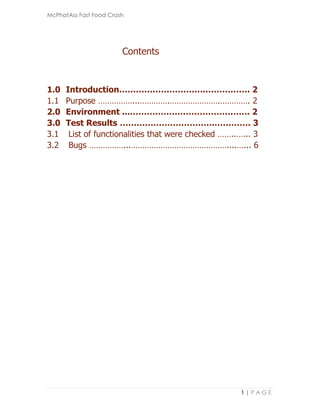
Contents
1.0 Introduction………………………….……………. 2
1.1 Purpose ……………...………….………………….…………. 2
2.0 Environment ...……………………………………. 2
3.0 Test Results …………………………….…………. 3
3.1 List of functionalities that were checked ……..…... 3
3.2 Bugs ……………...……………………………………....…... 6
McPhatAss Fast Food Crash
2 | P A G E
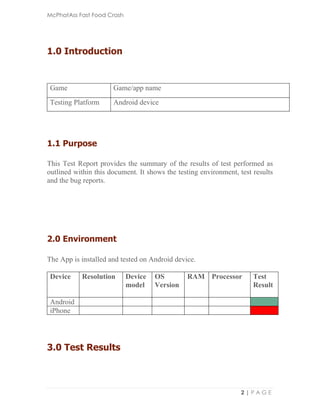
1.0 Introduction
Game Game/app name
Testing Platform Android device
1.1 Purpose
This Test Report provides the summary of the results of test performed as
outlined within this document. It shows the testing environment, test results
and the bug reports.
2.0 Environment
The App is installed and tested on Android device.
Device Resolution Device
model
OS
Version
RAM Processor Test
Result
Android
iPhone
3.0 Test Results
McPhatAss Fast Food Crash
3 | P A G E
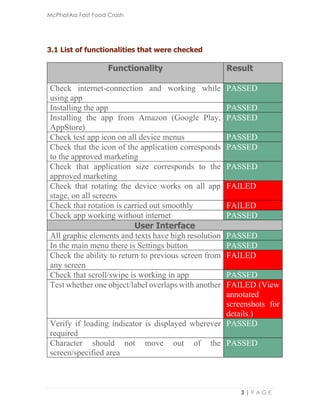
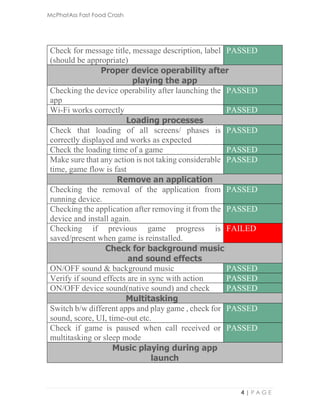
3.1 List of functionalities that were checked
Functionality Result
Check internet-connection and working while
using app
PASSED
Installing the app PASSED
Installing the app from Amazon (Google Play,
AppStore)
PASSED
Check test app icon on all device menus PASSED
Check that the icon of the application corresponds
to the approved marketing
PASSED
Check that application size corresponds to the
approved marketing
PASSED
Check that rotating the device works on all app
stage, on all screens
FAILED
Check that rotation is carried out smoothly FAILED
Check app working without internet PASSED
User Interface
All graphic elements and texts have high resolution PASSED
In the main menu there is Settings button PASSED
Check the ability to return to previous screen from
any screen
FAILED
Check that scroll/swipe is working in app PASSED
Test whether one object/label overlaps with another FAILED (View
annotated
screenshots for
details.)
Verify if loading indicator is displayed wherever
required
PASSED
Character should not move out of the
screen/specified area
PASSED
McPhatAss Fast Food Crash
4 | P A G E
Check for message title, message description, label
(should be appropriate)
PASSED
Proper device operability after
playing the app
Checking the device operability after launching the
app
PASSED
Wi-Fi works correctly PASSED
Loading processes
Check that loading of all screens/ phases is
correctly displayed and works as expected
PASSED
Check the loading time of a game PASSED
Make sure that any action is not taking considerable
time, game flow is fast
PASSED
Remove an application
Checking the removal of the application from
running device.
PASSED
Checking the application after removing it from the
device and install again.
PASSED
Checking if previous game progress is
saved/present when game is reinstalled.
FAILED
Check for background music
and sound effects
ON/OFF sound & background music PASSED
Verify if sound effects are in sync with action PASSED
ON/OFF device sound(native sound) and check PASSED
Multitasking
Switch b/w different apps and play game , check for
sound, score, UI, time-out etc.
PASSED
Check if game is paused when call received or
multitasking or sleep mode
PASSED
Music playing during app
launch
McPhatAss Fast Food Crash
5 | P A G E
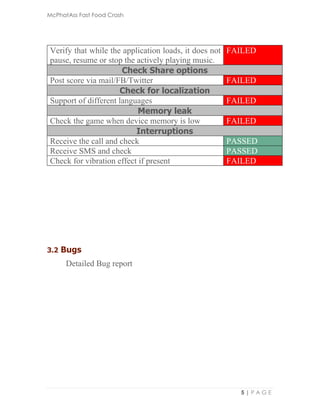
Verify that while the application loads, it does not
pause, resume or stop the actively playing music.
FAILED
Check Share options
Post score via mail/FB/Twitter FAILED
Check for localization
Support of different languages FAILED
Memory leak
Check the game when device memory is low FAILED
Interruptions
Receive the call and check PASSED
Receive SMS and check PASSED
Check for vibration effect if present FAILED
3.2 Bugs
Detailed Bug report

Sample testing report

  • 1.
    MAIN PAGE FOOTER AppName Report Name NAME: APP NAME Dated | October 15, 2016
  • 2.
    McPhatAss Fast FoodCrash 1 | P A G E Contents 1.0 Introduction………………………….……………. 2 1.1 Purpose ……………...………….………………….…………. 2 2.0 Environment ...……………………………………. 2 3.0 Test Results …………………………….…………. 3 3.1 List of functionalities that were checked ……..…... 3 3.2 Bugs ……………...……………………………………....…... 6
  • 3.
    McPhatAss Fast FoodCrash 2 | P A G E 1.0 Introduction Game Game/app name Testing Platform Android device 1.1 Purpose This Test Report provides the summary of the results of test performed as outlined within this document. It shows the testing environment, test results and the bug reports. 2.0 Environment The App is installed and tested on Android device. Device Resolution Device model OS Version RAM Processor Test Result Android iPhone 3.0 Test Results
  • 4.
    McPhatAss Fast FoodCrash 3 | P A G E 3.1 List of functionalities that were checked Functionality Result Check internet-connection and working while using app PASSED Installing the app PASSED Installing the app from Amazon (Google Play, AppStore) PASSED Check test app icon on all device menus PASSED Check that the icon of the application corresponds to the approved marketing PASSED Check that application size corresponds to the approved marketing PASSED Check that rotating the device works on all app stage, on all screens FAILED Check that rotation is carried out smoothly FAILED Check app working without internet PASSED User Interface All graphic elements and texts have high resolution PASSED In the main menu there is Settings button PASSED Check the ability to return to previous screen from any screen FAILED Check that scroll/swipe is working in app PASSED Test whether one object/label overlaps with another FAILED (View annotated screenshots for details.) Verify if loading indicator is displayed wherever required PASSED Character should not move out of the screen/specified area PASSED
  • 5.
    McPhatAss Fast FoodCrash 4 | P A G E Check for message title, message description, label (should be appropriate) PASSED Proper device operability after playing the app Checking the device operability after launching the app PASSED Wi-Fi works correctly PASSED Loading processes Check that loading of all screens/ phases is correctly displayed and works as expected PASSED Check the loading time of a game PASSED Make sure that any action is not taking considerable time, game flow is fast PASSED Remove an application Checking the removal of the application from running device. PASSED Checking the application after removing it from the device and install again. PASSED Checking if previous game progress is saved/present when game is reinstalled. FAILED Check for background music and sound effects ON/OFF sound & background music PASSED Verify if sound effects are in sync with action PASSED ON/OFF device sound(native sound) and check PASSED Multitasking Switch b/w different apps and play game , check for sound, score, UI, time-out etc. PASSED Check if game is paused when call received or multitasking or sleep mode PASSED Music playing during app launch
  • 6.
    McPhatAss Fast FoodCrash 5 | P A G E Verify that while the application loads, it does not pause, resume or stop the actively playing music. FAILED Check Share options Post score via mail/FB/Twitter FAILED Check for localization Support of different languages FAILED Memory leak Check the game when device memory is low FAILED Interruptions Receive the call and check PASSED Receive SMS and check PASSED Check for vibration effect if present FAILED 3.2 Bugs Detailed Bug report