Read full reportwww.pro-sapien.com • EHS software on SharePoint Intended as a guide only • Slide 1
Root Cause Analysis and
Corrective Action
5 Methods of Root Cause Analysis and How To Follow Up Effectively
Slide 2www.pro-sapien.com • EHS software on SharePoint
Root Cause Analysis (RCA)
• Used as part of an incident investigation to problem solve
• Asks four key questions
• What happened?
• How did it happen?
• Why did it happen?
• What needs to be corrected?
Slide 3www.pro-sapien.com • EHS software on SharePoint
What an RCA will find
• A sequence of failures and causal factors that lead to an undesired
event
• A factor is considered a root cause if its removal from the sequence
prevents the event from recurring
• A factor is considered causal if it affects the outcome but its removal
will not prevent recurrence with certainty
Slide 4www.pro-sapien.com • EHS software on SharePoint
Methods of Root Cause Analysis
There are dozens of researched and well-documented methods of
carrying out a systematic root cause analysis.
There are strengths and weaknesses of each. 5 of the most popular are:
• 5-Whys
• Fishbone Diagram
• Bowtie Analysis
• Tripod Beta
• Fault Tree Analysis
Slide 5www.pro-sapien.com • EHS software on SharePoint
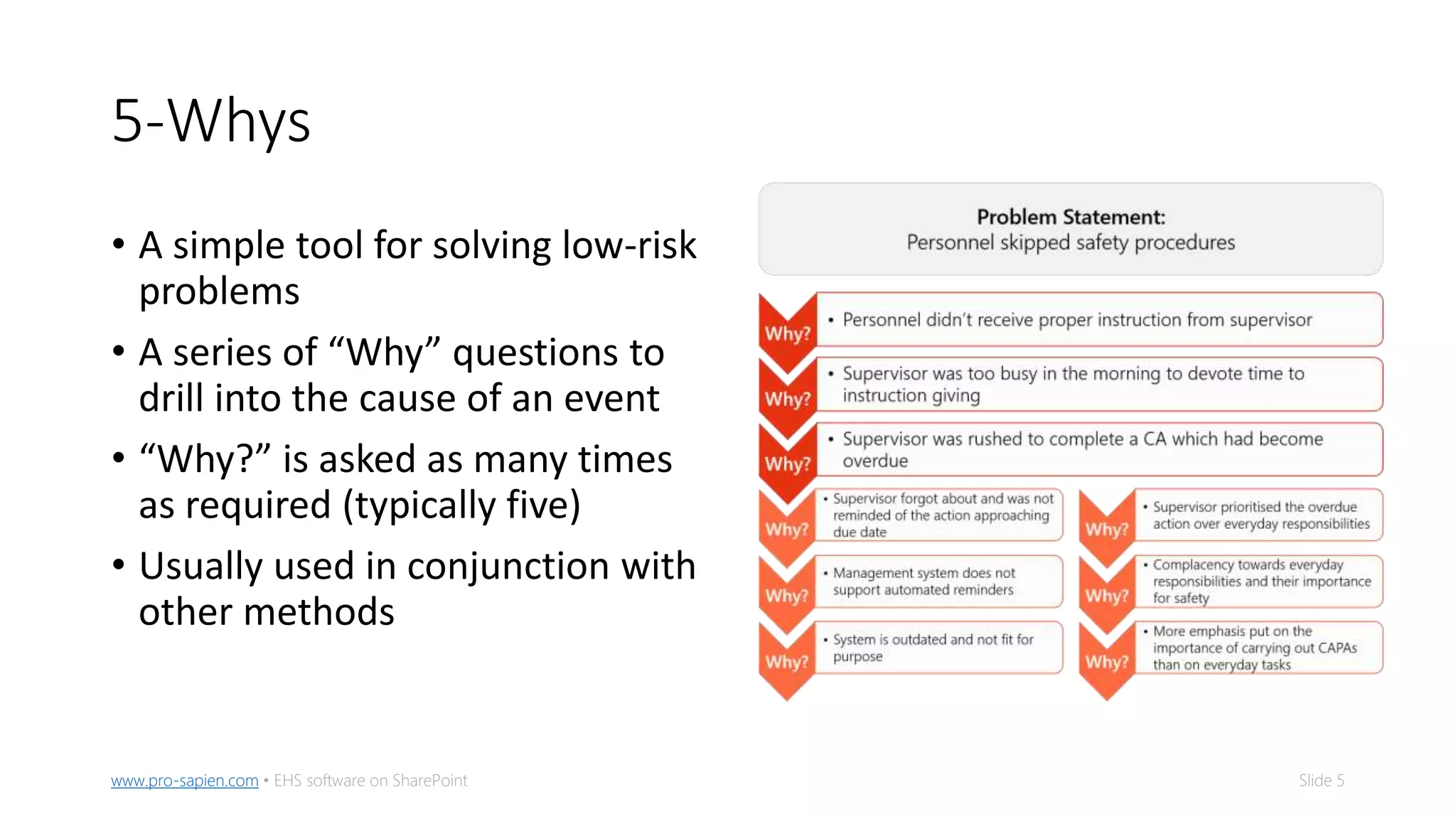
5-Whys
• A simple tool for solving low-risk
problems
• A series of “Why” questions to
drill into the cause of an event
• “Why?” is asked as many times
as required (typically five)
• Usually used in conjunction with
other methods
Slide 6www.pro-sapien.com • EHS software on SharePoint
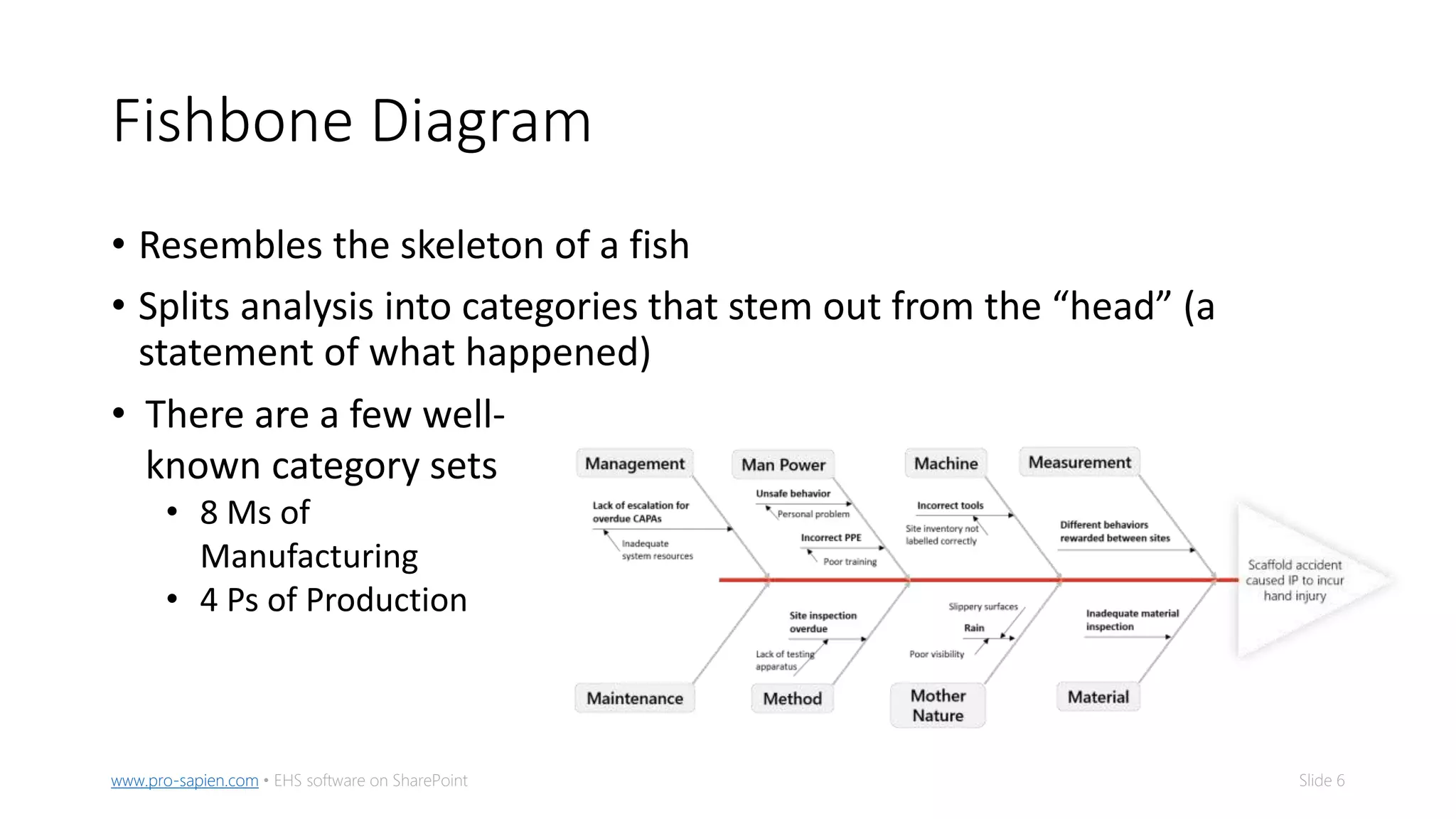
Fishbone Diagram
• Resembles the skeleton of a fish
• Splits analysis into categories that stem out from the “head” (a
statement of what happened)
• There are a few well-
known category sets
• 8 Ms of
Manufacturing
• 4 Ps of Production
Slide 7www.pro-sapien.com • EHS software on SharePoint
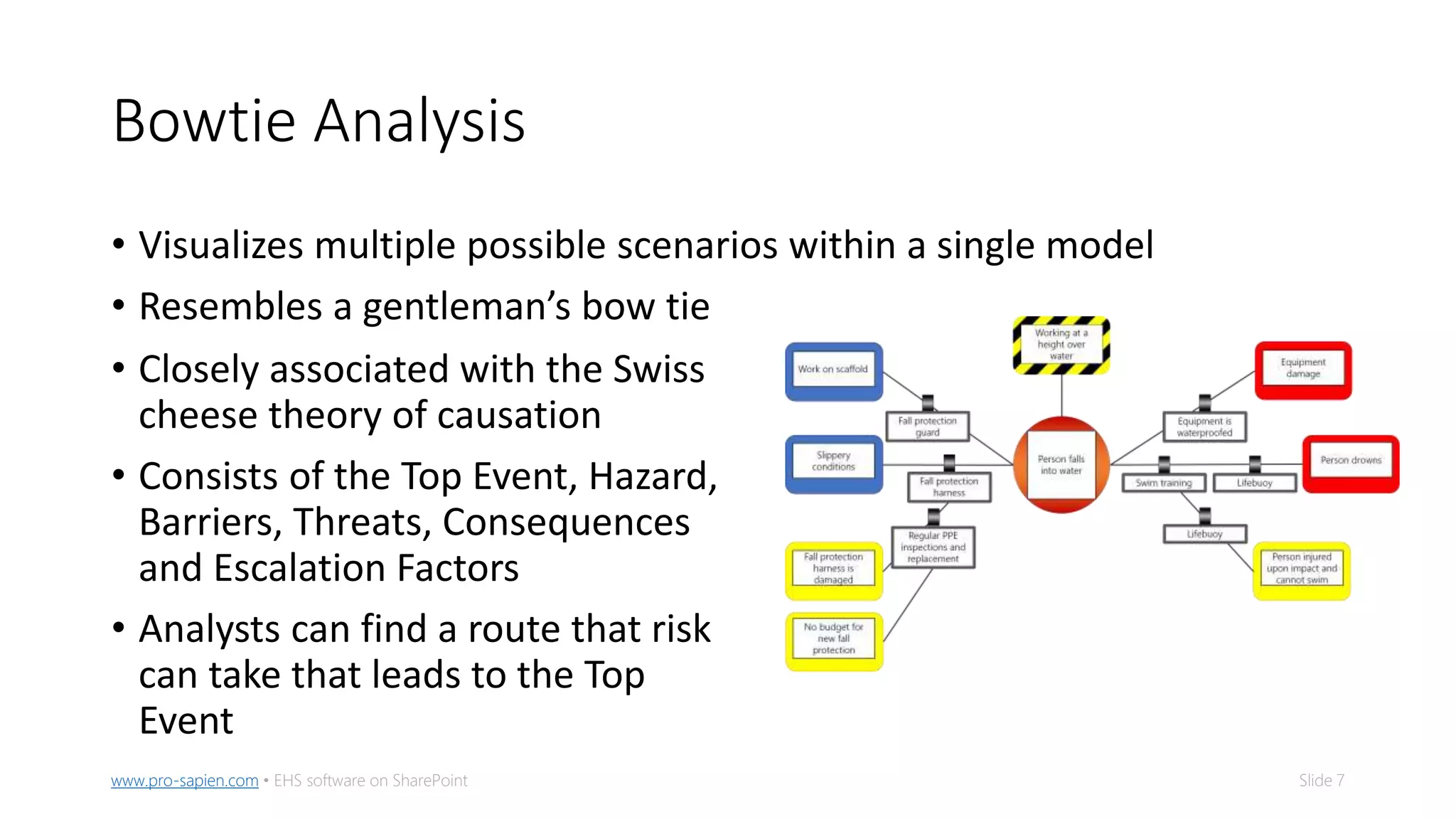
Bowtie Analysis
• Visualizes multiple possible scenarios within a single model
• Resembles a gentleman’s bow tie
• Closely associated with the Swiss
cheese theory of causation
• Consists of the Top Event, Hazard,
Barriers, Threats, Consequences
and Escalation Factors
• Analysts can find a route that risk
can take that leads to the Top
Event
Slide 8www.pro-sapien.com • EHS software on SharePoint
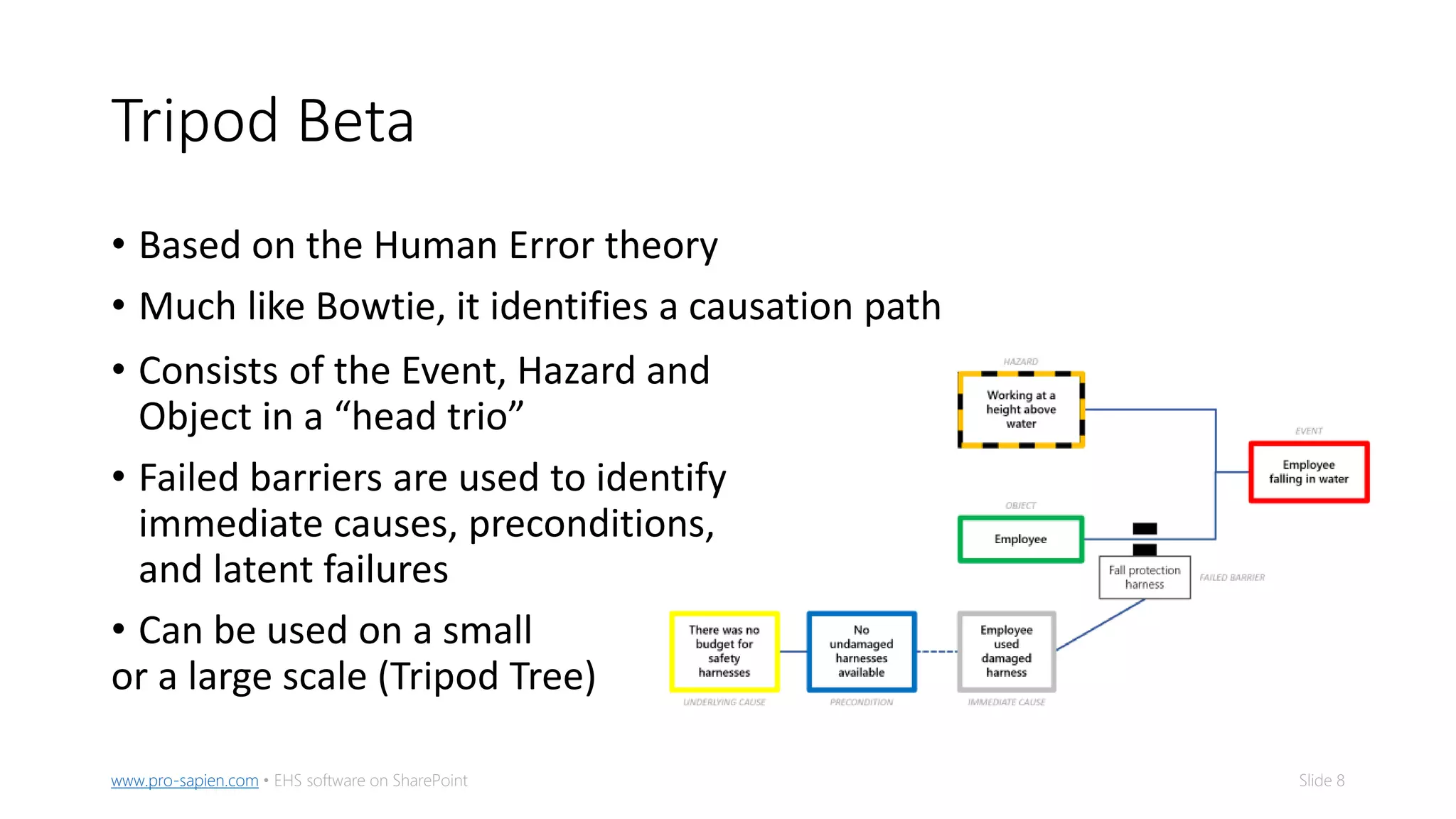
Tripod Beta
• Based on the Human Error theory
• Much like Bowtie, it identifies a causation path
• Consists of the Event, Hazard and
Object in a “head trio”
• Failed barriers are used to identify
immediate causes, preconditions,
and latent failures
• Can be used on a small
or a large scale (Tripod Tree)
Slide 9www.pro-sapien.com • EHS software on SharePoint
Fault Tree Analysis
• Uses Boolean logic in a very mathematical process
• Resembles a workflow with “gates” and events
• Consists of Undeveloped Events, Base Events and Intermediate Events
• Aims to find the Minimum Cut Set (a group of basic events whose
occurrence will cause the event to occur)
• Can get very complex
Slide 10www.pro-sapien.com • EHS software on SharePoint
Which method?
Ask questions:
1. How severe is the incident you are investigating?
• High severity incidents are best suited to Bowtie or Fault Tree
2. What is the make up of the team?
• Fault Tree perhaps too complex for limited skills
• Fishbone works best in a team setting where members can brainstorm
3. What are your objectives for the investigation?
• What/who are the objects involved? How many variables are there roughly?
E.g. Fault Tree may get out of hand when analysing patient reactions in
healthcare
Slide 11www.pro-sapien.com • EHS software on SharePoint
What next?
• Regardless of method, confirm you’ve found the root causes by
walking backwards through the “causation path(s)”
• Document findings in a central, digital location
• Assign corrective actions based on findings
• Track action progress and confirm their completion
• Analyze performance in the months following action implementation
• Has there been any changes in performance? Are there less incidents/hazards
onsite?
• Communicate the positive consequences across the business
Slide 12www.pro-sapien.com • EHS software on SharePoint
Corrective and Preventive Actions
• Sometimes referred to in Corrective and Preventive Actions (CAPAs)
• An action to address a root cause may be corrective or preventive
• Corrective – addresses the immediate causes, usually carried out onsite
• Preventive – addresses preconditions and latent failures, typically handled by
management and can take time to implement
• Assign a CAPA to every root cause
• All actions should be
• Prioritized appropriately
• Organized
• Automated
• Analyzed
Slide 13www.pro-sapien.com • EHS software on SharePoint
Prioritizing CAPAs
• Take heed of the Pareto principle 80/20 rule: 80% of the problems can
be attributed to 20% of the issues
• Priority should be determined, not decided
• Calculate priority by:
Priority = easiness x importance x urgency
• Assign a level to each corrective action to break down the workload
Slide 14www.pro-sapien.com • EHS software on SharePoint
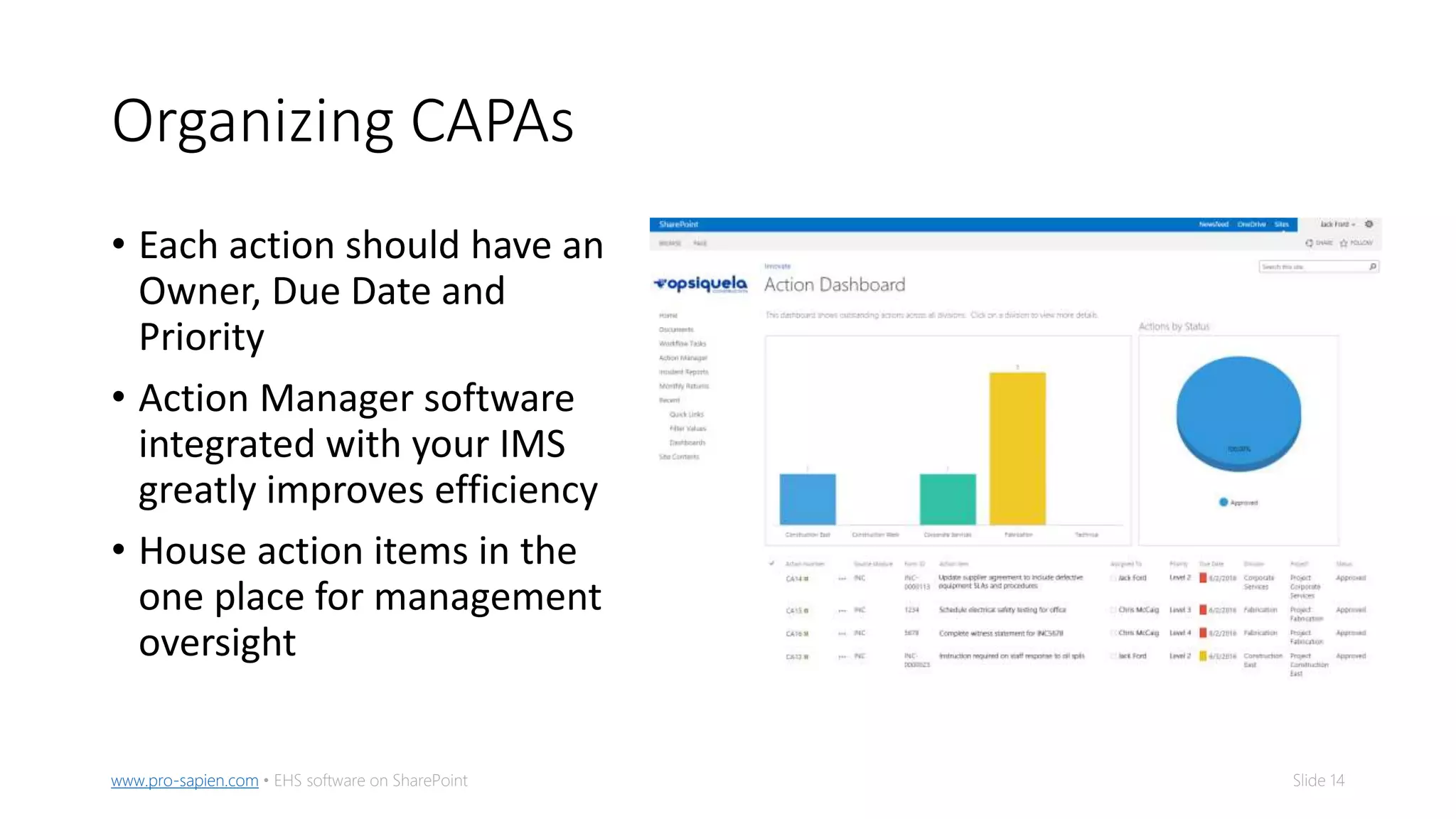
Organizing CAPAs
• Each action should have an
Owner, Due Date and
Priority
• Action Manager software
integrated with your IMS
greatly improves efficiency
• House action items in the
one place for management
oversight
Slide 15www.pro-sapien.com • EHS software on SharePoint
Automate reminders of CAPAs
• Action Manager software can send automated reminders to action
owners
• Send reminders on a set number of days out
• Automatically escalate up the chain of command when an action
becomes overdue
• Require evidence that an action has been completed
Slide 16www.pro-sapien.com • EHS software on SharePoint
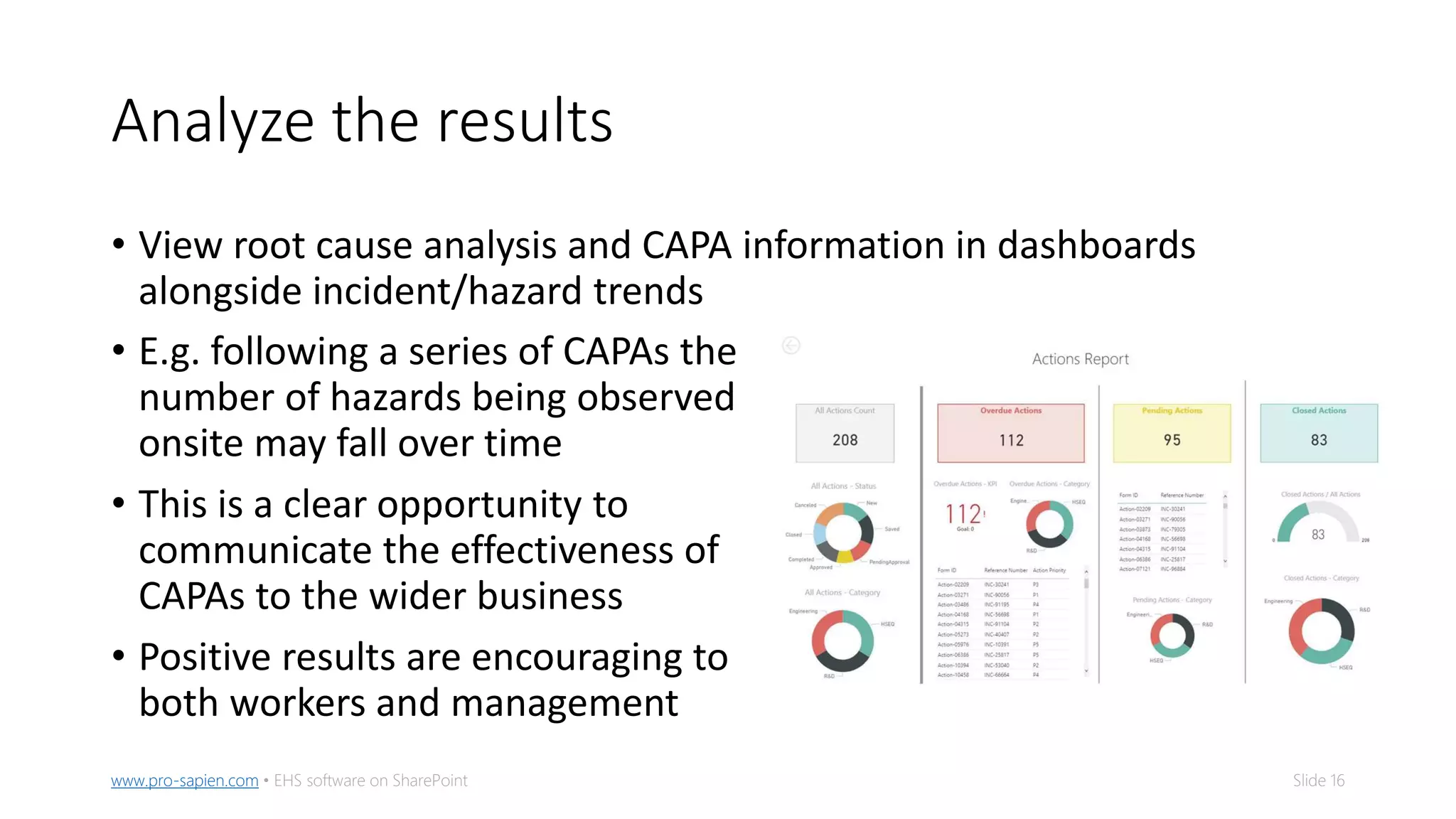
Analyze the results
• View root cause analysis and CAPA information in dashboards
alongside incident/hazard trends
• E.g. following a series of CAPAs the
number of hazards being observed
onsite may fall over time
• This is a clear opportunity to
communicate the effectiveness of
CAPAs to the wider business
• Positive results are encouraging to
both workers and management
Read full reportwww.pro-sapien.com • EHS software on SharePoint Intended as a guide only • Slide 17
Download the full guide for
more information
5 Methods of Root Cause Analysis for EHS Incidents
Read guide

Root Cause Analysis and Corrective Actions

  • 1.
    Read full reportwww.pro-sapien.com• EHS software on SharePoint Intended as a guide only • Slide 1 Root Cause Analysis and Corrective Action 5 Methods of Root Cause Analysis and How To Follow Up Effectively
  • 2.
    Slide 2www.pro-sapien.com •EHS software on SharePoint Root Cause Analysis (RCA) • Used as part of an incident investigation to problem solve • Asks four key questions • What happened? • How did it happen? • Why did it happen? • What needs to be corrected?
  • 3.
    Slide 3www.pro-sapien.com •EHS software on SharePoint What an RCA will find • A sequence of failures and causal factors that lead to an undesired event • A factor is considered a root cause if its removal from the sequence prevents the event from recurring • A factor is considered causal if it affects the outcome but its removal will not prevent recurrence with certainty
  • 4.
    Slide 4www.pro-sapien.com •EHS software on SharePoint Methods of Root Cause Analysis There are dozens of researched and well-documented methods of carrying out a systematic root cause analysis. There are strengths and weaknesses of each. 5 of the most popular are: • 5-Whys • Fishbone Diagram • Bowtie Analysis • Tripod Beta • Fault Tree Analysis
  • 5.
    Slide 5www.pro-sapien.com •EHS software on SharePoint 5-Whys • A simple tool for solving low-risk problems • A series of “Why” questions to drill into the cause of an event • “Why?” is asked as many times as required (typically five) • Usually used in conjunction with other methods
  • 6.
    Slide 6www.pro-sapien.com •EHS software on SharePoint Fishbone Diagram • Resembles the skeleton of a fish • Splits analysis into categories that stem out from the “head” (a statement of what happened) • There are a few well- known category sets • 8 Ms of Manufacturing • 4 Ps of Production
  • 7.
    Slide 7www.pro-sapien.com •EHS software on SharePoint Bowtie Analysis • Visualizes multiple possible scenarios within a single model • Resembles a gentleman’s bow tie • Closely associated with the Swiss cheese theory of causation • Consists of the Top Event, Hazard, Barriers, Threats, Consequences and Escalation Factors • Analysts can find a route that risk can take that leads to the Top Event
  • 8.
    Slide 8www.pro-sapien.com •EHS software on SharePoint Tripod Beta • Based on the Human Error theory • Much like Bowtie, it identifies a causation path • Consists of the Event, Hazard and Object in a “head trio” • Failed barriers are used to identify immediate causes, preconditions, and latent failures • Can be used on a small or a large scale (Tripod Tree)
  • 9.
    Slide 9www.pro-sapien.com •EHS software on SharePoint Fault Tree Analysis • Uses Boolean logic in a very mathematical process • Resembles a workflow with “gates” and events • Consists of Undeveloped Events, Base Events and Intermediate Events • Aims to find the Minimum Cut Set (a group of basic events whose occurrence will cause the event to occur) • Can get very complex
  • 10.
    Slide 10www.pro-sapien.com •EHS software on SharePoint Which method? Ask questions: 1. How severe is the incident you are investigating? • High severity incidents are best suited to Bowtie or Fault Tree 2. What is the make up of the team? • Fault Tree perhaps too complex for limited skills • Fishbone works best in a team setting where members can brainstorm 3. What are your objectives for the investigation? • What/who are the objects involved? How many variables are there roughly? E.g. Fault Tree may get out of hand when analysing patient reactions in healthcare
  • 11.
    Slide 11www.pro-sapien.com •EHS software on SharePoint What next? • Regardless of method, confirm you’ve found the root causes by walking backwards through the “causation path(s)” • Document findings in a central, digital location • Assign corrective actions based on findings • Track action progress and confirm their completion • Analyze performance in the months following action implementation • Has there been any changes in performance? Are there less incidents/hazards onsite? • Communicate the positive consequences across the business
  • 12.
    Slide 12www.pro-sapien.com •EHS software on SharePoint Corrective and Preventive Actions • Sometimes referred to in Corrective and Preventive Actions (CAPAs) • An action to address a root cause may be corrective or preventive • Corrective – addresses the immediate causes, usually carried out onsite • Preventive – addresses preconditions and latent failures, typically handled by management and can take time to implement • Assign a CAPA to every root cause • All actions should be • Prioritized appropriately • Organized • Automated • Analyzed
  • 13.
    Slide 13www.pro-sapien.com •EHS software on SharePoint Prioritizing CAPAs • Take heed of the Pareto principle 80/20 rule: 80% of the problems can be attributed to 20% of the issues • Priority should be determined, not decided • Calculate priority by: Priority = easiness x importance x urgency • Assign a level to each corrective action to break down the workload
  • 14.
    Slide 14www.pro-sapien.com •EHS software on SharePoint Organizing CAPAs • Each action should have an Owner, Due Date and Priority • Action Manager software integrated with your IMS greatly improves efficiency • House action items in the one place for management oversight
  • 15.
    Slide 15www.pro-sapien.com •EHS software on SharePoint Automate reminders of CAPAs • Action Manager software can send automated reminders to action owners • Send reminders on a set number of days out • Automatically escalate up the chain of command when an action becomes overdue • Require evidence that an action has been completed
  • 16.
    Slide 16www.pro-sapien.com •EHS software on SharePoint Analyze the results • View root cause analysis and CAPA information in dashboards alongside incident/hazard trends • E.g. following a series of CAPAs the number of hazards being observed onsite may fall over time • This is a clear opportunity to communicate the effectiveness of CAPAs to the wider business • Positive results are encouraging to both workers and management
  • 17.
    Read full reportwww.pro-sapien.com• EHS software on SharePoint Intended as a guide only • Slide 17 Download the full guide for more information 5 Methods of Root Cause Analysis for EHS Incidents Read guide