1
Copyright © 2022 Demandbase
Unleashing Digital Metamorphosis
Intent Driven Journey Building for Financial Services
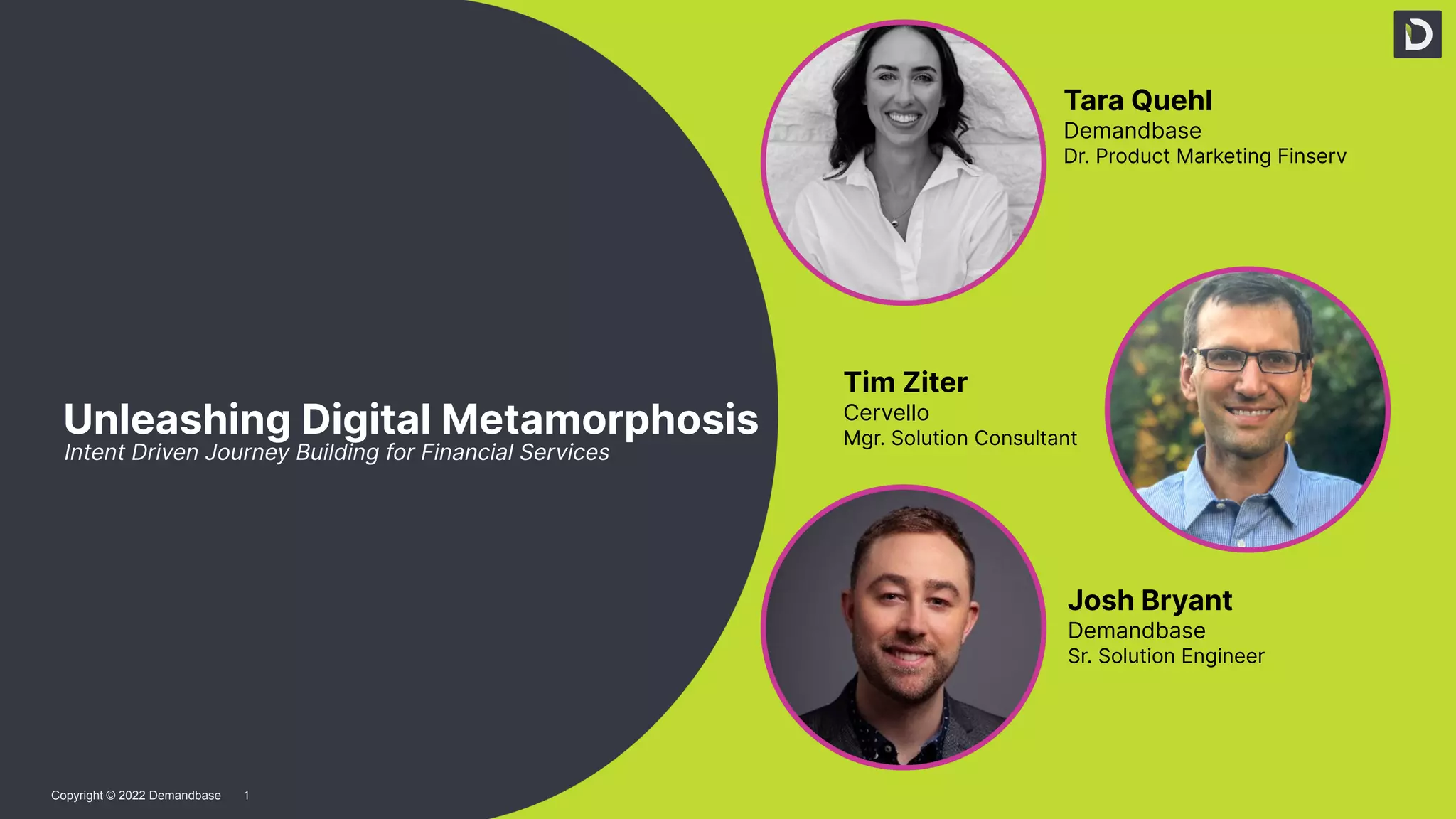
Tara Quehl
Demandbase
Dr. Product Marketing Finserv
Tim Ziter
Cervello
Mgr. Solution Consultant
Josh Bryant
Demandbase
Sr. Solution Engineer
Agenda
Overview
● Fins introduction + Case Study
Demandbase + SFDC + Journey Builder
● DB Intent and overview of dash
● DB List building
● Entry Event x 2
● Activities
● Decision splits
● Object activity
● Content
Q&A
Use Case
Cervello bank, a growing financial firm is looking to expand its market share.
They’ve launched a marketing blitz built around upsell and retention that has
generated response but not seeing conversion on the backend
Problem
● Sales is swamped
● Quickly lose trust in leads
● Delay contacting - cold leads
Use Case - Upsell & Retention of current accounts
Solution
● Intent + Create Engaged Account Target List
● How to score using intent + 1st party data
● Rank Accounts into easy to understand buckets
○ Cold, Warm, Hot
○ If an account is “cold” you can drop them into an advertising play to warm them up
● Use Demandbase Orchestration to enroll contacts into SF Campaign
● In SFMC nurture leads to keep them warm
● Notify sales to follow up on “Hot” leads
● “Always On” automated solution
5
Copyright © 2023 Demandbase
An ABX platform aggregates both the
known and unknown activities of
target accounts to build a full picture
of account engagement
6
Copyright © 2023 Demandbase
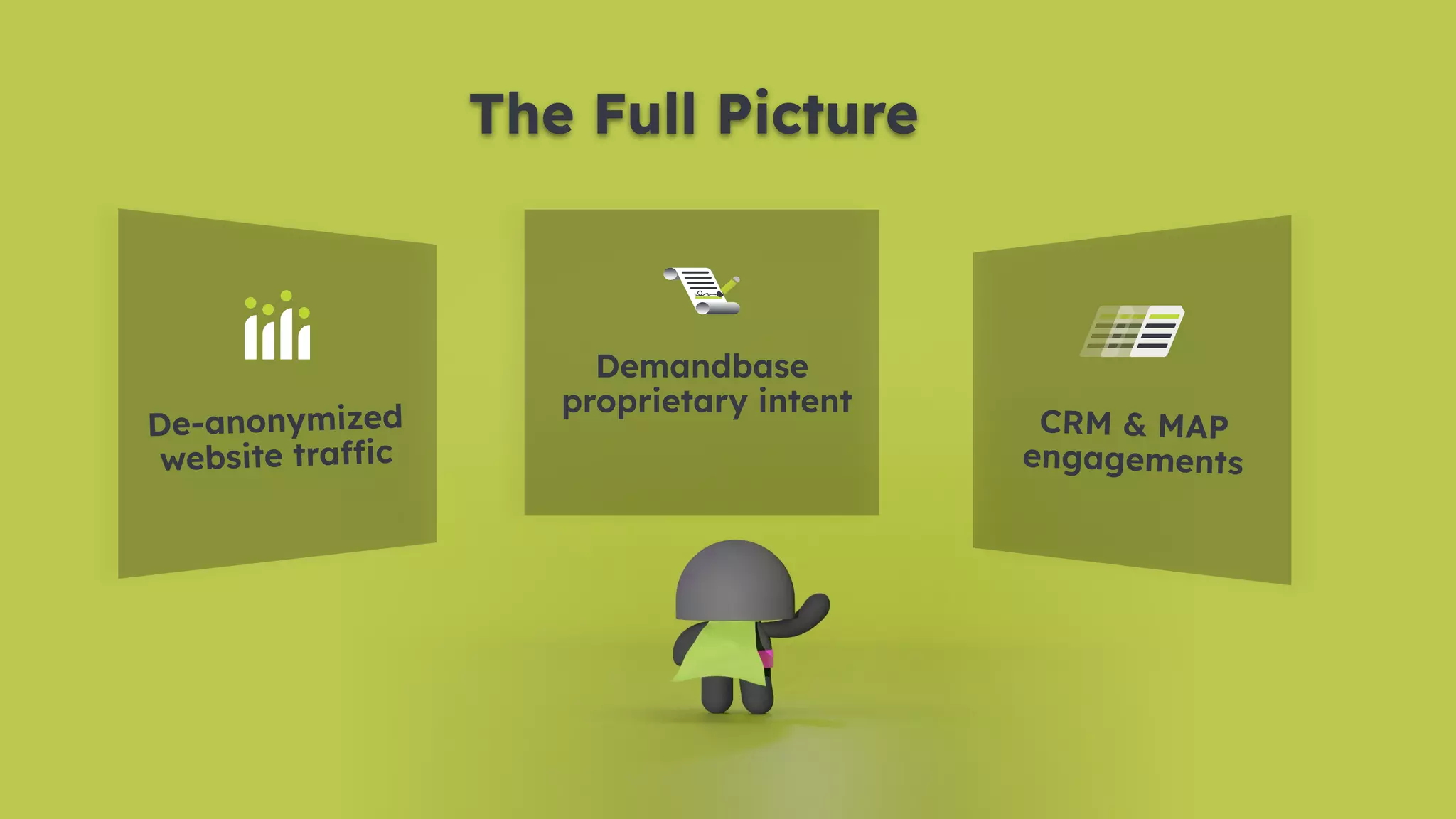
De-anonymized
website traffic
Demandbase
proprietary intent
CRM & MAP
engagements
The Full Picture
7
Copyright © 2023 Demandbase
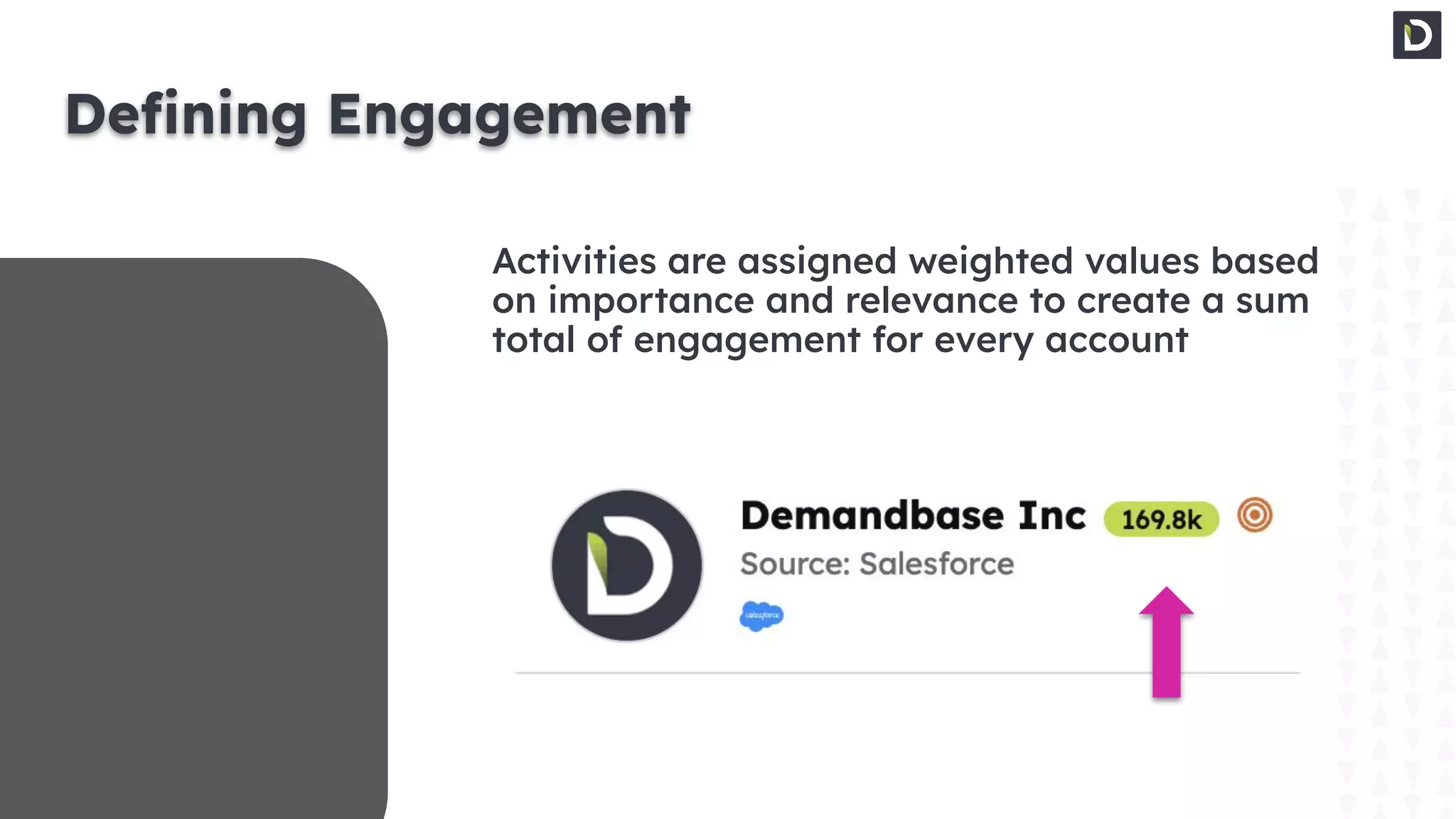
Defining Engagement
Activities are assigned weighted values based
on importance and relevance to create a sum
total of engagement for every account
8
Copyright © 2023 Demandbase
Next Steps:
Predictive
9
Copyright © 2023 Demandbase
Demandbase analyzes account
engagement, qualification, and past
opportunity performance to create
our Pipeline Predict account score;
which predicts an account’s likelihood
to be in-market
10
Copyright © 2023 Demandbase
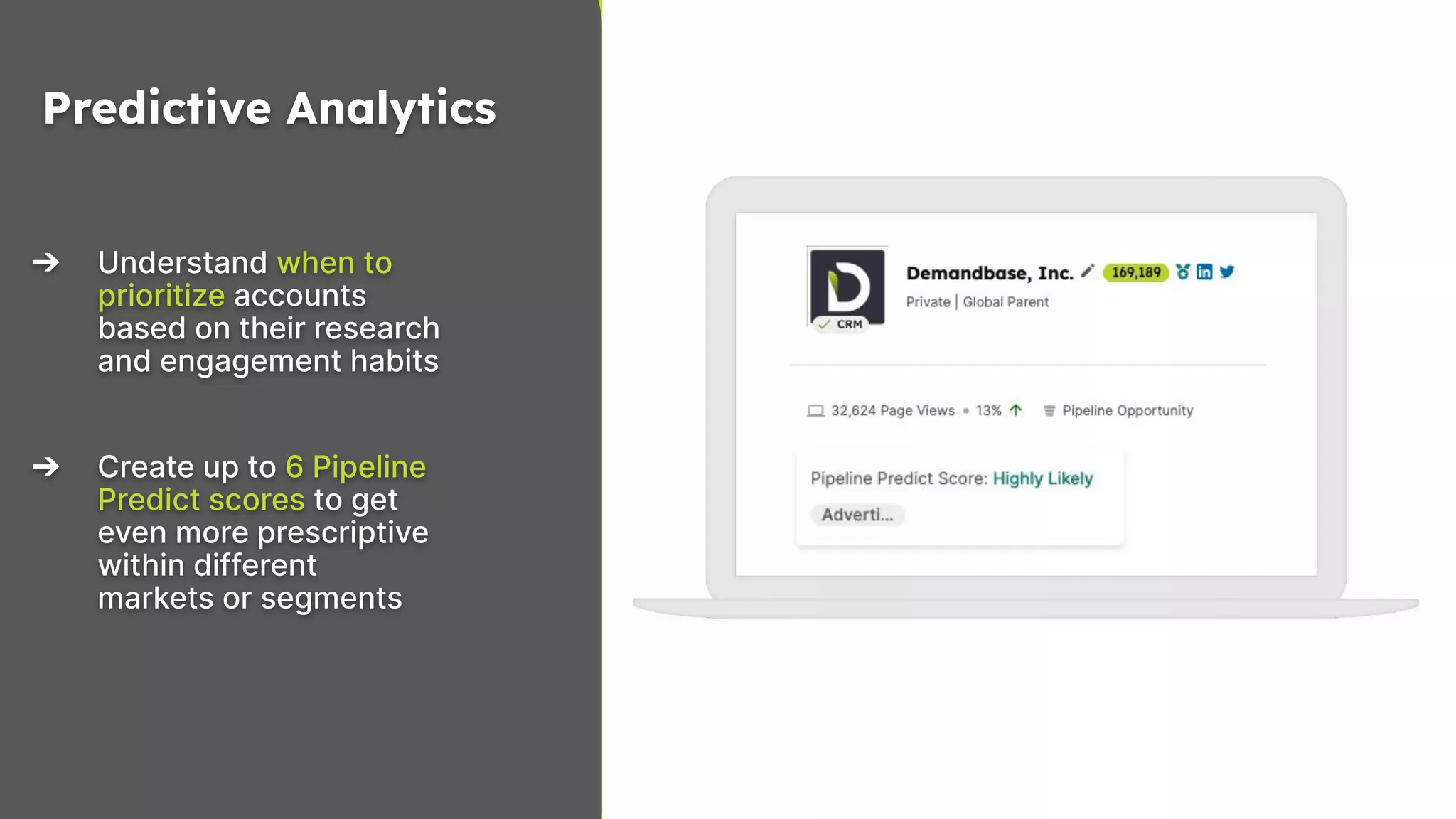
➔ Understand when to
prioritize accounts
based on their research
and engagement habits
➔ Create up to 6 Pipeline
Predict scores to get
even more prescriptive
within different
markets or segments
Predictive Analytics
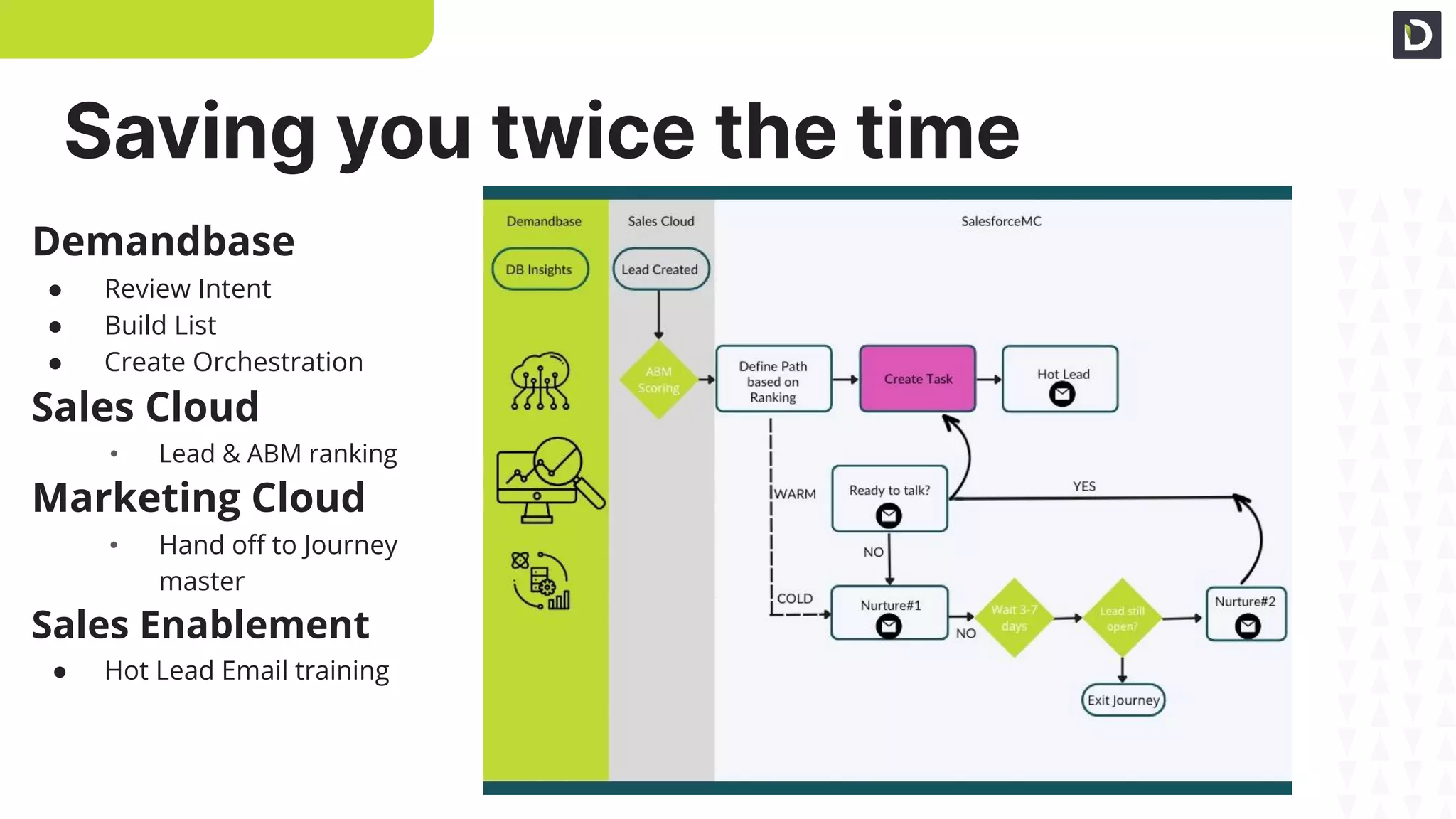
Saving you twice the time
Demandbase
● Review Intent
● Build List
● Create Orchestration
Sales Cloud
• Lead & ABM ranking
Marketing Cloud
• Hand off to Journey
master
Sales Enablement
● Hot Lead Email training
12
Copyright © 2022 Demandbase
Appendix
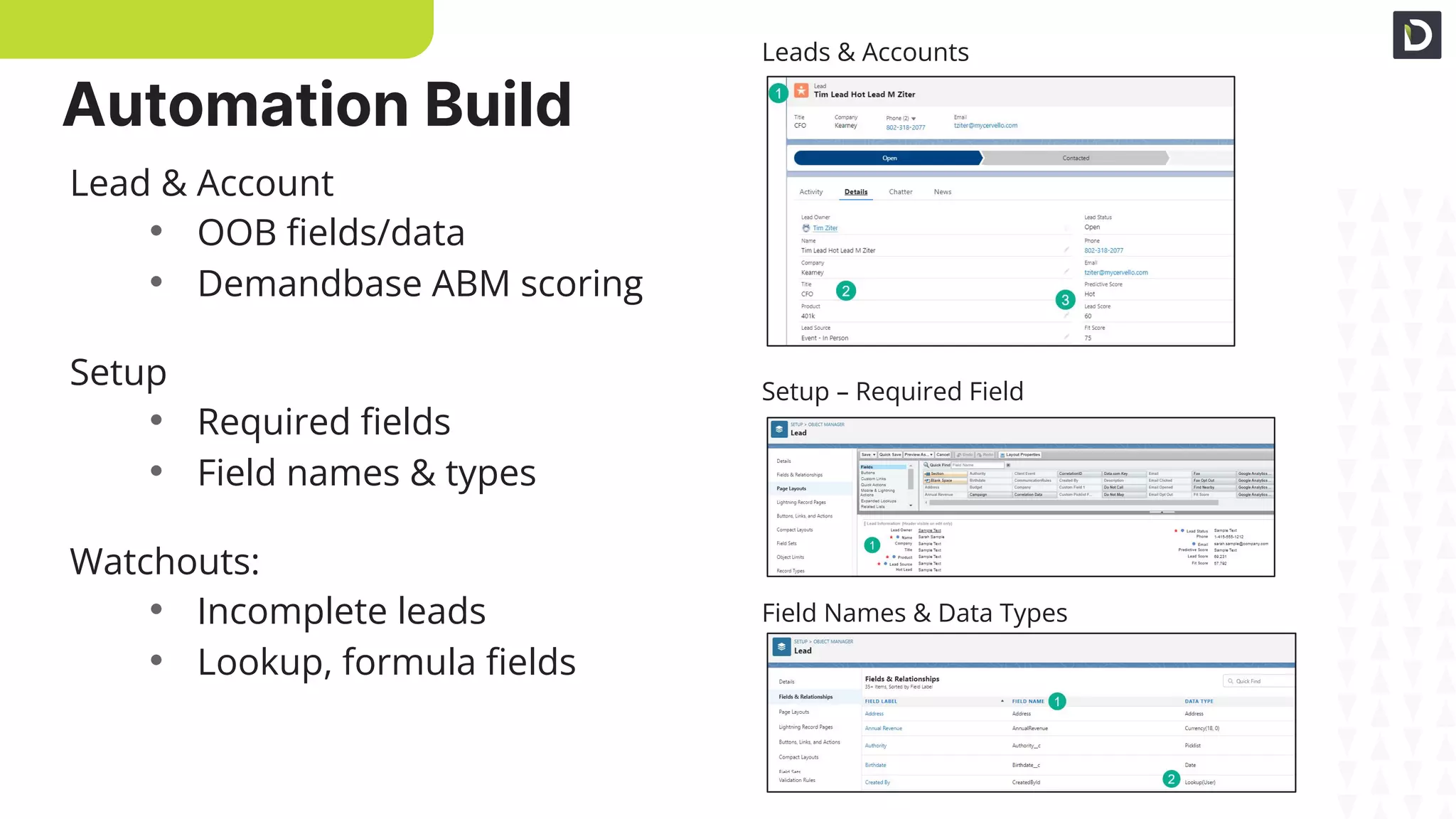
Lead & Account
• OOB fields/data
• Demandbase ABM scoring
Setup
• Required fields
• Field names & types
Watchouts:
• Incomplete leads
• Lookup, formula fields
Leads & Accounts
Setup – Required Fields
Field Names & Data Types
Automation Build
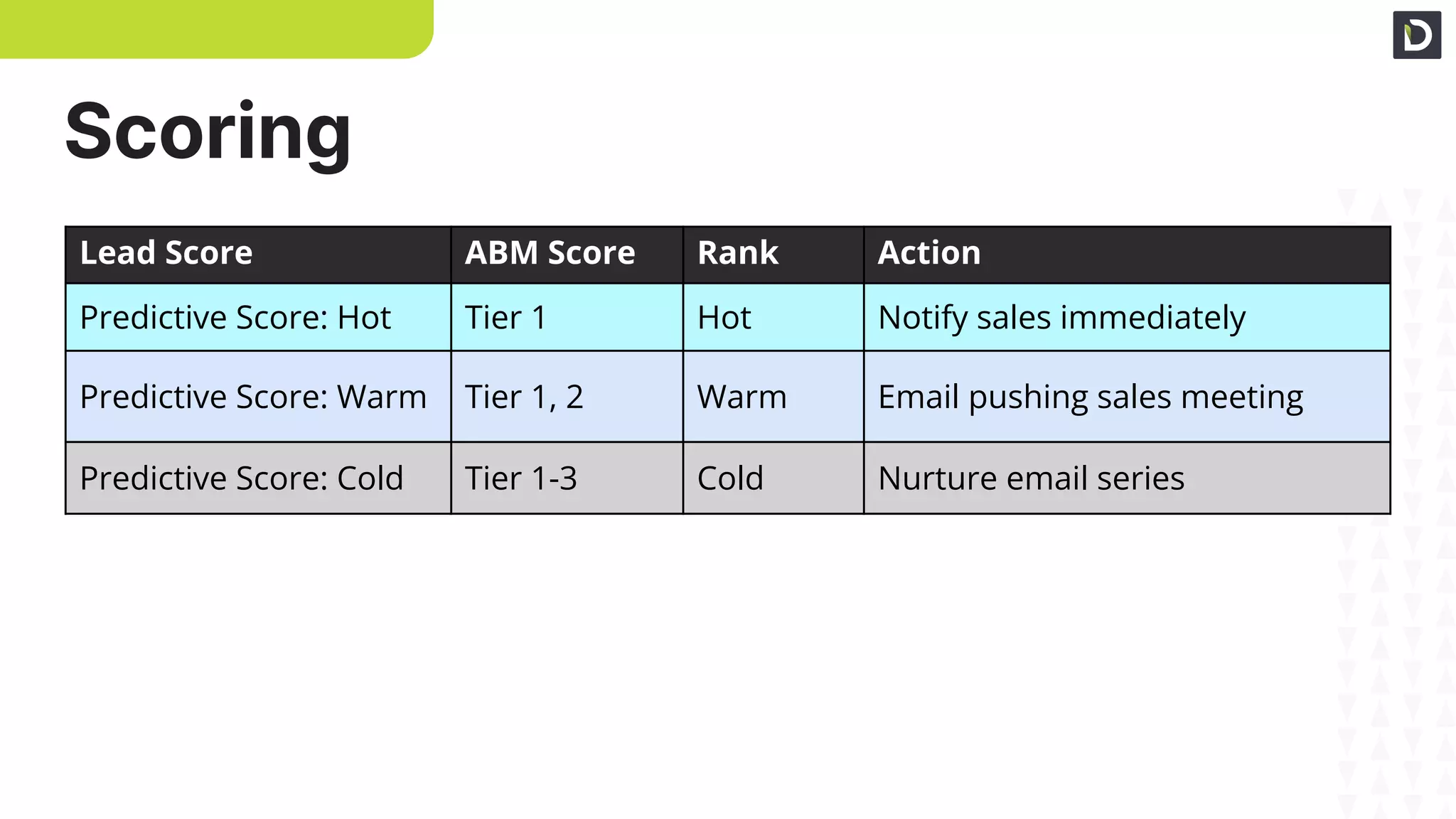
Scoring
Lead Score ABM Score Rank Action
Predictive Score: Hot Tier 1 Hot Notify sales immediately
Predictive Score: Warm Tier 1, 2 Warm Email pushing sales meeting
Predictive Score: Cold Tier 1-3 Cold Nurture email series
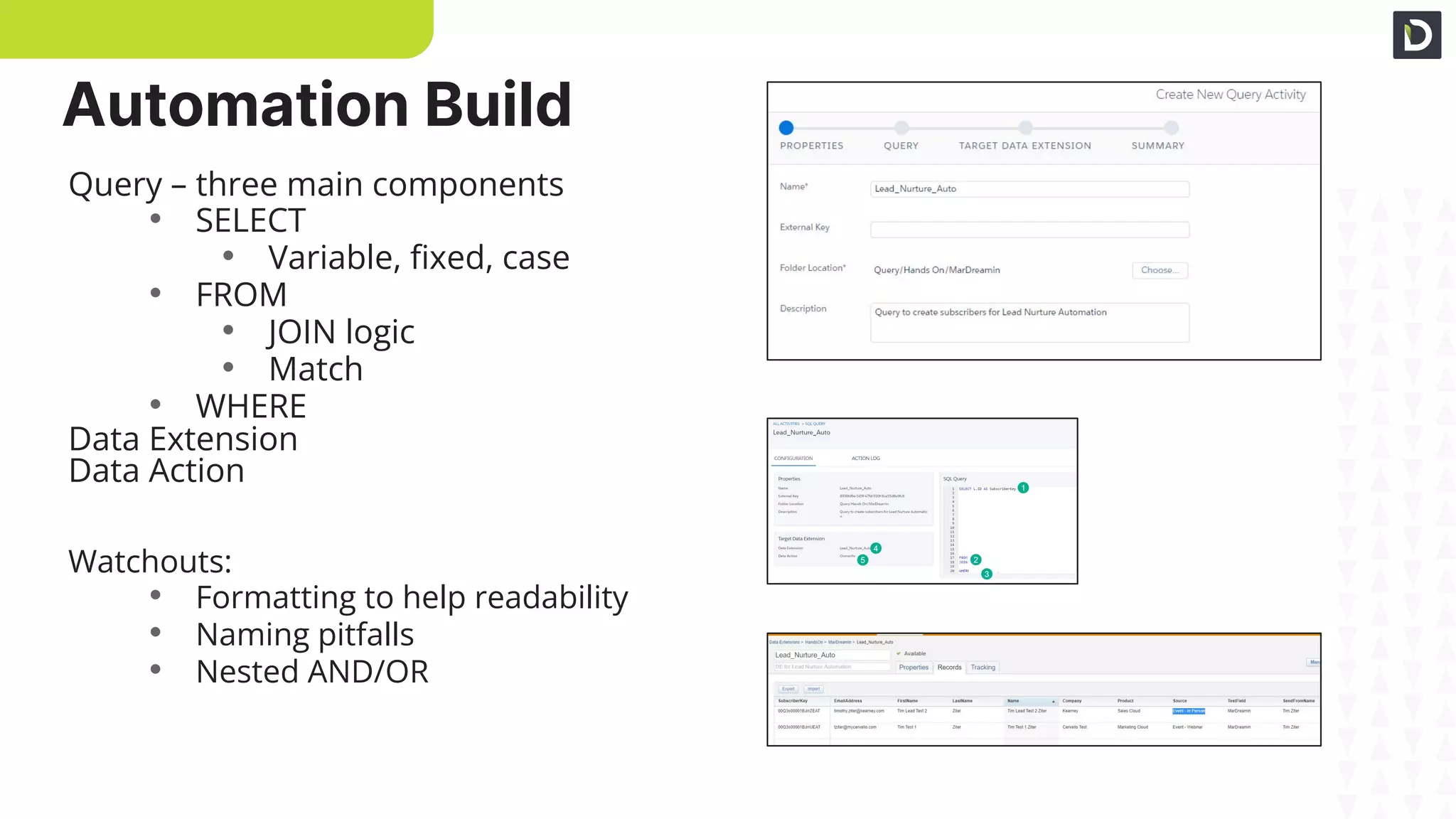
Automation Build
Query Setup
Query Build
Validate Data
Query – three main components
• SELECT
• Variable, fixed, case
• FROM
• JOIN logic
• Match
• WHERE
Data Extension
Data Action
Watchouts:
• Formatting to help readability
• Naming pitfalls
• Nested AND/OR
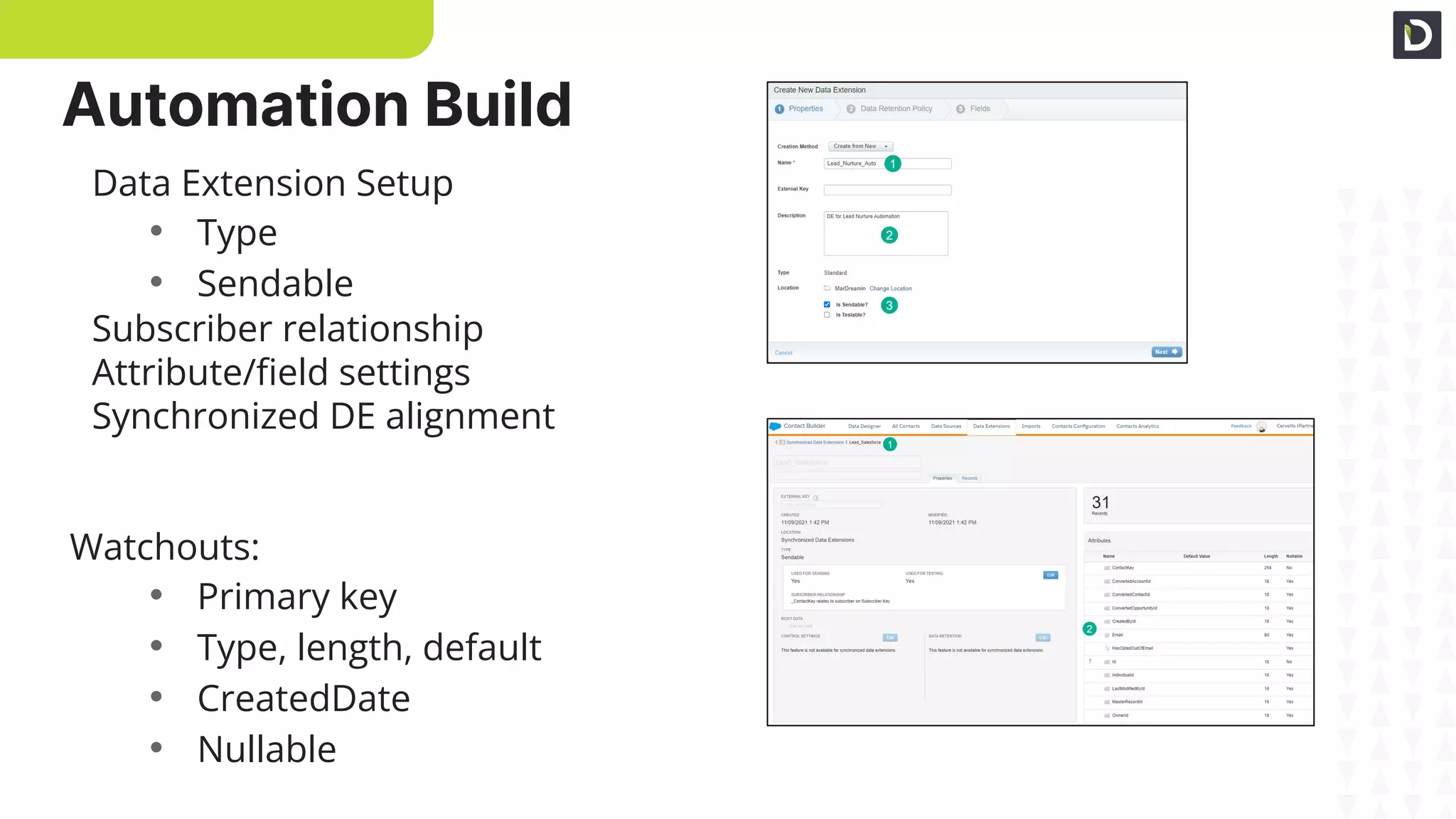
DE Setup
DE Fields
Data Extension Setup
• Type
• Sendable
Subscriber relationship
Attribute/field settings
Synchronized DE alignment
Watchouts:
• Primary key
• Type, length, default
• CreatedDate
• Nullable
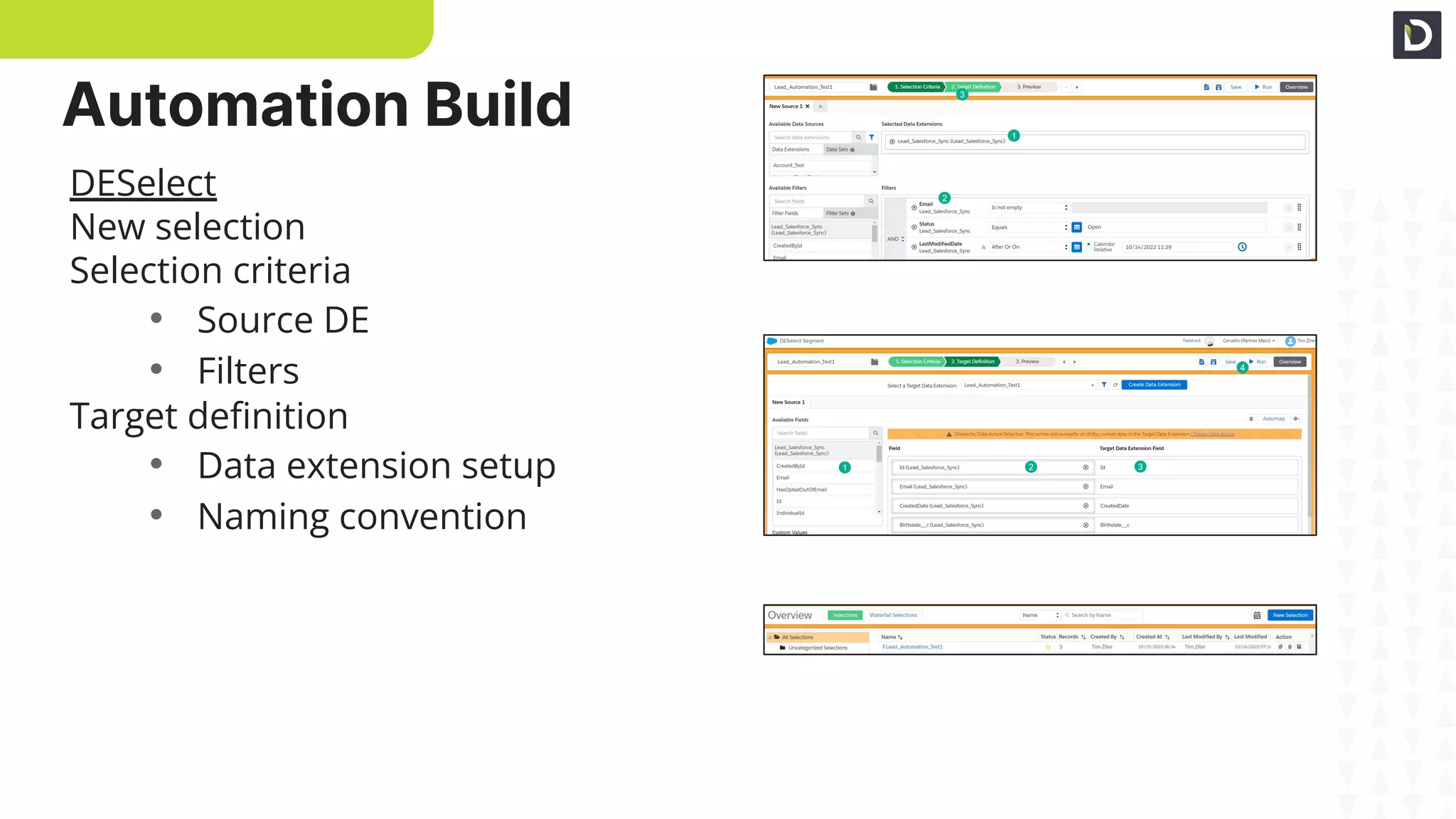
Automation Build
Selection Criteria
Target Definition
Run!
DESelect
New selection
Selection criteria
• Source DE
• Filters
Target definition
• Data extension setup
• Naming convention
Automation Build
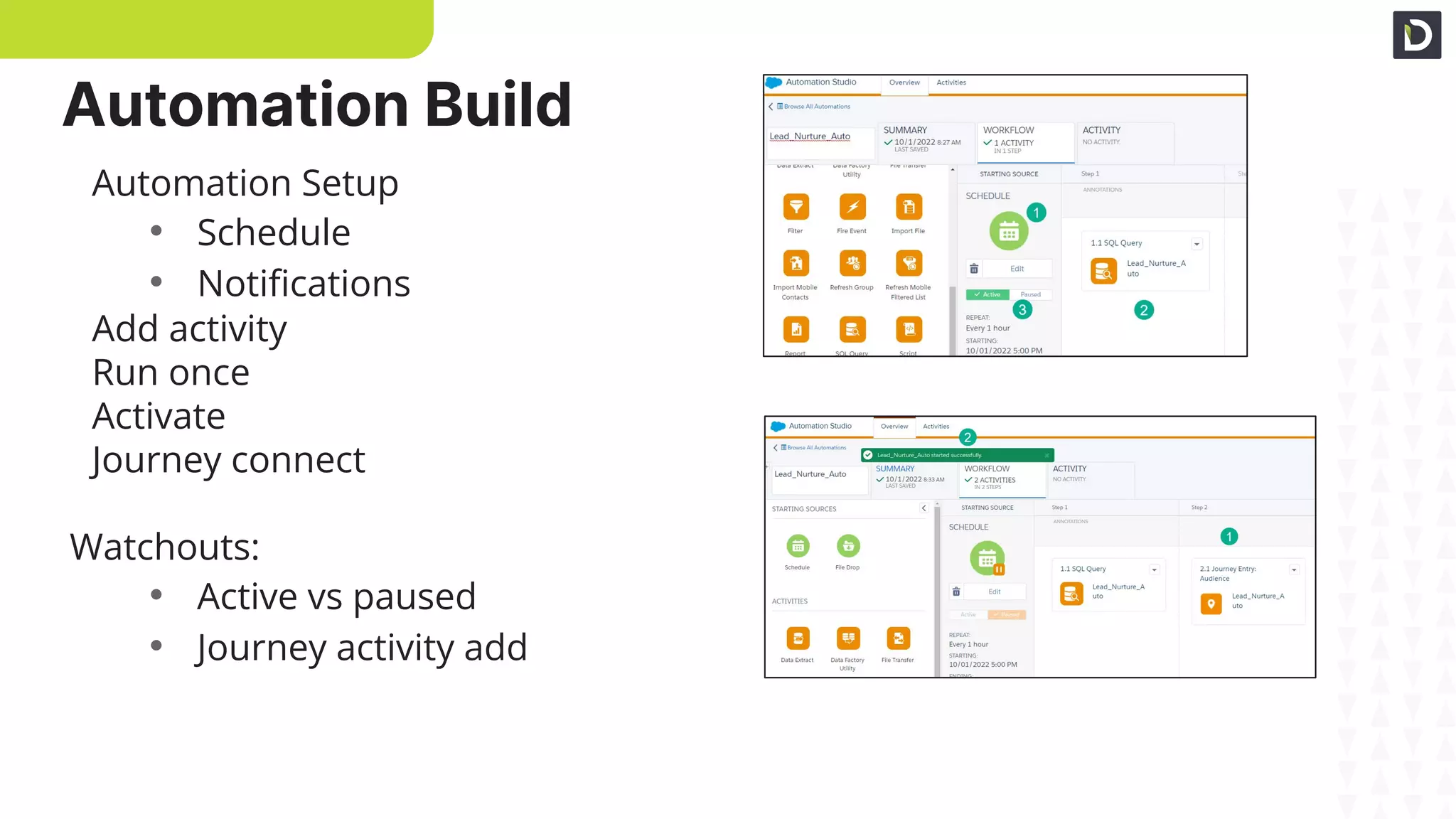
Automation Setup
Connecting to Journey
Automation Setup
• Schedule
• Notifications
Add activity
Run once
Activate
Journey connect
Watchouts:
• Active vs paused
• Journey activity add
Automation Build
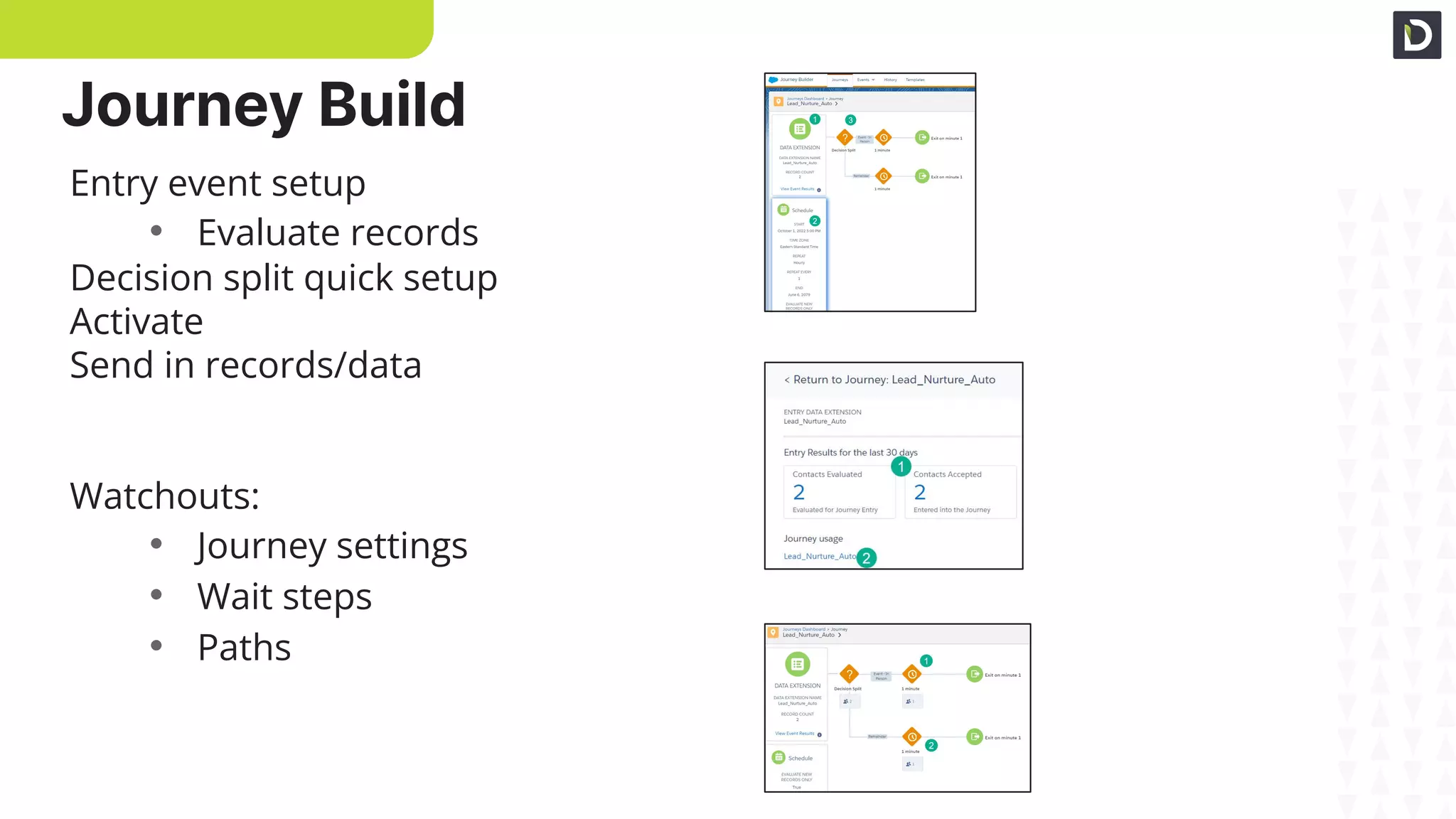
Entry Event Setup
Activate & Validate
Journey Paths
Entry event setup
• Evaluate records
Decision split quick setup
Activate
Send in records/data
Watchouts:
• Journey settings
• Wait steps
• Paths
Journey Build
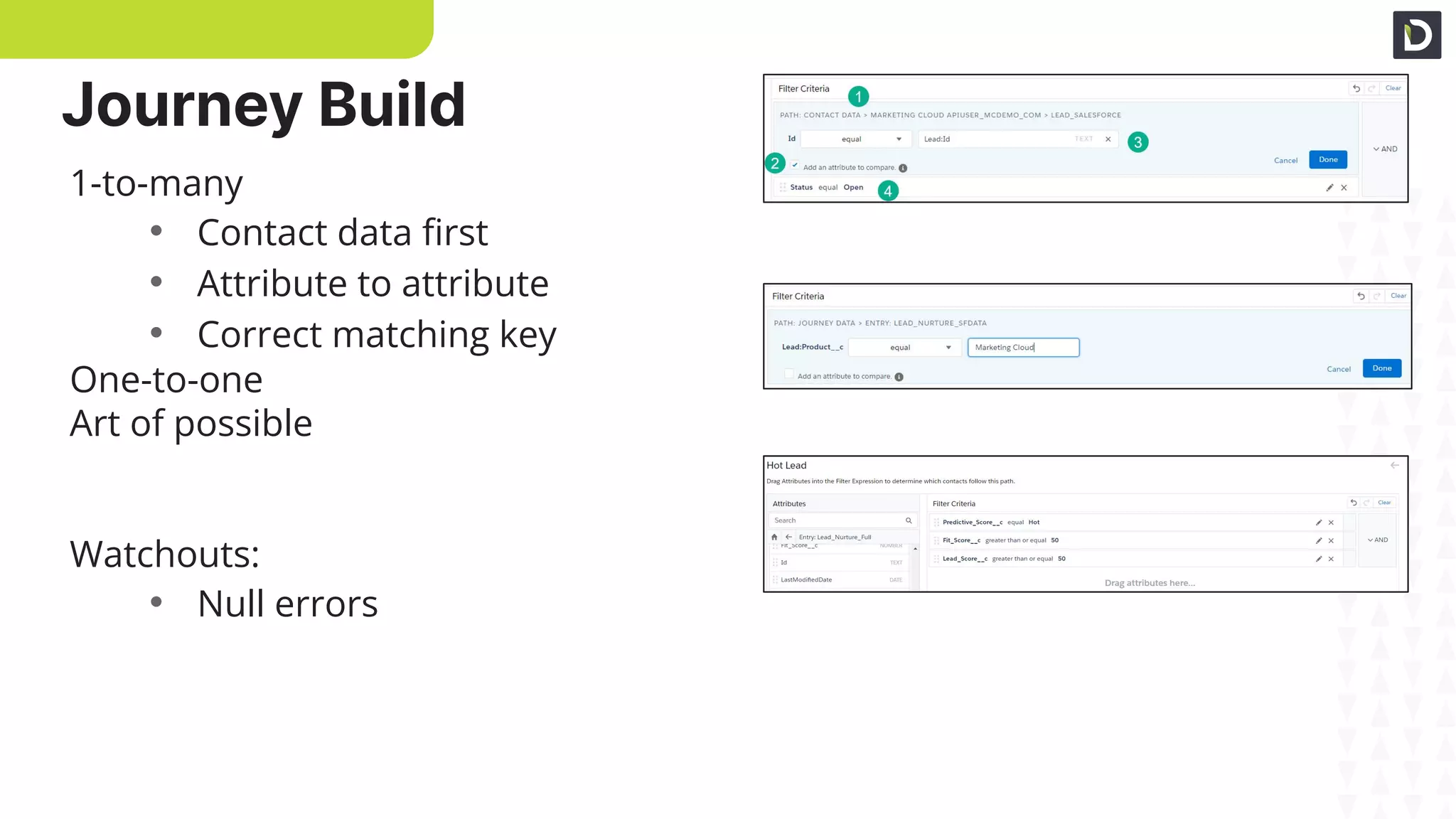
One-to-many
One-to-one
Custom Fields
1-to-many
• Contact data first
• Attribute to attribute
• Correct matching key
One-to-one
Art of possible
Watchouts:
• Null errors
Journey Build
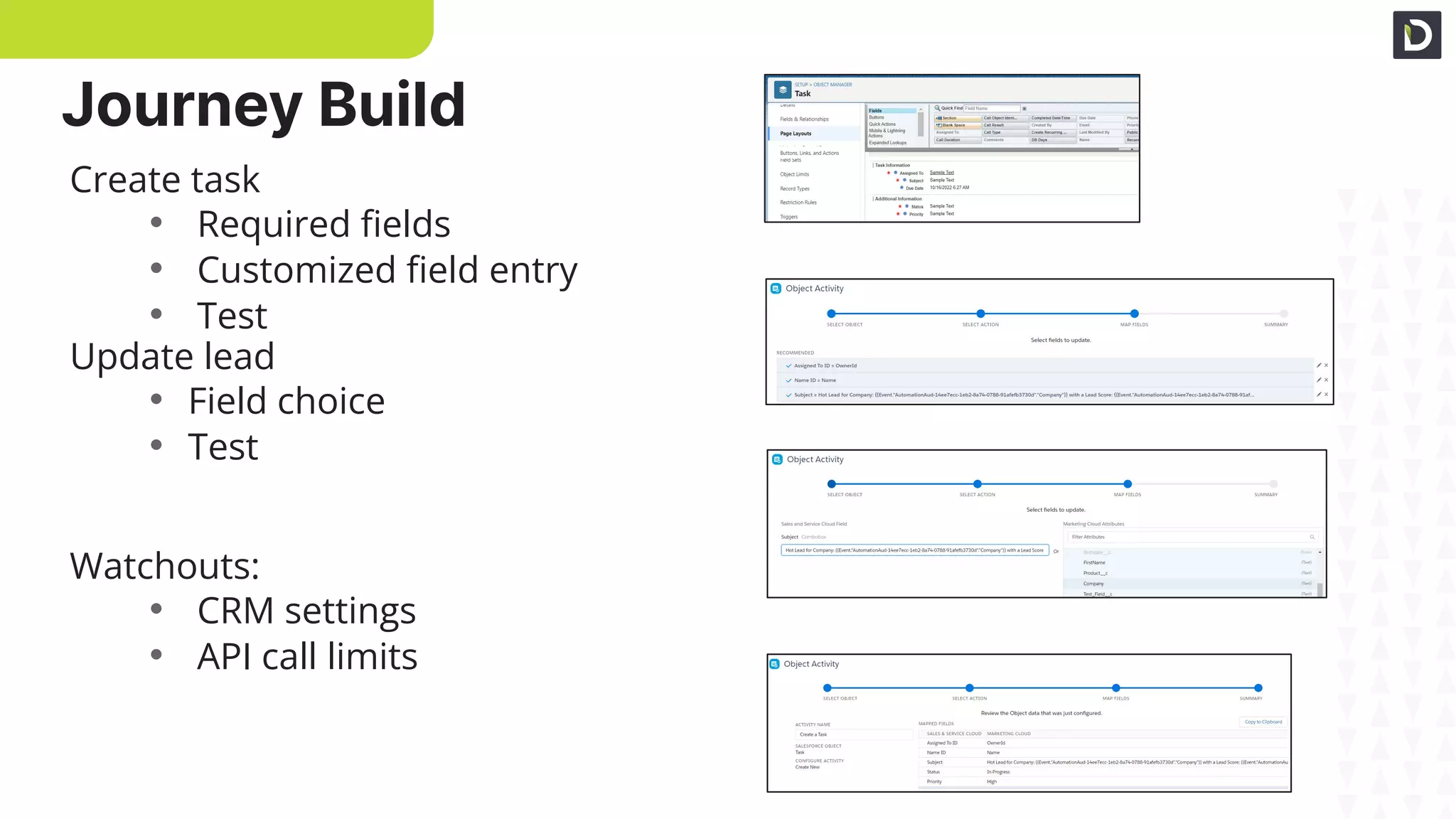
CRM required fields
Create task setup
Personalized fields
Create task
• Required fields
• Customized field entry
• Test
Update lead
• Field choice
• Test
Watchouts:
• CRM settings
• API call limits
Summary
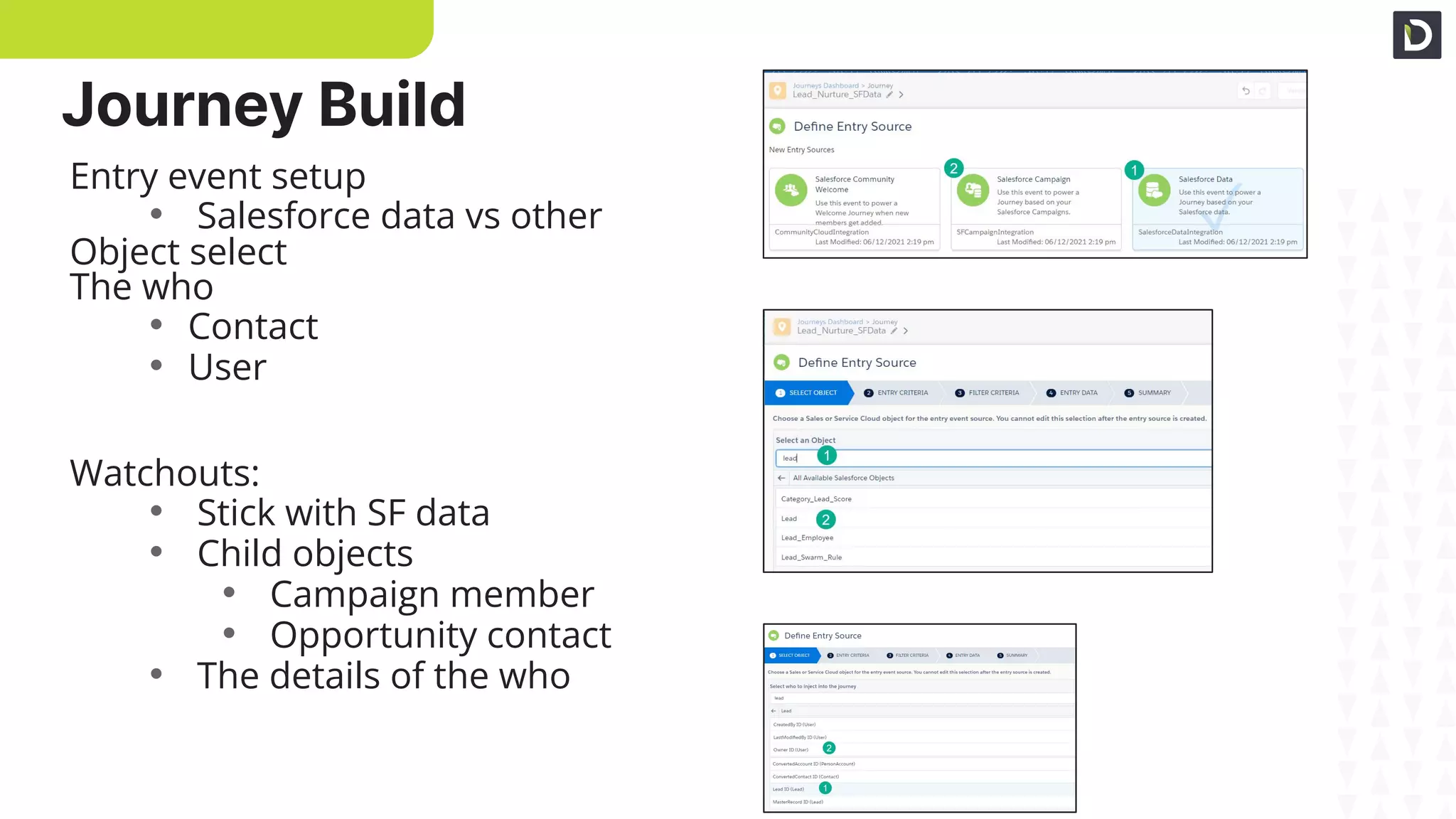
Journey Build
SF data entry
Search objects
The who
Entry event setup
• Salesforce data vs other
Object select
The who
• Contact
• User
Watchouts:
• Stick with SF data
• Child objects
• Campaign member
• Opportunity contact
• The details of the who
Journey Build
Primary-related criteria
Data fields
Summary
Criteria
• Created and updated
Primary vs related objects
• Lookup and formula fields
Data
• Default fields
• Object fields
Watchouts:
• Created/updated triggers
• And/Or selectors
• Field name varieties
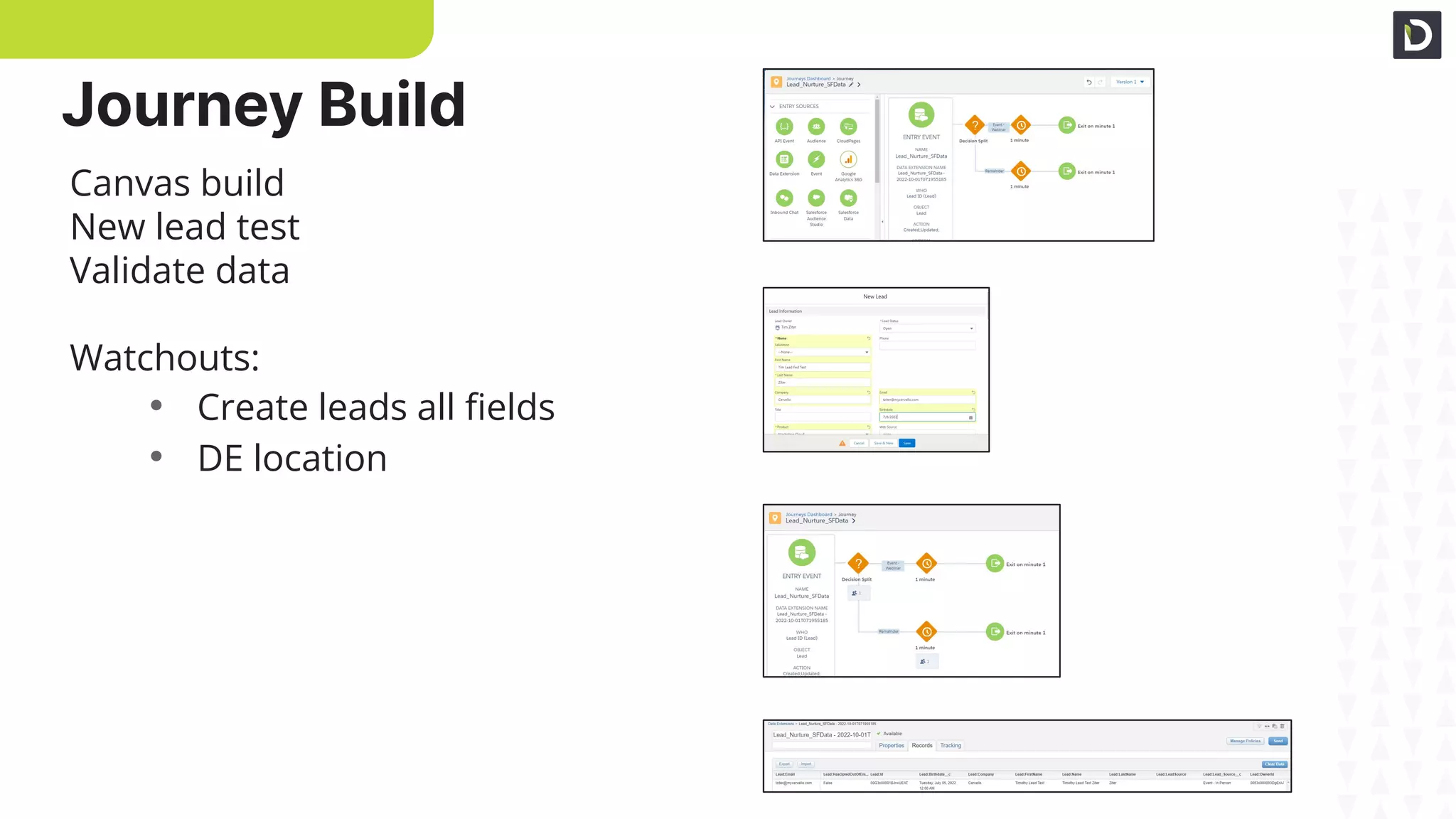
Journey Build
Canvas build
Lead create/update - test
Flow
Canvas build
New lead test
Validate data
Watchouts:
• Create leads all fields
• DE location
Data
Journey Build
Content – Hot Lead
Data
Data align
Click into lead
Unique data fields
Align to content
Lookup addl variables
Click into lead functionality
Email prompt
E2E testing
Email prompt
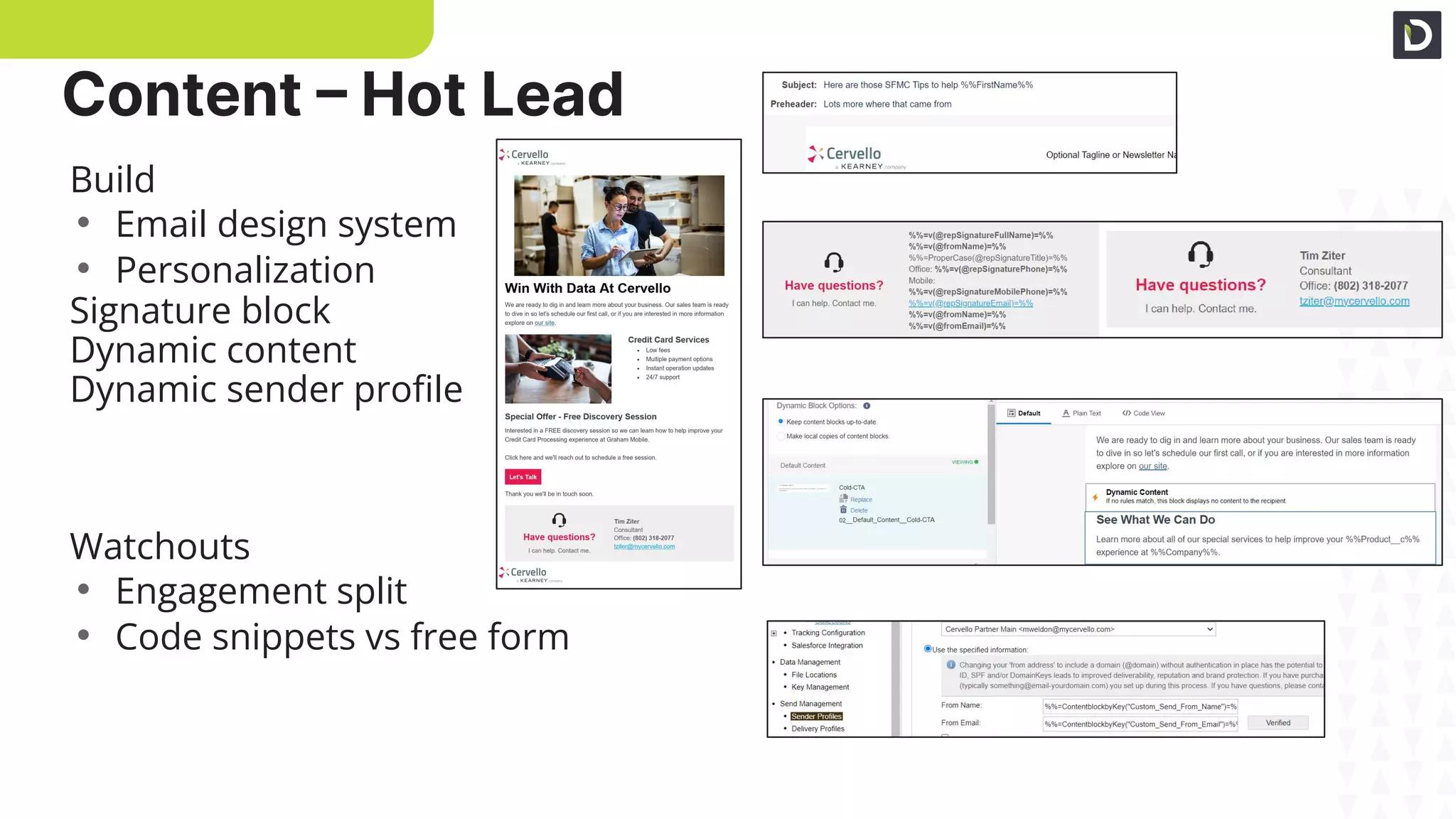
Content – Hot Lead
Basic personalization
Signature block
Dynamic content
Build
• Email design system
• Personalization
Signature block
Dynamic content
Dynamic sender profile
Watchouts
• Engagement split
• Code snippets vs free form
Dynamic sender profile
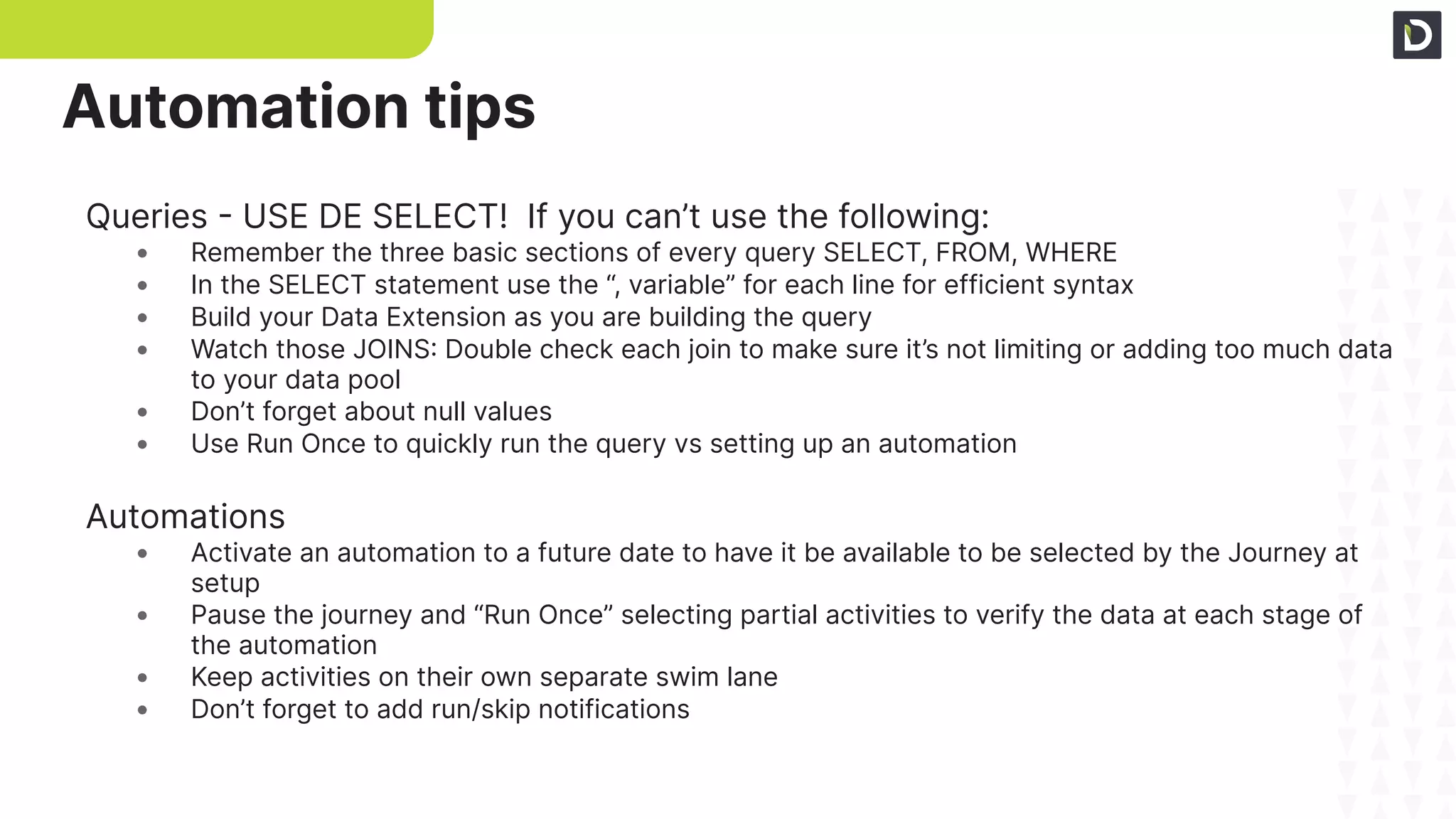
Queries - USE DE SELECT! If you can’t use the following:
• Remember the three basic sections of every query SELECT, FROM, WHERE
• In the SELECT statement use the “, variable” for each line for efficient syntax
• Build your Data Extension as you are building the query
• Watch those JOINS: Double check each join to make sure it’s not limiting or adding too much data
to your data pool
• Don’t forget about null values
• Use Run Once to quickly run the query vs setting up an automation
Automations
• Activate an automation to a future date to have it be available to be selected by the Journey at
setup
• Pause the journey and “Run Once” selecting partial activities to verify the data at each stage of
the automation
• Keep activities on their own separate swim lane
• Don’t forget to add run/skip notifications
Automation tips
Entry Event:
• When using Salesforce Data Entry – always select SF Data option
• Related Object Activity attributes will not send in a new Journey member only the primary object
• Lookup and custom fields may not send a new Journey member in when updated in CRM
• A lead/contact will not enter the journey if all required fields aren’t populated when created
• Once active to edit the SF Data entry settings, create a new version and stop the previous version
Activities
• Use the Object Activity vs Task, Lead specific activities
• Decision Split: Always link the Contact data ID with the Journey data ID via the Attribute to
Attribute comparison. Contact data must be first!
• Be mindful of the name of the Journey when activating – you can’t change the name of an
activated version
• Rebuild the journey from scratch if you have to replace the Entry event once activated
Journey tips
Thank you!
YOU’RE
DEE
BEST!

Revolutionize Financial Services with AI-driven intent + SFMC Journeys

  • 1.
    1 Copyright © 2022Demandbase Unleashing Digital Metamorphosis Intent Driven Journey Building for Financial Services Tara Quehl Demandbase Dr. Product Marketing Finserv Tim Ziter Cervello Mgr. Solution Consultant Josh Bryant Demandbase Sr. Solution Engineer
  • 2.
    Agenda Overview ● Fins introduction+ Case Study Demandbase + SFDC + Journey Builder ● DB Intent and overview of dash ● DB List building ● Entry Event x 2 ● Activities ● Decision splits ● Object activity ● Content Q&A
  • 3.
    Use Case Cervello bank,a growing financial firm is looking to expand its market share. They’ve launched a marketing blitz built around upsell and retention that has generated response but not seeing conversion on the backend Problem ● Sales is swamped ● Quickly lose trust in leads ● Delay contacting - cold leads
  • 4.
    Use Case -Upsell & Retention of current accounts Solution ● Intent + Create Engaged Account Target List ● How to score using intent + 1st party data ● Rank Accounts into easy to understand buckets ○ Cold, Warm, Hot ○ If an account is “cold” you can drop them into an advertising play to warm them up ● Use Demandbase Orchestration to enroll contacts into SF Campaign ● In SFMC nurture leads to keep them warm ● Notify sales to follow up on “Hot” leads ● “Always On” automated solution
  • 5.
    5 Copyright © 2023Demandbase An ABX platform aggregates both the known and unknown activities of target accounts to build a full picture of account engagement
  • 6.
    6 Copyright © 2023Demandbase De-anonymized website traffic Demandbase proprietary intent CRM & MAP engagements The Full Picture
  • 7.
    7 Copyright © 2023Demandbase Defining Engagement Activities are assigned weighted values based on importance and relevance to create a sum total of engagement for every account
  • 8.
    8 Copyright © 2023Demandbase Next Steps: Predictive
  • 9.
    9 Copyright © 2023Demandbase Demandbase analyzes account engagement, qualification, and past opportunity performance to create our Pipeline Predict account score; which predicts an account’s likelihood to be in-market
  • 10.
    10 Copyright © 2023Demandbase ➔ Understand when to prioritize accounts based on their research and engagement habits ➔ Create up to 6 Pipeline Predict scores to get even more prescriptive within different markets or segments Predictive Analytics
  • 11.
    Saving you twicethe time Demandbase ● Review Intent ● Build List ● Create Orchestration Sales Cloud • Lead & ABM ranking Marketing Cloud • Hand off to Journey master Sales Enablement ● Hot Lead Email training
  • 12.
    12 Copyright © 2022Demandbase Appendix
  • 13.
    Lead & Account •OOB fields/data • Demandbase ABM scoring Setup • Required fields • Field names & types Watchouts: • Incomplete leads • Lookup, formula fields Leads & Accounts Setup – Required Fields Field Names & Data Types Automation Build
  • 14.
    Scoring Lead Score ABMScore Rank Action Predictive Score: Hot Tier 1 Hot Notify sales immediately Predictive Score: Warm Tier 1, 2 Warm Email pushing sales meeting Predictive Score: Cold Tier 1-3 Cold Nurture email series
  • 15.
    Automation Build Query Setup QueryBuild Validate Data Query – three main components • SELECT • Variable, fixed, case • FROM • JOIN logic • Match • WHERE Data Extension Data Action Watchouts: • Formatting to help readability • Naming pitfalls • Nested AND/OR
  • 16.
    DE Setup DE Fields DataExtension Setup • Type • Sendable Subscriber relationship Attribute/field settings Synchronized DE alignment Watchouts: • Primary key • Type, length, default • CreatedDate • Nullable Automation Build
  • 17.
    Selection Criteria Target Definition Run! DESelect Newselection Selection criteria • Source DE • Filters Target definition • Data extension setup • Naming convention Automation Build
  • 18.
    Automation Setup Connecting toJourney Automation Setup • Schedule • Notifications Add activity Run once Activate Journey connect Watchouts: • Active vs paused • Journey activity add Automation Build
  • 19.
    Entry Event Setup Activate& Validate Journey Paths Entry event setup • Evaluate records Decision split quick setup Activate Send in records/data Watchouts: • Journey settings • Wait steps • Paths Journey Build
  • 20.
    One-to-many One-to-one Custom Fields 1-to-many • Contactdata first • Attribute to attribute • Correct matching key One-to-one Art of possible Watchouts: • Null errors Journey Build
  • 21.
    CRM required fields Createtask setup Personalized fields Create task • Required fields • Customized field entry • Test Update lead • Field choice • Test Watchouts: • CRM settings • API call limits Summary Journey Build
  • 22.
    SF data entry Searchobjects The who Entry event setup • Salesforce data vs other Object select The who • Contact • User Watchouts: • Stick with SF data • Child objects • Campaign member • Opportunity contact • The details of the who Journey Build
  • 23.
    Primary-related criteria Data fields Summary Criteria •Created and updated Primary vs related objects • Lookup and formula fields Data • Default fields • Object fields Watchouts: • Created/updated triggers • And/Or selectors • Field name varieties Journey Build
  • 24.
    Canvas build Lead create/update- test Flow Canvas build New lead test Validate data Watchouts: • Create leads all fields • DE location Data Journey Build
  • 25.
    Content – HotLead Data Data align Click into lead Unique data fields Align to content Lookup addl variables Click into lead functionality Email prompt E2E testing Email prompt
  • 26.
    Content – HotLead Basic personalization Signature block Dynamic content Build • Email design system • Personalization Signature block Dynamic content Dynamic sender profile Watchouts • Engagement split • Code snippets vs free form Dynamic sender profile
  • 27.
    Queries - USEDE SELECT! If you can’t use the following: • Remember the three basic sections of every query SELECT, FROM, WHERE • In the SELECT statement use the “, variable” for each line for efficient syntax • Build your Data Extension as you are building the query • Watch those JOINS: Double check each join to make sure it’s not limiting or adding too much data to your data pool • Don’t forget about null values • Use Run Once to quickly run the query vs setting up an automation Automations • Activate an automation to a future date to have it be available to be selected by the Journey at setup • Pause the journey and “Run Once” selecting partial activities to verify the data at each stage of the automation • Keep activities on their own separate swim lane • Don’t forget to add run/skip notifications Automation tips
  • 28.
    Entry Event: • Whenusing Salesforce Data Entry – always select SF Data option • Related Object Activity attributes will not send in a new Journey member only the primary object • Lookup and custom fields may not send a new Journey member in when updated in CRM • A lead/contact will not enter the journey if all required fields aren’t populated when created • Once active to edit the SF Data entry settings, create a new version and stop the previous version Activities • Use the Object Activity vs Task, Lead specific activities • Decision Split: Always link the Contact data ID with the Journey data ID via the Attribute to Attribute comparison. Contact data must be first! • Be mindful of the name of the Journey when activating – you can’t change the name of an activated version • Rebuild the journey from scratch if you have to replace the Entry event once activated Journey tips
  • 29.