Raptor 2
Php integration framework
Ing. William Amed
The beginning
The Raptor project born in July 2014, like an
exchange of many ideas of the state of web
development in that time, between usability
professionals and one developer.
In one point this discussion converge to this
idea, today our main goal.
“Reduce the cognitive charge in the
development”
Why we need that?
Several studies prove that some peoples do not
response in the same way in determined
circumstances, in special when don’t understand
the tool or is too complicated to use.
The humans are in a life time that the learning
curve is high, taking in account the amount of
data that process every day.
Why we need that?
The developers don’t come from others planets,
we are humans and we have the same
behavioral patterns.
Coding is our stuff !!
but when is to complicated the frustration float.
Raptor is based in that principle, make of
development an activity of joy and not
frustration even if it's the first time you see it.
What is Raptor?
Is a framework that integrate the best
technologies and practices, based on standards
and giving the necessary abstraction to develop
a web application.
Backend
• The backend core is supported in this version
by Slim micro-framework, with enough
arguments it’s proved be a faster solution,
making honor to the Raptor name.
Backend
• Doctrine, Twig, Go AOP and others conform
the rest of the php technologies in the server
side.
• Raptor guarantee the synergy between
technologies implementing an appropriate
arquitecture.
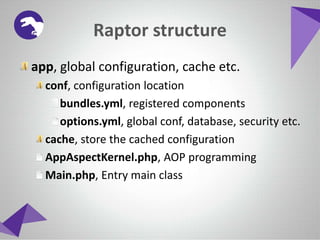
Raptor structure
app, global configuration, cache etc.
libs, server side libraries
src, application source code
web, resources public directory
Similar folder structure compared with symfony,
giving you an idea how it’s works and organize.
Raptor structure
app, global configuration, cache etc.
conf, configuration location
bundles.yml, registered components
options.yml, global conf, database, security etc.
cache, store the cached configuration
AppAspectKernel.php, AOP programming
Main.php, Entry main class
Raptor structure
src, application source code
[vendor name]
• They are organized in bundles
Raptor2, default vendor for Raptor 2
InstallerBundle, Installer Component
InteractiveBundle, Interactive Users Guide
ServiceBundle, Support SOAP Services
Raptor structure
web, resources public directory
bundles, resources location
• They are organized the same way in src
SSO, Single Sign One support by SAML
index.php, production frontal
dev.php, development frontal
Frontend
• The frontend is conformed by UIR (User
Interface Raptor) and Raptor Js Core, giving
the necessary integration to use Extjs, jQuery,
Bootstrap and Angular with any problem.
• Raptor make easy the UI creation through
templates auto generated ready for use it,
guarantying the communication protection
between layers.
Frontend
• The system give you access to functions in the
front-end thanks to the javascript core always
accessible through the Raptor object.
Security Abstraction
Raptor implements the security based on
protection techniques to the different kinds of
attacks thought the Security object.
Besides you must implements a security
manager interface forcing you to accomplish the
security process(identification, authentication,
authorization and auditory)
Security Abstraction
You can get an abstraction of that using the
Syntarsus Security Module guarantying:
• Security process implementation.
• Structure based RBAC.
• UI implementation including login.
• SAML identification-authentication standard.
Users guides
The user guide is the resource to converge the
user mental model (way the user see the object)
and the designer mental model (way the creator
see the object).
Evidently when both models don’t match or are
to far of each other probably you get usability
problems.
Users guides
The idea behind of this is clarify the user in the
heat of the moment in a interactive way.
Interactive guide is the handler of this
logic, making possible declare bundles
tutorials and show it in user interaction.
Control Panel
The control panel give access to all abstractions
functions like:
• Configuration
• SOAP Service Publisher
• Components creation, export and installation
• UI creation, Extjs and Bootstrap.
• Database model generation
Control Panel
Control Panel
API Rest example
I categorize the API Rest creation like too easy
You don’t believe me?
Take a look of this !!
API Rest example
• Take a controller and define your methods,
I will define 3(add, edit, delete)
• Declare an API doc to show it to the user
Here we go !!
API Rest example
API Rest example
To show the API doc you must implement a page
showing that, you only need to call
$this->getApi() in any controller for access to
the declared API docs.
Notes.
The API value annotation is the category of the API doc, you
must group the functions in categories to show it in a organize
way, in the example the 3 functions will appears in the category
myapi.category meaning that category is a sublevel of myapi.
To conclude this presentation I will give some numbers
• We are using SCRUM and experiments with Raptor until now
a time reduction of 40% and 60 %.
• The new members get the idea in one day and be able to fully
integrate in the development process in three.
Cool numbers for us !!
Raptor 2
Php integration framework
Ing. William Amed

Raptor 2

  • 1.
    Raptor 2 Php integrationframework Ing. William Amed
  • 2.
    The beginning The Raptorproject born in July 2014, like an exchange of many ideas of the state of web development in that time, between usability professionals and one developer. In one point this discussion converge to this idea, today our main goal. “Reduce the cognitive charge in the development”
  • 3.
    Why we needthat? Several studies prove that some peoples do not response in the same way in determined circumstances, in special when don’t understand the tool or is too complicated to use. The humans are in a life time that the learning curve is high, taking in account the amount of data that process every day.
  • 4.
    Why we needthat? The developers don’t come from others planets, we are humans and we have the same behavioral patterns. Coding is our stuff !! but when is to complicated the frustration float. Raptor is based in that principle, make of development an activity of joy and not frustration even if it's the first time you see it.
  • 5.
    What is Raptor? Isa framework that integrate the best technologies and practices, based on standards and giving the necessary abstraction to develop a web application.
  • 6.
    Backend • The backendcore is supported in this version by Slim micro-framework, with enough arguments it’s proved be a faster solution, making honor to the Raptor name.
  • 7.
    Backend • Doctrine, Twig,Go AOP and others conform the rest of the php technologies in the server side. • Raptor guarantee the synergy between technologies implementing an appropriate arquitecture.
  • 8.
    Raptor structure app, globalconfiguration, cache etc. libs, server side libraries src, application source code web, resources public directory Similar folder structure compared with symfony, giving you an idea how it’s works and organize.
  • 9.
    Raptor structure app, globalconfiguration, cache etc. conf, configuration location bundles.yml, registered components options.yml, global conf, database, security etc. cache, store the cached configuration AppAspectKernel.php, AOP programming Main.php, Entry main class
  • 10.
    Raptor structure src, applicationsource code [vendor name] • They are organized in bundles Raptor2, default vendor for Raptor 2 InstallerBundle, Installer Component InteractiveBundle, Interactive Users Guide ServiceBundle, Support SOAP Services
  • 11.
    Raptor structure web, resourcespublic directory bundles, resources location • They are organized the same way in src SSO, Single Sign One support by SAML index.php, production frontal dev.php, development frontal
  • 12.
    Frontend • The frontendis conformed by UIR (User Interface Raptor) and Raptor Js Core, giving the necessary integration to use Extjs, jQuery, Bootstrap and Angular with any problem. • Raptor make easy the UI creation through templates auto generated ready for use it, guarantying the communication protection between layers.
  • 13.
    Frontend • The systemgive you access to functions in the front-end thanks to the javascript core always accessible through the Raptor object.
  • 14.
    Security Abstraction Raptor implementsthe security based on protection techniques to the different kinds of attacks thought the Security object. Besides you must implements a security manager interface forcing you to accomplish the security process(identification, authentication, authorization and auditory)
  • 15.
    Security Abstraction You canget an abstraction of that using the Syntarsus Security Module guarantying: • Security process implementation. • Structure based RBAC. • UI implementation including login. • SAML identification-authentication standard.
  • 16.
    Users guides The userguide is the resource to converge the user mental model (way the user see the object) and the designer mental model (way the creator see the object). Evidently when both models don’t match or are to far of each other probably you get usability problems.
  • 17.
    Users guides The ideabehind of this is clarify the user in the heat of the moment in a interactive way. Interactive guide is the handler of this logic, making possible declare bundles tutorials and show it in user interaction.
  • 18.
    Control Panel The controlpanel give access to all abstractions functions like: • Configuration • SOAP Service Publisher • Components creation, export and installation • UI creation, Extjs and Bootstrap. • Database model generation
  • 19.
  • 20.
  • 21.
    API Rest example Icategorize the API Rest creation like too easy You don’t believe me? Take a look of this !!
  • 22.
    API Rest example •Take a controller and define your methods, I will define 3(add, edit, delete) • Declare an API doc to show it to the user Here we go !!
  • 23.
  • 24.
    API Rest example Toshow the API doc you must implement a page showing that, you only need to call $this->getApi() in any controller for access to the declared API docs. Notes. The API value annotation is the category of the API doc, you must group the functions in categories to show it in a organize way, in the example the 3 functions will appears in the category myapi.category meaning that category is a sublevel of myapi.
  • 25.
    To conclude thispresentation I will give some numbers • We are using SCRUM and experiments with Raptor until now a time reduction of 40% and 60 %. • The new members get the idea in one day and be able to fully integrate in the development process in three. Cool numbers for us !!
  • 26.
    Raptor 2 Php integrationframework Ing. William Amed