The Quotation Management Software for SME’s
Developed by: Domex Technical Information Pvt Ltd
 Unlimited user access
 User friendly software / Online & offline access
 Create quotations according to location of your office or
department-wise.
 Managerial approval option available for better control.
 Quickly generate Quotations / Pro-forma invoices & save in PDF.
 Draft letter formats available for instant submission of your
proposal(s).
 In-built email options for sending your quotations.
 Preserve all enquires.
 Option for uploading your products, customer details in excel.
 Data back-up facility available.
 Overcome Attrition & reduce dependence on sales assistants
 Quotation generation from any location 24/7 via internet.
 Fast-track your proposals to achieve sales.
 Track & view status of all your proposals instantaneously.
 User friendly interface.
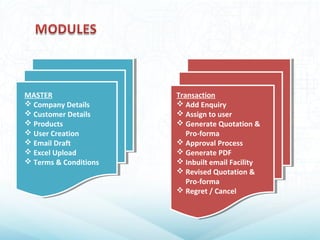
MASTER
 Company Details
 Customer Details
 Products
 User Creation
 Email Draft
 Excel Upload
 Terms & Conditions
Transaction
 Add Enquiry
 Assign to user
 Generate Quotation &
Pro-forma
 Approval Process
 Generate PDF
 Inbuilt email Facility
 Revised Quotation &
Pro-forma
 Regret / Cancel
Add / modify your Masters
(e.g. : Our Company, Client,
Vendor, etc..)
Add / modify your Masters
(e.g. : Our Company, Client,
Vendor, etc..)
Masters for
Products
Masters for
Products
Add Enquiries & Send
Enquires to Vendors
Add Enquiries & Send
Enquires to Vendors
Generate Quotation, Revised
Quote/Pro-forma Invoice or Regret
Generate Quotation, Revised
Quote/Pro-forma Invoice or Regret
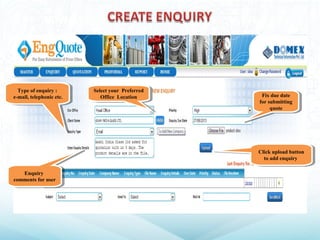
Select your Preferred
Office Location
Select your Preferred
Office Location
Type of enquiry :
e-mail, telephonic etc.
Type of enquiry :
e-mail, telephonic etc. Fix due date
for submitting
quote
Fix due date
for submitting
quote
Click upload button
to add enquiry
Click upload button
to add enquiry
Enquiry
comments for user
Enquiry
comments for user
Uploaded
enquiry will
appear here
Uploaded
enquiry will
appear here
Click here to Assign to
Your self or other
user
Click here to Assign to
Your self or other
user
Company InfoCompany Info Client InfoClient Info
Quotation InfoQuotation Info
Enquiry InfoEnquiry Info
Add Product itemsAdd Product items
Add terms & ConditionsAdd terms & Conditions
Other InfoOther Info
Ref No. generated
Automatically after selection of
handling office
Ref No. generated
Automatically after selection of
handling office
Select authorized person
to receive approval
Select authorized person
to receive approval
Add
products /
items
Add
products /
items
Determine T&C
for final quotation
Determine T&C
for final quotation
Quotation to be
saved or sent for
approval
Quotation to be
saved or sent for
approval
Click for
automatic
calculation
Click for
automatic
calculation
Client info
generated
Automatically
Client info
generated
Automatically
Option available for
entering taxation for each
product
Option available for
entering taxation for each
product
Pro-forma can be
saved or sent for
approval
Pro-forma can be
saved or sent for
approval
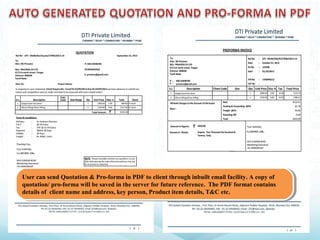
User can send Quotation & Pro-forma in PDF to client through inbuilt email facility. A copy of
quotation/ pro-forma will be saved in the server for future reference. The PDF format contains
details of client name and address, key person, Product item details, T&C etc.
User can send Quotation & Pro-forma in PDF to client through inbuilt email facility. A copy of
quotation/ pro-forma will be saved in the server for future reference. The PDF format contains
details of client name and address, key person, Product item details, T&C etc.
Contact person e-mail will
automatically appears
Contact person e-mail will
automatically appears
Authorized person e-mail
will automatically appear
Authorized person e-mail
will automatically appear
Attach product
catalogues, etc.
Attach product
catalogues, etc.
Auto generated draft letter
based on the Subject selected
Auto generated draft letter
based on the Subject selected
Note : Along with email
Quotation attached in PDF
format
Select the Subject
according to the
process
Select the Subject
according to the
process
Update Enquiry Status
(follow-ups, PO received, etc)
Update Enquiry Status
(follow-ups, PO received, etc)
View Complete Enquiry
History
Start to Now
View Complete Enquiry
History
Start to Now
The Knowledge Processing,
Information & IT Company

Quotation Software

  • 1.
    The Quotation ManagementSoftware for SME’s Developed by: Domex Technical Information Pvt Ltd
  • 2.
     Unlimited useraccess  User friendly software / Online & offline access  Create quotations according to location of your office or department-wise.  Managerial approval option available for better control.  Quickly generate Quotations / Pro-forma invoices & save in PDF.  Draft letter formats available for instant submission of your proposal(s).  In-built email options for sending your quotations.  Preserve all enquires.  Option for uploading your products, customer details in excel.  Data back-up facility available.
  • 3.
     Overcome Attrition& reduce dependence on sales assistants  Quotation generation from any location 24/7 via internet.  Fast-track your proposals to achieve sales.  Track & view status of all your proposals instantaneously.  User friendly interface.
  • 4.
    MASTER  Company Details Customer Details  Products  User Creation  Email Draft  Excel Upload  Terms & Conditions Transaction  Add Enquiry  Assign to user  Generate Quotation & Pro-forma  Approval Process  Generate PDF  Inbuilt email Facility  Revised Quotation & Pro-forma  Regret / Cancel
  • 6.
    Add / modifyyour Masters (e.g. : Our Company, Client, Vendor, etc..) Add / modify your Masters (e.g. : Our Company, Client, Vendor, etc..) Masters for Products Masters for Products
  • 7.
    Add Enquiries &Send Enquires to Vendors Add Enquiries & Send Enquires to Vendors Generate Quotation, Revised Quote/Pro-forma Invoice or Regret Generate Quotation, Revised Quote/Pro-forma Invoice or Regret
  • 8.
    Select your Preferred OfficeLocation Select your Preferred Office Location Type of enquiry : e-mail, telephonic etc. Type of enquiry : e-mail, telephonic etc. Fix due date for submitting quote Fix due date for submitting quote Click upload button to add enquiry Click upload button to add enquiry Enquiry comments for user Enquiry comments for user
  • 9.
    Uploaded enquiry will appear here Uploaded enquirywill appear here Click here to Assign to Your self or other user Click here to Assign to Your self or other user
  • 10.
    Company InfoCompany InfoClient InfoClient Info Quotation InfoQuotation Info Enquiry InfoEnquiry Info Add Product itemsAdd Product items Add terms & ConditionsAdd terms & Conditions Other InfoOther Info
  • 11.
    Ref No. generated Automaticallyafter selection of handling office Ref No. generated Automatically after selection of handling office Select authorized person to receive approval Select authorized person to receive approval Add products / items Add products / items Determine T&C for final quotation Determine T&C for final quotation Quotation to be saved or sent for approval Quotation to be saved or sent for approval Click for automatic calculation Click for automatic calculation Client info generated Automatically Client info generated Automatically
  • 12.
    Option available for enteringtaxation for each product Option available for entering taxation for each product Pro-forma can be saved or sent for approval Pro-forma can be saved or sent for approval
  • 13.
    User can sendQuotation & Pro-forma in PDF to client through inbuilt email facility. A copy of quotation/ pro-forma will be saved in the server for future reference. The PDF format contains details of client name and address, key person, Product item details, T&C etc. User can send Quotation & Pro-forma in PDF to client through inbuilt email facility. A copy of quotation/ pro-forma will be saved in the server for future reference. The PDF format contains details of client name and address, key person, Product item details, T&C etc.
  • 14.
    Contact person e-mailwill automatically appears Contact person e-mail will automatically appears Authorized person e-mail will automatically appear Authorized person e-mail will automatically appear Attach product catalogues, etc. Attach product catalogues, etc. Auto generated draft letter based on the Subject selected Auto generated draft letter based on the Subject selected Note : Along with email Quotation attached in PDF format Select the Subject according to the process Select the Subject according to the process
  • 15.
    Update Enquiry Status (follow-ups,PO received, etc) Update Enquiry Status (follow-ups, PO received, etc)
  • 16.
    View Complete Enquiry History Startto Now View Complete Enquiry History Start to Now
  • 17.