Qihan Technology
Sanbot
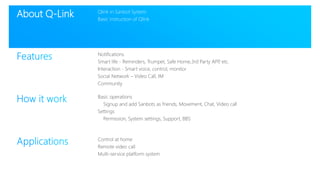
About Q-Link Qlink in Sanbot System
Basic instruction of Qlink
Notifications
Smart life - Reminders, Trumpet, Safe Home,3rd Party APP, etc.
Interaction - Smart voice, control, monitor
Social Network – Video Call, IM
Community
Basic operations
Signup and add Sanbots as friends, Movement, Chat, Video call
Settings
Permission, System settings, Support, BBS
Control at home
Remote video call
Multi-service platform system
Q-Link merges the functions of Qihan Cloud, Sanbot
and other intelligent hardware to provide you with a
more flexible and simplified management experience.
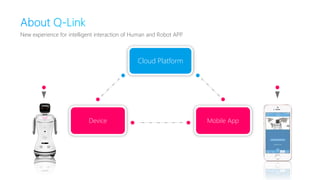
About Q-Link
New experience for intelligent interaction of Human and Robot APP.
Cloud Platform
Device Mobile App
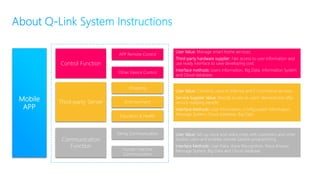
APP Remote Control
Other Device Control
Shopping
Education & Health
Entertainment
Family Communication
Human-machine
Communication
Control Function
Third-party Server
Communication
Function
Mobile
APP
User Value: Manage smart home services;
Third-party hardware supplier: Fast access to user information and
use ready interface to save developing cost;
Interface methods: Users information, Big Data, Information System
and Cloud database;
User Value: Connects users to Internet and E-Commerce services
Service Supplier Value: Directly access to users' demand and offer
service realizing benefit;
Interface Methods: User Information, Configuration Information,
Message System, Cloud database, Big Data
User Value: Set up voice and video chats with customers and other
Sanbot users and enables remote Sanbot programming
Interface Methods: User Data, Voice Recognition, Voice Answer,
Message System, Big Data and Cloud database.
About Q-Link Qlink in Sanbot System
Basic instruction of Qlink
Notifications
Smart life - Reminders, Trumpet, Safe Home,3rd Party APP, etc.
Interaction - Smart voice, control, monitor
Social Network – Video Call, IM
Community
Basic operations
Signup and add Sanbots as friends, Movement, Chat, Video call
Settings
Permission, System settings, Support, BBS
Control at home
Remote video call
Multi-service platform system
Features Notifications
Smart life - Reminders, Trumpet, Safe Home,3rd Party APP, etc.
Interaction - Smart voice, control, monitor
Social Network – Video Call, IM
Community
Basic operations
Signup and add Sanbots as friends, Movement, Chat, Video call
Settings
Permission, System settings, Support, BBS
Qlink in Sanbot System
Basic instruction of Qlink
Control at home
Remote video call
Multi-service platform system
Reminders
Trumpet
Safe Home
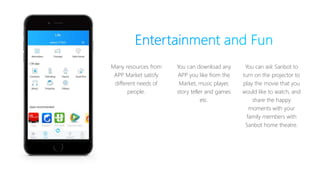
Entertainment and Fun
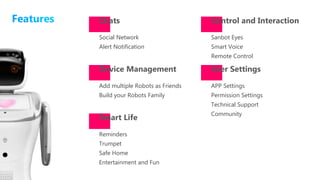
Chats
Smart Life
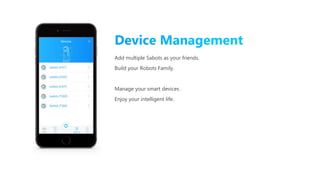
Device Management
Social Network
Alert Notification
Add multiple Robots as Friends
Build your Robots Family
Control and Interaction
User Settings
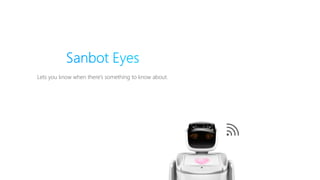
Sanbot Eyes
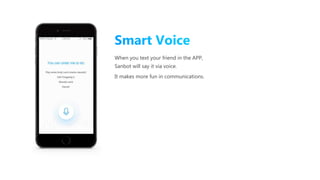
Smart Voice
Remote Control
APP Settings
Permission Settings
Technical Support
Community
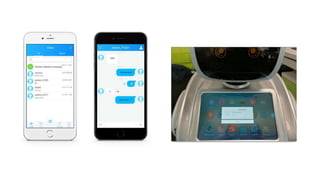
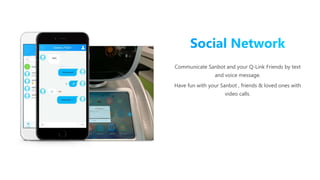
Communicate Sanbot and your Q-Link Friends by text
and voice message.
Have fun with your Sanbot , friends & loved ones with
video calls.
Communicate Sanbot and your Q-Link Friends by text
and voice message.
Have fun with your Sanbot , friends & loved ones with
video calls.
Your Mobile phone is not just a remote
controller for Sanbot, but also a smart key for
door and easy window to manage all smart
home applicances.
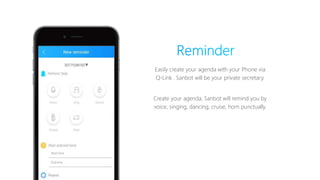
Easily create your agenda with your Phone via
Q-Link . Sanbot will be your private secretary.
Create your agenda, Sanbot will remind you by
voice, singing, dancing, cruise, horn punctually.
Manage Multi-Service Platform System, when you want it!
You can easily integrate dance ,music , speech, movement etc.
into various multimedia tasks for Sanbot via Trumpet.
Sanbot
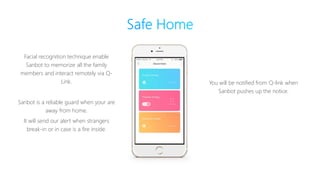
Facial recognition technique enable
Sanbot to memorize all the family
members and interact remotely via Q-
Link.
Sanbot is a reliable guard when your are
away from home.
It will send our alert when strangers
break-in or in case is a fire inside.
You will be notified from Q-link when
Sanbot pushes up the notice.
Many resources from
APP Market satisfy
different needs of
people.
You can download any
APP you like from the
Market, music player,
story teller and games
etc.
You can ask Sanbot to
turn on the projector to
play the movie that you
would like to watch, and
share the happy
moments with your
family members with
Sanbot home theatre.
Lets you know when there’s something to know about.
Sanbot come and go.
with Q-Link Sanbot does everything for you!
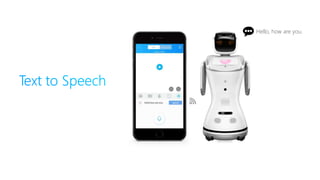
When you text your friend in the APP,
Sanbot will say it via voice.
It makes more fun in communications.
Add multiple Sabots as your friends.
Build your Robots Family.
Manage your smart devices .
Enjoy your intelligent life.
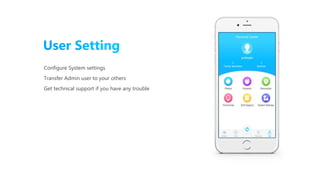
Configure System settings
Transfer Admin user to your others
Get technical support if you have any trouble
Features Notifications
Smart life - Reminders, Trumpet, Safe Home,3rd Party APP, etc.
Interaction - Smart voice, control, monitor
Social Network – Video Call, IM
Community
Basic operations
Signup and add Sanbots as friends, Movement, Chat, Video call
Settings
Permission, System settings, Support, BBS
Qlink in Sanbot System
Basic instruction of Qlink
Control at home
Remote video call
Multi-service platform system
How it work Basic operations
Signup and add Sanbots as friends, Movement, Chat, Video call
Settings
Permission, System settings, Support, BBS
Qlink in Sanbot System
Basic instruction of Qlink
Notifications
Smart life - Reminders, Trumpet, Safe Home,3rd Party APP, etc.
Interaction - Smart voice, control, monitor
Social Network – Video Call, IM
Community
Control at home
Remote video call
Multi-service platform system
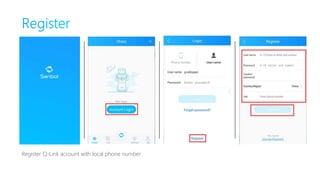
Download and install the “Q-Link” from APP Market
Register Q-Link account with local phone number
Scan QR code to add Sanbot as your friend.
The QR code is in Sanbot Settings.
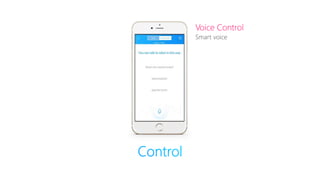
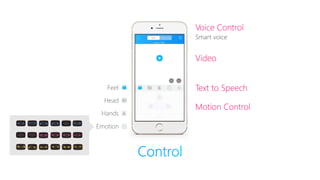
Voice Control
Smart voice
Video
Text to Speech
Motion Control
Feet
Head
Hands
Emotion
Voice Control
Smart voice
Voice Control
Smart voice
Video
Text to Speech
Motion Control
Feet
Head
Hands
Emotion
Hello, how are you.
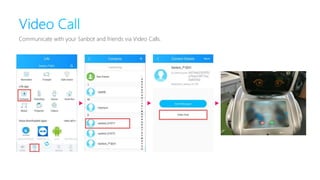
Communicate with your Sanbot and friends via Video Calls.
How it work Basic operations
Signup and add Sanbots as friends, Movement, Chat, Video call
Settings
Permission, System settings, Support, BBS
Qlink in Sanbot System
Basic instruction of Qlink
Notifications
Smart life - Reminders, Trumpet, Safe Home,3rd Party APP, etc.
Interaction - Smart voice, control, monitor
Social Network – Video Call, IM
Community
Control at home
Remote video call
Multi-service platform system
Applications
Basic operations
Signup and add Sanbots as friends, Movement, Chat, Video call
Settings
Permission, System settings, Support, BBS
Qlink in Sanbot System
Basic instruction of Qlink
Notifications
Smart life - Reminders, Trumpet, Safe Home,3rd Party APP, etc.
Interaction - Smart voice, control, monitor
Social Network – Video Call, IM
Community
Control at home
Remote video call
Multi-service platform system
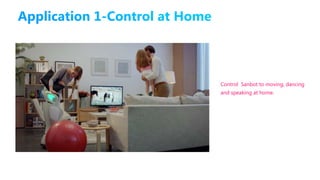
Control Sanbot to moving, dancing
and speaking at home.
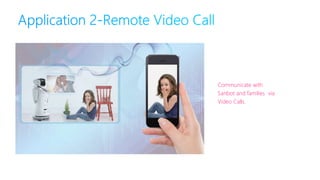
Communicate with
Sanbot and families via
Video Calls.
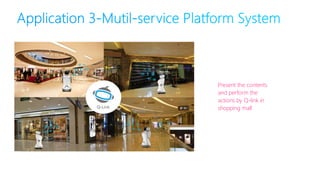
Present the contents
and perform the
actions by Q-link in
shopping mall
Copyright © Qihan Technology Co., Ltd. 2006-2016. All rights reserved.
Thanks

Q link 1.0

  • 1.
  • 2.
    About Q-Link Qlinkin Sanbot System Basic instruction of Qlink Notifications Smart life - Reminders, Trumpet, Safe Home,3rd Party APP, etc. Interaction - Smart voice, control, monitor Social Network – Video Call, IM Community Basic operations Signup and add Sanbots as friends, Movement, Chat, Video call Settings Permission, System settings, Support, BBS Control at home Remote video call Multi-service platform system
  • 3.
    Q-Link merges thefunctions of Qihan Cloud, Sanbot and other intelligent hardware to provide you with a more flexible and simplified management experience. About Q-Link
  • 4.
    New experience forintelligent interaction of Human and Robot APP. Cloud Platform Device Mobile App
  • 5.
    APP Remote Control OtherDevice Control Shopping Education & Health Entertainment Family Communication Human-machine Communication Control Function Third-party Server Communication Function Mobile APP User Value: Manage smart home services; Third-party hardware supplier: Fast access to user information and use ready interface to save developing cost; Interface methods: Users information, Big Data, Information System and Cloud database; User Value: Connects users to Internet and E-Commerce services Service Supplier Value: Directly access to users' demand and offer service realizing benefit; Interface Methods: User Information, Configuration Information, Message System, Cloud database, Big Data User Value: Set up voice and video chats with customers and other Sanbot users and enables remote Sanbot programming Interface Methods: User Data, Voice Recognition, Voice Answer, Message System, Big Data and Cloud database.
  • 6.
    About Q-Link Qlinkin Sanbot System Basic instruction of Qlink Notifications Smart life - Reminders, Trumpet, Safe Home,3rd Party APP, etc. Interaction - Smart voice, control, monitor Social Network – Video Call, IM Community Basic operations Signup and add Sanbots as friends, Movement, Chat, Video call Settings Permission, System settings, Support, BBS Control at home Remote video call Multi-service platform system
  • 7.
    Features Notifications Smart life- Reminders, Trumpet, Safe Home,3rd Party APP, etc. Interaction - Smart voice, control, monitor Social Network – Video Call, IM Community Basic operations Signup and add Sanbots as friends, Movement, Chat, Video call Settings Permission, System settings, Support, BBS Qlink in Sanbot System Basic instruction of Qlink Control at home Remote video call Multi-service platform system
  • 8.
    Reminders Trumpet Safe Home Entertainment andFun Chats Smart Life Device Management Social Network Alert Notification Add multiple Robots as Friends Build your Robots Family Control and Interaction User Settings Sanbot Eyes Smart Voice Remote Control APP Settings Permission Settings Technical Support Community
  • 9.
    Communicate Sanbot andyour Q-Link Friends by text and voice message. Have fun with your Sanbot , friends & loved ones with video calls.
  • 10.
    Communicate Sanbot andyour Q-Link Friends by text and voice message. Have fun with your Sanbot , friends & loved ones with video calls.
  • 11.
    Your Mobile phoneis not just a remote controller for Sanbot, but also a smart key for door and easy window to manage all smart home applicances.
  • 12.
    Easily create youragenda with your Phone via Q-Link . Sanbot will be your private secretary. Create your agenda, Sanbot will remind you by voice, singing, dancing, cruise, horn punctually.
  • 13.
    Manage Multi-Service PlatformSystem, when you want it! You can easily integrate dance ,music , speech, movement etc. into various multimedia tasks for Sanbot via Trumpet. Sanbot
  • 14.
    Facial recognition techniqueenable Sanbot to memorize all the family members and interact remotely via Q- Link. Sanbot is a reliable guard when your are away from home. It will send our alert when strangers break-in or in case is a fire inside. You will be notified from Q-link when Sanbot pushes up the notice.
  • 15.
    Many resources from APPMarket satisfy different needs of people. You can download any APP you like from the Market, music player, story teller and games etc. You can ask Sanbot to turn on the projector to play the movie that you would like to watch, and share the happy moments with your family members with Sanbot home theatre.
  • 16.
    Lets you knowwhen there’s something to know about.
  • 17.
    Sanbot come andgo. with Q-Link Sanbot does everything for you!
  • 18.
    When you textyour friend in the APP, Sanbot will say it via voice. It makes more fun in communications.
  • 19.
    Add multiple Sabotsas your friends. Build your Robots Family. Manage your smart devices . Enjoy your intelligent life.
  • 20.
    Configure System settings TransferAdmin user to your others Get technical support if you have any trouble
  • 21.
    Features Notifications Smart life- Reminders, Trumpet, Safe Home,3rd Party APP, etc. Interaction - Smart voice, control, monitor Social Network – Video Call, IM Community Basic operations Signup and add Sanbots as friends, Movement, Chat, Video call Settings Permission, System settings, Support, BBS Qlink in Sanbot System Basic instruction of Qlink Control at home Remote video call Multi-service platform system
  • 22.
    How it workBasic operations Signup and add Sanbots as friends, Movement, Chat, Video call Settings Permission, System settings, Support, BBS Qlink in Sanbot System Basic instruction of Qlink Notifications Smart life - Reminders, Trumpet, Safe Home,3rd Party APP, etc. Interaction - Smart voice, control, monitor Social Network – Video Call, IM Community Control at home Remote video call Multi-service platform system
  • 23.
    Download and installthe “Q-Link” from APP Market
  • 24.
    Register Q-Link accountwith local phone number
  • 25.
    Scan QR codeto add Sanbot as your friend. The QR code is in Sanbot Settings.
  • 26.
    Voice Control Smart voice Video Textto Speech Motion Control Feet Head Hands Emotion
  • 27.
  • 28.
    Voice Control Smart voice Video Textto Speech Motion Control Feet Head Hands Emotion
  • 29.
  • 30.
    Communicate with yourSanbot and friends via Video Calls.
  • 31.
    How it workBasic operations Signup and add Sanbots as friends, Movement, Chat, Video call Settings Permission, System settings, Support, BBS Qlink in Sanbot System Basic instruction of Qlink Notifications Smart life - Reminders, Trumpet, Safe Home,3rd Party APP, etc. Interaction - Smart voice, control, monitor Social Network – Video Call, IM Community Control at home Remote video call Multi-service platform system
  • 32.
    Applications Basic operations Signup andadd Sanbots as friends, Movement, Chat, Video call Settings Permission, System settings, Support, BBS Qlink in Sanbot System Basic instruction of Qlink Notifications Smart life - Reminders, Trumpet, Safe Home,3rd Party APP, etc. Interaction - Smart voice, control, monitor Social Network – Video Call, IM Community Control at home Remote video call Multi-service platform system
  • 33.
    Control Sanbot tomoving, dancing and speaking at home.
  • 34.
    Communicate with Sanbot andfamilies via Video Calls.
  • 35.
    Present the contents andperform the actions by Q-link in shopping mall
  • 36.
    Copyright © QihanTechnology Co., Ltd. 2006-2016. All rights reserved. Thanks