Python Training by
SoftCrayons Institute
Learn Python from industry experts at SoftCrayons Institute.
Introduction
to Python
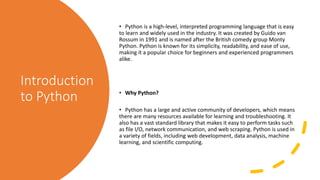
• Python is a high-level, interpreted programming language that is easy
to learn and widely used in the industry. It was created by Guido van
Rossum in 1991 and is named after the British comedy group Monty
Python. Python is known for its simplicity, readability, and ease of use,
making it a popular choice for beginners and experienced programmers
alike.
• Why Python?
• Python has a large and active community of developers, which means
there are many resources available for learning and troubleshooting. It
also has a vast standard library that makes it easy to perform tasks such
as file I/O, network communication, and web scraping. Python is used in
a variety of fields, including web development, data analysis, machine
learning, and scientific computing.
Data Types and Variables
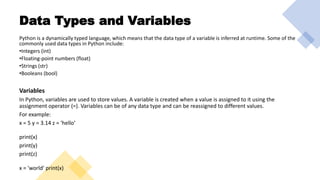
Python is a dynamically typed language, which means that the data type of a variable is inferred at runtime. Some of the
commonly used data types in Python include:
•Integers (int)
•Floating-point numbers (float)
•Strings (str)
•Booleans (bool)
Variables
In Python, variables are used to store values. A variable is created when a value is assigned to it using the
assignment operator (=). Variables can be of any data type and can be reassigned to different values.
For example:
x = 5 y = 3.14 z = 'hello’
print(x)
print(y)
print(z)
x = 'world' print(x)
Control Structures
• Conditional Statements
• Conditional statements in Python are used to execute
different actions based on different conditions. The most
common conditional statements in Python are if, else,
and elif. These statements allow you to create decision-
making processes in your code.
• Loops
• Loops in Python are used to execute the same block of
code repeatedly. There are two types of loops in Python:
while loops and for loops. While loops are used when you
want to repeat a block of code until a certain condition is
met. For loops are used when you want to iterate over a
sequence of elements, such as a list or a string.
Functions and Modules
FUNCTIONS INTRODUCTION TO FUNCTIONS,
DEFINING AND CALLING
FUNCTIONS, PARAMETERS AND
ARGUMENTS, RETURN STATEMENT,
LAMBDA FUNCTIONS, RECURSION.
MODULES INTRODUCTION TO MODULES,
IMPORTING MODULES, CREATING
AND USING CUSTOM MODULES,
BUILT-IN MODULES.
File Handling
• Introduction
• File handling is an essential part of programming in Python. It allows you to read and write data to and from
files on your computer. Python provides a variety of functions and modules to handle files easily.
Opening and Closing Files
You can open a file in Python using the built-in open() function. This function takes
two arguments: the name of the file and the mode in which you want to open the
file. The mode can be 'r' for reading, 'w' for writing, or 'a' for appending to an
existing file. Once you have finished working with a file, you should always close it
using the close() method.
Example
Here is an example of opening a file in read mode and closing it:
file = open('example.txt', 'r') # Do some operations on the file file.close()
• Reading from Files
• You can read data from a file using the read() method.
This method reads the entire contents of a file and
returns it as a string. You can also use the readline()
method to read a single line from a file.
Writing to Files
You can write data to a file using the write() method. This method takes a string as an argument and writes it to
the file. If the file does not exist, it will be created. If it does exist, the new data will overwrite the old data. You can
also use the writelines() method to write a list of strings to a file.
Example
Here is an example of writing to a file:
file = open('example.txt', 'w') file.write('Hello, world!') file.close()
And more
Advanced Topics in Python
Learn with Softcrayons
Support Contact
PhoneMobile : +91 8545012345
Hotline : +91 8545012345
Emailinfo@softcrayons.com
Noida LocationB-132 Sector -2 (Near Sector- 15 Metro Station) Noida 201301
Ghaziabad Location693, Sector-14A, Opposite Sahibabad Sabji Mandi, Vasundhara, Ghaziabad (U.P.) 201012

Python Training

  • 1.
    Python Training by SoftCrayonsInstitute Learn Python from industry experts at SoftCrayons Institute.
  • 2.
    Introduction to Python • Pythonis a high-level, interpreted programming language that is easy to learn and widely used in the industry. It was created by Guido van Rossum in 1991 and is named after the British comedy group Monty Python. Python is known for its simplicity, readability, and ease of use, making it a popular choice for beginners and experienced programmers alike. • Why Python? • Python has a large and active community of developers, which means there are many resources available for learning and troubleshooting. It also has a vast standard library that makes it easy to perform tasks such as file I/O, network communication, and web scraping. Python is used in a variety of fields, including web development, data analysis, machine learning, and scientific computing.
  • 3.
    Data Types andVariables Python is a dynamically typed language, which means that the data type of a variable is inferred at runtime. Some of the commonly used data types in Python include: •Integers (int) •Floating-point numbers (float) •Strings (str) •Booleans (bool) Variables In Python, variables are used to store values. A variable is created when a value is assigned to it using the assignment operator (=). Variables can be of any data type and can be reassigned to different values. For example: x = 5 y = 3.14 z = 'hello’ print(x) print(y) print(z) x = 'world' print(x)
  • 4.
    Control Structures • ConditionalStatements • Conditional statements in Python are used to execute different actions based on different conditions. The most common conditional statements in Python are if, else, and elif. These statements allow you to create decision- making processes in your code. • Loops • Loops in Python are used to execute the same block of code repeatedly. There are two types of loops in Python: while loops and for loops. While loops are used when you want to repeat a block of code until a certain condition is met. For loops are used when you want to iterate over a sequence of elements, such as a list or a string.
  • 5.
    Functions and Modules FUNCTIONSINTRODUCTION TO FUNCTIONS, DEFINING AND CALLING FUNCTIONS, PARAMETERS AND ARGUMENTS, RETURN STATEMENT, LAMBDA FUNCTIONS, RECURSION. MODULES INTRODUCTION TO MODULES, IMPORTING MODULES, CREATING AND USING CUSTOM MODULES, BUILT-IN MODULES.
  • 6.
    File Handling • Introduction •File handling is an essential part of programming in Python. It allows you to read and write data to and from files on your computer. Python provides a variety of functions and modules to handle files easily. Opening and Closing Files You can open a file in Python using the built-in open() function. This function takes two arguments: the name of the file and the mode in which you want to open the file. The mode can be 'r' for reading, 'w' for writing, or 'a' for appending to an existing file. Once you have finished working with a file, you should always close it using the close() method. Example Here is an example of opening a file in read mode and closing it: file = open('example.txt', 'r') # Do some operations on the file file.close()
  • 7.
    • Reading fromFiles • You can read data from a file using the read() method. This method reads the entire contents of a file and returns it as a string. You can also use the readline() method to read a single line from a file. Writing to Files You can write data to a file using the write() method. This method takes a string as an argument and writes it to the file. If the file does not exist, it will be created. If it does exist, the new data will overwrite the old data. You can also use the writelines() method to write a list of strings to a file. Example Here is an example of writing to a file: file = open('example.txt', 'w') file.write('Hello, world!') file.close()
  • 8.
    And more Advanced Topicsin Python Learn with Softcrayons Support Contact PhoneMobile : +91 8545012345 Hotline : +91 8545012345 Emailinfo@softcrayons.com Noida LocationB-132 Sector -2 (Near Sector- 15 Metro Station) Noida 201301 Ghaziabad Location693, Sector-14A, Opposite Sahibabad Sabji Mandi, Vasundhara, Ghaziabad (U.P.) 201012