PYTHON
PROGRAMMING
BY  NAITIK SINGH
2100910400021
ME (3rd year)
WHAT IS PYTHON?
 Python is a popular high-level
programming language used in
various applications.
o Python is an easy language to
learn because of its simple
syntax.
o Python can be used for simple
tasks such as plotting or for more
complex tasks like machine
learning.
PYTHON FEATURES
 Easy-to-learn − Python has few keywords, simple structure, and
a clearly defined syntax. This allows the student to pick up
the language quickly.
 Easy-to-read − Python code is more clearly defined and visible
to the eyes.
 Easy-to-maintain − Python's source code is fairly easy-to-
maintain.
 A broad standard library − Python's bulk of the library is very
portable and cross-platform compatible on UNIX, Windows, and
Macintosh.
 Interactive Mode − Python has support for an interactive mode
which allows interactive testing and debugging of snippets of
code.
 Portable − Python can run on a wide variety of hardware
platforms and has the same interface on all platforms.
 The name of your variable (myInt etc.) is placed
on the left of the “=“ operator.
 The assignment operator (“=“) sets the variable
name equal to the memory location where your
value is found.
 The value of your variable (“Hello, World”) is
placed on the right of the “=“ operator.
Basic Syntax Rules
myString = “Hello, World” myInt = 7
myFloat = 7.0
myList = [7, 8, 9] myBoolean = true
Basic Syntax Rules
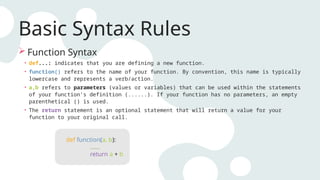
 Function Syntax
• def...: indicates that you are defining a new function.
• function() refers to the name of your function. By convention, this name is typically
lowercase and represents a verb/action.
• a,b refers to parameters (values or variables) that can be used within the statements
of your function’s definition (......). If your function has no parameters, an empty
parenthetical () is used.
• The return statement is an optional statement that will return a value for your
function to your original call.
def function(a, b):
......
return a + b
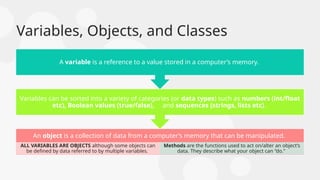
Variables, Objects, and Classes
An object is a collection of data from a computer’s memory that can be manipulated.
ALL VARIABLES ARE OBJECTS although some objects can
be defined by data referred to by multiple variables.
Methods are the functions used to act on/alter an object’s
data. They describe what your object can “do.”
Variables can be sorted into a variety of categories (or data types) such as numbers (int/float
etc), Boolean values (true/false), and sequences (strings, lists etc).
A variable is a reference to a value stored in a computer’s memory.
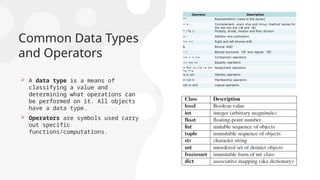
Common Data Types
and Operators
 A data type is a means of
classifying a value and
determining what operations can
be performed on it. All objects
have a data type.
 Operators are symbols used carry
out specific
functions/computations.
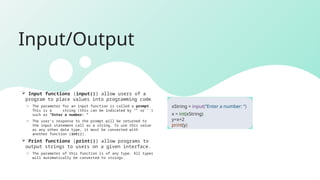
Input/Output
 Input functions (input()) allow users of a
program to place values into programming code.
o The parameter for an input function is called a prompt.
This is a string (this can be indicated by “” or ‘’)
such as “Enter a number: “
o The user’s response to the prompt will be returned to
the input statement call as a string. To use this value
as any other data type, it must be converted with
another function (int()).
 Print functions (print()) allow programs to
output strings to users on a given interface.
o The parameter of this function is of any type. All types
will automatically be converted to strings.
xString = input(“Enter a number: “)
x = int(xString)
y=x+2
print(y)
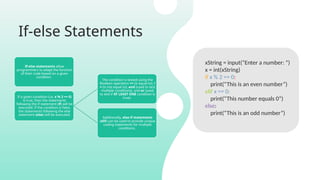
If-else Statements
If-else statements allow
programmers to adapt the function
of their code based on a given
condition.
If a given condition (i.e. x % 2 == 0)
is true, then the statements
following the if statement (if) will be
executed. If the condition is false,
the statements following the else
statement (else) will be executed.
The condition is tested using the
Boolean operators == (is equal to), !
= (is not equal to), and (used to test
multiple conditions), and or (used
to test if AT LEAST ONE condition is
true).
Additionally, else-if statements
(elif) can be used to provide unique
coding statements for multiple
conditions.
xString = input(“Enter a number: “)
x = int(xString)
if x % 2 == 0:
print(“This is an even number”)
elif x == 0:
print(“This number equals 0”)
else:
print(“This is an odd number”)
For Loops
For loops perform the same task (iterate) for the
number of times specified by an iterable (something
that can be evaluated repeatedly such as a list,
string, or range).
for defines the for loop
x is the variable defining the number of times the
statements within the loop (print(myInt)) are
executed.
The range(start, stop, step) function is often used
to define x.
o The starting value is defined by start, the final
value is defined by stop – 1, and the magnitude at
which x changes between loops is defined by step.
in is a Boolean operator that returns true if the
given value (x) is found within a given list,
string, range etc.
Data Types – Lists and Tuple
 The List is most versatile Data type available in
Python which can be written as a list of comma-
separated values (items) between square
brackets. Important thing about a list is that
items in a list need not be of the same type.
 Example: list1 = ['physics', 'chemistry', 1997,
2000];
list2 = [1, 2, 3, 4, 5 ];
 A Tuple is a sequence of immutable Python
objects. Tuples are sequences, just like lists.
The differences between tuples and lists are,
the tuples cannot be changed unlike lists and
tuples use parentheses, whereas lists use
square brackets.
 Example: tup2 = (1, 2, 3, 4, 5 ); tup3 = ("a", "b",
"c", "d“); Accessing Values: print "tup2[1:5]: “
Output: tup2[1:5]: [2, 3, 4, 5]
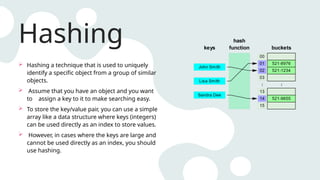
Hashing
 Hashing a technique that is used to uniquely
identify a specific object from a group of similar
objects.
 Assume that you have an object and you want
to assign a key to it to make searching easy.
 To store the key/value pair, you can use a simple
array like a data structure where keys (integers)
can be used directly as an index to store values.
 However, in cases where the keys are large and
cannot be used directly as an index, you should
use hashing.
Dictionary
 Python's dictionaries are kind of hash table type
which consist of key-value pairs of unordered
elements.
• Keys : must be immutable data types ,usually
numbers or strings.
• Values : can be any arbitrary Python object.
 Python Dictionaries are mutable objects that can
change their values.
 A dictionary is enclosed by curly braces ({ }), the items
are separated by commas, and each key is separated
from its value by a colon (:).
 Dictionary’s values can be assigned and accessed
using square braces ([]) with a key to obtain its value.
Functions
A function is a block of organized, reusable code that is used to perform a
single, related action. Functions provide better modularity for your
application and a high degree of code reusing.
Defining a Function -:
• Function blocks begin with the keyword def followed by the function name
and parentheses ( ( ) ).
• Any input parameters or arguments should be placed within these
parentheses. You can also define parameters inside these parentheses.
• The first statement of a function can be an optional statement - the
documentation string of the function or docstring.
• The code block within every function starts with a colon (:) and is indented.
• The statement return [expression] exits a function, optionally passing back
an expression to the caller. A return statement with no arguments is the same
as return None.
File Handling
File opening fileObject = open(file_name [, access_mode][, buffering])
Common access modes:
• “r” opens a file for reading only.
• “w” opens a file for writing only. Overwrites the file if the file exists. Otherwise, it creates a new
file.
• “a” opens a file for appending. If the file does not exist, it creates a new file for writing.
Closing a file fileObject.close()
The close() method flushes any unwritten information and closes the file object.
Modules
A module is a file
consisting of Python
code that can define
functions, classes and
variables.
A module allows you to
organize your code by
grouping related code
which makes the code
easier to understand
and use.
You can use any Python
source file as a module
by executing an import
statement
Python's from statement
lets you import specific
attributes from a
module into the current
namespace.
import * statement can
be used to import all
names from a module
into the current
namespace
PROJECT
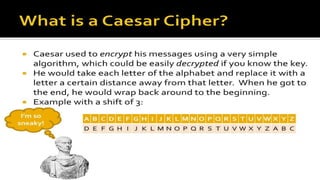
CAESER CIPHER
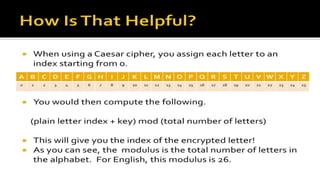
Program for Caeser cipher
def encypt_func(txt, s):
result = ""
# transverse the plain txt
for i in range(len(txt)):
char = txt[i]
# encypt_func uppercase characters in plain txt
if (char.isupper()):
result += chr((ord(char) + s - 64) % 26 + 65)
else:
# encypt_func lowercase characters in plain txt
result += chr((ord(char) + s - 96) % 26 + 97)
return result
# check the above function
txt = "CEASER CIPHER EXAMPLE"
s = 4
print("Plain txt : " + txt)
print("Shift pattern : " + str(s))
print("Cipher: " + encypt_func(txt, s))
Plain txt : CEASER CIPHER EXAMPLE
Shift pattern : 4
Cipher: HJFXJWsHNUMJWsJCFRUQJ
Outpu
t:
THANK YOU

PYTHON PPT.pptx python is very useful for day to day life

  • 1.
    PYTHON PROGRAMMING BY  NAITIKSINGH 2100910400021 ME (3rd year)
  • 2.
    WHAT IS PYTHON? Python is a popular high-level programming language used in various applications. o Python is an easy language to learn because of its simple syntax. o Python can be used for simple tasks such as plotting or for more complex tasks like machine learning.
  • 3.
    PYTHON FEATURES  Easy-to-learn− Python has few keywords, simple structure, and a clearly defined syntax. This allows the student to pick up the language quickly.  Easy-to-read − Python code is more clearly defined and visible to the eyes.  Easy-to-maintain − Python's source code is fairly easy-to- maintain.  A broad standard library − Python's bulk of the library is very portable and cross-platform compatible on UNIX, Windows, and Macintosh.  Interactive Mode − Python has support for an interactive mode which allows interactive testing and debugging of snippets of code.  Portable − Python can run on a wide variety of hardware platforms and has the same interface on all platforms.
  • 4.
     The nameof your variable (myInt etc.) is placed on the left of the “=“ operator.  The assignment operator (“=“) sets the variable name equal to the memory location where your value is found.  The value of your variable (“Hello, World”) is placed on the right of the “=“ operator. Basic Syntax Rules myString = “Hello, World” myInt = 7 myFloat = 7.0 myList = [7, 8, 9] myBoolean = true
  • 5.
    Basic Syntax Rules Function Syntax • def...: indicates that you are defining a new function. • function() refers to the name of your function. By convention, this name is typically lowercase and represents a verb/action. • a,b refers to parameters (values or variables) that can be used within the statements of your function’s definition (......). If your function has no parameters, an empty parenthetical () is used. • The return statement is an optional statement that will return a value for your function to your original call. def function(a, b): ...... return a + b
  • 6.
    Variables, Objects, andClasses An object is a collection of data from a computer’s memory that can be manipulated. ALL VARIABLES ARE OBJECTS although some objects can be defined by data referred to by multiple variables. Methods are the functions used to act on/alter an object’s data. They describe what your object can “do.” Variables can be sorted into a variety of categories (or data types) such as numbers (int/float etc), Boolean values (true/false), and sequences (strings, lists etc). A variable is a reference to a value stored in a computer’s memory.
  • 7.
    Common Data Types andOperators  A data type is a means of classifying a value and determining what operations can be performed on it. All objects have a data type.  Operators are symbols used carry out specific functions/computations.
  • 8.
    Input/Output  Input functions(input()) allow users of a program to place values into programming code. o The parameter for an input function is called a prompt. This is a string (this can be indicated by “” or ‘’) such as “Enter a number: “ o The user’s response to the prompt will be returned to the input statement call as a string. To use this value as any other data type, it must be converted with another function (int()).  Print functions (print()) allow programs to output strings to users on a given interface. o The parameter of this function is of any type. All types will automatically be converted to strings. xString = input(“Enter a number: “) x = int(xString) y=x+2 print(y)
  • 9.
    If-else Statements If-else statementsallow programmers to adapt the function of their code based on a given condition. If a given condition (i.e. x % 2 == 0) is true, then the statements following the if statement (if) will be executed. If the condition is false, the statements following the else statement (else) will be executed. The condition is tested using the Boolean operators == (is equal to), ! = (is not equal to), and (used to test multiple conditions), and or (used to test if AT LEAST ONE condition is true). Additionally, else-if statements (elif) can be used to provide unique coding statements for multiple conditions. xString = input(“Enter a number: “) x = int(xString) if x % 2 == 0: print(“This is an even number”) elif x == 0: print(“This number equals 0”) else: print(“This is an odd number”)
  • 10.
    For Loops For loopsperform the same task (iterate) for the number of times specified by an iterable (something that can be evaluated repeatedly such as a list, string, or range). for defines the for loop x is the variable defining the number of times the statements within the loop (print(myInt)) are executed. The range(start, stop, step) function is often used to define x. o The starting value is defined by start, the final value is defined by stop – 1, and the magnitude at which x changes between loops is defined by step. in is a Boolean operator that returns true if the given value (x) is found within a given list, string, range etc.
  • 11.
    Data Types –Lists and Tuple  The List is most versatile Data type available in Python which can be written as a list of comma- separated values (items) between square brackets. Important thing about a list is that items in a list need not be of the same type.  Example: list1 = ['physics', 'chemistry', 1997, 2000]; list2 = [1, 2, 3, 4, 5 ];  A Tuple is a sequence of immutable Python objects. Tuples are sequences, just like lists. The differences between tuples and lists are, the tuples cannot be changed unlike lists and tuples use parentheses, whereas lists use square brackets.  Example: tup2 = (1, 2, 3, 4, 5 ); tup3 = ("a", "b", "c", "d“); Accessing Values: print "tup2[1:5]: “ Output: tup2[1:5]: [2, 3, 4, 5]
  • 12.
    Hashing  Hashing atechnique that is used to uniquely identify a specific object from a group of similar objects.  Assume that you have an object and you want to assign a key to it to make searching easy.  To store the key/value pair, you can use a simple array like a data structure where keys (integers) can be used directly as an index to store values.  However, in cases where the keys are large and cannot be used directly as an index, you should use hashing.
  • 13.
    Dictionary  Python's dictionariesare kind of hash table type which consist of key-value pairs of unordered elements. • Keys : must be immutable data types ,usually numbers or strings. • Values : can be any arbitrary Python object.  Python Dictionaries are mutable objects that can change their values.  A dictionary is enclosed by curly braces ({ }), the items are separated by commas, and each key is separated from its value by a colon (:).  Dictionary’s values can be assigned and accessed using square braces ([]) with a key to obtain its value.
  • 14.
    Functions A function isa block of organized, reusable code that is used to perform a single, related action. Functions provide better modularity for your application and a high degree of code reusing. Defining a Function -: • Function blocks begin with the keyword def followed by the function name and parentheses ( ( ) ). • Any input parameters or arguments should be placed within these parentheses. You can also define parameters inside these parentheses. • The first statement of a function can be an optional statement - the documentation string of the function or docstring. • The code block within every function starts with a colon (:) and is indented. • The statement return [expression] exits a function, optionally passing back an expression to the caller. A return statement with no arguments is the same as return None.
  • 15.
    File Handling File openingfileObject = open(file_name [, access_mode][, buffering]) Common access modes: • “r” opens a file for reading only. • “w” opens a file for writing only. Overwrites the file if the file exists. Otherwise, it creates a new file. • “a” opens a file for appending. If the file does not exist, it creates a new file for writing. Closing a file fileObject.close() The close() method flushes any unwritten information and closes the file object.
  • 17.
    Modules A module isa file consisting of Python code that can define functions, classes and variables. A module allows you to organize your code by grouping related code which makes the code easier to understand and use. You can use any Python source file as a module by executing an import statement Python's from statement lets you import specific attributes from a module into the current namespace. import * statement can be used to import all names from a module into the current namespace
  • 18.
  • 21.
    Program for Caesercipher def encypt_func(txt, s): result = "" # transverse the plain txt for i in range(len(txt)): char = txt[i] # encypt_func uppercase characters in plain txt if (char.isupper()): result += chr((ord(char) + s - 64) % 26 + 65) else: # encypt_func lowercase characters in plain txt result += chr((ord(char) + s - 96) % 26 + 97) return result # check the above function txt = "CEASER CIPHER EXAMPLE" s = 4 print("Plain txt : " + txt) print("Shift pattern : " + str(s)) print("Cipher: " + encypt_func(txt, s)) Plain txt : CEASER CIPHER EXAMPLE Shift pattern : 4 Cipher: HJFXJWsHNUMJWsJCFRUQJ Outpu t:
  • 22.