WELCOME TO VIBRANT
TECHNOLOGIES & COMPUTERS
Python Training Topics
What is Python?
 A programming language with strong similarities to
PERL, but with powerful typing and object oriented
features.
 Commonly used for producing HTML content on websites.
Great for text files.
 Useful built-in types (lists, dictionaries).
 Clean syntax, powerful extensions.
Why Python?
 Natural Language ToolKit
 Ease of use; interpreter
 AI Processing: Symbolic
 Python’s built-in datatypes for strings, lists, and more.
 Java or C++ require the use of special classes for this.
 AI Processing: Statistical
 Python has strong numeric processing capabilities:
matrix operations, etc.
 Suitable for probability and machine learning code.
Learning Python
 Unfortunately, we won’t have time to cover all
of Python in class; so, we’re just going to go
over ome highlights.
 You’ll need to learn more on your own.
 Homework 0 asks you to install Python or get
comfortable using it here in the lab. It also asks you to
read some online Python tutorials.
 Later homeworks will include Python programming
exercises to help you practice.
Installing Python
 Python is installed on the PCs in 156.
 Python for Win/Mac/Unix/Linux is available from
www.python.org.
 Generally an easy install.
 On macs, already part of OS X.
 For NLTK you need Python 2.3 or higher.
 GUI development environment: IDLE.
Credits:
http://hkn.eecs.berkeley.edu/~dyoo/python/idle_intro/index.htm
IDLE Development Environment
 Shell for interactive evaluation.
 Text editor with color-coding and smart indenting for
creating python files.
 Menu commands for changing system settings and
running files.
 We will use IDLE in class.
Basic Datatypes
 Integers (default for numbers)
z = 5 / 2 # Answer is 2, integer division.
 Floats
x = 3.456
 Strings
Can use “” or ‘’ to specify. “abc” ‘abc’ (Same thing.)
Unmatched ones can occur within the string. “matt’s”
Use triple double-quotes for multi-line strings or strings than
contain both ‘ and “ inside of them: “““a‘b“c”””
Whitespace
 Whitespace is meaningful in Python: especially indentation and
placement of newlines.
 Use a newline to end a line of code.
(Not a semicolon like in C++ or Java.)
(Use  when must go to next line prematurely.)
 No braces { } to mark blocks of code in Python…
Use consistent indentation instead. The first line with a new
indentation is considered outside of the block.
 Often a colon appears at the start of a new block. (We’ll see this
later for function and class definitions.)
Comments
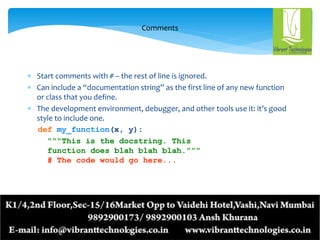
 Start comments with # – the rest of line is ignored.
 Can include a “documentation string” as the first line of any new function
or class that you define.
 The development environment, debugger, and other tools use it: it’s good
style to include one.
def my_function(x, y):
“““This is the docstring. This
function does blah blah blah.”””
# The code would go here...
Printing with Python
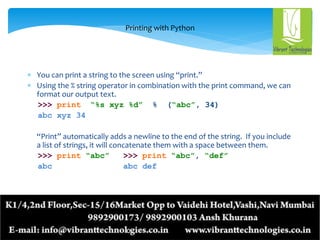
 You can print a string to the screen using “print.”
 Using the % string operator in combination with the print command, we can
format our output text.
>>> print “%s xyz %d” % (“abc”, 34)
abc xyz 34
“Print” automatically adds a newline to the end of the string. If you include
a list of strings, it will concatenate them with a space between them.
>>> print “abc” >>> print “abc”, “def”
abc abc def
THANK YOU

Python Training Topics

  • 1.
    WELCOME TO VIBRANT TECHNOLOGIES& COMPUTERS Python Training Topics
  • 3.
    What is Python? A programming language with strong similarities to PERL, but with powerful typing and object oriented features.  Commonly used for producing HTML content on websites. Great for text files.  Useful built-in types (lists, dictionaries).  Clean syntax, powerful extensions.
  • 4.
    Why Python?  NaturalLanguage ToolKit  Ease of use; interpreter  AI Processing: Symbolic  Python’s built-in datatypes for strings, lists, and more.  Java or C++ require the use of special classes for this.  AI Processing: Statistical  Python has strong numeric processing capabilities: matrix operations, etc.  Suitable for probability and machine learning code.
  • 5.
    Learning Python  Unfortunately,we won’t have time to cover all of Python in class; so, we’re just going to go over ome highlights.  You’ll need to learn more on your own.  Homework 0 asks you to install Python or get comfortable using it here in the lab. It also asks you to read some online Python tutorials.  Later homeworks will include Python programming exercises to help you practice.
  • 6.
    Installing Python  Pythonis installed on the PCs in 156.  Python for Win/Mac/Unix/Linux is available from www.python.org.  Generally an easy install.  On macs, already part of OS X.  For NLTK you need Python 2.3 or higher.  GUI development environment: IDLE. Credits: http://hkn.eecs.berkeley.edu/~dyoo/python/idle_intro/index.htm
  • 7.
    IDLE Development Environment Shell for interactive evaluation.  Text editor with color-coding and smart indenting for creating python files.  Menu commands for changing system settings and running files.  We will use IDLE in class.
  • 8.
    Basic Datatypes  Integers(default for numbers) z = 5 / 2 # Answer is 2, integer division.  Floats x = 3.456  Strings Can use “” or ‘’ to specify. “abc” ‘abc’ (Same thing.) Unmatched ones can occur within the string. “matt’s” Use triple double-quotes for multi-line strings or strings than contain both ‘ and “ inside of them: “““a‘b“c”””
  • 9.
    Whitespace  Whitespace ismeaningful in Python: especially indentation and placement of newlines.  Use a newline to end a line of code. (Not a semicolon like in C++ or Java.) (Use when must go to next line prematurely.)  No braces { } to mark blocks of code in Python… Use consistent indentation instead. The first line with a new indentation is considered outside of the block.  Often a colon appears at the start of a new block. (We’ll see this later for function and class definitions.)
  • 10.
    Comments  Start commentswith # – the rest of line is ignored.  Can include a “documentation string” as the first line of any new function or class that you define.  The development environment, debugger, and other tools use it: it’s good style to include one. def my_function(x, y): “““This is the docstring. This function does blah blah blah.””” # The code would go here...
  • 11.
    Printing with Python You can print a string to the screen using “print.”  Using the % string operator in combination with the print command, we can format our output text. >>> print “%s xyz %d” % (“abc”, 34) abc xyz 34 “Print” automatically adds a newline to the end of the string. If you include a list of strings, it will concatenate them with a space between them. >>> print “abc” >>> print “abc”, “def” abc abc def
  • 12.