Python in the Browser                                                                             01/06/2010 13:45


                                            Python in the Browser
                     Web Programming with Silverlight & IronPython
 Michael Foord
 michael@voidspace.org.uk
 www.voidspace.org.uk
 @voidspace


         Python in the browser with Silverlight & IronPython

                  Introduction
                  Silverlight
                  Say Hello to Vera
                  Getting Started: One JS File
                  External Python Files
                  How it works
                  Loading the Javascript
                  Loading the Python Runtime
                  The IronPython Payload
                  Running the Python Code
                  So we can write code...
                  Using .NET APIs
                  Silverlight Toolkit
                  Try Python
                  Questions


 Introduction


           You, the Python developer, use Python because you want to, but in the browser you use
           JavaScript because you think you have to. With Silverlight you can write Python code in the

file:///Users/michael/Dev/repository/Presentation/Talk/silverlight.html                                  Page 1 of 12
Python in the Browser                                                     01/06/2010 13:45


           browser.


 Silverlight
           Microsoft browser plugin
           Now installed in over 50% of browsers (riastats)
           Cross platform: Windows and Mac, plus Linux with Moonlight
           Cross browser: Safari, Firefox, IE and Chrome
           Runs IronPython and IronRuby
           Sockets, threading, local browser storage APIs
           Webcam access, out of browser apps
           IronPython docs at ironpython.net/browser/

 IronPython 2.6 - the equivalent of Python 2.6.

 Silverlight features include:

           A ui system based on WPF
           Full access to the browser DOM
           Calling between Javascript and Silverlight code
           Out of browser applications
           Video, streaming media and 'deep zoom'
           Local browser storage
           Socket and threading APIs (etc)
           Lots more...


 Say Hello to Vera


file:///Users/michael/Dev/repository/Presentation/Talk/silverlight.html        Page 2 of 12
Python in the Browser                                                                           01/06/2010 13:45


 Over 19000 lines of Python code (plus hundreds of lines of xaml) written over a 7 month period by two
 developers.


 Getting Started: One JS File
 Loading IronPython:

         <script
          src="http://gestalt.ironpython.net/dlr-latest.js"
          type="text/javascript"></script>

 Python in script tags:

         <script type="text/python">
             def onclick(s, e):
                 window.Alert("Hello from Python!")
             document.button.events.onclick += handler
             document.message.innerHTML = 'Hello Python!'
         </script>

 To develop a Python application in the browser, you just need your favorite text editor; so open it up,
 create a HTML file, reference dlr.js, and then you can use script-tags for running Python code.


file:///Users/michael/Dev/repository/Presentation/Talk/silverlight.html                              Page 3 of 12
Python in the Browser                                                                          01/06/2010 13:45


 External Python Files
         <script type="text/python" src="repl.py"></script>

 This creates a console when you add ?console to the url.


 We can reference Python files as well as inline Python.

 The console is hooked up to sys.stdout, so your existing text-based Python scripts can come alive in the
 browser (sans reading from stdin). Also, any print statements you use in the app will show up in the
 console as well, making it a great println-debugging tool.

 Let's play around with the page a bit, adding a DOM element and changing it's HTML content to
 "Ouch!" when clicked:

 >>> dir(document)
 [..., 'CreateElement', ...]
 >>> div = document.CreateElement("div")
 >>> div.innerHTML = "Hello from Python!"
 >>> document.Body.AppendChild(div)
 >>> div.id = "message"
 >>> div.SetStyleAttribute("font-size", "24px")
 >>> def say_ouch(o, e):
 ... o.innerHTML = "Ouch!"
 ...
 >>> document.message.events.onclick += say_ouch


 How it works


file:///Users/michael/Dev/repository/Presentation/Talk/silverlight.html                             Page 4 of 12
Python in the Browser                                                                            01/06/2010 13:45


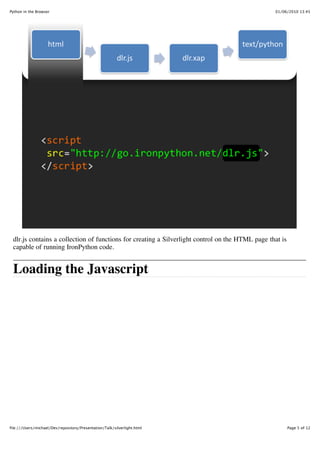
 dlr.js contains a collection of functions for creating a Silverlight control on the HTML page that is
 capable of running IronPython code.


 Loading the Javascript


file:///Users/michael/Dev/repository/Presentation/Talk/silverlight.html                                  Page 5 of 12
Python in the Browser                                                                            01/06/2010 13:45


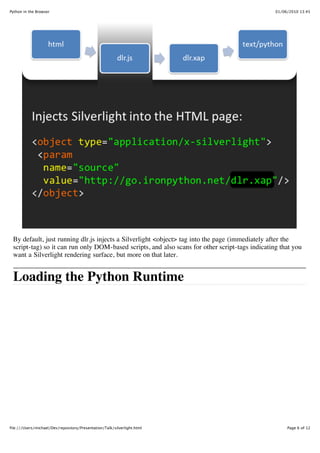
 By default, just running dlr.js injects a Silverlight <object> tag into the page (immediately after the
 script-tag) so it can run only DOM-based scripts, and also scans for other script-tags indicating that you
 want a Silverlight rendering surface, but more on that later.


 Loading the Python Runtime


file:///Users/michael/Dev/repository/Presentation/Talk/silverlight.html                               Page 6 of 12
Python in the Browser                                                                         01/06/2010 13:45


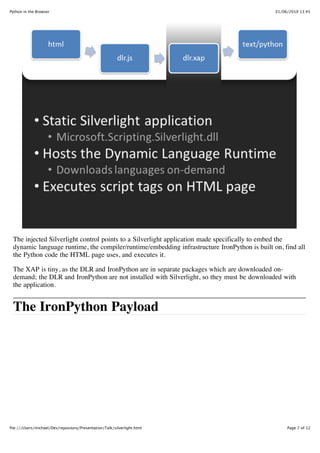
 The injected Silverlight control points to a Silverlight application made specifically to embed the
 dynamic language runtime, the compiler/runtime/embedding infrastructure IronPython is built on, find all
 the Python code the HTML page uses, and executes it.

 The XAP is tiny, as the DLR and IronPython are in separate packages which are downloaded on-
 demand; the DLR and IronPython are not installed with Silverlight, so they must be downloaded with
 the application.


 The IronPython Payload


file:///Users/michael/Dev/repository/Presentation/Talk/silverlight.html                            Page 7 of 12
Python in the Browser                                                                          01/06/2010 13:45


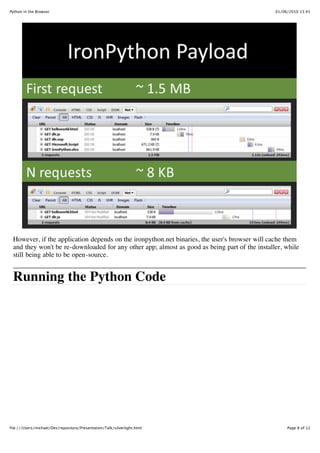
 However, if the application depends on the ironpython.net binaries, the user's browser will cache them
 and they won't be re-downloaded for any other app; almost as good as being part of the installer, while
 still being able to be open-source.


 Running the Python Code


file:///Users/michael/Dev/repository/Presentation/Talk/silverlight.html                             Page 8 of 12
Python in the Browser                                                                          01/06/2010 13:45


 Now user-code is able to run. Each inline Python script-tag is executed as if it was one Python module,
 and all other Python files execute as their own modules.

 To allow Python to be indented inside a script tag, the margin of the first line which does not only
 contain whitespace is removed. Line numbers in the HTML are preserved, so error messages show up
 correctly.


 So we can write code...
 What about testing it? Well, Python comes batteries included.

         <script type="application/x-zip-compressed"
             src="PythonStdLib.zip"></script>

         <script type="text/python">
             if document.QueryString.ContainsKey("test"):
                 import sys
                 sys.path.append("PythonStdLib")

                           import repl
                           repl.show()


file:///Users/michael/Dev/repository/Presentation/Talk/silverlight.html                             Page 9 of 12
Python in the Browser                                                                               01/06/2010 13:45


                           import unittest
                           ...

 That PythonStdLib.zip file contains the pieces of the Python standard-library that unittest depends on.

 The Python standard library is a little less than 5MB compressed, so it's not unthinkable to include the
 whole thing for development, but for deployment you should just include the dependencies; unittest's
 dependencies are 58 KB.

 When a zip file's filename is added to the path, it is treated like any other directory; import looks inside it
 to find modules. You'll also notice that import repl just worked, even though repl.py isn't in the zip file; it
 was referenced by a script-tag earlier. It works because script-tags actually represent file-system entries;
 doing open("repl.py"), or open("PythonStdLib/unittest.py") would also work.


 Using .NET APIs
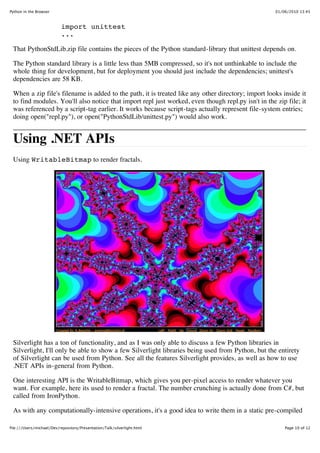
 Using WritableBitmap to render fractals.


 Silverlight has a ton of functionality, and as I was only able to discuss a few Python libraries in
 Silverlight, I'll only be able to show a few Silverlight libraries being used from Python, but the entirety
 of Silverlight can be used from Python. See all the features Silverlight provides, as well as how to use
 .NET APIs in-general from Python.

 One interesting API is the WritableBitmap, which gives you per-pixel access to render whatever you
 want. For example, here its used to render a fractal. The number crunching is actually done from C#, but
 called from IronPython.

 As with any computationally-intensive operations, it's a good idea to write them in a static pre-compiled

file:///Users/michael/Dev/repository/Presentation/Talk/silverlight.html                                 Page 10 of 12
Python in the Browser                                                                           01/06/2010 13:45


 language; for example the scientific-computation libraries for Python are actually written in C, but the
 library provide an API accessible to Python programmers. Unfortunately, CPython puts that
 responsibility on the library developer; not every C library can be directly consumed by Python code.
 However, this example shows that IronPython can call into any C# library, or any library written in a
 .NET language for that matter. This makes it trivial to just begin writing your application in Python, and
 then decide to convert the performance-sensitive sections to C#.

 We could also use the WritableBitmap to hook up to a webcam...


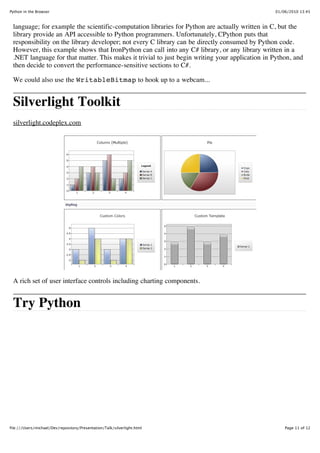
 Silverlight Toolkit
 silverlight.codeplex.com


 A rich set of user interface controls including charting components.


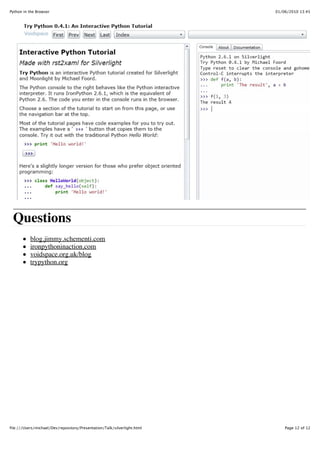
 Try Python


file:///Users/michael/Dev/repository/Presentation/Talk/silverlight.html                             Page 11 of 12
Python in the Browser                                                     01/06/2010 13:45


 Questions
           blog.jimmy.schementi.com
           ironpythoninaction.com
           voidspace.org.uk/blog
           trypython.org


file:///Users/michael/Dev/repository/Presentation/Talk/silverlight.html       Page 12 of 12

Python in the browser

  • 1.
    Python in theBrowser 01/06/2010 13:45 Python in the Browser Web Programming with Silverlight & IronPython Michael Foord michael@voidspace.org.uk www.voidspace.org.uk @voidspace Python in the browser with Silverlight & IronPython Introduction Silverlight Say Hello to Vera Getting Started: One JS File External Python Files How it works Loading the Javascript Loading the Python Runtime The IronPython Payload Running the Python Code So we can write code... Using .NET APIs Silverlight Toolkit Try Python Questions Introduction You, the Python developer, use Python because you want to, but in the browser you use JavaScript because you think you have to. With Silverlight you can write Python code in the file:///Users/michael/Dev/repository/Presentation/Talk/silverlight.html Page 1 of 12
  • 2.
    Python in theBrowser 01/06/2010 13:45 browser. Silverlight Microsoft browser plugin Now installed in over 50% of browsers (riastats) Cross platform: Windows and Mac, plus Linux with Moonlight Cross browser: Safari, Firefox, IE and Chrome Runs IronPython and IronRuby Sockets, threading, local browser storage APIs Webcam access, out of browser apps IronPython docs at ironpython.net/browser/ IronPython 2.6 - the equivalent of Python 2.6. Silverlight features include: A ui system based on WPF Full access to the browser DOM Calling between Javascript and Silverlight code Out of browser applications Video, streaming media and 'deep zoom' Local browser storage Socket and threading APIs (etc) Lots more... Say Hello to Vera file:///Users/michael/Dev/repository/Presentation/Talk/silverlight.html Page 2 of 12
  • 3.
    Python in theBrowser 01/06/2010 13:45 Over 19000 lines of Python code (plus hundreds of lines of xaml) written over a 7 month period by two developers. Getting Started: One JS File Loading IronPython: <script src="http://gestalt.ironpython.net/dlr-latest.js" type="text/javascript"></script> Python in script tags: <script type="text/python"> def onclick(s, e): window.Alert("Hello from Python!") document.button.events.onclick += handler document.message.innerHTML = 'Hello Python!' </script> To develop a Python application in the browser, you just need your favorite text editor; so open it up, create a HTML file, reference dlr.js, and then you can use script-tags for running Python code. file:///Users/michael/Dev/repository/Presentation/Talk/silverlight.html Page 3 of 12
  • 4.
    Python in theBrowser 01/06/2010 13:45 External Python Files <script type="text/python" src="repl.py"></script> This creates a console when you add ?console to the url. We can reference Python files as well as inline Python. The console is hooked up to sys.stdout, so your existing text-based Python scripts can come alive in the browser (sans reading from stdin). Also, any print statements you use in the app will show up in the console as well, making it a great println-debugging tool. Let's play around with the page a bit, adding a DOM element and changing it's HTML content to "Ouch!" when clicked: >>> dir(document) [..., 'CreateElement', ...] >>> div = document.CreateElement("div") >>> div.innerHTML = "Hello from Python!" >>> document.Body.AppendChild(div) >>> div.id = "message" >>> div.SetStyleAttribute("font-size", "24px") >>> def say_ouch(o, e): ... o.innerHTML = "Ouch!" ... >>> document.message.events.onclick += say_ouch How it works file:///Users/michael/Dev/repository/Presentation/Talk/silverlight.html Page 4 of 12
  • 5.
    Python in theBrowser 01/06/2010 13:45 dlr.js contains a collection of functions for creating a Silverlight control on the HTML page that is capable of running IronPython code. Loading the Javascript file:///Users/michael/Dev/repository/Presentation/Talk/silverlight.html Page 5 of 12
  • 6.
    Python in theBrowser 01/06/2010 13:45 By default, just running dlr.js injects a Silverlight <object> tag into the page (immediately after the script-tag) so it can run only DOM-based scripts, and also scans for other script-tags indicating that you want a Silverlight rendering surface, but more on that later. Loading the Python Runtime file:///Users/michael/Dev/repository/Presentation/Talk/silverlight.html Page 6 of 12
  • 7.
    Python in theBrowser 01/06/2010 13:45 The injected Silverlight control points to a Silverlight application made specifically to embed the dynamic language runtime, the compiler/runtime/embedding infrastructure IronPython is built on, find all the Python code the HTML page uses, and executes it. The XAP is tiny, as the DLR and IronPython are in separate packages which are downloaded on- demand; the DLR and IronPython are not installed with Silverlight, so they must be downloaded with the application. The IronPython Payload file:///Users/michael/Dev/repository/Presentation/Talk/silverlight.html Page 7 of 12
  • 8.
    Python in theBrowser 01/06/2010 13:45 However, if the application depends on the ironpython.net binaries, the user's browser will cache them and they won't be re-downloaded for any other app; almost as good as being part of the installer, while still being able to be open-source. Running the Python Code file:///Users/michael/Dev/repository/Presentation/Talk/silverlight.html Page 8 of 12
  • 9.
    Python in theBrowser 01/06/2010 13:45 Now user-code is able to run. Each inline Python script-tag is executed as if it was one Python module, and all other Python files execute as their own modules. To allow Python to be indented inside a script tag, the margin of the first line which does not only contain whitespace is removed. Line numbers in the HTML are preserved, so error messages show up correctly. So we can write code... What about testing it? Well, Python comes batteries included. <script type="application/x-zip-compressed" src="PythonStdLib.zip"></script> <script type="text/python"> if document.QueryString.ContainsKey("test"): import sys sys.path.append("PythonStdLib") import repl repl.show() file:///Users/michael/Dev/repository/Presentation/Talk/silverlight.html Page 9 of 12
  • 10.
    Python in theBrowser 01/06/2010 13:45 import unittest ... That PythonStdLib.zip file contains the pieces of the Python standard-library that unittest depends on. The Python standard library is a little less than 5MB compressed, so it's not unthinkable to include the whole thing for development, but for deployment you should just include the dependencies; unittest's dependencies are 58 KB. When a zip file's filename is added to the path, it is treated like any other directory; import looks inside it to find modules. You'll also notice that import repl just worked, even though repl.py isn't in the zip file; it was referenced by a script-tag earlier. It works because script-tags actually represent file-system entries; doing open("repl.py"), or open("PythonStdLib/unittest.py") would also work. Using .NET APIs Using WritableBitmap to render fractals. Silverlight has a ton of functionality, and as I was only able to discuss a few Python libraries in Silverlight, I'll only be able to show a few Silverlight libraries being used from Python, but the entirety of Silverlight can be used from Python. See all the features Silverlight provides, as well as how to use .NET APIs in-general from Python. One interesting API is the WritableBitmap, which gives you per-pixel access to render whatever you want. For example, here its used to render a fractal. The number crunching is actually done from C#, but called from IronPython. As with any computationally-intensive operations, it's a good idea to write them in a static pre-compiled file:///Users/michael/Dev/repository/Presentation/Talk/silverlight.html Page 10 of 12
  • 11.
    Python in theBrowser 01/06/2010 13:45 language; for example the scientific-computation libraries for Python are actually written in C, but the library provide an API accessible to Python programmers. Unfortunately, CPython puts that responsibility on the library developer; not every C library can be directly consumed by Python code. However, this example shows that IronPython can call into any C# library, or any library written in a .NET language for that matter. This makes it trivial to just begin writing your application in Python, and then decide to convert the performance-sensitive sections to C#. We could also use the WritableBitmap to hook up to a webcam... Silverlight Toolkit silverlight.codeplex.com A rich set of user interface controls including charting components. Try Python file:///Users/michael/Dev/repository/Presentation/Talk/silverlight.html Page 11 of 12
  • 12.
    Python in theBrowser 01/06/2010 13:45 Questions blog.jimmy.schementi.com ironpythoninaction.com voidspace.org.uk/blog trypython.org file:///Users/michael/Dev/repository/Presentation/Talk/silverlight.html Page 12 of 12