Best Practices for HA and Replication for
PostgreSQL in Virtualized Environments

March 2013    Jignesh Shah & vPostgres Team @ VMware


                                              © 2010 VMware Inc. All rights reserved
Agenda
§  Enterprise needs
§  Technologies readily available
    •  Virtualization Technologies for HA
    •  Replication modes of PostgreSQL (in core)
§  Datacenter Deployment Blueprints
    •  HA within Datacenter,
    •  Read-Scaling within Datacenter
    •  DR/Read-Scaling across Datacenters


2
Enterprise Needs for
    Mission Critical Databases


3
Causes of Downtime

§  Planned Downtime
    •  Software upgrade (OS patches, SQL Server cumulative updates)
    •  Hardware/BIOS upgrade
§  Unplanned Downtime
    •  Datacenter failure (natural disasters, fire)
    •  Server failure (failed CPU, bad network card)
    •  I/O subsystem failure (disk failure, controller failure)
    •  Software/Data corruption (application bugs, OS binary corruptions)
    •  User Error (shutdown a SQL service, dropped a table)


4
Enterprises need HA

§  HA - High Availability of the Database Service
     •  Sustain Database Service failure if it goes down
     •  Sustain Physical Hardware Failures
     •  Sustain Data/Storage Failures
     •  100% Data Guarantee


§  Goal
     •  Reduce Mean Time To Recover (MTTR) or Recovery Time Objective (RTO)
     •  Typically driven by SLAs


 5
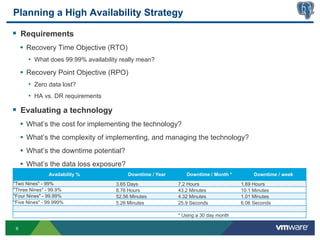
Planning a High Availability Strategy

§  Requirements
     •  Recovery Time Objective (RTO)
       •  What does 99.99% availability really mean?
     •  Recovery Point Objective (RPO)
       •  Zero data lost?
       •  HA vs. DR requirements

§  Evaluating a technology
     •  What’s the cost for implementing the technology?
     •  What’s the complexity of implementing, and managing the technology?
     •  What’s the downtime potential?
     •  What’s the data loss exposure?
                  Availability %	
           Downtime / Year	
         Downtime / Month *	
           Downtime / week	
  
"Two Nines" - 99% 	
                   3.65 Days	
                 7.2 Hours	
                  1.69 Hours	
  
"Three Nines" - 99.9% 	
               8.76 Hours	
                43.2 Minutes	
               10.1 Minutes	
  
"Four Nines" - 99.99% 	
               52.56 Minutes	
             4.32 Minutes	
               1.01 Minutes	
  
"Five Nines" - 99.999% 	
              5.26 Minutes	
              25.9 Seconds	
               6.06 Seconds	
  

                                                                   * Using a 30 day month	
  

 6
Enterprises need DR

§  DR – Disaster Recovery for your site
    •  Overcome Complete Site Failure
    •  Closest if not 100% Data Guarantee expected
      •  Some data loss may be acceptable
    •  Key Metrics
      •  RTO – Recovery Time Objective
          •  Time to Recover the service
      •  RPO – Recovery Point Objective


7
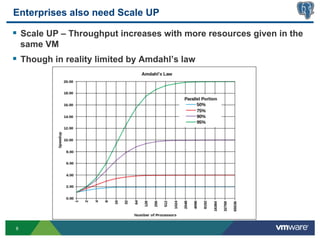
Enterprises also need Scale UP

§  Scale UP – Throughput increases with more resources given in the
    same VM
§  Though in reality limited by Amdahl’s law


8
Enterprises also need Scale Out

§  Scale Out – Throughput increases with more resources given via
    more nodes (VMs)
§  Typically Shared Nothing architecture (few Shared ‘something’)
§  Often results in “partitions” or “shards”


9
Scale Out - For Reads

§  Scale Out or Multi-Node Scaling for Reads
§  Online retailer Use Case
§  99% Reads and 1% Actual Write transactions


10
Scale Out - For Writes

§  Scale Out or Multi-nodes for Writes
§  Example Use case: 24/7 Booking system
§  Constant booking/changes/updates happening


11
CAP Theorem

§  Consistency
  •  all nodes see the same data at the same time
§  Availability
  •  Guarantee that every request receives a response about whether it was
      successful or failed
§  Partition Tolerance
  •  the system continues to operate despite arbitrary message loss or failure of
      part of the system


 12
Virtualization Technologies for HA


13
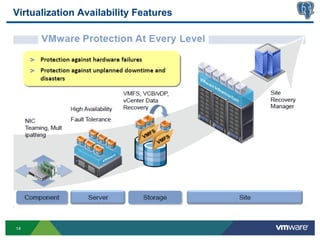
Virtualization Availability Features


14
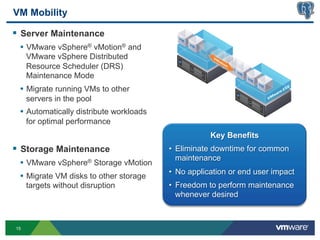
VM Mobility

§  Server Maintenance
 •  VMware vSphere® vMotion® and
     VMware vSphere Distributed
     Resource Scheduler (DRS)
     Maintenance Mode
 •  Migrate running VMs to other
     servers in the pool
 •  Automatically distribute workloads
     for optimal performance
                                                    Key Benefits
§  Storage Maintenance                  •  Eliminate downtime for common
                                            maintenance
 •  VMware vSphere® Storage vMotion
                                         •  No application or end user impact
 •  Migrate VM disks to other storage
     targets without disruption          •  Freedom to perform maintenance
                                            whenever desired


15
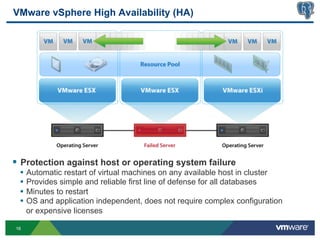
VMware vSphere High Availability (HA)


§  Protection against host or operating system failure
 •  Automatic restart of virtual machines on any available host in cluster
 •  Provides simple and reliable first line of defense for all databases
 •  Minutes to restart
 •  OS and application independent, does not require complex configuration
     or expensive licenses

16
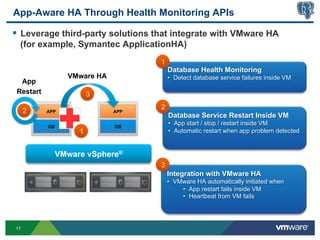
App-Aware HA Through Health Monitoring APIs

§  Leverage third-party solutions that integrate with VMware HA
  (for example, Symantec ApplicationHA)
                                   1
                                       Database Health Monitoring
                 VMware HA             •  Detect database service failures inside VM
  App
 Restart               3
                                   2
     2     APP               APP
                                       Database Service Restart Inside VM
           OS                OS
                                       •  App start / stop / restart inside VM
                   1                   •  Automatic restart when app problem detected


                                   3
                                       Integration with VMware HA
                                       •  VMware HA automatically initiated when
                                            •  App restart fails inside VM
                                            •  Heartbeat from VM fails


17
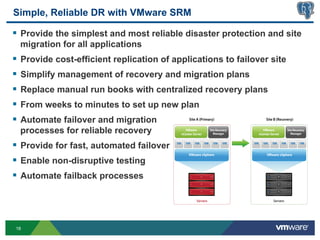
Simple, Reliable DR with VMware SRM

§  Provide the simplest and most reliable disaster protection and site
  migration for all applications
§  Provide cost-efficient replication of applications to failover site
§  Simplify management of recovery and migration plans
§  Replace manual run books with centralized recovery plans
§  From weeks to minutes to set up new plan
§  Automate failover and migration
  processes for reliable recovery
§  Provide for fast, automated failover
§  Enable non-disruptive testing
§  Automate failback processes


18
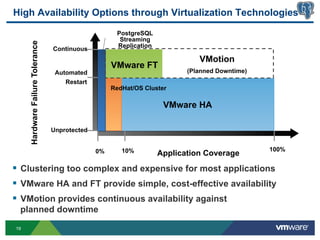
High Availability Options through Virtualization Technologies

                                                      PostgreSQL
                                                       Streaming
     Hardware Failure Tolerance
                                                      Replication
                                  Continuous
                                                                              VMotion
                                                     VMware FT
                                   Automated                               (Planned Downtime)
                                      Restart
                                                     RedHat/OS Cluster

                                                                     VMware HA

                                  Unprotected


                                                0%      10%                                     100%
                                                                    Application Coverage
§  Clustering too complex and expensive for most applications
§  VMware HA and FT provide simple, cost-effective availability
§  VMotion provides continuous availability against
 planned downtime
19
PostgreSQL
     Replication Modes


20
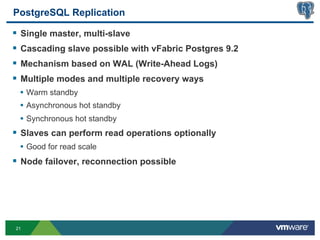
PostgreSQL Replication

§  Single master, multi-slave
§  Cascading slave possible with vFabric Postgres 9.2
§  Mechanism based on WAL (Write-Ahead Logs)
§  Multiple modes and multiple recovery ways
 •  Warm standby
 •  Asynchronous hot standby
 •  Synchronous hot standby
§  Slaves can perform read operations optionally
 •  Good for read scale
§  Node failover, reconnection possible


21
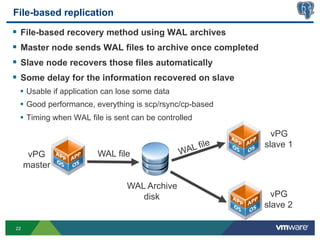
File-based replication
§  File-based recovery method using WAL archives
§  Master node sends WAL files to archive once completed
§  Slave node recovers those files automatically
§  Some delay for the information recovered on slave
 •  Usable if application can lose some data
 •  Good performance, everything is scp/rsync/cp-based
 •  Timing when WAL file is sent can be controlled
                                                              vPG
                                                   ile      slave 1
                       WAL file               WAL f
      vPG
     master

                               WAL Archive
                                  disk                        vPG
                                                            slave 2

22
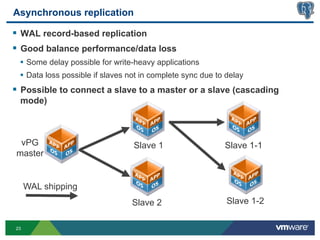
Asynchronous replication

§  WAL record-based replication
§  Good balance performance/data loss
 •  Some delay possible for write-heavy applications
 •  Data loss possible if slaves not in complete sync due to delay
§  Possible to connect a slave to a master or a slave (cascading
 mode)


 vPG                              Slave 1                   Slave 1-1
master


     WAL shipping
                                 Slave 2                     Slave 1-2

23
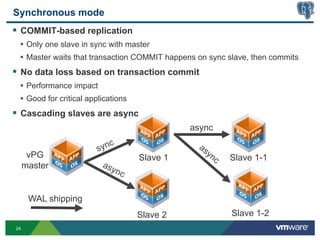
Synchronous mode
§  COMMIT-based replication
 •  Only one slave in sync with master
 •  Master waits that transaction COMMIT happens on sync slave, then commits
§  No data loss based on transaction commit
 •  Performance impact
 •  Good for critical applications
§  Cascading slaves are async
                                               async


      vPG                            Slave 1             Slave 1-1
     master


      WAL shipping
                                     Slave 2             Slave 1-2
24
HA operations: failover and node
              reconnection


25
Node failover (1)

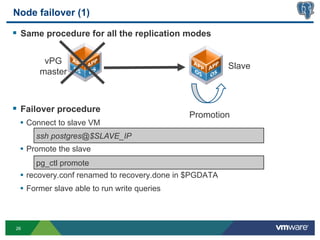
§  Same procedure for all the replication modes

       vPG
                                                        Slave
      master


§  Failover procedure
                                             Promotion
 •  Connect to slave VM
     ssh postgres@$SLAVE_IP
 •  Promote the slave
     pg_ctl promote
 •  recovery.conf renamed to recovery.done in $PGDATA
 •  Former slave able to run write queries


26
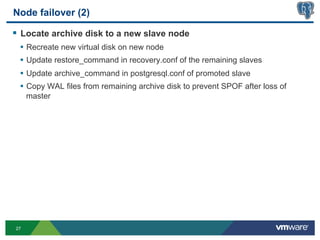
Node failover (2)

§  Locate archive disk to a new slave node
 •  Recreate new virtual disk on new node
 •  Update restore_command in recovery.conf of the remaining slaves
 •  Update archive_command in postgresql.conf of promoted slave
 •  Copy WAL files from remaining archive disk to prevent SPOF after loss of
     master


27
Node reconnection
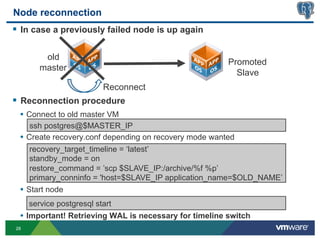
§  In case a previously failed node is up again

         old
                                                         Promoted
        master
                                                           Slave
                          Reconnect
§  Reconnection procedure
  •  Connect to old master VM
      ssh postgres@$MASTER_IP
  •  Create recovery.conf depending on recovery mode wanted
      recovery_target_timeline = ‘latest’
      standby_mode = on
      restore_command = ’scp $SLAVE_IP:/archive/%f %p’
      primary_conninfo = 'host=$SLAVE_IP application_name=$OLD_NAME’
  •  Start node
     service postgresql start
  •  Important! Retrieving WAL is necessary for timeline switch
28
Additional tips

§  DB and server UI
  •  Usable as normal, cannot create objects on slave of course
§  wal_level
  •  ‘archive’ for archive only recovery
  •  ‘hot_standby’ for read-queries on slaves
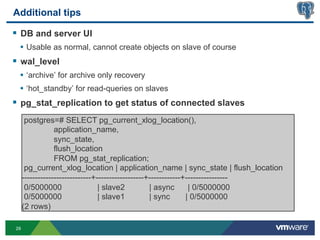
§  pg_stat_replication to get status of connected slaves
      postgres=# SELECT pg_current_xlog_location(),
                 application_name,
                 sync_state,
                 flush_location
                 FROM pg_stat_replication;
      pg_current_xlog_location | application_name | sync_state | flush_location
     --------------------------+------------------+------------+----------------
      0/5000000                  | slave2          | async       | 0/5000000
      0/5000000                  | slave1          | sync       | 0/5000000
     (2 rows)

29
Virtualized PostgreSQL
     Datacenter Deployment
            Blueprints


30
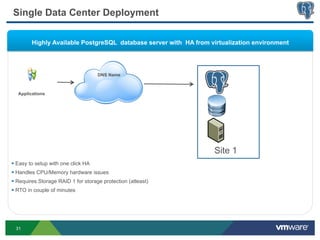
Single Data Center Deployment

         Highly Available PostgreSQL database server with HA from virtualization environment


                                      DNS Name


   Applications


                                                                   Site 1
§  Easy to setup with one click HA
§  Handles CPU/Memory hardware issues
§  Requires Storage RAID 1 for storage protection (atleast)
§  RTO in couple of minutes


 31
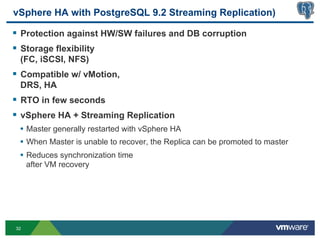
vSphere HA with PostgreSQL 9.2 Streaming Replication)

§  Protection against HW/SW failures and DB corruption
§  Storage flexibility
 (FC, iSCSI, NFS)
§  Compatible w/ vMotion,
 DRS, HA
§  RTO in few seconds
§  vSphere HA + Streaming Replication
 •  Master generally restarted with vSphere HA
 •  When Master is unable to recover, the Replica can be promoted to master
 •  Reduces synchronization time
     after VM recovery


32
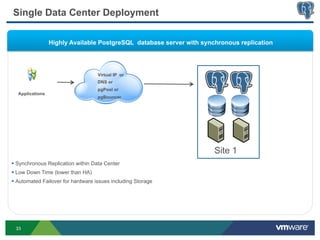
Single Data Center Deployment

                 Highly Available PostgreSQL database server with synchronous replication


                                    Virtual IP or
                                    DNS or
                                    pgPool or
  Applications
                                    pgBouncer


                                                                      Site 1
§  Synchronous Replication within Data Center
§  Low Down Time (lower than HA)
§  Automated Failover for hardware issues including Storage


 33
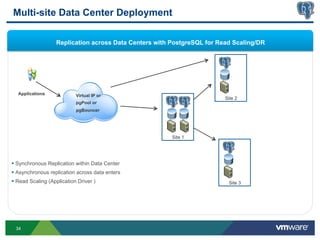
Multi-site Data Center Deployment

                    Replication across Data Centers with PostgreSQL for Read Scaling/DR


   Applications              Virtual IP or
                                                                          Site 2
                             pgPool or
                             pgBouncer


                                                         Site 1


§  Synchronous Replication within Data Center
§  Asynchronous replication across data enters
§  Read Scaling (Application Driver )                                     Site 3


  34
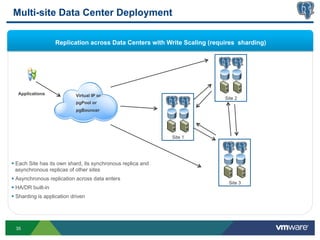
Multi-site Data Center Deployment

                     Replication across Data Centers with Write Scaling (requires sharding)


   Applications              Virtual IP or
                                                                             Site 2
                             pgPool or
                             pgBouncer


                                                               Site 1


§  Each Site has its own shard, its synchronous replica and
    asynchronous replicas of other sites
§  Asynchronous replication across data enters
                                                                              Site 3
§  HA/DR built-in
§  Sharding is application driven


  35
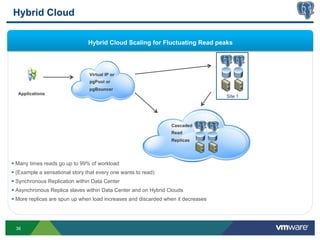
Hybrid Cloud

                                 Hybrid Cloud Scaling for Fluctuating Read peaks


                                 Virtual IP or
                                 pgPool or
                                 pgBouncer
  Applications
                                                                                    Site 1


                                                                  Cascaded
                                                                  Read
                                                                  Replicas


§  Many times reads go up to 99% of workload
§  (Example a sensational story that every one wants to read)
§  Synchronous Replication within Data Center
§  Asynchronous Replica slaves within Data Center and on Hybrid Clouds
§  More replicas are spun up when load increases and discarded when it decreases


 36
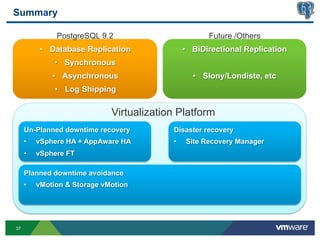
Summary

               PostgreSQL 9.2                          Future /Others
           •  Database Replication              •  BiDirectional Replication
               •  Synchronous
              •  Asynchronous                     •  Slony/Londiste, etc
               •  Log Shipping

                              Virtualization Platform
     Un-Planned downtime recovery          Disaster recovery
     •    vSphere HA + AppAware HA         •    Site Recovery Manager
     •    vSphere FT

     Planned downtime avoidance
     •    vMotion & Storage vMotion


37
Your Feedback is Important!


If interested,
§  Drop your               at end of session
§  Email: jshah@vmware.com


38
Thanks.
                            Questions?


     Follow us on twitter: @vPostgres
     vFabric Blog: http://blogs.vmware.com/vfabric/postgres


39

Best Practices of HA and Replication of PostgreSQL in Virtualized Environments

  • 1.
    Best Practices forHA and Replication for PostgreSQL in Virtualized Environments March 2013 Jignesh Shah & vPostgres Team @ VMware © 2010 VMware Inc. All rights reserved
  • 2.
    Agenda §  Enterprise needs § Technologies readily available •  Virtualization Technologies for HA •  Replication modes of PostgreSQL (in core) §  Datacenter Deployment Blueprints •  HA within Datacenter, •  Read-Scaling within Datacenter •  DR/Read-Scaling across Datacenters 2
  • 3.
    Enterprise Needs for Mission Critical Databases 3
  • 4.
    Causes of Downtime § Planned Downtime •  Software upgrade (OS patches, SQL Server cumulative updates) •  Hardware/BIOS upgrade §  Unplanned Downtime •  Datacenter failure (natural disasters, fire) •  Server failure (failed CPU, bad network card) •  I/O subsystem failure (disk failure, controller failure) •  Software/Data corruption (application bugs, OS binary corruptions) •  User Error (shutdown a SQL service, dropped a table) 4
  • 5.
    Enterprises need HA § HA - High Availability of the Database Service •  Sustain Database Service failure if it goes down •  Sustain Physical Hardware Failures •  Sustain Data/Storage Failures •  100% Data Guarantee §  Goal •  Reduce Mean Time To Recover (MTTR) or Recovery Time Objective (RTO) •  Typically driven by SLAs 5
  • 6.
    Planning a HighAvailability Strategy §  Requirements •  Recovery Time Objective (RTO) •  What does 99.99% availability really mean? •  Recovery Point Objective (RPO) •  Zero data lost? •  HA vs. DR requirements §  Evaluating a technology •  What’s the cost for implementing the technology? •  What’s the complexity of implementing, and managing the technology? •  What’s the downtime potential? •  What’s the data loss exposure? Availability %   Downtime / Year   Downtime / Month *   Downtime / week   "Two Nines" - 99%   3.65 Days   7.2 Hours   1.69 Hours   "Three Nines" - 99.9%   8.76 Hours   43.2 Minutes   10.1 Minutes   "Four Nines" - 99.99%   52.56 Minutes   4.32 Minutes   1.01 Minutes   "Five Nines" - 99.999%   5.26 Minutes   25.9 Seconds   6.06 Seconds   * Using a 30 day month   6
  • 7.
    Enterprises need DR § DR – Disaster Recovery for your site •  Overcome Complete Site Failure •  Closest if not 100% Data Guarantee expected •  Some data loss may be acceptable •  Key Metrics •  RTO – Recovery Time Objective •  Time to Recover the service •  RPO – Recovery Point Objective 7
  • 8.
    Enterprises also needScale UP §  Scale UP – Throughput increases with more resources given in the same VM §  Though in reality limited by Amdahl’s law 8
  • 9.
    Enterprises also needScale Out §  Scale Out – Throughput increases with more resources given via more nodes (VMs) §  Typically Shared Nothing architecture (few Shared ‘something’) §  Often results in “partitions” or “shards” 9
  • 10.
    Scale Out -For Reads §  Scale Out or Multi-Node Scaling for Reads §  Online retailer Use Case §  99% Reads and 1% Actual Write transactions 10
  • 11.
    Scale Out -For Writes §  Scale Out or Multi-nodes for Writes §  Example Use case: 24/7 Booking system §  Constant booking/changes/updates happening 11
  • 12.
    CAP Theorem §  Consistency •  all nodes see the same data at the same time §  Availability •  Guarantee that every request receives a response about whether it was successful or failed §  Partition Tolerance •  the system continues to operate despite arbitrary message loss or failure of part of the system 12
  • 13.
  • 14.
  • 15.
    VM Mobility §  ServerMaintenance •  VMware vSphere® vMotion® and VMware vSphere Distributed Resource Scheduler (DRS) Maintenance Mode •  Migrate running VMs to other servers in the pool •  Automatically distribute workloads for optimal performance Key Benefits §  Storage Maintenance •  Eliminate downtime for common maintenance •  VMware vSphere® Storage vMotion •  No application or end user impact •  Migrate VM disks to other storage targets without disruption •  Freedom to perform maintenance whenever desired 15
  • 16.
    VMware vSphere HighAvailability (HA) §  Protection against host or operating system failure •  Automatic restart of virtual machines on any available host in cluster •  Provides simple and reliable first line of defense for all databases •  Minutes to restart •  OS and application independent, does not require complex configuration or expensive licenses 16
  • 17.
    App-Aware HA ThroughHealth Monitoring APIs §  Leverage third-party solutions that integrate with VMware HA (for example, Symantec ApplicationHA) 1 Database Health Monitoring VMware HA •  Detect database service failures inside VM App Restart 3 2 2 APP APP Database Service Restart Inside VM OS OS •  App start / stop / restart inside VM 1 •  Automatic restart when app problem detected 3 Integration with VMware HA •  VMware HA automatically initiated when •  App restart fails inside VM •  Heartbeat from VM fails 17
  • 18.
    Simple, Reliable DRwith VMware SRM §  Provide the simplest and most reliable disaster protection and site migration for all applications §  Provide cost-efficient replication of applications to failover site §  Simplify management of recovery and migration plans §  Replace manual run books with centralized recovery plans §  From weeks to minutes to set up new plan §  Automate failover and migration processes for reliable recovery §  Provide for fast, automated failover §  Enable non-disruptive testing §  Automate failback processes 18
  • 19.
    High Availability Optionsthrough Virtualization Technologies PostgreSQL Streaming Hardware Failure Tolerance Replication Continuous VMotion VMware FT Automated (Planned Downtime) Restart RedHat/OS Cluster VMware HA Unprotected 0% 10% 100% Application Coverage §  Clustering too complex and expensive for most applications §  VMware HA and FT provide simple, cost-effective availability §  VMotion provides continuous availability against planned downtime 19
  • 20.
    PostgreSQL Replication Modes 20
  • 21.
    PostgreSQL Replication §  Singlemaster, multi-slave §  Cascading slave possible with vFabric Postgres 9.2 §  Mechanism based on WAL (Write-Ahead Logs) §  Multiple modes and multiple recovery ways •  Warm standby •  Asynchronous hot standby •  Synchronous hot standby §  Slaves can perform read operations optionally •  Good for read scale §  Node failover, reconnection possible 21
  • 22.
    File-based replication §  File-basedrecovery method using WAL archives §  Master node sends WAL files to archive once completed §  Slave node recovers those files automatically §  Some delay for the information recovered on slave •  Usable if application can lose some data •  Good performance, everything is scp/rsync/cp-based •  Timing when WAL file is sent can be controlled vPG ile slave 1 WAL file WAL f vPG master WAL Archive disk vPG slave 2 22
  • 23.
    Asynchronous replication §  WALrecord-based replication §  Good balance performance/data loss •  Some delay possible for write-heavy applications •  Data loss possible if slaves not in complete sync due to delay §  Possible to connect a slave to a master or a slave (cascading mode) vPG Slave 1 Slave 1-1 master WAL shipping Slave 2 Slave 1-2 23
  • 24.
    Synchronous mode §  COMMIT-basedreplication •  Only one slave in sync with master •  Master waits that transaction COMMIT happens on sync slave, then commits §  No data loss based on transaction commit •  Performance impact •  Good for critical applications §  Cascading slaves are async async vPG Slave 1 Slave 1-1 master WAL shipping Slave 2 Slave 1-2 24
  • 25.
    HA operations: failoverand node reconnection 25
  • 26.
    Node failover (1) § Same procedure for all the replication modes vPG Slave master §  Failover procedure Promotion •  Connect to slave VM ssh postgres@$SLAVE_IP •  Promote the slave pg_ctl promote •  recovery.conf renamed to recovery.done in $PGDATA •  Former slave able to run write queries 26
  • 27.
    Node failover (2) § Locate archive disk to a new slave node •  Recreate new virtual disk on new node •  Update restore_command in recovery.conf of the remaining slaves •  Update archive_command in postgresql.conf of promoted slave •  Copy WAL files from remaining archive disk to prevent SPOF after loss of master 27
  • 28.
    Node reconnection §  Incase a previously failed node is up again old Promoted master Slave Reconnect §  Reconnection procedure •  Connect to old master VM ssh postgres@$MASTER_IP •  Create recovery.conf depending on recovery mode wanted recovery_target_timeline = ‘latest’ standby_mode = on restore_command = ’scp $SLAVE_IP:/archive/%f %p’ primary_conninfo = 'host=$SLAVE_IP application_name=$OLD_NAME’ •  Start node service postgresql start •  Important! Retrieving WAL is necessary for timeline switch 28
  • 29.
    Additional tips §  DBand server UI •  Usable as normal, cannot create objects on slave of course §  wal_level •  ‘archive’ for archive only recovery •  ‘hot_standby’ for read-queries on slaves §  pg_stat_replication to get status of connected slaves postgres=# SELECT pg_current_xlog_location(), application_name, sync_state, flush_location FROM pg_stat_replication; pg_current_xlog_location | application_name | sync_state | flush_location --------------------------+------------------+------------+---------------- 0/5000000 | slave2 | async | 0/5000000 0/5000000 | slave1 | sync | 0/5000000 (2 rows) 29
  • 30.
    Virtualized PostgreSQL Datacenter Deployment Blueprints 30
  • 31.
    Single Data CenterDeployment Highly Available PostgreSQL database server with HA from virtualization environment DNS Name Applications Site 1 §  Easy to setup with one click HA §  Handles CPU/Memory hardware issues §  Requires Storage RAID 1 for storage protection (atleast) §  RTO in couple of minutes 31
  • 32.
    vSphere HA withPostgreSQL 9.2 Streaming Replication) §  Protection against HW/SW failures and DB corruption §  Storage flexibility (FC, iSCSI, NFS) §  Compatible w/ vMotion, DRS, HA §  RTO in few seconds §  vSphere HA + Streaming Replication •  Master generally restarted with vSphere HA •  When Master is unable to recover, the Replica can be promoted to master •  Reduces synchronization time after VM recovery 32
  • 33.
    Single Data CenterDeployment Highly Available PostgreSQL database server with synchronous replication Virtual IP or DNS or pgPool or Applications pgBouncer Site 1 §  Synchronous Replication within Data Center §  Low Down Time (lower than HA) §  Automated Failover for hardware issues including Storage 33
  • 34.
    Multi-site Data CenterDeployment Replication across Data Centers with PostgreSQL for Read Scaling/DR Applications Virtual IP or Site 2 pgPool or pgBouncer Site 1 §  Synchronous Replication within Data Center §  Asynchronous replication across data enters §  Read Scaling (Application Driver ) Site 3 34
  • 35.
    Multi-site Data CenterDeployment Replication across Data Centers with Write Scaling (requires sharding) Applications Virtual IP or Site 2 pgPool or pgBouncer Site 1 §  Each Site has its own shard, its synchronous replica and asynchronous replicas of other sites §  Asynchronous replication across data enters Site 3 §  HA/DR built-in §  Sharding is application driven 35
  • 36.
    Hybrid Cloud Hybrid Cloud Scaling for Fluctuating Read peaks Virtual IP or pgPool or pgBouncer Applications Site 1 Cascaded Read Replicas §  Many times reads go up to 99% of workload §  (Example a sensational story that every one wants to read) §  Synchronous Replication within Data Center §  Asynchronous Replica slaves within Data Center and on Hybrid Clouds §  More replicas are spun up when load increases and discarded when it decreases 36
  • 37.
    Summary PostgreSQL 9.2 Future /Others •  Database Replication •  BiDirectional Replication •  Synchronous •  Asynchronous •  Slony/Londiste, etc •  Log Shipping Virtualization Platform Un-Planned downtime recovery Disaster recovery •  vSphere HA + AppAware HA •  Site Recovery Manager •  vSphere FT Planned downtime avoidance •  vMotion & Storage vMotion 37
  • 38.
    Your Feedback isImportant! If interested, §  Drop your at end of session §  Email: jshah@vmware.com 38
  • 39.
    Thanks. Questions? Follow us on twitter: @vPostgres vFabric Blog: http://blogs.vmware.com/vfabric/postgres 39