Download free for 30 days
Sign in
Upload
Language (EN)
Support
Business
Mobile
Social Media
Marketing
Technology
Art & Photos
Career
Design
Education
Presentations & Public Speaking
Government & Nonprofit
Healthcare
Internet
Law
Leadership & Management
Automotive
Engineering
Software
Recruiting & HR
Retail
Sales
Services
Science
Small Business & Entrepreneurship
Food
Environment
Economy & Finance
Data & Analytics
Investor Relations
Sports
Spiritual
News & Politics
Travel
Self Improvement
Real Estate
Entertainment & Humor
Health & Medicine
Devices & Hardware
Lifestyle
Change Language
Language
English
Español
Português
Français
Deutsche
Cancel
Save
EN
Uploaded by
guest0e7773
PPT, PDF
415 views
Ps彩虹
AI-enhanced description
本文介绍了在 Photoshop 中制作彩虹的步骤,包括新建文件、使用渐变工具以及魔棒工具的操作。最后,用户可以将完成的彩虹叠加到自己喜欢的风景图片中并调整效果。流程简单易懂,适合初学者。
Read more
0
Save
Share
Embed
Embed presentation
Download
Download to read offline
1
/ 8
2
/ 8
3
/ 8
4
/ 8
5
/ 8
6
/ 8
7
/ 8
8
/ 8
More Related Content
PPTX
Standard curve
by
Tzu-Chi University, Biochemistry Department
ODP
Manuela y Malen
by
Manuela Goncalvez Piriz
PDF
5 Point Checklist for Employers Considering Taking on an Apprentice
by
The Pathway Group
PDF
Memoria humana
by
MAJOSSEDIAZ
PPTX
Atrayendo tu exito
by
Bertha Moncada
PPS
Mùa Thu Cho Em
by
NguyenHoang92002
DOCX
Investigacion estdistica 3
by
Vanessa Muñeton
PPT
Moodle
by
guest0e7773
Standard curve
by
Tzu-Chi University, Biochemistry Department
Manuela y Malen
by
Manuela Goncalvez Piriz
5 Point Checklist for Employers Considering Taking on an Apprentice
by
The Pathway Group
Memoria humana
by
MAJOSSEDIAZ
Atrayendo tu exito
by
Bertha Moncada
Mùa Thu Cho Em
by
NguyenHoang92002
Investigacion estdistica 3
by
Vanessa Muñeton
Moodle
by
guest0e7773
Featured
PDF
2024 Trend Updates: What Really Works In SEO & Content Marketing
by
Search Engine Journal
PDF
Storytelling For The Web: Integrate Storytelling in your Design Process
by
Chiara Aliotta
PDF
Artificial Intelligence, Data and Competition – SCHREPEL – June 2024 OECD dis...
by
OECD Directorate for Financial and Enterprise Affairs
PDF
How to Leverage AI to Boost Employee Wellness - Lydia Di Francesco - SocialHR...
by
SocialHRCamp
PDF
2024 State of Marketing Report – by Hubspot
by
Marius Sescu
PDF
Everything You Need To Know About ChatGPT
by
Expeed Software
PDF
Product Design Trends in 2024 | Teenage Engineerings
by
Pixeldarts
PDF
How Race, Age and Gender Shape Attitudes Towards Mental Health
by
ThinkNow
PDF
AI Trends in Creative Operations 2024 by Artwork Flow.pdf
by
marketingartwork
PDF
Skeleton Culture Code
by
Skeleton Technologies
PDF
PEPSICO Presentation to CAGNY Conference Feb 2024
by
Neil Kimberley
PDF
Content Methodology: A Best Practices Report (Webinar)
by
contently
PPTX
How to Prepare For a Successful Job Search for 2024
by
Albert Qian
PDF
Social Media Marketing Trends 2024 // The Global Indie Insights
by
Kurio // The Social Media Age(ncy)
PDF
Trends In Paid Search: Navigating The Digital Landscape In 2024
by
Search Engine Journal
PDF
5 Public speaking tips from TED - Visualized summary
by
SpeakerHub
PDF
ChatGPT and the Future of Work - Clark Boyd
by
Clark Boyd
PDF
Getting into the tech field. what next
by
Tessa Mero
PDF
Google's Just Not That Into You: Understanding Core Updates & Search Intent
by
Lily Ray
PDF
How to have difficult conversations
by
Rajiv Jayarajah, MAppComm, ACC
2024 Trend Updates: What Really Works In SEO & Content Marketing
by
Search Engine Journal
Storytelling For The Web: Integrate Storytelling in your Design Process
by
Chiara Aliotta
Artificial Intelligence, Data and Competition – SCHREPEL – June 2024 OECD dis...
by
OECD Directorate for Financial and Enterprise Affairs
How to Leverage AI to Boost Employee Wellness - Lydia Di Francesco - SocialHR...
by
SocialHRCamp
2024 State of Marketing Report – by Hubspot
by
Marius Sescu
Everything You Need To Know About ChatGPT
by
Expeed Software
Product Design Trends in 2024 | Teenage Engineerings
by
Pixeldarts
How Race, Age and Gender Shape Attitudes Towards Mental Health
by
ThinkNow
AI Trends in Creative Operations 2024 by Artwork Flow.pdf
by
marketingartwork
Skeleton Culture Code
by
Skeleton Technologies
PEPSICO Presentation to CAGNY Conference Feb 2024
by
Neil Kimberley
Content Methodology: A Best Practices Report (Webinar)
by
contently
How to Prepare For a Successful Job Search for 2024
by
Albert Qian
Social Media Marketing Trends 2024 // The Global Indie Insights
by
Kurio // The Social Media Age(ncy)
Trends In Paid Search: Navigating The Digital Landscape In 2024
by
Search Engine Journal
5 Public speaking tips from TED - Visualized summary
by
SpeakerHub
ChatGPT and the Future of Work - Clark Boyd
by
Clark Boyd
Getting into the tech field. what next
by
Tessa Mero
Google's Just Not That Into You: Understanding Core Updates & Search Intent
by
Lily Ray
How to have difficult conversations
by
Rajiv Jayarajah, MAppComm, ACC
Ps彩虹
1.
Photoshop 之彩虹的制作方法
2.
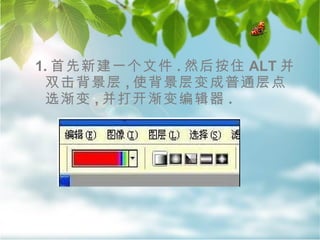
1. 首先新建一个文件 .
然后按住 ALT 并双击背景层 , 使背景层变成普通层点选渐变 , 并打开渐变编辑器 .
3.
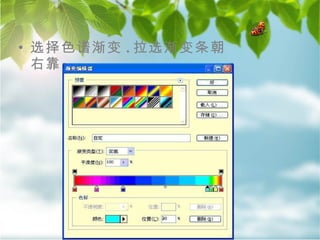
选择色谱渐变 . 拉选渐变条朝右靠
4.
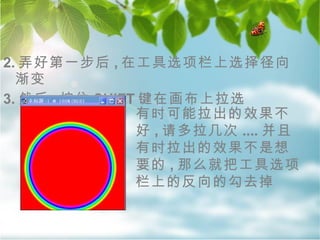
2. 弄好第一步后 ,
在工具选项栏上选择径向渐变 3. 然后 , 按住 SHIFT 键在画布上拉选 有时可能拉出的效果不好 , 请多拉几次 .... 并且有时拉出的效果不是想要的 , 那么就把工具选项栏上的反向的勾去掉
5.
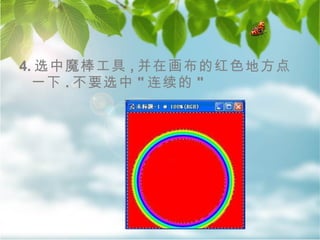
4. 选中魔棒工具 ,
并在画布的红色地方点一下 . 不要选中 " 连续的 "
6.
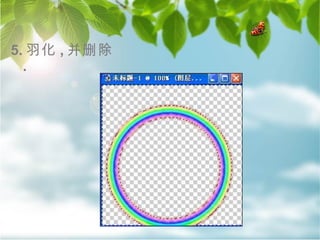
5. 羽化 ,
并删除 .
7.
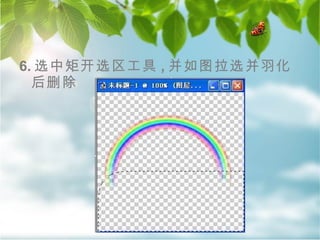
6. 选中矩开选区工具 ,
并如图拉选并羽化后删除
8.
Thanks 请访问
www.BeMyFriend.com.cn 这样 , 一个彩虹基本做好 . 我们打开一幅自己喜欢的风景 , 把刚才做的彩虹托到风景中 , 然后自由变换一下大小和角度 , 再更改一下混合模式和不透明度就 OK 了
Download