Asp.Net Core API
With Swagger
Implemented Swagger with Asp.Net Core 2.0 application with
onion architecture.
Presented By:
Abhinav Jha
14th March 2018
What is swagger. Why we need it?
Swagger is the world’s largest framework of API developer tools for the OpenAPI
Specification(OAS), enabling development across the entire API lifecycle, from design
and documentation, to test and deployment.
When consuming a Web API, understanding its various methods can be challenging for
a developer.
Swagger, also known as Open API, solves the problem of generating useful
documentation and help pages for Web APIs.
It provides benefits such as interactive documentation, client SDK generation, and API
discoverability.
I am using Swashbuckle.AspNetCore for my .Net Core 2.0 api to create its
documentation dynamically.
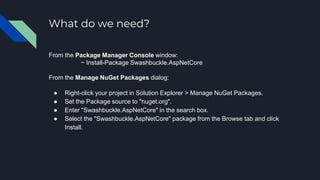
What do we need?
From the Package Manager Console window:
~ Install-Package Swashbuckle.AspNetCore
From the Manage NuGet Packages dialog:
● Right-click your project in Solution Explorer > Manage NuGet Packages.
● Set the Package source to "nuget.org".
● Enter "Swashbuckle.AspNetCore" in the search box.
● Select the "Swashbuckle.AspNetCore" package from the Browse tab and click
Install.
Implementation
Configuring Swagger
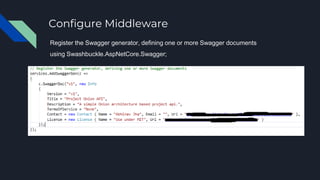
Configure Middleware
Register the Swagger generator, defining one or more Swagger documents
using Swashbuckle.AspNetCore.Swagger;
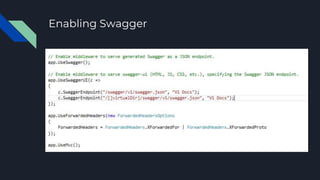
Enabling Swagger
Execution
Running Application.
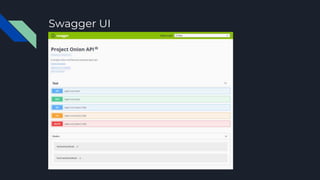
Swagger UI
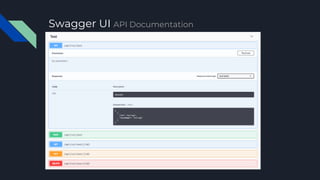
Swagger UI API Documentation
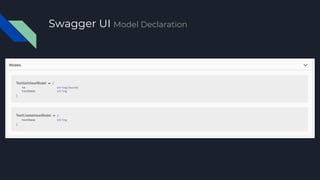
Swagger UI Model Declaration
Advantages Of Swagger
● It's comprehensible for developers and non-developers. Product managers,
partners, and even potential clients can have input into the design of your API,
because they can see it clearly mapped out in this friendly UI.
● It's human readable and machine readable. This means that not only can this
be shared with your team internally, but the same documentation can be used to
automate API-dependent processes.
● It's easily adjustable. This makes it great for testing and debugging API
problems.
References
To dig into the power of swagger refer these links for upcoming features.
Official Site:
https://swagger.io/
Swashbuckle.AspNetCore:
https://github.com/domaindrivendev/Swashbuckle.AspNetCore
Microsoft Documentation:
https://docs.microsoft.com/en-us/aspnet/core/tutorials/getting-started-with-
swashbuckle?tabs=visual-studio%2Cvisual-studio-xml
Project onion with swagger

Project onion with swagger

  • 1.
    Asp.Net Core API WithSwagger Implemented Swagger with Asp.Net Core 2.0 application with onion architecture. Presented By: Abhinav Jha 14th March 2018
  • 2.
    What is swagger.Why we need it? Swagger is the world’s largest framework of API developer tools for the OpenAPI Specification(OAS), enabling development across the entire API lifecycle, from design and documentation, to test and deployment. When consuming a Web API, understanding its various methods can be challenging for a developer. Swagger, also known as Open API, solves the problem of generating useful documentation and help pages for Web APIs. It provides benefits such as interactive documentation, client SDK generation, and API discoverability. I am using Swashbuckle.AspNetCore for my .Net Core 2.0 api to create its documentation dynamically.
  • 3.
    What do weneed? From the Package Manager Console window: ~ Install-Package Swashbuckle.AspNetCore From the Manage NuGet Packages dialog: ● Right-click your project in Solution Explorer > Manage NuGet Packages. ● Set the Package source to "nuget.org". ● Enter "Swashbuckle.AspNetCore" in the search box. ● Select the "Swashbuckle.AspNetCore" package from the Browse tab and click Install.
  • 4.
  • 5.
    Configure Middleware Register theSwagger generator, defining one or more Swagger documents using Swashbuckle.AspNetCore.Swagger;
  • 6.
  • 7.
  • 8.
  • 9.
    Swagger UI APIDocumentation
  • 10.
    Swagger UI ModelDeclaration
  • 11.
    Advantages Of Swagger ●It's comprehensible for developers and non-developers. Product managers, partners, and even potential clients can have input into the design of your API, because they can see it clearly mapped out in this friendly UI. ● It's human readable and machine readable. This means that not only can this be shared with your team internally, but the same documentation can be used to automate API-dependent processes. ● It's easily adjustable. This makes it great for testing and debugging API problems.
  • 12.
    References To dig intothe power of swagger refer these links for upcoming features. Official Site: https://swagger.io/ Swashbuckle.AspNetCore: https://github.com/domaindrivendev/Swashbuckle.AspNetCore Microsoft Documentation: https://docs.microsoft.com/en-us/aspnet/core/tutorials/getting-started-with- swashbuckle?tabs=visual-studio%2Cvisual-studio-xml