

ASP.NET Core: Reimagining Web
Application Development in .NET
Ido Flatow
Senior Architect
Microsoft MVP & RD
Sela Group
@idoflatow
Agenda
• ASP.NET History
• ASP.NET Core 1.0 and .NET
• ASP.NET Core 1.0 Features
• ASP.NET Core MVC
ASP.NET, THEN AND NOW
History of ASP (20 years)
• 1996 - Active Server Pages (ASP)
• 2002 – ASP.NET
• 2005 – ASP.NET 2
• 2008 – ASP.NET MVC
• 2012 – ASP.NET Web API
• 2014 – ASP.NET vNext
– 2015 – ASP.NET 5 RC1
– 2016 – ASP.NET Core 1.0 (June 27th, 2016)
Problems with ASP.NET Architecture
• Limited hosting possibilities (IIS only)
• Dependency on IIS environment (System.Web)
• Web evolves faster than the .NET Framework
• Requires full-blown .NET Framework
• Resource intensive and not web-friendly
• Hard to optimize for lightweight high-performance apps
• Not completely cloud-optimized
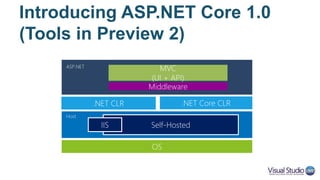
Introducing ASP.NET Core 1.0
(Tools in Preview 2)
OS
.NET CLR
ASP.NET
MVC
(UI + API)
Host
Self-HostedIIS
.NET Core CLR
Middleware
What is Tooling?
• Everything that is part of the framework
• Command line tools
– dotnet CLI
• Project tools
– ASP.NET templates
– xproj / csproj
• Visual Studio tools
– Configuration IntelliSense
– Debugger support
Two Runtimes
• .NET Full Framework (4.6)
– Not going away…
– Windows hosting with full .NET APIs
• .NET Core 1.0
– Subset of the full framework
• No Windows Forms, WPF, Silverlight
• No System.Web (WebForms)
– Implemented as set of NuGet packages
– Cross-platform and Nano server support
GETTING TO KNOW ASP.NET
CORE
ASP.NET Core Features
• Flexible and cross-platform runtime
• Modular HTTP request pipeline
• Unifying MVC, Web API, and Web Pages
• Side-by-side versioning with .NET Core
• Built-in Dependency Injection
• Self-host and IIS-hosted (sort of…)
• Open source on GitHub
CREATING A NEW ASP.NET
CORE PROJECT
Demo
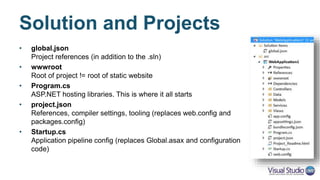
Solution and Projects
• global.json
Project references (in addition to the .sln)
• wwwroot
Root for static content (html, css, js, images, etc…)
• Program.cs
ASP.NET hosting libraries. This is where it all starts
• project.json
References, compiler settings, tooling (replaces web.config and
packages.config)
• Startup.cs
DI and pipeline configuration
(replaces global.asax and configuration code)
PROJECT.JSON, STARTUP.CS
AND PROGRAM.CS
Demo
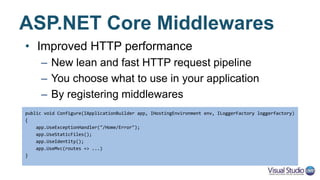
ASP.NET Core Middlewares
• Improved HTTP performance
– New lean and fast HTTP request pipeline
– You choose what to use in your application
– By registering middlewares
public void Configure(IApplicationBuilder app, IHostingEnvironment env, ILoggerFactory loggerfactory)
{
app.UseExceptionHandler("/Home/Error");
app.UseStaticFiles();
app.UseIdentity();
app.UseMvc(routes => ...)
}
Where’s the AppSettings?
• Not relying on web.config anymore
• New configuration system based on key/value pairs:
– JSON files
– INI files
– XML files
– Environment variables
• Configuration can come from multiple resources
– Last resource wins
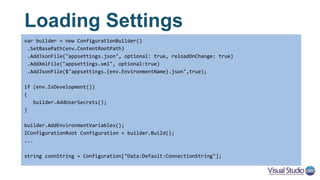
Loading Settings
var builder = new ConfigurationBuilder()
.SetBasePath(env.ContentRootPath)
.AddJsonFile("appsettings.json", optional: true, reloadOnChange: true)
.AddXmlFile("appsettings.xml", optional:true)
.AddJsonFile($"appsettings.{env.EnvironmentName}.json",true);
if (env.IsDevelopment())
{
builder.AddUserSecrets();
}
builder.AddEnvironmentVariables();
IConfigurationRoot Configuration = builder.Build();
...
string connString = Configuration["Data:Default:ConnectionString"];
Dependency Injection
• ASP.NET Core is DI-friendly
• Basic DI container available throughout the stack
• BYOC is also supported (already implemented for Autofac, Dryloc,
StructureMap, etc.)
• Out-of-the-box container supports:
– Singleton / Instance – single instance
– Transient – new instance each time
– Scoped – new instance per request (HTTP context)
• https://github.com/aspnet/DependencyInjection
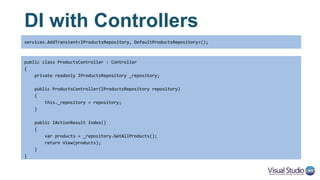
DI with Controllers
public class ProductsController : Controller
{
private readonly IProductsRepository _repository;
public ProductsController(IProductsRepository repository)
{
this._repository = repository;
}
public IActionResult Index()
{
var products = _repository.GetAllProducts();
return View(products);
}
}
services.AddTransient<IProductsRepository, DefaultProductsRepository>();
Logging
• ASP.NET Core has built-in support for logging
• Uses the built-in DI to get a logger instance
• Standard logger outputs: category, log level, event Id, and message
• Built-in loggers for:
– Console (hosting from cmd/terminal)
– TraceSource (good old System.Diagnostics)
– Debug (Visual Studio output window)
• Custom loggers are also available (log4net, serilog, elmah, etc.)
• https://github.com/aspnet/Logging
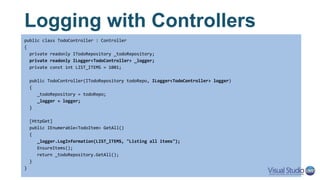
Logging with Controllers
public class TodoController : Controller
{
private readonly ITodoRepository _todoRepository;
private readonly ILogger<TodoController> _logger;
private const int LIST_ITEMS = 1001;
public TodoController(ITodoRepository todoRepo, ILogger<TodoController> logger)
{
_todoRepository = todoRepo;
_logger = logger;
}
[HttpGet]
public IEnumerable<TodoItem> GetAll()
{
_logger.LogInformation(LIST_ITEMS, "Listing all items");
EnsureItems();
return _todoRepository.GetAll();
}
}
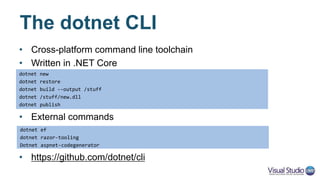
The dotnet CLI
• Cross-platform command line toolchain
• Written in .NET Core
• External commands
• https://github.com/dotnet/cli
dotnet new
dotnet restore
dotnet build --output /stuff
dotnet /stuff/new.dll
dotnet publish
dotnet ef
dotnet razor-tooling
Dotnet aspnet-codegenerator
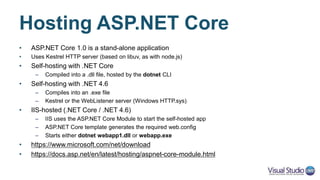
Hosting ASP.NET Core
• ASP.NET Core 1.0 is a stand-alone application
– Uses Kestrel HTTP server (based on libuv, as with node.js)
• Self-hosting with .NET Core
– Compiled into a .dll file, hosted by the dotnet CLI
• Self-hosting with .NET 4.6
– Compiles into an .exe file
– Kestrel or the WebListener server (Windows HTTP.sys)
• IIS-hosted (.NET Core / .NET 4.6)
– IIS uses the ASP.NET Core Module to start the self-hosted app
– ASP.NET Core template generates the required web.config
– Starts either dotnet webapp1.dll or webapp.exe
• https://docs.asp.net/en/latest/hosting/aspnet-core-module.html
CROSS-PLATFORM
ASP.NET CORE
Demo
ASP.NET CORE MVC
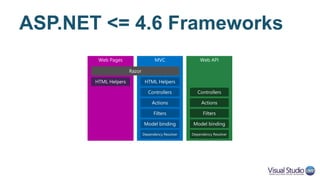
ASP.NET <= 4.6 Frameworks
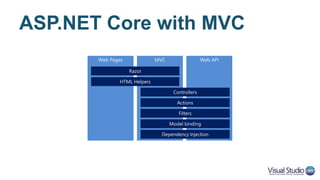
ASP.NET Core with MVC
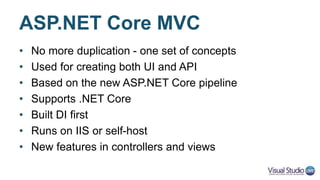
ASP.NET Core MVC
• No more duplication - one set of concepts
• Used for creating both UI and API
• Based on the new ASP.NET Core pipeline
• Supports .NET Core
• Built DI first
• Runs on IIS or self-host
• New features in controllers and views
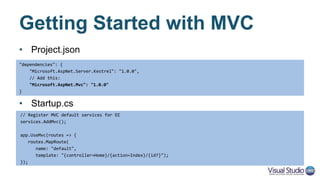
Getting Started with MVC
• Project.json
• Startup.cs
"dependencies": {
"Microsoft.AspNet.Server.Kestrel": "1.0.0",
// Add this:
"Microsoft.AspNet.Mvc": "1.0.0"
}
// Register MVC default services for DI
services.AddMvc();
app.UseMvc(routes => {
routes.MapRoute(
name: "default",
template: "{controller=Home}/{action=Index}/{id?}");
});
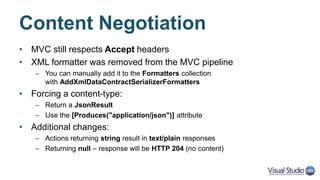
Web API Configuration
• Route configuration -> attribute-based routing
• Message handlers -> middleware pipeline
• Filters and Formatters -> startup.cs
services.AddMvc()
.AddXmlDataContractSerializerFormatters()
.AddMvcOptions(options =>
{
options.Filters.Add(new ValidatorFilterAttribute());
})
.AddJsonOptions(jsonOptions =>
{
jsonOptions.SerializerSettings.Formatting = Formatting.Indented;
});
Controllers – Two in One
• UI – same as with MVC 5
• API – similar, but different
public class HomeController : Controller
{
public IActionResult Index()
{
return View();
}
}
[Route("api/[controller]")]
public class ProductsController : Controller
{
[HttpGet("{id:int}")]
public Product GetProduct(int id)
{
return new Product() { ID = id };
}
}
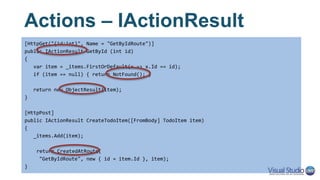
Actions – IActionResult
[HttpGet("{id:int}", Name = "GetByIdRoute")]
public IActionResult GetById (int id)
{
var item = _items.FirstOrDefault(x => x.Id == id);
if (item == null) { return NotFound(); }
return new ObjectResult(item);
}
[HttpPost]
public IActionResult CreateTodoItem([FromBody] TodoItem item)
{
_items.Add(item);
return CreatedAtRoute(
"GetByIdRoute", new { id = item.Id }, item);
}
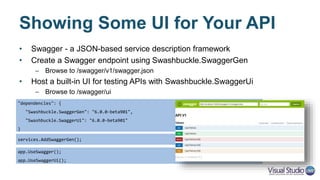
Showing Some UI for Your API
• Swagger - a JSON-based service description framework
• Create a Swagger endpoint using Swashbuckle.SwaggerGen
– Browse to /swagger/v1/swagger.json
• Host a built-in UI for testing APIs with Swashbuckle.SwaggerUi
– Browse to /swagger/ui
"dependencies": {
"Swashbuckle.SwaggerGen": "6.0.0-beta901",
"Swashbuckle.SwaggerUi": "6.0.0-beta901"
}
services.AddSwaggerGen();
app.UseSwagger();
app.UseSwaggerUi();
Enough with controllers,
What about views?
Oh, right!
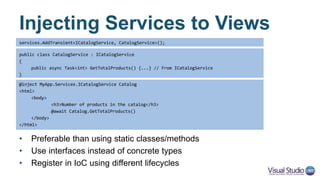
Injecting Services to Views
• Preferable than using static classes/methods
• Use interfaces instead of concrete types
• Register in IoC using different lifecycles
public class CatalogService : ICatalogService
{
public async Task<int> GetTotalProducts() {...} // From ICatalogService
}
@inject MyApp.Services.ICatalogService Catalog
<html>
<body>
<h3>Number of products in the catalog</h3>
@await Catalog.GetTotalProducts()
</body>
</html>
services.AddTransient<ICatalogService, CatalogService>();
Flushing Content with Razor
• In ASP.NET <= 5, browser had to wait until Razor
rendered the entire page
• Razor now supports flushing, causing HTML to get
chunked (streamed)
– @await FlushAsync()
• Not supported when rendering layout sections
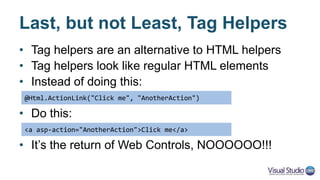
Last, but not Least, Tag Helpers
• Tag helpers are an alternative to HTML helpers
• Tag helpers look like regular HTML elements
• Instead of doing this:
• Do this:
• It’s the return of Web Controls, NOOOOOO!!!
@Html.ActionLink("Click me", "AnotherAction")
<a asp-action="AnotherAction">Click me</a>
Tag Helpers are not Evil
• Tag Helpers generate markup within their enclosing tag
• Less Razor/HTML mess in the .cshtml file
• Data-attributes style approach
• Use C# to better construct the markup
– Add/remove parts from the inner content
– Generate complex HTML (recursive, nested, …)
– Cache the output
Existing Tag Helpers
• HTML elements
– <a>, <form>, <input>, <label>, <link>, <script>, <select>, <textarea>
• Logical
– <cache>
• Placeholders
– ValidationSummary (<div>), ValidationMessage (<span>)
• You can create your own Tag Helpers
• Check out the source for reference
https://github.com/aspnet/Mvc/tree/dev/src/Microsoft.AspNetCore.Mvc.TagHelpers
Key Improvements in ASP.NET Core
• Totally modular - Everything is a package
• Lightweight - you use minimum set of modules
• Faster startup, lower memory footprint
• Can be deployed side-by-side with .NET Core
• Cross platform - can be hosted anywhere
• Better developer experience – DI and one MVC
• Everything is open-sourced
Key Improvements in ASP.NET Core
Get Started with ASP.NET Core
• Install Visual Studio 2015 / Visual Studio Code
• Walkthroughs and samples at http://www.asp.net/core
• Documentation at http://docs.asp.net/en/latest
• Get the code from http://github.com/aspnet
• Read blogs at http://blogs.msdn.com/b/webdev
• @IdoFlatow // idof@sela.co.il // http://www.idoflatow.net/downloads

ASP.NET Core 1.0

  • 1.
    ASP.NET Core: ReimaginingWeb Application Development in .NET Ido Flatow Senior Architect Microsoft MVP & RD Sela Group @idoflatow
  • 2.
    Agenda • ASP.NET History •ASP.NET Core 1.0 and .NET • ASP.NET Core 1.0 Features • ASP.NET Core MVC
  • 3.
  • 4.
    History of ASP(20 years) • 1996 - Active Server Pages (ASP) • 2002 – ASP.NET • 2005 – ASP.NET 2 • 2008 – ASP.NET MVC • 2012 – ASP.NET Web API • 2014 – ASP.NET vNext – 2015 – ASP.NET 5 RC1 – 2016 – ASP.NET Core 1.0 (June 27th, 2016)
  • 5.
    Problems with ASP.NETArchitecture • Limited hosting possibilities (IIS only) • Dependency on IIS environment (System.Web) • Web evolves faster than the .NET Framework • Requires full-blown .NET Framework • Resource intensive and not web-friendly • Hard to optimize for lightweight high-performance apps • Not completely cloud-optimized
  • 6.
    Introducing ASP.NET Core1.0 (Tools in Preview 2) OS .NET CLR ASP.NET MVC (UI + API) Host Self-HostedIIS .NET Core CLR Middleware
  • 7.
    What is Tooling? •Everything that is part of the framework • Command line tools – dotnet CLI • Project tools – ASP.NET templates – xproj / csproj • Visual Studio tools – Configuration IntelliSense – Debugger support
  • 8.
    Two Runtimes • .NETFull Framework (4.6) – Not going away… – Windows hosting with full .NET APIs • .NET Core 1.0 – Subset of the full framework • No Windows Forms, WPF, Silverlight • No System.Web (WebForms) – Implemented as set of NuGet packages – Cross-platform and Nano server support
  • 9.
    GETTING TO KNOWASP.NET CORE
  • 10.
    ASP.NET Core Features •Flexible and cross-platform runtime • Modular HTTP request pipeline • Unifying MVC, Web API, and Web Pages • Side-by-side versioning with .NET Core • Built-in Dependency Injection • Self-host and IIS-hosted (sort of…) • Open source on GitHub
  • 11.
    CREATING A NEWASP.NET CORE PROJECT Demo
  • 12.
    Solution and Projects •global.json Project references (in addition to the .sln) • wwwroot Root for static content (html, css, js, images, etc…) • Program.cs ASP.NET hosting libraries. This is where it all starts • project.json References, compiler settings, tooling (replaces web.config and packages.config) • Startup.cs DI and pipeline configuration (replaces global.asax and configuration code)
  • 13.
  • 14.
    ASP.NET Core Middlewares •Improved HTTP performance – New lean and fast HTTP request pipeline – You choose what to use in your application – By registering middlewares public void Configure(IApplicationBuilder app, IHostingEnvironment env, ILoggerFactory loggerfactory) { app.UseExceptionHandler("/Home/Error"); app.UseStaticFiles(); app.UseIdentity(); app.UseMvc(routes => ...) }
  • 15.
    Where’s the AppSettings? •Not relying on web.config anymore • New configuration system based on key/value pairs: – JSON files – INI files – XML files – Environment variables • Configuration can come from multiple resources – Last resource wins
  • 16.
    Loading Settings var builder= new ConfigurationBuilder() .SetBasePath(env.ContentRootPath) .AddJsonFile("appsettings.json", optional: true, reloadOnChange: true) .AddXmlFile("appsettings.xml", optional:true) .AddJsonFile($"appsettings.{env.EnvironmentName}.json",true); if (env.IsDevelopment()) { builder.AddUserSecrets(); } builder.AddEnvironmentVariables(); IConfigurationRoot Configuration = builder.Build(); ... string connString = Configuration["Data:Default:ConnectionString"];
  • 17.
    Dependency Injection • ASP.NETCore is DI-friendly • Basic DI container available throughout the stack • BYOC is also supported (already implemented for Autofac, Dryloc, StructureMap, etc.) • Out-of-the-box container supports: – Singleton / Instance – single instance – Transient – new instance each time – Scoped – new instance per request (HTTP context) • https://github.com/aspnet/DependencyInjection
  • 18.
    DI with Controllers publicclass ProductsController : Controller { private readonly IProductsRepository _repository; public ProductsController(IProductsRepository repository) { this._repository = repository; } public IActionResult Index() { var products = _repository.GetAllProducts(); return View(products); } } services.AddTransient<IProductsRepository, DefaultProductsRepository>();
  • 19.
    Logging • ASP.NET Corehas built-in support for logging • Uses the built-in DI to get a logger instance • Standard logger outputs: category, log level, event Id, and message • Built-in loggers for: – Console (hosting from cmd/terminal) – TraceSource (good old System.Diagnostics) – Debug (Visual Studio output window) • Custom loggers are also available (log4net, serilog, elmah, etc.) • https://github.com/aspnet/Logging
  • 20.
    Logging with Controllers publicclass TodoController : Controller { private readonly ITodoRepository _todoRepository; private readonly ILogger<TodoController> _logger; private const int LIST_ITEMS = 1001; public TodoController(ITodoRepository todoRepo, ILogger<TodoController> logger) { _todoRepository = todoRepo; _logger = logger; } [HttpGet] public IEnumerable<TodoItem> GetAll() { _logger.LogInformation(LIST_ITEMS, "Listing all items"); EnsureItems(); return _todoRepository.GetAll(); } }
  • 21.
    The dotnet CLI •Cross-platform command line toolchain • Written in .NET Core • External commands • https://github.com/dotnet/cli dotnet new dotnet restore dotnet build --output /stuff dotnet /stuff/new.dll dotnet publish dotnet ef dotnet razor-tooling Dotnet aspnet-codegenerator
  • 22.
    Hosting ASP.NET Core •ASP.NET Core 1.0 is a stand-alone application – Uses Kestrel HTTP server (based on libuv, as with node.js) • Self-hosting with .NET Core – Compiled into a .dll file, hosted by the dotnet CLI • Self-hosting with .NET 4.6 – Compiles into an .exe file – Kestrel or the WebListener server (Windows HTTP.sys) • IIS-hosted (.NET Core / .NET 4.6) – IIS uses the ASP.NET Core Module to start the self-hosted app – ASP.NET Core template generates the required web.config – Starts either dotnet webapp1.dll or webapp.exe • https://docs.asp.net/en/latest/hosting/aspnet-core-module.html
  • 23.
  • 24.
  • 25.
    ASP.NET <= 4.6Frameworks
  • 26.
  • 27.
    ASP.NET Core MVC •No more duplication - one set of concepts • Used for creating both UI and API • Based on the new ASP.NET Core pipeline • Supports .NET Core • Built DI first • Runs on IIS or self-host • New features in controllers and views
  • 28.
    Getting Started withMVC • Project.json • Startup.cs "dependencies": { "Microsoft.AspNet.Server.Kestrel": "1.0.0", // Add this: "Microsoft.AspNet.Mvc": "1.0.0" } // Register MVC default services for DI services.AddMvc(); app.UseMvc(routes => { routes.MapRoute( name: "default", template: "{controller=Home}/{action=Index}/{id?}"); });
  • 29.
    Web API Configuration •Route configuration -> attribute-based routing • Message handlers -> middleware pipeline • Filters and Formatters -> startup.cs services.AddMvc() .AddXmlDataContractSerializerFormatters() .AddMvcOptions(options => { options.Filters.Add(new ValidatorFilterAttribute()); }) .AddJsonOptions(jsonOptions => { jsonOptions.SerializerSettings.Formatting = Formatting.Indented; });
  • 30.
    Controllers – Twoin One • UI – same as with MVC 5 • API – similar, but different public class HomeController : Controller { public IActionResult Index() { return View(); } } [Route("api/[controller]")] public class ProductsController : Controller { [HttpGet("{id:int}")] public Product GetProduct(int id) { return new Product() { ID = id }; } }
  • 31.
    Actions – IActionResult [HttpGet("{id:int}",Name = "GetByIdRoute")] public IActionResult GetById (int id) { var item = _items.FirstOrDefault(x => x.Id == id); if (item == null) { return NotFound(); } return new ObjectResult(item); } [HttpPost] public IActionResult CreateTodoItem([FromBody] TodoItem item) { _items.Add(item); return CreatedAtRoute( "GetByIdRoute", new { id = item.Id }, item); }
  • 32.
    Showing Some UIfor Your API • Swagger - a JSON-based service description framework • Create a Swagger endpoint using Swashbuckle.SwaggerGen – Browse to /swagger/v1/swagger.json • Host a built-in UI for testing APIs with Swashbuckle.SwaggerUi – Browse to /swagger/ui "dependencies": { "Swashbuckle.SwaggerGen": "6.0.0-beta901", "Swashbuckle.SwaggerUi": "6.0.0-beta901" } services.AddSwaggerGen(); app.UseSwagger(); app.UseSwaggerUi();
  • 33.
    Enough with controllers, Whatabout views? Oh, right!
  • 34.
    Injecting Services toViews • Preferable than using static classes/methods • Use interfaces instead of concrete types • Register in IoC using different lifecycles public class CatalogService : ICatalogService { public async Task<int> GetTotalProducts() {...} // From ICatalogService } @inject MyApp.Services.ICatalogService Catalog <html> <body> <h3>Number of products in the catalog</h3> @await Catalog.GetTotalProducts() </body> </html> services.AddTransient<ICatalogService, CatalogService>();
  • 35.
    Flushing Content withRazor • In ASP.NET <= 5, browser had to wait until Razor rendered the entire page • Razor now supports flushing, causing HTML to get chunked (streamed) – @await FlushAsync() • Not supported when rendering layout sections
  • 36.
    Last, but notLeast, Tag Helpers • Tag helpers are an alternative to HTML helpers • Tag helpers look like regular HTML elements • Instead of doing this: • Do this: • It’s the return of Web Controls, NOOOOOO!!! @Html.ActionLink("Click me", "AnotherAction") <a asp-action="AnotherAction">Click me</a>
  • 37.
    Tag Helpers arenot Evil • Tag Helpers generate markup within their enclosing tag • Less Razor/HTML mess in the .cshtml file • Data-attributes style approach • Use C# to better construct the markup – Add/remove parts from the inner content – Generate complex HTML (recursive, nested, …) – Cache the output
  • 38.
    Existing Tag Helpers •HTML elements – <a>, <form>, <input>, <label>, <link>, <script>, <select>, <textarea> • Logical – <cache> • Placeholders – ValidationSummary (<div>), ValidationMessage (<span>) • You can create your own Tag Helpers • Check out the source for reference https://github.com/aspnet/Mvc/tree/dev/src/Microsoft.AspNetCore.Mvc.TagHelpers
  • 39.
    Key Improvements inASP.NET Core • Totally modular - Everything is a package • Lightweight - you use minimum set of modules • Faster startup, lower memory footprint • Can be deployed side-by-side with .NET Core • Cross platform - can be hosted anywhere • Better developer experience – DI and one MVC • Everything is open-sourced
  • 40.
    Key Improvements inASP.NET Core
  • 41.
    Get Started withASP.NET Core • Install Visual Studio 2015 / Visual Studio Code • Walkthroughs and samples at http://www.asp.net/core • Documentation at http://docs.asp.net/en/latest • Get the code from http://github.com/aspnet • Read blogs at http://blogs.msdn.com/b/webdev • @IdoFlatow // idof@sela.co.il // http://www.idoflatow.net/downloads

Editor's Notes

  • #17 http://docs.asp.net/en/latest/security/app-secrets.html
  • #18 ($"appsettings.{env.EnvironmentName}.json” The $ is C# 6 string interpolation
  • #30 Other dependencies that people may find relevant: aspnet.diagnostics, server.weblistener
  • #31 For XML, add a nuget to the project.json: "Microsoft.AspNet.Mvc.Formatters.Xml": "6.0.0-rc1-final",
  • #32 Other dependencies that people may find relevant: aspnet.diagnostics, server.weblistener
  • #33 Don’t use void with beta3, it ignores status codes set in the method
  • #34 Null returns 204, but void return 200 empty https://github.com/aspnet/Mvc/issues/4096
  • #39 Other dependencies that people may find relevant: aspnet.diagnostics, server.weblistener