OUTLINE ETHERNET CABLE
OUTLINE
• Introduction
• Ethernet Cable
• Category
• How to wire
• Straight through
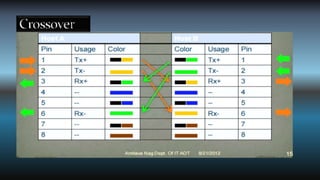
• Crossover
OUTLINE ETHERNET CABLE
ETHERNET CABLE
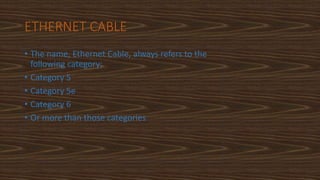
• The name, Ethernet Cable, always refers to the
following category:
• Category 5
• Category 5e
• Category 6
• Or more than those categories
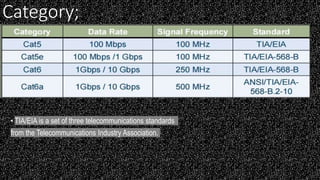
Category;
• TIA/EIA is a set of three telecommunications standards
from the Telecommunications Industry Association.
ETHERNET CABLE
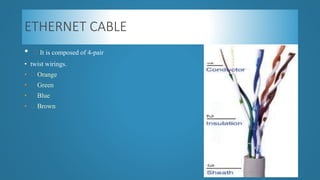
• It is composed of 4-pair
• twist wirings.
• Orange
• Green
• Blue
• Brown
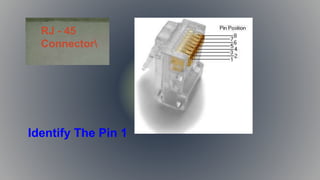
Identify The Pin 1
RJ - 45
Connector
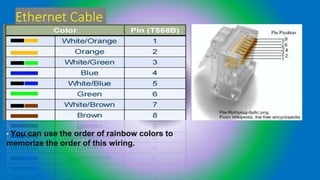
Ethernet Cable
•
• You can use the order of rainbow colors to
memorize the order of this wiring.
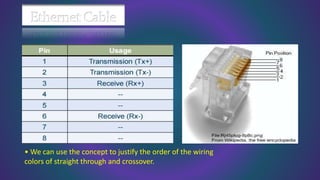
• We can use the concept to justify the order of the wiring
colors of straight through and crossover.
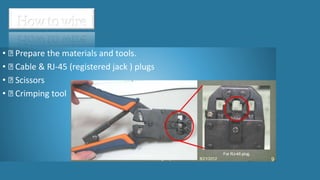
• Prepare the materials and tools.
• Cable & RJ-45 (registered jack ) plugs
• Scissors
• Crimping tool
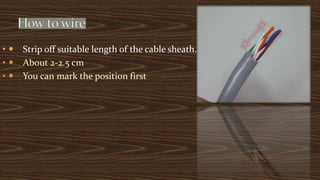
•  Strip off suitable length of the cable sheath.
•  About 2-2.5 cm
•  You can mark the position first
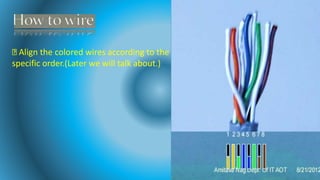
Align the colored wires according to the
specific order.(Later we will talk about.)
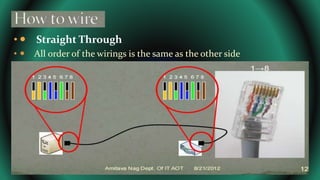
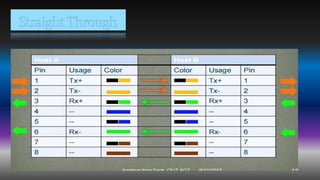
•  Straight Through
•  All order of the wirings is the same as the other side
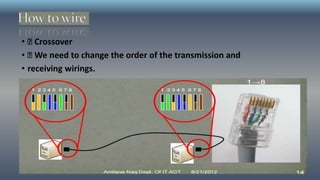
• Crossover
• We need to change the order of the transmission and
• receiving wirings.
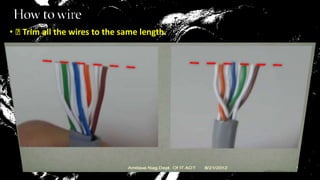
• Trim all the wires to the same length.
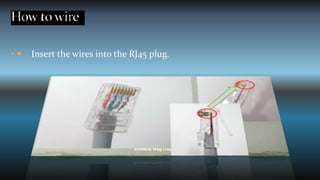
•  Insert the wires into the RJ45 plug.
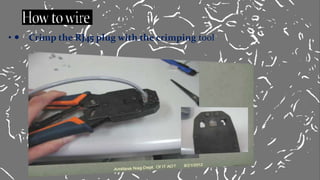
•  Crimp the RJ45 plug with the crimping tool

PROJECT CSS 1'.pptx