Primo Usability:
What Texas Tech Discovered When Implementing Primo
Lynne Edgar
Texas Tech University Libraries
lynne.edgar@ttu.edu
http://onesearch.lib.ttu.edu/
 Purpose: to evaluate how well the OneSearch interface
serves library patrons and identify ways it can be
improved before it replaces the traditional library catalog
 Evaluators: Texas Tech University Libraries Usability Task
Force
Planning
 Tasks
 Script
 Consent form
 Institutional Review Board Approval
 Pre-testing
 University-wide announcement for participation
Tasks
 Find a book
 Find an e-book
 Find a database
 Find an article
 Find a digital collection
 Find a thesis/dissertation
 Find an image
Usability Methods Employed
 Task observation: Morae software
 1 laptop with Morae Recorder to capture video and audio and
Morae Manager for tagging
 1 laptop with Morae Observer to observe the video and audio in
real time
 OneSearch Survey: conducted with Counting Opinions
InformsUs software
Methodology
 One user at a time
 Test with one facilitator
 Use Retrospective Recall
 Demographic Pre-survey
 Post survey: System Usability Scale
Participants
 8 students, based on their demographic profile,
experience with existing library search tools and their
status (undergraduates, graduate)
 3 experts
 3 intermediates
 2 novices
Incentives
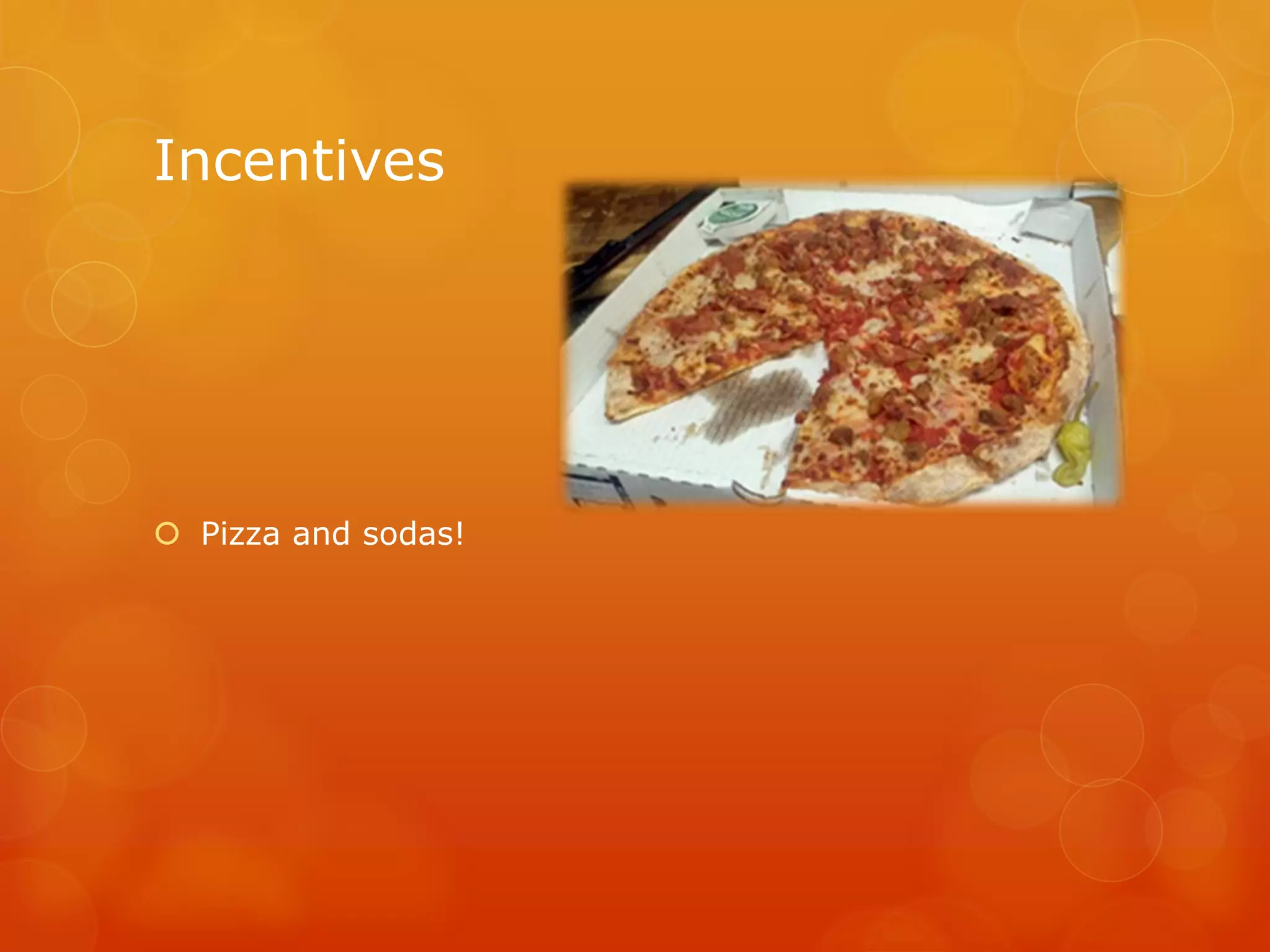
 Pizza and sodas!
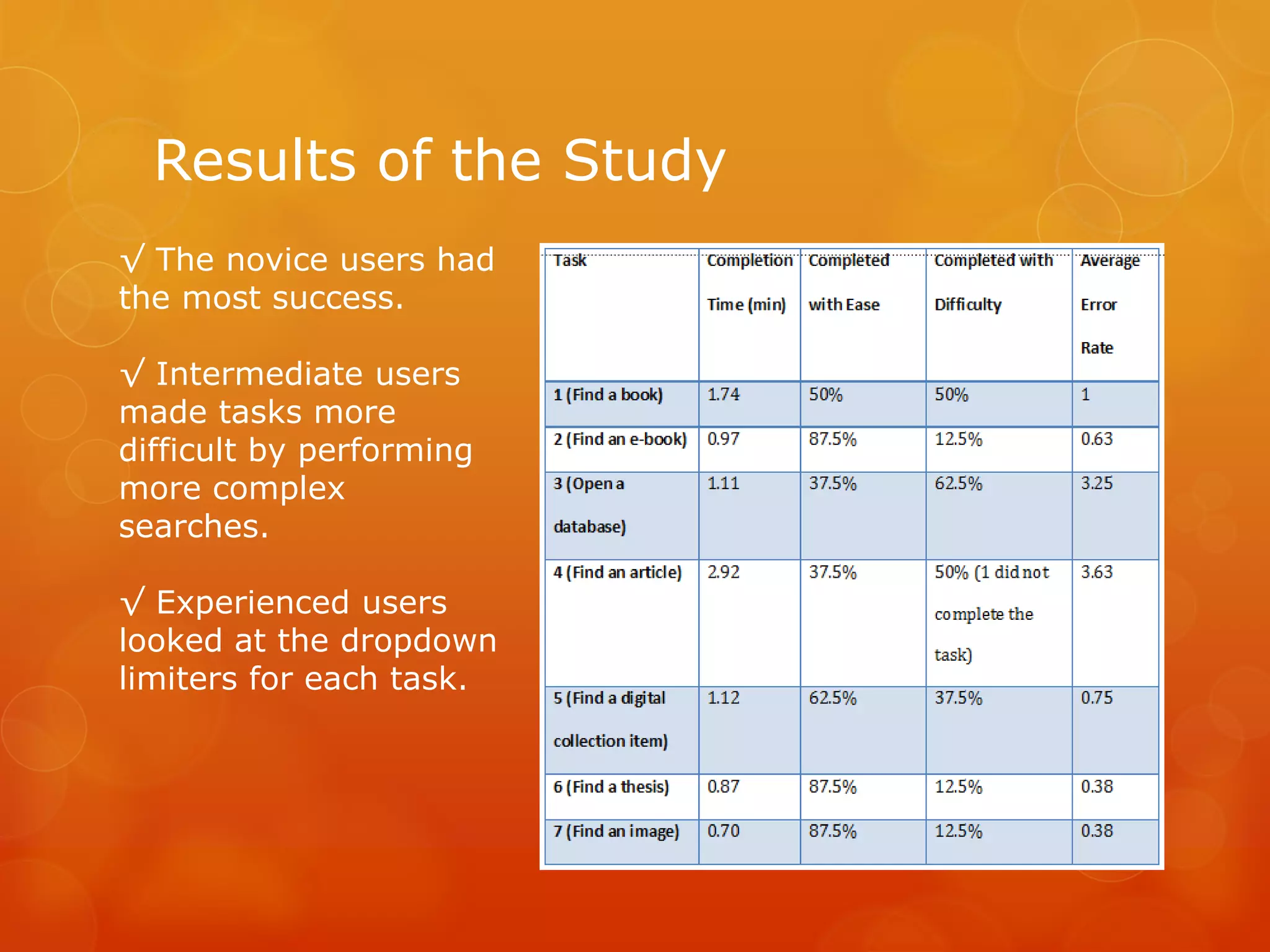
Results of the Study
√ The novice users had
the most success.
√ Intermediate users
made tasks more
difficult by performing
more complex
searches.
√ Experienced users
looked at the dropdown
limiters for each task.
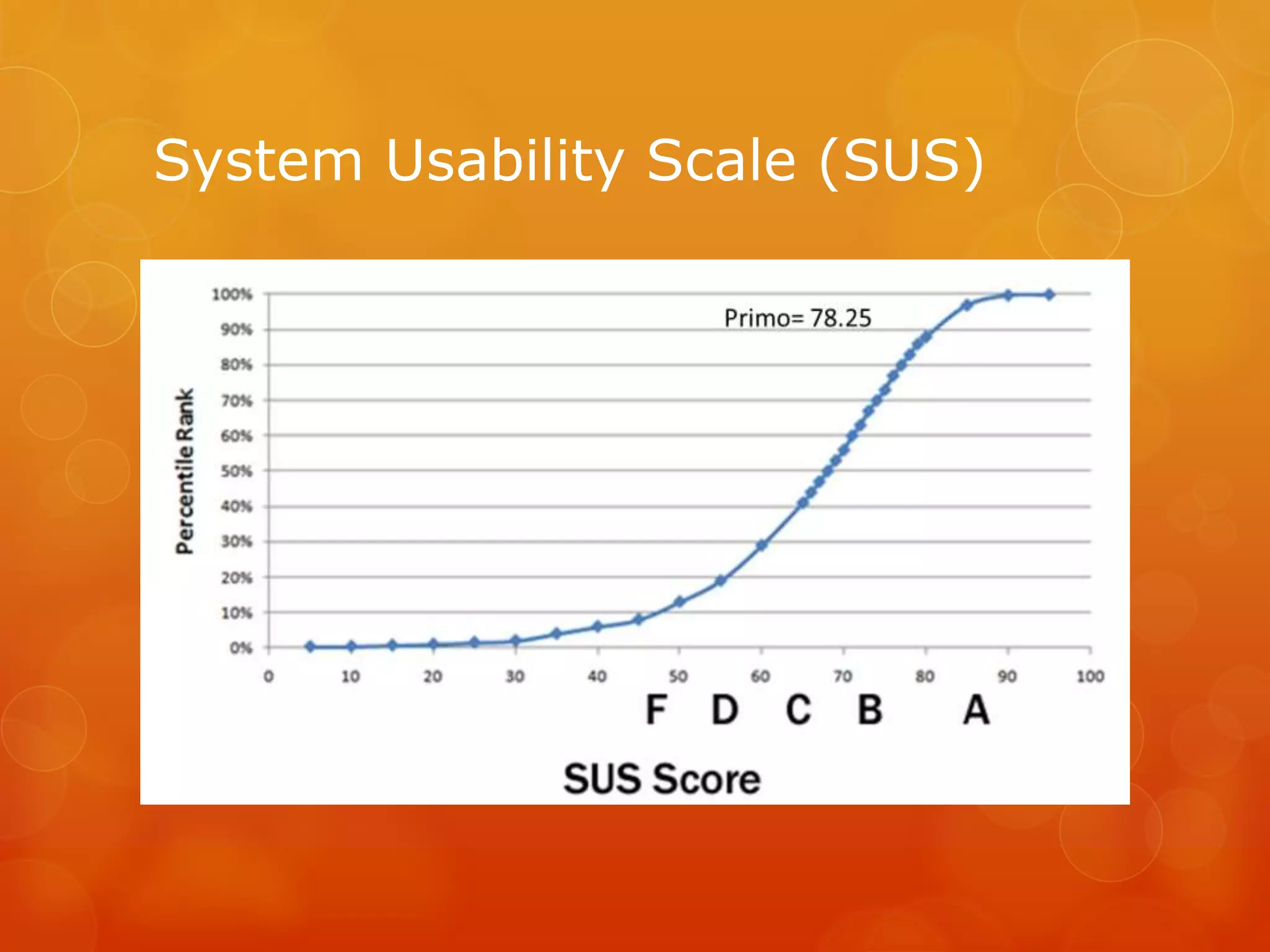
System Usability Scale (SUS)
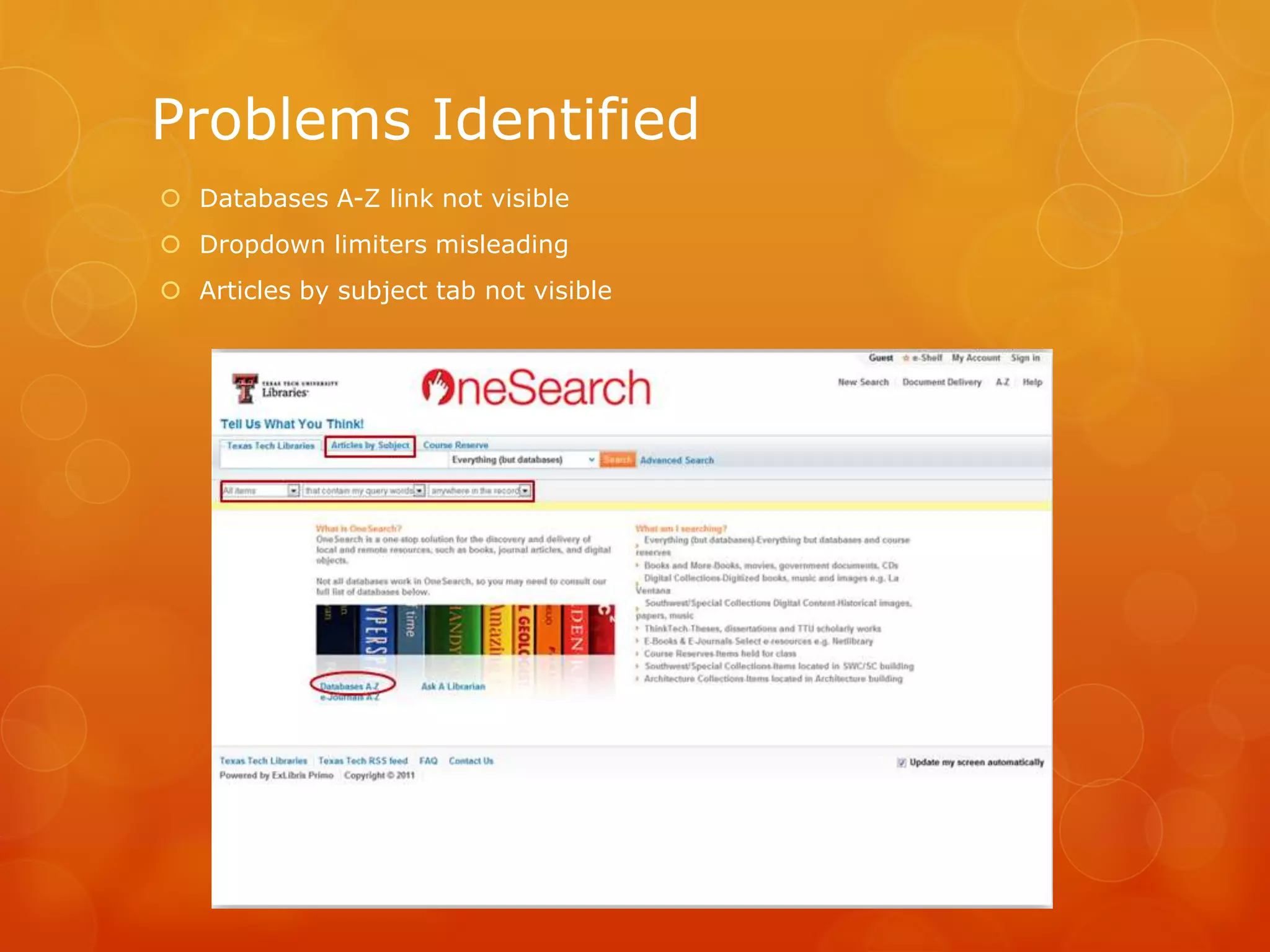
Problems Identified
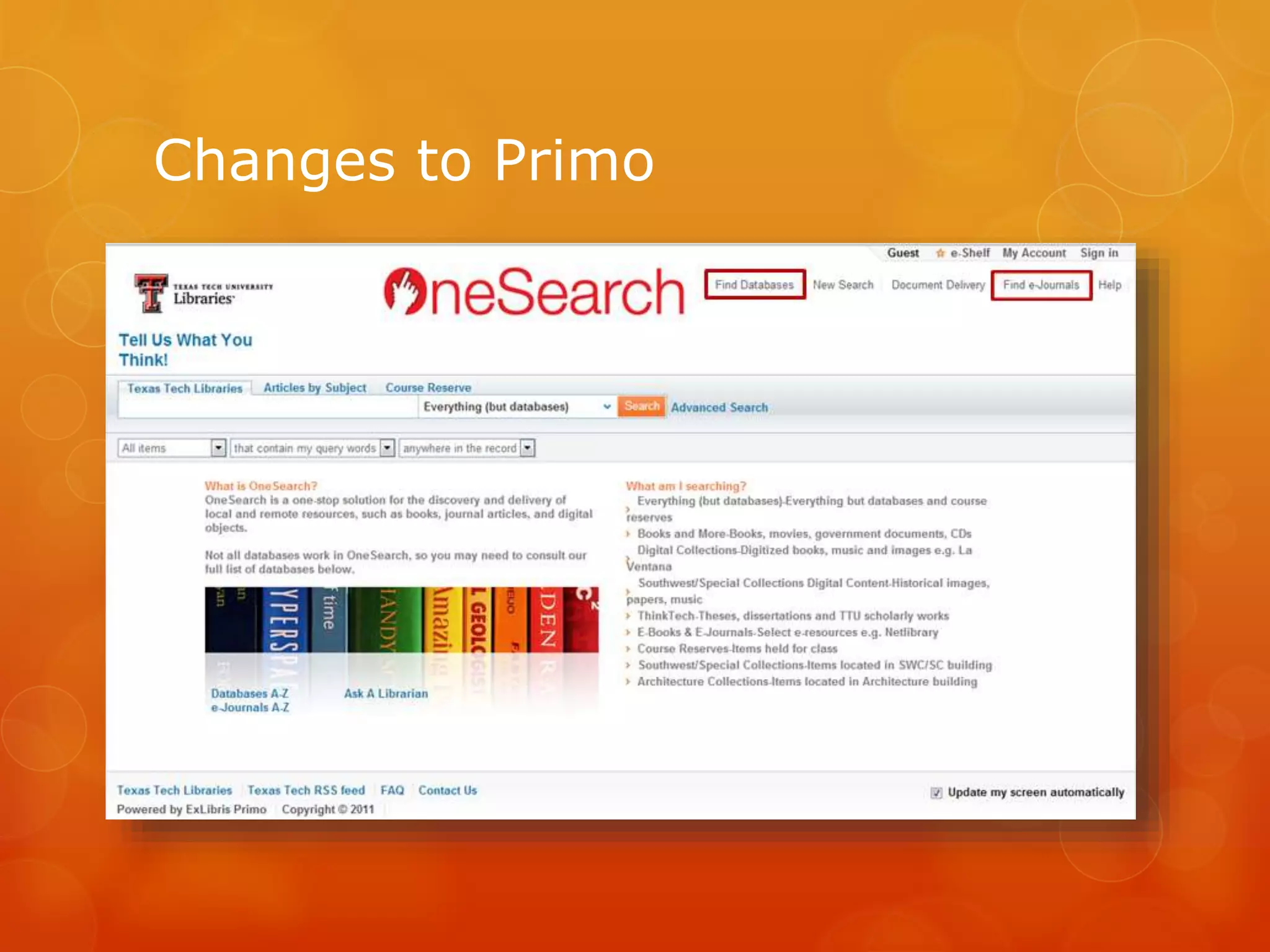
 Databases A-Z link not visible
 Dropdown limiters misleading
 Articles by subject tab not visible
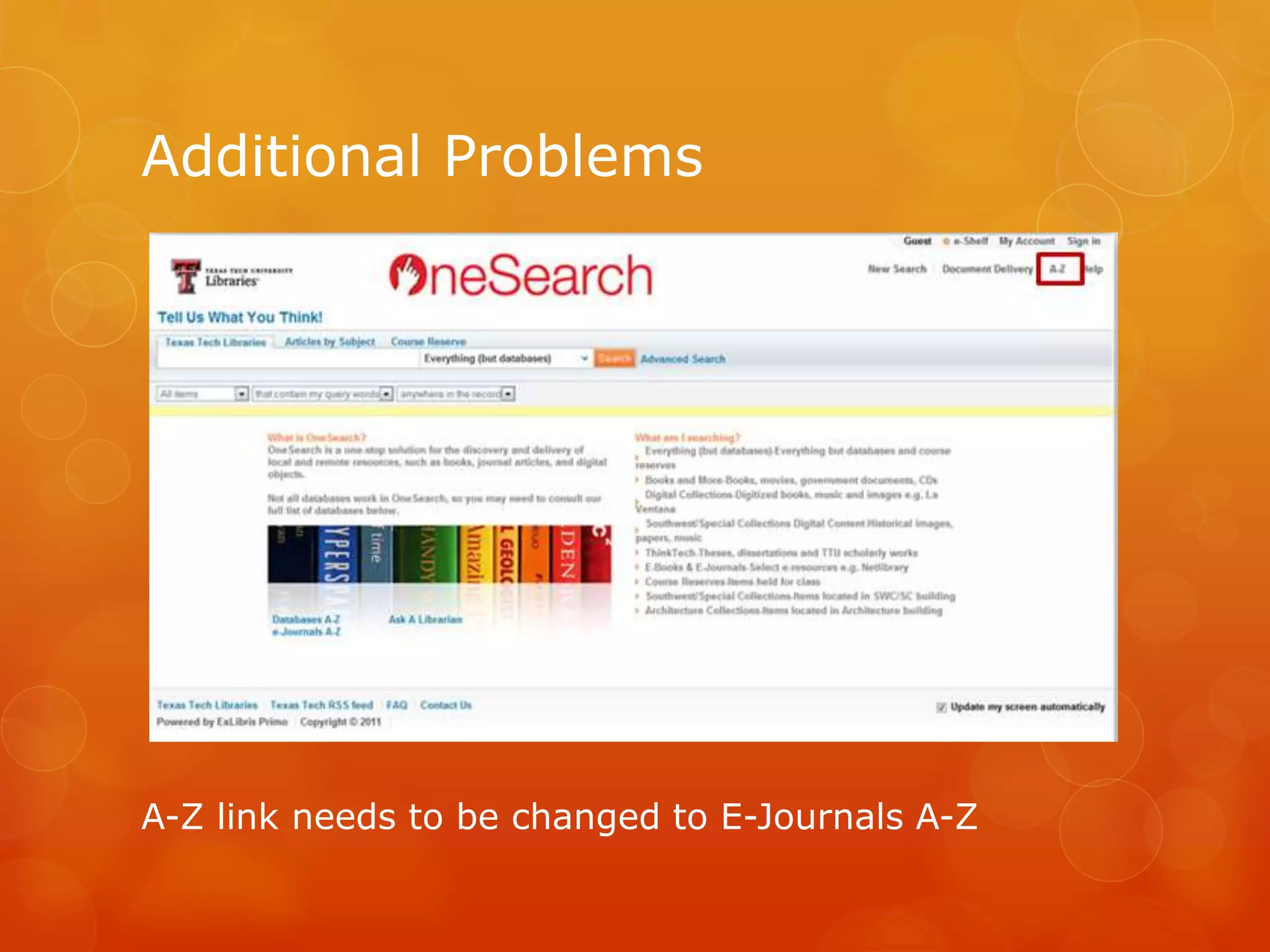
A-Z link needs to be changed to E-Journals A-Z
Additional Problems
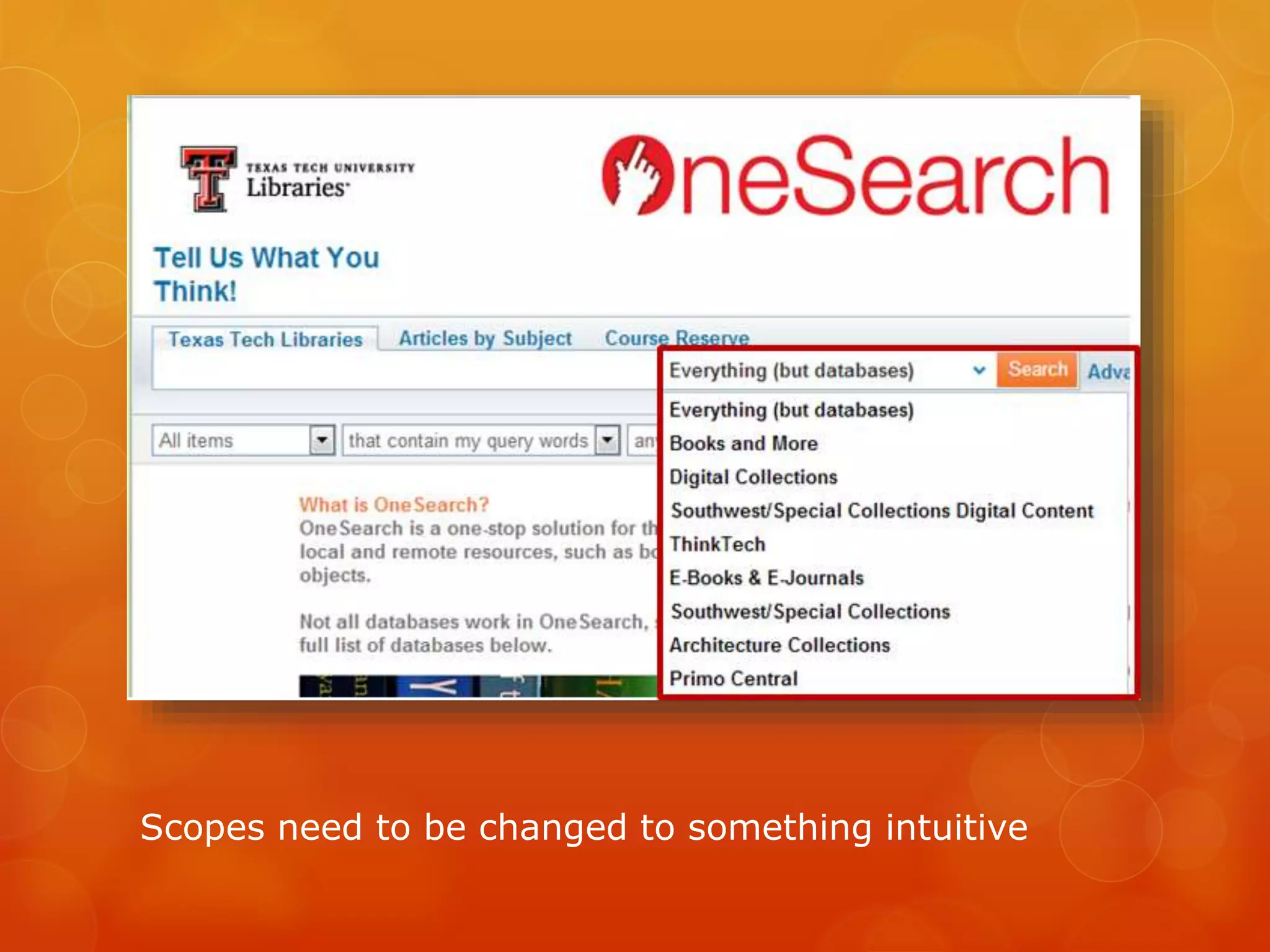
Scopes need to be changed to something intuitive
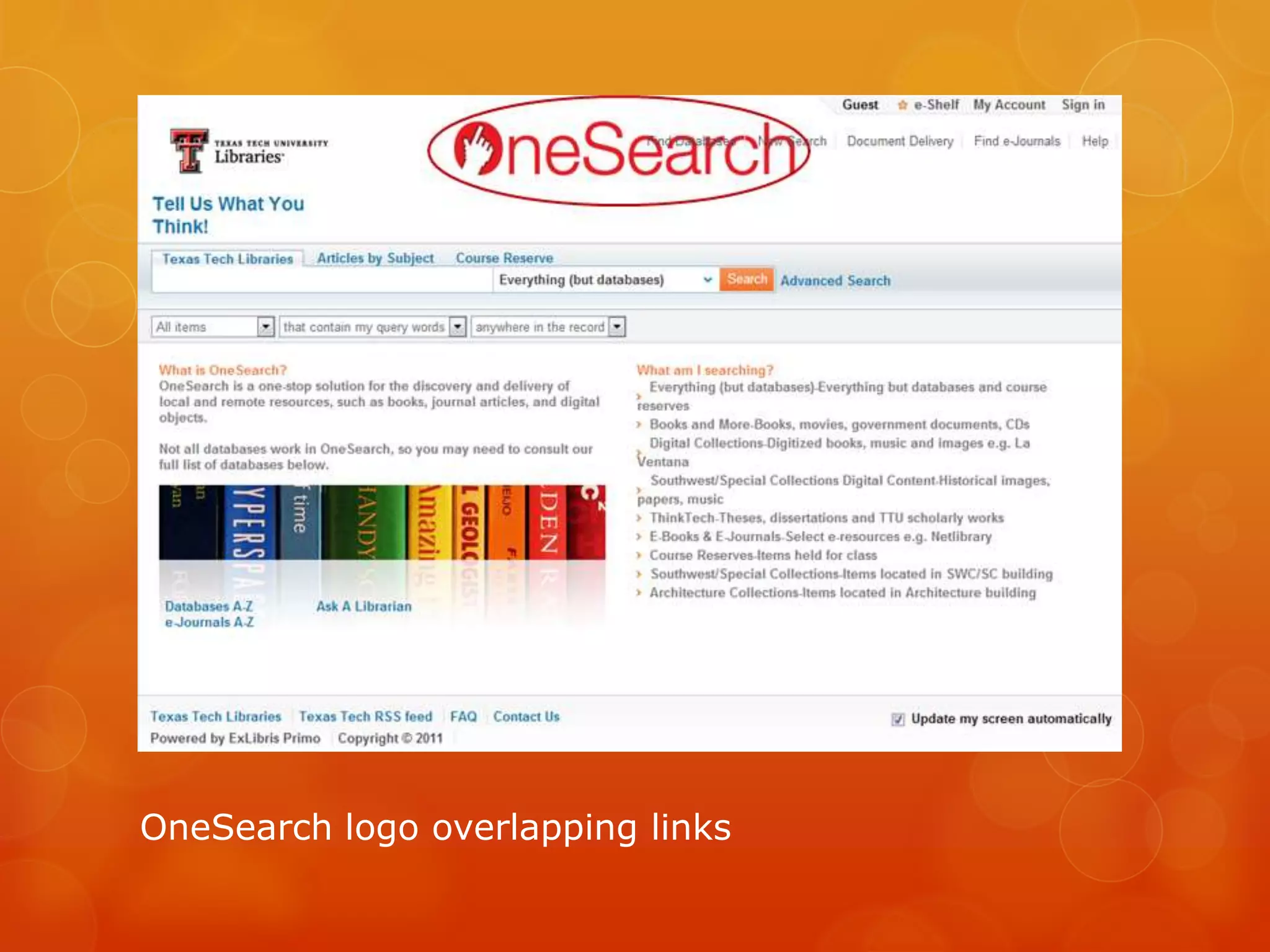
OneSearch logo overlapping links
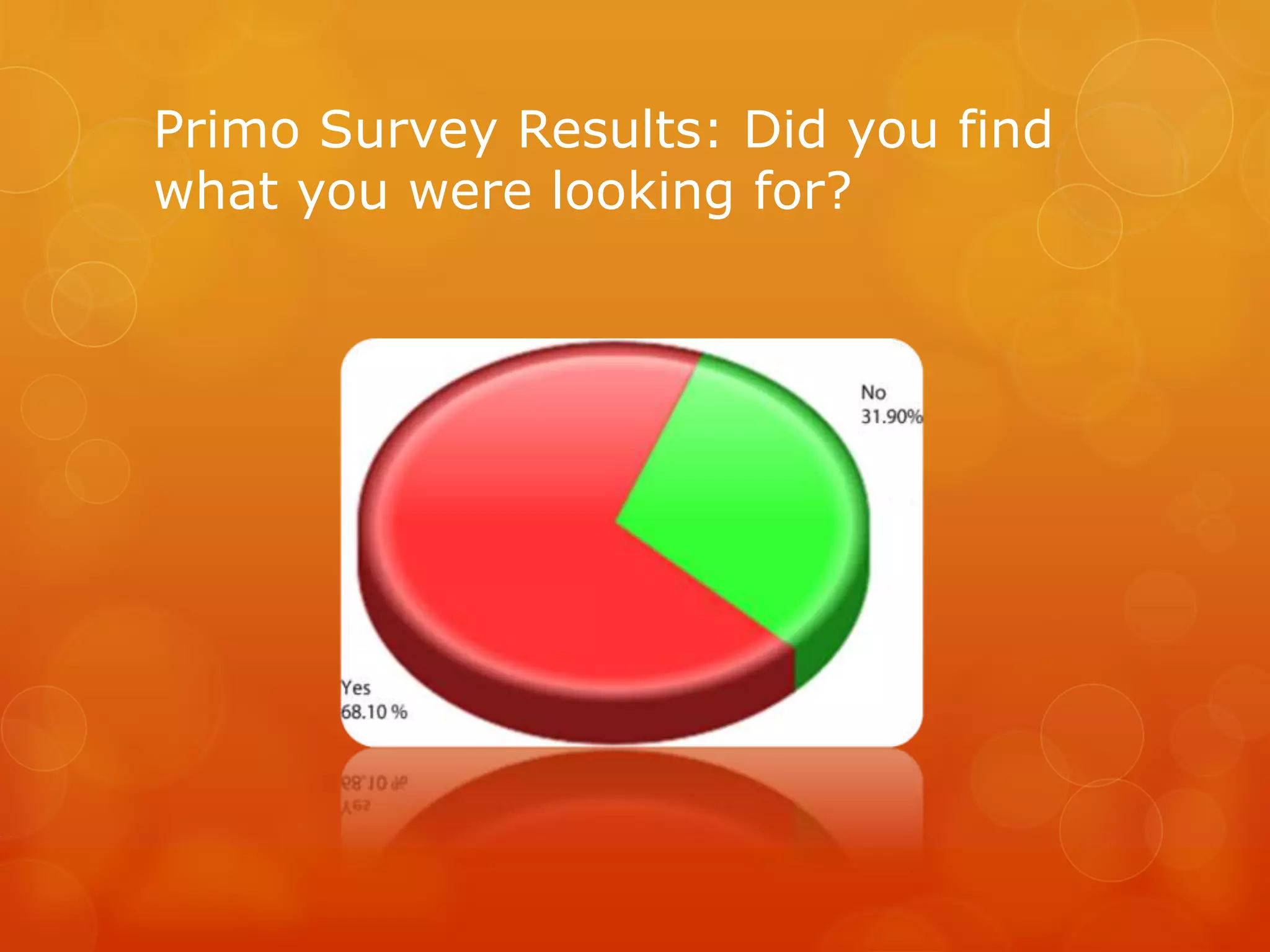
Primo Survey Results: Did you find
what you were looking for?
Changes to Primo
Obstacles
 Institutional Review Board Approval
 Budget: $0
 Recruitment
 Implementing usability findings
Lessons Learned
 Expect delays
 Term ‘usability’ often misunderstood
 Implementing changes may be difficult
 Show results instead of telling implementers
what changes should be made
 Do small usability tests and change a few small
things at a time
Conclusions
 The OneSearch study and online survey results were
positive, overall.
 Problems identified were mainly cosmetic and
inconsistent and can readily be fixed.
 Functionality issues are separate and can be addressed
by altering or removing the function.
References
 Clark, Melanie, Esther De Leon, Lynne Edgar, Joy Perrin (2011). Primo
“OneSearch” usability report. Lubbock, TX: Texas Tech University.
 Clark, Melanie, Esther De Leon, Lynne Edgar, Joy Perrin (2012). Library
usability: tools for usability testing in the library. Lubbock, TX: Texas Tech
University.
 Clark, Melanie, Esther De Leon, Lynne Edgar, Joy Perrin (2012). Library
usability: tools for usability testing in the library (presentation). , Texas
Library Association Conference, Houston, TX, April 19, 2012.
 Krug, Steve. (2006). Don’t make me think! A common sense approach to
web usability, Second Edition. Berkeley, CA: New Riders.
 Sauro, Jeff. (February 2, 2011). Measuring usability with the system
usability scale (SUS). Retrieved February 22, 2012 from
http://www.measuringusability.com/sus.php
 Schmidt, Aaron, Etches-Johnson, Amanda. (January 25, 2012). 10 steps
to a user-friendly library website. Retrieved January 25, 2012, from
https://alapublishing.webex.com
 Still, Brian. (2010). A study guide for the certified user experience
professional (CUEP) workshop [study guide]. Lubbock, TX: Texas Tech
University.
Lynne Edgar
Systems Librarian
Texas Tech University Libraries
lynne.edgar@ttu.edu
http://onesearch.lib.ttu.edu/
Thank You!

Primo Usability: What Texas Tech Discovered When Implementing Primo

  • 1.
    Primo Usability: What TexasTech Discovered When Implementing Primo Lynne Edgar Texas Tech University Libraries lynne.edgar@ttu.edu http://onesearch.lib.ttu.edu/
  • 2.
     Purpose: toevaluate how well the OneSearch interface serves library patrons and identify ways it can be improved before it replaces the traditional library catalog  Evaluators: Texas Tech University Libraries Usability Task Force
  • 3.
    Planning  Tasks  Script Consent form  Institutional Review Board Approval  Pre-testing  University-wide announcement for participation
  • 4.
    Tasks  Find abook  Find an e-book  Find a database  Find an article  Find a digital collection  Find a thesis/dissertation  Find an image
  • 5.
    Usability Methods Employed Task observation: Morae software  1 laptop with Morae Recorder to capture video and audio and Morae Manager for tagging  1 laptop with Morae Observer to observe the video and audio in real time  OneSearch Survey: conducted with Counting Opinions InformsUs software
  • 6.
    Methodology  One userat a time  Test with one facilitator  Use Retrospective Recall  Demographic Pre-survey  Post survey: System Usability Scale
  • 7.
    Participants  8 students,based on their demographic profile, experience with existing library search tools and their status (undergraduates, graduate)  3 experts  3 intermediates  2 novices
  • 8.
  • 9.
    Results of theStudy √ The novice users had the most success. √ Intermediate users made tasks more difficult by performing more complex searches. √ Experienced users looked at the dropdown limiters for each task.
  • 10.
  • 11.
    Problems Identified  DatabasesA-Z link not visible  Dropdown limiters misleading  Articles by subject tab not visible
  • 12.
    A-Z link needsto be changed to E-Journals A-Z Additional Problems
  • 13.
    Scopes need tobe changed to something intuitive
  • 14.
  • 15.
    Primo Survey Results:Did you find what you were looking for?
  • 16.
  • 17.
    Obstacles  Institutional ReviewBoard Approval  Budget: $0  Recruitment  Implementing usability findings
  • 18.
    Lessons Learned  Expectdelays  Term ‘usability’ often misunderstood  Implementing changes may be difficult  Show results instead of telling implementers what changes should be made  Do small usability tests and change a few small things at a time
  • 19.
    Conclusions  The OneSearchstudy and online survey results were positive, overall.  Problems identified were mainly cosmetic and inconsistent and can readily be fixed.  Functionality issues are separate and can be addressed by altering or removing the function.
  • 20.
    References  Clark, Melanie,Esther De Leon, Lynne Edgar, Joy Perrin (2011). Primo “OneSearch” usability report. Lubbock, TX: Texas Tech University.  Clark, Melanie, Esther De Leon, Lynne Edgar, Joy Perrin (2012). Library usability: tools for usability testing in the library. Lubbock, TX: Texas Tech University.  Clark, Melanie, Esther De Leon, Lynne Edgar, Joy Perrin (2012). Library usability: tools for usability testing in the library (presentation). , Texas Library Association Conference, Houston, TX, April 19, 2012.  Krug, Steve. (2006). Don’t make me think! A common sense approach to web usability, Second Edition. Berkeley, CA: New Riders.  Sauro, Jeff. (February 2, 2011). Measuring usability with the system usability scale (SUS). Retrieved February 22, 2012 from http://www.measuringusability.com/sus.php  Schmidt, Aaron, Etches-Johnson, Amanda. (January 25, 2012). 10 steps to a user-friendly library website. Retrieved January 25, 2012, from https://alapublishing.webex.com  Still, Brian. (2010). A study guide for the certified user experience professional (CUEP) workshop [study guide]. Lubbock, TX: Texas Tech University.
  • 21.
    Lynne Edgar Systems Librarian TexasTech University Libraries lynne.edgar@ttu.edu http://onesearch.lib.ttu.edu/ Thank You!

Editor's Notes

  • #6 MEELS Memorability - can users return to a website and remember where things are? Errors - user shouldn’t make many mistakes Efficiency – the fewer steps to get somewhere the better the website Learnability - site should be intuitive or easy to learn Satisfaction – users should like the site
  • #10 even when a general search would yield sufficient results.
  • #11 The System Usability Scale is an industry standard based on a ten-item attitude rating scale giving a global view of subjective assessments of usability. The OneSearch SUS score was 78.75. A score over 70 suggests that there is nothing inherently wrong with the system.