
Powershell
for Log Analysis & Data
CrunchingBY MICHELLE D'ISRAELI
@MDISRAELI
#BSIDESLDN2015
Why Powershell?
SIEMs are sadly not universal yet
Limited environments
You might not need Cygwin any more
Quick and dirty analysis & tricks
Red teams – process data remotely!
#BSIDESLDN2015
About me
Babcock MSS
◦ Threat intelligence feeds
Serco Security Operations
◦ Web activity investigations
◦ Bulk email analysis
Serco Major Incident Manager
◦ Incident response
◦ Whole host of things
#BSIDESLDN2015
Assumptions
BASH / other command lines
Regular expressions
Object orientated programming
#BSIDESLDN2015
Objectives
Where to learn more
How powershell is different
Really cool tricks
#BSIDESLDN2015
Get-Command
PS D:> Get-Command
CommandType Name Definition
----------- ---- ----------
Alias % ForEach-Object
Alias ? Where-Object
Function A: Set-Location A:
Alias ac Add-Content
Cmdlet Add-Computer Add-Computer [-DomainName]
Cmdlet Add-Content Add-Content [-Path] <Strin
Cmdlet Add-History Add-History [[-InputObject
Cmdlet Add-Member Add-Member [-MemberType] <
Cmdlet Add-PSSnapin Add-PSSnapin [-Name] <Stri
Cmdlet Add-Type Add-Type [-TypeDefinition]
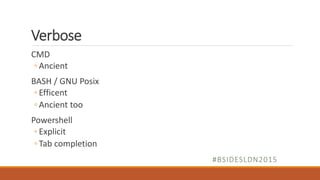
Verbose
CMD
◦ Ancient
BASH / GNU Posix
◦ Efficent
◦ Ancient too
Powershell
◦ Explicit
◦ Tab completion
#BSIDESLDN2015
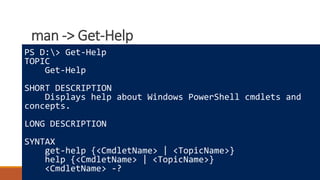
man -> Get-Help
Where to learn more
How powershell is different
Really cool tricks
PS D:> Get-Help
TOPIC
Get-Help
SHORT DESCRIPTION
Displays help about Windows PowerShell cmdlets and
concepts.
LONG DESCRIPTION
SYNTAX
get-help {<CmdletName> | <TopicName>}
help {<CmdletName> | <TopicName>}
<CmdletName> -?
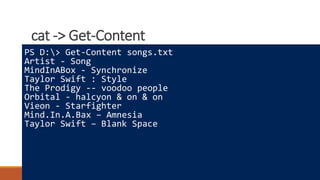
cat -> Get-Content
Where to learn more
How powershell is different
Really cool tricks
PS D:> Get-Content songs.txt
Artist - Song
MindInABox - Synchronize
Taylor Swift : Style
The Prodigy -- voodoo people
Orbital - halcyon & on & on
Vieon - Starfighter
Mind.In.A.Bax – Amnesia
Taylor Swift – Blank Space
In BASH / CMD land….
Pipelines = text Cat examplefile
[ AAA
BBB
CCC
DDD
… ]
=> One Long Stream of Text
In Powershell land….
Pipelines = objects Get-Content examplefile
[ "AAA" ] =>
[ "BBB" ] =>
[ "CCC" ] =>
[ "DDD" ] =>
[ … ] =>
=> Stream of objects
grep -> Where-Object
Where to learn more
How powershell is different
Really cool tricks
> Get-Content songs.txt | Where-Object { $_ -match "Swift"}
Taylor Swift : Style
Taylor Swift – "Blank Space"
> Get-Content songs.txt
| Where-Object { $_ -match "^Mind.?In.?A.?B[ao]x"}
MindInABox - Synchronize
Mind.In.A.Bax – Amnesia
# …and fixed the file
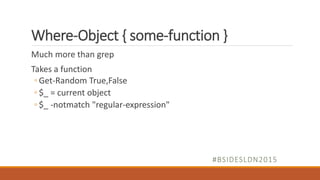
Where-Object { some-function }
Much more than grep
Takes a function
◦ Get-Random True,False
◦ $_ = current object
◦ $_ -notmatch "regular-expression"
#BSIDESLDN2015
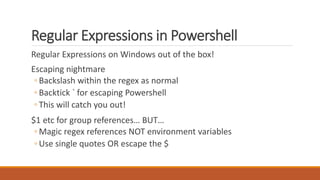
Regular Expressions in Powershell
Regular Expressions on Windows out of the box!
Escaping nightmare
◦ Backslash within the regex as normal
◦ Backtick ` for escaping Powershell
◦ This will catch you out!
$1 etc for group references… BUT…
◦ Magic regex references NOT environment variables
◦ Use single quotes OR escape the $
sed/awk -> ForEach-Object
Where to learn more
How powershell is different
Really cool tricks
>> | ForEach-Object { $_ -replace "s+[:-]+s+",","}
Artist,Song
Mind.In.A.Box,Synchronize
Taylor Swift,Style
The Prodigy,voodoo people
Orbital,halcyon & on & on
Vieon,Starfighter
Mind.In.A.Box,Amnesia
Taylor Swift,Blank Space
>| ForEach-Object { $_ -replace "s+[:-]+s+",","} >songs.csv
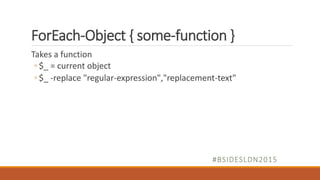
ForEach-Object { some-function }
Takes a function
◦ $_ = current object
◦ $_ -replace "regular-expression","replacement-text"
#BSIDESLDN2015
~The Powershell Zone~
#BSIDESLDN2015
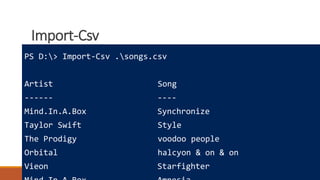
Import-Csv
Where to learn more
How powershell is different
Really cool tricks
PS D:> Import-Csv .songs.csv
Artist Song
------ ----
Mind.In.A.Box Synchronize
Taylor Swift Style
The Prodigy voodoo people
Orbital halcyon & on & on
Vieon Starfighter
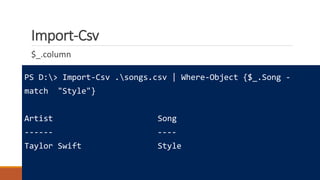
Import-Csv
$_.column
PS D:> Import-Csv .songs.csv | Where-Object {$_.Song -
match "Style"}
Artist Song
------ ----
Taylor Swift Style
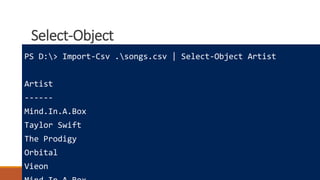
Select-Object
Where to learn more
How powershell is different
Really cool tricks
PS D:> Import-Csv .songs.csv | Select-Object Artist
Artist
------
Mind.In.A.Box
Taylor Swift
The Prodigy
Orbital
Vieon
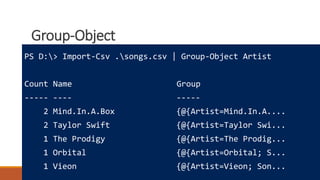
Group-Object
Where to learn more
How powershell is different
Really cool tricks
PS D:> Import-Csv .songs.csv | Group-Object Artist
Count Name Group
----- ---- -----
2 Mind.In.A.Box {@{Artist=Mind.In.A....
2 Taylor Swift {@{Artist=Taylor Swi...
1 The Prodigy {@{Artist=The Prodig...
1 Orbital {@{Artist=Orbital; S...
1 Vieon {@{Artist=Vieon; Son...
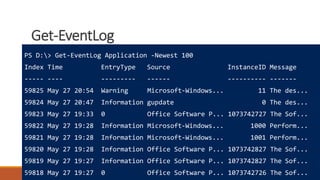
Get-EventLog
Where to learn more
How powershell is different
Really cool tricks
PS D:> Get-EventLog Application -Newest 100
Index Time EntryType Source InstanceID Message
----- ---- --------- ------ ---------- -------
59825 May 27 20:54 Warning Microsoft-Windows... 11 The des...
59824 May 27 20:47 Information gupdate 0 The des...
59823 May 27 19:33 0 Office Software P... 1073742727 The Sof...
59822 May 27 19:28 Information Microsoft-Windows... 1000 Perform...
59821 May 27 19:28 Information Microsoft-Windows... 1001 Perform...
59820 May 27 19:28 Information Office Software P... 1073742827 The Sof...
59819 May 27 19:27 Information Office Software P... 1073742827 The Sof...
59818 May 27 19:27 0 Office Software P... 1073742726 The Sof...
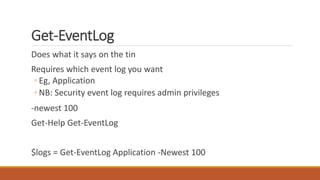
Get-EventLog
Does what it says on the tin
Requires which event log you want
◦ Eg, Application
◦ NB: Security event log requires admin privileges
-newest 100
Get-Help Get-EventLog
$logs = Get-EventLog Application -Newest 100
Group-Object
Where to learn more
How powershell is different
Really cool tricks
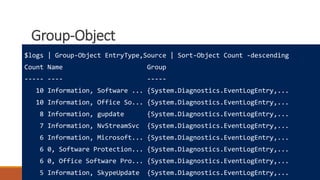
$logs | Group-Object EntryType,Source | Sort-Object Count -descending
Count Name Group
----- ---- -----
10 Information, Software ... {System.Diagnostics.EventLogEntry,...
10 Information, Office So... {System.Diagnostics.EventLogEntry,...
8 Information, gupdate {System.Diagnostics.EventLogEntry,...
7 Information, NvStreamSvc {System.Diagnostics.EventLogEntry,...
6 Information, Microsoft... {System.Diagnostics.EventLogEntry,...
6 0, Software Protection... {System.Diagnostics.EventLogEntry,...
6 0, Office Software Pro... {System.Diagnostics.EventLogEntry,...
5 Information, SkypeUpdate {System.Diagnostics.EventLogEntry,...
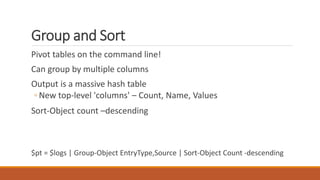
Group and Sort
Pivot tables on the command line!
Can group by multiple columns
Output is a massive hash table
◦ New top-level 'columns' – Count, Name, Values
Sort-Object count –descending
$pt = $logs | Group-Object EntryType,Source | Sort-Object Count -descending
Get-Member
Where to learn more
How powershell is different
Really cool tricks
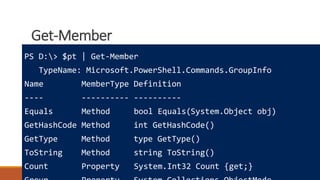
PS D:> $pt | Get-Member
TypeName: Microsoft.PowerShell.Commands.GroupInfo
Name MemberType Definition
---- ---------- ----------
Equals Method bool Equals(System.Object obj)
GetHashCode Method int GetHashCode()
GetType Method type GetType()
ToString Method string ToString()
Count Property System.Int32 Count {get;}
Fun with objects
Where to learn more
How powershell is different
Really cool tricks
PS D:> $pt[7].Group[2]
Index Time EntryType Source
----- ---- --------- ------
59784 May 27 10:41 Information SkypeUpdate
PS D:> $pt[7].Group[2].Source.ToUpper()
SKYPEUPDATE
Extra stuff
Adding new members to objects is a pain but possible
Hashtables, everywhere!
◦ @{'foo' = $_.Name; 'widget' = $_.Type}
Literally all of .NET available to you
◦ $ie = New-Object -ComObject InternetExplorer.Application
$tempfilename = [System.IO.Path]::GetTempFileName()
[io.file]::WriteAllBytes($tempfilename,(Invoke-WebRequest -
URI "http://fqdn/rs_server.dll").content)
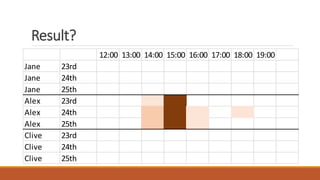
12:00 13:00 14:00 15:00 16:00 17:00 18:00 19:00
Jane 23rd
Jane 24th
Jane 25th
Alex 23rd
Alex 24th
Alex 25th
Clive 23rd
Clive 24th
Clive 25th
Result?
Resources & Any Questions?
Technet Hey Scripting Guy blog*
ss64.com
Powershell.com
StackOverflow etc
* http://blogs.technet.com/b/heyscriptingguy/
Michelle D’Israeli
@mdisraeli

Powershell for Log Analysis and Data Crunching

  • 1.
    Powershell for Log Analysis& Data CrunchingBY MICHELLE D'ISRAELI @MDISRAELI #BSIDESLDN2015
  • 2.
    Why Powershell? SIEMs aresadly not universal yet Limited environments You might not need Cygwin any more Quick and dirty analysis & tricks Red teams – process data remotely! #BSIDESLDN2015
  • 3.
    About me Babcock MSS ◦Threat intelligence feeds Serco Security Operations ◦ Web activity investigations ◦ Bulk email analysis Serco Major Incident Manager ◦ Incident response ◦ Whole host of things #BSIDESLDN2015
  • 4.
    Assumptions BASH / othercommand lines Regular expressions Object orientated programming #BSIDESLDN2015
  • 5.
    Objectives Where to learnmore How powershell is different Really cool tricks #BSIDESLDN2015
  • 6.
    Get-Command PS D:> Get-Command CommandTypeName Definition ----------- ---- ---------- Alias % ForEach-Object Alias ? Where-Object Function A: Set-Location A: Alias ac Add-Content Cmdlet Add-Computer Add-Computer [-DomainName] Cmdlet Add-Content Add-Content [-Path] <Strin Cmdlet Add-History Add-History [[-InputObject Cmdlet Add-Member Add-Member [-MemberType] < Cmdlet Add-PSSnapin Add-PSSnapin [-Name] <Stri Cmdlet Add-Type Add-Type [-TypeDefinition]
  • 7.
    Verbose CMD ◦ Ancient BASH /GNU Posix ◦ Efficent ◦ Ancient too Powershell ◦ Explicit ◦ Tab completion #BSIDESLDN2015
  • 8.
    man -> Get-Help Whereto learn more How powershell is different Really cool tricks PS D:> Get-Help TOPIC Get-Help SHORT DESCRIPTION Displays help about Windows PowerShell cmdlets and concepts. LONG DESCRIPTION SYNTAX get-help {<CmdletName> | <TopicName>} help {<CmdletName> | <TopicName>} <CmdletName> -?
  • 9.
    cat -> Get-Content Whereto learn more How powershell is different Really cool tricks PS D:> Get-Content songs.txt Artist - Song MindInABox - Synchronize Taylor Swift : Style The Prodigy -- voodoo people Orbital - halcyon & on & on Vieon - Starfighter Mind.In.A.Bax – Amnesia Taylor Swift – Blank Space
  • 10.
    In BASH /CMD land…. Pipelines = text Cat examplefile [ AAA BBB CCC DDD … ] => One Long Stream of Text
  • 11.
    In Powershell land…. Pipelines= objects Get-Content examplefile [ "AAA" ] => [ "BBB" ] => [ "CCC" ] => [ "DDD" ] => [ … ] => => Stream of objects
  • 12.
    grep -> Where-Object Whereto learn more How powershell is different Really cool tricks > Get-Content songs.txt | Where-Object { $_ -match "Swift"} Taylor Swift : Style Taylor Swift – "Blank Space" > Get-Content songs.txt | Where-Object { $_ -match "^Mind.?In.?A.?B[ao]x"} MindInABox - Synchronize Mind.In.A.Bax – Amnesia # …and fixed the file
  • 13.
    Where-Object { some-function} Much more than grep Takes a function ◦ Get-Random True,False ◦ $_ = current object ◦ $_ -notmatch "regular-expression" #BSIDESLDN2015
  • 14.
    Regular Expressions inPowershell Regular Expressions on Windows out of the box! Escaping nightmare ◦ Backslash within the regex as normal ◦ Backtick ` for escaping Powershell ◦ This will catch you out! $1 etc for group references… BUT… ◦ Magic regex references NOT environment variables ◦ Use single quotes OR escape the $
  • 15.
    sed/awk -> ForEach-Object Whereto learn more How powershell is different Really cool tricks >> | ForEach-Object { $_ -replace "s+[:-]+s+",","} Artist,Song Mind.In.A.Box,Synchronize Taylor Swift,Style The Prodigy,voodoo people Orbital,halcyon & on & on Vieon,Starfighter Mind.In.A.Box,Amnesia Taylor Swift,Blank Space >| ForEach-Object { $_ -replace "s+[:-]+s+",","} >songs.csv
  • 16.
    ForEach-Object { some-function} Takes a function ◦ $_ = current object ◦ $_ -replace "regular-expression","replacement-text" #BSIDESLDN2015
  • 17.
  • 18.
    Import-Csv Where to learnmore How powershell is different Really cool tricks PS D:> Import-Csv .songs.csv Artist Song ------ ---- Mind.In.A.Box Synchronize Taylor Swift Style The Prodigy voodoo people Orbital halcyon & on & on Vieon Starfighter
  • 19.
    Import-Csv $_.column PS D:> Import-Csv.songs.csv | Where-Object {$_.Song - match "Style"} Artist Song ------ ---- Taylor Swift Style
  • 20.
    Select-Object Where to learnmore How powershell is different Really cool tricks PS D:> Import-Csv .songs.csv | Select-Object Artist Artist ------ Mind.In.A.Box Taylor Swift The Prodigy Orbital Vieon
  • 21.
    Group-Object Where to learnmore How powershell is different Really cool tricks PS D:> Import-Csv .songs.csv | Group-Object Artist Count Name Group ----- ---- ----- 2 Mind.In.A.Box {@{Artist=Mind.In.A.... 2 Taylor Swift {@{Artist=Taylor Swi... 1 The Prodigy {@{Artist=The Prodig... 1 Orbital {@{Artist=Orbital; S... 1 Vieon {@{Artist=Vieon; Son...
  • 22.
    Get-EventLog Where to learnmore How powershell is different Really cool tricks PS D:> Get-EventLog Application -Newest 100 Index Time EntryType Source InstanceID Message ----- ---- --------- ------ ---------- ------- 59825 May 27 20:54 Warning Microsoft-Windows... 11 The des... 59824 May 27 20:47 Information gupdate 0 The des... 59823 May 27 19:33 0 Office Software P... 1073742727 The Sof... 59822 May 27 19:28 Information Microsoft-Windows... 1000 Perform... 59821 May 27 19:28 Information Microsoft-Windows... 1001 Perform... 59820 May 27 19:28 Information Office Software P... 1073742827 The Sof... 59819 May 27 19:27 Information Office Software P... 1073742827 The Sof... 59818 May 27 19:27 0 Office Software P... 1073742726 The Sof...
  • 23.
    Get-EventLog Does what itsays on the tin Requires which event log you want ◦ Eg, Application ◦ NB: Security event log requires admin privileges -newest 100 Get-Help Get-EventLog $logs = Get-EventLog Application -Newest 100
  • 24.
    Group-Object Where to learnmore How powershell is different Really cool tricks $logs | Group-Object EntryType,Source | Sort-Object Count -descending Count Name Group ----- ---- ----- 10 Information, Software ... {System.Diagnostics.EventLogEntry,... 10 Information, Office So... {System.Diagnostics.EventLogEntry,... 8 Information, gupdate {System.Diagnostics.EventLogEntry,... 7 Information, NvStreamSvc {System.Diagnostics.EventLogEntry,... 6 Information, Microsoft... {System.Diagnostics.EventLogEntry,... 6 0, Software Protection... {System.Diagnostics.EventLogEntry,... 6 0, Office Software Pro... {System.Diagnostics.EventLogEntry,... 5 Information, SkypeUpdate {System.Diagnostics.EventLogEntry,...
  • 25.
    Group and Sort Pivottables on the command line! Can group by multiple columns Output is a massive hash table ◦ New top-level 'columns' – Count, Name, Values Sort-Object count –descending $pt = $logs | Group-Object EntryType,Source | Sort-Object Count -descending
  • 26.
    Get-Member Where to learnmore How powershell is different Really cool tricks PS D:> $pt | Get-Member TypeName: Microsoft.PowerShell.Commands.GroupInfo Name MemberType Definition ---- ---------- ---------- Equals Method bool Equals(System.Object obj) GetHashCode Method int GetHashCode() GetType Method type GetType() ToString Method string ToString() Count Property System.Int32 Count {get;}
  • 27.
    Fun with objects Whereto learn more How powershell is different Really cool tricks PS D:> $pt[7].Group[2] Index Time EntryType Source ----- ---- --------- ------ 59784 May 27 10:41 Information SkypeUpdate PS D:> $pt[7].Group[2].Source.ToUpper() SKYPEUPDATE
  • 28.
    Extra stuff Adding newmembers to objects is a pain but possible Hashtables, everywhere! ◦ @{'foo' = $_.Name; 'widget' = $_.Type} Literally all of .NET available to you ◦ $ie = New-Object -ComObject InternetExplorer.Application $tempfilename = [System.IO.Path]::GetTempFileName() [io.file]::WriteAllBytes($tempfilename,(Invoke-WebRequest - URI "http://fqdn/rs_server.dll").content)
  • 29.
    12:00 13:00 14:0015:00 16:00 17:00 18:00 19:00 Jane 23rd Jane 24th Jane 25th Alex 23rd Alex 24th Alex 25th Clive 23rd Clive 24th Clive 25th Result?
  • 30.
    Resources & AnyQuestions? Technet Hey Scripting Guy blog* ss64.com Powershell.com StackOverflow etc * http://blogs.technet.com/b/heyscriptingguy/ Michelle D’Israeli @mdisraeli

Editor's Notes

  • #3 Open with describing scenario then skip slide Powershell screen buffer width set to 56
  • #31 Powershell default sizing 8x12