Pipelining
Presented by
Ajal.A.J
AP/ ECE
Pipelining
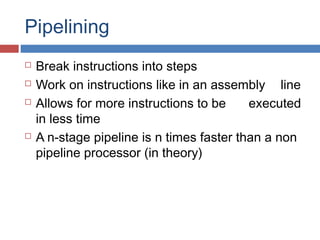
 Break instructions into steps
 Work on instructions like in an assembly line
 Allows for more instructions to be executed
in less time
 A n-stage pipeline is n times faster than a non
pipeline processor (in theory)
5
What is Pipelining?
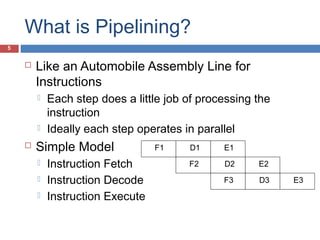
 Like an Automobile Assembly Line for
Instructions
 Each step does a little job of processing the
instruction
 Ideally each step operates in parallel
 Simple Model
 Instruction Fetch
 Instruction Decode
 Instruction Execute
F1 D1 E1
F2 D2 E2
F3 D3 E3
pipeline
 It is technique of decomposing a sequential
process into suboperation, with each
suboperation completed in dedicated segment.
 Pipeline is commonly known as an assembly
line operation.
 It is similar like assembly line of car
manufacturing.
 First station in an assembly line set up a
chasis, next station is installing the engine,
another group of workers fitting the body.
Pipeline Stages
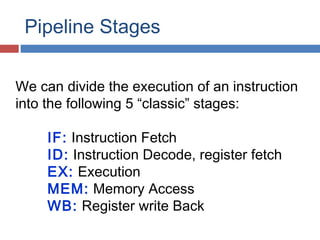
We can divide the execution of an instruction
into the following 5 “classic” stages:
IF: Instruction Fetch
ID: Instruction Decode, register fetch
EX: Execution
MEM: Memory Access
WB: Register write Back
RISC Pipeline Stages
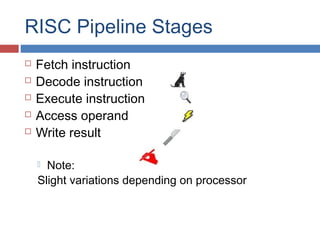
 Fetch instruction
 Decode instruction
 Execute instruction
 Access operand
 Write result
 Note:
Slight variations depending on processor
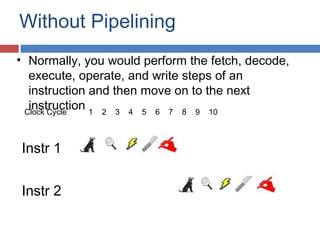
Without Pipelining
Instr 1
Instr 2
Clock Cycle 1 2 3 4 5 6 7 8 9 10
• Normally, you would perform the fetch, decode,
execute, operate, and write steps of an
instruction and then move on to the next
instruction
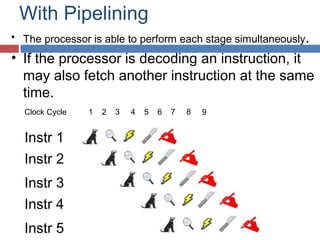
With Pipelining
Clock Cycle 1 2 3 4 5 6 7 8 9
Instr 1
Instr 2
Instr 3
Instr 4
Instr 5
• The processor is able to perform each stage simultaneously.
• If the processor is decoding an instruction, it
may also fetch another instruction at the same
time.
Pipeline (cont.)
 Length of pipeline depends on the longest
step
 Thus in RISC, all instructions were made to
be the same length
 Each stage takes 1 clock cycle
 In theory, an instruction should be finished
each clock cycle
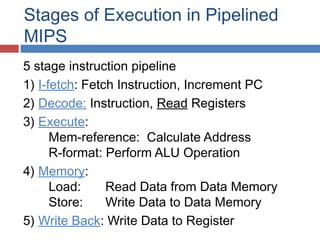
Stages of Execution in Pipelined
MIPS
5 stage instruction pipeline
1) I-fetch: Fetch Instruction, Increment PC
2) Decode: Instruction, Read Registers
3) Execute:
Mem-reference: Calculate Address
R-format: Perform ALU Operation
4) Memory:
Load: Read Data from Data Memory
Store: Write Data to Data Memory
5) Write Back: Write Data to Register
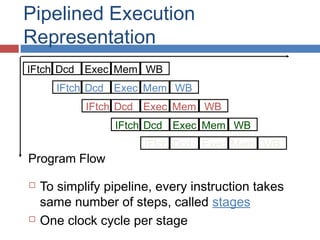
Pipelined Execution
Representation
 To simplify pipeline, every instruction takes
same number of steps, called stages
 One clock cycle per stage
IFtch Dcd Exec Mem WB
Program Flow
Pipeline Problem
 Problem: An instruction may need to wait for
the result of another instruction
Pipeline Solution :
 Solution: Compiler may recognize which
instructions are dependent or independent of
the current instruction, and rearrange them to
run the independent one first
How to make pipelines faster
 Superpipelining
 Divide the stages of pipelining into more stages
 Ex: Split “fetch instruction” stage into two
stages
Super duper pipelining
Super scalar pipelining
 Run multiple pipelines in parallel
Automated consolidation of data from many
sources,
Dynamic pipeline

Dynamic pipeline: Uses buffers to hold
instruction bits in case a
dependent instruction stalls
Pipelining
Lessons
 Pipelining doesn’t help latency (execution time)
of single task, it helps throughput of entire
workload
 Multiple tasks operating simultaneously using
different resources
 Po te ntialspeedup = Number of pipe stages
 Time to “fill” pipeline and time to “drain” it
reduces speedup
 Pipeline rate limited by slowest pipeline stage
 Unbalanced lengths of pipe stages also reduces
speedup
Performance limitations
 Imbalance among pipe stages
 limits cycle time to slowest stage
 Pipelining overhead
 Pipeline register delay
 Clock skew
 Clock cycle > clock skew + latch overhead
 Hazards
Pipeline Hazards
There are situations, called hazards, that prevent
the next instruction in the instruction stream
from executing during its designated cycle
There are three classes of hazards
Structural hazard
Data hazard
Branch hazard
 Structural Hazards. They arise from resource conflicts when the hardware cannot support all
possible combinations of instructions in simultaneous overlapped execution. 
 Data Hazards. They arise when an instruction depends on the result of a previous instruction
in a way that is exposed by the overlapping of instructions in the pipeline. 
 Control Hazards.They arise from the pipelining of branches and other instructions
that change the PC.
22
What Makes Pipelining Hard?
Power failing,
Arithmetic overflow,
I/O device request,
OS call,
Page fault
Pipeline Hazards
Structural hazard
Resource conflicts when the hardware cannot support
all possible combination of instructions simultaneously
Data hazard
An instruction depends on the results of a previous
instruction
Branch hazard
Instructions that change the PC
Structural hazard
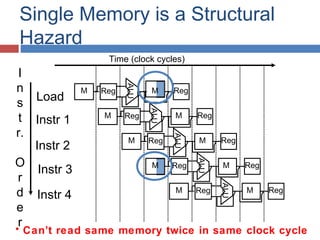
Some pipeline processors have shared a single-
memory pipeline for data and instructions
M
Single Memory is a Structural
Hazard
Load
Instr 1
Instr 2
Instr 3
Instr 4
ALU
M Reg M Reg
ALU
M Reg M Reg
ALU
M Reg M Reg
ALU
Reg M Reg
ALU
M Reg M Reg
• Can’t read same memory twice in same clock cycle
I
n
s
t
r.
O
r
d
e
r
Time (clock cycles)
Structural hazard
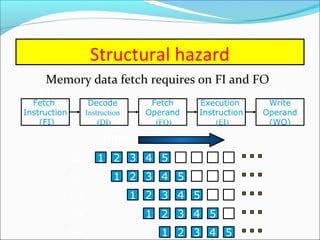
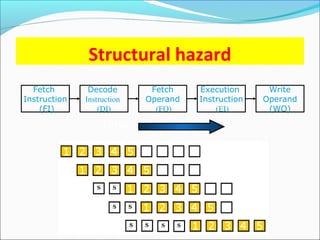
Memory data fetch requires on FI and FO
Fetch
Instruction
(FI)
Fetch
Operand
(FO)
Decode
Instruction
(DI)
Write
Operand
(WO)
Execution
Instruction
(EI)
S3 S4S1 S2 S5
1 2 3 4 98765S1
S2
S5
S3
S4
1 2 3 4 8765
1 2 3 4 765
1 2 3 4 65
1 2 3 4 5
Time
Structural hazard
To solve this hazard, we “stall” the pipeline until the
resource is freed
A stall is commonly called pipeline bubble, since it
floats through the pipeline taking space but carry no
useful work
Structural Hazards limit
performance
 Example: if 1.3 memory accesses per
instruction (30% of instructions execute
loads and stores)
and only one memory access per cycle then
 Average CPI ≥ 1.3
 Otherwise datapath resource is more than
100% utilized
Structural Hazard Solution: Add
more Hardware
Structural hazard
Fetch
Instruction
(FI)
Fetch
Operand
(FO)
Decode
Instruction
(DI)
Write
Operand
(WO)
Execution
Instruction
(EI)
Time
Data hazard
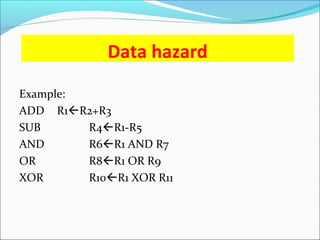
Example:
ADD R1R2+R3
SUB R4R1-R5
AND R6R1 AND R7
OR R8R1 OR R9
XOR R10R1 XOR R11
Data hazard
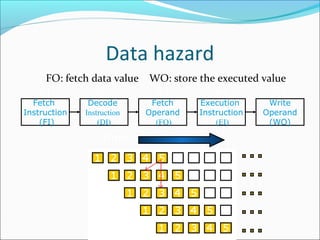
FO: fetch data value WO: store the executed value
Fetch
Instruction
(FI)
Fetch
Operand
(FO)
Decode
Instruction
(DI)
Write
Operand
(WO)
Execution
Instruction
(EI)
S3 S4S1 S2 S5
Time
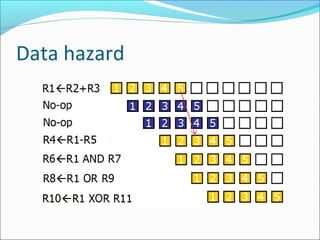
Data hazard
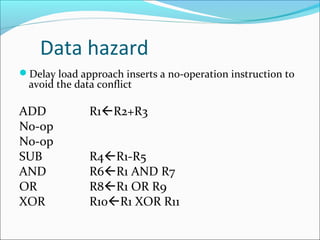
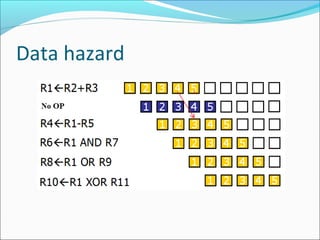
Delay load approach inserts a no-operation instruction to
avoid the data conflict
ADD R1R2+R3
No-op
No-op
SUB R4R1-R5
AND R6R1 AND R7
OR R8R1 OR R9
XOR R10R1 XOR R11
Data hazard
Data hazard
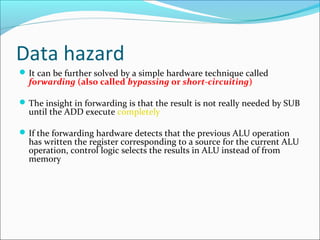
It can be further solved by a simple hardware technique called
forwarding (also called bypassing or short-circuiting)
The insight in forwarding is that the result is not really needed by SUB
until the ADD execute completely
If the forwarding hardware detects that the previous ALU operation
has written the register corresponding to a source for the current ALU
operation, control logic selects the results in ALU instead of from
memory
Data hazard
36
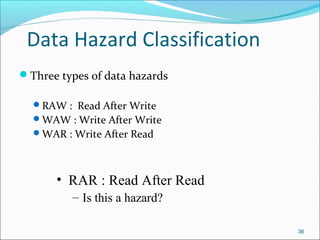
Data Hazard Classification
Three types of data hazards
RAW : Read After Write
WAW : Write After Write
WAR : Write After Read
• RAR : Read After Read
– Is this a hazard?
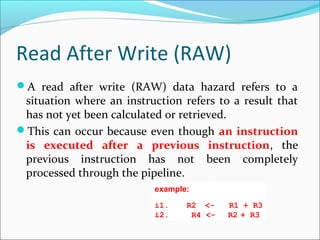
Read After Write (RAW)
A read after write (RAW) data hazard refers to a
situation where an instruction refers to a result that
has not yet been calculated or retrieved.
This can occur because even though an instruction
is executed after a previous instruction, the
previous instruction has not been completely
processed through the pipeline.
example:
i1.  R2  <- R1 + R3
i2. R4 <-  R2 + R3
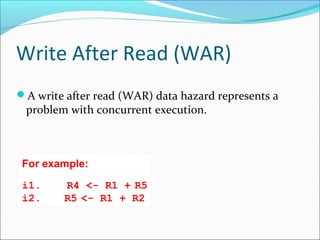
Write After Read (WAR)
A write after read (WAR) data hazard represents a
problem with concurrent execution.
For example:
i1. R4 <- R1 + R5
i2.  R5 <- R1 + R2
Write After Write (WAW
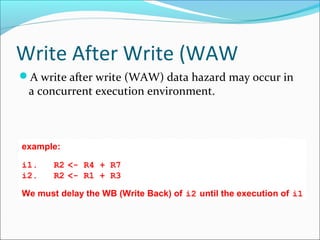
A write after write (WAW) data hazard may occur in
a concurrent execution environment.
example:
i1.  R2 <- R4 + R7
i2.  R2 <- R1 + R3
We must delay the WB (Write Back) of i2 until the execution of i1
Branch hazards
Branch hazards can cause a greater performance
loss for pipelines
When a branch instruction is executed, it may or
may not change the PC
If a branch changes the PC to its target
address, it is a taken branch Otherwise, it is
untaken
Branch hazards
There are FOUR schemes to handle branch hazards
Freeze scheme
Predict-untaken scheme
Predict-taken scheme
Delayed branch
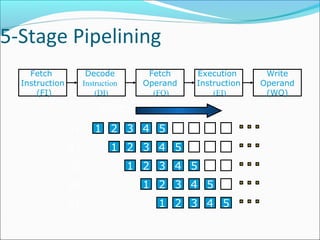
5-Stage Pipelining
Fetch
Instruction
(FI)
Fetch
Operand
(FO)
Decode
Instruction
(DI)
Write
Operand
(WO)
Execution
Instruction
(EI)
1 2 3 4 98765S1
S2
S5
S3
S4
1 2 3 4 8765
1 2 3 4 765
1 2 3 4 65
1 2 3 4 5
Time
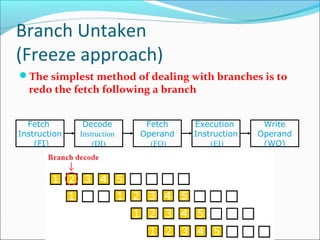
Branch Untaken
(Freeze approach)
The simplest method of dealing with branches is to
redo the fetch following a branch
Fetch
Instruction
(FI)
Fetch
Operand
(FO)
Decode
Instruction
(DI)
Write
Operand
(WO)
Execution
Instruction
(EI)
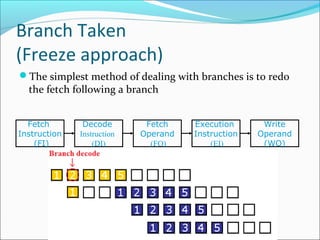
Branch Taken
(Freeze approach)
The simplest method of dealing with branches is to redo
the fetch following a branch
Fetch
Instruction
(FI)
Fetch
Operand
(FO)
Decode
Instruction
(DI)
Write
Operand
(WO)
Execution
Instruction
(EI)
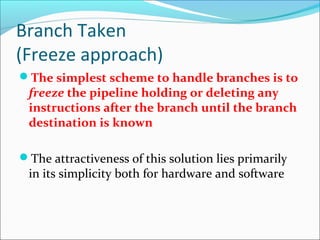
Branch Taken
(Freeze approach)
The simplest scheme to handle branches is to
freeze the pipeline holding or deleting any
instructions after the branch until the branch
destination is known
The attractiveness of this solution lies primarily
in its simplicity both for hardware and software
Branch Hazards
(Predicted-untaken)
A higher performance, and only slightly more
complex, scheme is to treat every branch as not taken
It is implemented by continuing to fetch instructions as if
the branch were normal instruction
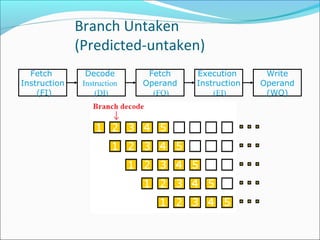
The pipeline looks the same if the branch is not
taken
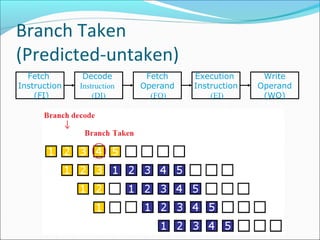
If the branch is taken, we need to redo the fetch
instruction
Branch Untaken
(Predicted-untaken)
Fetch
Instruction
(FI)
Fetch
Operand
(FO)
Decode
Instruction
(DI)
Write
Operand
(WO)
Execution
Instruction
(EI)
Time
Branch Taken
(Predicted-untaken)
Fetch
Instruction
(FI)
Fetch
Operand
(FO)
Decode
Instruction
(DI)
Write
Operand
(WO)
Execution
Instruction
(EI)
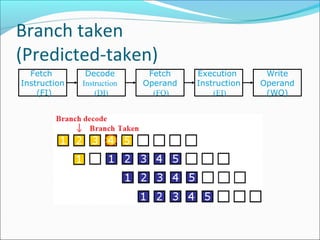
Branch Taken
(Predicted-taken)
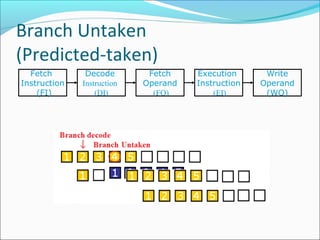
An alternative scheme is to treat every branch as
taken
As soon as the branch is decoded and the target
address is computed, we assume the branch to be
taken and begin fetching and executing the
target
Branch Untaken
(Predicted-taken)
Fetch
Instruction
(FI)
Fetch
Operand
(FO)
Decode
Instruction
(DI)
Write
Operand
(WO)
Execution
Instruction
(EI)
Branch taken
(Predicted-taken)
Fetch
Instruction
(FI)
Fetch
Operand
(FO)
Decode
Instruction
(DI)
Write
Operand
(WO)
Execution
Instruction
(EI)
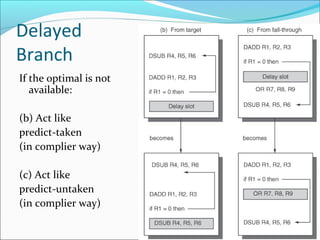
Delayed Branch
A fourth scheme in use in some processors is
called delayed branch
It is done in compiler time. It modifies the
code
The general format is:
branch instruction
Delay slot
branch target if taken
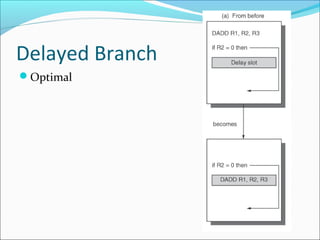
Delayed Branch
Optimal
Delayed
Branch
If the optimal is not
available:
(b) Act like
predict-taken
(in complier way)
(c) Act like
predict-untaken
(in complier way)
Delayed Branch
Delayed Branch is limited by
(1) the restrictions on the instructions that are
scheduled into the delay slots (for example:
another branch cannot be scheduled)
(2) our ability to predict at compile time whether a
branch is likely to be taken or not
Branch Prediction
A pipeline with branch prediction uses some
additional logic to guess the outcome of a conditional
branch instruction before it is executed
Branch Prediction
Various techniques can be used to predict whether a
branch will be taken or not:
Prediction never taken
Prediction always taken
Prediction by opcode
Branch history table
The first three approaches are static: they do not
depend on the execution history up to the time of the
conditional branch instruction. The last approach is
dynamic: they depend on the execution history.
58
Important Pipeline
Characteristics
 Latency
 Time required for an instruction to propagate through
the pipeline
 Based on the Number of Stages * Cycle Time
 Dominant if there are lots of exceptions / hazards, i.e.
we have to constantly be re-filling the pipeline
 Throughput
 The rate at which instructions can start and finish
 Dominant if there are few exceptions and hazards, i.e.
the pipeline stays mostly full
 Note we need an increased memory bandwidth
over the non-pipelined processor
59
Exceptions
 An exception is when the normal execution
order of instructions is changed. This has many
names:
 Interrupt
 Fault
 Exception
 Examples:
 I/O device request
 Invoking OS service
 Page Fault
 Malfunction
 Undefined instruction
 Overflow/Arithmetic Anomaly
 Etc!
Eliminating hazards- Pipeline
bubbling
 Bubbling the pipe line , also known as
a pipe line bre ak or a pipe line stall, is a method
for preventing data, structural, and branch
hazards from occurring. 
 instructions are fetched, control logic
determines whether a hazard could/will occur.
If this is true, then the control logic inserts 
NOPs into the pipeline. Thus, before the next
instruction (which would cause the hazard) is
executed, the previous one will have had
sufficient time to complete and prevent the
No: of NOPs = stages in pipeline
 If the number of NOPs is equal to the number
of stages in the pipeline, the processor has
been cleared of all instructions and can
proceed free from hazards. All forms of stalling
introduce a delay before the processor can
resume execution.

Pipeline hazard

  • 3.
  • 4.
    Pipelining  Break instructionsinto steps  Work on instructions like in an assembly line  Allows for more instructions to be executed in less time  A n-stage pipeline is n times faster than a non pipeline processor (in theory)
  • 5.
    5 What is Pipelining? Like an Automobile Assembly Line for Instructions  Each step does a little job of processing the instruction  Ideally each step operates in parallel  Simple Model  Instruction Fetch  Instruction Decode  Instruction Execute F1 D1 E1 F2 D2 E2 F3 D3 E3
  • 6.
    pipeline  It istechnique of decomposing a sequential process into suboperation, with each suboperation completed in dedicated segment.  Pipeline is commonly known as an assembly line operation.  It is similar like assembly line of car manufacturing.  First station in an assembly line set up a chasis, next station is installing the engine, another group of workers fitting the body.
  • 7.
    Pipeline Stages We candivide the execution of an instruction into the following 5 “classic” stages: IF: Instruction Fetch ID: Instruction Decode, register fetch EX: Execution MEM: Memory Access WB: Register write Back
  • 8.
    RISC Pipeline Stages Fetch instruction  Decode instruction  Execute instruction  Access operand  Write result  Note: Slight variations depending on processor
  • 9.
    Without Pipelining Instr 1 Instr2 Clock Cycle 1 2 3 4 5 6 7 8 9 10 • Normally, you would perform the fetch, decode, execute, operate, and write steps of an instruction and then move on to the next instruction
  • 10.
    With Pipelining Clock Cycle1 2 3 4 5 6 7 8 9 Instr 1 Instr 2 Instr 3 Instr 4 Instr 5 • The processor is able to perform each stage simultaneously. • If the processor is decoding an instruction, it may also fetch another instruction at the same time.
  • 11.
    Pipeline (cont.)  Lengthof pipeline depends on the longest step  Thus in RISC, all instructions were made to be the same length  Each stage takes 1 clock cycle  In theory, an instruction should be finished each clock cycle
  • 12.
    Stages of Executionin Pipelined MIPS 5 stage instruction pipeline 1) I-fetch: Fetch Instruction, Increment PC 2) Decode: Instruction, Read Registers 3) Execute: Mem-reference: Calculate Address R-format: Perform ALU Operation 4) Memory: Load: Read Data from Data Memory Store: Write Data to Data Memory 5) Write Back: Write Data to Register
  • 13.
    Pipelined Execution Representation  Tosimplify pipeline, every instruction takes same number of steps, called stages  One clock cycle per stage IFtch Dcd Exec Mem WB IFtch Dcd Exec Mem WB IFtch Dcd Exec Mem WB IFtch Dcd Exec Mem WB IFtch Dcd Exec Mem WB Program Flow
  • 14.
    Pipeline Problem  Problem:An instruction may need to wait for the result of another instruction
  • 15.
    Pipeline Solution : Solution: Compiler may recognize which instructions are dependent or independent of the current instruction, and rearrange them to run the independent one first
  • 16.
    How to makepipelines faster  Superpipelining  Divide the stages of pipelining into more stages  Ex: Split “fetch instruction” stage into two stages Super duper pipelining Super scalar pipelining  Run multiple pipelines in parallel Automated consolidation of data from many sources,
  • 17.
    Dynamic pipeline  Dynamic pipeline:Uses buffers to hold instruction bits in case a dependent instruction stalls
  • 18.
    Pipelining Lessons  Pipelining doesn’thelp latency (execution time) of single task, it helps throughput of entire workload  Multiple tasks operating simultaneously using different resources  Po te ntialspeedup = Number of pipe stages  Time to “fill” pipeline and time to “drain” it reduces speedup  Pipeline rate limited by slowest pipeline stage  Unbalanced lengths of pipe stages also reduces speedup
  • 19.
    Performance limitations  Imbalanceamong pipe stages  limits cycle time to slowest stage  Pipelining overhead  Pipeline register delay  Clock skew  Clock cycle > clock skew + latch overhead  Hazards
  • 21.
    Pipeline Hazards There aresituations, called hazards, that prevent the next instruction in the instruction stream from executing during its designated cycle There are three classes of hazards Structural hazard Data hazard Branch hazard  Structural Hazards. They arise from resource conflicts when the hardware cannot support all possible combinations of instructions in simultaneous overlapped execution.   Data Hazards. They arise when an instruction depends on the result of a previous instruction in a way that is exposed by the overlapping of instructions in the pipeline.   Control Hazards.They arise from the pipelining of branches and other instructions that change the PC.
  • 22.
    22 What Makes PipeliningHard? Power failing, Arithmetic overflow, I/O device request, OS call, Page fault
  • 23.
    Pipeline Hazards Structural hazard Resourceconflicts when the hardware cannot support all possible combination of instructions simultaneously Data hazard An instruction depends on the results of a previous instruction Branch hazard Instructions that change the PC
  • 24.
    Structural hazard Some pipelineprocessors have shared a single- memory pipeline for data and instructions
  • 25.
    M Single Memory isa Structural Hazard Load Instr 1 Instr 2 Instr 3 Instr 4 ALU M Reg M Reg ALU M Reg M Reg ALU M Reg M Reg ALU Reg M Reg ALU M Reg M Reg • Can’t read same memory twice in same clock cycle I n s t r. O r d e r Time (clock cycles)
  • 26.
    Structural hazard Memory datafetch requires on FI and FO Fetch Instruction (FI) Fetch Operand (FO) Decode Instruction (DI) Write Operand (WO) Execution Instruction (EI) S3 S4S1 S2 S5 1 2 3 4 98765S1 S2 S5 S3 S4 1 2 3 4 8765 1 2 3 4 765 1 2 3 4 65 1 2 3 4 5 Time
  • 27.
    Structural hazard To solvethis hazard, we “stall” the pipeline until the resource is freed A stall is commonly called pipeline bubble, since it floats through the pipeline taking space but carry no useful work
  • 28.
    Structural Hazards limit performance Example: if 1.3 memory accesses per instruction (30% of instructions execute loads and stores) and only one memory access per cycle then  Average CPI ≥ 1.3  Otherwise datapath resource is more than 100% utilized Structural Hazard Solution: Add more Hardware
  • 29.
  • 30.
    Data hazard Example: ADD R1R2+R3 SUBR4R1-R5 AND R6R1 AND R7 OR R8R1 OR R9 XOR R10R1 XOR R11
  • 31.
    Data hazard FO: fetchdata value WO: store the executed value Fetch Instruction (FI) Fetch Operand (FO) Decode Instruction (DI) Write Operand (WO) Execution Instruction (EI) S3 S4S1 S2 S5 Time
  • 32.
    Data hazard Delay loadapproach inserts a no-operation instruction to avoid the data conflict ADD R1R2+R3 No-op No-op SUB R4R1-R5 AND R6R1 AND R7 OR R8R1 OR R9 XOR R10R1 XOR R11
  • 33.
  • 34.
    Data hazard It canbe further solved by a simple hardware technique called forwarding (also called bypassing or short-circuiting) The insight in forwarding is that the result is not really needed by SUB until the ADD execute completely If the forwarding hardware detects that the previous ALU operation has written the register corresponding to a source for the current ALU operation, control logic selects the results in ALU instead of from memory
  • 35.
  • 36.
    36 Data Hazard Classification Threetypes of data hazards RAW : Read After Write WAW : Write After Write WAR : Write After Read • RAR : Read After Read – Is this a hazard?
  • 37.
    Read After Write(RAW) A read after write (RAW) data hazard refers to a situation where an instruction refers to a result that has not yet been calculated or retrieved. This can occur because even though an instruction is executed after a previous instruction, the previous instruction has not been completely processed through the pipeline. example: i1.  R2  <- R1 + R3 i2. R4 <-  R2 + R3
  • 38.
    Write After Read(WAR) A write after read (WAR) data hazard represents a problem with concurrent execution. For example: i1. R4 <- R1 + R5 i2.  R5 <- R1 + R2
  • 39.
    Write After Write(WAW A write after write (WAW) data hazard may occur in a concurrent execution environment. example: i1.  R2 <- R4 + R7 i2.  R2 <- R1 + R3 We must delay the WB (Write Back) of i2 until the execution of i1
  • 40.
    Branch hazards Branch hazardscan cause a greater performance loss for pipelines When a branch instruction is executed, it may or may not change the PC If a branch changes the PC to its target address, it is a taken branch Otherwise, it is untaken
  • 41.
    Branch hazards There areFOUR schemes to handle branch hazards Freeze scheme Predict-untaken scheme Predict-taken scheme Delayed branch
  • 42.
  • 43.
    Branch Untaken (Freeze approach) Thesimplest method of dealing with branches is to redo the fetch following a branch Fetch Instruction (FI) Fetch Operand (FO) Decode Instruction (DI) Write Operand (WO) Execution Instruction (EI)
  • 44.
    Branch Taken (Freeze approach) Thesimplest method of dealing with branches is to redo the fetch following a branch Fetch Instruction (FI) Fetch Operand (FO) Decode Instruction (DI) Write Operand (WO) Execution Instruction (EI)
  • 45.
    Branch Taken (Freeze approach) Thesimplest scheme to handle branches is to freeze the pipeline holding or deleting any instructions after the branch until the branch destination is known The attractiveness of this solution lies primarily in its simplicity both for hardware and software
  • 46.
    Branch Hazards (Predicted-untaken) A higherperformance, and only slightly more complex, scheme is to treat every branch as not taken It is implemented by continuing to fetch instructions as if the branch were normal instruction The pipeline looks the same if the branch is not taken If the branch is taken, we need to redo the fetch instruction
  • 47.
  • 48.
  • 49.
    Branch Taken (Predicted-taken) An alternativescheme is to treat every branch as taken As soon as the branch is decoded and the target address is computed, we assume the branch to be taken and begin fetching and executing the target
  • 50.
  • 51.
  • 52.
    Delayed Branch A fourthscheme in use in some processors is called delayed branch It is done in compiler time. It modifies the code The general format is: branch instruction Delay slot branch target if taken
  • 53.
  • 54.
    Delayed Branch If the optimalis not available: (b) Act like predict-taken (in complier way) (c) Act like predict-untaken (in complier way)
  • 55.
    Delayed Branch Delayed Branchis limited by (1) the restrictions on the instructions that are scheduled into the delay slots (for example: another branch cannot be scheduled) (2) our ability to predict at compile time whether a branch is likely to be taken or not
  • 56.
    Branch Prediction A pipelinewith branch prediction uses some additional logic to guess the outcome of a conditional branch instruction before it is executed
  • 57.
    Branch Prediction Various techniquescan be used to predict whether a branch will be taken or not: Prediction never taken Prediction always taken Prediction by opcode Branch history table The first three approaches are static: they do not depend on the execution history up to the time of the conditional branch instruction. The last approach is dynamic: they depend on the execution history.
  • 58.
    58 Important Pipeline Characteristics  Latency Time required for an instruction to propagate through the pipeline  Based on the Number of Stages * Cycle Time  Dominant if there are lots of exceptions / hazards, i.e. we have to constantly be re-filling the pipeline  Throughput  The rate at which instructions can start and finish  Dominant if there are few exceptions and hazards, i.e. the pipeline stays mostly full  Note we need an increased memory bandwidth over the non-pipelined processor
  • 59.
    59 Exceptions  An exceptionis when the normal execution order of instructions is changed. This has many names:  Interrupt  Fault  Exception  Examples:  I/O device request  Invoking OS service  Page Fault  Malfunction  Undefined instruction  Overflow/Arithmetic Anomaly  Etc!
  • 60.
    Eliminating hazards- Pipeline bubbling Bubbling the pipe line , also known as a pipe line bre ak or a pipe line stall, is a method for preventing data, structural, and branch hazards from occurring.   instructions are fetched, control logic determines whether a hazard could/will occur. If this is true, then the control logic inserts  NOPs into the pipeline. Thus, before the next instruction (which would cause the hazard) is executed, the previous one will have had sufficient time to complete and prevent the
  • 61.
    No: of NOPs= stages in pipeline  If the number of NOPs is equal to the number of stages in the pipeline, the processor has been cleared of all instructions and can proceed free from hazards. All forms of stalling introduce a delay before the processor can resume execution.