Why do we need
to use Asset
Framework?
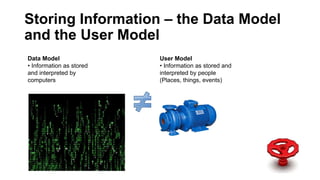
Data Model
• Information as stored
and interpreted by
computers
User Model
• Information as stored and
interpreted by people
(Places, things, events)
Storing Information – the Data Model
and the User Model
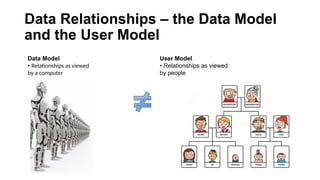
Data Model
• Relationships as viewed
by a computer
User Model
• Relationships as viewed
by people
Data Relationships – the Data Model
and the User Model
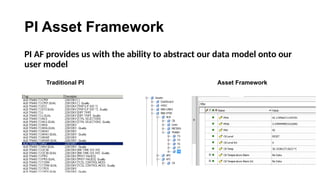
PI Asset Framework
PI AF provides us with the ability to abstract our data model onto our
user model
Traditional PI Asset Framework
What is the
Asset
Framework?
What is the Asset Framework?
• Is a Hierarchical structure focussed on assets.
• Puts structure around the flat PI tag database.
• Brings data in from other systems such as:
• Maintenance data
• Spatial data
• Condition assessment data
• Carries out simple and complex calculations company wide such as:
• Asset health indications
• Performance analytics and models
• Drives your PI Webpart / SharePoint portal using Asset Framework
What is Asset Framework (cont’d)
• Supports Rollups for example asset health
• Allows users to find data within ProcessBook, Datalink, SharePoint,
Coresight, etc.
• Now includes Event frames. Examples include:
• Turbine start-ups
• Consent issues
• Excursions
• Trips
• Market
• Is template driven. E.g. A pump, a transformer, PID loop, a well
What is Asset Framework (cont’d)
• Drives PI Notifications
• Provides the glue for other custom applications
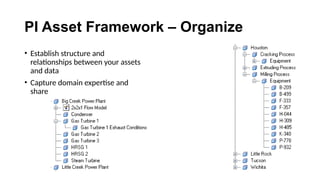
PI Asset Framework – Organize
• Establish structure and
relationships between your assets
and data
• Capture domain expertise and
share
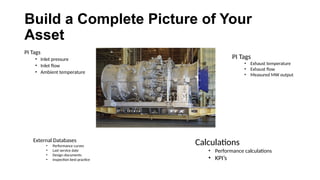
Build a Complete Picture of Your
Asset
PI Tags
• Inlet pressure
• Inlet flow
• Ambient temperature
External Databases
• Performance curves
• Last service date
• Design documents
• Inspection best practice
Calculations
• Performance calculations
• KPI’s
PI Tags
• Exhaust temperature
• Exhaust flow
• Measured MW output
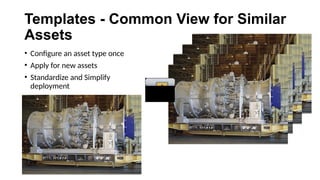
Templates - Common View for Similar
Assets
• Configure an asset type once
• Apply for new assets
• Standardize and Simplify
deployment
• Common asset models and relationships
• Standardization across your entire enterprise
• Deploy from configured templates
• Work with your assets and not points/tags
• No need to memorize point/tag names
• Quickly and efficiently find the data you need
• Reference asset properties to different data sources
• Search and find information across all your data sources
Benefits of an Asset Centric PI System
• Combine disparate data in analyses and reports
• Calculate KPI
• Compare actual versus estimate
• Build your solution once and reuse on all similar assets
• Element Relative Display in PI ProcessBook and PI WebParts
• Empower other PI System components
• PI Notifications
• Event Frames
Benefits of an Asset Centric PI System
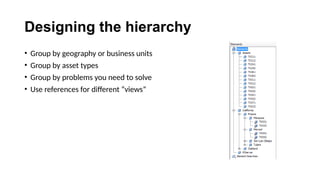
Designing the hierarchy
• Group by geography or business units
• Group by asset types
• Group by problems you need to solve
• Use references for different “views”
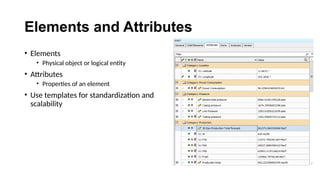
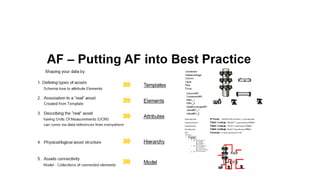
Elements and Attributes
• Elements
• Physical object or logical entity
• Attributes
• Properties of an element
• Use templates for standardization and
scalability
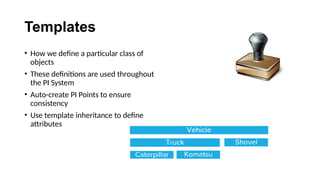
Templates
• How we define a particular class of
objects
• These definitions are used throughout
the PI System
• Auto-create PI Points to ensure
consistency
• Use template inheritance to define
attributes
PI AF implementation in general implementation PI Aveva

PI AF implementation in general implementation PI Aveva

  • 2.
    Why do weneed to use Asset Framework?
  • 3.
    Data Model • Informationas stored and interpreted by computers User Model • Information as stored and interpreted by people (Places, things, events) Storing Information – the Data Model and the User Model
  • 4.
    Data Model • Relationshipsas viewed by a computer User Model • Relationships as viewed by people Data Relationships – the Data Model and the User Model
  • 5.
    PI Asset Framework PIAF provides us with the ability to abstract our data model onto our user model Traditional PI Asset Framework
  • 6.
  • 7.
    What is theAsset Framework? • Is a Hierarchical structure focussed on assets. • Puts structure around the flat PI tag database. • Brings data in from other systems such as: • Maintenance data • Spatial data • Condition assessment data • Carries out simple and complex calculations company wide such as: • Asset health indications • Performance analytics and models • Drives your PI Webpart / SharePoint portal using Asset Framework
  • 8.
    What is AssetFramework (cont’d) • Supports Rollups for example asset health • Allows users to find data within ProcessBook, Datalink, SharePoint, Coresight, etc. • Now includes Event frames. Examples include: • Turbine start-ups • Consent issues • Excursions • Trips • Market • Is template driven. E.g. A pump, a transformer, PID loop, a well
  • 9.
    What is AssetFramework (cont’d) • Drives PI Notifications • Provides the glue for other custom applications
  • 10.
    PI Asset Framework– Organize • Establish structure and relationships between your assets and data • Capture domain expertise and share
  • 11.
    Build a CompletePicture of Your Asset PI Tags • Inlet pressure • Inlet flow • Ambient temperature External Databases • Performance curves • Last service date • Design documents • Inspection best practice Calculations • Performance calculations • KPI’s PI Tags • Exhaust temperature • Exhaust flow • Measured MW output
  • 12.
    Templates - CommonView for Similar Assets • Configure an asset type once • Apply for new assets • Standardize and Simplify deployment
  • 13.
    • Common assetmodels and relationships • Standardization across your entire enterprise • Deploy from configured templates • Work with your assets and not points/tags • No need to memorize point/tag names • Quickly and efficiently find the data you need • Reference asset properties to different data sources • Search and find information across all your data sources Benefits of an Asset Centric PI System
  • 14.
    • Combine disparatedata in analyses and reports • Calculate KPI • Compare actual versus estimate • Build your solution once and reuse on all similar assets • Element Relative Display in PI ProcessBook and PI WebParts • Empower other PI System components • PI Notifications • Event Frames Benefits of an Asset Centric PI System
  • 15.
    Designing the hierarchy •Group by geography or business units • Group by asset types • Group by problems you need to solve • Use references for different “views”
  • 16.
    Elements and Attributes •Elements • Physical object or logical entity • Attributes • Properties of an element • Use templates for standardization and scalability
  • 17.
    Templates • How wedefine a particular class of objects • These definitions are used throughout the PI System • Auto-create PI Points to ensure consistency • Use template inheritance to define attributes