PHP Indonesia
Saturday, 5th May 2102
Presented by:
Nur Hidayat
 Sehari-hari sebagai Software Developer di
ESQ LeadershipCenter
 Di waktu luang mencoba mencari segenggam
berlian untuk istri dan anak-anak
 Introduction to Oracle
 PHP Oracle Extensions
 InstalasiOracle Database XE
 Zend ServerVirtualBox Appliance
 Oracle DatabaseAdministration
 Interacting with Oracle Database XE
 Programming PHP+Oracle
 1977,Larry Ellison founded Software Development Laboratories (SDL)
 Changed name in 1979 to Relational Software Inc. (RSI),
 1979 created the first commercial SQL-based relational database.
 Changed name in 1983 to Oracle Corporation.
 1983,Oracle 3 the first relational database to run on mainframes,
minicomputers, and PCs
 1988, PL/SQL, the first built-in procedural language with very high
influence from C andAda.
 1992,Oracle7, released in 1992, introduced PL/SQL stored procedures
and triggers.
 1995, the first to 64-bit database.
 1999, the database with XML support
 2001,Oracle Real ApplicationClusters (Oracle RAC)
 2003, enterprise grid computing environment.
 In late 2005, released its first full-featured, 100 percent free database
server, Oracle Database XE.
 2007,Oracle 11g, improved Manageability, diagnosability, and availability
See Also: http://www.oracle.com/technetwork/issue-archive/2007/07-jul/ o4730-
090772.html for an article summarizing the evolution of Oracle Database
 Express Edition
 Includes all feature available in Enterprise Edition
 Limited to single CPU
 Limited to 1 GB or RAM
 Limited to 4 GB (10g) or 11 GB (11g) of data
 Very simple installation
 Personal Edition
 Includes all feature available in Enterprise Edition
 Limited to 1 user
 Standard Edition One
 Limited to 2 CPU
 Minus Oracle RAC
 Standard Edition
 Limited to 4 CPU
 Support Oracle RAC
 Enterprise Edition
 No CPU Limitation
 Advanced High Availability (FlashbackTable,
Flashback Database, Data Guard, etc.)
 TimesTen, in memory database
 Berkeley DB, embedded database
 MySQL, leading free open source database
 Application Server, web server which
integrate seamlessly with oracle database
 E-Business Suite
 PeopleSoft
 JD Edwards
 .... and many more
 Oracle Extension,This extension was designed for Oracle 7 and
should be avoided since it uses a deprecated version of the Oracle
API that will not be available in future releases.
 ODBC within Windows, while ODBC provides some connection
pooling and other built-in features, it lacks access to many of
Oracle’s capabilities such as the ability to store large objects
(LOBs).
 OCI8 Extension, this extension supports most of Oracle’s Oracle
Call Interface (OCI).
 PDO Extension.This portable databaseAPI makes it easy to
change your database without changing a lot of your code.
 Database Abstraction Libraries
 ADOdb
 PEAR DB
 PEAR MDB2
 PilihanWeb Server
 XAMPP
 Zend Server
 InstalasiOracle XE diWindows
 Import ZendAppliance toVirtualBox
 Username: root
 Password: zend1234
 Konfigurasi Zend Server
 http://localhost:10081/
 KonfigurasiOracle Database XE
 /etc/init.d/oracle-xe configure
 Starting and Stopping Oracle Database
 Database and Instance
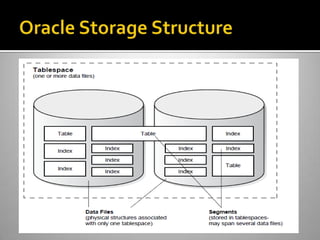
 Oracle Storage Structure
 Oracle Memory Structure
 Schemas and Users
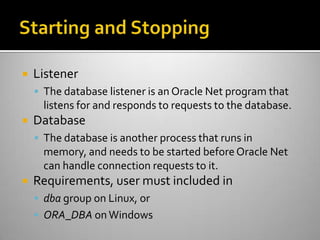
 Listener
 The database listener is an Oracle Net program that
listens for and responds to requests to the database.
 Database
 The database is another process that runs in
memory, and needs to be started beforeOracle Net
can handle connection requests to it.
 Requirements, user must included in
 dba group on Linux, or
 ORA_DBA on Windows
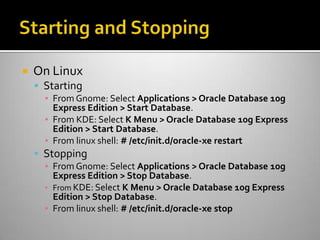
 On Linux
 Starting
▪ From Gnome: Select Applications > Oracle Database 10g
Express Edition > Start Database.
▪ From KDE: Select K Menu > Oracle Database 10g Express
Edition > Start Database.
▪ From linux shell: # /etc/init.d/oracle-xe restart
 Stopping
▪ From Gnome: Select Applications > Oracle Database 10g
Express Edition > Stop Database.
▪ From KDE: Select K Menu > Oracle Database 10g Express
Edition > Stop Database.
▪ From linux shell: # /etc/init.d/oracle-xe stop
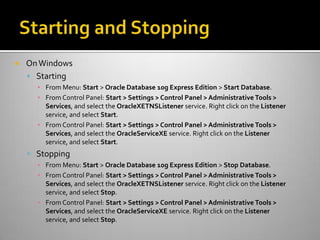
 OnWindows
 Starting
▪ From Menu: Start > Oracle Database 10g Express Edition > Start Database.
▪ From Control Panel: Start > Settings > Control Panel > Administrative Tools >
Services, and select the OracleXETNSListener service. Right click on the Listener
service, and select Start.
▪ From Control Panel: Start > Settings > Control Panel > Administrative Tools >
Services, and select the OracleServiceXE service. Right click on the Listener
service, and select Start.
 Stopping
▪ From Menu: Start > Oracle Database 10g Express Edition > Stop Database.
▪ From Control Panel: Start > Settings > Control Panel > Administrative Tools >
Services, and select the OracleXETNSListener service. Right click on the Listener
service, and select Stop.
▪ From Control Panel: Start > Settings > Control Panel > Administrative Tools >
Services, and select the OracleServiceXE service. Right click on the Listener
service, and select Stop.
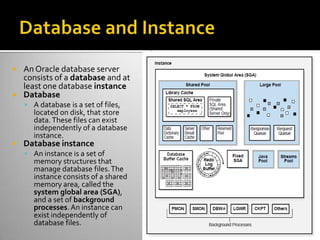
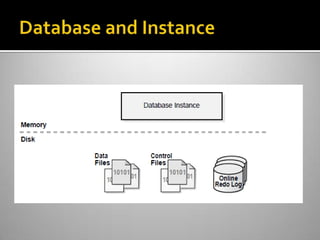
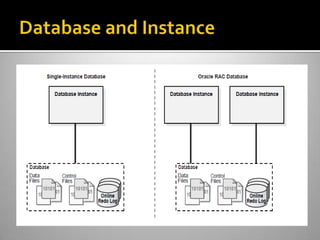
 An Oracle database server
consists of a database and at
least one database instance
 Database
 A database is a set of files,
located on disk, that store
data.These files can exist
independently of a database
instance.
 Database instance
 An instance is a set of
memory structures that
manage database files.The
instance consists of a shared
memory area, called the
system global area (SGA),
and a set of background
processes.An instance can
exist independently of
database files.
 Physical Storage Structures
 Data files
▪ Every Oracle database has one or more physical data
files, which contain all the database data.
 Control files
▪ Every Oracle database has a control file. Metadata
specifying the physical structure of the database.
 Online redo log files
▪ Every Oracle Database has an online redo log. An online
redo log is made up of redo entries (also called redo
records), which record all changes made to data.
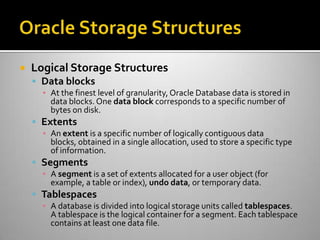
 Logical Storage Structures
 Data blocks
▪ At the finest level of granularity,Oracle Database data is stored in
data blocks. One data block corresponds to a specific number of
bytes on disk.
 Extents
▪ An extent is a specific number of logically contiguous data
blocks, obtained in a single allocation, used to store a specific type
of information.
 Segments
▪ A segment is a set of extents allocated for a user object (for
example, a table or index), undo data, or temporary data.
 Tablespaces
▪ A database is divided into logical storage units called tablespaces.
A tablespace is the logical container for a segment. Each tablespace
contains at least one data file.
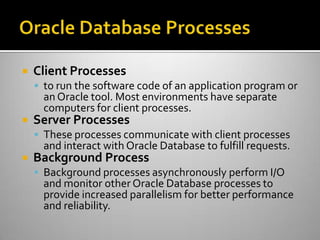
 Client Processes
 to run the software code of an application program or
an Oracle tool. Most environments have separate
computers for client processes.
 Server Processes
 These processes communicate with client processes
and interact with Oracle Database to fulfill requests.
 Background Process
 Background processes asynchronously perform I/O
and monitor other Oracle Database processes to
provide increased parallelism for better performance
and reliability.
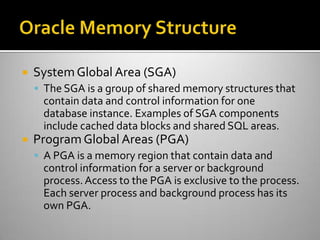
 SystemGlobal Area (SGA)
 The SGA is a group of shared memory structures that
contain data and control information for one
database instance. Examples of SGA components
include cached data blocks and shared SQL areas.
 Program Global Areas (PGA)
 A PGA is a memory region that contain data and
control information for a server or background
process.Access to the PGA is exclusive to the process.
Each server process and background process has its
own PGA.
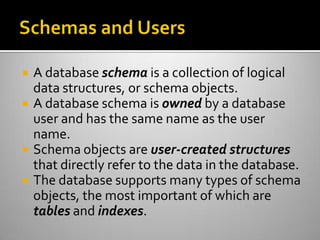
 A database schema is a collection of logical
data structures, or schema objects.
 A database schema is owned by a database
user and has the same name as the user
name.
 Schema objects are user-created structures
that directly refer to the data in the database.
 The database supports many types of schema
objects, the most important of which are
tables and indexes.
 Command Line Interface
 SQL Developer
 Application Express
 Connecting to Oracle Database
 Executing SQL Statements
 Using PL/SQL, Stored Procedure andTriggers
 Using Oracle LOB
 DatabaseTransactions
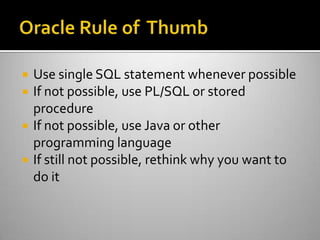
 Use single SQL statement whenever possible
 If not possible, use PL/SQL or stored
procedure
 If not possible, use Java or other
programming language
 If still not possible, rethink why you want to
do it
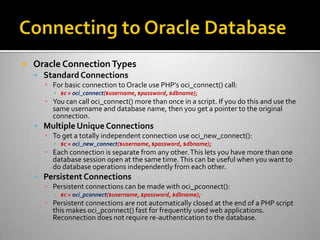
 Oracle ConnectionTypes
 Standard Connections
▪ For basic connection to Oracle use PHP’s oci_connect() call:
▪ $c = oci_connect($username, $password, $dbname);
▪ You can call oci_connect() more than once in a script. If you do this and use the
same username and database name, then you get a pointer to the original
connection.
 Multiple Unique Connections
▪ To get a totally independent connection use oci_new_connect():
▪ $c = oci_new_connect($username, $password, $dbname);
▪ Each connection is separate from any other.This lets you have more than one
database session open at the same time.This can be useful when you want to
do database operations independently from each other.
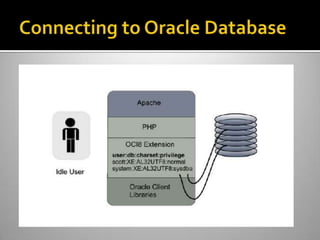
 Persistent Connections
▪ Persistent connections can be made with oci_pconnect():
▪ $c = oci_pconnect($username, $password, $dbname);
▪ Persistent connections are not automatically closed at the end of a PHP script
this makes oci_pconnect() fast for frequently used web applications.
Reconnection does not require re-authentication to the database.
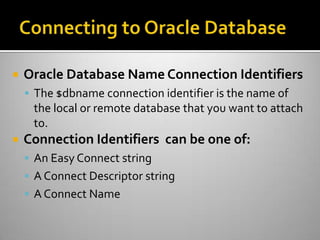
 Oracle Database Name Connection Identifiers
 The $dbname connection identifier is the name of
the local or remote database that you want to attach
to.
 Connection Identifiers can be one of:
 An Easy Connect string
 A Connect Descriptor string
 A Connect Name
 An Easy Connect string
 The Easy Connect string is JDBC-like.The Oracle 10g
syntax is:
▪ [//]host_name[:port][/service_name]
 Using Oracle 11g libraries, the enhanced 11g syntax
can be used:
▪ [//]host_name[:port][/service_name][:server_type][/instance_name]
$c = oci_connect('hr', 'welcome', 'localhost/XE');
$c = oci_connect(scott', ‘tiger', '127.0.0.1:1521/XE');
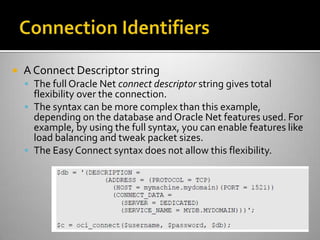
 A Connect Descriptor string
 The full Oracle Net connect descriptor string gives total
flexibility over the connection.
 The syntax can be more complex than this example,
depending on the database and Oracle Net features used. For
example, by using the full syntax, you can enable features like
load balancing and tweak packet sizes.
 The Easy Connect syntax does not allow this flexibility.
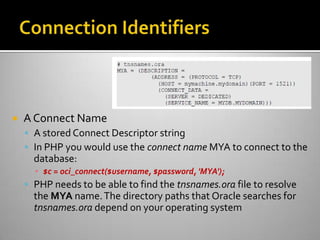
 A Connect Name
 A stored Connect Descriptor string
 In PHP you would use the connect name MYA to connect to the
database:
▪ $c = oci_connect($username, $password, 'MYA');
 PHP needs to be able to find the tnsnames.ora file to resolve
the MYA name.The directory paths that Oracle searches for
tnsnames.ora depend on your operating system
 oci_close()
 The oci_close() function works by reference
counting. Only when all PHP references to the
database connection are finished will it actually be
closed and database resources freed.
 Demo on Close.php
 The possible steps are:
 Parse: Prepares a statement for execution.
 Bind: Optionally lets you bind data values, for
example, in theWHERE clause, for better
performance and security.
 Define: Optional step allowing you to specify which
PHP variables will hold the results.This is not
commonly used.
 Execute: The database processes the statement and
buffers any results.
 Fetch: Gets any query results back from the database.
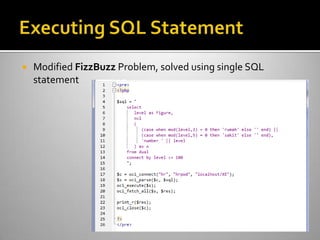
 Modified FizzBuzz Problem, solved using single SQL
statement
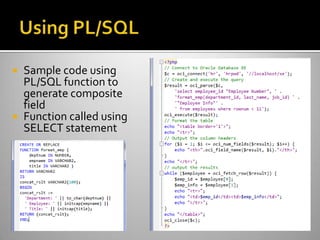
 Sample code using
PL/SQL function to
generate composite
field
 Function called using
SELECT statement
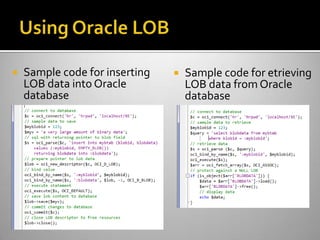
 Sample code for inserting
LOB data into Oracle
database
 Sample code for etrieving
LOB data from Oracle
database
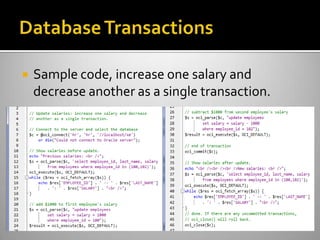
 Sample code, increase one salary and
decrease another as a single transaction.
 Oracle and Zend @Zend
 http://www.zend.com/en/company/partners/strategic/zend-oracle
 PHP Developer Center @Oracle
 http://www.oracle.com/technetwork/topics/php/whatsnew/index.html
 Oracle Database XE 11gR2
 http://www.oracle.com/technetwork/products/express-edition/downloads/index.html

PHP Oracle

  • 1.
    PHP Indonesia Saturday, 5thMay 2102 Presented by: Nur Hidayat
  • 2.
     Sehari-hari sebagaiSoftware Developer di ESQ LeadershipCenter  Di waktu luang mencoba mencari segenggam berlian untuk istri dan anak-anak
  • 3.
     Introduction toOracle  PHP Oracle Extensions  InstalasiOracle Database XE  Zend ServerVirtualBox Appliance  Oracle DatabaseAdministration  Interacting with Oracle Database XE  Programming PHP+Oracle
  • 4.
     1977,Larry Ellisonfounded Software Development Laboratories (SDL)  Changed name in 1979 to Relational Software Inc. (RSI),  1979 created the first commercial SQL-based relational database.  Changed name in 1983 to Oracle Corporation.  1983,Oracle 3 the first relational database to run on mainframes, minicomputers, and PCs  1988, PL/SQL, the first built-in procedural language with very high influence from C andAda.  1992,Oracle7, released in 1992, introduced PL/SQL stored procedures and triggers.  1995, the first to 64-bit database.  1999, the database with XML support  2001,Oracle Real ApplicationClusters (Oracle RAC)  2003, enterprise grid computing environment.  In late 2005, released its first full-featured, 100 percent free database server, Oracle Database XE.  2007,Oracle 11g, improved Manageability, diagnosability, and availability See Also: http://www.oracle.com/technetwork/issue-archive/2007/07-jul/ o4730- 090772.html for an article summarizing the evolution of Oracle Database
  • 5.
     Express Edition Includes all feature available in Enterprise Edition  Limited to single CPU  Limited to 1 GB or RAM  Limited to 4 GB (10g) or 11 GB (11g) of data  Very simple installation  Personal Edition  Includes all feature available in Enterprise Edition  Limited to 1 user
  • 6.
     Standard EditionOne  Limited to 2 CPU  Minus Oracle RAC  Standard Edition  Limited to 4 CPU  Support Oracle RAC  Enterprise Edition  No CPU Limitation  Advanced High Availability (FlashbackTable, Flashback Database, Data Guard, etc.)
  • 7.
     TimesTen, inmemory database  Berkeley DB, embedded database  MySQL, leading free open source database  Application Server, web server which integrate seamlessly with oracle database  E-Business Suite  PeopleSoft  JD Edwards  .... and many more
  • 8.
     Oracle Extension,Thisextension was designed for Oracle 7 and should be avoided since it uses a deprecated version of the Oracle API that will not be available in future releases.  ODBC within Windows, while ODBC provides some connection pooling and other built-in features, it lacks access to many of Oracle’s capabilities such as the ability to store large objects (LOBs).  OCI8 Extension, this extension supports most of Oracle’s Oracle Call Interface (OCI).  PDO Extension.This portable databaseAPI makes it easy to change your database without changing a lot of your code.  Database Abstraction Libraries  ADOdb  PEAR DB  PEAR MDB2
  • 9.
     PilihanWeb Server XAMPP  Zend Server  InstalasiOracle XE diWindows
  • 10.
     Import ZendAppliancetoVirtualBox  Username: root  Password: zend1234  Konfigurasi Zend Server  http://localhost:10081/  KonfigurasiOracle Database XE  /etc/init.d/oracle-xe configure
  • 11.
     Starting andStopping Oracle Database  Database and Instance  Oracle Storage Structure  Oracle Memory Structure  Schemas and Users
  • 12.
     Listener  Thedatabase listener is an Oracle Net program that listens for and responds to requests to the database.  Database  The database is another process that runs in memory, and needs to be started beforeOracle Net can handle connection requests to it.  Requirements, user must included in  dba group on Linux, or  ORA_DBA on Windows
  • 13.
     On Linux Starting ▪ From Gnome: Select Applications > Oracle Database 10g Express Edition > Start Database. ▪ From KDE: Select K Menu > Oracle Database 10g Express Edition > Start Database. ▪ From linux shell: # /etc/init.d/oracle-xe restart  Stopping ▪ From Gnome: Select Applications > Oracle Database 10g Express Edition > Stop Database. ▪ From KDE: Select K Menu > Oracle Database 10g Express Edition > Stop Database. ▪ From linux shell: # /etc/init.d/oracle-xe stop
  • 14.
     OnWindows  Starting ▪From Menu: Start > Oracle Database 10g Express Edition > Start Database. ▪ From Control Panel: Start > Settings > Control Panel > Administrative Tools > Services, and select the OracleXETNSListener service. Right click on the Listener service, and select Start. ▪ From Control Panel: Start > Settings > Control Panel > Administrative Tools > Services, and select the OracleServiceXE service. Right click on the Listener service, and select Start.  Stopping ▪ From Menu: Start > Oracle Database 10g Express Edition > Stop Database. ▪ From Control Panel: Start > Settings > Control Panel > Administrative Tools > Services, and select the OracleXETNSListener service. Right click on the Listener service, and select Stop. ▪ From Control Panel: Start > Settings > Control Panel > Administrative Tools > Services, and select the OracleServiceXE service. Right click on the Listener service, and select Stop.
  • 15.
     An Oracledatabase server consists of a database and at least one database instance  Database  A database is a set of files, located on disk, that store data.These files can exist independently of a database instance.  Database instance  An instance is a set of memory structures that manage database files.The instance consists of a shared memory area, called the system global area (SGA), and a set of background processes.An instance can exist independently of database files.
  • 18.
     Physical StorageStructures  Data files ▪ Every Oracle database has one or more physical data files, which contain all the database data.  Control files ▪ Every Oracle database has a control file. Metadata specifying the physical structure of the database.  Online redo log files ▪ Every Oracle Database has an online redo log. An online redo log is made up of redo entries (also called redo records), which record all changes made to data.
  • 19.
     Logical StorageStructures  Data blocks ▪ At the finest level of granularity,Oracle Database data is stored in data blocks. One data block corresponds to a specific number of bytes on disk.  Extents ▪ An extent is a specific number of logically contiguous data blocks, obtained in a single allocation, used to store a specific type of information.  Segments ▪ A segment is a set of extents allocated for a user object (for example, a table or index), undo data, or temporary data.  Tablespaces ▪ A database is divided into logical storage units called tablespaces. A tablespace is the logical container for a segment. Each tablespace contains at least one data file.
  • 21.
     Client Processes to run the software code of an application program or an Oracle tool. Most environments have separate computers for client processes.  Server Processes  These processes communicate with client processes and interact with Oracle Database to fulfill requests.  Background Process  Background processes asynchronously perform I/O and monitor other Oracle Database processes to provide increased parallelism for better performance and reliability.
  • 22.
     SystemGlobal Area(SGA)  The SGA is a group of shared memory structures that contain data and control information for one database instance. Examples of SGA components include cached data blocks and shared SQL areas.  Program Global Areas (PGA)  A PGA is a memory region that contain data and control information for a server or background process.Access to the PGA is exclusive to the process. Each server process and background process has its own PGA.
  • 23.
     A databaseschema is a collection of logical data structures, or schema objects.  A database schema is owned by a database user and has the same name as the user name.  Schema objects are user-created structures that directly refer to the data in the database.  The database supports many types of schema objects, the most important of which are tables and indexes.
  • 24.
     Command LineInterface  SQL Developer  Application Express
  • 25.
     Connecting toOracle Database  Executing SQL Statements  Using PL/SQL, Stored Procedure andTriggers  Using Oracle LOB  DatabaseTransactions
  • 26.
     Use singleSQL statement whenever possible  If not possible, use PL/SQL or stored procedure  If not possible, use Java or other programming language  If still not possible, rethink why you want to do it
  • 27.
     Oracle ConnectionTypes Standard Connections ▪ For basic connection to Oracle use PHP’s oci_connect() call: ▪ $c = oci_connect($username, $password, $dbname); ▪ You can call oci_connect() more than once in a script. If you do this and use the same username and database name, then you get a pointer to the original connection.  Multiple Unique Connections ▪ To get a totally independent connection use oci_new_connect(): ▪ $c = oci_new_connect($username, $password, $dbname); ▪ Each connection is separate from any other.This lets you have more than one database session open at the same time.This can be useful when you want to do database operations independently from each other.  Persistent Connections ▪ Persistent connections can be made with oci_pconnect(): ▪ $c = oci_pconnect($username, $password, $dbname); ▪ Persistent connections are not automatically closed at the end of a PHP script this makes oci_pconnect() fast for frequently used web applications. Reconnection does not require re-authentication to the database.
  • 29.
     Oracle DatabaseName Connection Identifiers  The $dbname connection identifier is the name of the local or remote database that you want to attach to.  Connection Identifiers can be one of:  An Easy Connect string  A Connect Descriptor string  A Connect Name
  • 30.
     An EasyConnect string  The Easy Connect string is JDBC-like.The Oracle 10g syntax is: ▪ [//]host_name[:port][/service_name]  Using Oracle 11g libraries, the enhanced 11g syntax can be used: ▪ [//]host_name[:port][/service_name][:server_type][/instance_name] $c = oci_connect('hr', 'welcome', 'localhost/XE'); $c = oci_connect(scott', ‘tiger', '127.0.0.1:1521/XE');
  • 31.
     A ConnectDescriptor string  The full Oracle Net connect descriptor string gives total flexibility over the connection.  The syntax can be more complex than this example, depending on the database and Oracle Net features used. For example, by using the full syntax, you can enable features like load balancing and tweak packet sizes.  The Easy Connect syntax does not allow this flexibility.
  • 32.
     A ConnectName  A stored Connect Descriptor string  In PHP you would use the connect name MYA to connect to the database: ▪ $c = oci_connect($username, $password, 'MYA');  PHP needs to be able to find the tnsnames.ora file to resolve the MYA name.The directory paths that Oracle searches for tnsnames.ora depend on your operating system
  • 33.
     oci_close()  Theoci_close() function works by reference counting. Only when all PHP references to the database connection are finished will it actually be closed and database resources freed.  Demo on Close.php
  • 34.
     The possiblesteps are:  Parse: Prepares a statement for execution.  Bind: Optionally lets you bind data values, for example, in theWHERE clause, for better performance and security.  Define: Optional step allowing you to specify which PHP variables will hold the results.This is not commonly used.  Execute: The database processes the statement and buffers any results.  Fetch: Gets any query results back from the database.
  • 35.
     Modified FizzBuzzProblem, solved using single SQL statement
  • 36.
     Sample codeusing PL/SQL function to generate composite field  Function called using SELECT statement
  • 37.
     Sample codefor inserting LOB data into Oracle database  Sample code for etrieving LOB data from Oracle database
  • 38.
     Sample code,increase one salary and decrease another as a single transaction.
  • 39.
     Oracle andZend @Zend  http://www.zend.com/en/company/partners/strategic/zend-oracle  PHP Developer Center @Oracle  http://www.oracle.com/technetwork/topics/php/whatsnew/index.html  Oracle Database XE 11gR2  http://www.oracle.com/technetwork/products/express-edition/downloads/index.html