SpringSource roo
                        A SpringSource rapid application development
                                        framework


                                                         Philadelphia Spring
                                                             User Group
                                                             07-08-2009
                                                             Ken Rimple
                                                          Chariot Solutions
Friday, July 10, 2009                                                          1
What is Roo?
                        Rapid application development platform for Spring
                        and Java

                          Domain-centric design of database entities

                          Auto-scaffolding of UI elements

                          Builds a full stack Spring web application

                          Target build process managed by Maven

                        An answer to non-Java and non-Spring
                        convention-over-configuration frameworks
Friday, July 10, 2009                                                       2
Up Front... Key Points

                        Roo is a moving target

                        Not all features are fully implemented

                        Early days, but SpringSource appears
                        committed to building this framework for
                        Spring Java developers


Friday, July 10, 2009                                              3
Roo Development
                               Process
                        Roo has a command-line shell (ala Grails/
                        Rails)

                          Generates a project with a maven build

                          Round-trips the code to keep the project
                          and developer tools synchronized

                          Uses Aspects to wire features (.aj files)

                          Weaves aspects into associated class files


Friday, July 10, 2009                                                 4
The Technology
                        AspectJ Inter-Type Declarations

                          Uses the AspectJ Compiler from Maven/Eclipse

                          Adds code at compile-time to the classes
                          marked by specific roo annotations

                        Roo command shell

                          Generates and maintains a proper build
                          environment

                          Dynamically generates .aj files and scaffolds
                          web UI
Friday, July 10, 2009                                                    5
Installing roo

                        Download roo from SpringSource

                        Unpack tar in favorite location

                        Alias roo to ${roo-home}/bin/roo.sh or put
                        the roo directory in your path

                        Do NOT set a ROO_HOME


Friday, July 10, 2009                                                6
Creating a roo project
                                      flibbity-floo:roo-demo krimple$ roo
                        Create a          ____ ____ ____
                                         / __ / __ / __ 
                        directory       / /_/ / / / / / / /
                                       / _, _/ /_/ / /_/ /
                                      /_/ |_|____/____/    1.0.0.M1 [rev 64]

                        Enter roo,    Welcome to Spring Roo. For assistance press TAB or type
                        and issue     "hint" then hit ENTER.
                                      roo> create project -topLevelPackage
                        the create-   com.chariot.demo.roodemo
                                      Created /Users/krimple/svn-projects/...roodemo/pom.xml

                        project
                                      Created SRC_MAIN_JAVA
                                      Created SRC_MAIN_RESOURCES
                                      Created SRC_TEST_JAVA
                        command       Created SRC_TEST_RESOURCES
                                      Created SRC_MAIN_WEBAPP
                        (tab          Created SRC_MAIN_RESOURCES/applicationContext.xml
                                      Created SRC_MAIN_WEBAPP/WEB-INF
                        completion    Created SRC_MAIN_WEBAPP/WEB-INF/roodemo-servlet.xml
                                      Created SRC_MAIN_WEBAPP/WEB-INF/web.xml

                        helps here)
                                      Created SRC_MAIN_WEBAPP/WEB-INF/jsp
                                      Created SRC_MAIN_WEBAPP/WEB-INF/jsp/index.jsp
                                      Created SRC_MAIN_WEBAPP/WEB-INF/urlrewrite.xml


Friday, July 10, 2009                                                                           7
Installing JPA
                        Use install jpa command

                          You can pick Open JPA, Hibernate, EclipseLink

                          You can pick a driver, then set settings in

                           roo> install jpa -provider HIBERNATE -database MYSQL
                           Created SRC_MAIN_RESOURCES/META-INF
                           Created SRC_MAIN_RESOURCES/META-INF/persistence.xml
                           Created SRC_MAIN_RESOURCES/database.properties
                           please enter your database details in src/main/resources/
                           database.properties
                           Managed SRC_MAIN_RESOURCES/applicationContext.xml
                           Managed ROOT/pom.xml


Friday, July 10, 2009                                                                  8
Adding a Persistent JPA
                             Entity
                        Set up a domain class with ‘new persistent class’
                        command (places in base package by default)

                          Then add fields using add field (remembers the
                          last jpa class added)

                  roo> new persistent class jpa -name ~.Conference
                  Created SRC_MAIN_JAVA/com/chariot/roodemo
                  Created SRC_MAIN_JAVA/com/chariot/roodemo/Conference.java
                  Created SRC_MAIN_JAVA/com/chariot/roodemo/Conference_Roo_Plural.aj
                  Created SRC_MAIN_JAVA/com/chariot/roodemo/Conference_Roo_Entity.aj
                  Created SRC_MAIN_JAVA/com/chariot/roodemo/Conference_Roo_ToString.aj
                  Created SRC_MAIN_JAVA/com/chariot/roodemo/Conference_Roo_Configurable.aj


Friday, July 10, 2009                                                                        9
What Got Created?
                        Roo generates the following files:

                          Conference.java - the file you edit, containing Roo
                          annotations and your properties

                          Conference_Roo_Configurable.aj - adds
                          @Configurable to the entity

                          Conference_Roo_Entity.aj - Adds all JPA
                          persistence methods, an id, and a version

                          Conference_Roo_JavaBean.aj - Adds getters/
                          setters for all of your private properties

Friday, July 10, 2009                                                          10
Setting up JPA fields
                        You can add fields, relationships, and more.
                        These fields are physically added to the java file,
                        and the support methods are wired
                        automatically.
                  roo> add field string name
                  Managed SRC_MAIN_JAVA/com/chariot/roodemo/Conference.java
                  Created SRC_MAIN_JAVA/com/chariot/roodemo/Conference_Roo_JavaBean.aj
                  Managed SRC_MAIN_JAVA/com/chariot/roodemo/Conference_Roo_ToString.aj
                  roo> add field string description
                  Managed SRC_MAIN_JAVA/com/chariot/roodemo/Conference.java
                  Managed SRC_MAIN_JAVA/com/chariot/roodemo/Conference_Roo_JavaBean.aj
                  Managed SRC_MAIN_JAVA/com/chariot/roodemo/Conference_Roo_ToString.aj
                  roo> add field date jpa -type java.util.Date -fieldName created
                  Managed SRC_MAIN_JAVA/com/chariot/roodemo/Conference.java
                  Managed SRC_MAIN_JAVA/com/chariot/roodemo/Conference_Roo_JavaBean.aj
                  Managed SRC_MAIN_JAVA/com/chariot/roodemo/Conference_Roo_ToString.aj


Friday, July 10, 2009                                                                    11
Building a                                 Conference


             Relationship                                                        Conference
                                                                                   Session


                roo> new persistent class jpa -name ~.domain.Conference

                roo> add field string -fieldName conferenceName -notNull
                         -sizeMin 1 -sizeMax 40

                roo> add field date jdk -type java.util.Date -notNull -fieldName startDate

                roo> add field date jdk -type java.util.Date -notNull -fieldName endDate

                roo> new persistent class jpa -name ~.domain.ConferenceSession

                roo> add field string -notNull -fieldName title -sizeMax 80

                roo> add field reference jpa -fieldName conference -type
                          com.chariot.demo.contrack.domain.Conference

                roo> add field set jpa -element ~.domain.ConferenceSession
                         -fieldName session
                         -class com.chariot.demo.contrack.domain.Conference


Friday, July 10, 2009                                                                         12
Entity Validation
                        Entities are validated using JSR-303 annotations

                           @NotNull, @Nullable, @Size, @DecimalMin,
                           @DecimalMax, etc...

                           Controllers (coming up) generate call to
                           validations using this Bean Validation API call:

                        javax.validation.Validation.
                           buildDefaultValidatorFactory().getValidator().
                           validate(conference))


Friday, July 10, 2009                                                         13
Bean Validation
                               Framework
                        JSR-303 is a final draft standard

                          May be incorporated into JPA 2.0

                          This is a moving target for persistence...

                        Note: in Spring Roo

                          Validation Messages (per the spec) can be
                          customized, and go in
                          src/main/resources/ValidationMessages.properties
                          (and do not get installed in a
                          ResourceBundleMessageSource)...

Friday, July 10, 2009                                                        14
Validation Examples
                        JSR-303 is a Java EE 6 spec standard...

                        Spring Roo installs and configures it as part of
                        the classpath and framework

                        Validation errors appear as errors in the Spring
                        validation framework
                        @Size(min = 5, max = 30,
                         message = "Please enter a name between {min} and {max} characters.")
                        private String name;

                        @Size(min = 10, max=2048, message = "{description.required}")
                        private String description;

                        @Temporal(TemporalType.TIMESTAMP)
                        @Column(insertable=true, updatable=false)
                        @NotNull
                        private Date created;


Friday, July 10, 2009                                                                           15
Roo and Maven
                        Roo generates and maintains a maven
                        pom.xml

                        Roo properly adds dependencies (except
                        webflow for now) and configures settings

                        This is all round-trip; you can keep roo open
                        while developing in SpringSource Tool Suite

                        Could be a nice way to configure a
                        traditional spring application w/o resorting to
                        Grails or another non-Java framework

Friday, July 10, 2009                                                     16
Roo and IDEs
                        Roo generates eclipse natures

                          ADJT AspectJ nature

                          Roo core nature (used by STS Roo plugin)

                           Core Spring nature and SpringBuilder

                        Configures idea using the maven-idea-plugin

                        Configures jetty and maven plugins automatically

                        On each IDE, full sources are downloaded for
                        frameworks like Spring, JPA, etc...
Friday, July 10, 2009                                                     17
Configuring logging
                        Nice way to set up
                                                   roo> configure logging -level TRACE
                        logging, adds both a       Created SRC_MAIN_RESOURCES/log4j.properties
                                                   Managed SRC_MAIN_WEBAPP/WEB-INF/web.xml
                        file and console
                        logger (can be
                        modified)

                <context-param>
                   <param-name>log4jConfigLocation</param-name>
                   <param-value>classpath:log4j.properties</param-value>
                </context-param>

                 #Updated at Tue Jun 09 09:21:45 EDT 2009
                 #Tue Jun 09 09:21:45 EDT 2009
                 log4j.appender.stdout=org.apache.log4j.ConsoleAppender
                 log4j.appender.A1.layout.ConversionPattern=%d [%t] %-5p %c - %m%n
                 log4j.rootLogger=TRACE, stdout, R
                 log4j.appender.R.File=application.log
                 log4j.appender.R.MaxFileSize=100KB
                 log4j.appender.R.layout=org.apache.log4j.PatternLayout
                 log4j.appender.R.MaxBackupIndex=1
                 log4j.appender.R.layout.ConversionPattern=%p %t %c - %m%n
                 log4j.appender.stdout.layout=org.apache.log4j.PatternLayout
                 log4j.appender.R=org.apache.log4j.RollingFileAppender

Friday, July 10, 2009                                                                            18
Generating a Controller
                                          roo> new controller automatic -name
                                          com.chariot.roodemo.domain.ConferenceController
                                          Created SRC_MAIN_JAVA/com/chariot/roodemo/domain/
                        Beginning to      ConferenceController.java
                                          Created SRC_MAIN_JAVA/com/chariot/roodemo/domain/

                        sound like
                                          ConferenceController_Roo_Controller.aj
                                          Created SRC_MAIN_WEBAPP/images
                                          Created SRC_MAIN_WEBAPP/images/banner-graphic.png

                        (g)rails?
                                          Created SRC_MAIN_WEBAPP/images/springsource-logo.png
                                          Created SRC_MAIN_WEBAPP/images/list.png
                                          Created SRC_MAIN_WEBAPP/images/show.png
                                          Created SRC_MAIN_WEBAPP/images/create.png
                                          Created SRC_MAIN_WEBAPP/images/update.png

                          Note: first      Created SRC_MAIN_WEBAPP/images/delete.png
                                          Created SRC_MAIN_WEBAPP/styles
                                          Created SRC_MAIN_WEBAPP/styles/roo.css
                          one             Created SRC_MAIN_WEBAPP/WEB-INF/jsp/header.jsp
                                          Created SRC_MAIN_WEBAPP/WEB-INF/jsp/footer.jsp
                                          Created SRC_MAIN_WEBAPP/WEB-INF/jsp/includes.jsp
                          generates       Created SRC_MAIN_WEBAPP/WEB-INF/jsp/dataAccessFailure.jsp
                                          Created SRC_MAIN_WEBAPP/WEB-INF/jsp/uncaughtException.jsp

                          the includes,
                                          Created SRC_MAIN_WEBAPP/WEB-INF/jsp/conference
                                          Created SRC_MAIN_WEBAPP/WEB-INF/jsp/conference/list.jsp
                                          Created SRC_MAIN_WEBAPP/WEB-INF/jsp/conference/show.jsp

                          header and      Created SRC_MAIN_WEBAPP/WEB-INF/jsp/conference/create.jsp
                                          Created SRC_MAIN_WEBAPP/WEB-INF/jsp/conference/update.jsp
                                          Created SRC_MAIN_WEBAPP/WEB-INF/jsp/menu.jsp

                          footer jsps.    Managed SRC_MAIN_WEBAPP/WEB-INF/jsp/menu.jsp


Friday, July 10, 2009                                                                                 19
Roo’s aspect-driven scaffold


Friday, July 10, 2009                      20
What is the scaffold?


                        An aspect-j aspect

                          each controller gets its’ own series of
                          Aspects, which can be modified/added to

                          Separates controller logic from mechanics


Friday, July 10, 2009                                                 21
Example Aspect: show
                        In ConferenceController_Roo_Controller.aj:
            @org.springframework.web.bind.annotation.RequestMapping(
              value = "/conference/{id}", method = org.springframework.web.bind.annotation.RequestMethod.GET)
            public java.lang.String ConferenceController.show(
                 @org.springframework.web.bind.annotation.PathVariable("id") Long id,
                 org.springframework.ui.ModelMap modelMap) {
                 if (id == null) throw new IllegalArgumentException("An Identifier is required");
                 modelMap.addAttribute("conference", com.chariot.roodemo.domain.Conference.findConference(id));
                 return "conference/show";
            }


                        Uses findConference in Conference_Roo_Entity.aj
         public static com.chariot.roodemo.domain.Conference Conference.findConference(java.lang.Long id) {
               if (id == null) throw new IllegalArgumentException(
                             "An identifier is required to retrieve an instance of Conference");
               javax.persistence.EntityManager em = new Conference().entityManager;
               if (em == null) throw new IllegalStateException(
                    "Entity manager has not been injected (is the Spring Aspects JAR configured as an AJC/AJDT aspects
                    library?)");
               return em.find(Conference.class, id);
           }


Friday, July 10, 2009                                                                                                    22
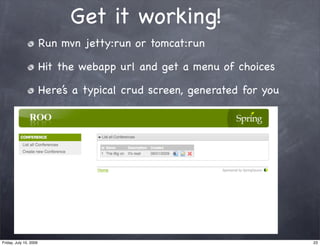
Get it working!
                        Run mvn jetty:run or tomcat:run

                        Hit the webapp url and get a menu of choices

                        Here’s a typical crud screen, generated for you


Friday, July 10, 2009                                                     23
Generated UI Code - List
                               Note: Does not detect column lengths
                               (ROO-80)
      <form:form action="/roodemo/conference" method="POST" modelAttribute="conference">
      <div id="roo_conference_name">
      <label for="_name">Name:</label>
      <form:input cssStyle="width:250px" id="_name" maxlength="30" path="name" size="0"/>
      <br/>
      <form:errors cssClass="errors" id="_name" path="name"/>
      <script type="text/javascript">Spring.addDecoration(new Spring.ElementDecoration({elementId : "_name", widgetType : "dijit.form.ValidationTextBox", widgetAttrs :
      {promptMessage: "Enter Name", invalidMessage: "", required : false}})); </script>
      </div>
      <br/>
      <div id="roo_conference_description">
      <label for="_description">Description:</label>
      <form:input cssStyle="width:250px" id="_description" maxlength="30" path="description" size="0"/>
      <br/>
      <form:errors cssClass="errors" id="_description" path="description"/>
      <script type="text/javascript">Spring.addDecoration(new Spring.ElementDecoration({elementId :
      "_description", widgetType : "dijit.form.ValidationTextBox", widgetAttrs : {promptMessage: "Enter
      Description", invalidMessage: "", required : false}})); </script>
      </div>
      <br/>
      <div id="roo_conference_created">
      <label for="_created">Created:</label>
      <form:input cssStyle="width:250px" id="_created" maxlength="30" path="created" size="0"/>
      <br/>
      <form:errors cssClass="errors" id="_created" path="created"/>
      <script type="text/javascript">Spring.addDecoration(new Spring.ElementDecoration({elementId : "_created",
      widgetType : "dijit.form.ValidationTextBox", widgetAttrs : {promptMessage: "Enter Created",
      invalidMessage: "", required : false}})); </script>
      <script type="text/javascript">Spring.addDecoration(new Spring.ElementDecoration({elementId : "_created",
      widgetType : "dijit.form.DateTextBox", widgetAttrs : {datePattern : "MM/dd/yyyy", required : false}}));
      </script>
      </div>
      <br/>
      <div class="submit" id="roo_conference_submit">
      <script type="text/javascript">Spring.addDecoration(new Spring.ValidateAllDecoration({elementId:'proceed', event:'onclick'}));</script>
      <input id="proceed" type="submit" value="Save"/>
      </div>
      </form:form>


Friday, July 10, 2009                                                                                                                                                     24
How about Security?
                        Just do ‘install security’ and you get Spring
                        Security
           <beans:beans xmlns="http://www.springframework.org/schema/security"
               xmlns:beans="http://www.springframework.org/schema/beans"
               xmlns:xsi="http://www.w3.org/2001/XMLSchema-instance"
               xsi:schemaLocation="http://www.springframework.org/schema/beans http://www.springframework.org/schema/beans/spring-beans-2.0.xsd
                                   http://www.springframework.org/schema/security http://www.springframework.org/schema/security/spring-
           security-2.0.4.xsd">

               <http auto-config="true">
               	 <form-login login-processing-url="/static/j_spring_security_check" login-page="/static/login.jsp" authentication-failure-url="/
           static/login.jsp?login_error=t"/>
                    <logout logout-url="/static/j_spring_security_logout"/>
                    <intercept-url pattern="/admin/**" access="ROLE_ADMIN"/>
                    <intercept-url pattern="/member/**" access="IS_AUTHENTICATED_REMEMBERED" />
                    <intercept-url pattern="/resources/**" access="IS_AUTHENTICATED_ANONYMOUSLY" />
                    <intercept-url pattern="/static/**" access="IS_AUTHENTICATED_ANONYMOUSLY" />
                    <intercept-url pattern="/**" access="IS_AUTHENTICATED_ANONYMOUSLY" />
               </http>

                <authentication-provider>
                	 <!-- SHA-256 values can be produced using 'echo -n your_desired_password | sha256sum' (using normal *nix environments) -->
                	 <password-encoder hash="sha-256"/>
                     <user-service>
                         <user name="admin" password="8c6976e5b5410415bde908bd4dee15dfb167a9c873fc4bb8a81f6f2ab448a918" authorities="ROLE_ADMIN"/>
           	              <user name="user" password="04f8996da763b7a969b1028ee3007569eaf3a635486ddab211d512c85b9df8fb" authorities="ROLE_USER"/>
           	          </user-service>
           	      </authentication-provider>

           </beans:beans>


Friday, July 10, 2009                                                                                                                                25
IDE Support
                        Roo works with SpringSource Tool Suite

                          AJDT AspectJ editing support is very good

                          Roo Console available via Right-click if installed

                          But you have to mvn eclipse:eclipse and refresh
                          a lot (F5 is your friend)

                        Other IDEs do not support ITDs and/or AspectJ
                        compile-time aspects


Friday, July 10, 2009                                                          26
JMS Support
                   Another quick installer configures ActiveMQ In
                   Memory

                        No other installer settings yet, assume this will
                        be enhanced over time...

                        Installs jmsTemplate that can be injected

           roo> install jms -provider ACTIVEMQ_IN_MEMORY
           Created SRC_MAIN_RESOURCES/applicationContext-jms.xml
           Managed SRC_MAIN_RESOURCES/applicationContext-jms.xml
           Managed ROOT/pom.xml


Friday, July 10, 2009                                                       27
Other features

                        Email configuration
                        WebFlow
                        Scripting from the roo command
                        shell


Friday, July 10, 2009                                    28
Current Status...
                        These are early days.

                        Roo team is quite active - fixing bugs as they
                        come up and giving us a reasonable, stable trunk
                        build and a way to run it

                        Often fixes are released to trunk within a few
                        days


Friday, July 10, 2009                                                      29
Resources

                        Roo JIRA:

                          http://jira.springframework.org/browse/
                          ROO

                        Roo Forum

                          http://forum.springsource.org/
                          forumdisplay.php?f=67


Friday, July 10, 2009                                               30

Philly Spring UG Roo Overview

  • 1.
    SpringSource roo A SpringSource rapid application development framework Philadelphia Spring User Group 07-08-2009 Ken Rimple Chariot Solutions Friday, July 10, 2009 1
  • 2.
    What is Roo? Rapid application development platform for Spring and Java Domain-centric design of database entities Auto-scaffolding of UI elements Builds a full stack Spring web application Target build process managed by Maven An answer to non-Java and non-Spring convention-over-configuration frameworks Friday, July 10, 2009 2
  • 3.
    Up Front... KeyPoints Roo is a moving target Not all features are fully implemented Early days, but SpringSource appears committed to building this framework for Spring Java developers Friday, July 10, 2009 3
  • 4.
    Roo Development Process Roo has a command-line shell (ala Grails/ Rails) Generates a project with a maven build Round-trips the code to keep the project and developer tools synchronized Uses Aspects to wire features (.aj files) Weaves aspects into associated class files Friday, July 10, 2009 4
  • 5.
    The Technology AspectJ Inter-Type Declarations Uses the AspectJ Compiler from Maven/Eclipse Adds code at compile-time to the classes marked by specific roo annotations Roo command shell Generates and maintains a proper build environment Dynamically generates .aj files and scaffolds web UI Friday, July 10, 2009 5
  • 6.
    Installing roo Download roo from SpringSource Unpack tar in favorite location Alias roo to ${roo-home}/bin/roo.sh or put the roo directory in your path Do NOT set a ROO_HOME Friday, July 10, 2009 6
  • 7.
    Creating a rooproject flibbity-floo:roo-demo krimple$ roo Create a ____ ____ ____ / __ / __ / __ directory / /_/ / / / / / / / / _, _/ /_/ / /_/ / /_/ |_|____/____/ 1.0.0.M1 [rev 64] Enter roo, Welcome to Spring Roo. For assistance press TAB or type and issue "hint" then hit ENTER. roo> create project -topLevelPackage the create- com.chariot.demo.roodemo Created /Users/krimple/svn-projects/...roodemo/pom.xml project Created SRC_MAIN_JAVA Created SRC_MAIN_RESOURCES Created SRC_TEST_JAVA command Created SRC_TEST_RESOURCES Created SRC_MAIN_WEBAPP (tab Created SRC_MAIN_RESOURCES/applicationContext.xml Created SRC_MAIN_WEBAPP/WEB-INF completion Created SRC_MAIN_WEBAPP/WEB-INF/roodemo-servlet.xml Created SRC_MAIN_WEBAPP/WEB-INF/web.xml helps here) Created SRC_MAIN_WEBAPP/WEB-INF/jsp Created SRC_MAIN_WEBAPP/WEB-INF/jsp/index.jsp Created SRC_MAIN_WEBAPP/WEB-INF/urlrewrite.xml Friday, July 10, 2009 7
  • 8.
    Installing JPA Use install jpa command You can pick Open JPA, Hibernate, EclipseLink You can pick a driver, then set settings in roo> install jpa -provider HIBERNATE -database MYSQL Created SRC_MAIN_RESOURCES/META-INF Created SRC_MAIN_RESOURCES/META-INF/persistence.xml Created SRC_MAIN_RESOURCES/database.properties please enter your database details in src/main/resources/ database.properties Managed SRC_MAIN_RESOURCES/applicationContext.xml Managed ROOT/pom.xml Friday, July 10, 2009 8
  • 9.
    Adding a PersistentJPA Entity Set up a domain class with ‘new persistent class’ command (places in base package by default) Then add fields using add field (remembers the last jpa class added) roo> new persistent class jpa -name ~.Conference Created SRC_MAIN_JAVA/com/chariot/roodemo Created SRC_MAIN_JAVA/com/chariot/roodemo/Conference.java Created SRC_MAIN_JAVA/com/chariot/roodemo/Conference_Roo_Plural.aj Created SRC_MAIN_JAVA/com/chariot/roodemo/Conference_Roo_Entity.aj Created SRC_MAIN_JAVA/com/chariot/roodemo/Conference_Roo_ToString.aj Created SRC_MAIN_JAVA/com/chariot/roodemo/Conference_Roo_Configurable.aj Friday, July 10, 2009 9
  • 10.
    What Got Created? Roo generates the following files: Conference.java - the file you edit, containing Roo annotations and your properties Conference_Roo_Configurable.aj - adds @Configurable to the entity Conference_Roo_Entity.aj - Adds all JPA persistence methods, an id, and a version Conference_Roo_JavaBean.aj - Adds getters/ setters for all of your private properties Friday, July 10, 2009 10
  • 11.
    Setting up JPAfields You can add fields, relationships, and more. These fields are physically added to the java file, and the support methods are wired automatically. roo> add field string name Managed SRC_MAIN_JAVA/com/chariot/roodemo/Conference.java Created SRC_MAIN_JAVA/com/chariot/roodemo/Conference_Roo_JavaBean.aj Managed SRC_MAIN_JAVA/com/chariot/roodemo/Conference_Roo_ToString.aj roo> add field string description Managed SRC_MAIN_JAVA/com/chariot/roodemo/Conference.java Managed SRC_MAIN_JAVA/com/chariot/roodemo/Conference_Roo_JavaBean.aj Managed SRC_MAIN_JAVA/com/chariot/roodemo/Conference_Roo_ToString.aj roo> add field date jpa -type java.util.Date -fieldName created Managed SRC_MAIN_JAVA/com/chariot/roodemo/Conference.java Managed SRC_MAIN_JAVA/com/chariot/roodemo/Conference_Roo_JavaBean.aj Managed SRC_MAIN_JAVA/com/chariot/roodemo/Conference_Roo_ToString.aj Friday, July 10, 2009 11
  • 12.
    Building a Conference Relationship Conference Session roo> new persistent class jpa -name ~.domain.Conference roo> add field string -fieldName conferenceName -notNull -sizeMin 1 -sizeMax 40 roo> add field date jdk -type java.util.Date -notNull -fieldName startDate roo> add field date jdk -type java.util.Date -notNull -fieldName endDate roo> new persistent class jpa -name ~.domain.ConferenceSession roo> add field string -notNull -fieldName title -sizeMax 80 roo> add field reference jpa -fieldName conference -type com.chariot.demo.contrack.domain.Conference roo> add field set jpa -element ~.domain.ConferenceSession -fieldName session -class com.chariot.demo.contrack.domain.Conference Friday, July 10, 2009 12
  • 13.
    Entity Validation Entities are validated using JSR-303 annotations @NotNull, @Nullable, @Size, @DecimalMin, @DecimalMax, etc... Controllers (coming up) generate call to validations using this Bean Validation API call: javax.validation.Validation. buildDefaultValidatorFactory().getValidator(). validate(conference)) Friday, July 10, 2009 13
  • 14.
    Bean Validation Framework JSR-303 is a final draft standard May be incorporated into JPA 2.0 This is a moving target for persistence... Note: in Spring Roo Validation Messages (per the spec) can be customized, and go in src/main/resources/ValidationMessages.properties (and do not get installed in a ResourceBundleMessageSource)... Friday, July 10, 2009 14
  • 15.
    Validation Examples JSR-303 is a Java EE 6 spec standard... Spring Roo installs and configures it as part of the classpath and framework Validation errors appear as errors in the Spring validation framework @Size(min = 5, max = 30, message = "Please enter a name between {min} and {max} characters.") private String name; @Size(min = 10, max=2048, message = "{description.required}") private String description; @Temporal(TemporalType.TIMESTAMP) @Column(insertable=true, updatable=false) @NotNull private Date created; Friday, July 10, 2009 15
  • 16.
    Roo and Maven Roo generates and maintains a maven pom.xml Roo properly adds dependencies (except webflow for now) and configures settings This is all round-trip; you can keep roo open while developing in SpringSource Tool Suite Could be a nice way to configure a traditional spring application w/o resorting to Grails or another non-Java framework Friday, July 10, 2009 16
  • 17.
    Roo and IDEs Roo generates eclipse natures ADJT AspectJ nature Roo core nature (used by STS Roo plugin) Core Spring nature and SpringBuilder Configures idea using the maven-idea-plugin Configures jetty and maven plugins automatically On each IDE, full sources are downloaded for frameworks like Spring, JPA, etc... Friday, July 10, 2009 17
  • 18.
    Configuring logging Nice way to set up roo> configure logging -level TRACE logging, adds both a Created SRC_MAIN_RESOURCES/log4j.properties Managed SRC_MAIN_WEBAPP/WEB-INF/web.xml file and console logger (can be modified) <context-param> <param-name>log4jConfigLocation</param-name> <param-value>classpath:log4j.properties</param-value> </context-param> #Updated at Tue Jun 09 09:21:45 EDT 2009 #Tue Jun 09 09:21:45 EDT 2009 log4j.appender.stdout=org.apache.log4j.ConsoleAppender log4j.appender.A1.layout.ConversionPattern=%d [%t] %-5p %c - %m%n log4j.rootLogger=TRACE, stdout, R log4j.appender.R.File=application.log log4j.appender.R.MaxFileSize=100KB log4j.appender.R.layout=org.apache.log4j.PatternLayout log4j.appender.R.MaxBackupIndex=1 log4j.appender.R.layout.ConversionPattern=%p %t %c - %m%n log4j.appender.stdout.layout=org.apache.log4j.PatternLayout log4j.appender.R=org.apache.log4j.RollingFileAppender Friday, July 10, 2009 18
  • 19.
    Generating a Controller roo> new controller automatic -name com.chariot.roodemo.domain.ConferenceController Created SRC_MAIN_JAVA/com/chariot/roodemo/domain/ Beginning to ConferenceController.java Created SRC_MAIN_JAVA/com/chariot/roodemo/domain/ sound like ConferenceController_Roo_Controller.aj Created SRC_MAIN_WEBAPP/images Created SRC_MAIN_WEBAPP/images/banner-graphic.png (g)rails? Created SRC_MAIN_WEBAPP/images/springsource-logo.png Created SRC_MAIN_WEBAPP/images/list.png Created SRC_MAIN_WEBAPP/images/show.png Created SRC_MAIN_WEBAPP/images/create.png Created SRC_MAIN_WEBAPP/images/update.png Note: first Created SRC_MAIN_WEBAPP/images/delete.png Created SRC_MAIN_WEBAPP/styles Created SRC_MAIN_WEBAPP/styles/roo.css one Created SRC_MAIN_WEBAPP/WEB-INF/jsp/header.jsp Created SRC_MAIN_WEBAPP/WEB-INF/jsp/footer.jsp Created SRC_MAIN_WEBAPP/WEB-INF/jsp/includes.jsp generates Created SRC_MAIN_WEBAPP/WEB-INF/jsp/dataAccessFailure.jsp Created SRC_MAIN_WEBAPP/WEB-INF/jsp/uncaughtException.jsp the includes, Created SRC_MAIN_WEBAPP/WEB-INF/jsp/conference Created SRC_MAIN_WEBAPP/WEB-INF/jsp/conference/list.jsp Created SRC_MAIN_WEBAPP/WEB-INF/jsp/conference/show.jsp header and Created SRC_MAIN_WEBAPP/WEB-INF/jsp/conference/create.jsp Created SRC_MAIN_WEBAPP/WEB-INF/jsp/conference/update.jsp Created SRC_MAIN_WEBAPP/WEB-INF/jsp/menu.jsp footer jsps. Managed SRC_MAIN_WEBAPP/WEB-INF/jsp/menu.jsp Friday, July 10, 2009 19
  • 20.
  • 21.
    What is thescaffold? An aspect-j aspect each controller gets its’ own series of Aspects, which can be modified/added to Separates controller logic from mechanics Friday, July 10, 2009 21
  • 22.
    Example Aspect: show In ConferenceController_Roo_Controller.aj: @org.springframework.web.bind.annotation.RequestMapping( value = "/conference/{id}", method = org.springframework.web.bind.annotation.RequestMethod.GET) public java.lang.String ConferenceController.show( @org.springframework.web.bind.annotation.PathVariable("id") Long id, org.springframework.ui.ModelMap modelMap) { if (id == null) throw new IllegalArgumentException("An Identifier is required"); modelMap.addAttribute("conference", com.chariot.roodemo.domain.Conference.findConference(id)); return "conference/show"; } Uses findConference in Conference_Roo_Entity.aj public static com.chariot.roodemo.domain.Conference Conference.findConference(java.lang.Long id) { if (id == null) throw new IllegalArgumentException( "An identifier is required to retrieve an instance of Conference"); javax.persistence.EntityManager em = new Conference().entityManager; if (em == null) throw new IllegalStateException( "Entity manager has not been injected (is the Spring Aspects JAR configured as an AJC/AJDT aspects library?)"); return em.find(Conference.class, id); } Friday, July 10, 2009 22
  • 23.
    Get it working! Run mvn jetty:run or tomcat:run Hit the webapp url and get a menu of choices Here’s a typical crud screen, generated for you Friday, July 10, 2009 23
  • 24.
    Generated UI Code- List Note: Does not detect column lengths (ROO-80) <form:form action="/roodemo/conference" method="POST" modelAttribute="conference"> <div id="roo_conference_name"> <label for="_name">Name:</label> <form:input cssStyle="width:250px" id="_name" maxlength="30" path="name" size="0"/> <br/> <form:errors cssClass="errors" id="_name" path="name"/> <script type="text/javascript">Spring.addDecoration(new Spring.ElementDecoration({elementId : "_name", widgetType : "dijit.form.ValidationTextBox", widgetAttrs : {promptMessage: "Enter Name", invalidMessage: "", required : false}})); </script> </div> <br/> <div id="roo_conference_description"> <label for="_description">Description:</label> <form:input cssStyle="width:250px" id="_description" maxlength="30" path="description" size="0"/> <br/> <form:errors cssClass="errors" id="_description" path="description"/> <script type="text/javascript">Spring.addDecoration(new Spring.ElementDecoration({elementId : "_description", widgetType : "dijit.form.ValidationTextBox", widgetAttrs : {promptMessage: "Enter Description", invalidMessage: "", required : false}})); </script> </div> <br/> <div id="roo_conference_created"> <label for="_created">Created:</label> <form:input cssStyle="width:250px" id="_created" maxlength="30" path="created" size="0"/> <br/> <form:errors cssClass="errors" id="_created" path="created"/> <script type="text/javascript">Spring.addDecoration(new Spring.ElementDecoration({elementId : "_created", widgetType : "dijit.form.ValidationTextBox", widgetAttrs : {promptMessage: "Enter Created", invalidMessage: "", required : false}})); </script> <script type="text/javascript">Spring.addDecoration(new Spring.ElementDecoration({elementId : "_created", widgetType : "dijit.form.DateTextBox", widgetAttrs : {datePattern : "MM/dd/yyyy", required : false}})); </script> </div> <br/> <div class="submit" id="roo_conference_submit"> <script type="text/javascript">Spring.addDecoration(new Spring.ValidateAllDecoration({elementId:'proceed', event:'onclick'}));</script> <input id="proceed" type="submit" value="Save"/> </div> </form:form> Friday, July 10, 2009 24
  • 25.
    How about Security? Just do ‘install security’ and you get Spring Security <beans:beans xmlns="http://www.springframework.org/schema/security" xmlns:beans="http://www.springframework.org/schema/beans" xmlns:xsi="http://www.w3.org/2001/XMLSchema-instance" xsi:schemaLocation="http://www.springframework.org/schema/beans http://www.springframework.org/schema/beans/spring-beans-2.0.xsd http://www.springframework.org/schema/security http://www.springframework.org/schema/security/spring- security-2.0.4.xsd"> <http auto-config="true"> <form-login login-processing-url="/static/j_spring_security_check" login-page="/static/login.jsp" authentication-failure-url="/ static/login.jsp?login_error=t"/> <logout logout-url="/static/j_spring_security_logout"/> <intercept-url pattern="/admin/**" access="ROLE_ADMIN"/> <intercept-url pattern="/member/**" access="IS_AUTHENTICATED_REMEMBERED" /> <intercept-url pattern="/resources/**" access="IS_AUTHENTICATED_ANONYMOUSLY" /> <intercept-url pattern="/static/**" access="IS_AUTHENTICATED_ANONYMOUSLY" /> <intercept-url pattern="/**" access="IS_AUTHENTICATED_ANONYMOUSLY" /> </http> <authentication-provider> <!-- SHA-256 values can be produced using 'echo -n your_desired_password | sha256sum' (using normal *nix environments) --> <password-encoder hash="sha-256"/> <user-service> <user name="admin" password="8c6976e5b5410415bde908bd4dee15dfb167a9c873fc4bb8a81f6f2ab448a918" authorities="ROLE_ADMIN"/> <user name="user" password="04f8996da763b7a969b1028ee3007569eaf3a635486ddab211d512c85b9df8fb" authorities="ROLE_USER"/> </user-service> </authentication-provider> </beans:beans> Friday, July 10, 2009 25
  • 26.
    IDE Support Roo works with SpringSource Tool Suite AJDT AspectJ editing support is very good Roo Console available via Right-click if installed But you have to mvn eclipse:eclipse and refresh a lot (F5 is your friend) Other IDEs do not support ITDs and/or AspectJ compile-time aspects Friday, July 10, 2009 26
  • 27.
    JMS Support Another quick installer configures ActiveMQ In Memory No other installer settings yet, assume this will be enhanced over time... Installs jmsTemplate that can be injected roo> install jms -provider ACTIVEMQ_IN_MEMORY Created SRC_MAIN_RESOURCES/applicationContext-jms.xml Managed SRC_MAIN_RESOURCES/applicationContext-jms.xml Managed ROOT/pom.xml Friday, July 10, 2009 27
  • 28.
    Other features Email configuration WebFlow Scripting from the roo command shell Friday, July 10, 2009 28
  • 29.
    Current Status... These are early days. Roo team is quite active - fixing bugs as they come up and giving us a reasonable, stable trunk build and a way to run it Often fixes are released to trunk within a few days Friday, July 10, 2009 29
  • 30.
    Resources Roo JIRA: http://jira.springframework.org/browse/ ROO Roo Forum http://forum.springsource.org/ forumdisplay.php?f=67 Friday, July 10, 2009 30