Introduction to C#
Tri Sandhika Jaya
Lecturer
Politeknik Negeri Lampung
Agenda
 Hello World
 The .NET Framework
 Design Goals of C#
 Language Features
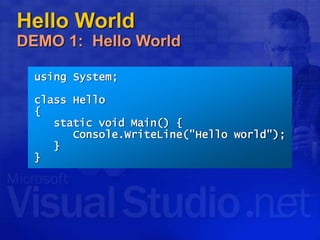
Hello World
DEMO 1: Hello World
using System;
class Hello
{
static void Main() {
Console.WriteLine("Hello world");
}
}
Agenda
 Hello World
 The .NET Framework
 Design Goals of C#
 Language Features
The .NET Framework
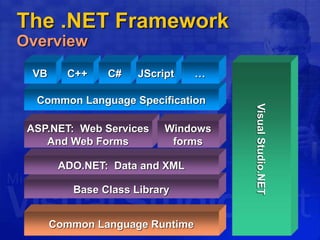
Overview
Base Class Library
Common Language Specification
Common Language Runtime
ADO.NET: Data and XML
VB C++ C#
Visual
Studio.NET
ASP.NET: Web Services
And Web Forms
JScript …
Windows
forms
The .NET Framework
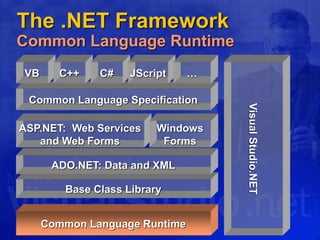
Common Language Runtime
Base Class Library
Common Language Specification
Common Language Runtime
ADO.NET: Data and XML
VB C++ C#
Visual
Studio.NET
ASP.NET: Web Services
and Web Forms
JScript …
Windows
Forms
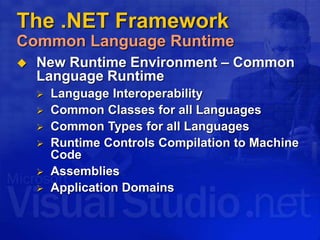
 New Runtime Environment – Common
Language Runtime
 Language Interoperability
 Common Classes for all Languages
 Common Types for all Languages
 Runtime Controls Compilation to Machine
Code
 Assemblies
 Application Domains
The .NET Framework
Common Language Runtime
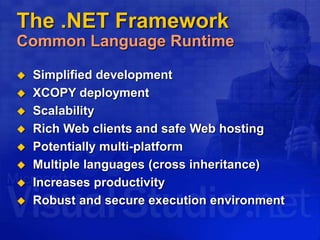
The .NET Framework
Common Language Runtime
 Simplified development
 XCOPY deployment
 Scalability
 Rich Web clients and safe Web hosting
 Potentially multi-platform
 Multiple languages (cross inheritance)
 Increases productivity
 Robust and secure execution environment
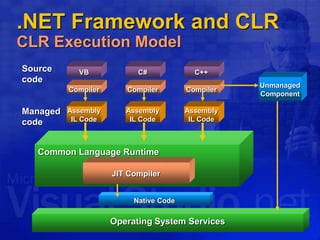
.NET Framework and CLR
CLR Execution Model
VB
Source
code
Compiler
C++
C#
Compiler
Compiler
Assembly
IL Code
Assembly
IL Code
Assembly
IL Code
Operating System Services
Common Language Runtime
JIT Compiler
Native Code
Managed
code
Unmanaged
Component
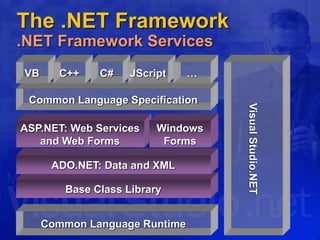
The .NET Framework
.NET Framework Services
Base Class Library
Common Language Specification
Common Language Runtime
ADO.NET: Data and XML
VB C++ C#
Visual
Studio.NET
ASP.NET: Web Services
and Web Forms
JScript …
Windows
Forms
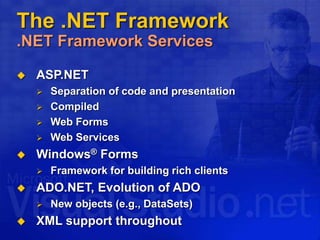
The .NET Framework
.NET Framework Services
 ASP.NET
 Separation of code and presentation
 Compiled
 Web Forms
 Web Services
 Windows® Forms
 Framework for building rich clients
 ADO.NET, Evolution of ADO
 New objects (e.g., DataSets)
 XML support throughout
Agenda
 Hello World
 The .NET Framework
 Design Goals of C#
 Language Features
Design Goals of C#
The Big Ideas
 The first “Component Oriented”
language in the C/C++ family
 Everything really is an object
 Next generation robust and
durable software
 Preserving your investment
Design Goals of C#
A Component Oriented Language
 C# is the first “Component Oriented”
language in the C/C++ family
 Component concepts are first class
 Properties, methods, events
 Design-time and run-time attributes
 Integrated documentation using XML
 Enables one-stop programming
 No external files like header files, IDL, etc.
 Can be embedded in ASP pages
Design Goals of C#
Everything Really Is an Object
 Traditional views
 C++, Java™: Primitive types are “magic”
and do not interoperate with objects
 Smalltalk, Lisp: Primitive types are
objects, but at great performance cost
 C# unifies with no performance cost
 Deep simplicity throughout system
 Improved extensibility and reusability
 New primitive types: Decimal, SQL…
 Collections, etc., work for all types
Design Goals of C#
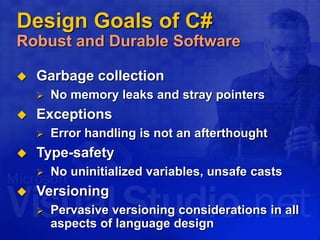
Robust and Durable Software
 Garbage collection
 No memory leaks and stray pointers
 Exceptions
 Error handling is not an afterthought
 Type-safety
 No uninitialized variables, unsafe casts
 Versioning
 Pervasive versioning considerations in all
aspects of language design
Design Goals of C#
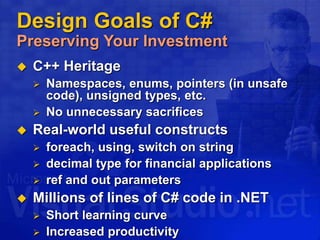
Preserving Your Investment
 C++ Heritage
 Namespaces, enums, pointers (in unsafe
code), unsigned types, etc.
 No unnecessary sacrifices
 Real-world useful constructs
 foreach, using, switch on string
 decimal type for financial applications
 ref and out parameters
 Millions of lines of C# code in .NET
 Short learning curve
 Increased productivity
Design Goals of C#
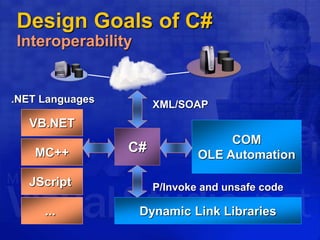
Interoperability
C#
VB.NET
MC++
JScript
...
.NET Languages
COM
OLE Automation
XML/SOAP
Dynamic Link Libraries
P/Invoke and unsafe code
Agenda
 Hello World
 The .NET Framework
 Design Goals of C#
 Language Features
Language Features
Program Structure
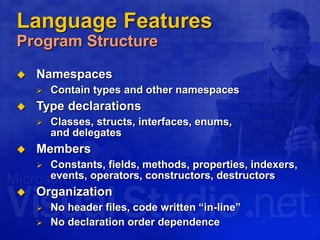
 Namespaces
 Contain types and other namespaces
 Type declarations
 Classes, structs, interfaces, enums,
and delegates
 Members
 Constants, fields, methods, properties, indexers,
events, operators, constructors, destructors
 Organization
 No header files, code written “in-line”
 No declaration order dependence
Language Features
Program Structure
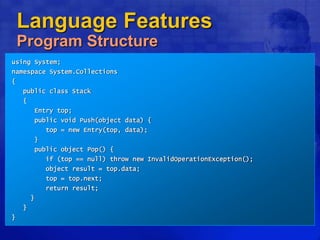
using System;
namespace System.Collections
{
public class Stack
{
Entry top;
public void Push(object data) {
top = new Entry(top, data);
}
public object Pop() {
if (top == null) throw new InvalidOperationException();
object result = top.data;
top = top.next;
return result;
}
}
}
Language Features
Type System
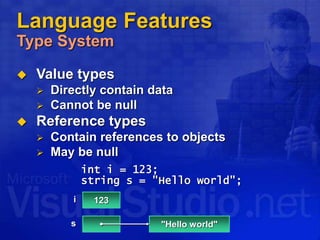
 Value types
 Directly contain data
 Cannot be null
 Reference types
 Contain references to objects
 May be null
int i = 123;
string s = "Hello world";
123
i
s "Hello world"
Language Features
Type System
 Value types
 Primitives int i;
 Enums enum State { Off, On }
 Structs struct Point { int x, y; }
 Reference types
 Classes class Foo: Bar, IFoo {...}
 Interfaces interface IFoo: IBar {...}
 Arrays string[] a = new string[10];
 Delegates delegate void Empty();
Language Features
Predefined Types
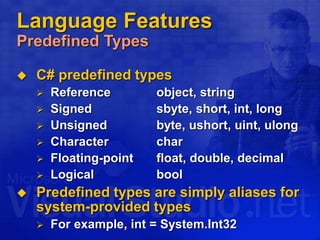
 C# predefined types
 Reference object, string
 Signed sbyte, short, int, long
 Unsigned byte, ushort, uint, ulong
 Character char
 Floating-point float, double, decimal
 Logical bool
 Predefined types are simply aliases for
system-provided types
 For example, int = System.Int32
Language Features
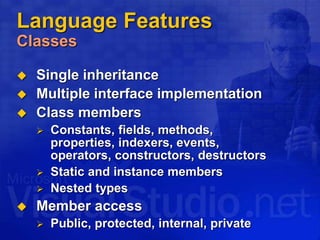
Classes
 Single inheritance
 Multiple interface implementation
 Class members
 Constants, fields, methods,
properties, indexers, events,
operators, constructors, destructors
 Static and instance members
 Nested types
 Member access
 Public, protected, internal, private
Language Features
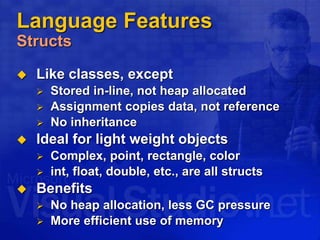
Structs
 Like classes, except
 Stored in-line, not heap allocated
 Assignment copies data, not reference
 No inheritance
 Ideal for light weight objects
 Complex, point, rectangle, color
 int, float, double, etc., are all structs
 Benefits
 No heap allocation, less GC pressure
 More efficient use of memory
Language Features
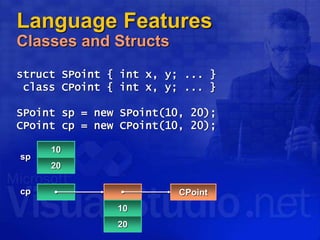
Classes and Structs
struct SPoint { int x, y; ... }
class CPoint { int x, y; ... }
SPoint sp = new SPoint(10, 20);
CPoint cp = new CPoint(10, 20);
10
20
sp
cp
10
20
CPoint
Language Features
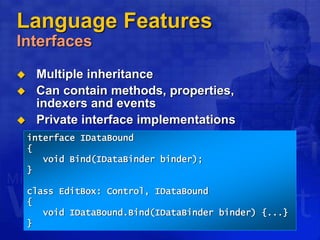
Interfaces
 Multiple inheritance
 Can contain methods, properties,
indexers and events
 Private interface implementations
interface IDataBound
{
void Bind(IDataBinder binder);
}
class EditBox: Control, IDataBound
{
void IDataBound.Bind(IDataBinder binder) {...}
}
Language Features
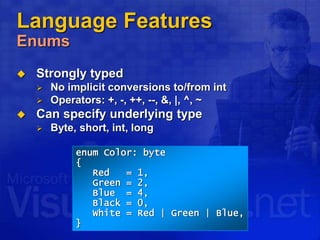
Enums
 Strongly typed
 No implicit conversions to/from int
 Operators: +, -, ++, --, &, |, ^, ~
 Can specify underlying type
 Byte, short, int, long
enum Color: byte
{
Red = 1,
Green = 2,
Blue = 4,
Black = 0,
White = Red | Green | Blue,
}
Language Features
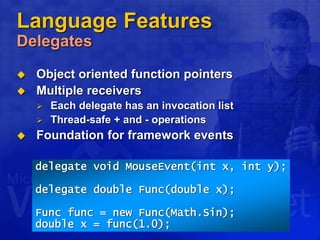
Delegates
 Object oriented function pointers
 Multiple receivers
 Each delegate has an invocation list
 Thread-safe + and - operations
 Foundation for framework events
delegate void MouseEvent(int x, int y);
delegate double Func(double x);
Func func = new Func(Math.Sin);
double x = func(1.0);
Language Features
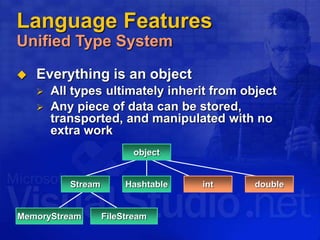
Unified Type System
 Everything is an object
 All types ultimately inherit from object
 Any piece of data can be stored,
transported, and manipulated with no
extra work
Stream
MemoryStream FileStream
Hashtable double
int
object
Language Features
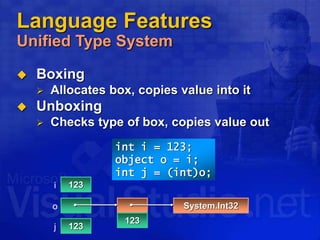
Unified Type System
 Boxing
 Allocates box, copies value into it
 Unboxing
 Checks type of box, copies value out
int i = 123;
object o = i;
int j = (int)o;
123
i
o
123
System.Int32
123
j
Language Features
Unified Type System
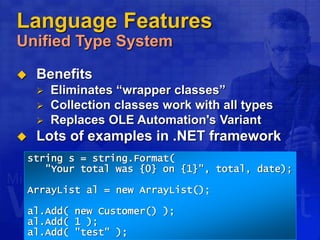
 Benefits
 Eliminates “wrapper classes”
 Collection classes work with all types
 Replaces OLE Automation's Variant
 Lots of examples in .NET framework
string s = string.Format(
"Your total was {0} on {1}", total, date);
ArrayList al = new ArrayList();
al.Add( new Customer() );
al.Add( 1 );
al.Add( "test" );
Language Features
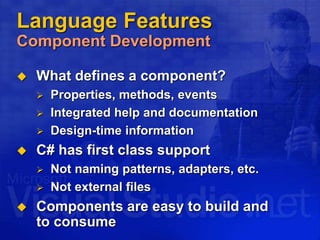
Component Development
 What defines a component?
 Properties, methods, events
 Integrated help and documentation
 Design-time information
 C# has first class support
 Not naming patterns, adapters, etc.
 Not external files
 Components are easy to build and
to consume
Language Features
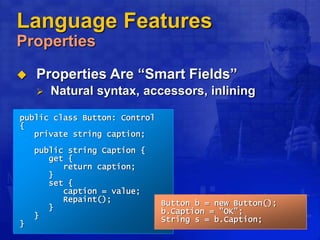
Properties
 Properties Are “Smart Fields”
 Natural syntax, accessors, inlining
public class Button: Control
{
private string caption;
public string Caption {
get {
return caption;
}
set {
caption = value;
Repaint();
}
}
}
Button b = new Button();
b.Caption = "OK";
String s = b.Caption;
Language Features
Indexers
 Indexers are “smart arrays”
 Can be overloaded
public class ListBox: Control
{
private string[] items;
public string this[int
index] {
get {
return items[index];
}
set {
items[index] = value;
Repaint();
}
}
}
ListBox listBox = new
ListBox();
listBox[0] = "hello";
Console.WriteLine(listBox[0]);
Language Features
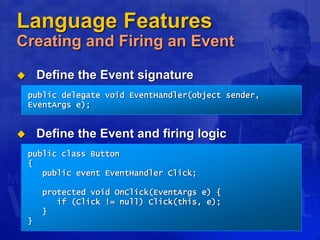
Creating and Firing an Event
 Define the Event signature
 Define the Event and firing logic
public delegate void EventHandler(object sender,
EventArgs e);
public class Button
{
public event EventHandler Click;
protected void OnClick(EventArgs e) {
if (Click != null) Click(this, e);
}
}
Language Features
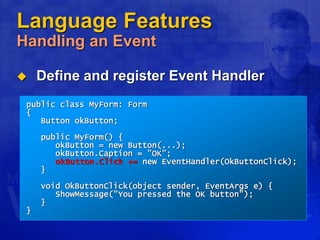
Handling an Event
 Define and register Event Handler
public class MyForm: Form
{
Button okButton;
public MyForm() {
okButton = new Button(...);
okButton.Caption = "OK";
okButton.Click += new EventHandler(OkButtonClick);
}
void OkButtonClick(object sender, EventArgs e) {
ShowMessage("You pressed the OK button");
}
}
Language Features
DEMO 2: Creating an Event Handler
 Define an Event Handler for a button in a
Windows Forms application
Language Features
Attributes
 Associate information with types
and members
 Documentation URL for a class
 Transaction context for a method
 XML persistence mapping
 Traditional solutions
 Add keywords or pragmas to language
 Use external files, e.g., .IDL, .DEF
 C# solution: Attributes
Language Features
Attributes
public class OrderProcessor
{
[WebMethod]
public void SubmitOrder(PurchaseOrder order) {...}
}
[XmlRoot("Order", Namespace="urn:acme.b2b-schema.v1")]
public class PurchaseOrder
{
[XmlElement("shipTo")] public Address ShipTo;
[XmlElement("billTo")] public Address BillTo;
[XmlElement("comment")] public string Comment;
[XmlElement("items")] public Item[] Items;
[XmlAttribute("date")] public DateTime OrderDate;
}
public class Address {...}
public class Item {...}
Language Features
Attributes
 Attributes can be
 Attached to types and members
 Examined at run-time using reflection
 Completely extensible
 Simply a class that inherits from System.Attribute
 Type-safe
 Arguments checked at compile-time
 Extensive use in .NET framework
 XML, Web Services, security, serialization,
component model, COM and P/Invoke interop,
code configuration…
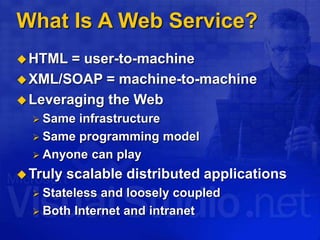
What Is A Web Service?
HTML = user-to-machine
XML/SOAP = machine-to-machine
Leveraging the Web
 Same infrastructure
 Same programming model
 Anyone can play
Truly scalable distributed applications
 Stateless and loosely coupled
 Both Internet and intranet
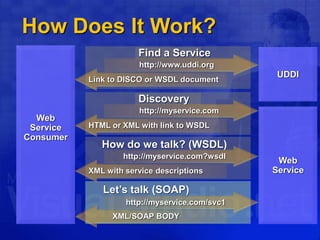
Discovery
Let’s talk (SOAP)
How Does It Work?
http://myservice.com
HTML or XML with link to WSDL
How do we talk? (WSDL)
http://myservice.com?wsdl
XML with service descriptions
http://myservice.com/svc1
XML/SOAP BODY
Web
Service
Web
Service
Consumer
UDDI
Find a Service
http://www.uddi.org
Link to DISCO or WSDL document
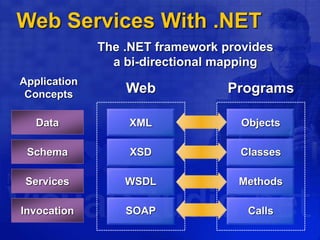
Web Services With .NET
Programs
Objects
Classes
Methods
Calls
Web
XML
XSD
WSDL
SOAP
Data
Schema
Services
Invocation
Application
Concepts
The .NET framework provides
a bi-directional mapping
Web Services With .NET
public class OrderProcessor
{
public void SubmitOrder(PurchaseOrder order) {...}
}
public class PurchaseOrder
{
public string ShipTo;
public string BillTo;
public string Comment;
public Item[] Items;
public DateTime OrderDate;
}
public class OrderProcessor
{
[WebMethod]
public void SubmitOrder(PurchaseOrder order) {...}
}
[XmlRoot("Order", Namespace="urn:acme.b2b-schema.v1")]
public class PurchaseOrder
{
[XmlElement("shipTo")] public string ShipTo;
[XmlElement("billTo")] public string BillTo;
[XmlElement("comment")] public string Comment;
[XmlElement("items")] public Item[] Items;
[XmlAttribute("date")] public DateTime OrderDate;
}
PurchaseOrder po = new PurchaseOrder();
po.ShipTo = “Anders Hejlsberg";
po.BillTo = “Bill Gates";
po.OrderDate = DateTime.Today;
…
OrderProcessor.SubmitOrder(po);
<?xml version="1.0" encoding="utf-8"?>
<soap:Envelope>
<soap:Body>
<SubmitOrder>
<Order date=“20010703">
<shipTo>Anders Hejlsberg</shipTo>
<billTo>Bill Gates</billTo>
<comment>Overnight delivery</comment>
<items>
<productId>17748933</productId>
<description>Dom Perignon</description>
</items>
</Order>
</SubmitOrder>
</soap:Body>
</soap:Envelope>
Language Features
DEMO 3: Attributes
 Create a Web service by using the
[WebMethod] attribute
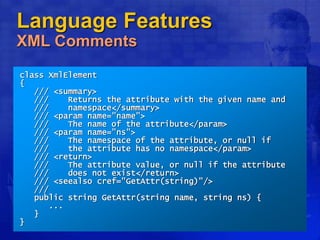
Language Features
XML Comments
class XmlElement
{
/// <summary>
/// Returns the attribute with the given name and
/// namespace</summary>
/// <param name="name">
/// The name of the attribute</param>
/// <param name="ns">
/// The namespace of the attribute, or null if
/// the attribute has no namespace</param>
/// <return>
/// The attribute value, or null if the attribute
/// does not exist</return>
/// <seealso cref="GetAttr(string)"/>
///
public string GetAttr(string name, string ns) {
...
}
}
Language Features
DEMO 4: XML Comments
 Show how the compiler can auto generate
documentation from the source code using
XML comments
Language Features
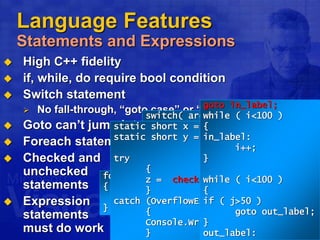
Statements and Expressions
 High C++ fidelity
 if, while, do require bool condition
 Switch statement
 No fall-through, “goto case” or “goto default”
 Goto can’t jump into blocks
 Foreach statement
 Checked and
unchecked
statements
 Expression
statements
must do work
void Foo() {
i == 1; // error
i + j; // error
}
switch( arg )
{
case 0:
case 1:
Console.WriteLine(“Low”);
case 2:
Console.WriteLine(“Med”);
break;
default:
Console.WriteLine(“High”);
}
switch( arg )
{
case 0:
case 1:
Console.WriteLine(“Low”);
break;
case 2:
Console.WriteLine(“Med”);
break;
default:
Console.WriteLine(“High”);
}
switch( arg )
{
case 0:
case 1:
Console.WriteLine(“Low”);
goto case 2;
case 2:
Console.WriteLine(“Med”);
break;
default:
Console.WriteLine(“High”);
}
int i;
if ( i ) // error
if ( i>0 )
FileClass file;
if ( file = OpenFile() ) // error
if ( (file = OpenFile()) != NULL )
foreach ( string word in myArray.words )
{
Console.WriteLine(“{0}”, word)
}
static short x = 32767; // Max short
static short y = 32767;
try
{
z = checked((short)(x + y));
}
catch (OverflowException e)
{
Console.WriteLine(e.ToString());
}
goto in_label;
while ( i<100 )
{
in_label:
i++;
}
while ( i<100 )
{
if ( j>50 )
goto out_label;
}
out_label:
Language Features
For Each Statement
 Iteration of arrays
 Iteration of user-defined collections
foreach (Customer c in customers.OrderBy("name")) {
if (c.Orders.Count != 0) {
...
}
}
public static void Main(string[] args) {
foreach (string s in args) Console.WriteLine(s);
}
Language Features
Parameter Arrays
 Can write “printf” style methods
 Type-safe, unlike C++
void printf(string fmt, params object[] args) {
foreach (object x in args) {
...
}
}
printf("%s %i %i", str, int1, int2);
object[] args = new object[3];
args[0] = str;
args[1] = int1;
Args[2] = int2;
printf("%s %i %i", args);
Language Features
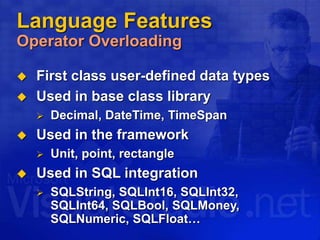
Operator Overloading
 First class user-defined data types
 Used in base class library
 Decimal, DateTime, TimeSpan
 Used in the framework
 Unit, point, rectangle
 Used in SQL integration
 SQLString, SQLInt16, SQLInt32,
SQLInt64, SQLBool, SQLMoney,
SQLNumeric, SQLFloat…
Language Features
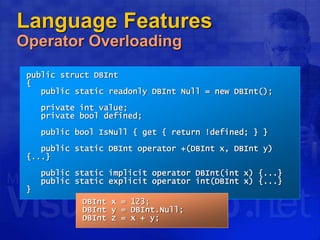
Operator Overloading
public struct DBInt
{
public static readonly DBInt Null = new DBInt();
private int value;
private bool defined;
public bool IsNull { get { return !defined; } }
public static DBInt operator +(DBInt x, DBInt y)
{...}
public static implicit operator DBInt(int x) {...}
public static explicit operator int(DBInt x) {...}
}
DBInt x = 123;
DBInt y = DBInt.Null;
DBInt z = x + y;
Language Features
Versioning
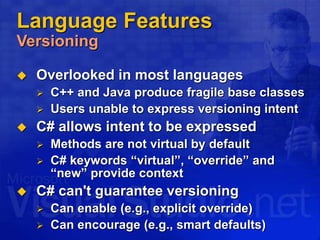
 Overlooked in most languages
 C++ and Java produce fragile base classes
 Users unable to express versioning intent
 C# allows intent to be expressed
 Methods are not virtual by default
 C# keywords “virtual”, “override” and
“new” provide context
 C# can't guarantee versioning
 Can enable (e.g., explicit override)
 Can encourage (e.g., smart defaults)
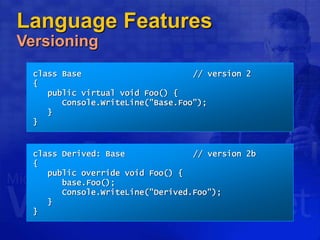
class Derived: Base // version 1
{
public virtual void Foo() {
Console.WriteLine("Derived.Foo");
}
}
class Derived: Base // version 2a
{
new public virtual void Foo() {
Console.WriteLine("Derived.Foo");
}
}
class Derived: Base // version 2b
{
public override void Foo() {
base.Foo();
Console.WriteLine("Derived.Foo");
}
}
class Base // version 1
{
}
class Base // version 2
{
public virtual void Foo() {
Console.WriteLine("Base.Foo");
}
}
Language Features
Versioning
Language Features
Conditional Compilation
 #define, #undef
 #if, #elif, #else, #endif
 Simple boolean logic
 Conditional methods
public class Debug
{
[Conditional("Debug")]
public static void Assert(bool cond, String s) {
if (!cond) {
throw new AssertionException(s);
}
}
}
Language Features
Unsafe Code
 COM integration, P/invoke cover most cases
 Unsafe code
 Low-level code without leaving the box
 Enables unsafe casts, pointer arithmetic
 Declarative pinning
 Fixed statement
 Basically “inline C”
unsafe void Foo() {
char* buf = stackalloc char[256];
for (char* p = buf; p < buf + 256; p++) *p = 0;
...
}
Language Features
Unsafe Code
class FileStream: Stream
{
int handle;
public unsafe int Read(byte[] buffer, int index, int
count) {
int n = 0;
fixed (byte* p = buffer) {
ReadFile(handle, p + index, count, &n, null);
}
return n;
}
[dllimport("kernel32", SetLastError=true)]
static extern unsafe bool ReadFile(int hFile,
void* lpBuffer, int nBytesToRead,
int* nBytesRead, Overlapped* lpOverlapped);
}
Language Features
COM Support
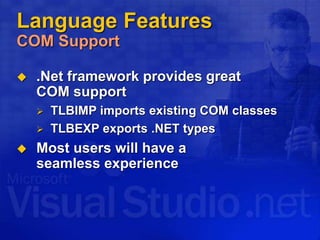
 .Net framework provides great
COM support
 TLBIMP imports existing COM classes
 TLBEXP exports .NET types
 Most users will have a
seamless experience
Language Features
COM Support
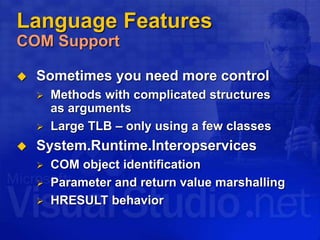
 Sometimes you need more control
 Methods with complicated structures
as arguments
 Large TLB – only using a few classes
 System.Runtime.Interopservices
 COM object identification
 Parameter and return value marshalling
 HRESULT behavior
Language Features
DEMO 5: COM and C#
Call a COM component from C#
Language Features
DEMO 6: Visual Studio .NET
Windows programming with C#
C# And CLI Standardization
Work begun in September 2000
Submitted to ECMA (www.ecma.ch)
Active involvement by Intel, HP, IBM,
Fujitsu, Plum Hall, …
Since December 2001
 “C# Language Specification”
 “Common Language Infrastructure (CLI)”
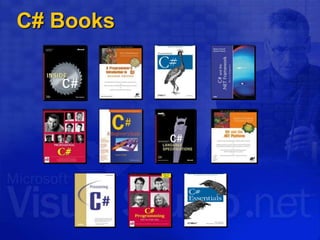
C# Books
C# Customers
More Resources
 http://msdn.microsoft.com/
 C# language specification
 C# newsgroups
 microsoft.public.dotnet.languages.csharp
Questions?

PERTEMUAN 1 - MENGENAL ENVIRONTMENT PROGRAM VISUAL C#.pptx

  • 2.
    Introduction to C# TriSandhika Jaya Lecturer Politeknik Negeri Lampung
  • 3.
    Agenda  Hello World The .NET Framework  Design Goals of C#  Language Features
  • 4.
    Hello World DEMO 1:Hello World using System; class Hello { static void Main() { Console.WriteLine("Hello world"); } }
  • 5.
    Agenda  Hello World The .NET Framework  Design Goals of C#  Language Features
  • 6.
    The .NET Framework Overview BaseClass Library Common Language Specification Common Language Runtime ADO.NET: Data and XML VB C++ C# Visual Studio.NET ASP.NET: Web Services And Web Forms JScript … Windows forms
  • 7.
    The .NET Framework CommonLanguage Runtime Base Class Library Common Language Specification Common Language Runtime ADO.NET: Data and XML VB C++ C# Visual Studio.NET ASP.NET: Web Services and Web Forms JScript … Windows Forms
  • 8.
     New RuntimeEnvironment – Common Language Runtime  Language Interoperability  Common Classes for all Languages  Common Types for all Languages  Runtime Controls Compilation to Machine Code  Assemblies  Application Domains The .NET Framework Common Language Runtime
  • 9.
    The .NET Framework CommonLanguage Runtime  Simplified development  XCOPY deployment  Scalability  Rich Web clients and safe Web hosting  Potentially multi-platform  Multiple languages (cross inheritance)  Increases productivity  Robust and secure execution environment
  • 10.
    .NET Framework andCLR CLR Execution Model VB Source code Compiler C++ C# Compiler Compiler Assembly IL Code Assembly IL Code Assembly IL Code Operating System Services Common Language Runtime JIT Compiler Native Code Managed code Unmanaged Component
  • 11.
    The .NET Framework .NETFramework Services Base Class Library Common Language Specification Common Language Runtime ADO.NET: Data and XML VB C++ C# Visual Studio.NET ASP.NET: Web Services and Web Forms JScript … Windows Forms
  • 12.
    The .NET Framework .NETFramework Services  ASP.NET  Separation of code and presentation  Compiled  Web Forms  Web Services  Windows® Forms  Framework for building rich clients  ADO.NET, Evolution of ADO  New objects (e.g., DataSets)  XML support throughout
  • 13.
    Agenda  Hello World The .NET Framework  Design Goals of C#  Language Features
  • 14.
    Design Goals ofC# The Big Ideas  The first “Component Oriented” language in the C/C++ family  Everything really is an object  Next generation robust and durable software  Preserving your investment
  • 15.
    Design Goals ofC# A Component Oriented Language  C# is the first “Component Oriented” language in the C/C++ family  Component concepts are first class  Properties, methods, events  Design-time and run-time attributes  Integrated documentation using XML  Enables one-stop programming  No external files like header files, IDL, etc.  Can be embedded in ASP pages
  • 16.
    Design Goals ofC# Everything Really Is an Object  Traditional views  C++, Java™: Primitive types are “magic” and do not interoperate with objects  Smalltalk, Lisp: Primitive types are objects, but at great performance cost  C# unifies with no performance cost  Deep simplicity throughout system  Improved extensibility and reusability  New primitive types: Decimal, SQL…  Collections, etc., work for all types
  • 17.
    Design Goals ofC# Robust and Durable Software  Garbage collection  No memory leaks and stray pointers  Exceptions  Error handling is not an afterthought  Type-safety  No uninitialized variables, unsafe casts  Versioning  Pervasive versioning considerations in all aspects of language design
  • 18.
    Design Goals ofC# Preserving Your Investment  C++ Heritage  Namespaces, enums, pointers (in unsafe code), unsigned types, etc.  No unnecessary sacrifices  Real-world useful constructs  foreach, using, switch on string  decimal type for financial applications  ref and out parameters  Millions of lines of C# code in .NET  Short learning curve  Increased productivity
  • 19.
    Design Goals ofC# Interoperability C# VB.NET MC++ JScript ... .NET Languages COM OLE Automation XML/SOAP Dynamic Link Libraries P/Invoke and unsafe code
  • 20.
    Agenda  Hello World The .NET Framework  Design Goals of C#  Language Features
  • 21.
    Language Features Program Structure Namespaces  Contain types and other namespaces  Type declarations  Classes, structs, interfaces, enums, and delegates  Members  Constants, fields, methods, properties, indexers, events, operators, constructors, destructors  Organization  No header files, code written “in-line”  No declaration order dependence
  • 22.
    Language Features Program Structure usingSystem; namespace System.Collections { public class Stack { Entry top; public void Push(object data) { top = new Entry(top, data); } public object Pop() { if (top == null) throw new InvalidOperationException(); object result = top.data; top = top.next; return result; } } }
  • 23.
    Language Features Type System Value types  Directly contain data  Cannot be null  Reference types  Contain references to objects  May be null int i = 123; string s = "Hello world"; 123 i s "Hello world"
  • 24.
    Language Features Type System Value types  Primitives int i;  Enums enum State { Off, On }  Structs struct Point { int x, y; }  Reference types  Classes class Foo: Bar, IFoo {...}  Interfaces interface IFoo: IBar {...}  Arrays string[] a = new string[10];  Delegates delegate void Empty();
  • 25.
    Language Features Predefined Types C# predefined types  Reference object, string  Signed sbyte, short, int, long  Unsigned byte, ushort, uint, ulong  Character char  Floating-point float, double, decimal  Logical bool  Predefined types are simply aliases for system-provided types  For example, int = System.Int32
  • 26.
    Language Features Classes  Singleinheritance  Multiple interface implementation  Class members  Constants, fields, methods, properties, indexers, events, operators, constructors, destructors  Static and instance members  Nested types  Member access  Public, protected, internal, private
  • 27.
    Language Features Structs  Likeclasses, except  Stored in-line, not heap allocated  Assignment copies data, not reference  No inheritance  Ideal for light weight objects  Complex, point, rectangle, color  int, float, double, etc., are all structs  Benefits  No heap allocation, less GC pressure  More efficient use of memory
  • 28.
    Language Features Classes andStructs struct SPoint { int x, y; ... } class CPoint { int x, y; ... } SPoint sp = new SPoint(10, 20); CPoint cp = new CPoint(10, 20); 10 20 sp cp 10 20 CPoint
  • 29.
    Language Features Interfaces  Multipleinheritance  Can contain methods, properties, indexers and events  Private interface implementations interface IDataBound { void Bind(IDataBinder binder); } class EditBox: Control, IDataBound { void IDataBound.Bind(IDataBinder binder) {...} }
  • 30.
    Language Features Enums  Stronglytyped  No implicit conversions to/from int  Operators: +, -, ++, --, &, |, ^, ~  Can specify underlying type  Byte, short, int, long enum Color: byte { Red = 1, Green = 2, Blue = 4, Black = 0, White = Red | Green | Blue, }
  • 31.
    Language Features Delegates  Objectoriented function pointers  Multiple receivers  Each delegate has an invocation list  Thread-safe + and - operations  Foundation for framework events delegate void MouseEvent(int x, int y); delegate double Func(double x); Func func = new Func(Math.Sin); double x = func(1.0);
  • 32.
    Language Features Unified TypeSystem  Everything is an object  All types ultimately inherit from object  Any piece of data can be stored, transported, and manipulated with no extra work Stream MemoryStream FileStream Hashtable double int object
  • 33.
    Language Features Unified TypeSystem  Boxing  Allocates box, copies value into it  Unboxing  Checks type of box, copies value out int i = 123; object o = i; int j = (int)o; 123 i o 123 System.Int32 123 j
  • 34.
    Language Features Unified TypeSystem  Benefits  Eliminates “wrapper classes”  Collection classes work with all types  Replaces OLE Automation's Variant  Lots of examples in .NET framework string s = string.Format( "Your total was {0} on {1}", total, date); ArrayList al = new ArrayList(); al.Add( new Customer() ); al.Add( 1 ); al.Add( "test" );
  • 35.
    Language Features Component Development What defines a component?  Properties, methods, events  Integrated help and documentation  Design-time information  C# has first class support  Not naming patterns, adapters, etc.  Not external files  Components are easy to build and to consume
  • 36.
    Language Features Properties  PropertiesAre “Smart Fields”  Natural syntax, accessors, inlining public class Button: Control { private string caption; public string Caption { get { return caption; } set { caption = value; Repaint(); } } } Button b = new Button(); b.Caption = "OK"; String s = b.Caption;
  • 37.
    Language Features Indexers  Indexersare “smart arrays”  Can be overloaded public class ListBox: Control { private string[] items; public string this[int index] { get { return items[index]; } set { items[index] = value; Repaint(); } } } ListBox listBox = new ListBox(); listBox[0] = "hello"; Console.WriteLine(listBox[0]);
  • 38.
    Language Features Creating andFiring an Event  Define the Event signature  Define the Event and firing logic public delegate void EventHandler(object sender, EventArgs e); public class Button { public event EventHandler Click; protected void OnClick(EventArgs e) { if (Click != null) Click(this, e); } }
  • 39.
    Language Features Handling anEvent  Define and register Event Handler public class MyForm: Form { Button okButton; public MyForm() { okButton = new Button(...); okButton.Caption = "OK"; okButton.Click += new EventHandler(OkButtonClick); } void OkButtonClick(object sender, EventArgs e) { ShowMessage("You pressed the OK button"); } }
  • 40.
    Language Features DEMO 2:Creating an Event Handler  Define an Event Handler for a button in a Windows Forms application
  • 41.
    Language Features Attributes  Associateinformation with types and members  Documentation URL for a class  Transaction context for a method  XML persistence mapping  Traditional solutions  Add keywords or pragmas to language  Use external files, e.g., .IDL, .DEF  C# solution: Attributes
  • 42.
    Language Features Attributes public classOrderProcessor { [WebMethod] public void SubmitOrder(PurchaseOrder order) {...} } [XmlRoot("Order", Namespace="urn:acme.b2b-schema.v1")] public class PurchaseOrder { [XmlElement("shipTo")] public Address ShipTo; [XmlElement("billTo")] public Address BillTo; [XmlElement("comment")] public string Comment; [XmlElement("items")] public Item[] Items; [XmlAttribute("date")] public DateTime OrderDate; } public class Address {...} public class Item {...}
  • 43.
    Language Features Attributes  Attributescan be  Attached to types and members  Examined at run-time using reflection  Completely extensible  Simply a class that inherits from System.Attribute  Type-safe  Arguments checked at compile-time  Extensive use in .NET framework  XML, Web Services, security, serialization, component model, COM and P/Invoke interop, code configuration…
  • 44.
    What Is AWeb Service? HTML = user-to-machine XML/SOAP = machine-to-machine Leveraging the Web  Same infrastructure  Same programming model  Anyone can play Truly scalable distributed applications  Stateless and loosely coupled  Both Internet and intranet
  • 45.
    Discovery Let’s talk (SOAP) HowDoes It Work? http://myservice.com HTML or XML with link to WSDL How do we talk? (WSDL) http://myservice.com?wsdl XML with service descriptions http://myservice.com/svc1 XML/SOAP BODY Web Service Web Service Consumer UDDI Find a Service http://www.uddi.org Link to DISCO or WSDL document
  • 46.
    Web Services With.NET Programs Objects Classes Methods Calls Web XML XSD WSDL SOAP Data Schema Services Invocation Application Concepts The .NET framework provides a bi-directional mapping
  • 47.
    Web Services With.NET public class OrderProcessor { public void SubmitOrder(PurchaseOrder order) {...} } public class PurchaseOrder { public string ShipTo; public string BillTo; public string Comment; public Item[] Items; public DateTime OrderDate; } public class OrderProcessor { [WebMethod] public void SubmitOrder(PurchaseOrder order) {...} } [XmlRoot("Order", Namespace="urn:acme.b2b-schema.v1")] public class PurchaseOrder { [XmlElement("shipTo")] public string ShipTo; [XmlElement("billTo")] public string BillTo; [XmlElement("comment")] public string Comment; [XmlElement("items")] public Item[] Items; [XmlAttribute("date")] public DateTime OrderDate; } PurchaseOrder po = new PurchaseOrder(); po.ShipTo = “Anders Hejlsberg"; po.BillTo = “Bill Gates"; po.OrderDate = DateTime.Today; … OrderProcessor.SubmitOrder(po); <?xml version="1.0" encoding="utf-8"?> <soap:Envelope> <soap:Body> <SubmitOrder> <Order date=“20010703"> <shipTo>Anders Hejlsberg</shipTo> <billTo>Bill Gates</billTo> <comment>Overnight delivery</comment> <items> <productId>17748933</productId> <description>Dom Perignon</description> </items> </Order> </SubmitOrder> </soap:Body> </soap:Envelope>
  • 48.
    Language Features DEMO 3:Attributes  Create a Web service by using the [WebMethod] attribute
  • 49.
    Language Features XML Comments classXmlElement { /// <summary> /// Returns the attribute with the given name and /// namespace</summary> /// <param name="name"> /// The name of the attribute</param> /// <param name="ns"> /// The namespace of the attribute, or null if /// the attribute has no namespace</param> /// <return> /// The attribute value, or null if the attribute /// does not exist</return> /// <seealso cref="GetAttr(string)"/> /// public string GetAttr(string name, string ns) { ... } }
  • 50.
    Language Features DEMO 4:XML Comments  Show how the compiler can auto generate documentation from the source code using XML comments
  • 51.
    Language Features Statements andExpressions  High C++ fidelity  if, while, do require bool condition  Switch statement  No fall-through, “goto case” or “goto default”  Goto can’t jump into blocks  Foreach statement  Checked and unchecked statements  Expression statements must do work void Foo() { i == 1; // error i + j; // error } switch( arg ) { case 0: case 1: Console.WriteLine(“Low”); case 2: Console.WriteLine(“Med”); break; default: Console.WriteLine(“High”); } switch( arg ) { case 0: case 1: Console.WriteLine(“Low”); break; case 2: Console.WriteLine(“Med”); break; default: Console.WriteLine(“High”); } switch( arg ) { case 0: case 1: Console.WriteLine(“Low”); goto case 2; case 2: Console.WriteLine(“Med”); break; default: Console.WriteLine(“High”); } int i; if ( i ) // error if ( i>0 ) FileClass file; if ( file = OpenFile() ) // error if ( (file = OpenFile()) != NULL ) foreach ( string word in myArray.words ) { Console.WriteLine(“{0}”, word) } static short x = 32767; // Max short static short y = 32767; try { z = checked((short)(x + y)); } catch (OverflowException e) { Console.WriteLine(e.ToString()); } goto in_label; while ( i<100 ) { in_label: i++; } while ( i<100 ) { if ( j>50 ) goto out_label; } out_label:
  • 52.
    Language Features For EachStatement  Iteration of arrays  Iteration of user-defined collections foreach (Customer c in customers.OrderBy("name")) { if (c.Orders.Count != 0) { ... } } public static void Main(string[] args) { foreach (string s in args) Console.WriteLine(s); }
  • 53.
    Language Features Parameter Arrays Can write “printf” style methods  Type-safe, unlike C++ void printf(string fmt, params object[] args) { foreach (object x in args) { ... } } printf("%s %i %i", str, int1, int2); object[] args = new object[3]; args[0] = str; args[1] = int1; Args[2] = int2; printf("%s %i %i", args);
  • 54.
    Language Features Operator Overloading First class user-defined data types  Used in base class library  Decimal, DateTime, TimeSpan  Used in the framework  Unit, point, rectangle  Used in SQL integration  SQLString, SQLInt16, SQLInt32, SQLInt64, SQLBool, SQLMoney, SQLNumeric, SQLFloat…
  • 55.
    Language Features Operator Overloading publicstruct DBInt { public static readonly DBInt Null = new DBInt(); private int value; private bool defined; public bool IsNull { get { return !defined; } } public static DBInt operator +(DBInt x, DBInt y) {...} public static implicit operator DBInt(int x) {...} public static explicit operator int(DBInt x) {...} } DBInt x = 123; DBInt y = DBInt.Null; DBInt z = x + y;
  • 56.
    Language Features Versioning  Overlookedin most languages  C++ and Java produce fragile base classes  Users unable to express versioning intent  C# allows intent to be expressed  Methods are not virtual by default  C# keywords “virtual”, “override” and “new” provide context  C# can't guarantee versioning  Can enable (e.g., explicit override)  Can encourage (e.g., smart defaults)
  • 57.
    class Derived: Base// version 1 { public virtual void Foo() { Console.WriteLine("Derived.Foo"); } } class Derived: Base // version 2a { new public virtual void Foo() { Console.WriteLine("Derived.Foo"); } } class Derived: Base // version 2b { public override void Foo() { base.Foo(); Console.WriteLine("Derived.Foo"); } } class Base // version 1 { } class Base // version 2 { public virtual void Foo() { Console.WriteLine("Base.Foo"); } } Language Features Versioning
  • 58.
    Language Features Conditional Compilation #define, #undef  #if, #elif, #else, #endif  Simple boolean logic  Conditional methods public class Debug { [Conditional("Debug")] public static void Assert(bool cond, String s) { if (!cond) { throw new AssertionException(s); } } }
  • 59.
    Language Features Unsafe Code COM integration, P/invoke cover most cases  Unsafe code  Low-level code without leaving the box  Enables unsafe casts, pointer arithmetic  Declarative pinning  Fixed statement  Basically “inline C” unsafe void Foo() { char* buf = stackalloc char[256]; for (char* p = buf; p < buf + 256; p++) *p = 0; ... }
  • 60.
    Language Features Unsafe Code classFileStream: Stream { int handle; public unsafe int Read(byte[] buffer, int index, int count) { int n = 0; fixed (byte* p = buffer) { ReadFile(handle, p + index, count, &n, null); } return n; } [dllimport("kernel32", SetLastError=true)] static extern unsafe bool ReadFile(int hFile, void* lpBuffer, int nBytesToRead, int* nBytesRead, Overlapped* lpOverlapped); }
  • 61.
    Language Features COM Support .Net framework provides great COM support  TLBIMP imports existing COM classes  TLBEXP exports .NET types  Most users will have a seamless experience
  • 62.
    Language Features COM Support Sometimes you need more control  Methods with complicated structures as arguments  Large TLB – only using a few classes  System.Runtime.Interopservices  COM object identification  Parameter and return value marshalling  HRESULT behavior
  • 63.
    Language Features DEMO 5:COM and C# Call a COM component from C#
  • 64.
    Language Features DEMO 6:Visual Studio .NET Windows programming with C#
  • 65.
    C# And CLIStandardization Work begun in September 2000 Submitted to ECMA (www.ecma.ch) Active involvement by Intel, HP, IBM, Fujitsu, Plum Hall, … Since December 2001  “C# Language Specification”  “Common Language Infrastructure (CLI)”
  • 66.
  • 67.
  • 68.
    More Resources  http://msdn.microsoft.com/ C# language specification  C# newsgroups  microsoft.public.dotnet.languages.csharp
  • 69.