REMINDER
Check in on the
COLLABORATE mobile app
PeopleSoft Approval Workflow
Engine
Presented by:
Alice Zhang
HCM Consultant
Emtec Inc
Utilizing PeopleSoft Approval
Workflow to Fit Your Business Needs
Session ID#: 106850
• Silence Audible Devices
• Note Fire Exits
• Partake of Refreshments
• Note Quest Staffers (green shirts) and
Room Monitors
• Complete Feedback Form
• Ask Questions
Administrative Notes
Please:
Utilizing PeopleSoft Approval
Workflow to Fit your Business
Needs
PS Approval Workflow Engine Overview
■ PeopleTools Requirement
▪ Code supporting AWE within PeopleTools 8.48 or greater
■ AWE defined for certain applications in v 9.0 and greater
▪ eProfile, eProfile Manager, Job Profile Manager, Absence
Management, Form Approval, Time and Labor, Recruiting,
ELM, and ePerformance
▪ Register custom transaction or additional applications with AWE
■ AWE in v 9.2
▪ HCM 9.2 WorkCenter allows for a single navigation point for
approvers—managers and administrators, etc.
— Application pagelettes on the home screen
▪ Access workflow transactions on your mobile device.
— Approve, Deny, Push back
— View attachments/ add comments
Benefits of utilizing AWE
■ Streamlined, automated
workflow within an application
▪ Approve, deny, escalate,
reassign or cancel approvals.
■ Predefined framework with
flexibility in PeopleSoft pages
▪ Can be simple and configurable
by functional users
▪ Can be complex to fit unique
business needs
▪ Can assign ad hoc approvers/
reviewers per transaction
■ Generic email template
notifications
▪ Customizable
▪ Link to approvals page
▪ Mobile friendly (v 9.2)
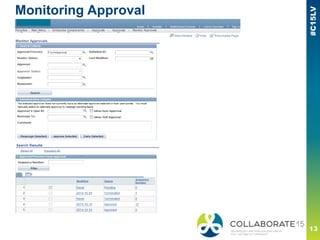
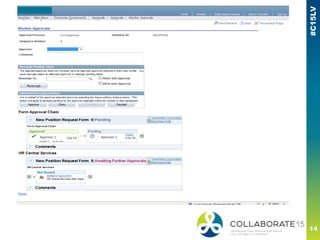
■ Keeping track of your
transactions
▪ Visibility for end users
— Audit your approvals and
requests
— Monitor transaction statuses
How it works
■ Key Pieces
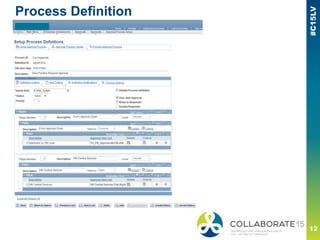
▪ Process ID and Definition ID
— Determines which application and which process this approval
process defines
— Example: Process ID= FormApproval, Definition ID=
NewPositionRequest
— Example: Process ID= ePerformance, Definition ID= QuarterReview
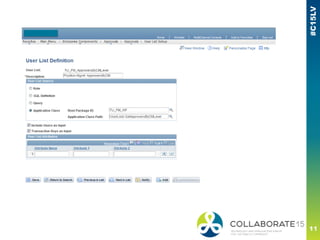
▪ Define User Lists
— Role definition, Query definition, SQL definition, or Application Class
definition.
▪ Notification Templates
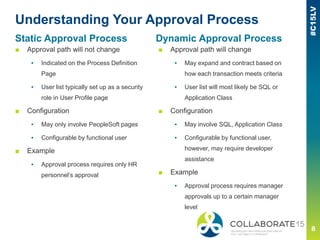
Understanding Your Approval Process
■ Approval path will not change
▪ Indicated on the Process Definition
Page
▪ User list typically set up as a security
role in User Profile page
■ Configuration
▪ May only involve PeopleSoft pages
▪ Configurable by functional user
■ Example
▪ Approval process requires only HR
personnel’s approval
■ Approval path will change
▪ May expand and contract based on
how each transaction meets criteria
▪ User list will most likely be SQL or
Application Class
■ Configuration
▪ May involve SQL, Application Class
▪ Configurable by functional user,
however, may require developer
assistance
■ Example
▪ Approval process requires manager
approvals up to a certain manager
level
Static Approval Process Dynamic Approval Process
Stages of approval
■ Your approval process may contain one or multiple stages
▪ A stage contains one or more approval paths
— If a stage contains multiple approval paths, these paths will execute
in parallel
— If a stage contains multiple approval paths, these paths will have
different approvers (meaning different user list set up).
▪ Define stages for approval process in Process Definition
▪ A stage can be Static or Dynamic
— Meaning, an approval process can be static or dynamic (one static
or dynamic stage with one or multiple static approval paths) or have
a combination of static and dynamic stages (more than one stage,
each stage with one or multiple approval paths).
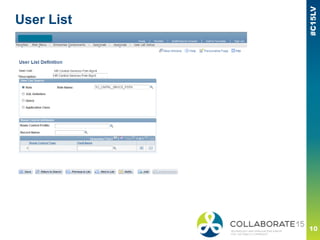
User List
Process Definition
Monitoring Approval
Approver 1 Approver 2
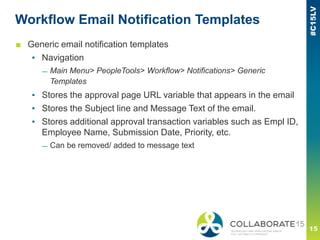
Workflow Email Notification Templates
■ Generic email notification templates
▪ Navigation
— Main Menu> PeopleTools> Workflow> Notifications> Generic
Templates
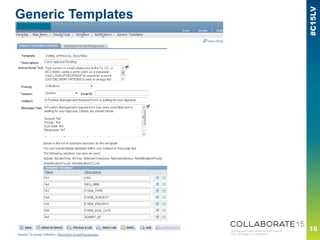
▪ Stores the approval page URL variable that appears in the email
▪ Stores the Subject line and Message Text of the email.
▪ Stores additional approval transaction variables such as Empl ID,
Employee Name, Submission Date, Priority, etc.
— Can be removed/ added to message text
Generic Templates
Key Considerations
■ What is the business process?
▪ What are the requirements for the approval workflow?
▪ What are some pain points that have prevented the streamlining of
workflow?
▪ How can we adapt?
■ Who are my users?
▪ Do I have a clearly defined group of users for every transaction or do my
users change depending on the circumstance?
▪ Are there any exceptions that I must consider?
■ Tying it all together with testing, testing, and more testing
▪ Are both the requirements and exceptions met?
▪ Are requesters, reviewers, and approvers able to perform necessary
transactions?
— Consider ease of use and security set up
▪ Are there any hiccups along the way?
Please complete the session
evaluation
We appreciate your feedback and insight
Session ID# 106850
You may complete the session evaluation either
on paper or online via the mobile app
Visit Seth & Dana at the Quest International Users Group
Booth #337
■ Let us show you how to leverage the Quest community to
maximize your ERP investment
■ Receive your personalized Quest Activation Plan & learn
how to make the most of your membership
■ Plus, find out how you can join us in celebrating our 20th
year of success – you might just win a special Quest-
themed bottle of Kentucky bourbon!
Quest is the home for PeopleSoft
and JD Edwards Users

PeopleSoft Approval Workflow Engine

  • 1.
    REMINDER Check in onthe COLLABORATE mobile app PeopleSoft Approval Workflow Engine Presented by: Alice Zhang HCM Consultant Emtec Inc Utilizing PeopleSoft Approval Workflow to Fit Your Business Needs Session ID#: 106850
  • 2.
    • Silence AudibleDevices • Note Fire Exits • Partake of Refreshments • Note Quest Staffers (green shirts) and Room Monitors • Complete Feedback Form • Ask Questions Administrative Notes Please:
  • 4.
    Utilizing PeopleSoft Approval Workflowto Fit your Business Needs
  • 5.
    PS Approval WorkflowEngine Overview ■ PeopleTools Requirement ▪ Code supporting AWE within PeopleTools 8.48 or greater ■ AWE defined for certain applications in v 9.0 and greater ▪ eProfile, eProfile Manager, Job Profile Manager, Absence Management, Form Approval, Time and Labor, Recruiting, ELM, and ePerformance ▪ Register custom transaction or additional applications with AWE ■ AWE in v 9.2 ▪ HCM 9.2 WorkCenter allows for a single navigation point for approvers—managers and administrators, etc. — Application pagelettes on the home screen ▪ Access workflow transactions on your mobile device. — Approve, Deny, Push back — View attachments/ add comments
  • 6.
    Benefits of utilizingAWE ■ Streamlined, automated workflow within an application ▪ Approve, deny, escalate, reassign or cancel approvals. ■ Predefined framework with flexibility in PeopleSoft pages ▪ Can be simple and configurable by functional users ▪ Can be complex to fit unique business needs ▪ Can assign ad hoc approvers/ reviewers per transaction ■ Generic email template notifications ▪ Customizable ▪ Link to approvals page ▪ Mobile friendly (v 9.2) ■ Keeping track of your transactions ▪ Visibility for end users — Audit your approvals and requests — Monitor transaction statuses
  • 7.
    How it works ■Key Pieces ▪ Process ID and Definition ID — Determines which application and which process this approval process defines — Example: Process ID= FormApproval, Definition ID= NewPositionRequest — Example: Process ID= ePerformance, Definition ID= QuarterReview ▪ Define User Lists — Role definition, Query definition, SQL definition, or Application Class definition. ▪ Notification Templates
  • 8.
    Understanding Your ApprovalProcess ■ Approval path will not change ▪ Indicated on the Process Definition Page ▪ User list typically set up as a security role in User Profile page ■ Configuration ▪ May only involve PeopleSoft pages ▪ Configurable by functional user ■ Example ▪ Approval process requires only HR personnel’s approval ■ Approval path will change ▪ May expand and contract based on how each transaction meets criteria ▪ User list will most likely be SQL or Application Class ■ Configuration ▪ May involve SQL, Application Class ▪ Configurable by functional user, however, may require developer assistance ■ Example ▪ Approval process requires manager approvals up to a certain manager level Static Approval Process Dynamic Approval Process
  • 9.
    Stages of approval ■Your approval process may contain one or multiple stages ▪ A stage contains one or more approval paths — If a stage contains multiple approval paths, these paths will execute in parallel — If a stage contains multiple approval paths, these paths will have different approvers (meaning different user list set up). ▪ Define stages for approval process in Process Definition ▪ A stage can be Static or Dynamic — Meaning, an approval process can be static or dynamic (one static or dynamic stage with one or multiple static approval paths) or have a combination of static and dynamic stages (more than one stage, each stage with one or multiple approval paths).
  • 10.
  • 12.
  • 13.
  • 14.
  • 15.
    Workflow Email NotificationTemplates ■ Generic email notification templates ▪ Navigation — Main Menu> PeopleTools> Workflow> Notifications> Generic Templates ▪ Stores the approval page URL variable that appears in the email ▪ Stores the Subject line and Message Text of the email. ▪ Stores additional approval transaction variables such as Empl ID, Employee Name, Submission Date, Priority, etc. — Can be removed/ added to message text
  • 16.
  • 17.
    Key Considerations ■ Whatis the business process? ▪ What are the requirements for the approval workflow? ▪ What are some pain points that have prevented the streamlining of workflow? ▪ How can we adapt? ■ Who are my users? ▪ Do I have a clearly defined group of users for every transaction or do my users change depending on the circumstance? ▪ Are there any exceptions that I must consider? ■ Tying it all together with testing, testing, and more testing ▪ Are both the requirements and exceptions met? ▪ Are requesters, reviewers, and approvers able to perform necessary transactions? — Consider ease of use and security set up ▪ Are there any hiccups along the way?
  • 18.
    Please complete thesession evaluation We appreciate your feedback and insight Session ID# 106850 You may complete the session evaluation either on paper or online via the mobile app
  • 19.
    Visit Seth &Dana at the Quest International Users Group Booth #337 ■ Let us show you how to leverage the Quest community to maximize your ERP investment ■ Receive your personalized Quest Activation Plan & learn how to make the most of your membership ■ Plus, find out how you can join us in celebrating our 20th year of success – you might just win a special Quest- themed bottle of Kentucky bourbon! Quest is the home for PeopleSoft and JD Edwards Users