ECM Tutorial Business Process Management Neil Wilson Technical Marketing Manager June 8, 2009
Introduction This series of short tutorials is intended to help you understand the basic technologies of the Open Text ECM Suite Each session lasts only 15 minutes Today’s session will cover Business Process Management and Workflow Copyright © Open Text Corporation. All rights reserved. Slide
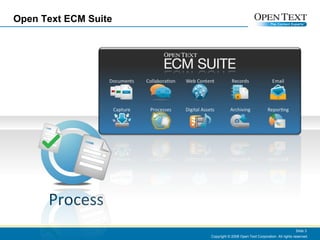
Open Text ECM Suite Copyright © 2008 Open Text Corporation. All rights reserved. Slide  Process
What is BPM? and What’s Workflow? “Workflow” is the technology that moves content around the enterprise. Workflow technologies are used to capture and model complex processes that involve routing content and tasks to different users.  For example, a typical document management workflow would include steps to author, review, authorize and publish a specific document. “BPM” extends workflow into a data integration tier.  That is, BPM enables automation of processes that not only work on documents, but also data that exists in other business applications and databases. Copyright © 2008 Open Text Corporation. All rights reserved. Slide
Why Do Organizations Need BPM/Workflow? BPM/Workflow systems create efficiencies by ensuring processes are followed consistently and accurately. BPM/Workflow tools provide auditing capabilities making them ideal for managing regulated processes. For processes that involve hundreds or thousands of transactions/day, BPM can offer significant  cost reductions/transaction. Integrating electronic forms into BPM/workflow  processes reduces errors and accelerates transaction processing.
Typical Applications Workflow : Staff Recruitment and Onboarding, Travel Request Approvals, Timesheet approvals, SOP Approvals, Feature Requests, Case Management, Complaint Handling, Bug Reporting, .. etc Business Process Management : Claims Processing, Loan Applications, Expense Claims, Purchasing Order Processing, Admission Forms (e.g. Students) Copyright © 2008 Open Text Corporation. All rights reserved. Slide
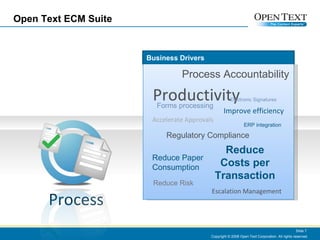
Open Text ECM Suite Copyright © 2008 Open Text Corporation. All rights reserved. Slide  Business Drivers Productivity Process Accountability Reduce Costs per Transaction Regulatory Compliance Reduce Risk Forms processing Improve efficiency Accelerate Approvals Escalation Management Reduce Paper Consumption ERP integration Process Electronic Signatures
Open Text BPM/Workflow Products Open Text has multiple product offerings. Workflow capabilities built into our core document management system can be extended to include advanced e-forms and electronic signatures. Open Text’s BPM server is sold separately – it integrates with business applications including ERP and legacy systems, such as SAP. Integrating BPM/Workflow with email is a key to user adoption and a successful deployment. Process Management
Demonstration Copyright © 2008 Open Text Corporation. All rights reserved. Slide  Let’s see some examples…
Workflow Manager Review Submit Draft Add Meta-Data Publisher Agent Notify Using the Workflow Painter, first map out the business process.
Initiation Submit Draft You can initiate a workflow by sending an email to the workflow’s email address with the draft document attached – as shown.
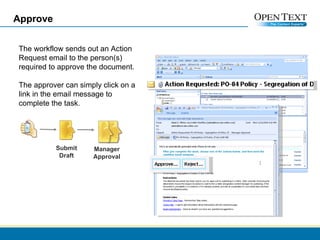
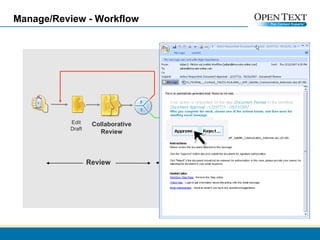
Approve Manager Approval The workflow sends out an Action Request email to the person(s) required to approve the document. The approver can simply click on a link in the email message to complete the task.  Submit Draft
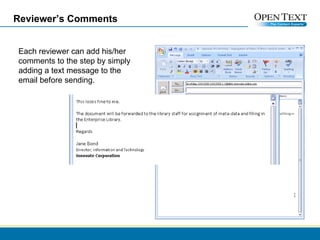
Reviewer’s Comments Each reviewer can add his/her comments to the step by simply adding a text message to the email before sending.
Content Manager Now that the document is approved it can be passed along to a content manager for publication. In this example, the content manager checks his Livelink ECM workflow assignments by opening a browser window. Clicking on the link provided opens up a page of detailed instructions to complete the task.
Complete Meta-data Form The content manager completes all of the required meta-data attributes in the workflow form before sending the document to the next step in the process.  Manager Review Add Meta-Data
Publish The final two steps are performed automatically by the Livelink ECM Workflow Agent. In this simple example, the agent moves the new document into an Enterprise Library folder and sets permissions for public access.  The final step of the workflow triggers the agent to send out an email alert to notify users of the newly published IT policy.  Publisher Agent Notify
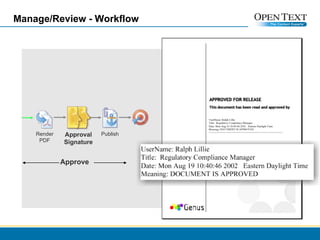
Audit A complete audit of the workflow process is captured automatically by Livelink ECM providing proof that the process was carried out according to corporate policy.
Notification Users receive an automatic email alert to inform them of the new policy and the initiator also receives a message to confirm that their document is approved and published.
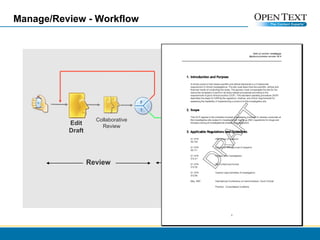
Manage/Review - Workflow Review Collaborative Review Edit Draft Render PDF Approve Approval Signature Publish In this example, we’ll use eSign workflow features to add an electronic signature step to a review/approval workflow
Manage/Review - Workflow Review Approve Collaborative Review Edit Draft Render PDF Approval Signature Publish
Manage/Review - Workflow Approve Render PDF Approval Signature Publish
Workflow and Forms Workflows can also include electronic forms to  accelerate internal business processes
Thank You Copyright © Open Text Corporation. All rights reserved. Slide

Primer Business Process Management

  • 1.
    ECM Tutorial BusinessProcess Management Neil Wilson Technical Marketing Manager June 8, 2009
  • 2.
    Introduction This seriesof short tutorials is intended to help you understand the basic technologies of the Open Text ECM Suite Each session lasts only 15 minutes Today’s session will cover Business Process Management and Workflow Copyright © Open Text Corporation. All rights reserved. Slide
  • 3.
    Open Text ECMSuite Copyright © 2008 Open Text Corporation. All rights reserved. Slide Process
  • 4.
    What is BPM?and What’s Workflow? “Workflow” is the technology that moves content around the enterprise. Workflow technologies are used to capture and model complex processes that involve routing content and tasks to different users. For example, a typical document management workflow would include steps to author, review, authorize and publish a specific document. “BPM” extends workflow into a data integration tier. That is, BPM enables automation of processes that not only work on documents, but also data that exists in other business applications and databases. Copyright © 2008 Open Text Corporation. All rights reserved. Slide
  • 5.
    Why Do OrganizationsNeed BPM/Workflow? BPM/Workflow systems create efficiencies by ensuring processes are followed consistently and accurately. BPM/Workflow tools provide auditing capabilities making them ideal for managing regulated processes. For processes that involve hundreds or thousands of transactions/day, BPM can offer significant cost reductions/transaction. Integrating electronic forms into BPM/workflow processes reduces errors and accelerates transaction processing.
  • 6.
    Typical Applications Workflow: Staff Recruitment and Onboarding, Travel Request Approvals, Timesheet approvals, SOP Approvals, Feature Requests, Case Management, Complaint Handling, Bug Reporting, .. etc Business Process Management : Claims Processing, Loan Applications, Expense Claims, Purchasing Order Processing, Admission Forms (e.g. Students) Copyright © 2008 Open Text Corporation. All rights reserved. Slide
  • 7.
    Open Text ECMSuite Copyright © 2008 Open Text Corporation. All rights reserved. Slide Business Drivers Productivity Process Accountability Reduce Costs per Transaction Regulatory Compliance Reduce Risk Forms processing Improve efficiency Accelerate Approvals Escalation Management Reduce Paper Consumption ERP integration Process Electronic Signatures
  • 8.
    Open Text BPM/WorkflowProducts Open Text has multiple product offerings. Workflow capabilities built into our core document management system can be extended to include advanced e-forms and electronic signatures. Open Text’s BPM server is sold separately – it integrates with business applications including ERP and legacy systems, such as SAP. Integrating BPM/Workflow with email is a key to user adoption and a successful deployment. Process Management
  • 9.
    Demonstration Copyright ©2008 Open Text Corporation. All rights reserved. Slide Let’s see some examples…
  • 10.
    Workflow Manager ReviewSubmit Draft Add Meta-Data Publisher Agent Notify Using the Workflow Painter, first map out the business process.
  • 11.
    Initiation Submit DraftYou can initiate a workflow by sending an email to the workflow’s email address with the draft document attached – as shown.
  • 12.
    Approve Manager ApprovalThe workflow sends out an Action Request email to the person(s) required to approve the document. The approver can simply click on a link in the email message to complete the task. Submit Draft
  • 13.
    Reviewer’s Comments Eachreviewer can add his/her comments to the step by simply adding a text message to the email before sending.
  • 14.
    Content Manager Nowthat the document is approved it can be passed along to a content manager for publication. In this example, the content manager checks his Livelink ECM workflow assignments by opening a browser window. Clicking on the link provided opens up a page of detailed instructions to complete the task.
  • 15.
    Complete Meta-data FormThe content manager completes all of the required meta-data attributes in the workflow form before sending the document to the next step in the process. Manager Review Add Meta-Data
  • 16.
    Publish The finaltwo steps are performed automatically by the Livelink ECM Workflow Agent. In this simple example, the agent moves the new document into an Enterprise Library folder and sets permissions for public access. The final step of the workflow triggers the agent to send out an email alert to notify users of the newly published IT policy. Publisher Agent Notify
  • 17.
    Audit A completeaudit of the workflow process is captured automatically by Livelink ECM providing proof that the process was carried out according to corporate policy.
  • 18.
    Notification Users receivean automatic email alert to inform them of the new policy and the initiator also receives a message to confirm that their document is approved and published.
  • 19.
    Manage/Review - WorkflowReview Collaborative Review Edit Draft Render PDF Approve Approval Signature Publish In this example, we’ll use eSign workflow features to add an electronic signature step to a review/approval workflow
  • 20.
    Manage/Review - WorkflowReview Approve Collaborative Review Edit Draft Render PDF Approval Signature Publish
  • 21.
    Manage/Review - WorkflowReview Approve Collaborative Review Edit Draft Render PDF Approval Signature Publish
  • 22.
    Manage/Review - WorkflowApprove Render PDF Approval Signature Publish
  • 23.
    Workflow and FormsWorkflows can also include electronic forms to accelerate internal business processes
  • 24.
    Thank You Copyright© Open Text Corporation. All rights reserved. Slide