Paypal + symfony payments made simple Massimiliano Arione September, 27th 2011
About me 2001: PHP developer 2006: GrUSP member 2009: member of GrUSP steering committee  2010: PUG Rome president :-)
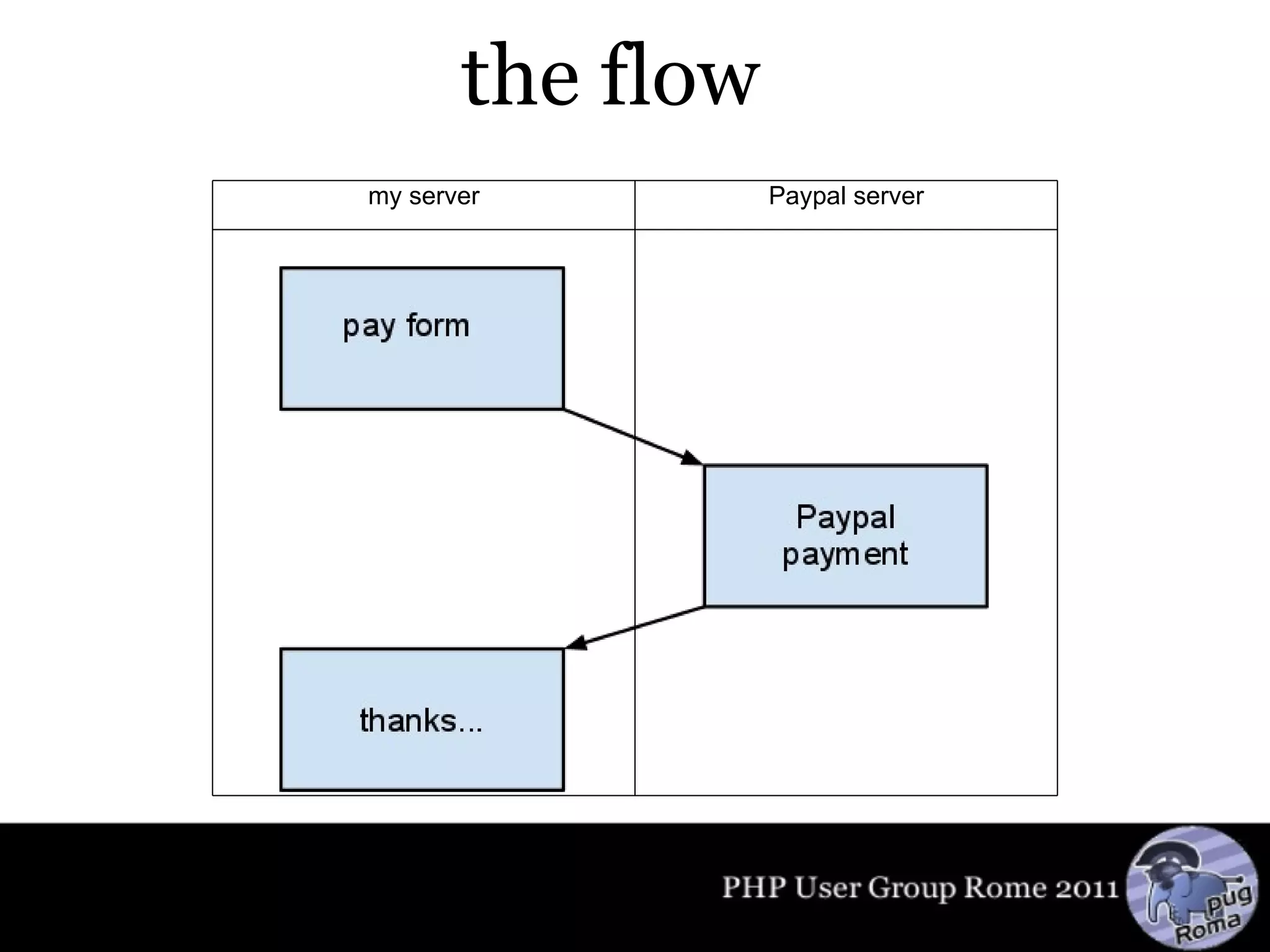
the flow my server Paypal server
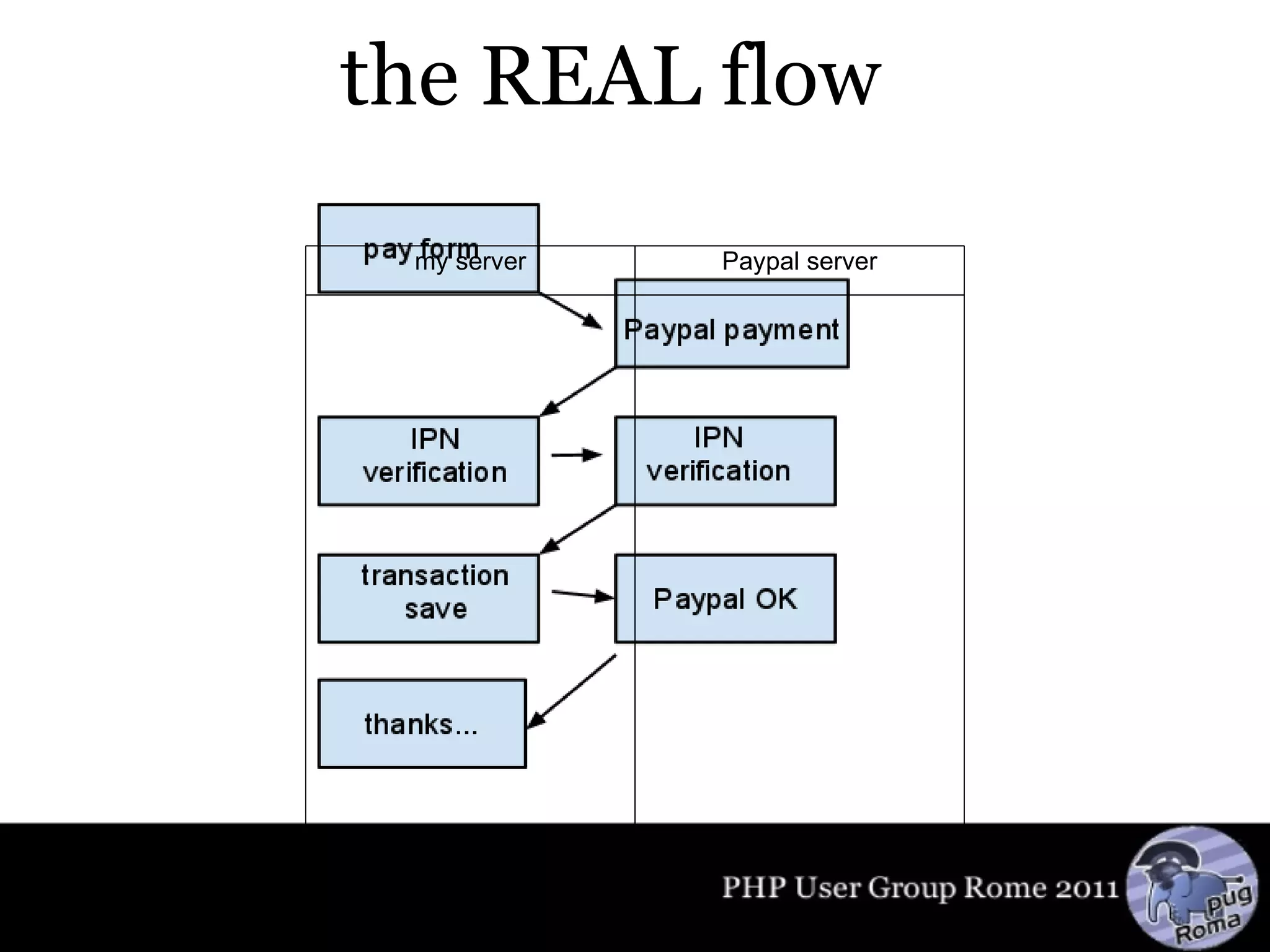
the REAL flow my server Paypal server
plugins sfPaymentPlugin sfPaymentPayPalPlugin sfWebBrowserPlugin
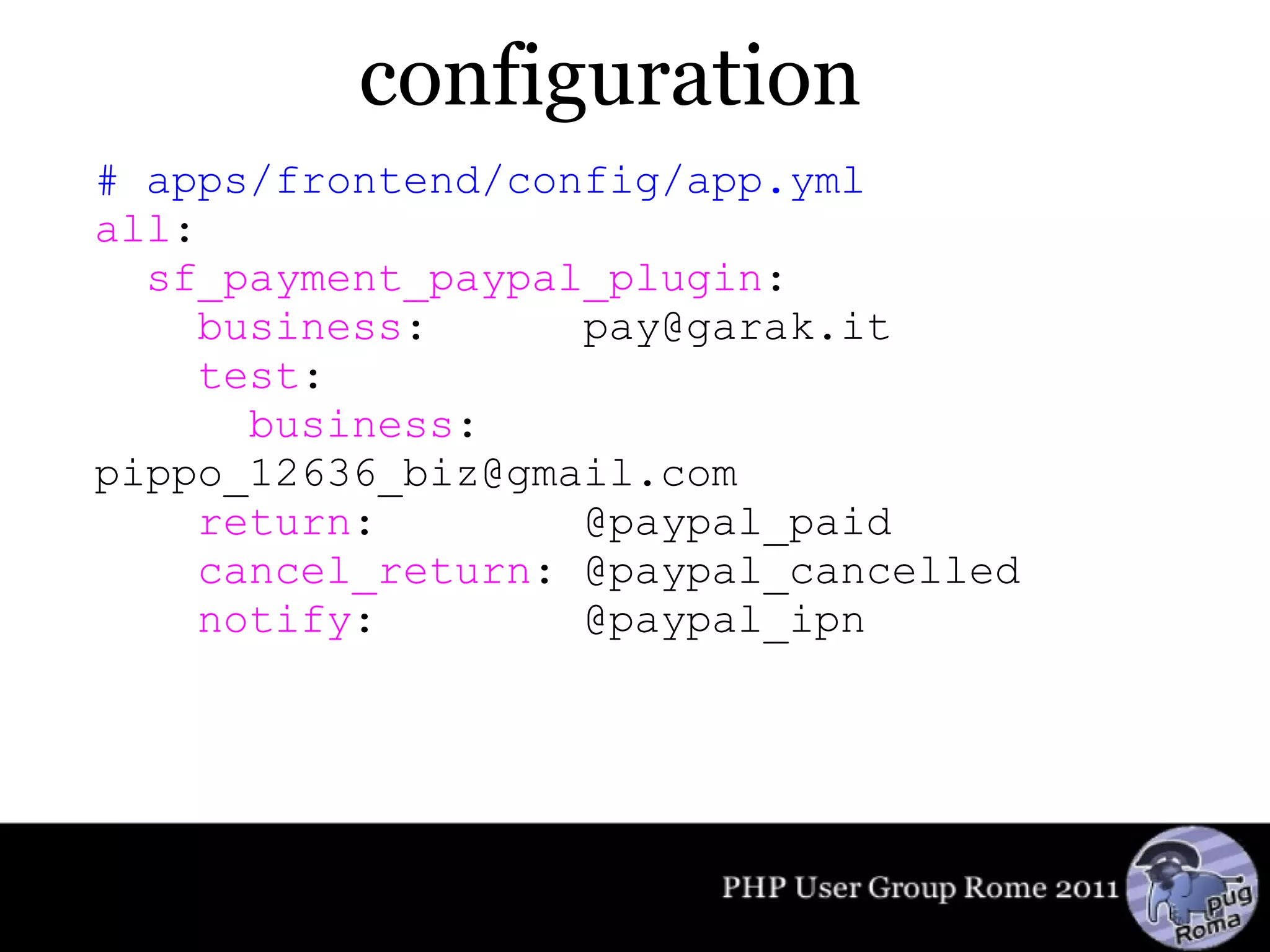
configuration # apps/frontend/config/app.yml all :    sf_payment_paypal_plugin :      business :      pay@garak.it      test :        business :    pippo_12636_biz@gmail.com      return :        @paypal_paid      cancel_return : @paypal_cancelled      notify :        @paypal_ipn
Model // lib/model/Purchase.class.php public function getTransaction() {   $ gateway  = new sfPaymentPayPal();   $gateway->fields['no_shipping'] = 1;   $gateway->fields['item_number'] = $this->getId();   $ transaction  = new sfPaymentTransaction($ gateway );   if (sfConfig::get('sf_environment') != 'prod')   {     $ transaction ->enableTestMode();   }   $ transaction ->setAmount($this->getPrice());   $ transaction ->setCurrency('EUR');   $ transaction ->setProductName($this->getName());      return $ transaction ; }
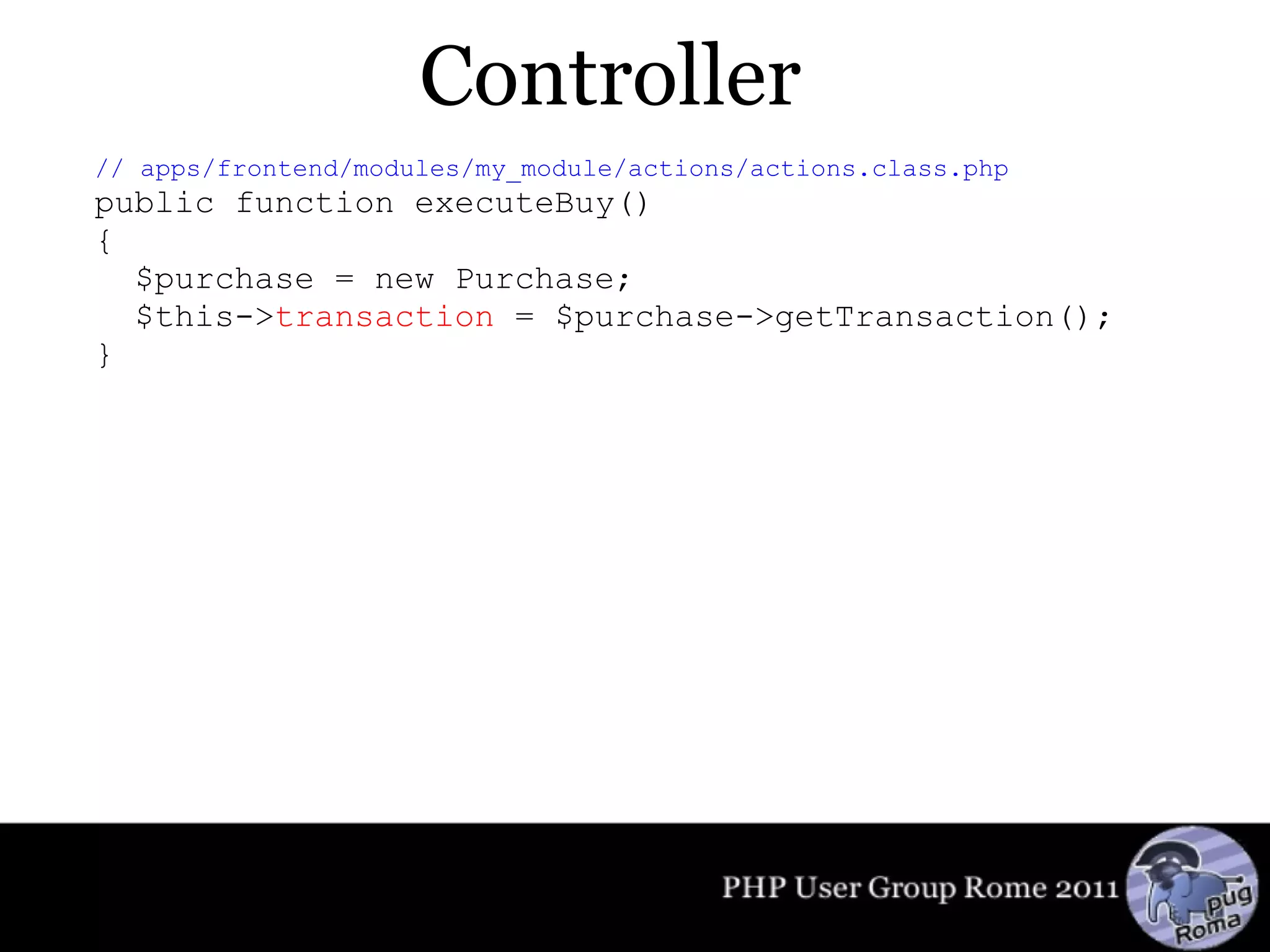
Controller // apps/frontend/modules/my_module/actions/actions.class.php public function executeBuy() {   $purchase = new Purchase;    $this-> transaction  = $purchase->getTransaction(); }
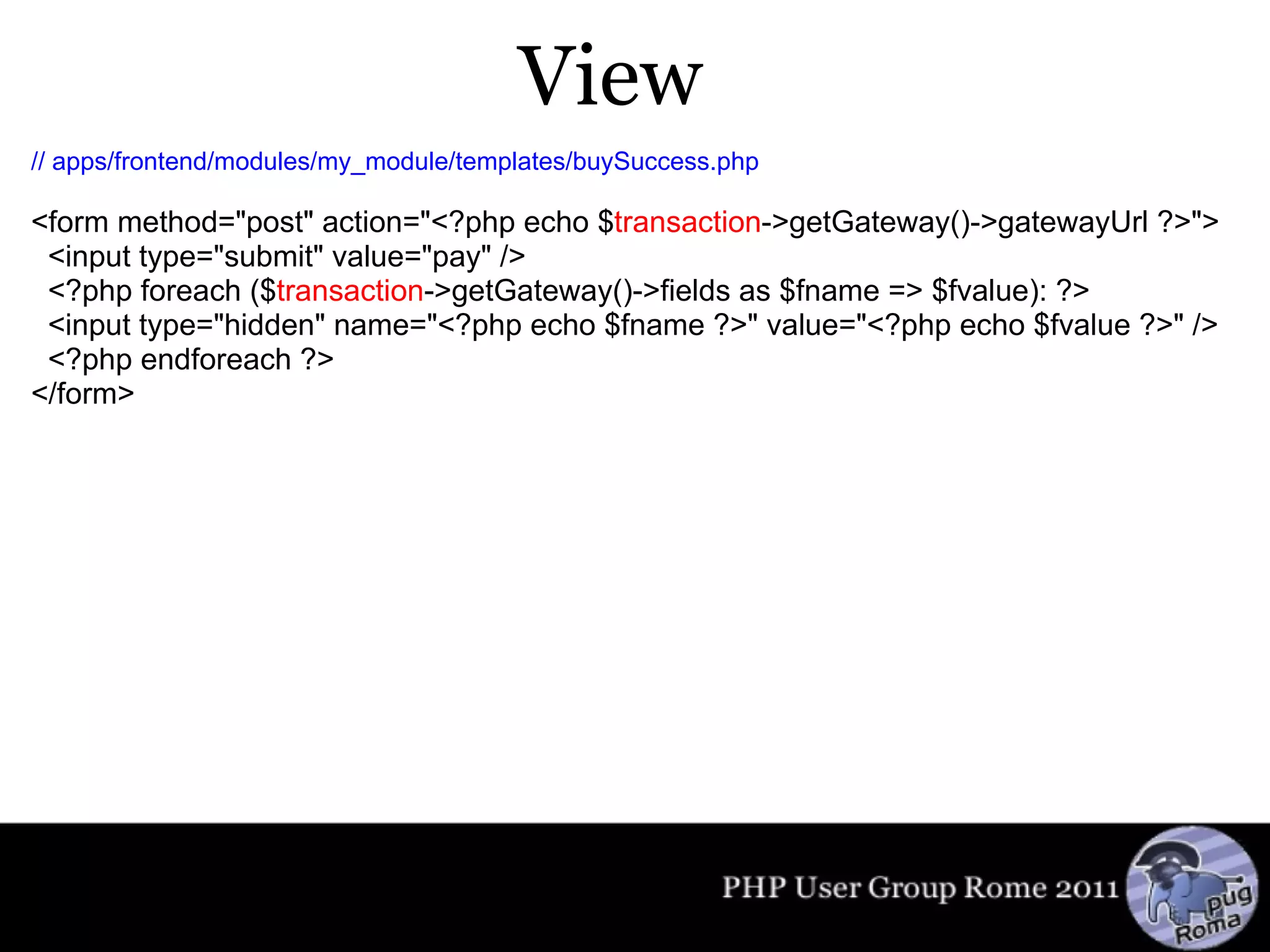
View // apps/frontend/modules/my_module/templates/buySuccess.php      <form method=&quot;post&quot; action=&quot;<?php echo $ transaction ->getGateway()->gatewayUrl ?>&quot;>   <input type=&quot;submit&quot; value=&quot;pay&quot; />   <?php foreach ($ transaction ->getGateway()->fields as $fname => $fvalue): ?>   <input type=&quot;hidden&quot; name=&quot;<?php echo $fname ?>&quot; value=&quot;<?php echo $fvalue ?>&quot; />   <?php endforeach ?> </form>
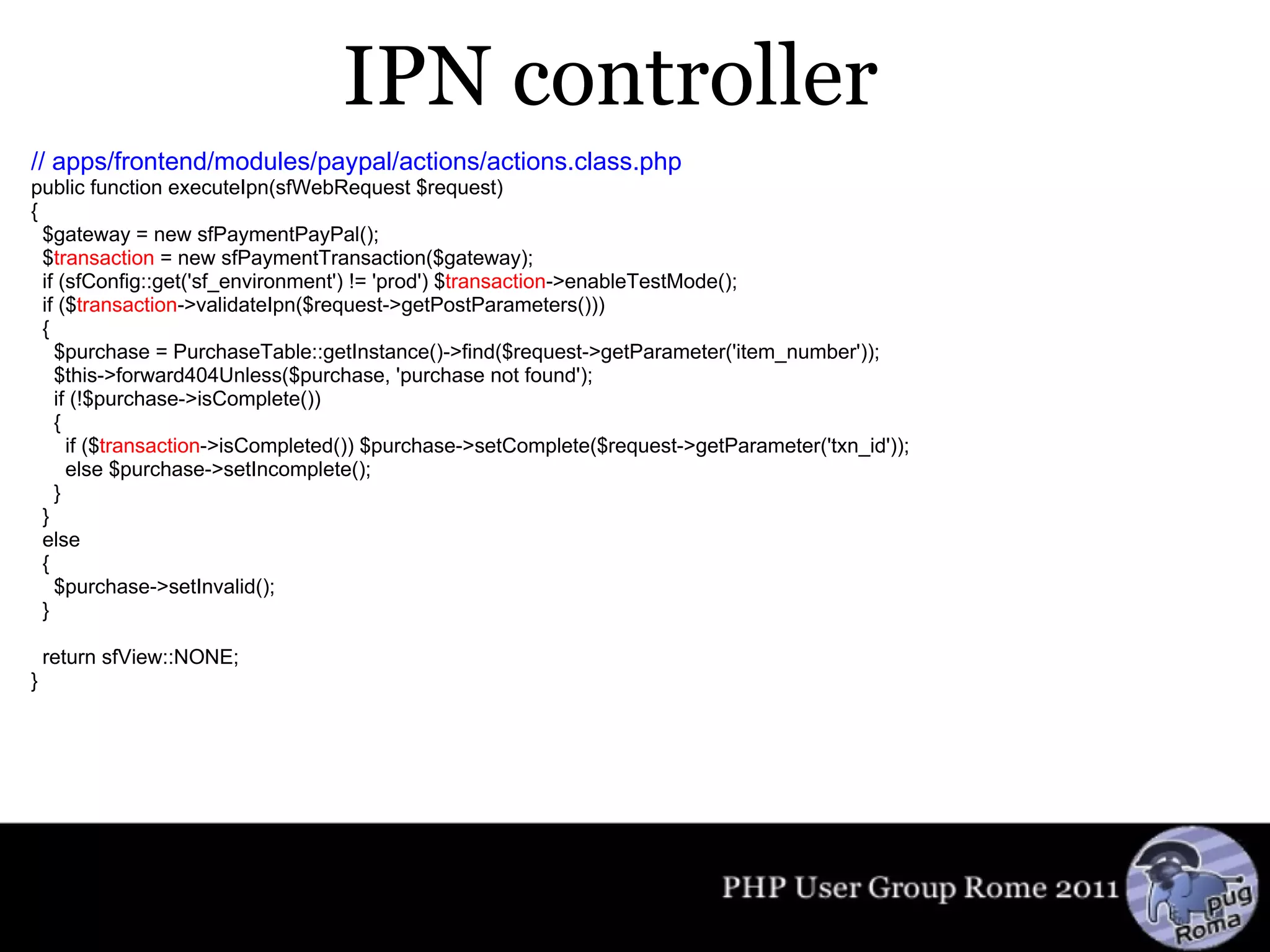
IPN controller // apps/frontend/modules/paypal/actions/actions.class.php public function executeIpn(sfWebRequest $request) {   $gateway = new sfPaymentPayPal();   $ transaction  = new sfPaymentTransaction($gateway);   if (sfConfig::get('sf_environment') != 'prod') $ transaction ->enableTestMode();   if ($ transaction ->validateIpn($request->getPostParameters()))   {     $purchase = PurchaseTable::getInstance()->find($request->getParameter('item_number'));     $this->forward404Unless($purchase, 'purchase not found');     if (!$purchase->isComplete())     {       if ($ transaction ->isCompleted()) $purchase->setComplete($request->getParameter('txn_id'));       else $purchase->setIncomplete();     }   }   else    {       $purchase->setInvalid();    }   return sfView::NONE; }
Thanks! Massimiliano Arione @ garakkio blog.garak.it

Paypal + symfony

  • 1.
    Paypal + symfonypayments made simple Massimiliano Arione September, 27th 2011
  • 2.
    About me 2001:PHP developer 2006: GrUSP member 2009: member of GrUSP steering committee 2010: PUG Rome president :-)
  • 3.
    the flow myserver Paypal server
  • 4.
    the REAL flowmy server Paypal server
  • 5.
  • 6.
    configuration # apps/frontend/config/app.ymlall :   sf_payment_paypal_plugin :     business :      pay@garak.it     test :       business :    pippo_12636_biz@gmail.com     return :        @paypal_paid     cancel_return : @paypal_cancelled     notify :        @paypal_ipn
  • 7.
    Model // lib/model/Purchase.class.phppublic function getTransaction() {   $ gateway = new sfPaymentPayPal();   $gateway->fields['no_shipping'] = 1;   $gateway->fields['item_number'] = $this->getId();   $ transaction = new sfPaymentTransaction($ gateway );   if (sfConfig::get('sf_environment') != 'prod')   {     $ transaction ->enableTestMode();   }   $ transaction ->setAmount($this->getPrice());   $ transaction ->setCurrency('EUR');   $ transaction ->setProductName($this->getName());     return $ transaction ; }
  • 8.
    Controller // apps/frontend/modules/my_module/actions/actions.class.phppublic function executeBuy() {   $purchase = new Purchase;   $this-> transaction = $purchase->getTransaction(); }
  • 9.
    View // apps/frontend/modules/my_module/templates/buySuccess.php    <form method=&quot;post&quot; action=&quot;<?php echo $ transaction ->getGateway()->gatewayUrl ?>&quot;>   <input type=&quot;submit&quot; value=&quot;pay&quot; />   <?php foreach ($ transaction ->getGateway()->fields as $fname => $fvalue): ?>   <input type=&quot;hidden&quot; name=&quot;<?php echo $fname ?>&quot; value=&quot;<?php echo $fvalue ?>&quot; />   <?php endforeach ?> </form>
  • 10.
    IPN controller //apps/frontend/modules/paypal/actions/actions.class.php public function executeIpn(sfWebRequest $request) {   $gateway = new sfPaymentPayPal();   $ transaction = new sfPaymentTransaction($gateway);   if (sfConfig::get('sf_environment') != 'prod') $ transaction ->enableTestMode();   if ($ transaction ->validateIpn($request->getPostParameters()))   {     $purchase = PurchaseTable::getInstance()->find($request->getParameter('item_number'));     $this->forward404Unless($purchase, 'purchase not found');     if (!$purchase->isComplete())     {       if ($ transaction ->isCompleted()) $purchase->setComplete($request->getParameter('txn_id'));       else $purchase->setIncomplete();     }   }   else   {     $purchase->setInvalid();   }   return sfView::NONE; }
  • 11.
    Thanks! Massimiliano Arione@ garakkio blog.garak.it

Editor's Notes

  • #4 questo è il tipico flusso di un pagamento con Paypal, almeno dal punto di vista dell&apos;utente
  • #5 dal nostro punto di vista, quello dello sviluppatore, c&apos;è un fattore in più: abbiamo bisogno di fare una &amp;quot;conversazione&amp;quot; server2server con Paypal per utilizzare l&apos;IPN (Instant Payment Notification), che ci consente di sapere se l&apos;utente ha pagato, senza aspettare che torni sul nostro sito (dove potrebbe anche non tornare, dopo il pagamento)
  • #6 questi sono i 3 plugin che abbiamo bisogno di installare
  • #7 questa è la semplice configurazione che dobbiamo inserire in app.yml I valori vanno ovviamente adattati col proprio account di Paypal (sia quello vero che quello di sandbox). Le 3 rotte vanno definite, ovviamente con nomi a piacere.
  • #8 Sarebbe bene definire un modello in cui memorizzare anche nel nostro server le transazioni di Paypal, magari con un riferimento all&apos;ID della transazione di Paypal stesso. In questo esempio ho chiamato il modello &amp;quot;Purchase&amp;quot;. Questo metodo serve per ottenere un oggetto sfPaymentTransaction
  • #9 Nel controllore istanzio Purchase e ottengo l&apos;oggetto per la transazione
  • #10 La vista è molto semplice, l&apos;unica personalizzazione possibile è l&apos;etichetta del pulsante
  • #11 Questo è il cuore del funzioonamento: l&apos;azione a cui corrisponde la rotta @paypal_ipn vista prima. Qui gestiamo l&apos;interazione col server di Paypal e memorizziamo il risultato nel nostro modello Purchase.
  • #12 È tutto qui! Visto come è facile? :-)